4-165-522-61(1)
©2010 Sony Corporation Printed in China
(1)
Quick Setup Guide/Guide d’installation rapide
1
Connecting the speakers/Raccordement des enceintes
2
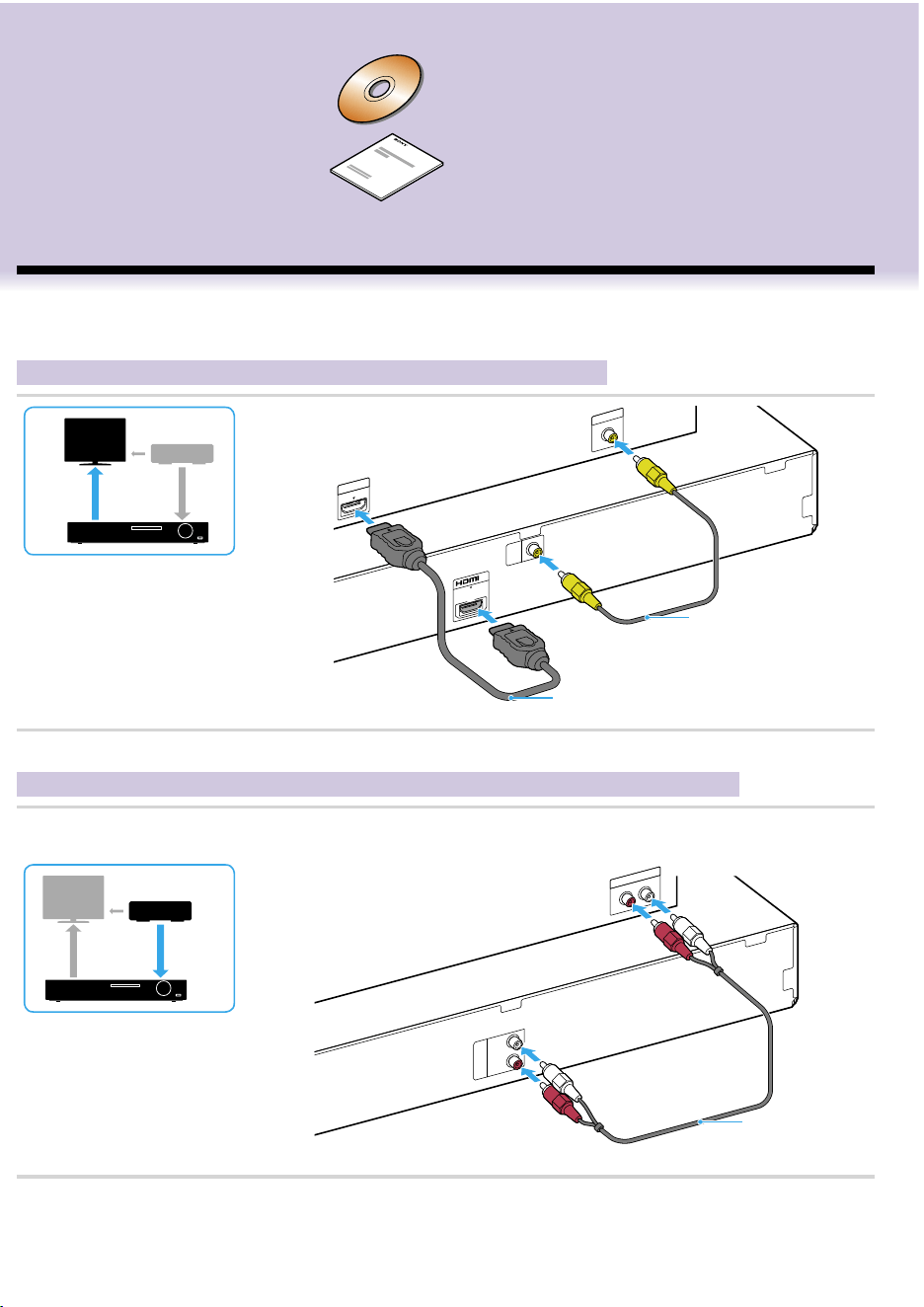
Connecting your TV/cable box/Raccordement de votre téléviseur/décodeur
To connect speaker cords to the speaker/
Raccordement des cordons d’enceinte à
l’enceinte
DAV-TZ510/TZ710
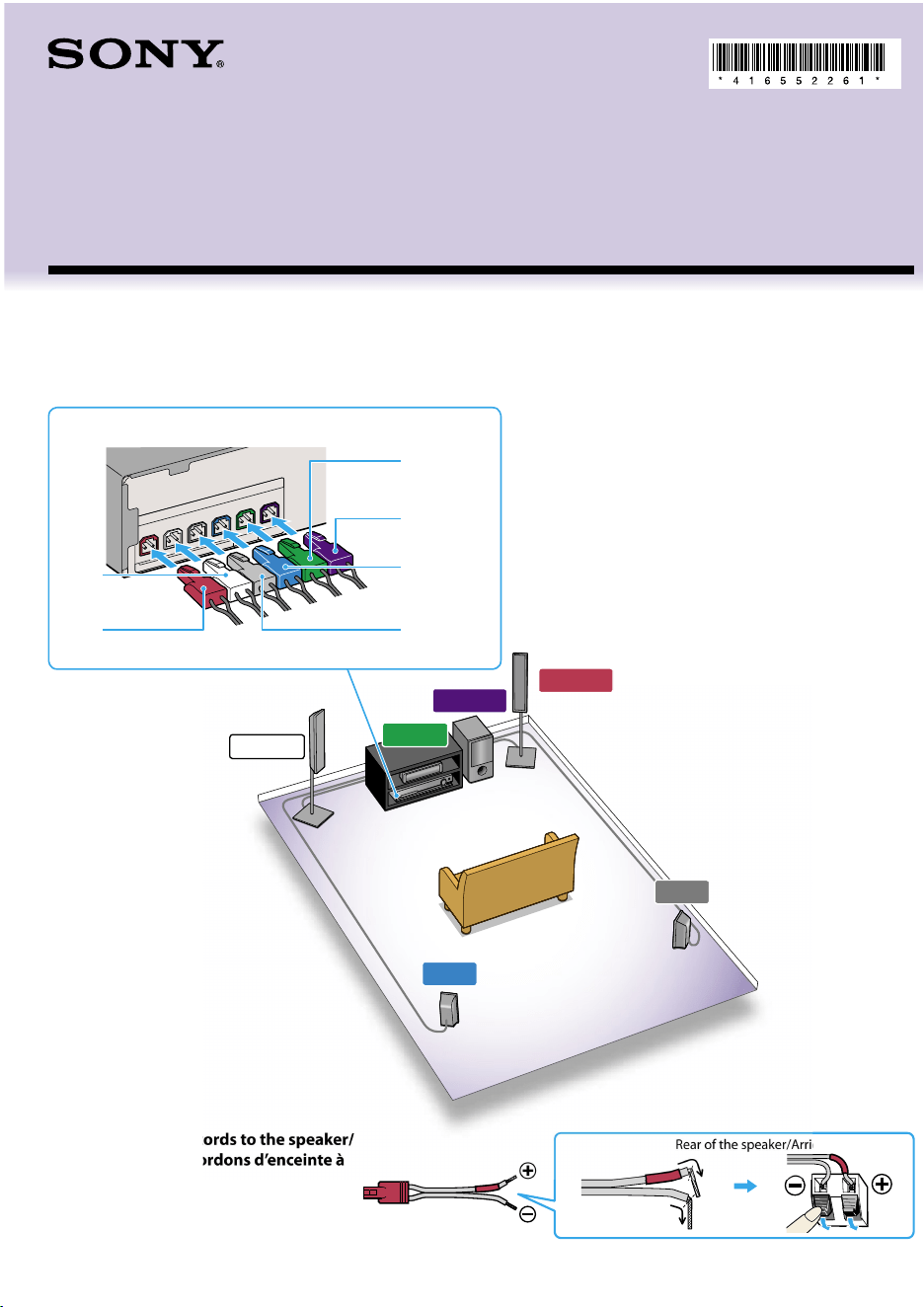
First, assemble the speakers (refer to the Speaker Installation Guide), and then connect the speaker cords to match
the color of the SPEAKERS jacks of the unit.
Commencez par assembler les enceintes (reportez-vous au Guide d’installation des enceintes), puis raccordez les
cordons d’enceinte en respectant la couleur des prises SPEAKERS de l’appareil.
Depending on the jacks on your TV or cable box, select the video and audio connection method.
Selon les prises disponibles sur votre téléviseur ou votre décodeur, sélectionnez la méthode de connexion vidéo et audio.
Connecting the video to your TV/Raccordement de la vidéo à votre téléviseur
VIDEO
VIDEO
P
B
/
C
B
P
R
/
C
R
Y
C
O
M
P
ON
E
N
T
V
I
DE
O I
N
D
I
G
IT
A
L
O
U
T
C
O
A
XI
A
L
O
P
T
I
C
A
L
T
V
A
U
D
I
O
O
U
T
L
T
V
/
V
I
D
E
O
R
H
D
M
I
I
N
V
I
D
E
O I
N
V
I
D
E
O
OU
T
O
U
T
Method 2*/
Méthode 2*
Method 1/
Méthode 1
*Not supplied/*Non fourni
Connecting the audio from your cable box/Raccordement du son provenant de votre décodeur
If you do not use a cable box, refer to “Connecting your TV/set-top box” in the Operating Instructions.
Si vous n’utilisez pas de décodeur, reportez-vous à la section « Raccordement de votre téléviseur/décodeur » du Mode d’emploi.
AUDIO
AUDIO
O
P
T
I
CA
L
D
IGI
TA
L
O
U
T
C
O
A
X
I
A
L
D
IGI
T
A
L
O
UT
D
I
G
I
T
A
L
O
U
T
C
O
A
X
IA
L
O
P
T
IC
A
L
T
V
A
U
D
IO
O
U
T
L
R
T
V
/
V
I
D
E
O
L
R
AU
D
IO
O
U
T
T
V
/
CA
B
L
E
A
U
D
I
O
I
N
L
R
Not supplied/
Non fourni
Continued/Suite
Rear of the speaker/Arrière de l’enceinte
SUBWOOFER
SUR L
SUR R
FRONT R
CENTER
FRONT L
Main unit/
Unité principale
You can confirm that the System and TV are connected correctly
using the Easy Setup Disc.
Vous pouvez vérifier que le système et le téléviseur sont
correctement raccordés en utilisant le Disque d’installation facile.
For details, refer to the Operating Instructions.
Pour plus de détails, reportez-vous au Mode d’emploi.
DAV-TZ510 is the model used for illustration purposes.
Le modèle illustré est le DAV-TZ510.
Rear panel of the main unit/Panneau arrière de l’unité principale
S
P
E
AK
E
R
S
F
R
O
NT
R
F
RO
NT
L
S
U
R
R
S
U
R
L
C
E
N
T
E
R
S
U
B
W
O
O
F
ER
O
N
L
Y
F
O
R
S
S
-T
S
O
N
L
Y
FO
R
S
S
-
C
T
O
N
L
Y
FO
R
S
S
-
W
S
Green
Vert
Purple
Violet
Red
Rouge
White
Blanc
Blue
Bleu
Gray
Gris
4-165-522-61(1)
©2010 Sony Corporation Printed in China
(1)
Quick Setup Guide/Guide d’installation rapide
1
Connecting the speakers/Raccordement des enceintes
2
Connecting your TV/cable box/Raccordement de votre téléviseur/décodeur
To connect speaker cords to the speaker/
Raccordement des cordons d’enceinte à
l’enceinte
DAV-TZ510/TZ710
First, assemble the speakers (refer to the Speaker Installation Guide), and then connect the speaker cords to match
the color of the SPEAKERS jacks of the unit.
Commencez par assembler les enceintes (reportez-vous au Guide d’installation des enceintes), puis raccordez les
cordons d’enceinte en respectant la couleur des prises SPEAKERS de l’appareil.
Depending on the jacks on your TV or cable box, select the video and audio connection method.
Selon les prises disponibles sur votre téléviseur ou votre décodeur, sélectionnez la méthode de connexion vidéo et audio.
Connecting the video to your TV/Raccordement de la vidéo à votre téléviseur
VIDEO
VIDEO
P
B
/
C
B
P
R
/
C
R
Y
C
O
M
P
ON
E
N
T
V
I
DE
O I
N
D
I
G
IT
A
L
O
U
T
C
O
A
XI
A
L
O
P
T
I
C
A
L
T
V
A
U
D
I
O
O
U
T
L
T
V
/
V
I
D
E
O
R
H
D
M
I
I
N
V
I
D
E
O I
N
V
I
D
E
O
OU
T
O
U
T
Method 2*/
Méthode 2*
Method 1/
Méthode 1
*Not supplied/*Non fourni
Connecting the audio from your cable box/Raccordement du son provenant de votre décodeur
If you do not use a cable box, refer to “Connecting your TV/set-top box” in the Operating Instructions.
Si vous n’utilisez pas de décodeur, reportez-vous à la section « Raccordement de votre téléviseur/décodeur » du Mode d’emploi.
AUDIO
AUDIO
O
P
T
I
CA
L
D
IGI
TA
L
O
U
T
C
O
A
X
I
A
L
D
IGI
T
A
L
O
UT
D
I
G
I
T
A
L
O
U
T
C
O
A
X
IA
L
O
P
T
IC
A
L
T
V
A
U
D
IO
O
U
T
L
R
T
V
/
V
I
D
E
O
L
R
AU
D
IO
O
U
T
T
V
/
CA
B
L
E
A
U
D
I
O
I
N
L
R
Not supplied/
Non fourni
Continued/Suite
Rear of the speaker/Arrière de l’enceinte
SUBWOOFER
SUR L
SUR R
FRONT R
CENTER
FRONT L
Main unit/
Unité principale
You can confirm that the System and TV are connected correctly
using the Easy Setup Disc.
Vous pouvez vérifier que le système et le téléviseur sont
correctement raccordés en utilisant le Disque d’installation facile.
For details, refer to the Operating Instructions.
Pour plus de détails, reportez-vous au Mode d’emploi.
DAV-TZ510 is the model used for illustration purposes.
Le modèle illustré est le DAV-TZ510.
Rear panel of the main unit/Panneau arrière de l’unité principale
S
P
E
AK
E
R
S
F
R
O
NT
R
F
RO
NT
L
S
U
R
R
S
U
R
L
C
E
N
T
E
R
S
U
B
W
O
O
F
ER
O
N
L
Y
F
O
R
S
S
-T
S
O
N
L
Y
FO
R
S
S
-
C
T
O
N
L
Y
FO
R
S
S
-
W
S
Green
Vert
Purple
Violet
Red
Rouge
White
Blanc
Blue
Bleu
Gray
Gris
Home Theatre System
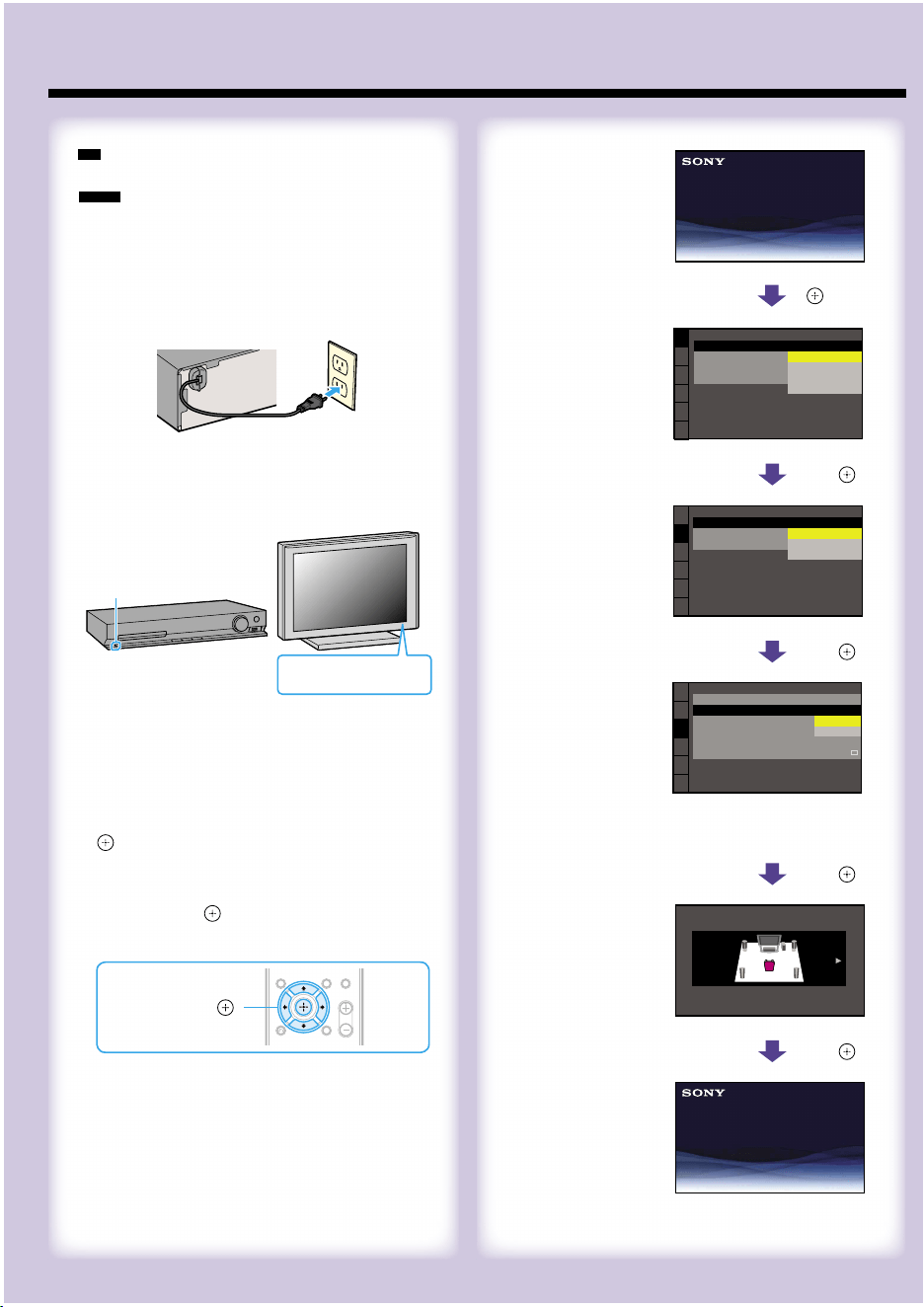
Select an on-screen
language.
Sélectionnez la langue
d’affichage à l’écran.
LANGUAGE SETUP
MENU:
OSD:
AUDIO:
SUBTITLE:
ENGLISH
ENGLISH
FRENCH
SPANISH
PORTUGUESE
/,
Select the aspect ratio
of the connected TV.
Sélectionnez le format
d’écran du téléviseur
raccordé.
VIDEO SETUP
COLOR SYSTEM
(VIDEO CD)
:
TV TYPE:
PAUSE MODE:
16:9
16:9
4:3 LETTER BOX
4:3 PAN SCAN
/,
Select [ON] when you
connect the main unit
and the TV with an
HDMI cable.
Sélectionnez [OUI]
lorsque vous raccordez
l’unité principale et le
téléviseur à l’aide d’un
câble HDMI.
HDMI SETUP
HDMI RESOLUTION:
VOLUME LIMIT:
AUTO
(1920x1080p)
OFF
SD
YC
B
C
R
/RGB(HDMI):
JPEG RESOLUTION:
AUDIO(HDMI):
CONTROL FOR HDMI:
ON
ON
OFF
/,
Select the speaker
formation.
Sélectionnez la
disposition des
enceintes.
SPEAKER FORMATION
STANDARD
/,
QUICK SETUP is complete.
Home Theatre System
Note
Do not insert a disc before performing the Quick Setup.
Remarque
N’insérez pas de disque avant d’exécuter l’Installation rapide.
1
Connect the AC power cord.
The shape of the wall outlet differs depending on the area.
Raccordez le cordon d’alimentation.
La forme de la prise murale varie selon la région.
C
E
N
T
E
R
S
P
EA
K
E
R
S
S
U
B
W
O
O
F
E
R
F
R
O
N
T
R
F
R
O
N
T
L
2
Turn on the power of the main unit and TV.
Mettez l’unité principale et le téléviseur sous
tension.
/
/
(power/alimentation)
3
Switch the input selector on your TV to display
“SONY Home Theatre System.”
Commutez le sélecteur d’entrée du téléviseur
pour afficher « SONY Home Theatre System ».
4
Set each following item, using /// and
.
Displayed items vary depending on the area.
Réglez chacun des éléments suivants à l’aide
de /// et .
Les éléments affichés varient selon la région.
///,
(ENTER)
3
Performing the Quick Setup/Exécution de l’Installation rapide
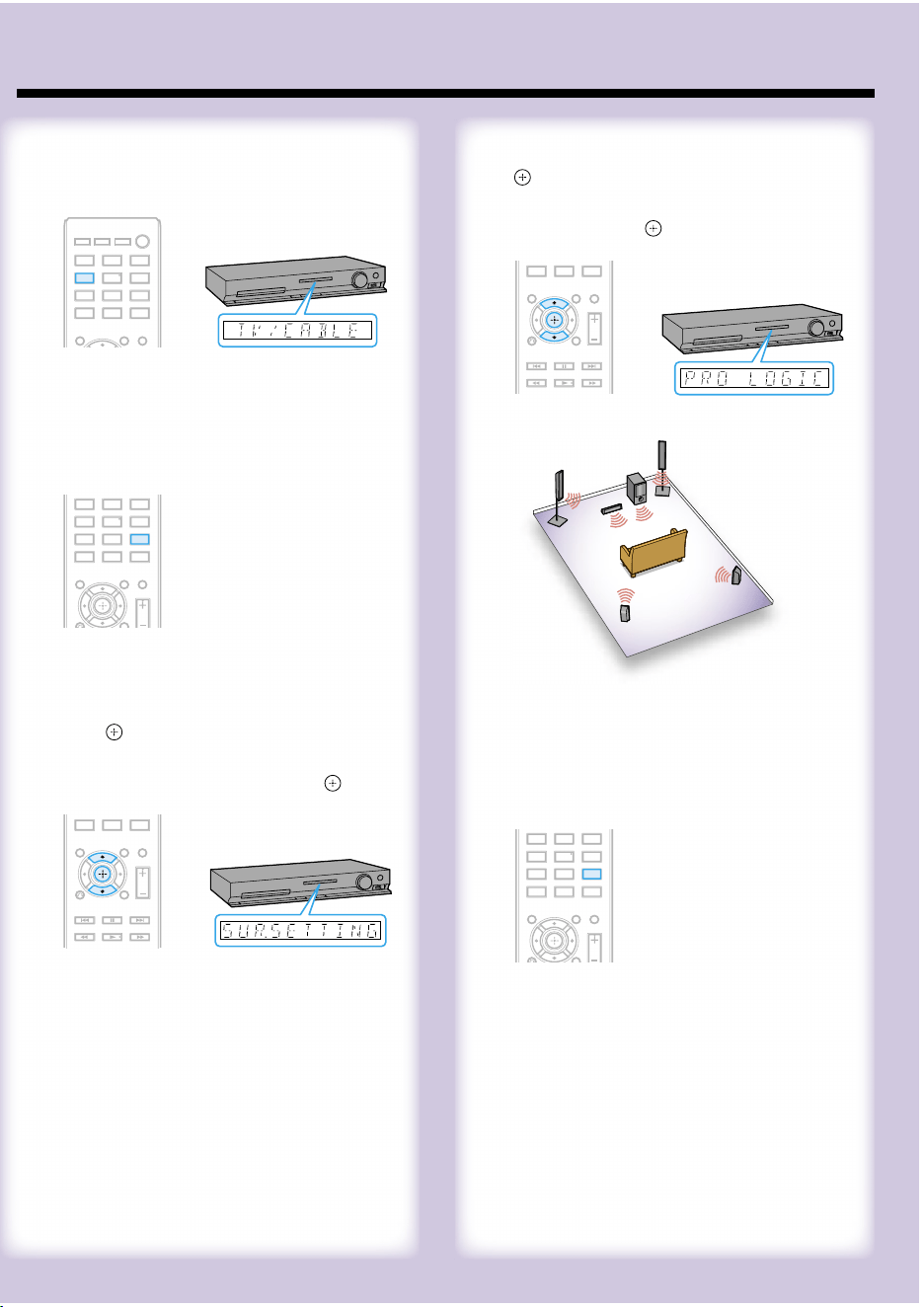
Listening to TV sound from all speakers/Ecoute du son du téléviseur par l’intermédiaire de toutes les enceintes
4
Press / to display “PRO LOGIC,” then press
.
Appuyez sur / pour afficher « PRO LOGIC »,
puis appuyez sur .
5
Press SYSTEM MENU to exit the menu.
Appuyez sur SYSTEM MENU pour quitter le
menu.
1
Press TV
/CABLE
.
Appuyez sur TV/CABLE.
2
Press SYSTEM MENU.
Appuyez sur SYSTEM MENU.
3
Press / to display “SUR. SETTING,” then
press .
Appuyez sur / pour afficher
« SUR.SETTING », puis appuyez sur .
Home Theatre System
Select an on-screen
language.
Sélectionnez la langue
d’affichage à l’écran.
LANGUAGE SETUP
MENU:
OSD:
AUDIO:
SUBTITLE:
ENGLISH
ENGLISH
FRENCH
SPANISH
PORTUGUESE
/,
Select the aspect ratio
of the connected TV.
Sélectionnez le format
d’écran du téléviseur
raccordé.
VIDEO SETUP
COLOR SYSTEM
(VIDEO CD)
:
TV TYPE:
PAUSE MODE:
16:9
16:9
4:3 LETTER BOX
4:3 PAN SCAN
/,
Select [ON] when you
connect the main unit
and the TV with an
HDMI cable.
Sélectionnez [OUI]
lorsque vous raccordez
l’unité principale et le
téléviseur à l’aide d’un
câble HDMI.
HDMI SETUP
HDMI RESOLUTION:
VOLUME LIMIT:
AUTO
(1920x1080p)
OFF
SD
YC
B
C
R
/RGB(HDMI):
JPEG RESOLUTION:
AUDIO(HDMI):
CONTROL FOR HDMI:
ON
ON
OFF
/,
Select the speaker
formation.
Sélectionnez la
disposition des
enceintes.
SPEAKER FORMATION
STANDARD
/,
QUICK SETUP is complete.
Home Theatre System
Note
Do not insert a disc before performing the Quick Setup.
Remarque
N’insérez pas de disque avant d’exécuter l’Installation rapide.
1
Connect the AC power cord.
The shape of the wall outlet differs depending on the area.
Raccordez le cordon d’alimentation.
La forme de la prise murale varie selon la région.
C
E
N
T
E
R
S
P
EA
K
E
R
S
S
U
B
W
O
O
F
E
R
F
R
O
N
T
R
F
R
O
N
T
L
2
Turn on the power of the main unit and TV.
Mettez l’unité principale et le téléviseur sous
tension.
/
/
(power/alimentation)
3
Switch the input selector on your TV to display
“SONY Home Theatre System.”
Commutez le sélecteur d’entrée du téléviseur
pour afficher « SONY Home Theatre System ».
4
Set each following item, using /// and
.
Displayed items vary depending on the area.
Réglez chacun des éléments suivants à l’aide
de /// et .
Les éléments affichés varient selon la région.
///,
(ENTER)
3
Performing the Quick Setup/Exécution de l’Installation rapide
Listening to TV sound from all speakers/Ecoute du son du téléviseur par l’intermédiaire de toutes les enceintes
4
Press / to display “PRO LOGIC,” then press
.
Appuyez sur / pour afficher « PRO LOGIC »,
puis appuyez sur .
5
Press SYSTEM MENU to exit the menu.
Appuyez sur SYSTEM MENU pour quitter le
menu.
1
Press TV
/CABLE
.
Appuyez sur TV/CABLE.
2
Press SYSTEM MENU.
Appuyez sur SYSTEM MENU.
3
Press / to display “SUR. SETTING,” then
press .
Appuyez sur / pour afficher
« SUR.SETTING », puis appuyez sur .