
USER GUIDE
NZ AU GB IE
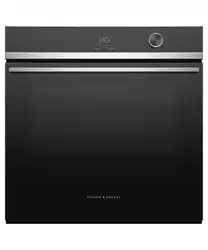
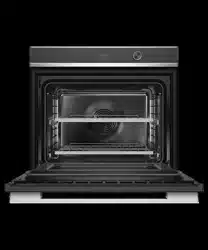
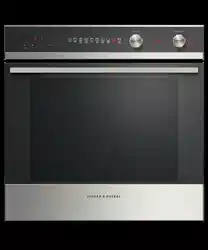
BUILT-IN OVEN
OB60SD Single models


1
CONTENTS
IMPORTANT!
SAVE THESE INSTRUCTIONS
The models shown in this user guide may not be available in all markets and are subject
to change at any time. For current details about model and specification availability in
your country, please go to our website www.fisherpaykel.com or contact your local
Fisher & Paykel dealer.
Safety and warnings 2
Introduction 9
First use 10
Using the Timer 16
Cooking guide 17
Oven functions 20
Cooking charts 26
Automatic cooking 32
Using the meat probe (some models only) 34
User preference settings 36
Sabbath setting 40
Care and cleaning 42
Using the Self Clean function 53
Troubleshooting 56
Alert codes 59
Warranty and service 61
Energy guidelines (GB IE only) 62
2
Your oven has been carefully designed to operate safely during normal cooking
procedures. Please keep the following safety instructions in mind when you are using it:
SAFETY AND WARNINGS
WARNING!
Electrical Shock Hazard
Turn the oven off at the wall before replacing
the oven lamp.
Failure to follow this advice may result in
electrical shock or death.
!
WARNING!
Fire Hazard
Follow the instructions on starting a Self
Clean cycle carefully. Items made from
combustible materials (for example: wood,
fabric, plastic) may catch fire if left in the
oven during a Self Clean cycle.
Do not place aluminium foil, dishes, trays,
water or ice on the oven floor during
cooking, as doing so will irreversibly damage
the enamel; lining the oven with aluminium
foil may even cause fire.
Never use your appliance for warming or
heating the room. Persons could be burned
or injured or a fire could start.
Storage in or on appliance: flammable
materials should not be stored in an oven or
near its surface.
Failure to follow this advice may result in
overheating, burning, and injury.
!
3
SAFETY AND WARNINGS
WARNING!
Hot Surface Hazard
Accessible parts may become hot when in
use.
To avoid burns and scalds, keep children
away.
Use oven mitts or other protection when
handling hot surfaces such as oven shelves or
dishes.
Use care when opening the oven door.
Let hot air or steam escape before removing
or replacing food.
Do not touch heating elements or interior
surfaces of the oven. Heating elements may
be hot even though they are dark in colour.
Interior surfaces
of an oven become hot enough to cause
burns. During and after use, do not touch,
or let clothing or other flammable materials
contact heating elements or interior surfaces
of the oven
until they have had sufficient time to cool.
Other surfaces of the appliance may become
hot enough to cause burns - among these
surfaces are the oven vent,
the surface near the oven vent, and the oven
door.
Failure to follow this advice could result in
burns and scalds.
!
WARNING!
Cut Hazard
Take care - some edges are sharp.
Failure to use caution could result in injury or
cuts.
!

4
SAFETY AND WARNINGS
IMPORTANT SAFETY INSTRUCTIONS
To reduce the risk of fire, electrical shock, injury to
persons or damage when using the oven, follow the
important safety instructions listed below:
y Read all the instructions before using the oven. Use
the oven only for its intended purpose as described
in these instructions.
y Proper installation: be sure your appliance is
properly installed and earthed by a qualified
technician.
y Isolating switch: make sure this oven is connected
to a circuit which incorporates an isolating switch
providing full disconnection from the power supply.
y Household appliances are not intended to be played
with by children.
y Do not leave children alone. Children should not
be left alone or unattended in the area where the
appliance is in use. They should never be allowed to
sit or stand on any part of the appliance.
y Children of less than 8 years old must be kept away
from the appliance unless continuously supervised.
This appliance can be used by children aged from 8
years and above, and persons with reduced physical,
sensory or mental capabilities or lack of experience
and knowledge, if they have been given supervision
or instruction concerning the use of the appliance
in a safe way and they understand the hazards
involved. Cleaning and user maintenance shall not be
done by children without supervision.
y Do not place heavy objects on the oven door.
y Wear proper apparel. Do not wear loose fitting or
hanging garments when using the appliance. They
could ignite or melt if they touch an element or hot
surface and you could be burned.

5
SAFETY AND WARNINGS
y User servicing: do not repair or replace any part of
the appliance unless specifically recommended in
the manual. All other servicing should be referred to
a qualified technician.
y Do not use water on grease fires. Smother the
fire or flame or use a dry chemical or foam type
extinguisher.
y Use only dry oven mitts or potholders. Moist or
damp potholders on hot surfaces could result in
burns from steam. Do not let potholders touch hot
areas or heating elements. Do not use a towel or a
bulky cloth for a potholder. It could catch fire.
y Do not heat unopened food containers. They can
build up pressure that may cause the container to
burst and result in injury.
y Safe food handling: leave food in the oven for as
short a time as possible before and after cooking.
This is to avoid contamination by organisms which
may cause food poisoning. Take particular care
during warm weather.
y Always keep oven vents unobstructed.

6
SAFETY AND WARNINGS
y Caution: Hot air can blow from the vent at the top of
the oven as part of the oven’s cooling system.
y Placement of oven shelves: always position shelves
in the desired location while the oven is cool (before
preheating). If a shelf must be removed while the
oven is hot, do not let the oven mitts or potholder
contact hot heating elements in the oven or the base
of the oven.
y Do not clean the oven seal or use any oven-cleaning
products on it. It is essential for a good seal, which
ensures that the oven operates efficiently. Care
should be taken not to rub, damage or move it.
y Do not use oven cleaners, harsh/abrasive cleaning
agents, waxes, or polishes. No commercial oven
cleaner, oven liner, or protective coating of any kind
should be used in or around any part of the oven. Do
not use harsh/abrasive cleaners, scourers or sharp
metal scrapers to clean the oven door glass since
they scratch the surface, which may result in the
glass shattering.
y Clean only the parts listed in this manual.
y Do not use a steam cleaner to clean any part of the
oven.
y Spillages must be removed before starting a Self
Clean cycle.
y Before starting a Self Clean cycle, remove oven
shelves, side racks, and all other cookware/utensils,
and wipe up large food spills or grease deposits.
y Before starting a Self Clean cycle, make sure you
move any pet birds to another, closed and well
ventilated room. Some pet birds are extremely
sensitive to the fumes given off during a Self Clean
cycle and may die if left in the same room as the
oven during such a cycle.

7
SAFETY AND WARNINGS
y During a Self Clean cycle, the oven reaches higher
temperatures than it does for cooking. Under such
conditions, the surfaces may get hotter than usual
and children should be kept away.
y Do not store things children might want above the
oven. Children could be burned or injured while
climbing on the oven to retrieve items.
y Do not install or operate the appliance if it is
damaged or not working properly. If you receive a
damaged product, contact your dealer or installer
immediately.
y Use only bakeware approved for oven use. Follow
the bakeware manufacturer’s instructions.

9
Congratulations on your new purchase. Your Fisher & Paykel oven has a number of
features to make cooking a great experience for you:
z
a wide choice of oven functions
z
intuitive controls and displays
Before you start
z
Make sure the installer has completed the ‘Final checklist’ in the Installation instructions.
z
Read this guide, taking special note of the ‘Safety and warnings’ section.
z
Remove all internal and external packaging and dispose of it responsibly. Recycle items
that you can.
z
Refit the shelves at at your desired position in the oven.
z
We recommend you then condition the oven, using the instructions following.
Note: Not all accessories are provided with all models. To purchase other accessories,
contact your nearest Fisher & Paykel Service Centre, Customer Care or visit our local
website listed on the back cover.
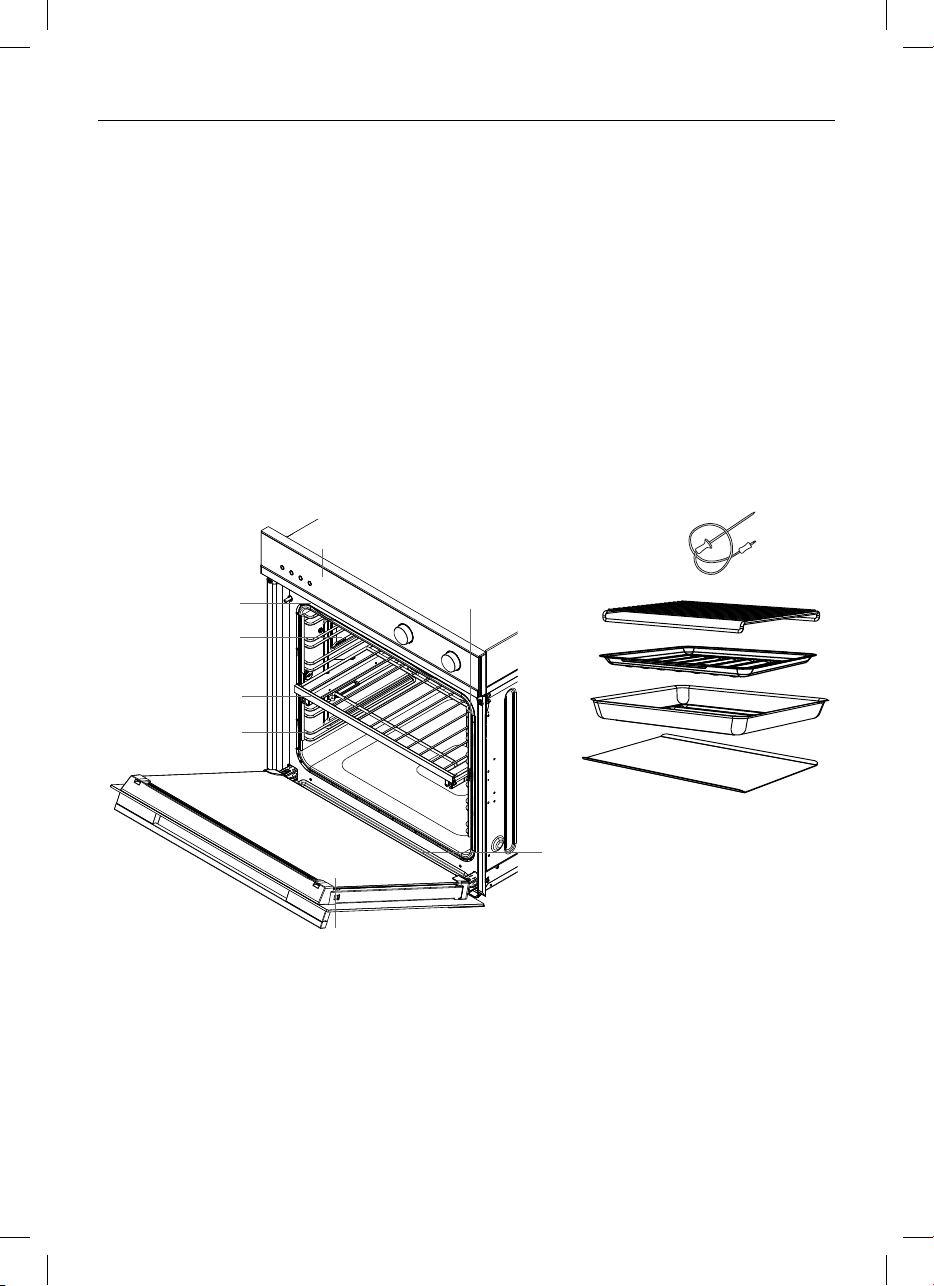
1 Control panel
2 Oven vent louvres
3 Oven light
4 Full extension sliding shelf x2
5 Side rack
6 Oven door and handle
7 Oven seal
8 Drip channel
Accessories:
9 Meat probe
!0 Grill rack
!1 Grid
!2 Roast dish
!3 Flat baking tray
Not Shown:
z
Step down wire shelf
9
!1
!0
!2
!3
8
!5
2
4
3
5
6
1
7
INTRODUCTION
Oven features and
accessories may vary.
10
FIRST USE
Your oven comes with two shelves positioned and secured inside
z
The following shows you how to remove and reposition the shelves to your preferred
position
z
We recommend you then condition the oven.
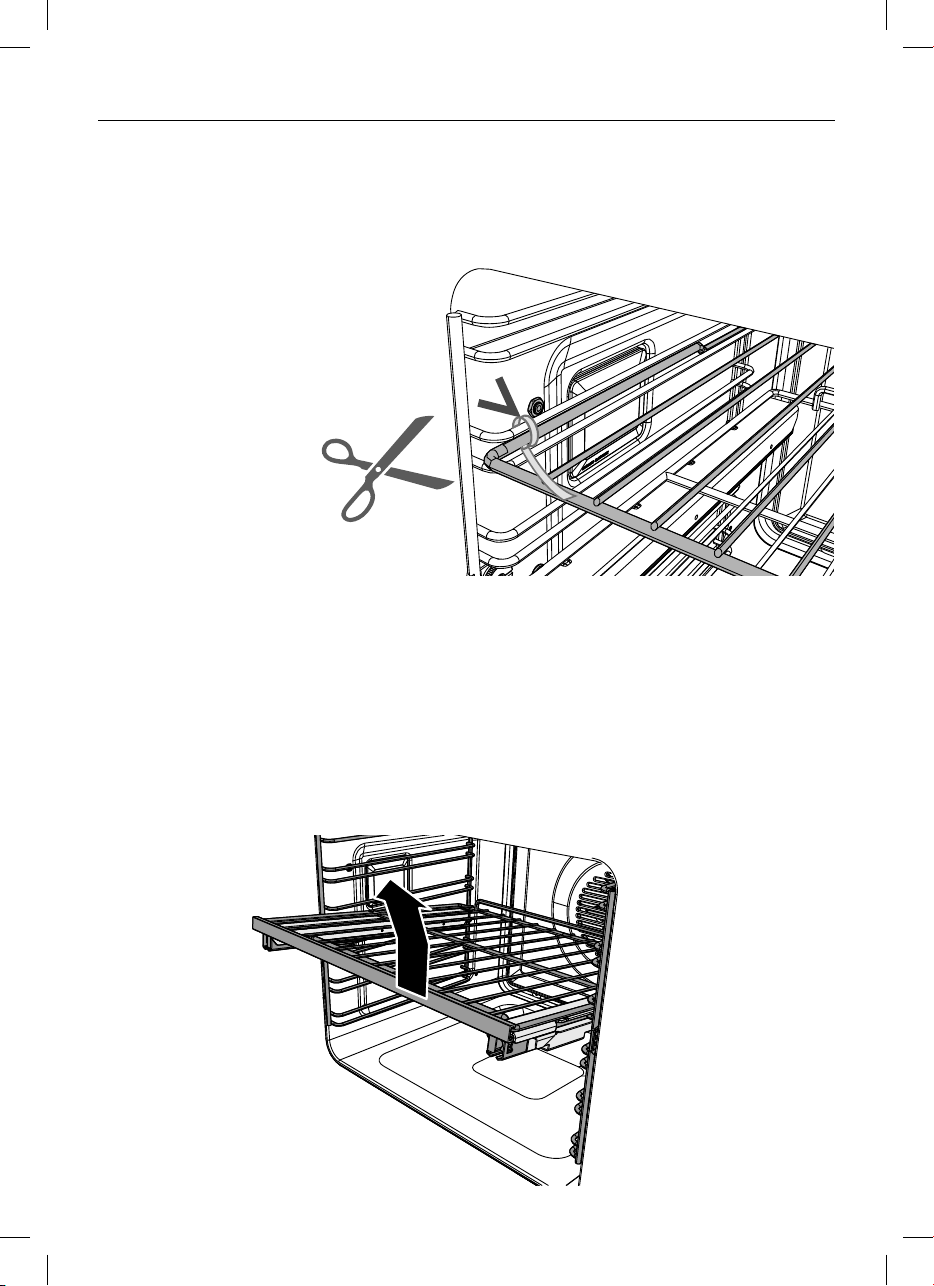
Remove all cable ties and
packaging holding the
shelving in place
Remove shelves from the oven
1 Remove all the shelving, taking special care with the sliding shelves.
2 To remove a sliding shelf, grip it at the front (making sure you are gripping the wire shelf
and the sliding frame together), lift upwards and pull it out of the oven.
For your convenience, the wire shelves and sliding frames are built together as
one unit and are not separable. When placed properly on the side racks, the slides will
prevent the wire shelves from tilting when pulled towards you.
To remove the sliding
shelf unit, lift up and
out
11
FIRST USE
Replace shelving in your preferred positions
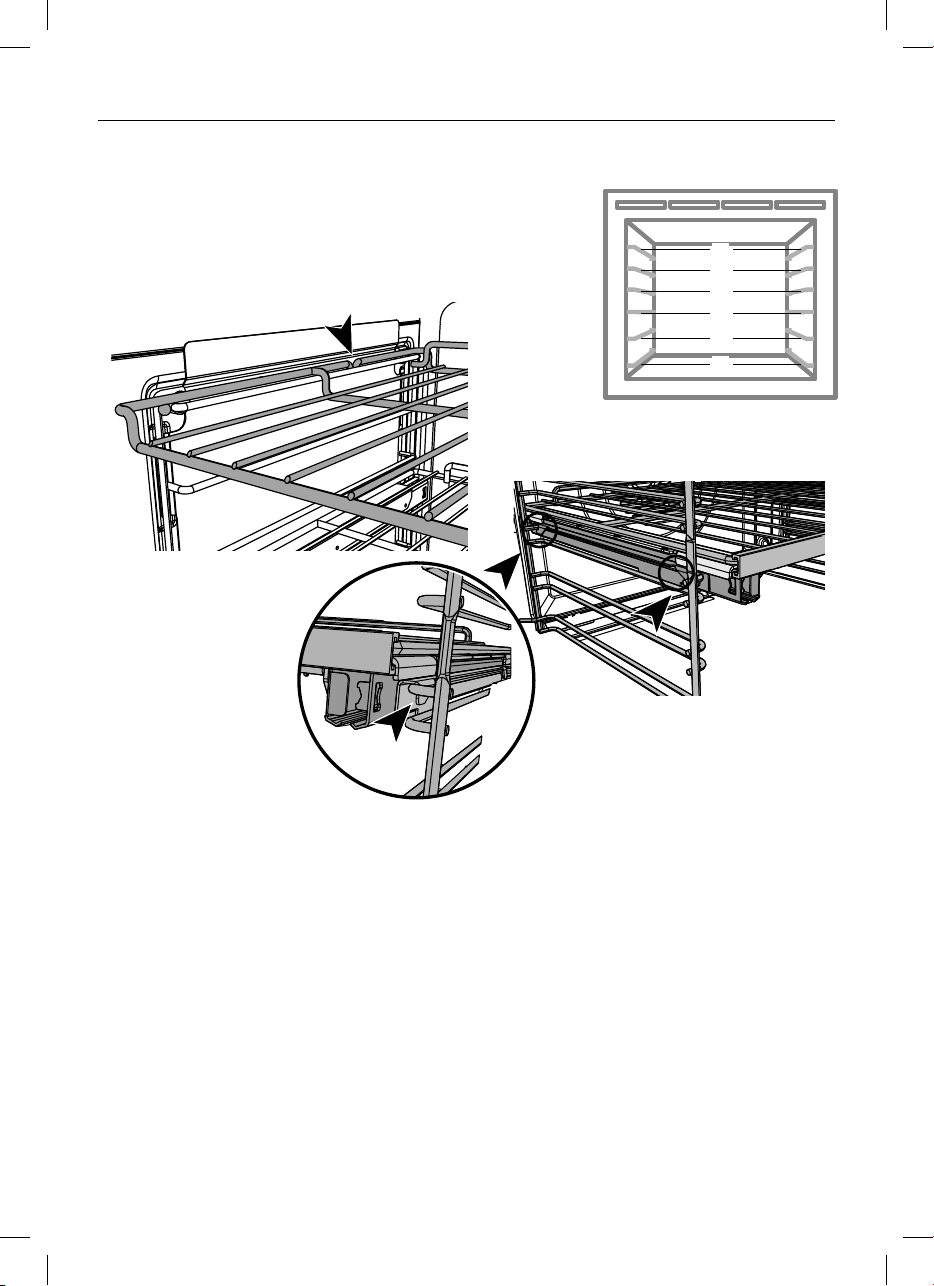
To replace the wire shelf:
z
Check the guard rail (as shown) to make sure
the shelf is the right way up.
z
Slide it horizontally back along the side racks
ensuring it is level and the stop notch is facing down.
To replace a full extension sliding shelf
z
Position the shelf so that it is level, with the front bar toward you (as shown).
z
Check the guard rail (as shown) to ensure the shelf is the right way up.
z
Ensure the sliding frame is not extended.
z
Position the shelf on top of the side racks, so the rear shelf tag at the back of the sliding
frame rests behind the side rack wire (as shown).
IMPORTANT!
Ensure the sliding shelf is positioned on top of the side rack wires rather than
between them.
z
Push the sliding shelf all the way to the back of the oven, until the front shelf tag drops
into place behind the side rack wire.
We recommend placing the sliding shelves on position 2 or 4.
To prevent the tags from lifting off the side racks, take care to slide the shelves
forward horizontally.
BAKE VENT BAKE FAN BAKE GRILL
FAN GRILL FAN FORCED
ROAST CLASSIC BAKE
PASTRY BAKE
Shelf positions
1
2
6
5
4
3
Stop Notch
Guard
rail
Front bar
Front
shelf tag
Replacing the wire shelf
Replacing the sliding shelves

12
FIRST USE
Illustrative purposes only -
oven function indicators may vary.
Display
Using the touch controls
z
Use the ball of your finger, not its tip. The controls respond
to touch, so you don’t need to apply any pressure.
Locking the control panel
This function is to prevent accidental use of the oven (eg by children).
When locked the controls are unresponsive and the oven will not turn on.
To lock:
Touch and hold the select
-
+
-
+
-
+
control until the indicator light comes on.
To unlock:
Touch and hold the cancel
-
+
-
+
-
+
control.
Release for samples / quote
graphics_glass_CP_OB24SCDEPX
30/01/17CV AM1
Release for samples / quote
08/02/17CV AM2
Release for ET1
09/03/17CV LP3
FOR GLASS PART NO. 565042
576480
4
model descriptor update
03/05/17CV4
REMOTE
1 2 00
:
Fan
Forced
Pastry
Bake
Aero
Bake
Grill Fan
Grill
Function indicators
(see ‘Oven functions’)
Function dial
Temperature
indicator
Temperature dial
Function halo
Temperature halo
Release for samples / quote
graphics_glass_CP_OB24SCDEPX
30/01/17CV AM1
Release for samples / quote
08/02/17CV AM2
Release for ET1
09/03/17CV LP3
FOR GLASS PART NO. 565042
576480
4
model descriptor update
03/05/17CV4
REMOTE
1 2 00
:
Fan
Forced
Pastry
Bake
Aero
Bake
Grill Fan
Grill
Timer
indicator
(see ‘Using the
Timer’)
WiFi and remote
function not available
on this product
Cooking time indicator
(see ‘Automatic cooking’)
Stop time indicator
(see ‘Automatic cooking’)
Scroll
Select Cancel
Keylock indicator
(see ‘Locking the
control panel’)
Meat Probe indicator
(see ‘Using the meat
probe’)

13
2 4 Hr
:
2 4 Hr
:
1 2 Hr
:
1 0 13
:
1 0 13
:
1 0 13
:
Temperature dial
Keylock indicator
(see ‘Locking the
control panel’)
FIRST USE
Setting the Clock
When your oven is first turned on, or after a power cut, the display will flash . You will
need to set the clock in order to use the oven.
2 4 Hr
:
2 4 Hr
:
1 2 Hr
:
1 0 13
:
1 0 13
:
1 0 13
:
2 4 Hr
:
2 4 Hr
:
1 2 Hr
:
1 0 13
:
1 0 13
:
1 0 13
:
2 4 Hr
:
2 4 Hr
:
1 2 Hr
:
1 0 13
:
1 0 13
:
1 0 13
:
1 The display will flash 24 Hr
2 Touch the right scroll
-
+
-
+
-
+
control to scroll
between 24 Hr and 12 Hr
3 Touch the select
ERUTAREPMETNOITCNUF
control to confirm.
4 Touch the left and right
scroll
-
+
-
+
-
+
-
+
-
+
-
+
controls to set the time.
5 Touch the select
ERUTAREPMETNOITCNUF
control to
confirm.
z
The time set will now be steadily lit.

14
FIRST USE
Changing the time
You set the clock within the user preference menu.
5 Touch the left and right scroll
-
+
-
+
-
+
-
+
-
+
-
+
controls to set the time.
6 Touch the select
ERUTAREPMETNOITCNUF
control to confirm.
3 Touch the right scroll
-
+
-
+
-
+
control to
scroll between 24 Hr, 12 Hr or
OFF to turn the display off (see
‘User preference settings’ for more
information).
4 Touch the select
ERUTAREPMETNOITCNUF
control to
confirm.
1 To enter the user preference menu
touch and hold the left and right
scroll
-
+
-
+
-
+
-
+
-
+
-
+
controls together for 3
seconds.
z
Either 12 Hr or 24 Hr will be
displayed.
2 Touch the select
ERUTAREPMETNOITCNUF
control to
confirm. The display will flash.
2 4 Hr
:
2 4 Hr
:
1 2 Hr
:
1 0 13
:
1 0 13
:
1 0 13
:
2 4 Hr
:
2 4 Hr
:
1 2 Hr
:
1 0 13
:
1 0 13
:
1 0 13
:
2 4 Hr
:
2 4 Hr
:
1 2 Hr
:
1 0 13
:
1 0 13
:
1 0 13
:
15
Conditioning the oven
FIRST USE
200
Fan
Grill
200
Fan
Grill
200
Fan
Grill
200
Fan
Grill
200
Fan
Grill
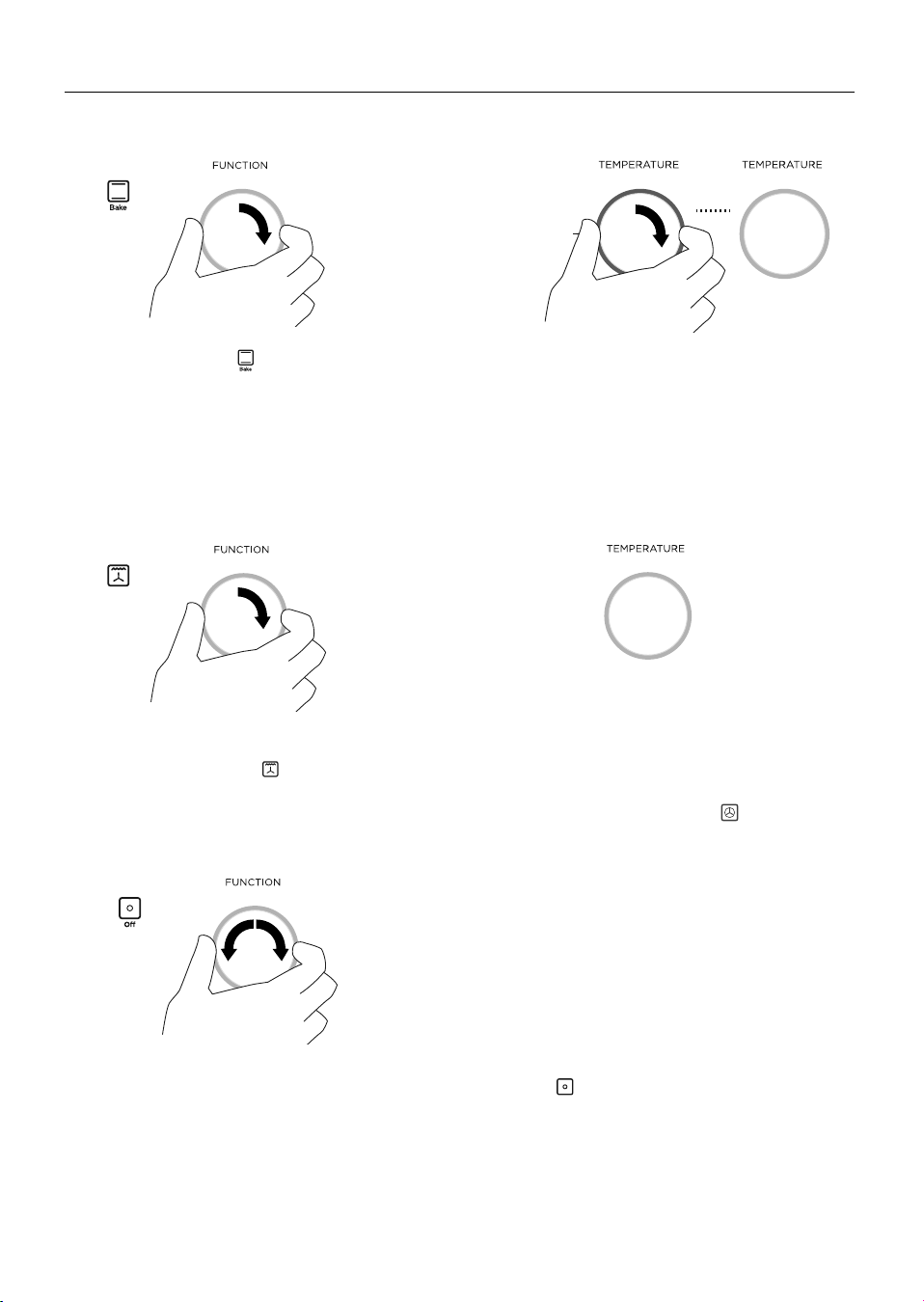
1 Select the Bake
200
Fan
Grill
function.
z
The halo will glow white.
z
Each function has a preset
temperature and so the oven
will start heating at the Bake
preset temperature of 180
o
C.
2 Set the temperature to 200
o
C for 30 minutes.
z
While the oven is heating up, the
temperature halo will glow red and the
temperature indicator will alternately show
the actual and set temperatures.
z
When the oven has reached set temperature,
a tone will sound and the halo will turn white.
3 After 30 minutes is up,
select the Fan Grill
200
Fan
Grill
function.
4 Leave the temperature at 200
o
C for 5
minutes.
z
The halo will remain white.
5 Now select the Fan Forced Function.
Leave the temperature at 200
o
C for 20
minutes.
z
There will be a distinctive smell and a small amount of smoke during the conditioning
process as manufacturing residue is burnt off. This is normal, but make sure the kitchen
is well ventilated during the conditioning.
z
Once cooled, wipe out the oven with a damp cloth and mild detergent, and dry
thoroughly.
6 When you have finished, turn the function dial to Off
200
Fan
Grill
. The halos will go out.
16
USING THE TIMER
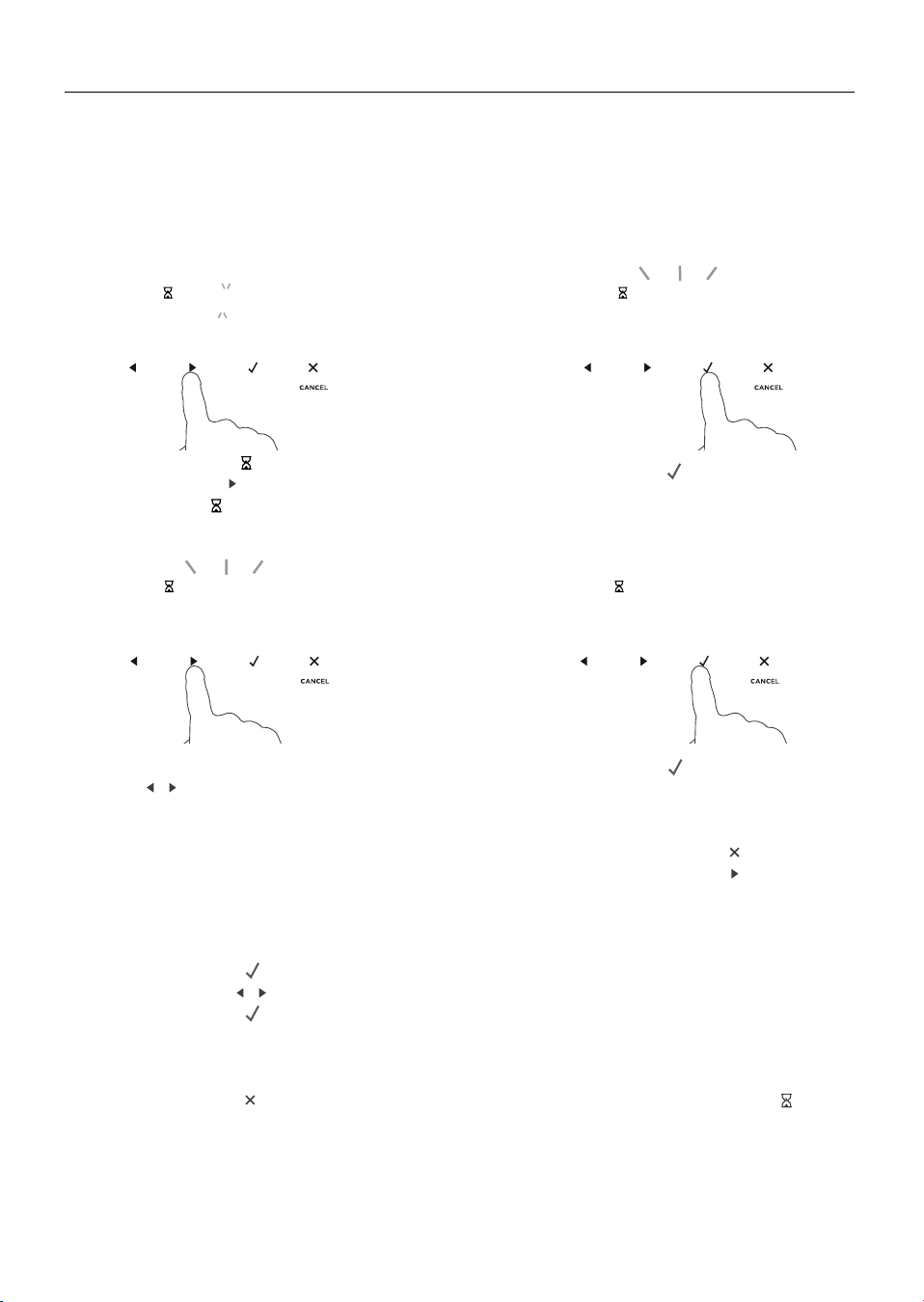
1 Select the timer
0 0 00
:
0 0 00
:
0 0 30
:
2 9 59
:
by touching
the right scroll
-
+
-
+
-
+
control once.
z
The timer
0 0 00
:
0 0 00
:
0 0 30
:
2 9 59
:
indicator will
appear and the colon will flash.
2 Touch the select
ERUTAREPMETNOITCNUF
control to confirm.
z
The display will flash to indicate the
timer is ready to be set.
3 Set the time by touching the
scroll
-
+
-
+
-
+
-
+
-
+
-
+
controls.
z
Holding the controls down
will speed up the scrolling.
4 Touch the select
ERUTAREPMETNOITCNUF
control to confirm.
z
The timer will then begin to count
down.
z
If you want to check the time of
day, touch the cancel
-
+
-
+
-
+
control once.
Touch the right scroll
-
+
-
+
-
+
control to
scroll back to the timer.
0 0 00
:
0 0 00
:
0 0 30
:
2 9 59
:
0 0 00
:
0 0 00
:
0 0 30
:
2 9 59
:
0 0 00
:
0 0 00
:
0 0 30
:
2 9 59
:
0 0 00
:
0 0 00
:
0 0 30
:
2 9 59
:
z
You can use the timer at any time, even if you are not using the oven.
z
The timer counts down in minutes (hr:min) until the last hour of cooking when it will
countdown in seconds (min:sec).
z
You can set the timer for up to 23 hours 59 minutes.
IMPORTANT!
The timer does NOT turn the oven off.
To modify the timer setting
1 Make sure the display shows the remaining time counting down.
2 Touch the select
ERUTAREPMETNOITCNUF
control.
3 Touch the scroll
-
+
-
+
-
+
-
+
-
+
-
+
controls to set a new time.
4 Touch the select
ERUTAREPMETNOITCNUF
control to confirm.
To cancel the timer setting
1 Make sure the display shows the remaining time counting down.
2 Touch the cancel
-
+
-
+
-
+
control until the display shows the time of day and the timer
-
+
-
+
-
+
indicator disappears.
When the set time is up
z
The display will show 0:00 and a tone will sound every few seconds.
z
Touch any control to stop the tone sounding. The display will revert to showing the time
of day.
17
COOKING GUIDE
BAKE VENT BAKE FAN BAKE GRILL
FAN GRILL FAN FORCED
ROAST CLASSIC BAKE
PASTRY BAKE
General guidelines
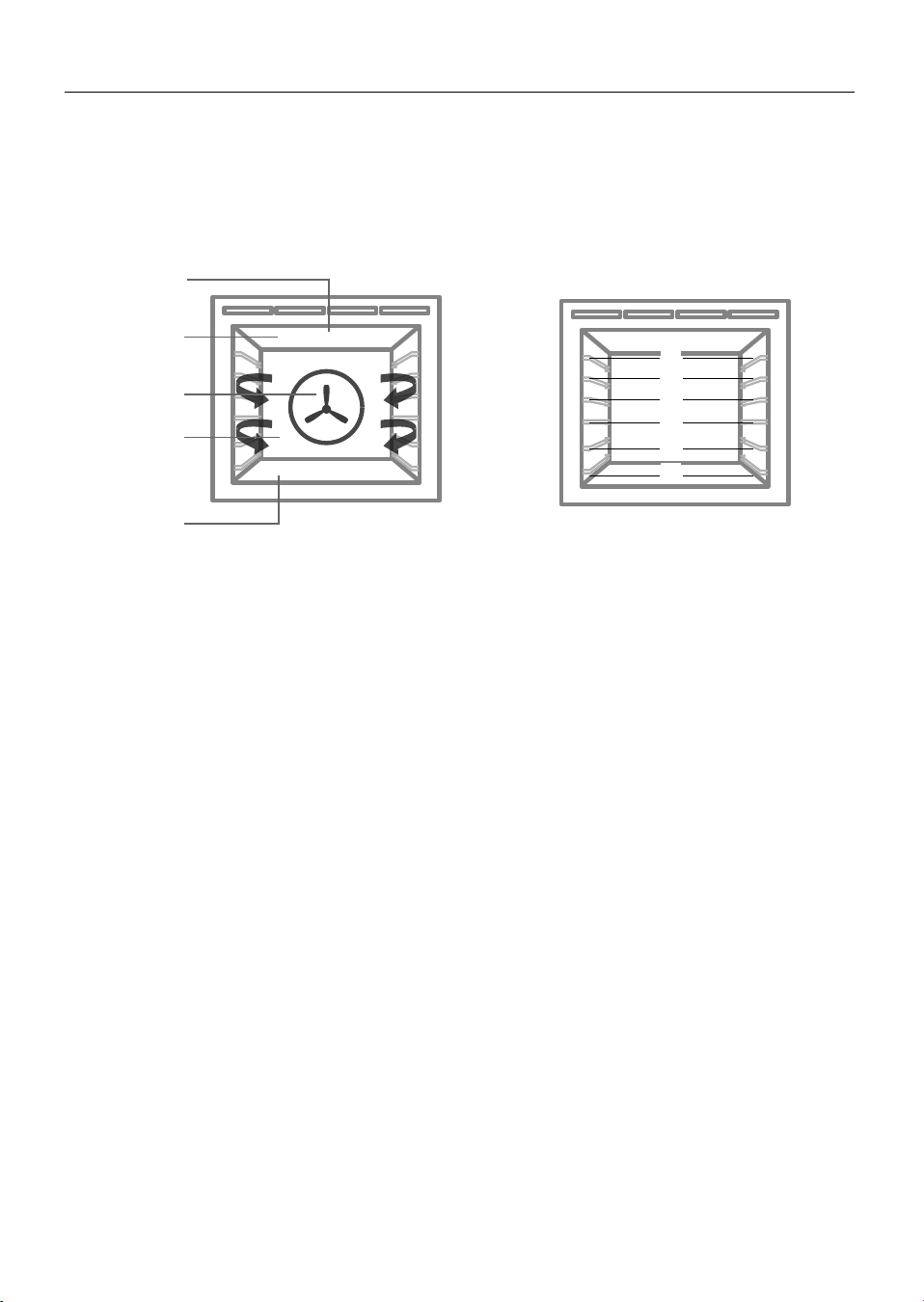
This oven has been designed to utilise its four elements and rear fan in differing
combinations to provide you with enhanced performance and a wide range of functions,
allowing you to cook all types of food to perfection.
BAKE VENT BAKE FAN BAKE GRILL
FAN GRILL FAN FORCED
ROAST CLASSIC BAKE
PASTRY BAKE
Lower
Element
(concealed)
Rear Element
(concealed)
Outer
Element
Shelf positions - Full size ovens
Fan
Inner
Element
1
2
6
5
4
3
Baking
z
For best results when baking, always pre heat your oven. The temperature halo will
change from red to white when the pre-set temperature is reached.
z
While the oven is heating the grill element will be on.
z
We advise you do not open the door until at least 3/4 of the way through cooking.
z
Make sure cake pans do not touch each other or the sides of the oven.
z
When baking double the recipe (especially cookies) cook time may need to increase.
z
Your cookware will influence baking times. Dark pans absorb the heat more quickly than
reflective pans; glass cookware may require a lower temperature
z
Multi-shelf baking may also require a slight increase in cooking time.
Shelf Position Guide
z
Single shelf: Place your baking on a shelf that will have the top of your pan near the
centre of the oven cavity.
z
Multi shelf: Always leave a space between shelves to allow the air to circulate.

18
COOKING GUIDE
Roasting
z
The Roast function is designed to brown the outside of the meat but still keep the inside
moist and juicy.
z
Boneless, rolled or stuffed roasts take longer than roasts containing bones.
z
Poultry should be well cooked with the juices running clear and an internal temperature
of 75
o
C.
z
If using a roasting bag, do not use the Roast function. The initial searing stage is too
hot for roasting bags. Use Fan Bake or Fan Forced and follow the manufacturer’s
instructions.
z
When using the Roast function, do not cover your roast, as this will stop the searing
process browning the outside of the meat. If you prefer to roast in a covered pan, use
the Fan Bake function instead and increase the temperature by 20
o
C.
z
Cook larger cuts of meat at a lower temperature for a longer time. The meat will cook
more evenly.
z
Always roast meat fat side up. That way, basting may not be required.
z
Always rest the meat for at least 10 minutes after roasting to allow the juices to settle.
Remember the meat will continue to cook for a few minutes after removing it from the
oven.
z
Try our new Vent Bake function as an alternative for roasting pork. The drier atmosphere
will help to perfect your crackling.
Shelf Position Guide
Place the meat on a shelf so that the meat is in the centre of the oven or lower.
Grilling
z
This is a healthier alternative to frying.
z
Always grill with the oven door completely shut.
z
If you use glass or ceramic pans, be sure they can withstand the high temperatures of
the grill.
z
To avoid piercing the meat and letting juices escape, use tongs or a spatula to turn the
meat halfway through cooking.
z
Brush meat with a little oil to help keep the meat moist during cooking. Alternatively
marinade the meat before grilling (but be aware that some marinades may burn easily).
z
Where possible grill cuts of meat of a similar thickness at the same time. This will ensure
even cooking.
z
Always keep a close watch on your food while grilling to avoid charring or burning.
Shelf Position Guide
z
For thinner cuts of meat, toasting or browning foods, use a higher shelf position.
z
Thicker cuts of meats should be grilled on lower shelves or at a lower grill setting to
ensure even cooking.

19
COOKING GUIDE
Reheating
z
Use Bake, Fan Bake or Vent Bake to reheat food.
z
Bake and Vent Bake are particularly good for reheating pastry based items, as the base
heat will help re-crisp the pastry case.
z
Always reheat food to piping hot. This reduces the risk of contamination by harmful
bacteria.
z
Once hot, use the Warm function to keep the food warm.
Never reheat a food more than once.
Drip Channel
Any condensation that is formed during the cooking process will collect in the drip
channel. This can be wiped out using a sponge once the oven has cooled.
Rapid preheating stage
For some cooking functions, the oven will go through an initial stage of rapid
preheating. During this stage the fan, bake and grill elements will turn on to quickly heat
the oven to the set temperature. Depending on the cooking function, the fan, bake and
grill elements will turn off once the oven reaches the set temperature.
20
OVEN FUNCTIONS
IMPORTANT!
z
Depending on your model, you may only have some of these functions.
z
Use all the functions with the oven door closed.
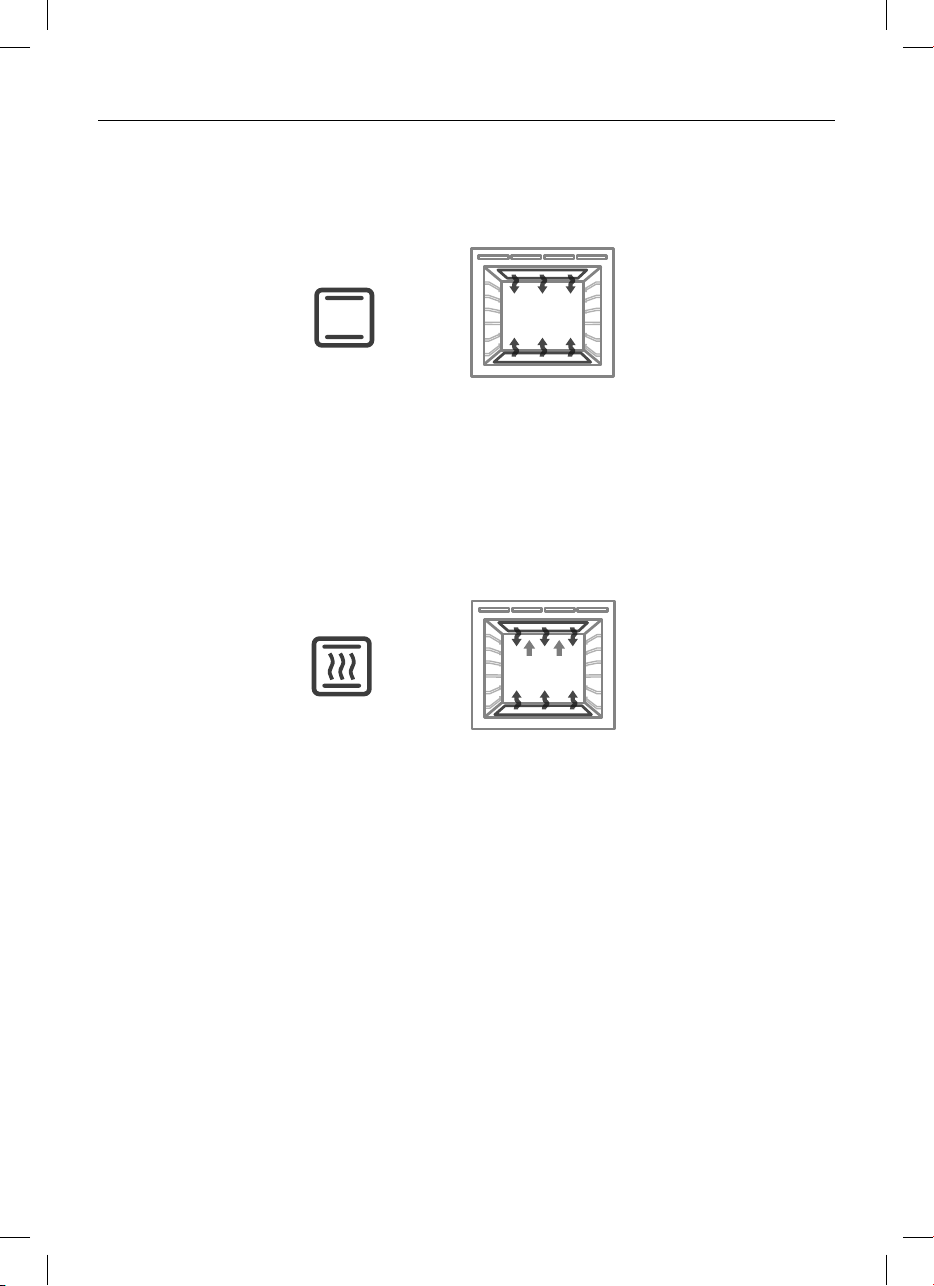
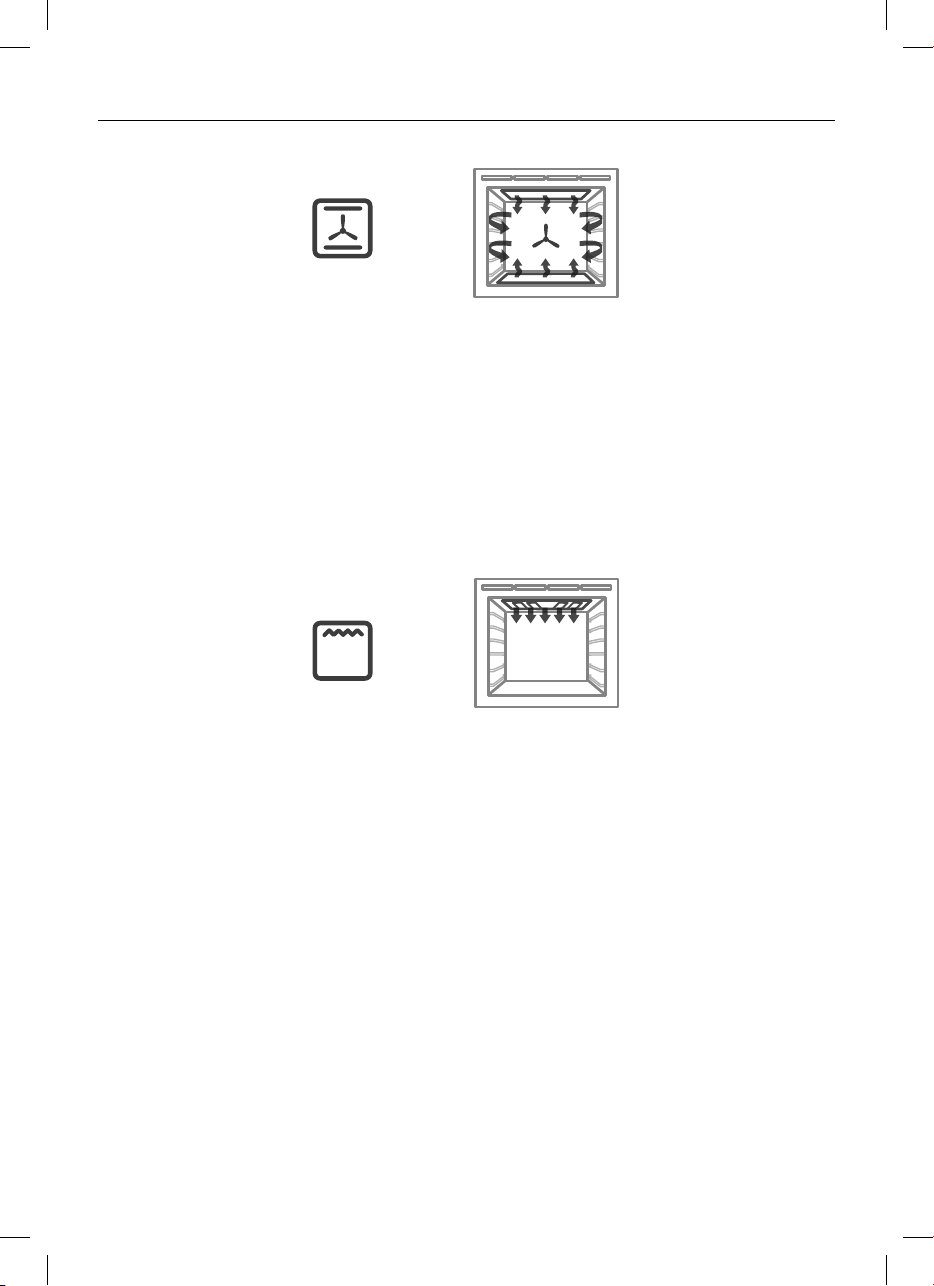
upper outer and lower elements
z
Heat comes from both the upper and lower elements. The fan is not used in this
function.
z
Ideal for cakes and foods that require baking for a long time or at low temperatures.
z
This function is not suitable for multi-shelf cooking.
Ideal for moist foods that take a longer time to cook eg rich fruit cake, or bread in
combination with Vent Bake.
upper outer and lower elements with additional venting
z
Heat is produced by the upper and lower elements and additional oven venting is used
to remove excess moisture, reducing the formation of steam and condensation.
z
Vented baking allows the moisture content of the oven to be reduced, without
compromising the temperature.
z
The venting system results in gentle air movement without the need to use a fan.
z
It provides gentle browning without the `drying out’ effect of a fan.
z
Reducing the formation of condensation means it is perfect way to slow cook meat
dishes.
z
You may switch from Bake to Vent Bake for foods that like a moist (steamy) start to the
cooking process and then benefit from a drier finish (such as bread).
z
Use Vent Bake at a low temperature 50
o
C for drying fruit, vegetables and herbs.
Ideal for foods such as:
- meringues
- Yorkshire pudding
- finishing off choux pastry, croissants, breads
- slow cooked meat dishes
- poached foods (fish, chicken)
- dishes where initial crisping of the outside is desired (eg pork belly)
Bake
BAKE VENT BAKE FAN BAKE GRILL
FAN GRILL FAN FORCED
ROAST CLASSIC BAKE
PASTRY BAKE
BAKE VENT BAKE FAN BAKE GRILL
FAN GRILL FAN FORCED
ROAST CLASSIC BAKE
PASTRY BAKE
Vent Bake
(some models only)
21
OVEN FUNCTIONS
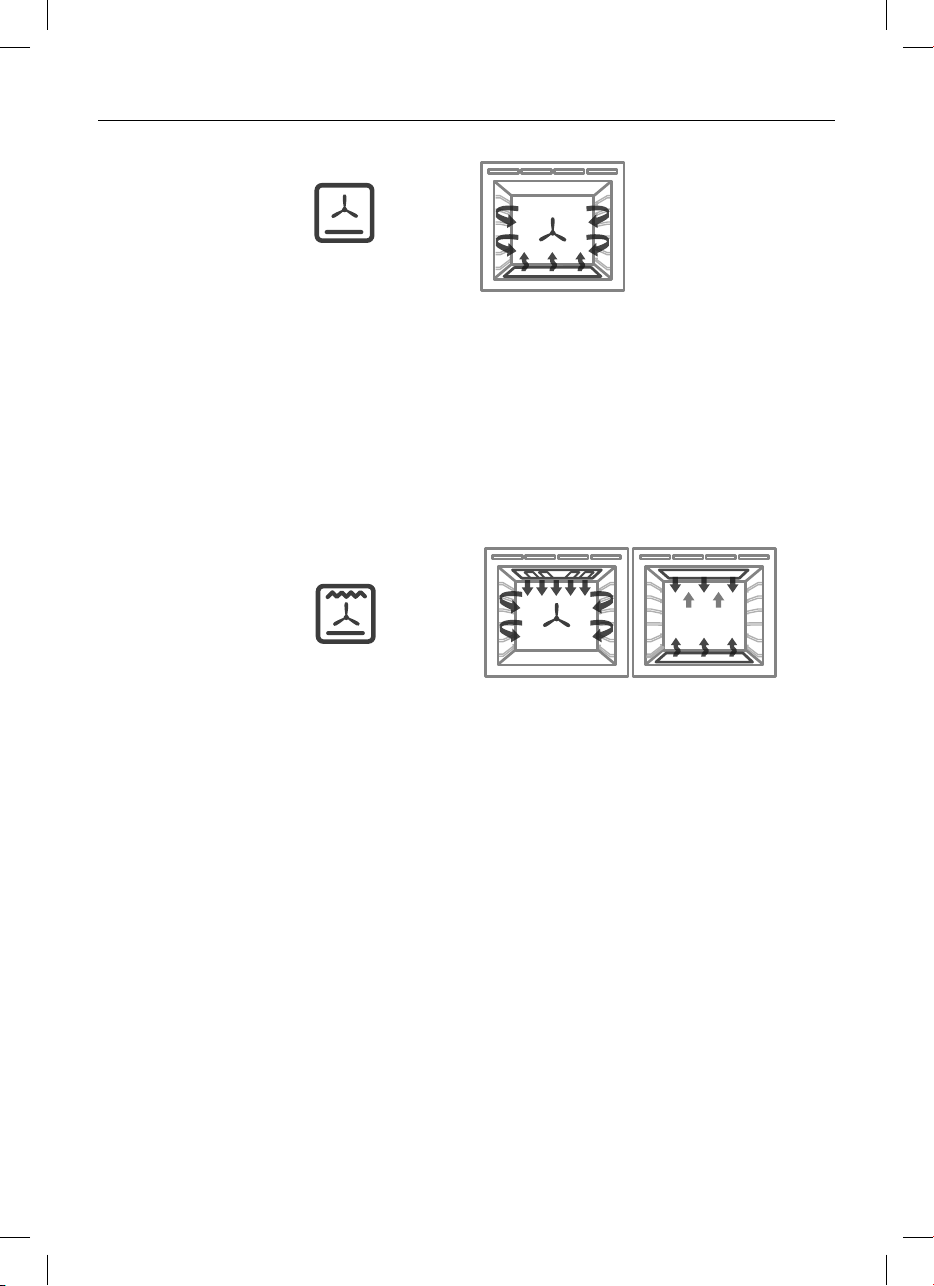
fan plus upper outer and lower elements
z
The oven fan circulates hot air from the top outer and the lower elements and
distributes it around the oven cavity.
z
Food cooked tends to brown more quickly than foods cooked on the traditional Bake
function.
z
You may need to decrease the time from that recommended in traditional recipes.
Ideal for single shelf baking that takes less than an hour to cook – foods such as muffins,
biscuits and cupcakes or things like enchiladas.
upper inner and outer elements
z
Intense radiant heat is delivered from both top elements.
There are 9 steps between ‘Lo’ and ‘Hi’ (100% power).
z
Preheating is not essential although some people prefer to allow the element to heat for
a few minutes before they place food under the grill.
z
The temperature halo will remain red while using the grill function.
z
The most suitable function for ‘finishing off’ many meals, for example browning the top
of potato gratin and frittata.
Ideal for toasting bread or for top browning to ‘finish off dishes’.
BAKE VENT BAKE FAN BAKE GRILL
FAN GRILL FAN FORCED
ROAST CLASSIC BAKE
PASTRY BAKE
BAKE VENT BAKE FAN BAKE GRILL
FAN GRILL FAN FORCED
ROAST CLASSIC BAKE
PASTRY BAKE
Fan Bake
Grill

22
OVEN FUNCTIONS
Fan Grill
Fan Forced
fan plus upper inner and outer elements
z
This function uses the intense heat from the elements for top browning and the fan to
ensure even cooking of foods.
z
Meat, poultry and vegetables cook beautifully; food is crisp and brown on the outside
while the inside remains moist and tender.
Ideal for whole chicken, tenderloin of beef or grilling your favourite chicken, fish or steak.
fan and rear element
z
By using the central rear heating element and fan, hot air is blown into the cavity,
providing a consistent temperature at all levels, making it perfect for multi-shelf cooking.
z
Trays of cookies cooked on different shelves are crisp on the outside and chewy in the
middle.
z
Meat and poultry are deliciously browned and sizzling while remaining juicy and tender.
z
Casseroles are cooked to perfection and reheating is quick and efficient.
z
When multi-shelf cooking it is important to leave a gap between trays
(eg use shelves 3 & 5) to allow the air to move freely. This enables the browning of
foods on the lower tray.
z
If converting a recipe from Bake to True Fan, we recommend that you decrease the bake
time or decrease the temperature by approximately 20°C.
z
For items with longer bake times (eg over an hour) it may be necessary to decrease
both time and temperature.
Ideal for multi-shelf cooking biscuits, cookies, scones, muffins and cupcakes.
BAKE VENT BAKE FAN BAKE GRILL
FAN GRILL FAN FORCED
ROAST CLASSIC BAKE
PASTRY BAKE
BAKE VENT BAKE FAN BAKE GRILL
FAN GRILL FAN FORCED
ROAST CLASSIC BAKE
PASTRY BAKE
23
OVEN FUNCTIONS
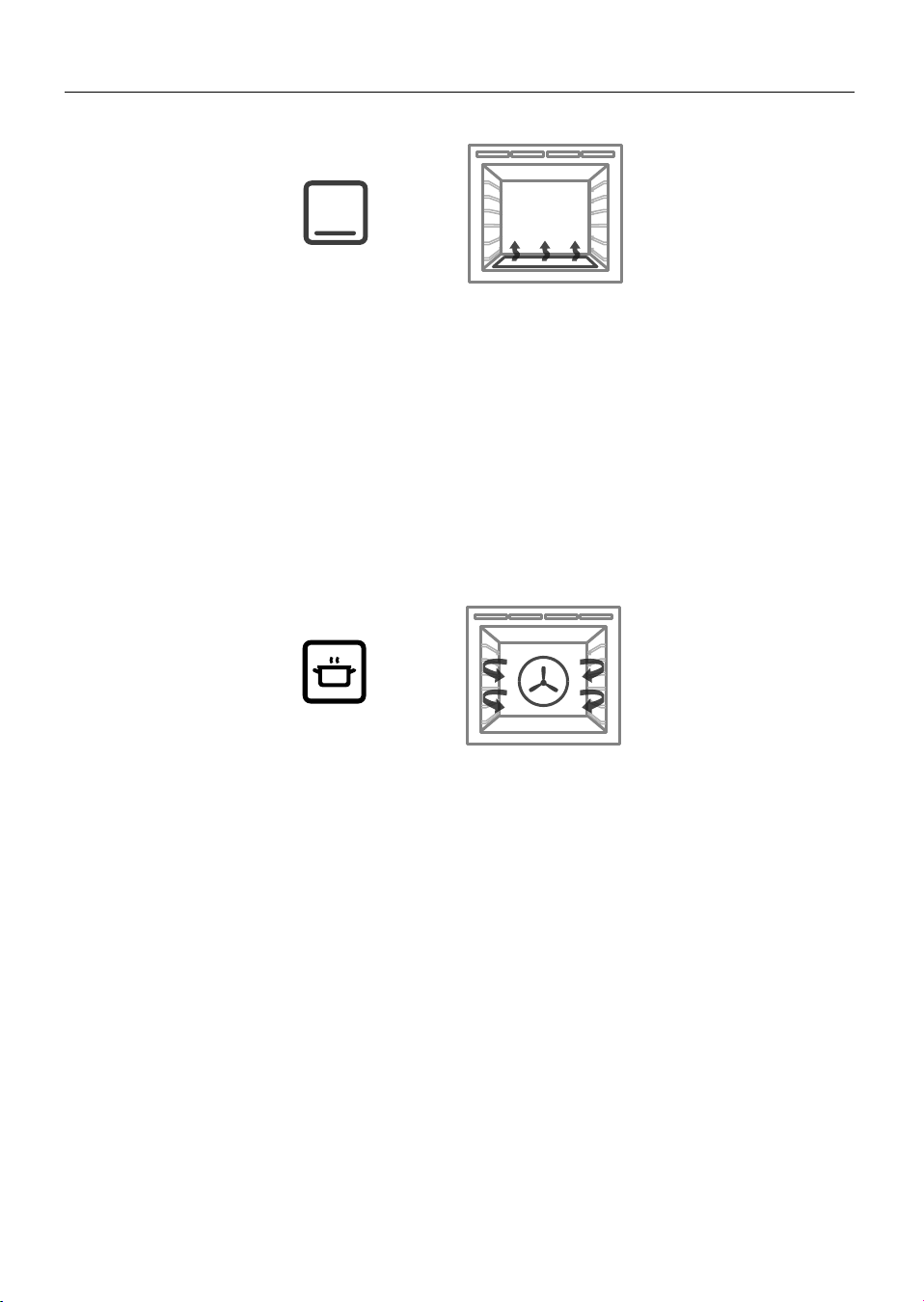
fan plus lower element
z
The fan circulates heat from the lower element throughout the oven.
z
Excellent for cooking pizza as it crisps the base beautifully without overcooking the
topping.
z
For best results, pre-heat pizza stone for at least 1 hour and bake on oven shelf position
1 or 2.
Ideal for foods such as sweet and savoury pastry foods and delicate foods that require
some top browning eg frittata, quiche.
fan plus upper and lower elements
z
A two-step program. An initial 20 minute searing stage crisps and browns the roast and
caramelises the outside of the meat, then the temperature drops to the level you have
preset for the remainder of the cooking period, producing a tender and juicy roast that
is full of flavor.
z
Oven does not require preheating.
z
If desired, use the grill rack or grid, or place vegetables under the roast to allow the
juices to drain away from your meat. This will allow the hot air to circulate under the
meat as well.
Ideal for Roasting meat, chicken and vegetables.
BAKE VENT BAKE FAN BAKE GRILL
FAN GRILL FAN FORCED
ROAST CLASSIC BAKE
PASTRY BAKE
BAKE VENT BAKE FAN BAKE GRILL
FAN GRILL FAN FORCED
ROAST CLASSIC BAKE
PASTRY BAKE
Pastry/Pizza Bake
(some models only)
Roast
(some models only)
24
OVEN FUNCTIONS
lower element only
z
Heat comes from the lower element only, the fan is not used.
z
This is the traditional baking function, suitable for recipes that were developed in older
ovens.
z
Bake on only one shelf at a time.
Ideal for foods that require delicate baking and have a pastry base, like custard tarts,
pies, quiches and cheesecake or anything that does not require direct heat and browning
on the top.
BAKE VENT BAKE FAN BAKE GRILL
FAN GRILL FAN FORCED
ROAST CLASSIC BAKE
PASTRY BAKE
BAKE VENT BAKE FAN BAKE GRILL
FAN GRILL FAN FORCED
ROAST CLASSIC BAKE
PASTRY BAKE
Classic Bake
(some models only)
fan plus rear element
z
The fan circulates heat from the rear element to gently cook food.
z
This function has low energy consumption - oven lights will remain off and vents will
remain closed for the duration of cooking to conserve energy (you may observe some
moisture generation during this time).
z
Oven does not require preheating.
Ideal for slow-cooked dishes such as casseroles, stews and braises.
Slow Cook
(some models only)
GFX DIAL OR CON OVEN PYRO UL
1 KDM
19/06/17
Released for prototype only
LEP
1576636 1:1 1/1
1. REFER F&P DRAWING No. 578509 FOR PART FILE
2. ALL ARTWORK MUST BE APPROVED PRIOR TO MANUFACTURE
Graphics location:
3mm
5mm
Graphics to be PRINTED:
(PANTONE 440)

25
OVEN FUNCTIONS
this is not a cooking function
z
Provides a constant low heat of less than 90°C.
z
Use to keep cooked food hot, or to warm plates and serving dishes.
To reheat food from cold, use another oven function to heat the
food piping hot and only then change to Warm, as this function
alone will not bring cold food up to a high enough temperature to
kill any harmful bacteria.
this is not a cooking function
z
Gentle heat is generated from the upper and lower elements
z
Provides the optimum warm and draft-free environment for proving
yeast dough.
z
This method provides a faster proof time than at room temperature.
z
To prevent overproofing we recommend you check the dough every
30mins.
Proving dough
1 Place dough in a lightly oiled bowl and cover with plastic wrap
and/or a clean damp cloth
2 Position the bowl in the centre of the oven
3 Select Rapid Proof function
this is not a cooking function
z
The Self Clean cycle takes care of the mess and grime that is
traditionally associated with oven cleaning.
z
There are two Self-Clean cycles available:
- Self clean (which takes a minimum of 4 hours) for
normal cleaning and
- Light self-clean (which takes a minimum of 3 hours) for
lightly soiled ovens
z
Always clean the inner door glass pane first.
z
See ‘Using the Self Clean function’ for details.
Warm
(some models only)
Rapid Proof
(some models only)
Self Clean
(some models only)
Release for samples / quote
graphics_glass_CP_OB24SCDEPX
30/01/17CV AM1
Release for samples / quote
08/02/17CV AM2
Release for ET1
09/03/17CV LP3
FOR GLASS PART NO. 565042
576480
4
model descriptor update
03/05/17CV4
REMOTE
1 2 00
:
Fan
Forced
Pastry
Bake
Aero
Bake
Grill Fan
Grill

26
COOKING CHARTS
BAKING
z
Shelf positions are counted from the base up
(1 is the lowest, 6 (full size ovens) or 4 (compact ovens) is the highest).
Position shelves before you turn the oven on.
z
For best results preheat the oven to the required temperature.
z
The grill element may come on while the oven is heating up.
z
The halo on the temperature dial will change from red to white when the oven has
reached the selected temperature. The display will only show the set temperature once
the oven has finished preheating. The halo may change between white and red as the
oven maintains its set temperature.
z
Oven accessories may temporarily deform slightly when they become hot. This is normal
and does not affect their function.
FOOD SHELVES
RECOMMENDED
FUNCTION
SHELF
POSITIONS
TEMP (°C) TIME (MINS)
Biscuits Plain Single Fan Bake 4 180-190 13-17
Multi Fan Forced 3 and 5 160-170 13-17
Chewy choc chip Single Fan Bake 4 180-190 15-20
Multi Fan Forced 3 and 5 160-170 15-20
Oatmeal Single Pastry/Pizza Bake/Fan Bake 4 160-170 12-15
Slices / Squares Single Pastry/Pizza Bake/Fan Bake 3 160-165 15-20
Cakes Vanilla Single Bake 4 160-165 30-35
Butter / Chocolate Single Bake 4 160-180 50-60
Light fruit Single Bake 2 155-165 1hr 30
Rich fruit Single Classic Bake/Bake 2 120-160 2.5 hrs
Sponge
(single large)
Single Bake 2 175 30-40
Sponge
(two small pans)
Single Bake 2 170-190 15-25
Shortbread Single Pastry/Pizza Bake/Fan Bake 3 130-140 20-25
Muffins / Cupcakes Single Fan Bake 3 180-190 13-17
Multi Fan Forced 2 and 4 160-170 16-21
Scones Single Fan Bake 2 210-230 8-12
Multi Fan Forced 1 and 3 210-230 8-12
Meringues Single Vent Bake/Bake 1 100-120 60
Bread Rolls Single Bake then Vent Bake 4 195-210 25-35
Pastry Phyllo Single Fan Bake 3 190-200 15-25
Flaky/Puff Single Vent Bake/Pastry/Pizza Bake 3 185-200 20-30
Choux Single Vent Bake/Pastry/Pizza Bake
Multi Fan Forced 2 200-210 30-35
Croissants Single Bake then Vent Bake
Multi Fan Forced 3 190-200 15-25
Pies Apple Single Pastry/Pizza Bake/Fan Bake 2 190-200 25-30
Lemon Meringue Single Pastry/Pizza Bake/Fan Bake 2 175-180 30-40

27
COOKING CHARTS
The information in these charts are guidelines only. Refer to your recipe or the
packaging and be prepared to adjust the cooking times and settings accordingly.
FOOD SHELVES
RECOMMENDED
FUNCTION
SHELF
POSITIONS
TEMP (°C) TIME (MINS)
Biscuits Plain Single Fan Bake 4 180-190 13-17
Multi Fan Forced 3 and 5 160-170 13-17
Chewy choc chip Single Fan Bake 4 180-190 15-20
Multi Fan Forced 3 and 5 160-170 15-20
Oatmeal Single Pastry/Pizza Bake/Fan Bake 4 160-170 12-15
Slices / Squares Single Pastry/Pizza Bake/Fan Bake 3 160-165 15-20
Cakes Vanilla Single Bake 4 160-165 30-35
Butter / Chocolate Single Bake 4 160-180 50-60
Light fruit Single Bake 2 155-165 1hr 30
Rich fruit Single Classic Bake/Bake 2 120-160 2.5 hrs
Sponge
(single large)
Single Bake 2 175 30-40
Sponge
(two small pans)
Single Bake 2 170-190 15-25
Shortbread Single Pastry/Pizza Bake/Fan Bake 3 130-140 20-25
Muffins / Cupcakes Single Fan Bake 3 180-190 13-17
Multi Fan Forced 2 and 4 160-170 16-21
Scones Single Fan Bake 2 210-230 8-12
Multi Fan Forced 1 and 3 210-230 8-12
Meringues Single Vent Bake/Bake 1 100-120 60
Bread Rolls Single Bake then Vent Bake 4 195-210 25-35
Pastry Phyllo Single Fan Bake 3 190-200 15-25
Flaky/Puff Single Vent Bake/Pastry/Pizza Bake 3 185-200 20-30
Choux Single Vent Bake/Pastry/Pizza Bake
Multi Fan Forced 2 200-210 30-35
Croissants Single Bake then Vent Bake
Multi Fan Forced 3 190-200 15-25
Pies Apple Single Pastry/Pizza Bake/Fan Bake 2 190-200 25-30
Lemon Meringue Single Pastry/Pizza Bake/Fan Bake 2 175-180 30-40

28
COOKING CHARTS
* If multiple shelves are required (eg roasting vegetables at the same time), use
Fan Forced and shelf positions 3 & 5.
SAVOURY
ROASTING
FOOD SHELVES
RECOMMENDED
FUNCTION
SHELF
POSITIONS
TEMP (°C) TIME (MINS)
Pies Chicken / Steak / Mince Single Pastry/Pizza Bake/Fan Bake 3 190-195 30-40
Sausage Rolls Single Pastry/Pizza Bake/Fan Bake 3 190-195 30-40
Meat Loaf Single Bake 4 175-180 55-65
Pizza Classic Single Pastry/Pizza Bake/Fan Bake 1 and 2 225-250 8-12
Thin crust Single Pastry/Pizza Bake/Fan Bake 1 and 2 280* 5-8
Deep dish Single Pastry/Pizza Bake/Fan Bake 1 and 2 160-220
1
50-60
Lasagne Single Fan Bake 3 175-180 45-50
Quiche Single Pastry/Pizza Bake/Fan Bake 2 180-200 30-40
Potatoes Traditional Baked Single Bake 3 175-190 40-50
Frittata Grill to finish Single Pastry/Pizza Bake/Fan Bake 3 170-180 30-45
Casseroles Single Slow Cook/Classic Bake 3 1120-150 2-4 hrs
Oven meals Single Fan Forced 3 170-190 30-40
FOOD SHELVES
RECOMMENDED
FUNCTION
SHELF
POSITIONS
TEMP (°C) TIME (MINS)
Beef (Boneless) Rare Single* Roast/ Bake 3 160-170 18-32 / 450g
Medium Roast/Bake 3 160-170 25-40 / 450g
Well done Roast/Bake 3 160-170 30-55 / 450g
Prime Rib Roast Rare Single* Roast/Bake 3 160-170 15-30 / 450g
Medium Roast/Bake 3 160-170 20-35 / 450g
Well done Roast/Bake 3 160-170 25-40 / 450g
Lamb leg (Bone in) Medium Single* Roast/Bake 3 160-170 18-28 / 450
Well done Roast/Bake 3 160-170 20-33 / 450g
Lamb leg (Boneless) Medium Single* Roast/Bake 3 160-170 20-35 / 450g
Well done Roast/Bake 3 160-170 25-45 / 450g
Veal Medium Single* Roast/Bake 3 160-170 20-40 / 450g
Well done Roast/Bake 3 160-170 25-45 / 450g
Chicken (Whole) Single* Fan Grill 3 175-190 15-20 / 450G
Turkey (Whole) With Stuffing Single* Bake 1 165-175 17-22 / 450g
Without Stuffing Bake 1 150-165 15-20 / 450g
Pork (Boneless) Medium Single* Roast/Bake 3 170-175 25-40 / 450g
Well done Roast/Bake 3 170-175 30-45 / 450g
Pork Crackling Crisp Vent Bake/Bake 3 250 20
Venison Brown in a frying
pan first.
Rare Single* Fan Grill 4 225 7.5/ 2.5cm meat
thickness
Medium Fan Grill 4 225 9.5 / 2.5cm meat
thickness

29
COOKING CHARTS
FOOD SHELVES
RECOMMENDED
FUNCTION
SHELF
POSITIONS
TEMP (°C) TIME (MINS)
Pies Chicken / Steak / Mince Single Pastry/Pizza Bake/Fan Bake 3 190-195 30-40
Sausage Rolls Single Pastry/Pizza Bake/Fan Bake 3 190-195 30-40
Meat Loaf Single Bake 4 175-180 55-65
Pizza Classic Single Pastry/Pizza Bake/Fan Bake 1 and 2 225-250 8-12
Thin crust Single Pastry/Pizza Bake/Fan Bake 1 and 2 280* 5-8
Deep dish Single Pastry/Pizza Bake/Fan Bake 1 and 2 160-220
1
50-60
Lasagne Single Fan Bake 3 175-180 45-50
Quiche Single Pastry/Pizza Bake/Fan Bake 2 180-200 30-40
Potatoes Traditional Baked Single Bake 3 175-190 40-50
Frittata Grill to finish Single Pastry/Pizza Bake/Fan Bake 3 170-180 30-45
Casseroles Single Slow Cook/Classic Bake 3 1120-150 2-4 hrs
Oven meals Single Fan Forced 3 170-190 30-40
FOOD SHELVES
RECOMMENDED
FUNCTION
SHELF
POSITIONS
TEMP (°C) TIME (MINS)
Beef (Boneless) Rare Single* Roast/ Bake 3 160-170 18-32 / 450g
Medium Roast/Bake 3 160-170 25-40 / 450g
Well done Roast/Bake 3 160-170 30-55 / 450g
Prime Rib Roast Rare Single* Roast/Bake 3 160-170 15-30 / 450g
Medium Roast/Bake 3 160-170 20-35 / 450g
Well done Roast/Bake 3 160-170 25-40 / 450g
Lamb leg (Bone in) Medium Single* Roast/Bake 3 160-170 18-28 / 450
Well done Roast/Bake 3 160-170 20-33 / 450g
Lamb leg (Boneless) Medium Single* Roast/Bake 3 160-170 20-35 / 450g
Well done Roast/Bake 3 160-170 25-45 / 450g
Veal Medium Single* Roast/Bake 3 160-170 20-40 / 450g
Well done Roast/Bake 3 160-170 25-45 / 450g
Chicken (Whole) Single* Fan Grill 3 175-190 15-20 / 450G
Turkey (Whole) With Stuffing Single* Bake 1 165-175 17-22 / 450g
Without Stuffing Bake 1 150-165 15-20 / 450g
Pork (Boneless) Medium Single* Roast/Bake 3 170-175 25-40 / 450g
Well done Roast/Bake 3 170-175 30-45 / 450g
Pork Crackling Crisp Vent Bake/Bake 3 250 20
Venison Brown in a frying
pan first.
Rare Single* Fan Grill 4 225 7.5/ 2.5cm meat
thickness
Medium Fan Grill 4 225 9.5 / 2.5cm meat
thickness
* Some models only
1 Start at 220˚C for 10 minutes, and lower to 160˚C for further 50 minutes

30
COOKING CHARTS
GRILLING
FOOD SHELVES
RECOMMENDED
FUNCTION
SHELF
POSITIONS
TEMP (°C) TIME (MINS)
Beef Steak Rare Single Grill 4 HI 8-10
Medium Single Grill 4 HI 10-15
Burgers Single Grill 4 HI 12-15
Meatballs Single Grill 4 HI 12-15
Lamb Chops Medium Single Grill 4 HI 15-20
Well done Single Grill 4 HI 20-25
Pork Chops (well done) Single Grill 4 HI 15-20
Ham steak Single Grill 4 HI 15-20
Bacon Single Grill 4 HI 4-7
Chicken Boneless pieces Single Fan Grill 5 175-190 30-50
Sausages Single Grill 5 HI 10-15
Fish Fillets Single Fan Grill 5 200-220 8-12
Whole Single Fan Grill 5 200-220 15-20
Vegetables Sliced Single Grill 4 HI 8-12

31
COOKING CHARTS
FOOD SHELVES
RECOMMENDED
FUNCTION
SHELF
POSITIONS
TEMP (°C) TIME (MINS)
Beef Steak Rare Single Grill 4 HI 8-10
Medium Single Grill 4 HI 10-15
Burgers Single Grill 4 HI 12-15
Meatballs Single Grill 4 HI 12-15
Lamb Chops Medium Single Grill 4 HI 15-20
Well done Single Grill 4 HI 20-25
Pork Chops (well done) Single Grill 4 HI 15-20
Ham steak Single Grill 4 HI 15-20
Bacon Single Grill 4 HI 4-7
Chicken Boneless pieces Single Fan Grill 5 175-190 30-50
Sausages Single Grill 5 HI 10-15
Fish Fillets Single Fan Grill 5 200-220 8-12
Whole Single Fan Grill 5 200-220 15-20
Vegetables Sliced Single Grill 4 HI 8-12

32
AUTOMATIC COOKING
z
You can set the oven to automatically turn on later, cook for a preset time (cooking
time), then automatically turn off at a preset stop time. See the example and
instructions below (steps 1 to 7).
z
If you start cooking manually and only want the oven to turn off automatically after a
set cooking time: simply set the cooking time following steps 1 to 3 below and selecting
a function and temperature. The oven will automatically turn off when the cooking time
is over.
z
Alternatively you can simply set the time of day you wish to the oven to turn off. Follow
steps 4 and 5. The oven will automatically turn off when the stop time is reached.
z
You may have the timer on at the same time as automatic cooking.
z
Note: the grill element will come on while the oven is heating up. Uncovered foods may
be browned on top.
IMPORTANT!
Safe food handling: leave food in the oven for as short a time as possible before and
after cooking or defrosting. This is to avoid contamination by organisms which may
cause food poisoning. Take particular care during warmer weather.
Example: It is 11:05 a.m. You want your food to cook for 1 hour, and you would like it to
be ready by lunchtime (12:30 p.m.)
1 Make sure that your
oven is displaying
the correct time of
day and food is in
the oven.
1 1 05
:
1 2 03
:
0 00
:
1 00
:
1 2 03
:
210
1 1 05
:
1 2 03
:
0 00
:
1 00
:
1 2 03
:
210
1 1 05
:
1 2 03
:
0 00
:
1 00
:
1 2 03
:
210
1 1 05
:
1 2 03
:
0 00
:
1 00
:
1 2 03
:
210
1 1 05
:
1 2 03
:
0 00
:
1 00
:
1 2 03
:
210
4 Touch the right scroll
-
+
-
+
-
+
control to set the
cooking time. Make sure
you allow for preheat
time in your calculation.
5 Touch the select
-
+
-
+
-
+
control to confirm. The
display will be steadily
lit and the function dial
halo will flash.
2 Touch the right scroll
-
+
-
+
-
+
control twice. The
cooking time
-
+
-
+
-
+
indicator
will come on.
3 Touch the select
-
+
-
+
-
+
control
to confirm. The display
will flash.
Set the stop time
6 Touch the right scroll
-
+
-
+
-
+
control to scroll
to the stop time
-
+
-
+
-
+
indicator.
7 Touch the select
-
+
-
+
-
+
control to confirm.
The display will flash.
8 Touch the right scroll
-
+
-
+
-
+
control to set
the time you would like your food to
be ready by (ie the stop time).
9 Touch the select
-
+
-
+
-
+
control to confirm.
The display will be steadily lit.

33
AUTOMATIC COOKING
1 1 05
:
1 2 03
:
0 00
:
1 00
:
1 2 03
:
210
1 1 05
:
1 2 03
:
0 00
:
1 00
:
1 2 03
:
210
Select function and temperature
!1 Adjust the temperature.
!0 Select a function.
The function halo will stop flashing.
When automatic cooking is set
z
The oven and the lights will stay off, the halos will be unlit, but your oven is now set for
automatic cooking. It will automatically turn on at the required time.
z
In a few seconds, the display will show the time of day with the cooking time
-
+
-
+
-
+
and
stop time
-
+
-
+
-
+
indicators lit.
z
You can modify the function and temperature while the oven is waiting to start cooking.
z
If setting a delayed cook you will need to put the food in the oven before starting.
z
Opening the door while the oven is waiting to start will cancel delayed cook.
When the stop time is reached
The oven will automatically turn off and a long tone will sound.
To check the set cooking time and stop time
Use the scroll
-
+
-
+
-
+
-
+
-
+
-
+
controls.
To change the cooking or stop time
Use the right scroll
-
+
-
+
-
+
control to scroll to the cooking time
-
+
-
+
-
+
or the stop time
-
+
-
+
-
+
,
touch
-
+
-
+
-
+
to select the one you want change and use the scroll
-
+
-
+
-
+
-
+
-
+
-
+
controls to change
the time. Touch
-
+
-
+
-
+
to confirm.
To see the current time of day
Touch the cancel
-
+
-
+
-
+
control.
To cancel automatic cooking
Turn the function dial to Off
200
Fan
Grill
.
34
USING THE MEAT PROBE (SOME MODELS ONLY)
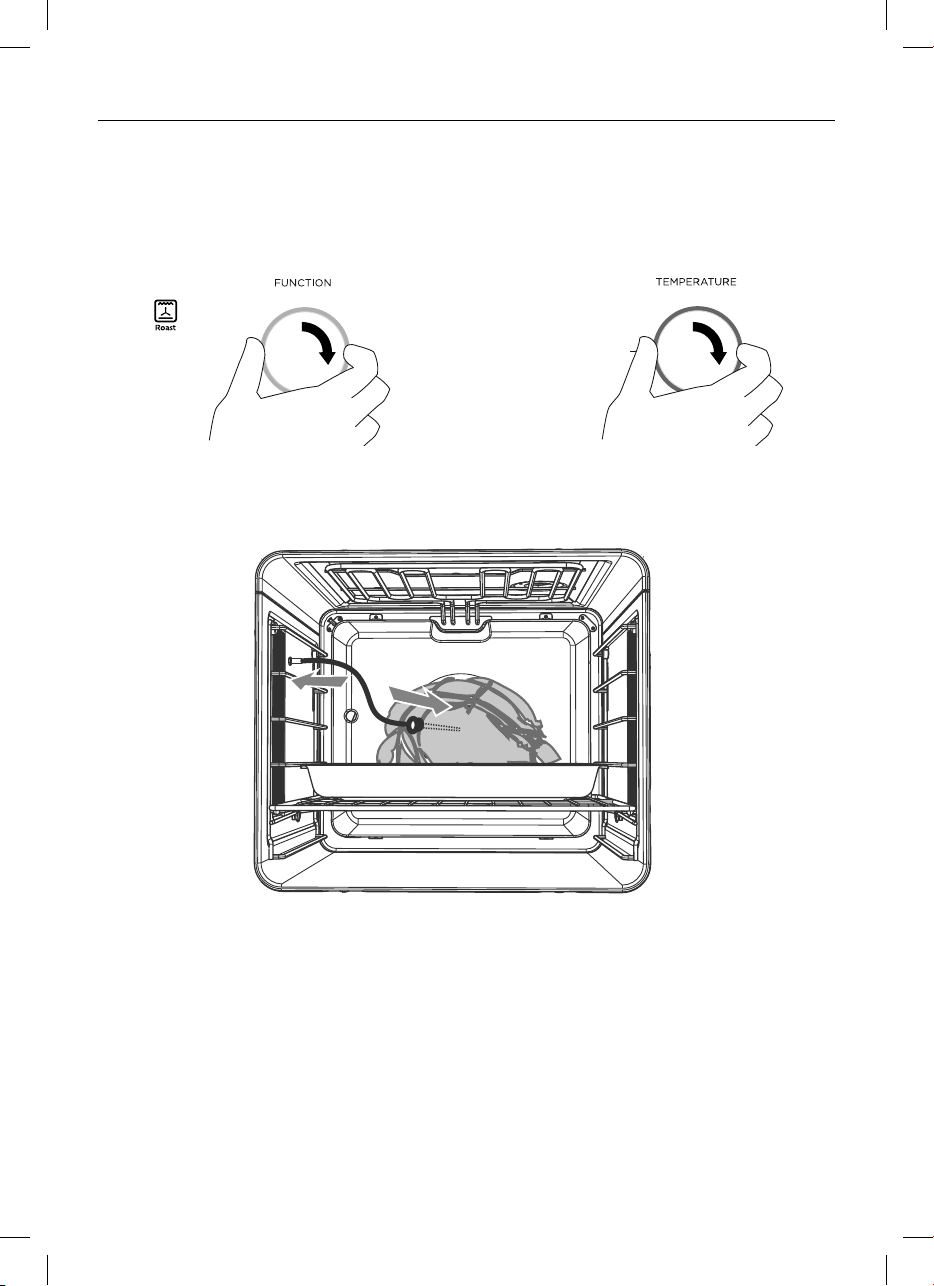
Using the meat probe
Use your meat probe to accurately judge when your meat is perfectly cooked.
You can use the probe with any function.
1 Select the oven function and temperature. Preheat the oven if appropriate.
Remember Roast and Fan Grill do not require preheating.
2 Insert the metal probe horizontally into the centre of the thickest part of the fully
defrosted meat. The thicker the meat, the longer it will take to cook, so it is important
that the probe is measuring the temperature of the meat at its thickest point. Make sure
the probe does not touch bone, fat or gristle, as these will heat up more quickly than
the lean meat.
3 Place the meat in the grill pan (or other suitable uncovered) dish.
4 When the oven has preheated (if required) to the set temperature, place the pan in the
oven and insert the plug end of the meat probe into the probe socket, using an oven
mitt if the oven is hot. The probe socket is on the left hand side of the oven, between
shelf positions 4 and 5. Make sure the probe is pushed completely into the socket, then
close the oven door.
200
56 3 87 0
200
56 3 87 0
NOITCNUF
ERUTAREPMET

35
USING THE MEAT PROBE (SOME MODELS ONLY)
Tips for using the meat probe
z
You can still use the timer when the meat probe is in use.
z
You cannot use the meat probe with Automatic cooking or rotisserie.
z
The internal temperature of the meat will continue to rise by a few degrees after you
have removed it from the oven, so allow for this in your calculations. Cover with foil and
let it rest for 15 to 20 minutes.
z
If you wish to remove the meat from the oven (eg basting), unplug the meat probe from
the socket but do not remove it from the meat. The display will show -- . When you are
ready to resume cooking, re-insert the probe plug into the socket and the display will
will alternate between the preset and current internal temperature of the meat.
IMPORTANT!
z
Use only the meat probe supplied with your oven, purchased from your
Fisher & Paykel dealer or replaced under warranty by your nearest Fisher & Paykel
trained and supported service technican.
z
Hold the meat probe at the handle when inserting and removing it from food and the
meat probe socket.
z
Remember to remove the meat probe from the oven before you start a self-clean
cycle.
z
Do not store the probe in the oven.
z
Only use the probe with fully defrosted food.
z
Wash the meat probe in mild soapy water but do not immerse. It is NOT dishwasher
safe.
5APress the right scroll
-
+
-
+
-
+
button 4 times
and the meat probe indicator will
come on and the display will show 65.
5BPress the select
-
+
-
+
-
+
button to confirm.
z
The display will then flash 65.
6 Use the scroll
-
+
-
+
-
+
-
+
-
+
-
+
buttons to set the
required meat temperature.
7 Press select to confirm.
z
the meat probe indicator will
remain on
z
the display will alternate between
the set temperature and the
internal temperture of the meat.
8AWhen the preset temperature is reached:
z
a tone will sound every 15 seconds
z
the oven will turn off
z
the display will show the time of day.
8BPress any button to cancel the tone.
200
56
3 87 0
200
56
3 8
7 0
200
56 3 8
7 0

36
USER PREFERENCE SETTINGS
You can set your oven to:
z
display the temperature in degrees Celsius or Fahrenheit
z
give audio feedback (tones and beeps) or operate quietly
z
display time as 12-hr or 24-hr
z
operate with the display off
z
have its lights on or off during cooking
operate in Sabbath setting (see ‘Sabbath setting’ following).
Note: You cannot change the user preference settings when you oven is operating or set
for automatic cooking.
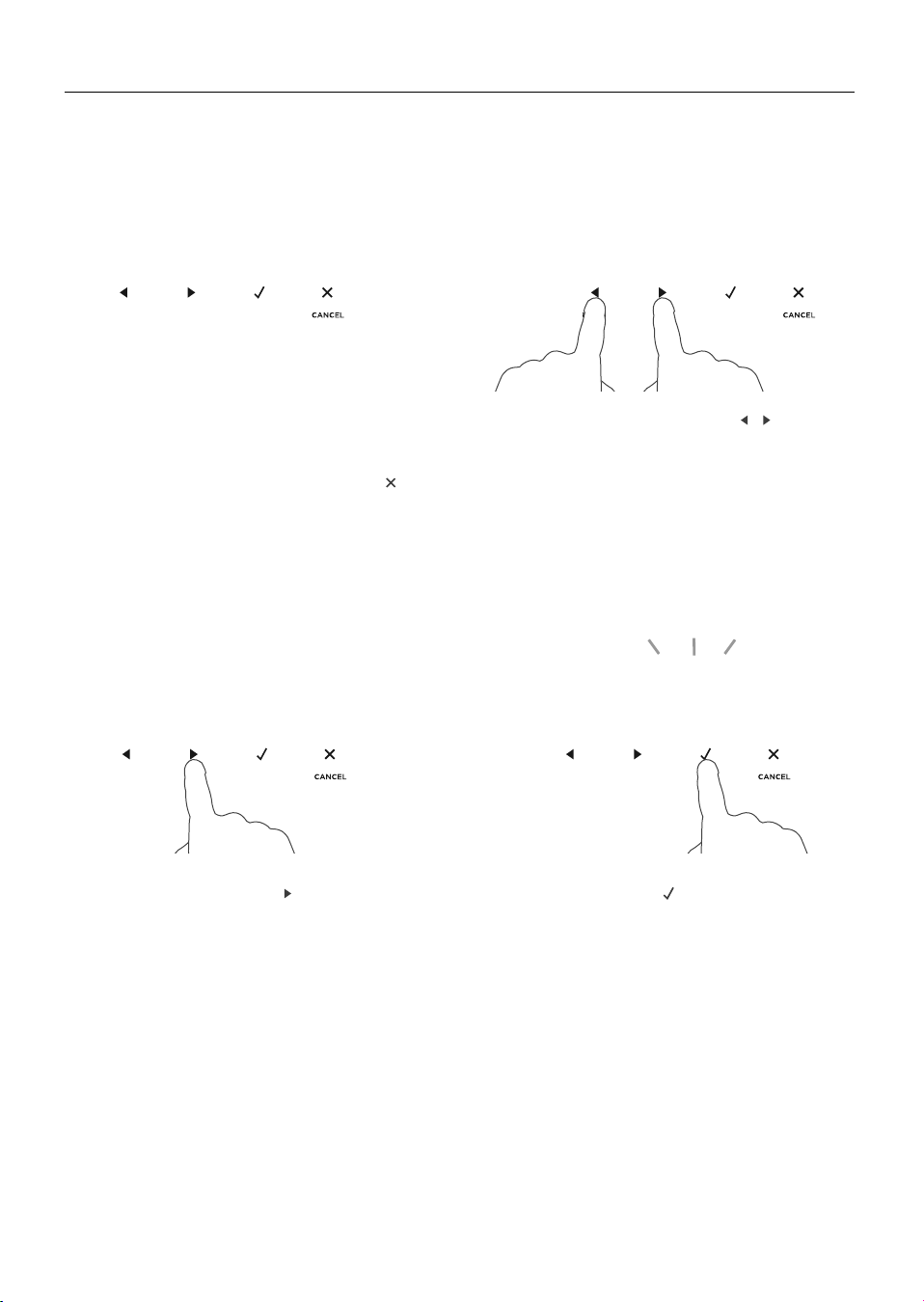
37
USER PREFERENCE SETTINGS
How to change preference settings
1 Check the oven function dial is set to
OFF and that the display shows the
time of day.
z
If you’re unsure, touch the cancel
-
+
-
+
-
+
control twice.
3 Touch the right scroll
-
+
-
+
-
+
control to scroll
to the setting you want to change.
Refer to the following table.
4 Touch the select
-
+
-
+
-
+
control to select the
particular setting.
z
The display will flash.
2 Touch and hold the scroll
-
+
-
+
-
+
-
+
-
+
-
+
controls
together for 3 seconds to enter the
user preference menu.
1 1 05
:
2 4 Hr
:
S b oF
2 0 00
:
2 0 00
:
1 00
:
o
C
o
C
o
F
o
F
1 1 05
:
2 4 Hr
:
S b oF
2 0 00
:
2 0 00
:
1 00
:
o
C
o
C
o
F
o
F
1 1 05
:
2 4 Hr
:
S b oF
2 0 00
:
2 0 00
:
1 00
:
o
C
o
C
o
F
o
F
1 1 05
:
2 4 Hr
:
S b oF
2 0 00
:
2 0 00
:
1 00
:
o
C
o
C
o
F
o
F

38
USER PREFERENCE SETTINGS
5 Touch the right scroll
-
+
-
+
-
+
control to scroll
through the options for that particular
setting. Refer to the table below.
6 Touch the select
-
+
-
+
-
+
control to save the
new option .
7 For all options except ‘Display off’ :
touch the cancel
-
+
-
+
-
+
control to quit the
user preference menu.
1 1 05
:
2 4 Hr
:
S b oF
2 0 00
:
2 0 00
:
1 00
:
o
C
o
C
o
F
o
F
1 1 05
:
2 4 Hr
:
S b oF
2 0 00
:
2 0 00
:
1 00
:
o
C
o
C
o
F
o
F

39
FAHRENHEIT
USER PREFERENCE SETTINGS
SETTING DEFAULT OPTION ALTERNATIVE OPTION(S)
TIME SCALE & ‘DISPLAY
OFF’ OPTION
Select between 24-hr
or 12-hr clock display
(and set the clock) or
set ‘Display off’ option if
you only need the basic
functionalities of your
oven.
TEMPERATURE SCALE
Select between degrees
Celsius or Fahrenheit.
AUDIO FEEDBACK
Turn the beeps and tones
on or off.*
OVEN LIGHTS
Have the light off during
cooking if you want to
save power or want the
food you cook to be a
surprise for others.
SABBATH SETTING
WIRELESS CONNECTION
(Not available on this
product)
BEEPS/TONES ON BEEPS/TONES OFF
CELSIUS
24 HR
LIGHTS ON
DURING COOKING
LIGHTS OFF
DURING COOKING
12 HR DISPLAY OFF **
See ‘Sabbath setting’ for
instructions.
* The timer tone and alert beeps will sound even if you save the BEEPS/TONES OFF option.
** With this option saved, you can still use the oven, and timer, however the display will remain unlit.
Any automatic functions will be cancelled when this option is selected.
To quit this option and enable the display, touch and hold the cancel
-
+
-
+
-
+
control.
SABBATH OFF
OFF ON RESET
24Hr
o
F
o
C
bPon
Lton
SboF
bPoF
LtoF
12Hr oFF
oFF on rSET

40
SABBATH SETTING
This setting is designed for religious faiths that observe a ‘no work’ requirement on the
Sabbath.
While your oven is in Sabbath setting
z
The display, dial halos and indicators will be unlit, the controls will be unresponsive.
z
No tones or beeps will sound.
z
No alert codes or temperature changes will be displayed.
z
The oven lights will stay on. If you want the oven lights to be off during Sabbath setting,
first select the ‘Lights off’ option as described in ‘User preference settings’, and only
then set Sabbath setting.
z
Bake is the only function available in Sabbath setting.
How to set Sabbath setting
2 Touch the right scroll
-
+
-
+
-
+
control to scroll
to the Sabbath setting.
3 Touch the select
-
+
-
+
-
+
control to select the
Sabbath setting. The default option is
‘Sabbath off’.
4 Touch the select
-
+
-
+
-
+
control to activate
the option.
z
The display will flash1:00.
1 Touch and hold the scroll
-
+
-
+
-
+
-
+
-
+
-
+
controls
together for 3 seconds to enter the
user preference menu.
1 1 05
:
2 4 Hr
:
S b oF
2 0 00
:
2 0 00
:
1 00
:
o
C
o
C
o
F
o
F
1 1 05
:
2 4 Hr
:
S b oF
2 0 00
:
2 0 00
:
1 00
:
o
C
o
C
o
F
o
F
1 1 05
:
2 4 Hr
:
S b oF
2 0 00
:
2 0 00
:
1 00
:
o
C
o
C
o
F
o
F
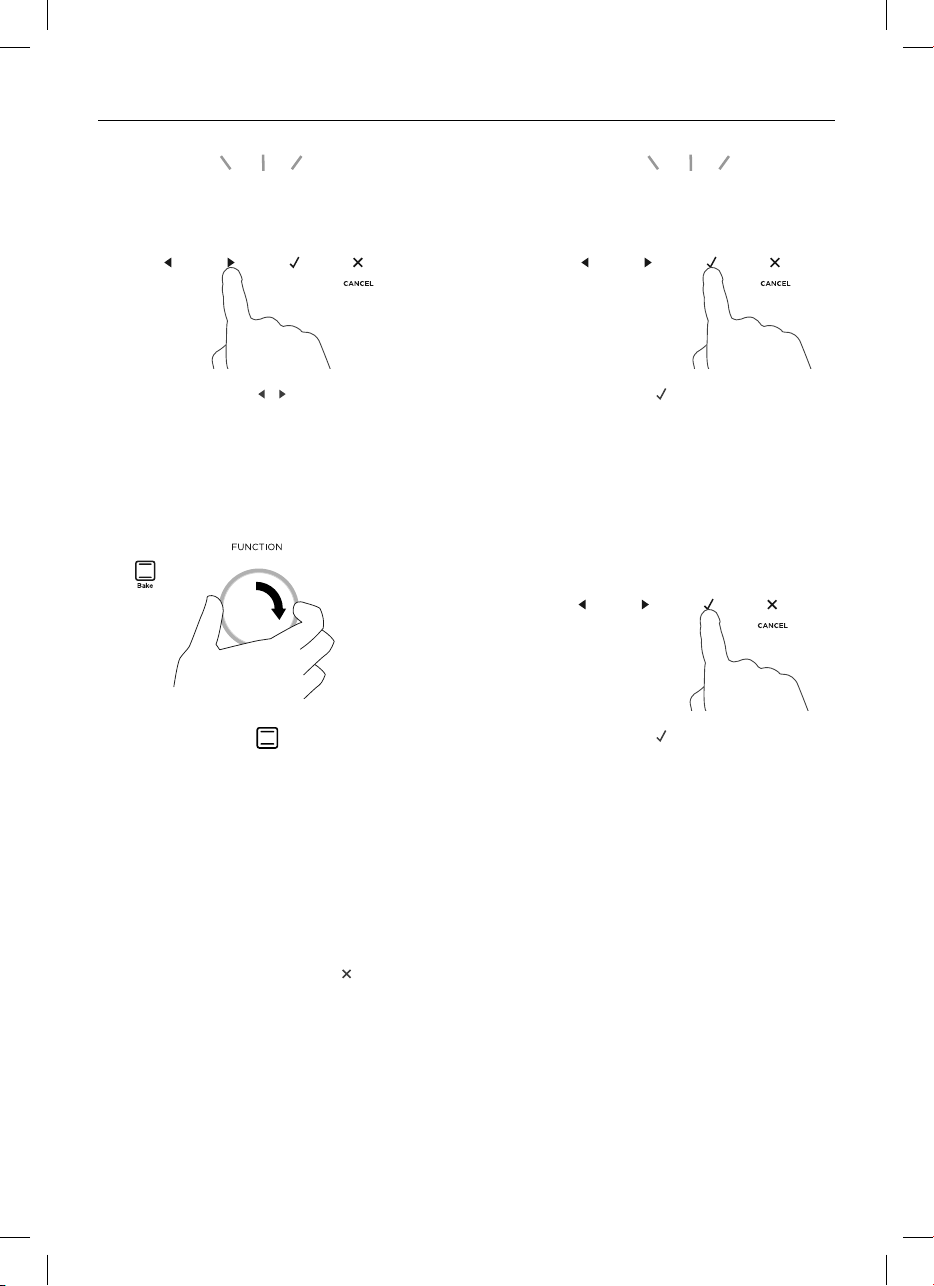
41
SABBATH SETTING
The display, indicators and dial halos will be unlit and unresponsive, but the oven will
bake until you quit Sabbath setting.
To quit Sabbath setting
Touch and hold the cancel
-
+
-
+
-
+
control until the time of day appears in the display and the
oven turns off.
7 Select the Bake
function.
8 Adjust the desired temperature.
5 Touch the scroll
-
+
-
+
-
+
-
+
-
+
-
+
controls to set the
time (hrs). You may set the time up to
48 hours.
6 Touch the select
-
+
-
+
-
+
control to confirm
the time.
z
The function halo will flash.
9 Touch the select
-
+
-
+
-
+
control to activate
Sabbath Setting.
z
The display will go blank and all
indicators will go out.
z
The oven will start up.
1 1 05
:
2 4 Hr
:
S b oF
2 0 00
:
2 0 00
:
1 00
:
o
C
o
C
o
F
o
F
1 1 05
:
2 4 Hr
:
S b oF
2 0 00
:
2 0 00
:
1 00
:
o
C
o
C
o
F
o
F
1 1 05
:
2 4 Hr
:
S b oF
2 0 00
:
2 0 00
:
1 00
:
o
C
o
C
o
F
o
F
1 1 05
:
2 4 Hr
:
S b oF
2 0 00
:
2 0 00
:
1 00
:
o
C
o
C
o
F
o
F
1 1 05
:
1 2 03
:
0 00
:
1 00
:
1 2 03
:
210

42
Manual cleaning
ALWAYS NEVER
z
Before any manual cleaning or
maintenance, first wait for the oven to
cool down to a safe temperature to
touch, then turn its power supply off at
the wall.
z
Read these cleaning instructions and
the ‘Safety and warnings’ section before
you start cleaning your oven.
z
To prevent soiling from becoming
‘baked on’ and stubborn, we
recommend removing any easy-to-
reach spills, food or grease stains from
the oven cavity enamel after each use.
z
Always clean the inner glass pane
before starting a Self Clean cycle
(where available). Failure to do this will
mean that residue will bake on and be
impossible to remove.
z
Always remove oven shelves before
starting a Self Clean cycle (where
available).
z
Never use a steam cleaner.
z
Never store flammable substances in the
oven.
z
Never use abrasive or harsh cleaners,
cloths, scouring pads or steel wool.
Some nylon scourers may also scratch.
Check the label first.
z
Never use oven cleaner on catalytic
panels or in a pyrolytic oven.
z
Never leave alkaline (salty spills) or
acidic substances (such as lemon juice
or vinegar) on the oven surfaces.
z
Never use cleaning products with a
chlorine or acidic base.
CARE AND CLEANING

43
Manual cleaning
WHAT? HOW? IMPORTANT!
Control Panel Take particular care when cleaning
the control panel glass. Only use a
damp cloth with detergent.
Do not use any oven cleaners,
harsh or abrasive cleaners,
scouring pads, steel wool or
sharp metal scrapers on the
glass. These may scratch and
damage the surface.
Dials Clean with a solution of mild
detergent and hot water, then wipe
dry.
Do not use stainless steel or
oven cleaner on the dials, as
doing so may damage their
coating.
Stainless steel
strip/handle on
the front of the
oven door
z
Clean with a solution of mild
detergent and hot water, then
wipe dry with a microfibre cloth.
z
If necessary, use a suitable
stainless steel cleaner and polish.
Always read the label to make
sure that your stainless steel
cleaner does not contain
chlorine compounds as these
are corrosive and may damage
the appearance of your oven.
Always rub the stainless steel
in the direction of the grain.
Oven door
frame and
plastic corner
clips
Clean with a solution of mild
detergent and hot water, then wipe
dry.
CARE AND CLEANING

44
Manual cleaning
WHAT? HOW? IMPORTANT!
Oven cavity
z
To clean light soiling off the
enamelled surfaces:
1 Wipe with a damp cloth and a
solution of hot water and mild
detergent or an ammonia-based
cleaner.
2 Wipe dry with a soft cloth.
z
To clean stubborn, ‘baked on’
soiling or the whole oven cavity:
use the Self Clean function. See
‘Using the Self Clean function’
for instructions.
z
To prevent soiling from
becoming ‘baked on’ and
stubborn, we recommend
removing any easy
-to-reach spills, food or
grease stains from the
enamelled surfaces after
each use. Doing so will
reduce the need for using
the Self Clean function
frequently.
z
To make wiping out the
oven easier you may
remove the oven door. See
the following pages for
instructions.
Meat Probe
(some models
only)
Clean with a solution of mild
detergent and hot water, then
wipe dry with a microfiber cloth.
z
Clean after every use to
avoid contamination.
z
Do not wash in the
dishwasher, immerse in
soapy water, use oven
cleaner or leave in the oven
during a Self Clean cycle.
CARE AND CLEANING

45
Manual cleaning
WHAT? HOW? IMPORTANT!
Full extension
sliding shelf
Wipe with a damp cloth and mild
detergent. Do not wipe off or wash
away the white lubricating grease
(visible when the shelf is
extended).
Never leave in the oven during
a Self Clean cycle.
Do not wash the shelf in the
dishwasher, immerse in soapy
water, or use oven cleaner on
it. Doing so will prevent the
slides from running smoothly.
Grid
Grill rack
Grill Pan
Wire oven
shelves
z
Clean with a solution of mild
detergent and hot water.
z
Pre-soak stubborn burnt-on
stains in a solution of dishwasher
powder and hot water..
z
These parts are also dishwasher
safe.
Never leave any of these
parts in the oven during a Self
Clean cycle (except for the
side racks). They will become
discolored or damaged.
Oven seal Do not clean this part.
Oven door glass
After every use
z
Use a soft cloth and a mixture
of warm water and dishwashing
liquid to remove light soiling
after every use.
z
For stubborn stains, try using
a mixture of baking soda and
warm water with a non-abrasive
scrubbing pad, then wipe dry
with a soft, lint-free cloth.
Do not use oven cleaners
or any other harsh/abrasive
cleaners, cloths, scouring
pads, steel wool or sharp
metal scrapers to clean the
oven door glass. These scratch
the glass, which in turn could
result in the glass cracking and
shattering.
Do not allow grease to build
up on the glass or become
baked on as this reduces
visibility into the oven.
CARE AND CLEANING

46
CARE AND CLEANING
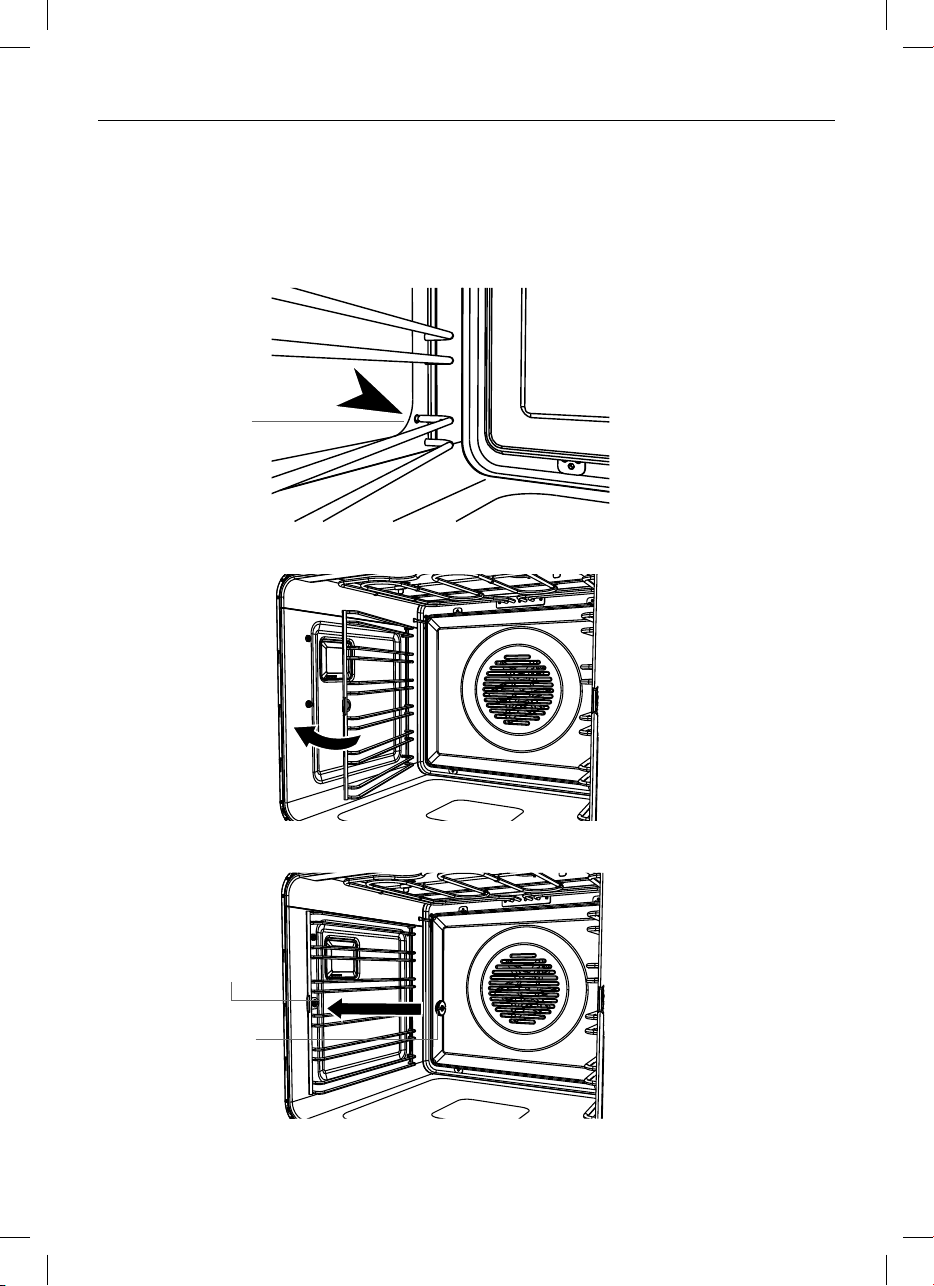
Removing the side racks
Remove the side racks to make cleaning
the oven easier.
The side racks can be left in the oven
during the self clean cycle.
IMPORTANT!
Always turn off the oven at the wall first.
Ensure the oven has cooled down
completely before starting.
Remove all shelves
1 Slide out all shelves and remove.
Remove both side racks
1 Unscrew and remove the fixing nut at
the front of the side rack. Use a coin to
loosen the nut if necessary.
2 Pull the front of the rack toward the
back of the oven until the front tab is
clear of the fixing nut.
3 Slide the side rack forward until the
rear prongs are clear of the holes.
Fixing
screw
Fixing
nut
Remove all shelves
Rear prongs
clear of holes
47
CARE AND CLEANING
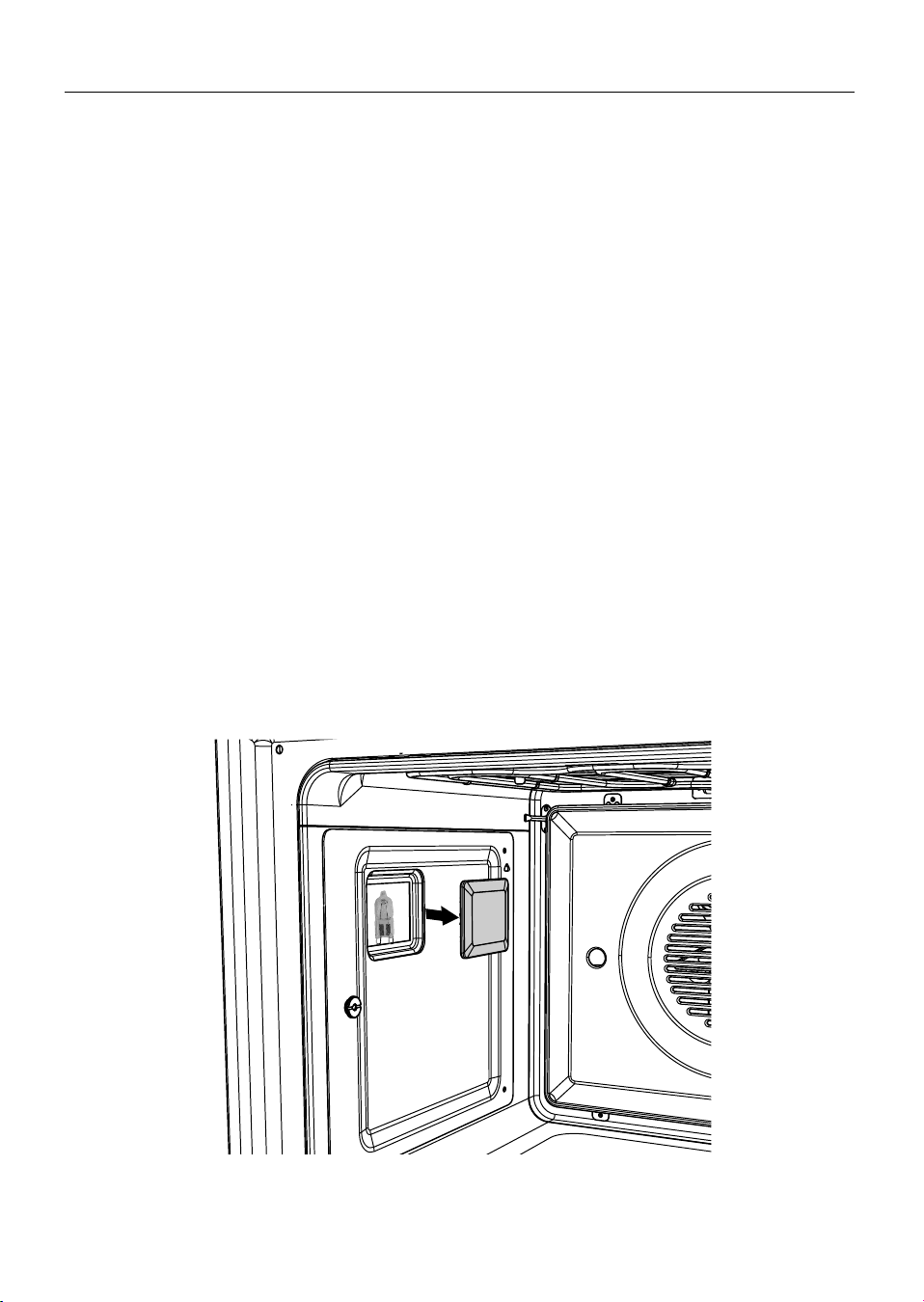
Fixing
screw
Fixing
nut
Insert rear
prongs
into holes
Refitting the side racks
1 Slide the rear prongs of the side rack back into the holes, ensuring the rack is firmly
pushed up against the side wall of the oven.
2 Fit the side rack front tab over the fixing screw.
3 Replace the fixing nut. You may use a coin to tighten the nut.
48
CARE AND CLEANING
Replacing the oven light bulbs
Note: Oven bulb replacement is not covered by your warranty.
Your oven uses G9 halogen bulbs with the specifications 120V, 50Hz and 25W.
Always hold the replacement bulb in a soft cloth. Touching the bulb will reduce its life-
span.
The two oven lights are located behind the opaque glass panels on each side wall of
your oven (one on each side).
Changing the bulb
1 Let the oven cavity and grill element cool down before changing the bulb. Before
switching off the oven, take note of which light(s) are not working.
IMPORTANT!
Turn the oven off at the wall before continuing.
2 Remove the oven shelves and side racks (see ‘Removing the side racks’).
3 Pull the glass cover off (if you find this difficult, you can gently prise the cover off using
the handle of a spoon or similar in the notches between the glass panel and oven wall
while holding the cover to ensure it does not fall).
4 Pull out the faulty bulb.
5 Holding the replacement bulb in a soft cloth or tissue (touching the bulb with your
fingers will reduce its life span) insert it into the socket.
6 Replace the glass cover pushing it firmly into place.
49
CARE AND CLEANING
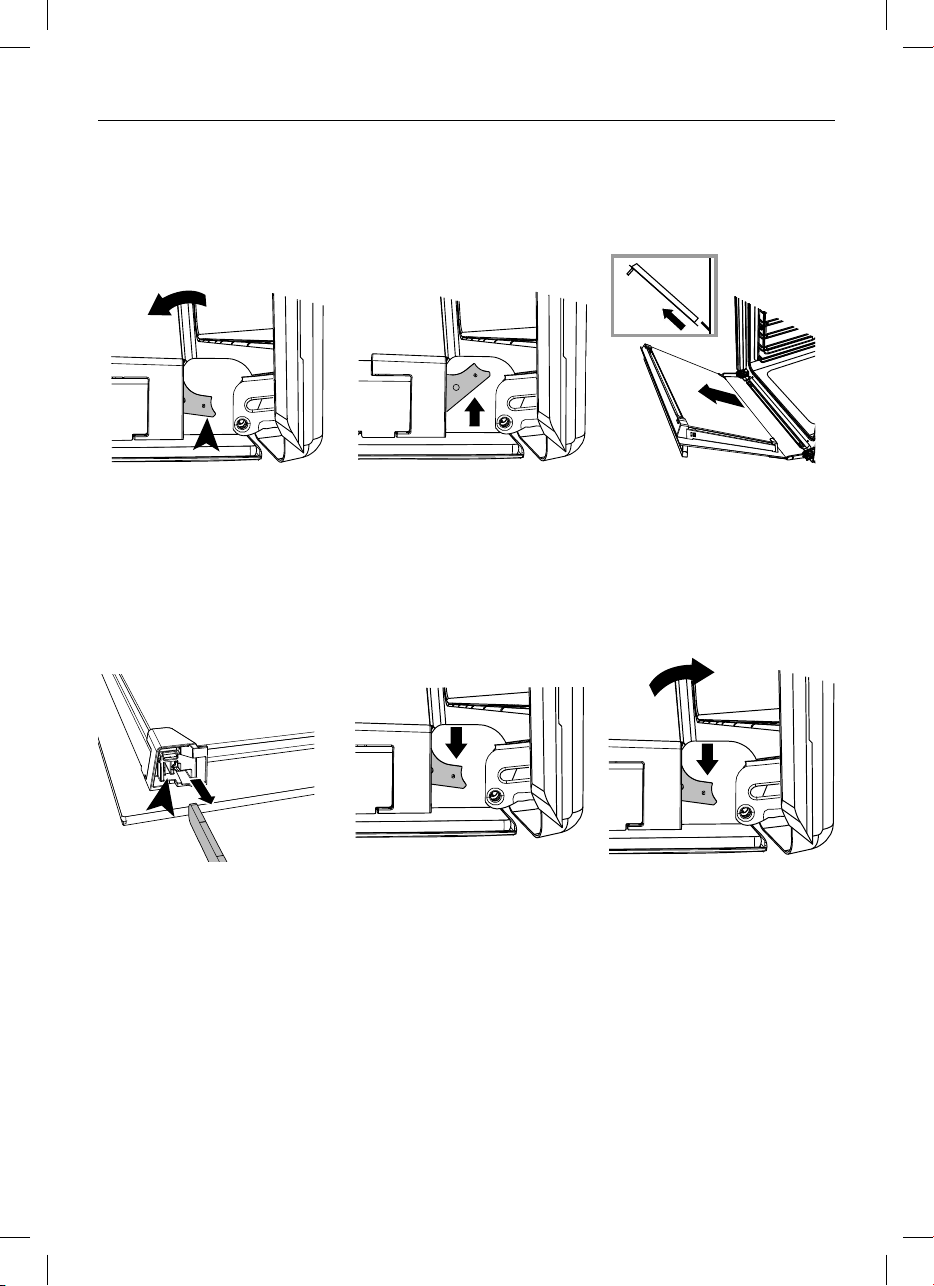
Removing and refitting the oven door.
IMPORTANT!
Take care, the oven door is heavy.
To remove the door
To refit the door
4 Holding the door on
both sides, line up
the holes in the base
of the door with the
hinges and slide the
door on.
5 Ensure the door is firmly
in place on the hinges.
Open the door fully
again and push each
locking lever down to
lock the door onto the
hinge.
6
IMPORTANT!
Ensure the levers
are both fully locked
before trying to shut
the door.
1 Open the door fully.
Locate the two small
metal locking levers
on both door hinges
either side.
2 Push each locking lever
up fully to release the
door from the hinge.
3 Holding the door on
both sides, lift door
back up to 45
o
and
carefully pull the door
out and away from the
hinges.

50
CARE AND CLEANING
IMPORTANT!
z
Make sure you follow the precautions and instructions below very carefully. Replacing
the glass panes and the door incorrectly may result in damage to the oven and may
void your warranty.
z
Take care, the oven door is heavy. If you have any doubts, do not attempt to remove
the door.
z
Make sure the oven and all its parts have cooled down. Do not attempt to handle the
parts of a hot oven.
z
Take extreme care when handling the glass panes. Avoid the corners and edges of the
glass bumping against any surface. This may result in the glass shattering.
z
Don’t use oven cleaners or any other harsh/abrasive cleaners, cloths, scouring pads,
steel wool or sharp metal scrapers to clean the glass surfaces. These scratch the glass
and may damage its special coating, which in turn could result in the glass cracking or
shattering.
z
If you notice any sign of damage on any of the glass panes (such as chipping or
cracks), do not use the oven. Contact a Fisher & Paykel trained and supported service
technician or Customer Care.
z
Make sure you replace all the glass panes correctly. Do not use the oven without all
glass panes correctly in place.
z
If the glass panes feel difficult to remove or replace, do not force them. Contact a
Fisher & Paykel trained and supported service technician or Customer Care.
Note: service visits providing assistance with using or maintaining the oven are not
covered by your warranty.
We recommend removing the door to make cleaning the glass easier. See ‘Removing
and refitting the oven door.’ for instructions. Once the door is removed, lay it down on a
soft, clean, flat surface.
Make sure you follow the precautions and instructions below very carefully. Replacing
the glass panes and the door incorrectly may result in damage to the oven and may
void your warranty.
The oven door is made up of 3 glass panes. To clean the middle pane you will first need
to remove door and inner pane.
Removing the door glass panes for cleaning
A
B
C
inner
middle
outer
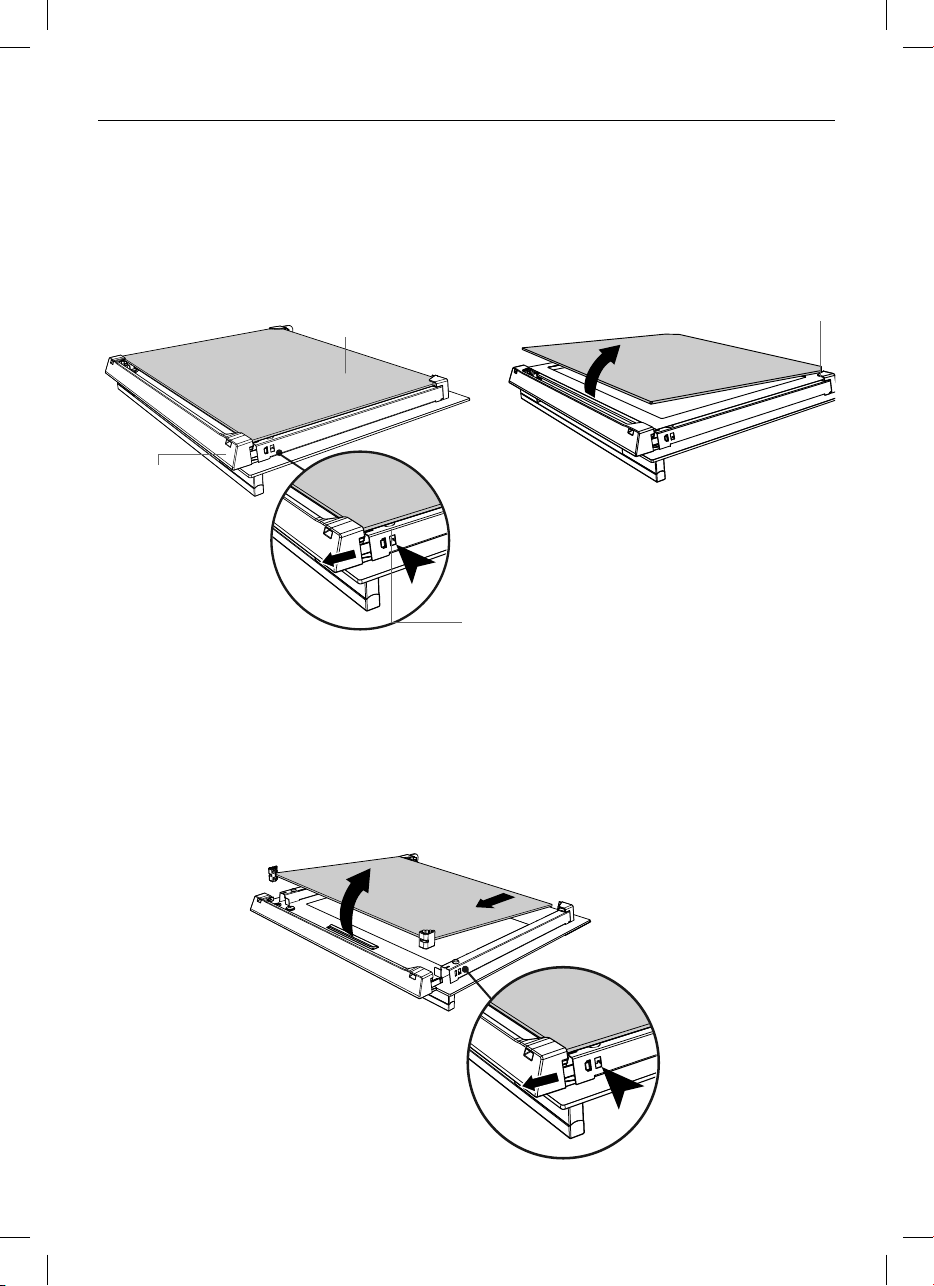
51
CARE AND CLEANING
To remove the middle pane
4 Touch the glass retainer tabs in on both sides of the door again. The glass retainer can
then be pulled off completely.
5 Gently pull the middle pane toward the top of the door until the pane is clear of the
notch at the bottom of the door.
6 Lift the pane out. The rubber stoppers at the top of the pane
remain attached to the glass pane.
To remove the inner pane
1 Touch the glass retainer tabs in on both sides of the door.
2 Pull the glass retainer up until the tabs relocate in the topmost hole.
3 Holding the top of the inner pane, gently pull the pane toward the top of the door until
the pane is clear of the notch at the bottom of the door and lift out. Do not angle the
pane too much as you may damage the glass.
Inner pane
Ta b
Notch
Glass retainer
1
4
6
5
2
3

52
CARE AND CLEANING
After cleaning replace the door glass panes
When replacing the glass panes make sure that
z
you replace the inner pane correctly as shown. The pane must be in the position
described below in order to fit into the door and to ensure that the oven operates safely
and correctly
z
you take extra care not to bump the edges of the glass against any object or surface
z
you do not force any of the panes into place. If you are experiencing difficulties
replacing the panes, remove them and start the process again from the beginning. If this
still does not help, call Customer Care.
Replace the middle pane
Ensure the pane is the right way up
(the black strip and warning text at
the bottom of the pane should be readable
back to front when the pane is fitted
correctly).
1 Ensure the rubber stoppers are still
attached at the top to the pane.
Ensure they are positioned correctly on
the glass with the longer side running
down the side of the glass panel as shown.
2 Slot the bottom of the pane into the
lower notch at the bottom of the door.
3 Lower the pane into the door, the rubber
stoppers rest on the outer pane of glass.
Replace the inner pane
Ensure the pane is the right way up
(ie the logo should be readable at the bottom of the door)
4 Slide the pane into the notch at the bottom of the door.
5 Lower the pane onto the notch at the top of the door.
6 Slide the glass retainer back into place and ensure it is fully clipped securely in place.
IMPORTANT!
Make sure the glass retainer is correctly and firmly in place and the glass pane is
secure.
Rubber
stopper
Lower
notch
Upper notch
1
4
5
6
2
3

53
USING THE SELF CLEAN FUNCTION
z
During the pyrolytic Self Clean cycle the extremely high temperature burns off and
breaks down grime and grease deposits. All that is left is a small amount of grey ash
that you can easily remove.
z
There is a choice of two Self Clean cycles:
- Self Clean (minimum 4 hours) (for normal soiling).
- Light Self Clean (minimum 3 hours) (suitable for a light or localised soiling).
IMPORTANT!
z
You must clean the inside glass door panel BEFORE starting a self-clean cycle. Failure
to do this may result in permanent staining or marking of the door glass.
See ‘Care and cleaning’ for our recommendations on how to do this.
z
Do not use oven cleaners, any degreasing cleaners, or oven liners.
z
Remove all oven shelves, trays, bakeware and utensils from the oven before starting
a self clean cycle (except side racks). If left in the oven they will be permanently
damaged; items made from combustible material (eg wood, fabric, plastic) may even
catch fire.
z
Do not use your oven to clean miscellaneous parts.
z
Make sure the room is well ventilated.
z
Before starting a Self Clean cycle, make sure you move any pet birds to another,
closed and well-ventilated room. Some pet birds are extremely sensitive to the fumes
given off during a Self Clean cycle, and may die if left in the same room as the oven
during such a cycle.
z
During a Self Clean cycle, the oven reaches higher temperatures than it does for
cooking. Under such conditions, the surfaces may get hotter than usual and children
should be kept away.
z
The oven door will be locked during the Self Clean cycle.
z
If there are cracks or flaws on any of the oven door glass panes, if the oven seal is
damaged or worn, or if the door does not close properly, do not start a Self Clean
cycle. Contact a Fisher & Paykel trained and supported service technician or Customer
Care
To start a Self Clean cycle
1 Remove all oven shelves, accessories, bakeware, and utensils.
Note: you do not need to remove the side racks.
2 Wipe up any spills, and along the inner edge of the oven surface around the seal. Failure
to do so may discolor the oven surface.
IMPORTANT!
Avoid cleaning the seal itself as this may cause damage.
3 Check the inner glass pane of the oven
door. If it has soiling on it (eg stains from greasy splatter), you will need to clean it
manually before starting a Self Clean
cycle. For instructions, see ‘Care
and cleaning’.
IMPORTANT!
z
If soiling is left on the glass, it will become burnt on during the Self Clean cycle,
making it very difficult to remove.
4 Close the oven door firmly.
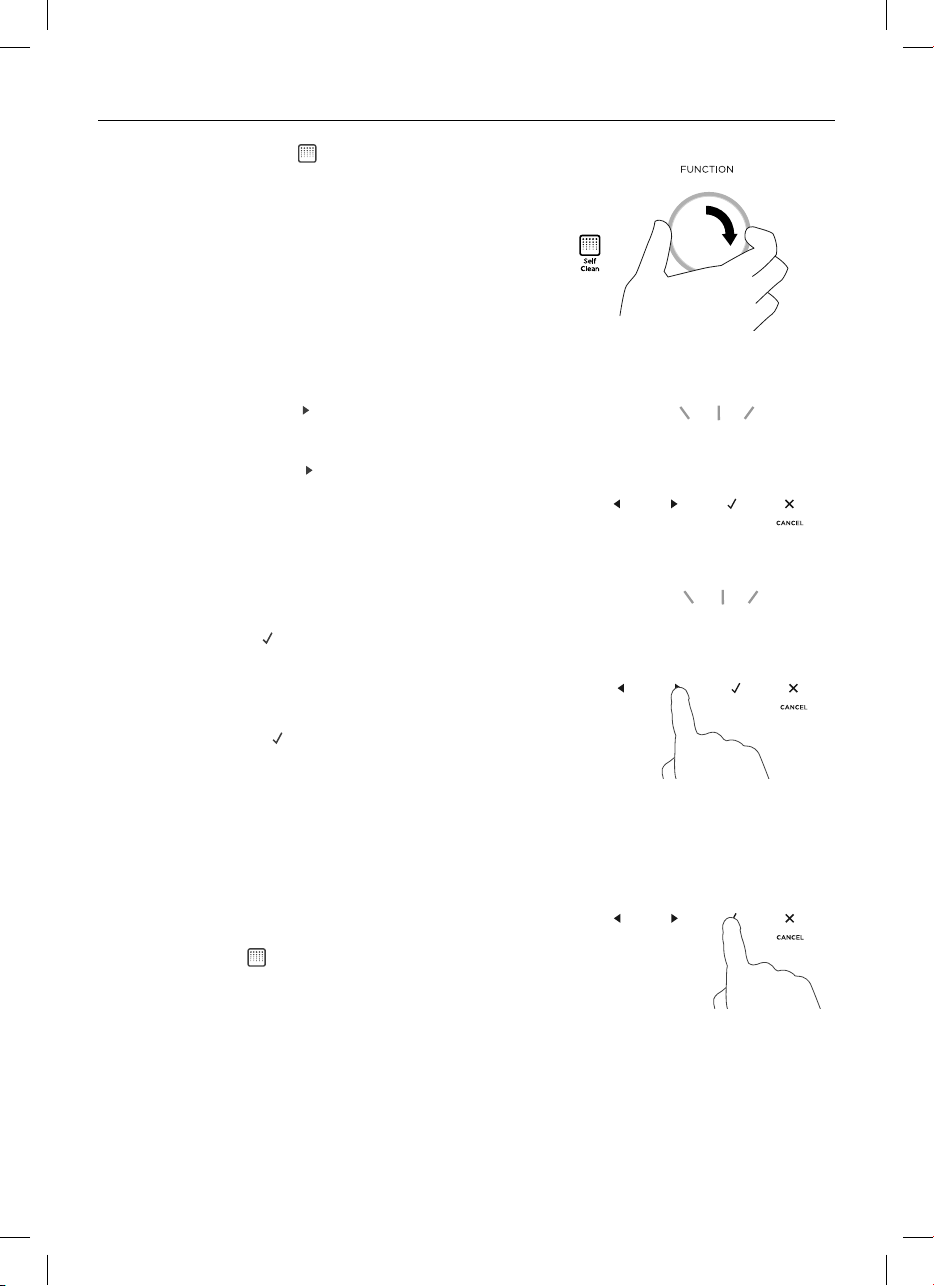
54
USING THE SELF CLEAN FUNCTION
5 Select the Self Clean
-
+
function.
z
The display will flash 0:00
6 Touch the right scroll
-
+
-
+
-
+
control once for the
Self Clean cycle
- the display will flash 4:00 (4 hours), or
Touch the right scroll
-
+
-
+
-
+
control a second time
for the Light Self Clean cycle
- the display will flash 3:00 (3 hours)
z
The temperature indicator will be blank, as
temperature cannot be adjusted.
7 Touch the select
-
+
-
+
-
+
control to start the Self
Clean cycle.
z
The time will start counting down.
z
The oven door will automatically lock and
remain locked during the cycle.
z
Note: if the select
-
+
-
+
-
+
control is not touched
within 15 seconds, the oven will automatically
turn off. Start from step 3 again.
If the door is not shut properly or is reopened
before the self clean cycle starts, the oven will
automatically turn off.
During the Self Clean cycle
z
The temperature and function halos and the
oven lights will remain off.
z
The Self Clean
-
+
function will be lit.
z
The display will countdown the time remaining.
0 00
:
4 00
:
400
4 00
:
2 35
:
0 00
:
4 00
:
400
4 00
:
2 35
:
0 00
:
4 00
:
400
4 00
:
2 35
:
0 00
:
4 00
:
400
4 00
:
2 35
:

55
USING THE SELF CLEAN FUNCTION
When a Self Clean cycle has finished
The oven will:
z
emit a long tone
z
automatically turn off
z
automatically unlock the door (when the oven has cooled to a safe temperature).
In a few seconds, the display will show the time of day.
You need to:
1 wait for the oven to cool down completely
2 remove the grey ash with a small brush or damp cloth
3 wipe out the oven with a clean damp cloth
4 dry with a clean lint-free cloth
5 replace the oven shelves.
To cancel a Self Clean cycle
IMPORTANT!
z
A Self Clean cycle can be cancelled at any time by touching the cancel
-
+
-
+
-
+
control.
z
The door will not unlock until the oven has cooled to a safe temperature.
Do NOT turn off the mains power supply to the oven (wall switch). Turning off the
power while the oven is too hot may damage the oven and its surrounding cabinetry.
To cancel a Self Clean cycle, touch the cancel
-
+
-
+
-
+
control.
z
If the oven needs to cool down, the Self Clean
-
+
function indicator will stay lit, the
display will show the remaining cool-down time, the temperature indicator will show
cascading bars
-
+
-
+
-
+
and the door will remain locked.
z
When it has cooled down, the oven will turn off, the door will unlock, a long tone will
sound and the display will show the time of day.
z
We do not recommend cancelling a Self Clean cycle and then immediately starting one
again.
0 00
:
4 00
:
400
4 00
:
2 35
:
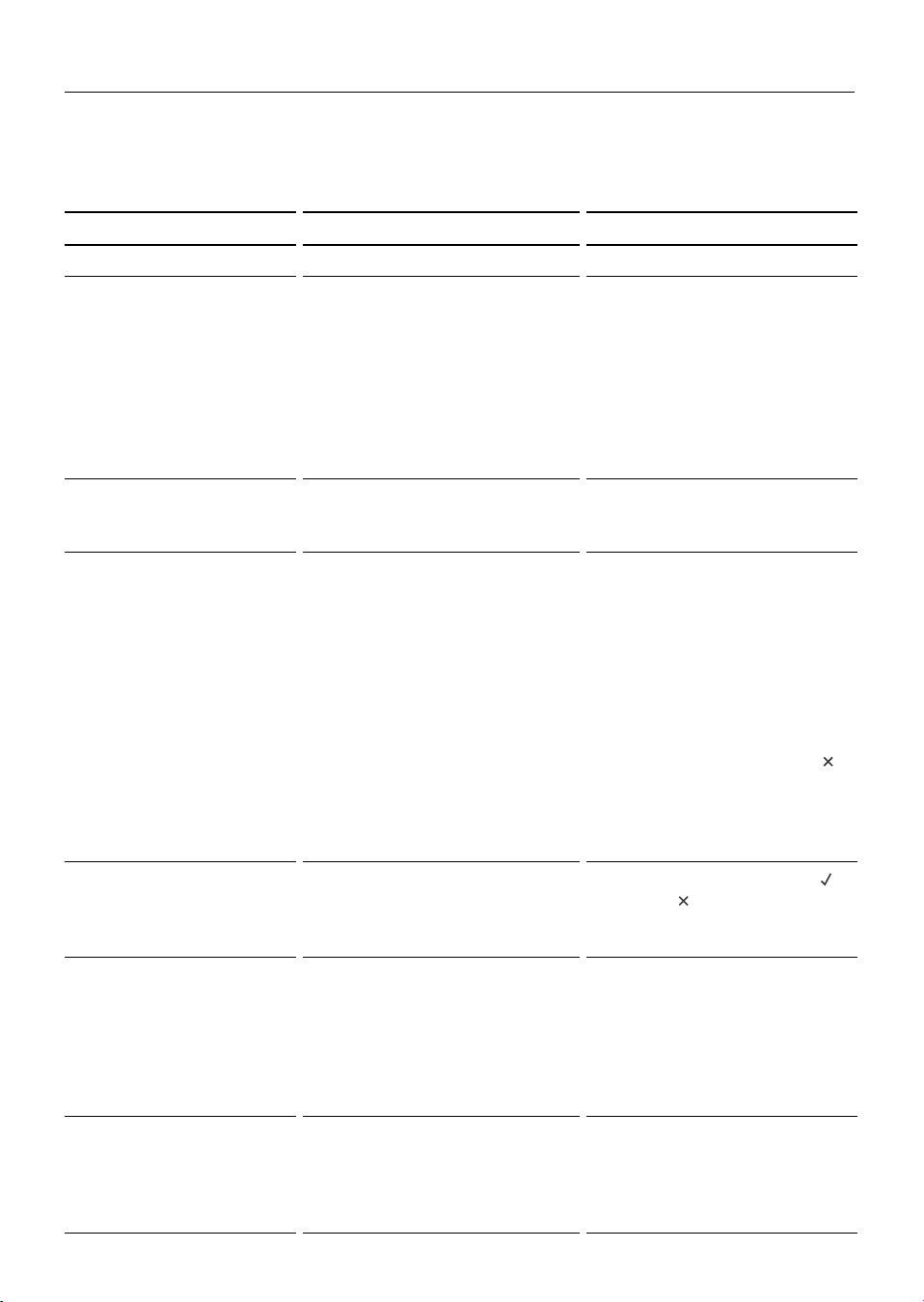
56
TROUBLESHOOTING
Troubleshooting chart
If there is a problem, check the chart below to see if you can fix it. If the problem cannot
be fixed or it persists, contact your FIsher & Paykel trained and supported service
technician or Customer Care.
PROBLEM POSSIBLE CAUSES WHAT TO DO
General
The oven does not work. No power.
The clock has not been set
Check that the mains power
supply (wall switch) is turned
on, the fuse has not tripped
and there is no power outage
in your area.
The oven will not work unless
the clock is set. See ‘Setting
the Clock’.
The oven does not work
but the display is lit.
The oven is set for automatic
cooking.
See ‘Automatic cooking’ for
instructions.
The lights do not come
on when I open the
oven door.
The oven light bulb(s) have
blown.
The door is not correctly
fitted.
The oven is in Sabbath setting
and the ‘Light off’ option has
been saved.
Replace the light bulb(s). See
‘Replacing the oven light
bulbs’ for instructions.
See ‘To refit the door’ for
instructions on fitting the
door correctly.
To quit Sabbath setting,
touch and hold the cancel
-
+
-
+
-
+
control. See ‘User preference
settings’ for instructions
on changing the ‘Light off’
option.
The temperature
indicator is blank and
the dials and controls
are unresponsive.
The control panel is locked.
Touch and hold the select
-
+
-
+
-
+
or cancel
-
+
-
+
-
+
control to unlock
the control panel.
The oven is not heating. The door is not properly
closed
or it is opened too frequently
during cooking.
The heating elements are
disabled while the door is
open.
Make sure the door is
properly closed and avoid
opening it frequently during
cooking.
A glass pane in the oven
door has cracked,
chipped, or shattered.
Incorrect cleaning or the edge
of the glass hitting against
something.
You must NOT use the oven.
Contact a Fisher & Paykel
trained and supported
service technician or
Customer Care
57
TROUBLESHOOTING
PROBLEM POSSIBLE CAUSES WHAT TO DO
General
I can feel hot air
blowing out of the vents
after I have turned the
oven off.
This is normal. The cooling fans will
continue to run even
when you have turned
the function dial to ‘Off’.
The fans will switch off
automatically when the
oven has cooled.
The oven fan comes on
when I select a function
that does not use a
fan (eg bake or classic
bake)
This is normal.
The fan comes on while the
oven is preheating. It may turn
off when the oven has reached
the set temperature.
Wait until a long
tone sounds and the
temperature dial halo turns
white: the oven will then be
ready to use.
The oven has reached
the set temperature
but the temperature
dial halo is still red
(indicating that the oven
is not ready to use).
This is normal: when heating
up from cold, your oven is
designed to initially heat to a
temperature somewhat higher
than what you have set. This
is to provide optimal baking
conditions right from the start.
Wait until a long
tone sounds and the
temperature dial halo
turns white: the oven will
then be ready to use.
The oven is heating but
the display is dark.
The oven is set to ‘Display off’
option.
The oven is in Sabbath setting.
To quit the ‘Display off’
option, touch and hold the
cancel
-
+
-
+
-
+
control until the
display shows the time of
day.
To quit Sabbath setting,
touch and hold the cancel
-
+
-
+
-
+
control until the display
shows the time of day.
The oven cancels
automatic cooking when
I try to adjust the clock
setting.
The oven was set for automatic
cooking when you were trying
to adjust the clock setting.
You can only adjust the
clock setting while the oven
is not set for automatic
cooking.
The oven sounds a
tone when I try to turn
the temperature dial
OFF or below a certain
temperature.
This is normal: the oven
functions have factory-set
minimum temperature settings.
The temperature dial itself
cannot be ‘turned off’.
Selecting Off
-
+
-
+
-
+
with the
function dial will turn the
oven off.
The temperature dial
halo never turns white
when I use Grill
.
This is normal: the halo stays red to indicate that the grill
element provides instant radiant heat.
The displays work,
and the function and
temperature dials halos
come on but the oven
does not heat up.
The oven is in ‘Demo’ mode. Call Customer Care.
58
TROUBLESHOOTING
PROBLEM POSSIBLE CAUSES WHAT TO DO
Self Clean function
During a Self Clean
cycle, the oven is louder
than usual.
This is normal: the oven’s cooling fans operate at their highest
speed.
The display shows
0:00 but the oven door
will not open.
The oven door is locked
because the oven is still
too hot to be used for
cooking.
Wait until the Self Clean cycle has
finished. If you cancelled a Self
Clean cycle which was already
underway, the oven
still needs to cool down before it
can be used. The oven door will
automatically unlock.
At a point during a Self
Clean cycle, the function
dial halo goes out
and the temperature
indicator starts
displaying cascading
bars
-
+
-
+
-
+
.
This is normal: the oven
is
in the last phase of the
Self
Clean cycle, cooling
down.
Wait until the Self Clean cycle
has finished. A long tone will
sound and the oven door will
automatically unlock when the
oven is ready to use.
I have cancelled a Self
Clean cycle but cannot
use the oven:
z
the oven door will
not open
z
the display is still
counting down
minutes or showing
0:00
z
the Self Clean
-
+
function indicator
is still lit the
temperature
indicator shows
cascading bars
-
+
-
+
-
+
z
the dials and controls
are unresponsive.
This is normal: if the
function dial halo is unlit,
you have
successfully cancelled
the
Self Clean cycle.
However, the
oven is still too hot to be
used for cooking and
needs to cool down.
Wait until the cool-down phase
has finished. A long tone will
sound and the oven door will
automatically unlock when the
oven is ready to use.
Note: depending on when the Self
Clean cycle was cancelled, the
cool-down phase may take up to
45 minutes.
The oven is beeping and
the display shows
a2
or a3.
See section ‘Alert codes’ for instructions.
There is a power cut
during a Self Clean
cycle.
Power cut. The door will remain locked. Once
the power is turned back on,
the door will remain locked until
the oven has cooled to a safe
temperature.

59
ALERT CODES
If there is a problem, the oven will:
z
automatically suspend all oven functions
z
beep five times
z
display an alert code.
IMPORTANT!
Do not turn off the mains power supply to the oven (wall switch) if you get an alert
code, unless the instructions in the chart following specifically instruct you to. There
are cooling fans within the oven which are needed to cool the oven’s components.
Turning off the power while the oven is too hot may damage the oven and its
surrounding cabinetry.
What to do if an alert code is displayed
1 If the beeping hasn’t stopped already, touch any control to stop it.
2 Make a note of the alert code displayed. You may need this information.
3 Check the chart following to see if you can fix the problem yourself and follow the
instructions.
4 If you can fix the problem and the alert code does not reappear, you can keep using
your oven.
OR
If you can’t fix the problem yourself or the alert code reappears and the problem
persists: wait until the cooling fans have stopped and the oven has completely cooled
down, then turn the power to the oven off at the wall and contact a Fisher & Paykel
trained and supported service technician or Customer Care with the alert code
information.

60
ALERT CODES
ALERT CODE POSSIBLE CAUSES WHAT TO DO
a1
The oven has overheated.
1 Allow the oven to cool down.
2 Once the oven has cooled down
and the door has unlocked, the
alert code will disappear. You can
now use the oven again.
a2
Door lock error: the door
cannot be locked after you
have started a Self Clean cycle.
1 Turn the power to the oven off at
the wall and on again.
2 Wait approximately 10 seconds.
This is to allow the door lock to
return to its initial position.
3 Set the clock. See ‘Setting the
Clock’ for instructions.
4 Try starting a Self Clean cycle
again, making sure that you close
the door firmly. See ‘Using the Self
Clean function’.
a3
Door lock error: the door
cannot be unlocked after a Self
Clean cycle has finished.
1 Turn the power to the oven off at
the wall and on again.
2 Try touching on the oven door to
help the door lock disengage.
3 If this doesn’t help and the
alert code reappears, contact
a Fisher & Paykel trained and
supported service technician or
Customer Care.
F+ number
Technical fault.
1 Note down the alert code.
2 Wait until the cooling fans
have stopped and the oven has
completely cooled down.
3 Turn the power to the oven off at
the wall.
4 Contact a Fisher & Paykel trained
and supported service technician
or Customer Care.

61
WARRANTY AND SERVICE
This oven has been designed and constructed in accordance with the following
codes and specifications:
In New Zealand and Australia
z
AS/NZS 60335-1 General Requirements for Domestic electrical appliances
z
AS/NZS 60335-2-6 Particular Requirements for Domestic electrical cooking appliances
z
AS/NZS CISPR 14.1 2010 Electromagnetic Compatibility Requirements.
In Europe
z
EEC Directive “Low voltage” 2006/95:
EN 60335-1 General Requirements for Domestic electrical appliances
EN 60335-2-6 Particular Requirements for Domestic electrical cooking appliances
z
EEC Directive “EMC” 2014/30/EU
EN 55014-1, EN 55014-2, EN 61000-3-2, EN 61000-3-3 Electromagnetic Compatibility
Requirements.
z
EEC Directive “Radio Equipment” RED 2014/53/EU
Requirements of EEC Directive 93/68.
European directive 2012/19/EC on Waste Electrical and Electronic Equipment (WEEE)
(for European Union countries only)
GB This appliance is marked according to the European directive 2012/19/EC on Waste
Electrical and Electronic Equipment (WEEE). By ensuring this product is disposed of
correctly, you will help prevent potential negative consequences for the environment
and human health, which could otherwise be caused by inappropriate waste handling of
this product.
The symbol on the product, or on the documents accompanying the product,
indicates that this appliance may not be treated as household waste. Instead it shall
be handed over to the applicable collection point for the recycling of electrical
and electronic equipment. Disposal must be carried out in accordance with local
environmental regulations for waste disposal. For more detailed information about
treatment, recovery and recycling of this product, please contact your local city office,
your household waste disposal service or the shop where you purchased the product.

62
ENERGY GUIDELINES (GB IE ONLY)
MODEL
WEIGHT
(KG)
NO.
OVEN
CAVITIES
CAVITY
VOLUME
(LITRES)
ENERGY
CONSUMPTION*
(CONVENTIONAL)
KWH/CYCLE
ENERGY
CONSUMPTION*
(SLOW COOK)
KWH/CYCLE
ENERGY
CONSUMPTION*
(FAN FORCED)
KWH/CYCLE
ENERGY
EFFICIENCY
INDEX
(CONVENTIONAL)
ENERGY
EFFICIENCY
INDEX
(SLOW COOK)
ENERGY
EFFICIENCY
INDEX
(FAN
FORCED)
OB60SD11PX1 34 1 72 0.87 0.68 N/A 102.0 79.8 N /A
OB60SD9PX1 34 1 72 0.87 0.68 N/A 102.0 79.8 N /A
OB60SD9BX1 34 1 72 0.87 0.68 N/A 102.0 79.8 N /A
OB60SD7PX1 34 1 72 0.87 N/A 0.78 102.0 N/A 91.3
MODEL
STANDBY
POWER
(WATTAGE)
NETWORKED
STANDBY
POWER
(WATTAGE)
TIME TO
STANDBY
(SECONDS)
TIME TO
NETWORKED
STANDBY
(SECONDS)
OB60SD11PX1 < 1 W < 2 W 5 5
OB60SD9PX1 < 1 W < 2 W 5 5
OB60SD9PB1 < 1 W < 2 W 5 5
OB60SD7PX1 < 1 W < 2 W 5 5
*Energy consumption for electric cooking appliances are calculated using the following Standard:
BS EN 60350 Part 1- Ranges, ovens, steam ovens and grills – Methods for measuring performance

63
ENERGY GUIDELINES (GB IE ONLY)
Reducing the environmental impact
Reducing energy consumption will reduce the impact of cooking on the environment.
The following tips can help you to reduce your energy consumption:
z
Do not pre-heat the oven too early. Aim to have the oven hot at the same time as the
foodis ready to be placed in it.
z
Maximise the use of your pre-heated oven – cook or bake in batches.
z
Minimise the number of times you open the oven door during cooking
(to reduce heat loss).
z
Cook multiple dishes at the same time.
z
Use the residual heat in the oven to finish the cooking process (turn the oven off a few
minutes before the cooking time is up).
z
Use ceramic or glass cooking dishes which may reduce the cooking time or allow you to
reduce the oven temperature.
z
Use fan functions wherever possible. These functions may allow you to reduce cooking
times and/or temperatures. Fan forced functions will allow you to bake on multiple
shelves at the same time.
z
Use a ‘Self clean’ function immediately after cooking when the oven is still warm,
shortening the heat up period of the Self clean cycle.
z
Replace oven seals if they become damaged. A damaged seal will decrease the
efficiency of your oven.
z
Cutting food into smaller pieces will reduce cooking time.
z
Do not use the oven to defrost food.



NZ AU GB IE
591905C 07.20
FISHERPAYKEL.COM
© Fisher & Paykel Appliances 2020. All rights reserved.
The product specifications in this document apply to the specific
products and models described at the date of issue. Under our policy
of continuous product improvement, these specifications may change
at any time. You should therefore check with your Dealer to ensure this
document correctly describes the product currently available.