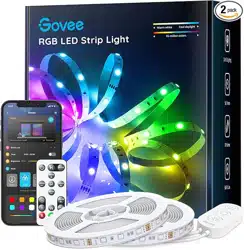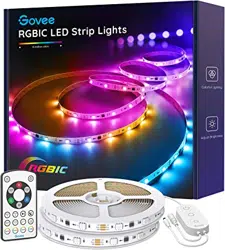

RGBIC LED Strip Lights
Model: H6131
User Manual

English 01
Deutsch 08
Français 15
Español 22
Italiano 29
傈劥铃
36

English
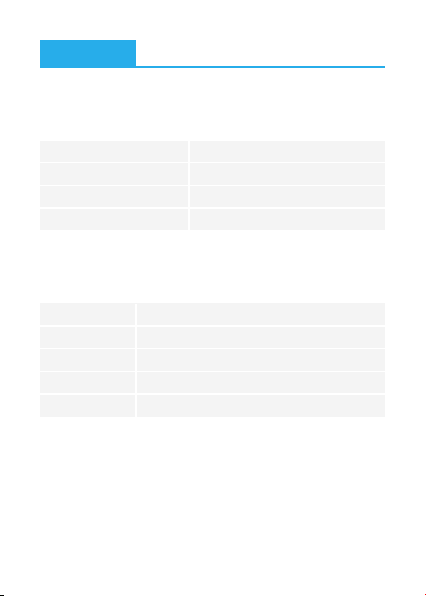
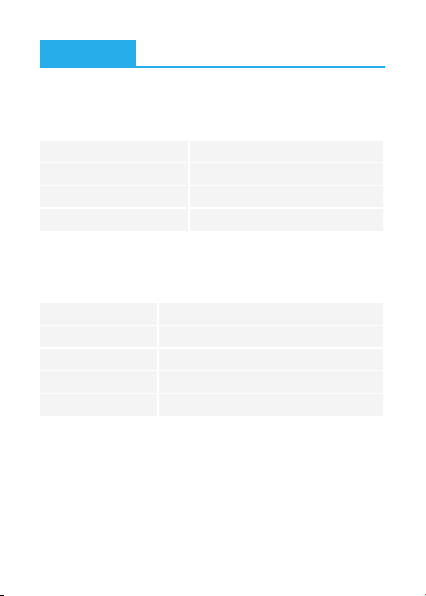
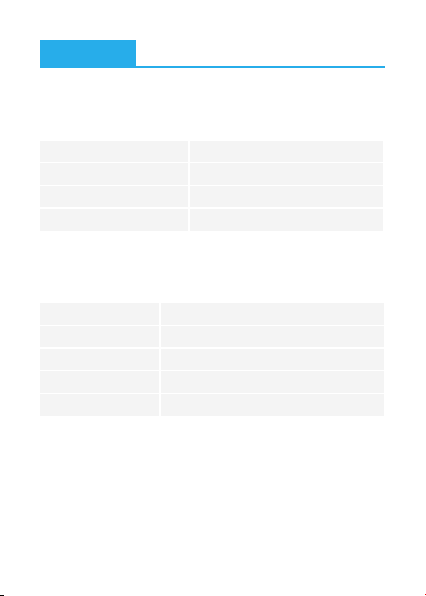
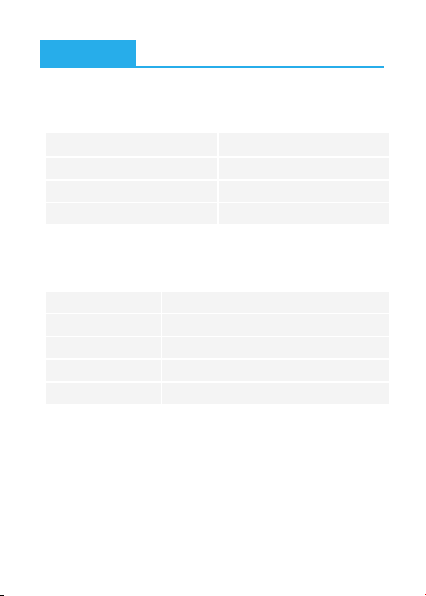
10m (5m-2 Rolls)/32.8ft (16.4ft-2 Rolls)
RGBIC
No
IR Remote & Control Box
Adapter 12V
6SHFLȴFDWLRQV
2
1
1
1
:KDW<RX*HW
01
Length
Lighting Color
Waterproof
Control Method
Power Supply
Strip Light
Power Adapter
User Manual
Service Card
Ԯ
b.
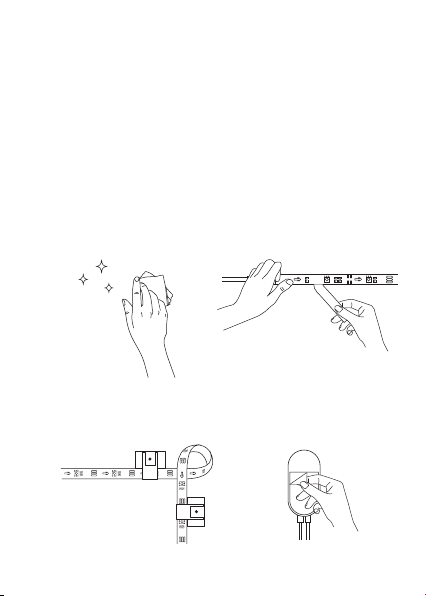
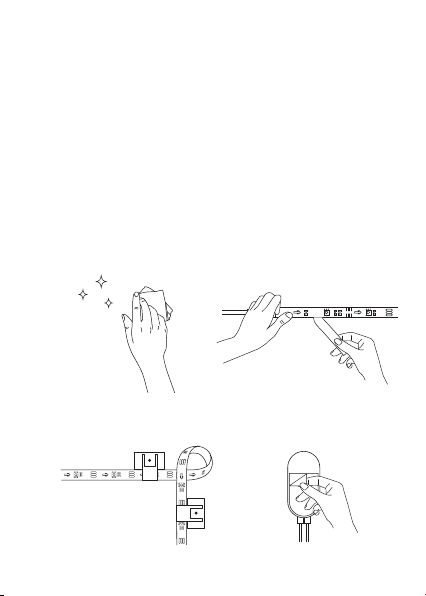
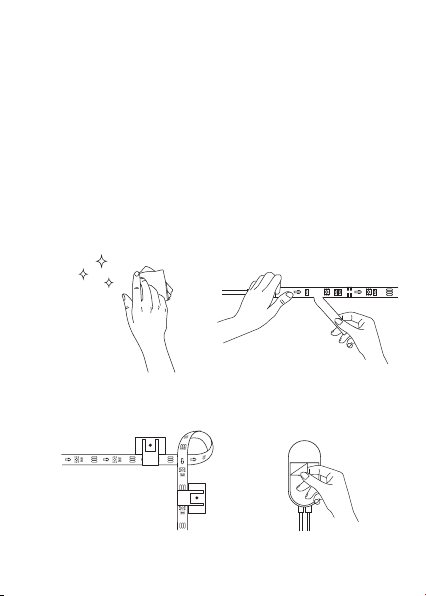
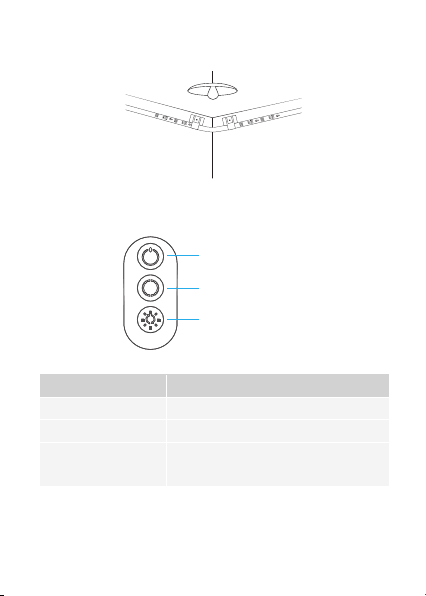
a. Unpack the box and check all items listed in the packing list.
Ԯ
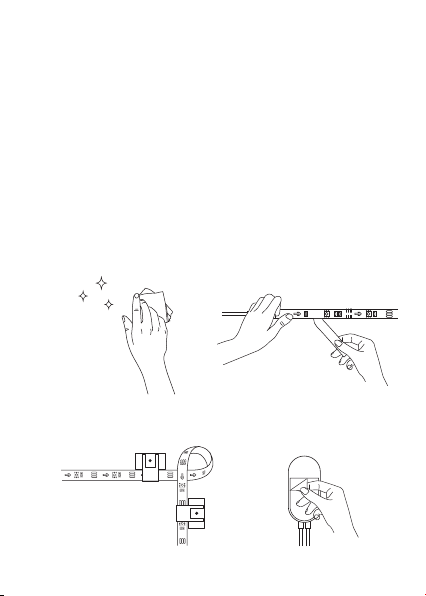
Preparation Before Installing
ΖQVWDOOLQJ<RXU6WULS/LJKWV
a.Wipe the surface to make
sure it's clean and dry.
b. 3HHORWKHSURWHFWLYHȴOPRQ
the tape, stick the strip on and
SUHVVRYHULWȴUPO\
c. Reinforce via clips around
corners.
ԯ
Installing Steps
d. 3HHORWKHSURWHFWLYHȴOPRQ
the control box and stick it on.
Power on the strip lights and check whether they light up.
b.
02
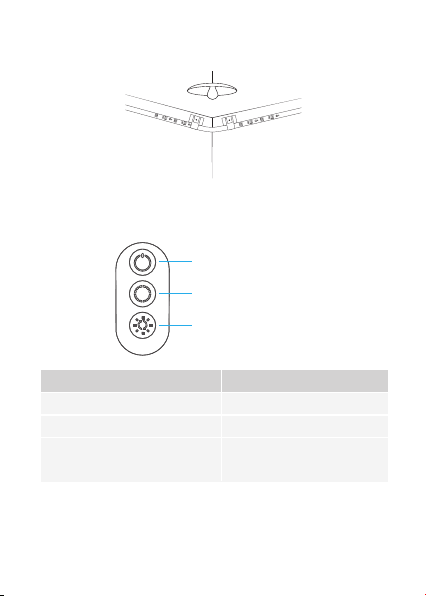
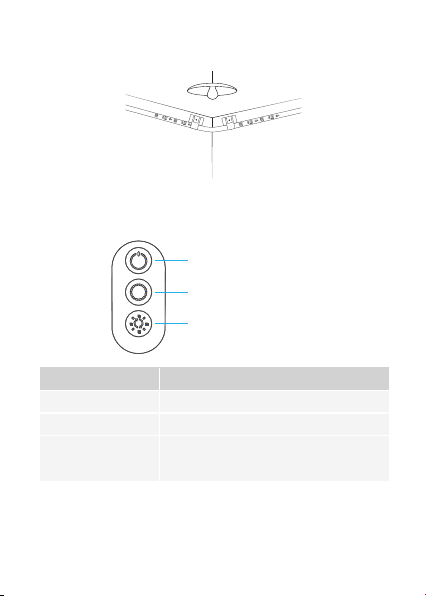
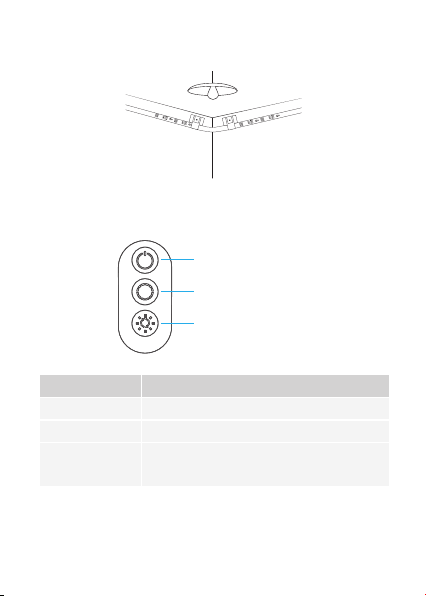
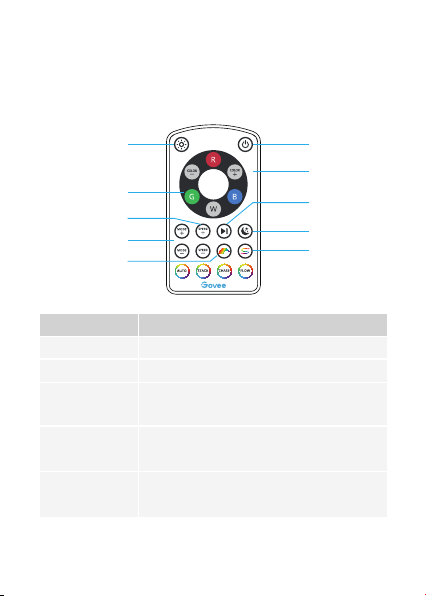
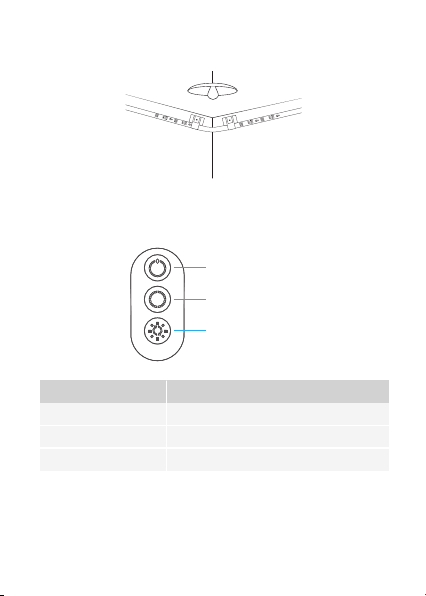
&RQWUROOLQJZLWKWKH&RQWURO%R[
2Q2
Color Changing
Brightness Adjusting
Button Function
7XUQWKHOLJKWRQR
Press to cycle through 9 colors.
Press and hold to cycle through
6 brightness levels.
2Q2
Color Changing
Brightness Adjusting
e.Power on the strip lights and begin using.
03
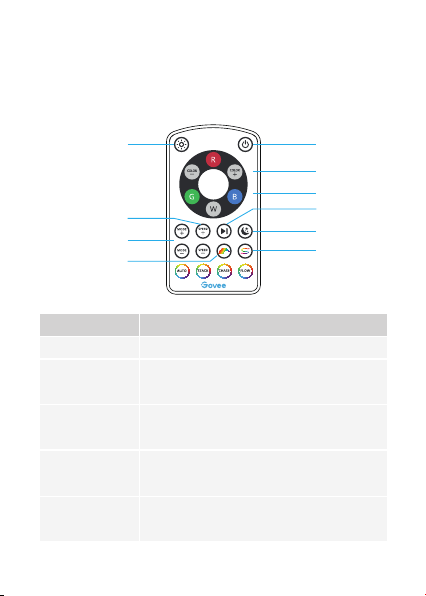
04
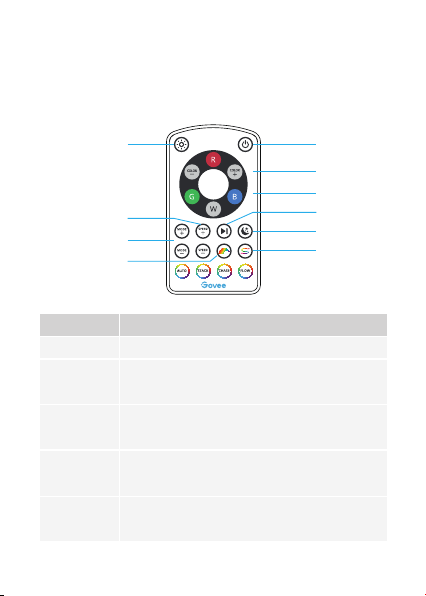
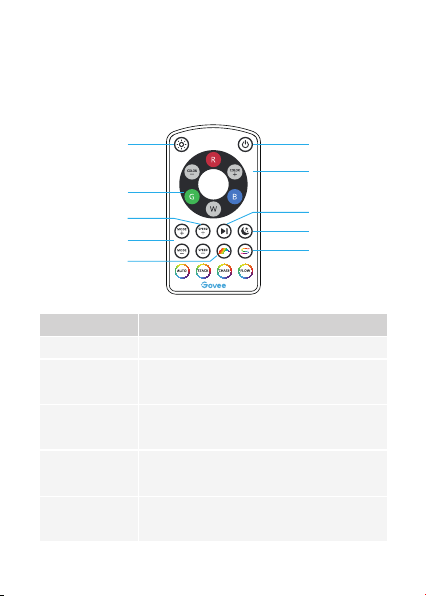
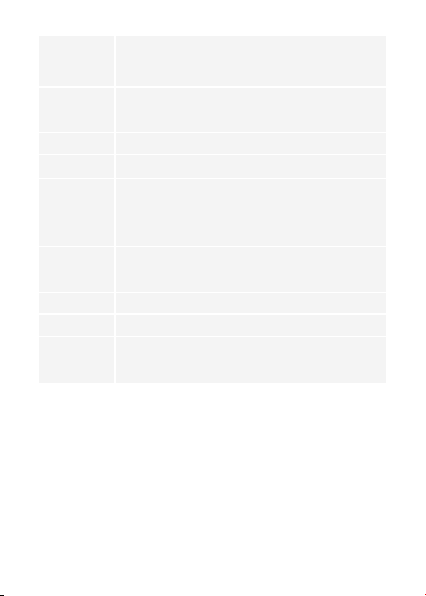
2Q2
Adjust
Brightness
Color Changing
Color Selecting
Mode
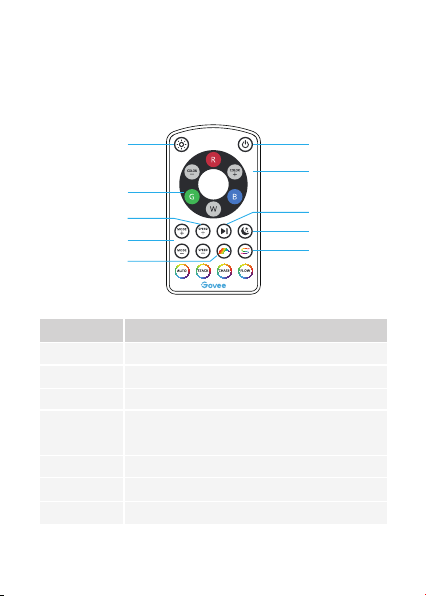
Button Function
3UHVVWRWXUQWKHOLJKWRQR
Press and hold to cycle through 6 brightness
levels.
COLOR +/-: Press to cycle forward or backward
through 33 colors.
Press to change the color.
R: Red, G: Green, B: Blue, W: White
MODE +/-: Press to cycle forward or backward
through 11 scene modes.
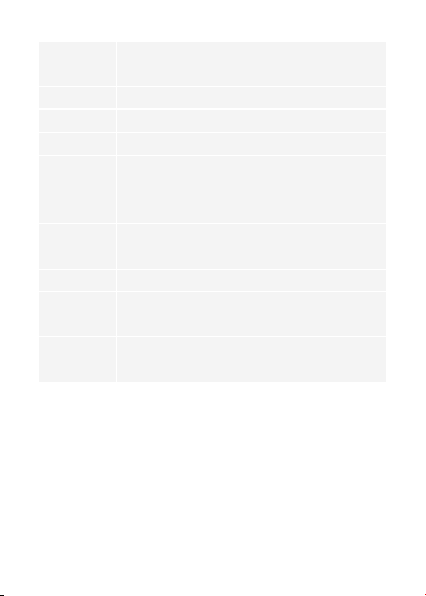
&RQWUROOLQJZLWKWKH5HPRWH&RQWURO
2Q2
Color Changing
Color Selecting
Pause/Play
Sleep
Segment
Adjust Brightness
Mode
Rainbow
Speed
When using the remote controller, ensure it is aligned
with the control box receiving port.
*
05
Speed
Pause/Play
Sleep
Rainbow
Segment
Stack
Chase
Flow
Auto
SPEED +/-: For scene mode, press it to speed up or
slow down the changing of lights.
3UHVVWRSDXVHFRQWLQXHWKHG\QDPLFOLJKWLQJHHFWV
Press to set the color to warm white.
3UHVVLWDQGOLJKWLQJFRORUVȵRZRQHDIWHUDQRWKHU
Press it and 7 default lighting colors display on the
strip lights simultaneously.
Press again to change colors.
Press it and the color segments stack next to each
other one by one.
Press it and the lighting colors cross each other.
3UHVVLWDQGRQHOLJKWLQJFRORUȵRZVWKURXJKRXWWKH
strip lights.
1. Switch the Scene Mode between 11 options at random.
2. Every mode lasts for 30s.
a.
b.
c.
Make sure the installation surface is clean and dry.
Firmly press over the strip after sticking.
Reinforce the installation via more clips and tape.
7URXEOHVKRRWLQJ
Ԯ
The adhesive tape is not strong enough.

Ա
Some LED beads don’t light up.
Please contact Govee support team in time for return.
a.
b.
3XOORXWHYHU\FRQQHFWLYHSDUWRIWKHVWULSOLJKWVDQGȴUPO\
re-connect them.
7DS2Q2EXWWRQRQWKHFRQWUROER[RUDSSWRFKHFNZKHWKHU
it is a strip quality issue.
The strip lights don't work.
a.
b.
c.
d.
e.
f.
ԯ
The strip lights don’t match the same color.
Make sure the strip lights have been connected to the control box.
'RQRWFRQQHFWGLHUHQWVHWVRIVWULSOLJKWV
Firmly re-connect the control box to the strip lights.
Please use the adapter provided.
Make sure the pin connector aligns to pin holes while splicing up
strip lights.
Press R, G and B buttons on the remote control to check
whether RGB LEDs work well.
06
07
&XVWRPHU6HUYLFH
Warranty: 12-Month Limited Warranty
Support: Lifetime Technical Support
Email: [email protected]
2ɝFLDO:HEVLWHZZZJRYHHFRP
@Govee.smarthome#*RYHHRɝFLDO
#JRYHHRɝFLDO
#JRYHHBRɝFLDO
@Govee
'HXWVFK
08
Länge
Beleuchtungsfarbe
Wasserdicht
Kontrollmethode
Energieversorgung
6SH]LȴNDWLRQHQ
/('6WUHLIHQ/LFKWb
6WHXHUER[b
Adapter
Servicekarte
2
1
1
1
EHUEOLFN
10m (5m-2 Rolls)/32.8ft (16.4ft-2 Rolls)
RGBIC
Nein
IR Remote & Steuerbox
Adapter 12V
09
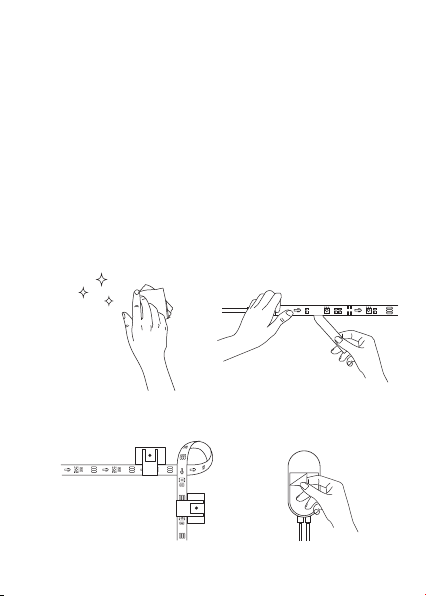
a.Packen Sie die Schachtel aus und überprüfen Sie alle in der
Packliste aufgeführten Artikel.
Ԯ
Vorbereitung vor der Installation
ΖQVWDOOLHUHQ6LHΖKUH/LFKWOHLVWH
6FKDOWHQ6LHGDV/LFKWEDQGHLQXQGSU¾IHQ6LHREHVDXȵHXFKWHW
b.
:LVFKHQ6LHGLH2EHUȵ¦FKH
ab, um sie sauber und
trocken zu halten.
ԯ
Installationsschritte
a.
b.Ziehen Sie die Schutzfolie vom
Klebeband ab, kleben Sie den
Streifen auf und drücken Sie ihn
fest an.
c. Verstärken Sie über Clips
um Ecken.
d.Ziehen Sie die Schutzfolie von
der Steuerbox ab und kleben
Sie sie auf.
10
e.Schalten Sie das Lichtband ein und verwenden.
6WHXHUQPLWGHU6WHXHUER[
Ein/ Aus
Farbwechsel
Helligkeitsanpassung
Drucktaste Funktion
Schalten Sie das Licht ein / aus.
Drücken Sie, um durch 9 Farben zu blättern.
Halten Sie gedrückt, um die
VWXȴJH+HOOLJNHLW]XGXUFKODXIHQ
Ein/ Aus
Farbwechsel
Helligkeitsanpassung
11
6WHXHUQPLWGHU)HUQEHGLHQXQJ
Ein/ Aus
Farbwechsel
Farbauswahl
Anhalten/Spielen
Schlaf
Segment
Helligkeit anpassen
Modus
Regenbogen
Tempo
Ein/ Aus
Helligkeit
anpassen
Farbwechsel
Farbauswahl
Modus
Drucktaste Funktion
Drücken Sie, um das Licht ein- oder auszuschalten.
+DOWHQ6LHJHGU¾FNWXPGLHVWXȴJH+HOOLJNHLW]X
durchlaufen.
FARBE +/-: Drücken Sie, um 33 Farben vorwärts oder
rückwärts zu durchlaufen.
Drücken Sie, um die Farbe zu ändern.
R: Rot, G: Grün, B: Blau, W: Weiß
MODUS +/-: Drücken Sie, um durch 11 Szenenmodi
vorwärts oder rückwärts zu blättern.
Stellen Sie sicher, dass die Fernbedienung beim Gebrauch
auf den Empfangsport der Kontrollbox ausgerichtet wird.
*
12
Tempo
Anhalten/
Spielen
Schlaf
Regenbogen
Segment
Stack
Chase
Flow
Automatisch
Tempo +/-: Drücken Sie im Szenenmodus darauf, um den
Lichtwechsel zu beschleunigen oder zu verlangsamen.
'U¾FNHQ6LHDXIXPGLHG\QDPLVFKHQ/LFKWHHNWH
anzuhalten/fortzusetzen.
Drücken Sie auf , um die Farbe auf Warmweiß
einzustellen.
:HQQ6LHGDUDXIGU¾FNHQȵLH¡HQ/LFKWIDUEHQ
nacheinander.
Wenn Sie darauf drücken, werden 7 Standard-Licht-
farben gleichzeitig auf den Leuchtstreifen angezeigt.
Drücken Sie erneut, um die Farben zu ändern.
Wenn Sie darauf drücken, werden die Farbeseg-
mente nacheinander nebeneinander stapeln.
Wenn Sie darauf drücken, jagen die Farben hin und her.
:HQQ6LHGDUDXIGU¾FNHQȵLH¡WHLQH/LFKWIDUEHGXUFK
die Leuchtstreifen.
1. Schalten Sie den Szenenmodus zwischen 11
Optionen nach dem Zufallsprinzip um.
2. Jeder Modus dauert 30 Sekunden.

13
)HKOHUEHKHEXQJ
Ԯ
Das Klebeband ist nicht stark genug.
6WHOOHQ6LHVLFKHUGDVVGLHΖQVWDOODWLRQVȵ¦FKHVDXEHUXQGWURFNHQLVW
Drücken Sie nach dem Aufkleben fest auf den Streifen.
Verstärken Sie die Installation durch weitere Clips und Bänder.
a.
b.
c.
Einige Lampenperlen leuchten nicht auf.
Bitte kontaktieren Sie das Govee-Support-Team rechtzeitig für die
Rücksendung.
Stellen Sie sicher, dass zwei Rollen Lichtleisten an den Power-Brick
angeschlossen sind.
Schließen Sie keine verschiedenen Sätze von Lichtbändern an.
Schließen Sie den Power Brick wieder fest an das Lichtband an.
Bitte verwenden Sie den mitgelieferten Adapter.
Stellen Sie sicher, dass der Stiftstecker mit den Nadellöchern
übereinstimmt, während Sie die Lichtbänder aufspleißen.
Drücken Sie die Tasten R, G und B auf der Fernbedienung, um zu
überprüfen, ob die RGB-LEDs ordnungsgemäß funktionieren.
a.
b.
c.
d.
e.
f.
ԯ
Der Streifen entspricht nicht der gleichen Farbe.
14
Ա
Das Lichtband funktioniert nicht.
a.
b.
Ziehen Sie jeden Verbindungsteil der Lichtleiste heraus und
schließen Sie sie wieder fest an.
Tippen Sie im Kontrollkästchen oder in der App auf die
6FKDOWȵ¦FKH(LQ$XVXP]X¾EHUSU¾IHQREHVVLFKXPHLQ
Problem mit der Streifenqualität handelt.
'LH.XQGHQEHWUHXXQJ
Warranty:12-Monate Beschränkte Garantie
Support:Lifetime Technische Unterstützung
Email:[email protected]
2ɝ]LHOO:HEVLWH:www.govee.com
@Govee.smarthome#*RYHHRɝFLDO
#JRYHHRɝFLDO
#JRYHHBRɝFLDO
@Govee
)UDQ©DLV
15
Longueur
Couleur
Étanche
Méthode de Contrôle
Alimentation électrique
6S«FLȴFDWLRQV
Kit de Ruban LED
Boîte de Contrôle
Adaptateur
Carte de Service
2
1
1
1
6FK«PD
10m (5m-2 Rolls)/32.8ft (16.4ft-2 Rolls)
RGBIC
NON
Télécommande & Boîtier de Commande
Adaptateur 12V
16
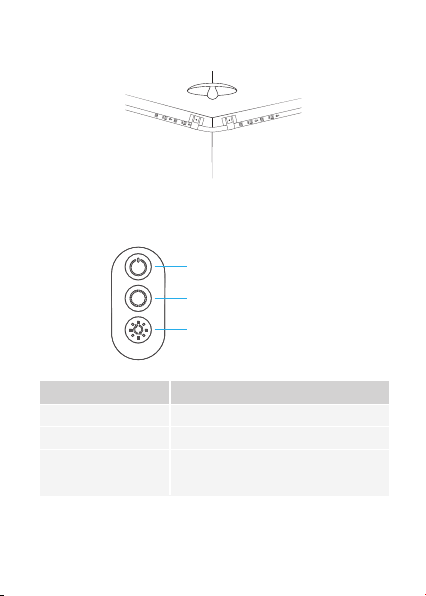
b.$OOXPH]ODEDQGH/('HWY«ULȴH]VLHOOHVȇDOOXPH
a.Essuyez la surface pour la
garder propre et sèche;
ԯ
Étapes d’installation
b. 5HWLUH]OHȴOPSURWHFWHXUGHOD
bande, collez la bande et
appuyez fermement dessus;
c. Renforcez le ruban par des
clips autour des coins;
d.Enlevez le colle du boîtier de
commande et le collez;
a.'«EDOOH]ODER°WHHWY«ULȴH]WRXVOHV«O«PHQWV«QXP«U«VGDQVOD
liste d'emballage.
Ԯ
Préparation avant l'installation
ΖQVWDOOH]YRWUH5XEDQ/('
17
e.Allumez la bande LED et commencez à l'utiliser.
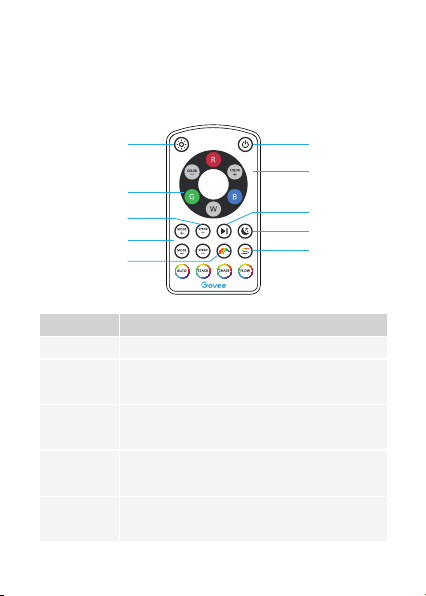
&RQWUROOH]DYHFOH%R°WLHUGH&RPPDQGH
Bouton Allumer / Éteindre
Changement de couleur
Réglage de la Luminosité
Bouton Fonction
Allumer / Éteindre la lumière.
Appuyez pour changer parmi les 9 couleurs.
Appuyez et maintenez pour changer la
luminosité à 6 niveaux.
Bouton Allumer / Éteindre
Changement de couleur
Réglage de la Luminosité
18
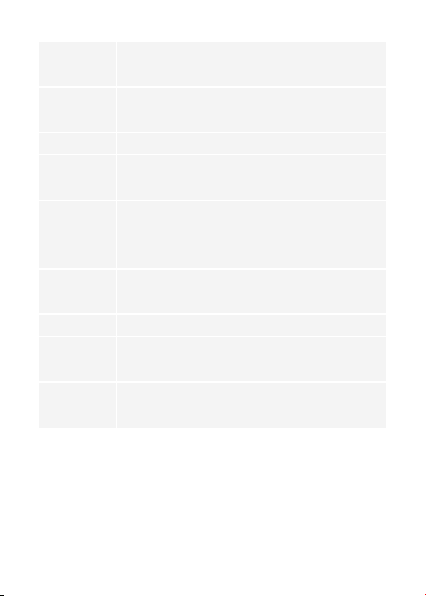
&RQWUROOH]DYHFOH7«O«FRPPDQGH
2Q2
Changement
de couleur
Sélection
de la couleur
Arrêter/Continuer
Veille
Entassé
Ajustement de la
luminosité
Mode
Arc-en-Ciel
Speed
Lorsque vous utilisez la télécommande, assurez-vous
qu'elle est alignée avec le port de réception du boîtier
de commande.
*
2Q2
Ajustement de
la luminosité
Changement
de couleur
Sélection de la
couleur
Mode
Bouton Fonction
Allumer / Éteindre la lumière.
Appuyez et maintenez pour changer la luminosité à 6
niveaux.
COLOR +/- : Appuyez sur cette touche pour avancer ou
reculer dans 33 couleurs.
Appuyez sur pour changer de couleur.
R : Rouge, G : Vert, B : Bleu, W : Blanc
MODE +/- : Appuyez sur cette touche pour avancer ou
reculer dans les 11 modes de scène.
19
Speed
Arrêter/
Continuer
Veille
Arc-en-Ciel
Entassé
Stack
Chase
Flow
Auto
SPEED +/- : Pour le mode scène, appuyez sur cette touche
pour accélérer ou ralentir le changement de
lumière.Appuyez sur ce bouton pour arrêter/con-
tinuer le mode d'éclairage dynamique.
Pressez pour mettre la couleur en blanc chaud.
En appuyant ce bouton, 8 couleurs d'éclairage
s'écoulent l'une après l'autre.
$SSX\H]GHVVXVHWFRXOHXUVG«FODLUDJHSU«G«ȴQLHV
VDɝFKHQWVLPXOWDQ«PHQWVXUODEDQGH/('
Appuyez encore une fois pour changer de couleur.
b$SSX\H]VXUFHERXWRQHWOHVVHJPHQWVGHFRXOHXU
s’empilent un par un.
Appuyez sur ce bouton et les couleurs se croisent.
Appuyez sur ce bouton et une seule couleur circule
GDQVODEDQGH/('b
1. Change le Mode Scène parmi 11 options au hasard;
2. Chaque mode dure 30 secondes.

20
a.
b.
c.
Assurez-vous que la surface d'installation est propre et sèche.
Appuyez fermement sur la bande après l'avoir collée.
Renforcez l'installation en utilisant plus de clips et de rubans
adhésifs.
Dépannage
Ԯ
Le ruban adhésif n'est pas assez solide.
a.
b.
c.
d.
e.
f.
Assurez-vous que deux rouleaux de bande LED ont été
connectés au contrôleur RGB.
1HFRQQHFWH]SDVGHVURXOHDX[GHEDQGHV/('GL«UHQWV
Reconnectez fermement le contrôleur RGB à la bande LED.
Utilisez l'adaptateur fourni.
Assurez-vous que le connecteur à broche s'aligne sur les trous
de broche lorsque vous raccordez les bandes LED.
Appuyez sur les boutons R, G et B de la télécommande pour
Y«ULȴHUVLOHV/('5*%IRQFWLRQQHQWELHQ
ԯ
La bande ne correspond pas à la même couleur.
Certaines perles du ruban ne s'allument pas.
Veuillez contacter l'équipe de Govee à temps pour le retour.
21
Ա
Retirez toutes les parties connectives de la bande LED et
rebranchez-les fermement.
$SSX\H]VXUOHERXWRQ2Q2GHODER°WHGHFRQWU¶OHRXGH
ODSSSRXUY«ULȴHUVLOVDJLWGXQSUREOªPHGHTXDOLW«GHOD
bande.
La bande LED ne fonctionne pas.
a.
b.
6HUYLFH&OLHQWªOH
Garantie:Garantie limitée de 12 mois
Support:Technique de support à vie
Email : [email protected]
6LWHRɝFLHOZZZJRYHHFRP
@Govee.smarthome#*RYHHRɝFLDO
#JRYHHRɝFLDO
#JRYHHBRɝFLDO
@Govee
(VSD³RO
22
Longitud
Color de Iluminación
Impermeable
Manera de Control
Fuente de Alimentación
(VSHFLȴFDFLRQHV
Tira de Luz LED
Adaptador
Manual de Usuario
Tarjeta de Servicio
2
1
1
1
(QXQYLVWD]R
10m (5m-2 Rolls)/32.8ft (16.4ft-2 Rolls)
RGBIC
NO
Remoto & Caja de Control
Adaptador 12V
a.
ԯ
23
a./LPSLHODVXSHUȴFLHSDUD
mantenerla limpia y seca;
b.(QFLHQGDODOX]GHWLUD\YHULȴTXHVLVHHQFLHQGH
ԯ
Pasos de instalación
b.Retire la película protectora de la
cinta, pegue la tira y presione
ȴUPHPHQWHVREUHHOOD;
c. Refuerce a través de clips
alrededor de las esquinas;
d.Retire la película protectora de la
caja de control y péguela;
a.
'HVHPSDTXHWHODFDMD\YHULȴTXHWRGRVORVDUW¯FXORV
enumerados en la lista de empaque;
Ԯ
Preparación antes de la instalación
ΖQVWDODFLµQGHVXWLUDGHOX]
24
e.Encienda la tira de luz y empieza a usarla.
&RQWURODQGRFRQODFDMDGHFRQWURO
Encender/Apagar
Cambio de Color
Ajuste de Brillo
Botón Función
Enciende/apaga la luz.
Presione para recorrer 9 colores.
Mantenga presionado para recorrer el brillo
de 6 niveles.
Encender/Apagar
Cambio de Color
Ajuste de Brillo
25
&RQWUROFRQHOFRQWUROUHPRWR
Cuando utilice el control remoto, asegúrese de que
esté alineado con el puerto de recepción de la
caja de control.
*
Encender/Apagar
Cambio de Color
Selección de Color
Pausar/Jugar
Dormir
Segmento
Ajuste de Brillo
Modo
Arco Iris
Velocidad
Encender/Apagar
Ajuste de Brillo
Cambio de Color
Selección de Color
Modo
Botón Función
Presione para encender/apagar la luz.
Mantenga presionado para recorrer el brillo de 6
niveles.
COLOR +/-: Presione para avanzar o retroceder
entre 33 colores.
Presione para cambiar el color.
R: Rojo, G: Verde, B: Azul, W: Blanco
MODE +/-: Presione para avanzar o retroceder por
los 11 modos de escena.
26
Velocidad
Pausar/Jugar
Dormir
Arco Iris
Segmento
Stack
Chase
Flow
Auto
VELOCIDAD +/-: Para el modo de escena, presiónelo para
acelerar o ralentizar el cambio de luces; Presione
para pausar/continuar los efectos dinámicos de
iluminación.
Presione para establecer el color en blanco cálido.
3UHVLµQHOR\FRORUHVGHLOXPLQDFLµQȵX\HQXQRWUDVRWUR
Presiónelo y se mostrarán 7 colores de iluminación
predeterminados en la tira de luces simultáneamente.
Presione nuevamente para cambiar los colores.
Presiónelo y los segmentos de color se apilan uno al
lado del otro, uno por uno.
Presiónelo y los colores de iluminación se cruzan entre sí.
3UHVLµQHOR\XQFRORUGHLOXPLQDFLµQȵX\HDWUDY«VGH
las luces de tira.
1. Cambie el Modo de Escena entre 11 opciones al azar;
2. Cada modo dura 30s.

27
a.
b.
c.
$VHJ¼UHVHGHTXHODVXSHUȴFLHGHLQVWDODFLµQHVW«OLPSLD\VHFD
3UHVLRQHȴUPHPHQWHODWLUDGHVSX«VGHSHJDUOD
Refuerce la instalación a través de más clips y cintas.
6ROXFLµQGHSUREOHPDV
Ԯ
/DFLQWDDGKHVLYDQRHVORVXȴFLHQWHPHQWHIXHUWH
b.
c.
d.
e.
f.
Asegúrese de que se hayan conectado dos rollos de luces de tira
al bloque de alimentación.
No conecte diferentes conjuntos de luces de tira.
9XHOYDDFRQHFWDUȴUPHPHQWHHOEORTXHGHDOLPHQWDFLµQDODWLUD
de luz.
Utilice el adaptador provisto.
Asegúrese de que el conector de clavija esté alineado con los
agujeros de clavija mientras empalma las luces de tira.
3UHVLRQHORVERWRQHV5*\%HQHOFRQWUROUHPRWRSDUDYHULȴFDUVL
los LED RGB funcionan bien.
Algunas cuentas de lámpara no se iluminan.
Póngase en contacto con el equipo de soporte de Govee a tiempo
para la devolución.
ԯ
La tira no coincide con el mismo color.
a.
28
Ա
La tira de luz no funciona.
a. Saque todas las partes conectivas de la tira de luz y vuelva a
FRQHFWDUODVȴUPHPHQWH
Pulse el botón de encendido/apagado en la caja de control o
DSOLFDFLµQSDUDYHULȴFDUVLVHWUDWDGHXQSUREOHPDGHFDOLGDG
de la tira.
b.
6HUYLFLRGHDWHQFLµQDOFOLHQWH
Garantía: Garantía limitada de 12 meses
Soporte: Soporte Técnico de por Vida
Correo Electrónico: [email protected]
6LWLR:HE2ȴFLDOZZZJRYHHFRP
@Govee.smarthome#*RYHHRɝFLDO
#JRYHHRɝFLDO
#JRYHHBRɝFLDO
@Govee
ΖWDOLDQR
29
6SHFLȴFKH
Striscia Luce LED
Adattatore
Manuale d'Uso
Carta di Servizio
2
1
1
1
0DQXDOHG8VR
10m (5m-2 Rolls)/32.8ft (16.4ft-2 Rolls)
RGBIC
NO
Telecomando e Scatola di Controllo
Adattatore 12V
Lunghezza
Colore di Luci
Impermeabilità
Modalità di controllo
Alimentazione
30
a.3XOLUHODVXSHUȴFLHSHU
renderla pulita e asciutta;
ԯ
Procedura di Installazione
b. Staccare la pellicola protettiva dal
nastro, attaccare la striscia e
premerla con forza;
c. Rinforzare intorno agli
angoli con le clip;
d. Staccare la pellicola protettiva
sulla scatola di controllo e
incollarla;
a. Disimballare la scatola e controllare tutti gli articoli elencati nella
lista di imballaggio;
Ԯ
Preparazione Prima dell'Installazione
ΖQVWDOOD]LRQHGHOOD/XFLGL6WULVFLD/('
Accendi la Luci di Striscia LED e controlla se si accende. b.
31
e.Accendere la Striscia LED e iniziare a usarla.
&RQWUROORWUDPLWHVFDWRODGLFRQWUROOR
Acceso / Spento
Cambio di colore
Regolazione
Luminosità
Pulsante Funzione
Accende / Spegne la luce
Premere per scorrere tra 9 colori.
Tenere premuto per scorrere la
luminosità a 6 livelli.
Acceso / Spento
cambio di colore
Regolazione Luminosità
ΖQVWDOOD]LRQHGHOOD/XFLGL6WULVFLD/('
32
Funzione
Acceso / Spento
cambio di colore
Regolazione Luminosità
&RQWUROODUHFRQ7HOHFRPDQGR
Acceso spento
Cambio colore
Selezione colore
Pausa /
Roproduzione
Dormire
Segmento
Regola luminosità
Modalità
Arcobaleno
Velocità
Acceso spento
Regola luminosità
Cambio colore
Selezione colore
Modalità
Pulsante Funzione
Premere per accendere / spegnere la luce.
Tenere premuto per scorrere la luminosità a 6 livelli.
COLORE +/-: premere per scorrere in avanti o
indietro 33 colori.
Premere per cambiare colore.
R: Rosso, G: Verde, B: Blu, W: Bianco
MODALITA’ +/-: premere per spostarsi avanti o
indietro tra 11 modalità.
Quando si utilizza il telecomando, si prega di assicurarsi
che sia allineato alla porta di ricezione della scatola
di controllo.
*
33
Velocità
Pausar/Jugar
Sleep
Rainbow
Segment
Stack
Chase
Flow
Auto
VELOCITÀ +/-: premere per accelerare o rallentare il
cambio di luci;
3UHPHUHSHUPHWWHUHLQSDXVDFRQWLQXDUHJOLHHWWLGL
luci dinamice.
Premilo per impostare il colore a caldo o bianco
Premilo e 8 colori di luci scorrono uno dopo l'altro.
3UHPLORHFRORULGLOXFLSUHGHȴQLWLYHQJRQRYLVXDOL]]DWL
contemporaneamente sulle luci di striscia.Premere di
nuovo per cambiare i colori
Premilo e i segmenti di colore si accatastano uno
accanto all'altro.
Premilo e i colori dei luci si incrociano.
Premilo e un colore di luci scorre attraverso le strisce LED.
1. Cambie el Modo de Escena entre 11 opciones al azar;
2. Cada modo dura 30s.
5LVROX]LRQLGHLSUREOHPL
Ԯ
Il nastro adesivo non è abbastanza forte.
a.
b.
c.
$VVLFXUDUVLFKHODVXSHUȴFLHGLLQVWDOOD]LRQHVLDSXOLWDHDVFLXWWD
Premere con forza sopra la striscia dopo averlo incollato.
5DRU]DUHOLQVWDOOD]LRQHWUDPLWHSL»FOLSHQDVWUL

34
ԯ
a.
b.
c.
d.
e.
f.
Assicurati che entrambi i rotoli di strisce di luce siano stati
connessi all'alimentatore.
1RQFRQQHWWHUHLGLVSRVLWLYLGLHUHQWLGLVWULVFHGLOXFL
Riconnetti saldamente l'alimentatore alla striscia di luci.
Si prega di utilizzare l'adattatore fornito.
Assicurati che il connettore con i perni sia correttamente allineato
ai fori per i perni quando unisci le strisce di luci.
Premi i pulsanti R, G e B sul telecomando per assicurarti che i LED
RGB funzionino correttamente.
La striscia non è dello stesso colore.
Alcune luci non si accendono.
Contatta il team di supporto di Govee in tempo per il reso.
Ա
La striscia LED non funziona.
a.
b.
Estrarre ogni parte connettiva della striscia e ricollegarla
saldamente.
7RFFDUHLOSXOVDQWH2Q2VXOODVFDWRODGLFRQWUROORVXOOD
VFDWRODGLFRQWUROORRVXOODSSSHUYHULȴFDUHVHVLWUDWWDGLXQ
problema di qualità della striscia.
35
6HUYL]LRFOLHQWL
Garanzia: Garanzia limitata di 12 mesi
Supporto: Supporto tecnico a vita
Email: [email protected]
6LWRZHEXɝFLDOH:www.govee.com
@Govee.smarthome
#*RYHHRɝFLDO
#JRYHHRɝFLDO
#JRYHHBRɝFLDO
@Govee
ݺޯ寉
36
➬圬
-&%ذ٦فٓ؎ز
ٌٔ؝ٝ
傈劥铃》䪕铢僈剅
؟٦ؽأؕ٦س
2
1
1
1
Ꟁׁ
ؕٓ٦
宐
ⵖ䖵ٌ٦س
ꨵ彂
♧鋯
NN3PMMTGUGU3PMMT
3(#*$
ꬋ宐
ٌٔ؝ٝ؝ٝزٗ٦ٓ
،تفة٦7
37
a.
》➰ֽ邍ְֹח
䭎ְגծ幡悥ד✝斕ֶ⥂
גֻ ְׁ կ
ԯ
؎ٝأز٦ ٕ 䩛 갫
b.
N⚖ذ٦فⶒָ׃גծ》
➰ֽ邍חذ٦فٓ؎ز׃
ַה䬃׃גְֻׁկ
c.
׃ 錭 ָ ֮ ל ծ錭 ך ⚖ ⩎
חؙٔحؙד㔿㹁׃גֻׁ
ְկ
d.
؝ٝزٗ٦ٓח֮N⚖ذ٦
ف ⶒ ָ ׃ ג ծ》 ➰ ֽ 邍 ח
磨 满׃גֻ ְׁ կ
Bػح؛٦آⰻ㺂כׅץג䲨גְַוֲַֿה׀焷钡׃גֻ
ְׁկ
Ԯ
؎ٝأز٦ٕך׀彋⪓
؎ٝأز٦ٕ
ذ٦فٓ؎زח窍ꨵ׃ծ⯕ַוֲַֿה׀焷钡׃גְֻׁկC
38
؎ٝأز٦ٕ
e.
ذ٦فٓ؎زח窍ꨵ׃ծ׀ⵄ欽׃גְֻׁկ
؝ٝزٗ٦ٓד乼⡲
ؔٝؔؿ
ؕٓ٦
僈ׁ锄眎
نةٝ 堤腊
ٓ ؎ ز ؔ ٝ ؔ ؿ ח ⴗ 剏 ִ ת ׅ կ
⛰珏ך蒀ⴗ剏ִתׅկ
Ⱉ ٖ ك ٕ ٓ ؎ز ך 僈 ׁ 锄 侮 ׃ תׅկ
ؔٝؔؿ
ؕٓ٦
僈ׁ锄眎
39
堤腊
ٌٔ؝ٝד؝ٝزٗ٦ٓ
ؔٝؔؿ
ؕٓ٦
ؕٓ٦鼆䫛
⨢姺ⱄ欰
أٔ٦فٌ٦س
إ ًؚٝز
؝ ٝزٗ ٦ ٕ
僈ׁ锄眎
ٌ٦س
赙ٌ٦س
أؾ٦س
ؔٝؔؿ
僈ׁ锄眎
ؕٓ٦
ؕٓ٦鼆䫛
ٌ٦س
أؾ٦س
⨢姺ⱄ欰
نةٝ 堤腊
ٓ؎ز ؔٝ ؔؿח ⴗ 剏 ִ ת ׅկ
Ⱉ ٖ ك ٕ ٓ ؎ز ך 僈 ׁ 锄 侮 ׃ תׅկ
♲⼧♲珏ך蒀ⴗ剏ִתׅկ
ؕٓ٦ⴗ剏ִתׅկ
饕כ3ծ筯כ(ծꫬכ#ծ涯כ8דׅկ
ٌ٦س⼧♧珏ךء٦ٌٝ٦س㢍ִתׅկ
ء٦ٌٝ٦سד挿 徦أؾ٦س锄 侮׃תׅկ
䬃׃גծٓ؎زך撑僈ٌ٦س♧儗⨢姺竳遤׃תׅկ
ٌٔ؝ٝ⢪ 欽ׅהֹծٌٔ؝ٝך 「 ⥌ ه٦زח ぢ ֽגְ
ֿה 焷 钡׃גֻ ְׁ կ
40
أٔ٦فٌ٦س
赙ٌ٦س
إًؚٝز
؝ٝزٗ ٦ٕ
أ ةحؙ
ثؑ؎أ
ؿٗ٦
ؔ٦ز
䬃 ׃ג ծٓ؎زؐؓ٦ ي م ٙ ؎ز ח 鏤 㹁 ׃תׅկ
䬃 ׃ ג ծٖ ح س ծؔ ٖ ٝ آ ծ؎ ؒ ٗ ٦ ծؚ ٔ ٦ ٝ ծـ ٕ ٦ ծ؎ ٝ
ر؍؞ծ؝٦ٕسծمٙ؎زⰓ珏ךؕٓ٦ד挿抧׃תׅկ
䬃׃גծ♧儗ח♫珏ךؕٓ٦ד挿抧׃תׅկֲ♧䏞
䬃 ׃ ג ծؕ ٓ ٦ 㢍 ִ ת ׅ կ
䬃׃גծ⯕כذ٦فٓ؎زך⩎ַ⚥㣛ח꧋תׅկ
䬃׃גծ♧儗ח♲珏ךؕٓ٦דٓ؎زכ❜䊵涸ח⯕
תׅկ
ٓ ٝ ص ٝ ؚ ٌ ٦ س ؔ ٝ ח ׅ ה ծ⯕ כ ذ ٦ ف ٓ ؎ ز ך
剒ⴲַ剒䖔תד崨גַ䨲תׅկ
珏ךء٦ٌٝ٦سؔ٦زחⴗ剏ִתׅկ
ء٦ٌٝ٦س׀החT⟄♳竳ֹתׅկ
״ֻ֮ ׀颶 ㉏הֶׅׅ
Ԯ N⚖ذ٦فך䱹满⸂כ䓳ְ
a.
b.
c.
》➰ֽהֿך邍ח幡悥ծ✝斕ֶ⥂גְֻׁկ
ذ٦فٓ؎ز׃ַה䬃׃גְֻׁկ
ؙٔحف ד 㔿 㹁 ׃גֻ ְׁ կ

41
ԯ
a.
b.
c.
d.
e.
f.
♧䋇ֹٓ؎زכ؝ٝغ٦ةה׃ַ鸭䱹׃ֿה׀焷钡׃ג
ֻ ְׁ կ
麫ءٔ٦ؤٓ؎ز♧筱ח鸭䱹׃ג⢪欽׃זְדְֻׁկ
ذ٦فٓ؎زכ؝ٝغ٦ةה׃ַ鸭䱹׃ֿה׀焷钡׃ג
ֻ ְׁ կ
➰㾩ׁ،تفة٦׀ⵄ欽ְֻׁկ
ذ٦فٓ؎ز穉ざׇהֹծؾًٝأכ瑏ח׃ַה
䊵׃鴦ג♴ְׁկ
ٌٔ؝ٝח֮3ծ(ծ#نةٝ䬃׃גծذ٦فٓ؎زכ״ֻ挿抧
דַֹוֲַֿה׀焷钡׃גְֻׁկ
ذ٦فٓ؎زכ♧㔐חずׄؕٓ٦ד⯕זְ
㼱侨ך-&%כ⯕זְ
(PWFFؕأةو٦חֶ㉏ְざְׇֻׁկ
ذ٦فٓ؎زכ⢪欽דֹזְ
a.
b.
ذ٦فٓ؎زֲ♧䏞穉ざׇגגְֻׁկ
؝ٝزٗ٦ٓה،فٔח֮ؔٝؔؿ䬃׃גծذ٦فٓ؎ز
כ״ֻ挿抧דַֹוֲַֿה׀焷钡׃גְֻׁկ
Ա
42
⥂鏿ה،ؿة٦؟٦ؽأ
⥂鏿٠剢ך㸝䗱⥂鏿
،ؿة٦؟٦ؽأ䪮遮؟ه٦ز
؎٦ً٦ٕTVQQPSU!HPWFFDPN
م٦يل٦آXXXHPWFFDPN
@Govee.smarthome
#*RYHHRɝFLDO
#JRYHHRɝFLDO
#JRYHHBRɝFLDO
@Govee
&RPSOLDQFHΖQIRUPDWLRQ
'«FODUDWLRQGHFRQIRUPLW«8(
3DUODSU«VHQWHb6KHQ]KHQΖQWHOOLURFNV7HFK&R/WGG«FODUHTXH
cet appareil est conforme aux principales exigences et autres
clauses pertinentes de la directive européenne 2014/30/EU.
Une copie de la déclaration de conformité UE est disponible sur le
site www.govee.com/
Adresse de contact pour l'UE :
%HOOD&RFRROb*PE+(PDLOLQIR#EHOODFRFRROGH)
3HWWHQNRIHUVWUD¡H%HUOLQb*HUPDQ\
(8&RPSOLDQFH
Hiermit erklärt Shenzhen Intellirocks Tech Co. Ltd., dass dieses
Gerät den wesentlichen Anforderungen und anderen einschlägi-
gen Bestimmungen der EU-Richtlinie 2014/30/EU entspricht.
(LQH.RSLHGHU(8.RQIRUPLW¦WVHUNO¦UXQJȴQGHQ6LHRQOLQHDXI
www.govee.com/
Kontaktadresse innerhalb der EU:
%HOOD&RFRROb*PE+(PDLOLQIR#EHOODFRFRROGH)
3HWWHQNRIHUVWUD¡H%HUOLQb*HUPDQ\
(8&RPSOLDQFH6WDWHPHQW
Shenzhen Intellirocks Tech Co. Ltd. hereby declares that this device
is in compliance with the essential requirements and other relevant
provisions of the Directive 2014/30/EU.
A copy of the EU Declaration of Conformity is available online at
www.govee.com/
EU contact address:
%HOOD&RFRROb*PE+(PDLOLQIR#EHOODFRFRROGH)
3HWWHQNRIHUVWUD¡H%HUOLQb*HUPDQ\
(QYLURQPHQWDOO\IULHQGO\GLVSRVDO
Old electrical appliances must not be disposed of together with the
residual waste, but have to be disposed of separately. The disposal
at the communal collecting point via private persons is for free. The
owner of old appliances is responsible to bring the appliances to
these collecting points or to similar collection points.With this little
SHUVRQDOHRUW\RXFRQWULEXWHWRUHF\FOHYDOXDEOHUDZPDWHULDOV
and the treatment of toxic substances.
8PZHOWIUHXQGOLFKH(QWVRUJXQJ
Elektro-Altgeräte dürfen nicht mit gewöhnlichem Abfall entsorgt
'LFKLDUD]LRQHGLFRQIRUPLW¢8(
Shenzhen Intellirocks Tech Co. Ltd. dichiara che il presente
dispositivo è conforme ai requisiti essenziali e alle altre disposizioni
rilevanti della direttiva 2014/30/EU.
Una copia della dichiarazione di conformità UE è disponibile online
all'indirizzo Web www.govee.com/
Indirizzo di contatto UE:
%HOOD&RFRROb*PE+(PDLOLQIR#EHOODFRFRROGH)
3HWWHQNRIHUVWUD¡H%HUOLQb*HUPDQ\
'HFODUDFLµQGHFXPSOLPLHQWR8(
Shenzhen Intellirocks Tech Co. Ltd. por la presente declara que este
dispositivo cumple los requisitos básicos y el resto de provisiones
relevantes de la Directiva 2014/30/EU.
Hay disponible online una copia de la Declaración de conformidad
UE en www.govee.com/
Dirección de contacto de la UE:
%HOOD&RFRROb*PE+(PDLOLQIR#EHOODFRFRROGH)
3HWWHQNRIHUVWUD¡H%HUOLQb*HUPDQ\

werden und müssen separat entsorgt werden. Die Entsorgung an
kommunalen Sammelstellen ist für Privatpersonen kostenlos.Die
Eigentümer der Altgeräte sind für den Transport zu den
Sammelstellen verantwortlich. Durch diesen geringen Aufwand
können Sie zur Wiederverwertung von wertvollen Rohmaterialien
beitragen und dafür sorgen, dass umweltschädliche und giftige
Substanzen ordnungsgemäß unschädlich gemacht werden.
0LVHDXUHEXW«FRORJLTXH
Les appareils électriques usagés ne doivent pas être éliminés avec
les déchets résiduels. Ils doivent être éliminés séparément. La mise
au rebut au point de collecte municipal par l'intermédiaire de
particuliers est gratuite. Il incombe au propriétaire des appareils
usagés de les apporter à ces points de collecte ou à des points de
FROOHFWHVLPLODLUHV$YHFFHSHWLWHRUWSHUVRQQHOYRXVFRQWULEXH]
au recyclage de matières premières précieuses et au traitement
des substances toxiques.
7UDWDPLHQWRGHUHVLGXRVUHVSRQVDEOHFRQHOPHGLRDPELHQWH
Los aparatos eléctricos viejos no pueden desecharse junto con los
residuos orgánicos, sino que deben ser desechados por separado.
Existen puntos limpios donde los ciudadanos pueden dejar estos
aparatos gratis. El propietario de los aparatos viejos es
responsable de llevarlos a estos puntos limpios o similares puntos
de recogida. Con este pequeño esfuerzo estás contribuyendo a
reciclar valiosas materias primas y al tratamiento de residuos
tóxicos.
6PDOWLPHQWRHFRORJLFR
I vecchi dispositivi elettrici non devono essere smaltiti insieme ai
ULȴXWLUHVLGXLPDGHYRQRHVVHUHVPDOWLWLVHSDUDWDPHQWH/R
smaltimento da parte di soggetti privati presso i punti di raccolta
pubblici è gratis. È responsabilità del proprietario dei vecchi
dispositivi portarli presso tali punti di raccolta o punti di raccolta
analoghi. Grazie a questo piccolo impegno personale contribuirete
al riciclo di materie prime preziose e al corretto trattamento di
sostanze tossiche.

)&&DQGΖ6('&DQDGD6WDWHPHQW
This device complies with Part 15 of the FCC Rules and
Industry Canada licence-exempt RSS standard(s). Operation is
subject to the following two conditions:
(1) This device may not cause harmful interference, and (2)
This device must accept any interference received, including
interference that may cause undesired operation.
:DUQLQJ&KDQJHVRUPRGLȴFDWLRQVQRWH[SUHVVO\DSSURYHG
by the party responsible for compliance could void the user's
authority to operate the equipment.
Le présent appareil est conforme aux CNR d'Industrie Canada
applicables aux appareils radio exempts de licence.
L'exploitation est autorisée aux deux conditions suivantes :
(1) l'appareil nedoit pas produire de brouillage, et
(2) l'utilisateur de l'appareil doit accepter tout brouillage
radioélectrique subi, même si le brouillage est susceptible
d'en compromettre le fonctionnement."
127(This equipment has been tested and found to comply with the
limits for a Class B digital device, pursuant to Part 15 of the FCC Rules.
These limits are designed to provide reasonable protection
against harmful interference in a residential installation. This
equipment generates uses and can radiate radio frequency
energy and, if not installed and used in accordance with the
instructions, may cause harmful interference to radio
communications. However, there is no guarantee that
interference will not occur in a particular installation. If this
equipment does cause harmful interference to radio or
television reception, which can be determined by turning the
HTXLSPHQWRDQGRQWKHXVHULVHQFRXUDJHGWRWU\WRFRUUHFW
the interference by one or more of the following measures:
Reorient or relocate the receiving antenna.
Increase the separation between the equipment and receiver.
&RQQHFWWKHHTXLSPHQWLQWRDQRXWOHWRQDFLUFXLWGLHUHQW
from that to which the receiver is connected.
Consult the dealer or an experienced radio/TV technician for help.
1.
2.
3.
4.

1.Do not connect the rope light to the supply while it is in the packing or wound
onto a reel;
2.Do not use the rope light when covered or recessed into a surface;
3.Do not open or cut the rope light;
836-6131-23502
Non-user replaceable light sources
Not intended for illumination. Only used for creating ambiance.
Govee is a trademark of Shenzhen Intellirocks Tech Co.Ltd.
Copyright ©2020 Shenzhen Intellirocks Tech Co.Ltd. All Rights Reserved.
&$87Ζ21
RISK OF EXPLOSION IF BATTERY IS REPLACED BY AN INCORRECT TYPE.
DISPOSE OF USED BATTERIES ACCORDING TO THE INSTRUCTIONS.

www.govee.com
For FAQs and more information,
please visit: