
5 Getting started
5 Howtotakeyourrstphoto
6 TipsForMakingGreatPhotos
6 Specialfeatures
7 Charging
7 Cleaning
8 Troubleshooting
9 CustomerSupport
9 Warranty
9 Technicalspecications
10 Safetyinformation
User Manual

Polaroid
Now
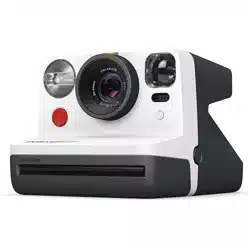
The Polaroid Now catches life as you live
it. Our autofocus camera gives you great
quality photos wherever the moment takes
you. In this manual we will take you through
everything you need to know; from how to
take your rst Polaroid photograph to support
if you ever need it, so can get the most out of
your new Polaroid camera.
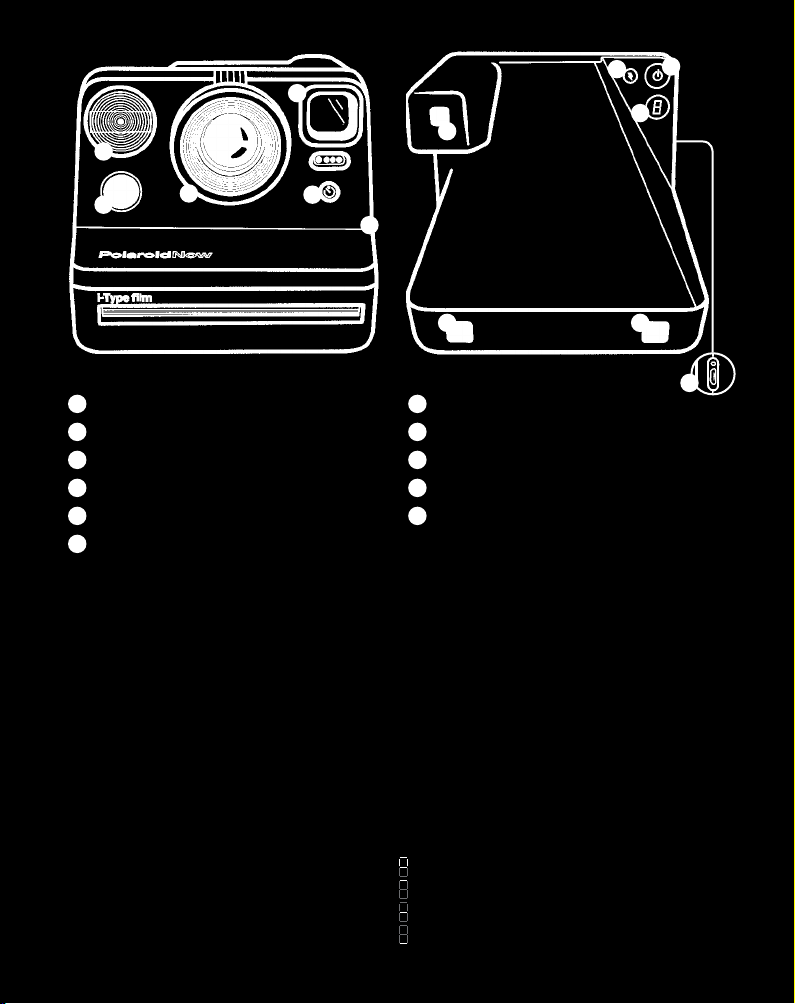
A
ShutterButton
B
Lens
C
Flash
D
Viewnder
E
Self-timer&DoubleExposure
F
FilmDoorButton
G
FlashON|OFFButton
H
ON|OFFButton
I
FilmCounterLED
J
NeckStrapLoop
K
BatteryLevelIndicator
Display This means:
Unlit → Cameraisoff
0 → Nolm
1 → Onephotoremaining
2 → Twophotosremaining
3 → Threephotosremaining
4 → Fourphotosremaining
5 → Fivephotosremaining
6 → Sixphotosremaining
7 → Sevenphotosremaining
8 → Eightphotosremaining
- → Darkslideisinside
Film Counter Display
Display This means:
1
(ashing) → Exposure1ofDouble
Exposure
2
(ashing) → Exposure2ofDouble
Exposure
d o o r → FilmProcessingUnitdoor
isopen
L → Lensselectfailure
c → Objecttooclose
b
(ashing5x) → BatteryLow
→ Ejectlmanimation
→ EVTrim+½EV
→ EVTrimNormal
→ EVTrim-½EV
D
G
H
I
JJ
K
A
B
C
E
F
D
5
Getting Started
1. Open the Polaroid Now box and check that
you have everything you need:
01 PolaroidNowCamera
02 MicroUSBChargingCable
03 QuickStartGuide
04 CameraNeckStrap
2. Charge your camera
ThePolaroidNowwon’tbefullycharged
straightoutofthebox,soyouwillneedto
chargeittogetstarted.PlugtheMicroUSB
sideofthecableintothesideofthecamera
andtheUSBsideintoyourUSBcharging
adapter.ThebatterylevelindicatorLEDnext
totheMicroUSBslotwillashgreenwhilethe
cameraispluggedinandcharging.Itwillturn
offoncethecameraisfullycharged.
Afullchargeusuallytakesabout2hours
throughawallsocketwithaUSBpower
adapter.Afully-chargedPolaroidNowwill
haveenoughpowertoshoot15packsoflm,
dependingonusage.Remembertoturnoff
thePolaroidNowafterusetosavebatterylife.
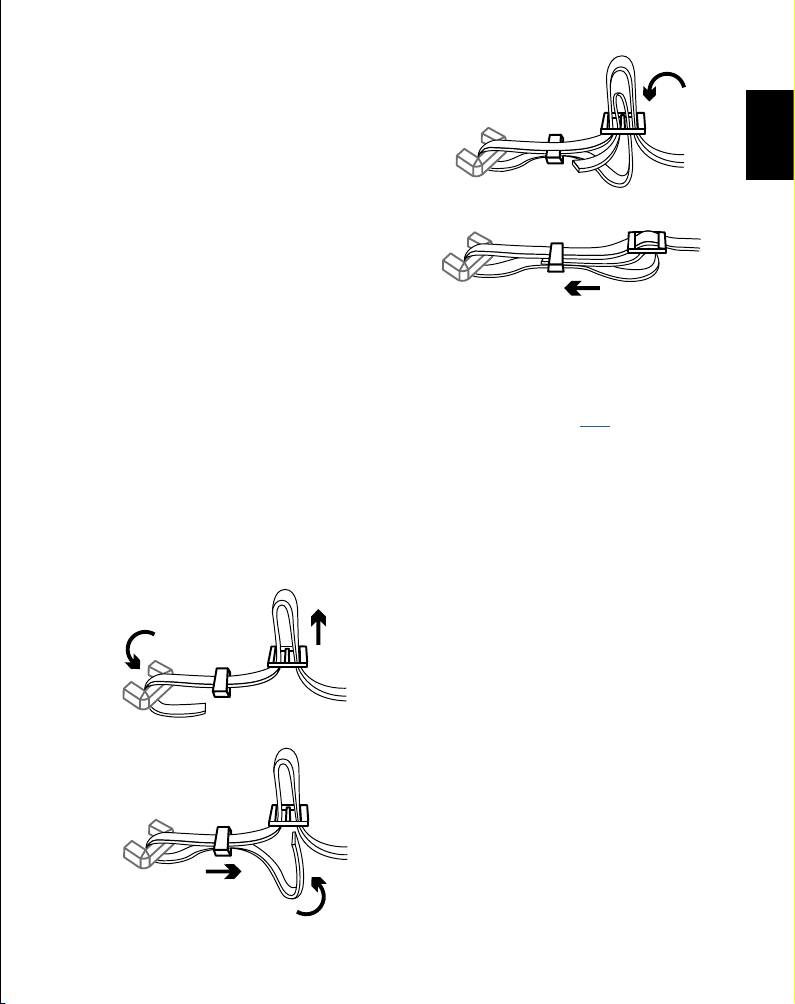
3. Attach your neck strap
01
02
03
04
4. Find your instant lm
ThePolaroidNowusesi-Typeand600instant
lm.GetthaticonicPolaroidframeincolor,
blackandwhite,orwithourspecialedition
frames.Findyournextlmhere,thenyou’re
readytotakeyourrstPolaroidphotograph.
How To Take
Your First Photo
1. Turn on the Polaroid Now camera
PresstheON|OFFbuttonfor½asecond.
Thelmcounterdisplaywillshowthe
number‘0’becausethereiscurrentlyno
lminthecamera.
2. Insert your lm pack
Pushthelmdoorbuttontoopenthelmdoor,
theninsertthelmpackintolmchamberof
yourcamera.Pushthelmpackallthewayin
withthedarkslidefacingupandthetabfacing
towardyou.Closethelmdoor.Thedarkslide
willeject.Removethedarkslideandallow
thelmshieldtorollbackin.Thisshieldis
designedtoprotectimagesfromlightasthey
develop,sodon’tremoveit.Ifthedarkslidehas
notejected,removethelmpackandre-insert
ittomakesureitispushedallthewayintothe
backofthecamera.
Werecommendusingi-Typelmas
thecameraisoptimizedforusewiththis
particularlm.

6
Tomakesurethecameraalwaysdisplays
therightlmcount,alwaysnishthelmpack
beforeinsertinganewone.Ifyoudecideto
switchpacksanyway,beawarethatonephoto
willbewastedasitwillbeexposedtolight.
That’swhyeverypackhasadarkslide.
3. Set the ash mode
Inanysituationwhereyouarenotshootingin
bright,directsunlight,werecommendusing
theashtoachievethebestshots.That’swhy
theashwilltriggerbydefaulteverytimeyou
usethePolaroidNow.
Shootingwithouttheashcangiveyou
somebeautifulresultsaswell,butremember
youneedanothersourceoflighttomakesure
yourphotowillturnout.Toshootwithout
theash,presstheashbuttonontheback
panelonce.
Aftertakingthephototheashwillbe
reenabled.Todisabletheashuntilyou
poweroffthecamera,doublepressthe
ashbutton.
4. Position yourself
Makesureyouareatleast55cm(1.8ft)away
fromyoursubject.
5. Aim at your subject
ThePolaroidNowusesaviewnderlocated
ontheleftsideofthelensbarrel.Toaimat
yoursubject,simplyalignyoureyewiththe
viewnderbarrelandusetheimageyousee
tocomposeyourshot.
6. Press the shutter button
Presstheshutterbuttontotakeyourphoto.
Thephotowillbeejectedfromtheslotat
thefrontofthecameraassoonasyouletgo
oftheshutterbutton.Youwillseethatthe
photowillbecoveredwithalmshieldto
protectitfromlight.
7. Remove the photo
Gentlyliftthelmshieldsoitrollsbackintothe
camera.Removethephotoandplaceitface
downtocontinueshieldingitfromlightasit
develops.Don’tshakeit!Checkthebackofyour
lmpacketforthecorrectdevelopingtimes.
8. Turn the camera off
PresstheON|OFFbuttonfor½asecondto
turnoffthePolaroidNow.
Tips For Making
Great Photos
Natural light
Lightisyourbestfriendwhenitcomesto
instantphotograph,sowerecommendto
alwaysusetheash.However,onasunnyday
outdoors,youdon’tneedtouseyourashat
all.Makesurenottoshoottowardsthesun,
shootwiththesunbehindyouinstead,facing
yoursubjectdirectlyorside-on,togiveyou
abrightandclearpicturewithoutshadowon
yoursubject.Forthebestresultswithoutthe
ash,themostimportantthingtoremember
istokeepyourcameraassteadyaspossible.
Forexample,byholdingyourcamerawithboth
handsandputtingyourelbowsonatable.
Framing
Beawarethatyourphotowillnotexactly
reectwhatyouseethroughtheviewnder.For
subjectscloserthan1.2m(3.93ft)youshould
adjustyouraimslightlyupandtotheleft.
Composition
It’spossibletochangethephotocomposition
afterfocusingonyoursubject.Theshutter
buttonhastwopositions.Firsthalf-pressthe
shutterbutton,thenchangethecomposition
andfullypresstotakethephoto.
Special Features
Self-Timer
Getyourselfinthephotographwiththeself-
timer.Taptheself-timerbuttononce.TheLED
willlightuporange,indicatingthattheself-timer
isactivated.Onceyouhaveframedyourphoto,
presstheshutterbutton.TheorangeLEDwill
blinktoindicatetheself-timercountdown.You
have9secondsbeforethephotoistaken.

7
Charging
AbovetheMicroUSBslotsitsthebatterylevel
indicatorLEDtoletyouknowwhatyourbattery
levelis.Tocheckthecamera’sbatterylevel,
turnthecameraonandlookatthebatterylevel
indicatorLEDinrelationtothistable.
BatteryLevel
IndicatorLED Thismeans:
NoLight → Cameraisoff
Green → Charged
(Enoughfor15packsoflm)
Orange → Mediumbattery
(Enoughfor1packoflm)
Red → Low battery
Tochargethecamera,insertthechargingcable
intotheMicroUSBslot.Onceyoudothat,the
LEDlightwillletyouknowhowmuchcharge
youhaveremaining.
BatteryLevel
IndicatorLED Thismeans:
NoLight → Cameraisfullycharged
Green →
Charging,batteryalmostfull
Orange →
Charging,batteryishalffull
Red → Charging,batteryislow
Cleaning
Tocleanthelens,useamicrobercloth
designedforthatpurpose.Thiswillensure
thatyoudonotscratchthelensorleave
behindanystrandsthatmayimpactthe
qualityofyourphotos.
Spottedmarksonyourphotographs?
Dirtyrollerscouldbeoneofthereasons.
WhenyoutakeaPolaroidphotograph,the
lmgoesthroughtwometalrollers.Thisis
wherethedeveloperpasteisspreadbetween
thenegativeandpositivecomponentsofthe
photobeforeitexitsthroughthelmdoor.
Iftheserollersaredirtyorjustalittleuneven,
thechemistrywillnotspreadevenlyacross
thephotographandyougetsmallmarks.
Tomakeself-timerphotoswithoutash,
rstactivatetheself-timer,thenpressthe
ashbutton.
Ifyouchangeyourmind,youcancancel
theself-timerbypressingtheself-timer
buttonagain.
Double Exposure
Expressyourselfinmorewaysthanone
withtheDoubleExposurefeature,which
allowsyoutocombinetwoimagesinone
photo.Presstheself-timerbuttontwiceto
enabledoubleexposuremode.Thedisplay
willash‘1’untiltherstshotistaken,then
ash‘2’untilthesecondshotistaken.
Flash
Doubletaptodisableashuntilthecamerais
poweredoff.
Exposure compensation (Trim EV)
Forthemoreexperiencedphotographers,
thecamerahasanexposurecompensation
mode.Thismodeallowsyoutomakeyour
photobrighterordarker.Thismightbeto
intentionallyunder-orover-expose,orcould
betocompensateforsceneswithatypical
distributionoflightanddarkelements,such
asalandscapewithabrightskyorsubject
withacontrastingbackground.
+½EVand-½EVsettingsareavailable
whichmakeyourphotosslightlybrighter
ordarkerrespectively.ToaccesstheTrim
EVmode,holdtheashbuttondownfor
onesecond.Asmalllinewillappearinthe
display.Tappingtheashbuttoncycles
through+½EV→NormalEV→-½EV.When
youhavechosenyourEVsetting,press
theshutterbuttonasyounormallywould.
Remember:theashisonduringthistime
unlessyouturneditoffpreviously.After
twoseconds,thescreenwillalternate
displayingthelmcountandEVsetting.

8
Tocleantherollers,openthelmdoor
compartmentofthecamera(thelmcan
remaininthecamerawhilecleaning)and
grabasoft,dampcloth.Rotatetherollers
byturningtheblackplasticgearonthe
bottomleftandwipetheclothacrossthe
rollersastheymove.Makesuretherollers
aredrybeforeyouuseyourcameraagain.
Werecommendthatyouchecktherollers
betweeneverypackoflm,andcleanthem
every2-3packseveniftheylookperfectly
clean.
Troubleshooting
1. My Polaroid Now won’t eject my photo
or darkslide.
MakesureyourPolaroidNowcamerais
charged.Thecamera’sbatterylevelindicator
LEDwillblinkredifitdoesn’thaveenough
chargetooperate.Ifthisisthecase,you
shouldrechargeyourcamerathentryagain.
Stillhavingtrouble?Checkhowmany
photosyouhaveleft.Holddownthepower
buttonfortwosecondsandthelmcounter
displaywillindicatehowmanyshotsyou
haveleftinthelmpack.IftheLEDshows‘0’
thismeansthattherearenoshotsleftinthe
lmpack.
2. The ash doesn’t re when I take a photo.
ThePolaroidNowautomaticallyturnsthe
ashonwhenyoupoweronthecamera.
Ifit’snotring,presstheashbuttononce
untilyouseethelightningboltilluminate.
Whentakingphotosmakesureyoudon’t
accidentallypresstheashbutton.
3. My photo turned out too dark.
Polaroidcameraslovelight,sothemorelight
youhavethebetter.
Makesureyouarenotshootingtowards
thesun.Whenshootingtowardssunlight,
theexcessivelightmaycausethecamerato
overcompensatewhenexposingtheimage,
creatinganimagethatistoodarktoexpose
yoursubjectproperly.
Ifyou’retakingphotosinsideandyou
don’twanttousetheash,makesureyou
ndanotherlightsource–orusetheash.
Theashisalsousefulatnight-time,dusk,
andcloudydays.
4. My photo turned out blurry or fuzzy.
Makesureyouareatleast55cm(1.8ft)away
fromyoursubject.Whenshooting,makesure
youholdthecamerasteady,especiallyin
lowlightconditions,andhaveastronglight
sourcetoilluminateyoursubject.
5. The lm counter display shows the wrong
number.
Thedisplayresetsto‘8’everytimeacassette
isinserted.Ifapart-usedcassetteisinserted,
thecamerawilldisplay‘8’andcountdownas
eachphotoistaken.Whenyounextinserta
fulllmpack,thecounterwillcorrectlyshow
8remainingphotos.
6. I took the rst shot of a double exposure
photo, but I changed my mind.
Switchoffyourcamera,pressandholddown
theshutterbutton.Switchonthecamera
againandthelmcountwilldisplay“-”.
Continuetoholdtheshutterbuttonforover
10secondsuntilthelmisejected.
Can’tndwhatyou’relookingfor?
Browseourfrequentlyaskedquestions.

9
Customer Support
We’reheretohelp.
Getintouchusingthedetailsbelow.
USA/Canada
+12122193254
Europe/Rest of World
00 800 577 01500
Impossible B.V.
P.O.Box242
7500AEEnschede
TheNetherlands
Formoredetailedandup-to-dateinformation,
visitpolaroid.com/help.
Warranty
YoucanndthewarrantyforthePolaroid
Nowhere:polaroid.com/warranty
Technical Specications
General
Dimensions
150mm(L)×111.2mm(W)×94mm(H)
Weight
445grams(withoutlmpack)
OperatingTemperature
40–108°F/4–42°C,5–90%relativehumidity
CompatibleFilm
Polaroidi-Typeand600lminbothcolorand
black&white,includingspecialeditions.
Battery
Highperformancelithium-ionbattery,
750mAh,3.7Vnominalvoltage,2.775Wh
Materials
Outershells
Polycarbonate+ABSplastics
Lens
Opticalgradepolycarbonatelens,coated
Shuttersystem
Customdesignusingprecisionstepmotor
Optical System
Lens
Fixedfocuslens
Focallength
Standardlens:103mm
Portraitlens:95mm
Fieldofview
41°vertical,40°horizontal
Flash System
Vacuumdischargetubestrobe

10
Safety Information
Camera
• Caution:riskofelectricshock.
• Donotopenordisassemblethe
motorizedrollersystem.
• Donotdisassemblethedevice.Incorrect
reassemblycancauseelectricalshockif
thedeviceisusedagain.
• Donotimmersethedeviceinwateror
otheruids.
• Donotoperatethedeviceinahigh
humidityenvironmentorverydusty
environments.
• Donotattempttotamperwith,adjust
orremovethebatteryand/orthe
electronicslocatedinsidethecamera.
• Donotattempttoremovethedoor
itself,asitisconnectedtothebody
ofthedevice.Doingsoisunsafe,will
likelydamageyourdevice,andwillvoid
yourwarranty.
• Donotinsertmetalobjectsintothedevice.
• Donotinsertanyobjectsintothe
rollersorgears.
• Keepsmallchildrenandinfantsaway
fromthedevicetoavoidthembeing
injuredbythedevice’smovingparts.
• Donotuseorstorethedevicenearany
heatsourceoranytypeofequipment
thatgeneratesheat,includingstereo
ampliers.
• Donotusethedevicenearammable
orexplosivegases.
• Donotchargethedeviceifyounotice
anyunusualodors,noiseorsmoke.
• Donotattempttodisassemblethe
lm’sbatteryormodifyitinanyway
(ifusing600typelm).Ifbatteryuid
getsinyoureyes,immediatelyrinse
youreyeswithfresh,coldrunning
water,andseekmedicalattention
immediately.
• Donotcovertheash.
Battery & Charger
• Thisdeviceusesacustomlithium-ion
batterythatisnon-removableand
mountedinsidethecamerabody.
• Noothertypeofbatterycanbeused.
Batteryreplacementcanonlybedone
byauthorizedservicecenters.The
batterywillprovidemanyyearsof
serviceifproperlyused.
• Powerconsumptionvariesdepending
ontheenvironmentthedeviceisused
inandhowthedevicehasbeenstored.
Usedimmediatelyafterfullcharge,the
batterywillpowertheprocessingofup
to15lmpackswithashexposures.
Duetothehighenergyrequirementsof
theash,werecommendchargingthe
camerafullybeforeeverysessionfor
bestresults.
• Oncethebatteryenergylevelfalls
belowacertainlevel,thedevicewill
nolongerprocesslm.ThebatteryLED
willblinkandsignalwhenitneedsto
berecharged.Thisistoavoidaphoto
gettingstuckasitisbeingprocessed
throughtherollersystem.
• Therechargeablebatteryisnotfully
chargedatthetimeofpurchase.
ChargethebatteryfullywiththeUSB
chargingcableprovided.Thisusually
takes1-2hours(canvarydepending
onusage).
• Thesuppliedbatterychargingcable
hasbeentestedtoworkwiththe
AppleiPhonepoweradaptors.While
itcanbeusedinotherUSBportse.g.
computer,USBpoweradaptors,TVs,
carsetc.,correctoperationcannotbe
guaranteed.
• Whenthedeviceisnolongerinuse,
pleaserecycleitproperly.
Usage Environment
• Toprotectthehigh-precision
technologycontainedinthisdevice,
neverleavethecamerainthefollowing
environmentsforextendedperiodsof
time:hightemperature(+42°C/108°F),
highhumidity,placeswithextreme
changesintemperature(hotand
cold),directsunlight,sandyordusty
environmentssuchasbeaches,damp
places,orplaceswithstrongvibrations.
• Donotdropthedeviceorsubjectit
tosevereshocksorvibrations.
• Donotpush,pullorpressonthelens.
Compliance
ImportantdirectionsforusingLithium–
IonBatteries:
1.Donotthrowintore.
2.Donotshortcircuit.
3.Donotdisassemble.
4.Donotcontinuetousewhendamaged.
5.Disposecorrectlyafteruse.
6.Keepawayfromwater.
EU Declaration of Conformity
Hereby,ImpossibleB.V.declaresthat
thePolaroidNowanaloginstantcamera
isincompliancewiththeessential
requirementsoftheElectromagnetic
CompatibilityDirective(2014/30/EU),
LowVoltageDirective(2014/35/EU)
andRoHsDirective(2011/65/EU)and
otherrelevantprovisions,whenused
foritsintendedpurpose.
FCC Compliance Statement
ThisdevicecomplieswithPart15ofthe
FCCRules.Operationissubjecttothe
followingtwoconditions:(1)thisdevice
maynotcauseharmfulinterference,
and(2)thisdevicemustacceptany
interferencereceived,including
interferencethatmaycauseundesired
operation.
Caution theuseriscautionedthat
changesormodicationsnotexpressly
approvedbythepartyresponsible
forcompliancecouldvoidtheuser’s
authoritytooperatetheequipment.
Thisequipmentmustnotbeco-located
oroperatedinconjunctionwithanyother
antennaortransmitter.
Note Thisequipmenthasbeen
testedandfoundtocomplywiththe
limitsforaClassBdigitaldevice,
pursuanttopart15oftheFCCrules.
Theselimitsaredesignedtoprovide
reasonableprotectionagainstharmful
interferenceinaresidentialinstallation.
Thisequipmentgenerates,usesandcan
radiateradiofrequencyenergyand,if
notinstalledandusedinaccordance
withtheinstructions,maycauseharmful
interferencetoradiocommunications.
However,thereisnoguaranteethat
interferencewillnotoccurinaparticular
installation.Ifthisequipmentdoescause
harmfulinterferencetoradioortelevision
reception,whichcanbedetermined
byturningtheequipmentoffandon,
theuserisencouragedtotrytocorrect
theinterferencebyoneormoreofthe
followingmeasures:
- Reorientorrelocatethereceiving
antenna.
- Increasetheseparationbetweenthe
equipmentandreceiver.
- Connecttheequipmentintoanoutlet
onacircuitdifferentfromthattowhich
thereceiverisconnected.
- Consultthedealeroranexperienced
radio/TVtechnicianforhelp.
ThisequipmentcomplieswithFCC
radiationexposurelimitssetforthforan
uncontrolledenvironment.Endusermust
followthespecicoperatinginstructions
forsatisfyingRFexposurecompliance.
Industry Canada (IC)
Thisdevicecomplieswithpart15ofthe
FCCRuleandIndustryCanadalicense–
exemptRSSstandard(s).Operationis
subjecttothefollowingtwoconditions:
(1)Thisdevicemaynotcauseharmful
interference,and(2)thisdevicemust
acceptanyinterferencereceived,
includinginterferencethatmaycause
undesiredoperation.
Leprésentappareilestconformeaux
CNRd’IndustrieCanadaapplicables
auxappareilsradioexemptsdelicence.
L’exploitationestautoriséeauxdeux
conditionssuivantes:(1)l’appareilne
doitpasproduiredebrouillage,et(2)
l’utilisateurd’appareildoitacceptertout
brouillageradioélectriquesubi,même
silebrouillageestsusceptibled’en
compromettrelefonctionnement.
Thesymbolmeansthataccording
tolocallawsandregulationsyour
productshouldbedisposedof
separatelyfromhouseholdwaste.When
thisproductreachesitsendoflife,take
ittoacollectionpointdesignatedbylocal
authorities.Somecollectionpoints
acceptproductsforfree.Theseparate
collectionandrecyclingofyourproduct
atthetimeofdisposalwillhelpconserve
naturalresourcesandensurethatitis
recycledinamannerthatprotectshuman
healthandtheenvironment.
Polaroid Film B.V.
P.O. Box 242
7500 AE Enschede
The Netherlands
End of life disposal warning: When the product has come to the end of life, dispose of it in
accordance with local regulations. This product is subject to the EU directive 202/96/EC
on Waste Electrical and Electronic Equipment (WEEE) and should not be disposed as unsorted
municipal waste.
Made in China for and distributed by Polaroid Film B.V. (P.O. Box 242, 7500 AE), Enschede,
The Netherlands. The POLAROID word and logos (including the Polaroid Classic Border Logo)
and Polaroid Now are protected trademarks of Polaroid.
Fabriqué en Chine pour et distribué par Polaroid Film B.V. (BP 242, 7500 AE), Enschede, Pays-Bas.
Le mot et les logos Polaroid (y compris le Polaroid Classic Border Logo) et Polaroid Now sont des
marques protégées de Polaroid.
© 2020 Polaroid. All Rights Reserved.