PCM-D1. US. 2-664-971-14(1)
Owner’s Record
The model number is located at the rear and
the serial number is located inside the
battery compartment. Record the serial
number in the space provided below. Refer
to them whenever you call upon your Sony
dealer regarding this product.
Model No. PCM-D1
Serial No.
WARNING
To reduce the risk of fire or electric shock,
do not expose this apparatus to rain or
moisture.
Do not install the appliance in a confined
space, such as a bookcase or built-in
cabinet.
To reduce the risk of fire, do not cover the
ventilation of the apparatus with newspapers,
tablecloths, curtains, etc. And do not place
lighted candles on the apparatus.
To reduce the risk of fire or electric shock,
do not place objects filled with liquids, such
as vases, on the apparatus.
Connect AC power adaptor to an easily
accessible AC outlet. Should you notice an
abnormality in AC power adaptor, disconnect
it from the AC outlet immediately.
Certain countries may regulate disposal of
the battery used to power this product.
Please consult with your local authority.
You are cautioned that any changes or
modifications not expressly approved in this
manual could void your authority to operate
this equipment.
On this manual
These operating instructions are written
mainly for models outside of Japan. In the
case of the model for use in Japan, the
display indications may differ slightly, but
operations are identical.
Notice for customers: the following
information is only applicable to
equipment sold in countries applying EU
directives
The manufacturer of this product is Sony
Corporation, 1-7-1 Konan, Minato-ku, Tokyo,
Japan. The Authorized Representative for
EMC and product safety is Sony
Deutschland GmbH, Hedelfinger Strasse 61,
70327 Stuttgart, Germany.
For any service or guarantee matters, please
refer to the addresses given in separate
service or guarantee documents.
Disposal of Old Electrical & Electronic
Equipment (Applicable in the European
Union and other European countries with
separate collection systems)
This symbol on the product or on
its packaging indicates that this
product shall not be treated as
household waste. Instead it shall
be handed over to the applicable
collection point for the recycling
of electrical and electronic equipment. By
ensuring this product is disposed of
correctly, you will help prevent potential
negative consequences for the environment
and human health, which could otherwise be
caused by inappropriate waste handling of
this product. The recycling of materials will
help to conserve natural resources. For more
detailed information about recycling of this
product, please contact your local Civic
Office, your household waste disposal
service or the shop where you purchased
the product.
PCM-D1. US. 2-664-971-14(1)
For the customers in the U.S.A.
The following FCC statement applies only to
the version of this model manufactured for
sale in the USA. Other versions may not
comply with FCC technical regulations.
Information
This equipment has been tested and found
to comply with the limits for a Class B digital
device, pursuant to Part 15 of the FCC
Rules.
These limits are designed to provide
reasonable protection against harmful
interference in a residential installation. This
equipment generates, uses, and can radiate
radio frequency energy and, if not installed
and used in accordance with the
instructions, may cause harmful interference
to radio communications.
However, there is no guarantee that
interference will not occur in a particular
installation. If this equipment does cause
harmful interference to radio or television
reception, which can be determined by
turning the equipment off and on, the user is
encouraged to try to correct the interference
by one or more of the following measures:
– Reorient or relocate the receiving antenna.
– Increase the separation between the
equipment and receiver.
– Connect the equipment into an outlet on a
circuit different from that to which the
receiver is connected.
– Consult the dealer or an experienced
radio/TV technician for help.
If you have any questions about this product,
you may call:
Sony Customer Information Services Center
1-800-222-7669 or http://www.sony.com/
Declaration of Conformity
Trade Name: SONY
Model: PCM-D1
Responsible Party: Sony Electronics Inc.
Address: 16530 Via Esprillo,
San Diego, CA
92127 U.S.A.
Telephone Number: 858-942-2230
This device complies with part 15 of the
FCC Rules. Operation is subject to the
following two conditions: (1) This device
may not cause harmful interference, and
(2) this device must accept any
interference received, including
interference that may cause undesired
operation.
RECYCLING NICKEL METAL HYDRIDE
BATTERIES
Nickel Metal Hydride batteries
are recyclable.
You can help preserve our
environment by returning your
used rechargeable batteries to
the collection and recycling
location nearest you.
For more information regarding recycling of
rechargeable batteries, call toll free
1-800-822-8837, or visit
http://www.rbrc.org/
Caution: Do not handle damaged or leaking
Nickel Metal Hydride batteries.
Product registration
Please register this product on line at
www.sony.com/productregistration
<http://www.sony.com/productregistration>
Proper registration will enable us to send you
periodic mailings about new products,
services and other important
announcements. Registering your product
will also allow us to contact you in the
unlikely event that the product needs
adjustment or modification.
Thank you.
PCM-D1. US. 2-664-971-13(2)

IMPORTANT
SAFEGUARDS
For your protection, please read these safety
instructions completely before operating the
appliance, and keep this manual for future
reference.
Carefully observe all warnings, precautions
and instructions on the appliance and in the
operating instructions, and adhere to them.
INSTALLATION
Water and Moisture – Do not use powerline
operated appliances near water – for
example, near a bathtub, washbowl, kitchen
sink, or laundry tub, in a wet basement, or
near a swimming pool, etc.
Heat – Do not place the appliance near or
over a radiator or heat register, or where it is
exposed to direct sunlight.
Ventilation – The slots and openings in the
cabinet are provided for necessary
ventilation. To ensure reliable operation of
the appliance, and to protect it from
overheating, these slots and openings must
never be blocked or covered.
– Never cover the slots and openings with a
cloth or other materials.
– Never block the slots and openings by
placing the appliance on a bed, sofa, rug
or other similar surface.
– Never place the appliance in a confined
space, such as a bookcase, or built-in
cabinet, unless proper ventilation is
provided.
Accessories – Do not place the appliance
on an unstable cart, stand, tripod, bracket,
or table. The appliance may fall, causing
serious injury to a child or an adult, and
serious damage to the appliance. Use only a
cart, stand, tripod, bracket, or table
recommended by Sony.
USE
Power Source – This appliance should be
operated only from the type of power source
indicated on the marking label. If you are not
sure of the type of electrical power supplied
to your home, consult your dealer or local
power company. For those appliances
designed to operate from battery power, or
other sources, refer to the operating
instructions.
Grounding or Polarization – This appliance
is equipped with a polarized AC power cord
plug (a plug having one blade wider than the
other), or with a three-wire grounding type
plug (a plug having a third pin for grounding).
Follow the instructions below:
•
For the appliance with a polarized AC
power cord plug:
This plug will fit into the power outlet only
one way. This is a safety feature. If you are
unable to insert the plug fully into the
outlet, try reversing the plug. If the plug
should still fail to fit, contact your
electrician to have a suitable outlet
installed. Do not defeat the safety purpose
of the polarized plug by forcing it in.
•
For the appliance with a three-wire
grounding type AC plug:
This plug will only fit into a grounding-type
power outlet. This is a safety feature. If you
are unable to insert the plug into the outlet,
contact your electrician to have a suitable
outlet installed. Do not defeat the safety
purpose, of the grounding plug.
Overloading – Do not overload wall outlets,
extension cords or convenience receptacles
beyond their capacity, since this can result in
fire or electric shock.
When not in use – Unplug the power cord of
the appliance from the outlet when left
unused for a long period of time.
To disconnect the cord, pull it out by
grasping the plug. Never pull the plug out by
the cord.
PCM-D1. US. 2-664-971-13(2)

Power-Cord Protection – Route the power
cord so that it is not likely to be walked on
or pinched by items placed upon or against
them, paying particular attention to the
plugs, receptacles, and the point where the
cord exits from the appliance.
Lightning – For added protection for this
appliance during a lightning storm, or when
it is left unattended and unused for long
periods of time, unplug it from the wall outlet
and disconnect the antenna or cable system.
This will prevent damage to the appliance
due to lightning and powerline surges.
Attachments – Do not use attachments not
recommended by Sony, as they may cause
hazards.
Cleaning – Unplug the appliance from the
wall outlet before cleaning or polishing it. Do
not use liquid cleaners or aerosol cleaners.
Use a cloth lightly dampened with water for
cleaning the exterior of the appliance. Clean
the appliance only as recommended by
Sony.
Object and Liquid Entry – Never push
objects of any kind into the appliance
through openings as they may touch
dangerous voltage points or short out parts
that could result in a fire or electric shock.
Never spill liquid of any kind on the
appliance.
SERVICE
Damage Requiring Service – Unplug the
appliance from the wall outlet and refer
servicing to qualified service personnel under
the following conditions:
– When the power cord or plug is damaged
or frayed.
– If liquid has been spilled or objects have
fallen into the appliance.
– If the appliance has been exposed to rain
or water.
– The appliance does not appear to operate
normally or exhibits a marked change in
performance. – This indicates a need for
service.
– If the appliance does not operate normally
when following the operating instructions,
adjust only those controls that are
specified in the operating instructions.
Improper adjustment of other controls may
result in damage and will often require
extensive work by a qualified technician to
restore the appliance to normal operation.
– If the appliance has been subject to
excessive shock by being dropped, or the
cabinet has been damaged.
Servicing – Do not attempt to service the
appliance yourself as opening or removing
covers may expose you to dangerous
voltage or other hazards. Refer all servicing
to qualified service personnel.
Replacement parts – When replacement
parts are required, be sure the service
technician has used replacement parts
specified by Sony that have the same
characteristics as the original parts.
Unauthorized substitutions may result in fire,
electric shock, or other hazards.
Safety Check – Upon completion of any
service or repairs to the appliance, ask the
service technician to perform routine safety
checks (as specified by Sony) to determine
that the appliance is in safe operating
condition.
PCM-D1. US. 2-664-971-13(2)

Table of Contents
Overview
Built-in microphones
—
Pick up sound ................................................................... 10
Electrical circuit
—
Amplifies sound ........................................................................... 11
Exterior
—
Increase rigidity .............................................................................................. 12
Identifying parts and controls ....................................................................................... 14
Getting Started
Checking the supplied accessories .......................................................................... 18
Step 1: Preparing a power source ............................................................................. 19
Step 2: Setting the clock ................................................................................................. 21
Recording
Preparation before recording ........................................................................................ 22
Recording...................................................................................................................24
Monitoring the recording .................................................................................................. 26
Recording with an external microphone ................................................................ 27
Recording from external equipment ......................................................................... 27
Operations after Recording
Playing back recorded audio data (tracks) ........................................................... 28
Dividing a track ...................................................................................................................... 30
Storing tracks in a computer ......................................................................................... 30
6
PCM-D1. US. 2-664-971-13(2)

-ENU¬/PERATIONS
5SING¬THE¬MENU¬DISPLAY¬
-ENU¬ITEMS¬
2%#¬-/$%¬3AMPLING¬FREQUENCYQUANTIFYING¬BIT¬NUMBER
,)-)4%2¬0REVENTING¬DISTORTION
(Z¬(0&¬(IGH¬0ASS¬&ILTER¬FUNCTION
3"-¬3UPER¬"IT¬-APPING¬FUNCTION
$%,%4%¬42+¬$ELETING¬TRACK
$%,%4%¬!,,¬$ELETING¬ALL¬TRACKS¬IN¬FOLDER
&/2-!4¬)NITIALIZING¬MEMORY
,%$¬)NDICATOR¬LIGHTING
#,/#+¬$ATETIME¬SETTING
-%-/29¬2ECORDINGPLAYBACK¬MEMORY
&/,$%2¬2ECORDINGPLAYBACK¬FOLDER
!DDITIONAL¬)NFORMATION
5SING¬A¬h-EMORY¬3TICK¬02/¬(IGH¬3PEEDv¬NOT¬SUPPLIED¬
-AINTENANCE¬
4ROUBLESHOOTING¬
3PECIFICATIONS¬
&ILE¬SPECIFICATIONS¬
)NDEX
'ETTING¬3TARTED/VERVIEW 2ECORDING
/PERATIONS¬AFTER¬
2ECORDING
-ENU¬/PERATIONS
!DDITIONAL¬)NFORMATION
Overview
8
PCM-D1. US. 2-664-971-13(2)

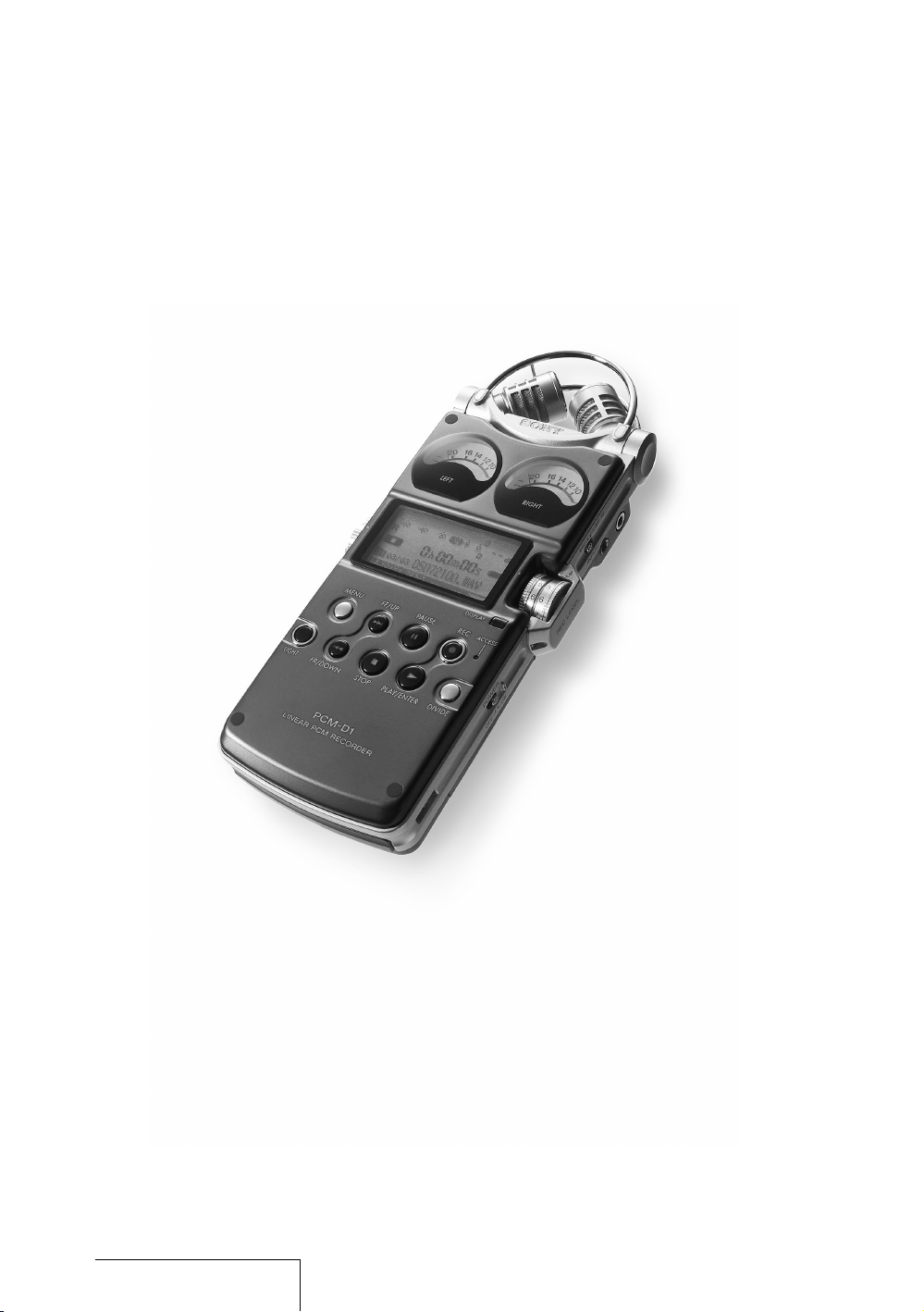
0#-$çCOMBINESçTHESEçFEATURESçFORç
RECORDINGSçTHATçAREçFAITHFULçTOçTHEçORIGINALçSOUNDç
ANDçREPRODUCEçEVENçTHEçSUBTLESTçOFçNUANCES
ç!çSTRUCTUREçFREEçOFçDRIVEçMECHANISMS
ç(IGHLYçSENSITIVEçBUILTINçCONDENSERçMICROPHONES
ç#IRCUITSçTHATçPROCESSçSOUNDçWITHçLITTLEçNOISE
ç"ODYçMADEçOFçPRESSEDçTITANIUMçWITHçMINIMALçJOINS
/VERVIEW
/VERVIEW¬CONTINUED
"UILTIN¬MICROPHONES
0ICK¬UP¬SOUND
0#-$çINCORPORATESçELECTRETçCONDENSERç
MICROPHONESçTHATçWEREçDEVELOPEDçFORçTHEIRç
HIGHçSENSITIVITYçANDçLOWçNOISEç5NLIKEçTAPEçORç
DISCçRECORDERSç0#-$çHASçNOçDRIVEç
MECHANISMçANDçISçFREEçOFçMOTORçNOISEç4HISç
MAKESçITçPOSSIBLEçTOçEMPLOYçAçHIGHLYçSENSITIVEç
MICROPHONEçTOçBEçUSEDçASçAçCOMPONENT
!LLçMICROPHONEçCASINGçPARTSçAREçCUTçFROMç
METALçANDçFITçTOGETHERçNEARLYçSEAMLESSLYç
%ACHçPARTçISçPOSITIONEDçANDçTHEçFRONTçANDç
REARçOPENINGSçAREçADJUSTEDçWITHçMICRONç
LEVELçPRECISIONç0EAKSçANDçDIPSçINçTHEç
MICROPHONESçRANGEçAREçMINIMIZEDçSOçTHATç
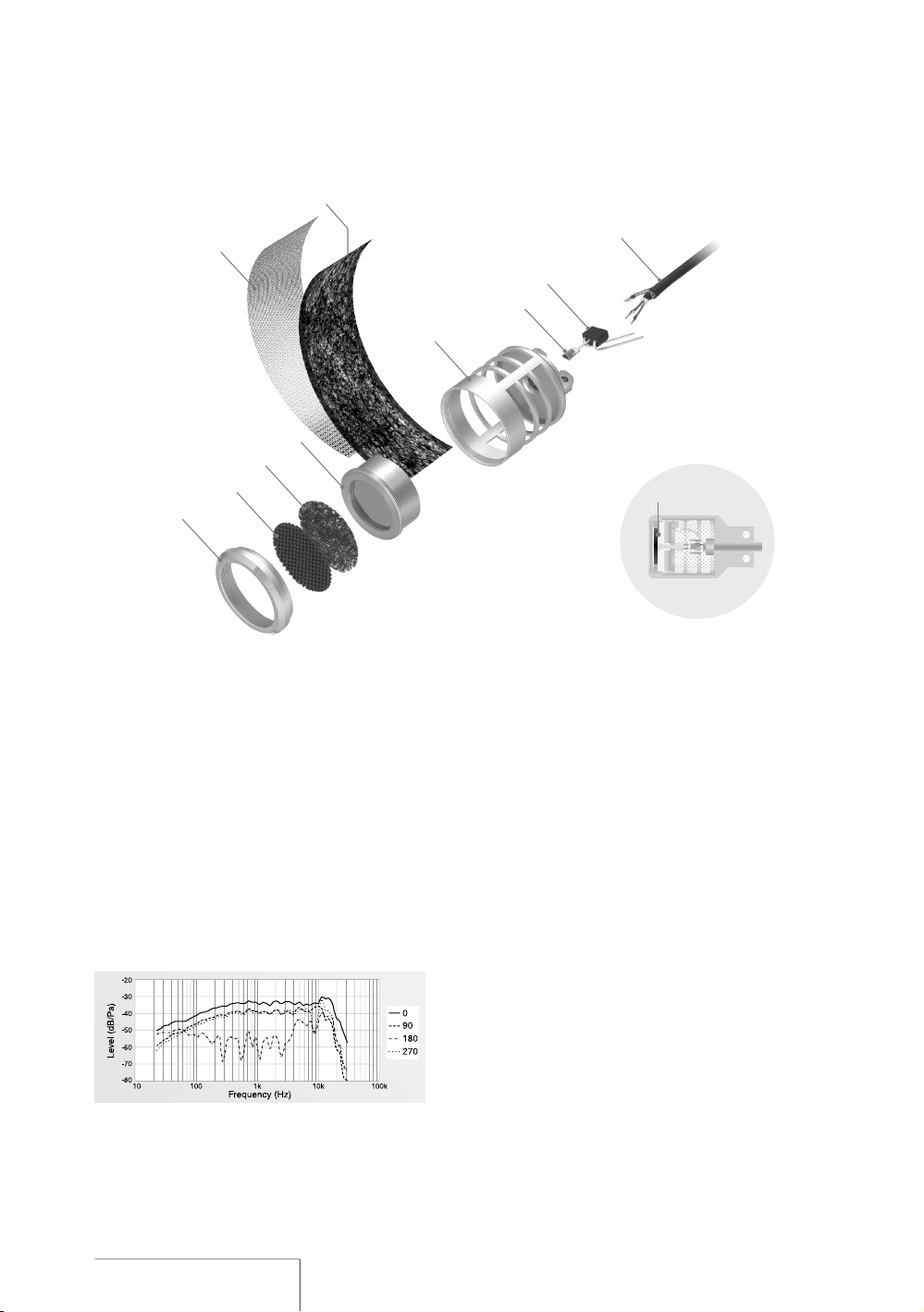
3ECTION¬VIEW¬OF¬MICROPHONE
&IGURE¬¬"UILTIN¬MICROPHONE¬FREQUENCY¬
RESPONSE
#AP
&RONT¬GRILL
4OP¬SCREEN
-ICROPHONE¬UNIT
3IDE¬MESH
3IDE¬SCREEN
-ICROPHONE¬CASING
#ONTACTOR
&%4
-ICROPHONE¬CORD
$IAPHRAGM
ACOUSTICçENERGYçISçTRANSMITTEDçEFFECTIVELYçTOç
THEçDIAPHRAGMçINçTHEçMICROPHONEçUNIT
4OçENSUREçTHATçSOUNDçISçTHENçCONVERTEDçTOç
ELECTRICALçSIGNALSçTHEçCONDITIONSçFORç
MANUFACTURINGçTHEçELECTRETçCHARGINGçTHEç
DIAPHRAGMçTOçINCREASEçSENSITIVITYçTOçSUBTLEç
SOUNDSçWEREçREVIEWEDRESULTINGçINçAç
SENSITIVITYçNEARLYççD"çSUPERIORçTOçTHATçOFçAç
STANDARDçMICROPHONE
)NçADDITIONçTHEçFREQUENCYçRESPONSEçOFçTHEç
MICROPHONEçISçIMPROVEDçTOçNEARLYçnçK(Zç
ACHIEVINGçAçSAMPLINGçRATEçOFççK(Zç
&IGUREçç4HISçPERFORMANCEçISçBARELYç
AFFECTEDçEVENçWHENçTHEçSUPPLIEDçWINDSCREENç
ISçUSED
4HEçMICROPHONESçAREçPOSITIONEDçUSINGçTHEç8
9çPATTERNçANDçTHENçANGLEDçTOWARDçEACHçOTHERç
WITHçTHEçLEFTçANDçRIGHTçDIAPHRAGMSçCLOSEç
TOGETHERçTHEREBYçCOVERINGçAçWIDEçSOUNDç
RANGEçANDçREDUCINGçPHASEçSHIFTSç4HEç
RECORDEDçSOUNDçHASçDEPTHçANDçPERSPECTIVEç
ANDçPROJECTSçAçNATURALçSTEREOçIMAGEç
!NGLE
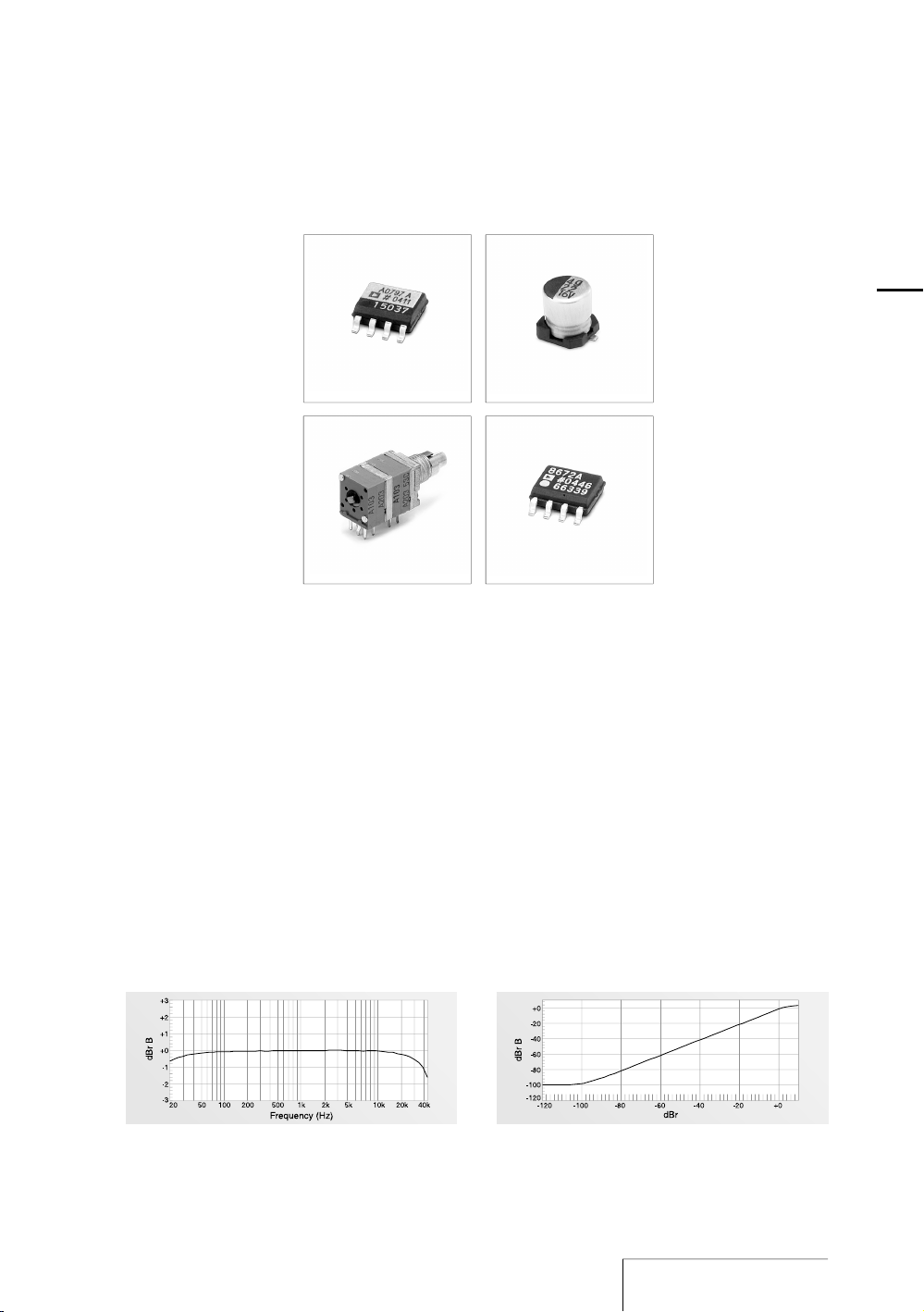
%LECTRICAL¬CIRCUIT
!MPLIFIES¬SOUND
,INE¬AMPLIFIER
3OUNDçPICKEDçUPçBYçTHEçMICROPHONESçISç
AMPLIFIEDçINçTHEçANALOGçCIRCUITçWHICHç
ACHIEVESçAçFREQUENCYçRESPONSEçTHATçREACHESç
THEçHIGHçFREQUENCIESç&IGUREççANDçENABLESç
THEçWIDEçDYNAMICçRANGEçOFç0#-$
4HEçMICROPHONEçAMPLIFIERçPROVIDEDçFORçEACHç
CHANNELçISç!NALOGç$EVICESç!$çWHICHç
BOASTSçULTRALOWçNOISEçANDçDISTORTIONçç
!çVARIABLEçGAINçCIRCUITçISçADOPTEDçFORç
AMPLITUDEçCONTROLçTHUSçIMPROVINGçTHEçACTUALç
SIGNALTONOISEçRATIO
)NçTHEçSIGNALçLINEçDIRECTçCURRENTçISçREMOVEDç
BYç%LNASçCOUPLINGçCONDENSERçWHICHçHASçAç
SEPARATORçMADEçOFçSYNTHETICçMICAçMIXçPAPERçç
!çDUALSHAFTçQUADUNITçVOLUMEçCONTROLçWITHç
TENçTIMESçTHEçLIFEçOFçAçSTANDARDçVOLUMEçCONTROLç
WASçDEVELOPEDçFORçRECORDINGç3PECIALçCARBONç
INKçISçAPPLIEDçTOçTHEçRESISTORçINçTHEçCONTROLçTOç
SUPPRESSçNOISEçPRODUCEDçBYçSLIDING
,IKEçTHEçMICROPHONEçAMPLIFIERçTHEçLINEç
AMPLIFIERç!$çISçPROVIDEDçBYç!NALOGç
$EVICES
)NTERFERENCEçBETWEENçBLOCKSçISçPREVENTEDçBYç
PLACINGçTHEçANALOGçCIRCUITçONçAçDIFFERENTç
BOARDçFROMçDIGITALçCIRCUITSçANDçPROVIDINGç
SEPARATEç¢çPOWERç4HEçANALOGçCIRCUITçALSOç
ACHIEVESçSUPERIORçLINEARITYçSOçTHATçTHEç
RECORDEDçSOUNDçISçOUTPUTçFAITHFULLYç&IGUREç
&IGURE¬¬%LECTRICAL¬CIRCUIT¬FREQUENCY¬RESPONSE &IGURE¬¬%LECTRICAL¬CIRCUIT¬LINEARITY
-ICROPHONE¬AMPLIFIER #OUPLING¬CONDENSER
$UALSHAFT¬QUADUNIT¬
VOLUME
/VERVIEW
Overview (continued)
Exterior
—
Increase rigidity
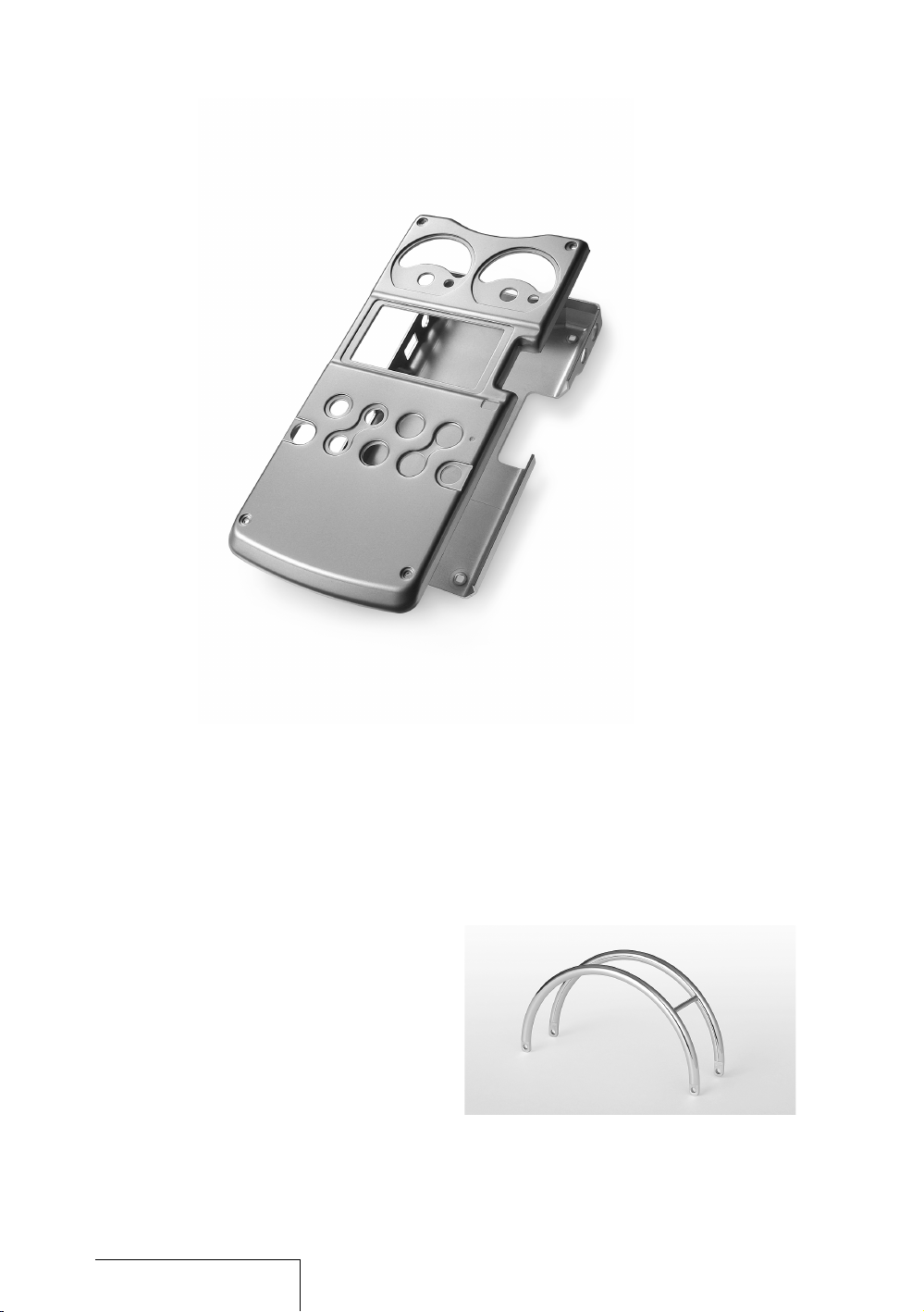
The electrical circuits are protected by a
body made of 1 mm thick pure titanium. By
means of a pressing process called
“drawing,” titanium is shaped into a box to
achieve a body rigidity that cannot be
obtained through bending or using pressed
aluminum. The use of drawn titanium
minimizes resonance, which tends to occur
when the body comes into contact with
acoustic energy.
The surface of pure titanium material
undergoes a process that increases the
hardness of the material. The surface is then
covered with ion plating (a nitrate titanium
coating that is resistant to scratches). The
finished titanium surface is approximately ten
times as hard as that of alumite treated
aluminum.
The distinctive arch-shaped frame
(microphone guard) protects the built-in
microphone units against impact damage
when dropped. Exhaustive tests were carried
Front/back panels
(1 mm thick pressed titanium)
out seeking a form and material that were
rugged enough without obstructing sound.
The final choice: stainless steel rods
(SUS316), 3 mm in diameter, bent into the
shape of the frame and hand polished by
skilled craftsmen.
The rugged exterior produced in this way
protects the circuits and microphones and
enhances the high recording quality of
PCM-D1.
Microphone guard (SUS316 stainless steel rod)
12
PCM-D1. US. 2-664-971-13(2)

/VERVIEW
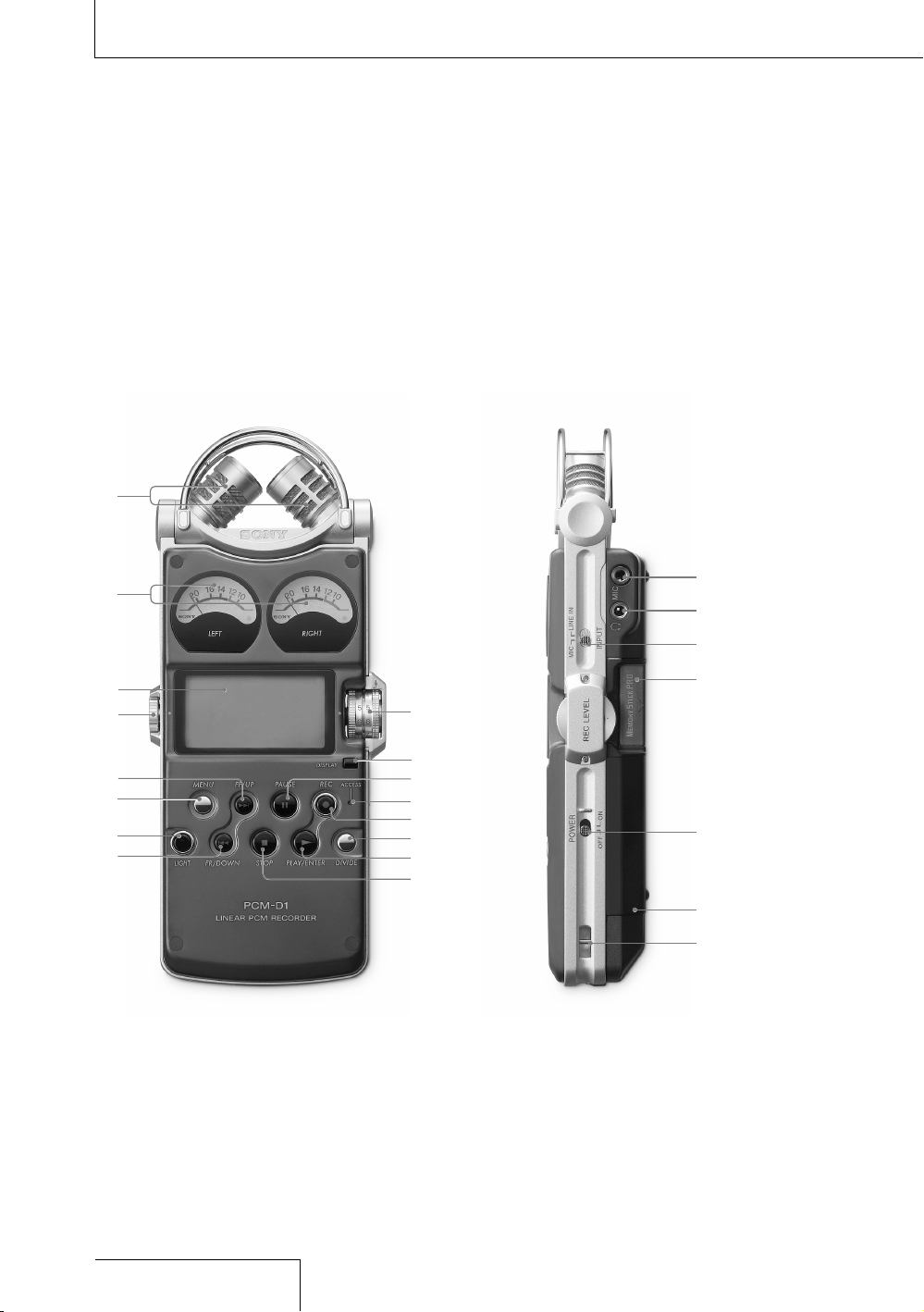
Identifying parts and controls
Front
Right side
Overview (continued)
14
PCM-D1. US. 2-664-971-13(2)

¬ "UILTIN¬MICROPHONES¬PAGE¬
¬ !NALOG¬LEVEL¬METERS¬PAGE¬
$ISPLAYSçLEFTçANDçRIGHTçVOLUMEçLEVELSçOFçANç
AUDIOçSIGNALçINPUTçFROMçMICROPHONESçINç
ANALOGçVALUES
¬ $ISPLAY¬PAGE¬
¬ 6/,5-%¬DIAL
!DJUSTSçTHEçPLAYBACKçVOLUMEçWHENçTURNEDçINç
nçDIRECTIONS
¬
¬&&¬FASTFORWARD¬50¬BUTTON¬¬
PAGES¬¬
¬ -%.5¬BUTTON¬PAGE¬
¬ ,)'(4¬BUTTON
4URNSçONçORçOFFçTHEçBACKLIGHTçOFçTHEçDISPLAYç
ANDçTHEçANALOGçLEVELçMETERS
¬
¬&2¬FASTREWIND¬$/7.¬BUTTON¬
PAGES¬¬
¬ 2%#¬,%6%,¬,2¬RECORDING¬LEVEL¬LEFTRIGHT¬
DIALS¬PAGE¬
¬ $)30,!9¬BUTTON¬PAGE¬
3WITCHESçTIMEçINFORMATIONçINçTHEçDISPLAY
¬
¬0!53%¬BUTTONINDICATOR¬PAGES¬¬
¬ !##%33¬INDICATOR¬PAGES¬¬
&LASHESçWHENçACCESSINGçMEMORYçEXCEPTç
DURINGçRECORDING
¬
¬2%#¬RECORDING¬BUTTONINDICATOR¬¬
PAGE¬
¬ $)6)$%¬BUTTON¬PAGE¬
¬
¬0,!9%.4%2¬BUTTONINDICATOR¬¬
PAGES¬¬
¬
¬34/0¬BUTTON¬PAGES¬¬
¬ -)#¬MICROPHONE¬JACK¬PAGE¬
¬ ¬HEADPHONE¬JACK¬PAGES¬¬
¬ -)#¬MICROPHONE¬,).%¬).¬SWITCH¬¬
PAGE¬
7HENçSETçTOçh-)#vçRECORDSçANçAUDIOçSIGNALç
INPUTçFROMçTHEçBUILTINçMICROPHONESçORçANç
EXTERNALçMICROPHONEçTHATçISçCONNECTEDçTOçTHEç
-)#çJACKç7HENçSETçTOçh,).%ç).vçRECORDSçANç
AUDIOçSIGNALçOUTPUTçFROMçEXTERNALçEQUIPMENTç
THATçISçCONNECTEDçTOçTHEç,).%ç).çJACK
¬ -EMORY¬3TICK¬SLOT¬PAGE¬
¬ 0/7%2¬SWITCH
4URNSçONçORçOFFçTHEçPOWER
¬ "ATTERY¬COMPARTMENT¬LID¬PAGE¬
¬ 3LIT¬FOR¬A¬WRIST¬STRAP¬PAGE¬
#ONTINUED¬ON¬THE¬NEXT¬PAGE¬
/VERVIEW
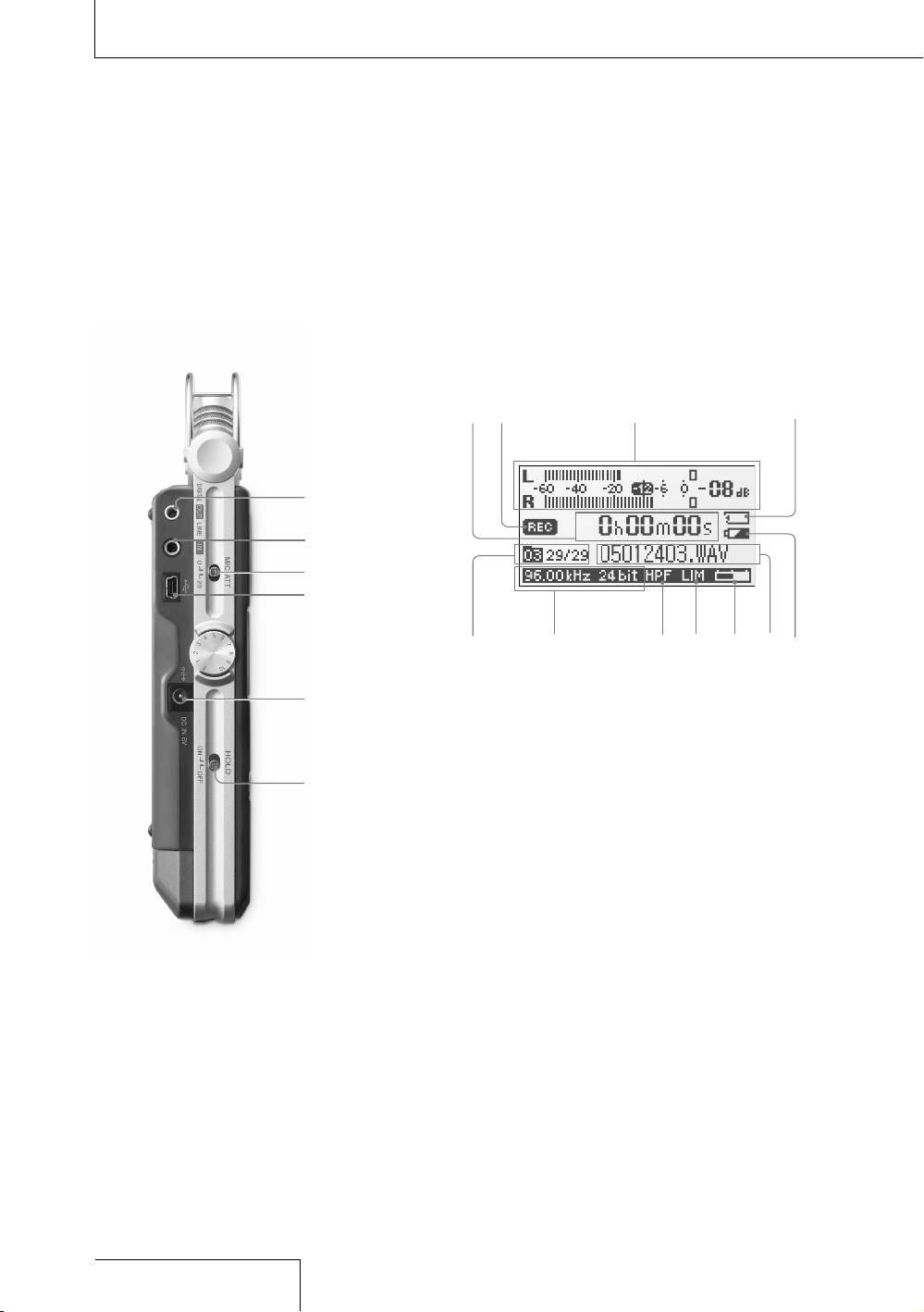
Left side
Overview (continued)
Display
16
PCM-D1. US. 2-664-971-13(2)
¬ ,).%¬/54OPTICAL¬$)')4!,¬/54¬JACK¬¬
PAGE¬
¬ ,).%¬).¬JACK¬PAGE¬
¬ -)#¬!44¬MICROPHONE¬ATTENUATOR¬SWITCH¬
PAGE¬
¬ 53"¬CONNECTOR¬PAGE¬
¬ $#¬).¬6¬JACK¬PAGE¬
¬ (/,$¬SWITCH
7HENçSETçTOçh/.vçTHEçBUTTONSçONçTHEç
RECORDERçAREçLOCKEDçTOçPREVENTçACCIDENTALç
OPERATIONç)TçISçRECOMMENDEDçTOçSETçTOçh/.vç
DURINGçRECORDINGçANDçPLAYBACKç4OçUNLOCKç
THEçCONTROLSçSETçTOçh/&&v
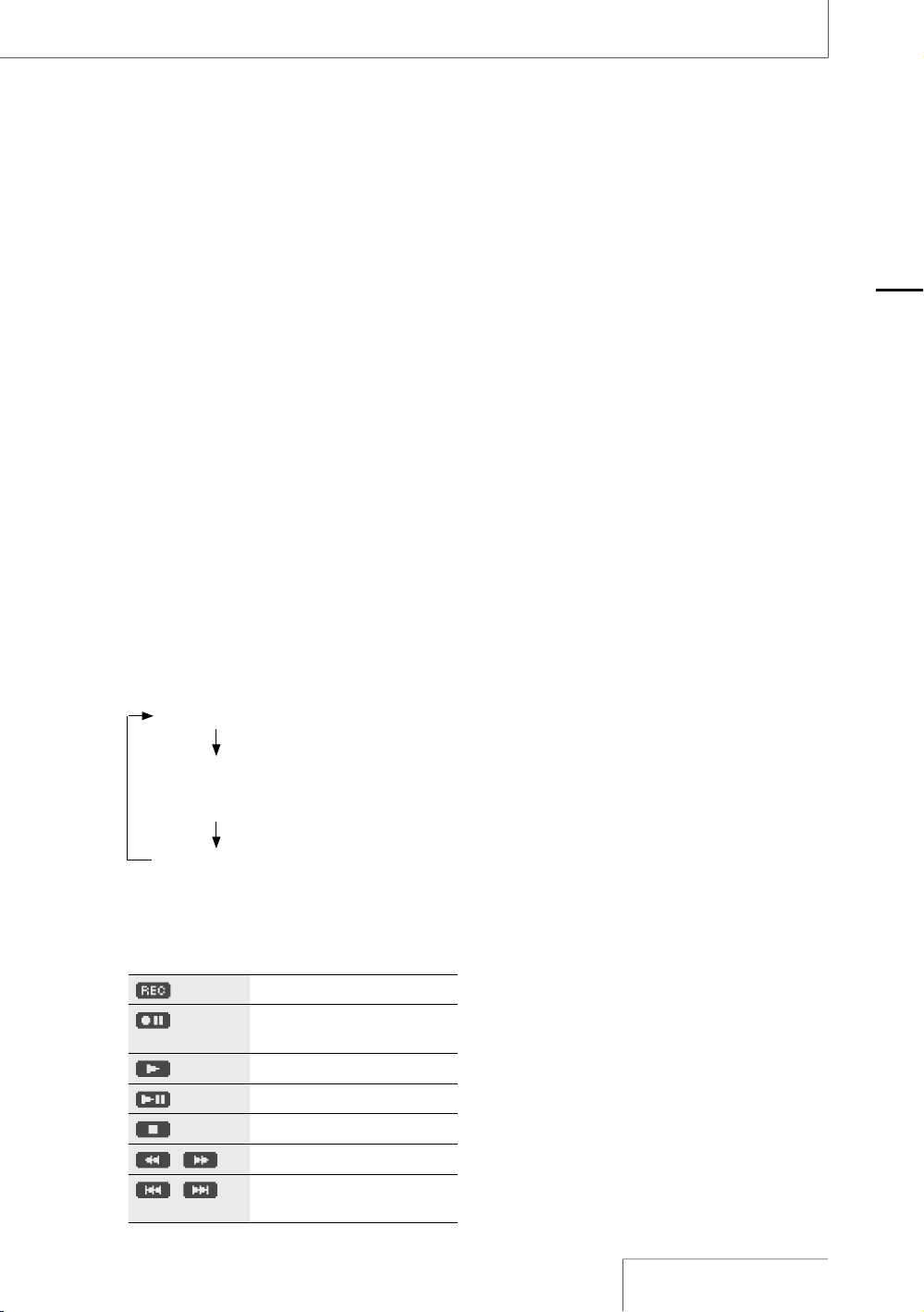
¬ 4IME¬INFORMATION
%ACHçTIMEçTHEç$)30,!9çBUTTONçISçPRESSEDç
THEçTIMEçINFORMATIONçCHANGESçASçFOLLOWSç
&LASHESçWHENçTHEçRECORDERçISçPAUSED
ç %LAPSEDçRECORDINGPLAYBACKçTIME
ç 2EMAININGçRECORDABLEçTIMEçOFçTHEçCURRENTçç
ç MEMORYç$URINGçPLAYBACKç2EMAININGçç
ç TIMEçOFçTHEçCURRENTçTRACK
ç 2ECORDEDçDATEçç
ç $URINGçRECORDINGç2ECORDINGçSTARTçDATE
¬ 2ECORDINGPLAYING¬STATUS
$ISPLAYSçASçFOLLOWSçACCORDINGçTOçTHEçCURRENTç
OPERATION
2ECORDING
¬&LASHING
2ECORDINGçPAUSEçç
STANDBYçFORçRECORDING
0LAYBACK
¬&LASHING
0LAYBACKçPAUSE
3TOP
¬¬
&ASTçREVERSEFORWARD
¬¬
'OçTOçPREVIOUSSUCCEEDINGç
TRACKS
¬ 0EAK¬METER¬PAGE¬
¬ -EMORY¬3TICK¬INDICATOR
$ISPLAYEDçWHENçTHEçCURRENTçMEMORYçISçAç
h-EMORYç3TICKç02/ç(IGHç3PEEDv
¬ &OLDER¬NUMBER¬TRACK¬NUMBERS
4RACKçNUMBERSçAREçDISPLAYEDçASçhCURRENTç
TRACKçNUMBERTOTALçNUMBERSçOFçTRACKSv
¬ 3AMPLING¬FREQUENCY¬AND¬QUANTIFYING¬BIT¬
NUMBER¬OF¬CURRENTLY¬RECORDINGPLAYING¬
TRACK¬PAGE¬
¬ (0&¬(IGH¬0ASS¬&ILTER¬SETTING
$ISPLAYEDçWHENçh(Zç(0&vçISçSETçTOçh/.vç
PAGEç
¬ ,IMITER¬SETTING
$ISPLAYEDçWHENçh,)-)4%2vçISçSETçTOçh/.vç
PAGEç
¬ 2EMAINING¬MEMORY¬VOLUME
$ISPLAYEDçTHEçREMAININGçVOLUMEçOFçCURRENTç
MEMORYçPAGEç
¬ &ILE¬NAME¬OF¬CURRENTLY¬RECORDINGPLAYING¬
TRACK
¬ 2EMAINING¬BATTERY¬POWER¬PAGE¬
/VERVIEW
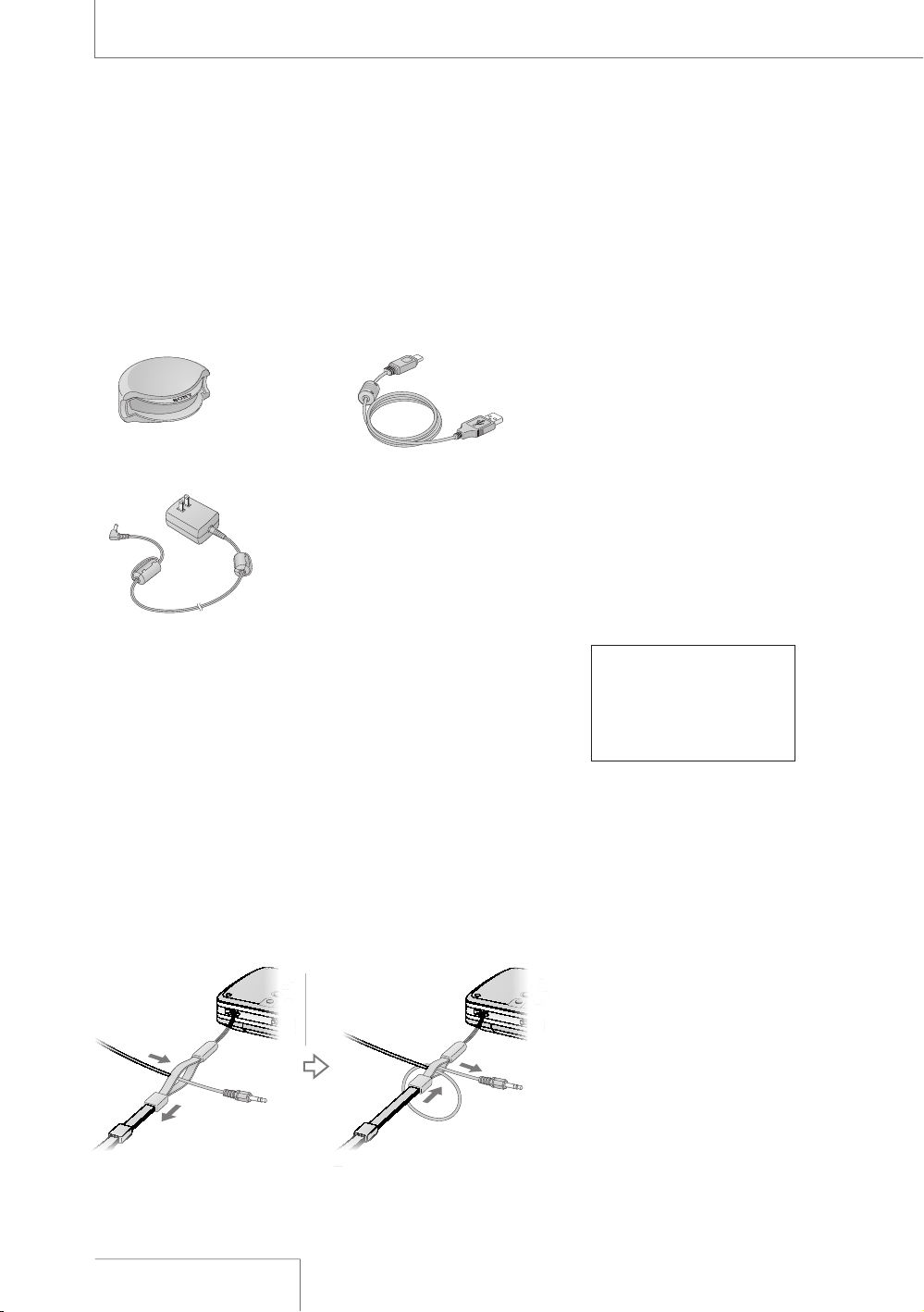
#HECKING¬THE¬SUPPLIED¬ACCESSORIES
s
ç3IZEç!!ç,2çBATTERYç
CASE
sç#$2/-çh$RIVERçFORç
7INDOWSçv
sç-EMORYç3TICKç$UOç
ADAPTOR
ç
7HENçYOUçUSEçh-EMORYç3TICKç
02/('ç$UOvçORçh-EMORYç
3TICKç02/ç$UOç(IGHç3PEEDvç
BEçSUREçTOçUSEçTHEç-EMORYç
3TICKç$UOçADAPTOR
s
ç/PERATINGç)NSTRUCTIONSç
THISçBOOK
.OTE
sç 4HE¬ILLUSTRATIONS¬USED¬IN¬
THIS¬MANUAL¬MAY¬BE¬
DIFFERENT¬FROM¬MODELS¬IN¬
SOME¬COUNTRIES¬AND¬AREAS
'ETTING¬3TARTED
s
ç7INDSCREENçPAGEç
s
ç!#çPOWERçADAPTORç6ç
PAGEç
ç
s
ç53"çCABLEçPAGEç
ç
s
ç#ARRYINGçCASE
s
ç7RISTçSTRAP
s
ç#HARGINGçSETçPAGEçç
"ATTERYçCHARGERç"#'
(2%çFOURçSIZEç!!ç
,2çNICKELçMETALçHYDRIDEç
RECHARGEABLEçBATTERIESç
.(!!
4O¬USE¬THE¬WRIST¬STRAP
!TTACHçTHEçWRISTçSTRAPçTOçTHEçSLITçFORçTHEçWRISTçSTRAPçONçTHEçRIGHTç
SIDEçOFçTHEçRECORDER
7HENçANçOPTIONALçHEADPHONEçEXTERNALçMICROPHONEçAUDIOç
CABLEçETCçISçCONNECTEDçTOçTHEçRECORDERçPAGESççTOççSLIPç
THEçCORDSçTHROUGHçTHEçWRISTçSTRAPçANDçTIGHTENçTHEçSTOPPERçASç
SHOWNçBELOWç4HISçPREVENTSçTHEçCORDSçFROMçBEINGçACCIDENTALLYç
PULLEDçOUT
)NSERT¬THE¬
CORD
,OOSEN¬THE¬
STOPPER
,OOP¬THE¬CORD¬
AROUND¬AND¬INSERT¬IT¬
AGAIN¬AND¬THEN¬
TIGHTEN¬THE¬STOPPER
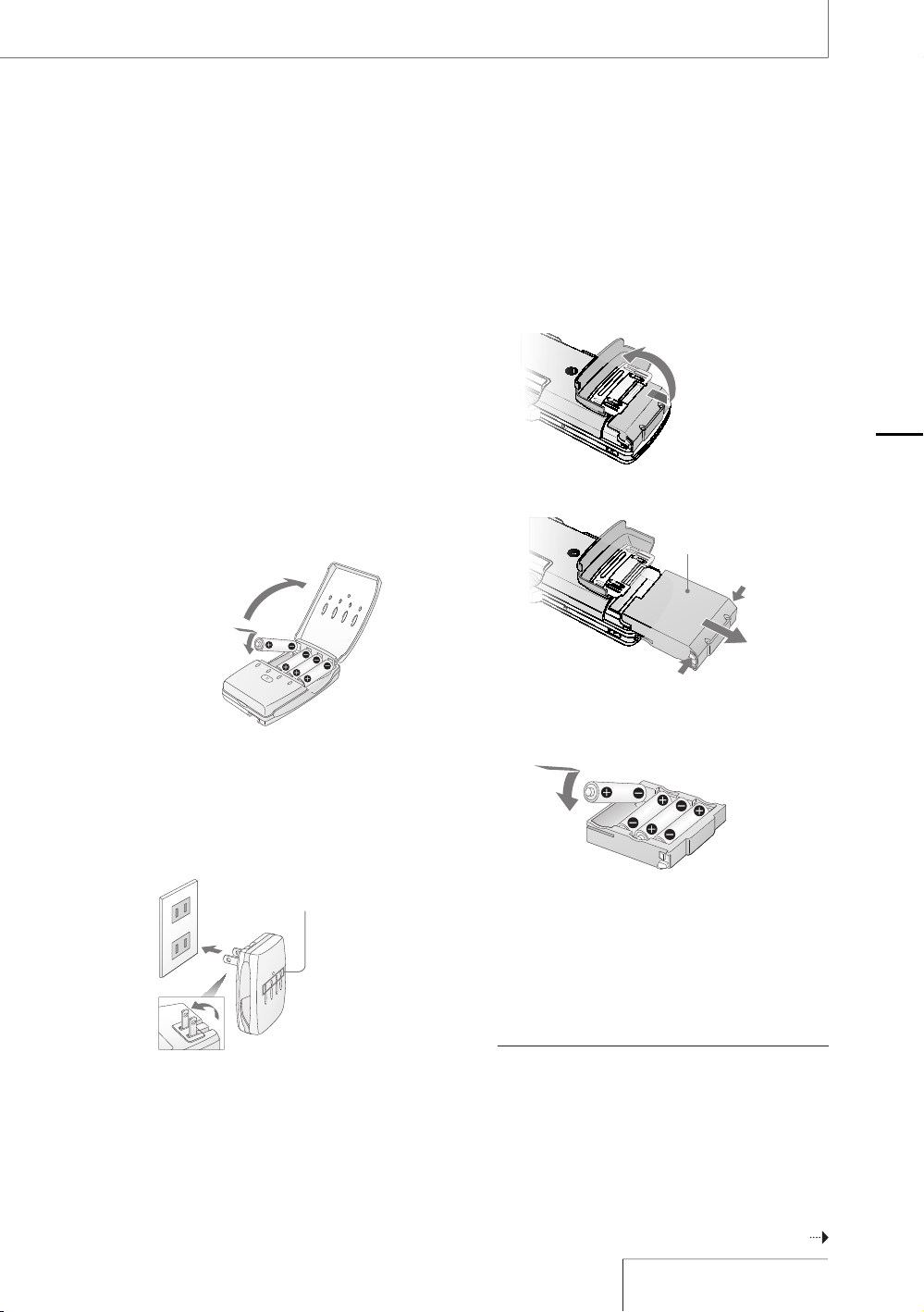
3TEP¬¬0REPARING¬A¬POWER¬SOURCE
5SEçTHEçSUPPLIEDçSIZEç!!ç,2çNICKELçMETALç
HYDRIDEçRECHARGEABLEçBATTERIESçAFTERçCHARGINGç
THEM
&ORçDETAILEDçINFORMATIONçONçUSINGçTHEçBATTERYç
CHARGERçSEEçTHEçINSTRUCTIONçMANUALçINCLUDEDç
WITHçTHEçBATTERYçCHARGER
ç )NSERTçTHEçFOURçRECHARGEABLEçBATTERIESçINTOç
THEçBATTERYçCHARGERçSUPPLIEDç
ç
"EçSUREçTOçINSERTçTHEçRECHARGEABLEç
BATTERIESçWITHçTHEç
çANDççENDSçINçTHEç
RIGHTçPOSITION
/PEN¬THE¬LID¬
OF¬THE¬BATTERY¬
CHARGER
ç #ONNECTçTHEçBATTERYçCHARGERçTOçAçWALLç
OUTLET
ç
4HEç#(!2'%çLAMPSçLIGHTçUPçDURINGç
CHARGINGç#HARGINGçTAKESçABOUTççHOURSç
4HEçCHARGINGçTIMEçVARIESçDEPENDINGçONç
THEçTEMPERATURE
&OUR¬#(!2'%¬LAMPS
ç 7HENçCHARGINGçISçCOMPLETEDçTHEç
#(!2'%çLAMPSçTURNçOFFç2EMOVEçTHEç
RECHARGEABLEçBATTERIESçFROMçTHEçBATTERYç
CHARGER
ç
.OTEçTHATçTHEçRECHARGEABLEçBATTERIESçANDç
THEçBATTERYçCHARGERçEMITçSOMEçHEATç
DURINGçCHARGING
ç /PENçTHEçBATTERYçCOMPARTMENTçLIDçONçTHEç
REARçOFçTHEçRECORDER
&IRST¬SLIDE¬THE¬LID¬
DOWNWARD¬AND¬THEN¬
OPEN¬IT
ç 0ULLçOUTçTHEçBATTERYçCASEçFROMçTHEç
RECORDER
0USH¬THE¬BUTTONS¬ON¬
BOTH¬SIDES¬TO¬PULL¬OUT
"ATTERY¬CASE
ç )NSERTçFOURçBATTERIESçINTOçTHEçBATTERYçCASEç
"EçSUREçTOçINSERTçTHEçBATTERIESçWITHçTHEç
ç
ANDç
çENDSçINçTHEçRIGHTçPOSITION
ç
ç )NSERTçTHEçBATTERYçCASEçBACKçINTOçTHEç
RECORDERçANDçCLOSEçTHEçBATTERYç
COMPARTMENTçLID
4O¬USE¬THE¬RECORDER¬WITH¬SIZE¬!!¬,2¬
ALKALINE¬BATTERIES
4HEçRECORDERçCANçOPERATEçONçSIZEç!!ç,2ç
ALKALINEçBATTERIESç&OLLOWçSTEPSç
çTOç
.OTE
sç 4URNçOFFçTHEçRECORDERçPOWERçBEFOREçTAKINGçOUTçTHEç
BATTERYçCASE
sç #HARGEçTHEçBUILTINçBATTERYçATçAçTEMPERATUREçOFçª#ç
TOçª#çª&çTOçª&ç4HEçCHARGINGçTIMEçWILLçVARYç
ACCORDINGçTOçTHEçROOMçTEMPERATUREç)FçTHEçROOMç
TEMPERATUREçISçLOWçTHEçREQUIREDçCHARGINGçTIMEçWILLç
BEçLONGERç4HISçISçAçCHARACTERISTICçOFçTHEç.ICKELç-ETALç
(YDRIDEçBATTERY
#ONTINUED¬ON¬THE¬NEXT¬PAGE¬
'ETTING¬3TARTED

7HEN¬YOU¬TURN¬ON¬THE¬RECORDER¬FOR¬THE¬FIRST¬
TIME¬AFTER¬PURCHASING
7HENçTHEç0/7%2çSWITCHçISçSETçTOçTHEçh/.vç
POSITIONçh!##%33).'ç-%-/29vçAPPEARSç
INçTHEçDISPLAYçANDçTHEç!##%33çINDICATORç
FLASHESç)NFORMATIONçFORçOPERATIONçISçREADçINç
THEçRECORDERSçBUILTINçMEMORYç4HENçTHEç
DISPLAYçCHANGESçTOçTHEçCLOCKçSETçMENUçTOç
ENABLEçYOUçTOçSETçTHEçCLOCK
7HEN¬TO¬CHARGE¬OR¬REPLACE¬THE¬BATTERIES
7HENçUSINGçNICKELçMETALçHYDRIDEç
RECHARGEABLEçBATTERIESçTHEçREMAININGçBATTERYç
POWERçISçINDICATEDçINçTHEçDISPLAY
4HEçINDICATORçALSOçAPPEARSçWHENçUSINGç
ALKALINEçBATTERIESçBUTçITçMAYçDIFFERçFROMçTHEç
ACTUALçREMAININGçPOWER
ç ç 4HEREçISçSUFFICIENTçBATTERYçPOWER
çç
ç ç#HARGEçORçREPLACEçALLçFOURçBATTERIES
çç
ç ç4HEREçISçNOçPOWERçLEFTç
ç ç 4HEçRECORDERçWILLçNOTçOPERATE
"ATTERY¬LIFE¬!PPROXIMATE¬CONTINUOUS¬
RECORDING
PLAYBACK¬TIME
4YPE¬OF¬BATTERY
¬K(Z¬¬BIT ¬K(Z¬¬BIT
.ICKELçMETALçHYDRIDEç
RECHARGEABLEç
BATTERIESçSUPPLIED
çHOURS çHOURS
!LKALINEçBATTERIES çHOURS çHOURS
ç !PPROXIMATEçVALUESçFORçCONTINUOUSçRECORDING
PLAYBACKçUSINGç3ONYçSIZEç!!ç,2çBATTERIESçUNDERçAç
TEMPERATUREçOFç#ç&ç4HEçBATTERYçCAPACITYç
DECREASESçANDçBATTERYçLIFEçBECOMESçSHORTERçINçLOWç
TEMPERATURES
'ETTING¬3TARTED¬CONTINUED
4O¬OPERATE¬WITH¬THE¬!#¬POWER¬ADAPTOR
#ONNECTçTHEçSUPPLIEDç!#çPOWERçADAPTORçTOç
THEç$#ç).ç6çJACK
ç
TO¬A¬WALL¬OUTLET
!#¬POWER¬
ADAPTOR¬
SUPPLIED
TO¬THE¬$#¬).¬
6¬JACK
.OTES¬ON¬THE¬!#¬POWER¬ADAPTOR
5SEçONLYçTHEçSUPPLIEDç!#ç
POWERçADAPTORç5SINGçANYç
OTHERç!#çPOWERçADAPTORç
MAYçCAUSEçAçMALFUNCTION
.OTES
sç $URINGçCHARGINGçANDçREFRESHINGçTHEçRECHARGEABLEç
BATTERIESçANDçTHEçBATTERYçCHARGERçMAYçEMITçSOMEç
HEATçBUTçTHISçISçNOTçAçMALFUNCTIONç.OTEçTHATçTHEç
TEMPERATUREçISçHIGHERçRIGHTçAFTERçCHARGINGçFINISHESç)Tç
ISçRECOMMENDEDçTHATçYOUçWAITçFORçAçWHILEçBEFOREç
REMOVINGçTHEçBATTERIES
sç 5SEçONLYçTHEçSUPPLIEDçBATTERYçCHARGERç5SINGçANYç
OTHERçCHARGERçMAYçCAUSEçAçMALFUNCTION
sç 4HEçBATTERIESçCANNOTçBEçCHARGEDçWITHçTHEçRECORDERç
ONLYçWITHOUTçUSINGçTHEçBATTERYçCHARGER
sç $OçNOTçUSEçAçDRYçBATTERYçANDçAçRECHARGEABLEçBATTERYç
TOGETHER
sç 4HEçRECORDERçISçACCESSINGçMEMORYçWHILEç
h!##%33).'ç-%-/29vçAPPEARSçINçTHEçDISPLAYçORç
THEç!##%33çINDICATORçFLASHESç$URINGçTHISçTIMEçDOç
NOTçREMOVEçORçINSERTçBATTERIESçANDçDOçNOTç
DISCONNECTçORçCONNECTçTHEç!#çPOWERçADAPTORçORçTHEç
53"çCABLEç$OINGçSOçMAYçDAMAGEçTHEçDATA
sç "ECAUSEçOFçTHEçBATTERYSçCHARACTERISTICSçTHEç
CAPACITYçOFçTHEçRECHARGEABLEçBATTERIESçMAYçBEç
SMALLERçTHANçNORMALçWHENçTHEYçAREçUSEDçFORçTHEçFIRSTç
TIMEçORçAFTERçAçLONGçPERIODçOFçDISUSEç)NçTHISçCASEç
CHARGEçANDçDISCHARGEçTHEMçSEVERALçTIMESç4HEç
NORMALçBATTERYçLIFEçWILLçBEçRESTORED
sç)FçTHEçLIFEçOFçTHEçRECHARGEABLEçBATTERIESçDROPSçTOçHALFç
THEçNORMALçLENGTHçTHEçBATTERIESçSHOULDçBEçREPLACED
0OLARITY¬OF¬THE¬PLUG
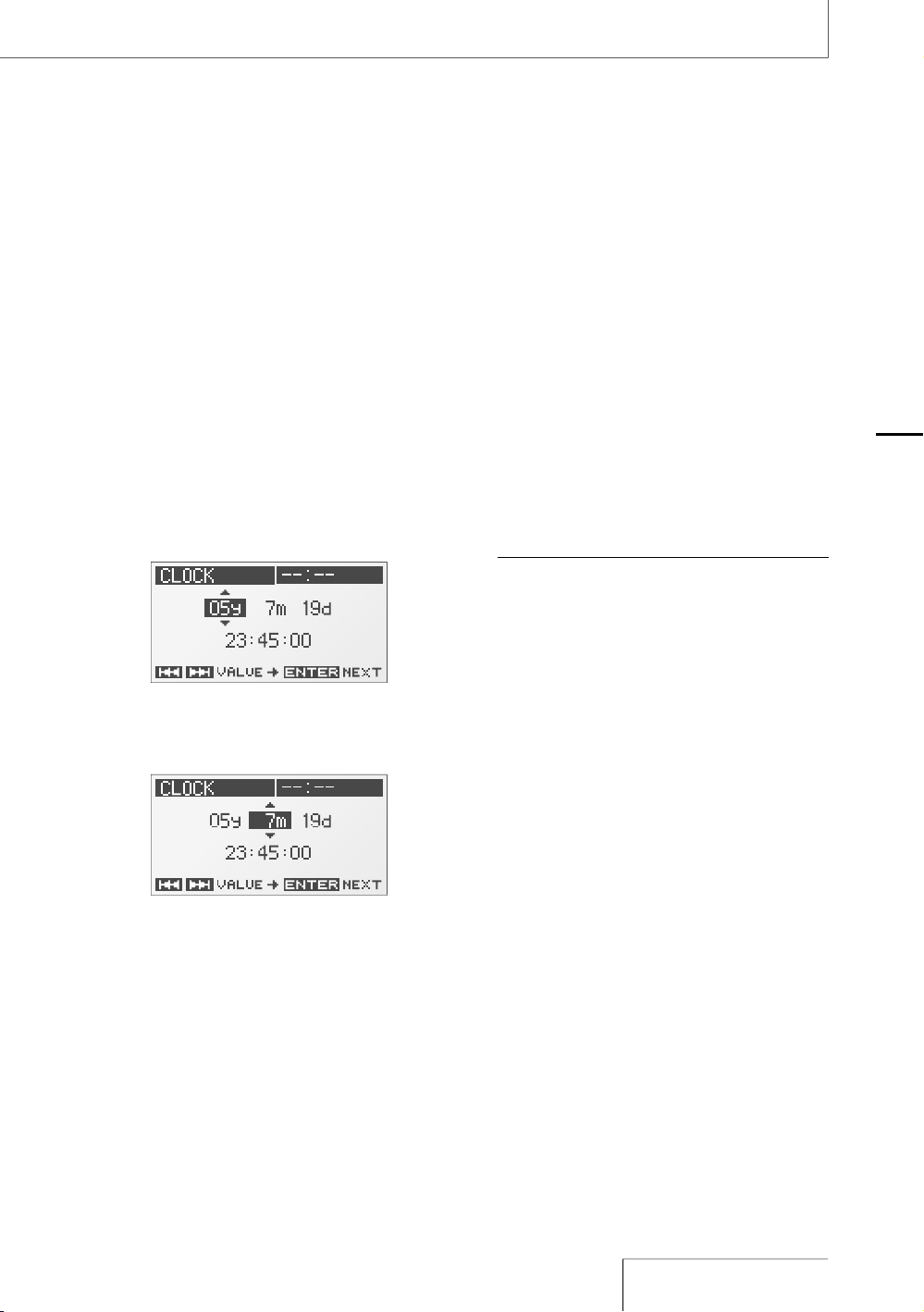
3TEP¬¬3ETTING¬THE¬CLOCK
2ECORDEDçAUDIOçFILESçTRACKSçAREçNAMEDç
USINGçTHEçDATEçANDçTIMEçOFçTHEçINTERNALçCLOCKç
"YçSETTINGçTHEçCLOCKçBEFOREçRECORDINGçTHEç
RECORDINGSçDATEçANDçTIMEçWILLçBEçCORRECTLYç
SAVED
ç 7HENçTHEçRECORDERçISçTURNEDçONçBEFOREç
THEçCLOCKçHASçBEENçSETçh3%4ç#,/#+vç
APPEARSçINçTHEçDISPLAYç!FTERçABOUTçç
SECONDSçTHEçMESSAGEçDISAPPEARSç
AUTOMATICALLYçANDçTHEçh#,/#+vçDISPLAYç
OFçTHEçMENUçAPPEARS
ç 0RESSçTHEçç50çANDçç$/7.ç
BUTTONSçTOçSETçTHEçYEARçYçANDçPRESSçTHEç
ç%.4%2çBUTTON
ç 2EPEATçSTEPççTOçSETçTHEçMONTHçMçDAYç
DçHOURçMINUTEçANDçSECONDç4HENçPRESSç
THEçç%.4%2çBUTTONçAFTERçSETTINGçTHEç
SECONDSçTOçSTARTçOPERATINGçTHEçCLOCK
4O¬RESET¬THE¬CLOCK
ç 7HILEçTHEçRECORDERçISçSTOPPEDçPRESSçTHEç
-%.5çBUTTONçTOçDISPLAYçTHEçMENU
ç 0RESSçTHEçç50çANDçç$/7.ç
BUTTONSçTOçSELECTçh#,/#+vçANDçPRESSçTHEç
ç%.4%2çBUTTONç
4HEçh#,/#+vçDISPLAYçAPPEARS
ç &OLLOWçSTEPSççANDççOFçh3TEPçç3ETTINGç
THEçCLOCKvçTOçRESETçTHEçCLOCK
.OTE
sç )FçYOUçLEAVEçTHEçRECORDERçFORçMOREçTHANç
APPROXIMATELYççMINUTESçWITHçNOçBATTERYçINSERTEDç
THEçDATEçANDçTIMEçCHANGEçTOçTHEçDEFAULTçSETTINGSç)Nç
THISçCASEçRESETçTHEçCLOCK
'ETTING¬3TARTED
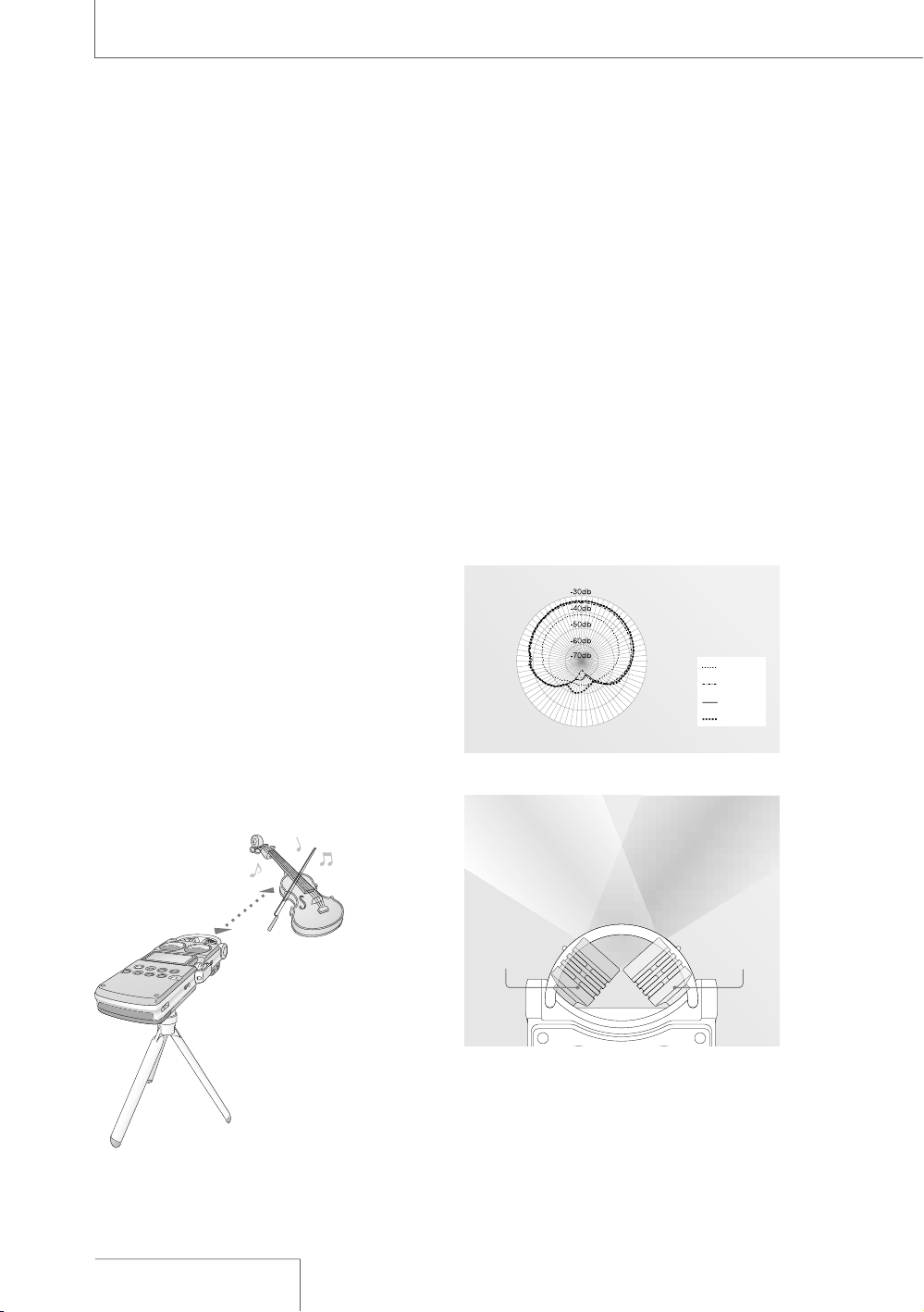
0REPARATION¬BEFORE¬RECORDING
7HENçYOUçPOSITIONçTHEçRECORDERçPLACEçITçSOç
THATçTHEçMICROPHONEçPOINTSçTOçTHEçSOUNDç
SOURCEç&ORçACCURATEçRECORDINGçOFçLEFTçANDç
RIGHTçSOURCESçPLACEçTHEçRECORDERçWITHçITSç
FRONTçSIDEçFACINGçUPWARDçSEEçTHEçILLUSTRATIONç
BELOWç
4HEçPLACEMENTçOFçTHEçRECORDERçANDçTHEç
DIRECTIONçOFçTHEçMICROPHONEçDEPENDçONçTHEç
SOUNDçSOURCEçTHEçMICROPHONEçTHEçSETTINGSç
OFçTHEçRECORDERçETCç)TçISçRECOMMENDEDçTHATç
YOUçTRYçRECORDINGçWITHçTHEçRECORDERçINçVARIOUSç
POSITIONSçANDçSETTINGSçAFTERçREFERRINGçTOçTHEç
ILLUSTRATIONçBELOWçANDçTHEçCHARACTERISTICSçOFç
THEçMICROPHONE
%XAMPLE¬0LACEMENT¬WHEN¬RECORDING¬A¬
MUSICAL¬PERFORMANCE¬USING¬THE¬BUILTIN¬
MICROPHONES
&ORçBESTçRESULTSçPLACEçTHEçRECORDERçABOUTçç
TOççMççTOççFTçFROMçTHEçSOUNDç
SOURCEç2EFERRINGçTOçTHEçCHARACTERISTICSçOFç
THEçBUILTINçMICROPHONESçADJUSTçDIRECTIONçOFç
THEçRECORDERçANDçTHEçANGLEçOFçTHEç
MICROPHONES
3OUND¬SOURCE
!PPROX¬¬TO¬¬M¬
¬TO¬¬FT
0LACE¬THE¬RECORDER¬WITH¬ITS¬
FRONT¬SIDE¬FACING¬UPWARD¬AND¬
THE¬BUILTIN¬MICROPHONES¬
POINTING¬AT¬THE¬SOUND¬SOURCE
/N¬CHARACTERISTICS¬OF¬THE¬BUILTIN¬
MICROPHONES
4HEçBUILTINçMICROPHONESçAREçUNIDIRECTIONALç
SEEçFIGUREç
"ECAUSEçTHEçTWOçCAPSULESçAREçINçANç89ç
ARRANGEMENTçTHEçMICROPHONEçONçTHEçRIGHTç
RECORDSçSOUNDçFROMçTHEçLEFTçTHEçMICROPHONEç
ONçTHEçLEFTçRECORDSçSOUNDçFROMçTHEçRIGHTçSEEç
FIGUREç
(OWEVERçIFçTHEçSOUNDçSOURCEçISçTOOçCLOSEçTOç
THEçMICROPHONEçTHEçRIGHTçMICROPHONEç
RECORDSçTHEçRIGHTçANDçTHEçLEFTçMICROPHONEç
RECORDSçTHEçLEFT
¬(Z
¬(Z
¬K(Z
¬K(Z
&IGURE¬¬$IRECTIVITY¬OF¬THE¬BUILTIN¬MICROPHONES
2ECORDS¬
SOUND¬FROM¬
THE¬RIGHT
2ECORDS¬
SOUND¬FROM¬
THE¬LEFT
&IGURE¬¬$IRECTION¬OF¬SOUND¬THAT¬THE¬BUILTIN¬
MICROPHONES¬GATHER
2ECORDING
4RIPOD¬NOT¬SUPPLIED
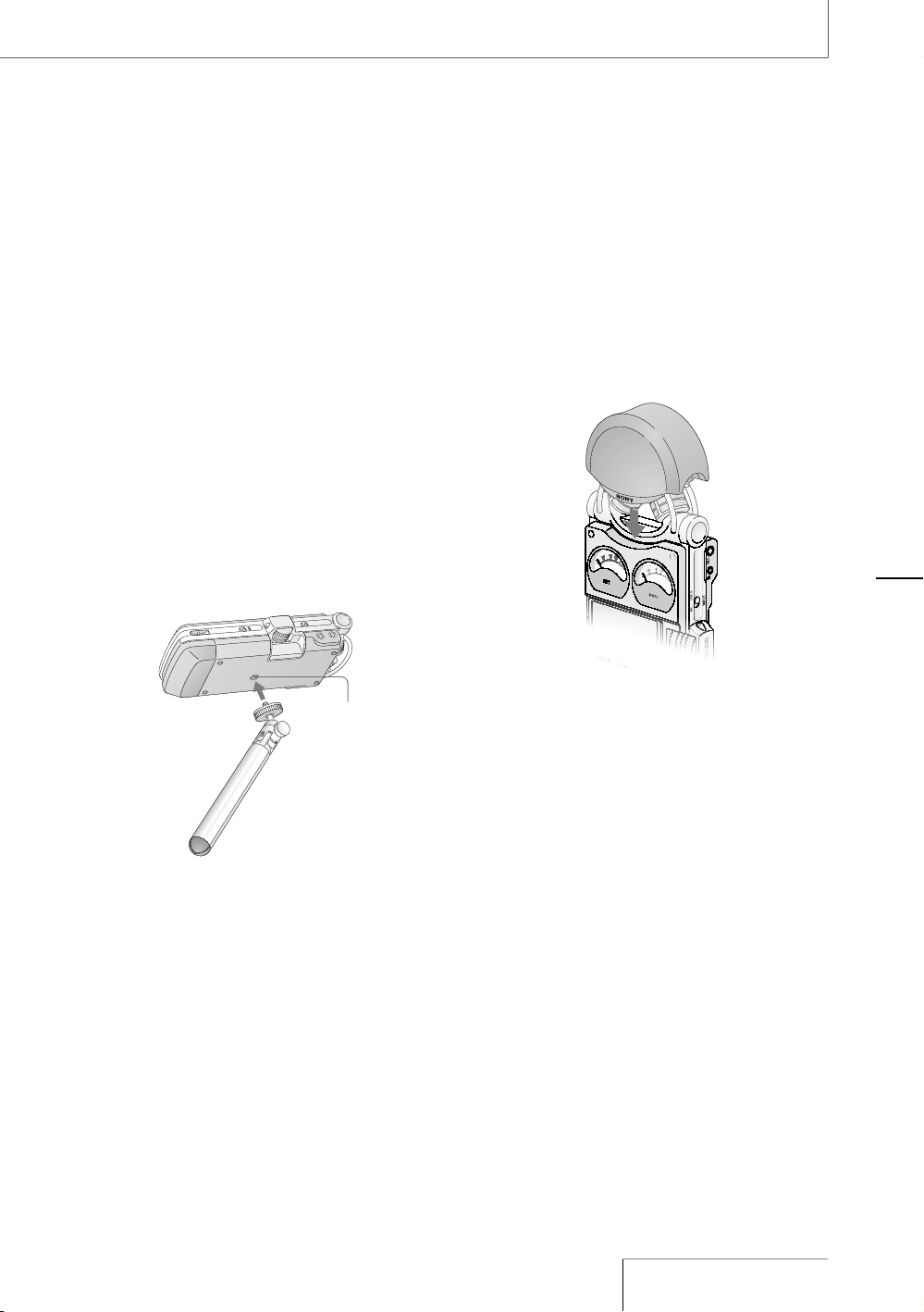
4O¬SWITCH¬THE¬MICROPHONE¬INPUT¬SENSITIVITY
5SEçTHEç-)#ç!44çSWITCHç
5SUALLYçSETçITçTOçTHEçhvçPOSITIONç7HENç
RECORDINGçLOUDçSOUNDSçSETçITçTOçTHEçhvç
POSITION
4O¬POSITION¬THE¬RECORDER¬USING¬THE¬TRIPOD¬
NOT¬SUPPLIED
"YçATTACHINGçTHEçTRIPODçNOTçSUPPLIEDçYOUç
CANçADJUSTçANGLESçOFçTHEçRECORDERçANDçTHEç
MICROPHONESçMOREçPRECISELYç)TçALSOçPREVENTSç
NOISEçCAUSEDçWHENçHOLDINGçTHEçRECORDERçINç
YOURçHAND
!TTACHçTHEçTRIPODçTOçTHEçHOLEçONçTHEçBACKçOFç
THEçRECORDER
(OLE¬FOR¬ATTACHING¬
THE¬TRIPOD
4RIPOD¬NOT¬SUPPLIED
4O¬USE¬THE¬SUPPLIED¬WINDSCREEN
"YçCOVERINGçTHEçBUILTINçMICROPHONESçWITHç
THEçSUPPLIEDçWINDSCREENçYOUçCANçREDUCEç
NOISEçCAUSEDçBYçWINDçORçBREATHçTHATçDIRECTLYç
HITSçTHEçMICROPHONES
ç çççç
2ECORDING
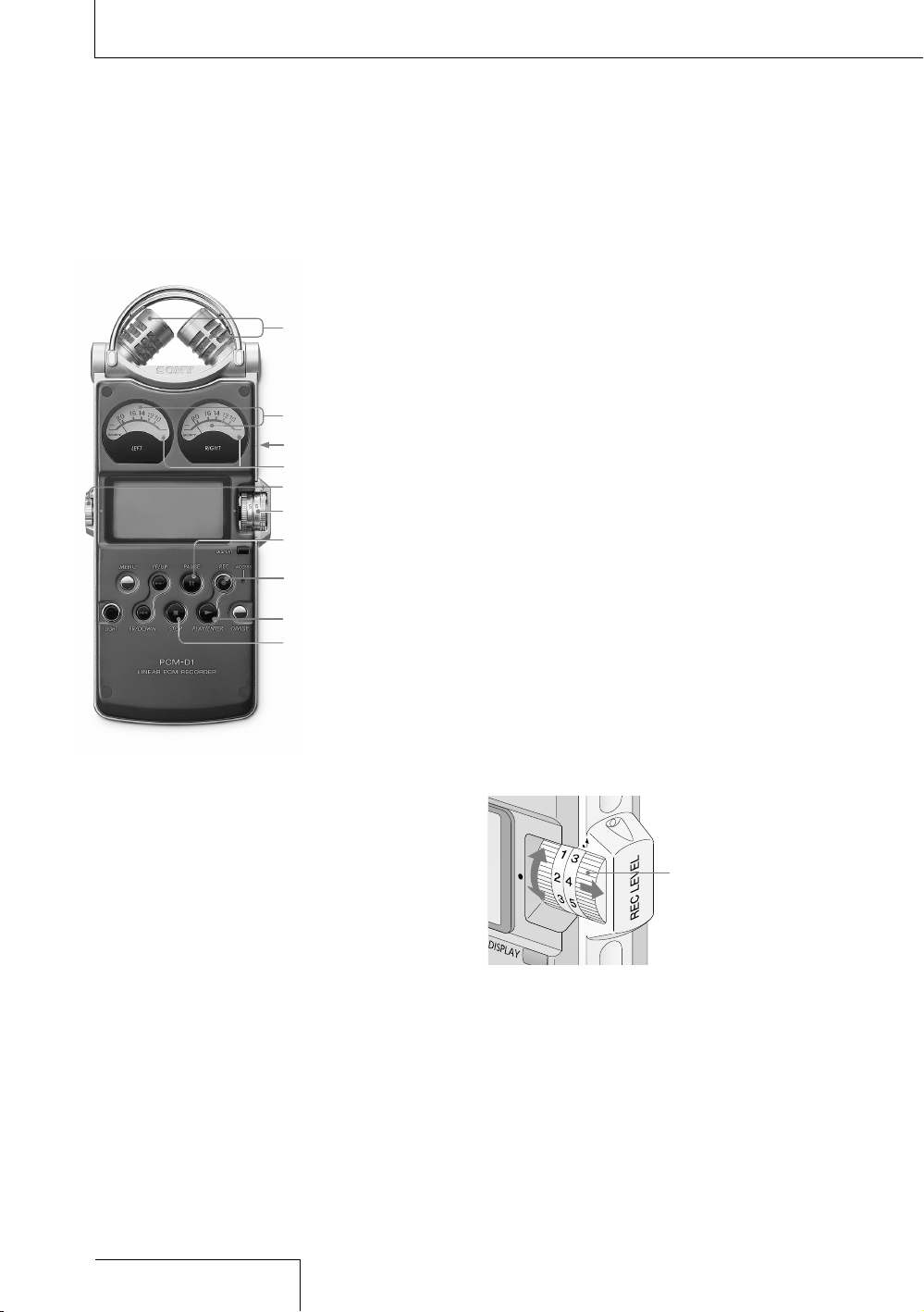
Recording
To change sampling frequency, quantifying
bit number, or the memory and folder for a
recording, go to the menu display (page 34).
The default sampling frequency and
quantifying bit number are “44.10 kHz
16 bit.”
1
Position the recorder and the built-in
microphones referring to “Preparation
before recording” (page 22).
2
Set the MIC/LINE IN switch to the “MIC”
position.
3
Press the
REC button.
The recorder stands by for recording, and
the
PAUSE indicator flashes.
4
Turn the REC LEVEL L/R dials to adjust
the recording levels of the right and left
channels, checking the level on the
display and the analog level meters.
To adjust the level of the right channel
only, pull out the outside (R side) dial
slightly and turn it.
Pull out the
outside (R side)
dial only.
Recording (continued)
Built-in microphones
PAUSE button/
indicator
REC LEVEL L/R dials
VOLUME dial
MIC/LINE IN switch
Analog level meters
REC button/
indicator
PLAY button
STOP button
Peak level lamps
24
PCM-D1. US. 2-664-971-13(2)
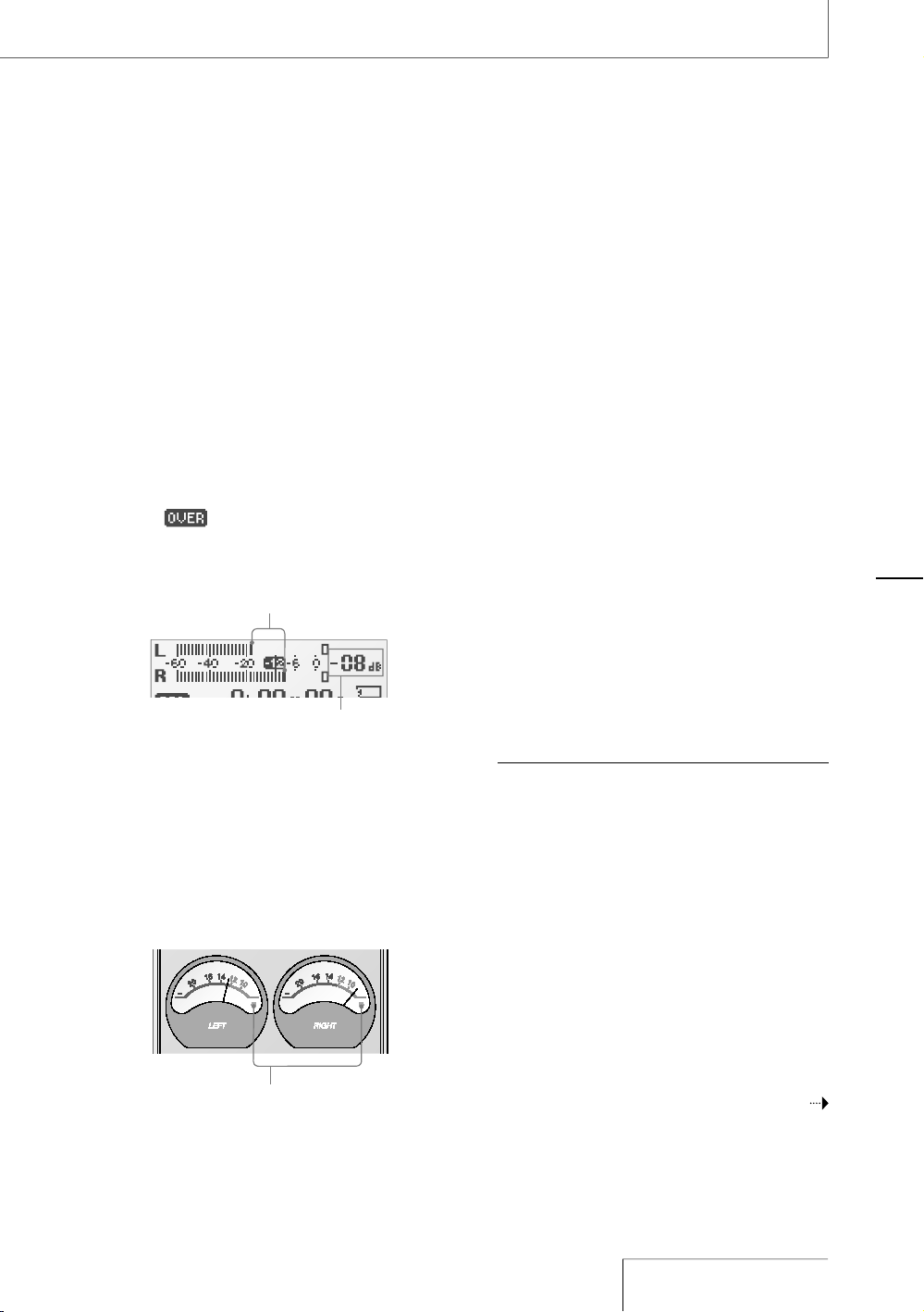
ç 9OUçCANçCHECKçTHEçRECORDINGçLEVELçONç
BOTHçTHEçPEAKçMETERçOFçTHEçDISPLAYçANDç
THEçANALOGçLEVELçMETERSç!DJUSTçTHEçLEVELç
CLOSERçTOçnD"çINTOçAPPROPRIATEçRANGEç
THATçISçSUITABLEçFORçYOURçSOUNDçSOURCE
7HEN¬CHECKING¬THE¬LEVEL¬ON¬THE¬PEAK¬
METER¬OF¬THE¬DISPLAY
7HENçRECORDINGçSOUNDçTHATçHASçhQUICKç
ATTACKvçPARTSçSUCHçASçPERCUSSIVEçSOUNDç
USEçTHEçPEAKçMETERçTOçCHECKçTHEçLEVELç
)Fç çAPPEARSçWHENçTHEçMAXIMUMç
PEAKçVALUEçISçOUTPUTçDISTORTIONçMAYç
OCCURç
0EAK¬INDICATOR¬CREST¬VALUE¬
OF¬INPUT¬SIGNAL
-AXIMUM¬PEAK¬VALUE
7HEN¬CHECKING¬THE¬LEVEL¬ON¬THE¬ANALOG¬
LEVEL¬METERS
4HEçINPUTçSIGNALçISçDISPLAYEDçINçANALOGç
VALUESç9OUçCANçSEEçTHEçVALUEçCLOSEçTOç
THEçMAGNITUDEçOFçVOLUMEçTHATçTHEçHUMANç
EARçCANçHEARç
)FçTHEçPEAKçLEVELçLAMPçLIGHTSçUPçINçREDç
WHENçTHEçRECORDINGçLEVELçEXCEEDSçnD"ç
DISTORTIONçMAYçOCCUR
ççç
0EAK¬LEVEL¬LAMPS
'REEN¬$ISTORTION¬WILL¬NOT¬OCCUR¬
¬¬¬¬¬¬¬¬¬¬¬2ECORDING¬LEVEL¬IS¬n¬TO¬nD"
2ED¬ 2ECORDING¬LEVEL¬IS¬MORE¬THAN¬¬
¬ nD"¬
,OWER¬THE¬LEVEL
ç 0RESSçTHEç
ç0!53%çORç
ç0,!9çBUTTONç
4HEçSTANDBYçFORçRECORDINGçISçRELEASEDç
ANDçRECORDINGçSTARTSç4HEç
ç2%#ç
INDICATORçLIGHTSçUPçWHILEçRECORDING
4O¬STOP¬RECORDING
0RESSçTHEç
ç34/0çBUTTON
4O¬PAUSE¬RECORDING
0RESSçTHEç
ç0!53%çBUTTONç4HEç
ç0!53%ç
INDICATORçFLASHES
4HEçRECORDERçDOESçNOTçSTARTçRECORDINGç
AUTOMATICALLYç"EçSUREçTOçPRESSçTHEç
ç0!53%ç
BUTTONçAGAINçTOçRESTARTçORçSTOPçRECORDING
7HEN¬RECORDING¬LEVEL¬ADJUSTMENT¬IS¬
UNNECESSARY
)NçSTEPççPRESSçTHEç
ç0,!9çBUTTONçWHILEç
PRESSINGçANDçHOLDINGçTHEç
ç2%#çBUTTONç
2ECORDINGçSTARTSçIMMEDIATELY
.OTES
sç 7HILEçTHEç
ç2%#çINDICATORçISçLITçDOçNOTçREMOVEçTHEç
BATTERIESçORçTHEç!#çPOWERçADAPTORç$OINGçSOçMAYç
DAMAGEçTHEçDATA
sç )FçTHEçRECORDERçREMAINSçINçSTOPçMODEçFORçABOUTçç
MINUTESçORçLONGERçTHEçRECORDERçWILLçENTERçLOWPOWERç
CONSUMPTIONçMODEçAUTOMATICALLY
sç .OISEçMAYçBEçRECORDEDçIFçANçOBJECTçSUCHçASçYOURç
FINGERçETCçACCIDENTALLYçRUBSçORçSCRATCHESçTHEç
RECORDERçDURINGçRECORDING
sç $OçNOTçCONNECTçTHEç53"çCABLEçTOçTHEçRECORDERç
DURINGçRECORDINGç$OINGçSOçSTOPSçRECORDINGç
AUTOMATICALLYçBECAUSEçCONNECTIONçWITHçAçCOMPUTERç
HASçPRIORITY
sç &ORçRECORDINGçWITHçAçSAMPLINGçFREQUENCYçOFççK(Zç
YOUçSHOULDçFORMATçTHEçMEMORYçBEFOREHANDçINçORDERç
TOçWRITEçDATAçEFFICIENTLY
#ONTINUED¬ON¬THE¬NEXT¬PAGE¬
2ECORDING
2ECORDING¬CONTINUED
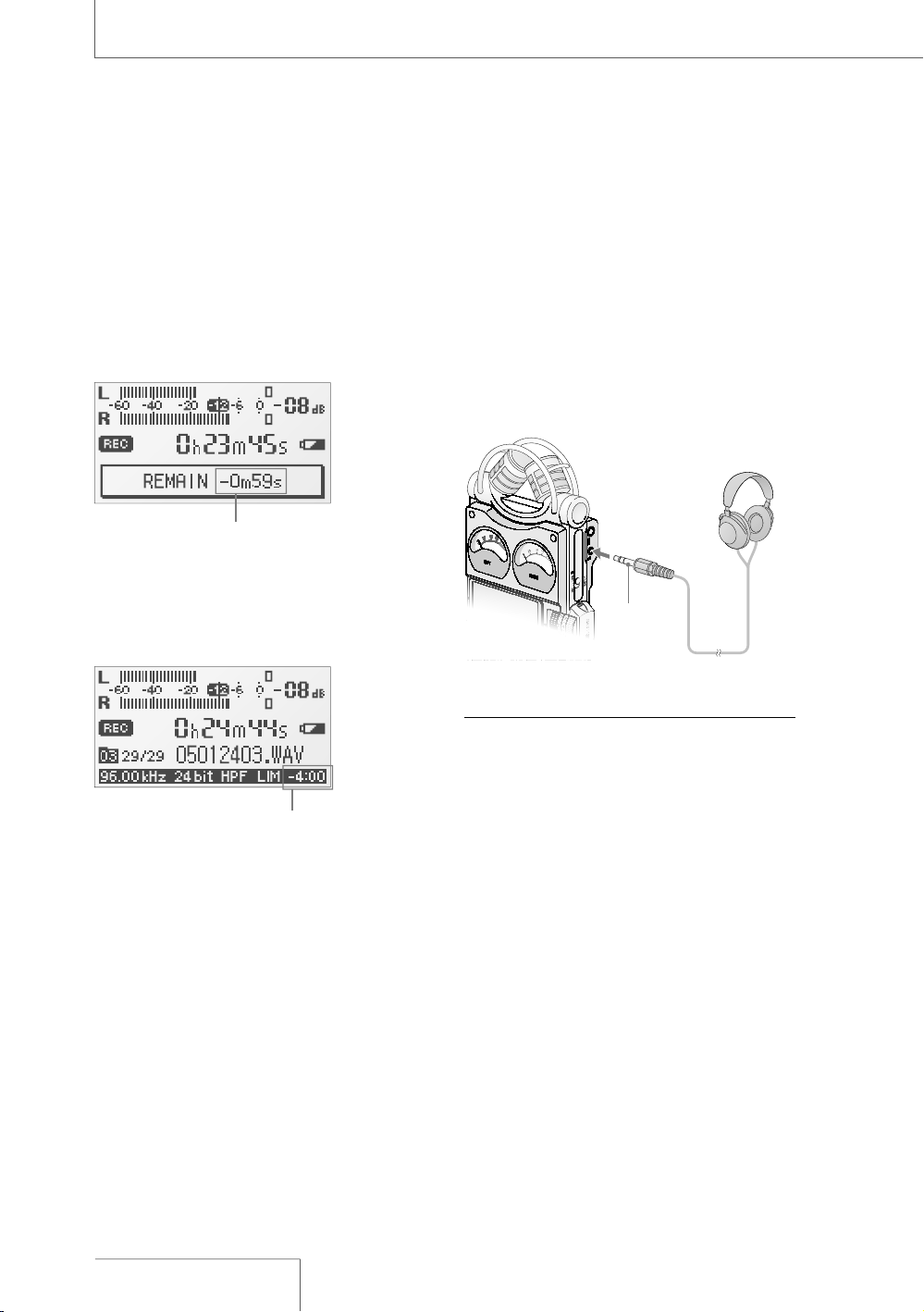
/N¬DISPLAY¬OF¬REMAINING¬RECORDABLE¬TIME
2EMAININGçRECORDABLEçTIMEçAPPEARSçINçTHEç
DISPLAYçWHENçTHEçREMAININGçTIMEçBECOMESçç
MINUTESçORçLESSç
2EMAINING¬RECORDABLE¬TIME
)FçANçOPERATIONçOTHERçTHANçSTOPçRECORDINGç
SUCHçASçFASTçFORWARDçETCçISçDONEçTHEç
REMAININGçRECORDABLEçTIMEçAPPEARSçINçTHEç
POSITIONçWHEREçREMAININGçMEMORYçVOLUMEçISç
USUALLYçDISPLAYED
2EMAINING¬RECORDABLE¬TIME
7HENçTHEçREMAININGçTIMEçRUNSçOUTç
h-%-/29ç&5,,vçAPPEARSçANDçRECORDINGç
STOPS
ç 7HENçTHEçREMAININGçRECORDABLEçTIMEçISçMOREçTHANçç
MINUTESçTHEçICONçTHATçREPRESENTSçREMAININGçMEMORYç
VOLUMEçAPPEARSç7HENçMEMORYçISçUNUSEDçhvç
APPEARS
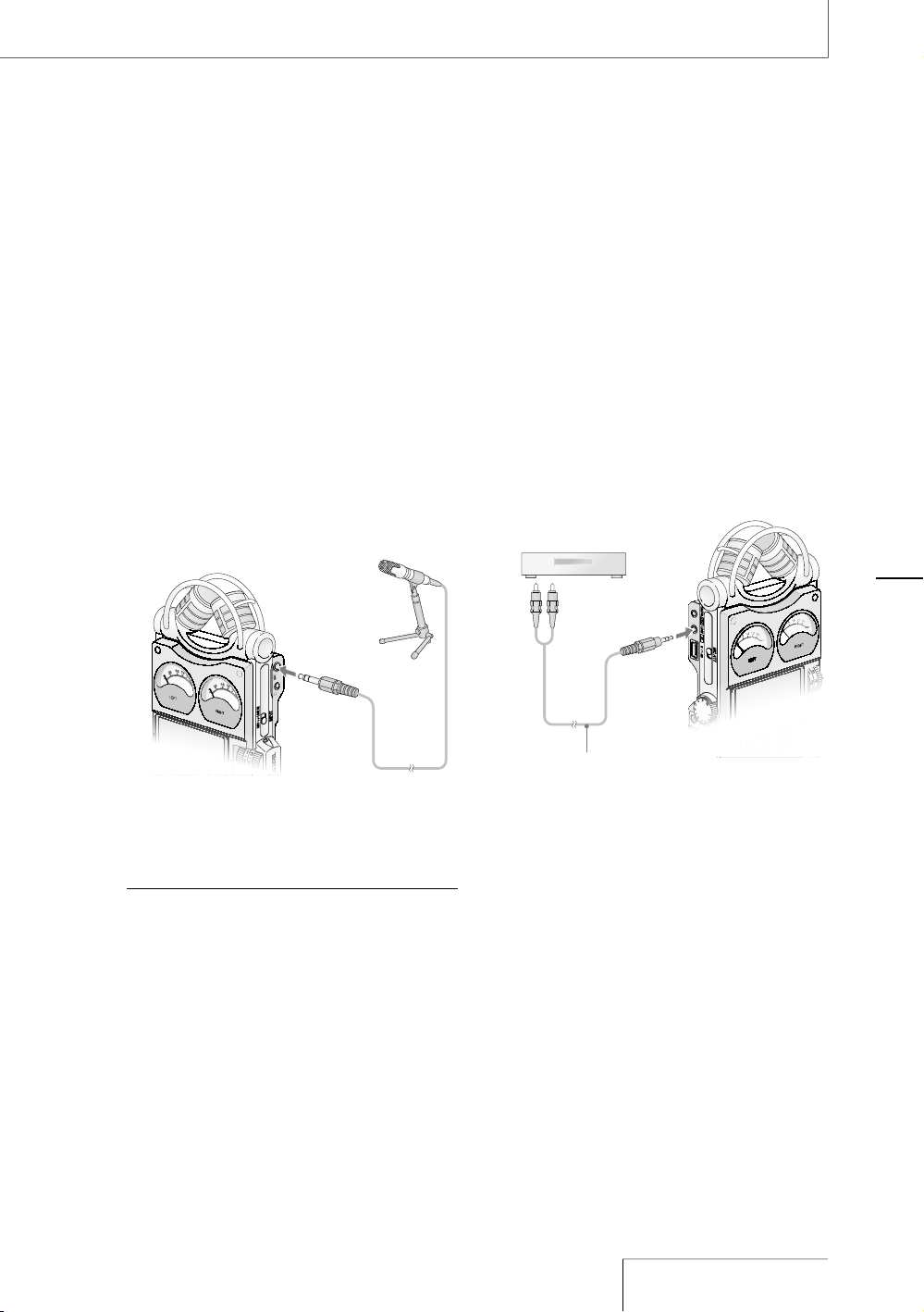
-ONITORING¬THE¬RECORDING
#ONNECTçOPTIONALçHEADPHONESçORçEARPHONESç
TOçTHEççHEADPHONEçJACKçOFçTHEçRECORDERçTOç
MONITORçTHEçRECORDINGçSOUNDç4HEçVOLUMEçOFç
MONITOREDçSOUNDçCANçBEçADJUSTEDçBYçTURNINGç
THEç6/,5-%çDIAL
(EADPHONES¬
NOT¬SUPPLIED
TO¬THE¬¬
HEADPHONE¬
JACK
3TEREO¬MINI¬
PLUG
.OTES
sç )FçYOUçTURNçUPçTHEçVOLUMEçEXCESSIVELYçORçPLACEçTHEç
HEADPHONESçNEARçTHEçMICROPHONEçWHILEçMONITORINGç
RECORDINGçTHEçMICROPHONEçMAYçPICKçUPçTHEçSOUNDç
FROMçTHEçHEADPHONESçCAUSINGçACOUSTICçFEEDBACKç
HOWLINGçSOUND
sç &ORçBESTçRESULTSçUSEçENCAPSULATEDTYPEç
HEADPHONESçWHICHçHAVEçLESSçSOUNDçLEAKAGE
2ECORDING¬WITH¬AN¬EXTERNAL¬
MICROPHONE
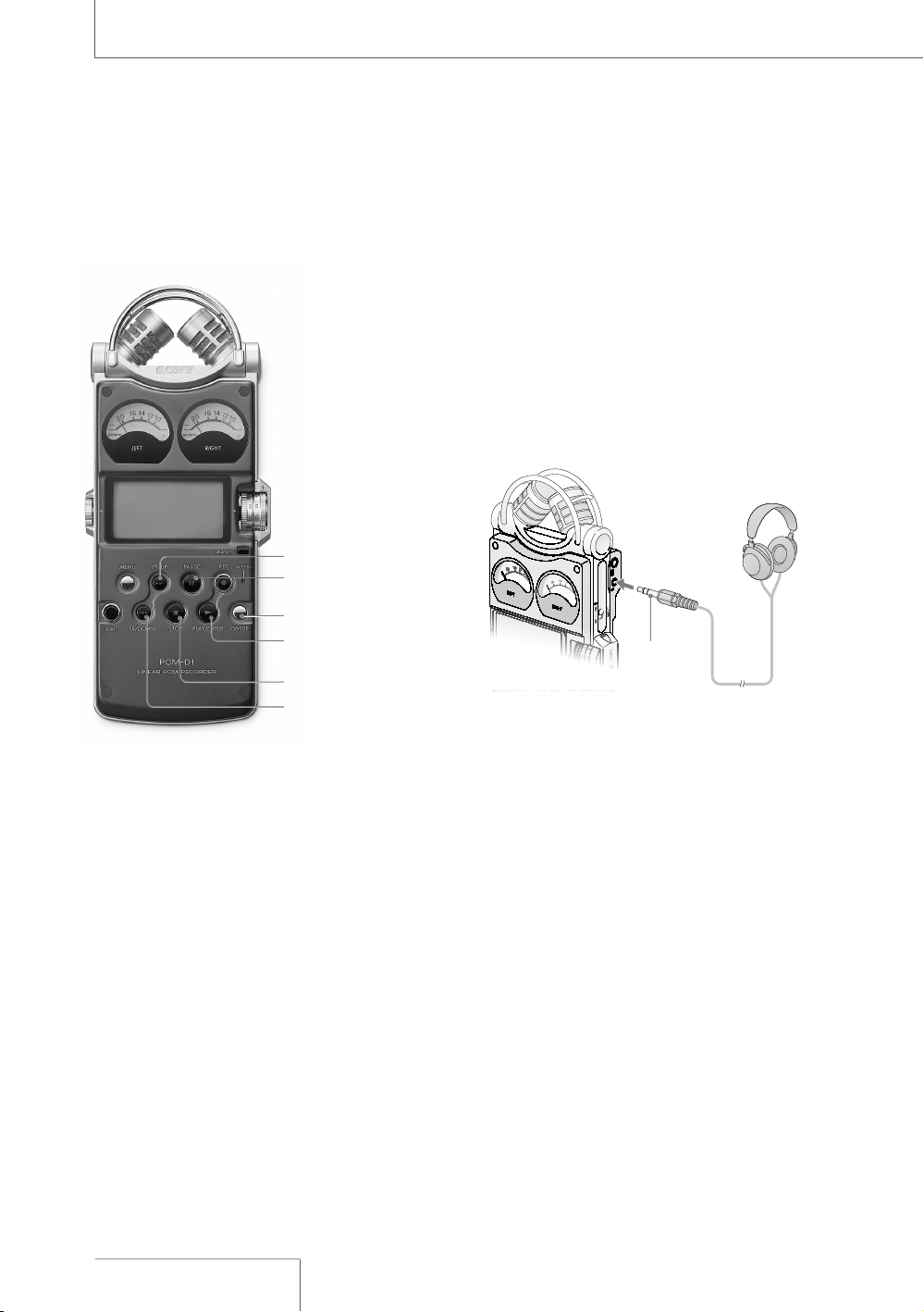
9OUçCANçCONNECTçANçOPTIONALçEXTERNALç
MICROPHONEçTOçTHEçRECORDER
ç #ONNECTçANçEXTERNALçMICROPHONEçTOçTHEç
-)#çJACKçOFçTHEçRECORDERçANDçADJUSTçTHEç
POSITIONçOFçTHEçMICROPHONEç&ORç
CHARACTERISTICSçOFçTHEçMICROPHONEçREFERç
TOçTHEçOPERATINGçINSTRUCTIONSçSUPPLIEDç
WITHçIT
TO¬THE¬-)#¬
JACK
%XTERNAL¬MICROPHONE¬
NOT¬SUPPLIED
ç &OLLOWçSTEPSççTOççOFçh2ECORDINGvçPAGEç
çTOçSTARTçRECORDING
.OTES
sç 7HENçANçEXTERNALçMICROPHONEçISçCONNECTEDçTOçTHEç
RECORDERçTHEçBUILTINçMICROPHONESçCANNOTçBEçUSEDç
FORçRECORDING
sç 4HEçRECORDERçDOESçNOTçSUPPLYçPOWERçTOçCONNECTEDç
MICROPHONEçNOTçSUITABLEçFORçPLUGINçPOWERç.OTEç
THATçAçPLUGINçPOWERçONLYçMICROPHONEçCANNOTçBEç
USEDçWITHçTHEçRECORDER
2ECORDING¬FROM¬EXTERNAL¬
EQUIPMENT
9OUçCANçCONNECTçEXTERNALçEQUIPMENTçTOçTHEç
RECORDERçFORçEXAMPLEçTOçRECORDçFROMçAç
3UPERç!UDIOç#$#$çPLAYERçETC
ç #ONNECTçTHEçAUDIOçOUTPUTçJACKSçOFç
EXTERNALçEQUIPMENTçTOçTHEç,).%ç).çJACKçOFç
THEçRECORDERçBYçUSINGçANçOPTIONALç3ONYç
AUDIOçCABLE
3UPER¬!UDIO¬#$
#$¬PLAYER
TO¬THE¬,).%¬
).¬JACK
!UDIO¬CABLE¬NOT¬SUPPLIED
ç 3ETçTHEç-)#,).%ç).çSWITCHçTOçTHEçh,).%ç
).vçPOSITION
ç &OLLOWçSTEPSççANDççOFçh2ECORDINGvç
PAGEç
ç 3TARTçPLAYBACKçOFçTHEçEXTERNALçEQUIPMENT
ç 0RESSçTHEç
0!53%çORç
0,!9çBUTTONç
WHEREçYOUçWANTçTOçSTARTçRECORDINGç
4HEçSTANDBYçFORçRECORDINGçISçRELEASEDç
ANDçRECORDINGçSTARTS
2ECORDING
¬0!53%¬BUTTON
INDICATOR
¬&2¬BUTTON
$)6)$%¬BUTTON
¬34/0¬BUTTON
¬0,!9¬BUTTON
INDICATOR
¬&&¬BUTTON
/PERATIONS¬AFTER¬2ECORDING
0LAYING¬BACK¬RECORDED¬AUDIO¬DATA¬
TRACKS
4OçCHANGEçTHEçMEMORYçANDçFOLDERçTOçPLAYç
BACKçGOçTOçTHEçMENUçDISPLAYçPAGEç
ç #ONNECTçOPTIONALçHEADPHONESçORç
EARPHONESçTOçTHEççHEADPHONEçJACKçOFç
THEçRECORDER
(EADPHONES¬
NOT¬SUPPLIED
TO¬THE¬¬
HEADPHONE¬
JACK
3TEREO¬MINI¬
PLUG
ç 0RESSçTHEç
ç0,!9çBUTTONç
0LAYBACKçSTARTSçFROMçTHEçFIRSTçTRACKçOFçTHEç
SELECTEDçFOLDERçORçTHEçLASTçPOINTçATçWHICHç
YOUçSTOPPEDçPLAYBACKç
4HEç
ç0,!9çINDICATORçLIGHTSçUPç!LLçTHEç
TRACKSçINçTHEçFOLDERçAREçPLAYEDçINçTRACKç
NUMBERçORDER
/PERATIONS¬DURING¬PLAYBACK
4O /PERATION
3TOP
0RESSçTHEçç34/0çBUTTON
0AUSE
0RESSçTHEçç0!53%çBUTTONç
4HEçç0!53%çINDICATORç
FLASHESç4OçRESUMEçPLAYçAFTERç
PAUSINGçPRESSçTHEçç0!53%ç
BUTTONçAGAINç
&ASTçFORWARD
0RESSçANDçHOLDçTHEçç&&ç
BUTTON
&ASTçREVERSE
0RESSçANDçHOLDçTHEçç&2ç
BUTTON
'OçBACKçTOçTHEç
BEGINNINGçOFç
CURRENTçTRACK
0RESSçTHEçç&2çBUTTONç
ONCE
'OçBACKçTOç
PREVIOUSçTRACKS
0RESSçTHEçç&2çBUTTONç
REPEATEDLY
'OçTOçTHEç
BEGINNINGçOFç
NEXTçTRACK
0RESSçTHEçç&&çBUTTONç
ONCE
'OçTOçTHEç
BEGINNINGçOFç
SUCCEEDINGç
TRACKS
0RESSçTHEçç&&çBUTTONç
REPEATEDLY
.OTE
sç $URINGçPLAYBACKçDOçNOTçREMOVEçTHEçBATTERIESçORç!#ç
POWERçADAPTORç$OINGçSOçMAYçCAUSEçNOISEçINçAUDIOç
OUTPUTçFROMçTHEç,).%ç/54çJACKçANDççHEADPHONEç
JACK
4O¬CONNECT¬WITH¬EXTERNAL¬EQUIPMENT¬FOR¬
PLAYBACK
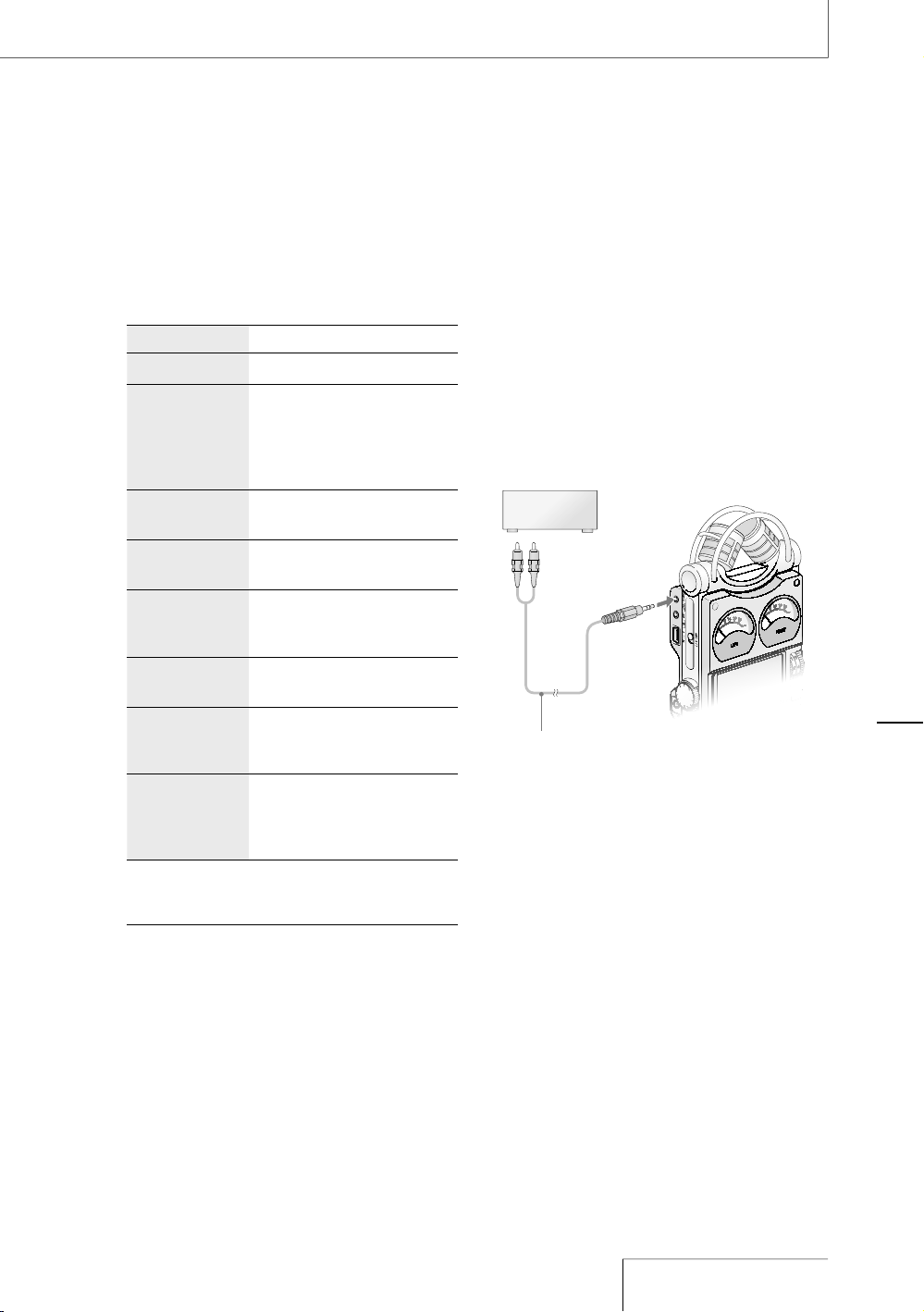
4OçOUTPUTçRECORDEDçTRACKSçFROMçSPEAKERSçOFç
EXTERNALçEQUIPMENTçCONNECTçTHEçAUDIOçINPUTç
JACKçORçDIGITALçINPUTçJACKçOFçTHEçEXTERNALç
EQUIPMENTçTOçTHEç,).%ç/54OPTICALç$)')4!,ç
/54çJACKçOFçTHEçRECORDERçUSINGçANçOPTIONALç
3ONYçAUDIOçCABLEçORçOPTICALçDIGITALçCABLE
ç
!6¬AMPLIFIERPLAYER
TO¬THE¬,).%¬
/54OPTICAL¬
$)')4!,¬/54¬
JACK
!UDIO¬CABLE¬NOT¬SUPPLIED¬¬
OR¬¬
OPTICAL¬DIGITAL¬CABLE¬NOT¬SUPPLIED
/PERATIONS¬AFTER¬
2ECORDING
$IVIDING¬A¬TRACK
9OUçCANçDIVIDEçAçRECORDEDçTRACKç.OTEçTHATç
TRACKSçCANNOTçBEçCOMBINEDçONçTHEçRECORDERç
AFTERçTHEYçHAVEçBEENçDIVIDED
ç $URINGçRECORDINGçRECORDçPAUSINGç
PLAYBACKçORçPLAYBACKçPAUSINGçPRESSçTHEç
$)6)$%çBUTTONç
4HEçTRACKçISçDIVIDEDçINTOçTWOçATçTHEçPOINTç
YOUçPRESSEDçTHEçBUTTONçANDçh$)6)$).'vç
APPEARSçINçTHEçDISPLAY
.OTES
sç $IVIDEDçTRACKSçAREçNAMEDçASçFOLLOWS
nç $URINGçRECORDINGRECORDçPAUSINGç4HEçNEWçTRACKç
WILLçHAVEçAçNEWçNAMEçINçTHEçSAMEçWAYçASçWHENçAç
NEWçRECORDINGçSTARTS
nç $URINGçPLAYBACKPLAYBACKçPAUSINGçh?vçISçADDEDç
TOçTHEçNAMEçOFçTHEçORIGINALçTRACKçANDçh?vçISç
ADDEDçTOçTHEçNAMEçOFçTHEçNEWçTRACKç(OWEVERçIFç
THEçORIGINALçTRACKçNAMEçISçLESSçTHANççBYTESç
UNDERBARSçh?vçAREçADDEDçTOçMAKEçAçBYTEç
NAMEç&ORçEXAMPLEçWHENçDIVIDINGçTHEçFILEçNAMEDç
h7!6vçTHEçTRACKSçAREçNAMEDçç
h??????7!6vçANDçh??????7!6v
sç 4RACKSçCANNOTçBEçDIVIDEDçIF
nç YOUçPRESSçTHEçBUTTONçINçTHEçPOSITIONçWITHINçLESSç
THANççSECONDçFROMçTHEçBEGINNINGçORçTHEçENDçOFç
AçTRACK
nç THEçTOTALçNUMBERçOFçRECORDEDçTRACKçREACHESçTHEç
MAXIMUMçNUMBERçOFçRECORDABLEçTRACKSçPAGEçç
h42!#+ç&5,,vçAPPEARSçINçTHEçDISPLAY
nç THEçNEWçTRACKçNAMEçEXCEEDSçTHEçMAXIMUMç
NUMBERçOFçCHARACTERSççBYTESçWITHOUTçh7!6v
/PERATIONS¬AFTER¬2ECORDING¬CONTINUED
3TORING¬TRACKS¬IN¬A¬COMPUTER
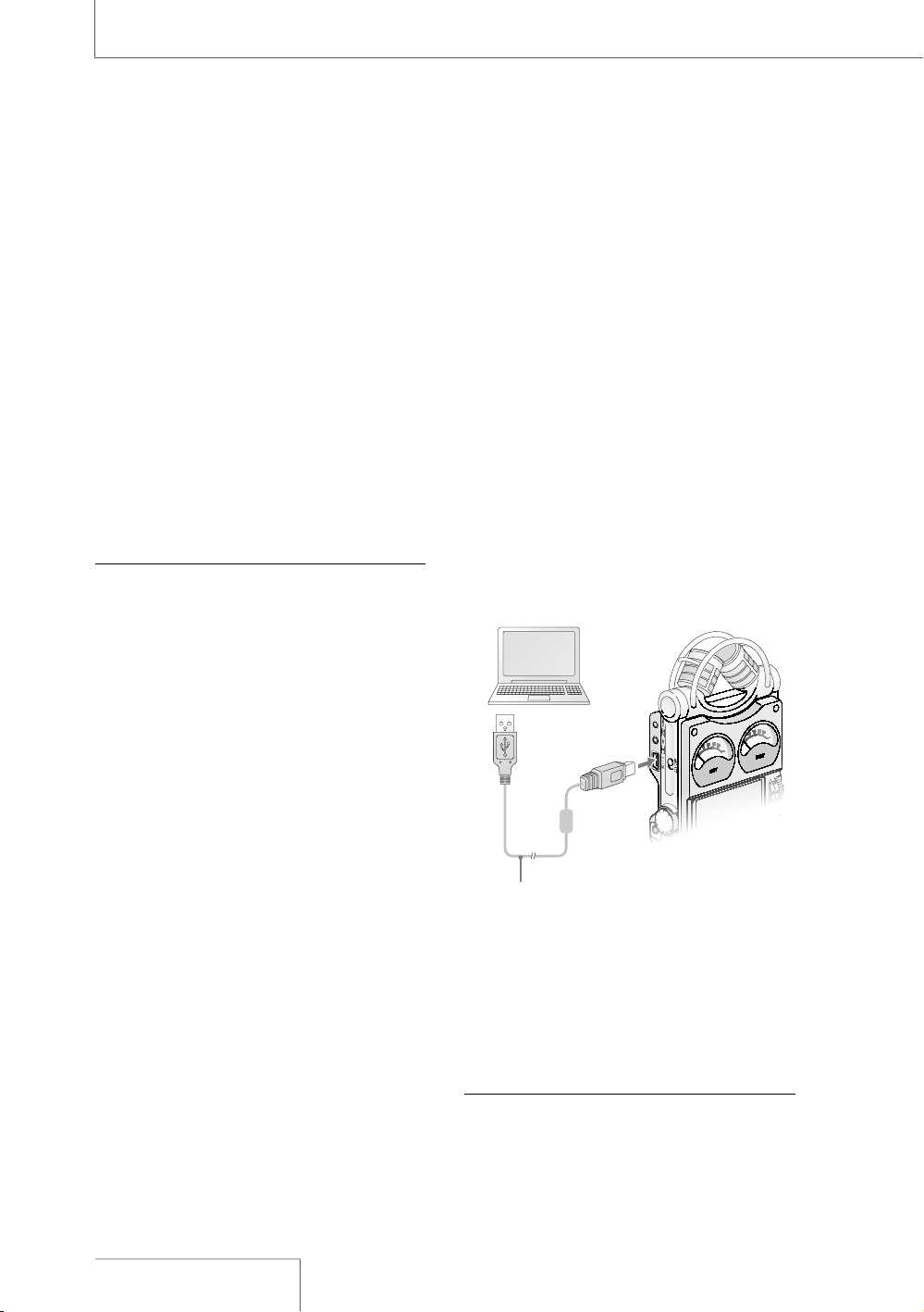
#ONNECTçTHEçRECORDERçTOçAçCOMPUTERçTOçSAVEç
RECORDEDçTRACKSçTOçTHEçHARDçDISKçDRIVEçOFçTHEç
COMPUTER
ç #ONNECTçTHEç53"çCONNECTORSçOFçAç
COMPUTERçANDçTHEçRECORDERçUSINGçTHEç
SUPPLIEDç53"çCONNECTINGçCABLEç
h0#ç#/..%#4vçAPPEARSçINçTHEçDISPLAYçOFç
THEçRECORDERçANDçITçISçRECOGNIZEDçASçAç
53"ç-ASSç3TORAGEç#LASSçDEVICEçONçTHEç
COMPUTERç
9OUçCANNOTçOPERATEçTHEçRECORDERçWHILEçITç
ISçCONNECTEDçTOçTHEçCOMPUTER
53"¬CONNECTING¬CABLE¬
SUPPLIED
#OMPUTER¬¬
NOT¬SUPPLIED
TO¬A¬53"¬
CONNECTOR
TO¬THE¬53"¬
CONNECTOR
ç 4HEçRECORDERçISçVIEWEDçONç7INDOWSç
%XPLORERçORç-ACç$ESKTOPçASçAçREMOVABLEç
STORAGEçDEVICEç$RAGçANDçDROPçTHEçTRACKç
FILEçYOUçWANTçTOçSTOREçTOçTHEçHARDçDISKç
DRIVEçOFçTHEçCOMPUTER
.OTE
sç 4URNçOFFçTHEçRECORDERçPOWERçWHENçCONNECTINGçTHEç
53"çCABLEç,EAVINGçTHEçPOWERçONçMAYçCAUSEçNOISEç
INçTHEçAUDIOçOUTPUTçFROMçTHEç,).%ç/54çJACKçANDçç
HEADPHONEçJACK
3YSTEM¬REQUIREMENTS¬FOR¬A¬COMPUTER¬TO¬BE¬
CONNECTED¬TO¬THE¬RECORDER
sç)"-ç0#!4çORçCOMPATIBLE
ç
nç53"çPORT
nç/3ç
çç
7INDOWSç6ISTA
ç
(OMEç"ASICç
7INDOWSç6ISTA
ç
(OMEç0REMIUMç
7INDOWSç6ISTA
ç
"USINESSç
7INDOWSç6ISTA
ç
5LTIMATEç
7INDOWS
ç
80ç(OMEç%DITIONç3ERVICEç
0ACKççORçHIGHER
ç
7INDOWS
ç
80ç0ROFESSIONALç3ERVICEç0ACKç
çORçHIGHER
ç
7INDOWS
ç
80ç-EDIAç#ENTERç%DITIONç
3ERVICEç0ACKççORçHIGHER
ç
7INDOWS
ç
80ç-EDIAç#ENTERç%DITIONçç
3ERVICEç0ACKççORçHIGHER
ç
7INDOWS
ç
80ç-EDIAç#ENTERç%DITIONçç
3ERVICEç0ACKççORçHIGHER
ç
7INDOWS
ç
ç0ROFESSIONAL
ç
çç
9OUçCANNOTçCONNECTçTHEçRECORDERçWITHç
7INDOWS
çç7INDOWS
çç7INDOWS
ç
-%çORç7INDOWSç.4
sç-ACINTOSHç
nç53"çPORT
nç/3ç-ACç/3ç6ERççORçLATERç
ç)"-çANDç0#!4çAREçREGISTEREDçTRADEMARKSçOFç
)NTERNATIONALç"USINESSç-ACHINESç#ORPORATION
ç-ICROSOFTç7INDOWSç7INDOWSç6ISTAçANDç7INDOWSç
-EDIAçAREçTRADEMARKSçORçREGISTEREDçTRADEMARKSçOFç
-ICROSOFTç#ORPORATIONçINçTHEç5NITEDç3TATESçANDORç
OTHERçCOUNTRIES
ç)NSTALLç3ERVICEç0ACKççORçLATERçWHENçRECORDINGçAUDIOç
ONçh-EMORYç3TICKç02/ç(IGHç3PEEDv
ç-ACINTOSHçANDç-ACç/3çAREçTRADEMARKSçOFç!PPLEç
)NCçREGISTEREDçINçTHEç5NITEDç3TATESçANDORçOTHERç
COUNTRIES
ç3LEEPçMODEçOFçTHEç-ACç/3çISçNOTçSUPPORTED
ç4HEçBITç/3çISçNOTçSUPPORTED
.OTE
sç 7EçDOçNOTçENSUREçTROUBLEFREEçOPERATIONçOFçTHEç
SYSTEMçSUSPENDçSLEEPçORçHIBERNATIONçFUNCTIONçONç
ALLçCOMPUTERS
4O¬USE¬7INDOWS¬
)NSTALLATIONçOFçTHEçSUPPLIEDçDRIVERçISçREQUIRED
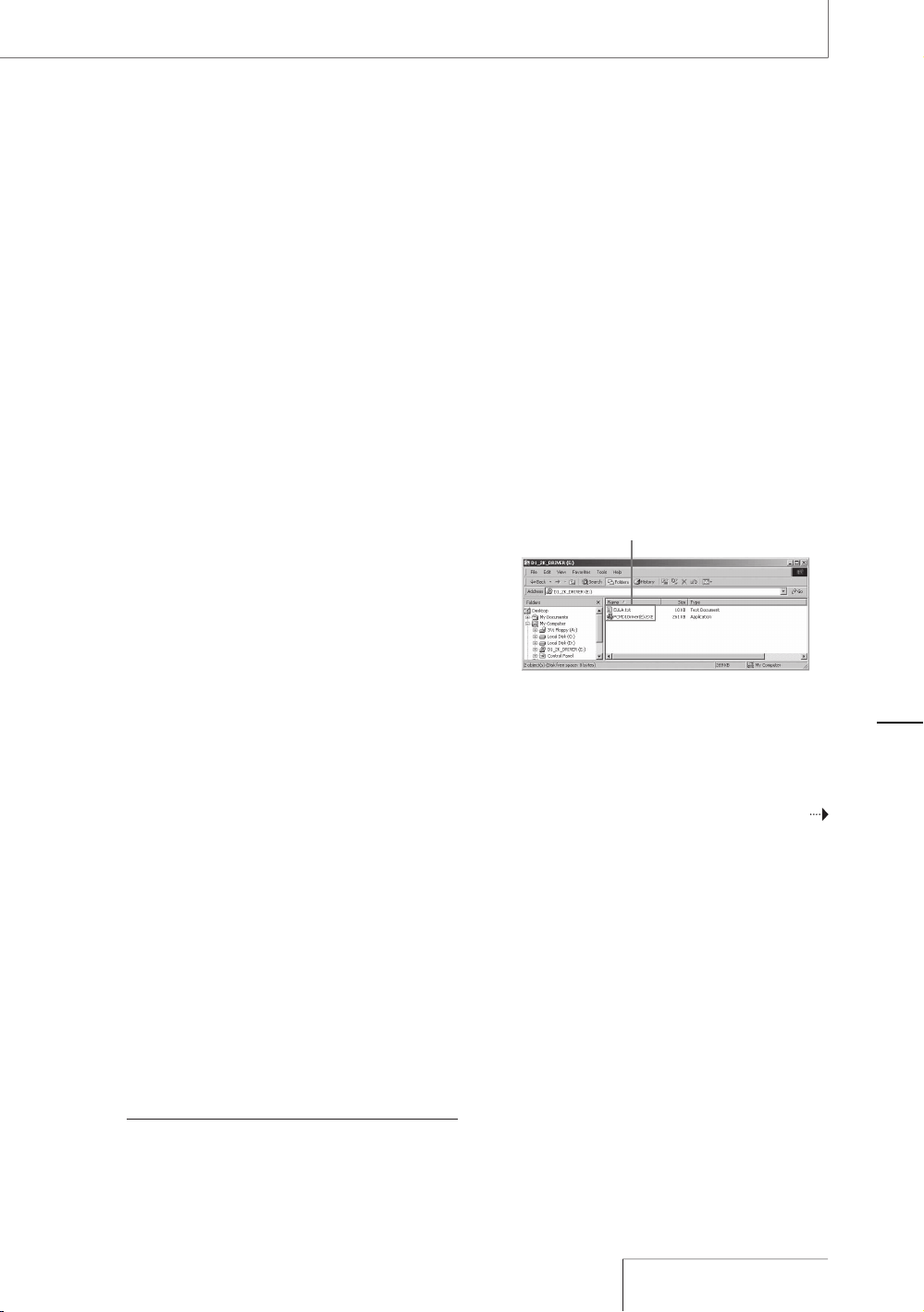
ç )NSERTçTHEçSUPPLIEDç#$2/-çINTOçTHEç
#$2/-çDRIVEçOFçTHEçCOMPUTER
ç /PENç7INDOWSç%XPLORERçANDçSELECTç
h$?+?$2)6%2%%5,!TXTvçINçTHEç
#$2/-çDRIVE
ç
h3OFTWAREçLICENSEçAGREEMENTvçAPPEARSç
2EADçTHROUGHçTHEçCONTENTSçCAREFULLY
%5,!TXT
0#-$$RIVER%%8%
ç )FçYOUçAGREEçTOçTHEçCONTENTSçSELECTç
h$?+?$2)6%2%0#-$$RIVER%%8%v
ç &OLLOWçTHEçINSTRUCTIONSçONçTHEçSCREENçTOç
INSTALLçTHEçDRIVER
#ONTINUED¬ON¬THE¬NEXT¬PAGE¬
/PERATIONS¬AFTER¬
2ECORDING
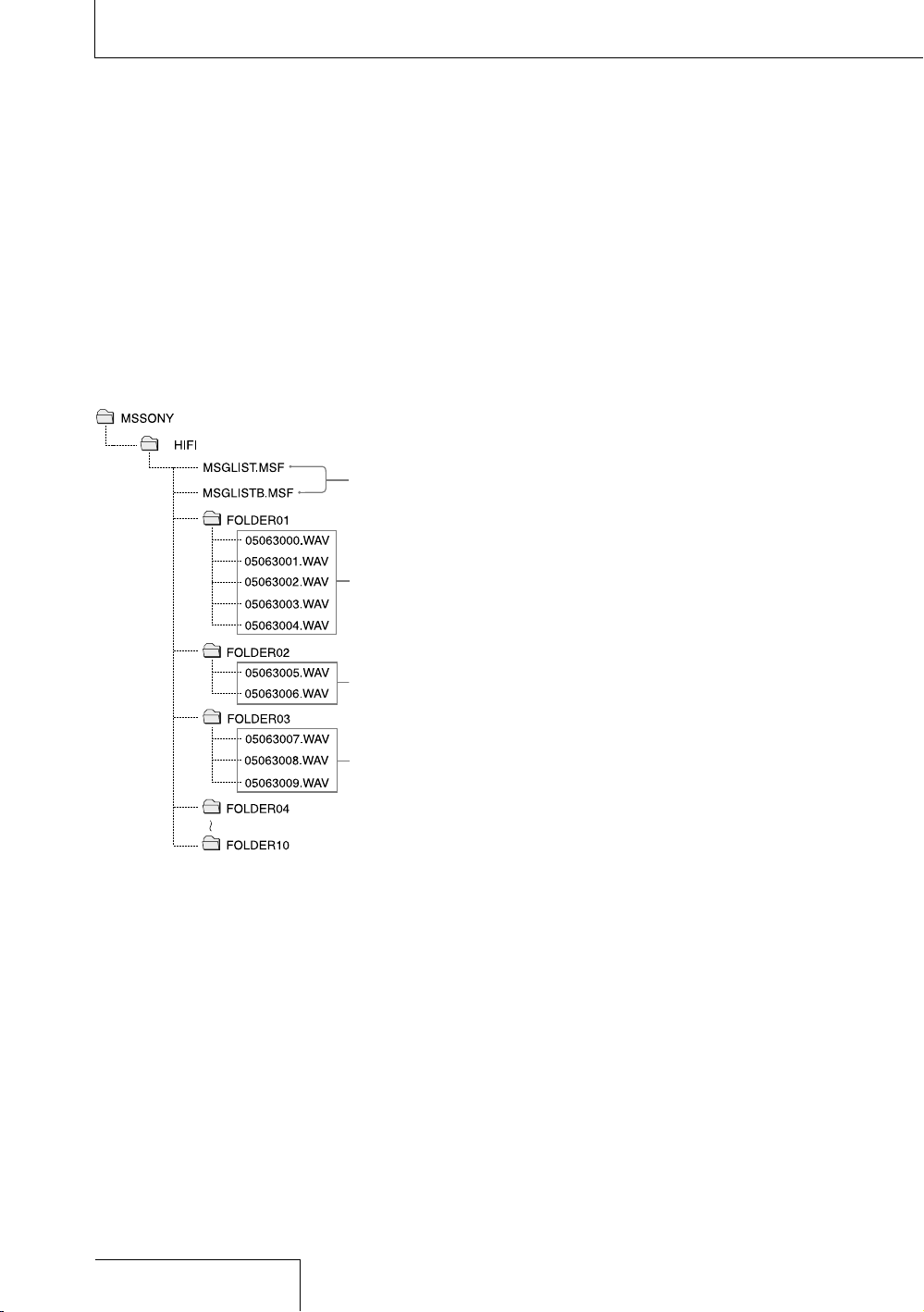
On folder and track file structure
Once you record audio on the recorder, the
10 folders for saving tracks are automatically
created in memory. One “.WAV” file is
created for each recording.
Message
list file*
Audio file
(Track)
Audio file
(Track)
Audio file
(Track)
* Information, such as the order of folders, playback
order of audio files, recording date and time, etc., is
included. Do not delete or change these files.
Operations after Recording (continued)
Note on folder name
Do not use the computer to delete the
“FOLDER 01” through “FOLDER 10” or
change their names. If you do so, the folders
will not be recognized by the recorder.
For details about the specifications of folder
and track files, see page 48.
32
PCM-D1. US. 2-664-971-13(2)

/PERATIONS¬AFTER¬
2ECORDING
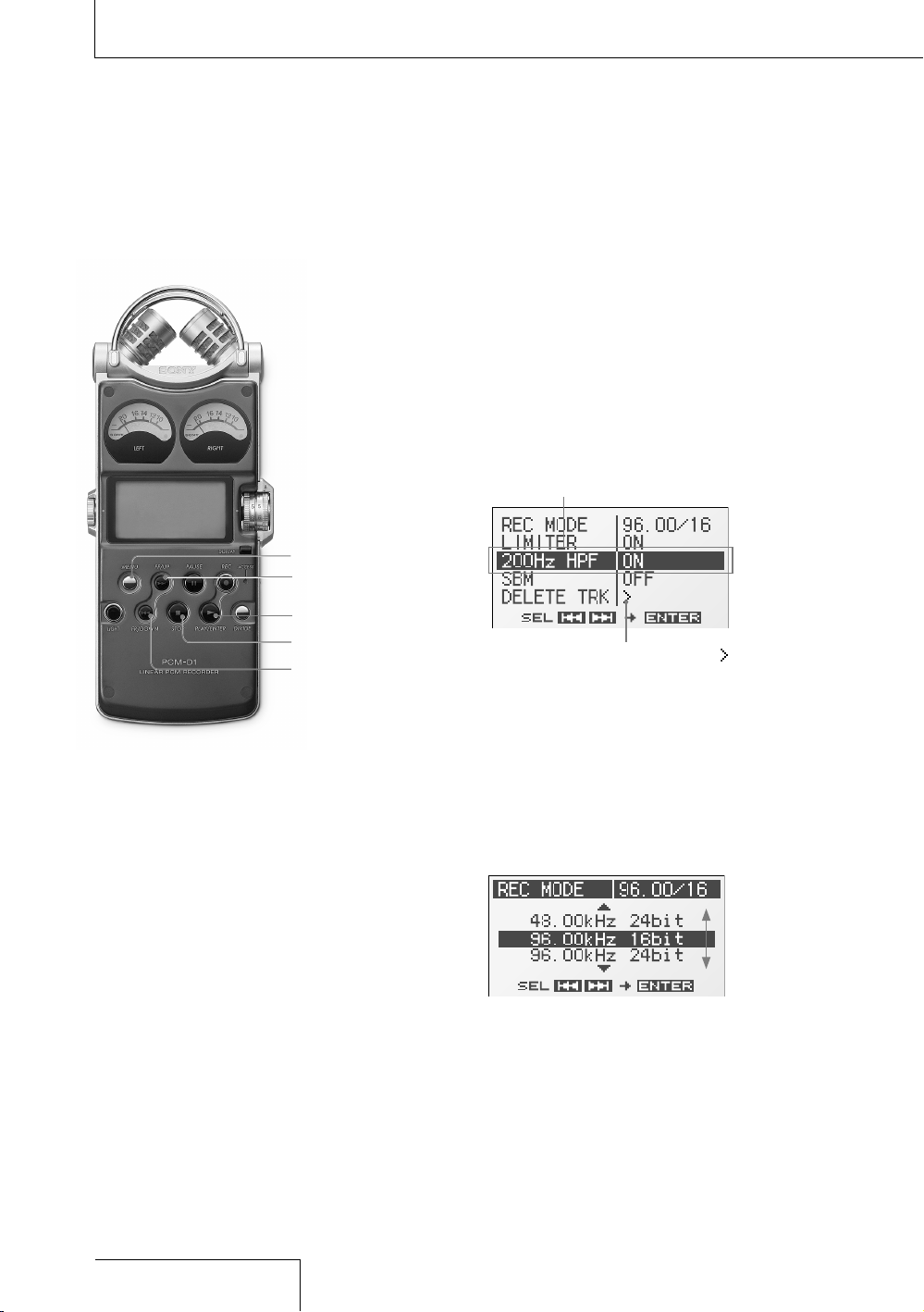
UP button
DOWN button
ENTER button
STOP button
MENU button
Using the menu display
You can change various adjustments and
settings using the menu display.
1
Press the MENU button.
The menu display appears. The currently
selected item and option are in the center
of the display in reversed-color
characters.
Selected item and option
When selecting the item with in step 2,
the confirmation display will appear.
2
Press the
UP and
DOWN
buttons to select an item, and press the
ENTER button.
The setting display of the selected item
appears. For details about each item and
option, refer to “Menu items” (on the next
page).
Example: When “REC MODE” is selected
Available
options
3
Press the
UP and
DOWN
buttons to select an option or operation,
and press the
ENTER button.
The option or operation is executed, and
the menu display appears again.
To return to the normal display
Press the MENU or
STOP button.
Menu Operations
34
PCM-D1. US. 2-664-971-13(2)
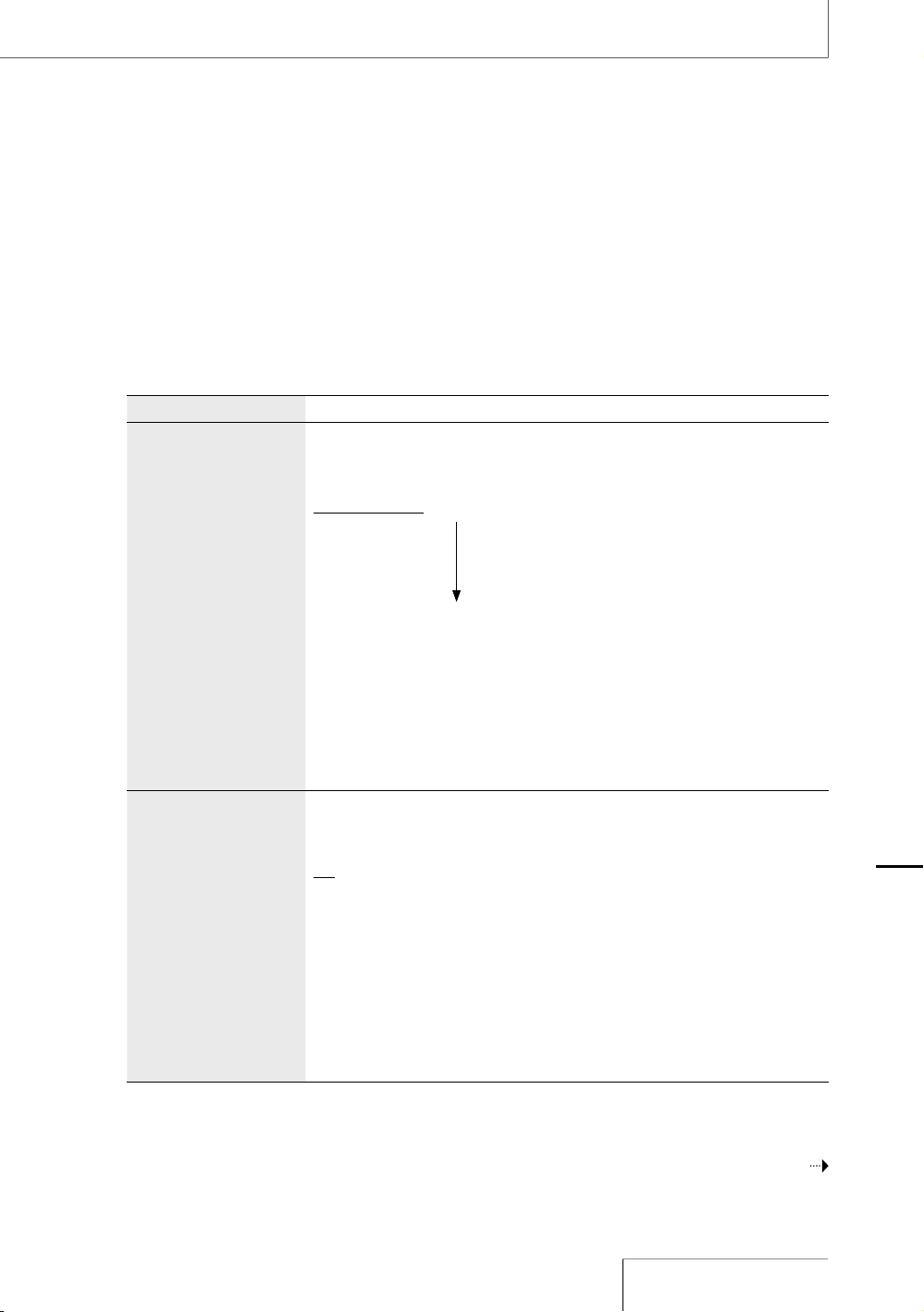
-ENU¬ITEMS
7HILEçTHEçRECORDERçISçSTOPPEDçALLçTHEçITEMSçINçTHEçFOLLOWINGçCHARTçAPPEARç$URINGçRECORDING
STANDBYçFORçRECORDINGRECORDçPAUSINGçONLYçh,)-)4%2vçh,%$vçANDçh(Zç(0&vçAPPEARç$URINGç
PLAYBACKPLAYBACKçPAUSINGçONLYçh$%,%4%ç42+vçANDçh,%$vçAPPEAR
)TEM /PTIONS¬$EFAULT¬SETTINGS¬ARE¬UNDERLINED
2%#¬-/$%¬
3AMPLINGçFREQUENCY
QUANTIFYINGçBITçNUMBER
9OUçCANçSELECTçTHEçSAMPLINGçFREQUENCYçANDçQUANTIFYINGçBITçNUMBERçFORç
RECORDING
çK(ZççBITç 9OUçCANçRECORDçFORçAçLONGERçTIME
çK(ZççBITç 4HEçDEFAULTçSETTING
çK(ZççBIT
çK(ZççBIT
çK(ZççBITç ççççç9OUçCANçRECORDçWITHçHIGHERçSOUNDçQUALITY
çK(ZççBIT
çK(ZççBIT
.OTES
sç 3AMPLINGçFREQUENCYçISçAçVALUEçTHATçREPRESENTSçHOWçMANYçTIMESçANçANALOGçSIGNALçISç
CONVERTEDçINTOçAçDIGITALçSIGNALç!$çCONVERSIONçPERçSECONDç4HEçLARGERçTHEçVALUEçOFç
SAMPLINGçFREQUENCYçTHEçBETTERçTHEçSOUNDçQUALITYçBUTçALSOçTHEçLARGERçTHEçAMOUNTçOFç
DATAç3OUNDçQUALITYçOFççK(ZçISçEQUIVALENTçTOçAç#$ççK(ZçISçEQUIVALENTçTOçAç
$!4çANDççK(ZçISçEQUIVALENTçTOç$6$ç!UDIO
sç 1UANTIFYINGçBITçNUMBERçISçAçVALUEçTHATçREPRESENTSçTHEçAMOUNTçOFçDATAçITçTAKESçFORç
ONEçSECONDçOFçAUDIOç4HEçLARGERçTHEçVALUEçOFçTHEçBITçNUMBERçTHEçLARGERçAMOUNTçOFç
DATAçITçTAKESçANDçBETTERçTHEçSOUNDçQUALITY
,)-)4%2¬¬
0REVENTINGçDISTORTION
4HEçRECORDERçALWAYSçRESERVESçAUDIOçFORçTHEçDIGITALçLIMITERçWHICHçISçD"ç
LOWERçTHANçAUDIOçPROCESSEDçINçTHEçNORMALçCIRCUITç4HISçCOMPENSATESçFORç
CLIPPINGçTHATçHAPPENSçDURINGçDIGITALçPROCESSINGçIFçAUDIOçISçOVERINPUTç
/.ç $IGITALçLIMITERçFUNCTIONSçTOçPREVENTçDISTORTION
/&&ç $IGITALçLIMITERçDOESçNOTçFUNCTION
.OTES
sç ,IMITERçCIRCUITçFUNCTIONSçTOçKEEPçTHEçSIGNALçLEVELçBELOWçTHEçMAXIMUMçINPUTçLEVELç
7HENçAçLOUDçSOUNDçISçSUDDENLYçINPUTçTHEçEXCESSçPARTçOFçTHEçSOUNDçISç
AUTOMATICALLYçSETçWITHINçTHEçRANGEçOFçTHEçMAXIMUMçINPUTçLEVELçINçORDERçTOçPREVENTç
DISTORTION
sç 4HEçLIMITERçCIRCUITçOFçTHEçRECORDERçDOESçNOTçCOMPENSATEçFORçCLIPPINGçWHENçAUDIOç
OVERçD"çISçINPUTç)NçTHISçCASEçSOUNDçMAYçDISTORTç
sç 7HENçTHEçSETTINGçISçh/.vçIFçTHEçMAXIMUMçPEAKçVALUEçEXCEEDSççD"çTHEçPEAKç
VALUEçWITHçTHEçLIMITERçCIRCUITçWORKINGçAPPEARS
ç9OURçCOMPUTERçMUSTçHAVEçSOFTWAREçTHATçSUPPORTSçBITçAUDIOçDATAçç
TOçPLAYçBACKçEDITçETCçTHEçSOUNDçWITHçAçQUANTIFYINGçBITçNUMBERçOFççBITS
#ONTINUED¬ON¬THE¬NEXT¬PAGE¬
-ENU¬/PERATIONS
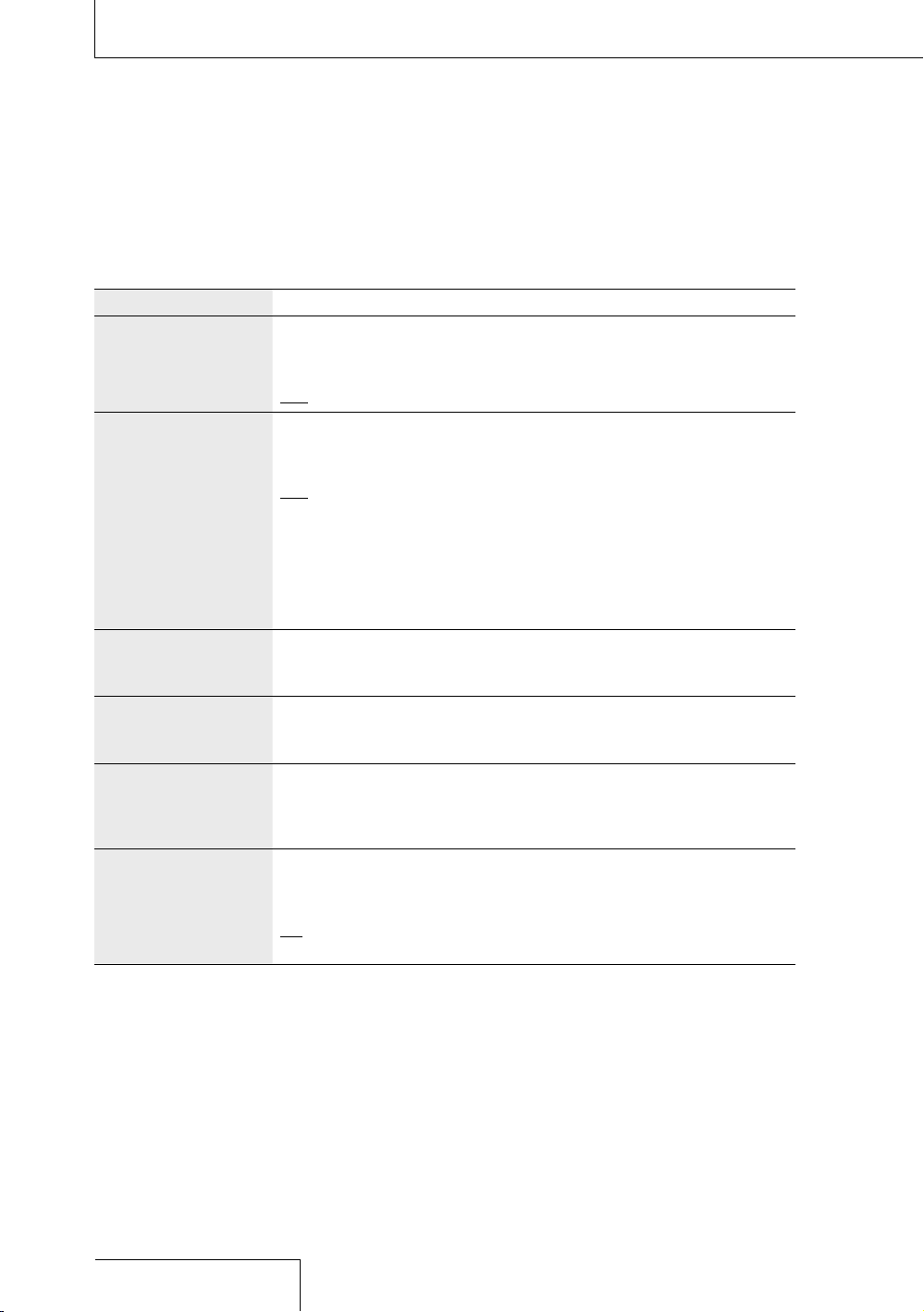
Menu Operations (continued)
Item Options (Default settings are underlined.)
200Hz HPF
(High Pass Filter
function)
Audio under 200 Hz is filtered and is not recorded. This function reduces
noise caused by the flow of air-conditioning equipment, outdoor air, etc.
ON High Pass Filter functions to reduce noise.
OFF High Pass Filter does not function.
SBM
1)
(Super Bit Mapping
function)
Super Bit Mapping reduces noise when the quantifying bit number is set to
16 bit in “REC MODE.”
ON Super Bit Mapping functions to reduce noise.
OFF Super Bit Mapping does not function.
Note
• Super Bit Mapping significantly increases dynamic range acoustically by reducing
noise that is particularly easy to hear within the human audible band. In order to
improve the audio quality when converting 20-bit data into 16 bit, the top 4-bit
amount of information within the lower data, which is usually thrown away, is
integrated into 16-bit data.
DELETE TRK
2)3)4)
(Deleting track)
You can delete one selected track.
Be sure to confirm the track name to be deleted before selecting “YES.”
For details about folder and track file structure, refer to page 32.
DELETE ALL
2)4)
(Deleting all tracks in
folder)
You can delete all the tracks in a selected folder.
Be sure to confirm the folder name to be deleted before selecting “YES.”
For details about folder and track file structure, refer to page 32.
FORMAT
2)
(Initializing memory)
You can delete all data in current memory selected in “MEMORY” (page 37)
and change the folder structure (page 32) to the default setting.
Be sure to confirm that the current memory is the internal memory or
“Memory Stick PRO (High Speed)” before selecting “YES.”
LED
(Indicator lighting)
The ACCESS indicator, peak level lamps, REC indicator, PLAY
indicator, and PAUSE indicator light up or flash to represent the
operational status of the recorder.
ON The indicators light up or flash.
OFF The indicators do not light up or flash.
36
PCM-D1. US. 2-664-971-13(2)

)TEM /PTIONS¬$EFAULT¬SETTINGS¬ARE¬UNDERLINED
#,/#+
$ATETIMEçSETTING
9OUçCANçSETçTHEçCLOCK
&ORçDETAILSçREFERçTOçPAGEç
-%-/29¬
¬
2ECORDINGPLAYBACKç
MEMORY
9OUçCANçSELECTçTHEçMEMORYçWHEREçTHEçRECORDEDçTRACKSçWILLçBEçSAVEDçANDç
WHEREçTHEçTRACKSçTOçBEçPLAYEDçBACKçAREçSAVED
"5),4).ç ç 4HEçBUILTINçMEMORYçOFçTHEçRECORDERçISçUSED
-%-/29ç34)#+ç !NçOPTIONALçh-EMORYç3TICKç02/ç(IGHç3PEEDvçISçUSEDç
.OTE
sç h"5),4).vçISçSELECTEDçONCEçTHEçh-EMORYç3TICKç02/ç(IGHç3PEEDvçISçREMOVED
&/,$%2¬
2ECORDINGPLAYBACKç
FOLDER
9OUçCANçSELECTçTHEçFOLDERçWHEREçTHEçRECORDEDçTRACKSçWILLçBEçSAVEDçANDçWHEREç
THEçTRACKSçTOçBEçPLAYEDçBACKçAREçSAVEDç
&/,$%2ççTOçç ç &OLDERçNAMESçOFçCURRENTçMEMORY
ç4HEçSETTINGçCANNOTçBEçEXECUTEDçWHENçTHEçQUANTIFYINGçBITçNUMBERçISçSETçTOççBITçINçh2%#ç-/$%v
ç4HEçFUNCTIONçDOESçNOTçWORKçWHENçTHEçREMAININGçBATTERYçPOWERçISçLOW
ç4HEçFUNCTIONçDOESçNOTçWORKçWHENçAçTRACKçFILEçISçSETçTOçBEçREADONLY
ç4HEçFUNCTIONçDOESçNOTçWORKçWHENçNOçTRACKçISçSAVEDçINçAçFOLDER
ç4HEçSETTINGçCANNOTçBEçEXECUTEDçWHENçNOçOPTIONALçh-EMORYç3TICKç02/ç(IGHç3PEEDvçISçINSERTED
-ENU¬/PERATIONS
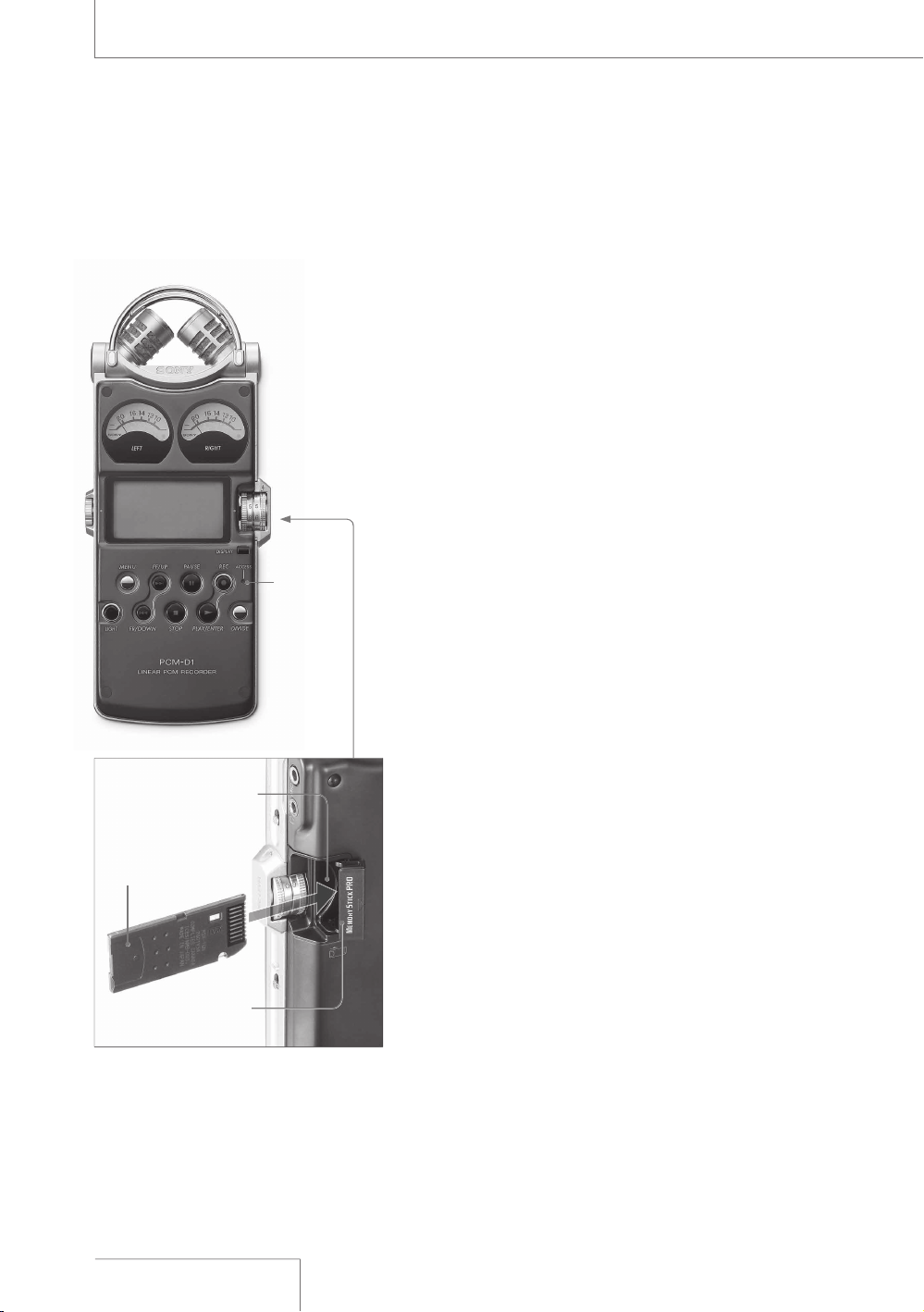
5SING¬A¬h-EMORY¬3TICK¬02/¬(IGH¬3PEEDv¬
NOT¬SUPPLIED
9OUçCANçRECORDçAUDIOçUSINGçAçh-EMORYç3TICKç
02/ç(IGHç3PEEDvçINSTEADçOFçTHEçBUILTINç
MEMORYçOFçTHEçRECORDER
ç
h-EMORYç3TICKç02/ç(IGHç3PEEDvçISçTHEç
ONLYçh-EMORYç3TICKvçTHATçCANçBEçUSEDçFORçTHEç
RECORDERç.OTEçTHATçOTHERçKINDSçOFçh-EMORYç
3TICKvçAREçNOTçSUPPORTED
)NSERTING¬A¬h-EMORY¬3TICK¬02/¬
(IGH¬3PEEDv
"EFOREçRECORDINGçBEçSUREçTOçCOPYçALLçTHEç
DATAçSAVEDçINçTHEçh-EMORYç3TICKç02/ç(IGHç
3PEEDvçTOçAçCOMPUTERçANDçFORMATçTHEç
h-EMORYç3TICKç02/ç(IGHç3PEEDvçONçTHEç
RECORDERçSOçITçCONTAINSçNOçDATA
ç /PENçTHEçCOVERçOFçTHEç-EMORYç3TICKçSLOT
ç )NSERTçTHEçh-EMORYç3TICKç02/ç(IGHç
3PEEDvçINTOçTHEç-EMORYç3TICKçSLOTçFIRMLYç
UNTILçITçCLICKSçINçTHEçDIRECTIONçSHOWNçINçTHEç
ILLUSTRATIONçONçTHEçLEFTçANDçCLOSEçTHEç
COVER
7HEN¬YOU¬INSERT¬THE¬h-EMORY¬3TICK¬02/¬
(IGH¬3PEEDv¬INTO¬THE¬RECORDER
h!##%33).'ç-%-/29vçAPPEARSçINçTHEç
DISPLAYçANDçTHEç!##%33çINDICATORçFLASHESç
)NFORMATIONçFORçOPERATIONçISçREADçINçTHEç
h-EMORYç3TICKç02/ç(IGHç3PEEDv
4O¬REMOVE¬THE¬h-EMORY¬3TICK¬02/¬(IGH¬
3PEEDv
"EçSUREçTHATçTHEç!##%33çINDICATORçLIGHTçISç
OFFçANDçTHENçPUSHçTHEçh-EMORYç3TICKç02/ç
(IGHç3PEEDvçINTOçTHEçRECORDERç7HENçITç
POPSçOUTçREMOVEçITçFROMçTHEçSLOT
!##%33¬
INDICATOR
h-EMORY¬3TICK¬02/¬
(IGH¬3PEEDv¬
-EMORY¬3TICK¬SLOT
#OVER¬OF¬-EMORY¬
3TICK¬SLOT¬
¬ 7HEN¬YOU¬USE¬h-EMORY¬3TICK¬02/('¬
$UOv¬OR¬h-EMORY¬3TICK¬02/¬$UO¬(IGH¬
3PEEDv¬BE¬SURE¬TO¬USE¬THE¬-EMORY¬
3TICK¬$UO¬ADAPTOR
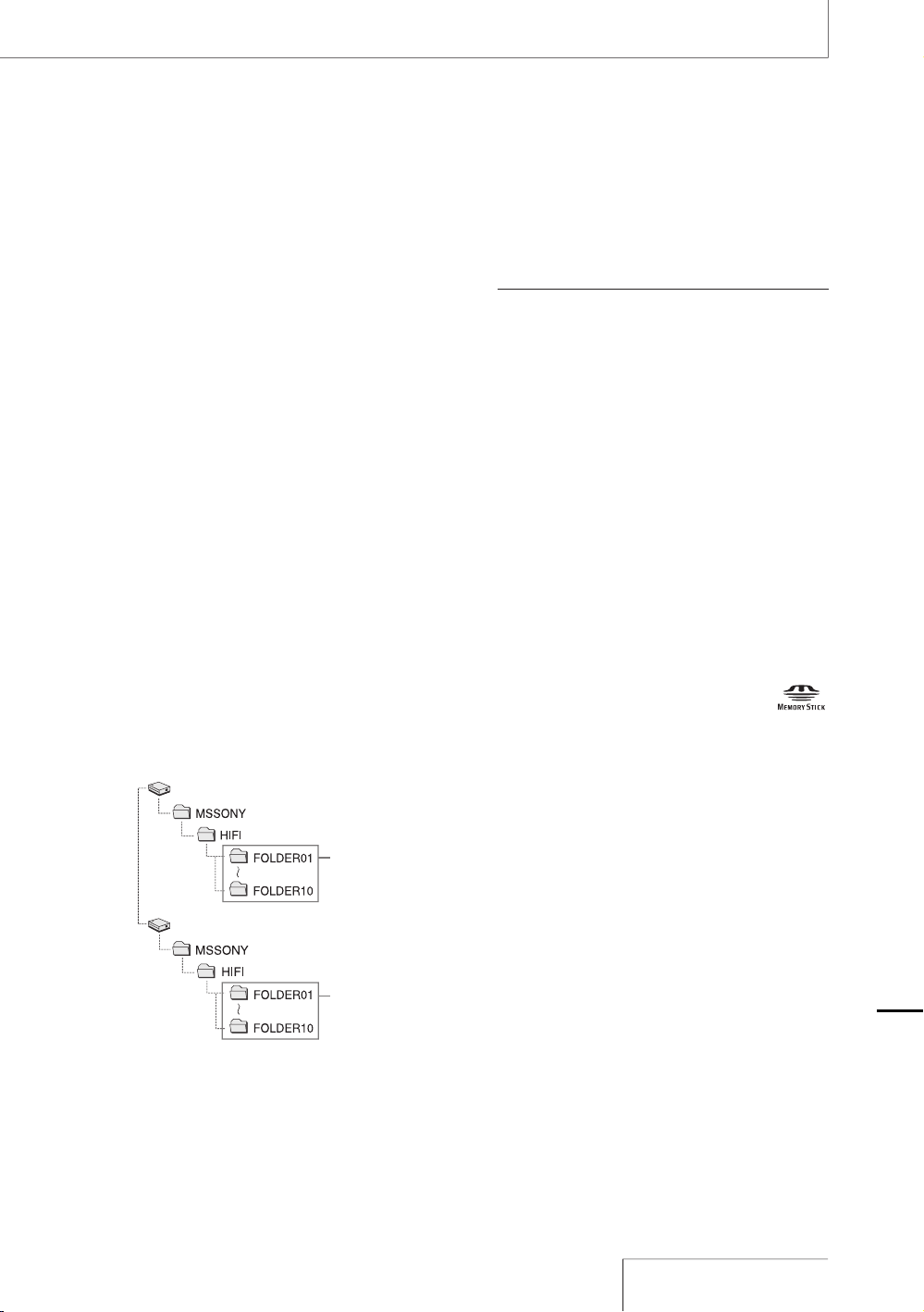
5SING¬THE¬h-EMORY¬3TICK¬02/¬
(IGH¬3PEEDv¬FOR¬RECORDING
PLAYBACK
ç 'OçTOçTHEçMENUçDISPLAYçANDçSETçTHEç
h-%-/29vçSETTINGçTOçh-%-/29ç34)#+vç
PAGEç
ç &OLLOWçTHEçSTEPSçOFçh2ECORDINGvçPAGEçç
ORçh0LAYINGçBACKçRECORDEDçAUDIOçDATAç
TRACKSvçPAGEç
4O¬STORE¬TRACKS¬ON¬A¬COMPUTER
#ONNECTçTHEçRECORDERçWITHçTHEçh-EMORYç
3TICKç02/ç(IGHç3PEEDvçINSERTEDçTOçAç
COMPUTERçPAGEç
/N¬FOLDER¬AND¬TRACK¬FILE¬STRUCTURE
4ENçFOLDERSçAREçCREATEDçINçTHEçh-EMORYç3TICKç
02/ç(IGHç3PEEDvçSEPARATELYçFROMçTHEç
FOLDERSçOFçTHEçBUILTINçMEMORYç4HEçSTRUCTUREç
OFçFOLDERSçANDçTRACKçFILESçAREçSAMEçASçTHEç
BUILTINçMEMORYçPAGEç
çç
&OLDERS¬IN¬THE¬
BUILTIN¬MEMORY
&OLDERS¬IN¬THE¬
h-EMORY¬3TICK¬
02/¬(IGH¬3PEEDv
&ORçDETAILSçABOUTçTHEçSPECIFICATIONSçOFçFOLDERç
ANDçTRACKçFILESçSEEçPAGEç
.OTES
sç $OçNOTçINSERTçORçREMOVEçTHEçh-EMORYç3TICKç02/ç
(IGHç3PEEDvçDURINGçRECORDINGPLAYBACKç$OINGçSOç
MAYçCAUSEçAçMALFUNCTIONçOFçTHEçRECORDER
sç 4HEçRECORDERçISçACCESSINGçMEMORYçWHILEç
h!##%33).'ç-%-/29vçAPPEARSçINçTHEçDISPLAYçORç
THEç!##%33çINDICATORçFLASHESç$URINGçTHISçTIMEçDOç
NOTçREMOVEçTHEçh-EMORYç3TICKç02/ç(IGHç3PEEDvç
$OINGçSOçMAYçDAMAGEçTHEçDATA
sç 7HENçYOUçUSEçh-EMORYç3TICKç02/('ç$UOvçOR
¬
h-EMORYç3TICKç02/ç$UOç(IGHç3PEEDvçBEçSUREçTOç
USEçTHEç-EMORYç3TICKç$UOçADAPTOR
sç /PERATIONSçOFçh-EMORYç3TICKç02/ç(IGHç3PEEDvçUPç
TOçç'"çAREçCHECKEDçONçTHEçRECORDERçBUTçTHISçDOESç
NOTçGUARANTEEçOPERATIONSçOFçALLçh-EMORYç3TICKç02/ç
(IGHç3PEEDvç"ECAUSEçTHEç3ONYçh-EMORYç3TICKç
02/ç(IGHç3PEEDvçISçTHEçONLYçh-EMORYç3TICKvçTHATç
ISçOPERATIONALLYçTESTEDçONçTHEçRECORDERçh-EMORYç
3TICKç02/ç(IGHç3PEEDvçOFçOTHERçMAKERSçMAYç
CAUSEçAçMALFUNCTION
h-EMORYç3TICKvçh-EMORYç3TICKç02/vçh-EMORYç3TICKç
02/ç$UOvçh-EMORYç3TICKç02/('ç$UOvçANDç
ç
AREçTRADEMARKSçOFç3ONYç#ORPORATION
2EMOVABLE¬$ISK
2EMOVABLE¬$ISK
!DDITIONAL¬)NFORMATION

Maintenance
On noise
• Noise may be heard when the recorder is
placed near an AC power source, a
fluorescent lamp or a mobile phone during
recording or playback.
• Noise may be recorded when an object,
such as your finger, etc., rubs or scratches
the recorder during recording.
On safety
Do not operate the recorder while driving,
cycling or operating any motorized vehicle.
On handling
• Do not subject the recorder to strong
shock or vibration. Doing so may cause a
malfunction of the recorder.
• Do not place the recorder in the following
locations:
– Anywhere extremely hot. Never exposed
it to temperatures above 60ºC.
– Under direct sunlight or close to heaters
– In a sun-heated car with windows closed
(especially in summer)
– Humid place, such as in a bathroom
– Anywhere dusty
On the built-in microphones
The built-in microphones are
high-performance electret condenser
microphones. Do not expose them to strong
wind or water.
On maintenance
When the exterior is dirty, clean the surface
gently with a soft cloth slightly moistened in
water, and then wipe it again with a dry
cloth. Do not use alcohol, benzene, or
thinner, etc., to avoid damaging the finish.
Backup recommendations
To avoid potential risk of data loss caused
by accidental operation or malfunction of the
recorder, we recommend that you save a
backup copy of your recorded tracks to a
computer.
40
PCM-D1. US. 2-664-971-13(2)

4ROUBLESHOOTING
)FçYOUçEXPERIENCEçTROUBLEçWITHçYOURçRECORDERçTRYçTHEçFOLLOWINGçSOLUTIONS
ç 4URNçOFFçTHEçRECORDERçCOMPLETELYçBYçREMOVINGçTHEçBATTERIESçANDçç
THEç!#çPOWERçADAPTORçANDçTHENçTURNçITçONçAGAINç/RçUSEçTHEçRECORDERçç
TOçINITIALIZEçTHEçBUILTINçMEMORYçORçTHEçh-EMORYç3TICKç02/ç(IGHç3PEEDvçç
.OTEçTHATçINITIALIZINGçWILLçDELETEçALLçDATAçINçTHEçMEMORY
ç 2EADçTHROUGHçTHEçSYMPTOMSçANDçSOLUTIONSçONçPAGESççTOççANDçç
MESSAGESçONçPAGESççANDççTOçCHECKçYOURçRECORDER
ç )FçTHEçPROBLEMçPERSISTSçCONSULTçWITHçQUALIFIEDç3ONYçPERSONNELçç
SEEçTHEçWARRANTYçFORçCONTACTçINFORMATION
3YMPTOM #AUSE3OLUTION
4HEçRECORDERçDOESçNOTç
OPERATE
s
ç4HEçBATTERIESçHAVEçBEENçINSERTEDçWITHçINCORRECTLYç2EINSERTçTHEMçCORRECTLYç
PAGEç
s
ç4HEçBATTERIESçAREçEXHAUSTEDç#HARGEçTHEMçORçREPLACEçTHEMçWITHçNEWçONESç
PAGEç
s
ç4HEçBUTTONSçAREçLOCKEDçWITHçTHEç(/,$çSWITCHç3ETçTHEç(/,$çSWITCHçTOçTHEç
h/&&vçPOSITIONçPAGEç
s
ç4HEç0/7%2çSWITCHçISçSETçTOçTHEçh/&&vçPOSITIONç3ETçITçTOçTHEçh/.vçPOSITION
9OUçCANNOTçSTARTç
RECORDING
s
ç4HEç-)#,).%ç).çSWITCHçISçINçTHEçWRONGçPOSITIONç3ETçITçTOçTHEçh-)#vç
POSITIONçWHENçUSINGçTHEçBUILTINçMICROPHONESçORçANçEXTERNALçMICROPHONEçTOç
INPUTçAUDIOçFORçRECORDINGç3ETçITçTOçTHEçh,).%ç).vçPOSITIONçWHENçEXTERNALç
EQUIPMENTçISçCONNECTEDçFORçRECORDINGçPAGEç
s
ç4HEçMEMORYçISçFULLçORçTHEçMAXIMUMçNUMBERçOFçTRACKSçPAGEççHAVEç
ALREADYçBEENçRECORDEDç$ELETEçSOMEçOFçTHEçTRACKSçPAGEççORçSTOREçTHEç
TRACKSçTOçTHEçHARDçDISKçOFçYOURçCOMPUTERçPAGEççANDçTHENçDELETEçTHEMç
FROMçTHEçRECORDERç9OUçCANçALSOçUSEçAçh-EMORYç3TICKç02/ç(IGHç3PEEDvç
WITHçSUFFICIENTçCAPACITYçPAGEç
s
ççTRACKSçHAVEçALREADYçBEENçRECORDEDçINçTHEçSELECTEDçFOLDERç3ELECTçANOTHERç
FOLDERçPAGEççORçDELETEçSOMEçOFçTHEçTRACKSçPAGEç
s
ç4HEçWRITEPROTECTçSWITCHçONçTHEçINSERTEDçh-EMORYç3TICKç02/ç(IGHç3PEEDvç
ISçSETçTOçh,/#+vç2ELEASEçTHEçLOCK
4HEç!##%33çINDICATORç
PEAKçLEVELçLAMPSçORç
ç2%#çç
ç0,!9çç
ç0!53%çINDICATORSçDOç
NOTçLIGHTFLASH
s
ç4HEçh,%$vçITEMçINçTHEçMENUçISçSETçTOçh/&&vç$ISPLAYçTHEçMENUçANDçSETçITçTOç
h/.vçPAGEç
#ONTINUED¬ON¬THE¬NEXT¬PAGE¬
!DDITIONAL¬)NFORMATION

Symptom Cause/Solution
You cannot erase a
track.
•
The write-protect switch on the inserted “Memory Stick PRO (High Speed)”
is set to “LOCK.” Release the lock.
•
When you use a Windows computer, the track or the folder containing the
track is set to “Read-only” in the computer. Display the track or the folder
using Windows Explorer and remove the check for “Read-only” under
“Properties.”
•
When you use a Mac computer, the track or the folder containing the track
is set to “Locked” in the computer. Display the track or the folder on Mac
Desktop and remove the check for “Locked” under “GetInfo” of “File.”
•
The remaining battery power is insufficient. Connect the AC power adaptor
to the recorder (page 20), charge the batteries, or replace them with new
ones (page 19).
Noise is heard.
•
An object, such as your finger, etc., accidentally rubbed or scratched the
recorder during recording so that noise was recorded.
•
Noise may occur if many low volume files are recorded in the current
memory. Save the tracks to the hard disk of your computer (page 30), and
then format the memory (page 36).
•
The recorder was placed near an AC power source, a fluorescent lamp or a
mobile phone during recording or playback.
•
Noise may occur if the plug of the connected external microphone was
dirty when recording. Clean the plug.
•
Noise may occur if the plug of the connected headphones/earphones is
dirty during playback or monitoring the recording sound. Clean the plug.
The sound picked up is
distorted.
•
The MIC/LINE IN switch is in the wrong position. Set it to the position that
corresponds to the sound source and connections (page 15).
•
The recording level is too high. Adjust the recording level to an appropriate
range (page 24).
•
The sound source is too loud when recording with an external microphone.
Set the MIC ATT switch to the “20” position (page 23), or move the
microphone away from the sound source.
•
The sound source has parts that are too loud. Set the “LIMITER” item to
“ON” in the menu display (page 35).
Noise occurs during
recording.
•
When monitoring the recording sound with headphones or earphones, they
are placed too close to the microphone. Decrease the sound level from
headphones or keep the microphone away from them.
“--h--m--s” is displayed
as the recorded date.
•
Set the clock (page 21). The date and time of recording are displayed after
the clock is set.
There are fewer menu
items in the menu
display.
•
Some menu items are not displayed during playback or recording (page
35).
Troubleshooting (continued)
42
PCM-D1. US. 2-664-971-13(2)

3YMPTOM #AUSE3OLUTION
!çCHARACTERçINçAçFOLDERçORç
TRACKçNAMEçISçDISPLAYEDç
INçUNREADABLEç
CHARACTERS
s
ç4HEçRECORDERçCANNOTçSUPPORTçORçDISPLAYçSOMEçSPECIALçCHARACTERSçANDç
SYMBOLSçTHATçAREçENTEREDçONçAçCOMPUTERçUSINGç7INDOWSç%XPLORERçORç-ACç
$ESKTOPç
h!##%33).'ç-%-/29vç
DISPLAYçDOESçNOTç
DISAPPEAR
s
ç)FçTHEçRECORDERçISçREQUIREDçTOçPROCESSçANçEXCESSIVEçAMOUNTçOFçDATAçTHEç
MESSAGEçMAYçBEçDISPLAYEDçFORçANçEXTENDEDçPERIODçOFçTIMEç4HISçISçNOTçAç
MALFUNCTIONçOFçTHEçRECORDERç7AITçUNTILçTHEçMESSAGEçDISAPPEARS
9OUçCANNOTçRECORDç
TRACKSçUPçTOçTHEç
MAXIMUMçRECORDINGçTIMEç
ONçPAGEç
s
ç4HEREçAREçOTHERçFORMATTEDçDATAçFORçEXAMPLEçIMAGESçINçTHEçMEMORY
s
çh-EMORYç3TICKç02/ç(IGHç3PEEDvçREQUIRESçAçMINIMUMçAMOUNTçOFçMEMORYç
EVENçWHENçRECORDINGçVERYçSHORTçTRACKSç!SçAçRESULTçTHEçACTUALçTOTALç
RECORDINGçTIMEçOFçh-EMORYç3TICKç02/ç(IGHç3PEEDvçMAYçBEçSHORTERçTHANç
THEçMAXIMUMçRECORDINGçTIMEçOFçTHEçRECORDER
s
ç4HEçMAXIMUMçRECORDINGçTIMEçINDICATEDçONçPAGEççISçESTIMATEDç)TçVARIESç
DEPENDINGçONçTHEçNUMBERçOFçTRACKS
s
ç$UEçTOçTHESEçLIMITATIONSçOFçTHEçRECORDINGçSYSTEMçTHEçSUMçOFçTHEçTOTALç
RECORDEDçTIMEçINçTHEçCOUNTERçELAPSEDçTIMEçANDçTHEçREMAININGçTIMEç
BECOMESçSHORTERçTHANçTHEçMAXIMUMçRECORDINGçTIMEçOFçTHEçRECORDER
s
ç%VENçWHENçh-%-/29ç&5,,vçISçDISPLAYEDçANDçTHEçRECORDERçSTOPSç
RECORDINGçTHEçRECORDERçHASçANçEXTRAçMEMORYçSPACEçFORçEDITINGç4HISçISçNOTçAç
MALFUNCTIONçOFçTHEçRECORDER
s
ç)FçRECORDINGçDATAçVOLUMEçOFçONEçTRACKçREQUIRESçOVERçç'"çTHEçCONSECUTIVEç
RECORDINGçSTARTSçASçAçNEWçTRACKçDUEçTOçTHEçSPECIFICATIONçOFçTHEçRECORDER
4HEçh-EMORYç3TICKç02/ç
(IGHç3PEEDvçISçNOTç
RECOGNIZEDç
s
ç3INCEçTHEçh-EMORYç3TICKç02/ç(IGHç3PEEDvçCONTAINSçIMAGEçDATAçORçOTHERç
FILESçTHEçMEMORYçREQUIREDçFORçCREATINGçINITIALçFOLDERSçISçINSUFFICIENTç5SEç
7INDOWSç%XPLORERçORçOTHERçTOOLSçTOçDELETEçUNNECESSARYçFILESçORçINITIALIZEçTHEç
h-EMORYç3TICKç02/ç(IGHç3PEEDvçONçTHEçRECORDER
h7!6vçFILESçCANNOTçBEç
PLAYEDçBACKçONçTHEç
RECORDER
s
ç!çFILEçRECORDEDçINçAçFREQUENCYçTHATçTHEçRECORDERçDOESçNOTçSUPPORTçCANNOTçBEç
PLAYEDçBACK
4HEçREMAININGçMEMORYç
VOLUMEçDOESçNOTçREACHç
s
ç$ATAçMAYçBEçDAMAGEDçBECAUSEçTHEçPOWERçSOURCEçWASçREMOVEDçDURINGç
RECORDINGç)NITIALIZEçTHEçMEMORYçUSINGçTHEçRECORDER
#ONTINUED¬ON¬THE¬NEXT¬PAGE¬
!DDITIONAL¬)NFORMATION

Error messages
Message Meaning/Solution
SET CLOCK The clock is not set. Set it before operating the recorder (page 21).
16 bit ONLY The “SBM” item can be set to “ON” only when the quantifying bit number is
set to 16 bit. Change the quantifying bit number to 16 bit on “REC MODE” in
the menu display, and then set “SBM” again (page 35, 36).
TRACK FULL The number of tracks saved in the current folder has reached the maximum
(99 tracks), and recording or track dividing cannot be done. To reduce the
number of tracks, record new tracks in another folder, delete unnecessary
tracks (page 36), or store some of the tracks to your computer (page 30).
MEMORY FULL There is no remaining data space in the built-in memory or the “Memory
Stick PRO (High Speed).” Delete unnecessary tracks (page 36) or store
some of the tracks to your computer (page 30), and then erase the contents
of the memory.
M.S. LOCKED The write-protect switch on the inserted “Memory Stick PRO (High Speed)”
is set to “LOCK.” Release the lock.
NO MEMORY STICK Insert the “Memory Stick PRO (High Speed)” (page 38).
FILE PROTECTED For Windows computers
The track is set to “Read-only” in the computer. Display the track using
Windows Explorer and remove the check for “Read-only” under “Properties.”
For Mac computers
The track is set to “Locked” in the computer. Display the track on Mac
Desktop and remove the check for “Locked” under “GetInfo” of “File.”
UNKNOWN DATA The file cannot be played back, because it is in an unsupported data or file
format.
BATTERY LOW The remaining battery power is insufficient. Connect the AC power adaptor
to the recorder (page 20), charge the batteries, or replace them with new
ones (page 19).
NO DELETE For Windows computers
This track cannot be deleted. The track may be set to “Read-only” in the
computer. Display the track using Windows Explorer and remove the check
for “Read-only” under “Properties.”
For Mac computers
This track cannot be deleted. The track may be set to “Locked” in the
computer. Display the track on Mac Desktop and remove the check for
“Locked” under “GetInfo” of “File.”
Troubleshooting (continued)
44
PCM-D1. US. 2-664-971-13(2)

-ESSAGE -EANING3OLUTION
&),%ç3):%ç&5,, 4HEçMAXIMUMçDATAçCAPACITYçFORçONEçTRACKçISçç'"ç7HENçTHEçDATAçOFçONEç
TRACKçEXCEEDSçç'"çDURINGçRECORDINGçRECORDINGçASçAçNEWçTRACKçSTARTSç)NçTHISç
SITUATIONçBECAUSEçTHEçNUMBERçOFçTRACKSçSAVEDçINçTHEçCURRENTçFOLDERçHASç
REACHEDçTHEçMAXIMUMççTRACKSçTHEçRECORDINGçSTOPPEDç2ECORDçTHEçNEWç
TRACKçINçANOTHERçFOLDERç/RçYOUçCANçDELETEçUNNECESSARYçTRACKSçPAGEççORç
STOREçSOMEçOFçTHEçTRACKSçPAGEççTOçREDUCEçTHEçNUMBERçOFçTRACKS
-3ç%22/2 )NSERTçTHEçh-EMORYç3TICKç02/ç(IGHç3PEEDvçAGAINç)FçTHISçMESSAGEçAPPEARSç
AGAINçTHEçh-EMORYç3TICKç02/ç(IGHç3PEEDvçMAYçHAVEçAçPROBLEM
./ç-%-/29ç30!#% 4HEçRECORDERçCANNOTçBEçOPERATEDçBECAUSEçTHEREçISçNOçREMAININGçSPACEçINç
MEMORYç)NITIALIZEçTHEçMEMORYçUSINGçh&/2-!4vçINçTHEçMENUçDISPLAYçPAGEç
çORçSTOREçSOMEçOFçTHEçTRACKSçTOçYOURçCOMPUTERçPAGEççANDçDELETEçTHESEç
TRACKS
&),%ç$!-!'%$ 4HEçTRACKçCANNOTçBEçPLAYEDçBACKçBECAUSEçITçISçDAMAGED
&/2-!4ç%22/2 4HEçMEMORYçTHATçISçINITIALIZEDçONçTHEçOTHERçEQUIPMENTçCANNOTçBEçUSEDçINçTHEç
RECORDERç)NITIALIZEçTHEçMEMORYçUSINGçh&/2-!4vçINçTHEçMENUçDISPLAYçPAGEç
#!../4ç/0%2!4% 4HEçTRACKçNAMEçHASçREACHEDçTHEçMAXIMUMçNUMBERçOFçCHARACTERSç3HORTENç
THEçFILEçNAMEçUSINGçTHEçCOMPUTER
#(!.'%ç"!44%29 4HEçBATTERIESçAREçEXHAUSTEDç#HARGEçTHEçBATTERIESçORçREPLACEçTHEMçWITHçNEWç
ONESçPAGEç
3934%-ç%22/2 !çSYSTEMçERRORçHASçOCCURREDç2EMOVEçTHEçBATTERIESçORçTHEç!#çPOWERçADAPTORç
TOçTURNçOFFçTHEçRECORDERçCOMPLETELYçANDçTHENçTURNçONçTHEçRECORDERçAGAINç)Fç
THISçMESSAGEçAPPEARSçAGAINçCONSULTçWITHçQUALIFIEDç3ONYçPERSONNELçSEEçTHEç
WARRANTYçFORçCONTACTçINFORMATION
0/7%2ç02/",%- )NCOMPATIBLEçBATTERIESçORç!#çPOWERçADAPTORçISçBEINGçUSEDçWHICHçCOULDç
CAUSEçAçMALFUNCTIONç5SEçONLYçCOMPATIBLEçBATTERIESçANDç!#çPOWERçADAPTORS
!DDITIONAL¬)NFORMATION

Recording media
Built-in flash memory 4 GB, “Memory
Stick PRO (High Speed)” (not
supplied), Stereo recording
Maximum recording time
Refer to “Maximum recordable time”
on page 49.
Quantization
16-bit linear, 24-bit linear
Frequency range (Input from the LINE IN jack
when recording/playing back)
(0 to
–
2 dB)
Fs
22.05 kHz: 20 to 10,000 Hz
Fs 44.10 kHz: 20 to 20,000 Hz
Fs 48.00 kHz: 20 to 22,000 Hz
Fs 96.00 kHz: 20 to 44,000 Hz
Signal-to-noise ratio (S/N) (Input from the
LINE IN jack when recording/playing
back)
96 dB or above (1 kHz IHF-A)
(for 24 bit)
Total harmonic distortion (Input from the
LINE IN jack)
22.05 kHz 16 bit, 44.10 kHz 16/24 bit:
0.008% or below (1 kHz, 22 kHz LPF)
48.00 kHz 16/24 bit, 96.00 kHz
16/24 bit: 0.008% or below (1 kHz,
22 kHz LPF)
Wow and flutter
Below measurable limit (less than
±0.001% W.PEAK)
Specifications
Input/output
MIC jack (stereo mini jack)
Input impedance: 22k
Rated input level: 2.5mV
Minimum input level: 0.7mV
(headphone) jack (stereo mini jack)
Rated output level: 400mV
Maximum output level: 30mW +
30mW or more
Load impedance: 16
LINE IN jack
Input impedance: 47k
Rated input level: 2.0V
Minimum input level: 570mV
LINE OUT/optical DIGITAL OUT jack
Output impedance: 220
Rated output level: 1.8V
Load impedance: 22k
Output level: –21 to –15dBm
(for optical digital output)
Emission wavelength: 630 to 690 nm
(for optical digital output)
DC IN 6V jack
USB connector (Hi-speed USB, Mass
Storage Class)
Memory Stick slot
46
PCM-D1. US. 2-664-971-13(2)
'ENERAL
0OWERçREQUIREMENTSç
$#ç).ç6
ç
&OURçSIZEç!!ç,2çNICKELçMETALç
HYDRIDEçRECHARGEABLEçBATTERIESç.(!!ç
SUPPLIED
ç
&OURçSIZEç!!ç,2çALKALINEçBATTERIESç
NOTçSUPPLIED
0OWERçCONSUMPTION
ç
7
$IMENSIONS
ç
!PPROXççççççMMç
çç
çç
çWHDçNOTç
INCLUDINGçPROJECTINGçPARTSçANDç
CONTROLS
-ASSç çGççOZçINCLUDINGçBATTERIES
3UPPLIEDçACCESSORIES
ç
2EFERçTOçh#HECKINGçTHEçSUPPLIEDç
ACCESSORIESvçONçPAGEç
/PTIONAL¬ACCESSORIES
h-EMORYç3TICKç02/('ç$UOvç
-3%8'ç'"
ç -3%8'ç'"
ç -3%8'ç'"
h-EMORYç3TICKç02/ç(IGHç3PEEDv
ç
-38'.çç'"ç-38'.çç'"ç
-38'.çç'"
h-EMORYç3TICKç02/ç$UOç(IGHç3PEEDv
ç
-38-'.çç'"ç
ç
-38-'.çç'"
3TEREOçHEADPHONES
ç
-$26ç-$26($ç
ç
-$26$*
!UDIOçCONNECTINGçCABLE
ç
2+'
/PTICALçDIGITALçCABLE
ç
0/#."çOPTICALçMINIçPLUGç
ç
OPTICALçMINIçPLUG
ç
0/#.!"çOPTICALçMINIçPLUGçç
ç
RECTANGULARSHAPEDçOPTICALçPLUG
%XTERNALçMICROPHONE
ç
%#--3
$ESIGNçANDçSPECIFICATIONSçAREçSUBJECTçTOç
CHANGEçWITHOUTçNOTICE
0RINTEDçONççRECYCLEDçPAPERç
USINGç6/#ç6OLATILEç/RGANICç
#OMPOUNDFREEçVEGETABLEçOILç
BASEDçINK
!DDITIONAL¬)NFORMATION

Once you record audio in the built-in
memory or a “Memory Stick PRO (High
Speed),” the 10 folders for saving tracks are
automatically created in each memory. One
“.WAV” file is created for each recording.
For details about the folders and track file
structure, refer to page 32.
Notes about folder/track file
•
Because the folder names “FOLDER 01” to
“FOLDER 10” are fixed, do not change the
names on a computer. If changed, the
recorder cannot recognize the folders.
•
The number of folders is fixed at 10 for
each memory. If a folder is deleted on a
computer, a new folder is created in the
built-in memory or “Memory Stick PRO
(High Speed).”
•
The maximum number of tracks that can
be saved in one folder is 99 tracks.
•
The maximum data capacity that one WAV
format track can deal with is 2 GB. If the
data amount of one track exceeds 2 GB
during recording, recording as a new track
starts automatically. In this case, the
elapsed recording time display changes to
0 second, but the contents that have been
recorded up to 2 GB are stored normally.
File specifications
•
If recording is stopped right after starting
recording, one track is created.
•
If you use 8 or fewer alphanumeric
characters in lower case for a file name,
the characters are displayed in upper case
on the recorder. If you use 9 letters or
more, they are displayed in lower case.
48
PCM-D1. US. 2-664-971-13(2)
-AXIMUM¬RECORDABLE¬TIME¬!PPROXIMATE
4HEçTOTALçMAXIMUMçRECORDABLEçTIMEçAPPROXIMATEçOFçALLçTHEçFOLDERSçISçASçFOLLOWS
"UILTIN¬FLASH¬MEMORY¬¬'"
3AMPLING¬FREQUENCY
QUANTIFYING¬BIT¬NUMBER
-AXIMUM¬
RECORDABLE¬TIME¬
çK(ZççBIT
çHRSççMIN
çK(ZççBIT
çHRSççMIN
çK(ZççBIT
çHRSççMIN
çK(ZççBIT
çHRS
çK(ZççBIT
çHRS
çK(ZççBIT
çHRS
çK(ZççBIT
çHRS
h-EMORY¬3TICK¬02/¬(IGH¬3PEEDv
3AMPLING¬FREQUENCY
QUANTIFYING¬BIT¬NUMBER
-AXIMUM¬RECORDABLE¬TIME¬
¬-" ¬-" ¬'" ¬'" ¬'"
çK(ZççBIT
çMIN çHRççMIN çHRSççMIN çHRSççMIN çHRSççMIN
çK(ZççBIT
çMIN çMIN çHRççMIN çHRSççMIN çHRSççMIN
çK(ZççBIT
çMIN çMIN çHR çHRSççMIN çHRSççMIN
çK(ZççBIT
çMIN çMIN çHRççMIN çHRSççMIN çHRSççMIN
çK(ZççBIT
çMIN çMIN çMIN çHRççMIN çHRSççMIN
çK(ZççBIT
çMIN çMIN çMIN çHRççMIN çHRSççMIN
çK(ZççBIT
çMIN çMIN çMIN çMIN çHRççMIN
ç 4HEçMAXIMUMçRECORDABLEçTIMEçISçVARIEDçDEPENDINGçONçRECORDINGçCONDITION
!DDITIONAL¬)NFORMATION

Index
Symbols
(headphone) jack ........... 26, 28
FF/UP button ............. 21, 29
FR/DOWN button ....... 21, 29
PAUSE button/indicator . 25, 29
PLAY/ENTER button/indicator
21, 28
REC button/indicator ...........24
STOP button ................. 25, 29
200Hz HPF .............................36
A
ACCESS indicator ............. 20, 38
AC power adaptor ..................20
Alkaline battery .......................19
Analog level meters .................25
B
Battery case ...........................19
Battery charger .......................19
Battery compartment lid ..........19
Built-in microphones ......... 10, 22
Direction of sound ............22
Directivity .........................22
C
Carrying case .........................18
CD-ROM (“Driver for Windows
2000”) .................................18
CHARGE lamp ........................19
CLOCK ..................................37
Clock .....................................21
Computer ...............................30
Continuous playback time .......20
Continuous recording time .......20
D
DC IN 6V jack .........................20
DELETE ALL ...........................36
DELETE TRK ..........................36
Digital limiter ...........................35
DIGITAL OUT jack ...................29
Display ...................................16
DISPLAY button ......................17
DIVIDE button .........................30
Dividing ..................................30
E
Elapsed recording/playback
time .....................................17
Electrical circuit ......................11
Exterior ..................................12
External microphone ...............27
F
Fast forwards .........................29
Fast reverse ............................29
FOLDER .................................37
Folder .............................. 32, 48
FORMAT ................................36
G
Go to the beginning of track ....29
H
High Pass Filter ......................36
HOLD switch ..........................17
L
LED .......................................36
LIGHT button ..........................15
LIMITER .................................35
LINE IN jack ...........................27
LINE OUT jack ........................29
50
PCM-D1. US. 2-664-971-13(2)

-
-EMORYç3TICKç$UOçADAPTORç
h-EMORYç3TICKç02/ç(IGHç
3PEEDvç
h-EMORYç3TICKç02/('ç
ç
$UOvç
-AINTENANCEç
-AXIMUMçRECORDABLEçTIMEç
-%-/29ç
-EMORYç3TICKçSLOTç
-%.5çBUTTONç
-ENUçDISPLAYç
-)#,).%ç).çSWITCHç
ç
-)#ç!44çSWITCHç
-)#çJACKç
-ONITORINGçTHEçRECORDINGç
0
0EAKçLEVELçLAMPSç
0EAKçMETERç
0LAYINGçBACKç
0AUSEç
3TOPç
0OWERçSOURCEç
0/7%2çSWITCHç
0REPARATIONçBEFOREçRECORDINGç
1
1UANTIFYINGçBITçNUMBERç
2
2ECHARGEABLEçBATTERYç
2ECORDINGç
0AUSEç
3TOPç
2%#ç,%6%,ç,2çDIALSç
2%#ç-/$%ç
2EMAININGçBATTERYçPOWERç
2EMAININGçMEMORYçVOLUMEç
2EMAININGçRECORDABLEç
ç
TIMEç
ç
2EMAININGçTIMEçOFçTHEçCURRENTç
TRACKç
3
3AMPLINGçFREQUENCYç
3"-ç
3IZEç!!ç,2çBATTERYçCASEç
3LITçFORçAçWRISTçSTRAPç
3PECIFICATIONSç
3UPERç"ITç-APPINGç
3UPPLIEDçACCESSORIESç
4
4IMEçINFORMATIONç
4RACKçFILEç
ç
4RIPODç
4ROUBLESHOOTINGç
5
53"çCONNECTINGçCABLEç
53"çCONNECTORç
6
6/,5-%çDIALç
7
7INDSCREENç
7RISTçSTRAPç
!DDITIONAL¬)NFORMATION

PCM-D1. US. 2-664-971-14(1)