CUHYA-0100
DUALSHOCK
®
4 Back Button Attachment
Instruction Manual
2
Precautions
Before using this product, carefully read this manual and any manuals for compatible hardware. Retain instructions
for future reference. For assistance with this product, visit playstation.com/get-help/.
Safety
Keep this product out of the reach of small children. Small children may swallow small parts, which may cause injury
or damage the product.
• Do not touch the product with wet hands.
• Check that there is no dust or foreign object on the connectors when connecting this product to your
wireless controller.
Use and handling
• Use this product only with a DUALSHOCK
®
4 wireless controller.
• Do not let any other metal items come in contact with the connectors.
• Do not place any objects on top of the product. Do not stand on the product.
• Do not throw or drop the product, or otherwise expose it to strong physical impact.
• Do not place the product on surfaces that are unstable, tilted or subject to vibration.
• Never disassemble or modify the product.
• Follow the instructions below to help prevent the product exterior from deteriorating or becoming discoloured.
– Wipe with a soft, dry cloth.
– Do not place any rubber or vinyl materials on the product exterior for an extended period of time.
– Do not use solvents or other chemicals. Do not wipe with a chemically treated cleaning cloth.
Storage conditions
• Do not expose the product to dust, smoke or steam.
• Do not expose the product to high temperatures, high humidity or direct sunlight.
• Do not allow liquid or small particles to get into the product.
Part names
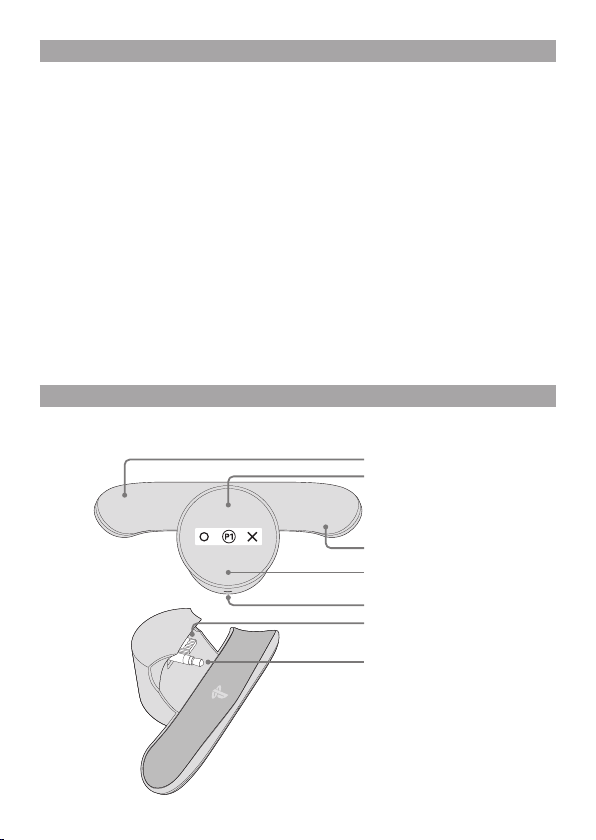
Extension connector
Stereo headset plug
Back button
Screen
Back button
Stereo headset jack
Screen button
3
Getting started
The DUALSHOCK
®
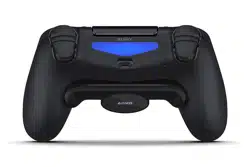
4 back button attachment adds two extra buttons to the back of your DUALSHOCK
®
4 wireless
controller, allowing unused fingers to get into the game.
You can program these extra buttons, allowing you to customise your set-up and get the edge with important
controls at your fingertips. Each saved assignment is called a profile.
Before connecting:
Follow these instructions carefully to avoid damaging the connectors on the DUALSHOCK
®
4 back button attachment
and DUALSHOCK
®
4 wireless controller.
• Turn o your PlayStation
®
4 system or put it in rest mode before connecting the attachment to your
DUALSHOCK
®
4 wireless controller. If you leave your system on, your controller might not connect properly
to the back button attachment.
• Also, your controller must already be paired with your PS4™ system.
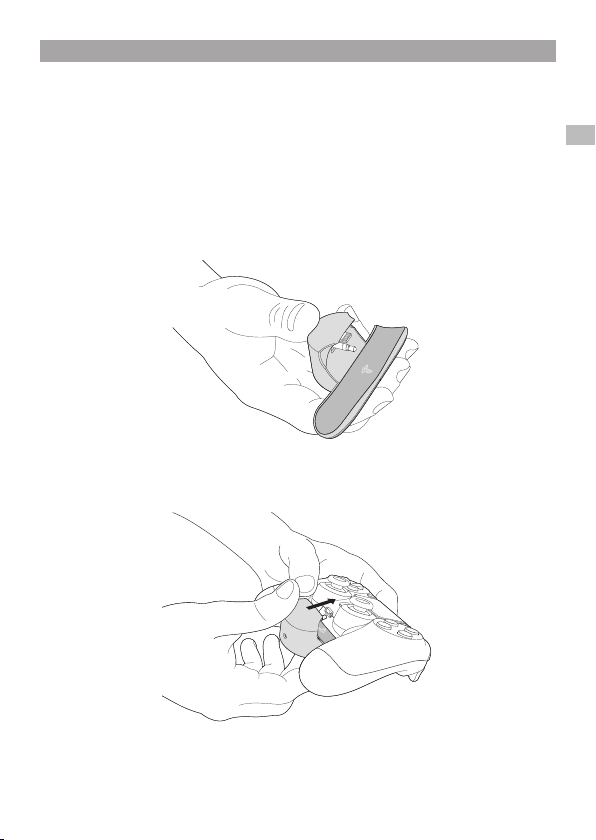
1
Hold the back button attachment with your thumb behind the stereo headset plug.
2
With the attachment’s stereo headset plug and the controller’s stereo headset jack aligned,
firmly push the attachment toward the controller to insert.
EN
4
Powering up
1
Press the
p
(PS) button to turn on your controller.
2
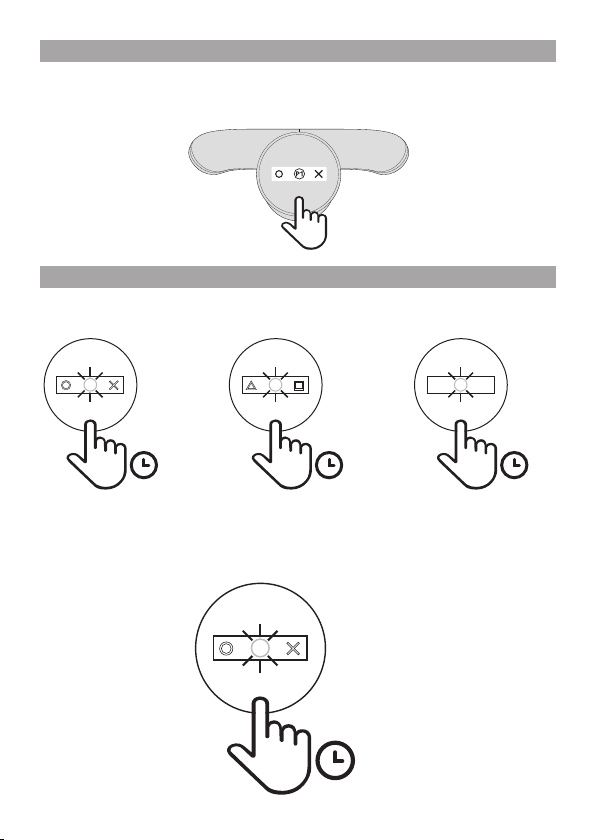
Click the screen button on the attachment. The default profile (P1) appears on the screen.
Creating proles
You can save up to 3 dierent profiles (button assignments). The default profiles are as follows:
Default profiles
Customise a profile
1
Hold the screen button down for 1 second to enter programming mode.
The profile number in the centre of the screen flashes to let you know you’re in programming mode.
x1
1s
H J
P1
1s
L
K
P2
1s
Q
E
P3
1s
H J
5
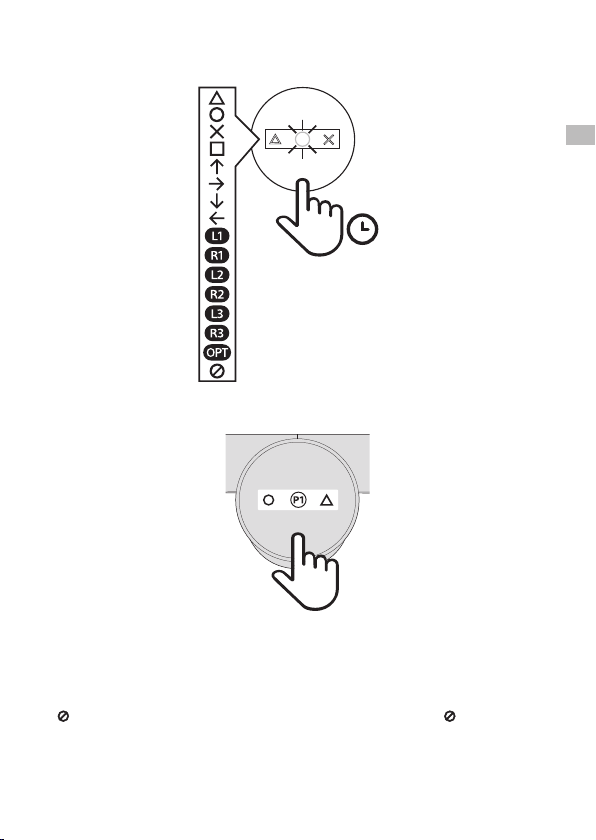
2
Press the back buttons to select from among the available button assignments.
Press and hold a back button to scroll through the possible assignments for that back button.
3
Click the screen button once to exit programming mode and save your profile.
If you want to create another profile, click the screen button once to enter programming mode again, and then click
twice to program the next profile.
Hints
• In programming mode, the screen turns itself o after 10 seconds of inactivity. When not in programming mode,
the screen turns itself o after 3 seconds of inactivity.
• Any customised button assignments made within PS4™ system settings also apply to the attachment.
• indicates that no button is assigned. When you assign both back buttons in a profile to , that profile is hidden
when not in programming mode.
1s
J
K
P1
x1
EN
6
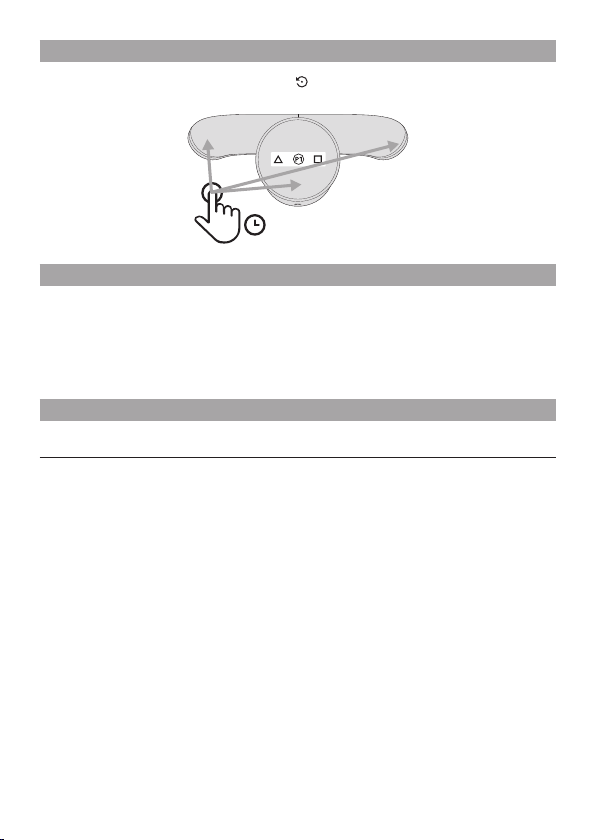
Starting over
If you want to reset your attachment to the factory default profiles, press and hold the left back button, right back
button, and screen button at the same time. Once the reset icon appears on the screen, continue to hold for
5 seconds. When KHJL appears, the reset is done.
Specications
Input power rating 3.2 V ⎓ 100 mA
External dimensions Approx. 101.2 x 4.5 x 39.4 mm
(excluding projecting parts) (width × height × depth)
Weight Approx. 26.2 g
Screen 4,096 pixel OLED display
Operating temperature 5 °C to 35 °C
Design and specifications are subject to change without notice.
GUARANTEE
This product is covered for 12 months from date of purchase by the manufacturer’s guarantee. Please refer to the
guarantee supplied in the PS4™ package for full details.
This product is manufactured for Sony Interactive Entertainment LLC, 2207 Bridgepointe Parkway, San Mateo, CA 94404,
United States of America.
Imported into Europe and Distributed by Sony Interactive Entertainment Europe Limited, 10 Great Marlborough Street,
London,W1F 7LP, United Kingdom.
The Authorised Representative for issuing and holding Declarations of Conformity is Sony Interactive Entertainment
Europe Limited, 10 Great Marlborough Street, London, W1F 7LP, United Kingdom.
The date of manufacture is specified on the product packaging or the nameplate near the P/D indication in the following
format: P/D: MM.YYYY, where MM - month, YYYY - year of manufacturing.
Made in China.
5s
H K
P2

7
Where you see this symbol on any of our electrical products or packaging, it indicates that the relevant electrical product
should not be disposed of as general household waste in the EU, Turkey, or other countries with separate waste
collection systems available. To ensure correct waste treatment, please dispose of them via an authorised collection
facility, in accordance with any applicable laws or requirements. Waste electrical products may also be disposed of free
of charge via retailers when buying a new product of the same type. Furthermore, within EU countries larger retailers
may accept small waste electronic products free of charge. Please ask your local retailer if this service is available
for the products you wish to dispose of. In so doing, you will help to conserve natural resources and improve standards
of environmental protection in treatment and disposal of electrical waste.
EN
“ ”, “PlayStation”, “ ”, “DUALSHOCK” and “PlayStation Shapes Logo” are registered trademarks or trademarks
of Sony Interactive Entertainment Inc.
“ ” is a registered trademark of Sony Corporation.
© 2019 Sony Interactive Entertainment Europe Limited. All rights reserved.
