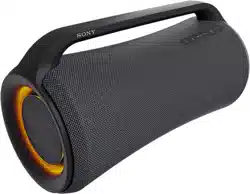
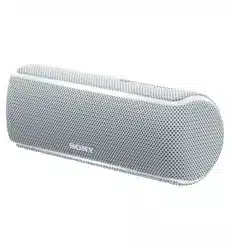
Reference Guide Wireless Speaker
Precautions
On safety
- Important information such as the model name is located as follows:
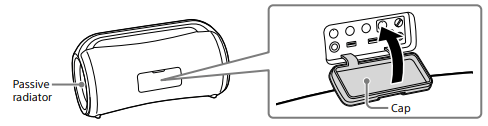
– On the inner surface of the cap on the rear side of the unit
– On the surface of the AC adaptor
On the AC adaptor
- Use only the supplied AC adaptor. To avoid damaging the unit, do not use any other AC adaptor.
On placement
- To eliminate the risk of malfunctions, avoid the following locations when placing or leaving this unit.
– A place subject to high temperatures, such as under direct sunlight or lighting equipment, near a heat source, or in a sauna
– Inside a vehicle with the windows closed (especially in summertime)
– A place subject to excessive dust
– A place subject to strong vibration
- Place this unit on a flat, level surface. When placed on a sloped surface, the unit may fall over or fall off the surface due to its own vibration, resulting in injuries, malfunctions, or performance degradation.
- Depending on the conditions where this unit is placed, it may fall over or fall off the surface. Do not leave any valuables near the unit.
- This unit is not anti-magnetic. Keep objects susceptible to magnetism (recorded tapes, watches, cash cards and credit cards with magnetic coding, etc.) away from the unit. When you carry around the unit, keep this in mind as well.
Others
- If you use this unit for a long time, the temperature of this unit may rise, but it is not a malfunction.
- Do not use or leave the unit in an extremely cold or hot environment (temperature outside the range of 5 °C – 35 °C (41 °F – 95 °F)). If the unit is used or left in outside the above range, the unit may automatically stop to protect internal circuitry.
- At high temperature, the charging may stop or the volume may reduce to protect the battery.
- Even if you do not intend to use the unit for a long time, charge the battery to its full capacity once every 6 months to maintain its performance.
About the Voice Guidance
IMPORTANT: THE SOUND GUIDANCE IS AVAILABLE IN THIS PRODUCT ONLY IN ENGLISH
Depending on the status of the unit, the voice guidance outputs from the unit as followings.
- When entering pairing mode: “BLUETOOTH pairing”
- When establishing a BLUETOOTH connection: “BLUETOOTH connected”
- When disconnecting a BLUETOOTH connection: “BLUETOOTH disconnected”
- When pressing the BATTERY button to check the battery power during the unit is turned on: “Battery fully charged/Battery about 90%/Battery Care mode, Fully charged, Battery about 90%/Battery about 80%/Battery about 70%/Battery about 60%/Battery about 50%/Battery about 40%/Battery about 30%/Battery about 20%/Please charge”
- When the remaining power of the rechargeable battery falls below 10% while the unit is powered: ”Please Charge”
- When pressing and holding the BATTERY button to change the charge mode while the unit is powered: ”Battery Care mode, ON/Battery Care mode, OFF"
- When a Stereo Pair connection is established by the application (Sony | Music Center): “Left/Right”
On Copyrights
- Android, Google Play and other related marks and logos are trademarks of Google LLC.
- LDAC™ and LDAC logo are trademarks of Sony Corporation.
- Windows Media is either a registered trademark or trademark of Microsoft Corporation in the United States and/or other countries.
- This product is protected by certain intellectual property rights of Microsoft Corporation. Use or distribution of such technology outside of this product is prohibited without a license from Microsoft or an authorized Microsoft subsidiary.
- The BLUETOOTH® word mark and logos are registered trademarks owned by Bluetooth SIG, Inc. and any use of such marks by Sony Corporation is under license.
- Apple, the Apple logo, iPhone and iPod touch are trademarks of Apple Inc., registered in the U.S. and other countries.
App Store is a service mark of Apple Inc., registered in the U.S. and other countries.
- Use of the Made for Apple badge means that an accessory has been designed to connect specifically to the Apple product(s) identified in the badge, and has been certified by the developer to meet Apple performance standards. Apple is not responsible for the operation of this device or its compliance with safety and regulatory standards.
Please note that the use of this accessory with an Apple product may affect wireless performance.
- Other trademarks and trade names are those of their respective owners.
- ™ and ® marks are omitted in the documents.
Notes on water resistant and dustproof features (Read before using the unit)
Water resistant and dustproof performance of the unit
The unit, with the cap closed securely, has a water resistant specification of IPX6*1 as specified in “Degree of protection against jets of water” of the IEC60529 “Ingress Protection Rating (IP Code)”*3, and a dustproof specification of IP6X*2 as specified in “Degree of protection against solid foreign objects”*3.
Liquids that the water resistant performance specifications apply to
| Applicable |
fresh water, tap water, pool water |
| Not applicable |
liquids other than the above (soapy water, water with detergent or bath agents, shampoo, hot spring water, salt water, etc.) |
*1 IPX6 (Degree of protection against jets of water): For details, refer to the Help Guide.
*2 IP6X (Degree of protection against dust): For details, refer to the Help Guide.
*3 The supplied accessories and the connectors of this unit (DC IN/USB/AUDIO IN/MIC/GUITAR) are neither water resistant nor dustproof. To reduce the risk of fires or electric shocks, do not expose the unit to water or droplets while using any connectors (DC IN/USB/AUDIO IN/MIC/GUITAR). Do not place a vase or any other liquid-filled container on the unit.
The water resistant and dustproof performance of the unit is based on our measurements under the conditions herein described. Note that malfunctions as a result of water immersion or dust intrusion caused by misuse by the customer are not covered by the warranty
To avoid deterioration of water resistant and dustproof performance
Check the following and use the unit correctly.
- This unit does not have a design that is resistant to water pressure. Do not put the unit in the water to avoid a malfunction.
- Do not pour high-temperature water or blow hot air from a hair dryer or any other appliance on the unit directly. Also never use the unit in a place subject to high temperatures, such as in a sauna or near a heat source.
- Handle the cap with care. The cap plays a very important role in maintenance of the water resistant and dustproof performance. When using the unit, make sure that the cap is closed completely. When closing the cap, be careful not to allow foreign objects inside. If the cap is not closed completely the water resistant and dustproof performance may deteriorate and may cause a malfunction of the unit as a result of water or dust particles entering the unit.
How to care for the unit
Although the fabric part of the unit has water repellent treatment applied, you can use the unit more comfortably and for a longer period of time by following the maintenance procedure below.
- If the surface of the unit gets dirty in the following cases, wash the unit with fresh water (tap water, etc.) promptly to remove the dirt. Leaving dirt on its surface may cause the fabric part or the passive radiator section to discolor or deteriorate, or the unit to malfunction.
Ex.
– When the unit has sand, salt (chlorine), or other residue on it after having been used in a mountain area, by a swimming pool, etc.
– When the unit is stained with foreign substances (sunscreen, suntan oil, etc.)
- If the unit gets wet, wipe off the moisture using a dry soft cloth immediately. In addition, dry the unit in an airy place until no moisture remains.
- The sound quality may change when water enters the speaker section of the unit. This, however does not indicate a malfunction. Wipe off the moisture on its surface, and put the unit on a dry soft cloth to drain the collected water inside the unit. Then, dry the unit in an airy place until no moisture remains.
Note
- If the surface of the unit gets dirty, do not use detergent, thinner, benzine, alcohol, etc. to clean the unit because it will affect the water repellent function of the fabric part of the unit.
- Especially in cold regions, be sure to wipe off the moisture after using the unit. Leaving moisture on its surface may cause the unit to freeze and malfunction.
- If sand grains, etc. enter the fabric or other part of the unit, remove them carefully. Never use a vacuum cleaner, etc. on the unit. It may cause damage of the speaker section or other part of the unit.
Specifications
Speaker
Woofer unit Approx. 110 mm × 110 mm (4 in × 4 in) (2)
Tweeter unit Approx. 25 mm (1 in) dia. (2)
Enclosure type Passive radiator model
BLUETOOTH
Communication system BLUETOOTH Specification version 5.0
Maximum communication range Line of sight*1 approx. 30 m (98 ft)
Frequency band 2.4 GHz band (2.4000 GHz - 2.4835 GHz)
Modulation method FHSS (Freq Hopping Spread Spectrum)
Compatible BLUETOOTH Profiles*2 A2DP (Advanced Audio Distribution Profile)
AVRCP (Audio Video Remote Control Profile)
Supported codecs*3 SBC (Subband Codec)
AAC (Advanced Audio Coding)
LDAC*4
Transmission range (A2DP) 20 Hz - 20 000 Hz (Sampling frequency 44.1 kHz)
*1 The actual range will vary depending on factors such as obstacles between devices, magnetic fields around a microwave oven, static electricity, reception sensitivity, antenna’s performance, operating system, software application, etc.
*2 BLUETOOTH standard profiles indicate the purpose of BLUETOOTH communications between devices.
*3 Codec: Audio signal compression and conversion format
*4 LDAC is an audio coding technology developed by Sony that enables the transmission of High-Resolution (Hi-Res) Audio content, even over a BLUETOOTH connection.
Note: Depending on the network environment, there may be an interruption at the high bitrate transmission.
Amplifier section
POWER OUTPUT AND TOTAL HARMONIC DISTORTION:
With 4 Ω loads, both channels driven, from 100 Hz – 10 000 Hz; rated 5 W per channel minimum RMS power at stereo mode, with no more than 1% total harmonic distortion from 250 mW to rated output.
General
Inputs
Type A USB1 port: Supported USB Device (Mass Storage Class) AUDIO IN jack (stereo mini jack): Voltage 1 V, impedance 10 kΩ MIC/GUITAR jack:
Sensitivity 1 mV, impedance 10 kΩ (when guitar mode is turned off)
Sensitivity 200 mV, impedance 500 kΩ (when guitar mode is turned on)
DC OUT
Type A USB1 and USB2 port (for charging the battery of a connected device) (DC 5 V/Max. 1.5 A (Max. 2 A in total for 2 ports))*5
Power DC 20 V (using the supplied AC adaptor connected to AC 100 V - 240 V, 50 Hz/60 Hz power supply) or, using built-in lithium-ion battery
Lithium-ion battery life (while Battery Care mode*6 is not activated)
With playback via a BLUETOOTH connection
Approx. 30 hours*7 *8
Approx. 25 hours*7 *9
Approx. 5 hours*7 *10
Approx. 4 hours*7 *11
Time required for charging the built-in rechargeable battery*12 (while Battery Care mode*6 is not activated)
Approx. 3 hours
(10 minutes of charging provide approximately 3 hours of music playback.)*7 *8
Dimensions (including projecting parts and controls)
Approx. 460 mm × 256 mm × 215 mm (18 1 /8 in × 10 1 /8 in × 8 1 /2 in) (w/h/d)
Mass
Approx. 5.6 kg (12 lb 6 oz) including battery
Supplied accessories
AC adaptor (AC-E2040U) (1)
AC power cord (mains lead) (1)
*5 The feed current is automatically adjusted in accordance with the number of connected USB devices and the sound volume of the unit.
*6 Mode for prolonging the durability life of the built-in rechargeable battery by limiting the charging capacity up to approximately 90%. The unit in this mode is capable of playing for a shorter period of time than stated.
*7 Actual performance time may vary from the listed time due to the volume, songs played, surrounding temperature, and usage conditions.
*8 Measured value acquired by playing our specified music source with the volume level of the unit set to 19, the sound mode set to MEGA BASS, and the lighting function turned off.
*9 Measured value acquired by playing our specified music source with the volume level of the unit set to 19 and with the factory default settings (Sound mode: MEGA BASS and Lighting: ON).
*10 Measured value acquired by playing our specified music source with the volume level of the unit set to maximum, the sound mode set to MEGA BASS, and the lighting function turned off.
*11 Measured value acquired by playing our specified music source with the volume level of the unit set to maximum and with the factory default settings (Sound mode: MEGA BASS and Lighting: ON).
*12 Time required for the empty battery to be fully charged (100%) while the unit is powered off.
Compatible iPhone/iPod models
iPhone SE (2nd generation), iPhone 11 Pro Max, iPhone 11 Pro, iPhone 11, iPhone XS Max, iPhone XS, iPhone XR, iPhone X, iPhone 8 Plus, iPhone 8, iPhone 7 Plus, iPhone 7, iPhone SE, iPhone 6s Plus, iPhone 6s, iPod touch (7th generation)
The unit is compatible with iOS 10.0 or later.
Design and specifications are subject to change without notice.