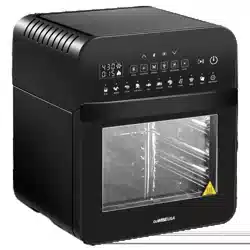
USER MANUAL for Air Fryer
IMPORTANT SAFEGUARDS
HOUSEHOLD USE ONLY • READ ALL INSTRUCTIONS BEFORE USE
1. NEVER IMMERSE the main unit housing in water, as it contains electrical components and heating elements. Do not rinse under the tap.
2. DO NOT PLACE the unit on stove top surfaces.
3. TO AVOID ELECTRIC SHOCK, DO NOT put liquid of any kind into the main unit housing containing the electrical components.
4. This appliance has a polarized plug (one prong is wider than the other). This plug is intended to fit into a polarized outlet only one way. TO AVOID ELECTRIC SHOCK, DO NOT force the plug into the outlet if it does not fit. If the plug does not fit fully into the outlet, reverse the plug. If it still does not fit, contact a qualified electrician. DO NOT ATTEMPT to modify the plug in any way.
5. Always make sure that the plug is inserted into the wall socket properly and without any other appliances on the same outlet.
6. To prevent food being in contact with the heating element, DO NOT OVERFILL any of the cooking trays.
7. DO NOT COVER OR BLOCK the air intake vent or air outlet vent while the GoWISE USA Air Fryer Dehydrator is in operation. Doing
so prevents even cooking and may damage the unit or cause it to overheat.
8. NEVER POUR oil into the square accessory basket. This could result in fire or personal injury.
9. While cooking, the internal temperature of the unit reaches several hundred degrees Fahrenheit. TO AVOID PERSONAL INJURY, never place hands inside the unit unless it has thoroughly cooled.
10. This appliance is NOT INTENDED FOR USE by persons with reduced physical, sensory, or mental capabilities or persons with a lack of experience and knowledge unless they are UNDER THE SUPERVISION of a responsible person or have been given proper instruction to use the appliance. This appliance is NOT INTENDED FOR USE by children.
11. When cooking, DO NOT PLACE the appliance against a wall or other appliances. Leave at least five inches of free space along the back, sides, and above the appliance. Do not place anything on top of the appliance.
12. DO NOT USE this unit if the plug, the power cord, or the appliance itself is damaged in any way.
13. If the power cord is damaged, YOU MUST HAVE IT REPLACED by the manufacturer, its service agent, or similarly qualified person to avoid hazard.
14. Keep the appliance and its power cord OUT OF THE REACH of children when it is in operation or during the cooling process.
15. KEEP THE POWER CORD AWAY from hot surfaces. DO NOT PLUG in the power cord or operate the unit controls with wet hands.
16. NEVER CONNECT this appliance to an external timer switch or separate remote control system.
17. NEVER USE this appliance with an extension cord of any kind.
18. DO NOT OPERATE the appliance on or near flammable materials, such as tablecloths and curtains.
19. DO NOT USE the GoWISE USA Air Fryer Dehydrator for any purpose other than described in this manual.
20. NEVER OPERATE the appliance unattended.
21. KEEP YOUR HANDS AND FACE at a safe distance from the air outlet vent, as hot air is released through it while in operation. Also, avoid the vent while removing the square accessory basket from the appliance. The unit’s outer
surfaces may become hot during use. USE OVEN MITTS or use the rotisserie tong when handling hot components. Always use oven mitts when handling hot objects and surfaces.
22. Should the unit emit black smoke, UNPLUG IMMEDIATELY and wait for smoking to stop before removing unit contents.
23. When the time has run out during a cooking cycle, cooking will stop, but the fan WILL CONTINUE RUNNING for 20 seconds to cool down the unit.
24. ALWAYS operate the appliance on a horizontal surface that is level, stable, and noncombustible.
25. If the GoWISE USA Air Fryer Dehydrator is used improperly, for professional or semiprofessional purposes, or if it is not used according to the instructions in this user manual, the warranty becomes invalid, and the manufacturer will not be held liable for damages.
26. ALWAYS unplug the appliance after use.
27. Let the appliance cool down for approximately 30 minutes before handling, cleaning, or storing.
28. Make sure the ingredients prepared in this unit come out cooked to golden-yellow color rather than dark brown. Remove burnt remnants.
29. This appliance is intended for normal household use only. It is not intended for use in commercial or retail environments.
30. Please note that this unit is constantly emitting heat through the air vents, the unit must be placed on a heat resistantsurface. It is the end user’s responsibility to verify the heat capacity of their countertops. We recommend using a silicone pad or spare, non-artificial tile to protect your countertops from heat damage. The care and use of countertops is the responsibility of the end user.
SAVE THESE INSTRUCTIONS
MAKE SURE THE UNIT RESTS ON A FLAT LEVEL SURFACE 5 INCHES AWAY FROM ANY OTHER WALL OR APPLIANCE AND WELL AWAY FROM ANY CURTAINS, FABRICS, OR CLOTHS.

Important
• Before initial use and after subsequent use, hand wash all included accessories. Wipe the outside and inside of the unit with a warm moist cloth and mild detergent. Preheat the unit for a few minutes to burn off any residue.
• NOTE: The unit may smoke the first time it is used. It is not defective, and the smoke will burn off within a few minutes.
Overheating Protection
Should the inner temperature control system fail, the overheating protection system will be activated, and the unit will not function.
Should this happen, unplug the power cord. Allow time for the unit to cool completely before restarting or storing.
Electric Power
If the electrical circuit is overloaded with other appliances, your unit may not operate properly. It should be operated on a dedicated electrical circuit.
Automatic Shut-Off
The appliance has a built-in shut-off device which will automatically shut down the unit when the timer LED reaches zero. You can manually switch off the appliance by selecting the power button. The fan will continue running for about 20 seconds to cool down the unit.
Electromagnetic Fields
This appliance complies with all standards regarding electromagnetic fields. According to the instructions in this manual, the appliance is safe to use based on scientific evidence available today if handled properly.
PARTS AND ACCESSORIES
PARTS

1. LED Control Display
2. Unit Housing
3. Internal Heating Compartment
4. Door
5. Door Handle
6. Air Intake Vent
7. Air Outlet Vent
8. Power Cord + Plug
Unit Dimentions:
Outside: 15”H x 15”W x 14”D
Inside: 7.5”H x 11.75”W x 10.5”D
ACCESSORIES

1. Rotisserie Tong
2. Rotisserie Forks
3. Rotisserie Skewers
4. Rotisserie Cage
5. Shallow Mesh Basket
6. Mesh Tray X5
7. Drip Pan
NOTE: Rotisserie Forks, Skewers, and Cage share one (1) rod.
CONTROL DISPLAY

BUTTONS
POWER/START/PAUSE: Power the unit on and off and start or pause the cooking process.
LIGHT: Turn the internal cooking light on or off.
ROTISSERIE: Activate the Rotisserie function
TEMP UP & DOWN arrows: Adjust the temperature of the cooking presets.
TIME UP & DOWN arrows: Adjust the time of the cooking presets. COOKING PRESETS: Selecting a preset will set the time and temperature to the default setting for that particular food. The default time and temperature can be overridden with the TIME and TEMP control arrows.
NOTE: Refer to the PRESET REFERENCE chart (pg. 12) for more details about each cooking preset.
USING THE DIGITAL CONTROLS
1. Once the unit is plugged in, the display lights will flash once with a single chime/beep. The Light, Power, and Rotisserie buttons will remain illuminated.
2. Press the button, and the digital display will light up displaying the default settings of 370°F and 15 minutes.
3. To manually select your desired settings, use the TEMP and TIME controls to make changes. NOTE: If using a rotisserie accessory like the rod, cage, or skewers, press the Rotisserie button.
4. To select a preset cooking program, press the associated icon. To adjust a preset’s temperature and time, use the TEMP and TIME controls. Temperature can be adjusted in 5 degree increments between 90°F – 400°F, and time can be adjusted in 1-minute increments between 1-60 minutes (except when using the Dehydrator preset).
NOTE: If using a rotisserie accessory like the rod, cage, or skewers, press the Rotisserie button.
5. Once you have made your desired adjustments, press the button to begin cooking. Five running lights will flash in sequence to indicate that cooking cycle has started, and the fan is running.
NOTE: You may open the door at any point during the cooking process to check the food. The program will pause, and the internal light will illuminate. The program will resume once the oven door is shut.
6. When the cooking cycle is complete, the unit will beep 5 times, and the running lights will continue to flash in sequence until the fan stops running, about 20 seconds. The display on the unit will read OFF.
7. To stop the cooking cycle at any point, press the button.
WARNING:
• Cooking accessories will get hot during the air frying process. Wear oven mitts and handle with care to AVOID INJURY.
• The Rotisserie Cage will become very hot when used. When you remove it to check the progress, make sure you have a trivet or a heat resistant surface nearby to set it down on. Never place Rotisserie Cage directly on a countertop or table.
COOKING PRESET REFERENCE
Cooking time of a whole roasted chicken may vary depending on weight. Use a meat thermometer to check the internal temperature as per the chart on page 13.
|
Preset
|
Default Time
|
Default Temp
|
Range
|
|
Fries
|
20 min
|
4000F
|
1-60 minutes, 90°F – 400°F
|
|
Meat
|
25 min
|
3700F
|
1-60 minutes, 90°F – 400°F
|
|
Fish
|
12 min
|
3900F
|
1-60 minutes, 90°F – 400°F
|
|
Shrimp
|
12 min
|
3200F
|
1-60 minutes, 90°F – 400°F
|
|
Chicken
|
20 min
|
3800F
|
1-60 minutes, 90°F – 400°F
|
|
Cake
|
30 min
|
3500F
|
1-60 minutes, 90°F – 400°F
|
|
Rotisserie
|
60 min
|
3800F
|
1-60 minutes, 90°F – 400°F
|
|
Dehydrator
|
8 hr
|
1300F
|
1-24 hours, 90°F – 170°F
|
WARNING Never use a cooking vessel filled with cooking oil or any other liquid with this unit! Fire Hazard or personal injury could result.
INTERNAL TEMPERATURE CHART
This chart should be used to check the temperature of cooked meats. Always review USDA Food Safety Standards.
|
Food
|
Type
|
Internal Temperature
|
|
Beef + Veal
|
Ground Steaks, Roasts: Medium Steaks, Roasts: rare
|
160°F (70°C)
160°F (70°C)
145°F (63°C)
|
|
Chicken + Turkey
|
Breasts Ground, Stuffed Whole bird, legs, thighs, wings
|
165°F (75°C)
165°F (75°C)
165°F (75°C)
|
|
Fish + Shellfish
|
Any type
|
145°F (63°C)
|
|
Lamb
|
Ground Steaks, Roasts: medium Steaks, Roast: Rare
|
160°F (70°C)
160°F (70°C)
145°F (63°C)
|
|
Pork
|
Chops, Ground, Ribs, Roasts Fully cooked Ham
|
160°F (70°C)
140°F (60°C)
|
SET UP & USING AIR FRYER DEHYDRATOR
BEFORE FIRST USE
1. Unbox the unit and place on a countertop or flat surface away from any water source and near a polarized outlet. DO NOT PLACE the unit on stove top surfaces. Before plugging in the unit, remove accessories from the Internal Heating Compartment. Unwrap accessories.
2. Rinse the accessories with warm water and dry thoroughly. Place the Drip Pan at the bottom of the Internal Heating Compartment and close the door.
3. Plug in the unit. Press the button and follow the steps below:
a. Use the and
and arrows on the left and set to 350°F
b. Use the and arrows on the right and set to 5 minutes
4. Press the button again and wait for the unit to begin heating.
5. This process will burn off any remaining residue left from the manufacturer. There may be a slight burning smell but, will dissipate after a few minutes.
6. Your new GoWISE USA Air Fryer Dehydrator is now ready for use!
USING YOUR ACCESSORIES
Inserting Mesh Racks

NOTE: The mesh racks are perfect for dehydration. Use all 5 rack levels to dehydrate in bulk! The mesh trays are also great for cooking crispy snacks and reheating pizza, or for holding baking trays at the correct cooking distance from the internal heating element.
USING YOUR ACCESSORIES
Rotisserie Skewers: Use for cooking kebabs.
Attaching Rotisserie Rod and Skewer Racks

1. Place the two Skewer Racks at each end of the Rotisserie Rod. Make sure thumb bolts are on the outer side of the Rotisserie Rod.
2. Slightly tighten the thumb bolts. Do not over tighten as you may need to adjust the tightness after inserting skewers.
3. Carefully poke skewers through food.
Rotisserie Skewer Assembly
4. Slide a skewer into an open slot on the edge of the Skewer Rack with the clip facing toward the Rotisserie Rod.
5. Guide the sharp end of the skewer through the hole on the opposite Skewer Rack and push the clip through the hole near the slot until the skewer is secure.
6. Repeat steps 3-5 in a uniform manner around the Skewer Rack. Make sure skewers are evenly spaced.
7. Tighten thumb bolts to make sure they are securely in place.
8. Use caution when inserting Rotisserie Skewers into the unit to avoid being poked by the skewer tips.
9. Open the door. Insert the long end of the Rotisserie Rod into the Rotisserie Socket first then, set the opposite end into the Rotisserie slot. Do not force the rod into the socket; rotate until the rod slips in easily.
Removing Rotisserie Rod, Rotisserie Skewers, and Rotisserie Cage from Unit
1. Open the door.
2. While wearing oven mitts on both hands and using the Rotisserie Tong, hook the bottom left and right sides of the Rotisserie Rod, in the gaps of the rod and carefully lift the rod out of the resting slot on the right side of the compartment – carefully pull the rod out of the Rotisserie socket and remove from the unit.

NOTE: Contents will be hot and can easily burn – use caution not to let scalding meat juices or oils from falling on the skin by holding a catch tray or plate under the Rotisserie contents.
NOTES:
• The GoWISE USA Air Fryer Dehydrator will only begin heating once the oven door is completely closed.
• The oven door can be opened during the cooking process the interior light will turn on and the unit will stop heating automatically until the door is closed again. The fan will also stop while door remains open.
CAUTION! Contents and cooking accessories will be extremely hot after every use. To prevent personal injury, always use oven mitts to remove contents and always wait until the unit has cooled sufficiently before touching or cleaning any area of the Internal Heating Compartment of the Air Fryer Dehydrator.
Using the Rotisserie Rod to Roast a Whole Chicken
1. Truss the whole chicken by following the instruction on page 18-19.
2. After the chicken is trussed, carefully maneuver the Rotisserie Rod through the chicken from the neck to the legs.
3. Slide the Rotisserie Forks on both sides of the Rotisserie Rod piercing the chicken; making sure to secure the chicken in place.
4. Using the Thumb Bolts, lightly tighten the Rotisserie Forks into place – Do not over tighten as removing Rotisserie Forks may become difficult after cooking.
5. Open the door. Insert the long end of the Rotisserie Rod into the Rotisserie Socket first then, set the opposite end into the Rotisserie slot. Do not force the rod into the socket, rotate until the rod slips in easily.
6. Close the door, Press the button to turn the unit on and select the Rotisserie preset.
7. Press the ROTISSERIE button on the Digital Display to engage the rotation functionality of the unit. NOTE: The default cooking temperature and time for Rotisserie is 380°F for 60 min – if the chicken is not golden brown and crispy and the internal temperature is not 165°F, repeat the cooking cycle.
8. When the chicken is done cooking with the internal temperature of 165°F, remove the chicken using the Rotisserie Tongs.
a. Open the door.
b. While using oven mitts on both hands and using the Rotisserie Tongs, hook the bottom left and right sides of the Rotisserie Rod in the gaps of the rod and carefully lift the rod out of the resting slot on the right side of the compartment – carefully pull the rod out of the socket and remove from the unit.

NOTE: Contents will be hot and can easily burn – use caution not to let scalding meat juices or oils from falling on the skin by holding a catch tray or plate under the Rotisserie contents.
TRUSSING A WHOLE CHICKEN
1. Finding the right size chicken – be careful not use a chicken exceeding the 5 lbs max.
2. After preparing, i.e., seasoning the chicken, truss the chicken using butcher’s twine.
a. Place the chicken on its back with the legs facing toward you.
b. Slide a piece of twine under the back of the chicken between the wings and the thighs.
c. Pull both ends of the twine up under the chicken’s armpits, then pull them over the wings.
d. Cross the string around the top of the breast, making sure the skin is secure.
e. Bring the ends of the twine back toward you, running them along the sides of the breast above the wings and thighs.

f. Cross the ends of the twine, pulling tightly up and under the crown of the bird.
g. Loop the ends of the string under the legs, then over the top of the legs. Cross and tighten. The thighs should pop up a little.
h. Flip the bird onto its belly and finish by tying the strings in a knot around the tail. Snip off the ends.


CLEANING & STORAGE
CLEANING
Clean the Air Fryer Dehydrator after each use. The Rotisserie Cage and other accessories are made of durable stainless steel and are dishwasher safe. NEVER USE abrasive cleaning materials or utensils on these surfaces. Caked on food should be soaked for easy removal in warm soapy water.
1. Remove the power cord from the wall socket and be certain the appliance is thoroughly cooled before cleaning.
2. Wipe the outside of the appliance with a warm, moist cloth and mild detergent.
3. DO NOT soak or submerge the door in water or wash in the dishwasher.
4. Clean the inside of the appliance with hot water, a mild detergent, and a nonabrasive sponge.
5. If necessary, remove residue from the heating element with a cleaning brush.
STORAGE
1. Unplug the appliance and let it cool thoroughly.
2. MAKE SURE all components are clean and dry.
3. Place the appliance in a clean, dry place.
TROUBLESHOOTING & ERROR CODES
|
Problem
|
Solution
|
|
Why won’t my air fryer dehydrator turn on?
|
First, make sure the air fryer dehydrator is plugged in and the dehydrator door is closed. You can also try using different outlets if it’s still not turning on. If none of these solve the problem, please contact our Customer Care Team.
|
|
My food is not cooked all the way / My food doesn’t seem crispy enough
|
Your dehydrator may be overfilled with ingredients. Cook in smaller batches for more even cooking.
|
|
You may have the temperature set too low. Increase the temp. and continue cooking (see pg. 13).
|
|
For a crispier effect, brush with oil before air frying.
|
|
Try flipping or rotating your food over midway through the cooking cycle. This will ensure even cooking.
|
|
White smoke is coming out of my air fryer dehydrator. Should I be worried?
|
It’s normal for white smoke to appear when prepping greasy ingredients. When frying greasy ingredients, a large amount of oil will leak into the pan. The oil produces white smoke and the dehydrator may heat up more than usual. This does not affect the appliance or end food result. Be sure to clean your dehydrator properly after each use to prevent it from smoking during the next use. It helps to wipe down the heating element as well.
|
|
How do I stop the cooking cycle on my air fryer dehydrator?
|
Press the button to stop the cooking cycle at any point. The heating element will shut off and the display will read “OFF”. The fan will continue running for around 20 seconds to cool down the appliance.
|
|
ERROR CODE
|
ISSUE
|
|
E1
|
Sensor open circuit
|
|
E2
|
Sensor short circuit
|
If your GoWISE USA Air Fryer Dehydrator displays any of these error codes, please contact our Customer Care Team.
WARRANTY
GoWISE USA warrants all products against defects in materials and workmanship for one (1) year effective from the date of purchase.
GoWISE USA will replace any products that are found to be defective due to manufacturer flaws based on eligibility. Refunds issued by GoWISE USA must be purchased directly from GoWISE USA and are only available to the original purchaser within the first 30 days. We do not issue refunds for items bought by thirdparty retailers.
This warranty extends only to personal use and does not extend to products that has been used for commercial, rental or any other use this product was not intended for. There are no warranties other than the warranties expressly set forth with each product.
This warranty is non-transferrable. GoWISE USA is not responsible in any way for any damages, losses, or inconveniences caused by equipment failure by user negligence, abuse, or use noncompliant with the user manual or any additional safety, use, or warnings included in the product packaging and manual.
This warranty only covers purchases within the 48 contiguous states of United States of America. For purchases made outside the 48 contiguous states, such as AK, HI, PR, or Canada, we will replace the unit under the one-year warranty upon receipt of a proven defect by video or picture. However, the replacement will only ship to a freight forwarder or address within the 48 contiguous United States. The consumer is responsible for arranging shipment outside of the 48 contiguous states.
GoWISE USA assumes no liability for damage caused using this product other than for its intended use or as instructed in the user manual. Some states do not allow this exclusion or limitation of incidental or consequential losses, so the foregoing disclaimer may not apply to you. This warranty gives you specific legal rights and you may also have other rights which may vary from state to state.
ALL EXPRESSED AND IMPLIED WARRANTIES INCLUDING THE WARRANTY OF MERCHATIBILITY, ARE LIMITED TO THE PERIOD OF THE LIMITED WARRANTY.
NOTE: General Warranty excludes refurbished / auction items.
Additional 60-Days Warranty You can extend your 1-year warranty by an additional 60 days. Log onto gowiseproducts/apps/ product-registration and register your product within the first 14 days of your purchase for the extended warranty.
DEFECTIVE PRODUCTS & RETURNS If your product is defective within the 1-year warranty period, please email our Customer Care Team at supportgowiseusa. To expedite your issue, please provide the 4 items below:
1. Copy of the invoice, order information, or gift receipt showing the date of purchase
2. Serial number, usually found on a sticker located on the bottom on back of the unit
3. Picture or video of the issue or defect that you are experiencing
4. Shipping address information