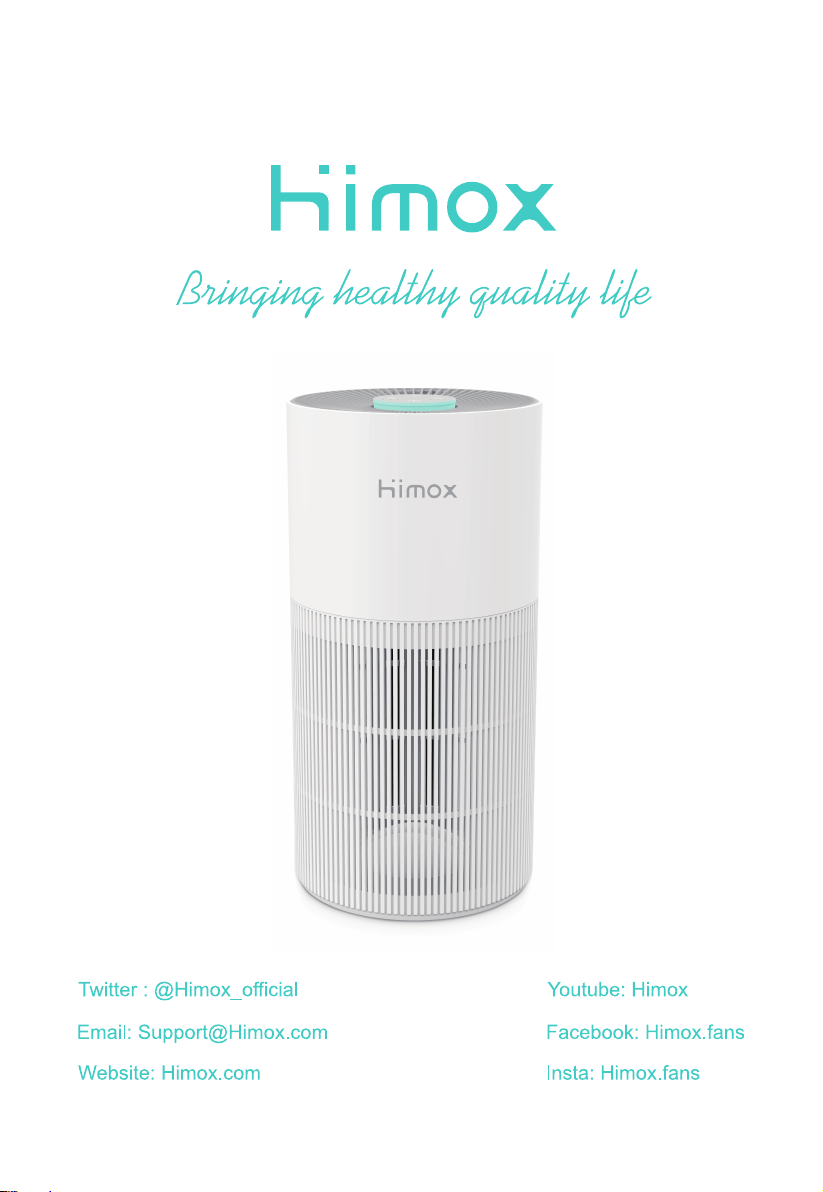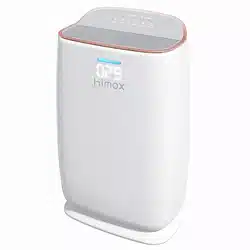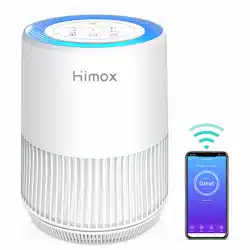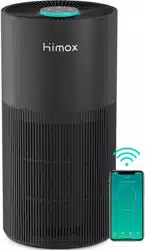
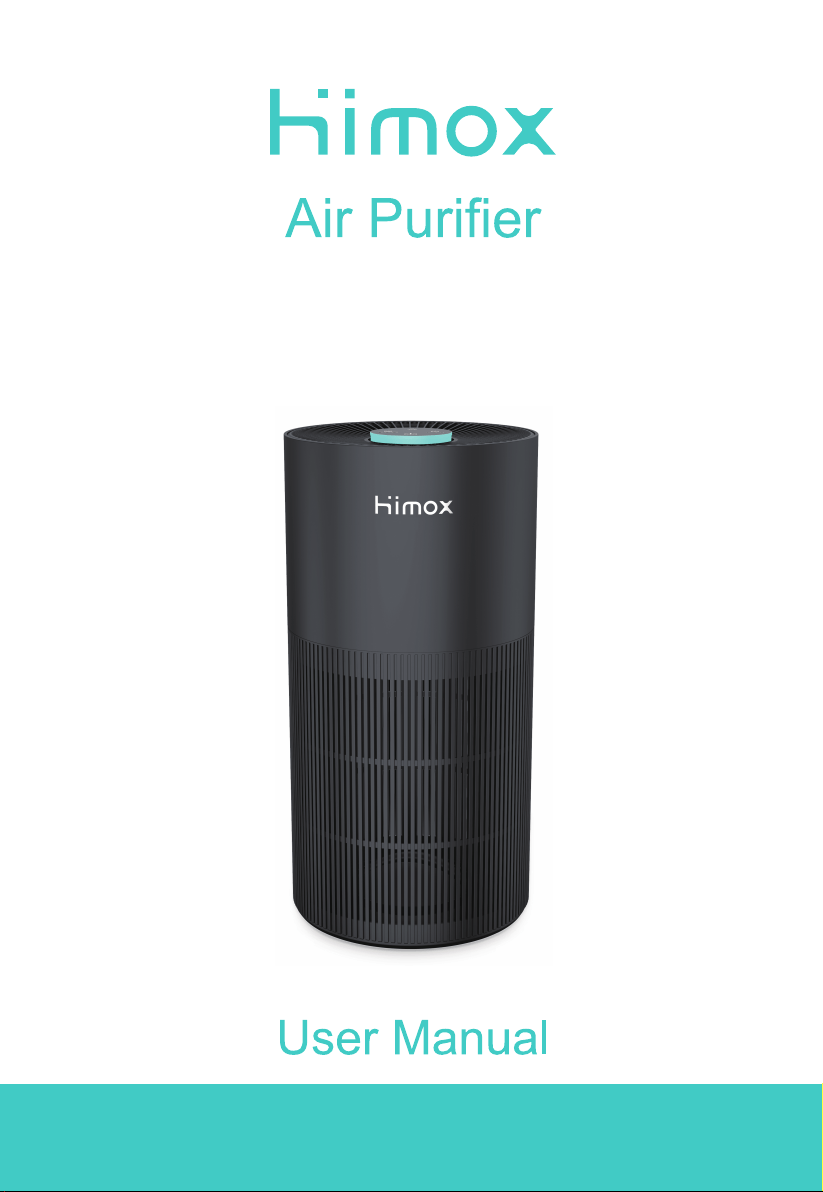
Model:
HIMOX-H10
Thanks for your purchase. To provide you a better user experience,
please read this manual carefully before operating or maintaining the
device, and retain it for future reference.

CONTENT
Attention
02
03
Product Overview
Specifications
05
06
04
About the Filter
08
Filter Installation
Maintenance
09
FAQ
10
Smart Operation Instruction
04
Control Panels
01
ATTENTION
Warning
1. Do not allow water, liquid or any flammable detergent to get into or to clean the
product.
2. Do not spray insecticide, perfume or other flammable spray around the products.
3. Do not use the device if the plastic bag has not been removed. Or the air purifier
will not filter air and may overheat and then cause a fire hazard.
4. Place the purifier on a flat, stable surface. Allow at least 38 cm of clearance on all
sides of the purifier. Keep away from anything that would block airflow, such as
curtains.
5. Ensure both the filter and the base are properly installed before using.
6. Before connecting the power supply, please check whether the voltage of the
product is consistent with the local power supply voltage.
7. Prevent something from falling into the gap of the air purifier and damaging the
motor.
8. This product cannot replace fans, vacuum cleaners or kitchen range hoods.
9. Do not use your air purifier outdoors.
To reduce the risk of fire, electric shock, or other injury, follow all instructions and
safety guidelines.
02
10. Keep your air purifier away from heat sources.
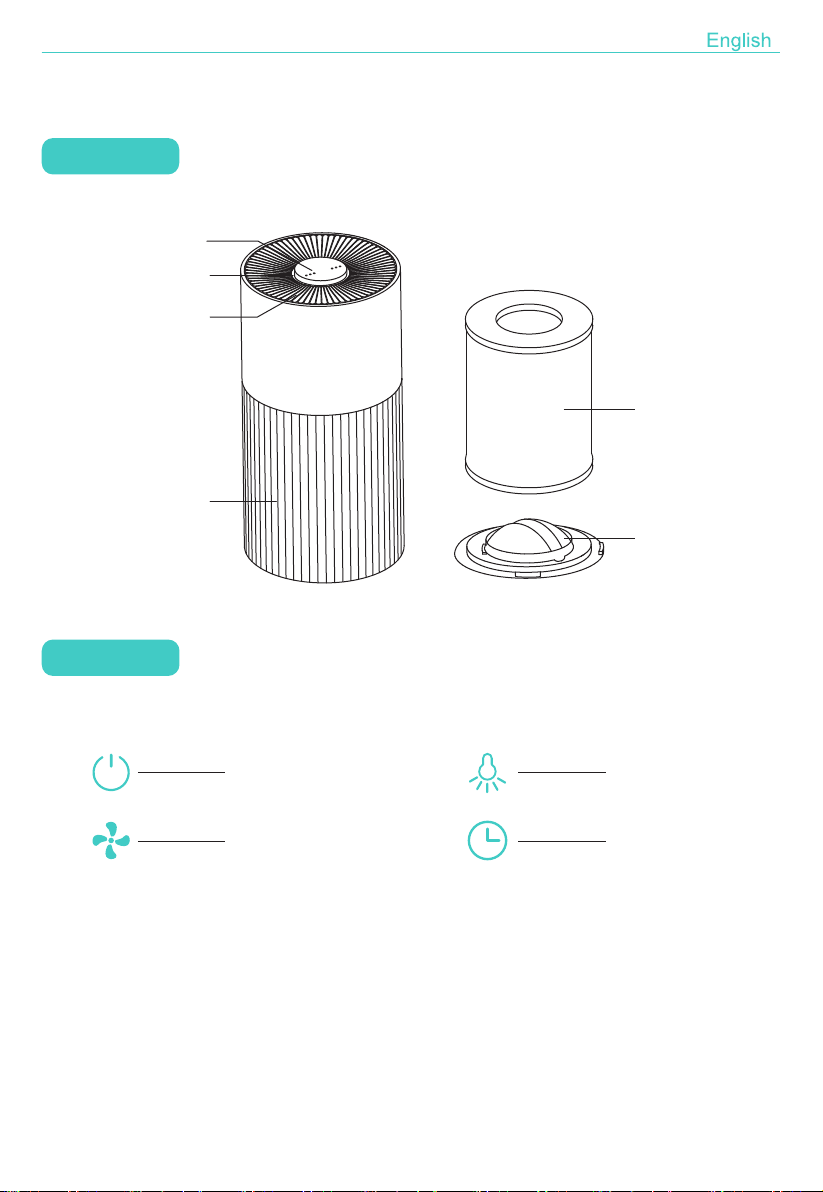
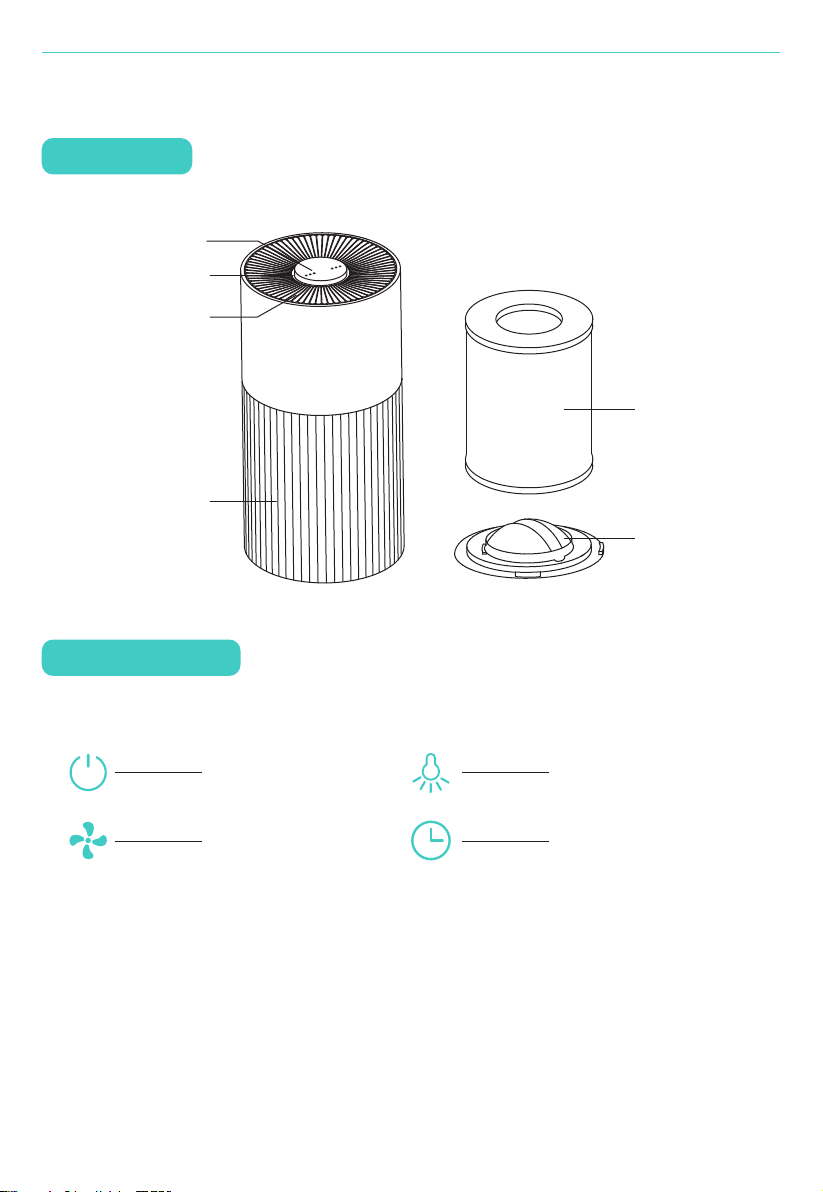
Components
PRODUCT OVERVIEW
Control Panel
Control Panel
Night Light
Air Outlet
Air Inlet
Power Button
Wind Speed Button
Light Control Button
Timer/Wi-Fi Button
Filter
Base
03
SPECIFICATIONS
CONTROL PANELS
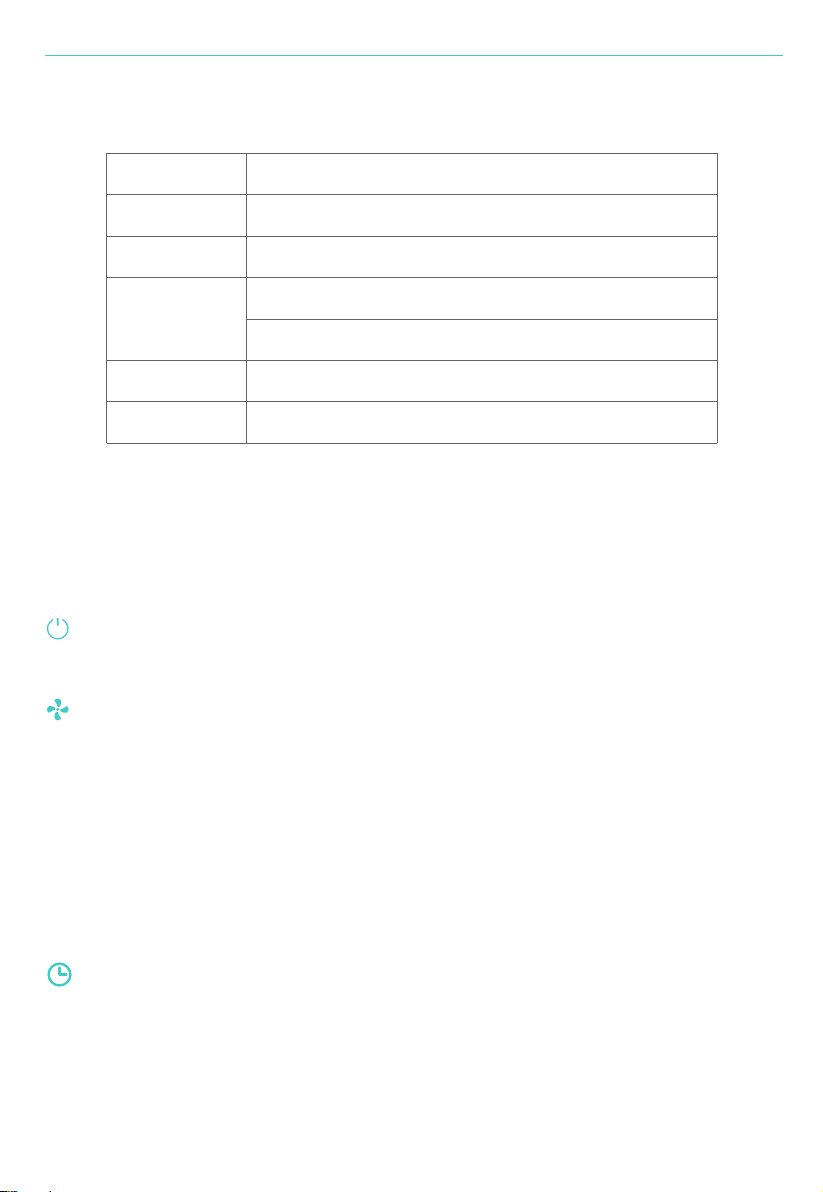
When connect to the power supply, the buzzer will ring for 1 s.
Power Button
Turn the air purifier on/off.
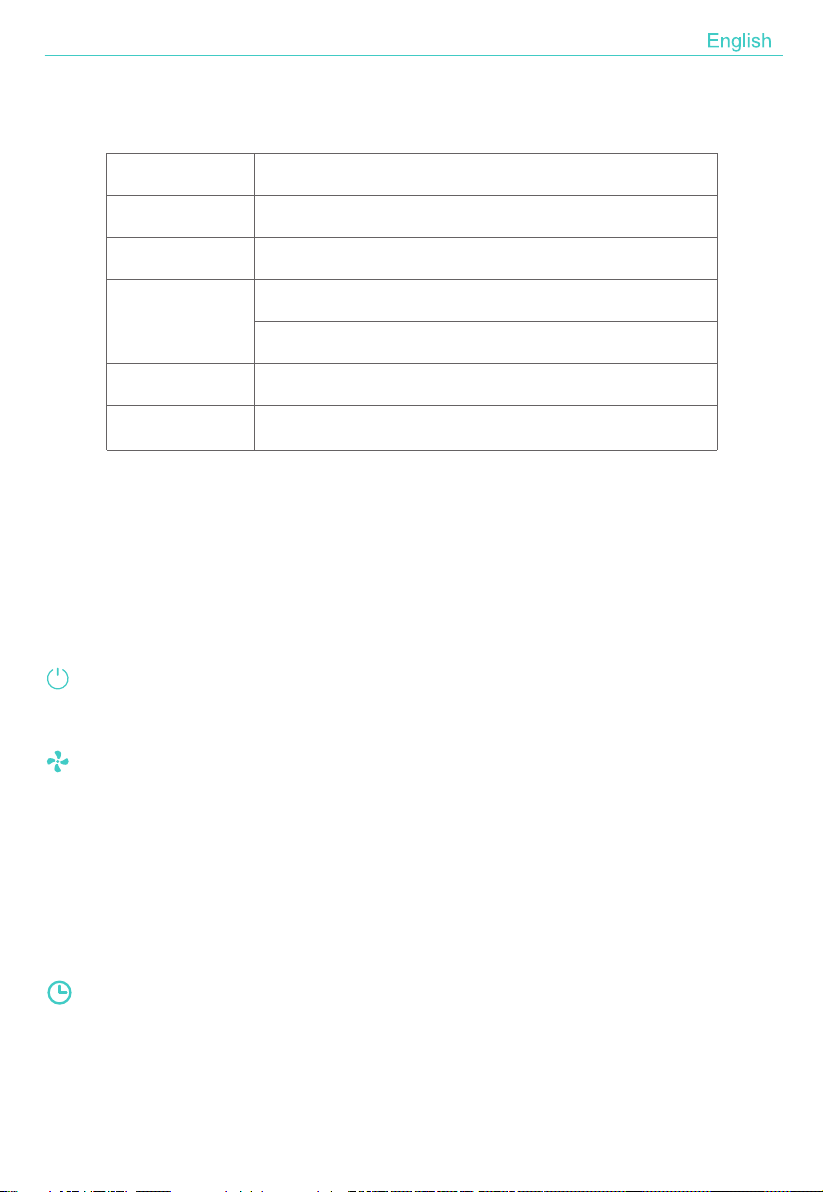
Model HIMOX-H10
195*195*388mmSize
04
Wind Speed Button
Adjust the wind speed among the circulation of SLEEP-MID-HIGH mode.
Notice:Once touch the wind speed or timer button, night light will glimmer in
white color for about 3 seconds.
In sleep mode, if no operation for 5 seconds, all indicators/lights will be off,
press any button to wake up the light.
Timer/Wi-Fi Button
1. Cycles through timer options for 4 and 8 hours.
2kgNet weight
Input:AC100-240V/50-60Hz (US Plug) Output:24V1.2A
Adapter
Input:AC220-240V/50Hz (EU/UK Plug) Output:24V1.2A
23WPower
< 55 dBNoise
ABOUT THE FILTER
05
Night Light Button
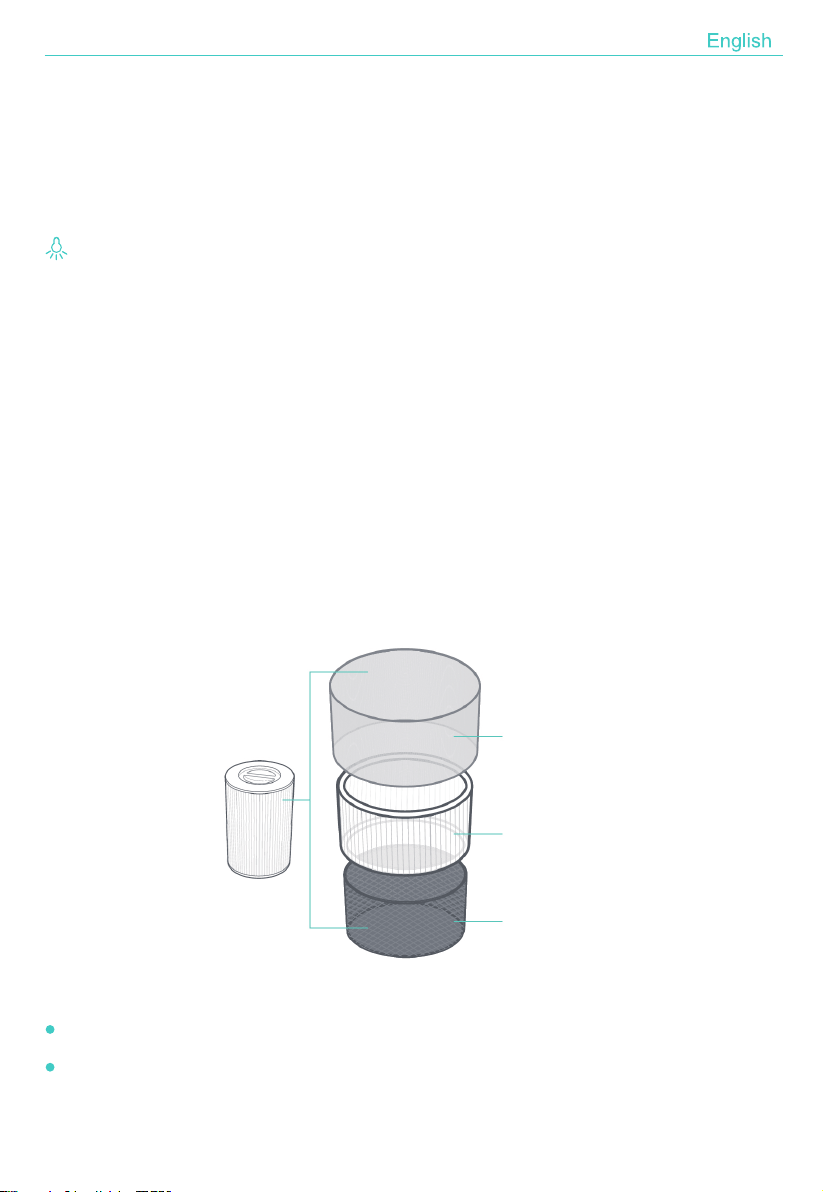
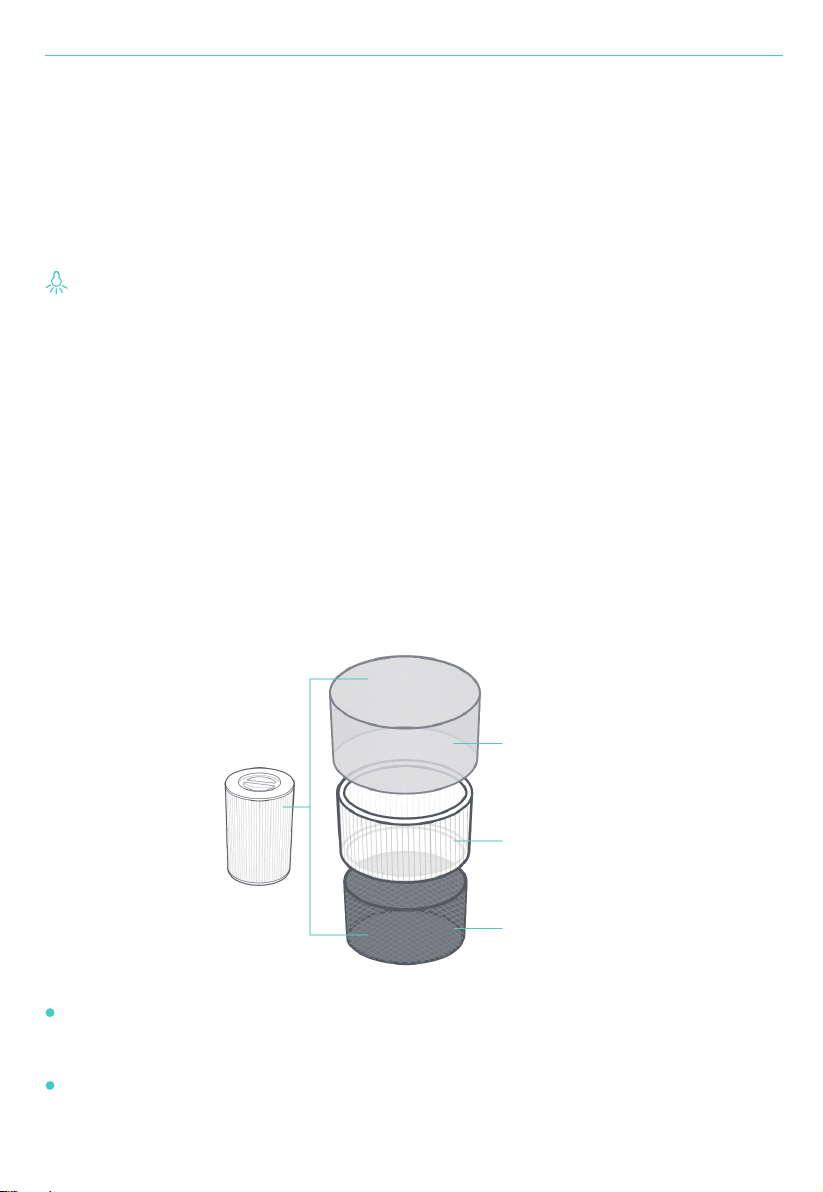
A. Pre-Filter
Cycles through the lights colors among blue cyan green yellow orange red and
purple. Tap it to turn on the lights, colors gradually changed slowly. Tap again to
hold the color. Turn off the lights by next tap.
Also the colors can be adjusted by Smart Life APP (see page 17)
Captures large particles such as dust, lint, fibers, hair, and pet fur.
Maximizes the filter’s life by protecting it.
The air purifier uses a 3-stage filtration system to purify air.
A
B
C
2. Long press this button to switch to Wi-Fi running mode. Long press first time
to switch to EZ mode, Wi-Fi indicator flashes quickly 3 times per second Then
long press again, to switch to AP mode, Wi-Fi indicator flashes slowly 3
seconds once.

06
NOTICE:
1. The outer pre-filter should be cleaned every 2-4 weeks.
2. Do not clean the true HEPA original filter and activated carbon filter.
3. Please replace the filter after 6-8 months use.
Unplug before removing or installing the filter.
Please remove the plastic wrap of the filter before first using.
When the night light keeps flashing in red, the filter should be replaced.
Please clean the dust and other large particles on the pre-filter regularly,
do not wash or use it repeatedly.
Please use the filter specially designed for this air purifier.
FILTER INSTALLATION
B. True H13 HEPA Original Filter
Removes at least 99.97% of airborne particles as small as 0.1 micrometers (µm)
in diameter.
Traps fine partiles such as dust mites,pet dander,mold spores and pollen.
C. High-Efficiency Activated Carbon Filter
Physically adsorbs smoke, odors, and fumes.
Filters compounds such as formaldehyde, benzene, ammonia, hydrogen sulfide,
and volatile organic compounds (VOCs).
NOTICE:
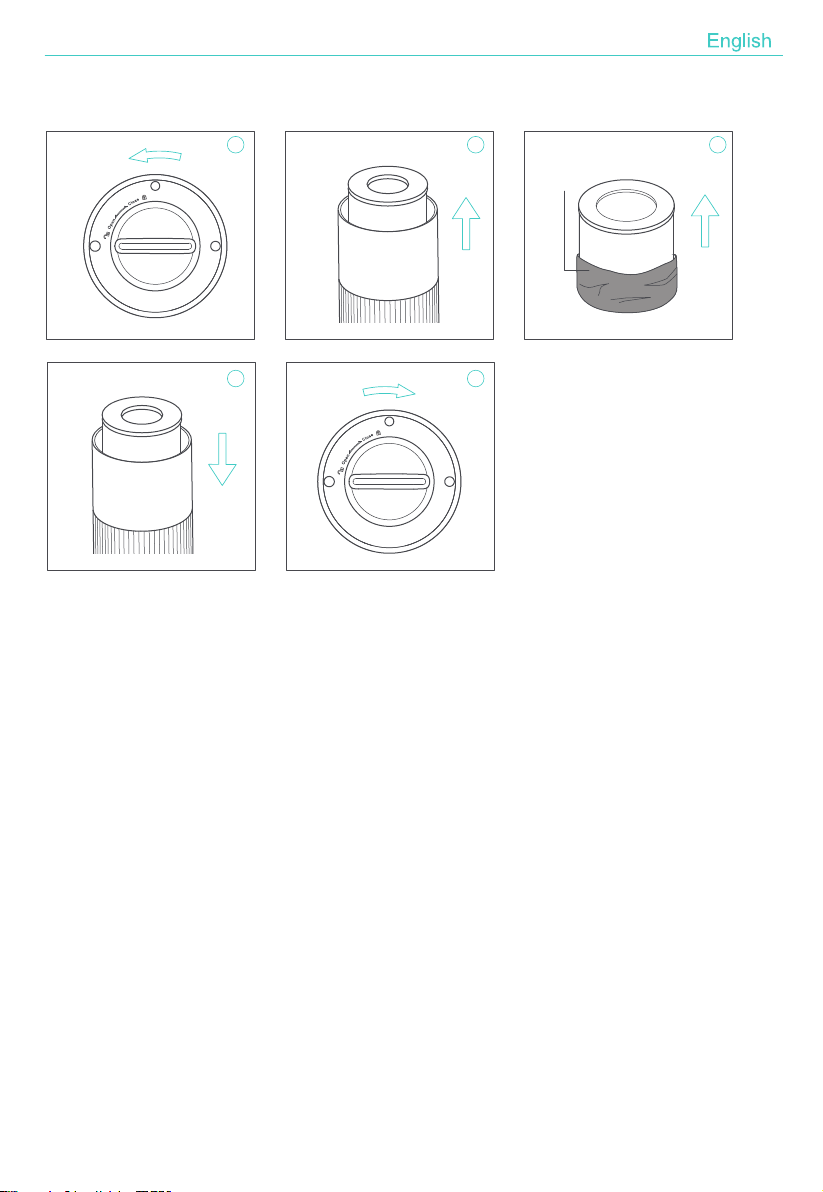
07
1. Invert the machine, and rotate the base along the direction marked "OPEN".
2. Take out the filter from the machine.
3. Remove the packaging of the filter.
4. Install the filter into the machine.
5. Then Install the base, rotate and tighten the base along the direction
marked "CLOSE".
Packaging
Close
Open
1 2 3
4 5
Steps of Installing Filter:
Reset the Filter Replacing Alert:
Please press the power button for 7s to reset after installing a new filter,
if the night light flashes in red.
Or reset the alert with "Smart Life" APP (see page 17).

08
MAINTENANCE
Note
1. Ensure the machine is unplugged before maintenance.
2. Do not place the air purifier into water or any liquid.
3. Do not use abrasive, corrosive or flammable cleansers (such as bleach or
alcohol) to clean any part of the unit.
4. Do not wash the filter.
5. Please sterilize the filter under sunlight regularly.
6. Please replace the filter after 6-8 months using.
1. Use a soft cloth with neutral cleanser to clean away any dust or debris from the
surface of the device and air inlet/outlet.
2. T he outer pre-filter should be cleaned every 2-4 weeks to increase the
efficiency and extend the life of your filter. Clean the pre-filter using a soft
brush or vacuum hose to remove hair, dust and large particles.
3. After the machine completely dry out, put on the bag and place it in a cool and
well-ventilated place.
4. If you do not use it for a long time, please turn on the machine for a few minutes
from time to time to ensure a good performance.
Cleaning & Storage
NOTICE:Please don't drop any water into the machine when clean the air outlet.
FAQ
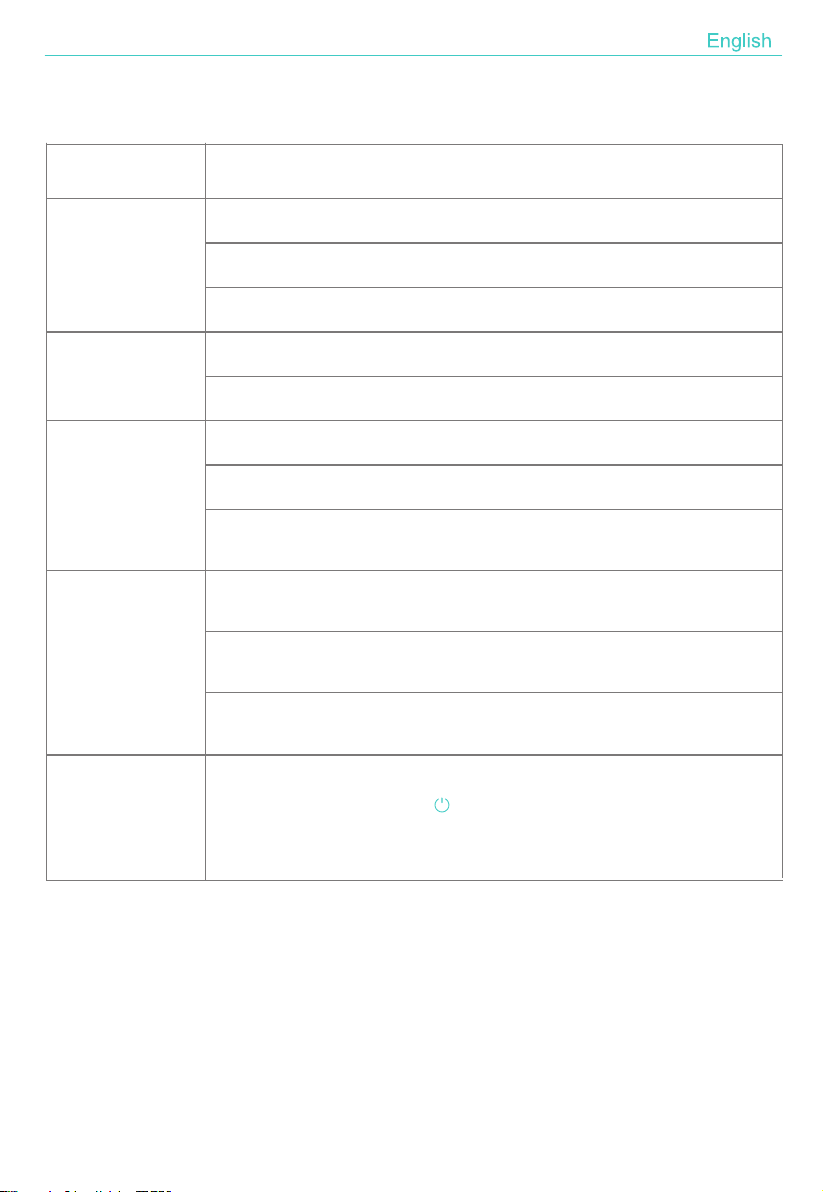
No working
Poor performance
Is it plugged into a power socket? Is there a power outage?
Does the home leakage switch or fuse cut off?
Does the night light keep flashing in red? It is time to replace filter.
ls there any dust in the surface of pre-filter?
Are there any obstacles blocking the air inlet/outlet.
Significant noise
Are there anything stuck on the fan in the air outlet?
Is the machine tilted?
Please set a lower mode of wind speed if the noise is too loud, or set sleep
mode when using in bedroom at night.
Coming out nasty
smell
It is the normal phenomenon that the device emits the smell of plastic for the
first time.
The device will emit nasty smell if the filter is dusty. Please clean or replace
the filter in this situation.
The reminder of
replacing filter
still flashes after
filter replaced.
If the burning smell emits from the device, please unplug the power supply
and contact with customer service.
SITUATION REASON
09
Please press the power button for 7s to reset the machine and the life
counter of the filter will start.
Add Devices in EZ Mode(Recommend)
10
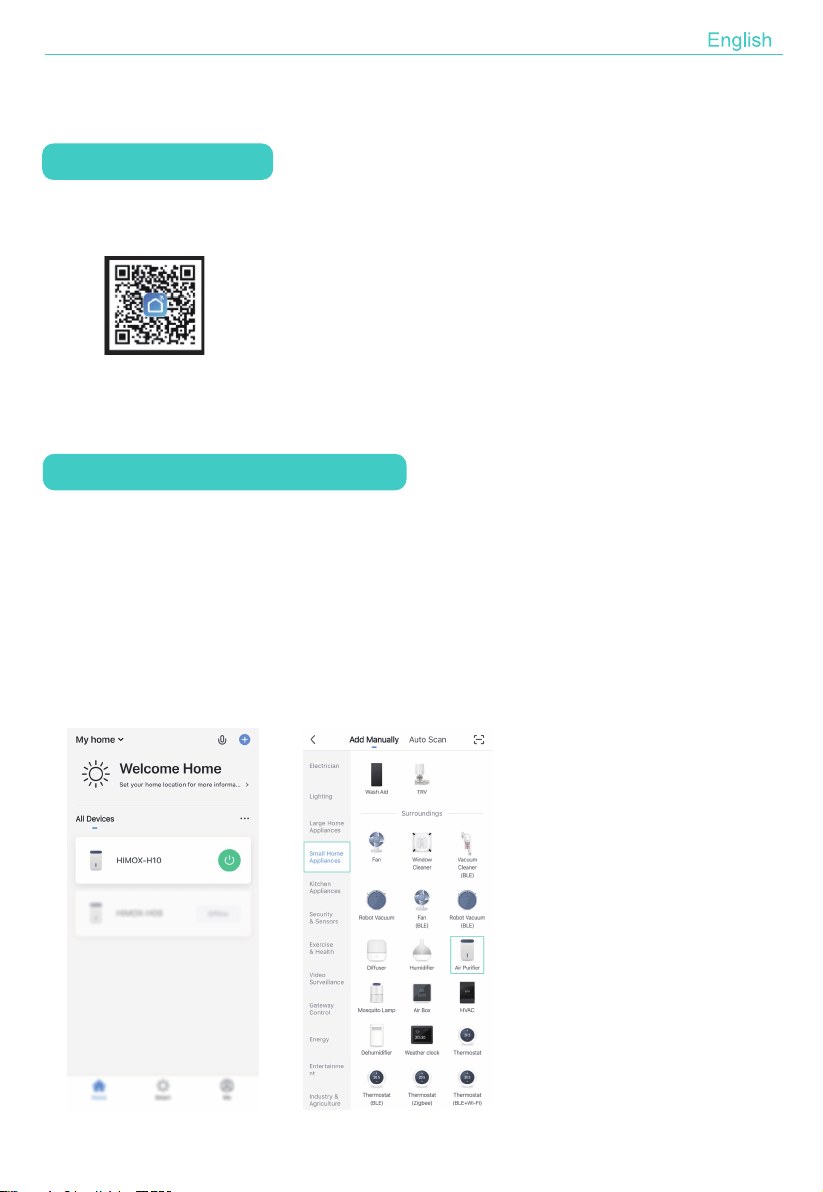
1. Confirm your mobile phone is connected to Wi-Fi network. Turn on the air purifier
and long press the Timer/Wi-Fi Button for 5 seconds to switch to Wi-Fi Mode.
If the Wi-Fi indicator of air purifier keeps flashing 3 times per second, it means
the device is ready for connection in EZ mode.
2. Open your "Smart Life" APP and tap "+" on the top right of the APP. Select the
type of service device. Tap "Small Home Appliances" and select "Air Purifier",
SMART OPERATION INSTRUCTION
Download & Registration
1. Scan the QR code to download "Smart Life" APP. You can also search
"Smart Life" in either APP store or Google Play to install the APP.
2. Open the "Smart Life" APP, tap "Register" to register a "Smart Life" account
with your phone number or E-mail. Then sign in the APP.
11
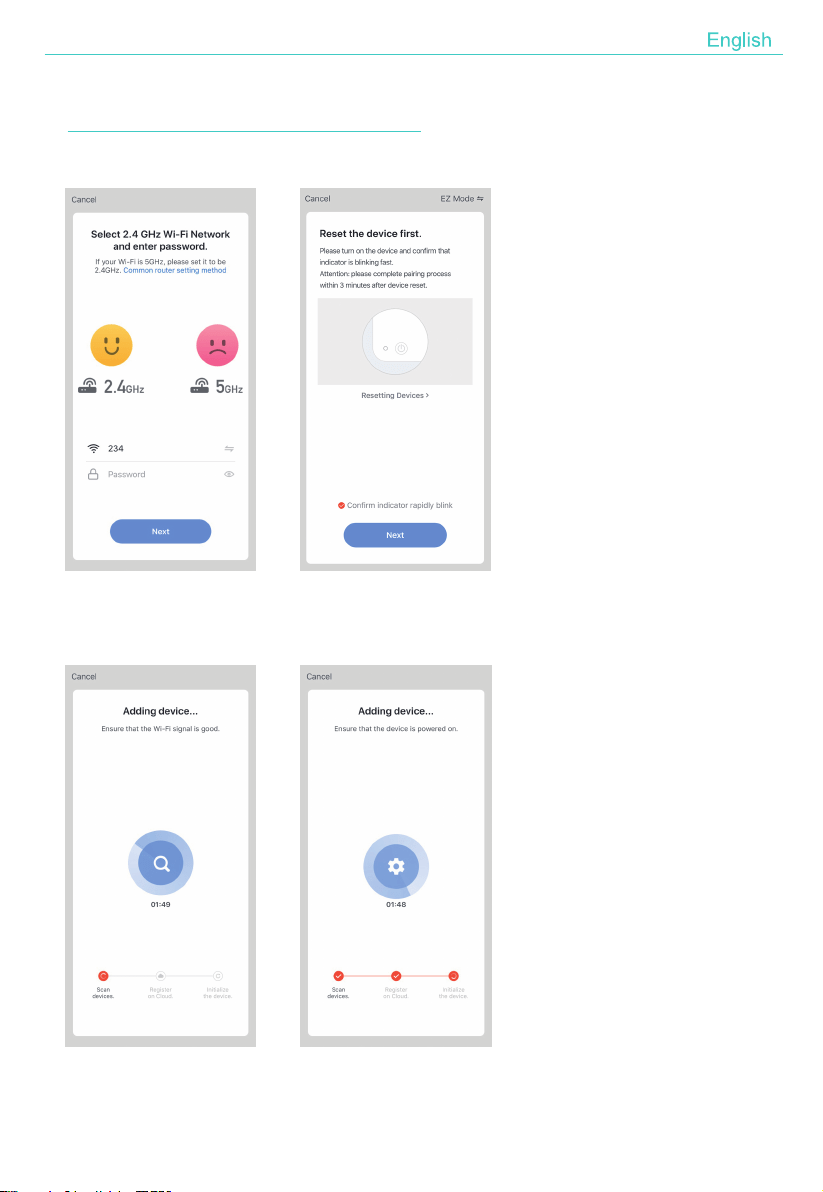
enter the password of the Wi-Fi network that your mobile phone connects to.
Then tap "Next" to next step to confirm the indicator status.
Tap “Next” to connect to the device.
12
Notice:If the Wi-Fi indicator turns off and does not turn on automatically when
connecting in EZ mode, it must be failed to connect.
Add Devices in AP Mode
1. If failed in EZ Mode, you could also add your air purifier in AP Mode.
2. Press the Timer/Wi-Fi button for more than 5 seconds until hearing "beep" and
the Wi-Fi indicator light beginning to flash quickly, then press the Timer/Wi-Fi
button for another 5 seconds until hearing "beep" and the indicator light
beginning to flash slowly, which means the device is already for configuration in
the AP Mode.
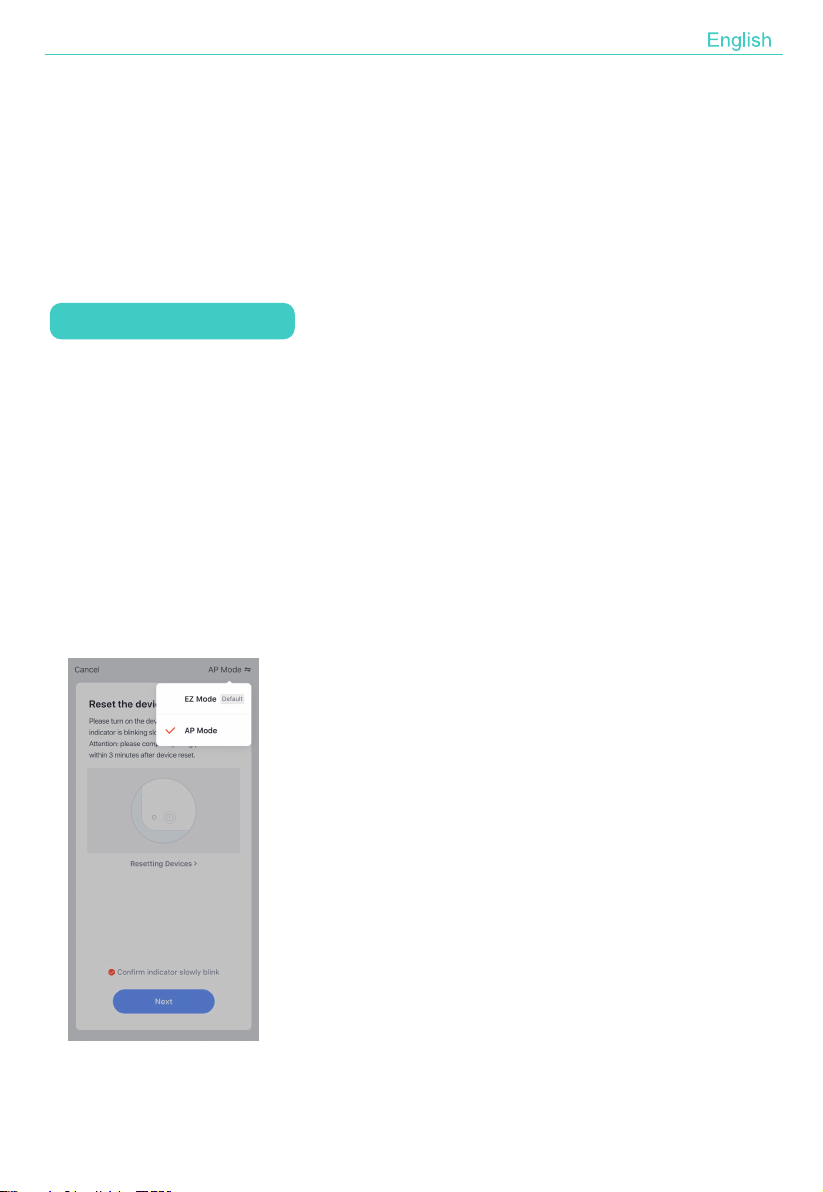
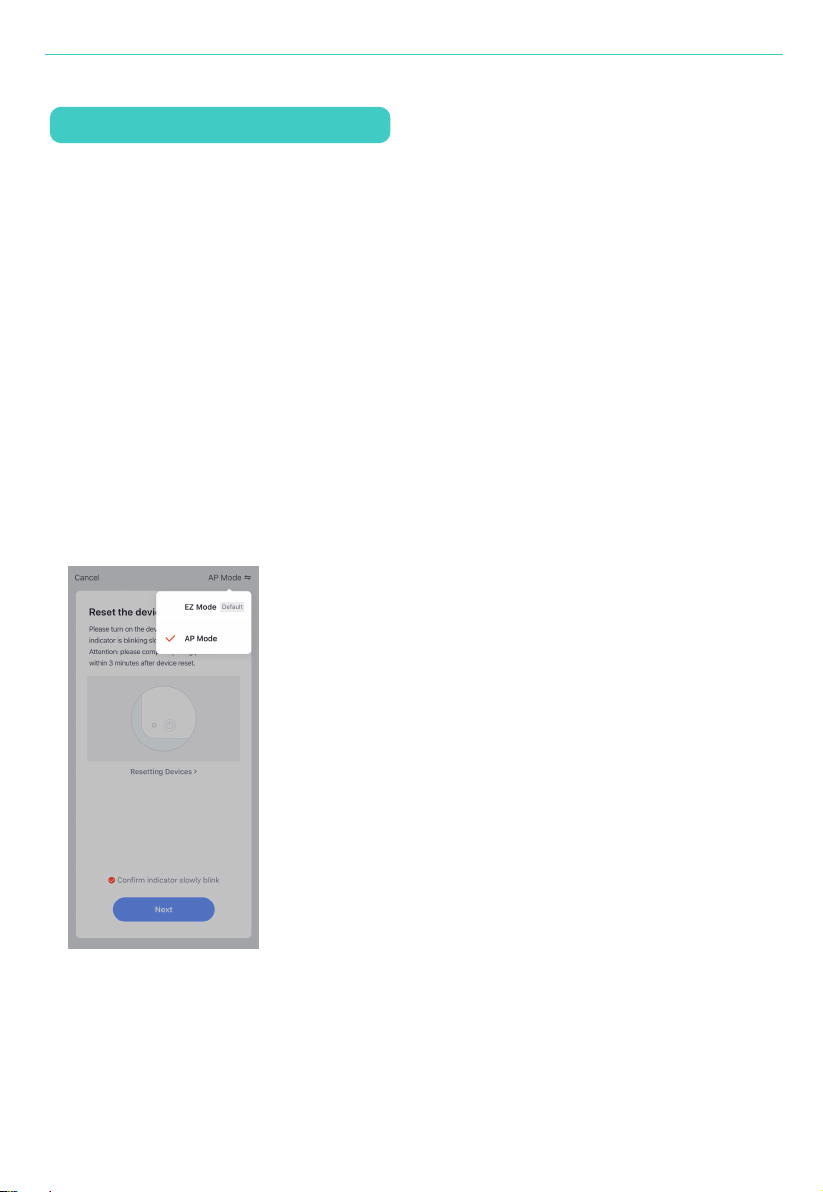
3. Tap "+" on the right top of the APP. Select the device type and tap it. After the
step of entering the network code, select "AP Mode"on the right top of the APP.
3. When appearing "Successfully added 1 device", it means the connection is
completed and your device will be listed in your APP list.
13
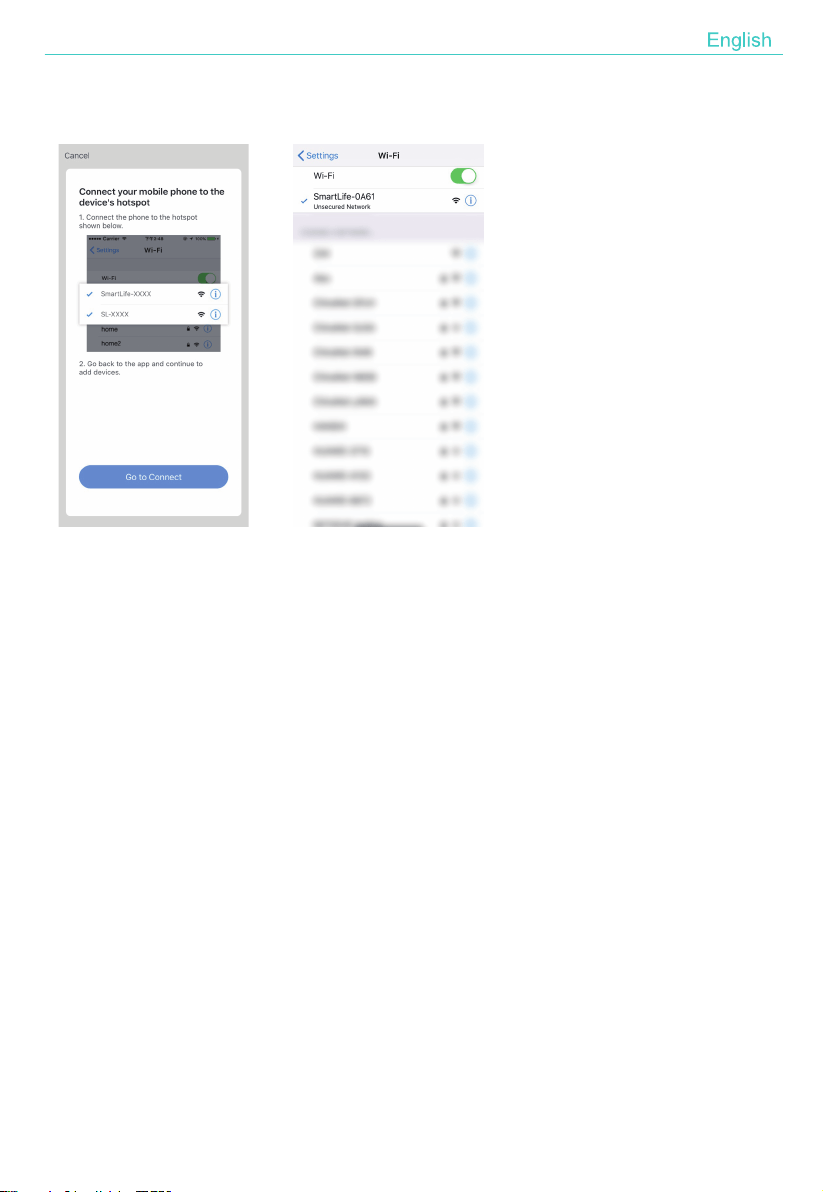
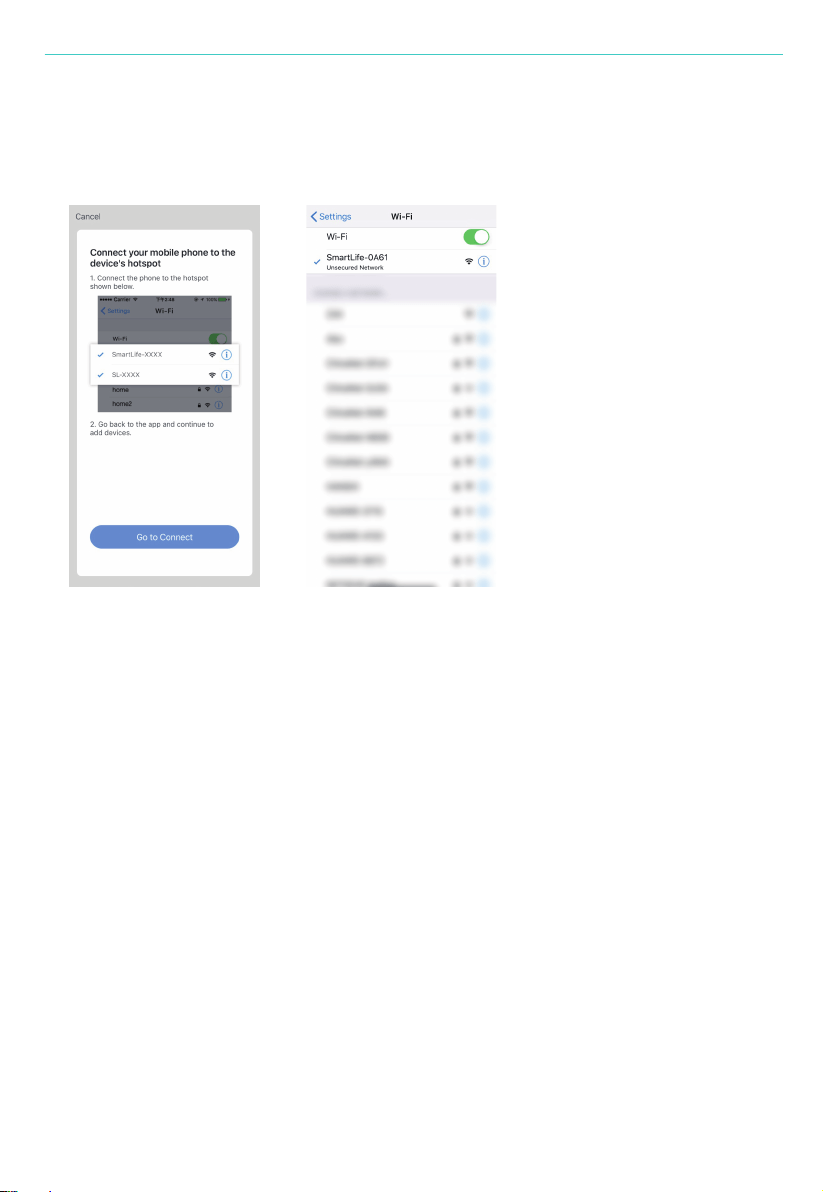
Then tap “Next” to “connect your mobile phone to the device hotspot.
Tap "Go to Connect" to go to the WLAN Settings interface in your mobile phone
and select the Wi-Fi network named "Smart Life_XXXX" and connect it.
4. Return to the "Smart Life" APP, the connection will start automatically.
5. When appears "Successfully added 1 device", it means the connection is
complete and your device will be listed in your APP list.
Now you can control your smart device via your mobile phone APP anytime and
anywhere (Make sure your mobile phone and smart device are all connected to
the network).You can share your devices with your friend or family after you add
your devices successfully.

14
Notice:
1. Make sure the device is powered on and close to your mobile phone when adding
device.
2. Make sure your mobile phone is connected to the Wi-Fi network and your Wi-Fi
router is working properly.
3. Make sure the device is ready for configuration. Please refer to the Product
Instruction "Add Devices in EZ Mode" or "Add Devices in AP Mode" for details.
4. Make sure the connected devices have not reached the maximum number of
Wi-Fi router. If not, please disconnect the network of some devices.
5. Make sure the password of the Wi-Fi network is corrected when adding new
device.
6. Make sure you have not used any Chinese Characters to name your Wi-Fi
network.
Why failed in adding device?
When adding device for the first time, it requires that your mobile phone and
device are connected to the same WiFi network. After adding device successfully,
you can remote control your device with 2G/3G/4G/5G network.
Can I control device with 2G/3G/4G/5G network?
Open your Smart Life APP, select your device and tap the button in the top right
corner.Tap "Shared devices" and "Add sharing", then select the "country/region"
where the account belongs to and input the account ID (a phone number or an
E-mail address) you want to share with. (Please make sure the phone number or
E-mail is registered.)
How can I share my device with others?
15
Open your Smart Life and you can operate the device by tapping the product in
the "Shared device I received" in the home page.
How can I manager the device shared by others?
1. Make sure that the device have been connected by "Smart Life" APP. You can
find the air purifier in "All Devices".
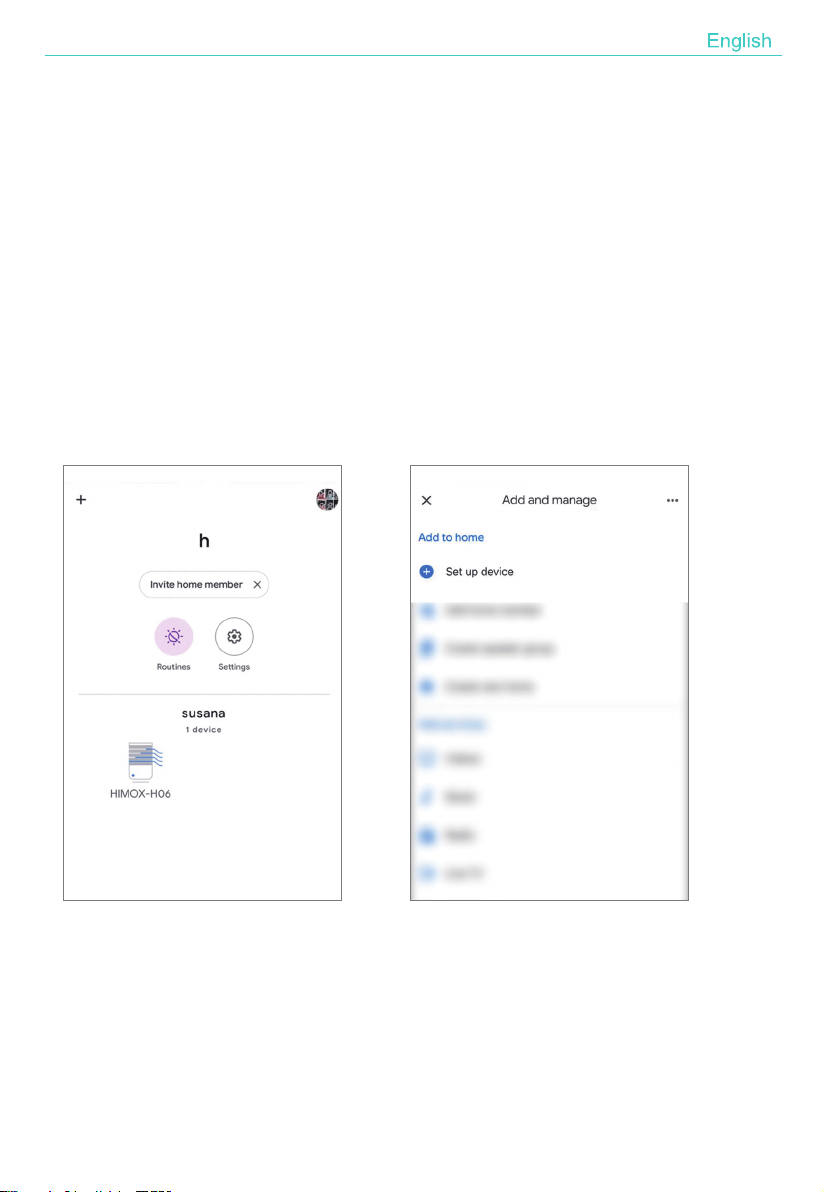
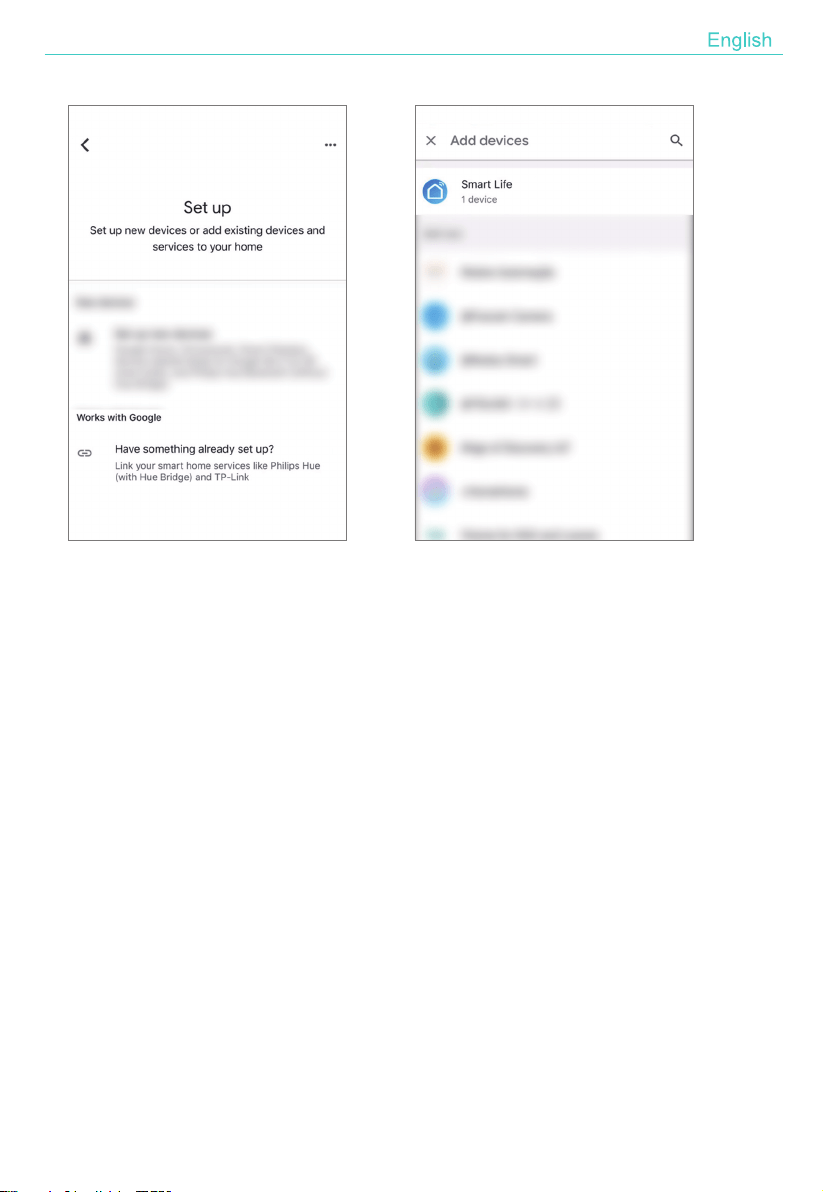
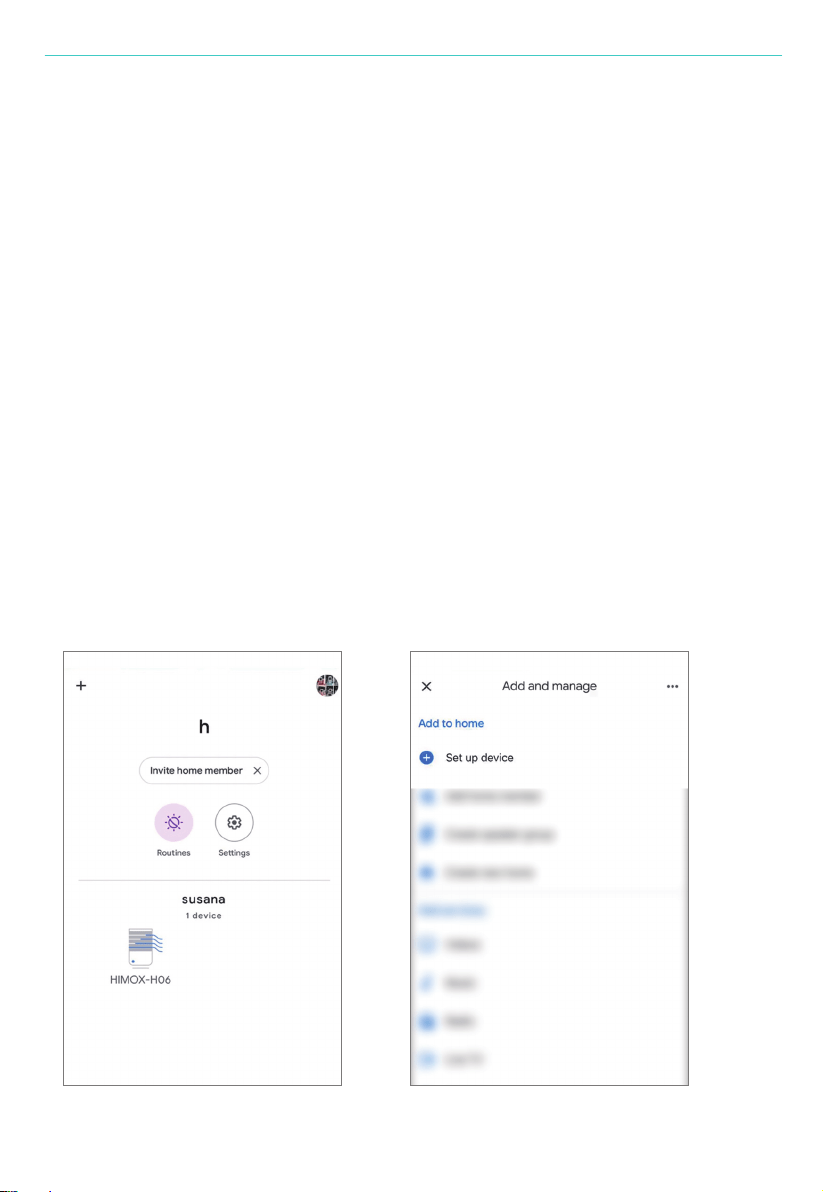
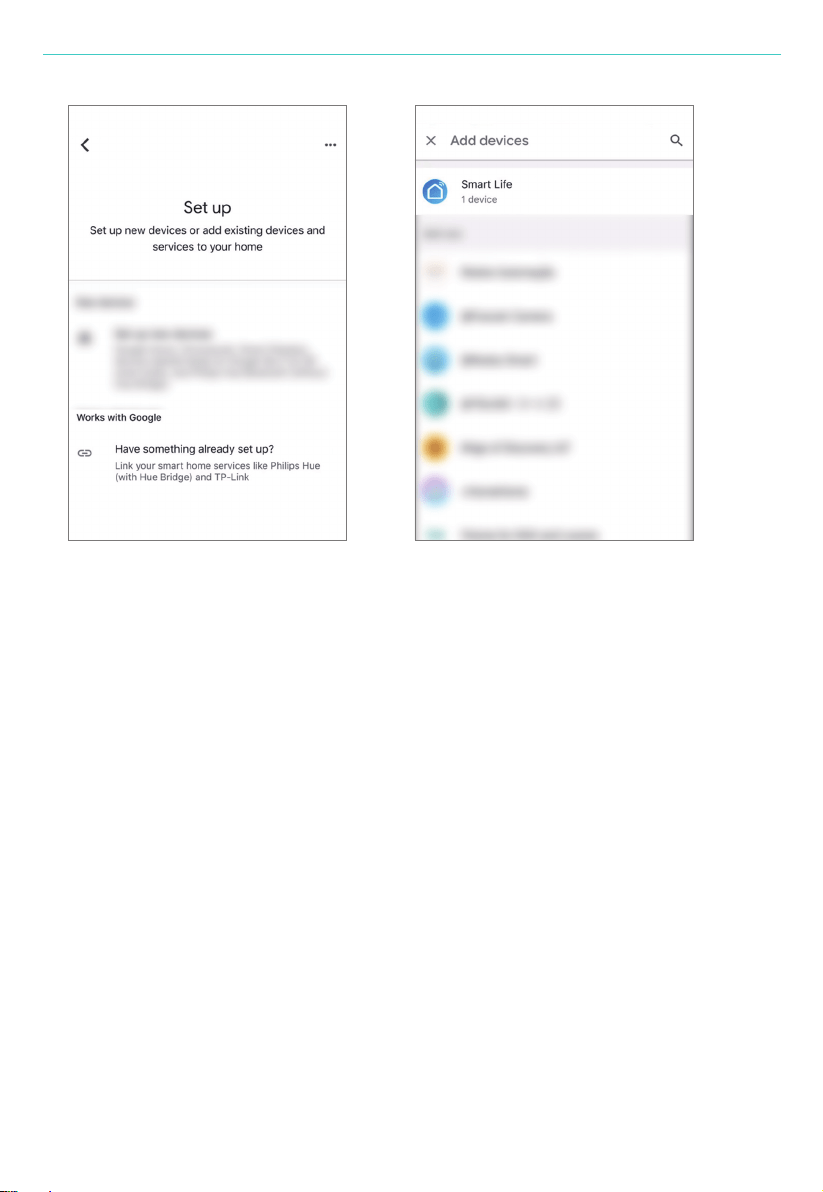
2. Switch to Google Home APP. Click "+" and choose "Set up device", clicking
"Have something already set up", searching "Smart Life" and adding
Smart Life devices.
How to connect Google Home or Alexa (Google Home for example)?
16
NOTICE:Please make sure the accounts you signed on Google Home and
Smart Life are the email, otherwise the device can not be added to Google Home.
All the linked devices will appear in Google Home, including your air
purifier.
3. Then you can control the air purifier by Google Home.
17
1. Tap your "HIMOX-H10"
2. Tap "Setting" , you will find the "Light Mode" or "Light Color". Tap it to adjust
the color you need.
Connect to Alexa (Your air purifier need to connect with Smart Life APP first)
How to adjust the color of night light by Smart Life APP
How to adjust reset the filter replacing alert by Smart Life APP
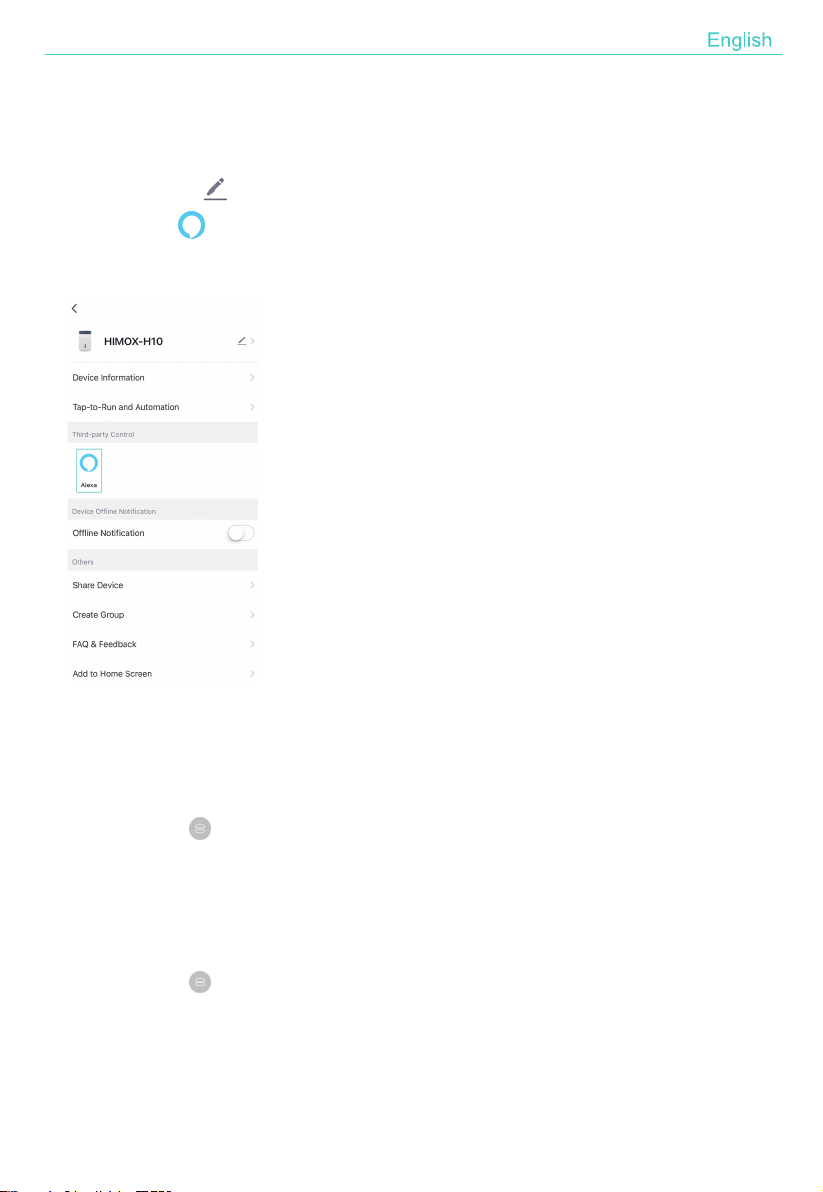
1. Tap "HIMOX-H10 " in all device;
2. Tap the button on the right top of the HIMOX-H10 interface. Then you can
find Alexa ( Alexa) in the "Third-party Control" option. Follow the instructions
to connect your air purifier to Alexa.
1. Tap your "HIMOX-H10"
2. Tap "Setting" , you will find the "Reset Filter". At last, tap "Reset Filter" and
confirm.

18
1. Press the Timer/Wi-Fi button for more than 5 seconds, you will hear "beep" which
means the device is removed, and the Wi-Fi indicator light begin to flash quickly
again.
2. Open your "Smart Life" APP, select your device and tap the button in the top
right corner. Tap "More". Then tap the "Remove Device" in the bottom, the Wi-Fi
indicator light begin to flash quickly again.
How to remove device?

COTENIDO
Atención
77
78
Descripción del Producto
Especificaciones
80
81
79
HEPA Filtro
83
Filtro Instalación
Mantenimiento
84
FAQ
85
Instrucción de Operación Inteligente
79
Paneles de Control
76
Español

Atención
Advertencias
1. No se permita que sumergir entre agua, líquido o cualquier detergente
inflamable en el producto o lo limpie.
2. No rocíe insecticidas, perfumes u otros aerosoles inflamables alrededor de los
productos.
3. No utilice el dispositivo si no se ha retirado la bolsa de plástico. O el purificador
de aire no filtrará el aire y puede sobrecalentarse y provocar un incendio.
4. Coloque el purificador sobre una superficie plana y estable. Deje al menos 38
cm de espacio libre en todos los lados del purificador. Manténgase alejado
de cualquier objeto que pudiera bloquear el flujo de aire, como cortinas.
5. Asegúrese de que tanto el filtro como la base estén instalados correctamente a
ntes de usarlos.
6. Antes de conectar la fuente de alimentación, compruebe si el voltaje del
producto coincide con el voltaje de la fuente de alimentación local.
7. Evite que algo caiga en el hueco del purificador de aire y dañe el motor.
8. Este producto no puede reemplazar ventiladores, aspiradoras o campanas
extractoras de cocina.
9. No use su purificador de aire al aire libre.
10. Mantenga su purificador de aire alejado de fuentes de calor.
Para reducir el riesgo de incendio, descarga eléctrica u otras lesiones, siga todas
las instrucciones y pautas de seguridad.
77
Español
Componentes
Descripción del Producto
Paneles de Control
Control de Panel
Luz
Salida de Aire
Entrada de Aire
ON/OFF
Velocidad de viento
Control de Luz
Timer/Wi-Fi
Filttro HEPA
Base
78
Español
Especificaciones
Paneles de Control
Cuando se conecta a la fuente de alimentación, el zumbador sonará durante 1 s.
ON/OFF
Enciende / apaga el purificador de aire.
Modelo HIMOX-H10
195*195*388mmDimensión
79
Velocidad de Viento
Ajuste la velocidad del viento entre la circulación del modo
SUEÑO-MEDIO-ALTO.
Aviso:una vez que toque la velocidad del viento o el botón del temporizador,
la luz nocturna brillará en color blanco durante unos 3 segundos.
En el modo de suspensión, si no se opera durante 5 segundos, todos los
indicadores / luces se apagarán, presione cualquier botón para activar la luz.
Timer/Wi-Fi
1. CyclesRecorre las opciones del temporizador durante 4 y 8 horas.
2kgPeso Neto
Entrada:AC100-240V / 50-60Hz (US Plug) Salida:24V1.2A
Entrada:AC220-240V / 50Hz (EU/UK Plug) Salida:24V1.2A
Adaptador
23WVatio
< 55 dBRuido
Español
HEPA FILTRO
80
Luz
A. Pre-Filtro
Pasa cíclicamente por los colores de las luces entre azul cian, verde, amarillo,
naranja, rojo y violeta. Tóquelo para encender las luces, los colores cambiaron
gradualmente lentamente. Toque nuevamente para mantener el color. Apague
las luces con el siguiente toque.
Además, los colores se pueden ajustar mediante la aplicación Smart Life
(consulte la página 93)
Captura partículas grandes como polvo, pelusa, fibras, pelo y pieles de
mascotas.
Maximiza la vida del filtro protegiéndolo.
El purificador de aire utiliza un sistema de filtración de 3 etapas para purificar el aire.
A
B
C
2. Mantenga pulsado este botón para cambiar al modo de ejecución de Wi-Fi.
Presione prolongadamente la primera vez para cambiar al modo EZ,
el indicador de Wi-Fi parpadea rápidamente 3 veces por segundo Luego
presione prolongadamente nuevamente para cambiar al modo AP, el
indicador de Wi-Fi parpadea lentamente 3 segundos una vez.
Español

81
DARSE CUENTA:
1. El prefiltro exterior debe limpiarse cada 2-4 semanas.
2. No limpie el filtro original HEPA verdadero y el filtro de carbón activado.
3. Reemplace el filtro después de 6-8 meses de uso.
Desenchufe antes de quitar o instalar el filtro.
Retire la envoltura de plástico del filtro antes de usarlo por primera vez.
Cuando la luz nocturna sigue parpadeando en rojo, se debe reemplazar
el filtro.
Limpie el polvo y otras partículas grandes del prefiltro con regularidad, no
lo lave ni lo use repetidamente.
Utilice el filtro especialmente diseñado para este purificador de aire.
Filtro Instalación
B. Verdadero Filtro Original HEPA H13
Elimine al menos el 99,97% de las partículas en el aire tan pequeñas como 0,1
micrómetros (µm) de diámetro.
Atrapa partículas finas como ácaros del polvo, caspa de mascotas, esporas de
moho y polen.
C. Filtro de carbón activado de alta eficiencia
Adsorbe físicamente humo, olores y vapores.
Filtra compuestos como formaldehído, benceno, amoniaco, sulfuro de hidrógeno,
y compuestos orgánicos volátiles (COV).
DARSE CUENTA:
Español

82
1. Invierta la máquina y gire la base en la dirección marcada como "Open".
2. Saque el filtro de la máquina.
3.Retire el embalaje del filtro.
4. Instale el filtro en la máquina.
5. Luego instale la base, gire y apriete la base en la dirección marcada
como "Close".
Packaging
Close
Open
1 2 3
4 5
Pasos para instalar el filtro:
Restablezca la alerta de reemplazo de filtro:
Presione el botón de encendido durante 7 segundos para reiniciar después de
instalar un nuevo filtro, si la luz nocturna parpadea en rojo.
O restablezca la alerta con la aplicación "Smart Life" (consulte la página 93).
Español

83
Mantenimiento
Ojos:
1. Asegúrese de que la máquina esté desenchufada antes del mantenimiento.
2. No coloque el purificador de aire en agua ni en ningún líquido.
3. No utilice limpiadores abrasivos, corrosivos o inflamables (como lejía o alcohol)
para limpiar ninguna parte de la unidad.
4. No lave el filtro.
5. Esterilice el filtro bajo la luz del sol con regularidad.
6. Reemplace el filtro después de 6-8 meses de uso.
1. Utilice un paño suave con un limpiador neutro para limpiar el polvo o la suciedad
de la superficie del dispositivo y la entrada / salida de aire.
2. El prefiltro exterior debe limpiarse cada 2 a 4 semanas para aumentar la
eficiencia y extender la vida útil de su filtro. Limpie el prefiltro con un cepillo
suave o una manguera de aspiración para eliminar el pelo, el polvo y las
partículas grandes
3.Después de que la máquina se seque por completo, colóquese la bolsa y
colóquela en un lugar fresco y bien ventilado.
4. Si no lo usa durante mucho tiempo, encienda la máquina durante unos minutos
de vez en cuando para garantizar un buen rendimiento.
Limpieza y Almanecimiento
Advertencias:No deje caer en agua la máquina cuando limpie la salida de aire.
Español
FAQ
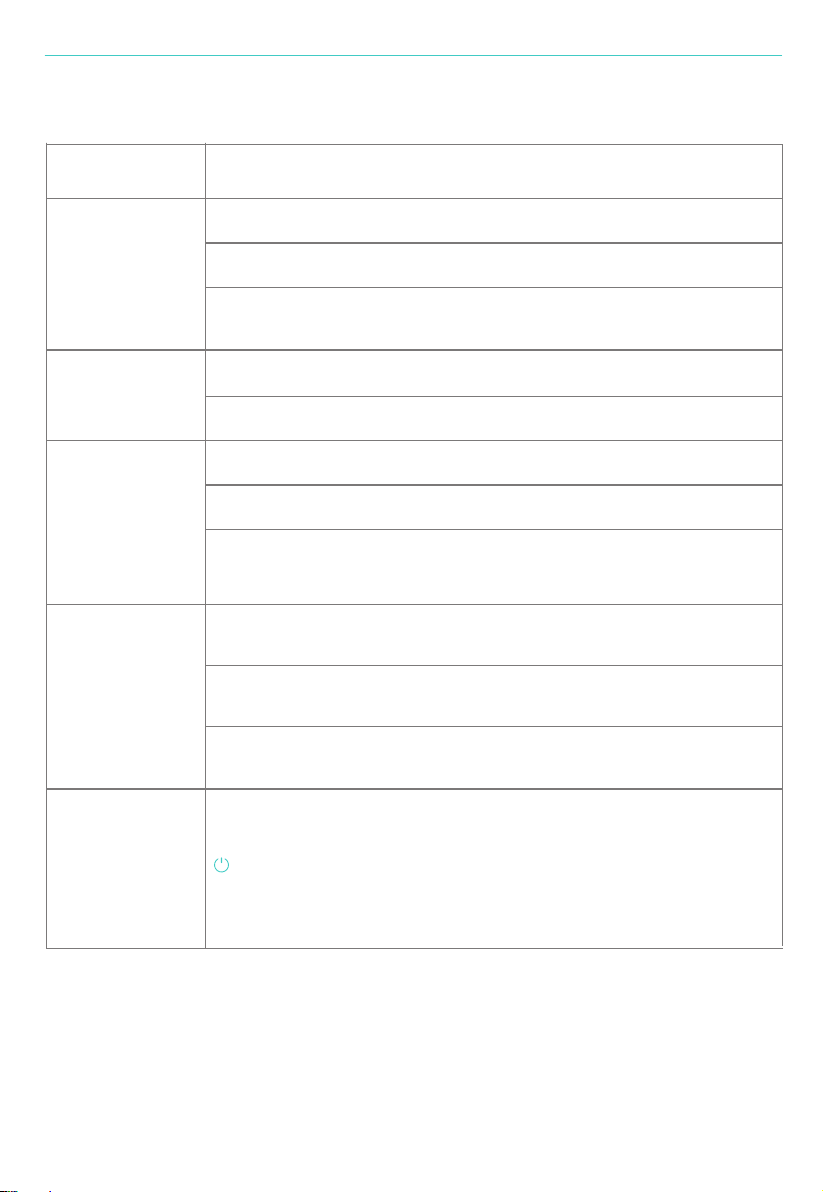
No funciona
Bajo rendimiento
¿Está enchufado a una toma de corriente? ¿Hay un corte de energía?
¿Se corta el fusible o el interruptor de fuga de la casa?
¿La luz nocturna sigue parpadeando en rojo? Es hora de reemplazar el filtro.
¿Hay polvo en la superficie del prefiltro?
¿Hay algún obstáculo que bloquee la entrada / salida de aire?
Ruidos Raros
¿Hay algo atascado en el ventilador en la salida de aire?
¿Está la máquina inclinada?
Configure un modo más bajo de velocidad del viento si el ruido es demasiado
fuerte, o configure el modo de suspensión cuando lo use en el dormitorio por
la noche.
Saliendo olor
desagradable
Es un fenómeno normal que el dispositivo emita olor a plástico por
primera vez.
El dispositivo emitirá un olor desagradable si el filtro tiene polvo. Limpie o
reemplace el filtro en esta situación.
El recordatorio de
reemplazar el filtro
aún parpadea
después de
reemplazar el filtro
If the burning smell emits from the device, please unplug the power supply
and contact with customer service.
Problemas Soluciones
84
Si el dispositivo emite olor a quemado, desenchufe la fuente de alimentación
y póngase en contacto con el servicio de atención al cliente.
Español
Agregar Dispositivos en Modo EZ (Recomendado)
85
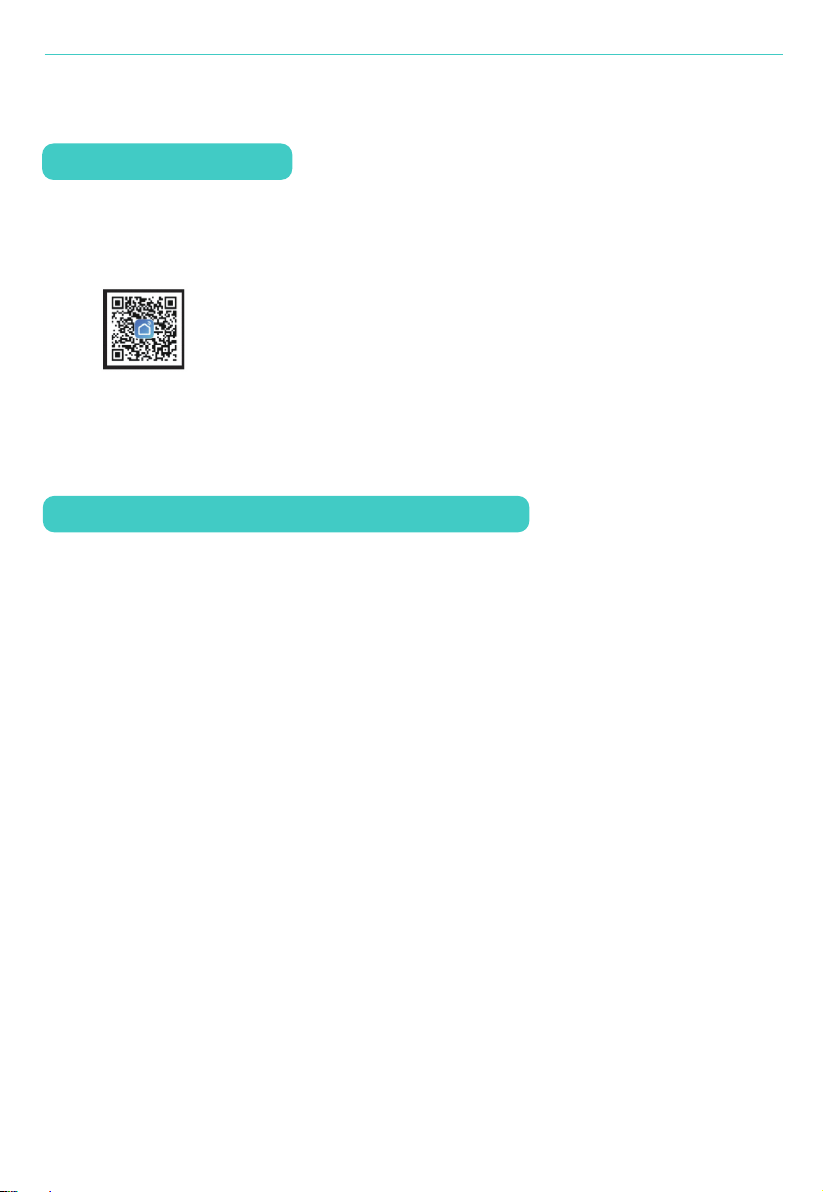
1. Confirme que su teléfono móvil está conectado a la red Wi-Fi. Encienda el
purificador de aire y pulse durante 5 segundos el botón Timer/Wi-Fi para
cambiar al modo Wi-Fi. Si el indicador Wi-Fi del purificador de aire sigue
parpadeando 3 veces por segundo, significa que el dispositivo está listo para la
conexión en modo EZ.
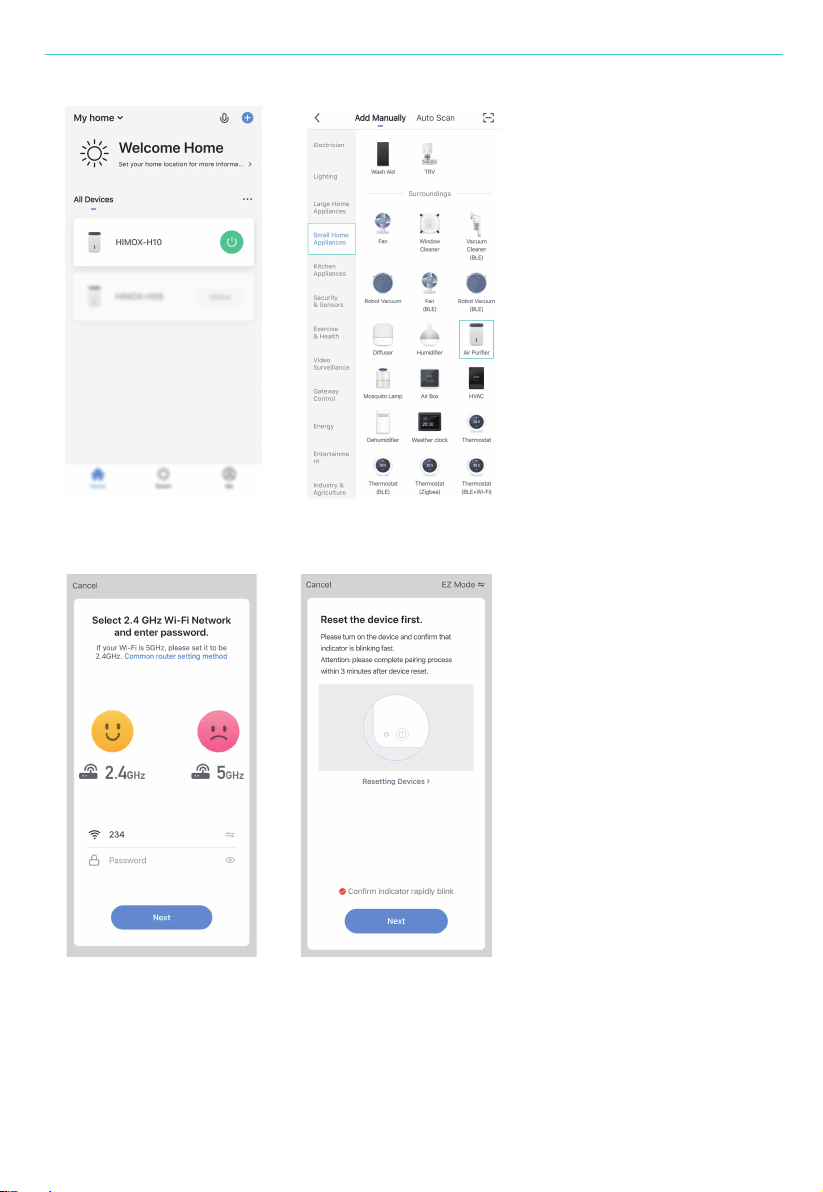
2. Abra su APP "Smart Life" y toque el "+" en la parte superior derecha del APP.
Seleccione el tipo de dispositivo de servicio. Toque "Small Home Appliances" y
seleccione "Purificador de aire(Wi-Fi) ". Introduzca la contraseña de la red Wi-Fi
a la que se conecta su teléfono móvil. A continuación, pulse "Siguiente" al
siguiente paso para confirmar el estado del indicador.
Instrucción de Operación Inteligente
Descarga & Registro
1. Escanee el código QR para descargar la APP de "Smart Life". También puede
buscar la APP "Smart Life" en la tienda o en Google Play para instalar la APP.
2. Abra la APP de "Smart Life", pulse "Registrar" para registrar una cuenta de
"Smart Life" con su número de teléfono o correo electrónico. A continuación,
inicie sesión en la APP.
Español
86
Español
87
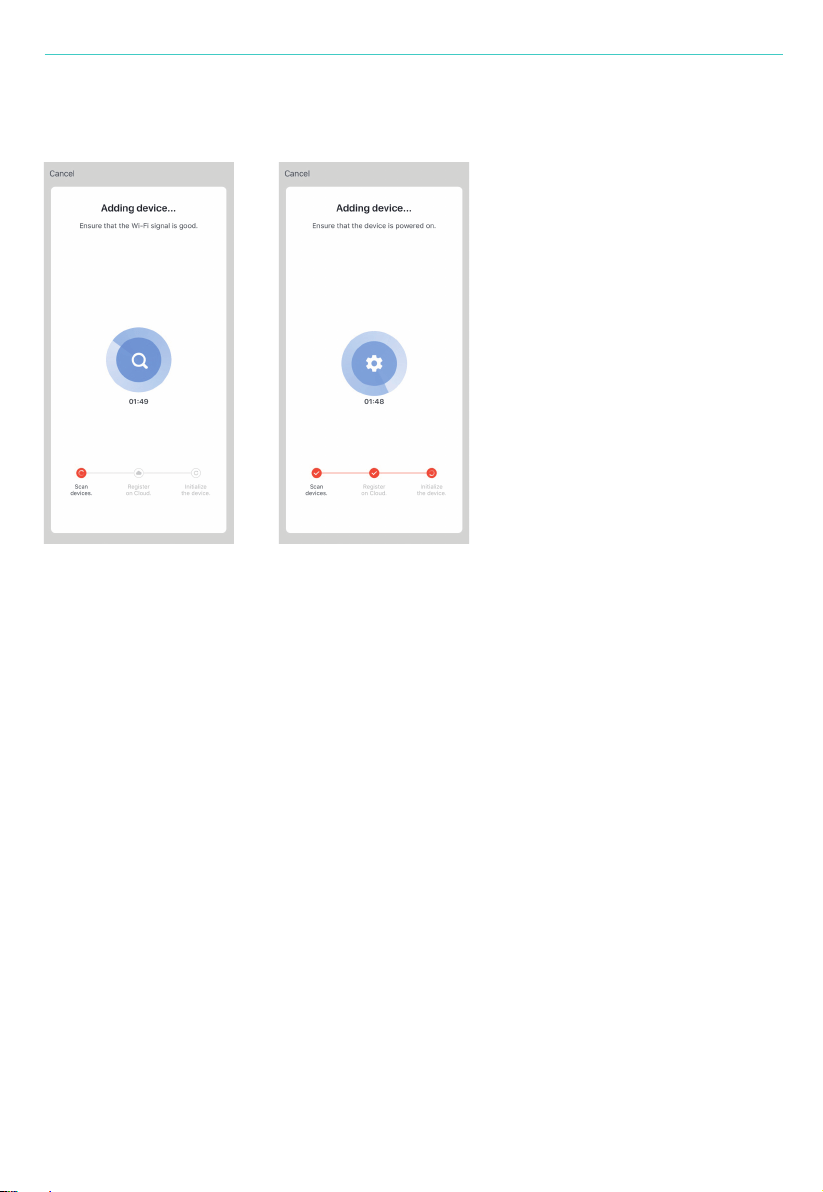
Pulse "Siguiente" para conectarse al dispositivo.
Aviso: Si el indicador de Wi-Fi se apaga y no se enciende automáticamente
cuando se conecta en modo EZ, debe fallar la conexión.
3. Cuando aparezca "1 dispositivo agregado exitosamente", significa que la
conexión se completó y su dispositivo aparecerá en la lista de aplicaciones.
Español
88
Agregar dispositivos en modo AP
1. Si falla en el modo EZ, también puede agregar su purificador de aire en el
modo AP.
2. Presione el botón Timer / Wi-Fi durante más de 5 segundos hasta que escuche
un "bip" y la luz indicadora de Wi-Fi comience a parpadear rápidamente, luego
presione el botón Timer / Wi-Fi durante otros 5 segundos hasta que escuche
un "bip" y la luz indicadora comienza a parpadear lentamente, lo que significa
que el dispositivo ya está para la configuración en el modo AP.
3. Toque "+" en la parte superior derecha de la aplicación. Seleccione el tipo de
dispositivo y tóquelo. Después del paso de ingresar el código de red,
seleccione "Modo AP" en la parte superior derecha de la APLICACIÓN.
Español
89
4. Toque "Ir a Conectar" para ir a la interfaz de configuración de WLAN en su
teléfono móvil y seleccione la red Wi-Fi llamada "Smart Life_XXXX" y conéctela.
Regrese a la APLICACIÓN "Smart Life", la conexión se iniciará automáticamente.
5. Cuando aparece "1 dispositivo agregado con éxito", significa que la conexión
está completa y su dispositivo aparecerá en la lista de aplicaciones.
Ahora puede controlar su dispositivo inteligente a través de la APLICACIÓN de
su teléfono móvil en cualquier momento y en cualquier lugar (asegúrese de que su
teléfono móvil y su dispositivo inteligente estén todos conectados a la red). Puede
compartir sus dispositivos con su amigo o familia después de agregarlos
correctamente.
Luego toque "Siguiente" para conectar su teléfono móvil al punto de acceso
del dispositivo.
Español

90
Darse cuenta:
1. Asegúrese de que el dispositivo esté encendido y cerca de su teléfono móvil
cuando agregue el dispositivo.
2. Asegúrese de que su teléfono móvil esté conectado a la red Wi-Fi y de que su
enrutador Wi-Fi funcione correctamente.
3. Asegúrese de que el dispositivo esté listo para la configuración. Consulte la
instrucción del producto "Agregar dispositivos en modo EZ" o "Agregar
dispositivos en modo AP" para obtener más detalles.
4. Asegúrese de que los dispositivos conectados no hayan alcanzado el número
máximo de enrutadores Wi-Fi. Si no es así, desconecte la red de algunos
dispositivos.
5. Asegúrese de que la contraseña de la red Wi-Fi esté corregida al agregar un
nuevo dispositivo.
6. Asegúrese de no haber utilizado ningún carácter chino para nombrar su red
Wi-Fi.
¿Por qué no se pudo agregar el dispositivo?
Al agregar un dispositivo por primera vez, es necesario que su teléfono móvil y
su dispositivo estén conectados a la misma red WiFi. Después de agregar el
dispositivo correctamente, puede controlarlo a distancia con la red
2G / 3G / 4G / 5G.
¿Puedo controlar el dispositivo con una red 2G / 3G / 4G / 5G?
¿Cómo puedo compartir mi dispositivo con otras personas?
Español
Abra su aplicación Smart Life, seleccione su dispositivo y toque el botón en la
esquina superior derecha. Toque "Dispositivos compartidos" y "Agregar uso
91
compartido", luego seleccione el "país / región" donde pertenece la cuenta e
ingrese el ID de la cuenta (un número de teléfono o un Dirección de correo
electrónico) con la que desea compartir. (Asegúrese de que el número de
teléfono o el correo electrónico estén registrados).
Abra su Smart Life y puede operar el dispositivo tocando el producto en el
"Dispositivo compartido que recibí" en la página de inicio.
¿Cómo puedo administrar el dispositivo compartido por otros?
1. Asegúrese de que el dispositivo haya sido conectado mediante la aplicación
"Smart Life". Puede encontrar el purificador de aire en "Todos los dispositivos".
2. Cambie a la aplicación Google Home. Haga clic en "+" y elija "Configurar
dispositivo", haga clic en "Ya tengo algo configurado", busque "Smart Life" y
agregue Dispositivos Smart Life.
¿Cómo conectar Google Home o Alexa (Google Home por ejemplo)?
Español
92
AVISO:asegúrese de que las cuentas que firmó en Google Home y Smart Lfe son el
correo electrónico, de lo contrario, el dispositivo no se puede agregar a Google
Home.i
Todos los dispositivos vinculados aparecerán en Google Home, incluido su
purificador de aire.
3. Luego, puede controlar el purificador de aire mediante Google Home.
Español
93
1. Toque su "HIMOX-H10"
2. Toque "Configuración", encontrará el "Modo de luz" o "Color de luz".
Tócalo para ajustar el color que necesitas.
Conéctese a Alexa (su purificador de aire debe conectarse primero con la
aplicación Smart Life)
Cómo ajustar el color de la luz nocturna con la aplicación Smart Life
Cómo ajustar restablecer la alerta de reemplazo de filtro por la aplicación
Smart Life
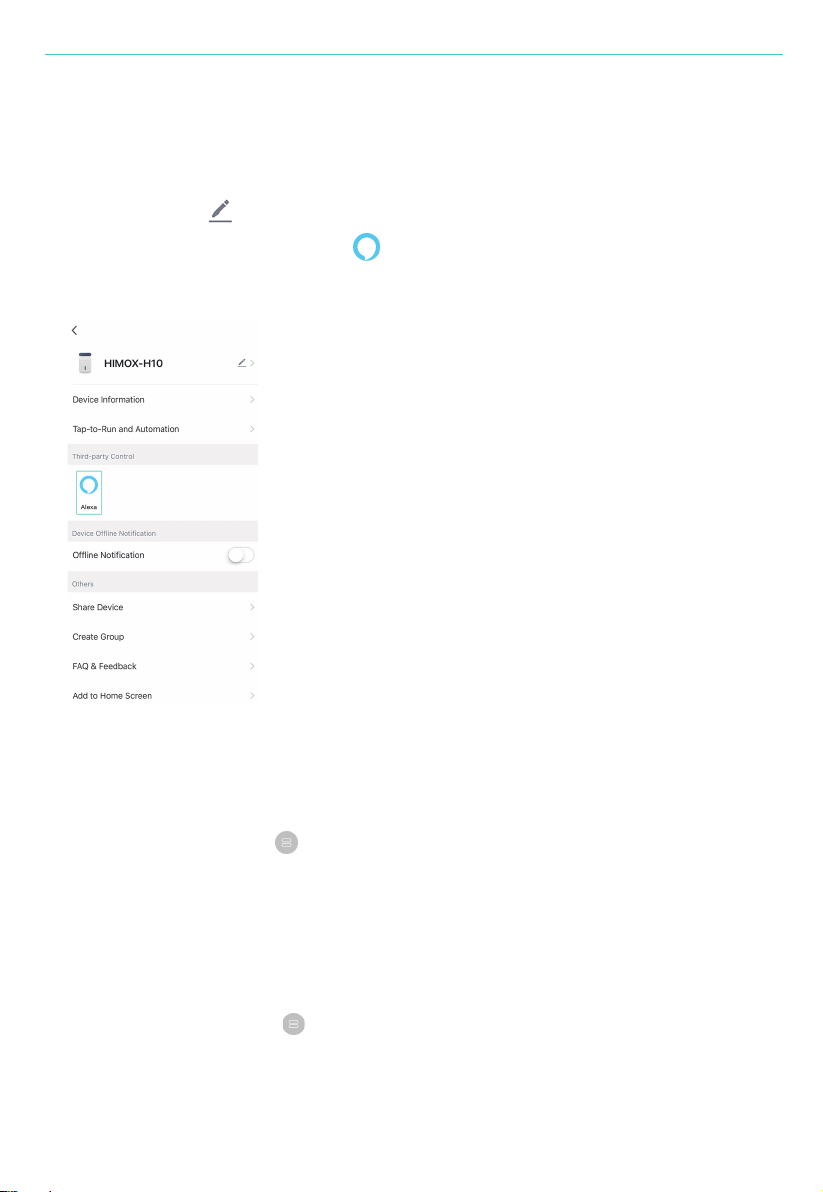
1. Toque "HIMOX-H10" en todos los dispositivos;
2. Toque el botón en la parte superior derecha de la interfaz HIMOX-H10.
Luego puede encontrar a Alexa (Alexa) en la opción "Control de terceros".
Siga las instrucciones para conectar su purificador de aire a Alexa.
1. Toque su "HIMOX-H10"
2. Toque "Configuración", encontrará el "Restablecer filtro". Por último,
toque "Restablecer filtro" y confirme.
Español

94
1. Presione el botón Temporizador / Wi-Fi durante más de 5 segundos, escuchará
un "bip" que significa que el dispositivo se quitó y la luz indicadora de Wi-Fi
comenzará a parpadear rápidamente nuevamente.
2. Abra su aplicación "Smart Life", seleccione su dispositivo y toque el botón en la e
squina superior derecha. Toca "Más". Luego toque "Quitar dispositivo" en la parte
inferior, la luz indicadora de Wi-Fi comenzará a parpadear rápidamente
nuevamente.
¿Cómo quitar el dispositivo?
Español