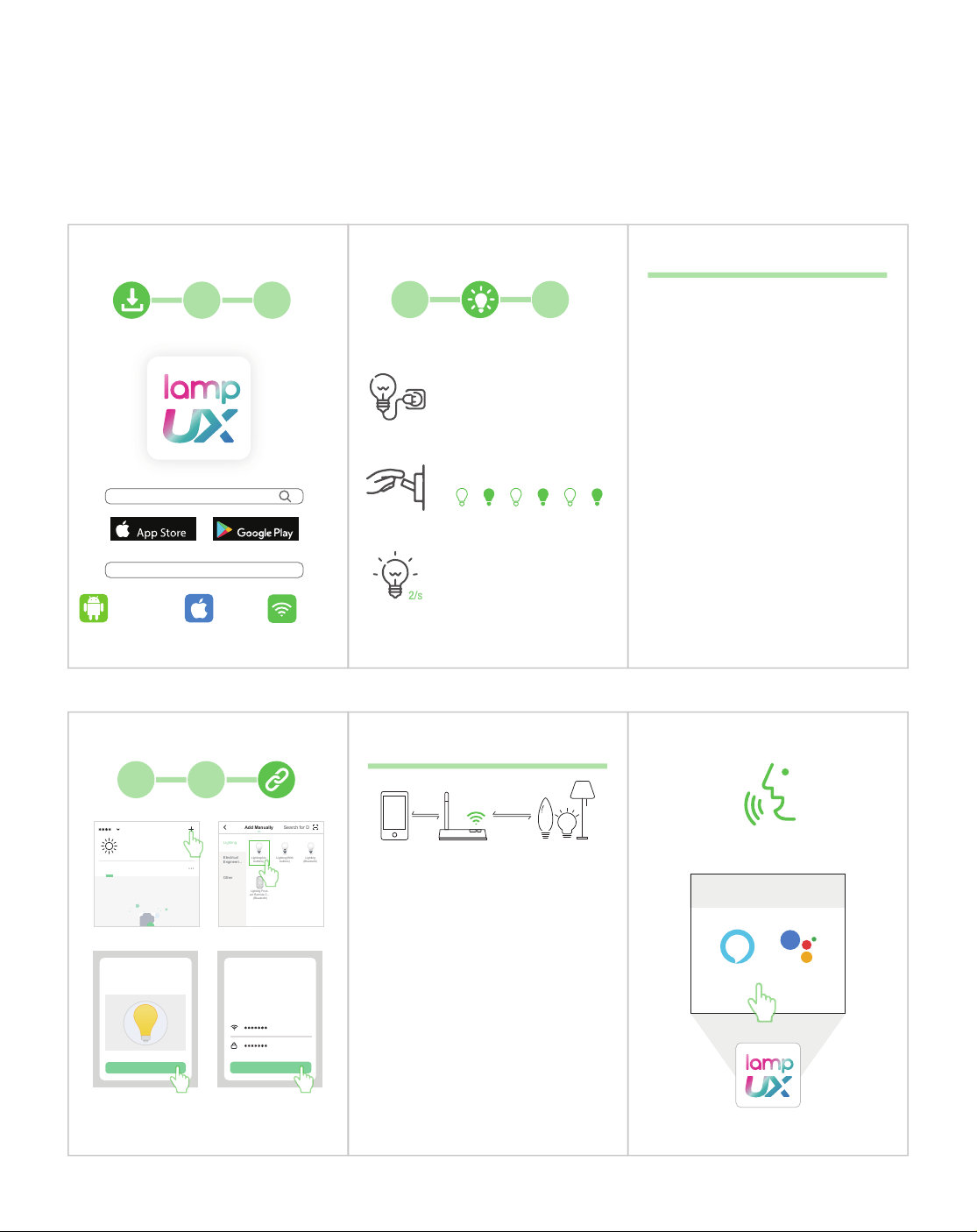
iOS 8.1 2.4Ghz
Android 4.0
http://smartapp.tuya.com/lampuxledbrighter
LampUX
or
Download on the Get it on
2
3
Schalten Sie das Licht ein und halten Sie es länger als 10
Sekunden an. Drücken Sie dann den Schalter dreimal. (aus
ein aus ein aus ein) Warten Sie, bis das Licht schnell blinkt.
(zweimal pro Sekunde)
Allumez la lumière et conservez-le plus de 10 secondes.
Appuyez ensuite 3 fois sur le bouton. (éteint allumé éteint
allumé éteint allumé) Attendez que le voyant clignote
rapidement. (deux fois par seconde)
Encienda la luz y manténgala encendida durante más de
10 segundos. Luego presione el interruptor 3 veces.
(apagado encendido apagado encendido apagado encendido)
Espere hasta que la luz parpadee rápidamente. (dos veces
por segundo)
Accendi la luce e tenerlo acceso per più di 10 secondi.
Quindi premere l'interruttore 3 volte. (spegnere accendere
spegnere accendere spegnere accendere) Attendere finché
la luce non lampeggia rapidamente. (due volte al secondo)
Add Manually
Lighting
Electrical
Lighting Prod-
uct Remote C...
(Bluetooth)
Lighting(No
buttons)
Lighting(With
buttons)
Lighting
(Bluetooth)
Other
Engineeri...
Search for D
****
Welcome home
All Devices
Set your home location, get more
information
21
Enter Wi-Fi
password
Select the 2.4G Wi-Fi network
your phone is using with
correct password.
Change Network
Confirm
Add Device
Power on the light and confirm
that light blinks rapidly
View Help
Confirm light blinks rapidly
2.4Ghz
Select the Wi-Fi network your phone is connected to.
Wählen Sie das WLAN aus, mit dem Ihr Telefon verbunden ist.
Sélectionnez Wi-Fi auquel votre téléphone est connecté.
Seleccione el Wi-Fi al que está conectado su teléfono.
Selezionare il Wi-Fi a cui è collegato il telefono.
3 STEPS
TO PLAY!
Third-party Control
Alexa
Google
Assistant
1
3
Wait until the light blinks rapidly.
(twice a second)
2/s
Switch on the light and
keep it on for at least 10s.
off on off on off on
Then alternate between the off and
on positions 3 times.