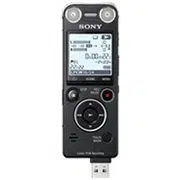
IC Recorder
Quick Start Guide
4-438-476-71(1)
© 2012 Sony Corporation Printed in China
ICD-UX533
ˎ IC Recorder (1)
ˎ Stereo headphones (1)
ˎ USB connection support cable
(1)
ˎ NH-AAA (size AAA) rechargeable
battery (1)
ˎ Quick Start Guide (1)
ˎ Application Software, Sound
Organizer (Installer file stored in
the built-in memory so that you
can install it to your computer.)
ˎ Help Guide (HTML file stored
in the built-in memory so it
can easily be copied to your
computer.)
Check the supplied items.
ˎ Electret condenser microphone
ECM-CS10, ECM-CZ10, ECM-CS3,
ECM-TL3
ˎ Rechargeable battery
NH-AAA-B2EN, NH-AAA-B2KN
ˎ USB AC adaptor AC-UD20,
AC-U501AD, AC-U50AG
ˎ Compact charger & 2-pcAAA
Multi-Use Premium
batteries BCG-34HS2KAN,
BCG-34HW2KAN
Optional accessories
Welcome to your new Sony IC recorder!
This is the Quick Start Guide, which provides you with instructions on the basic operations of the IC recorder.
Please read it carefully. We hope you enjoy using your new Sony IC recorder.
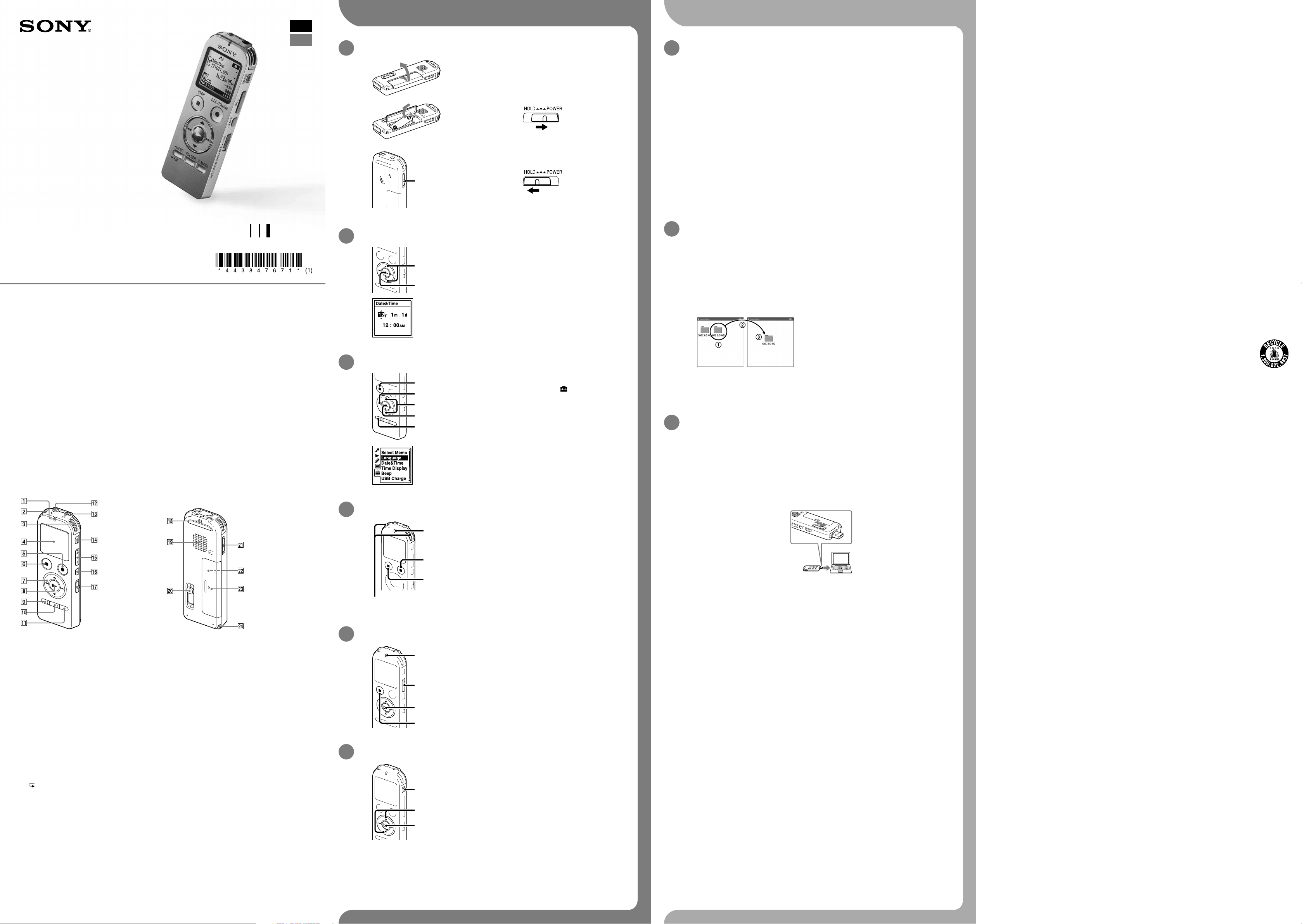
Parts and controls
Operation indicator
Built-in microphones (stereo) (L)
Built-in microphones (stereo) (R)
Display window
REC/PAUSE (record/pause) button
STOP button
Control button (, , (review/fast backward),
(cue/fast forward))
(play/enter) button*
MENU button
FOLDER button
T-MARK (track mark) button
(microphone) jack*
(headphones) jack
ERASE button
VOL –/+ (volume –/+) button*
A-B (repeat A-B) button
DPC (SPEED CTRL) switch
Strap hole (A strap is not supplied.)
Speaker
USB DIRECT slide lever
HOLD•POWER switch
microSD card slot (The card slot is in the battery
compartment.)
Battery compartment
Strap hole (A strap is not supplied.)
* These buttons and the jack have a tactile dot. Use it as a reference point for operations, or to identify each terminal.
Let’s try out your new IC recorder Utilizing Your Computer
Installing the help guide on your computer
By installing the help guide on your computer from the built-in memory of the IC recorder, you can
search for detailed operations and possible solutions when a problem occurs.
Slide the USB DIRECT slide lever on the back of the IC recorder, and insert the USB
connector into the USB port of a running computer.
In Windows: Click [Computer] (or [My Computer]), then double-click [IC RECORDER]
[FOR WINDOWS].
In Mac: Double-click [IC RECORDER] on the desktop.
Install the help guide.
In Windows: Double-click [Help_Guide_Installer] (or [Help_Guide_Installer.exe]).
In Mac: Double-click [Help_Guide_Installer_for_mac.app]. (v10.5.8 or higher)
Follow the instructions that appear on the screen to proceed with installation.
After the installation completes, double-click the [Help_Guide_icdu53_uc.htm] icon in the
desktop for Windows (or in Finder for Mac).
The help guide is displayed.
You can also view the help guide on the following Sony IC Recorder customer support home
page:
http://rd1.sony.net/help/icd/u53/uc/
Copying files from the IC recorder to your
computer
You can copy the files and folders from the IC recorder to your computer to store them.
Connect the IC recorder to your computer.
Copy files or folders you want to transfer to your computer.
Drag and drop the files or folders you want to copy from “IC RECORDER” or “MEMORY CARD” to
the local disk on your computer.
To copy a file or folder (Drag and drop)
IC RECORDER or
MEMORY CARD
Your computer
Click and hold,
drag,
and then drop.
Disconnect the IC recorder from your computer.
Installing Sound Organizer
Install Sound Organizer on your computer.
Note
Sound Organizer is compatible with the Windows PC only. It is not compatible with Mac.
¼ When installing Sound Organizer, log in to an account with administrator privileges.
Slide the USB DIRECT slide lever on the back of the IC recorder, and insert the USB
connector into the USB port of a running computer.
If the IC recorder cannot be connected to a computer directly, use the supplied USB connection
support cable.
Make sure the IC recorder has been recognized properly.
While the IC recorder is connected to the computer, “Connecting” is displayed in the display
window of the IC recorder.
Go to the [Start] menu, click [Computer] (or [My Computer]), and then double-click [IC
RECORDER] [FOR WINDOWS].
Double-click [SoundOrganizerInstaller_V140] (or [SoundOrganizerInstaller_V140.exe]).
Follow the instructions that appear on the screen.
Make sure that you accept the terms of the license agreement, select [I accept the terms
in the license agreement], and then click [Next].
When the [Setup Type] window appears, select [Standard] or [Custom], and then click
[Next].
Follow the instructions on the screen and set the installation settings when you select [Custom].
When the [Ready to Install the Program] window appears, click [Install].
The installation starts.
When the [Sound Organizer has been installed successfully.] window appears, check
[Launch Sound Organizer Now], and then click [Finish].
Note
You may need to restart your computer after installing Sound Organizer.
Note
If you format the built-in memory, all data stored there will be erased. (The Help Guide and the Sound Organizer
software will also be erased.)
On power
Operate the unit only on 1.2 V or 1.5 V DC.
Use an NH-AAA rechargeable battery or an LR03 (size
AAA) alkaline battery.
On safety
Do not operate the unit while driving, cycling or
operating any motorized vehicle.
On handling
ˎ Do not leave the unit in a location near heat
sources, or in a place subject to direct sunlight,
excessive dust or mechanical shock.
ˎ Should any solid object or liquid fall into the unit,
remove the battery and have the unit checked by
qualified personnel before operating it any further.
If you have any questions or problems concerning
your unit, please consult your nearest Sony dealer.
WARNING
Do not expose the batteries (battery pack or batteries installed) to excessive heat such as sunshine, fire or the like for a
long time.
CAUTION
Risk of explosion if battery is replaced by an incorrect type.
Dispose of used batteries according to the instructions.
Capacity (User available capacity *
1
*
2
)
4 GB (approx. 3.60 GB = 3,865,470,566 Byte)
*
1
A small amount of the built-in memory is used for file management and therefore not available for user storage.
*
2
When the built-in memory is formatted with the IC recorder.
RECYCLING NICKEL METAL HYDRIDE BATTERIES
Nickel metal hydride batteries are recyclable.
You can help preserve our environment by returning your used rechargeable batteries to the collection
and recycling location nearest you.
For more information regarding recycling of rechargeable batteries, call toll free 1-800-822-8837, or visit
http://www.rbrc.org/.
Caution: Do not handle damaged or leaking nickel metal hydride batteries.
This class B digital apparatus complies with Canadian ICES-003.
Precautions
1. Power on.
Slide and lift the battery compartment lid, then insert a
battery with the correct polarity.
Turn the power on.
Slide and hold the HOLD•POWER switch in the direction of
“POWER” until the window display appears.
To turn the power off, slide and hold the HOLD•POWER switch in
the direction of “POWER” until “Power Off” animation is displayed.
To prevent unintentional operations (HOLD)
¼ To release the IC recorder from the HOLD status, slide the
HOLD•POWER switch towards the center.
2. Set the date and time.
When you insert a battery for the first time, or after the IC recorder
has been without a battery for more than 1 minute, the “Set
Date&Time” animation appears, and then the year section begins
to flash.
Press or to set the year (the last two digits of
the year), and then press (play/enter). Repeat this
procedure to set month, day, hour, and minute in
sequence.
When you set the minute and press (play/enter), the clock
reflects the setting.
3. Select the menu language.
Press MENU.
Press , press or to select , and then press
(play/enter).
Press or to select “Language,” and then press
(play/enter).
Press or to select the language that you want to use
in the display window, and then press (play/enter).
You can select the following languages:
English*, Español (Spanish), Français (French)
* Default setting
Press STOP.
4. Record.
Operation
indicator
Built-in microphones
¼ Before you start using the IC recorder, make sure that you slide the
HOLD•POWER switch towards the center to release the HOLD status.
Press REC/PAUSE.
Recording starts and the operation indicator lights in red.
¼ You can pause recording by pressing REC/PAUSE. Press
REC/PAUSE again to restart recording.
Place the IC recorder so that the built-in microphones
face the direction of the source to be recorded.
Press STOP to stop recording.
The “Accessing...” animation appears and the recording stops.
5. Listen.
Operation
indicator
Press (play/enter).
Playback starts and the operation indicator lights in green.
Adjust the volume by pressing VOL –/+.
Press STOP to stop playback.
6. Erase.
Once a file is erased, you cannot restore it.
Press ERASE.
“Erase?” is displayed and the file to be erased is played back
for confirmation.
Select “Execute” using or , and then press (play/
enter).
“Erasing…” is displayed while the selected file is being erased.
Additional features
Details of these additional features for recording, playback, and editing are included in the help guide.
ˎ Scene Selection
ˎ Recording Filter
ˎ Noise Cut
ˎ T-MARK (Track mark)
ˎ DPC (Digital Pitch Control)
ˎ A-B Repeat
ˎ VOR (Voice Operated Recording)
ˎ Sound Effects
ˎ Easy Search
ˎ Divide
ˎ Sound Organizer editing software
Note
Depending on the country or region, some of the models or optional accessories are not available.
GB
FR
Enregistreur IC
Guide de démarrage rapide
ICD-UX533
ˎ Enregistreur IC (1)
ˎ Casque stéréo (1)
ˎ Câble de prise en charge de
connexion USB (1)
ˎ Pile rechargeable NH-AAA (AAA)
(1)
ˎ Guide de démarrage rapide (1)
ˎ Application, Sound Organizer (le
fichier d’installation est stocké
dans la mémoire intégrée afin
que vous puissiez l’installer sur
votre ordinateur.)
ˎ Manuel d’aide (Fichier HTML
stocké dans la mémoire intégrée
afin de pouvoir être facilement
copié sur votre ordinateur.)
Vérifiez les éléments fournis.
ˎ Microphone condensateur à
électret ECM-CS10, ECM-CZ10,
ECM-CS3, ECM-TL3
ˎ Pile rechargeable NH-AAA-
B2EN, NH-AAA-B2KN
ˎ Adaptateur secteur USB
AC-UD20 AC-U501AD,
AC-U50AG
ˎ Chargeur compact &
2-pc piles AAA Premium
multi-usage BCG-34HS2KAN,
BCG-34HW2KAN
Accessoires en option
Bienvenue sur votre nouvel enregistreur IC Sony !
Ceci est le guide de démarrage rapide qui vous fournit des instructions relatives aux opérations de base de
l’enregistreur IC.
Veuillez le lire attentivement. Nous espérons que vous apprécierez d’utiliser votre nouvel enregistreur IC
Sony.
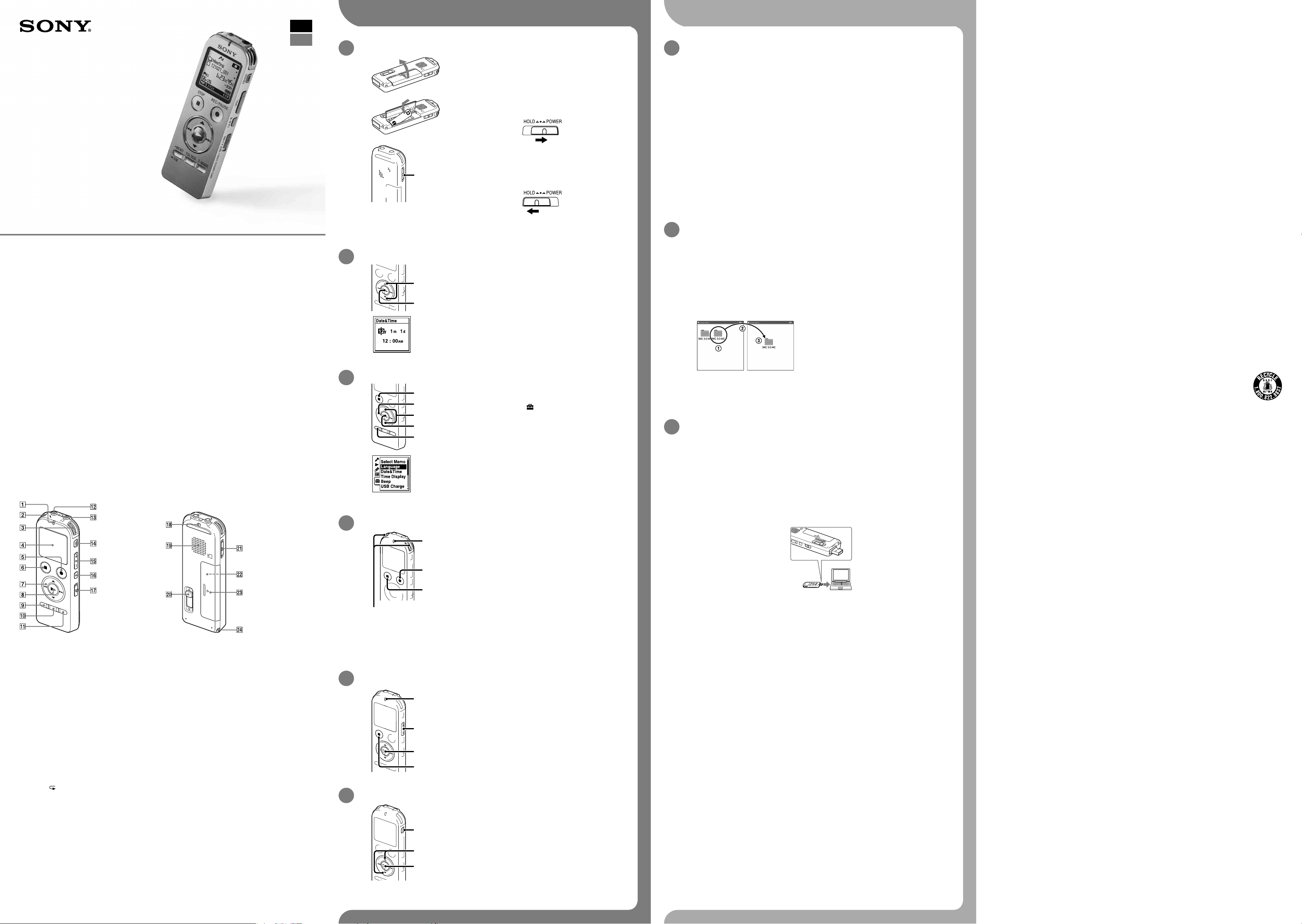
Pièces et commandes
Indicateur de fonctionnement
Microphones intégrés (stéréo) (G)
Microphones intégrés (stéréo) (D)
Fenêtre d’affichage
Touche REC/PAUSE (lecture/pause)
Touche STOP
Touche de commande (, , (retour/retour
rapide), (avance/avance rapide))
Touche (lecture/entrée)*
Touche MENU
Touche FOLDER
Touche T-MARK (repère de piste)
Prise (microphone)*
Prise (casque)
Touche ERASE
Touche VOL –/+ (volume –/+)*
Touche
A-B (répétition A-B)
Commutateur DPC(SPEED CTRL)
Orifice de dragonne (dragonne non fournie)
Haut-parleur
Levier coulissant USB DIRECT
Commutateur HOLD•POWER
Fente pour carte microSD (La fente pour carte
mémoire se trouve dans le compartiment de la
pile.)
Compartiment de la pile
Orifice de dragonne (dragonne non fournie)
* Ces touches et la prise possèdent un point tactile. Utilisez-le comme référence pour les opérations, ou pour
identifier chaque terminal.
Essayez votre nouvel enregistreur IC Utilisation de l’ordinateur
Installation du manuel d’aide sur votre ordinateur
En installant le manuel d’aide sur votre ordinateur depuis la mémoire intégrée de l’enregistreur IC,
vous pouvez trouver des informations détaillées et d’éventuelles solutions en cas de problème.
Faites glisser le levier coulissant USB DIRECT situé à l’arrière de l’enregistreur IC, puis
insérez le connecteur USB dans le port USB d’un ordinateur en marche.
Sous Windows : cliquez sur [Ordinateur] (ou [Poste de travail]), puis double-cliquez sur
[IC RECORDER] [FOR WINDOWS].
Sous Mac : double-cliquez sur [IC RECORDER] sur le bureau.
Installez le manuel d’aide.
Sous Windows : Double-cliquez sur [Help_Guide_Installer] (ou [Help_Guide_Installer.exe]).
Sous Mac : double-cliquez sur [Help_Guide_Installer_for_mac.app] (v10.5.8 ou supérieure).
Suivez les instructions qui s’affichent à l’écran pour passer à l’installation.
Une fois l’installation terminée, double-cliquez sur l’icône [Help_Guide_icdu53_uc.htm]
sur le bureau pour Windows (ou dans le Finder pour Mac).
Le manuel d’aide s’affiche.
Vous pouvez également afficher le manuel d’aide sur la page d’accueil suivante d’assistance à la
clientèle de l’enregistreur IC Sony.
http://rd1.sony.net/help/icd/u53/uc/
Copie de fichier depuis l’enregistreur IC vers
votre ordinateur
Vous pouvez copier des fichiers ou des dossiers depuis l’enregistreur IC vers votre ordinateur pour
les stocker.
Raccordez l’enregistreur IC à votre ordinateur.
Copiez les fichiers ou les dossiers que vous souhaitez transférer sur votre ordinateur.
Glissez et déposez les fichiers ou dossiers que vous voulez copier depuis « IC RECORDER » ou
« MEMORY CARD » vers le disque local de votre ordinateur.
Pour copier un fichier ou un dossier (glisser et déposer)
IC RECORDER ou
MEMORY CARD
Votre ordinateur
Cliquez et maintenez la touche enfoncée,
glissez,
puis déposez.
Déconnectez l’enregistreur IC de votre ordinateur.
Installation de Sound Organizer
Installez Sound Organizer sur votre ordinateur.
Remarque
Sound Organizer n’est compatible qu’avec les ordinateurs Windows. Il n’est pas compatible avec les
Mac.
¼ Lorsque vous installez Sound Organizer, connectez-vous avec un compte ayant des droits
d’administrateur.
Faites glisser le levier coulissant USB DIRECT situé à l’arrière de l’enregistreur IC, puis
insérez le connecteur USB dans le port USB d’un ordinateur en marche.
S’il n’est pas possible de raccorder directement l’enregistreur IC à l’ordinateur, utilisez le câble de
prise en charge de connexion USB fourni.
Assurez-vous que l’enregistreur IC a bien été reconnu.
Lorsque l’enregistreur IC est connecté à l’ordinateur, « Connecting » s’affiche dans la fenêtre
d’affichage de l’enregistreur IC.
Accédez au menu [Démarrer] menu, cliquez sur [Ordinateur] (ou [Poste de travail]), et
double-cliquez sur [IC RECORDER] [FOR WINDOWS].
Double-cliquez sur [SoundOrganizerInstaller_V140] (ou [SoundOrganizerInstaller_
V140.exe]).
Suivez les instructions qui s’affichent à l’écran.
Assurez-vous d’accepter les conditions du contrat de licence, sélectionnez [I accept the
terms in the license agreement], puis cliquez sur [Next].
Lorsque la fenêtre [Setup Type] s’affiche, sélectionnez [Standard] ou [Custom], puis
cliquez sur [Next].
Suivez les instructions à l’écran et réglez les paramètres d’installation lorsque vous sélectionnez
[Custom].
Quand la fenêtre [Ready to Install the Program] apparaît, cliquez sur [Install].
L’installation démarre.
Quand la fenêtre [Sound Organizer has been installed successfully.] apparaît, cochez
[Launch Sound Organizer Now], puis cliquez sur [Finish].
Remarque
Il se peut que vous deviez redémarrer votre ordinateur après l’installation de Sound Organizer.
Remarque
Si vous formatez la mémoire intégrée, toutes les données qui y sont stockées sont effacées. (Le Manuel d’aide et le
logiciel Sound Organizer seront également effacés.)
Alimentation
Faites uniquement fonctionner l’appareil sous une
tension de 1,2 V ou 1,5 V CC.
Utilisez une pile rechargeable NH-AAA ou une pile
alcaline LR03 (AAA).
Sécurité
Ne faites pas fonctionner l’appareil en conduisant
une voiture, une bicyclette ou tout autre véhicule
motorisé.
Manipulation
ˎ Ne laissez pas l’appareil à proximité d’une
source de chaleur ou dans un endroit exposé au
rayonnement direct du soleil, à une poussière
excessive ou à des chocs mécaniques.
ˎ Si des éléments solides ou liquides venaient à
pénétrer à l’intérieur de l’appareil, retirez la pile et
faites-le vérifier par un technicien qualifié avant de
le remettre en service.
Si vous avez des questions ou des problèmes
concernant cet appareil, consultez votre revendeur
Sony.
Précautions
1. Mise sous tension.
Faites glisser et soulevez le couvercle du compartiment
de la pile, puis insérez une pile rechargeable en
respectant la polarité.
Mettez l’appareil sous tension.
Faites glisser et maintenez enfoncé le commutateur
HOLD•POWER vers « POWER » jusqu’à ce que la fenêtre
d’affichage apparaisse.
Pour mettre l’appareil hors tension, faites glisser et maintenez
enfoncé le commutateur HOLD•POWER vers « POWER » jusqu’à ce
que l’animation « Power Off » s’affiche.
Prévenir les opérations involontaires (HOLD)
¼ Pour sortir l’enregistreur IC de l’état HOLD, faites glisser le
commutateur HOLD•POWER vers le centre.
2. Réglez la date et l’heure.
Lorsque vous insérez une pile pour la première fois ou après que
l’enregistreur IC est resté sans pile pendant plus d’une minute,
l’animation « Set Date&Time » s’affiche et la section de l’année
commence à clignoter.
Appuyez sur ou pour régler l’année (les deux
derniers chiffres de l’année), puis appuyez sur
(lecture/entrée). Répétez cette opération pour régler
dans l’ordre le mois, le jour, l’heure et les minutes.
Lorsque vous réglez les minutes et appuyez sur (lecture/
entrée), l’horloge affiche le réglage.
3. Sélectionnez le menu de la langue.
Appuyez sur MENU
Appuyez sur , appuyez sur ou pour
sélectionner l’onglet , puis appuyez sur (lecture/
entrée).
Appuyez sur ou pour sélectionner « Language »,
puis appuyez sur (lecture/entrée).
Appuyez sur ou pour sélectionner la langue que
vous souhaitez utiliser dans la fenêtre d’affichage, puis
appuyez sur (lecture/entrée).
Vous pouvez sélectionner les langues suivantes :
English* (anglais), Español (espagnol), Français
* Réglage par défaut
Appuyez sur STOP.
4. Enregistrement.
Indicateur de
fonctionnement
Microphones intégrés
¼ Avant de commencer à utiliser l’enregistreur IC, assurez-vous de
glisser le commutateur HOLD•POWER vers le centre pour sortir de
l’état HOLD.
Appuyez sur REC/PAUSE.
L’enregistrement démarre et l’indicateur de fonctionnement
s’allume en rouge.
¼ Vous pouvez mettre l’enregistrement en pause en appuyant
sur REC/PAUSE. Appuyez de nouveau sur REC/PAUSE pour
redémarrer l’enregistrement.
Tournez l’enregistreur IC de manière à ce que les
microphones intégrés soient orientés vers la source à
enregistrer.
Appuyez sur STOP pour arrêter l’enregistrement.
L’animation « Accessing... » s’affiche et l’enregistrement
s’arrête.
5. Écoute.
Indicateur de
fonctionnement
Appuyez sur (lecture/entrée).
La lecture démarre et l’indicateur de fonctionnement s’allume
en vert.
Réglez le volume en appuyant sur VOL –/+.
Appuyez sur STOP pour arrêter la lecture.
6. Effacement.
Une fois le fichier effacé, il est impossible de le récupérer.
Appuyez sur ERASE.
« Erase? » s’affiche et le fichier à effacer est lu pour
confirmation.
Sélectionnez « Execute » à l’aide de ou , puis
appuyez sur (lecture/entrée).
« Erasing... » s’affiche lorsque le fichier est en cours
d’effacement.
Fonctionnalités complémentaires
Les détails relatifs à ces fonctionnalités complémentaires pour l’enregistrement, la lecture et l’édition se
trouvent dans le guide d’assistance.
ˎ Sélection de scène
ˎ Recording Filter
ˎ Noise Cut
ˎ T-MARK (repère de piste)
ˎ DPC (Digital Pitch Control)
ˎ Répétition A-B
ˎ VOR (Voice Operated Recording)
ˎ Effets sonores
ˎ Easy Search
ˎ Diviser
ˎ Logiciel d’édition Sound Organizer
AVERTISSEMENT
Ne pas exposer les piles (pack de piles ou piles installées) à de fortes chaleurs (rayons du soleil, feu, etc.) pendant une
période prolongée.
ATTENTION
Risque d’explosion en cas de remplacement de la pile par un type incorrect.
Mettez les piles usagées au rebut conformément aux instructions.
Capacité (capacité disponible pour l’utilisateur *1*2)
4 Go (environ 3,60 Go = 3 865 470 566 octets)
*1 Une petite quantité de la mémoire interne est utilisée pour la gestion des fichiers et n’est donc pas disponible pour
le stockage.
*2 Lorsque la mémoire interne est formatée à l’aide l’enregistreur IC.
RECYCLAGE DES ACCUMULATEURS À HYDRURE MÉTALLIQUE DE NICKEL
Les accumulateurs à hydrure métallique de nickel sont recyclables.
Vous pouvez contribuer à préserver l’environnement en rapportant les piles usées dans un point de
collection et recyclage le plus proche.
Pour plus d’informations sur le recyclage des accumulateurs, téléphonez le numéro gratuit
1-800-822-8837
(Etats-Unis et Canada uniquement), ou visitez http://www.rbrc.org/.
Avertissement : Ne pas utilliser des accumulateurs à hidrure métallique de nickel qui sont endommagées ou qui fuient.
Cet appareil numérique de la classe B est conforme à la norme NMB-003 du Canada.
Remarque
Selon les pays ou les régions, certains des modèles ou des accessoires optionnels ne sont pas disponibles.
FR
GB