User Manual for Ice Machines
Installation
Location Requirements
The location selected for the ice machine head section must meet the following criteria. If any of these criteria are not met, select another location.
- The location must be indoors and must be free of airborne and other contaminants.
- The location must not be near heatgenerating equipment or in direct sunlight.
- The location must allow enough clearance for water, drain, and electrical connections in the rear of the ice machine.
- The location must not obstruct airflow through or around the ice machine.
Installation Requirements
- The ice machine and bin must be level.
- Vent the ice machine and bin drains separately.
- Bin drain termination must have an air gap.
- The ice machine and bin must be descaled and sanitized after installation.
- The drain line must contain a union or other suitable means of disconnection at the ice machine.
QuietQube Models Only
- The ice machine top panel can be trimmed with an aviator snips to allow the line set, water line and electrical connections to exit the top. Only cut out what is needed, the back panel must support the top panel.
- The water inlet and electrical connection must contain a service loop to allow future access.
Air Baffle
Self-Contained Air-cooled Only
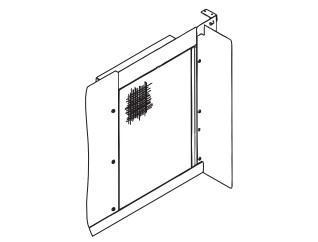
The air-cooled baffle prevents condenser air from recirculating. To install:
- Loosen the back panel screws next to the condenser.
- Align the keyhole slots in the air baffle with the screw holes and slide the baffle down to lock in place.
Bin Installation Requirements
- The installation area must be capable of supporting the combined weight of the equipment and product.
- All ice machines installed on a bin require an ice deflector.
- Manitowoc bins have a deflector installed and require no modifications when used with a forward-facing evaporator.
- Ice machines with multiple evaporators require a deflector kit.
- Align sides and back of ice machine with sides and back of bin when placing ice machine on bin.
- Optional sales kits are available to adapt various sized or multiple ice machines on large bins.
Bin Installation
NOTE: When using casters, the units must be tethered or secured to comply with all applicable codes. Swivel casters must be mounted on the front and rigid casters must be mounted on the rear. Lock the front casters after installation is complete.
- Remove threaded plug from drain fitting.
- Screw the leveling legs onto the bottom of the bin.
- Screw the foot of each leg in as far as possible.
- Move the bin into its final position.
- Level the bin to assure that the bin door closes and seals properly. Use a level on top of the bin. Turn the base of each foot as necessary to level the bin.
- Inspect bin gasket prior to ice machine installation. (Manitowoc bins come with a closed cell foam gasket installed along the top surface of the bin.)
- Remove all panels from ice machine before lifting and installing on bin. Remove front panel, top cover, left and right side panels.
Dispenser Installation
Observe following recommendations unless required by the dispenser manufacturer.
- An adapter is not required for ice machines that match the dispenser size.
- A deflector is not required.
- Ice level management is recommended to prevent water leakage or movement of ice machine during agitation.
- Align sides and back of ice machine with sides and back of dispenser when placing ice machine.
- Follow ice machine installation procedures in this manual and any additional installation requirements specified by the dispenser manufacturer.
Operation
Touch Screen Features
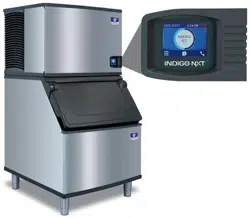
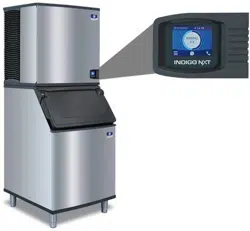
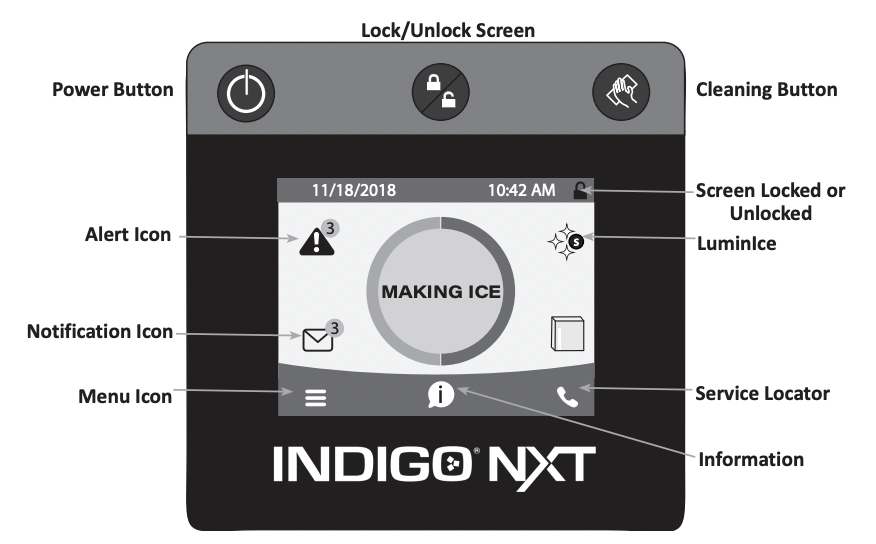
The Indigo® NXT control panel offers a series of pressure-sensitive buttons and an interactive touchscreen.
Buttons
Power Button: Provides On/Off functions for the ice machine.
Lock/Unlock Button: Allows or prevents touchscreen navigation.
Cleaning Button: Initiates a cleaning cycle. Refer to Section 4 for details.
Touchscreen
Home screen allows viewing of ice machine status, alerts and messages. Navigation with the touchscreen provides access to menu items, machine information, settings and event logs. Setup and Energy Saver settings can be adjusted along with access to service and troubleshooting information.
NOTE: Touchscreen is to be activated with finger tips only.
Icons: Provide status indication and allow navigation by pressing the icon.
HOME SCREEN ICON DESCRIPTIONS
| Icon |
Description |
|
Home Screen

|
Center portion of the screen displays the current condition of the ice machine - Making ice, bin full, program mode or machine off |
|
Alert

|
Alert icon with number of messages. Pressing this icon will display the alert log which will allow viewing and resetting of alerts |
|
Message

|
Notification icon with quantity of messages. Pressing this icon will display the routine maintenance reminder screen which will allow viewing and resetting of the reminder |
|
Menu

|
Menu icon will take you to the main menu |
|
Information

|
Information icon provides model and serial number, installation date and other information specific to the ice machine |
|
Service Locator

|
Provides contact information for your local service support - Default is the Manitowoc Ice website service locator |
|
Lock/Unlock

|
Indicates if screen is locked or unlocked |
|
LuminIce

|
Only visible when a LuminIce® II accessory is connected.
Blue S - Normal operation
Red S - Replace bulb
Red/Blue alternating - Incorrect bulb installed
|
|
Performance Specifications
NOTE: The performance statistics are calculated based on the performance of the machine at 90 degree ambient temperature and 70 degree water temperature. The actual statistics may vary depending on your operating conditions.
|
Setup Wizard
Screens will automatically advance after a selection is made or press the right arrow to advance one screen, press left arrow to go back one screen. All settings can be accessed and changed without the wizard by using menu screen navigation.
| Setup |
Description |
| Press ON/ OFF Button |
On/Off button is used to start/stop ice making. |
| Enter Model Number |
Only visible if model number can not be automatically identified. The ice machine will not start without model identification. |
| Select Language |
Default is English. Scroll to select a different language. |
| Start Wizard |
Setup wizard will guide ice machine programming. |
| Accessory Detection |
Detects if Ice Level Sensor, LuminIce II or AuCS are connected. Checkmark = yes - X = no |
| USB Setup |
Only used when setup features have been transferred to a USB drive. Skip screen by selecting right arrow. |
| Configure Date and Time Formats |
Select Month/Day/Year or Day/Month/Year.
Select 12 hour or 24 hour time format.
|
| Set Time |
Use arrows to set local time. |
| Set Date |
Use arrows to set date for your location. |
| Units |
Select standard or metric. |
| Brightness |
Configure screen brightness during normal operation. |
| Ice Program |
Program ice machine run times or press right arrow to skip this setup. |
| Cleaning Reminder |
Set descale or sanitize reminder or press right arrow to skip. |
|
IAuCS
Only when detected
|
Set frequency of operation when this accessory is installed. |
|
Air Filter
Air-cooled models only
|
Set to ON for self-contained air cooled models. |
| Water Usage |
Factory default or
Use less water for reverse osmosis systems or
Use more water to improve clarity for unfiltered water
|
| Water Filter |
Select Yes or No |
|
LuminIce II
Only when detected
|
12 month reminder is automatically set. |
|
Ice Level Sensor
Only when detected
|
Reminder to rotate the sensor from shipping to operational position. |
| Wizard Complete |
Press right arrow or home icon to return to home screen. |
Menu Screen Navigation
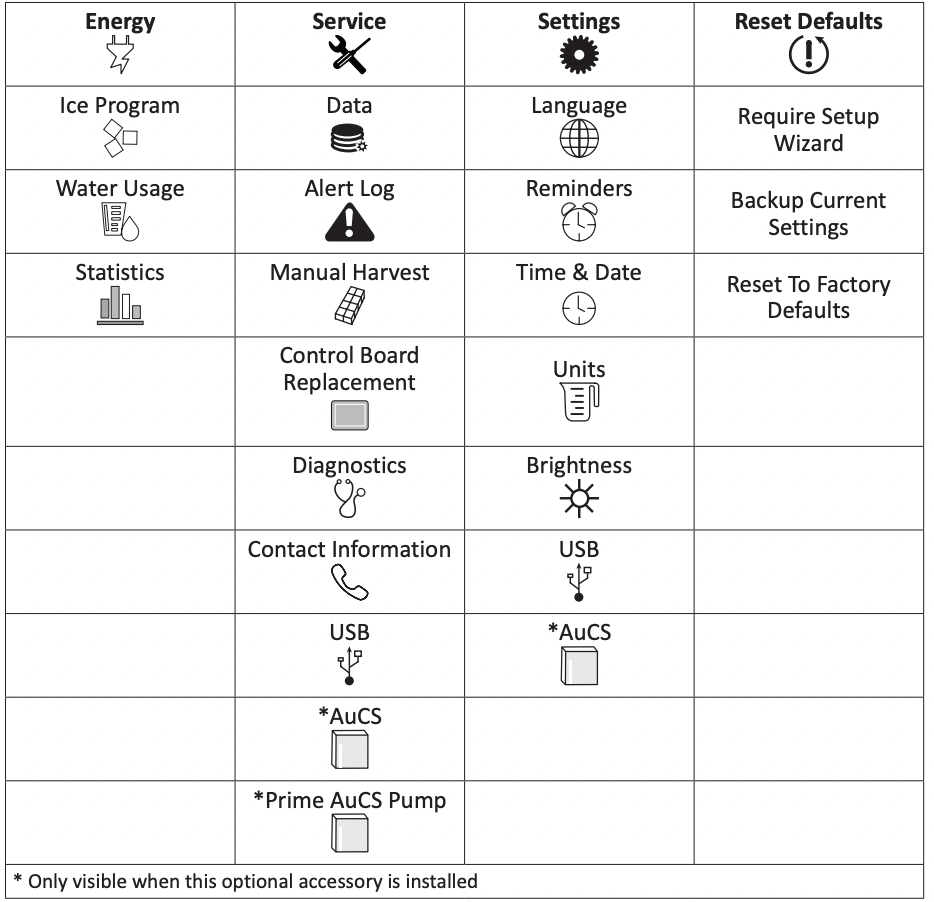
Select SETTINGS Icon from the Home Screen to access Main Menu screen.
Ice Making Sequence of Operation
The power button must be depressed and the water curtain/ice dampers must be in place on the evaporator before the ice machine will start.
Water Purge Cycle
The ice machine purges any remaining water from the water trough down the drain.
Prechill Cycle
The refrigeration system cools the evaporator before the water pump is energized.
Freeze Cycle
Water flows across the evaporator and the refrigeration system chills the evaporator. Ice builds on the evaporator and the freeze cycle continues until the ice thickness probe senses a sheet of ice has formed. The ice thickness probe signals the control board to start a harvest.
Harvest Cycle
Any remaining water is purged down the drain as refrigerant gas warms the evaporator. When the evaporator warms, the sheet of cubes slides off the evaporator and into the storage bin. If all cubes fall clear of the water curtain (or ice damper) the ice machine starts another freeze cycle.
Off Cycle
If the water curtain or ice damper are held open by ice cubes the ice machine shuts off. When the water curtain or ice damper closes, the ice machine starts a new cycle at the water purge.
Control Board Timers
The control board has the following nonadjustable timers:
- The ice machine control board will set its own install date after 100 freeze and harvest cycles.
- The ice machine is locked into the freeze cycle for 6 minutes before a harvest cycle can be initiated.
- The maximum freeze time is 35 minutes at which time the control board automatically initiates a harvest sequence.
- The maximum harvest time is 7 minutes, the control board will perform a water thaw cycle and then return the ice machine to the freeze cycle.
Service Faults
Service Faults are stored and indicated by the control board after three cycles. The number of cycles required to stop the ice machine varies for each Service Fault.
- Long Freeze Cycle - If the freeze time reaches 35 minutes, the control board automatically initiates a harvest cycle. If 6 consecutive 35 minute freeze cycles occur, the ice machine stops.
- Long Harvest Cycle - If the harvest time reaches 7 minutes, the control board automatically returns the ice machine to the freeze cycle. After 3 consecutive long harvest cycles the ice machine stops.
Refer to Section 5 if you receive an alert for Service Fault E01 or E02.
Safe Operation Mode
- Allows the ice machine to operate up to 72 hours if the ice thickness probe and/or water level probe sensors fail.
- When the control board starts the safe mode, an alert is flashed on the display to notify the end-user they have a production problem.
- The control board automatically initiates and monitors the safe mode. The control will automatically exit the safe mode if a normal signal is received from the input.
- After 72 hours, the control board will enter a standby mode and turn off.
NOTE: The control board needs a five cycle history to operate safe mode. If five cycles have never been successfully completed the ice machine will shut-off.
Water Assist Harvest
When the damper/curtain does not open within 3.5 minutes in the harvest cycle the following occurs:
- 3.5 minutes - The water inlet valve energizes until water touches the high water level probe.
- 4 minutes - The water pump energizes.
- 6.5 to 7 minutes - The water dump valve energizes.
Water Thaw Cycle
When the damper/curtain does not open during the 7 minute harvest cycle the following water thaw cycle occurs:
- 7 minutes - The compressor, harvest solenoid valve and dump valve deenergize.
- The water pump remains energized and the water inlet valve energizes until water touches the high water level probe.
- Water is circulated over the evaporator.
- Water is circulated, dumped and refilled to the high water level probe for approximately 1 hour.
- At the end of the thaw cycle the ice machine will start another freeze cycle approximately 1 - 1.75 hour).
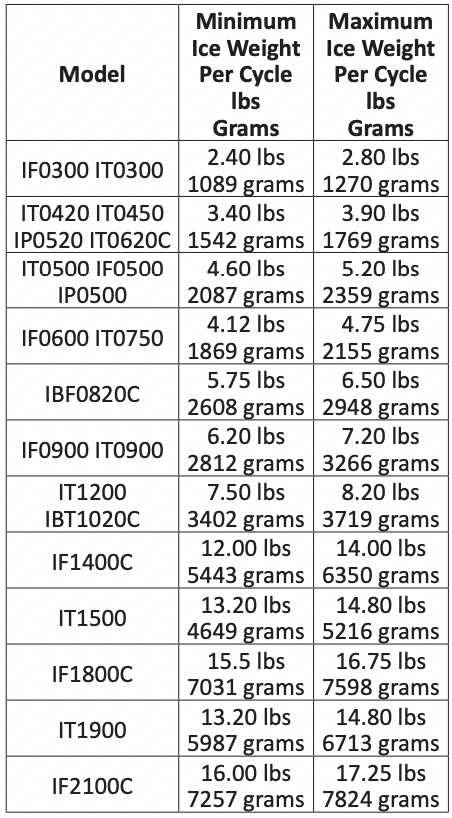
Minimum/Maximum Slab Weight
Adjust ice thickness to meet chart specifications.
Important Routine adjustments and maintenance procedures are not covered by the warranty
Ice Thickness Check
After a harvest cycle, inspect the ice cubes in the ice storage bin. The ice thickness probe is factory-set to maintain the ice bridge thickness at 1/8" (3 mm).
NOTE: Make sure the water curtain is in place when performing this check. It prevents water from splashing out of the water trough.
1. Inspect the bridge connecting the cubes. It must be approximately 1/8" (3 mm) thick.
2. If adjustment is necessary, turn the ice thickness probe adjustment screw clockwise to increase bridge thickness, counterclockwise to decrease bridge thickness. Set a 7 mm (9/32") gap between ice thickness probe and evaporator as starting point, then adjust to achieve a 1/8" (3 mm) bridge thickness.
NOTE: Turning the adjustment one-third of a turn will change the ice thickness about 1/16" (1.5 mm).
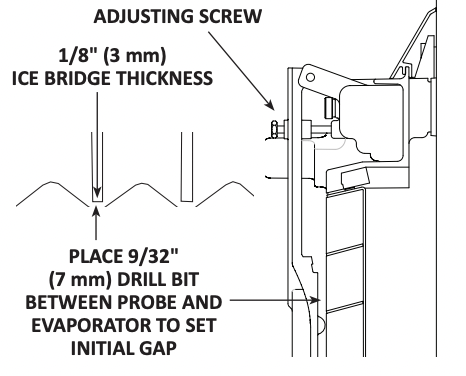
Verify the ice thickness probe wire doesn’t restrict probe movement.
Reverse Osmosis or Deionized Water Usage
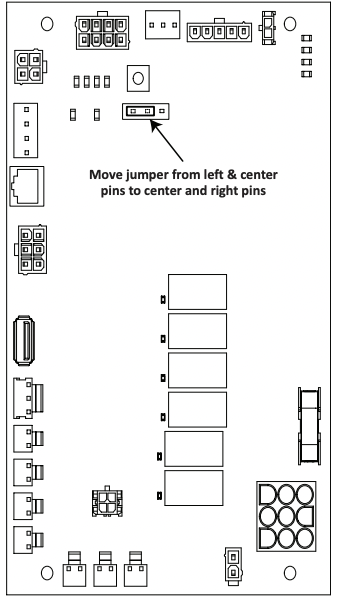
When using water with low total dissolved solid content (low TDS) the water level probe sensitivity can be increased by moving the jumper over one pin. The Electronic Control Board diagram shows the default position of the jumper covering the left and center pins. Moving the jumper to the center and right pins and enabling R.O. menu “Use less water with reverse osmosis” (Settings/Energy/ Water Usage/Use Less Water With Reverse Osmosis) will increase the sensitivity of the water level probe.
Maintenance
Descaling and Sanitizing
General
You are responsible for maintaining the ice machine in accordance with the instructions in this manual. Maintenance procedures are not covered by the warranty.
Descale and sanitize the ice machine every six months for efficient operation. If the ice machine requires more frequent descaling and sanitizing, consult a qualified service company to test the water quality and recommend appropriate water treatment. An extremely dirty ice machine must be taken apart for descaling and sanitizing.
Manitowoc Ice Machine Cleaner/Descaler and Sanitizer are the only products approved for use in Manitowoc ice machines.
Ice Machine Inspection
Check all water fittings and lines for leaks. Also, make sure the refrigeration tubing is not rubbing or vibrating against other tubing, panels, etc.
Do not put anything (boxes, etc.) in front of the ice machine. There must be adequate airflow through and around the ice machine to maximize ice production and ensure long component life.
Exterior Cleaning
Clean the area around the ice machine as often as necessary to maintain cleanliness and efficient operation.
Wipe surfaces with a damp cloth rinsed in water to remove dust and dirt from the outside of the ice machine. If a greasy residue persists, use a damp cloth rinsed in a mild dish soap and water solution. Wipe dry with a clean, soft cloth.
The exterior panels have a clear coating that is stain resistant and easy to clean. Products containing abrasives will damage the coating and scratch the panels.
- Never use steel wool or abrasive pads for cleaning.
- Never use chlorinated, citrus based or abrasive cleaners on exterior panels and plastic trim pieces.
Remedial Cleaning Procedure
- This procedure descales all components in the water flow path, and is used between the bi-yearly detailed descaling and sanitizing procedure.
Detailed Descaling/Sanitizing Procedure
This procedure must be performed a minimum of once every six months.
- The ice machine and bin must be disassembled descaled and sanitized.
- All ice produced during the descaling and sanitizing procedures must be discarded.
Caution Use only Manitowoc approved Ice Machine Cleaner/De-scaler and Sanitizer for this application (Manitowoc Cleaner/De-scaler part number 9405463 and Manitowoc Sanitizer part number 9405653). It is a violation of Federal law to use these solutions in a manner inconsistent with their labeling. Read and understand all labels printed on bottles before use.
Detailed Descaling and Sanitizing Procedure
Ice machine cleaner/descaler is used to remove lime scale and mineral deposits. Ice machine sanitizer disinfects and removes algae and slime.
NOTE: Although not required and dependent on your installation, removing the ice machine top cover may allow easier access.
Step 1 Open the front door to access the evaporator compartment. Ice must not be on the evaporator during the descaling/ sanitize cycle. Follow one of the methods below:
- Press the power switch at the end of a harvest cycle after ice falls from the evaporator(s).
- Press the power switch and allow the ice to melt.
Notice Never use anything to force ice from the evaporator. Damage may result.
Step 2 Remove all ice from the bin/ dispenser.
Step 3 Press the Clean button and select “Turn off when complete”. Water will flow through the water dump valve and down the drain. Wait approximately 1 minute until the water trough refills and the display indicates Add Chemical. Add the proper amount of ice machine cleaner/descaler to the water trough by pouring between the water curtain and evaporator, then confirm the chemical was added.
Caution Do not mix Cleaner/Descaler and Sanitizer solutions together. It is a violation of Federal law to use these solutions in a manner inconsistent with their labeling.
Warning Wear rubber gloves and safety goggles (and/or face shield) when handling Ice Machine Cleaner/Descaler or Sanitizer.
Step 4 Wait until the cycle is complete (approximately 24 minutes). Then disconnect power to the ice machine (and dispenser when used).
Warning Disconnect the electric power to the ice machine at the electric service switch box.
Step 5 Remove parts for descaling.
Notice Refer to parts removal page 47. Continue with Step 6 when the parts have been removed.
Step 6 Mix a solution of cleaner/descaler and lukewarm water. Depending upon the amount of mineral buildup, a larger quantity of solution may be required. Use the ratio in the table below to mix enough solution to thoroughly descale all parts.
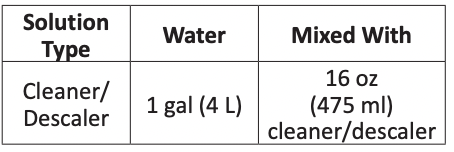
Step 7 Use half of the cleaner/descaler & water mixture to descale all components. Use caution not to expose electrical connectors to liquid and soak parts for 5 minutes (15 - 20 minutes for heavily scaled parts). The solution will foam when it contacts lime scale and mineral deposits; once the foaming stops, use a soft-bristle nylon brush, sponge or cloth (NOT a wire brush) to carefully descale the parts. When descaling is complete rinse all removed components with clean water
Step 8 While components are soaking, use half of the solution to descale all food zone surfaces of the ice machine and bin or dispenser). Use a nylon brush or cloth to thoroughly descale the following ice machine areas:
- Side walls
- Base (area above water trough)
- Evaporator plastic parts - including top, bottom and sides
- Bin or dispenser
Rinse all areas thoroughly with clean water.
SANITIZING PROCEDURE
Step 9 Mix a solution of sanitizer and lukewarm water.
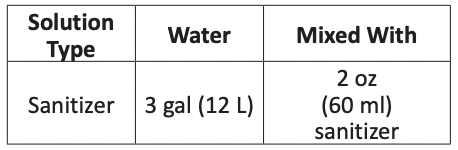
Step 10 Use half of the sanitizer/ water solution to sanitize all removed components. Fill a spray bottle and use caution not to expose electrical connectors to liquid and liberally apply the solution to all surfaces of the removed parts or soak the removed parts in the sanitizer/water solution. Do not rinse parts after sanitizing.
Step 11 Use half of the sanitizer/water solution to sanitize all food zone surfaces of the ice machine and bin (or dispenser).
Use a spray bottle to liberally apply the solution. When sanitizing, pay particular attention to the following areas:
- Side walls
- Base (area above water trough)
- Evaporator plastic parts - including top, bottom and sides
- Bin or dispenser
Do not rinse the sanitized areas.
Step 12 Replace all removed components back into their original configuration and wait 20 minutes.
Notice
When re-installing the water level probe, ensure the rubber gasket is sealed against the base of the ice machine and that any electrical connectors or wires remain free from moisture.
Step 13 Press the Clean button and select “Make ice when complete”. Water will flow through the water dump valve and down the drain. Wait approximately 1 minute until the water trough refills and the display indicates Add Chemical. Add the proper amount of ice machine sanitizer to the water trough by pouring between the water curtain and evaporator, then confirm the chemical was added.
Step 14 Close and secure the front door. The ice machine will automatically start ice making after the sanitize cycle is complete (approximately 24 minutes).
Parts Removal for Detailed Descaling and Sanitizing
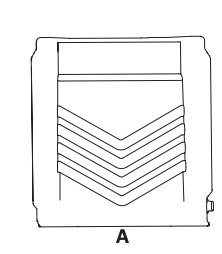
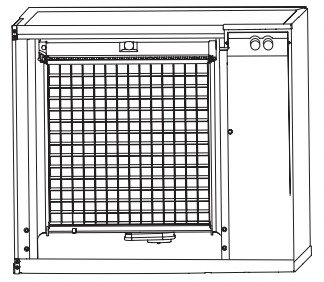
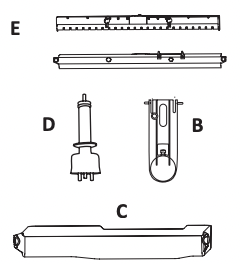
Single evaporator is shown; Each evaporator will have a distribution tube and water curtain/damper.
A. Remove the water curtain(s)
- Gently flex the curtain in the center and remove it from the right side.
- Slide the left pin out.
B. Remove the ice thickness probe
- Compress the hinge pin on the top of the ice thickness probe.
- Pivot the ice thickness probe to disengage one pin then the other. The ice thickness probe can be descaled and sanitized at this point without complete removal. If complete removal is desired, disconnect the ice thickness control wiring from the control board.
Notice Electrical connector must never be exposed to any liquids.
C. Remove the water trough
- Depress tabs on right and left side of the water trough.
- Allow front of water trough to drop as you pull forward to disengage the rear pins.
D. Remove the water level probe
- Pull the water level probe straight down to disengage.
- Lower the water level probe until the wiring connector is visible.
- Disconnect the wire lead from the water level probe.
- Remove the water level probe from the ice machine.
Notice
Electrical connector must never be exposed to any liquids.
E. Remove the water distribution tube(s)
NOTE: Thumbscrews for the distribution tube are retained to prevent loss. Loosen thumbscrews, but do not pull thumbscrews out of distribution tube.
- Loosen the two outer screws (do not remove screws completely because they are retained to prevent loss) and pull forward on the distribution tube to release from slip joint.
- Disassemble distribution tube by loosening the two (2) middle thumbscrews and dividing the distribution tube into two pieces.
Remedial Cleaning Procedure
This procedure descales all components in the water flow path, and is used to descale the ice machine between the bi-yearly detailed descaling and sanitizing procedure.
Ice machine cleaner/descaler is used to remove lime scale and mineral deposits. Ice machine sanitizer disinfects and removes algae and slime.
NOTE: Although not required and dependent on your installation, removing the ice machine top cover may allow easier access.
Step 1 Ice must not be on the evaporator during the clean/sanitize cycle. Follow one of the methods below:
- Press the power switch at the end of a harvest cycle after ice falls from the evaporator(s).
- Press the power switch and allow the ice to melt.
Notice
Never use anything to force ice from the evaporator. Damage may result.
Step 2 Open the front door to access the evaporator.
Step 3 Press the Clean button and select “Make ice when complete”. Water will flow through the water dump valve and down the drain. Wait approximately 1 minute until the water trough refills and the display indicates Add Chemical. Add the proper amount of ice machine descaler to the water trough by pouring between the water curtain and evaporator, then confirm the chemical was added.
Step 4 Close and secure the front door. The ice machine will automatically start ice-making after the clean cycle is complete (approximately 24 minutes).
Cleaning the Air Filter and Condenser
The washable filter on self-contained ice machines is designed to catch dust, dirt, lint and grease. Clean the filter once a month with mild soap and water.
A dirty condenser restricts airflow, resulting in excessively high operating temperatures. This reduces ice production and shortens component life.
Warning
Disconnect electric power to the ice machine at the electric service switch before cleaning the air filter or the condenser. The condenser fins are sharp; Use care when removing or installing the air filter.
- Clean the condenser at least every six months.
- Shine a flashlight through the condenser to check for dirt between the fins.
- Blow compressed air or rinse with water from the inside out (opposite direction of airflow).
- If dirt still remains, call a service agent to clean the condenser.
Removal from Service/Winterization
All Models
- Descale and sanitize the ice machine.
- Turn off the water supply, disconnect and drain the incoming ice-making water line at the rear of the ice machine and drain the water trough.
- Energize the ice machine, wait one minute for the water inlet valve to open and blow compressed air in both the incoming water and the drain openings in the rear of the ice machine to remove all water.
WATER-COOLED MODELS ONLY
- Disconnect the incoming water and drain lines from the water-cooled condenser.
- Insert a large screwdriver between the bottom spring coils of the water regulating valve and pry open the Water Regulating Valve.
- Hold the valve open and blow compressed air through the condenser until no water remains.
All Models
4. Press the power switch and disconnect electrical power at the main disconnect/circuit breaker.
5. Fill spray bottle with sanitizer and spray all interior food zone surfaces. Do not rinse and allow to air dry.
6. Replace all panels.
Troubleshooting
Before Calling for Service Checklist
If a problem arises during operation of your ice machine, follow the checklist below before calling service. Routine adjustments and maintenance procedures are not covered by the warranty.
| Problem |
Possible Cause |
To Correct |
Ice machine does not operate.
|
No electrical power to the ice machine and/or condensing unit. |
Replace the fuse/reset the breaker/turn on the main switch. |
| High pressure cutout tripping. |
Clean condenser coil. (See page 49) |
| Energy Saver or other field entered programming is stopping ice machine. |
Reset to factory defaults. |
| Water curtain off or stuck open. |
Water curtain must be installed and swinging freely. |
| Ice machine is not turned on. |
Press power button, display must indicate “Making Ice”. |
| IB Models Only - Dispenser ice level thermostat is open. |
Adjust thermostat to maintain correct dispenser level. |
| Ice machine stops, and can be restarted by pressing the power switch. |
Service Fault feature stopping the ice machine. |
Refer to “Service Faults” on page 53. |
Ice machine does not release ice or is slow to harvest.
|
Ice machine is dirty. |
Descale and sanitize the ice machine. (See page 43) |
| Ice machine is not level. |
Level the ice machine. |
| Low air temperature around ice machine head section. |
Air temperature must be at least 35° (2°C). |
| Fan cycle control does not deenergize condenser fan motor |
Call for service. |
| Water regulating valve incorrectly adjusted or will not close. |
Check for water at condenser drain outlet in harvest cycle. Contact a qualified service company to adjust/replace valve if water is present. |
Ice machine does not cycle into harvest mode.
|
The six-minute freeze time lock-in has not expired yet. |
Wait for the freeze lock-in to expire |
| Ice thickness probe is dirty. |
Descale and sanitize the ice machine. (See page 43) |
| Ice thickness probe is disconnected. |
Connect the probe to the control board. |
| Ice thickness probe is out of adjustment. |
Adjust the ice thickness probe. (See page 41) |
| Uneven ice fill (thin at the top of evaporator). |
Verify sufficient water level in sump trough. Contact a qualified service company to check refrigeration system. |
Ice quality is poor (soft or not clear).
|
Poor incoming water quality. |
Contact a qualified service company to test the quality of the incoming water and make appropriate filter recommendations. |
| Water filtration is poor. |
Replace the filter. |
| Ice machine is dirty. |
Descale and sanitize the ice machine. (See page 43) |
| Water dump valve is not working. |
Disassemble and clean the water dump valve. |
| Water softener is working improperly (if applicable). |
Repair the water softener. |
Ice machine produces shallow or incomplete cubes, or the ice fill pattern on the evaporator is incomplete.
|
Ice thickness probe is out of adjustment. |
Adjust the ice thickness probe. (See page 41) |
| Water trough level is too low. |
Check the water level probe position. |
| Water inlet valve filter screen is dirty. |
Remove the water inlet valve and clean the filter screen. |
| Water filtration is poor. |
Replace the filter |
| Hot incoming water. |
Connect the ice machine to a cold water supply. (See page 22) |
| Water inlet valve is not working. |
Replace the water inlet valve. |
| Incorrect incoming water pressure. |
Water pressure must be 20 psi - 80 psi (140 kPa - 550 kPa). |
| Ice machine is not level. |
Level the ice machine. |
Low ice capacity.
|
Water inlet valve filter screen is dirty |
Remove the water inlet valve and clean the filter screen. |
| Incoming water supply is shut off. |
Open the water service valve. |
| Water inlet valve stuck open or leaking. |
Press the power button and turn off the ice machine, if water continues to enter water trough, replace the water inlet valve. |
| The condenser is dirty |
Clean the condenser. |
| High air temperature entering condenser. |
Refer to minimum/maximum air temperature chart for your model on page 14. |
| The harvest assist air compressor is not functioning. |
Call for service. |
Service Faults
In addition to the standard safety controls, such as the high pressure cutout, your Manitowoc ice machine features builtin service faults which will stop the ice machine if conditions arise which could cause a major component failure.
Before calling for service, re-start the ice machine using the following procedure:
1. Press the power button. The display reads “Off”. Press the power button again, and the display reads “Making Ice”.
A. If a service fault has stopped the ice machine, it will restart after a short delay. Proceed to step 2.
B. If the ice machine does not restart, see “Ice machine does not operate” on page 51.
2. Allow the ice machine to run to determine if the condition repeats.
A. If the ice machine stops again, the condition has repeated. Call for service.
B. If the ice machine continues to run, the condition has corrected itself. Allow the ice machine to continue running.