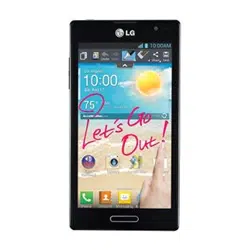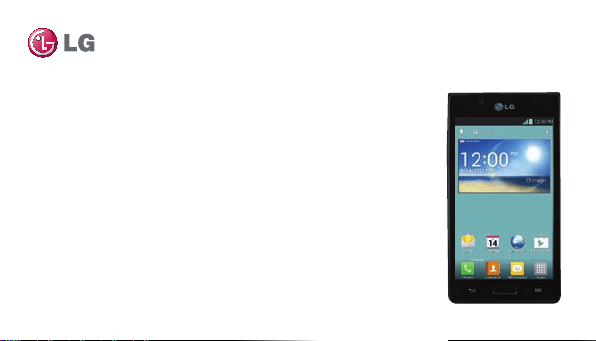
LG Splendor™ User Guide
This guide helps you to get started using your phone.
• Someofthecontentsofthismanualmaynotapplytoyourphone,
dependingonthesoftwareandyourserviceprovider.
• Thishandsetisnotsuitableforpeoplewhohaveavisualimpairment
duetothetouchscreenkeyboard.
• Google™,GoogleMaps™,Gmail™,YouTube™,GoogleTalk™andPlay
Store™aretrademarksofGoogle,Inc.
ENGLISH
WARNING:ThisproductcontainschemicalsknowntotheStateofCaliforniatocause
cancerandbirthdefectsorotherreproductiveharm.Wash hands after handling.
MFL67566601 (1.0)

• U.S.Cellular
®
CustomerCare1-888-944-9400
• Copyright©2012LGElectronics,Inc.Allrightsreserved.LGandtheLGlogoareregistered
trademarksofLGGroupanditsrelatedentities.Allothertrademarksarethepropertyoftheir
respectiveowners.

Contents
3
Getting to know your phone ................. 8
Your Home screen ............................... 26
Google account setup .......................... 41
Connecting to Networks and Devices 43
Calls ...................................................... 56
Contacts ................................................ 61
Messaging ............................................ 64
Email ..................................................... 67
Camera .................................................. 71
Video camera ........................................77
Multimedia ............................................81
Utilities..................................................84
The web ................................................. 91
Settings ................................................ 93
Accessories ........................................ 104
FAQ ..................................................... 106
Safety ...................................................125
Limited Warranty Statement .............194
4
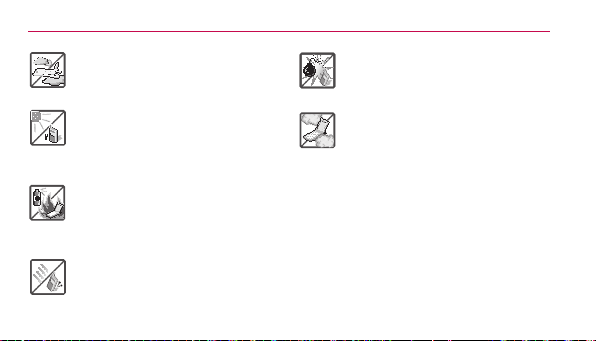
Violationoftheinstructionsmay
causeseriousinjuryordeath.
•Neveruseanunapprovedbattery
sincethiscoulddamagethephone
and/orbatteryandcouldcausethe
batterytoexplode.
•Neverplaceyourphoneina
microwaveovenasitwillcausethe
batterytoexplode.
•Neverstoreyourphonein
temperatureslessthan-4°For
greaterthan122°F.
•Donotdisposeofyourbatterynear
reorwithhazardousorammable
materials.
•Whenridinginacar,donotleave
yourphoneorsetupthehands-
freekitneartheairbag.Ifwireless
equipmentisimproperlyinstalled
andtheairbagisdeployed,youmay
beseriouslyinjured.
Caution
5
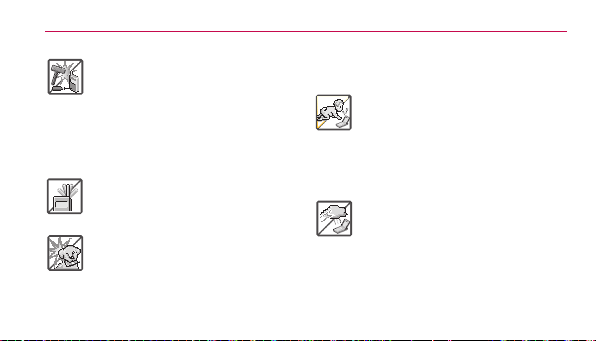
•Donotusethephoneinareas
whereitsuseisprohibited.(For
example:aircraft)
•Donotexposethebatterycharger
oradaptertodirectsunlightoruseit
inplaceswithhighhumidity,suchas
abathroom.
•Donotuseharshchemicals(suchas
alcohol,benzene,thinners,etc.)or
detergentstocleanyourphone.This
couldcauseare.
•Donotdrop,strike,orshakeyour
phoneseverely.Itmayharmthe
internalcircuitboardsofthephone.
•Donotuseyourphoneinhigh
explosiveareasasthephonemay
generatesparks.
•Donotdamagethepowercordby
bending,twisting,pulling,orheating.
Donotusetheplugifitislooseasit
maycauseelectricshockorre.
•Donotplaceanyheavyitemsonthe
powercord.Donotallowthepower
cordtobecrimpedasitmaycause
electricshockorre.
•Donothandlethephonewithwet
handswhileitisbeingcharged.
Itmaycauseanelectricshockor
6
seriouslydamageyourphone.
•Donotdisassemblethephone.
•Donotplaceoranswercallswhile
chargingthephoneasitmayshort-
circuitthephoneand/orcause
electricshockorre.
•Donotholdorlettheantennacome
incontactwithyourbodyduringa
call.
•Makesurethatnosharp-edged
items,suchasanimal’steethor
nails,comeintocontactwiththe
battery.Thiscouldcauseare.
•Storethebatteryoutofreachof
children.
•Becarefulthatchildrendonot
swallowanyparts(suchas
earphone,connectionpartsof
thephone,etc.)Thiscouldcause
asphyxiationorsuffocationresulting
inseriousinjuryordeath.
•Unplugthepowercordandcharger
duringlightningstormstoavoid
electricshockorre.

7
•Onlyusethebatteriesandchargers
providedbyLG.Thewarrantywill
notbeappliedtoproductsprovided
byothersuppliers.
•Onlyauthorizedpersonnel
shouldservicethephoneandits
accessories.Faultyinstallationor
servicemayresultinaccidents
andconsequentlyinvalidatethe
warranty.
•Anemergencycallcanbemade
onlywithinaservicearea.Foran
emergencycall,makesurethatyou
arewithinaserviceareaandthatthe
phoneisturnedon.
•Yourphoneisanelectronicdevice
thatgeneratesheatduringnormal
operation.Extremelyprolonged,
directskincontactintheabsence
ofadequateventilationmayresult
indiscomfortorminorburns.
Therefore,usecarewhenhandling
yourphoneduringorimmediately
afteroperation.

8
Getting to know your phone
Before you start using the
phone, please read this!
Pleasechecktoseewhetherany
problemsyouencounteredwithyour
phonearedescribedinthissection
beforetakingthephoneinforserviceor
callingaservicerepresentative.
1. Phone memory
Whenthereislessthan10%ofspace
availableinyourphonememory,your
phonecannotreceivenewmessages.
You needtocheckyourphone
memoryanddeletesomedata,such
asapplicationsormessages,tomake
morememoryavailable.
To uninstall applications:
1. OntheHomescreen,touch
>
Appstab>Settings >Apps
(DEVICEcategory).
2. Onceallapplicationsappear,scroll
toandselecttheapplicationyou
wanttouninstall.
3. TouchUninstall >OK toconrm.

9
2. Optimizing battery life
Extendyourbattery'slifebetween
chargesbyturningofffeaturesthatyou
don'tneedtohavingrunningconstantly
inthebackground.Youcanmonitor
howapplicationsandsystemresources
consumebatterypower.
Extending your phone's battery life:
•Turnoffradiocommunicationsyouare
notusing.IfyouarenotusingWi-Fi,
BluetoothorGPS,turnthemoff.
•Reducescreenbrightnessandseta
shorterscreentimeout.
•Turnoffautomaticsyncingfor
Gmail™,Calendar,Contactsandother
applications.
•Someapplicationsyouhave
downloadedmayreducebattery
power.
To check the battery power level:
•OntheHomescreen,touch
>
Appstab>Settings
> About
phone(SYSTEMcategory)>Status.
Getting to know your phone

Getting to know your phone
10
Thebatterystatus(chargingornot
charging)andlevel(percentagecharged)
isdisplayedatthetopofthescreen.
To monitor and control how battery
power is being used:
•OntheHomescreen,touch
>
Appstab > Settings
> Power
saver(DEVICEcategory)>Battery
use(BATTERYINFORMATION
category).
Batteryusagetimeisdisplayedatthe
topofthescreen.Ittellsyouhowlongit
hasbeensinceyoulastconnectedyour
phonetoapowersourceor,ifcurrently
connected,howlongthephonewaslast
runningonbatterypower.Thescreen
showstheapplicationsorservicesusing
batterypower,listedinorderfromthe
greatesttosmallestamountused.
3. Using folders
You cancombineseveralappicons
inafolder.Droponeappiconover
anotheronaHomescreenpanelorthe

Getting to know your phone
11
Applicationsscreenandthetwoicons
willbecombined.
NOTE
Youcancustomizecontentsand
propertiesofeachfolder.Tochangethe
foldernameandcolor,touchthefolder,
thentouch
.Toaddmoreappstothe
folder,simplydraganddroptheiconsinto
thedesiredfolder.
4. Before installing an
open source application
and operating system
(OS)
WARNING
IfyouinstallanduseanOSotherthan
theoneprovidedbythemanufacturerit
maycauseyourphonetomalfunction.
Inaddition,yourphonewillnolongerbe
coveredbythewarranty.
Getting to know your phone
12
5. Using the hard reset
(Factory reset)
Ifyourphoneneedstoberestoredtoits
originalcondition,performahardreset
torebootyourphone.
1. Turnthepoweroff
2. Pressandholdthefollowingkeys
atthesametime:Volume Down
Key
+ Home Key
+Power/Lock Key
.
3. Releaseallofthekeyswhen
youseethescreenmessage
"PermanentlyEraseUserData&
ResetSettings?PressthePower
keytoconrmandanyotherkey
tocancel."Therstmessagewill
bedisplayedin10to12seconds.
4. PressthePower/Lock Key
toconrm(orpressanyotherkey
tocancel).Whenyoupressthe
Power/Lock Key
toconrm,
apop-upappearsasking"Areyou
sureyouwanttocontinuewith
erase?".

Getting to know your phone
13
5. PressthePower/Lock Key
andyourphonewillberestored
tothefactorysettings.Tocancel,
pressanyotherkey.
Leaveyourphoneforatleastaminute
whilethehardresetiscarriedout.Your
phonewillrebootautomatically.
Caution
Ifyouperformahardreset,alluser
applicationsanduserdatawillbedeleted.
Thiscannotbereversed.Remember
tobackupanyimportantdatabefore
performingahardreset.
6. Opening and switching
applications
MultitaskingiseasywithAndroid
becauseyoucankeepmorethanone
applicationrunningatthesametime.
There'snoneedtoquitanapplication
beforeopeninganother.Useandswitch
betweenseveralopenapplications.
Androidmanageseachapplication,
stoppingandstartingthemasneeded
toensurethatidleapplicationsdon't
consumeresourcesunnecessarily.
Getting to know your phone
14
To view a list of recently used
applications:
SimplytouchandholdtheHome Key
.
To stop applications:
1. OntheHomescreen,touch
>
Appstab>Settings >Apps
(DEVICEcategory)>Runningtab.
2. Scrollandtouchthedesired
applicationandtouchStopto
stopit.
7. Hold your phone upright
Holdyourmobilephonevertically,as
youwouldaregularphone.TheLG
Splendor™hasaninternalantenna.Be
carefulnottoscratchordamagethe
backofthephone,asthismayaffect
performance.
Whilemaking/receivingcallsorsending/
receivingdata,avoidholdingthelower
partofthephonewheretheantennais
located.Doingsomayaffectcallquality.

Getting to know your phone
15
8. When the screen freezes
If the screen freezes or the phone
does not respond when you try to
operate it:
Removethebattery,reinsertit,then
turnthephoneon.
OR
PressandholdthePower/LockKey
for10secondstoturnitoff.
Ifitstilldoesnotwork,pleasecontact
theservicecenter.
Getting to know your phone
16
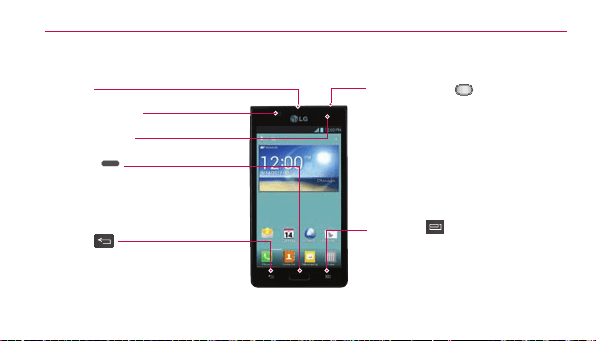
Device components
Earpiece
Proximity Sensor
Front Camera Lens
Home Key
• ReturntotheHomescreenfrom
anyscreen.
• Pressandholdtoviewalistofthe
mostrecentlyusedapps.
Back Key
Returntothepreviousscreen.
Power/Lock Key
•Switchyourphoneon/offbypressing
andholdingthiskey.
•Shortpresstolock/unlockthescreen.
Menu Key
• Displaysavailableoptions.
• GotoGoogleSearch™bylightly
pressingandholdingthiskey.
Getting to know your phone
17
NOTE Proximity sensor
Whenreceivingandmakingcalls,the
proximitysensorautomaticallyturnsthe
backlightoffandlocksthetouchscreen
bysensingwhenthephoneisnearyour
ear.Thisextendsbatterylifeandprevents
youfromunintentionallyactivatingthe
touchscreenduringcalls.
WARNING
Placingaheavyobjectonthephoneor
sittingonitcandamagetheLCDand
touchscreenfunctions.Donotcoverthe
LCDproximitysensorwithprotective
lm.Thiscouldcausethesensorto
malfunction.
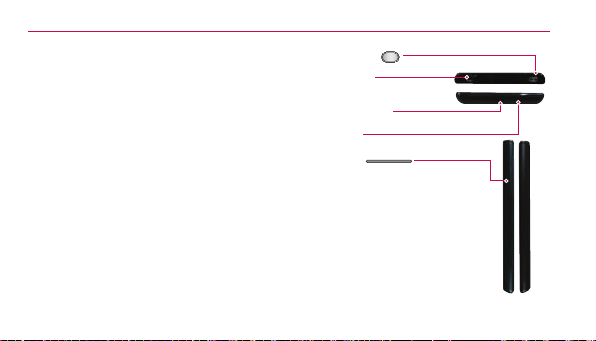
Power/Lock Key
Charger/USB Port
Microphone
Earphone Jack
Volume Keys
•IntheHomescreen:Controlringer
volume.
•Duringacall:Controlyourearpiece
volume.
•Whenplayingatrack:Controlvolume
continuously.
TIP!PressandholdbothVolumeKeysfor
onesecondtoaccesstheQuickMemo
function.
Getting to know your phone
18
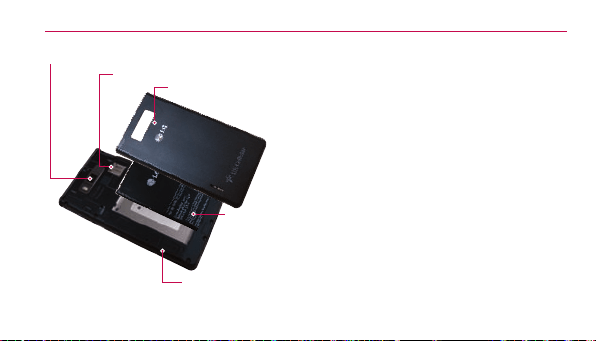
Back Camera Lens
microSD Card Slot
Speaker
Battery
Back Cover
Installing the SD card and
battery
Beforeyoucanstartexploringyournew
phone,you'llneedtosetitup.Toinsert
theSDcardandbattery:
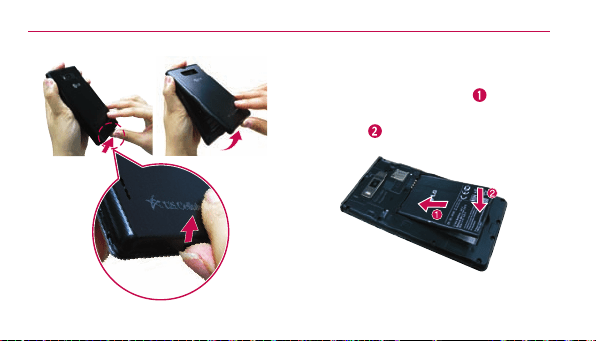
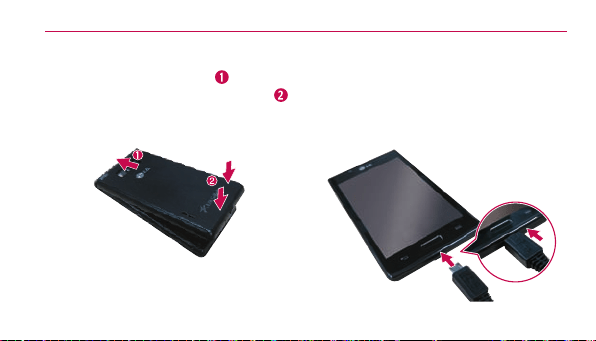
1. Toremovethebackcover,hold
thephonermlyinonehand.
Withyourotherhand,liftoffthe
backcoverwithyourthumbnailas
showningureonthenextpage.
NOTE
PutyourthumbnailintotheCharger/USB
Portholeandliftoffthebackcover.
Getting to know your phone
19
2. Insertthebatteryintoplaceby
aligningthegoldcontactsonthe
batteryandthephone and
pressingitdownuntilitclicksinto
place .
Getting to know your phone
20
3. Alignthebackcoveroverthe
batterycompartment andpress
itdownuntilitclicksintoplace .
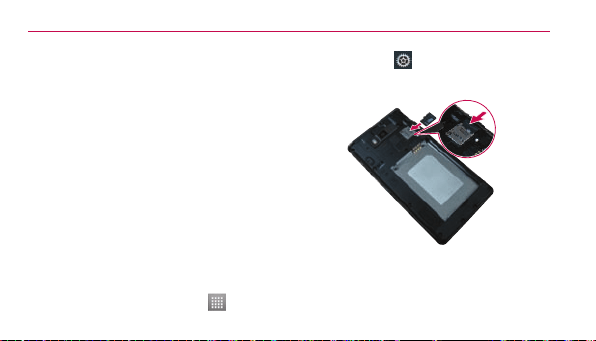
Charging your phone
TheCharger/USBPortisatthebottom
ofthephone.Insertthechargerand
plugitintoanelectricaloutlet.
Getting to know your phone
21
NOTE
Thebatterymustbefullychargedinitially
toimprovebatterylifetime.
NOTE
Donotopenthebackcoverduringthe
chargingyourphone.
Using the memory card
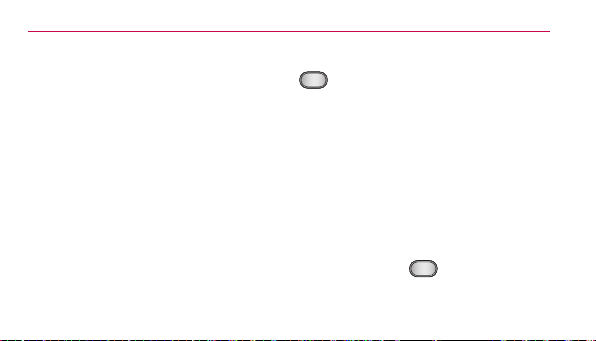
To insert a memory card:
Insertthememorycardintotheslot.
Makesurethegoldcontactareais
facingdownwards.
To remove the memory card safely:
OntheHomescreen,touch >Apps
tab > Settings
>Storage(DEVICE
category)>Unmount SD card>OK.
NOTE
TheLGSplendor™supportsmemory
cardsuptoSDHC32GB.

Getting to know your phone
22
WARNING
Donotinsertorremovethememory
cardwhenthephoneison.Doingso
maydamagethememorycardaswellas
yourphone,andthedatastoredonthe
memorycardmaygetcorrupted.
To format the memory card:
Yourmemorycardmayalreadybe
formatted.Ifitisn't,youmustformatit
beforeyoucanuseit.
NOTE
Alllesonyourmemorycardaredeleted
whenitisformatted.
1. OntheHomescreen,touch
>Appstab>Settings >
Storage.
2. TouchUnmount SD cardand
touchOKtoconrmit.
3. TouchErase SD cardandthen
Erase SD cardonemoretimeto
conrmyourchoice.
4. Ifyouhavesetapatternlock,
enterthepatternlockandtouch
Erase everything.
Getting to know your phone
23
NOTE
Ifthereiscontentonyourmemorycard,
thefolderstructuremaybedifferentafter
formattingasalltheleswillbedeleted.
Locking and unlocking the
screen
Ifyoudonotusethephoneforawhile,
thescreenisturnedoffandlocked
automatically.Thishelpstoprevent
accidentaltouchesandsavesbattery
power.
WhenyouarenotusingtheLG
Splendor™,pressthePower/Lock Key
tolockyourphone.
Ifthereareanyprogramsrunning
whenyousetlockscreen,theymay
bestillrunninginLockmode.Itis
recommendedthatyouexitallprograms
beforeenteringLockmodetoavoid
unnecessarycharges(e.g.phonecalls,
webaccessanddatacommunications).
Towakeupyourphone,pressthe
Power/Lock Key
.Thelockscreen
willappear.Touchandslidethelock

Getting to know your phone
24
screeninanydirectiontounlockyour
Homescreen.Thelastscreenyou
viewedwillopen.
Secure your lock screen
You canlockyourscreensothatonly
youcanunlockittoaccessyourphone.
To set Swipe, Face Unlock, Pattern,
PIN or Password for the first time:
•OntheHomescreen,touch
>
Appstab>Settings
> Lock
screen > Select screen lock >
Swipe, Face Unlock, Pattern, PIN or
Password.
NOTE Precautions to take when using pattern
lock.
Itisveryimportanttorememberthe
unlockpatternyouset.You willnotbe
abletoaccessyourphoneifyouuse
anincorrectpattern5times.You have
5opportunitiestoenteryourunlock
pattern,PINorpassword.Ifyouhave
usedall5opportunities,youcantryagain
after30seconds.
NOTE
TheFace Unlockoptionisonlyavailable
aftersettingupyourGoogleaccount.

Getting to know your phone
25
When you cannot recall your unlock
pattern:
IfyouloggedintoyourGoogleaccount
onthephonebutfailedtoenterthe
correctpattern5times,touchForgot
pattern?.You arethenrequiredtologin
withyourGoogleaccounttounlockyour
phoneorenteryourBackupPIN.
IfyouhavenotcreatedaGoogle
accountonthephoneoryouforgotit,
youhavetoperformahardreset.
Formoreinformation,referto"5.Using
thehardreset(Factoryreset)"onpage12.
To adjust the volume
OntheHomescreen,touchtheMenu
Key
>System settings >Sound>
Sound profile and Volumes.
You canadjustPhone ringtone,
Notification sound, Touch feedback
& system, Music, video, games and
other media and Alarmsvolume.
Justscrolleachvolumebuttontothe
rightorlefttoadjustthentouchOK.

26
Your Home screen
Touch screen tips
Herearesometipsonhowtonavigate
aroundyourphone.
Touch–Tochooseamenu/optionor
openanapplication,touchit.
Touch and hold–Toopenanoptions
menuorgrabanobjectyouwantto
move,touchandholdit.
Drag–Toscrollthroughalistormove
slowly,dragacrossthetouchscreen.
Flick–Toscrollthroughalistormove
quickly,ickacrossthetouchscreen
(dragquicklyandrelease).
NOTE
•Toselectanitem,touchthecenterof
theicon.
•Donotpresstoohard;thetouchscreen
issensitiveenoughtopickupalight,
rmtouch.
•Usethetipofyourngertotouchthe
optionyouwant.Becarefulnottotouch
anyotherkeys.
Your Home screen
27
Home screen
Simplyswipeyourngertotheleft
orrighttoviewthepanels.Youcan
customizeeachpanelwithapps,
downloads,widgetsandwallpapers.
NOTE
Somescreenimagesmaybedifferent
dependingonyourphoneprovider.
OnyourHomescreen,youcanview
quickkeysatthebottomofthescreen.
Quickkeysprovideeasy,one-touch
accesstothefunctionsyouusethe
most.
TouchthePhoneicontobringup
thetouchscreendialpadtomakeacall.
TouchtheContactsicontoopen
yourcontacts.
TouchtheMessagingiconto
accessthemessagingmenu,where
youcancreateanewmessage.
TouchtheAppsicontoviewall
yourinstalledapplications.Toopenany
application,simplytouchtheiconinthe
applicationslist.

Your Home screen
28
Customizing the Home screen
You canpersonalizeyourHomescreen
byaddingapplicationicons,andwidgets
toanyHomescreencanvas.You can
alsochangethewallpaper.
To add items on your Home screen:
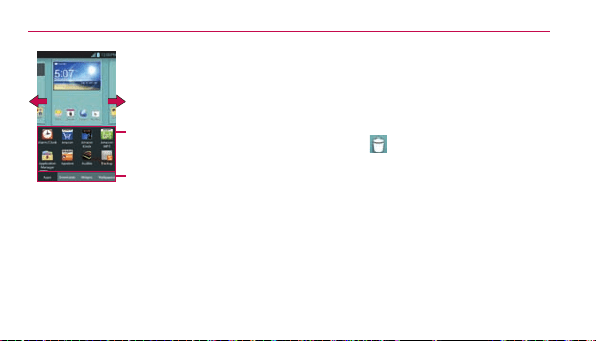
1. GototheHomescreencanvas
whereyouwanttoaddtheitem.
Thentouchandholdtheempty
partoftheHomescreenortouch
.
NOTE Ifspaceisnotavailableonaparticular
Homescreencanvas,youmustdelete
orremoveanitembeforeyoucanadd
anotheritem.OrswitchtoanotherHome
screencanvas.
2. Touchthedesiredtabatthe
bottomofthescreenandselect
theitemyouwanttoadd.You
willthenseeaddeditemsonthe
Homescreen.
3. Dragittothelocationyouwant
andliftyournger.
Your Home screen
29
Slidethescreenrightorleft
toviewdifferentscreen.
Touchandholdtheiconand
dragatthescreenyouwant
toput.
Youcanaddorremove
theappsandaccessthe
downloads.You canalso
addorremovewidgetsand
changethewallpapers.
To remove an item from the Home
screen:
•OntheHomescreen,touchandhold
theiconyouwanttoremove,then
dragitto
TIP!
ToaddanapplicationicontotheHome
screenfromtheApplicationsmenu,
touchandholdtheapplicationyouwant
toadd.TheApplicationsmenuclosesand
theHomescreenwillbedisplayed.
Your Home screen
30
Customizing an application icon
from the Home screen
NOTE:Thisfeatureallows
youtomakeanduseanicon
withthepicturesinyour
Gallery.
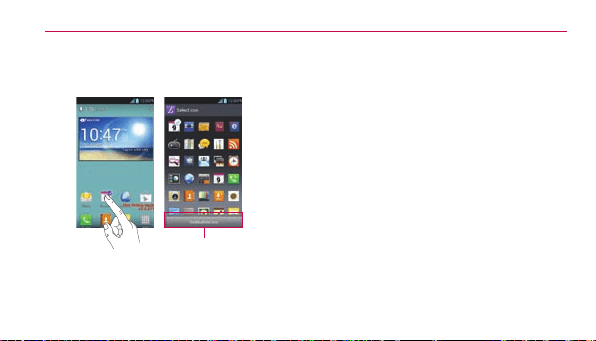
You canfurthereditapplicationiconson
theHomescreen.
1. Touchandholdaniconuntilthe
canvasgridisdisplayed,then
releasetheicon.Aneditingicon
appearsattheupperrightsideof
theapplicationicon.
2. Touchtheiconandselectthe
desiredicondesign.
3. TouchCreate photo iconand
selectTake phototoopenthe
Cameraapplicationandtakea

Your Home screen
31
pictureorSelect from Gallery
tochooseoneoftheavailable
picturesinyourGallery.
Returning to recently-used
applications
1. TouchandholdtheHomeKey
.Thescreendisplaysapop-
upwithiconsofapplicationsyou
usedrecently.
2. Touchanicontoopenthe
application.OrtouchtheBack
Key
toreturntoyourcurrent
application.
Your Home screen
32
Status Bar
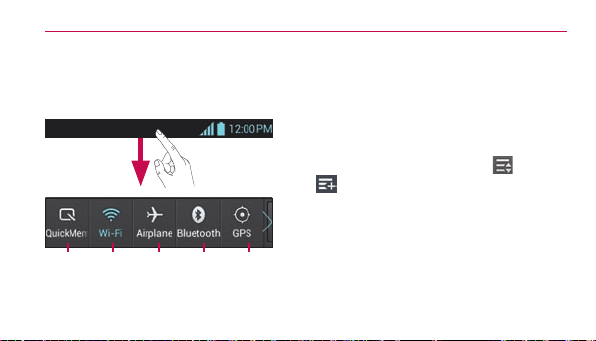
TheStatusBarrunsacrossthetopof
yourscreen.
GPSBluetoothAirplaneWi-Fi
QuickMemo
TouchandslidetheStatusBar
downwithyourngertodisplaythe
NoticationsPanel.TheNotications
Paneldisplaysallofyournotications
alongwiththeQuickSettingsatthetop.
Scrolltotherightandtouch
>
tomanageyourQuickSettings.
Hereyoucancheckandmanage
QuickMemo,Wi-Fi,Airplanemode,
Bluetooth,GPS,Accounts&sync,Auto-
rotatescreen,Brightness,Dataenabled,
PortableWi-Fihotspot,Powersaver,
andSoundprole.
Your Home screen
33
Viewing the Status Bar
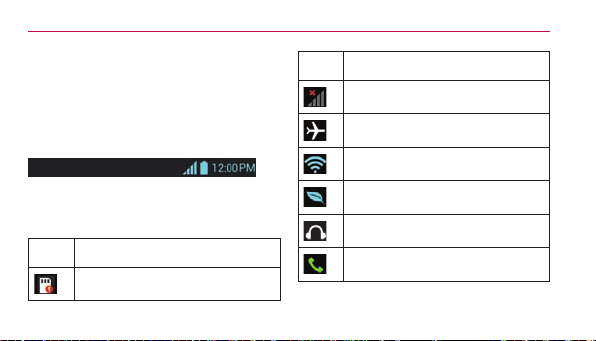
TheStatusBarusesdifferenticonsto
displayphoneinformationsuchassignal
strength,newmessages,batterylife,
activeBluetoothanddataconnections.
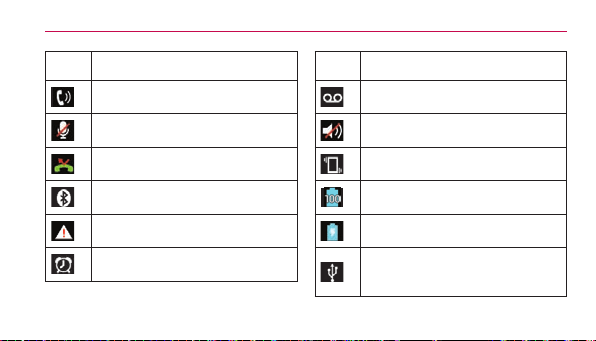
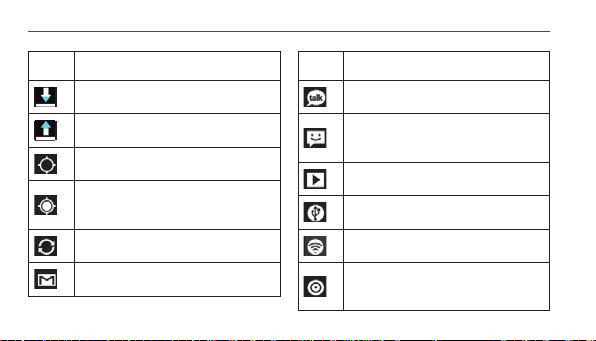
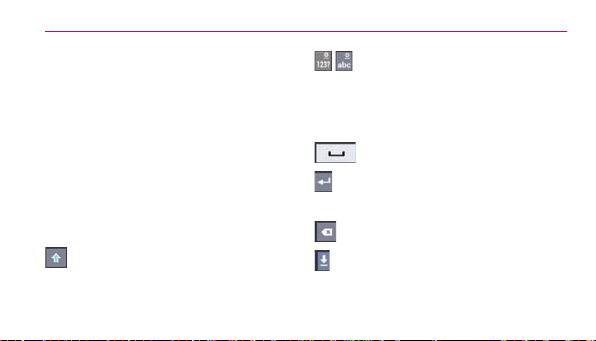
Belowisatableexplainingthemeaning
oficonsyou'relikelytoseeintheStatus
Bar.
Icon Description
NoSDcard
Icon Description
Nosignal
Airplanemode
ConnectedtoaWi-Finetwork
Powersaverison
Wiredheadset
Callinprogress
Your Home screen
34
Icon Description
Speakerphone
Phonemicrophoneismuted
Missedcall
Bluetoothison
Systemwarning
Alarmisset
Icon Description
Newvoicemail
Ringerissilenced
Vibratemode
Batteryfullycharged
Batteryischarging
PhoneisconnectedtoPCvia
USBcable
Your Home screen
35
Icon Description
Downloadingdata
Uploadingdata
AcquiringGPS
Receivinglocationdatafrom
GPS
Dataissyncing
NewGmailmessage
Icon Description
NewGoogleTalkmessage
Newtextormultimedia
message
Songisplaying
USBtetheringisactive
PortableWi-Fihotspotisactive
BothUSBtetheringand
portablehotspotareactive
Your Home screen
36
On-screen keyboard
You canentertextusingtheon-screen
keyboard.Theon-screenkeyboard
appearsautomaticallyonthescreen
whenyouneedtoentertext.To
manuallydisplaythekeyboard,simply
touchatexteldwhereyouwantto
entertext.
Using the keypad & entering text
Taponcetocapitalizethenextletter
youtype.Double-tapforallcaps.
Taptoswitchtothenumbersand
symbolskeyboard.You canalsotouch
andholdthistabtoviewtheSettings
menu.
Taptoenteraspace.
Taptocreateanewlineinthe
messageeld.
Taptodeletethepreviouscharacter.
Taptohidetheon-screenkeyboard.

Your Home screen
37
Entering accented letters
Theon-screenkeyboardallowsyouto
enterspecialcharacters(e.g."á").
Forexample,toinput"á",touchandhold
the"a"keyuntilthezoom-inkeygrows
biggeranddisplaysspecialcharacters.
Thenselectthespecialcharacteryou
want.
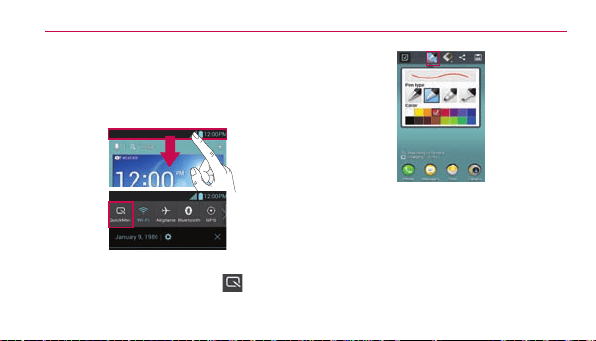
QuickMemo
TheQuickMemofeatureallowsyou
tocreatememosandcapturescreen
shots.You canuseQuickMemoto
easilyandefcientlycreatememos
duringacall,withasavedpictureoron
thecurrentphonescreen.
Your Home screen
38
1. AccesstheQuickMemofeatureby
pressingbothVolumeKeysforone
secondonthescreenyouwantto
capture.
OrtouchandslidetheStatusBar
downwardsandtouch
.
2. Selectthedesiredmenuoption
fromPentype,Color,Eraser,and
createamemoonthescreen.
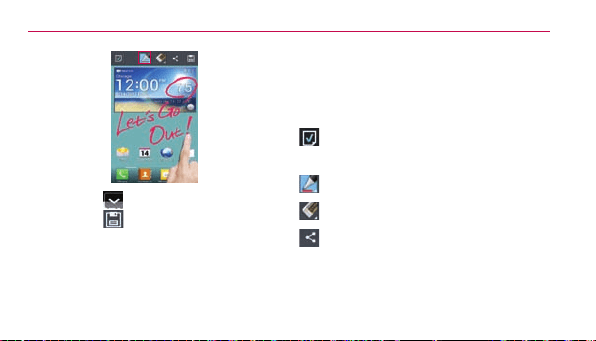
Your Home screen
39
3. Touch fromtheEditmenuand
select
tosavethememo.
NOTE:Pleaseuseangertipwhileusingthe
QuickMemofeature.Donotuseyour
ngernail.
Using the QuickMemo options
WhileusingtheQuickMemofeature,
thefollowingoptionsareavailable:
-Selectifyouwanttousethe
backgroundscreenornotuseit.
-Selectthepentypeandthecolor.
-Erasethememothatyoucreated.
-Sharethememowithothers.

Your Home screen
40
-SavethememotoyourGallery.
-Cropthescreencapturetothe
desiredsize.
Viewing the saved QuickMemo
OpentheGalleryandtouchthe
QuickMemoalbum.

41
Google account setup
Whenyourstturnonyourphone,
youhavetheopportunitytoactivate
thenetwork,tosignintoyourGoogle
Accountandhowyouwanttouse
someGoogleservices.
To set up your Google account:
•SignintoaGoogleAccountfromthe
promptedsetupscreen.
OR
•OntheHomescreen,touch
>Appstab>selectaGoogle
application,suchasGmail >
selectNewtocreateanewaccount.
IfyouhaveaGoogleaccount,touch
Existing,enteryouremailaddressand
password,thentouchSign in.
OnceyouhavesetupyourGoogle
accountonyourphone,yourphone
automaticallysynchronizeswithyour
Googleaccountontheweb.
Yourcontacts,Gmailmessages,
Calendareventsandotherinformation
fromtheseapplicationsandservices
onthewebaresynchronizedwith

Google account setup
42
yourphone.(Dependingonyour
synchronizationsettings.)
Aftersigningin,youcanuseGmail™
andtakeadvantageofGoogleservices
onyourphone.

43
Connecting to Networks and Devices
Wi-Fi
WithWi-Fi,youcanusehigh-speed
Internetaccesswithinthecoverageof
thewirelessaccesspoint(AP).Enjoy
wirelessInternetusingWi-Fi,without
extracharges.
Connecting to Wi-Fi networks
TouseWi-Fionyourphone,youneed
toaccessawirelessaccesspointor
"hotspot".Someaccesspointsare
openandyoucansimplyconnectto
them.Othersarehiddenorusesecurity
features;youmustcongureyour
phonetobeabletoconnecttothem.
TurnoffWi-Fiwhenyou'renotusingit
toextendthelifeofyourbattery.
NOTE
IfyouareoutoftheWi-Fizoneorset
Wi-Fito
OFF
,additionalchargesmay
beappliedbyyourmobileoperatorfor
mobiledatause.
Connecting to Networks and Devices
44
Turning Wi-Fi on and connecting to a
Wi-Fi network
1. OntheHomescreen,touch
>Appstab>Settings
>Wi-FifromtheWIRELESS&
NETWORKScategory.
2. Slide
totherighttoturn
Wi-Fionandstartscanningfor
availableWi-Finetworks.
•Securednetworksareindicatedbya
lockicon.
3. Touchanetworktoconnecttoit.
•Ifthenetworkisopen,youareasked
toconrmthatyouwanttoconnectto
thatnetworkbytouchingConnect.
•Ifthenetworkissecured,youare
promptedtoenterapasswordor
othercredentials.(Askyournetwork
administratorfordetails)
4. TheStatusBardisplaysanicon
thatindicatestheWi-Fistatus.
Connecting to Networks and Devices
45
Bluetooth
You canuseBluetoothtosenddataby
runningacorrespondingapplication,not
fromtheBluetoothmenuasonmost
othermobilephones.
Turning on Bluetooth and pairing up
your phone with a Bluetooth device
You mustpairyourdevicewithanother
devicebeforeyouconnecttoit.
1. OntheHomescreen,touch
>Appstab>Settings >
BluetoothfromtheWIRELESS&
NETWORKScategory.
2. Slide
totherighttoturn
Bluetoothon.Yourphonewill
scanforanddisplaytheIDsof
allavailableBluetoothin-range
devices.Ifthedeviceyouwant
topairwithisn’tonthelist,make
surethetargetdeviceissettobe
discoverable,thentapSearch for
devicesagain.
3. Choosethedeviceyouwant
topairupwithfromthelist.

Connecting to Networks and Devices
46
Dependingonthetypeof
device,youwillhavetoconrm
codes,enteracode,oritwill
automaticallypair.
Oncetheparingissuccessful,your
devicewillconnecttothedevice.
Sending pictures using Bluetooth
1. OpentheGalleryandtouch
apicture,thentouch
>
Bluetooth
2. CheckwhetherBluetoothisON,
thenselectSearch for devices.
3. Choosethedeviceyouwantto
senddatatofromthelist.
Sharing your phone's data
connection
USBtetheringandportableWi-Fi
hotspotaregreatfeatureswhenthere
arenowirelessconnectionsavailable.
You canshareyourphone'smobiledata
connectionwithasinglecomputervia
aUSBcable(USBtethering).Youcan
alsoshareyourphone'sdataconnection
withmorethanasingledeviceatatime

Connecting to Networks and Devices
47
byturningyourphoneintoaportable
Wi-Fihotspot.
Whenyourphoneissharingitsdata
connection,aniconappearsinthe
StatusBarandasanongoingnotication
intheNoticationsPanel.
Forthelatestinformationabout
tetheringandportablehotspots,
includingsupportedoperatingsystems
andotherdetails,visit
http://www.android.com/tether.
To change Portable Wi-Fi hotspot
settings:
•OntheHomescreen,touch
>
Appstab>Settings
>More
fromtheWIRELESS&NETWORKS
category>Portable Wi-Fi hotspot
>Configure Wi-Fi hotspot.Choose
optionsthatyouwanttoadjust
Connecting to Networks and Devices
48
To rename or secure your
portable hotspot
You canchangethenameofyour
phone'sWi-Finetworkname(SSID)and
secureitsWi-Finetwork.
1. OntheHomescreen,touch
>
Appstab>Settings
2. TouchMorefromtheWIRELESS
&NETWORKScategoryandselect
Portable Wi-Fi hotspot.
3. TouchConfigure Wi-Fi hotspot.
•Yo u canchangethenetworkSSID
(name)thatothercomputerssee
whenscanningforWi-Finetworks.
•Yo u canalsotouchtheSecuritymenu
tocongurethenetworkwithWi-Fi
ProtectedAccess2(WPA2)security
usingapre-sharedkey(PSK).
•IfyoutouchtheWPA2 PSKsecurity
option,apasswordeldisaddedto
theConfigure Wi-Fi hotspotdialog.
Ifyouenterapassword,youwillneed
toenterthatpasswordwhenyou

Connecting to Networks and Devices
49
connecttothephone'shotspotwitha
computerorotherdevice.You canset
OpenintheSecuritymenutoremove
securityfromyourWi-Finetwork.
4. TouchSave.
ATTENTION!
IfyousetthesecurityoptionasOpen,
youcannotpreventunauthorizedusage
ofonlineservicesbyotherpeopleand
additionalchargescanbeincurred.
Toavoidunauthorizedusage,youare
advisedtokeepthesecurityoption
active.
Using the Wi-Fi Direct
You canshareyourmusic,pictureand
videocontentbetweenuserswhouse
Androidphonesconnectedviathesame
Wi-Fi&Wi-FiDirectednetwork.
CheckyourWi-Fi&Wi-FiDirectednetwork
inadvanceandmakesuretheusersare
connectedtothesamenetwork.
1. OntheHomescreen,touch
>
Appstab>Settings >More
fromtheWIRELESS&NETWORKS
category > Wi-Fi Direct.

Connecting to Networks and Devices
50
2. TouchtheWi-Fi Directcheckbox
toturnWi-FiDirecton.
3. Selectadevicetoconnectfrom
thescanneddevicelist.
4. TouchConnect.
Wi-FiDirectcannotbeenabledwhile
usingotherWi-Fifunctions.
CREATE GROUP–Touchtoactivate
groupownermode,whichenables
thelegacyWi-Fidevicestoconnectby
scanningyourphone.Inthiscaseyou
mustenterthepasswordthatissetin
thePasswordsection.
NOTE
Whenyourphonebecomesagroup
owner,itwillconsumemorebattery
powerthanwhenitisaclient.
Wi-FiDirectconnectiondoesnotprovide
Internetservice.Additionalcostsmay
beincurredwhenconnectingandusing
onlineservices.Checkdatachargeswith
yournetworkprovider.

Connecting to Networks and Devices
51
Enabling Wi-Fi Direct to share
through SmartShare
Wi-FiDirectautomaticallyscansnearby
Wi-FiDirectdevicesandthesearched
devicesarelistedastheyarefound.You
canselectaspecicdevicetoshare
multimediadatathroughSmartShare.
Using SmartShare
SmartShareusesDLNA(DigitalLiving
NetworkAlliance)technologytoshare
digitalcontentthroughawirelessnetwork.
BothdevicesmustbeDLNAcertiedto
supportthisfeature.
To turn SmartShare on and allow
sharing contents
1. OntheHomescreen,touch
>
SmartShare
2. TouchtheMenu Key >
Settings .
3. TouchDiscoverabletoallowyour
devicetobedetectedbyother
devices.

Connecting to Networks and Devices
52
•TouchAlways accept requestifyou
wouldliketoautomaticallyaccept
sharingrequestsfromotherdevices.
•TouchReceive filesifyouwouldlike
toallowtheotherdevicestoupload
medialestoyourphone.
4. UndertheSHAREDCONTENTS
section,touchtocheckmarkthe
typesofcontentyouwouldlike
toshare.ChoosefromPhotos,
VideosandMusic.
5. SmartShareisnowactivatedand
readytosharecontents.
To control your renderer devices
Letyourrendererdevice(e.g.TV)play
multimediacontentsfromyourremote
contentlibrary(e.g.PC).
NOTE
MakesurethattheDLNAfunctionalityof
yourdevicesisproperlycongured(e.g.
TVandPC).
1. OntheHomescreen,touch >
SmartShare
Connecting to Networks and Devices
53
2. TouchtheToicon andselect
thedevicefromtherenderer
devicelist.
3. TouchtheFromicon
and
selectthedevicefromtheremote
contentlibrary.
4. You canbrowsethecontentlibrary
tondthecontent(s)youwant.
5. Touchandholdacontent
thumbnailortouchtheMenu Key
,thentouchPlay.
To share contents from your phone
to your renderer device(e.g. TV)
NOTE
Makesurethatyourrendererdeviceis
properlycongured.
1. Whilewatchingyourpictures
orvideosusingtheGallery
application,touchoneoftheicons
/ / onthetitlearea.
2. Selectthedevicefromthe
rendererdevicelisttoplaythe
les.

Connecting to Networks and Devices
54
NOTE
FollowthesimilarstepstousetheVideo
playertosharecontents
:Needtobeconnectedtonetwork.
:Selectthedeviceonthenetwork.
:Contentiscurrentlybeingshared
throughSmartShare.
Notice
Checkthatyourdeviceisconnectedwith
yourhomenetworkusingWi-Ficonnection
tousethisapplication.SomeDLNA
enableddevices(e.g.TV)supportonlythe
DMPfeatureofDLNAandwillnotappear
intherendererdevicelist.Yourdevice
mightnotbeabletoplaysomecontents.
To download contents from remote
content library
1. OntheHomescreen,touch
>
SmartShare
2. TouchtheFromicon and
selectthedevicefromtheremote
contentlibrary.
3. You canbrowsethecontentlibrary.
4. Touchandholdacontentthumbnail
andthentouchDownload.
Notice
Afewtypesofcontentsarenot
supported.

Connecting to Networks and Devices
55
To upload contents from my phone
to remote content library
NOTE
MakesurethatthemicroSDcardis
correctlymountedandtheReceive files
optionintheSettingsmenuischecked.
1. OntheHomescreen,touch >
SmartShare
2. TouchtheFromicon and
selectMy phone.
3. You canbrowsethecontentlibrary.
4. Touchandholdacontentthumbnail
andthentouchUpload.
5. Selectthedevicefromtheremote
contentlibrarytobeuploaded.
Notice
SomeDLNAenableddevicesdonot
supporttheDMSuploadfunctionality
andwillnotuploadles.Afewtypesof
contentsarenotsupported.
56
Calls
Making a call
1. OntheHomescreen,touch to
openthekeypad.
2. Enterthenumberusingthe
keypad.Todeleteadigit,touch
.
3. Touch
tomakeacall.
4. Toendacall,touch
.
TIP!
Toenter"+"tomakeinternationalcalls,
touchandhold
.
Calling your contacts
1. OntheHomescreen,touch to
openyourcontacts.
2. Scrollthroughthecontactlist
orentertherstfewlettersof
thecontactyouwanttocallby
touchingSearch contactseld.
3. Inthelist,touchthecontactyou
wanttocall.
4. Touchthephonenumberyouwant
todial.

Calls
57
Answering and rejecting a call
Locked screen
•Swipe
inanydirectiontoanswer
anincomingcall.
•Swipe
inanydirectiontodecline
anincomingcall.
Unlocked screen
•Touch
toansweranincomingcall.
•Touch
todeclineanincomingcall.
TIP!
Quick msg
Youcansendamessagequicklyusing
thisfunction.Thisisusefulifyouneedto
replythemessageduringameeting.
Adjusting call volume
Toadjustthein-callvolumeduringacall,
usetheVolumeKeysontheleft-hand
sideofthephone.
Making a second call
1. Duringyourrstcall,touchthe
Menu Key >Add callanddial
Calls
58
thenumber.You canalsogoto
yourrecentlydialedlistbytouching
orsearchcontactsbytouching
andselectthenumberyou
wanttocall.
2. Touch
tomakethecall.
3. Bothcallsaredisplayedonthecall
screen.Yourinitialcallislocked
andputonhold.
4. Tomergethecalls,touch
.To
endactivecalls,touch .
NOTE
Youarechargedforeachcallyoumake.
Viewing your call logs
OntheHomescreen,touch and
choosetheCall logstab
.
Viewacompletelistofalldialed,
receivedandmissedvoicecalls.
TIP!
Touchanycalllogentrytoviewthedate,
timeanddurationofthecall.
TIP!
TouchtheMenu Key
,thentouch
Delete all > OK
todeletealltherecorded
items.

Calls
59
Call settings
You cancongurephonecallsettings
suchascallforwardingandotherspecial
featuresofferedbyyourcarrier.
1. OntheHomescreen,touch
.
2. TouchtheMenu Key
.
3. TouchCall settingsandchoose
theoptionsthatyouwantto
adjust.
Voicemail service–Allowsyouto
selectyourcarrier’svoicemailservice.
Voicemail settings–Ifyouareusing
yourcarrier’svoicemailservice,this
optionallowsyoutoenterthephone
numbertouseforlisteningtoand
managingyourvoicemail.
Save unknown numbers–Addunknown
numberstocontactsafteracall.
Quick messages–Addoreditquick
messages.
Auto retry–Automaticallyredialthecall
ifthecallfailstoconnect

Calls
60
TTY mode–SettheTTYmode.
DTMF tones–SetthelengthofDTMF
tones
Auto answer–EnableAutoanswer
withHandsfree.
Call restrictions–Restrictincomingor
outgoingcall
Call duration–Checkcallduration.
Voice privacy–Enableenhanced
privacymode.

61
Contacts
Addcontactstoyourphoneand
synchronizethemwiththecontactsin
yourGoogleaccountorotheraccounts
thatsupportcontactsyncing.
Searching for a contact
1. OntheHomescreen,touch to
openyourcontacts.
2. TouchtheSearch contactseld
andenterthecontactnameusing
thekeyboardortouchtheletters
alongtherightsideofthescreen
andscrolltothecontact.
Adding a new contact
1. OntheHomescreen,touch ,
enterthenewcontact'snumber,
thenpresstheMenuKey
Add to Contacts>Create new
contact.
2. Ifyouwanttoaddapictureto
thenewcontact,touch
and
choosefromTake photoorSelect
from Gallery.
3. Selectthecontacttypeby
touching
.

Contacts
62
4. Touchacategoryofcontact
informationandenterthedetails
aboutyourcontact.
5. TouchSave.
NOTE IfyoutouchtheMenu Key fromthe
contactinfoscreen,youcanchoosefrom
Delete, Share, Join, ExportorAdd to
home screen.
Editing Contacts
1. OpentheContactsapplication.
2. TaptheContactentryyouwant
toedit.
3. TaptheEditicon
atthetopof
thescreen.
4. Makethechangestotheentryas
needed.
5. TapSave.

Contacts
63
Favorite contacts
You canclassifyfrequentlycalled
contactsasfavorites.
Adding a contact to your favorites
1. OntheHomescreen,touch
to
openyourcontacts.
2. Touchacontacttoviewtheirdetails.
3. Touchthestartotherightofthe
contact'sname.Thestarturns
yellow.
Removing a contact from your
favorites list
1. OntheHomescreen,touch
to
openyourcontacts.
2. TouchtheFavoritestab
and
chooseacontacttoviewitsdetails.
3. Touchtheyellowstartotheright
ofthecontact'sname.Thestar
turnsgreyandthecontactis
removedfromyourfavorites.

64
Messaging
YourLG Splendor™combinestext(SMS)
andmultimedia(MMS)messagesinto
oneintuitive,easy-to-usemenu.
Sending a message
1. Touch ontheHomescreen,
andtouch tocreateanew
message.
2. Enteracontactnameorcontact
numberintheToeld.Asyou
enterthecontactname,matching
contactsappear.You cantoucha
suggestedrecipient.You canadd
multiplecontacts.
NOTE
Youwillbechargedforatextmessage
foreverypersonyousendthemessage
to.
3. Touchthetexteldandstartto
composeyourmessage.
4. Touch
toattachPicture,
Capture picture, Video, Capture
video, Audio, Record voice,
SlideshoworContact (vCard).
5. TouchtheMenu Key
toopen
theOptionsmenu.Choosefrom

Messaging
65
Add subject,Discard,Send to
Online Album,Set priority and
All messages.
6. TouchSendtosendyour
message.
WARNING
The1000-characterlimitmayvaryfrom
languageandhowtheSMSiscoded.
WARNING
Ifanimage,videooraudioleisadded
toanSMSmessage,itisautomatically
convertedintoanMMSmessageand
youarechargedaccordingly.
Threaded box
Messages(SMS,MMS)exchanged
withanotherpartyaredisplayedin
chronologicalordersothatyoucan
convenientlyseeanoverviewofyour
conversation.
Using Smilies
LivenupyourmessagesusingSmilies.
Whenwritinganewmessage,touch
theMenu Key
,thenchooseInsert
smiley.

Messaging
66
Changing your message settings
YourLGSplendor™messagesettings
arepredened,soyoucansend
messagesimmediately.Yo ucanchange
thesettingsbasedonyourpreferences.
OpentheMessagingapplicationand
touchtheMenu Key
>Settings.
Setyoupreferencesasdesired.

67
Email
You canusetheEmailapplicationto
reademailsfromservicesotherthan
Gmail.TheEmailapplicationsupports
thefollowingaccounttypes:POP3,
IMAPandExchange.
Yourserviceproviderorsystem
administratorcanprovidetheaccount
settingsyouneed.
Managing an email account
ThersttimeyouopentheEmail
application,asetupwizardopensto
helpyoutosetupanemailaccount.
To add another email account:
•OntheHomescreen,touch
>
Appstab>Email
>Menu Key
>Settings>ADD ACCOUNT.
Aftertheinitialsetup,Emaildisplays
thecontentsofyourInbox.Ifyouhave
addedmorethanoneaccount,youcan
switchamongaccounts.
Email
68
To change an email account's setting:
•OntheHomescreen,touch
>
Appstab>Email
>Menu Key
>Settings. Thentouchthe
desiredemailaccount.
To delete an email account:
•OntheHomescreen,touch
>Appstab>Email
>Menu
Key
>Settings.Thenselectan
accountyouwanttodeleteandtouch
Remove account > OK.
Email account screen
You cantouchanaccounttoviewits
Inbox.
–Touchthefoldericontoopenthe
accountfolders.
Onlythemostrecentemailsinyour
accountaredownloadedtoyourphone.

Email
69
Working with account folders
EachaccounthasanInbox,Outbox,
SentandDraftsfolder.Depending
onthefeaturessupportedbyyour
account'sserviceprovider,youmay
haveadditionalfolders.
Composing and sending email
To compose and send a message
1. OpentheEmailapplicationand
touch
.
2. Enteranaddressforthe
message'sintendedrecipient.
Asyouentertext,matching
addressesareofferedfromyour
Contacts.Separatemultiple
addresseswithsemicolon.
3. TouchtheMenu Key
toadd
Cc/Bccandaddattachmentlesif
required.
4. Enterthetextofthemessage.
5. Touch
tosendthemessage.

Email
70
Ifyouaren'tconnectedtoa
network,forexample,ifyou're
workinginairplanemode,the
messagesthatyousendare
storedinyourOutboxfolderuntil
you'reconnectedtoanetwork
again.Ifitcontainsanypending
messages,theOutboxisdisplayed
ifyoutouch
.
TIP!
WhenanewemailarrivesintheInbox,
youwillreceiveanoticationbysound
orvibration(dependingonyoursettings).
Youwillalsoreceiveanoticationinthe
StatusBar.
71
Camera
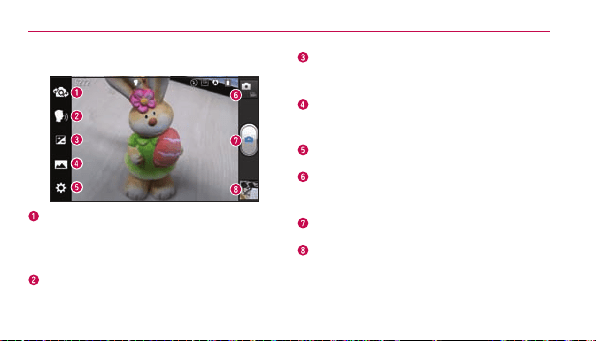
Getting to know the viewfinder
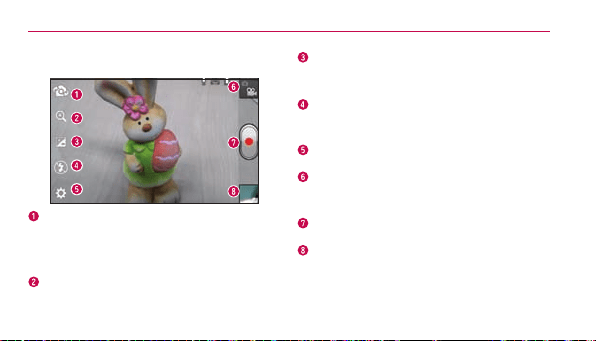
Switch lenses–Switchbetweenthe
rear–facingcameralensandthefront–
facingcameralens.
Cheese shutter–Takephotowithvoice
command(saying"Cheese").
Brightness–Thisdenesandcontrolsthe
amountofsunlightenteringtheimage.
Shot mode–ChoosefromNormal,
PanoramaorContinuous shot.
Settings–AccesstheSettingsmenu.
Mode switch
–Allowsyoutoswitch
betweencameramodeandvideomode.
Capture–Takesaphoto.
Gallery–Allowsyoutoviewthelastphoto
youcaptured.Thisenablesyoutoaccess
yourGalleryandviewsavedphotoswithin
cameramode.
Camera
72
Taking a quick photo
1. OpentheCameraapplication.
2. Holdthephoneandpointthelens
towardsthesubjectyouwantto
photograph.
3. Touchthescreenandafocusbox
willappearinthecenterofthe
viewnderscreen.
4. Whenthefocusboxturnsgreen,
thecamerahasfocusedonyour
subject.
5. Touch
tocapturetheimage.
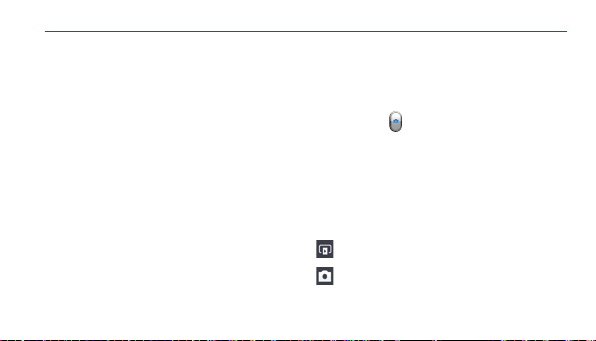
Once you've taken the photo
Touchtheimagepreviewatthebottom
ofthescreentoviewthelastphotoyou
captured.
TouchtoshareviaSmartShare.
TouchtoreturntoCameramodeto
takeanotherpicture.

Camera
73
Touchtoshareyourphotousing
Bluetooth,Email,Facebook,
Gmail,Google+,Memo,
Messaging,Picasa,Twitter,orany
otherdownloadedapplicationthat
supportssharing.
TIP!
Ifyouhaveasocialnetworkingaccount
andsetituponyourphone,you
canshareyourphotowiththesocial
networkingcommunity.
Touchtodeletetheimage.
TouchtheMenu Key
toopenthe
followingoptions.
Set image as–Touchtosettheimage
asaContact photo,Home screen
wallpaperorLockscreen wallpaper.
Move–Touchtomovetheimageto
anotheralbum.
Rename–Touchtoeditthenameof
theselectedpicture.
Rotate left/right–Touchtorotatethe
imagetotheleftorright.
Crop–Cropyourphoto.Moveyour
ngeracrossthescreentoselectthe
area.
Camera
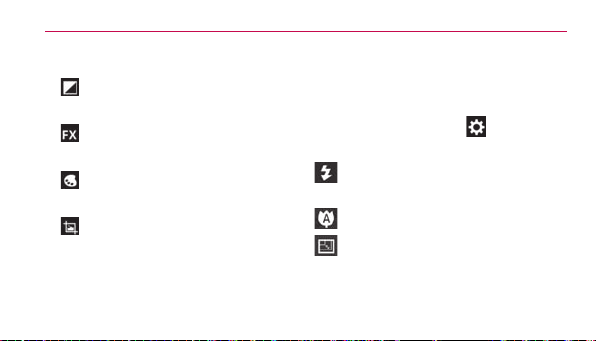
74
Edit-Viewandeditthepictures.
Improvescolorqualitiesin
differentlightingconditions.
Appliesartisticeffectstothe
pictures.
Appliescoloreffectstothe
pictures.
Appliesadditionaloptionstothe
pictures.
Slideshow–Displaysyourimagesina
slideshow.
Details–Displaysthepictureinformation.
Using the advanced settings
Intheviewnder,touch toopenthe
advancedoptions.
–Allowsyoutoturnontheash
whentakingaphotoindarkconditions.
–Focusesonthespecicspot.
–Selecttheimageresolution.If
youchoosethehighresolution,thele
sizewillincrease,whichmeansyouwill
Camera
75
beabletostorefewerphotosinthe
memory.
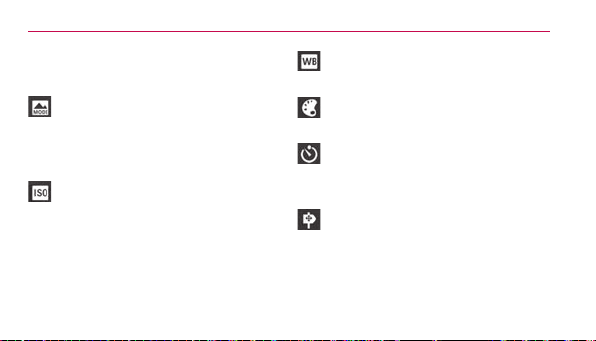
–Findsthecolorandlightsettings
appropriateforthecurrentenvironment.
ChoosefromNormal, Portrait,
Landscape, Sports, Sunset,andNight.
–TheISOratingdeterminesthe
sensitivityofthecamera'slightsensor.
ThehighertheISO,themoresensitive
thecamerais.Thisisusefulindarker
conditionswhenyoucannotusethe
ash.
–Improvescolorqualitiesin
differentlightingconditions.
–Appliescoloreffectstothe
pictures.
–SetadelayaftertheCapture
buttonispressed.Thisisidealifyou
wanttobeinthephoto.
–Activatetouseyourphone's
location-basedservices.Takepictures
whereveryouareandtagthemwiththe
location.Ifyouuploadtaggedpictures
toablogthatsupportsgeotagging,you
Camera
76
canseethepicturesdisplayedona
map.
NOTE
ThisfunctionisonlyavailablewhenGPS
isactive.
–Selectoneoftheveshutter
sounds.
–Automaticallydisplaysthepicture
aftertakingit.
TIP!
Whenyouexitthecamera,somesettings
returntotheirdefaults,suchaswhite
balance,colortone,timerandscene
mode.Checkthesebeforeyoutakeyour
nextphoto.
–Restoreallcameradefault
settings.
–Provideshelpinformationonsome
ofthecamerafeatures.
77
Video camera
Getting to know the viewfinder
Switch lenses–Switchbetweentherear–
facingcameralensandthefront-facing
cameralens.
Zoom–Zoominorzoomout.
Brightness–Thisdenesandcontrolsthe
amountofsunlightenteringthevideo.
Flash–Allowsyoutoturnontheash
whenrecordingavideoinadarkplace.
Settings–AccesstheSettingsmenu.
Mode switch–Allowsyoutoswitch
betweenvideomodeandcameramode.
Record–Touchtostartrecordingavideo.
Gallery–Touchtoviewthelastvideoyou
recorded.Thisenablesyoutoaccessyour
Galleryandviewyoursavedvideosfrom
withinvideomode.
Video camera
78
Recording a quick video
1. OpentheCameraapplicationand
touchtheMode switchbutton.
2. Thevideocameraviewnder
appearsonthescreen.
3. Holdingthephone,pointthelens
towardsthesubjectyouwantto
captureinyourvideo.
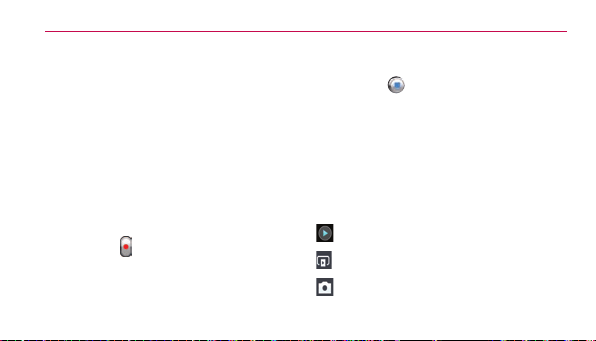
4. Touch
oncetostartrecording.
5. Aredlightappearsatthetopcorner
oftheviewnderwithatimer
showingthelengthofthevideo.
6. Touch
onthescreentostop
recording.
After recording a video
Touchtheimagepreviewatthebottom
ofthescreentoviewthelastvideoyou
recorded.
Touchtoplaythevideo.
TouchtoshareviaSmartShare.
TouchtoreturntoCameramodeto
takeanotherpictureorrecordavideo.
Video camera
79
Touchtosharethevideovia
Bluetooth,Email,Facebook,Gmail,
Google+, Messaging,YouTube,or
anyotherdownloadedapplicationthat
supportssharing.
Touchtodeletethevideoyoujust
made.ConrmbytouchingOK.The
viewnderreappears.
TouchtheMenu Key
toopenthe
followingoptions.
Move–Touchtomovethevideoto
anotheralbum.
Rename–Taptoeditthenameofthe
selectedvideo.
Details–Taptoseeadetailed
information,suchasthename,date,
time,sizeandtype.
Using the advanced settings
Usingtheviewnder,touch toopen
thetheadvancedoptions.
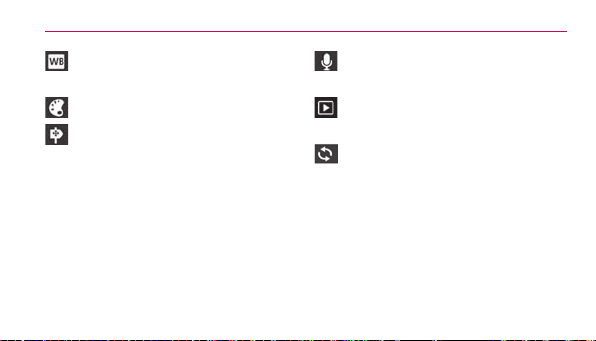
–Touchtosetthesize(inpixels)of
thevideoyouarerecording.
Video camera
80
–Improvescolorqualitiesin
differentlightingconditions.
–Appliescoloreffectstothevideos.
–Activatetouseyourphone's
location-basedservices.Takevideos
whereveryouareandtagthemwiththe
location.Ifyouuploadedtaggedvideos
toablogthatsupportsgeotagging,you
canseethevideosonamap.
NOTE
ThisfunctionisonlyavailablewhenGPS
isactive.
–Choosetorecordavideowithor
withoutsound.
–Automaticallydisplaysthevideo
youjustrecorded.
–Restoreallvideodefaultsettings.
Adjusting the volume when
viewing a video
Toadjustthevolumeofavideowhileit
isplaying,usetheVolumeKeysonthe
left-handsideofthephone.
81
Multimedia
You canstoremultimedialesona
memorycardforeasyaccesstoallyour
imageandvideoles.
Gallery
OntheHomescreen,touch >Apps
tab>Gallery
.Openalistofalbums
thatstoreallyourimageandvideoles.
Music Player
YourLGSplendor™hasamusicplayer
thatletsyouplayallyourfavoritetracks.
Toaccessthemusicplayer,onthe
Homescreen,touch
>Appstab>
Music Player
.
Transferring music files using
USB mass storage devices
1. ConnecttheLGSplendor™toa
PCusingaUSBcable.
2. Ifyouhaven'tinstalledtheLG
AndroidPlatformDriveronyour
PC,youneedtochangethe
settingsmanually.OntheHome
screen,touch
>Settings >
Multimedia
82
Connectivity>USB Connection
type>Media sync (MTP).
3. You canviewthecontentonyour
PCandtransfertheles.
Playing a song
1. OntheHomescreen,touch >
Appstab>Music Player
.
2. TouchtheSongstab.
3. Selectthesongyouwanttoplay.
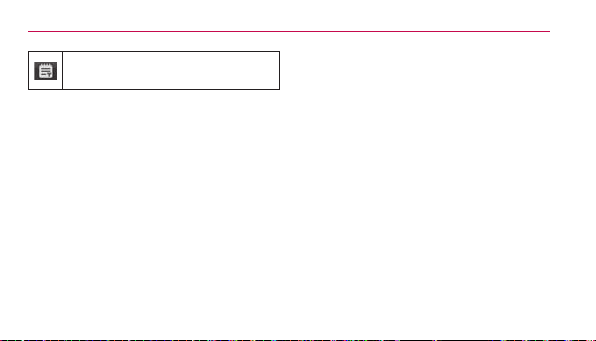
Touchtopauseplayback.
Touchtoresumeplayback.
Touchtoskiptothenexttrackinthealbum,
playlistorshufe.
Touchtogobacktothebeginningofthe
song.Touchtwicetoreturntotheprevious
song.
Touchtomanagethemusicvolume.
Touchtosetrepeatmode.
Touchtoplaythecurrentplaylistinshufe
mode.
Touchtoseethecurrentplaylist.
Multimedia
83
Touchtoseelyrics.Thisoptionisononlyif
thesongincludesthelyrics.
Tochangethevolumewhilelisteningto
music,presstheVolumeKeysonthe
left-handsideofthephone.
Touchandholdanysonginthelist
forthefollowingoptions:Play,Add
to playlist,Set as ringtone,Delete,
Share,SearchandDetails.
NOTE
Musiclecopyrightsmaybeprotected
byinternationaltreatiesandnational
copyrightlaws.
Therefore,itmaybenecessarytoobtain
permissionoralicencetoreproduceor
copymusic.
Insomecountries,nationallawsprohibit
privatecopyingofcopyrightedmaterial.
Beforedownloadingorcopyingthele,
checkthenationallawsoftherelevant
countryconcerningtheuseofsuch
material.
84
Utilities
Setting your alarm
1. OntheHomescreen,touch >
Appstab>Alarm/Clock .
2. Touch
toaddanewalarmand
enterthedesiredtime.
3. SetRepeat,Snooze duration,
Vibration,Alarm sound,Puzzle
lock and Memo.
4. TouchSavetosavethealarm.
Using your calculator
1. OntheHomescreen,touch >
Appstab>Calculator .
2. Touchthenumberkeystoenter
numbers.
3. Forsimplecalculations,touchthe
functionyouwant(+,–,xor÷)
followedby=.
4. Formorecomplexcalculations,
touchtheMenu Key
,select
Advancedpanel,thenchoosethe
desiredfunction.

Utilities
85
Adding an event to your
calendar
1. OntheHomescreen,touch >
Appstab>Calendar .
2. Touch
toselectfromthe
followingCalendarviews:Day,
Week, Month, Agenda.
3. Taponthedateyouwanttoadd
aneventon.
4. Touch
.
5. TouchtheEvent nameeldand
entertheeventname.
6. TouchtheLocationeldandenter
thelocation.Checkthedateand
enterthetimeyouwantyour
eventtostartandnish.
7. Ifyouwanttoaddanotetoyour
event,touchtheDescriptioneld
andenterthedetails.
8. Ifyouwanttorepeatthealarm,set
REPEAT,andsetREMINDERS,if
necessary.

Utilities
86
9. TouchSavetosavetheeventin
thecalendar.
Polaris Office
PolarisOfceisaprofessional
mobileofcesolutionthatletsusers
convenientlyviewvarioustypesof
ofcedocuments,includingWord,
ExcelandPowerPointles,anywhere,
anytime,usingtheirmobiledevices.
OntheHomescreen,touch
>Apps
tab>Polaris Office
.
Managing files
PolarisOfceprovidesmobileusers
withconvenientlemanagement
features,includingcopying,movingand
pasting,anddeletinglesandfolders
rightonthedevice.
Viewing files
Mobileuserscannoweasilyviewa
widevarietyofletypes,including
MicrosoftOfcedocumentsandAdobe
PDF,rightontheirmobiledevices.
WhenviewingdocumentsusingPolaris

Utilities
87
Ofce,theobjectsandlayoutremain
thesameasintheiroriginaldocuments.
Your Navigator Deluxe
WithYourNavigatorDeluxe,getall
ofthefeaturesofanadvancedcar
navigationsystemonyourmobile
phonewithvoiceturn-by-turnnavigation
enabledbyGPS.Searchforany
destinationincludinggasstations,
ATMs,restaurants,andmore.Get
detailedmapsofanylocation.
1. InordertouseYourNavigator
Deluxe,youmustrstturnonyour
phoneslocationandGPSsettings.
OntheHomescreen,touch
>
Settings >Location services
>Google's location serviceand
GPS satellites.
2. Afteractivatingyourlocationand
GPSsettings,touchtheHome
Key
> >Your Navigation
Deluxe
.
FromtheYourNavigatorDeluxeHome
screenyoucanselect

Utilities
88
•"Drive To"forturnbyturndirection
toanaddress,airport,contacts
addressesandmore.
•"Places"tosearchfornearby
businesses,thecheapestgasprices
andmore.
•"Maps & Traffic"toseewhereyou
currentlyarelocatedonamapand
whattrafcisinthearea.
Play Store™
PlayStoreallowsyoutobrowseand
searchforfreeandpaidapplications.
To open the Play Store application
►
OntheHomescreen,touch
>
Play Store
.Whenyouopenthe
Play Storeapplicationfortherst
time,youmustreadandacceptthe
termsofservicetocontinue.

Utilities
89
Scrolltotheleftandright
toviewandexploresub-
categories.
Touchheretosearchforthe
apps.
To download the applications
NOTE
Beforeyoucandownloadapaid
application,youmustsetupabilling
arrangement.
1. Findanapplicationyouwantand
openitsdetailsscreen.
2. TouchtheInstallbutton(freeapps)
orPricebutton(paidapps).The
screenwilldisplayiftheapplication
requiresaccesstoyourdataor
controlofanyfunctionsonyour
phone.ThePlayStoreapplication

Utilities
90
tellsyouwhatitcanaccessifyou
continuewiththedownload.
3. Ifyouagreetotheapplication’s
accessrequirements,touch
Accept & download (forfree
applications)orAccept & buy(for
paidapplications.)
To get help with Play Store
PlayStoreHelpwebpagesareavailable
fromallPlayStorescreens.
►
TouchtheMenu Key
>Help.
TheBrowserapplicationopenstothe
PlayStoreHelppage,withlinkstomany
helptopics.
NOTE
Afteryouopenanapp,youcanusually
adjustitssettingsbytouchingtheMenu
Key
.
91
The web
Browser
Browsergivesyouafast,full-color
worldofgames,music,news,sport,
entertainmentandmuchmore,righton
yourmobilephone.Whereveryouare
andwhateveryouenjoy.
NOTE
Additionalchargesapplywhenconnecting
totheseservicesanddownloading
content.Checkdatachargeswithyour
networkprovider.
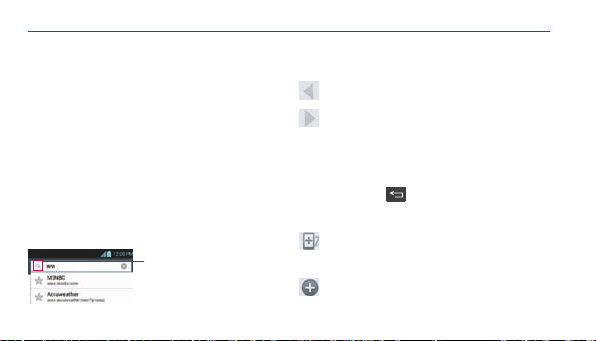
EntertheURLandtouch
heretosearch.
Using the web toolbar
Touchtogobackapage.
Touchtogoforwardsapage,to
thepageyouconnectedtoafterthe
currentone.Thisistheoppositeof
whathappenswhenyoupressthe
BackKey
,whichgoestothe
previouspage.
Touchandholdthisiconandtiltthe
deviceupanddowntozoominorout.
Touchtoaddanewwindow.

The web
92
Touchtoaddyourfavoritebookmarks.
Using options
TouchtheMenu Key toviewthe
followingoptions.
Refresh–Updatethecurrentwebpage.
Save to bookmarks–Addthecurrent
webpageasbookmark.
Go to Homepage–Gotothehomepage.
Share page–Allowsyoutosharethe
webpagewithothers.
Find on page–Allowsyoutondletters
orwordsonthecurrentwebpage.
Request desktop site–Allowsyouto
viewthewebpageindesktopview.
Save for offline reading–Allowsyou
tosavethecurrentpageofinesoyou
canreaditlater.
Brightness–Adjuststhelevelfor
comfortablebrowsing.
Settings–DisplaysBrowsersettings.
Exit–Exitsthewebpageandcloses
theBrowser.
93
Settings
OntheHomescreen,touch
>Apps
tab>Settings
.
WIRELESS & NETWORKS
< Wi-Fi >
Slide
totherighttoturnonWi-Fi
toconnecttoavailableWi-Finetworks.
HereyoucanmanageWi-Fiand
Bluetooth.You canalsosetupmobile
networksandswitchtoairplanemode.
TIP!
How to obtain the MAC address
Tosetupaconnectioninsomewireless
networkswithMAClters,youmayneed
toentertheMACaddressofyourLG
Splendor™intotherouter.
YoucanndtheMACaddressin
thefollowinguserinterface:Onthe
Homescreen,touch
>
Apps
tab>
Settings
>
Wi-Fi
>Menu Key >
Advanced
>
MAC Address
.
< Bluetooth >
Slide
totherighttoturnon
BluetoothtoconnecttoBluetooth
devices.

Settings
94
< Data usage >
Displaysthedatausageandsetmobile
datalimit.
< Call >
You cancongurephonecallsettings
suchascallforwardingandotherspecial
featuresofferedbyyourcarrier.
< More >
Airplane mode–Afterswitchingto
airplanemode,allwirelessconnections
aredisabled.
Wi-Fi Direct–Makeaconnection
directlywithWi-Fideviceswithoutany
AccessPoint.
Portable Wi-Fi hotspot–Yo u can
conguretheportableWi-Fihotspotsettings.
VPN–DisplaysthelistofVirtualPrivate
Networks(VPNs)thatyou'vepreviously
congured.Allowsyoutoadddifferent
typesofVPN.
Mobile networks–Allowsyouto
enable/disabledata,dataroaming,and
selectamobilesystem.

Settings
95
DEVICE
< Sound >
Sound profile–Youcanchoose
Sound, Vibrate onlyorSilent.
Volumes–You canmanagethe
volumesforvariousphonesettings.
Phone ringtone–Allowsyoutoset
yourdefaultincomingcallringtone.
Notification sound–Allowsyoutoset
yourdefaultnoticationringtone.
Ringtone with vibration–Vibration
feedbackforcallsandnotications.
Quiet time–Settimestoturnoffall
soundsexceptalarmandmedia.
Dial pad touch tones–Allowsyouto
setthephonetoplaytoneswhenusing
thedialpadtodialnumbers.
Touch sounds–Allowsyoutosetyour
phonetoplayasoundwhenyoutouch
buttons,iconsandotheron-screen
itemsthatreacttoyourtouch.
Screen lock sound–Allowsyouto
setyourphonetoplayasoundwhen

Settings
96
lockingandunlockingthescreen.
Emergency tone–Allowsyoutoset
emergencytoneasOff,AlertorVibrate.
< Display >
Brightness–Adjustthescreen
brightness.
Auto-rotate screen–Settoswitch
orientationautomaticallywhenyou
rotatethephone.
Screen timeout–Setthetimefor
screentimeout.
Font size–Changethesizeofthe
displayfont.
Front Key light–SetthefrontkeyLED
time.
< Home screen >
SettheAnimation, Screenswipe
effect,orWallpaper,Scroll wallpaper,
Scroll screen circularly,andHome
backup & restore.

Settings
97
< Lock screen >
Select screen lock–Setascreenlock
tosecureyourphone.You canset
Swipe,Face Unlock,Pattern,PIN,
PasswordorleaveitasNone.
Whenyouturnonyourphoneorwake
upthescreen,you'reaskedtoenter
yourunlocksequencetounlockthe
screen.
Wallpaper–You cansetthelockscreen
wallpaperfromtheGalleryorWallpaper
gallery.
Clocks & shortcuts-Customizeclocks
andshortcutsonthelockscreen.
Owner info–Showownerinformation
onthelockscreen.
Lock timer-Selectthelocktimerduration.
Power button instantly locks-
Checkmarksothatpressingthe
Power/Lock Key
instantlylocks
thephone.
< Storage >
SYSTEM MEMORY–Viewtheinternal
storageusage.

Settings
98
SD CARD–ChecktotalavailableSD
cardspace.TouchUnmount SD cardto
unmounttheSDcardforsaferemoval.
TouchErase SD cardifyouwantto
deletealldatafromtheSDcard.
< Power Saver >
Hereyoucanmanagethebatteryand
checkthepowersavingitems.You can
alsocheckthebatteryuse.
< Apps >
You canviewandmanageyour
pre-installedanddownloadedapplications.
PERSONAL
< Accounts & sync >
Permitsapplicationstosynchronizedata
inthebackground,whetherornotyou
areactivelyworkinginthem.Turning
thissettingoffcansavebatterypower
andlowers(butdoesnoteliminate)data
usage.
< Location services >
Google's location service–Yourphone
determinesyourapproximatelocation
usingWi-Fiandmobilenetworks.When

Settings
99
youselectthisoption,you'reasked
whetheryouconsenttoallowingGoogle
touseyourlocationwhenproviding
theseservices.
GPS satellites–Yourphonedetermines
yourlocationtostreetlevelaccuracy.
Location & Google search–Allows
Googletouseyourlocationtoimprove
searchresultsandotherservices.
< Security >
Encrypt device–Encryptsyourdevice
andrequiresanumericPINorpassword
todecryptyourphoneeachtimeyou
poweriton.
Password typing visible–Show
passwordasyoutype.
Device administrators–Viewor
deactivatedeviceadministrators.
Unknown sources–Allowsyouto
installnon-Marketapplications.
Trusted credentials–Displaytrusted
CAcerticates.
Install from SD card–Choosetoinstall

Settings
100
encryptedcerticatesfromyourSDcard.
Clear credentials–Removeall
certicates.
< Language & input >
UsetheLanguage&inputsettingsto
selectthelanguageforthetextonyour
phoneandforconguringtheon-screen
keyboard,includingwordsyou'veadded
toitsdictionary.
< Backup & reset >
Changethesettingsformanagingyour
settingsanddata.
Back up my data–Settobackupyour
settingsandapplicationdatatothe
Googleserver.
Backup account–Settheaccountyou
wanttobackupinformationto.
Automatic restore–Settorestore
yoursettingsandapplicationdatawhen
theapplicationsarereinstalledonyour
device.
Factory data reset–Resetyour
settingstothefactorydefaultvalues

Settings
101
anddeleteallyourdata.Ifyouresetthe
phoneinthisway,youarepromptedto
reenterthesameinformationaswhen
yourststartedyourphone.
SYSTEM
< Date & time >
UseDate & timesettingstosethow
datesaredisplayed.
< Accessibility >
UsetheAccessibilitysettingsto
congureaccessibilityplug-insyouhave
installedonyourphone.
NOTE
Requiresadditionalplug-ins.
< Connectivity >
USB connection type–Youcanset
thedesiredmode(Charge only,Media
sync(MTP),USB tethering,LG
softwareorCamera(PTP)).
Ask on connection–AskUSB
connectionmodewhenconnectingtoa
computer.

Settings
102
Help-Displaysinformationaboutthe
USBconnectiontypes.
On-Screen Phone-Allowsyouto
activatethisfeaturetodisplaythe
screenandcontrolthephoneusing
thePCviaUSB,BluetoothorWi-Fi
connection.
<Developer options>
Allowsyoutoselectdeveloperoptions.
< About phone >
Viewlegalinformationandcheckphone
statusandsoftwareversion.

Settings
103
DivX Mobile
ABOUT DIVX VIDEO:DivX
®
isadigital
videoformatcreatedbyDivX,LLC,a
subsidiaryofRoviCorporation.Thisis
anofcialDivXCertied
®
devicethat
playsDivXvideo.Visitdivx.comfor
moreinformationandsoftwaretoolsto
convertyourlesintoDivXvideos.
ABOUT DIVX VIDEO-ON-DEMAND:
ThisDivXCertied
®
devicemustbe
registeredinordertoplaypurchased
DivXVideo-on-Demand(VOD)movies.
Toobtainyourregistrationcode,locate
theDivXVODsectioninyourdevice
setupmenu.Gotovod.divx.comfor
moreinformationonhowtocomplete
yourregistration.
DivX Certified
®
to play DivX
®
video
up to 640x480, including premium
content
DivX
®
, DivX Certified
®
and associated
logos are trademarks of Rovi
Corporation or its subsidiaries and
are used under license.
104
Accessories
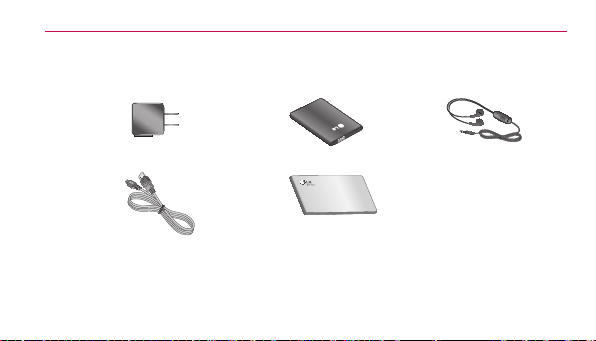
TheseaccessoriesareavailableforusewiththeLGSplendor™.(Items described below
may be optional and sold separately)
Travel adapter Battery Stereo
headset
Data cable
ConnectyourLG
Splendor™and
PC.
User Guide
Learnmore
aboutyourLG
Splendor™.

Accessories
105
NOTE
• AlwaysusegenuineLG
accessories
• Failuretodothismayvoidyour
warranty.
• Accessoriesmayvaryindifferent
regions.

106
FAQ
Pleasechecktoseeifanyproblemsyouhaveencounteredwithyourphoneare
describedinthissectionbeforetakingthephoneinforserviceorcallingaservice
representative.
Category Sub-Category Question Answer
BT
Bluetooth
Devices
Whatarethe
functionsavailablevia
Bluetooth?
ConnectingtoStereo/MonoHeadset,CarKit,FTP
serverispossible.Whenit’sconnectedtoanother
phoneviaBluetooth,youcanreceiveContacts
data.
BT
Bluetooth
Headset
IfmyBluetooth
headsetisconnected,
canIlistentomy
musicthrough
my3.5mmwired
headphones?
WhenaBluetoothheadsetisconnected,all
systemsoundsareplayedovertheheadset.As
aresult,youwillnotbeabletolistentomusic
throughyourwiredheadphones.
FAQ
107
Category Sub-Category Question Answer
Data ContactsBackup
HowcanIbackup
Contacts?
TheContactsdatacanbesynchronizedbetween
yourphoneandGmail™.
Data Synchronization
Isitpossibletoset
uponeway-syncwith
Gmail?
Onlytwo-waysynchronizationisavailable.
Data Synchronization
Isitpossibleto
synchronizeallthe
Emailfolders?
TheInboxisautomaticallysynchronized.Youcan
viewotherfoldersbytouching
andselecting
thedesiredfolder.

FAQ
108
Category Sub-Category Question Answer
Data Synchronization
Isitpossibleto
transferContacts
datafromafeature
phonetoanAndroid™
phone?
Yes,ifyourcontactscanbeextractedintoa.CSV
le.
Howtotransfer:
1.Create“.CSV”lewiththecontactsonyour
currentphone.
2.LogintoGmailwithyourPC.
3.ClickContacts.
4.ClickImport.
5.Attachthe“.CSV”le.
6.Yourcontactswillthenbesynchronizedbetween
yourAndroidphoneandGmail.
Google™
Service
GmailLog-In
ShouldIhavetolog
intoGmailwheneverI
wanttoaccessGmail?
OnceyoulogintoGmail,youdon’tneedtologin
Gmailagain.
FAQ
109
Category Sub-Category Question Answer
Google
Service
GoogleAccount
Isitpossibletolter
emails?
No,emaillteringisnotsupportedviathephone.
Phone
Function
YouTube™
Isitpossibletoplay
YouTubevideos?
Yes,YouTubevideosaresupportedbutmayhave
tobeviewedthroughtheYouTubeapplication(and
nottheBrowser).
Phone
Function
Email
Whathappenswhen
Iexecuteanother
applicationwhile
writinganemail?
Youremailwillautomaticallybesavedasadraft.

FAQ
110
Category Sub-Category Question Answer
Phone
Function
Ringtone
Istherealesize
limitationforwhenI
wanttousean.MP3
leasaringtone?
Thereisnolesizelimitation.
Phone
Function
MessageTime
Myphonedoesnot
displaythetimeof
receiptformessages
olderthan24hours.
HowcanIchange
this?
Nosettingscanbechangedbutfollowthesteps
belowtoviewthetimes.
1.Opentheconversationthatcontainsthedesired
message.
2.Touchandholdthemessage.
3.TouchView message details.

FAQ
111
Category Sub-Category Question Answer
Phone
Function
microSDCard
Whatisthemaximum
supportedsizefora
memorycard?
32GBmemorycardsarecompatible.
Phone
Function
Navigation
Isitpossibletoinstall
anothernavigation
applicationonmy
phone?
AnyapplicationthatisavailableonPlayStoreand
iscompatiblewiththehardwarecanbeinstalled
andused.
Phone
Function
Synchronization
Isitpossibleto
synchronizemy
contactsfromallmy
emailaccounts?
OnlyGmailandMSExchangeserver(Company
EmailServer)contactscanbesynchronized.

FAQ
112
Category Sub-Category Question Answer
Phone
Function
WaitandPause
Isitpossibletosave
acontactwithWait
andPauseinthe
numbers?
IfyoutransferredacontactwiththeWait&Pause
functionssavedintothenumber,thosefunctions
willnotberecognized.You willneedtore-save
eachnumber.
How to re-save numbers with Wait and Pause:
1.OntheHomescreen,touch
.
2.Dialthenumber,thentouchtheMenu Key
.
3.TouchAdd 2-sec pauseorAdd wait.
4.Entertheremainingnumber(s)andcontinue
savingthenumberasnecessary.
Phone
Function
Security
Whatarethephone’s
securityfunctions?
Youareabletosetthephonetorequiretheentry
ofanunlocksequence(Swipe,FaceUnlock,
Pattern,PIN,orPassword)beforethephonecan
beaccessedorused.
FAQ
113
Category Sub-Category Question Answer
Phone
Function
UnlockPattern
WhatshouldIdoif
IforgetmyUnlock
Pattern?
AfterattemptingtheUnlockPattern5times,you
cantouchForget Pattern?anduseyourGoogle
Accountinformationtounlockyourphone.In
addition,ifyouforgottheunlockpattern,youcan
unlockusingtheBackupPin.
FAQ
114
Category Sub-Category Question Answer
Phone
Function
UnlockPattern
WhatshouldIdoif
IforgottheUnlock
PatternandIdidn’t
createaGoogle
Accountonthe
phone?
WithoutenteringtheUnlockPattern,youwillnot
beabletoaccessyourphone.
Caution:Ifyouperformafactoryreset,alluser
applicationsanduserdatawillbedeleted.Please
remembertobackupanyimportantdatabefore
performingafactoryreset.
How to perform a factory reset:
1.Turnthepoweroff.
2.Tap andholdthefollowingkeysatthesametime
for12seconds:Volume Down Key
+Home Key +Power/Lock Key .
3.Releaseallofthekeyswhenyouseethescreen
message"PermanentlyEraseUserData&Reset
Settings?,pressthePowerkeytoconrmand
anyotherkeytocancel."
FAQ
115
Category Sub-Category Question Answer
Phone
Function
UnlockPattern
WhatshouldIdoif
IforgottheUnlock
PatternandIdidn’t
createaGoogle
Accountonthe
phone?
4.PressthePower/Lock Key
toconrm(or
presstheVolume Keystocancel).Whenyou
pressthePower/Lock Key
toconrm,a
pop-upappearsasking"Areyousureyouwantto
continuewitherase?".
5.PressthePower/Lock Key
andyour
phonewillberestoredtothefactorysettings.To
cancel,presstheVolume Keys
.
FAQ
116
Category Sub-Category Question Answer
Phone
Function
UnlockPattern
HowdoIcreatethe
UnlockPattern?
1.OntheHomescreen,touchtheMenu Key
.
2.TouchLock screensettings.
3.TouchSelect screen lock.
4.TouchPattern.Thersttimeyoudothis,ashort
tutorialaboutcreatinganunlockpatternappears.
5.Setupbydrawingyourpatternonce>Continue
>drawagain>Confirm.
FAQ
117
Category Sub-Category Question Answer
Phone
Function
SpeedDial
IsSpeedDialing
supported?
Yes.YoucansetSpeedDialsaswellassavea
contactdirectlyonyourHomescreen.
To set a Speed Dial:
1.OpentheContactsapplication.
2.TaptheMenu Key
>Speed dials.
3.Tap theemptyspeeddiallocationandselectthe
desiredcontactandphonenumber.
To set a Direct Dial shortcut to your Home
screen:
1.Tap andholdanemptyareaonyourHome
screen.
2.TapWidgets > Direct dial.
3.SelectacontactfromyourContactsList.

FAQ
118
Category Sub-Category Question Answer
Phone
Function
Memory
Isitpossibletosavea
picturetotheinternal
memorywhiletaking
apicture?
Pictures,alongwithMusicandVideoles,cannot
besavedtotheinternalmemory.Theyaresaved
toyourmicroSDcard.
Phone
Function
Memory
WillIknowwhenmy
memoryisfull?
Yes,youwillreceiveanotication.
Phone
Function
Language
Support
Isitpossibleto
changethelanguage?
Thephonehasmulti-lingualcapabilities.
Tochangethelanguage:
1.OntheHomescreen,touchtheMenu Key
>System settings.
2.TapLanguage & input > Language.
3.Tapthedesiredlanguage.

FAQ
119
Category Sub-Category Question Answer
Phone
Function
Language
Support
Whichlanguagesare
supportedwhenusing
PlayStore?
ThePlayStoreapplicationsupportsEnglishand
Spanish.Thirdpartyapplicationsmaynotsupport
alllanguages.
Phone
Function
VPN
HowdoIsetupa
VPN?
VPNaccesscongurationisdifferentaccording
toeachcompany.To congureVPNaccessfrom
yourphone,youmustobtainthedetailsfromyour
company’snetworkadministrator.
Phone
Function
Screentimeout
Myscreenturnsoff
afteronly15seconds.
HowcanIchangethe
amountoftimeforthe
backlighttoturnoff?
1.OntheHomescreen,touchtheMenu Key
.
2.TouchSystem settings > Display > Screen
timeout.
3.Touchthepreferredscreenbacklighttimeout
time.

FAQ
120
Category Sub-Category Question Answer
Phone
Function
Wi-Fi&3G
WhenWi-Fiand3G
arebothavailable,
whichservicewillmy
phoneuse?
Whenusingdata,yourphonemaydefaulttothe
Wi-Ficonnection(ifWi-Ficonnectivityonyour
phoneissettoOn).However,therewillbeno
noticationwhenyourphoneswitchesfromone
totheother.
Toknowwhichdataconnectionisbeingused,use
the3GorWi-Fiiconatthetopofyourscreen.
Phone
Function
Homescreen
Isitpossibleto
removeanapplication
fromtheHome
screen?
Yes.Justtouchandholdtheiconuntil
appears
atthetop-centerofthescreen.Then,without
liftingyournger,dragtheiconto
andrelease
it.

FAQ
121
Category Sub-Category Question Answer
Phone
Function
Application
Idownloadedan
applicationandit
causesalotoferrors.
HowdoIremoveit?
1.OntheHomescreen,touchtheMenu Key
.
2.TouchSystem settings > Apps.
3.TaptheapplicationandthentouchUninstall.
Phone
Function
Camera
Myphone’scamera
doesnottakepictures
andsays“NoSD
CardorSDcardisnot
ready!”.Whydoesn’t
itwork?
AmicroSDcardmustbeinsertedinordertouse
thephone’scamera.
VerifythatthemicroSDcardismountedonthe
device.
OntheHomescreen,touchtheMenu Key
>
System settings>Storage>Mount SD card
Phone
Function
Alarm
CanIusemusicles
formyalarm?
Yes.Aftersavingamusicleasaringtone,
youcanuseitforyouralarm.
•Touchandholdasonginalibrarylist.Inthe
Contextmenuthatopens,touchSet as ringtone.

FAQ
122
Category Sub-Category Question Answer
Phone
Function
Alarm
Willmyalarmbe
audibleorwillitgooff
ifthephoneisturned
off?
No,thisisnotsupported.
Phone
Function
Alarm
IfmyRingerVolumeis
settoOfforVibrate,
willIhearmyalarm?
Youralarmisprogrammedtobeaudibleevenin
thesescenarios.
Phone
Spec
BatteryTime
Whatisthemaximum
amountoftimemy
phone’sbatterywill
lastbeforeIneedto
rechargeit?
Talktime:Approx.455mins
Standby:Approx.20days
FAQ
123
Category Sub-Category Question Answer
Phone
Spec
Band
Whichwirelessbands
aresupportedbythe
phone?
Yourphoneisabletooperateonthe800Mhzand
1900MHzbands.
FAQ
124
Category Sub-Category Question Answer
Recovery
Solution
FactoryReset
HowdoIperforma
factoryreset?
1.OntheHomescreen,touchtheMenu Key
.
2.Tap System settings > Backup & reset >
Factory data reset.
NOTEYoucantouchthecheckboxtoalsoerase
allcontentsfromyourmicroSDcardwhenthe
phoneisreset.
3.ReadthewarningandtouchReset phone.
4.TouchErase everything.
Attention:Ifafactoryresetisperformed,all
installedapplicationanduserdatawillbeerased.
Pleaseremembertobackupanyimportantdata
beforeperformingafactoryreset.

125
Safety
HAC
Thisphonehasbeentestedandrated
forusewithhearingaidsforsomeof
thewirelesstechnologiesthatituses.
However,theremaybesomenewer
wirelesstechnologiesusedinthis
phonethathavenotbeentestedyetfor
usewithhearingaids.Itisimportantto
trythedifferentfeaturesofthisphone
thoroughlyandindifferentlocations,
usingyourhearingaidorcochlear
implant,todetermineifyouhearany
interferingnoise.Consultyourservice
providerorthemanufacturerofthis
phoneforinformationonhearingaid
compatibility.Ifyouhavequestions
aboutreturnorexchangepolicies,
consultyourserviceproviderorphone
retailer.
FCC Part 15 Class B Compliance
Thisdeviceanditsaccessoriescomply
withpart15ofFCCrules.Operationis
subjecttothefollowingtwoconditions:
(1)Thisdeviceanditsaccessories

Safety
126
maynotcauseharmfulinterference,
and(2)thisdeviceanditsaccessories
mustacceptanyinterferencereceived,
includinginterferencethatcauses
undesiredoperation.
Anychangesormodicationsnot
expresslyapprovedinthisuserguide
couldvoidyourwarrantyforthis
equipment.Useonlythesupplied
antenna.Useofunauthorizedantennas
(ormodicationstotheantenna)could
impaircallquality,damagethephone,
voidyourwarrantyand/orviolateFCC
regulations.Don’tusethephonewitha
damagedantenna.Adamagedantenna
couldcauseaminorskinburn.Contact
yourlocaldealerforareplacement
antenna.
FCC RF Exposure Information
WARNING! Read this information
before operating the phone.
InAugust1996,theFederal
CommunicationsCommission(FCC)
oftheUnitedStates,withitsaction
inReportandOrderFCC96-326,

Safety
127
adoptedanupdatedsafetystandardfor
humanexposuretoRadioFrequency
(RF)electromagneticenergyemitted
byFCCregulatedtransmitters.Those
guidelinesareconsistentwiththesafety
standardpreviouslysetbybothU.S.
andinternationalstandardsbodies.The
designofthisphonecomplieswiththe
FCCguidelinesandtheseinternational
standards.
Bodily Contact During Operation
Thisdevicewastestedfortypical
usewiththebackofthephonekept
0.39inches(1.0cm)fromthebody.
TocomplywithFCCRFexposure
requirements,aminimumseparation
distanceof0.39inches(1.0cm)must
bemaintainedbetweentheuser’sbody
andthebackofthephone,includingthe
antenna,whetherextendedorretracted.
Third-partybelt-clips,holsters,and
similaraccessoriescontainingmetallic
componentsshouldnotbeused.Avoid
theuseofaccessoriesthatcannot
maintain0.39inches(1.0cm)distance

Safety
128
betweentheuser’sbodyandtheback
ofthephoneandhavenotbeentested
forcompliancewithFCCRFexposure
limits.
Vehicle-Mounted External Antenna
(Optional,ifavailable.)TosatisfyFCC
RFexposurerequirements,keep8
inches(20cm)betweentheuser/
bystanderandvehicle-mountedexternal
antenna.Formoreinformationabout
RFexposure,visittheFCCwebsiteat
www.fcc.gov.
Caution
Useonlythesuppliedantenna.Useof
unauthorizedantennas(ormodications
totheantenna)couldimpaircallquality,
damagethephone,voidyourwarranty
and/orviolateFCCregulations.Don't
usethephonewithadamagedantenna.
Adamagedantennacouldcausea
minorskinburn.Contactyourlocal
dealerforareplacementantenna.

Safety
129
Consumer Information
About Radio Frequency
Emissions
Your wireless phone, which contains
a radio transmitter and receiver, emits
radio frequency energy during use.
The following consumer information
addresses commonly asked questions
about the health effects of wireless
phones.
Are wireless phones safe?
Scienticresearchonthesubjectof
wirelessphonesandradiofrequency
(“RF”)energyhasbeenconducted
worldwideformanyyears,and
continues.IntheUnitedStates,the
FoodandDrugAdministration(“FDA”)
andtheFederalCommunications
Commission(“FCC”)setpoliciesand
proceduresforwirelessphones.The
FDAissuedawebsitepublicationon
healthissuesrelatedtocellphone
usagewhereitstates,“Thescientic
communityatlarge…believesthatthe

Safety
130
weightofscienticevidencedoesnot
showanassociationbetweenexposure
toradiofrequency(RF)fromcellphones
andadversehealthoutcomes.Stillthe
scienticcommunitydoesrecommend
conductingadditionalresearchto
addressgapsinknowledge.That
researchisbeingconductedaroundthe
worldandFDAcontinuestomonitor
developmentsinthiseld.You can
accessthejointFDA/FCCwebsiteat
http://www.fda.gov(under“c”inthe
subjectindex,selectCellPhones>
Research).You canalsocontactthe
FDAtoll-freeat(888)463-6332or(888)
INFO-FDA.InJune2000,theFDA
enteredintoacooperativeresearchand
developmentagreementthroughwhich
additionalscienticresearchisbeing
conducted.TheFCCissueditsown
websitepublicationstatingthat“there
isnoscienticevidencethatprovesthat
wirelessphoneusagecanleadtocancer
oravarietyofotherproblems,including
headaches,dizzinessormemory
loss.”Thispublicationisavailableat

Safety
131
http://www.fcc.gov/cgb/cellular.htmlor
throughtheFCCat(888)225-5322or
(888)CALL-FCC.
What does “SAR” mean?
In1996,theFCC,workingwiththe
FDA,theU.S.EnvironmentalProtection
Agency,andotheragencies,established
RFexposuresafetyguidelinesfor
wirelessphonesintheUnitedStates.
Beforeawirelessphonemodelis
availableforsaletothepublic,itmust
betestedbythemanufacturerand
certiedtotheFCCthatitdoesnot
exceedlimitsestablishedbytheFCC.
Oneoftheselimitsisexpressedasa
SpecicAbsorptionRate,or“SAR.”SAR
isameasureoftherateofabsorption
ofRFenergyinthebody.Testsfor
SARareconductedwiththephone
transmittingatitshighestpowerlevelin
alltestedfrequencybands.Since1996,
theFCChasrequiredthattheSARof
handheldwirelessphonesnotexceed
1.6wattsperkilogram,averagedover
onegramoftissue.AlthoughtheSAR

Safety
132
isdeterminedatthehighestpower
level,theactualSARvalueofawireless
phonewhileoperatingcanbeless
thanthereportedSARvalue.Thisis
becausetheSARvaluemayvaryfrom
calltocall,dependingonfactorssuch
asproximitytoacellsite,theproximity
ofthephonetothebodywhileinuse,
andtheuseofhands-freedevices.For
moreinformationaboutSARs,seethe
FCC’sOETBulletins56and65athttp://
www.fcc.gov/Bureaus/Engineering_
Technology/Documents/bulletinsor
visittheCellularTelecommunications
IndustryAssociationwebsiteathttp://
www.ctia.org/consumer_info/index.
cfm/AID/10371.Youmayalsowishto
contactthemanufacturerofyourphone.
Can I minimize my RF exposure?
IfyouareconcernedaboutR F, there
areseveralsimplestepsyoucantake
tominimizeyourRFexposure.You can,
ofcourse,reduceyourtalktime.You
canplacemoredistancebetweenyour
bodyandthesourceoftheR F, asthe

Safety
133
exposureleveldropsoffdramatically
withdistance.TheFDA/FCCwebsite
statesthat“hands-freekitscanbeused
withwirelessphonesforconvenience
andcomfort.Thesesystemsreduce
theabsorptionofRFenergyinthehead
becausethephone,whichisthesource
oftheRFemissions,willnotbeplaced
againstthehead.Ontheotherhand,if
thephoneismountedagainstthewaist
orotherpartofthebodyduringuse,
thenthatpartofthebodywillabsorb
moreRFenergy.Wirelessphones
marketedintheU.S.arerequiredto
meetsafetyrequirementsregardlessof
whethertheyareusedagainstthehead
oragainstthebody.Eitherconguration
shouldresultincompliancewiththe
safetylimit.”Also,ifyouuseyour
wirelessphonewhileinacar,youcan
useaphonewithanantennaonthe
outsideofthevehicle.You shouldalso
readandfollowyourwirelessphone
manufacturer’sinstructionsforthesafe
operationofyourphone.

Safety
134
Do wireless phones pose any special
risks to children?
TheFDA/FCCwebsitestatesthat
“thescienticevidencedoesnot
showadangertousersofwireless
communicationdevices,including
children.”TheFDA/FCCwebsitefurther
statesthat“somegroupssponsored
byothernationalgovernmentshave
advisedthatchildrenbediscouraged
fromusingwirelessphonesatall”.For
example,theStewartReportfromthe
UnitedKingdom[“UK”]madesucha
recommendationinDecember2000.
Inthisreportagroupofindependent
expertsnotedthatnoevidenceexists
thatusingacellphonecausesbrain
tumorsorotherilleffects.[TheUK’s]
recommendationtolimitcellphoneuse
bychildrenwasstrictlyprecautionary;
itwasnotbasedonscienticevidence
thatanyhealthhazardexists.Acopy
oftheUK’sleaetisavailableathttp://
www.dh.gov.uk(search“mobile”),
oryoucanwriteto:NRPB,Chilton,
Didcot,OxonOX11ORQ,United

Safety
135
Kingdom.CopiesoftheUK’sannual
reportsonmobilephonesandRFare
availableonlineatwww.iegmp.org.uk
andhttp://www.hpa.org.uk/radiation/
(search“mobile”).Parentswhowish
toreducetheirchildren’sRFexposure
maychoosetorestricttheirchildren’s
wirelessphoneuse.
Where can I get further information
about RF emissions?
Forfurtherinformation,seethe
followingadditionalresources(websites
currentasofApril2005):
U.S. Food and Drug Administration
FDAConsumermagazineNovember-
December2000Telephone:(888)INFO-
FDAhttp://www.fda.gov(Under“c”in
thesubjectindex,selectCellPhones>
Research.)
U.S. Federal Communications
Commission
44512thStreet,S.W.Washington,D.C.
20554Telephone:(888)225-5322http://

Safety
136
www.fcc.gov/oet/rfsafety
Independent Expert Group on
Mobile Phones
http://www.iegmp.org.uk
Royal Society of Canada Expert
Panels on Potential Health Risks
of Radio Frequency Fields from
Wireless Telecommunication
Devices
283SparksStreetOttawa,Ontario
K1R7X9CanadaTelephone:(613)
991-6990http://www.rsc.ca/index.
php?page=Expert_Panels_RF&Lang_
id=120
World Health Organization
AvenueAppia20
1211Geneva27
Switzerland
Telephone:01141227912111
http://www.who.int/mediacentre/
factsheets/fs193/en/

Safety
137
International Commission on Non-
Ionizing
RadiationProtectionc/oBundesamtfur
Strahlenschutz
IngolstaedterLandstr.1
85764Oberschleissheim
Germany
Telephone:0114918883332156
http://www.icnirp.de
American National Standards
Institute
1819LStreet,N.W.,6thFloor
Washington,D.C.20036
Telephone:(202)293-8020
http://www.ansi.org
National Council on Radiation
Protection and Measurements
7910WoodmontAvenue,Suite800
Bethesda,MD20814-3095
Telephone:(301)657-2652
http://www.ncrponline.org

Safety
138
Engineering in Medicine and
Biology Society, Committee on
Man and Radiation (COMAR)
of the Institute of Electrical and
Electronics Engineers
http://ewh.ieee.org/soc/embs/comar/
Consumer Information on
SAR
(Specific Absorption Rate)
Thismodelphonemeetsthe
Government’srequirementsfor
exposuretoradiowaves.Yourwireless
phoneisaradiotransmitterandreceiver.
Itisdesignedandmanufacturednotto
exceedtheemissionlimitsforexposure
toradiofrequency(RF)energysetbythe
FederalCommunicationsCommission
(FCC)oftheU.S.Government.These
FCCexposurelimitsarederivedfrom
therecommendationsoftwoexpert
organizations,theNationalCounselon
RadiationProtectionandMeasurement
(NCRP)andtheInstituteofElectrical

Safety
139
andElectronicsEngineers(IEEE).In
bothcases,therecommendations
weredevelopedbyscienticand
engineeringexpertsdrawnfrom
industry,government,andacademia
afterextensivereviewsofthescientic
literaturerelatedtothebiologicaleffects
ofRFenergy.
Theexposurelimitforwirelessmobile
phonesemploysaunitofmeasurement
knownastheSpecicAbsorptionRate,or
SAR.TheSARisameasureoftherateof
absorptionofRFenergybythehumanbody
expressedinunitsofwattsperkilogram
(W/kg).TheFCCrequireswirelessphones
tocomplywithasafetylimitof1.6watts
perkilogram(1.6W/kg).TheFCCexposure
limitincorporatesasubstantialmarginof
safetytogiveadditionalprotectiontothe
publicandtoaccountforanyvariationsin
measurements.
TestsforSARareconductedusing
standardoperatingpositionsspecied
bytheFCCwiththephonetransmitting
atitshighestcertiedpowerlevelinall
testedfrequencybands.AlthoughSAR

Safety
140
isdeterminedatthehighestcertied
powerlevel,theactualSARlevelof
thephonewhileoperatingcanbewell
belowthemaximumvalue.Because
thephoneisdesignedtooperateat
multiplepowerlevelstouseonlythe
powerrequiredtoreachthenetwork,in
general,thecloseryouaretoawireless
basestationantenna,thelowerthe
poweroutput.
Beforeaphonemodelisavailablefor
saletothepublic,itmustbetested
andcertiedtotheFCCthatitdoes
notexceedthelimitestablishedbythe
governmentadoptedrequirementfor
safeexposure.Thetestsareperformed
inpositionsandlocations(e.g.,atthe
earandwornonthebody)asrequired
bytheFCCforeachmodel.
TheFCChasgrantedanEquipment
Authorizationforthismodelphonewith
allreportedSARlevelsevaluatedasin
compliancewiththeFCCRFemission
guidelines.
ThehighestSARvalueforthismodel

Safety
141
phonewhentestedforuseatthe
earis1.19W/kgandwhenwornon
thebody,asdescribedinthisuser’s
manual,is1.20W/kg.Whilethere
maybedifferencesbetweenSAR
levelsofvariousphonesandatvarious
positions,theyallmeetthegovernment
requirementforsafeexposure.
SARinformationonthismodelphoneis
onlewiththeFCCandcanbefound
undertheDisplayGrantsectionof
http://www.fcc.gov/oet/ea/fccid/after
searchingonFCCIDZNFUS730.
Tondinformationthatpertainstoa
particularmodelphone,thissiteuses
thephoneFCCIDnumberwhichis
usuallyprintedsomewhereonthecase
ofthephone.Sometimesitmaybe
necessarytoremovethebatterypack
tondthenumber.Onceyouhavethe
FCCIDnumberforaparticularphone,
followtheinstructionsonthewebsite
anditshouldprovidevaluesfortypical
ormaximumSARforaparticularphone.
AdditionalinformationonSpecic
AbsorptionRates(SAR)canbefound

Safety
142
ontheCellularTelecommunications
IndustryAssociation(CTIA)websiteat
http://www.ctia.org/
*IntheUnitedStatesandCanada,the
SARlimitformobilephonesusedbythe
publicis1.6watts/kg(W/kg)averaged
overonegramoftissue.Thestandard
incorporatesasubstantialmarginof
safetytogiveadditionalprotection
forthepublicandtoaccountforany
variationsinmeasurements.
FCC Hearing-Aid
Compatibility (HAC)
Regulations for Wireless
Devices
OnJuly10,2003,theU.S.Federal
CommunicationsCommission(FCC)
ReportandOrderinWTDocket
01-309modiedtheexceptionof
wirelessphonesundertheHearingAid
CompatibilityActof1988(HACAct)
torequiredigitalwirelessphonesbe
compatiblewithhearing-aids.Theintent

Safety
143
oftheHACActistoensurereasonable
accesstotelecommunicationsservices
forpersonswithhearingdisabilities.
Whilesomewirelessphonesareused
nearsomehearingdevices(hearing
aidsandcochlearimplants),usersmay
detectabuzzing,humming,orwhining
noise.Somehearingdevicesaremore
immunethanotherstothisinterference
noise,andphonesalsovaryinthe
amountofinterferencetheygenerate.
Thewirelesstelephoneindustryhas
developedaratingsystemforwireless
phones,toassisthearingdeviceusers
tondphonesthatmaybecompatible
withtheirhearingdevices.Notall
phoneshavebeenrated.Phonesthat
areratedhavetheratingontheirboxor
alabellocatedonthebox.
Theratingsarenotguarantees.Results
willvarydependingontheuser’s
hearingdeviceandhearingloss.Ifyour
hearingdevicehappenstobevulnerable
tointerference,youmaynotbeableto
usearatedphonesuccessfully.Trying
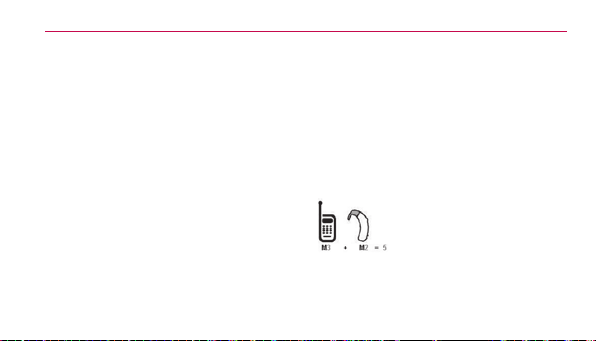
Safety
144
outthephonewithyourhearingdevice
isthebestwaytoevaluateitforyour
personalneeds.
M-Ratings:PhonesratedM3orM4
meetFCCrequirementsandarelikely
togeneratelessinterferencetohearing
devicesthanphonesthatarenot
labeled.M4isthebetter/higherofthe
tworatings.
Hearingdevicesmayalsoberated.Your
hearingdevicemanufacturerorhearing
healthprofessionalmayhelpyound
thisrating.Higherratingsmeanthat
thehearingdeviceisrelativelyimmune
tointerferencenoise.Thehearingaid
andwirelessphoneratingvaluesare
thenaddedtogether.Asumof5is
consideredacceptablefornormaluse.A
sumof6isconsideredforbestuse.
Intheexampletotheleft,
ifahearingaidmeetsthe
M2levelratingandthe
wirelessphonemeets
theM3levelrating,thesumofthetwo
valuesequalM5.Thisshouldprovide

Safety
145
thehearingaiduserwith“normal
usage”whileusingtheirhearingaid
withtheparticularwirelessphone.
“Normalusage”inthiscontextis
denedasasignalqualitythat’s
acceptablefornormaloperation.
TheMmarkisintendedtobe
synonymouswiththeUmark.TheT
markisintendedtobesynonymous
withtheUTmark.TheMandTmarks
arerecommendedbytheAlliance
forTelecommunicationsIndustries
Solutions(ATIS).TheUandUTmarks
arereferencedinSection20.19of
theFCCRules.TheHACratingand
measurementprocedurearedescribed
intheAmericanNationalStandards
Institute(ANSI)C63.19standard.
Whenyou’retalkingonacellphone,
it’srecommendedthatyouturntheBT
(Bluetooth)modeoffforHAC.
AccordingtoHACpolicy(KDB285076),
westatethishandsethasnotbeen
ratedforhearingaidcompatibilitywith
respecttotheWiFicapability.

Safety
146
For information about hearing aids
and digital wireless phones
Wireless Phones and Hearing Aid
Accessibility
http://www.accesswireless.org/Home.
aspx
FCC Hearing Aid Compatibility and
Volume Control
http://www.fcc.gov/cgb/consumerfacts/
hac_wireless.html
Caution: Avoid potential
hearing loss.
Prolongedexposuretoloudsounds
(includingmusic)isthemostcommon
causeofpreventablehearingloss.Some
scienticresearchsuggeststhatusing
portableaudiodevices,suchasportable
musicplayersandcellulartelephones,
athighvolumesettingsforlong
durationsmayleadtopermanentnoise
inducedhearingloss.Thisincludes
theuseofheadphones(including

Safety
147
headsets,earbudsandBluetooth
®
orotherwirelessdevices).Exposure
toveryloudsoundhasalsobeen
associatedinsomestudieswithtinnitus
(aringingintheear),hypersensitivityto
soundanddistortedhearing.Individual
susceptibilitytonoise-inducedhearing
lossandotherpotentialhearing
problemsvaries.
Theamountofsoundproducedbya
portableaudiodevicevariesdepending
onthenatureofthesound,thedevice,
thedevicesettingsandtheheadphones.
You shouldfollowsomecommonsense
recommendationswhenusingany
portableaudiodevice:
•Setthevolumeinaquietenvironment
andselectthelowestvolumeatwhich
youcanhearadequately.
•Whenusingheadphones,turnthe
volumedownifyoucannothearthe
peoplespeakingnearyouorifthe
personsittingnexttoyoucanhear
whatyouarelisteningto.
•Donotturnthevolumeuptoblock

Safety
148
outnoisysurroundings.Ifyouchoose
tolistentoyourportabledevicein
anoisyenvironment,usenoise-
cancellingheadphonestoblockout
backgroundenvironmentalnoise.
•Limittheamountoftimeyoulisten.
Asthevolumeincreases,lesstimeis
requiredbeforeyourhearingcouldbe
affected.
•Avoidusingheadphonesafter
exposuretoextremelyloudnoises,
suchasrockconcerts,thatmight
causetemporaryhearingloss.
Temporaryhearinglossmightcause
unsafevolumestosoundnormal.
•Donotlistenatanyvolumethat
causesyoudiscomfort.Ifyou
experienceringinginyourears,hear
mufedspeechorexperienceany
temporaryhearingdifcultyafter
listeningtoyourportableaudiodevice,
discontinueuseandconsultyour
doctor.

Safety
149
TIA Safety Information
ThefollowingisthecompleteTIA
SafetyInformationforwirelesshandheld
phones.
Exposure to Radio Frequency
Signal
Yourwirelesshandheldportablephone
isalowpowerradiotransmitterand
receiver.WhenON,itreceivesand
sendsoutRadioFrequency(RF)signals.
InAugust,1996,theFederal
CommunicationsCommissions(FCC)
adoptedRFexposureguidelineswith
safetylevelsforhandheldwireless
phones.Thoseguidelinesareconsistent
withthesafetystandardspreviouslyset
bybothU.S.andinternationalstandards
bodies:
1. ANSIC95.1(1992)*
2. NCRPReport86(1986)
3. ICNIRP(1996)
4. *AmericanNationalStandards

Safety
150
Institute;NationalCouncilonRadiation
ProtectionandMeasurements;
InternationalCommissiononNon-
IonizingRadiationProtection
Thosestandardswerebasedon
comprehensiveandperiodicevaluations
oftherelevantscienticliterature.For
example,over120scientists,engineers,
andphysiciansfromuniversities,
governmenthealthagencies,and
industryreviewedtheavailablebodyof
researchtodeveloptheANSIStandard
(C95.1).
Thedesignofyourphonecomplies
withtheFCCguidelines(andthose
standards).
Antenna Care
Useonlythesuppliedoranapproved
replacementantenna.Unauthorized
antennas,modications,orattachments
coulddamagethephoneandmay
violateFCCregulations.
Phone Operation
NORMALPOSITION:Holdthephone

Safety
151
asyouwouldanyothertelephonewith
theantennapointedupandoveryour
shoulder.
Tips on Efficient Operation
Foryourphonetooperatemost
efciently:
Don’ttouchtheantennaunnecessarily
whenthephoneisinuse.Contactwith
theantennaaffectscallqualityandmay
causethephonetooperateatahigher
powerlevelthanotherwiseneeded.
Electronic Devices
Mostmodernelectronicequipmentis
shieldedfromRFsignals.However,
certainelectronicequipmentmaynot
beshieldedagainsttheRFsignalsfrom
yourwirelessphone.
Pacemakers
TheHealthIndustryManufacturers
Associationrecommendsthata
minimumseparationofsix(6)inches
bemaintainedbetweenahandheld
wirelessphoneandapacemakerto

Safety
152
avoidpotentialinterferencewiththe
pacemaker.Theserecommendations
areconsistentwiththeindependent
researchbyandrecommendationsof
WirelessTechnologyResearch.
Personswithpacemakers:
•ShouldALWAYSkeepthephone
morethansix(6)inchesfromtheir
pacemakerwhenthephoneisturned
ON;
•Shouldnotcarrythephoneinabreast
pocket;
•Shouldusetheearoppositethe
pacemakertominimizethepotential
forinterference;
•ShouldturnthephoneOFF
immediatelyifthereisanyreasonto
suspectthatinterferenceistaking
place.
Hearing Aids
Somedigitalwirelessphonesmay
interferewithsomehearingaids.Inthe
eventofsuchinterference,youmay
wanttoconsultyourserviceprovider(or

Safety
153
callthecustomerservicelinetodiscuss
alternatives).
Other Medical Devices
Ifyouuseanyotherpersonalmedical
device,consultthemanufacturerofyour
devicetodetermineifitisadequately
shieldedfromexternalRFenergy.Your
physicianmaybeabletoassistyouin
obtainingthisinformation.
Health Care Facilities
TurnyourphoneOFFinhealthcare
facilitieswhenanyregulationsposted
intheseareasinstructyoutodoso.
Hospitalsorhealthcarefacilitiesmay
useequipmentthatcouldbesensitive
toexternalRFenergy.
Vehicles
RFsignalsmayaffectimproperly
installedorinadequatelyshielded
electronicsystemsinmotorvehicles.
Checkwiththemanufactureror
itsrepresentativeregardingyour
vehicle.You shouldalsoconsultthe

Safety
154
manufacturerofanyequipmentthathas
beenaddedtoyourvehicle.
Posted Facilities
TurnyourphoneOFFinanyfacility
wherepostednoticessorequire.
Aircraft
FCCregulationsprohibitusingyour
phonewhileintheair.SwitchOFFyour
phonebeforeboardinganaircraft.
Blasting Areas
Toavoidinterferingwithblasting
operations,turnyourphoneOFFwhen
ina“blastingarea”orinareasposted:
“Turnofftwo-wayradio”.Obeyallsigns
andinstructions.
Potentially Explosive Atmosphere
TurnyourphoneOFFwheninanyarea
withapotentiallyexplosiveatmosphere
andobeyallsignsandinstructions.
Sparksinsuchareascouldcausean
explosionorreresultinginbodilyinjury
orevendeath.
Areaswithapotentiallyexplosive

Safety
155
atmosphereareoften,butnotalways
markedclearly.Potentialareasmay
include:fuelingareas(suchasgasoline
stations);belowdeckonboats;fuelor
chemicaltransferorstoragefacilities;
vehiclesusingliqueedpetroleumgas
(suchaspropaneorbutane);areas
wheretheaircontainschemicalsor
particles(suchasgrain,dust,ormetal
powders);andanyotherareawhereyou
wouldnormallybeadvisedtoturnoff
yourvehicleengine.
For Vehicles Equipped with an Air
Bag
Anairbaginateswithgreatforce.
DONOTplaceobjects,includingeither
installedorportablewirelessequipment,
intheareaovertheairbagorinthe
airbagdeploymentarea.Ifin-vehicle
wirelessequipmentisimproperly
installedandtheairbaginates,serious
injurycouldresult.

Safety
156
Part 15.105 statement
Thisequipmenthasbeentestedand
foundtocomplywiththelimitsfor
aclassBdigitaldevice,pursuantto
Part15oftheFCCrules.Theselimits
aredesignedtoprovidereasonable
protectionagainstharmfulinterferencein
aresidentialinstallation.Thisequipment
generates,uses,andcanradiateradio
frequencyenergyand,ifnotinstalledand
usedinaccordancewiththeinstructions,
maycauseharmfulinterferenceto
radiocommunications.However,there
isnoguaranteethatinterferencewill
notoccurinaparticularinstallation.
Ifyouexperienceinterferencewith
reception(e.g.,television),determineif
thisequipmentiscausingtheharmful
interferencebyturningtheequipment
offandthenbackontoseeifthe
interferenceisaffected.Ifnecessary,
trycorrectingtheinterferencebyoneor
moreofthefollowingmeasures:
- Reorientorrelocatethereceiving
antenna.
-Increasetheseparationbetweenthe
equipmentandreceiver.

Safety
157
-Connecttheequipmentintoanoutlet
onacircuitdifferentfromthattowhich
thereceiverisconnected.
-Consultthedealeroranexperienced
radio/TVtechnicianforhelp.
*Informationsubjecttochange.
Part 15.21 statement
Changesormodicationsthatarenot
expresslyapprovedbythemanufacturer
couldvoidtheuser’sauthoritytooperate
theequipment.
Safety Information
Pleasereadandobservethefollowing
informationforsafeandproperuseof
yourphoneandtopreventdamage.
Caution
Violation of the instructions may
cause minor or serious damage to
the product.
•Donotdisassembleoropencrush,
bendordeform,punctureorshred.

Safety
158
•Donotmodifyorremanufacture,
attempttoinsertforeignobjects
intothebattery,immerseorexpose
towaterorotherliquids,exposeto
re,explosionorotherhazard.Such
conditionsmaypresenttheriskofre
orexplosion.
•Onlyusethebatteryforthesystem
forwhichitisspecied.
•Onlyusethebatterywithacharging
systemthathasbeenLG-approved
andqualiedwiththesystemper
IEEE-Std-1725-2006.Useofan
unqualiedandnon-LG-approved
batteryorchargermaypresentarisk
ofre,explosion,leakage,orother
hazard.
•Donotshortcircuitabatteryorallow
metallicconductiveobjectstocontact
batteryterminals.
•Replacethebatteryonlywithanother
batterythathasbeenLGCaution
32approvedandqualiedwiththe
systemperthisstandard,IEEE-

Safety
159
Std-1725-2006.Useofanunqualied
andnon-LG-approvedbatterymay
presentariskofre,explosion,
leakageorotherhazard.
•Promptlydisposeofusedbatteriesin
accordancewithlocalregulations.
•Batteryusagebychildrenshouldbe
supervised.
•Avoiddroppingthephone,battery
orexposingthephoneorbatteryto
aliquid.Ifthephoneorbatteryis
dropped,especiallyonahardsurface,
orisexposedtoaliquidorcomesinto
contactwithasharpobjecttakeittoa
servicecenterforinspection.
•Atleast,oneoftheAuthentication
methodsmaybeimplemented.(e.g.
H/W,S/W,Mechanical,Hologram,
etc.)
•Improperbatteryusemayresultina
re,explosionorotherhazard.

Safety
160
Charger and Adapter Safety
•Thechargerandadapterareintended
forindooruseonly.
•Insertthebatterypackcharger
verticallyintothewallpowersocket.
•OnlyusetheLG-approvedbattery
charger.Otherwise,youmaycause
seriousdamagetoyourphone.
•Usethecorrectadapterforyour
phonewhenusingthebatterypack
chargerabroad.
Battery Information and Care
•Alwaysunplugthechargerfromthe
wallsocketafterthephoneisfully
chargedtosaveunnecessarypower
consumptionofthecharger.
•Pleasereadthemanualofproper
installationandremovalofthebattery.
•Pleasereadthemanualofspecied
chargeraboutchargingmethod.
•Donotdamagethepowercordby
bending,twisting,orheating.Donot

Safety
161
usetheplugifitislooseasitmay
causeelectricshockorre.
•Donotplaceanyheavyitemsonthe
powercord.Donotallowthepower
cordtobecrimpedasitmaycause
electricshockorre.
•Unplugthepowercordpriorto
cleaningyourphone,andcleanthe
powerplugpinwhenit’sdirty.When
usingthepowerplug,ensurethatit’s
rmlyconnected.Ifnot,itmaycause
excessiveheatorre.Ifyouputyour
phoneinapocketorbagwithout
coveringthereceptacleofthephone
(powerplugpin),metallicarticles(such
asacoin,papercliporpen)mayshort-
circuitthephone.Alwayscoverthe
receptaclewhennotinuse.
•Rechargethebatteryafterlong
periodsofnon-usetomaximize
batterylife.Batterylifewillvarydue
tousagepatternandenvironmental
conditions.
•PleaseuseonlyanLG-approved

Safety
162
chargingaccessoryto35chargeyour
LGphone.Improperhandlingofthe
chargingport,aswellastheuseof
anincompatiblecharger,maycause
damagetoyourphoneandvoidthe
warranty.
•Neverstoreyourphoneintemperature
lessthan-4°Forgreaterthan122°F.
Chargethebatteryinrangeof0°C~
45°C.
•lChargingtemperaturerangeis
regulatedbetween0°Cand45°C.
Donotchargethebatteryoutof
recommendedtemperaturerange.
Chargingoutofrecommendedrange
mightcausethegeneratingheator
seriousdamageofbattery.Andalso,
itmightcausethedeteriorationof
battery'scharacteristicsandcyclelife.
•Donotuseorleavethebatteryunder
theblazingsunorinheatedcarby
sunshine.Thebatterymaygenerate
heat,smokeorame.Andalso,it
mightcausethedeteriorationof
battery’scharacteristicsorcyclelife.

Safety
163
•Thebatterypackhasprotectioncircuit
toavoidthedanger.Donotusenearby
theplacewheregeneratesstatic
electricitymorethan100Vwhich
givesdamagetotheprotectioncircuit.
Iftheprotectioncircuitwerebroken,
thebatterywouldgeneratesmoke,
ruptureorame.
•Whenthebatteryhasrust,badsmell
orsomethingabnormalatrst-time-
using,donotusetheequipmentand
gotobringthebatterytotheshop
whichitwasbought.
•Incaseyoungerchildrenusethe
battery,theirparentsshouldteach
themhowtousebatteriesaccording
tothemanualwithcare.
•Iftheskinorclothissmearedwith
liquidfromthebattery,washwith
freshwater.Itmaycausetheskin
inammation.Removeanddonotuse
thebattery.
•Donothandlethephonewithwet
handswhileitisbeingcharged.Itmay
causeanelectricshockorseriously

Safety
164
damageyourphone.
•Donotplaceoranswercallswhile
chargingthephoneasitmayshort-
circuitthephoneand/orcauseelectric
shockorre.
•Thechargerandadapterareintended
forindooruseonly.
•Insertthebatterypackcharger
verticallyintothewallpowersocket.
•OnlyusetheLG-approvedbattery
charger.Otherwise,youmaycause
seriousdamagetoyourphoneand
riskofoverheating,reorexplosion
mayoccur.
•Usethecorrectadapterforyour
phonewhenusingthebatterypack
chargerabroad.
•Talkingonyourphoneforalongperiod
oftimemayreducecallqualitydueto
heatgeneratedduringuse.
•Donotuseharshchemicals(suchas
alcohol,benzene,thinners,etc.)or
detergentstocleanyourphone.This

Safety
165
couldcauseare.Donotplaceor
answercallswhilechargingthephone
asitmayshort-circuitthephoneand/
orcauseelectricshockorre.Don’t
short-circuitthebattery.Metallic
articlessuchasacoin,paperclipor
peninyourpocketorbagmayshort-
circuitthe+and–terminalsofthe
battery(metalstripsonthebattery)
uponmoving.Short-circuitofthe
terminalmaydamagethebatteryand
causeanexplosion.
•Neveruseandunapprovedbattery
sincethiscoulddamagethephone
and/orbatteryandcouldcausethe
batterytoexplode.Onlyusethe
batteriesandchargersprovidedby
LG.Thewarrantywillnotbeappliedto
productsprovidedbyothersuppliers.
Onlyauthorizedpersonnelshould
servicethephoneanditsaccessories.
Faultyinstallationorservicemay
resultinaccidentsandconsequently
invalidatethewarranty.

Safety
166
Explosion, Shock, and Fire Hazards
Checkthelawsandregulationsonthe
useofwirelessphonesintheareas
whereyoudriveandalwaysobeythem.
Also,ifusingyourphonewhiledriving,
pleaseobservethefollowing:
•Donotputyourphoneinaplace
subjecttoexcessivedustandkeep
theminimumrequireddistance
betweenthepowercordandheat
sources.
•Unplugthepowercordpriorto
cleaningyourphone,andcleanthe
powerplugpinwhenit’sdirty.
•Whenusingthepowerplug,ensure
thatit’srmlyconnected.Ifnot,itmay
causeexcessiveheatorre.
•Ifyouputyourphoneinapocketor
bagwithoutcoveringthereceptacle
ofthephone(powerplugpin),metallic
articles(suchasacoin,paperclipor
pen)mayshort-circuitthephoneand
maycausean37explosion.Always
coverthereceptaclewhennotinuse.

Safety
167
•Don’tshort-circuitthebattery.Metallic
articlessuchasacoin,papercliporpen
inyourpocketorbagorcontactwith
sharpobjectsincludinganimalbites
mayshort-circuitthe+and–terminals
ofthebattery(metalstripsonthe
battery)uponmoving.Shortcircuitof
theterminalmaydamagethebattery
andcauseanexplosion.
General Notice
•Usingadamagedbatteryorplacing
abatteryinyourmouthoranimal's
mouthmaycauseseriousinjury
includingareorexplosion.
•Donotplaceitemscontaining
magneticcomponentssuchasa
creditcard,phonecard,bankbook,or
subwayticketnearyourphone.The
magnetismofthephonemaydamage
thedatastoredinthemagneticstrip.
•Talkingonyourphoneforalongperiod
oftimemayreducecallqualitydueto
heatgeneratedduringuse.

Safety
168
•Whenthephoneisnotusedforalong
periodtime,storeitinasafeplace
withthepowercordunplugged.
•Usingthephoneinproximityto
receivingequipment(i.e.,TVorradio)
maycauseinterferencetothephone.
•Donotusethephoneiftheantenna
isdamaged.Ifadamagedantenna
contactsskin,itmaycauseaslight
burn.PleasecontactanLGAuthorized
ServiceCentertoreplacethe
damagedantenna.
•Donotimmerseyourphoneinwater,
liquid,orexposetohighhumidity.If
thishappens,turnitoffimmediately
andremovethebattery.Immediately,
takeittoanLGAuthorizedService
Center.
•Donotpaintyourphone.
•Thedatasavedinyourphonemight
bedeletedduetocarelessuse,
repairofthephone,orupgradeof
thesoftware.Pleasebackupyour
importantphonenumbers.(Ringtones,

Safety
169
textmessages,voicemessages,
pictures,andvideoscouldalsobe
deleted.)Themanufacturerisnot
liablefordamageduetothelossof
data.
•Whenyouusethephoneinpublic
places,settheringtonetovibrationso
youdon'tdisturbothers.
•Donotturnyourphoneonoroffwhen
puttingittoyourear.
•Useaccessories,suchasearphones
andheadsets,withcaution.Ensure
thatcablesaretuckedawaysafely
anddonottouchtheantenna
unnecessarily.
Youcanobtainadditionalinformationonthissubject
fromthefollowingsources:
American Academy of Audiology
11730PlazaAmericanDrive,Suite300
Reston,VA20190
Voice:(800)222-2336
Email:info@audiology.org

Safety
170
Internet:www.audiology.org
National Institute on Deafness and
Other Communication Disorders
NationalInstitutesofHealth
31CenterDrive,MSC2320
Bethesda,MDUSA20892-2320
Voice:(301)496-7243
Email:[email protected]
Internet:http://www.nidcd.nih.gov/
health/hearing
National Institute for Occupational
Safety and Health
HubertH.HumphreyBldg.
200IndependenceAve.,SW
Washington,DC20201
Voice:1-800-35-NIOSH(1-800-356-
4674)
Internet:
http://www.cdc.gov/niosh/topics/noise/
default.html

Safety
171
FDA Consumer Update
TheU.S.FoodandDrug
Administration’sCenterfor
DevicesandRadiological
HealthConsumerUpdateon
MobilePhones:
1. Do wireless phones pose a
health hazard?
Theavailablescienticevidencedoes
notshowthatanyhealthproblems
areassociatedwithusingwireless
phones.Thereisnoproof,however,that
wirelessphonesareabsolutelysafe.
WirelessphonesemitlowlevelsofRadio
Frequency(RF)energyinthemicrowave
rangewhilebeingused.Theyalsoemit
verylowlevelsofRFwheninstandby
mode.WhereashighlevelsofRFcan
producehealtheffects(byheatingtissue),
exposuretolowlevelRFthatdoesnot
produceheatingeffectscausesnoknown
adversehealtheffects.Manystudiesof
lowlevelRFexposureshavenotfound
anybiologicaleffects.Somestudieshave
suggestedthatsomebiologicaleffects

Safety
172
mayoccur,butsuchndingshavenot
beenconrmedbyadditionalresearch.In
somecases,otherresearchershavehad
difcultyinreproducingthosestudies,or
indeterminingthereasonsforinconsistent
results.
2. What is the FDA’s role concerning
the safety of wireless phones?
Underthelaw,theFDAdoesnot
reviewthesafetyofradiation-emitting
consumerproductssuchaswireless
phonesbeforetheycanbesold,as
itdoeswithnewdrugsormedical
devices.However,theagencyhas
authoritytotakeactionifwireless
phonesareshowntoemitRadio
Frequency(RF)energyatalevelthat
ishazardoustotheuser.Insuch
acase,theFDAcouldrequirethe
manufacturersofwirelessphonesto
notifyusersofthehealthhazardandto
repair,replace,orrecallthephonesso
thatthehazardnolongerexists.
Althoughtheexistingscienticdata
doesnotjustifyFDAregulatoryactions,

Safety
173
theFDAhasurgedthewirelessphone
industrytotakeanumberofsteps,
includingthefollowing:
•Supportneededresearchintopossible
biologicaleffectsofRFofthetype
emittedbywirelessphones;
•Designwirelessphonesinawaythat
minimizesanyRFexposuretothe
userthatisnotnecessaryfordevice
function;and
•Cooperateinprovidingusersof
wirelessphoneswiththebestpossible
informationonpossibleeffectsof
wirelessphoneuseonhumanhealth.
TheFDAbelongstoaninteragency
workinggroupofthefederalagencies
thathaveresponsibilityfordifferent
aspectsofRFsafetytoensure
coordinatedeffortsatthefederallevel.
Thefollowingagenciesbelongtothis
workinggroup:
•NationalInstituteforOccupational
SafetyandHealth
•EnvironmentalProtectionAgency

Safety
174
•OccupationalSafetyandHealth
Administration
•NationalTelecommunicationsand
InformationAdministration
TheNationalInstitutesofHealth
participatesinsomeinteragency
workinggroupactivities,aswell.
TheFDAsharesregulatory
responsibilitiesforwirelessphones
withtheFederalCommunications
Commission(FCC).Allphonesthatare
soldintheUnitedStatesmustcomply
withFCCsafetyguidelinesthatlimitRF
exposure.TheFCCreliesontheFDA
andotherhealthagenciesforsafety
questionsaboutwirelessphones.
TheFCCalsoregulatesthebase
stationsthatthewirelessphone
networksrelyupon.Whilethesebase
stationsoperateathigherpowerthando
thewirelessphonesthemselves,theRF
exposuresthatpeoplegetfromthese
basestationsaretypicallythousands
oftimeslowerthanthosetheycanget
fromwirelessphones.Basestations

Safety
175
arethusnotthesubjectofthesafety
questionsdiscussedinthisdocument.
3. What kinds of phones are the
subject of this update?
Theterm“wirelessphone”refers
heretohandheldwirelessphones
withbuilt-inantennas,oftencalled
“cell”,“mobile”,or“PCS”phones.
Thesetypesofwirelessphonescan
exposetheusertomeasurableRadio
Frequency(RF)energybecauseofthe
shortdistancebetweenthephoneand
theuser’shead.
TheseRFexposuresarelimitedbyFCC
safetyguidelinesthatweredeveloped
withtheadviceoftheFDAandother
federalhealthandsafetyagencies.
Whenthephoneislocatedatgreater
distancesfromtheuser,theexposure
toRFisdrasticallylowerbecause
aperson’sRFexposuredecreases
rapidlywithincreasingdistancefrom
thesource.Theso-called“cordless
phones,”whichhaveabaseunit
connectedtothetelephonewiringin

Safety
176
ahouse,typicallyoperateatfarlower
powerlevels,andthusproduceRF
exposuresfarbelowtheFCCsafety
limits.
4. What are the results of the
research done already?
Theresearchdonethusfarhas
producedconictingresults,andmany
studieshavesufferedfromaws
intheirresearchmethods.Animal
experimentsinvestigatingtheeffectsof
RadioFrequency(RF)energyexposures
characteristicofwirelessphoneshave
yieldedconictingresultsthatoften
cannotberepeatedinotherlaboratories.
Afewanimalstudies,however,have
suggestedthatlowlevelsofRFcould
acceleratethedevelopmentofcancer
inlaboratoryanimals.However,many
ofthestudiesthatshowedincreased
tumordevelopmentusedanimalsthat
hadbeengeneticallyengineeredor
treatedwithcancer-causingchemicals
soastobepre-disposedtodevelop
cancerintheabsenceofRFexposure.

Safety
177
Otherstudiesexposedtheanimals
toRFforupto22hoursperday.
Theseconditionsarenotsimilartothe
conditionsunderwhichpeopleuse
wirelessphones,sowedonotknow
withcertaintywhattheresultsof
suchstudiesmeanforhumanhealth.
Threelargeepidemiologystudieshave
beenpublishedsinceDecember2000.
Betweenthem,thestudiesinvestigated
anypossibleassociationbetweenthe
useofwirelessphonesandprimary
braincancer,glioma,meningioma,
oracousticneuroma,tumorsofthe
brainorsalivarygland,leukemia,or
othercancers.Noneofthestudies
demonstratedtheexistenceofany
harmfulhealtheffectsfromwireless
phoneRFexposures.However,noneof
thestudiescananswerquestionsabout
long-termexposures,sincetheaverage
periodofphoneuseinthesestudies
wasaroundthreeyears.
5. What research is needed to
decide whether RF exposure from
wireless phones poses a health

Safety
178
risk?
Acombinationoflaboratorystudies
andepidemiologicalstudiesofpeople
actuallyusingwirelessphoneswould
providesomeofthedatathatare
needed.Lifetimeanimalexposure
studiescouldbecompletedinafew
years.However,verylargenumbersof
animalswouldbeneededtoprovide
reliableproofofacancerpromoting
effect,ifoneexists.Epidemiological
studiescanprovidedatathatisdirectly
applicabletohumanpopulations,but
tenormoreyearsfollow-upmaybe
neededtoprovideanswersaboutsome
healtheffects,suchascancer.Thisis
becausetheintervalbetweenthetime
ofexposuretoacancer-causingagent
andthetimetumorsdevelop-ifthey
do-maybemany,manyyears.The
interpretationofepidemiologicalstudies
ishamperedbydifcultiesinmeasuring
actualRFexposureduringday-to-day
useofwirelessphones.Manyfactors
affectthismeasurement,suchasthe
angleatwhichthephoneisheld,or

Safety
179
whichmodelofphoneisused.
6. What is the FDA doing to find out
more about the possible health
effects of wireless phone RF?
TheFDAisworkingwiththeU.S.
NationalToxicologyProgramandwith
groupsofinvestigatorsaroundthe
worldtoensurethathighpriorityanimal
studiesareconductedtoaddress
importantquestionsabouttheeffects
ofexposuretoRadioFrequency(RF)
energy.
TheFDAhasbeenaleadingparticipant
intheWorldHealthOrganization
InternationalElectroMagneticFields
(EMF)Projectsinceitsinceptionin
1996.Aninuentialresultofthis
workhasbeenthedevelopmentofa
detailedagendaofresearchneedsthat
hasdriventheestablishmentofnew
researchprogramsaroundtheworld.
Theprojecthasalsohelpeddevelopa
seriesofpublicinformationdocuments
onEMFissues.
TheFDAandtheCellular

Safety
180
Telecommunications&Internet
Association(CTIA)haveaformal
CooperativeResearchAnd
DevelopmentAgreement(CRADA)
todoresearchonwirelessphone
safety.TheFDAprovidesthescientic
oversight,obtaininginputfromexperts
ingovernment,industry,andacademic
organizations.CTIA-fundedresearch
isconductedthroughcontractswith
independentinvestigators.Theinitial
researchwillincludebothlaboratory
studiesandstudiesofwirelessphone
users.TheCRADAwillalsoincludea
broadassessmentofadditionalresearch
needsinthecontextofthelatest
researchdevelopmentsaroundthe
world.
7. How can I find out how much
Radio Frequency energy
exposure I can get by using my
wireless phone?
AllphonessoldintheUnited
StatesmustcomplywithFederal
CommunicationsCommission(FCC)

Safety
181
guidelinesthatlimitRadioFrequency
(RF)energyexposures.TheFCC
establishedtheseguidelinesin
consultationwiththeFDAandtheother
federalhealthandsafetyagencies.The
FCClimitforRFexposurefromwireless
phonesissetataSpecicAbsorption
Rate(SAR)of1.6wattsperkilogram
(1.6W/kg).TheFCClimitisconsistent
withthesafetystandardsdevelopedby
theInstituteofElectricalandElectronic
Engineering(IEEE)andtheNational
CouncilonRadiationProtectionand
Measurement.Theexposurelimittakes
intoconsiderationthebody’sability
toremoveheatfromthetissuesthat
absorbenergyfromthewirelessphone
andissetwellbelowlevelsknownto
haveeffects.Manufacturersofwireless
phonesmustreporttheRFexposure
levelforeachmodelofphonetothe
FCC.TheFCCwebsite(http://www.fcc.
gov/cgb/cellular.html)givesdirections
forlocatingtheFCCidentication
numberonyourphonesoyoucannd
yourphone’sRFexposurelevelinthe

Safety
182
onlinelisting.
8. What has the FDA done to
measure the Radio Frequency
energy coming from wireless
phones?
TheInstituteofElectricalandElectronic
Engineers(IEEE)isdevelopinga
technicalstandardformeasuring
theRadioFrequency(RF)energy
exposurefromwirelessphones
andotherwirelesshandsetswith
theparticipationandleadershipof
FDAscientistsandengineers.The
standard,“RecommendedPracticefor
DeterminingtheSpatial-PeakSpecic
AbsorptionRate(SAR)intheHuman
BodyDuetoWirelessCommunications
Devices:ExperimentalTechniques”,
setsforththerstconsistenttest
methodologyformeasuringtherate
atwhichRFisdepositedintheheads
ofwirelessphoneusers.Thetest
methodusesatissue-simulatingmodel
ofthehumanhead.Standardized
SARtestmethodologyisexpected

Safety
183
togreatlyimprovetheconsistency
ofmeasurementsmadeatdifferent
laboratoriesonthesamephone.SAR
isthemeasurementoftheamountof
energyabsorbedintissue,eitherbythe
wholebodyorasmallpartofthebody.
Itismeasuredinwatts/kg(ormilliwatts/
g)ofmatter.Thismeasurementisused
todeterminewhetherawirelessphone
complieswithsafetyguidelines.
9. What steps can I take to reduce
my exposure to Radio Frequency
energy from my wireless phone?
Ifthereisariskfromtheseproducts-
andatthispointwedonotknowthat
thereis-itisprobablyverysmall.Butif
youareconcernedaboutavoidingeven
potentialrisks,youcantakeafewsimple
stepstominimizeyourexposuretoRadio
Frequency(RF)energy.Sincetimeis
akeyfactorinhowmuchexposurea
personreceives,reducingtheamountof
timespentusingawirelessphonewill
reduceRFexposure.Ifyoumustconduct
extendedconversationsbywirelessphone
everyday,youcouldplacemoredistance

Safety
184
betweenyourbodyandthesourceof
theR F, sincetheexposureleveldropsoff
dramaticallywithdistance.Forexample,
youcoulduseaheadsetandcarrythe
wirelessphoneawayfromyourbody
oruseawirelessphoneconnectedto
aremoteantenna.Again,thescientic
datadoesnotdemonstratethatwireless
phonesareharmful.Butifyouare
concernedabouttheRFexposurefrom
theseproducts,youcanusemeasureslike
thosedescribedabovetoreduceyourRF
exposurefromwirelessphoneuse.
10. What about children using
wireless phones?
Thescienticevidencedoesnotshow
adangertousersofwirelessphones,
includingchildrenandteenagers.Ifyou
wanttotakestepstolowerexposure
toRadioFrequency(RF)energy,the
measuresdescribedabovewouldapply
tochildrenandteenagersusingwireless
phones.Reducingthetimeofwireless
phoneuseandincreasingthedistance
betweentheuserandtheRFsource
willreduceRFexposure.

Safety
185
Somegroupssponsoredbyother
nationalgovernmentshaveadvised
thatchildrenbediscouragedfromusing
wirelessphonesatall.Forexample,
thegovernmentintheUnitedKingdom
distributedleaetscontainingsucha
recommendationinDecember2000.
Theynotedthatnoevidenceexists
thatusingawirelessphonecauses
braintumorsorotherilleffects.Their
recommendationtolimitwireless
phoneusebychildrenwasstrictly
precautionary;itwasnotbasedon
scienticevidencethatanyhealth
hazardexists.
11. What about wireless phone
interference with medical
equipment?
RadioFrequency(RF)energyfrom
wirelessphonescaninteractwithsome
electronicdevices.Forthisreason,the
FDAhelpeddevelopadetailedtest
methodtomeasureElectroMagnetic
Interference(EMI)ofimplantedcardiac
pacemakersanddebrillatorsfrom

Safety
186
wirelesstelephones.Thistestmethod
isnowpartofastandardsponsoredby
theAssociationfortheAdvancement
ofMedicalInstrumentation(AAMI).
Thenaldraft,ajointeffortbytheFDA,
medicaldevicemanufacturers,and
manyothergroups,wascompleted
inlate2000.Thisstandardwillallow
manufacturerstoensurethatcardiac
pacemakersanddebrillatorsaresafe
fromwirelessphoneEMI.
TheFDAhastestedhearingaidsfor
interferencefromhandheldwireless
phonesandhelpeddevelopavoluntary
standardsponsoredbytheInstitute
ofElectricalandElectronicEngineers
(IEEE).Thisstandardspeciestest
methodsandperformancerequirements
forhearingaidsandwirelessphones
sothatnointerferenceoccurswhena
personusesa“compatible”phoneand
a“compatible”hearingaidatthesame
time.Thisstandardwasapprovedby
theIEEEin2000.
TheFDAcontinuestomonitorthe
useofwirelessphonesforpossible

Safety
187
interactionswithothermedicaldevices.
Shouldharmfulinterferencebefound
tooccur,theFDAwillconducttesting
toassesstheinterferenceandworkto
resolvetheproblem.
12. Where can I find additional
information?
Foradditionalinformation,pleaserefer
tothefollowingresources:
FDAwebpageonwirelessphones
(http://www.fda.gov),under“C”inthe
subjectindex,selectCellPhones>
Research.
FederalCommunicationsCommission
(FCC)RFSafetyProgram(http://www.
fcc.gov/oet/rfsafety/)
InternationalCommissionon
NonlonizingRadiationProtection(http://
www.icnirp.de)
WorldHealthOrganization(WHO)
InternationalEMFProject(http://www.
who.int/emf)
HealthProtectionAgency(http://www.
hpa.org.uk/)

Safety
188
Driving
Checkthelawsandregulationsonthe
useofwirelessphonesintheareas
whereyoudriveandalwaysobeythem.
Also,ifusingyourphonewhiledriving,
pleaseobservethefollowing:
•Givefullattentiontodriving--driving
safelyisyourrstresponsibility;
•Usehands-freeoperation,ifavailable;
•Pullofftheroadandparkbefore
makingoransweringacallifdriving
conditionsorthelawrequireit.
10 Driver Safety Tips
Yourwirelessphonegivesyouthe
powerfulabilitytocommunicateby
voicealmostanywhere,anytime.An
importantresponsibilityaccompanies
thebenetsofwirelessphones,one
thateveryusermustuphold.
Whenoperatingacar,drivingisyour
rstresponsibility.Whenusingyour
wirelessphonebehindthewheelofa
car,practicegoodcommonsenseand
rememberthefollowingtips:

Safety
189
1. Gettoknowyourwirelessphone
anditsfeaturessuchasspeed
dialandredial.Carefullyread
yourinstructionmanualandlearn
totakeadvantageofvaluable
featuresmostphonesoffer,
includingautomaticredialand
memory.Also,worktomemorize
thephonekeypadsoyoucanuse
thespeeddialfunctionwithout
takingyourattentionofftheroad.
2. Whenavailable,useahands-free
device.Anumberofhands-free
wirelessphoneaccessoriesare
readilyavailabletoday.Whether
youchooseaninstalledmounted
deviceforyourwirelessphone
oraspeakerphoneaccessory,
takeadvantageofthesedevicesif
availabletoyou.
3. Makesureyouplaceyourwireless
phonewithineasyreachand
whereyoucanreachitwithout
removingyoureyesfromtheroad.
Ifyougetanincomingcallatan
inconvenienttime,ifpossible,let
yourvoicemailansweritforyou.

Safety
190
4. Suspendconversationsduring
hazardousdrivingconditionsor
situations.Letthepersonyou
arespeakingwithknowyouare
driving;ifnecessary,suspendthe
callinheavytrafcorhazardous
weatherconditions.Rain,sleet,
snow,andicecanbehazardous,
butsoisheavytrafc.Asadriver,
yourrstresponsibilityistopay
attentiontotheroad.
5. Don’ttakenotesorlookupphone
numberswhiledriving.Ifyou
arereadinganaddressbookor
businesscard,orwritinga“to-do”
listwhiledrivingacar,youarenot
watchingwhereyouaregoing.Itis
commonsense.Donotgetcaught
inadangeroussituationbecause
youarereadingorwritingandnot
payingattentiontotheroador
nearbyvehicles.
6. Dialsensiblyandassessthetrafc;
ifpossible,placecallswhenyou
arenotmovingorbeforepulling
intotrafc.Try toplanyourcalls
beforeyoubeginyourtripor
attempttocoincideyourcallswith

Safety
191
timesyoumaybestoppedata
stopsign,redlight,orotherwise
stationary.Butifyouneedtodial
whiledriving,followthissimpletip
-dialonlyafewnumbers,check
theroadandyourmirrors,then
continue.
7. Donotengageinstressfulor
emotionalconversationsthat
maybedistracting.Stressfulor
emotionalconversationsand
drivingdonotmix;theyare
distractingandevendangerous
whenyouarebehindthewheelof
acar.Makepeopleyouaretalking
withawareyouaredrivingandif
necessary,suspendconversations
whichhavethepotentialtodivert
yourattentionfromtheroad.
8. Useyourwirelessphonetocall
forhelp.Yourwirelessphoneis
oneofthegreatesttoolsyoucan
owntoprotectyourselfandyour
familyindangeroussituations
--withyourphoneatyourside,
helpisonlythreenumbersaway.
Dial911orotherlocalemergency
numberinthecaseofre,trafc

Safety
192
accident,roadhazard,ormedical
emergency.Remember,it’safree
callonyourwirelessphone!
9. Useyourwirelessphonetohelp
othersinemergencies.Your
wirelessphoneprovidesyoua
perfectopportunitytobea“Good
Samaritan”inyourcommunity.If
youseeanautoaccident,crime
inprogressorotherserious
emergencywherelivesarein
danger,call911orotherlocal
emergencynumber,asyouwould
wantotherstodoforyou.
10. Callroadsideassistanceora
specialwirelessnon-emergency
assistancenumberwhen
necessary.Certainsituations
youencounterwhiledriving
mayrequireattention,butare
noturgentenoughtomerita
callforemergencyservices.But
youcanstilluseyourwireless
phonetolendahand.Ifyousee
abroken-downvehicleposingno
serioushazard,abrokentrafc
signal,aminortrafcaccident
wherenooneappearsinjuredor

Safety
193
avehicleyouknowtobestolen,
callroadsideassistanceorother
specialnon-emergencywireless
number.
11. Theabovetipsaremeantas
generalguidelines.Before
decidingtouseyourmobiledevice
whileoperatingavehicle,itis
recommendedthatyouconsult
yourapplicablejurisdiction’s
locallawsorotherregulations
regardingsuchuse.Suchlawsor
otherregulationsmayprohibitor
otherwiserestrictthemannerin
whichadrivermayusehisorher
phonewhileoperatingavehicle.

194
Limited Warranty Statement
Limited Warranty Statement
1. WHAT THIS WARRANTY
COVERS:
LGoffersyoualimitedwarrantythat
theenclosedsubscriberunitandits
enclosedaccessorieswillbefreefrom
defectsinmaterialandworkmanship,
accordingtothefollowingtermsand
conditions:
(1)Thelimitedwarrantyfortheproduct
extendsforTWELVE(12)MONTHS
beginningonthedateofpurchase
oftheproductwithvalidproofof
purchase,orabsentvalidproofof
purchase,FIFTEEN(15)MONTHS
fromdateofmanufactureas
determinedbytheunit'smanufacture
datecode.
(2)Thelimitedwarrantyextendsonlyto
theoriginalpurchaseroftheproduct
andisnotassignableortransferable
toanysubsequentpurchaser/end
user.

Limited Warranty Statement
195
(3)Thiswarrantyisgoodonlytothe
originalpurchaseroftheproduct
duringthewarrantyperiodaslong
asitisintheU.S.,includingAlaska,
Hawaii,U.S.TerritoriesandCanada.
(4)Theexternalhousingandcosmetic
partsshallbefreeofdefectsatthe
timeofshipmentand,therefore,shall
notbecoveredundertheselimited
warrantyterms.
(5)UponrequestfromLG,the
consumermustprovideinformation
toreasonablyprovethedateof
purchase.
(6)Thecustomershallbearthecostof
shippingtheproducttotheCustomer
ServiceDepartmentofLG.LG
shallbearthecostofshippingthe
productbacktotheconsumerafter
thecompletionofserviceunderthis
limitedwarranty.

Limited Warranty Statement
196
2. WHAT THIS WARRANTY DOES
NOT COVER:
(1)Defectsordamagesresultingfrom
useoftheproductinotherthanits
normalandcustomarymanner.
(2)Defectsordamagesfromabnormal
use,abnormalconditions,improper
storage,exposuretomoisture
ordampness,unauthorized
modications,unauthorized
connections,unauthorizedrepair,
misuse,neglect,abuse,accident,
alteration,improperinstallation,or
otheractswhicharenotthefault
ofLG,includingdamagecausedby
shipping,blownfuses,spillsoffood
orliquid.
(3)Breakageordamagetoantennas
unlesscauseddirectlybydefectsin
materialorworkmanship.
(4)ThattheCustomerService
DepartmentatLGwasnotnotied
byconsumeroftheallegeddefector
malfunctionoftheproductduringthe

Limited Warranty Statement
197
applicablelimitedwarrantyperiod.
(5)Productswhichhavehadtheserial
numberremovedormadeillegible.
(6)Thislimitedwarrantyisinlieuofall
otherwarranties,expressorimplied
eitherinfactorbyoperationsoflaw,
statutoryorotherwise,including,but
notlimitedtoanyimpliedwarrantyof
marketabilityortnessforaparticular
use.
(7)Damageresultingfromuseofnon
LGapprovedaccessories.
(8)Allplasticsurfacesandallother
externallyexposedpartsthatare
scratchedordamagedduetonormal
customeruse.
(9)Productsoperatedoutsidepublished
maximumratings.
(10)Productsusedorobtainedina
rentalprogram.
(11)Consumables(suchasfuses).

Limited Warranty Statement
198
3. WHAT LG WILL DO:
LGwill,atitssoleoption,eitherrepair,
replaceorrefundthepurchaseprice
ofanyunitthatiscoveredunderthis
limitedwarranty.LGmaychooseatits
optiontousefunctionallyequivalentre-
conditioned,refurbishedornewunits
orpartsoranyunits.Inaddition,LG
willnotre-installorback-upanydata,
applicationsorsoftwarethatyouhave
addedtoyourphone.Itistherefore
recommendedthatyouback-upany
suchdataorinformationpriortosending
theunittoLGtoavoidthepermanent
lossofsuchinformation.
4. STATE LAW RIGHTS:
Nootherexpresswarrantyisapplicable
tothisproduct.
THEDURATIONOFANYIMPLIED
WARRANTIES,INCLUDING
THEIMPLIEDWARRANTY
OFMARKETABILITYOR
MERCHANTABILITYORFITNESS
FORAPARTICULARPURPOSE,IS
LIMITEDTOTHEDURATIONOFTHE

Limited Warranty Statement
199
EXPRESSWARRANTYHEREIN.LG
SHALLNOTBELIABLEFORTHE
LOSSOFTHEUSEOFTHEPRODUCT,
INCONVENIENCE,LOSSORANY
OTHERDAMAGES,DIRECTOR
CONSEQUENTIAL,ARISINGOUTOF
THEUSEO F, ORINABILITYTOUSE,
THISPRODUCTORFORANYBREACH
OFANYEXPRESSORIMPLIED
WARRANTY,INCLUDINGTHEIMPLIED
WARRANTYOFMARKETABILITYOR
MERCHANTABILITYORFITNESSFOR
APARTICULARPURPOSEAPPLICABLE
TOTHISPRODUCT.
Somestatesdonotallowtheexclusive
limitationofincidentalorconsequential
damagesorlimitationsonhowlong
animpliedwarrantylasts;sothese
limitationsorexclusionsmaynotapply
toyou.Thiswarrantygivesyouspecic
legalrightsandyoumayalsohaveother
rightswhichvaryfromstatetostate.

Limited Warranty Statement
200
5. HOW TO GET WARRANTY
SERVICE:
Toobtainwarrantyservice,pleasecallor
faxtothefollowingtelephonenumbers
fromanywhereinthecontinentalUnited
States:
Tel. 1-800-793-8896 or Fax. 1-800-448-
4026
Orvisithttp://us.lgservice.com.
Correspondencemayalsobemailedto:
LGElectronicsService-Mobile
Handsets,P.O.Box240007,Huntsville,
AL35824
DO NOT RETURN YOUR PRODUCT
TO THE ABOVE ADDRESS.Please
callorwriteforthelocationoftheLG
authorizedservicecenternearestyou
andfortheproceduresforobtaining
warrantyclaims.