Use and Styling Guide
HC5080
Register Your New Product Today!
By registering your new Remington
®
product, you will receive these important benefits:
Proof of Ownership • Product Protection • Product Registration • Special Offers
Register online at: RemingtonProducts.com
IMPORTANT SAFETY
INSTRUCTIONS
When using an electrical appliance,
basic precautions should always be
observed, including the following.
Read all instructions before using
this appliance.
DANGER
To reduce the risk of electric shock:
■ Do not reach for an appliance that
has fallen into water. Unplug it
immediately.
■ Do not use while bathing or in
the shower.
■ Do not place or drop into water
or other liquid.
■ Do not place or store this appliance
where it can fall or be pulled into a
tub or sink.
■ Always unplug this appliance from
the electrical outlet immediately
after using.
■ Unplug this appliance before
cleaning it.
■ Never drop or insert any object into
any of the appliance’s openings.
■ Do not use outdoors or operate
where aerosol (spray) products are
being used, or where oxygen is
being administered.
■ Always store this appliance and
cord in a moisture-free area.
Do not store it in temperatures
exceeding 140°F (60°C).
■ Do not plug or unplug this
appliance when your hands are wet.
■ Do not use an extension cord
or a voltage converter with this
appliance.
■ Always attach the plug to the
appliance, then to the outlet. To
disconnect, turn all controls to
OFF, then remove plug from outlet.
Detach removable power cords
from appliances for storage.
■ Do not place this appliance on any
surface while operating.
■ This appliance has a polarized plug
(one blade is wider than the other).
As a safety feature, this plug will
fit in a polarized outlet only one
way. If the plug does not fit fully
in the outlet, reverse the plug. If it
still does not fit, contact a qualified
electrician. Do not attempt to
defeat this safety feature.
■ Do not use this appliance with a
damaged or broken cutting unit,
as injury may occur. Always make
certain blades are aligned properly.
■ This clipper is designed for use
with 120 Volts AC, 60 HZ electrical
outlets. Do not connect the clipper
to a higher voltage than indicated,
as it may result in personal injury
and/or damage to the clipper.
WARNING
To reduce the risk of burns, fire,
electric shock or injury to persons:
■ This appliance is for household
use only.
■ An appliance should never be left
unattended when it’s plugged in.
■ Close supervision is necessary
when this appliance is used
on or near children or persons
with special needs.
■ This appliance is not to be used
by a child.
■ Use this appliance only for its
intended use as described in this
manual. Do not use attachments
not recommended by Spectrum
Brands, Inc.
■ Keep the cord away from heated
surfaces.
■ Never operate this appliance if it
has a damaged cord or plug, if it
is not working properly, if it has
been dropped or damaged, or if
it has been dropped into water. If
any of these things happen, return
the appliance to a Remington
authorized service center for
examination and repair.
SAVE THESE INSTRUCTIONS
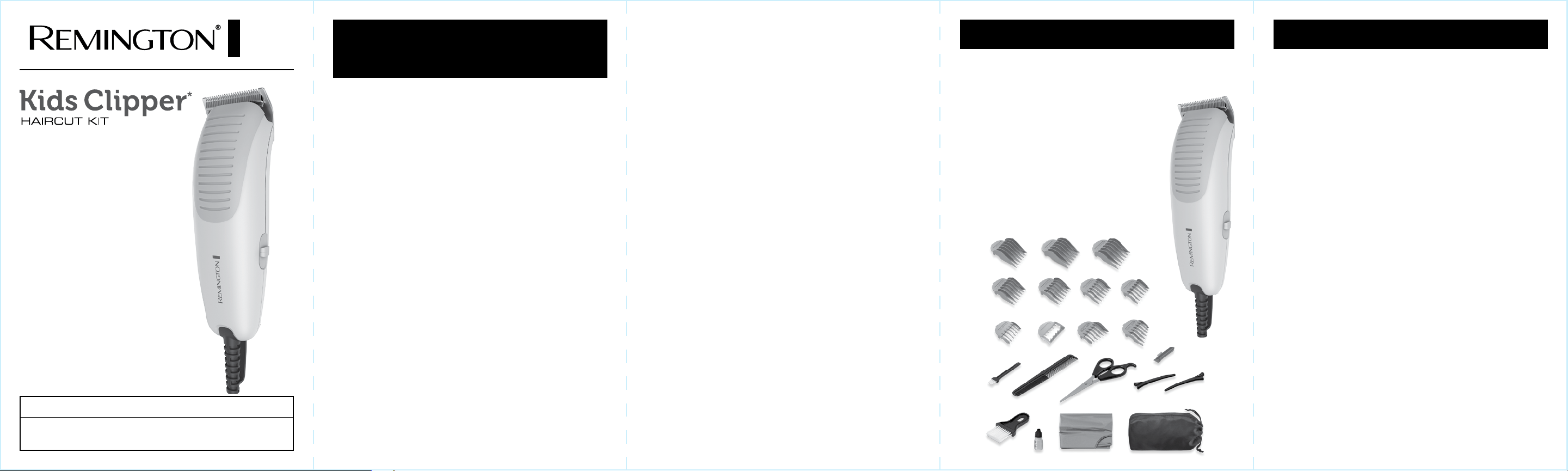
Product Features
Thank you for choosing Remington. Your clipper is designed to perform dependably
and efficiently for years to help you to maintain a range of hair styles.
2
5
9
13
19
6
10
14
20
7
11
15
21
8
12
17 18
16
22
1
3 4
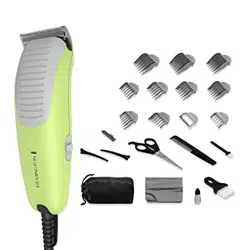
1. Clipper
2. 1” (25mm)
3. 7/8” (22mm)
4. 3/4” (18mm)
5. 5/8” (16mm)
6. 1/2” (12mm)
7. 3/8” (9mm)
8. 1/4” (6mm)
9. 1/8” (3mm)
10. 1/16” (1.5mm)
11. Left Taper
12. Right Taper
13. Cleaning Brush
14. Barber Comb
15. Scissors
16. Blade Guard
17. Sectioning Clip
18. Sectioning Clip
19. Neck Brush
20. Oil Bottle
21. Barber Cape
22. Storage Pouch
How to Use
Line Cord Safety Tips
NOTE: This appliance has a polarized
plug (one blade is wider than the
other). As a safety feature, this plug
will fit in a polarized outlet only one
way. If the plug does not fit fully in
the outlet, reverse the plug.
If it still does not fit, contact a quali-
fied electrician. Do not attempt to
defeat this safety feature.
1. To insert plug, grasp it firmly and
guide it into outlet.
2. To disconnect the appliance, grasp
the plug and remove it from outlet.
Do not pull or yank on the cord or
appliance. Do not wrap the cord
around the appliance.
Blade Care
The life of your clippers will
depend on frequency of use, care,
hair type, and condition. Use the
cleaning brush to clean collected
hair out of the blades as needed.
To maintain the blades in peak condi-
tion, apply oil after every use. Place
drop of oil on each end and middle
of blade. Then switch on to evenly
distribute. Switch off, then wipe away
excess oil. Before Cutting Hair:
1. Make sure your hair clipper is
running smoothly, with a slight
vibration.
2. Place the cape around the neck
of the person whose hair is being
trimmed or cut.
3. This person should be seated so
that the top of their head is at your
eye level.
4. Comb out all knots and tangles.
5. Ensure the hair is dry. Hair clippers
perform best with dry hair.
6. Hold the hair clipper in the palm
of one hand with your thumb
resting firmly on the top of the
hair clipper. This grip provides
comfortable cutting control. The
hair clipper may be used with the
left or right hand.
To Attach Guide Combs
1. Select the trimming guide that
matches the length you want
the hair to be after the cut. The
trimming guides are numbered
and marked with specific lengths.
See preceding chart to determine
which combs are included.
2. While the clipper is off, hold the
guide comb with the teeth up.
Hook the front edge of the comb to
the teeth of the clipper blade. Then
push the back of the comb down
until it snaps in place.
To Remove Guide Combs
Pull small tab on rear of comb up and
away from clipper.
*Not intended for use by children.
Styling Guide
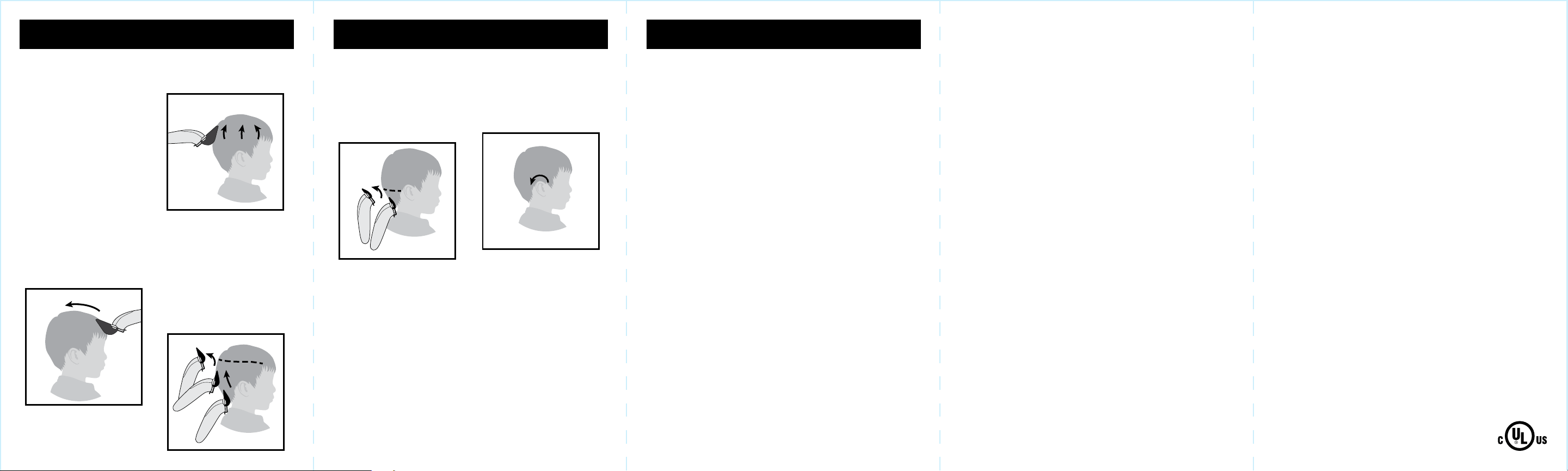
2. With the same comb attached, trim
the upper sides and back of the
head with upward strokes.
3. Put on the medium length guide
comb. Imagine a horizontal line
where you want to transition between
the medium and longer lengths.
Cut hair on the sides and back of
the head with upward strokes from
the neck almost to the line. When you
get to the line, rock the clipper back
and pull away from the head to
create a gradual transition. Check
over and even up your work.
Giving a Comfortable,
Even Cut
Allow the clipper to cut through the
hair at a moderate pace. Moving
the clipper too quickly may result
in discomfort or an inadequate cut.
Use short strokes when cutting, and
initially use longer guide combs until
you are comfortable with the length
of the cut.
How to Give a Haircut
Select three combs.
Example:
Longest length: 1"
Medium length: 5/8"
Shortest length: 1/4"
1. Put the longest guide comb on the
clippers and cut hair on the top of
the head from front to back.
Performance Guarantee
4. Put on the shortest length guide
comb. Imagine another horizontal
line, about even with the base or
middle of the ears, to transition
between the shortest and the
medium length. Use the same
technique as in step 3 to create
another gradual transition.
5. Remove the trimming guide and
replace with either the left or right
ear guide. The shorter guide teeth
are designed to be toward the ear.
Move the clipper from the front of
the head to the back around the
ear. This creates a tapered effect.
6. To complete the cut, comb and
inspect for missed or uneven
hairs. Use a scissors to cut if
necessary. To clean up edge
around ears and neckline, use the
clipper without a guide comb to
trim down to skin level.
To order accessories, contact us at
800-392-6544 in the U.S.,
visit us at RemingtonProducts.com,
or visit your local retailer.
Limited Two-Year Warranty
Spectrum Brands, Inc. warrants this product against any defects that are due to faulty
material or workmanship for a two-year period from the original date of consumer
purchase. This warranty does not include damage to the product resulting from
accident or misuse. If the product should become defective within the warranty
period, we will replace it free of charge. Return your product and sales receipt with
your name, address and day time phone number to: Remington Returns Center, 507
Stokely Dr., P.O. Box 1, Deforest, WI 53532
. For more information call 800-736-4648
in the U.S.
Warranty excludes: Storage pouch
KEEP ORIGINAL SALES RECEIPT AS PROOF OF PURCHASE FOR WARRANTY
PURPOSES.
This warranty does not cover products damaged by the following:
■ Accident, misuse, abuse or alteration of the product
■ Servicing by unauthorized persons
■ Use with unauthorized accessories
■ Connecting it to incorrect current and voltage
■ Wrapping cord around appliance causing premature wear and breakage
■ Any other conditions beyond our control
No responsibility, obligation, or liability is assumed for the installation or mainte-
nance of this product.
SPECTRUM BRANDS, INC. SHALL NOT BE RESPONSIBLE FOR ANY
INCIDENTAL, SPECIAL OR CONSEQUENTIAL DAMAGES RESULTING FROM THE
USE OF THIS PRODUCT. ALL IMPLIED WARRANTIES, INCLUDING BUT NOT
LIMITED TO IM PLIED WARRANTIES OF FITNESS AND MERCHANTABILITY, ARE
LIMITED IN DURATION TO TWO YEARS FROM DATE OF ORIGINAL PURCHASE.
This warranty gives you specific legal rights and you may also have other rights
which vary from state to state or province to province. Some states do not allow
the exclusion or limitation of incidental, special or consequential damages.
Spectrum Brands, Inc. Money-back Offer
If within 30 days after you have purchased your Remington
®
branded product,
you are not satisfied and would like a refund, return it with the sales slip indicat-
ing purchase price and date of purchase to the retailer from whom it was pur-
chased. Spectrum Brands, Inc. will reimburse all retailers who accept the product
within 30 days from the date of purchase. If you have any questions concerning
the money-back guarantee, please call 800-736-4648 in the U.S.
Remington Guarantees Satisfaction After 30 Days!
Remington 60-Day Money Back Guarantee*
If within 60 days after purchasing any Remington
®
branded product, you are not
completely satisfied and would like a refund, return it with the original dated
sales receipt directly to Remington and receive a full refund.** For questions
concerning the money-back guarantee, please call 800-736-4648 in the U.S.
*Applies to U.S. customers’ returns only.
**Terms and conditions apply.
Terms and Conditions
1. Refund will be in the form of a check issued in U.S. Dollars and will be provided
only if all Terms and Conditions are met.
2. The following items must be returned to Remington and postmarked no later
than 60 days after purchase of the Remington
®
branded product:
a. The Remington
®
product;
b. The original sales receipt indicating price and date purchased; and
c. The completed 60-day money back guarantee form located at
RemingtonProducts.com/60day.
3. In addition, Remington, in its discretion, must determine that the returned product
was used in accordance with the instruction booklet (included with the product
at the time of purchase).
4. Returns should be mailed prepaid (no collect returns accepted) to:
Remington 60-Day MBG
507 Stokely Drive, Box 1
DeForest, WI 53532
5. Refund does not include postage costs for the return of the product, but will
include applicable taxes paid by customer, if any.
6. No responsibility will be accepted for late, lost, stolen, misdirected or damaged
product.
7. Please allow 4–6 weeks to receive your refund by check.
Questions or comments: Call 800-736-4648 in the U.S.
or visit RemingtonProducts.com.
Dist. by: Spectrum Brands, Inc., Middleton, WI 53562
® Registered Trademark of Spectrum Brands, Inc.
© 2017 Spectrum Brands, Inc. 6/17 17879-00
120VAC, 60Hz
Made in China.
T22-0005234-A