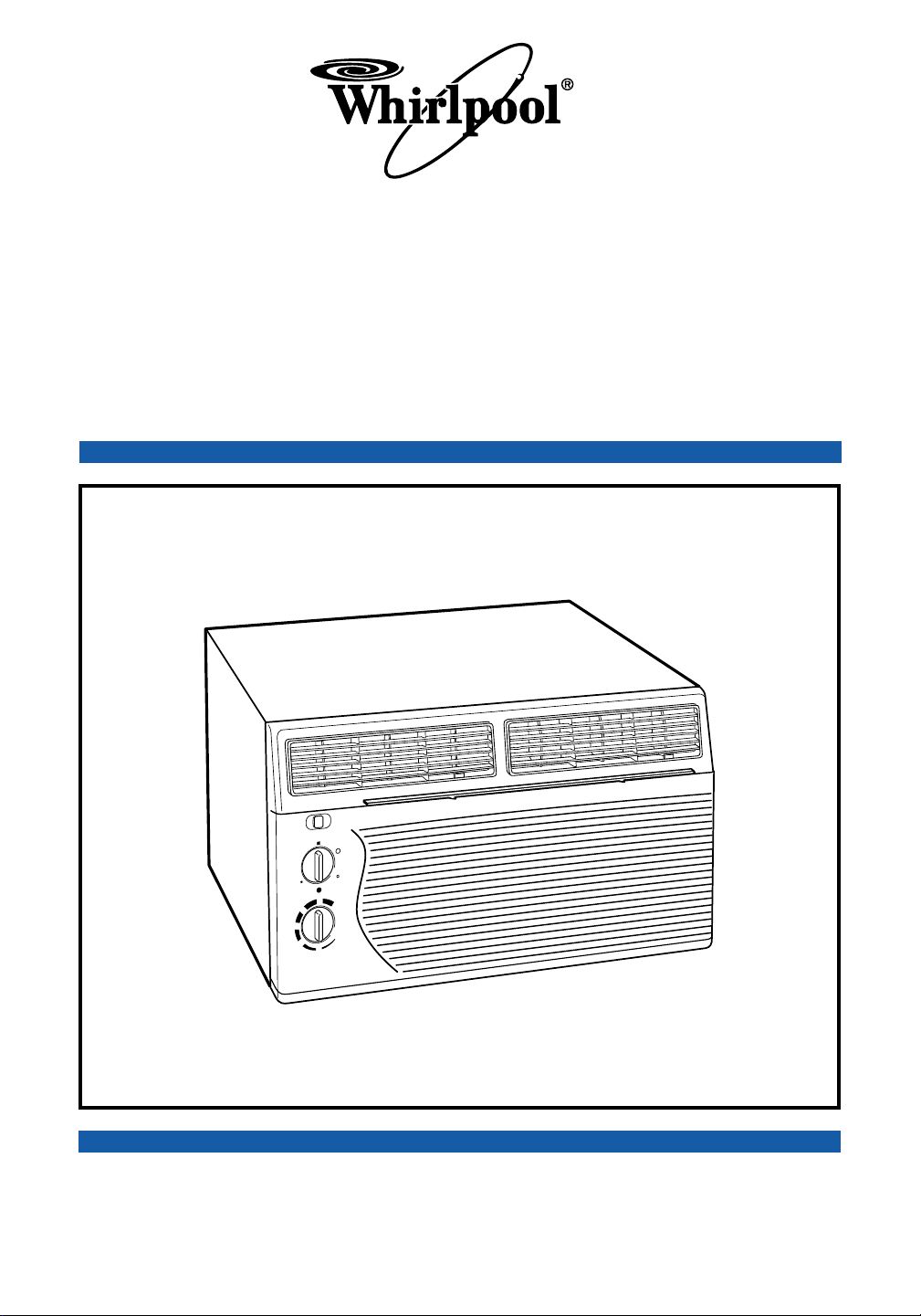
THROUGH-THE-WALL AIR CONDITIONER
PART NO. 23-11-1186N-005/789957
Use & Care Guide
Installation Instructions and
www.whirlpool.com
Home
Home
Appliances
Appliances
2
Page
Important Safety Instructions ........................ 2
Electrical Requirements ................................. 3
Installation Instructions .................................. 7
Operating Instructions .................................. 10
Starting your air conditioner ......................... 10
Heat/Cool air conditioner heat settings ....... 10
The exhaust vent control ............................. 11
Changing air direction .................................. 11
Cleaning Instructions ................................... 12
Cleaning the slide-out air filter ...................... 12
Maintenance Instructions ............................. 13
Annual maintenance..................................... 13
Energy saving tips ........................................ 13
Troubleshooting............................................. 14
Requesting Assistance or Service ............... 15
Warranty ......................................................... 16
Important Safety Instructions
Contents & Air Conditioner Safety
Your safety and the safety
of others are very important.
We have provided many important safety
messages in this manual and on your appli-
ance. Always read and obey all safety
messages.
This is the safety alert symbol.
This symbol alerts you to potential
hazards that can kill or hurt you and
others.
All safety messages will be preceded by the
safety alert symbol and the word “DANGER”
or “WARNING”. These words mean:
DANGER
You can be killed or seriously injured if
you don’t
immediately follow instructions.
You can be killed or seriously injured if
you don’t follow instructions.
All safety messages will tell you what the
potential hazard is, tell you how to reduce the
chance of injury, and tell you what can
happen if the instructions are not followed.
WARNING
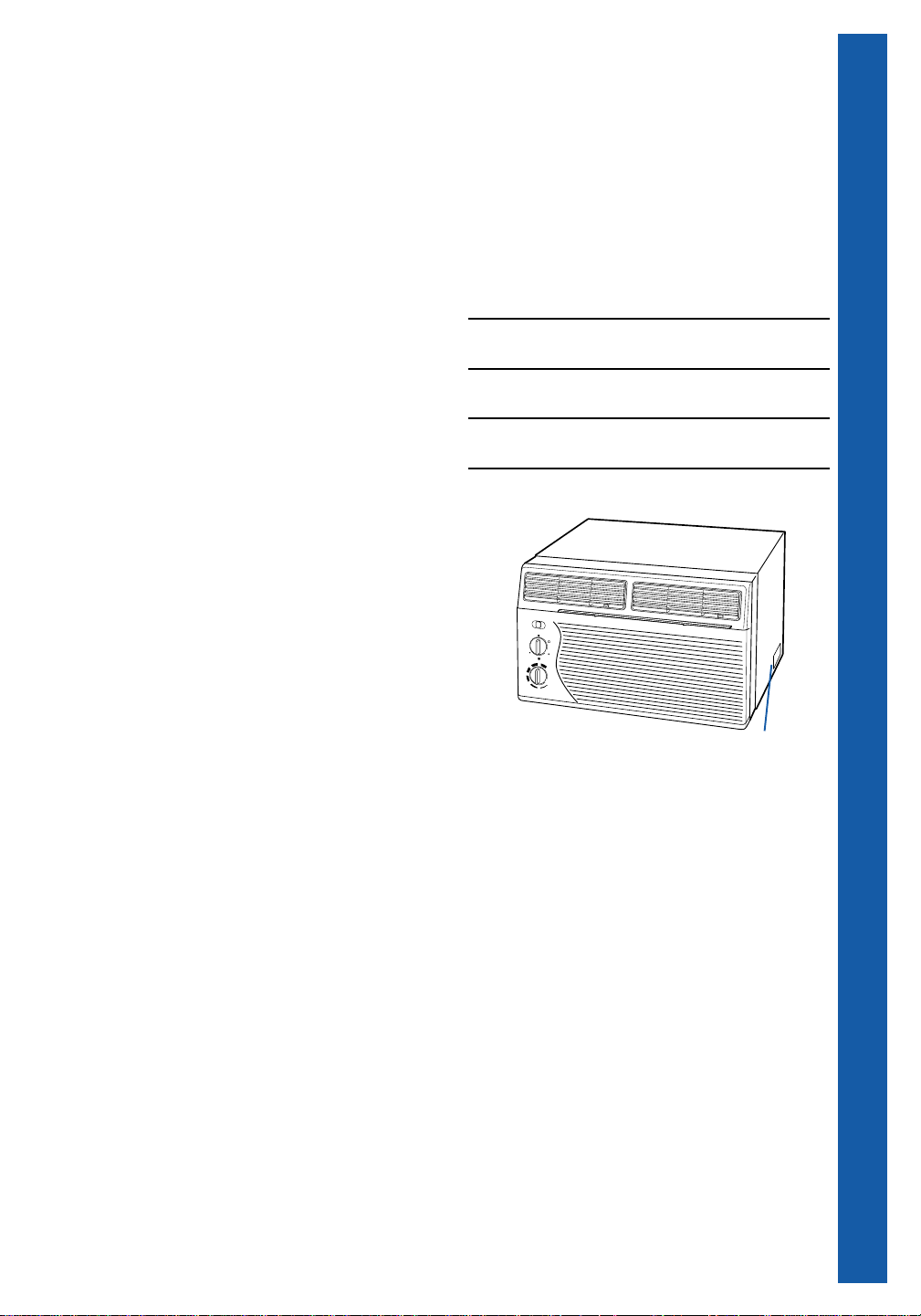
WARNING — To reduce the risk of fire,
electrical shock, injury, or sickness when using
your air conditioner, follow these basic
precautions:
• Plug into a grounded 3 prong outlet.
• Do not remove ground prong.
• Do not use an adapter.
• Do not use an extension cord.
• Unplug air conditioner before servicing.
• Use two or more people to move or install air
conditioner.
• Do not drink water collected inside the
cabinet.
— SAVE THESE INSTRUCTIONS —
Help us help you
Please:
• Install your air conditioner in a window that will
hold the weight, and secure the air conditioner
according to the Installation Instructions.
• Connect the air conditioner to the proper kind of
outlet with the correct electrical supply and
ground. (See the Electrical Requirements,
pp. 3-6.)
• Make sure the air conditioner is the correct size
for the area you want to cool.
• Use the air conditioner only to do what a
window air conditioner is designed to do.
• Make sure the air conditioner is not used by
anyone unable to operate it properly.
• Maintain the air conditioner properly.
Also, remove the Energy Label. Use a damp cloth
to take off any glue residue. DO NOT use sharp
instruments, flammable fluids, or abrasive cleaners.
These can damage the air conditioner finish.
3
Electrical Requirements
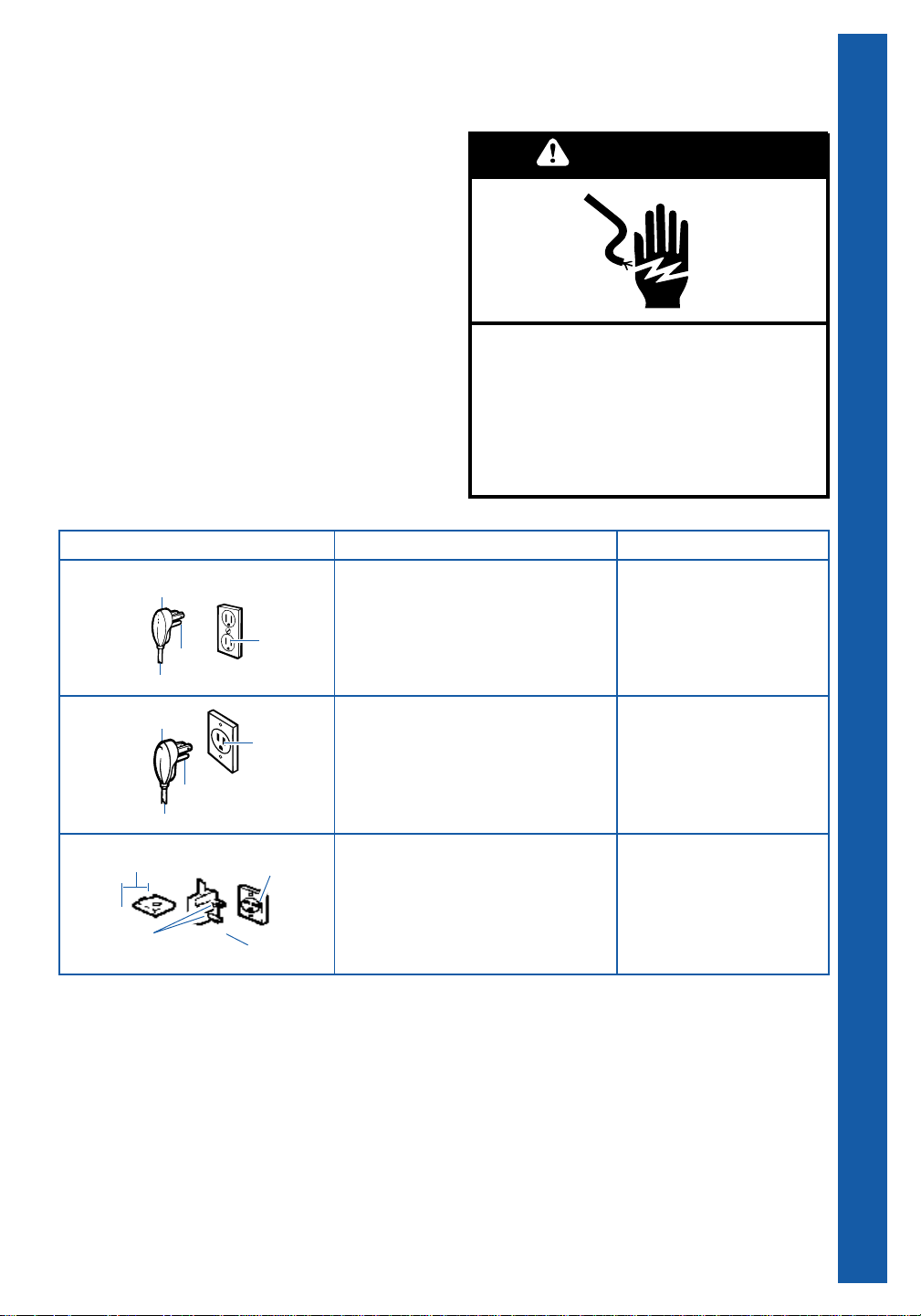
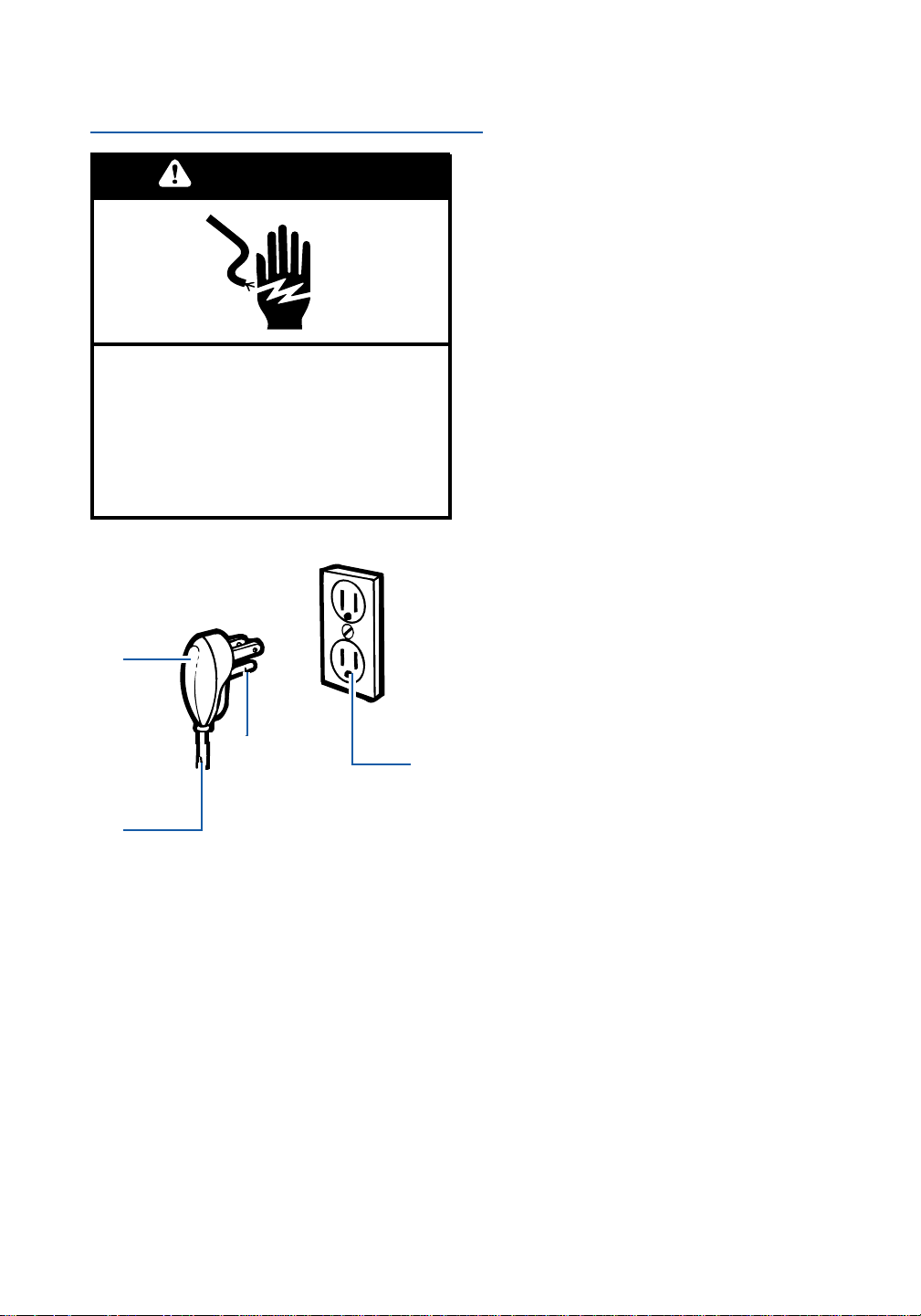
Below are electrical plug variations, choose the
one which matches the ampere rating of your
unit. Your model’s ampere rating is printed on the
model and serial number label, attached to the
unit, behind the front panel. (See diagram on
page 15.)
If codes permit and a separate ground wire
is used, it is recommended that a qualified
electrician determine that the ground path is
adequate.
IMPORTANT SAFETY INSTRUCTIONS • ELECTRICAL REQUIREMENTS
4
5
6
3-prong
ground-type
outlet
Power supply cord
3-prong
ground plug
Ground
prong
1
⁄4" blade
Small
tandem
blades
Ground
prong
3-prong
ground-type
outlet
3-prong
ground plug
Ground
prong
Power supply cord
3-prong
ground-type
outlet
SEE PAGE
115-volt models with amperes up
through 7.5
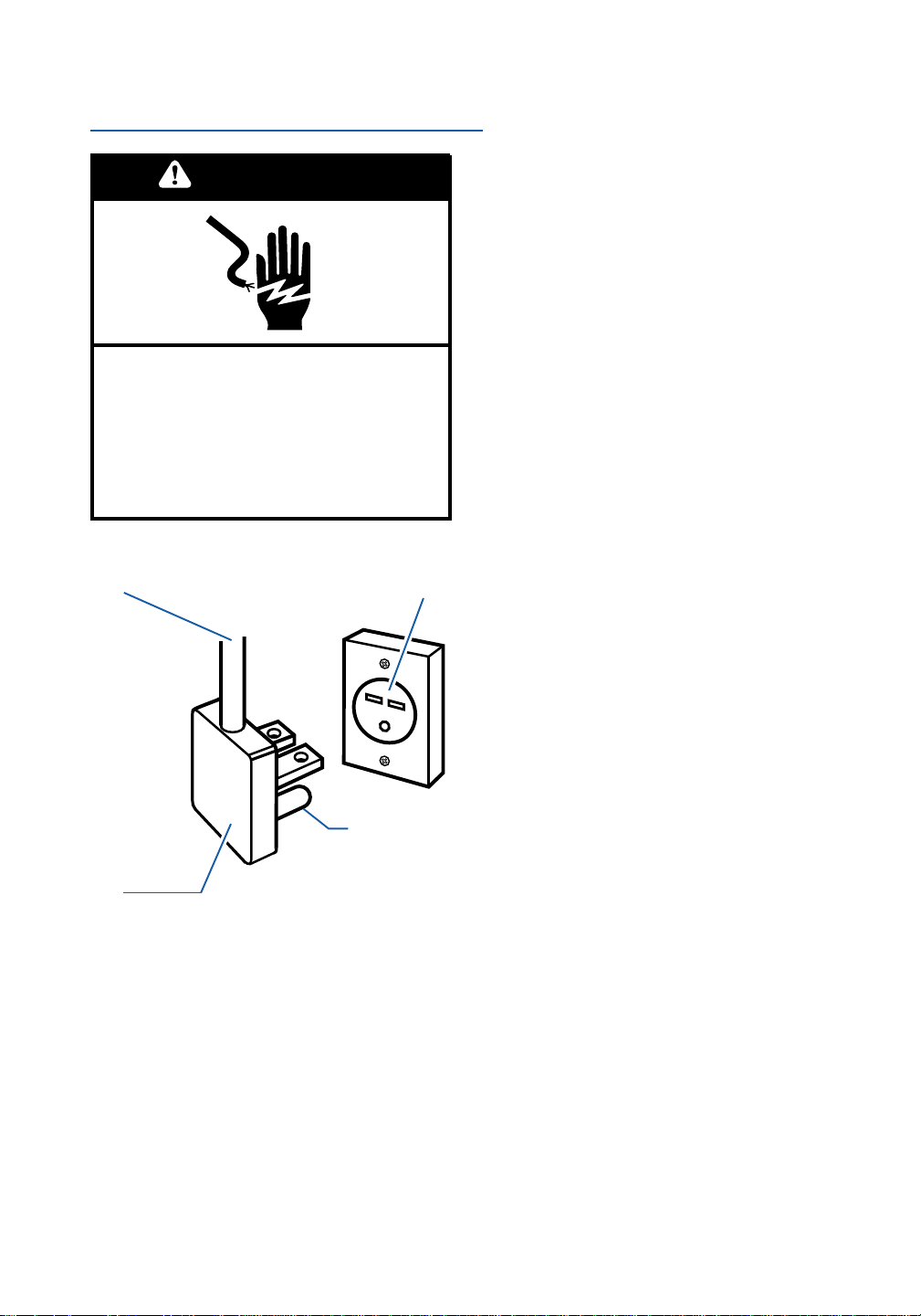
For 115-volt models with amperes
from 7.6 to 12.0
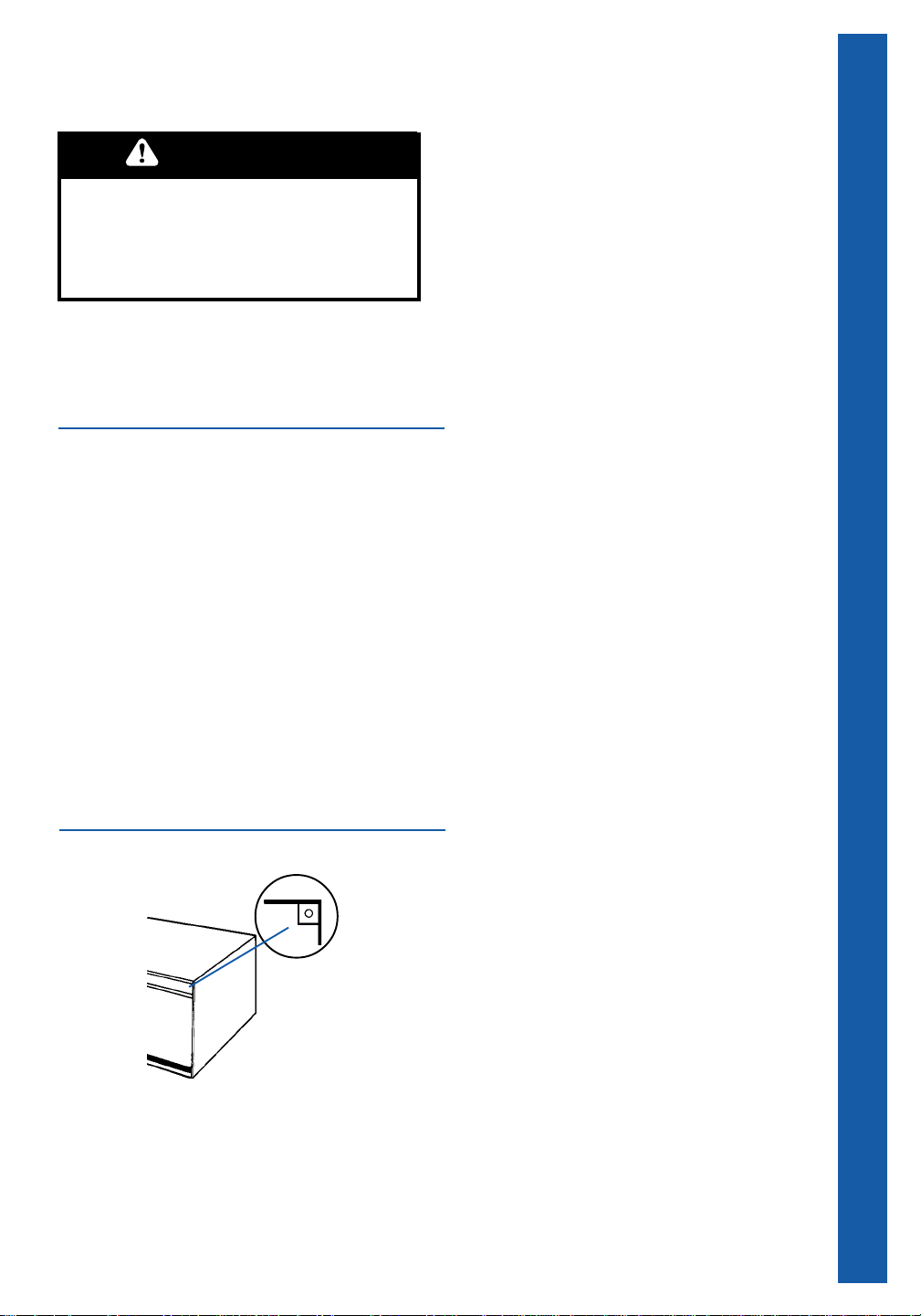
230/208-volt models with amperes
up through 12.0
ELECTRICAL REQUIREMENTS
PLUG TYPE
Electrical Shock Hazard
Plug into a grounded 3-prong outlet.
Do not remove ground prong.
Do not use an adapter.
Do not use an extension cord.
Failure to follow these instructions can
result in death, fire, or electrical shock.
WARNING
4
Electrical Requirements
Continued
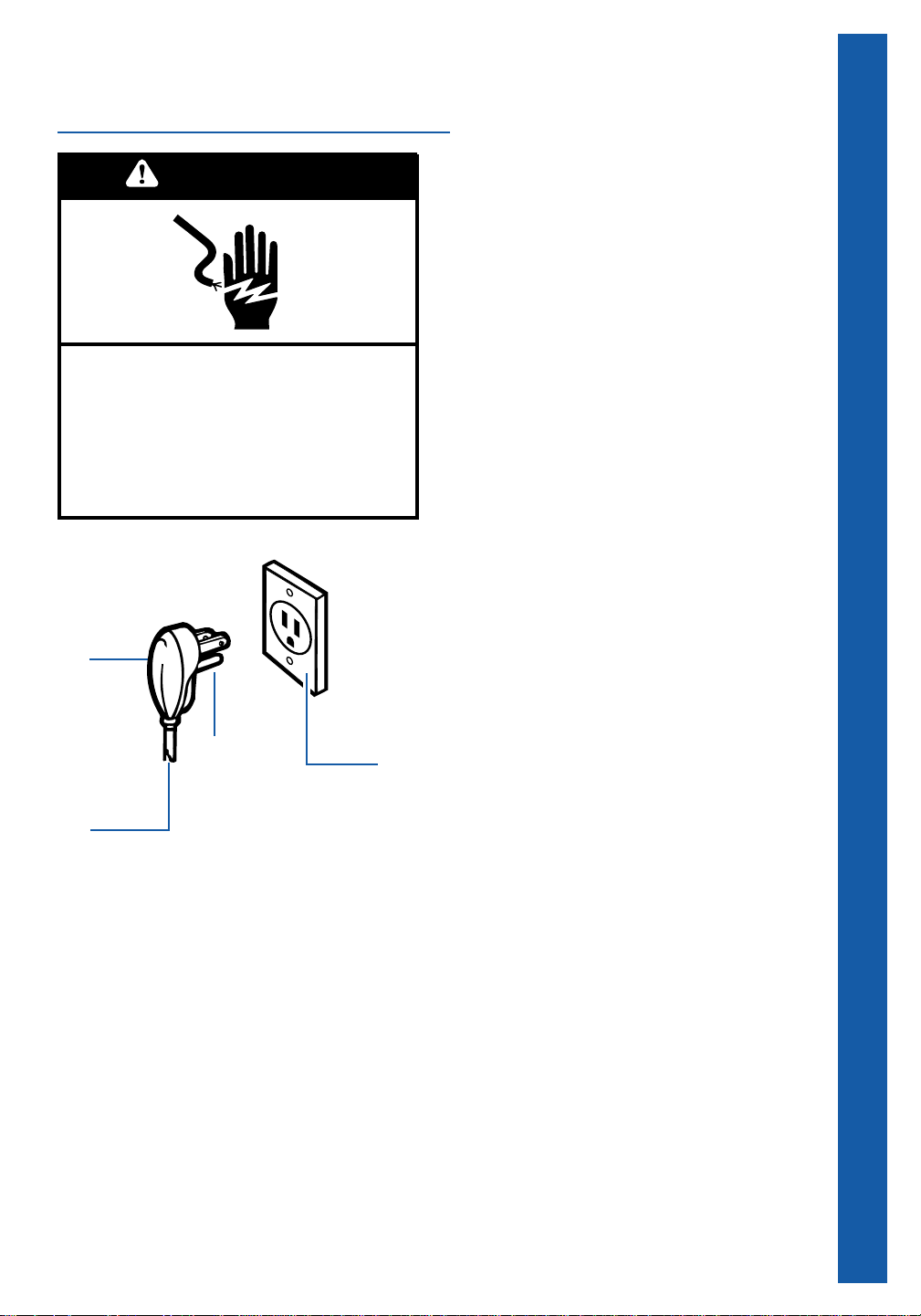
115-volt models with amperes
up through 7.5
Outlet wiring
Outlet wiring should be a minimum of
14 gauge. Use copper wire only. It is the
responsibility of the consumer to provide
proper and adequate receptacle wiring,
installed by a qualified electrician. Observe
National Electrical Code and all local governing
codes and ordinances.
Electrical requirements
A 115-volt (103.5 min., 126.5 max.), 60-Hz,
AC-only, 15-ampere fused electrical supply is
required (time delay fuse or time delay circuit
breaker required). It is required that a separate
circuit, serving only this air conditioner, be
provided.
Electrical connection
Electrical ground is required on this air conditioner.
Recommended ground method
For your personal safety, this air conditioner must
be grounded. This air conditioner is equipped
with a power supply cord having a 3-prong
ground plug. To minimize possible shock hazard,
the cord must be plugged into a mating 3-prong
ground-type outlet, grounded in accordance with
the National Electrical Code (ANSI/NFPA 70 –
latest edition) and local codes and ordinances. If
a mating outlet is not available, it is the responsi-
bility of the customer to have a properly grounded
3-prong outlet installed by a qualified electrician.
Ground
prong
3-prong
ground
plug
3-prong
ground-
type
outlet
(double
outlet)
Power
supply
cord
Electrical Shock Hazard
Plug into a grounded 3-prong outlet.
Do not remove ground prong.
Do not use an adapter.
Do not use an extension cord.
Failure to follow these instructions can
result in death, fire, or electrical shock.
WARNING
5
ELECTRICAL REQUIREMENTS
Ground
prong
3-prong
ground
plug
3-prong
ground-
type
outlet
(single
outlet)
Power
supply
cord
Electrical Shock Hazard
Plug into a grounded 3-prong outlet.
Do not remove ground prong.
Do not use an adapter.
Do not use an extension cord.
Failure to follow these instructions can
result in death, fire, or electrical shock.
WARNING
115-volt models with amperes
from 7.6 through 12.0
Outlet wiring
Outlet wiring should be a minimum of
14 gauge. Use copper wire only. It is the
responsibility of the consumer to provide
proper and adequate receptacle wiring,
installed by a qualified electrician. Observe
National Electrical Code and all local governing
codes and ordinances.
Electrical requirements
A 115-volt (103.5 min., 126.5 max.), 60-Hz,
AC-only, 15-ampere fused electrical supply is
required (time delay fuse or time delay circuit
breaker required). It is required that a separate
circuit, serving only this air conditioner, be
provided.
Electrical connection
Electrical ground is required on this air conditioner.
Recommended ground method
For your personal safety, this air conditioner must
be grounded. This air conditioner is equipped
with a power supply cord having a 3-prong
ground plug. To minimize possible shock hazard,
the cord must be plugged into a mating 3-prong
ground-type outlet, grounded in accordance with
the National Electrical Code (ANSI/NFPA 70 –
latest edition) and local codes and ordinances. If
a mating outlet is not available, it is the responsi-
bility of the customer to have a properly grounded
3-prong outlet installed by a qualified electrician.
6
Electrical Requirements
Continued
230/208-volt models with
amperes up through 12.0
Outlet wiring
Outlet wiring should be a minimum of
14 gauge. Use copper wire only. It is the
responsibility of the consumer to provide
proper and adequate receptacle wiring,
installed by a qualified electrician. Observe
National Electrical Code and all local governing
codes and ordinances.
Electrical requirements
A 230/208-volt (197.6 min., 253 max.), 60-Hz,
AC-only, 15-ampere fused electrical supply is
required (time delay fuse or time delay circuit
breaker required). It is required that a separate
circuit, serving only this air conditioner, be
provided.
Electrical connection
Electrical ground is required on this air conditioner.
Recommended ground method
For your personal safety, this air conditioner must
be grounded. This air conditioner is equipped
with a power supply cord having a 3-prong
ground plug. To minimize possible shock hazard,
the cord must be plugged into a mating 3-prong
ground-type outlet, grounded in accordance with
the National Electrical Code (ANSI/NFPA 70 –
latest edition) and local codes and ordinances. If
a mating wall outlet is not available, it is the
responsibility of the customer to have a properly
grounded 3-prong outlet installed by a qualified
electrician.
Ground
prong
3-prong
ground-
type outlet
3-prong
ground
plug
Power
supply
cord
Electrical Shock Hazard
Plug into a grounded 3-prong outlet.
Do not remove ground prong.
Do not use an adapter.
Do not use an extension cord.
Failure to follow these instructions can
result in death, fire, or electrical shock.
WARNING
7
This air conditioner has been designed for
installation through the wall, in a sleeve. It is the
responsibility and obligation of the customer to
have this product installed by a qualified techni-
cian familiar with through-the-wall installation.
OR
If you choose to install the air conditioner
yourself, read all installation instructions, as well
as the electrical requirements and operating
instructions, before installing your unit. This will
help to avoid any installation problems and will
help ensure trouble-free performance of your new
air conditioner.
Before installing your
air conditioner
Installation tips
• Inspect the condition of the wall where the air
conditioner will be installed. Be sure it will
support the weight of the unit.
• Watch out for the sharp metal fins on the front
and rear coils.
• Be sure your air conditioner does not fall during
installation.
• Do not install the air conditioner where the
plastic cabinet front will be exposed to a heat
source that raises the surface temperature
above 120°F.
Tools required
• Phillips screwdriver
Installing your air conditioner
Installing in an old sleeve
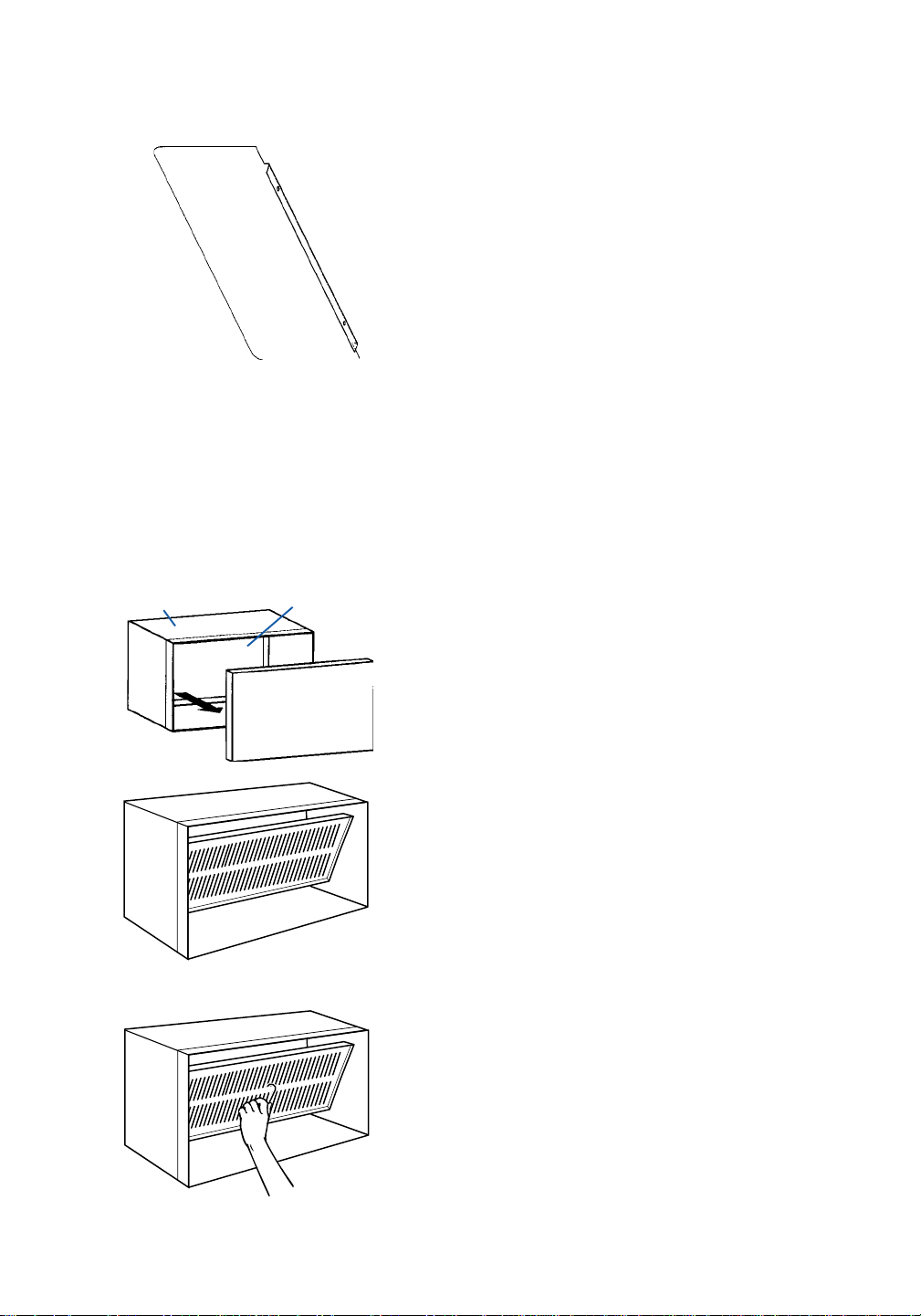
1. Remove all debris from inside the sleeve. You
may also need to remove existing foam.
2. If sleeve has metal tabs, break out these tabs.
NOTE: If your sleeve is of another make, you
can purchase a sleeve and adapter kit designed
to adapt your sleeve to this air conditioner. An
accessory kit is also available for window installa-
tion. Both kits are available from your local dealer.
Installation Instructions
Excessive Weight Hazard
Use two or more people to move and
install air conditioner.
Failure to do so can result in back or
other injury.
ELECTRICAL REQUIREMENTS • INSTALLATION INSTRUCTIONS
continued on next page
WARNING
metal tab
8
3. Measure wall sleeve depth. If sleeve is
more than 18" deep, remove condenser
baffle. Use the 2 screws from the condenser
baffle to attach the deep filler panel in place
of the condenser baffle.
4. Slide the air conditioner into the sleeve until
the condenser baffle (or deep filler panel, if
installed) contacts the exterior grille.
Continue installation with steps 8-11, page 9 ,
"Installing in a new sleeve."
Installing in a new sleeve
1. Remove the front and back covers. Save
these for future use to seal the sleeve if the
air conditioner is removed.
2. Remove the rear grille from the sleeve.
3. Brush out all debris from inside the sleeve,
making sure the inside is clean and that the
drain holes are completely open.
4. Loosen screws in the rear grille to about
1
⁄8".
Then, while holding on to the wire loop, tip
the grille and pass it through the rear
opening of the sleeve. The baffle contact
area should be on the left.
Installation Instructions
Continued
sleeve
back cover
(outdoor side)
front cover
(indoor side)
deep
filler
panel
9
INSTALLATION INSTRUCTIONS
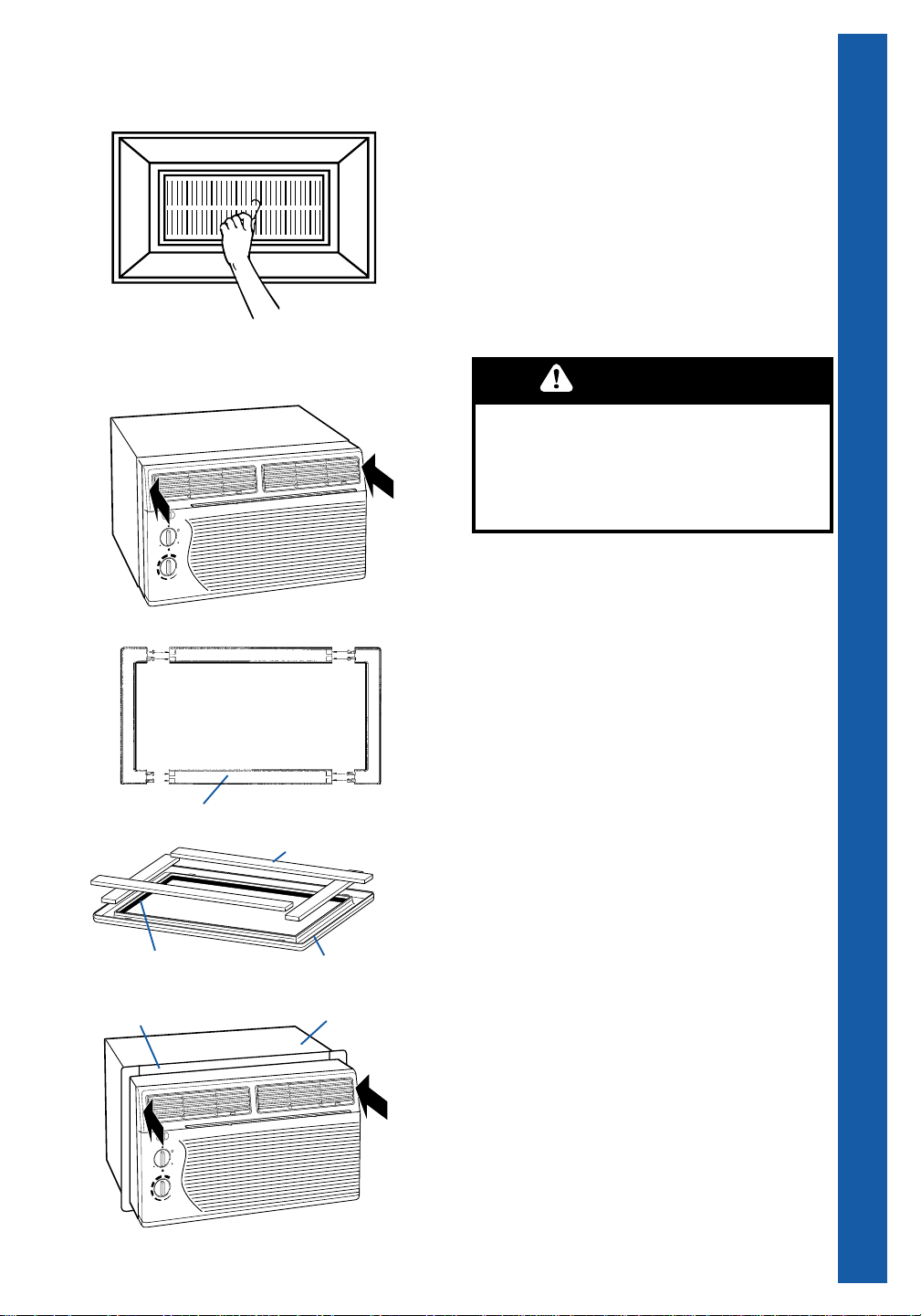
5. Align the grille to engage the screw heads
through the keyhole slots in the outer
flanges of the sleeve. Push downward
until the screws are positioned into the
bottom of the keyhole slots. Tighten all 4
screws. Unwind and discard the wire
loop.
6. Unpack the air conditioner according to
the carton instructions.
7. Slide the air conditioner fully into the sleeve.
Center the air conditioner in the sleeve so that
all seals bear evenly to prevent leakage.
Note: AIr conditiner is 3 inches deeper than
sleeve and will stick out 3 inches in front of
sleeve.
8. Put together trim frame by laying the 4 frame
pieces face down on a flat surface and
snapping then securely together.
9. Install the insulating foam in the recess of the
trim frame. Install the 1/4" insulating foam
around the inside circumference of the trim
frame. Begin in the bottom left corner and run
foam around the entire circumference of the
trim frame. Make sure to keep foam flush with
the bottom edge of the trim frame.
10. Slide the trim frame onto the air conditioner
until the foam makes a seal with the wall
sleeve.
11. Before inserting the plug into the grounded
outlet, make sure the Fan Control is OFF.
Excessive Weight Hazard
Use two or more people to move and
install air conditioner.
Failure to do so can result in back or
other injury.
WARNING
trim frame
1/4" insulating foam
trim frame
insulating foam
trim frame
cabinet
10
Operating Instructions
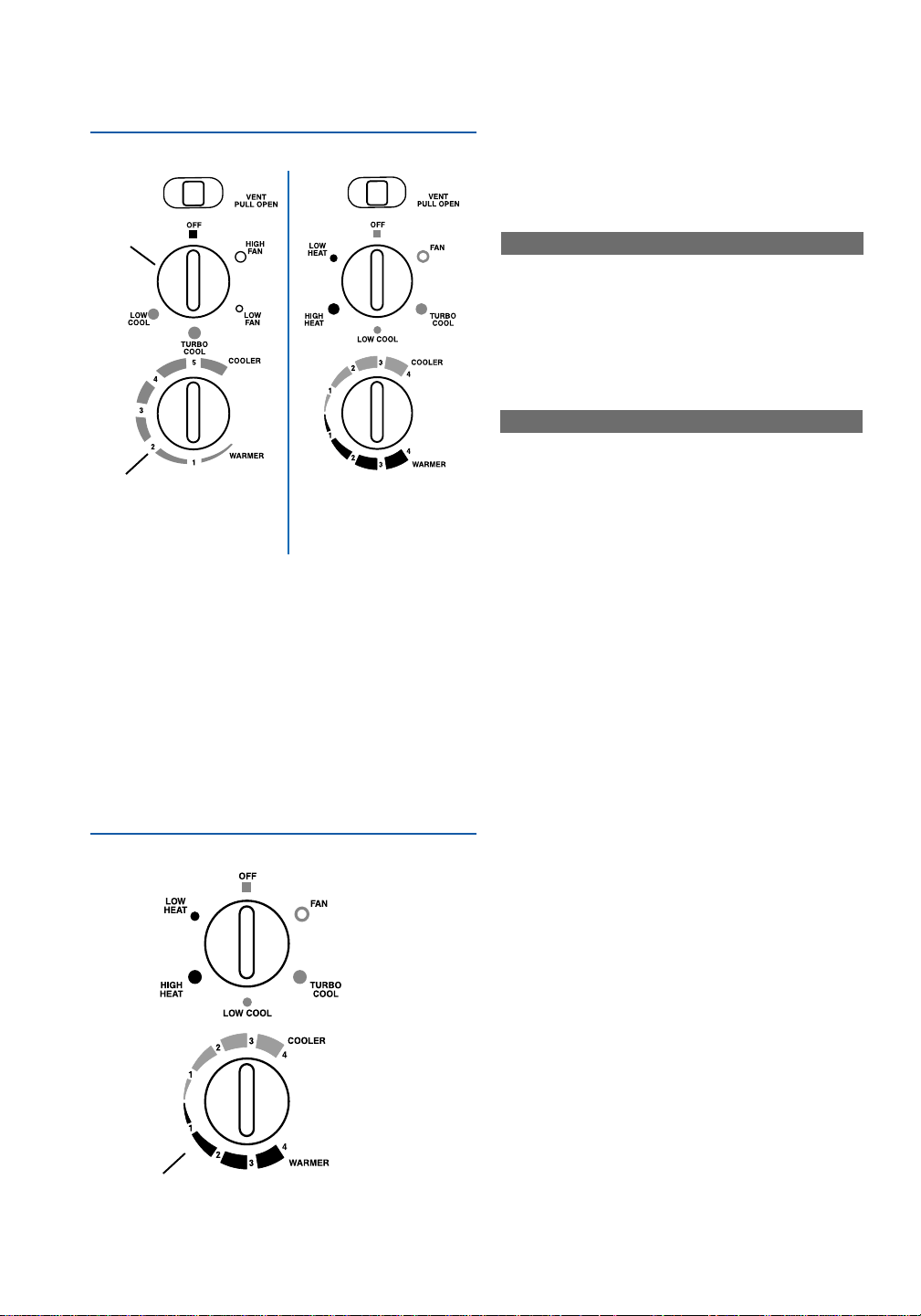
BA
Fan
control
Thermostat
control
Thermostat
control
B
Starting your air conditioner
1. Push VENT control closed.
2. Set fan control to desired setting.
If your air conditioner look like control panel A.
LOW COOL ..........................for sleeping comfort
TURBO COOL .................... for maximum cooling
LOW FAN .............for circulating air at low speed
when no cooling is desired
HIGH FAN........... for circulating air at high speed
when no cooling is desired
If your air conditioner looks like control panel B.
LOW COOL ..........................for sleeping comfort
TURBO COOL .................... for maximum cooling
FAN.......................for circulating air at low speed
when no cooling is desired
3. Turn the thermostat control to the desired
setting. You can adjust the air conditioner’s
cooling performance by turning the
thermostat control clockwise for more cooling
or counterclockwise for less cooling. You will
need to experiment to find the setting which
suits you best.
NOTE: If you turn your air conditioner off or if
the compressor turns off when lowering the
thermostat control, wait at least 3 minutes before
turning it back on or you may blow a fuse or trip a
circuit breaker.
Heat/Cool air conditioner heat
settings (air conditioners with
control panel B only)
1. Set fan control to a heat setting.
LOW HEAT ........................... for reduced heating
HIGH HEAT ........................for maximum heating
2. The electric strip heater is activated when the
fan control is set to a heat setting.
3. For heating, turn the thermostat control
counterclockwise.
NOTE: Your air conditioner is not designed to be
used as a primary heat source. It is intended for
supplemental heating only.
11
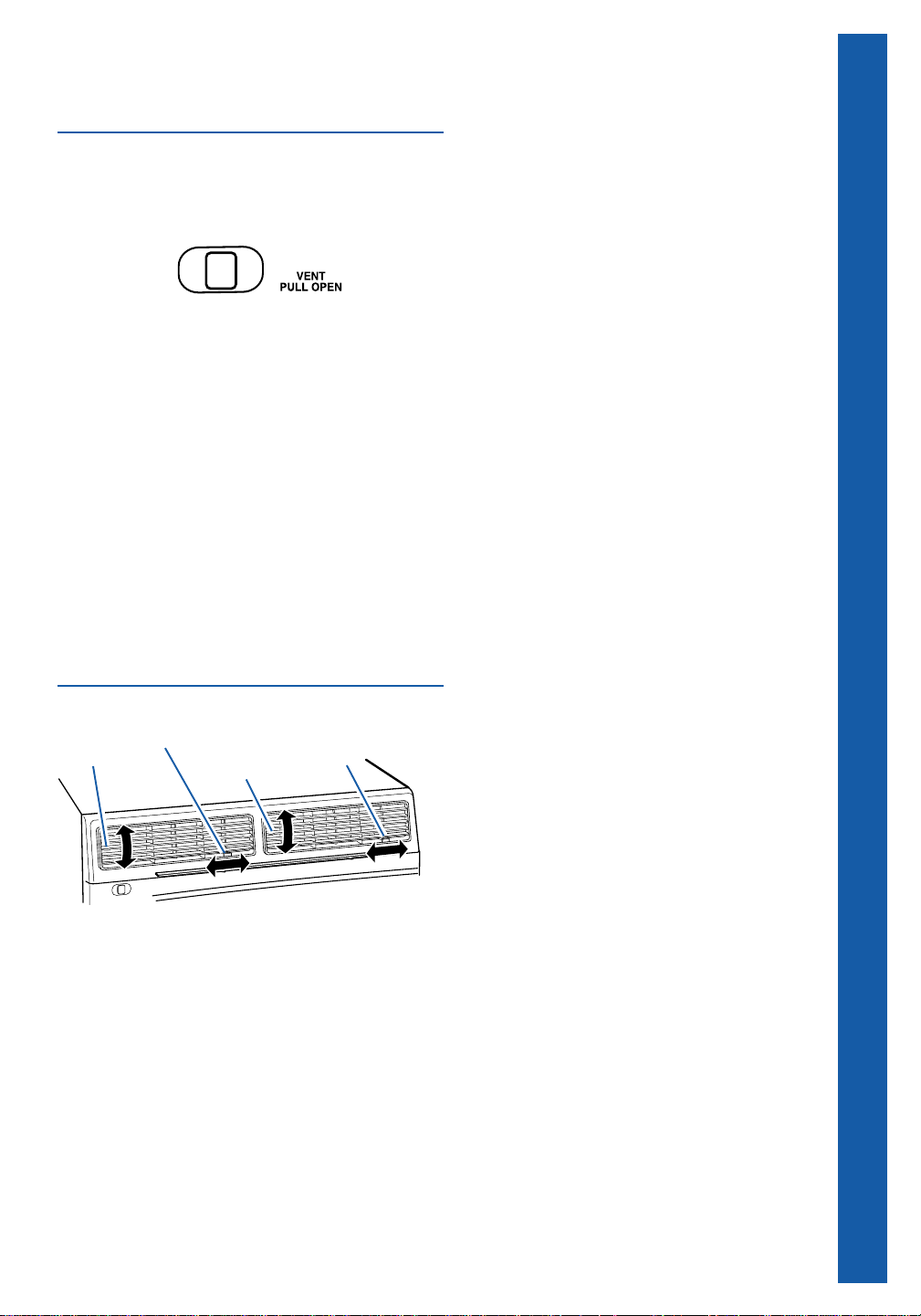
The vent control
The vent draws stale or smoky air from the room,
or circulates existing room air.
To exhaust room air
1. Pull the vent control open.
2. Set the fan control to the desired setting.
If no cooling is desired, set the fan control
to HIGH FAN or LOW FAN (control panel A)
or FAN (control panel B).
3. Set the thermostat control to the desired
setting.
To circulate room air
1. Push the vent control closed.
2. Set the fan control to the desired setting.
If no cooling is desired, set the fan control
to HIGH FAN or LOW FAN (control panel A)
or FAN (control panel B).
3. Set the thermostat control to the desired
setting.
NOTE: For maximum performance, the vent
control must be in the closed position when
cooling or room air circulation is desired.
Changing air direction
The louvers in the top of the front panel allow you
to control the direction of the cooled air. Use the
tabs to direct the air up, down, right, left, or
straight ahead.
OPERATING INSTRUCTIONS
side to side
control
up or down
directional tab
side to side
control
up or down
directional tab
12
Cleaning the slide-out filter
The filter is removable for easy cleaning. A clean
filter helps remove dust, lint, and other particles
from the air and is important for best cooling or
heating and operating efficiency. Check the filter
every 2 weeks to see if it needs cleaning. Do not
operate the air conditioner without the filter in
place.
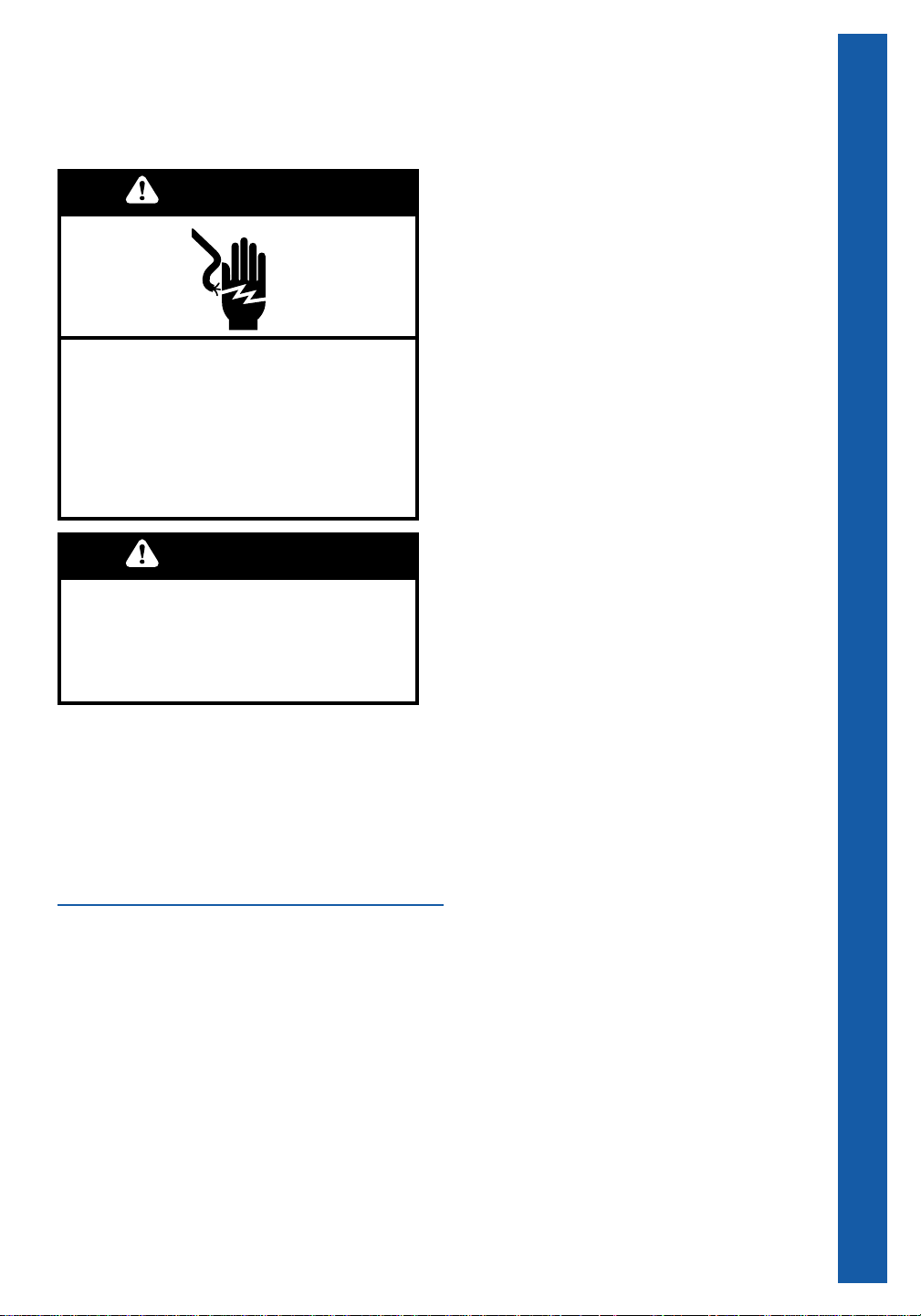
1. Unplug air conditioner or disconnect power.
2. Grasp air filter at tabs. Slide air filter up and
out of filter slot.
3. Use a vacuum cleaner to clean air filter. If air
filter is very dirty, wash it in warm water with
mild detergent. Do not wash air filter in the
dishwasher or use any chemical cleaners. Air
dry filter completely before replacing to
ensure maximum efficiency.
4. Slide air filter down into filter slot.
6. Plug in air conditioner or reconnect power.
Cleaning instructions
Proper use and care of your air conditioner will
help ensure longer life of the unit and lower
operating costs. Follow these instructions
carefully. Call your local servicing dealer for an
annual checkup.
Cleaning the front panel
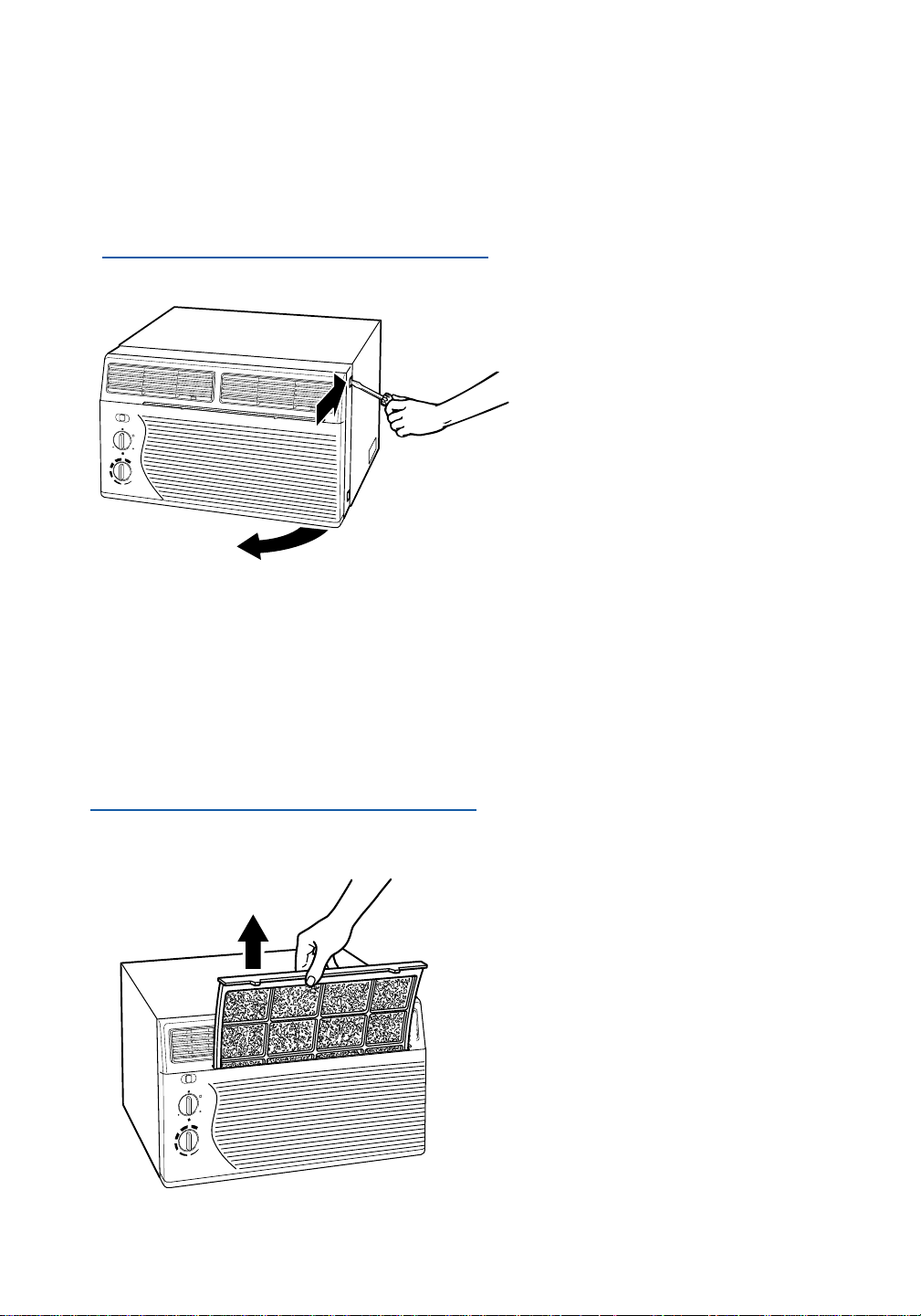
1. Unplug air conditioner or disconnect power.
2. Remove the front panel from unit for cleaning.
3. Place the tip of a thin blade screwdriver
against the cabinet behind the plastic
projection on the upper right side of the front
panel. Gently push with the screwdriver to
unlock the plastic projection and pull the front
panel forward. Repeat steps for plastic
projection on the bottom right side. Watch out
for the sharp metal fins on the front and rear
condenser coils.
4. Swing the right side of the front panel away
from the cabinet and unhook the plastic
projection on the left side.
5. Clean the front panel using a soft cloth with
warm water and a mild detergent. Rinse
and dry.
6. Replace the front panel. Hook the plastic
projections on the left side and swing the right
side into position. Gently press the right
corners back into position while pushing on
the side of the cabinet with the screwdriver.
7. Plug in air conditioner or reconnect power.
13
Maintenance Instructions
Annual maintenance
The compressor and fan motor are sealed and
need no oiling. The expense of an annual
inspection is the customer’s responsibility.
OR
If you are familiar with electrical appliances, you
can do the cleaning and maintenance yourself.
If you choose to do so, follow these steps:
1. Unplug air conditioner or disconnect power.
2. Remove the air conditioner from the sleeve.
See pages 7-8.
3. Remove the front panel. See page 12.
4. Remove the screws from the top and sides of
the cabinet, and then remove the cabinet.
Watch out for the sharp metal fins on the front
and rear condenser coils.
5. Wrap the motor, electrical control box, and
compressor terminal box in plastic film to make
sure no water or other liquid gets inside. Water
or other liquids could damage the insulation
and cause serious mechanical problems.
6. Clean and hose out the base, coils, and
condensate pan. Clean at least once a year,
or more often if the condenser coils and pan
collect dirt, sand, leaves, insects, or algae.
Also, clean if you detect an odor coming from
the air conditioner.
7. Remove the plastic film from the motor and
electrical parts.
8. Reattach the cabinet with the screws. Replace
the front panel, and reinstall the air conditioner
in the sleeve.
NOTE: It is a good idea to wait 24 hours before
starting the air conditioner again. This allows time
for all areas to dry out. The water from rainfall or
from normal operation does not harm these
components.
9. Plug in air conditioner or reconnect power.
Energy saving tips
• Improve home insulation. Seal doors, windows,
and close fireplace flue.
• Close blinds or drapes on sunny side of house.
Add window awnings.
• Keep air filter clean. Do not block airflow with
drapes or furniture.
• Ventilate attic (high temperature levels add to
normal cooling load).
• Try not to use heat producing appliances during
the hottest part of the day. Turn lights, radios,
televisions, and other appliances off when not
needed.
• Keep heat registers and cool air returns closed
or blocked off so cooled air won’t escape.
• Use a vent fan in cooking, laundry, or bathing
areas to pull out heat and moisture near its source.
Electrical Shock Hazard
Disconnect power before doing any
maintenance.
Do not drink water collected by the air
conditioner.
Failure to follow these instructions can
result in death, electrical shock, or sickness.
WARNING
Excessive Weight Hazard
Use two or more people to move and install
air conditioner.
Failure to do so can result in back or
other injury.
WARNING
Your air conditioner needs annual maintenance
to help ensure steady, top performance through-
out the year.
Call the service company recommended by
your dealer to:
• Inspect and clean the coils and condensate
water passages.
• Check fan.

14
CHECK IF
• Power cord is plugged into a live
circuit with proper voltage.
• Fuse has blown or circuit breaker has
tripped. Also, check if a time-delay
fuse has been used.
• Fan Control is set to OFF.
• Local power has failed.
• Time-delay fuse being used is of
correct capacity.
• An extension cord is being used.
• Cooling circuit was turned off and on
again quickly.
• Filter is dirty.
• Inside evaporator coils and
outside condenser coils are dirty.
• There is excessive heat or moisture
in room.
• Fan speed is too low.
• Thermostat setting is too low.
WHAT TO DO
• Firmly plug power cord into
electrical outlet. Check circuit
voltage at fuse/circuit breaker box.
• Replace fuse with a time-delay
fuse of the correct capacity. Reset
circuit breaker.
• Set Fan Control to another
setting.
• Wait for power to be restored.
• Replace fuse with a time-delay
fuse of the correct capacity.
• Do not use an extension cord with
this or any other appliance.
• Wait at least three minutes after
turning cooling circuit off before
trying to restart unit.
• Clean filter. (See page 12.)
• Clean coils. (See page 13.)
• Use exhaust fans to reduce room
heat, or set Exhaust Vent Control
to CLOSED to reduce moisture.
• Set Fan Control to a higher
setting.
• Set Thermostat Control to a colder
setting.
PROBLEM
Unit won’t run.
Unit blows fuses or
trips circuit breaker.
Unit turns on and
off, OR does not
cool room.
Normal operating sounds …
When your room air conditioner is operating
normally, you will hear sounds such as:
• Droplets of water hitting the condenser, causing
a “pinging” or “clicking” sound. Water droplets
help to cool the condenser.
• Air movement from the fan, especially on high
fan speed settings.
• Clicks from the cooling cycle.
Sounds also may be caused by house construc-
tion – such as vibration of the unit due to wall
construction or unsteady window mounting area.
Listed in the chart below are the most common
problems consumers run into with their air
conditioners. Please read through this chart
before calling for service. It could save you the
cost of a service call.
Troubleshooting
15
Before calling for assistance or service, please
check “Troubleshooting” on page 14. It may save
you the cost of a service call. If you still need help,
follow the instructions below.
1. If you need assistance ...
Call our Customer Interaction Center
telephone number. Dial toll-free from
anywhere in the U.S.A.:
1-800-253-1301
and talk with one of our trained consultants. The
consultant can instruct you in how to obtain
satisfactory operation from your appliance or, if
service is necessary, recommend a qualified
service company in your area.
2. If you need service ...
We have a nationwide network of designated
service companies. Our service technicians are
trained to fulfill the product warranty and provide
after-warranty service, anywhere in the United
States. To locate the designated service company
in your area, call our Customer Interaction Center
telephone number (see Step 1) or look in your
telephone directory Yellow Pages under:
APPLIANCES – HOUSEHOLD –
MAJOR – SERVICE & REPAIR
3. If you need replacement parts ...
To locate replacement parts in your area, refer
to Step 2 above or call our Customer Interaction
Center number in Step 1.
Requesting Assistance or Service
TROUBLESHOOTING • REQUESTING ASSISTANCE OR SERVICE
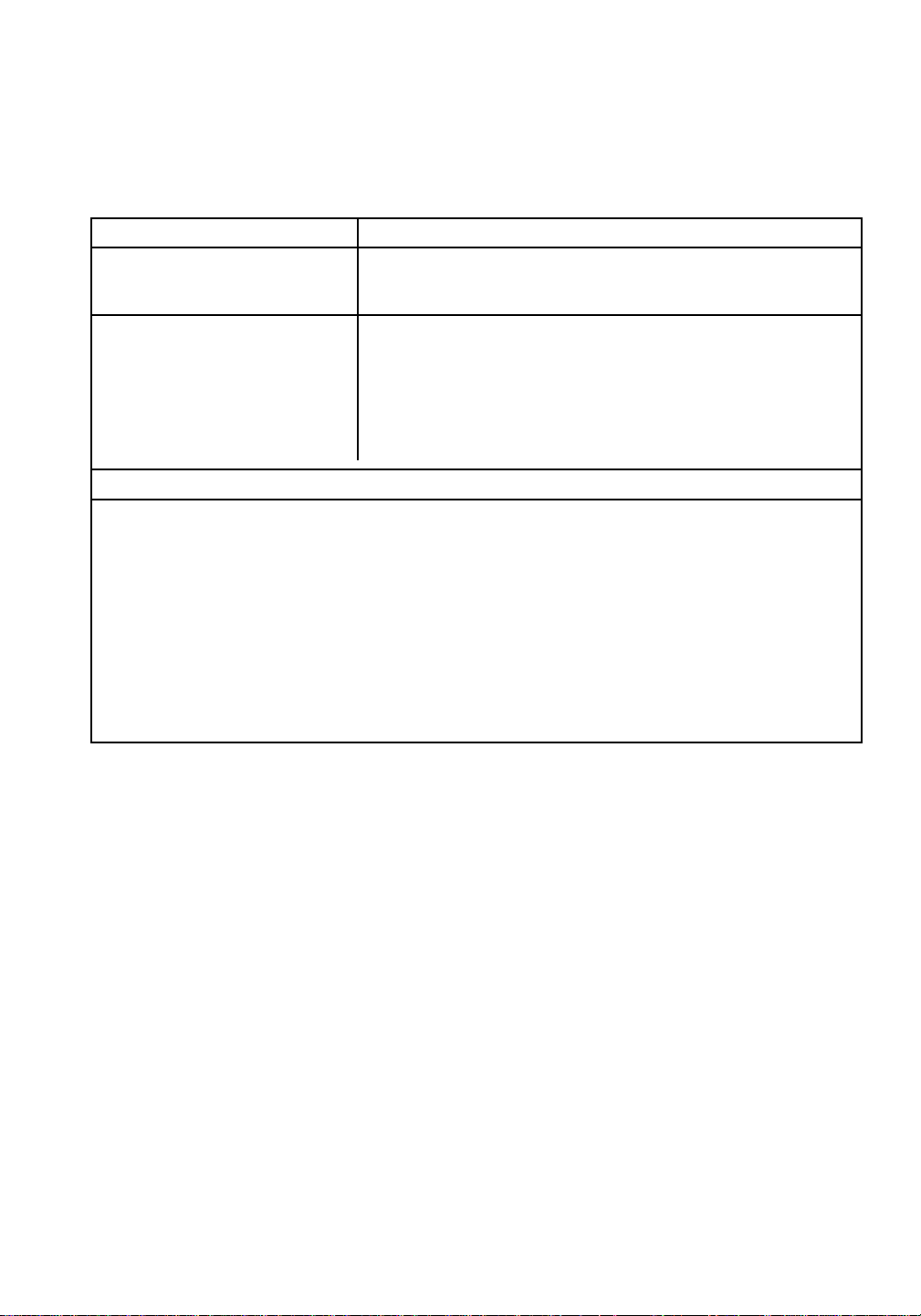
Model and
serial number
label
Thank you for buying this appliance. Please
complete the form below. Have this information
ready if you need service or call with a question.
• Copy model and serial numbers from label (see
diagram below) and purchase date from
sales slip.
• Keep this book and sales slip together in a
handy place.
Model Number
Serial Number
Purchase Date
Service Company Phone Number
LENGTH OF WARRANTY
FULL ONE-YEAR
WARRANTY FROM
DATE OF PURCHASE
FULL FIVE-YEAR
WARRANTY FROM
DATE OF PURCHASE
2ND THROUGH 5TH YEAR
WHIRLPOOL WILL PAY FOR
Replacement parts and repair labor to correct defects in
materials or workmanship. Service must be provided by a
Whirlpool-designated service company.
Replacement parts and repair labor to correct defects in
materials or workmanship in the sealed refrigeration system.
These parts are:
1. Compressor 4. Drier-Strainer
2. Evaporator 5. Connecting Tubing
3. Condenser
Service must be provided by a designated service company.
WHIRLPOOL
®
Room Air Conditioner Warranty
12/00
PART NO. 23-11-1186N-005/789957
© 2000 Whirlpool Corporation
® Registered trademark of Whirlpool U.S.A. Printed in U.S.A.
WHIRLPOOL WILL NOT PAY FOR
A. Service calls to:
1. Correct the installation of your air conditioner.
2. Instruct you how to use your air conditioner.
3. Replace house fuses or correct house wiring.
4. Clean or replace the air filter.
B. Pickup and delivery. Your air conditioner is designed to be repaired in the home.
C. Damage to your air conditioner caused by accident, misuse, fire, flood, acts of God, or use of
products not mentioned in the Use and Care Guide.
D. The removal and reinstallation of your air conditioner if it is installed in an overhead or other
inaccessible location or is not installed in accordance with published installation instructions.
E. Repairs to parts or systems resulting from unauthorized modifications made to the appliance.
F. Replacement parts or repair labor costs for units operated outside the United States.
WHIRLPOOL CORPORATION SHALL NOT BE LIABLE FOR INCIDENTAL OR CONSEQUENTIAL
DAMAGES. Some states do not allow the exclusion or limitation of incidental or consequential damages,
so this exclusion or limitation may not apply to you. This warranty gives you specific legal rights, and
you
may also have other rights which vary from state to state.
Outside the United States a different warranty may apply. For details, please contact your
authorized dealer.
If you need service, first see the “Troubleshooting” section of this book. After checking “Troubleshooting,”
additional help can be found by checking the “Requesting Assistance or Service” section, or by calling the
Whirlpool Customer Interaction Center telephone number, 1-800-253-1301, from anywhere in the U.S.A.
Retain for future reference.