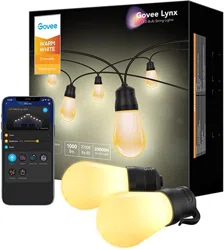
User manual LED Buld String Light
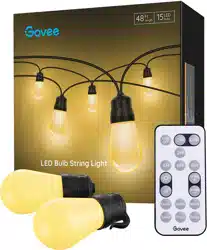
What You Get LED Bulb String Light 1
Power Brick 1
RF Remote Control 1
User Manual 1
Service Card 1
Specifications Length 15m/48ft Bulb Quantity 15 Working Voltage AC 100-240V Power Output 36V 1A Lighting Color Warm White Control Way RF Remote Control (30m/98.42ft) Waterproof Rating IP65 (String Light) IP44 (Power Brick) Working Temperature 4°F - 104°F / -20°C - 40°C
Installing Your String Light Fix ends of the steel cable firmly and hang every bulb on the cable via hooks.
Notice: Make sure bulbs that don't hang on the cable is less than 3.
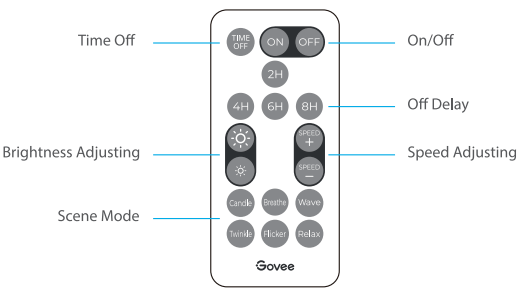
Using the String Light with the Remote Control On/Off:
Press to turn the string light on/off.
Off Delay:
Press it and the string light will be automatically turned off 2/4/6/8 hours later. (Notice: It only delays for onetime.)
Time Off:
Press to cancel Off Delay setup.
Brightness Adjusting:
Press to adjust the light brightness among 5 levels.
Speed Adjusting:
Press SPEED + or SPEED - button to speed up or slow down the lighting effect among 5 levels.
Scene Mode:
Select the lighting effect among 6 options.
Group Control Install all string lights within 30m/98.42ft of the RF remote, and you can control them with the RF remote in one go.
Control String Lights in Series Connect string lights as indicated in the picture;
Notice: Up to 2 string lights (30m) are allowed to be connected in series.
Troubleshooting 1. The RF remote works abnormally.
Make sure the distance between the remote and the string light is less than 30m/98.42ft. Keep obstructions (e.g. metal door) between the remote and the string light as few as possible. Replace 2 new CR2025 batteries for the RF remote. 2. Some bulbs strobe or some bulbs don't light up.
Plug out the string light and re-plug it in to try again. Please contact Govee support team if it still doesn't work. Warning Do not immerse the string light in the water. It should work in an environment with a temperature ranging from -4°F to 104°F. This device should only be installed by adults. Children should not install this device. Do not disassemble it by your own. Do not install it near any heat or danger sources.