
1
QUICK START GUIDE
BEFORE FIRST USE
Remove all stickers. Run the coffee maker through two brew cycles Ł
using just water to eliminate any residue from manufacturing and Ł
packaging.
Set time by holding down hour and minute buttons and choosing
a.m. or p.m.
TO PROGRAM FOR AUTO BREWING
1. Prepare coffee maker as if you’re going to brew right away; Ł
do not press On.
2. Press the Prog button.
3. Set the time you want brewing to begin.
CLEANING AND MAINTENANCE
• Cool completely before cleaning.
• Discard used coffee grinds.
• Wash removeable parts in hot, sudsy water, or place in top rack of
the dishwasher. Do not place any coffee maker in the dishwasher or
immerse in water.
• Wipe exterior with soft, damp cloth.
2
What’s in the box
5
2
10
9
1
4
7
6
8
3
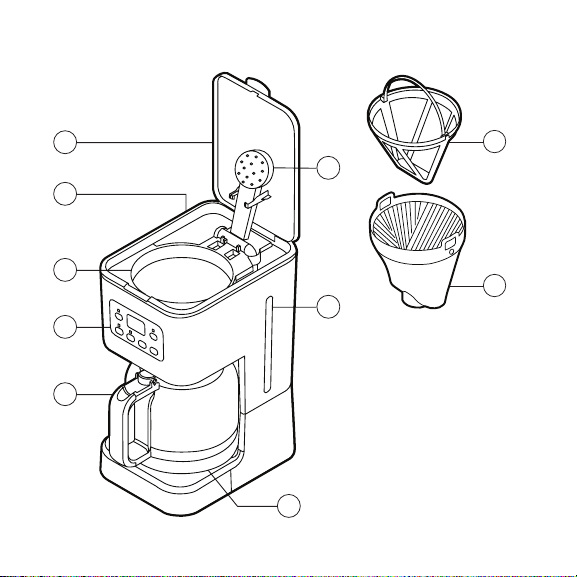
1. Brewing chamber lid
2. Shower head
3. Water reservoir
4. Brewing chamber
5. Water gauge window
6. Glass carafe
7. Control panel
8. Heating plate
9. Reusable coffee filter
10. Removeable filter holder
3
How to make Coffee
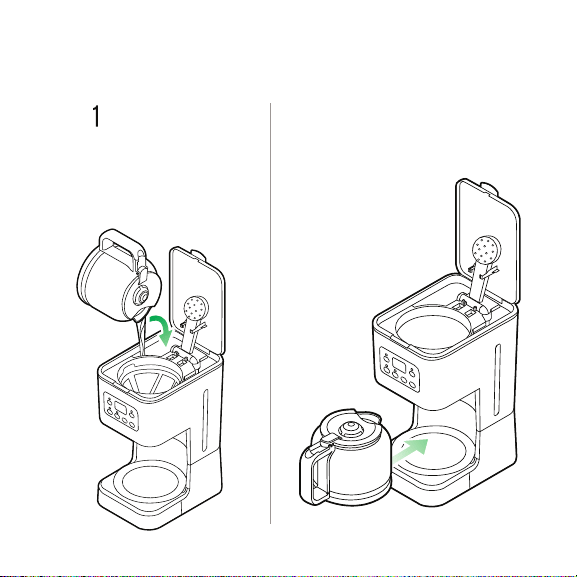
STEP
Place the carafe
on the heating plate.
STEP 2
Fill the carafe to desired
amount, then pour the water
into the water reservoir at
the back of the brewing
chamber.
4
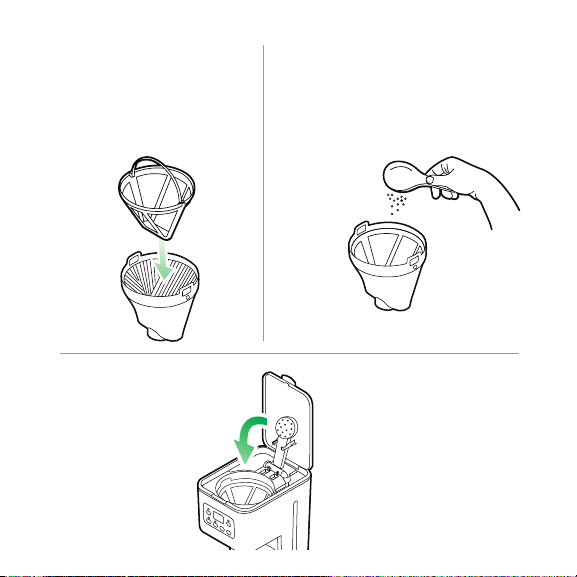
Insert removable filter or
paper filter into filter holder,
then place filter holder in
brewing chamber.
STEP 3
Shut the lid to the
brewing chamber,
pressing down on it
to close securely.
STEP 5
Press the On button.
STEP 6
Add the desired
amount of ground
coffee.
STEP 4
READ ALL INSTRUCTIONS BEFORE USE
For your safety and continued enjoyment of this product, always
read the instruction manual before using.
USER GUIDE
COOKING FORWARD™
Welcome!
Whether this is your first Chefman
®
appliance purchase or you’re already
part of our family, we’re happy to be brewing with you! With your new
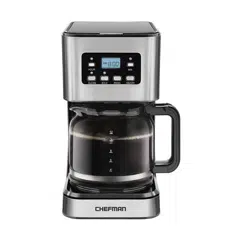
programmable coffee maker, you can have a pot of delicious, piping hot
coffee ready and waiting for you when you wake up. And thanks to its
brushed stainless-steel accents and square profile, your coffee maker
looks good as it brews, too.
We know you’re excited to get brewing, but please take a few minutes
to read our directions, safety instructions, and warranty information.
From our kitchen to yours,
The Chefman
®
Team

1 Safety Instructions
5 Features
6 Operating Instructions
12 Cleaning and Maintenance
14 Coffee Making Tips
15 Notes
17 Terms and Conditions
19 Warranty Registration
CONTENTS

1
SAFETY INSTRUCTIONS
When using electrical appliances, basic safety precautions should always be
followed, including the following:
1. Read all Instructions.
2. Do not touch hot surfaces. Use handles or knobs.
3. To protect against fire, electric shock and injury to persons, do not
immerse cord or plugs in water or other liquid.
4. Close supervision is necessary when any appliance is used by or near
children.
5. Unplug from outlet when not in use and before cleaning. Allow to cool
before putting on or taking off parts, and before cleaning the appliance.
6. Do not operate any appliance with a damaged cord or plug or after
the appliance malfunctions, or has been damaged in any manner.
Contact Chefman
®
Customer Support at 1-888-315-6553 or
7. The use of accessory attachments not recommended by Chefman
®
may
result in fire, electric shock or injury to persons.
IMPORTANT SAFEGUARDS

2
SAFETY INSTRUCTIONS
8. Do not use outdoors.
9. Do not let cord hang over edge of table or counter, or touch hot
surfaces.
10. Do not place on or near a hot gas or electric burner, or in a heated oven.
11. Plug cord into the wall outlet first. To disconnect, turn control to "off"
then remove plug from wall outlet.
12. Do not use appliance for other than intended use.
13. WARNING: Do not open lid when coffee is brewing. Hot steam may be
released, which can result in scalding and other injuries.
SAVE THESE INSTRUCTIONS
IMPORTANT SAFEGUARDS

3
WARNING: This appliance has a polarized plug (one blade is wider than the
other). To reduce the risk of electric shock, this plug is intended to fit into
a polarized outlet only one way. If the plug does not fit fully into the outlet,
reverse the plug. If it still does not fit, contact a qualified electrician. Do not
attempt to modify the plug in any way.
SHORT CORD INSTRUCTIONS
A short power supply cord is provided to reduce the hazards resulting from
entanglement or tripping over a longer cord. Longer detachable power-
supply cords or extension cords are available and may be used if care is
exercised in their use. If a longer detachable power-supply extension cord
is used:
1. The marked electrical rating of the cord set or extension cord should
be at least as great as the electrical rating of the appliance, and:
2. The cord should be arranged so that it will not drape over the
countertop or tabletop where it can be pulled on by children or
tripped over.
SAFETY INSTRUCTIONS
IMPORTANT SAFEGUARDS
4
POWER CORD SAFETY TIPS
1. Never pull or yank on cord or the appliance.
2. To insert plug, grasp it firmly and guide it into outlet.
3. To disconnect appliance, grasp plug and remove it from outlet.
4. Before each use, inspect the power cord for cuts and/or abrasion marks. If
any are found, this indicates that the appliance should be serviced and the
power cord replaced. Please contact
Chefman
®
Customer Service.
5. Never wrap the cord tightly around the appliance, as this could place undue
stress on the cord where it enters the appliance and cause it to fray and break.
6. This appliance has a polarized plug (one blade is wider than the other). To
reduce the risk of electric shock, this plug is intended to fit into a polarized
outlet only one way. If the plug does not fit fully into the outlet, reverse the
plug. If it still does not fit, contact a qualified electrician. Do NOT attempt
to modify the plug in any way.
DO NOT OPERATE APPLIANCE IF THE POWER CORD SHOWS ANY DAMAGE
OR IF APPLIANCE WORKS INTERMITTENTLY OR STOPS WORKING ENTIRELY.
Do not place the appliance
on a stovetop or any other
heatable surface.
SAFETY INSTRUCTIONS
IMPORTANT SAFEGUARDS
5
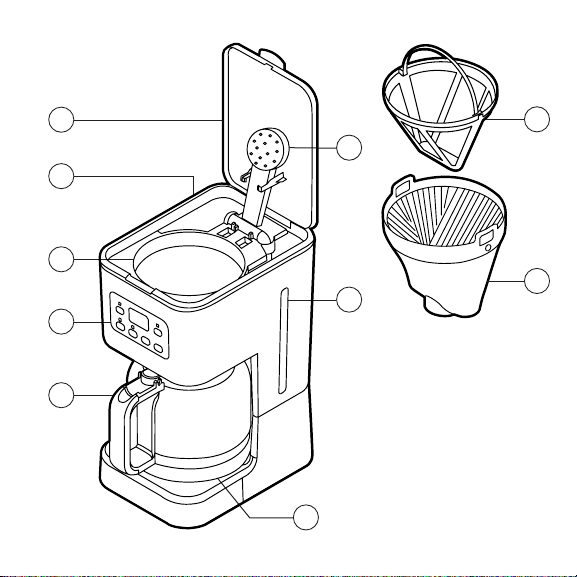
FEATURES
1. Brewing chamber lid
2. Shower head
3. Water reservoir
4. Brewing chamber
5. Water gauge window
6. Control panel
7. Glass carafe
8. Heating plate
9. Reusable coffee filter
10. Removeable filter holder
1
4
7
6
5
2
10
9
8
3

6
OPERATING INSTRUCTIONS
For best results, run the coffee maker through two brewing cycles with just
water (directions follow) to remove any dust or residues from manufacturing
and shipping.
BEFORE FIRST USE
1. Remove all packaging materials, such as plastic bags and stickers. Ensure
you have all parts and accessories before discarding packaging.
2. Wipe exterior of coffee maker with damp lint-free cloth. Wash carafe,
reusable filter, and filter holder in warm, soapy water.
3. Place coffee maker on a hard, flat surface, and plug it in. Set time if you like.
(See directions on page 9.)
4. Fill carafe to the 12-cup line with cold water, then pour the water into
the water reservoir at the back of the brewing chamber.
5. If not already in place, set the filter holder with reusable filter in the
brewing chamber with the holder’s handles in the 3:00 and 9:00
positions; press down on the handles to lock holder in place. Do not
add ground coffee.
6. Close the brewing chamber lid, pressing down firmly to close.

7
7. Place the carafe with its lid closed on the heating plate.
8. Press On button.
9. After the carafe has filled, turn off the coffee maker by pressing Off. Let cool
for at least 10 minutes. Pour water out of carafe. Refill with fresh water, and
repeat steps four through eight.
TO SET TIME
Simply press the hour and minute buttons until desired time is displayed.
Hold button down to quickly scroll through numbers; when the displayed
number nears the desired setting, pulse the button to advance one digit at
a time. The 24-hour clock differentiates between a.m. and p.m., and displays
both, so be sure to choose the right 12-hour time period as well as the correct
time. The display will maintain the time so long as the coffee maker is plugged
in and has power.
OPERATING INSTRUCTIONS

8
HOW TO MAKE COFFEE
1. Fill the carafe with fresh cold water to between the 4- and 12-cup lines,
then pour the water into the water reservoir at the back of the brewing
chamber.
2. Place the carafe with the lid closed on the heating plate making sure it is
fully seated in the coffee maker.
CAUTION: If the carafe is not properly positioned on the warming plate,
hot water or hot coffee can overflow.
3. Check that the coffee filter holder is situated in the brewing chamber; if
not, insert it. Then insert either the reusable coffee filter or a #4 paper cone
filter into the filter holder. (Do not use both together or filter can clog and
coffee can overflow.)
4. Add the desired amount of ground coffee using the measuring scoop
provided if you like. Brew coffee with the coffee-to-water ratio you
normally use. For a rich, full-bodied cup, we suggest one level scoop
for each cup listed on the carafe. Shut the lid to the brewing chamber,
pressing down on it to close securely.
OPERATING INSTRUCTIONS

9
5. Press the On button. A blue LED light above the Minutes button will flash
to indicate brewing.
CAUTION: Never open the brewing chamber during brewing as hot steam,
water, and coffee within can cause injury. If water/coffee is not draining
from the filter basket, unplug the unit and wait 10 minutes before opening
and checking the filter.
6. When brewing ends, the indicator light will turn a solid blue. The water
gauge will show the water reservoir is empty, but there will still be hot
liquid in the filter, so it’s best to wait for a minute or two before serving to
allow for the rest of the liquid to drip into the carafe before serving
CAUTION: Coffee maker becomes very hot during the brew cycle. Please
handle with extreme care.
7. The heating plate will operate so long as the coffee maker is on, keeping
coffee hot. The coffee maker will shut off automatically two hours after
the brewing cycle begins. As soon as the carafe is empty, or when you
no longer want coffee kept hot, turn off the coffee maker manually by
pressing the Off button. Though the heating plate will stop heating if it
senses the carafe is empty, it’s always best to turn the coffee maker off
when the carafe is empty.
OPERATING INSTRUCTIONS

10
HOW TO PROGRAM FOR AUTO BREWING
Enjoy a fresh-made pot of coffee as soon as you wake up by programming the
brewing to start automatically at your choice of time up to 24 hours in advance.
1. Before programming, be sure current time is set correctly on the coffee
maker.
2. Prepare coffee maker with ground coffee and water as if you are going to
brew right away; do not press On.
3. Press the Prog button, then set the time you want coffee to begin brewing
by using the Hour and Min buttons. Once auto-brew time is set, a green
light will illuminate above the Hour button and the word Auto will appear
in the time display. Your coffee maker will automatically begin brewing at
the pre-set time. When the brew cycle begins, the blue light will flash to
indicate the coffee maker is in brewing.
NOTE: To check auto-brew time, press the Prog button. To cancel auto
brewing, hold the Prog button down until the word Auto disappears from
the display, about 3 seconds.
OPERATING INSTRUCTIONS

11
HOW TO USE BOLD FUNCTION
A cup of coffee’s strength depends on many variables, including the type of
coffee beans, how finely they’re ground, and the amount. Another variable is
how long the water is in contact with the beans. The Bold function on our
coffee maker lengthens the amount of time the water is in contact with the
beans for a bolder cup of coffee. If you want a strong cup of joe, simply press
the Bold button at the start of brewing. If using auto-brew, press Bold when
setting auto-brew time. You’ll know a bolder cup of coffee is on its way when
the light over the Bold button is illuminated. To turn off the Bold function,
simply press the Bold button again.
HOW TO USE THE PAUSE AND SERVE FUNCTION
The pause and serve function interrupts coffee flow to let you pour a cup before
brewing has finished. To pause the flow, simply remove the carafe from the
heating plate any time during brewing. When returning the carafe, be sure to
reposition it firmly against the back of the coffee maker for the flow to continue.
NOTE: While pause and serve is a convenient way to pour a cup of coffee
mid-cycle, it’s better to wait until brewing is complete as the strength of the
coffee poured mid-cycle may vary from the finished brew and will affect the
finished brew’s strength and flavor.
OPERATING INSTRUCTIONS

12
1. Allow the coffee maker to cool completely before cleaning.
2. Lift the brewing chamber cover. Life the filter holder out by grabbing its
two handles and lifting straight up. Remove and discard the used coffee
grinds and paper filter, if using.
3. Wash carafe/carafe lid, reusable filter, if using, scoop, and filter holder in
hot, sudsy water, or place in top rack of the dishwasher. Do not place any
other parts of your coffee maker in the dishwasher.
4. To clean exterior of unit, simply wipe with a soft, damp cloth.
5. The heating plate may be wiped with a clean, damp cloth as necessary.
For hard-to-remove stains, use a plastic mesh pad or cloth dampened in
vinegar.
6. Never use harsh or abrasive cleansers on any part of your coffeemaker.
7. Periodically—we suggest at least four times a year—use the Clean
function (see page 13) to deep clean the coffee maker.
CAUTION: Never immerse the heating plate or main housing in water or
any other liquid. Do not try to clean the inside of the water chamber with
a cloth; this can leave a residue of lint and may clog your coffee maker.
CLEANING AND MAINTENANCE

13
HOW TO USE THE CLEAN FUNCTION
Calcium build-up frequently occurs in drip coffee makers. This build-up is normal
and is caused by minerals commonly found in drinking water. We recommend
decalcifying your coffee maker four times a year, and more often as needed.
You’ll know your coffee maker needs decalcifying when you notice an obvious
slowing of the brewing time. We suggest using a mixture of vinegar and water to
remove calcium or other mineral deposits that may form. Here’s how:
1. Insert filter holder without a filter.
2. Put 2 tablespoons of white vinegar in the carafe then fill the carafe to the
12-cup line with cold water. Pour this solution into the water reservoir. Place
carafe on heating plate.
3. Press the Clean button.
4. When the Clean cycle is finished, let the coffee maker cool for 10 minutes,
then empty the carafe and rinse with water.
5. Using just cold water and no filter, run the coffee maker through two brew
cycles to rinse out any remaining vinegar solution.
NOTE: After 60 uses, the light above the Clean button will flash as a
reminder to decalcify the coffee maker. It will continue to flash until the
machine has gone through the Clean cycle.
CLEANING AND MAINTENANCE

14
For best results, use a medium-fine grind of coffee—too fine can clog the
coffee filter—and don’t make less than four cups.
For best flavor, consider using bottled or filtered water.
Experiment with the amount of ground coffee you use and adjust the amount
to your taste.
If making multiple pots of coffee, allow the coffee maker to cool for 10 minutes
between each brewing. Use a new disposable filter or rinse the reusable filter
after each brewing.
COFFEE MAKING TIPS

15
Our products are backed by a limited 1-year warranty. To register, follow
the instructions on the Chefman
®
Warranty Registration page in this User
Guide.
We offer a limited 1-year warranty from the date of purchase. This warranty
is void without proof of purchase within the USA, Canada, or Mexico.
Service centers and retail stores do not have the right to alter or change
the Terms and Conditions of this warranty.
WHAT THE WARRANTY COVERS
• Manufacturer Defects
Chefman
®
products are warranted against defects in material and
workmanship for a period of 1 year from the date of purchase when used
in accordance with the Chefman
®
User Guide.
• Qualified Replacements
If your product does not work as it should, we will send you a new one.
If the product is no longer available, we will replace it with one that is
comparable.
TERMS AND CONDITIONS
Limited Warranty

16
THIS WARRANTY DOES NOT COVER
• Misuse - Damage that occurs from neglectful or improper use of
products; damage that occurs as a result of usage with incompatible
voltage. See Safety Instructions for information on proper use.
• Poor Maintenance - General lack of proper care. See Cleaning and
Maintenance for information on proper maintenance.
• Commercial Use - Damage that occurs from commercial use.
• Altered Products - Damage that occurs from alterations or modifications
by any entity other than Chefman
®
; removal of rating label.
• Catastrophic Events - Damage that occurs from fire, floods, or natural
disasters.
• Loss of Interest - Claims of loss of interest or enjoyment.
TERMS AND CONDITIONS
Limited Warranty
17
Register your product to add an additional 3 months to your warranty.
What do I Need to Register my Product?
• Contact Information
• Model Number
• Proof of Purchase (online
confirmation, receipt, gift receipt)
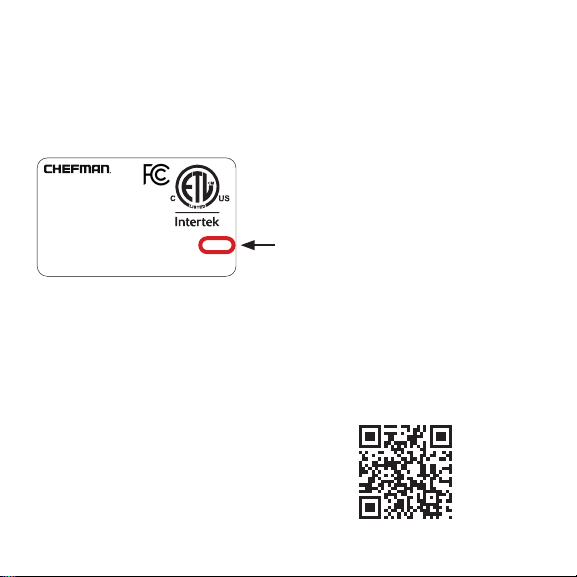
• Date code
How Do I Register my Product?
We offer two convenient ways to access the Chefman
®
registration form:
1. Visit chefman.com/register
2. Scan the QR code below to access site:
MADE IN CHINA/FABRIQUE EN CHINE
AC ONLY/ AC SEULEMENT
DATE CODE:
ACCESS CODE:
Model/Modele: RJ25-C
Conveyor toaer
120v~60hz 1800W
CONFORMS TO UL STD. 1026
CERTIFIED TO CSA STD.C22.2 No.64
CAUTION: DO NOT IMMERSE IN WATER
ATTENTION: NE PAS PLONGER DANS L’EAU
WARNING: TO PREVENT ELECTRIC SHOCK,
UNPLUG BEFORE CLEANING
PRÉAVIS: POUR ÉVITER LES CHOCS ÉLECTRIQUES,
DÉBRANCHEZ L’APPAREIL AVANT DE L’UTILISER
READ INSTRUCTIONS BEFORE USING
LISEZ LES INSTRUCTIONS AVANT DE L’UTILISER
HOUSEHOLD USE ONLY
POUR USAGE DOMESTIQUE SEULEMENT
0000000
0000
XXXXXXXX
CHEFMAN
®
WARRANTY REGISTRATION
NOTE: Label depicted here is an exmaple.

18
Have a Question?
Please reach out to us at Chefman.com/contact
Need More Help?
We’re here for you! Contact us at [email protected]om or
888.315.6553 Monday-Friday.
OTHER LIMITATIONS: ALL WARRANTIES OF ANY KIND WHATSOEVER, EXPRESS, IMPLIED AND
STATUTORY, ARE HEREBY DISCLAIMED. ALL IMPLIED WARRANTIES OF MERCHANTABILITY AND
FITNESS FOR A PARTICULAR PURPOSE ARE HEREBY DISCLAIMED, PROVIDED THAT IF ANY IMPLIED
WARRANTIES OF ANY KIND IS REQUIRED BY ANY JURISDICTION, INCLUDING MERCHANTABILITY
AND FITNESS FOR A PARTICULAR PURPOSE, THE DURATION OF SUCH IMPOSED IMPLIED
WARRANTY IS LIMITED TO ONE (1) YEAR. THIS WARRANTY DOES NOT COVER, AND CHEFMAN
®
SHALL NOT BE LIABLE FOR, INCIDENTAL, INDIRECT, SPECIAL OR CONSEQUENTIAL DAMAGES,
INCLUDING WITHOUT LIMITATION, DAMAGE TO, OR LOSS OF USE OF THE PRODUCT, OR LOST SALES
OR PROFITS OR DELAY OR FAILURE TO PREFORM THIS WARRANTY OBLIGATION. THE REMEDIES
PROVIDED HEREIN ARE THE EXCLUSIVE REMEDIES UNDER THIS WARRANTY, WHETHER BASED ON
CONTRACT, TORT OR OTHERWISE.
This Warranty gives you specific legal rights, and you may also have other rights that vary from state
to state or province to province. Some states or provinces do not allow the exclusions or limitations set
forth in this Warranty, so the above limitations or exclusions may not apply to you depending on the
jurisdiction of purchase.
Chefman
®
is a registered trademark of RJ BRANDS, LLC.
CHEFMAN
®
WARRANTY REGISTRATION

19
®