3-070-124-11 (2)
Modem Adaptor
with Bluetooth
™
Function
Operating Instructions
Before operating the unit, please read this manual thoroughly, and retain
it for future reference.
Owner’s Record
The model and serial numbers are located on the bottom. Record the serial
number in the space provided below. Refer to these numbers whenever
you call upon your Sony dealer regarding this product.
BTA-NW1
© 2001 Sony Corporation
Model No. BTA-NW1
Serial No.
GB
Mode d’emploi
FR

2-GB
WARNING
To prevent fire or shock hazard, do not expose the unit to rain or moisture.
Countries and areas
This product is intended to be used in the following countries or areas.
Australia, Austria, Belgium, Canada, Denmark, Finland, France, Germany, Greece,
Hong Kong, Ireland, Japan, Luxembourg, Netherlands, New Zealand, Norway,
Portugal, Singapore, Sweden, Switzerland, UK, USA
This product is intended to be in indoor use only in Canada and France.
Regulatory Information
For the Customers in the USA
CAUTION
You are cautioned that any changes or modifications not expressly approved in this
manual could void your authority to operate this equipment.
To comply with FCC RF exposure compliance requirements, a separation distance of at
least 20 cm must be maintained between enclosure of this equipment and all persons.
NOTE:
This equipment has been tested and found to comply with the limits for a Class B
digital device, pursuant to Part 15 of the FCC Rules. These limits are designed to
provide reasonable protection against harmful interference in a residential installation.
This equipment generates, uses, and can radiate radio frequency energy and, if not
installed and used in accordance with the instructions, may cause harmful interference
to radio communications.
However, there is no guarantee that interference will not occur in a particular
installation. If this equipment does cause harmful interference to radio or television
reception, which can be determined by turning the equipment off and on, the user is
encouraged to try to correct the interference by one or more of the following measures:
— Reorient or relocate the receiving antenna.
— Increase the separation between the equipment and receiver.
— Connect the equipment into an outlet on a circuit different from that to which the
receiver is connected.
— Consult the dealer or an experienced radio/TV technician for help.
FCC Part 68
This equipment (MDM-5614G exclusive modem card) complies with Part 68 of the FCC
rules. On the bottom of this equipment is a label that contains among other information,
the FCC equivalence number (REN) for this equipment. If requested, this information
must be provided to the telephone company.
This modem uses the USOC RJ-11 telephone jack.

3-GB
The REN is used to determine the quantity of devices which may be connected to the
telephone line. Excessive RENs on the telephone line may result in the devices not
ringing in response to an incoming call. In most, but not all areas, the sum of the RENs
should not exceed five (5.0). To be certain of the number of devices that may be
connected to the line, as determined by the total RENs, contact the telephone company
to determine the maximum REN for the calling area.
If the terminal equipment (
MDM-5614G exclusive modem card
) causes harm to the
telephone network, the telephone company will notify you in advance that temporary
discontinuance of service may be required. But if advance notice isn’t practical, the
telephone company will notify the customer as soon as possible. Also, you will be
advised of your right to file a complaint with the FCC if you believe it is necessary.
The telephone company may make changes in its facilities, equipment, operations or
procedures that could affect the operations of the equipment. If this happens, the
telephone company will provide advance notice in order for you to make the necessary
modifications in order to maintain uninterrupted service.
If trouble is experienced with this equipment (MDM-5614G exclusive modem card),
please contact 1-800-222-SONY (7669), or write to the Sony Customer Information
Service Center, 12451 Gateway Blvd., Fort Myers, Fl 33913 for repair and (or) warranty
information. If the trouble is causing harm to the telephone network, the telephone
company may request you remove the equipment from the network until the problem
is resolved.
Repair of this equipment should be made only by a Sony Service Center or Sony
authorized agent. For the Sony Service Center nearest you, call 1-800-222-SONY (7669).
This equipment cannot be used on public coin service provided by the telephone
company. Connection to Party Line Service is subject to state and possible provincial
tariffs. (Contact the state or provincial utility service commission, public service
commission or corporation commission for information.)
For the Customers in CANADA
Operating Condition
Operation is subject to the following two conditions: (1) this device may not cause
interference, and (2) this device must accept any interference, including interference
that may cause undesired operation of the device.
To prevent radio interference to the licensed service, this device is intended to be
operated indoors and away from windows to provide maximum shielding. Equipment
(or its transmit antenna) that is installed outdoors is subject to licensing.
INDUSTRY CANADA NOTICE
NOTICE: The Industry Canada label identifies certified equipment. This certification
means that the equipment meets certain telecommunications network protective,
operational and safety requirements as prescribed in the appropriate Terminal
Equipment Technical Requirements document(s). The Department does not guarantee
the equipment will operate to the user’s satisfaction.
Before installing this equipment, users should ensure that it is permissible to be
connected to the facilities of the local telecommunications company. The equipment
must also be installed using an acceptable method of connection.
4-GB
The customer should be aware that compliance with the above conditions may not
prevent degradation of service in some situations.
Repairs to certified equipment should be coordinated by a representative designated by
the supplier. Any repairs or alterations made by the user to this equipment, or
equipment malfunctions, may give the telecommunications company cause to request
the user to disconnect the equipment.
Users should ensure for their own protection that the electrical ground connections of
the power utility, telephone lines and internal metallic water pipe system, if present, are
connected together. This precaution may be particularly important in rural areas.
Caution: Users should not attempt to make such connections themselves, but should
contact the appropriate electric inspection authority, or electrician, as appropriate.
NOTICE: The Ringer Equivalence Number (REN) assigned to each terminal device
provides an indication of the maximum number of terminals allowed to be connected to
a telephone interface. The termination on an interface may consist of any combination
of devices subject only to the requirement that the sum of the Ringer Equivalence
Number of all the devices does not exceed 5. The Ringer Equivalence Number for this
equipment is 0.1.
For the Customers in Europe
Hereby, Sony Corporation, declares that this Modem Adaptor with Bluetooth Function
is in compliance with the essential requirements and other relevant provisions of the
Directive 1999/5/EC.
This equipment is in compliance with the requirements of the directive 1999/5/EC
(R&TTE), to be connected with all European analogue PSTN. It complies with the
Commission Decision (2000/373/EC) regarding the France Telecom PSTN.
However, due to differences between the individual PSTNs provided in the different
countries, the compliance does not, on itself, give an unconditional assurance of
successful operation on every PSTN network termination point. In the event of
problems, you should contact your equipment supplier in the first instance.

5-GB
Table of contents
Introduction
•The unit is designed to communicate with a Bluetooth device, and allow that device to
access the Internet to send/receive data via the modem.
•The unit complies to the protocols of a dial-up network.
•Use of size AA alkaline dry batteries allows the unit to be used as a mobile device.
An overview of the Bluetooth wireless technology
The Bluetooth wireless technology allows communication between various Bluetooth
devices without using cables. Devices which can use this technology include PCs,
computer peripheral devices, PDAs, and mobile phones. This omnidirectional
communication system enables communication even if the Bluetooth device is in a bag
or there are obstacles between the devices.
On trademarks
•The BLUETOOTH trademarks are owned by their proprietor and used by Sony
Corporation under license.
•All other product names mentioned herein may be the trademarks or registered
trademarks of their respective companies. Furthermore, “™” and “®” are not
mentioned in each case in this manual.
Precautions .................................................................................................................................. 6
Identifying the parts .................................................................................................................. 7
Preparing the unit ...................................................................................................................... 8
Installing the exclusive modem card and exclusive modem cable to the Modem
Adaptor with Bluetooth Function ............................................................................. 8
Preparing the power supply.............................................................................................. 8
Setting up the unit.................................................................................................................... 10
Registering Bluetooth devices ................................................................................................ 12
Communicating with the Bluetooth device ......................................................................... 14
Troubleshooting........................................................................................................................ 15
Specifications ............................................................................................................................ 17

6-GB
Precautions
The set is not disconnected from the AC power source (mains) as long as it is connected
to the wall outlet, even if the set itself has been turned off.
Installation/storage
Do not place the unit in locations that are:
•Extremely hot such as in a car parked in the sun
•Under direct sunlight or near sources of high temperature, such as a heating device
•Subject to strong vibration
•Near devices which generate strong magnetic fields
•Dusty or dirty
When you use the unit on a sandy beach or in a dusty place, protect it from the sand
or dust. Sand or dust may cause your unit to malfunction.
Operation
•Do not use the unit in an aircraft, hospitals or petrol stations.
•Do not use the unit near devices (such as radios) which transmit strong radio waves.
•Keep the unit away from radio or TV sets.
•Do not use cards other than the exclusive modem card.
•Do not use the exclusive modem card with devices other than this unit.
Size AA alkaline dry batteries
•The batteries may get hot just after using the unit. Wait until their temperatures fall
and remove the batteries.
•If you do not intend to use the unit for a long time, remove the batteries.
•Do not mix old and new batteries, or different types of batteries.
•Be sure to use Sony size AA alkaline dry batteries. Using other batteries may decrease
the level of unit performance.
•When you attempt to use the unit in low temperatures, use the supplied AC power
adaptor. Use in low temperatures causes significant battery performance degradation.
•Be sure not to use the following types batteries: nickel-cadmium, nickel metal hydride,
manganese, or primary lithium batteries.
Cleaning
•Clean the unit surface with a soft cloth slightly moistened with mild detergent, then
wipe the surface dry.
•Do not use any type of solvent such as thinner, alcohol or benzene as this may damage
the finish or the casing.
On the supplied AC power adaptor
•Unplug the unit from the wall outlet (mains) when you are not using the unit for a
long time. To disconnect the power cord (mains lead), pull it out by the plug. Never
pull the power cord (mains lead) itself.
•Do not operate the unit with a damaged power cord (mains lead) or if the unit has
been dropped or damaged.
•Do not bend the power cord (mains lead) forcibly, or place a heavy object on it. This
will damage the power cord (mains lead) and may cause fire or electrical shock.
•Prevent metallic objects from coming into contact with the metal parts of the
connecting section. If this happens, a short circuit may occur and the unit may be
damaged.
•Always keep the metal contacts clean.
•Do not disassemble the unit.
•Do not apply mechanical shock or drop the unit.
•The unit becomes warm during use. This is not a malfunction.
7-GB
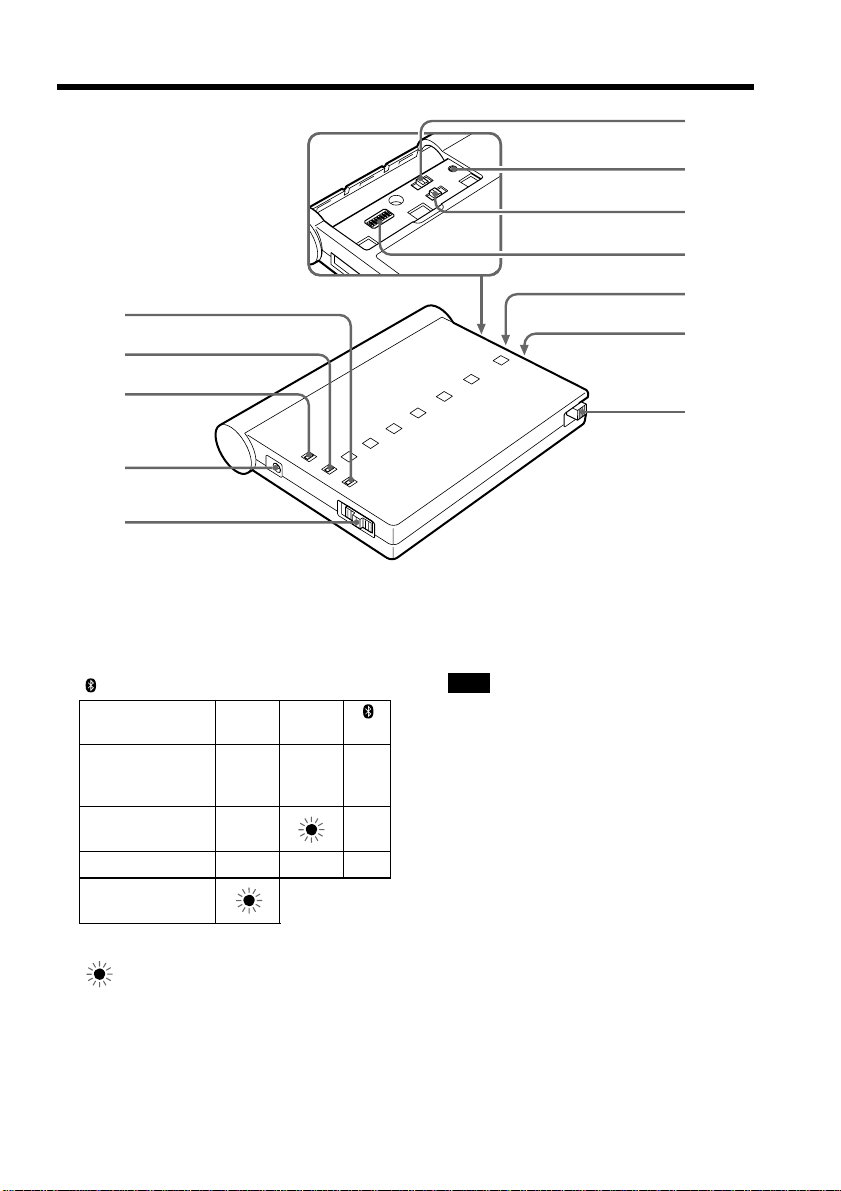
Identifying the parts
1 POWER lamp (green)
2 ON LINE lamp (orange)
3 lamp (blue)
Lamp POWER ON LINE
(green) (orange) (blue)
z – z
z z
zzz
z : The lamp turns on
: The lamp flashes
4 DC IN jack
5 POWER ON/OFF switch
1
2
3
4
5
qa
q;
qs
6
7
8
9
6 TONE/PULSE10/PULSE20 selector
7 CLEAR button
Note
Resets all the setup items to the default
values.
8 BONDING/NORMAL switch
9 AREA CODE switches (1–8)
0 Battery cover
qa Exclusive modem card slot
qs Exclusive modem card eject switch
Communication
standby with a
Bluetooth device
Dialing
Data transmission
Insufficient
battery capacity

8-GB
Preparing the unit
Before using the unit, carry out the following preparations. If the plug of the exclusive
modem cable does not match the telephone terminal jack, attach an optional plug
adaptor. The plug of the exclusive modem cable is an RJ-11 plug.
Installing the exclusive modem card and exclusive modem cable
to the Modem Adaptor with Bluetooth Function
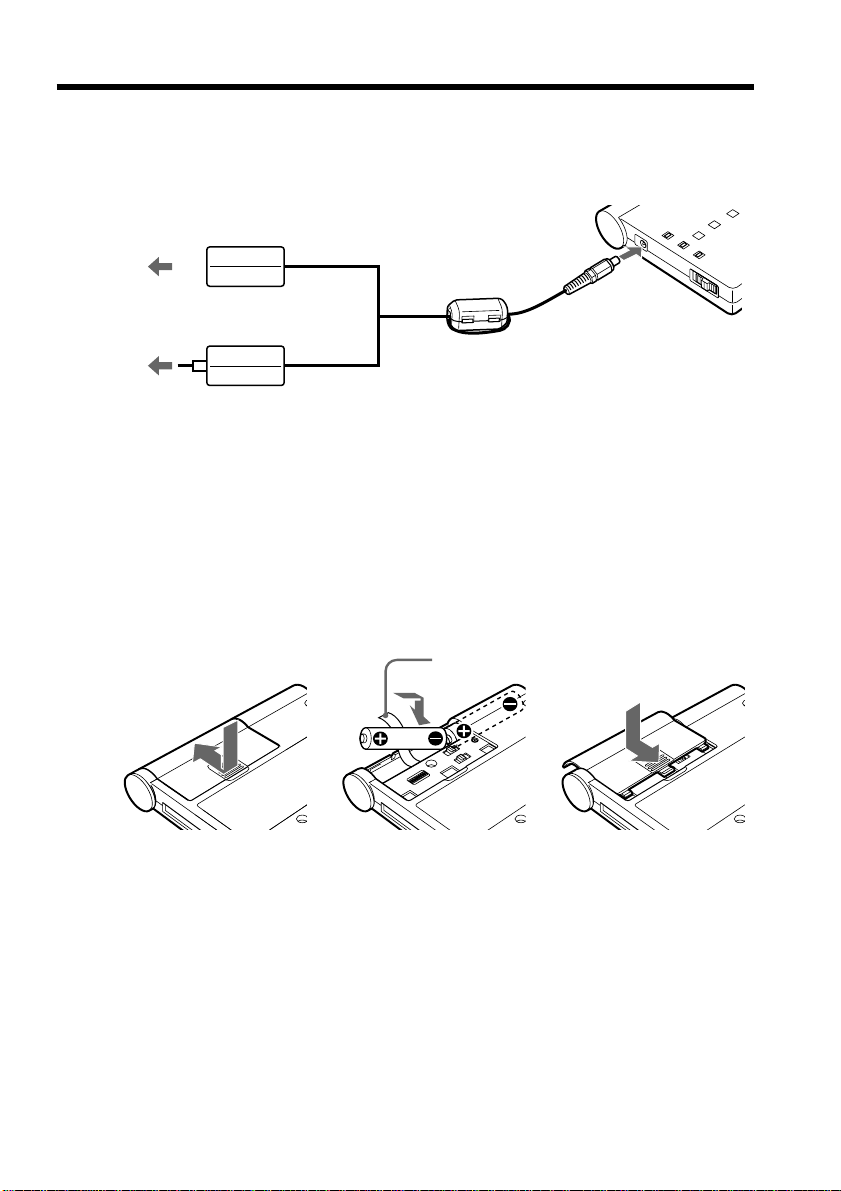
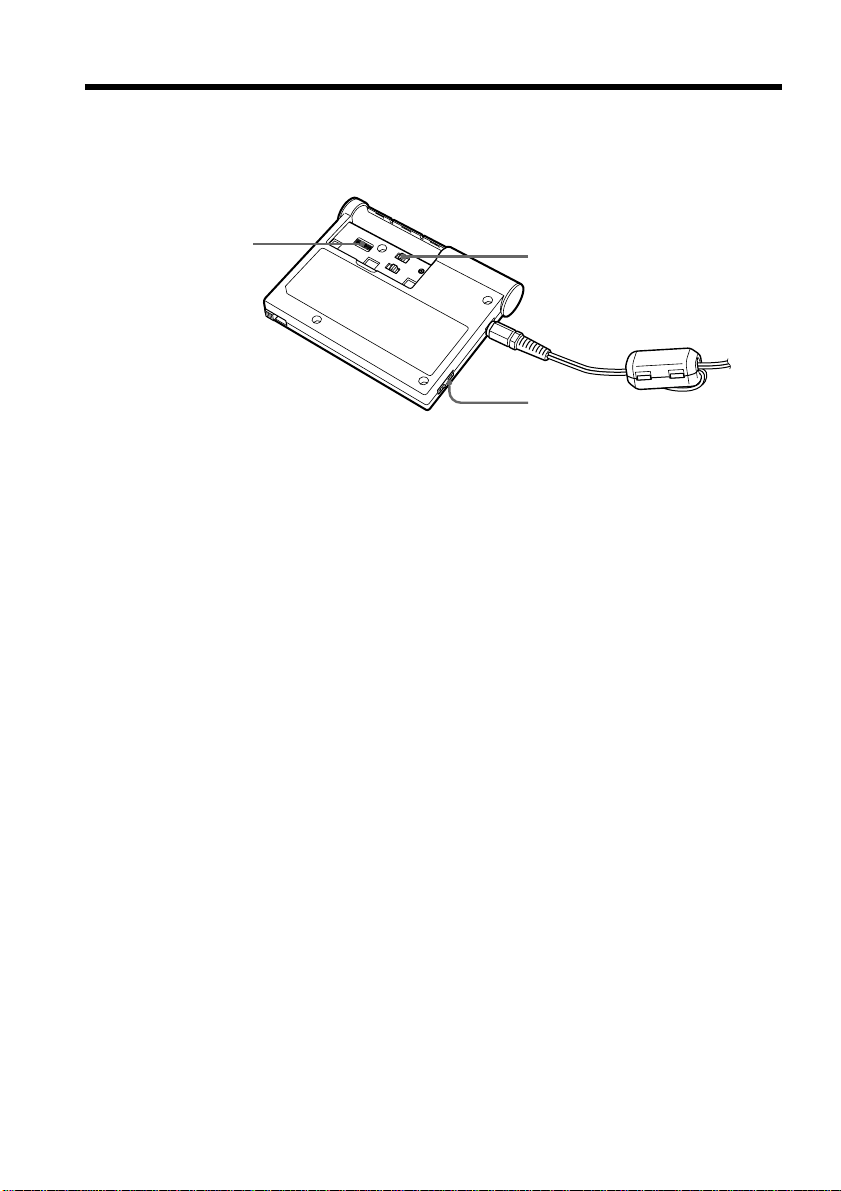
(1) Insert the exclusive modem card firmly, with the v mark facing upward, into
the slot.
zTip
Once you insert the exclusive modem card, you can use the unit without ejecting
the exclusive modem card.
(2) Connect the exclusive modem cable to the exclusive modem card and the
telephone terminal jack.
To eject the exclusive modem card
Push down the exclusive modem card eject switch.
Note
Do not eject the exclusive modem card while the POWER lamp is lit or flashing.
Preparing the power supply
You can use either size AA alkaline dry batteries or the supplied AC power adaptor as
the power source. However, we recommend that you use the supplied AC power
adaptor.
12
Exclusive modem card eject switch
v mark
To the telephone
terminal jack
Incorrect
installation
Correct
installation
9-GB
To DC IN
To a wall
outlet
(mains)
or
To a wall
outlet
(mains)
AC power adaptor
AC-PT1
AC power adaptor
AC-PW1
x Using the supplied AC power adaptor
Connect the AC power adaptor to the DC IN jack on the unit and a wall outlet (mains).
Notes
•The socket outlet should be as close as possible to the unit and easily accessible.
•The shape of your AC power adaptor differs depending on your area.
x Installing the size AA alkaline dry batteries
The batteries are convenient for outdoor use of the unit.
(1) Remove the battery cover by sliding the cover in the direction of the arrow.
(2) Insert two size AA alkaline dry batteries with the correct 3 and # polarity
into the battery compartment and with the ribbon under the batteries.
(3) Replace the cover.
Note
We recommend that you use Sony size AA alkaline dry batteries.
zTip
The DC IN jack has source priority. If you use the unit using the AC power adaptor
with size AA alkaline dry batteries installed, the power is provided from the AC power
adaptor.
123
Ribbon
Preparing the unit
10-GB
Setting up the unit
You must make certain settings before you can connect the unit to your phone line.
Choose the proper settings for your telephone signaling type. You also have to set the
AREA CODE switches according to your area.
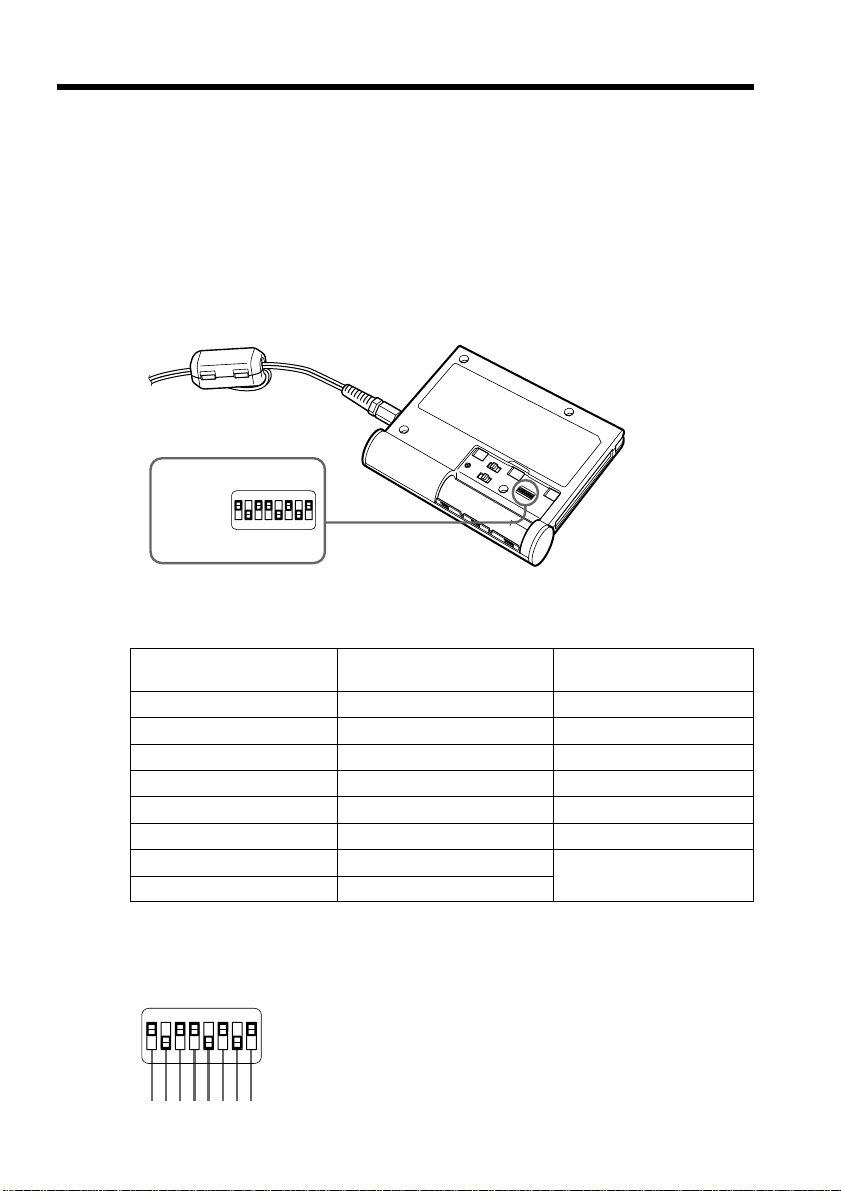
(1) Before making the settings, check that the POWER ON/OFF switch is set to
OFF.
(2) Remove the battery cover.
(3) Select the telephone signaling type with the TONE/PULSE10/PULSE20
selector.
TONE: When your phone line has tone signaling.
PULSE10: When your phone line has pulse signaling.
PULSE20: Normally, this is not used. For details, see “To check the dial speed
of a pulse dialing phone” on page 11.
zTips
•How can I tell if my phone has tone signaling?
You can hear the touch pad sound from your phone when you press the number
button.
•How can I tell if my phone has pulse signaling?
You can hear clicking sounds from your phone when you press the number
button.
(4) Set up the AREA CODE switches according to your area.
For details, see “The setup of the AREA CODE switches” on page 11.
(5) Replace the cover.
The setting is completed.
Notes
•When the Bluetooth device you are communicating with can switch the telephone
signaling type, set it to the same setting as the unit. Otherwise, the connection will not
be established properly.
•If the TONE/PULSE10/PULSE20 selector is not set to the appropriate position, you
cannot communicate with any Bluetooth devices.
•If you cannot check the dial speed of your pulse dialing phone, set the TONE/
PULSE10/PULSE20 selector to PULSE10.
3
4
1
11-GB
To check the dial speed of a pulse dialing phone
You can change the dialing speeds of some pulse dial phones. To check the dial speed,
switch the dial speed selector on the phone and check the clicking sound. The slower
one is the normal setting. When you select the fast dial speed, set the TONE/PULSE10/
PULSE20 selector to PULSE20.
The setup of the AREA CODE switches
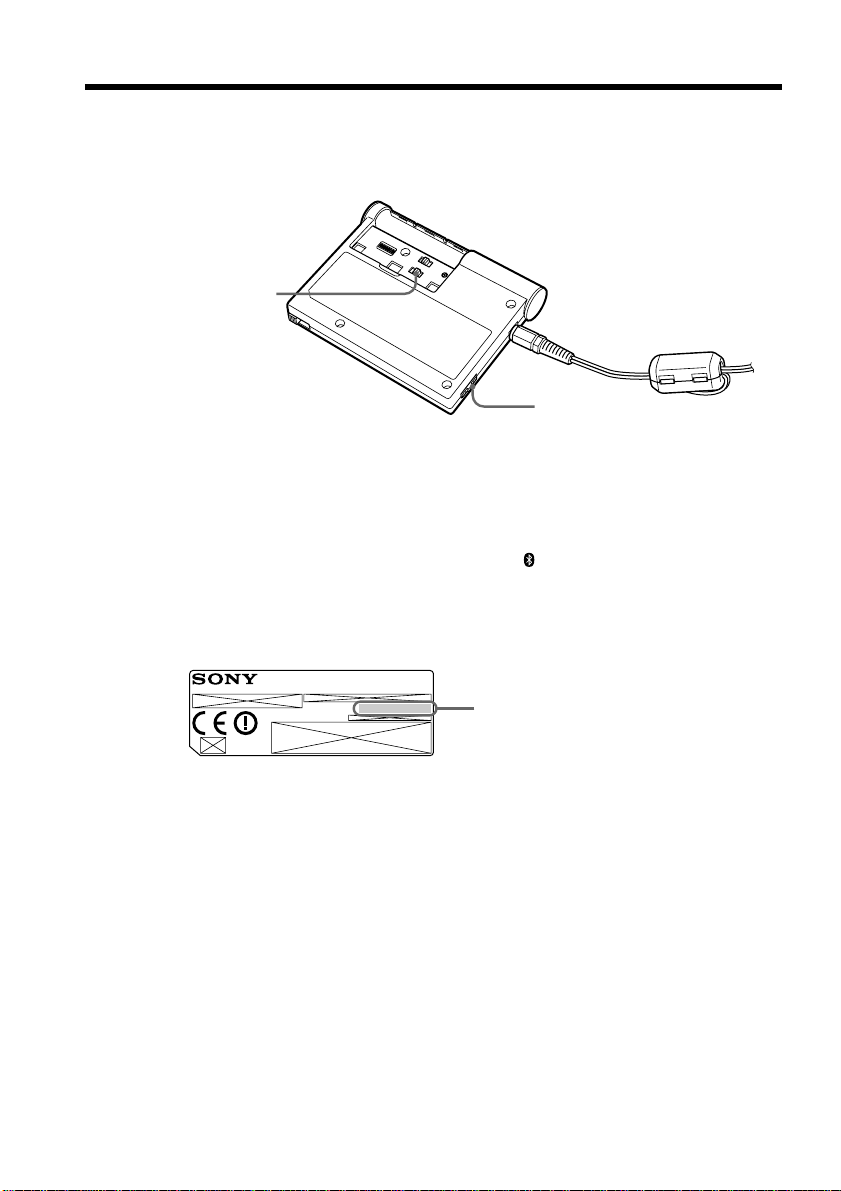
Set the AREA CODE switches to the appropriate positions using a sharp-pointed object
following the information given in the table below. You cannot use the unit in areas
other than the areas indicated on the table.
The setup list for the AREA CODE switch
Country Parameter Country Parameter Country Parameter
or area or area or area
Austria 00001001 Greece 01000110 Portugal 10001011
Australia 00001010 Hong Kong 01010000 Singapore 10011100
Belgium 00001111 Ireland 01010111 Sweden 10100101
Canada 00100000 Japan 00000000 Switzerland 10100110
Denmark 00110001 Luxembourg 01101001 UK 10110100
Finland 00111100 Netherlands 01111011 USA 10110101
France 00111101 New Zealand 01111110
Germany 01000010 Norway 10000010
Notes
•“1” for the parameter in the table indicates that setting the switch to the ON side.
•The relationship between the 8-digit numbers in the table and the switch positions is
as illustrated below (e. g., for the USA).
Setting up the unit
AREA
CODE
switches
ON
12345678
1 0 1 1 0 1 0 1
ON
12345678
12-GB
Registering Bluetooth devices
Up to 16 Bluetooth devices can be registered with this unit. When registering devices,
consult the operating instructions supplied with the Bluetooth device. When you try to
register the 17th device, you must clear all of the previous registrations.
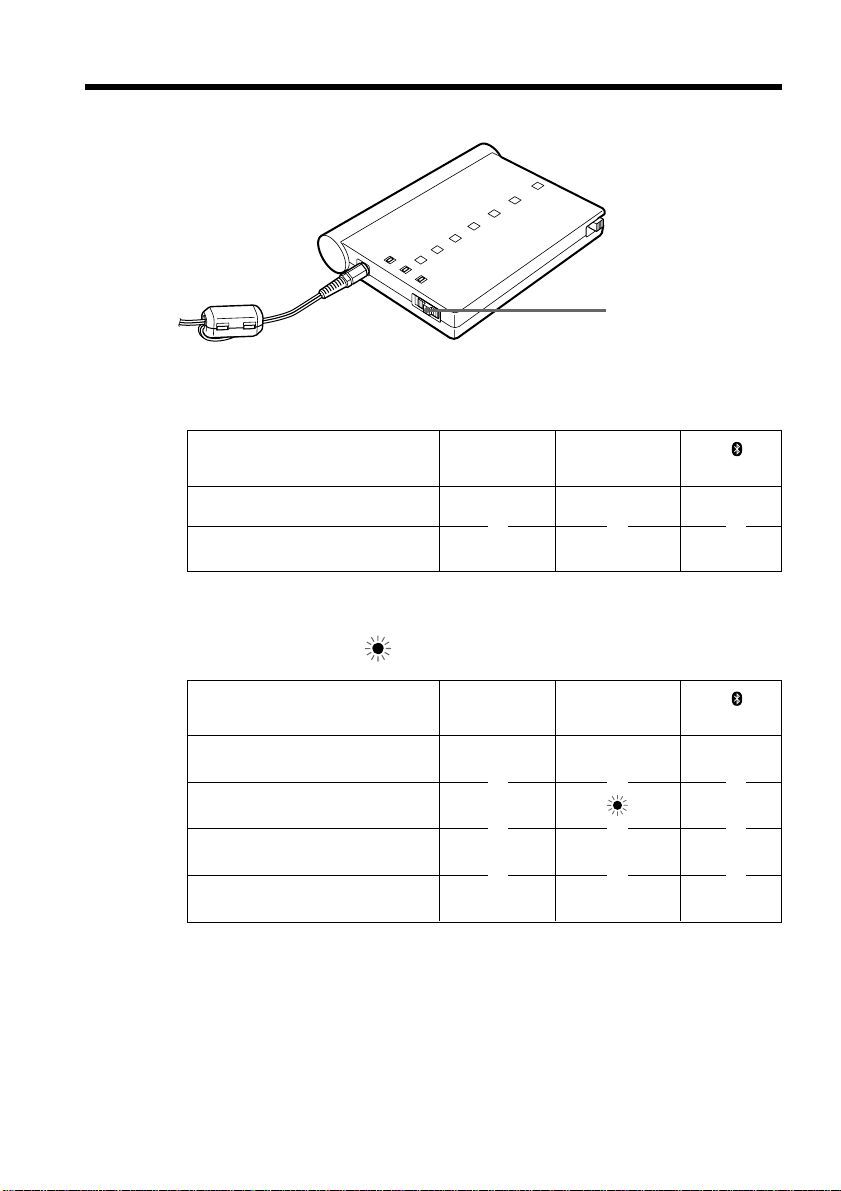
(1) Before registering, be sure to set the POWER ON/OFF switch to OFF.
(2) Remove the battery cover.
(3) Set the BONDING/NORMAL switch to BONDING.
(4) Set the POWER ON/OFF switch to ON.
The POWER lamp (green) lights up, and the
lamp (blue) lights up.
(5) Turn on the Bluetooth device, then input the serial number (pass key) which is
indicated on the label on the rear of the unit.
For details on inputting this information, refer to the operating instructions of
the Bluetooth device.
zTip
The pass key is an identification number needed to allow two Bluetooth
devices to communicate with each other. This “Pass key” is also referred to as
a “Bluetooth pass key,” “pass key,” “PIN,” “Bluetooth PIN,” etc.
(6) Set the POWER ON/OFF switch to OFF.
(7) Set the BONDING/NORMAL switch to NORMAL.
Note
Be sure to set it to NORMAL. If you use the unit with the switch in the
BONDING position, the communication will be picked up by other devices.
(8) Replace the cover.
(9) Set the POWER ON/OFF switch to ON.
The registration is completed.
3, 7
1, 4, 6, 9
Pass key
The number used when registering a
Bluetooth device
MODEM ADAPTOR WITH BLUETOOTH
TM
FUNCTION
MODEL NO.
BTA-NW1
®

13-GB
When you try to register a 17th Bluetooth device
You have to clear all the previous registrations. Press CLEAR using a sharp-pointed
object to clear all the registrations. Once you turn the unit off and on, you can register a
new Bluetooth device.
Notes
•When you register Bluetooth devices, be sure to set the BONDING/NORMAL switch
to BONDING before turning on this unit.
•Up to 16 Bluetooth devices can be registered. If you try to register a 17th Bluetooth
device, the ON LINE, , and POWER lamps flash for 30 seconds.
Registering Bluetooth devices
14-GB
Communicating with the Bluetooth
device
After registering a Bluetooth device, you can communicate with that Bluetooth device.
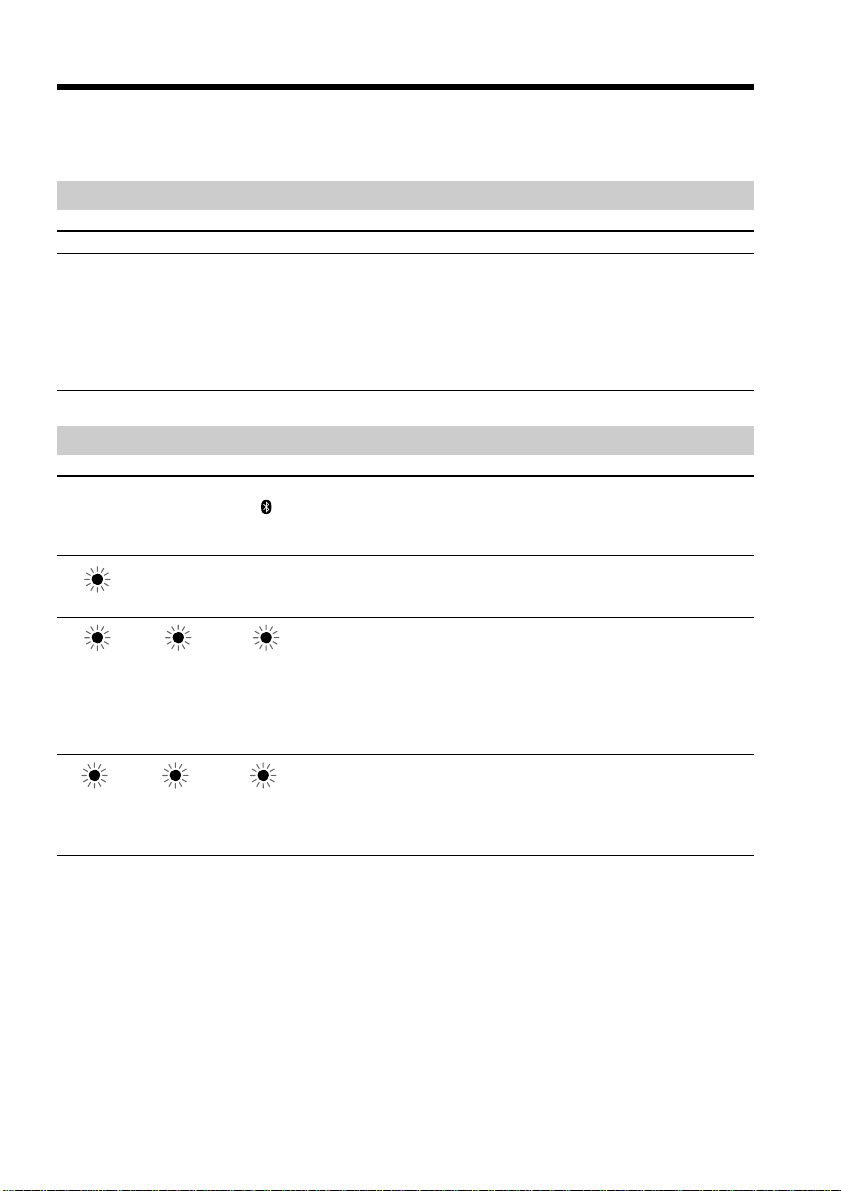
(1) Set the POWER ON/OFF switch to ON.
The lamps turn on as described below. (z: The lamp turns on)
POWER ON LINE
(green) (orange) (blue)
z ––
z – z
(2) Turn on the registered Bluetooth device and start communication.
The lamps turn on or flash as described below.
(z: The lamp turns on,
: The lamp flashes)
POWER ON LINE
(green) (orange) (blue)
z – z
z z
zzz
z – z
After using the unit
Set the POWER ON/OFF switch to OFF to turn off the power.
Notes
•When using size AA alkaline dry batteries, the continuous communication time is
approximately 60 minutes.
•When the POWER ON/OFF switch is set to ON, the size AA alkaline dry batteries
will be consumed even if the unit is not actually being used for communication.
•Remove the size AA alkaline dry batteries when you do not intend to use the unit for
a long time.
1
Communication standby with a
Bluetooth device
Dialing
Data transmission
Data communication complete
m
m
m
m
m
m
m
m
m
m
m
m
15-GB
Troubleshooting
If you experience trouble with your unit, first check the following items. Should your
unit still not operate properly after you have made these checks, consult your Sony
dealer or local authorized Sony service facility.
Power
Symptom Cause and/or solution
• The size AA alkaline dry batteries are completely dead.
c Replace them with new size AA alkaline dry batteries.
• You are using batteries other than the recommended ones.
c Use the recommended batteries.
• The supplied AC power adaptor is not connected to a wall
outlet (mains) properly.
c Connect it properly.
The lamps
Indications Cause and/or solution
The batteries are dead.
c Replace the batteries with new ones.
c Use the supplied AC power adaptor.
• The exclusive modem card is not inserted.
c Insert the exclusive modem card properly and turn on
the power again.
• A malfunction has occurred in the exclusive modem card
or in the unit.
c Turn the power off then on again. If this is not possible,
contact your nearest Sony dealer.
You attempted to connect an unregistered Bluetooth device
when 16 Bluetooth devices were already registered in the
unit.
c Press CLEAR to clear registrations and register a new
Bluetooth device.
* Flashes for about 30 seconds.
The unit will not turn on.
POWER ON LINE
(green) (orange) (blue)
lamp lamp lamp
––
* * *

16-GB
Communication
Symptom Cause and/or solution
• The exclusive modem card is not inserted properly.
c Insert it properly. See “Preparing the unit” on page 8.
• The size AA alkaline dry batteries are completely dead.
c Replace them with new size AA alkaline dry batteries.
• The setup of the AREA CODE switches is wrong.
c Set them up correctly. See “Setting up the unit” on page
10.
• The position of the TONE/PULSE10/PULSE20 selector is
wrong.
c Set it to the appropriate position. See “Setting up the
unit” on page 10.
• The unit is not searched when the BONDING/NORMAL
switch is set to NORMAL.
c Set it to BONDING.
• While the unit is communicating with another Bluetooth
device, the unit may not be searched or may not be able to
communicate with the Bluetooth device.
c Check whether or not the unit is communicating with
another Bluetooth device.
• The communication distance may have to be less than
10 m (32.8 feet) depending on obstacles between the
devices or on radio wave conditions.
c Change the location of the unit, or shorten the distance
between the Bluetooth devices.
• While the unit is communicating with another Bluetooth
device, the unit may not be searched or may not be able to
communicate with the Bluetooth device.
c Check whether or not the unit is communicating with
another Bluetooth device.
The unit cannot communicate with
Bluetooth devices.
The unit cannot be searched when
a new scanning is done.
Even if the unit and the Bluetooth
device are located within 10 m
(32.8 feet), the communication may
not be established or may be
interrupted during the
communication.
Troubleshooting

17-GB
Specifications
Wireless
communication
Communication system
Bluetooth specification Ver. 1.1
Maximum communication
speed
1) 2)
Approx. 723 kbps
Maximum output
3)
Bluetooth specification Power
Class1
Receiver sensitivity
3)
– 70 dBm
Communication distance
2)
Approx. 10 m (32.8 feet) (Open
space, when using a Sony
Network Handycam with the
Bluetooth function)
Compatible Bluetooth profiles
4)
Generic Access Profile
Dial-up Networking Profile
Usable frequency band
2.4 GHz band
(2.400 – 2.4835 GHz)
Exclusive modem
card
Applicable line
Analog telephone line
Interface for the telephone
circuit
2 line ceremony interface
NCU
AA
Dial type
Pulse dialing (10/20 pps)
Tone dialing
NCU command
AT command
Communication format
Dual
Sending communication rate
300/1200/2400/4800/7200/9600/
12000/14400/16800/19200/
21600/24000/26400/28800/
31200/33600 bps
Receiving communication rate
300/1200/2400/4800/7200/9600/
12000/14400/16800/19200/
21600/24000/26400/28800/
31200/33600/34000/34667/
36000/37333/38000/38667/
40000/41333/42000/42667/
44000/45333/46000/46667/
48000/49333/50000/50667/
52000/53333/54000/54667/
56000 bps
Modulation mode standard
ITU-T V.21/V.22/V.22bis/V.32/
V.32bis/V.34/V.90, BELL 212A/
103, K56flex™
Sender sensitivity
–10 to –15 dBm
Receiver sensitivity
–10 to –40 dBm
Error correction
MNP Class 4/10, ITU-T V.42
Data compression
MNP Class 5, ITU-T V.42bis
General
Power sources
AC power adaptor or two size AA
alkaline dry batteries
Battery life (connecting
5)
)
Approx. 60 minutes
6)
Battery life (waiting
7)
)
Approx. 90 minutes
6)
Power requirements
5.5 to 6.5 V (DC input) or two size
AA alkaline dry batteries
Power consumption
290 mA (During communication,
using DC 6 V input), 200 mA
(During waiting, using DC 6 V
input)
Dimensions
Approx. 115×20×88 mm
(4 5/8×13/16×3 1/2 inches) (w/
h/d)
Mass
Approx. 185 g (6.5 oz) (including
size AA alkaline dry batteries and
exclusive modem card)
Operating temperature
0 to 40°C (32 to 104°F)
8)
Storage temperature
–20 to 60°C (–4°F to 140°F)
Available Countries and areas
Australia, Austria, Belgium,
Canada, Denmark, Finland,
France, Germany, Greece, Hong
Kong, Ireland, Japan,
Luxembourg, Netherlands, New
Zealand, Norway, Portugal,
Singapore, Sweden, Switzerland,
UK, USA
(Canada and France are for indoor
use only.)
AC power adaptor
Power requirements
(The type of your adaptor is
shown on your adaptor.)
AC-PT1: 120 V AC, 60 Hz (For
customers in the USA and
Canada), 230 to 240 V AC, 50 Hz
(For customers in the UK), 220 to
230 V AC, 50/60 Hz (For other
customers)
AC-PW1: 110 to 240 V AC,
50/60 Hz
Rated output voltage
DC 6 V, 880 mA (AC-PT1) or
1.3 A (AC-PW1)
Accessories
Exclusive modem card (MDM-
5614G) (1)
Exclusive modem cable (1)
AC power adaptor (AC-PT1 or
AC-PW1) (1)
AC power supply cord (1)
9)
Size AA alkaline dry batteries (2)
Operating instructions (1)
10)
1)The maximum rate defined by
Bluetooth specification Ver. 1.1
2)Depends on obstacles between
the Bluetooth devices, radio
wave conditions, etc.
3)Without antenna gain
4)Defined by Bluetooth
specification for intended use
between the Bluetooth devices
5)The state where data is being
transmitted. (The POWER ON/
OFF switch is set to ON.)
6)At room temperature when
using the supplied Sony size
AA alkaline dry batteries.
7)The unit is in communication
standby with a Bluetooth
device. (The POWER ON/OFF
switch is set to ON.)
8)The size AA alkaline dry
batteries are not usable at
certain low temperatures. Use
the AC power adaptor.
9)Supplied only for the AC-PW1
AC power adaptor
10
)Two sets of operating
instructions are supplied
depending on the area.
Design and specifications are
subject to change without notice.

2-FR
AVERTISSEMENT
Pour prévenir tout risque d’incendie ou d’électrocution, conserver cet appareil à l’abri
de la pluie et de l’humidité.
Pays et régions
Ce produit est destiné à être utilisé dans les régions et pays suivants :
Allemagne, Australie, Autriche, Belgique, Canada, Danemark, Etats-Unis, Finlande,
France, Grèce, Hong Kong, Irlande, Japon, Luxembourg, Nouvelle-Zélande, Norvège,
Pays-Bas, Portugal, Singapour, Suède, Suisse et Royaume-Uni.
Au Canada et en France, ce produit est destiné à être utilisé à l’intérieur uniquement.
Information relative à la réglementation
Pour la clientèle au Canada
Conditions d’utilisation
L’utilisation est sujette aux deux conditions suivantes : (1) ce dispositif ne doit pas
produire d’interférences et (2) ce dispositif doit accepter toutes les interférences reçues,
y compris les interférences qui peuvent provoquer un fonctionnement non souhaité du
dispositif.
Afin de prévenir les interférences radio pouvant nuire aux services de communication
faisant l’objet d’une licence, ce dispositif doit être utilisé à l’intérieur d’un bâtiment et à
distance des fenêtres, afin que son rayonnement soit bloqué au maximum. Les
dispositifs utilisés à l’extérieur (ou l’antenne de transmission extérieure d’un dispositif
utilisé à l’intérieur) sont soumis à l’octroi d’une licence.
AVIS DE L’INDUSTRIE CANADA
AVIS: L’étiquette d’Industrie Canada identifie le matériel homologué. Cette étiquette
certifie que le matériel est conforme aux normes de protection, d’exploitation et de
sécurité des réseaux de télécommunications, comme le prescrivent les documents
concernant les exigences techniques relatives au matériel terminal. Le Ministère
n’assure toutefois pas que le matériel fonctionnera à la satisfaction de l’utilisateur.
Avant d’installer ce matériel, l’utilisateur doit s’assurer qu’il est permis de le raccorder
aux installations de l’entreprise locale de télécommunication. Le matériel doit
également être installé en suivant une méthode acceptée de raccordement.
L’abonné ne doit pas oublier qu’il est possible que la conformité aux conditions
énoncées ci-dessus n’empêche pas la dégradation du service dans certaines situations.
Les réparations de matériel homologué doivent être coordonnées par un représentant
désigné par le fournisseur. L’entreprise de télécommunications peut demander à
l’utilisateur de débrancher un appareil à la suite de réparations ou de modifications
effectuées par l’utilisateur ou à cause de mauvais fonctionnement.
Pour sa propre protection, l’utilisateur doit s’assurer que tous les fils de mise à la terre
de la source d’énergie électrique, des lignes téléphoniques et des canalisations d’eau
métalliques, s’il y en a, sont raccordés ensemble. Cette précaution est particulièrement
importante dans les régions rurales.
3-FR
Avertissement: L’utilisateur ne doit pas tenter de faire ces raccordements lui-même; il
doit avoir recours à un service d’inspection des installations électriques, ou à un
électricien, selon le cas.
AVIS: L’indice d’équivalence de la sonnerie (IES) assigné à chaque dispositif terminal
indique le nombre maximal de terminaux qui peuvent être raccordés à une interface. La
terminaison d’une interface téléphonique peut consister en une combination de
quelques dispositifs, à la seule condition que la somme d’indices d’équivalence de la
sonnerie de tous les dispositifs n’excède pas 5. L’indice d’équivalence de la sonnerie de
cet appareil est de 0,1.
Pour les clients en Europe
Par la présente, Sony Corporation déclare que cet adaptateur de modem à fonction
Bluetooth est conforme aux exigences essentielles et aux autres dispositions pertinentes
de la directive 1999/5/CE.
Cet appareil est conforme aux exigences de la directive 1999/5/CE (R&TTE) pour la
connexion à tout réseau téléphonique public commuté (RTPC) analogique européen.
L’appareil est également conforme aux normes établies dans la décision de la
Commission européenne (2000/373/CE) relative au RTPC de France Télécom.
Toutefois, suite aux différences entre les RTPC des divers pays et régions, la conformité
en elle-même ne garantit pas inconditionnellement le fonctionnement correct sur tout
point de terminaison du réseau. En cas de problème, consultez d’abord votre
revendeur.

4-FR

5-FR
Table des matières
Introduction
•Cet appareil est conçu pour communiquer avec un périphérique Bluetooth et lui
permettre d’accéder à Internet pour l’envoi et la réception de données via le modem.
•Cet appareil est conforme aux protocoles d’accès à un réseau commuté.
•Cet appareil peut être alimenté par des piles sèches alcalines de taille AA afin d’être
utilisé comme élément portable.
Aperçu de la technologie sans fil Bluetooth
La technologie sans fil Bluetooth permet la communication entre divers périphériques
Bluetooth sans qu’une connexion par câbles soit requise. Les dispositifs pouvant être
utilisés avec cette technologie comprennent les ordinateurs personnels, les
périphériques d’ordinateur, les assistants électroniques et les téléphones portables. Ce
système de communication omnidirectionnel permet la communication même lorsque
le périphérique Bluetooth est à l’intérieur d’un sac ou que d’autres obstacles séparent
les périphériques.
Information relative aux marques
•Les marques BLUETOOTH appartiennent à leur propriétaire et sont utilisées sous
licence par Sony Corporation.
•Tous les autres noms de produits cités dans le présent document peuvent être des
marques commerciales ou des marques déposées appartenant à leurs sociétés
respectives. Par ailleurs, les indications «™» et «®» ne sont pas employées à chaque
fois qu’une marque est citée dans le présent manuel.
Précautions .................................................................................................................................. 6
Identification des différentes parties de l’appareil................................................................ 8
Installation de l’appareil ........................................................................................................... 9
Installation de la carte modem exclusive et du câble modem exclusif sur
l’adaptateur de modem avec fonction Bluetooth .................................................... 9
Préparation de l’alimentation............................................................................................ 9
Préparation de l’appareil.......................................................................................................... 11
Enregistrement des périphériques Bluetooth....................................................................... 13
Communication avec un périphérique Bluetooth ............................................................... 15
Dépannage ................................................................................................................................ 16
Spécifications ............................................................................................................................ 18

6-FR
Précautions
L’appareil n’est pas déconnecté de la source d’alimentation (secteur) tant qu’il reste
branché sur la prise murale, même si l’appareil proprement dit a été mis hors tension.
Installation et entreposage
Ne pas placer l’appareil dans des endroits :
•sujets à des températures très élevées, par exemple dans une voiture garée en plein
soleil ;
•soumis à la lumière directe du soleil ou situés à proximité d’une source de chaleur
élevée, par exemple un appareil de chauffage ;
•sujets à de fortes vibrations ;
•à proximité d’appareils générant un fort champ magnétique ;
•poussiéreux ou sales.
Si l’appareil est utilisé à la plage ou dans un endroit poussiéreux, il doit être protégé
du sable et de la poussière. Le sable et la poussière peuvent provoquer le mauvais
fonctionnement de l’appareil.
Fonctionnement
•Ne pas utiliser cet appareil à bord d’un avion, dans un hôpital ni dans une station
service.
•Ne pas utiliser ce dispositif à proximité d’appareils émettant de fortes ondes
radioélectriques (une radio par exemple).
•Ne pas placer cet appareil à proximité d’une radio ou d’un téléviseur.
•N’utiliser aucune autre carte que la carte modem exclusive.
•Ne pas utiliser la carte modem exclusive avec un appareil autre que celui-ci.
Piles sèches alcalines de taille AA
•Après utilisation de l’appareil, les piles peuvent être très chaudes. Attendez qu’elles se
refroidissent avant de les retirer de l’appareil.
•Lorsque l’appareil n’est pas utilisé pendant une longue période, les piles doivent en
être retirées.
•Ne pas utiliser en même temps des piles neuves et des piles usées ou différents types
de piles.
•Les piles sèches alcalines Sony de taille AA sont recommandées. L’utilisation d’autres
types de piles peut occasionner une baisse de performance de l’appareil.
•Lors de l’utilisation de l’appareil à basse température, utiliser l’adaptateur secteur
fourni. L’utilisation à basse température entraîne une baisse importante du rendement
des piles.
•Ne pas utiliser de piles des types suivants : nickel-cadmium, nickel-hydrure
métallique, manganèse ou lithium.
Nettoyage
•Nettoyer la surface de l’appareil avec un chiffon doux légèrement imbibé d’une
solution détergente neutre, puis sécher la surface en l’essuyant.
•Ne pas utiliser de solvants tel que la benzine, l’alcool ou un diluant, qui risqueraient
d’endommager le fini ou le boîtier de l’appareil.

7-FR
A propos de l’adaptateur secteur fourni
•Lorsqu’il est prévu que l’appareil ne sera pas utilisé pendant une période prolongée,
le débrancher de la prise murale (secteur). Pour débrancher le cordon d’alimentation,
le tirer par la fiche. Ne jamais tirer sur le cordon lui-même.
•Ne pas utiliser l’appareil s’il est tombé ou qu’il a été endommagé, ou si le cordon
d’alimentation secteur est endommagé.
•Ne pas déposer d’objets lourds sur le cordon d’alimentation ni le tordre avec force.
Cela pourrait endommager le cordon et provoquer des risques d’incendie ou
d’électrocution.
•Eviter le contact entre les parties métalliques de la pièce de raccordement et d’autres
objets métalliques. Un tel contact risque de provoquer un court-circuit qui pourrait
endommager l’appareil.
•Les contacts métalliques doivent être nettoyés régulièrement.
•Ne pas démonter l’appareil.
•Ne pas soumettre l’appareil à des chocs mécaniques ni le faire tomber.
•L’appareil devient chaud pendant le fonctionnement. Ce phénomène est normal et ne
constitue pas un problème de fonctionnement.
Précautions
8-FR
Identification des différentes parties de
l’appareil
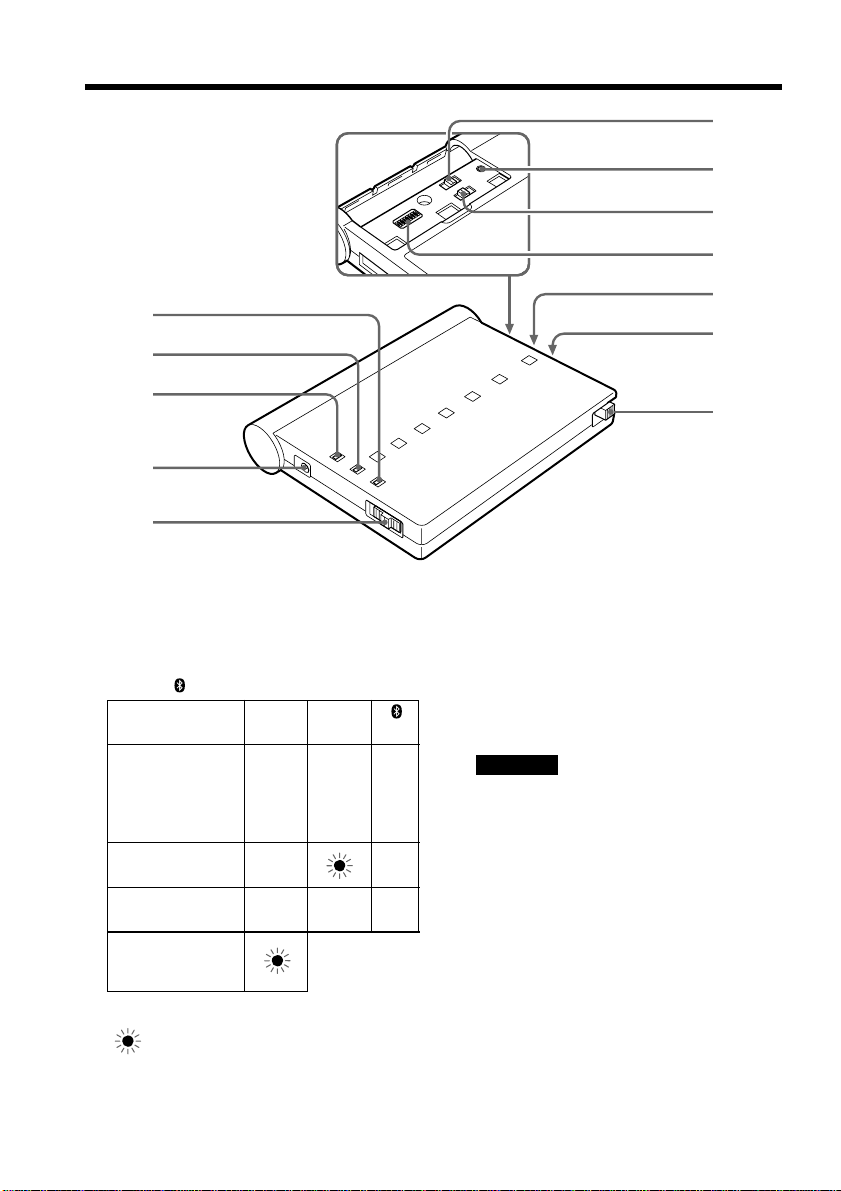
1 Témoin POWER (vert)
2 Témoin ON LINE (orange)
3 Témoin (bleu)
Témoin POWER ON LINE
(vert) (orange) (bleu)
z – z
z z
zzz
z : le témoin s’allume.
: le témoin clignote.
1
2
3
4
5
qa
q;
qs
6
7
8
9
4 Prise DC IN (alimentation CC)
5 Commutateur POWER ON/OFF
6 Commutateur TONE/PULSE10/PULSE20
(tonalités/impulsions 10/impulsions 20)
7 Touche CLEAR (remise à zéro)
Remarque
Rétablit tous les paramètres de réglage à
leurs valeurs par défaut.
8 Commutateur BONDING/NORMAL
(liaison/normal)
9 Commutateurs AREA CODE 1 à 8
(indicatif régional)
0 Couvercle du logement des piles
qa Fente pour carte modem exclusive
qs Touche d’éjection de la carte modem
exclusive
En attente de
communication
avec un
périphérique
Bluetooth
Numérotation
Transmission des
données
La capacité des
piles est
insuffisante
9-FR
Installation de l’appareil
Avant d’utiliser l’appareil, suivez les directives ci-dessous. Si la fiche du câble modem
exclusif ne convient pas à la prise téléphonique, connectez un adaptateur de fiche
correspondant (en option). La fiche du câble modem exclusif est de type RJ-11.
Installation de la carte modem exclusive et du câble modem
exclusif sur l’adaptateur de modem avec fonction Bluetooth
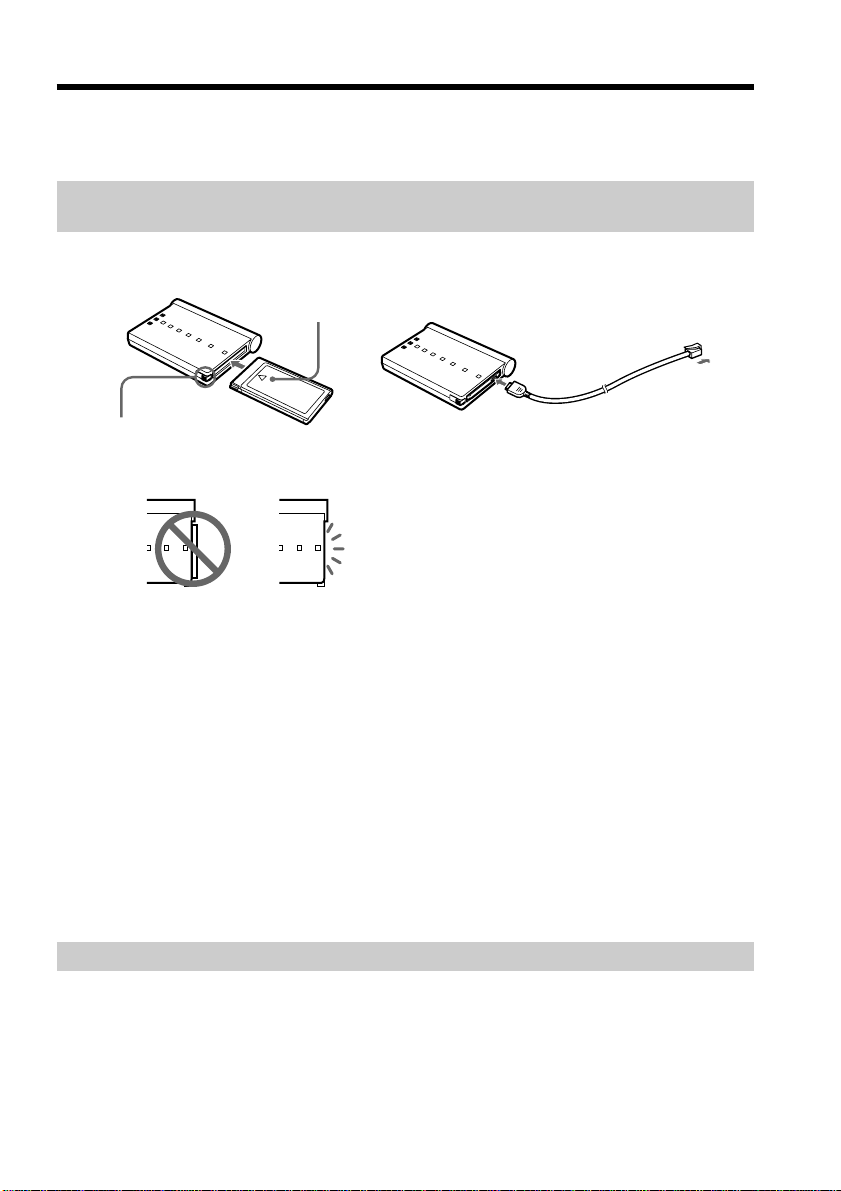
(1) Insérez la carte modem exclusive dans la fente en poussant fermement, en la
tournant pour que le symbole v soit placé vers le haut.
zConseil
Une fois que la carte modem exclusive est insérée, il n’est pas nécessaire de l’éjecter
lors de l’utilisation de l’appareil.
(2) Branchez le câble modem exclusif à la carte modem exclusive et à la prise
téléphonique.
Ejection de la carte modem exclusive
Appuyez sur la touche d’éjection de la carte modem exclusive.
Remarque
Ne pas éjecter la carte modem exclusive lorsque le témoin POWER est allumé ou
lorsqu’il clignote.
Préparation de l’alimentation
L’appareil peut être alimenté par des piles sèches alcalines de taille AA ou par
l’adaptateur secteur fourni. Toutefois, il est recommandé d’utiliser en priorité
l’adaptateur secteur fourni.
12
Touche d’éjection de la carte modem exclusive
Symbole v
Vers la prise
téléphonique
Installation
incorrecte
Installation
correcte
10-FR
x Utilisation de l’adaptateur secteur fourni
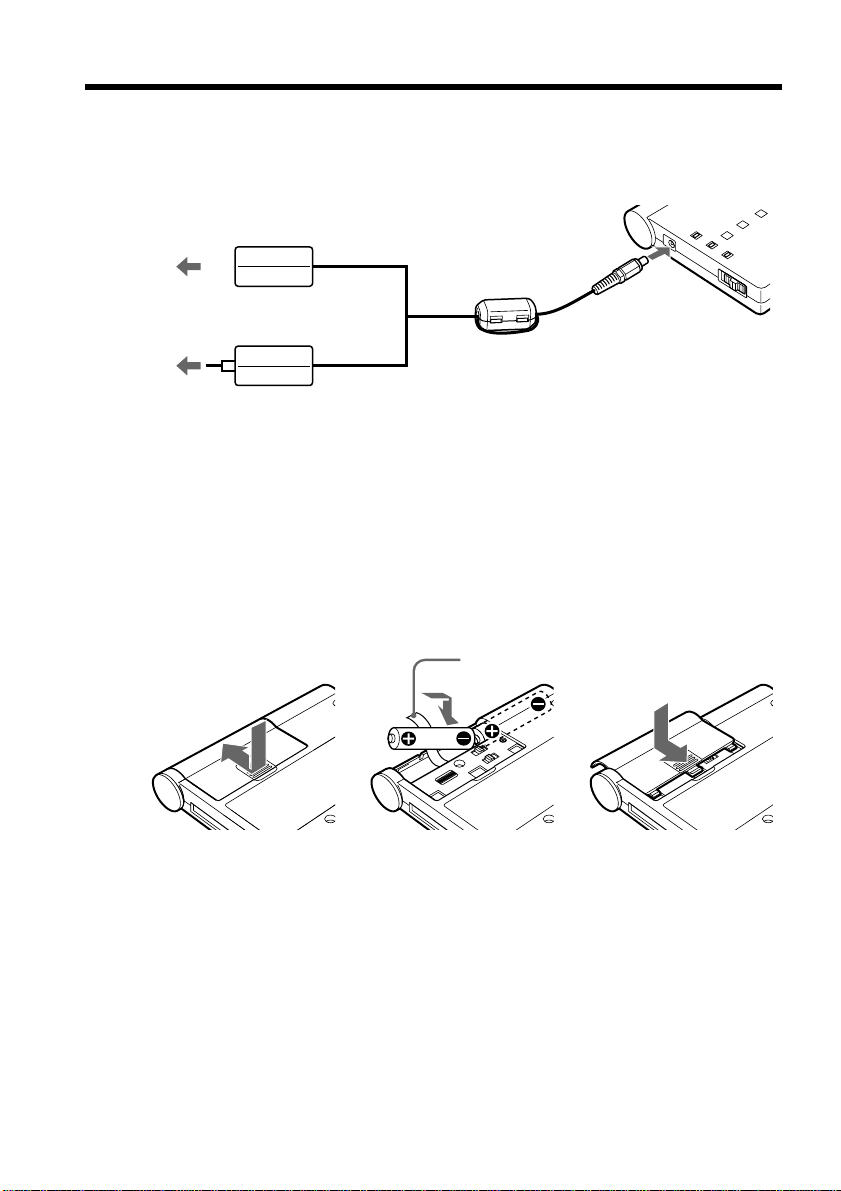
Branchez l’adaptateur secteur sur la prise DC IN de l’appareil et sur une prise murale
(secteur).
Remarques
•L’appareil doit être placé aussi près que possible de la prise murale et celle-ci doit être
facilement accessible.
•La forme de l’adaptateur secteur varie selon la région où l’appareil a été acheté.
x Insertion des piles sèches alcalines de taille AA
Pratiques, les piles permettent l’utilisation de l’appareil de façon portative.
(1) Faites glisser le couvercle du logement des piles dans la direction de la flèche
et retirez-le.
(2) Insérez deux piles sèches alcalines de taille AA dans le logement des piles en
prenant soin de suivre les indications de polarité 3 et #, et en plaçant le ruban
sous les piles.
(3) Replacez le couvercle.
Remarque
Nous recommandons l’utilisation des piles sèches alcalines Sony de taille AA.
zConseil
La prise DC IN donne priorité à l’une des sources d’alimentation. Si l’appareil
fonctionne alors que l’adaptateur secteur est branché et que des piles sèches alcalines
AA sont en place, l’alimentation est fournie par l’adaptateur secteur.
Vers la prise
DC IN
Vers la prise
murale
(secteur)
ou
Vers la prise
murale
(secteur)
Adaptateur secteur
AC-PT1
Adaptateur secteur
AC-PW1
123
Ruban
Installation de l’appareil
11-FR
Préparation de l’appareil
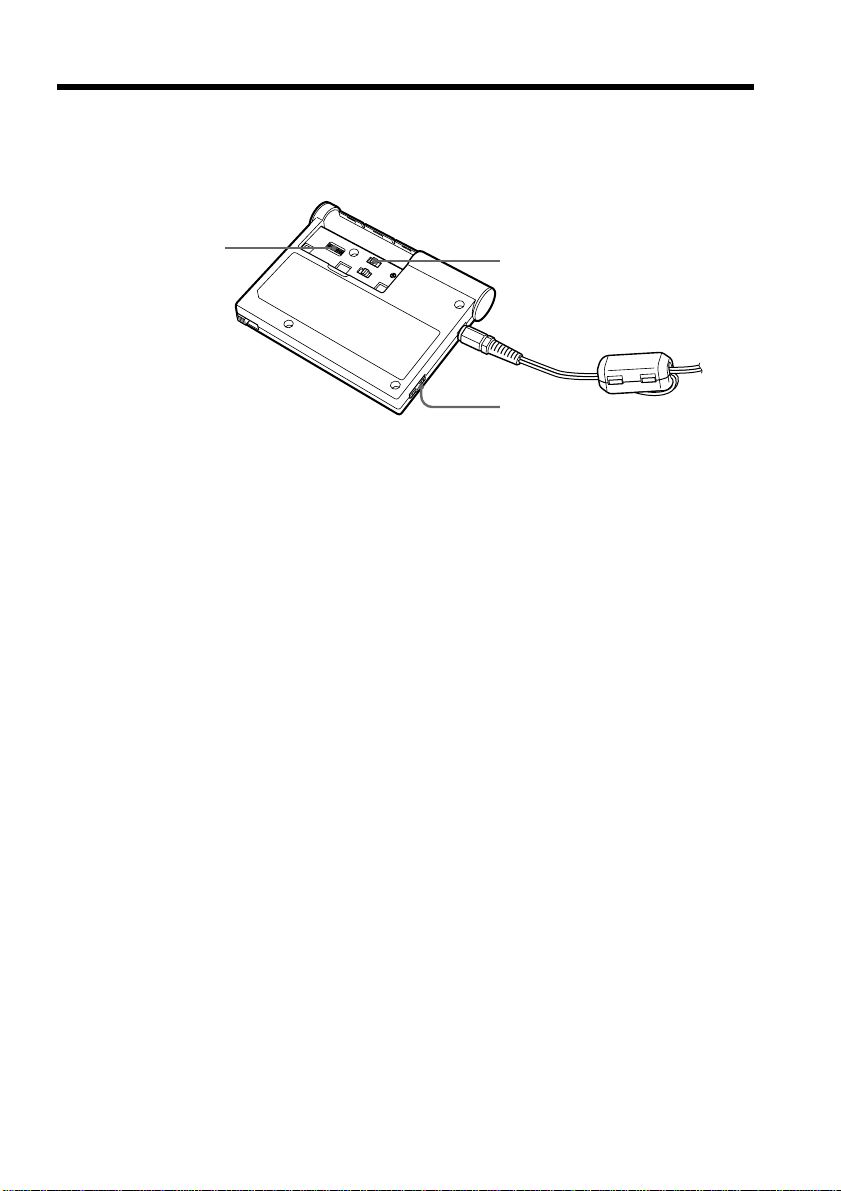
Certains paramètres doivent être réglés avant que l’appareil puisse être connecté à la
ligne téléphonique. Choisissez les paramètres correspondant au mode de numérotation
de votre téléphone. Réglez également les commutateurs AREA CODE selon votre
indicatif régional.
(1) Avant de faire les réglages, assurez-vous que le commutateur d’alimentation
POWER ON/OFF est réglé sur OFF.
(2) Retirez le couvercle du logement des piles.
(3) Sélectionnez le type de numérotation de votre téléphone via le commutateur
TONE/PULSE10/PULSE20.
TONE: Pour un téléphone à numérotation par tonalités.
PULSE10: Pour un téléphone à numérotation par impulsions.
PULSE20: Ce réglage n’est habituellement pas utilisé. Pour plus de détails, voir
la section «Vérification de la vitesse de numérotation d’un téléphone à
numérotation par impulsions» à la page 12.
zConseils
•Comment savoir si mon téléphone est muni de la numérotation par tonalités ?
Des tonalités se font entendre lorsque vous appuyez sur les touches numériques
du téléphone.
•Comment savoir si mon téléphone est muni de la numérotation par impulsions ?
Des cliquètements se font entendre lorsque vous appuyez sur les touches
numériques du téléphone.
(4) Réglez les commutateurs d’indicatif régional AREA CODE selon votre région.
Pour plus de détails, voir la section «Réglage des commutateurs AREA CODE
(indicatif régional)» à la page 12.
(5) Replacez le couvercle.
La préparation de l’appareil est terminée.
Remarques
•Si le périphérique Bluetooth avec lequel vous communiquez permet également le
réglage du type de numérotation, réglez-le comme l’adaptateur de modem. Sinon, la
connexion ne s’établit pas correctement.
•Si le commutateur TONE/PULSE10/PULSE20 n’est pas réglé sur la bonne position,
aucune communication n’est possible avec les périphériques Bluetooth.
•S’il est impossible de vérifier la vitesse de numérotation à impulsions de votre
téléphone, réglez le commutateur TONE/PULSE10/PULSE20 sur PULSE10.
3
4
1
12-FR
Vérification de la vitesse de numérotation d’un téléphone à
numérotation par impulsions
Il est possible de modifier la vitesse de numérotation de certains téléphones à
numérotation par impulsions. Pour vérifier la vitesse de numérotation, modifiez la
vitesse de numérotation du téléphone, puis surveillez les cliquètements. La
numérotation la plus lente équivaut au réglage normal. Si vous choisissez la vitesse de
numérotation rapide, réglez le commutateur TONE/PULSE10/PULSE20 sur PULSE20.
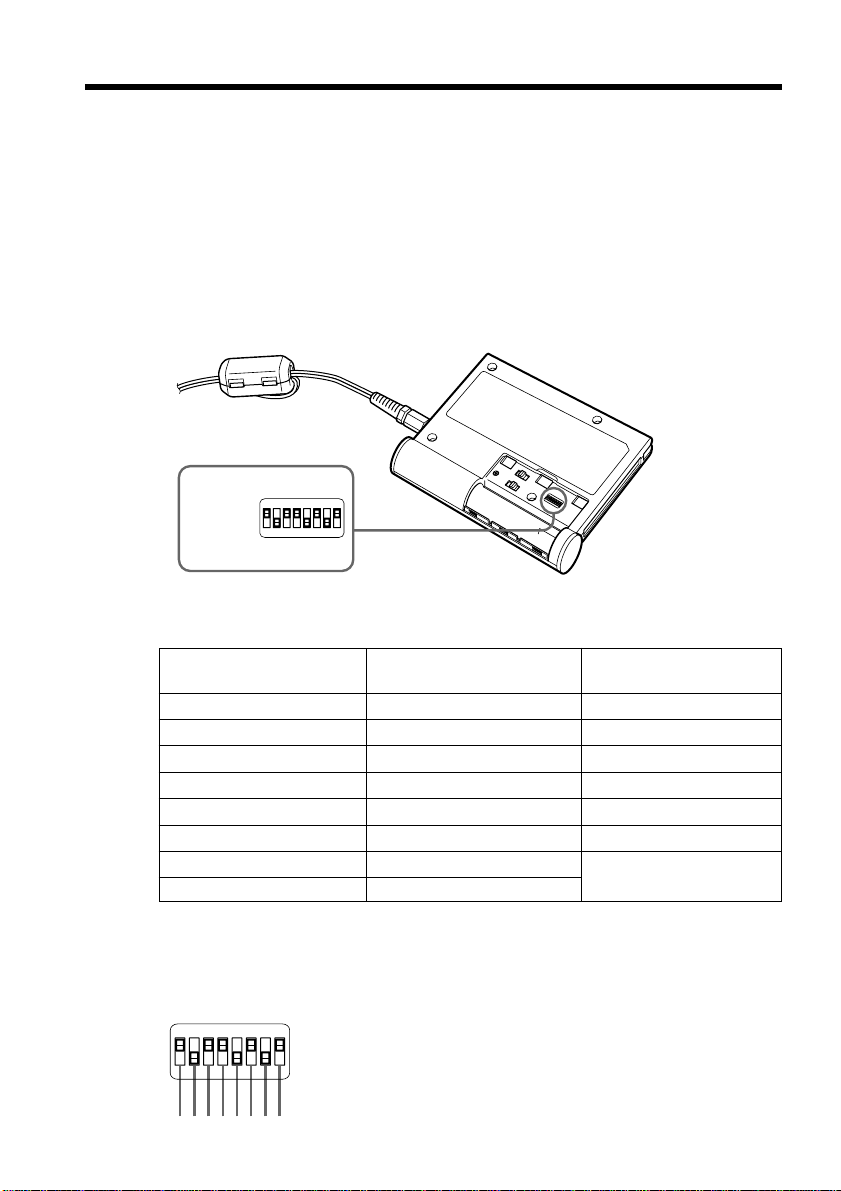
Réglage des commutateurs AREA CODE (indicatif régional)
A l’aide d’un objet pointu, réglez les commutateurs AREA CODE sur les positions
voulues selon les paramètres indiqués dans le tableau ci-dessous. L’appareil ne peut
être utilisé que dans les régions et pays indiqués dans ce tableau.
Liste de réglage des commutateurs AREA CODE
Pays ou Réglage Pays ou Réglage Pays ou Réglage
région région région
Autriche 00001001 Grèce 01000110 Portugal 10001011
Australie 00001010 Hong Kong 01010000 Singapour 10011100
Belgique 00001111 Irlande 01010111 Suède 10100101
Canada 00100000 Japon 00000000 Suisse 10100110
Danemark 00110001 Luxembourg 01101001 R.U. 10110100
Finlande 00111100 Pays-Bas 01111011 E.U. 10110101
France 00111101 Nouvelle-Zélande 01111110
Allemagne 01000010 Norvège 10000010
Remarques
•Dans le tableau ci-dessus, le paramètre «1» indique que le commutateur
correspondant doit être réglé sur «ON».
•La correspondance entre le numéro à huit chiffres du tableau et les positions des
commutateurs est illustrée ci-dessous. Par exemple, pour les Etats-Unis :
Préparation de l’appareil
Commutateurs
AREA
CODE
ON
12345678
1 0 1 1 0 1 0 1
ON
12345678
13-FR
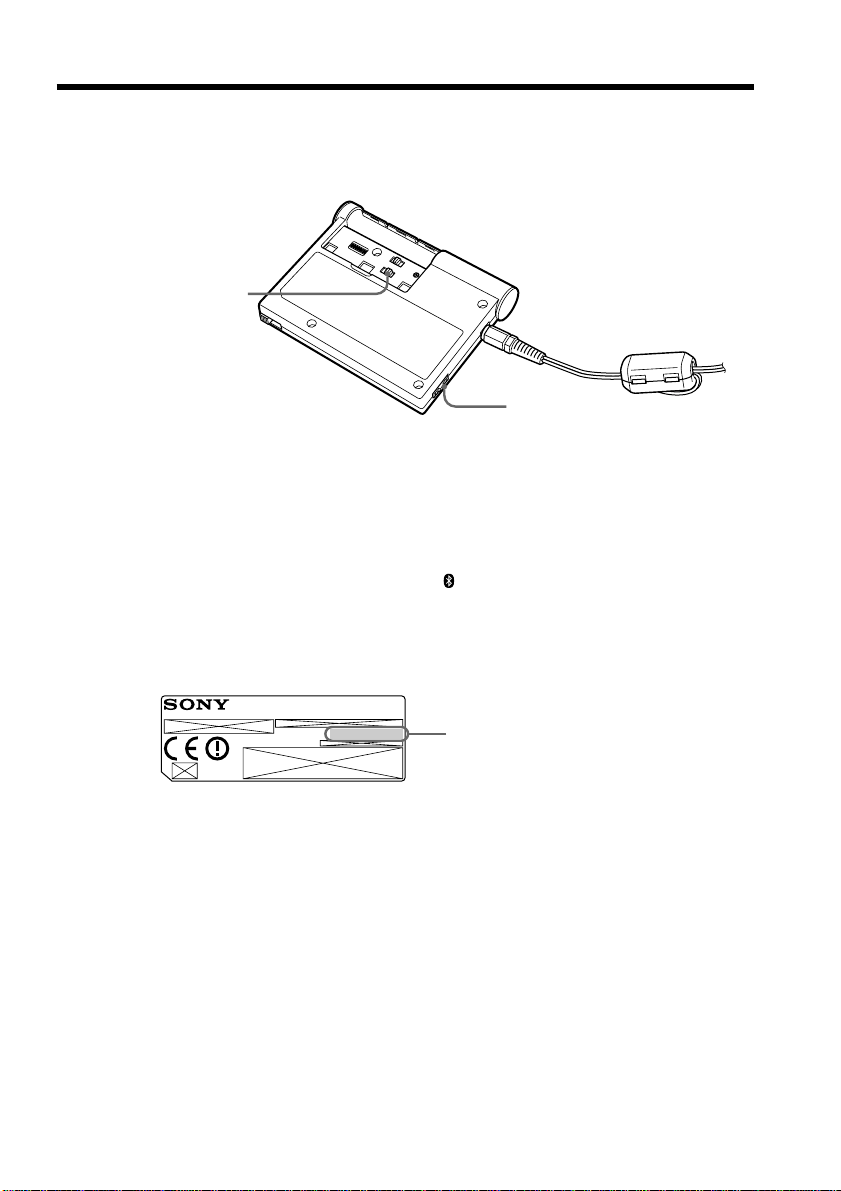
Jusqu’à 16 périphériques Bluetooth peuvent être enregistrés dans cet appareil. Pour
l’enregistrement d’un périphérique Bluetooth, reportez-vous à son mode d’emploi.
Avant de pouvoir enregistrer un 17e périphérique, vous devez effacer tous les
enregistrements précédents.
(1) Avant de commencer l’enregistrement, réglez le commutateur POWER ON/
OFF sur OFF.
(2) Retirez le couvercle du logement des piles.
(3) Réglez le commutateur BONDING/NORMAL sur BONDING.
(4) Réglez le commutateur POWER ON/OFF sur ON.
Le témoin POWER (vert) et le témoin
(bleu) s’allument.
(5) Allumez le périphérique Bluetooth, puis entrez-y le numéro de série (pass key)
inscrit sur l’étiquette apposée à l’arrière de l’appareil.
Pour plus de détails sur la façon d’entrer ce numéro, reportez-vous au mode
d’emploi du périphérique Bluetooth.
zConseil
Le numéro de série est un numéro d’identification requis pour permettre la
communication entre deux périphériques Bluetooth. Ce numéro est également
appelé «Code d’accès», «Code d’accès Bluetooth», «NIP», «NIP Bluetooth», etc.
(6) Réglez le commutateur POWER ON/OFF sur OFF.
(7) Réglez le commutateur BONDING/NORMAL sur NORMAL.
Remarque
Assurez-vous de bien régler le commutateur sur NORMAL. Si vous utilisez
l’appareil alors que le commutateur est sur la position BONDING, vos
communications seront reçues par d’autres appareils.
(8) Replacez le couvercle.
(9) Réglez le commutateur POWER ON/OFF sur ON.
L’enregistrement est terminé.
Enregistrement des périphériques
Bluetooth
3, 7
1, 4, 6, 9
Numéro de série
Ce numéro sert de clé pour
l’enregistrement d’un périphérique
Bluetooth
MODEM ADAPTOR WITH BLUETOOTH
TM
FUNCTION
MODEL NO.
BTA-NW1
®

14-FR
Enregistrement d’un 17e périphérique Bluetooth
Pour que l’enregistrement d’un 17e périphérique Bluetooth soit possible, tous les
enregistrements précédents doivent être effacés. Pour effacer tous les enregistrements,
appuyez sur la touche CLEAR avec un objet pointu. Eteignez ensuite l’appareil, puis
rallumez-le. Il est maintenant possible d’enregistrer un nouveau périphérique
Bluetooth.
Remarques
•Pour enregistrer des périphériques Bluetooth, assurez-vous de régler le commutateur
BONDING/NORMAL sur BONDING avant d’allumer l’appareil.
•Un maximum de 16 périphériques Bluetooth peuvent être enregistrés à la fois. Si vous
tentez d’enregistrer un 17e périphérique Bluetooth, les témoins ON LINE, et
POWER clignotent pendant 30 secondes.
Enregistrement des périphériques Bluetooth
15-FR
Communication avec un périphérique
Bluetooth
L’enregistrement d’un périphérique Bluetooth vous permet de communiquer avec
celui-ci.
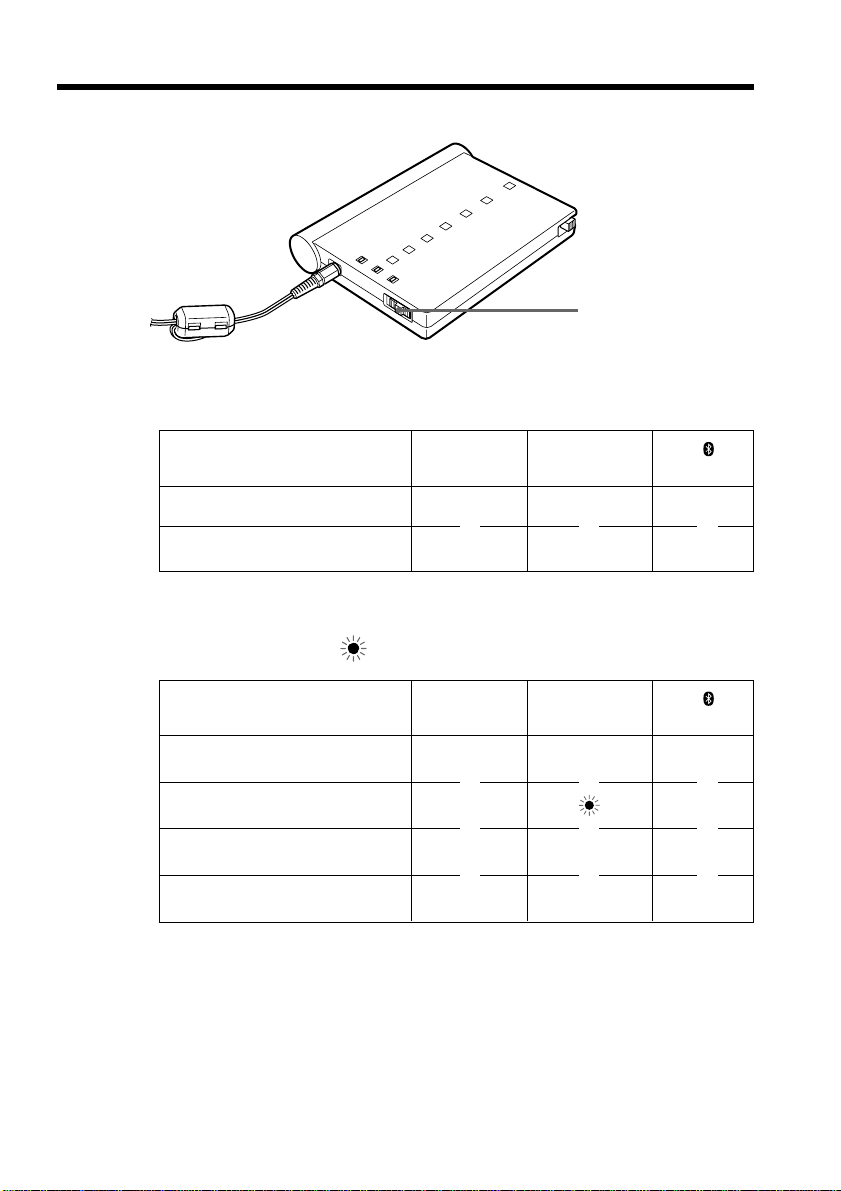
(1) Réglez le commutateur POWER ON/OFF sur ON.
Les témoins s’allument tel que décrit ci-dessous. (z : le témoin s’allume.)
POWER ON LINE
(vert) (orange) (bleu)
z ––
z – z
(2) Allumez le périphérique Bluetooth enregistré et lancez la communication.
Les témoins s’allument ou clignotent tel qu’indiqué ci-dessous.
(z : le témoin s’allume.
: le témoin clignote.)
POWER ON LINE
(vert) (orange) (bleu)
z – z
z z
zzz
z – z
Après utilisation de l’appareil
Réglez le commutateur POWER ON/OFF sur OFF pour mettre l’appareil hors tension.
Remarques
•Lorsque l’alimentation est fournie par des piles sèches alcalines de taille AA, le temps
de communication continue est d’environ 60 minutes.
•Lorsque le commutateur POWER ON/OFF est réglé sur ON, les piles s’usent même si
l’appareil n’est pas en communication.
•Lorsque vous ne comptez pas utiliser l’appareil pendant une longue période, retirez-
en les piles sèches alcalines de taille AA.
1
Attente de communication avec un
périphérique Bluetooth
Numérotation
Transmission de données
Transmission des données terminée
m
m
m
m
m
m
m
m
m
m
m
m
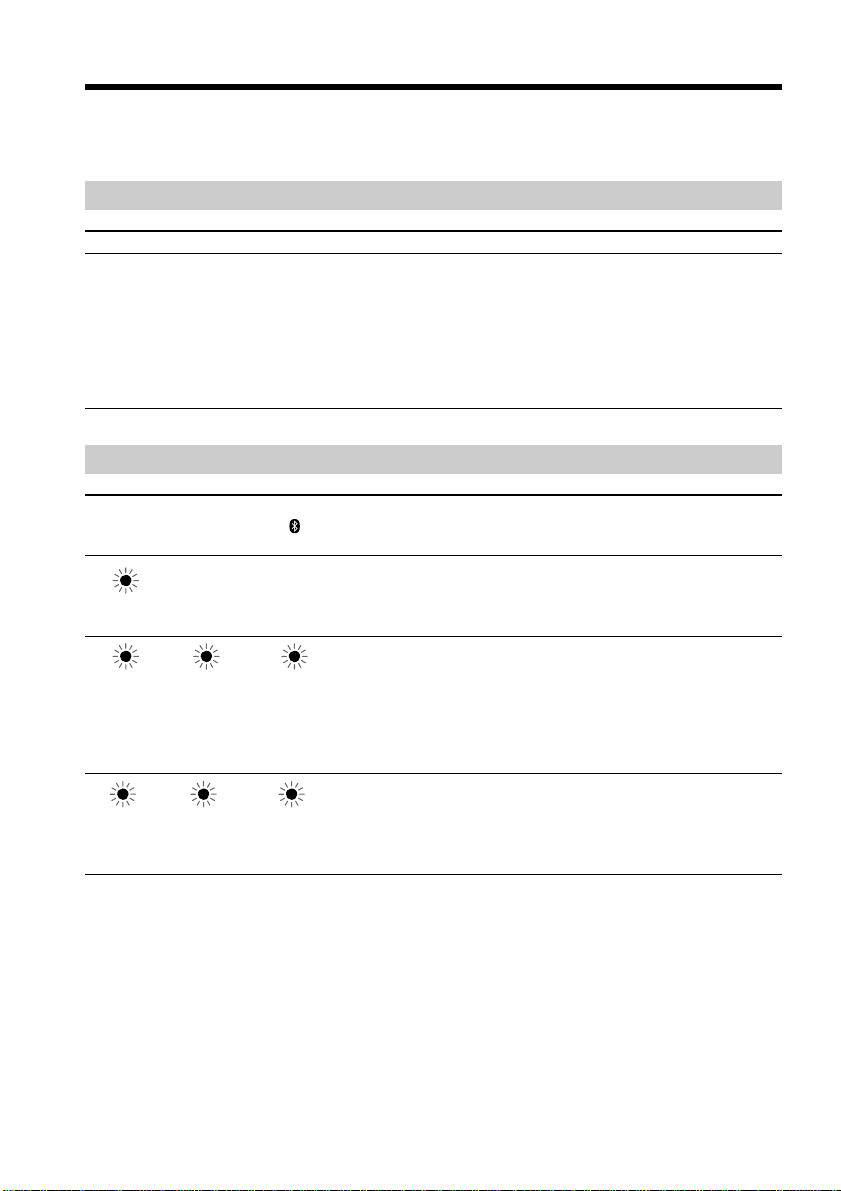
16-FR
Dépannage
Si vous constatez des problèmes de fonctionnement de l’appareil, vérifiez d’abord les
symptômes et remèdes ci-dessous. Si votre appareil continue de mal fonctionner,
consultez votre revendeur Sony ou le centre d’entretien Sony agréé le plus proche.
Alimentation
Symptôme Cause et solution
• Les piles sont complètement à plat.
c Remplacez-les par des sèches alcalines de taille AA
neuves.
• Les piles utilisées ne sont pas du type recommandé.
c Remplacez-les par des piles du type recommandé.
• L’adaptateur secteur fourni n’est pas correctement branché
sur une prise murale (secteur).
c Branchez-le correctement.
Les témoins
Témoins Cause et solution
Les piles sont à plat.
c Remplacez-les par des piles sèches alcalines de taille AA
neuves.
c Utilisez l’adaptateur secteur fourni.
• La carte modem exclusive n’est pas insérée.
c Insérez correctement la carte modem exclusive et
rallumez l’appareil.
• La carte modem exclusive ou l’appareil est défectueux(se).
c Eteignez, puis rallumez l’appareil. Si vous n’arrivez pas
à éteindre l’appareil ou à le rallumer, contactez votre
revendeur Sony le plus proche.
Vous avez tenté de connecter un périphérique Bluetooth non
enregistré alors que 16 périphériques Bluetooth sont déjà
enregistrés dans l’appareil.
c Appuyez sur CLEAR pour effacer les enregistrements et
enregistrer un nouveau périphérique Bluetooth.
* Clignote pendant environ 30 secondes.
L’appareil ne s’allume pas.
POWER ON LINE
(vert) (orange) (bleu)
––
* * *

17-FR
Communication
Symptôme Cause et solution
• La carte modem exclusive n’est pas insérée correctement.
c Insérez la carte correctement. Reportez-vous à la section
«Préparation de l’appareil» à la page 9.
• Les piles sont complètement à plat.
c Remplacez-les par des piles sèches alcalines de taille AA
neuves.
• Le réglage des commutateurs AREA CODE est incorrect.
c Réglez-les correctement. Reportez-vous à la section
«Préparation de l’appareil» à la page 11.
• La position du commutateur TONE/PULSE10/PULSE20
est incorrecte.
c Réglez-le sur la bonne position. Reportez-vous à la
section «Préparation de l’appareil» à la page 11.
• L’appareil n’est pas repéré lorsque le commutateur
BONDING/NORMAL est réglé sur NORMAL.
c Réglez-le sur BONDING.
• Pendant la communication avec un autre périphérique
Bluetooth, l’appareil peut ne pas être repéré par la
recherche de l’autre périphérique Bluetooth ou ne pas être
en mesure de communiquer avec lui.
c Vérifiez si l’appareil est en communication avec l’autre
périphérique Bluetooth.
• Il est possible que la distance séparant l’appareil du
périphérique doit être réduite à moins de 10 m (32,8 pieds)
selon les obstacles séparant les appareils et selon les ondes
radio présentes.
c Déplacez l’appareil ou réduisez la distance le séparant
de l’autre périphérique Bluetooth.
• Pendant la communication avec un autre périphérique
Bluetooth, l’appareil peut ne pas être repéré par la
recherche de l’autre périphérique Bluetooth ou ne pas être
en mesure de communiquer avec celui-ci.
c Vérifiez si l’appareil est en communication avec l’autre
périphérique Bluetooth.
L’appareil ne peut pas
communiquer avec d’autres
périphériques Bluetooth.
L’appareil n’est pas repéré lors
d’un nouveau balayage.
Même si l’appareil et le
périphérique Bluetooth sont à
moins de 10 m (32,8 pieds) l’un de
l’autre, la connexion peut ne pas
être établie ou peut être
interrompue en cours de
communication.
Dépannage

18-FR
Spécifications
Communication
sans fil
Système de communication
Spécification Bluetooth Ver. 1.1
Vitesse de communication
maximale
1) 2)
723 kbps environ
Sortie maximale
3)
Spécification Bluetooth classe de
consommation 1
Sensibilité du récepteur
3)
– 70 dBm
Distance de communication
2)
10 m (32,8 pieds) (sans obstacles,
lors de l’utilisation d’une caméra
Sony Network Handycam avec la
fonction Bluetooth)
Profils Bluetooth compatibles
4)
Profil Generic Access
Profil de réseau commuté
Bande de fréquences utilisable
Bande 2,4 GHz
(2,400 à 2,4835 GHz)
Carte modem
exclusive
Type de ligne utilisable
Ligne téléphonique analogique
Interface du circuit
téléphonique
Interface à 2 lignes
Communicateur réseau (NCU)
AA
Numérotation téléphonique
Numérotation par impulsions
(10/20 impulsions/s)
Numérotation par tonalités
Contrôle du communicateur
réseau (NCU)
AT (contrôle par l’ordinateur)
Format de communication
Double
Débit de communication
d’envoi
300/1200/2400/4800/7200/9600/
12000/14400/16800/19200/
21600/24000/26400/28800/
31200/33600 bps
Débit de communication de
réception
300/1200/2400/4800/7200/9600/
12000/14400/16800/19200/
21600/24000/26400/28800/
31200/33600/34000/34667/
36000/37333/38000/38667/
40000/41333/42000/42667/
44000/45333/46000/46667/
48000/49333/50000/50667/
52000/53333/54000/54667/
56000 bps
Normes de modulation
ITU-T V.21/V.22/V.22bis/V.32/
V.32bis/V.34/V.90, BELL 212A/
103, K56flex™
Sensibilité de l’émetteur
–10 à –15 dBm
Sensibilité du récepteur
–10 à –40 dBm
Correction des erreurs
MNP Classe 4/10, ITU-T V.42
Compression des données
MNP classe 5, ITU-T V.42bis
Généralités
Sources d’alimentation
Adaptateur secteur ou deux piles
sèches alcalines de taille AA
Durée de vie des piles (en
service
5)
)
60 minutes environ
6)
Durée de vie des piles (en
attente
7)
)
90 minutes environ
6)
Alimentation requise
5,5 à 6,5 V (entrée CC) ou deux
piles sèches alcalines de taille AA
Consommation électrique
290 mA (en service, avec
alimentation CC de 6 V), 200 mA
(en attente , avec alimentation CC
de 6 V)
Dimensions
115×20×88 mm environ
(4 5/8×13/16×3 1/2 pouces) (l/h/
p)
Poids
185 g (6,5 on) environ (y compris
les piles sèches alcalines de taille
AA et la carte modem exclusive)
Température de
fonctionnement
0 à 40°C (32 à 104°F)
8)
Température de stockage
–20 à 60°C (–4 à 140°F)
Pays et régions de disponibilité
Allemagne, Australie, Autriche,
Belgique, Canada, Danemark,
Etats-Unis, Finlande, France,
Grèce, Hong Kong, Irlande, Japon,
Luxembourg, Nouvelle-Zélande,
Norvège, Pays-Bas, Portugal,
Singapour, Suède, Suisse et
Royaume-Uni.
(Au Canada et en France, pour
utilisation à l’intérieur
uniquement.)
Adaptateur secteur
Alimentation requise
(Le type de l’adaptateur est
indiqué sur celui-ci.)
AC-PT1: 120 V CA, 60 Hz (pour
les clients aux Etats-Unis et au
Canada), 230 à 240 V CA, 50 Hz
(pour les clients au Royaume-
Uni), 220 à 230 V CA, 50/60 Hz
(pour les clients ailleurs dans le
monde)
AC-PW1: 110 à 240 V CA,
50/60 Hz
Tension nominale de sortie
CC 6 V, 880 mA (AC-PT1) ou
1,3 A (AC-PW1)
Accessoires
Carte modem exclusive (MDM-
5614G) (1)
Câble modem exclusif (1)
Adaptateur secteur (AC-PT1 ou
AC-PW1) (1)
Câble d’alimentation secteur (1)
9)
Piles sèches alcalines de taille AA
(2)
Mode d’emploi (1)
10)
1)Vitesse de communication
maximale des données de la
spécification Bluetooth Ver. 1.1
2)Selon les obstacles entre les
périphériques Bluetooth, les
ondes radio présentes, etc.
3)Sans gain d’antenne
4)Définie par la spécification
Bluetooth pour une utilisation
entre périphériques Bluetooth
5)Etat de l’appareil pendant la
transmission de données. (Le
commutateur POWER ON/
OFF est réglé sur ON.)
6)A température ambiante avec
des piles sèches alcalines Sony
de taille AA.
7)L’appareil est en attente de
communication avec un
périphérique Bluetooth. (Le
commutateur POWER ON/
OFF est réglé sur ON.)
8)Les piles sèches alcalines de
taille AA ne sont pas utilisables
à basse température. Utilisez
l’adaptateur secteur.
9)Fourni pour l’adaptateur
secteur AC-PW1 uniquement
10
)Deux modes d’emploi sont
fournis en fonction de la région.
La conception et les spécifications
sont sujettes à modification sans
préavis.


Sony Corporation Printed in Japan
307012411