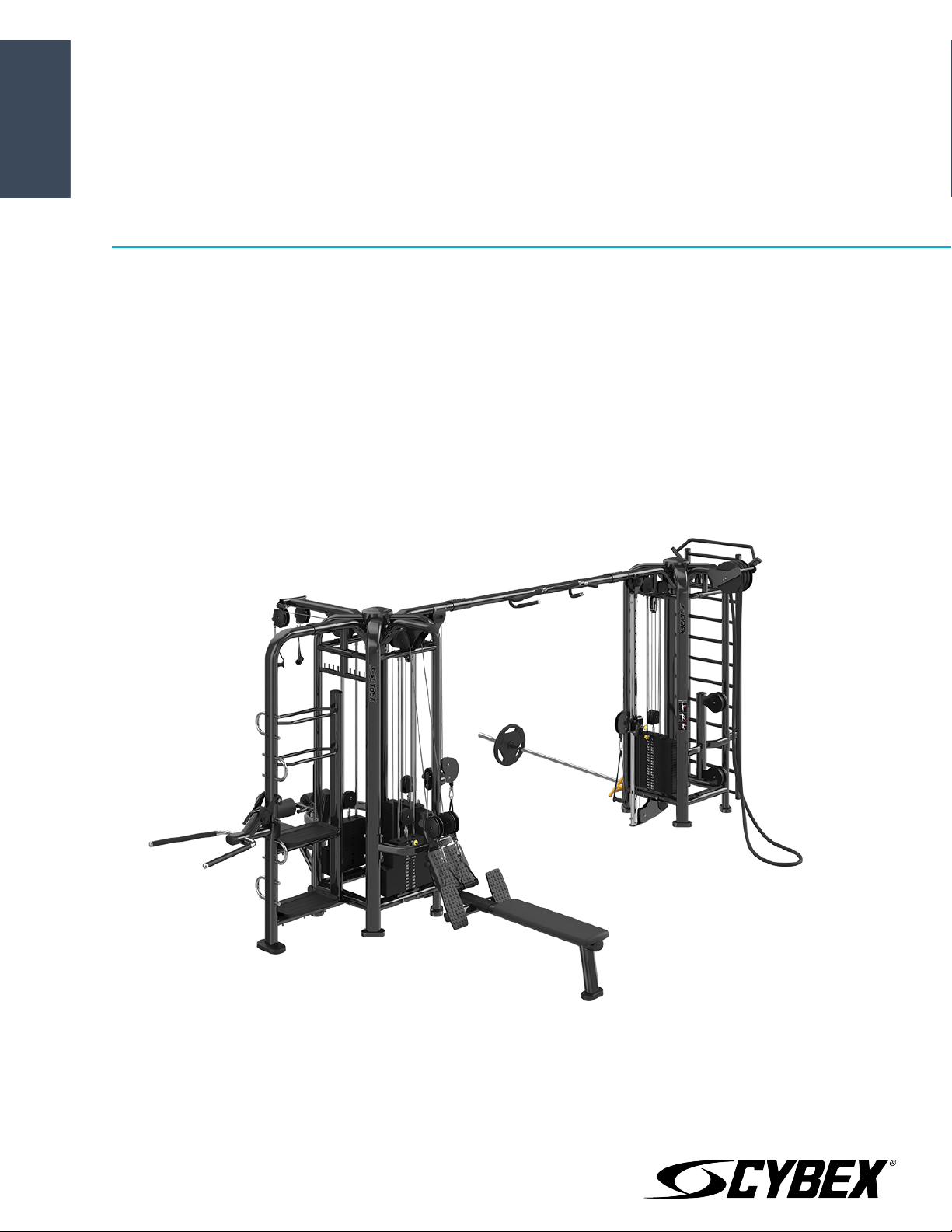
PWR Play
Assembly Manual
PP-ACO, PP-ACOFS, PP-ADC, PP-AP, PP-AP41, PP-AXO, PP-BLNKSHRD, PP-BM, PP-BX,
PP-CORE, PP-DIP, PP-DPH, PP-DPL, PP-FCO, PP-FXO, PP-HAR, PP-HL, PP-LP, PP-LPD, PP-PP,
PP-RP, PP-RPL, PP-RW, PP-RWD, PP-SB, PP-SC, PP-STP, PP-SX, PP-TP
Part Number
1006701-0001 AA


Table of Contents
Safety
Safety Information........................................................................................................................4
Access Control...............................................................................................................................4
Installation......................................................................................................................................4
Proper Usage.................................................................................................................................4
Inspection.......................................................................................................................................4
Operating Warnings......................................................................................................................5
Selectorized Weight Stack Systems..........................................................................................5
Warnings and Cautions................................................................................................................5
Product Labels...............................................................................................................................6
Customer Service
Product Registration....................................................................................................................7
Ordering Parts................................................................................................................................7
Return Material Authorization (RMA)........................................................................................7
Damaged Parts..............................................................................................................................8
Assembly
Install Weight Stacks....................................................................................................................9
Install Top Mount........................................................................................................................12
Install Top Mount........................................................................................................................13
Install Lower Mount....................................................................................................................16
Install Lower Mount....................................................................................................................18
Install Lower Mount....................................................................................................................19
Install Lower Mount....................................................................................................................19
Install Lower Mount....................................................................................................................20
Install Crossover..........................................................................................................................23
Install Handle Accessory Rack..................................................................................................24
Install Storage Connector.........................................................................................................25
Install Storage Station...............................................................................................................26
Install Blank Shroud...................................................................................................................28
Install Front Shroud....................................................................................................................29
Install Placard..............................................................................................................................32
Carriage Adjustment Guide.......................................................................................................33
Cable Routing..............................................................................................................................34
Cable Handling Guide
Cable Connections, Seating, and Installation.......................................................................45
Cabling Procedure......................................................................................................................46
Tensioning Cable........................................................................................................................47
Strength Cable Wear Guidelines..............................................................................................47
Bolt to Floor Guidelines
Introduction.................................................................................................................................49
Delivery and Installation Tips...................................................................................................50
Anchor Selection.........................................................................................................................50
Pullout Force................................................................................................................................51
Tools Required............................................................................................................................51
Static Anchor Procedure...........................................................................................................52
Foot Dimensions.........................................................................................................................53
Cybex
®
and the Cybex logo are registered trademarks of Cybex International, Inc.
DISCLAIMER: Cybex International, Inc. makes no representations or warranties regarding the contents of this manual. We reserve the right to revise this document
at any time or to make changes to the product described within it without notice or obligation to notify any person of such revisions or changes.
©
Copyright 2017, Cybex International, Inc.
Columbia Center III - 9525 West Bryn Mawr Ave, Rosemont, IL 60018 • 800-351-3737 • 847-288-3700 • FAX 800-216-8893
www.cybexintl.com • 1006701-0001 AA • May 2017
Page 3 of 54

Safety
Safety Information
It is the sole responsibility of the purchaser of CYBEX INTERNATIONAL INC. products to read the owner’s manual
and warning labels and instruct all individuals, whether they are the end user or supervising personnel, on proper
usage of the equipment.
UNDERSTANDING EACH AND EVERY WARNING TO THE FULLEST IS IMPORTANT. IF ANY OF THESE WARNINGS ARE
UNCLEAR, CONTACT CYBEX INTERNATIONAL INC. CUSTOMER SERVICE IMMEDIATELY AT 1-800-351-3737.
This equipment is categorized as class S per EN ISO 20957-1. As such this equipment is only intended for commercial,
institutional and/or studio facilities. It is not intended for home use. Contact CYBEX INTERNATIONAL INC. with any
questions regarding this classification.
It is recommended that all users of CYBEX INTERNATIONAL INC. exercise equipment be informed of the following
information prior to use.
Access Control
CYBEX INTERNATIONAL INC. recommends that all commercial fitness equipment be used in a supervised area. It
is recommended that the equipment be located in an access controlled area. Control is the responsibility of the
facility owner.
Installation
SECURING EQUIPMENT - CYBEX INTERNATIONAL INC. requires that all equipment be secured to a solid, level
surface to stabilize it and eliminate rocking or tipping over. This must be performed by a licensed contractor. See
Bolt to Floor Guidelines for installation procedure.
Proper Usage
• Do not use any equipment in any way other than designed or intended by the manufacturer. It is imperative
that CYBEX INTERNATIONAL INC. equipment is used properly to avoid injury.
• Injuries may result if exercising improperly or excessively. It is recommended that all individuals consult a
physician prior to commencing an exercise program. If at any time during exercise you feel faint, dizzy or
experience pain, STOP EXERCISING and consult your physician.
• Keep body parts (hands, feet, hair, etc.), clothing and jewelry away from moving parts to avoid injury.
• When adjusting any seat, knee hold down pad, range of motion limiter, foothold pad, pulley or any other type
of adjuster, make certain that the adjusting pin is fully engaged in the hole to avoid injury.
Inspection
• DO NOT use or permit use of any equipment that is damaged and/or has worn or broken parts. For all CYBEX
INTERNATIONAL INC. equipment use only replacement parts supplied by CYBEX INTERNATIONAL INC..
• Cables and belts pose an extreme liability if used when frayed. Always replace any cable at first sign of wear
(consult CYBEX INTERNATIONAL INC. if uncertain).
• Routinely inspect all accessory clips that join attachments to the cables and replace them at the first sign of
wear.
• MAINTAIN LABELS AND NAME PLATES - Do not remove labels for any reason. They contain important information.
If unreadable or missing, contact CYBEX INTERNATIONAL INC. for a replacement.
• EQUIPMENT MAINTENANCE - Preventative maintenance is the key to smooth operating equipment as well as
to keep your liability to a minimum. Equipment needs to be inspected at regular intervals.
Page 4 of 54

• Ensure that any person(s) making adjustments or performing maintenance or repair of any kind is qualified to
do so. CYBEX INTERNATIONAL INC. will provide service and maintenance training at our corporate facility upon
request or in the field if proper arrangements are made.
• Before any use, examine all accessories approved for use with the CYBEX INTERNATIONAL INC. equipment for
damage or wear.
• DO NOT ATTEMPT TO USE OR REPAIR ANY ACCESSORY APPROVED FOR USE WITH THE CYBEX INTERNATIONAL
INC. EQUIPMENT WHICH APPEARS TO BE DAMAGED OR WORN.
Operating Warnings
• It is the purchaser’s sole responsibility to properly instruct its end users and supervising personnel as to the
proper operating procedures of all equipment.
• Keep children away from strength equipment. Parents or others supervising children must provide close
supervision of children if the equipment is used in the presence of children.
• Do not allow users to wear loose fitting clothing or jewelry while using equipment. It is also recommended to
have users secure long hair back and up to avoid contact with moving parts.
• All bystanders must stay clear of all users, moving parts and attached accessories and components while
machine is in operation.
• Health and Environmental Regulations Warning - This product may contain chemicals known to the State of
California to cause cancer, birth defects, or other reproductive harm. For more information related to the
European Commission Regulation (EC) No. 1907/2006 (REACH) and the California Safe Drinking Water and Toxic
Enforcement Act of 1986 (Proposition 65), please visit
https://www.lftechsupport.com/web/guest/environmental-regulations-information.
Selectorized Weight Stack Systems
• Use only weight selector pins supplied by CYBEX INTERNATIONAL INC. on weight stacks. Substitutes are
forbidden.
• Fully insert weight selector pins. Partial insertion can cause weights to fall unexpectedly.
• Never pin the weight stack in an elevated position.
• Never remove selector pin if any weights are suspended.
• Never attempt to release jammed weights or parts.
• Never use dumbbells or other means to incrementally increase the weight resistance. Use only those means
provided by CYBEX INTERNATIONAL INC..
Warnings and Cautions
Warning labels indicate a potentially hazardous situation that could result in serious injury or death if the precautions
are not observed.
Caution labels indicate a potentially hazardous situation that could result in serious injury or damage to machine
if the precautions are not observed.
Contact Cybex Customer Service to replace any worn or damaged labels.
Page 5 of 54
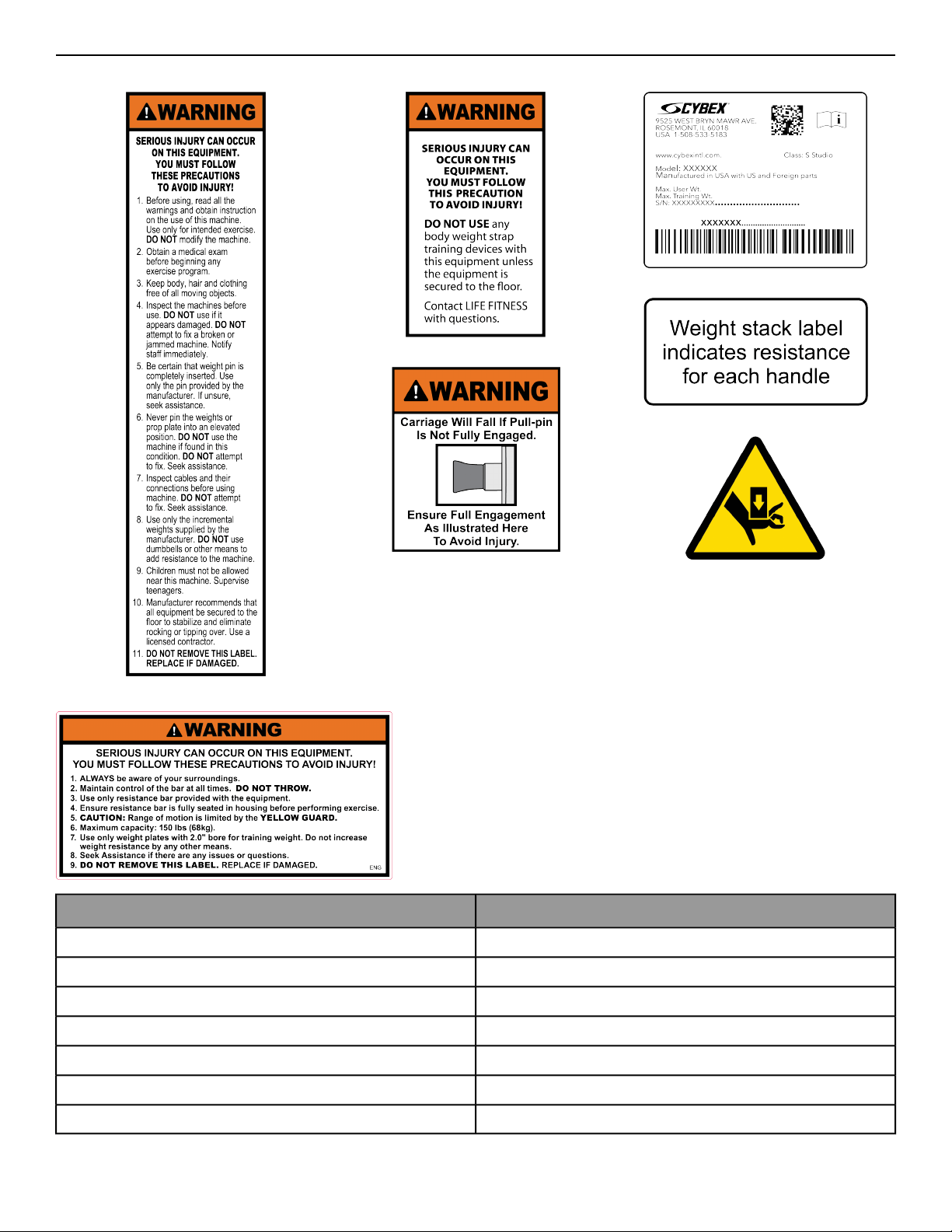
Product Labels
Serial Number LabelBody Weight Strap Training LabelGeneral Warning Label
Weight At Handle Label
Pinch Hazard Label
Carriage Label
Power Pivot Label
LocationDescription
Tower FrameGeneral Warning Label
Tower FrameBody Weight Strap Training Label
CarriageCarriage Label
Tower Frame and Top or Lower Mount of StationsSerial Number Label
Top of Weight StackWeight At Handle Label
Pinch PointsPinch Hazard Label
Lower Mount of Power PivotPower Pivot Label
Page 6 of 54

Customer Service
Product Registration
To register product do the following:.
1. Visit www.cybexintl.com.
2. Locate Product Registration in the Support section.
3. Fill out form completely.
4. Click the Submit button to register product.
Ordering Parts
To order parts online go to www.cybexintl.com.
To speak with a customer service representative, call 800-351-3737 (for customers living within the USA) or
847-288-3700 (for customers outside the USA).
The following information located on the serial number decal will assist our Cybex representatives in serving you.
• Unit Serial Number, Product Name and Model Number
• Part Description and Part Number if you have it. All parts can be found on the web at www.cybexintl.com
• Shipping Address
• Contact Name
• Include a description of the problem.
In addition to your shipping address and contact name, your account number is helpful but not required. You may
also fax orders to 800-216-8893.
Return Material Authorization (RMA)
The Return Material Authorization (RMA) system is used when returning material for placement, repair or credit.
The system assures that returned materials are properly handled and analyzed. Follow the following procedures
carefully.
Contact your authorized Cybex dealer on all warranty-related matters. Your local Cybex dealer will request a RMA
from Cybex, if applicable. Under no circumstances will defective parts or equipment be accepted by Cybex without
proper RMA and an Automated Return Service (ARS) label.
Please contact Cybex Customer Service for the return of any item that is defective.
Provide the technician with a detailed description of the problem you are having or the defect in the item you wish
to return. Provide the model and serial number of your Cybex equipment.
At Cybex’s discretion, the technician may request that you return the problem part(s) to Cybex for evaluation and
repair or replacement. The technician will assign you a RMA number and will send you an ARS label. The ARS label
and the RMA numbers must be clearly displayed on the outside of the package that contains the item(s) to be
returned. Include the description of the problem, the serial number of the equipment and the name and address
of the owner in the package along with the part(s).
Merchandise returned without an RMA number on the outside of the package or shipments sent COD will not be
accepted by the Cybex receiving department.
Page 7 of 54

Damaged Parts
Materials damaged in shipment should not be returned for credit. Shipping damages are the responsibility of the
carrier (UPS, Federal Express, trucking companies, etc.)
Apparent Damage
Upon receipt of your shipment, check all items carefully. Any damage seen with a visual check must be noted on
the freight bill and signed by the carrier’s agent. Failure to do so will result in the carriers refusal to honor your
damage claim. The carrier will provide you with the required forms for filing such claims.
Concealed Damage
Damage not seen with a visual check upon receipt of a shipment but notices later must be reported to the carrier
as soon as possible. Upon discovery of the damage, a written or phone request to the carrier asking them to
perform an inspection of the materials must be made within ten days of the delivery date. Keep all shipping
containers and packing materials as they will be needed in the inspection process. The carrier will provide you
with an inspection report and the necessary forms for filing a concealed damage claim. Concealed damage claim
is the carrier’s responsibility.
Page 8 of 54
Assembly
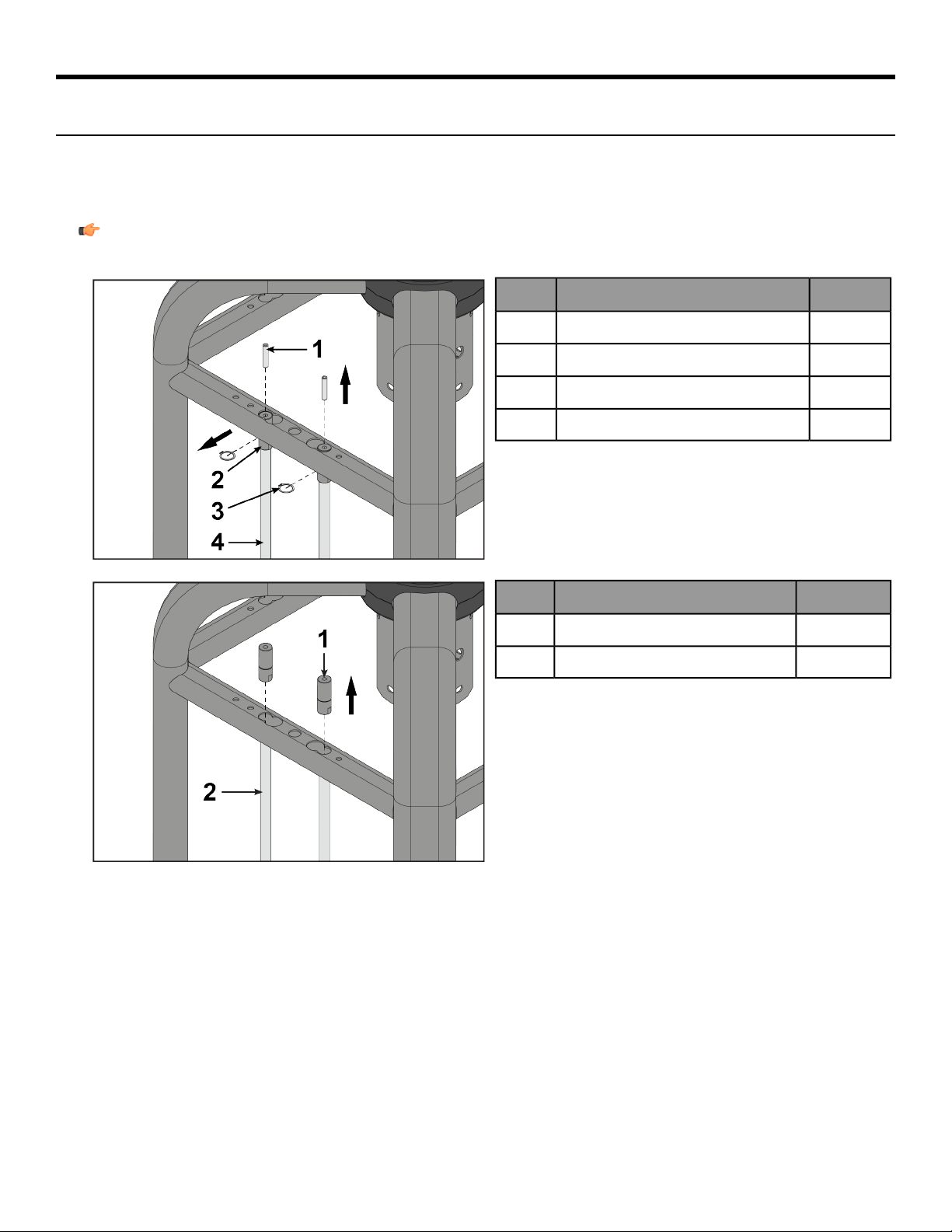
Install Weight Stacks
Tools Required:
• 5 mm Allen wrench
• Retaining ring pliers
• Torque wrench
Note: All screws must be torqued to 25-30 FT-LBS. (27.1-33.9Nm).
1.
QtyDescription
2Screw, M10 x 1.5 HXS, 50 mm1
2Guide rod retainer2
2Retaining ring3
2Guide rod4
2.
QtyDescription
2Guide rod retainer1
2Guide rod2
Page 9 of 54
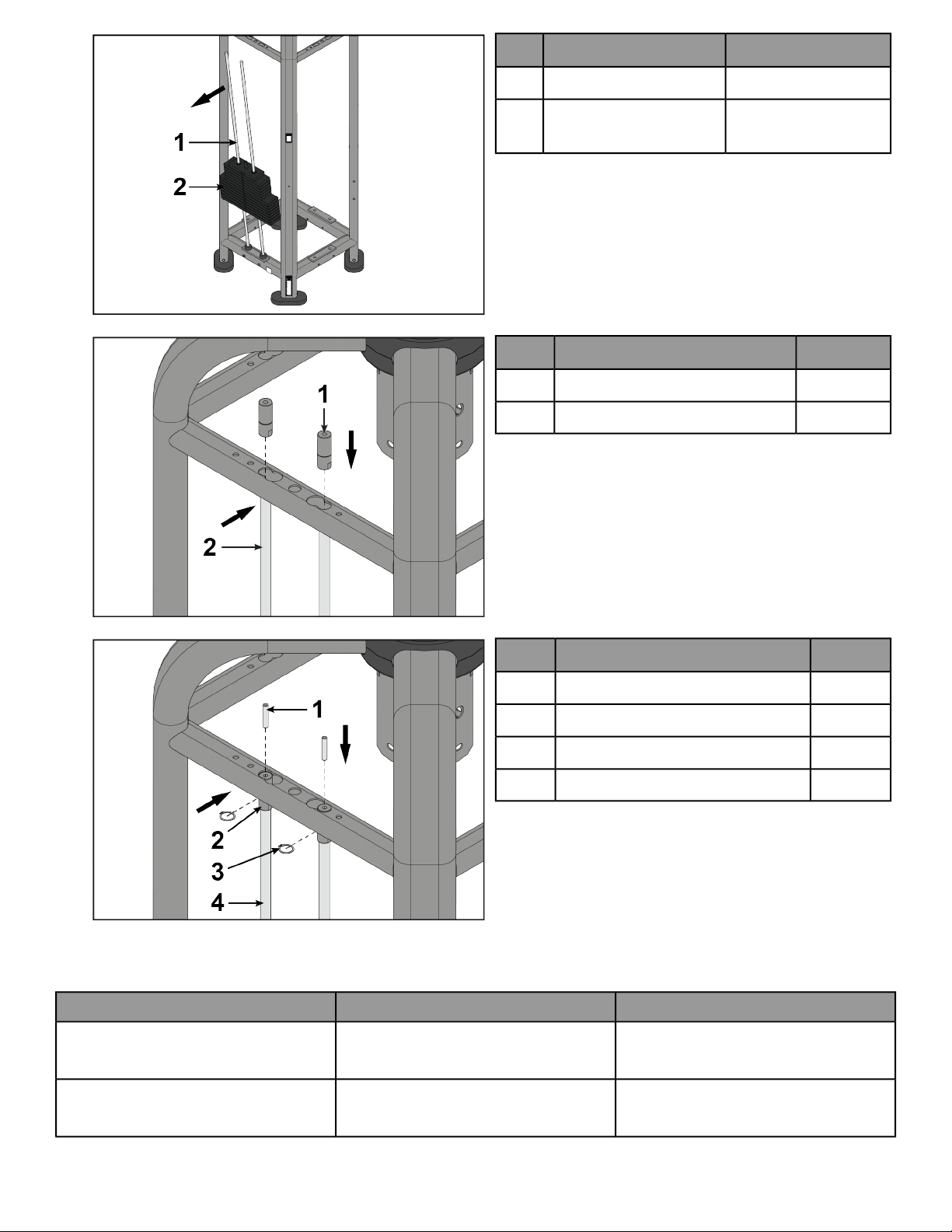
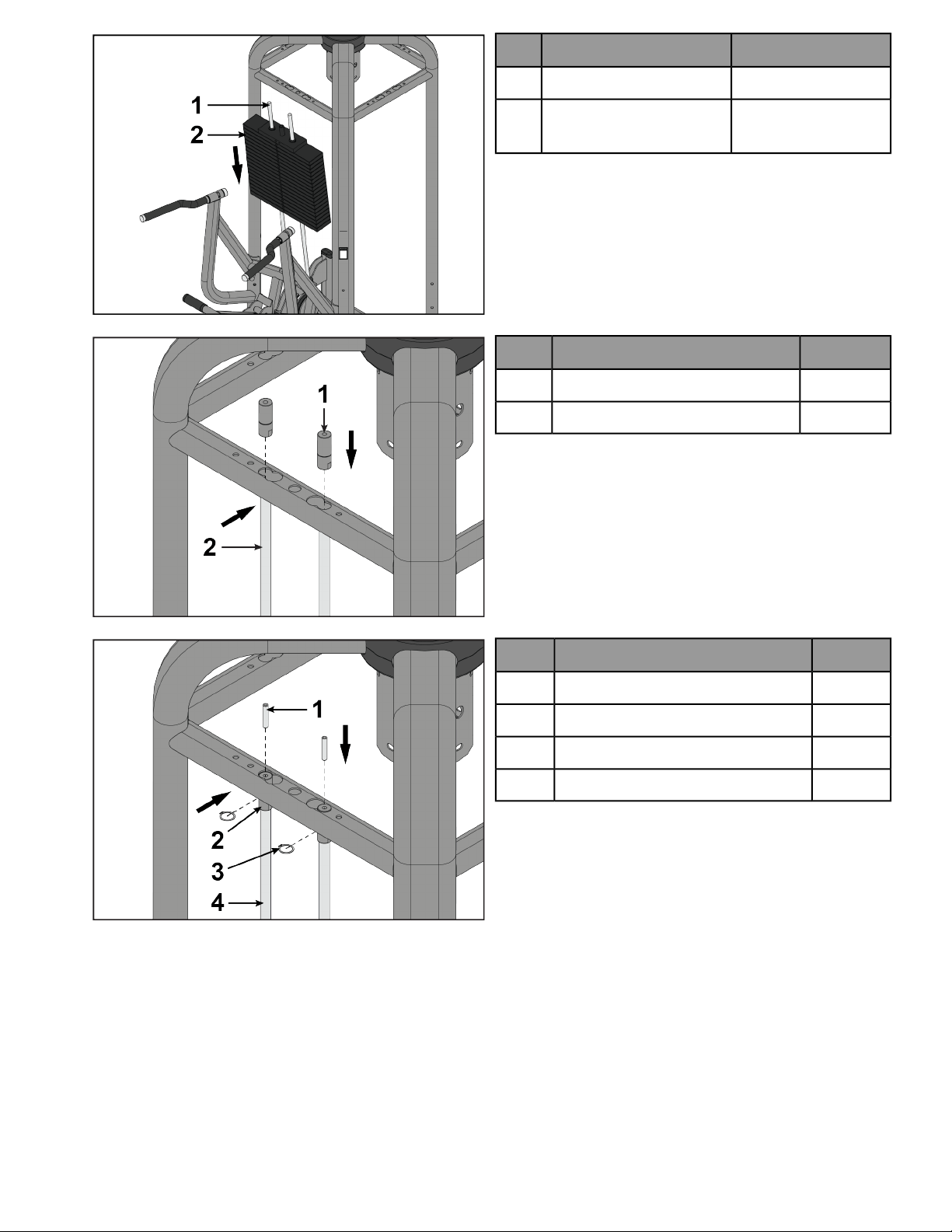
3.
QtyDescription
2Guide rod1
See Weight Stack
Table
Weight stack2
4.
QtyDescription
2Guide rod retainer1
2Guide rod2
5.
QtyDescription
2Set screw, M10 x 1.5 HXS, 50 mm1
2Guide rod retainer2
2Retaining ring3
2Guide rod4
Weight Stack Table
Weight PlatesWeight StackProduct
10 lb./4.5 kg. plate (x12)
15 lb./6.8 kg. plate (x16)
2 x 190 lb./95 kg. stackAttached Cable Crossover (PP-ACO)
10 lb./4.5 kg. plate (x12)
15 lb./6.8 kg. plate (x16)
2 x 190 lb./95 kg. stackFree Standing Cable Crossover (PP-ACOFS)
Page 10 of 54
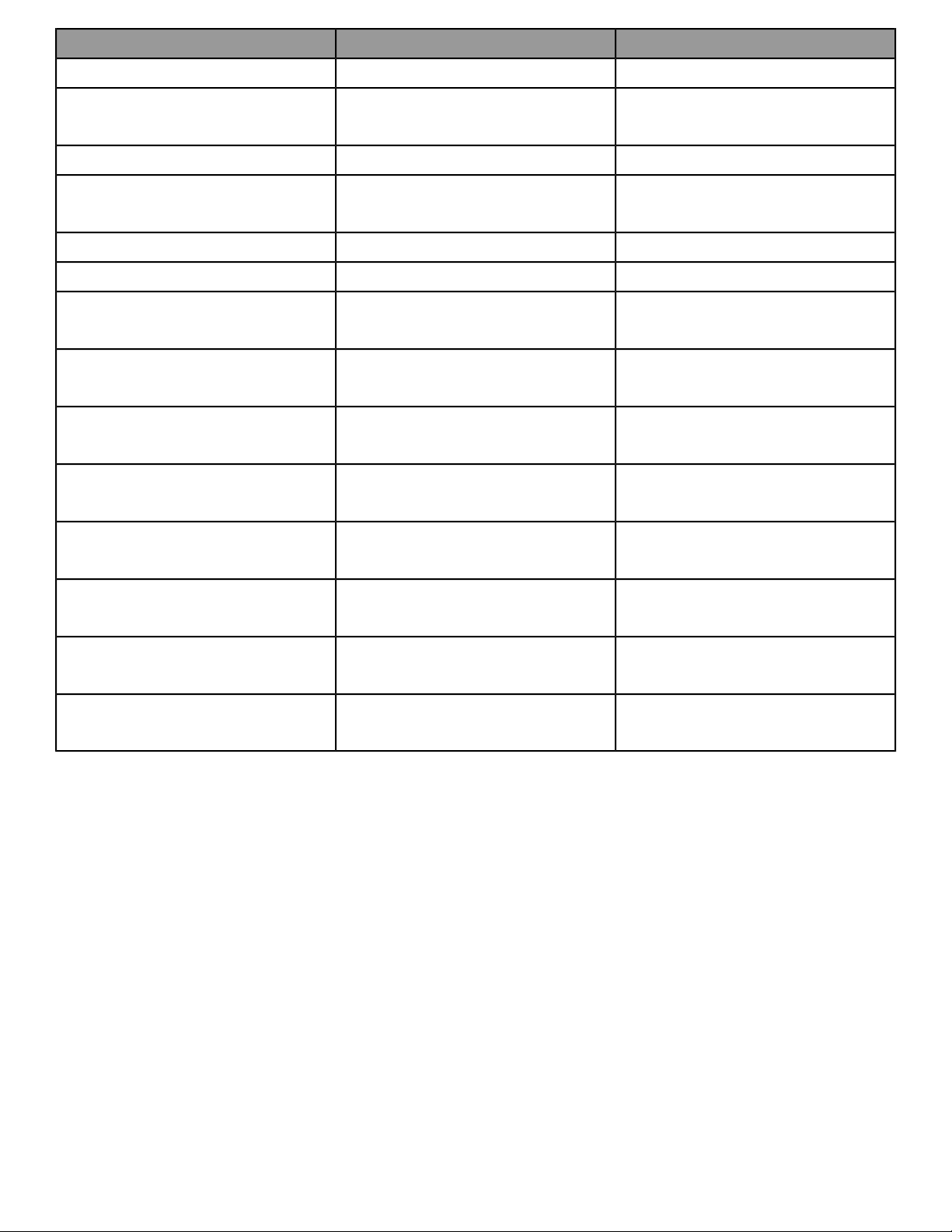
Weight PlatesWeight StackProduct
20 lb./9 kg. plate (x19)295 lb./147.5 kg. stackAssist Dip Chin (PP-ADC)
10 lb./4.5 kg. plate (x6)
15 lb./6.8 kg. plate (x8)
190 lb./91 kg. stackAdjustable Cable Column (PP-AP)
15 lb./6.8 kg. plate (x19)390 lb./195 kg. stackAdjustable Pulley 4:1 (PP-AP41)
10 lb./4.5 kg. plate (x12)
15 lb./6.8 kg. plate (x16)
2 x 190 lb./91 kg. stackEmbedded Cable Crossover (PP-AXO)
20 lb./9 kg. plate (x14)290 lb./145 kg. stackDual Pulley High (PP-DPH)
20 lb./9 kg. plate (x14)290 lb./145 kg. stackDual Pulley Low (PP-DPL)
10 lb./4.5 kg. plate (x12)
15 lb./6.8 kg. plate (x16)
2 x 190 lb./95 kg. stackAttached High Low Crossover (PP-FCO)
10 lb./4.5 kg. plate (x12)
15 lb./6.8 kg. plate (x16)
2 x 190 lb./91 kg. stackEmbedded High Low Crossover (PP-FXO)
10 lb./4.5 kg. plate (x6)
15 lb./6.8 kg. plate (x8)
190 lb./91 kg. stackHigh Low (PP-HL)
15 lb./6.8 kg. plate (x6)
20 lb./9 kg. plate (x8)
260 lb./127 kg. stackLat Pull (PP-LP)
15 lb./6.8 kg. plate (x6)
20 lb./9 kg. plate (x8)
260 lb./127 kg. stackDual Lat Pull (PP-LPD)
15 lb./6.8 kg. plate (x6)
20 lb./9 kg. plate (x8)
260 lb./127 kg. stackRow (PP-RW)
15 lb./6.8 kg. plate (x6)
20 lb./9 kg. plate (x8)
260 lb./127 kg. stackDual Row (PP-RWD)
10 lb./4.5 kg. plate (x6)
15 lb./6.8 kg. plate (x8)
190 lb./95 kg. stackTriceps Pushdown (PP-TP)
Page 11 of 54
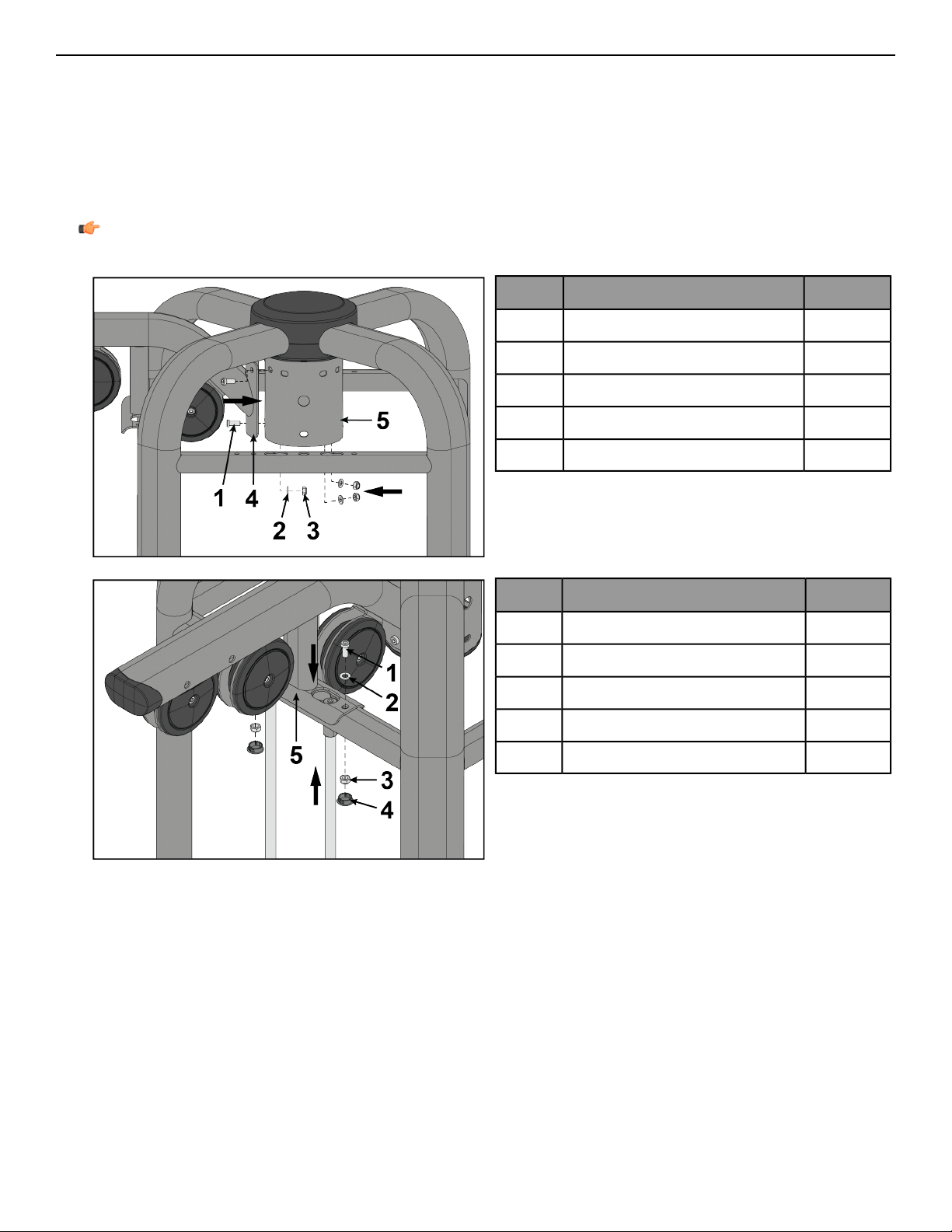
Install Top Mount
The following procedure shows how to install the top mounts to the CORE for the following products: PP-AP,
PP-AP41, PP-AXO, PP-ACOFS, PP-ACO, PP-ADC, PP-FCO, PP-FXO, PP-HL, PP-LP, PP-LPD, PP-RP, PP-RPL, PP-RWD,
PP-RW, and PP-TP.
Tools Required:
• 7 mm Allen wrench
• 17 mm Open end wrench
• Torque wrench
Note: All screws must be torqued to 25-30 FT-LBS. (27.1-33.9Nm).
1.
QtyDescription
3Screw, M10 x 1.5, 25 mm1
3Washer2
3Nut, hex nylock3
1Top mount4
1Core5
2.
QtyDescription
2Screw, M10 x 1.5, 25 mm1
2Washer2
2Nut, hex nylock3
2Hole plug4
1Top mount5
Page 12 of 54
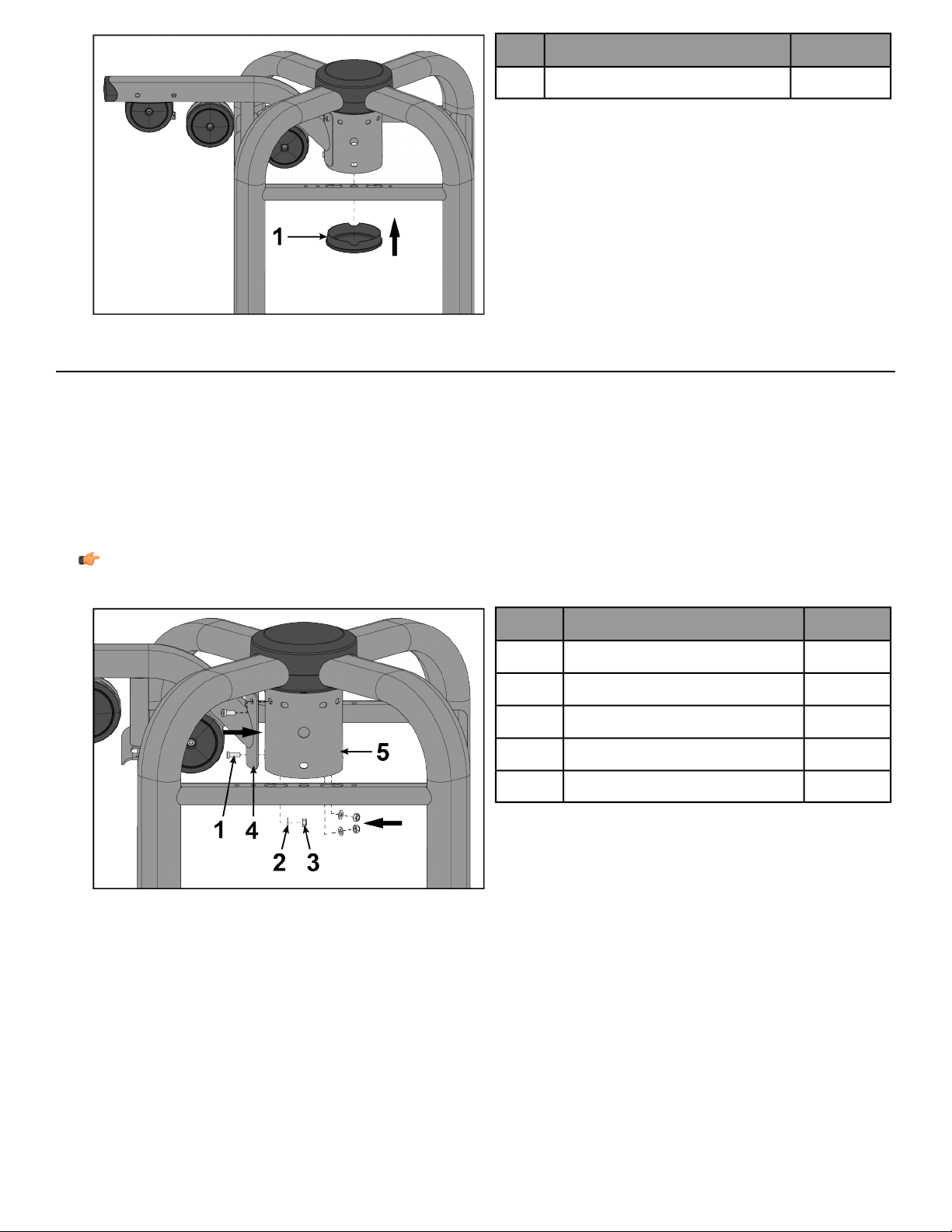
3.
QtyDescription
1Bottom cap cover1
Install Top Mount
The following procedure shows how to install the top mounts to the CORE for the following products: PP-DPH
and PP-DPL.
Tools Required:
• 5 mm Allen wrench
• 7 mm Allen wrench
• 17 mm Open end wrench
• Retaining ring pliers
• Torque wrench
Note: All screws must be torqued to 25-30 FT-LBS. (27.1-33.9Nm).
1.
QtyDescription
3Screw, M10 x 1.5, 25 mm1
3Washer2
3Nut, hex nylock3
1Top mount4
1Core5
Page 13 of 54
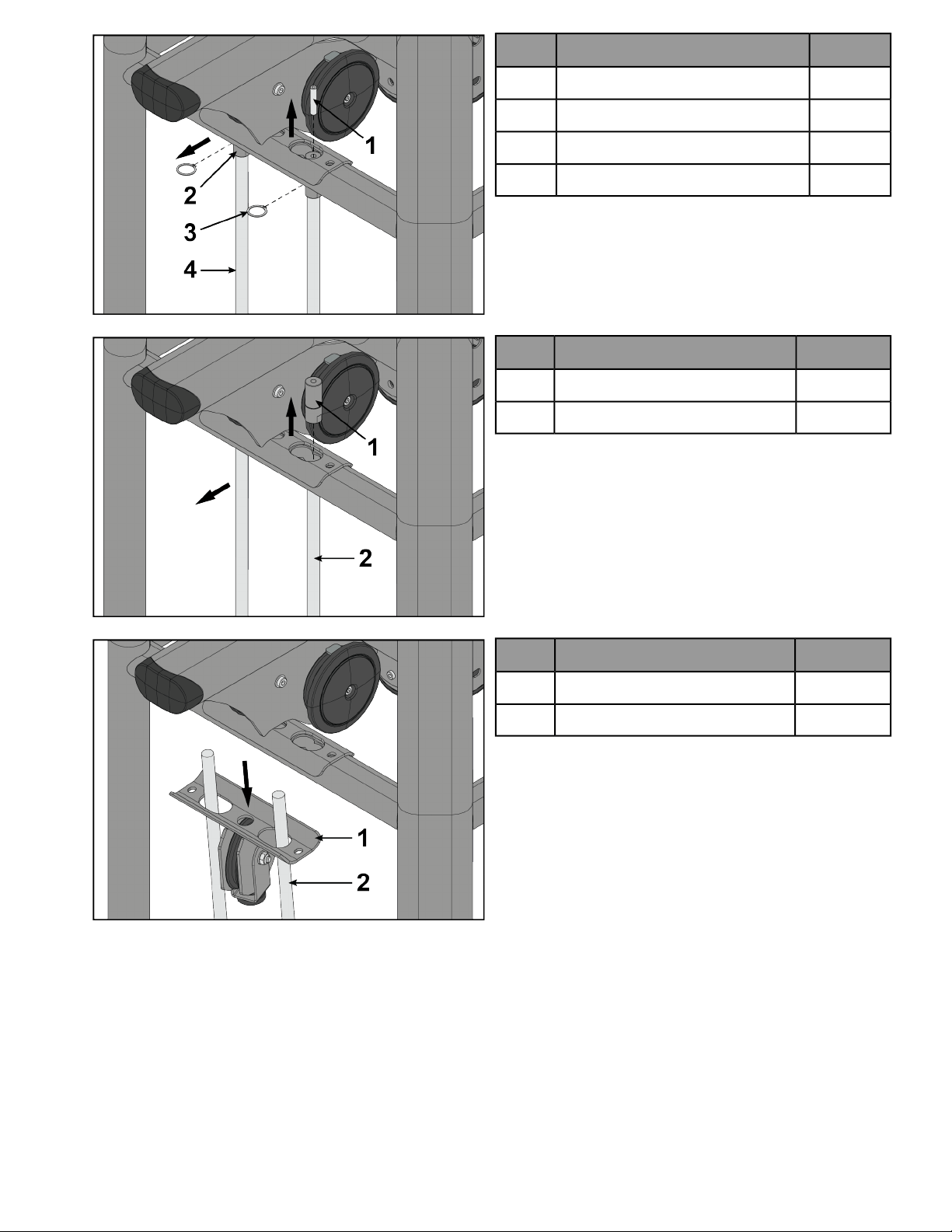
2.
QtyDescription
2Screw, M10 x 1.5 HXS, 50 mm1
2Guide rod retainer2
2Retaining ring3
2Guide rod4
3.
QtyDescription
2Guide rod retainer1
2Guide rod2
4.
QtyDescription
1Pulley weldment1
2Guide rod2
Page 14 of 54
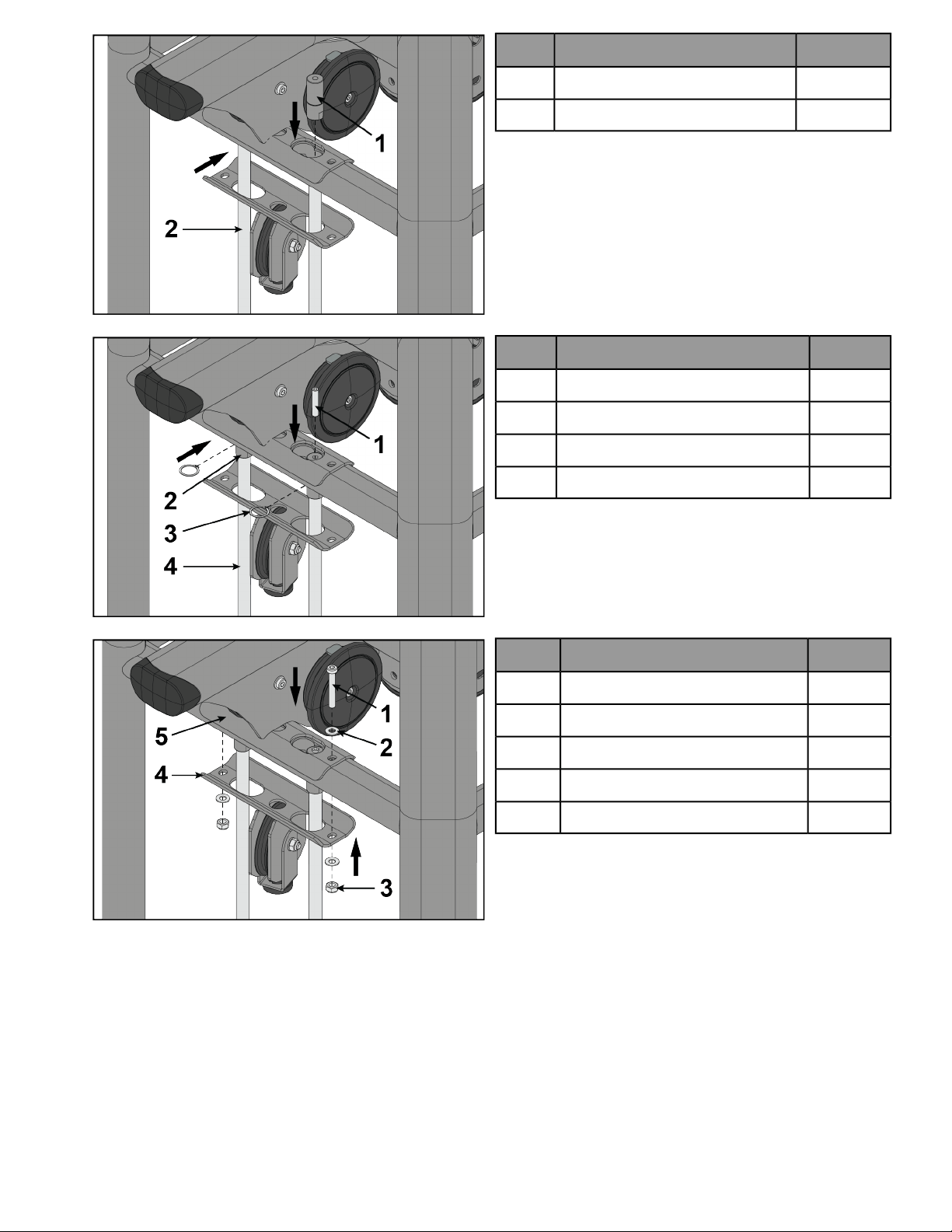
5.
QtyDescription
2Guide rod retainer1
2Guide rod2
6.
QtyDescription
2Screw, M10 x 1.5 HXS, 50 mm1
2Guide rod retainer2
2Retaining ring3
2Guide rod4
7.
QtyDescription
2Screw, M10 x 1.5, 65 mm1
2Washer2
2Nut, hex nylock3
1Pulley weldment4
1Top mount5
Page 15 of 54
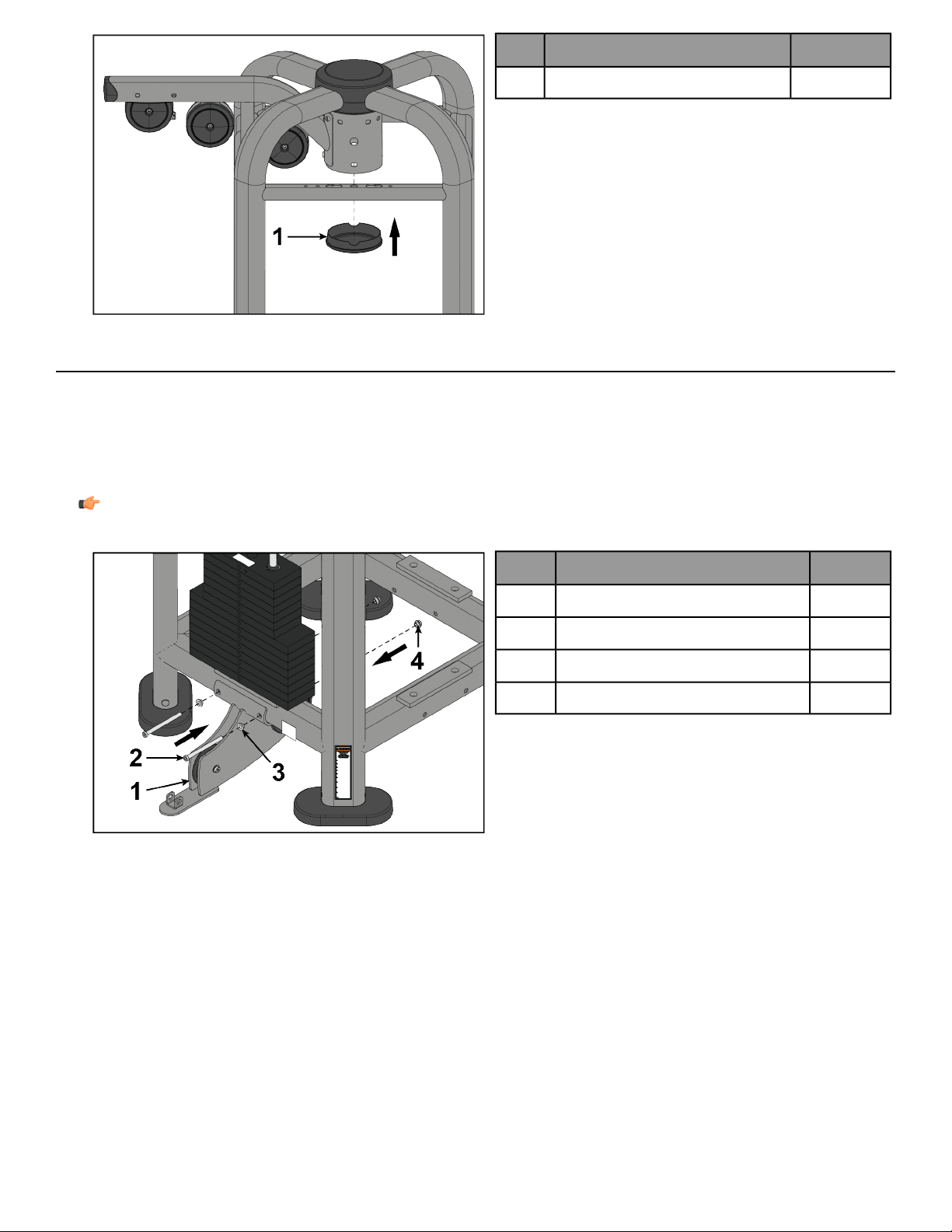
8.
QtyDescription
1Bottom cap cover1
Install Lower Mount
The following procedure shows how to install the lower mounts to the CORE for the following products: PP-AP,
PP-AP41, PP-AXO, PP-ACOFS, and PP-ACO.
Tools Required:
• 7 mm Allen wrench (x2)
• Torque wrench
Note: All screws must be torqued to 25-30 FT-LBS. (27.1-33.9Nm).
1.
QtyDescription
1Lower mount1
2Screw, M10 x 1.5, 130 mm2
2Washer3
2Nut, M10 x 1.5 socket head4
Page 16 of 54
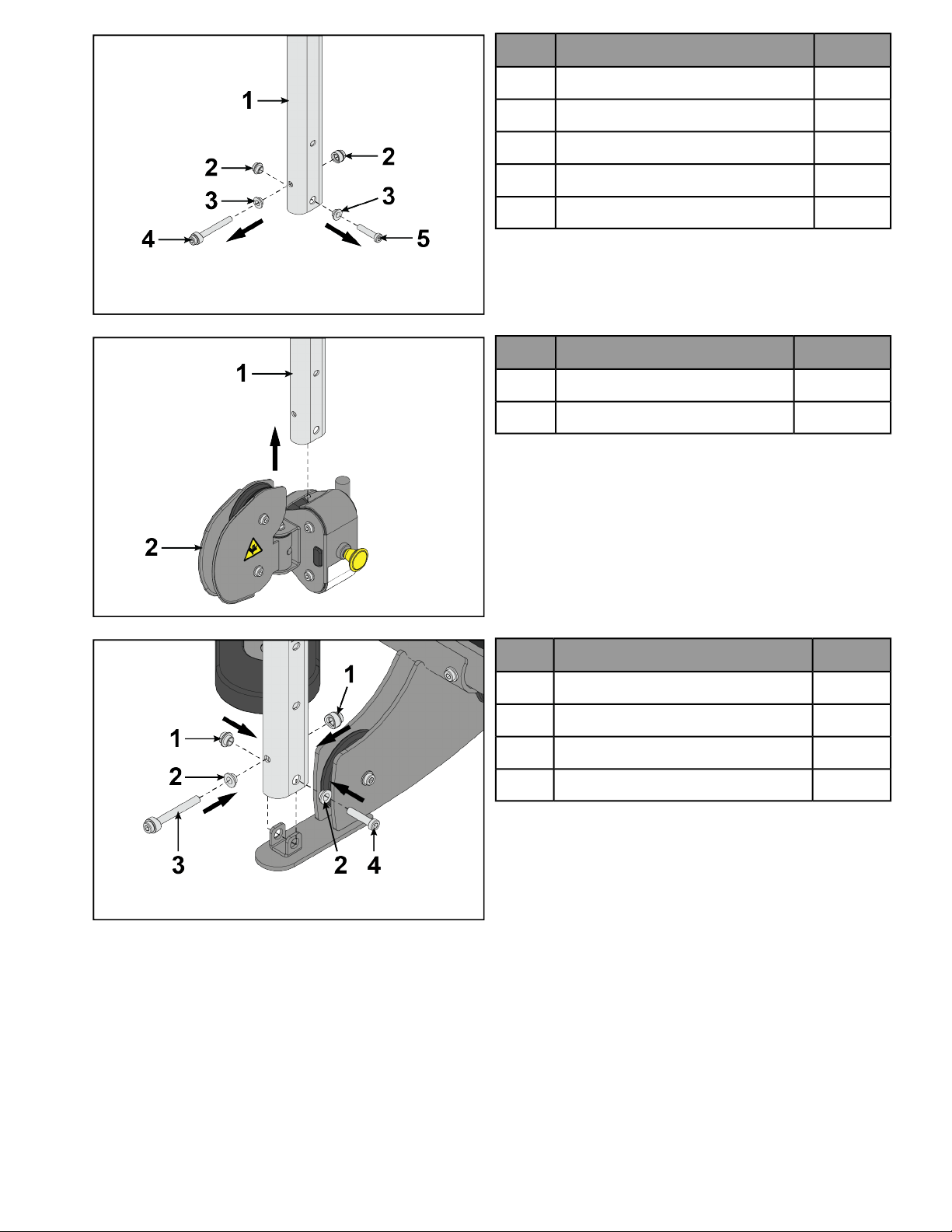
2.
QtyDescription
1Adjustment tube1
2Nut, M10 x 1.5 socket head2
2Washer3
1Screw, M10 x 1.5, 90 mm4
1Screw, M10 x 1.5, 45 mm5
3.
QtyDescription
1Adjustment tube1
1Carriage2
4.
QtyDescription
2Nut, M10 x 1.5 socket head1
2Washer2
1Screw, M10 x 1.5, 90 mm3
1Screw, M10 x 1.5, 45 mm4
Page 17 of 54
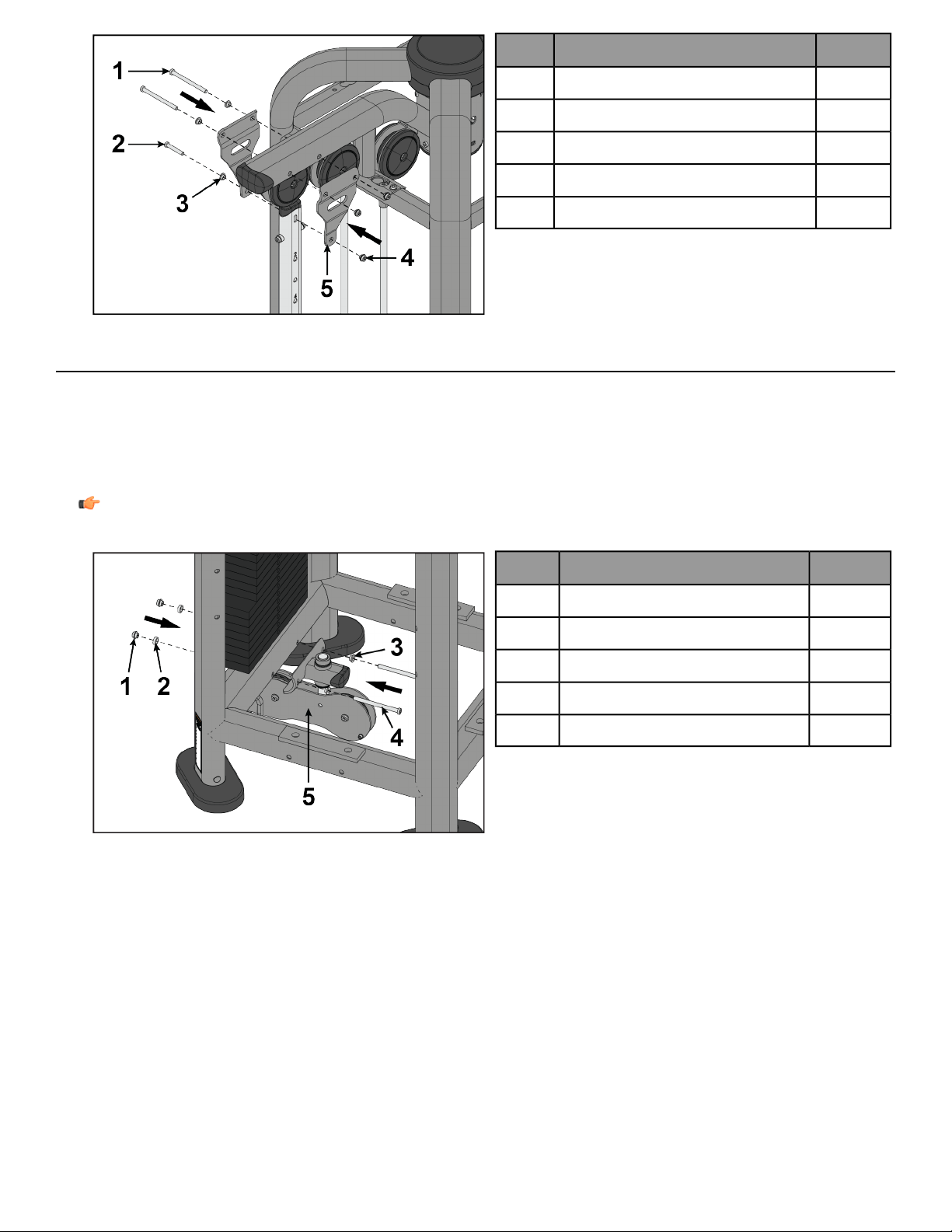
5.
QtyDescription
2Screw, M10 x 1.5, 130 mm1
1Screw, M10 x 1.5, 60 mm2
3Washer3
3Nut, M10 x 1.5 socket head4
2Adjustment tube bracket5
Install Lower Mount
The following procedure shows how to install the lower mounts to the CORE for the following products: PP-HL,
PP-FCO, PP-FXO.
Tools Required:
• 7 mm Allen wrench (x2)
• Torque wrench
Note: All screws must be torqued to 25-30 FT-LBS. (27.1-33.9Nm).
QtyDescription
2Nut, M10 x 1.5 socket head1
2Spacer2
2Washer3
2Screw, M10 x 1.5, 130 mm4
1Lower mount5
Page 18 of 54
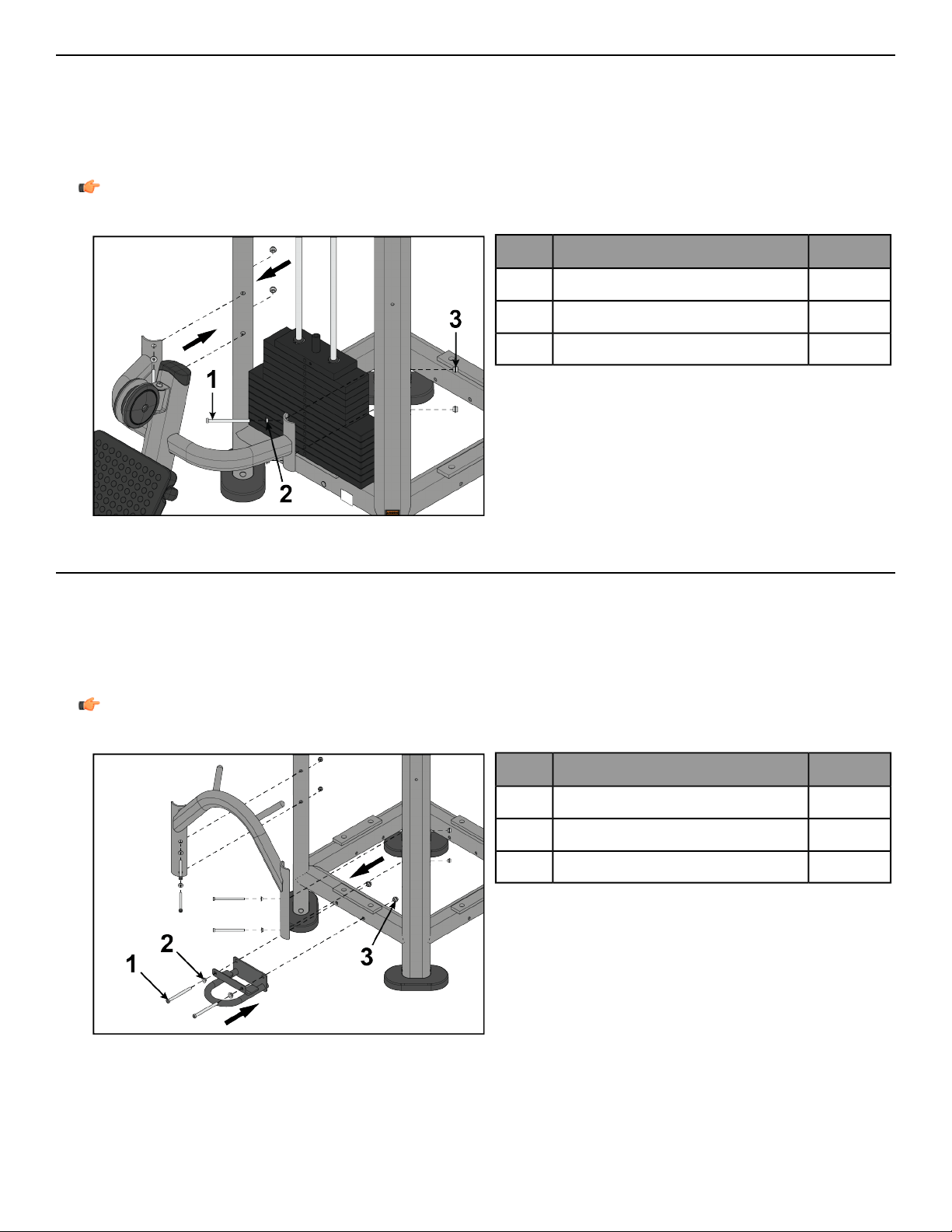
Install Lower Mount
The following procedure shows how to install the lower mounts to the CORE for the following products: PP-DPH,
PP-DPL, PP-RWD, PP-RPL, PP-RW, and PP-SB.
Tools Required:
• 7 mm Allen wrench (x2)
• Torque wrench
Note: All screws must be torqued to 25-30 FT-LBS. (27.1-33.9Nm).
QtyDescription
4Screw, M10 x 1.5, 130 mm1
4Washer2
4Nut, M10 x 1.5 socket head3
Install Lower Mount
The following procedure shows how to install the lower mounts to the CORE for the following products: PP-BX,
PP-LPD, PP-LP, and PP-RP.
Tools Required:
• 7 mm Allen wrench (x2)
• Torque wrench
Note: All screws must be torqued to 25-30 FT-LBS. (27.1-33.9Nm).
QtyDescription
6Screw, M10 x 1.5, 130 mm1
6Washer2
6Nut, M10 x 1.5 socket head3
Page 19 of 54
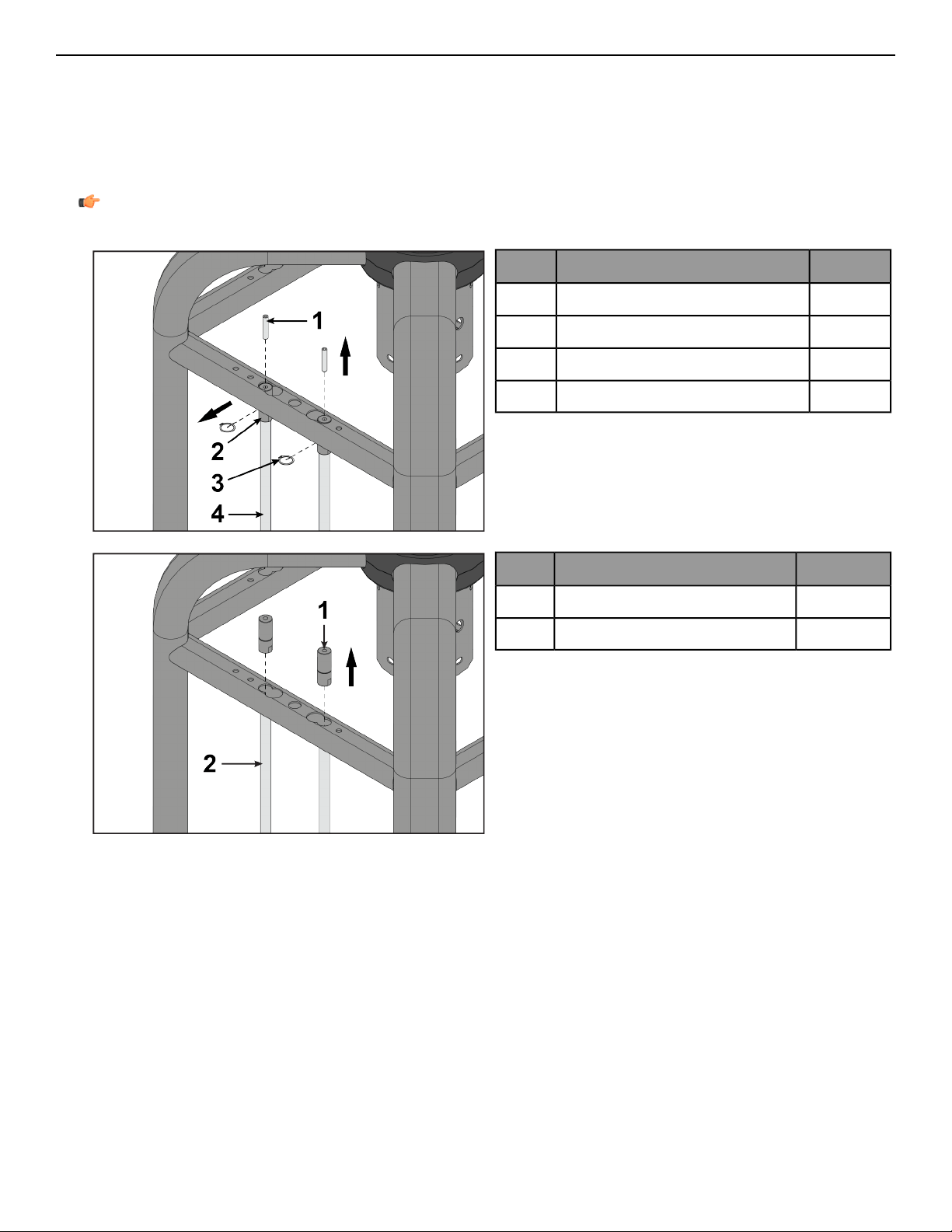
Install Lower Mount
The following procedure shows how to install the lower mounts to the CORE for the following products: PP-ADC.
Tools Required:
• Retaining ring pliers
• 5 mm Allen wrench
• 7 mm Allen wrench (x2)
• Torque wrench
Note: All screws must be torqued to 25-30 FT-LBS. (27.1-33.9Nm).
1.
QtyDescription
2Screw, M10 x 1.5 HXS, 50 mm1
2Guide rod retainer2
2Retaining ring3
2Guide rod4
2.
QtyDescription
2Guide rod retainer1
2Guide rod2
Page 20 of 54
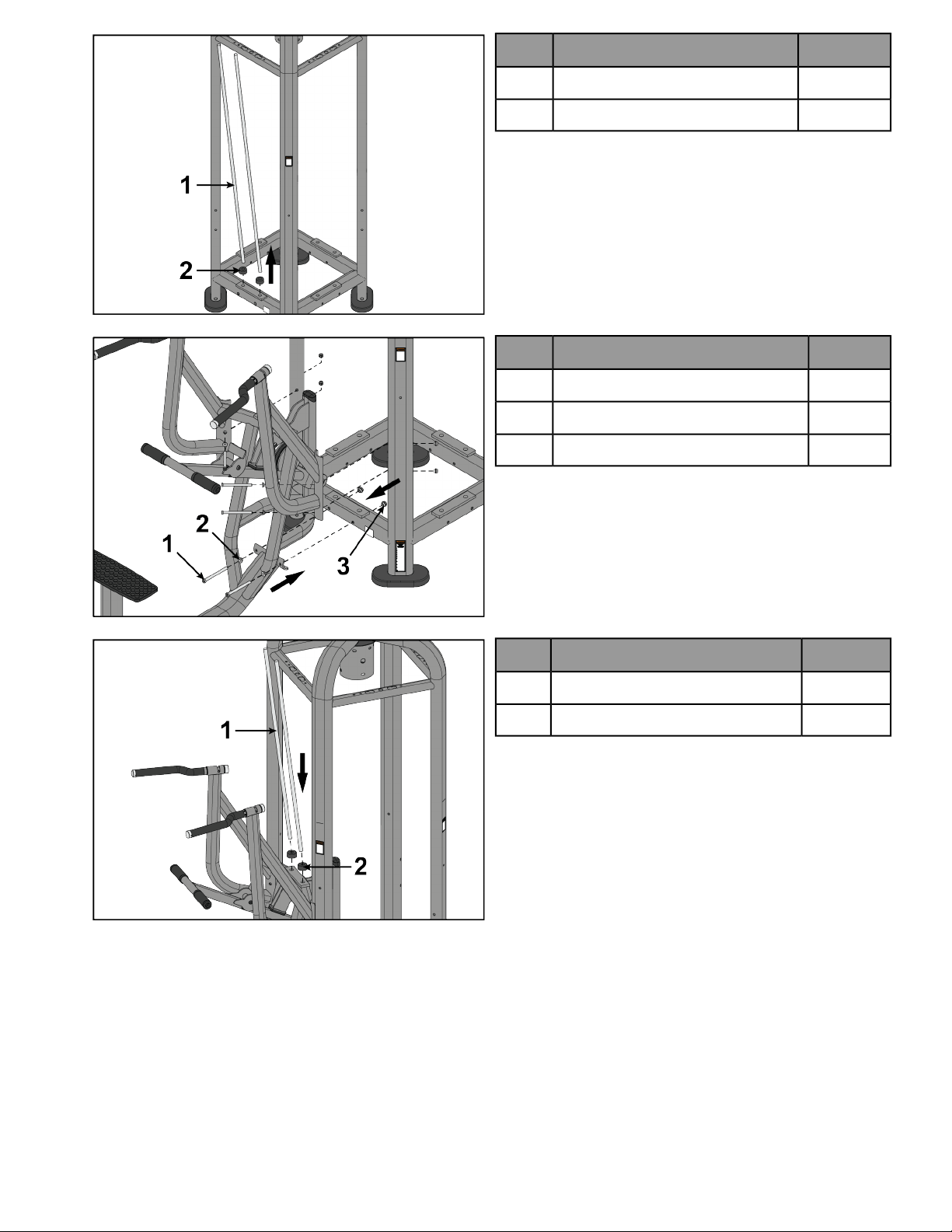
3.
QtyDescription
2Guide rod1
2Weight stack cushion2
4.
QtyDescription
6Screw, M10 x 1.5, 130 mm1
6Washer2
6Nut, M10 x 1.5 socket head3
5.
QtyDescription
2Short guide rod1
2Weight stack cushion2
Page 21 of 54
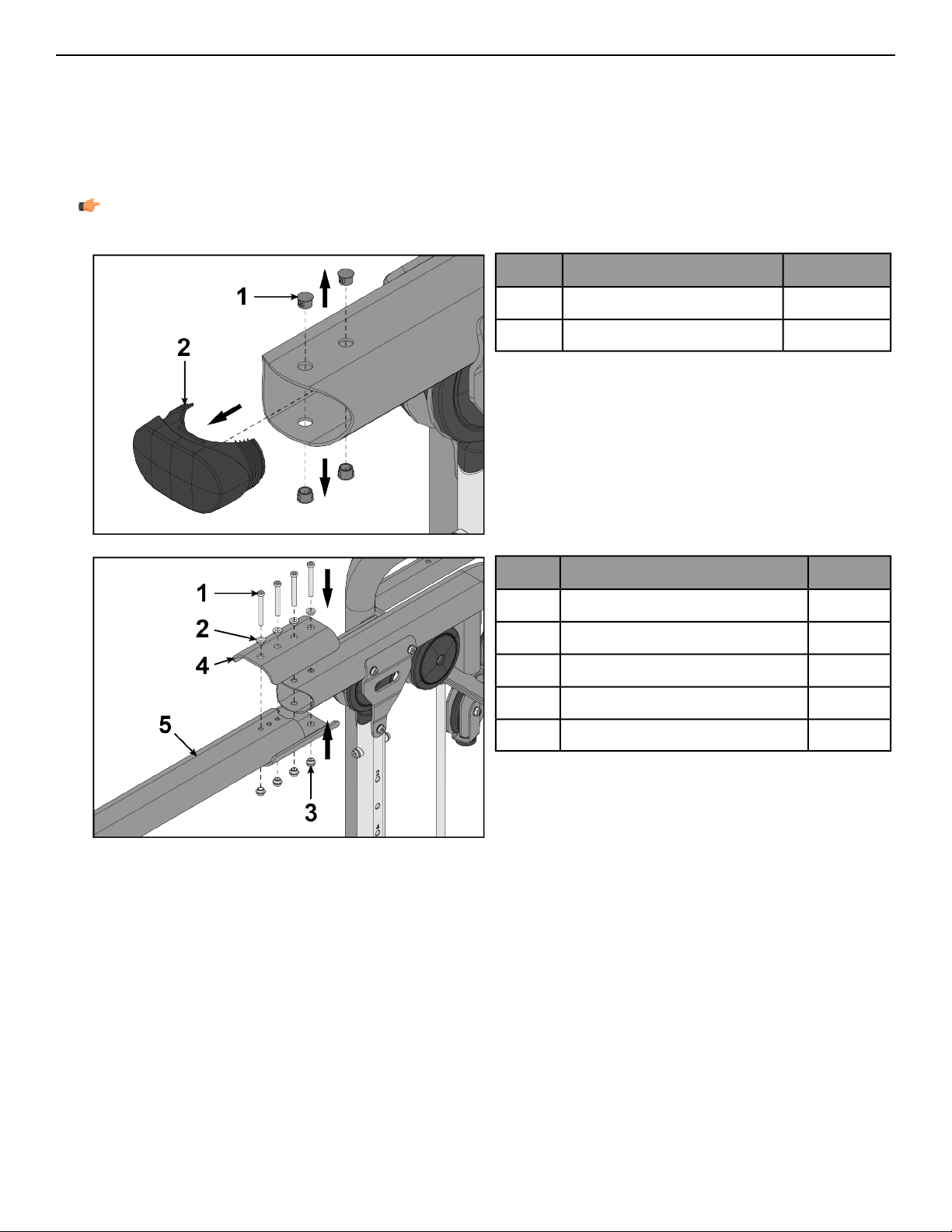
Install Crossover
The following procedure shows how to install the crossover to the top mount for the following products: PP-ACO,
PP-ACOFS, PP-AXO, PP-BM, PP-FCO, PP-FXO.
Tools Required:
• Flat head screwdriver
• 7 mm Allen wrench (x2)
• Torque wrench
Note: All screws must be torqued to 25-30 FT-LBS. (27.1-33.9Nm).
1.
QtyDescription
4Hole plug1
1Cap2
2.
QtyDescription
4Screw, M10 x 1.5, 80 mm1
4Washer2
4Nut, M10 x 1.5 socket head3
1Bracket4
1Crossover5
Page 23 of 54
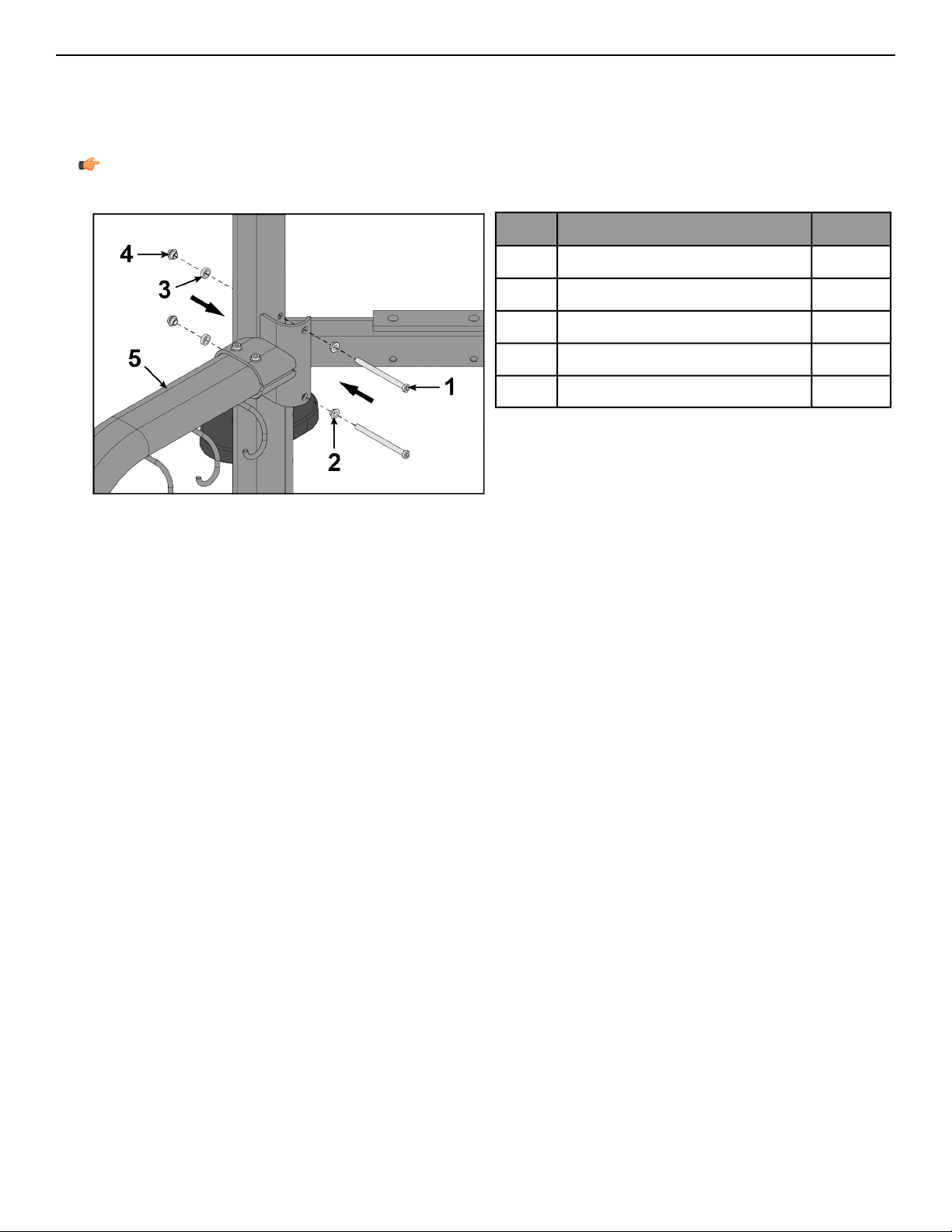
Install Handle Accessory Rack
The following procedure shows how to install the Handle Accessory Rack (HAR) to the CORE.
Tools Required:
• 7 mm Allen wrench (x2)
• Torque wrench
Note: All screws must be torqued to 25-30 FT-LBS. (27.1-33.9Nm).
QtyDescription
2Screw, M10 x 1.5, 130 mm1
2Washer2
2Spacer3
2Nut, M10 x 1.5 socket head4
1Handle accessory rack5
Page 24 of 54
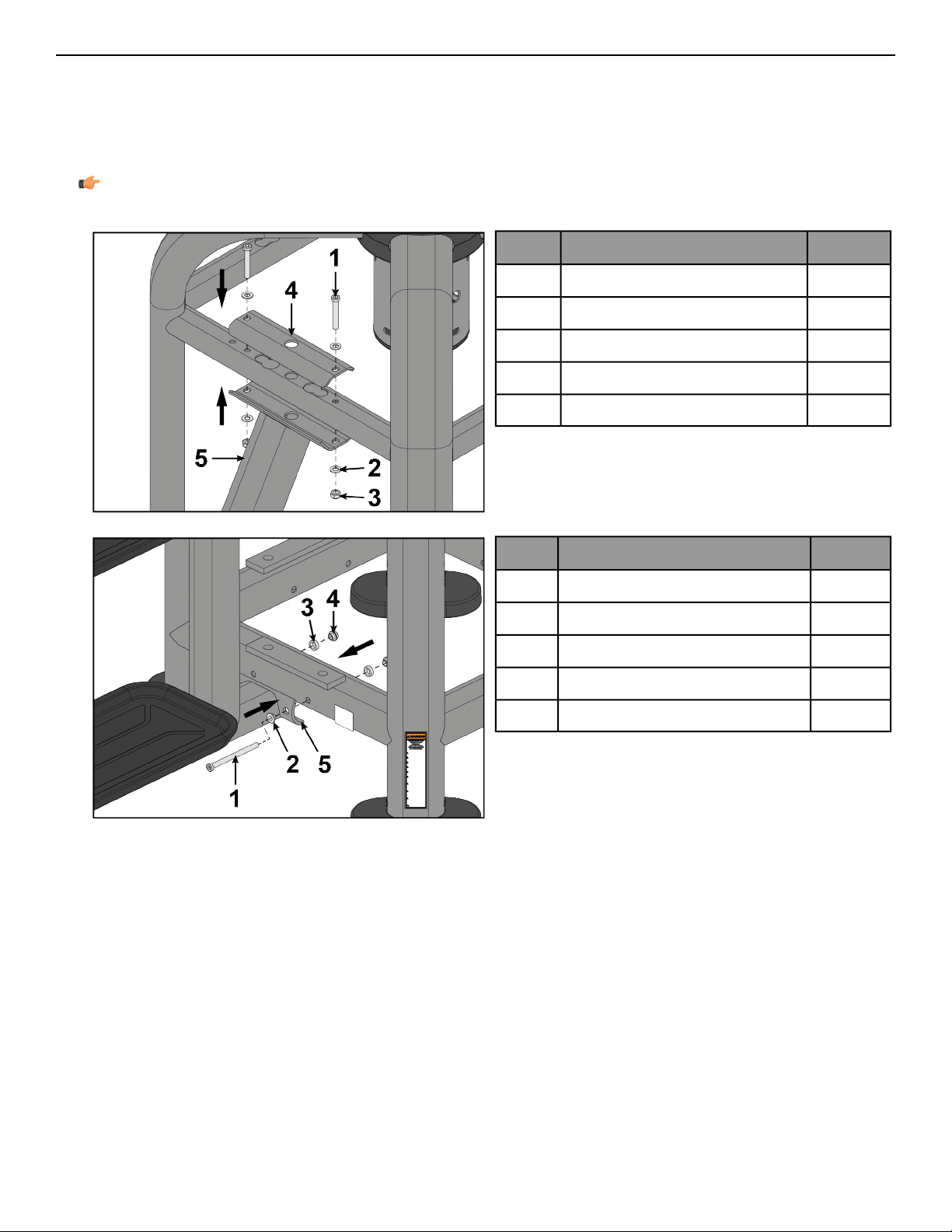
Install Storage Connector
The following procedure shows how to install the Storage Connector (SX) to the CORE.
Tools Required:
• 7 mm Allen wrench (x2)
• 17 mm Open end wrench
• Torque wrench
Note: All screws must be torqued to 25-30 FT-LBS. (27.1-33.9Nm).
1.
QtyDescription
2Screw, M10 x 1.5, 65 mm1
2Washer2
2Nut, hex nylock3
1Bracket4
1Storage connector5
2.
QtyDescription
2Screw, M10 x 1.5, 130 mm1
2Washer2
2Spacer3
2Nut, M10 x 1.5 socket head4
1Storage connector5
Page 25 of 54
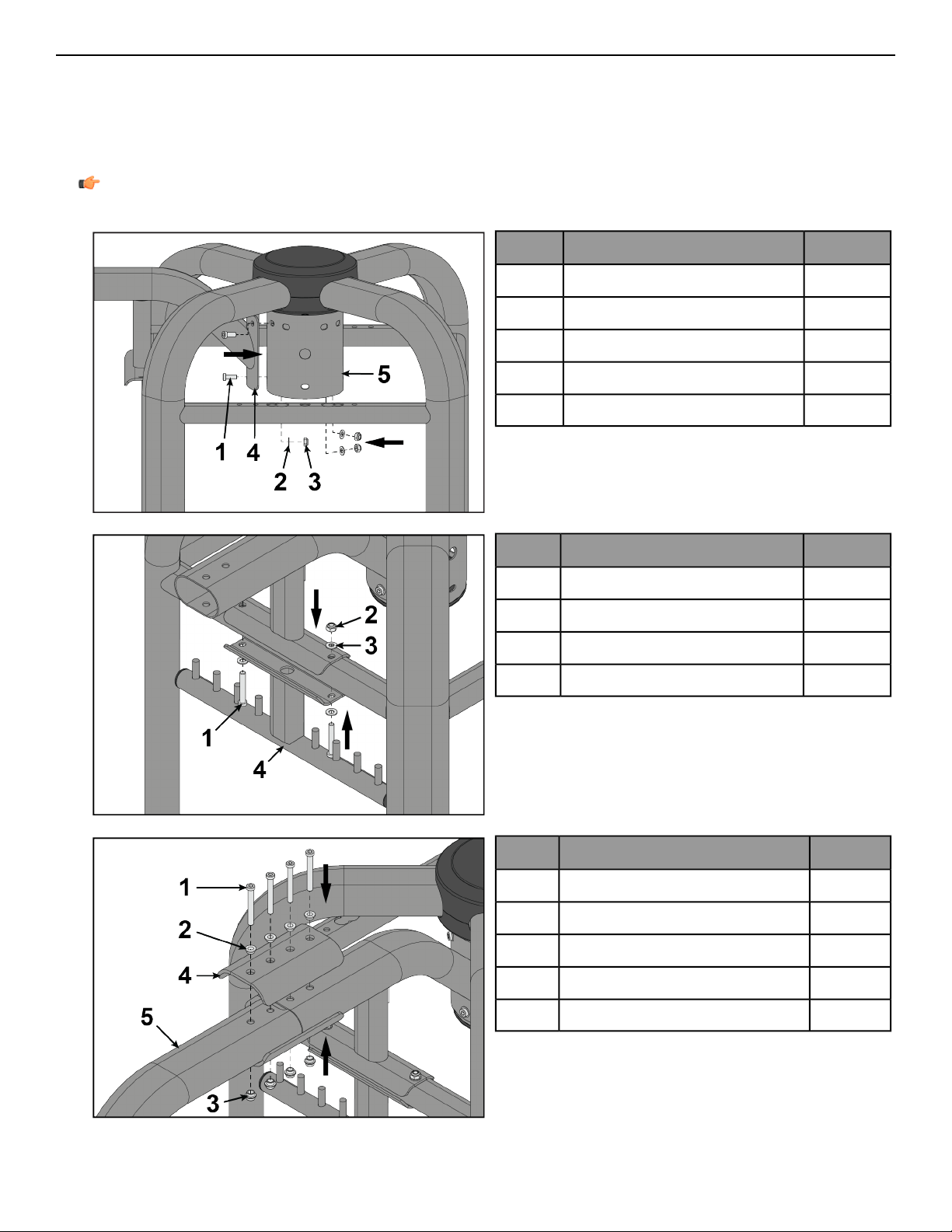
Install Storage Station
The following procedure shows how to install the Storage Station (SC) to the CORE.
Tools Required:
• 7 mm Allen wrench (x2)
• 17 mm Open end wrench
• Torque wrench
Note: All screws must be torqued to 25-30 FT-LBS. (27.1-33.9Nm).
1.
QtyDescription
3Screw, M10 x 1.5, 25 mm1
3Washer2
3Nut, hex nylock3
1Top mount4
1Core5
2.
QtyDescription
2Screw, M10 x 1.5, 65 mm1
2Nut, hex nylock2
2Washer3
1Hanger4
3.
QtyDescription
4Screw, M10 x 1.5, 80 mm1
4Washer2
4Nut, M10 x 1.5 socket head3
1Bracket4
1Storage station5
Page 26 of 54
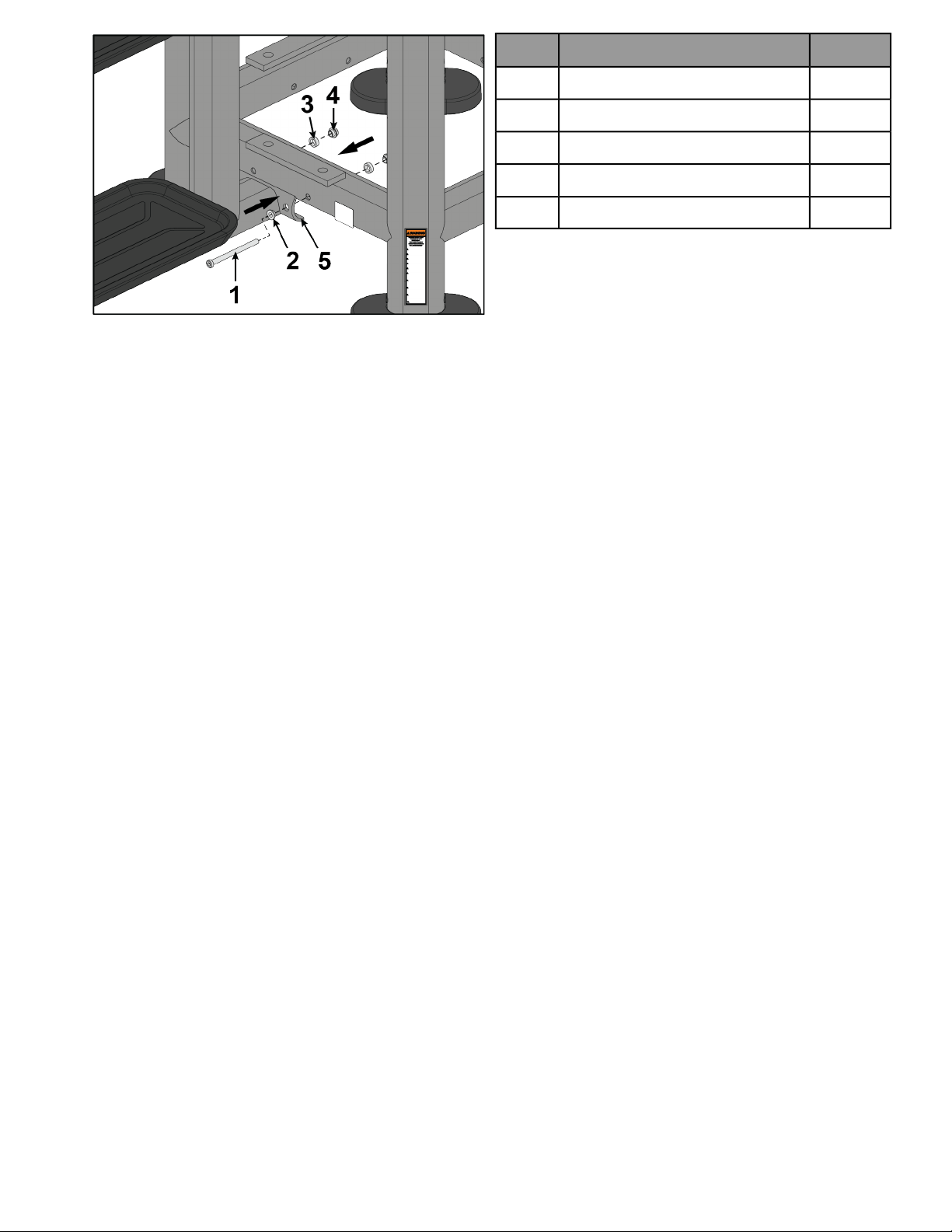
4.
QtyDescription
2Screw, M10 x 1.5, 130 mm1
2Washer2
2Spacer3
2Nut, M10 x 1.5 socket head4
1Storage station5
Page 27 of 54
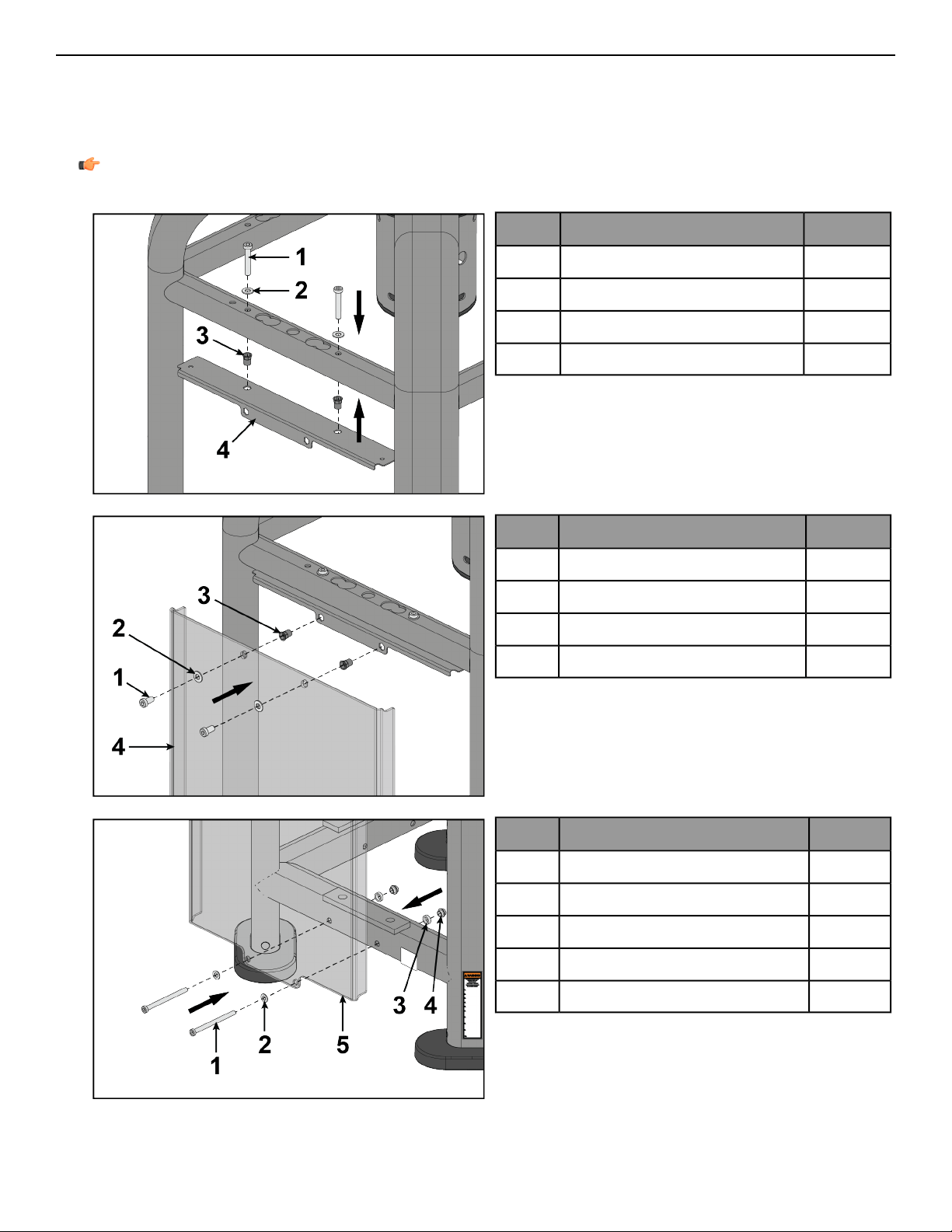
Install Blank Shroud
The following procedure shows how to install the BLNKSHRD to the CORE.
Tools Required:
• 7 mm Allen wrench
• Torque wrench
Note: All screws must be torqued to 25-30 FT-LBS. (27.1-33.9Nm).
1.
QtyDescription
2Screw, M10 x 1.5, 55 mm1
2Washer2
2Threaded insert3
1Bracket4
2.
QtyDescription
2Screw, M10 x 1.5, 20 mm1
2Washer2
2Threaded insert3
1Blank shroud4
3.
QtyDescription
2Screw, M10 x 1.5, 130 mm1
2Washer2
2Spacer3
2Nut, M10 x 1.5 socket head4
1Blank shroud5
Page 28 of 54
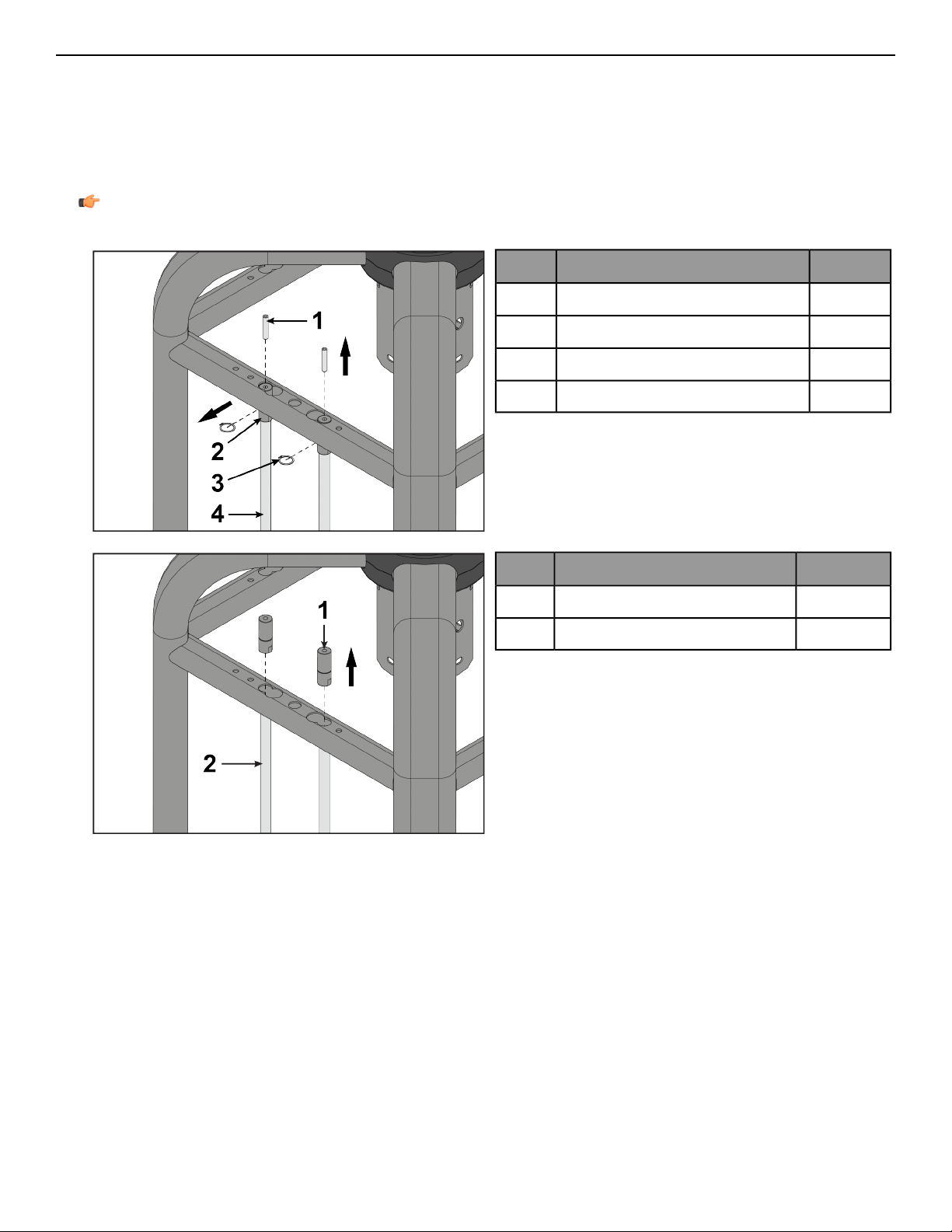
Install Front Shroud
The following procedure shows how to install the optional front shrouds to the CORE.
Tools Required:
• 5 mm Allen wrench
• 7 mm Allen wrench
• Retaining ring pliers
• Torque wrench
Note: All screws must be torqued to 25-30 FT-LBS. (27.1-33.9Nm).
1.
QtyDescription
2Screw, M10 x 1.5 HXS, 50 mm1
2Guide rod retainer2
2Retaining ring3
2Guide rod4
2.
QtyDescription
2Guide rod retainer1
2Guide rod2
Page 29 of 54
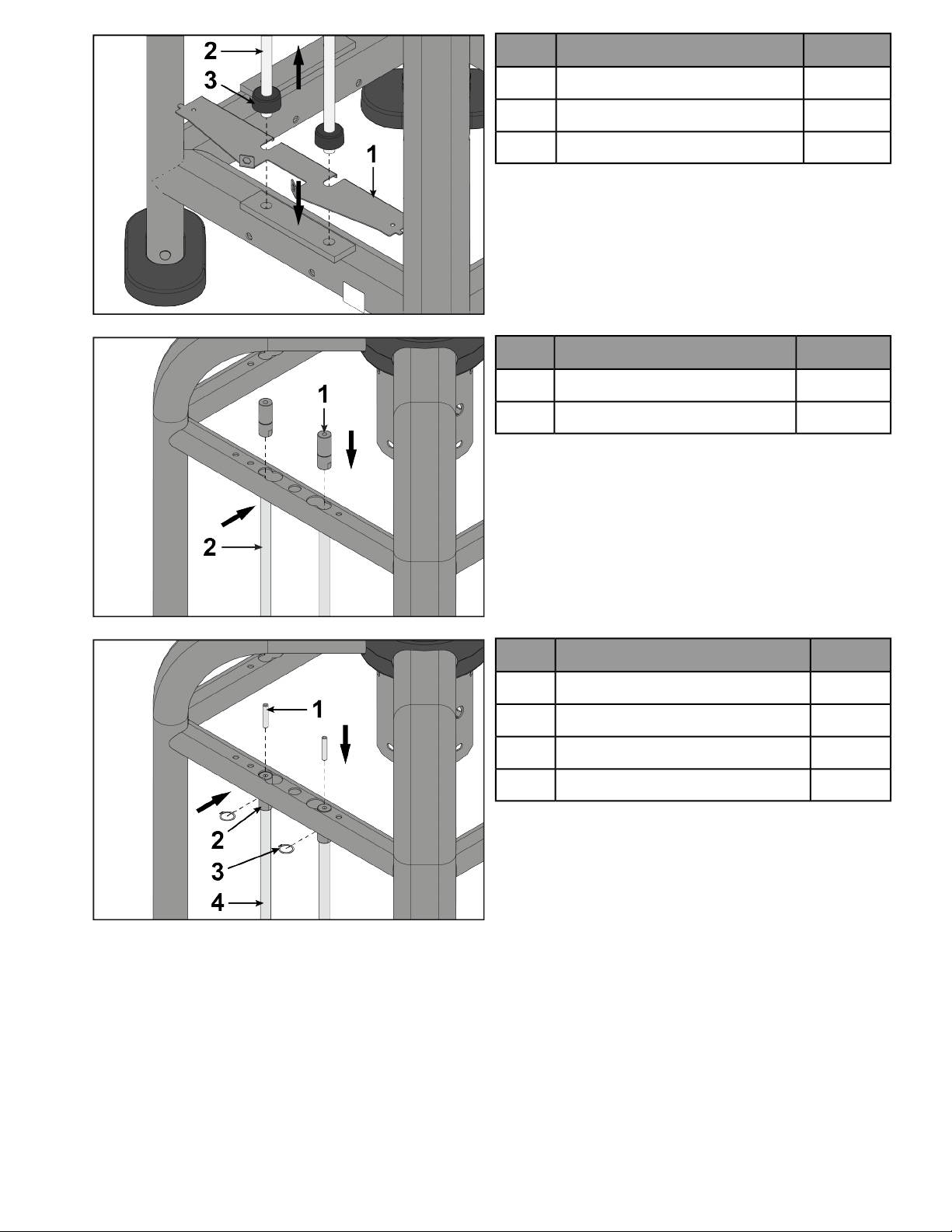
3.
QtyDescription
1Bracket, bottom1
2Guide rod2
2Weight stack cushion3
4.
QtyDescription
2Guide rod retainer1
2Guide rod2
5.
QtyDescription
2Set screw, M10 x 1.5 HXS, 50 mm1
2Guide rod retainer2
2Retaining ring3
2Guide rod4
Page 30 of 54
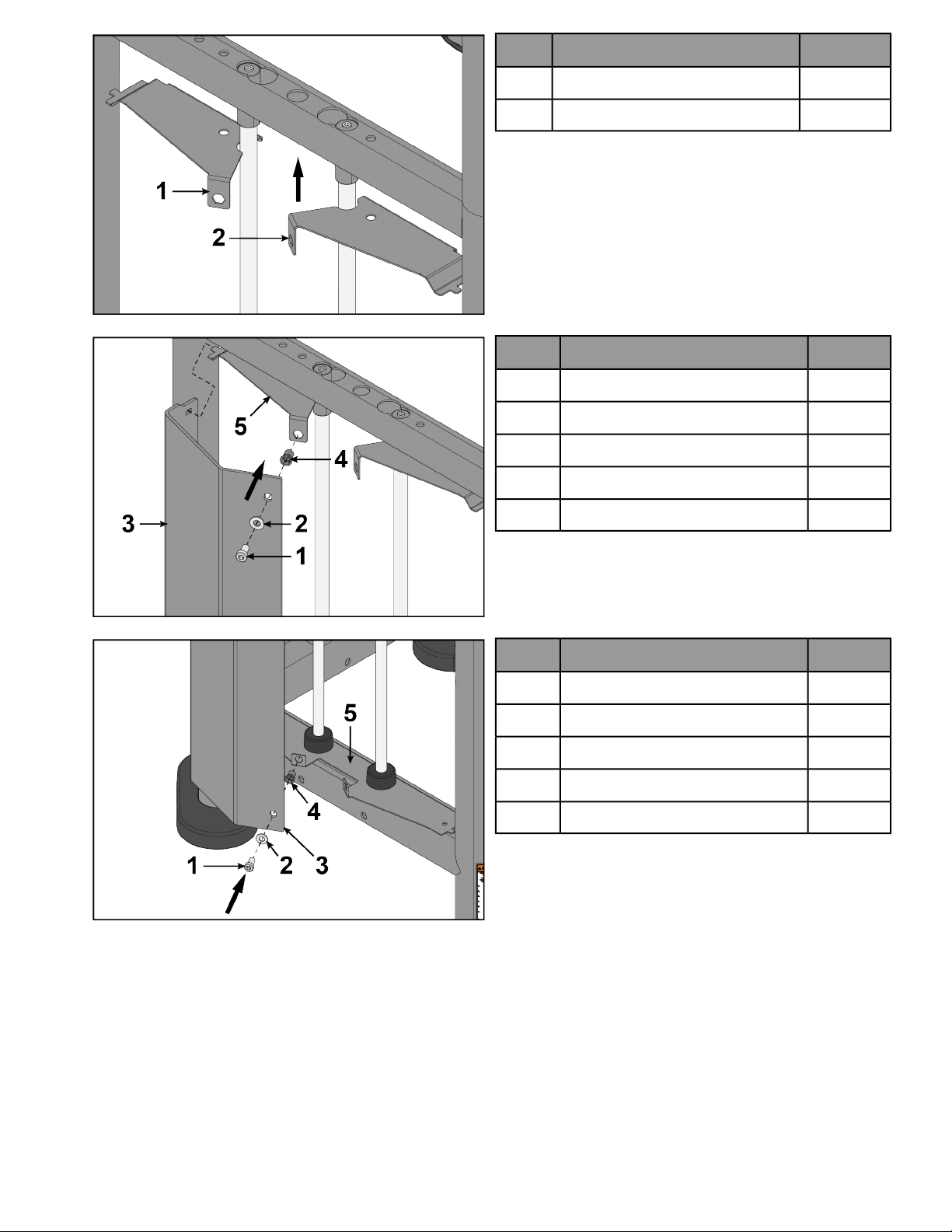
6.
QtyDescription
1Bracket, top left1
1Bracket, top right2
7.
QtyDescription
1Screw, M10 x 1.5, 20 mm1
1Washer2
1Shroud, left3
1Threaded insert4
1Bracket, top left5
8.
QtyDescription
1Screw, M10 x 1.5, 20 mm1
1Washer2
1Shroud, left3
1Threaded insert4
1Bracket, bottom5
9. Repeat steps 7 and 8 for right shroud.
Page 31 of 54
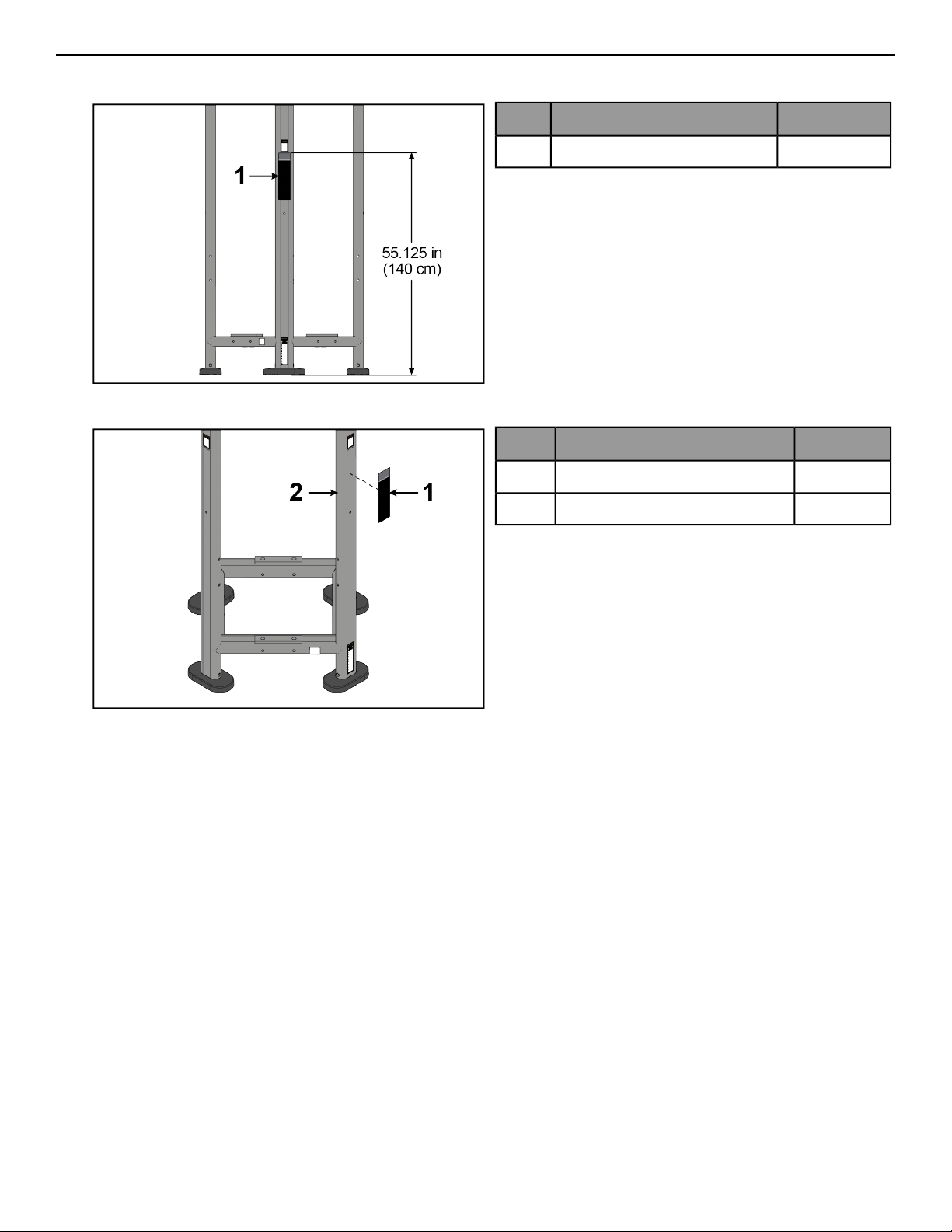
Install Placard
The following procedure shows how to install placards to the CORE.
1.
QtyDescription
1Placard1
2. Install placard on right upright of CORE.
QtyDescription
1Placard1
1Core, right upright2
Page 32 of 54
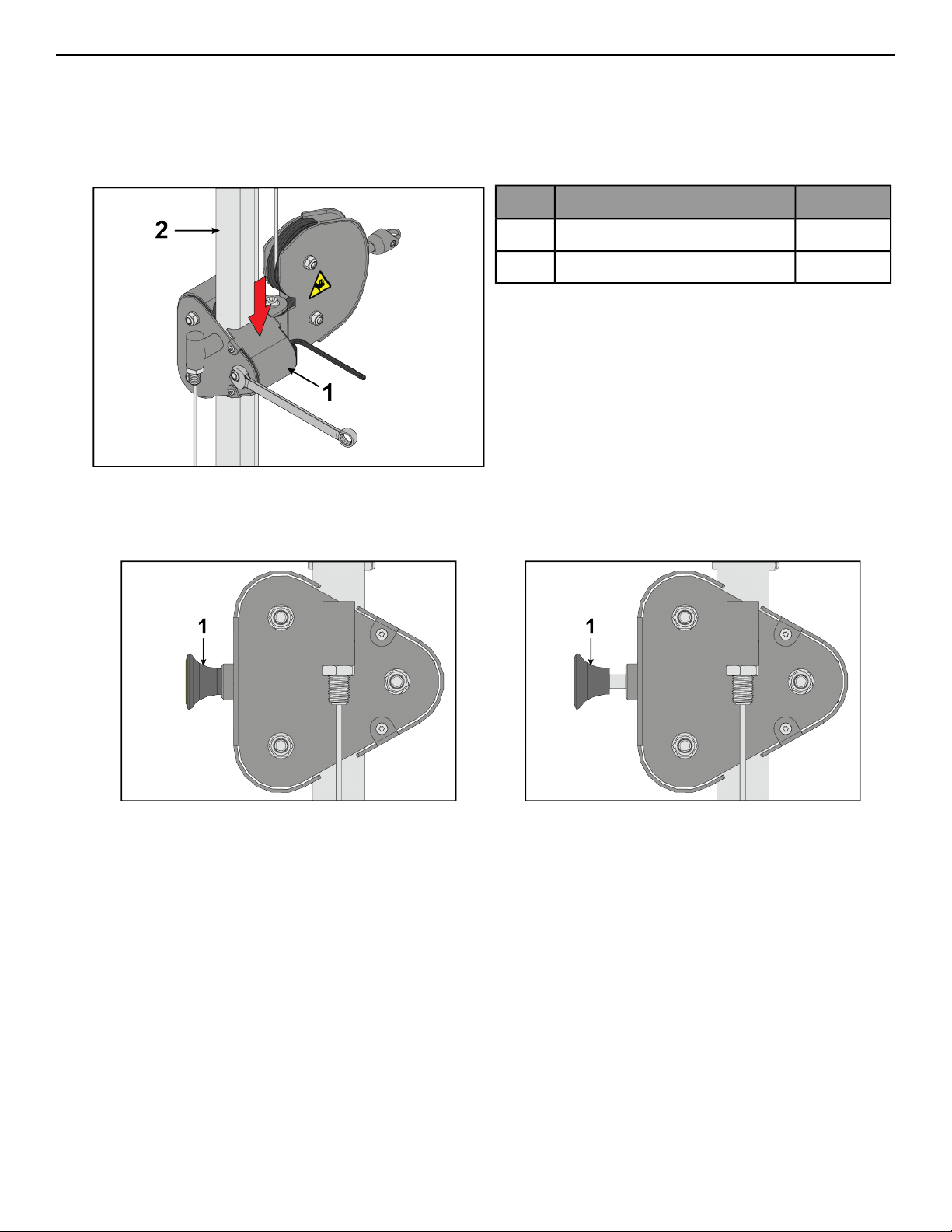
Carriage Adjustment Guide
Tools Required:
• 7 mm Allen wrench
• 17 mm Open end wrench
1. While tightening the nut and bolt, apply downward pressure to each side of the rear roller so it travels down
the slotted bolt holes, moving the roller closer to the adjustment tube.
QtyDescription
1Rear roller1
1Adjustment tube2
2. Tighten to 25-30 FT-LBS (27.1- 33.9Nm).
3. Ensure carriage adjustment pin (1) is fully engaged before use.
Incorrect: Adjustment pin not fully engaged.Correct: Adjustment pin fully engaged.
Page 33 of 54
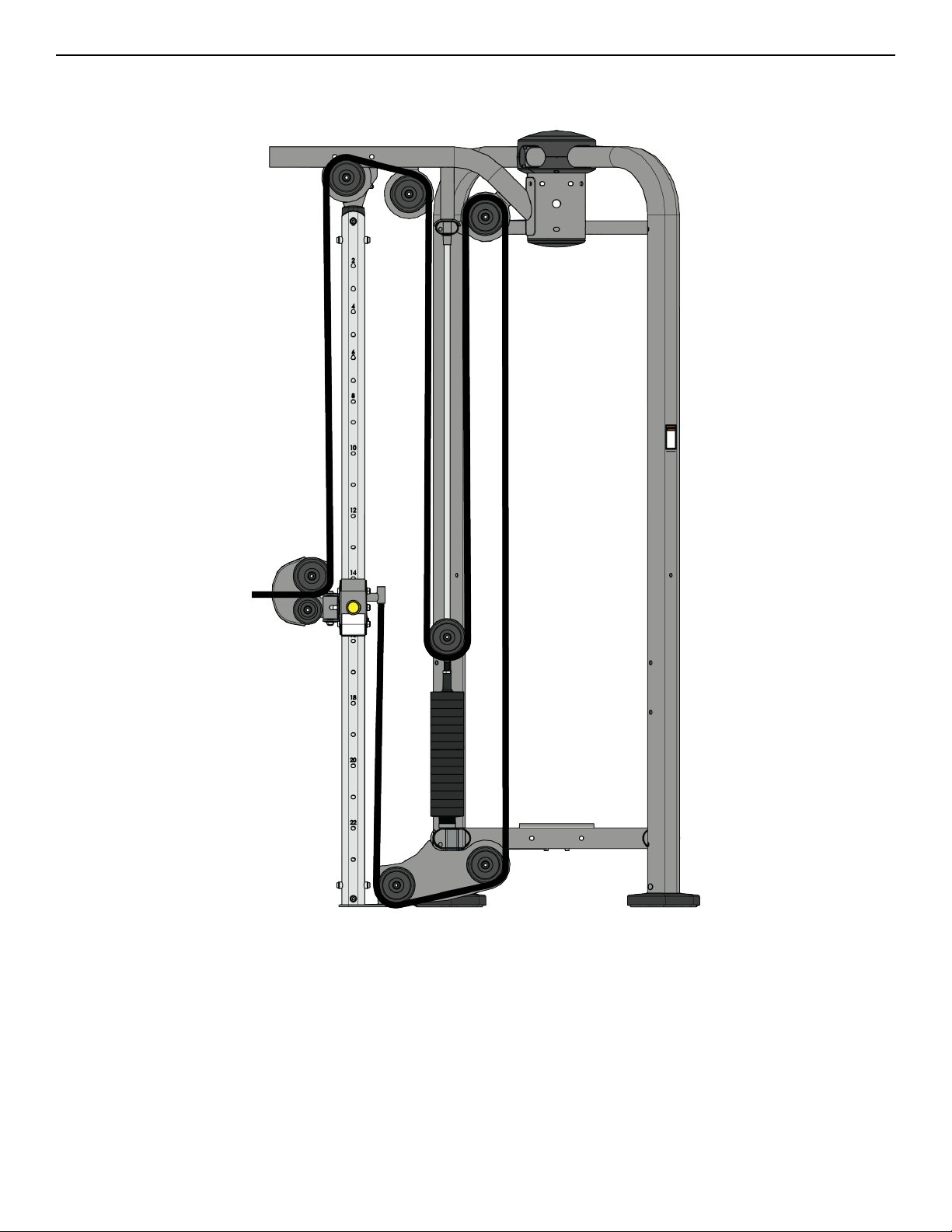
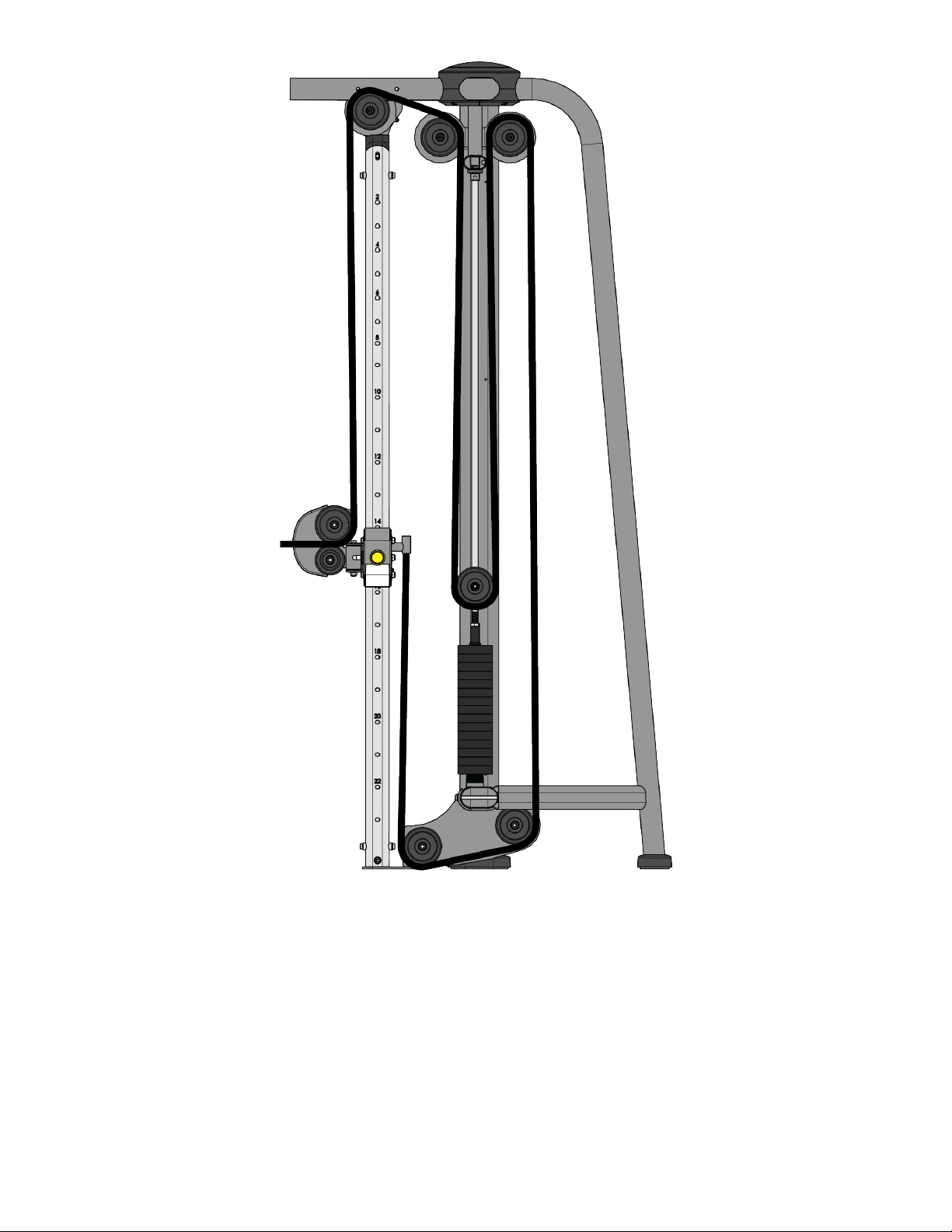
Cable Routing
Adjustable Cable Column (PP-AP), Adjustable Pulley 4:1 (PP-AP41), Attached Cable Crossover (PP-ACO),
Embedded Cable Crossover (PP-AXO)
Page 34 of 54
Free Standing Cable Crossover (PP-ACOFS)
Page 35 of 54
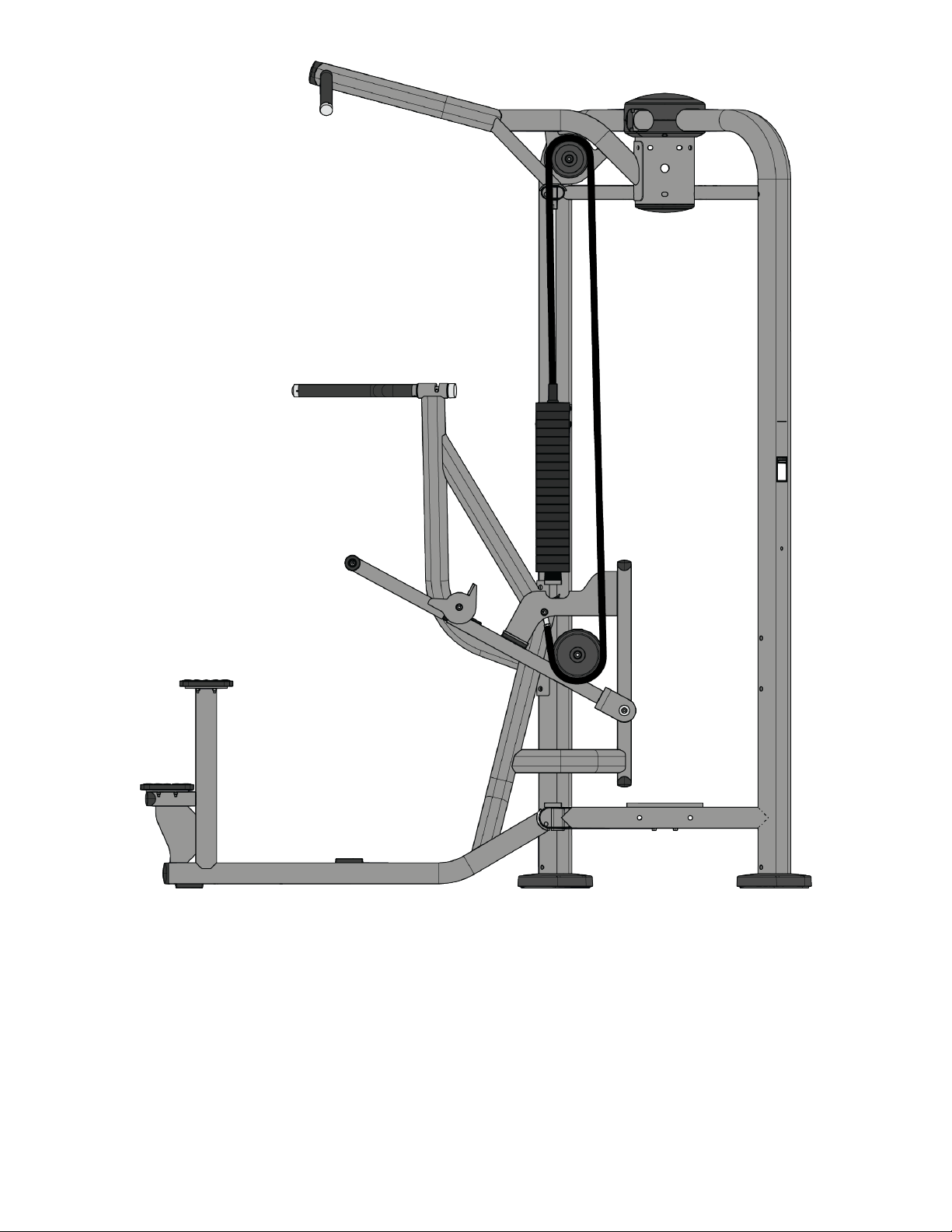
Dip/Chin Assist (PP-ADC)
Page 36 of 54
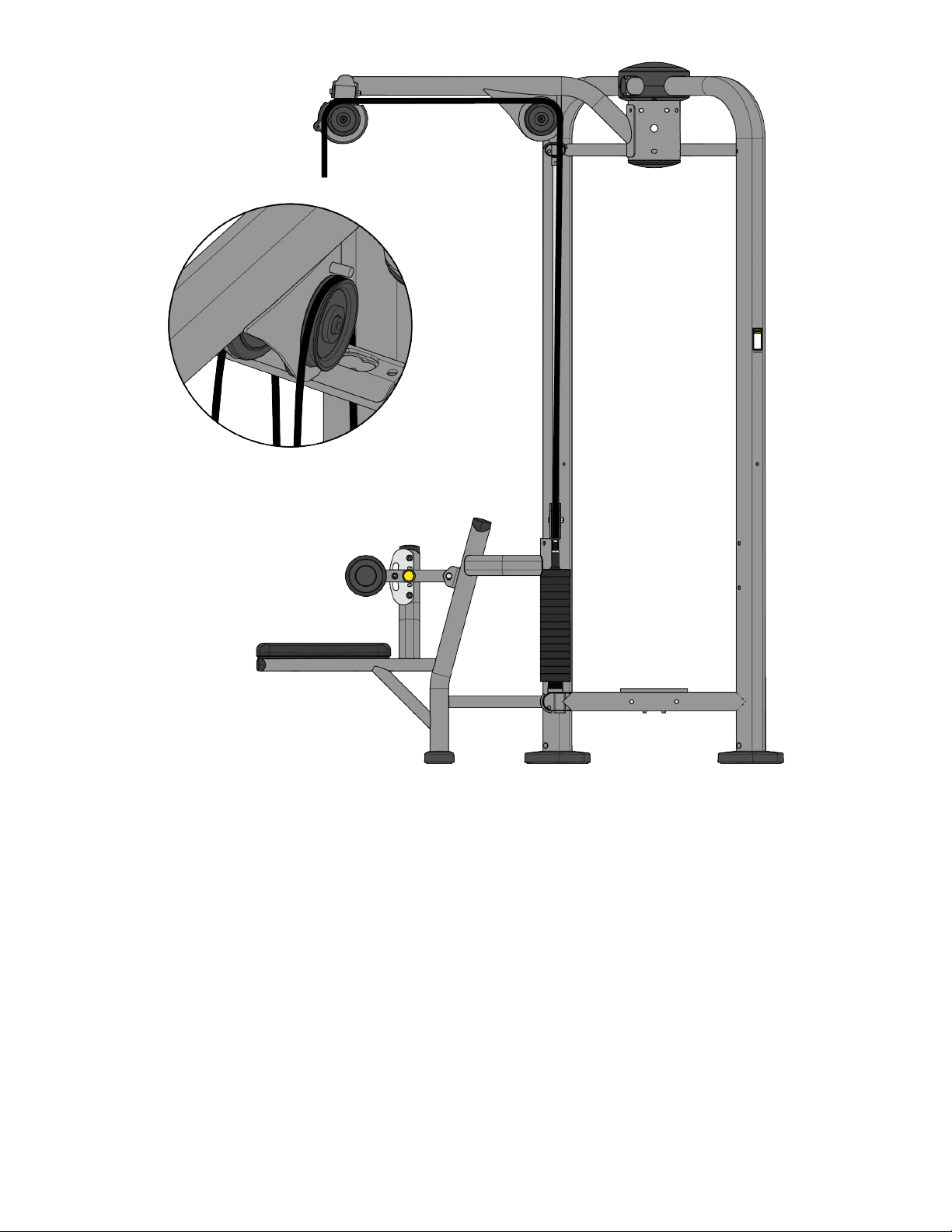
Dual Lat Pull (PP-LPD)
Page 37 of 54
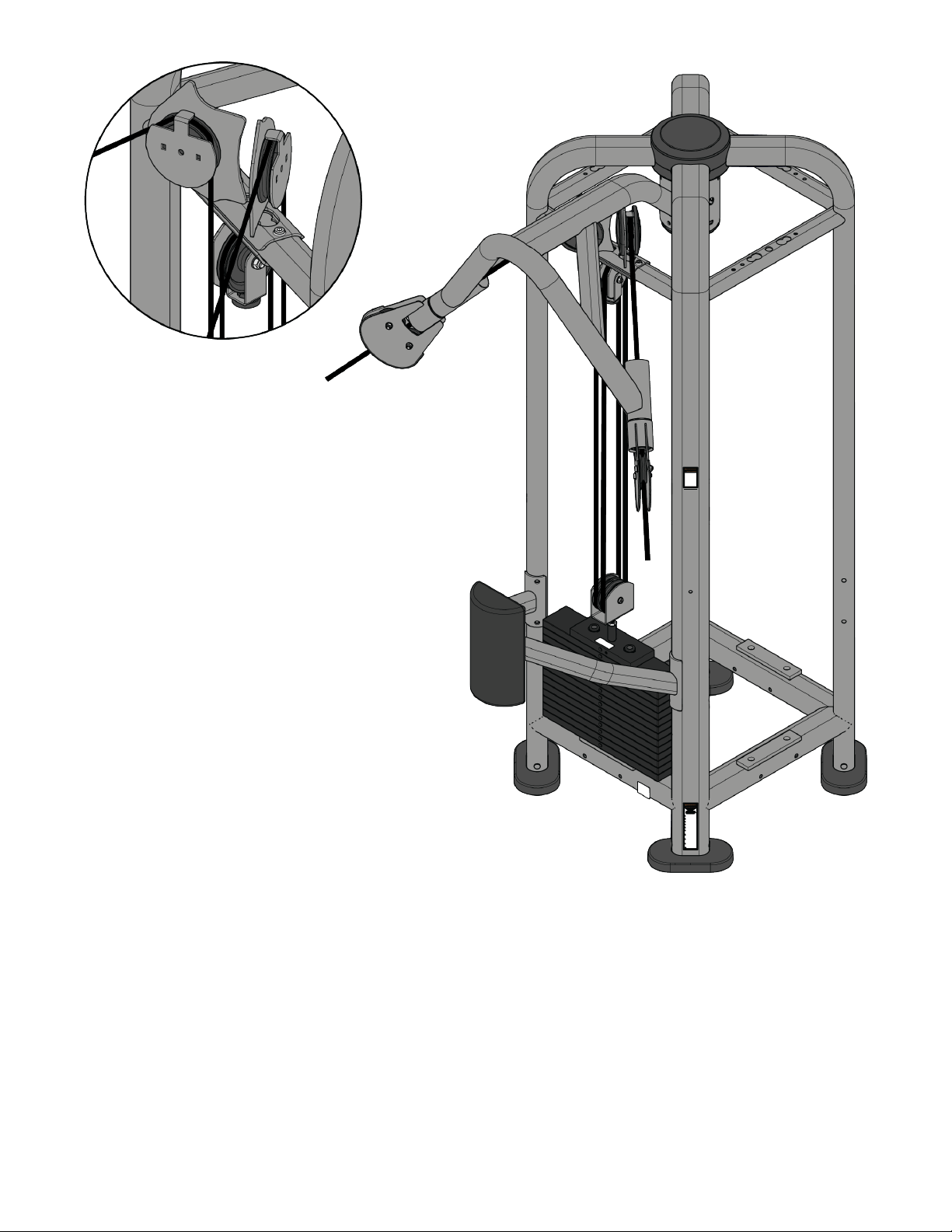
Dual Pulley High (PP-DPH)
Page 38 of 54
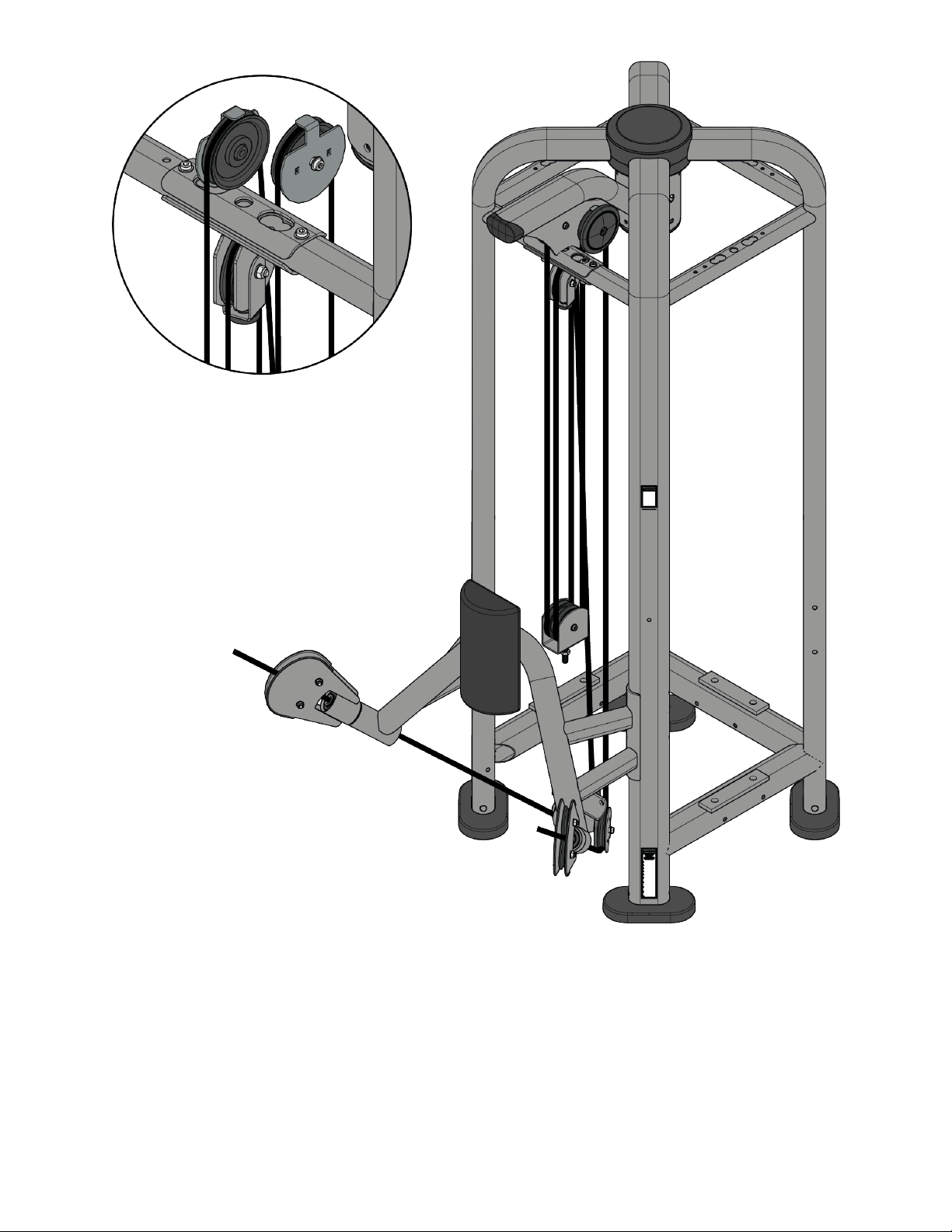
Dual Pulley Low (PP-DPL)
Page 39 of 54
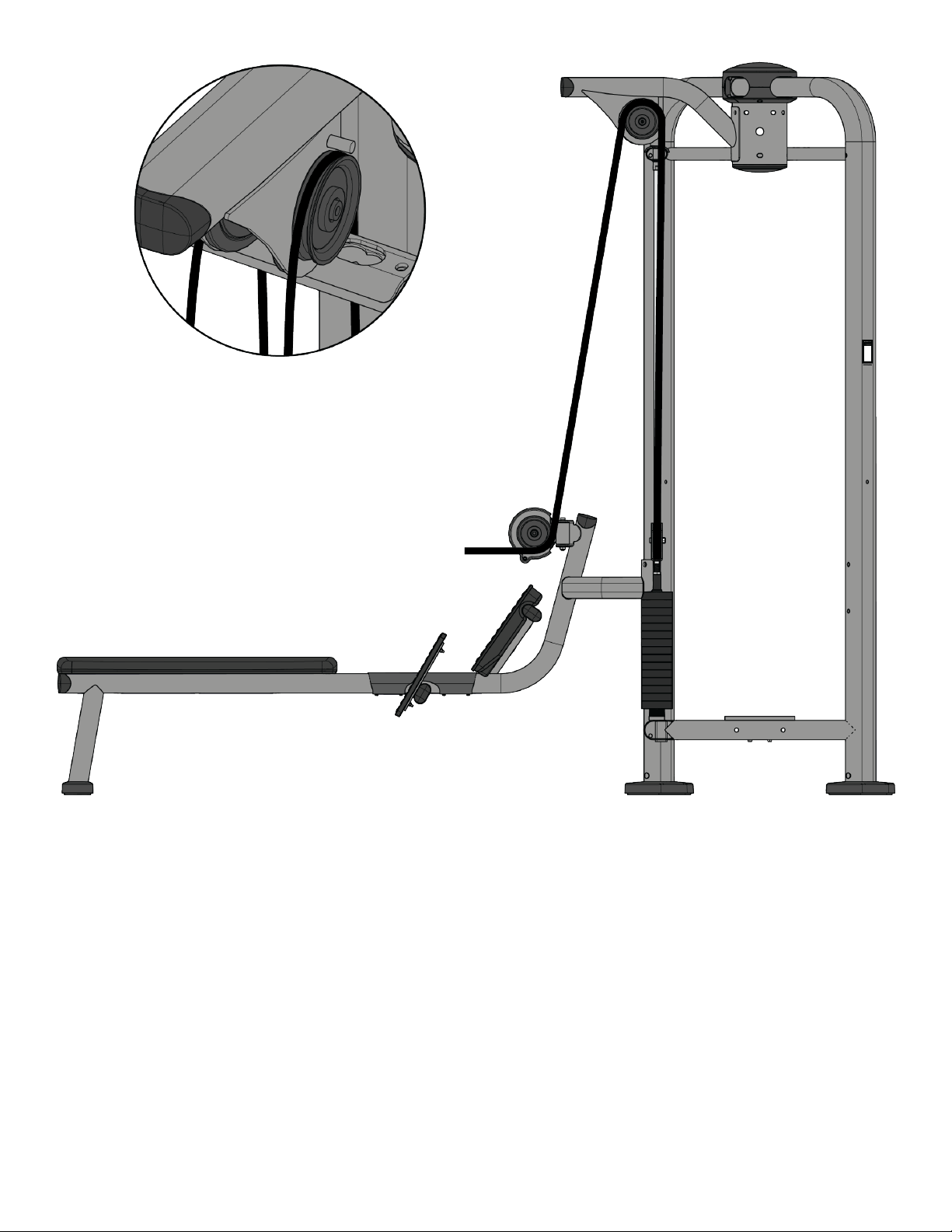
Dual Row (PP-RWD)
Page 40 of 54
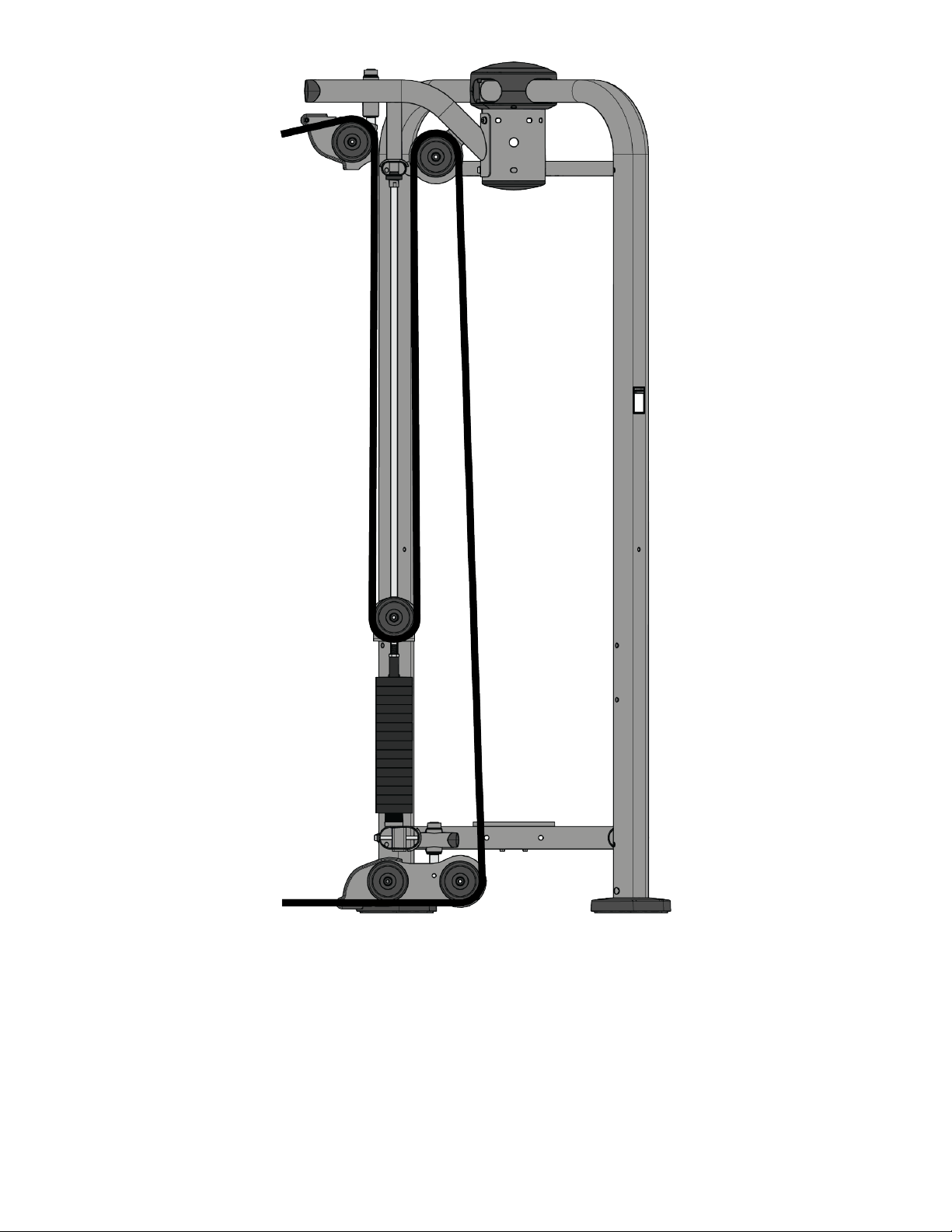
High Low (PP-HL), Attached High Low Crossover (PP-FCO), Embedded High Low Crossover (PP-FXO)
Page 41 of 54

Lat Pull (PP-LP)
Page 42 of 54
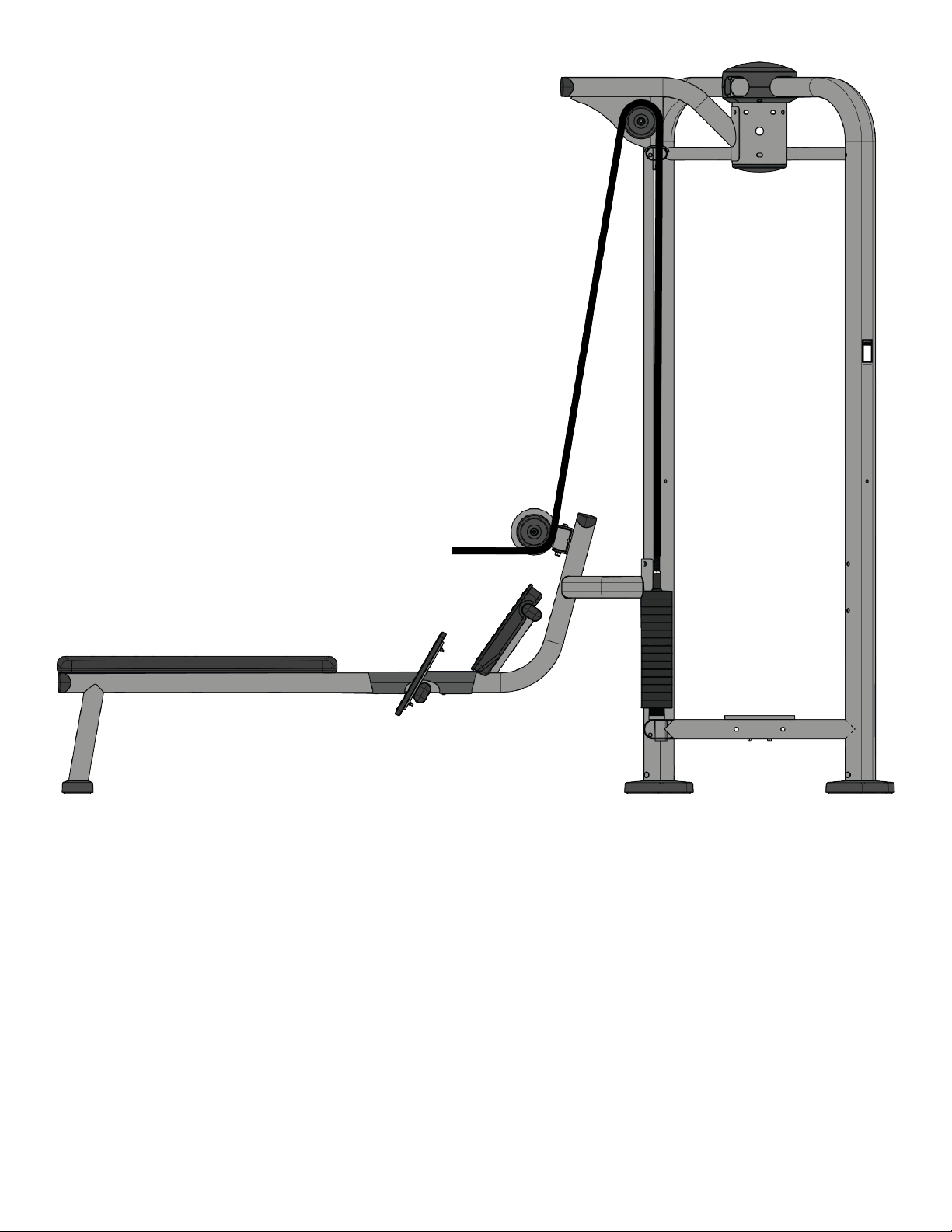
Row (PP-RW)
Page 43 of 54
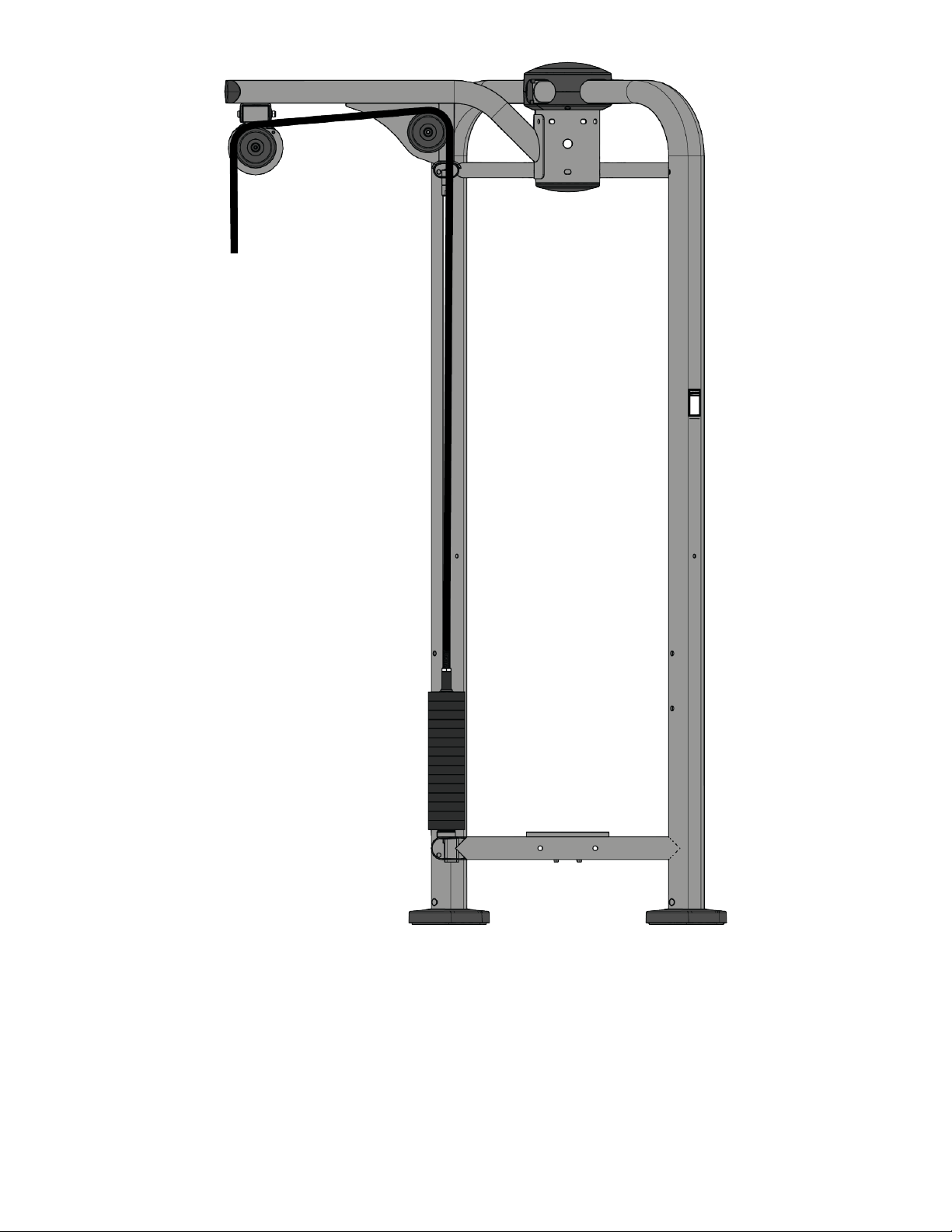
Triceps Pushdown (PP-TP)
Page 44 of 54
Cable Handling Guide
Cable Connections, Seating, and Installation
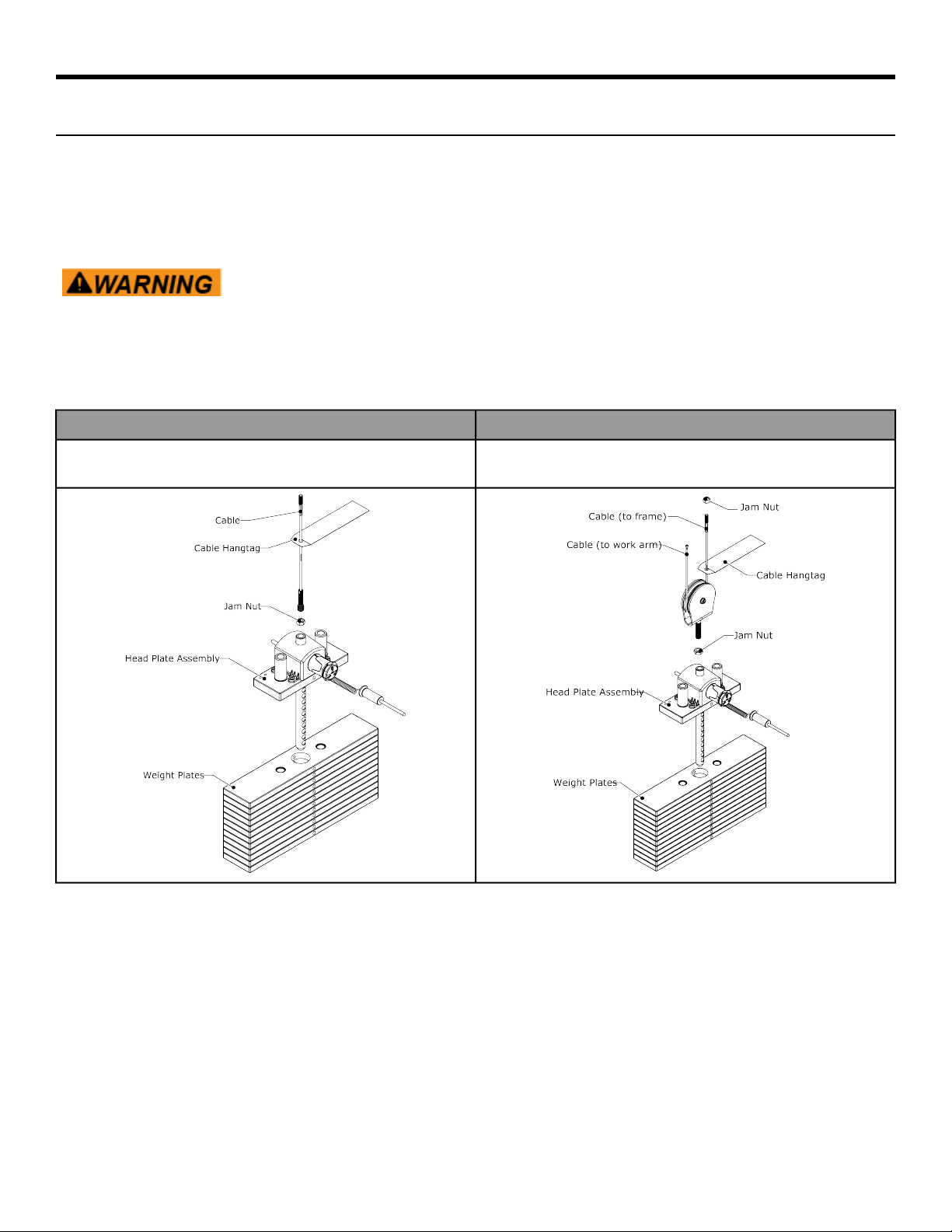
Cable Connections with threaded cable ends are required to be installed and maintained following the specifications
identified below. Failure to follow these specifications can lead to the dislocation of the threaded cable during
use and can cause serious injury. Along with securing the threaded cable end and jam nut, it is important to check
the entire unit and ensure that all hardware is securely fastened and not left loose upon completion of cable
installation.
Use of non certified “techs” note: Service warranties may be void if a non-Cybex
International, Inc.-certified technician performs service work. Replacement of any
strength cables should be performed by a Cybex International, Inc. certified technician.
CABLE CONNECTIONS TYPES
There are two general cable connection types: Direct Link and Floating Pulley
FLOATING PULLEYDIRECT LINK
Cable is routed around the floating pulley above the weight stack
and is anchored at the frame.
Cable is inserted directly into the head plate assembly.
• Jam nuts must be tightened toward the head plate assembly and frame anchor. Torque the jam nuts to 20-25
FT-LBS (27.2 - 24.0 Nm).
• Cable Hangtags to be removed by customer only.
Page 45 of 54
Cabling Procedure
Direct Link
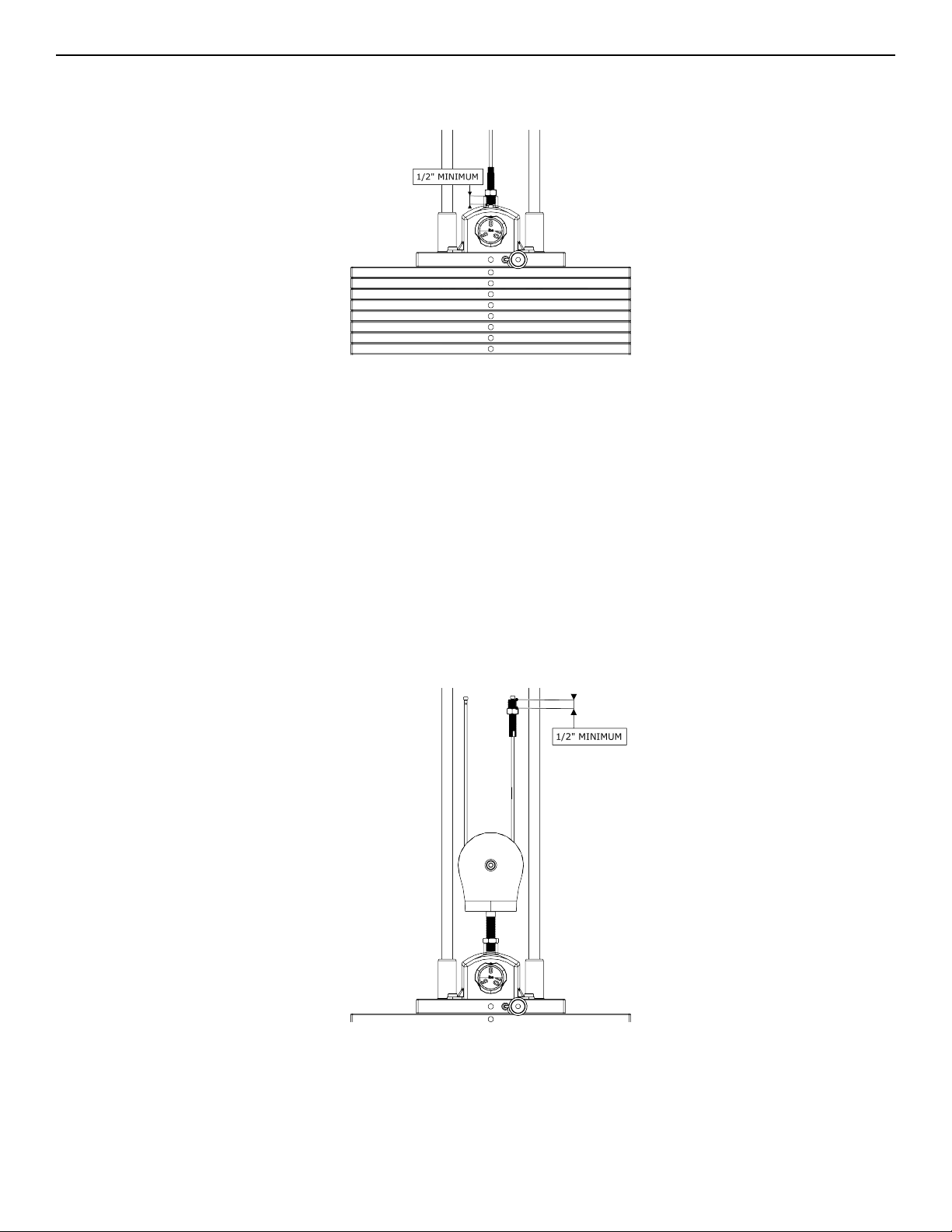
1. Thread the cable into the head plate assembly at least to the jam nut.
2. Cycle the machine to ensure that it is in proper working order.
3. Check the cable to ensure there is proper tension.
4. Tighten jam nut to 20-25 FT-LBS (27.2 - 34.0 Nm).
Floating Pulley
1. Measure the threaded end of the floating pulley and cable.
2. Screw the jam nuts onto the end of the thread on the floating pulley and cable.
3. Thread the floating pulley into the head plate assembly at least 1/2 inch (12.7mm).
4. Thread the cable into the frame anchor position.
5. Measure the exposed threads to verify that at least 1/2 inch (12.7mm) is screwed into the head plate assembly
and frame anchor.
6. Cycle the machine to ensure that it is in proper working order.
7. Check the cable to ensure there is proper tension.
8. Tighten the jam nut toward the head plate assembly and frame anchor.
Page 46 of 54
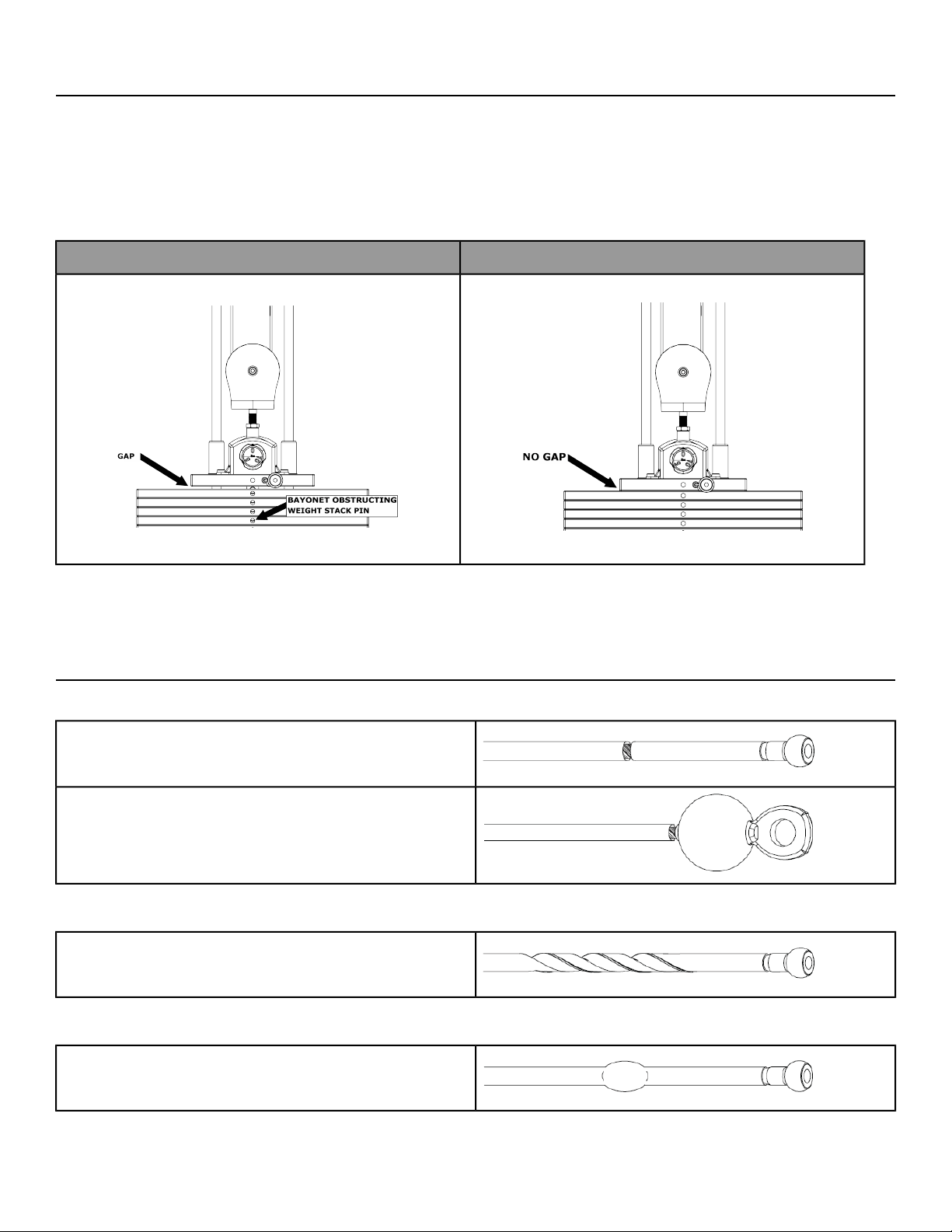
9. Torque the jam nuts to 20-25 FT-LBS. (27.2 - 34.0 Nm).
Tensioning Cable
Cable should have enough tension so it stays seated into the pulley but not so tight that it pulls the head plate off
the weight plate below it.
1. If the head plate has lifted, loosen the jam nuts at the terminations and loosen the threaded plugs a half turn
until the head plate comes to rest on the weight plate below. Check that the threaded plugs are engaged at
least 1/2” (12.7mm) at each termination.
SEATED HEAD PLATESUSPENDED HEAD PLATE
2. Ensure that the weight stack selector pin can pin into each weight plate.
3. Tighten jam nuts to 20-25 FT-LBS.
Strength Cable Wear Guidelines
FRACTURES:
Casing can crack or fracture under strains during use.
Any crack in the casing merits cable replacement even
if no wire rope is exposed.
Be especially observant for fractures near the
components on the cable assembly - IE. Nylon Ball, Nico
Loop, Threaded Plug, etc.
TWISTING/BINDING:
Inspect casing to ensure wire rope is not twisting within
its casing. Any sign of the cable twisting should be
replaced immediately.
BULGING:
Internal wire rope strands can break within and coil
causing a bulge to appear. Cable should retain same
outside diameter throughout.
Page 47 of 54
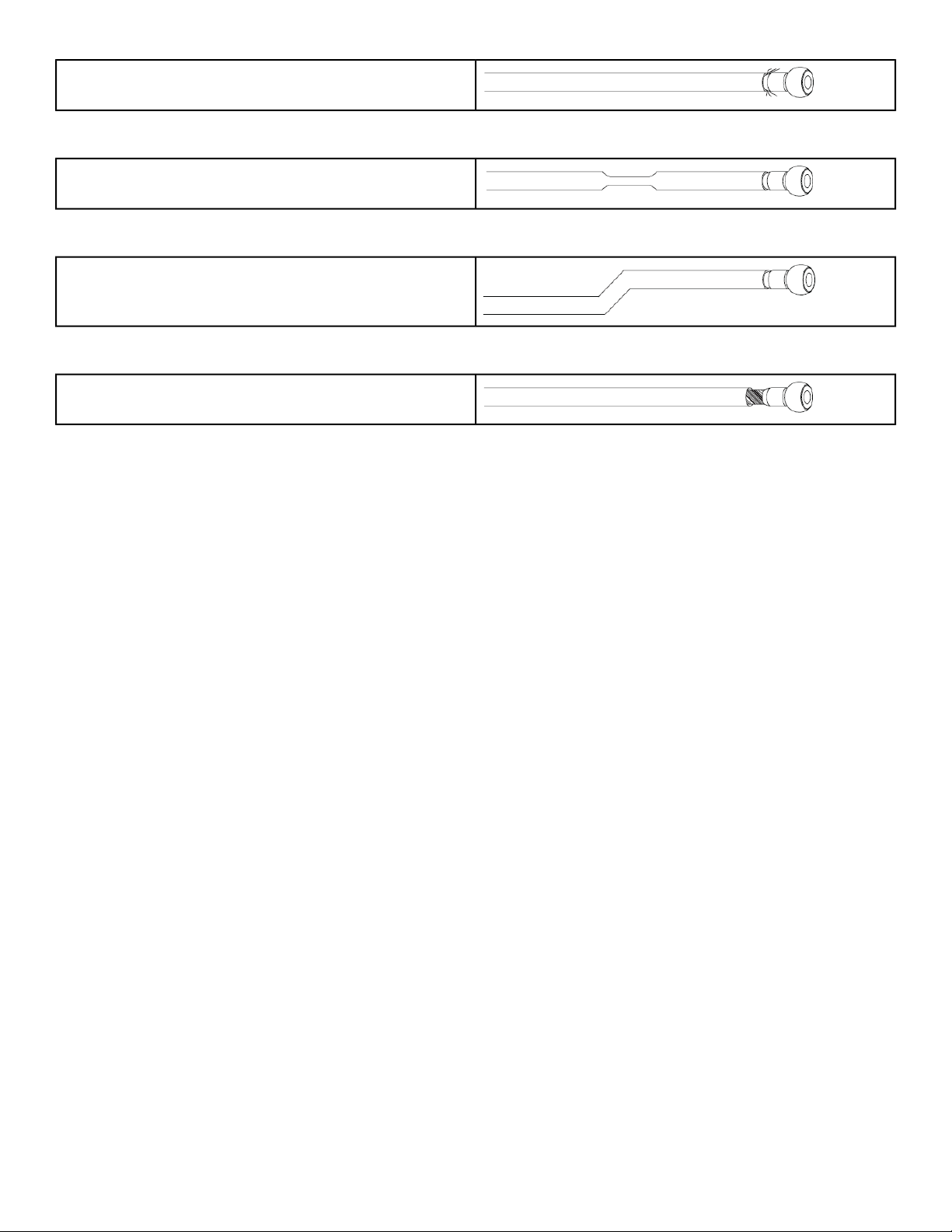
FRAYED/EXPOSED WIRE ROPE:
Any exposed wire rope protruding through the casing
or at either end.
FLATTENED:
Section of cable is compressed and will not retain its
shape (outside diameter).
PERMANENTLY BENT:
Cable has ‘kink’ and prohibits cable from laying straight.
Wire rope may be unraveling beneath casing and is
compromised warranting replacement.
ENDS SEPARATING:
Watch for component end of cable to pull away from
cable assembly - look for exposed wire rope.
Page 48 of 54
Bolt to Floor Guidelines
Introduction
Cybex designs its products to be stable when used as designed. Because strength training is dynamic, we cannot
predict how users will ultimately use the products in all circumstances. Therefore, Cybex recommends that strength
training equipment be secured to a solid, level surface to stabilize and eliminate rocking or tipping over. For some
equipment, securing the equipment to the floor is REQUIRED.
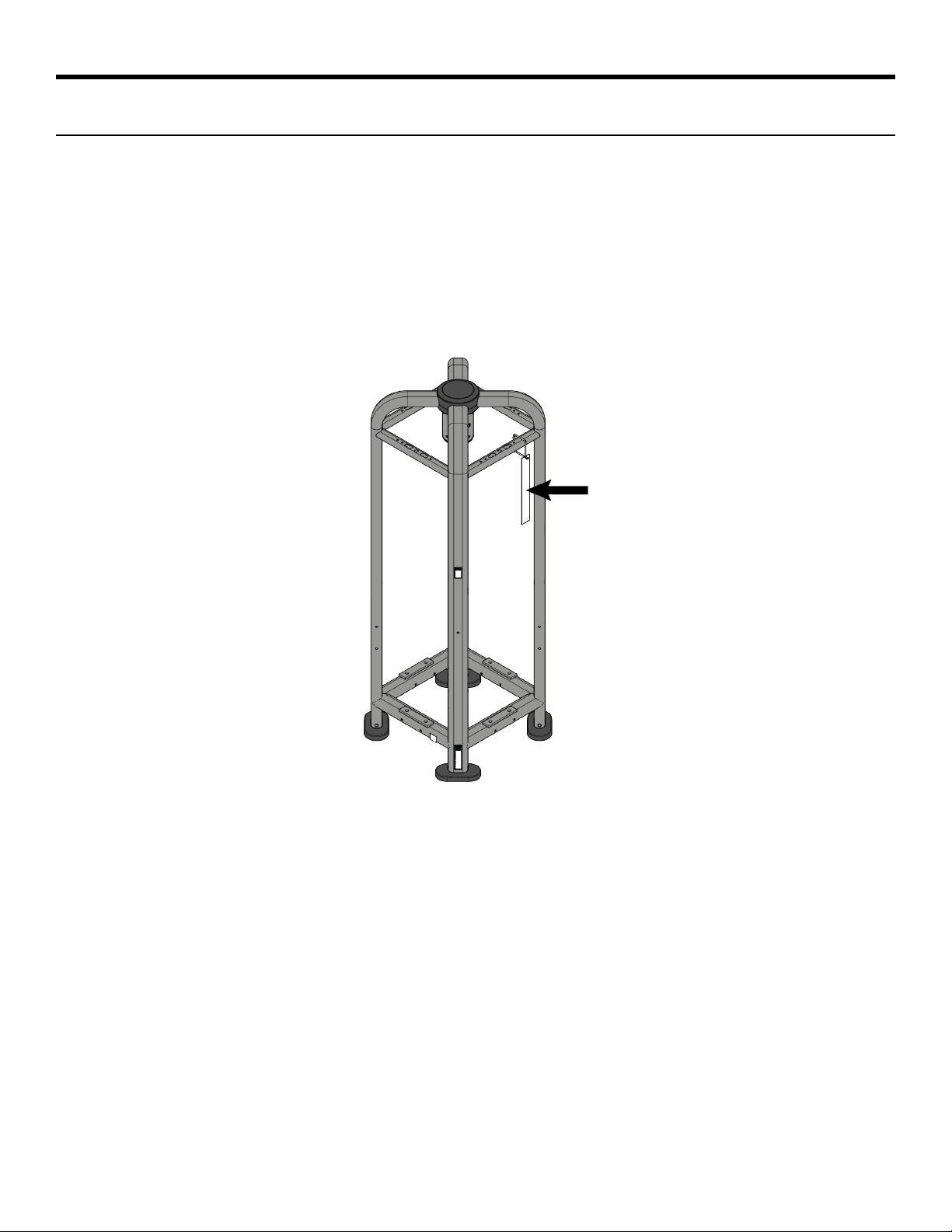
• Any unit with three or less weight stacks is REQUIRED to be bolted to the floor.
• Any unit that will be used with body weight strap training equipment, ropes, straps or chains in which case it
is REQUIRED to be secured to the floor.
Each new unit shipped comes with a multi-language hangtag stating the importance of bolting the unit down as
a safety precaution.
It is the facility’s responsibility to adhere to local and regional building codes.
ALL ANCHORS:
• Fasteners must have minimum embedment in concrete floor, not including screed, regardless of wood/tile/rubber
over subfloor. (See Anchor Selection for maximum subfloor thickness between unit and concrete to equipment
foot must be made of flooring or other material (i.e. no air gaps)).
• DO NOT reuse fasteners. Static and Dynamic anchors are designed for one-time use only.
• Factor in equipement’s feet height when selecting fastener length.
• Factor in flooring thickness when selecting fastener length.
• It is also recommended to drill an additional 1/2” (12.7mm) of depth beyond the length of the fastener being
used to ensure that debris does not block the entry of the anchor.
• Minimum concrete compressive strength: 3000psi (20 N/mm2).
Page 49 of 54
Delivery and Installation Tips
Anchoring
• Cybex requires that each foot has at least one anchor bolted to the floor.
• All anchors must have a minimum embedment into concrete, regardless of wood/tile/rubber/screed over
sub-floor.
• Dynamic anchors must have a minimum embedment depth in concrete to ensure maximum security and pull
out force. See Anchor Selection for embedment depth minimums.
Building Codes
• It is the facility’s responsibility to adhere to local and regional building codes. Please verify with the customer
to ensure that they are aware of this.
Carpeting
• If bolted down to carpet flooring, be sure to use a box cutter knife to cut the carpet threads around each foot.
This will help avoid the carpet threads from being wrapped around and pulled by the drill bit.
Competitor Product
• The bolt down guidelines and procedures for Cybex products were determined by the company’s Engineering
and Installation Development groups. These guidelines include which anchors to use and positioning of the
anchors are required for Cybex product.
1. Cybex does not have that level of specification or engineering input for competitive product.
2. Cybex installation teams are not permitted to anchor competitor equipment.
Drilling
• It is also recommended to drill an additional 1/2” (12.7mm) of depth beyond the length of the fastener being
used to ensure that debris does not block the entry of the anchor.
1. This can be done by marking your drill bit with a piece of tape.
2. While it is recommended that a vacuum be used to clean up debris, this will not account for all the debris
that will settle at the bottom of the drilled hole.
Anchor Selection
Static Anchor
Subfloor between unit and
concrete over 1/2” (12.7mm) thick
Subfloor between unit and
concrete 0” to 1/2” (12.7mm) thick
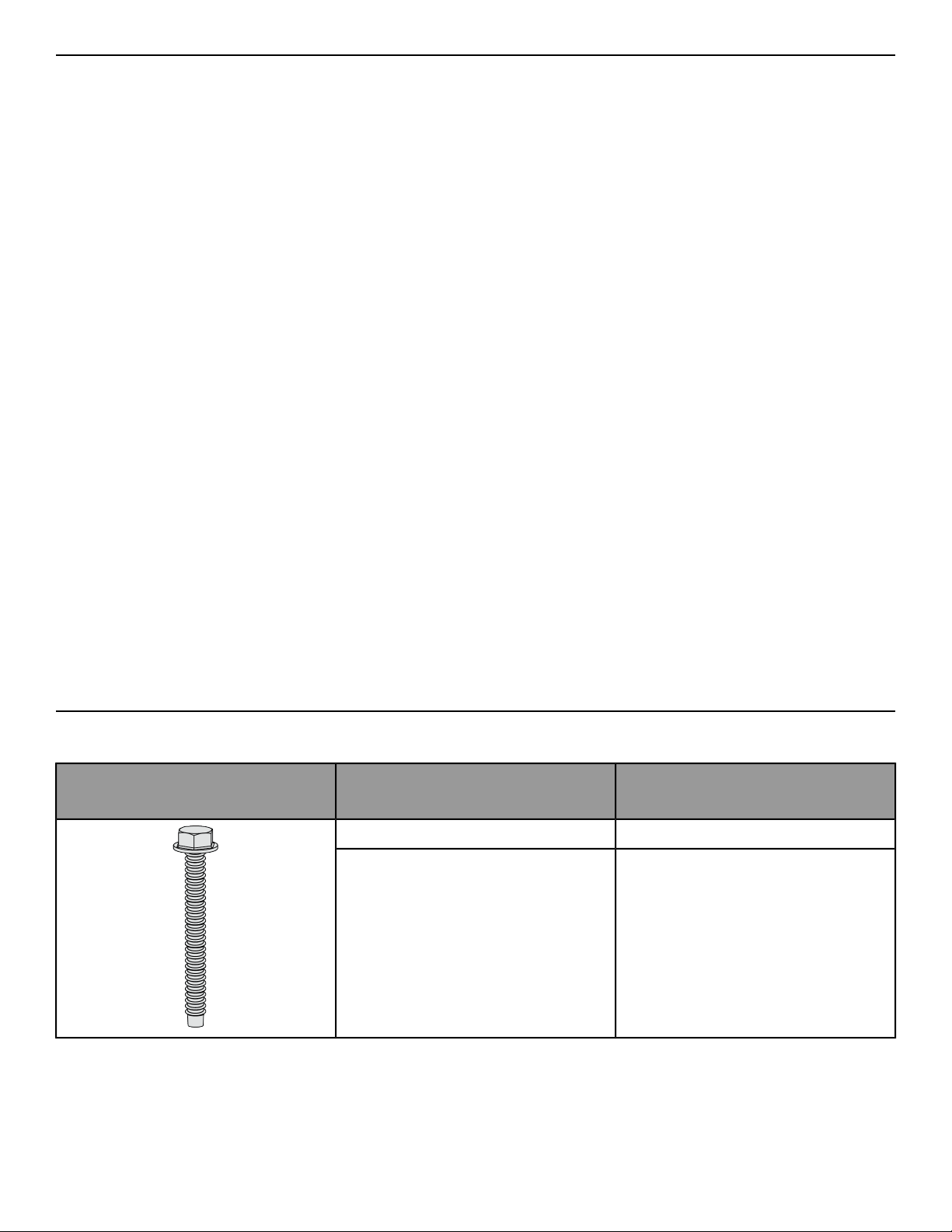
Anchor
Imperial: KH-EZ 3/8” x 5”Imperial: KH-EZ 3/8” x 4”
Metric: HUS-H 8mm x 150mmMetric: HUS-H 8mm x 120mm
• Minimum concrete compressive strength: 3000psi (20 N/mm2)
• Minimum concrete thickness:
KH-EZ 3/8”: 4-7/8” (124mm)•
• HUS-H 8mm: 120mm (4-3/4”)
Page 50 of 54
• Minimum drill depth in concrete:
Standard fasteners 1/2” beyond anchor length•
• Metric fasteners 10mm beyond anchor length
• Minimum concrete embedment:
KH-EZ 3/8”: 3-1/4” (83mm)•
• HUS-H 8mm: 75mm (2-3/32”)
Pullout Force
Cybex specifies Hilti™ static and dynamic anchors. According to the anchor manufacturer, the recommended
design pullout force (in tension) for the specified anchors, when properly installed in cracked concrete, is provided
in the side table. This table should be used for reference only; for additional and up-to-date information on the
anchor capabilities or the design pullout force in other substrates, please consult Hilti directly at
https://www.us.hilti.com.
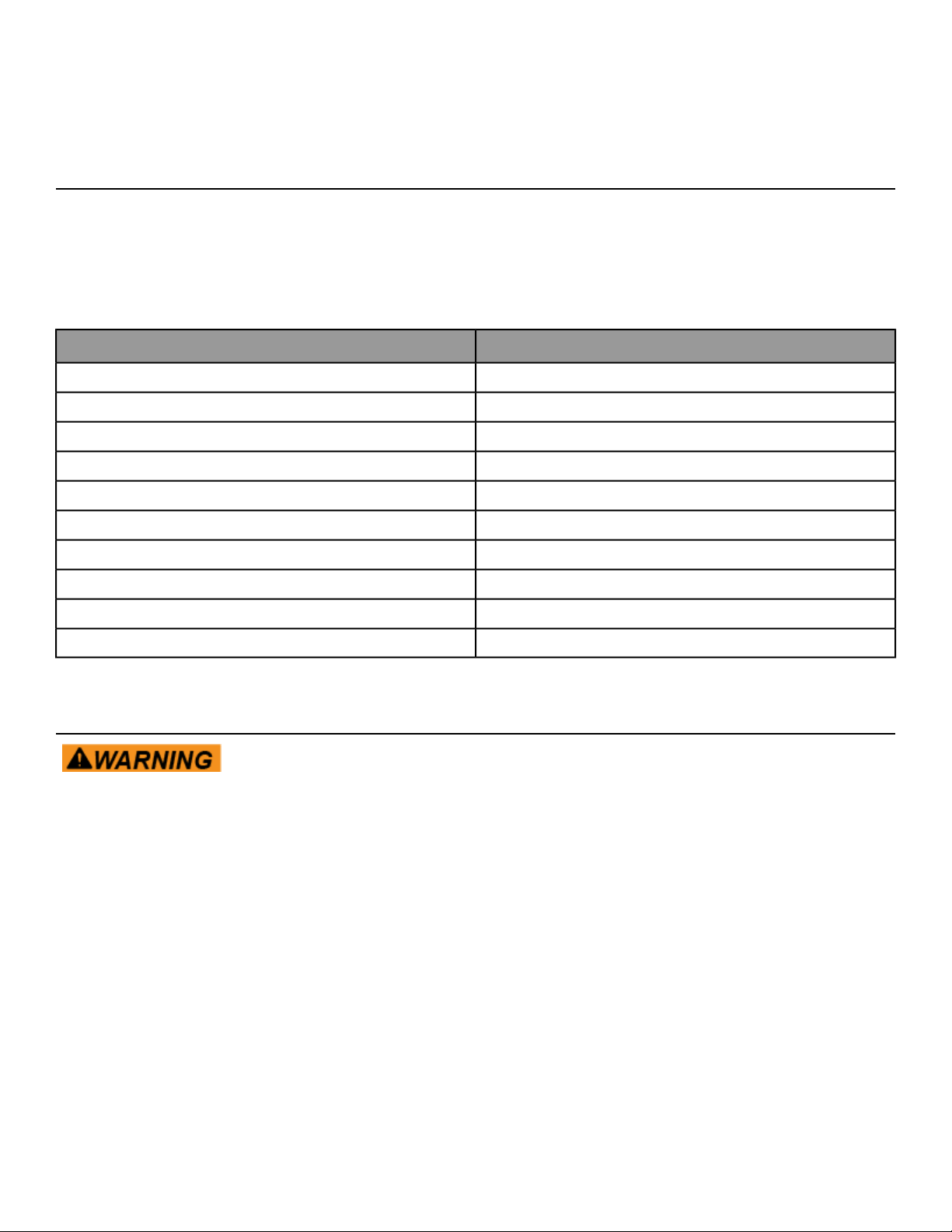
Design Resistance in Tension *Selected Anchor
830 lbKH-EZ ¼” x 4”
3.3 kNHUS-H 6MM x 120MM
1535 lbKH-EZ 3/8” x 4”
1535 lbKH-EZ 3/8” x 5”
3.3 kNHUS-H 8MM x 120MM
3.3 kNHUS-H 8MM x 150MM
2000 lbHSL-3/8 4”
8 kNHST M12 x 115/20
8 kNHST M12 x 195/200
1615 lbKB-TZ 3/8” x 3-3/4”
* Design strength extracted from the Hilti Anchor Fastening Technology Manual issued September 2014.
Tools Required
Adhere to manufacturer’s equipment warnings and guidelines. Follow manufacturer’s
instructions for proper usage.
Static Anchor
• Floor scanner/rebar detector (optional)
• 1” L-shape SDS rotary hammer
• 1/4" x 12" (6mm x 305mm) carbide drill bit (for 1/4” (6mm) anchors)
• 3/8" x 12" (8mm x 305mm) carbide drill bit (for 3/8” (8mm) anchors)
• Safety glasses
• Extension cord
• Impact wrench
• Vacuum (for debris)
Page 51 of 54
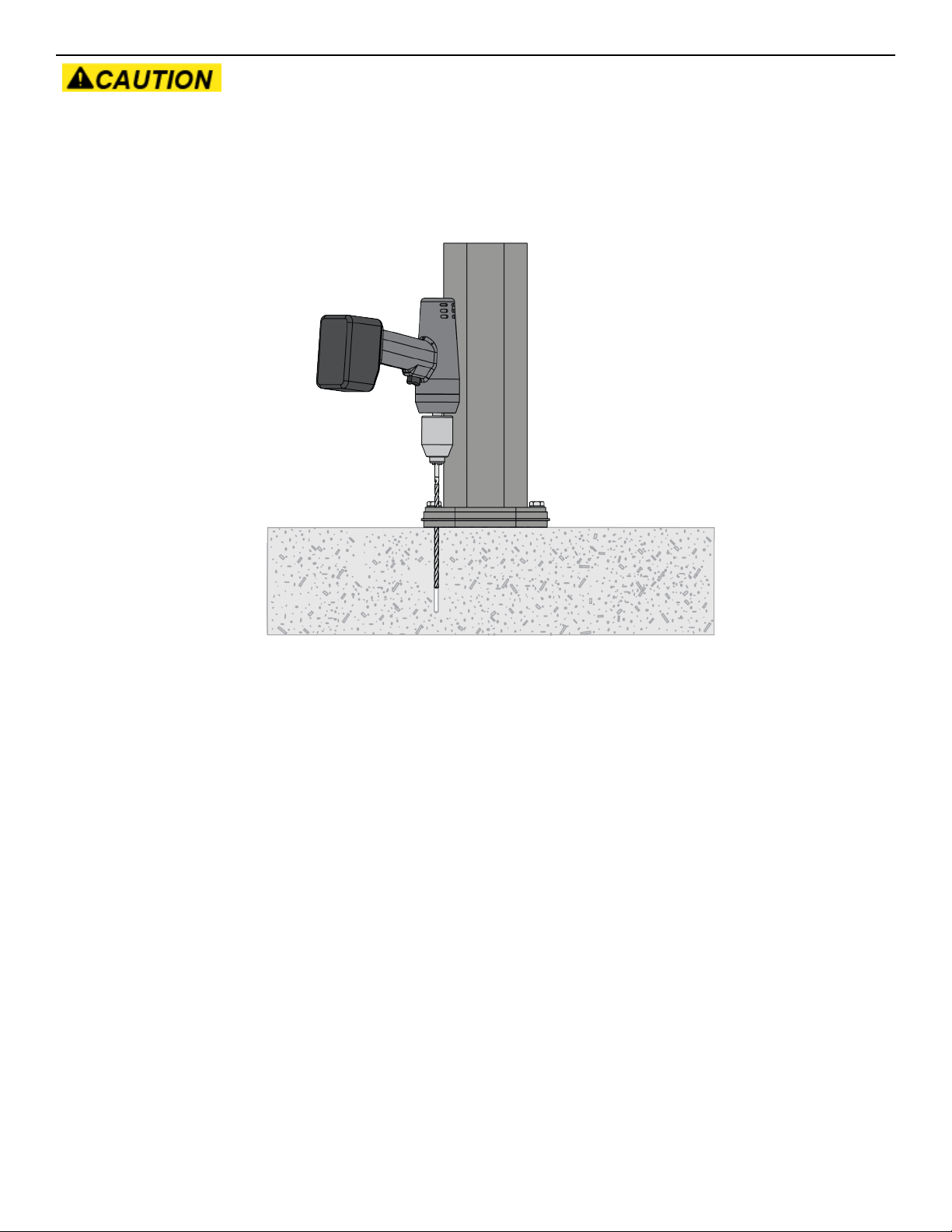
Static Anchor Procedure
If it is possible that the length of your bolt will not provide the minimum requirement
of 2.5” (63.5mm) of engagement, a longer anchor should be used.
1. Place unit into position to be mounted and cycle unit to set stance.
2. Each foot must get at least one static fastener.
3. Wearing protective glasses, drill down into the flooring to the required depth as perpendicular as possible,
ensuring that the foot thickness is being accounted for; refer to Anchor Selection and Foot Dimensions.
Page 52 of 54
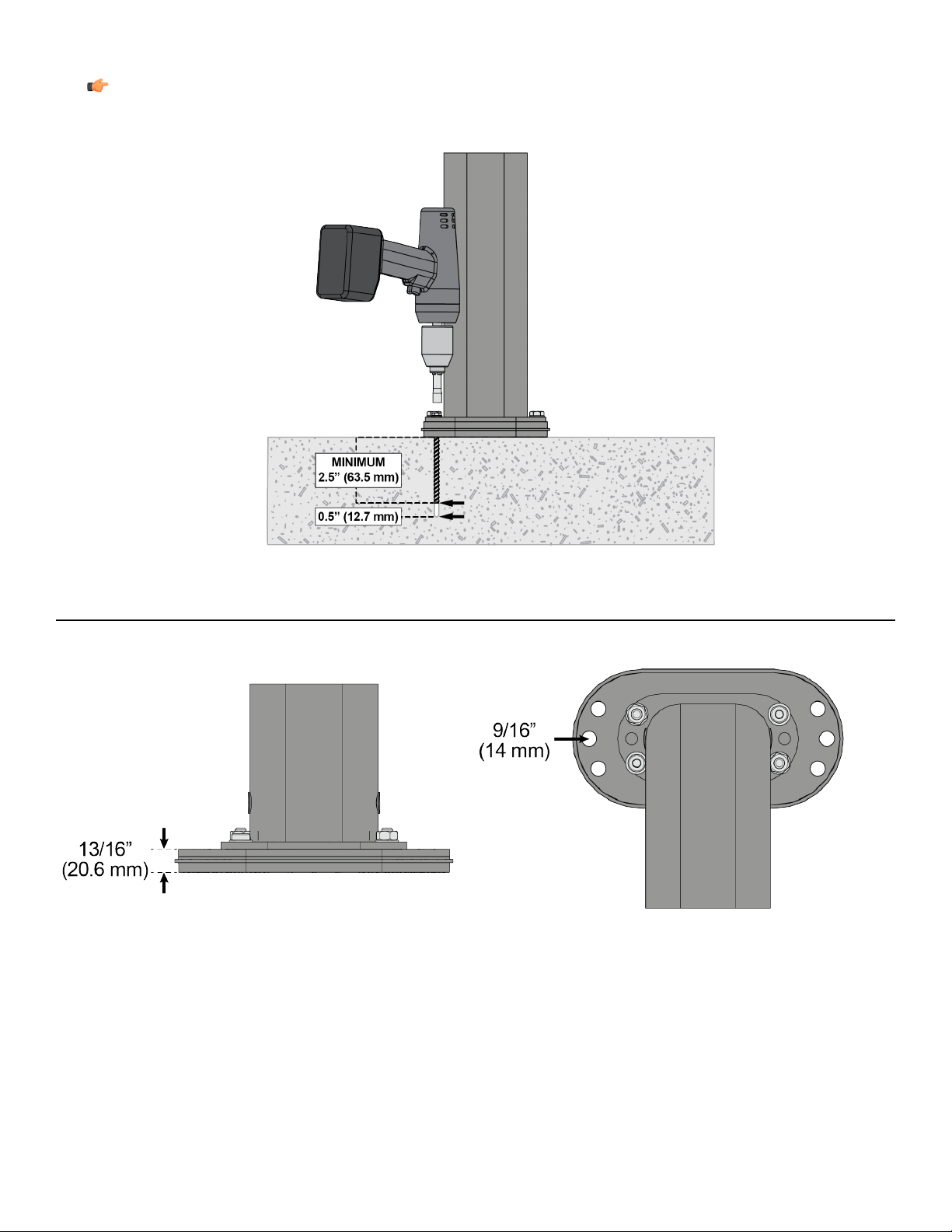
4. Insert fastener and tighten to 18 Foot-Pounds (24Nm) for 1/4” (6mm) anchor or 40 Foot-Pounds (54Nm) for
3/8” (8mm) anchor.
Note: If the legs/frame do not contact the mounting surface DO NOT pull down with the fastener or
anchor. Loosen frame hardware and re-tighten to allow machine to align.
Foot Dimensions
Use below images to determine foot height thickness per strength family.
Page 53 of 54

Columbia Center III - 9525 West Bryn Mawr Ave, Rosemont, IL 60018 • 800-351-3737 • 847-288-3700 • FAX 800-216-8893
www.cybexintl.com

