KSBC1B0
W10851732C_ENv01.indd 1 9/14/16 11:49 AM
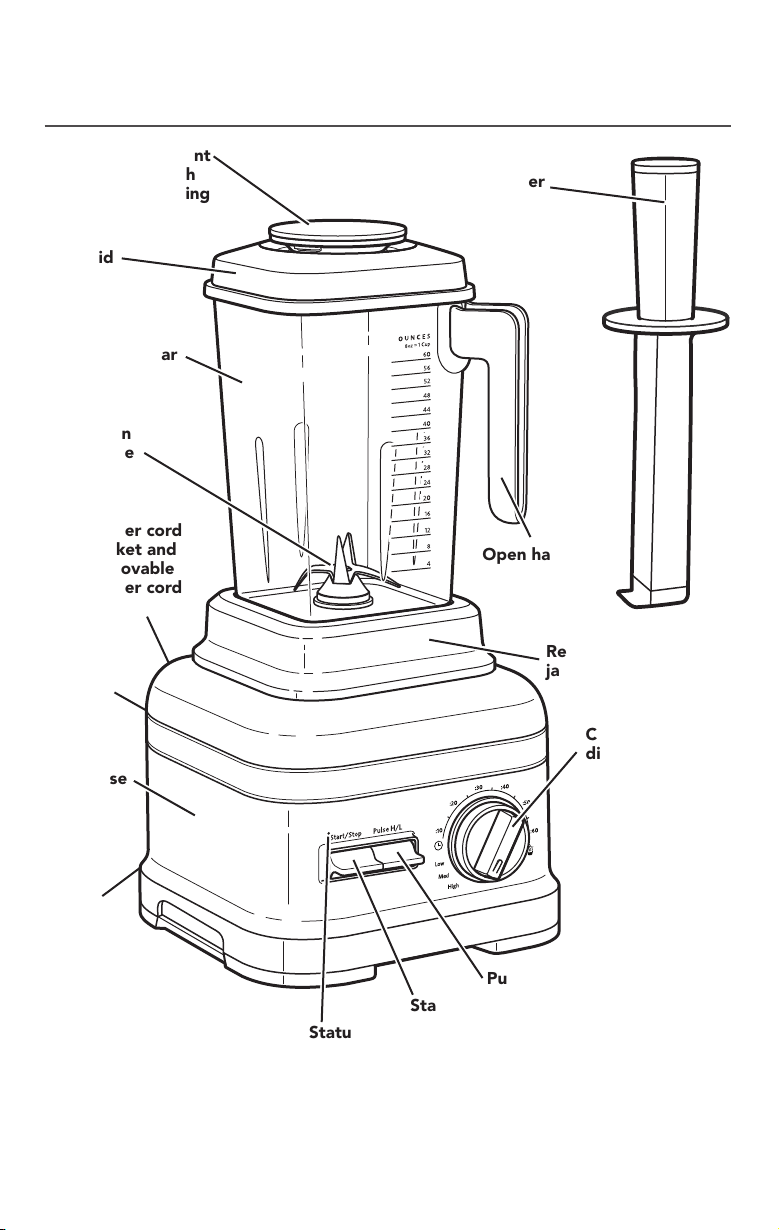
Cord cleat
(not shown)
PARTS AND FEATURES
PARTS AND ACCESSORIES
Ingredient
cap with
measuring
cup
Flex Edge
tamper
Lid
Talon
blade
Base
On/off
switch
(not shown)
Start/Stop toggle switch
Pulse toggle switch
Control
dial
Open handle
for easy
stackability
Removable blender
jar pad
Blender jar
Status indicator light
Power cord
socket and
removable
power cord
(not shown)
Motor horsepower for the blender motor was measured using a dynamometer, a machine
that laboratories routinely use to measure the mechanical power of motors. Our 3.5 peak
horsepower (HP) motor reference reflects the horsepower output of the motor itself and
not the Blender’s horsepower output in the blender jar. As with any blender, the power
output in the blender jar is not the same as the horsepower of the motor itself. This
motor delivers 2.45 peak HP in the blender jar, enabling your Blender to deliver robust
power for all your recipes.
W10851732C_ENv01.indd 2 9/14/16 11:49 AM
ENGLISH
COMMERCIAL BLENDER SAFETY | 3
COMMERCIAL BLENDER SAFETY
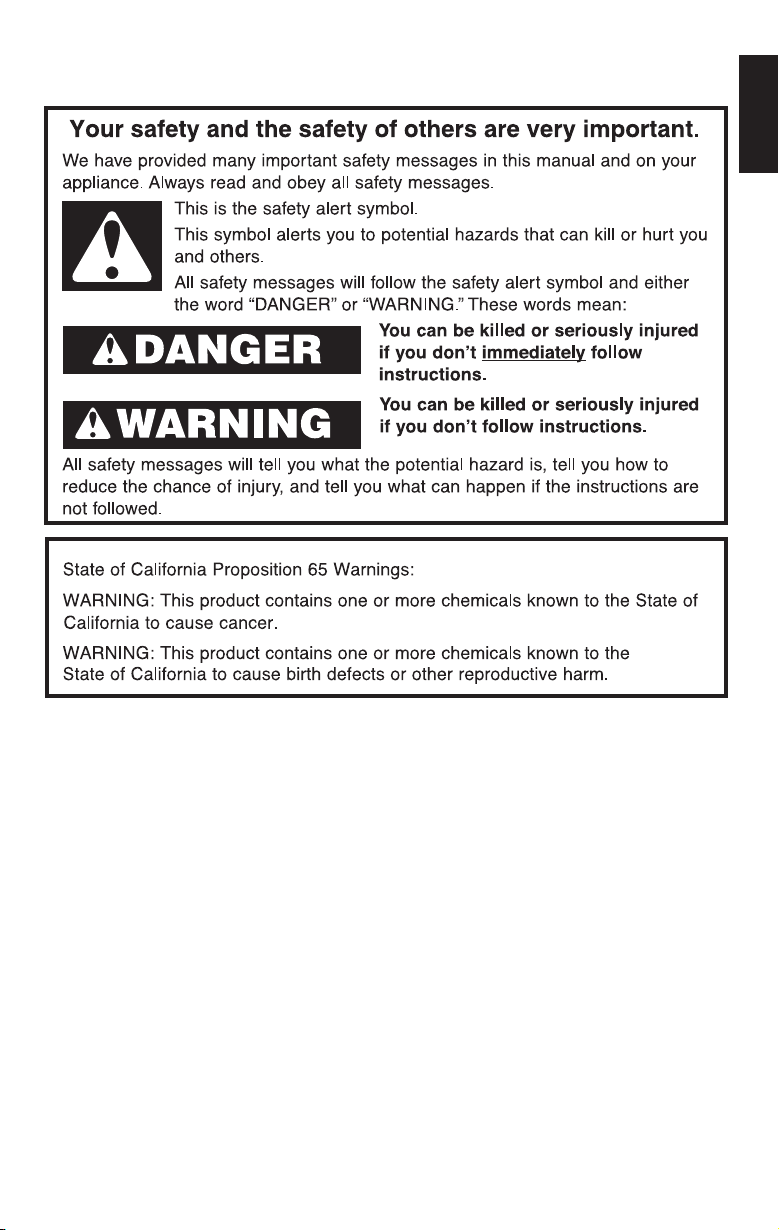
IMPORTANT SAFEGUARDS
When using electrical appliances, basic safety precautions should always
be followed, including the following:
1. Read all instructions.
2. To protect against risk of electrical shock, do not put Blender in water
or other liquid.
3. Close supervision is necessary when any appliance is used by or near
children.
4. Unplug from outlet when not in use, before putting on or taking off parts,
and before cleaning.
5. Avoid contact with moving parts.
6. Do not operate the Blender with a damaged cord or plug or after appliance
malfunctions, or is dropped or damaged in any manner. Return appliance
to the nearest Authorized Service Center for examination, repair, or electrical
or mechanical adjustment. If the supply cord or plug is damaged, it must be
replaced by a special cord or assembly available from the manufacturer or
service agent.
7. Do not use outdoors.
8. Do not let cord hang over edge of table or counter.
W10851732C_ENv01.indd 3 9/14/16 11:49 AM
4 | COMMERCIAL BLENDER SAFETY
COMMERCIAL BLENDER SAFETY
9. Keep hands and utensils out of container while blending to reduce the risk
of severe injury to persons or damage to the Blender. A spatula or scraper
other than the provided Flex Edge tamper may be used, but must be used
only when the Blender is not running.
10. Blades are sharp. Handle carefully.
11. The use of attachments, including canning blender jars, not recommended
by KitchenAid may cause a risk of injury to persons.
12. Do not use appliance for other than intended use.
13. Always operate Blender with cover in place.
14. When blending hot liquids or ingredients, ingredient-measuring cup should
remain in place over the lid opening. Always start on lowest speed and
slowly ramp to desired speed when blending hot liquids or ingredients.
SAVE THESE INSTRUCTIONS
This product is designed for commercial use.
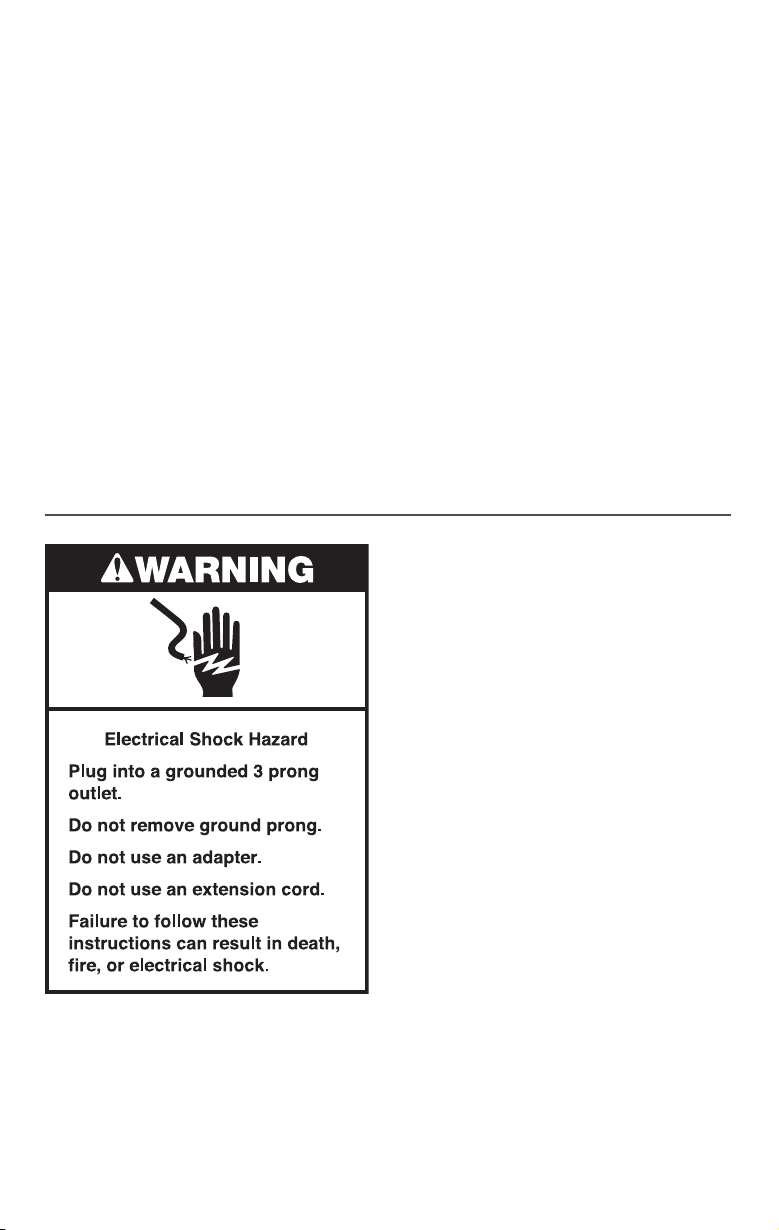
ELECTRICAL REQUIREMENTS
Voltage: 120 V
Frequency: 60 HZ
Amps: 15.0 A
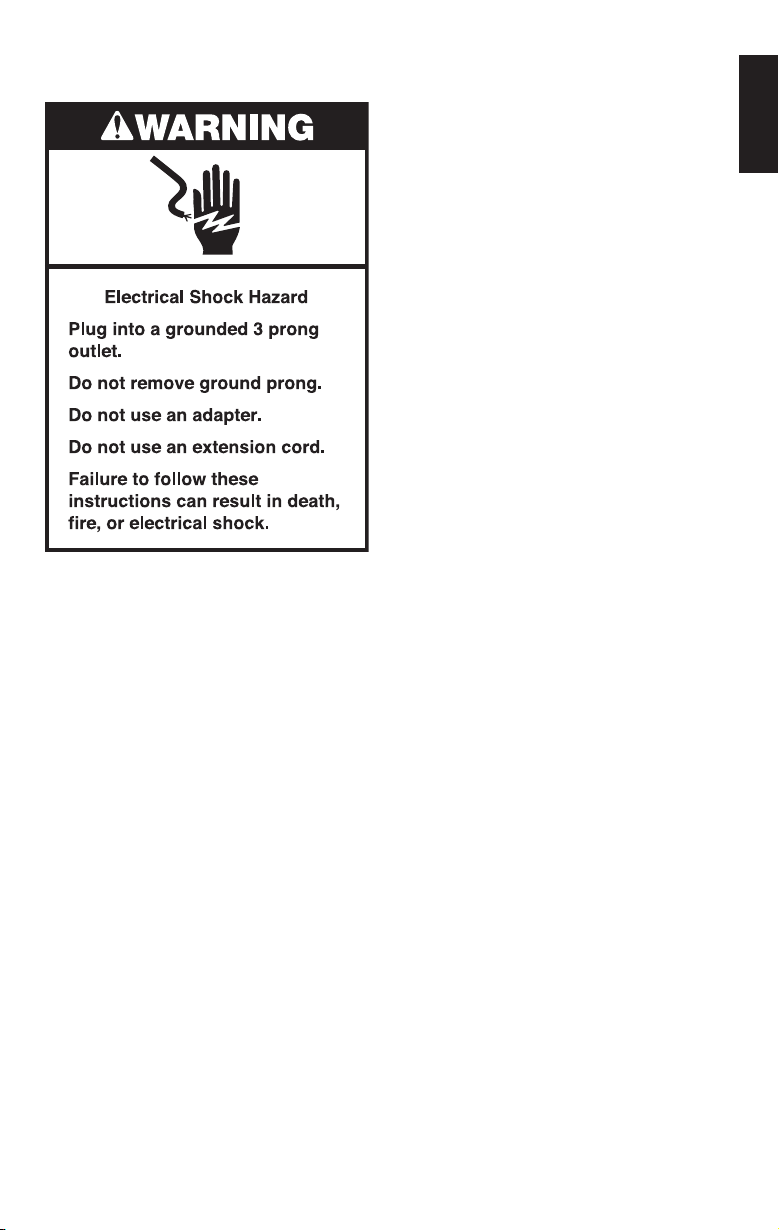
NOTE: If the plug does not fit in the
outlet, contact a qualified electrician. Do
not modify the plug in any way. Do not
use an adapter.
Do not use an extension cord. If the power
supply cord is too short, have a qualified
electrician or serviceman install an outlet
near the appliance.
W10851732C_ENv01.indd 4 9/14/16 11:49 AM
ENGLISH
USING THE COMMERCIAL BLENDER | 5
USING THE COMMERCIAL BLENDER
The Blender has a preset recipe program: Icy Drinks. It also features Variable Times and
Pulse functions that allow you to customize your blending for any recipe you make.
To clean the Blender: Quick pulses of power and high speeds work to clean the blender
jar with just 2 cups of water and a drop of dish soap.
BLENDER FUNCTION GUIDE
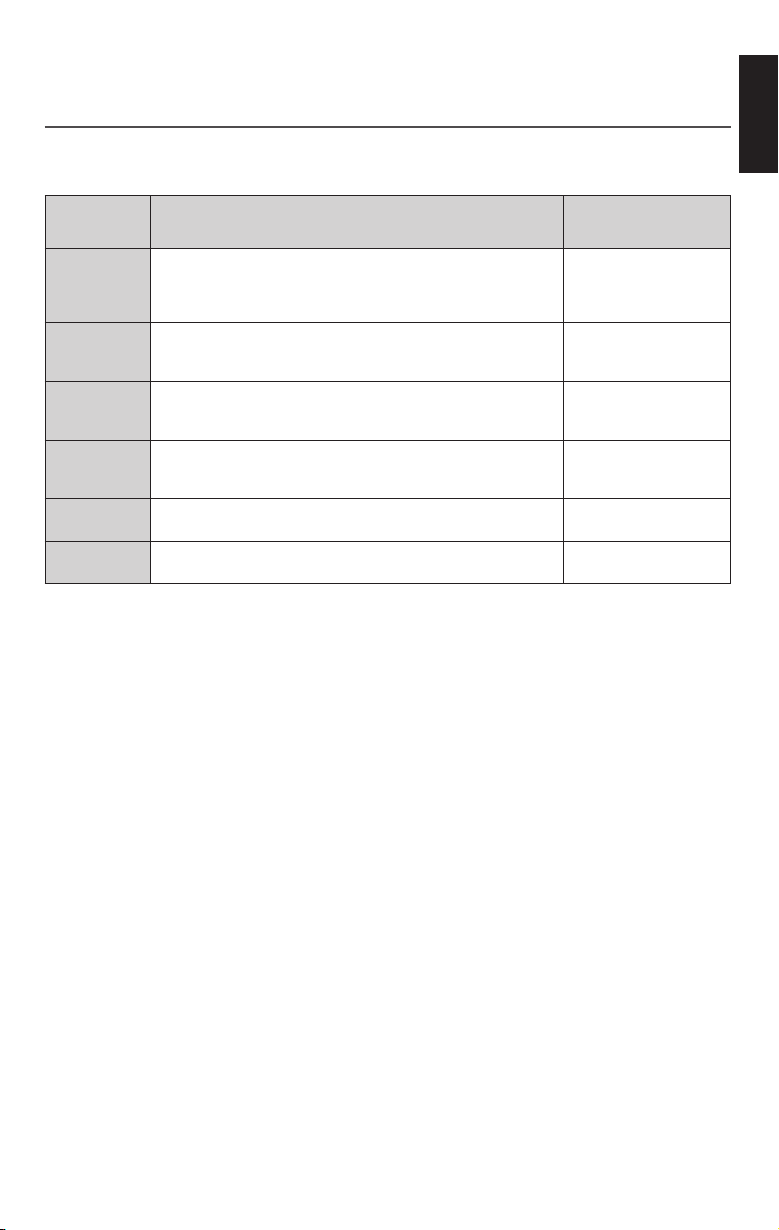
SETTING
DESCRIPTION BLENDING TIME
(in min:sec)
ICY DRINKS
Gradually ramp up to full power to completely blend hard
foods such as ice, whole fruits or vegetables, or frozen fruits.
This cycle is recommended for such drinks as Margaritas,
Daiquiris, and blended ice coffee drinks.
0:22
LOW
When Low speed is selected, the Blender will run continuously
on low until the Start/stop switch is pressed,
or after 6 minutes elapse.
N/A
MEDIUM
When Medium speed is selected, the Blender will run
continuously on medium until the Start/stop switch is pressed,
or until 6 minutes elapse.
N/A
HIGH
When High speed is selected the Blender will run continuously
on high until the Start/stop switch is pressed,
or after 6 minutes elapse.
N/A
PULSE H/L
Alternatively, use Pulse during manual operation to add a boost
of power momentarily.
N/A
VARIABLE
TIMES
The timer function starts at a slow speed and ramps up to a
high speed for optimal blending results.
0:05-0:60
W10851732C_ENv01.indd 5 9/14/16 11:49 AM
6 | USING THE COMMERCIAL BLENDER
USING THE COMMERCIAL BLENDER
Before first use
Before using your Blender for the first time,
wipe the blender base with a warm damp
cloth, then wipe clean with a damp cloth.
Dry with a soft cloth. Wash the blender
jar, lid, and ingredient cup in warm, sudsy
water (see “Care and cleaning” section).
Rinse parts and wipe dry.
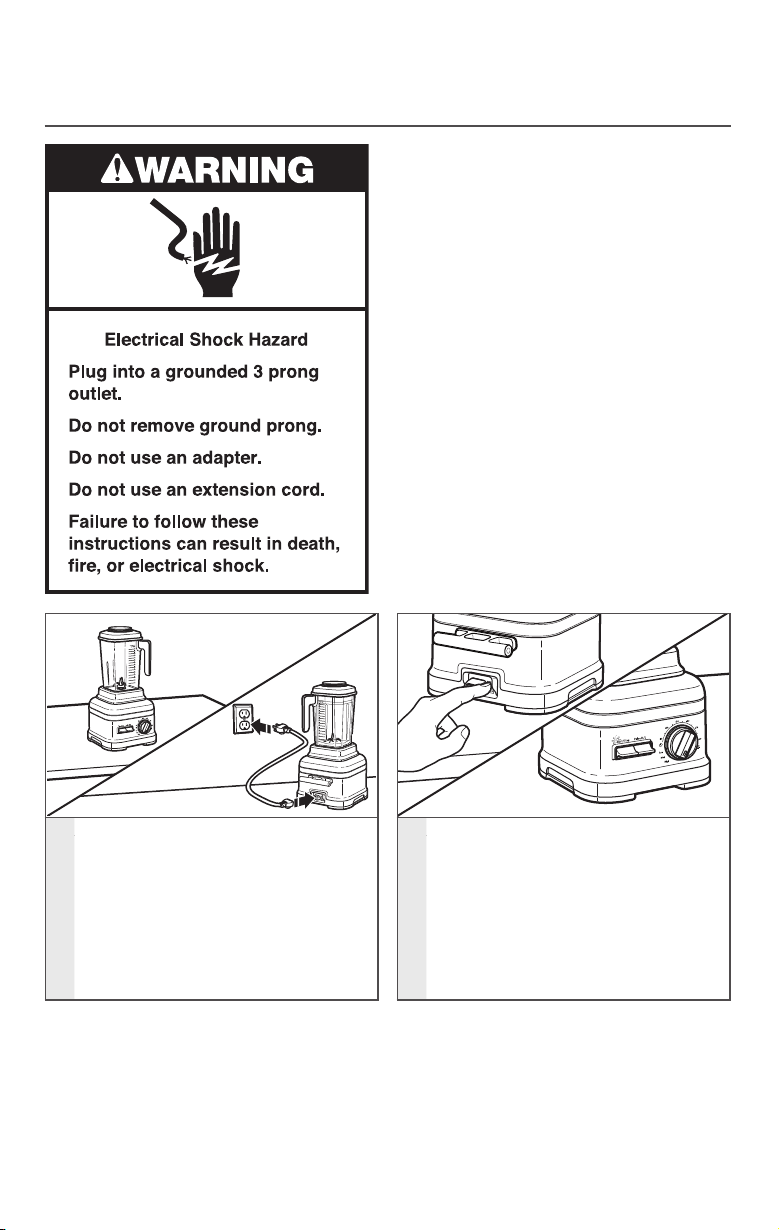
1
Before using the Blender, be sure
the countertop beneath the Blender
and surrounding areas are dry and
clean. Be sure the power switch on
the back of the blender base is in the
OFF (O) position and the cord is also
fully plugged into the back of the
Blender. Then, plug the Blender into a
grounded 3 prong outlet.
2
The main power switch is on the
back of the blender base. Flip the
POWER switch to the ON (I) position.
The status indicator light above the
Start toggle button will begin to
flash, indicating that the Blender is in
Standby mode. The Blender is now
ready to operate.
PREPARING THE COMMERCIAL BLENDER FOR USE
NOTE: The cord cleat is not to be used
as a handle; the cord cleat is designed
to wrap the power cord around it for
storage only.
W10851732C_ENv01.indd 6 9/14/16 11:49 AM
ENGLISH
USING THE COMMERCIAL BLENDER | 7
USING THE COMMERCIAL BLENDER
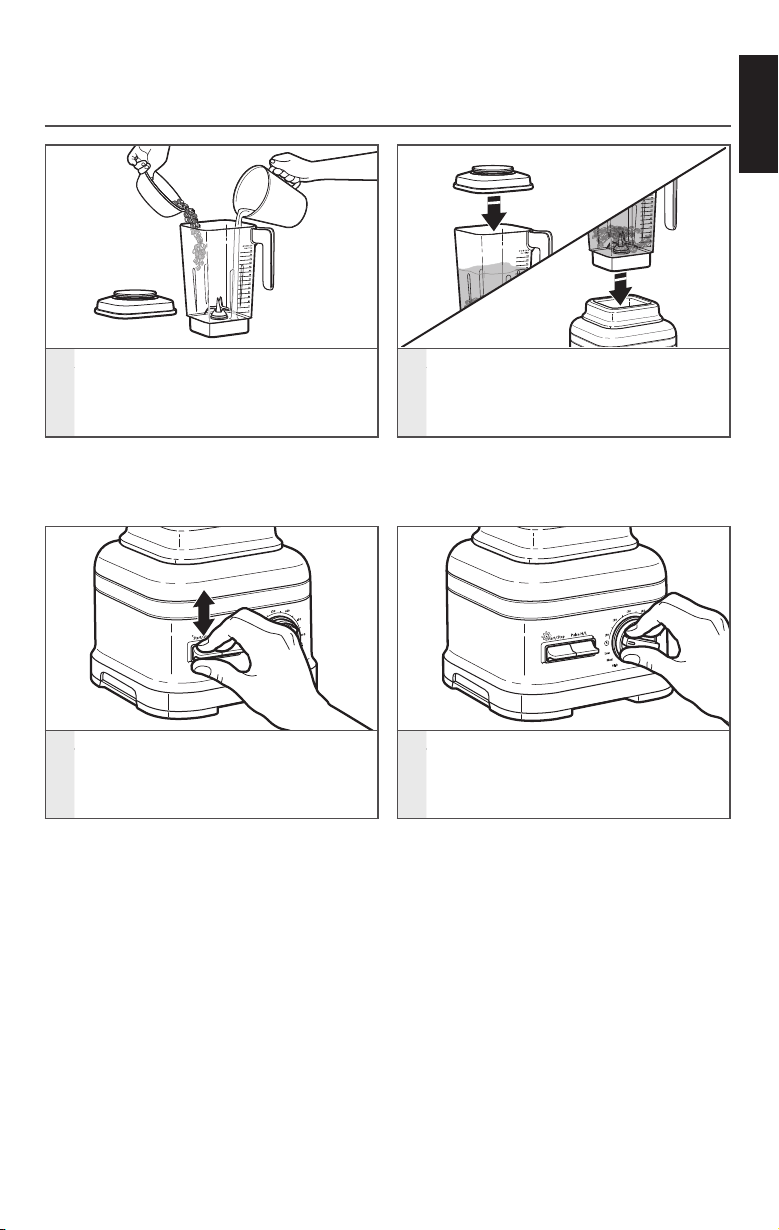
3
Flip the START/STOP toggle switch
up or down to begin operation of the
Blender. The status indicator light will
now be solid.
4
Turn the control dial to your desired
speed, time, or program. See the
“Blender function guide” for more
information.
ASSEMBLING AND RUNNING THE COMMERCIAL BLENDER
NOTE: Do not fill blender jar past the
top-most measurement mark, especially
when blending liquids.
1
Put the items to blend into the
blender jar. Add liquids first, then
soft foods, then leafy greens, and
ice or frozen items last.
2
Make sure that the lid is fully secured
on the blender jar; next, place the
blender jar on the base, making sure
that it is fully aligned on the jar pad.
NOTE: If you select a pre-programmed
cycle, you will need to flip the START/
STOP toggle to begin operation.
W10851732C_ENv01.indd 7 9/14/16 11:49 AM
8 | USING THE COMMERCIAL BLENDER
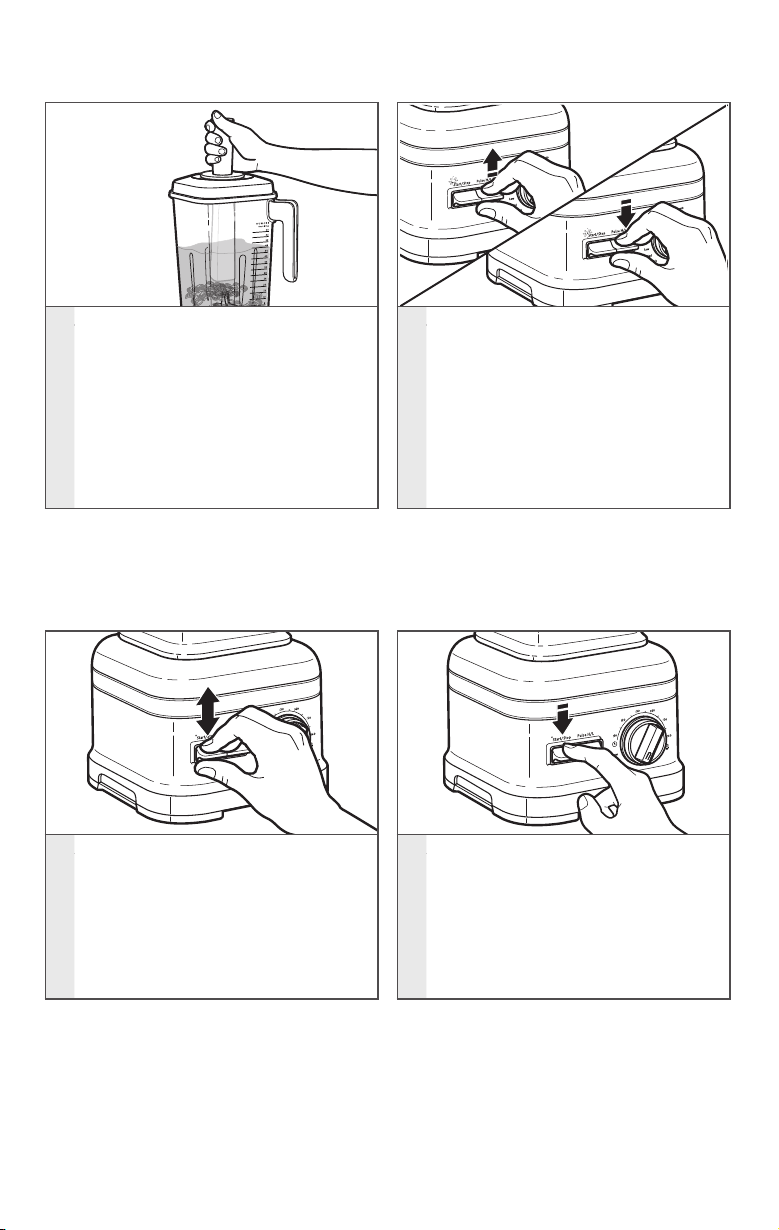
5
Utilize the Flex Edge tamper
accessory as needed for optimal
blending performance. Remove
the ingredient-measuring cap only,
and leave the lid in place. Stir or
press contents down towards the
blade. When you are finished,
replace the ingredient-measuring
cap in the blender jar lid before
resuming blending.
6
If desired, use the Pulse function for
a momentary boost of speed while
blending on the variable speed
settings.
PRESS AND HOLD the PULSE toggle
switch up for a faster pulse, or down
for a slower pulse.
7
After blending, flip the START/STOP
toggle switch up or down. Allow the
Blender to come to a complete stop
before removing the lid and pouring
your blended ingredients.
8
If the Blender remains in standby
mode for 10 minutes with no
activity, the Blender will enter sleep
mode. To get out of sleep mode,
press the START/STOP switch once
to bring into standby mode. Then,
press START/STOP once more to
start the Blender.
USING THE COMMERCIAL BLENDER
NOTE: The Pulse function may also
be used on its own as a separate
blending function while the Blender
is in Standby mode.
W10851732C_ENv01.indd 8 9/14/16 11:49 AM
ENGLISH
CARE AND CLEANING | 9
1
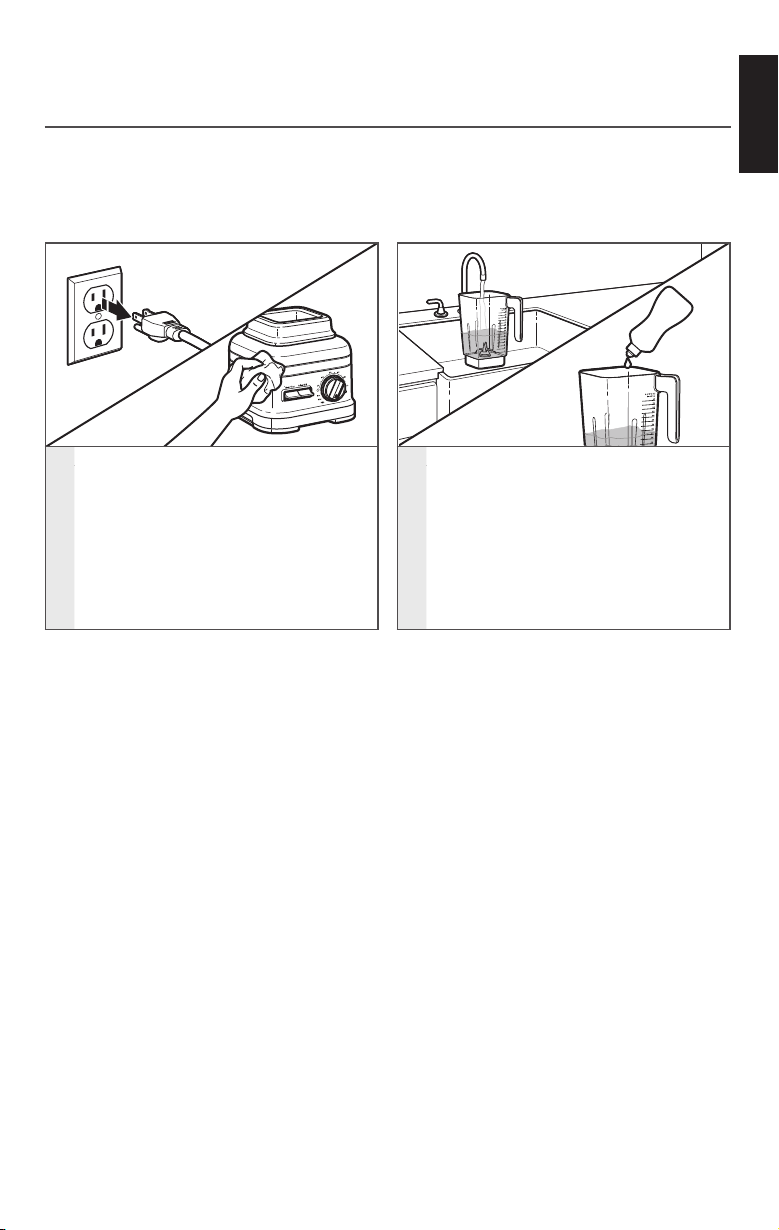
To clean the blender base and cord:
Unplug the Blender before cleaning.
Wipe the base and the cord with a
warm, damp cloth; wipe clean with a
damp cloth, and dry with a soft cloth.
2
Make sure to clean the blender jar,
lid, and ingredient cap after each
use. Remove any remaining contents
from the blender jar. Fill the blender
jar with 2 cups of warm water and
1 drop of liquid detergent. Place the
lid on the blender jar, and make sure
the blender jar is fully in place on the
blender base.
CARE AND CLEANING
CLEANING THE BLENDER AND ACCESSORIES
Clean the Blender thoroughly after every use.
NOTE: To avoid damaging the Blender, do not immerse the blender base
or cord in water. To avoid scratching the Blender, do not use abrasive cleansers
or scouring pads.
W10851732C_ENv01.indd 9 9/14/16 11:49 AM
10 | CARE AND CLEANING
CARE AND CLEANING
SANITIZING THE BLENDER
1. Remove any remaining contents from the blender jar.
2. Prepare a 200 ppm sodium hypochlorite solution* using 1.75 L of hot water in the
blender jar. Place the lid on the blender jar, and make sure the blender jar is fully in
place on the blender base.
3. Run the Blender on the High Speed setting for 35 seconds. Flip the START/STOP
toggle switch up or down to start the Blender.
4. Turn off the Blender and let the sanitizing mix sit in the blender jar for an
additional 2 minutes.
5. Pour out the sanitizing solution mix. Do not rinse the blender jar.
6. Place the lid on the blender jar. Make sure the empty blender jar is fully in place on
the blender base. Run the empty Blender for an additional 10 seconds. Do not rinse
the jar after sanitizing.
7. Allow the blender jar to air dry.
* To prepare a 200 ppm sodium hypochlorite solution: use 6.67 ml household bleach (with a 5.25% sodium
hypochlorite concentration) in 1.75 L of hot water.
3
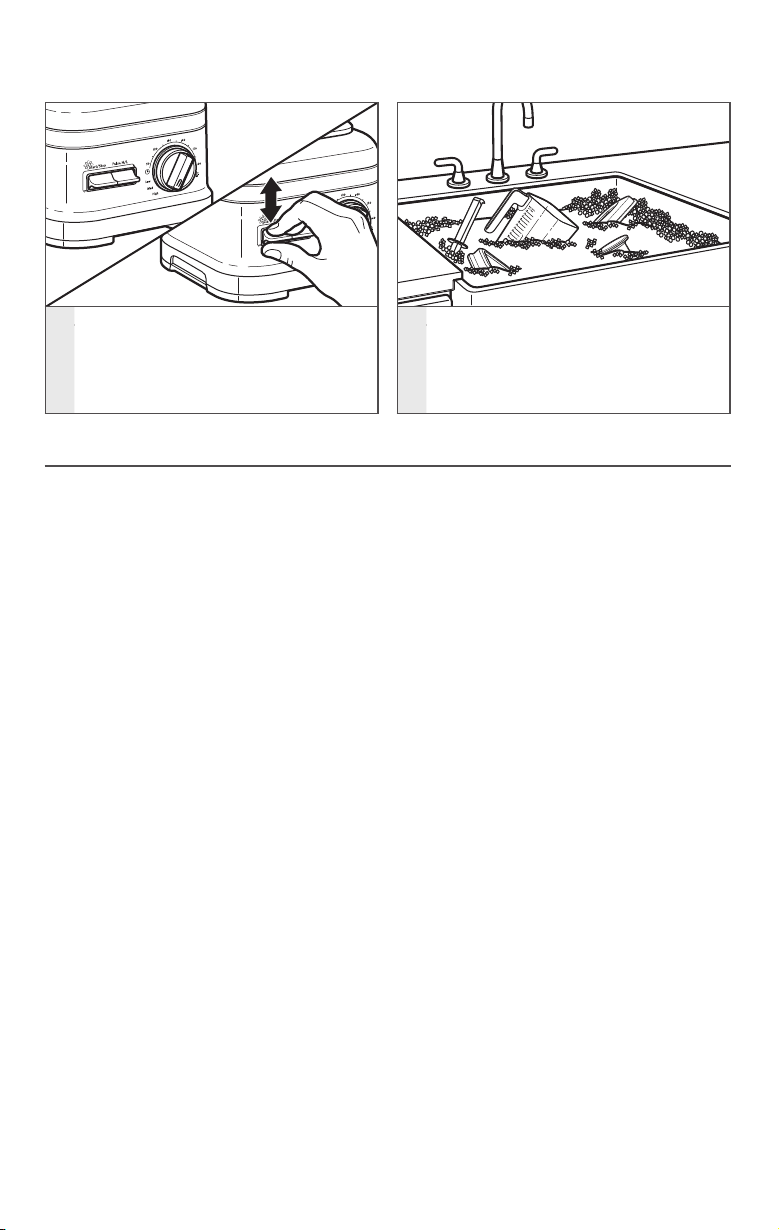
Rotate the control dial to 30 seconds.
Flip the START/STOP toggle switch
up or down. When the timer finishes,
pour out the soapy water, and rinse
the blender jar with warm water.
4
Wash the blender jar, jar pad, lid, Flex
Edge tamper, and ingredient cap by
hand with a damp cloth and warm
soapy water; rinse with warm water,
and dry with a soft cloth.
W10851732C_ENv01.indd 10 9/14/16 11:49 AM
ENGLISH
TROUBLESHOOTING | 11
TROUBLESHOOTING
1. When the Blender is plugged in and the
main power On/Off (I/O) toggle switch
is on (I), the Blender will go to Standby
mode (flashing white indicator light).
However, after 10 minutes of
no activity the Blender will go into
Sleep mode and the indicator light
will turn off.
• To wake up the Blender simply flip
the START/STOP toggle switch up
or down. This will put the Blender
back into Standby mode.
2. If the status indicator light flashes
an orange color, the Blender is in
error mode. This can be caused by:
using a spatula or any other utensil that
could obstruct the blade to freely spin
in the blender jar, or having an ice cube
or hard food in a location that locks up
the blade.
• Correct the problem by turning off
the Blender using the dedicated
On/Off toggle switch in the back,
or by unplugging the Blender.
Remove the blender jar from the
base, and clear the items. Place the
Blender back on the base, and then
turn the
Blender back on to continue
regular use.
3. If the Blender stops while blending:
• After 6 minutes of run time, the
Blender will automatically shut off
and go into Sleep mode, and the
LED light will turn off. You can wake
the Blender back up using the
toggle switches (START/STOP or Pulse
High/Pulse Low). If the Blender stops
in less than 6 minutes, it is possible
there is an internal error with the
Blender. Contact an authorized
service center for assistance.
4. If the ingredients of a recipe aren’t
blending:
• There may be times when an air
pocket is created around the blade
causing the ingredients to miss the
blending blade. Stop the Blender,
remove the blender jar from the
base, and use a spatula to rearrange
ingredients in the blender jar. For
certain recipes, try adding more
liquid.
5. If you experience an overflow from
the blender jar:
• Disconnect the Blender from the
power source. Remove the jar pad
from the housing to make sure the
base is fully dry. The control dial
can be detached by pulling it off
with force. Wipe dry, and then
replace. To avoid damage to the
graphics when cleaning, don’t apply
too much force or use abrasive
cleansers or scouring pads.
If the problem cannot be corrected:
See the “Warranty and service” section.
Do not return the Blender to the retailer;
retailers do not provide service.
W10851732C_ENv01.indd 11 9/14/16 11:49 AM

W10851732C 09/16
DISCOVER MORE. DÉCOUVREZ PLUS. DESCUBRA MÁS.
KITCHENAID.COM/QUICKSTART
©2016. All rights reserved. KitchenAid and the design of the Stand Mixer
are trademarks in the U.S. and elsewhere. Used under license in Canada.
©2016. Tous droits réservés. KitchenAid et la forme du batteur sur socle sont des marques de
commerce aux É.-U. et ailleurs. Utilisé sous licence au Canada.
©2016. Todos los derechos reservados. KITCHENAID y el diseño de la batidora con base son marcas
registradas en EE.UU. y en otros países. Usado en Canadá bajo licencia.
PRODUCT QUESTIONS OR RETURNS
QUESTIONS SUR LE PRODUIT OU LES RETOURS
PREGUNTAS SOBRE EL PRODUCTO O DEVOLUCIÓNES
USA: 1.800.541.6390 | KitchenAid.com
CANADA: 1.800.807.6777 | KitchenAid.ca
LATAM: KitchenAid-latam.com
W10851732C_SPv01.indd 48 9/14/16 11:49 AM