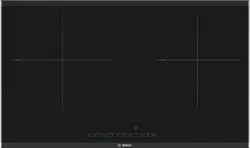
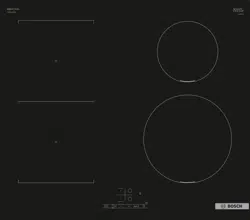
Bosch PUE611BB1E Serie 4 Induction Hob
Product's Documents
Below are documents related to this product, you can read online or download:
- Owner's manual - (English) Read Online | Download pdf
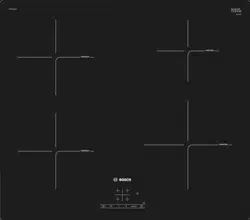

Touch controls
Touching a symbol activates the associated function.
Notes

The hob has a residual heat indicator for each hotplate. This indicates that a hotplate is still hot. Do not touch a hotplate while the residual heat indicator is lit up.
The following indicators are shown depending on the amount of residual heat:
If you remove the cookware from the hotplate during cooking, the residual heat indicator and the selected heat setting will flash alternately.
When the hotplate is switched off, the residual heat indicator will light up. Even after the hob has been switched off, the residual heat indicator will stay lit for as long as the hotplate is still warm.
This chapter explains how to set a hotplate. The table shows heat settings and cooking times for various meals.
Switching the hob on and off
The main switch is used to switch the hob on and off.
To switch on: Touch the  symbol. An audible signal sounds. The indicator next to the main switch and the hotplate indicators 0 light up. The hob is ready to use.
To switch off: Touch the symbol until the indicator goes out. All hotplates are switched off. The residual heat indicator remains lit until the hotplates have cooled down sufficiently.
Notes
Setting a hotplate
Use the + and - symbols to select the required heat setting.
Heat setting 1 = lowest setting.
Heat setting 9 = highest setting.
Every heat setting has an intermediate setting. This is marked with a dot.
Notes
Selecting a hotplate and heat setting
The hob must be switched on.
 symbol.
+ symbol: 9 heat setting
- symbol: 4 heat setting
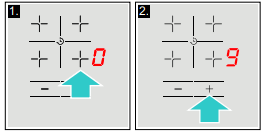
Changing the heat setting
Select the hotplate and touch the - or + symbol until the required heat setting appears.
Switching off the hotplate
Select the hotplate and then touch the - or + symbol until 0 appears.
The hotplate switches itself off and the residual heat indicator appears.
Notes
Chef's recommendations
Recommendations
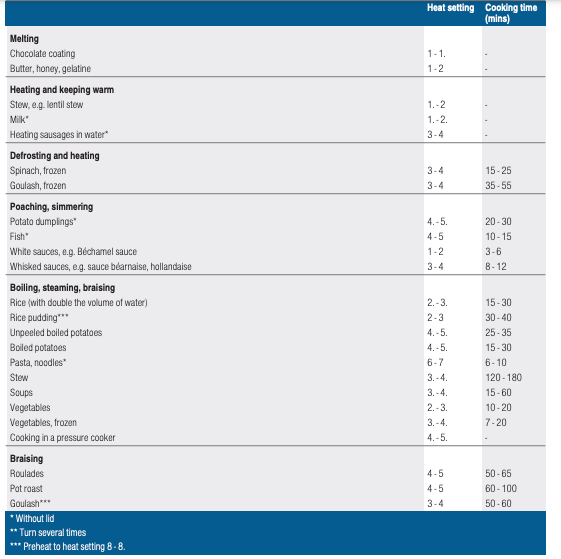
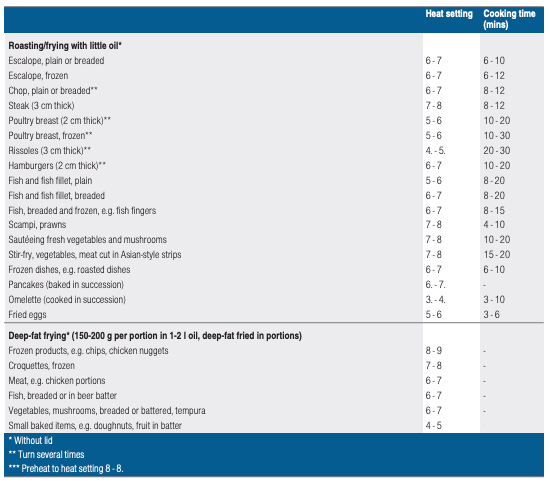
Cooking table
The table shows which heat setting is suitable for each type of food. The cooking time may vary depending on the type, weight, thickness and quality of the food.
Your hob has two timer functions:
The hotplate automatically switches off after the time that is set has elapsed.
Setting procedure:
1. Select the hotplate and the required heat setting.
2. Touch the  symbol.
  lights up in the display for the hotplate. 00 appears in the timer display.
3. Touch the + or - symbol. The basic setting appears:
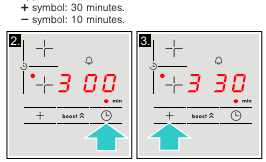
4. Use the + or - symbol to select the required cooking time.
After a few seconds, the time begins to elapse.
Note: The same cooking time can be set automatically for all hotplates. The set time for each of the hotplates counts down independently.
You can find information on automatically programming the cooking time in section -> "Basic settings"
Changing or deleting the time
Select a hotplate. Touch the symbol and use the + or - symbols to change the cooking time, or set the time to 00
Once the time has elapsed
The hotplate switches off. A beep sounds and in the time program function display 00 appears for 10 seconds. The indicator on the hotplate lights up. Pressing the symbol turns off the indicators and stops the beeping.
Notes
You can use the kitchen timer to set a time of up to 99 minutes.
This functions independently from the hotplates and from other settings. This function does not automatically switch off a hotplate.
Setting procedure:
1. The kitchen timer can be set in two different ways:
The display beside the  symbol lights up. 00 appears in the timer display.
2. Touch the + or - symbol. The basic setting appears.
3. Use the + or - symbol to set the required time.
After a few seconds, the time begins to elapse.
Changing or deleting the time
Touch the symbol repeatedly until the display lights up beside the symbol . Change the time or use the symbols + or - to set the time to 00
Once the time has elapsed
A warning signal sounds. 00 is displayed on the time program function display. After 10 seconds the indicators turn off.
Pressing the symbol turns off the indicators and stops the beeping.
The PowerBoost function enables you to heat up large quantities of water faster than when using heat setting 9.
The function can be used by any hotplate provided that no other hotplates are switched on. Otherwise b and 9 will flash in the heat setting display.
Activation
 symbol. b lights up on the display.
The function is activated.
Note: If a hotplate is switched on while the PowerBoost function is active, b and 9 will flash on the heat setting display; heat setting 9 will then be applied automatically. The PowerBoost function will now be deactivated.
Deactivation
symbol. b goes out on the display and the hotplate switches back to the 9 heat setting.The function is deactivated.
Note: In certain circumstances, the PowerBoost function can switch itself off automatically in order to protect the electronic elements inside the hob.
You can use the childproof lock to prevent children from switching on the hob.
Activating and deactivating the childproof lock
The hob should be turned off.
To activate: press the symbol for approximately 4 seconds. The indicator next to the symbol  lights up for 10 seconds. The hob is locked.
To deactivate: press the symbol for approximately seconds. The lock is now deactivated.
Childproof lock
With this function, the childproof lock automatically activates when a hob is switched off.
You can find out how to switch the automatic childproof lock on in the -> "Basic settings" section
If a hotplate operates for an extended period and no settings are changed, the automatic safety shut-off is activated.
The hotplate stops heating. F, 8 and the residual heat indicator h or H flash alternately in the hotplate display.
When you touch any symbol, the display switches off. The hotplate can now be set again.
The point at which the safety shut-off becomes active depends on which heat setting has been set (after 1 to 10 hours).
The appliance has various basic settings. These basic settings can be altered to suit your individual requirements.
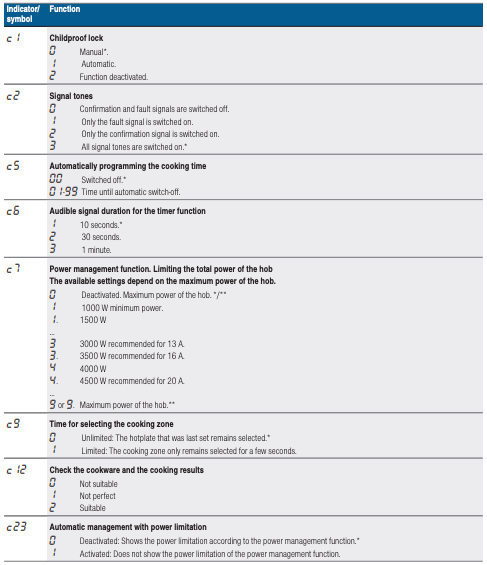

To access the basic settings:
The hob must be off.
1. Switch on the hob.
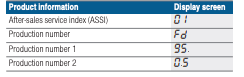
2. Within ten seconds, touch and hold the symbol for approximately four seconds. The first four displays provide product information. Touch the - or + symbol to view the individual displays.
3. Touching the symbol again takes you to the basic settings.  flash alternately on the displays and ‹ appears as a presetting.
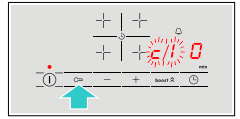
4. Touch the symbol repeatedly until the required function is displayed. 5. Then use the - and + symbols to select the required setting.
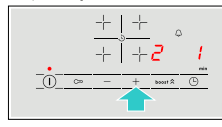
6. Touch the symbol for at least four seconds. The settings have been saved.
Turn off the hob with the main switch.
This function can be used to check the speed and quality of the cooking process depending on the cookware. The result is a reference value and depends on the properties of the cookware and the hotplate being used.
1. Place a cold saucepan containing approx. 200 ml of water in the centre of the hotplate the diameter of which matches the base of the pan most closely.
2. Go to the basic settings and select the  setting.
3. Touch the + or - symbol. A will flash on the hotplate display. The function has now been enabled.
After 20 seconds, the quality and speed of the cooking process will appear in the hotplate display
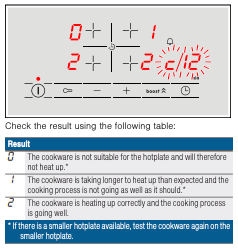
To activate the function again, select the - or + symbol.
Notes
You can use the power manager function to set the total power of the hob.
The hob settings are preconfigured at the factory. Its maximum performance is specified on the rating plate. You can use the power manager function to change the value to meet the requirements of the specific electrical installation.
In order not to exceed this set value, the hob automatically distributes the power available according to need between the cooking zones that are switched on.
While the power manager function is activated, the output of a cooking zone may temporarily fall below the nominal value. If a cooking zone is switched on and the power limit is reached, _ appears in the power level display for a short time. The appliance automatically regulates and selects the highest possible power level.
Note: If automatic power limitation has been activated, the appliance self-regulates but continues to display the selected power level unchanged.
For more information about how the total power of the hob is changed, see the section entitled -> "Basic settings"
Suitable maintenance and cleaning products can be purchased from the after-sales service or in our e-Shop.
Cleaning
Always clean the hob after cooking. This will prevent food deposits from becoming burned on. Only clean the hob after the residual heat indicator has gone out.
Clean the hob with a damp dish cloth and dry it with a cloth or towel to prevent limescale build-up.
Only use cleaning agents that are suitable for this type of hob. Observe the manufacturer's instructions on the product packaging.
Never use:
Stubborn dirt is best removed with a glass scraper, available from retailers. Observe the manufacturer's instructions.
You can obtain a suitable glass scraper from customer services or through our online shop.
Using a special sponge for cleaning glass-ceramic hobs achieves a great cleaning result.
Note: Do not use any cleaning agents while the hob is still hot. This may mark the surface. Make sure that any residue left by cleaning agents is removed.
Hob surround
To prevent damage to the hob surround, observe the following instructions:
Why can't I switch on the hob and why is the childproof lock symbol lit?
Why are the displays flashing and why can I hear an audible signal?
Why I can hear noises while I'm cooking?
Possible noises:
Which types of cookware can be used with an induction hob?
Why is the hotplate not heating up and why is the heat setting flashing?
Why is it taking so long for the cookware to heat up or why is it not heating up sufficiently despite being on a high heat setting?
How do I clean the hob?
None
The displays flash
The - indicator flashes in the hotplate displays
F2
F4
F5 + heat setting and acoustic signal
F5 and acoustic signal
F1/F6
E9000
E9010
U400
Reference file: Bosch PUE611BB1E Serie 4 Induction Hob
Series: Serie 4
Additionally, the document applies to other Bosch models: PUE...B...