
www.lg.com
Please read this manual carefully before operating
your set and retain it for future reference.
LS34**
LM34**
CS46**
CS47**
OWNER’S MANUAL
LED LCD TV / LCD TV
P/NO : MFL67360813 (1204-REV03)
Printed in Korea
2
ENG
ENGLISH
TABLE OF CONTENTS
TABLE OF CONTENTS
3 LICENSES
3 OPEN SOURCE SOFTWARE NOTICE
4 SAFETY INSTRUCTIONS
10 - Viewing 3D Imaging (Only 3D models)
12 INSTALLATION PROCEDURE
12 ASSEMBLING AND PREPARING
12 Unpacking
15 Separate purchase
16 Parts and buttons
17 Lifting and moving the TV
18 Setting up the TV
18 - Attaching the stand
19 Mounting on a table
21 Mounting on a wall
22 Tidying cables
22 Not using the Desk-Type Stand
23 MAKING CONNECTIONS
23 Antenna connection
24 HDMI connection
24 Component connection
25 Composite connection
25 USB connection
26 Headphone connection
27 REMOTE CONTROL
29 USING THE USER GUIDE
30 MAINTENANCE
30 Cleaning your TV
30 - Screen, frame, cabinet and stand
30 - Power cord
30 TROUBLESHOOTING
31 SPECIFICATIONS
WARNING
If you ignore the warning message, you may
be seriously injured or there is a possibility
of accident or death.
CAUTION
If you ignore the caution message, you may
be slightly injured or the product may be
damaged.
NOTE
The note helps you understand and use
the product safely. Please read the note
carefully before using the product.

3
ENGENGLISH
LICENSES / OPEN SOURCE SOFTWARE NOTICE
LICENSES
Supported licenses may differ by model. For more information about licenses, visit www.lg.com.
Manufactured under license from Dolby Laboratories. “Dolby” and the double-D
symbol are trademarks of Dolby Laboratories.
HDMI, the HDMI logo and High-Denition Multimedia Interface are trademarks or
registered trademarks of HDMI Licensing LLC.
ABOUT DIVX VIDEO: DivX® is a digital video format created by DivX, LLC, a
subsidiary of Rovi Corporation. This is an ofcial DivX Certied® device that plays
DivX video. Visit divx.com for more information and software tools to convert your
les into DivX video.
ABOUT DIVX VIDEO-ON-DEMAND: This DivX Certied® device must be registered
in order to play purchased DivX Video-on-Demand (VOD) movies. To obtain your
registration code, locate the DivX VOD section in your device setup menu. Go to vod.
divx.com for more information on how to complete your registration.
“DivX Certied® to play DivX® video up to HD 1080p, including premium content.”
“DivX®, DivX Certied® and associated logos are trademarks of Rovi Corporation or
its subsidiaries and are used under license.”
“Covered by one or more of the following U.S. patents :
7,295,673; 7,460,668; 7,515,710; 7,519,274”
OPEN SOURCE SOFTWARE NOTICE
To obtain the source code under GPL, LGPL, MPL and other open source licenses, that is contained in this
product, please visit http://opensource.lge.com .
In addition to the source code, all referred license terms, warranty disclaimers and copyright notices are
available for download.
LG Electronics will also provide open source code to you on CD-ROM for a charge covering the cost of
performing such distribution (such as the cost of media, shipping and handling) upon email request to
[email protected]. This offer is valid for three (3) years from the date on which you purchased the
product.
4
ENG
ENGLISH
SAFETY INSTRUCTIONS
SAFETY INSTRUCTIONS
Please read these safety precautions carefully before using the product.
WARNING
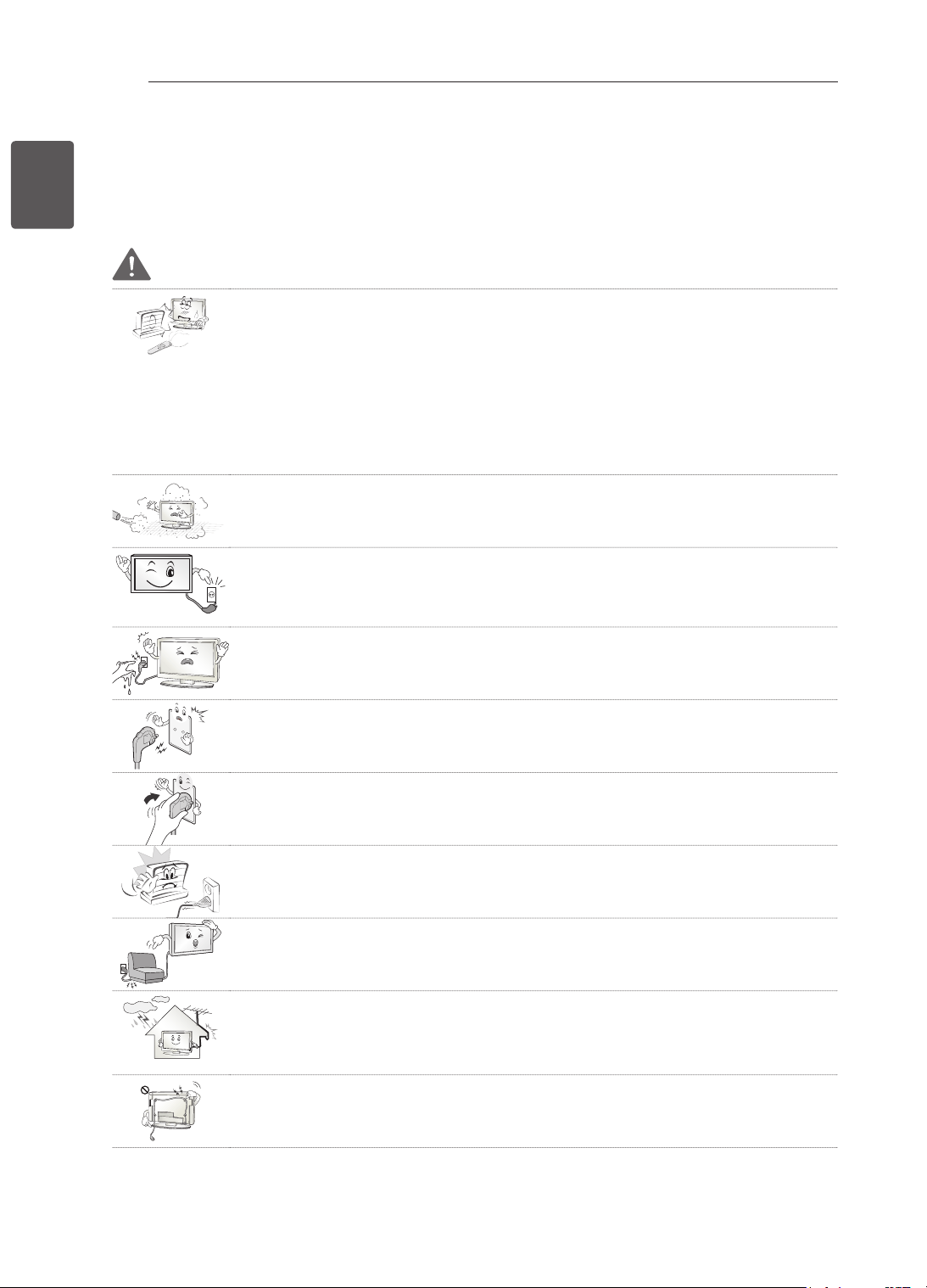
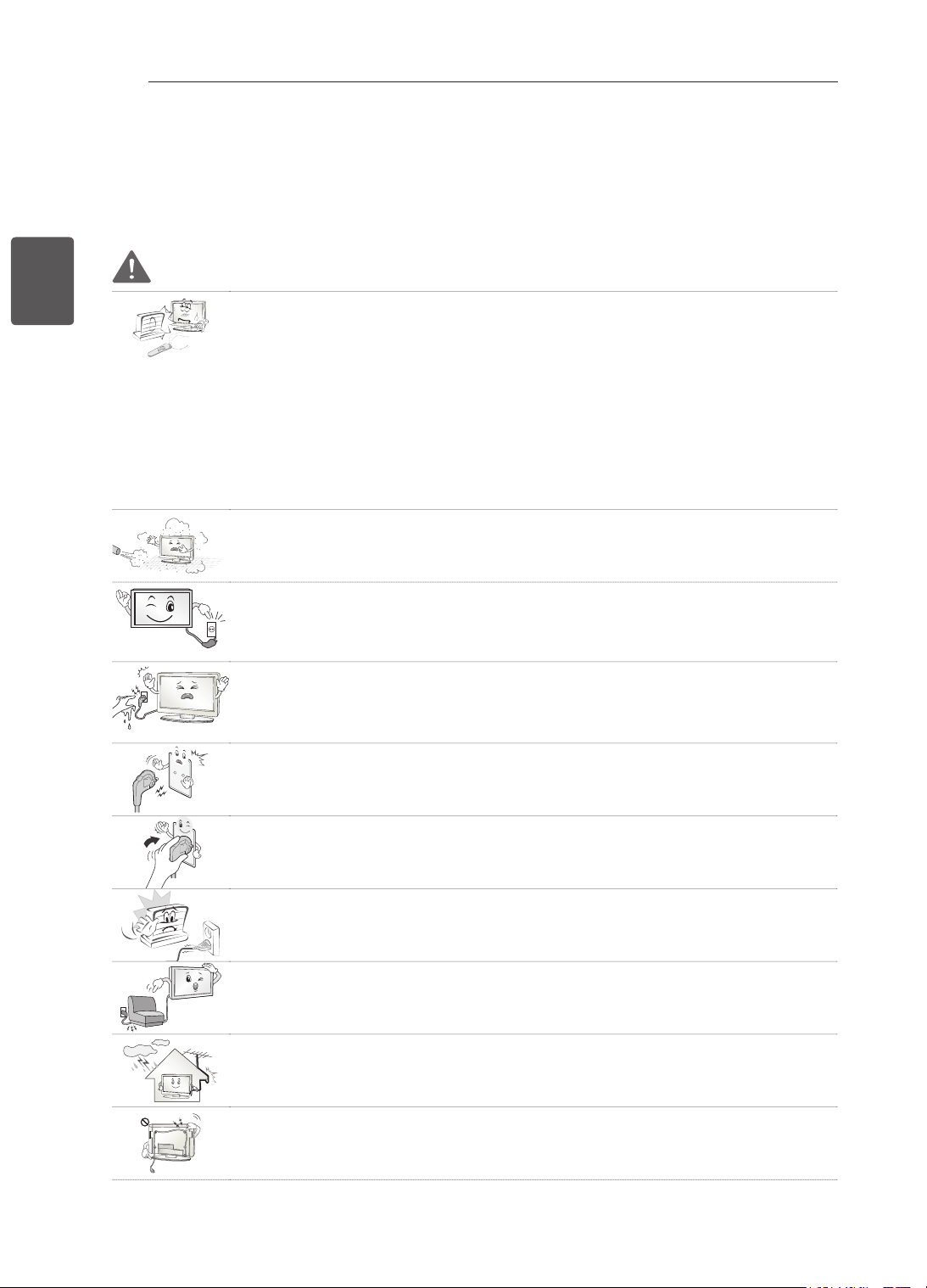
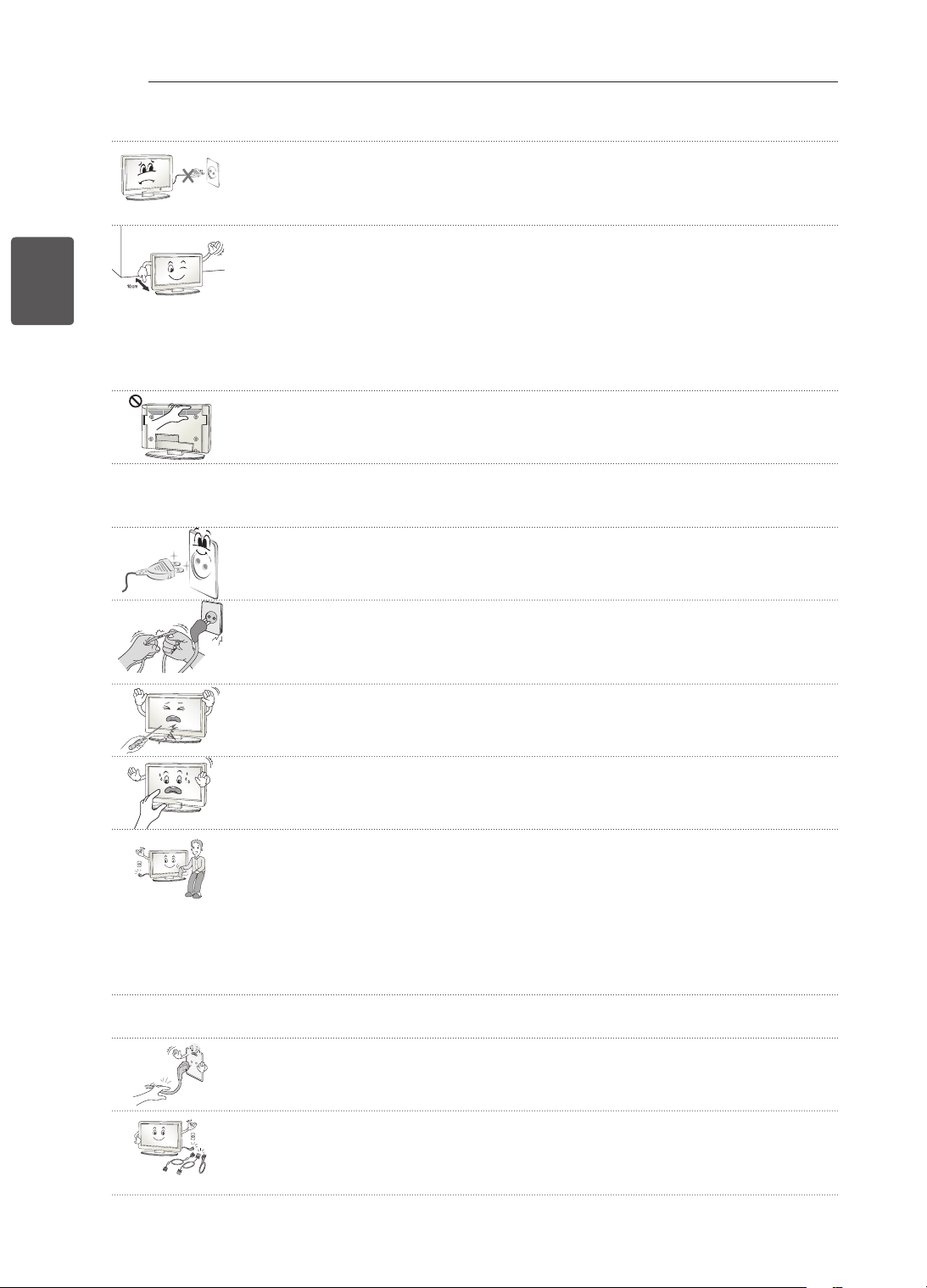
Do not place the TV and remote control in the following environments:
- A location exposed to direct sunlight
- An area with high humidity such as a bathroom
- Near any heat source such as stoves and other devices that produce heat
- Near kitchen counters or humidifiers where they can easily be exposed to steam
or oil
- An area exposed to rain or wind
- Near containers of water such as vases
Otherwise, this may result in fire, electric shock, malfunction or product deformation.
Do not place the product where it might be exposed to dust.
This may cause a fire hazard.
Mains plug is the disconnecting device. The plug must remain readily operable.
Do not touch the power plug with wet hands. Additionally, if the cord pin is wet or
covered with dust, dry the power plug completely or wipe dust off.
You may be electrocuted due to excess moisture.
Make sure to connect the power cable to the grounded current. (Except for devices
which are not grounded.)
You may be electrocuted or injured.
Fix the power cable completely.
If the power cable is not fixed completely, a fire can break out.
Ensure the power cord does not come into contact with hot objects such as a
heater.
This may cause a fire or an electric shock hazard.
Do not place a heavy object, or the product itself, on power cables.
Otherwise, this may result in fire or electric shock.
Bend antenna cable between inside and outside building to prevent rain from
flowing in.
This may cause water damaged inside the Product and could give an electric
shock.
When mounting a TV it on the wall, make sure not to install TV by hanging power
and signal cables on the back of the TV.
It may cause fire, electric shock.
5
ENGENGLISH
SAFETY INSTRUCTIONS
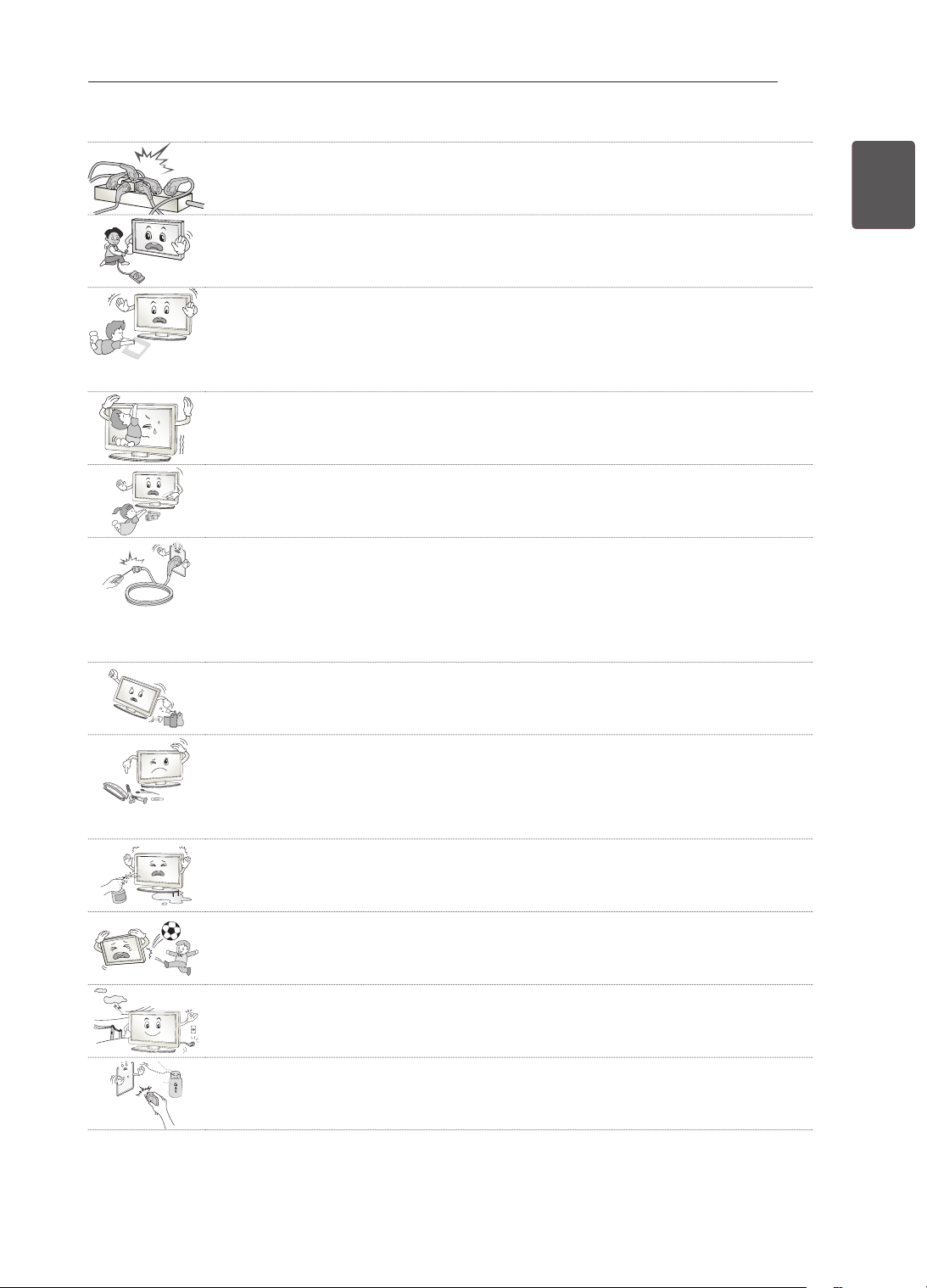
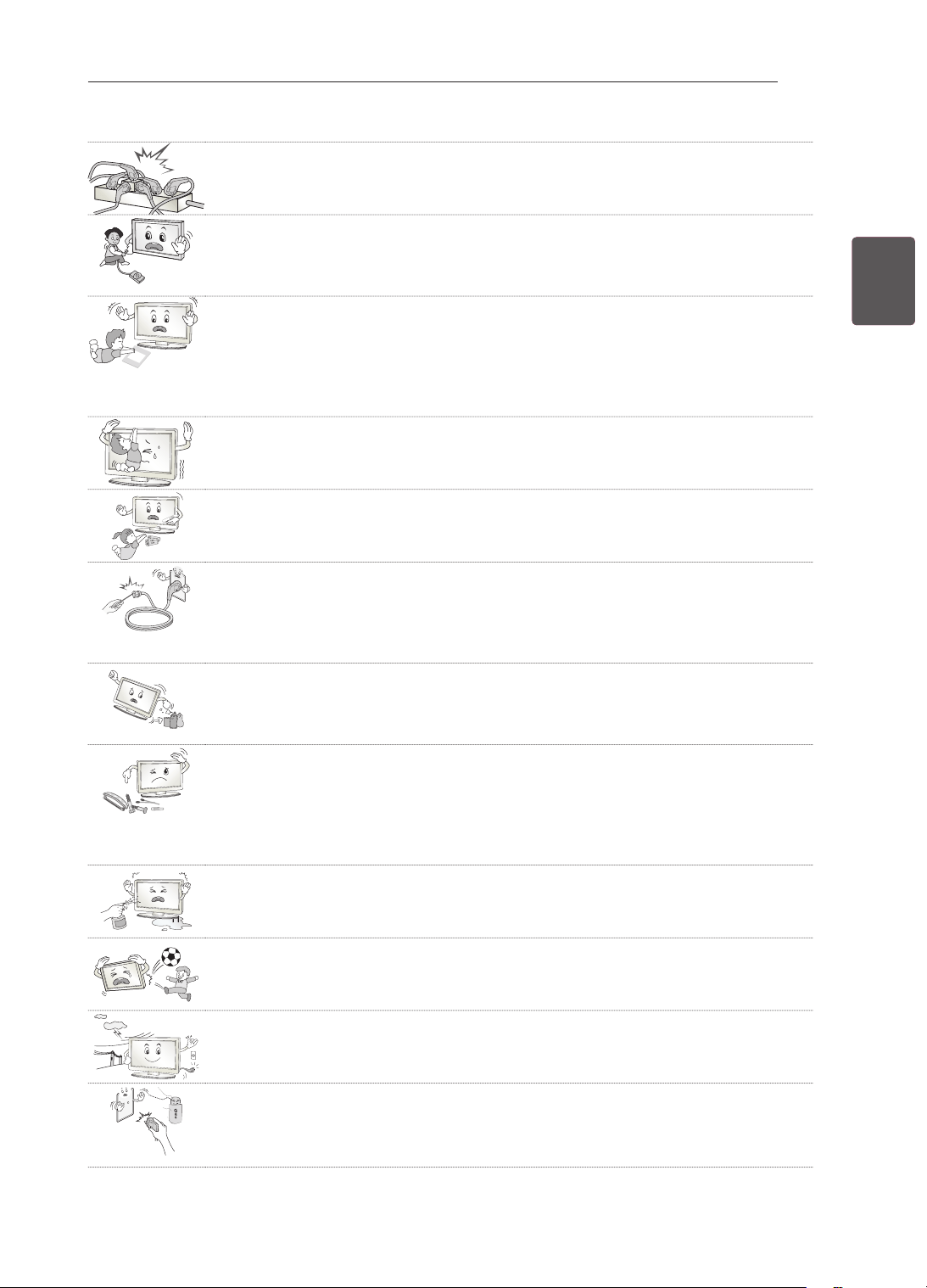
Do not plug too many electrical devices into a single multiple electrical outlet.
Otherwise, this may result in fire due to over-heating.
Do not drop the product or let it fall over when connecting external devices.
Otherwise, this may result in injury or damage to the product.
Desiccant
Keep the packing anti-moisture material or vinyl packing out of the reach of
children.
Anti-moisture material is harmful if swallowed. If swallowed by mistake, force the
patient to vomit and visit the nearest hospital. Additionally, vinyl packing can cause
suffocation. Keep it out of the reach of children.
Do not let your children climb or cling onto the TV.
Otherwise, the TV may fall over, which may cause serious injury.
Dispose of used batteries carefully to protect a child from eating them.
Please seek Doctor- Medical Attention immediately if child consumes batteries.
Do not insert any metal objects/conductors (like a metal chopstick/cutlery/
screwdriver) between power cable plug and input Wall Socket while it is connected
to the input terminal on the wall. Additionally, do not touch the power cable right
after plugging into the wall input terminal.
You may be electrocuted.
(Depending on model)
Do not put or store inflammable substances near the product.
There is a danger of combustion/explosion or fire due to careless handling of the
inflammable substances.
Do not drop metallic objects such as coins, hair pins, chopsticks or wire into the
product, or inflammable objects such as paper and matches. Children must pay
particular attention.
Electrical shock, fire or injury can occur. If a foreign object is dropped into the
product, unplug the power cord and contact the service centre.
Do not spray water on the product or scrub with an inflammable substance (thinner
or benzene). Fire or electric shock accident can occur.
Do not allow a impact shock or any objects to fall into the product, and do not drop
onto the screen with something.
You may be injured or the product can be damaged.
Never touch this product or antenna during a thunder or lighting storm.
You may be electrocuted.
Never touch the wall outlet when there is leakage of gas, open the windows and
ventilate.
It may cause a fire or a burn by a spark.
6
ENG
ENGLISH
SAFETY INSTRUCTIONS
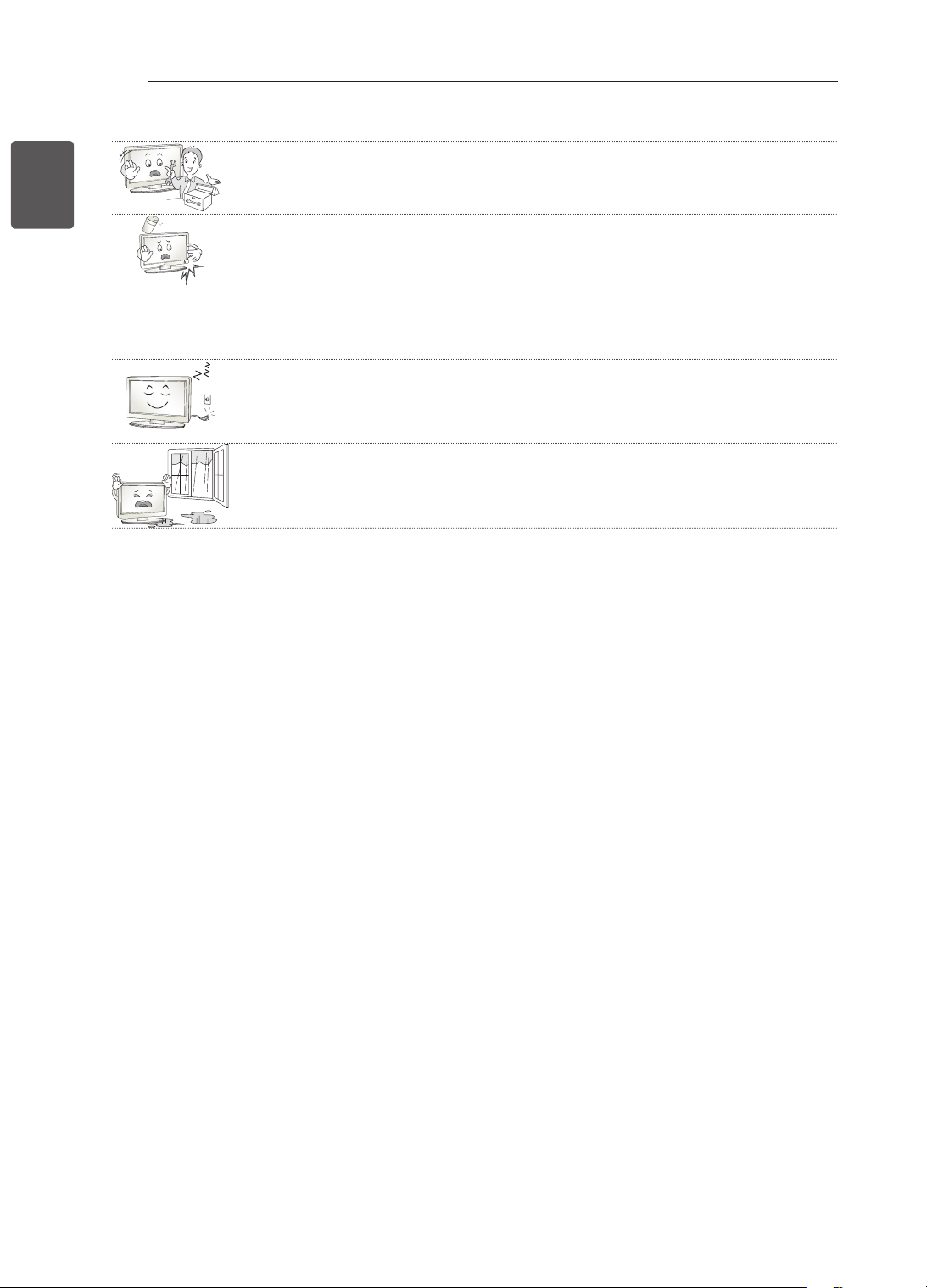
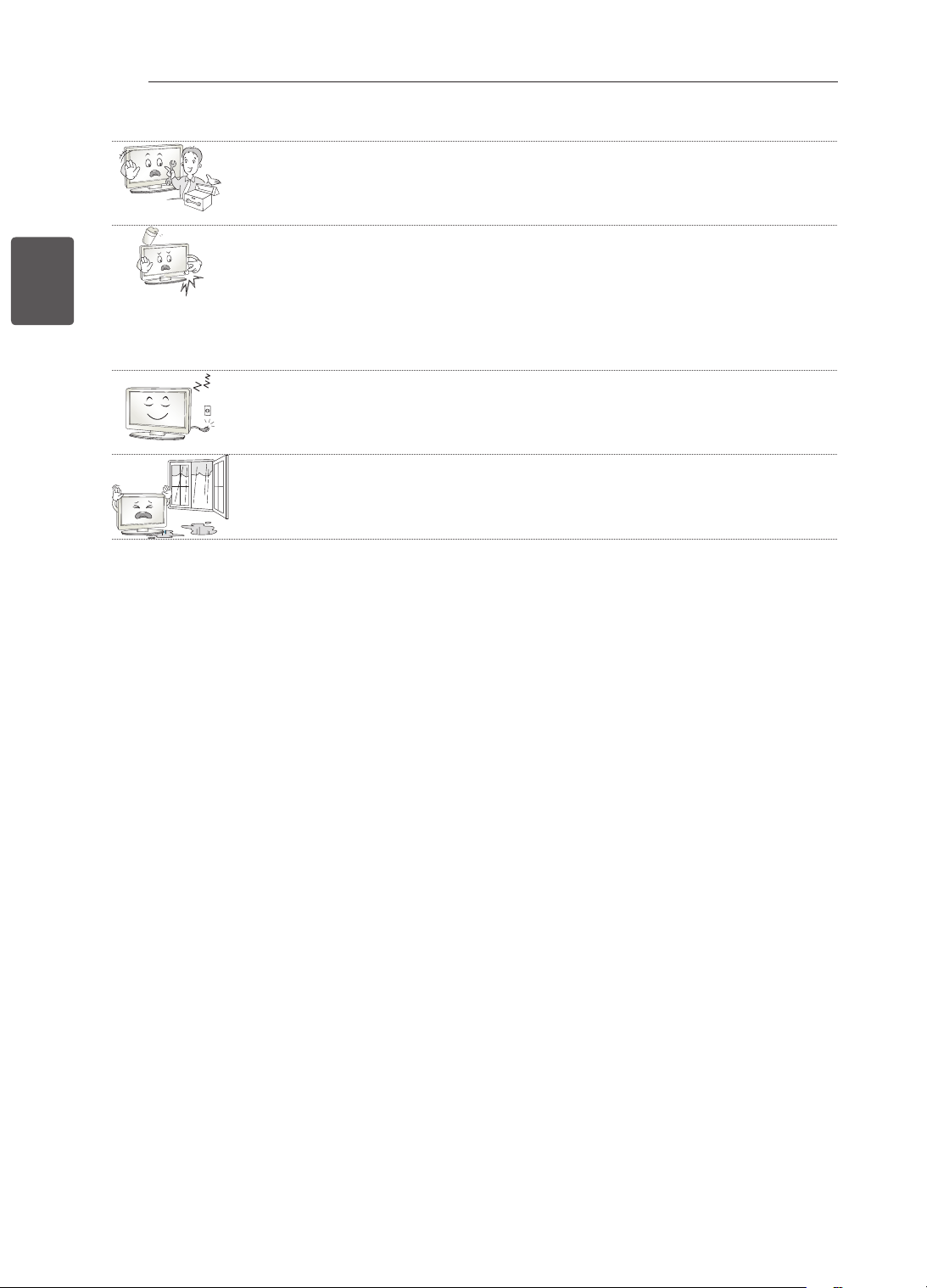
Do not disassemble, repair or modify the product at your own discretion.
Fire or electric shock accident can occur.
Contact the service center for check, calibration or repair.
If any of the following occur, unplug the product immediately and contact your local
service centre.
- The product has been impacted by shock
- The product has been damaged
- Foreign objects have entered the product
- The product produced smoke or a strange smell
This may result in fire or electric shock.
If you don’t intend to use the product for a long time, unplug the power cable from
the product.
Covering dust can cause a fire, or insulation deterioration can cause electric
leakage, electric shock or fire.
Apparatus shall not be exposed to dripping or splashing and no objects filled with
liquids, such as vases, shall be placed on the apparatus.
7
ENGENGLISH
SAFETY INSTRUCTIONS
CAUTION
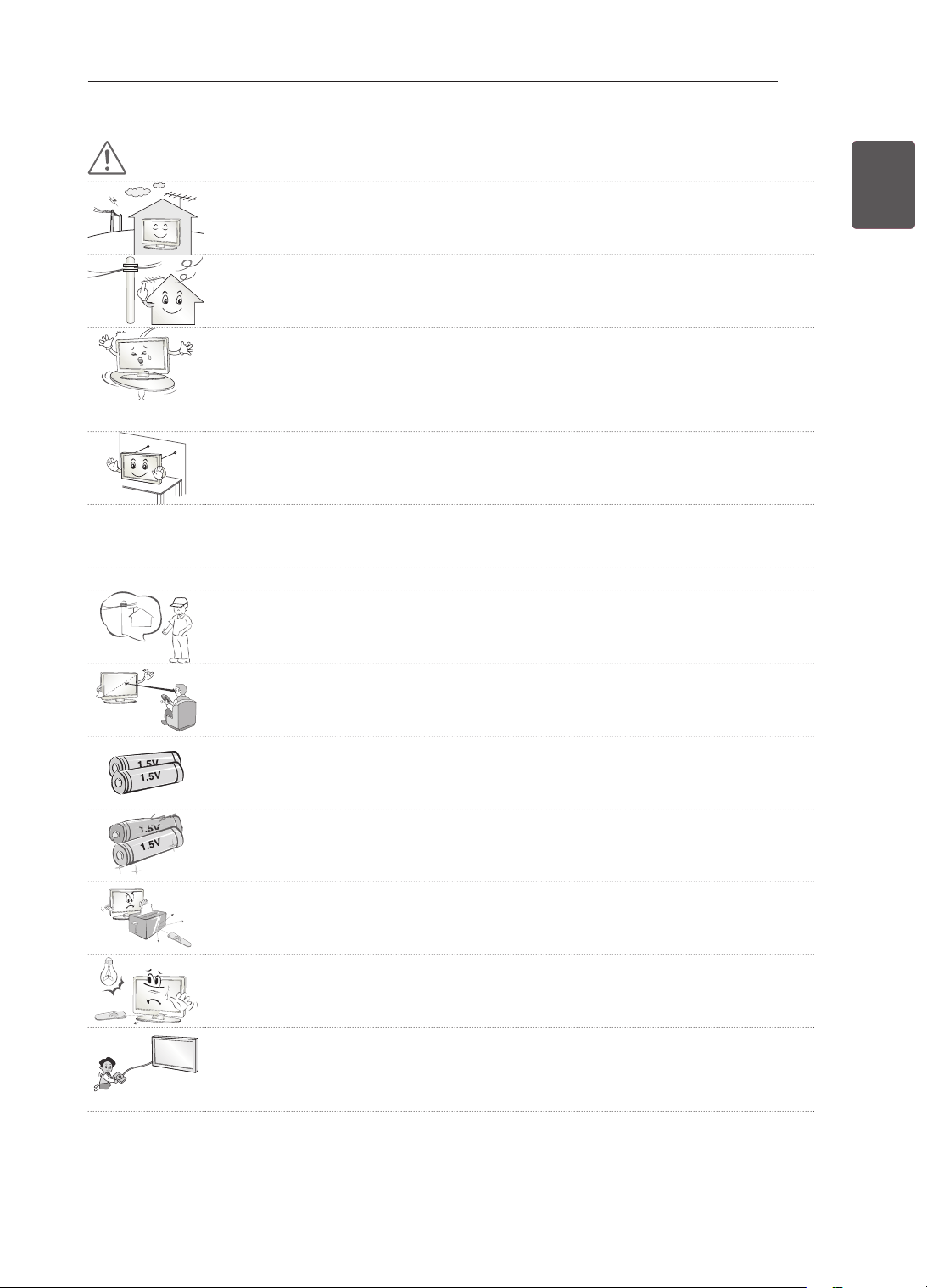
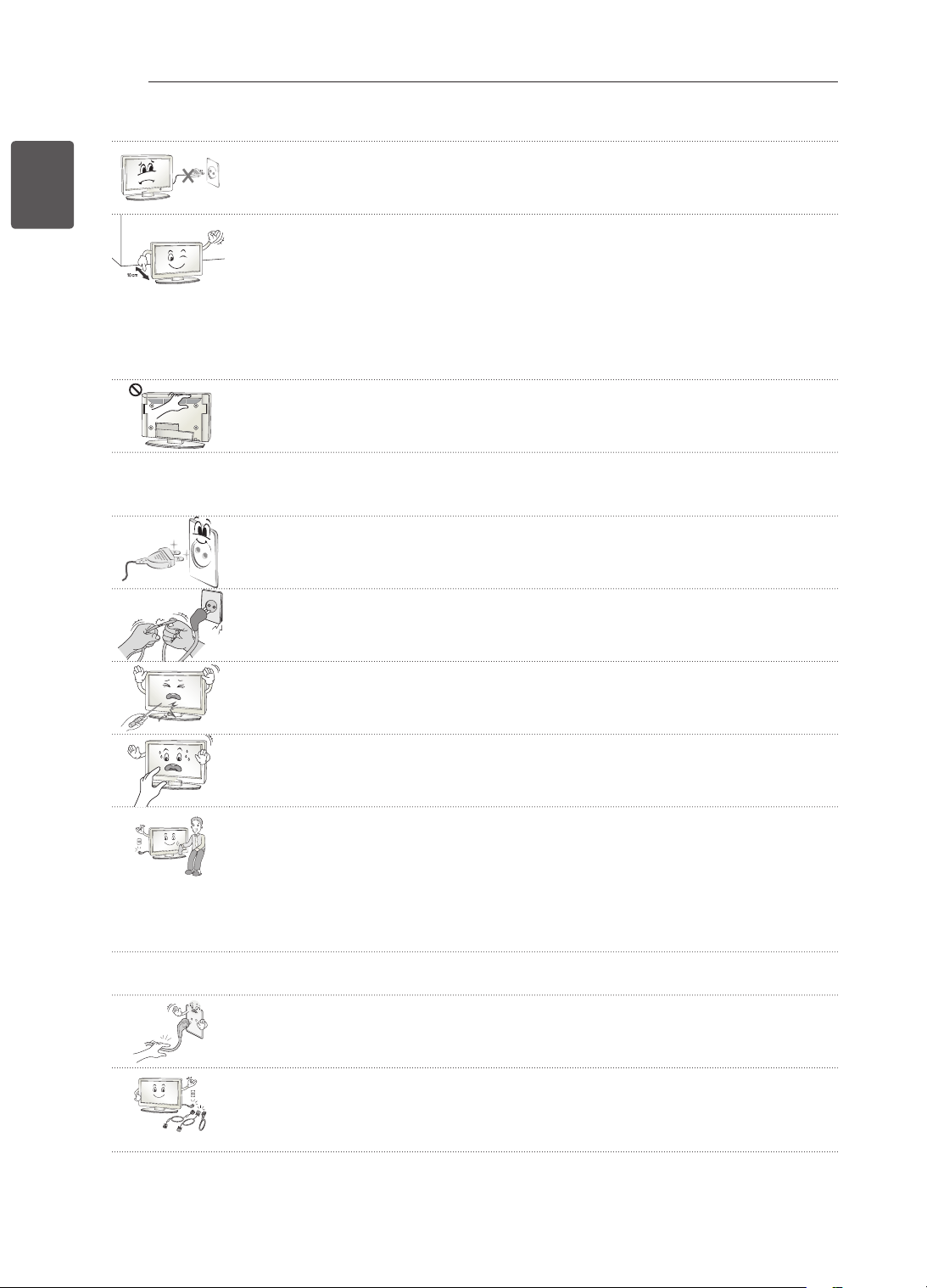
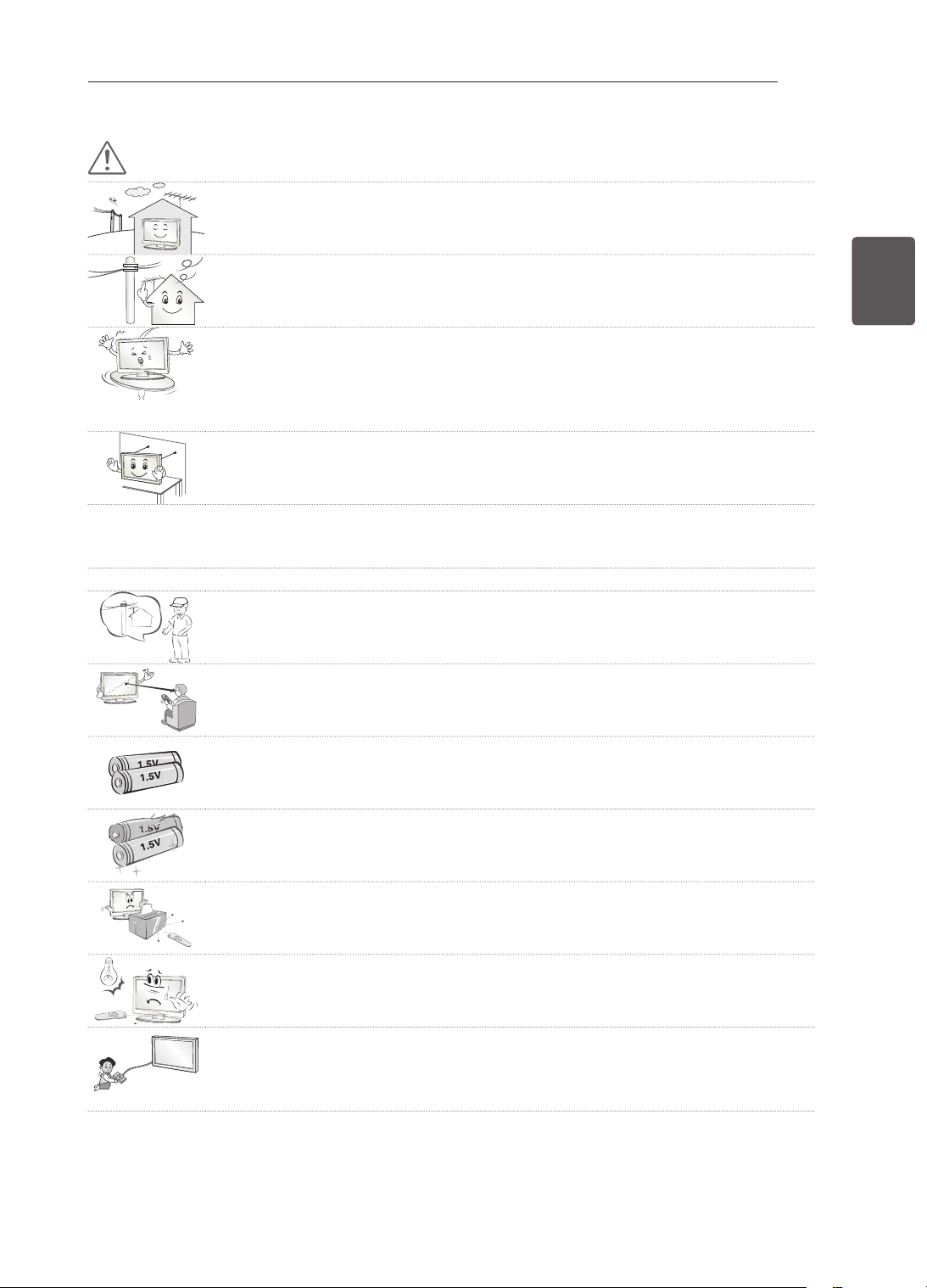
Install the product where no radio wave occurs.
There should be enough distance between an outside antenna and power lines to
keep the former from touching the latter even when the antenna falls.
This may cause an electric shock.
Do not install the product on places such as unstable shelves or inclined surfaces.
Also avoid places where there is vibration or where the product cannot be fully
supported.
Otherwise, the product may fall or flip over, which may cause injury or damage to
the product.
If you install the TV on a stand, you need to take actions to prevent the product
from overturning. Otherwise, the product may fall over, which may cause injury.
If you intend to mount the product to a wall, attach VESA standard mounting interface (optional
parts) to the back of the product. When you install the set to use the wall mounting bracket (optional
parts), fix it carefully so as not to drop.
Only use the attachments / accessories specified by the manufacturer.
When installing the antenna, consult a qualified service man.
This may create a fire hazard or an electric shock hazard.
5~7 times
We recommend that you maintain a distance of at least 5 to 7 times the diagonal
screen size when watching TV.
If you watch TV for a long period of time, this may cause blurred vision.
Only use the specified type of battery.
This could cause damage to the remote control.
Do not mix new batteries with old batteries.
This may cause the batteries to overheat and leak.
Make sure there are no objects between the remote control and its sensor.
Signal from the remote control may be disturbed by sun light or other strong light.
In this case, darken the room.
When connecting external devices such as video game consoles, make sure the
connecting cables are long enough.
Otherwise, the product may fall over, which may cause injury or damage the
product.
8
ENG
ENGLISH
SAFETY INSTRUCTIONS
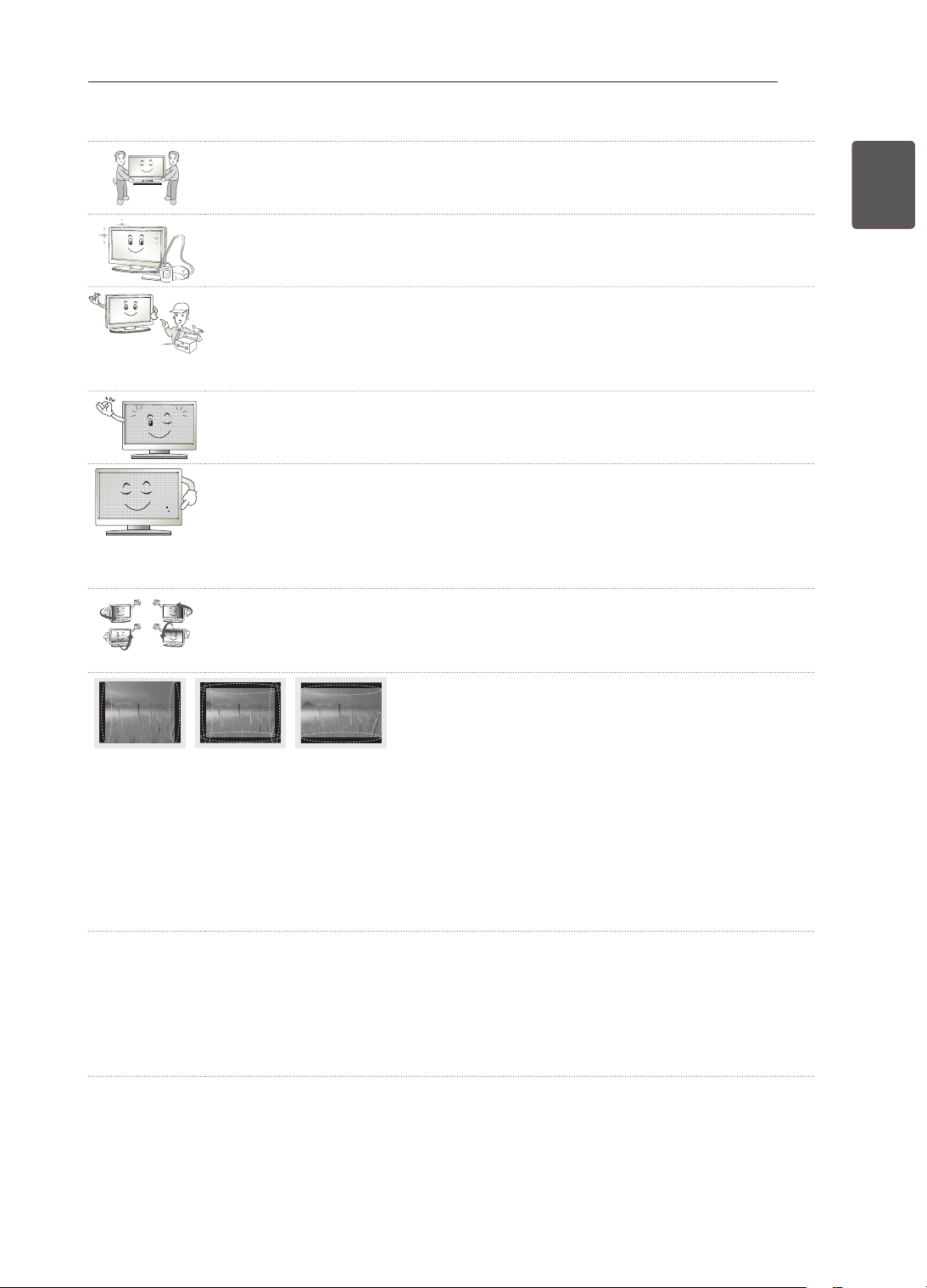
Do not turn the product On/Off by plugging-in or unplugging the power plug to the
wall outlet. (Do not use the power plug for switch.)
It may cause mechanical failure or could give an electric shock.
Please follow the installation instructions below to prevent the product from
overheating.
- The distance between the product and the wall should be more than 10 cm.
- Do not install the product in a place with no ventilation (e.g., on a bookshelf or in
a cupboard).
- Do not install the product on a carpet or cushion.
- Make sure the air vent is not blocked by a tablecloth or curtain.
Otherwise, this may result in fire.
Take care not to touch the ventilation openings when watching the TV for long
periods as the ventilation openings may become hot. This does not affect the
operation or performance of the product.
Periodically examine the cord of your appliance, and if its appearance indicates damage or
deterioration, unplug it, discontinue use of the appliance, and have the cord replaced with an exact
replacement part by an authorized servicer.
Prevent dust collecting on the power plug pins or outlet.
This may cause a fire hazard.
Protect the power cord from physical or mechanical abuse, such as being twisted,
kinked, pinched, closed in a door, or walked upon. Pay particular attention to plugs,
wall outlets, and the point where the cord exits the appliance.
Do not press strongly upon the panel with a hand or sharp object such as nail,
pencil or pen, or make a scratch on it.
Avoid touching the screen or holding your finger(s) against it for long periods of
time. Doing so may produce some temporary distortion effects on the screen.
When cleaning the product and its components, unplug the power first and wipe it
with a soft cloth. Applying excessive force may cause scratches or discolouration.
Do not spray with water or wipe with a wet cloth. Never use glass cleaner, car or
industrial shiner, abrasives or wax, benzene, alcohol etc., which can damage the
product and its panel.
Otherwise, this may result in fire, electric shock or product damage (deformation,
corrosion or breakage).
As long as this unit is connected to the AC wall outlet, it is not disconnected from the AC power
source even if you turn off this unit by SWITCH.
When unplugging the cable, grab the plug and unplug it.
If the wires inside the power cable are disconnected, this may cause fire.
When moving the product, make sure you turn the power off first. Then, unplug the
power cables, antenna cables and all connecting cables.
The TV set or power cord may be damaged, which may create a fire hazard or
cause electric shock.
9
ENGENGLISH
SAFETY INSTRUCTIONS
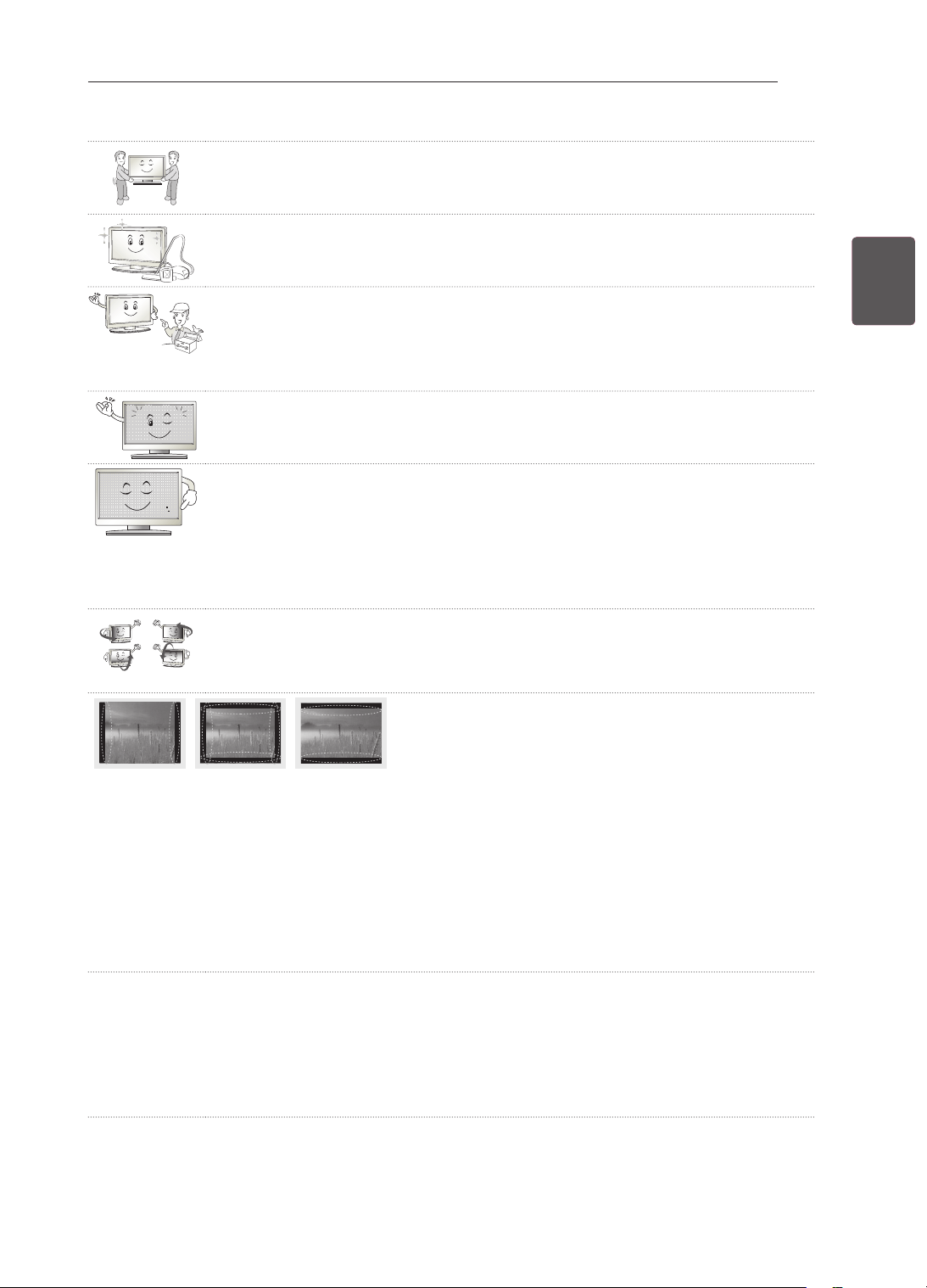
When moving or unpacking the product, work in pairs because the product is
heavy.
Otherwise, this may result in injury.
Contact the service center once a year to clean the internal parts of the product.
Accumulated dust can cause mechanical failure.
Refer all servicing to qualified service personnel. Servicing is required when the
apparatus has been damaged in any way, such as power supply cord or plug is
damaged, liquid has been spilled or objects have fallen into the apparatus, the
apparatus has been exposed to rain or moisture, does not operate normally, or has
been dropped.
If the product feels cold to the touch, there may be a small “flicker” when it is turned
on. This is normal, there is nothing wrong with product.
The panel is a high technology display product with resolution of two million to six
million pixels. You may see tiny black dots and/or brightly coloured dots (red, blue
or green) at a size of 1 ppm on the panel. This does not indicate a malfunction and
does not affect the performance and reliability of the product.
This phenomenon also occurs in third-party products and is not subject to
exchange or refund.
You may find different brightness and colour of the panel depending on your
viewing position(left/right/top/down).
This phenomenon occurs due to the characteristic of the panel. It is not related with
the product performance, and it is not malfunction.
Displaying a still image (e.g., broadcasting channel logo, on-screen menu, scene from a video
game) for a prolonged time may cause damage to the screen, resulting in retention of the image,
which is known as image sticking. The warranty does not cover the product for image sticking.
Avoid displaying a fixed image on your television’s screen for a prolonged period (2 or more hours
for LCD, 1 or more hours for Plasma).
Also, if you watch the TV at a ratio of 4:3 for a long time, image sticking may occur on the borders of
the panel.
This phenomenon also occurs in third-party products and is not subject to exchange or refund.
Generated Sound
“Cracking” noise: A cracking noise that occurs when watching or turning off the TV is generated by
plastic thermal contraction due to tempera-ture and humidity. This noise is common for products
where thermal deformation is required. Electrical circuit humming/panel buzzing: A low level noise is
generated from a high-speed switching circuit, which supplies a large amount of current to operate a
product. It varies depend-ing on the product.
This generated sound does not affect the performance and reliability of the product.

10
ENG
ENGLISH
SAFETY INSTRUCTIONS
Viewing 3D Imaging (Only 3D models)
WARNING
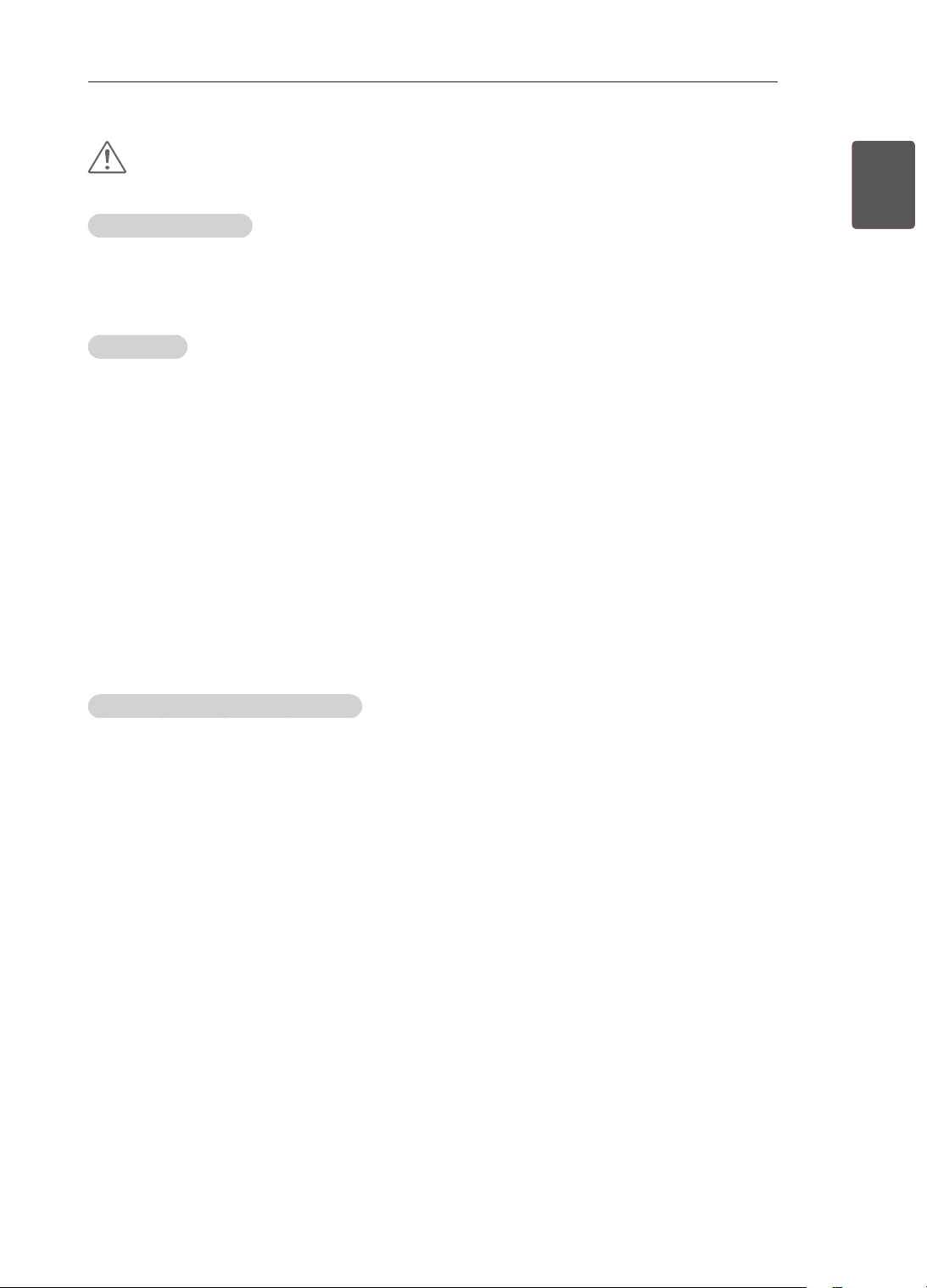
Viewing Environment
Viewing Time
- When watching 3D contents, take 5 - 15 minute breaks every hour. Viewing 3D contents for a long
period of time may cause headache, dizziness, fatigue or eye strain.
Those that have a photosensitive seizure or chronic illness
Some users may experience a seizure or other abnormal symptoms when they are exposed to a
ashing light or particular pattern from 3D contents.
Do not watch 3D videos if you feel nausea, are pregnant and/ or have a chronic illness such as epilepsy,
cardiac disorder, or blood pressure disease, etc.
3D Contents are not recommended to those who suffer from stereo blindness or stereo anomaly. Double
images or discomfort in viewing may be experienced.
If you have strabismus (cross-eyed), amblyopia (weak eyesight) or astigmatism, you may have trouble
sensing depth and easily feel fatigue due to double images. It is advised to take frequent breaks than
the average adult.
If your eyesight varies between your right and left eye, revise your eyesight prior to watching 3D
contents.
Symptoms which require discontinuation or refraining from watching 3D contents
Do not watch 3D contents when you feel fatigue from lack of sleep, overwork or drinking.
When these symptoms are experienced, stop using/watching 3D contents and get enough rest until the
symptom subsides.
- Consult your doctor when the symptoms persist. Symptoms may include headache, eyeball pain,
dizziness, nausea, palpitation, blurriness, discomfort, double image, visual inconvenience or fatigue.
11
ENGENGLISH
SAFETY INSTRUCTIONS
CAUTION
Viewing Environment
Viewing Distance
- Maintain a distance of at least twice the screen diagonal length when watching 3D contents. If you
feel discomfort in viewing 3D contents, move further away from the TV.
Viewing Age
Infants/Children
- Usage/ Viewing 3D contents for children under the age of 5 are prohibited.
- Children under the age of 10 may overreact and become overly excited because their vision is in
development (for example: trying to touch the screen or trying to jump into it. Special monitoring
and extra attention is required for children watching 3D contents.
- Children have greater binocular disparity of 3D presentations than adults because the distance
between the eyes is shorter than one of adults. Therefore they will perceive more stereoscopic
depth compared to adults for the same 3D image.
Teenagers
- Teenagers under the age of 19 may react with sensitivity due to stimulation from light in 3D
contents. Advise them to refrain from watching 3D contens for a long time when they are tired.
Elderly
- The elderly may perceive less 3D effect compared to the youth. Do not sit closer to the TV than the
recommended distance.
Cautions when using the 3D glasses
Make sure to use LG 3D glasses. Otherwise, you may not be able to view 3D videos properly.
Do not use 3D glasses instead of your normal glasses, sunglasses or protective goggles.
Using modied 3D glasses may cause eye strain or image distortion.
Do not keep your 3D glasses in extremely high or low temperatures. It will cause deformation.
The 3D glasses are fragile and are easy to be scratched. Always use a soft, clean piece of cloth when
wiping the lenses. Do not scratch the lenses of the 3D glasses with sharp objects or clean/wipe them
with chemicals.
12
ENG
ENGLISH
INSTALLATION PROCEDURE / ASSEMBLING AND PREPARING
NOTE
Image shown may differ from your TV.
Your TV’s OSD (On Screen Display) may differ slightly from that shown in this manual.
The available menus and options may differ from the input source or product model that you are
using.
New features may be added to this TV in the future.
The TV can be placed in standby mode in order to reduce the power consumption. And the TV should
be turned off if it will not be watched for some time, as this will reduce energy consumption.
The energy consumed during use can be significantly reduced if the level of brightness of the picture
is reduced, and this will reduce the overall running cost.
INSTALLATION PROCEDURE
1 Open the package and make sure all the accessories are included.
2 Attach the stand to the TV set.
3 Connect an external device to the TV set.
ASSEMBLING AND PREPARING
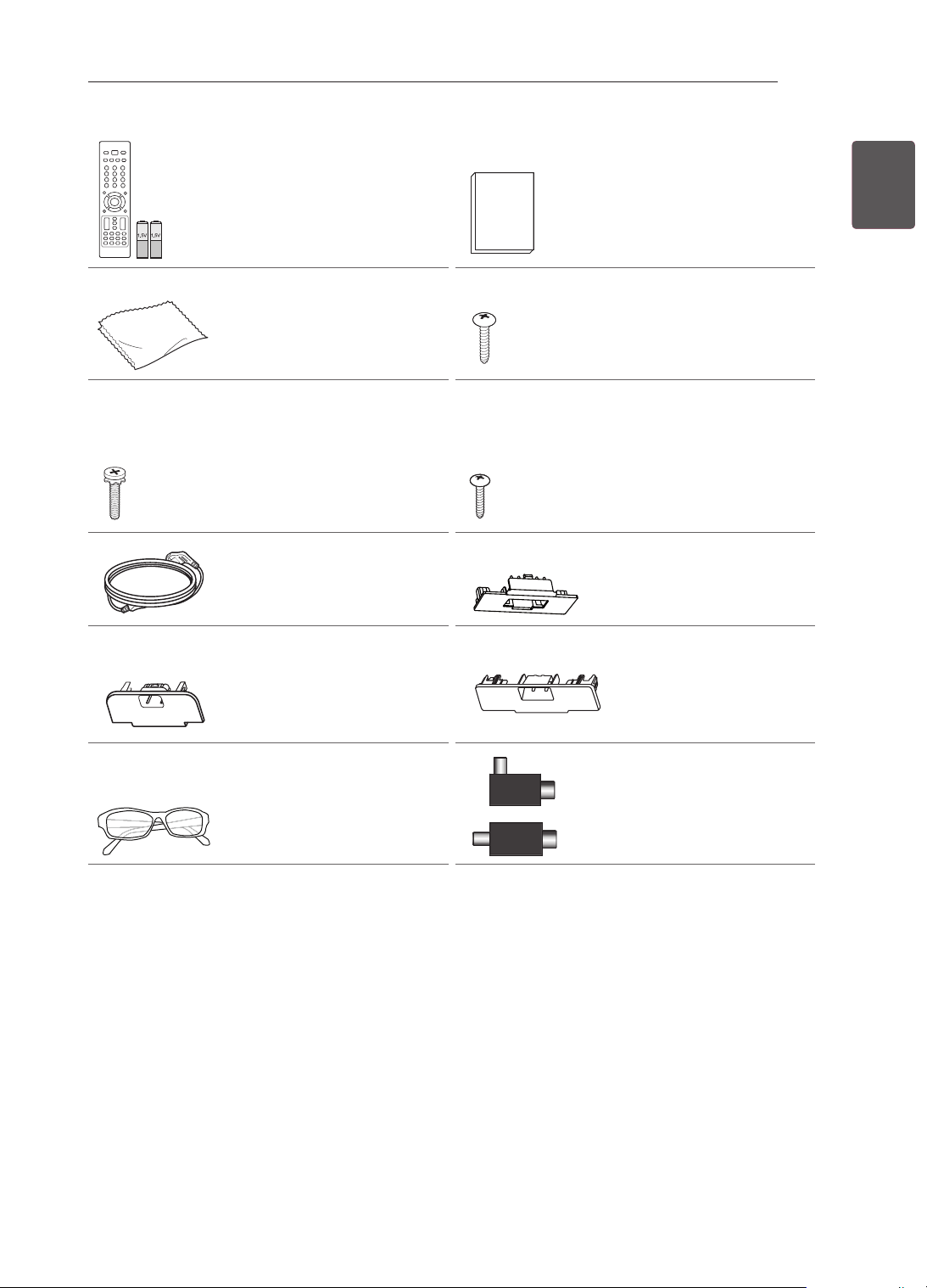
Unpacking
Check your product box for the following items. If there are any missing accessories, contact the local
dealer where you purchased your product. The illustrations in this manual may differ from the actual
product and item.
CAUTION
Do not use any unapproved items to ensure the safety and product life span.
Any damages or injuries by using unapproved items are not covered by the manufacturer’s warranty.
Some models have a thin film attached on to the screen and this must not be removed.
NOTE
The items supplied with your product may vary depending on the model.
Product specifications or contents of this manual may be changed without prior notice due to upgrade
of product functions.
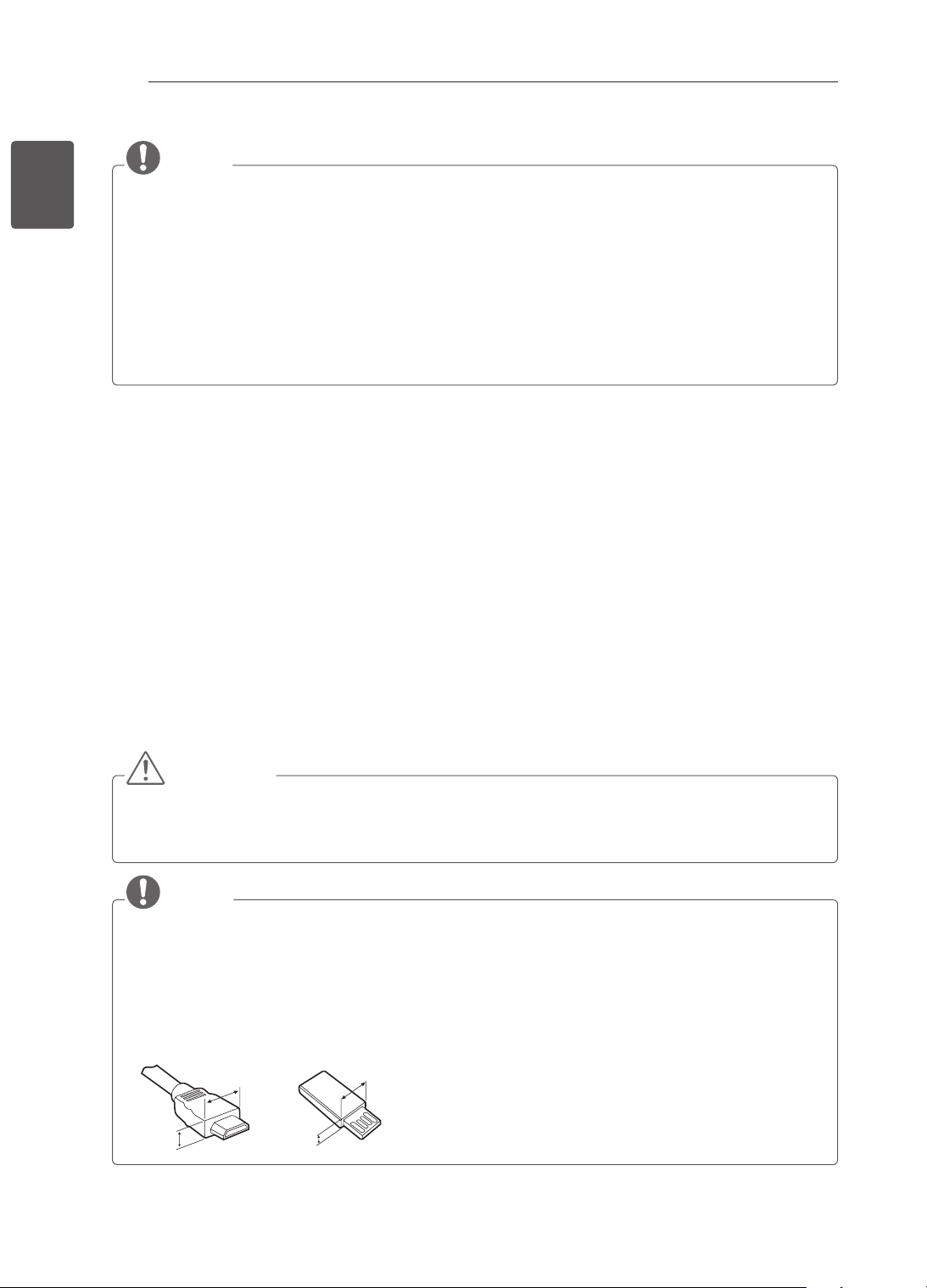
For an optimal connection, HDMI cables and USB devices should have bezels less than 10 mm thick
and 18 mm width. Use an extension cable that supports USB 2.0 if the USB cable or USB memory
stick does not fit into your TV’s USB port.
A
B
A
B
*A
<
=
10 mm
*B
<
=
18 mm
13
ENGENGLISH
ASSEMBLING AND PREPARING
Remote control and
batteries (AAA)
(See p. 27, 28) Owner’s manual
Polishing cloth
(Depending on model)
Use this to remove dust
from the cabinet.
Screw for assembly
2EA, P4 x 16
(Only 22CS46**,
22CS47**)
(See p. 18)
Screw for assembly
8EA, M4 x 20
(Only 26/32/42CS46**,
26/32/42CS47**,
32/42LS34**,
32/42LM34**)
(See p. 18, 19)
Screw for xing
(Only 26/32/42CS46**,
26/32/42CS47**,
32/42LS34**,
32/42LM34**)
(See p. 20)
Power Cord
Protection cover
(Only 26CS46**,
26CS47**)
(See p. 22)
Protection cover
(Only 32CS46**,
32CS47**, 32LS34**,
32LM34**)
(See p. 22)
Protection cover
(Only 42CS46**,
42CS47**, 42LS34**,
42LM34**)
(See p. 22)
Cinema 3D Glasses
The number of 3D glasses
may differ depending on
the model or country.
(Only 32/42LM34**)
or
Isolator
(Depending on model)
(See p. 14)
14
ENG
ENGLISH
ASSEMBLING AND PREPARING
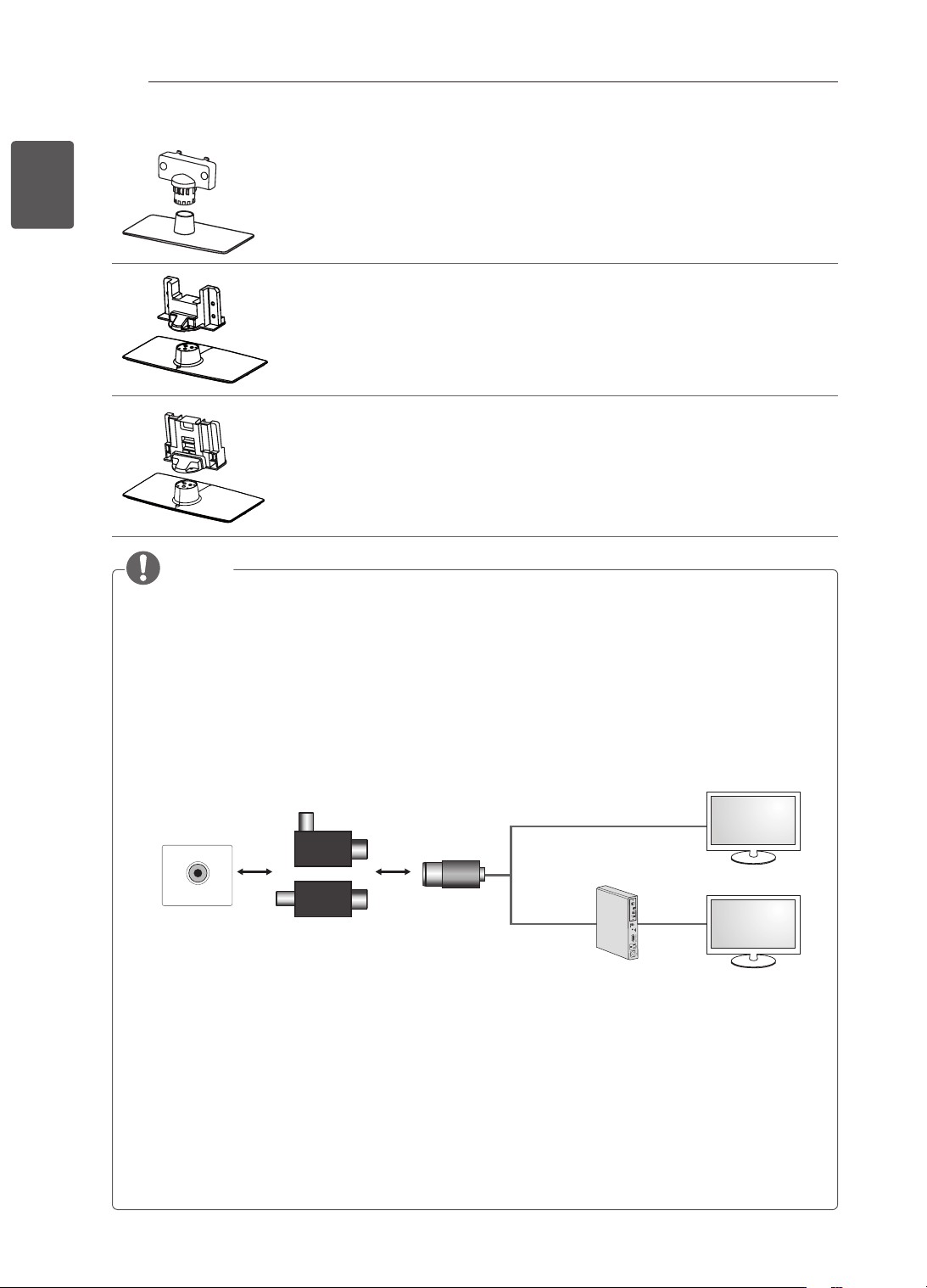
Stand Body / Stand Base
(Only 22CS46**, 22CS47**)
(See p. 18)
Stand Body / Stand Base
(Only 26CS46**, 26CS47**)
(See p. 18)
Stand Body / Stand Base
(Only 32/42CS46**, 32/42CS47**, 32/42LS34**, 32/42LM34**)
(See p. 19)
NOTE
Antenna Isolator Installation Guide
- Use this to install TV in a place where there is a voltage difference between TV Set and GND of
antenna signal.
» If there is a voltage difference between TV Set and GND of antenna signal, the antenna contact
might be heated and excessive heat might cause an accident.
- You can improve the safety when watching TV by efficiently removing power voltage from TV
antenna. It is recommended to mount the isolator to the wall. If it cannot be mounted to the wall,
mount it on the TV. Avoid disconnecting the antenna Isolator after installation.
- Before starting, be sure that the TV antenna is connected.
ANTENNA/
CABLE IN
Cable / Antenna
Wall
Isolator
1. Connect to TV.
2. Connect to Set-Top box.
or
Connect one end of the isolator to cable/antenna jack and the other to TV set or set-top box.
“Equipment connected to the protective earthing of the building installation through the mains connection
or through other equipment with a connection to protective earthing - and to a cable distribution system
using coaxial cable, may in some circumstances create a re hazard. Connection to a cable distribution
system has therefore to be provided through a device providing electrical isolation below a certain
frequency range (galvanic isolator, see EN 60728-11)”
When applying the RF Isolator, a slight loss of signal sensitivity can occur.
15
ENGENGLISH
ASSEMBLING AND PREPARING
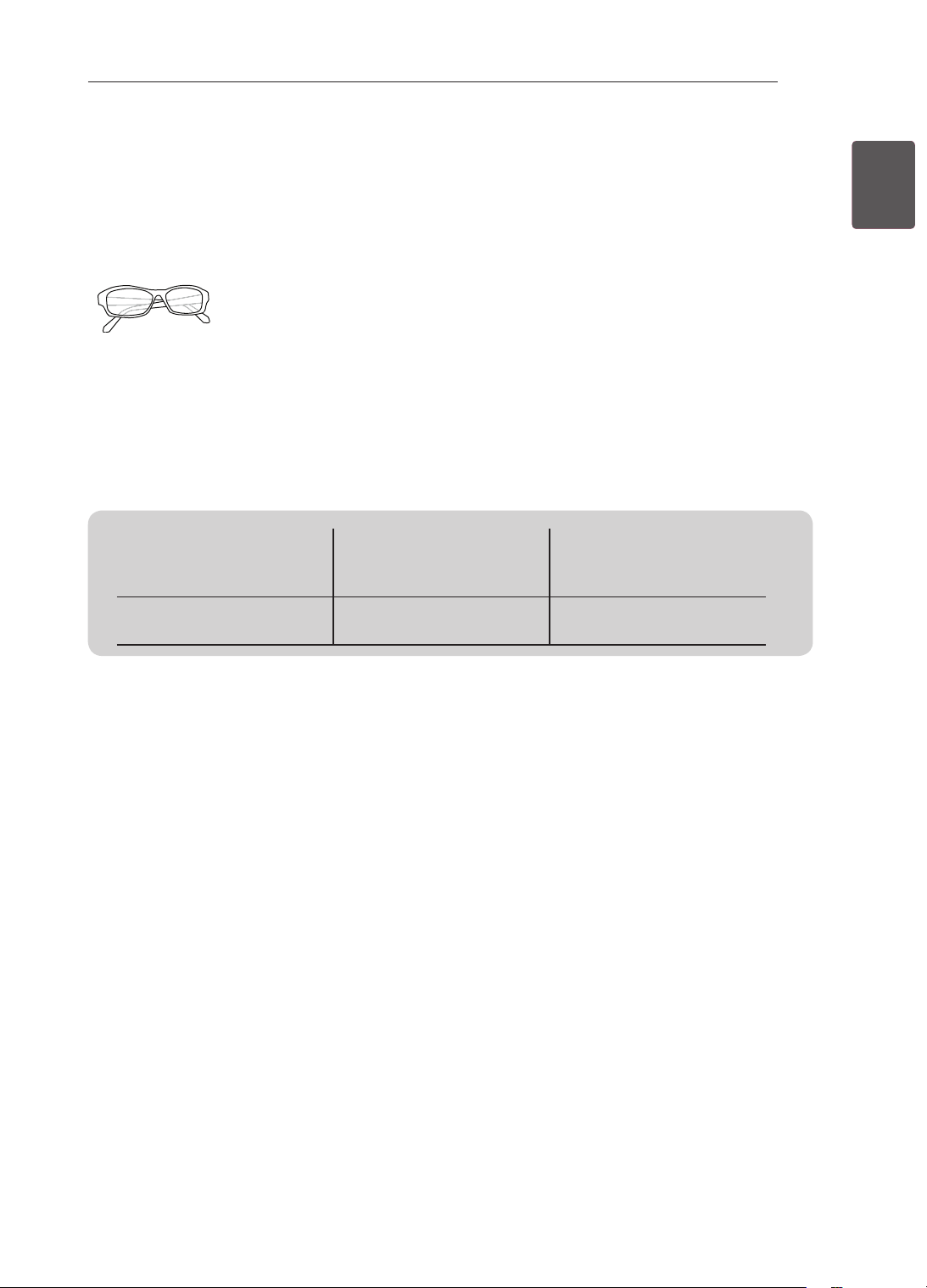
Separate purchase
Separate purchase items can be changed or modied for quality improvement without any notication.
Contact your dealer to buying these items.
These devices only work with certain models.
AG-F3**
Cinema 3D Glasses
The model name or design
may be changed depending
on the upgrade of product
functions, manufacturer’s
circumstances or policies.
Compatibility
32/42/LM34**
32/42LS34**,
22/26/32/42CS46**,
22/26/32/42CS47**
AG-F3**
Cinema 3D Glasses
•
16
ENG
ENGLISH
ASSEMBLING AND PREPARING
INPUT
OK
SETTINGS
Touch buttons
2
Power indicator
Remote control and
intelligent
1
sensors
Screen
Speakers
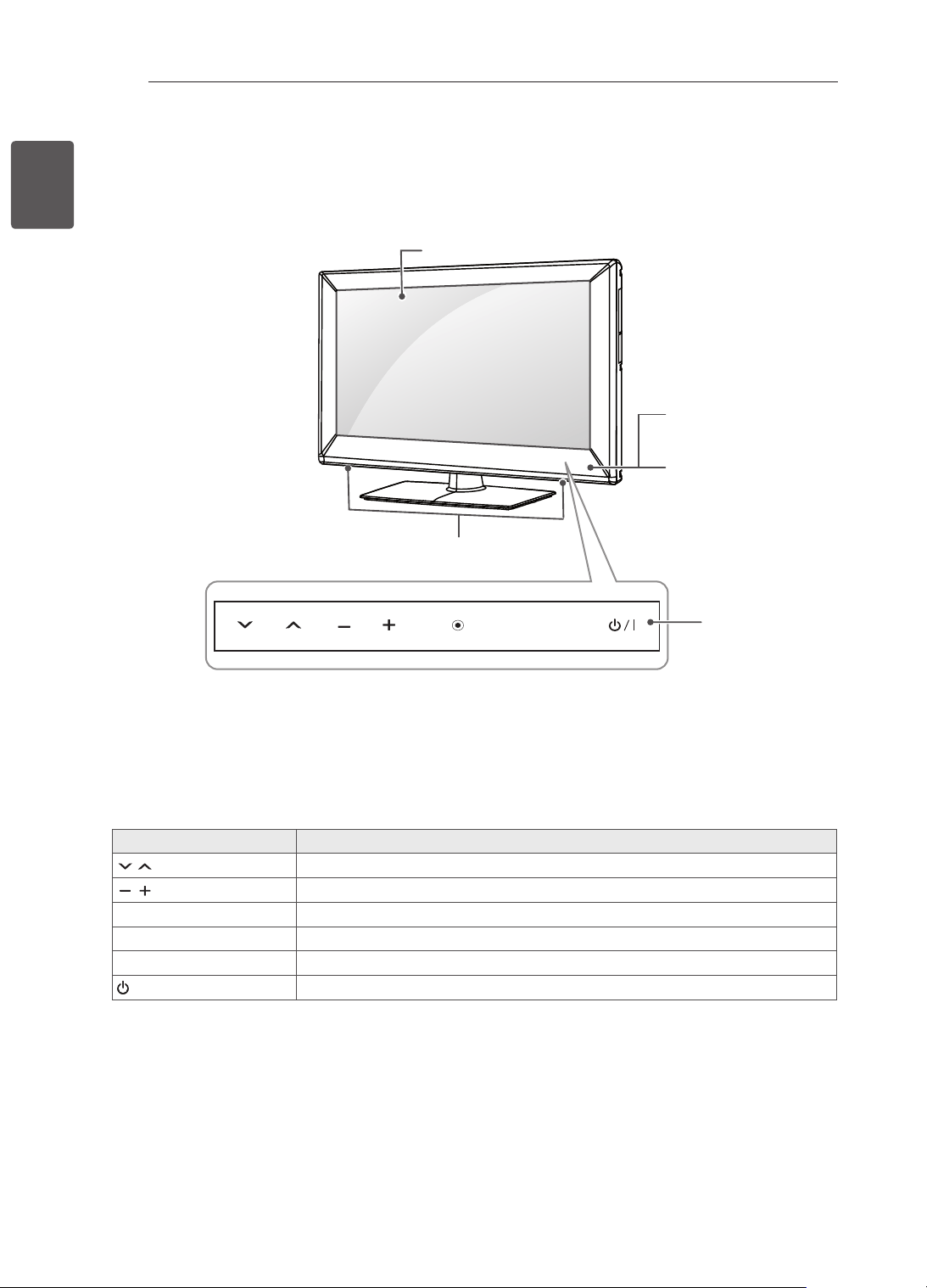
Parts and buttons
Touch Button Description
H
Scrolls through the saved programmes.
H
Adjusts the volume level.
OK
ꔉ
Selects the highlighted menu option or confirms an input.
SETTINGS Accesses the main menu, or saves your input and exits the menus.
INPUT Changes the input source.
/ I
Turns the power on or off.
1 Intelligent sensor - Adjusts the image quality and brightness based on the surrounding environment.
2 All of the buttons are touch sensitive and can be operated through simple touch with your finger.
17
ENGENGLISH
ASSEMBLING AND PREPARING
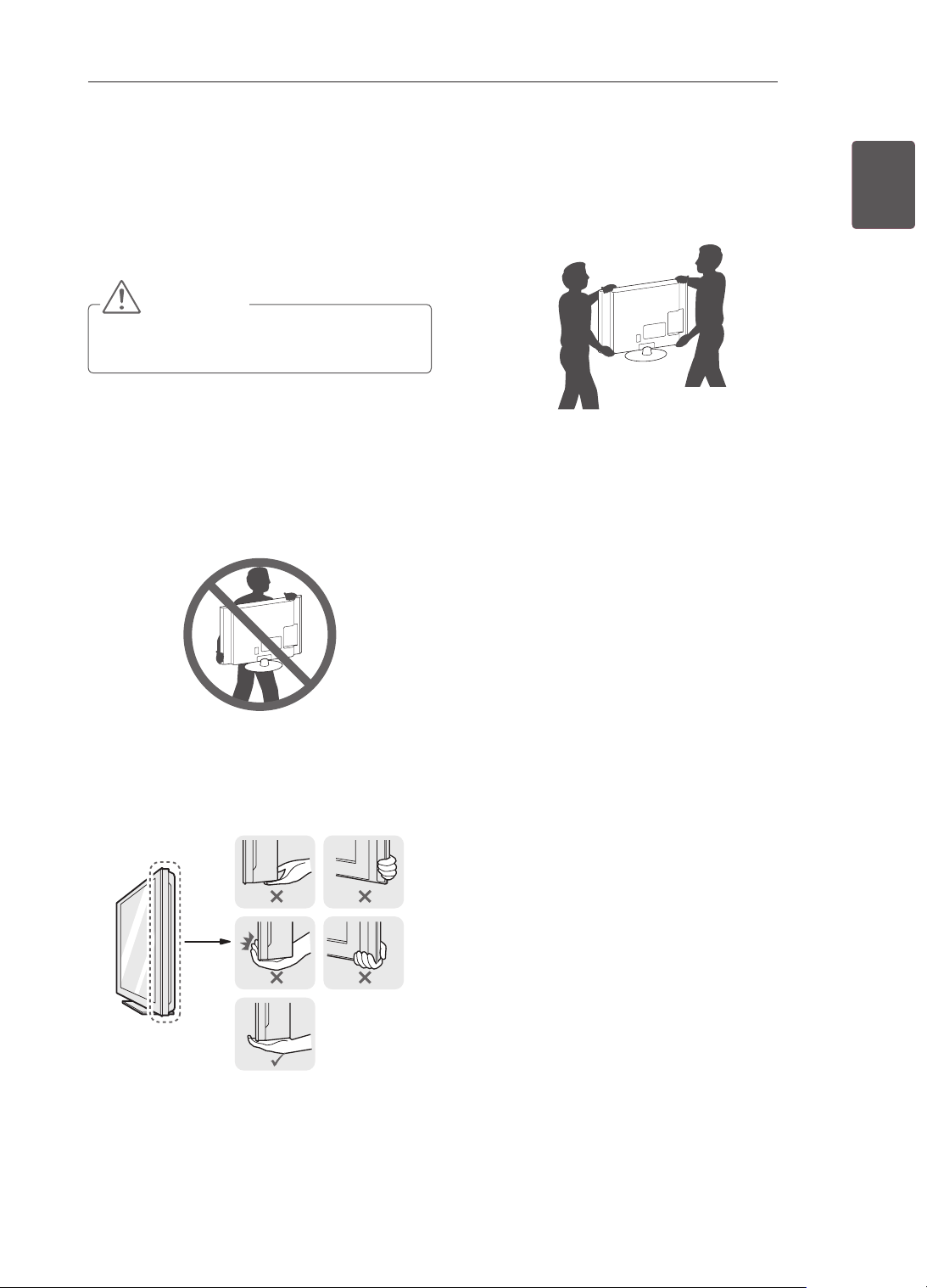
Lifting and moving the TV
Please note the following advice to prevent the
TV from being scratched or damaged and for safe
transportation regardless of its type and size.
CAUTION
Avoid touching the screen at all times, as
this may result in damage to the screen.
It is recommended to move the TV in the box
or packing material that the TV originally came
in.
Before moving or lifting the TV, disconnect the
power cord and all cables.
When holding the TV, the screen should face
away from you to avoid damage.
Hold the top and bottom of the TV frame rmly.
Make sure not to hold the transparent part,
speaker, or speaker grill area.
When transporting a large TV, there should be
at least 2 people.
When transporting the TV by hand, hold the TV
as shown in the following illustration.
When transporting the TV, do not expose the
TV to jolts or excessive vibration.
When transporting the TV, keep the TV upright,
never turn the TV on its side or tilt towards the
left or right.
18
ENG
ENGLISH
ASSEMBLING AND PREPARING
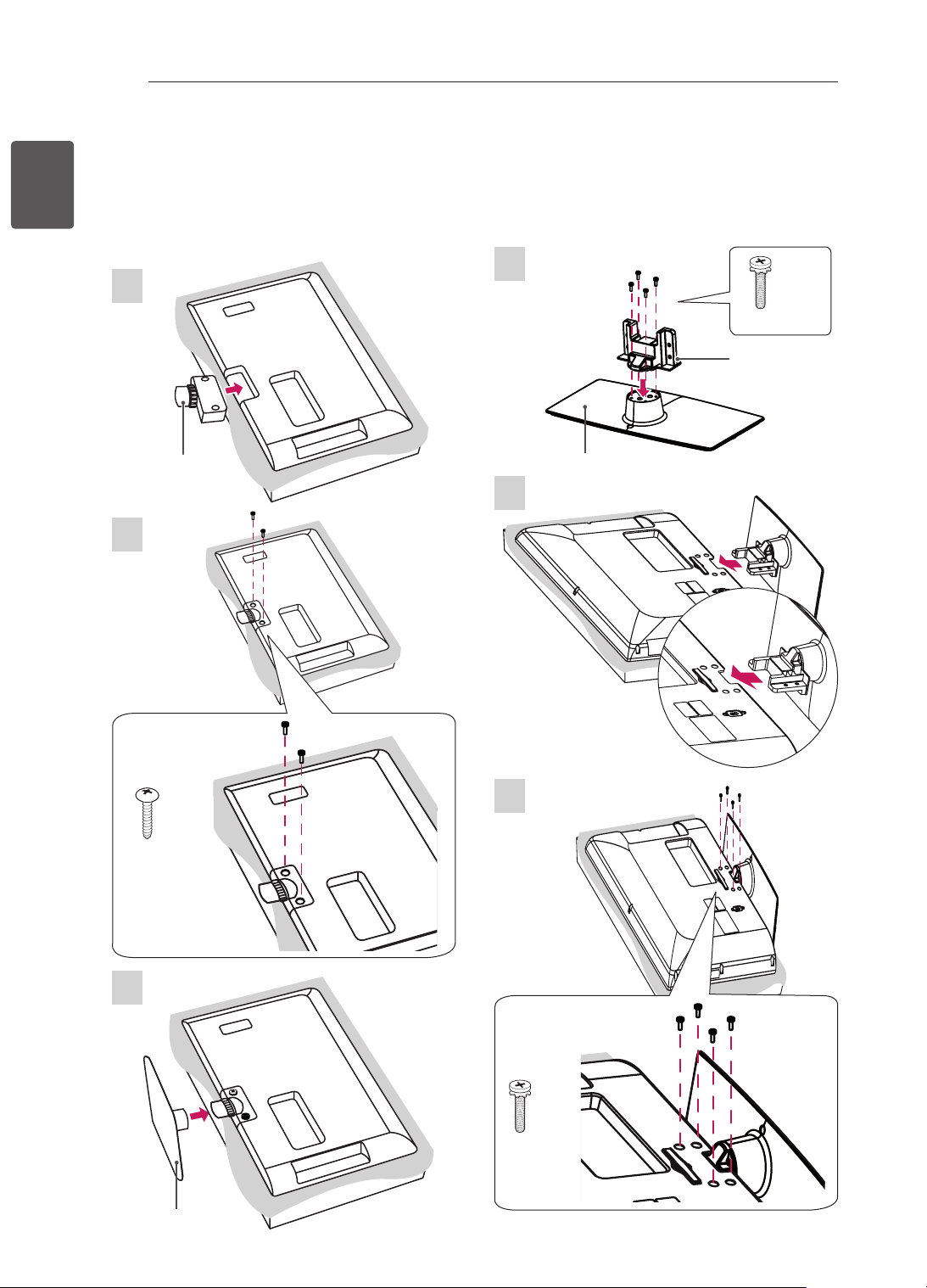
Setting up the TV
Attaching the stand
Image shown may differ from your TV.
1
22CS46**, 22CS47**
2
P4 x 16
2EA
3
1
26CS46**, 26CS47**
M4 x 20
4EA
Stand Body
Stand Base
2
3
M4 x 20
4EA
Stand Body
Stand Base
19
ENGENGLISH
ASSEMBLING AND PREPARING
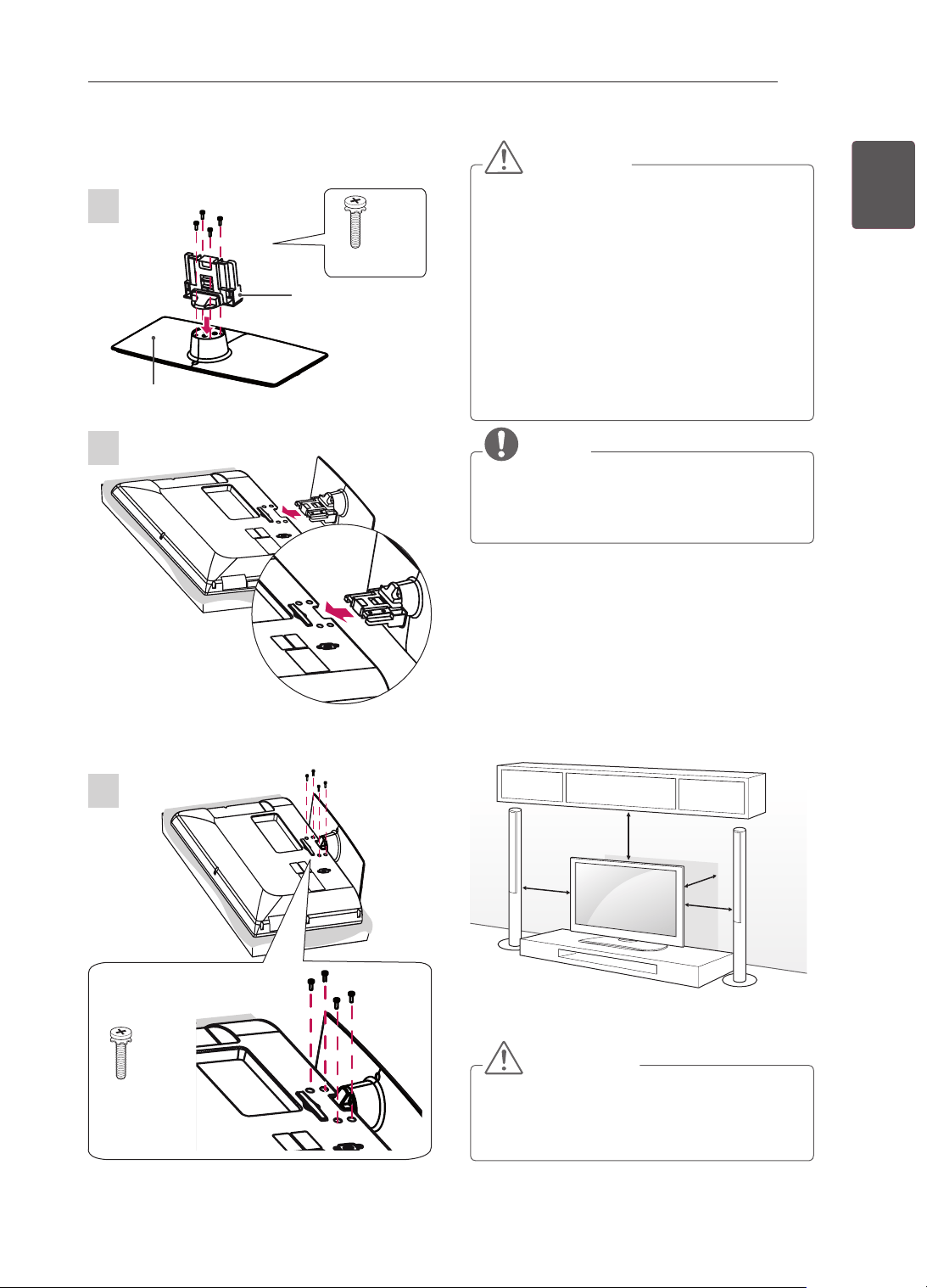
CAUTION
When attaching the stand to the TV
set, place the screen facing down on a
cushioned table or flat surface to protect the
screen from scratches.
Make sure that the screws are inserted
correctly and fastened securely. (If they are
not fastened securely enough, the TV may
tilt forward after being installed.)
Do not use too much force and over tighten
the screws; otherwise screw may be
damaged and not tighten correctly.
NOTE
Remove the stand before installing the TV
on a wall mount by performing the stand
attachment in reverse.
Mounting on a table
1 Lift and tilt the TV into its upright position on a
table.
- Leave a 10 cm (minimum) space from the
wall for proper ventilation.
10 cm
10 cm
10 cm
10 cm
2 Connect the power cord to a wall outlet.
CAUTION
Do not place the TV near or on sources
of heat, as this may result in fire or other
damage.
32/42CS46**, 32/42CS47**, 32/42LS34**,
32/42LM34**
Stand Body
Stand Base
1
3
2
M4 x 20
4EA
M4 x 20
4EA
20
ENG
ENGLISH
ASSEMBLING AND PREPARING
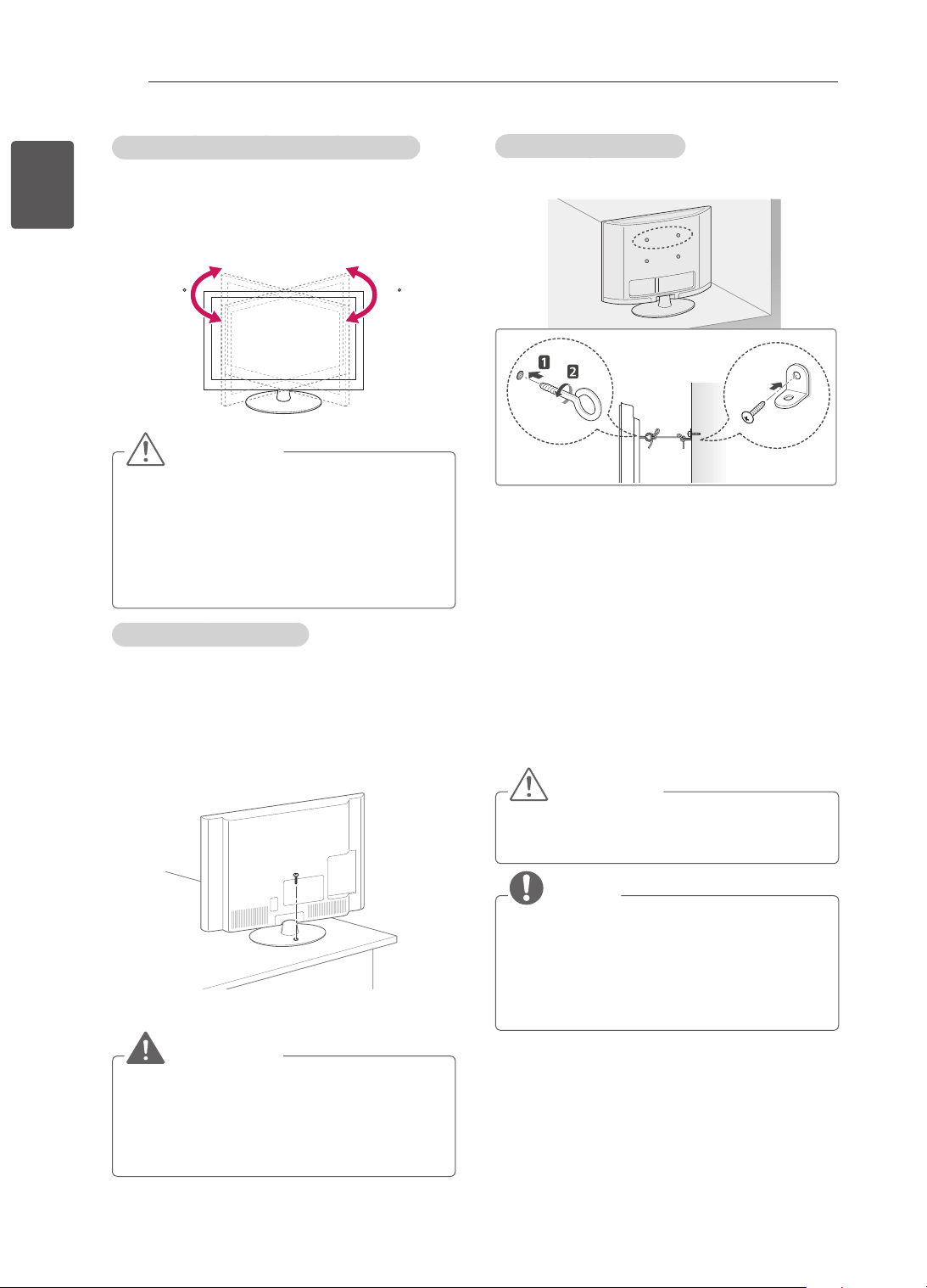
Adjusting the angle of the TV to suit view
(Only 32/42CS46**, 32/42CS47**, 32/42LS34**,
32/42LM34**)
Swivel 20 degrees to the left or right and adjust the
angle of the TV to suit your view.
2020
CAUTION
When adjusting the angle of the product,
watch out for your fingers.
»
Personal injury may occur if hands
or fingers are pinched. If the product
is tilted too much, it may fall, causing
damage or injury.
Securing the TV to a table
(Only 26/32/42CS46**, 26/32/42CS47**,
32/42LS34**, 32/42LM34**)
Fix the TV to a table to prevent from tilting forward,
damage, and potential injury.
To secure the TV to a table, insert and tighten the
supplied screw on the rear of the stand.
WARNING
To prevent TV from falling over, the TV
should be securely attached to the floor/
wall per installation instructions. Tipping,
shaking, or rocking the TV may cause injury.
Securing the TV to a wall
(This feature is not available for all models.)
1 Insert and tighten the eye-bolts, or TV brackets
and bolts on the back of the TV.
- If there are bolts inserted at the eye-bolts
position, remove the bolts first.
2 Mount the wall brackets with the bolts to the
wall.
Match the location of the wall bracket and the
eye-bolts on the rear of the TV.
3 Connect the eye-bolts and wall brackets tightly
with a sturdy rope.
Make sure to keep the rope horizontal with the
at surface.
CAUTION
Make sure that children do not climb on or
hang on the TV.
NOTE
Use a platform or cabinet that is strong and
large enough to support the TV securely.
Brackets, bolts and ropes are not provided.
You can obtain additional accessories from
your local dealer.
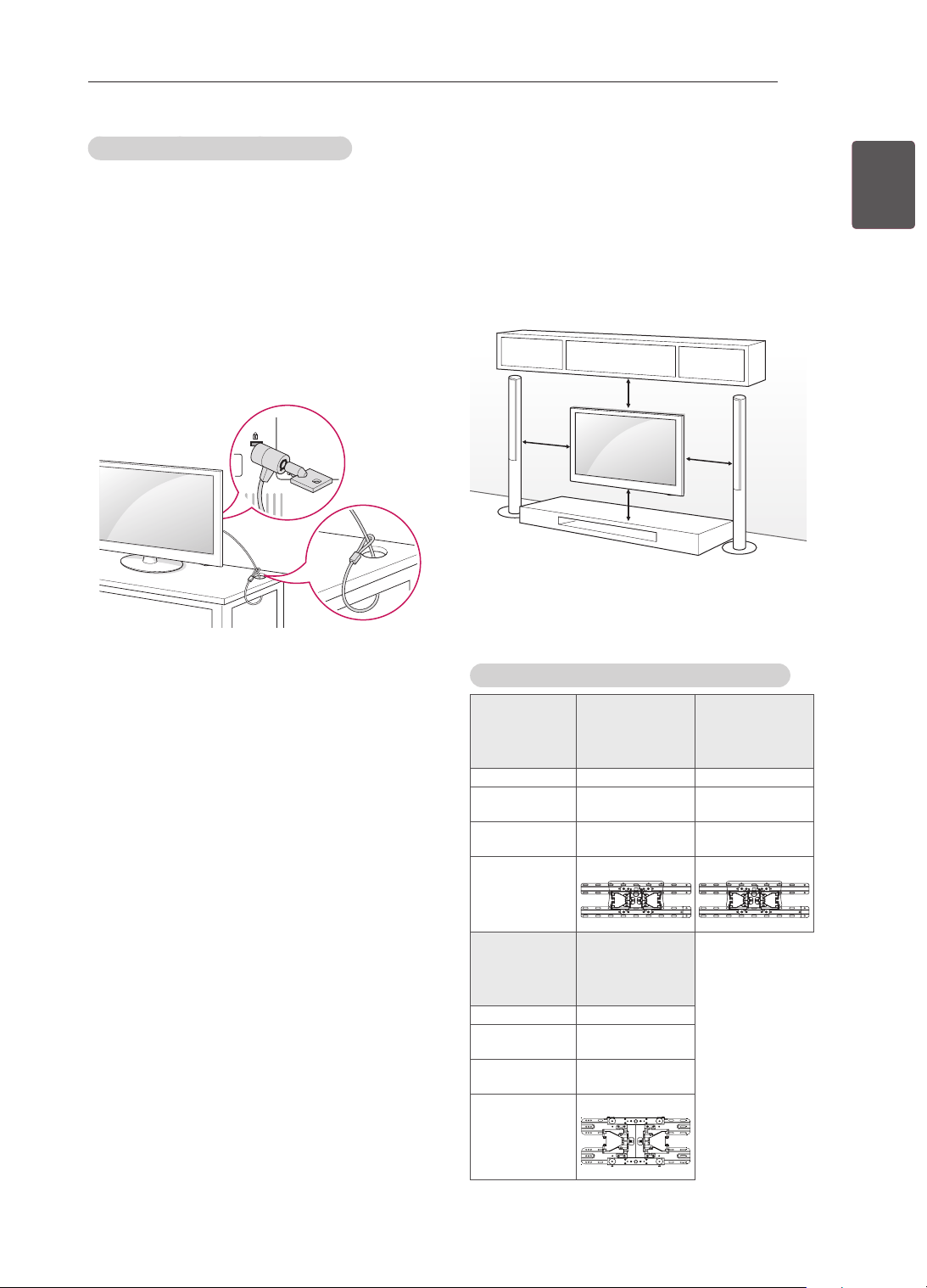
21
ENGENGLISH
ASSEMBLING AND PREPARING
Mounting on a wall
Attach an optional wall mount bracket at the rear
of the TV carefully and install the wall mount
bracket on a solid wall perpendicular to the
oor. When you attach the TV to other building
materials, please contact qualied personnel.
LG recommends that wall mounting be performed
by a qualied professional installer.
10 cm
10 cm
10 cm
10 cm
Make sure to use screws and wall mount
bracket that meet the VESA standard. Standard
dimensions for the wall mount kits are described in
the following table.
Separate purchase(Wall Mounting Bracket)
Model
22CS46**,
22CS47**
26/32CS46**,
26/32CS47**,
32LS34**,
32LM34**
VESA (A x B) 100 x 100 200 x 100
Standard
screw
M4 M4
Number of
screws
4 4
Wall mount
bracket
LSW100B LSW100B
Model
42CS46**,
42CS47**,
42LS34**,
42LM34**
VESA (A x B) 200 x 200
Standard
screw
M4
Number of
screws
4
Wall mount
bracket
LSW200BX
Using the Kensington security system
(Depending on model)
The Kensington security system connector is
located at the rear of the TV. For more information
of installation and using, refer to the manual
provided with the Kensington security system or
visit
http://www.kensington.com.
Connect the Kensington security system cable
between the TV and a table.
22
ENG
ENGLISH
ASSEMBLING AND PREPARING
A
B
CAUTION
Disconnect the power first, and then move
or install the TV. Otherwise electric shock
may occur.
If you install the TV on a ceiling or slanted
wall, it may fall and result in severe injury.
Use an authorized LG wall mount and
contact the local dealer or qualified
personnel.
Do not over tighten the screws as this may
cause damage to the TV and void your
warranty.
Use the screws and wall mounts that meet
the VESA standard. Any damages or injuries
by misuse or using an improper accessory
are not covered by the manufacturer’s
warranty.
NOTE
Use the screws that are listed on the VESA
standard screw specifications.
The wall mount kit includes an installation
manual and necessary parts.
The wall mount bracket is not provided. You
can obtain additional accessories from your
local dealer.
The length of screws may differ depending
on the wall mount. Make sure to use the
proper length.
For more information, refer to the manual
supplied with the wall mount.
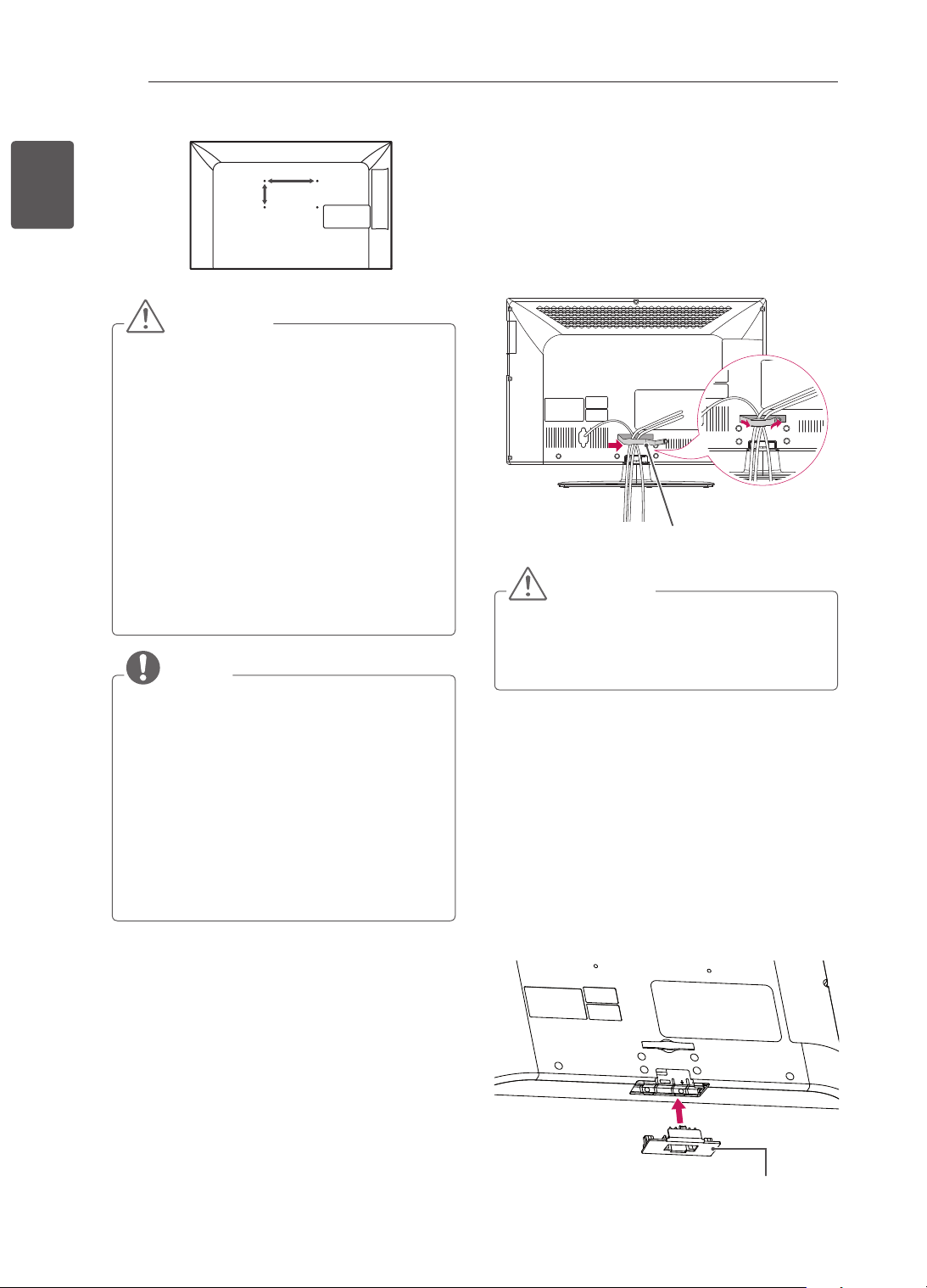
Tidying cables
Only 26/32/42CS46***, 26/32/42CS47**,
32/42LS34**, 32/42LM34**
1 Gather and bind the cables with the cable
management.
2 Fix the cable management rmly to the TV.
Cable Management
CAUTION
Do not move the TV by holding the cable
management, as the cable management
may break, and injurure and damage to the
TV may occur.
Not using the Desk-Type
Stand
Only 26/32/42CS46**, 26/32/42CS47**,
32/42LS34**, 32/42LM34**
When installing the wall mounting bracket,
use the Protection cover. This will protect
the opening from accumulating dust and dirt.
Push the supplied protection cover into the
opening at the bottom of the TV until it locks in
place.
Protection cover
23
ENGENGLISH
MAKING CONNECTIONS
MAKING
CONNECTIONS
This section on MAKING CONNECTIONS
mainly uses diagrams for the CS46** models.
Connect various external devices to the TV
and switch input modes to select an external
device. For more information of external device’s
connection, refer to the manual provided with each
device.
Available external devices are: HD receivers,
DVD players, VCRs, audio systems, USB storage
devices, PC, gaming devices, and other external
devices.
NOTE
The external device connection may differ
from the model.
Connect external devices to the TV
regardless of the order of the TV port.
If you record a TV program on a DVD
recorder or VCR, make sure to connect the
TV signal input cable to the TV through a
DVD recorder or VCR. For more information
of recording, refer to the manual provided
with the connected device.
Refer to the external equipment’s manual for
operating instructions.
If you connect a gaming device to the TV,
use the cable supplied with the gaming
device.
In PC mode, there may be noise associated
with the resolution, vertical pattern, contrast
or brightness. If noise is present, change
the PC output to another resolution, change
the refresh rate to another rate or adjust the
brightness and contrast on the PICTURE
menu until the picture is clear.
In PC mode, some resolution settings may
not work properly depending on the graphics
card.
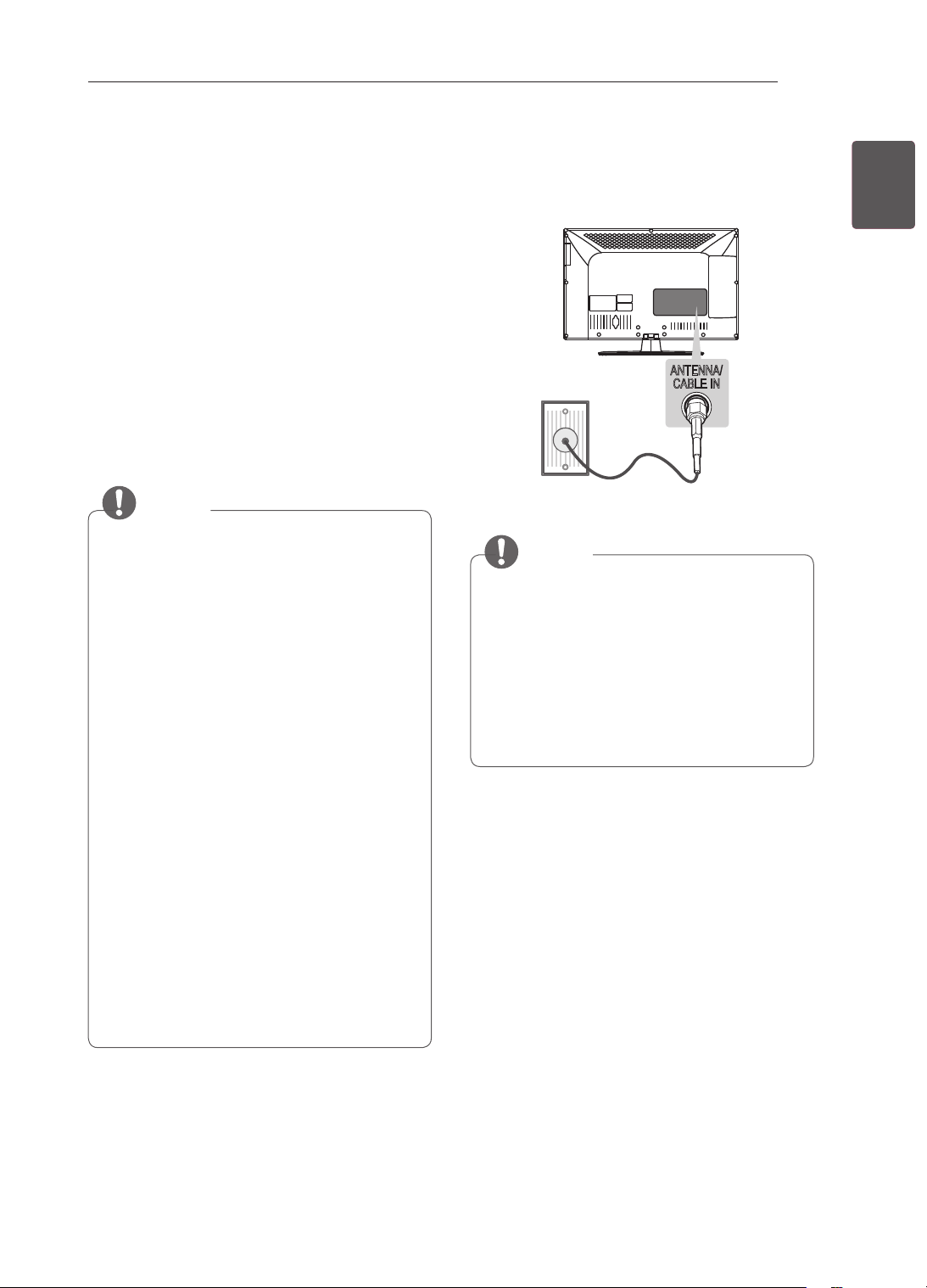
Antenna connection
Connect the TV to a wall antenna socket with an
RF cable (75 Ω).
ANTENNA/
CABLE IN
ANTENNA/
CABLE IN
NOTE
Use a signal splitter to use more than 2 TVs.
If the image quality is poor, install a signal
amplifier properly to improve the image
quality.
If the image quality is poor with an antenna
connected, try to realign the antenna in the
correct direction.
An antenna cable and converter are not
supplied.
24
ENG
ENGLISH
MAKING CONNECTIONS
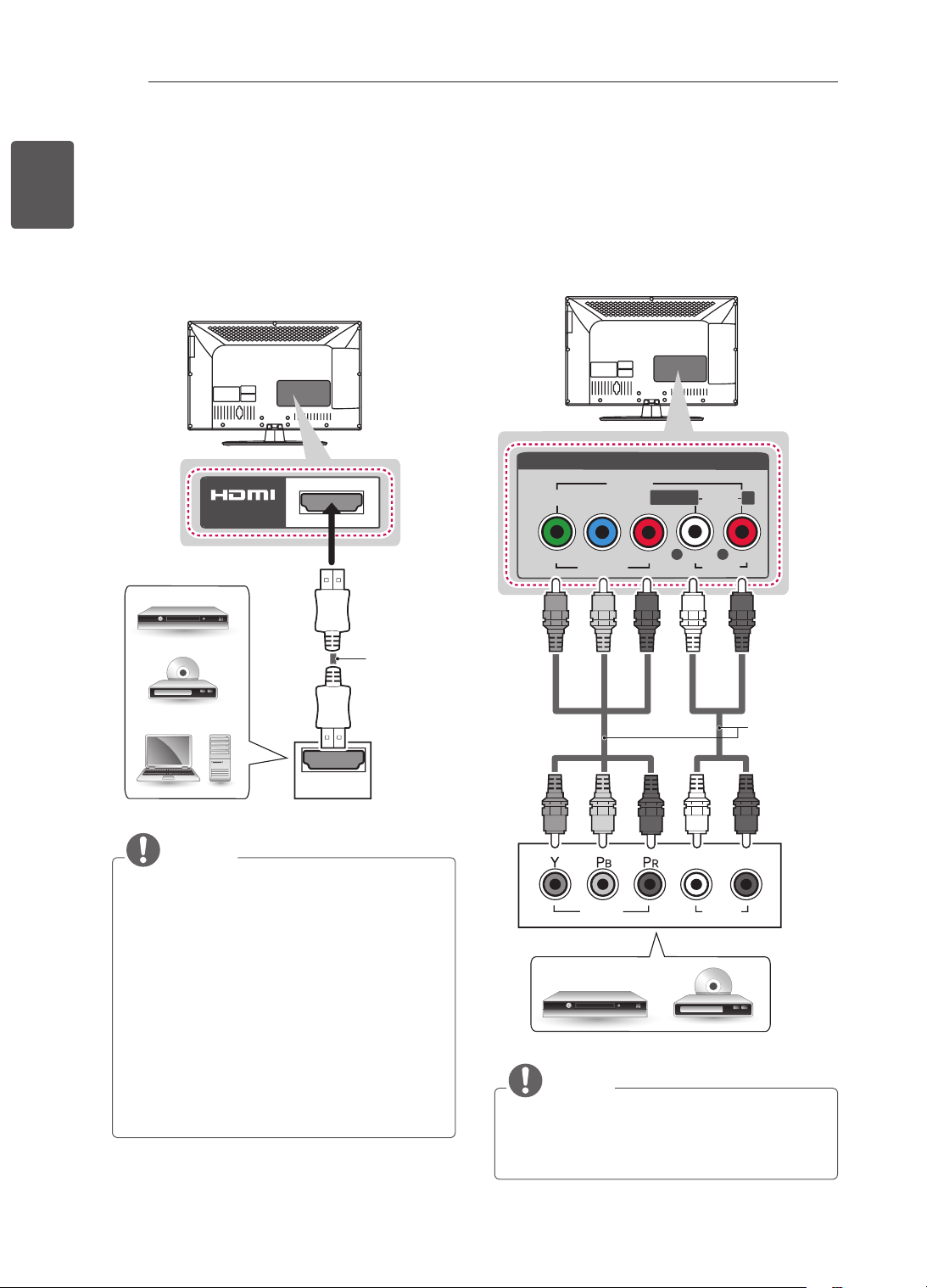
HDMI connection
Transmits the digital video and audio signals from
an external device to the TV. Connect the external
device and the TV with the HDMI cable as shown.
Choose any HDMI input port to connect. It does
not matter which port you use.
HDMI
IN
(*Not Provided)
DVD/ Blu-Ray / HD Cable
Box / HD STB / PC
NOTE
It is recommended to use the TV with the
HDMI connection for the best image quality.
Use the latest High Speed HDMI™ Cable
with CEC (Customer Electronics Control)
function.
High Speed HDMI™ Cables are tested to
carry an HD signal up to 1080p and higher.
Supported DTV Audio: MPEG, Dolby Digital,
Dolby Digital Plus
Supported HDMI Audio format : Dolby
Digital, PCM (Up to 192 KHz, 32k/44.1k/48k
/88k/96k/176k/192k, DTS Not supported.)
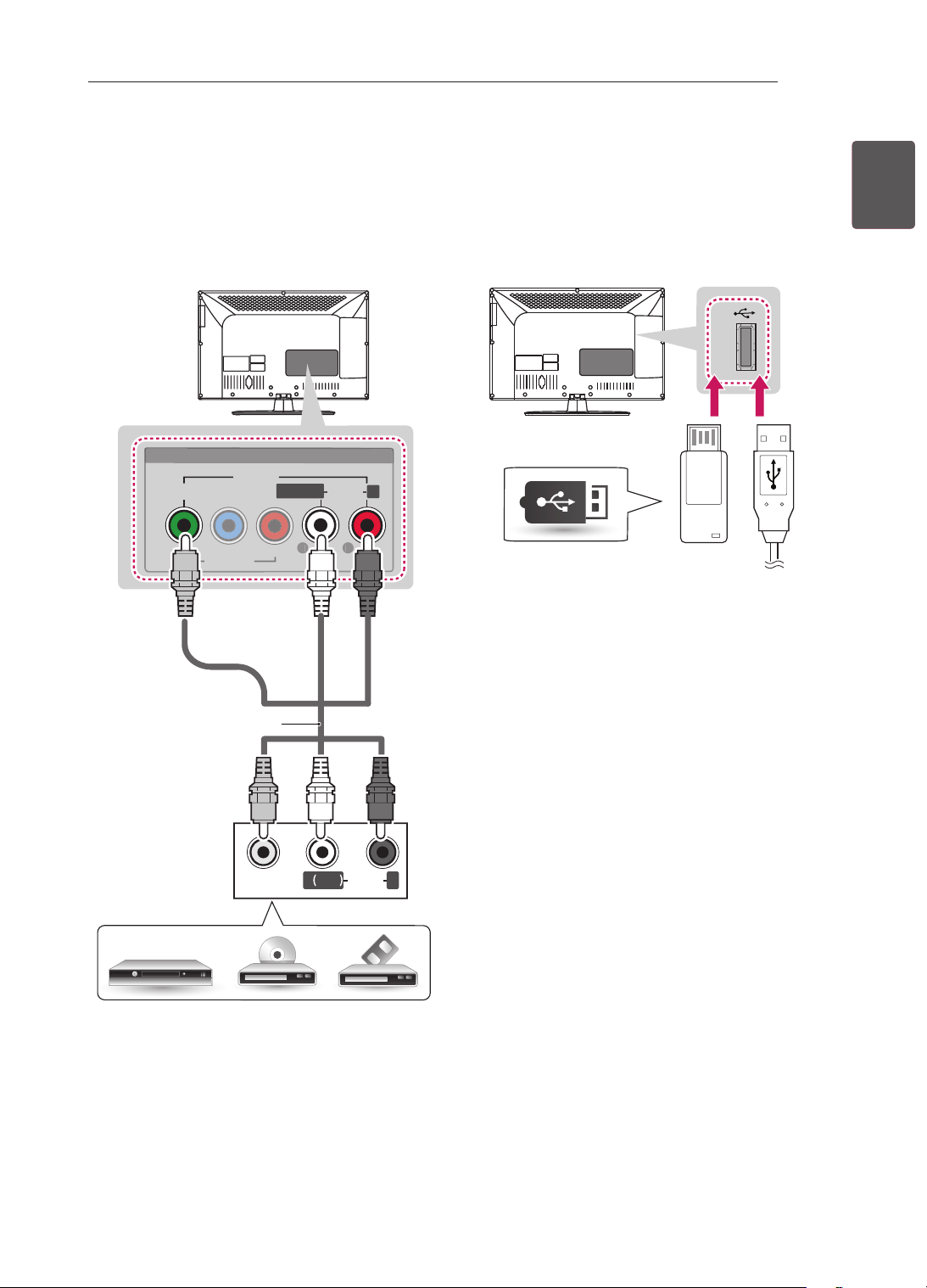
Component connection
Transmits analog video and audio signals from an
external device to the TV. Connect the external
device and the TV with a component cable as
shown.
VIDEO
PB
PR
Y
L
R
AUDIO
R
L/MONO
AV IN
VIDEO
AUDIO
COMPONENT
IN
AUDIO
VIDEO
L R
DVD/ Blu-Ray / HD Cable Box
GREEN GREEN
BLUE BLUE
RED
RED
RED
RED
WHITE
WHITE
(*Not Provided)
NOTE
If cables are installed incorrectly, it could
case the image to display in black and white
or with distorted colour.
25
ENGENGLISH
MAKING CONNECTIONS
Composite connection
Transmits analog video and audio signals from an
external device to the TV. Connect the external
device and the TV with the composite cable as
shown.
VIDEO
MONO
( )
AUDIOL R
VIDEO
P
B
P
R
Y
L
R
AUDIO
R
L/MONO
AV IN
V
IDE
O
AU
DI
O
COMPONENT
IN
YELLOW
WHITE
RED
YELLOW
WHITE
RED
(*Not Provided)
DVD/ Blu-Ray / HD Cable Box / VCR
USB connection
Connect a USB storage device such as a USB
ash memory, external hard drive, or a USB
memory card reader to the TV and access the My
media menu to use various multimedia les.
USB IN
USB
(*Not Provided)
26
ENG
ENGLISH
MAKING CONNECTIONS
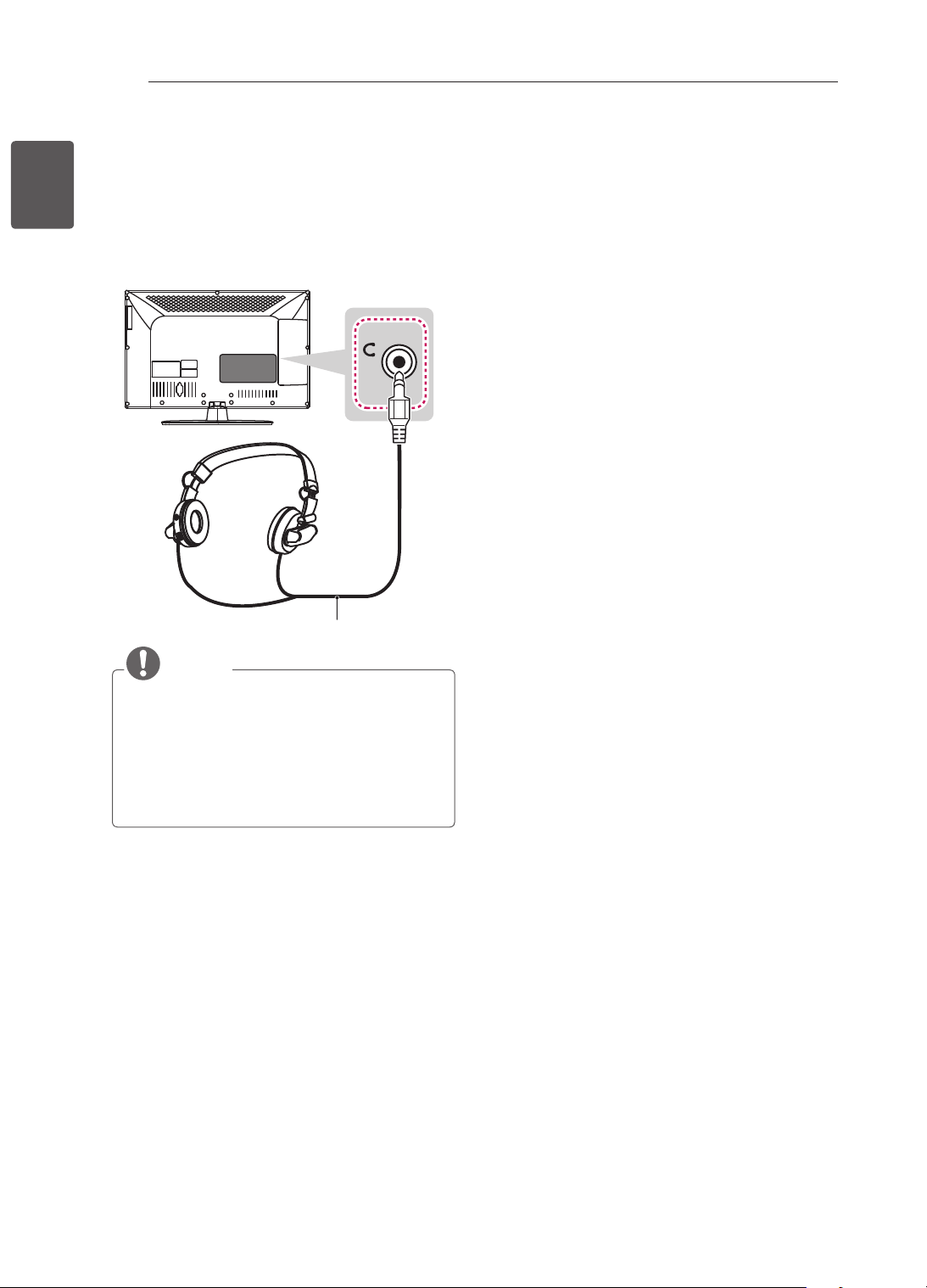
Headphone connection
(Only 22/26/32/42CS47**)
Transmits the headphone signal from the TV to
an external device. Connect the external device
and the TV with the headphone as shown.
H/P
(*Not Provided)
NOTE
AUDIO menu items are disabled when
connecting a headphone.
Headphone impedance: 16 Ω
Max audio output of headphone: 9 mW to 15
mW
Headphone jack size: 0.35 cm
27
ENGENGLISH
REMOTE CONTROL
REMOTE CONTROL
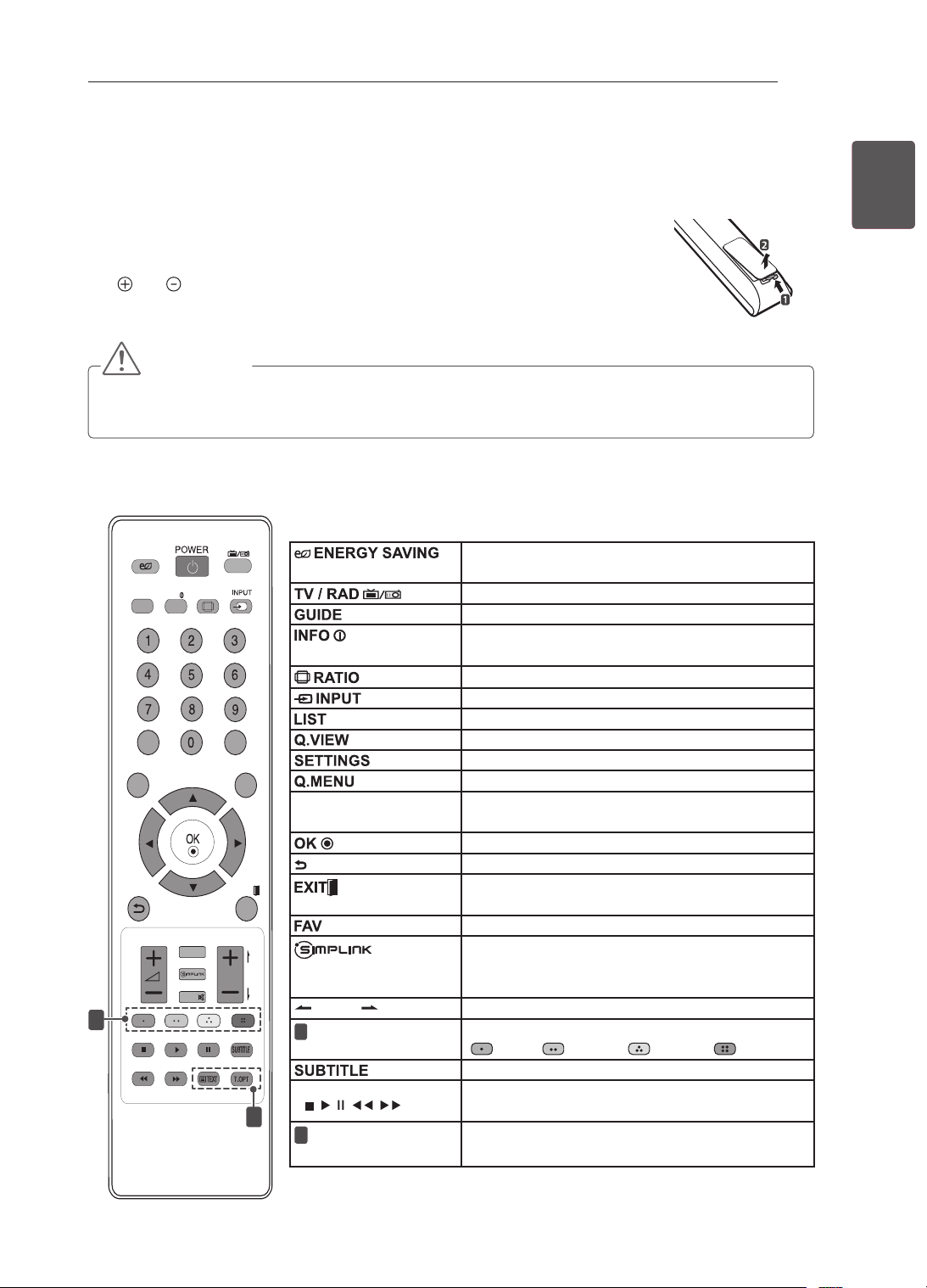
The descriptions in this manual are based on the buttons on the remote control.
Please read this manual carefully and use the TV correctly.
To replace batteries, open the battery cover, replace batteries (1.5 V AAA) matching
the
and ends to the label inside the compartment, and close the battery cover.
To remove the batteries, perform the installation actions in reverse.
CAUTION
y
Do not mix old and new batteries, as this may damage the remote control.
y
In Analogue TV and some countries, some remote control buttons may not work.
Make sure to point the remote control toward the remote control sensor on the TV.
LIST
Q.VIEW
TV/RAD
ENERGY
SAVING
RATIO
SETTINGS
GUIDE
Q.MENU
INFO
FAV
MUTE
P
A
G
E
LIST
Q.VIEW
TV/RAD
ENERGY
SAVING
RATIO
SETTINGS
GUIDE
Q.MENU
INFO
FAV
MUTE
P
A
G
E
P
AD
P
EXIT
EXIT
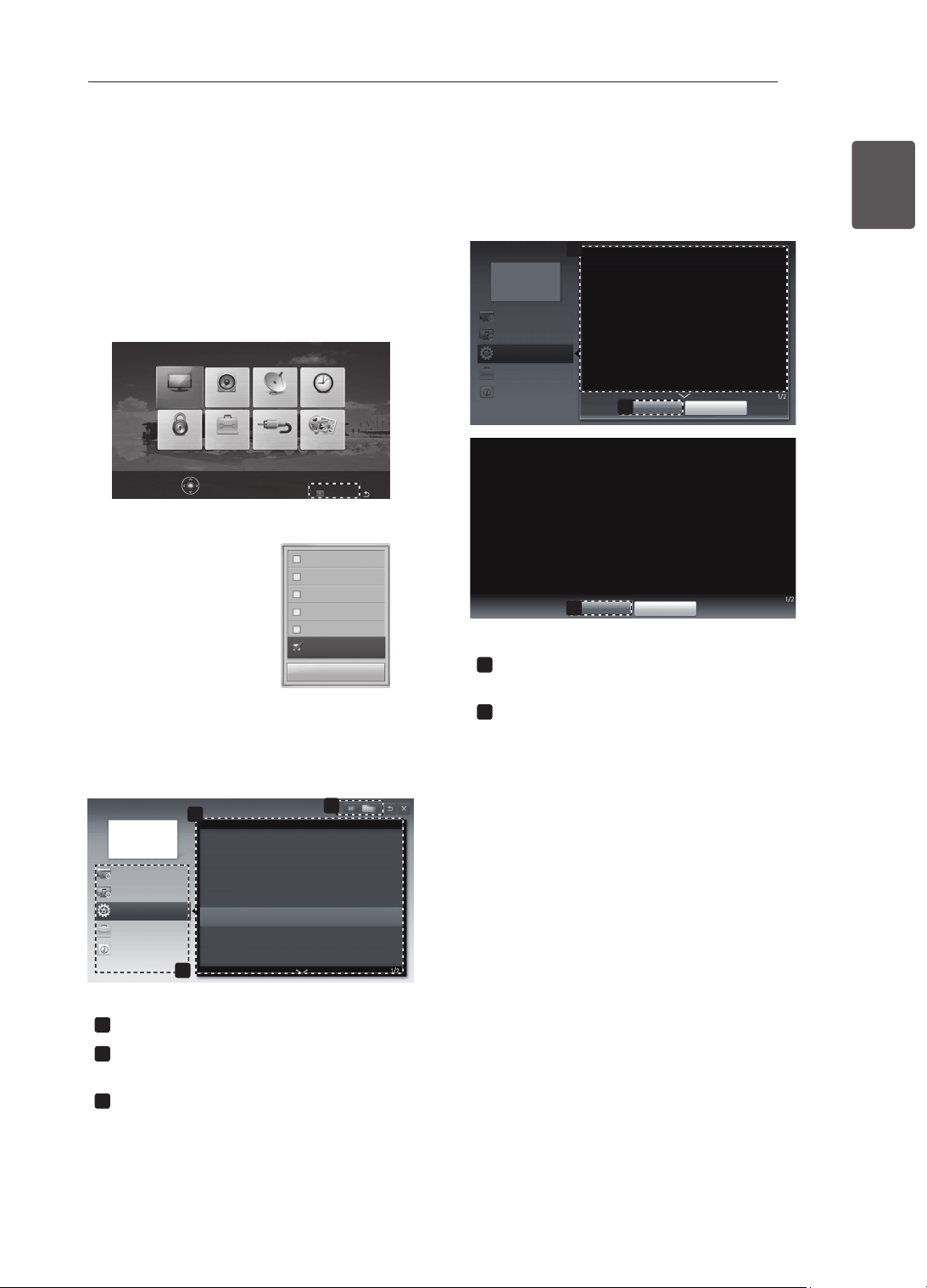
1
2
Adjusts the brightness of the screen to reduce
energy consumption.
Selects Radio, TV and DTV programme.
Shows programme guide.
Views the information of the current programme
and screen.
Resizes an image.
Changes the input source.
Accesses the saved programme list.
Returns to the previously viewed programme.
Accesses the main menus.
Accesses the Quick menus.
Navigation buttons
(up/down/left/right)
Scrolls through menus or options.
Moves to the previous or next screen.
Returns to the previous level.
Clears on-screen displays and return to TV
viewing.
Accesses your favourite programme list.
Accesses the AV devices connected with the
HDMI cable through HDMI-CEC.
Opens the SIMPLINK menu.
PAGE
Moves to the previous or next screen.
1
Coloured buttons
These access special functions in some menus.
(
: Red, : Green, : Yellow, : Blue)
Recalls your preferred subtitle in digital mode.
Control buttons
(
, , , , )
Controls the MY MEDIA menus, or the SIMPLINK
compatible devices (USB,SIMPLINK).
2
TELETEXT
BUTTONS
These buttons are used for teletext.
(Only 22/26/32/42CS46**, 22/26/32/42CS47**, 32/42LS34**)
28
ENG
ENGLISH
REMOTE CONTROL
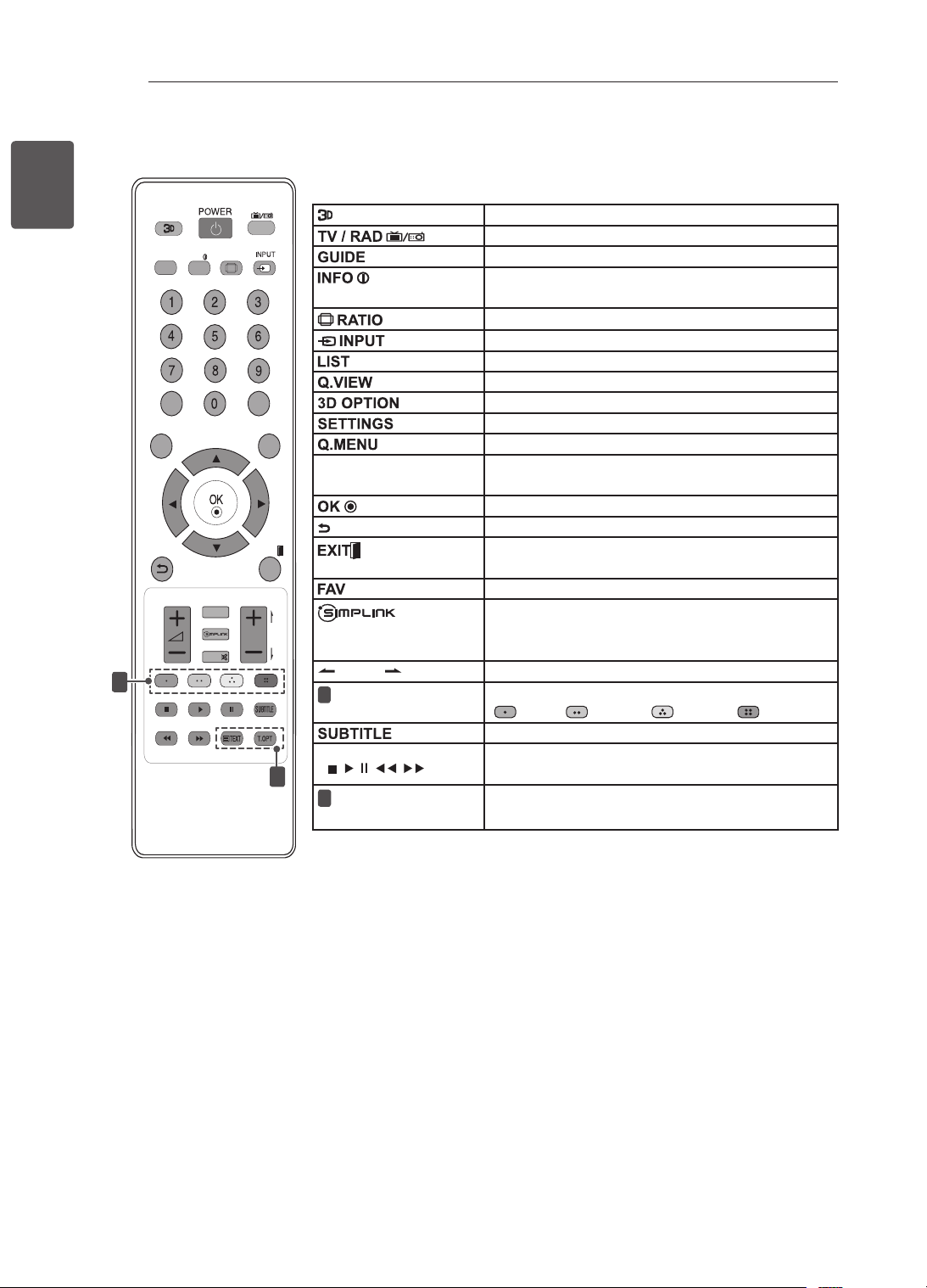
LIST
Q.VIEW
TV/RAD
RATIO
SETTINGS
GUIDE
Q.MENU
INFO
FAV
MUTE
P
A
G
E
P
EXIT
3D OPTION
1
2
Used for viewing 3D video.
Selects Radio, TV and DTV programme.
Shows programme guide.
Views the information of the current programme
and screen.
Resizes an image.
Changes the input source.
Accesses the saved programme list.
Returns to the previously viewed programme.
Use this to view 3D video.
Accesses the main menus.
Accesses the Quick menus.
Navigation buttons
(up/down/left/right)
Scrolls through menus or options.
Moves to the previous or next screen.
Returns to the previous level.
Clears on-screen displays and return to TV
viewing.
Accesses your favourite programme list.
Accesses the AV devices connected with the
HDMI cable through HDMI-CEC.
Opens the SIMPLINK menu.
PAGE
Moves to the previous or next screen.
1
Coloured buttons
These access special functions in some menus.
(
: Red, : Green, : Yellow, : Blue)
Recalls your preferred subtitle in digital mode.
Control buttons
(
, , , , )
Controls the MY MEDIA menus, or the SIMPLINK
compatible devices (USB,SIMPLINK).
2
TELETEXT
BUTTONS
These buttons are used for teletext.
(Only 32/42LM34**)
29
ENGENGLISH
USING THE USER GUIDE
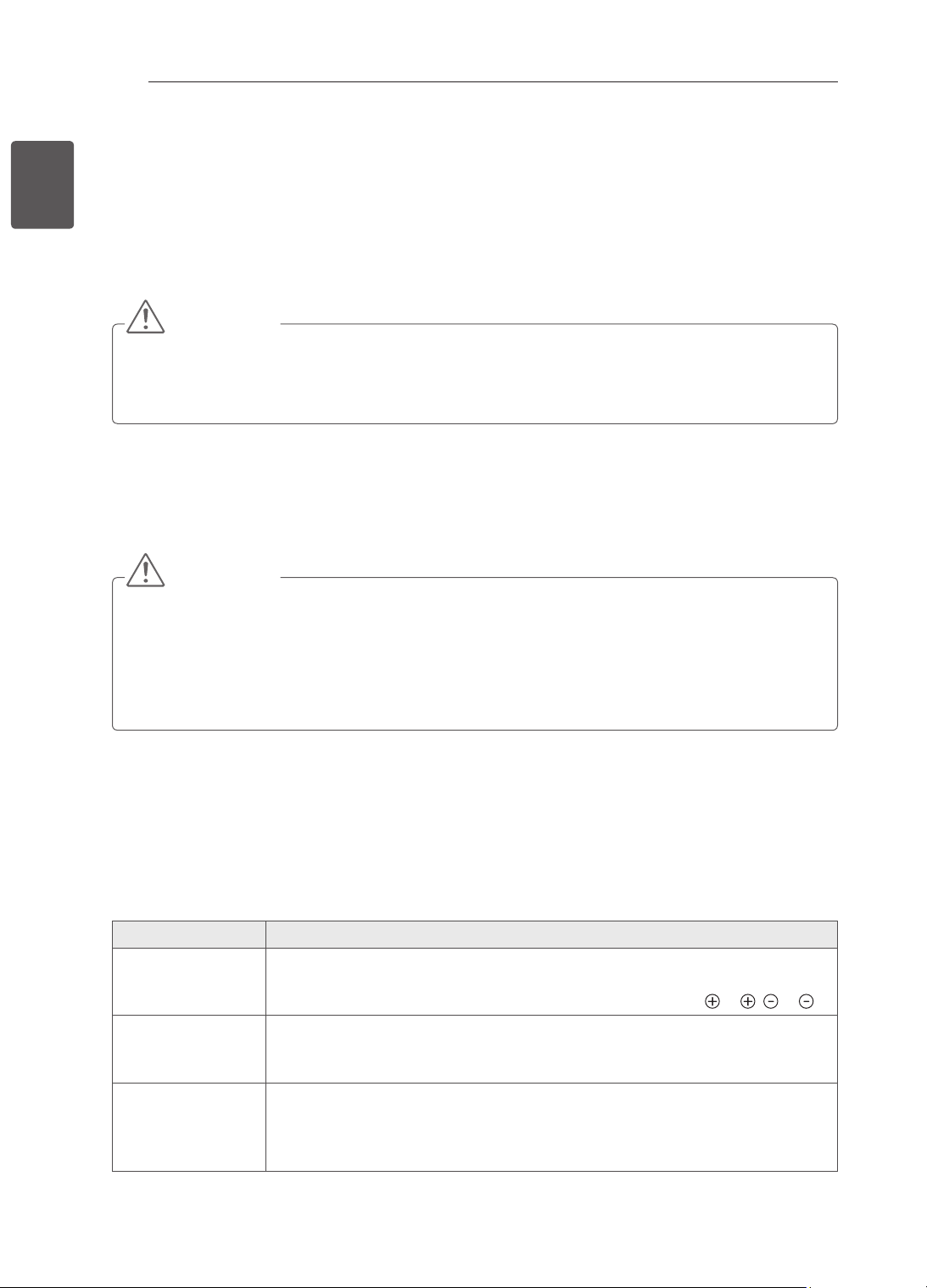
1 Press SETTINGS to access the main menus.
2 Press the RED button to access the Customer
Support menus.
3 Press the Navigation buttons to scroll to User
Guide and press OK.
Software Update
Picture Test
Sound Test
Signal Test
Product/Service Info.
User Guide
Close
PICTURE AUDIO SETUP TIME
MY MEDIAINPUTOPTIONLOCK
Press OK(
) to set picture settings.
Customer Support Exit
2
User Guide
OPTION
PROGRAMME Setting
PICTURE, SOUND Setting
Advanced Function
To use input device
To set time options
To set language
To set country
To set subtitle
To set TV lock options
To use Energy Saving feature
3
Information
1
1
Allows to select the category you want.
2
Allows to select the item you want.
You can use
ꕌ
/
ꕍ
to move between pages.
3
Allows to browse the description of the
function you want from the index.
1
2
User Guide
OPTION > To set language
SETTING OPTION Language
You can select the language of the menu displayed on the screen and the
digital sound broadcasting.
Menu Language : Selects a language for the display text.
Audio Language [In Digital Mode Only] : Select the desired language
when watching digital broadcasting containg several
voice languages.
Subtitle Language [In Digital Mode Only] : Use the Subtitle function when
two or more subtitle languages are broadcast.
✎ If subtitle data in a selected language is not
broadcast, the default language subtitle will
be displayed.
Close
Zoom In
OPTION
PROGRAMME Setting
PICTURE, SOUND Setting
Advanced Function
Information
2
Close
Zoom Out
SETTING OPTION Language
You can select the language of the menu displayed on the screen and the
digital sound broadcasting.
Menu Language : Selects a language for the display text.
Audio Language [In Digital Mode Only] : elect the desired language when
watching digital broadcasting containg several voice
languages.
Subtitle Language [In Digital Mode Only] : Use the Subtitle function when
two or more subtitle languages are broadcast.
✎ If subtitle data in a selected language is not broad-
cast, the default language subtitle will be displayed.
1
Shows the description of the selected menu.
You can use
ꕌ
/
ꕍ
to move between pages.
2
Zooms in or out the screen.
USING THE USER GUIDE
User Guide allows you to more easily access the detailed TV information.
30
ENG
ENGLISH
MAINTENANCE / TROUBLESHOOTING
MAINTENANCE
Cleaning your TV
Clean your TV regularly to keep the best performance and to extend the product lifespan.
CAUTION
Make sure to turn the power off and disconnect the power cord and all other cables first.
When the TV is left unattended and unused for a long time, disconnect the power cord from the wall
outlet to prevent possible damage from lightning or power surges.
Screen, frame, cabinet and stand
To remove dust or light dirt, wipe the surface with a dry, clean, and soft cloth.
To remove major dirt, wipe the surface with a soft cloth dampened in clean water or a diluted mild
detergent. Then wipe immediately with a dry cloth.
CAUTION
Avoid touching the screen at all times, as this may result in damage to the screen.
Do not push, rub, or hit the screen surface with your fingernail or a sharp object, as this may result in
scratches and image distortions.
Do not use any chemicals as this may damage the product.
Do not spray liquid onto the surface. If water enters the TV, it may result in fire, electric shock, or
malfunction.
Power cord
Remove the accumulated dust or dirt on the power cord regularly.
TROUBLESHOOTING
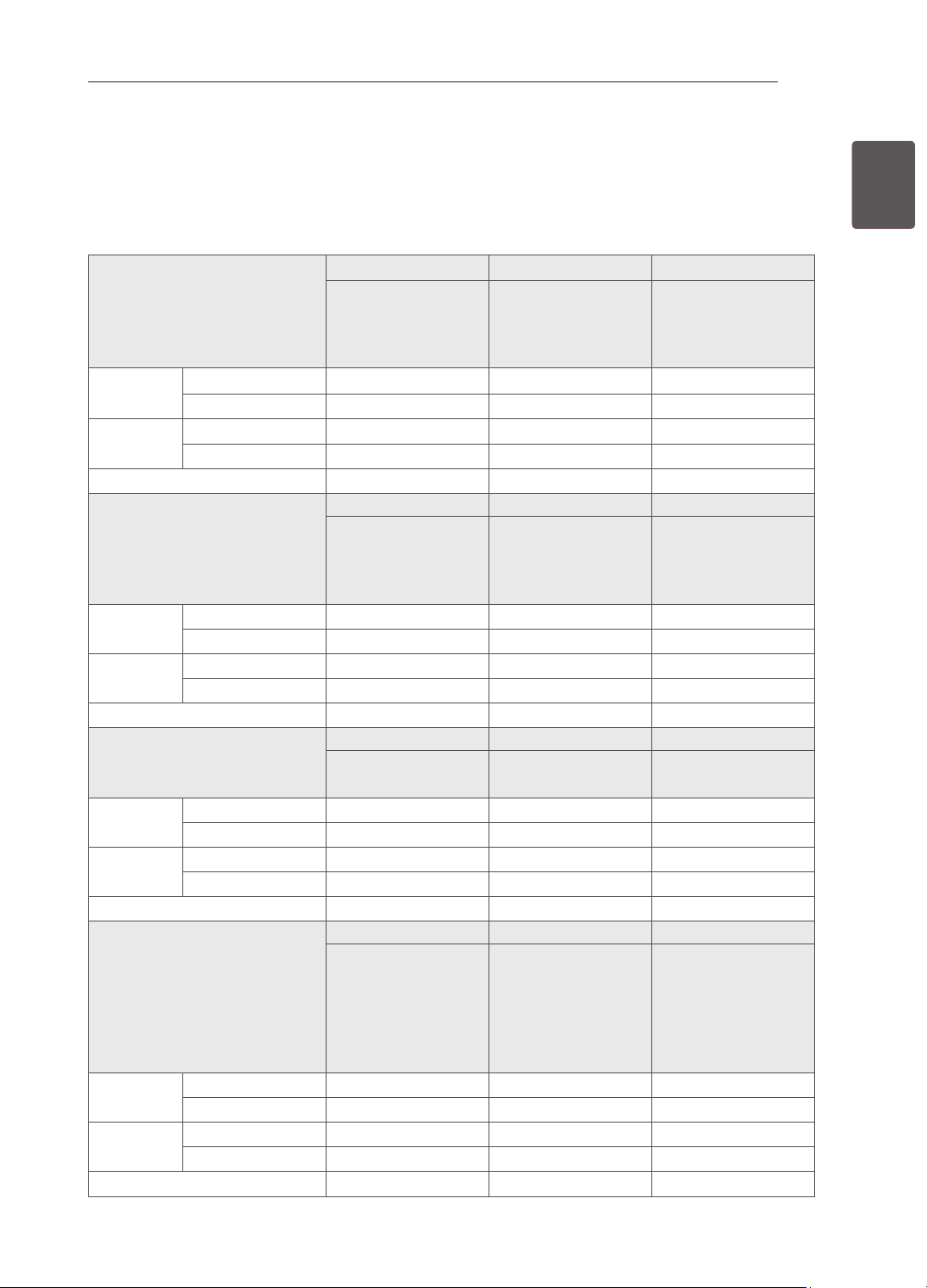
Problem Solution
Cannot control
the TV with the
remote control.
Check the remote control sensor on the product and try again.
Check if there is any obstacle between the product and the remote control.
Check if the batteries are still working and properly installed (
to , to ).
No image display
and no sound is
produced.
Check if the product is turned on.
Check if the power cord is connected to a wall outlet.
Check if there is a problem in the wall outlet by connecting other products.
The TV turns off
suddenly.
Check the power control settings. The power supply may be interrupted.
Check if the Auto sleep feature is activated in the Time settings.
If there is no signal while the TV is on, the TV will turn off automatically after
15 minutes of inactivity.
31
ENGENGLISH
SPECIFICATIONS
SPECIFICATIONS
Product specifications may be changed without prior notice due to upgrade of product functions.
For the power supply and power consumption, refer to the label attached to the product.
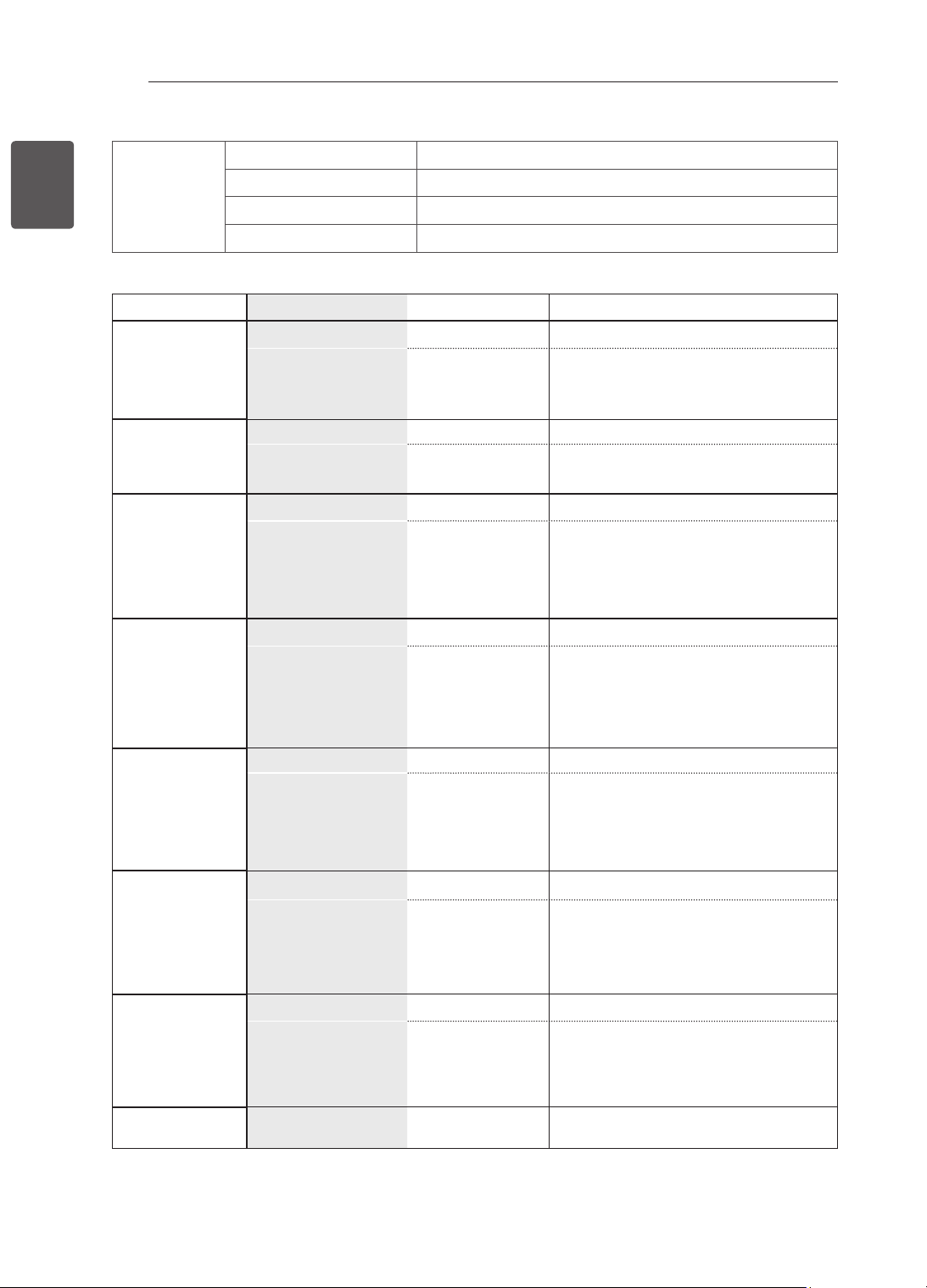
MODELS
22CS46** 26CS46** 32CS46**
22CS460-TA
22CS460Y-TA
22CS461-TB
22CS461Y-TB
26CS460-TA
26CS460Y-TA
26CS461-TB
26CS461Y-TB
32CS460-TA
32CS460Y-TA
32CS461-TB
32CS461Y-TB
Dimensions
(W x H x D)
With stand (
mm
)
539.0 x 400.0 x 165.0 663.0 x 483.0 x 197.0 794.0 x 565.0 x 207.0
Without stand(
mm)
539.0 x 345.0 x 56.8 663.0 x 424.0 x 72.8 794.0 x 504.0 x 73.5
Weight With stand (kg)
4.2 7.4 9.0
Without stand (kg)
3.9 6.6 8.0
Power requirement
AC 100-240 V~ 50 / 60 Hz AC 100-240 V~ 50 / 60 Hz
AC 100-240 V~ 50 / 60 Hz
MODELS
42CS46** 22CS47** 26CS47**
42CS460-TA
42CS460Y-TA
42CS461-TB
42CS461Y-TB
22CS470-TA
22CS471-TB
26CS470-TA
26CS471-TB
Dimensions
(W x H x D)
With stand (
mm
)
1017.0 x 695.0 x 261.0
539.0 x 400.0 x 165.0 663.0 x 483.0 x 197.0
Without stand(
mm)
1017.0 x 629.0 x 76.5 539.0 x 345.0 x 56.8 663.0 x 424.0 x 72.8
Weight With stand (kg)
15.1 4.2 7.4
Without stand (kg)
13.5 3.9 6.6
Power requirement
AC 100-240 V~ 50 / 60 Hz AC 100-240 V~ 50 / 60 Hz AC 100-240 V~ 50 / 60 Hz
MODELS
32CS47** 42CS47** 32LS34**
32CS470-TA
32CS471-TB
42CS470-TA
42CS471-TB
32LS3400-TA
32LS340Y-TA
Dimensions
(W x H x D)
With stand (
mm
)
794.0 x 565.0 x 207.0 1017.0 x 695.0 x 261.0 795.0 x 566.0 x 207.0
Without stand(
mm)
794.0 x 504.0 x 73.5 1017.0 x 629.0 x 76.5 795.0 x 504.0 x 73.5
Weight With stand (kg)
9.0 15.1 9.1
Without stand (kg)
8.0 13.5 8.1
Power requirement
AC 100-240 V~ 50 / 60 Hz AC 100-240 V~ 50 / 60 Hz AC 100-240 V~ 50 / 60 Hz
MODELS
42LS34** 32LM34** 42LM34**
42LS3400-TA
42LS340Y-TA
32LM3400-TB
32LM340Y-TB
32LM3410-TC
32LM341Y-TC
42LM3400-TB
42LM340Y-TB
42LM3410-TC
42LM341Y-TC
42LM3450-TC
42LM345Y-TC
Dimensions
(W x H x D)
With stand (
mm
)
1018.0 x 696.0 x 261.0 795.0 x 566.0 x 207.0 1018.0 x 696.0 x 261.0
Without stand(
mm)
1018.0 x 629.0 x 76.5 795.0 x 504.0 x 73.5 1018.0 x 629.0 x 76.5
Weight With stand (kg)
14.7 9.1 14.7
Without stand (kg)
13.1 8.1 13.1
Power requirement
AC 100-240 V~ 50 / 60 Hz AC 100-240 V~ 50 / 60 Hz AC 100-240 V~ 50 / 60 Hz
32
ENG
ENGLISH
SPECIFICATIONS
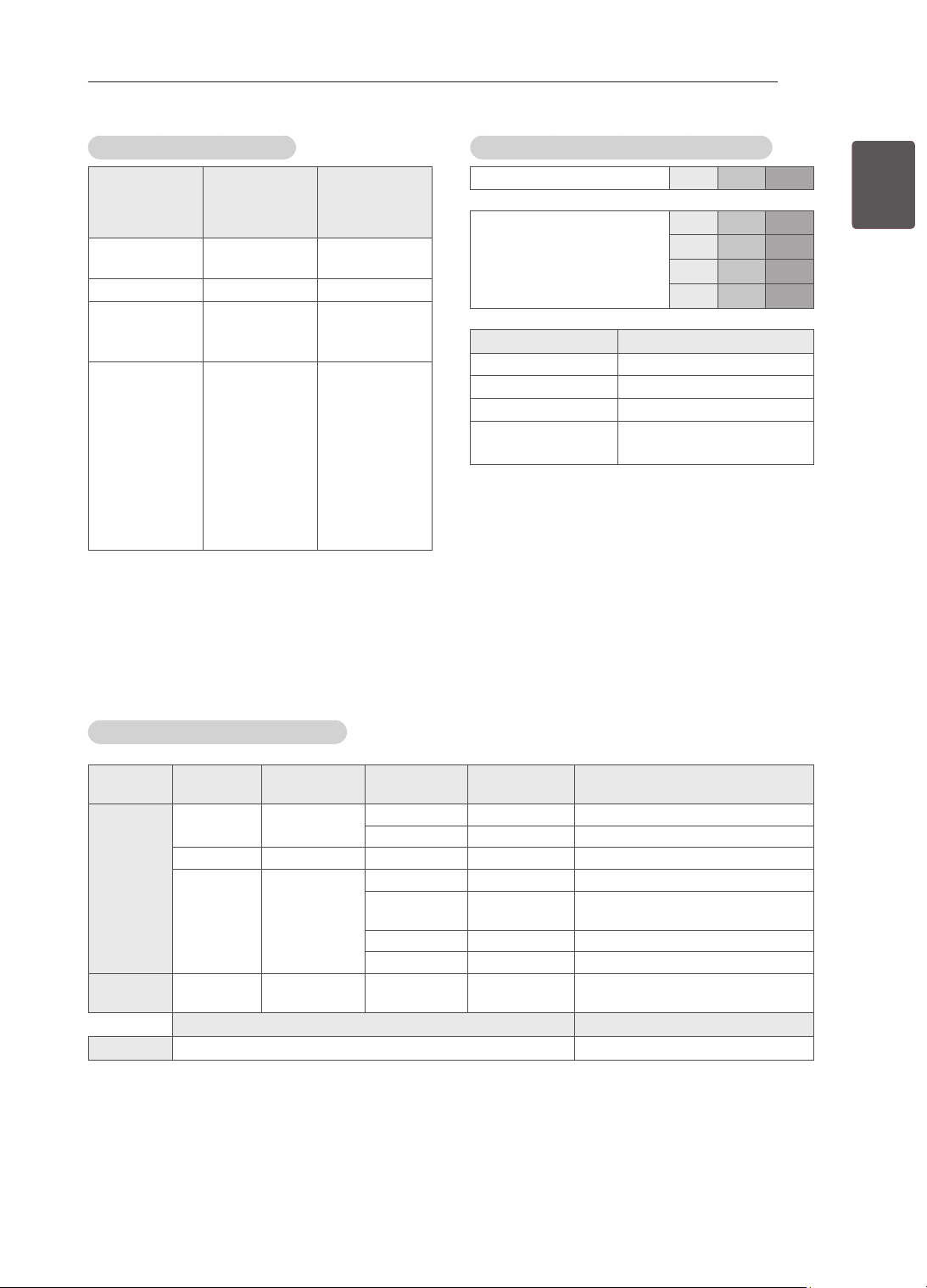
Environment
condition
Operating Temperature 0 °C
to
40 °C
Operating Humidity Less than 80 %
Storage Temperature -20 °C
to
60 °C
Storage Humidity Less than 85 %
Digital TV Analogue TV
New Zealand,
Singapore
Television System DVB-T PAL/SECAM-B/G/D/K
, PAL-I
Programme
Coverage
UHF 21 to 69
BG : VHF/UHF 1 to 69, CATV 01 to 47
I : VHF/UHF 1 to 69, CATV 01 to 47
DK : VHF/UHF 1 to 69, CATV 01 to 47
Australia Television System DVB-T PAL B/B
Programme
Coverage
VHF 06 to 12,
UHF 27 to 69
B/B : VHF/UHF 0 to 75, CATV : 2 to
44
Indonesia,
Israel, Myanmar,
Sri Lanka
Television System DVB-T PAL/SECAM-B/G/D/K
, PAL-I, NTSC-M
Programme
Coverage
UHF 21 to 69
BG : VHF/UHF 1 to 69, CATV 01 to 47
I : VHF/UHF 1 to 69, CATV 01 to 47
DK : VHF/UHF 1 to 69, CATV 01 to 47
M : VHF/UHF 2 to 78, CATV 01 to 71
South Africa
Television System DVB-T PAL/SECAM-B/G/D/K
, PAL-I, NTSC-M
Programme
Coverage
VHF 4 to 11, 13
UHF 21 to 68
BG : VHF/UHF 1 to 69, CATV 01 to 47
I : VHF/UHF 1 to 69, CATV 01 to 47
DK : VHF/UHF 1 to 69, CATV 01 to 47
M : VHF/UHF 2 to 78, CATV 01 to 71
Vietnam,
Malaysia
Television System DVB-T PAL/SECAM-B/G/D/K
, PAL-I, NTSC-M
Programme
Coverage
VHF 6 to 12,
UHF 21 to 69
BG : VHF/UHF 1 to 69, CATV 01 to 47
I : VHF/UHF 1 to 69, CATV 01 to 47
DK : VHF/UHF 1 to 69, CATV 01 to 47
M : VHF/UHF 2 to 78, CATV 01 to 71
Iran, Algeria,
Tunisia, Digital
model
Television System DVB-T PAL/SECAM-B/G/D/K
, PAL-I, NTSC-M
Programme
Coverage
VHF 5 to 12,
UHF 21 to 69
BG : VHF/UHF 1 to 69, CATV 01 to 47
I : VHF/UHF 1 to 69, CATV 01 to 47
DK : VHF/UHF 1 to 69, CATV 01 to 47
M : VHF/UHF 2 to 78, CATV 01 to 71
Analogue model,
India, Thailand,
--
Television System - PAL/SECAM-B/G/D/K
, PAL-I, NTSC-M
Programme
Coverage
-
BG : VHF/UHF 1 to 69, CATV 01 to 47
I : VHF/UHF 1 to 69, CATV 01 to 47
DK : VHF/UHF 1 to 69, CATV 01 to 47
M : VHF/UHF 2 to 78, CATV 01 to 71
External Antenna
Impedance
75 Ω 75 Ω
33
ENGENGLISH
SPECIFICATIONS
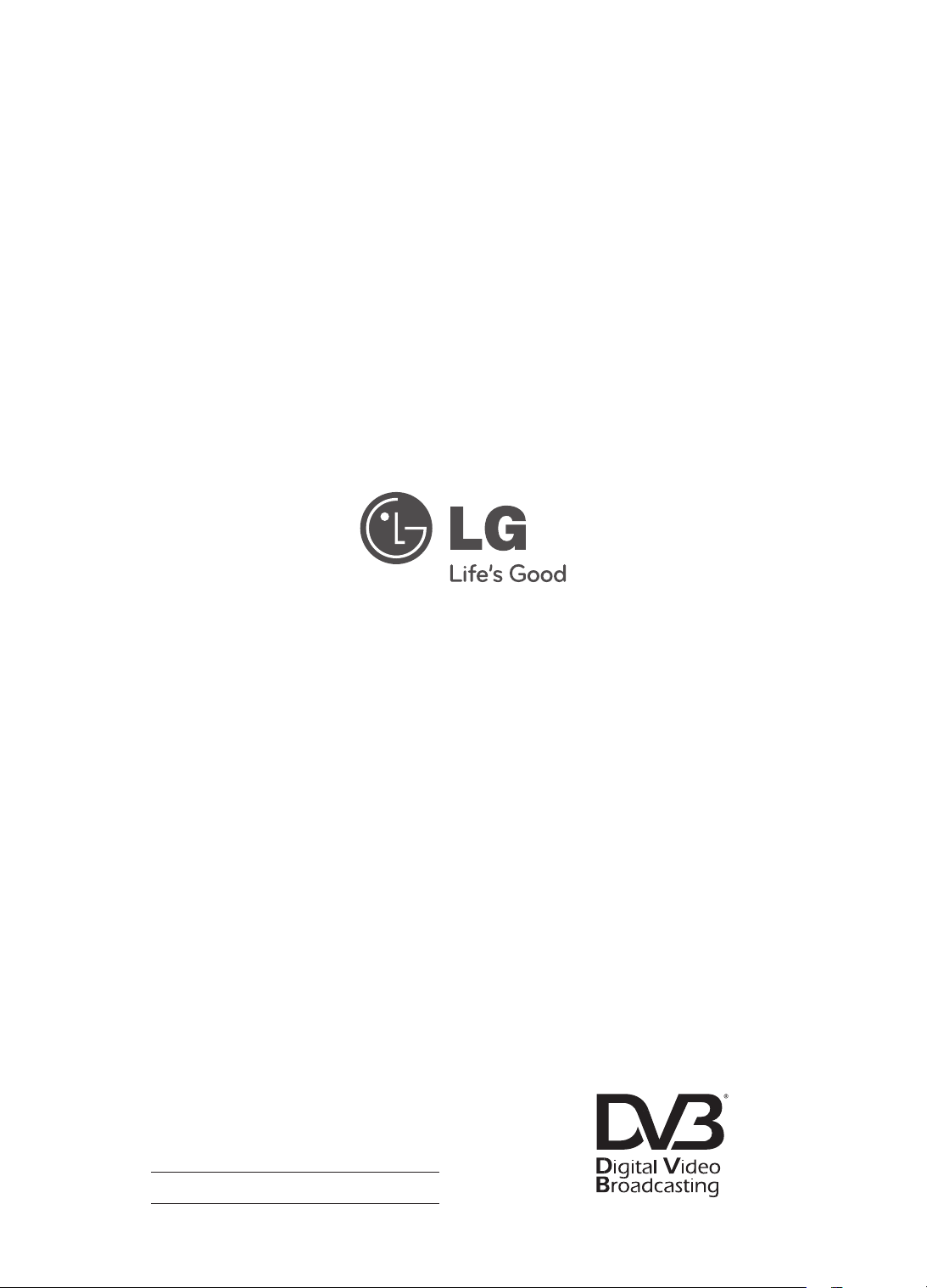
HDMI-DTV supported mode
Resolution Horizontal
Frequency
(kHz)
Vertical
Frequency
(Hz)
720x480 31.469
31.5
59.94
60
720x576 31.25 50
1280x720 37.5
44.96
45
50
59.94
60
1920x1080 33.72
33.75
28.125
26.97
27
33.716
33.75
56.25
67.43
67.5
59.94
60
50
23.97
24
29.976
30.00
50
59.94
60
Component port connecting information
Component ports on the TV Y P
B
P
R
Video output ports on DVD
player
Y P
B
P
R
Y B-Y R-Y
Y Cb Cr
Y Pb Pr
Signal
Component
480i/576i O
480p/576p O
720p/1080i O
1080p O
(50 Hz / 60 Hz only)
3D supported mode (Only 3D model)
Input Signal Resolution
Horizontal
Frequency (kHz)
Vertical
Frequency (Hz)
Playable 3D video format
HDMI 720p 1280x720 89.9 / 90 / 75 59.94 / 60 / 50 Frame packing (720 60p)
45 / 37.5 60 / 50 Side by Side(half), Top & Bottom
1080i 1920X1080 33.7 / 28.125 60 / 50 Side by Side(half), Top & Bottom
1080p 1920X1080 53.95 / 54 23.98 / 24 Frame packing (1080 24p)
67.5 / 56.3 60 / 50 "Side by Side, Top & Bottom,
Single Frame Sequential"
27 24 Side by Side(half), Top & Bottom
33.7 30 Side by Side(half), Top & Bottom
USB 1080p 1920X1080 33.75 30 Side by Side, Top & Bottom,
MPO(Photo)
Signal Playable 3D video format
DTV 720p, 1080i Side by Side, Top & Bottom
Record the model number and serial number of
the TV.
Refer to the label on the back cover and quote
this information to your dealer when requiring any
service.
MODEL
SERIAL
(Only DTV)
For any Suggestion, Opinion,
Complaints, Please Call
800 54 in UAE
0800 54 54 54 in South Africa
080 100 54 54 in Morocco
19960 in Egypt
Other countries, Please contact our
local dealer or log into
http://www.lg.com

MANUEL D'UTILISATION
TÉLÉVISEUR LCD À LED/
TÉLÉVISEUR LCD
Veuillez lire attentivement ce manuel avant de
mettre en service votre produit et conservez-le
afin de pouvoir vous y référer ultérieurement.
www.lg.com
LS34**
LM34**
CS46**
CS47**
2
FRA
FRANÇAIS
TABLE DES MATIÈRES
TABLE DES MATIÈRES
3 LICENCES
3 INFORMATIONS SUR LES
LOGICIELS LIBRES
4 CONSIGNES DE SÉCURITÉ
10 - Visionnage d'images 3D (modèles 3D
uniquement)
12 PROCÉDURE D'INSTALLATION
12 ASSEMBLAGE ET PRÉPARATION
12 Déballage
15 Achat séparé
16 Pièces et boutons
17 Soulever et déplacer la TV
18 Préparation du téléviseur
18 - Fixation du support
19 Installation sur une table
21 Fixation du support mural
22 Organisation des câbles
22 Non-utilisation du socle
23 ÉTABLISSEMENT DE CONNEXIONS
23 Raccordement d’une antenne
24 Connexion HDMI
24 Connexion en composantes
25 Connexion composite
25 Connexion d’un périphérique USB
26 Connexion de l’écouteur
27 TÉLÉCOMMANDE
29 UTILISATION DU GUIDE DE
L'UTILISATEUR
30 MAINTENANCE
30 Nettoyage de votre TV
30 - Écran, cadre, boîtier et support
30 - Cordon d’alimentation
30 DÉPANNAGE
31 SPÉCIFICATIONS
AVERTISSEMENT
Si vous ignorez ces messages
d'avertissement, vous risquez d'être
gravement blessé, de provoquer un accident
ou d'entraîner la mort.
ATTENTION
Si vous ignorez ces messages de sécurité,
vous risqueriez de vous blesser légèrement
ou d'endommager le produit.
REMARQUE
Les remarques vous aident à comprendre
et à utiliser le produit en toute sécurité.
Veuillez lire attentivement les remarques
avant d'utiliser le produit.
3
FRAFRANÇAIS
LICENCES / INFORMATIONS SUR LES LOGICIELS LIBRES
LICENCES
Les licences prises en charge peuvent varier d'un modèle à l'autre. Pour plus d'informations sur les
licences, consultez le site www.lg.com.
Fabriqué sous licence de Dolby Laboratories. « Dolby » et le symbole double-D sont
des marques commerciales de Dolby Laboratories.
HDMI, le logo HDMI et High-Definition Multimedia Interface sont des marques,
déposées ou non, de HDMI Licensing LLC.
À PROPOS DES VIDÉOS DIVX : DIVX® est un format de vidéo numérique créé par
DivX, LLC, liale de Rovi Corporation. Votre périphérique est ofciellement certié
par DivX (DivX Certied®), ce qui vous permet de lire des vidéos DivX. Rendez-vous
sur divx.com pour obtenir plus d'informations ainsi que des logiciels permettant de
convertir vos chiers au format DivX.
À PROPOS DE LA VIDÉO À LA DEMANDE DIVX : ce périphérique DivX Certied®
doit être enregistré pour pouvoir lire des vidéos à la demande DivX. Pour obtenir le
code d'enregistrement, accédez à la section DivX VOD (Vidéo à la demande DivX)
du menu de conguration du périphérique. Les instructions d'enregistrement sont
disponibles sur le site vod.divx.com.
« Certication DivX Certied® pour la lecture de vidéos DivX® jusqu'à 1080p en HD,
y compris le contenu Premium. »
« DivX®, DivX Certied® et leurs logos respectifs sont des marques commerciales
de Rovi Corporation ou de ses liales ; leur utilisation est régie par une licence. »
« Sous couvert d'un ou plusieurs brevets américains cités ci-dessous :
7,295,673; 7,460,668; 7,515,710; 7,519,274”
INFORMATIONS SUR LES LOGICIELS LIBRES
Pour obtenir le code source sous la licence publique générale, la licence publique générale limitée, la
licence publique Mozilla ou les autres licences libres de ce produit, rendez-vous sur http://opensource.lge.
com.
En plus du code source, tous les termes de la licence, ainsi que les exclusions de responsabilité et les
droits d'auteur, sont disponibles au téléchargement.
LG Electronics propose de vous fournir le code open source sur CD-ROM en échange des coûts couvrant
cet envoi, notamment le coût du support, des frais de port et de prise en charge, une fois la demande reçue
par LG Electronics à l'adresse suivante : [email protected]. La validité de cette offre est de trois (3)
ans à partir de la date d'achat du produit.
4
FRA
FRANÇAIS
CONSIGNES DE SÉCURITÉ
CONSIGNES DE SÉCURITÉ
Veuillez lire attentivement ces consignes de sécurité avant d'utiliser le produit.
AVERTISSEMENT
N'installez pas la TV et la télécommande dans les environnements suivants :
- Un emplacement exposé à la lumière directe du soleil ;
- Une zone fortement humide comme une salle de bain ;
- À proximité d'une source de chaleur comme une cuisinière et tout autre appareil
produisant de la chaleur ;
- À proximité d'un plan de travail de cuisine ou d'un humidificateur où elles
pourraient facilement être exposées à la vapeur ou à l'huile ;
- Une zone exposée à la pluie et au vent ;
- À proximité de conteneurs d'eau comme des vases.
Le non-respect de cette consigne peut provoquer un incendie, une électrocution,
un dysfonctionnement ou une déformation du produit.
N'installez pas le produit dans un endroit exposé à la poussière.
Le non-respect de cette consigne peut provoquer un incendie.
La fiche secteur est l'élément de déconnexion. La fiche doit être toujours
accessible.
Ne touchez pas la fiche d'alimentation avec les mains mouillées. En outre, si
la fiche du cordon est mouillée ou couverte de poussière, séchez ou essuyez
complètement le cordon d'alimentation.
L'humidité excessive peut provoquer des risques d'électrocution.
Veillez à raccorder le câble d'alimentation à une prise de terre. (Ne s'applique pas
aux appareils ne nécessitant pas une mise à la terre.)
Si ce n'est pas le cas, vous risquez d'être électrocuté ou blessé.
Fixez correctement le câble d'alimentation.
Si le câble d'alimentation n'est pas correctement fixé, un incendie peut se déclarer.
Assurez-vous que le cordon d'alimentation n'est pas en contact avec des objets
chauds comme un chauffage.
Le non-respect de cette consigne peut provoquer un incendie ou une électrocution.
Ne placez pas d'objets lourds, ou le produit lui-même, sur les câbles d'alimentation.
Le non-respect de cette consigne peut provoquer un incendie ou une électrocution.
Pliez le câble d'antenne entre le bâtiment intérieur et extérieur pour empêcher la
pluie de s'écouler à l'intérieur.
L'eau pourrait endommager le produit et provoquer une électrocution.
Lorsque vous fixez une TV au mur, veillez à ne pas l'accrocher à l'aide des câbles
d'alimentation ou de signal situés à l'arrière.
Cela risque de provoquer un incendie ou une électrocution.
5
FRAFRANÇAIS
CONSIGNES DE SÉCURITÉ
Ne branchez pas trop d'appareils électriques sur une seule multiprise murale
Le non-respect de cette consigne peut provoquer un incendie résultant d'une
surchauffe.
Ne faites pas tomber le produit ou ne le laissez pas tomber lors du branchement
de périphériques externes.
Le non-respect de cette consigne peut entraîner des blessures ou endommager le
produit.
Desiccant
Conservez le matériau d'emballage anti-moisissure ou l'emballage en vinyle hors
de portée des enfants.
Le matériau anti-moisissure est dangereux en cas d'ingestion. En cas d'ingestion
par mégarde, faites vomir la personne et rendez-vous à l'hôpital le plus proche.
En outre, l'emballage en vinyle peut entraîner une asphyxie. Conservez-le hors de
portée des enfants.
Ne laissez pas les enfants grimper sur la TV ou s'agripper dessus.
Dans le cas contraire, la TV risque de tomber, ce qui peut entraîner des blessures
graves.
Respectez les règles de sécurité lors de la mise au rebut des batteries pour éviter
qu'un enfant ne les avale.
En cas d'ingestion, consultez immédiatement un médecin.
N'insérez pas de conducteur (comme une baguette métallique) dans l'une des
extrémités du câble d'alimentation si l'autre extrémité est reliée au terminal
d'entrée mural. En outre, ne touchez pas le câble d'alimentation juste après le
raccordement au terminal d'entrée mural.
Vous pourriez vous électrocuter.(selon le modèle)
Veillez à ne pas placer ou conserver des substances inflammables à proximité du
produit.
Une manipulation imprudente des substances inflammables présente un risque
d'explosion ou d'incendie.
Ne laissez pas tomber d'objets métalliques (pièces de monnaie, épingles à
cheveux, baguettes métalliques ou fils) ou d'objets inflammables (papier et
allumettes) dans le produit. Surveillez particulièrement les enfants.
Cela pourrait provoquer une électrocution, un incendie ou des blessures. Si un
corps étranger tombe dans le produit, débranchez le câble d'alimentation et
contactez le centre de services.
Ne vaporisez pas d'eau sur le produit ou ne le frottez pas avec une substance
inflammable (diluant ou benzène). Vous risqueriez de provoquer une électrocution
ou un incendie.
Évitez tout impact d'objets avec l'appareil ou toute chute d'objets sur l'appareil, et
ne laissez rien tomber sur l'écran.
Vous risqueriez de vous blesser ou d'endommager le produit.
Ne touchez jamais ce produit ou l'antenne en cas de tonnerre ou d'orage.
Vous pourriez vous électrocuter.
Ne touchez jamais la prise murale lors d'une fuite de gaz ; ouvrez les fenêtres et
aérez la pièce.
Le non-respect de cette consigne peut provoquer un incendie ou des brûlures
dues aux étincelles.
6
FRA
FRANÇAIS
CONSIGNES DE SÉCURITÉ
Ne démontez pas le produit, ne le réparez pas et n'y apportez aucune modification.
Vous risqueriez de provoquer une électrocution ou un incendie.
Contactez le centre de services pour les vérifications, les calibrages et les
réparations.
Si vous êtes confronté à l'une des situations suivantes, débranchez immédiatement
le produit et contactez votre centre de services local.
- Le produit a reçu un choc
- Le produit a été endommagé
- Des corps étrangers sont entrés dans le produit
- Le produit dégage de la fumée ou une odeur étrange
Le non-respect de cette consigne peut provoquer un incendie ou une électrocution.
Si vous n'utilisez pas le produit pendant une période prolongée, débranchez le
câble d'alimentation du produit.
Une couche de poussière peut provoquer un incendie ; une détérioration de
l'isolation peut provoquer une fuite électrique, une électrocution ou un incendie.
N'exposez pas l'appareil à la pluie ni aux éclaboussures. Ne placez pas d'objets
contenant du liquide (tels qu'un vase) sur le produit.
7
FRAFRANÇAIS
CONSIGNES DE SÉCURITÉ
ATTENTION
Installez le produit à l'écart des ondes radio.
La distance entre une antenne extérieure et les lignes d'alimentation doit être
suffisante pour éviter tout contact physique en cas de chute de l'antenne.
Le non-respect de cette consigne peut provoquer une électrocution.
N'installez pas le produit sur des étagères instables ou des surfaces inclinées.
Évitez également les endroits soumis à des vibrations ou ne permettant pas de
supporter correctement le produit.
Dans le cas contraire, le produit risque de tomber ou de se retourner, ce qui peut
provoquer des blessures ou endommager le produit.
Si vous installez la TV sur un support, veillez à empêcher le produit de se
renverser. Dans le cas contraire, le produit risque de tomber, ce qui peut entraîner
des blessures.
Si vous essayez de monter le produit sur un mur, fixez une interface de montage VESA standard
(pièces en option) à l'arrière du produit. Lorsque vous installez le poste à l'aide d'un support mural
(pièces en option), fixez-le solidement pour éviter qu'il ne tombe.
Utilisez uniquement des éléments de fixation/accessoires agréés par le fabricant.
Lors de l'installation de l'antenne, consultez un agent de maintenance qualifié.
Le non-respect de cette consigne peut provoquer un incendie ou une électrocution.
5~7 times
Nous vous recommandons de garder une distance équivalente à 5 à 7 fois la
diagonale de l'écran lorsque vous regardez la TV.
Regarder la TV de façon prolongée peut provoquer des troubles de la vue.
Utilisez uniquement le type de piles spécifié.
Le non-respect de cette consigne peut endommager la télécommande.
N'utilisez pas simultanément de nouvelles piles et des piles usagées.
Ceci pourrait provoquer la surchauffe des piles et une fuite de liquide.
Assurez-vous qu'aucun objet n'est placé entre la télécommande et son capteur.
La lumière du soleil ou un éclairage puissant peut perturber le signal de la
télécommande. Le cas échéant, assombrissez la pièce.
Lorsque vous branchez des périphériques externes comme des consoles de jeu
vidéo, veillez à ce que les câbles de raccordement soient assez longs.
Dans le cas contraire, le produit risque de tomber, ce qui peut provoquer des
blessures ou endommager le produit.
8
FRA
FRANÇAIS
CONSIGNES DE SÉCURITÉ
Ne mettez pas le produit sous/hors tension en branchant et en débranchant le
cordon d'alimentation de la prise. (N'utilisez pas le cordon d'alimentation en tant
qu'interrupteur.)
Vous risqueriez de provoquer une panne mécanique ou une électrocution.
Veuillez suivre les instructions d'installation ci-après pour empêcher une surchauffe
du produit.
- La distance entre le produit et le mur doit être d'au moins 10 cm.
- N'installez pas le produit dans un endroit non aéré (par ex., dans une
bibliothèque ou dans un placard).
- N'installez pas le produit sur un tapis ou un coussin.
- Assurez-vous que l'aération n'est pas obstruée par une nappe ou un rideau.
Le non-respect de cette consigne peut entraîner un incendie.
Évitez de toucher les ouvertures de ventilation lors de l'utilisation prolongée
du téléviseur car elles peuvent surchauffer. Ceci n'affecte en aucun cas le
fonctionnement ou la performance du produit.
Examinez régulièrement le cordon de votre appareil et si vous détectez des signes
d'endommagement ou de détérioration, débranchez-le. Cessez alors d'utiliser l'appareil et demandez
à un prestataire de services autorisé de remplacer le cordon par une pièce identique.
Évitez de laisser la poussière s'accumuler sur les tiges de la fiche d'alimentation
ou de la prise électrique.
Le non-respect de cette consigne peut provoquer un incendie.
Protégez le cordon d'alimentation contre les mauvais traitements physiques ou
mécaniques, la torsion, la pliure, le pincement, et évitez qu'il ne puisse être pris
dans une porte ou que l'on puisse marcher dessus. Vérifiez soigneusement les
fiches, les prises murales et les points de sortie du cordon de l'appareil.
N'appuyez pas avec force sur l'écran avec la main ou avec un objet pointu, tel
qu'un clou, un crayon ou un stylo afin d'éviter de le rayer.
Évitez de toucher l'écran ou de maintenir les doigts dessus de manière prolongée.
Cela peut en effet provoquer des déformations provisoires de l'image.
Lors du nettoyage du produit et de ses composants, débranchez le cordon
d'alimentation et essuyez-les à l'aide d'un chiffon doux. Une pression excessive
peut provoquer des rayures ou une décoloration. Ne vaporisez pas d'eau et
n'utilisez pas de chiffon mouillé. N'utilisez jamais de produit à vitre, de produit
lustrant pour voiture ou industriel, d'abrasifs ou de cire, de benzène, d'alcool, etc.,
qui risqueraient d'endommager le produit et son écran.
Le non-respect de cette consigne peut provoquer un incendie ou une électrocution,
ou endommager le produit (déformation, corrosion ou cassure).
Tant que l'unité est connectée à la prise murale de secteur, elle n'est pas déconnectée de la source
d'alimentation secteur, même si vous avez éteint l'unité à l'aide de l'INTERRUPTEUR.
Pour débrancher le câble, tenez-le par la fiche.
Si les fils dans le câble d'alimentation sont déconnectés, cela peut provoquer un
incendie.
Veillez à mettre le produit hors tension lorsque vous le déplacez. Puis, débranchez
les câbles d'alimentation, les câbles d'antenne et tous les câbles de raccordement.
La TV ou le cordon d'alimentation peuvent être endommagés, ce qui peut
provoquer un incendie ou une électrocution.
9
FRAFRANÇAIS
CONSIGNES DE SÉCURITÉ
Vous devez être deux pour déplacer ou déballer le produit car ce dernier est lourd.
Le non-respect de cette consigne peut entraîner des blessures.
Contactez le centre de services une fois par an pour nettoyer les composants
internes du produit.
Une accumulation de poussière peut provoquer des pannes mécaniques.
Confiez l'ensemble des réparations à du personnel qualifié. Confiez les
réparations à du personnel qualifié dans les cas suivants : si la fiche ou le cordon
d'alimentation secteur est endommagé, si un liquide a été renversé sur l'appareil
ou si des objets sont tombés sur l'appareil, si l'appareil a été exposé à la pluie ou à
l'humidité, si l'appareil ne fonctionne pas normalement ou s'il est tombé.
Si le produit est froid au toucher, il pourra se produire un petit « scintillement » à sa
mise en marche. Ce phénomène est normal et le produit n'est pas en cause.
L'écran haute technologie se caractérise par une résolution de deux millions à
six millions de pixels. Il est possible que de minuscules points noirs et/ou des
points lumineux (rouge, bleu ou vert) de la taille d'un ppm s'affiche à l'écran. Cela
n'indique pas un dysfonctionnement et n'affecte pas les performances et la fiabilité
du produit.
Ce phénomène survient également sur les produits tiers ; aucun échange ou
remboursement n'est possible.
Suivant votre position de visionnage (gauche/droite/haut/bas), la luminosité et la
couleur de l'écran peuvent varier.
Ce phénomène résulte des caractéristiques de l'écran. Il n'a aucun rapport avec
les performances du produit et n'indique pas un dysfonctionnement.
L'affichage d'une image fixe (logo d'un canal de diffusion, menu à l'écran, scène d'un jeu vidéo,
etc.) pendant une durée prolongée peut endommager l'écran et provoquer une image rémanente ;
ce phénomène s'appelle une brûlure d'écran. La garantie ne couvre pas le produit pour une brûlure
d'écran.
Évitez d'afficher une image fixe de façon prolongée sur l'écran de votre téléviseur (pas plus de
2 heures sur un écran LCD et pas plus d'une heure sur un écran plasma).
Si vous regardez votre TV de façon prolongée au format 4:3, une brûlure d'écran peut apparaître sur
le contour de l'écran.
Ce phénomène survient également sur les produits tiers ; aucun échange ou remboursement n'est
possible.
Sons générés
Bruit de craquement : un bruit de craquement, lorsque vous regardez ou éteignez la TV, est généré
par une contraction thermique plastique liée à la température et à l'humidité. Ce bruit est usuel sur
les produits nécessitant une déformation thermique. Bourdonnement du circuit électrique/de l'écran :
bruit faible généré par un circuit de commutation haute vitesse qui permet le fonctionnement du
produit en fournissant la majeure partie de l'alimentation. Il varie en fonction du produit.
Ce son généré n'affecte ni les performances ni la fiabilité du produit.
10
FRA
FRANÇAIS
CONSIGNES DE SÉCURITÉ
Visionnage d'images 3D (modèles 3D uniquement)
AVERTISSEMENT
Environnement de visionnage
Durée de visionnage
- Lors du visionnage de contenu 3D, veillez à faire une pause de 5 à 15 minutes toutes les heures.
Le visionnage prolongé de contenu 3D peut provoquer des maux de tête, des vertiges et une
fatigue générale ou oculaire.
Personnes sujettes à des convulsions liées à la photosensibilité ou souffrant d'une maladie chronique
Certains utilisateurs peuvent être victimes de crises d'épilepsie ou montrer des symptômes anormaux
lorsqu'ils sont exposés à une lumière clignotante ou à un type d'image précis provenant de contenu 3D.
Ne regardez pas de vidéos 3D si vous êtes nauséeux, attendez un enfant, souffrez d'une maladie
chronique comme l'épilepsie, présentez un trouble cardiaque, un problème de tension, etc.
Le contenu 3D n'est pas recommandé aux personnes qui souffrent d'une cécité stéréo ou d'une
anomalie stéréo. Vous pourriez voir les images en double ou éprouver une gêne lors du visionnage.
Si vous souffrez d'un strabisme (yeux qui louchent), d'une amblyopie (faiblesse de la vue) ou d'un
astigmatisme, vous pouvez rencontrer des problèmes de détection de la profondeur et éprouver
facilement une fatigue visuelle résultant de la vision des images en double. Il est recommandé de faire
davantage de pauses qu'un adulte ne présentant pas de gêne.
Si votre vision varie d'un œil à l'autre, contrôlez votre vue avant de visionner du contenu 3D.
Symptômes nécessitant d'arrêter provisoirement ou définitivement de visionner du contenu 3D
Ne regardez pas du contenu 3D lorsque vous êtes fatigué à cause d'un manque de sommeil, d'une
surcharge de travail ou d'une surconsommation d'alcool.
Lorsque vous éprouvez ces symptômes, arrêtez d'utiliser/visionner du contenu 3D et reposez-vous
jusqu'à leur disparition.
- Consultez votre médecin si ces symptômes persistent. Symptômes possibles : maux de tête,
douleurs des globes oculaires, vertiges, nausée, palpitation, images floues, gêne, images en
double, gêne ou fatigue visuelle.
11
FRAFRANÇAIS
CONSIGNES DE SÉCURITÉ
ATTENTION
Environnement de visionnage
Distance de visionnage
- Lors du visionnage de contenu 3D, gardez une distance équivalente au double de la diagonale de
l'écran. Si vous ressentez une gêne lors du visionnage de contenu 3D, éloignez-vous davantage de
la TV.
Âge pour le visionnage
Enfants
- L’utilisation/le visionnage de contenu 3D par des enfants de moins de 5 ans est interdit.
- Les enfants de moins de 10 ans peuvent réagir de manière excessive car leur vision est en cours
de développement (ils peuvent, par exemple, essayer de toucher l’écran ou de sauter dedans). Il
est nécessaire d’apporter une surveillance spéciale et une attention particulière aux enfants qui
visionnent du contenu 3D.
- Les enfants présentent une plus grande disparité binoculaire des présentations en 3D que les
adultes car la distance entre leurs yeux est plus petite. En revanche, ils perçoivent davantage la
profondeur stéréoscopique des images 3D que les adultes.
Adolescents
- Les adolescents de moins de 19 ans peuvent présenter une plus grande sensibilité du fait de la
stimulation résultant de la luminosité du contenu 3D. Conseillez-leur de ne pas regarder de contenu
3D de manière prolongée lorsqu’ils sont fatigués.
Personnes âgées
- Les personnes âgées perçoivent moins les effets 3D que les personnes jeunes. Ne vous asseyez
pas plus près de la TV que la distance recommandée.
Mise en garde lors de l'utilisation de lunettes 3D
Veillez à utiliser des lunettes 3D LG. Dans le cas contraire, vous risquez de ne pas voir les vidéos 3D
correctement.
N'utilisez pas les lunettes 3D comme lunettes de vue, lunettes de soleil ou lunettes de protection.
L'utilisation de lunettes 3D modiées peut entraîner une fatigue oculaire ou une distorsion de l'image.
Gardez vos lunettes 3D à l'abri des températures extrêmement froides ou chaudes. Cela pourrait les
déformer.
Les lunettes 3D sont fragiles et se rayent facilement. Utilisez toujours un chiffon doux et propre pour
nettoyer les verres. Ne rayez pas les verres des lunettes 3D avec un objet pointu et n'y appliquez pas
de produits chimiques.
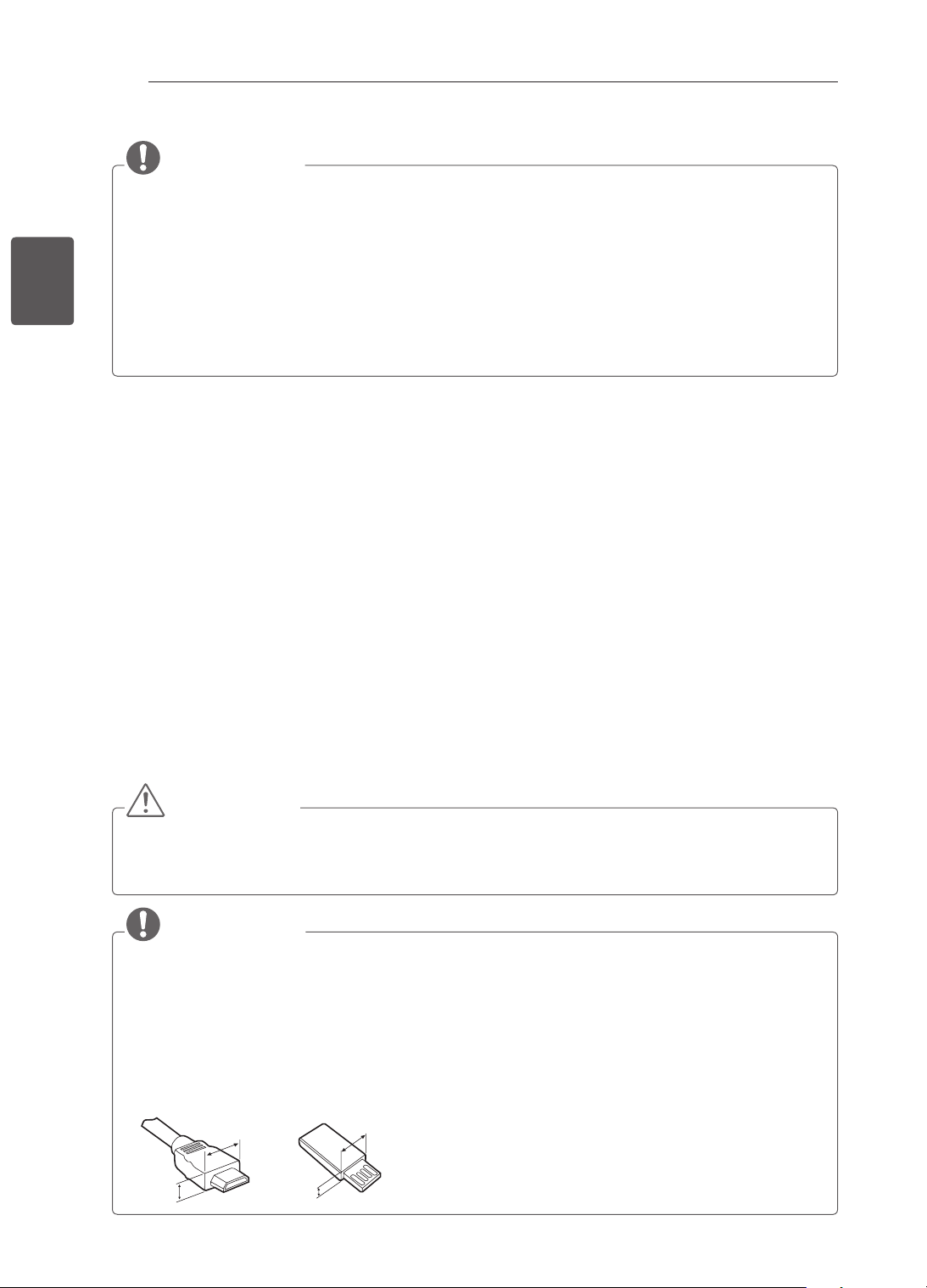
12
FRA
FRANÇAIS
PROCÉDURE D'INSTALLATION / ASSEMBLAGE ET PRÉPARATION
REMARQUE
L’image ci-dessous peut être différente de celle affichée sur votre téléviseur.
L'affichage à l'écran de votre TV peut différer légèrement de celui qui est présenté dans ce manuel.
Les menus et options disponibles peuvent être différents selon la source d'entrée ou le modèle de
produit utilisé.
De nouvelles fonctionnalités pourront être ajoutées ultérieurement à ce téléviseur.
La TV peut être mise en mode veille pour réduire la consommation d'électricité. Pour réduire la
consommation d'énergie, la TV doit être éteinte si personne ne la regarde pendant un certain temps.
La consommation d'énergie pendant l'utilisation peut être limitée de façon significative en réduisant
la luminosité de l'image. Cela aura pour effet de réduire le coût global de fonctionnement.
PROCÉDURE D'INSTALLATION
1 Ouvrez la boîte et assurez-vous d'avoir tous les accessoires.
2 Fixez le support au moniteur.
3 Connectez un périphérique externe au moniteur.
ASSEMBLAGE ET PRÉPARATION
Déballage
Vériez que la boîte de votre moniteur contient les éléments suivants. S'il manque des accessoires,
contactez le revendeur auprès duquel vous avez acheté votre produit. L'aspect réel des produits et articles
présentés dans ce manuel peut différer des illustrations.
ATTENTION
Afin d'optimiser la sécurité et la durée de vie du produit, n'utilisez pas d'éléments non agréés.
La garantie ne couvre pas les dommages ou les blessures dus à l'utilisation d'éléments non agréés.
Certains modèles ont un film plastic fin collé sur l’écran. Il ne doit pas être enlevé.
REMARQUE
Les éléments fournis avec votre produit diffèrent en fonction du modèle choisi.
Les caractéristiques des produits ou le contenu de ce manuel peuvent être modifiés sans préavis en
cas de mise à jour des fonctions.
Pour une connexion optimale, les câbles HDMI et les périphériques USB doivent comporter des
connecteurs d'une épaisseur inférieure à 10 mm et d'une largeur inférieure à 18 mm. Utilisez une
rallonge prenant en charge USB 2.0 si le câble USB ou la clé USB ne s'adapte pas au port USB de
la TV.
A
B
A
B
*A
<
=
10 mm
*B
<
=
18 mm
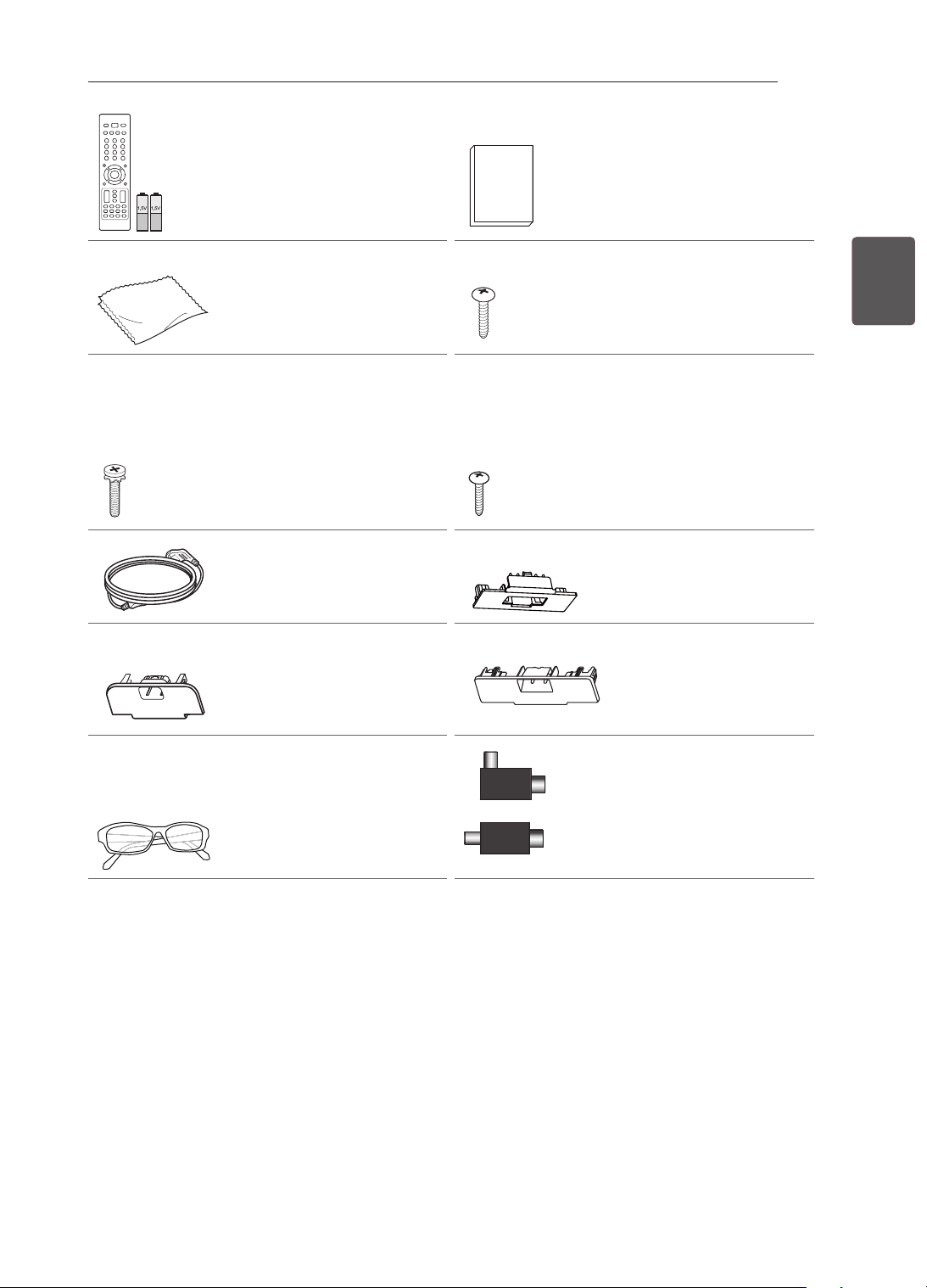
13
FRAFRANÇAIS
ASSEMBLAGE ET PRÉPARATION
Télécommande et piles
(AAA)
(Voir p. 27, 28) Manuel d’utilisation
Chiffon de nettoyage
(selon le modèle)
Utilisez-le pour enlever la
poussière du boîtier.
Vis du support
2EA, P4 x 16
(uniquement 22CS46**,
22CS47**)
(Voir p. 18)
Vis du support
8EA, M4 x 20
(uniquement
26/32/42CS46**,
26/32/42CS47**,
32/42LS34**,
32/42LM34**)
(Voir p. 18, 19)
Vis de montage sur un
bureau
(uniquement
26/32/42CS46**,
26/32/42CS47**,
32/42LS34**,
32/42LM34**)
(Voir p. 20)
Cordon d’alimentation
Cache de protection
(uniquement 26CS46**,
26CS47**)
(Voir p. 22)
Cache de protection
(uniquement 32CS46**,
32CS47**, 32LS34**,
32LM34**)
(Voir p. 22)
Cache de protection
(uniquement 42CS46**,
42CS47**, 42LS34**,
42LM34**)
(Voir p. 22)
Lunettes de cinéma 3D
Le nombre de lunettes
3D peut varier suivant le
modèle et le pays.
(uniquement 32/42LM34**)
ou
Isolateur
(selon le modèle)
(Voir p. 14)
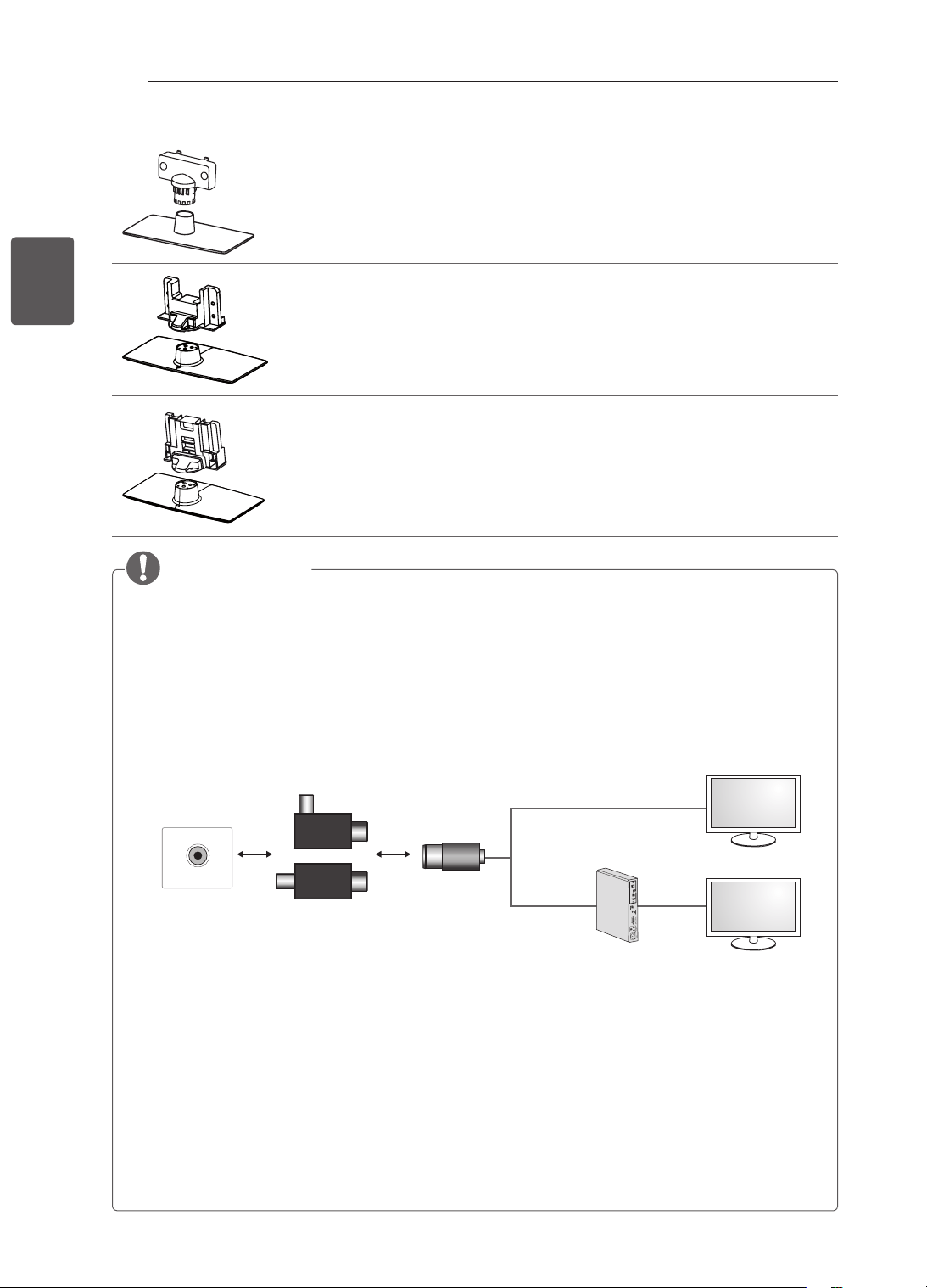
14
FRA
FRANÇAIS
ASSEMBLAGE ET PRÉPARATION
Corps du support / Base du support
(uniquement 22CS46**, 22CS47**)
(Voir p. 18)
Corps du support / Base du support
(uniquement 26CS46**, 26CS47**)
(Voir p. 18)
Corps du support / Base du support
(uniquement 32/42CS46**, 32/42CS47**, 32/42LS34**, 32/42LM34**)
(Voir p. 19)
REMARQUE
Guide d’installation de l’isolateur d’antenne
- Utilisez ce produit pour installer un téléviseur dans un endroit où il existe une différence de tension
entre le moniteur et la masse du signal de l’antenne.
» S’il existe une différence de tension entre le moniteur et la masse du signal de l’antenne, il est
possible que le contact de l’antenne surchauffe et provoque un accident.
- Vous pouvez améliorer la sécurité de votre téléviseur en enlevant une certaine tension de l’antenne
TV. Il est recommandé de fixer l’isolant au mur. Si l’isolant ne peut pas être fixé sur le mur, fixez-le
sur le téléviseur. Évitez de débrancher l’isolateur de l’antenne après l’installation.
- Avant de commencer, veillez à ce que l’antenne du téléviseur soit connectée.
ANTENNA/
CABLE IN
Câble / antenne
Mur
Isolateur
1. Connexion au téléviseur.
2. Connexion au décodeur.
ou
Connectez l’une des extrémités de l’isolateur au câble ou à la prise de l’antenne et l’autre extrémité au
moniteur ou au décodeur.
« Un équipement connecté à la mise à la terre de protection de l’installation du bâtiment via le réseau
de distribution principal ou un autre équipement connecté à une mise à la terre, et à un système de
distribution par câble utilisant un câble coaxial, peut dans certains cas déclencher un incendie. La
connexion à un système de distribution par câble doit par conséquent être effectuée via un appareil
offrant une isolation électrique en dessous d’une certaine plage de fréquences (isolateur galvanique,
voir EN 60728-11) »
Lors de l’installation de l’isolateur RF, une légère perte de sensibilité du signal peut se produire.
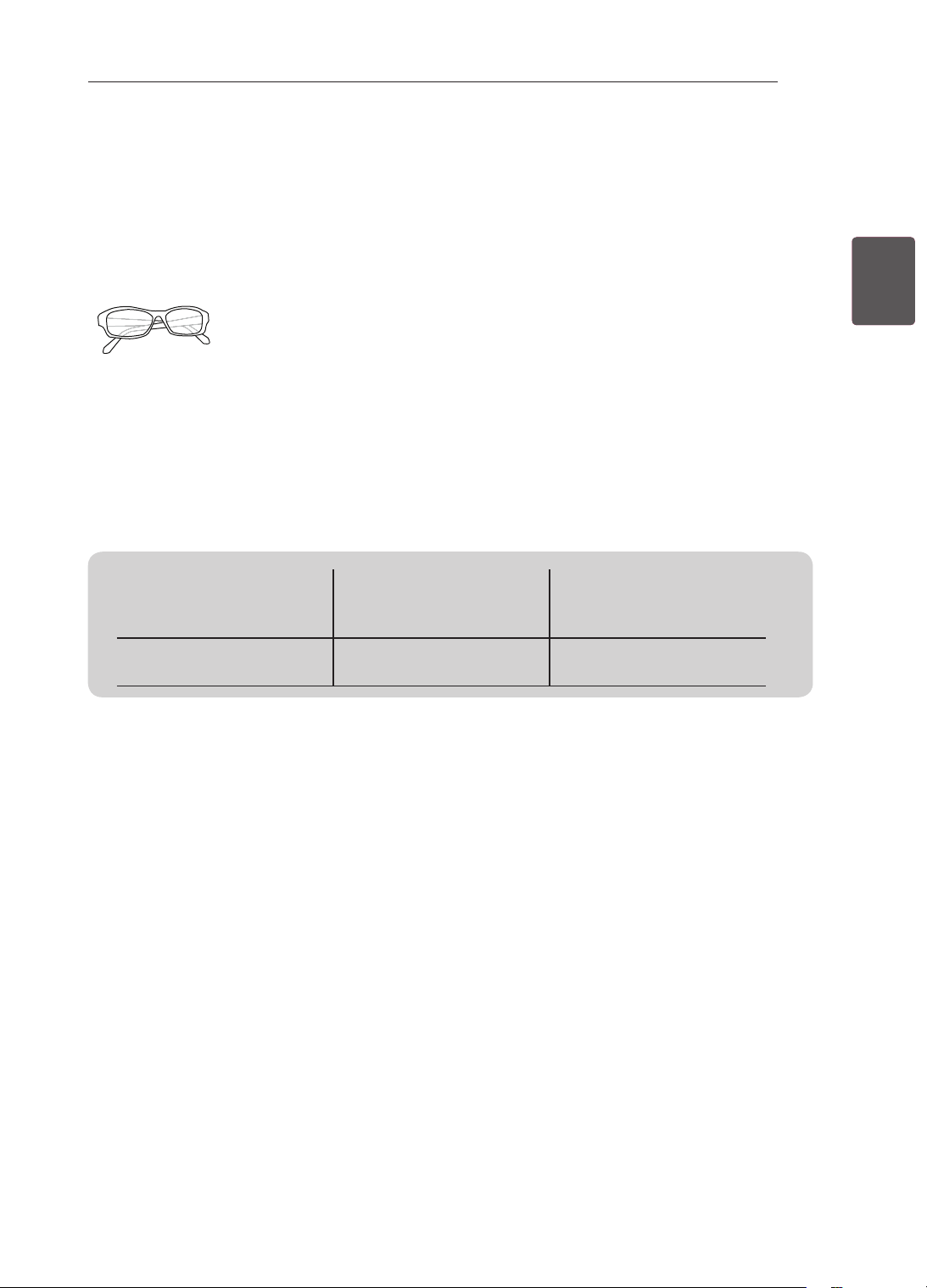
15
FRAFRANÇAIS
ASSEMBLAGE ET PRÉPARATION
Achat séparé
Des articles vendus séparément peuvent faire l’objet de remplacements ou de modications sans préavis
dans le but d’améliorer la qualité du produit.
Contactez votre revendeur pour vous procurer ces articles.
Ces périphériques fonctionnent uniquement avec certains modèles.
AG-F3**
Lunettes de cinéma 3D
Le nom ou la conception du
modèle peuvent changer en
fonction de l’actualisation des
fonctions du produit, ou des
circonstances ou politiques du
fabricant.
Compatibilité
32/42/LM34**
32/42LS34**,
22/26/32/42CS46**,
22/26/32/42CS47**
AG-F3**
Lunettes de cinéma 3D
•
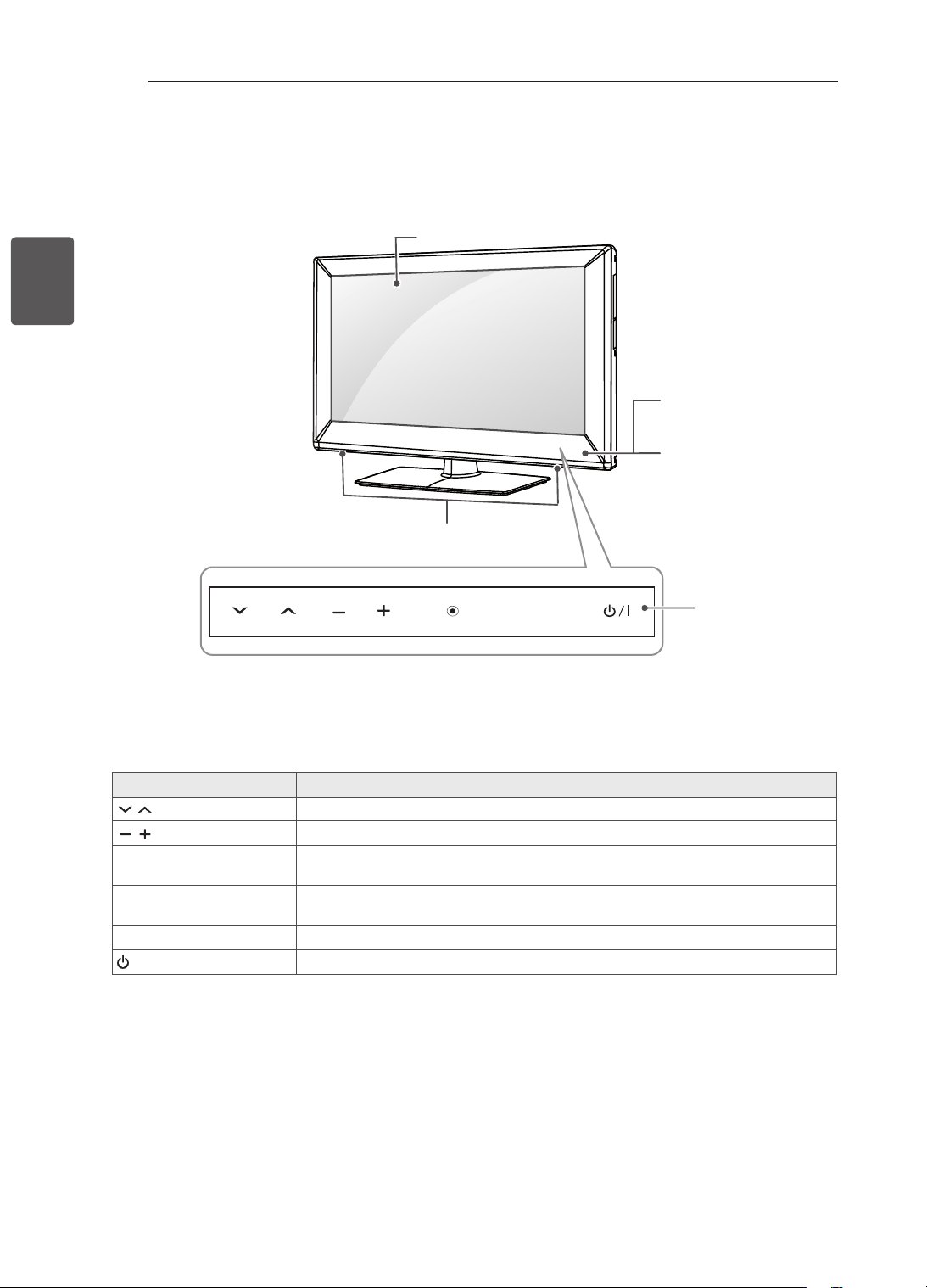
16
FRA
FRANÇAIS
ASSEMBLAGE ET PRÉPARATION
Pièces et boutons
Boutons tactiles Description
H
Permet de parcourir les chaînes enregistrées.
H
Permet de régler le niveau du volume.
OK
ꔉ
Permet de sélectionner l'option du menu en surbrillance ou de confirmer une
entrée.
SETTINGS
Permet d'accéder au menu principal ou bien d'enregistrer votre entrée et de
quitter les menus.
INPUT
Permet de changer la source d'entrée.
/ I
Permet de mettre le moniteur sous/hors tension.
1 Capteur intelligent - Ajuste la qualité et la luminosité de l'image en fonction de l'environnement.
2 Tous les boutons sont à effet tactile et peuvent être commandés en les touchant du bout du doigt.
INPUT
OK
SETTINGS
Haut-parleurs
Boutons tactiles
2
Voyant d’alimentation
Télécommande et
capteurs intelligents
1
Écran
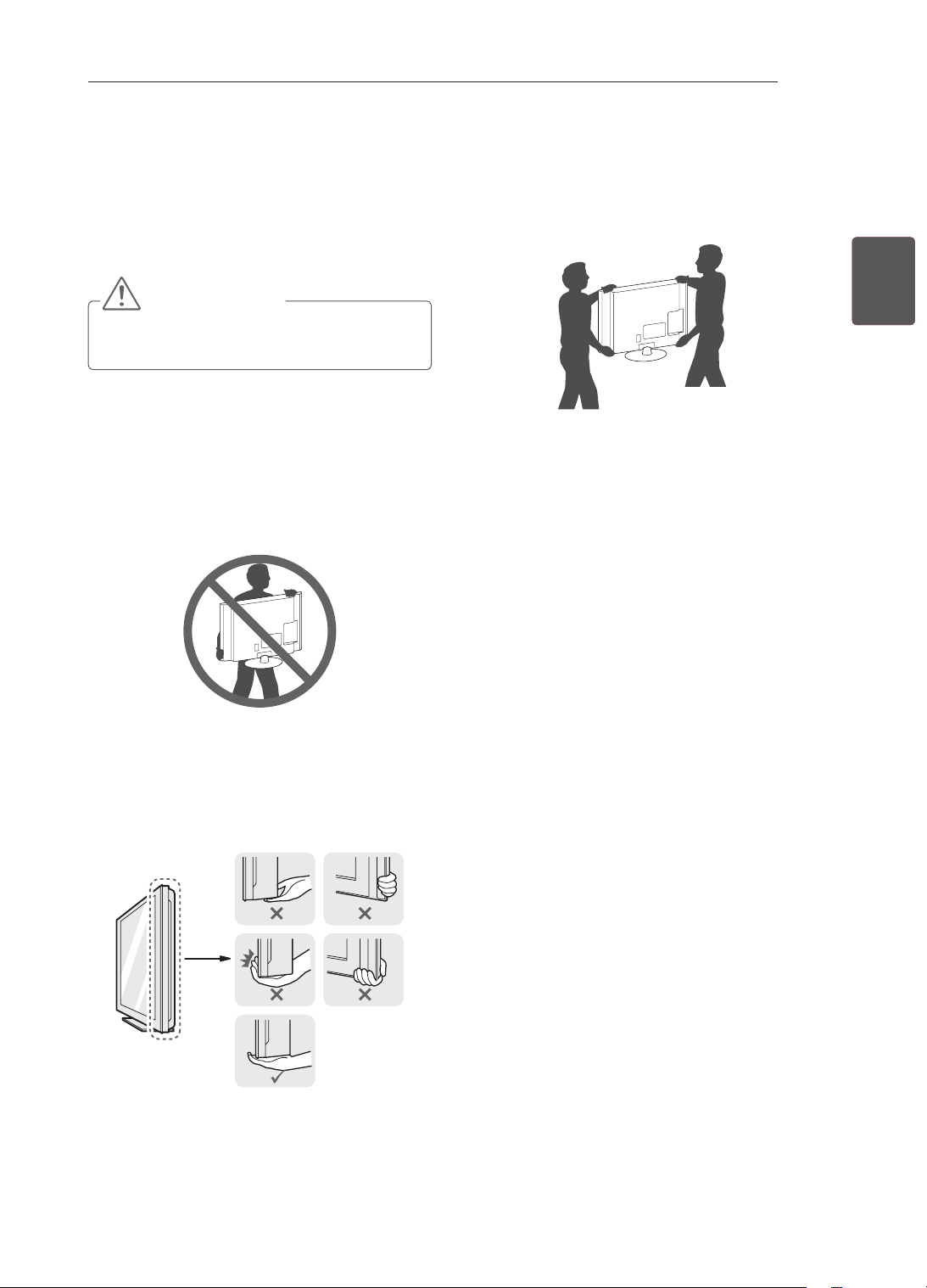
17
FRAFRANÇAIS
ASSEMBLAGE ET PRÉPARATION
Soulever et déplacer la TV
Lisez les consignes suivantes an d'éviter de rayer
ou d'endommager la TV en la déplaçant, en la
soulevant ou en la transportant, quels que soient
le type et les dimensions de l'appareil.
ATTENTION
Évitez toujours de toucher l'écran, car vous
risqueriez de l'endommager.
Nous vous recommandons de déplacer la TV
dans sa boîte ou son emballage d'origine.
Avant de déplacer ou de soulever la TV,
déconnectez le cordon d'alimentation et tous
les câbles.
Lorsque vous soulevez la TV, orientez l'écran à
l'opposé de vous pour éviter de l'endommager.
Maintenez fermement la TV par le haut et le
bas du cadre. Veillez à ne pas la tenir par la
partie transparente, le haut-parleur ou la zone
de la grille du haut-parleur.
Si votre téléviseur est volumineux, faites-vous
aider par une autre personne.
Lorsque vous transportez la TV, tenez-la
comme indiqué sur l'illustration suivante.
Lorsque vous transportez la TV, ne l'exposez
pas à des secousses ou à des vibrations
excessives.
Lorsque vous transportez la TV, maintenez-
la à la verticale, sans la coucher sur le côté ni
l'incliner vers la gauche ou la droite.
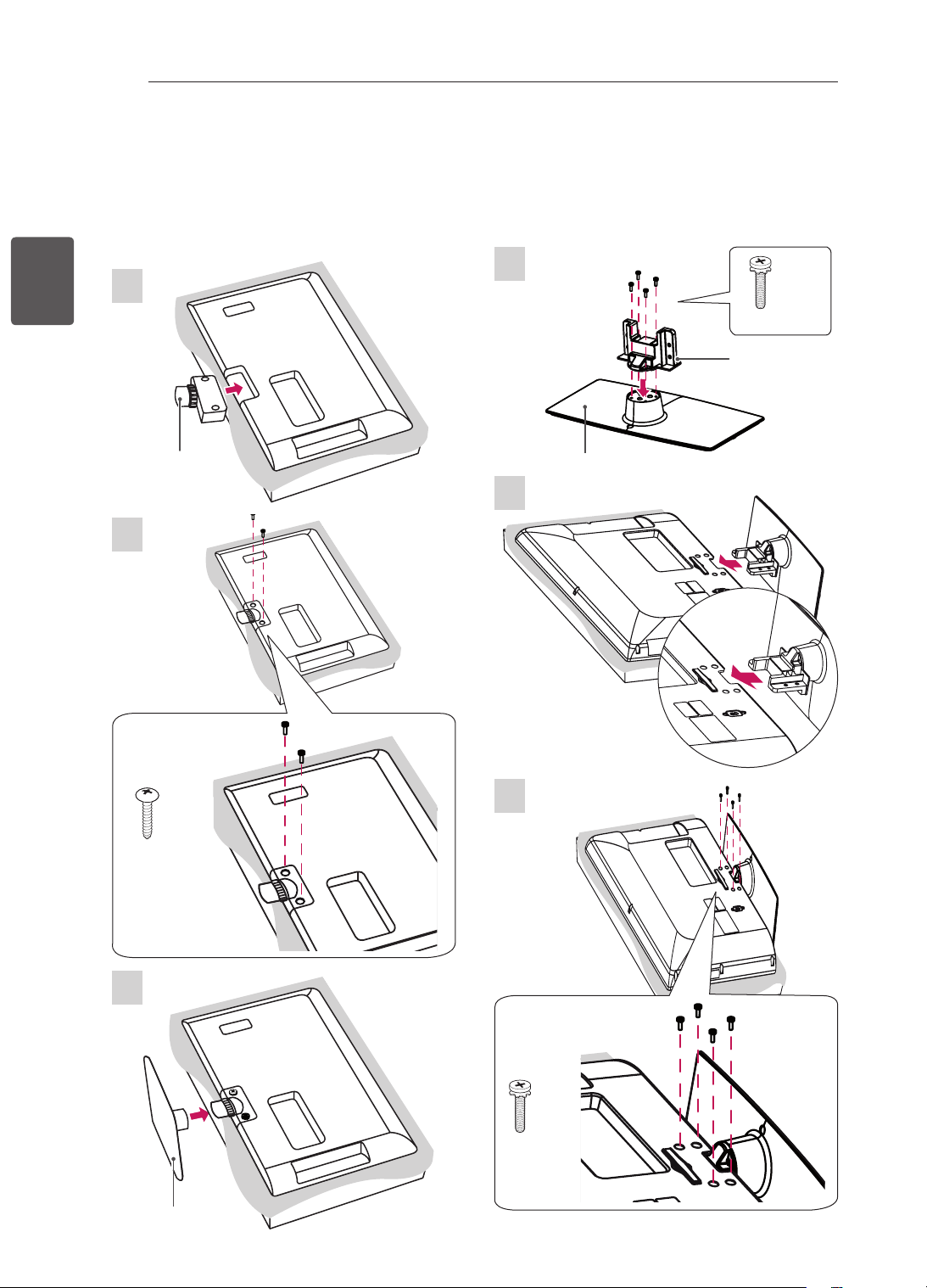
18
FRA
FRANÇAIS
ASSEMBLAGE ET PRÉPARATION
Préparation du téléviseur
Fixation du support
L’image ci-dessous peut être différente de celle affichée sur votre téléviseur.
1
22CS46**, 22CS47**
2
P4 x 16
2EA
3
1
26CS46**, 26CS47**
M4 x 20
4EA
Montant
Socle
2
3
M4 x 20
4EA
Montant
Socle
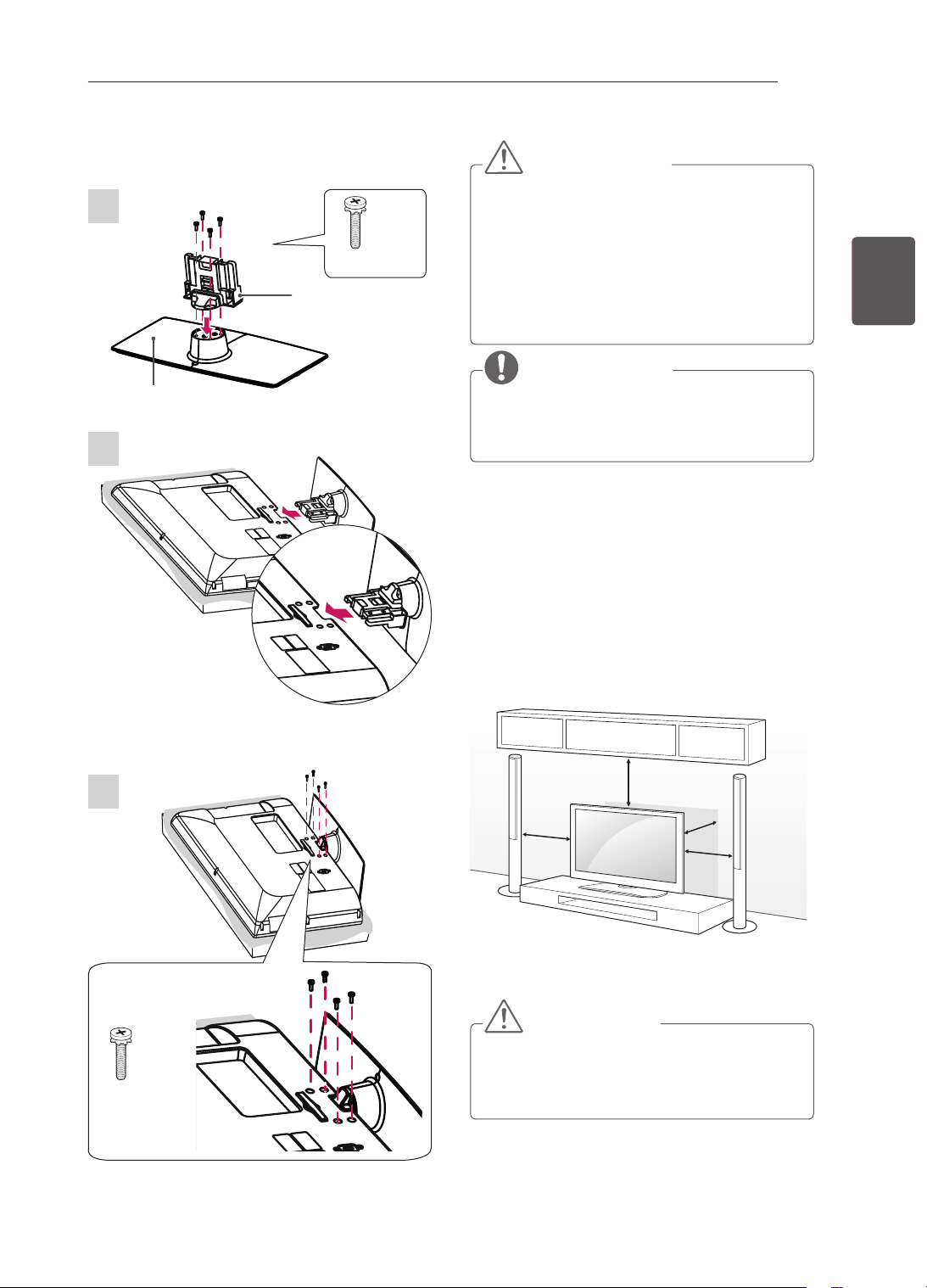
19
FRAFRANÇAIS
ASSEMBLAGE ET PRÉPARATION
ATTENTION
Pour fixer le support à la TV, placez l’écran
face vers le bas sur une table ou sur une
surface plane munie d’une protection pour
éviter de rayer l’écran.
Serrez fermement les vis pour éviter toute
inclinaison de l’écran vers l’avant. Ne serrez
pas trop.
REMARQUE
Procédez à l’inverse du processus de
fixation pour retirer le support avant
d’installer la TV sur un support mural.
Installation sur une table
1 Soulevez et positionnez la TV à la verticale sur
une table.
- Laissez au moins 10 cm entre le mur
et le moniteur pour assurer une bonne
ventilation.
10 cm
10 cm
10 cm
10 cm
2 Branchez le cordon d'alimentation sur une
prise murale.
ATTENTION
Ne placez pas la TV à côté ou sur des
sources de chaleur. Cela pourrait provoquer
un incendie ou d'autres dommages.
32/42CS46**, 32/42CS47**, 32/42LS34**,
32/42LM34**
Montant
Socle
1
3
2
M4 x 20
4EA
M4 x 20
4EA
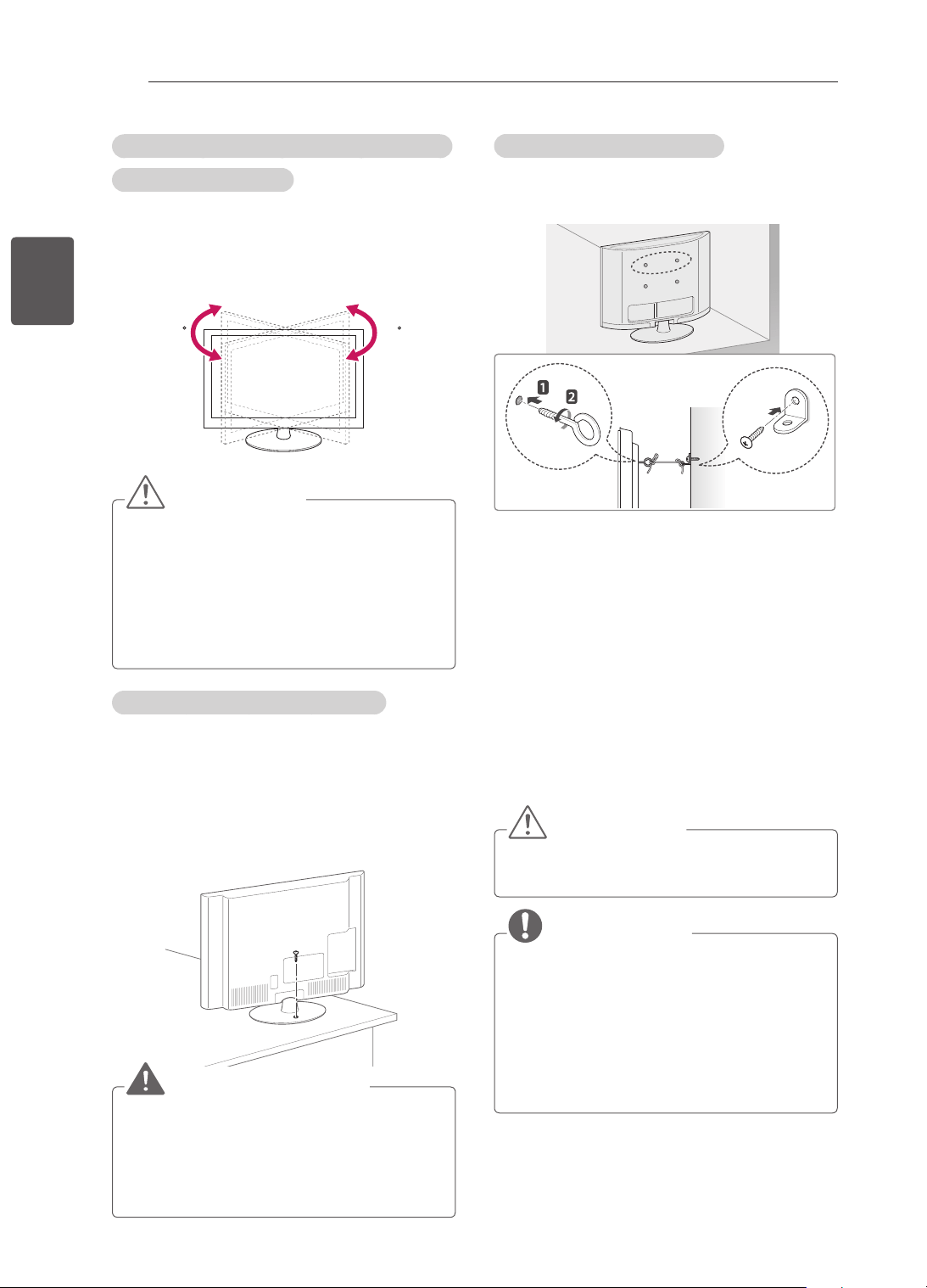
20
FRA
FRANÇAIS
ASSEMBLAGE ET PRÉPARATION
Ajustement de l’angle de la TV afin de trouver
le meilleur angle de vue
(uniquement 32/42CS46**, 32/42CS47**
32/42LS34**, 32/42LM34**)
Faites pivoter la TV de 20 degrés vers la gauche
ou la droite ou réglez l’angle d’inclinaison pour
obtenir le meilleur confort visuel.
2020
ATTENTION
Faites attention à vos doigts lorsque vous
ajustez l’angle du produit.
»
Vous pourriez vous blesser en cas
d’écrasement des mains ou des doigts. Si
le produit est trop incliné, il peut tomber,
provoquant des dommages ou des
blessures.
Fixation fiable de la TV sur une table
(uniquement 26/32/42CS46**, 26/32/42CS47**,
32/42LS34**, 32/42LM34**)
Fixez la TV sur une table pour l'empêcher de
s'incliner vers l'avant, de s'endommager et de
provoquer potentiellement des blessures.
Pour xer la TV sur une table, insérez et serrez la
vis fournie à l'arrière du support.
AVERTISSEMENT
Pour éviter les risques de chute, il faut fixer
solidement le téléviseur au sol/mur suivant
les instructions d'installation. Le fait de faire
basculer, de secouer ou de balancer la TV
peut provoquer des blessures.
Fixation fiable de la TV au mur
(Cette option n'est pas disponible sur tous les
modèles.)
1 Insérez et serrez les boulons à œil, ou les
supports et les boulons à l'arrière de la TV.
- Si des boulons sont insérés dans les trous
des boulons à œil, dévissez d'abord ces
boulons.
2 Fixez les supports muraux avec les boulons
sur le mur.
Ajustez le support mural et les boulons à œil à
l'arrière de la TV.
3 Attachez les boulons à œil et les supports
muraux avec un cordon solide.
Le cordon doit rester en position horizontale
par rapport à la surface plane.
ATTENTION
Veillez à empêcher les enfants de grimper
sur la TV ou de s'y suspendre.
REMARQUE
Utilisez une plate-forme ou un meuble d'une
largeur et d'une résistance suffisantes pour
soutenir en toute sécurité la TV.
Les supports, les boulons et les cordons
ne sont pas fournis. Pour en savoir plus sur
les accessoires en option, contactez votre
revendeur.
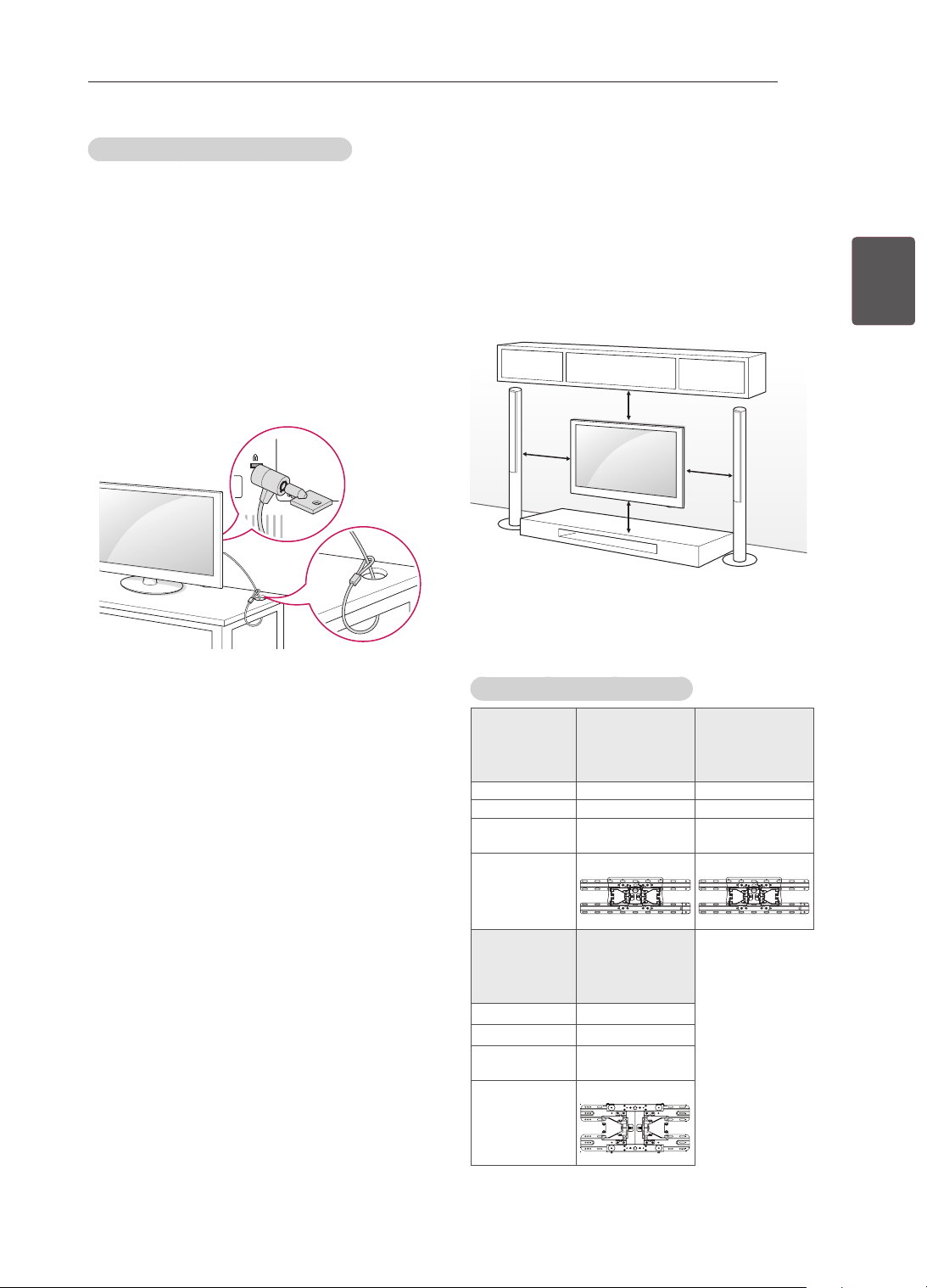
21
FRAFRANÇAIS
ASSEMBLAGE ET PRÉPARATION
Fixation du support mural
Prenez les précautions nécessaires pour xer
le support mural en option à l'arrière de la TV.
Installez-le sur un mur solide perpendiculaire au
sol. Contactez du personnel qualié pour xer la
TV sur d'autres matériaux de construction.
Pour l'installation murale, LG recommande
l'intervention de professionnels qualiés.
10 cm
10 cm
10 cm
10 cm
Veillez à utiliser des vis et un support mural
conformes aux normes VESA. Les dimensions
standard des kits de support mural sont indiquées
dans le tableau suivant.
Achat séparé (support mural)
Modèle
22CS46**,
22CS47**
26/32CS46**,
26/32CS47**,
32LS34**,
32LM34**
VESA (A x B) 100 x 100 200 x 100
Vis standard M4 M4
Nombre de
vis
4 4
Support
mural
LSW100B LSW100B
Modèle
42CS46**,
42CS47**,
42LS34**,
42LM34**
VESA (A x B) 200 x 200
Vis standard M4
Nombre de
vis
4
Support
mural
LSW200BX
Using the Kensington security system
(selon le modèle)
Le connecteur du système de sécurité Kensington
est situé à l'arrière du téléviseur. Pour plus
d'informations sur l'installation et l'utilisation,
reportez-vous au manuel fourni avec le système
de sécurité Kensington ou consultez le site http://
www.kensington.com.
Reliez le câble du système de sécurité Kensington
entre le téléviseur et un meuble.
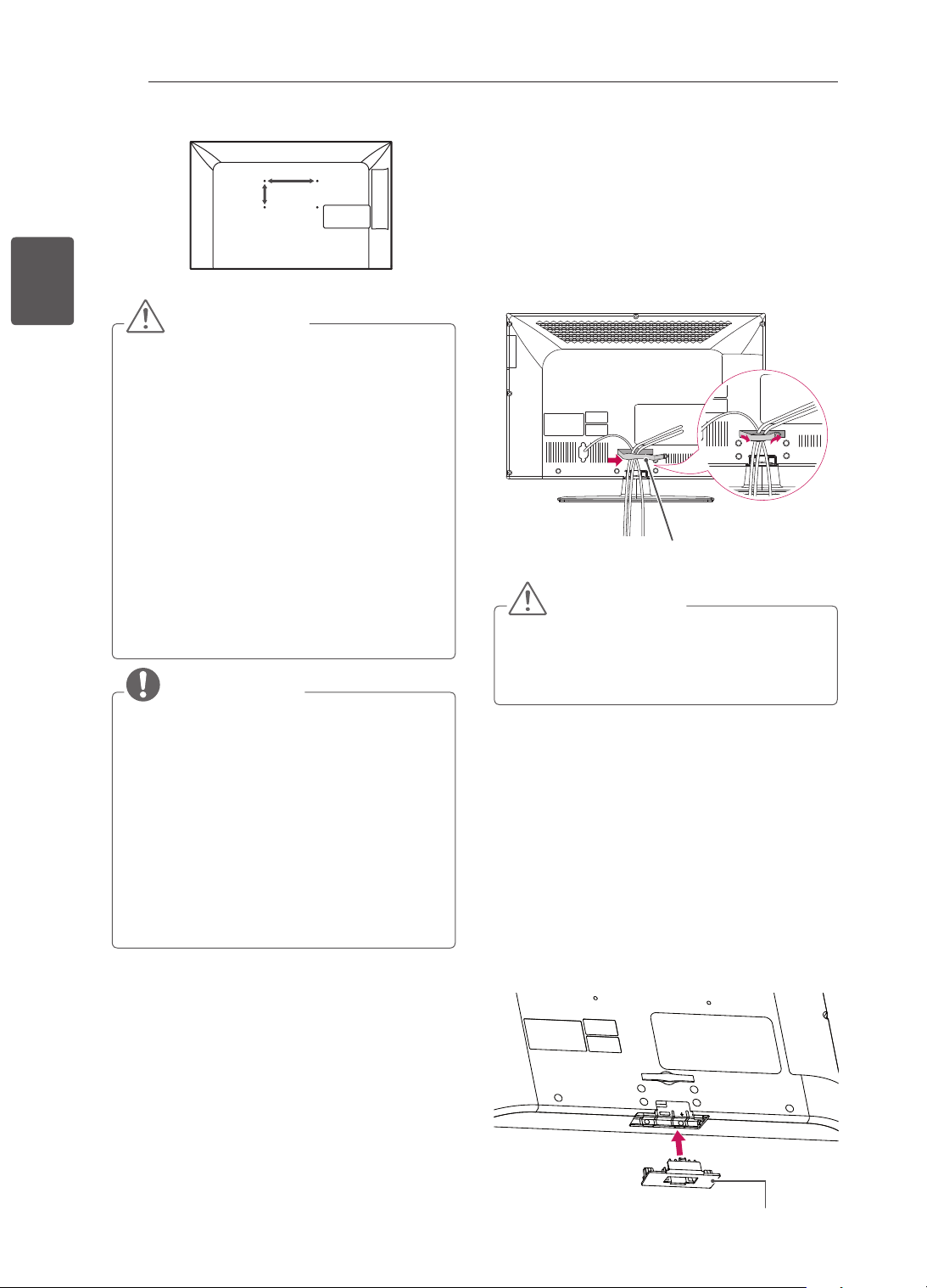
22
FRA
FRANÇAIS
ASSEMBLAGE ET PRÉPARATION
A
B
ATTENTION
Débranchez le cordon d'alimentation avant
de déplacer ou d'installer la TV. Vous
éviterez ainsi tout risque d'électrocution.
Si vous fixez la TV au plafond ou sur un mur
oblique, le produit risque de tomber et de
blesser quelqu'un.
Utilisez un support mural LG agréé et
contactez votre revendeur local ou une
personne qualifiée.
Ne serrez pas trop les vis. Cela pourrait
endommager la TV et entraîner l'annulation
de votre garantie.
Utilisez des vis et supports de fixation
murale répondant aux spécifications de
la norme VESA. La garantie ne couvre
pas les dommages ou les blessures dus
à une mauvaise utilisation ou à l'utilisation
d'accessoires non agréés.
REMARQUE
N'utilisez que des vis répondant aux
spécifications de la norme VESA.
Le kit de support mural est fourni avec
un manuel d'installation et les pièces
nécessaires à l'installation.
Le support mural est proposé en option.
Pour en savoir plus sur les accessoires en
option, contactez votre revendeur.
La longueur des vis dépend du modèle de
support mural. Vérifiez leur longueur avant
de procéder à l'installation.
Pour plus d'informations, consultez le
manuel fourni avec le support mural.
Organisation des câbles
uniquement 26/32/42CS46**, 26/32/42CS47**,
32/42LS34**, 32/42LM34**
1 Regroupez et attachez les câbles à l'aide du
serre-câble.
2 Fixez le serre-câble au téléviseur.
Serre-câble
ATTENTION
Ne déplacez pas le téléviseur en le tenant
par le serre-câble, car celui-ci pourrait se
casser, ce qui endommagerait le téléviseur.
Non-utilisation du socle
uniquement 26/32/42CS46**, 26/32/42CS47**,
32/42LS34**, 32/42LM34**
Lorsque vous installez le support de montage
mural, utilisez le cache de protection. Le cache
évitera que de la poussière et des saletés ne
s’accumulent dans l’ouverture.
Insérez le cache de protection fourni dans
l'ouverture à la base du téléviseur et appuyez
jusqu'à ce qu'il soit en place.
Cache de protection
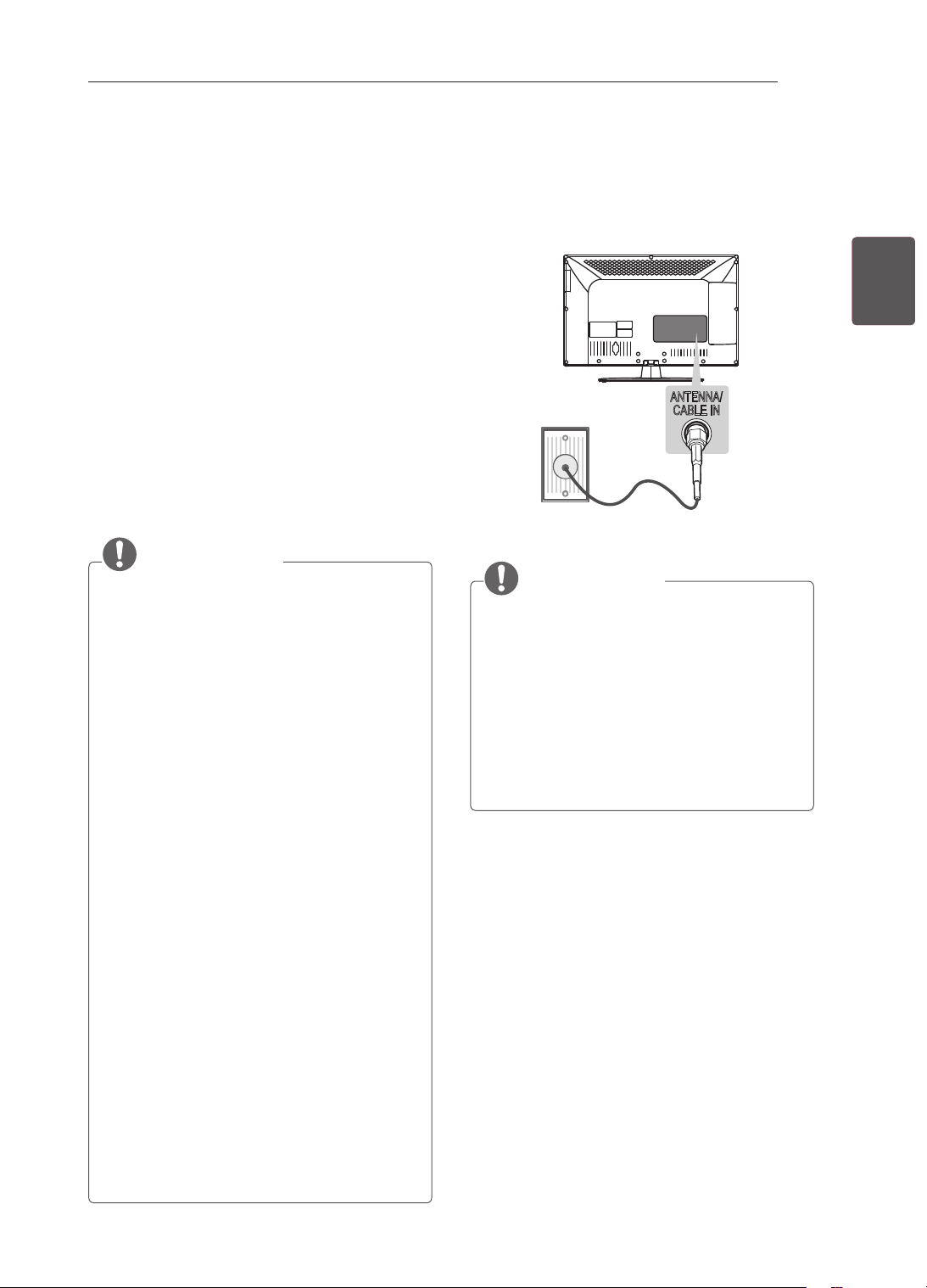
23
FRAFRANÇAIS
ÉTABLISSEMENT DE CONNEXIONS
ÉTABLISSEMENT DE
CONNEXIONS
Cette section relative aux raccordements
présente essentiellement des schémas pour
les modèles CS46**.
Connectez divers périphériques externes à la
TV et changez de mode de source d’entrée pour
sélectionner un périphérique externe. Pour en
savoir plus sur le raccordement d’un périphérique
externe, reportez-vous au manuel fourni avec ce
dernier.
Les périphériques externes disponibles sont les
suivants : récepteurs HD, lecteurs DVD, VCR,
systèmes audio, périphériques de stockage USB,
PC, consoles de jeu et autres périphériques
externes.
REMARQUE
Le raccordement du périphérique externe
peut différer du modèle.
Connectez des périphériques externes à la
TV sans tenir compte de l’ordre du port TV.
Si vous enregistrez un programme TV sur un
enregistreur de DVD ou un magnétoscope,
veillez à raccorder le câble de source
d’entrée du signal de la TV à la TV via un
enregistreur de DVD ou un magnétoscope.
Pour en savoir plus sur l’enregistrement,
reportez-vous au manuel fourni avec le
périphérique connecté.
Veuillez consulter le manuel de l’équipement
externe contenant les instructions
d’utilisation.
Si vous connectez une console de jeu à la
TV, utilisez le câble fourni avec la console
de jeu.
En mode PC, un bruit peut être associé
à la résolution, au modèle vertical, au
contraste ou à la luminosité. En présence
de bruit, changez la résolution de la
sortie PC, changez le niveau du taux de
rafraîchissement ou réglez la luminosité et
le contraste dans le menu IMAGE jusqu’à ce
que l’image soit nette.
En mode PC, certains réglages de la
résolution peuvent ne pas fonctionner
correctement en fonction de la carte
graphique utilisée.
Raccordement d’une
antenne
Connectez la TV à une prise d’antenne murale
avec un câble RF (75 Ω).
ANTENNA/
CABLE IN
ANTENNA/
CABLE IN
REMARQUE
Utilisez un séparateur de signaux pour
utiliser plus de deux téléviseurs.
Si la qualité d’image est mauvaise, installez
correctement un amplificateur de signaux
pour l’améliorer.
Si vous utilisez une antenne et que la qualité
d’image est mauvaise, essayez de réaligner
l’antenne dans la bonne direction.
Le câble et le convertisseur d’antenne ne
sont pas fournis.
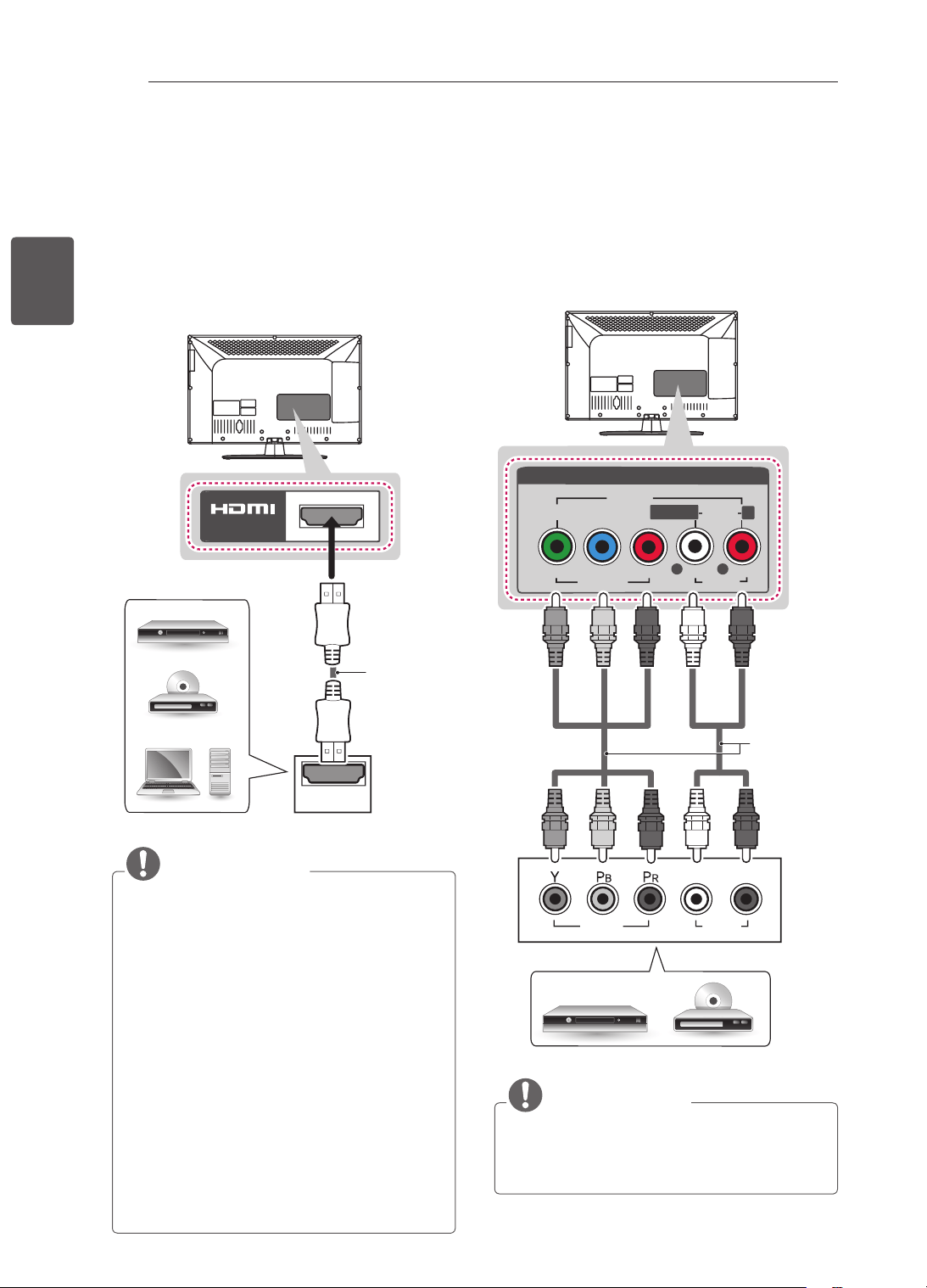
24
FRA
FRANÇAIS
ÉTABLISSEMENT DE CONNEXIONS
Connexion HDMI
Permet de transmettre les signaux vidéo et audio
numériques d’un périphérique externe vers la TV.
Connectez le périphérique externe et la TV avec
le câble HDMI comme indiqué sur l’illustration
suivante.
Choisissez un port d’entrée HDMI pour établir la
connexion. Peu importe le port que vous utilisez.
HDMI
IN
(*Non fourni)
DVD / Blu-Ray / boîtier câble
HD / décodeur HD / PC
REMARQUE
Pour obtenir une meilleure qualité d’image,
il est recommandé d’utiliser la TV avec une
connexion HDMI.
Utilisez le tout nouveau câble haut débit
HDMI™ avec la fonction CEC (contrôles
électroniques client).
Les câbles HDMI™ haut débit sont testés
pour transporter un signal HD de 1080p ou
supérieur.
Technologies audio TNT prises en charge :
MPEG, Dolby Digital, Dolby Digital Plus
Formats audio HDMI pris en charge : Dolby
Digital, PCM (jusqu’à 192 KHz, 32k/44,1k
/48k/88k/96k/176k/192k, DTS non pris en
charge)
Connexion en composantes
Permet de transmettre les signaux audio et vidéo
analogiques d’un périphérique externe vers la
TV. Connectez le périphérique externe et la TV
avec un câble composante comme indiqué sur
l’illustration suivante.
VIDEO
PB
PR
Y
L
R
AUDIO
R
L/MONO
AV IN
VIDEO
AUDIO
COMPONENT
IN
AUDIO
VIDEO
L R
DVD / Blu-Ray / boîtier câble HD
VERT VERT
BLEU BLEU
ROUGE
ROUGE
ROUGE
ROUGE
BLANC
BLANC
(*Non fourni)
REMARQUE
Si les câbles sont mal installés, l’image
peut s’afficher en noir et blanc ou avec des
couleurs de mauvaise qualité
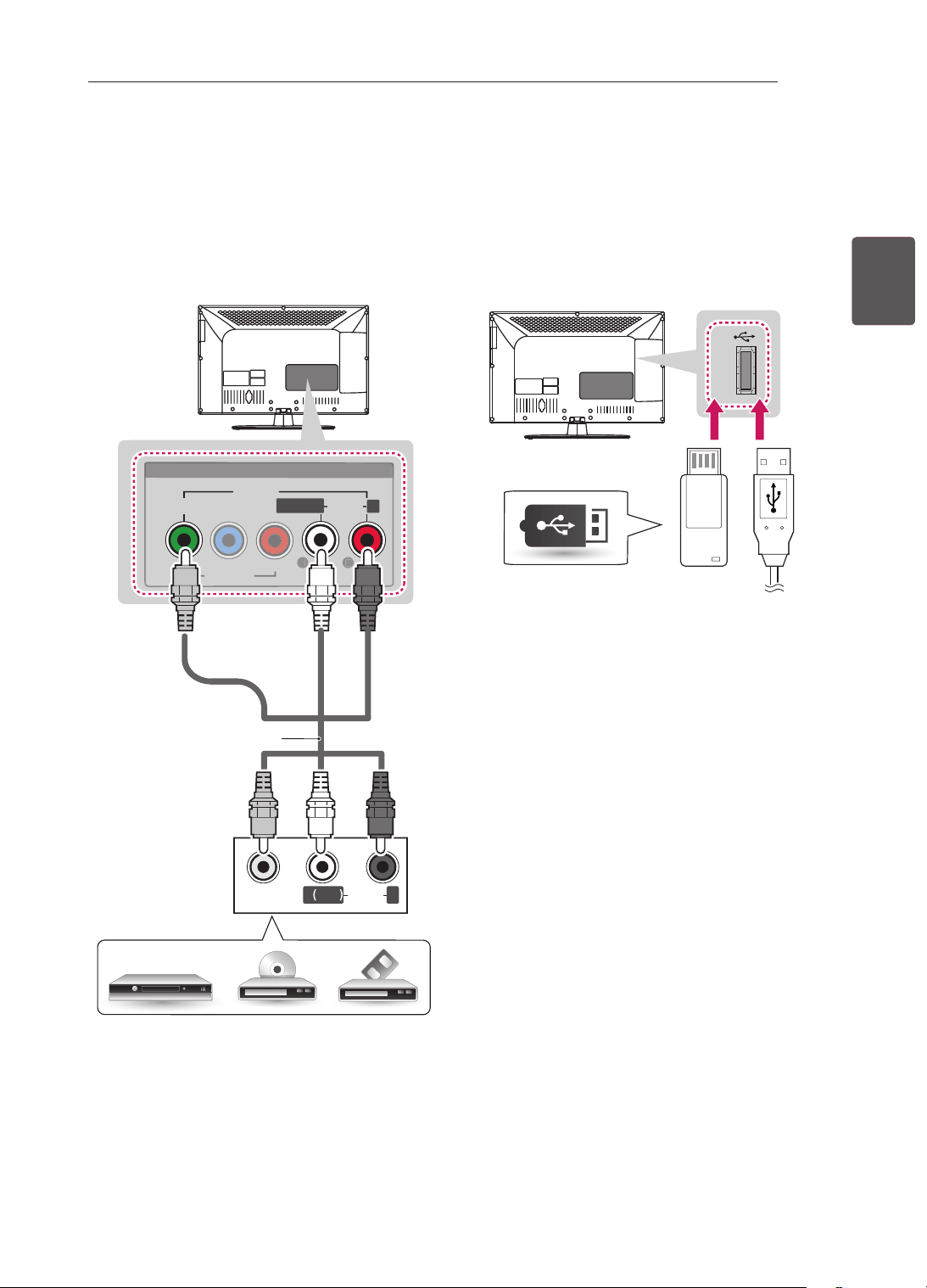
25
FRAFRANÇAIS
ÉTABLISSEMENT DE CONNEXIONS
Connexion composite
Permet de transmettre les signaux audio et vidéo
analogiques d’un périphérique externe vers la TV.
Connectez le périphérique externe et la TV avec
le câble composite comme indiqué sur l’illustration
suivante.
VIDEO
MONO
( )
AUDIOL R
VIDEO
P
B
P
R
Y
L
R
AUDIO
R
L/MONO
AV IN
V
IDE
O
AU
DI
O
COMPONENT
IN
JAUNE
BLANC
ROUGE
JAUNE
BLANC
ROUGE
(*Non fourni)
DVD / Blu-Ray / boîtier câble HD / VCR
Connexion d’un
périphérique USB
Connectez un périphérique de stockage USB
(comme une clé USB ou un disque dur externe) au
téléviseur via le menu Mes médias pour accéder
aux fonctionnalités multimédia.
USB IN
USB
(*Non fourni)
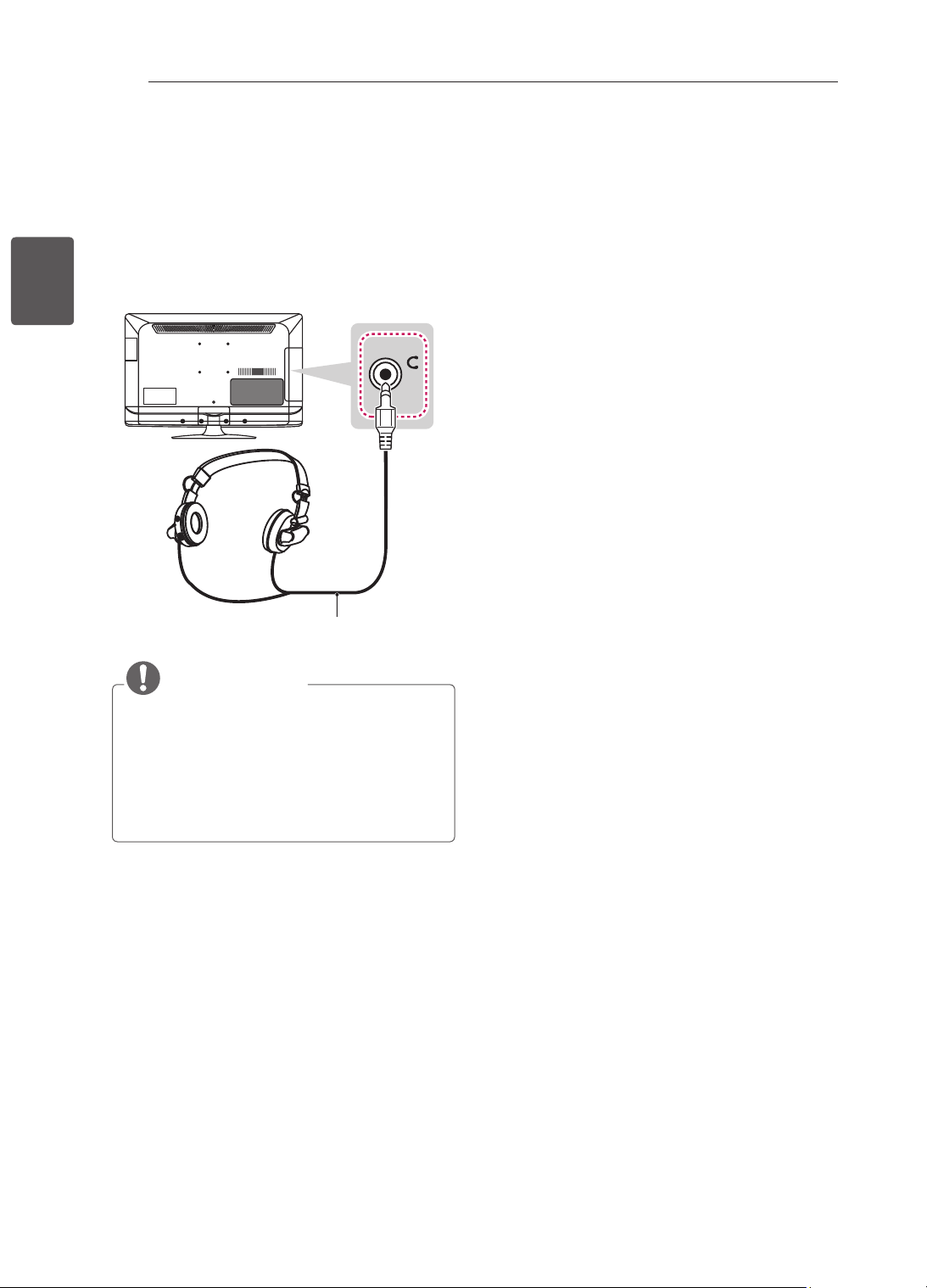
26
FRA
FRANÇAIS
ÉTABLISSEMENT DE CONNEXIONS
Connexion de l’écouteur
(uniquement 22/26/32/42CS47**)
Transmet le signal du casque de la TV au
périphérique externe. Connectez le périphérique
externe et la TV avec le casque comme indiqué
sur l’illustration suivante.
H/P
(*Non fourni)
REMARQUE
Les éléments du menu SON sont désactivés
lorsque vous branchez un casque.
Impédance du casque : 16 Ω
Sortie audio max. du casque : 9 mW à
15 mW
Taille de la prise casque : 0,35 cm
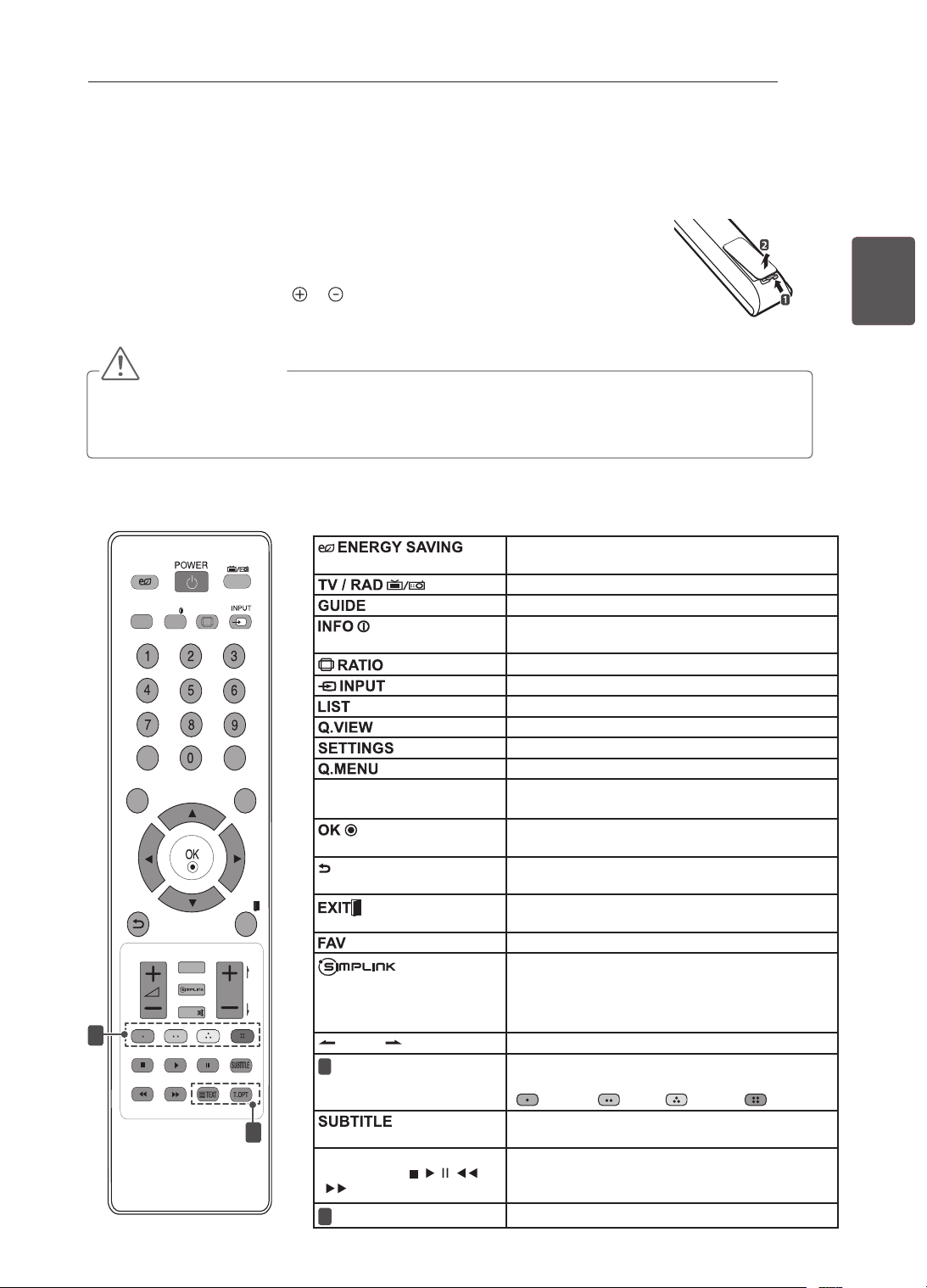
27
FRAFRANÇAIS
TÉLÉCOMMANDE
TÉLÉCOMMANDE
Les descriptions contenues dans ce manuel font référence aux touches de la
télécommande.
Veuillez lire attentivement ce manuel et utiliser correctement la TV.
Pour changer les piles, ouvrez le couvercle et remplacez-les (modèle : 1,5 V AAA).
Faites correspondre les pôles et avec les signes sur l'étiquette placée à l'intérieur
du compartiment, puis refermez le couvercle.
Pour retirer les piles, faites l'inverse de la procédure l'installation.
ATTENTION
y
N'associez pas des piles neuves avec des piles anciennes, car cela pourrait endommager la télécommande.
y
En mode analogique et dans certains pays, il est possible que certaines touches de la télécommande ne
fonctionnent pas.
Veillez à orienter la télécommande vers le capteur situé sur la TV.
LIST
Q.VIEW
TV/RAD
ENERGY
SAVING
RATIO
SETTINGS
GUIDE
Q.MENU
INFO
FAV
MUTE
P
A
G
E
LIST
Q.VIEW
TV/RAD
ENERGY
SAVING
RATIO
SETTINGS
GUIDE
Q.MENU
INFO
FAV
MUTE
P
A
G
E
P
AD
P
EXIT
EXIT
1
2
Permet de régler la luminosité de l’écran pour
réduire la consommation électrique.
Sélectionne le programme Radio, TV et TNT
Présente le guide de programmes.
Afche les informations liées au programme
actuel et à l’écran.
Redimensionne une image.
Permet de changer la source d’entrée.
Permet d’accéder à la liste des programmes.
Revient au programme précédemment visionné.
Permet d’accéder aux menus principaux.
Permet d’accéder au menu rapide.
Touches de navigation
(gauche/droite/haut/bas)
Permettent de parcourir les menus ou options.
Permet de sélectionner les menus ou options et
de conrmer votre entrée.
Permet de sélectionner les menus ou options et
de conrmer votre entrée.
Efface tout ce qui est afché à l’écran et revient à
l’afchage TV.
Permet d’accéder à votre liste de canaux favoris.
Permet d’accéder aux périphériques AV
connectés via le câble HDMI grâce à la
fonction HDMI-CEC.
Permet d’ouvrir le menu SIMPLINK.
PAGE
Passe à l’écran précédent ou suivant.
1
Touches de couleur
Ces touches permettent d’accéder à des
fonctions spéciales dans certains menus.
(
: rouge, : vert, : jaune, : bleu)
Rappelle le sous-titrage de votre choix en mode
numérique.
Touches de
commande(
, , ,
, )
Permettent de commander les menus MES
MÉDIAS ou les appareils compatibles SIMPLINK
(USB, SIMPLINK).
2
Touches du télétexte
Ces touches sont utilisées pour le télétexte.
(uniquement 22/26/32/42CS46**, 22/26/32/42CS47**, 32/42LS34**)
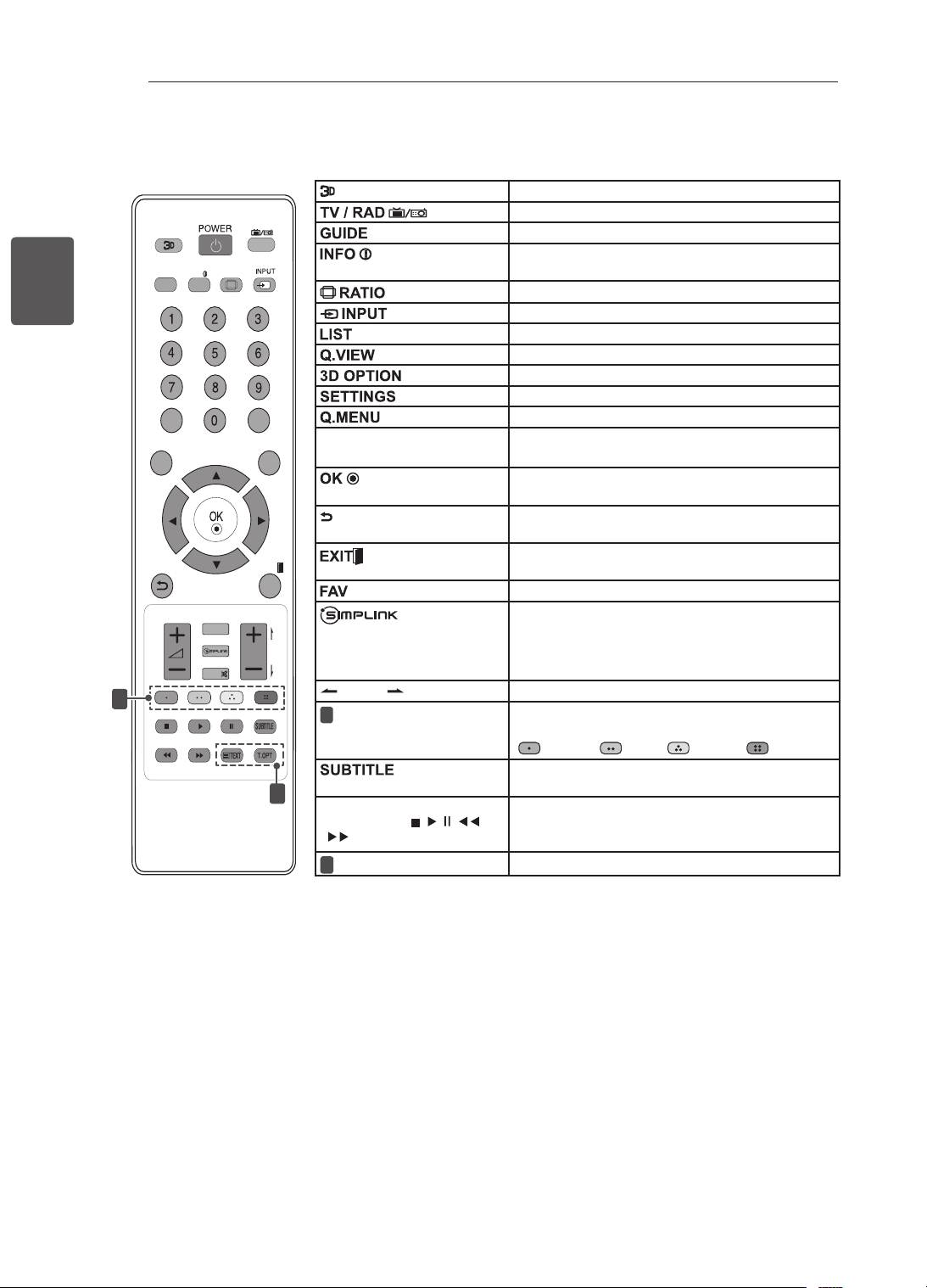
28
FRA
FRANÇAIS
TÉLÉCOMMANDE
Pour la lecture des vidéos en 3D.
Sélectionne le programme Radio, TV et TNT
Présente le guide de programmes.
Afche les informations liées au programme
actuel et à l’écran.
Redimensionne une image.
Permet de changer la source d’entrée.
Permet d’accéder à la liste des programmes.
Revient au programme précédemment visionné.
Pour la lecture des vidéos en 3D.
Permet d’accéder aux menus principaux.
Permet d’accéder au menu rapide.
Touches de navigation
(gauche/droite/haut/bas)
Permettent de parcourir les menus ou options.
Permet de sélectionner les menus ou options et
de conrmer votre entrée.
Permet de sélectionner les menus ou options et
de conrmer votre entrée.
Efface tout ce qui est afché à l’écran et revient à
l’afchage TV.
Permet d’accéder à votre liste de canaux favoris.
Permet d’accéder aux périphériques AV
connectés via le câble HDMI grâce à la
fonction HDMI-CEC.
Permet d’ouvrir le menu SIMPLINK.
PAGE
Passe à l’écran précédent ou suivant.
1
Touches de couleur
Ces touches permettent d’accéder à des
fonctions spéciales dans certains menus.
(
: rouge, : vert, : jaune, : bleu)
Rappelle le sous-titrage de votre choix en mode
numérique.
Touches de
commande(
, , ,
, )
Permettent de commander les menus MES
MÉDIAS ou les appareils compatibles SIMPLINK
(USB, SIMPLINK).
2
Touches du télétexte
Ces touches sont utilisées pour le télétexte.
LIST
Q.VIEW
TV/RAD
RATIO
SETTINGS
GUIDE
Q.MENU
INFO
FAV
MUTE
P
A
G
E
P
EXIT
3D OPTION
1
2
(uniquement 32/42LM34**)
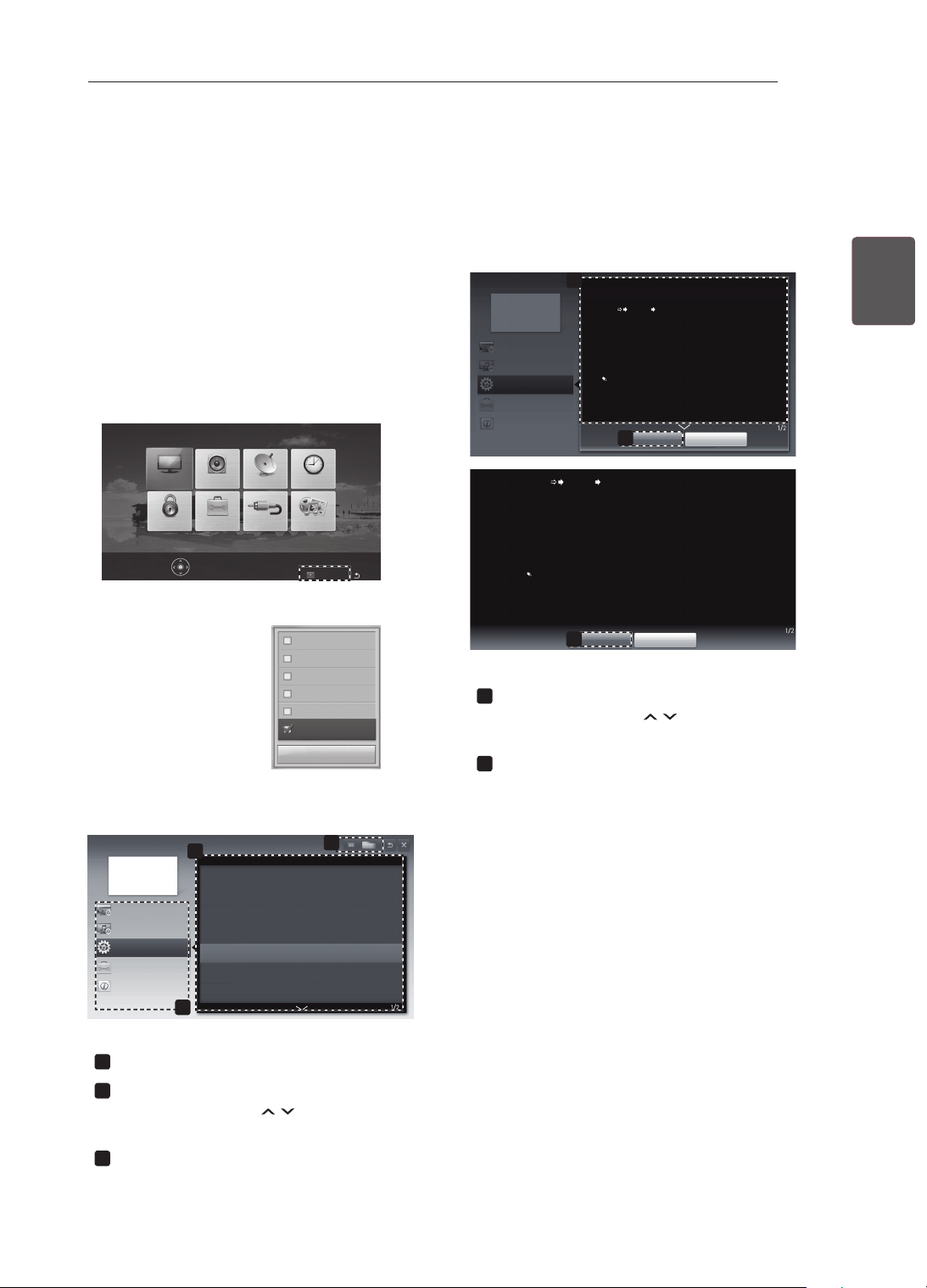
29
FRAFRANÇAIS
UTILISATION DU GUIDE DE L'UTILISATEUR
Pour la lecture des vidéos en 3D.
Sélectionne le programme Radio, TV et TNT
Présente le guide de programmes.
Affi che les informations liées au programme
actuel et à l’écran.
Redimensionne une image.
Permet de changer la source d’entrée.
Permet d’accéder à la liste des programmes.
Revient au programme précédemment visionné.
Pour la lecture des vidéos en 3D.
Permet d’accéder aux menus principaux.
Permet d’accéder au menu rapide.
Touches de navigation
(gauche/droite/haut/bas)
Permettent de parcourir les menus ou options.
Permet de sélectionner les menus ou options et
de confi rmer votre entrée.
Permet de sélectionner les menus ou options et
de confi rmer votre entrée.
Efface tout ce qui est affi ché à l’écran et revient à
l’affi chage TV.
Permet d’accéder à votre liste de canaux favoris.
Permet d’accéder aux périphériques AV
connectés via le câble HDMI grâce à la
fonction HDMI-CEC.
Permet d’ouvrir le menu SIMPLINK.
PAGE
Passe à l’écran précédent ou suivant.
Touches de couleur
Ces touches permettent d’accéder à des
fonctions spéciales dans certains menus.
( : rouge, : vert, : jaune, : bleu)
Rappelle le sous-titrage de votre choix en mode
numérique.
Touches de
commande(
, , ,
, )
Permettent de commander les menus MES
MÉDIAS ou les appareils compatibles SIMPLINK
(USB, SIMPLINK).
Touches du télétexte
Ces touches sont utilisées pour le télétexte.
UTILISATION DU GUIDE DE L'UTILISATEUR
Le guide de l'utilisateur vous permet d'accéder plus facilement aux informations complètes sur la TV.
1 Appuyez sur SETTINGS pour accéder aux
menus principaux.
2 Appuyez sur la touche ROUGE pour accéder
aux menus Support technique.
3 Appuyez sur les touches de navigation pour
accéder au Guide de l’utilisateur et appuyez
sur OK.
Mise à jour auto.
Test d’image
Sound Test
Test audio
Infos produit/service
Guide de l’utilisateur
Fermer
IMAGE SON CONFIG HORLOGE
MES MÉDIASSOURCEOPTIONVERROU
OK(
) pour définir les paramètres d’image.
Support technique Sortie
2
Guide de l’utilisateur
OPTION
Paramètre de CHAÎNE
Paramètre d’IMAGE et de SON
Fonction Avancée
Utilisation de la source
Réglage des options horaires
Confi guration de la langue
Confi guration du pays
Confi guration des sous-titres
Réglage des options de verrouillage TV
Utilisation de la fonction d’économie d’énergie
3
Information
1
1
Affiche le canal actuel.
2
Permet de sélectionner l’article souhaité.
Vous pouvez utiliser
H
pour parcourir les
pages.
3
Permet de parcourir la description de la
fonction qui vous intéresse depuis l’index.
1
2
Guide de l’utilisateur
OPTION > Confi guration de la langue
SETTINGS OPTION Langue
Vous pouvez sélectionner la langue du menu affi ché à l’écran et celle de la
diffusion audio numérique.
Langue menu : Sélectionne une langue pour le texte d’affi chage.
Langue audio [En mode numérique uniquement] : Sélectionne la
langue voulue lorsque vous regardez une diffusion numérique contenant
plusieurs langues.
Langue des sous-titres [En mode numérique uniquement] : Utilisez l’option
Sous-titres quand deux langues des sous-titres, ou plus, sont diffusées.
Si les données de sous-titres d’une langue sélectionnée ne sont pas
diffusées, la langue par défaut est diffusée.
Fermer
Zoom avant
OPTION
Paramètre de CHAÎNE
Paramètre d’IMAGE et de SON
Fonction Avancée
Information
2
Fermer
Zoom arrière
SETTINGS OPTION Langue
Vous pouvez sélectionner la langue du menu affi ché à l’écran et celle de la
diffusion audio numérique.
Langue menu : Sélectionne une langue pour le texte d’affi chage.
Langue audio [En mode numérique uniquement] : Sélectionne la
langue voulue lorsque vous regardez une diffusion numérique contenant
plusieurs langues.
Langue des sous-titres [En mode numérique uniquement] : Utilisez l’option
Sous-titres quand deux langues des sous-titres, ou plus, sont diffusées.
Si les données de sous-titres d’une langue sélectionnée ne sont pas
diffusées, la langue par défaut est diffusée.
1
Affiche la description du menu sélectionné.
Vous pouvez utiliser
H
pour parcourir les
pages.
2
Permet d’effectuer un zoom avant ou arrière.
30
FRA
FRANÇAIS
MAINTENANCE / DÉPANNAGE
MAINTENANCE
Nettoyage de votre TV
Nettoyez régulièrement votre TV pour conserver des performances optimales et pour allonger la durée de
vie du produit.
ATTENTION
Avant toute chose, veillez à couper l’alimentation et à débrancher le cordon d’alimentation et tous les
autres câbles.
Lorsque vous prévoyez de ne pas utiliser le téléviseur pendant une longue période, débranchez le
cordon d’alimentation de la prise murale afin d’éviter tout endommagement dû à une étincelle ou une
surtension.
Écran, cadre, boîtier et support
Pour éliminer la poussière ou une saleté légère, essuyez la surface avec un chiffon doux, propre et sec.
Pour retirer des taches importantes, essuyez la surface avec un chiffon doux imbibé d'eau propre ou
d'un détergent doux dilué. Essuyez ensuite immédiatement avec un chiffon sec.
ATTENTION
Évitez toujours de toucher l'écran, car vous risqueriez de l'endommager.
Ne poussez pas, ne frottez pas ou ne cognez pas la surface de l'écran avec l'ongle ou un objet
contondant, car cela pourrait causer des rayures et des déformations de l'image.
N'utilisez pas de produits chimiques car cela pourrait endommager le produit.
Ne pulvérisez pas de liquide sur la surface. Si de l'eau pénètre dans la TV, cela peut provoquer un
incendie, une électrocution ou un dysfonctionnement.
Cordon d’alimentation
Retirez régulièrement la poussière ou les saletés accumulées sur le cordon d’alimentation.
DÉPANNAGE
Problème Solution
Impossible de
commander
la TV avec la
télécommande.
Vérifiez le capteur de la télécommande sur la TV et essayez de nouveau.
Vérifiez qu'aucun obstacle n'est placé entre la TV et la télécommande.
Vérifiez si les piles fonctionnent et si elles sont correctement installées (
sur
, sur ).
Aucune image
n'est affichée et
aucun son n'est
émis.
Vérifiez si l'appareil est allumé.
Vérifiez si le cordon d'alimentation est raccordé à la prise murale.
Vérifiez la prise en branchant d'autres appareils.
La TV s'éteint
de manière
soudaine.
Vérifiez les paramètres de contrôle de l'alimentation. Il peut y avoir une
coupure de courant.
Vérifiez si l'option Veille auto. est activée dans les réglages de l'heure.
Si aucun signal n'est présent quand la TV est allumée, la TV s'éteint
automatiquement après 15 minutes d'inactivité.
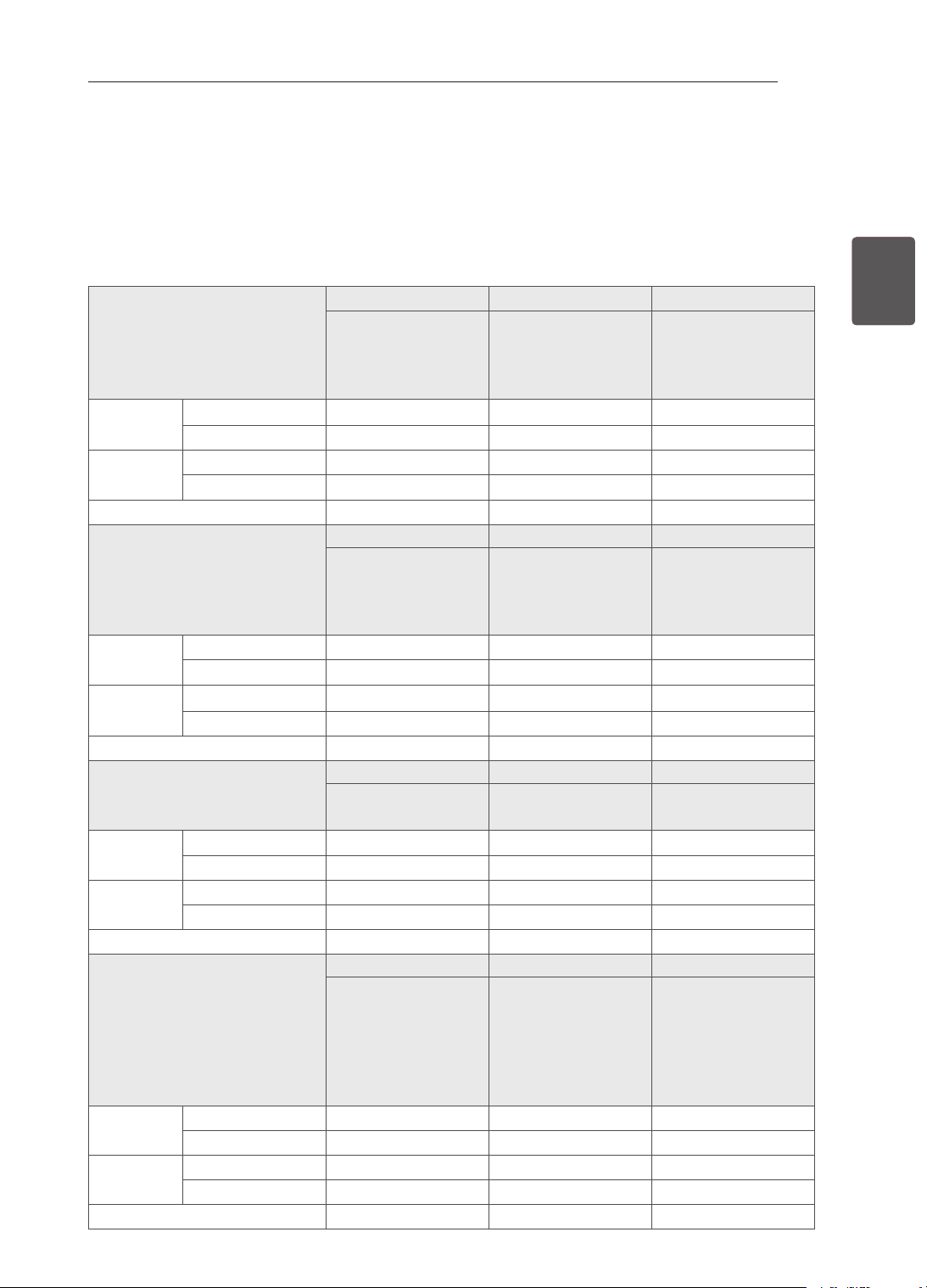
31
FRAFRANÇAIS
SPÉCIFICATIONS
SPÉCIFICATIONS
Les spécifications du produit indiquées ci-dessus peuvent être modifiées sans préavis à des fins
d’amélioration des fonctions du produit.
Reportez-vous à l’étiquette apposée sur le téléviseur pour connaître l’alimentation et la consommation
électriques.
MODÈLES
22CS46** 26CS46** 32CS46**
22CS460-TA
22CS460Y-TA
22CS461-TB
22CS461Y-TB
26CS460-TA
26CS460Y-TA
26CS461-TB
26CS461Y-TB
32CS460-TA
32CS460Y-TA
32CS461-TB
32CS461Y-TB
Dimensions
(W x H x D)
Avec socle (
mm
)
539,0 x 400,0 x 165,0 663,0 x 483,0 x 197,0 794,0 x 565,0 x 207,0
Sans socle (
mm)
539,0 x 345,0 x 56,8 663,0 x 424,0 x 72,8 794,0 x 504,0 x 73,5
Poids Avec socle (kg)
4,2 7,4 9,0
Sans socle (kg)
3,9 6,6 8,0
Alimentation
AC 100-240 V~ 50 / 60 Hz AC 100-240 V~ 50 / 60 Hz AC 100-240 V~ 50 / 60 Hz
MODÈLES
42CS46** 22CS47** 26CS47**
42CS460-TA
42CS460Y-TA
42CS461-TB
42CS461Y-TB
22CS470-TA
22CS471-TB
26CS470-TA
26CS471-TB
Dimensions
(W x H x D)
Avec socle (
mm
)
1017,0 x 695,0 x 261,0 539,0 x 400,0 x 165,0 663,0 x 483,0 x 197,0
Sans socle (
mm)
1017,0 x 629,0 x 76,5 539,0 x 345,0 x 56,8 663,0 x 424,0 x 72,8
Poids Avec socle (kg)
15,1 4,2 7,4
Sans socle (kg)
13,5 3,9 6,6
Alimentation
AC 100-240 V~ 50 / 60 Hz AC 100-240 V~ 50 / 60 Hz AC 100-240 V~ 50 / 60 Hz
MODÈLES
32CS47** 42CS47** 32LS34**
32CS470-TA
32CS471-TB
42CS470-TA
42CS471-TB
32LS3400-TA
32LS340Y-TA
Dimensions
(W x H x D)
Avec socle (
mm
)
794,0 x 565,0 x 207,0 1017,0 x 695,0 x 261,0 795,0 x 566,0 x 207,0
Sans socle (
mm)
794,0 x 504,0 x 73,5 1017,0 x 629,0 x 76,5 795,0 x 504,0 x 73,5
Poids Avec socle (kg)
9,0 15,1 9,1
Sans socle (kg)
8,0 13,5 8,1
Alimentation
AC 100-240 V~ 50 / 60 Hz AC 100-240 V~ 50 / 60 Hz AC 100-240 V~ 50 / 60 Hz
MODÈLES
42LS34** 32LM34** 42LM34**
42LS3400-TA
42LS340Y-TA
32LM3400-TB
32LM340Y-TB
32LM3410-TC
32LM341Y-TC
42LM3400-TB
42LM340Y-TB
42LM3410-TC
42LM341Y-TC
42LM3450-TC
42LM345Y-TC
Dimensions
(W x H x D)
Avec socle (
mm
)
1018,0 x 696,0 x 261,0 795,0 x 566,0 x 207,0 1018,0 x 696,0 x 261,0
Sans socle (
mm)
1018,0 x 629,0 x 76,5 795,0 x 504,0 x 73,5 1018,0 x 629,0 x 76,5
Poids Avec socle (kg)
14,7 9,1 14,7
Sans socle (kg)
13,1 8,1 13,1
Alimentation
AC 100-240 V~ 50 / 60 Hz AC 100-240 V~ 50 / 60 Hz AC 100-240 V~ 50 / 60 Hz
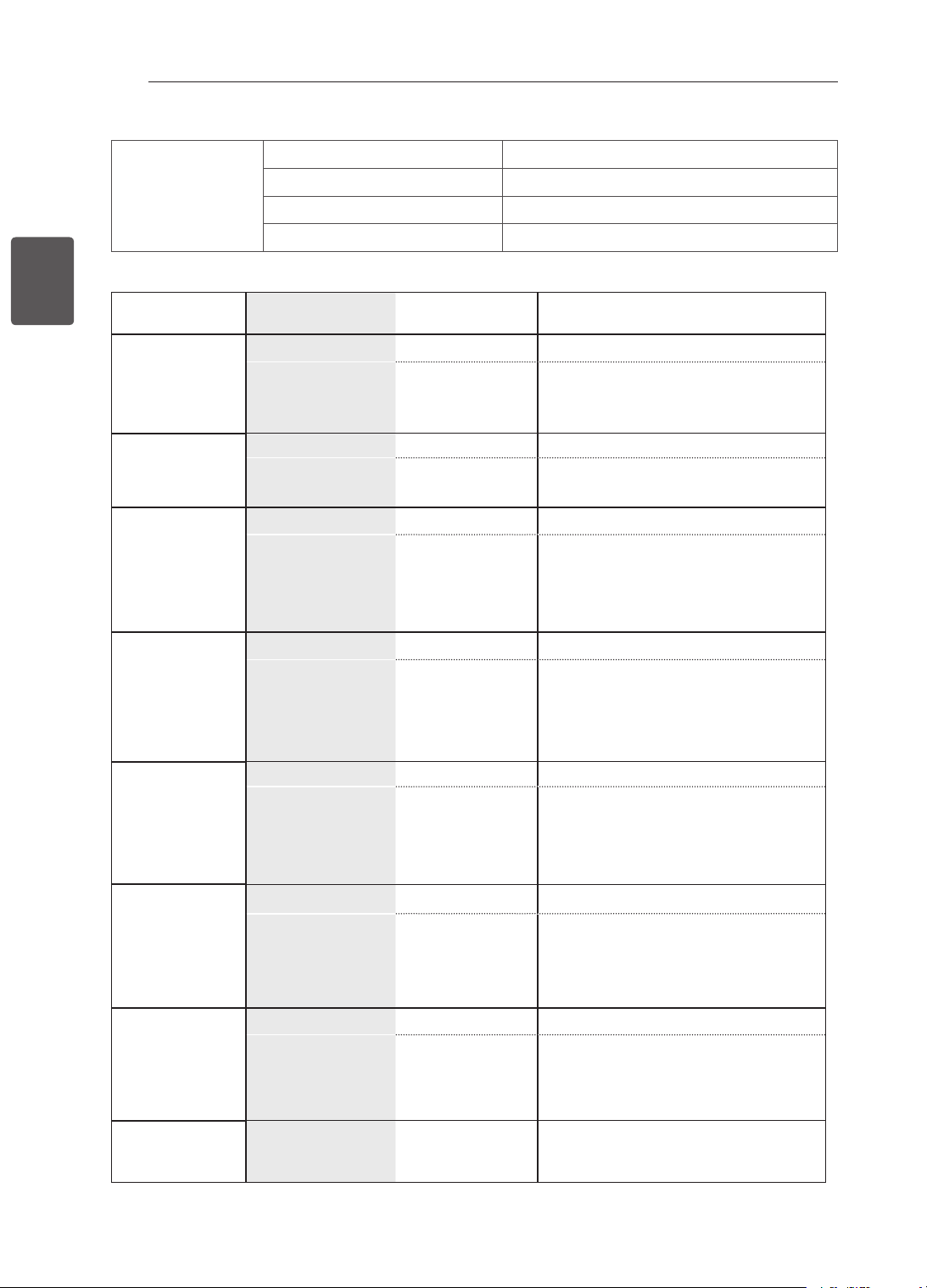
32
FRA
FRANÇAIS
SPÉCIFICATIONS
Conditions de
l’environnement
Température de fonctionnement 0 °C à 40 °C
Humidité de fonctionnement Inférieure à 80 %
Température de stockage -20 °C à 60 °C
Humidité de stockage Inférieure à 85 %
Téléviseur numéri-
que
Téléviseur analogique
Pour la Nouvelle
Zélande
et Singapour
Système TV DVB-T PAL/SECAM-B/G/D/K
, PAL-I
Couverture de
chaînes
UHF 21 à 69
BG : VHF/UHF 1 à 69, CATV 01 à 47
I : VHF/UHF 1 à 69, CATV 01 à 47
DK : VHF/UHF 1 à 69, CATV 01 à 47
Australia Pour
l’Australie
Système TV DVB-T PAL B/B
Couverture de
chaînes
VHF 06 à 12,
UHF 27 à 69
B/B : VHF/UHF 0 à 75, CATV : 2 à 44
Pour l’Indonésie,
Israël, Myanmar,
Sri Lanka
Système TV DVB-T PAL/SECAM-B/G/D/K
, PAL-I, NTSC-M
Couverture de
chaînes
UHF 21 à 69
BG : VHF/UHF 1 à 69, CATV 01 à 47
I : VHF/UHF 1 à 69, CATV 01 à 47
DK : VHF/UHF 1 à 69, CATV 01 à 47
M : VHF/UHF 2 à 78, CATV 01 à 71
Afrique du Sud
Système TV DVB-T PAL/SECAM-B/G/D/K
, PAL-I, NTSC-M
Couverture de
chaînes
VHF 4 à 11, 13
UHF 21 à 68
BG : VHF/UHF 1 à 69, CATV 01 à 47
I : VHF/UHF 1 à 69, CATV 01 à 47
DK : VHF/UHF 1 à 69, CATV 01 à 47
M : VHF/UHF 2 à 78, CATV 01 à 71
Vietnam,
Malaisie
Système TV DVB-T PAL/SECAM-B/G/D/K
, PAL-I, NTSC-M
Couverture de
chaînes
VHF 6 à 12,
UHF 21 à 69
BG : VHF/UHF 1 à 69, CATV 01 à 47
I : VHF/UHF 1 à 69, CATV 01 à 47
DK : VHF/UHF 1 à 69, CATV 01 à 47
M : VHF/UHF 2 à 78, CATV 01 à 71
l’Iran, Algérie,
Tunisie, Model
numérique
Système TV DVB-T PAL/SECAM-B/G/D/K
, PAL-I, NTSC-M
Couverture de
chaînes
VHF 5 à 12,
UHF 21 à 69
BG : VHF/UHF 1 à 69, CATV 01 à 47
I : VHF/UHF 1 à 69, CATV 01 à 47
DK : VHF/UHF 1 à 69, CATV 01 à 47
M : VHF/UHF 2 à 78, CATV 01 à 71
Model
analogique,
Inde, Thaïlande,
--
Système TV - PAL/SECAM-B/G/D/K
, PAL-I, NTSC-M
Couverture de
chaînes
-
BG : VHF/UHF 1 à 69, CATV 01 à 47
I : VHF/UHF 1 à 69, CATV 01 à 47
DK : VHF/UHF 1 à 69, CATV 01 à 47
M : VHF/UHF 2 à 78, CATV 01 à 71
Impédance de
l’antenne extéri-
eure
75 Ω 75 Ω
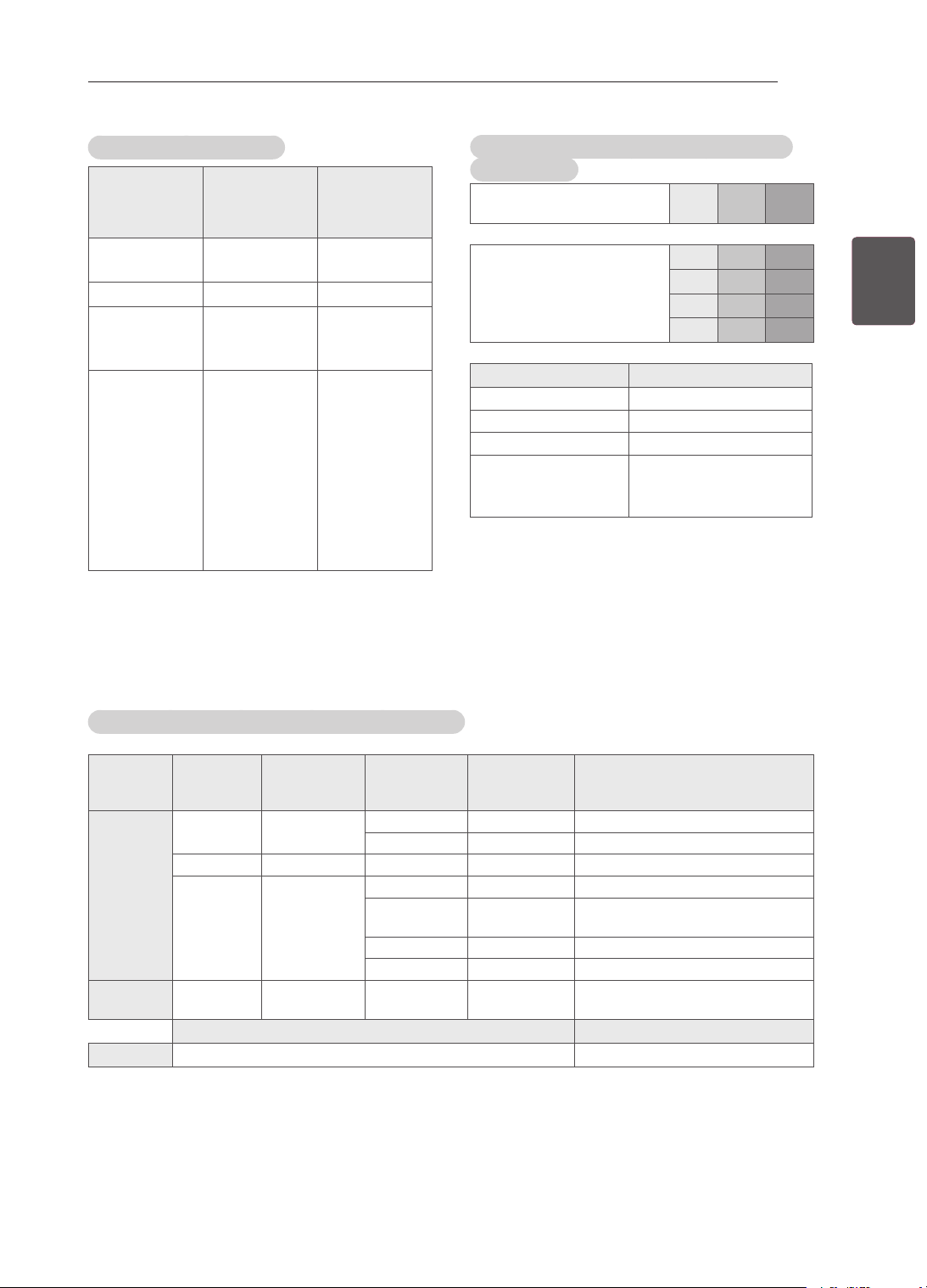
33
FRAFRANÇAIS
SPÉCIFICATIONS
HDMI-DTV pris en charge
Résolution Fréquence
horizontale
(kHz)
Fréquence
verticale (Hz)
720x480
31,469
31,5
59,94
60
720x576
31,25 50
1280x720
37,5
44,96
45
50
59,94
60
1920x1080
33,72
33,75
28,125
26,97
27
33,716
33,75
56,25
67,43
67,5
59,94
60
50
23,97
24
29,976
30,00
50
59,94
60
Informations sur la connexion des ports en
composantes
Ports en composantes du
téléviseur
Y P
B
P
R
Ports de sortie vidéo du
lecteur de DVD
Y P
B
P
R
Y B-Y R-Y
Y Cb Cr
Y Pb Pr
Signal
Composant
480i/576i O
480p/576p O
720p/1080i O
1080p O
(uniquement 50 Hz / 60
Hz)
Modes vidéo pris en charge (modèles 3D uniquement)
Entrée Signal Résolution
Fréquence
horizontale
(kHz)
Fréquence
verticale
(Hz)
Formats vidéo 3D compatibles
HDMI 720p 1280x720 89.9 / 90 / 75 59.94 / 60 / 50 configuration de trames (720 60p)
45 / 37.5 60 / 50 bord à bord(la moitié), Haut et bas
1080i 1920X1080 33.7 / 28.125 60 / 50 bord à bord(la moitié), Haut et bas
1080p 1920X1080 53.95 / 54 23.98 / 24 conguration de trames (1080 24p)
67.5 / 56.3 60 / 50 bord à bord, Haut et bas,
Trame séquentielle
27 24 bord à bord(la moitié), Haut et bas
33.7 30 bord à bord(la moitié), Haut et bas
USB 1080p 1920X1080 33.75 30 bord à bord, Haut et bas,
MPO(Photo)
Signal Formats vidéo 3D compatibles
DTV 720p, 1080i bord à bord, Haut et bas

Le modèle et le numéro de série du téléviseur
figurent à l’arrière du téléviseur.
Notez-les ci-dessous au cas où vous auriez
besoin de faire appel au service après-vente.
MODÈLE
NUMÉRO DE SÉRIE
Pour toute suggestion, opinion ou
réclamation, appelez :
800 54 aux Émirats arabes unis
0800 54 54 54 en Afrique du Sud
080 100 54 54 au Maroc
19960 en Égypte
Pour d’autres pays, contactez votre
revendeur local ou consultez le site
http://www.lg.com

MANUAL DE INSTRUÇÕES
TV LED LCD / TV LCD
Leia este manual com atenção antes de utilizar o
dispositivo e guarde-o para futura referência.
www.lg.com
LS34**
LM34**
CS46**
CS47**
2
PT
PORTUGUÊS
ÍNDICE
ÍNDICE
3 LICENÇAS
3 NOTASSOBRESOFTWAREDE
CÓDIGOABERTO
4 INSTRUÇÕESDESEGURANÇA
10 - Verimagensem3D(apenaspara
modelos3D)
12 PROCEDIMENTODEINSTALAÇÃO
12 MONTAGEMEPREPARAÇÃO
12 Desembalar
15 Objectosadquiridosemseparado
16 Peçasebotões
17 LevantaredeslocaraTV
18 PrepararaTV
18 - Fixarosuporte
19 Montarnumamesa
21 Montagemnumamesa
22 Manteroscabosarrumados
22 Nãoutilizarosuportetiposecretária
23 EFECTUARASLIGAÇÕES
23 Ligarumaantena
24 LigaçãoHDMI
24 Ligaçãodecomponentes
25 Ligaçãocomposta
25 LigaçãoaumUSB
26 Ligaràligaçãodosauriculares
27 CONTROLOREMOTO
29 COMOUTILIZAROGUIADO
UTILIZADOR
30 MANUTENÇÃO
30 LimparaTV
30 - Ecrã,estrutura,caixaesuporte
30 - Cabodealimentação
30 RESOLUÇÃODEPROBLEMAS
31 ESPECIFICAÇÕES
AVISO
Seignoraramensagemdeaviso,poderá
sofrerlesõesgraveseexisteapossibilidade
deacidenteoumorte.
ATENÇÃO
Seignoraramensagemdeatenção,poderá
sofrerlesõesligeirasouoprodutopoderá
ficardanificado.
NOTA
Anotaajuda-oacompreendereautilizaro
produtocomsegurança.Leiaatentamentea
notaantesdeutilizaroproduto.
3
PTPORTUGUÊS
LICENÇAS/NOTASSOBRESOFTWAREDECÓDIGOABERTO
LICENÇAS
Aslicençassuportadaspodemserdiferentesconsoanteomodelo.Paramaisinformaçõessobreas
licenças,visitewww.lg.com.
FabricadosoblicençadaDolbyLaboratories.“Dolby”,bemcomoosímboloDduplo,
sãomarcascomerciaisdaDolbyLaboratories.
HDMI,ologótipoHDMIeHigh-DefinitionMultimediaInterfacesãomarcascomerciais
oumarcasregistadasdaHDMILicensingLLC.
ACERCADEVÍDEODIVX:DivX®éumformatodevídeodigitalcriadopela
DivX,LLC,umasubsidiáriadaRoviCorporation.EsteéumdispositivoDivX
Certied®ocialquereproduzvídeoDivX.Visitedivx.comparamaisinformaçõese
ferramentasdesoftwareparaconverterosseuscheirosparavídeoDivX.
ACERCADEDIVXVIDEO-ON-DEMAND:estedispositivoDivXCertied®temde
estarregistadoparareproduzirlmesDivXVideo-on-Demand(VOD)adquiridos.
Paraobteroseucódigoderegisto,localizeasecçãoDivXVODnomenude
conguraçãododispositivo.Acedaavod.divx.comparaobtermaisinformações
sobrecomoconcluiroseuregisto.
“DivXCertied®parareproduzirvídeoDivX®emHDaté1080p,incluindoconteúdo
premium.”
“DivX®,DivXCertied®eoslogótiposassociadossãomarcascomerciaisdaRovi
Corporationoudassuassubsidiáriasesãoutilizadossoblicença”.
“AbrangidasporumaoumaisdasseguintespatentesdosE.U.A.:”
7,295,673;7,460,668;7,515,710;7,519,274”
NOTASSOBRESOFTWAREDECÓDIGO
ABERTO
ParaobterocódigofonteincluídonesteprodutoaoabrigodaGPL,LGPL,MPLeoutraslicençasdecódigo
abertovisitehttp://opensource.lge.com .
Além do código fonte, pode transferir todas as condições da licença referidas, renúncias de garantia e
avisos de direitos de autor.
A LG Electronics também irá fornecer-lhe um código aberto em CD-ROM por um valor que cobre as
despesas de distribuição, como os custos do suporte, envio e processamento, mediante pedido por e-mail
para [email protected]. Esta oferta é válida por 3 (três) anos a partir da data de aquisição do produto.
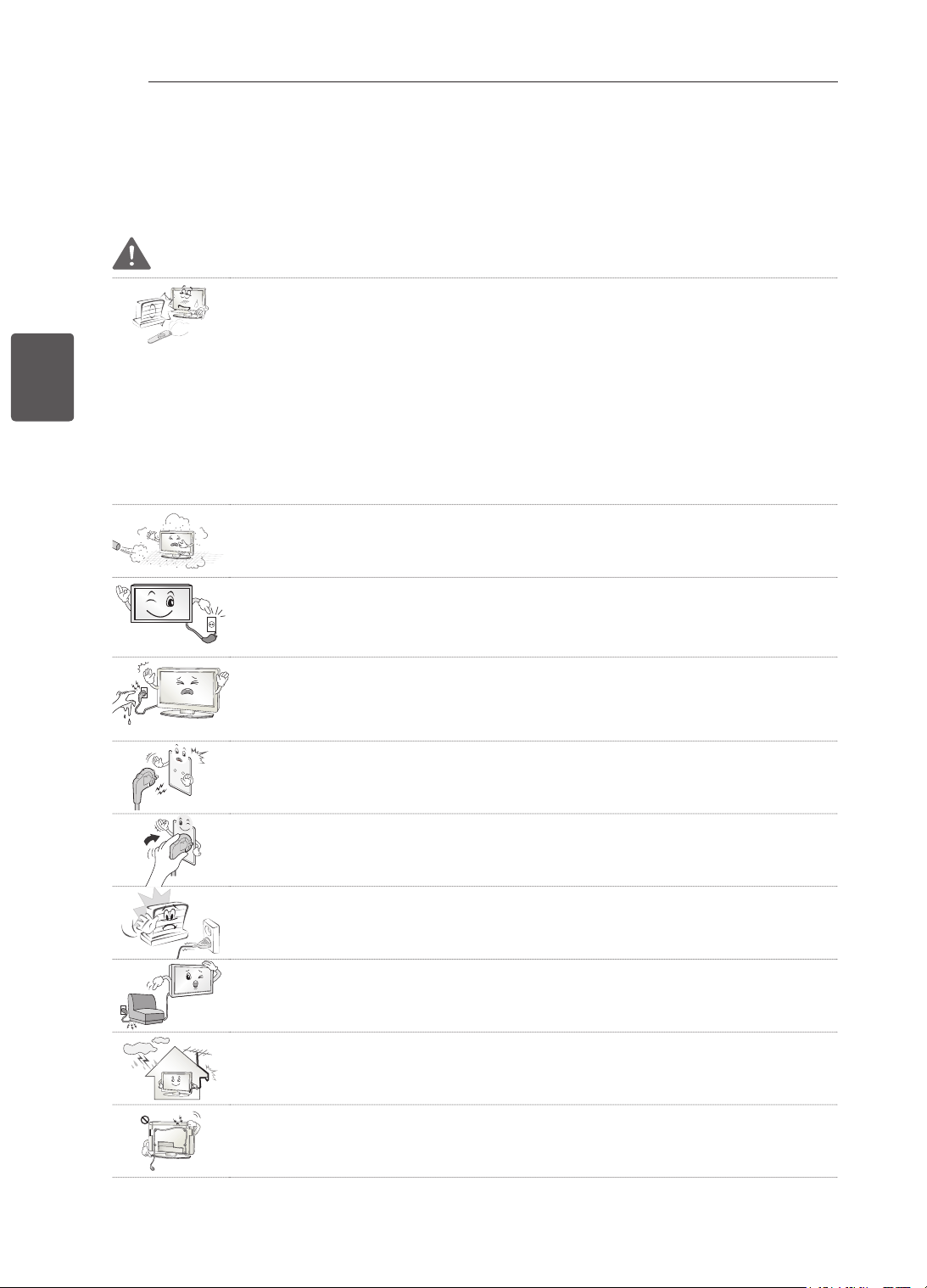
4
PT
PORTUGUÊS
INSTRUÇÕESDESEGURANÇA
INSTRUÇÕESDESEGURANÇA
Leiaatentamenteestasprecauçõesdesegurançaantesdeutilizaroproduto.
AVISO
NãocoloqueaTVnemocontroloremotonosseguintesambientes:
- Umlocalexpostoàluzdirectadosol
- Umlocalcomhumidadeelevada,comop.ex.umacasadebanho
- Próximodefontesdecalorcomop.ex.fornoseoutrosaparelhosqueemitam
calor
- Próximodebalcõesdecozinhaouhumidificadores,ondepossamfacilmente
ficarexpostosavaporouóleo
- Umaáreaexpostaàchuvaouaovento
- Próximoderecipientescomágua,comop.ex.jarras
Casocontrário,istopoderáprovocarumincêndio,choqueeléctrico,avariaoude-
formaçõesnoproduto.
Nãocoloqueoprodutoondepossaficarexpostoaopó.
Istopodeprovocarperigodeincêndio.
Atomadadeparedeéodispositivodedesconexão.Atomadatemdeestarsem-
preoperacionaledisponível.
Nãotoquenatomadacomasmãosmolhadas.Alémdisso,seopinodocabo
estiverhúmidooucobertocompoeira,sequeatomadaporcompletooulimpea
poeira.
Podesofrerumchoqueeléctricodevidoaoexcessodehumidade.
Certifique-sedequeligaocabodealimentaçãoàcorrentedeterra.(Exceptodis-
positivoquenãoestejamligadosàterra.)
Podesofrerumchoqueeléctricoouferimentos.
Fixetotalmenteocabodealimentação.
Seocabodealimentaçãonãoficartotalmentefixo,istopoderáprovocarumin-
cêndio.
Certifique-sedequeocabodealimentaçãonãoentraemcontactocomobjectos
quentes,comop.ex.umaquecedor.
Istopoderáprovocarumincêndioouriscodechoqueeléctrico.
Nãocoloqueumobjectopesadoouopróprioprodutoemcimadecabosdeali-
mentação.
Casocontrário,poderáprovocarumincêndioouumchoqueeléctrico.
Dobreocabodaantenadentroeforadoedifícioparaevitaraentradadachuva.
Istopoderáresultaremdanosprovocadospelaáguadentrodoprodutoepode
provocarumchoqueeléctrico.
AomontarumaTVnaparede,nãoainstalependurandocabosdealimentaçãoou
desinalnapartedetrásdaTV.
Istopoderáprovocarumincêndioouumchoqueeléctrico.
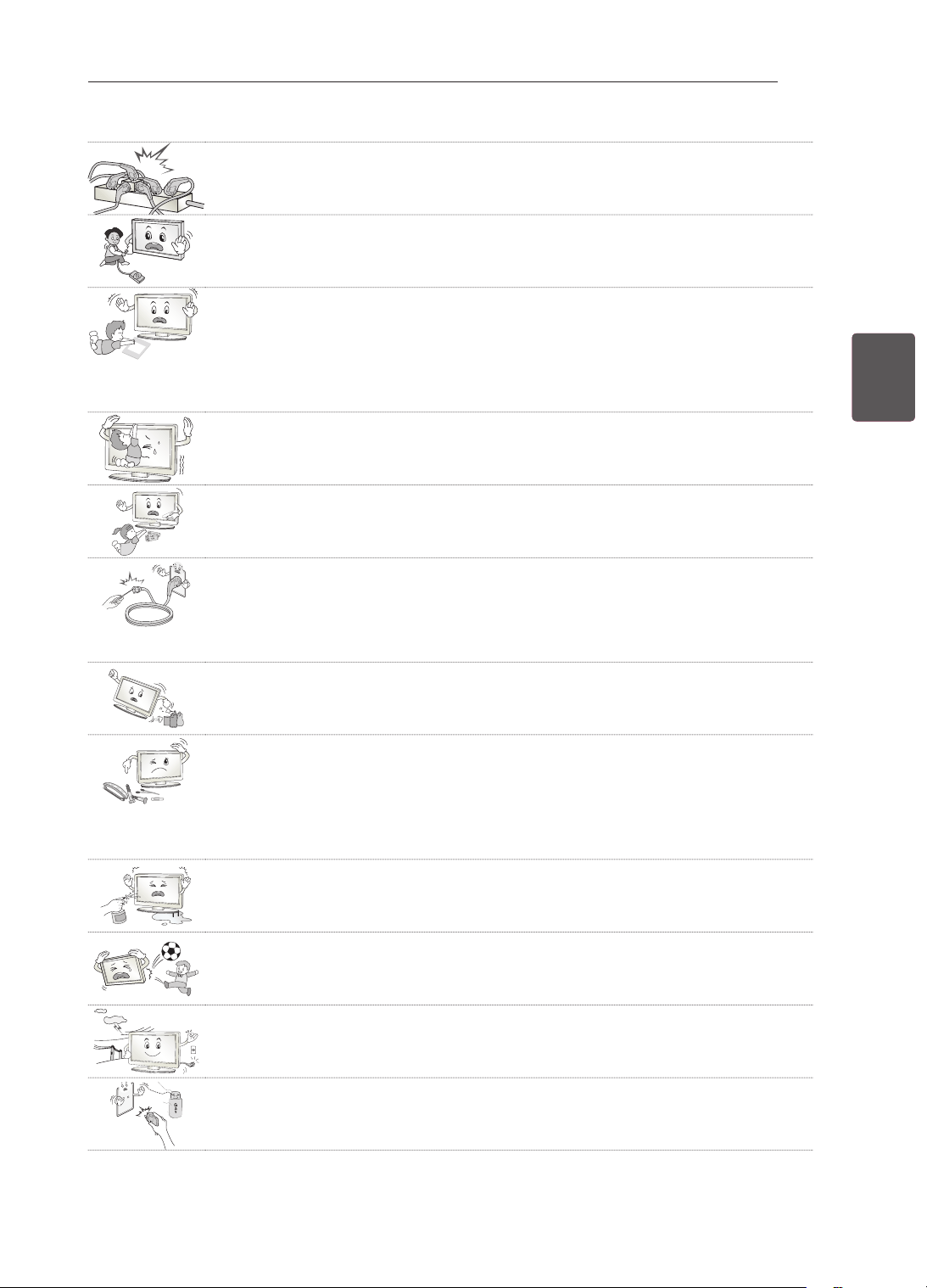
5
PTPORTUGUÊS
INSTRUÇÕESDESEGURANÇA
Nãoliguedemasiadosaparelhoseléctricosnumúnicoblocodetomadaseléctri-
cas.
Casocontrário,istopoderáprovocarumincêndiodevidoaosobreaquecimento.
Nãodeixecairoprodutonemdeixequeestecaiaacidentalmenteaoligarapare-
lhosexternos.
Casocontrário,poderáprovocarferimentosoudanosdoproduto.
Desiccant
Mantenhaomaterialdissecadordaembalagemouapelículadevinilforadoal-
cancedascrianças.
Omaterialdissecadorénocivoseforingerido.Emcasodeingestãoacidental,
deve-seforçaropacienteavomitare,deseguida,dirigir-seaohospitalmais
próximo.Alémdisso,apelículadevinilpodeprovocarasfixia.Mantenha-aforado
alcancedascrianças.
Nãodeixeosseusfilhostreparemouagarrarem-seàTV.
Casocontrário,aTVpodecair,provocandoferimentosgraves.
Elimineaspilhasusadascomcuidadoparaevitarqueumacriançaasingira.
Seumacriançaingerirpilhasusadas,leve-aimediatamenteaummédico.
Nãoinsiraumcondutor(talcomoumavaretametálica)numadasextremidadesdo
cabodealimentaçãoseaoutraextremidadeestiverligadaaoterminaldeentrada
naparede.Nãodevetambémtocarnocabodealimentaçãodepoisdeoligarao
terminaldeentradanaparede.
Podesofrerumchoqueeléctrico.(Dependendodomodelo)
Nãocoloquenemguardesubstânciasinflamáveispertodoproduto.
Existeumriscodeexplosãoouincêndiodevidoaummanuseamentonegligente
dassubstânciasinflamáveis.
Nãodeixecairobjectosmetálicoscomop.ex.moedas,ganchosdecabelo,vare-
tasouaramesparadentrodoproduto,nemobjectosinflamáveiscomop.ex.papel
oufósforos.Ascriançastêmdeprestarumaatençãoespecial.
Existeoperigodechoqueeléctrico,incêndioouferimentos.Sedeixarcairum
objectoestranhodentrodoproduto,desligueocabodealimentaçãoeentreem
contactocomocentrodeassistência.
Nãopulverizeáguanoprodutonemoesfreguecomumasubstânciainflamável
(diluenteoubenzeno).Seofizer,poderádarorigemaincêndiosouchoqueseléc-
tricos.
Evitequeoprodutosofrachoquesdeimpactos,aquedadeobjectosparadentro
doproduto,nembatanoecrãcomnada.
Podesofrerferimentosouoprodutopodeficardanificado.
Nuncatoquenesteprodutonemnaantenaduranteumtrovãoourelâmpagos.
Podesofrerumchoqueeléctrico.
Nuncatoquenatomadadaparedeemcasodefugadegás.Nestecaso,deve
abrirasjanelasegarantirumaventilaçãosuficiente.
Umafaíscapodedarorigemaumincêndioouqueimaduras.
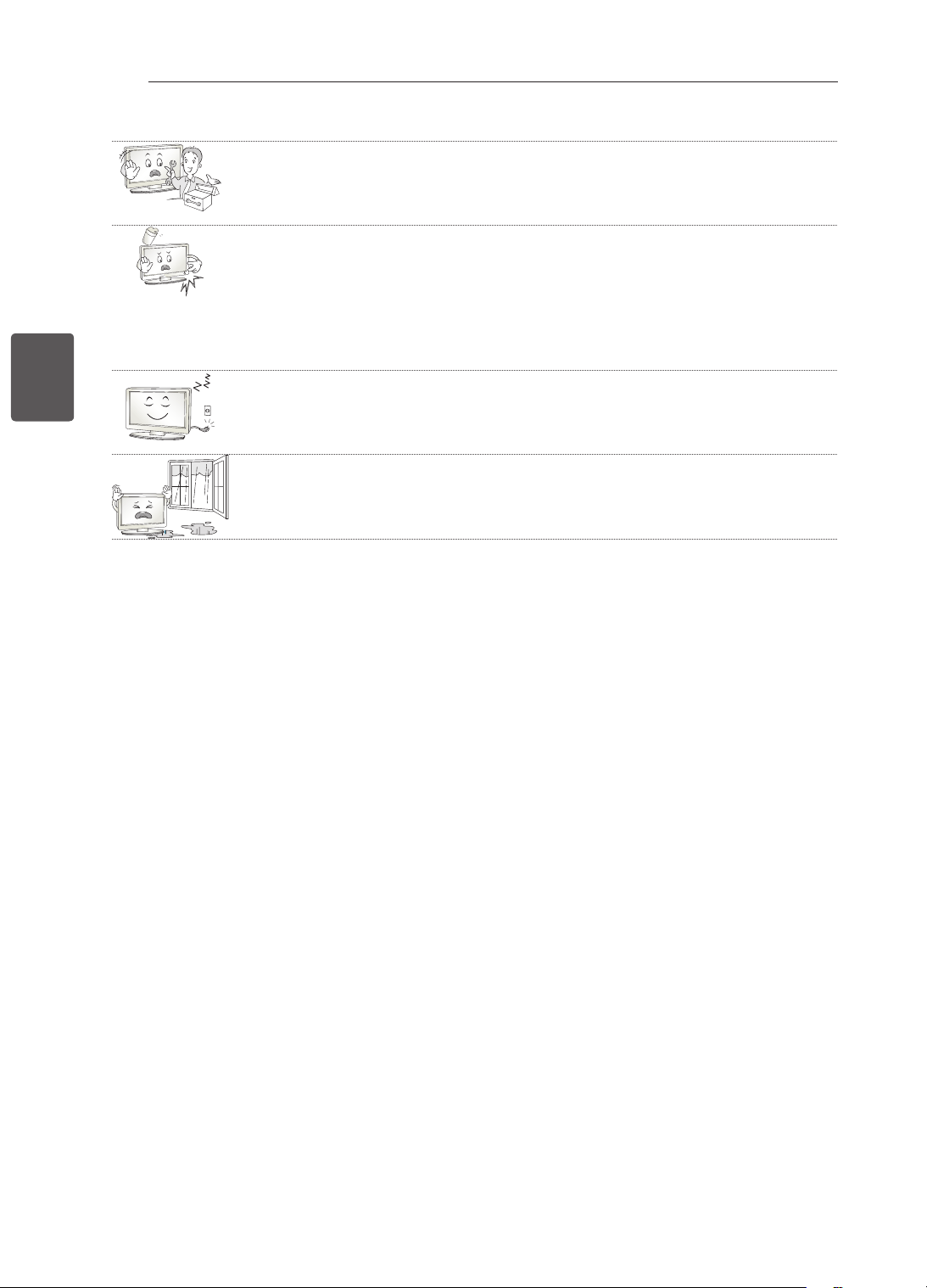
6
PT
PORTUGUÊS
INSTRUÇÕESDESEGURANÇA
Nãodesmontar,repararoumodificaroprodutosemajudadeumespecialista.
Seofizer,poderádarorigemaincêndiosouchoqueseléctricos.
Contacteocentrodeassistênciaparaqualquerverificação,calibraçãoourepara-
ção.
Seocorrerumadasseguintessituações,desligueoprodutoimediatamenteda
tomadaeentreemcontactocomoseuserviçodeassistêncialocal.
- Oprodutosofreumchoquedeimpacto
- Oprodutoficoudanificado
- Objectosestranhosentraramnoproduto
- Oprodutodeitafumooutemumcheiroestranho
Istopoderáprovocarumincêndioouumchoqueeléctrico.
Senãoutilizaroprodutoduranteumlongoperíododetempo,desligueafichada
tomada.
Aacumulaçãodepópodeprovocarumincêndioouadeterioraçãodoisolamento
podeprovocarfugaseléctricas,choqueseléctricosouincêndios.
Oaparelhonãodeveserexpostoagotasousalpicosenãodevemsercolocados
objectoscomlíquidos,talcomovasos,emcimadoaparelho.
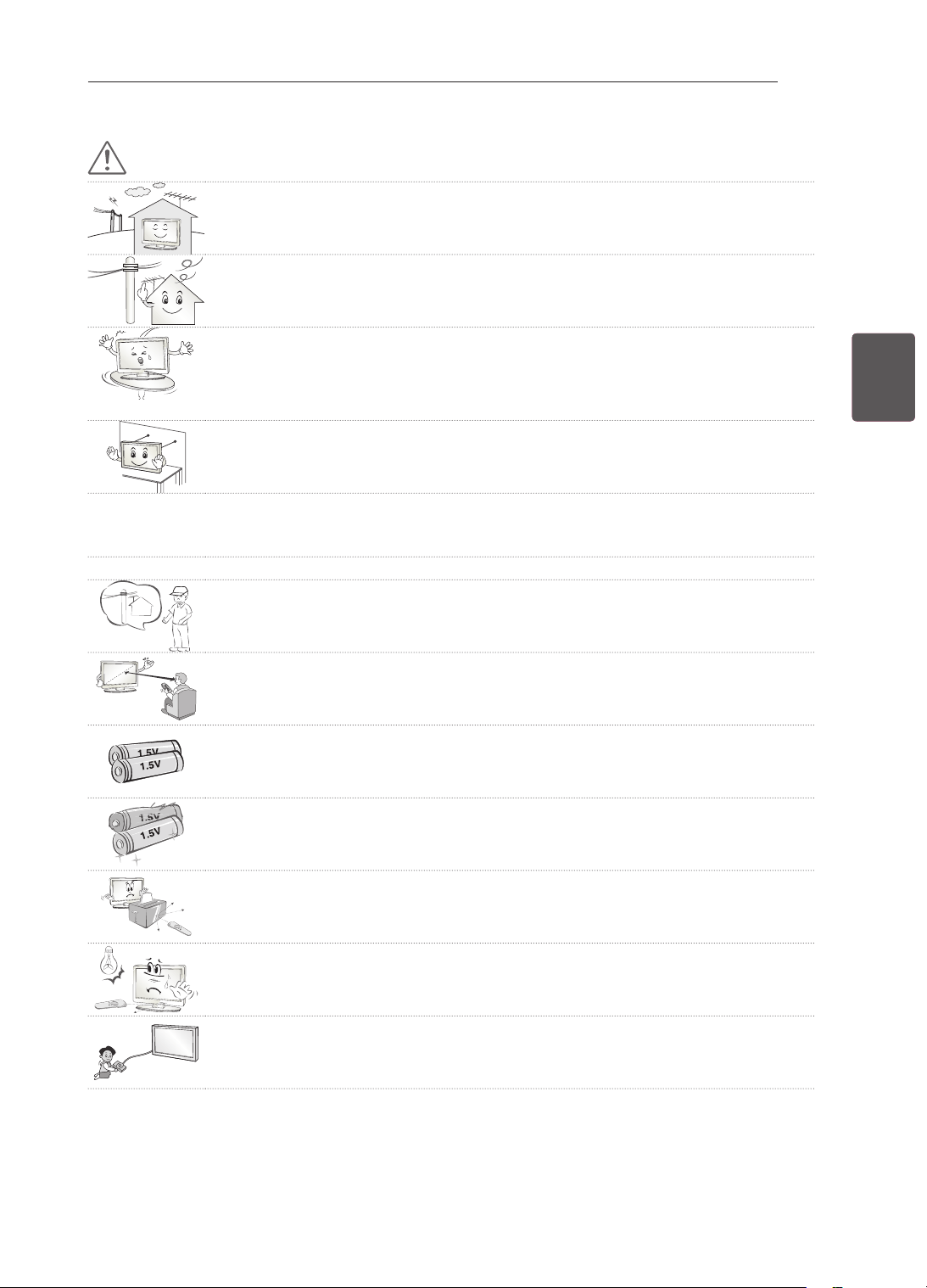
7
PTPORTUGUÊS
INSTRUÇÕESDESEGURANÇA
ATENÇÃO
Instaleoprodutonumlocalquenãoestejaexpostoaondasderádio.
Devegarantirumadistânciasatisfatóriaentreumaantenaexterioreaslinhaseléc-
tricasparaevitarqueaantenatoquenestas,mesmosecair.
Istopodeprovocarumchoqueeléctrico.
Nãoinstaleoprodutoemlocaiscomop.ex.prateleirasinstáveisousuperfíciesin-
clinadas.Deveevitartambémlocaissujeitosavibraçãoousemsuportesuficiente.
Casocontrário,oprodutopodecairouvirar-se,provocandoferimentosoudanos
noproduto.
SeinstalaraTVnumabase,podeterdetomarmedidasparaevitarqueoproduto
sevire.Casocontrário,oprodutopodecair,provocandoferimentosgraves.
Sequisermontaroprodutonumaparede,monteainterfacedemontagemVESApadrão(peçasop-
cionais)napartedetrásdoproduto.SeinstalaraTVcomosuportedemontagemdaparede(peças
opcionais),devefixá-locuidadosamentedemodoanãocair.
Deveutilizarexclusivamenteacessórios/fixaçõesespecificadospelofabricante.
Consulteumtécnicoespecializadoparainstalaraantena.
Istopoderáprovocarumincêndioouriscodechoqueeléctrico.
5~7 times
Recomendamosmanterumadistânciamínimaequivalentea5-7xaotamanho
diagonaldoecrãparaverTV.
SevirTVdurantelongosperíodosdetempo,asuavisãopodeficardesfocada.
Utilizeapenasostiposdepilhasespecificadas.
Podeprovocardanosnocontroloremoto.
Nãomisturepilhasnovascomusadas.
Podeprovocarsobreaquecimentoefuganasbaterias.
Certifique-sedequenãoexistemobjectosentreocontroloremotoeorespectivo
sensor.
Osinaldocontroloremotopodesofreperturbaçõesdevidoàluzdosolououtras
fontesdeluzfortes.Nestecaso,escureçaadivisão.
Aoligardispositivosexternos,comop.ex.consolasdejogosdevídeo,certifique-
sedequeoscabosdeligaçãotêmcomprimentosuficiente.
Casocontrário,oprodutopodecair,provocandoferimentosoudanosnoproduto.
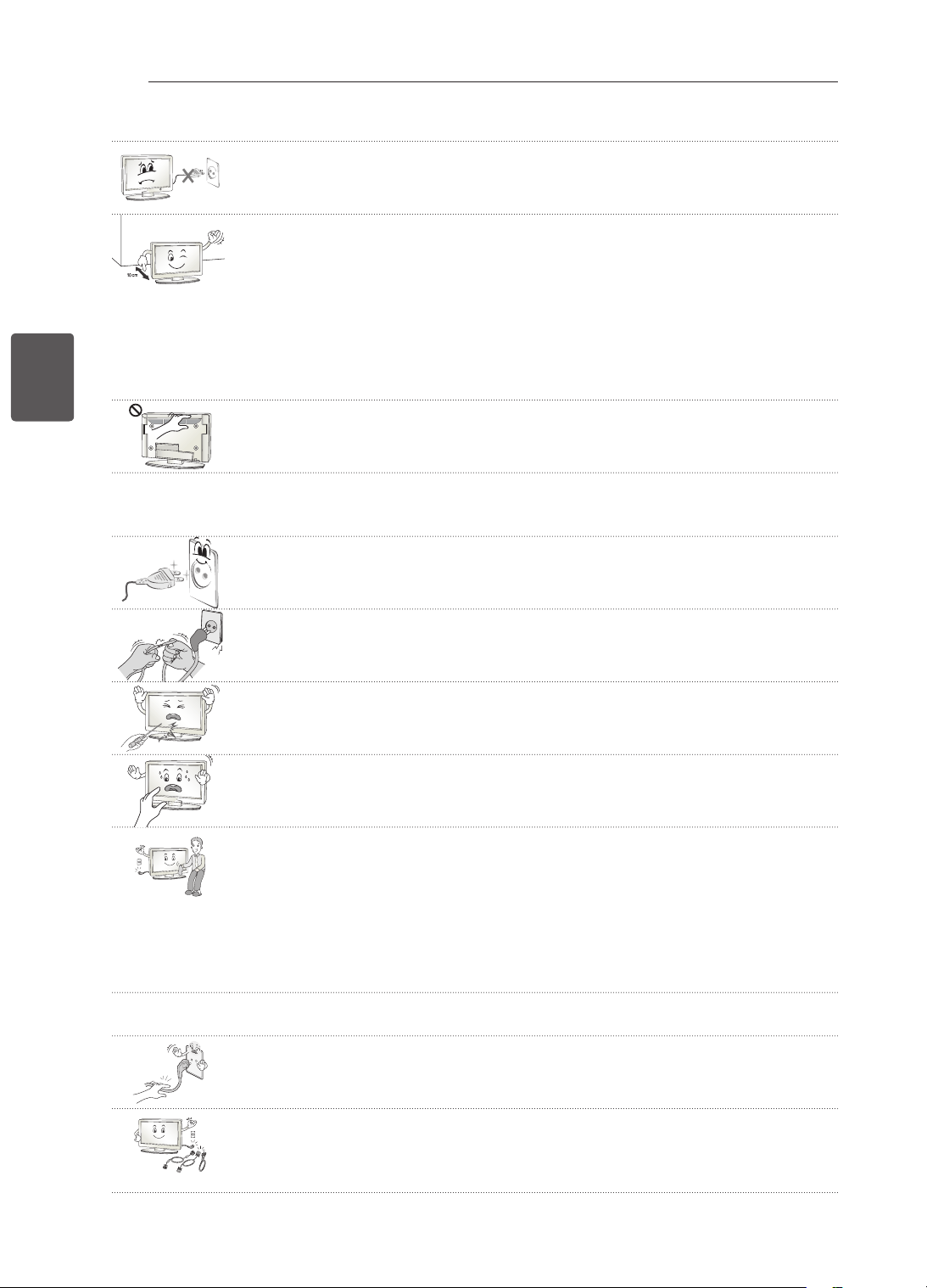
8
PT
PORTUGUÊS
INSTRUÇÕESDESEGURANÇA
Nãoligue/desligueoprodutoretirando/colocandoafichadatomada.(Nãoutilizea
fichaeléctricacomointerruptor.)
Istopoderáprovocardanosmecânicosouchoqueseléctricos.
Sigaasseguintesinstruçõesdeinstalaçãoparaevitarosobreaquecimentodo
produto.
- Adistânciaentreoprodutoeaparededevesersuperiora10cm.
- Nãoinstaleoprodutonumlocalsemventilação(p.ex.numaprateleiraounum
armário).
- Nãoinstaleoprodutoemcimadealcatifasoualmofadas.
- Certifique-sedequeventilaçãonãoficaobstruídaporumatoalhaouumacorti-
na.
Casocontrário,istopoderáprovocarumincêndio.
Tenhacuidadoparanãotocarnasaberturasdeventilaçãoquandoassistiratele-
visãoduranteperíodosprolongados,umavezqueestaspodemaquecer.Istonão
afectaofuncionamentoouodesempenhodoproduto.
Deveverificarperiodicamenteocabodoseuaparelho.Separecerestardanificadooudeteriorado,
devedesligá-lo,deixardeutilizaroaparelhoedirigir-seaumtécnicodeassistênciaautorizadopara
osubstituirporumcaboidêntico.
Eviteaacumulaçãodepónospinosdafichaounatomada.
Istopodeprovocarperigodeincêndio.
Protejaocabodealimentaçãocontradanosfísicosoumecânicos,comoser
torcido,dobrado,comprimido,entaladonumaportaoupisado.Presteatençãoàs
fichas,àstomadaseléctricaseaopontoemqueocabosaidoaparelho.
Nãoexerçaumapressãofortesobreopainelcomumamãoouumobjectoafiado,
comop.ex.umprego,lápisoucaneta,nemfaçariscos.
Evitetocarnoecrãoumanterosdedosemcontactocomoecrãdurantelongos
períodosdetempo.Aofazê-lopodeproduziralgunsefeitosdedistorçãotemporá-
riosnoecrã.
Quandolimparoprodutoerespectivoscomponentes,desligueprimeiroafichada
tomadaelimpe-ocomumpanosuave.Seexercerumapressãoforte,poderiscar
oudescoloraroaparelho.Nãopulverizeáguanemlimpecomumpanomolhado.
Nuncautilizelimpa-vidros,abrilhantadoresindustriaisouparaautomóveis,abra-
sivosoucera,benzeno,álcool,etc.,ououtrosmateriaisquepossamdanificaro
produtoeorespectivopainel.
Casocontrário,istopoderáprovocarumincêndio,choqueeléctricooudanosno
produto(deformação,corrosãooufracturas).
Seoaparelhoestiverligadoàtomadadeparede,estenãosedesligadafontedealimentaçãoCA
mesmoquedesligueoaparelhoatravésdointerruptor.
Peguenafichaparadesligarocabo.
Seosfiosdentrodocabodealimentaçãoestiveremdesligado,istopoderáprovo-
carumincêndio.
Aomudaroprodutodesítio,devedesligarprimeiroaalimentação.Depois,desli-
gueoscabosdealimentação,oscabosdaantenaetodososcabosdeligação.
ATVouocabodealimentaçãopodemficardanificados,podendoprovocarum
riscodeincêndioouumchoqueeléctrico.
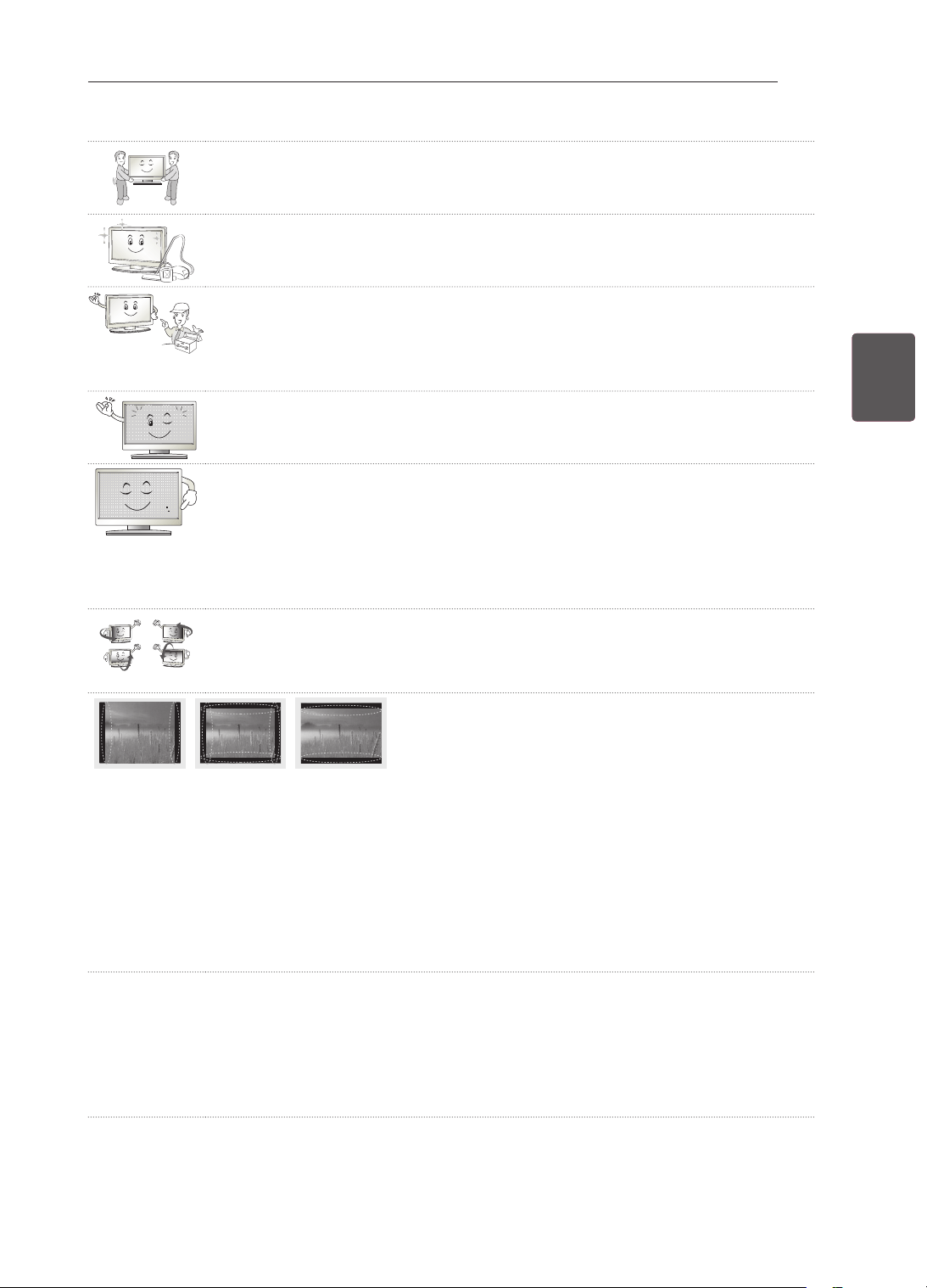
9
PTPORTUGUÊS
INSTRUÇÕESDESEGURANÇA
Aodesembalaroumudaroprodutodesítio,devetrabalharemconjuntocomoutra
pessoaporqueoprodutoépesado.
Casocontrário,poderáprovocarferimentos.
Contacteocentrodeassistênciaumavezporanoparalimparoscomponentes
internosdoprojector.
Opóacumuladopodeprovocaravariasmecânicas.
Parareparações,contacteaassistênciatécnicaqualificada.Énecessáriaarepa-
raçãoseoaparelhosofreuquaisquerdanos,taiscomodanosnocabodealimen-
taçãoounafichadeligação,emcasodederramedelíquidosouquedadeobjec-
tossobreoaparelho,seestefoiexpostoàchuvaouhumidade,senãofuncionar
correctamenteousetivercaídoaochão.
Severificarqueoequipamentoestáfrio,podeocorrerumaligeiraoscilaçãoquan-
doforligado.Istoénormal,nãohánadadeerradocomoequipamento.
Opaineléumprodutodealtatecnologiacomumaresoluçãodedoismilhõesa
seismilhõesdepixéis.Poderáverpequenospontospretose/oupontoscoloridos
(vermelhos,azuisouverdes)dotamanhode1ppmnopainel.Istonãosignifica
queoprodutoestejaavariadonemafectaodesempenhonemafiabilidadedo
produto.
Estefenómenotambémpodeocorreremprodutosdeterceirosenãodádireitoa
umatrocaouaumreembolso.
Opainelpodeapresentarumaluminosidadeouumacordiferenteemfunçãoda
suaposiçãodevisualização(esquerda/direita/cima/baixo).
Estefenómenodeve-seàscaracterísticasdopainel.Nãotemavercomodesem-
penhodoprodutonemsignificaumaavaria.
Avisualizaçãodeumaimagemfixa(p.ex.logótipodeumcanal,menunoecrã,cenadeumjogo
devídeo)duranteumlongoperíododetempopodedanificaroecrã,resultandonaretençãoda
imagem,fenómenoesteconhecidocomofixaçãodaimagem.Agarantiadoprodutonãoabrangea
fixaçãodaimagem.
Paraevitaraocorrênciadestefenómeno,evitevisualizarumaimagemfixanoecrãdasuatelevisão
porumperíododetempoprolongado(2oumaishorasparaLCD,1oumaishorasparaplasma).
SeviraTVcomumaproporçãode4:3porumperíododetempoprolongado,poderáresultarna
fixaçãodaimagemnasmargensdopainel.
Estefenómenotambémpodeocorreremprodutosdeterceirosenãodádireitoaumatrocaoua
umreembolso.
Somgerado
Estalidos:osestalidosquepodeouviraoveroudesligaraTVsãogeradospelacontracçãotermo-
plástica,resultantedatemperaturaedahumidade.Esteruídoécomumemprodutosqueexijam
umadeformaçãotérmica.Zumbidonocircuitoeléctrico/painel:umcircuitodecomutaçãodealta
velocidade,responsávelporfornecerumagrandequantidadedecorrenteparacolocarumproduto
emfuncionamento,geraumruídodebaixonível.Variaemfunçãodoproduto.
Osomqueégeradonãoafectaodesempenhonemafiabilidadedoproduto.

10
PT
PORTUGUÊS
INSTRUÇÕESDESEGURANÇA
Verimagensem3D(apenasparamodelos3D)
AVISO
Ambientedevisualização
Duraçãodevisualização
- Aoverconteúdos3D,devefazerumapausade5-15minutosacadahora.Avisualizaçãodeconte-
údos3Dduranteumlongoperíododetempopodeprovocardoresdecabeça,fadigaoucansaço
dosolhos.
Pessoascomataquesdefotossensibilizaçãooudoençascrónicas
Algunsutilizadorespodemterumataqueouapresentaroutrossintomasanormaisquandoexpostosa
umaluzintermitenteouumpadrãoparticulardosconteúdos3D.
Nãovejavídeos3Dsesentirnáuseas,estivergrávidae/outiverumadoençacrónicacomop.ex.
epilepsia,problemascardíacos,hipertensão/hipotensão,etc.
Osconteúdos3Dnãosãorecomendadosparapessoasquesoframde"cegueiraestéreo"ou"anomalia
estéreo".Podemverimagensduplasousentirdesconfortonavisualização.
Setiverestrabismo,ambliopiaouastigmatismo,podeterproblemasemdetectaraprofundidadeecar
facilmentecansadodevidoàsimagensduplas.Aconselha-sefazerpausasmaisfrequentesdoqueum
adultonormal.
Seasuavisãovariarentreoseuolhodireitoeoseuolhoesquerdo,testeasuavisãoantesdever
conteúdos3D.
Sintomasqueexigeminterromperouabster-sedeverconteúdos3D
Nãovejaconteúdos3Dsesesentircansadooucomfaltadesono,excessodetrabalhoouébrio.
Setiverestessintomas,paredeusar/verconteúdos3Dedescanseatéosintomapassar.
- Consulteoseumédicoseossintomascontinuarem.Ossintomaspodemincluirdoresdecabeça,
doresnogloboocular,tonturas,náuseas,palpitações,visãodesfocada,desconforto,imagemdu-
pla,desconfortooucansaçovisual.
11
PTPORTUGUÊS
INSTRUÇÕESDESEGURANÇA
ATENÇÃO
Ambientedevisualização
Distânciadevisualização
- Mantenhaumadistânciamínimaequivalenteaodobrodotamanhodiagonaldoecrãparavercon-
teúdos3D.Sesentirdesconfortoaoverconteúdos3D,afaste-semaisdaTV.
Idadedevisualização
Bebés/crianças
- Autilização/visualizaçãodeconteúdo3Dporcriançasdeidadeinferiora5anoséproibida.
- Vistoqueasuavisãoaindaseencontraemdesenvolvimento,ascriançascomidadeinferiora10
anospodemreagircomexageroouficardemasiadoexcitadas(porexemplo,podemtentartocarno
ecrãoutentarentrarparadentrodele).Énecessárioprestarumaatençãoespecialacriançasque
vejamconteúdos3D,devendosersempresupervisionadas.
- Ascriançastêmumamaiordisparidadebinoculardeapresentaçõesem3Ddoqueosadultos,
vistoqueadistânciaentreosseusolhoséinferioràdosadultos.Porestarazão,vêemumamaior
profundidadeestereoscópicaemcomparaçãocomosadultosparaamesmaimagem3D.
Adolescentes
- Osadolescentescomidadeinferiora19anospodemterumareacçãosensíveldevidoàestimula-
çãodaluzdosconteúdos3D.Aconselhe-osaevitaremverconteúdos3Ddurantelongosperíodos
detemposeestiveremcansados.
Idosos
- Emcomparaçãocomosjovens,osidosospodemvermenosoefeito3D.Nãosedevemaproximar
maisdaTVdoqueadistânciarecomendada.
Cuidadosatercomóculos3D
Deveusaróculos3DdaLG.Casocontrário,poderánãoconseguirvervídeos3Dcorrectamente.
Nãoutilizeosóculos3Demvezdosseusóculosnormais,desoloudeprotecção.
Autilizaçãodeóculos3Dmodicadospodecansarosolhosoudistorceraimagem.
Nãomantenhaosseusóculos3Datemperaturasextremamentealtasoubaixas.Seozer,carão
deformados.
Osóculos3Dsãofrágeisecamcomriscosfacilmente.Utilizesempreumpanomacioelimpopara
limparaslentes.Nãorisqueaslentesdosóculos3Dcomobjectosaadosnemutilizeprodutos
químicosparaaslimpar.
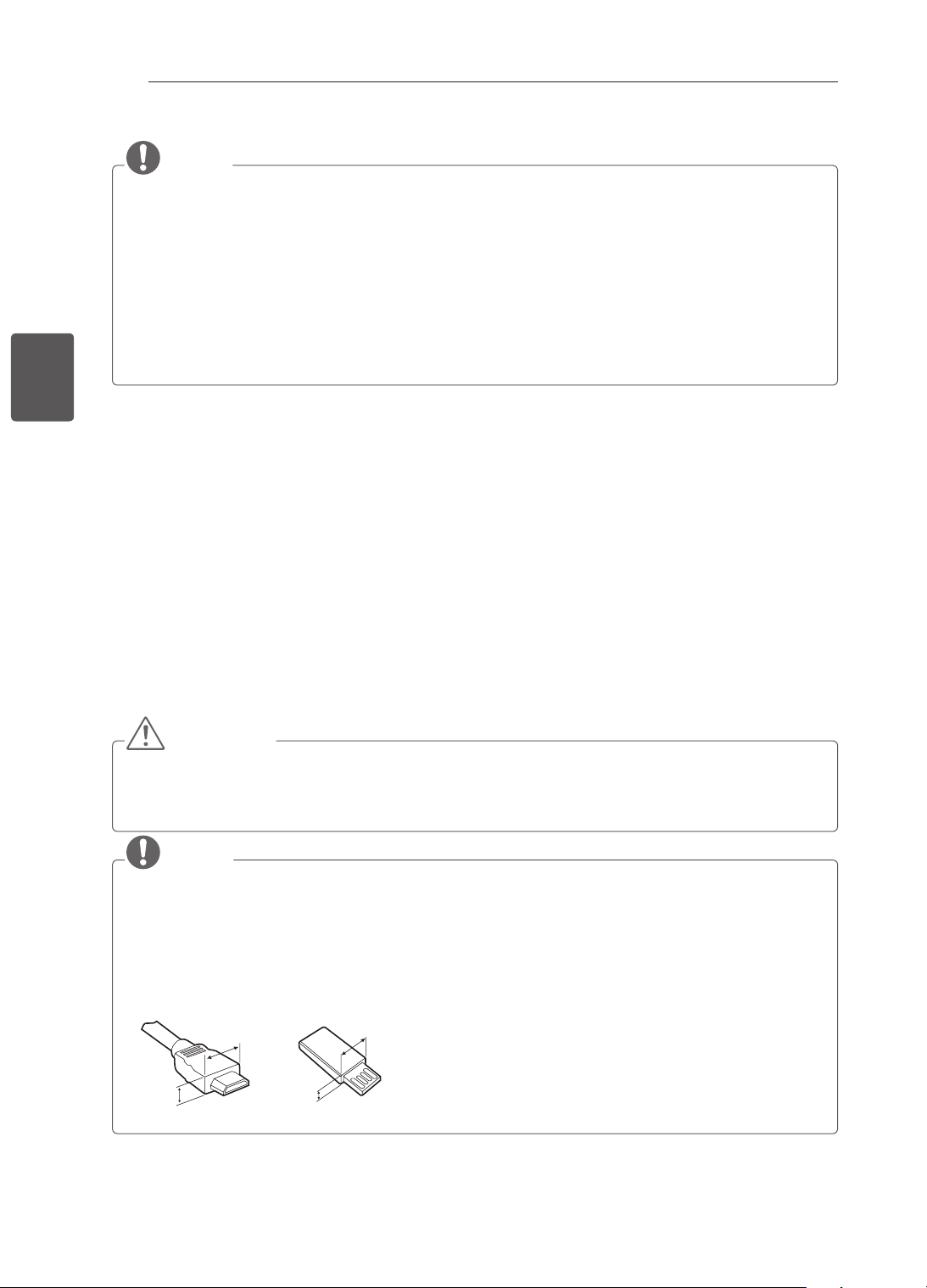
12
PT
PORTUGUÊS
PROCEDIMENTODEINSTALAÇÃO/MONTAGEMEPREPARAÇÃO
NOTA
AimagemindicadapodediferirdasuaTV.
AOSD(OnScreenDisplay-Visualizaçãonoecrã)dasuaTVpodeserumpoucodiferenteda
apresentadanestemanual.
Osmenuseopçõesdisponíveispodemserdiferentesdafontedeentradaoudomodelodeproduto
queestáautilizar.
PoderãoseradicionadasnovasfuncionalidadesaestaTVnofuturo.
ATVpodesercolocadaemmododeesperaparareduziroconsumoeléctrico.Senãovirtelevisão
durantealgumtempo,oaparelhodeveserdesligadoparareduziroconsumodeenergia.
Aenergiaconsumidaduranteautilizaçãopodesersignificativamentereduzidaseonívelde
luminosidadedaimagemforreduzido,diminuindoassimocustogeraldefuncionamento.
PROCEDIMENTODEINSTALAÇÃO
1 Abraaembalagemecertique-sedequeestãoincluídostodososacessórios.
2 InstaleosuportenaTV.
3 LigueumdispositivoexternoàTV.
MONTAGEMEPREPARAÇÃO
Desembalar
Veriqueseacaixadoprodutocontémositensabaixodescritos.Sefaltaremalgunsacessórios,contacte
ofornecedorlocalondecomprouoproduto.Asilustraçõesdestemanualpodemserdiferentesdoproduto
edoitemreais.
ATENÇÃO
Paragarantirasegurançaeavidaútilprolongadadoaparelho,nãoutilizenenhumitempirateado.
Quaisquerdanosoulesõesdecorrentesdautilizaçãodeitenspirateadosnãoestãoabrangidospelagarantia.
Algunsmodelosincluemumapelículafinanoecrãeestanãodeveserremovida.
NOTA
Ositensfornecidoscomoprodutopodemserdiferentesconsoanteomodelo.
Asespecificaçõesdoprodutoouosconteúdosdestemanualpodemseralteradossemavisoprévio
devidoàactualizaçãodasfunçõesdoproduto.
Paraumaligaçãooptimizada,oscabosHDMIeosdispositivosUSBdevemterchanfradurascom
menosde10mmdeespessurae18mmdelargura.UtilizeumcabodeextensãoquesuporteUSB2.0
casoocaboUSBoumemorystickUSBnãoencaixenaportaUSBdasuaTV.
A
B
A
B
*A
<
=
10mm
*B
<
=
18mm
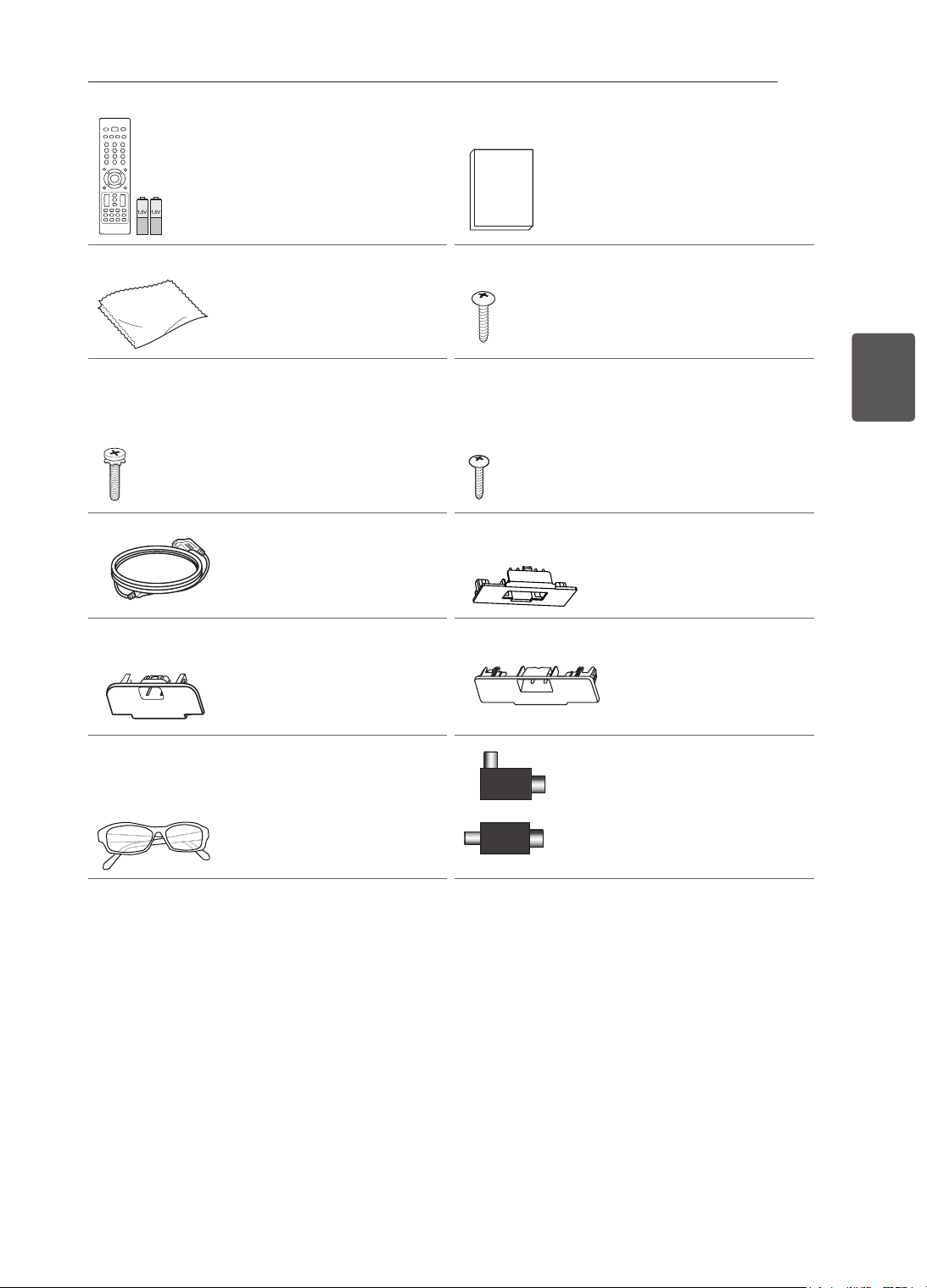
13
PTPORTUGUÊS
MONTAGEMEPREPARAÇÃO
Controloremotoepilhas
(AAA)
(Consulteap.27,28) Manualdeinstruções
Panodelimpeza
(Dependendodomodelo)
Utilizeestepanopara
removeropódacaixa.
Parafusosdosuporte
2decada,P4x16
(Apenas22CS46**,
22CS47**)
(Consulteap.18)
Parafusosdosuporte
8decada,M4x20
(Apenas26/32/42CS46**,
26/32/42CS47**,
32/42LS34**,
32/42LM34**)
(Consulteap.18,19)
Parafusodemontagem
numamesa
(Apenas26/32/42CS46**,
26/32/42CS47**,
32/42LS34**,
32/42LM34**)
(Consulteap.20)
Cabodealimentação
Coberturadeprotecção
(Apenas26CS46**,
26CS47**)
(Consulteap.22)
Coberturadeprotecção
(Apenas32CS46**,
32CS47**,32LS34**,
32LM34**)
(Consulteap.22)
Coberturadeprotecção
(Apenas42CS46**,
42CS47**,42LS34**,
42LM34**)
(Consulteap.22)
Óculosdecinema3D
Onúmerodeóculos3D
podevariaremfunçãodo
modelooudopaís.
(Apenas32/42LM34**)
ou
Isolador
(Dependendodomodelo)
(
Consulteap.14)
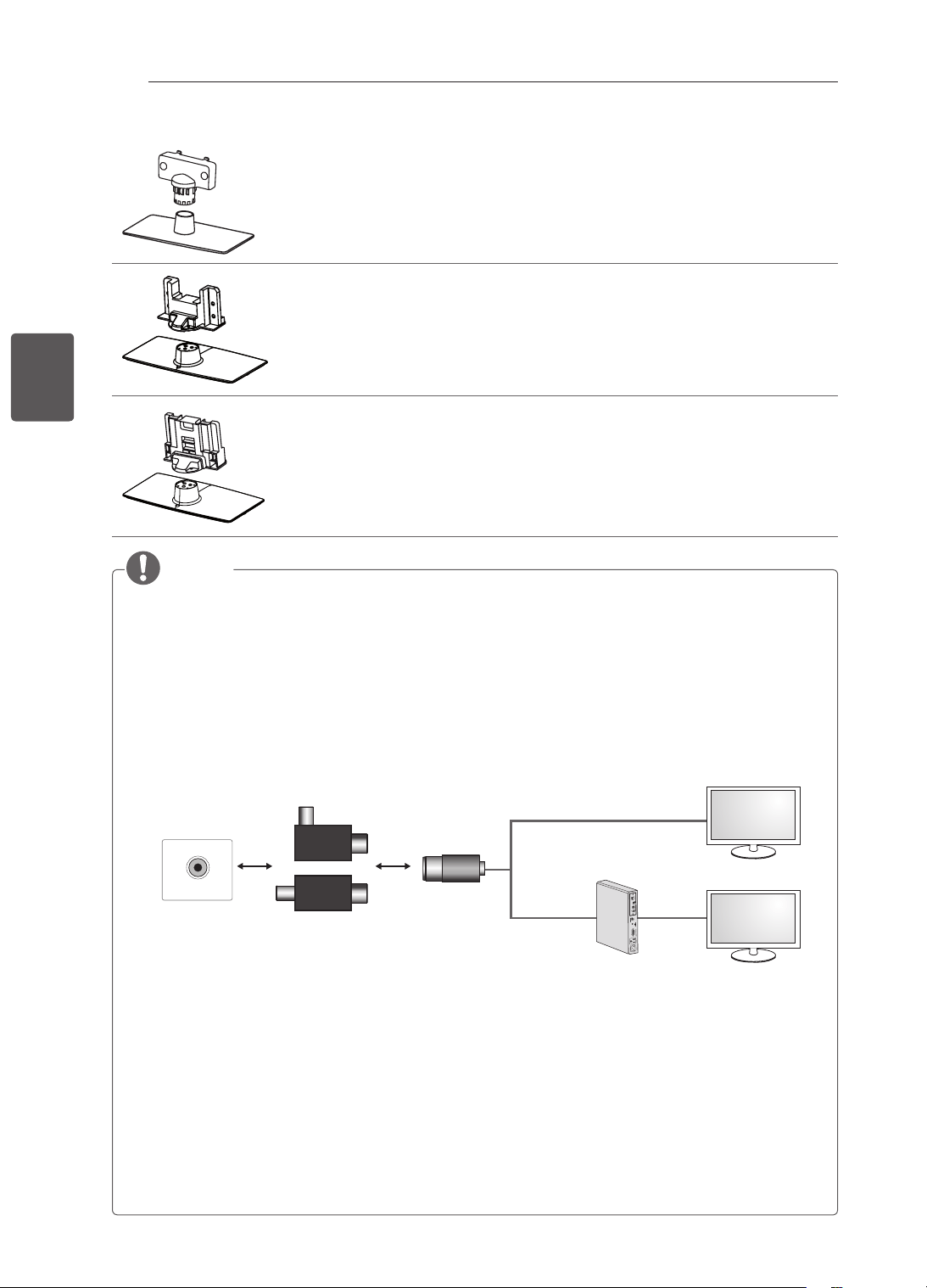
14
PT
PORTUGUÊS
MONTAGEMEPREPARAÇÃO
Corpodosuporte/basedosuporte
(Apenas22CS46**,22CS47**)
(Consulteap.18)
Corpodosuporte/basedosuporte
(Apenas26CS46**,26CS47**)
(Consulteap.18)
Corpodosuporte/basedosuporte
(Apenas32/42CS46**,32/42CS47**,32/42LS34**,32/42LM34**)
(Consulteap.19)
NOTA
Guiadeinstalaçãodoisoladordaantena
- UtilizeparainstalaraTVnumlocalcomdiferençadetensãoentreaTVeoGNDdosinalde
antena.
»
CasoexistadiferençadetensãoentreaTVeoGNDdosinaldeantena,aantenapodeaquecer
excessivamente,oquepoderáprovocarumacidente.
- ÉpossívelmelhorarasegurançaaoverTVremovendodeformaeficienteatensãodaenergiada
antenadeTV.Érecomendadomontaroisoladornaparede.Casonãosejapossívelmontarna
parede,coloque-onaparede.Evitedesligaroisoladordaantenaapósainstalação.
- Antesdeiniciar,certifique-sedequeaantenadeTVestáligada.
ANTENNA/
CABLE IN
Cabo/Antena
Parede
Isolador
1.LigaràTV.
2.LigaràBox.
ou
Ligueumadaspontasdoisoladoràentradadecabo/antenaeaoutraaotelevisorouàbox.
“Equipamentoligadoàligaçãoprotectoraàterradainstalaçãodoedifícioatravésdaligaçãode
alimentaçãoouatravésdeoutroequipamentocomligaçãoprotectoraàterra-eaumsistemade
distribuiçãodecabosatravésdeumcabocoaxialpoderá,emalgunscasos,criarriscosdeincêndio.
Destaforma,aligaçãoaumsistemadedistribuiçãodecabostemdeserfornecidaatravésdeum
dispositivocomisolamentoeléctricoabaixodeumdeterminadointervalodefrequência(isolador
galvânico,consulteEN60728-11)”
AoaplicaroisoladordeRF,podeocorrerumaligeiraperdadesensibilidadedosinal.
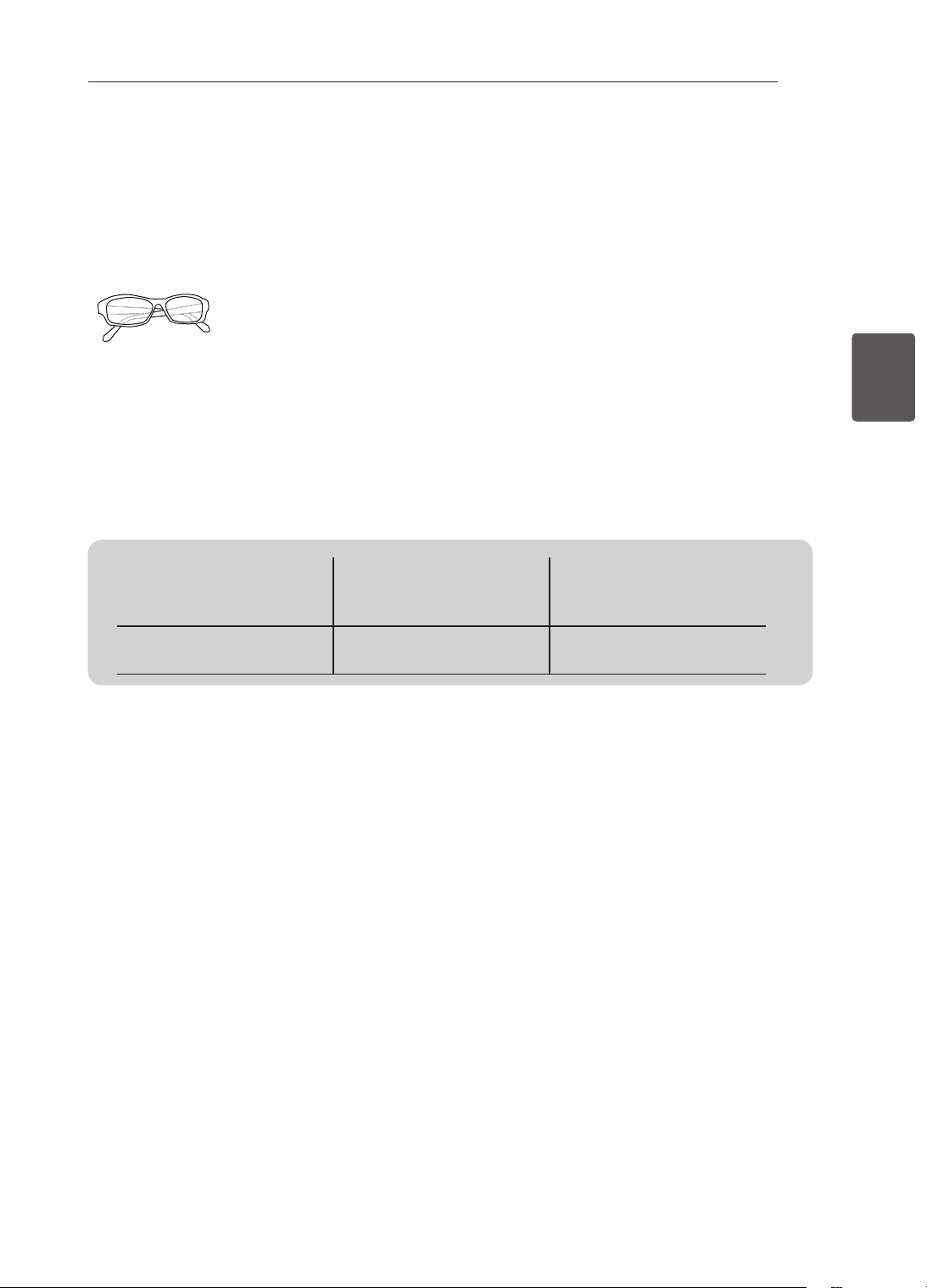
15
PTPORTUGUÊS
MONTAGEMEPREPARAÇÃO
Objectosadquiridosemseparado
Ositensvendidosseparadamentepodemseralteradosoumodicadosparamelhoraraqualidadesem
qualquernoticaçãoprévia.
Contacteoseurevendedorparacomprarestesobjectos.
Estesaparelhossófuncionamcomdeterminadosmodelos.
AG-F3**
Óculosdecinema3D
Onomeeodesigndo
modelopodemseralterados,
dependendodaactualização
dasfunçõesdoprodutoedas
circunstânciasoupolíticasdo
fabricante.
Compatibilidade
32/42/LM34**
32/42LS34**,
22/26/32/42CS46**,
22/26/32/42CS47**
AG-F3**
Óculosdecinema3D
•
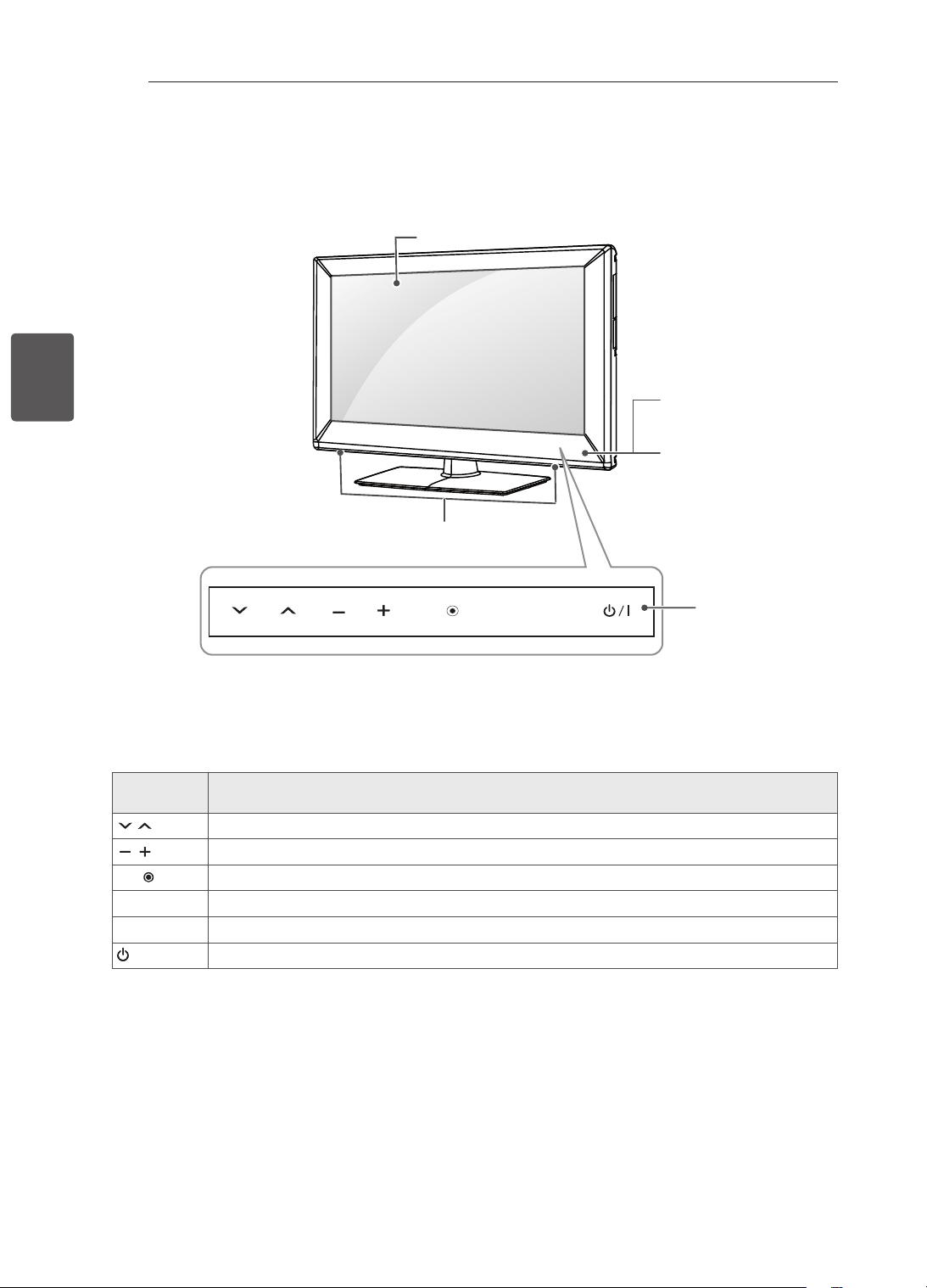
16
PT
PORTUGUÊS
MONTAGEMEPREPARAÇÃO
Peçasebotões
Botõesde
toque
Descrição
H
Percorreosprogramasgravados.
H
Ajustaoníveldevolume.
OK
Seleccionaaopçãodemenuqueestárealçadaouconfirmaumaintrodução.
SETTINGS Acedeaomenuinicialouguardaoqueoutilizadorintroduziuesaidosmenus.
INPUT Alteraafontedeentrada.
/I
Ligaedesligaaalimentação.
1 Sensorinteligente-Ajustaaqualidadedeimagemealuminosidadecombasenoambienteenvolvente.
2 Todososbotõessãosensíveisaotoqueepodemseractivadoscomumsimplestoquedodedo.
INPUT
OK
SETTINGS
Botõesdetoque
2
Indicadordepotência
Controloremotoe
sensoresinteligentes
1
Imagem
Colunas
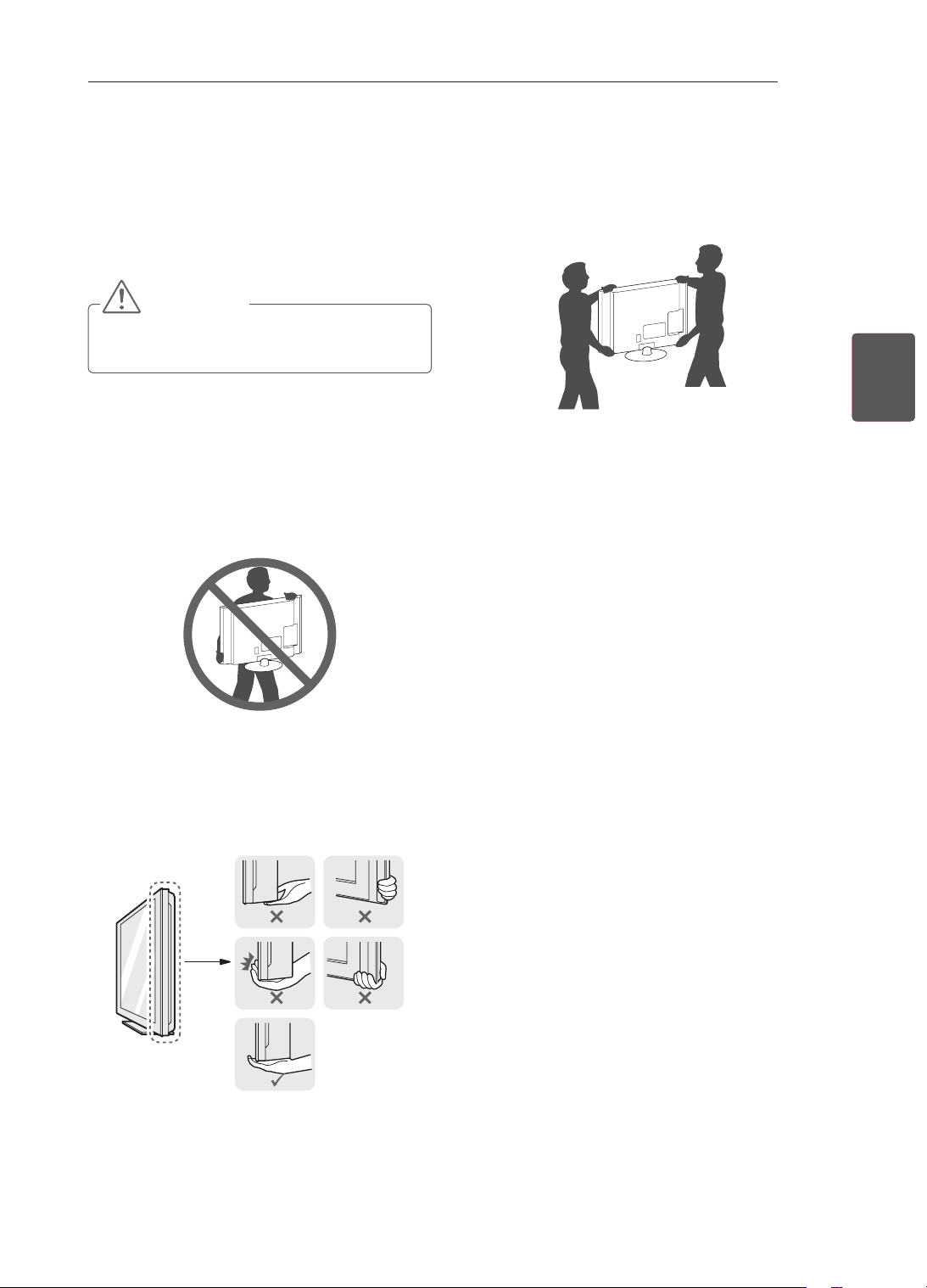
17
PTPORTUGUÊS
MONTAGEMEPREPARAÇÃO
LevantaredeslocaraTV
QuandodeslocaroulevantaraTV,leiaas
seguintesinstruçõesparaimpedirqueesta
queriscadaoudanicadaeparagarantirum
transporteseguroindependentementedoseutipo
outamanho.
ATENÇÃO
Evitesempretocarnoecrã,umavezque
podecausardanosnoecrã.
Recomenda-seque,quandodeslocaraTV,
acoloquedentrodeumacaixaoudentroda
embalagemoriginal.
AntesdedeslocaroulevantaraTV,desligueo
cabodealimentaçãoetodososoutroscabos.
QuandopegarnaTV,devemanteroecrã
afastadodesiparaevitardanos.
SegurenaspartessuperioreinferiordaTV
comrmeza.Certique-sedequenãoagarra
napartetransparente,nascolunasounaárea
dagrelhadascolunas.
UmaTVdegrandesdimensõesdeveser
transportada,nomínimo,por2pessoas.
QuandotransportaraTVàmão,segure-a
conformemostradonaseguinteilustração.
QuandotransportaraTV,nãoaexponhaa
solavancosouvibraçãoexcessiva.
QuandotransportaraTV,mantenha-ana
vertical,nuncaaviredeladonemaincline
paraaesquerdaouparaadireita.
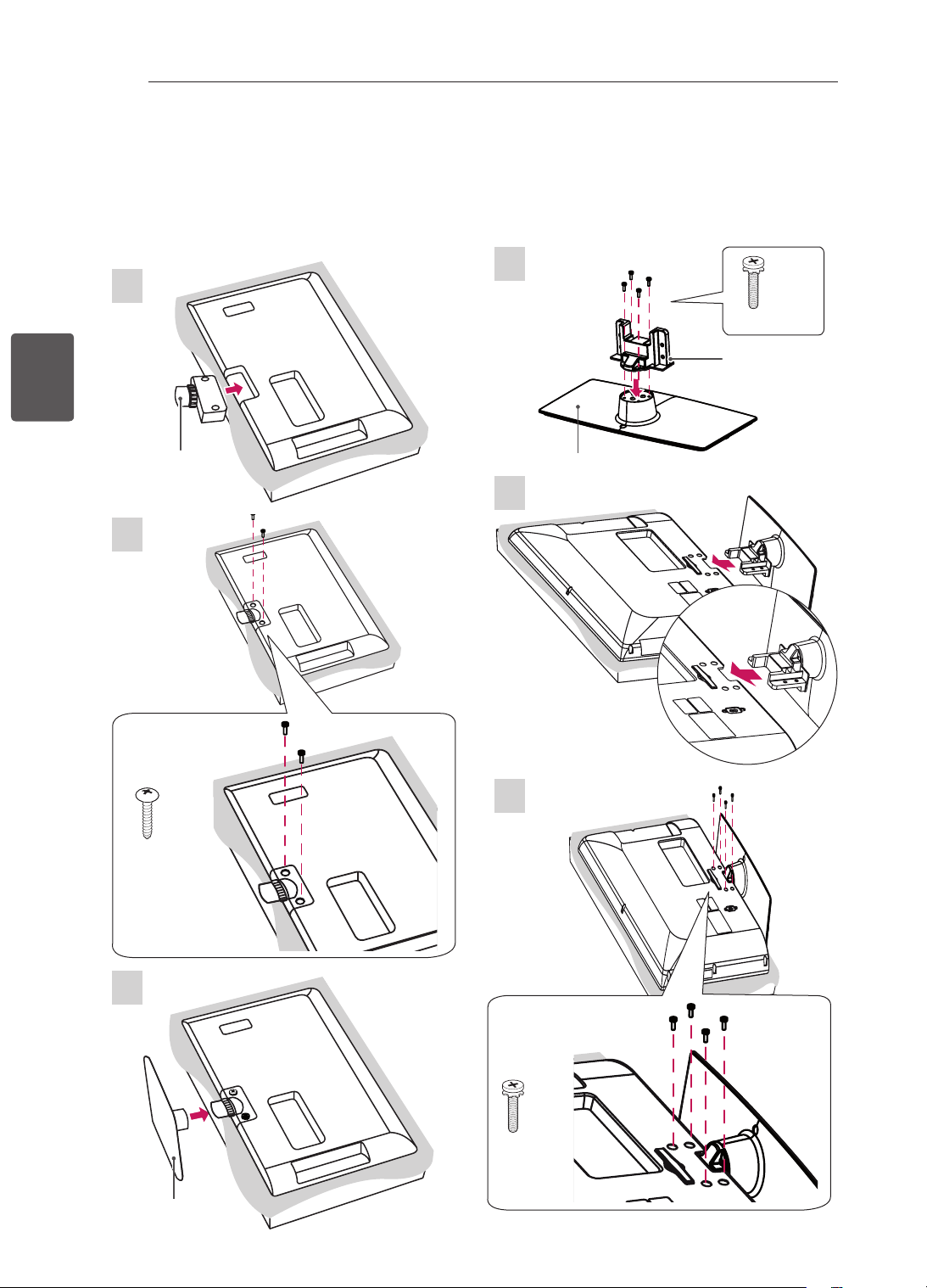
18
PT
PORTUGUÊS
MONTAGEMEPREPARAÇÃO
PrepararaTV
Fixarosuporte
AimagemindicadapodediferirdasuaTV.
1
22CS46**,22CS47**
2
P4x16
2EA
3
1
26CS46**,26CS47**
2
3
Basedosuporte
Corpodo
suporte
M4x20
4EA
Corpodo
suporte
Basedosuporte
M4x20
4EA
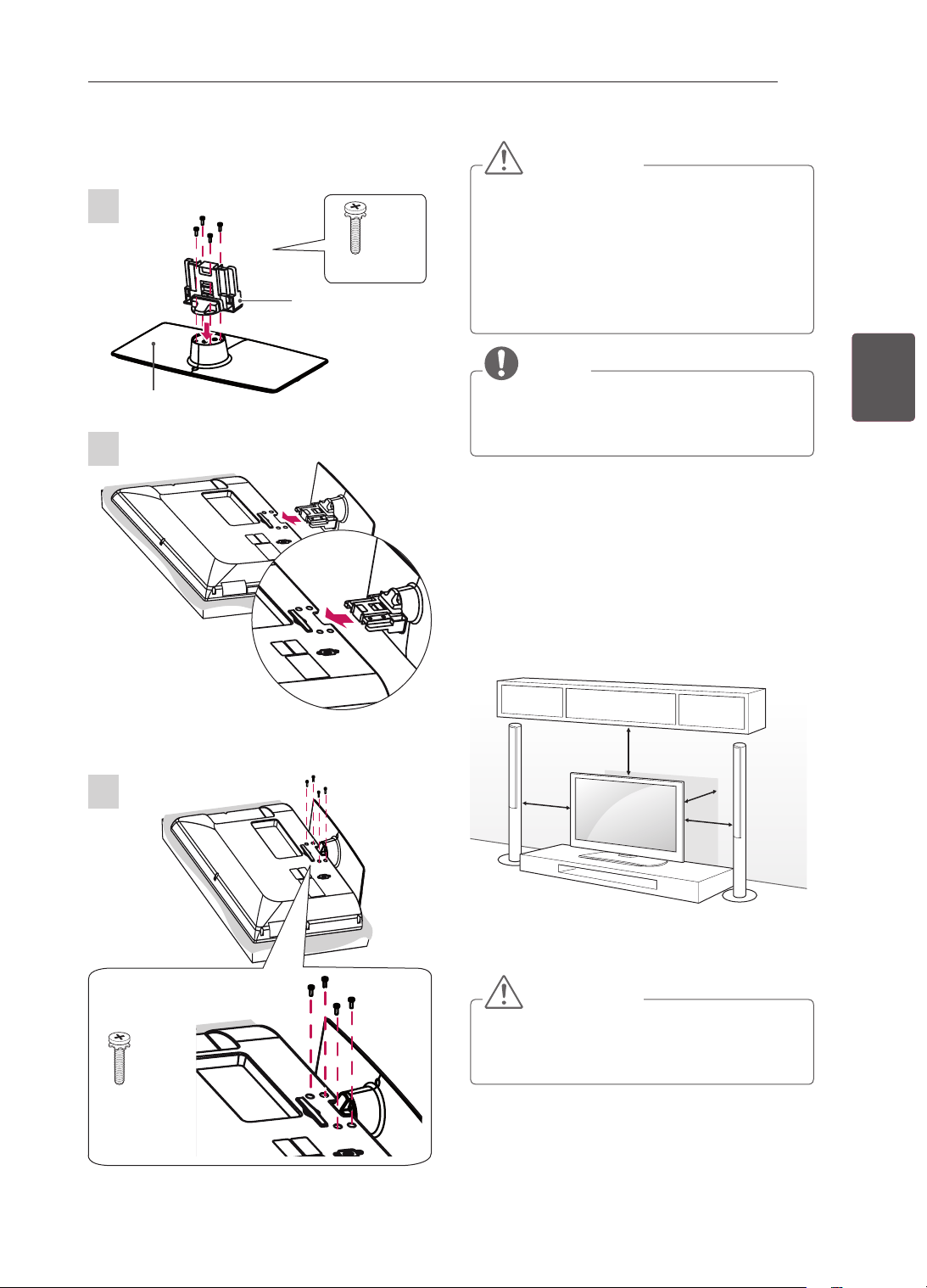
19
PTPORTUGUÊS
MONTAGEMEPREPARAÇÃO
ATENÇÃO
Quandoaparafusaratelevisãoàbase,
coloqueoecrãviradoparabaixonumaàrea
planaalmofadada,umasuperfícieplana,de
modoaevitarriscosnoecrã.
Apertefirmementeosparafusospara
impedirqueaTVseinclineparaafrente.
Nãoosapertedemasiado.
NOTA
Removaabase,antesdecolocaratelevisão
numsuportedeparede,efectuandode
formainversacomoaparafusouàbase.
Montarnumamesa
1 LevanteeinclineaTVatéestacarnaposição
verticalnamesa.
- Deixeumespaçolivrede10cm(nomíni-
mo)emrelaçãoàparedeparaumaventi-
laçãoadequada.
10cm
10cm
10cm
10cm
2 Ligueocabodealimentaçãoaumatomada
eléctrica.
ATENÇÃO
NãocoloqueaTVpróximaousobrefontes
decalor,poisistopodedarorigemaum
incêndioououtrosdanos.
32/42CS46**,32/42CS47**,32/42LS34**,
32/42LM34**
1
3
2
Corpodo
suporte
Basedosuporte
M4x20
4EA
M4x20
4EA
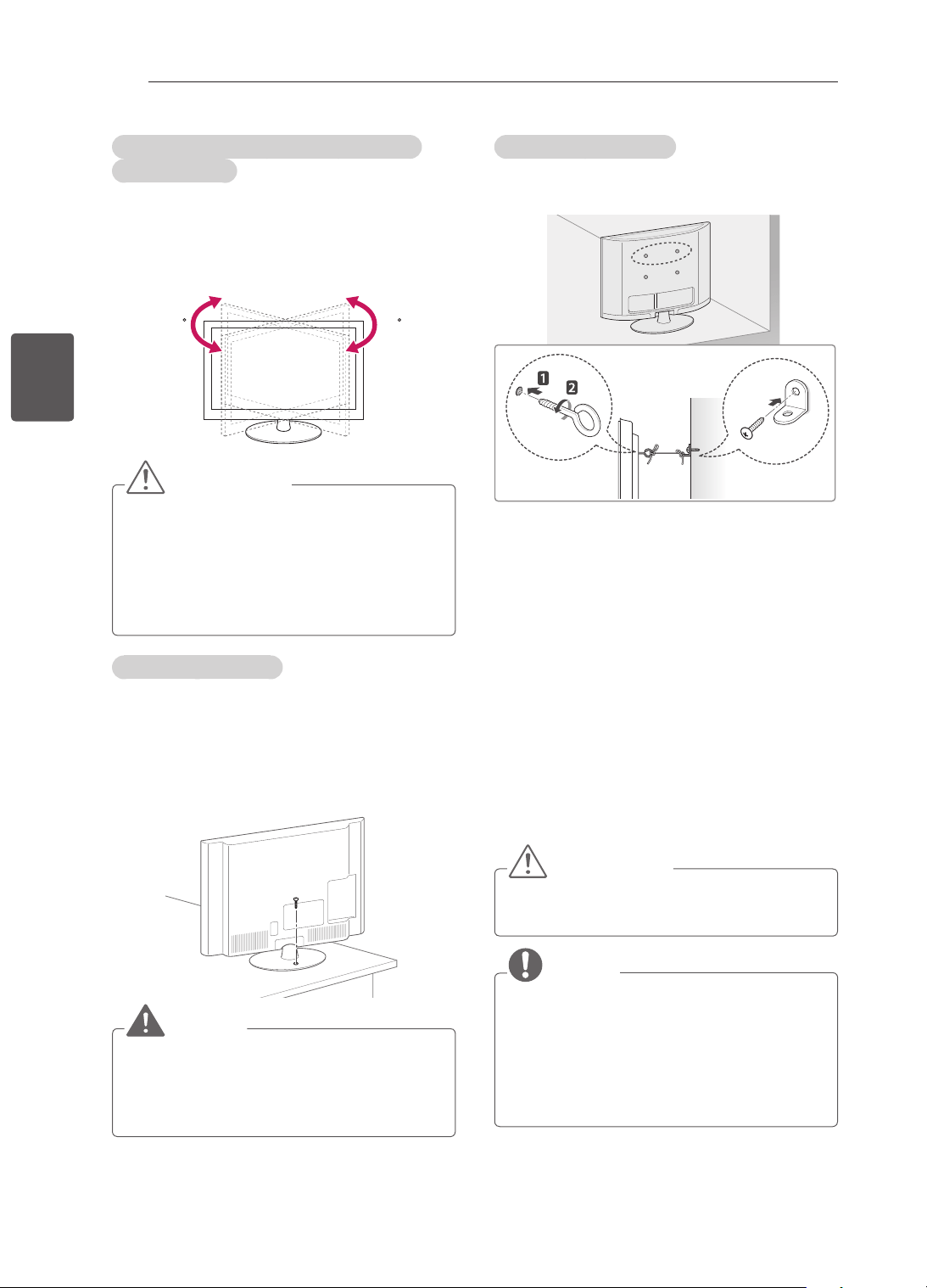
20
PT
PORTUGUÊS
MONTAGEMEPREPARAÇÃO
AjustaroângulodaTVparaseadequarà
suaperspectiva
(Apenas32/42CS46**,32/42CS47**,32/42LS34**,
32/42LM34**)
Rodeoecrã20grausparaaesquerdaoudireita
eajusteoângulodaTVdeacordocomasua
preferência.
2020
ATENÇÃO
Aoajustaroângulodoproduto,tenha
cuidadocomosdedos.
»
Seosdedosouasmãosficarempresos,
istopodeprovocarferimentos.Seo
produtoestiverdemasiadoinclinado,pode
caireprovocardanosouferimentos.
FixaraTVnumamesa
(Apenas26/32/42CS46**,26/32/42CS47**,
32/42LS34**32/42LM34**)
FixeaTVnumamesaparaimpedirinclinações
paraafrente,danoseeventuaisferimentos.
ParaxaraTVnumamesa,introduzaeaperteo
parafusofornecidonapartedetrásdosuporte.
AVISO
ParaevitarqueaTVcaia,instale-anochão/
parededeacordocomasinstruçõesde
instalação.Quedas,vibraçõesouoscilações
daTVpodemprovocarferimentos.
FixaraTVnumaparede
(Estafunçãonãoestádisponívelparatodosos
modelos.)
1 Introduzaeaperteosparafusoscomolhalou
ossuporteseparafusosdaTVnapartedetrás
daTV.
- Seestiveremintroduzidosparafusosno
lugardosparafusoscomolhal,retirepri-
meiroosparafusos.
2 Monteossuportesdeparedecomos
parafusosnaparede.
Façacorresponderalocalizaçãodosuportede
paredecomosparafusoscomolhalnaparte
detrásdaTV.
3 Apertermementeosparafusoscomolhalaos
suportesdeparedecomumacordaresistente.
Mantenhaacordanumaposiçãohorizontalem
relaçãoàsuperfícieplana.
ATENÇÃO
Nãodeixequeascriançastrepemouse
penduremnaTV.
NOTA
Utilizeumaplataformaouumarmário
suficientementeforteegrandeparasuportar
adequadamenteaTV.
Suporte,parafusosecordéisnãoestão
incluídos.Podeobteracessóriosadicionais
atravésdoseufornecedor.
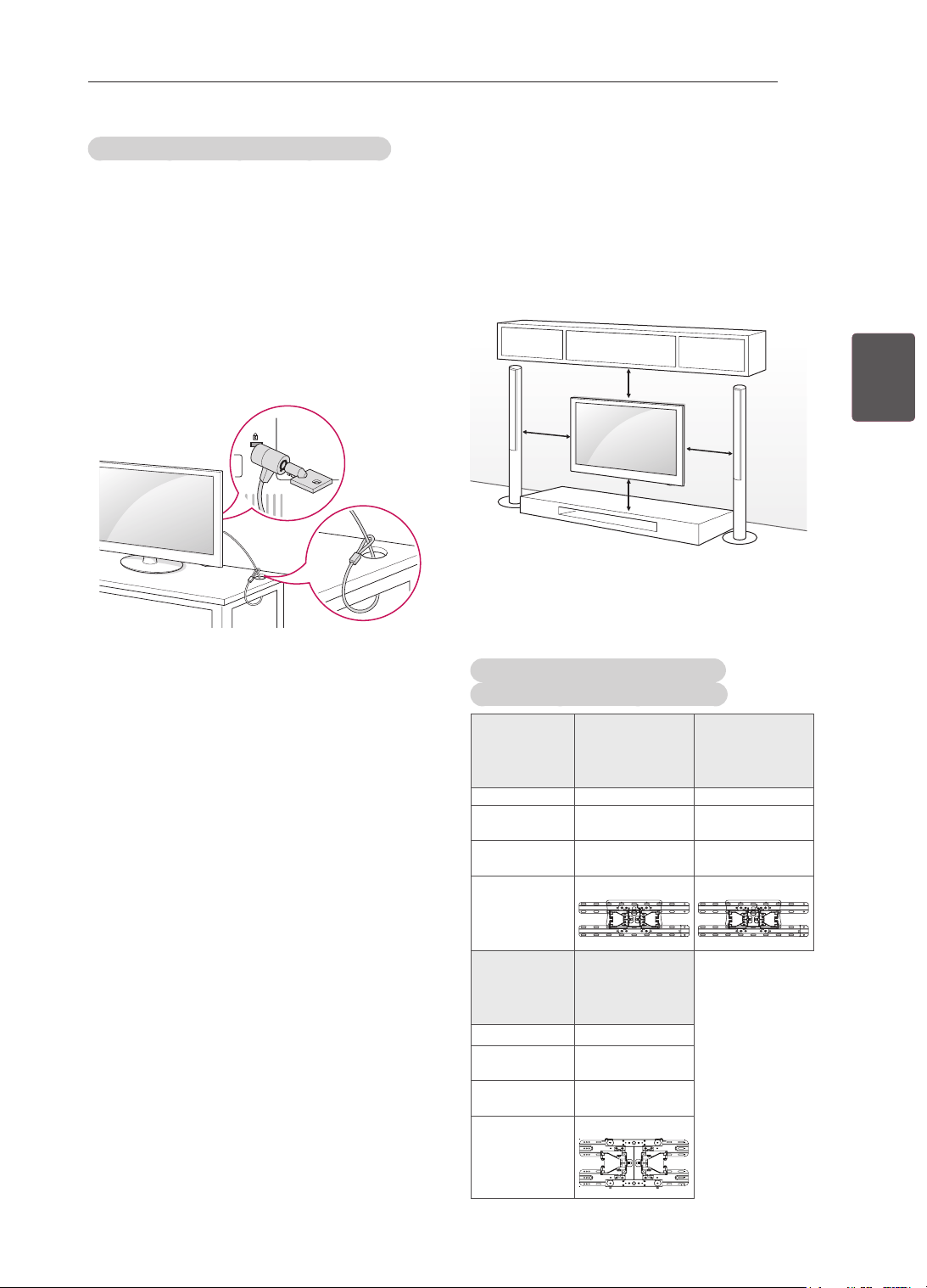
21
PTPORTUGUÊS
MONTAGEMEPREPARAÇÃO
UtilizarosistemadesegurançaKensington
(Dependendodomodelo)
OconectordosistemadesegurançaKensington
estálocalizadonaparteposteriordaTV.Para
mais informações sobre a sua instalação e
utilização, consulteo manualfornecido como
sistemadesegurançaKensingtonouvisitehttp://
www.kensington.com.
LigueocabodosistemadesegurançaKensington
entreaTVeumamesa.
Montagemnumamesa
Fixecuidadosamenteumsuportedemontagemna
paredeopcionalnapartedetrásdaTVemonte
osuportenumaparedesólidaperpendicularao
chão.QuandomontaraTVnoutrosmateriaisde
construção,consultepessoalqualicado.
ALGrecomendaqueamontagemnaparedeseja
executadaporumprossionalqualicado.
10
cm
10cm
10
cm
10
cm
Certique-sedequeutilizaparafusosesuportes
paraaparedequecumpramanormaVESA.
Asdimensõespadrãodoskitsdemontagemna
paredesãodescritasnatabelaseguinte.
Objectosadquiridosemseparado
(Suportedemontagemnaparede)
Modelo
22CS46**,
22CS47**
26/32CS46**,
26/32CS47**,
32LS34**,
32LM34**
VESA(AxB) 100x100 200x100
Parafuso
padrão
M4 M4
Númerode
parafusos
4 4
Suportede
montagemna
parede
LSW100B
LSW100B
Modelo
42CS46**,
42CS47**,
42LS34**,
42LM34**
VESA(AxB) 200x200
Parafuso
padrão
M4
Númerode
parafusos
4
Suportede
montagemna
parede
LSW200BX
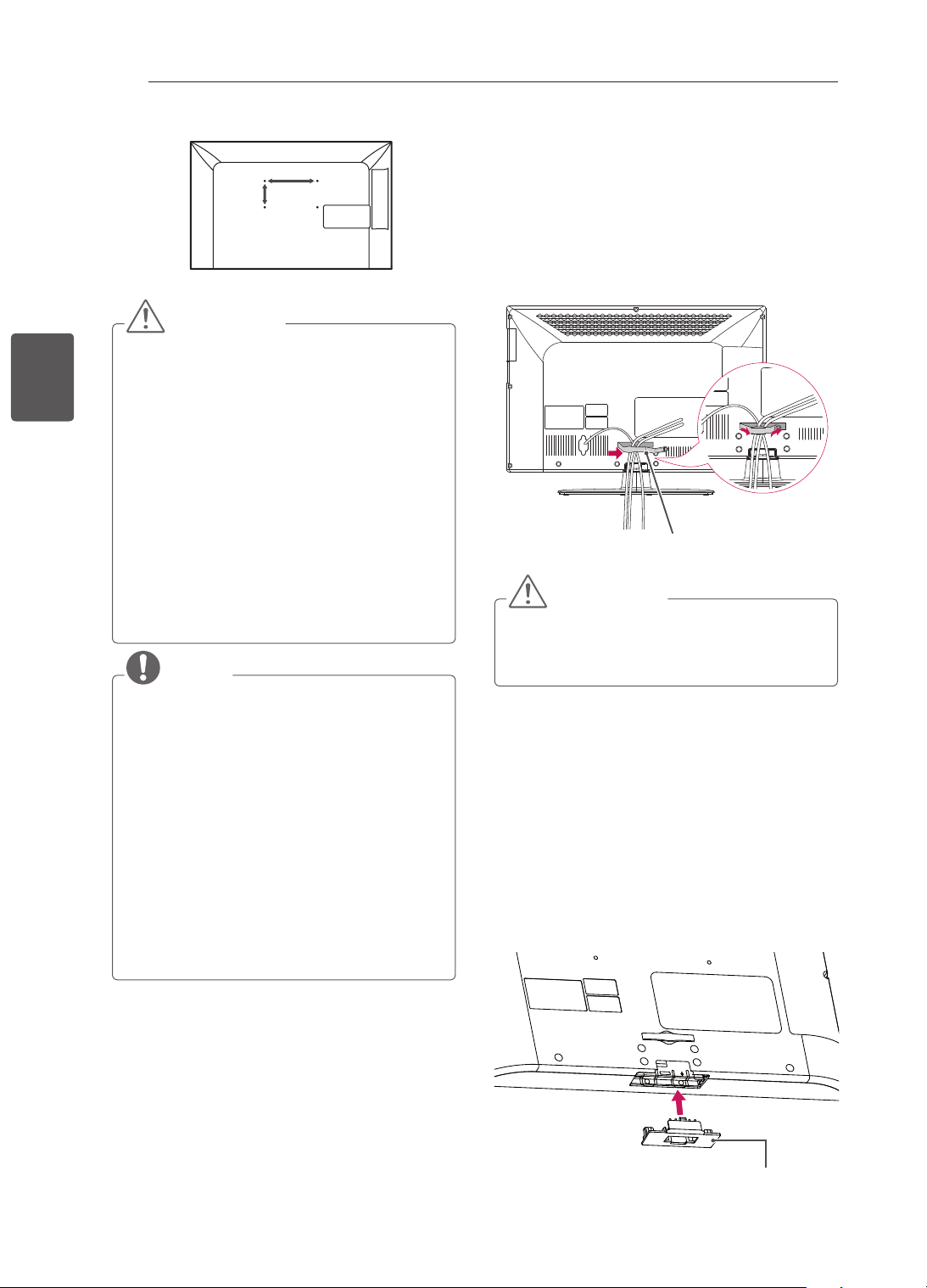
22
PT
PORTUGUÊS
MONTAGEMEPREPARAÇÃO
A
B
ATENÇÃO
Desligueprimeiroaalimentaçãoantesde
deslocarouinstalaraTV.Casocontrário,
podeocorrerumchoqueeléctrico.
SeinstalaraTVnotectoounumaparede
inclinada,oaparelhopoderácaireprovocar
ferimentosgraves.
Utilizeumsuportedemontagemna
paredeautorizadopelaLGecontacteo
representantelocaloupessoalqualificado.
Nãoapertedemasiadoosparafusos,pois
issopodedanificaraTVeanularagarantia.
Utilizeparafusosesuportesdemontagem
naparedequecumpramanormaVESA.
Osdanosmateriaisouferimentoscausados
porumamáutilizaçãooupelousodeum
acessórioinadequadonãoestãocobertos
pelagarantia.
NOTA
Utilizeosparafusosindicadosnas
especificaçõesparaparafusosdanorma
VESA.
Okitdemontagemnaparedeinclui
ummanualdeinstalaçãoeaspeças
necessárias.
Osuportedemontagemnaparedeé
opcional.Podeobteracessóriosadicionais
atravésdoseufornecedorlocal.
Ocomprimentodosparafusospodeser
diferenteconsoanteosuportedemontagem
naparede.Certifique-sedequeutiliza
parafusoscomocomprimentocorrecto.
Paramaisinformações,consulteomanual
fornecidocomosuportedemontagemna
parede.
Manteroscabosarrumados
Apenas26/32/42CS46**,26/32/42CS47**,
32/42LS34**,32/42LM34**
1 Junteeamarreoscaboscomumclipede
arrumaçãodoscabos.
2 Fixermementeoclipedearrumaçãodos
cabosàTV.
ClipedeGestãodoCabo
ATENÇÃO
NãodesloqueaTVagarrandopeloclipede
arrumaçãodoscabos,poisestepodepartir-
se,provocarferimentosedanificaraTV.
Nãoutilizarosuportetipo
secretária
Apenas26/32/42CS46**,26/32/42CS47**,
32/42LS34**,32/42LM34**
Quandoinstalarosuportedemontagemna
parede,utilizeacoberturadeprotecção.Estaco-
berturaprotegeaaberturadaacumulaçãodepóe
sujidade.
Empurreacoberturadeprotecçãofornecidapela
aberturanaparteinferiordaTVatéencaixar.
Coberturadeprotecção
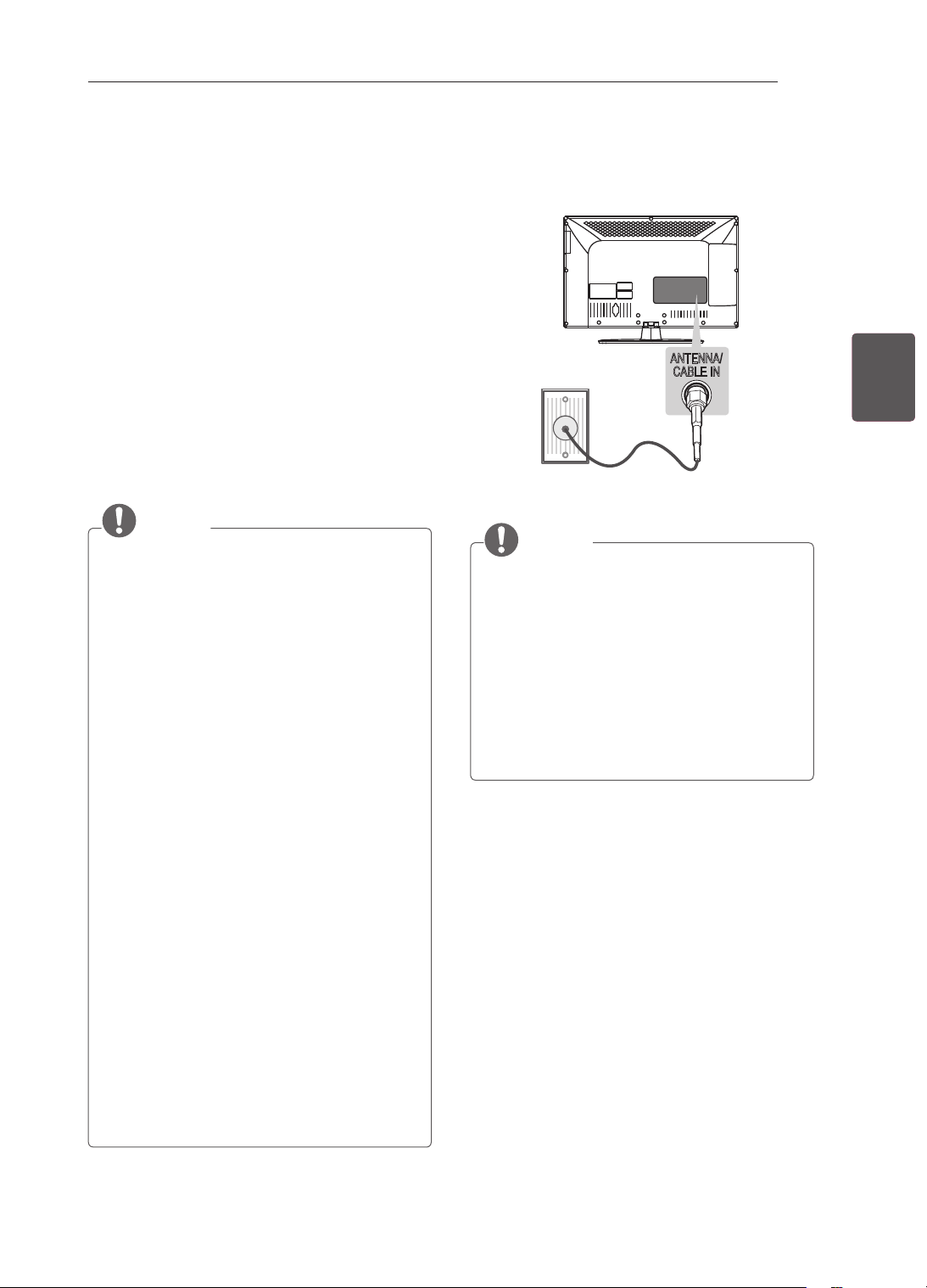
23
PTPORTUGUÊS
EFECTUARASLIGAÇÕES
EFECTUARAS
LIGAÇÕES
EstasecçãodeEFECTUARASLIGAÇÕES
utilizaprincipalmentediagramas
correspondentesaosmodelosCS46**.
LigueváriosdispositivosexternosàTVemudeos
modosdeentradaparaseleccionarumdispositivo
externo.Paramaisinformaçõessobrealigação
dedispositivosexternos,consulteomanual
fornecidocomcadadispositivo.
Osdispositivosexternosdisponíveissão:
receptoresHD,leitoresdeDVD,videogravadores,
sistemasdeáudio,dispositivosde
armazenamentoUSB,PC,dispositivosdejogose
outrosdispositivosexternos.
NOTA
Aligaçãododispositivoexternopodeser
diferentedadomodelo.
LiguedispositivosexternosàTV
independentementedaordemdaportada
TV.
Segravarumprogramadetelevisãonum
gravadordeDVDounumvideogravador,
nãoseesqueçadeligarocabodode
entradadosinaldeTVàTVatravésdo
gravadordeDVDoudovideogravador.
Paramaisinformaçõessobreagravação,
consulteomanualfornecidocomo
dispositivoligado.
Consulteomanualdoequipamentoexterno
sobreinstruçõesdefuncionamento.
SeligarumdispositivodejogosàTV,utilize
ocabofornecidocomodispositivodejogos.
NomodoPC,poderáserproduzidoum
ruídoassociadoàresolução,padrão
vertical,contrasteouluminosidade.Sese
verificarruído,altereasaídadoPCpara
outraresolução,altereafrequênciade
actualizaçãoparaoutrafrequênciaouajuste
aluminosidadeeocontrastenomenu
IMAGEMatéaimagemficarnítida.
NomodoPC,algumasdefinições
deresoluçãopodemnãofuncionar
correctamente,dependendodaplaca
gráfica.
Ligarumaantena
LigueaTVaumatomadadeantenadeparede
comumcaboRF(75Ω).
ANTENNA/
CABLE IN
ANTENNA/
CABLE IN
NOTA
Utilizeumseparadordesinalsequiser
utilizarmaisde2TVs.
Seaqualidadedeimagemforfraca,instale
umamplificadordesinalparamelhorara
qualidadedeimagem.
Seaqualidadedeimagemforfracamesmo
quetenhaumaantenaligada,tenteorientar
aantenaparaadirecçãocorrecta.
Ocabodaantenaeoconversornãosão
fornecidos.
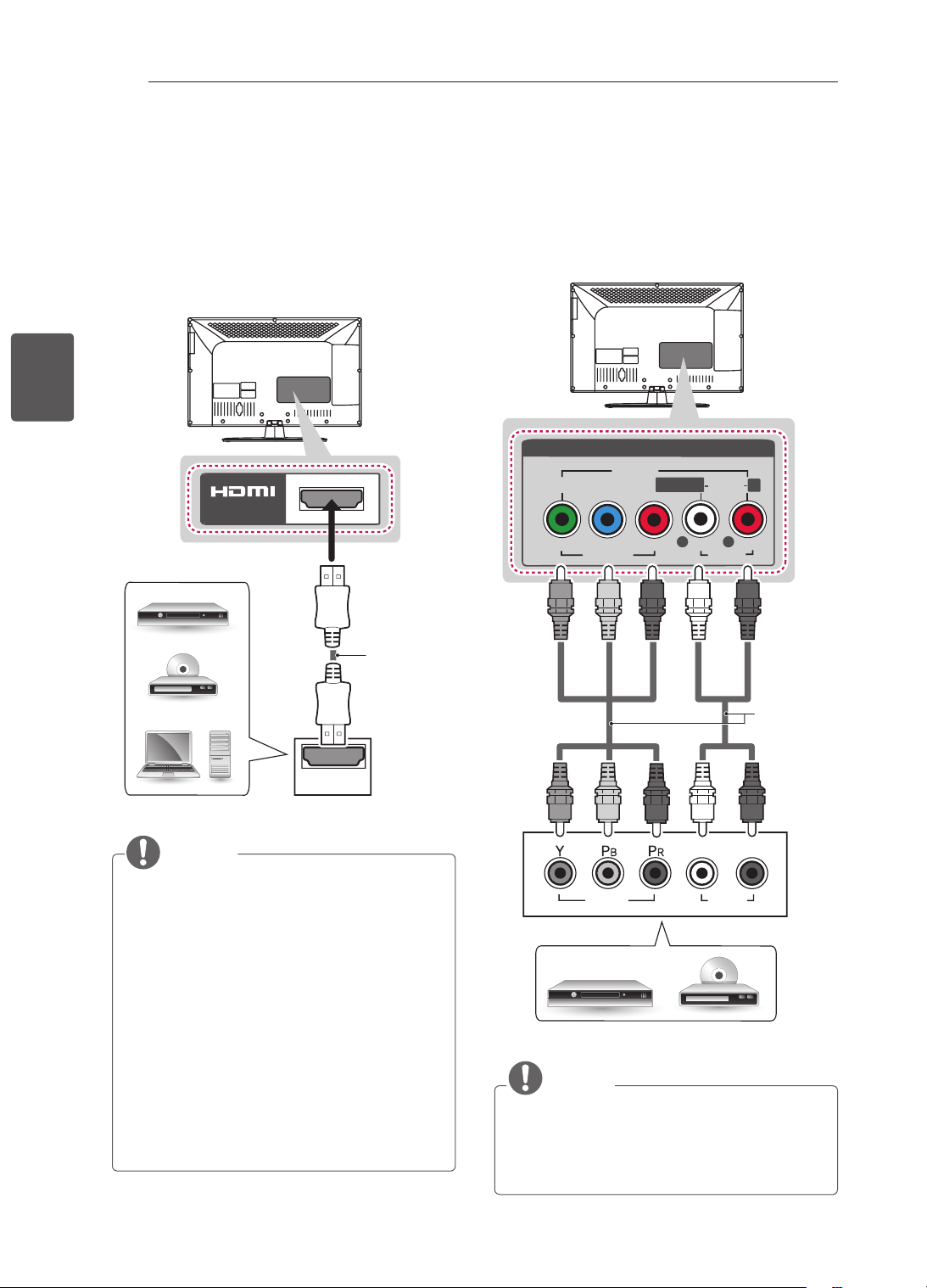
24
PT
PORTUGUÊS
EFECTUARASLIGAÇÕES
LigaçãoHDMI
Transmiteossinaisdigitaisdevídeoeáudio
deumdispositivoexternoparaaTV.Ligueo
dispositivoexternoàTVcomocaboHDMI,
conformedemonstradonaseguinteilustração.
EscolhaqualquerportadeentradaHDMIpara
ligar.Podeutilizarqualquerporta.
HDMI
IN
(*nãofornecido)
DVD/Blu-Ray/descodicador
HD/HDSTB/PC
NOTA
Recomenda-seautilizaçãodaTVcoma
ligaçãoHDMIparaumamelhorqualidade
deimagem.
UtilizeomaisrecentecaboHDMI™dealta
velocidadecomfunçãoCEC(Customer
ElectronicsControl).
OscabosHDMI™dealtavelocidadeforam
testadosparaexecutarumsinalHDaté
1080pesuperior.
ÁudioDTVsuportado:MPEG,DolbyDigital,
DolbyDigitalPlus
FormatodeáudioHDMIsuportado:Dolby
Digital,PCM(até192KHz,32k/44,1k/48k/8
8k/96k/176k/192k,DTSnãosuportado.)
Ligaçãodecomponentes
Transmitesinaisanalógicosdevídeoeáudio
deumdispositivoexternoparaaTV.Ligue
o dispositivoexternoàTVcomumcabode
componente,conformedemonstradonaseguinte
ilustração.
VIDEO
P
B
P
R
Y
L
R
AUDIO
R
L/MONO
AV IN
VIDEO
AUDIO
COMPONENT
IN
AUDIO
VIDEO
L R
DVD/Blu-Ray/descodicadorHD
VERDE VERDE
AZUL
AZUL
VERMELHO
VERMELHO
VERMELHO
VERMELHO
BRANCO
BRANCO
(*nãofornecido)
NOTA
Seoscabosnãoforemdevidamente
instalados,poderãocausarumaexibição
deimagemapretoebrancooucomcor
distorcida.
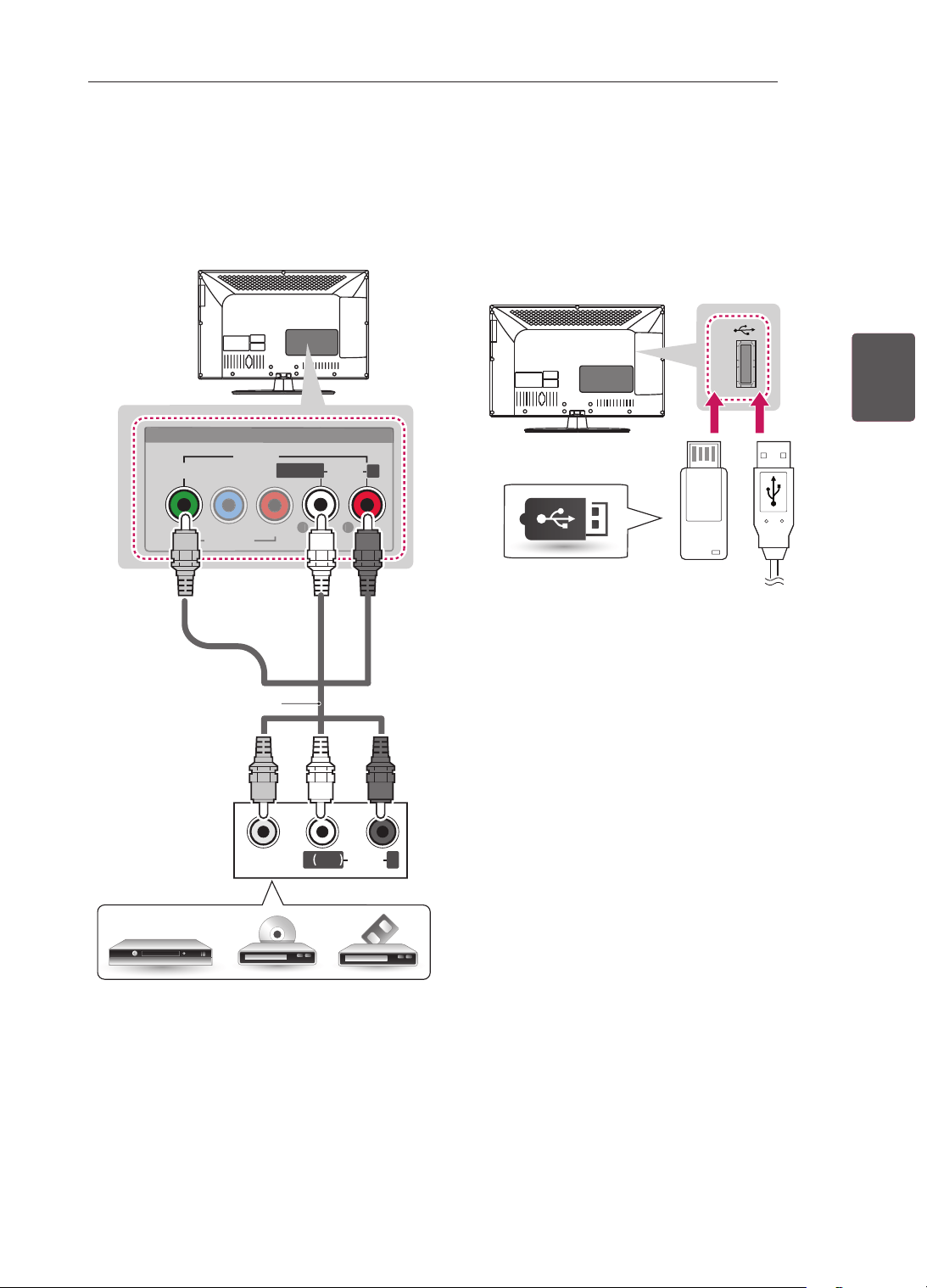
25
PTPORTUGUÊS
EFECTUARASLIGAÇÕES
Ligaçãocomposta
Transmitesinaisanalógicosdevídeoeáudio
deumdispositivoexternoparaaTV.Ligueo
dispositivoexternoàTVcomocabocomposto,
conformedemonstradonaseguinteilustração.
VIDEO
MONO
( )
AUDIOL R
VIDEO
P
B
P
R
Y
L
R
AUDIO
R
L/MONO
AV IN
V
IDE
O
AU
DI
O
COMPONENT
IN
AMARELO
BRANCO
VERMELHO
AMARELO
BRANCO
VERMELHO
(*nãofornecido)
DVD/Blu-Ray/descodicadorHD/VCR
LigaçãoaumUSB
LigueumdispositivodearmazenamentoUSB,
comoporexemploumamemóriaashUSB,
umaunidadedediscorígidoexternaouumleitor
decartõesdememóriaUSB,àTVeacedaao
menuOsMeusMédiaparautilizarváriostiposde
cheirosmultimédia.
USB IN
USB
(*nãofornecido)
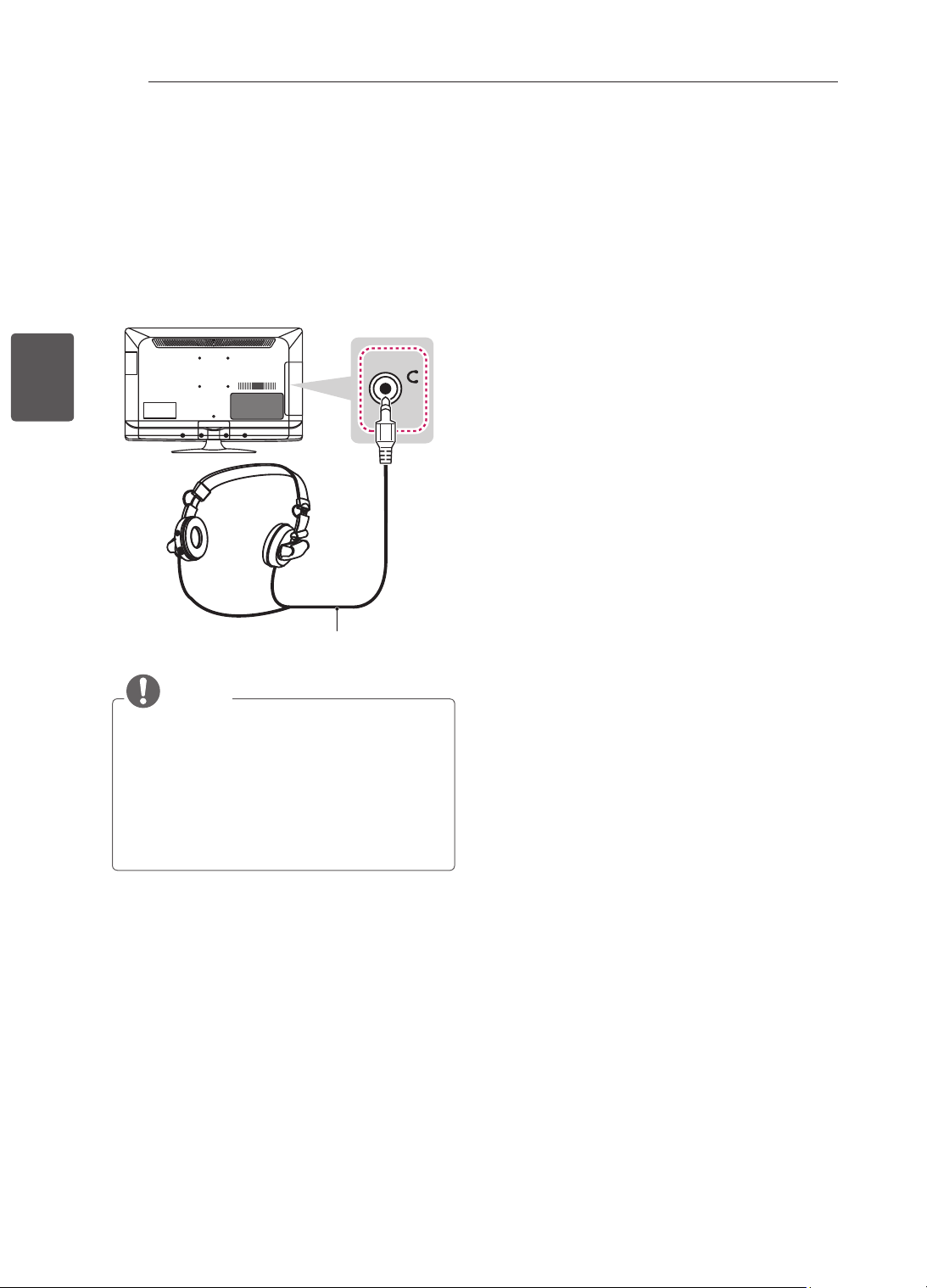
26
PT
PORTUGUÊS
EFECTUARASLIGAÇÕES
Ligaràligaçãodos
auriculares
(Apenas22/26/32/42CS47**)
TransmiteosinaldosauscultadoresdaTV
paraumdispositivoexterno.Ligueodispositivo
externoàTVcomosauscultadores,conforme
demonstradonaseguinteilustração.
H/P
(*nãofornecido)
NOTA
OsitensdomenuÁUDIOficaminactivos
quandoligaosauscultadores.
Impedânciadosauscultadores:16Ω
Saídadeáudiomáx.dosauscultadores:9a
15mW
Tamanhodatomadaparaauscultadores:
0,35cm
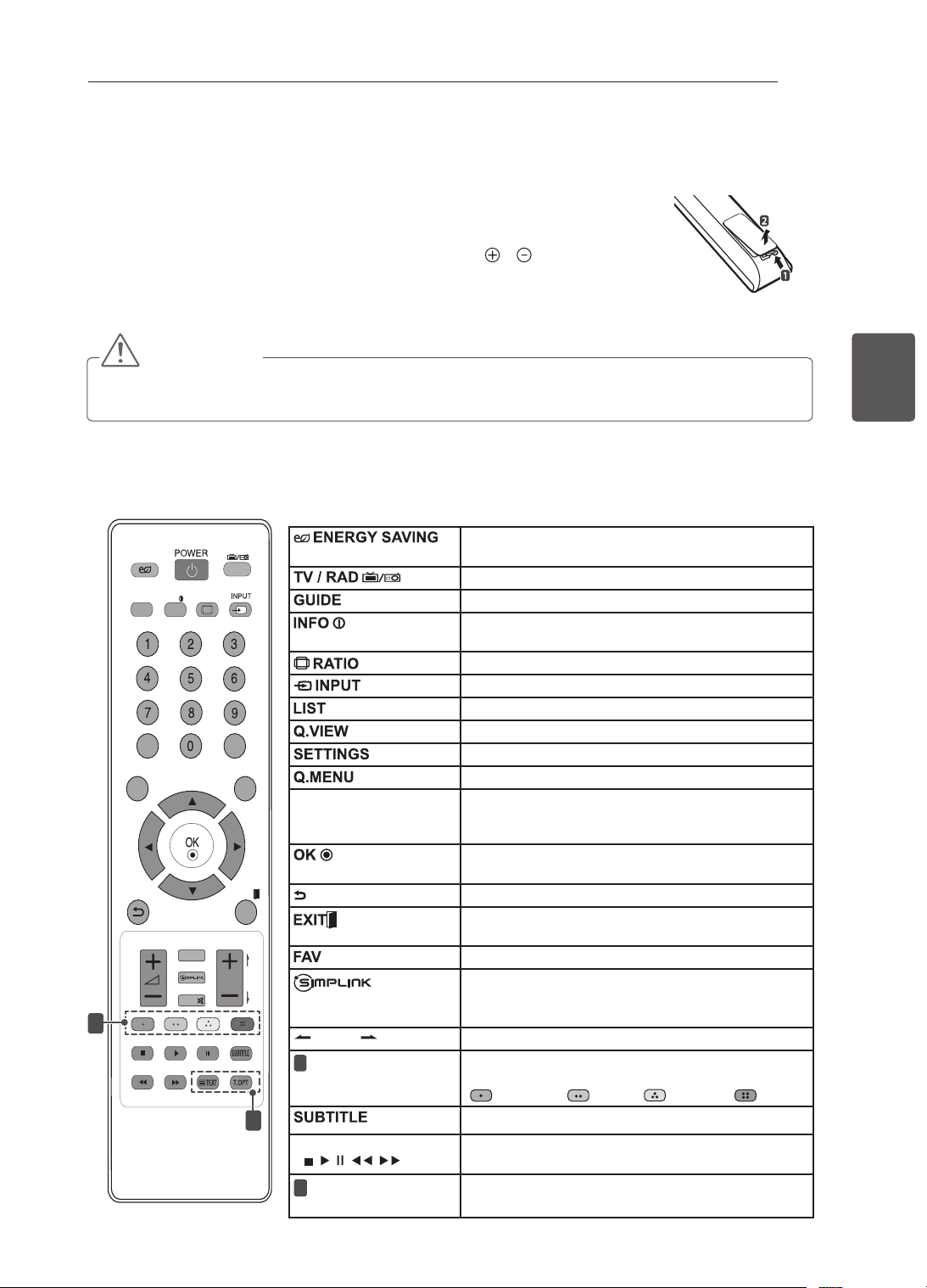
27
PTPORTUGUÊS
CONTROLO REMOTO
CONTROLO REMOTO
As descrições deste manual baseiam-se nos botões do controlo remoto.
Leia cuidadosamente este manual e utilize correctamente a TV.
Para substituir as pilhas, abra a tampa do compartimento das pilhas, substitua as
pilhas (1,5 V AAA) fazendo corresponder as extremidades
e com a etiqueta no
interior do compartimento e feche a tampa do compartimento das baterias.
Para remover as pilhas, execute as acções de instalação pela ordem inversa.
ATENÇÃO
y
Não misture pilhas usadas com novas, pois isso pode danificar o controlo remoto.
y
Na TV analógica e em alguns países, algumas teclas do controlo remoto podem não funcionar.
Não se esqueça de apontar o controlo remoto para o sensor do controlo remoto da TV
.
LIST
Q.VIEW
TV/RAD
ENERGY
SAVING
RATIO
SETTINGS
GUIDE
Q.MENU
INFO
FAV
MUTE
P
A
G
E
LIST
Q.VIEW
TV/RAD
ENERGY
SAVING
RATIO
SETTINGS
GUIDE
Q.MENU
INFO
FAV
MUTE
P
A
G
E
P
AD
P
EXIT
EXIT
1
2
Ajusta a luminosidade do ecrã para reduzir o consumo de
energia.
Selecciona os canais de rádio, televisão e programa DTV.
Mostra o manual do programa.
Permite visualizar informações acerca do programa actual e
ecrã.
Redimensiona uma imagem.
Altera a fonte de entrada.
Acede à lista de programas gravados.
Regressa ao canal visualizado anteriormente.
Acede aos menus principais.
Acede aos menus rápidos.
Botões de navegação
(cima/baixo/esquerda/
direita)
Para percorrer os menus ou as opções.
Selecciona menus ou opções e confirma as introduções do
utilizador.
Regressa ao nível anterior.
Apaga as apresentações no ecrã e volta à visualização de
TV.
viewing.
Acede à lista de canais favoritos.
Acede aos aparelhos AV ligados com um cabo
HDMI através de HDMI-CEC.
Abre o menu SIMPLINK.
PAGE
Desloca-se para o ecrã anterior ou seguinte.
1
Botões de cor
Estes permitem aceder a funções especiais em alguns dos
menus.
(
:
Vermelho
, :
Verde
, :
Amarelo
, :
Azul
)
Remarca a legenda preferencial no modo digital.
Botões de controlo
(
, , , , )
Controla os menus OS MEUS MÉDIA ou os dispositivos
compatíveis com SIMPLINK (USB,SIMPLINK).
2
BOTÕES DE
TELETEXTO
Estes botões são utilizados para o teletexto.
(Apenas 22/26/32/42CS46**, 22/26/32/42CS47**, 32/42LS34**)
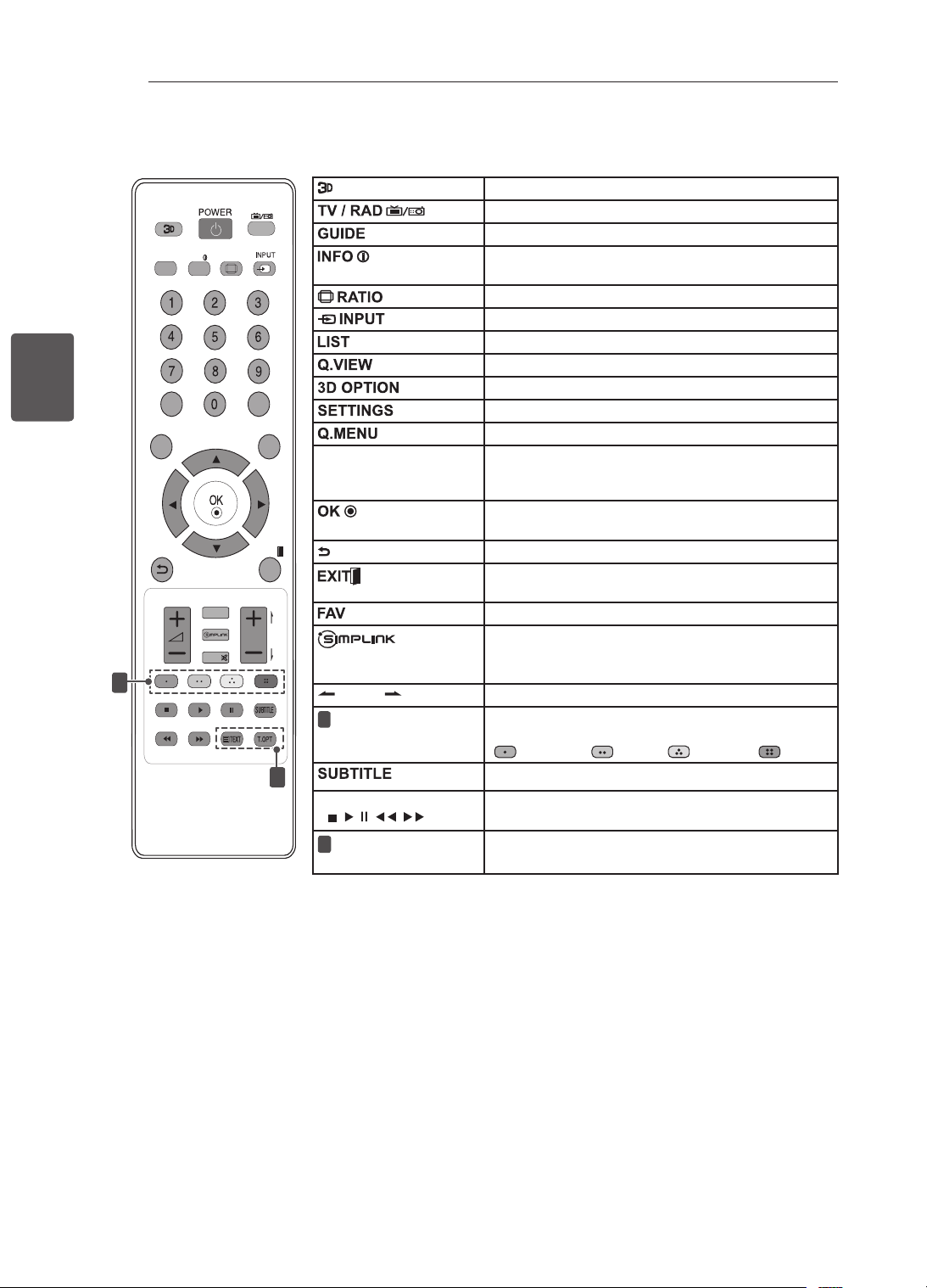
28
PT
PORTUGUÊS
CONTROLO REMOTO
LIST
Q.VIEW
TV/RAD
RATIO
SETTINGS
GUIDE
Q.MENU
INFO
FAV
MUTE
P
A
G
E
P
EXIT
3D OPTION
1
2
(Apenas 32/42LM34**)
Utilizado apenas para ver vídeo 3D.
Selecciona os canais de rádio, televisão e programa DTV.
Mostra o manual do programa.
Permite visualizar informações acerca do programa actual e
ecrã.
Redimensiona uma imagem.
Altera a fonte de entrada.
Acede à lista de programas gravados.
Regressa ao canal visualizado anteriormente.
Utilizado apenas para ver vídeo 3D.
Acede aos menus principais.
Acede aos menus rápidos.
Botões de navegação
(cima/baixo/esquerda/
direita)
Para percorrer os menus ou as opções.
Selecciona menus ou opções e confirma as introduções do
utilizador.
Regressa ao nível anterior.
Apaga as apresentações no ecrã e volta à visualização de
TV.
viewing.
Acede à lista de canais favoritos.
Acede aos aparelhos AV ligados com um cabo
HDMI através de HDMI-CEC.
Abre o menu SIMPLINK.
PAGE
Desloca-se para o ecrã anterior ou seguinte.
1
Botões de cor
Estes permitem aceder a funções especiais em alguns dos
menus.
(
:
Vermelho
, :
Verde
, :
Amarelo
, :
Azul
)
Remarca a legenda preferencial no modo digital.
Botões de controlo
(
, , , , )
Controla os menus OS MEUS MÉDIA ou os dispositivos
compatíveis com SIMPLINK (USB,SIMPLINK).
2
BOTÕES DE
TELETEXTO
Estes botões são utilizados para o teletexto.
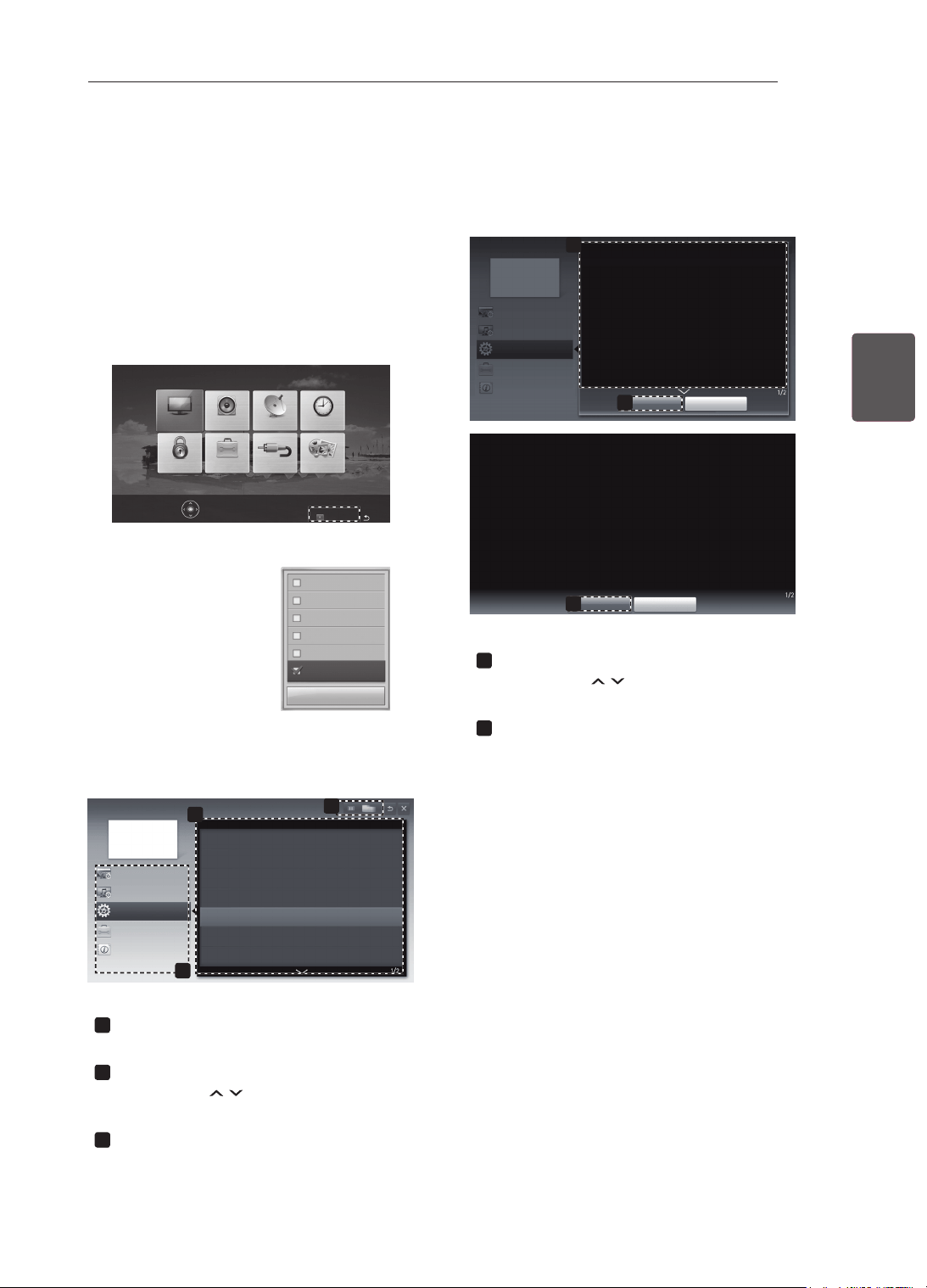
29
PTPORTUGUÊS
COMOUTILIZAROGUIADOUTILIZADOR
COMOUTILIZAROGUIADOUTILIZADOR
OGuiadoUtilizadorpermiteumacessomaisfácilàsinformaçõesdetalhadasdaTV.
1 PrimaSETTINGSparaacederaosmenus
principais.
2 PrimaobotãoVERMELHOparaacederao
menuApoioaocliente.
3 Utilizeosbotõesdenavegaçãoparase
deslocaratéGuiadoUtilizadoreprimaOK.
Actualiz.software
Testedeimagem
Testedesom
Testedesinal
Infodoproduto/serviço
GuiadoUtilizador
Fechar
IMAGEM ÁUDIO CONFIG HORAS
OSMEUSMÉDIA
ENTRADAOPÇÃOBLOQUEAR
PrimaOK()paraajustardeniçõesdeimagem.
Apoioaocliente
Sair
2
GuiadoUtilizador
OPÇÃO
DeniçõesCANAL
DeniçõesIMAGEM,SOM
FunçãoAvançada
Parautilizardispositivodeentrada
Paradeniropçõesdehora
Paradeniroidioma
Paradeniropaís
Paradeniralegenda
Paradeniropçõesdebloqueiodotelevisor
ParautilizarfunçãodePoupançadeEnergia
3
Informações
1
1
Permiteseleccionaracategoriaquepreten-
de.
2
Permiteseleccionaroitemquepretende.
Podeutilizar
H
paraalternarentreas
páginas.
3
Permiteprocuraradescriçãodafunçãopre-
tendidanoíndice.
1
2
GuiadoUtilizador
OPÇÃO>Paradeniroidioma
SETTINGS ➾ OPÇÃO ➙ Idioma
É possível seleccionar o idioma do menu apresentado no ecrã e da transmissão
de som digital.
• Idioma do menu : Selecciona um idioma para o texto do ecrã.
• Idioma de áudio [Apenas no modo Digital] : Selecciona o idioma
pretendido ao ver transmissão digital que contenha vários idiomas de voz.
• Idioma da legendagem [Apenas no modo Digital] : Utilize a função
Legendas quando forem transmitidos dois ou mais idiomas das legendas.
✎
Se os dados das legendas num idioma seleccionado não forem
transmitidos, será reproduzida a legenda do idioma predefinido.
Fechar
Maiszoom
OPÇÃO
DeniçõesCANAL
DeniçõesIMAGEM,SOM
FunçãoAvançada
Informações
2
Fechar
Menoszoom
SETTINGS ➾ OPÇÃO ➙ Idioma
É possível seleccionar o idioma do menu apresentado no ecrã e da transmissão de
som digital.
• Idioma do menu : Selecciona um idioma para o texto do ecrã.
• Idioma de áudio [Apenas no modo Digital] : Selecciona o idioma pretendido ao
ver transmissão digital que contenha vários idiomas de voz.
• Idioma da legendagem [Apenas no modo Digital] : Utilize a função Legendas
quando forem transmitidos dois ou mais idiomas das legendas.
✎
Se os dados das legendas num idioma seleccionado não forem transmitidos,
será reproduzida a legenda do idioma predefinido.
1
Mostraadescriçãodomenuseleccionado.
Podeutilizar
H
paraalternarentreas
páginas.
2
Aumentaoureduzotamanhodoecrã.
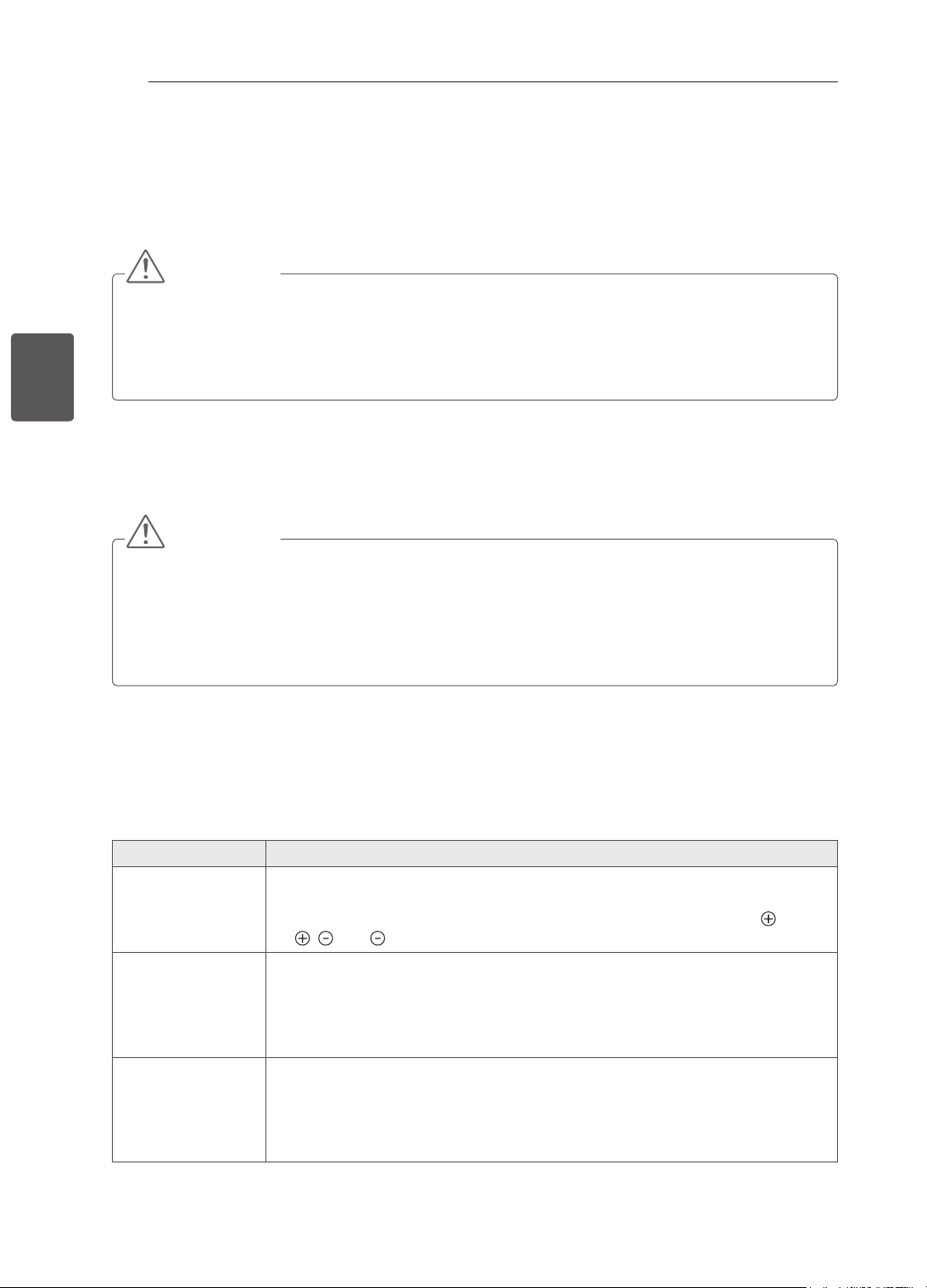
30
PT
PORTUGUÊS
MANUTENÇÃO/RESOLUÇÃODEPROBLEMAS
MANUTENÇÃO
LimparaTV
LimperegularmenteaTVparamanteromelhordesempenhoeprolongaravidaútildoaparelho.
ATENÇÃO
Nãoseesqueçadeprimeirodesligaraalimentação,edesligarocabodealimentaçãodatomada
eléctricaetodososoutroscabos.
QuandoaTVficarsemsupervisãoounãoforutilizadaduranteumlongoperíododetempo,desligue
ocabodealimentaçãodatomadaeléctricaparaevitarpossíveisdanosdevidosarelâmpagosou
picosdecorrente
Ecrã,estrutura,caixaesuporte
Pararemoveropóousujidadeligeira,limpeasuperfíciecomumpanoseco,limpoemacio.
Pararemoverasujidademaior,limpeasuperfíciecomumpanomaciohumedecidocomágualimpaou
umdetergentesuavediluído.Emseguida,limpedeimediatocomumpanoseco.
ATENÇÃO
Evitesempretocarnoecrã,umavezquepodecausardanosnoecrã.
Nãopressione,esfreguenemarranheasuperfíciedoecrãcomasunhasoualgumobjectoafiado,
poispodeprovocarriscosnoecrãedistorçõesnaimagem.
Nãoutilizeprodutosquímicos,poispodemdanificaroproduto.
Nãopulverizelíquidosnasuperfície.AentradadeáguanaTVpoderáresultaremincêndios,
choqueseléctricosouavarias.
Cabodealimentação
Removaregularmenteaacumulaçãodepóousujidadenocabodealimentação.
RESOLUÇÃODEPROBLEMAS
Problema Solução
Nãoépossível
controlaraTV
comocontrolo
remoto.
Verifiqueosensordocontroloremotonoaparelhoetentenovamente.
Verifiqueseháalgumobstáculoentreoaparelhoeocontroloremoto.
Verifiqueseaspilhasaindaestãoboasecorrectamenteinstaladas( com
, com ).
Nãoé
apresentada
nenhumaimagem
enãoéouvido
nenhumsom.
Verifiqueseoprodutoestáligado.
Verifiqueseocabodealimentaçãoestáligadoaumatomadaeléctrica.
Verifiqueseháalgumproblemacomatomadaeléctrica,ligandooutros
dispositivosaesta.
ATVdesliga-se
repentinamente.
Verifiqueasdefiniçõesdocontrolodealimentação.Aalimentaçãopodeter
sidointerrompida.
VerifiqueseafunçãoAutosleepestáactivadanadefiniçãoHora.
SeaTVestiverligadasemsinal,estadesliga-seautomaticamenteapós15
minutosdeinactividade.
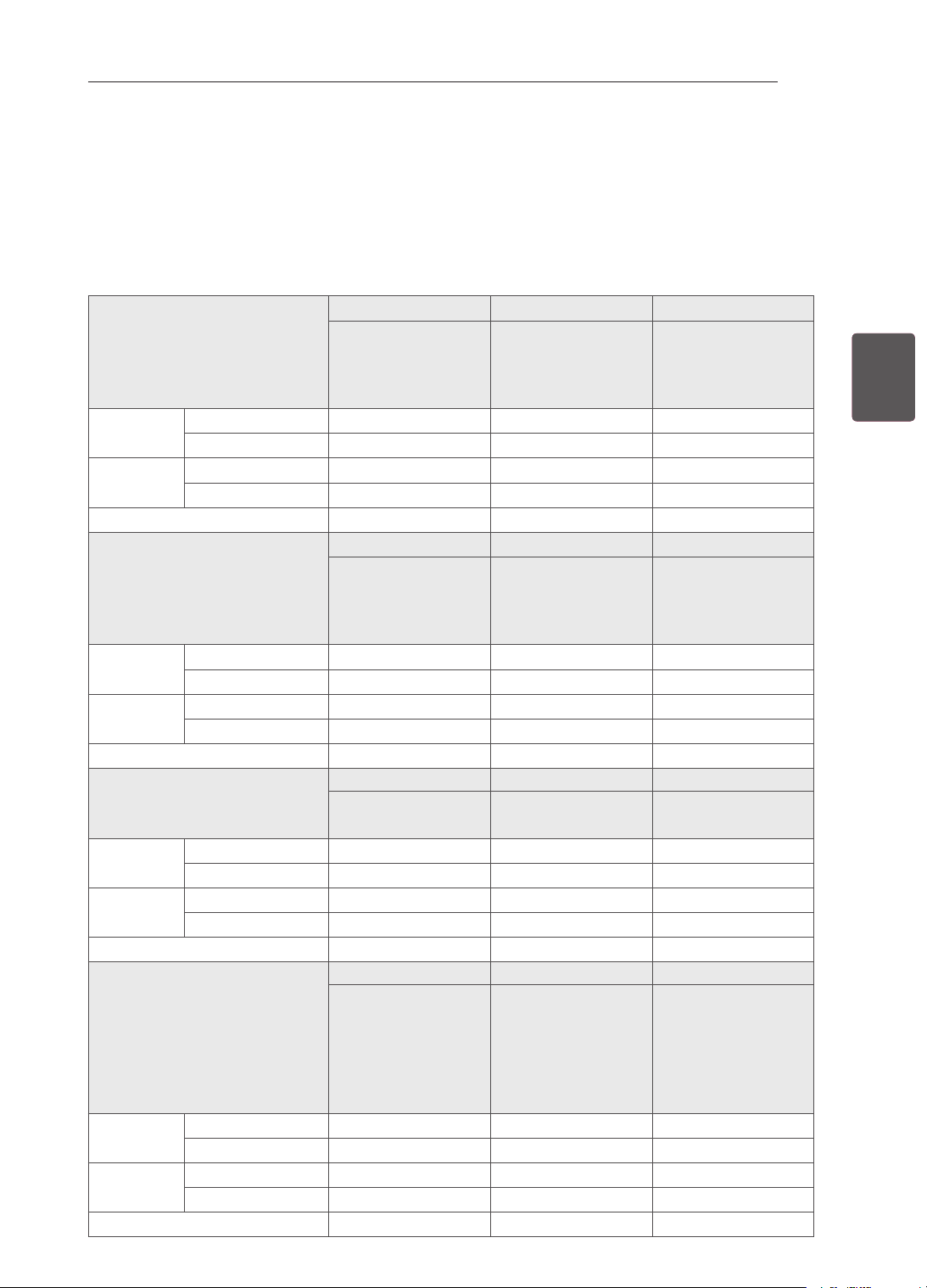
31
PTPORTUGUÊS
ESPECIFICAÇÕES
ESPECIFICAÇÕES
As especificações do produto acima indicadas podem ser alteradas sem aviso prévio devido à actualização
das funções do produto.
No que respeita à fonte de alimentação e ao consumo de energia, consulte a etiqueta mostrada no
produto.
MODELOS
22CS46** 26CS46** 32CS46**
22CS460-TA
22CS460Y-TA
22CS461-TB
22CS461Y-TB
26CS460-TA
26CS460Y-TA
26CS461-TB
26CS461Y-TB
32CS460-TA
32CS460Y-TA
32CS461-TB
32CS461Y-TB
Dimensões
(L x A x P)
Incluindo suporte (mm)
539,0 x 400,0 x 165,0 663,0 x 483,0 x 197,0 794,0 x 565,0 x 207,0
Excluindo suporte (mm)
539,0 x 345,0 x 56,8 663,0 x 424,0 x 72,8 794,0 x 504,0 x 73,5
Peso
Incluindo suporte
(kg)
4,2 7,4 9,0
Excluindo suporte
(kg)
3,9 6,6 8,0
Requisito de alimentação
AC 100-240 V~ 50 / 60 Hz AC 100-240 V~ 50 / 60 Hz AC 100-240 V~ 50 / 60 Hz
MODELOS
42CS46** 22CS47** 26CS47**
42CS460-TA
42CS460Y-TA
42CS461-TB
42CS461Y-TB
22CS470-TA
22CS471-TB
26CS470-TA
26CS471-TB
Dimensões
(L x A x P)
Incluindo suporte (mm)
1017,0 x 695,0 x 261,0 539,0 x 400,0 x 165,0 663,0 x 483,0 x 197,0
Excluindo suporte (mm)
1017,0 x 629,0 x 76,5 539,0 x 345,0 x 56,8 663,0 x 424,0 x 72,8
Peso
Incluindo suporte
(kg)
15,1 4,2 7,4
Excluindo suporte
(kg)
13,5 3,9 6,6
Requisito de alimentação
AC 100-240 V~ 50 / 60 Hz AC 100-240 V~ 50 / 60 Hz AC 100-240 V~ 50 / 60 Hz
MODELOS
32CS47** 42CS47** 32LS34**
32CS470-TA
32CS471-TB
42CS470-TA
42CS471-TB
32LS3400-TA
32LS340Y-TA
Dimensões
(L x A x P)
Incluindo suporte (mm)
794,0 x 565,0 x 207,0 1017,0 x 695,0 x 261,0 795,0 x 566,0 x 207,0
Excluindo suporte (mm)
794,0 x 504,0 x 73,5 1017,0 x 629,0 x 76,5 795,0 x 504,0 x 73,5
Peso
Incluindo suporte
(kg)
9,0 15,1 9,1
Excluindo suporte
(kg)
8,0 13,5 8,1
Requisito de alimentação
AC 100-240 V~ 50 / 60 Hz AC 100-240 V~ 50 / 60 Hz AC 100-240 V~ 50 / 60 Hz
MODELOS
42LS34** 32LM34** 42LM34**
42LS3400-TA
42LS340Y-TA
32LM3400-TB
32LM340Y-TB
32LM3410-TC
32LM341Y-TC
42LM3400-TB
42LM340Y-TB
42LM3410-TC
42LM341Y-TC
42LM3450-TC
42LM345Y-TC
Dimensões
(L x A x P)
Incluindo suporte (mm)
1018,0 x 696,0 x 261,0 795,0 x 566,0 x 207,0 1018,0 x 696,0 x 261,0
Excluindo suporte (mm)
1018,0 x 629,0 x 76,5 795,0 x 504,0 x 73,5 1018,0 x 629,0 x 76,5
Peso
Incluindo suporte
(kg)
14,7 9,1 14,7
Excluindo suporte
(kg)
13,1 8,1 13,1
Requisito de alimentação
AC 100-240 V~ 50 / 60 Hz AC 100-240 V~ 50 / 60 Hz AC 100-240 V~ 50 / 60 Hz
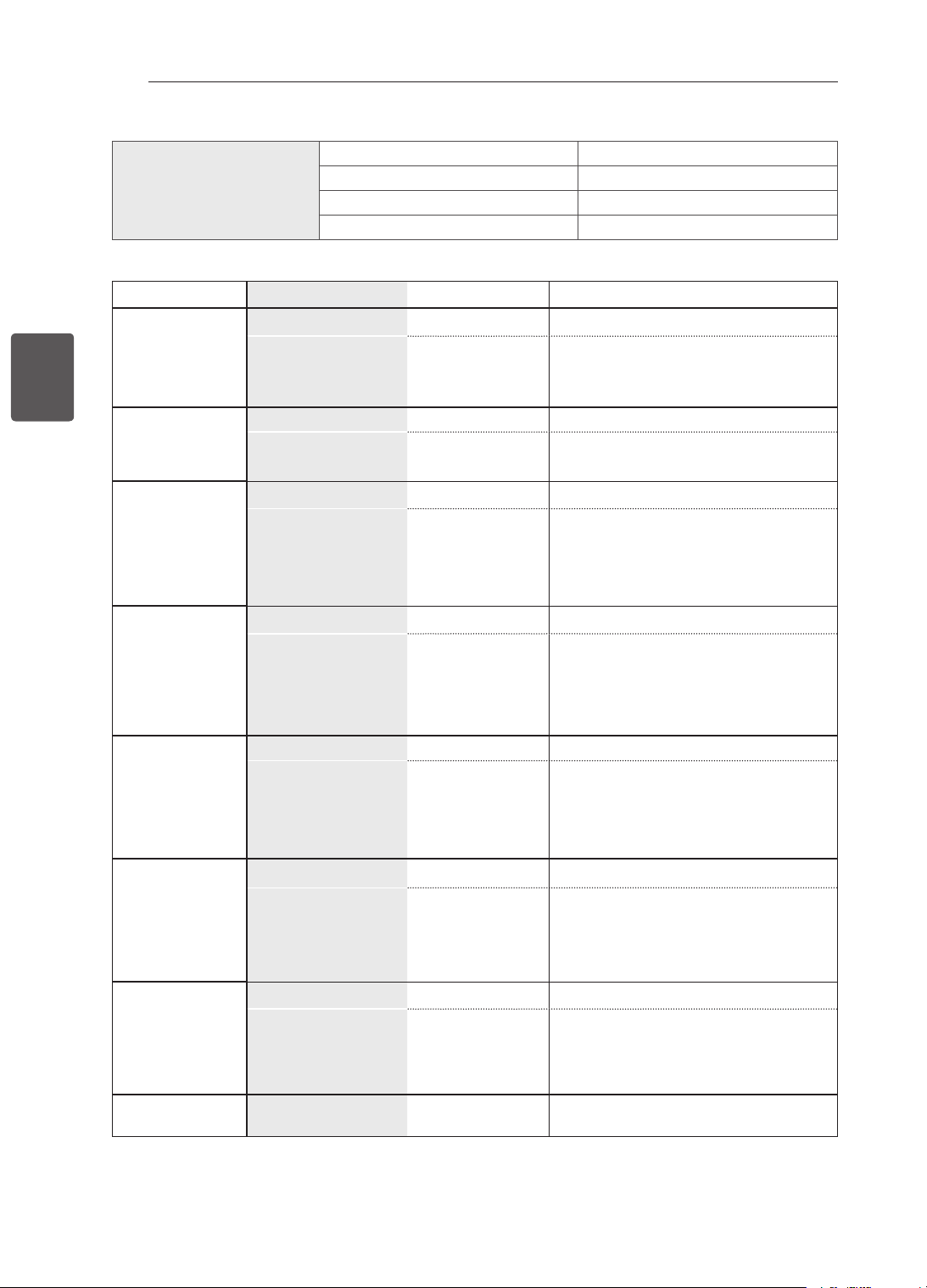
32
PT
PORTUGUÊS
ESPECIFICAÇÕES
Condiçõesambientais Temperaturadefuncionamento 0°Ca40°C
Humidadedefuncionamento Inferiora80%
Temperaturadearmazenamento -20°Ca60°C
HumidadedeArmazenamento Inferiora85%
TVDigital TVAnalógica
NovaZelândia,
Singapura
Sistemadetelevisão DVB-T PAL/SECAM-B/G/D/K
,PAL-I
Coberturadeprograma
UHF21a69
BG:VHF/UHF1a69,CATV01a47
I:VHF/UHF1a69,CATV01a47
DK:VHF/UHF1a69,CATV01a47
Austrália Sistemadetelevisão DVB-T PALB/B
Coberturadeprograma
VHF06a12,
UHF27a69
B/B:VHF/UHF0a75,CATV:2a44
Indonésia,
Israel,Myanmar,
SriLanka
Sistemadetelevisão DVB-T PAL/SECAM-B/G/D/K
,PAL-I,NTSC-M
Coberturadeprograma
UHF21a69
BG:VHF/UHF1a69,CATV01a47
I:VHF/UHF1a69,CATV01a47
DK:VHF/UHF1a69,CATV01a47
M:VHF/UHF2a78,CATV01a71
ÁfricadoSul
Sistemadetelevisão DVB-T PAL/SECAM-B/G/D/K
,PAL-I,NTSC-M
Coberturadeprograma
VHF4a11,13
UHF21a68
BG:VHF/UHF1a69,CATV01a47
I:VHF/UHF1a69,CATV01a47
DK:VHF/UHF1a69,CATV01a47
M:VHF/UHF2a78,CATV01a71
Vietname,
Malásia
Sistemadetelevisão DVB-T PAL/SECAM-B/G/D/K
,PAL-I,NTSC-M
Coberturadeprograma
VHF6a12,
UHF21a69
BG:VHF/UHF1a69,CATV01a47
I:VHF/UHF1a69,CATV01a47
DK:VHF/UHF1a69,CATV01a47
M:VHF/UHF2a78,CATV01a71
Irão,Argélia,
Tunísia,Modelo
digital
Sistemadetelevisão DVB-T PAL/SECAM-B/G/D/K
,PAL-I,NTSC-M
Coberturadeprograma
VHF5a12,
UHF21a69
BG:VHF/UHF1a69,CATV01a47
I:VHF/UHF1a69,CATV01a47
DK:VHF/UHF1a69,CATV01a47
M:VHF/UHF2a78,CATV01a71
Modeloanalógi-
co,Índia,
Tailândia,--
Sistemadetelevisão - PAL/SECAM-B/G/D/K
,PAL-I,NTSC-M
Coberturadeprograma
-
BG:VHF/UHF1a69,CATV01a47
I:VHF/UHF1a69,CATV01a47
DK:VHF/UHF1a69,CATV01a47
M:VHF/UHF2a78,CATV01a71
Impedânciadeante-
naexterna
75Ω 75Ω
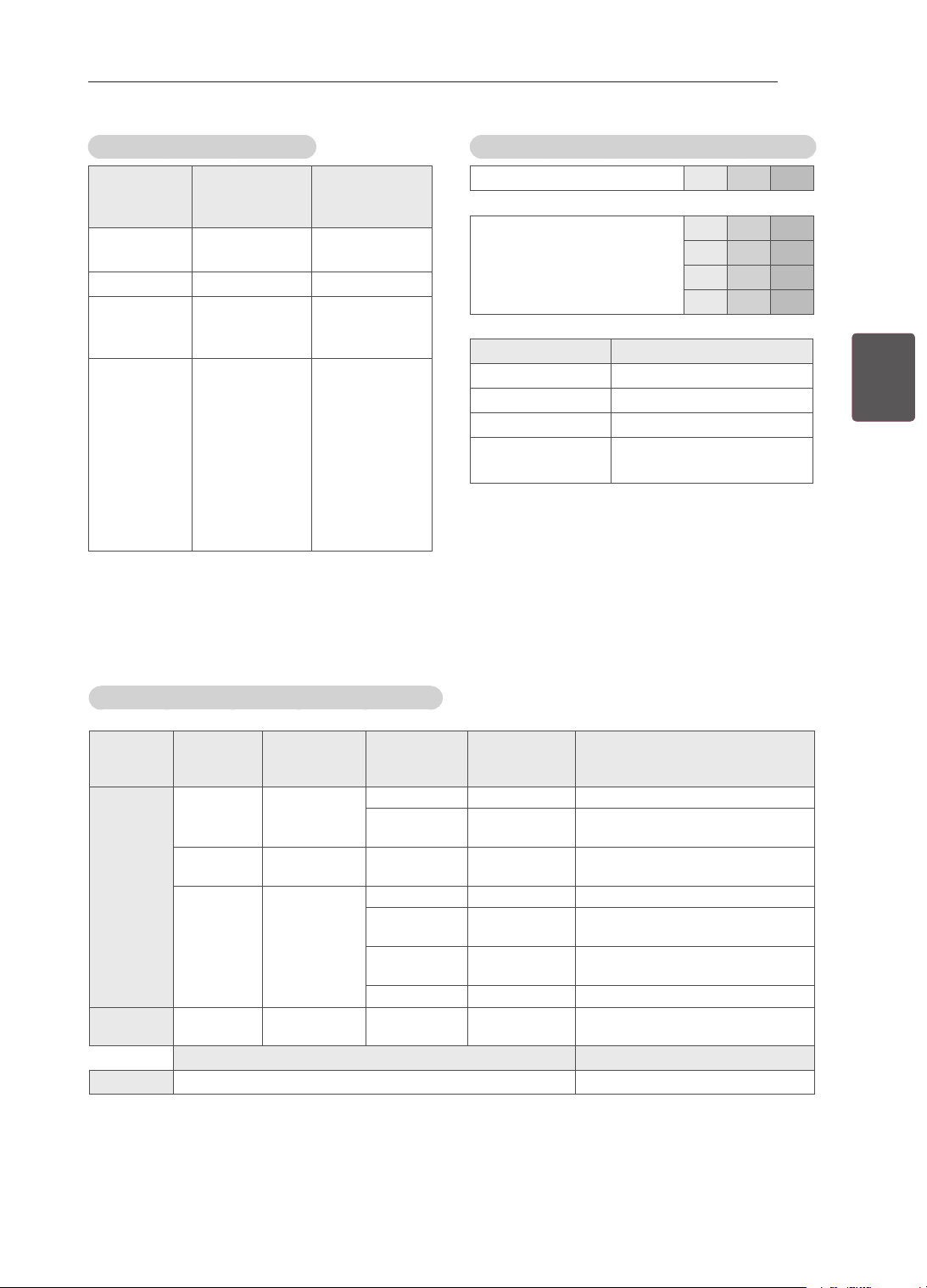
33
PTPORTUGUÊS
ESPECIFICAÇÕES
ModosuportadoHDMI/DVI-PC
Resolução
Frequência
horizontal
(kHz)
Frequência
vertical
(Hz)
720x480 31,469
31,5
59,94
60
720x576 31,25 50
1280x720 37,5
44,96
45
50
59,94
60
1920x1080 33,72
33,75
28,125
26,97
27
33,716
33,75
56,25
67,43
67,5
59,94
60
50
23,97
24
29,976
30,00
50
59,94
60
Informaçõesdeligaçãoàportadecomponentes
PortasdecomponentesnaTV Y P
B
P
R
Portasdesaídadevídeo
noleitordeDVD
Y P
B
P
R
Y B-Y R-Y
Y Cb Cr
Y Pb Pr
Sinal Componentes
480i/576i O
480p/576p O
720p/1080i O
1080p O
(Apenas50Hz/60Hz)
Modosuportado3D(Apenasemmodeloscom3D)
Entrada Sinal Resolução
Frequência
horizontal
(kHz)
Frequência
vertical
(Hz)
Formatodevídeo3Dreproduzível
HDMI 720p 1280x720 89.9/90/75 59.94/60/50 Framepacking(72060p)
45/37.5 60/50 ladoalado(metade),Superiore
inferior
1080i 1920X1080 33.7/28.125 60/50 ladoalado(metade),Superiore
inferior
1080p 1920X1080 53.95/54 23.98/24 Framepacking(108024p)
67.5/56.3 60/50 Ladoalado,Superioreinferior,
Sequênciadeframesimples
27 24 Ladoalado(metade),Superiore
inferior
33.7 30 Ladoalado(metade),Top&Bottom
USB 1080p 1920X1080 33.75 30 Ladoalado,Superioreinferior,
MPO(fotograa)
Sinal Formatodevídeo3Dreproduzível
DTV 720p,1080i Ladoalado,Superioreinferior

Grave o número do modelo e número
de série do TV.
Verifique a etiqueta na parte posterior
da unidade e sempre que necessitar de
um serviço de assistência informe estes
dados ao seu fornecedor.
MODELO
Nº de Série
Para qualquer Sugestão, Opinião ou
Reclamação, Por Favor Ligue
800 54 nos EAU
0800 54 54 54 na África do Sul
080 100 54 54 em Marrocos
19960 no Egipto
Em outros países, por favor contacte
o nosso revendedor local ou aceda a
http://www.lg.com

ﻦﻣ ﻲﻔﻠﺨﻟﺍ ءﺰﺠﻟﺎﺑ ﻲﻠﺴﻠﺴﺘﻟﺍ ﻪﻤﻗﺭﻭ ﻥﻮﻳﺰﻔﻠﺘﻟﺍ ﺯﺍﺮﻃ ﻢﺳﺍ ﺪﺟﻮﻳ
ﻥﻮﻳﺰﻔﻠﺘﻟﺍ
.ﻞﺒﻘﺘﺴﻤﻟﺍ ﻲﻓ ﺔﻣﺪﺧ ﻱﺃ ﻰﻟﺇ ﻚﺟﺎﻴﺘﺣﺍ ﺔﻟﺎﺣ ﻲﻓ ﺎﻤﻬﻨﻳﻭﺪﺘﺑ ﻢﻗ
ﺯﺍﺮﻄﻟﺍ
ﻲﻠﺴﻠﺴﺘﻟﺍ ﻢﻗﺮﻟﺍ
ءﺍﺭﻵﺍ ﻭﺃ ﺕﺎﺣﺍﺮﺘﻗﻻﺍ ﻢﻳﺪﻘﺘﻟ
ﻝﺎﺼﺗﻻﺍ ﻰﺟﺮﻳ ،ﻯﻭﺎﻜﺸﻟﺍ ﻭﺃ
ﺓﺪﺤﺘﻤﻟﺍ ﺔﻴﺑﺮﻌﻟﺍ ﺕﺍﺭﺎﻣﻹﺍ ﻲﻓ ٨٠٠ ٥٤ ﻢﻗﺮﻟﺍ ﻰﻠﻋ
ﺎﻴﻘﻳﺮﻓﺃ ﺏﻮﻨﺟ ﻲﻓ ٠٨٠٠ ٥٤ ٥٤ ٥٤
ﺏﺮﻐﻤﻟﺍ ﻲﻓ ٠٨٠ ١٠٠ ٥٤ ٥٤
ﺮﺼﻣ ﻲﻓ ١٩٩٦٠
ﻝﺎﺼﺗﻻﺍ ﻰﺟﺮﻳ ،ﻯﺮﺧﻷﺍ ﻥﺍﺪﻠﺒﻟﺍ ﻲﻓ
ﻊﻗﻮﻤﻟﺍ ﺓﺭﺎﻳﺯ ﻭﺃ ﻲﻠﺤﻤﻟﺍ ﻞﻴﻛﻮﻟﺎﺑ
http://www.lg.com
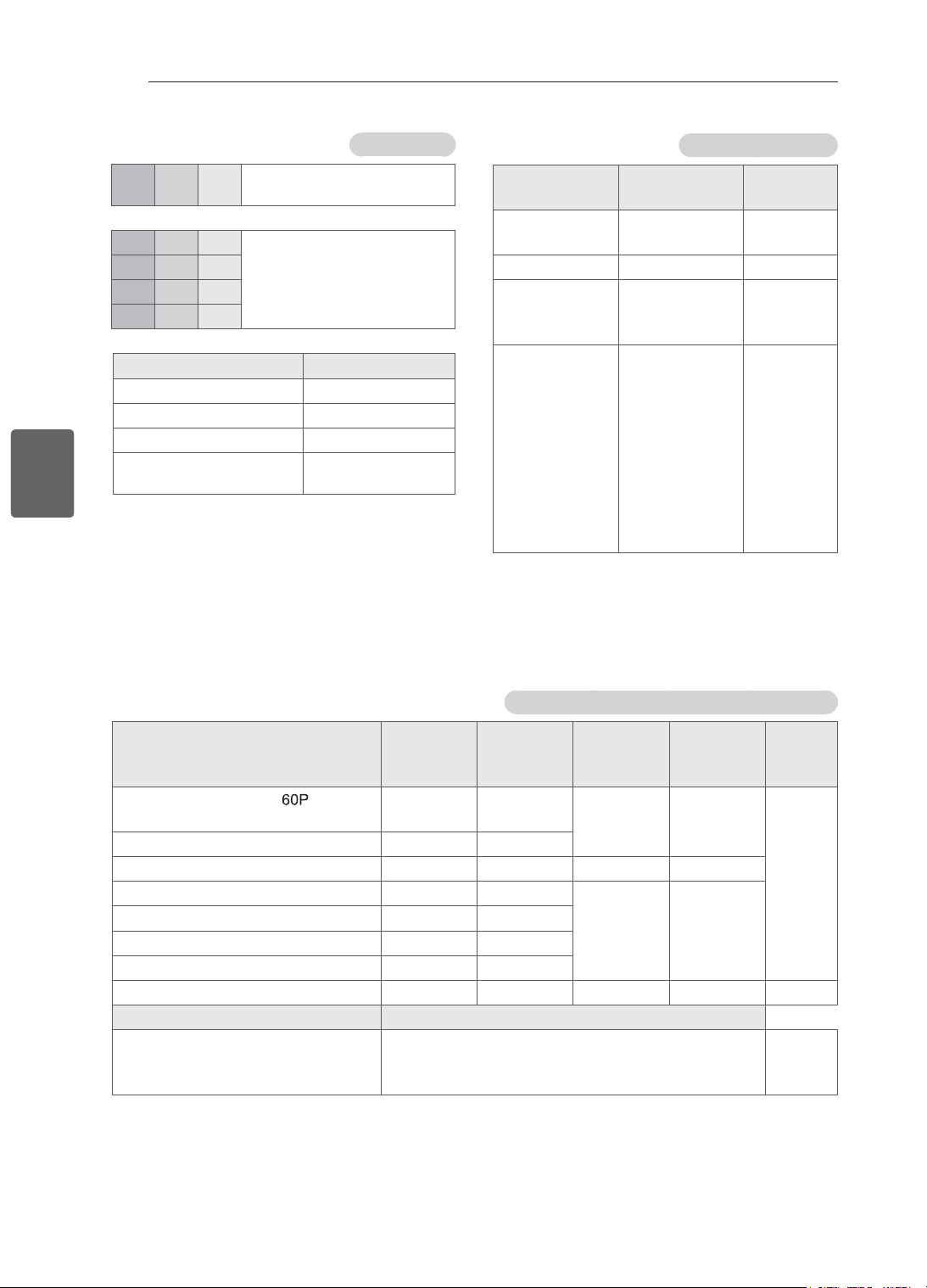
33
ﺔﻴﺑﺮﻌﻟﺍﺔﻴﺑﺮﻌﻟﺍ
ﺕﺎﻔﺻﺍﻮﻤﻟﺍ
HDMI/DTV ﺪﻤﺘﻌﻤﻟﺍ ﻊﺿﻮﻟﺍ
ﻱﺩﻮﻤﻌﻟﺍ ﺩﺩﺮﺘﻟﺍ
(ﺰﺗﺮﻫ)
ﻲﻘﻓﻷﺍ ﺩﺩﺮﺘﻟﺍ
(ﺰﺗﺮﻫﻮﻠﻴﻛ)
ﺔﻗﺪﻟﺍ ﺔﺟﺭﺩ
٥٩٫٩٤
٦٠
٣١٫٤٦٩
٣١٫٥
480x720
٥٠ ٣١٫٢٥
576x720
٥٠
٥٩٫٩٤
٦٠
٣٧٫٥
٤٤٫٩٦
٤٥
720x1280
٥٩٫٩٤
٦٠
٥٠
٢٣٫٩٧
٢٤
٢٩٫٩٧٦
٣٠٫٠٠
٥٠
٥٩٫٩٤
٦٠
٣٣٫٧٢
٣٣٫٧٥
٢٨٫١٢٥
٢٦٫٩٧
٢٧
٣٣٫٧١٦
٣٣٫٧٥
٥٦٫٢٥
٦٧٫٤٣
٦٧٫٥
1080x1920
ﻥﻮﻜﻤﻟﺍ ﺬﻔﻨﻣ ﻞﻴﺻﻮﺗ
P
R
P
B
Y ﻰﻠﻋ ﺕﺎﻧﻮﻜﻤﻟﺍ ﺬﻓﺎﻨﻣ
TV
P
R
P
B
Y ﻮﻳﺪﻴﻔﻟﺍ ﺝﺍﺮﺧﺇ ﺬﻓﺎﻨﻣ
DVD ﺹﺍﺮﻗﺃ ﻞ
ّ
ﻐﺸﻣ ﻰﻠﻋ
R-Y B-Y Y
Cr Cb Y
Pr Pb Y
ﻥﻮﻜﻤﻟﺍ ﺓﺭﺎﺷﻹﺍ
O 480i/576i
O 480p/576p
O 720p/1080i
O
(ﻂﻘﻓ ﺰﺗﺮﻫ ٦٠ / ﺰﺗﺮﻫ ٥٠)
1080p
(ﺩﺎﻌﺑﻷﺍ ﻲﺛﻼﺛ ﻥﻮﻳﺰﻔﻠﺘﻠﻟ ﺔﺒﺴﻨﻟﺎﺑ) ﺪﻤﺘﻌﻤﻟﺍ (ﺩﺎﻌﺑﻷﺍ ﻲﺛﻼﺛ) 3D ﻊﺿﻭ
ﻞﻴﻐﺸﺘﻠﻟ ﻞﺑﺎﻘﻟﺍ ﺩﺎﻌﺑﻷﺍ ﻲﺛﻼﺛ ﻮﻳﺪﻴﻔﻟﺍ ﻖﻴﺴﻨﺗ
ﻱﺩﻮﻤﻌﻟﺍ ﺩﺩﺮﺘﻟﺍ
(ﺰﺗﺮﻫ)
ﺩﺩﺮﺘﻟﺍ
ﻲﻘﻓﻷﺍ
(ﺰﺗﺮﻫ ﻮﻠﻴﻛ)
ﺔﻗﺪﻟﺍ ﺔﺟﺭﺩ ﺓﺭﺎﺷﻹﺍ ﻝﺎﺧﺩﻹﺍ
(720 ) ﺔﺌﺒﻌﺘﻟﺍ ﺭﺎﻃﺇ
/ ٦٠ / ٥٩٫٩٤
٥٠
٧٥ / ٩٠ / ٨٩٫٩
720x1280 720p HDMI
ﻲﻠﻔﺳﻭ ﻱﻮﻠﻋ ، (ﻒﺼﻧ)ﺐﻧﺎﺟ ﻰﻟﺇ ﺐﻧﺎﺟ
٥٠ / ٦٠ ٣٧٫٥ / ٤٥
ﻲﻠﻔﺳﻭ ﻱﻮﻠﻋ ، (ﻒﺼﻧ)ﺐﻧﺎﺟ ﻰﻟﺇ ﺐﻧﺎﺟ
٥٠ / ٦٠ ٢٨٫١٢٥ / ٣٣٫٧
1080x1920 1080i
(1080 24P) ﺔﺌﺒﻌﺘﻟﺍ ﺭﺎﻃﺇ
٢٤ / ٢٣٫٩٨ ٥٤ / ٥٣٫٩٥
1080x1920 1080p
ﻲﻟﺍﻮﺘﻣ ﻱﺩﺮﻓ ﺭﺎﻃﺇ ، ﻲﻠﻔﺳﻭ ﻱﻮﻠﻋ ، ﺐﻧﺎﺟ ﻰﻟﺇ ﺐﻧﺎﺟ
٥٠ / ٦٠ ٥٦٫٣ / ٦٧٫٥
ﻲﻠﻔﺳﻭ ﻱﻮﻠﻋ ، (ﻒﺼﻧ)ﺐﻧﺎﺟ ﻰﻟﺇ ﺐﻧﺎﺟ
٢٤ ٢٧
ﻲﻠﻔﺳﻭ ﻱﻮﻠﻋ ، (ﻒﺼﻧ)ﺐﻧﺎﺟ ﻰﻟﺇ ﺐﻧﺎﺟ
٣٠ ٣٣٫٧
(ﺓﺭﻮﺻ) MPO ، ﻲﻠﻔﺳﻭ ﻱﻮﻠﻋ ، ﺐﻧﺎﺟ ﻰﻟﺇ ﺐﻧﺎﺟ
٣٠ ٣٣٫٧٥
1080x1920 1080p USB
ﻞﻴﻐﺸﺘﻠﻟ ﻞﺑﺎﻘﻟﺍ ﺩﺎﻌﺑﻷﺍ ﻲﺛﻼﺛ ﻮﻳﺪﻴﻔﻟﺍ ﻖﻴﺴﻨﺗ Signal
ﻲﻠﻔﺳﻭ ﻱﻮﻠﻋ ، ﺐﻧﺎﺟ ﻰﻟﺇ ﺐﻧﺎﺟ
720p, 1080i ﻥﻮﻳﺰﻔﻠﺘﻟﺍ
ﻲﻤﻗﺮﻟﺍ
(DTV)
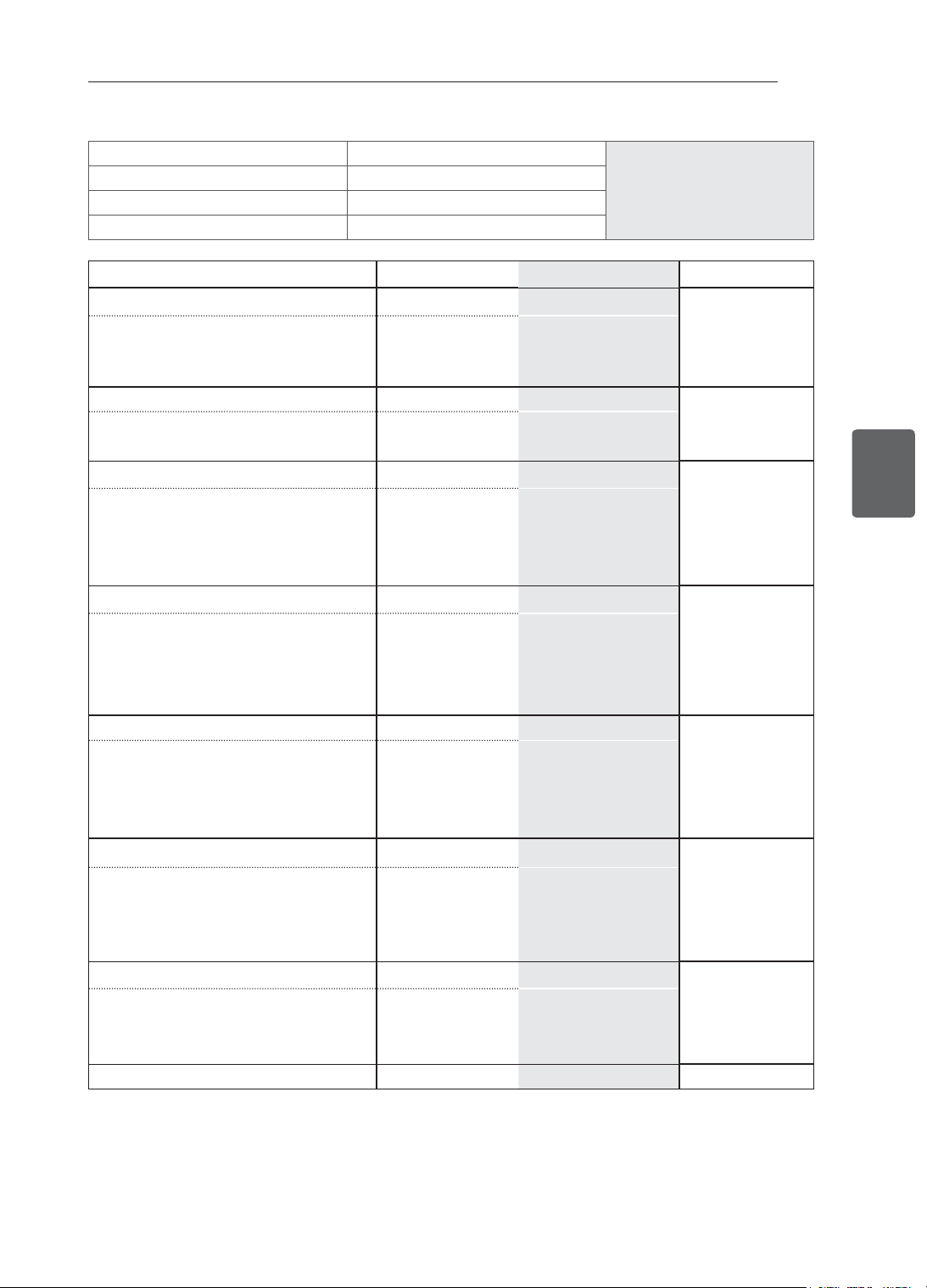
32
ﺔﻴﺑﺮﻌﻟﺍﺔﻴﺑﺮﻌﻟﺍ
ﺕﺎﻔﺻﺍﻮﻤﻟﺍ
ﺔﻳﻮﺌﻣ ﺔﺟﺭﺩ ٤٠ ﻰﻟﺇ ﺔﻳﻮﺌﻣ ﺔﺟﺭﺩ ٠ ﻦﻣ
ﻞﻴﻐﺸﺘﻟﺍ ﺓﺭﺍﺮﺣ ﺔﺟﺭﺩ ﻞﻴﻐﺸﺘﻟﺍ ﺔﺌﻴﺑ ﻑﻭﺮﻇ
٪ ٨٠ ﻦﻣ ﻞﻗﺃ
ﻞﻴﻐﺸﺘﻟﺍ ﺔﺑﻮﻃﺭ ﺔﺒﺴﻧ
ﺔﻳﻮﺌﻣ ﺔﺟﺭﺩ ٦٠ ﻰﻟﺇ ﺔﻳﻮﺌﻣ ﺔﺟﺭﺩ ٢٠- ﻦﻣ
ﻦﻳﺰﺨﺘﻟﺍ ﺓﺭﺍﺮﺣ ﺔﺟﺭﺩ
٪ ٨٥ ﻦﻣ ﻞﻗﺃ
ﻦﻳﺰﺨﺘﻟﺍ ﺔﺑﻮﻃﺭ ﺔﺒﺴﻧ
ﺔﻳﺮﻇﺎﻨﺘﻟﺍ ﻥﻮﻳﺰﻔﻠﺘﻟﺍ ﺓﺭﺎﺷﺇ ﺔﻴﻤﻗﺮﻟﺍ ﻥﻮﻳﺰﻔﻠﺘﻟﺍ ﺓﺭﺎﺷﺇ
PAL/SECAM-B/G/D/K
, PAL-I
DVB-T ﻥﻮﻳﺰﻔﻠﺘﻟﺍ ﻡﺎﻈﻧ
ﺓﺭﻮﻓﺎﻐﻨﺳﻭ ﺍﺪﻨﻠﻳﺯﻮﻴﻧ
٤٧ ﻰﻟﺇ ٠١ ﻦﻣ CATV ،٦٩ ﻰﻟﺇ ١ ﻦﻣ VHF/UHF : BG
٤٧ ﻰﻟﺇ ﻦﻣ ٠١ CATV ،٦٩ ﻰﻟﺇ ١ ﻦﻣ VHF/UHF : I
٤٧ ﻰﻟﺇ ﻦﻣ ٠١ CATV ،٦٩ ﻰﻟﺇ ١ ﻦﻣ VHF/UHF : DK
٦٩ ﻰﻟﺇ ٢١ ﻦﻣ UHF
ﺞﻣﺍﺮﺒﻟﺍ ﺔﻴﻄﻐﺗ
PAL B/B DVB-T ﻥﻮﻳﺰﻔﻠﺘﻟﺍ ﻡﺎﻈﻧ ﺎﻴﻟﺍﺮﺘﺳﺃ
٤٤ ﻰﻟﺇ ٢ ﻦﻣ : CATV ،٧٥ ﻰﻟﺇ ٠ ﻦﻣ VHF/UHF : B/B
،١٢ ﻰﻟﺇ ٠٦ ﻦﻣVHF
٦٩ ﻰﻟﺇ ٢٧ ﻦﻣ UHF
ﺞﻣﺍﺮﺒﻟﺍ ﺔﻴﻄﻐﺗ
PAL/SECAM-B/G/D/K
, PAL-I, NTSC-M
DVB-T ﻥﻮﻳﺰﻔﻠﺘﻟﺍ ﻡﺎﻈﻧ
ﻞﻴﺋﺍﺮﺳﺇﻭ ﺎﻴﺴﻴﻧﻭﺪﻧﺇ
ﺎﻜﻧﻻ ﻱﺮﺳﻭ ﺭﺎﻤﻧﺎﻴﻣﻭ
٤٧ ﻰﻟﺇ ٠١ ﻦﻣ CATV ،٦٩ ﻰﻟﺇ ١ ﻦﻣ VHF/UHF : BG
٤٧ ﻰﻟﺇ ﻦﻣ ٠١ CATV ،٦٩ ﻰﻟﺇ ١ ﻦﻣ VHF/UHF : I
٤٧ ﻰﻟﺇ ﻦﻣ ٠١ CATV ،٦٩ ﻰﻟﺇ ١ ﻦﻣ VHF/UHF : DK
٧١ ﻰﻟﺇ ٠١ ﻦﻣ CATV ،٧٨ ﻰﻟﺇ ٢ ﻦﻣ M : VHF/UHF
٦٩ ﻰﻟﺇ ٢١ ﻦﻣ UHF
ﺞﻣﺍﺮﺒﻟﺍ ﺔﻴﻄﻐﺗ
PAL/SECAM-B/G/D/K
, PAL-I, NTSC-M
DVB-T ﻥﻮﻳﺰﻔﻠﺘﻟﺍ ﻡﺎﻈﻧ
ﺎﻴﻘﻳﺮﻓﺇ ﺏﻮﻨﺟ
٤٧ ﻰﻟﺇ ٠١ ﻦﻣ CATV ،٦٩ ﻰﻟﺇ ١ ﻦﻣ VHF/UHF : BG
٤٧ ﻰﻟﺇ ﻦﻣ ٠١ CATV ،٦٩ ﻰﻟﺇ ١ ﻦﻣ VHF/UHF : I
٤٧ ﻰﻟﺇ ﻦﻣ ٠١ CATV ،٦٩ ﻰﻟﺇ ١ ﻦﻣ VHF/UHF : DK
٧١ ﻰﻟﺇ ٠١ ﻦﻣ CATV ،٧٨ ﻰﻟﺇ ٢ ﻦﻣ M : VHF/UHF
١٣ ،١١ ﻰﻟﺇ ٤ ﻦﻣ VHF
٦٨ ﻰﻟﺇ ٢١ ﻦﻣ UHF
ﺞﻣﺍﺮﺒﻟﺍ ﺔﻴﻄﻐﺗ
PAL/SECAM-B/G/D/K
, PAL-I, NTSC-M
DVB-T ﻥﻮﻳﺰﻔﻠﺘﻟﺍ ﻡﺎﻈﻧ
ﺎﻳﺰﻴﻟﺎﻣﻭ ﻡﺎﻨﺘﻴﻓ
٤٧ ﻰﻟﺇ ٠١ ﻦﻣ CATV ،٦٩ ﻰﻟﺇ ١ ﻦﻣ VHF/UHF : BG
٤٧ ﻰﻟﺇ ﻦﻣ ٠١ CATV ،٦٩ ﻰﻟﺇ ١ ﻦﻣ VHF/UHF : I
٤٧ ﻰﻟﺇ ﻦﻣ ٠١ CATV ،٦٩ ﻰﻟﺇ ١ ﻦﻣ VHF/UHF : DK
٧١ ﻰﻟﺇ ٠١ ﻦﻣ CATV ،٧٨ ﻰﻟﺇ ٢ ﻦﻣ M : VHF/UHF
،١٢ ﻰﻟﺇ ٦ ﻦﻣ VHF
٦٩ ﻰﻟﺇ ٢١ ﻦﻣ UHF
ﺞﻣﺍﺮﺒﻟﺍ ﺔﻴﻄﻐﺗ
PAL/SECAM-B/G/D/K
, PAL-I, NTSC-M
DVB-T ﻥﻮﻳﺰﻔﻠﺘﻟﺍ ﻡﺎﻈﻧ
ﻥﺍﺮﻳﺇ ﺔﻳﺭﻮﻬﻤﺟ
ﺮﺋﺍﺰﺠﻟﺍﻭ ﺔﻴﻣﻼﺳﻹﺍ
ﻲﻤﻗﺮﻟﺍ ﺯﺍﺮﻄﻟﺍﻭ ﺲﻧﻮﺗﻭ
٤٧ ﻰﻟﺇ ٠١ ﻦﻣ CATV ،٦٩ ﻰﻟﺇ ١ ﻦﻣ VHF/UHF : BG
٤٧ ﻰﻟﺇ ﻦﻣ ٠١ CATV ،٦٩ ﻰﻟﺇ ١ ﻦﻣ VHF/UHF : I
٤٧ ﻰﻟﺇ ﻦﻣ ٠١ CATV ،٦٩ ﻰﻟﺇ ١ ﻦﻣ VHF/UHF : DK
٧١ ﻰﻟﺇ ٠١ ﻦﻣ CATV ،٧٨ ﻰﻟﺇ ٢ ﻦﻣ M : VHF/UHF
،١٢ ﻰﻟﺇ ٥ ﻦﻣ VHF
٦٩ ﻰﻟﺇ ٢١ ﻦﻣ UHF
ﺞﻣﺍﺮﺒﻟﺍ ﺔﻴﻄﻐﺗ
PAL/SECAM-B/G/D/K
, PAL-I, NTSC-M
- ﻥﻮﻳﺰﻔﻠﺘﻟﺍ ﻡﺎﻈﻧ
ﺪﻨﻬﻟﺍﻭ ﻱﺮﻇﺎﻨﺘﻟﺍ ﺯﺍﺮﻄﻟﺍ
--ﻭ ﺪﻧﻼﻳﺎﺗﻭ
٤٧ ﻰﻟﺇ ٠١ ﻦﻣ CATV ،٦٩ ﻰﻟﺇ ١ ﻦﻣ VHF/UHF : BG
٤٧ ﻰﻟﺇ ﻦﻣ ٠١ CATV ،٦٩ ﻰﻟﺇ ١ ﻦﻣ VHF/UHF : I
٤٧ ﻰﻟﺇ ﻦﻣ ٠١ CATV ،٦٩ ﻰﻟﺇ ١ ﻦﻣ VHF/UHF : DK
٧١ ﻰﻟﺇ ٠١ ﻦﻣ CATV ،٧٨ ﻰﻟﺇ ٢ ﻦﻣ M : VHF/UHF
- ﺞﻣﺍﺮﺒﻟﺍ ﺔﻴﻄﻐﺗ
ﻡﻭﺃ ٧٥ ﻡﻭﺃ ٧٥
ﻲﺟﺭﺎﺨﻟﺍ ﻲﺋﺍﻮﻬﻟﺍ ﺔﻣﻭﺎﻘﻣ
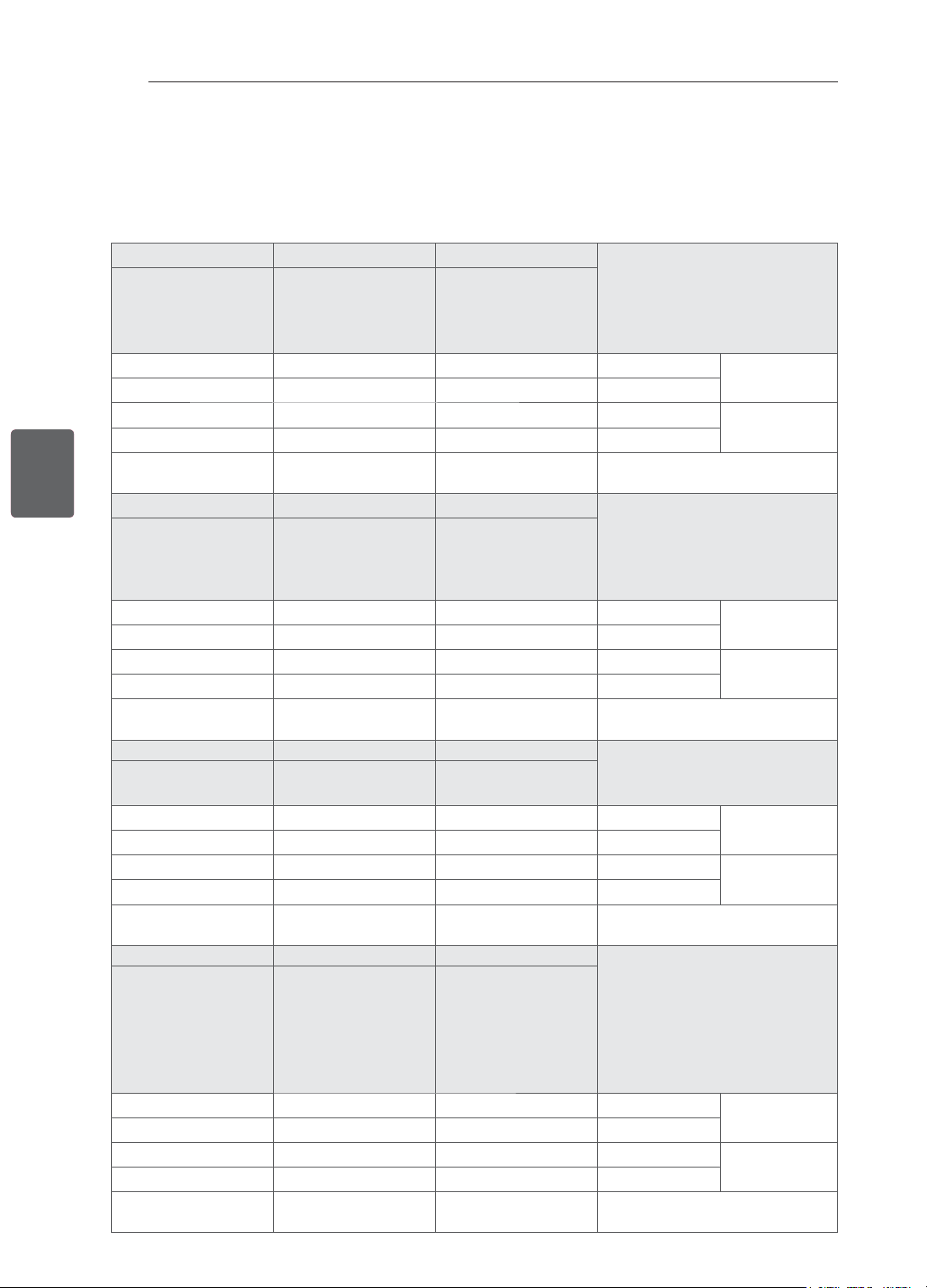
31
ﺔﻴﺑﺮﻌﻟﺍﺔﻴﺑﺮﻌﻟﺍ
ﺕﺎﻔﺻﺍﻮﻤﻟﺍ
ﺕﺎﻔﺻﺍﻮﻤﻟﺍ
.ﻪﻔﺋﺎﻇﻭ ﺔﻴﻗﺮﺗ ﺽﺮﻐﺑ ﻖﺒﺴﻣ ﺭﺎﻌﺷﺇ ﻥﻭﺩ ﺮﻴﻴﻐﺘﻠﻟ ﺔﺿﺮﻋ ﻩﻼﻋﺃ ﺓﺩﺭﺍﻮﻟﺍ ﺞﺘﻨﻤﻟﺍ ﺕﺎﻔﺻﺍﻮﻣ
.ﺞﺘﻨﻤﻟﺍ ﻰﻠﻋ ﺩﻮﺟﻮﻤﻟﺍ ﻖﺼﻠﻤﻟﺍ ﻊﺟﺍﺭ ،ﺔﻗﺎﻄﻟﺍ ﻙﻼﻬﺘﺳﺍ ﺮﻴﻳﺎﻌﻣﻭ ﺏﻮﻠﻄﻤﻟﺍ ﺔﻗﺎﻄﻟﺎﺑ ﺩﺍﺪﻣﻹﺍ ﺭﺪﺼﻣ ﻝﻮﺣ ﺪﻳﺰﻤﻟﺍ ﺔﻓﺮﻌﻤﻟ
32CS46** 26CS46** 22CS46**
ﺕﺍﺯﺍﺮﻄﻟﺍ
32CS460-TA
32CS460Y-TB
32CS461-TB
32CS461Y-TB
26CS460-TA
26CS460Y-TA
26CS461-TB
26CS461Y-TB
22CS460-TA
22CS460Y-TA
22CS461-TB
22CS461Y-TB
٢٠٧٫٠ x ٥٦٥٫٠ x ٧٩٤٫٠ ١٩٧٫٠ x ٤٨٣٫٠ x ٦٦٣٫٠ ١٦٥٫٠ x ٤٠٠٫٠ x ٥٣٩٫٠
(ﻢﻣ) ﻞﻣﺎﺤﻟﺍ ﻊﻣ
× ﺽﺮﻌﻟﺍ) ﺩﺎﻌﺑﻷﺍ
(ﻖﻤﻌﻟﺍ × ﻉﺎﻔﺗﺭﻻﺍ
٧٣٫٥ x ٥٠٤٫٠ x ٧٩٤٫٠ ٧٢٫٨ x ٤٢٤٫٠ x ٦٦٣٫٠ ٥٦٫٨ x ٣٤٥٫٠ x ٥٣٩٫٠
(ﻢﻣ) ﻞﻣﺎﺤﻟﺍ ﻥﻭﺩ ﻦﻣ
٩٫٠ ٧٫٤
٤٫٢
(ﻢﺠﻛ) ﻞﻣﺎﺤﻟﺍ ﻊﻣ
ﻥﺯﻮﻟﺍ
٨٫٠ ٦٫٦
٣٫٩
(ﻢﺠﻛ) ﻞﻣﺎﺤﻟﺍ ﻥﻭﺩ ﻦﻣ
٥٠ ~ﺖﻟﻮﻓ ٢٤٠-١٠٠ ﺩﺩﺮﺘﻣ ﺭﺎﻴﺗ
ﺰﺗﺮﻫ ٦٠ /
٥٠ ~ﺖﻟﻮﻓ ٢٤٠-١٠٠ ﺩﺩﺮﺘﻣ ﺭﺎﻴﺗ
ﺰﺗﺮﻫ ٦٠ /
٥٠ ~ﺖﻟﻮﻓ ٢٤٠-١٠٠ ﺩﺩﺮﺘﻣ ﺭﺎﻴﺗ
ﺰﺗﺮﻫ ٦٠ /
ﺔﻗﺎﻄﻟﺍ ﺕﺎﺒﻠﻄﺘﻣ
26CS47** 22CS47** 42CS46**
ﺕﺍﺯﺍﺮﻄﻟﺍ
26CS470-TA
26CS471-TB
22CS470-TA
22CS471-TB
42CS460-TA
42CS460Y-TA
42CS461-TB
42CS461Y-TB
١٩٧٫٠ x ٤٨٣٫٠ x ٦٦٣٫٠ ١٦٥٫٠ x ٤٠٠٫٠ x ٥٣٩٫٠ ٢٦١٫٠ x ٦٩٥٫٠ x ١٠١٧٫٠
(ﻢﻣ) ﻞﻣﺎﺤﻟﺍ ﻊﻣ
× ﺽﺮﻌﻟﺍ) ﺩﺎﻌﺑﻷﺍ
(ﻖﻤﻌﻟﺍ × ﻉﺎﻔﺗﺭﻻﺍ
٧٢٫٨ x ٤٢٤٫٠ x ٦٦٣٫٠ ٥٦٫٨ x ٣٤٥٫٠ x ٥٣٩٫٠ ٧٦٫٥ x ٦٢٩٫٠ x ١٠١٧٫٠
(ﻢﻣ) ﻞﻣﺎﺤﻟﺍ ﻥﻭﺩ ﻦﻣ
٧٫٤
٤٫٢
١٥٫١
(ﻢﺠﻛ) ﻞﻣﺎﺤﻟﺍ ﻊﻣ
ﻥﺯﻮﻟﺍ
٦٫٦
٣٫٩
١٣٫٥
(ﻢﺠﻛ) ﻞﻣﺎﺤﻟﺍ ﻥﻭﺩ ﻦﻣ
٥٠ ~ﺖﻟﻮﻓ ٢٤٠-١٠٠ ﺩﺩﺮﺘﻣ ﺭﺎﻴﺗ
ﺰﺗﺮﻫ ٦٠ /
٥٠ ~ﺖﻟﻮﻓ ٢٤٠-١٠٠ ﺩﺩﺮﺘﻣ ﺭﺎﻴﺗ
ﺰﺗﺮﻫ ٦٠ /
٥٠ ~ﺖﻟﻮﻓ ٢٤٠-١٠٠ ﺩﺩﺮﺘﻣ ﺭﺎﻴﺗ
ﺰﺗﺮﻫ ٦٠ /
ﺔﻗﺎﻄﻟﺍ ﺕﺎﺒﻠﻄﺘﻣ
32LS34** 42CS47** 32CS47**
ﺕﺍﺯﺍﺮﻄﻟﺍ
32LS3400-TA
32LS340Y-TA
42CS470-TA
42CS471-TB
32CS470-TA
32CS471-TB
٢٠٧٫٠ x ٥٦٦٫٠ x ٧٩٥٫٠ ٢٦١٫٠ x ٦٩٥٫٠ x ١٠١٧٫٠ ٢٠٧٫٠ x ٥٦٥٫٠ x ٧٩٤٫٠
(ﻢﻣ) ﻞﻣﺎﺤﻟﺍ ﻊﻣ
× ﺽﺮﻌﻟﺍ) ﺩﺎﻌﺑﻷﺍ
(ﻖﻤﻌﻟﺍ × ﻉﺎﻔﺗﺭﻻﺍ
٧٣٫٥ x ٥٠٤٫٠ x ٧٩٥٫٠ ٧٦٫٥ x ٦٢٩٫٠ x ١٠١٧٫٠ ٧٣٫٥ x ٥٠٤٫٠ x ٧٩٤٫٠
(ﻢﻣ) ﻞﻣﺎﺤﻟﺍ ﻥﻭﺩ ﻦﻣ
٩٫١ ١٥٫١ ٩٫٠
(ﻢﺠﻛ) ﻞﻣﺎﺤﻟﺍ ﻊﻣ
ﻥﺯﻮﻟﺍ
٨٫١ ١٣٫٥ ٨٫٠
(ﻢﺠﻛ) ﻞﻣﺎﺤﻟﺍ ﻥﻭﺩ ﻦﻣ
٥٠ ~ﺖﻟﻮﻓ ٢٤٠-١٠٠ ﺩﺩﺮﺘﻣ ﺭﺎﻴﺗ
ﺰﺗﺮﻫ ٦٠ /
٥٠ ~ﺖﻟﻮﻓ ٢٤٠-١٠٠ ﺩﺩﺮﺘﻣ ﺭﺎﻴﺗ
ﺰﺗﺮﻫ ٦٠ /
٥٠ ~ﺖﻟﻮﻓ ٢٤٠-١٠٠ ﺩﺩﺮﺘﻣ ﺭﺎﻴﺗ
ﺰﺗﺮﻫ ٦٠ /
ﺔﻗﺎﻄﻟﺍ ﺕﺎﺒﻠﻄﺘﻣ
42LM34** 32LM34** 42LS34**
ﺕﺍﺯﺍﺮﻄﻟﺍ
42LM3400-TB
42LM340Y-TB
42LM3410-TC
42LM341Y-TC
42LM3450-TC
42LM345Y-TC
32LM3400-TB
32LM340Y-TB
32LM3410-TC
32LM341Y-TC
42LS3400-TA
42LS340Y-TA
٢٦١٫٠ x ٦٩٦٫٠ x ١٠١٨٫٠ ٢٠٧٫٠ x ٥٦٦٫٠ x ٧٩٥٫٠ ٢٦١٫٠ x ٦٩٦٫٠ x ١٠١٨٫٠
(ﻢﻣ) ﻞﻣﺎﺤﻟﺍ ﻊﻣ
× ﺽﺮﻌﻟﺍ) ﺩﺎﻌﺑﻷﺍ
(ﻖﻤﻌﻟﺍ × ﻉﺎﻔﺗﺭﻻﺍ
٧٦٫٥ x ٦٢٩٫٠ x ١٠١٨٫٠ ٧٣٫٥ x ٥٠٤٫٠ x ٧٩٥٫٠ ٧٦٫٥ x ٦٢٩٫٠ x ١٠١٨٫٠
(ﻢﻣ) ﻞﻣﺎﺤﻟﺍ ﻥﻭﺩ ﻦﻣ
١٤٫٧ ٩٫١ ١٤٫٧
(ﻢﺠﻛ) ﻞﻣﺎﺤﻟﺍ ﻊﻣ
ﻥﺯﻮﻟﺍ
١٣٫١ ٨٫١ ١٣٫١
(ﻢﺠﻛ) ﻞﻣﺎﺤﻟﺍ ﻥﻭﺩ ﻦﻣ
٥٠ ~ﺖﻟﻮﻓ ٢٤٠-١٠٠ ﺩﺩﺮﺘﻣ ﺭﺎﻴﺗ
ﺰﺗﺮﻫ ٦٠ /
٥٠ ~ﺖﻟﻮﻓ ٢٤٠-١٠٠ ﺩﺩﺮﺘﻣ ﺭﺎﻴﺗ
ﺰﺗﺮﻫ ٦٠ /
٥٠ ~ﺖﻟﻮﻓ ٢٤٠-١٠٠ ﺩﺩﺮﺘﻣ ﺭﺎﻴﺗ
ﺰﺗﺮﻫ ٦٠ /
ﺔﻗﺎﻄﻟﺍ ﺕﺎﺒﻠﻄﺘﻣ
30
ﺔﻴﺑﺮﻌﻟﺍﺔﻴﺑﺮﻌﻟﺍ
ﺎﻬﺣﻼﺻﺇﻭ ءﺎﻄﺧﻷﺍ ﻑﺎﺸﻜﺘﺳﺍ / ﺔﻧﺎﻴﺼﻟﺍ
ﺔﻧﺎﻴﺼﻟﺍ
ﺯﺎﻔﻠﺘﻟﺍ ﻒﻴﻈﻨﺗ
.ﻲﺿﺍﺮﺘﻓﻻﺍ ﻩﺮﻤﻋ ﺔﻟﺎﻃﻹﻭ ﻪﻟ ءﺍﺩﺃ ﻞﻀﻓﺃ ﻰﻠﻋ ﻅﺎﻔﺤﻠﻟ ﻡﺎﻈﺘﻧﺎﺑ ﺯﺎﻔﻠﺘﻟﺍ ﻒﻴﻈﻨﺘﺑ ﻢﺘﻫﺍ
ﻪﻴﺒﻨﺗ
• .
ً
ﻻﻭﺃ ﻯﺮﺧﻷﺍ ﺕﻼﺒﻜﻟﺍﻭ ﺔﻗﺎﻄﻟﺍ ﻚﻠﺳ ﻞﺼﻓﻭ ﻞﻴﻐﺸﺘﻟﺍ ﻑﺎﻘﻳﺇ ﻦﻣ ﺪﻛﺄﺗ
• ﺔﺠﻴﺘﻧ ﻞﻤﺘﺤﻣ ﻒﻠﺗ ﻱﺃ ﻦﻣ ﺔﻳﺎﻗﻮﻠﻟ ﻚﻟﺫﻭ ﻂﺋﺎﺤﻟﺎﺑ ﺔﻗﺎﻄﻟﺍ ﺭﺪﺼﻣ ﻦﻣ ﺔﻗﺎﻄﻟﺍ ﻚﻠﺳ ﻞﺼﻓﺍ ،ﺔﻠﻳﻮﻃ ﺓﺮﺘﻔﻟ ﻡﺍﺪﺨﺘﺳﺍ ﻭﺃ ﻞﻴﻐﺸﺗ ﻥﻭﺩ ﻦﻣ ﻥﻮﻳﺰﻔﻠﺘﻟﺍ ﻙﺮﺗ ﺪﻨﻋ
.ﺭﺎﻴﺘﻟﺍ ﺓﺪﺷ ﻲﻓ ﺔﺌﺟﺎﻔﻤﻟﺍ ﺕﺍﺮﻴﻐﺘﻟﺍ ﻭﺃ ﻕﺮﺒﻠﻟ
ﻞﻣﺎﺤﻟﺍﻭ ﻕﻭﺪﻨﺼﻟﺍﻭ ﺭﺎﻃﻹﺍﻭ ﺔﺷﺎﺸﻟﺍ
• .ﺔﻓﺎﺟﻭ ﺔﻔﻴﻈﻧﻭ ﺔﻤﻋﺎﻧ ﺵﺎﻤﻗ ﺔﻌﻄﻘﺑ ﺢﻄﺴﻟﺍ ﺢﺴﻣﺍ ،ﺔﻔﻴﻔﺨﻟﺍ ﺔﺑﺮﺗﻷﺍ ﻭﺃ ﺭﺎﺒﻐﻟﺍ ﺔﻟﺍﺯﻹ
• .ﺔﻓﺎﺟ ﺵﺎﻤﻗ ﺔﻌﻄﻘﺑ ﺍ
ً
ﺭﻮﻓ ﻪﺤﺴﻣﺍ ﻢﺛ .ﻒﻴﻔﺧ ﻝﺪﺘﻌﻣ ﻒﻈﻨﻣ ﻭﺃ ﻒﻴﻈﻧ ءﺎﻤﺑ ﺔﺒﻃﺮﻣ ﺔﻤﻋﺎﻧ ﺵﺎﻤﻗ ﺔﻌﻄﻘﺑ ﺔﺷﺎﺸﻟﺍ ﺢﻄﺳ ﺢﺴﻣﺍ ،ﺓﺮﻴﺒﻜﻟﺍ ﺥﺎﺳﻭﻷﺍ ﺔﻟﺍﺯﻹ
ﻪﻴﺒﻨﺗ
• .ﺎﻬﺑ ﺭﺮﻀﻟﺍ ﻕﺎﺤﻟﺇ ﻰﻟﺇ ﻚﻟﺫ ﻱﺩﺆﻳ ﺪﻗ ﺫﺇ ،ﺖﻗﻭ ﻞﻛ ﻲﻓ ﺔﺷﺎﺸﻟﺍ ﺢﻄﺳ ﺲﻤﻟ ﺐﻨﺠﺗ
• .ﺓﺭﻮﺼﻟﺍ ﻪﻳﻮﺸﺗﻭ ﺔﺷﺎﺸﻟﺍ ﻰﻠﻋ ﺵﻭﺪﺧ ﺙﻭﺪﺣ ﻰﻟﺇ ﻚﻟﺫ ﻱﺩﺆﻳ ﺪﻗ ﺚﻴﺣ ﺩﺎﺣ ءﻲﺸﺑ ﻭﺃ ﻙﺮﻔﻈﺑ ﻪﻴﻠﻋ ﻂﻐﻀﺗ ﻭﺃ ﻚﺤﻠﻟ ﻪﺿﺮﻌﺗ ﻭﺃ ﺔﺷﺎﺸﻟﺍ ﺢﻄﺳ ﻊﻓﺪﺗ ﻻ
• .ﺞﺘﻨﻤﻟﺍ ﻒﻠﺗ ﻲﻓ ﺐﺒﺴﺘﺗ ﺪﻘﻓ ﺔﻴﺋﺎﻴﻤﻴﻜﻟﺍ ﺩﺍﻮﻤﻟﺍ
ﻡﺪﺨﺘﺴﺗ ﻻ
• .ﺯﺎﻔﻠﺘﻟﺍ ﻞﻄﻋ ﻭﺃ ﺔﻴﺋﺎﺑﺮﻬﻛ ﺔﻣﺪﺻ ﺙﻭﺪﺣ ﻭﺃ ﻖﻳﺮﺣ ﺏﻮﺸﻧ ﻲﻓ ﺐﺒﺴﺘﻳ ﺪﻘﻓ ،ﺯﺎﻔﻠﺘﻟﺍ ﻰﻟﺇ ءﺎﻣ ﻞﺧﺩ ﺍﺫﺇﻭ .ﺔﺷﺎﺸﻟﺍ ﺢﻄﺳ ﻰﻠﻋ ﻞﺋﺎﺴﻟﺍ ﺵﺮﺗ ﻻ
ﺔﻗﺎﻄﻟﺍ ﻚﻠﺳ
.ﻡﺎﻈﺘﻧﺎﺑ ﺔﻗﺎﻄﻟﺍ ﻚﻠﺳ ﻰﻠﻋ ﺔﻤﻛﺍﺮﺘﻤﻟﺍ ﺔﺑﺮﺗﻷﺍ ﻭﺃ ﻢﻛﺍﺮﺘﻤﻟﺍ ﺭﺎﺒﻐﻟﺍ ﻝﺯﺃ
ﺎﻬﺣﻼﺻﺇﻭ ءﺎﻄﺧﻷﺍ ﻑﺎﺸﻜﺘﺳﺍ
ﺔﻠﻜﺸﻤﻟﺍﺔﻗﺪﻟﺍ ﺔﺟﺭﺩ
ﺯﺎﻔﻠﺘﻟﺍ ﻲﻓ ﻢﻜﺤﺘﻟﺍ ﺭﺬﻌﺗ
ﻦﻋ ﻢﻜﺤﺘﻟﺍ ﺓﺪﺣﻭ ﻡﺍﺪﺨﺘﺳﺎﺑ
.ﺪﻌ
ُ
ﺑ
• .ﺔﻴﻧﺎﺛ ﺓﺮﻣ ﻝﻭﺎﺣﻭ ﺪﻌ
ُ
ﺑ ﻦﻋ ﻢﻜﺤﺘﻟﺍ ﺓﺪﺣﻭ ﺭﺎﻌﺸﺘﺳﺍ ﺯﺎﻬﺟ ﺺﺤﻓﺍ
• .ﺪﻌ
ُ
ﺑ ﻦﻋ ﻢﻜﺤﺘﻟﺍ ﺓﺪﺣﻭﻭ ﺯﺎﻔﻠﺘﻟﺍ ﻦﻴﺑ ﻖﺋﺎﻋ ﻱﺃ ﺩﻮﺟﻭ ﻡﺪﻋ ﻦﻣ ﻖﻘﺤﺗ
• .(
ﻰﻟﺇ ، ﻰﻟﺇ ) ﺢﻴﺤﺻ ﻞﻜﺸﺑ ﺔﺒﻛﺮﻣ ﺎﻬﻧﺃﻭ ﻞﻤﻌﺗ ﻝﺍﺰﺗ ﻻ ﺕﺎﻳﺭﺎﻄﺒﻟﺍ ﻥﺃ ﻦﻣ ﻖﻘﺤﺗ
ﻻﻭ ﺓﺭﻮﺻ ﻱﺃ ﺮﻬﻈﺗ ﻻ
.ﺕﻮﺻ ﻱﺃ ﺭ
ُ
ﺪﺼﻳ
• .ﺯﺎﻔﻠﺘﻟﺍ ﻞﻴﻐﺸﺗ ﻦﻣ ﻖﻘﺤﺗ
• .ﻂﺋﺎﺤﻟﺍ ﻲﻓ ﺔﻗﺎﻄﻟﺍ ﺭﺪﺼﻤﺑ ﺔﻗﺎﻄﻟﺍ ﻚﻠﺳ ﻞﻴﺻﻮﺗ ﻦﻣ ﻖﻘﺤﺗ
• .ﻪﺑ ﻯﺮﺧﺃ ﺓﺰﻬﺟﺃ ﻞﻴﺻﻮﺗ ﻝﻼﺧ ﻦﻣ ﻂﺋﺎﺤﻟﺎﺑ ﺔﻗﺎﻄﻟﺍ ﺭﺪﺼﻣ ﻲﻓ ﺔﻠﻜﺸﻣ ﺩﻮﺟﻭ ﻡﺪﻋ ﻦﻣ ﻖﻘﺤﺗ
ﺯﺎﻔﻠﺘﻟﺍ ﻞﻴﻐﺸﺗ ﻒﻗﻮﺘﻳ
.ﺓﺄﺠﻓ
• .ﺔﻗﺎﻄﻟﺍ ﺪﻳﻭﺰﺗ ﻦﻋ ﻊﻄﻘﻧﺍ ﺔﻗﺎﻄﻟﺎﺑ ﺩﺍﺪﻣﻹﺍ ﺭﺪﺼﻣ ﻥﻮﻜﻳ ﺪﻗ .ﺔﻗﺎﻄﻟﺎﺑ ﻢﻜﺤﺘﻟﺍ ﻂﺑﺍﻮﺿ ﺺﺤﻓﺍ
• .(ﺖﻗﻮﻟﺍ) Time ﻂﺑﺍﻮﺿ ﻲﻓ (ﻲﺋﺎﻘﻠﺘﻟﺍ ﻥﻮﻜﺴﻟﺍ) Auto sleep ﺓﺰﻴﻣ ﻂﻴﺸﻨﺗ ﻦﻣ ﻖﻘﺤﺗ
• ﻢﺘﻳ ﻻ ﺔﻘﻴﻗﺩ 15 ﺭﻭﺮﻣ ﺪﻌﺑ ﻲﺋﺎﻘﻠﺗ ﻞﻜﺸﺑ ﻞﻴﻐﺸﺘﻟﺍ ﻦﻋ ﺯﺎﻔﻠﺘﻟﺍ ﻒﻗﻮﺘﻴﺴﻓ ،ﺯﺎﻔﻠﺘﻟﺍ ﻞﻴﻐﺸﺗ ءﺎﻨﺛﺃ ﺓﺭﺎﺷﺇ ﺩﻮﺟﻭ ﻡﺪﻋ ﺔﻟﺎﺣ ﻲﻓ
.ﻁﺎﺸﻧ ﻱﺃ ﻞﻴﺠﺴﺗ ﺎﻬﻟﻼﺧ
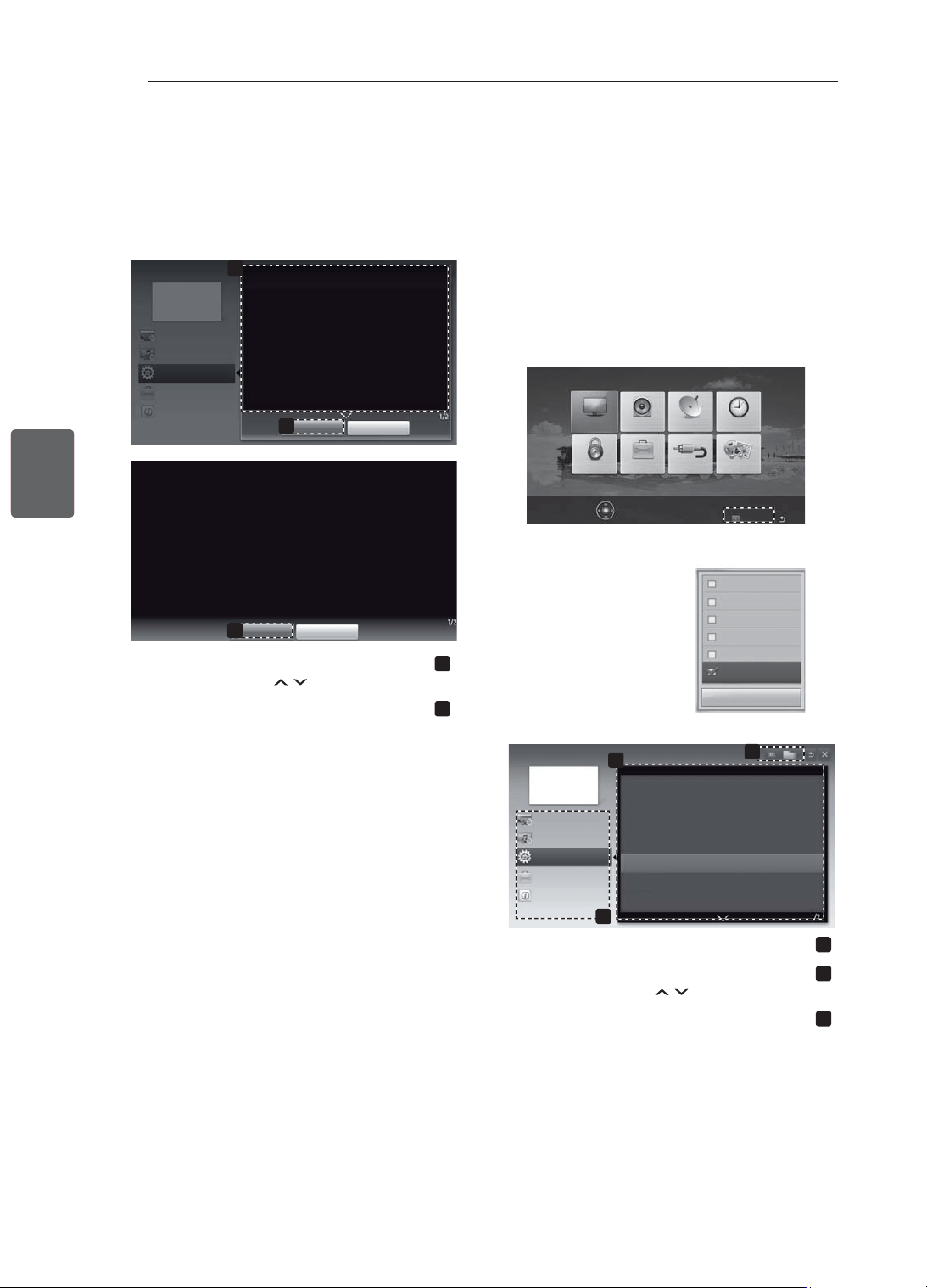
29
ﺔﻴﺑﺮﻌﻟﺍﺔﻴﺑﺮﻌﻟﺍ
ﻡﺪﺨﺘﺴﻤﻟﺍ ﻞﻴﻟﺩ ﻡﺍﺪﺨﺘﺳﺍ
1 .ﺔﻴﺴﻴﺋﺮﻟﺍ ﻢﺋﺍﻮﻘﻟﺍ ﻰﻟﺇ ﻝﻮﺻﻮﻠﻟ SETTINGS ﻰﻠﻋ ﻂﻐﺿﺍ
2
Customer ﻢﺋﺍﻮﻗ ﻰﻟﺇ ﻝﻮﺻﻮﻠﻟ ﺮﻤﺣﻷﺍ ﺭﺰﻟﺍ ﻰﻠﻋ ﻂﻐﺿﺍ
.(ءﻼﻤﻌﻟﺍ ﻢﻋﺩ
) Support
3 (ﻡﺪﺨﺘﺴﻤﻟﺍ ﻞﻴﻟﺩ) User Guide ﻰﻟﺇ ﻝﺎﻘﺘﻧﻺﻟ ﻞﻘﻨﺘﻟﺍ ﺭﺍﺭﺯﺃ ﻰﻠﻋ ﻂﻐﺿﺍ
.OK ﻰﻠﻋ ﻂﻐﺿﺍﻭ
Software Update
Picture Test
Sound Test
Signal Test
Product/Service Info.
User Guide
Close
PICTURE AUDIO SETUP TIME
MY MEDIAINPUTOPTIONLOCK
Press OK(
) to set picture settings.
Customer Support Exit
2
User Guide
OPTION
PROGRAMME Setting
PICTURE, SOUND Setting
Advanced Function
To use input device
To set time options
To set language
To set country
To set subtitle
To set TV lock options
To use Energy Saving feature
3
Information
1
1
.ﺎﻫﺪﻳﺮﺗ ﻲﺘﻟﺍ ﺔﺌﻔﻟﺍ ﺪﻳﺪﺤﺗ ﻦﻣ ﻦﻜﻤﺘﻠﻟ
2
.ﻩﺪﻳﺮﺗ ﻱﺬﻟﺍ ﺮﺼﻨﻌﻟﺍ ﺪﻳﺪﺤﺗ ﻦﻣ ﻦﻜﻤﺘﻠﻟ
.ﺕﺎﺤﻔﺼﻟﺍ ﻦﻴﺑ ﻝﺎﻘﺘﻧﻼﻟ
ﺭﺍﺭﺯﻷﺍ ﻡﺍﺪﺨﺘﺳﺍ ﻚﻨﻜﻤﻳ
3
.ﺱﺮﻬﻔﻟﺍ ﻦﻣ ﺎﻫﺪﻳﺮﺗ ﻲﺘﻟﺍ ﺔﻔﻴﻇﻮﻟﺍ ﺡﺮﺷ ﺽﺍﺮﻌﺘﺳﺍ ﻦﻣ ﻦﻜﻤﺘﻠﻟ
1
2
User Guide
OPTION > To set language
SETTING OPTION ¨ Language
You can select the language of the menu displayed on the screen and the
digital sound broadcasting.
Menu Language : Selects a language for the display text.
Audio Language [In Digital Mode Only] : Select the desired language
when watching digital broadcasting containg several
voice languages.
Subtitle Language [In Digital Mode Only] : Use the Subtitle function when
two or more subtitle languages are broadcast.
✎ If subtitle data in a selected language is not
broadcast, the default language subtitle will
be displayed.
Close
Zoom In
OPTION
PROGRAMME Setting
PICTURE, SOUND Setting
Advanced Function
Information
2
Close
Zoom Out
SETTING OPTION ¨ Language
You can select the language of the menu displayed on the screen and the
digital sound broadcasting.
Menu Language : Selects a language for the display text.
Audio Language [In Digital Mode Only] : elect the desired language when
watching digital broadcasting containg several voice
languages.
Subtitle Language [In Digital Mode Only] : Use the Subtitle function when
two or more subtitle languages are broadcast.
✎ If subtitle data in a selected language is not broad-
cast, the default language subtitle will be displayed.
1
.ﺓﺩﺪﺤﻤﻟﺍ ﺔﻤﺋﺎﻘﻟﺍ ﺡﺮﺷ ﺽﺮﻌﻟ
.ﺕﺎﺤﻔﺼﻟﺍ ﻦﻴﺑ ﻝﺎﻘﺘﻧﻼﻟ
ﺭﺍﺭﺯﻷﺍ ﻡﺍﺪﺨﺘﺳﺍ ﻚﻨﻜﻤﻳ
2
.ﺎﻫﺮﻴﻐﺼﺗ ﻭﺃ ﺔﺷﺎﺸﻟﺍ ﺮﻴﺒﻜﺘﻟ
ﻡﺪﺨﺘﺴﻤﻟﺍ ﻞﻴﻟﺩ ﻡﺍﺪﺨﺘﺳﺍ
.ﺔﻠﺼﻔﻤﻟﺍ ﺯﺎﻔﻠﺘﻟﺍ ﺕﺎﻣﻮﻠﻌﻣ ﻰﻟﺇ ﻞﻬﺳﺃ ﻞﻜﺸﺑ ﻝﻮﺻﻮﻟﺍ ﻡﺪﺨﺘﺴﻤﻟﺍ ﻞﻴﻟﺩ ﻚﻟ ﺢﻴﺘﻳ
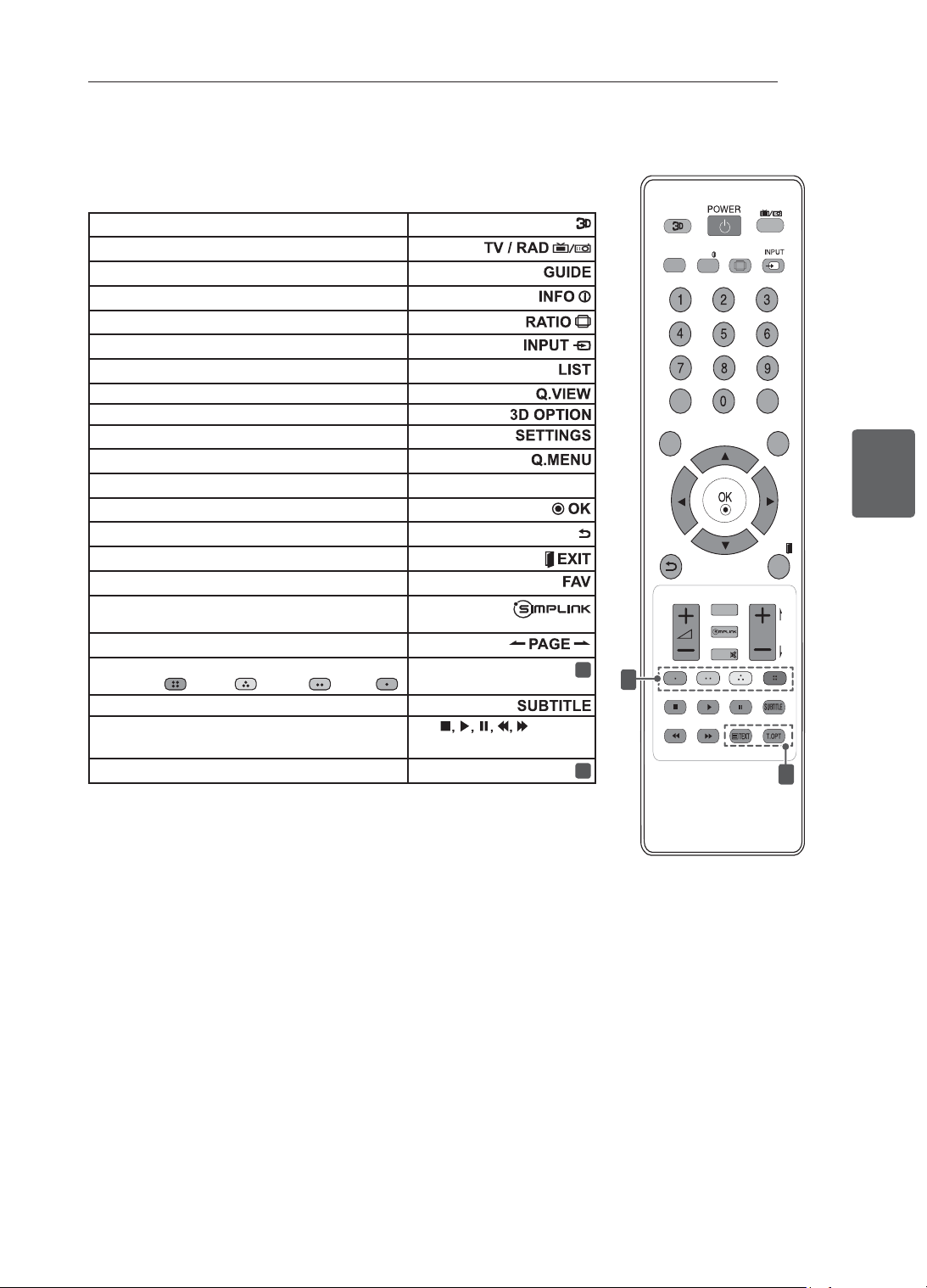
28
ﺔﻴﺑﺮﻌﻟﺍﺔﻴﺑﺮﻌﻟﺍ
ﺪﻌ
ُ
ﺑ ﻦﻋ ﻢﻜﺤﺘﻟﺍ ﺓﺪﺣﻭ
LIST
Q.VIEW
TV/RAD
RATIO
SETTINGS
GUIDE
Q.MENU
INFO
FAV
MUTE
P
A
G
E
P
EXIT
3D OPTION
1
2
.ﺩﺎﻌﺑﻷﺍ ﻲﺛﻼﺛ ﻮﻳﺪﻴﻔﻟﺍ ﺽﺮﻌﻟ ﻡﺪﺨﺘﺴ
ُ
ﻳ
.ﻲﻤﻗﺮﻟﺍ ﺯﺎﻔﻠﺘﻟﺍﻭ ،ﺯﺎﻔﻠﺘﻟﺍﻭ ،ﻮﻳﺩﺍﺮﻟﺍ ﺞﻣﺎﻧﺮﺑ ﺪﻳﺪﺤﺘﻟ
.ﺞﻣﺍﺮﺒﻟﺍ ﻞﻴﻟﺩ ﺽﺮﻌﻟ
.ﺔﻴﻟﺎﺤﻟﺍ ﺔﺷﺎﺸﻟﺍﻭ ﺞﻣﺎﻧﺮﺒﻟﺎﺑ ﺔﺻﺎﺨﻟﺍ ﺕﺎﻣﻮﻠﻌﻤﻟﺍ ﺽﺮﻌﻟ
.ﺓﺭﻮﺻ ﻢﺠﺣ ﻂﺒﺿ ﺓﺩﺎﻋﻹ
.ﻝﺎﺧﺩﻹﺍ ﺭﺪﺼﻣ ﺮﻴﻴﻐﺘﻟ
.ﺔﻇﻮﻔﺤﻤﻟﺍ ﺞﻣﺍﺮﺒﻟﺍ ﺔﺤﺋﻻ ﻰﻟﺇ ﻝﻮﺻﻮﻠﻟ
.ﺎ
ً
ﻘﺑﺎﺳ ﺽﻭﺮﻌﻤﻟﺍ ﺞﻣﺎﻧﺮﺒﻟﺍ ﻰﻟﺇ ﺓﺩﻮﻌﻠﻟ
.ﺩﺎﻌﺑﻷﺍ ﻲﺛﻼﺛ ﻮﻳﺪﻴﻔﻟﺍ ﺽﺮﻌﻟ ﻡﺪﺨﺘﺴ
ُ
ﻳ
.ﺔﻴﺴﻴﺋﺮﻟﺍ ﻢﺋﺍﻮﻘﻟﺍ ﻰﻟﺇ ﻝﻮﺻﻮﻠﻟ
.ﺔﻌﻳﺮﺴﻟﺍ ﻢﺋﺍﻮﻘﻟﺍ ﻰﻟﺇ ﻝﻮﺻﻮﻠﻟ
(ﻦﻴﻤﻳ/ﺭﺎﺴﻳ/ﻞﻔﺳﺃ/ﻰﻠﻋﺃ) ﻞﻘﻨﺘﻟﺍ ﺭﺍﺭﺯﺃ.ﺕﺍﺭﺎﻴﺨﻟﺍ ﻭﺃ ﻢﺋﺍﻮﻘﻟﺍ ﺮﺒﻋ ﻞﻘﻨﺘﻠﻟ
.ﻝﺎﺧﺩﻹﺍ ﺪﻴﻛﺄﺗﻭ ﺕﺍﺭﺎﻴﺨﻟﺍ ﻭﺃ ﻢﺋﺍﻮﻘﻟﺍ ﺪﻳﺪﺤﺘﻟ
.ﻖﺑﺎﺴﻟﺍ ﻯﻮﺘﺴﻤﻟﺍ ﻰﻟﺇ ﺓﺩﻮﻌﻠﻟ
.ﺯﺎﻔﻠﺘﻟﺍ ﺓﺪﻫﺎﺸﻣ ﺓﺩﻭﺎﻌﻤﻟﻭ ﺔﺷﺎﺸﻟﺍ ﻰﻠﻋ ﺮﻬﻈﻳ ﺎﻣ ﺢﺴﻤﻟ
.ﺔﻠﻀﻔﻤﻟﺍ ﺕﺍﻮﻨﻘﻟﺍ ﺔﺤﺋﻻ ﻰﻟﺇ ﻝﻮﺻﻮﻠﻟ
.HDMI-CEC ﺮﺒﻋ HDMI ﻞﺒﻜﺑ ﺔﻠﺼﺘﻤﻟﺍ AV ﺓﺰﻬﺟﺃ ﻰﻟﺇ ﻝﻮﺻﻮﻠﻟ
.SIMPLINK ﺔﻤﺋﺎﻗ ﺢﺘﻔﻟﻭ
.ﺔﻴﻟﺎﺘﻟﺍ ﻭﺃ ﺔﻘﺑﺎﺴﻟﺍ ﺔﺤﻔﺼﻟﺍ ﻰﻟﺇ ﻝﺎﻘﺘﻧﻼﻟ
ﺔﻧﻮﻠﻤﻟﺍ ﺭﺍﺭﺯﻷﺍ
1
.ﻢﺋﺍﻮﻘﻟﺍ ﺾﻌﺑ ﻲﻓ ﺔﺻﺎﺨﻟﺍ ﻒﺋﺎﻇﻮﻟﺍ ﺾﻌﺑ ﻰﻟﺇ ﻝﻮﺻﻮﻠﻟ
(ﻕﺭﺯﻷﺍ :
،ﺮﻔﺻﻷﺍ : ،ﺮﻀﺧﻷﺍ : ،ﺮﻤﺣﻷﺍ : )
.ﻲﻤﻗﺮﻟﺍ ﻊﺿﻮﻟﺍ ﻲﻓ ﺔﻠﻀﻔﻤﻟﺍ ﺔﻤﺟﺮﺘﻟﺍ ءﺎﻋﺪﺘﺳﻻ
(
) ﻢﻜﺤﺘﻟﺍ ﺭﺍﺭﺯﺃ
ﺓﺰﻬﺟﻷﺍ ﻭﺃ ،(MY MEDIA) ﻲﺑ ﺔﺻﺎﺨﻟﺍ ﻂﺋﺎﺳﻮﻟﺍ ﻢﺋﺍﻮﻗ ﻲﻓ ﻢﻜﺤﺘﻠﻟ
(USB,SIMPLINK) .SIMPLINK ﺔﻴﺻﺎﺧ ﻊﻣ ﺔﻘﻓﺍﻮﺘﻤﻟﺍ
ﺕﺎﻣﻮﻠﻌﻤﻟﺍ ﺹﻮﺼﻧ ﺭﺍﺭﺯﺃ
2
.ﺕﺎﻣﻮﻠﻌﻤﻟﺍ ﺹﻮﺼﻨﻟ ﺭﺍﺭﺯﻷﺍ ﻩﺬﻫ ﻡﺪﺨﺘﺴﺗ
(ﻂﻘﻓ 32/42LM34** ﺕﺍﺯﺍﺮﻄﻟﺍ)
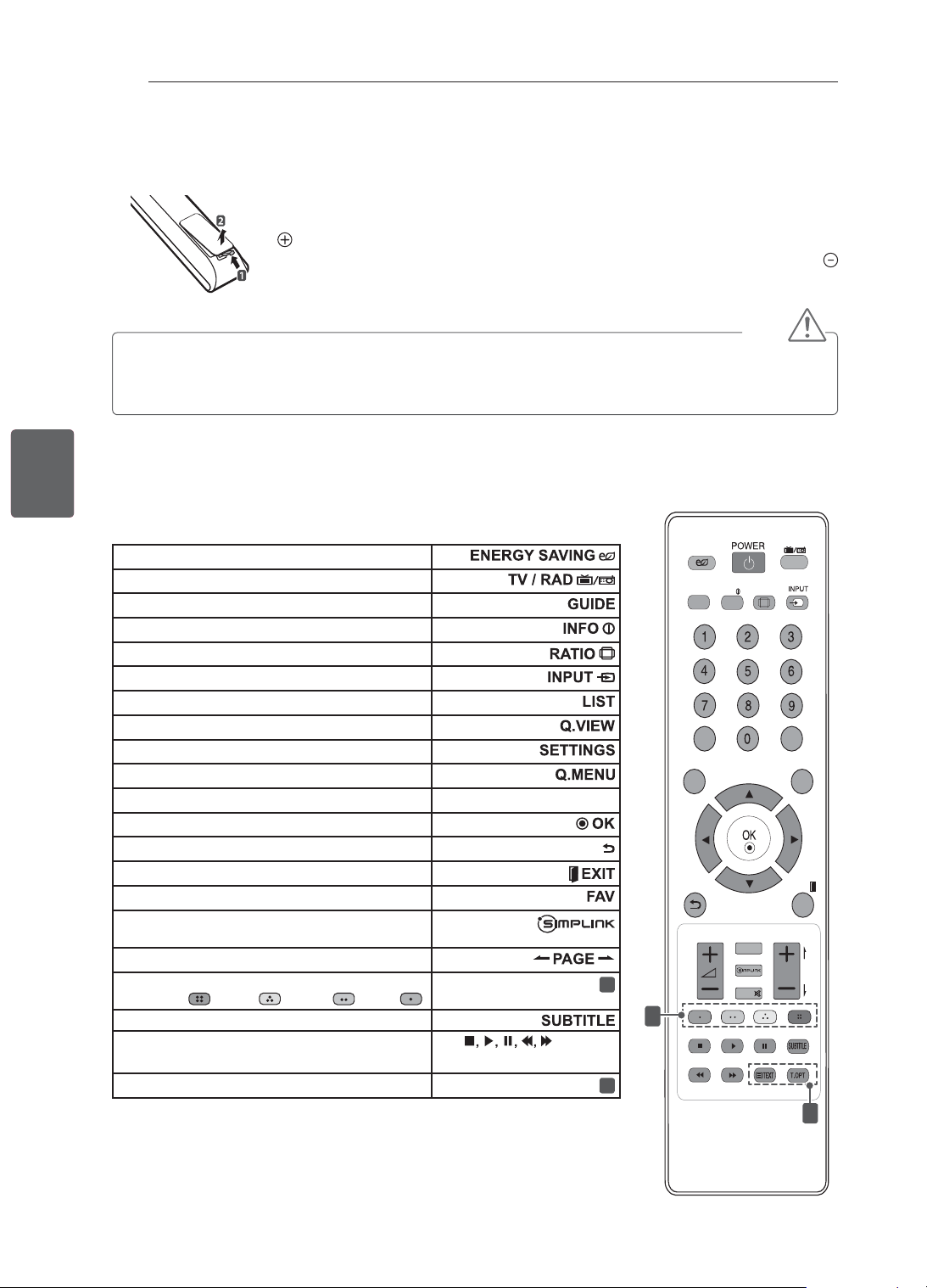
27
ﺔﻴﺑﺮﻌﻟﺍﺔﻴﺑﺮﻌﻟﺍ
ﺪﻌ
ُ
ﺑ ﻦﻋ ﻢﻜﺤﺘﻟﺍ ﺓﺪﺣﻭ
ﺪﻌ
ُ
ﺑ ﻦﻋ ﻢﻜﺤﺘﻟﺍ ﺓﺪﺣﻭ
.ﺪﻌ
ُ
ﺑ ﻦﻋ ﻢﻜﺤﺘﻟﺍ ﺓﺪﺣﻭ ﺭﺍﺭﺯﺃ ﻰﻠﻋ ﻞﻴﻟﺪﻟﺍ ﺍﺬﻫ ﻲﻓ ﺓﺩﻮﺟﻮﻤﻟﺍ ﺕﺎﻔﺻﺍﻮﻤﻟﺍ ﺰﻜﺗﺮﺗ
.ﺢﻴﺤﺻ ﻞﻜﺸﺑ ﺯﺎﻔﻠﺘﻟﺍ ﻡﺍﺪﺨﺘﺳﺍﻭ ﺔﻳﺎﻨﻌﺑ ﻞﻴﻟﺪﻟﺍ ﺍﺬﻫ ﺓءﺍﺮﻗ ﻰﺟﺮﻳ
ﻭ
ﻥﺎﻓﺮﻄﻟﺍ ﻖﺑﺎﻄﺘﻳ ﺚﻴﺤﺑ (AAA ﻢﺠﺤﺑ ﺖﻟﻮﻓ 1.5) ﺕﺎﻳﺭﺎﻄﺒﻟﺍ ﻝﺪﺒﺘﺳﺍﻭ ،ﺕﺎﻳﺭﺎﻄﺒﻟﺍ ءﺎﻄﻏ ﺢﺘﻓﺍ ،ﺕﺎﻳﺭﺎﻄﺒﻟﺍ ﻝﺍﺪﺒﺘﺳﻻ
.ﺔﻳﺭﺎﻄﺒﻟﺍ ءﺎﻄﻏ ﻖﻠﻏﺃ ﻢﺛ ﺕﺎﻳﺭﺎﻄﺒﻟﺍ ﺓﺮﺠﺣ ﻞﺧﺍﺩ ﻉﻮﺒﻄﻤﻟﺍ ﺰﻣﺮﻟﺍ ﻊﻣ
.ﻲﺴﻜﻋ ﺐﻴﺗﺮﺘﺑ ﺐﻴﻛﺮﺘﻟﺍ ﺕﺍءﺍﺮﺟﺇ ﺬﻴﻔﻨﺘﺑ ﻢﻗ ،ﺕﺎﻳﺭﺎﻄﺒﻟﺍ ﺔﻟﺍﺯﻹ
ﻪﻴﺒﻨﺗ
• .ﺪﻌ
ُ
ﺑ ﻦﻋ ﻢﻜﺤﺘﻟﺍ ﺓﺪﺣﻭ ﻑﻼﺗﺇ ﻰﻟﺇ ﻚﻟﺫ ﻱﺩﺆﻳ ﺪﻗ ﺫﺇ ،ﺓﺪﻳﺪﺠﻟﺍﻭ ﺔﻤﻳﺪﻘﻟﺍ ﺕﺎﻳﺭﺎﻄﺒﻟﺍ ﻂﻠﺨﺗ ﻻ
• .ﻥﺍﺪﻠﺒﻟﺍ ﺾﻌﺑ ﻲﻓﻭ ﻱﺮﻇﺎﻨﺘﻟﺍ ﻥﻮﻳﺰﻔﻠﺘﻟﺍ ﻲﻓ ﺪﻌ
ُ
ﺑ ﻦﻋ ﻢﻜﺤﺘﻟﺍ ﺓﺪﺣﻭ ﻰﻠﻋ ﺢﻴﺗﺎﻔﻤﻟﺍ ﺾﻌﺑ ﻞﻤﻌﺗ ﻻ ﺪﻗ
.ﺯﺎﻔﻠﺘﻟﺍ ﻰﻠﻋ ﺩﻮﺟﻮﻤﻟﺍ ﺪﻌ
ُ
ﺑ ﻦﻋ ﻢﻜﺤﺘﻟﺍ ﺓﺪﺣﻭ ﺮﻌﺸﺘﺴﻣ ﻰﻟﺇ ﺪﻌ
ُ
ﺑ ﻦﻋ ﻢﻜﺤﺘﻟﺍ ﺓﺪﺣﻭ ﻪﻴﺟﻮﺗ ﻦﻣ ﺪﻛﺄﺗ
LIST
Q.VIEW
TV/RAD
ENERGY
SAVING
RATIO
SETTINGS
GUIDE
Q.MENU
INFO
FAV
MUTE
P
A
G
E
P
EXIT
1
2
.ﺔﻗﺎﻄﻟﺍ ﻙﻼﻬﺘﺳﺍ ﻦﻣ ﺪﺤﻠﻟ ﺔﺷﺎﺸﻟﺍ ﻉﻮﻄﺳ ﻂﺒﺿ
.ﻲﻤﻗﺮﻟﺍ ﺯﺎﻔﻠﺘﻟﺍﻭ ،ﺯﺎﻔﻠﺘﻟﺍﻭ ،ﻮﻳﺩﺍﺮﻟﺍ ﺞﻣﺎﻧﺮﺑ ﺪﻳﺪﺤﺘﻟ
.ﺞﻣﺍﺮﺒﻟﺍ ﻞﻴﻟﺩ ﺽﺮﻌﻟ
.ﺔﻴﻟﺎﺤﻟﺍ ﺔﺷﺎﺸﻟﺍﻭ ﺞﻣﺎﻧﺮﺒﻟﺎﺑ ﺔﺻﺎﺨﻟﺍ ﺕﺎﻣﻮﻠﻌﻤﻟﺍ ﺽﺮﻌﻟ
.ﺓﺭﻮﺻ ﻢﺠﺣ ﻂﺒﺿ ﺓﺩﺎﻋﻹ
.ﻝﺎﺧﺩﻹﺍ ﺭﺪﺼﻣ ﺮﻴﻴﻐﺘﻟ
.ﺔﻇﻮﻔﺤﻤﻟﺍ ﺞﻣﺍﺮﺒﻟﺍ ﺔﺤﺋﻻ ﻰﻟﺇ ﻝﻮﺻﻮﻠﻟ
.ﺎ
ً
ﻘﺑﺎﺳ ﺽﻭﺮﻌﻤﻟﺍ ﺞﻣﺎﻧﺮﺒﻟﺍ ﻰﻟﺇ ﺓﺩﻮﻌﻠﻟ
.ﺔﻴﺴﻴﺋﺮﻟﺍ ﻢﺋﺍﻮﻘﻟﺍ ﻰﻟﺇ ﻝﻮﺻﻮﻠﻟ
.ﺔﻌﻳﺮﺴﻟﺍ ﻢﺋﺍﻮﻘﻟﺍ ﻰﻟﺇ ﻝﻮﺻﻮﻠﻟ
(ﻦﻴﻤﻳ/ﺭﺎﺴﻳ/ﻞﻔﺳﺃ/ﻰﻠﻋﺃ) ﻞﻘﻨﺘﻟﺍ ﺭﺍﺭﺯﺃ.ﺕﺍﺭﺎﻴﺨﻟﺍ ﻭﺃ ﻢﺋﺍﻮﻘﻟﺍ ﺮﺒﻋ ﻞﻘﻨﺘﻠﻟ
.ﻝﺎﺧﺩﻹﺍ ﺪﻴﻛﺄﺗﻭ ﺕﺍﺭﺎﻴﺨﻟﺍ ﻭﺃ ﻢﺋﺍﻮﻘﻟﺍ ﺪﻳﺪﺤﺘﻟ
.ﻖﺑﺎﺴﻟﺍ ﻯﻮﺘﺴﻤﻟﺍ ﻰﻟﺇ ﺓﺩﻮﻌﻠﻟ
.ﺯﺎﻔﻠﺘﻟﺍ ﺓﺪﻫﺎﺸﻣ ﺓﺩﻭﺎﻌﻤﻟﻭ ﺔﺷﺎﺸﻟﺍ ﻰﻠﻋ ﺮﻬﻈﻳ ﺎﻣ ﺢﺴﻤﻟ
.ﺔﻠﻀﻔﻤﻟﺍ ﺕﺍﻮﻨﻘﻟﺍ ﺔﺤﺋﻻ ﻰﻟﺇ ﻝﻮﺻﻮﻠﻟ
.HDMI-CEC ﺮﺒﻋ HDMI ﻞﺒﻜﺑ ﺔﻠﺼﺘﻤﻟﺍ AV ﺓﺰﻬﺟﺃ ﻰﻟﺇ ﻝﻮﺻﻮﻠﻟ
.SIMPLINK ﺔﻤﺋﺎﻗ ﺢﺘﻔﻟﻭ
.ﺔﻴﻟﺎﺘﻟﺍ ﻭﺃ ﺔﻘﺑﺎﺴﻟﺍ ﺔﺤﻔﺼﻟﺍ ﻰﻟﺇ ﻝﺎﻘﺘﻧﻼﻟ
ﺔﻧﻮﻠﻤﻟﺍ ﺭﺍﺭﺯﻷﺍ
1
.ﻢﺋﺍﻮﻘﻟﺍ ﺾﻌﺑ ﻲﻓ ﺔﺻﺎﺨﻟﺍ ﻒﺋﺎﻇﻮﻟﺍ ﺾﻌﺑ ﻰﻟﺇ ﻝﻮﺻﻮﻠﻟ
(ﻕﺭﺯﻷﺍ :
،ﺮﻔﺻﻷﺍ : ،ﺮﻀﺧﻷﺍ : ،ﺮﻤﺣﻷﺍ : )
.ﻲﻤﻗﺮﻟﺍ ﻊﺿﻮﻟﺍ ﻲﻓ ﺔﻠﻀﻔﻤﻟﺍ ﺔﻤﺟﺮﺘﻟﺍ ءﺎﻋﺪﺘﺳﻻ
(
) ﻢﻜﺤﺘﻟﺍ ﺭﺍﺭﺯﺃ
ﺓﺰﻬﺟﻷﺍ ﻭﺃ ،(MY MEDIA) ﻲﺑ ﺔﺻﺎﺨﻟﺍ ﻂﺋﺎﺳﻮﻟﺍ ﻢﺋﺍﻮﻗ ﻲﻓ ﻢﻜﺤﺘﻠﻟ
(USB,SIMPLINK) .SIMPLINK ﺔﻴﺻﺎﺧ ﻊﻣ ﺔﻘﻓﺍﻮﺘﻤﻟﺍ
ﺕﺎﻣﻮﻠﻌﻤﻟﺍ ﺹﻮﺼﻧ ﺭﺍﺭﺯﺃ
2
.ﺕﺎﻣﻮﻠﻌﻤﻟﺍ ﺹﻮﺼﻨﻟ ﺭﺍﺭﺯﻷﺍ ﻩﺬﻫ ﻡﺪﺨﺘﺴﺗ
(ﻂﻘﻓ 32/42LS34** ,22/26/32/42CS47** ,22/26/32/42CS46** ﺕﺍﺯﺍﺮﻄﻟﺍ)
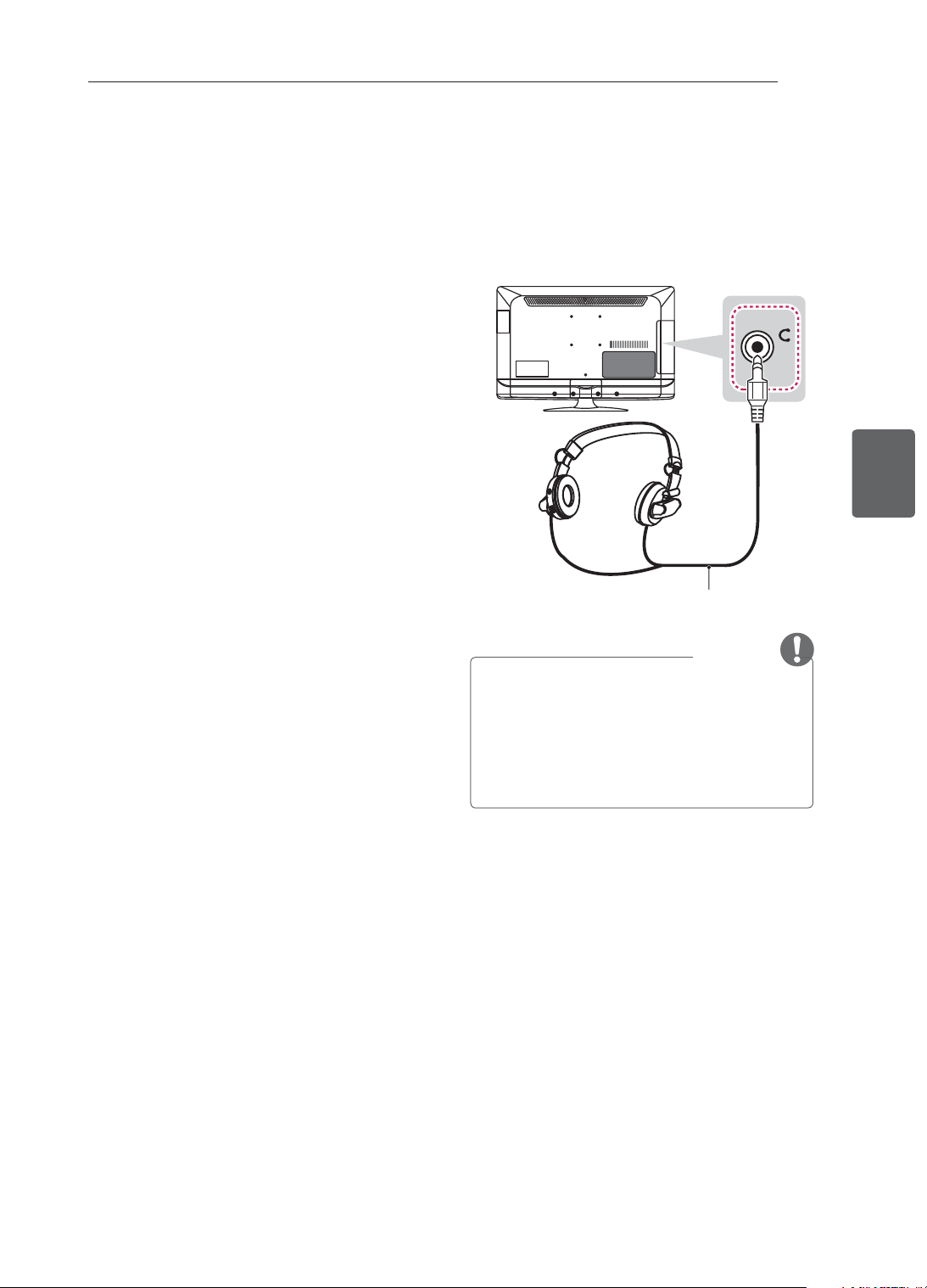
26
ﺔﻴﺑﺮﻌﻟﺍﺔﻴﺑﺮﻌﻟﺍ
ﺕﻼﻴﺻﻮﺘﻟﺍ ءﺍﺮﺟﺇ
ﺱﺃﺮﻟﺍ ﺔﻋﺎﻤﺳ ﻝﺎﺼﺗﺍ
(ﻂﻘﻓ 22/26/32/42CS47** ﺕﺍﺯﺍﺮﻄﻟﺍ)
ﻞﻴﺻﻮﺘﺑ ﻢﻗ .ﻲﺟﺭﺎﺧ ﺯﺎﻬﺟ ﻰﻟﺇ ﺯﺎﻔﻠﺘﻟﺍ ﻦﻣ ﺱﺃﺮﻟﺍ ﺔﻋﺎﻤﺳ ﺓﺭﺎﺷﺇ ﻞﺳﺮﻳ
ﺓﺭﻮﺼﻟﺍ ﻲﻓ ﺢﺿﻮﻣ ﻮﻫ ﺎﻤﻛ ﺱﺃﺮﻟﺍ ﺔﻋﺎﻤﺴﺑ ﺯﺎﻔﻠﺘﻟﺍﻭ ﻲﺟﺭﺎﺨﻟﺍ ﺯﺎﻬﺠﻟﺍ
.ﺔﻴﻟﺎﺘﻟﺍ
H/P
(ﻖﻓﺮﻣ ﺮﻴﻏ*)
ﺔﻈﺣﻼﻣ
• ﻞﻴﺻﻮﺗ ﺪﻨﻋ ﺔﻠﻄﻌ
ُ
ﻣ (ﺕﻮﺼﻟﺍ) AUDIO ﺔﻤ
ﺋﺎﻗ ﺮﺻﺎﻨﻋ ﻥﻮﻜﺗ
.ﺱﺃﺭ ﺔﻋﺎﻤﺳ
• ﻡﻭﺃ 16 :ﺱﺃﺮﻟﺍ ﺔﻋﺎﻤﺳ ﺔﻣﻭﺎﻘﻣ
• ﻲﻠﻠﻣ 15 ﻰﻟﺇ ﻁﺍﻭ ﻲﻠﻠﻣ 9 :ﺱﺃﺮﻟﺍ ﺔﻋﺎﻤﺴﻟ ﺕﻮﺻ ﺝﺍﺮﺧﺇ ﻰﺼﻗﺃ
ﻁﺍﻭ
•
ﻢﺳ 0.35 :ﺱﺃﺮﻟﺍ ﺔﻋﺎﻤﺳ ﺲﺒﻘﻣ ﻢﺠﺣ
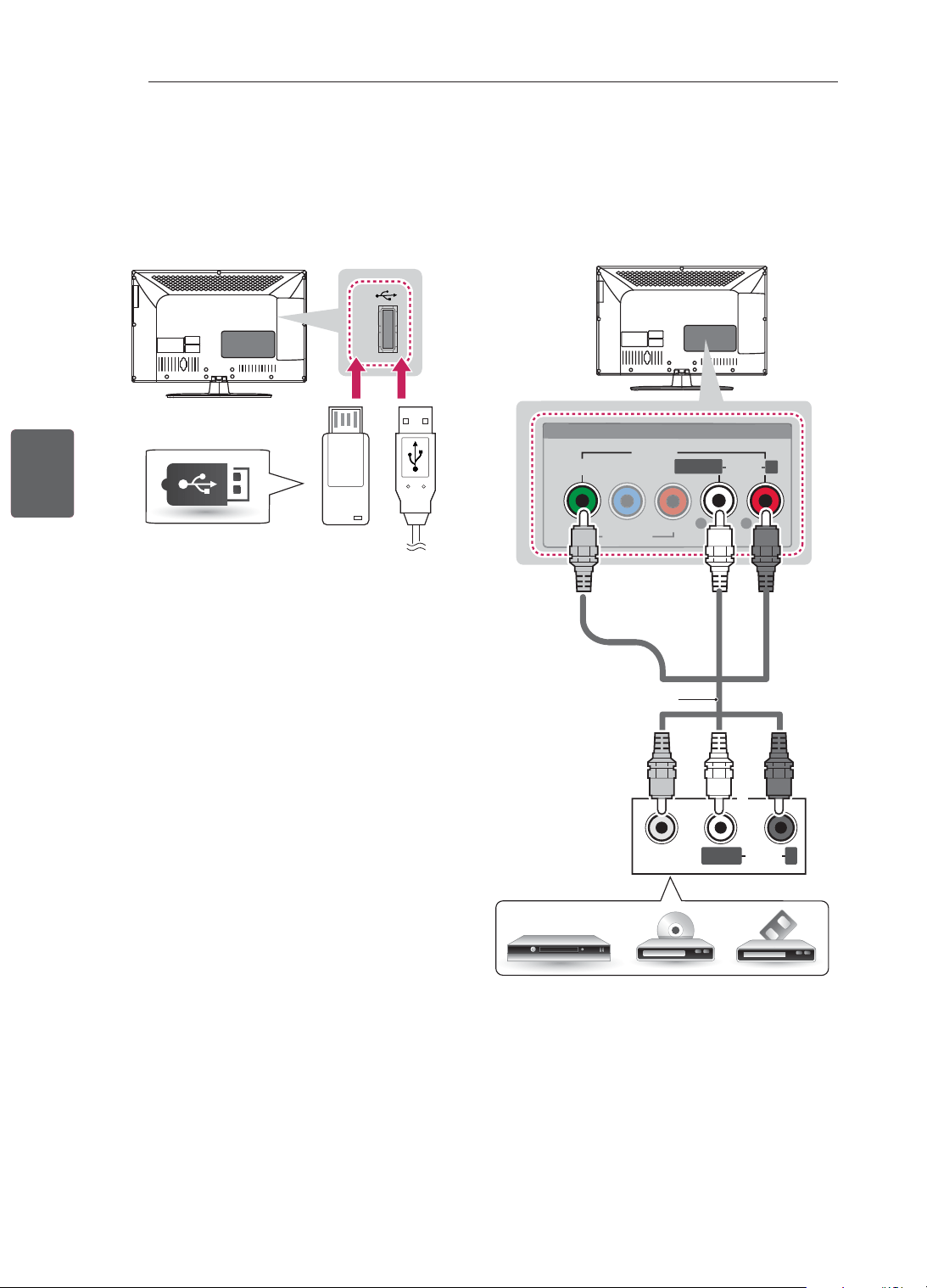
25
ﺔﻴﺑﺮﻌﻟﺍﺔﻴﺑﺮﻌﻟﺍ
ﺕﻼﻴﺻﻮﺘﻟﺍ ءﺍﺮﺟﺇ
USB ﺓﺪﺣﻮﺑ ﻞﻴﺻﻮﺘﻟﺍ
ﺖﺑﺎﺛ ﺹﺮﻗ ﻭﺃ USB ﺵﻼﻓ ﺓﺮﻛﺍﺫ ﻞﺜﻣ USB ﻦﻳﺰﺨﺗ ﺯﺎﻬﺟ ﻞﻴﺻﻮﺘﺑ ﻢﻗ
ﻰﻟﺇ ﻝﻮﺻﻮﻟﺎﺑ ﻢﻗﻭ ﻥﻮﻳﺰﻔﻠﺘﻟﺎﺑ USB ﺓﺮﻛﺍﺫ ﺕﺎﻗﺎﻄﺑ ﺉﺭﺎﻗ ﻭﺃ ﻲﺟﺭﺎﺧ
.ﺔﻔﻠﺘﺨﻣ ﺓﺩﺪﻌﺘﻣ ﻂﺋﺎﺳﻭ ﺕﺎﻔﻠﻣ ﻡﺍﺪﺨﺘﺳﻻ ﻲﻄﺋﺎﺳﻭ ﺔﻤﺋﺎﻗ
USB IN
(ﻖﻓﺮﻣ ﺮﻴﻏ*)
USB ﺯﺎﻬﺟ
ﺐ
ّ
ﻛﺮﻤﻟﺍ ﻮﻳﺪﻴﻔﻟﺍ ﺔﻠﺻﻭ
ﻲﺟﺭﺎﺧ ﺯﺎﻬﺟ ﻦﻣ ﺕﻮﺼﻟﺍ ﺕﺍﺭﺎﺷﺇﻭ ﻱﺮﻇﺎﻨﺘﻟﺍ ﻮﻳﺪﻴﻔﻟﺍ ﺕﺍﺭﺎﺷﺇ ﻝﺎﺳﺭﻹ
ﺐ
ّ
ﻛﺮﻣ
ﻞﺒﻛ ﻡﺍﺪﺨﺘﺳﺎﺑ ﺯﺎﻔﻠﺘﻟﺎﺑ ﻲﺟﺭﺎﺨﻟﺍ ﺯﺎﻬﺠﻟﺍ ﻞﻴﺻﻮﺘﺑ ﻢﻗ .ﺯﺎﻔﻠﺘﻟﺍ ﻰﻟﺇ
.ﺔﻴﻟﺎﺘﻟﺍ ﺓﺭﻮﺼﻟﺍ ﻲﻓ ﺢﺿﻮﻣ ﻮﻫ ﺎﻤﻛ
VIDEO
MONO
(
( )
AUDIOLR
VIDEO
P
B
P
R
Y
L
R
AUDIO
R
L/MONO
AV IN
V
IDE
O
AU
DI
O
COMPONENT
IN
HD ﺮﻔﻴﺴﻳﺭ / ﻱﺍﺭ ﻮﻠﺑ / DVD ﺹﺍﺮﻗﺃ ﻞﻐﺸﻣ / ﻮﻳﺪﻴﻓ ﺯﺎﻬﺟ
ﺮﻔﺻﺃ
ﺮﻤﺣﺃ
ﺮﻤﺣﺃ
ﺾﻴﺑﺃ
ﺮﻔﺻﺃ
ﺾﻴﺑﺃ
(ﻖﻓﺮﻣ ﺮﻴﻏ*)
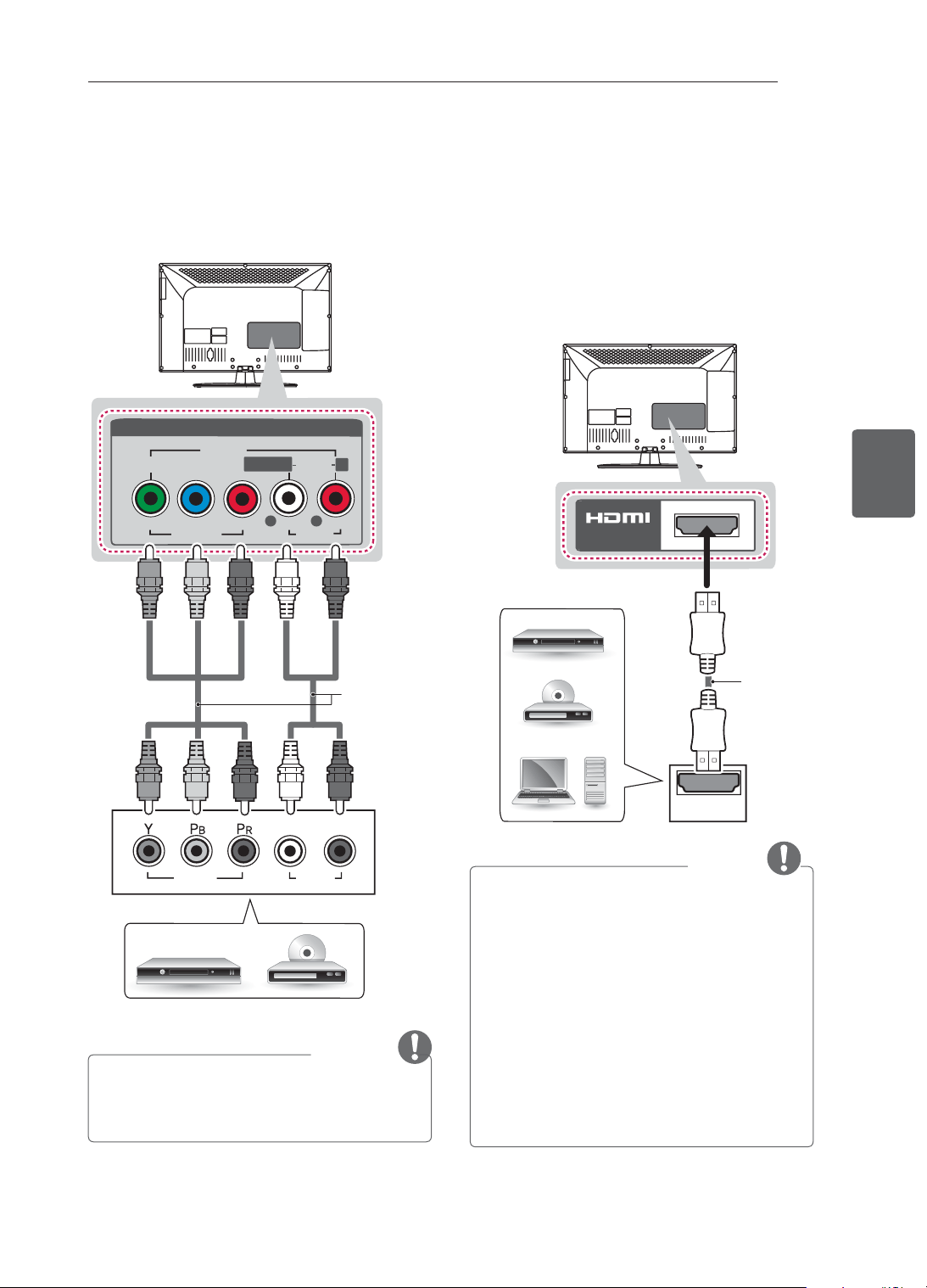
24
ﺔﻴﺑﺮﻌﻟﺍﺔﻴﺑﺮﻌﻟﺍ
ﺕﻼﻴﺻﻮﺘﻟﺍ ءﺍﺮﺟﺇ
HDMI ﺔﻠﺻﻭ
.ﺯﺎﻔﻠﺘﻟﺍ ﻰﻟﺇ ﻲﺟﺭﺎﺧ ﺯﺎﻬﺟ ﻦﻣ ﺔﻴﻤﻗﺮﻟﺍ ﺕﻮﺼﻟﺍﻭ ﻮﻳﺪﻴﻔﻟﺍ ﺕﺍﺭﺎﺷﺇ ﻝﺎﺳﺭﻹ
ﻮﻫ ﺎﻤﻛ HDMI
ﻞﺒﻛ ﻡﺍﺪﺨﺘﺳﺎﺑ ﺯﺎﻔﻠﺘﻟﺎﺑ ﻲﺟﺭﺎﺨﻟﺍ ﺯﺎﻬﺠﻟﺍ ﻞﻴﺻﻮﺘﺑ ﻢﻗ
.ﺔﻴﻟﺎﺘﻟﺍ ﺓﺭﻮﺼﻟﺍ ﻲﻓ ﺢﺿﻮﻣ
ﻦﻴﻌﻣ ﺬﻔﻨﻣ ﺪﻳﺪﺤﺗ ﻢﻬﻳ ﻼﻓ .ﻞﻴﺻﻮﺘﻠﻟ HDMI ﻝﺎﺧﺩﺇ ﺬﻔﻨﻣ ﻱﺃ ﺮﺘﺧﺍ
.ﻪﻣﺍﺪﺨﺘﺳﻻ
HDMI
IN
ﺮﻔﻴﺴﻳﺭ / ﻱﺍﺭ ﻮﻠﺑ / DVD ﺹﺍﺮﻗﺃ ﻞﻐﺸﻣ
ﺮﺗﻮﻴﺒﻤﻜﻟﺍ / HD STB
(ﻖﻓﺮﻣ ﺮﻴﻏ*)
ﺔﻈﺣﻼﻣ
• ﻞﻀﻓﺃ ﻰﻠﻋ ﻝﻮﺼﺤﻠﻟ HDMI ﺔﻠﺻﻭ ﻊﻣ ﺯﺎﻔﻠﺘﻟﺍ ﻡﺍﺪﺨﺘﺳﺎﺑ ﻰﺻﻮﻳ
.ﺓﺭﻮﺼﻠﻟ ﺓﺩﻮﺟ
• CEC ﺔﻔﻴﻇﻭ ﻊﻣ ﺔﻋﺮﺴﻟﺍ ﻲﻟﺎﻋ HDMI™
ﻞﺒﻛ ﺙﺪﺣﺃ ﻡﺪﺨﺘﺳﺍ
.(ﻡﺪﺨﺘﺴﻤﻟﺍ ﺕﺎﻴﻧﻭﺮﺘﻜﻟﺇ ﻲﻓ ﻢﻜﺤﺘﻟﺍ)
• ﺔﻴﻟﺎﻋ ﺓﺭﺎﺷﺇ ﻞﻤﺤﺘﻟ ﺔﻋﺮﺴﻟﺍ ﺔﻴﻟﺎﻋ HDMI™
ﺕﻼﺒﻛ ﺭﺎﺒﺘﺧﺍ ﻢﺗ
.ﺮﺜﻛﺃﻭ 1080p ﻰﻟﺇ ﻞﺼﺗ ﺓﺩﻮﺠﻟﺍ
• ﻭ Dolby Digital ﻭ MPEG :ﺪﻤﺘﻌﻤﻟﺍ ﻲﻤﻗﺮﻟﺍ ﺯﺎﻔﻠﺘﻟﺍ ﺕﻮﺻ
HE-ACC ﻭ Dolby Digital Plus
• PCM ﻭ Dolby Digital : ﺪﻤﺘﻌﻤﻟﺍ HDMI ﺕﻮﺻ ﻖﻴﺴﻨﺗ
،ﺰﺗﺮﻫﻮﻠﻴﻛ 192 ﻰﺘﺣ)
ﺕﻮﺻ ﻖﻴﺴﻨﺗ ،32k/44.1k/48k/88k/96k/176k/192k
(.ﺪﻤﺘﻌﻣ ﺮﻴﻏ DTS
ﻥﻮﻜﻤﻟﺍ ﺔﻠﺻﻭ
ﻲﺟﺭﺎﺧ ﺯﺎﻬﺟ ﻦﻣ ﺕﻮﺼﻟﺍ ﺕﺍﺭﺎﺷﺇﻭ ﻱﺮﻇﺎﻨﺘﻟﺍ ﻮﻳﺪﻴﻔﻟﺍ ﺕﺍﺭﺎﺷﺇ ﻝﺎﺳﺭﻹ
ﻥﻮﻜﻤﻟﺍ
ﻞﺒﻛ ﻡﺍﺪﺨﺘﺳﺎﺑ ﺯﺎﻔﻠﺘﻟﺎﺑ ﻲﺟﺭﺎﺨﻟﺍ ﺯﺎﻬﺠﻟﺍ ﻞﻴﺻﻮﺘﺑ ﻢﻗ .ﺯﺎﻔﻠﺘﻟﺍ ﻰﻟﺇ
.ﺔﻴﻟﺎﺘﻟﺍ ﺓﺭﻮﺼﻟﺍ ﻲﻓ ﺢﺿﻮﻣ ﻮﻫ ﺎﻤﻛ
VIDEO
PB
PR
Y
L
R
AUDIO
R
L/MONO
AV IN
VIDEO
AUDIO
COMPONENT
IN
AUDIO
VIDEO
L
R
ﺮﻀﺧﺃﺮﻀﺧﺃ
ﻕﺭﺯﺃ
ﻕﺭﺯﺃ
ﺮﻤﺣﺃ
ﺮﻤﺣﺃ
ﺮﻤﺣﺃ
ﺮﻤﺣﺃ
ﺾﻴﺑﺃ
ﺾﻴﺑﺃ
(ﻖﻓﺮﻣ ﺮﻴﻏ*)
HD ﺮﻔﻴﺴﻳﺭ / ﻱﺍﺭ ﻮﻠﺑ / DVD ﺹﺍﺮﻗﺃ ﻞﻐﺸﻣ
ﺔﻈﺣﻼﻣ
• ﺽﺮﻋ ﻲﻓ ﺐﺒﺴﺘﺗ ﺪﻘﻓ ،ﺔﺤﻴﺤﺻ ﺮﻴﻏ ﺔﻘﻳﺮﻄﺑ ﺕﻼﺒﻜﻟﺍ ﻞﻴﺻﻮﺗ ﻢﺗ ﺍﺫﺇ
.ﺔﺷﻮﺸﻣ ﻥﺍﻮﻟﺄﺑ ﻭﺃ ﺩﻮﺳﻷﺍﻭ ﺾﻴﺑﻷﺎﺑ ﺓﺭﻮﺼﻟﺍ
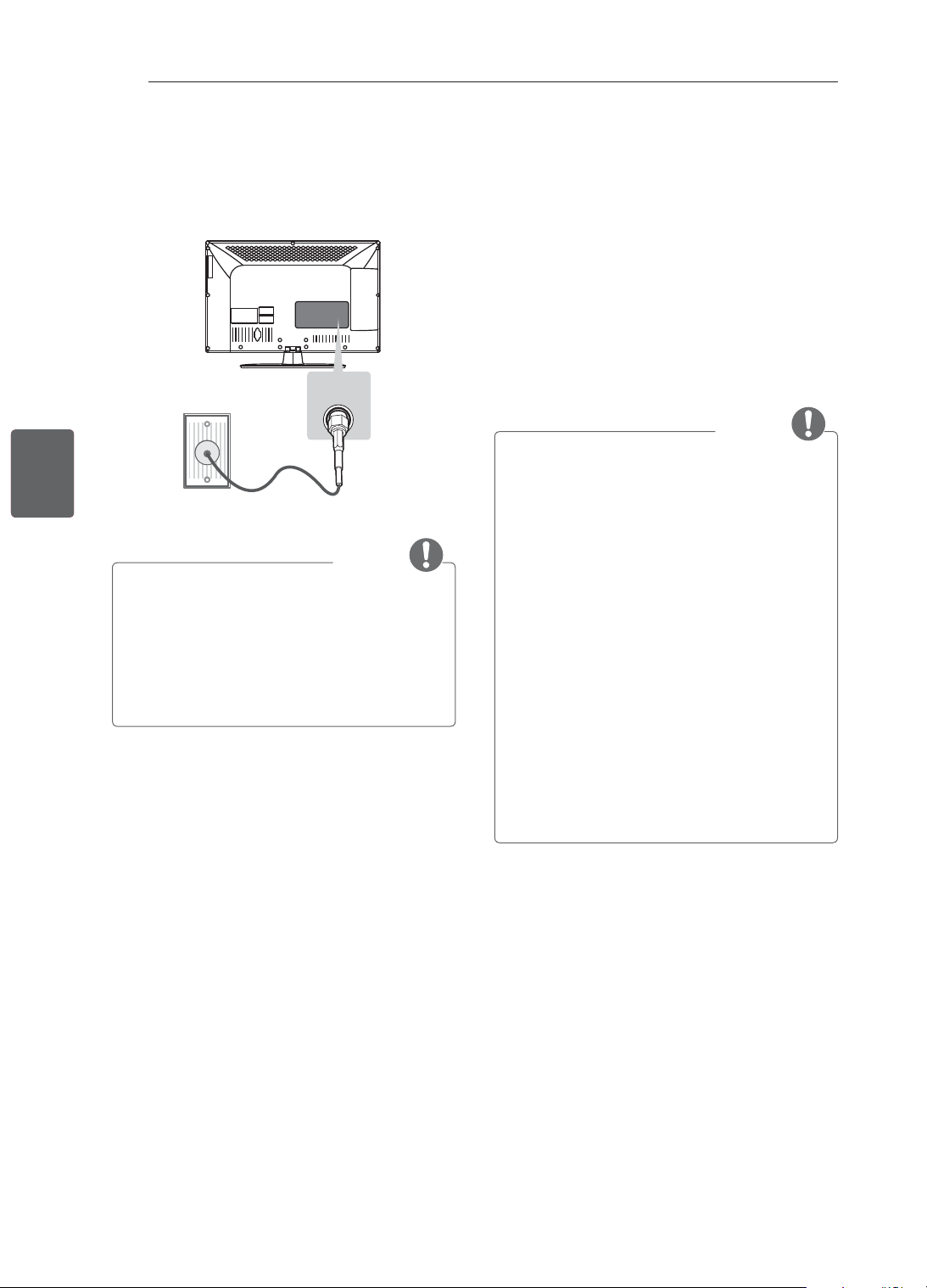
23
ﺔﻴﺑﺮﻌﻟﺍﺔﻴﺑﺮﻌﻟﺍ
ﺕﻼﻴﺻﻮﺘﻟﺍ ءﺍﺮﺟﺇ
ﺕﻼﻴﺻﻮﺘﻟﺍ ءﺍﺮﺟﺇ
ﺎ
ً
ﻣﻮﺳﺭ ﺕﻼﻴﺻﻮﺘﻟﺍ ءﺍﺮﺟﺇ ﻝﻭﺎﻨﺘﻳ ﻱﺬﻟﺍ ﻢﺴﻘﻟﺍ ﺍﺬﻫ ﻡﺪﺨﺘﺴﻳ
.ﻲﺳﺎﺳﺃ ﻞﻜﺸﺑ CS46** ﺕﺍﺯﺍﺮﻄﻠﻟ ﺔﻴﻄﻴﻄﺨﺗ
ﻉﺎﺿﻭﺃ ﻦﻴﺑ ﻝ
ّ
ﺪﺑﻭ ﺯﺎﻔﻠﺘﻟﺎﺑ ﺔﻋﻮﻨﺘﻤﻟﺍ ﺔﻴﺟﺭﺎﺨﻟﺍ ﺓﺰﻬﺟﻷﺍ ﻞﻴﺻﻮﺘﺑ ﻢﻗ
ﻞﻴﺻﻮﺗ ﻦﻋ ﺕﺎﻣﻮﻠﻌﻤﻟﺍ ﻦﻣ ﺪﻳﺰﻤﻟﻭ .ﻲﺟﺭﺎﺧ ﺯﺎﻬﺟ ﺪﻳﺪﺤﺘﻟ ﻝﺎﺧﺩﻹﺍ
.ﺯﺎﻬﺟ ﻞﻛ ﻊﻣ ﻖﻓﺮﻤﻟﺍ ﻞﻴﻟﺪﻟﺍ ﻊﺟﺍﺭ ،ﺔﻴﺟﺭﺎﺨﻟﺍ ﺓﺰﻬﺟﻷﺍ
ﺕﻼﻐﺸﻣﻭ ﺔﻗﺪﻟﺍ ﺔﻴﻟﺎﻋ ﻝﺎﺒﻘﺘﺳﻻﺍ ﺓﺰﻬﺟﺃ :ﻲﻫ ﺓﺮﻓﻮﺘﻤﻟﺍ ﺔﻴﺟﺭﺎﺨﻟﺍ ﺓﺰﻬﺟﻷﺍ
USB ﻦﻳﺰﺨﺗ
ﺕﺍﺪﺣﻭﻭ ﺕﻮﺼﻟﺍ ﺔﻤﻈﻧﺃﻭ ﻮﻳﺪﻴﻔﻟﺍ ﺓﺰﻬﺟﺃﻭ DVD ﺹﺍﺮﻗﺃ
.ﻯﺮﺧﺃ ﺔﻴﺟﺭﺎﺧ ﺓﺰﻬﺟﺃﻭ ﺏﺎﻌﻟﻷﺍ ﺓﺰﻬﺟﺃﻭ ﺮﺗﻮﻴﺒﻤﻜﻟﺍﻭ
ﺔﻈﺣﻼﻣ
• .ﺮﺧﺁ ﻰﻟﺇ ﺯﺍﺮﻃ ﻦﻣ ﻲﺟﺭﺎﺨﻟﺍ ﺯﺎﻬﺠﻟﺍ ﻞﻴﺻﻮﺗ ﻒﻠﺘﺨﻳ ﺪﻗ
• ﺐﻴﺗﺮﺗ ﻦﻋ ﺮﻈﻨﻟﺍ ﺾﻐﺑ ﺯﺎﻔﻠﺘﻟﺎﺑ ﺔﻴﺟﺭﺎﺨﻟﺍ ﺓﺰﻬﺟﻷﺍ ﻞﻴﺻﻮﺗ ﺐﺠﻳ
.ﺯﺎﻔﻠﺘﻟﺍ ﺬﻓﺎﻨﻣ
• ،ﻮﻳﺪﻴﻓ ﺯﺎﻬﺟ ﻭﺃ DVD ﺹﺮﻗ ﻰﻠﻋ ﺯﺎﻔﻠﺗ ﺞﻣﺎﻧﺮﺑ ﻞﻴﺠﺴﺗ ﻝﺎﺣ ﻲﻓ
ﻞﺠﺴﻣ ﺮﺒﻋ ﺯﺎﻔﻠﺘﻟﺎﺑ ﺯﺎﻔﻠﺘﻟﺍ ﺓﺭﺎﺷﺇ ﻝﺎﺧﺩﺇ
ﻞﺒﻛ ﻞﻴﺻﻮﺗ ﻦﻣ ﺪﻛﺄﺗ
،ﻞﻴﺠﺴﺘﻟﺍ ﺕﺎﻣﻮﻠﻌﻣ ﻦﻣ ﺪﻳﺰﻤﻟ .ﻮﻳﺪﻴﻔﻟﺍ ﺯﺎﻬﺟ ﻭﺃ DVD ﺹﺍﺮﻗﺃ
.ﻞﺼﺘﻤﻟﺍ ﺯﺎﻬﺠﻟﺍ ﻊﻣ ﻖﻓﺮﻤﻟﺍ ﻞﻴﻟﺪﻟﺍ ﻊﺟﺍﺭ
• .ﻞﻴﻐﺸﺘﻟﺍ ﺕﺎﻤﻴﻠﻌﺗ ﻰﻠﻋ ﻝﻮﺼﺤﻠﻟ ﺔﻴﺟﺭﺎﺨﻟﺍ ﺓﺰﻬﺟﻷﺍ ﻞﻴﻟﺩ ﻊﺟﺍﺭ
• ﺯﺎﻬﺠﺑ ﻖﻓﺮﻤﻟﺍ
ﻞﺒﻜﻟﺍ ﻡﺪﺨﺘﺳﺍ ،ﺯﺎﻔﻠﺘﻟﺎﺑ ﺏﺎﻌﻟﺃ ﺯﺎﻬﺟ ﻞﻴﺻﻮﺗ ﺪﻨﻋ
.ﺏﺎﻌﻟﻷﺍ
• ﻂﺒﺗﺮﻤﻟﺍ ﺶﻳﻮﺸﺘﻟﺍ ﺾﻌﺑ ﺙﺪﺤﻳ ﺪﻗ ،(ﺮﺗﻮﻴﺒﻤﻛ) PC ﻊﺿﻭ ﻲﻓ
ﻝﺎﺣ ﻲﻓ .ﻉﻮﻄﺴﻟﺍ ﻭﺃ ﻦﻳﺎﺒﺘﻟﺍ ﻭﺃ ﻱﺩﻮﻤﻌﻟﺍ ﻂﻤﻨﻟﺍ ﻭﺃ
ﺔﻗﺪﻟﺍ ﺔﺟﺭﺪﺑ
ﻯﺮﺧﺃ
ﺔﻗﺩ ﺔﻤﻴﻗ ﻰﻟﺇ ﺮﺗﻮﻴﺒﻤﻜﻟﺍ ﺝﺍﺮﺧﺇ ﺮﻴﻴﻐﺘﺑ ﻢﻗ ،ﺶﻳﻮﺸﺘﻟﺍ ﺭﺍﺮﻤﺘﺳﺍ
ﻉﻮﻄﺴﻟﺍ ﻂﺒﻀﺑ ﻢﻗ ﻭﺃ ﺮﺧﺁ ﻝﺪﻌﻣ ﻰﻟﺇ ﺚﻳﺪﺤﺘﻟﺍ ﻝﺪﻌﻣ ﺮﻴﻴﻐﺘﺑ ﻢﻗﻭ
ﺓﺭﻮﺻ ﻰﻠﻋ ﻞﺼﺤﺗ ﻰﺘﺣ (ﺓﺭﻮﺻ) PICTURE ﺔﻤﺋﺎﻗ ﻲﻓ ﻦﻳﺎﺒﺘﻟﺍﻭ
.ﺔﺤﺿﺍﻭ
• ﻞﻜﺸﺑ
ﺔﻗﺪﻟﺍ ﻂﺑﺍﻮﺿ ﺾﻌﺑ ﻞﻤﻌﺗ ﻻ ﺪﻗ ،(ﺮﺗﻮﻴﺒﻤﻛ) PC ﻊﺿﻭ ﻲﻓ
.ﺕﺎﻣﻮﺳﺮﻟﺍ ﺔﻗﺎﻄﺒﻟ ﺎ
ً
ﻘﻓﻭ ﺢﻴﺤﺻ
ﻲﺋﺍﻮﻬﻟﺍ ﻞﻴﺻﻮﺗ
RF ﻞﺒﻛ ﻡﺍﺪﺨﺘﺳﺎﺑ ﻂﺋﺎﺤﻟﺍ ﻰﻠﻋ ﻲﺋﺍﻮﻫ ﺲﺒﻘﻤﺑ ﺯﺎﻔﻠﺘﻟﺍ ﻞﻴﺻﻮﺘﺑ ﻢﻗ
. (ﻡﻭﺃ 75 ﺔﻣﻭﺎﻘﻤﺑ)
ANTENNA/
CABLE IN
ANTENNA/
ANTENNA/
CABLE IN
CABLE IN
ﺔﻈﺣﻼﻣ
• .ﻦﻳﺯﺎﻔﻠﺗ ﻦﻣ ﺮﺜﻛﺃ ﻡﺍﺪﺨﺘﺳﻻ ﺓﺭﺎﺷﻹﺍ ﻞﺼﻓ ﺯﺎﻬﺟ ﻡﺪﺨﺘﺳﺍ
• ﻞﻜﺸﺑ ﺕﺍﺭﺎﺷﻹﺍ ﻢﺨﻀﻣ ﺖﻴﺒﺜﺘﺑ ﻢﻘﻓ ،ﺔﺌﻴﺳ ﺓﺭﻮﺼﻟﺍ ﺓﺩﻮﺟ ﺖﻧﺎﻛ ﺍﺫﺇ
.ﺓﺭﻮﺼﻟﺍ ﺓﺩﻮﺟ ﻦﻴﺴﺤﺘﻟ ﺢﻴﺤﺻ
• ﺓﺩﺎﻋﺇ ﻝﻭﺎﺤﻓ ،ﻲﺋﺍﻮﻫ ﻞﻴﺻﻮﺗ ءﺎﻨﺛﺃ ﺔﺌﻴﺳ ﺓﺭﻮﺼﻟﺍ ﺓﺩﻮﺟ ﺖﻧﺎﻛ ﺍﺫﺇ
.ﺢﻴﺤﺼﻟﺍ ﻩﺎﺠﺗﻻﺍ ﻲﻓ ﻲﺋﺍﻮﻬﻟﺍ ﺓﺍﺫﺎﺤﻣ
• .ﻝﻮﺤﻣﻭ ﻲﺋﺍﻮﻫ
ﻞﺒﻛ ﺪﻳﻭﺰﺗ ﻢﺘﻳ ﻻ
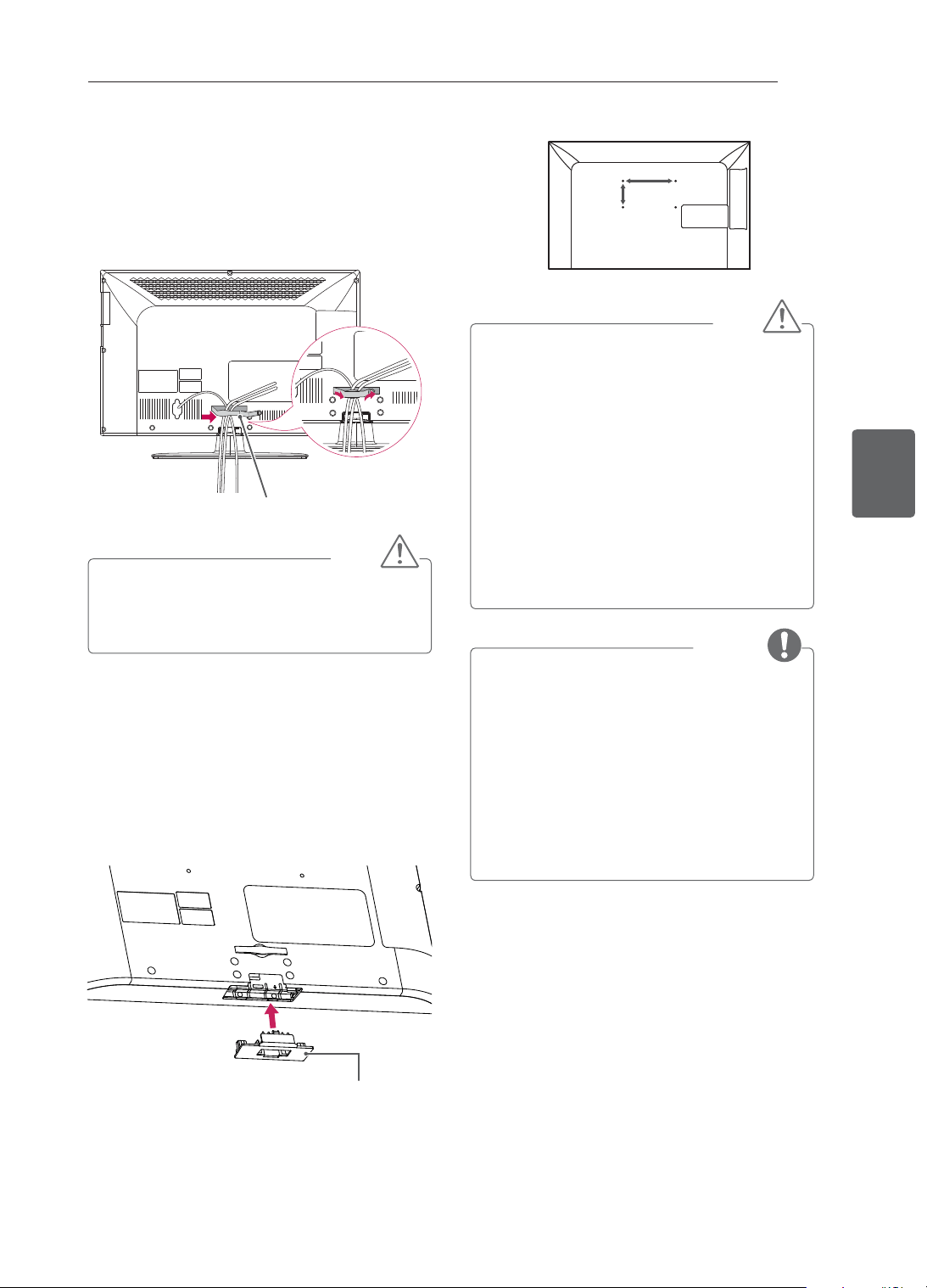
22
ﺔﻴﺑﺮﻌﻟﺍﺔﻴﺑﺮﻌﻟﺍ
ﺮﻴﻀﺤﺘﻟﺍﻭ ﻊﻴﻤﺠﺘﻟﺍ
A
B
ﻪﻴﺒﻨﺗ
• ﺙﺪﺤﺗ ﺪﻘﻓ ﻻﺇﻭ .ﻪﺘﻴﺒﺜﺘﺑ ﻢﻗ ﻭﺃ ﺯﺎﻔﻠﺘﻟﺍ ﻞﻘﻧﺍ ﻢﺛ ،
ً
ﻻﻭﺃ ﺔﻗﺎﻄﻟﺍ ﻞﺼﻓﺍ
.ﺔﻴﺋﺎﺑﺮﻬﻛ ﺔﻣﺪﺻ
• ﺐﺒﺴﺘﻳﻭ ﻂﻘﺴﻳ ﺪﻗ ،ﻞﺋﺎﻣ ﻂﺋﺎﺣ ﻰﻠﻋ ﻭﺃ ﻒﻘﺴﻟﺎﺑ ﺯﺎﻔﻠﺘﻟﺍ ﺖﻴﺒﺜﺗ ﺔﻟﺎﺣ ﻲﻓ
.ﺔﻐﻟﺎﺑ ﺕﺎﺑﺎﺻﺇ ﺙﻭﺪﺣ ﻲﻓ
ﻞﻴﻛﻮﻟﺎﺑ ﻞﺼﺗﺍﻭ LG ﻦﻣ ﺍ
ً
ﺪﻤﺘﻌﻣ ﻂﺋﺎﺤﻟﺍ ﻰﻠﻋ ﺖﻴﺒﺜﺗ ﺯﺎﻬﺟ ﻡﺪﺨﺘﺳﺍ
.ﻞﻫﺆﻣ ﻞﻣﺎﻋ ﻭﺃ ﻲﻠﺤﻤﻟﺍ
• ﺙﻭﺪﺣ ﻲﻓ
ﺍﺬﻫ ﺐﺒﺴﺘﻳ ﺪﻗ ﺚﻴﺣ ﻡﺯﻼﻟﺍ ﻦﻣ ﺮﺜﻛﺃ ﻲﻏﺍﺮﺒﻟﺍ ﻂﺑﺮﺗ ﻻ
.ﻥﺎﻤﻀﻟﺍ ﻝﺎﻄﺑﺇﻭ ﺯﺎﻔﻠﺘﻟﺎﺑ ﻒﻠﺗ
• ﻊﻣ ﻖﻓﺍﻮﺘﺗ ﻲﺘﻟﺍ ﻂﺋﺎﺤﻟﺍ ﻰﻠﻋ ﺖﻴﺒﺜﺘﻟﺍ ﺓﺰﻬﺟﺃﻭ ﻲﻏﺍﺮﺒﻟﺍ ﻡﺪﺨﺘﺳﺍ
ﻭﺃ ﺭﺍﺮﺿﻷﺍ ﺯﺎﻬﺠﻟﺍ ﺍﺬﻫ ﻥﺎﻤﺿ ﻞﻤﺸﻳ ﻻ .VESA ﺮﻴﻳﺎﻌﻣ
ﺮﻴﻏ ﻖﺤﻠﻤﻟﺍ ﻡﺍﺪﺨﺘﺳﺍ ﻭﺃ ﻖﺤﻠﻣ ﻡﺍﺪﺨﺘﺳﺍ ءﻮﺳ ﻦﻣ ﺔﺠﺗﺎﻨﻟﺍ ﺕﺎﺑﺎﺻﻹﺍ
.ﻢﺋﻼﻤﻟﺍ
ﺔﻈﺣﻼﻣ
• ﺎ
ً
ﻘﻓﻭ ﺓﺪﻤﺘﻌﻤﻟﺍ ﻲﻏﺍﺮﺒﻟﺍ ﺕﺎﻔﺻﺍﻮﻣ ﻲﻓ ﺔﺟﺭﺪﻤﻟﺍ ﻲﻏﺍﺮﺒﻟﺍ ﻡﺪﺨﺘﺳﺍ
.VESA ﺮﻴﻳﺎﻌﻤﻟ
• ﻊﻄﻘﻟﺍﻭ ﺐﻴﻛﺮﺘﻟﺍ ﻞﻴﻟﺩ ﻂﺋﺎﺤﻟﺍ ﻰﻠﻋ ﺖﻴﺒﺜﺘﻟﺍ ﺯﺎﻬﺟ ﺔﻋﻮﻤﺠﻣ ﻦﻤﻀﺘﺗ
.ﺔﻳﺭﻭﺮﻀﻟﺍ
• ﻰﻠﻋ ﻝﻮﺼﺤﻟﺍ ﻚﻨﻜﻤﻳ .ﻱﺭﺎﻴﺘﺧﺍ ﻖﺤﻠﻣ ﻂﺋﺎﺤﻟﺍ ﻰﻠﻋ ﺖﻴﺒﺜﺘﻟﺍ ﺱﻮﻗ ﻥﺇ
.ﻲﻠﺤﻤﻟﺍ ﻞﻴﻛﻮﻟﺍ ﻦﻣ ﺔﻳﺭﺎﻴﺘﺧﻻﺍ ﺕﺎﻘﺤﻠﻤﻟﺍ
• ﻦﻣ ﺪﻛﺄﺗ .ﻂﺋﺎﺤﻟﺍ ﻰﻠﻋ ﺖﻴﺒﺜﺘﻟﺍ ﺯﺎﻬﺟ ﺐﺴﺤﺑ ﻲﻏﺍﺮﺒﻟﺍ ﻝﻮﻃ ﻒﻠﺘﺨﻳ ﺪﻗ
.
ﺐﺳﺎﻨﻤﻟﺍ ﻝﻮﻄﻟﺍ ﻡﺍﺪﺨﺘﺳﺍ
• ﻰﻠﻋ ﺖﻴﺒﺜﺘﻟﺍ ﺯﺎﻬﺟ ﻊﻣ ﺮﻓﻮﺘﻤﻟﺍ ﻞﻴﻟﺪﻟﺍ ﻊﺟﺍﺭ ،ﺕﺎﻣﻮﻠﻌﻤﻟﺍ ﻦﻣ ﺪﻳﺰﻤﻟ
.ﻂﺋﺎﺤﻟﺍ
ﺕﻼﺒﻜﻟﺍ ﺐﻴﺗﺮﺗ
,26/32/42CS47**, 26/32/42CS46** ﺕﺍﺯﺍﺮﻄﻟﺍ)
(ﻂﻘﻓ 32/42LM34** ,32/42LS34**
1 .ﺕﻼﺒﻜﻟﺍ ﺓﺭﺍﺩﺇ ﻚﺒﺸﻣ ﺔﻄﺳﺍﻮﺑ ﺎﻬﻄﺑﺭﺍﻭ ﺕﻼﺒﻜﻟﺍ ﻊﻤﺟﺍ
2 .ﻥﻮﻳﺰﻔﻠﺘﻟﺎﺑ ﻡﺎﻜﺣﺈﺑ ﺕﻼﺒﻜﻟﺍ ﺓﺭﺍﺩﺇ ﻚﺒﺸﻣ ﺖﺒﺛ
ﺕﻼﺒﻜﻟﺍ ﺓﺭﺍﺩﺇ ﻚﺒﺸﻣ
ﻪﻴﺒﻨﺗ
• ﺚﻴﺣ ،ﺕﻼﺒﻜﻟﺍ ﺓﺭﺍﺩﺇ ﻚﺒﺸﻤﺑ ﻙﺎﺴﻣﻹﺍ ﻖﻳﺮﻃ ﻦﻋ ﻥﻮﻳﺰﻔﻠﺘﻟﺍ ﻙﺮﺤﺗ ﻻ
ﻖﺤﻠﻳﻭ ﺕﺎﺑﺎﺻﺇ ﺙﺪﺤﺗ ﺪﻗﻭ ،ﺕﻼﺒﻜﻟﺍ ﺓﺭﺍﺩﺇ ﻚﺒﺸﻣ ﺮﺴﻜﻨﻳ ﻥﺃ ﻦﻜﻤﻳ
.ﻥﻮﻳﺰﻔﻠﺘﻟﺎﺑ ﻒﻠﺗ
ﻲﺒﺘﻜﻤﻟﺍ ﻞﻣﺎﺤﻟﺍ ﻡﺍﺪﺨﺘﺳﺍ ﻡﺪﻋ
,26/32/42CS47**, 26/32/42CS46** ﺕﺍﺯﺍﺮﻄﻟﺍ)
(ﻂﻘﻓ 32/42LM34** ,32/42LS34**
ﻑﻮﺳ .ﺔﻳﺎﻤﺤﻟﺍ ءﺎﻄﻏ ﻡﺪﺨﺘﺳﺍ ،ﻂﺋﺎﺤﻟﺍ ﻰﻠﻋ ﺖﻴﺒﺜﺘﻟﺍ ﺱﻮﻗ ﺐﻴﻛﺮﺗ ﺪﻨﻋ
.ﺥﺎﺳﻭﻷﺍﻭ ﺔﺑﺮﺗﻷﺍ ﻢﻛﺍﺮﺗ ﻥﻭﺩ ﺍﺬﻫ ﻝﻮﺤﻳ
ﺓﺩﻮﺟﻮﻤﻟﺍ ﺔﺤﺘﻔﻟﺍ ﻞﺧﺍﺩ ﻥﻮﻳﺰﻔﻠﺘﻟﺍ ﻊﻣ ﺮﻓﻮﺘﻤﻟﺍ ﺔﻳﺎﻤﺤﻟﺍ ءﺎﻄﻏ ﻊﻓﺩﺍ
.ﻡﺎﻜﺣﺈﺑ ﺎﻬﻧﺎﻜﻣ ﻲﻓ ﺮﻘﺘﺴﺗ ﻰﺘﺣ ﻥﻮﻳﺰﻔﻠﺘﻟﺍ ﻞﻔﺳﺃ
ﺔﻳﺎﻤﺤﻟﺍ ءﺎﻄﻏ

21
ﺔﻴﺑﺮﻌﻟﺍﺔﻴﺑﺮﻌﻟﺍ
ﺮﻴﻀﺤﺘﻟﺍﻭ ﻊﻴﻤﺠﺘﻟﺍ
ﻂﺋﺎﺤﻟﺍ ﻰﻠﻋ ﺖﻴﺒﺜﺘﻟﺍ
ﺯﺎﻔﻠﺘﻟﺍ ﻦﻣ ﻲﻔﻠﺨﻟﺍ ءﺰﺠﻟﺎﺑ ﻂﺋﺎﺤﻟﺍ ﻰﻠﻋ ﻱﺭﺎﻴﺘﺧﻻﺍ ﺖﻴﺒﺜﺘﻟﺍ ﺱﻮﻗ ﺖﻴﺒﺜﺘﺑ ﻢﻗ
ﺔﺒﺴﻨﻟﺎﺑ ﺎ
ً
ﻳﺩﻮﻤﻋ ﻥﻮﻜﻳ ﺐﻠﺻ ﻂﺋﺎﺣ ﻰﻠﻋ ﺖﻴﺒﺜﺘﻟﺍ ﺱﻮﻗ ﺖ
ّ
ﺒﺛﻭ ﺹﺮﺤﺑ
ﻞﻣﺎﻌﺑ ﻝﺎﺼﺗﻻﺍ ﻰﺟﺮ
ُ
ﻳ ،ﻯﺮﺧﺃ ءﺎﻨﺑ ﺩﺍﻮﻤﺑ ﺯﺎﻔﻠﺘﻟﺍ ﻞﻴﺻﻮﺗ ﺪﻨﻋ .ﺽﺭﻸﻟ
.ﻞﻫﺆﻣ
ﻰﻠﻋ ﺯﺎﻬﺠﻟﺍ ﺐﻴﻛﺮﺘﺑ ﻑﺮﺘﺤﻣﻭ ﺺﺼﺨﺘﻣ ﺺﺨﺷ ﻡﺎﻴﻘﺑ LG ﻲﺻﻮﺗ
.ﻂﺋﺎﺤﻟﺍ
ﻢﺳ 10
ﻢﺳ 10
ﻢﺳ 10
ﻢﺳ 10
ﺮﻴﻳﺎﻌﻤﻟ ﺎ
ً
ﻘﻓﻭ ﻂﺋﺎﺤﻟﺍ ﻰﻠﻋ ﺖﻴﺒﺜﺗ ﺱﻮﻗﻭ ﺮﻴﻣﺎﺴﻣ ﻡﺍﺪﺨﺘﺳﺍ ﻰﻠﻋ ﺹﺮﺣﺍ
ﺱﻮﻗ ﺔﻋﻮﻤﺠﻤﻟ ﺔﻴﺳﺎﻴﻘﻟﺍ ﺩﺎﻌﺑﻸﻟ ﺎ
ً
ﻔﺻﻭ ﻲﻟﺎﺘﻟﺍ ﻝﻭﺪﺠﻟﺍ ﺮﻓﻮﻳ .VESA
.ﻂﺋﺎﺤﻟﺍ ﻰﻠﻋ ﺖﻴﺒﺜﺘﻟﺍ
(ﻂﺋﺎﺤﻟﺍ ﻰﻠﻋ ﺖﻴﺒﺜﺘﻟﺍ ﺱﻮﻗ) ﻞﺼﻔﻨﻣ ﻞﻜﺸﺑ ﺎﻫﺅﺍﺮﺷ ﻢﺘﻳ ﻲﺘﻟﺍ ﺮﺻﺎﻨﻌﻟﺍ
ﺯﺍﺮﻄﻟﺍ,22CS46**
22CS47**
,26/32CS46**
,26/32CS47**
,32LS34**
32LM34**
(ﺏ x ﺃ) VESA100 x 100100 x 200
ﻲﺳﺎﻴﻘﻟﺍ ﻲﻏﺮﺒﻟﺍM4M4
ﻲﻏﺍﺮﺒﻟﺍ ﺩﺪﻋ44
ﻰﻠﻋ ﺖﻴﺒﺜﺘﻟﺍ ﺱﻮﻗ
ﻂﺋﺎﺤﻟﺍ
LSW100B
LSW100B
ﺯﺍﺮﻄﻟﺍ,42CS46**
,42CS47**
,42LS34**
42LM34**
(ﺏ x ﺃ) VESA200 x 200
ﻲﺳﺎﻴﻘﻟﺍ ﻲﻏﺮﺒﻟﺍM4
ﻲﻏﺍﺮﺒﻟﺍ ﺩﺪﻋ4
ﻰﻠﻋ ﺖﻴﺒﺜﺘﻟﺍ ﺱﻮﻗ
ﻂﺋﺎﺤﻟﺍ
LSW200BX
Kensington ﻥﺎﻣﺃ ﻡﺎﻈﻧ ﻡﺍﺪﺨﺘﺳﺍ
(ﺯﺍﺮﻄﻟﺍ ﺐﺴﺣ)
ﻦﻣ ﺪﻳﺰﻤﻟ .ﻥﻮﻳﺰﻔﻠﺘﻟﺍ ﺮﻬﻈﺑ Kensington ﻥﺎﻣﺃ ﻡﺎﻈﻧ ﻞﺻﻮﻣ ﺪﺟﻮﻳ
ﻡﺎﻈﻧ ﻊﻣ ﺮﻓﻮﺘﻤﻟﺍ ﻞﻴﻟﺪﻟﺍ ﻊﺟﺍﺭ ،ﻡﺍﺪﺨﺘﺳﻻﺍﻭ ﺐﻴﻛﺮﺘﻟﺍ ﻝﻮﺣ ﺕﺎﻣﻮﻠﻌﻤﻟﺍ
ﺐﻳﻮﻟﺍ ﻊﻗﻮﻣ ﺓﺭﺎﻳﺰﺑ ﻞﻀﻔﺗ ﻭﺃ Kensington ﻥﺎﻣﺃ
http://www.kensington.com.
ﺔﻟﻭﺎﻄﻟﺍﻭ ﻥﻮﻳﺰﻔﻠﺘﻟﺍ ﻦﻴﺑ Kensington ﻥﺎﻣﺃ ﻡﺎﻈﻧ ﻞﺒﻛ ﻞﻴﺻﻮﺘﺑ ﻢﻗ
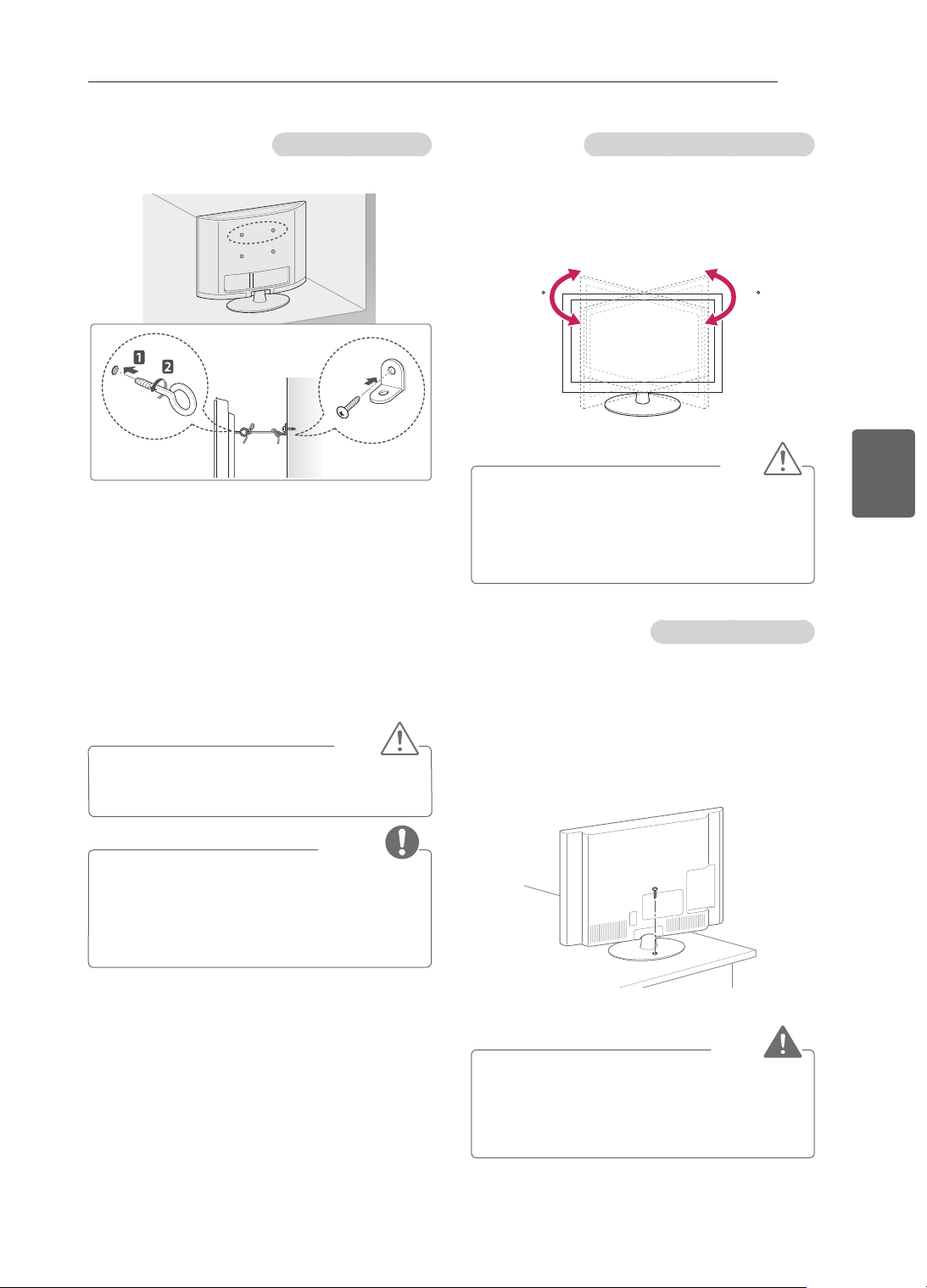
20
ﺔﻴﺑﺮﻌﻟﺍﺔﻴﺑﺮﻌﻟﺍ
ﺮﻴﻀﺤﺘﻟﺍﻭ ﻊﻴﻤﺠﺘﻟﺍ
ﺽﺮﻌﻟﺍ ﺔﻳﻭﺍﺯ ﻊﻣ ﺐﺳﺎﻨﺘﺘﻟ ﺯﺎﻔﻠﺘﻟﺍ ﺔﻳﻭﺍﺯ ﻂﺒﺿ
,32/42LS34** ,32/42CS47** ,32/42CS46** ﺕﺍﺯﺍﺮﻄﻟﺍ)
(ﻂﻘﻓ 32/42LM34**
ﺎﻤﺑ ﺯﺎﻔﻠﺘﻟﺍ ﺔﻳﻭﺍﺯ ﻂﺒﺿﺍﻭ ﻦﻴﻤﻴﻟﺍ ﻭﺃ ﺭﺎﺴﻴﻟﺍ ﻰﻟﺇ ﺔﺟﺭﺩ 20 ﺯﺎﻔﻠﺘﻟﺍ ﺭﺩﺃ
.ﻚﻤﺋﻼﻳ
2020
ﻪﻴﺒﻨﺗ
• .ﻚﻌﺑﺎﺻﺃ ﻰﻟﺇ ﻪﺒﺘﻧﺍ ،ﺞﺘﻨﻤﻟﺍ ﺔﻳﻭﺍﺯ ﻂﺒﺿ ﺪﻨﻋ
« ﻭﺃ ﻱﺪﻳﻷﺍ ﻰﻠﻋ ﻂﻐﻀﻟﺍ ﺔﻟﺎﺣ ﻲﻓ ﺔﻴﺼﺨﺷ ﺔﺑﺎﺻﺇ ﺙﺪﺤﺗ ﺪﻗ ﺫﺇ
ﺎﻤﻣ ،ﺓﺪﺋﺍﺯ ﺓﺭﻮﺼﺑ ﻪﺘﻟﺎﻣﺇ ﺔﻟﺎﺣ ﻲﻓ ﺞﺘﻨﻤﻟﺍ ﻂﻘﺴﻳ ﺪﻗﻭ .ﻊﺑﺎﺻﻷﺍ
.ﺔﺑﺎﺻﺇ ﻉﻮﻗﻭ ﻭﺃ ﻒﻠﺗ ﺙﻭﺪﺣ ﻲﻓ ﺐﺒﺴﺘﻳ
ﺔﻟﻭﺎﻄﻟﺍ ﻰﻠﻋ ﺯﺎﻔﻠﺘﻟﺍ ﺖﻴﺒﺜﺗ ﻡﺎﻜﺣﺇ
,26/32/42CS47**, 26/32/42CS46** ﺕﺍﺯﺍﺮﻄﻟﺍ)
(ﻂﻘﻓ 32/42LM34** ,32/42LS34**
ﺔﺑﺎﺻﻹﺍ ﻭﺃ ﻪﻔﻠﺗ ﻭﺃ ﻡﺎﻣﻷﺍ
ﻰﻟﺇ ﻪﻠ
ْ
ﻴﻣ ﺐﻨﺠﺘﻟ ﺔﻟﻭﺎﻄﻟﺍ ﻰﻠﻋ ﺯﺎﻔﻠﺘﻟﺍ ﺖ
ّ
ﺒﺛ
.ﺔﻠﻤﺘﺤﻤﻟﺍ
ءﺰﺠﻟﺍ ﻲﻓ ﻖﻓﺮﻤﻟﺍ ﻲﻏﺮﺒﻟﺍ ﻞﺧﺩﺃ ،ﺔﻟﻭﺎﻄﻟﺍ ﻰﻠﻋ ﺯﺎﻔﻠﺘﻟﺍ ﺖﻴﺒﺜﺗ ﻡﺎﻜﺣﻹ
.ﻡﺎﻜﺣﺈﺑ ﻪﻄﺑﺭﺍ ﻞﻣﺎﺤﻟﺍ ﻦﻣ ﻲﻔﻠﺨﻟﺍ
ﺮﻳﺬﺤﺗ
• ﺎ
ً
ﻘﻓﻭ ﻥﺎﻣﺄﺑ ﻂﺋﺎﺤﻟﺍ ﻰﻠﻋ /ﺽﺭﻷﺍ ﻲﻓ ﻪﺘﻴﺒﺜﺗ ﺐﺠﻳ ،ﺯﺎﻔﻠﺘﻟﺍ ﻁﻮﻘﺳ ﻊﻨﻤﻟ
ﻰﻟﺇ ﻪﺤﺟﺭﺄﺗ ﻭﺃ ﻩﺯﺍﺰﺘﻫﺍ ﻭﺃ ﺯﺎﻔﻠﺘﻟﺍ ﺔﻟﺎﻣﺇ ﻱﺩﺆﺗ ﺪﻗ .ﺖﻴﺒﺜﺘﻟﺍ ﺕﺎﻤﻴﻠﻌﺘﻟ
.ﺕﺎﺑﺎﺻﺇ ﺙﻭﺪﺣ
ﻂﺋﺎﺤﻟﺍ ﻰﻠﻋ ﺯﺎﻔﻠﺘﻟﺍ ﺖﻴﺒﺜﺗ ﻡﺎﻜﺣﺇ
(.ﺕﺍﺯﺍﺮﻄﻟﺍ ﻞﻛ ﻲﻓ ﺓﺮﻓﻮﺘﻣ ﺮﻴﻏ ﺓﺰﻴﻤﻟﺍ ﻩﺬﻫ)
1 ﺔﻬﺟ ﻲﻓ ﺮﻴﻣﺎﺴﻤﻟﺍﻭ ﺯﺎﻔﻠﺘﻟﺍ ﻲﺳﻮﻗ ﻭﺃ ﺓﻭﺮﻌﻟﺍ ﺕﺍﺫ ﺮﻴﻣﺎﺴﻤﻟﺍ ﻞﺧﺩﺃ
.ﻡﺎﻜﺣﺈﺑ ﺎﻬﻄﺑﺮﺑ ﻢﻗﻭ ﺔﻴﻔﻠﺨﻟﺍ ﺯﺎﻔﻠﺘﻟﺍ
- ﺕﺍﺫ ﺮﻴﻣﺎﺴﻤﻟﺍ ﻊﺿﻮﻣ ﻲﻓ ﺎﻬﻟﺎﺧﺩﺇ ﻢﺗ ﻲﺘﻟﺍ ﺮﻴﻣﺎﺴﻤﻟﺍ ﻝﺯﺃ
.ﺎﻫﺮﻓﻮﺗ ﻝﺎﺣ ﻲﻓ
ً
ﻻﻭﺃ ﺓﻭﺮﻌﻟﺍ
2 .ﻂﺋﺎﺤﻟﺍ ﻰﻠﻋ ﺮﻴﻣﺎﺴﻤﻟﺎﺑ ﻂﺋﺎﺤﻟﺍ ﻰﻠﻋ ﺖﻴﺒﺜﺘﻟﺍ ﻲﺳﻮﻗ ﺖ
ّ
ﺒﺛ
ﺓﻭﺮﻌﻟﺍ ﺕﺍﺫ ﺮﻴﻣﺎﺴﻤﻟﺍ ﻊﻣ ﻂﺋﺎﺤﻟﺍ ﻰﻠﻋ ﺖﻴﺒﺜﺘﻟﺍ ﺱﻮﻗ ﻊﺿﻮﻣ
ﻖﺑﺎﻃﻭ
.ﺔﻴﻔﻠﺨﻟﺍ ﺯﺎﻔﻠﺘﻟﺍ ﺔﻬﺟ ﻲﻓ
3 ﻂﺋﺎﺤﻟﺍ ﻰﻠﻋ ﺖﻴﺒﺜﺘﻟﺍ ﻲﺳﻮﻗﻭ ﺓﻭﺮﻌﻟﺍ ﺕﺍﺫ ﺮﻴﻣﺎﺴﻤﻟﺍ ﻞﻴﺻﻮﺘﺑ ﻢﻗ
.ﻱﻮﻗ ﻞﺒﺣ ﺔﻄﺳﺍﻮﺑ ﻡﺎﻜﺣﺈﺑ
.ﻱﻮﺘﺴﻤﻟﺍ ﺢﻄﺴﻟﺍ ﻊﻣ ﻲﻘﻓﺃ ﻊﺿﻭ ﻲﻓ ﻞﺒﺤﻟﺍ ﻰﻠﻋ ﺔﻈﻓﺎﺤﻤﻟﺍ ﻦﻣ ﺪﻛﺄﺗ
ﻪﻴﺒﻨﺗ
• .ﻪﺑ ﻖﻠﻌﺘﻟﺍ ﻭﺃ ﺯﺎﻔﻠﺘﻟﺍ ﻰﻠﻋ ﻖﻠﺴﺘﻟﺎﺑ ﻝﺎﻔﻃﻷﺍ ﻡﺎﻴﻗ ﻡﺪﻋ ﻰﻠﻋ ﺹﺮﺣﺍ
ﺔﻈﺣﻼﻣ
• ﺯﺎﻬﺟ ﻞﻤﺤﺘﻟ
ٍ
ﻑﺎﻛ ﻞﻜﺸﺑ ﺓﺮﻴﺒﻛﻭ ﺔﻳﻮﻗ ﺔﻧﺍﺰﺧ ﻭﺃ ﺔﺼﻨﻣ ﻡﺪﺨﺘﺳﺍ
.ﻦﻣﺁ ﻞﻜﺸﺑ ﺯﺎﻔﻠﺘﻟﺍ
• ﻰﻠﻋ ﻝﻮﺼﺤﻟﺍ ﻚﻨﻜﻤﻳ .ﻝﺎﺒﺤﻟﺍﻭ ﺮﻴﻣﺎﺴﻤﻟﺍﻭ ﺱﺍﻮﻗﻷﺍ ﺮﻴﻓﻮﺗ ﻢﺘﻳ ﻻ
.ﻲﻠﺤﻤﻟﺍ ﻞﻴﻛﻮﻟﺍ ﻦﻣ ﺔﻳﺭﺎﻴﺘﺧﻻﺍ ﺕﺎﻘﺤﻠﻤﻟﺍ
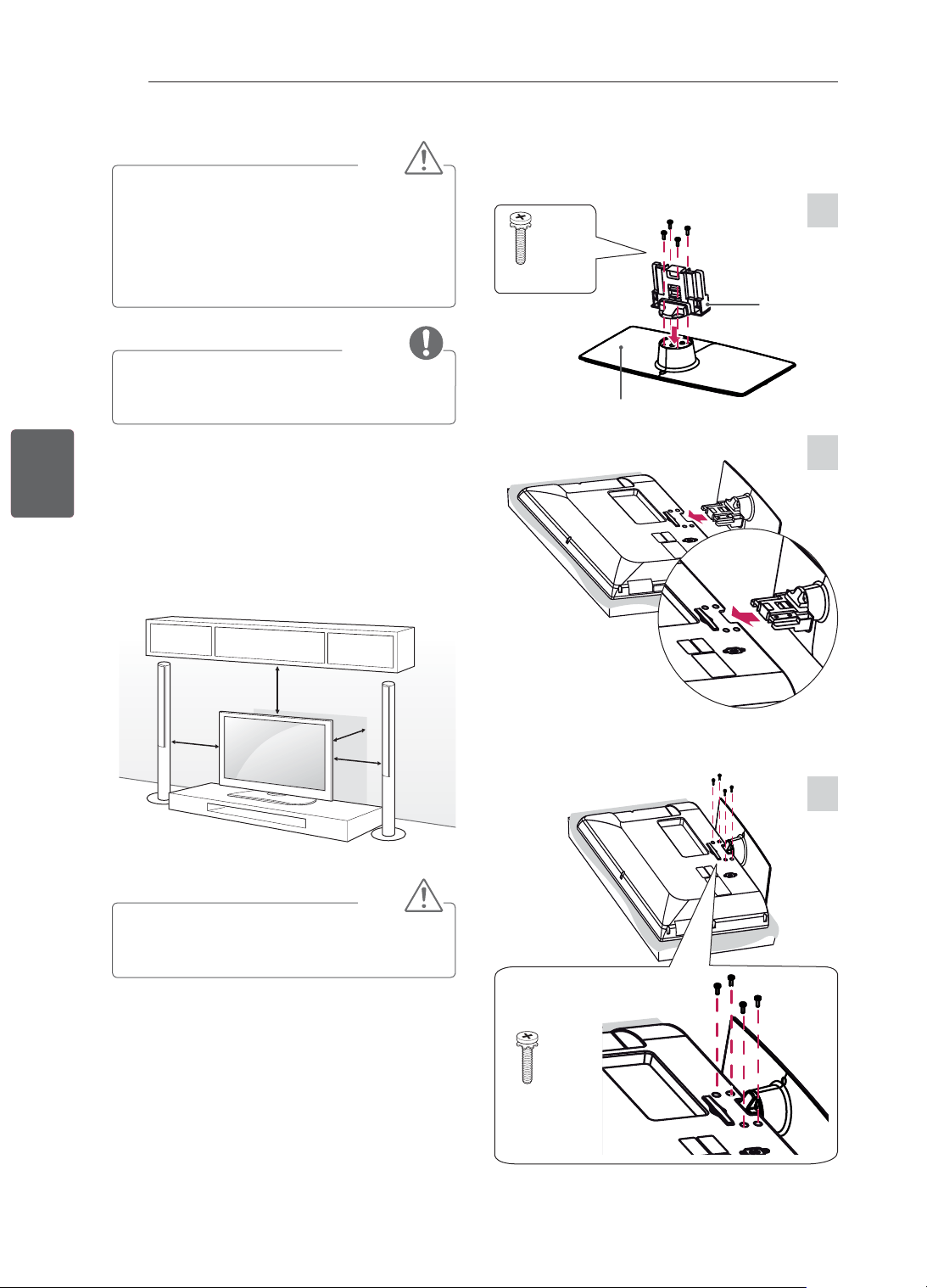
19
ﺔﻴﺑﺮﻌﻟﺍﺔﻴﺑﺮﻌﻟﺍ
ﺮﻴﻀﺤﺘﻟﺍﻭ ﻊﻴﻤﺠﺘﻟﺍ
ﻪﻴﺒﻨﺗ
• ﺔﺷﺎﺸﻟﺍ ﺢﻄﺳ ﻪﻴﺟﻮﺗ ﻊﻣ ﺔﺷﺎﺸﻟﺍ ﻊﺿ ,ﺯﺎﻔﻠﺘﻟﺍ ﻊﻣ ﻞﻣﺎﺤﻟﺍ ﺖﻴﺒﺜﺗ ﺪﻨﻋ
ﺔﺷﺎﺸﻟﺍ ﺔﻳﺎﻤﺤﻟ
ٍ
ﻮﺘﺴﻣ ﺢﻄﺳ ﻭﺃ ﺪﺋﺎﺳﻮﺑ ﺓﺩﻭﺰﻣ ﺔﻟﻭﺎﻃ ﻰﻠﻋ ،ﻞﻔﺳﺍ ﻰﻟﺇ
.ﺵﺪﺨﻟﺍ ﻦﻣ
• ﻂﺑﺮﺗ ﻻ .ﻡﺎﻣﻸﻟ ﻞﻴﻤﻟﺍ ﻦﻣ ﻥﻮﻳﺰﻔﻠﺘﻟﺍ ﻊﻨﻤﻟ ﺮﻴﻣﺎﺴﻤﻟﺍ ﻂﺑﺭ ﻢﻜﺣﺃ
.ﻡﺯﻼﻟﺍ ﻦﻣ ﺮﺜﻛﺃ ﺮﻴﻣﺎﺴﻤﻟﺍ
ﺔﻈﺣﻼﻣ
• ﺬﻴﻔﻨﺘﺑ ﻚﻟﺫﻭ ﻂﺋﺎﺤﻟﺍ ﻰﻠﻋ ﺯﺎﻔﻠﺘﻟﺍ ﺖﻴﺒﺜﺗ ﻞﺒﻗ ﻞﻣﺎﺤﻟﺍ ﺔﻟﺍﺯﺈﻳ ﻢﻗ
.ﻲﺴﻜﻋ ﻞﻜﺸﺑ ﺐﻴﻛﺮﺘﻟﺍ ﺕﺍءﺍﺮﺟﺇ
ﺔﻟﻭﺎﻄﻟﺍ ﻰﻠﻋ ﺖﻴﺒﺜﺘﻟﺍ
1 .ﺔﻟﻭﺎﻄﻟﺍ ﻰﻠﻋ ﻢﻴﻘﺘﺴﻤﻟﺍ ﻊﺿﻮﻟﺍ ﻰﻟﺇ ﻪﻠﻣﺃﻭ ﺯﺎﻔﻠﺘﻟﺍ ﻊﻓﺭﺍ
- .ﺔﺒﺳﺎﻨﻣ ﺔﻳﻮﻬﺘﻟ ﻂﺋﺎﺤﻟﺍ ﻦﻣ (ﻞﻗﻷﺍ ﻰﻠﻋ) ﻢﺳ 10 ﺔﻓﺎﺴﻣ
ِ
ﻖﺑﺃ
ﻢﺳ 10
ﻢﺳ 10
ﻢﺳ 10
ﻢﺳ 10
2 .ﻂﺋﺎﺤﻟﺍ ﻲﻓ ﺔﻗﺎﻄﻟﺍ ﺭﺪﺼﻤﺑ ﺔﻗﺎﻄﻟﺍ ﻚﻠﺳ ﻞﻴﺻﻮﺘﺑ ﻢﻗ
ﻪﻴﺒﻨﺗ
• ﺪﻗ ﺫﺇ ،ﺎﻬﻗﻮﻓ ﻭﺃ ﺔﻧﻮﺨﺴﻟﺍ ﺭﺩﺎﺼﻣ ﻦﻣ ﺐﻳﺮﻗ ﻥﺎﻜﻣ ﻲﻓ ﺯﺎﻔﻠﺘﻟﺍ ﻊﻀﺗ ﻻ
.ﺞﺘﻨﻤﻟﺎﺑ ﺭﺮﻀﻟﺍ ﻕﺎﺤﻟﺇ ﻭﺃ ﻖﻳﺮﺣ ﺏﻮﺸﻧ ﻰﻟﺇ ﻚﻟﺫ ﻱﺩﺆﻳ
1
3
2
M4 x 20
4EA
,32/42LS34** ,32/42CS47** ,32/42CS46**
32/42LM34**
M4 x 20
4EA
ﻞﻣﺎﺤﻟﺍ ﺓﺪﻋﺎﻗ
ﻞﻣﺎﺤﻟﺍ ﻞﻜﻴﻫ
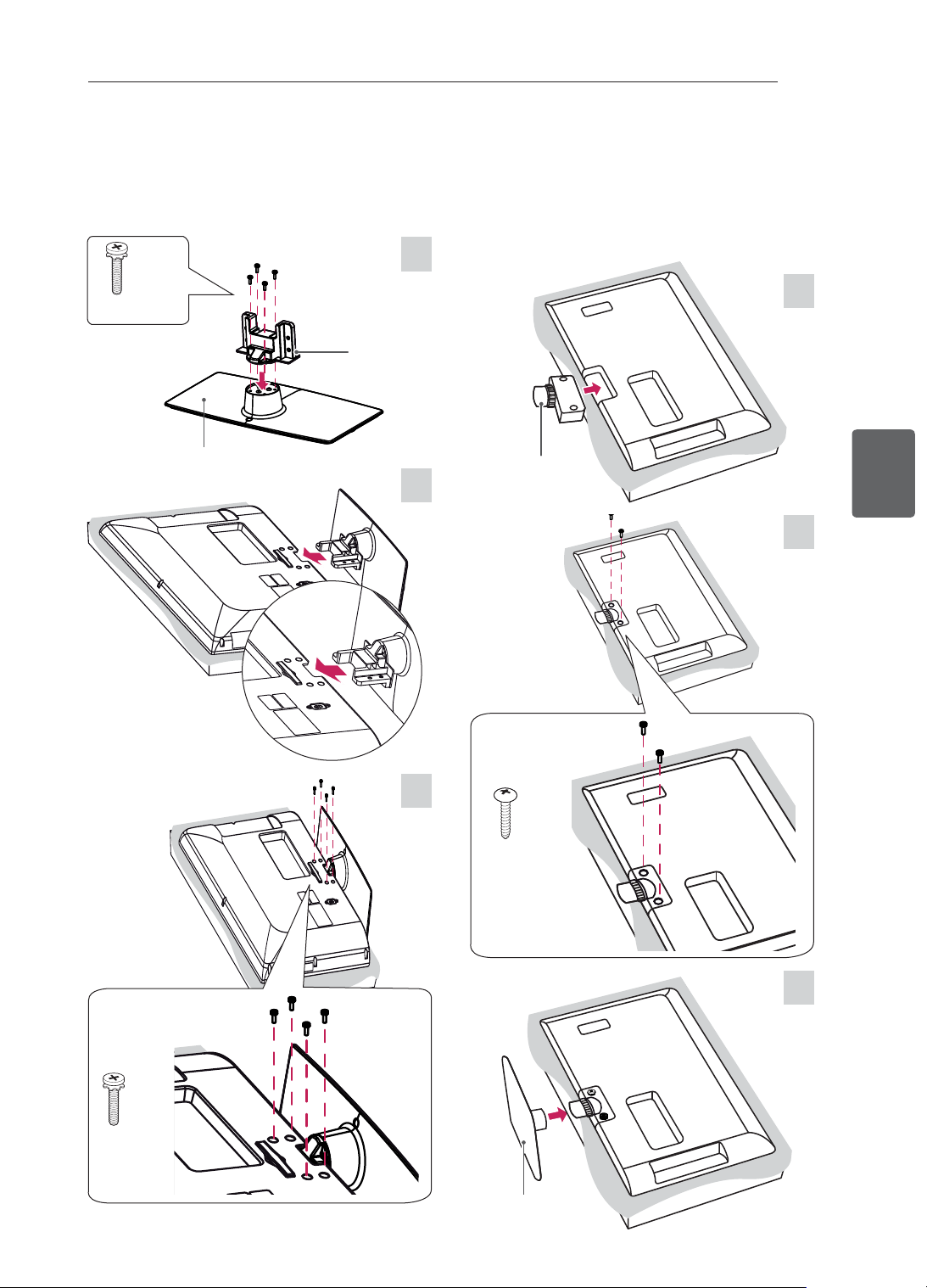
18
ﺔﻴﺑﺮﻌﻟﺍﺔﻴﺑﺮﻌﻟﺍ
ﺮﻴﻀﺤﺘﻟﺍﻭ ﻊﻴﻤﺠﺘﻟﺍ
ﻥﻮﻳﺰﻔﻠﺘﻟﺍ ﺩﺍﺪﻋﺇ
ﻞﻣﺎﺤﻟﺍ ﺐﻴﻛﺮﺗ
.ﻚﻳﺪﻟ ﺯﺎﻔﻠﺘﻟﺍ ﺓﺭﻮﺻ ﻦﻋ ﺔﺿﻭﺮﻌﻤﻟﺍ ﺓﺭﻮﺼﻟﺍ ﻒﻠﺘﺨﺗ ﺪﻗ
1
2
P4 x 16
2EA
3
22CS47** ,22CS46**
1
2
3
M4 x 20
4EA
ﻞﻣﺎﺤﻟﺍ ﻞﻜﻴﻫ
ﻞﻣﺎﺤﻟﺍ ﺓﺪﻋﺎﻗ
M4 x 20
4EA
26CS47** ,26CS46**
ﻞﻣﺎﺤﻟﺍ ﻞﻜﻴﻫ
ﻞﻣﺎﺤﻟﺍ ﺓﺪﻋﺎﻗ
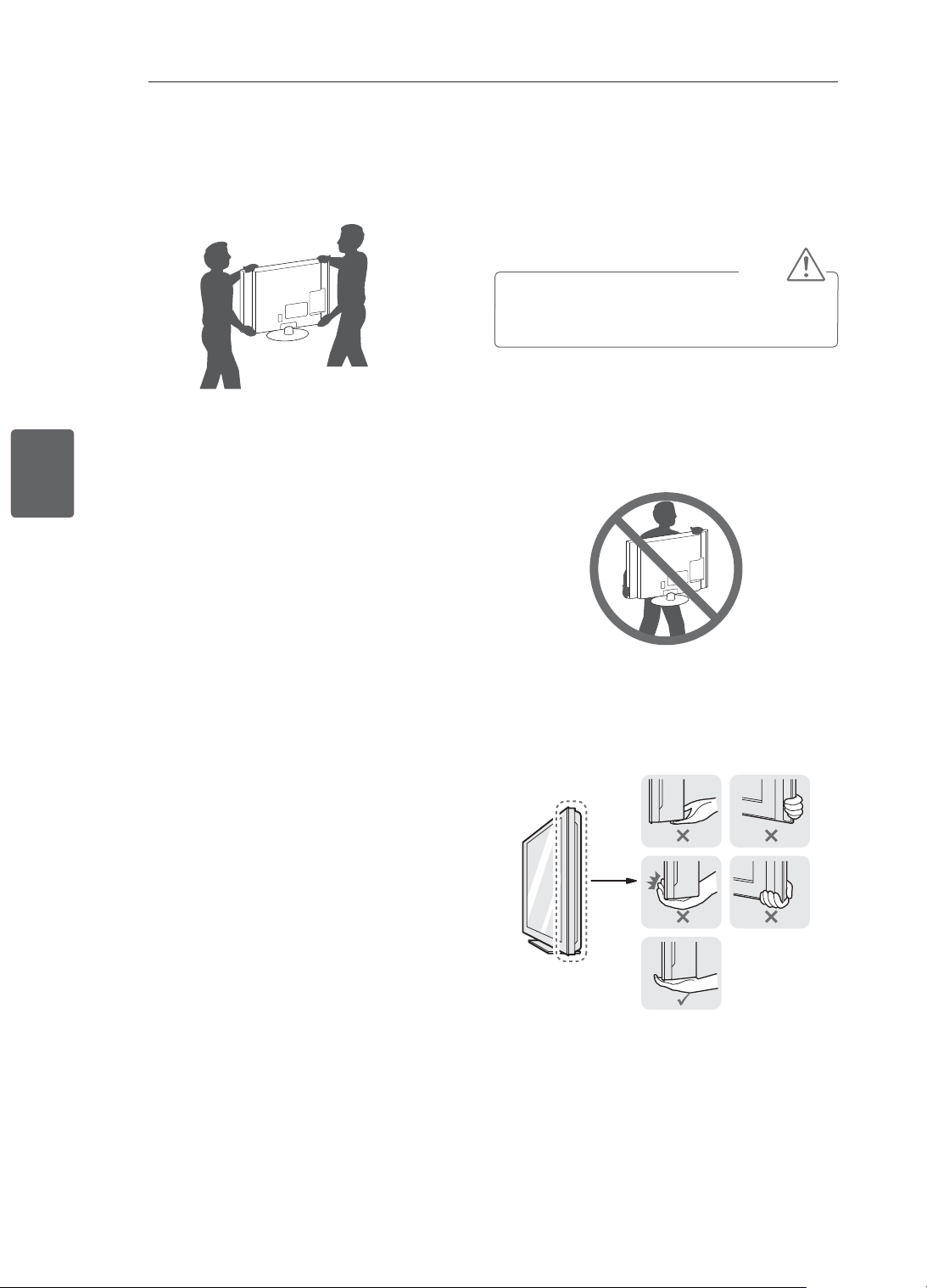
17
ﺔﻴﺑﺮﻌﻟﺍﺔﻴﺑﺮﻌﻟﺍ
ﺮﻴﻀﺤﺘﻟﺍﻭ ﻊﻴﻤﺠﺘﻟﺍ
ﻪﻠﻘﻧﻭ ﺯﺎﻔﻠﺘﻟﺍ ﻞﻤﺣ
ﻭﺃ ﻪﺷﺪﺧ ﺐﻨﺠﺘﻟ ﺔﻴﻟﺎﺘﻟﺍ ﺕﺍﺩﺎﺷﺭﻹﺍ ﺓءﺍﺮﻗ ﻰﺟﺮ
ُ
ﻳ ،ﻪﻠﻤﺣ ﻭﺃ ﺯﺎﻔﻠﺘﻟﺍ ﻞﻘﻧ ﺪﻨﻋ
ﺯﺎﻔﻠﺘﻟﺍ ﻉﻮﻧ ﻦﻋ ﺮﻈﻨﻟﺍ ﺾﻐﺑ ﻦﻣﻵﺍ ﻞﻘﻨﻟﺍ ﻥﺎﻤﻀﻟﻭ ﻪﺑ ﺭﺮﻀﻟﺍ ﻕﺎﺤﻟﺇ
.ﻪﻤﺠﺣﻭ
ﻪﻴﺒﻨﺗ
• ﻕﺎﺤﻟﺇ ﻰﻟﺇ ﻚﻟﺫ ﻱﺩﺆﻳ ﺪﻗ ﺫﺇ ،ﺖﻗﻭ ﻞﻛ ﻲﻓ ﺔﺷﺎﺸﻟﺍ ﺢﻄﺳ ﺲﻤﻟ ﺐﻨﺠﺗ
.ﺎﻬﺑ ﺭﺮﻀﻟﺍ
• ﺖﻘﻓﺭﺃ ﻲﺘﻟﺍ ﺔﺌﺒﻌﺘﻟﺍ ﺩﺍﻮﻤﺑ ﺎ
ً
ﻔﻠﻐﻣ ﻭﺃ ﻕﻭﺪﻨﺼﻟﺍ ﻲﻓ ﺯﺎﻔﻠﺘﻟﺍ ﻞﻘﻨﺑ ﻰﺻﻮﻳ
.ﻪﺑ
• .ﻪﻠﻤﺣ ﻭﺃ ﺯﺎﻔﻠﺘﻟﺍ ﻞﻘﻧ ﻞﺒﻗ ﺕﻼﺒﻜﻟﺍ ﻊﻴﻤﺟﻭ ﺔﻗﺎﻄﻟﺍ ﻚﻠﺳ ﻞﺼﻓﺍ
• ﻚﻟﺫﻭ ﻚﻨﻋ ﺍ
ً
ﺪﻴﻌﺑ ﺔﺷﺎﺸﻟﺍ ﻩﺎﺠﺗﺍ ﻥﻮﻜﻳ ﻥﺃ
ﺐﺠﻳ ،ﺯﺎﻔﻠﺘﻟﺎﺑ ﻙﺎﺴﻣﻹﺍ ﺪﻨﻋ
.ﺎﻬﺑ ﺭﺮﻀﻟﺍ ﻕﺎﺤﻟﺇ ﺐﻨﺠﺘﻟ
• ﻡﺪﻋ ﻦﻣ ﺪﻛﺄﺗ .ﻡﺎﻜﺣﺈﺑ ﺯﺎﻔﻠﺘﻟﺍ ﺭﺎﻃﺇ ﻦﻣ ﻲﻠﻔﺴﻟﺍﻭ ﻱﻮﻠﻌﻟﺍ ءﺰﺠﻟﺍ ﻚﺴﻣﺃ
ﺮ
ّ
ﺒﻜﻣ ﺔﻜﺒﺷ ﺔﻘﻄﻨﻤﺑ ﻭﺃ ﺕﻮﺼﻟﺍ ﺮ
ّ
ﺒﻜﻤﺑ ﻭﺃ ﻑﺎﻔﺸﻟﺍ ءﺰﺠﻟﺎﺑ ﻙﺎﺴﻣﻹﺍ
.ﺕﻮﺼﻟﺍ
• .ﻞﻗﻷﺍ ﻰﻠﻋ ﻦﻴﺼﺨﺷ ﺮﻴﺒﻛ ﺯﺎﻔﻠﺗ ﺯﺎﻬﺟ ﻞﻘﻧ ﺐﻠﻄﺘﻳ
• ﺓﺭﻮﺼﻟﺍ ﻲﻓ ﺢﺿﻮﻣ ﻮﻫ ﺎﻤﻛ ﻪﺑ ﻙﺎﺴﻣﻹﺍ ﺐﺠﻳ ،ﺪﻴﻟﺎﺑ ﺯﺎﻔﻠﺘﻟﺍ ﻞﻘﻧ ﺪﻨﻋ
.ﺔﻴﻟﺎﺘﻟﺍ
• .ﺪﻳﺪﺸﻟﺍ ﺯﺍﺰﺘﻫﻻﺍ ﻭﺃ ﺝﺎﺠﺗﺭﻼﻟ ﻪﺿ
ﱢ
ﺮﻌﺗ ﻻ ،ﺯﺎﻔﻠﺘﻟﺍ ﻞﻘﻧ ﺪﻨﻋ
• ﻭﺃ ﻪﺒﻧﺎﺟ ﻰﻠﻋ ﻪﺒﻠﻗ ﺐ
ّ
ﻨﺠﺗﻭ ،ﺎ
ً
ﻤﻴﻘﺘﺴﻣ ﺎ
ً
ﻣﻭﺩ ﻪﻠﻌﺟﺍ ،ﺯﺎﻔﻠﺘﻟﺍ ﻞﻘﻧ ﺪﻨﻋ
.ﺍ
ً
ﺭﺎﺴﻳ ﻭﺃ ﺎ
ً
ﻨﻴﻤﻳ ﻪﺘﻟﺎﻣﺇ
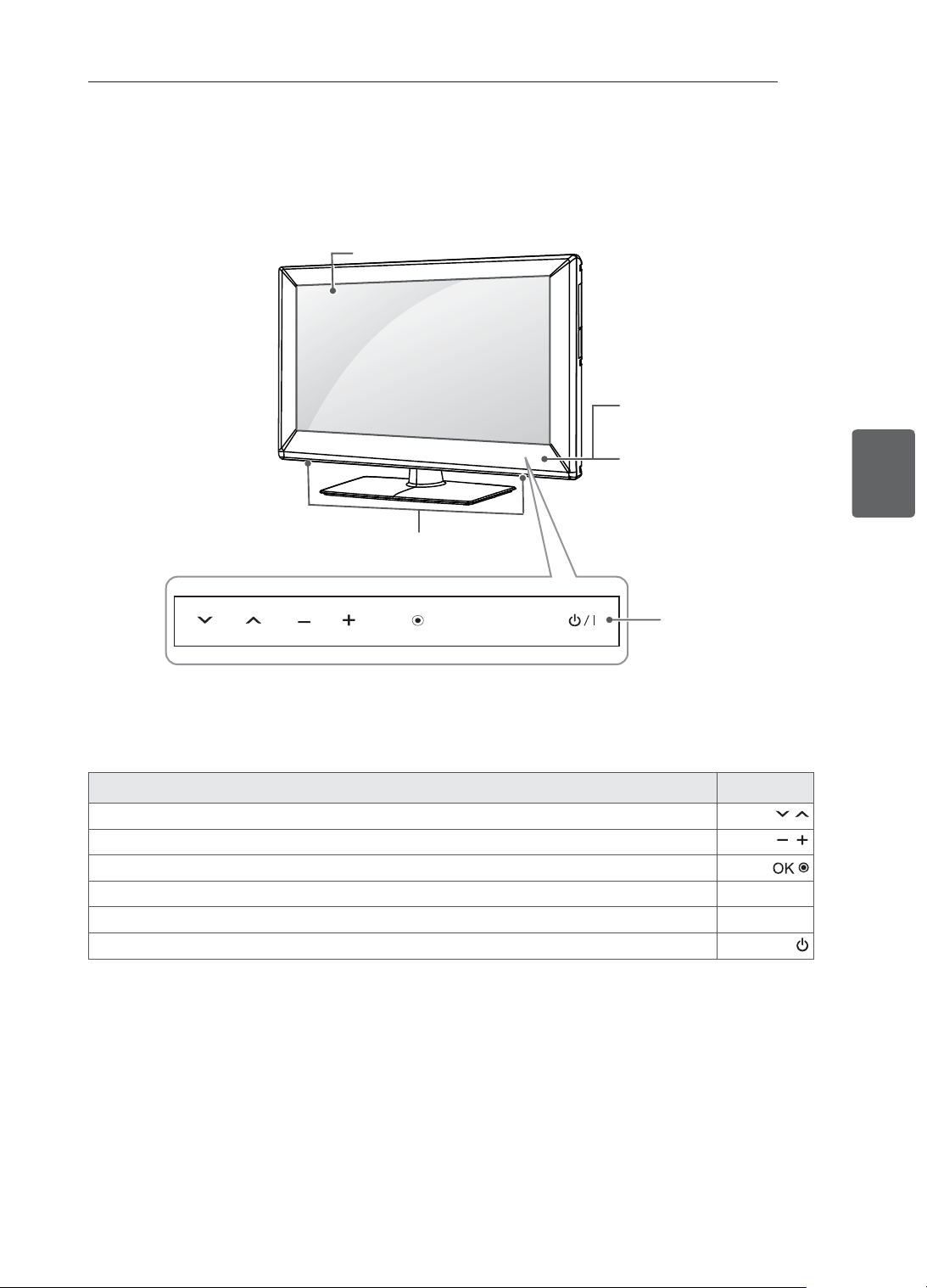
16
ﺔﻴﺑﺮﻌﻟﺍﺔﻴﺑﺮﻌﻟﺍ
ﺮﻴﻀﺤﺘﻟﺍﻭ ﻊﻴﻤﺠﺘﻟﺍ
ﺭﺍﺭﺯﻷﺍﻭ ءﺍﺰﺟﻷﺍ
ﺲﻤﻠﻟﺍ ﺭﺍﺭﺯﺃﻒﺻﻮﻟﺍ
.ﺔﻇﻮﻔﺤﻤﻟﺍ ﺞﻣﺍﺮﺒﻟﺍ ﺮﺒﻋ ﻞﻘﻨﺘﻠﻟ
.ﺕﻮﺼﻟﺍ ﻯﻮﺘﺴﻣ ﻂﺒﻀﻟ
.ﻦﻴﻌﻣ ﻝﺎﺧﺩﺇ ﺪﻴﻛﺄﺗ ﻭﺃ ﺰﻴﻤﻤﻟﺍ ﺔﻤﺋﺎﻘﻟﺍ ﺭﺎﻴﺧ ﺪﻳﺪﺤﺘﻟ
SETTINGS.ﻢﺋﺍﻮﻘﻟﺍ ﻦﻣ ﺝﻭﺮﺨﻟﺍﻭ ﻝﺎﺧﺩﻹﺍ ﻆﻔﺤﻟ ﻭﺃ ،ﺔﻴﺴﻴﺋﺮﻟﺍ ﺔﻤﺋﺎﻘﻟﺍ ﻰﻟﺇ ﻝﻮﺻﻮﻠﻟ
INPUT.ﻝﺎﺧﺩﻹﺍ ﺭﺪﺼﻣ ﺮﻴﻴﻐﺘﻟ
I /
.ﻪﻠﻴﻐﺸﺗ ﻑﺎﻘﻳﺇ ﻭﺃ ﺯﺎﻔﻠﺘﻟﺍ ﻞﻴﻐﺸﺘﻟ
1 .ﺔﻄﻴﺤﻤﻟﺍ ﺔﺌﻴﺒﻠﻟ ﺎ
ً
ﻌﺒﺗ ﻉﻮﻄﺴﻟﺍﻭ ﺓﺭﻮﺼﻟﺍ ﺓﺩﻮﺟ ﻂﺒﻀﻟ - ﺔﻴﻛﺬﻟﺍ ﺭﺎﻌﺸﺘﺳﻻﺍ ﺓﺪﺣﻭ
2 .ﻚﻌﺒﺻﺈﺑ ﺓﺪﺣﺍﻭ ﺔﺴﻤﻠﺑ ﺎﻬﻠﻴﻐﺸﺗ ﻦﻜﻤﻳﻭ ﺲﻤﻠﻟﺎﺑ ﺔﻓﺎﻛ ﺭﺍﺭﺯﻷﺍ ﻩﺬﻫ ﻞﻤﻌﺗ
INPUT
OK
SETTINGS
ﺔﺷﺎﺸﻟﺍ
ﻭ ﺪﻌ
ُ
ﺑ ﻦﻋ ﻢﻜﺤﺘﻟﺍ ﺓﺪﺣﻭ
1
ﺔﻴﻛﺬﻟﺍ ﺭﺎﻌﺸﺘﺳﻻﺍ ﺓﺪﺣﻭ
ﻞﻴﻐﺸﺘﻟﺍ ﺮﺷﺆﻣ
2
ﺲﻤﻠﻟﺍ ﺭﺍﺭﺯﺃ
ﺕﻮﺼﻟﺍ ﺕﺍﺮﺒﻜﻣ
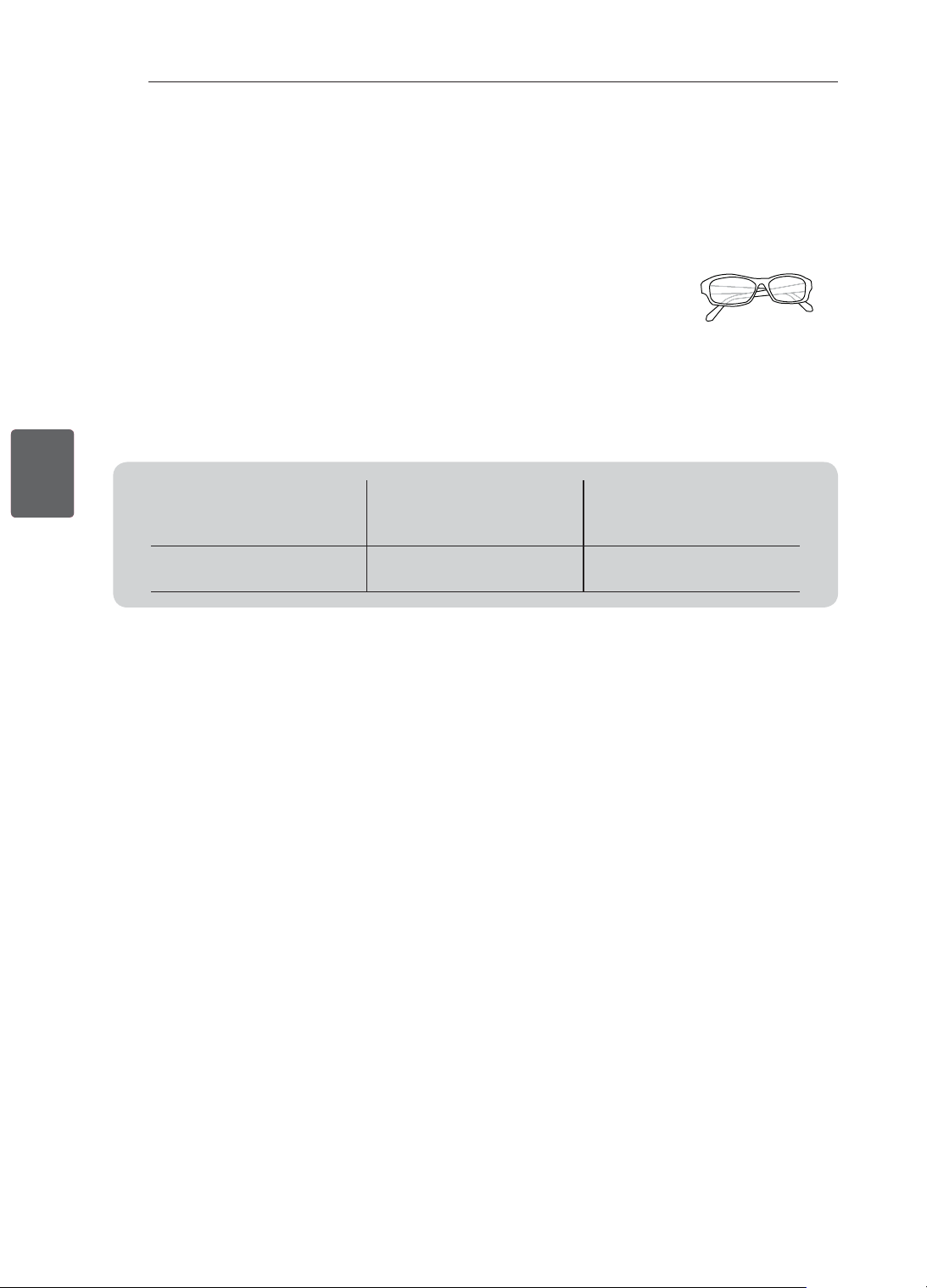
15
ﺔﻴﺑﺮﻌﻟﺍﺔﻴﺑﺮﻌﻟﺍ
ﺮﻴﻀﺤﺘﻟﺍﻭ ﻊﻴﻤﺠﺘﻟﺍ
ﻞﺼﻔﻨﻣ ﻞﻜﺸﺑ ﺎﻫﺅﺍﺮﺷ ﻢﺘﻳ ﻲﺘﻟﺍ ﺮﺻﺎﻨﻌﻟﺍ
.ﺭﺎﻌﺷﺇ ﻱﺃ ﻥﻭﺩ ﻦﻣ ﺓﺩﻮﺠﻟﺍ ﻦﻴﺴﺤﺗ ﻑﺪﻬﺑ ﺎﻬﻠﻳﺪﻌﺗ ﻭﺃ ﻞﺼﻔﻨﻣ ﻞﻜﺸﺑ ﺎﻫﺅﺍﺮﺷ ﻢﺘﻳ ﻲﺘﻟﺍ ﺮﺻﺎﻨﻌﻟﺍ ﺮﻴﻴﻐﺗ ﻦﻜﻤﻳ
.ﺮﺻﺎﻨﻌﻟﺍ ﻩﺬﻫ ءﺍﺮﺸﻟ ﻞﻴﻛﻮﻟﺎﺑ ﻞﺼﺗﺍ
.ﻂﻘﻓ ﺕﺍﺯﺍﺮﻄﻟﺍ ﺾﻌﺑ ﻊﻣ ﺕﺍﺪﺣﻮﻟﺍ ﻩﺬﻫ ﻞﻤﻌﺗ
AG-F3**
ﺩﺎﻌﺑﻷﺍ ﺔﻴﺛﻼﺛ ﺔﻴﺋﺎﻤﻨﻴﺴﻟﺍ ﺕﺍﺭﺎﻈﻨﻟﺍ
ﻰﻟﺇ ﺍ
ً
ﺩﺎﻨﺘﺳﺍ ﻪﻤﻴﻤﺼﺗ ﻭﺃ ﺯﺍﺮﻄﻟﺍ ﻢﺳﺍ ﺮﻴﻐﺘﻳ ﺪﻗ
ﺕﺎﻛﺮﺸﻟﺍ ﻑﻭﺮﻇ ﻭﺃ ﺞﺘﻨﻤﻟﺍ ﻒﺋﺎﻇﻭ ﺔﻴﻗﺮﺗ
.ﺎﻬﺗﺎﺳﺎﻴﺳ ﻭﺃ ﺔﻌ
ّ
ﻨﺼﻤﻟﺍ
ﻖﻓﺍﻮﺘﻟﺍ
32/42LM34**
,22/26/32/42CS46**
,22/26/32/42CS47**
32/42LS34**
AG-F3**
ﺩﺎﻌﺑﻷﺍ ﺔﻴﺛﻼﺛ ﺔﻴﺋﺎﻤﻨﻴﺴﻟﺍ ﺕﺍﺭﺎﻈﻨﻟﺍ
•
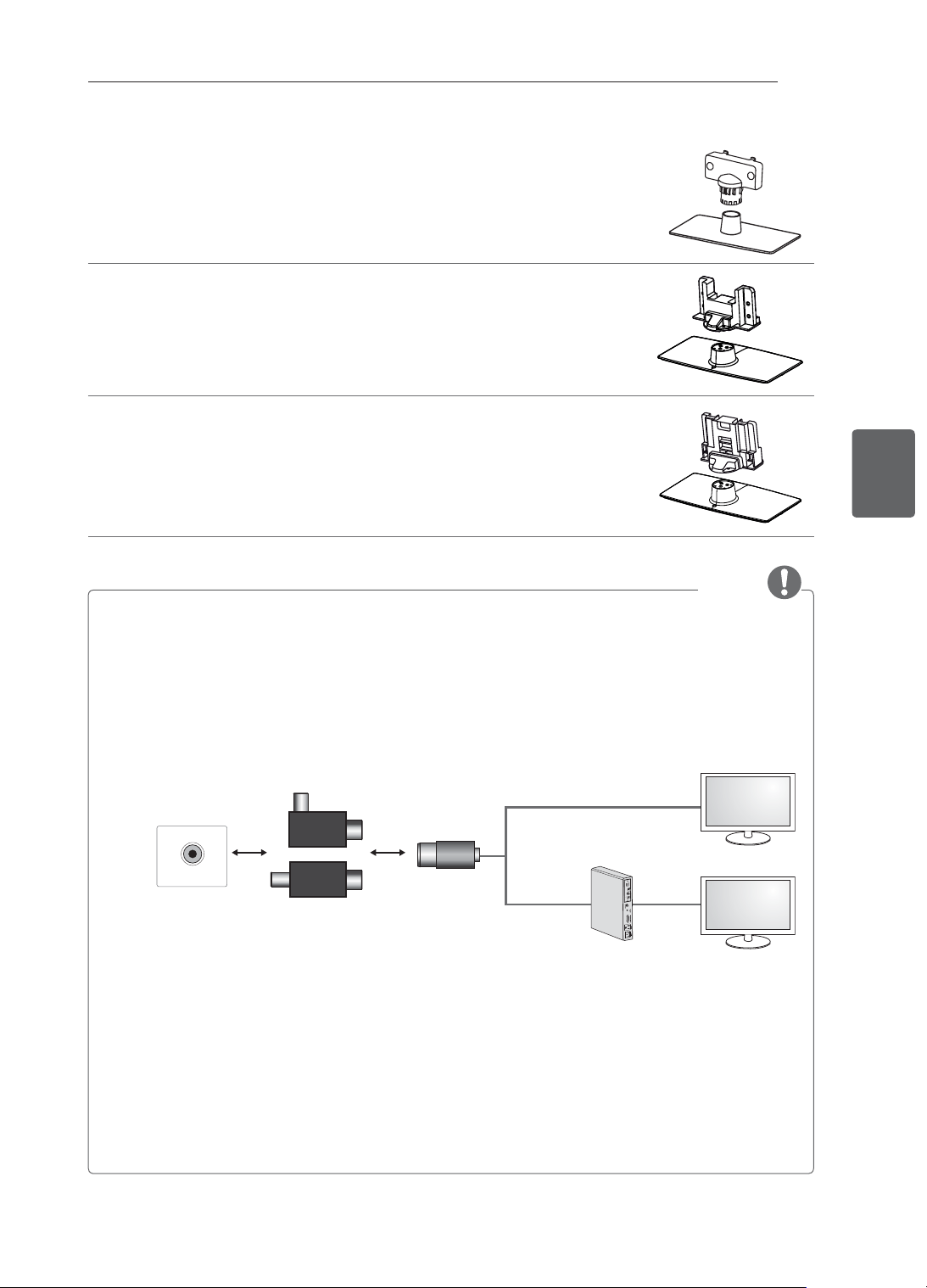
14
ﺔﻴﺑﺮﻌﻟﺍﺔﻴﺑﺮﻌﻟﺍ
ﺮﻴﻀﺤﺘﻟﺍﻭ ﻊﻴﻤﺠﺘﻟﺍ
ﻞﻣﺎﺤﻟﺍ ﺓﺪﻋﺎﻗ / ﻞﻣﺎﺤﻟﺍ ﻞﻜﻴﻫ
(ﻂﻘﻓ 22CS47** ,22CS46** ﺕﺍﺯﺍﺮﻄﻟﺍ)
(18 ﺔﺤﻔﺼﻟﺍ ﺮﻈﻧﺍ )
ﻞﻣﺎﺤﻟﺍ ﺓﺪﻋﺎﻗ / ﻞﻣﺎﺤﻟﺍ ﻞﻜﻴﻫ
(ﻂﻘﻓ 26CS47** ,26CS46** ﺕﺍﺯﺍﺮﻄﻟﺍ)
(18 ﺔﺤﻔﺼﻟﺍ ﺮﻈﻧﺍ )
ﻞﻣﺎﺤﻟﺍ ﺓﺪﻋﺎﻗ / ﻞﻣﺎﺤﻟﺍ ﻞﻜﻴﻫ
(ﻂﻘﻓ 32/42LM34** ,32/42LS34** ,32/42CS47** ,32/42CS46** ﺕﺍﺯﺍﺮﻄﻟﺍ)
(19 ﺔﺤﻔﺼﻟﺍ ﺮﻈﻧﺍ )
ﺔﻈﺣﻼﻣ
• ﻲﺋﺍﻮﻬﻟﺍ ﻝﺯﺎﻋ ﺖﻴﺒﺜﺗ ﻞﻴﻟﺩ
- .ﻲﺋﺍﻮﻬﻟﺍ ﺓﺭﺎﺷﺈﺑ ﺹﺎﺨﻟﺍ GND ﻭ ﺯﺎﻔﻠﺘﻟﺍ ﻦﻴﺑ ﺔﻴﺘﻟﻮﻔﻟﺍ ﻲﻓ ﺕﻭﺎﻔﺗ ﻪﻴﻓ ﺪﺟﻮﻳ ﻥﺎﻜﻣ ﻲﻓ ﺯﺎﻔﻠﺘﻟﺍ ﺖﻴﺒﺜﺘﻟ ﻝﺯﺎﻌﻟﺍ ﺍﺬﻫ ﻡﺪﺨﺘﺳﺍ
« ﻱﺩﺆﺗ ﺪﻗﻭ ﻲﺋﺍﻮﻬﻟﺎﺑ ﻝﺎﺼﺗﻻﺍ ﺓﺪﺣﻭ ﺓﺭﺍﺮﺣ ﻊﻔﺗﺮﺗ ﻥﺃ ﻦﻜﻤﻴﻓ ،ﻲﺋﺍﻮﻬﻟﺍ ﺓﺭﺎﺷﺈﺑ ﺹﺎﺨﻟﺍ GND ﻭ ﺯﺎﻔﻠﺘﻟﺍ ﻦﻴﺑ ﺔﻴﺘﻟﻮﻔﻟﺍ ﻲﻓ ﺕﻭﺎﻔﺗ ﺔﻤﺛ ﻥﺎﻛ ﺍﺫﺇ
.ﺙﺩﺎﺣ ﻉﻮﻗﻭ ﻰﻟﺇ
ﺔﻃﺮﻔﻤﻟﺍ ﺓﺭﺍﺮﺤﻟﺍ
- ﺍﺫﺍ .ﻂﺋﺎﺤﻟﺍ ﻰﻠﻋ ﻝﺯﺎﻌﻟﺍ ﻖﻴﻠﻌﺘﺑ ﻰﺻﻮﻳ .ﺮﺜﻛﺃ ﺔﻟﺎﻌﻓ ﺓﺭﻮﺼﺑ ﺯﺎﻔﻠﺘﻟﺍ ﻲﺋﺍﻮﻫ ﻦﻣ ﺔﻗﺎﻄﻟﺍ ﺔﻴﺘﻟﻮﻓ ﺔﻟﺍﺯﺇ ﻚﻨﻜﻤﻳ ،ﺯﺎﻔﻠﺘﻟﺍ ﺓﺪﻫﺎﺸﻣ ﺪﻨﻋ ﻥﺎﻣﻷﺍ ﻦﻣ ﺪﻳﺰﻤﻟ
.ﺖﻴﺒﺜﺘﻟﺍ ﺪﻌﺑ ﻲﺋﺍﻮﻬﻟﺍ ﻝﺯﺎﻋ ﻞﺼﻓ ﺐ
ّ
ﻨﺠﺗ .ﺯﺎﻔﻠﺘﻟﺍ ﻰﻠﻋ ﻪﻘﻴﻠﻌﺘﺑ ﻢﻗ ,ﻂﺋﺎﺤﻟﺍ ﻰﻠﻋ ﻪﺘﻴﺒﺜﺗ ﻦﻜﻤﻳ ﻻ ﻥﺎﻛ
- .ءﺪﺒﻟﺍ ﻞﺒﻗ ﺯﺎﻔﻠﺘﻟﺍ ﻲﺋﺍﻮﻫ ﻞﻴﺻﻮﺗ ﻦﻣ ﺪﻛﺄﺗ
ANTENNA/
CABLE IN
ﻲﺋﺍﻮﻬﻟﺍ / ﻞﺒﻜﻟﺍ
ﻂﺋﺎﺤﻟﺍ
ﻝﺯﺎﻌﻟﺍ
.ﺯﺎﻔﻠﺘﻟﺎﺑ ﻝﺎﺼﺗﻻﺍ.1
.
Set-Top box ﺯﺎﻬﺠﺑ ﻝﺎﺼﺗﻻﺍ .2
ﻭﺃ
.Set-Top box ﺯﺎﻬﺟ ﻭﺃ ﺯﺎﻔﻠﺘﻟﺎﺑ ﻲﻧﺎﺜﻟﺍ ﻑﺮﻄﻟﺍﻭ ﻲﺋﺍﻮﻬﻟﺍ/ﻞﺒﻜﻟﺍ ﺲﺒﻘﻤﺑ ﻝﺯﺎﻌﻟﺍ ﻲﻓﺮﻃ ﺪﺣﺃ ﻞﻴﺻﻮﺘﺑ ﻢﻗ
ﺾﻳﺭﺄﺘﻟﺍ ﺓﺪﺣﻮﺑ ﺔﻠﺼﺘﻣ ﻯﺮﺧﺃ ﺓﺰﻬﺟﺃ ﺮﺒﻋ ﻭﺃ ﻲﺴﻴﺋﺮﻟﺍ ﻝﺎﺼﺗﻻﺍ ﺮﺒﻋ ﻰﻨﺒﻤﻟﺎﺑ ﺔﺻﺎﺨﻟﺍ ﺔﻴﻗﺍﻮﻟﺍ ﺾﻳﺭﺄﺘﻟﺍ ﺓﺪﺣﻮﺑ ﺔﻠﺼﺘﻤﻟﺍ ﺓﺰﻬﺟﻷﺍ ﻥﺄﺷ ﻦﻣ"
ﻲﻟﺎﺘﻟﺎﺑﻭ .ﻖﻳﺮﺣ ﺏﻮﺸﻧ ﻰﻟﺇ ﻥﺎﻴﺣﻷﺍ ﺾﻌﺑ ﻲﻓ ﻱﺩﺆﺗ ﻥﺃ ، ﻱﺭﻮﺤﻣ ﻞﺒﻛ ﻡﺍﺪﺨﺘﺳﺎﺑ ﻞﺒﻜﻟﺍ ﻊﻳﺯﻮﺗ ﻡﺎﻈﻨﺑ ﺔﻠﺼﺘﻤﻟﺍ ﺓﺰﻬﺟﻷﺍ ﻰﻟﺇ ﺔﻓﺎﺿﻹﺎﺑ - ﺔﻴﻗﺍﻮﻟﺍ
ﺔﻌﺟﺍﺮﻣ ﻰﺟﺮﻳ ،ﻲﻧﺎﻔﻠﺟ ﻝﺯﺎﻋ) ﻦ
ّ
ﻴﻌﻣ ﺩﺩﺮﺗ ﻕﺎﻄﻧ ﻥﻭﺩ ﺎﻣ ﻲﺋﺎﺑﺮﻬﻛ ﻝﺰﻋ ﺮﻴﻓﻮﺘﺑ ﻡﻮﻘﻳ ﺯﺎﻬﺟ ﺮﺒﻋ ﻞﺒﻜﻟﺍ ﻊﻳﺯﻮﺗ ﻡﺎﻈﻨﺑ ﻝﺎﺼﺗﻻﺍ ﺮﻴﻓﻮﺗ ﺐﺠﻳ
"(EN 60728-11
.ﻒﻴﻔﺧ ﻮﺤﻧ ﻰﻠﻋ ﺓﺭﺎﺷﻹﺍ ﺔﻴﺳﺎﺴﺣ ﻯﻮﺘﺴﻣ ﺾﻔﺨﻨﻳ ﺪﻗ ،ﻱﻮﻳﺩﺍﺮﻟﺍ ﺩﺩﺮﺘﻟﺍ ﻝﺯﺎﻋ ﺖﻴﺒﺜﺗ ﺪﻨﻋ
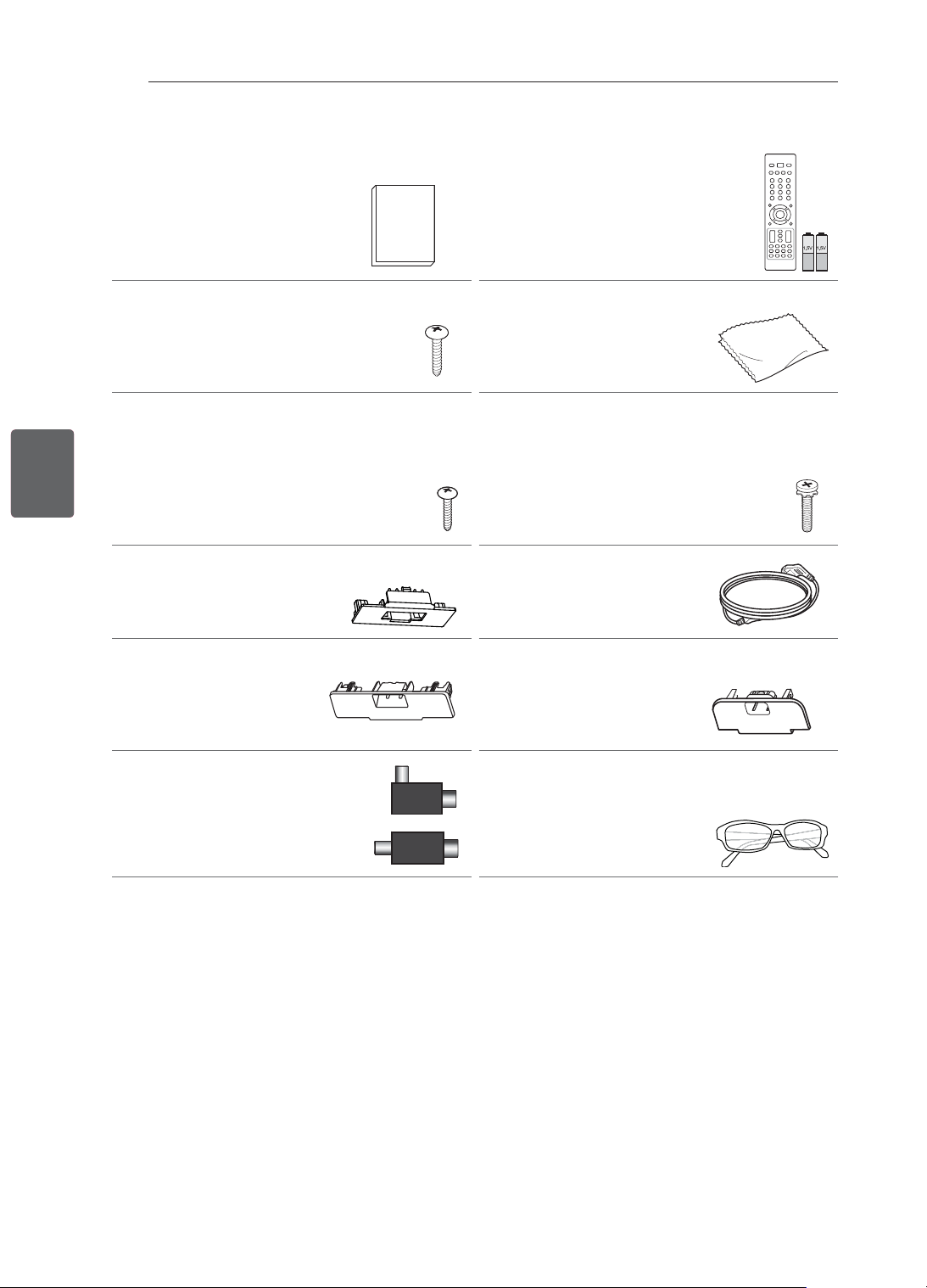
13
ﺔﻴﺑﺮﻌﻟﺍﺔﻴﺑﺮﻌﻟﺍ
ﺮﻴﻀﺤﺘﻟﺍﻭ ﻊﻴﻤﺠﺘﻟﺍ
ﺕﺎﻳﺭﺎﻄﺒﻟﺍﻭ ﺪﻌ
ُ
ﺑ ﻦﻋ ﻢﻜﺤﺘﻟﺍ ﺓﺪﺣﻭ
(AAA ﻢﺠﺤﺑ)
(28 ,27 ﺔﺤﻔﺼﻟﺍ ﺮﻈﻧﺍ )
ﻚﻟﺎﻤﻟﺍ ﻞﻴﻟﺩ
ﻒﻴﻈﻨﺘﻠﻟ ﺵﺎﻤﻗ ﺔﻌﻄﻗ
(ﺯﺍﺮﻄﻟﺍ ﺐﺴﺣ)
ﻦﻋ ﺭﺎﺒﻐﻟﺍ ﺔﻟﺍﺯﻹ ﺵﺎﻤﻘﻟﺍ ﺔﻌﻄﻗ ﻡﺪﺨﺘﺳﺍ
.ﻲﺟﺭﺎﺨﻟﺍ ﻞﻜﻴﻬﻟﺍ
ﻞﻣﺎﺤﻟﺍ ﻲﻏﺍﺮﺑ
P4 x 16 ،2EA
,22CS46** ﺕﺍﺯﺍﺮﻄﻟﺍ)
(ﻂﻘﻓ 22CS47**
(18 ﺔﺤﻔﺼﻟﺍ ﺮﻈﻧﺍ )
ﻞﻣﺎﺤﻟﺍ ﻲﻏﺍﺮﺑ
M4 x 20 ،8EA
,26/32/42CS46** ﺕﺍﺯﺍﺮﻄﻟﺍ)
,26/32/42CS47**
,32/42LS34**
(ﻂﻘﻓ 32/42LM34**
(19 ,18 ﺔﺤﻔﺼﻟﺍ ﺮﻈﻧﺍ )
ﺐﺘﻜﻤﻟﺎﺑ ﺖﻴﺒﺜﺘﻟﺍ ﻲﻏﺮﺑ
,26/32/42CS46** ﺕﺍﺯﺍﺮﻄﻟﺍ)
,26/32/42CS47**
,32/42LS34**
(ﻂﻘﻓ 32/42LM34**
(20 ﺔﺤﻔﺼﻟﺍ ﺮﻈﻧﺍ )
ﺔﻗﺎﻄﻟﺍ ﻚﻠﺳ
ﺔﻳﺎﻤﺤﻟﺍ ءﺎﻄﻏ
,26CS46** ﺕﺍﺯﺍﺮﻄﻟﺍ)
(ﻂﻘﻓ 26CS47**
(22 ﺔﺤﻔﺼﻟﺍ ﺮﻈﻧﺍ )
ﺔﻳﺎﻤﺤﻟﺍ ءﺎﻄﻏ
,32CS46** ﺕﺍﺯﺍﺮﻄﻟﺍ)
,32LS34** ,32CS47**
(ﻂﻘﻓ 32LM34**
(22 ﺔﺤﻔﺼﻟﺍ ﺮﻈﻧﺍ )
ﺔﻳﺎﻤﺤﻟﺍ ءﺎﻄﻏ
,42CS46** ﺕﺍﺯﺍﺮﻄﻟﺍ)
,42LS34** ,42CS47**
(ﻂﻘﻓ 42LM34**
(22 ﺔﺤﻔﺼﻟﺍ ﺮﻈﻧﺍ )
ﺩﺎﻌﺑﻷﺍ ﺔﻴﺛﻼﺛ ﺔﻴﺋﺎﻤﻨﻴﺴﻟﺍ ﺕﺍﺭﺎﻈﻨﻟﺍ
ﺩﺎﻌﺑﻷﺍ ﺔﻴﺛﻼﺛ ﺕﺍﺭﺎﻈﻨﻟﺍ ﺩﺪﻋ ﻒﻠﺘﺨﻳ ﺪﻗ
.ﺯﺍﺮﻄﻟﺍ ﻭﺃ ﺪﻠﺒﻠﻟ ﺎ
ً
ﻌﺒﺗ
(ﻂﻘﻓ 32/42LM34** ﺕﺍﺯﺍﺮﻄﻟﺍ)
ﻭﺃ
ﻝﺯﺎﻌﻟﺍ
(ﺯﺍﺮﻄﻟﺍ ﺐﺴﺣ)
(14 ﺔﺤﻔﺼﻟﺍ ﺮﻈﻧﺍ )

12
ﺔﻴﺑﺮﻌﻟﺍﺔﻴﺑﺮﻌﻟﺍ
ﺮﻴﻀﺤﺘﻟﺍﻭ ﻊﻴﻤﺠﺘﻟﺍ / ﺖﻴﺒﺜﺘﻟﺍ ﺔﻴﻠﻤﻋ
ﺔﻈﺣﻼﻣ
.ﻚﻳﺪﻟ ﺯﺎﻔﻠﺘﻟﺍ ﺓﺭﻮﺻ ﻦﻋ ﺔﺿﻭﺮﻌﻤﻟﺍ ﺓﺭﻮﺼﻟﺍ ﻒﻠﺘﺨﺗ ﺪﻗ •
.ﻞﻴﻟﺪﻟﺍ ﺍﺬﻫ ﻲﻓ ﻦﻴﺒﻣ ﻮﻫ ﺎﻤﻋ ﻂﻴﺴﺑ ﻞﻜﺸﺑ ﺯﺎﻔﻠﺗ ﺯﺎﻬﺟ ﻞﻜﺑ ﺔﺻﺎﺨﻟﺍ ﺔﺷﺎﺸﻟﺍ ﻰﻠﻋ ﺽﺮﻌﻟﺍ ﺕﺍﺭﺎﻴﺧ ﻒﻠﺘﺨﺗ ﺪﻗ •
.ﻪﻣﺪﺨﺘﺴﺗ ﻱﺬﻟﺍ ﺞﺘﻨﻤﻟﺍ ﺯﺍﺮﻃ ﻭﺃ ﻝﺎﺧﺩﻹﺍ ﺭﺪﺼﻣ ﻦﻋ ﺓﺮﻓﻮﺘﻤﻟﺍ ﺕﺍﺭﺎﻴﺨﻟﺍﻭ ﻢﺋﺍﻮﻘﻟﺍ ﻒﻠﺘﺨﺗ ﺪﻗ •
.ﻞﺒﻘﺘﺴﻤﻟﺍ ﻲﻓ ﺯﺎﻔﻠﺘﻟﺍ ﺍﺬﻫ ﻰﻟﺇ ﺓﺪﻳﺪﺟ ﺕﺍﺰﻴﻣ ﺔﻓﺎﺿﺇ ﻦﻜﻤﻳ •
ﻢﻬﺴﻳ ﺚﻴﺣ ،ﺖﻗﻮﻟﺍ ﺾﻌﺒﻟ ﻪﺗﺪﻫﺎﺸﻣ ﻡﺪﻋ ﻝﺎﺣ ﻲﻓ ﺯﺎﻔﻠﺘﻟﺍ ﻞﻴﻐﺸﺗ ﻑﺎﻘﻳﺇ ﺐﺠﻳﻭ .ﺔﻗﺎﻄﻟﺍ ﻙﻼﻬﺘﺳﺍ ﻦﻣ ﺪﺤﻠﻟ ﺩﺍﺪﻌﺘﺳﻻﺍ ﻊﺿﻭ ﻰﻠﻋ ﺯﺎﻔﻠﺘﻟﺍ ﻂﺒﺿ ﻦﻜﻤﻳ •
.ﺔﻗﺎﻄﻟﺍ ﻙﻼﻬﺘﺳﺍ ﻦﻣ ﺪﺤﻟﺍ ﻲﻓ ﻚﻟﺫ
.ﺔﻴﻟﺎﻤﺟﻹﺍ ﻞﻴﻐﺸﺘﻟﺍ ﺔﻔﻠﻛ ﺾﻴﻔﺨﺗ ﻰﻟﺇ ﻲﻟﺎﺘﻟﺎﺑ ﻱﺩﺆﻳ ﺎﻤﻣ،ﺓﺭﻮﺼﻟﺍ ﻉﻮﻄﺳ ﻒﻴﻔﺨﺗ ﻢﺗ ﺍﺫﺇ ﺮﻴﺒﻛ ﻞﻜﺸﺑ ﺔﻗﺎﻄﻟﺍ ﻙﻼﻬﺘﺳﺍ ﻦﻣ
ّ
ﺪﺤﻟﺍ ﻦﻜﻤﻳ •
ﺖﻴﺒﺜﺘﻟﺍ ﺔﻴﻠﻤﻋ
1 .ﺕﺎﻘﺤﻠﻤﻟﺍ ﻞﻛ ﻰﻠﻋ ﺎﻬﻟﺎﻤﺘﺷﺍ ﻦﻣ ﺪﻛﺄﺗﻭ ﺞﺘﻨﻤﻟﺍ ﺓﻮﺒﻋ ﺢﺘﻓﺍ
2 .ﺯﺎﻔﻠﺘﻟﺍ ﺯﺎﻬﺠﺑ ﻞﻣﺎﺤﻟﺍ ﺖ
ّ
ﺒﺛ
3 .ﺯﺎﻔﻠﺘﻟﺍ ﺯﺎﻬﺠﺑ ﻲﺟﺭﺎﺧ ﺯﺎﻬﺟ ﻞﻴﺻﻮﺘﺑ ﻢﻗ
ﺮﻴﻀﺤﺘﻟﺍﻭ ﻊﻴﻤﺠﺘﻟﺍ
ﻒﻴﻠﻐﺘﻟﺍ ﻚﻓ
ﻒﻠﺘﺨﺗ ﺪﻗ .ﺯﺎﻬﺠﻟﺍ ﻪﻨﻣ ﺖﻳﺮﺘﺷﺍ ﻱﺬﻟﺍ ﻲﻠﺤﻤﻟﺍ ﻞﻴﻛﻮﻟﺎﺑ ﻝﺎﺼﺗﻻﺍ ﻰﺟﺮﻳ ،ﺕﺎﻘﺤﻠﻤﻟﺍ ﻦﻣ ﻱﺃ ﻥﺍﺪﻘﻓ ﺔﻟﺎﺣ ﻲﻓ .ﻕﻭﺪﻨﺼﻟﺍ ﻲﻓ ﺔﻴﻟﺎﺘﻟﺍ ﺮﺻﺎﻨﻌﻟﺍ ﺮﻓﻮﺗ ﻦﻣ ﻖﻘﺤﺗ
.ﻩﺮﺻﺎﻨﻋﻭ ﺯﺎﻬﺠﻠﻟ ﻲﻘﻴﻘﺤﻟﺍ ﻞﻜﺸﻟﺍ ﻦﻋ ﻞﻴﻟﺪﻟﺍ ﺍﺬﻫ ﻲﻓ ﺓﺩﺭﺍﻮﻟﺍ ﺭﻮﺼﻟﺍ
ﻪﻴﺒﻨﺗ
• .ﺞﺘﻨﻤﻠﻟ ﻲﺿﺍﺮﺘﻓﻻﺍ ﺮﻤﻌﻟﺍ ﻝﻮﻃﻭ ﺔﻣﻼﺴﻟﺍ ﻥﺎﻤﻀﻟ ﺓﺪﻤﺘﻌﻣ ﺮﻴﻏ ﺩﺍﻮﻣ ﻱﺃ ﻡﺪﺨﺘﺴﺗ ﻻ
• .ﺓﺪﻤﺘﻌﻣ ﺮﻴﻏ ﺩﺍﻮﻣ ﻡﺍﺪﺨﺘﺳﺍ ﻦﻋ ﺞﺘﻨﺗ ﺕﺎﺑﺎﺻﺇ ﻭﺃ ﺭﺍﺮﺿﺃ ﻱﺃ ﻥﺎﻤﻀﻟﺍ ﻲﻄﻐﻳ ﻻ
• .ﺕﺍﺯﺍﺮﻄﻟﺍ ﺾﻌﺑ ﺔﺷﺎﺷ ﻰﻠﻋ ﺖ
ّ
ﺒﺜﻤﻟﺍ ﻖﻴﻗﺮﻟﺍ ﻢﻠﻴﻔﻟﺍ ﻉﺰﻧ ﺐﺠﻳ ﻻ
ﺔﻈﺣﻼﻣ
.ﺯﺍﺮﻄﻟﺍ ﺐﺴﺣ ﺞﺘﻨﻤﻟﺍ ﻊﻣ ﺔﻘﻓﺮﻤﻟﺍ ﺮﺻﺎﻨﻌﻟﺍ ﻒﻠﺘﺨﺗ ﺪﻗ •
.ﺯﺎﻬﺠﻟﺍ ﻒﺋﺎﻇﻭ ﺔﻴﻗﺮﺗ ﺔﺠﻴﺘﻧ ﻖﺒﺴﻣ ﺭﺎﻄﺧﺇ ﻥﻭﺩ ﻞﻴﻟﺪﻟﺍ ﺍﺬﻫ ﻲﻓ ﺕﺎﻳﻮﺘﺤﻤﻟﺍ ﻭﺃ ﺞﺘﻨﻤﻟﺍ ﺕﺎﻔﺻﺍﻮﻣ ﺮﻴﻐﺘﺗ ﺪﻗ •
ﺔﻟﺎﻃﺇ ﻞﺒﻛ ﻡﺪﺨﺘﺳﺍ .ﺎ
ً
ﺿﺮﻋ ﻢﻣ 18 ﻭ ﺎ
ً
ﻜﻤﺳ ﻢﻣ 10 USB ﺕﺍﺪﺣﻭﻭ HDMI ﺕﻼﺒﻛ ﻑﺍﺮﻃﺃ ﺯﻭﺎﺠﺘﺗ ﻻﺃ ﺐﺠﻳ ،ﻝﺎﺼﺗﺍ ﻞﻀﻓﺃ ﻰﻠﻋ ﻝﻮﺼﺤﻠﻟ •
.ﺯﺎﻔﻠﺘﻟﺍ ﻲﻓ USB ﺬﻔﻨﻣ ﻢﺋﻼﺗ
ﻻ USB ﺓﺮﻛﺍﺫ ﺔﻗﺎﻄﺑ ﻭﺃ USB ﻞﺒﻛ ﻥﺎﻛ ﺍﺫﺇ USB 2.0 ﺪﻤﺘﻌﻳ
A
B
A
B
ﻢﻣ 10
<
=
(A)*
ﻢﻣ 18
<
=
(B)*
11
ﺔﻴﺑﺮﻌﻟﺍﺔﻴﺑﺮﻌﻟﺍ
ﻥﺎﻣﻷﺍ ﺕﺎﻤﻴﻠﻌﺗ
ﻪﻴﺒﻨﺗ
ﺓﺪﻫﺎﺸﻤﻟﺍ ﺔﺌﻴﺑ
ﺓﺪﻫﺎﺸﻤﻟﺍ ﺔﻓﺎﺴﻣ •
ﺪﻨﻋ ﺔﺣﺍﺮﻟﺎﺑ ﺭﻮﻌﺸﻟﺍ ﻡﺪﻋ ﺔﻟﺎﺣ ﻲﻓ .ﺩﺎﻌﺑﻷﺍ ﺔﻴﺛﻼﺛ ﺕﺎﻳﻮﺘﺤﻣ ﺓﺪﻫﺎﺸﻣ ﺪﻨﻋ ﻱﺮﻄﻘﻟﺍ ﺔﺷﺎﺸﻟﺍ ﻝﻮﻃ ﻒﻌﺿ ﻦﻋ ﻞﻘﺗ ﻻ ﺔﻓﺎﺴﻣ ﺩﻮﺟﻭ ﻰﻠﻋ ﻆﻓﺎﺣ -
.ﺯﺎﻔﻠﺘﻟﺍ ﻦﻋ ﺪﻌﺘﺑﺍ ،ﺩﺎﻌﺑﻷﺍ ﺔﻴﺛﻼﺛ ﺕﺎﻳﻮﺘﺤﻤﻟﺍ ﺓﺪﻫﺎﺸﻣ
ﺪﻫﺎﺸﻤﻟﺍ ﺮﻤﻋ
• ﻝﺎﻔﻃﻷﺍ/ﺭﺎﻐﺼﻟﺍ ﻝﺎﻔﻃﻷﺍ
- .ﻡﺍﻮﻋﺃ 5 ﻥﻭﺩ ﻝﺎﻔﻃﻸﻟ ﺩﺎﻌﺑﻷﺍ ﺔﻴﺛﻼﺛ ﺕﺎﻳﻮﺘﺤﻤﻟﺍ ﺓﺪﻫﺎﺸﻣ/ﻡﺍﺪﺨﺘﺳﺍ ﺮﻈﺤﻳ
- ﻞﻴﺒﺳ
ﻰﻠﻋ) ﻮﻤﻨﻟﺍ ﺭﻮﻃ ﻲﻓ ﻝﺍﺰﺗ ﻻ ﻢﻬﻳﺪﻟ ﺔﻳﺅﺮﻟﺍ ﺔﺳﺎﺣ ﻥﺇ ﺚﻴﺣ ﺮﺒﻛﺃ ﻢﻬﻳﺪﻟ ﺓﺭﺎﺛﻹﺍ ﺢﺒﺼﺗﻭ ﺓﺪﺋﺍﺯ ﺓﺭﻮﺼﺑ ﻡﺍﻮﻋﺃ 10 ﻥﻭﺩ ﻝﺎﻔﻃﻷﺍ ﻞﻋﺎﻔﺘﻳ ﺪﻗ
.ﺩﺎﻌﺑﻷﺍ ﺔﻴﺛﻼﺛ ﺕﺎﻳﻮﺘﺤﻤﻟﺍ ﻢﻬﺗﺪﻫﺎﺸﻣ ﺪﻨﻋ ﻢﻬﻟ ﻩﺎﺒﺘﻧﻻﺍﻭ ﺍ
ً
ﺪﻴﺟ ﻝﺎﻔﻃﻷﺍ ﺔﺒﻗﺍﺮﻣ ﻲﻐﺒﻨﻳ ﺍﺬﻟ .(ﺎﻬﻠﺧﺍﺩ ﺰﻔﻘﻟﺍ ﻭﺃ ﺔﺷﺎﺸﻟﺍ ﺲﻤﻟ ﻥﻮﻟﻭﺎﺤﻳ ﺪﻗ ،ﻝﺎﺜﻤﻟﺍ
- ﺪﻨﻋ ﺔﻓﺎﺴﻤﻟﺍ ﻦﻣ ﺮﺼﻗﺃ ﻢﻬﻳﺪﻟ ﻦﻴﻨﻴﻌﻟﺍ ﻦﻴﺑ
ﺔﻓﺎﺴﻤﻟﺍ ﻥﻷ ﻚﻟﺫﻭ ﻦﻴﻐﻟﺎﺒﻟﺍ ﻑﻼﺨﺑ ﺩﺎﻌﺑﻷﺍ ﺔﻴﺛﻼﺛ ﺽﻭﺮﻌﻠﻟ ﻦﻴﻌﻟﺎﺑ ﺔﻳﺅﺮﻟﺍ ﻲﻓ ﺕﻭﺎﻔﺗ ﻝﺎﻔﻃﻷﺍ ﻯﺪﻟ
.ﺩﺎﻌﺑﻷﺍ ﺔﻴﺛﻼﺛ ﺓﺭﻮﺼﻟﺍ ﺲﻔﻧ ﺓﺪﻫﺎﺸﻣ ﺪﻨﻋ ﻦﻴﻐﻟﺎﺒﻟﺎﺑ ﺔﻧﺭﺎﻘﻣ ﺔﻤﺴﺠﻤﻟﺍ ﺽﻭﺮﻌﻠﻟ ﺔﺒﺴﻨﻟﺎﺑ ﺮﺒﻛﺃ ﺎ
ً
ﻘﻤﻋ ﻥﻮﻘﻠﺘﻳ ﻢﻬﻓ ﺍﺬﻟ .ﻦﻴﻐﻟﺎﺒﻟﺍ
• ﻥﻮﻘﻫﺍﺮﻤﻟﺍ
- ﺢﺼﻨﻟﺍ ﻢﻬﻟ ﻡ
ّ
ﺪﻗ ﺍﺬﻟ .ﺩﺎﻌﺑﻷﺍ ﺔﻴﺛﻼﺛ ﺕﺎﻳﻮﺘﺤﻤﻟﺍ ﻲﻓ ﺓءﺎﺿﻹﺍ ﻦﻣ ﺞﺗﺎﻨﻟﺍ ﻱﺮﺼﺒﻟﺍ ﻪﻴﺒﻨﺘﻟﺍ ﺐﺒﺴﺑ ﺔﻴﺳﺎﺴﺤﻟﺍ ﻊﻣ ﺎ
ً
ﻣﺎﻋ 19 ﻦﻣ ﻞﻗﺃ ﻥﻮﻘﻫﺍﺮﻤﻟﺍ ﻞﻋﺎﻔﺘﻳ ﺪﻗ
.ﺐﻌﺘﻟﺎﺑ ﻥﻭﺮﻌﺸﻳ ﺎﻣﺪﻨﻋ ﺔﻠﻳﻮﻃ ﺓﺮﺘﻔﻟ ﺩﺎﻌﺑﻷﺍ ﺔﻴﺛﻼﺛ ﺕﺎﻳﻮﺘﺤﻤﻟﺍ ﺓﺪﻫﺎﺸﻣ ﻦﻋ ﺩﺎﻌﺘﺑﻻﺎﺑ
• ﻦﺴﻟﺍ ﺭﺎﺒﻛ
- .ﺯﺎﻔﻠﺘﻟﺍ ﺓﺪﻫﺎﺸﻣ ﺪﻨﻋ ﺎﻬﺑ ﻰﺻﻮﻤﻟﺍ ﺔﻓﺎﺴﻤﻟﺍ ﻦﻣ ﺏﺮﻗﺃ ﺲﻠﺠﺗ ﻻ .ﺏﺎﺒﺸﻟﺎﺑ ﺔﻧﺭﺎﻘﻣ ﻞﻗﺃ ﺩﺎﻌﺑﻷﺍ ﻲﺛﻼﺛ ﺍ
ً
ﺮﻴﺛﺄﺗ ﻦﺴﻟﺍ ﺭﺎﺒﻛ ﻰﻘﻠﺘﻳ ﺪﻗ
ﺩﺎﻌﺑﻷﺍ ﺔﻴﺛﻼﺛ ﺕﺍﺭﺎﻈﻨﻟﺍ ﻡﺍﺪﺨﺘﺳﺍ ﺪﻨﻋ ﺕﺎﻬﻴﺒﻨﺗ
.ﺢﻴﺤﺻ ﻞﻜﺸﺑ ﺩﺎﻌﺑﻷﺍ ﺔﻴﺛﻼﺛ ﻮﻳﺪﻴﻔﻟﺍ ﻊﻃﺎﻘﻣ ﺓﺪﻫﺎﺸﻣ ﻰﻠﻋ ﺍ
ً
ﺭﺩﺎﻗ ﻥﻮﻜﺗ ﻦﻠﻓ ،ﻻﺇﻭ .LG ـﺑ ﺔﺻﺎﺨﻟﺍ ﺩﺎﻌﺑﻷﺍ ﺔﻴﺛﻼﺛ ﺕﺍﺭﺎﻈﻨﻟﺍ ﻡﺍﺪﺨﺘﺳﺍ ﻦﻣ ﺪﻛﺄﺗ •
.ﺔﻴﻗﺍﻮﻟﺍ ﺕﺍﺭﺎﻈﻨﻟﺍ ﻭﺃ ﺔﻴﺴﻤﺸﻟﺍ ﺕﺍﺭﺎﻈﻨﻟﺍ ﻭﺃ ﺔﻳﺩﺎﻌﻟﺍ ﺕﺍﺭﺎﻈﻨﻟﺍ ﻦﻣ
ً
ﻻﺪﺑ ﺩﺎﻌﺑﻷﺍ ﺔﻴﺛﻼﺛ ﺕﺍﺭﺎﻈﻨﻟﺍ ﻡﺪﺨﺘﺴﺗ ﻻ •
.ﺓﺭﻮﺼﻟﺍ ﻪﻳﻮﺸﺗ ﻭﺃ ﻦﻴﻌﻟﺍ ﺩﺎﻬﺟﺇ ﻰﻟﺇ ﺔﻟ
ّ
ﺪﻌﻤﻟﺍ ﺩﺎﻌﺑﻷﺍ ﺔﻴﺛﻼﺛ ﺕﺍﺭﺎﻈﻨﻟﺍ ﻡﺍﺪﺨﺘﺳﺍ ﻱﺩﺆﻳ ﺪﻗ •
.ﺎﻬﻠﻜﺷ ﻩﻮﺸﺗ ﻲﻓ ﻚﻟﺫ ﺐﺒﺴﺘﻳ ﺪﻘﻓ .ﺍ
ً
ﺪﺟ ﺔﻀﻔﺨﻨﻣ ﻭﺃ ﺍ
ً
ﺪﺟ ﺔﻌﻔﺗﺮﻣ ﺓﺭﺍﺮﺣ ﺕﺎﺟﺭﺩ ﻲﻓ ﺩﺎﻌﺑﻷﺍ ﺔﻴﺛﻼﺛ ﺕﺍﺭﺎﻈﻨﻟﺎﺑ ﻆﻔﺘﺤﺗ ﻻ •
ﺔﻴﺛﻼﺛ ﺕﺍﺭﺎﻈﻨﻟﺍ ﺕﺎﺳﺪﻋ ﺵﺪﺨﺗ ﻻ .ﺕﺎﺳﺪﻌﻟﺍ ﻒﻴﻈﻨﺘﻟ ﺔﻤﻋﺎﻧﻭ ﺔﻔﻴﻈﻧ ﺵﺎﻤﻗ ﺔﻌﻄﻗ ﺎ
ً
ﻤﺋﺍﺩ ﻡﺪﺨﺘﺳﺍ .ﺵﺪﺨﻟﺍﻭ ﺮﺴﻜﻟﺍ ﺔﻠﻬﺳ ﺩﺎﻌﺑﻷﺍ ﺔﻴﺛﻼﺛ ﺕﺍﺭﺎﻈﻨﻟﺍ ﻥﺇ •
.
ﺔﻴﺋﺎﻴﻤﻴﻛ ﺩﺍﻮﻣ ﻡﺍﺪﺨﺘﺳﺎﺑ ﺎﻬﺤﺴﻤﺑ/ﺎﻬﻔﻴﻈﻨﺘﺑ ﻢﻘﺗ ﻭﺃ ﺓﺩﺎﺣ ءﺎﻴﺷﺃ ﻡﺍﺪﺨﺘﺳﺎﺑ ﺩﺎﻌﺑﻷﺍ
10
ﺔﻴﺑﺮﻌﻟﺍﺔﻴﺑﺮﻌﻟﺍ
ﻥﺎﻣﻷﺍ ﺕﺎﻤﻴﻠﻌﺗ
(ﻂﻘﻓ ﺩﺎﻌﺑﻷﺍ ﺔﻴﺛﻼﺛ ﺕﺍﺯﺍﺮﻄﻟﺍ) ﺩﺎﻌﺑﻷﺍ ﺔﻴﺛﻼﺛ ﺭﻮﺼﻟﺍ ﺽﺮﻋ
ﺮﻳﺬﺤﺗ
ﺓﺪﻫﺎﺸﻤﻟﺍ ﺔﺌﻴﺑ
• ﺽﺮﻌﻟﺍ ﺖﻗﻭ
- ﺩﺎﻌﺑﻷﺍ ﺔﻴﺛﻼﺛ ﺕﺎﻳﻮﺘﺤﻤﻟﺍ ﺽﺮﻋ ﺐﺒﺴﺘﻳ ﺪﻗ ﺚﻴﺣ .ﺔﻋﺎﺳ ﻞﻛ ﺔﻘﻴﻗﺩ 15 - 5 ﻩﺭﺪﻗ ﺔﺣﺍﺮﻟﺍ ﻦﻣ ﺎ
ً
ﻄﺴﻗ ﺬﺧ ،ﺩﺎﻌﺑﻷﺍ ﺔﻴﺛﻼﺛ ﺕﺎﻳﻮﺘﺤﻣ ﺓﺪﻫﺎﺸﻣ ﺪﻨﻋ
.ﻦﻴﻌﻟﺍ ﺩﺎﻬﺟﺇ ﻭﺃ ﻕﺎﻫﺭﻹﺍ ﻭﺃ ﺭﺍﻭﺪﻟﺍ ﻭﺃ ﻉﺍﺪﺼﻟﺎﺑ ﺔﺑﺎﺻﻹﺍ ﻲﻓ ﺔﻠﻳﻮﻃ ﺓﺮﺘﻔﻟ
ﺔﻨﻣﺰﻤﻟﺍ ﺽﺍﺮﻣﻷﺍ ﻭﺃ ﻲﺋﻮﻀﻟﺍ ﺲﺴﺤﺘﻟﺎﺑ ﺔﻘﻠﻌﺘﻤﻟﺍ ﺔﻴﺿﺮﻤﻟﺍ ﺕﺎﺑﻮﻨﻟﺍ ﻦﻣ ﻥﻮﻧﺎﻌﻳ ﻦﻳﺬﻟﺍ ﻰﻟﺇ
ﺔﺒﺴﻨﻟﺎﺑ
• .ﺩﺎﻌﺑﻷﺍ ﺔﻴﺛﻼﺛ ﺕﺎﻳﻮﺘﺤﻤﻟﺍ ﻦﻣ ﺩﺪﺤﻣ ﻂﻤﻨﻟ ﻭﺃ ﺾﻣﺍﻭ ءﻮﻀﻟ ﻢﻬﺿﺮﻌﺗ ﺪﻨﻋ ﺔﻳﺩﺎﻋ ﺮﻴﻏ ﻯﺮﺧﺃ ﺽﺍﺮﻋﺃ ﻭﺃ ﺔﻴﺿﺮﻣ ﺕﺎﺑﻮﻧ ﻦﻴﻣﺪﺨﺘﺴﻤﻟﺍ ﺾﻌﺑ ﻲﻧﺎﻌﻳ ﺪﻗ
• ﺕﺎﺑﺍﺮﻄﺿﺍ ﻭﺃ ﻉﺮﺼﻟﺍ ﺔﺻﺎﺧﻭ ﻦﻣﺰﻣ ﺽﺮﻣ ﻦﻣ ﻲﻧﺎﻌﺗ ﺖﻨﻛ ﻭﺃ/ﻭ
ً
ﻼﻣﺎﺣ
ِ
ﺖﻨﻛ ﻭﺃ ﻥﺎﻴﺜﻐﺑ ﺮﻌﺸﺗ ﺖﻨﻛ ﺍﺫﺇ ﺩﺎﻌﺑﻷﺍ ﺔﻴﺛﻼﺛ ﻮﻳﺪﻴﻔﻟﺍ ﻊﻃﺎﻘﻣ ﺓﺪﻫﺎﺸﻣ ﺐﻨﺠﺗ
.ﻪﺑﺎﺷ
ﺎﻣﻭ ﻡﺪﻟﺍ ﻂﻐﺿ ﻭﺃ ﺐﻠﻘﻟﺍ
• ءﺎﻨﺛﺃ ﺔﺣﺍﺮﻟﺍ ﻡﺪﻌﺑ ﻭﺃ ﺭﻮﺼﻟﺍ ﺝﺍﻭﺩﺯﺎﺑ ﻥﻭﺮﻌﺸﻳ ﺪﻘﻓ .ﻢ
ّ
ﺴﺠﻤﻟﺍ ﺫﻭﺬﺸﻟﺍ ﻭﺃ ﻢ
ّ
ﺴﺠﻤﻟﺍ ﻰﻤﻌﻟﺎﺑ ﻦﻴﺑﺎﺼﻤﻠﻟ ﺩﺎﻌﺑﻷﺍ ﺔﻴﺛﻼﺛ ﺕﺎﻳﻮﺘﺤﻤﻟﺍ ﺓﺪﻫﺎﺸﻤﺑ ﻰﺻﻮ
ُ
ﻳ ﻻ
.ﺓﺪﻫﺎﺸﻤﻟﺍ
• ﺭﻮﺼﻟﺍ ﺐﺒﺴﺑ ﺔﻋﺮﺴﺑ ﺐﻌﺘﻟﺎﺑ ﺮﻌﺸﺗ ﺪﻗﻭ ﻖﻤﻌﻟﺎﺑ ﺱﺎﺴﺣﻹﺍ ﻲﻓ ﺔﻠﻜﺸﻣ ﻪﺟﺍﻮﺗ ﺪﻘﻓ ،ﺮﺼﺒﻟﺍ ﺝﺮﺣ ﻭﺃ (ﺔﻳﺅﺮﻟﺍ ﻒﻌﺿ)
ﺶ
َ
ﻤ
َ
ﻌﻟﺍ ﻭﺃ ﻝ
َ
ﻮﺤﻟﺍ ﻦﻣ ﻲﻧﺎﻌﺗ ﺖﻨﻛ ﺍﺫﺇ
.ﻥﻮﻐﻟﺎﺒﻟﺍ ﻩﺬﺧﺄﻳ ﻱﺬﻟﺍ ﻝﺪﻌﻤﻟﺍ ﻦﻣ ﺮﺜﻛﺃ ﺔﺣﺍﺮﻟﺍ ﻦﻣ ﻁﺎﺴﻗﺃ ﺬﺧﺄﺑ ﺢﺼﻨﻳ .ﺔﺟﻭﺩﺰﻤﻟﺍ
• .ﺩﺎﻌﺑﻷﺍ ﺔﻴﺛﻼﺛ ﺕﺎﻳﻮﺘﺤﻤﻟﺍ ﺓﺪﻫﺎﺸﻣ ﻞﺒﻗ ﻚﻳﺪﻟ ﺮﺼﺒﻟﺍ ﺔﺳﺎﺣ ﺓﻮﻗ ﻦﻣ ﻖﻘﺤﺘﻓ ،ﻯﺮﺴﻴﻟﺍﻭ ﻰﻨﻤﻴﻟﺍ ﻦﻴﻌﻟﺍ ﻦﻴﺑ ﺔﻳﺅﺮﻟﺍ ﻲﻓ ﺕﻭﺎﻔﺗ ﻙﺎﻨﻫ ﻥﺎﻛ ﺍﺫﺇ
ﺎﻬﺒﻨﺠﺗ ﻭﺃ ﺩﺎﻌﺑﻷﺍ ﺔﻴﺛﻼﺛ ﺕﺎﻳﻮﺘﺤﻤﻟﺍ ﺓﺪﻫﺎﺸﻣ ﻦﻋ ﻉﺎﻄﻘﻧﻻﺍ ﺐﻠﻄﺘﺗ ﻲﺘﻟﺍ ﺽﺍﺮﻋﻷﺍ
• .ﺏﻭﺮﺸﻤﻟﺍ ﺮﻴﺛﺄﺗ ﺖﺤﺗ ﺖﻨﻛ ﻭﺃ ﺮﻴﺜﻜﻟﺍ ﻞﻤﻌﻟﺍ ﻭﺃ ﻡﻮﻨﻟﺍ ﺔﻠﻗ ﻦﻋ ﺊﺷﺎﻨﻟﺍ ﺐﻌﺘﻟﺎﺑ ﺮﻌﺸﺗ ﺎﻣﺪﻨﻋ ﺩﺎﻌﺑﻷﺍ ﺔﻴﺛﻼﺛ ﺕﺎﻳﻮﺘﺤﻤﻟﺍ ﺓﺪﻫﺎﺸﻣ ﺐﻨﺠﺗ
• .ﺽﺍﺮﻋﻷﺍ ﻝﻭﺰﺗ ﻰﺘﺣ ﺔﺣﺍﺮﻟﺍ ﻦﻣ ﺎ
ً
ﻄﺴﻗ ﺬﺧﻭ ﺩﺎﻌﺑﻷﺍ ﺔﻴﺛﻼﺛ ﺕﺎﻳﻮﺘﺤﻤﻟﺍ ﺓﺪﻫﺎﺸﻣ/ﻡﺍﺪﺨﺘﺳﺍ ﻦﻋ ﻒﻗﻮﺗ ،ﺽﺍﺮﻋﻷﺍ ﻩﺬﻬﺑ ﺭﻮﻌﺸﻟﺍ ﺪﻨﻋ
- ﻥﺎﻘﻔﺧ ﻭﺃ ﻥﺎﻴﺜﻐﻟﺍ ﻭﺃ ﺭﺍﻭﺪﻟﺍ ﻭﺃ ﻦﻴﻌﻟﺍ ﺔﻠﻘﻤﺑ
ﻢﻟﺄﺑ ﺱﺎﺴﺣﻹﺍ ﻭﺃ ﻉﺍﺪﺼﻟﺎﺑ ﺭﻮﻌﺸﻟﺍ ﺽﺍﺮﻋﻷﺍ ﻞﻤﺸﺗ ﺪﻗ .ﺽﺍﺮﻋﻷﺍ ﻩﺬﻫ ﺭﺍﺮﻤﺘﺳﺍ ﺪﻨﻋ ﺐﻴﺒﻄﻟﺍ ﺮﺸﺘﺳﺍ
.ﺐﻌﺘﻟﺎﺑ ﺱﺎﺴﺣﻹﺍ ﻭﺃ ﺔﻳﺅﺮﻟﺍ ﻲﻓ ﺔﺣﺍﺮﻟﺍ ﻡﺪﻋ ﻭﺃ ﺓﺭﻮﺼﻟﺍ ﺝﺍﻭﺩﺯﺍ ﻭﺃ ﺔﺣﺍﺮﻟﺍ ﻡﺪﻋ ﻭﺃ ﺔﻳﺅﺮﻟﺍ ﻲﻓ ﺔﻴﺑﺎﺒﺿ ﻭﺃ ﺐﻠﻘﻟﺍ
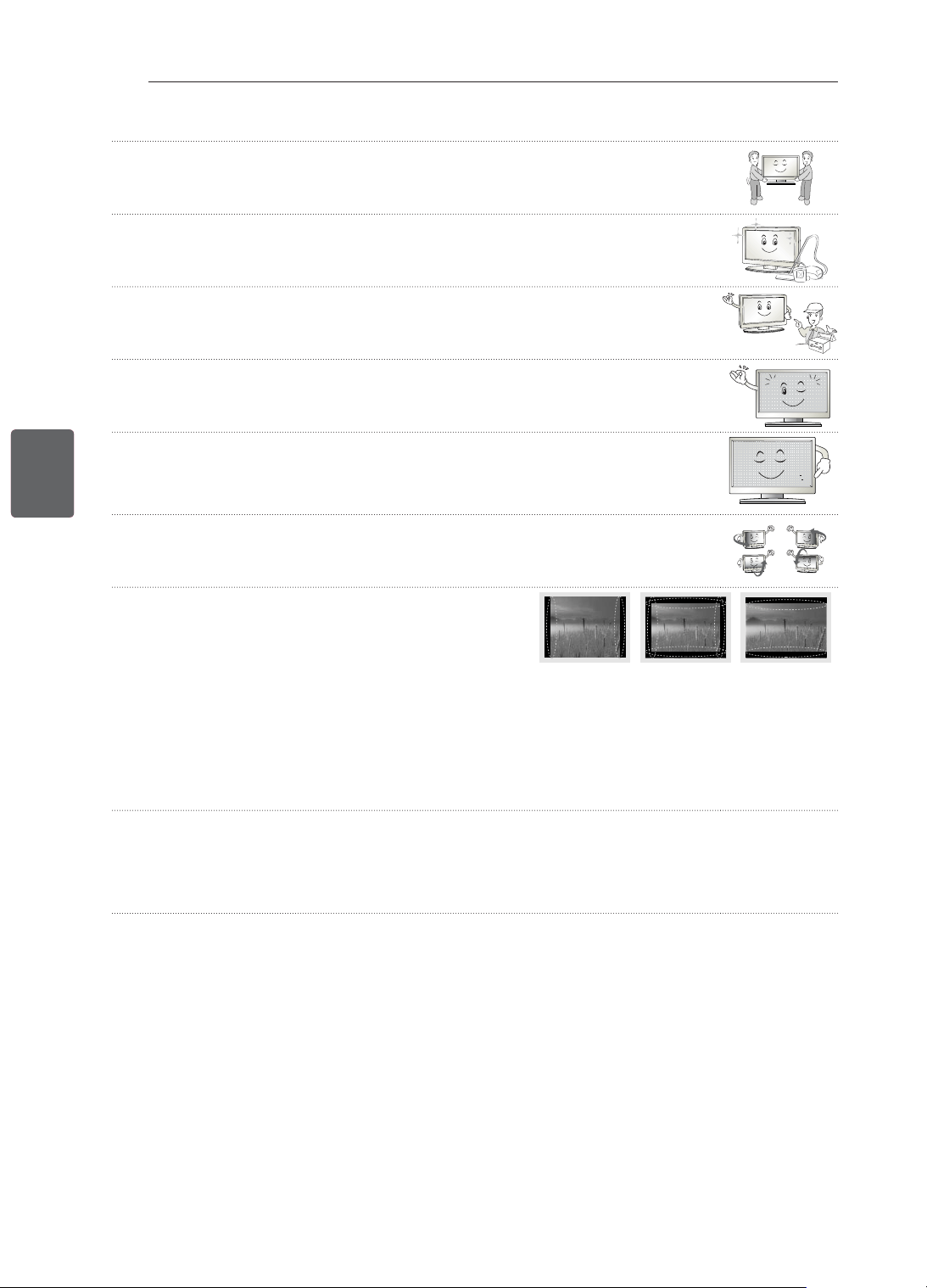
9
ﺔﻴﺑﺮﻌﻟﺍﺔﻴﺑﺮﻌﻟﺍ
ﻥﺎﻣﻷﺍ ﺕﺎﻤﻴﻠﻌﺗ
.ﻞﻴﻘﺛ ﺞﺘﻨﻤﻟﺍ ﻥﻷ ﻪﻠﻤﺤﻟ ﺮﺧﺁ ﺺﺨﺸﺑ ﻦﻌﺘﺳﺍ ،ﻪﻔﻴﻠﻐﺗ ﻚﻓ ﻭﺃ ﺞﺘﻨﻤﻟﺍ ﻚﻳﺮﺤﺗ ﺪﻨﻋ •
.ﺔﺑﺎﺻﺇ ﺙﻭﺪﺣ ﻲﻓ ﻚﻟﺫ ﺐﺒﺴﺘﻳ ﺪﻘﻓ ﻻﺇﻭ
.ﺔﻴﻠﺧﺍﺪﻟﺍ ﺞﺘﻨﻤﻟﺍ ءﺍﺰﺟﺃ ﻒﻴﻈﻨﺘﻟ ﺎ
ً
ﻳﻮﻨﺳ ﺓﺪﺣﺍﻭ ﺓﺮﻣ ﺔﻣﺪﺨﻟﺍ ﺰﻛﺮﻤﺑ ﻞﺼﺗﺍ •
.ﻲﻜﻴﻧﺎﻜﻴﻣ ﻞﻄﻌﺑ ﻢﻛﺍﺮﺘﻤﻟﺍ ﺭﺎﺒﻐﻟﺍ ﺐﺒﺴﺘﻳ ﺪﻗ
ﻱﻷ ﺯﺎﻬﺠﻟﺍ ﺽ
ّ
ﺮﻌﺘﻳ ﺎﻣﺪﻨﻋ ﺔﺑﻮﻠﻄﻣ ﺔﻧﺎﻴﺼﻟﺍﻭ ﺔﻣﺪﺨﻟﺍ ﻝﺎﻤﻋﺃ ﻥﻮﻜﺗ .ﻞﻫﺆﻤﻟﺍ ﺔﻣﺪﺨﻟﺍ ﻖﻳﺮﻔﻟ ﺔﻧﺎﻴﺼﻟﺍﻭ ﺔﻣﺪﺨﻟﺍ ﻝﺎﻤﻋﺃ ﻞﻛﻭﺃ •
ﺮﻄﻤﻠﻟ ﺯﺎﻬﺠﻟﺍ ﺽ
ّ
ﺮﻌﺗ ﻭﺃ ،ﺯﺎﻬﺠﻟﺍ ﻰﻠﻋ ءﻲﺷ ﻉﻮﻗﻭ ﻭﺃ ﻞﺋﺎﺳ ﺏﺎﻜﺴﻧﺍ ﻭﺃ ،ﺲﺑﺎﻘﻟﺍ ﻭﺃ ﺔﻗﺎﻄﻟﺎﺑ ﺩﺍﺪﻣﻹﺍ ﻚﻠﺳ ﻒﻠﺘﻛ ،ﺭﺮﺿ
.ﻪﻋﻮﻗﻭ ﻭﺃ ،ﻲﻌﻴﺒﻃ ﻞﻜﺸﺑ ﻪﻠﻴﻐﺸﺗ ﻡﺪﻋ ﻭﺃ ،ﺔﺑﻮﻃﺮﻟﺍ ﻭﺃ
.ﺯﺎﻔﻠﺘﻟﺍ ﺓﺰﻬﺟﺃ ﻲﻓ ﻲﻌﻴﺒﻃ ﺮﻣﻷﺍ ﺍﺬﻫ .ﻪﻠﻴﻐﺸﺗ ﺪﻨﻋ ﺎ
ً
ﻄﻴﺴﺑ "ﺎ
ً
ﻀﻴﻣﻭ" ﻆﺤﻠﺗ ﺪﻘﻓ ،ﻪﺴﻤﻟ ﺪﻨﻋ ﺍ
ً
ﺩﺭﺎﺑ ﺞﺘﻨﻤﻟﺍ ﻥﺎﻛ ﺍﺫﺇ •
ﺎ
ً
ﻃﺎﻘﻧ ﻯﺮﺗ ﺪﻗ .ﻞﺴﻜﺑ ﻦﻴﻳﻼﻣ ﺔﺘﺳﻭ ﻦﻴﻧﻮﻴﻠﻣ ﻦﻴﺑ ﺡﻭﺍﺮﺘﺗ
ﺔﻗﺩ ﺔﺟﺭﺩﻭ ﺔﻴﻟﺎﻋ ﺔﻴﻨﻘﺗ ﺕﺍﺫ ﺔﺷﺎﺸﺑ ﺞﺘﻨﻣ ﻦﻋ ﺓﺭﺎﺒﻋ ﺔﺣﻮﻠﻟﺍ ﻥﺇ •
ﻻﻭ .ﺔﺣﻮﻠﻟﺍ ﻦﻣ ﻥﻮﻴﻠﻤﻟﺍ ﻲﻓ ءﺰﺟ 1 ﻢﺠﺤﺑ (ءﺍﺮﻀﺧ ﻭﺃ ءﺎﻗﺭﺯ ﻭﺃ ءﺍﺮﻤﺣ) ﺔﻌﻃﺎﺳ ﺔﻧﻮﻠﻣ ﺎ
ً
ﻃﺎﻘﻧ ﻭﺃ/ﻭ ﺓﺮﻴﻐﺻ ءﺍﺩﻮﺳ
.ﻪﺘﻴﻗﻮﺛﻮﻣﻭ ﺞﺘﻨﻤﻟﺍ ءﺍﺩﺃ ﻰﻠﻋ ﺮﺛﺆﻳ ﻻﻭ ﻞﻄﻋ ﺩﻮﺟﻭ ﻰﻟﺇ ﺍﺬﻫ ﺮﻴﺸﻳ
.ﻉﻮﻓﺪﻤﻟﺍ ﻎﻠﺒﻤﻟﺍ ﺩﺍﺩﺮﺘﺳﺍ ﻭﺃ ﺞﺘﻨﻤﻟﺍ ﻝﺍﺪﺒﺘﺳﻻ ﺎ
ً
ﺒﺒﺳ ﻞﻜﺸﺗ
ﻻﻭ ﻯﺮﺧﺃ ﺕﺎﻬﺟ ﺕﺎﺠﺘﻨﻣ ﻲﻓ ﺓﺮﻫﺎﻈﻟﺍ ﻩﺬﻫ ﺎ
ً
ﻀﻳﺃ ﺙﺪﺤﺗ
/ﺔﻳﻮﻠﻌﻟﺍ/ﻰﻨﻤﻴﻟﺍ/ﻯﺮﺴﻴﻟﺍ ﺔﻬﺠﻟﺍ ﻦﻣ) ﻚﺗﺪﻫﺎﺸﻣ ﻊﺿﻮﻣ ﺐﺴﺣ ﺔﺣﻮﻠﻟﺍ ﻥﻮﻟ ﻒﻠﺘﺨﻳ ﺪﻗﻭ ﺔﻔﻠﺘﺨﻣ ﻉﻮﻄﺳ ﺔﺟﺭﺩ ﻯﺮﺗ ﺪﻗ •
.(ﺔﻴﻠﻔﺴﻟﺍ
.ﻪﻴﻓ ﻞﻄﻋ ﻰﻟﺇ ﺮﻴﺸﻳ ﻻﻭ ﺞﺘﻨﻤﻟﺍ ءﺍﺩﺄﺑ ﺍﺬﻫ ﻖﻠﻌﺘﻳ ﻻﻭ .ﺔﺣﻮﻠﻟﺍ ﺺﺋﺎﺼﺧ ﺐﺒﺴﺑ ﺓﺮﻫﺎﻈﻟﺍ ﻩﺬﻫ ﺙﺪﺤﺗ
ﻰﻟﺇ ﺖﻗﻮﻟﺍ ﻦﻣ ﺔﻠﻳﻮﻃ ﺓﺮﺘﻔﻟ (ﻮﻳﺪﻴﻔﻟﺍ ﺏﺎﻌﻟﺃ ﻯﺪﺣﺇ ﻦﻣ ﺪﻬﺸﻣ ﻭﺃ ﺔﺷﺎﺸﻟﺍ ﻰﻠﻋ ﺮﻬﻈﺗ ﻲﺘﻟﺍ ﺔﻤﺋﺎﻘﻟﺍ ﻭﺃ ﺚﺒﻟﺍ ﺓﺎﻨﻗ ﺭﺎﻌﺸﻛ) ﺔﺘﺑﺎﺛ ﺓﺭﻮﺻ ﺽﺮﻋ ﻱﺩﺆﻳ ﺪﻗ •
ﻕﺎﺼﺘﻟﺍ ﺔﻠﻜﺸﻣ ﺞﺘﻨﻤﻟﺍ ﻥﺎﻤﺿ ﻲﻄﻐﻳ ﻻﻭ .ﺓﺭﻮﺼﻟﺍ ﻕﺎﺼﺘﻟﺎﺑ ﻑﻭﺮﻌﻣ ﺮﻣﻷﺍ ﺍﺬﻫﻭ ﺓﺭﻮﺼﻟﺍ ءﺎﻘﺒﺑ ﺐﺒﺴﺘﻳ ﻱﺬﻟﺍ ﺮﻣﻷﺍ ،ﺔﺷﺎﺸﻟﺎﺑ ﺭﺮﻀﻟﺍ ﻕﺎﺤﻟﺇ
.ﺓﺭﻮﺼﻟﺍ
.(ﺎﻣﺯﻼﺒﻟﺍ ﺔﺷﺎﺸﻟ ﺮﺜﻛﺃ ﻭﺃ ﺓﺪﺣﺍﻭ
ﺔﻋﺎﺳﻭ ،LCD ﺔﺷﺎﺸﻟ ﺮﺜﻛﺃ ﻭﺃ ﻦﻴﺘﻋﺎﺳ) ﺔﻠﻳﻮﻃ ﺓﺮﺘﻔﻟ ﺯﺎﻔﻠﺘﻟﺍ ﺔﺷﺎﺷ ﻰﻠﻋ ﺔﺘﺑﺎﺛ ﺓﺭﻮﺻ ﺽﺮﻋ ﺐ
ّ
ﻨﺠﺗ
.ﺔﺣﻮﻠﻟﺍ ﺩﻭﺪﺣ ﻰﻠﻋ ﺭﻮﺼﻟﺍ ﻕﺎﺼﺘﻟﺍ ﺮﻬﻈﻳ ﺪﻗ ،4:3 ﻰﻠﻋ ﺽﺮﻌﻟﺍ ﻰﻟﺇ ﻝﻮﻄﻟﺍ ﺔﺒﺴﻧ ﻂﺒﺿ ﻊﻣ ﺔﻠﻳﻮﻃ ﺓﺮﺘﻔﻟ ﺯﺎﻔﻠﺘﻟﺍ ﺓﺪﻫﺎﺸﻣ ﺔﻟﺎﺣ ﻲﻓ ﺎ
ً
ﻀﻳﺃﻭ
.ﻉﻮﻓﺪﻤﻟﺍ ﻎﻠﺒﻤﻟﺍ ﺩﺍﺩﺮﺘﺳﺍ ﻭﺃ ﺞﺘﻨﻤﻟﺍ ﻝﺍﺪﺒﺘﺳﻻ ﺎ
ً
ﺒﺒﺳ ﻞﻜﺸﺗ ﻻﻭ ﻯﺮﺧﺃ
ﺕﺎﻬﺟ ﺕﺎﺠﺘﻨﻣ ﻲﻓ ﺓﺮﻫﺎﻈﻟﺍ ﻩﺬﻫ ﺎ
ً
ﻀﻳﺃ ﺙﺪﺤﺗ
ﺯﺎﻔﻠﺘﻟﺍ ﻦﻣ ﺭﺩﺎﺼﻟﺍ ﺕﻮﺼﻟﺍ •
ﺍﺬﻫ .ﺔﺑﻮﻃﺮﻟﺍﻭ ﺓﺭﺍﺮﺤﻟﺍ ﻞﻌﻔﺑ ﻚﻴﺘﺳﻼﺒﻠﻟ ﻱﺭﺍﺮﺤﻟﺍ ﺺ
ّ
ﻠﻘﺘﻟﺍ ﻰﻟﺇ ﻪﻠﻴﻐﺸﺗ ﻑﺎﻘﻳﺇ ﻭﺃ ﺯﺎﻔﻠﺘﻟﺍ ﺓﺪﻫﺎﺸﻣ ﺪﻨﻋ ﺭﺩﺎﺼﻟﺍ ﺕﻮﺼﻟﺍ ﺐﺒﺳ ﺩﻮﻌﻳ :"ﺮﻴﺴﻜﺗ" ﺕﻮﺻ
ﺖﻓﺎﺧ ﺕﻮﺻ ﺭﺪﺼﻳ :ﺔﺷﺎﺸﻟﺍ ﻦﻴﻨﻃ/ﺔﻴﺋﺎﺑﺮﻬﻜﻟﺍ ﺓﺮﺋﺍﺪﻟﺍ ﻦﻴﻨﻃ .ﺎ
ً
ﻳﺭﻭﺮﺿ ﺓﺭﺍﺮﺤﻟﺍ ﻞﻌﻔﺑ ﻞﻜﺸﻟﺍ ﺮﻴﻴﻐﺗ ﺎﻬﻴﻓ ﻥﻮﻜﻳ ﻲﺘﻟﺍ
ﺕﺎﺠﺘﻨﻤﻟﺍ ﻲﻓ ﻊﺋﺎﺷ ﺕﻮﺼﻟﺍ
.ﺞﺘﻨﻤﻟﺍ ﺐﺴﺤﺑ ﻚﻟﺫ ﻒﻠﺘﺨﻳﻭ .ﻪﻠﻴﻐﺸﺘﻟ ﺔﻴﻟﺎﻋ ﺭﺎﻴﺗ ﺓﻮﻘﺑ ﺞﺘﻨﻤﻟﺍ
ّ
ﺪﻤﺗ ﻲﺘﻟﺍﻭ ،ﺔﻴﻟﺎﻌﻟﺍ ﺔﻋﺮﺴﻟﺍ ﺕﺍﺫ ﻞﻳﺪﺒﺘﻟﺍ ﺓﺮﺋﺍﺩ ﻦﻣ
.ﻪﺘﻴﻗﻮﺛﻮﻣﻭ ﺞﺘﻨﻤﻟﺍ ءﺍﺩﺃ ﻰﻠﻋ ﺕﻮﺼﻟﺍ ﺍﺬﻫ ﺮﺛﺆﻳ ﻻ
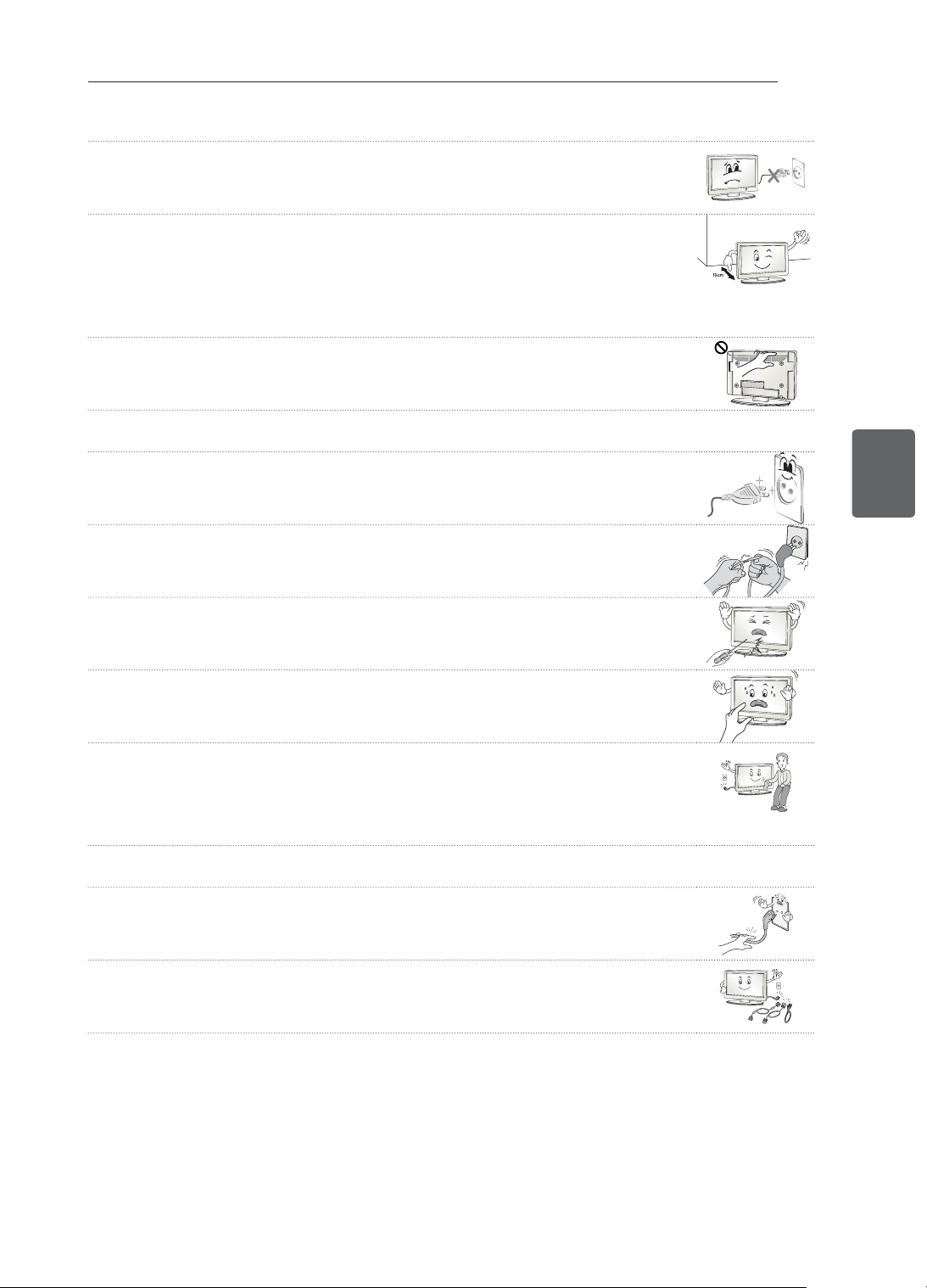
8
ﺔﻴﺑﺮﻌﻟﺍﺔﻴﺑﺮﻌﻟﺍ
ﻥﺎﻣﻷﺍ ﺕﺎﻤﻴﻠﻌﺗ
ﻡﺪﺨﺘﺴﺗ ﻻ) .ﻂﺋﺎﺤﻟﺎﺑ ﺔﻗﺎﻄﻟﺍ ﺭﺪﺼﻣ ﻦﻣ ﻪﻠﺼﻓ ﻭﺃ ﺔﻗﺎﻄﻟﺍ ﺲﺑﺎﻗ ﻞﻴﺻﻮﺗ ﻝﻼﺧ ﻦﻣ ﺞﺘﻨﻤﻟﺍ ﻞﻴﻐﺸﺗ ﻑﺎﻘﻳﺇ/ﻞﻴﻐﺸﺘﺑ ﻢﻘﺗ ﻻ •
(.ﺡﺎﺘﻔﻤﻛ ﺔﻗﺎﻄﻟﺍ ﺲﺑﺎﻗ
.ﺔﻴﺋﺎﺑﺮﻬﻛ ﺔﻣﺪﺻ ﺙﻭﺪﺣ ﻲﻓ ﺐﺒﺴﺘﻟﺍ ﻭﺃ ﻲﻜﻴﻧﺎﻜﻴﻣ ﻞﻄﻋ ﻰﻟﺇ ﻚﻟﺫ ﻱﺩﺆﻳ ﺪﻘﻓ
.ﺞﺘﻨﻤﻠﻟ ﺔﻃﺮﻔﻣ ﺔﻧﻮﺨﺳ ﺙﻭﺪﺣ ﻱﺩﺎﻔﺘﻟ ﻩﺎﻧﺩﺃ ﺔﺤﺿﻮﻤﻟﺍ ﺖﻴﺒﺜﺘﻟﺍ ﺕﺎﻤﻴﻠﻌﺗ ﻉﺎﺒﺗﺍ ﻰﺟﺮ
ُ
ﻳ •
- .ﻢﺳ 10 ﻂﺋﺎﺤﻟﺍﻭ ﺞﺘﻨﻤﻟﺍ ﻦﻴﺑ ﺔﻓﺎﺴﻤﻟﺍ ﺯﻭﺎﺠﺘﺗ ﻥﺃ ﺐﺠﻳ
- .(ﺔﻧﺍﺰﺧ ﻲﻓ ﻭﺃ ﺔﺒﺘﻜﻣ ﻲﻓ ﻑﺮﻟﺍ ﻰﻠﻋ ،ﻝﺎﺜﻤﻟﺍ ﻞﻴﺒﺳ ﻰﻠﻋ) ﺔﻳﻮﻬﺗ ﻪﻴﻓ ﺪﺟﻮﺗ ﻻ ﻥﺎﻜﻣ ﻲﻓ ﺞﺘﻨﻤﻟﺍ ﺖﻴﺒﺜﺘﺑ ﻢﻘﺗ ﻻ
- .ﺓﺩﺎﺳﻭ ﻭﺃ ﺓﺩﺎﺠﺳ ﻰﻠﻋ ﺞﺘﻨﻤﻟﺍ ﺖﻴﺒﺜﺘﺑ ﻢﻘﺗ
ﻻ
- .ﺓﺭﺎﺘﺴﻟﺍ ﻭﺃ ﺓﺪﺋﺎﻤﻟﺍ ءﺎﻄﻐﺑ ﺔﻳﻮﻬﺘﻟﺍ ﺔﺤﺘﻓ ﺩﺍﺪﺴﻧﺍ ﻡﺪﻋ ﻦﻣ ﺪﻛﺄﺗ
.ﻖﻳﺮﺣ ﺏﻮﺸﻧ ﻲﻓ ﻚﻟﺫ ﺐﺒﺴﺘﻳ ﺪﻘﻓ ﻻﺇﻭ
ﻻﻭ .ﺔﻨﺧﺎﺳ ﺔﻳﻮﻬﺘﻟﺍ ﺕﺎﺤﺘﻓ ﺮﻴﺼﺗ ﺪﻗ ﺚﻴﺣ ﺔﻠﻳﻮﻃ ﺕﺍﺮﺘﻔﻟ ﺯﺎﻔﻠﺘﻟﺍ ﺓﺪﻫﺎﺸﻣ ﺪﻨﻋ ﺔﻳﻮﻬﺘﻟﺍ ﺕﺎﺤﺘﻓ ﺔﺴﻣﻼﻣ ﻡﺪﻋ ﻰﻠﻋ ﺹﺮﺣﺍ •
.ﻪﻠﻴﻐﺸﺗ ﻭﺃ ﺯﺎﻬﺠﻟﺍ ءﺍﺩﺃ ﻰﻠﻋ ﻚﻟﺫ ﺮﺛﺆﻳ
ﺪﻤﺘﻌﻤﻟﺍ ﺔﻣﺪﺨﻟﺍ ﻖﻳﺮﻓ ﻦﻣ ﺐﻠﻃﺍﻭ ﺯﺎﻬﺠﻟﺍ ﻡﺍﺪﺨﺘﺳﺍ ﻦﻋ ﻒﻗﻮﺗﻭ ﻪﻠﺼﻓﺎﻓ ،ﻪﺘﻟﺎﺣ ءﻮﺳ ﻭﺃ ﻪﻔﻠﺗ ﻚﻟ ﺍﺪﺑ ﻥﺈﻓ ،ﻱﺭﻭﺩ ﻞﻜﺸﺑ ﺯﺎﻬﺠﻟﺍ ﻚﻠﺳ ﺺﺤﻔﺑ ﻢﻗ •
.ﺔﺒﺳﺎﻨﻤﻟﺍ
ﺭﺎﻴﻐﻟﺍ ﺔﻌﻄﻘﺑ ﻚﻠﺴﻟﺍ ﻝﺍﺪﺒﺘﺳﺍ
.ﺔﻗﺎﻄﻟﺍ ﺭﺪﺼﻣ ﻭﺃ ﺔﻗﺎﻄﻟﺍ ﺲﺑﺎﻗ ﻑﺍﺮﻃﺃ ﻰﻠﻋ ﺭﺎﺒﻐﻟﺍ ﻢﻛﺍﺮﺗ ﺐﻨﺠﺗ •
.ﻖﻳﺮﺣ ﺏﻮﺸﻧ ﺮﻄﺧ ﻰﻟﺇ ﻚﻟﺫ ﻱﺩﺆﻳ ﺪﻗ
ﻪﻴﻠﻋ ﻂﻐﻀﻟﺍ ﻭﺃ ءﺍﻮﺘﻟﻻﺍ ﻭﺃ ﻲﻨﺜﻠﻟ ﻪﺿﺮﻌﺗ ﻞﺜﻣ ،ﻲﻜﻴﻧﺎﻜﻴﻤﻟﺍﻭ ﻱﺩﺎﻤﻟﺍ ﻡﺍﺪﺨﺘﺳﻻﺍ ءﻮﺳ ﻦﻣ ﺔﻗﺎﻄﻟﺍ ﻚﻠﺳ ﺔﻳﺎﻤﺣ ﻰﻠﻋ ﺹﺮﺣﺍ •
ﻦﻣ ﻚﻠﺴﻟﺍ ﺝﺮﺨﻳ ﺚﻴﺣ ﻖﻃﺎﻨﻤﻟﺍﻭ ﻂﺋﺎﺤﻟﺍ ﻲﻓ
ﺔﻗﺎﻄﻟﺍ ﺭﺪﺼﻣﻭ ﺲﺑﺎﻘﻤﻠﻟ ﺍ
ً
ﺪﻴﺟ ﻪﺒﺘﻧﺍ .ﻪﻗﻮﻓ ﻲﺸﻤﻟﺍ ﻭﺃ ﻪﻴﻠﻋ ﺏﺎﺒﻟﺍ ﻕﻼﻏﺇ ﻭﺃ
.ﺯﺎﻬﺠﻟﺍ
.ﺎﻬﺷﺪﺨﺑ ﻢﻘﺗ ﻭﺃ ﺔﺣﻮﻠﻟﺍ ﻰﻠﻋ ﺓ
ّ
ﺪﺸﺑ ﺮﺒﺣ ﻢﻠﻗ ﻭﺃ ﺹﺎﺻﺭ ﻢﻠﻗ ﻭﺃ ﺮﻔﻇ ﻞﺜﻣ ﺩﺎﺣ ءﻲﺸﺑ ﻭﺃ ﻙﺪﻴﺑ ﻂﻐﻀﺗ ﻻ •
.ﺔﺷﺎﺸﻟﺍ ﻲﻓ ﺖﻗﺆﻣ ﻪﻳﻮﺸﺗ ﺙﺍﺪﺣﺇ ﻚﻟﺫ ﻥﺄﺷ ﻦﻤﻓ .ﺔﻠﻳﻮﻃ ﺓﺮﺘﻔﻟ ﺎﻬﻴﻠﻋ (ﻚﻌﺑﺎﺻﺃ) ﻚﻌﺒﺻﺇ ﻊﺿﻭ ﻭﺃ ﺔﺷﺎﺸﻟﺍ ﺲﻤﻟ ﺐﻨﺠﺗ •
ﺓﻮﻘﻟﺍ ﻡﺍﺪﺨﺘﺳﺍ ﻱﺩﺆﻳ ﺪﻗ .ﻢﻋﺎﻨﻟﺍ ﺵﺎﻤﻘﻟﺍ ﻦﻣ ﺔﻌﻄﻘﺑ ﻪﺤﺴﻣﺍ ﻢﺛ
ً
ﻻﻭﺃ ﺔﻗﺎﻄﻟﺍ ﺲﺑﺎﻗ ﻞﺼﻔﺑ ﻢﻗ ،ﻪﺗﺎﻧﻮﻜﻣﻭ ﺞﺘﻨﻤﻟﺍ ﻒﻴﻈﻨﺗ ﺪﻨﻋ •
ﻡﺪﺨﺘﺴﺗ ﻻ .ﻒﻴﻈﻨﺘﻠﻟ ﺔﺒﻃﺭ ﺵﺎﻤﻗ ﺔﻌﻄﻗ ﻭﺃ ءﺎﻤﻟﺍ ﺫﺍﺫﺭ ﻡﺪﺨﺘﺴﺗ ﻻ .ﻥﺍﻮﻟﻷﺍ ﻲﻓ ﺮﻴﻴﻐﺗ ﻭﺃ ﺵﻭﺪﺧ ﺙﺍﺪﺣﺇ ﻰﻟﺇ ﺔﻃﺮﻔﻤﻟﺍ
ﻲﺘﻟﺍﻭ ﺦﻟﺇ ،ﻝﻮﺤﻜﻟﺍ ﻭﺃ ﻦﻳﺰﻨﺒﻟﺍ ﻭﺃ ﻊﻤﺸﻟﺍ ﻭﺃ ﺕﺍﺭﺎﻴﺴﻟﺎﺑ ﺔﺻﺎﺨﻟﺍ ﻚﻠﺗ
ﻭﺃ ﺔﻴﻋﺎﻨﺼﻟﺍ ﻊﻴﻤﻠﺘﻟﺍ ﺩﺍﻮﻣ ﻭﺃ ﺝﺎﺟﺰﻟﺍ ﻒﻈﻨﻣ ﺎ
ً
ﻘﻠﻄﻣ
.ﻪﺘﺣﻮﻟﻭ ﺞﺘﻨﻤﻟﺎﺑ ﻒﻠﺘﻟﺍ ﻕﺎﺤﻟﺇ ﺎﻬﻧﺄﺷ ﻦﻣ
.(ﻞﻄﻌﺘﻟﺍ ﻭﺃ ﻞﻛﺂﺘﻟﺍ ﻭﺃ ﻞﻜﺸﻟﺍ ﻩﻮﺸﺗ) ﺞﺘﻨﻤﻠﻟ ﻒﻠﺗ ﻭﺃ ﺔﻴﺋﺎﺑﺮﻬﻛ ﺔﻣﺪﺻ ﺙﻭﺪﺣ ﻭﺃ ﻖﻳﺮﺣ ﺏﻮﺸﻧ ﻲﻓ ﻚﻟﺫ ﺐﺒﺴﺘﻳ ﺪﻘﻓ ﻻﺇﻭ
ﻞﻴﻐﺸﺗ ﻑﺎﻘﻳﺇ ﺔﻟﺎﺣ ﻲﻓ ﻰﺘﺣ ﺩﺩﺮﺘﻤﻟﺍ ﺭﺎﻴﺘﻟﺎﺑ ﺩﺍﺪﻣﻹﺍ ﺭﺪﺼﻣ ﻦﻋ ﺎﻬﻠﺼﻓ ﻢﺘﻳ ﻻ ،ﻂﺋﺎﺤﻟﺍ ﻲﻓ ﺩﺩﺮﺘﻤﻟﺍ
ﺭﺎﻴﺘﻟﺍ ﺭﺪﺼﻤﺑ ﺔﻠﺼﺘﻣ ﺓﺪﺣﻮﻟﺍ ﻩﺬﻫ ﺖﻧﺎﻛ ﺎﻤﻟﺎﻃ •
.ﺓﺪﺣﻮﻟﺍ
.ﻪﻠﺼﻓﺍﻭ ﺲﺑﺎﻘﻟﺍ ﻚﺴﻣﺃ ،ﻞﺒﻜﻟﺍ ﻞﺼﻓ ﺪﻨﻋ •
.ﻖﻳﺮﺣ ﺏﻮﺸﻧ ﻲﻓ ﻚﻟﺫ ﺐﺒﺴﺘﻳ ﺪﻗ ،ﺔﻗﺎﻄﻟﺍ ﻞﺒﻛ ﻞﺧﺍﺩ ﻙﻼﺳﻷﺍ ﻉﺎﻄﻘﻧﺍ ﺔﻟﺎﺣ ﻲﻓ
.ﻞﻴﺻﻮﺘﻟﺍ ﺕﻼﺒﻛ ﻞﻛﻭ ﻲﺋﺍﻮﻬﻟﺍ ﺕﻼﺒﻛﻭ ﺔﻗﺎﻄﻟﺍ ﺕﻼﺒﻛ ﻞﺼﻔﺑ ﻢﻗ ،ﻢﺛ .
ً
ﻻﻭﺃ ﻪﻠﻴﻐﺸﺗ ﻑﺎﻘﻳﺇ ﻦﻣ ﺪﻛﺄﺗ ،ﺞﺘﻨﻤﻟﺍ ﻚﻳﺮﺤﺗ ﺪﻨﻋ •
.ﺔﻴﺋﺎﺑﺮﻬﻛ ﺔﻣﺪﺻ ﺙﻭﺪﺣ ﻭﺃ ﻖﻳﺮﺣ ﺏﻮﺸﻧ ﺮﻄﺧ ﻲﻓ ﺐﺒﺴﺘﻳ ﺪﻗ ﺎﻤﻣ ﺔﻗﺎﻄﻟﺍ ﻚﻠﺳ ﻭﺃ ﺯﺎﻔﻠﺘﻟﺍ ﺯﺎﻬﺟ ﻒﻠﺘﻳ ﺪﻗ ﺚﻴﺣ
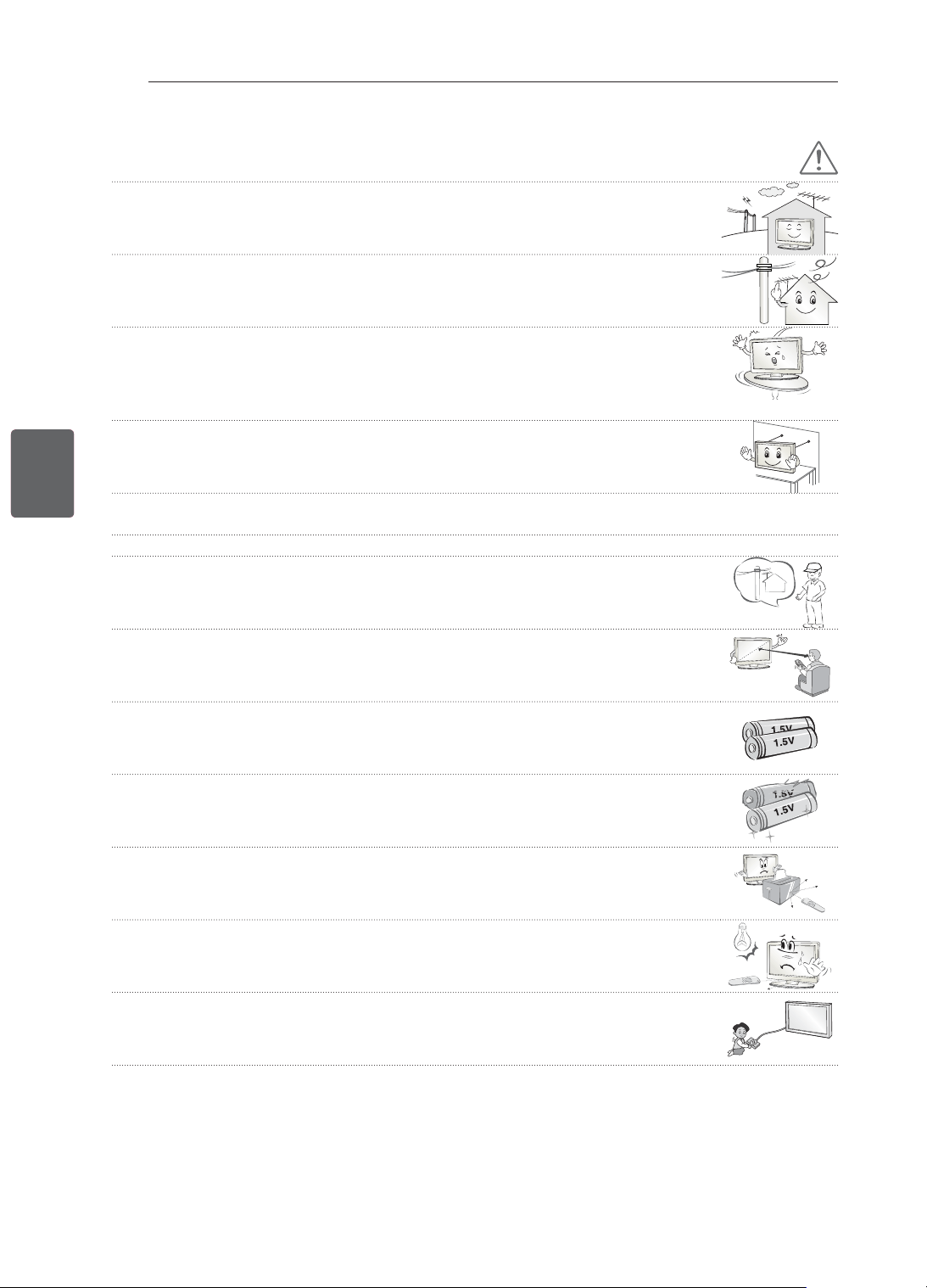
7
ﺔﻴﺑﺮﻌﻟﺍﺔﻴﺑﺮﻌﻟﺍ
ﻥﺎﻣﻷﺍ ﺕﺎﻤﻴﻠﻌﺗ
ﻪﻴﺒﻨﺗ
.ﺔﻴﻜﻠﺳﻼﻟﺍ ﺕﺎﺟﻮﻤﻟﺍ ﻦﻣ
ٍ
ﻝﺎﺧ ﻥﺎﻜﻣ ﻲﻓ ﺞﺘﻨﻤﻟﺍ ﺖﻴﺒﺜﺘﺑ ﻢﻗ •
ﻲﻓ ﻰﺘﺣ ﻲﻧﺎﺜﻟﺍ ﻊﻣ ﻝﻭﻷﺍ ﺲﻣﻼﺗ ﻡﺪﻋ ﻰﻠﻋ ﺔﻈﻓﺎﺤﻤﻠﻟ ﺔﻗﺎﻄﻟﺍ ﻁﻮﻄﺧﻭ ﻲﺟﺭﺎﺨﻟﺍ ﻲﺋﺍﻮﻬﻟﺍ ﻦﻴﺑ ﺔﻴﻓﺎﻛ ﺔﺣﺎﺴﻣ ﺮﻓﻮﺗ ﻲﻐﺒﻨﻳ •
.ﻲﺋﺍﻮﻬﻟﺍ ﻁﻮﻘﺳ ﺔﻟﺎﺣ
.ﺔﻴﺋﺎﺑﺮﻬﻛ ﺔﻣﺪﺻ ﺙﻭﺪﺣ ﻰﻟﺇ ﻚﻟﺫ ﻱﺩﺆﻳ ﺪﻗ ﺫﺇ
ﺯﺍﺰﺘﻫﺍ ﺎﻬﻴﻓ ﺙﺪﺤﻳ ﻲﺘﻟﺍ ﻦﻛﺎﻣﻷﺍ ﺎ
ً
ﻀﻳﺃ ﺐﻨﺠﺗ .ﺔﻴﻨﺤﻨﻤﻟﺍ ﺢﻄﺳﻷﺍ ﻭﺃ ﺔﺘﺑﺎﺜﻟﺍ ﺮﻴﻏ ﻑﻮﻓﺮﻟﺎﻛ ﻦﻛﺎﻣﺃ ﻲﻓ ﺞﺘﻨﻤﻟﺍ ﺖﻴﺒﺜﺘﺑ ﻢﻘﺗ ﻻ •
.ﻞﻣﺎﻜﻟﺎﺑ ﺎ
ً
ﻣﻮﻋﺪﻣ ﺞﺘﻨﻤﻟﺍ ﻥﻮﻜﻳ ﻻ ﺚﻴﺣ ﻭﺃ
.ﺞﺘﻨﻤﻠﻟ ﻒﻠﺗ ﻭﺃ ﺔﺑﺎﺻﺇ ﺙﻭﺪﺣ ﻲﻓ ﺐﺒﺴﺘﻳ ﺪﻗ ﻱﺬﻟﺍ ﺮﻣﻷﺍ ،ﺐﻠﻘﻨﻳ ﻭﺃ ﺞﺘﻨﻤﻟﺍ ﻂﻘﺴﻳ ﺪﻘﻓ ﻻﺇﻭ
ﺞﺘﻨﻤﻟﺍ ﻂﻘﺴﻳ ﺪﻘﻓ ﻻﺇﻭ .ﺞﺘﻨﻤﻟﺍ ﻁﻮﻘﺳ ﻱﺩﺎﻔﺘﻟ ﺕﺍءﺍﺮﺟﻹﺍ ﺾﻌﺒﺑ ﻡﺎﻴﻘﻟﺍ ﻰﻟﺇ ﺝﺎﺘﺤﺘﺳ ،ﻞﻣﺎﺣ ﻰﻠﻋ ﺯﺎﻔﻠﺘﻟﺍ ﺐﻴﻛﺮﺗ ﺔﻟﺎﺣ ﻲﻓ •
.ﺔﺑﺎﺻﺇ ﺙﻭﺪﺣ ﻲﻓ ﺐﺒﺴﺘﻳ ﺪﻗ ﺎﻤﻣ
ﺪﻨﻋ .ﺞﺘﻨﻤﻟﺍ ﻦﻣ ﻲﻔﻠﺨﻟﺍ ﺐﻧﺎﺠﻟﺎﺑ (ﺔﻴﻓﺎﺿﻹﺍ ءﺍﺰﺟﻷﺍ) VESA ﺭﺎﻴﻌﻤﻟﺍ ﺕﺍﺫ ﺖﻴﺒﺜﺘﻟﺍ ﺔﻬﺟﺍﻭ ﻞﻴﺻﻮﺘﺑ ﻢﻘﻓ ،ﻂﺋﺎﺤﻟﺍ ﻰﻠﻋ ﺞﺘﻨﻤﻟﺍ ﺖﻴﺒﺜﺗ ﺕﺩﺭﺃ ﺍﺫﺇ •
.ﻂﻘﺴﻳ ﻻ ﻰﺘﺣ ﺔﻳﺎﻨﻌﺑ ﻪﺘ
ّ
ﺒﺛ
،(ﺔﻴﻓﺎﺿﻹﺍ ءﺍﺰﺟﻷﺍ) ﻂﺋﺎﺤﻟﺍ ﻰﻠﻋ ﺖﻴﺒﺜﺘﻟﺍ ﺱﻮﻗ ﻡﺍﺪﺨﺘﺳﺎﺑ ﺯﺎﻬﺠﻟﺍ ﺐﻴﻛﺮﺗ
.ﻂﻘﻓ ﻊﻨﺼﻟﺍ ﺔﻬﺟ ﻞﺒ
ِ
ﻗ ﻦﻣ ﺓﺩﺪﺤﻤﻟﺍ ﺕﺎﻘﺤﻠﻤﻟﺍ / ﺕﺎﺒﻴﻛﺮﺘﻟﺍ ﻡﺪﺨﺘﺳﺍ •
.ﻞﻫﺆﻤﻟﺍ ﺔﻣﺪﺨﻟﺍ ﻲﻨﻓ ﺮﺸﺘﺳﺍ ،ﻲﺋﺍﻮﻬﻟﺍ ﺐﻴﻛﺮﺗ ﺪﻨﻋ •
.ﺓﺮﻴﻄﺧ ﺔﻴﺋﺎﺑﺮﻬﻛ ﺔﻣﺪﺻ ﺙﻭﺪﺣ ﻭﺃ ﻖﻳﺮﺣ ﺏﻮﺸﻧ ﻰﻟﺇ ﻚﻟﺫ ﻱﺩﺆﻳ ﺪﻘﻓ
5~7 times
.ﺯﺎﻔﻠﺘﻟﺍ ﺓﺪﻫﺎﺸﻣ ﺪﻨﻋ ﻱﺮﻄﻘﻟﺍ ﺔﺷﺎﺸﻟﺍ ﻢﺠﺣ ﻑﺎﻌﺿﺃ 7 ﻭ 5 ﻦﻴﺑ ﺡﻭﺍﺮﺘﺗ ﺔﻓﺎﺴﻣ ﻰﻠﻋ ﺔﻈﻓﺎﺤﻤﻟﺎﺑ ﺢﺼﻨﻧ •
.ﺔﺷﻮﺸﻣ ﺔﻳﺅﺭ ﻲﻓ ﻚﻟﺫ ﺐﺒﺴﺘﻳ ﺪﻗ ،ﺔﻠﻳﻮﻃ ﺓﺮﺘﻔﻟ ﺯﺎﻔﻠﺘﻟﺍ ﺓﺪﻫﺎﺸﻣ ﺔﻟﺎﺣ ﻲﻓ
.ﻂﻘﻓ ﺩ
ّ
ﺪﺤﻤﻟﺍ ﺕﺎﻳﺭﺎﻄﺒﻟﺍ ﻉﻮﻧ ﻡﺪﺨﺘﺳﺍ •
.ﺪﻌ
ُ
ﺑ ﻦﻋ ﻢﻜﺤﺘﻟﺍ ﺓﺪﺣﻮﺑ ﺭﺮﻀﻟﺍ ﻕﺎﺤﻟﺇ ﻰﻟﺇ ﻚﻟﺫ ﻱﺩﺆﻳ ﺪﻘﻓ
.ﺔﻤﻳﺪﻘﻟﺍ ﺕﺎﻳﺭﺎﻄﺒﻟﺍﻭ ﺓﺪﻳﺪﺠﻟﺍ ﺕﺎﻳﺭﺎﻄﺒﻟﺍ ﻦﻴﺑ ﻂﻠﺨﺗ ﻻ •
.ﺎﻬﻨﻣ ﻞﺋﺎﺴﻟﺍ ﺏﺮﺴﺗ ﻢﺛ ﻦﻣﻭ ﺪﺋﺍﺯ ﻞﻜﺸﺑ ﺕﺎﻳﺭﺎﻄﺒﻟﺍ ﺔﻧﻮﺨﺳ ﺔﺟﺭﺩ ﺓﺩﺎﻳﺯ ﻰﻟﺇ ﻚﻟﺫ ﻱﺩﺆﻳ ﺪﻘﻓ
.ﺎﻬﺑ ﺹﺎﺨﻟﺍ ﺮﻌﺸﺘﺴﻤﻟﺍﻭ ﺪﻌ
ُ
ﺑ ﻦﻋ ﻢﻜﺤﺘﻟﺍ ﺓﺪﺣﻭ ﻦﻴﺑ ءﺎﻴﺷﺃ ﻱﺃ ﺩﻮﺟﻭ ﻡﺪﻋ ﻦﻣ ﺪﻛﺄﺗ •
،ﺔﻟﺎﺤﻟﺍ ﻩﺬﻫ ﻲﻓﻭ .ﺪﻌ
ُ
ﺑ ﻦﻋ ﻢﻜﺤﺘﻟﺍ ﺓﺪﺣﻭ ﻦﻋ ﺓﺭﺩﺎﺼﻟﺍ ﺓﺭﺎﺷﻹﺍ ﻰﻠﻋ ﺮﺧﺁ ﻱﻮﻗ ءﻮﺿ ﻱﺃ ﻭﺃ ﺲﻤﺸﻟﺍ ءﻮﺿ ﺵﻮﺸﻳ ﺪﻗ •
.ﺔﻓﺮﻐﻟﺍ ﻡﺎﺘﻋﺇ ﻚﻴﻠﻋ
.ﻲﻔﻜﻳ ﺎﻤﺑ ﺔﻠﻳﻮﻃ ﺕﻼﺒﻜﻟﺍ ﻥﺃ ﻦﻣ ﺪﻛﺄﺗ ،ﻮﻳﺪﻴﻔﻟﺍ ﺏﺎﻌﻟﺃ ﺓﺰﻬﺟﺄﻛ ﺔﻴﺟﺭﺎﺧ ﺓﺰﻬﺟﺃ ﻞﻴﺻﻮﺗ ﺪﻨﻋ •
.ﺞﺘﻨﻤﻠﻟ ﻒﻠﺗ ﻭﺃ ﺔﺑﺎﺻﺇ ﺙﻭﺪﺣ ﻲﻓ ﺐﺒﺴﺘﻳ ﺪﻗ ﻱﺬﻟﺍ ﺮﻣﻷﺍ ﻮﻫﻭ ﺞﺘﻨﻤﻟﺍ ﻂﻘﺴﻳ ﺪﻘﻓ ﻻﺇﻭ
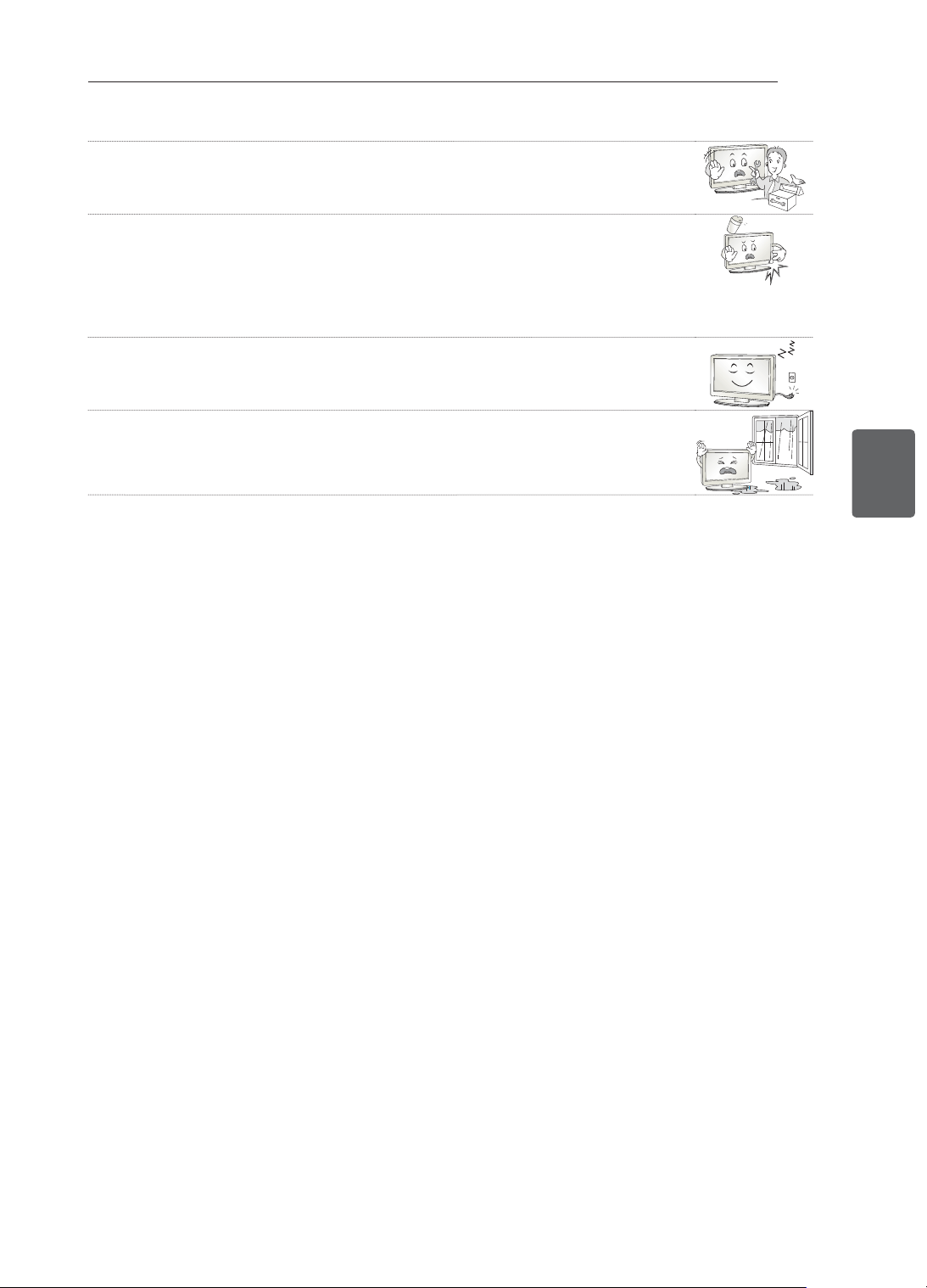
6
ﺔﻴﺑﺮﻌﻟﺍﺔﻴﺑﺮﻌﻟﺍ
ﻥﺎﻣﻷﺍ ﺕﺎﻤﻴﻠﻌﺗ
.ﺹﺎﺨﻟﺍ ﻙﺮﻳﺪﻘﺘﻟ ﺎ
ً
ﻘﻓﻭ ﻪﻠﻳﺪﻌﺗ ﻭﺃ ﻪﺣﻼﺻﺇ ﻭﺃ ﺞﺘﻨﻤﻟﺍ ﻚﻴﻜﻔﺘﺑ ﻢﻘﺗ ﻻ •
.ﺔﻴﺋﺎﺑﺮﻬﻛ ﺔﻣﺪﺻ ﺙﺪﺤﺗ ﻭﺃ ﻖﻳﺮﺣ ﺐﺸﻨﻳ ﺪﻘﻓ
.ﻪﺣﻼﺻﺇ ﻭﺃ ﻪﺗﺮﻳﺎﻌﻣ ﻭﺃ ﺞﺘﻨﻤﻟﺍ ﺺﺤﻔﻟ ﻲﻠﺤﻤﻟﺍ ﺔﻣﺪﺨﻟﺍ ﺰﻛﺮﻤﺑ ﻞﺼﺗﺍ
.ﻲﻠﺤﻤﻟﺍ ﺔﻣﺪﺨﻟﺍ ﺰﻛﺮﻤﺑ ﻞﺼﺗﺍﻭ ﺭﻮﻔﻟﺍ ﻰﻠﻋ ﺞﺘﻨﻤﻟﺍ ﻞﺼﻔﺑ ﻢﻗ ،ﻲﻠﻳ ﺎﻤﻣ ﻱﺃ ﺙﻭﺪﺣ ﺔﻟﺎﺣ ﻲﻓ •
ﺔﻣﺪﺼﻟﺎﺑ ﺞﺘﻨﻤﻟﺍ ﺮﺛﺄﺗ -
ﺞﺘﻨﻤﻟﺍ ﻒﻠﺗ -
ﺞﺘﻨﻤﻟﺍ ﻞﺧﺍﺩ ﺔﺒﻳﺮﻏ ﻡﺎﺴﺟﺃ ﻝﻮﺧﺩ -
ﺞﺘﻨﻤﻟﺍ ﻦﻣ ﺔﺒﻳﺮﻏ ﺔﺤﺋﺍﺭ ﻭﺃ ﻥﺎﺧﺩ ﺭﻭﺪﺻ -
.ﺔﻴﺋﺎﺑﺮﻬﻛ ﺔﻣﺪﺻ ﺙﻭﺪﺣ ﻭﺃ ﻖﻳﺮﺣ ﺏﻮﺸﻧ ﻲﻓ ﻚﻟﺫ ﺐﺒﺴﺘﻳ ﺪﻘﻓ
.ﺞﺘﻨﻤﻟﺍ ﻦﻋ ﺔﻗﺎﻄﻟﺍ ﻞﺒﻛ ﻞﺼﻓﺎﻓ ،ﻞﻳﻮﻃ ﺖﻗﻮﻟ ﺞﺘﻨﻤﻟﺍ ﻡﺍﺪﺨﺘﺳﺍ ﻲﻓ ﺐﻏﺮﺗ ﻢﻟ ﺍﺫﺇ •
ﺔﻣﺪﺻ ﻭﺃ ﻲﺋﺎﺑﺮﻬﻛ ﺏ
ّ
ﺮﺴﺗ ﻰﻟﺇ ﺔﻟﺯﺎﻌﻟﺍ ﺩﺍﻮﻤﻟﺍ ﻒﻠﺗ ﻱﺩﺆﻳ ﻥﺃ ﻦﻜﻤﻳ ﻭﺃ ﻖﻳﺮﺣ ﺏﻮﺸﻧ ﻲﻓ ﺭﺎﺒﻐﻟﺍ ﻢﻛﺍﺮﺗ ﺐ
ّ
ﺒﺴﺘﻳ ﻥﺃ ﻦﻜﻤﻳ
.ﻖﻳﺮﺣ ﻭﺃ ﺔﻴﺋﺎﺑﺮﻬﻛ
،ﺕﺎﻳﺮﻫﺰﻤﻟﺎﻛ ،ﻞﺋﺍﻮﺴﻟﺍ ﻰﻠﻋ ﻱﻮﺘﺤﻳ ﺽﺮﻏ ﻱﺃ ﻊﺿﻭ ﻡﺪﻋ ﺐﺠﻳ ﺎﻤﻛ ،ﺵﺮﻟﺍ ﻭﺃ ﺮﻴﻄﻘﺘﻠﻟ ﺯﺎﻬﺠﻟﺍ ﺾﻳﺮﻌﺗ ﻡﺪﻋ ﺐﺠﻳ •
.ﺯﺎﻬﺠﻟﺍ ﻰﻠﻋ
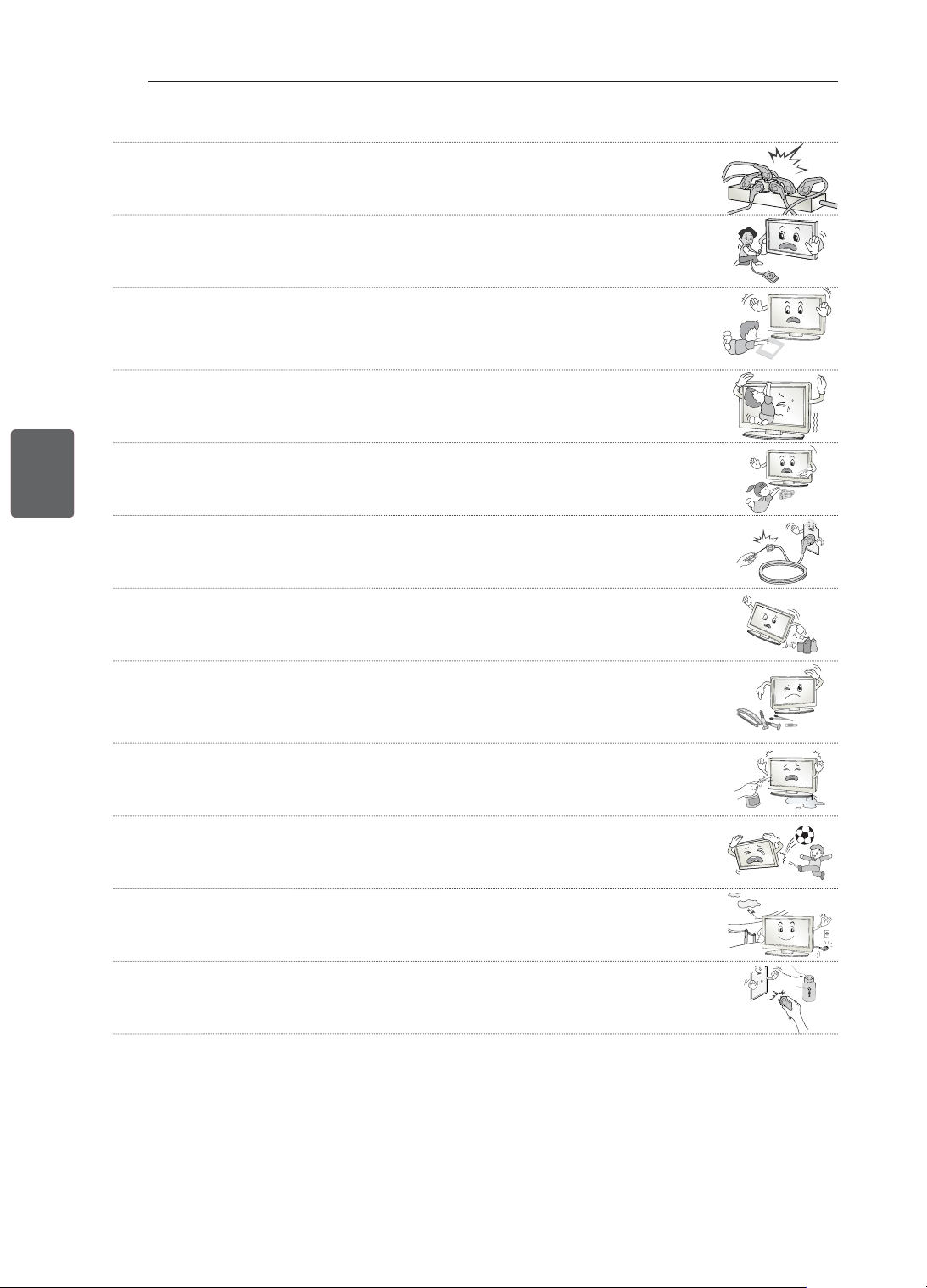
5
ﺔﻴﺑﺮﻌﻟﺍﺔﻴﺑﺮﻌﻟﺍ
ﻥﺎﻣﻷﺍ ﺕﺎﻤﻴﻠﻌﺗ
.ﺬﻓﺎﻨﻤﻟﺍ ﺩﺪﻌﺘﻣ ﺪﺣﺍﻭ ﻲﺋﺎﺑﺮﻬﻛ ﺭﺪﺼﻤﺑ ﺔﻴﺋﺎﺑﺮﻬﻜﻟﺍ ﺓﺰﻬﺟﻷﺍ ﻦﻣ ﺮﻴﺜﻜﻟﺍ ﻞﻴﺻﻮﺘﺑ ﻢﻘﺗ ﻻ •
.ﺓﺪﺋﺍﺰﻟﺍ ﺔﻧﻮﺨﺴﻟﺍ ﺐﺒﺴﺑ ﻖﻳﺮﺣ ﺏﻮﺸﻧ ﻲﻓ ﻚﻟﺫ ﺐﺒﺴﺘﻳ ﺪﻘﻓ ﻻﺇﻭ
.ﺔﻴﺟﺭﺎﺧ ﺓﺰﻬﺟﺃ ﻞﻴﺻﻮﺗ ﺪﻨﻋ ﻪﻋﻮﻗﻭ ﻭﺃ ﺞﺘﻨﻤﻟﺍ ﻁﻮﻘﺳ ﻡﺪﻋ ﻰﻠﻋ ﺹﺮﺣﺍ •
.ﺞﺘﻨﻤﻟﺍ ﻒﻠﺗ ﻭﺃ ﺔﻴﺼﺨﺷ ﺔﺑﺎﺻﺇ ﺙﻭﺪﺣ ﻲﻓ ﻚﻟﺫ ﺐﺒﺴﺘﻳ ﺪﻘﻓ ﻻﺇﻭ
Desiccant
.ﻝﺎﻔﻃﻷﺍ ﻝﻭﺎﻨﺘﻣ ﻦﻋ ﺍ
ً
ﺪﻴﻌﺑ ﻞﻴﻨﻴﻔﻟﺍ ﻦﻣ ﻉﻮﻨﺼﻤﻟﺍ ﻒﻴﻠﻐﺘﻟﺍ ﻭﺃ ﺔﺑﻮﻃﺮﻠﻟ ﺓﺩﺎﻀﻤﻟﺍ ﻒﻴﻠﻐﺘﻟﺍ ﺩﺍﻮﻣ
ِ
ﻖﺑﺃ •
ﻰﻠﻋ ﺾﻳﺮﻤﻟﺍ ﺮﺒﺟﺃ ،ﺄﻄﺨﻟﺍ ﻖﻳﺮﻃ ﻦﻋ ﺎﻬﻋﻼﺘﺑﺍ ﻝﺎﺣ ﻲﻓ .ﺎﻬﻋﻼﺘﺑﺍ ﻝﺎﺣ ﻲﻓ ﺭﺮﻀﻟﺍ ﻖﺤﻠﺗ ﺔﺑﻮﻃﺮﻠﻟ ﺓﺩﺎﻀﻤﻟﺍ ﺩﺍﻮﻤﻟﺍ
ﻪﻘﺑﺄﻓ .ﻕﺎﻨﺘﺧﻻﺎﺑ ﻞﻴﻨﻴﻔﻟﺍ ﻦﻣ ﻉﻮﻨﺼﻤﻟﺍ ﻒﻴﻠﻐﺘﻟﺍ ﺐ
ّ
ﺒﺴﺘﻳ ﻥﺃ ﻦﻜﻤﻳ ،ﻚﻟﺫ ﻰﻟﺇ ﺔﻓﺎﺿﻹﺎﺑ .ﻰﻔﺸﺘﺴﻣ ﺏﺮﻗﺃ ﻰﻟﺇ ﻪ
ّ
ﺟﻮﺗﻭ ﺆﻴﻘﺘﻟﺍ
.ﻝﺎﻔﻃﻷﺍ ﻝﻭﺎﻨﺘﻣ ﻦﻋ ﺍ
ً
ﺪﻴﻌﺑ
.ﻪﺑ ﻥﻮﻘﻠﻌﺘﻳ ﻭﺃ ﺯﺎﻔﻠﺘﻟﺍ ﻥﻮﻘﻠﺴﺘﻳ ﻝﺎﻔﻃﻷﺍ ﻉﺪﺗ ﻻ •
.ﺓﺮﻴﻄﺧ ﺔﺑﺎﺻﺇ ﺙﻭﺪﺣ ﻲﻓ ﺐﺒﺴﺘﻳ ﺎﻤﻣ ﺯﺎﻔﻠﺘﻟﺍ ﻂﻘﺴﻳ ﺪﻘﻓ ﻻﺇﻭ
.ﻢﻔﻟﺎﺑ ﺎﻬﻟﻭﺎﻨﺗ ﻦﻣ ﻝﺎﻔﻃﻷﺍ ﻊﻨﻤﻟ ﺹﺮﺤﺑ ﺕﺎﻳﺭﺎﻄﺒﻟﺍ ﻦﻣ ﺺﻠﺨﺗ •
.ﺭﻮﻔﻟﺍ ﻰﻠﻋ ﺐﻴﺒﻄﻟﺍ ﻰﻟﺇ ﻪﺒﺤﻄﺻﺍ ،ﻢﻔﻟﺎﺑ ﺕﺎﻳﺭﺎﻄﺒﻠﻟ ﻞﻔﻄﻟﺍ ﻝﻭﺎﻨﺗ ﺔﻟﺎﺣ ﻲﻓ
ﻝﺎﺧﺩﻹﺍ ﻑﺮﻄﺑ
ً
ﻻﻮﺻﻮﻣ ﺮﺧﻵﺍ ﻑﺮﻄﻟﺍ ﻥﻮﻜﻳ ﺎﻤﻨﻴﺑ ﺔﻗﺎﻄﻟﺍ ﻞﺒﻛ ﻲﻓﺮﻃ ﺪﺣﺃ ﻲﻓ (ﺔﻴﻧﺪﻌﻤﻟﺍ ﻊﻄﻘﻟﺍ ﻞﺜﻣ)
ً
ﻼ
ّ
ﺻﻮﻣ ﻞﺧﺪﺗ ﻻ •
.ﻂﺋﺎﺤﻟﺍ ﻲﻓ ﻝﺎﺧﺩﻹﺍ ﻑﺮﻄﺑ ﻪﻠﻴﺻﻮﺗ ﺪﻌﺑ ﺍ
ً
ﺭﻮﻓ ﺔﻗﺎﻄﻟﺍ
ﻞﺒﻛ ﺲﻤﻠﺗ ﻻ ،ﻚﻟﺫ ﻰﻟﺇ ﺔﻓﺎﺿﻹﺎﺑ .ﻂﺋﺎﺤﻟﺍ ﻲﻓ
(ﺯﺍﺮﻄﻟﺍ ﺐﺴﺣ).ﻲﺋﺎﺑﺮﻬﻜﻟﺍ ﻖﻌﺼﻠﻟ ﺽﺮﻌﺘﺗ ﺪﻘﻓ
.ﺞﺘﻨﻤﻟﺍ ﺏﺮﻗ ﻝﺎﻌﺘﺷﻻﺍ ﺔﻌﻳﺮﺳ ﺩﺍﻮﻣ ﻊﻀﺗ ﻻ •
.ﻝﺎﻌﺘﺷﻻﺍ ﺔﻌﻳﺮﺳ ﺩﺍﻮﻤﻟﺍ ﻊﻣ ﻞﻣﺎﻌﺘﻟﺍ ﻲﻓ ﺓﻻﺎﺒﻣﻼﻟﺍ ﺐﺒﺴﺑ ﻖﻳﺮﺣ ﺏﻮﺸﻧ ﻭﺃ ﺭﺎﺠﻔﻧﺍ ﺙﻭﺪﺣ ﺮﻄﺧ ﻙﺎﻨﻫ
ﻝﺎﻌﺘﺷﻻﺍ ﺔﻌﻳﺮﺳ ﺩﺍﻮﻤﻟﺍ ﻭﺃ ﺞﺘﻨﻤﻟﺍ ﻲﻓ ﻚﻠﺴﻟﺍ ﻭﺃ ﻞﻛﻷﺍ ﻥﺍﺪﻴﻋ ﻭﺃ ﺮﻌﺸﻟﺍ ﺲﻴﺑﺎﺑﺩ ﻭﺃ ﺕﻼﻤﻌﻟﺎﻛ ﺔﻴﻧﺪﻌﻤﻟﺍ ءﺎﻴﺷﻷﺍ ﻞﺧﺪﺗ ﻻ •
.ﺍ
ً
ﺪﻴﺟ ﻝﺎﻔﻃﻷﺍ ﻪﺒﺘﻨﻳ ﻥﺃ ﺐﺠﻳ .ﺏﺎﻘﺜﻟﺍ ﻥﺍﺪﻴﻋﻭ ﻕﺭﻮﻟﺎﻛ
ﻚﻠﺳ ﻞﺼﻔﺑ ﻢﻗ ،ﺞﺘﻨﻤﻟﺍ ﻞﺧﺍﺩ ﺐﻳﺮﻏ ﻢﺴﺟ ﻁﻮﻘﺳ ﺔﻟﺎﺣ ﻲﻓ .ﺕﺎﺑﺎﺻﺇ ﺙﺪﺤﺗ ﻭﺃ ﻖﻳﺮﺣ ﺐﺸﻨﻳ ﻭﺃ ﺔﻴﺋﺎﺑﺮﻬﻛ ﺔﻣﺪﺻ ﺙﺪﺤﺗ ﺪﻗ
.ﺔﻣﺪﺨﻟﺍ ﺰﻛﺮﻤﺑ
ﻞﺼﺗﺍﻭ ﺔﻗﺎﻄﻟﺍ
ﻖﻳﺮﺣ ﺐﺸﻨﻳ ﺪﻘﻓ .(ﻦﻳﺰﻨﺒﻟﺍ ﻭﺃ "ﺮﻨﺜﻟﺍ" ﻥﺎﻫﺪﻟﺍ ﻖﻗﺮﻣ) ﻝﺎﻌﺘﺷﻻﺍ ﺔﻌﻳﺮﺳ ﺓﺩﺎﻤﺑ ﻪﺤﺴﻤﺑ ﻢﻘﺗ ﻭﺃ ﺞﺘﻨﻤﻟﺍ ﻰﻠﻋ ءﺎﻤﻟﺍ ﺵﺮﺑ ﻢﻘﺗ ﻻ •
.ﺔﻴﺋﺎﺑﺮﻬﻛ ﺔﻣﺪﺻ ﺙﺪﺤﺗ ﻭﺃ
.ءﻲﺷ ﻱﺄﺑ ﺔﺷﺎﺸﻟﺍ ﻰﻠﻋ ﻚﻟﺬﻛ ﻕﺮﻄﺗ ﻻﻭ ،ﻪﻠﺧﺍﺩ ءﺎﻴﺷﺃ ﻱﺃ ﻁﻮﻘﺴﺑ ﻭﺃ ﺕﺎﻣﺪﺼﻠﻟ ﺞﺘﻨﻤﻟﺍ ﺽﺮﻌﺘﺑ ﺢﻤﺴﺗ ﻻ •
.ﺞﺘﻨﻤﻟﺍ ﻒﻠﺘﻳ ﺪﻗ ﻭﺃ ﺔﺑﺎﺻﻺﻟ ﺽﺮﻌﺘﺗ ﺪﻗ
.ﺔﻴﻗﺮﺒﻟﺍ ﻭﺃ ﺔﻳﺪﻋﺮﻟﺍ ﻒﺻﺍﻮﻌﻟﺍ ﺏﻮﺒﻫ ءﺎﻨﺛﺃ ﻲﺋﺍﻮﻬﻟﺍ ﻭﺃ ﺞﺘﻨﻤﻟﺍ ﺍﺬﻫ ﺍ
ً
ﺪﺑﺃ ﺲﻤﻠﺗ ﻻ •
.ﻲﺋﺎﺑﺮﻬﻜﻟﺍ ﻖﻌﺼﻠﻟ ﺽﺮﻌﺘﺗ ﺪﻘﻓ
.ﺔﻓﺮﻐﻟﺍ ﺔﻳﻮﻬﺗﻭ ﺬﻓﺍﻮﻨﻟﺍ ﺢﺘﻓ ﻚﻴﻠﻋ ،ﻱﺯﺎﻏ ﺏﺮﺴﺗ ﻙﺎﻨﻫ ﻥﻮﻜﻳ ﺎﻣﺪﻨﻋ ﻂﺋﺎﺤﻟﺎﺑ ﺔﻗﺎﻄﻟﺍ ﺭﺪﺼﻣ ﺎ
ً
ﻘﻠﻄﻣ ﺲﻤﻠﺗ ﻻ •
.ﺓﺭﺍﺮﺸﻟﺍ ﻞﻌﻔﺑ ﻕﻭﺮﺤﺑ ﺏﺎﺼﺗ ﻭﺃ ﻖﻳﺮﺣ ﺐﺸﻨﻳ ﺪﻘﻓ
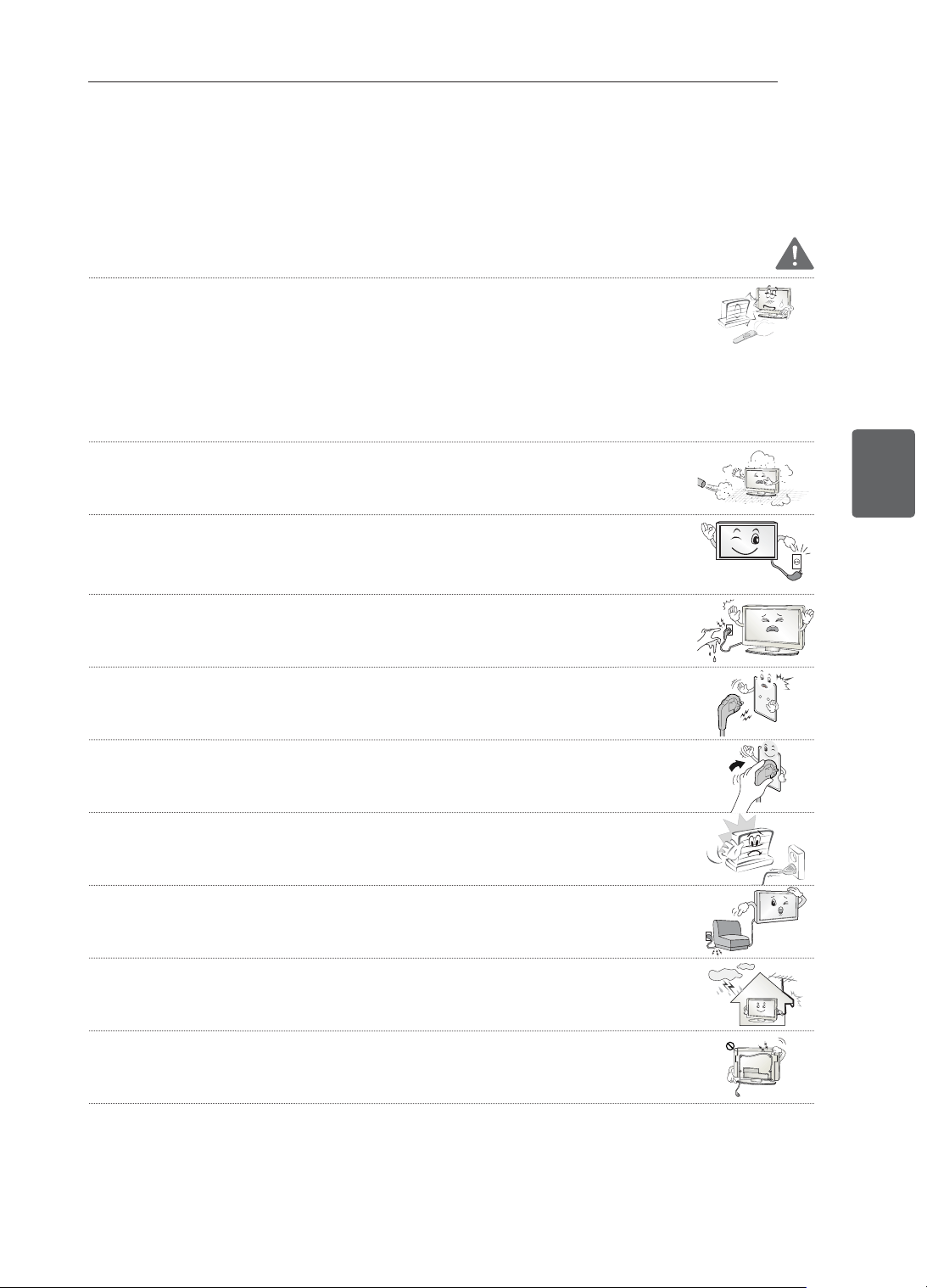
4
ﺔﻴﺑﺮﻌﻟﺍﺔﻴﺑﺮﻌﻟﺍ
ﻥﺎﻣﻷﺍ ﺕﺎﻤﻴﻠﻌﺗ
ﻥﺎﻣﻷﺍ ﺕﺎﻤﻴﻠﻌﺗ
.ﺞﺘﻨﻤﻟﺍ ﻡﺍﺪﺨﺘﺳﺍ ﻞﺒﻗ ﺔﻳﺎﻨﻌﺑ ﻩﺬﻫ ﻥﺎﻣﻷﺍ ﺕﺎﻃﺎﻴﺘﺣﺍ ﺓءﺍﺮﻗ ﻰﺟﺮﻳ
ﺮﻳﺬﺤﺗ
:ﺔﻴﻟﺎﺘﻟﺍ ﺕﺎﺌﻴﺒﻟﺍ ﻲﻓ ﺪﻌ
ُ
ﺑ ﻦﻋ ﻢﻜﺤﺘﻟﺍ ﺓﺪﺣﻭﻭ ﺯﺎﻔﻠﺘﻟﺍ ﻊﻀﺗ ﻻ •
- ﺓﺮﺷﺎﺒﻤﻟﺍ ﺲﻤﺸﻟﺍ ﺔﻌﺷﻷ ﺽﺮﻌﺘﻳ ﻊﻗﻮﻣ
-
ً
ﻼﺜﻣ ﻡﺎﻤﺤﻟﺎﻛ ﺔﻴﻟﺎﻋ ﺔﺑﻮﻃﺭ ﺕﺍﺫ ﺔﻘﻄﻨﻣ
- ﺓﺭﺍﺮﺣ ﺭﺪﺼ
ُ
ﺗ ﻲﺘﻟﺍ ﻯﺮﺧﻷﺍ ﺓﺰﻬﺟﻷﺍ ﻭﺃ ﺪﻗﺍﻮﻤﻟﺎﻛ ﺓﺭﺍﺮﺣ ﺭﺪﺼﻣ ﺏﺮ
ُ
ﻗ
- ﺖﻳﺰﻟﺍ ﻭﺃ ﺭﺎﺨﺒﻠﻟ ﺔﻟﻮﻬﺴﺑ ﺽﺮﻌﺘﻳ ﻥﺃ ﻦﻜﻤﻳ ﺚﻴﺣ ﺔﺑﻮﻃﺮﻟﺍ ﻂﺒﺿ ﺓﺰﻬﺟﺃ ﻭﺃ
ﺦﺒﻄﻤﻟﺍ ﺕﻻﻭﺎﻃ ﺏﺮ
ُ
ﻗ
- ﺡﺎﻳﺮﻟﺍ ﻭﺃ ﺮﻄﻤﻠﻟ ﺔﺿ
ّ
ﺮﻌﻣ ﺔﻘﻄﻨﻣ
- ﺕﺎﻳﺮﻫﺰﻤﻟﺎﻛ ءﺎﻤﻟﺍ ﺕﺎﻳﻭﺎﺣ ﺏﺮﻗ
.ﻪﻠﻜﺷ ﺮﻴﻴﻐﺗ ﻭﺃ ﺞﺘﻨﻤﻟﺍ ﻞ
ّ
ﻄﻌﺗ ﻭﺃ ﺔﻴﺋﺎﺑﺮﻬﻛ ﺔﻣﺪﺻ ﺙﻭﺪﺣ ﻭﺃ ﻖﻳﺮﺣ ﺏﻮﺸﻧ ﻲﻓ ﻚﻟﺫ ﺐﺒﺴﺘﻳ ﺪﻘﻓ ﻻﺇﻭ
.ﺭﺎﺒﻐﻠﻟ ﺽ
ّ
ﺮﻌﺘﻳ ﺪﻗ ﺚﻴﺣ ﺞﺘﻨﻤﻟﺍ ﻊﻀﺗ ﻻ •
.ﻖﻳﺮﺣ ﺏﻮﺸﻧ ﺮﻄﺧ ﻰﻟﺇ ﻚﻟﺫ ﻱﺩﺆﻳ ﺪﻗ
.ﻞﻴﻐﺸﺘﻠﻟ ﺍ
ً
ﺰﻫﺎﺟ ﺲﺑﺎﻘﻟﺍ ﻞﻈﻳ ﻥﺃ ﺐﺠﻳ .ﺭﺎﻴﺘﻟﺍ ﻞﺼﻓ ﺔﻠﻴﺳﻭ ﻲﺴﻴﺋﺮﻟﺍ ﺭﺎﻴﺘﻟﺍ ﺲﺑﺎﻗ ﺪﻌﻳ •
ﻢﻘﻓ ،ﺭﺎﺒﻐﻟﺍ ﻪﻴﻄﻐﻳ ﻭﺃ ﺎ
ً
ﺒﻃﺭ ﻚﻠﺴﻟﺍ ﻑﺮﻃ ﻥﺎﻛ ﺍﺫﺇ ،ﻚﻟﺫ ﻰﻟﺇ ﺔﻓﺎﺿﻹﺎﺑ .ﻦﻴﺘﻠﻠﺒﻣ ﻙﺍﺪﻳ ﻥﻮﻜﺗ ﺎﻣﺪﻨﻋ ﺔﻗﺎﻄﻟﺍ ﺲﺑﺎﻗ ﺲﻤﻠﺗ ﻻ •
.ﻪﻨﻋ ﺭﺎﺒﻐﻟﺍ ﺢﺴﻣﺍ ﻭﺃ ﺎ
ً
ﻣﺎﻤﺗ ﺔﻗﺎﻄﻟﺍ ﺲﺑﺎﻗ ﻒﻴﻔﺠﺘﺑ
.ﺓﺪﺋﺍﺰﻟﺍ ﺔﺑﻮﻃﺮﻟﺍ ﺐﺒﺴﺑ ﻲﺋﺎﺑﺮﻬﻜﻟﺍ ﻖﻌﺼﻠﻟ ﺽﺮﻌﺘﺗ ﺪﻗ
(.ﻲﺿﺭﺃ ﻑﺮﻃ ﺎﻬﺑ ﺪﺟﻮﻳ ﻻ ﻲﺘﻟﺍ ﺓﺰﻬﺟﻷﺍ ءﺎﻨﺜﺘﺳﺎﺑ) .ﻲﺿﺭﻷﺍ ﺭﺎﻴﺘﻟﺎﺑ ﺔﻗﺎﻄﻟﺍ ﻞﺒﻛ ﻞﻴﺻﻮﺗ ﻰﻠﻋ ﺹﺮﺣﺍ •
.ﺔﺑﺎﺻﻹﺍ ﻭﺃ ﻲﺋﺎﺑﺮﻬﻜﻟﺍ ﻖﻌﺼﻠﻟ ﺽﺮﻌﺘﺗ ﺪﻗ
.ﻞﻣﺎﻜﻟﺎﺑ ﺔﻗﺎﻄﻟﺍ ﻞﺒﻛ ﺖﻴﺒﺜﺘﺑ ﻢﻗ •
.ﻖﻳﺮﺣ ﺐﺸﻨﻳ ﺪﻘﻓ ،ﺎ
ً
ﻣﺎﻤﺗ ﺔﻗﺎﻄﻟﺍ
ﻞﺒﻛ ﺖﻴﺒﺜﺗ ﻢﺘﻳ ﻢﻟ ﺍﺫﺇ
.ﺔﺌﻓﺪﺘﻟﺍ ﺯﺎﻬﺠﻛ ﺔﻨﺧﺎﺳ ءﺎﻴﺷﺃﻭ ﺔﻗﺎﻄﻟﺍ ﻚﻠﺳ ﻦﻴﺑ ﺲﻣﻼﺗ ﺙﻭﺪﺣ ﻡﺪﻋ ﻰﻠﻋ ﺹﺮﺣﺍ •
.ﺓﺮﻴﻄﺧ ﺔﻴﺋﺎﺑﺮﻬﻛ ﺔﻣﺪﺻ ﺙﻭﺪﺣ ﻭﺃ ﻖﻳﺮﺣ ﺏﻮﺸﻧ ﻰﻟﺇ ﻚﻟﺫ ﻱﺩﺆﻳ ﺪﻘﻓ
.ﺔﻗﺎﻄﻟﺍ ﺕﻼﺒﻛ ﻕﻮﻓ ﺔﻠﻴﻘﺛ ءﺎﻴﺷﺃ ﻭﺃ ﺞﺘﻨﻤﻟﺍ ﻊﻀﺗ ﻻ •
.ﺔﻴﺋﺎﺑﺮﻬﻛ ﺔﻣﺪﺻ ﺙﻭﺪﺣ ﻭﺃ ﻖﻳﺮﺣ ﺏﻮﺸﻧ ﻲﻓ ﻚﻟﺫ ﺐﺒﺴﺘﻳ ﺪﻘﻓ ،ﻻﺇﻭ
.ﻞﺧﺍﺪﻟﺍ ﻰﻟﺇ ﺭﺎﻄﻣﻷﺍ ﻖﻓﺪﺗ ﻊﻨﻤﻟ ﻪﺟﺭﺎﺧﻭ ﻰﻨﺒﻤﻟﺍ ﻞﺧﺍﺩ ﻦﻴﺑ ﻲﺋﺍﻮﻬﻟﺍ ﻞﺒﻛ ﻲﻨﺜﺑ ﻢﻗ •
.ﺔﻴﺋﺎﺑﺮﻬﻛ ﺔﻣﺪﺻ ﺙﻭﺪﺣ ﻲﻓ ﺐﺒﺴﺘﻳ ﺪﻗﻭ ﺞﺘﻨﻤﻟﺍ ﻞﺧﺍﺩ ﺭﺮﻀﻟﺍ ﻕﺎﺤﻟﺇ ﻲﻓ ءﺎﻤﻟﺍ ﺐﺒﺴﺘﻳ ﺪﻗ ﺫﺇ
ﻦﻣ ﺔﻴﻟﺪﺘﻣ ﺓﺭﺎﺷﺇ ﺕﻼﺒﻛﻭ ﺔﻗﺎﻃ ﻞﺒﻛ ﺔﻄﺳﺍﻮﺑ ﻪﻘﻴﻠﻌﺗ ﻝﻼﺧ ﻦﻣ ﺯﺎﻔﻠﺘﻟﺍ ﺐﻴﻛﺮﺗ ﻡﺪﻋ ﻦﻣ ﺪﻛﺄﺗ ،ﻂﺋﺎﺤﻟﺍ ﻰﻠﻋ ﺯﺎﻔﻠﺗ ﺖﻴﺒﺜﺗ ﺪﻨﻋ •
.ﺯﺎﻔﻠﺘﻠﻟ ﻲﻔﻠﺨﻟﺍ ءﺰﺠﻟﺍ
.ﺔﻴﺋﺎﺑﺮﻬﻛ ﺔﻣﺪﺻ ﺙﻭﺪﺣ ﻭﺃ ﻖﻳﺮﺣ ﺏﻮﺸﻧ ﻲﻓ ﻚﻟﺫ ﺐﺒﺴﺘﻳ ﺪﻗ ﺫﺇ
3
ﺔﻴﺑﺮﻌﻟﺍﺔﻴﺑﺮﻌﻟﺍ
ﺭﺪﺼﻤﻟﺍ ﺔﺣﻮﺘﻔﻣ ﺞﻣﺍﺮﺒﻟﺍ ﺭﺎﻌﺷﺇ / ﺺﻴﺧﺍﺮﺘﻟﺍ
ﺺﻴﺧﺍﺮﺘﻟﺍ
. www.lg.com ﻊﻗﻮﻤﻟﺍ ﺓﺭﺎﻳﺯ ﻰﺟﺮ
ُ
ﻳ ،ﺺﻴﺧﺍﺮﺘﻟﺍ ﻝﻮﺣ ﺕﺎﻣﻮﻠﻌﻤﻟﺍ ﻦﻣ ﺪﻳﺰﻣ ﻰﻠﻋ ﻝﻮﺼﺤﻠﻟ .ﺯﺍﺮﻄﻟﺍ ﺐﺴﺤﺑ ﺓﺪﻤﺘﻌﻤﻟﺍ ﺺﻴﺧﺍﺮﺘﻟﺍ ﻒﻠﺘﺨﺗ ﺪﻗ
ﻥﺎﺘﻳﺭﺎﺠﺗ ﻥﺎﺘﻣﻼﻋ ﺎﻤﻫ ﺝﻭﺩﺰﻤﻟﺍ D ﺰﻣﺭﻭ "Dolby" ﻥﺇ .Dolby Laboratories ﻦﻣ ﺺﻴﺧﺮﺗ ﺐﺟﻮﻤﺑ ﻪﻌﻴﻨﺼﺗ ﻢﺗ
.Dolby Laboratories ﺢﻟﺎﺼﻟ ﻥﺎﺘﻠﺠﺴﻣ
ﺕﺎﻣﻼﻋ ﻭﺃ ﺔﻳﺭﺎﺠﺗ ﺕﺎﻣﻼﻋ ﻲﻫ High-Definition Multimedia Interfaceﻭ HDMI ﺭﺎﻌﺷﻭ HDMI ﻥﺇ
.HDMI Licensing LLC ﺔﻛﺮﺷ ﺢﻟﺎﺼﻟ ﺔﻠﺠﺴﻣ ﺔﻳﺭﺎﺠﺗ
ﺔﻛﺮﺸﻟ ﺔﻌﺑﺎﺗ ﺔﻛﺮﺷ ﻲﻫﻭ ،DivX, LLC ﺔﻛﺮﺷ ﻪﺗﺄﺸﻧﺃ ﻲﻤﻗﺭ ﻮﻳﺪﻴﻓ ﻖﻴﺴﻨﺗ ﻦﻋ ﺓﺭﺎﺒﻋ DivX® : DIVX VIDEO ﻝﻮﺣ
ﺓﺭﺎﻳﺰﺑ ﻞﻀﻔﺗ .DivX ﻮﻳﺪﻴﻓ ﻞﻴﻐﺸﺘﺑ ﺢﻤﺴﻳ ﻱﺬﻟﺍ DivX Certified® ﺯﺎﻬﺟ ﺪﻌﻳ ﺯﺎﻬﺠﻟﺍ ﺍﺬﻫﻭ .Rovi Corporation
.DivX ﻮﻳﺪﻴﻓ ﺔﻐﻴﺻ ﻰﻟﺇ ﻚﺗﺎﻔﻠﻣ ﻞﻳﻮﺤﺘﻟ ﺔﻣﺯﻼﻟﺍ ﺞﻣﺍﺮﺒﻟﺍ ﺕﺍﻭﺩﺃ ﻰﻠﻋ ﻝﻮﺼﺤﻟﺍﻭ ﺕﺎﻣﻮﻠﻌﻤﻟﺍ ﻦﻣ ﺪﻳﺰﻤﻟ divx.com ﻊﻗﻮﻤﻟﺍ
ﻡﻼﻓﺃ ﻞﻴﻐﺸﺗ ﻦﻣ ﻦﻜﻤﺘﺘﻟ ﺍﺬﻫ DivX Certified® ﺯﺎﻬﺟ ﻞﻴﺠﺴﺗ ﺐﺠﻳ :DIVX VIDEO-ON-DEMAND ﻝﻮﺣ
ﺩ
ّ
ﺪﺣ ،ﻞﻴﺠﺴﺘﻟﺍ ﺰﻣﺭ ﻰﻠﻋ ﻝﻮﺼﺤﻠﻟ .ﺎﻫﺅﺍﺮﺷ ﻢﺗ ﻲﺘﻟﺍ (VOD ـﺑ ﺍ
ً
ﺭﺎﺼﺘﺧﺍ ﺔﻓﻭﺮﻌﻤﻟﺍ) DivX Video-on-Demand
ﺕﺎﻣﻮﻠﻌﻤﻟﺍ ﻦﻣ ﺪﻳﺰﻣ ﻰﻠﻋ ﻝﻮﺼﺤﻠﻟ vod.divx.com ﻊﻗﻮﻣ ﻰﻟﺇ ﻞﻘﺘﻧﺍ .ﺯﺎﻬﺠﻟﺍ ﺩﺍﺪﻋﺇ ﺔﻤﺋﺎﻗ ﻲﻓ DivX VOD ﻢﺴﻗ ﻊﻗﻮﻣ
.ﻚﺑ ﺔﺻﺎﺨﻟﺍ ﻞﻴﺠﺴﺘﻟﺍ ﺔﻴﻠﻤﻋ ﻡﺎﻤﺗﺇ ﺔﻴﻔﻴﻛ ﻝﻮﺣ
".
Premium ﻯﻮﺘﺤﻤﻟﺍ ﻚﻟﺫ ﻲﻓ ﺎﻤﺑ ،HD 1080p ﻰﺘﺣ DivX® ﻮﻳﺪﻴﻓ ﻞﻴﻐﺸﺘﻟ DivX Certified® "
Rovi ﺔﻛﺮﺷ ﺢﻟﺎﺼﻟ ﺔﻠﺠﺴﻣ ﺔﻳﺭﺎﺠﺗ ﺕﺎﻣﻼﻋ ﻲﻫ ﺔﻠﺼﻟﺍ ﺕﺍﺫ ﺕﺍﺭﺎﻌﺸﻟﺍﻭ DivX Certified® ﻭ DivX® "
".ﺺﻴﺧﺮﺗ ﺐﺟﻮﻤﺑ ﻡﺪﺨﺘﺴ
ُ
ﺗﻭ ﺎﻬﻟ ﺔﻌﺑﺎﺘﻟﺍ ﺕﺎﻛﺮﺸﻟﺍ ﻭﺃ Corporation
:ﺓﺪﺤﺘﻤﻟﺍ ﺕﺎﻳﻻﻮﻟﺍ ﻲﻓ ﺔﻴﻟﺎﺘﻟﺍ ﻉﺍﺮﺘﺧﻻﺍ ﺕﺍءﺍﺮﺑ ﻦﻣ ﺮﺜﻛﺃ ﻭﺃ ﺓﺪﺣﺍﻭ ﺎﻬﻴﻄﻐﺗ"
“7,519,274 ;7,515,710 ;7,460,668 ;7,295,673
ﺭﺪﺼﻤﻟﺍ ﺔﺣﻮﺘﻔﻣ ﺞﻣﺍﺮﺒﻟﺍ ﺭﺎﻌﺷﺇ
ﺓﺭﺎﻳﺯ ﻰﺟﺮ
ُ
ﻳ ،ﺞﺘﻨﻤﻟﺍ ﺍﺬﻫ ﺎﻬﻴﻠﻋ ﻱﻮﺘﺤﻳ ﻲﺘﻟﺍ ،ﺭﺪﺼﻤﻟﺍ ﺔﺣﻮﺘﻔﻣ ﻯﺮﺧﺃ ﺺﻴﺧﺍﺮﺗﻭ MPL ﻭ LGPL ﻭ GPL ﺐﺟﻮﻤﺑ ﺭﺪﺼﻤﻟﺍ ﺰﻣﺭ ﻰﻠﻋ ﻝﻮﺼﺤﻠﻟ
.http://opensource.lge.com
.ﻞﻳﺰﻨﺘﻠﻟ ﺓﺮﻓﻮﺘﻣ ﺮﺸﻨﻟﺍﻭ ﻊﺒﻄﻟﺍ ﻕﻮﻘﺣ ﺕﺍﺭﺎﻌﺷﺇﻭ ﺔﻴﻟﻭﺆﺴﻤﻟﺍ ءﻼﺧﺇ ﺕﻻﺎﻔﻛﻭ ﺺﻴﺧﺍﺮﺘﻟﺍ ﻁﻭﺮﺷ ﻞﻛ
ّ
ﻥﺈﻓ ،ﺭﺪﺼﻤﻟﺍ ﺰﻣﺭ ﻰﻟﺇ ﺔﻓﺎﺿﺇ
ﻂﺋﺎﺳﻮﻟﺍ ﺔﻔﻠﻜﺗ ﻞﺜﻣ) ﻊﻳﺯﻮﺘﻟﺍ ﺍﺬﻫ ءﺍﺮﺟﺇ ﻲﻄﻐﺗ ﻲﺘﻟﺍ ﻒﻴﻟﺎﻜﺘﻟﺍ ﻞﺑﺎﻘﻣ ﻁﻮﻐﻀﻣ ﺹﺮﻗ ﻰﻠﻋ
ﺭﺪﺼﻤﻟﺍ ﺡﻮﺘﻔﻤﻟﺍ ﺰﻣﺮﻟﺍ ﺎ
ً
ﻀﻳﺃ LG Electronics ﺮﻓﻮﺘﺳ
ﺦﻳﺭﺎﺗ ﻦﻣ ﻡﺍﻮﻋﺃ (3) ﺔﺛﻼﺛ ﺓﺪﻤﻟ ﺽﺮﻌﻟﺍ ﺍﺬﻫ ﻱﺮﺴﻳ [email protected] ﻰﻠﻋ ﻲﻧﻭﺮﺘﻜﻟﻹﺍ ﺪﻳﺮﺒﻟﺍ ﺮﺒﻋ ﺐﻠﻃ ﻪﻴﺟﻮﺗ ﺪﻌﺑ ﻚﻟﺫﻭ (ﻢﻴﻠﺴﺘﻟﺍﻭ ﻦﺤﺸﻟﺍﻭ
.ﺞﺘﻨﻤﻟﺍ ءﺍﺮﺷ
2
ﺔﻴﺑﺮﻌﻟﺍﺔﻴﺑﺮﻌﻟﺍ
ﺕﺎﻳﻮﺘﺤﻤﻟﺍ ﻝﻭﺪﺟ
ﺕﺎﻳﻮﺘﺤﻤﻟﺍ ﻝﻭﺪﺟ
ﺺﻴﺧﺍﺮﺘﻟﺍ 3
ﺭﺪﺼﻤﻟﺍ ﺔﺣﻮﺘﻔﻣ ﺞﻣﺍﺮﺒﻟﺍ ﺭﺎﻌﺷﺇ 3
ﻥﺎﻣﻷﺍ ﺕﺎﻤﻴﻠﻌﺗ 4
(ﻂﻘﻓ ﺩﺎﻌﺑﻷﺍ ﺔﻴﺛﻼﺛ ﺕﺍﺯﺍﺮﻄﻟﺍ) ﺩﺎﻌﺑﻷﺍ ﺔﻴﺛﻼﺛ ﺭﻮﺼﻟﺍ ﺽﺮﻋ - 10
ﺖﻴﺒﺜﺘﻟﺍ ﺔﻴﻠﻤﻋ 12
ﺮﻴﻀﺤﺘﻟﺍﻭ ﻊﻴﻤﺠﺘﻟﺍ 12
ﻒﻴﻠﻐﺘﻟﺍ ﻚﻓ 12
ﻞﺼﻔﻨﻣ ﻞﻜﺸﺑ ﺎﻫﺅﺍﺮﺷ ﻢﺘﻳ ﻲﺘﻟﺍ ﺮﺻﺎﻨﻌﻟﺍ 15
ﺭﺍﺭﺯﻷﺍﻭ ءﺍﺰﺟﻷﺍ 16
ﻪﻠﻘﻧﻭ ﺯﺎﻔﻠﺘﻟﺍ ﻞﻤﺣ 17
ﻥﻮﻳﺰﻔﻠﺘﻟﺍ ﺩﺍﺪﻋﺇ 18
ﻞﻣﺎﺤﻟﺍ ﺐﻴﻛﺮﺗ - 18
ﺔﻟﻭﺎﻄﻟﺍ ﻰﻠﻋ ﺖﻴﺒﺜﺘﻟﺍ 19
ﻂﺋﺎﺤﻟﺍ ﻰﻠﻋ ﺖﻴﺒﺜﺘﻟﺍ 21
ﺕﻼﺒﻜﻟﺍ ﺐﻴﺗﺮﺗ 22
ﻲﺒﺘﻜﻤﻟﺍ ﻞﻣﺎﺤﻟﺍ ﻡﺍﺪﺨﺘﺳﺍ ﻡﺪﻋ 22
ﺕﻼﻴﺻﻮﺘﻟﺍ ءﺍﺮﺟﺇ 23
ﻲﺋﺍﻮﻬﻟﺍ ﻞﻴﺻﻮﺗ 23
HDMI ﺔﻠﺻﻭ 24
ﻥﻮﻜﻤﻟﺍ ﺔﻠﺻﻭ 24
ﺐ
ّ
ﻛﺮﻤﻟﺍ ﻮﻳﺪﻴﻔﻟﺍ ﺔﻠﺻﻭ 25
USB ﺓﺪﺣﻮﺑ ﻞﻴﺻﻮﺘﻟﺍ 25
ﺱﺃﺮﻟﺍ ﺔﻋﺎﻤﺳ ﻝﺎﺼﺗﺍ 26
ﺪﻌ
ُ
ﺑ ﻦﻋ ﻢﻜﺤﺘﻟﺍ ﺓﺪﺣﻭ 27
ﻡﺪﺨﺘﺴﻤﻟﺍ ﻞﻴﻟﺩ ﻡﺍﺪﺨﺘﺳﺍ 29
ﺔﻧﺎﻴﺼﻟﺍ 30
ﺯﺎﻔﻠﺘﻟﺍ ﻒﻴﻈﻨﺗ 30
ﻞﻣﺎﺤﻟﺍﻭ ﻕﻭﺪﻨﺼﻟﺍﻭ ﺭﺎﻃﻹﺍﻭ ﺔﺷﺎﺸﻟﺍ - 30
ﺔﻗﺎﻄﻟﺍ ﻚﻠﺳ - 30
ﺎﻬﺣﻼﺻﺇﻭ ءﺎﻄﺧﻷﺍ ﻑﺎﺸﻜﺘﺳﺍ 30
ﺕﺎﻔﺻﺍﻮﻤﻟﺍ 31
ﺮﻳﺬﺤﺗ
ﺙﺩﺎﺣ ﻭﺃ ﺔﻐﻟﺎﺑ ﺔﺑﺎﺻﻹ ﺽ
ّ
ﺮﻌﺘﺗ ﺪﻘﻓ ،ﺮﻳﺬﺤﺘﻟﺍ ﺔﻟﺎﺳﺭ ﺖﻠﻫﺎﺠﺗ ﺍﺫﺇ •
.ﺓﺎﻓﻭ ﺔﻟﺎﺣ ﻭﺃ ﺮﻴﻄﺧ
ﻪﻴﺒﻨﺗ
ﺪﻗ ﻭﺃ ﺔﻔﻴﻔﻃ ﺔﺑﺎﺻﻹ ﺽ
ّ
ﺮﻌﺘﺗ ﺪﻗ ،ﻪﻴﺒﻨﺘﻟﺍ ﺔﻟﺎﺳﺭ ﺖﻠﻫﺎﺠﺗ ﺍﺫﺇ •
.ﺞﺘﻨﻤﻟﺎﺑ ﺭﺮﺿ ﻕﺎﺤﻟﺈﺑ ﻚﻟﺫ ﺐﺒﺴﺘﻳ
ﺔﻈﺣﻼﻣ
ﻪﻣﺍﺪﺨﺘﺳﺍﻭ ﺞﺘﻨﻤﻟﺍ ﻝﻮﺣ ﺪﻳﺰﻤﻟﺍ ﺔﻓﺮﻌﻣ ﻰﻠﻋ ﺔﻈﺣﻼﻤﻟﺍ ﻙﺪﻋﺎﺴﺗ •
.ﺞﺘﻨﻤﻟﺍ ﻡﺍﺪﺨﺘﺳﺍ ﻞﺒﻗ ﺔﻳﺎﻨﻌﺑ ﺔﻈﺣﻼﻤﻟﺍ ﺓءﺍﺮﻗ ﻰﺟﺮ
ُ
ﻳ .ﻥﺎﻣﺄﺑ

ﻚﻟﺎﻤﻟﺍ ﻞﻴﻟﺩ
/
LED ﺔﻴﻨﻘﺘﺑ LCD ﺯﺎﻔﻠﺗ
LCD ﻥﻮﻳﺰﻔﻠﺗ
ﻉﻮﺟﺮﻠﻟ ﻪﺑ ﻅﺎﻔﺘﺣﻻﺍﻭ ﺯﺎﻬﺠﻟﺍ ﻞﻴﻐﺸﺗ ﻞﺒﻗ ﺔﻳﺎﻨﻌﺑ ﻞﻴﻟﺪﻟﺍ ﺍﺬﻫ ﺓءﺍﺮﻗ ﻰﺟﺮﻳ
.ﻞﺒﻘﺘﺴﻤﻟﺍ ﻲﻓ ﻪﻴﻟﺇ
www.lg.com
LS34**
LM34**
CS46**
CS47**