–1
(1) (2)
–2
5.6 48 2.811
216
1.4A
5.6
4
811
16
A
5.6 48
2.8
11
2
16
1.4
A
1 2
6
8
4
3
4
5
9
7
5.6 48 2.811
216
1.4A
a
(1)
(2)
電気製品は、安全のための注意事項を守ら
ないと、人身への危害や火災などの財産へ
の損害を与えることがあります。
使用上のご注意
フラッシュ使用時のご注意
周辺光量について
各部のなまえ
レンズの取り付けかた/取りはず
しかた
取り付けかた(イラスト
–
参照)
1
前後のレンズキャップとカメラのボディ
キャップをはずす。
2
レンズとカメラの白の点(マウント標点)を
合わせてはめ込み、レンズを軽くカメラに押
し当てながら、時計方向に「カチッ」とロック
がかかるまでゆっくり回す。
取りはずしかた(イラスト
–
参照)
カメラのレンズ取りはずしボタンを押したま
ま、レンズを反時計方向に回してはずす。
レンズフードを取り付ける
レンズフードの赤線をレンズの赤点(レンズ
フード指標)に合わせてはめ込み、レンズフード
の赤点とレンズの赤点が合って「カチッ」という
まで時計方向に回す。
ピントを合わせる
・オートフォーカス
・DMF(ダイレクトマニュアルフォーカス)
・マニュアルフォーカス
AF(オートフォーカス)/ MF(マニュアル
フォーカス)の切り替え
レンズ側の設定
フォーカスモードスイッチを、AFまたはMFの
いずれか設定したいほうに合わせる(1)。
AF/MFコントロールボタンを装備したカメラをお
使いの場合
絞りを調節する
マニュアルで絞り調節する
カメラがMモードまたはAモードの状態で、絞りリング
を回して、希望の絞り値(F値)に合わせる。
ご注意
-a
主な仕様
商品名
(型名)
Planar T
FE 50mm
F1.4 ZA
(SEL50F14Z)
焦点距離(mm)
50
焦点距離イメージ*
1
(mm)
75
レンズ群一枚
9-12
画角1*
2
47°
画角2*
2
32°
最短撮影距離*
3
(m)
0.45
最大撮影倍率(倍)
0.15
最小絞り
F16
フィルター径(mm)
72
外形寸法(最大径×長さ)
(約:mm)
83.5×10⁸
質量(約:g)
778
手ブレ補正機能
This instruction manual explains how to use
lenses. Precautions common to all lenses such
as notes on use are found in the separate
“Precautions before using”. Be sure to read both
documents before using your lens.
This lens is designed for Sony α camera system
E-mount cameras. You cannot use it on A-mount
cameras.
The Planar T
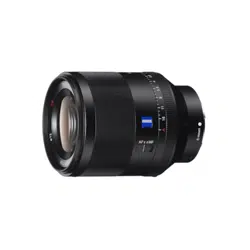
FE 50mm F1.4 ZA was developed
jointly by ZEISS and Sony Corporation and designed
for Sony E-mount cameras. This lens is produced
under the strict standards and quality assurance
system of ZEISS.
The Planar T FE 50mm F1.4 ZA is compatible with
the range of a 35mm format image sensor.
A camera equipped with a 35mm format image
sensor can be set to shoot at APS-C size.
For details on how to set your camera, refer to its
instruction manual.
For further information on compatibility, visit the
web site of Sony in your area, or consult your dealer
of Sony or local authorized service facility of Sony.
Notes on Use
When carrying a camera with the lens attached,
always firmly hold both the camera and the lens.
This lens is not water-proof, although designed with
dust-proofness and splash-proofness in mind. If using
in the rain etc., keep water drops away from the lens.
Precautions on using a flash
When using a flash, always remove the lens hood and
shoot at least 1 m (3.3 feet) away from your subject.
With certain combinations of lens and flash, the lens
may partially block the light of the flash, resulting in a
shadow at the bottom of the picture.
Vignetting
When using the lens, the corners of the screen
become darker than the center. To reduce this
phenomena (called vignetting), close the aperture by
1 to 2 stops.
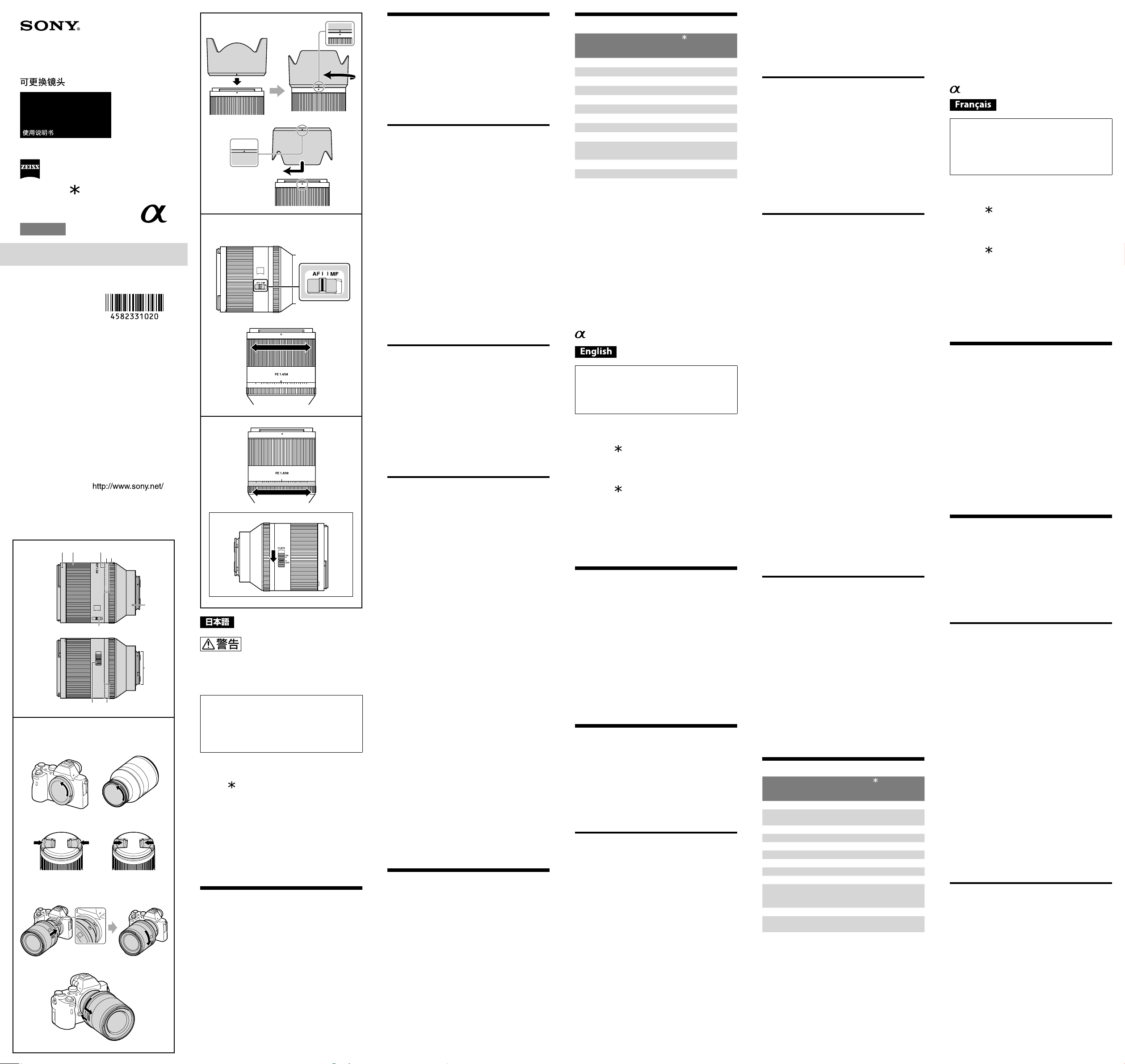
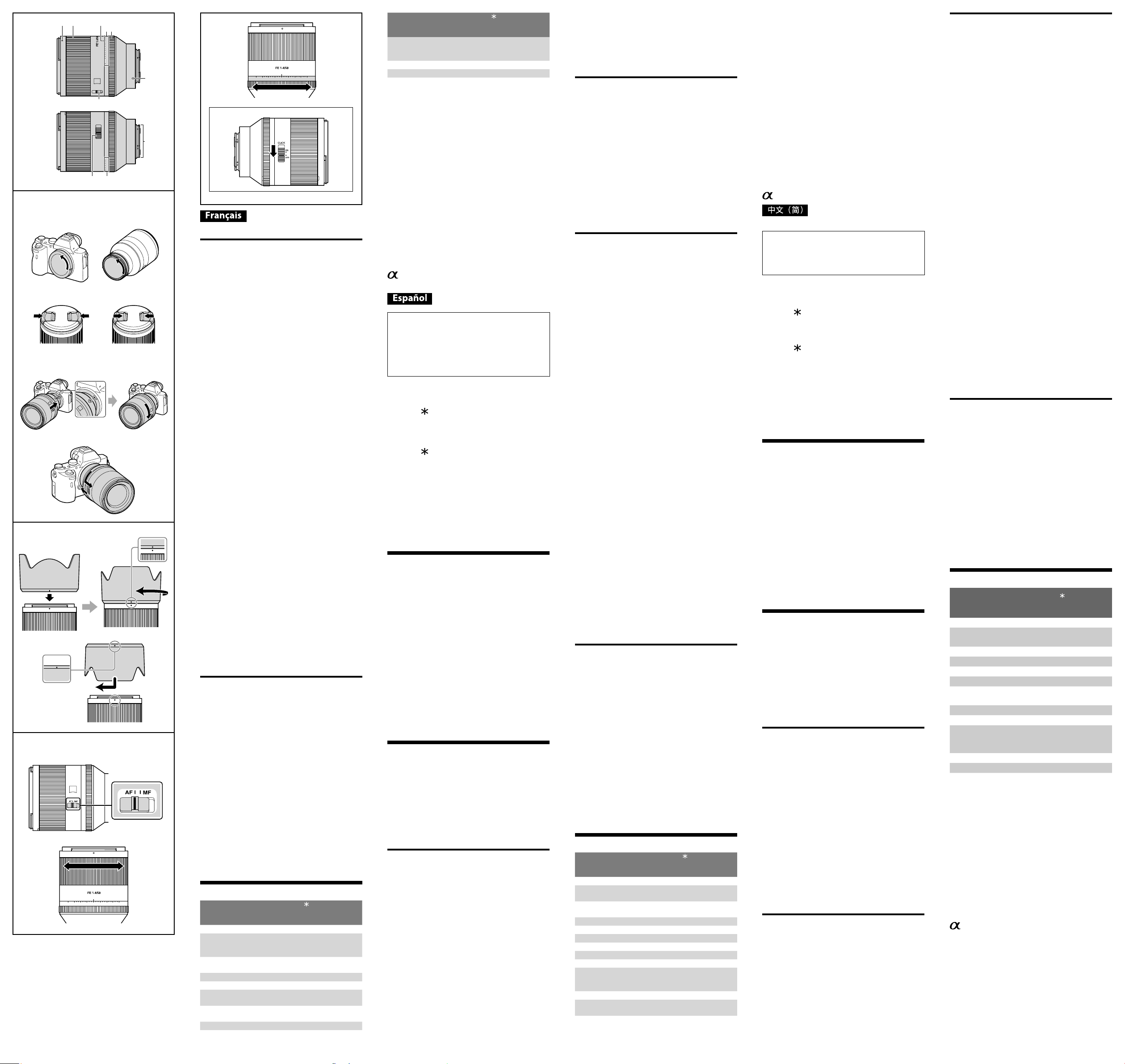
Identifying the Parts
1 Lens hood index
2 Focusing ring
3 Aperture index
4 Aperture scale
5 Aperture ring
6 Mounting index
7 Focus mode switch
8 Lens contacts*
9 Aperture click switch
* Do not touch the lens contacts.
Attaching and Detaching the
Lens
To attach the lens
(See illustration
–
.)
1
R
emove the rear and front lens caps and
the camera body cap.
You can attach/detach the front lens cap in two
ways, (1) and (2). When you attach/detach the
lens cap with the lens hood attached, use method
(2).
2
Align the white index on the lens barrel
with the white index on the camera
(mounting index), then insert the lens
into the camera mount and rotate it
clockwise until it locks.
Do not press the lens release button on the
camera when mounting the lens.
Do not mount the lens at an angle.
To remove the lens
(See illustration
–
.)
While holding down the lens release
button on the camera, rotate the lens
counterclockwise until it stops, then detach
the lens.
Attaching the Lens Hood
It is recommended that you use a lens hood to
reduce flare and ensure maximum image quality.
Align the red line on the lens hood with the
red dot on the lens (lens hood index), then
insert the lens hood into the lens mount and
rotate it clockwise until it clicks into place
and the red dot on the lens hood is aligned
with the red dot on the lens.
When using a built-in camera flash or an external
flash attached to the camera, remove the lens hood to
avoid blocking the flash light.
When storing, fit the lens hood onto the lens
backwards.
Focusing
There are three ways to focus.
Auto focus
The camera focuses automatically.
– Operating sounds may also be recorded during
movie recording.
DMF (Direct manual focus)
After the camera focuses in auto focus, you can
make a fine adjustment manually.
Manual focus
You focus manually.
For details on mode settings, refer to the instruction
manual supplied with the camera.
With some camera models, AF does not function
during movie recording.
For further information on compatibility, visit the
web site of Sony in your area, or consult your dealer
of Sony or local authorized service facility of Sony.
To switch AF (auto focus)/
MF (manual focus)
The focus mode can be switched between AF and
MF on the lens.
For AF photography, both the camera and lens
should be set to AF. For MF photography, either or
both the camera or lens should be set to MF.
To set the focus mode on the lens
Slide the focus mode switch to the
appropriate mode, AF or MF (1).
Refer to the camera manuals to set the focus mode of
the camera.
In MF, turn the focusing ring to adjust the focus (2)
while looking through the viewfinder, etc.
To use a camera equipped with an AF/MF
control button
By pressing the AF/MF control button during AF
operation, you can temporarily switch to MF.
Pressing the AF/MF control button during MF
operation lets you temporarily switch to AF if the lens
is set to AF and the camera to MF.
Adjusting the Aperture
When you align “A” on the aperture scale to the
aperture index, the camera is set to auto iris mode
and the aperture is set by the camera. And you
can adjust the aperture between f/1.4 and f/16 by
rotating the aperture ring.
Adjust the aperture manually
Rotate the aperture ring to the desired
aperture (f-stop) when the camera is set to
the M mode or A mode.
Notes
Set the aperture click switch to OFF when shooting
movies. (See illustration -a)
When the aperture click switch is set to OFF, the
sound of the aperture ring is reduced. (For movie
recording)
If you change the aperture value while shooting a
movie with the aperture click switch set to ON, the
sound of the aperture ring will be recorded.
Specifications
Product name
(Model name)
Planar T
FE 50mm
F1.4 ZA
(SEL50F14Z)
Focal length (mm) 50
35mm equivalent focal
length*
1
(mm)
75
Lens groups-elements 9-12
Angle of view 1*
2
47°
Angle of view 2*
2
32°
Minimum focus*
3
(m (feet)) 0.45 (1.48)
Maximum magnification (X) 0.15
Minimum aperture f/16
Filter diameter (mm) 72
Dimensions (maximum
diameter × height)
(approx., mm (in.))
83.5 × 10⁸
(3 3/8 × 4 3/8)
Mass (approx., g (oz)) 778 (27.5)
Shake compensation
function
No
*
1
This is the equivalent focal length in 35mm format
when mounted on an Interchangeable Lens Digital
Camera equipped with an APS-C sized image sensor.
*
2
Angle of view 1 is the value for 35mm cameras, and
angle of view 2 is the value for Interchangeable Lens
Digital Cameras equipped with an APS-C sized image
sensor.
*
3
Minimum focus is the distance from the image
sensor to the subject.
Depending on the lens mechanism, the focal length
may change with any change in shooting distance.
The focal lengths given above assume the lens is
focused at infinity.
(Suite à la page arrière)
4-582-331-02(1)
SEL50F14Z
交換レンズ
Interchangeable Lens
Objectif interchangeable
取扱説明書
Operating Instructions
Mode d’emploi
Manual de instrucciones
Planar T
FE 50mm
F1.4 ZA
E-mount
©2015 Sony Corporation
Printed in Thailand
Included items
(The number in parentheses indicates the number
of pieces.)
Lens (1), Front lens cap (1), Rear lens cap (1),
Lens hood (1), Lens case (1), Set of printed
documentation
Design and specifications are subject to change
without notice.
is a trademark of Sony Corporation.
Cette notice explique comment se servir des
objectifs. Les précautions communes à tous
les objectifs, par exemple les remarques sur
l’emploi, se trouvent sur la feuille « Précautions
avant toute utilisation ». Veuillez lire les deux
documents avant d’utiliser votre objectif.
Votre objectif est conçu pour les appareils photo à
monture E de type Sony α. Il ne peut pas être utilisé
pour les appareils photo à monture A.
Le Planar T
FE 50mm F1.4 ZA qui a été développé
en collaboration par ZEISS et Sony Corporation est
destiné aux appareils photo à monture E de Sony.
Cet objectif a été fabriqué selon les normes strictes
et le système d’assurance qualité de ZEISS.
Le Planar T FE 50mm F1.4 ZA est compatible avec
la plage d’un capteur d’image de format 35mm.
Un appareil photo équipé d’un capteur d’image de
format 35 mm peut être réglé pour la prise de vue
en APS-C.
Pour les détails sur la manière de régler l’appareil
photo, reportez-vous à son mode d’emploi.
Pour plus d’informations sur la compatibilité,
consultez le site de Sony de votre pays, ou
adressez-vous à un revendeur Sony ou à un service
après-vente agréé Sony.
Remarques sur l’emploi
Lorsque vous portez un appareil photo avec l’objectif
dessus, tenez toujours fermement l’appareil photo et
l’objectif.
Cet objectif n’est pas étanche à l’eau bien qu’il
soit conçu pour résister à la poussière et aux
éclaboussures. Si vous l’utilisez sous la pluie, etc.
veillez à ce que de l’eau ne tombe pas dessus.
Précautions concernant l’emploi d’un flash
Lorsque vous utilisez un flash, retirez toujours le
parasoleil et prenez vos photos à au moins 1 m
(3,3pieds) du sujet. Associé à certains types de flash,
l’objectif peut bloquer partiellement la lumière du
flash et produire un ombre au bas de l’image.
Vignetage
Lorsque l’objectif est utilisé, les coins de l’écran
deviennent plus sombres que le centre. Pour réduire
ce phénomène (appelé vignetage), fermez l’ouverture
de 1 ou 2 crans.
Identification des éléments
1 Repère de parasoleil
2 Bague de mise au point
3 Repère d’ouverture
4 Échelle d’ouverture
5 Bague d’ouverture
6 Repère de montage
7 Commutateur de mode de mise au point
8 Contacts d’objectif *
9 Commutateur d’encliquetage de l’ouverture
* Ne touchez pas les contacts d’objectif.
Pose et dépose de l’objectif
Pour poser l’objectif
(Voir l’illustration –.)
1
Déposez les capuchons d’objectif avant
et arrière et le capuchon de l’appareil
photo.
Vous pouvez poser et déposer les capuchons
d’objectif avant de deux façons, (1) et (2). Si vous
posez/déposez le capuchon d’objectif avec le
parasoleil, utilisez la méthode (2).
2
Alignez le repère blanc du barillet
d’objectif sur le repère blanc de l’appareil
photo (repère de montage), puis posez
l’objectif sur la monture de l’appareil
photo et tournez-le dans le sens horaire
de sorte qu’il s’encliquette.
N’appuyez pas sur le bouton de libération de
l’objectif sur l’appareil photo lorsque vous posez
l’objectif.
Ne posez pas l’objectif de biais.
Pour déposer l’objectif
(Voir l’illustration –.)
Tout en appuyant sur le bouton de libération
de l’objectif sur l’appareil photo, tournez
l’objectif dans le sens antihoraire jusqu’à
l’arrêt, puis déposez l’objectif.
Fixation du parasoleil
Il est conseillé d’utiliser un parasoleil pour réduire
la lumière parasite et obtenir la meilleure image
possible.
Alignez la ligne rouge du parasoleil sur
le point rouge de l’objectif (repère de
parasoleil), puis insérez le parasoleil sur
la monture d’objectif et tournez-le dans le
sens horaire jusqu’à ce qu’il s’encliquette et
le point rouge du parasoleil s’aligne sur le
point rouge de l’objectif.
Lorsque vous utilisez le flash intégré d’un appareil
photo ou un flash externe fixé à l’appareil photo,
retirez le parasoleil pour éviter de bloquer la lumière
du flash.
Pour ranger le parasoleil, insérez-le à l’arrière de
l’objectif.
–1
(1) (2)
–2
5.6
4
811
16
A
5.6 48
2.8
11
2
16
1.4
A
1 2
6
8
4
3
4
5
9
7
5.6 48 2.811
216
1.4A
(1)
(2)
5.6 48 2.811
216
1.4A
a
(Suite de la page précédente)
Mise au point
La mise au point peut être faite de trois façons.
Autofocus
L’appareil photo fait automatiquement la mise au
point.
– Les bruits de fonctionnement risquent également
d’être enregistrés pendant l’enregistrement de film.
DMF (Mise au point manuelle directe)
Après la mise au point en autofocus, vous pouvez
effectuer un réglage plus fin manuellement.
Mise au point manuelle
Vous faites vous-même la mise au point.
Pour le détail sur les réglages de mode, reportez-
vous au mode d’emploi fourni avec l’appareil photo.
Sur certains modèles d’appareil photo, AF ne
fonctionne pas lors de l’enregistrement de vidéos.
Pour plus d’informations sur la compatibilité,
consultez le site de Sony de votre pays, ou
adressez-vous à un revendeur Sony ou à un service
après-vente agréé Sony.
Pour commuter entre AF (mise au
point automatique) et MF (mise au
point manuelle)
Il est possible de régler le mode de mise au point
sur AF ou MF sur l’objectif.
Pour la photographie en mode AF, l’appareil photo
et l’objectif doivent être tous les deux réglés sur AF.
Pour la photographie en mode MF, l’appareil photo
ou l’objectif, ou bien les deux, doivent être réglés
sur MF.
Pour régler le mode de mise au point sur
l’objectif
Réglez le commutateur de mode de mise au
point sur le mode adapté, AF ou MF (1).
Reportez-vous aux manuels de l’appareil photo pour
régler le mode de mise au point sur l’appareil photo.
En mode MF, tournez la bague de mise au point pour
faire la mise au point (2) tout en regardant dans le
viseur, etc.
Pour utiliser un appareil photo pourvu
d’une touche de commande AF/MF
En appuyant sur la touche de commande AF/MF en
mode AF, vous pouvez provisoirement passer en
mode MF.
En appuyant sur la touche de commande AF/MF
en mode MF, vous pouvez provisoirement passer
en mode AF si l’appareil photo est réglé sur MF et
l’objectif sur AF.
Réglage de l’ouverture
Lorsque vous alignez « A » de l’échelle d’ouverture
sur le repère d’ouverture, l’appareil photo est réglé
en mode iris automatique et l’ouverture est réglée
par l’appareil photo. Vous pouvez régler l’ouverture
entre f/1,4 et f/16 en tournant la bague d’ouverture.
Réglage manuel de l’ouverture
Faites pivoter la bague d’ouverture sur
l’ouverture voulue (f-stop) lorsque l’appareil
photo est en mode M ou A.
Remarques
Réglez le commutateur d’encliquetage de
l’ouverture sur OFF lors de l’enregistrement de
vidéos. (Voir l’illustration -a.)
Lorsque le commutateur d’encliquetage de
l’ouverture est réglé sur OFF, le bruit émis par la
bague d’ouverture est réduit. (Pour l’enregistrement
de vidéos)
Si vous changez la valeur d’ouverture pendant
l’enregistrement d’une vidéo avec le commutateur
d’encliquetage de l’ouverture réglé sur ON, le bruit
émis par la bague d’ouverture sera enregistré.
Spécifications
Nom de produit
(Nom de modèle)
Planar T
FE 50mm
F1.4 ZA
(SEL50F14Z)
Longueur focale (mm) 50
Longueur focale
équivalente à 35 mm*
1
(mm)
75
Éléments-groupes de
lentilles
9-12
Angle de champ 1*
2
47°
Angle de champ 2*
2
32°
Mise au point minimale*
3
(m (pieds))
0,45 (1,48)
Grossissement maximal
(X)
0,15
Ouverture minimale f/16
Diamètre d’objectif (mm) 72
Nom de produit
(Nom de modèle)
Planar T
FE 50mm
F1.4 ZA
(SEL50F14Z)
Dimensions (diamètre
maximal × hauteur)
(environ, mm (po.))
83,5 × 10⁸
(3 3/8 × 4 3/8)
Poids (environ, g (oz)) 778 (27,5)
Fonction Antibougé Non
*
1
Longueur focale équivalente en format 35 mm
lorsque installé sur un appareil photo à objectif
interchangeable avec capteur d’image de taille
APS-C.
*
2
L’angle de vue 1 est la valeur correspondant aux
appareils photo 35 mm et l’angle de vue 2 est la
valeur corrspondant aux appareils photo à objectif
interchangeable équipés d’un capteur d’image APS-C.
*
3
La mise au point minimale est la distance du capteur
d’image au sujet.
Selon le mécanisme de l’objectif, la focale peut
changer lorsque la distance de prise de vue change.
Les focales indiquées ci-dessus présupposent que
l’objectif est réglé sur l’infini.
Articles inclus
(Le chiffre entre parenthèses indique le nombre
d’unités.)
Objectif (1), Capuchon d’objectif avant (1),
Capuchon d’objectif arrière (1), Parasoleil (1),
Boîtier d’objectif (1), Jeu de documents imprimés
La conception et les spécifications peuvent être
modifiées sans préavis.
est une marque commerciale de Sony
Corporation.
En este manual se explica cómo utilizar
objetivos. Las precauciones comunes a todos
los objetivos, como notas sobre la utilización,
se encuentran en las “Precauciones previas a
la utilización del producto” suministradas por
separado. Cerciórese de leer ambos documentos
antes de utilizar su objetivo.
Este objetivo está diseñado para cámaras con
montura E del sistema de cámaras α de Sony. No
podrá utilizarse con cámaras con montura A.
El Planar T
FE 50mm F1.4 ZA ha sido desarrollado
conjuntamente por ZEISS y Sony Corporation y
diseñado para cámaras con montura E Sony. Este
objetivo ha sido producido bajo las normas estrictas
y el sistema de aseguramiento de calidad de ZEISS.
El Planar T FE 50mm F1.4 ZA es compatible con
la gama de un sensor de imágenes de formato de
35 mm
Una cámara equipada con un sensor de imágenes
de formato de 35 mm puede establecerse para
fotografiar con tamaño APS-C.
Con respecto a los detalles sobre cómo configurar
su cámara, consulte su manual de instrucciones.
Para más información sobre compatibilidad, visite
el sitio Web de Sony de su área, o consulte a su
proveedor Sony o a un centro de servicio local
autorizado por Sony.
Notas sobre la utilización
Cuando transporte una cámara con el objetivo fijado,
sujete siempre firmemente tanto la cámara como el
objetivo.
Este objetivo no es impermeable, aunque se ha
diseñado teniendo en cuenta la resistencia al polvo
y a las salpicaduras. Si se utiliza bajo la lluvia, etc.,
mantenga las gotas de agua alejadas del objetivo.
Precauciones sobre la utilización de un
flash
Cuando utilice un flash quítele siempre el parasol del
objetivo y fotografíe alejado a 1 m por lo menos de
su motivo. Con ciertas combinaciones de objetivo y
flash, el objetivo puede bloquear parcialmente la luz
del flash, lo que resultará en una sombra en la parte
inferior de la fotografía.
Viñeteado
Si utiliza el objetivo, las esquinas de la pantalla se
vuelven más oscuras que el centro. Para reducir este
fenómeno (llamado viñeteado), cierre la apertura de
1a 2 puntos.
Identificación de las partes
1 Índice del parasol del objetivo
2 Anillo de enfoque
3 Índice de apertura
4 Escala de apertura
5 Anillo de apertura
6 Índice de montaje
7 Interruptor del modo de enfoque
8 Contactos del objetivo*
9 Interruptor de chasqueo de apertura
* No toque los contactos del objetivo.
Colocación y extracción del
objetivo
Para colocar el objetivo
(Consulte la ilustración –.)
1
Extraiga las tapas posterior y frontal
del objetivo y la tapa del cuerpo de la
cámara.
Usted podrá colocar/extraer la tapa frontal del
objetivo de dos formas, (1) y (2). Cuando coloque/
extraiga la tapa del objetivo con el parasol fijado,
utilice el método (2).
2
Alinee el índice blanco del barril del
objetivo con el índice blanco de la
cámara (índice de montaje), y después
inserte el objetivo en la montura de la
cámara y gírelo hacia la derecha hasta
que se bloquee.
No presione el botón de liberación del objetivo de
la cámara cuando monte el objetivo.
No monte el objetivo de forma inclinada.
Para extraer el objetivo
(Consulte la ilustración –.)
Manteniendo presionado el botón de
liberación del objetivo de la cámara, gire
el objetivo hacia la izquierda hasta que se
pare, y después extraiga el objetivo.
Colocación del parasol
Es recomendable utilizar un parasol para reducir
los reflejos y garantizar la máxima calidad de la
imagen.
Alinee la línea roja del parasol del objetivo
con el punto rojo del objetivo (índice del
parasol del objetivo), después inserte el
parasol del objetivo en la montura del
objetivo, y gírelo hacia la derecha hasta que
chasquee en su lugar y el punto rojo del
parasol del objetivo quede alineado con el
punto rojo del objetivo.
Cuando utilice un flash incorporado en la cámara o
un flash externo instalado en la cámara, extraiga el
parasol para evitar que se bloquee la luz del flash.
Cuando guarde la cámara, fije el parasol hacia atrás.
Enfoque
Existen tres formas de enfocar.
Enfoque automático
La cámara enfocará automáticamente.
– Los sonidos de operación también pueden grabarse
durante la grabación de pelícuas.
DMF (Enfoque manual directo)
Después de que la cámara enfoque
automáticamente, podrá realizar manualmente un
ajuste fino.
Enfoque manual
Usted enfocará manualmente.
Con respecto a los detalles sobre los ajustes
de modo, consulte el manual de instrucciones
suministrado con la cámara.
Con algunos modelos de cámaras, AF no funciona
durante la grabación de películas.
Para más información sobre compatibilidad, visite
el sitio Web de Sony de su área, o consulte a su
proveedor Sony o a un centro de servicio local
autorizado por Sony.
Para cambiar AF (enfoque
automático)/MF (enfoque manual)
El enfoque puede cambiarse entre AF y MF en el
objetivo.
Para fotografiar con AF, tanto la cámara como el
objetivo deberán ajustarse a AF. Para fotografiar
con MF, tanto la cámara como el objetivo deberán
ajustarse a MF.
Para ajustar el modo de enfoque en el
objetivo
Deslice el interruptor del modo de enfoque
hasta el modo apropiado, AF o MF (1).
Para ajustar el modo de enfoque de la cámara,
consulte los manuales de la cámara.
En MF, gire el anillo de enfoque mientras observe a
través del visor, etc., para ajustar el enfoque (2).
Para utilizar una cámara equipada con
botón de control AF/MF
Pulsando el botón de control AF/MF durante la
operación con AF, podrá cambiar temporalmente a
MF.
Pulsando el botón de control AF/MF durante la
operación con MF, podrá cambiar temporalmente a
AF si el objetivo está ajustado a AF y la cámara a MF.
Ajuste de la apertura
Cuando alinee “A” de la escala de apertura con el
índice de apertura, la cámara se establece en el
modo de iris automático y la apertura se ajusta
mediante la cámara. Y puede ajustar la apertura
entre f/1,4 y f/16 girando el anillo de apertura.
Ajuste manual de la apertura
Gire el anillo de apertura a la apertura
deseada (f-stop) cuando la cámara esté
ajustada al modo M o al modo A.
Notas
Cuando filme películas, ajuste el interruptor de
chasqueo de apertura a OFF. (Consulte la ilustración
-a)
Cuando el interruptor de chasqueo de apertura está
ajustado a OFF, el sonido del anillo de apertura se
reduce. (Para grabación de películas)
Si cambia el valor de apertura mientras filme una
película con el interruptor de chasqueo de apertura
en ON, se grabará el sonido del anillo de apertura.
Especificaciones
Nombre del producto
(Nombre del modelo)
Planar T
FE 50mm
F1.4 ZA
(SEL50F14Z)
Distancia focal (mm) 50
Distancia focal equivalente
a 35 mm*
1
(mm)
75
Grupos y elementos del
objetivo
9-12
Ángulo de visión 1*
2
47°
Ángulo de visión 2*
2
32°
Enfoque mínimo*
3
(m) 0,45
Ampliación máxima (X) 0,15
Apertura mínima f/16
Diámetro del filtro (mm) 72
Dimensiones (diámetro
máximo × altura)
(Aprox., mm)
83,5 × 10⁸
Peso (Aprox., g) 778
Función de compensación
de sacudidas
No
*
1
Esta es la distancia focal equivalente al formato de
35mm cuando se monta en una cámara digital de
lentes intercambiables equipada con un sensor de
imágenes de tamaño APS-C.
*
2
El ángulo de visión 1 es el valor para cámaras de
formato de 35 mm, y el ángulo de visión 2 es el valor
para cámaras digitales de lentes intercambiables
equipadas con un sensor de imágenes de tamaño
APS-C.
*
3
El enfoque mínimo es la distancia desde el sensor de
imágenes al motivo.
En función del mecanismo del objetivo, es posible
que la distancia focal varíe si la distancia de toma
de imagen también lo hace. Las distancias focales
indicadas arriba asumen que el objetivo está
enfocado al infinito.
Elementos incluidos
(El número entre paréntesis indica el número de
piezas.)
Objetivo (1), Tapa frontal del objetivo (1),
Tapa posterior del objetivo (1), Parasol (1),
Funda del objetivo (1), Juego de documentación
impresa
El diseño y las especificaciones están sujetos a
cambios sin previo aviso.
es marca comercial de Sony Corporation.
保留备用
本说明书介绍镜头的用法。有关所有镜头
的一般注意事项(如使用须知)可以在另
外的“使用前注意事项”中找到。务必在
使用镜头前阅读以上两份文件。
本镜头是专为 Sony α 相机中的 E 卡口系统
相机而设计的。不能将其用于 A 卡口系统相
机。
Planar T
FE 50mm F1.4 ZA 由 ZEISS 和
Sony Corporation 共同研发,设计用于 Sony
E 卡口系统相机。本镜头是按照 ZEISS 的严格
标准以及质量保证系统制造而成。
Planar T
FE 50mm F1.4 ZA 与 35mm 规
格的图像传感器系列兼容。 配备 35mm 规格
图像传感器的相机可设定为以 APS-C 尺寸进
行拍摄。
有关如何设定相机的详情,请参阅相机的使用
说明书。
有关兼容性的详细信息,请访问所在地区的
Sony 网站,或者咨询您的 Sony 经销商或当
地的 Sony 授权服务机构。
使用须知
当在装有镜头的情况下携带相机时,请务必
同时握紧相机和镜头。
尽管本镜头采用了防尘和防溅水设计,但不
具备防水性能。在雨中等环境下使用时,应
确保镜头远离水滴。
闪光灯使用注意事项
使用闪光灯时,请务必取下镜头遮光罩,并
在距离拍摄物体至少 1 m 的地方拍摄。使用
镜头/闪光灯的某种组合时,镜头可能会遮
住闪光灯的部分亮光,从而造成图片的底部
出现阴影。
晕影
使用镜头时,屏幕的角落要比其中心暗。为
避免这种现象(周边暗角),请将光圈缩小
1 ~ 2 级。
部件识别
1 镜头遮光罩标记
2 对焦环
3 光圈标记
4 光圈刻度
5 光圈环
6 安装标记
7 对焦模式开关
8 镜头接点*
9 光圈点按开关
* 请勿触摸镜头接点。
安装/拆下镜头
安装镜头(参见插图 –。)
1
拆下前、后镜头盖和相机机身罩。
可以用 (1) 和 (2) 两种方式安装/拆下前
镜头盖。在不取下镜头遮光罩的情况下
安装/拆下镜头盖时,请使用方法 (2)。
2
将镜筒上的白色标记与相机上的白色
标记(安装标记)对准,然后将镜头
插入相机安装部位并顺时针旋转,直
至镜头锁紧。
请勿在安装镜头时按相机上的镜头释放
按钮。
请勿倾斜安装镜头。
拆下镜头 (参见插图 –。)
按住相机上的镜头释放按钮,逆时针转动
镜头直至其停止,然后拆下镜头。
安装镜头遮光罩
建议使用镜头遮光罩以减少反光,从而确保最
佳画质。
将镜头遮光罩上的红线与镜头上的红点
(镜头遮光罩标记)对准,然后将镜头遮
光罩插入镜头安装部位并顺时针旋转,直
至其咔哒一声就位,且镜头遮光罩上的红
点与镜头上的红点对准。
使用内置相机闪光灯或使用相机上安装的外
部闪光灯时,请取下镜头遮光罩,以免遮住
闪光灯的亮光。
存放时,请将镜头遮光罩倒过来放在镜头
上。
对焦
对焦方式有三种。
自动对焦
相机将自动进行对焦。
– 在电影拍摄期间,还可能会录下操作音。
DMF(直接手动对焦)
在相机完成自动对焦后,可以对其进行手动
微调。
手动对焦
通过手动方式进行对焦。
有关模式设定的详情,请参阅相机随附的使用
说明书。
对于某些型号的相机而言,在电影拍摄期间无
法使用 AF 功能。
有关兼容性的详细信息,请访问所在地区的
Sony 网站,或者咨询您的 Sony 经销商或当
地的 Sony 授权服务机构。
切换 AF(自动对焦)/
MF(手动对焦)
在镜头上,可以在 AF 和 MF 之间切换对焦
模式。
进行 AF 拍摄时,相机和镜头均应设定为
AF。 进行 MF 拍摄时,相机或镜头之一或者
相机和镜头两者应设定为 MF。
在镜头上设定对焦模式
将对焦模式开关滑到相应模式:AF 或
MF (1)。
有关相机的对焦模式设定,请参阅相机的说
明书。
在 MF 模式下,在通过取景器等观察的同
时,转动对焦环调整对焦 (2)。
使用具有 AF/MF 控制按钮的相机
在 AF 操作过程中按 AF/MF 控制按钮,可
临时切换为 MF。
如果镜头设定为 AF 而相机设定为 MF,则
在 MF 操作过程中按 AF/MF 控制按钮可临
时切换为 AF。
调整光圈
当将光圈刻度上的“A”与光圈标记对准时,
相机被设为自动光圈模式,此时光圈由相机设
定。 通过旋转光圈环,可以在 f/1.4 和 f/16
之间调整光圈。
手动调整光圈
当相机设定为 M 模式或 A 模式时,请将
光圈环旋转至所需的光圈(光圈值)。
注意
拍摄电影时,请将光圈点按开关设定为 OFF
(参见插图 -a)。
将光圈点按开关设定为 OFF 时,可以减小光
圈环的声音(适合电影拍摄)。
在光圈点按开关设定为 ON 的情况下拍摄电
影时,如果改变光圈值,就会录下光圈环的
声音。
规格
产品名称
(型号名称)
Planar T
FE
50mm F1.4 ZA
(SEL50F14Z)
焦距 (mm) 50
相当于 35mm 规格
焦距*
1
(mm)
75
镜头组-片 9-12
视角 1*
2
47°
视角 2*
2
32°
最小对焦*
3
(m) 0.45
最大放大倍数
(倍)
0.15
最小光圈 f/16
滤光镜直径 (mm) 72
尺寸
(最大直径×长)
(约 mm)
83.5 × 10⁸
质量(约 g) 778
震动补偿功能 无
*
1
此为当镜头安装在配备 APS-C 尺寸图像传
感器的可更换镜头数码相机上时,相当于
35mm 规格的焦距。
*
2
视角 1 的值针对 35mm 相机,而视角 2 的
值针对配备 APS-C 尺寸图像传感器的可更
换镜头数码相机。
*
3
最小对焦是从图像传感器至物体的距离。
视镜头结构而异,焦距可能会随拍摄距离的
改变而变化。假设镜头对焦在无限远处。
所含物品
(括号中的数字代表件数。)
镜头 (1)、前镜头盖 (1)、后镜头盖 (1)、
镜头遮光罩 (1)、镜头袋 (1)、成套印刷文件
设计或规格如有变动,恕不另行通知。
是 Sony Corporation 的商标。
保留备用
本说明书介绍镜头的用法。有关所有镜头
的一般注意事项(如使用须知)可以在另
外的“使用前注意事项”中找到。务必在
使用镜头前阅读以上两份文件。
本镜头是专为 Sony α 相机中的 E 卡口系统
相机而设计的。不能将其用于 A 卡口系统相
机。
Planar T
FE 50mm F1.4 ZA 由 ZEISS 和
Sony Corporation 共同研发,设计用于 Sony
E 卡口系统相机。本镜头是按照 ZEISS 的严格
标准以及质量保证系统制造而成。
Planar T
FE 50mm F1.4 ZA 与 35mm 规
格的图像传感器系列兼容。 配备 35mm 规格
图像传感器的相机可设定为以 APS-C 尺寸进
行拍摄。
有关如何设定相机的详情,请参阅相机的使用
说明书。
有关兼容性的详细信息,请访问所在地区的
Sony 网站,或者咨询您的 Sony 经销商或当
地的 Sony 授权服务机构。
使用须知
当在装有镜头的情况下携带相机时,请务必
同时握紧相机和镜头。
尽管本镜头采用了防尘和防溅水设计,但不
具备防水性能。在雨中等环境下使用时,应
确保镜头远离水滴。
闪光灯使用注意事项
使用闪光灯时,请务必取下镜头遮光罩,并
在距离拍摄物体至少 1 m 的地方拍摄。使用
镜头/闪光灯的某种组合时,镜头可能会遮
住闪光灯的部分亮光,从而造成图片的底部
出现阴影。
晕影
使用镜头时,屏幕的角落要比其中心暗。为
避免这种现象(周边暗角),请将光圈缩小
1 ~ 2 级。
部件识别
1 镜头遮光罩标记
2 对焦环
3 光圈标记
4 光圈刻度
5 光圈环
6 安装标记
7 对焦模式开关
8 镜头接点*
9 光圈点按开关
* 请勿触摸镜头接点。
安装/拆下镜头
安装镜头(参见插图 –。)
1
拆下前、后镜头盖和相机机身罩。
可以用 (1) 和 (2) 两种方式安装/拆下前
镜头盖。在不取下镜头遮光罩的情况下
安装/拆下镜头盖时,请使用方法 (2)。
2
将镜筒上的白色标记与相机上的白色
标记(安装标记)对准,然后将镜头
插入相机安装部位并顺时针旋转,直
至镜头锁紧。
请勿在安装镜头时按相机上的镜头释放
按钮。
请勿倾斜安装镜头。
拆下镜头 (参见插图 –。)
按住相机上的镜头释放按钮,逆时针转动
镜头直至其停止,然后拆下镜头。
安装镜头遮光罩
建议使用镜头遮光罩以减少反光,从而确保最
佳画质。
将镜头遮光罩上的红线与镜头上的红点
(镜头遮光罩标记)对准,然后将镜头遮
光罩插入镜头安装部位并顺时针旋转,直
至其咔哒一声就位,且镜头遮光罩上的红
点与镜头上的红点对准。
使用内置相机闪光灯或使用相机上安装的外
部闪光灯时,请取下镜头遮光罩,以免遮住
闪光灯的亮光。
存放时,请将镜头遮光罩倒过来放在镜头
上。
对焦
对焦方式有三种。
自动对焦
相机将自动进行对焦。
– 在电影拍摄期间,还可能会录下操作音。
DMF(直接手动对焦)
在相机完成自动对焦后,可以对其进行手动
微调。
手动对焦
通过手动方式进行对焦。
有关模式设定的详情,请参阅相机随附的使用
说明书。
对于某些型号的相机而言,在电影拍摄期间无
法使用 AF 功能。
有关兼容性的详细信息,请访问所在地区的
Sony 网站,或者咨询您的 Sony 经销商或当
地的 Sony 授权服务机构。
切换 AF(自动对焦)/
MF(手动对焦)
在镜头上,可以在 AF 和 MF 之间切换对焦
模式。
进行 AF 拍摄时,相机和镜头均应设定为
AF。 进行 MF 拍摄时,相机或镜头之一或者
相机和镜头两者应设定为 MF。
在镜头上设定对焦模式
将对焦模式开关滑到相应模式:AF 或
MF (1)。
有关相机的对焦模式设定,请参阅相机的说
明书。
在 MF 模式下,在通过取景器等观察的同
时,转动对焦环调整对焦 (2)。
使用具有 AF/MF 控制按钮的相机
在 AF 操作过程中按 AF/MF 控制按钮,可
临时切换为 MF。
如果镜头设定为 AF 而相机设定为 MF,则
在 MF 操作过程中按 AF/MF 控制按钮可临
时切换为 AF。
调整光圈
当将光圈刻度上的“A”与光圈标记对准时,
相机被设为自动光圈模式,此时光圈由相机设
定。 通过旋转光圈环,可以在 f/1.4 和 f/16
之间调整光圈。
手动调整光圈
当相机设定为 M 模式或 A 模式时,请将
光圈环旋转至所需的光圈(光圈值)。
注意
拍摄电影时,请将光圈点按开关设定为 OFF
(参见插图 -a)。
将光圈点按开关设定为 OFF 时,可以减小光
圈环的声音(适合电影拍摄)。
在光圈点按开关设定为 ON 的情况下拍摄电
影时,如果改变光圈值,就会录下光圈环的
声音。
规格
产品名称
(型号名称)
Planar T FE
50mm F1.4 ZA
(SEL50F14Z)
焦距 (mm) 50
相当于 35mm 规格
焦距*
1
(mm)
75
镜头组-片 9-12
视角 1*
2
47°
视角 2*
2
32°
最小对焦*
3
(m) 0.45
最大放大倍数
(倍)
0.15
最小光圈 f/16
滤光镜直径 (mm) 72
尺寸
(最大直径×长)
(约 mm)
83.5 × 10⁸
质量(约 g) 778
震动补偿功能 无
*
1
此为当镜头安装在配备 APS-C 尺寸图像传
感器的可更换镜头数码相机上时,相当于
35mm 规格的焦距。
*
2
视角 1 的值针对 35mm 相机,而视角 2 的
值针对配备 APS-C 尺寸图像传感器的可更
换镜头数码相机。
*
3
最小对焦是从图像传感器至物体的距离。
视镜头结构而异,焦距可能会随拍摄距离的
改变而变化。假设镜头对焦在无限远处。
所含物品
(括号中的数字代表件数。)
镜头 (1)、前镜头盖 (1)、后镜头盖 (1)、
镜头遮光罩 (1)、镜头袋 (1)、成套印刷文件
设计或规格如有变动,恕不另行通知。
是 Sony Corporation 的商标。