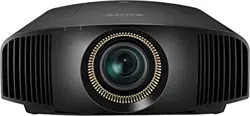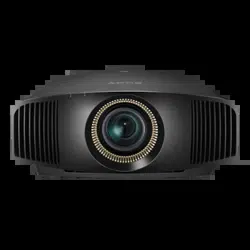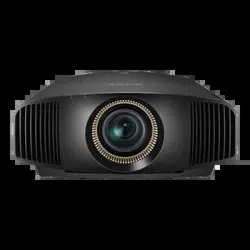
VPL-VW715ES
VPL-VW715ES
5-022-948-11
(
1
)
M:\186-PC173\Win XP ML Acr7.0\5022948111_VPL-VW715ES_GB-
FR\5022948111\5022948111VPLVW695ESUC7\01GB-
VPLVW695UC7\010COV.fm
masterpage:Back
Cover
5-022-948-11 (1)
Video
Projector
Quick Reference Manual ____________ GB
Guide de référence rapide __________ FR
VPL-VW715ES
5-022-948-11
(
1
)
M:\186-PC173\Win XP ML Acr7.0\5022948111_VPL-VW715ES_GB-
FR\5022948111\5022948111VPLVW695ESUC7\01GB-
VPLVW695UC7\050BCO.fm
masterpage:Back
Cover
© 2020 Sony Corporation
Printed in China
GB
2
This Quick Reference Manual explains the installation and basic operations for projecting
pictures. It also describes important notes and cautions to which you have to pay attention when
handling and using this unit.
Refer to “Warning Indicators” and “Replacing the Lamp,” as necessary.
For details on the operations, refer to the Operating Instructions contained in the supplied CD-
ROM.
About the Quick Reference Manual
Preparing ....................................................Page 9
Installing the Unit..................................Page 10
Connecting the Unit.............................Page 12
Selecting the Menu Language........Page 13
Projecting..................................................Page 14
Error Handling
Warning Indicators.........................................Page 16
Maintenance
Replacing the Lamp .......................................Page 17
Step 1
Step 2
Step 3
Step 4
Step 5
3
GB
Before operating the unit, please read this
manual thoroughly and retain it for future
reference.
When using the product, do not use it for
purposes other than those described in the
instruction manual.
WARNING
To reduce the risk of fire or electric
shock, do not expose this apparatus
to rain or moisture.
To avoid electrical shock, do not open
the cabinet. Refer servicing to
qualified personnel only.
WARNING
This apparatus must be earthed.
WARNING
When installing the unit, incorporate a
readily accessible disconnect device in the
fixed wiring, or connect the power plug to an
easily accessible socket-outlet near the unit.
If a fault should occur during operation of
the unit, operate the disconnect device to
switch the power supply off, or disconnect
the power plug.
CAUTION
For safety, do not connect the connector for
peripheral device wiring that might have
excessive voltage to the following port:
LAN connector
WARNING
1. Use the approved Power Cord (3-core
mains lead) / Appliance Connector / Plug
with earthing-contacts that conforms to
the safety regulations of each country if
applicable.
2. Use the Power Cord (3-core mains lead) /
Appliance Connector / Plug conforming
to the proper ratings (Voltage, Ampere).
If you have questions on the use of the above
Power Cord / Appliance Connector / Plug,
please consult a qualified service personnel.
CAUTION
- Danger of explosion if battery is
incorrectly replaced. Replace only with
the same or equivalent type recommended
by the manufacturer.
- When you dispose of the battery or the
product, you must obey the law in the
corresponding area or country. Do not
dispose of the battery or the product in a
fire or a hot oven, or mechanically crush
or cut the battery. It may explode or cause
a fire. Do not subject the battery to
extremely low air pressure that may result
in an explosion or the leakage of
flammable liquid or gas.
- Do not place the battery in a high
temperature place, such as under direct
sunlight or near fire. It may ignite,
explode, or cause a fire. Do not immerse
or wet the battery in water or seawater.
This may cause an electric shock.
CAUTION
The following size and number of batteries
are required for the remote control.
•Size AA (R6)
•Two
To avoid risk of explosion, use only the
following type of battery.
• Size AA (R6) manganese or alkaline
batteries
About 3D Glasses
The 3D Glasses communicate with the
projector via Bluetooth technology to
display 3D signals.
(a) frequency band(s) in which the radio
equipment operates:
2.4 - 2.4835 GHz
(b) maximum radio-frequency power
transmitted in the frequency band(s) in
which the radio equipment operates:
4.30 dBm (E.I.R.P.)
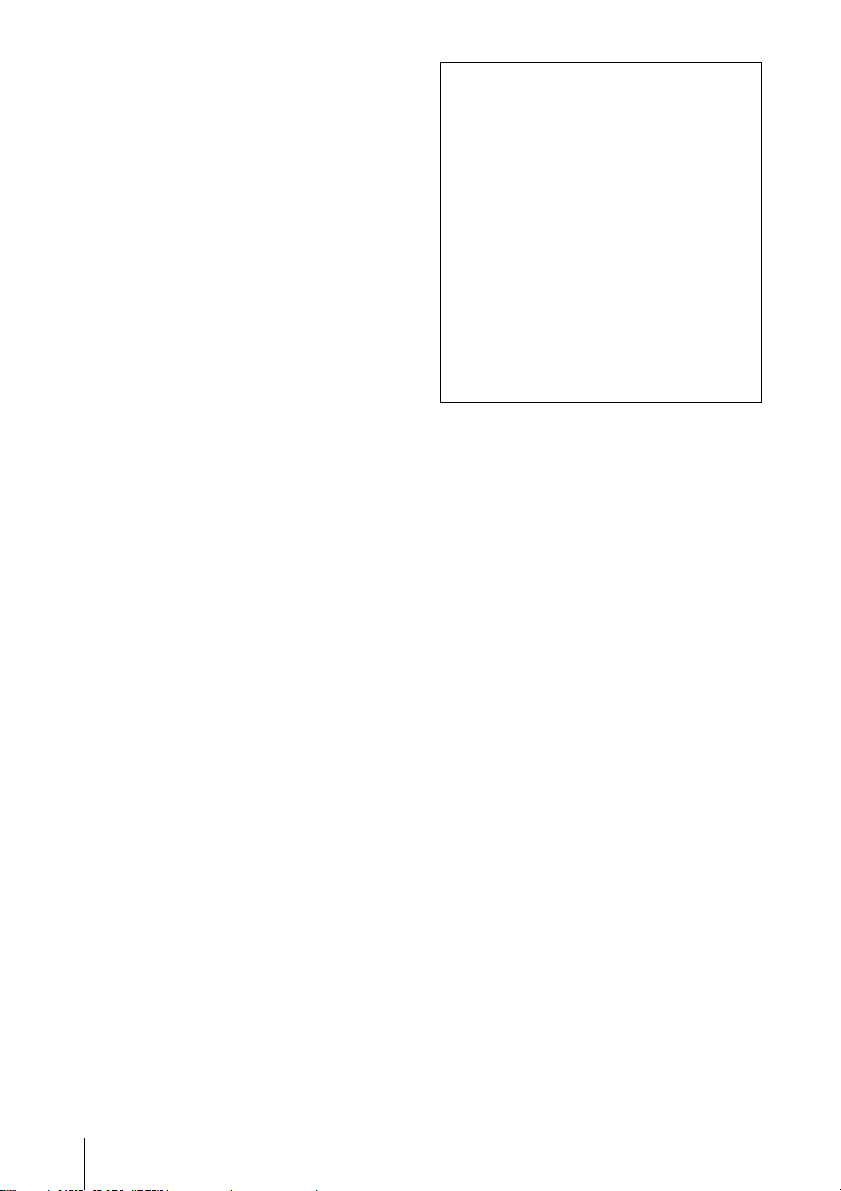
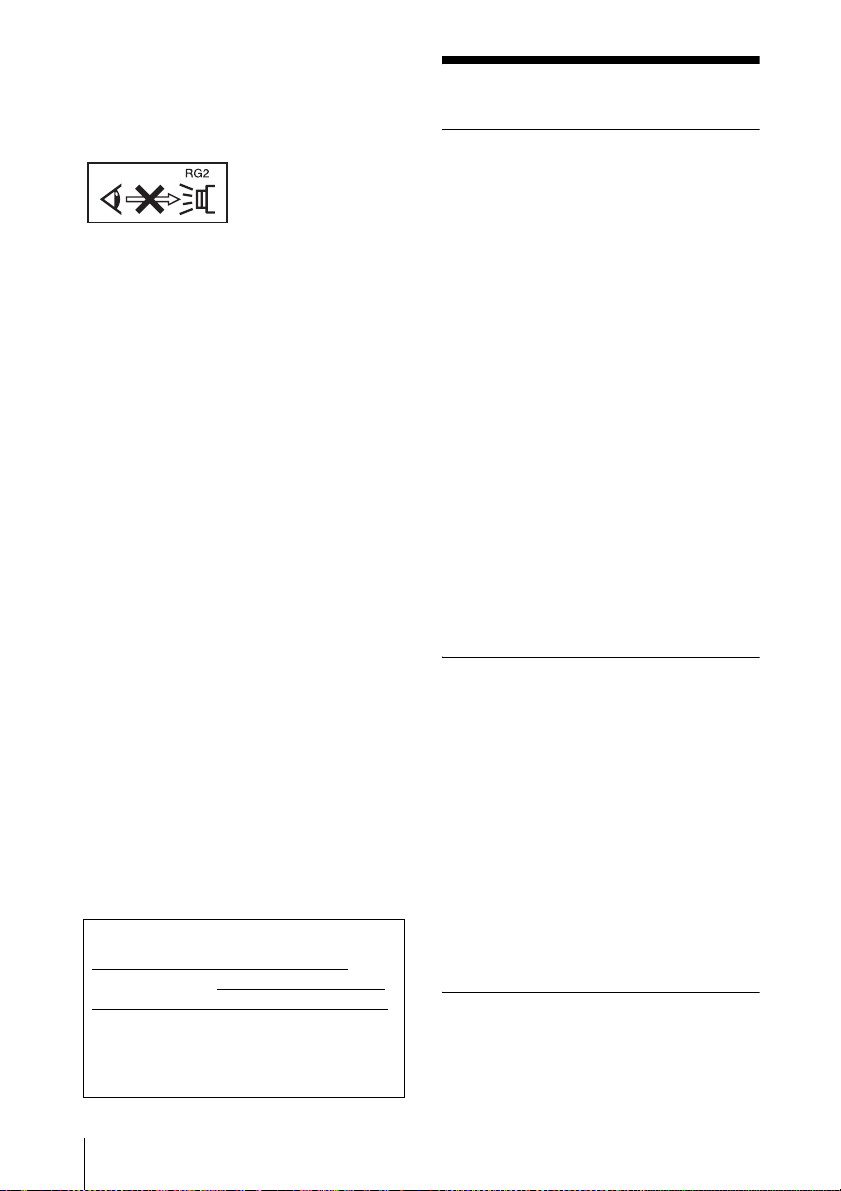
As with any bright
light source, do not
stare into the beam,
RG2 IEC 62471-5:
2015.
GB
English
GB
4
For the customers in the U.S.A.
This equipment has been tested and found to
comply with the limits for a Class B digital
device, pursuant to part 15 of the FCC Rules.
These limits are designed to provide
reasonable protection against harmful
interference in a residential installation. This
equipment generates, uses and can radiate
radio frequency energy and, if not installed
and used in accordance with the instructions,
may cause harmful interference to radio
communications. However, there is no
guarantee that interference will not occur in
a particular installation. If this equipment
does cause harmful interference to radio or
television reception, which can be
determined by turning the equipment off and
on, the user is encouraged to try to correct
the interference by one or more of the
following measures:
- Reorient or relocate the receiving antenna.
- Increase the separation between the
equipment and receiver.
- Connect the equipment into an outlet on a
circuit different from that to which the
receiver is connected.
- Consult the dealer or an experienced
radio/TV technician for help.
You are cautioned that any changes or
modifications not expressly approved in this
manual could void your authority to operate
this equipment.
All interface cables used to connect
peripherals must be shielded in order to
comply with the limits for a digital device
pursuant to Subpart B of part 15 of FCC
Rules.
If you have any questions about this product,
you may call;
Sony Customer Information Service Center
1-800-222-7669 or http://www.sony.com/
This transmitter must not be co-located or
operating in conjunction with any other
antenna or transmitter.
For the customers in Canada
This device complies with Industry
Canada’s applicable licence-exempt RSSs.
Operation is subject to the following two
conditions:
(1) This device may not cause interference;
and
(2) This device must accept any interference,
including interference that may cause
undesired operation of the device.
For the customers in the U.S.A. and
Canada
Radiated Exposure Statement:
The product complies with the US/Canadian
portable RF exposure limit set forth for an
uncontrolled environment and is safe for
intended operation as described in this
manual. The further RF exposure reduction
can be achieved if the product can be kept as
far as possible from the user body or if the
device is set to lower output power if such
function is available.
For the customers in Canada
CAN ICES-3 (B)/NMB-3(B)
Supplier’s Declaration of Conformity
Trade Name: SONY
Model: VPL-VW715ES
Responsible party: Sony Electronics Inc.
Address: 16535 Via Esprillo,
San Diego, CA 92127
U.S.A.
Telephone Number:858-942-2230
This device complies with part 15 of the
FCC Rules. Operation is subject to the
following two conditions: (1) This device
may not cause harmful interference, and
(2) this device must accept any interference
received, including interference that may
cause undesired operation.
5
GB
Precautions
On safety
• Check that the operating voltage of your
unit is identical with the voltage of your
local power supply.
• Should any liquid or solid object fall into
the cabinet, unplug the unit and have it
checked by qualified personnel before
operating it further.
• Unplug the unit from the wall outlet if it is
not to be used for several days.
• To disconnect the cord, pull it out by the
plug. Never pull the cord itself.
• The wall outlet should be near the unit and
easily accessible.
• The unit is not disconnected to the AC
power source (mains) as long as it is
connected to the wall outlet, even if the
unit itself has been turned off.
• Do not look into the lens while the lamp is
on.
• Do not place your hand or objects near the
ventilation holes. The air coming out is
hot.
On preventing internal heat build-
up
After you turn off the power with the ?/1
(ON/STANDBY) button, do not disconnect
the unit from the wall outlet while the
cooling fan is still running.
Caution
This unit is equipped with ventilation holes
(intake) and ventilation holes (exhaust). Do
not block or place anything near these holes,
or internal heat build-up may occur, causing
picture degradation or damage to the unit.
On repacking
Save the original shipping carton and
packing material; they will come in handy if
you ever have to ship your unit. For
maximum protection, repack your unit as it
was originally packed at the factory.
For the customers in the U.S.A.
SONY LIMITED WARRANTY
- Please
visit http://www.sony.com/psa/warranty
for important information and complete
terms and conditions of Sony’s limited
warranty applicable to this product.
For the customers in Canada
SONY LIMITED WARRANTY
- Please
visit http://www.sonybiz.ca/pro/lang/en/
ca/article/resources-warranty for
important information and complete
terms and conditions of Sony’s limited
warranty applicable to this product.
For the customers in Europe
Sony Professional Solutions Europe -
Standard Warranty and Exceptions on
Standard Warranty.
Please visit https://pro.sony/en_GB/
support-services/warranty/support-
professional-solutions-europe-standard-
product-warranty for important
information and complete terms and
conditions.
For the customers in Korea
SONY LIMITED WARRANTY
- Please
visit http://bpeng.sony.co.kr/handler/
BPAS-Start for important information
and complete terms and conditions of
Sony’s limited warranty applicable to this
product.
GB
6
On watching 3D video images
Safety precautions
• You should only use the 3D glasses for
watching 3D video images.
• If you observe flickering or flashing, turn
off the lighting in the room.
• Not for use by children without proper
adult supervision.
• Be careful not to pinch your fingers in
hinges of the 3D glasses when bending the
temple frames.
• Do not drop or modify these 3D glasses.
• If these glasses are broken, keep broken
pieces away from your mouth or eyes.
On LCD Projector
The LCD projector is manufactured using
high-precision technology. You may,
however, see tiny black points and/or bright
points (red, blue, or green) that continuously
appear on the LCD projector. This is a
normal result of the manufacturing process
and does not indicate a malfunction.
Also, when you use multiple LCD projectors
to project onto a screen, even if they are of
the same model, the color reproduction
among projectors may vary, since color
balance may be set differently from one
projector to the next.
On condensation
If the room temperature where the projector
is installed changes rapidly, or if the
projector is moved suddenly from a cold to a
warm place, condensation in the projector
may occur. As the condensation may cause
malfunction, be careful in adjusting
temperature settings of the air conditioner. If
condensation occurs, leave the projector
turned on for about two hours before use.
Notes on security
• SONY WILL NOT BE LIABLE FOR
DAMAGES OF ANY KIND
RESULTING FROM A FAILURE TO
IMPLEMENT PROPER SECURITY
MEASURES ON TRANSMISSION
DEVICES, UNAVOIDABLE DATA
LEAKS RESULTING FROM
TRANSMISSION SPECIFICATIONS,
OR SECURITY PROBLEMS OF ANY
KIND.
• Depending on the operating environment,
unauthorized third parties on the network
may be able to access the unit. When
connecting the unit to the network, be sure
to confirm that the network is protected
securely.
• From a safety standpoint, when using the
unit connected with the network, it is
strongly recommended to access the
Control window via a Web browser and
change the access limitation settings from
the factory preset values (refer to “Using
Network Features” in the Operating
Instructions).
Changing the password regularly is also
recommended.
• Do not browse any other website in the
Web browser while making settings or
after making settings. Since the login
status remains in the Web browser, close
the Web browser when you complete the
settings to prevent unauthorized third
parties from using the unit or harmful
programs from running.
Do not place this product close to
medical devices
This product (including accessories) has
magnet(s) which may interfere with
pacemakers, programmable shunt valves for
hydrocephalus treatment, or other medical
devices. Do not place this product close to
persons who use such medical devices.
Consult your doctor before using this
product if you use any such medical device.
SONY WILL NOT BE LIABLE FOR
DAMAGES OF ANY KIND
RESULTING FROM THE USE OF
THIS UNIT FOR PURPOSES OTHER
THAN GENERAL HOME USE,
EITHER DURING THE WARRANTY
PERIOD OR AFTER EXPIRATION OF
THE WARRANTY.

7
GB
Notes on Installation
and Usage
Do not place the unit in the following
situations, which may cause malfunction or
damage to the unit.
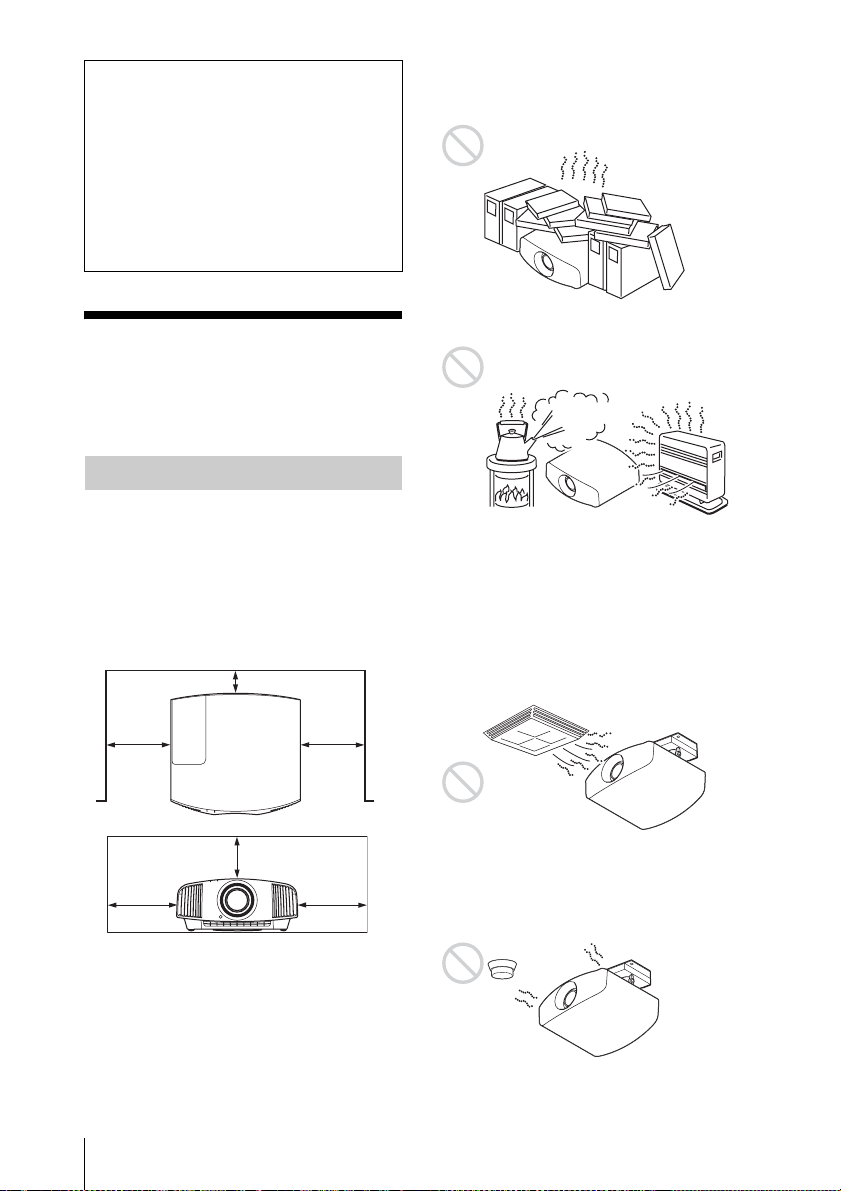
Near walls
To maintain the performance and reliability
of the unit, leave space between walls and
the unit as illustrated.
Air from air conditioners or the ventilation
holes of this unit or other devices, may cause
oscillation on the screen. Be sure not to
install this unit in the area where the air from
air conditioners or the ventilation holes of
these devices reach to the front side of this
unit.
Poorly ventilated location
Leave space of more than 30 cm (11
7
/
8
inches) around the unit.
Hot and humid
Locations subject to direct cool or
warm air from an air-conditioner
Installing the unit in such a location may
cause a malfunction of the unit due to
moisture condensation or rise in
temperature.
Near a heat or smoke sensor
Malfunction of the sensor may occur.
Very dusty and extremely smoky
locations
Do not do any of the following while using
the unit.
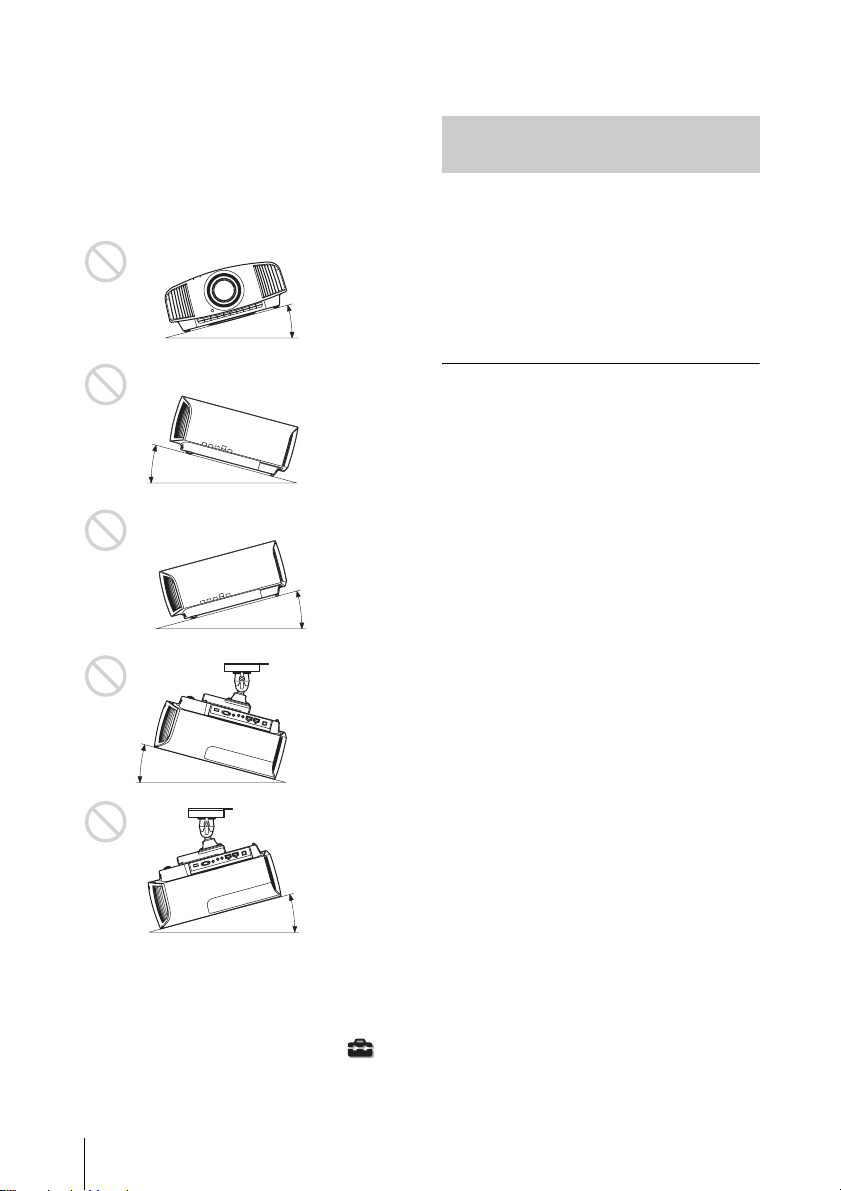
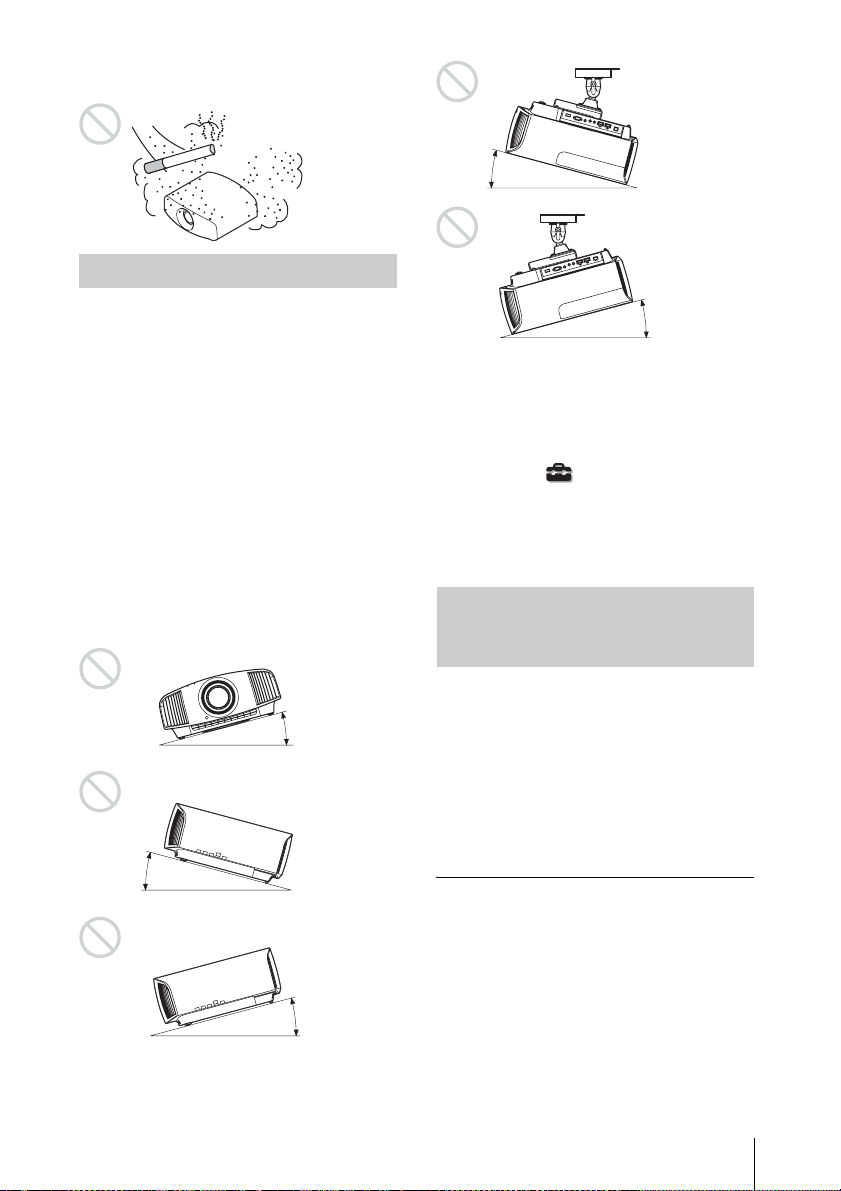
Tilting front/rear and left/right
Avoid using the unit tilted at an angle of
more than 15 degrees.
Unsuitable installation
1 cm (
13
/
32
inch)
30 cm
(11
7
/
8
inches)
30 cm
(11
7
/
8
inches)
15 cm
(6 inches)
30 cm
(11
7
/
8
inches)
30 cm
(11
7
/
8
inches)
Unsuitable Conditions
GB
8
Do not install the unit anywhere other than
on a level surface or on the ceiling. Installing
the unit in such a location may result in
uneven color uniformity or reduce the
reliability of the effects of the lamp.
If the unit is tilted up or down, the image on
the screen may be trapezoidal.
Position the unit so that the lens is parallel to
the screen.
When installing the unit at high
altitudes
When using the unit at an altitude of
1,500 m (approx. 4,900 ft) or higher, set
“High Altitude Mode” on the Setup
menu to “On”. Failing to set this mode when
using the unit at high altitudes could have
adverse effects, such as reducing the
reliability of certain components.
• Never mount the projector on the ceiling
or move it by yourself. Be sure to consult
with qualified Sony personnel (charged).
• When installing the unit on a ceiling, be
sure to use a safety wire, etc., to prevent
the unit from falling. Entrust the
installation to an experienced contractor or
installer.
For dealers
• When the projector is mounted on the
ceiling, a Sony bracket or recommended
equivalent must be used for installation.
• Be sure to secure the cabinet cover firmly
when installing to the ceiling firmly.
15° or more
15° or
more
15° or more
15° or
more
15° or more
Safety precautions for
installing the unit on a ceiling
9
GB
Check the carton to make sure it contains the
following items:
• Remote control RM-PJ24 (1)
• Size AA (R6) manganese batteries (2)
• Lens cap (1)
When you purchase the projector, a lens
cap is on the lens. Remove the lens cap
before you use the projector.
• AC power cord (1)
• Quick Reference Manual (this manual) (1)
• Operating Instructions (CD-ROM) (1)
Caution about handling the remote
control
• Handle the remote control with care. Do
not drop or step on it, or spill liquid of any
kind onto it.
• Do not place the remote control in a
location near a heat source, a place subject
to direct sunlight, or a damp room.
The manual can be read on a computer with
Adobe Reader installed.
You can download Adobe Reader free from
the Adobe website.
1 Open the index.html file in the CD-
ROM.
2 Select and click on the manual that
you want to read.
If you have lost or damaged the CD-ROM, you
can purchase a new one from your Sony dealer
or Sony service counter.
Preparing
Step 1
Checking the Supplied
Accessories
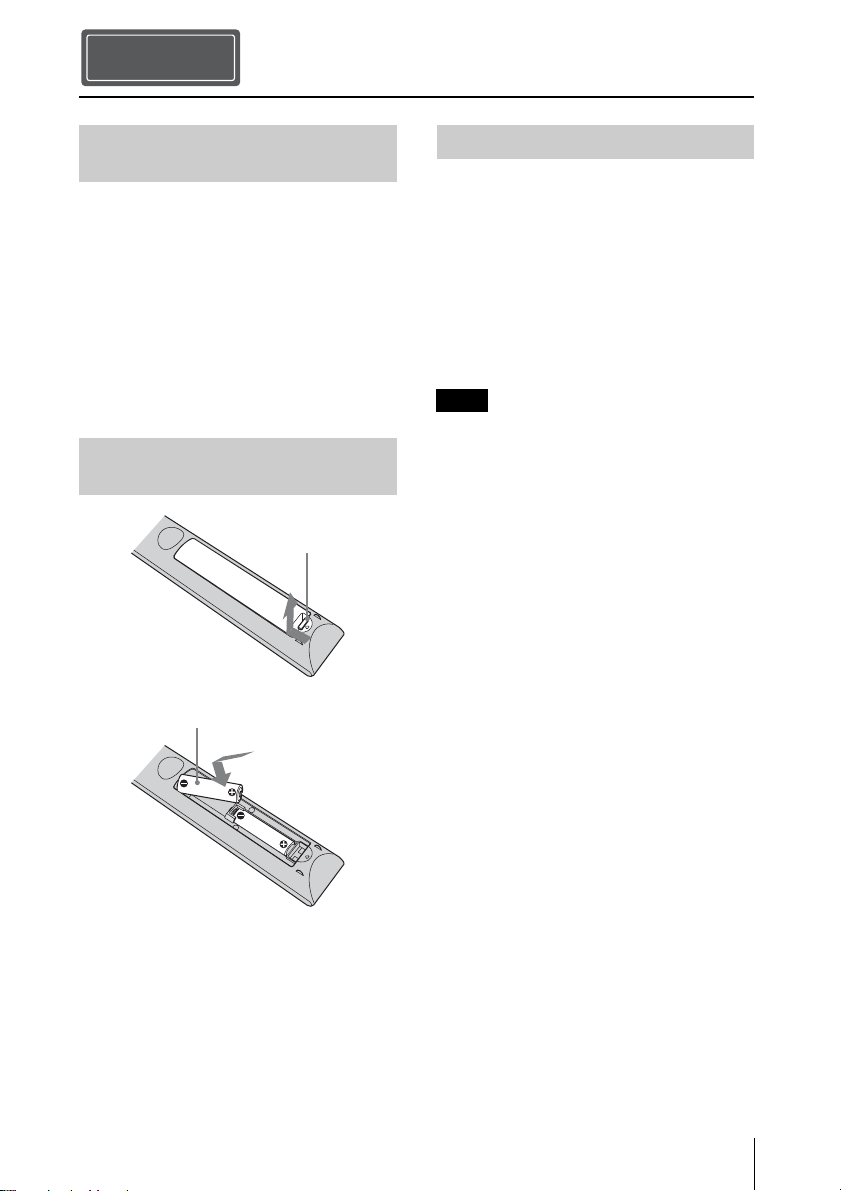
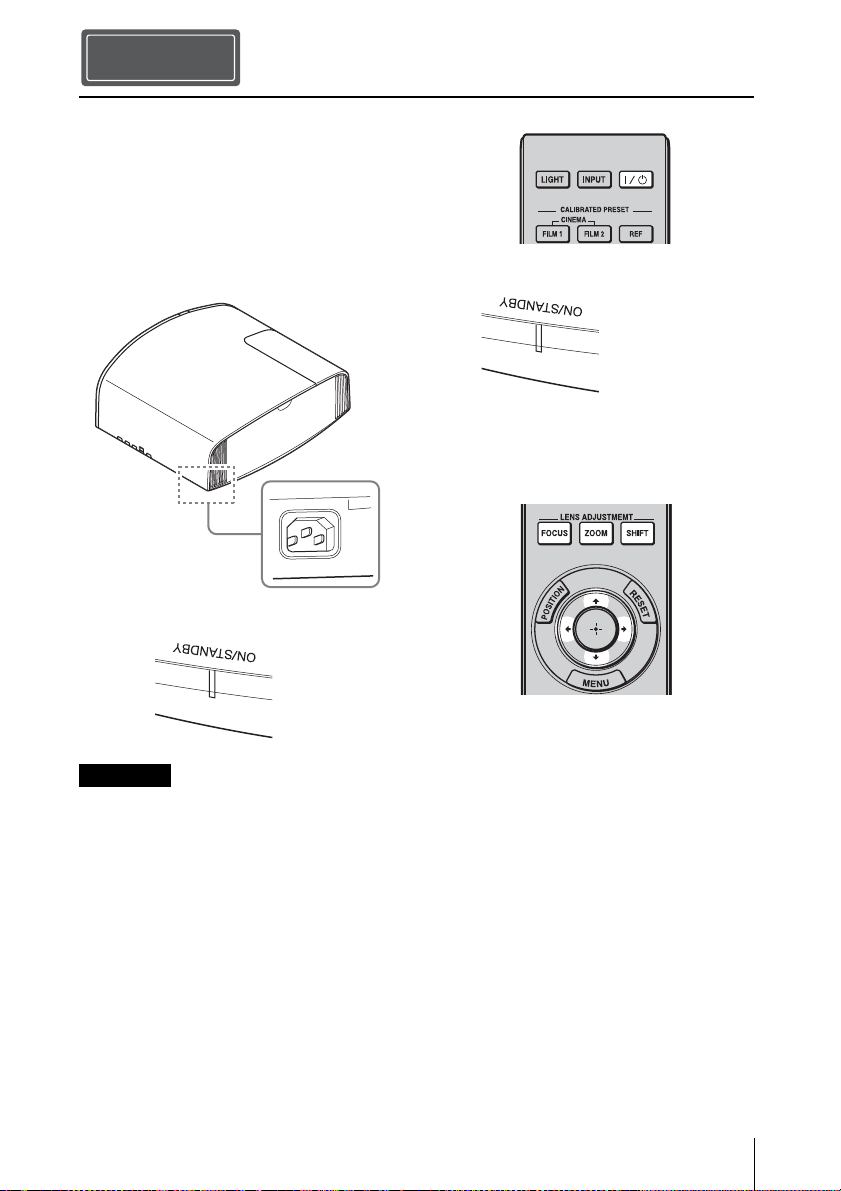
Inserting the Batteries into
the Remote Control
Push and slide to
open.
Insert the batteries E
side first.
Using the CD-ROM manual
Note
GB
10
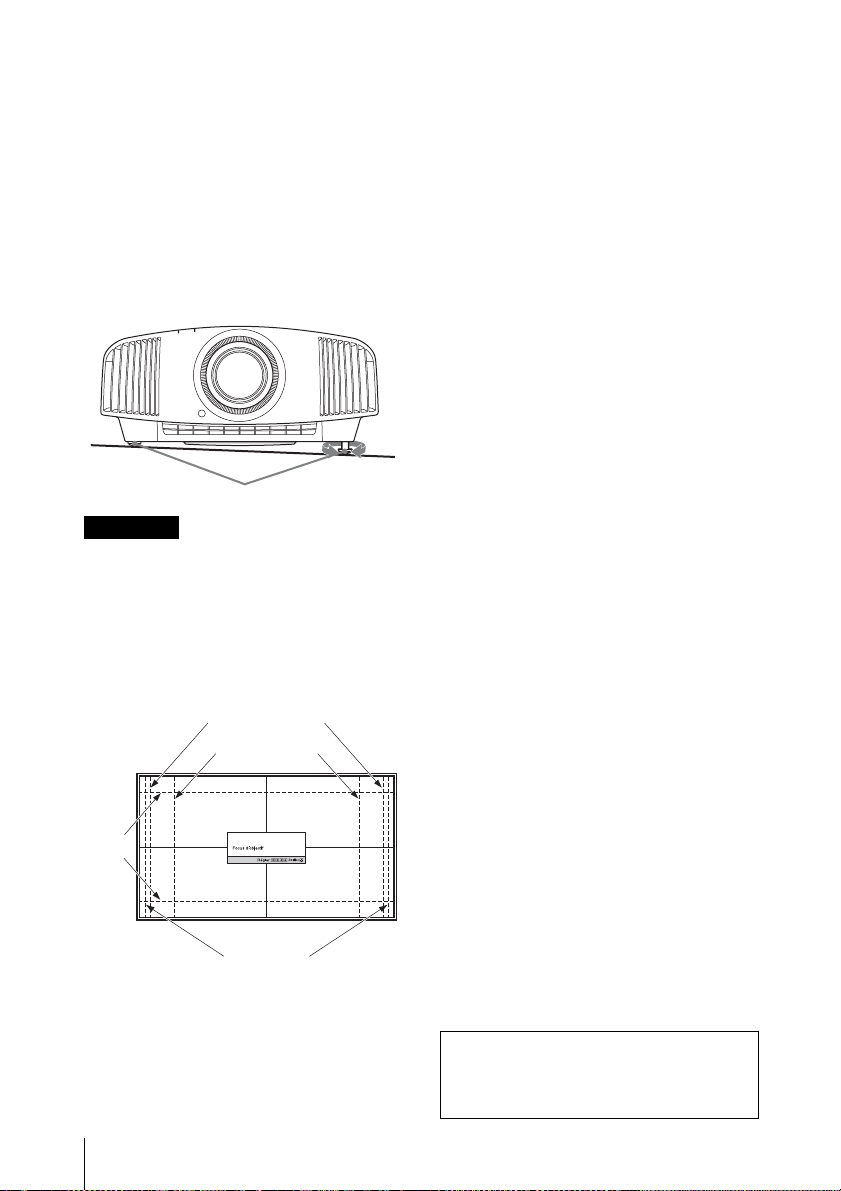
1 Position the unit so that the lens is
parallel to the screen.
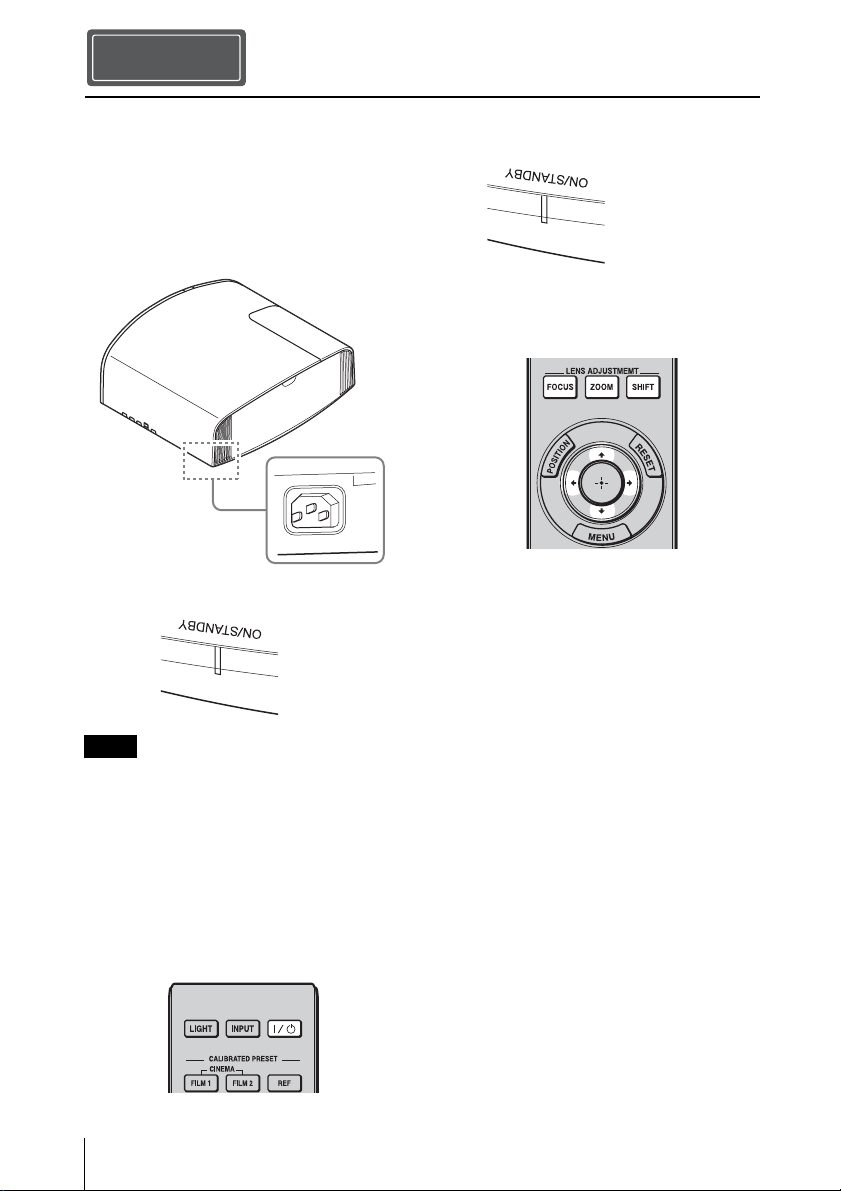
2 After connecting the AC power cord to
the unit, plug the AC power cord into
a wall outlet.
After connecting the AC power cord to the unit,
the ON/STANDBY indicator may blink in
orange.
You may not be able to control the unit while
the indicator is blinking, but this is not a
malfunction. Wait until it stops blinking and
remains lit in red.
3 Press the ?/1 (ON/STANDBY) button
to turn on the unit.
4 Project an image on the screen, then
adjust the focus, size, and position.
a Adjust the focus.
Press the LENS ADJUSTMENT
(FOCUS) button to display the Lens
Focus adjustment window (test pattern).
Then adjust the focus of the picture by
pressing the M/m/</, buttons.
b Adjust the picture size.
Press the LENS ADJUSTMENT
(ZOOM) button to display the Lens
Zoom adjustment window (test pattern).
Then adjust the size of the picture by
pressing the M/m/</, buttons.
c Adjust the picture position.
Press the LENS ADJUSTMENT
(SHIFT) button to display the Lens Shift
adjustment window (test pattern). Then
adjust to the proper position of the
picture by pressing the M/m/</,
buttons.
Installing the Unit
Step 2
Note
Rear of the unit
Lights in red.
Front of the unit
Flashes in green for
tens of seconds and
then lights in green.
Front of the unit
11
GB
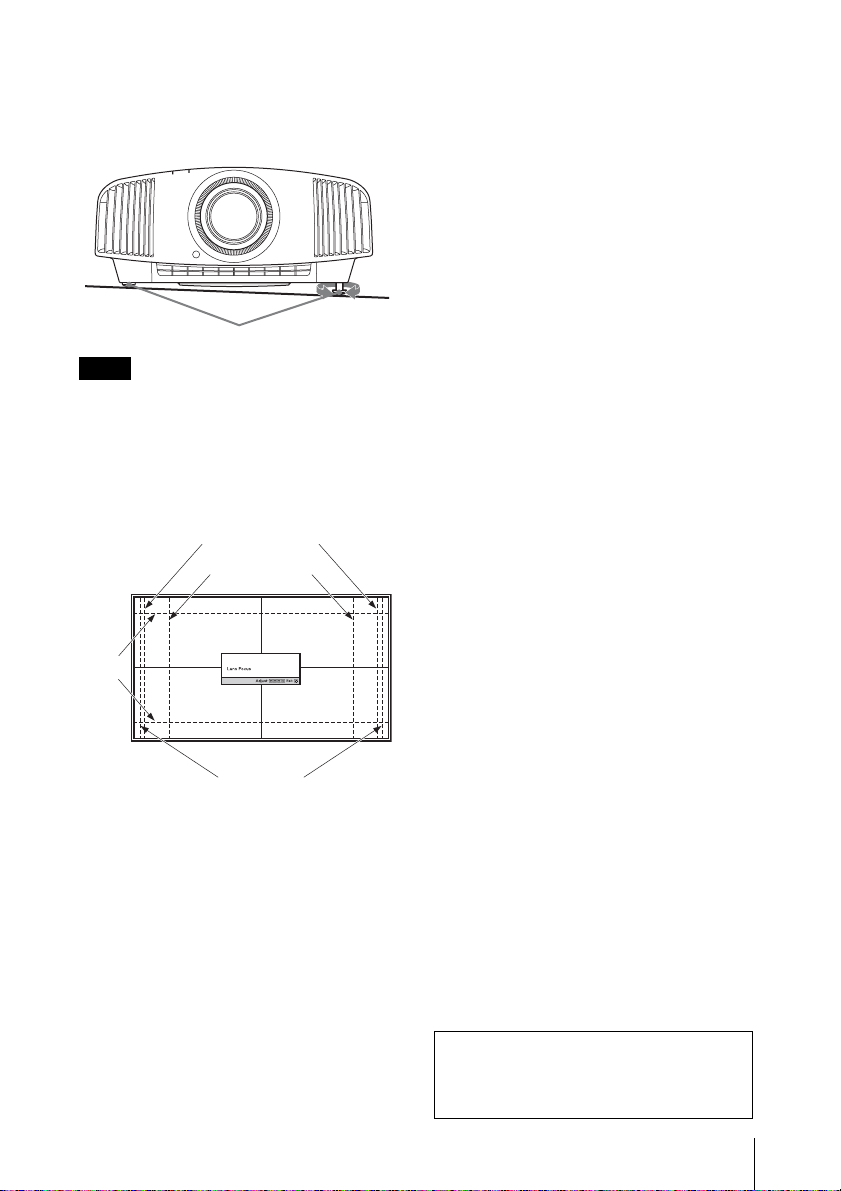
To adjust the tilt of the installation
surface
If the unit is installed on an uneven surface,
use the front feet (adjustable) to keep the unit
level.
• If the unit is tilted up or down, the projected
image may be trapezoidal.
• Be careful not to catch your finger when
turning the front feet (adjustable).
Lens adjustment window (test
pattern)
Notes
Front feet (adjustable)
Tur n to
adjust.
1.78:1 (16:9)
2.35:1
1.85:1
1.33:1 (4:3)
The dashed lines show the screen sizes of each
aspect ratio.
For more information, refer to
“Connections and Preparations” in the
Operating Instructions contained in the
supplied CD-ROM.
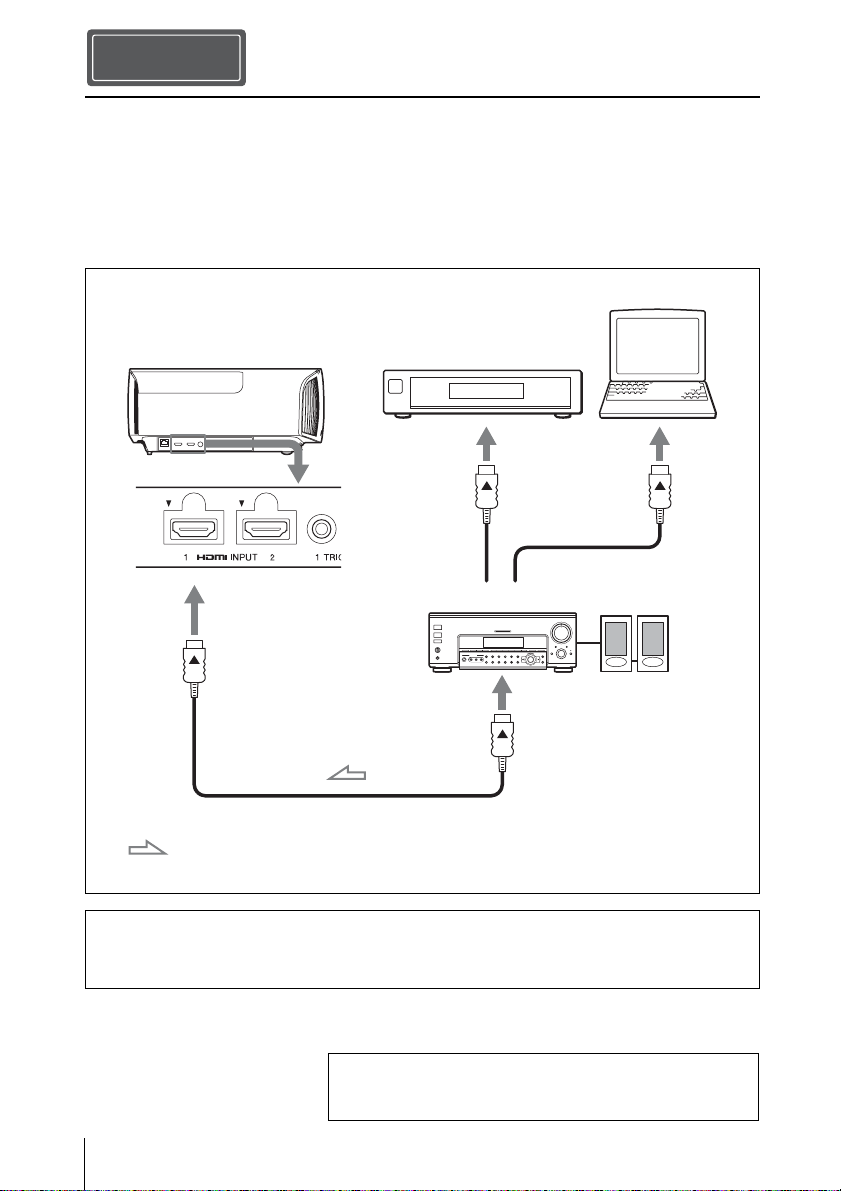
GB
12
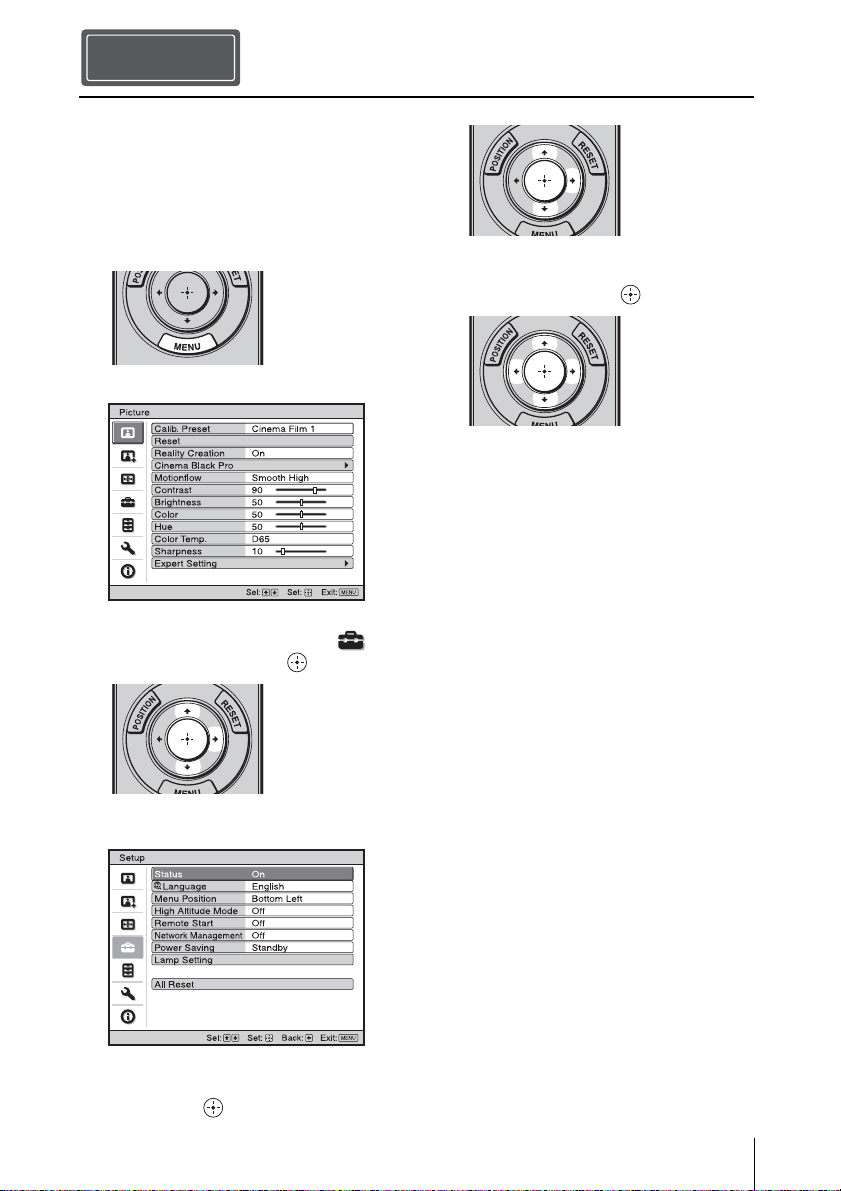
When making connections, be sure to do the following:
• Turn off all equipment before making any connections.
• Use the proper cables for each connection.
• Insert the cable plugs properly; poor connection at the plugs may cause a malfunction or poor
picture quality. When pulling out a cable, be sure to pull it out from the plug, not the cable
itself.
• Refer to the operating instructions of the connected equipment.
Connecting the Unit
When you monitor and control the projector via the network, access the Setup page of the
projector (refer to “Using Network Features” in the Operating Instructions) via a Web
browser and enable the desired control protocol.
Step 3
Right side of the unit
AV amplifier
Speakers
Equipment with HDMI
output connectors
Computer
to HDMI output
HDMI cable (not supplied)
: Video signal flow Use a Premium High Speed HDMI cable on which the cable
type logo is specified.
For more information, refer to “Connections and
Preparations” in the Operating Instructions contained in
the supplied CD-ROM.
13
GB
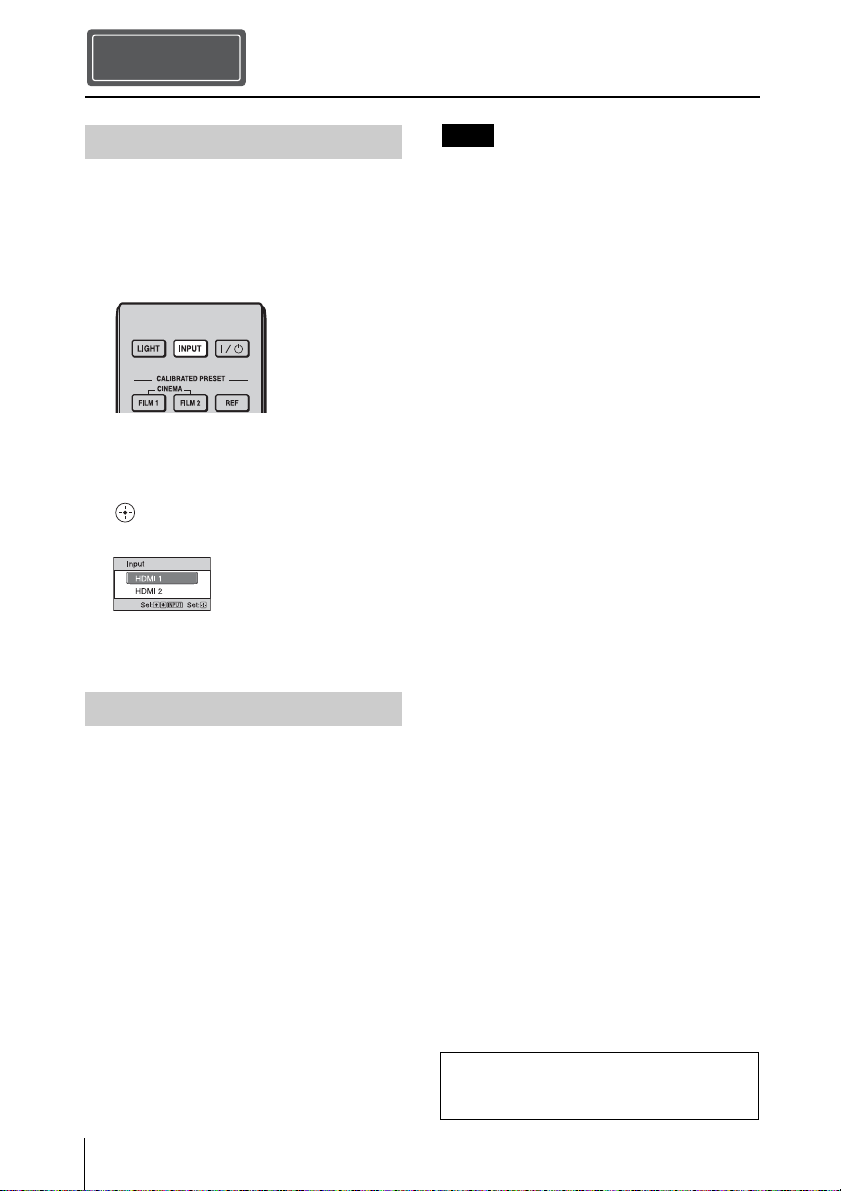
You can select the language for displaying
the menu and other on-screen displays. The
factory default setting is English. To change
the current menu language, set the desired
language with the menu screen.
1 Press MENU.
The menu appears.
2 Press M/m to select the Setup
menu, and press , or .
The setting items of the selected menu
appear.
3 Press M/m to select “Language,” and
press , or .
4 Press M/m/</, to select a
language, and press .
The menu changes to the selected
language.
To clear the menu
Press MENU.
Selecting the Menu Language
Step 4
GB
14
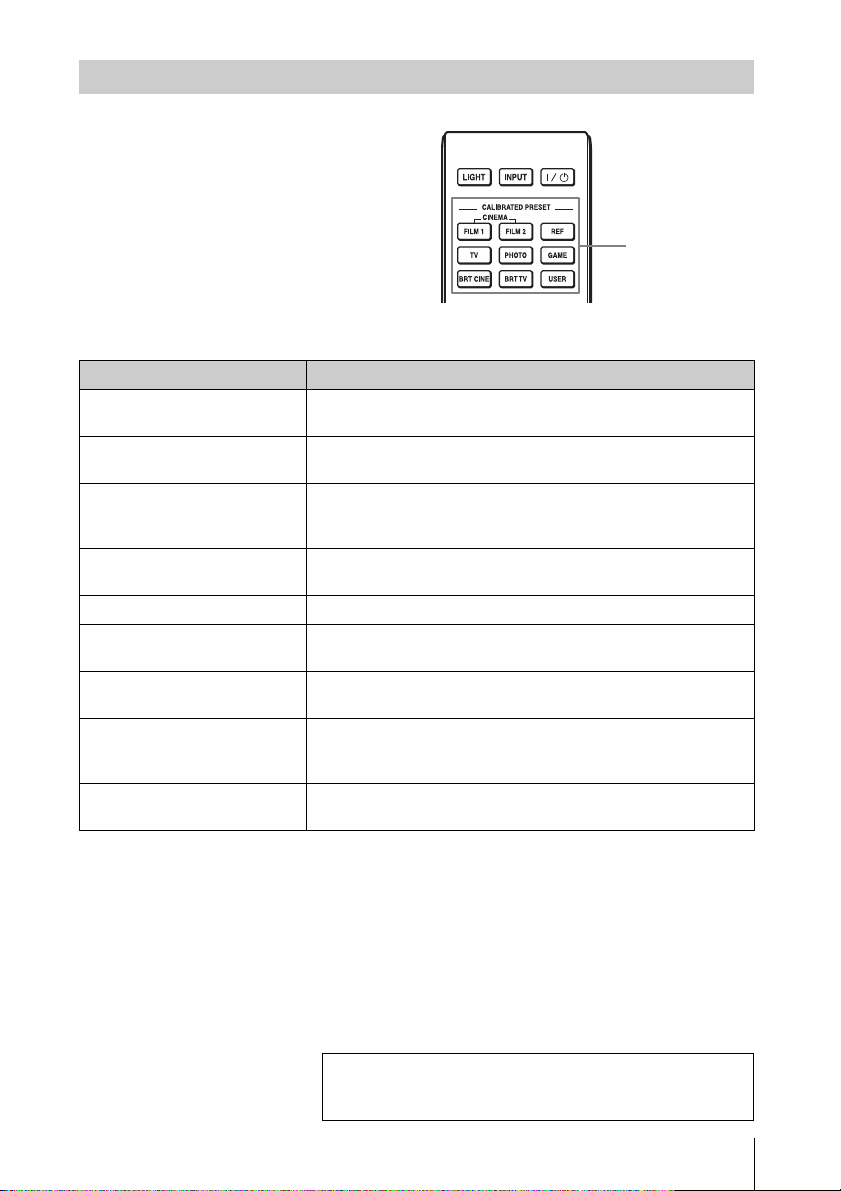
1 Turn on both the unit and the
equipment connected to the unit.
2 Press INPUT to display the input
palette on the screen.
3 Select the equipment from which you
want to display images.
Press INPUT repeatedly or press M/m/
(enter) to select the equipment from
which to project.
1 Press the ?/1 (ON/STANDBY)
button.
A message “POWER OFF?” appears on
the screen.
2 Press the ?/1 (ON/STANDBY) button
again before the message disappears.
The ON/STANDBY indicator flashes in
green and the fan continues to run to
reduce the internal heat.
The fan stops and the ON/STANDBY
indicator changes from flashing green to
remaining red.
The power is turned off completely, and you
can disconnect the AC power cord.
Never disconnect the AC power cord while the
indicator is flashing.
Tip
You can turn off the unit by holding the ?/1
(ON/STANDBY) button for about 1 second,
instead of performing the above steps.
Projecting
Step 5
Projecting the Picture
Turning Off the Power
Example: To view the picture from the
video equipment connected to the HDMI
1 connector of this unit.
Note
For more information, refer to
“Projecting” in the Operating Instructions
contained in the supplied CD-ROM.
15
GB
Press one of the CALIBRATED PRESET
buttons.
Selecting the Picture Viewing Mode
CALIBRATED
PRESET buttons
Setting items Description
CINEMA FILM 1 Picture quality suited to reproducing the highly dynamic and
clear images typical of master positive film.
CINEMA FILM 2 Picture quality suited to reproducing the rich tone and color
typical of a movie theater, based on the Cinema Film 1.
REF A picture quality setup suitable for when you want to reproduce
faithfully the original image quality, or for enjoying image
quality, without any adjustment.
TV Picture quality suited for watching TV programs, sports,
concerts, and other video images.
PHOTO Ideal for projecting still images taken with a digital camera.
GAME Picture quality suited to gaming, with well-modulated colors
and fast response.
BRT CINE Picture quality suited for watching movies in a bright
environment, such as a living room.
BRT TV Picture quality suited for watching TV programs, sports,
concerts, and other video images in a bright environment, such
as a living room.
USER Adjusts the picture quality to suit your taste then saves the
setting. The factory default setting is the same as “REF.”
For more information, refer to “Projecting” in the
Operating Instructions contained in the supplied CD-
ROM.
GB
16
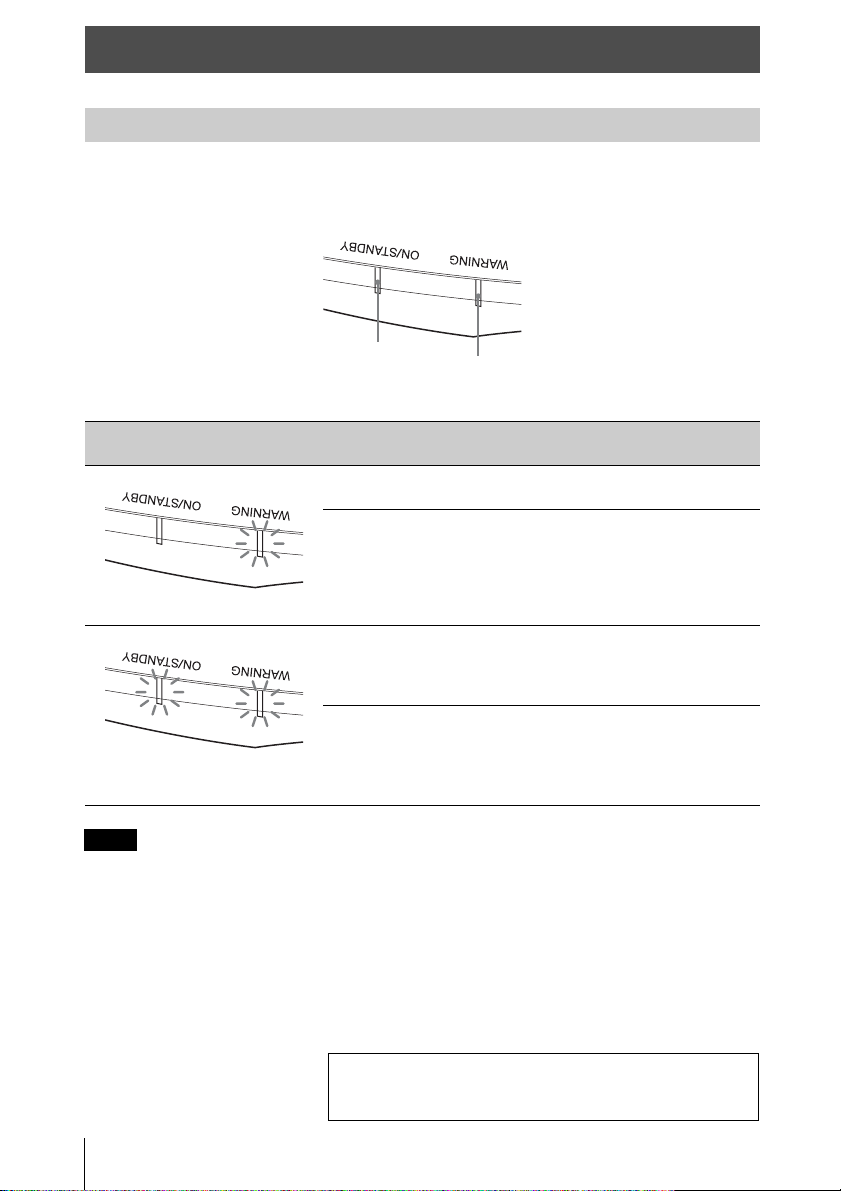
The ON/STANDBY or WARNING indicator lights up or flashes if there is any trouble with
your projector.
If the symptom persists even after carrying out the above methods, consult with qualified Sony
personnel.
If the indicator starts flashing in a way of other than the above, turn off, and then turn on the power
with the [/1 (On/Standby) button on the remote control or control panel of the unit.
If the symptom is shown again, consult with qualified Sony personnel.
Error Handling
Warning Indicators
Flashing/Lighting indicators The number of
flashes
Cause and Remedy
Twice Close the lamp cover securely, then tighten
the screws securely.
Three times The temperature of lamp is unusually high.
Turn off the power and wait for the lamp to
cool, then turn on the power again.
If the symptom persists, the lamp may be at
the end of its service life. In this case,
replace the lamp with a new one.
Twice The internal temperature is unusually high.
Check to ensure that if nothing is blocking
the ventilation holes or whether or not the
unit is being used at high altitudes.
Three times The fan is broken. Consult with qualified
Sony personnel.
Note
ON/STANDBY
indicator
WARNING
indicator
(Flashes in red)(Lights in red)
(Flashes in red)
(Flashes in red)
Both indicators flash
If there is any problem or an error message appears on the
screen, refer to “Error Handling” in the Operating
Instructions contained in the supplied CD-ROM.
17
GB
The lamp used for the light source has a
certain lifespan. When the lamp dims, the
color balance of the picture becomes
strange, or “Please replace the Lamp.”
appears on the screen, the lamp may be
exhausted. Replace the lamp with a new one
(not supplied) without delay.
Tip
The lifespan of the lamp used for the light
source changes depending on the installation
environment or use conditions. You can use the
lamp longer by avoiding turning the lamp off
until several minutes pass after turning the
lamp on.
Tools you need to get started:
• Projector Lamp LMP-H280 (Optional)
• Standard Phillips screwdriver
• Cloth (for scratch protection)
Caution
• The lamp remains hot after the unit is
turned off with the ?/1 (ON/STANDBY)
button. If you touch the lamp, you may
burn your fingers. When you replace the
lamp, wait for at least 1 hour for the lamp
to cool.
• Do not touch the surface of the lamp. If
you touch it, wipe off the fingerprints with
a soft cloth.
• Pay special attention to replacing the lamp
when the unit is installed on the ceiling.
• When replacing the lamp of a unit which is
on the ceiling, do not stand directly under
the lamp cover. When removing the lamp
door (inner cover), avoid twisting it. If the
lamp explodes, fragments may cause
injury.
• When removing the lamp unit, make sure
it remains horizontal, then pull straight up.
Do not tilt the lamp unit. If you pull out the
lamp unit while tilted and if the lamp
breaks, the pieces may scatter, causing
injury.
• Be sure to use a specified projector lamp for
the replacement. If you use lamps other than
the specified projector lamp, the unit may
malfunction.
• Be sure to turn off the unit and unplug the
power cord before replacing the lamp, then
check the ON/STANDBY indicator has
already been turned off.
1 Turn off the unit and unplug the AC
power cord.
2 When setting the unit on a flat surface
such as a desk etc., put a cloth to
prevent the surface from being
scratched. Place the unit on the cloth.
Be sure that the unit is placed on a stable
surface.
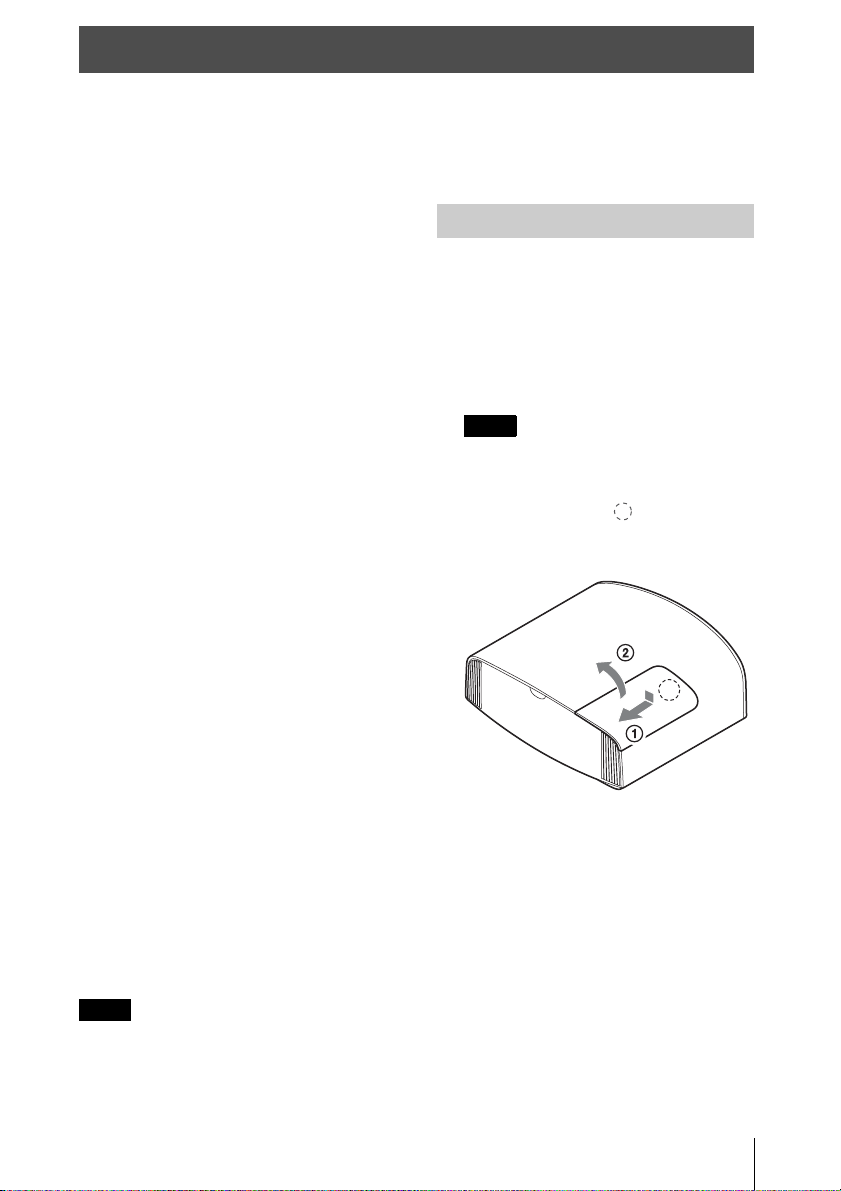
3 While pressing the part indicated
in the lamp cover illustration, slide 1
and then open 2 the lamp cover.
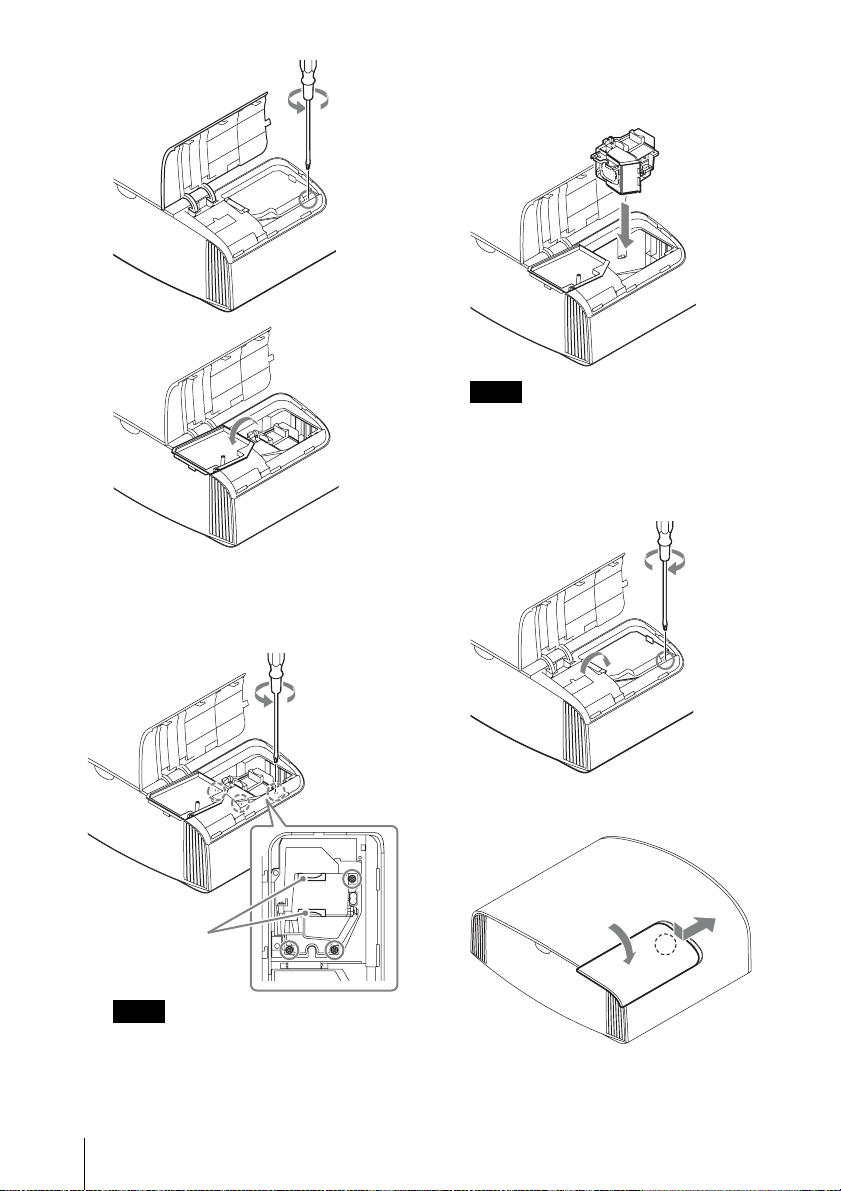
4 Loosen the lamp door (inner cover)
screw with a Phillips screwdriver, and
then open the lamp door.
Maintenance
Notes
Replacing the Lamp
Note
GB
18
5 Loosen the 3 screws on the lamp with
the Phillips screwdriver. Hold up the
handle, then pull the lamp straight out.
• Do not loosen other screws except the 3
specified screws.
• Hold the lamp by the handle to remove
and attach it.
6 Push in the new lamp by the handle
securely until it reaches the end, and
then tighten the 3 screws.
Be careful not to touch the optical block
inside the unit.
7 Close the lamp door (inner cover), and
then tighten the screw.
8 Close the lamp cover.
Notes
Handle
Note
19
GB
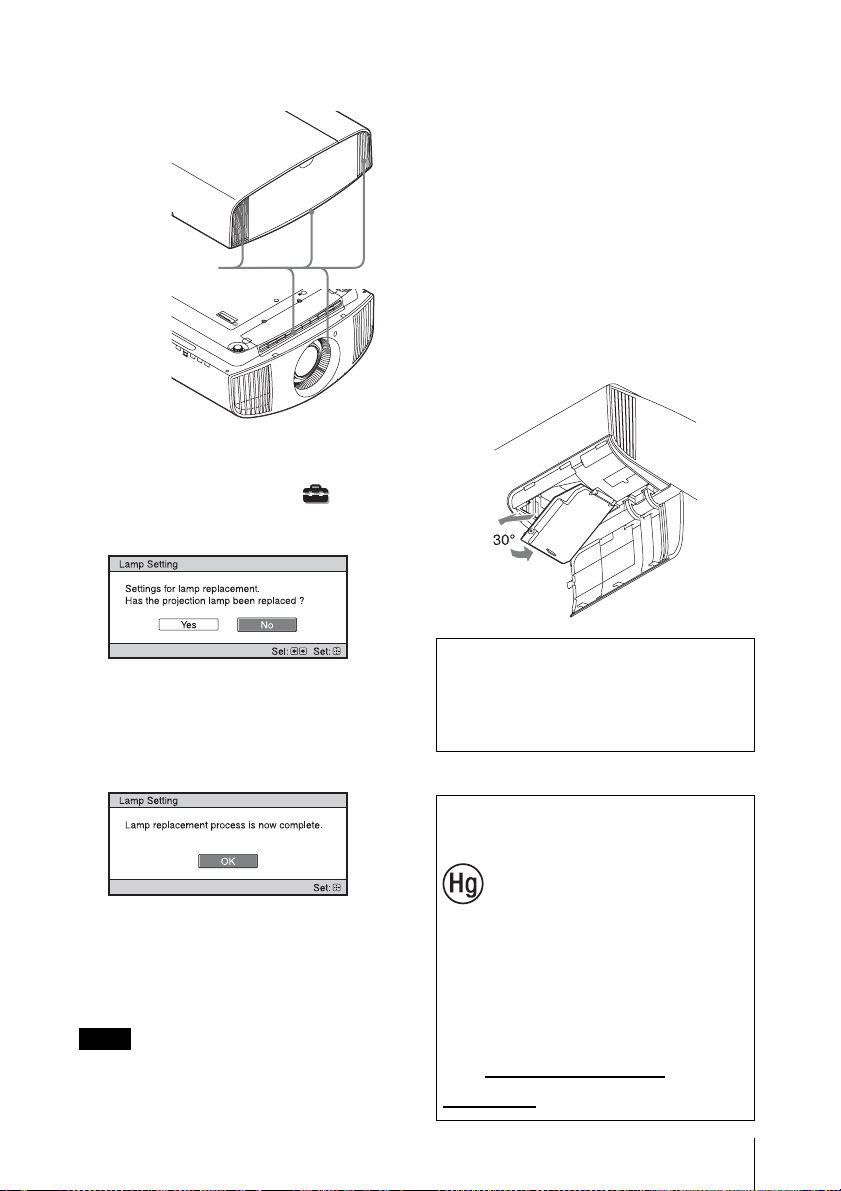
9 Wipe dust off the ventilation holes
(intake) with a soft cloth.
10Turn on the unit, then select the lamp
setting item on the Setup menu.
The menu screen below will be
appeared.
Tip
If “Settings Lock” is set to “Level B,” set to
“Off” once.
11Select “Yes.”
Caution
Do not put your hands into the lamp
replacement slot, and do not allow any liquid
or other objects into the slot to avoid
electrical shock or fire.
• The unit will not turn on unless the lamp is
securely installed in place.
• The unit will not turn on unless the lamp
cover are securely closed.
• To clear a message displayed on the screen,
press any button either on the remote control
or the control panel of the unit once.
Note on replacing the lamp when
broken, in the case of a ceiling
installation
If the lamp breaks, broken lamp pieces may
scatter and cause injury.
When the unit is on the ceiling, remove the
lamp door (inner cover) by sliding it
horizontally slowly after raising it with 30
degree opened. Avoid twisting the lamp door
(inner cover).
Disposal of the used lamp
Notes
Ventilation holes
(intake)
Note
The lamp contains mercury. The disposal
rules for used fluorescent tubes depend on
where you live. Follow the waste disposal
policy in your area.
For the customers in
the U.S.A. and Canada
Lamp in this product
contains mercury. Dispose
according to applicable
local, state/province and
federal laws.
For additional information,
see www.sony.com/
mercury
FR
2
Ce Guide de référence rapide décrit l’installation et les procédures de base de projection des
images. Vous y trouverez également des mises en garde et des remarques importantes qu’il
convient de respecter au cours de la manipulation et de l’utilisation de cet appareil.
Reportez-vous à « Indicateurs d’avertissement » et « Remplacement de la lampe », le cas
échéant.
Pour plus d’informations sur l’utilisation, reportez-vous au Mode d’emploi que vous trouverez
sur le CD-ROM fourni.
A propos du Guide de référence rapide
Préparation ................................................Page 8
Installation de l’appareil ......................Page 9
Raccordement de l’appareil.............Page 11
Sélection de la langue du menu ....Page 12
Projection..................................................Page 13
Gestion des
erreurs
Indicateurs d’avertissement ..........................Page 15
Entretien
Remplacement de la lampe............................Page 16
Etape 1
Etape 2
Etape 3
Etape 4
Etape 5
3
FR
Avant d’utiliser l’appareil, veuillez lire
attentivement ce manuel et le conserver pour
future référence.
N’utilisez pas ce produit à des fins autres que
celles décrites dans le manuel d’instructions.
AVERTISSEMENT
Afin de réduire les risques d’incendie
ou d’électrocution, ne pas exposer
cet appareil à la pluie ou à l’humidité.
Afin d’écarter tout risque
d’électrocution, garder le coffret
fermé. Ne confier l’entretien de
l’appareil qu’à un personnel qualifié.
AVERTISSEMENT
Cet appareil doit être relié à la terre.
AVERTISSEMENT
Lors de l’installation de l’appareil,
incorporer un dispositif de coupure dans le
câblage fixe ou brancher la fiche
d’alimentation dans une prise murale
facilement accessible proche de l’appareil.
En cas de problème lors du fonctionnement
de l’appareil, enclencher le dispositif de
coupure d’alimentation ou débrancher la
fiche d’alimentation.
ATTENTION
Par mesure de sécurité, ne raccordez pas le
connecteur pour le câblage de périphériques
pouvant avoir une tension excessive au port
suivant :
connecteur LAN
AVERTISSEMENT
1. Utilisez un cordon d’alimentation (câble
secteur à 3 fils)/fiche femelle/fiche mâle
avec des contacts de mise à la terre
conformes à la réglementation de sécurité
locale applicable.
2. Utilisez un cordon d’alimentation (câble
secteur à 3 fils)/fiche femelle/fiche mâle
avec des caractéristiques nominales
(tension, ampérage) appropriées.
Pour toute question sur l’utilisation du
cordon d’alimentation/fiche femelle/fiche
mâle ci-dessus, consultez un technicien du
service après-vente qualifié.
ATTENTION
- Il y a danger d’explosion s’il y a
remplacement incorrect de la batterie.
Remplacer uniquement avec une batterie
du même type ou d’un type équivalent
recommandé par le constructeur.
- Lors de la mise au rebut de la batterie ou
du produit, vous devez respecter la loi de
la région ou du pays concerné. Ne mettez
pas la batterie ou le produit au rebut dans
un feu ou un four chaud, ou n’écrasez pas
mécaniquement la batterie et ne la coupez
pas. Elle risque d’exploser ou de
provoquer un incendie. Ne soumettez pas
la batterie à une pression d’air
extrêmement basse qui pourrait entraîner
une explosion ou une fuite de liquide ou
de gaz inflammable.
- Ne placez pas la batterie dans un endroit à
température élevée, tel qu’à la lumière
directe du soleil ou à proximité d’un feu.
Elle risque de prendre feu, d’exploser ou
de provoquer un incendie. Ne plongez pas
et ne mouillez pas la batterie dans de l’eau
douce ou de l’eau de mer. Cela risque de
provoquer une électrocution.
ATTENTION
La taille et le nombre de piles suivants sont
requis pour la télécommande.
• Format AA (R6)
•Deux
Pour éviter tout risque d’explosion, utilisez
uniquement le type de pile suivant.
• Des piles de format AA (R6) au
manganèse ou alcalines
À propos des lunettes 3D
Les lunettes 3D affichent des signaux 3D en
communicant avec le projecteur via la
technologie Bluetooth.
a) bandes de fréquences utilisées par
l’équipement radioélectrique:
2.4 - 2.4835 GHz
FR
Français
FR
4
b) puissance de radiofréquence maximale
transmise sur les bandes de fréquences
utilisées par l’équipement radioélectrique:
4.30 dBm (E.I.R.P.)
Comme pour
n’importe quelle
source de lumière
vive, ne regardez pas
fixement le faisceau,
RG2 IEC 62471-5:
2015.
Pour les clients au Canada
Le présent appareil est conforme aux CNR
d’Industrie Canada applicables aux
appareils radio exempts de licence.
L’exploitation est autorisée aux deux
conditions suivantes :
(1) l’appareil ne doit pas produire de
brouillage;
(2) l’utilisateur de l’appareil doit accepter
tout brouillage radioélectrique subi, même si
le brouillage est susceptible d’en
compromettre le fonctionnement.
Déclaration d’exposition aux
radiations:
Le produit est conforme aux limites
d’exposition pour les appareils portables RF
pour les Etats-Unis et le Canada établies
pour un environnement non contrôlé. Le
produit est sûr pour un fonctionnement tel
que décrit dans ce manuel. La réduction aux
expositions RF peut être augmentée si
l’appareil peut être conservé aussi loin que
possible du corps de l’utilisateur ou que le
dispositif est réglé sur la puissance de sortie
la plus faible si une telle fonction est
disponible.
Pour les clients au Canada
CAN ICES-3 (B)/NMB-3(B)
Précautions
Sécurité
• S’assurer que la tension de service de votre
projecteur est identique à la tension locale.
• Si du liquide ou un objet quelconque
venait à pénétrer dans le boîtier,
débrancher le projecteur et le faire vérifier
par un technicien qualifié avant la remise
en service.
• Débrancher le projecteur de la prise
murale en cas de non-utilisation pendant
plusieurs jours.
• Pour débrancher le cordon, le tirer par la
fiche. Ne jamais tirer sur le cordon lui-
même.
• La prise murale doit se trouver à proximité
du projecteur et être facile d’accès.
• Le projecteur n’est pas déconnecté de la
source d’alimentation tant qu’il reste
branché à la prise murale, même s’il a été
mis hors tension.
• Ne pas regarder dans l’objectif lorsque la
lampe est allumée.
• Ne pas placer la main ou des objets à
proximité des orifices de ventilation. L’air
expulsé est brûlant.
Prévenir l’accumulation de chaleur
interne
Après avoir mis l’appareil hors tension au
moyen du bouton ?/1 (marche/veille), ne
pas le débrancher de la prise murale tant que
le ventilateur de refroidissement tourne.
Mise en garde
Cet appareil est doté d’orifices de ventilation
(prise d’air et sortie d’air). Ne pas obstruer
ces orifices et ne rien placer à proximité car
ceci risquerait de provoquer une surchauffe
interne pouvant entraîner une altération de
l’image ou un endommagement de
l’appareil.
Remballage
Conserver le carton d’emballage original et
le matériel d’emballage ; ils seront très utiles
si l’on doit un jour expédier l’appareil. Pour
Pour les clients au Canada
GARANTIE LIMITÉE DE SONY
-
Rendez-vous sur http://www.sonybiz.ca/
pro/lang/en/ca/article/resources-warranty
pour obtenir les informations importantes et
l’ensemble des termes et conditions de la
garantie limitée de Sony applicable à ce
produit.

5
FR
assurer une protection maximale, remballer
l’appareil tel qu’il avait été emballé en usine.
À propos du visionnage d’images
vidéo 3D
Consignes de sécurité
• Vous devez seulement porter les lunettes
3D pour regarder des images vidéo 3D.
• Si vous observez des scintillements ou des
éclairs, éteignez l’éclairage.
• Cet appareil n’est pas destiné à être utilisé
par des enfants sans la surveillance d’un
adulte.
• Veillez à ne pas vous pincer les doigts dans
les charnières des lunettes 3D lorsque vous
repliez les branches.
• Ne laissez pas tomber ou ne modifiez pas
ces lunettes 3D.
• Si ces lunettes sont cassées, éloignez les
débris de la bouche ou des yeux.
Projecteur LCD
Le projecteur LCD est fabriqué au moyen
d’une technologie de haute précision. Il se
peut toutefois que vous constatiez que de
petits points noirs et/ou lumineux (rouges,
bleus ou verts) apparaissent continuellement
sur le projecteur LCD. Ceci est un résultat
normal du processus de fabrication et n’est
pas le signe d’un dysfonctionnement.
Si vous utilisez plusieurs projecteurs LCD
pour projeter sur un écran, la reproduction
des couleurs peut varier selon les
projecteurs, même s’ils sont du même
modèle. Ceci est dû au fait que l’équilibre
des couleurs peut être réglé différemment
sur les projecteurs.
Remarque concernant la
condensation
Si la pièce dans laquelle le projecteur est
installé subit de brusques changements de
températures ou si vous déplacez le
projecteur d’un endroit froid à un endroit
chaud, de la condensation peut se former à
l’intérieur du projecteur. Étant donné que la
condensation peut provoquer un
dysfonctionnement, réglez la température de
votre climatiseur avec précaution. Si de la
condensation se forme, laissez le projecteur
allumé pendant deux heures avant de
l’utiliser.
Remarques sur la sécurité
• Sony ne peut être tenue responsable de
tout dommage, de quelque nature que
ce soit, résultant d’une incapacité à
mettre en place des mesures de sécurité
adaptées pour les dispositifs de
transmission, de fuites de données
inévitables dues aux spécifications de
transmission ou de tout autre problème
de sécurité.
• Selon l’environnement d’exploitation, il
est possible que des tiers non autorisés sur
le réseau puissent accéder à l’appareil.
Avant de connecter l’appareil au réseau,
vérifiez que le réseau est bien protégé.
• Pour des raisons de sécurité, lors de
l’utilisation de cet appareil connecté au
réseau, il est fortement recommandé
d’accéder à la fenêtre de commande via un
navigateur Web et de modifier la limitation
d’accès des valeurs d’usine préréglées
(reportez-vous à la section « Utilisation
des fonctionnalités réseau » du Mode
d’emploi).
Il est par ailleurs recommandé de modifier
régulièrement le mot de passe.
• Ne consultez aucun autre site Web dans le
navigateur Web pendant ou après la
configuration. Étant donné que l’état de
connexion est conservé dans le navigateur
Web, fermez ce dernier lorsque la
configuration est terminée pour empêcher
tout tiers non autorisé d’utiliser l’appareil
ou d’exécuter des programmes
malveillants.
Ne placez pas ce produit près
d'appareils médicaux
Ce produit (y compris les accessoires)
comporte un ou des aimants qui peuvent
perturber les stimulateurs cardiaques, les
valves de dérivation programmables pour le
traitement de l’hydrocéphalie ou d’autres
appareils médicaux. Ne placez pas ce
produit près de personnes utilisant ce type
d’appareil médical. Consultez votre médecin
avant d’utiliser ce produit si vous utilisez ce
type d’appareil médical.
FR
6
Remarques sur
l’installation et
l’utilisation
Ne pas placer l’appareil dans les positions
suivantes, ce qui risquerait de provoquer un
dysfonctionnement ou des dommages.
Murs proches
Afin de maintenir les performances et la
fiabilité de l’appareil, laisser un dégagement
entre les murs et l’appareil tel qu’illustré.
Les flux d’air des climatiseurs ou des
orifices de ventilation de cet appareil, ou
d’autres, peuvent faire osciller l’écran.
Veillez à ne pas installer cet appareil dans un
endroit où sa face avant risque d’être
soumise aux flux d’air des climatiseurs ou
des orifices de ventilation de ces autres
appareils.
Mauvaise ventilation
Laisser un dégagement de plus de 30 cm
(11
7
/
8
pouces) autour de l’appareil.
Endroits chauds et humides
Endroits directement exposés au
souffle froid ou chaud d’un
climatiseur
L’installation de l’appareil dans de tels
endroits pourrait provoquer un
dysfonctionnement sous l’effet de la
condensation d’humidité ou de l’élévation
de température.
Proximité d’un détecteur de chaleur
ou de fumée
Il pourrait en résulter un dysfonctionnement
du capteur.
SONY NE PEUT ÊTRE TENUE
RESPONSABLE DE TOUT
DOMMAGE, DE QUELQUE NATURE
QUE CE SOIT, RÉSULTANT DE
L’UTILISATION DE CET APPAREIL
À D’AUTRES FINS QU’UN USAGE
DOMESTIQUE ORDINAIRE
PENDANT LA PÉRIODE DE
GARANTIE OU APRÈS
L’EXPIRATION DE CELLE-CI.
Installation déconseillée
1 cm (
13
/
32
pouces)
30 cm
(11
7
/
8
pouces)
30 cm
(11
7
/
8
pouces)
15 cm
(6 pouces)
30 cm
(11
7
/
8
pouces)
30 cm
(11
7
/
8
pouces)
7
FR
Endroits très poussiéreux ou
enfumés
Éviter ce qui suit pendant l’utilisation de
l’appareil.
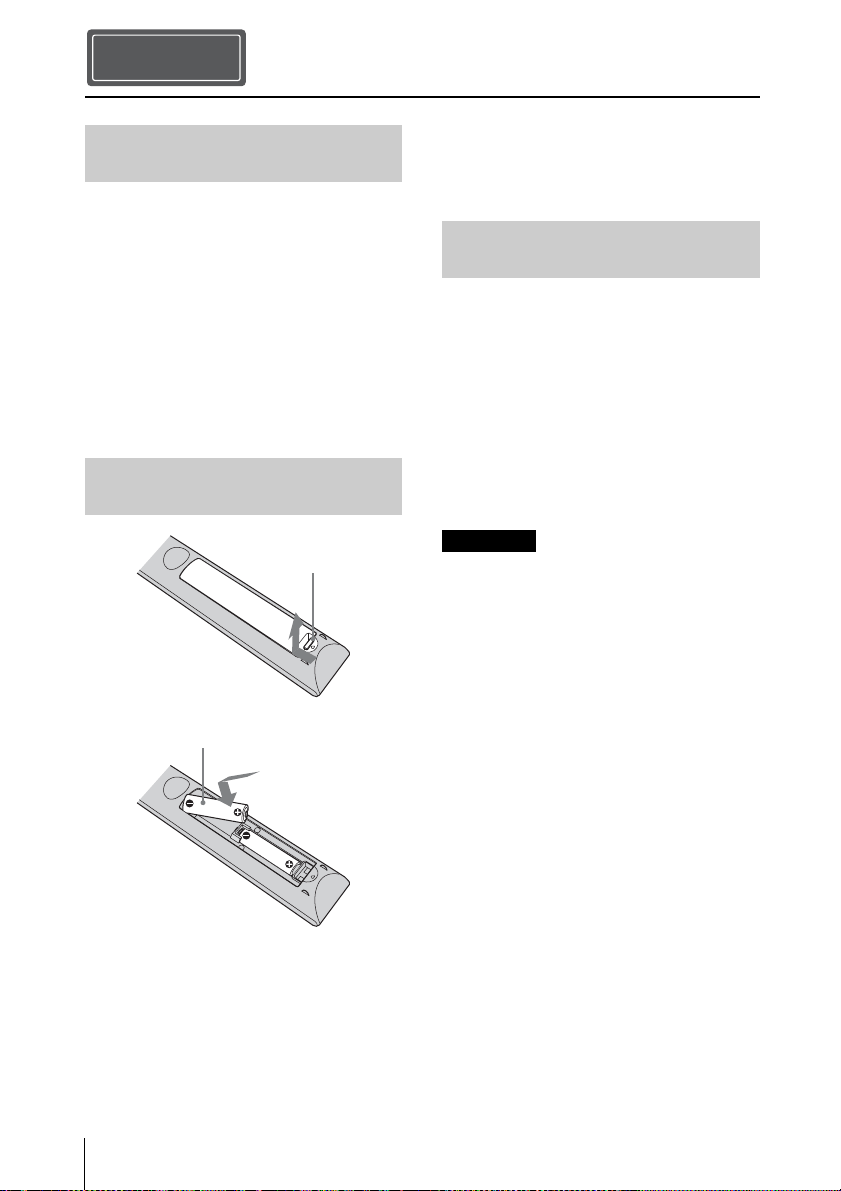
Inclinaison vers l’avant/arrière et vers
la gauche/droite
Éviter d’incliner l’appareil à un angle
supérieur à 15degrés pour l’utiliser.
Ne pas installer l’appareil ailleurs que sur
une surface de niveau ou au plafond.
L’installation de l’appareil dans un tel
emplacement peut affecter l’uniformité des
couleurs ou réduire la fiabilité des effets de
la lampe.
Si l’appareil est incliné vers le haut ou le bas,
l’image à l’écran peut être trapézoïdale.
Positionner l’appareil de façon à ce que
l’objectif soit parallèle à l’écran.
Lors de l’installation de l’appareil à
haute altitude
Lorsque vous utilisez l’appareil à une
altitude de 1 500 m (environ 4 900 pi) ou
plus, réglez « Mode haute altit. » dans le
menu Réglage sur « On ». Si vous
n’activez pas ce mode lors d’une utilisation
à haute altitude, ceci pourra affecter le
projecteur (diminution de la fiabilité de
certaines pièces, par exemple).
• N’installez jamais le projecteur au plafond
et ne le déplacez jamais par vos propres
moyens. Veillez à vous adresser à un
technicien Sony agréé (service payant).
• Lorsque vous installez l’appareil au
plafond, veillez à utiliser un fil de sécurité,
par exemple, pour l’empêcher de tomber.
Confiez l’installation à un professionnel
ou à un installateur expérimenté.
Pour les revendeurs
• Quand le projecteur est fixé au plafond, un
support Sony ou un support équivalent
recommandé doit être utilisé pour
l’installation.
• Vous devez fermer le couvercle du cabinet
solidement lors de l’installation au
plafond.
Conditions inappropriées
15° ou plus
15° ou
plus
15° ou plus
Précautions de sécurité
relatives à l’installation de
l’appareil au plafond
15° ou
plus
15° ou plus
FR
8
Vérifiez si le carton renferme bien tous les
éléments suivants :
• Télécommande RM-PJ24 (1)
• Piles au manganèse AA (R6) (2)
• Capuchon d’objectif (1)
Au moment de l’achat, un capuchon
recouvre l’objectif du projecteur. Retirez
le capuchon d’objectif avant d’utiliser le
projecteur.
• Cordon d’alimentation secteur (1)
• Guide de référence rapide (ce manuel) (1)
• Mode d’emploi (CD-ROM) (1)
Précautions relatives à la
manipulation de la télécommande
• Manipulez la télécommande avec
précautions. Ne renversez aucun liquide
sur la télécommande, ne la laissez pas
tomber et ne marchez pas dessus.
• Ne placez pas la télécommande à
proximité d’une source de chaleur, dans un
endroit exposé aux rayons directs du soleil
ou dans une pièce humide.
Vous devez installer Adobe Reader sur votre
ordinateur pour pouvoir lire ce manuel.
Vous pouvez télécharger Adobe Reader
gratuitement depuis le site Web d’Adobe.
1 Ouvrez le fichier index.htm situé sur le
CD-ROM.
2 Sélectionnez le manuel que vous
souhaitez lire, puis cliquez sur ce
dernier.
Si vous avez perdu ou endommagé le
CD-ROM, vous pouvez acheter un CD-ROM
de remplacement auprès de votre représentant
Sony ou du service clientèle Sony.
Préparation
Etape 1
Vérification des accessoires
fournis
Insertion des piles dans la
télécommande
Appuyez et faites
glisser pour ouvrir.
Insérez le côté E des
piles en premier.
Utilisation du manuel sur
CD-ROM
Remarque
9
FR
1 Positionnez l’appareil de façon à ce
que l’objectif soit parallèle à l’écran.
2 Après avoir branché le cordon
d’alimentation à l’appareil, branchez
le cordon d’alimentation secteur à une
prise murale.
Une fois le cordon d’alimentation secteur
raccordé à l’unité, l’indicateur ON/STANDBY
peut clignoter en orange.
Vous ne pourrez peut-être pas commander
l’unité pendant que l’indicateur clignote, mais
ce n’est pas un dysfonctionnement. Attendez
que l’indicateur cesse de clignoter et devienne
rouge fixe.
3 Appuyez sur le bouton ?/1 (ON/
STANDBY) pour mettre l’appareil
sous tension.
4 Projetez une image sur l’écran, puis
réglez la mise au point, la taille et la
position.
a Réglez la mise au point.
Appuyez sur le bouton LENS
ADJUSTMENT (FOCUS) pour afficher
la fenêtre de réglage Focus d’objectif
(mire d’essai). Réglez ensuite la mise au
point de l’image en appuyant sur les
boutons M/m/</,.
b Réglez la taille de l’image.
Appuyez sur le bouton LENS
ADJUSTMENT (ZOOM) pour afficher
la fenêtre de réglage Zoom d’objectif
(mire d’essai). Réglez ensuite la taille de
l’image en appuyant sur les boutons
M/m/</,.
Installation de l’appareil
Etape 2
Remarque
Arrière de l’appareil
S’allume en
rouge.
Avant de l’appareil
Clignote en vert
pendant dix
secondes, puis
s’allume en vert.
Avant de l’appareil
FR
10
c Réglez la position de l’image.
Appuyez sur le bouton LENS
ADJUSTMENT (SHIFT) pour afficher
la fenêtre de réglage Déplac. objectif
(mire d’essai). Réglez ensuite la position
correcte de l’image en appuyant sur les
boutons M/m/</,.
Pour régler l’inclinaison par rapport à
la surface d’installation
Si vous installez l’appareil sur une surface
inégale, utilisez les pieds avant (réglables)
pour maintenir l’appareil à l’horizontale.
• Si l’appareil est incliné vers le haut ou le bas,
l’image projetée peut être trapézoïdale.
• Veillez à ne pas vous coincer les doigts
lorsque vous faites pivoter les pieds avant
(réglables).
Fenêtre de réglage de l’objectif (mire
d’essai)
Remarques
Pieds avant (réglables)
Tournez
pour régler.
1,78:1 (16:9)
2,35:1
1,85:1
1,33:1 (4:3)
Les lignes pointillées indiquent les tailles
d’écran de chaque rapport de format.
Pour plus d’informations reportez-vous à
« Raccordements et préparatifs » dans le
Mode d’emploi que vous trouverez sur le
CD-ROM fourni.
11
FR
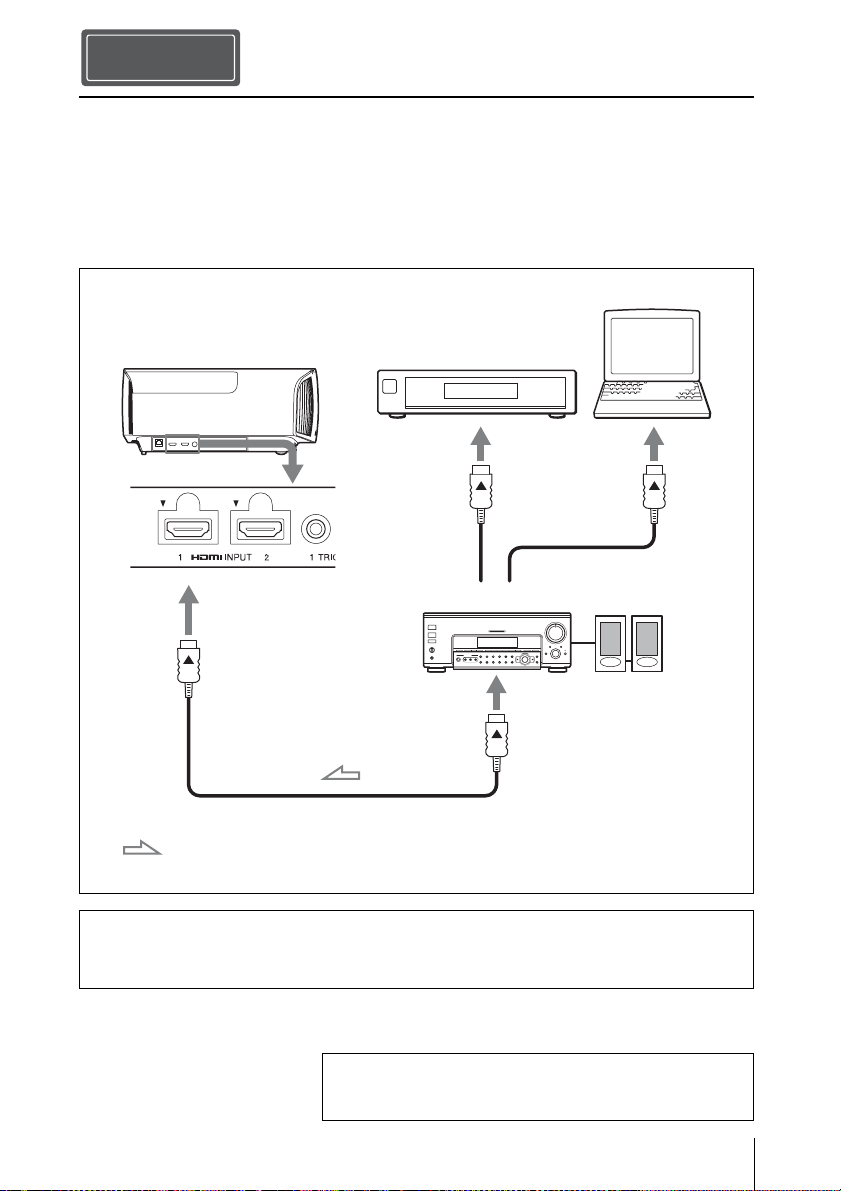
Lors de l’exécution des raccordements, vous devez procéder comme suit :
• Mettez tous les appareils hors tension avant tout raccordement.
• Utilisez les câbles appropriés pour chaque raccordement.
• Insérez correctement les fiches de câble ; le mauvais raccordement des fiches peut entraîner
un dysfonctionnement ou une piètre qualité d’image. Débranchez les câbles en les tenant par
leur fiche. Ne tirez pas sur le câble proprement dit.
• Reportez-vous au mode d’emploi de l’appareil à raccorder.
Raccordement de l’appareil
Pour surveiller et commander le projecteur via le réseau, accédez à la page Setup du
projecteur (reportez-vous à la section « Utilisation des fonctionnalités réseau » du Mode
d’emploi) via un navigateur Web et activez le protocole de contrôle souhaité.
Etape 3
Côté droit de l’appareil
Amplificateur AV
Haut-parleurs
Appareil avec des
connecteurs de sortie HDMI
Ordinateur
vers la sortie HDMI
Câble HDMI (non fourni)
: Flux du signal vidéo Utilisez un câble HDMI haute vitesse Premium qui porte le
logo du type de câble.
Pour plus d’informations reportez-vous à « Raccordements
et préparatifs » dans le Mode d’emploi que vous trouverez
sur le CD-ROM fourni.

FR
12
Vous pouvez sélectionner la langue
d’affichage du menu et d’autres affichages à
l’écran. Le réglage en usine par défaut est
l’anglais. Pour changer la langue actuelle du
menu, choisissez la langue désirée grâce à
l’écran de menu.
1 Appuyer sur MENU.
Le menu apparaît.
2 Appuyer sur M/m pour sélectionner le
menu Setup , puis appuyer sur ,
ou .
Les options de réglage du menu
sélectionné apparaissent.
3 Appuyer sur M/m pour sélectionner
« Language », puis appuyer sur , ou
.
4 Appuyer sur M/m/</, pour
sélectionner une langue, puis appuyer
sur .
La langue du menu devient celle que
vous avez sélectionnée.
Pour faire disparaître le menu
Appuyer sur MENU.
Sélection de la langue du menu
Etape 4
13
FR
1 Mettez sous tension cet appareil et
l’appareil qui y est raccordé.
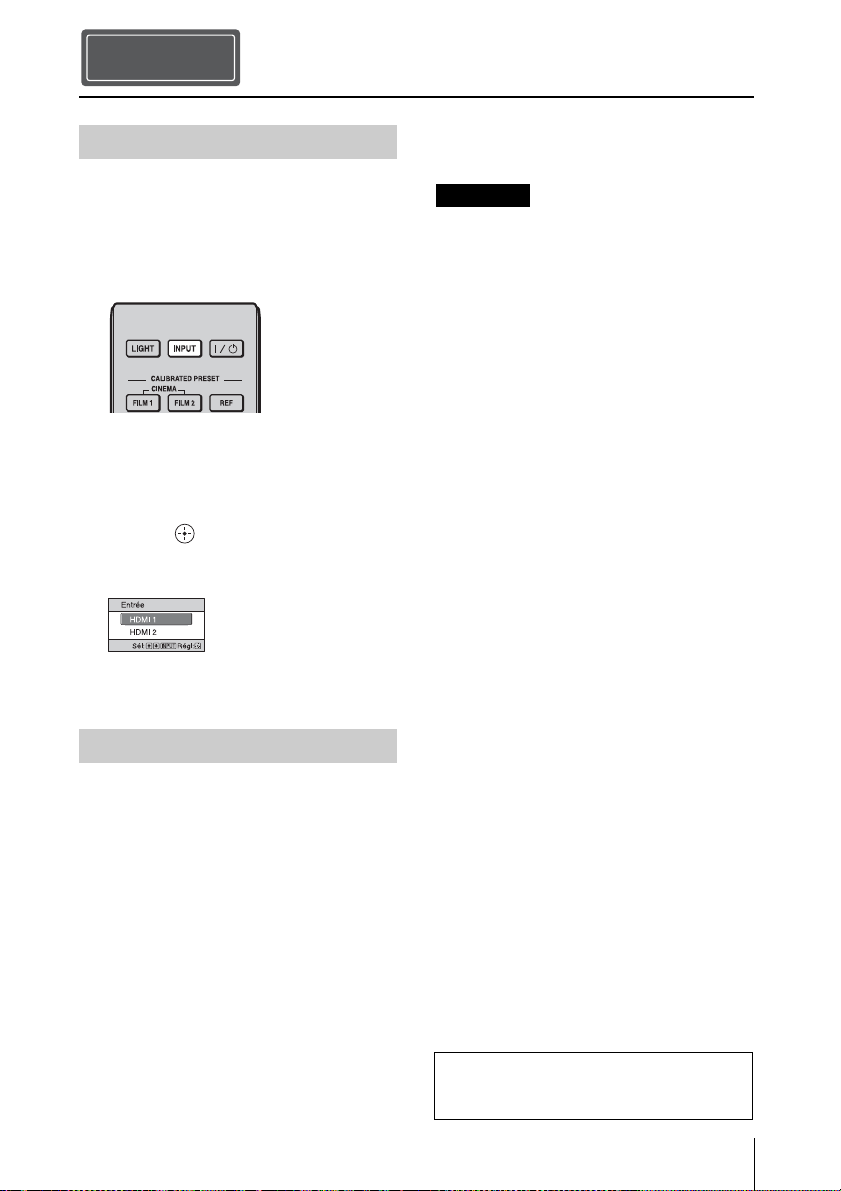
2 Appuyez sur INPUT pour afficher la
palette d’entrée sur l’écran.
3 Sélectionnez le périphérique à partir
duquel vous voulez afficher les
images.
Appuyez plusieurs fois sur INPUT ou
sur M/m/ (entrée) pour sélectionner
le périphérique à utiliser pour la
projection.
1 Appuyez sur le bouton ?/1 (ON/
STANDBY).
Le message « METTRE HORS
TENSION? » apparaît sur l’écran.
2 Appuyez une nouvelle fois sur le
bouton ?/1 (ON/STANDBY) avant
que le message disparaisse.
L’indicateur ON/STANDBY clignote
en vert et le ventilateur continue à
tourner pour abaisser la température
interne.
Le ventilateur s’arrête et l’indicateur
ON/STANDBY cesse de clignoter en
vert pour briller en rouge.
L’alimentation s’arrête complètement et
vous pouvez débrancher le cordon
d’alimentation.
Ne jamais débrancher le cordon d’alimentation
lorsque l’indicateur clignote.
Conseil
Vous pouvez mettre l’appareil hors tension en
maintenant le bouton ?/1 (ON/STANDBY)
enfoncé pendant 1 seconde environ, plutôt
qu’en suivant les étapes ci-dessus.
Projection
Etape 5
Projection de l’image
Mise hors tension
Exemple : Pour afficher l’image provenant
de l’équipement vidéo raccordé au
connecteur HDMI 1 de cet appareil.
Remarque
Pour plus d’informations reportez-vous à
« Projection » dans le Mode d’emploi que
vous trouverez sur le CD-ROM fourni.
FR
14
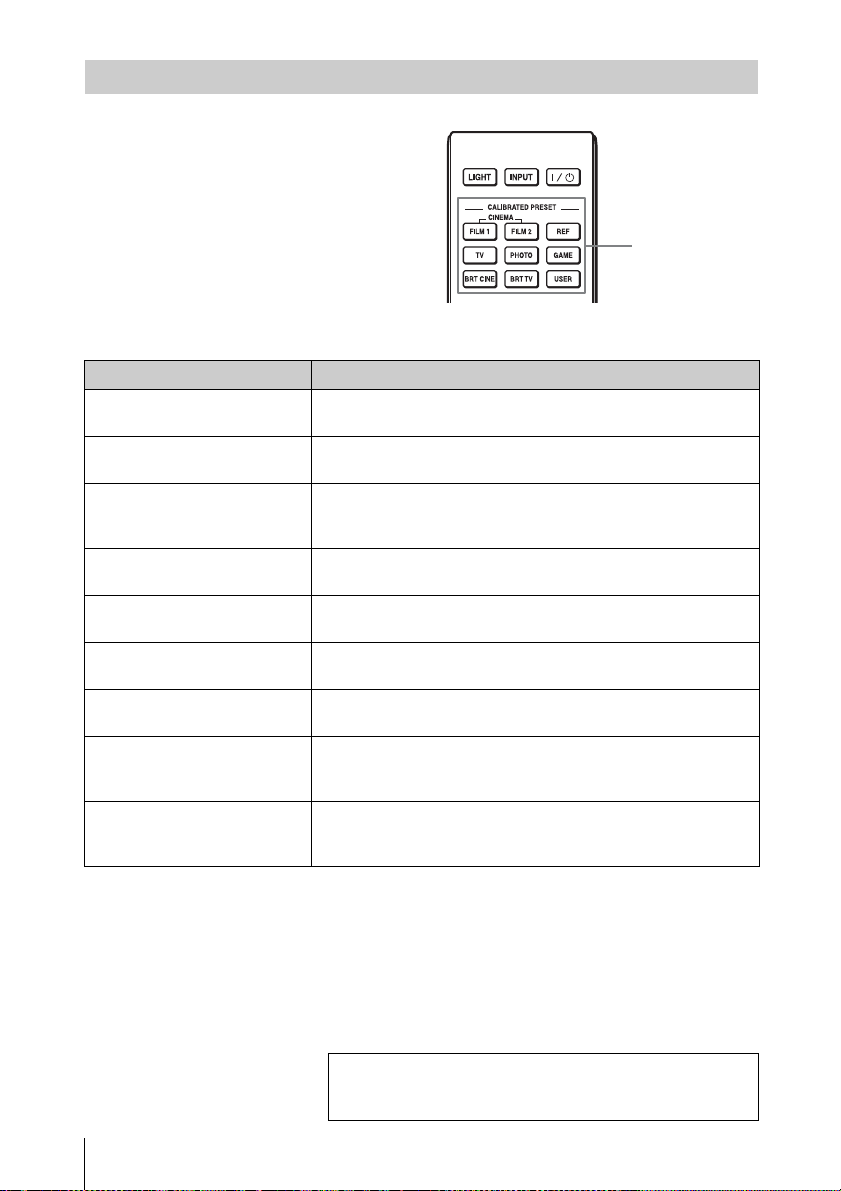
Appuyez sur un des boutons
CALIBRATED PRESET.
Sélection du mode d’affichage de l’image
Boutons
CALIBRATED
PRESET
Paramètres Description
CINEMA FILM 1 Qualité d’image adaptée à la reproduction d’images hautement
dynamiques et nettes, typiques d’un chef-d’œuvre du cinéma.
CINEMA FILM 2 Qualité d’image adaptée à la reproduction de tons riches et de
couleurs dignes du cinéma, en fonction de Cinéma Film 1.
REF Configuration de qualité d’image appropriée lorsque vous
souhaitez reproduire fidèlement la qualité d’image d’origine ou
pour profiter de la qualité d’image sans aucun réglage.
TV Qualité d’image adéquate pour regarder des programmes TV, du
sport, des concerts et d’autres images vidéo.
PHOTO Idéal pour la projection d’images fixes provenant d’un appareil
photo numérique.
GAME Qualité d’image adaptée aux jeux, avec des couleurs bien
modulées et une réponse rapide.
BRT CINE Qualité d’image adéquate pour regarder les films dans un
environnement lumineux, comme un séjour.
BRT TV Qualité d’image adéquate pour regarder des programmes TV, du
sport, des concerts et d’autres images vidéo dans un
environnement lumineux, comme un séjour.
USER Règle la qualité de l’image en fonction de votre goût, puis
enregistre le paramètre. Le réglage en usine par défaut est
identique à « REF ».
Pour plus d’informations reportez-vous à « Projection »
dans le Mode d’emploi que vous trouverez sur le CD-ROM
fourni.
15
FR
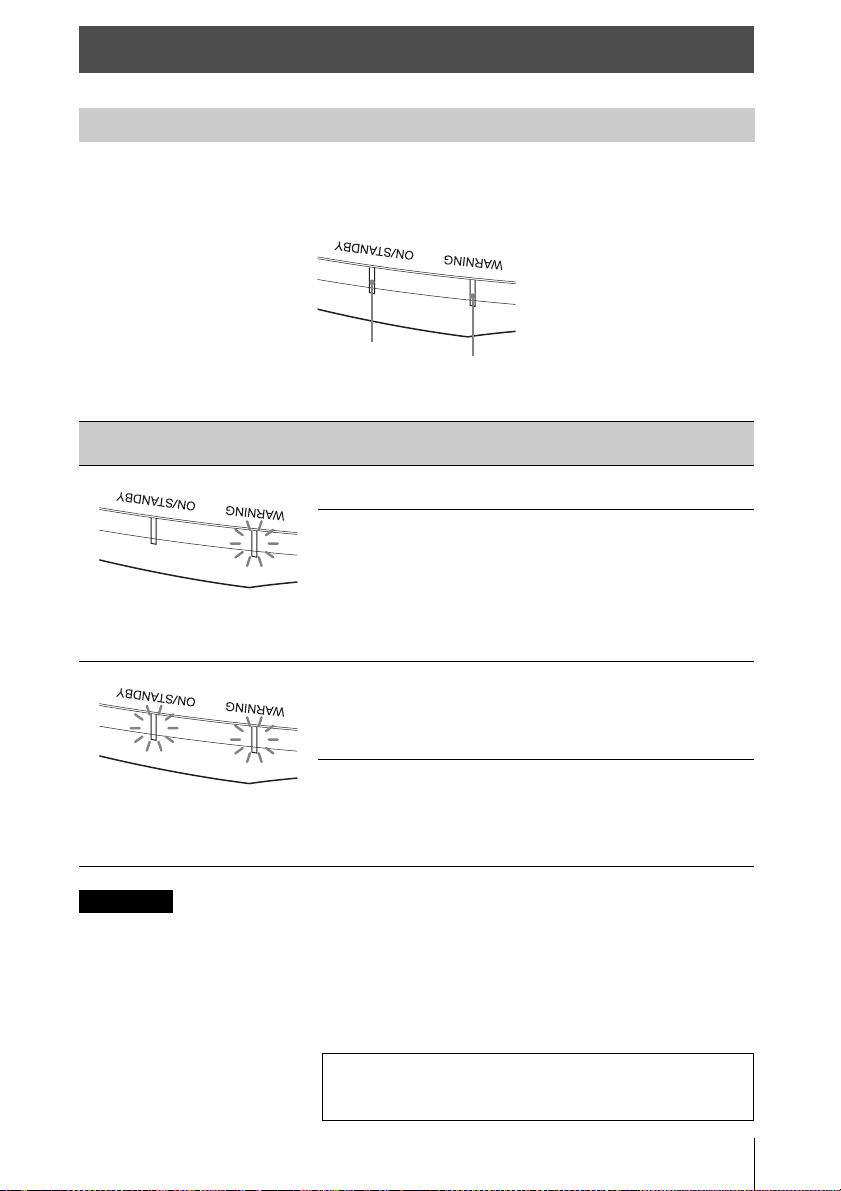
L’indicateur ON/STANDBY ou WARNING s’allume ou clignote en cas de problème
quelconque sur le projecteur.
Si le symptôme persiste même après avoir suivi les méthodes décrites ci-dessus, consultez le service
après-vente Sony.
Si l’indicateur se met à clignoter d’une manière qui n’est pas décrite ci-dessus, éteignez et rallumez
l’appareil en appuyant sur le bouton [/1 (Marche/Veille) de la télécommande ou du panneau de
commande de l’appareil.
Si le symptôme s’affiche toujours, consultez le service après-vente Sony personnel.
Gestion des erreurs
Indicateurs d’avertissement
Clignotement/Éclairage des
indicateurs
Le nombre de
clignotements
Cause et remède
Deux fois Fermez bien le couvercle de la lampe, puis
vissez-le solidement.
Trois fois La température de la lampe est
anormalement élevée. Mettez hors tension
et attendez que la lampe se refroidisse, puis
remettez sous tension.
Si ce symptôme persiste, la lampe a peut-
être atteint la fin de sa durée de service.
Dans ce cas, remplacez la lampe par une
neuve.
Deux fois La température à l’intérieur du projecteur
est anormalement élevée. Assurez-vous
que rien ne colmate les orifices de
ventilation et que l’appareil n’est pas
utilisé à haute altitude.
Trois fois Le ventilateur est défectueux. Consultez le
service après-vente Sony.
Indicateur ON/
STANDBY
Indicateur
WARNING
(Clignote en
rouge)
(Indicateurs
en rouge)
(Clignote en
rouge)
(Clignote en
rouge)
Les deux indicateurs clignotent
Remarque
En cas de problème ou si un message d’erreur apparaît à
l’écran, reportez-vous à « Gestion des erreurs » dans le
Mode d’emploi que vous trouverez sur le CD-ROM fourni.
FR
16
La durée de service de la lampe utilisée
comme source de lumière est limitée.
Lorsque la lampe faiblit, la balance des
couleurs de l’image devient bizarre, ou
« Remplacer la lampe. » apparaît sur l’écran
et la lampe est peut-être épuisée. Remplacez
la lampe par une neuve (non fournie) sans
tarder.
Conseil
La durée de vie de la lampe utilisée pour la
source lumineuse varie selon l’environnement
d’installation ou les conditions d’utilisation.
Vous pouvez utiliser la lampe plus longtemps
en patientant plusieurs minutes avant de
l’éteindre, si vous venez juste de l’allumer.
Voici les outils dont vous avez besoin
pour commencer :
• Lampe pour projecteur LMP-H280 (en
option)
• Un tournevis cruciforme standard
• Un chiffon (pour protéger des éraflures)
Mise en garde
• La lampe reste chaude après la mise hors
tension de l’appareil avec le bouton ?/1
(ON/STANDBY). Ne la touchez pas, car
vous pourriez vous brûler les doigts. Avant
de remplacer la lampe, attendez au moins
1 heure pour lui permettre de refroidir.
• Ne touchez pas la surface de la lampe. Si
vous la touchez, essuyez les empreintes
digitales avec un chiffon doux.
• Prêtez une attention spéciale au
remplacement de la lampe lorsque
l’appareil est installé au plafond.
• Lors du remplacement de la lampe d’un
appareil installé au plafond, ne vous tenez
pas directement sous le couvercle de la
lampe. Lorsque vous retirez le couvercle
de la lampe (couvercle intérieur), évitez de
le tordre. Si la lampe explose, les
fragments peuvent provoquer des
blessures.
• Lorsque vous retirez la lampe, assurez-
vous qu’elle reste en position horizontale,
puis soulevez-la directement vers le haut.
N’inclinez pas la lampe. Si vous retirez la
lampe alors qu’elle est inclinée et si elle se
casse, des morceaux peuvent s’éparpiller
et entraîner des blessures.
• Veillez à remplacer la lampe par la lampe
pour projecteur spécifiée. Si une lampe autre
que la lampe pour projecteur spécifiée est
utilisée, l’appareil risque de ne pas
fonctionner correctement.
• Mettez l’appareil hors tension et débranchez
le cordon d’alimentation secteur avant de
remplacer la lampe, puis vérifiez que
l’indicateur ON/STANDBY a déjà été éteint.
1 Mettez l’appareil hors tension et
débranchez le cordon d’alimentation
secteur.
2 Lorsque vous disposez l’appareil sur
une surface plane comme un bureau,
etc., mettez un chiffon sur la surface
pour éviter de la rayer. Placez
l’appareil sur le chiffon.
Assurez-vous que l’appareil est posé sur
une surface stable.
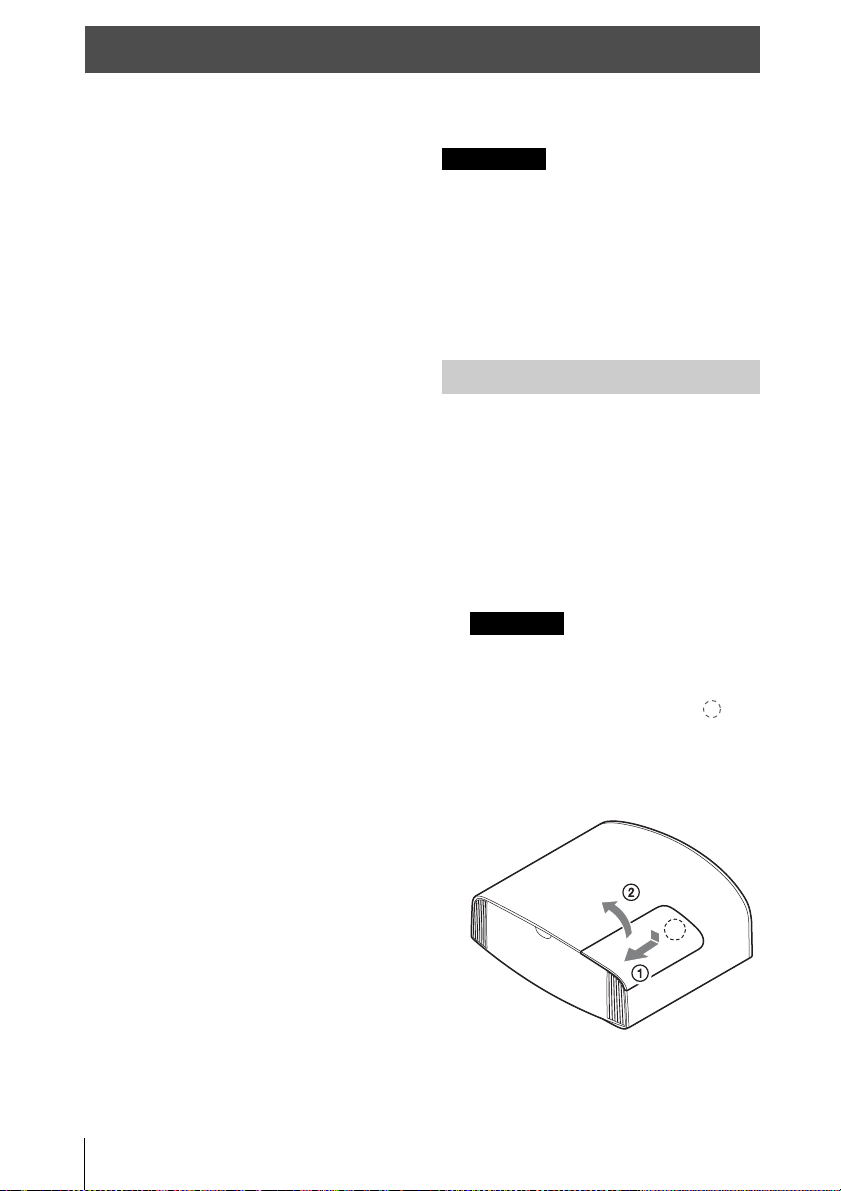
3 Tout en appuyant sur la partie
indiquée sur l’illustration du
couvercle de la lampe, faites glisser
1, puis ouvrez 2 le couvercle de la
lampe.
Entretien
Remarques
Remplacement de la lampe
Remarque
17
FR
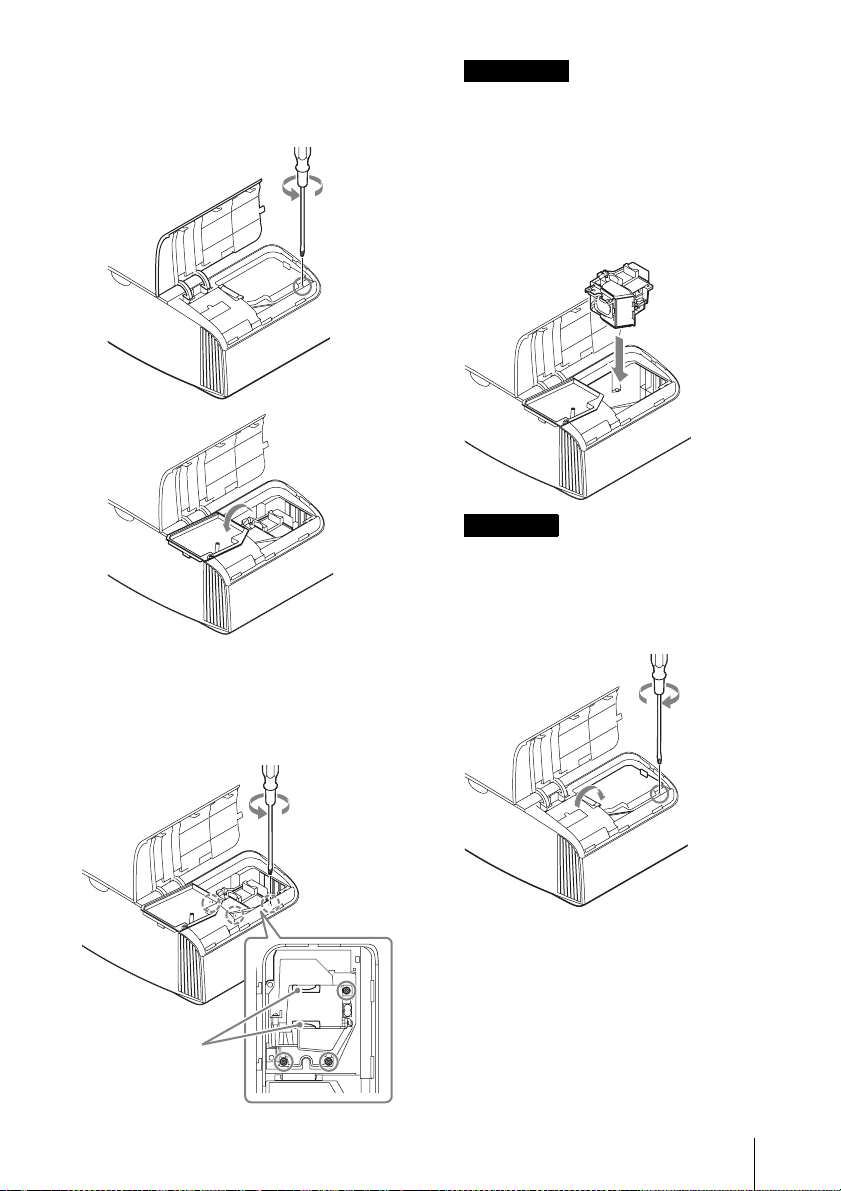
4 Desserrez la vis du couvercle de la
lampe (couvercle intérieur) avec un
tournevis cruciforme, puis ouvrez le
couvercle de lampe.
5 Dévissez les 3 vis de la lampe à l’aide
du tournevis cruciforme. Maintenez la
poignée vers le haut et retirez la
lampe.
• À l’exception des 3 vis spécifiées, ne
desserrez aucune autre vis.
• Tenez la lampe par la poignée pour la
retirer et la fixer.
6 Insérez fermement et à fond la
nouvelle lampe à l’aide de la poignée,
puis resserrez les 3 vis.
Veillez à ne pas toucher le bloc optique à
l’intérieur du projecteur.
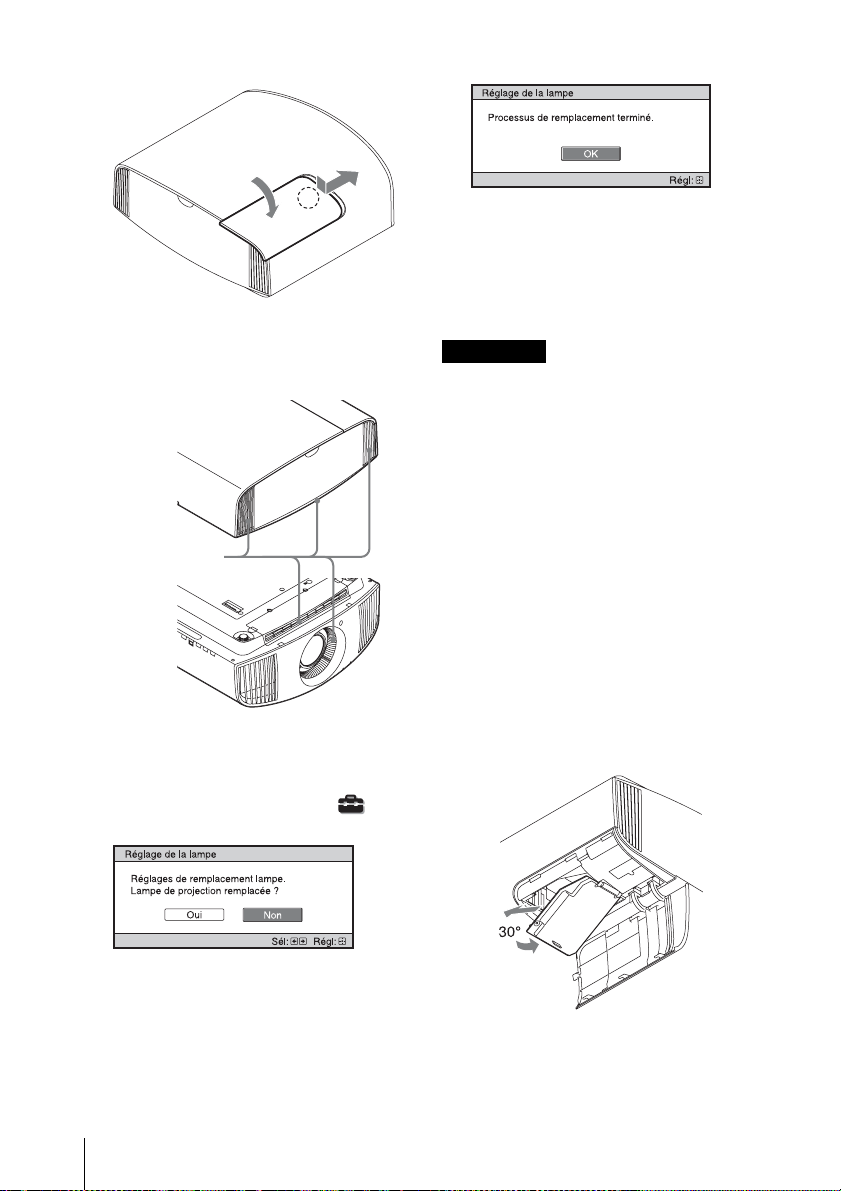
7 Fermez le couvercle de la lampe
(couvercle intérieur), puis vissez-le.
Poignée
Remarques
Remarque
FR
18
8 Fermez le couvercle de la lampe.
9 Dépoussiérez les orifices de
ventilation (prise d’air) à l’aide d’un
chiffon.
10Mettez l’appareil sous tension, puis
sélectionnez l’option de réglage de la
lampe dans le menu Réglage .
L’écran du menu ci-dessous s’affiche.
Conseil
Si « Verrou réglages » est réglé sur
« Niveau B », réglez-le immédiatement sur
« Off ».
11Sélectionnez « Oui ».
Mise en garde
N’introduisez pas les doigts dans la fente de
remplacement de la lampe et veillez à ce
qu’aucun liquide ou objet ne tombe à
l’intérieur de la fente pour éviter tout risque
d’électrocution ou d’incendie.
• L’appareil ne se mettra sous tension que si la
lampe est bien mise en place.
• L’appareil ne se mettra sous tension que si le
couvercle de la lampe est bien fermé.
• Pour effacer un message affiché à l’écran,
appuyez une fois sur un bouton quelconque
de la télécommande ou du panneau de
commande de l’appareil.
Remarque concernant le
remplacement d’une lampe brisée en
cas d’installation au plafond
Si la lampe se brise, les morceaux de lampe
risquent de se disperser et de vous blesser.
Lorsque l’appareil est fixé au plafond, retirez le
couvercle de la lampe (couvercle intérieur) en
le faisant lentement glisser horizontalement
après l’avoir ouvert en le soulevant de
30 degrés. Éviter de tordre le couvercle de la
lampe (couvercle intérieur).
Orifices de
ventilation
(prise d’air)
Remarques
19
FR
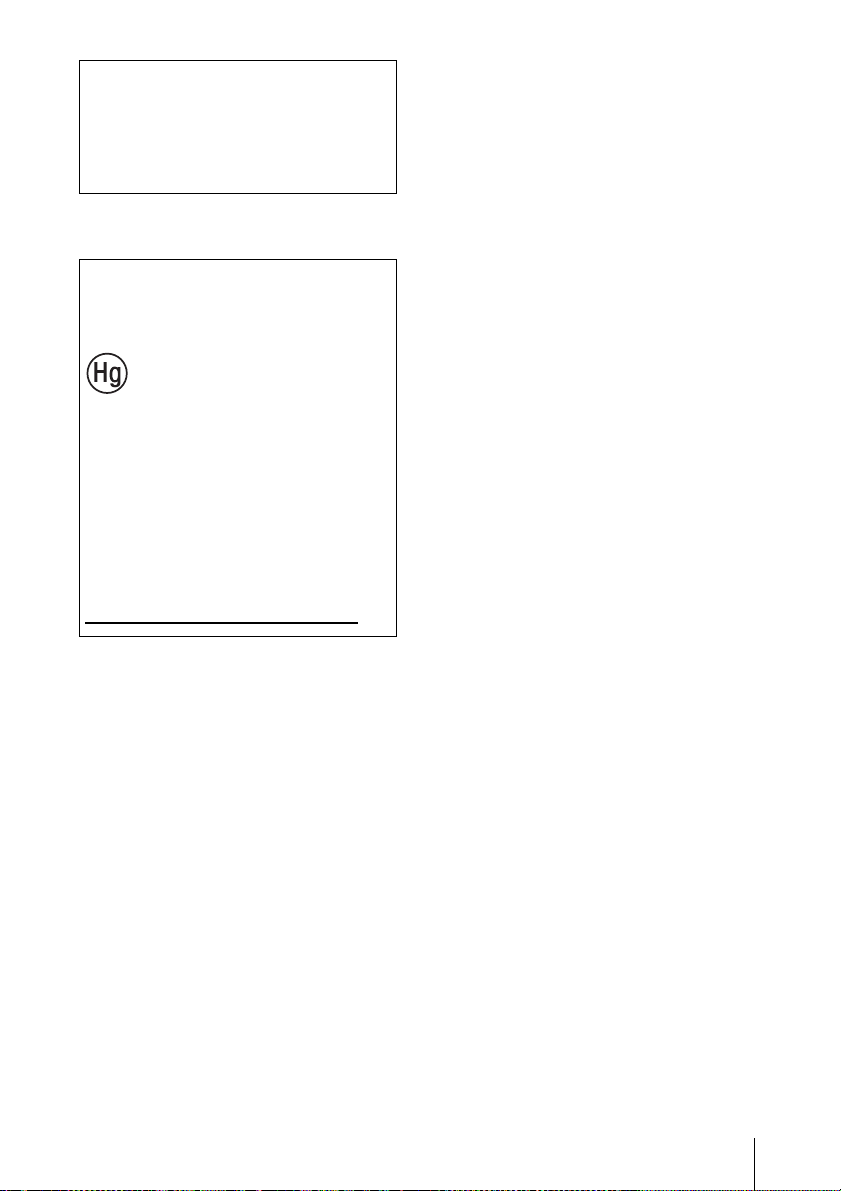
Mettre à disposition de la lampe
usagée
Remarque
La lampe contient du mercure. La
réglementation en matière de mise au rebut
pour les tubes fluorescents dépend de votre
lieu de résidence. Respectez la politique
d’élimination des déchets de votre région.
Pour les clients aux
États-Unis et au
Canada
La lampe de cet
appareil contient du
mercure. Disposez selon
les lois locales,
provinciales et fédérales
applicables.
Pour de plus amples
informations, voir
www.sony.com/mercury