EN
94
Thank-you for choosing a Candy washing
machine. We are confident it will loyally
assist you in safely washing your clothes,
even delicates, day after day.
You can register your product at
www.registercandy.com to gain faste
r
access to supplementary services solely
reserved to our most loyal customers.
Carefully read this manual for correct and
safe appliance use and for helpful tips on
efficient maintenance.
Only use the washing machine
after carefully reading these instructions.
We recommend you always keep this
manual on hand and in good condition fo
r
any future owners.
Please check that the appliance is
delivered with this instruction manual,
warranty certificate, service centre address
and energy efficiency label. Also check that
plugs, drain hose support hook and liquid
detergent or bleach tray (only on some
models) are included. We recommend you
keep all these components.
Each product is identified by a unique 16-
character code, also called the “serial
number”, printed on the sticker. This can be
found inside the door opening. This code is
a unique code for your product that you will
need to register the product warranty, or i
f
you need to contact the Customer Service
Centre.
This appliance is marked according to
the European directive 2012/19/EU
on Waste Electrical and Electroni
c
Equipment (WEEE).
WEEE contains both polluting substances (which
can cause negative consequences for th
e
environment) and basic components (which can
be re-used). It is important to have WEEE
subjected to specific treatments, in order t
o
remove and dispose properly all pollutants, and
recover and recycle all materials. Individuals can
play an important role in ensuring that WEEE
does not become an environmental issue; it is
essential to follow some basic rules:
WEEE should not be treated as household
waste;
WEEE should be handed over to the relevan
t
collection points managed by the municipality o
r
by registered companies. In many countries, fo
r
large WEEE, home collection could be present.
In many countries, when you buy a ne
w
appliance, the old one may be returned to the
retailer who has to collect it free of charge on a
one-to-one basis, as long as the equipment is o
f
equivalent type and has the same functions as
the supplied equipment.
1. GENERAL SAFETY RULES
2. INSTALLATION
3. PRACTICAL TIPS
4. MAINTENANCE AND CLEANING
5. QUICK USER GUIDE
6. CONTROLS AND PROGRAMS
7.
THROUBLESHOOTING AND WARRANT
Y
Environmental conditions
Contents

EN
95
1. GENERAL SAFETY
RULES
This appliances is intended to
be used in household and
similar applications such as:
- Staff kitchen areas in shops, offices
and other working environments;
- Farm houses;
- By clients in hotels, motels and
other residential type environments;
- Bed and breakfast type environments.
A different use of this appliance
from household environment
or from typical housekeeping
functions, as commercial use by
expert or trained users, is excluded
even in the above applications. If
the appliance is used in a manner
inconsistent with this it may reduce
the life of the appliance and may
void the manufacturer’s warranty.
Any damage to the appliance or
other damage or loss arising
through use that is not consistent
with domestic or household use
(even if located in a domestic or
household environment) shall not
be accepted by the manufacturer to
the fullest extent permitted by law.
This appliance can be used by
children aged from 8 years and
above and persons with reduced
physical, sensory or mental
capabilities or lack of experience
and knowledge if they have been
given supervision or instruction
concerning use of the appliance
in a safe way and understand the
hazards involved.
Children shall not play with the
appliance. Cleaning and user
maintenance shall not be made
by children without supervision.
Children should be supervised
to ensure that they do not play
with the appliance.
Children of less than 3 years
should be kept away unless
continuously supervised.
If the supply cord is damaged, it
must be replaced by the
manufacturer, its service agent
or similarly qualified persons in
order to avoid a hazard.
Only use the hose-sets
supplied with the appliance for
the water supply connection
(do not reuse old hose-sets).
Water pressure must be between
0,05 MPa and 0,8 MPa.
Make sure that a carpet do not
obstruct the base of the machine
and ventilation openings.
The OFF condition is reached
by
placing the reference mark on
the programmes control/knob in
the vertical position. Any other
different position of such control
sets the machine in ON condition
(only for models with programmes
knob).
96
After installation, the appliance
must be positioned so that the
plug is accessible.
The maximum load capacity of
dry clothes depends on the
model used (see control panel).
To consult the product fiche
please refer to the manufacturer
website.
Before cleaning or maintaining
the washing machine, unplug
the appliance and turn off the
water faucet.
Make sure the electrical system
is grounded. Otherwise, seek
qualified professional assistance.
Please do not use converters,
multiple sockets or extension
cords.
Do not pull on the power cord
or appliance to unplug the
machine.
Do not expose the washing
machine to rain, direct sunlight
or other weather elements.
In the event of fault and/or
malfunction, turn off the
washing machine, close the
water faucet and do not tamper
with the appliance.
Immediately contact the
Customer Service Centre and
only use original spare parts.
Failure to observe these
instruction may jeopardise
appliance safety.
By placing the
mark on this
product, we are confirming
compliance to all relevant
European safety, health and
environmental requirements which
are applicable in legislation for
this product.
Safet
y
instructions
WARNING:
water may reach very high
temperatures during the
wash c
y
cle.

EN
97
2. INSTALLATION
A
B
B
B
B
A
1
Remove the 2 or 4 transportation
screws (A) on the back and
remove the 2 or 4 flat washers,
rubber bungs and plastic space
r
tubes (B) as illustrated in figure 1
.
2
Fit the trims provided "C" (fig. 2).
3
4
min 50 cm
max 85 cm
+2,6 mt
max
max 100 cm
min 4 cm
98
5
The washing machine should b
e
connected to the water mains via th
e
new tube supplied with th
e
appliance (inside the drum). Do no
t
use the old tube for this purpose.
Connect one end of the water inle
t
pipe with the elbow bend to th
e
electrovalve (top rear part of th
e
machine) and the other end to a ta
p
or a plumbed-in 3/4" gas threaded
connection.
Place the washing machine close t
o
the wall, ensuring that there are n
o
bends or kinks anywhere in the tube.
Hook the outlet pipe to the edge o
f
the sink or preferably to a fixed
drainage outlet of a diameter greater
than that of the outlet pipe and at
a
height of min. 50 cm. and
a
maximum of 75 cm. from the floo
r
(fig. 4).
If necessary, use the curved
accessory to attach and suppor
t
the outlet pipe more securely.
If your model offers this function:
To move the washing machin
e
easily, turn the trolley lever to th
e
right. Once you have finished
moving the machine, return the leve
r
to its original position.
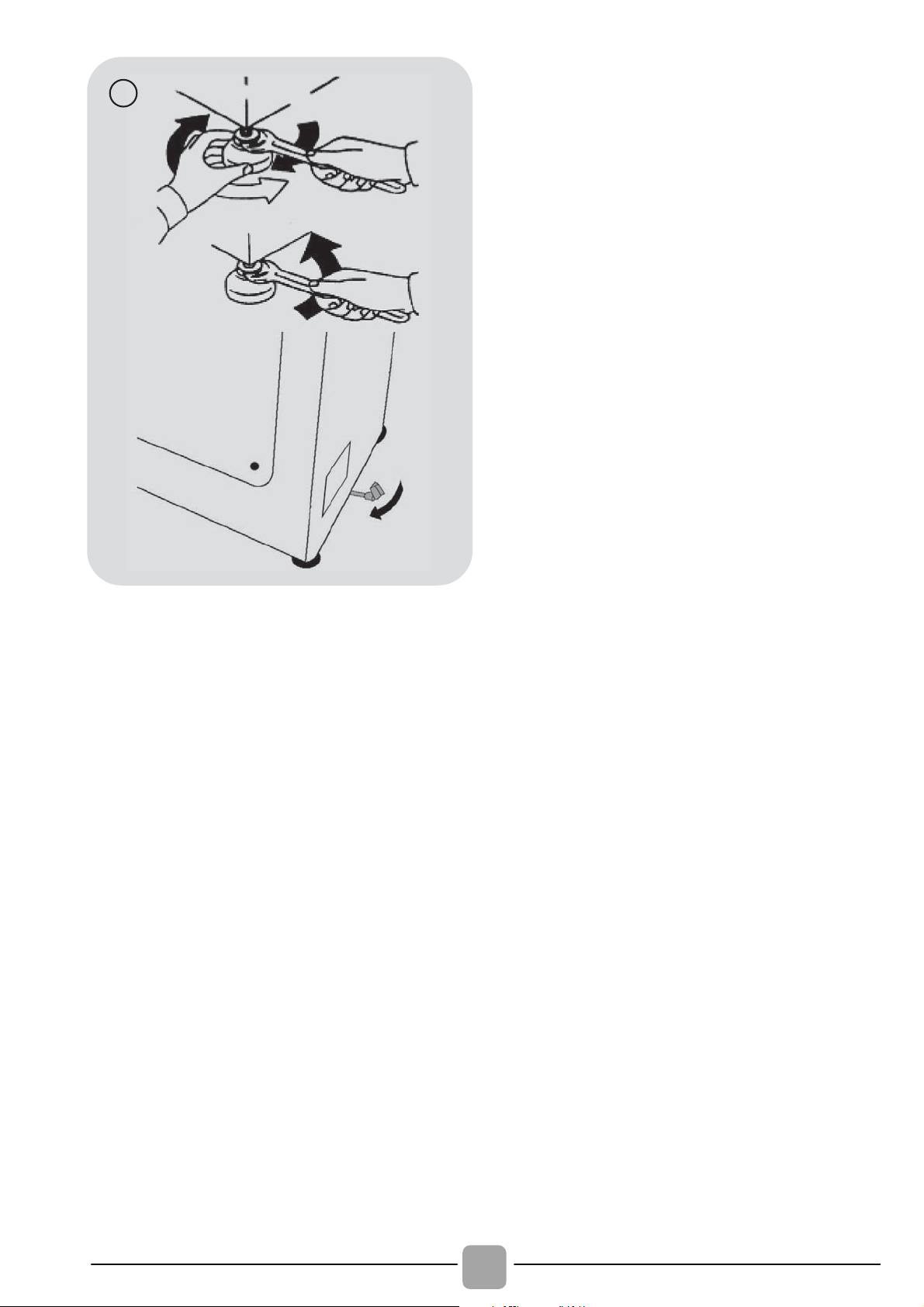
Level the machine by adjusting th
e
front feet (fig. 5).
a) Turn the nut clockwise to releas
e
the screw on the foot.
b) Raise or lower the foot by rotating
it until it stands firmly on the floor.
c) Lock the foot in position by turning
the nut anticlockwise until it come
s
up against the bottom of th
e
washing machine.
Check that the appliance is properl
y
levelled.
Check that the washing machin
e
does not rock by trying to move tw
o
diagonally opposite top corners a
t
the same time.
If you move the washing machin
e
from one place to another, you mus
t
level the feet again afterwards.
EN
99
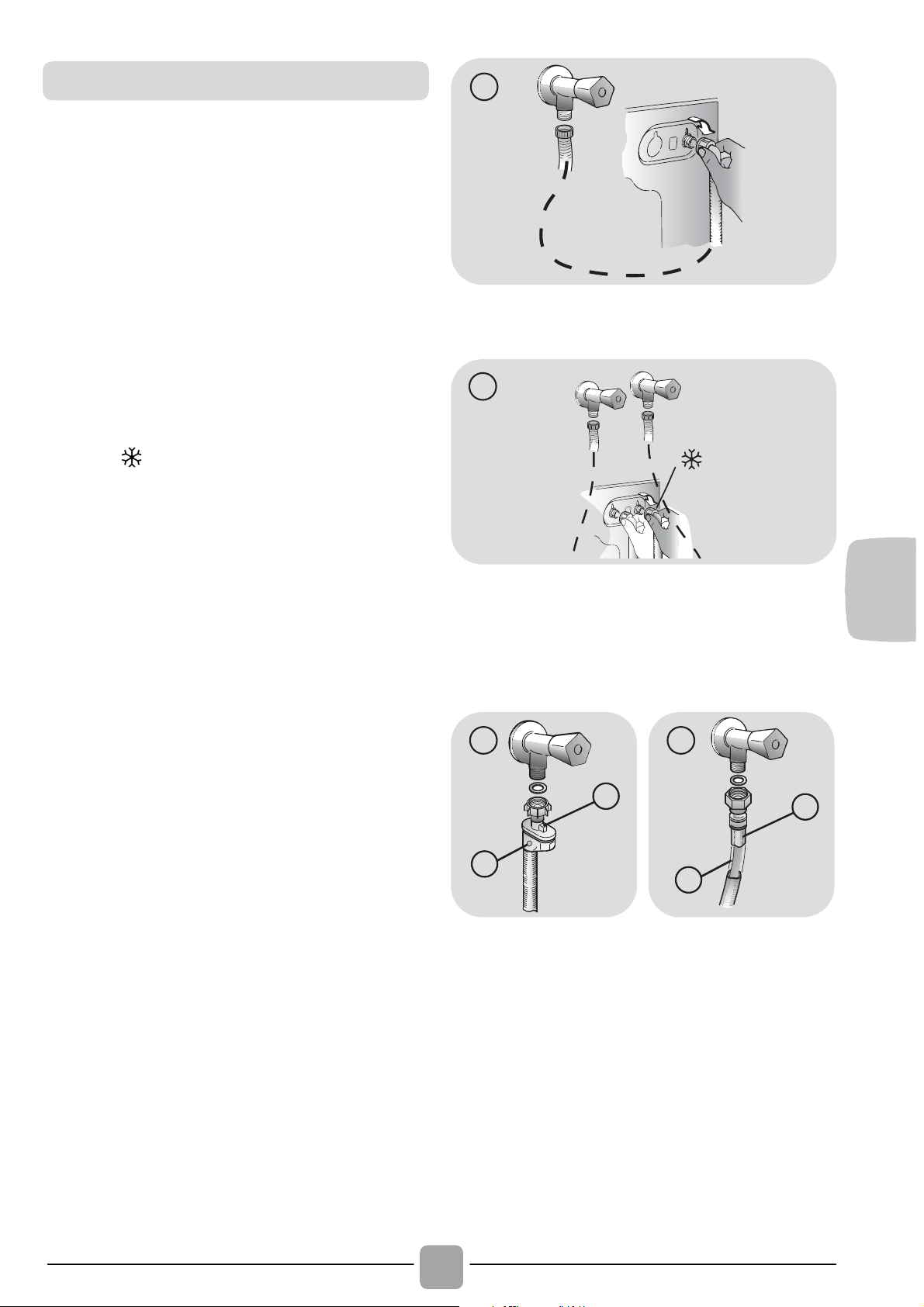
Connect the water hose to the wate
r
supply tap (fig. 6) only using the hose
supplied with the appliance (do not reuse
old hose-sets).
Some models may include one or more o
f
the following features:
HOT&COLD (fig. 7):
water mains connection settings with hot
and cold water for higher energy savings.
Connect the grey tube to the cold water
faucet
and the red one to the hot water
faucet. The machine can be connected to
the cold water faucet only: in this case,
some programs may start a few minutes
later.
AQUASTOP (fig. 8):
a device located on the supply tube that
stops water flow if the tube deteriorates;
in this case, a red mark will appear in the
window “A” and the tube must be
replaced. To unscrew the nut, press the
one-way lock device "B".
AQUAPROTECT – SUPPLY TUBE WITH
GUARD (fig. 9):
Should water leak from the primary
internal tube "C", the transparent
containment sheath "D" will contain water
to permit the washing cycle to complete.
At the end of the cycle, contact the
Customer Service Centre to replace the
supply tube.
6
1
7
B
A
8
D
C
9
Hydraulic connections
100
3. PRACTICAL TIPS
WARNING: when sorting laundry, make
sure:
- have eliminated metallic objects such as
hair clips, pins, coins, from laundry;
- to have buttoned pillow cases, closed
zips, tied loose belts and long robe
ribbons;
- to have removed rollers, hooks or clips
from curtains;
- to have carefully read clothing washing
labels;
- to have removed any persistent stains
using specific detergents.
When washing rugs, bedcovers or other
heavy clothing, we recommend you avoid
the spinning cycle.
To wash wool, make sure the item can be
machine washed and marked by the
“Pure virgin wool” symbol with the “Does
not mat” or “Machine washable” label.
A guide environmentally friendly and
economic use of your appliance.
Maximise The Load Size
Achieve the best use of energy, water,
detergent and time by using the
recommended maximum load size.
Save up to 50% energy by washing a full
load instead of 2 half loads.
Do you need to pre-wash?
For heavily soiled laundry only!
SAVE detergent, time, water and
between 5 to 15% energy consumption
by NOT selecting Prewash for slight to
normally soiled laundry.
Is a hot wash required?
Pretreat stains with stain remover or soak
dried in stains in water before washing to
reduce the necessity of a hot wash
programme.
Save up to 50% energy by using a 60°C
wash programme.
Following is a quick guide with tips and
recommendations on detergent use at the
various temperatures. In any case, always
read the instructions on the detergent for
correct use and doses.
Load tips
Helpful suggestions for the user
When washing heavily soiled whites,
we recommend using cotton
programs of 60°C or above and a
normal washing powder (heavy duty)
that contains bleaching agents that at
medium/high temperatures provide
excellent results.
For washes between 40°C and 60°C
the type of detergent used needs to be
appropriate for the type of fabric and
level of soiling.
Normal powders are suitable for “white”
or colour fast fabrics with high soiling,
while liquid detergents or “colour
protecting” powders are suitable for
coloured fabrics with light levels of
soiling.
For washing at temperatures below
40°C we recommend the use of liquid
detergents or detergents specifically
labeled as suitable for low temperature
washing.
For washing wool or silk, only use
detergents specifically formulated for
these fabrics.
EN
101
4. MAINTENANCE AND
CLEANING
To clean the washing machine exterior, use a
damp cloth, avoiding abrasives, alcohol and/or
solvents. The washing machine does not
require any special care for ordinary cleaning:
clean drawer compartments and the filter;
some tips on how to move the machine or on
long periods of disuse are provided below.
The washing machine comes with a
special filter able to trap large residue,
such as buttons or coins, which could
clog the drain.
Only available on certain models: pull out
the corrugated hose, remove the stopper
and drain the water into a container.
Before unscrewing the filter, we
recommend you place an absorbent cloth
under it to keep the floor dry.
Turn the filter counter-clockwise to the
limit stop in the vertical position.
Remove and clean the filter; when
finished, replace it turning it clockwise.
Repeat the previous steps in reverse
order to reassemble all parts.
Should the washing machine be stored in
an unheated room for a long period of
time, drain all water from tubes.
Unplug the washing machine.
Detach the tube from the strap and lower
it, fully draining water into a bowl.
Secure the drain tube with the strap when
finished.
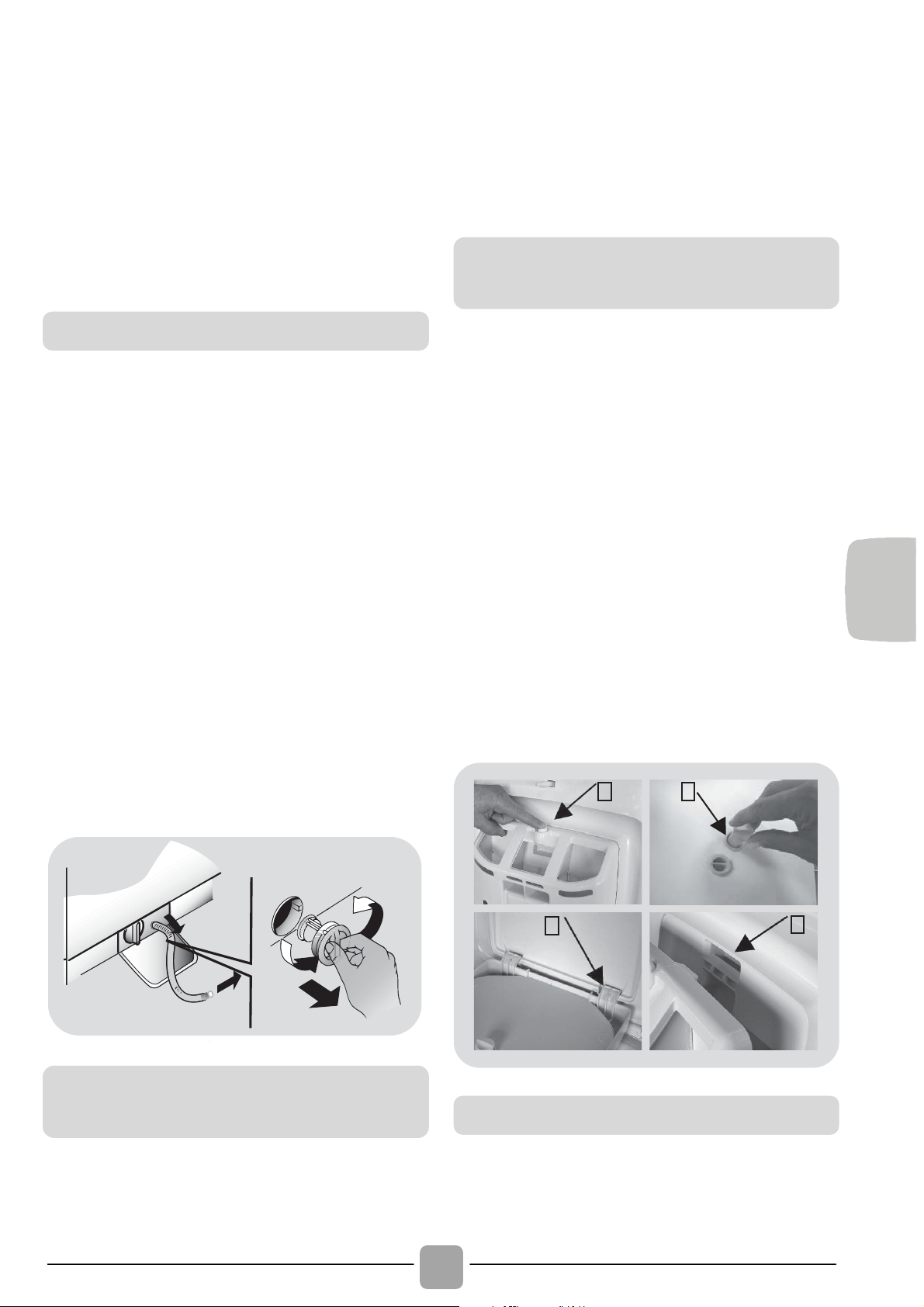
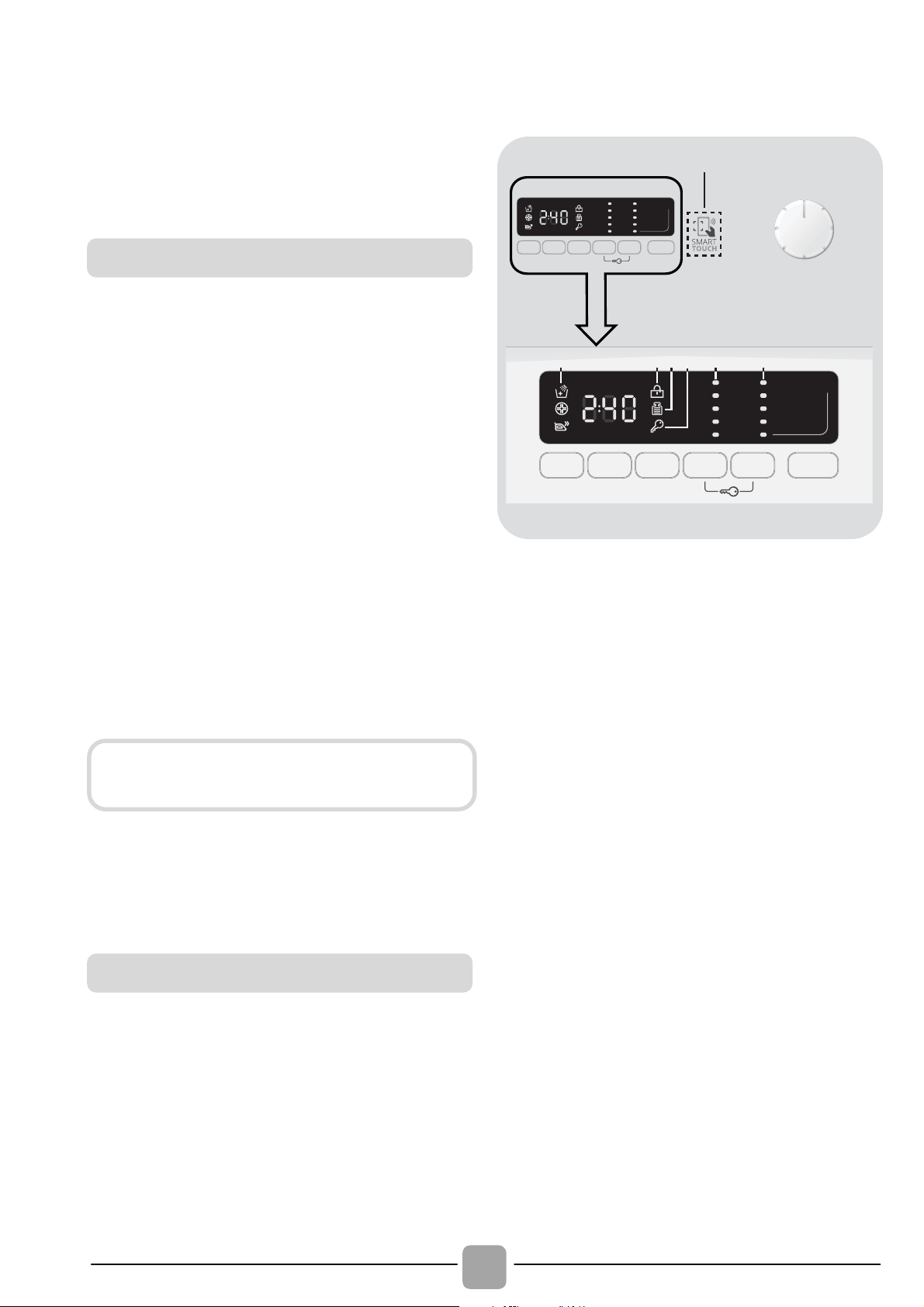
Press button (A).
Hold down the button and turn the
detergent dispenser outwards.
Remove the dispenser and clean it.
It is recommended to remove any
remamining detergent in the
compartments to avoid any build up that
could cause blockages and restrict the
water flow from the dispenser to drum.
Pulling out and extract the trap/traps (S)
that are located in the back part of the
dispenser and clean them carefully.
Remove any solid residue which could
block the holes in the compartments.
B
A
C
S
Fit in the tabs as shown (B).
Turn the detergent dispenser towards the housing
(C) in the door until the tab clicks into place.
Filter cleaning
Suggestions for moves or
prolonged disuse
Cleaning the detergent dispense
r
and its compartments
Fitting
102
5. QUICK USER GUIDE
This washing machine automatically adjusts
the level of the water to the type and
quantity of washing. This system gives a
reduction in energy consumption and a
saving in washing times.
Turn on the washing machine and select
the required program.
Adjust the washing temperature if
necessary and press the required "option"
buttons.
Press the START/PAUSE button to start
washing.
Should power go out when the washing
machine is running, a special memory
saves the settings and, when power
returns, the machine resumes the cycle
from where it left off.
At the end of the programme, the
message "End" will appear on the display
or, on some models, all wash stage
indicator lights will turn on.
Turn off the washing machine.
For any type of wash, see the program
table and follow the operating sequence
as indicated.
Water pressure:
min 0.05 Mpa / max 0.8 Mpa
(0.05 MPa dispenses approximately 1 litre
of water in 10 seconds)
Spin r.p.m.: See rating plate.
Power input / Power current fuse amp /
Supply voltage: See rating plate.
6. CONTROLS AND
PROGRAMS
A
E
I
H
OPLMN
D
Q
FGCB
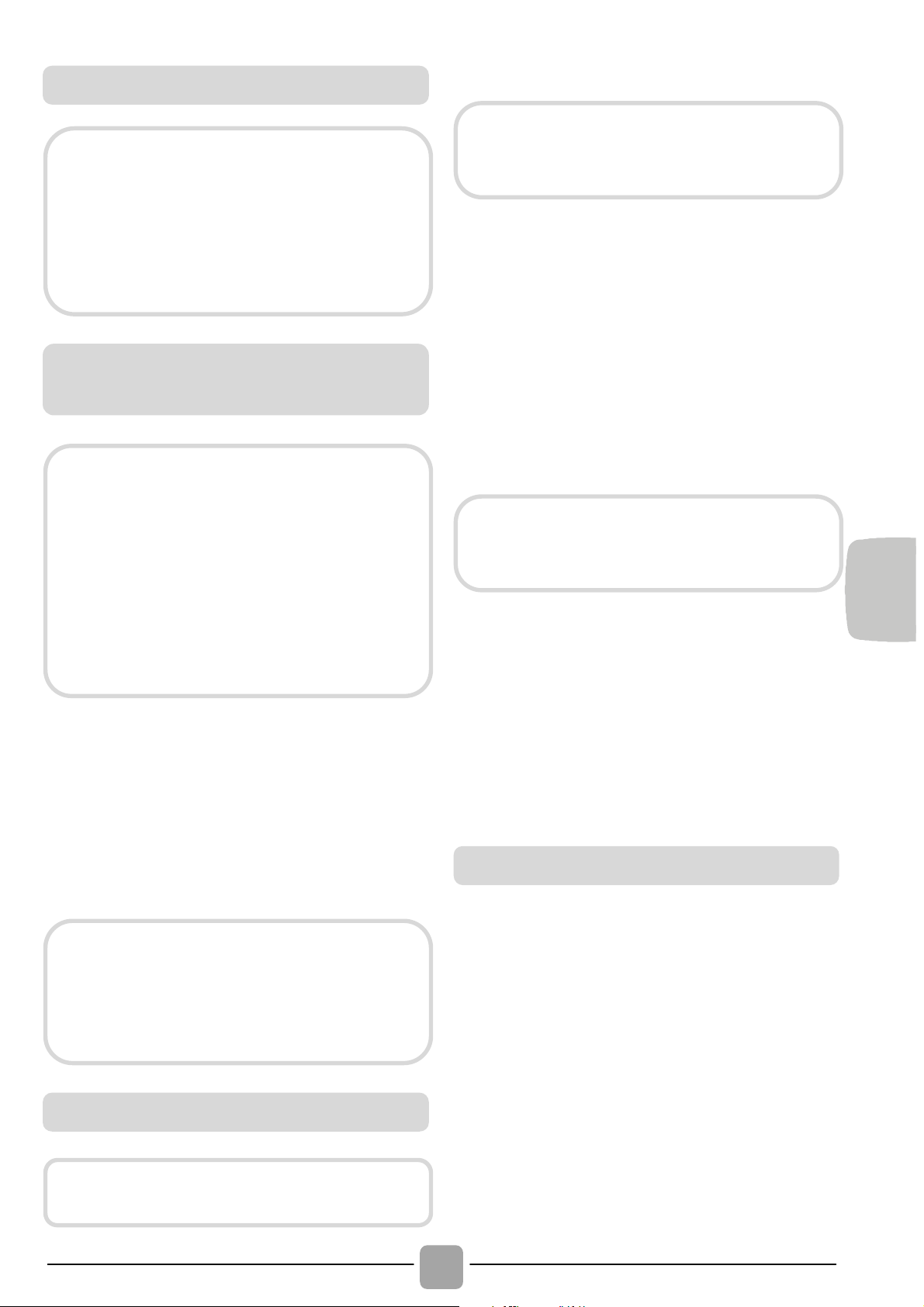
A Programme selector with OFF
position
B START/PAUSE button
C DELAY START button
D OPTIONS button
E RAPID / STAIN LEVEL button
F TEMPERATURE SELECTION
button
G SPIN SPEED button
F+G KEY LOCK
H Digital display
I OPTIONS indicator lights
L DOOR LOCKED indicator light
M KG DETECTOR indicator light
N KEY LOCK indicator light
O TEMPERATURE SELECTION
indicator lights
P SPIN SPEED indicator lights
Q SMART TOUCH area
Program selection
Wait until the DOOR LOCKED light has
gone out before opening the door.
Technical data
EN
103
Press the START/PAUSE button to start
the selected cycle.
Once a programme is selected the
programme selector remains stationary on
the selected programme till cycle ends.
Switch off the washing machine by
turning the selector to OFF.
Press to start the selected cycle.
ADD OR REMOVE ITEMS AFTER THE
PROGRAMMES HAS STARTED (PAUSE)
Press and hold the START/PAUSE
button for about 2 seconds (some
indicator light and the time remaining
indicator will flash, showing that the
machine has been paused).
Wait 2 minutes until the safety device
unlocks the door.
After you have added or removed items,
close the door and press the
START/PAUSE button (the programme
will start from where it left off).
CANCELLING THE PROGRAMME
To cancel the programme, set the
selector to the OFF position.
This button allows you to pre-programme
the wash cycle to delay the start of the
cycle for up to 24 hours.
To delay the start use the following
procedure:
- Select the required programme.
- Press the delay start button once to
activate it (h00 appears on the display)
and then press it again to set a 1 hour
delay (h01 appears on the display). The
pre-set delay increases by 1 hour each
Opening the door
A special safety device prevents the
door from being opened immediately
after the end of the cycle.
Wait for 2 minutes after the wash
cycle has finished and the "Door
Security" light has gone out before
opening the door.
PROGRAMME selector with OFF
position
When the programme selector is turned
the display lights up to show the settings
for the programme selected.
For energy saving, at the end of the
cycle or with an inactivity period, the
display level contrast will decrease.
N.B.: To switch the machine off, turn
the programme selector to the OFF
p
osition.
The programme selector must be
returned to the OFF position at the end
of each cycle or when starting a
subsequent wash cycle prior to the next
programme being selected and started.
START/PAUSE button
Close the door BEFORE selecting the
button START/PAUSE.
When the START/PAUSE button has
been pressed, the appliance can take
few seconds before it starts working.
Before you open the door, please
check water level is below the door
opening to avoid flooding.
DELAY START button

104
time the button is pressed, until h24
appears on the display, at which point
pressing the button again will reset the
delay start to zero.
- Confirm by pressing the START/PAUSE
button. The delay countdown will begin
and when it has finished the programme
will start automatically.
It is possible to cancel the delay start by
turning the programme selector to OFF.
If there is any break in the power supply
while the machine is operating, a special
memory stores the selected programme
and, when the power is restored, it
continues where it left OFF.
This button allows you to choose between
three different options:
- EXTRA RINSE
This option allows you to add one rinse at
the end of the washing cycle and is useful
for people with delicate and sensitive
skin, for which a small amount of
detergent residue can cause irritations or
allergies.
It is advisable to also use this function for
the children clothes and for the washing
of heavily soiled items, which requires a
lot of detergent to be used, or for the
washing of toweling items whose fibres
mostly have the tendency to hold the
detergent.
- HYGIENE +
Activated when you set 60°C of
temperature. This option allows deep
cleaning of your clothes by maintaining the
same temperature for the whole wash.
- EASY IRON
This function allows you to minimizes
creases as much as possible, eliminating
the intermediate spins or reducing the
intensity of the last one.
This button allows you to choose between
two different options, depending on the
selected programme.
- RAPID
The button becomes active when
you select the RAPID (14/30/44 Min.)
programme on the knob and allows you to
select one of three durations indicated.
- STAIN LEVEL button
Once the programme has been selected
the wash time set for that programme will
be automatically shown.
This option allows you to choose between
3 levels of wash intensity modifying the
length of the programme, depending on
how much the fabrics are soiled (can only
be used on some programmes as shown
in the table of programmes).
This button allows you to change the
temperature of the wash cycles.
It is not possible to raise the temperature
over the maximum allowed for the
programme, in order to protect the
fabrics.
If you want carry out a cold wash all the
indicators must be off.
The option buttons should be
selected before pressing the
START/PAUSE button.
OPTIONS button
If an option is selected that is not
compatible with the selected
programme then the option indicator
light first flashes and then goes off.
RAPID / STAIN LEVEL button
TEMPERATURE SELECTION
button
EN
105
By pressing this button, it is possible to
reduce the maximum speed, and if you
wish, the spin cycle can be cancelled.
If the label does not indicate specific
information, it is possible to use the
maximum spin expected in the program.
To reactivate the spin cycle press the
button until you reach the spin speed you
would like to set.
It is possible to modify the spin speed
without pausing the machine.
Pressing simultaneously the buttons
TEMPERATURE SELECTION and SPIN
SPEED for about 3 seconds, the
machine allows you to lock the keys. In
this way, you can avoid making
accidental or unwanted changes if a
button on the display is pressed
accidently during a cycle.
The key lock can be simply cancelled by
pressing the two buttons simultaneously
again or turning off the appliance.
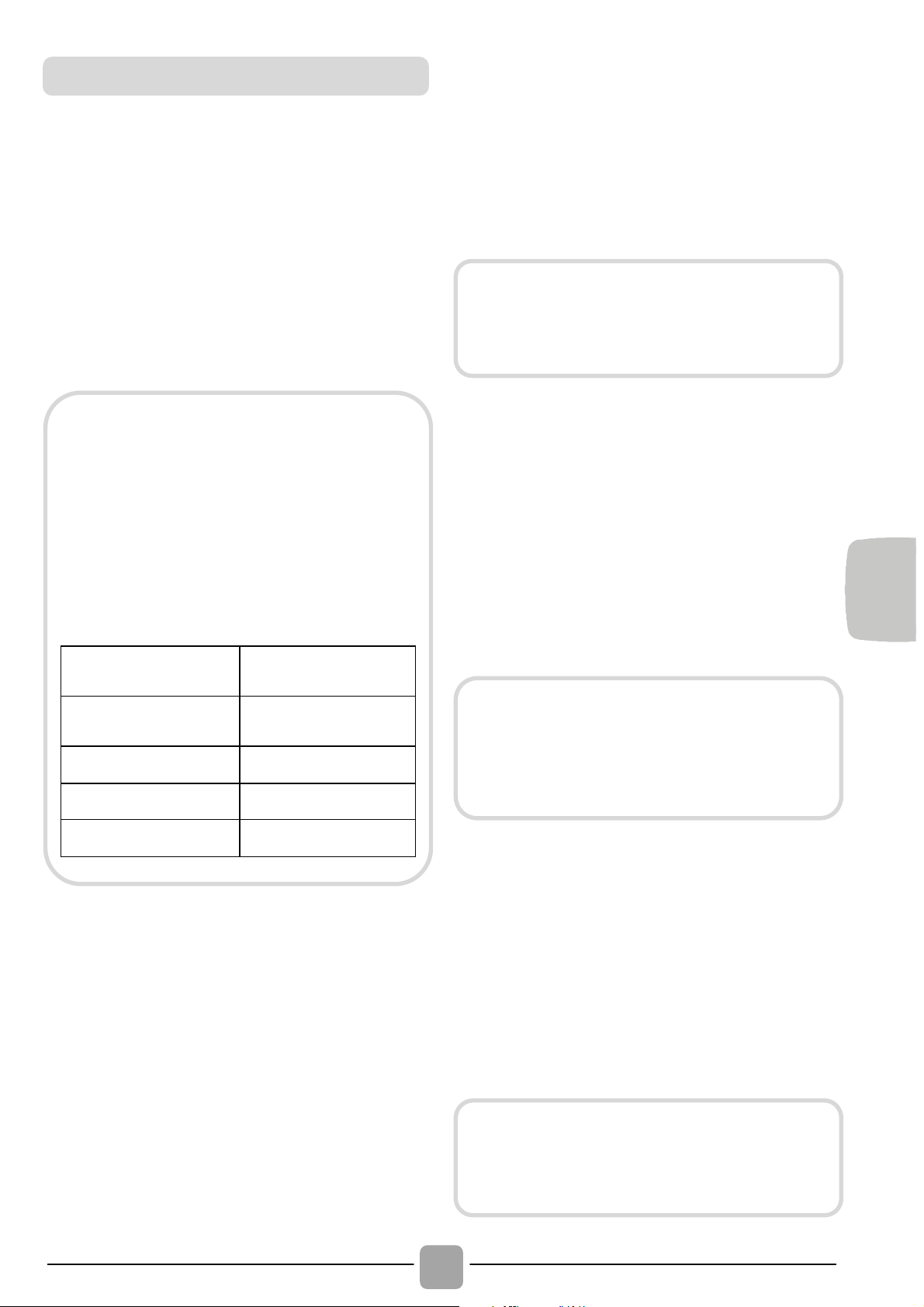
The display’s indicator system allows you to
be constantly informed about the status of
the machine.
1
5
2 3 4 6 7
1) OPTIONS INDICATOR LIGHTS
The indicator lights show the options that
can be selected by the relevant button.
2) CYCLE DURATION
When a programme is selected the
display automatically shows the cycle
duration, which can vary, depending on
the options selected.
During the initial filling phase of the cycle
the machine calculates the actual cycle
time needed based on the load size,
content and options selected. The real
time of the wash will then be displayed.
This time can recaulculate during the
wash depending on detergent levels and
load balancing.
3) DOOR LOCKED INDICATOR LIGHT
The indicator light is illuminated when the
door is fully closed.
SPIN SPEED button
To prevent damage to the fabrics, it is
not possible to increase the speed
over the maximum allowed for the
programme.
An over dosing of detergent can
cause excessive foaming. If the
appliance detects the presence of
excessive foam, it may exclude the
spinning phase or extend the duration
of the program and increase water
consumption.
The machine is fitted with a special
electronic device, which prevents the
spin cycle should the load be
unbalanced. This reduces the noise
and vibration in the machine and so
prolongs the life of your machine.
KEY LOCK
Digital Display
Close the door BEFORE selecting the
START/PAUSE button.

106
When START/PAUSE is pressed on
the machine with the door closed, the
indicator will flash momentarily and then
illuminate.
A special safety device prevents the door
from being opened immediately after the
end of the cycle. Wait for 2 minutes after
the wash cycle has finished and the
DOOR LOCKED light has gone out before
opening the door. At the end of the cycle
turn the programme selector to OFF.
4) Kg Detector INDICATOR LIGHT
(function active only on Cotton and
Synthetics programmes)
During the first minutes of the cycle, the
"Kg Detector" indicator will remain on
while the intelligent sensor will weigh the
laundry and adjust the cycle time, water
and electricity consumption accordingly.
Through every wash phase "Kg Detector"
allows to monitor information on the wash
load in the drum and in the first minutes of
the wash it:
- adjusts the amount of water required;
- determines the length of the wash cycle;
- controls rinsing according to the type of
fabric selected to be washed it;
- adjusts the rhythm of drum rotation for
the type of fabric being washed;
- recognises the presence of too much
soap suds, and if necessary, adjust the
amount of rinse water.
- adjusts the spin speed according to the
load, thus avoiding any imbalance.
5) KEY LOCK INDICATOR LIGHT
The indicator light show that the keys are
locked.
6) WASH TEMPERATURE INDICATOR
LIGHTS
This show the washing temperature of the
selected programme that can be changed
(where allowed) by the relevant button.
If you want carry out a cold wash all the
indicators must be off.
7) SPIN SPEED INDICATOR LIGHTS
This show the spin speed of the selected
programme, you can reduce or omit by the
relevant button.
If the door is not properly closed,
the light will continue to flash for
about 7 seconds, after which the
start command will be automatically
cancelled. In this case, close the
door in the proper way and press
t
h
e
S
TART
/
PA
US
E
butto
n.
EN
107
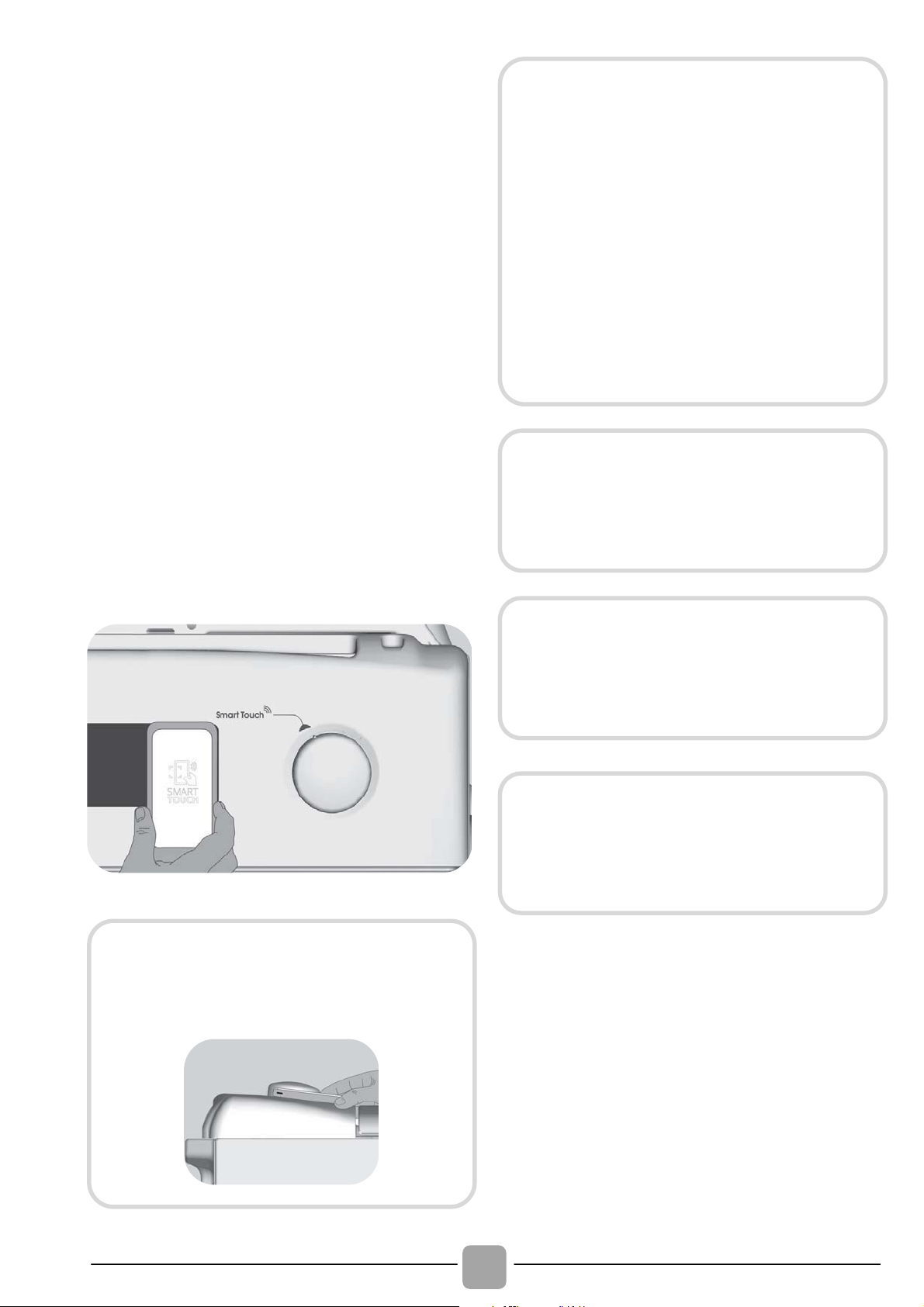
This appliance is equipped with Smart
Touch technology that allows you to
interact, via the App, with smartphones
based on Android operating system and
equipped with NFC (Near Field
Communication) function.
Download on your smartphone the
Candy simply-Fi App.
FUNCTIONS
The main functions available using the App
are:
Voice Assistant – A guide to help you
choose the ideal cycle with only three
voice inputs (clothes/fabrics, color, stain
level).
Cycles – To download and launch new
washing programmes.
Smart Care – Smart Check-up and Auto-
Clean cycles and a troubleshooting guide.
My Statistics – Washing statistics and
tips for a more efficient use of your
machine.
HOW TO USE SMART TOUCH
FIRST TIME - Machine registration
Enter the "Settings" menu of your
Android smartphone and activate the
NFC function inside the "Wireless &
Networks" menu.
Turn the knob to the Smart Touch
position to enable the sensor on the
dashboard.
Open the App, create the user profile and
register the appliance following the
instructions on the phone display or the
"Quick Guide" attached on the machine.
SMART TOUCH
The Candy simply-Fi App is available
for devices running both Android and
iOS, both for tablets and for
smartphones. However, you can
interact with the machine and take
advantage of the potential offered
by Smart Touch only with Android
smartphones equipped with NFC
technology, according to following
functional scheme:
Android smartphone
with NFC technology
Interaction with the
machine + contents
Android smartphone
without NFC technology
Contents only
Android Tablet
Contents only
Apple iPhone Contents only
Apple iPad Contents only
Get all the details of the Smart Touch
functions, browsing the App in DEMO
mode or go to:
www.candysmarttouch.com
Depending on the smartphone model
and its Android OS version, the
process of the NFC activation may be
different. Refer to the smartphone
manual for more details.
More information, F.A.Q. and the
video for an easy registration are
available on:
www.candysmarttouch.com/how-to
108
NEXT TIME – Regular usage
Every time you want to manage the
machine through the App, first you have
to enable the Smart Touch mode by
turning the knob to the Smart Touch
indicator.
Make sure you have unlocked your phone
(from stand-by mode) and you have
activated the NFC function; then, follow
the steps mentioned earlier.
If you want to start a washing cycle, load
the laundry, the detergent and close the
door.
Select the desired function in the App
(e.g.: starting a programme, the Smart
Check-up cycle, update statistics, etc).
Follow the instructions on the phone
display, KEEPING IT ON the Smart
Touch logo on the machine dashboard,
when requested to do so by the App.
NOTES:
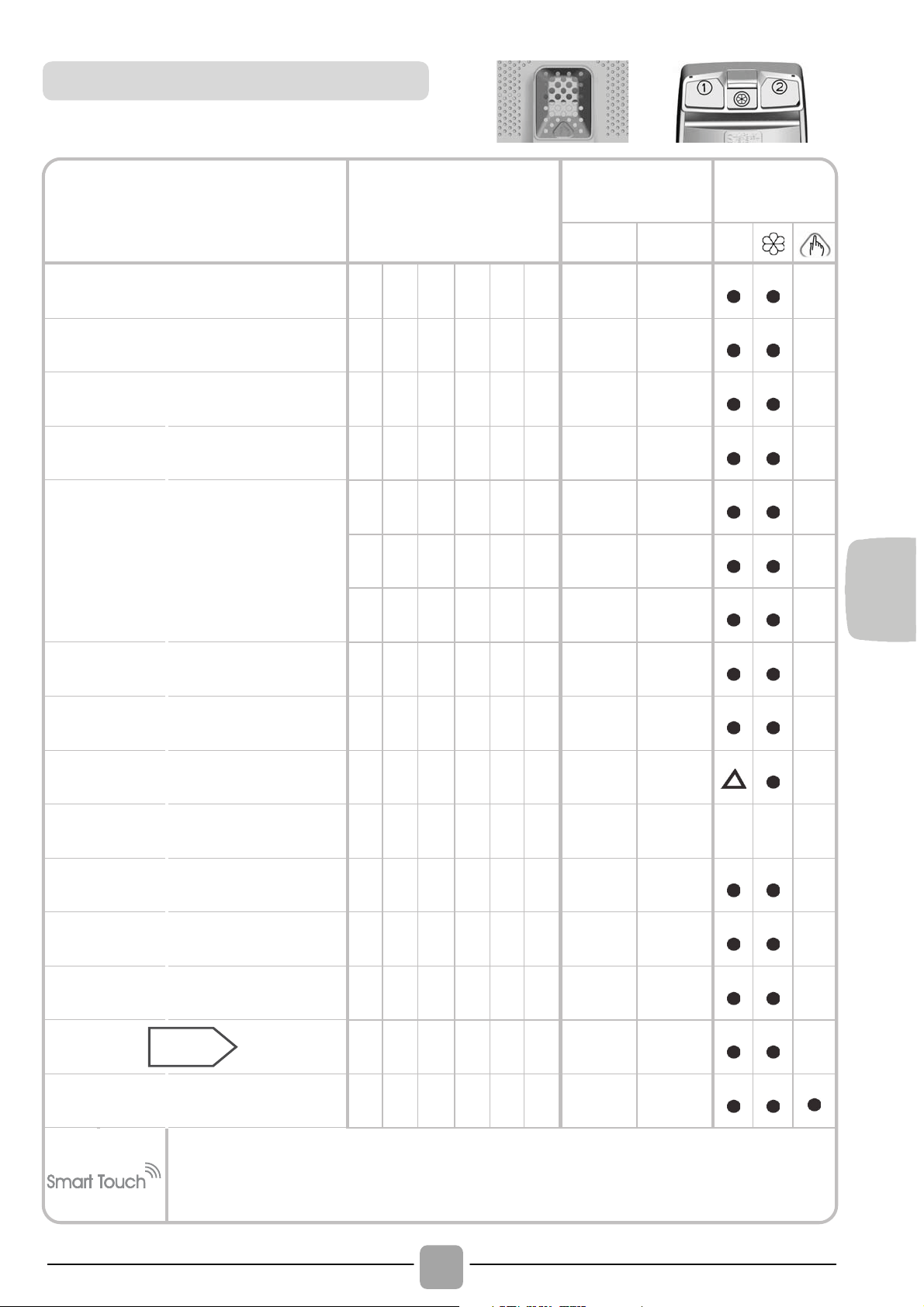
Place your smartphone so that the
NFC antenna on its back matches
the position of the Smart Touch logo
on the appliance (as illustred below).
If you do not know the position of
your NFC antenna, slightly move the
smartphone in a circular motion over
the Smart Touch logo until the App
confirms the connection. In order for
the data transfer to be successful, it is
essential TO KEEP THE SMARTPHONE
ON THE DASHBOARD DURING THESE
THE FEW SECONDS OF THE
PROCEDURE;
a message on the
device will inform about the correct
outcome of the operation and advise
you when it is possible to move the
smartphone away.
Thick cases or metallic stickers on
your smartphone could affect or
prevent the transmission of data
between machine and telephone. If
necessary, remove them.
The replacement of some components of
the smartphone (e.g. back cover, battery,
etc...) with non-original ones, could result
in the NFC antenna removal, preventing
the full use of the App.
The management and the control of the
machine via App is only possible "by
proximity": it is therefore not possible to
perform remote operations (e.g.:
from
another room
; outside of the house).
EN
109
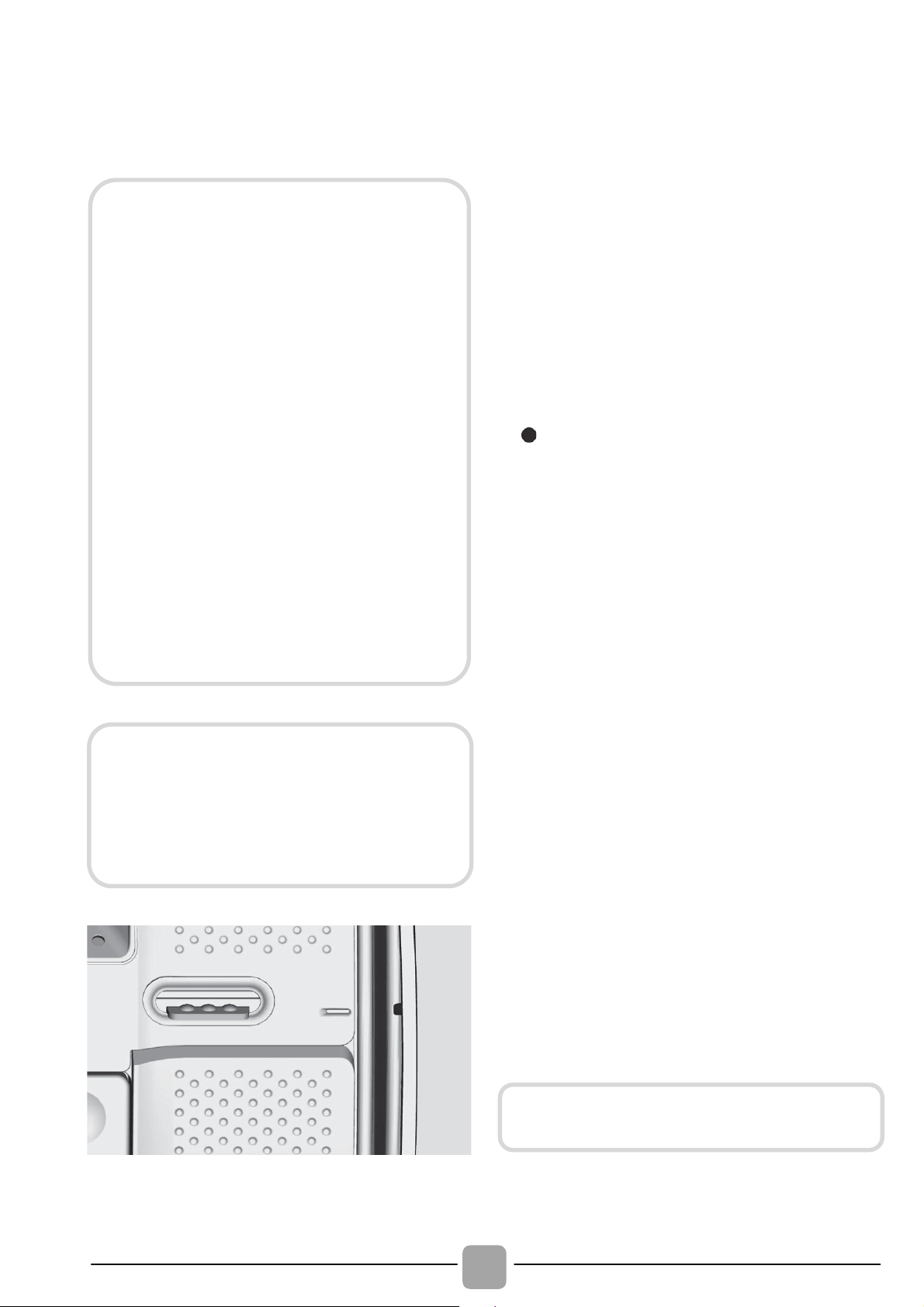
PROGRAMME
kg *
(MAX.)
TEMP.°C
1)
DETERGENT
Recommended
Max.
1 o 2
Perfect 20°C
2)
4 4 4 4 4 4,5
20° 20°
Intensive 40°
2)
4 4 4 4 4 4,5
40° 40°
Hygiene 60°
4 4 4 4 4 4,5
60° 60°
Perfect Rapid
59 Min.
2 2 2 2 2 2,5
40° 40°
14'
1 1 1 1 1 1,5
30° 30°
Rapid
3)
30'
1,5 1,5 1,5 1,5 1,5 2,5
30° 30°
44'
2 2 2 2 2,5 3
30° 40°
Handwash/Silk
1 1 1 1 1 1,5
30° 30°
Wool
1 1 1 1 1 1,5
40° 40°
Rinse
- - - - - -
- -
Drain + Spin
- - - - - -
- -
Baby Care
2)
4 4 4 4 4 4,5
60° 60°
Delicates
2 2 2 2 2 2,5
40° 40°
Mixed
2)
3 3 3 3 3 3,5
40° 60°
Cottons
**
2)
5 5,5 6 6,5 7 8
40° 60°
Cottons +
Prewash
2)
5 5,5 6 6,5 7 8
60° 90°
(
)
Customizable setting that interacts with the App on your smartphone and to
download the cycles (see the dedicated section). The factory sets the default
programme Auto-Clean, which will sanitize the machine.
Table of programmes
110
Please read these notes:
* Maximum load capacity of dry clothes,
according to the model used (see control
panel).
"
"
The spin speed may also be reduced, to
match any guidelines suggested on the
fabric label, or for very delicate fabrics
cancel the spin completely this option is
available with a spin speed button. This
function can be activated with the button
SPIN SELECTION. If the label does not
indicate specific information, it is possible to
use the maximum spin expected in the
program. An over dosing of detergent can
cause excessive foaming. If the appliance
detects the presence of excessive foam, it
may exclude the spinning phase or extend
the duration of the program and increase
water consumption.
( ) Only with PREWASH option
selected (programmes with
PREWASH option available).
1) When a programme is selected,
on the display is shown the
display shows the recommended
wash temperature that can be
reduced (where allowed) by the
relevant button.
2) For the programmes shown you
can adjust the duration and
intensity of the wash using the
STAIN LEVEL button.
3) Selecting the RAPID program on
the knob, it will be possible to
select with the RAPID button, one
of the three rapid programs
available among 14’, 30’ and 44’.
PREWASH: if the dispenser has the
specific compartment for pre-wash, pour
the detergent in it. Otherwise, pour the
detergent in the perforated area present
on the drum, following the dosage
indications of the detergent producer.
** STANDARD COTTON PROGRAMMES
ACCORDING TO (EU) No 1015/2010 and
No 1061/2010.
COTTON PROGRAMME WITH A
TEMPERATURE OF 60°C.
COTTON PROGRAMME WITH A
TEMPERATURE OF 40°C.
These programmes are suitable to
clean normally soiled cotton laundry and
they are the most efficient programmes
in terms of combined energy and water
consumptions for washing cotton
laundry.
These programmes have been
developed to be compliant with the
temperature on the wash label on the
garments and the actual water
temperature may slightly differ from the
declared temperature of the cycle.
Before closing the cover and start the
washing process, please check that the
internal drum is perfectly closed. When
possible, please align the position
indicators with drum to assure the best
washing performance.
IMPORTANT: do not use the pre-wash
mode with start-delay option.

EN
111
To clean different types of fabrics and
various levels of dirt, the washing machine
has specific programs to meet every need
of washing (see table of programmes).
Mix Power System +
The washing machine is equipped with an
innovative pre-mix of detergent and water.
A jet of water under high pressure sprays
the mixture directly in the load.
In the initial phase of the wash cycle, the
high pressure spray facilitate the
penetration of the wash solution through the
fibres, thoroughly removing dirt ensuring the
best wash performance.
The system also delivers the "Mix Power
System +", during the rinse, the complete
removal of the residues of detergent due to
its high pressure water jet, which invests
the laundry.
Perfect 20°C – Mix & Wash
This innovative "Mix Power System +"
technology, allows you to wash fabrics such
as cottons, synthetics and mixed fabrics at
20°C with a performance which is
comparable to a 40°C wash.
The consumption of this programme is
about 50% of a conventional 40°C. Cottons
wash.
We suggest a wash load equal to 2/3 of the
maximum capacity of the machine.
This programme applies to the washing
system "Mix & Wash" which allows you to
wash different fabrics and colours together.
Intensive 40°
This programme is suitable for cotton
garments and achieves excellent cleaning
results at 40°C ensuring the application o
f
fabrics and colors.
Hygiene 60°
This programme is suitable for cotton
garments and has been specially developed
to remove stubborn stains already at 60°C
thanks to the "Mix Power System +"
technology.
Perfect Rapid 59 Min
This specially designed programme
maintains the high quality wash
performance whilst greatly reducing the
wash time.
The programme is designed for a reduced
load (see table of programmes).
Rapid (14/30/44 Min.)
Washing cycle suggested for low loads and
slightly dirty. With this program it is
recommended to reduce the quantity o
f
detergent normally used, in order to avoid
unnecessary waste. Selecting the RAPID
program and acting on the button you can
choose one of three programs available.
Handwash/Silk
This programme allows a delicate washing
cycle for garments specified as "Hand
Wash only" and laundry items made from
Silk or specified as "Wash as Silk" on the
fabric label.
Wool
This program performs a wash cycle
dedicated to the wool fabrics that can be
washed in a washing machine, or the
articles to be washed by hand.
Rinse
This program performs 3 rinses with an
intermediate spin (which can be reduced o
r
excluded by using the appropriate button) . It
is used for rinsing any type of fabric, fo
r
example after a wash carried out by hand.
Programmes selection
WARNING:
New coloured garments should be
washed separately for at least 5 or 6
washes.
Certain large dark items such as jeans
and towels should always be washed
separately.
Never mix NON COLOURFAST fabrics.

112
Drain + Spin
The program completes the drain and a
maximum spin. It is possible to delete o
r
reduce the spin with the SPIN SPEED
button.
Baby Care
This program allows you to wash all baby
clothes getting a perfect clean and
sanitizing effect, setting the temperature at
60°C minimum.
To optimize the result of the sanitizing effect
we recommend the use of powder detergent.
Delicates
This program has reduced periods of drum
rotation during the cycle and is particularly
suitable or washing delicate fabrics. The
wash cycle and rinses are carried out with a
high level of water to ensure the best
performance.
Mixed
The washing and rinsing optimise the speed
and rhythm of the drum action and wate
r
levels. The gentle spin, ensures a reduced
formation of creases in the fabric.
Cottons
This program is suitable to clean normally soiled
cotton laundry and it is the most efficient program
in terms of combined energy and wate
r
consumptions for washing cotton laundry.
Cotton + Prewash
This programme has been designed to
remove the stronger stains from cotton
white clothes. The prewash guarantees the
tough dirt removal. Add into compartment
"1" a quantity of detergent equal to 20% o
f
that used for main wash.
Smart Touch
Customizable setting of the knob that you
have to select when you would like to
transfer a command from the App to the
machine and to download/start a cycle (see
the dedicated section and the user manual
of the App for more info). In the Smart
Touch option the factory sets as a default
the "Auto-Clean" cycle, made to clean the
drum, remove bad smells and extend the
life of the washing machine. Make sure
there is no load in the drum before starting
the "Auto-Clean" cycle, use a proprietary
washing machine cleaning agent or powde
r
detergent. Leave the door of the machine
open at the end of the cycle to allow the drum
to dry. Recommended every 50 washes.
EN
113
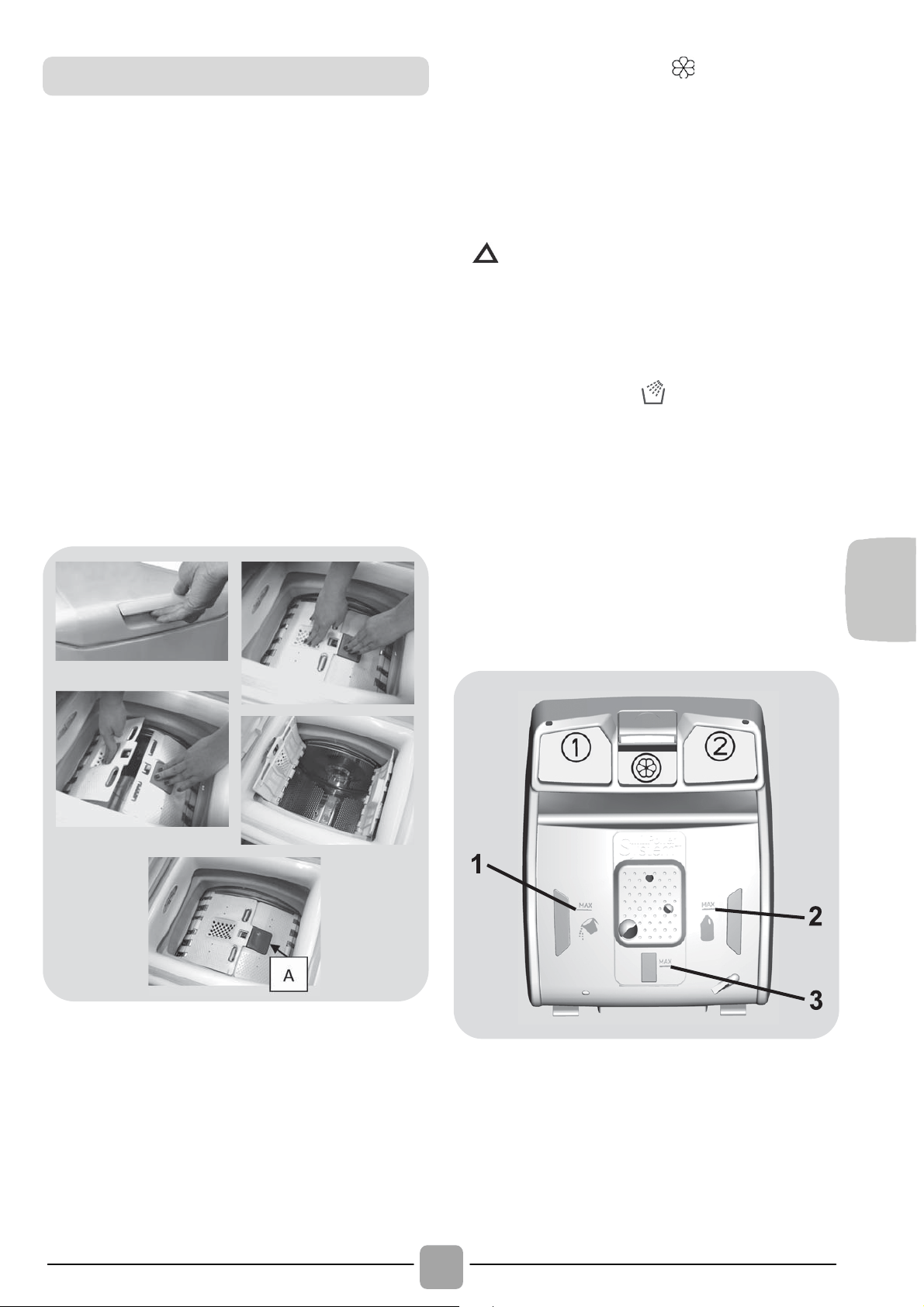
Opening/ closing the drum
Open the washing machine lid.
Open the drum by pressing the (A) button
with one hand while pressing down on the
opposite door with the other.
Place clothes in the drum one item at a
time, and without squashing. Do not
exceed the load limits recommended in
the “programme table”. An overloaded
washing machine will not wash properly,
and will leave clothing wrinkled.
To close the drum, place the doors so
that the one with the (A) button is below
the other and they fit together perfectly.
Detergent load
The detergent dispenser is divided into 3
compartments:
Compartment 1
is for powder detergent
.
Compartment 2
is for liquid detergent
.
The compartment is for fabric
conditioners, scenting agents and special
additives such as starch, blueing, etc.
MAX - on the detergent case is underlined
the maximum level of detergent to be used.
Do not exceed this level.
When the clothes present stains that
need treatment with bleaches liquids
products, you can proceed to their
preliminary cleaning in the washing
machine. For that: Introduce the bleach
product in the "compartment 2", and set
the rinse program
.
Once finished the
treatment set the programmer to the OFF
position, add the rest of the laundry, and
proceed to the normal washing with the
wanted program.
1) Maximum Main wash washing powder
2) Maximum Main wash washing liquid
3) Maximum scenting agent
Preparing the wash
114
7. THROUBLESHOOTING AND WARRANTY
If you believe the washing machine is not working correctly, consult the quick guide
provided below which includes some practical tips on how to fix the most common
problems.
ERROR CODE FORMAT
Error shown Possible causes and practical solutions
E2 (with display)
2 flashes of the LEDs
(without display)
The machine cannot load water.
Make sure the water supply tap is open.
Make sure the water supply hose isn’t bent, kinked or trapped.
Make sure the drain pipe is at the proper height (see installation section).
Close the water supply tap, unscrew the filler hose from the back of
the washing machine and make sure the “anti-sand” filter is clean
and not blocked.
E3 (with display)
3 flashes of the LEDs
(without display)
The washing machine does not drain water.
Make sure the filter is not clogged.
Make sure the drain hose isn’t bent, kinked or trapped.
Make sure the home drainage system is not blocked and is allowing
water to flow through without obstruction. Try to drain the water in the sink.
E4 (with display)
4 flashes of the LEDs
(without display)
There is too much foam and/or water.
Ensure the correct amount of detergent is being used and the
detergent is designed for use in a washing machine.
E7 (with display)
7 flashes of the LEDs
(without display)
Door problem.
Make sure the door is correctly closed.
Make sure the clothes inside the drum are not preventing the door
from closing fully.
If the door is locked, turn off and unplug the washing machine from
the electrical supply socket, wait 2-3 minutes and reopen the door.
Any other code
Turn off and unplug the washing machine, wait a minute. Turn on the
machine and restart a program. If the error occurs again contact an
Authorised Customer Service Centre directly.
FOR SMART TOUCH MODELS
The Candy simply-Fi app has a Smart Check-up function that allows you to confirm
the functionality and status of the product at any time. To use the Candy simply-Fi app
you will need an Android smartphone with NFC technology.
More info can be found on the App.
If the display of the machine is showing an error (by a code or blinking LEDs), you
should turn on the App on your Android smartphone, with NFC on.
Place your smart phone against the Smart Touch logo on the control panel. You should
now be able to read the fault directory to solve the issue.
Models with a display: the error is shown by a number preceded by the letter “E”
(example: E2 = Error 2).
Models without display: an error is shown by a sequence of flashes of every LED.
The error code is shown by the number of flashes followed by a pause of 5 seconds
(example: two flashes – pause 5 seconds – two flashes – repeating = Error 2).
EN
115
OTHER ANOMALIES
Problem Possible causes and practical solutions
The washing machine
does not work / start
Make sure the product is plugged into a working supply socket.
Make sure power is on.
Make sure the wall socket is working, testing it with another
appliance such as a lamp.
The door may not be correctly closed: open and close it again.
Check whether the required program was correctly selected and the
start button pressed.
Make sure the washing machine is not in pause or time delay mode.
Water leaked on the
floor near the
washing machine
This may be due to a leak from the seal between the tap, supply
hose and fill valve; in this case, replace it and tighten the hose
connections correctly.
Make sure the front filter is correctly closed.
The washing machine
does not spin
The machine is fitted with a detection system that protects the load
and product from damage if the load is not balanced before spinning.
This may result in:-
• The machine attempts to balance the load, increasing the time of
spin.
• Reduction of the speed of spin to decrease vibrations and noise.
• The spin cycle aborting to protect the machine and load.
If this is experienced remove the load de-tangle it, reload it and
restart the spin program.
This could be due to the fact that water has not been completely
drained: wait a few minutes. If the problem persists, see Error 3
section.
Some models include a "no spin" function: make sure it is not
selected.
Check which options are selected and their effect on the spin cycle.
Excessive detergent can impede the spin cycle, ensure the correct
amount of detergent is being used.
Strong vibrations /
noises are heard
during the spin cycle
The washing machine may not be fully levelled: if necessary, adjust
the feet as indicated in the specific section.
Make sure transport screws, rubber bungs and spacer tubes were
removed.
Make sure there are no foreign objects inside the drum (coins,
hinges, buttons, etc).
The standard manufacturer warranty covers faults caused by electrical or
mechanical faults in the product due to an act or omission of the manufacturer. If
a fault is found to be caused by factors outside the product supplied, miss-use or
as a result of the instructions on use not being followed, a charge may be
applied.

116
The use of ecological detergents withou
t
phosphates may cause the following effects:
- cloudier rinse drain water: This effect is
tied to the suspended zeolites which do
not have negative effects on rinse
efficiency.
- white powder (zeolites) on laundry at
the end of the wash: this is normal, the
powder is not absorbed by fabric and
does not change its colour.
To remove the zeolites, select a rinse
programme. In the future consider using
slightly less detergent.
- foam in the water at last rinse: this
does not necessary indicate poor rinsing.
Consider using less detergent in future
washes.
- abundant foam: This is often due to the
anionic surfactants found in the
detergents which are hard to eliminate
from laundry.
In this case, do not re-rinse to eliminate
these effects: it will not help at all.
We suggest conducting a maintenance
wash using a proprietary cleaner.
If the problem persists or if you suspect a
malfunction, immediately contact an
Authorised Customer Service Centre.
It is always recommended to use original
spare parts, that are available at ou
r
Authorised Customer Service Centres.
The manufacturer declines all
responsibility for any printing errors in
the booklet included with this product.
Moreover, it also reserves the right to
make any changes deemed useful to its
products without changing their essential
characteristics.
Warranty
The product is guaranteed under the
terms and conditions stated on the
certificate included with the product. The
warranty certificate must be duly filled in
and stored, so as to be shown to the
Authorised Customer Service Centre in
case of need. Proof of purchase must
be made available at the time of any
warranty related repair.

hldsk

hldsk

hldsk

17.08 - 43019046 - Canon Italia - Business Services Channel

