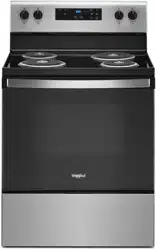
User ManualFEATURE GUIDE
COOKTOP USE
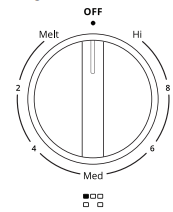
The control knobs can be set to anywhere between Hi and Lo. Push in and turn to setting.
Coil Elements and Burner Bowls (on some models)
Coil elements should be level for optimal cooking results. Burner bowls, when clean, reflect heat back to the cookware. They also help catch spills.
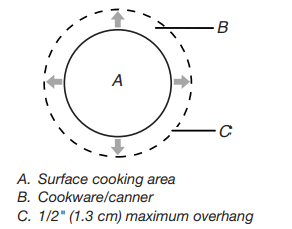
Cookware should not extend more than 1/2" (1.3 cm) over the coil element. If cookware is uneven or too large, it can produce excess heat, causing the burner bowl to change color.
- Starting in June 2018 Whirlpool is equipping this product with new temperature-limiting coils pursuant to the updated standards in UL858. These new coils may vary cooking times compared to your old cooktop, e.g., a slightly longer time to boil large volumes of water
Ceramic Glass
The surface cooking area will glow red when an element is on. Some parts of the surface cooking area may not glow red when an element is on. This is normal operation. The burner will cycle on and off to maintain the selected heat level. It will also randomly cycle off and back on again even while in Hi to keep the cooktop from extreme temperatures.
It is normal for the surface of light colored ceramic glass to appear to change color when surface cooking areas are hot. As the glass cools, it will return to its original color.
Clean the cooktop after each use to help avoid scratches, pitting, abrasions and to condition the glass surface. Ceramic glass cooktop cleaner and a cooktop scraper are also recommended for stubborn soils. Do not use abrasive cleaners, cleaning pads, or harsh chemicals for cleaning. The Cooktop Care Kit Part Number 31605 contains all of the items needed to clean and condition your ceramic glass cooktop. Refer to the “Range Care” section for additional information.
IMPORTANT: To avoid permanent damage to the cooktop surface and to make soils easier to remove, clean the cooktop after each use to remove all soils.
- Avoid storing jars or cans above the cooktop. Dropping a heavy or hard object onto the cooktop could crack the cooktop.
- To avoid damage to the cooktop, do not leave a hot lid on the cooktop. As the cooktop cools, air can become trapped between the lid and the cooktop and the ceramic glass could break when the lid is removed.
- For foods containing sugar in any form, clean up all spills and soils as soon as possible. Allow the cooktop to cool down slightly. Then, while wearing oven mitts, remove the spills using a scraper while the surface is still warm. If sugary spills are allowed to cool down, they can adhere to the cooktop and can cause pitting and permanent marks.
- To avoid scratches, do not slide cookware or bakeware across the cooktop. Aluminum or copper bottoms and rough finishes on cookware or bakeware could leave scratches or marks on the cooktop.
- Do not cook popcorn in prepackaged aluminum containers on the cooktop. They could leave aluminum marks that cannot be removed completely.
- To avoid damage to the cooktop, do not allow objects that could melt, such as plastic or aluminum foil, to touch any part of the entire cooktop.
- To avoid damage to the cooktop, do not use the cooktop as a cutting board.
- Use cookware about the same size as the surface cooking area. Cookware should not extend more than 1/2" (13 mm) outside the area.
- Use flat-bottomed cookware for best heat conduction and energy efficiency. Cookware with rounded, warped, ribbed, or dented bottoms could cause uneven heating and poor cooking results.
- Determine flatness by placing the straight edge of a ruler across the bottom of the cookware. While you rotate the ruler, no space or light should be visible between it and the cookware.
- Cookware designed with slightly indented bottoms or small expansion channels can be used.
- Make sure the bottoms of pots and pans are clean and dry before using them. Residue and water can leave deposits when heated.
- To avoid damage to the cooktop, do not cook foods directly on the cooktop.
Cooktop On Indicator Light
The Cooktop On indicator light is located on the console panel. When any control knob on the console panel is turned on, the Cooktop On indicator light will glow.
Hot Surface Indicator Light
On ceramic glass models, the Hot Surface indicator light is located on the console panel.
The Hot Surface indicator light will glow as long as any surface cooking area is too hot to touch, even after the surface cooking area is turned off.
Dual Zone Cooking Element
The Dual Zone cooking element offers flexibility depending on the size of the cookware. Single size can be used in the same way as a regular element. The dual size combines both the single and outer element and is recommended for larger size cookware.

Melt Cooking Element (on some models)
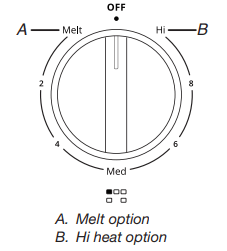
The Melt cooking element offers flexibility due to a wide range of settings between Hi and Melt. The Hi heat option can be used to boil small amounts of liquid quickly. The lowest setting can be used to prepare sauces and to keep foods at a low temperature. Use cookware appropriate in size for the Melt element.
Warm Zone

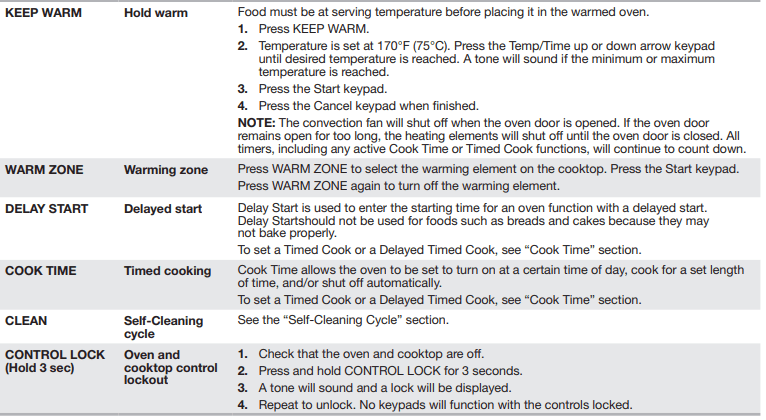
Use the Warm Zone to keep cooked foods warm. One hour is the recommended maximum time to maintain food quality.Do not use it to heat cold foods.
The Warm Zone can be used alone or when any of the other surface cooking areas are being used.
The Warm Zone area will not glow red when cycling on. However, the Element On light will glow while the Cooktop Warm Zone element is in use.
- Use only cookware recommended for oven and cooktop use.
- Cover all foods with a lid or aluminum foil. When warming baked goods, allow a small opening in the cover for moisture to escape.
- To avoid damage to the cooktop, do not use plastic wrap to cover food because the plastic wrap may melt.
- Use pot holders or oven mitts to remove food.
To Use:
- To turn on, press WARM ZONE and then the Start keypad.
- To turn off, press WARM ZONE again.
Cookware
IMPORTANT: Do not leave empty cookware on a hot surface cooking area, element, or surface burner.
Ideal cookware should have a flat bottom, straight sides, and a well-fitting lid, and the material should be of medium-to-heavy thickness.
Rough finishes may scratch the cooktop. Aluminum and copper may be used as a core or base in cookware. However, when used as a base, they can leave permanent marks on the surfaces.
Cookware material is a factor in how quickly and evenly heat is transferred which affects cooking results. A nonstick finish has the same characteristics as its base material. For example, aluminum cookware with a nonstick finish will take on the properties of aluminum.
Cookware with nonstick surfaces should not be used under the broiler.
Check for flatness by placing the straight edge of a ruler across the bottom of the cookware. While you rotate the ruler, no space or light should be visible between it and the cookware.

Use the following chart as a guide for cookware material characteristics.
Aluminum
- Heats quickly and evenly.
- Suitable for all types of cooking.
- Medium or heavy thickness is best for most cooking tasks.
- May leave aluminum residues which may be diminished if cleaned immediately after cooking.
Cast iron
- Heats slowly and evenly.
- Good for browning and frying
- Maintains heat for slow cooking.
- Rough edges or burrs may scratch the cooktop.
Ceramic or ceramic glass
- Follow manufacturer’s instructions.
- Heats slowly but unevenly.
- Ideal results on low-to-medium heat settings.
- May scratch the cooktop.
Copper
- Heats very quickly and evenly.
- May leave copper residues which may be diminished if cleaned immediately after cooking.
- Can leave a permanent stain or bond to the cooktop if overheated.
Earthenware
- Follow manufacturer’s instructions.
- Use on low heat settings.
- May scratch the cooktop.
Porcelain enamel on steel or cast iron
- See stainless steel or cast iron.
- Porcelain enamel bakeware without the metal base may bond to the cooktop if overheated.
Stainless steel
- Heats quickly but unevenly.
- A core or base of aluminum or copper on stainless steel provides even heating.
Use flat-bottomed cookware for best cooking results and energy efficiency. The cookware should be about the same size as the cooking area outlined on the cooktop. Cookware should not extend more than 1/2" (13 mm) outside the area.

Home Canning
Canning can be performed on a glass smooth-top cooking surface or traditional coil element cooktop. When canning for long periods, alternate the use of surface cooking areas or elements between batches. This allows time for the most recently used areas to cool.
- Center the canner on the largest surface cooking area or element. On electric cooktops, canners should not extend more than 1/2" (13 mm) beyond the surface cooking area or element.
- Do not place canner on 2 surface cooking areas or elements at the same time.
- On ceramic glass models, use only flat-bottomed canners to avoid damage to the cooktop and elements.
- For more information, contact your local agricultural extension office or refer to published home canning guides. Companies that manufacture home canning products can also offer assistance.
OVEN USE
Odors and smoke are normal when the oven is used the first few times or when it is heavily soiled.
IMPORTANT: The health of some birds is extremely sensitive to the fumes given off. Exposure to the fumes may result in death to certain birds. Always move birds to another closed and well-ventilated room.
NOTE: The convection fan will shut off when the oven door is opened. If the oven door remains open for too long, the heating elements will shut off until the oven door is closed. All timers, including any active Cook Time or Timed Cook functions, will continue to count down.
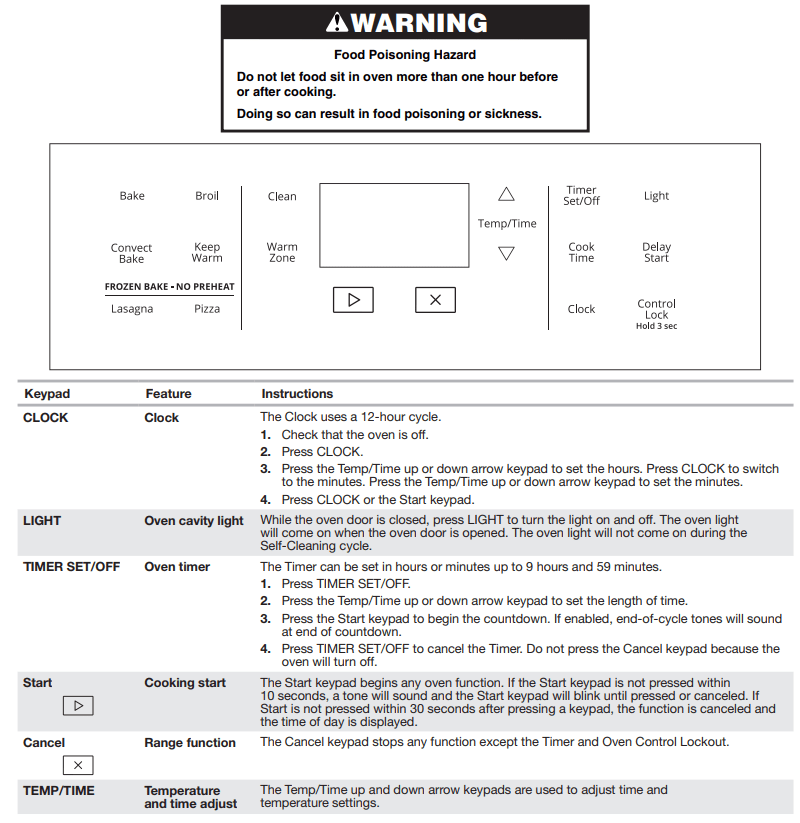
Electronic Oven Controls
Control Display
The display will flash when powered up or after a power loss. Press the Cancel keypad to clear. When oven is not in use, the time of day is displayed.
Fahrenheit and Celsius
The temperature is preset at Fahrenheit, but it can be changed to Celsius.
To change: Press and hold the Temp/Time up arrow keypad for 5 seconds. “°C” or “°F” will appear on the display. Repeat to change back.
To exit mode, press the Cancel keypad.
Keypress Tones
Activates or turns off the tones when a keypad is pressed.
To change: Press and hold LIGHT for 5 seconds. Repeat to change back.
To exit mode, press the Cancel keypad.
Demo Mode
IMPORTANT: This feature is intended for use on the sales floor with a 120V power connection and permits the control features to be demonstrated without heating elements turning on. If this feature is activated, the oven will not work.
To change: Press the Cancel keypad, the Cancel keypad, the Temp/Time up arrow keypad, and TIMER SET/OFF. Repeat to change back and end Demo mode.
Tones
Tones are audible signals, indicating the following:
Basic Functions
One tone
- Valid keypad press
- Oven is preheated (long tone)
- Function has been entered
- Reminder (on some models), repeating every 20 seconds after the end-of-cycle tones
Three tones
Four tones
Oven Temperature Control
IMPORTANT: Do not use a thermometer to measure oven temperature. Elements will cycle on and off as needed to provide consistent temperature but may run slightly hot or cool at any point in time due to this cycling. Most thermometers are slow to react to temperature change and will not provide an accurate reading due to this cycling.
The oven provides accurate temperatures; however, it may cook faster or slower than your previous oven, so the temperature can be adjusted to personalize it for your cooking needs. It can be changed in Fahrenheit or Celsius.
To Adjust Oven Temperature:
- Press and hold the Temp/Time down arrow keypad for 5 seconds until the oven display shows the current setting, for example “0°F CAL” or “00.”
- Press the Temp/Time up or down arrow keypad to increase or decrease the temperature in 5°F (3°C) amounts. The adjustment can be set between 30°F (18°C) and -30°F (-18°C).
- Press the Start keypad.
Sabbath Mode
The Sabbath mode sets the oven to remain on in a Bake setting until turned off. A Timed Bake can also be set to keep the oven on for only part of the Sabbath. The Oven Control Lockout feature (if present) will be disabled during the Sabbath. After the Sabbath mode is set, no tones will sound, the display will not show the temperature, the Kitchen Timer mode will be canceled (if active), and only the following keypads will function:
- Temp/Time up or down arrow keypad
- Cancel
When the oven door is opened or closed, the oven light will not turn on or off and the heating elements will not turn on or off immediately.
When power is restored after a power failure, the oven will return to Sabbath mode and remain Sabbath compliant with the bake elements off until the Cancel keypad is pressed.
Pressing the Cancel keypad at any time returns the oven to the normal cooking mode (not Sabbath compliant).
Before entering the Sabbath mode, it must be decided if the oven light is to be on or off for the entire Sabbath mode period. If the light is on when entering Sabbath mode, it will remain on for the entire time Sabbath mode is in use. If the light is off when entering Sabbath mode, it will remain off for the entire time Sabbath mode is in use. Opening the oven door or pressing LIGHT will not affect the oven light once Sabbath mode has been entered.
On the Holiday, the oven temperature can be changed once the oven is in Sabbath mode by pressing the Temp/Time up or down arrow keypad. The oven temperature will change 25°F (14°C) each time the Temp/Time up or down arrow keypads are pressed. The display will not change, and there will be no sounds during this adjustment.
To Bake Using Sabbath Mode:
- Press BAKE.
- To change the temperature, press the Temp/Time up or down arrow keypad.
- Press the Start keypad.
- Press and hold TIMER SET/OFF for 5 seconds. “SAb” will flash in the display.
- Press the Start keypad while “SAb” is flashing to enter Sabbath mode; otherwise, the entire cycle cancels out. “SAb” will stop flashing and remain on in the display. The oven is now in Sabbath mode and is Sabbath compliant.
Pressing the Cancel keypad at any time cancels the cooking cycle and returns the oven to the normal cooking mode (not Sabbath compliant).
To set a Timed Bake using Sabbath mode (on some models):
- Press BAKE.
- Press the Temp/Time up or down arrow keypad to enter a temperature other than the one displayed.
- Press COOK TIME. The Cook Time oven indicator light will light up.
- Press the Temp/Time up or down arrow keypad to enter a cook time length.
- Press the Start keypad.
- Press and hold TIMER SET/OFF for 5 seconds. “SAb” will flash in the display.
- Press the Start keypad while “SAb” is flashing to enter Sabbath mode; otherwise, the entire cycle cancels out. “SAb” will stop flashing and remain on in the display. The oven is now in Sabbath mode and is Sabbath compliant. The Bake, On, and Cook Time indicator lights will be displayed.
When the set cook time ends, the oven will shut off automatically and the indicator lights will turn off, indicating the end of the cycle.
Pressing the Cancel keypad at any time returns the oven to the normal cooking mode (not Sabbath compliant).
To set a Delayed Timed Bake using Sabbath mode (on some models):

- Press BAKE.
- Press the Temp/Time up or down arrow keypad to enter a temperature other than the one displayed.
- Press COOK TIME. The Cook Time oven indicator light will light up.
- Press the Temp/Time up or down arrow keypad to enter a cook time length.
- Press DELAY START. The Delay indicator light will light up.
- Press the Temp/Time up or down arrow keypad to enter a start time.
- Press the Start keypad.
- Press and hold TIMER SET/OFF for 5 seconds. “SAb” will flash in the display.
- Press the Start keypad while “SAb” is flashing to enter Sabbath mode; otherwise, the entire cycle cancels out. “SAb” will stop flashing and remain on in the display. The oven is now in Sabbath mode and is Sabbath compliant. The On and Delay indicator lights will be displayed.
When the start time is reached, the Bake, On, and Cook Time indicator lights will automatically turn on. When the set cook time ends, the oven will shut off automatically and the indicator lights will turn off, indicating the end of the cycle.
Pressing the Cancel keypad at any time returns the oven to the normal cooking mode (not Sabbath compliant).
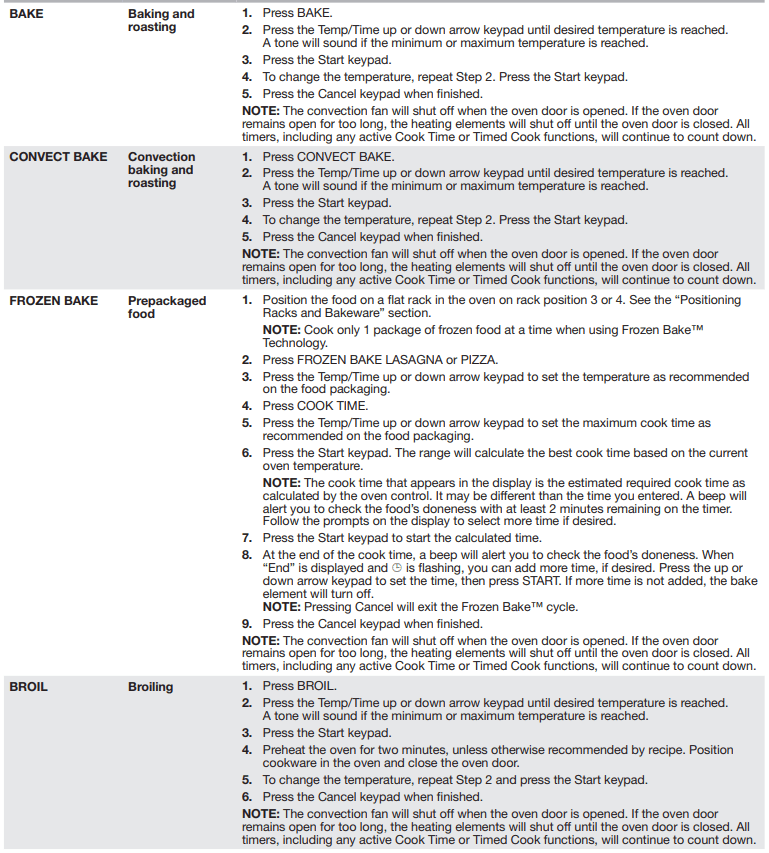
Keep Warm
NOTE: The convection fan will shut off when the oven door is opened. If the oven door remains open for too long, the heating elements will shut off until the oven door is closed. All timers, including any active Cook Time or Timed Cook functions, will continue to count down.
IMPORTANT: Food must be at serving temperature before placing it in the warmed oven. Food may be held up to 1 hour; however, breads and casseroles may become too dry if left in the oven during the Keep Warm function. For best results, cover food.
The Keep Warm feature allows hot cooked foods to stay at serving temperature.
To Use:
- Press KEEP WARM.
- Press Temp/Time up or down arrow keypad until desired temperature is reached. A tone will sound if the minimum or maximum temperature is reached.
- Press the Start keypad.
- Place food in the oven.
- Press the Cancel keypad when finished.
NOTE: The temperature may be changed at any time by pressing the Temp/Time up or down arrow keypad to reach the desired temperature and then pressing the Start keypad.
Aluminum Foil
IMPORTANT: To avoid permanent damage to the oven bottom finish, do not line the oven bottom with any type of foil or liner.
For best cooking results, do not cover entire oven rack with foil because air must be able to move freely
Positioning Racks and Bakeware
IMPORTANT: To avoid permanent damage to the porcelain finish, do not place food or bakeware directly on the oven door or bottom.
Bakeware
To cook food evenly, hot air must be able to circulate. Allow 2" (5 cm) of space around bakeware and oven walls. Make sure that no bakeware piece is directly over another.
Racks
- Position racks before turning on the oven.
- Do not move racks with bakeware on them.
- Make sure racks are level.
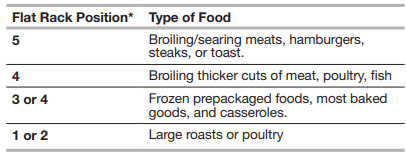
To move a rack, pull it out to the stop position, raise the front edge, and then lift out. Use the following illustration and charts as a guide.
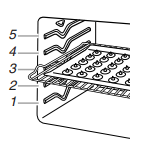
The oven has seven positions for a flat rack, as shown in the previous illustration and the following table.
Multiple Rack Cooking
Two-rack: Use rack positions 2 and 4 or 2 and 5.
Baking Cookies and Layer Cakes on Two Racks
Baking Layer Cakes
For best results when baking cakes on two racks, use the Bake function, a flat rack in rack position 5, and a Max Capacity Rack in rack position 6 or a flat rack in rack position 5. Place the cakes on the racks as shown. Keep at least 3" (7.7 cm) of space between the front of the racks and the front cakes.

Baking Cookies on Two Racks
For best results when baking cookies on two racks, use the Convect Bake function and place flat racks in positions 2 and 5.
Oven Vent

The oven vent releases hot air and moisture from the oven and should not be blocked or covered. Blocking or covering the vent will cause poor air circulation, affecting cooking and cleaning results. Do not set plastics, paper, or other items that could melt or burn near the oven vent.
Baking and Roasting
Preheating
When beginning a Bake cycle, the oven will begin preheating after Start is pressed. The oven will take approximately 12 to 15 minutes to reach 350°F (177°C) with all of the oven racks provided with your oven inside the oven cavity. Higher temperatures will take longer to preheat. The preheat cycle rapidly increases the oven temperature. The actual oven temperature will go above your set temperature to offset the heat lost when your oven door is opened to insert food. This ensures that when you place your food in the oven, the oven will begin at the proper temperature. Insert your food when the preheat tone sounds. Do not open the door during preheat before the tone sounds.
Oven Temperature
While in use, the oven elements will cycle on and off as needed to maintain a consistent temperature, but they may run slightly hot or cool at any point in time due to this cycling. Opening the oven door while in use will release the hot air and cool the oven which could impact the cooking time and performance. It is recommended to use the oven light to monitor cooking progress.
NOTE: On models with convection, the convection fan may run in the non-convection Bake mode to improve oven performance. The convection fan will shut off when the oven door is opened. If the oven door remains open for too long, the heating elements will shut off until the oven door is closed. All timers, including any active Cook Time or Timed Cook functions, will continue to count dow
Temperature Management System
The Temperature Management System electronically regulates the oven heat levels during preheat and bake to maintain a precise temperature range for optimal cooking results. The bake and broil elements or burners cycle on and off in intervals. On convection range models, the fan will run while preheating and may be cycled on and off for short intervals during bake to provide the best results. This feature is automatically activated when the oven is in use.
Before baking and roasting, position racks according to the “Positioning Racks and Bakeware” section. When roasting, it is not necessary to wait for the oven preheat cycle to end before putting food in unless it is recommended in the recipe
Broiling
When broiling, preheat the oven for 2 minutes before putting food in unless recommended otherwise in the recipe. Position food on grid in a broiler pan, then place it in the center of the oven rack.
IMPORTANT: Close the door to ensure proper broiling temperature.Changing the temperature when custom broiling allows more precise control when cooking. The lower the broil setting is, the slower the cooking. Thicker cuts and unevenly shaped pieces of meat, fish, and poultry may cook better at lower broil settings. Use rack 6 or 7 for broiling. Refer to the “Positioning Racks and Bakeware” section for more information.
- For best results, use a broiler pan and grid. It is designed to drain juices and help avoid spatter and smoke.If you would like to purchase a broiler pan, one may be ordered. Please refer to the “Accessories” section for more information.
NOTE: Odors and smoke are normal the first few times the oven is used or if the oven is heavily soiled.
Convection Baking and Roasting
NOTE: The convection fan will shut off when the oven door is opened. If the oven door remains open for too long, the heating elements will shut off until the oven door is closed. All timers, including any active Cook Time or Timed Cook functions, will continue to count down.
During convection baking or roasting, the bake and broil elements or burners cycle on and off in intervals to maintain the oven temperature while the fan circulates the hot air. If the oven door is opened during convection baking or roasting, the fan will turn off immediately. It will come back on when the oven door is closed.
Cook Time
To Set a Timed Cook:
- Press BAKE. The Bake indicator light will light up.
- Press the Temp/Time up or down arrow keypad to enter a temperature other than the one displayed.
- Press COOK TIME. The Cook Time indicator light will light up.
- Press the Temp/Time up or down arrow keypad to enter the length of time to cook.
- Press the Start keypad. The display will count down the time. When the time ends, the oven will shut off automatically.
- Press the Cancel keypad to clear the display.
To Set a Delayed Timed Cook:
Before setting, make sure the clock is set to the correct time of day. See the “Clock” keypad feature in the “Feature Guide” section.
- Press BAKE.
- Press the Temp/Time up or down arrow keypad to enter a temperature other than the one displayed.
- Press COOK TIME. The Cook Time indicator light will light up.
- Press the Temp/Time up or down arrow keypad to enter the length of time to cook.
- Press DELAY START. The Delay indicator light will light up.
- Press the Temp/Time up or down arrow keypad to enter the time of day to start.
- Press the Start keypad. When the start time is reached, the oven will automatically turn on. The Temperature and/or Cook Time settings can be changed anytime after the oven turns on by repeating steps 2-4 and pressing the Start keypad. To change to a different delay time, cancel the features and repeat steps 1-7. When the set cook time ends, the oven will shut off automatically.
- Press the Cancel keypad to clear the display
RANGE CARE
Self-Cleaning Cycle
IMPORTANT: The health of some birds is extremely sensitive to the fumes given off during the Self-Cleaning cycle. Exposure to the fumes may result in death to certain birds. Always move birds to another closed and well-ventilated room.
Keep the kitchen well-ventilated during the Self-Cleaning cycle to help get rid of heat, odors, and smoke.
Do not block the oven vent(s) during the Self-Cleaning cycle. Air must be able to move freely. Depending on your model, see the “Oven Vent” or “Oven Vents” section.
Do not clean, rub, damage, or move the oven door gasket.
Prepare Range:
- Remove the broiler pan, grid, cookware and bakeware, all cooking utensils, oven racks, aluminum foil, and, on some models, the temperature probe from the oven.
- Use a damp cloth to clean inside door edge and the 1&1/2" (38 mm) area around the inside oven cavity frame, being certain not to move or bend the gasket.
- Wipe out any loose soil to reduce smoke and avoid damage. At high temperatures, foods react with porcelain. Staining, etching, pitting, or faint white spots can result. This will not affect cooking performance.
- Remove plastic items from the cooktop because they may melt.
- Remove all items from the storage drawer.
How the Cycle Works
IMPORTANT: The heating and cooling of porcelain on steel in the oven may result in discoloring, loss of gloss, hairline cracks, and popping sounds.
The Self-Cleaning cycle uses very high temperatures, burning soil to a powdery ash.
Once the oven has completely cooled, remove ash with a damp cloth. To avoid breaking the glass, do not apply a cool, damp cloth to the inner door glass before it has completely cooled.
The oven light is disabled during the Self-Cleaning cycle.
To stop the Self-Cleaning cycle at any time, press CANCEL. If the temperature is too high, the oven door will remain locked and “cool” and “  ” will be displayed.
When “  ” shows in the display, the door of the oven cannot be opened. To avoid damage to the door, do not force the door open when “
  ” is displayed.
Before self-cleaning, make sure the door is completely closed or the door will not lock and the Self-Cleaning cycle will not begin.
Electronic Oven Control with Adjustable Clean Time
The Self-Cleaning cycle is time adjustable between 2 hours 30 minutes and 4 hours 30 minutes in 30-minute increments. Suggested clean times are 2 hours 30 minutes for light soil and 4 hours 30 minutes for heavy soil. The last 30 minutes of the cycle is for cooldown.
To Self-Clean:
- Press SELF CLEAN.
- Press the Temp/Time “+” or “-” keypad to enter the desired Self-Cleaning cycle time.
- Press START. The oven door will automatically lock. The Door Locked and Clean indicator lights will be displayed. The time remaining will also be displayed.
- When the Self-Cleaning cycle is complete and the oven cools, the Door Locked and Clean indicator lights will turn off.
- When the oven is completely cooled, remove ash with a damp cloth.
To exit the Self-Cleaning cycle before completed, press CANCEL. The door will unlock once the oven cools.
General Cleaning
EXTERIOR PORCELAIN ENAMEL SURFACES (on some models)
Food spills containing acids, such as vinegar and tomato, should be cleaned as soon as the entire range is cool. These spills may affect the finish.
Cleaning Method:
- Glass cleaner, mild liquid cleaner, or nonabrasive scrubbing pad: Gently clean around the model/serial/rating plate because scrubbing may remove numbers.
- affresh® Kitchen and Appliance Cleaner Part Number W10355010 (not included):See the “Accessories” section for more information.
STAINLESS STEEL (on some models)
NOTE: To avoid damage to stainless steel surfaces, do not use soap-filled scouring pads, abrasive cleaners, Cooktop Cleaner, steel-wool pads, gritty washcloths, or abrasive paper towels.
Damage may occur to stainless steel surfaces, even with one-time or limited use.
Cleaning Method:
- Rub in direction of grain to avoid damaging. affresh® Stainless Steel Cleaner Part Number W10355016 (not included):See the “Accessories” section for more information.
METALLIC PAINT (on some models)
Do not use abrasive cleaners, cleaners with bleach, rust removers, ammonia, or sodium hydroxide (lye) because the paint surface may stain.
CERAMIC GLASS
Cleaning Method:
To avoid damaging the cooktop, do not use steel wool, abrasive powder cleansers, chlorine bleach, rust remover, or ammonia.
1. Remove food/residue with the Cooktop Scraper.

- For best results, use the Cooktop Scraper while the cooktop is still warm but not hot to the touch. It is recommended to wear an oven mitt while scraping the warm cooktop.
- Hold the Cooktop Scraper at approximately a 45° angle against the glass surface and scrape the residue. It will be necessary to apply pressure in order to remove the residue.
Allow the cooktop to cool down completely before proceeding to Step 2.
2. Apply a few dime-sized drops of affresh® Cooktop Cleaner to the affected areas.

- Rub affresh® Cooktop Cleaner onto the cooktop surface with the blue Cooktop Cleaning Pad. Some pressure is needed to remove stubborn stains.
- Allow the cleaner to dry to a white haze before proceeding to Step 3.
3. Polish with a clean, dry cloth or a clean, dry paper towel.

- Repeat steps 1 through 3 as necessary for stubborn or burned-on stains.
The Complete Cooktop Cleaner Kit is available for order including the following:
- Cooktop Scraper
- affresh® Cooktop Cleaner
- Blue Cooktop Cleaning Pads
See the “Accessories” section for part numbers and information on ordering.
COOKTOP CONTROLS
To avoid damage to the cooktop controls, do not use steel wool, abrasive cleansers, or oven cleaner.
To avoid damage, do not soak knobs. When replacing knobs, make sure knobs are in the Off position.
On some models, do not remove seals under knobs.
Cleaning Method:
- Soap and water: Pull knobs straight away from control panel to remove.
CONTROL PANEL AND OVEN DOOR EXTERIOR
To avoid damage to the control panel, do not use abrasive cleaners, steel-wool pads, gritty washcloths, or abrasive paper towels.
Cleaning Method:
- Glass cleaner and soft cloth or sponge:
- Apply glass cleaner to soft cloth or sponge, not directly on panel. affresh® Kitchen and Appliance Cleaner Part Number W10355010 (not included):See the “Accessories” section for more information.
OVEN RACKS
Cleaning Method:
- Steel-wool pad
- For racks that have discolored and are harder to slide, a light coating of vegetable oil applied to the rack guides will help them slide.
STORAGE DRAWER (on some models)
Check that storage drawer is cool and empty before cleaning.
Cleaning Method:
OVEN CAVITY
Use AquaLift® Technology regularly to clean oven spills.
Do not use oven cleaners.
Food spills should be cleaned when oven cools. At high temperatures, foods react with porcelain. Staining, etching, pitting, or faint white spots can result.
Cleaning Method:
- Clean cycle:See the “Clean Cycle” section.
Oven Light
The oven light is a standard 40-watt appliance bulb. Before replacing, make sure the oven and cooktop are cool and the control knobs are in the Off position.
To Replace:
- Unplug range or disconnect power.
- Turn the glass bulb cover in the back of the oven counterclockwise to remove.
- Turn bulb counterclockwise to remove from socket.
- Replace bulb, then bulb cover by turning clockwise.
- Plug in range or reconnect power.
TROUBLESHOOTING
Operation
Nothing will operate
- Power supply cord is unplugged: Plug into a grounded outlet.
- Household fuse is blown or a circuit breaker is tripped: Replace the fuse or reset the circuit breaker. If the problem continues, call an electrician.
- The control displays an F9 or F9 E0 error code: The electrical outlet in the home may be miswired. Contact a qualified electrician to verify the electrical supply.
Cooktop will not operate
- The control knob is not set correctly: Push in knob before turning to a setting.
- On ceramic glass models, the oven control lockout is set: See “Control Lock” in the “Feature Guide” section.
Excessive heat around cookware on cooktop
- Cookware is not the proper size: Use cookware about the same size as the surface cooking area, element, or surface burner. Cookware should not extend more than 1/2" (13 mm) outside the cooking area.
Cooktop cooking results not what expected
- Control knob set to incorrect heat level: See the “Cooktop” section.
- Range is not level: Level the range. See the Installation Instructions.
Cooktop element cycles on and off on Hi setting
- Element cycling due to a temperature limiter: This is normal operation. The element may cycle on and off to keep the cooktop from overheating.
Oven will not operate
- Delay Start is set: See the “Electronic Oven Controls” section.
- Control lock is on: Press and hold CONTROL LOCK for 3 seconds to unlock.
- Control is in Demo mode: Demo mode will deactivate all oven elements. See “Demo Mode” in the “Electronic Oven Controls” section.
- Electronic oven control set incorrectly: See the “Electronic Oven Controls” section.
Oven temperature too high or too low
- Oven temperature needs adjustment: See “Oven Temperature Control” in the “Electronic Oven Controls” section.
Oven indicator lights flash
- Power to range is turned on or restored: See “Control Display” in the “Electronic Oven Controls” section. If the indicator lights keep flashing, call for service.
Display shows messages
- Power failure (display shows flashing time): Clear the display. On some models, reset the clock, if needed. See “Clock” keypad feature in the “Feature Guide” section.
- Error code (display shows letter followed by number): Depending on your model, press the Cancel keypad to clear the display. See “Control Display” in the “Electronic Oven Controls” section. If it reappears, call for service.
Self-Cleaning cycle will not operate
- The oven door is not closed.
- Make sure the oven door is fully closed.
- The Self-Cleaning function has not been entered correctly.
- See the “Self-Cleaning Cycle” section.
- A Timed Cook function has been entered.
- See the “Cook Time” section.
- The range is in Sabbath mode.
- See the “Sabbath Mode” section.
Oven cooking results not what expected
- Range is not level:
- Level the range. See the Installation Instructions.
- The set temperature was incorrect:
- Double-check the recipe in a reliable cookbook.
- Oven temperature needs adjustment:
- See “Oven Temperature Control” in the “Electronic Oven Controls” section.
- Oven was not preheated:
- See the “Baking and Roasting” section.
- Racks were positioned improperly:
- See the “Positioning Racks and Bakeware” section.
- Not enough air circulation around bakeware:
- See the “Positioning Racks and Bakeware” section.
- Darker browning of food caused by dull or dark bakeware:
- Lower oven temperature 25°F (15°C) or move rack to a higher position in the oven.
- Lighter browning of food caused by shiny or light colored bakeware:
- Move rack to a lower position in the oven.
- Batter distributed unevenly in pan:
- Check that batter is level in the pan.
- Incorrect length of cooking time was used:
- Oven door was not closed:
- Be sure that the bakeware does not keep the door from closing.
- Oven door was opened during cooking:
- Oven peeking releases oven heat and can result in longer cooking times.
- Rack is too close to bake burner, making baked items too brown on bottom:
- Move rack to higher position in the oven.
- Pie crusts browning too quickly:
- Use aluminum foil to cover the edge of the crust and/or reduce baking temperature.
- Temperature scale was changed from Fahrenheit to Celsius.
- Foods are overdone or burnt, even at low temperatures. See “Fahrenheit and Celsius” in the “Electronic Oven Controls” section