en Operating instructions
K7061X0..
K7076X0..
9000 291 026 (8707)
2
Table of Contents
Congratulations . . . . . . . . . . . . . . . . . . . . . . . . . . . . . . . . . . . . . . . . . . . . . . . . . . . . . . . . . . . . . . . . . . . . . . . . . . . . . . . . . . . . 3
Safety and warning information . . . . . . . . . . . . . . . . . . . . . . . . . . . . . . . . . . . . . . . . . . . . . . . . . . . . . . . . . . . . . . . . . . . . . . . . 3
Information concerning disposal . . . . . . . . . . . . . . . . . . . . . . . . . . . . . . . . . . . . . . . . . . . . . . . . . . . . . . . . . . . . . . . . . . . . . . . . 4
Your new appliance . . . . . . . . . . . . . . . . . . . . . . . . . . . . . . . . . . . . . . . . . . . . . . . . . . . . . . . . . . . . . . . . . . . . . . . . . . . . . . . . . 5
Fascia . . . . . . . . . . . . . . . . . . . . . . . . . . . . . . . . . . . . . . . . . . . . . . . . . . . . . . . . . . . . . . . . . . . . . . . . . . . . . . . . . . . . . . . . . . . 6
Installation . . . . . . . . . . . . . . . . . . . . . . . . . . . . . . . . . . . . . . . . . . . . . . . . . . . . . . . . . . . . . . . . . . . . . . . . . . . . . . . . . . . . . . . . 7
Electrical connection . . . . . . . . . . . . . . . . . . . . . . . . . . . . . . . . . . . . . . . . . . . . . . . . . . . . . . . . . . . . . . . . . . . . . . . . . . . . . . . . 7
Factory settings . . . . . . . . . . . . . . . . . . . . . . . . . . . . . . . . . . . . . . . . . . . . . . . . . . . . . . . . . . . . . . . . . . . . . . . . . . . . . . . . . . . . 8
Switching on the appliance. . . . . . . . . . . . . . . . . . . . . . . . . . . . . . . . . . . . . . . . . . . . . . . . . . . . . . . . . . . . . . . . . . . . . . . . . . . . 8
Selecting the temperature . . . . . . . . . . . . . . . . . . . . . . . . . . . . . . . . . . . . . . . . . . . . . . . . . . . . . . . . . . . . . . . . . . . . . . . . . . . . 8
Set the language . . . . . . . . . . . . . . . . . . . . . . . . . . . . . . . . . . . . . . . . . . . . . . . . . . . . . . . . . . . . . . . . . . . . . . . . . . . . . . . . . . . 8
Controlled ventilation . . . . . . . . . . . . . . . . . . . . . . . . . . . . . . . . . . . . . . . . . . . . . . . . . . . . . . . . . . . . . . . . . . . . . . . . . . . . . . . . 9
“Super” cooling . . . . . . . . . . . . . . . . . . . . . . . . . . . . . . . . . . . . . . . . . . . . . . . . . . . . . . . . . . . . . . . . . . . . . . . . . . . . . . . . . . . . 9
Door alarm . . . . . . . . . . . . . . . . . . . . . . . . . . . . . . . . . . . . . . . . . . . . . . . . . . . . . . . . . . . . . . . . . . . . . . . . . . . . . . . . . . . . . . . . 9
Chiller section drawer
(Drawer with adjustable temperature) . . . . . . . . . . . . . . . . . . . . . . . . . . . . . . . . . . . . . . . . . . . . . . . . . . . . . . . . . . . . . . . . . . . . 9
Variable interior design . . . . . . . . . . . . . . . . . . . . . . . . . . . . . . . . . . . . . . . . . . . . . . . . . . . . . . . . . . . . . . . . . . . . . . . . . . . . . . 10
Setup mode . . . . . . . . . . . . . . . . . . . . . . . . . . . . . . . . . . . . . . . . . . . . . . . . . . . . . . . . . . . . . . . . . . . . . . . . . . . . . . . . . . . . . . 11
Holiday mode . . . . . . . . . . . . . . . . . . . . . . . . . . . . . . . . . . . . . . . . . . . . . . . . . . . . . . . . . . . . . . . . . . . . . . . . . . . . . . . . . . . . . 12
Sabbatical mode . . . . . . . . . . . . . . . . . . . . . . . . . . . . . . . . . . . . . . . . . . . . . . . . . . . . . . . . . . . . . . . . . . . . . . . . . . . . . . . . . . 12
Preserving food . . . . . . . . . . . . . . . . . . . . . . . . . . . . . . . . . . . . . . . . . . . . . . . . . . . . . . . . . . . . . . . . . . . . . . . . . . . . . . . . . . . 13
How to save energy . . . . . . . . . . . . . . . . . . . . . . . . . . . . . . . . . . . . . . . . . . . . . . . . . . . . . . . . . . . . . . . . . . . . . . . . . . . . . . . . 13
Operating noises . . . . . . . . . . . . . . . . . . . . . . . . . . . . . . . . . . . . . . . . . . . . . . . . . . . . . . . . . . . . . . . . . . . . . . . . . . . . . . . . . . 13
Thawing the appliance . . . . . . . . . . . . . . . . . . . . . . . . . . . . . . . . . . . . . . . . . . . . . . . . . . . . . . . . . . . . . . . . . . . . . . . . . . . . . . 13
Switching off and disconnecting the appliance . . . . . . . . . . . . . . . . . . . . . . . . . . . . . . . . . . . . . . . . . . . . . . . . . . . . . . . . . . . . 14
Cleaning the appliance . . . . . . . . . . . . . . . . . . . . . . . . . . . . . . . . . . . . . . . . . . . . . . . . . . . . . . . . . . . . . . . . . . . . . . . . . . . . . . 14
Odours. . . . . . . . . . . . . . . . . . . . . . . . . . . . . . . . . . . . . . . . . . . . . . . . . . . . . . . . . . . . . . . . . . . . . . . . . . . . . . . . . . . . . . . . . . 14
Warning messages via the display . . . . . . . . . . . . . . . . . . . . . . . . . . . . . . . . . . . . . . . . . . . . . . . . . . . . . . . . . . . . . . . . . . . . . 14
Appliance self-test . . . . . . . . . . . . . . . . . . . . . . . . . . . . . . . . . . . . . . . . . . . . . . . . . . . . . . . . . . . . . . . . . . . . . . . . . . . . . . . . . 15
Eliminating minor faults yourself . . . . . . . . . . . . . . . . . . . . . . . . . . . . . . . . . . . . . . . . . . . . . . . . . . . . . . . . . . . . . . . . . . . . . . . 15
Change the light bulbs . . . . . . . . . . . . . . . . . . . . . . . . . . . . . . . . . . . . . . . . . . . . . . . . . . . . . . . . . . . . . . . . . . . . . . . . . . . . . . 16
Cleaning the chiller section drawer filter . . . . . . . . . . . . . . . . . . . . . . . . . . . . . . . . . . . . . . . . . . . . . . . . . . . . . . . . . . . . . . . . . 17
Exchange the odour filter . . . . . . . . . . . . . . . . . . . . . . . . . . . . . . . . . . . . . . . . . . . . . . . . . . . . . . . . . . . . . . . . . . . . . . . . . . . . 17
Customer service . . . . . . . . . . . . . . . . . . . . . . . . . . . . . . . . . . . . . . . . . . . . . . . . . . . . . . . . . . . . . . . . . . . . . . . . . . . . . . . . . . 17

3
Congratulations
In purchasing your new refrigerator, you
have selected a qualitatively high-grade
household appliance.
Your refrigerator sets itself apart through
its economical consumption of energy.
Each appliance which leaves our factory
is inspected thoroughly to ensure that it
functions properly and is in perfect
condition.
If you have any questions – particularly
concerning installation and connection
of the appliance – please do not hesitate
to contact our customer service.
Further information and a selection of
our products can be found on our home
page.
Safety and warning
information
Before you switch ON
the appliance
Please read the operating and
installation instructions carefully.
They contain important information
on how to install, use and maintain
the appliance.
Keep all documentation for subsequent
use or for the next owner.
Technical safety
m
Warning
qÜáë=~ééäá~åÅÉ=Åçåí~áåë=~=ëã~ää=èì~åíáíó=
çÑ=ÉåîáêçåãÉåí~ääóJÑêáÉåÇäó=Äìí=
Ñä~ãã~ÄäÉ=oSMM~=êÉÑêáÖÉê~åíK=båëìêÉ=
íÜ~í=íÜÉ=íìÄáåÖ=çÑ=íÜÉ=êÉÑêáÖÉê~åí=ÅáêÅìáí=
áë=åçí=Ç~ã~ÖÉÇ=ÇìêáåÖ=íê~åëéçêí~íáçå=
~åÇ=áåëí~ää~íáçåK=iÉ~âáåÖ=êÉÑêáÖÉê~åí=ã~ó=
Å~ìëÉ=ÉóÉ=áåàìêáÉë=çê=áÖåáíÉK
If damage has occurred
– Keep naked flames and/or ignition
sources away from the appliance,
– Pull out the mains plug,
– Thoroughly ventilate the room
for several minutes,
– notify customer service.
The more refrigerant an appliance
contains, the larger the room must be in
which the appliance is situated. Leaking
refrigerant can form a flammable gas-air
mixture in rooms which are too small.
The room must be at least 1 m
3
per 8 g
of refrigerant. The amount of refrigerant
in your appliance is indicated on the
rating plate inside the appliance.
Important information
when using the appliance
– Never use electrical appliances
inside the appliance (e. g. heater,
electric ice maker, etc.).
Explosion hazard!
– NEVER use a steam cleaner to
defrost or clean the appliance.
The steam may penetrate electrical
parts and cause a short-circuit.
Risk of electric shock!
– Do not store products which
contain flammable propellants
(e. g. spray cans) or explosive
substances in the appliance.
Explosion hazard!
– Do not stand or support yourself on
the base, drawers or doors, etc.
– For cleaning and exchanging the
bulb, pull the mains plug out or
switch off the fuse.
Do not pull out the mains plug by
tugging the cable.
Warning: When the appliance is
switched off using the temperature
setting (Display:
OFF), the supply of
current is not disrupted.
– Bottles which contain a high
percentage of alcohol must be
sealed and stored in an upright
position.
– Keep plastic parts and the door
seal free of oil and grease.
Otherwise, parts and door seal
will become porous.
– Never cover or block the ventilation
openings for the appliance.
– Only customer service may change
the power cord and carry out any
other repairs. Improper installations
and repairs may put the user at
considerable risk.
4
Children in the household
– Do not allow children to play with
the appliance!
– If the appliance features a lock,
keep the key out of the reach of
children.
General requirements
The appliance is suitable for refrigerating
food.
The appliance is designed for domestic
use.
The appliance is suppressed according
to EU Directive 89/336/EEC.
The refrigerant circuit has been tested
for leaks.
This product complies with the relevant
safety regulations for electrical
appliances (EN 60335/2/24).
Information
concerning disposal
Disposal of packaging
The packaging protects your appliance
from damage during transit.
All packaging materials are environ-
mentally friendly and recyclable.
Please contribute to a better environ-
ment by disposing of packaging
materials in an environmentally-friendly
manner.
Please ask your dealer or inquire at your
local authority about current means of
disposal.
m Warning
hÉÉé=ÅÜáäÇêÉå=~ï~ó=Ñêçã=é~Åâ~ÖáåÖ=
~åÇ=áíë=é~êíëK=a~åÖÉê=çÑ=ëìÑÑçÅ~íáçå=
Ñêçã=ÑçäÇáåÖ=Å~êíçåë=~åÇ=éä~ëíáÅ=Ñáäã>
Disposal of your old
appliance
Old appliances are not worthless
rubbish! Valuable raw materials can be
reclaimed by recycling old appliances.
This appliance has been
identified in accordance with
the European directive 2002/
96/EG on Waste Electrical
and Electronic Equipment –
WEEE. The directive specifies
the framework for an EU-wide
valid return and recycling of old
appliances.
m Redundant appliances:
z Cut off the power cord and discard
with the mains plug.
z Take off the doors.
z Do not take out the trays and
receptacles: children are therefore
prevented from climbing in!
Do not allow children to play with
the appliance once it has spent ist
useful life. Risk of suffocation!
Refrigerators contain refrigerants
and the insulation contains gases.
Refrigerant and gases must be
disposed of properly. Ensure that tubing
of the refrigerant circuit is not damaged
prior to proper disposal.
5
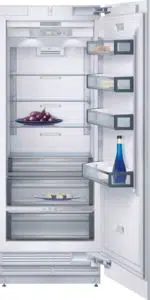
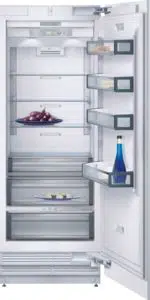
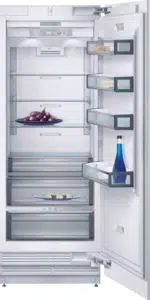
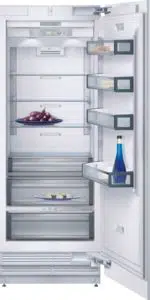
Your new appliance
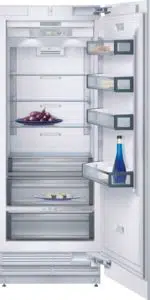
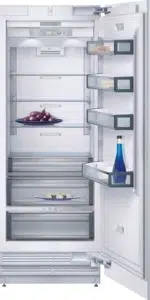
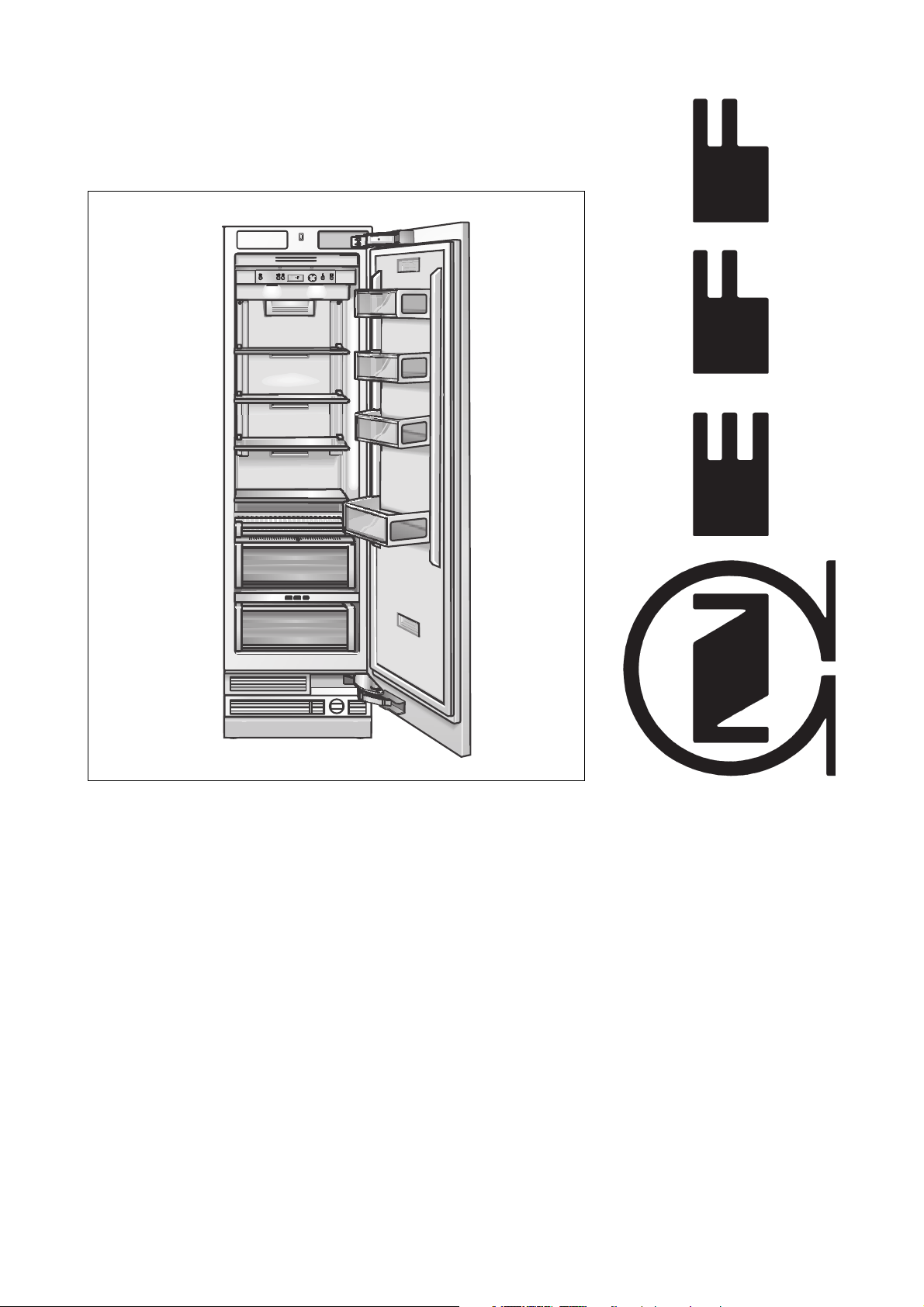
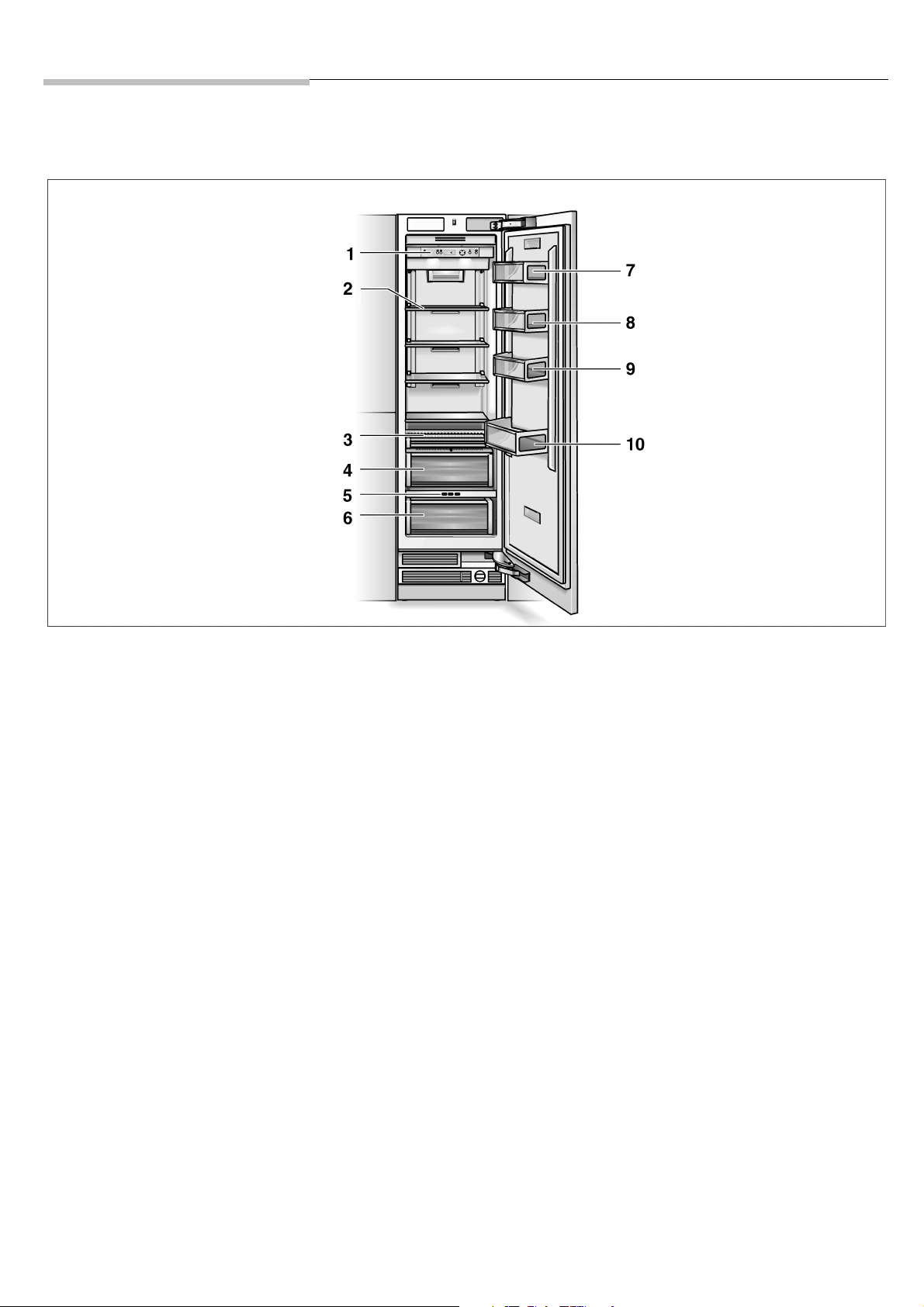
These operating instructions refer to several models. Illustrations can differ.
1Fascia
2 Glass compartments
3 Storage compartment for snacks,
sweets
4 Fruit and vegetable container with
controllable ventilation
5 Control buttons for the chiller
section drawer
6 “Cool-fresh” drawer for optimum
storage of fish, meat, poultry and
vegetables
7 Egg rack
8 Butter and cheese compartment
9 Door storage compartment
10 Bottle storage compartment
6
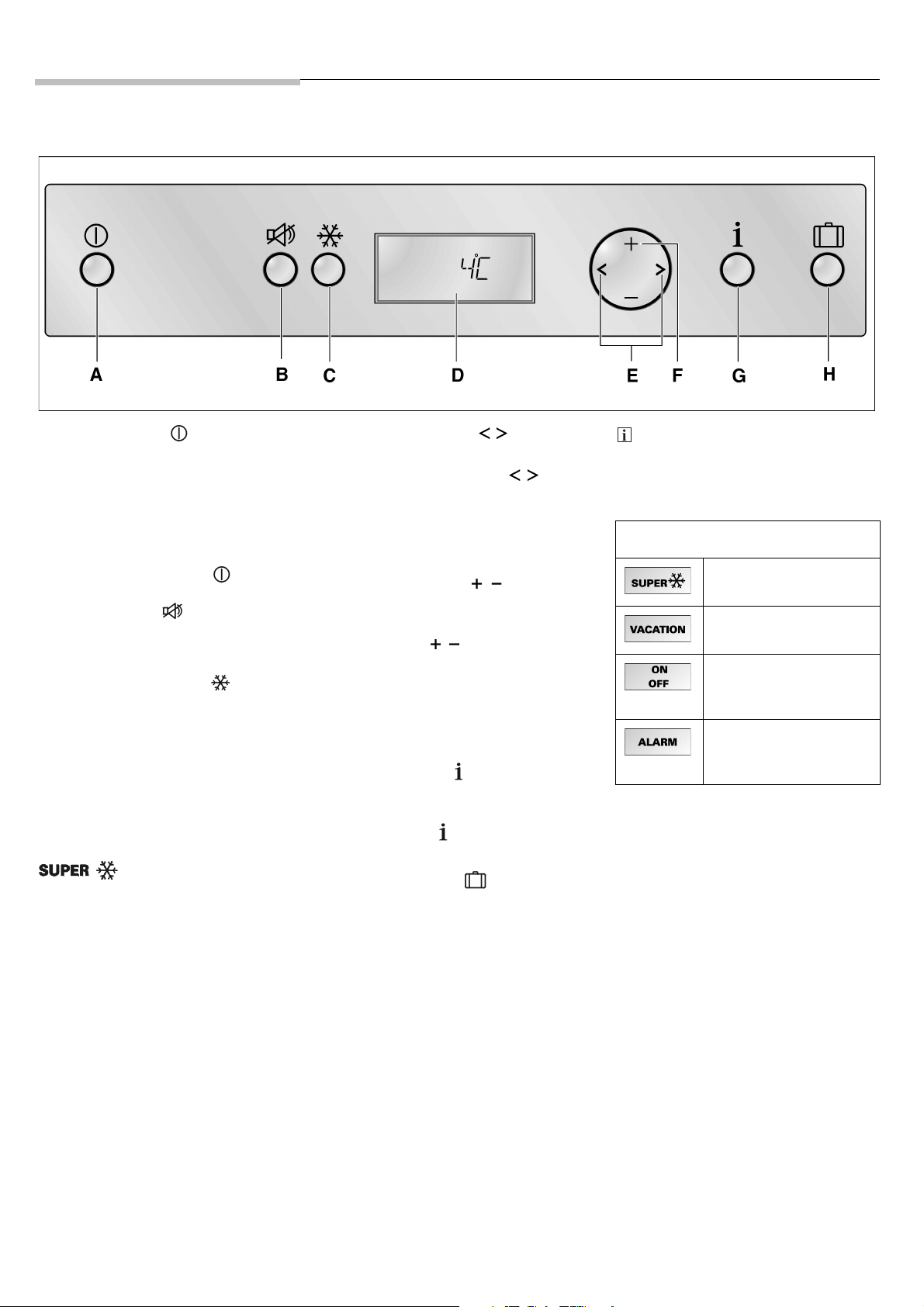
Fascia
A On/Off button
Serves to switch the appliance on and
off.
m Caution
qÜÉ=~ééäá~åÅÉ=áë=åçí=ëÉéÉê~íÉÇ=Ñêçã=íÜÉ=
ã~áåë=ïÜÉå=áí=áë=ëïáíÅÜÉÇ=çÑÑ=Äó=
éêÉëëáåÖ=íÜÉ=çåLçÑÑ=Äìííçå K
BAlarm button
Used to switch off the warning signal.
See section “Door alarm” (page 9).
C “super” cool button
Serves to switch the “super” cooling
function on and off.
See section “super” cooling (page 9).
D Display panel
The refrigerated drawer temperature is
displayed on the fascia. Activated
special functions are shown by means
of symbols, “super” cooling –
for example.
The menus and setting options which
are available are represented on the
fascia in the setup mode.
See section “Setup mode” (page 11).
E Selection button
The temperature setting is activated
using the selection buttons .
See section “Setting the temperature”
(page 8).
For selecting a menu in the setup mode.
See section “Setup mode” (page 11).
F Setting buttons
/
In the temperature setting mode, the
temperature can be changed using the
setting buttons
/ .
See section “Setting the temperature”
(page 8).
For setting the parameters available in
the menu.
See section “Setup mode” (page 11).
G Setup button
This button starts and ends the setup
mode. If the setup mode is ended using
the setup button , the changes which
have been made are stored.
H Holiday button
For switching the energy saving holiday
mode on and off.
See section “Holiday mode” (page 12).
A sound can be heard every time a
button is actuated if this function is
activated (
ON) in the sound menu
during the setup mode.
Symbols in the display
“Super cool” function is
activated, seepage9.
Holiday mode is
activated, seepage12.
For the setting options
in the setup mode,
see page 11.
A warning message
is displayed,
see page 14.
7
Installation
Installation location
Install the appliance in a dry, well
ventilated room. The installation location
should neither be exposed to direct
sunlight nor near a heat source, e.g.
a cooker, radiator, etc. If installation
next to a heat source is unavoidable,
use a suitable insulating plate or observe
the following minimum distances to
a heat source:
– 3 cm to an electric cooker.
– 30 cm to an oil or solid-fuel cooker.
The floor on which the appliance is to
be installed must be rigid. If required,
reinforce the floor. To ensure that the ice
maker functions correctly, the appliance
must be upright.
Observe ambient
temperature and ventilation
The climatic class can be found on the
rating plate It states the room
temperature within which the appliance
can be operated.
Ventilation
Never cover the ventilation openings in
the base panel. The cooling motor
otherwise has to increase ist output,
and this increases the electricity
consumption.
Fixing
For secure installation, the appliance
screwed to neighbouring kitchen
furniture and/or units.
It is very important therefore that all
bordering furniture and/or units are fixed
securely to the floor and/or walls.
If making structural changes fix the
appliance in place again corresponding
to the the installation instructions.
Installation surface
A load-bearing base is necessary
because of the heavy weight of the fully
laden appliance.
The weight of the appliance when fully
loaded:
– 61.0 cm appliance 400 kg
– 76.2 cm appliance 500 kg
In case of doubt, consult an architect
or structural engineer.
Installing and connecting
the appliance
m
Caution
qÜÉ=~ééäá~åÅÉ=ëÜçìäÇ=çåäó=ÄÉ=áåëí~ääÉÇ=
~åÇ=ÅçååÉÅíÉÇ=Äó=~=êÉÅçÖåáëÉÇ=
áåëí~ää~íáçå=ÉåÖáåÉÉê=~ÅÅçêÇáåÖ=íç=íÜÉ=
áåëí~ää~íáçå=áåëíêìÅíáçåë=ÄÉäçåÖáåÖ=íç=íÜÉ=
~ééäá~åÅÉK=
After installing the appliance, wait at
least ½ hour before switching on the
appliance. During transportation the oil
in the compressor may have flowed into
the refrigeration system.
Before switching on the appliance for
the first time, clean the interior of the
appliance (see “Cleaning the
appliance”, page 14).
Electrical
connection
Do not use an extension lead or a multi-
plug socket.
The plug to secure the appliance must
be freely accessible.
Connect the appliance to a 220–240 V/
50 Hz ac current via a plug which has
been properly installed. The socket
must be fused with a 10 A or 16 A fuse.
For appliances operated in non-
European countries, the identifi-
cation plate should be checked
whether the electric supply and the
current model stated match the vales
of the mains supply. The rating plate
is situated in the bottom left-hand
side of the appliance. Any necessary
exchanging of the mains lead should
carried out by a specialist electrician.
m Warning
Never connect the appliance to
electronic energy saver plugs or to
power inverters which convert the
direct current to 230 V alternating
current (e.g. solar equipment, power
supplies on ships).
Atmosphere
grade
Permitted ambient
temperature
SN +10 ° C to 32 ° C
N+16° C to 32 ° C
ST +18 ° C to 38 ° C
T+18° C to 43 ° C
8
Factory settings
Upon leaving the factory, the appliance
has been supplied with the following
settings:
– Fascia language: English
– Temperature unit: °C
– Refrigerator compartment
temperature: +4 °C
Note
The factory settings (language, tempe-
rature unit) can be changed in the setup
mode.
Switching on the
appliance
z Press the on/off button .
The appliance starts to cool down
when switched on for the first time.
When the door is opened, the
interior light comes on.
Note
The preset temperatures (factory
settings) are reached after approx.
2–8 hours. Do not put any food in the
appliance beforehand.
To change the set temperatures –> see
“Setting the temperature” (page 8).
Selecting the
temperature
The temperature can be set from +2 ° C
to +8 ° C. We recommend a setting of
+4 ° C.
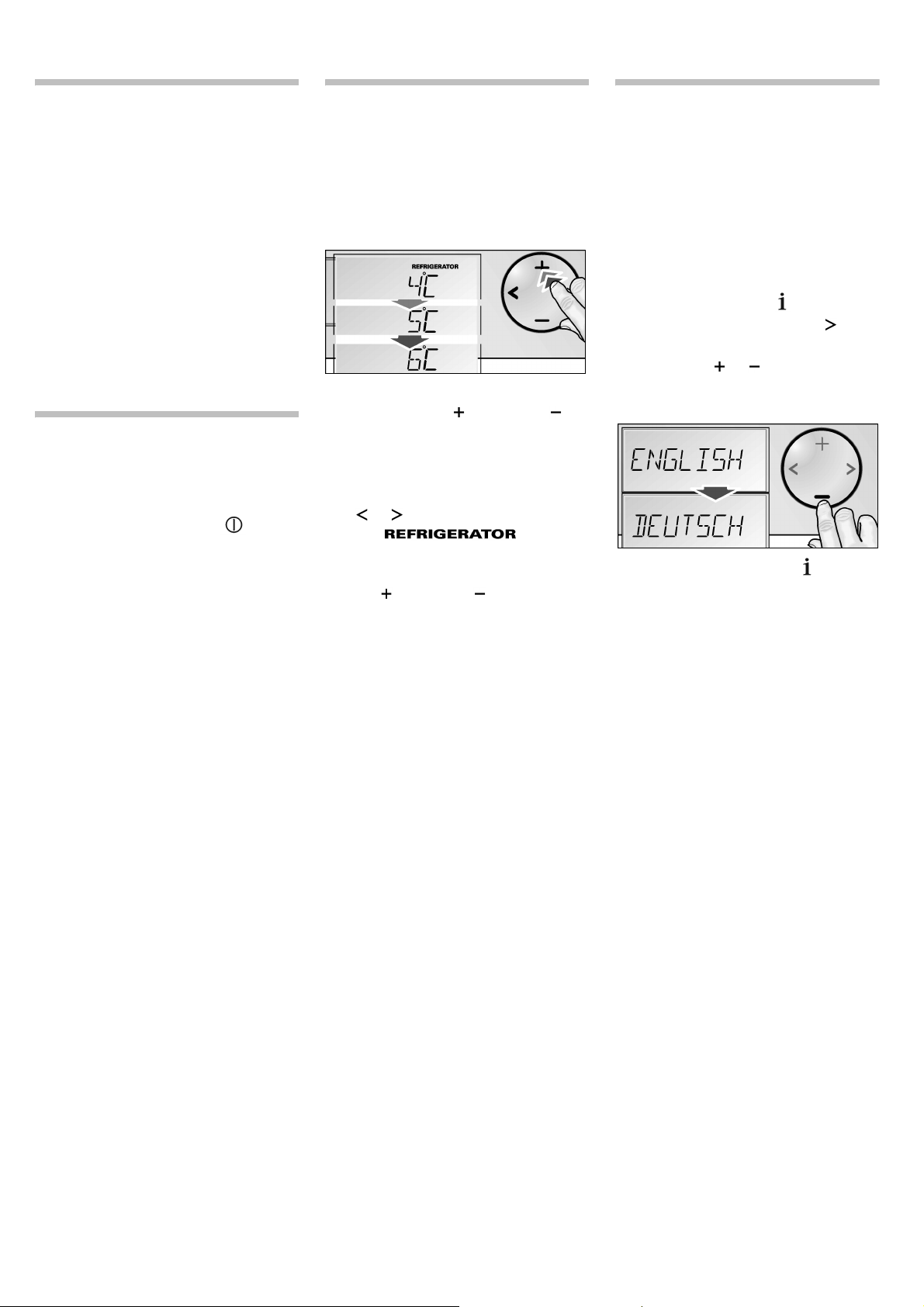
The temperature setting can be
changed using the (warmer) or
(cooler) setting buttons. The tempera-
ture can be set at 1 ° C intervals.
To set the temperature:
z Active the setup mode using the
or buttons.
The
symbol is
displayed.
z Set the desired temperature using
the (warmer) or (cooler) setting
buttons.
Set the language
When the appliance is operated, all
messages are displayed in fascia in
English.
Alternatively, the display languages can
be selected corresponding to the table
on page 11.
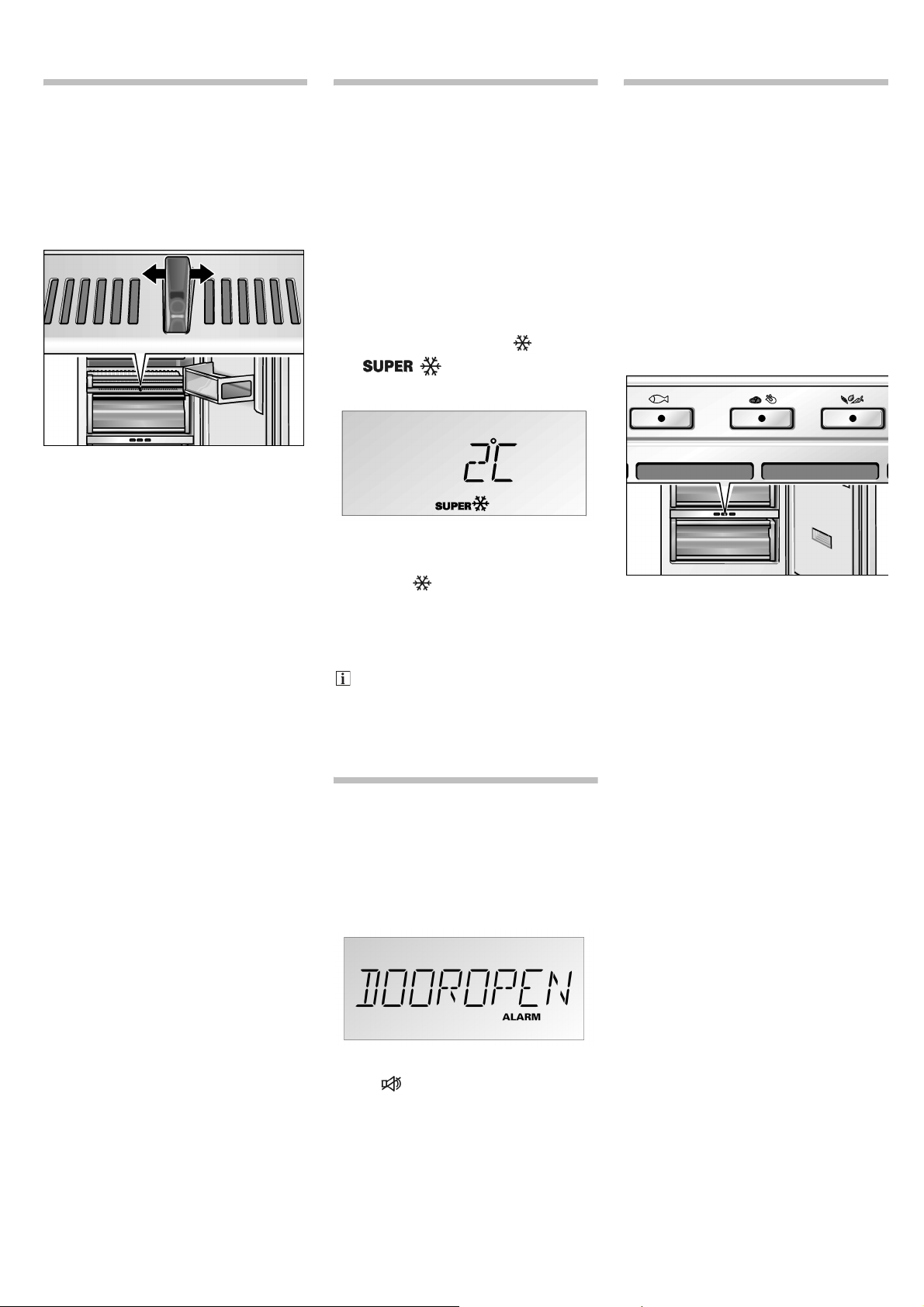
In order to change the display language:
z Press setup button .
z Press the selection button , until
ENGLISH is displayed.
z Press the or setting button,
until the desired language is
displayed.
z Press the setup button , in order
to store the settings. The set
temperature is displayed again in
the fascia.
9
Controlled
ventilation
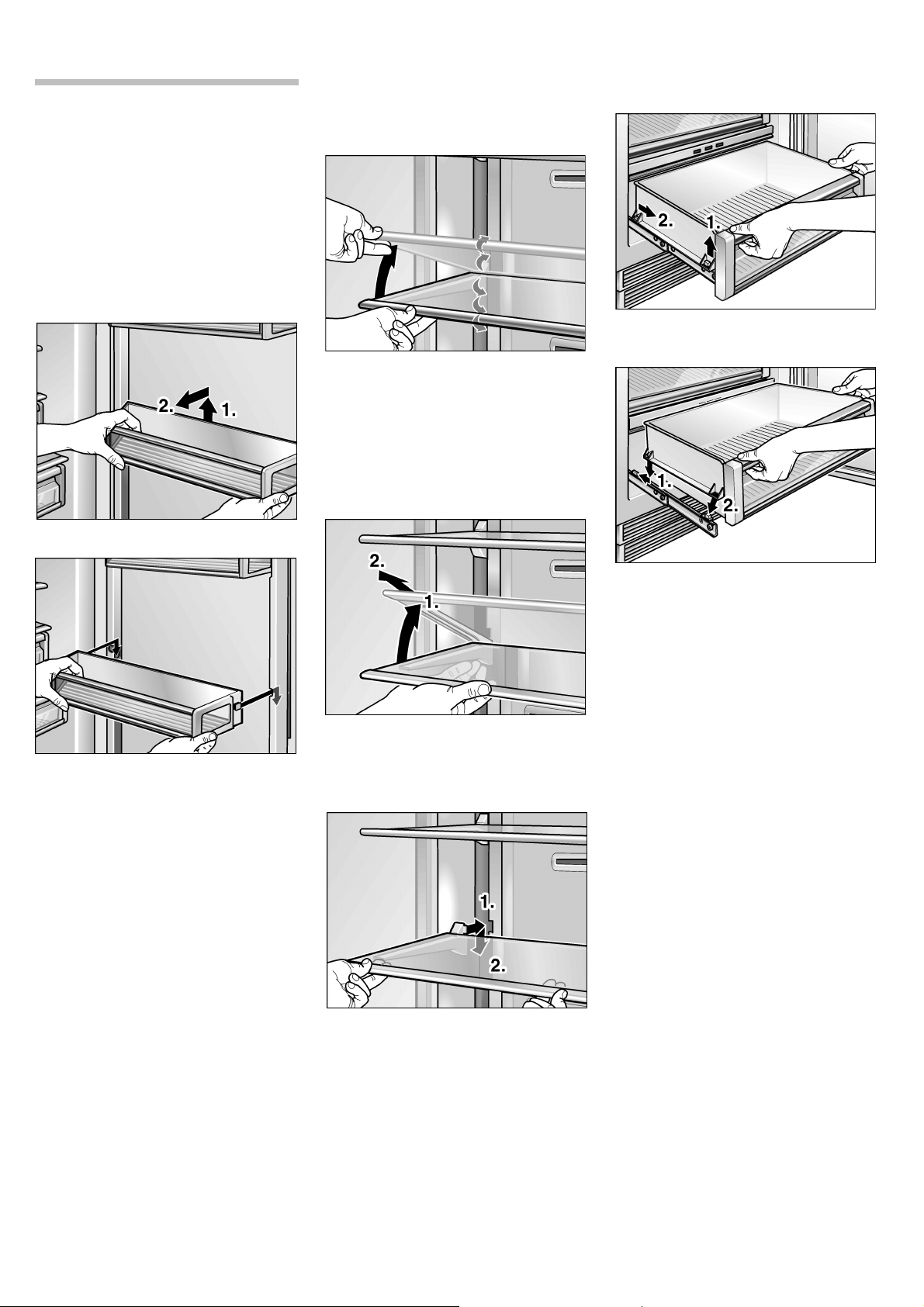
You can use the controllable ventilation
to set the air humidity in your fruit and
vegetable container.
– Slide control to the right:
low air humidity
– Slide control to the left:
high air humidity
“super” cooling
In the “super” cooling mode, the
refrigerated zone will be cooled for
approx. 6 hours as cold as possible.
Switch the function on:
z to cool drinks quickly.
z Before placing large quantities of
food in the refrigerator
compartment.
This function is activated by pressing
the “super” cooling button .
The symbol appears in the
fascia under super temperature.
“Super cool” function ends:
z by pressing the “super” cool
button again;
z by activating the eco function;
z by activating the holiday mode;
z by activating the sabbatical mode.
After approx. 6 hours, the
appliance switches automatically
back to the temperature set before
the “super cool” function.
Door alarm
If an appliance door is left open, an
alarm signal is emitted after one minute
and a corresponding alarm message
appears in the fascia.
Close the door. Pressing the alarm
button switches the signal off. If the
door is not closed properly again, the
alarm signal will be emitted after
one minute once more.
Chiller section
drawer
(Drawer with
adjustable
temperature)
The temperature in this compartment
is kept at almost 0 ° C. This provides
optimum storage conditions for fresh
food.
z Press the appropriate button
(fish, meat/poultry, vegetables)
corresponding to the food stored.
The selection is displayed by
the corresponding LED being
illuminated.
The chiller section drawer is equipped
with a filter. See in addition “Cleaning
the chiller section drawer” (page 17).
10
Variable interior
design
You can vary the shelves inside the
appliance and the containers in the
door to suit your requirements.
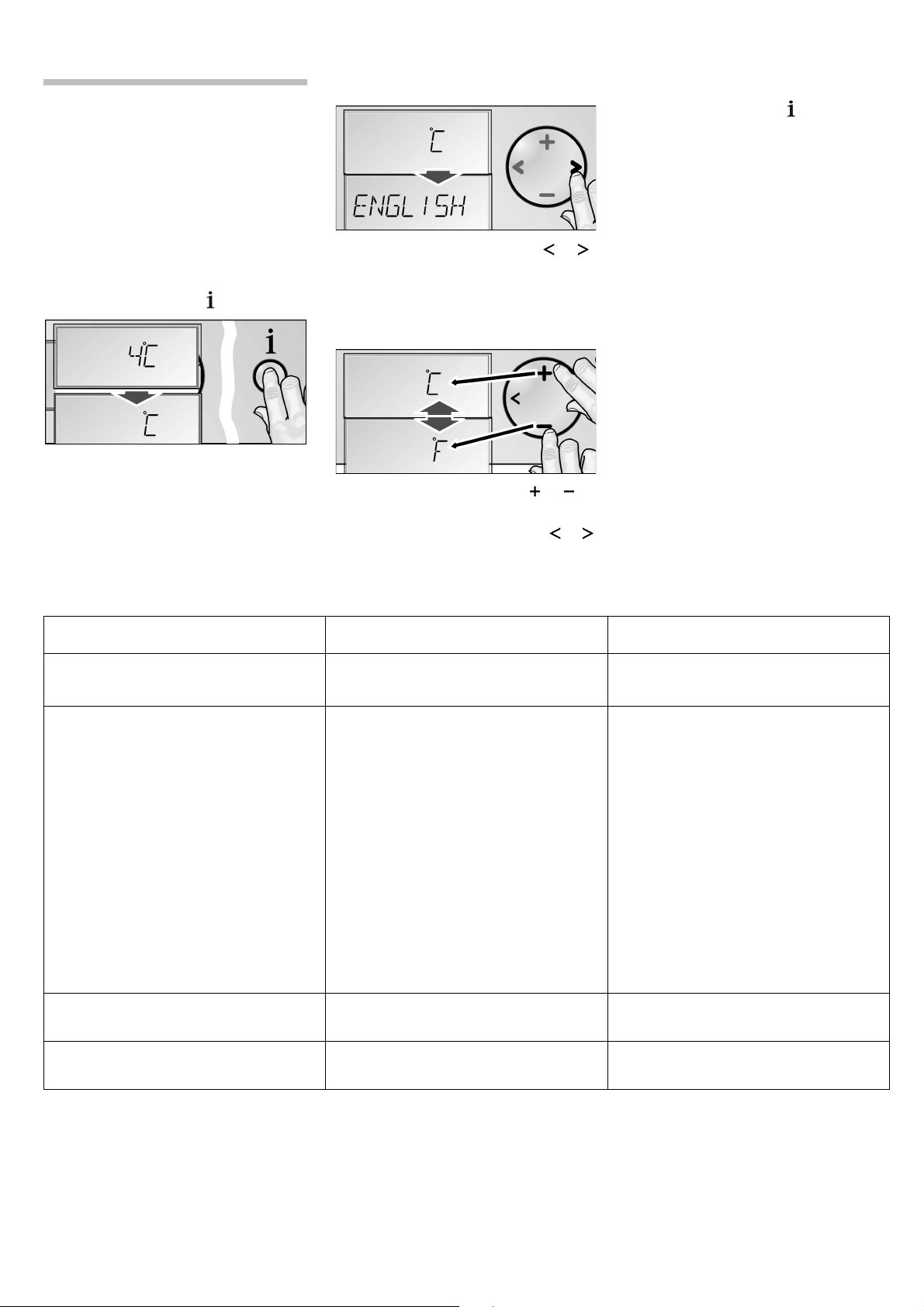
Door storage
compartment
z Lift the container and remove.
z Place the containers at the desired
heights and press downwards.
Glass compartments
The height of the glass shelves can
be adjusted.
z Lift the compartment front and
move it upwards or downwards
into the guiding positions.
z Lower the compartment front to the
desired height. The holders engage
into the guiding positions.
Removing the compartments:
z Lift the compartment front and
move it into the guiding positions as
far as the openings. Remove the
compartment forwards.
z Place the compartment into the
guiding positions openings and
press downwards. Set the
compartment to the desired height.
Drawers
z To take out, lift the drawers slightly
and take out.
z To place in, lift the front of the
drawers slightly and place into
the chest of drawers.
Lower the drawer and slide it
backwards.
11
Setup mode
Individual adjustments
There are menus for adapting the
appliance to the individual user require-
ments. These adaptions are carried out
in the setup mode.
To activate the setup mode:
z Press setup button .
The first menu (temperature unit) is
displayed in the fascia.
To switch to the next menu:
z Press the selection button or .
The next menu is displayed and its
current setting (mostly
o or p).
To make a selection within the setting
options of a menu:
z Press the setting button or .
A changed setting is stored, if the
next menu is selected using or .
To deactivate the setup mode:
z Press setup button . All of the
changed settings are stored.
If no button is selected within
20 seconds, the setup mode ends
automatically. All of the changed
settings are stored. The set temperature
is displayed again in the fascia.
Menus in the setup mode
Menu Setting options Displayed text
Temperature unit °C (degrees Celsius)
°F (degrees Fahrenheit)
°C
°F
Language German
English
French
Danish
Finnish
Greek
Dutch
Italian
Polish
Portuguese
Norwegian
Russian
Swedish
Spanish
Turkish
Czech
DEUTSCH
ENGLISH
FRANCAIS
DANSK
SUOMI
ELLINIKA
NEDERL
ITALIANO
POLSKI
PORTUG
NORSK
RUSSK
SVENSKA
ESPANOL
TURKCE
CESKY
Sound On / o
Off / p
TONE
Energy saving mode (eco function) On / o
Off / p
ECO MODE
12
Temperature unit
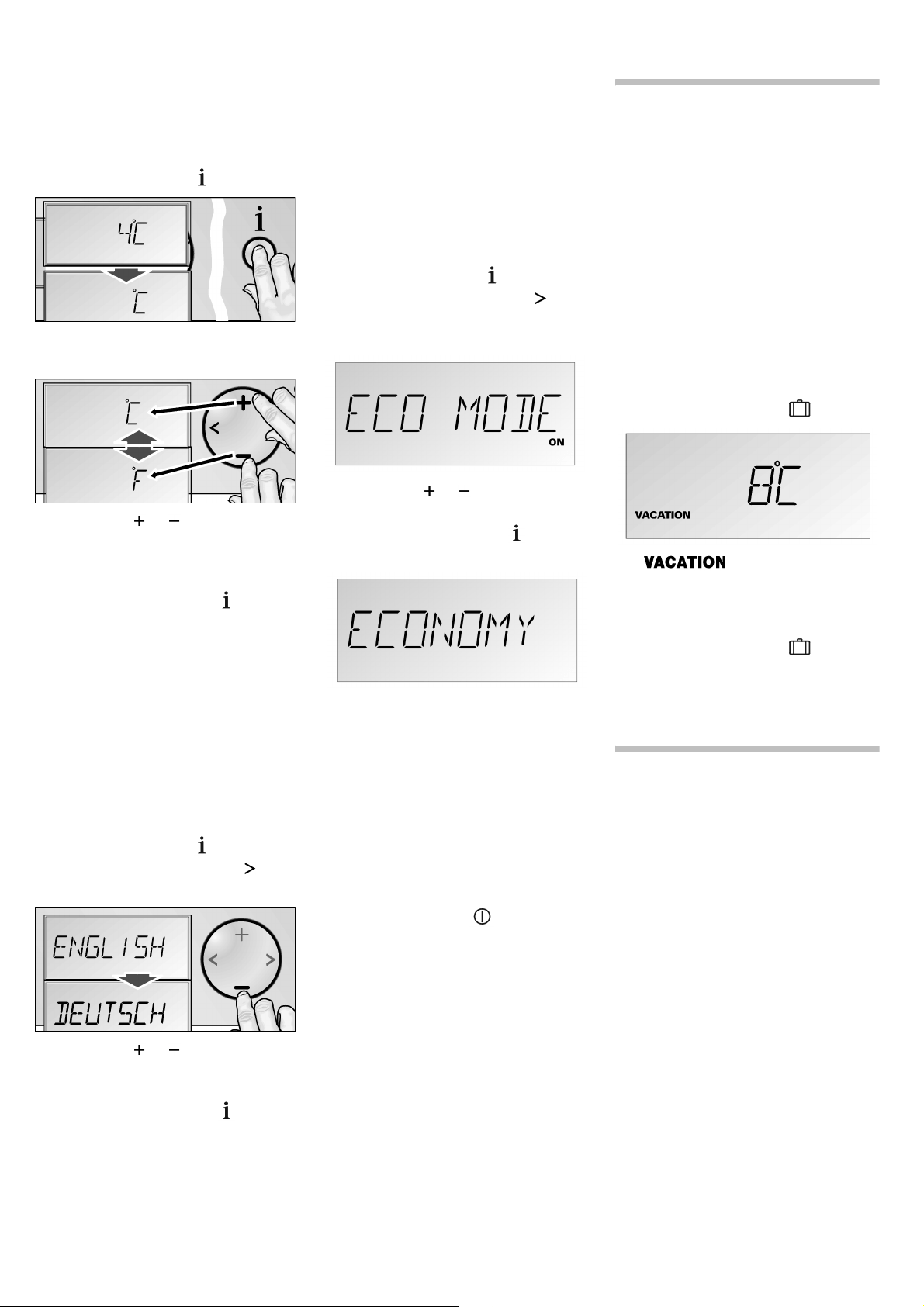
The temperature can be displayed in
degrees Celsius (° C) or degrees
Fahrenheit (° F).
z Press setup button .
The first menu (temperature unit) is
displayed.
z Press the or setting button in
order to switch between degrees
Fahrenheit (° F) and degrees Celsius
(° C).
z Press the setup button , in order
to store the settings. The set
temperature is displayed again in
the fascia.
Language setting
When the appliance is operated, all
messages are displayed in fascia in
English.
Alternatively, the display languages can
be selected corresponding to the table
above.
z Press setup button .
z Press the selection button , until
ENGLISH is displayed.
z Press the or setting button,
until the desired language is
displayed.
z Press the setup button , in order
to store the settings. The set
temperature is displayed again in
the fascia.
Energy saving mode
If the energy saving function (eco
function) is activated, the appliance
switches to energy saving operation.
This energy saving function is preset
at the factory in order to reduce energy
consumption. The background illumi-
nation of the fascia is likewise reduced.
To switch the energy saving function on:
z Press setup button .
z Press the selection button , until
ECO MODE and the current setting
(
o) is displayed.
z Press the or setting button,
in order to reset the setting.
z Press the setup button , in order
to store the settings.
The word
ECONOMY is displayed in the
fascia.
This function is then ended:
– by switching the eco function off in
the setup mode;
– by activating the "Super cool"
function;
– by changing the target temperature
of the appliance;
– by switching the appliance off using
the on/off button .
Holiday mode
If leaving the appliance for a long period
of time, you can switch the appliance
over to the energy saving holiday mode.
Holiday mode settings:
– the appliance works in energy
saving mode (see “Energy saving
mode”, page 12);
– the interior illumination is switched
off;
– the “Super cool” function is ended
(if activated).
To switch the holiday mode on:3.
z Press Holiday button .
The symbol appears in the
fascia under the eco-temperature
preset at the factory.
To switch the holiday mode off:
z Press Holiday button .
The previous settings and
temperature values are once again
activated.
Sabbatical mode
Sabbatical mode settings:
– the “Super cool” function is ended
(if activated);
– the accoustic signal is switched off
when the button is actuated
(if activated);
– the interior illumination is switched
off;
– the background illumination of the
fascia is switched off.
13
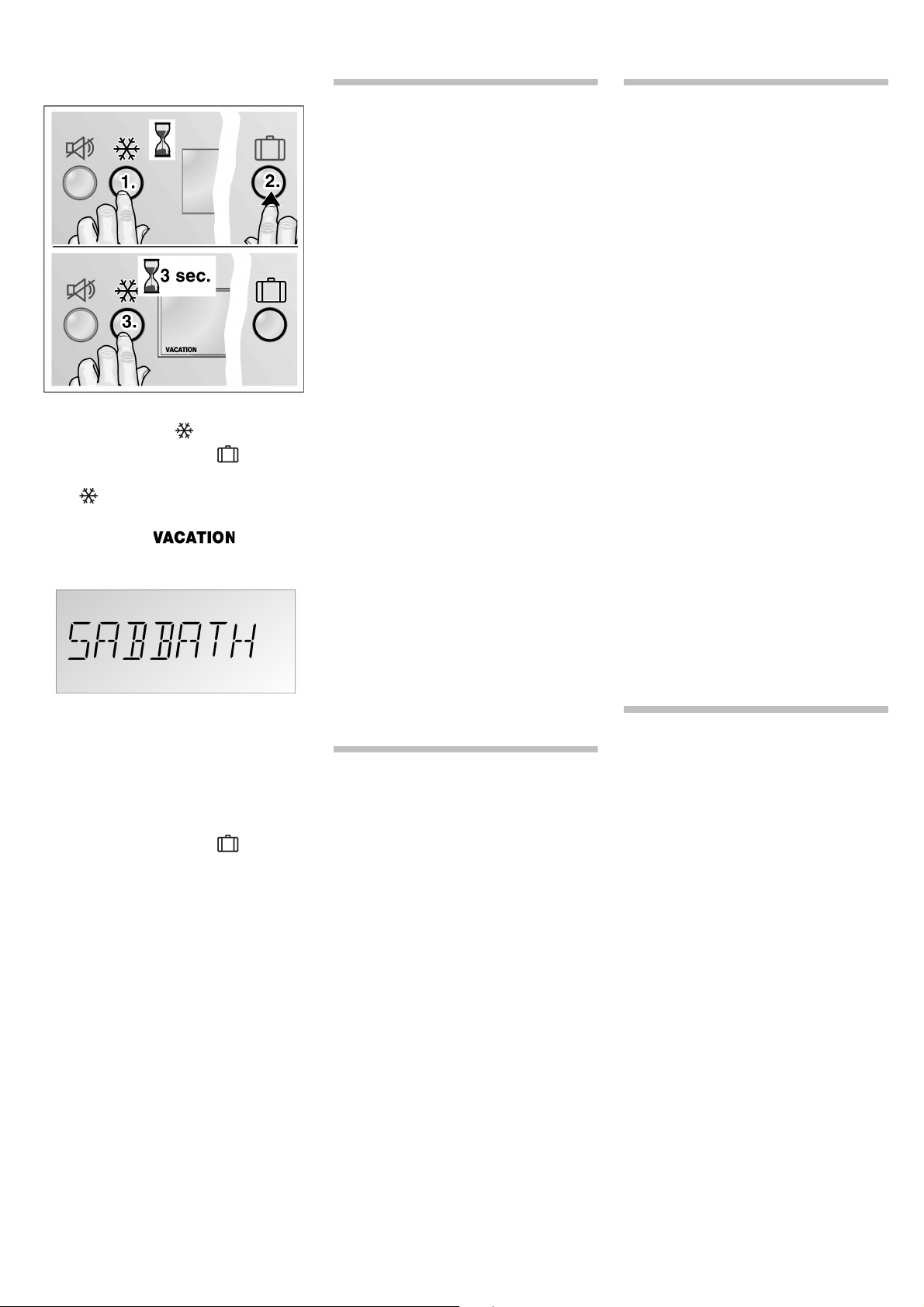
To switch the sabbatical mode on:
z Press and hold down the “super”
cooling button .
z Press Holiday button .
z Keep the “super” cooling button
held down for 3 seconds
longer.
The symbol flashes on
the display panel.
The background illumination in the
fascia is switched off.
SABBATH is
displayed in the fascia.
The sabbatical mode is switched
on.
To switch the sabbatical mode off:
z Press Holiday button .
The previous settings and
temperature values are once again
activated.
Preserving food
Pay attention when
arranging food:
– Allow warm food and drinks to cool
down outside the appliance.
– Wrap or cover food before placing
in the appliance. This way the
aroma and freshness is preserved.
This is done likewise to help avoid
the transfer of odours and colours
onto plastic parts.
– Keep plastic parts and the door
seal free of oil and grease.
– Bottles which contain a high
percentage of alcohol must be
sealed and stored in an upright
position.
When buying food,
please note:
The “purchase freshness” is important
for the shelf-life of your food.
The following principle applies:
the fresher the supplies are when
placed in the chiller section drawer,
the longer they can be held for.
When buying food, always note the
degree of freshness.
How to save energy
z Install the appliance in a cool, well
ventilated room, but not in direct
sunlight and not near a heat source
(radiator, cooker, etc.). If required,
use an insulating plate.
z Allow warm food and drinks to cool
down before placing in the
appliance!
z Thaw frozen food by placing it in
the refrigerator. The low tempera-
ture of the frozen food will then
cool the food in the refrigerator
compartment.
z Open the appliance door as briefly
as possible.
Operating noises
Normal operating noises
Humming – refrigerating unit is running.
The fan in the circulating air system is
running.
Bubbling, gurgling or whirring
noises – refrigerant is flowing through
the tubing.
Clicking – motor is switching on or off.
Noises which can be
easily rectified
The appliance is not level
Allign the appliance with the aid of
aspirit level.
Use the height-adjustable feet or place
something under the feet.
Drawers, baskets or storage areas
are loose or sticking
Please check the removable parts and,
if required, reinsert them.
Receptacles are touching each other
Please move bottles or receptacles
away from each other.
Thawing the
appliance
The appliance starts to defrost
automatically.
14
Switching off and
disconnecting the
appliance
Switching off the
appliance
z Press the on/off button .
Disconnecting the
appliance
If the appliance is not used for
a prolonged period:
z Take all food out of the appliance.
z Pull out the mains plug or switch off
the fuse.
z Clean the appliance interior (see
“Cleaning the appliance”, page 14).
z To prevent odours, leave the doors
open.
Cleaning the
appliance
z Press the on/off button and
switch the appliance off!
Pull out the mains plug or switch off
the fuse.
z Clean the appliance with lukewarm
water and a little washing-up liquid.
Water used for cleaning must not
drip onto the fascia or light.
z Clean the door seal with water only
and then dry thoroughly.
z Remove dirt on the ventilation and
air release openings using
a vacuum cleaner.
z Clean the surface of the appliance
using a damp cloth.
Afterwards, rub dry.
After cleaning:
Insert the plug and/or switch the fuse
on. Press the on/off button and
switch the appliance on!
m Warning
– NEVER use a steam cleaner
to clean the appliance!
– Water used for cleaning must not
drip onto the fascia or light.
– Do not use abrasive or acidic
cleaning agents and solvents.
– Never clean the shelves or
containers in the dishwasher.
The parts may warp.
Odours
If you experience unpleasant odours:
z Press the on/off button and
switch the appliance off!
z Take all food out of the appliance.
z Clean the interior. See section
“Cleaning the appliance”, page 14.
z Clean all packing units located in
the appliance.
z Seal strong smelling food in order
to avoid odours from forming.
z Press the on/off button and
switch the appliance on!
z Storing food in the appliance.
z Check whether the formation
of odours is still occuring after
24 hous.
z Change the odour filter.
Warning messages
via the display
If several warning notices appear at
once, see to each warning in turn.
As long as a warning is displayed, no
buttons can be pressed.
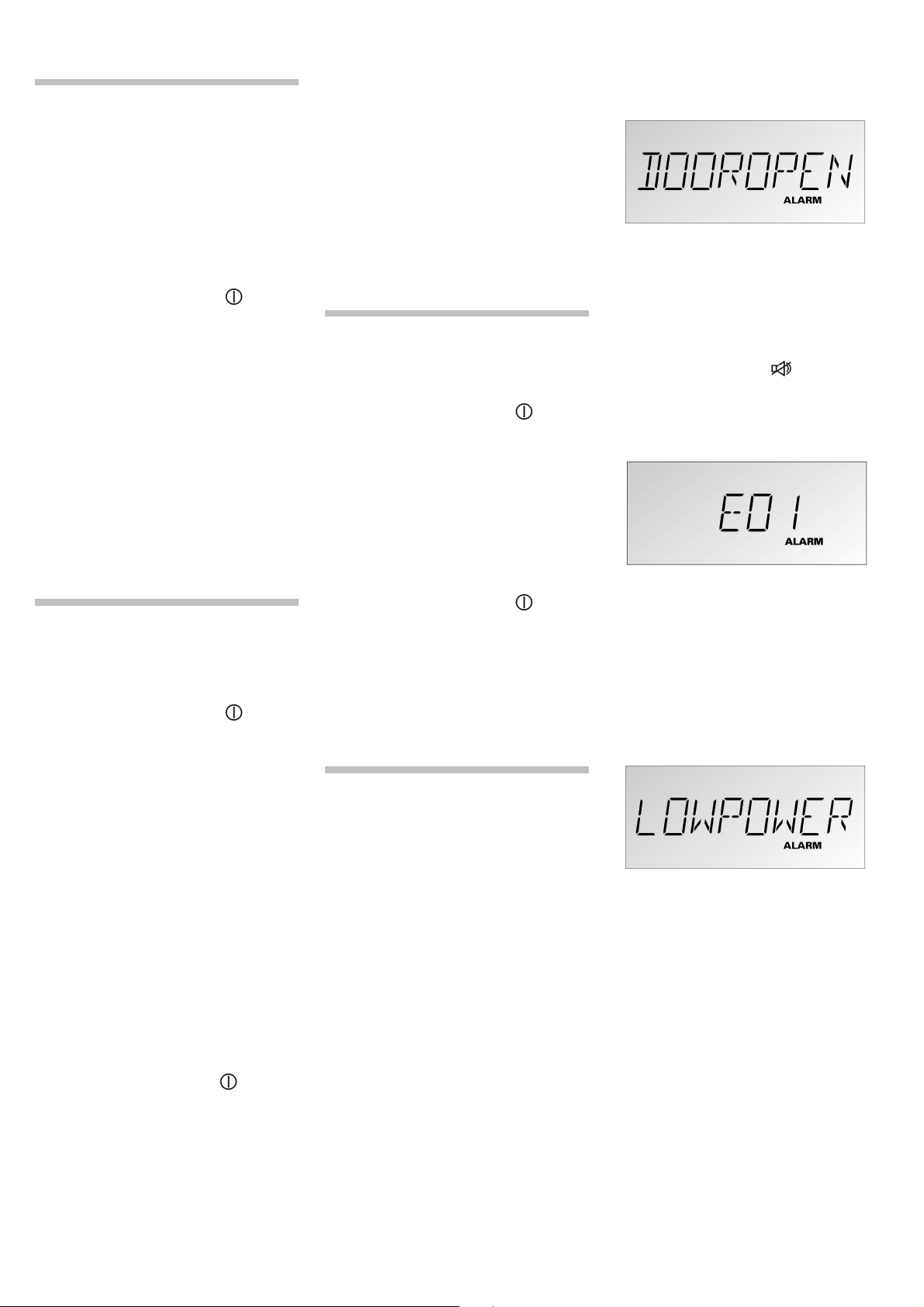
Door alarm
Cause
One door of the appliance has not been
closed correctly or has been open too
long.
Remedial action
Press the alarm button . Close the
door. The display goes out.
Sensor failure
Cause
A technical defect on the appliance is
possible.
Remedial action
Conduct a self-test on the appliance.
Low voltage
Cause
The mains voltage falls below the
permitted limiting value.
Remedial action
No button actuations are possible.
When the mains voltage reaches the
stipulated value again, the warning
message goes out. If the warning
message lasts for longer, inform the
energy supply company.
15
Appliance self-test
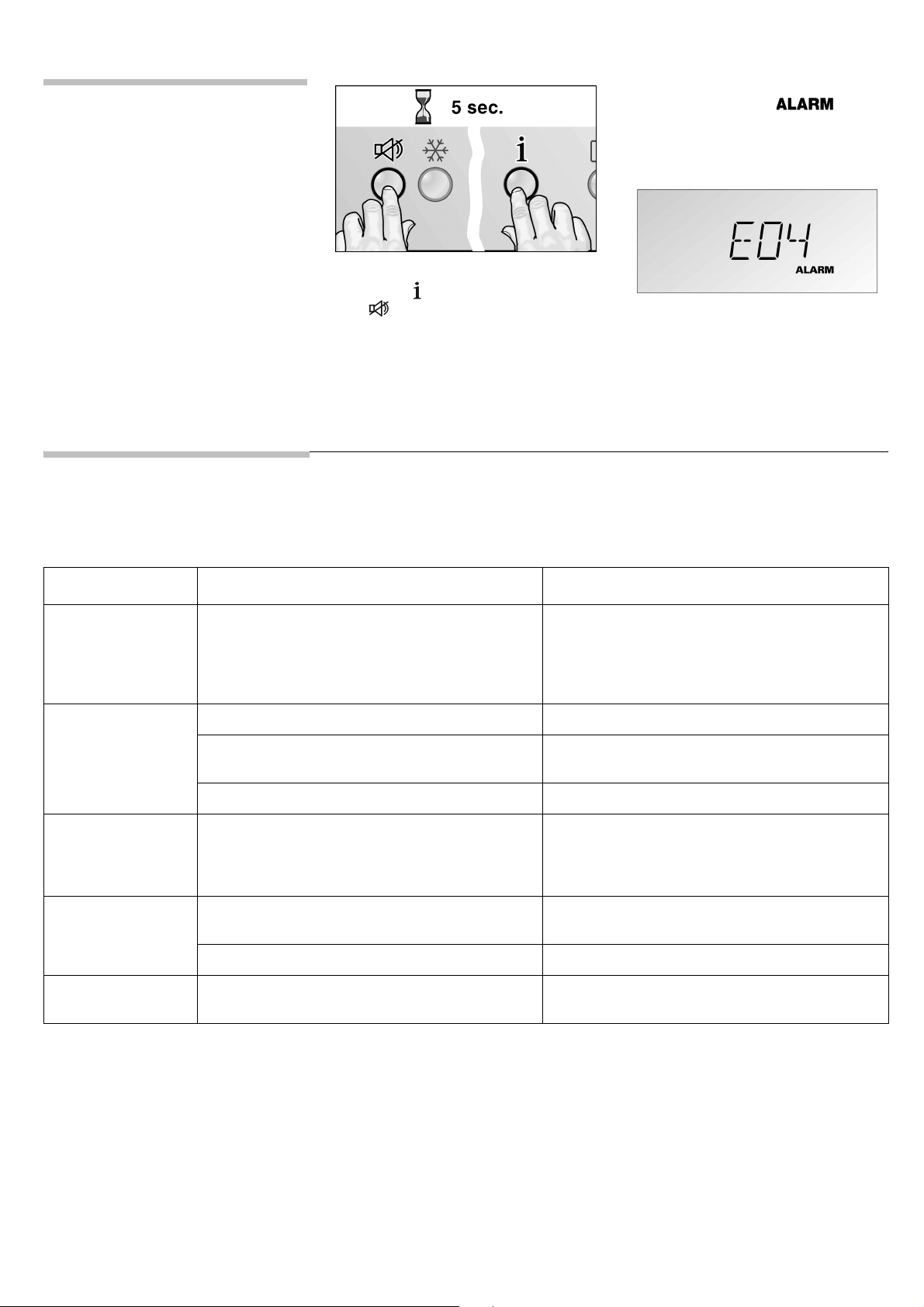
Before you call customer service,
conduct a self-test on the appliance.
z Switch off the appliance and wait
5 minutes.
Keep the door closed during this
time.
z Switching on the appliance.
z At the same time, press the setup
button and the alarm button
for 5 seconds.
The self-test programme starts.
Various messages appear in the facia
one after the other.
If an error is established during the
appliance self-test, the symbol
appears in the fascia and an error
message (e. g.
E04 = sensor error) is
displayed.
Inform the customer service of these
error messages.
If no error is established during the
appliance self-test, the preset
temperature appears in the fascia after
the test has ended.
Eliminating minor faults yourself
Before you call customer service: Please check whether you can eliminate the fault yourself based on the following information.
Customer service will charge you for advice
— even if the appliance is still under guarantee!
Fault Possible cause: Remedial action
Appliance has
no refrigerating
capacity.
The display does
not illuminate.
Power failure; the fuse has been switched off;
the mains plug has not been inserted properly.
Check whether the power is on. The appliance
must be switched on. Check whether the mains
plug is secure.
The refrigerating
unit is switching on
more frequently and
for longer.
Appliance door opened frequently. Do not open the door unnecessarily.
Large amounts of fresh food have been put
away.
Activate the “super” cool function.
The ventilation openings have been covered. Remove obstructions and dirt.
The temperature
in the refrigerator
compartment is
too cold.
Temperature in the refrigerator compartment has
been set too low.
Select a warmer temperature (see page 8
“Setting the temperature”).
Interior light does
not function.
The bulb is defective. Replace bulb (see page 16 “Changing light
bulbs”).
Light switch is sticking. Check whether it can be moved.
You experience
unpleasant odours.
Strongly smelling food is not sealed. Cleaning the appliance. Seal strongly smelling
food (see page 14 “Odours”).

16
Change the light
bulbs
m Warning
Pull out the mains plug or switch off the
fuse. Risk of electric shock!
m Caution
Do not touch the halogen bulb with your
fingers. Always use a soft cloth when
inserting a halogen bulb.
Upper halogen lamp
Halogen lamp type:
12 V/20 W/bulbholder G4
z Rotate cover anti-clockwise and
remove.
z Remove the defective halogen
bulb.
z Insert the new halogen bulb.
Always use a soft cloth when
inserting a halogen bulb.
z Re-insert cover and rotate
clockwise.
Side halogen lamps
Halogen lamp type:
12 V/10 W/bulbholder G4
z Pull off the cover strip forwards.
z Remove the pane forwards.
z Remove the defective halogen
bulb.
z Insert the new halogen bulb.
Always use a soft cloth when
inserting a halogen bulb.
z Replace the panes.
z Insert the cover strip.
Halogen light in the chiller
section drawer
Halogen lamp type:
12 V/5 W/bulbholder G4
z Free the cover and remove it from
the holder.
z Remove the defective halogen
bulb.
z Insert the new halogen bulb.
Always use a soft cloth when
inserting a halogen bulb.
z Attach cover and fix it into the
holder.
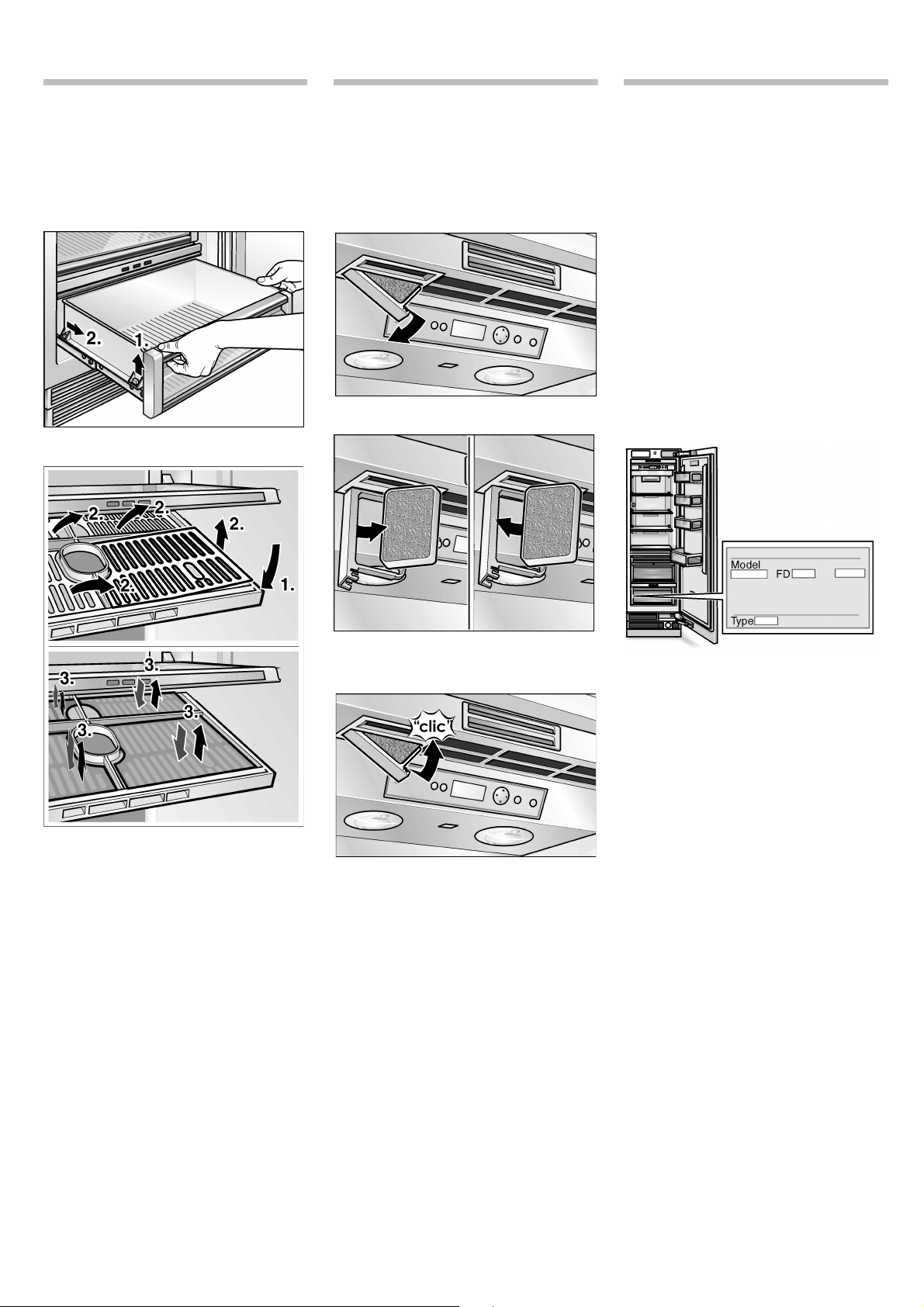
17
Cleaning the chiller
section drawer filter
Clean the filter on the chiller section
drawer as follows:
z Remove the chiller section drawer.
z Press the filter-holder front down-
wards (1) with both hands.
Only open the filter-holder for
cleaning!
z Remove the filter-cover (2).
z Clean the filter with clear water and
leave it to dry. Re-insert the filter.
Replace the filter cover (3).
z Press on the filter cover until it
engages.
z Replace the chiller section drawer.
Exchange the odour
filter
Spare filters are available from your
dealer.
z Opening the filter holder.
z Remove the old odour filter.
z Replace with a new odour filter.
z Opening the filter holder.
Customer service
Check whether you can remedy the fault
yourself on the basis of information
provided in the “Eliminating minor faults
yourself” section (page 15). Your local
customer service can be found in the
telephone directory or in the customer-
service index.
Please provide customer service with
the appliance product number (E-Nr.)
and production number (FD).
To prevent unnecessary call-outs,
please assist customer service by
quoting the product and production
numbers. This will save you additional
costs.
This information can be found on the
product label.

18

19

NEFF GMBH
Carl-Wery-Straße 34, 81739 München
www.neff.de 9000 291 026 en (8707)
Subject to alterations.
(EUR 0,14/Min. DTAG)