P/NO : MFL67502006
OWNER’S MANUAL
Please read this manual carefully before operating
your set and retain it for future reference.
TYPE : WALL MOUNTED
AIR
CONDITIONER
Applied Models :
LS091HSV3
LS121HSV3
http://www.lghvac.com
www.lg.com
ENGLISH
FRANCAIS ESPAÑOL
2
TIPS FOR SAVING ENERGY
ENGLISH
TIPS FOR SAVING ENERGY
Here are some tips that will help you minimize the power consumption when you use the air
conditioner. You can use your air conditioner more efficiently by referring to the instructions
below:
• Do not cool excessively indoors. This may be harmful for your health and may consume more
electricity.
• Block sunlight with blinds or curtains while you are operating the air conditioner.
• Keep doors or windows closed tightly while you are operating the air conditioner.
• Adjust the direction of the air flow vertically or horizontally to circulate indoor air.
• Speed up the fan to cool or warm indoor air quickly, in a short period of time.
• Open windows regularly for ventilation as the indoor air quality may deteriorate if the air con-
ditioner is used for many hours.
• Clean the air filter once every 2 weeks. Dust and impurities collected in the air filter may block
the air flow or weaken the cooling / dehumidifying functions.
For your records
Staple your receipt to this page in case you need it to prove the date of purchase or for warranty
purposes. Write the model number and the serial number here:
Model number :
Serial number :
You can find them on a label on the side of each unit.
Dealer’s name :
Date of purchase :
IMPORTANT SAFETY INSTRUCTIONS
IMPORTANT SAFETY INSTRUCTIONS
READ ALL INSTRUCTIONS BEFORE USING THE APPLIANCE.
Always comply with the following precautions to avoid dangerous situations and ensure peak
performance of your product
WARNING
It can result in serious injury or death when the directions are ignored
CAUTION
It can result in minor injury or product damage when the directions are ignored
WARNING
• Installation or repairs made by unqualified persons can result in hazards to you and others.
• Installation MUST conform with local building codes or, in the absence of local codes, with
the Nation Electrical Code NFPA 70/ANSI C1-1003 or current edition and Canadian Electrical
Code Part1 CSA C.22.1.
• The information contained in the manual is intended for use by a qualified service technician
familiar with safety procedures and equipped with the proper tools and test instruments.
• Failure to carefully read and follow all instructions in this manual can result in equipment mal-
function, property damage, personal injury and/or death.
Power
• Unplug the power plug immediately in the event of a blackout or thunderstorm. Failure to do
so may result in fire or electric shock.
• Always use a power plug and socket with a ground terminal. Failure to do so may result in
electric shock or product failure.
• Install a dedicated electric outlet and circuit breaker before you use the air conditioner. Failure
to do so may result in electric shock or product failure.
• Do not connect the ground wire to a gas pipe, a lightning rod or a telephone ground wire. It
may result in electric shock or product failure.
• Use a standard circuit breaker and fuse conforming with the rating of the air conditioner. Fail-
ure to do so may result in electric shock or product failure.
• Make sure to check that the power cable plug is not dirty, loose or broken and then only in-
sert the plug completely. It may result in electric shock or product failure.
• Do not modify or extend the power cable. If the power cable or cord has scratches or skin
peeled off or deteriorated then it must be replaced. It may result in fire or electric shock.
• Don’t use a power cord, a plug or a loose socket which is damaged. It may result in fire or
electric shock.
• Do not use a damaged power cord or plug. It may result in electric shock or product failure.
• Do not touch, operate or repair the air conditioner with wet hands. It may result in electric
shock or product failure.
• Make sure that the power plug is not damaged when you move the air conditioner. Failure to
doc so may result in electric shock or product failure.
!
!
!
3
ENGLISH
READ ALL INSTRUCTIONS BEFORE USING THE APPLIANCE.
• Do not place a heater or other heating appliances near the power cable. It may result in fire,
electric shock, or product failure.
• Make sure that the power cord is not pulled or damaged while the air conditioner is operating.
Failure to do so may result in fire, electric shock, or product failure.
• Do not place any objects on the power cord. It may result in electric shock or product failure.
Installation
• Do not install the air conditioner on an unstable surface or where there may be a danger of it falling.
It may result in death, serious injury, or product failure.
• Contact an authorized service center when you install or relocate the air conditioner. Failure to do so
may result in serious injury or product failure.
• Indoor/outdoor wiring connections must be secured tightly and the cable should be routed properly
so that there is no force pulling the cable from the connection terminals. Improper or loose connec-
tions can cause heat generation or fire.
• Install the panel and the cover of the control box safely. Failure to do so may result in explosion or
fire.
• Do not install the air conditioner near a place with a danger of explosion or fire. It may result in ex-
plosion or fire.
• Make sure that the pipe and the power cable that connect the indoor unit and the outdoor unit are
not pulled tight when you install the air conditioner. Failure to do so may result in electric shock or
product failure.
• Do not mix air or gas in the system except for the specific refrigerant. If air enters the refrigerant
system, it may result in an excessively high pressure that causes injury or damage to the equip-
ment.
Use
• Be sure to use only those parts which are listed in the svc parts list. Never attempt to modify the
equipment. It may result in death, serious injury, or product failure.
• Do not pull the power cord when you remove the power plug. It may result in death or electric
shock.
• Discard the batteries where there is no danger of fire. Failure to do so may result in explosion or
fire.
• Contact an authorized service center when the air conditioner is submerged into water due to flood-
ing. Failure to do so may result in explosion or fire.
• Only use components that are approved by the manufacturer and do not repair or modify them. Fail-
ure to do so may result in electric shock or product failure.
• Only use the refrigerant specified on the air conditioner label. It may result in explosion or fire.
• Do not allow water to run into the air conditioner. It may result in explosion or fire.
• Do not leave flammable substances such as gasoline, benzene and thinner near the air conditioner.
It may result in explosion or fire.
• Do not use the air conditioner for an extended period of time in a small place without ventilation.
Ventilate the place regularly. Failure to do so may result in explosion or fire.
• Do not touch the electrostatic filter after opening the front grille. Failure to do so may result in elec-
tric shock or product failure.
• For inner cleaning, contact an Authorized Service Center or a dealer.
Do not use harsh detergent that causes corrosion or damage on the unit.
Harsh detergent may also cause failure of product, fire, or electronic shock.
4
IMPORTANT SAFETY INSTRUCTIONS
ENGLISH
IMPORTANT SAFETY INSTRUCTIONS
5
ENGLISH
READ ALL INSTRUCTIONS BEFORE USING THE APPLIANCE.
• Unplug the power plug if there is a noise, smell or smoke coming from the air conditioner.
Failure to do so may result in explosion or fire.
• Make sure to ventilate sufficiently when this air conditioner and a heating appliance such as a
heater are used simultaneously. Failure to do so may result in fire, serious injury, or product
failure.
• Make sure that children do not climb up the outdoor unit or impact it. Failure to do so may re-
sult in death or product failure.
• Do not turn on or off the air conditioner by plugging in or unplugging the power plug. It may
result in fire or electric shock.
• When there is a gas leak, ventilate sufficiently before using the air conditioner again. Failure to
do so may result in explosion or fire.
• Do not use the product for special purposes, such as preserving foods, works of art, etc. It is
a consumer air conditioner, not a precision refrigeration system. It may result in death, fire or
electric shock.
• Do not block the inlet or outlet of air flow. It may result in explosion or product failure.
• Do not insert hands or other objects through the air inlet or outlet while the air conditioner is
operating. It may result in electric shock.
• Do not expose people, animals or plants to the cold or hot wind from the air conditioner. It
may result in serious injury.
• Do not drink the water drained from the air conditioner. It may result in serious health compli-
cations.
Maintenance
• Turn the main power off and unplug the power plug when you clean or repair the air condi-
tioner. Failure to do so may result in death, serious injury, or product failure.
CAUTION
Installation
• Do not install the air conditioner where there is direct sunlight. It may result in product failure.
• Safely dispose of packing materials such as screws, nails or batteries in a packing bag after installa-
tion or repair. It may result in serious injury.
• Do not install the air conditioner where it will be exposed to sea wind (salt spray) directly. It may re-
sult in product failure.
• Install the drain hose properly for smooth drainage of condensed water. Failure to do so may result
in product failure.
• Install the air conditioner where the noise from the outdoor unit or the exhaust gas will not incon-
venience the neighbors. Failure to do so may result in conflict between neighbors.
• Be cautious when you unpack or install the air conditioner. Failure to do so may result in serious in-
jury or product failure.
• Do not touch the refrigerant leakage during installation or repair. It may result in product failure.
• When transporting the equipment, there should be at least 2 or more people, or a forklift. It may re-
sult in serious injury.
!
6
IMPORTANT SAFETY INSTRUCTIONS
ENGLISH
Use
• Remove the batteries when the remote control is not in use for an extended period of time.
Failure to do so may result in product failure.
• Make sure that the filter is installed before you operate the air conditioner. Failure to do so may re-
sult in product failure.
• Unplug the power plug when the air conditioner is not used for an extended period of time.
Failure to do so may result in product failure.
• Make sure to check if there is a refrigerant leak after you install or repair the air conditioner.
Failure to do so may result in product failure.
• Do not place any objects on the air conditioner. It may result in product failure.
• If there is a refrigerant leak during the installation of the air conditioner, ventilate the area immedi-
ately. Failure to do so may result in serious injury or product failure.
• Follow the standards of the corresponding region or country for handling the refrigerant and the air
conditioner, and for disassembling the air conditioner. Failure to do so may result in product failure.
• Do not mix the batteries for the remote control with other types of batteries or mix new batteries
with used batteries. Failure to do so may result in product failure.
• Do not recharge or disassemble the batteries. Failure to do so may result in explosion, fire or seri-
ous injury.
• Do not dispose of the batteries in fire. It may result in explosion or fire.
• Stop using the remote control if there is a battery fluid leak. If your cloth or skin is exposed to the
battery fluid from a leak, wash it off with clean water. Failure to do so may result in serious injury.
• If you swallow the battery fluid from a leak, wash out the inside of your mouth thoroughly and then
consult a doctor. Failure to do so may result in serious health complications.
• Do not let the air conditioner run for a long time when the humidity is very high or when a door or
window has been left open. Failure to do so may result in product failure.
• Do not use the product for special purposes,such as preserving foods, works of art, etc. It is a con-
sumer air conditioner, not a precision refrigeration system. There is risk of damage or loss of prop-
erty.
Maintenance
• Do not use strong cleaning agents or solvents when you clean the air conditioner, or spray water.
Use a smooth cloth. It may result in serious injury or product failure.
• Never touch the metal parts of the air conditioner when you remove the air filter. It may result in se-
rious injury or product failure.
• Use a sturdy stool or ladder when you clean, maintain or repair the air conditioner at a height.
Failure to do so may result in serious injury or product failure.
TABLE OF CONTENTS
7
ENGLISH
TABLE OF CONTENTS
2
TIPS FOR SAVING ENERGY
3 IMPORTANT SAFETY
INSTRUCTIONS
8 BEFORE USE
8 Components
9 Using the remote control
10 - Inserting batteries
10 - Installing the remote control holder
11 BASIC FUNCTIONS
11 Cooling your room
11 Heating your room
11 Removing humidity
12 Airing your room
12 Adjusting the fan speed
12 Adjusting the air flow direction
12 Setting the timer
12 - Setting the current time
13 - Turning on the air conditioner
automatically at a set time
13 - Turning off the air conditioner
automatically at a set time
13 - Canceling the timer setting
13 Setting sleep mode
14 ADVANCED FUNCTIONS
14 Changing room temperature quickly
14 Indoor air purification
14 - Auto Clean operation
15 Auto operation
15 Auto Changeover operation
15 °C/°F Conversion
16 Energy saving cooling mode
16 Display screen brightness
16 Operating the air conditioner without the
remote control
17 Restarting the air conditioner
automatically
18 WLAN Connecting (optional)
29 MAINTENANCE
30 Cleaning the air filter
30 Cleaning the 3M Micro Protection Filter
31 TROUBLESHOOTING
31 Self-diagnosis function
31 Before requesting service
33 Function of wired remote control
8
BEFORE USE
ENGLISH
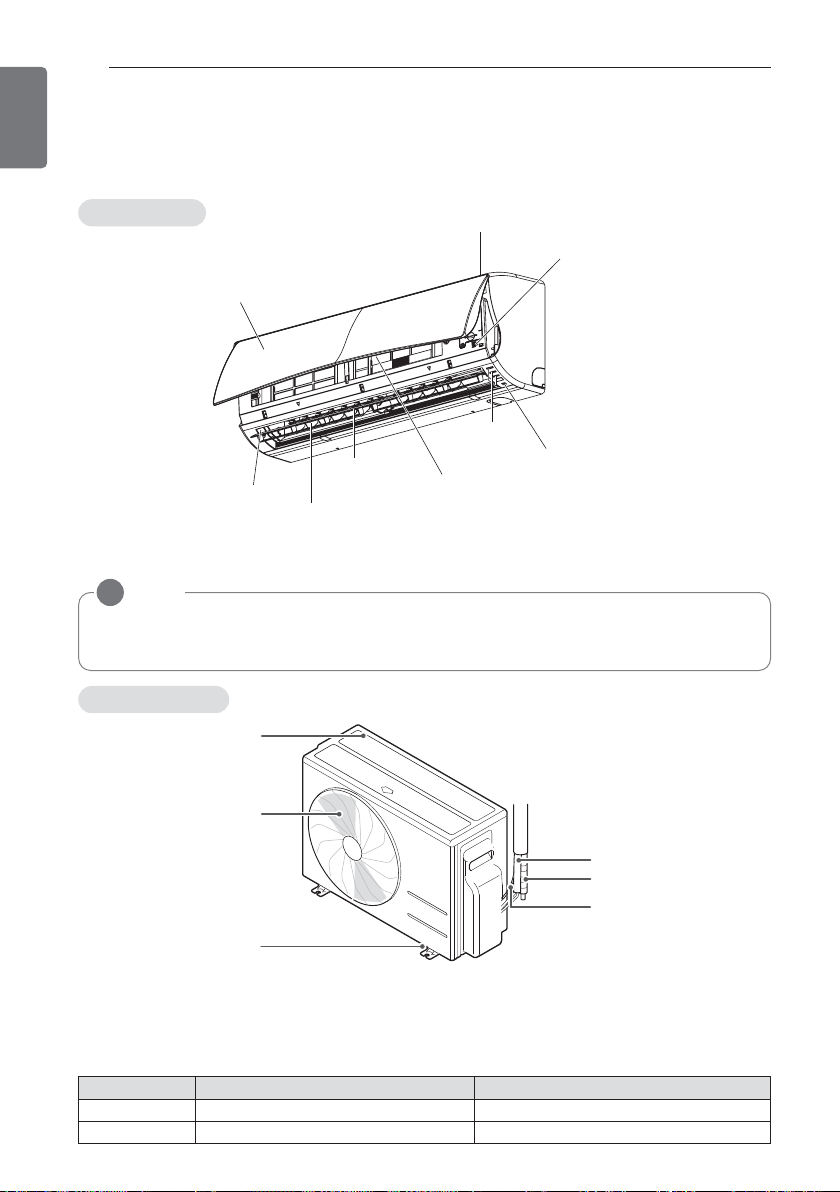
Air inlet vents
Air outlet vents
Base plate
Coolant piping
Connection
wire
Drain hose
BEFORE USE
Components
Outdoor unit
Air inlet
Air filter
Front grille
Operation
lamp
Signal Receiver
ON/OFF button
Vertical louver
Air outlet
Horizontal
vane
NOTE
!
The number of operation lamps and their locations may vary, depending on the model of the
air conditioner.
Indoor unit
* The feature can be changed according a type of model.
* The feature can be changed according a type of model.
Operation ranges
The table below indicates the temperature ranges the air conditioner can be operated within.
Mode Indoor temperature outdoor temperature
Cooling 18°C~30°C(64.4°F~86°F) -18°C~48°C(-0.4°F~118.4°F)
Heating 16°C~30°C(60.8°F~86°F) -20°C~24°C(-4°F~75.2°F)
BEFORE USE
9
ENGLISH
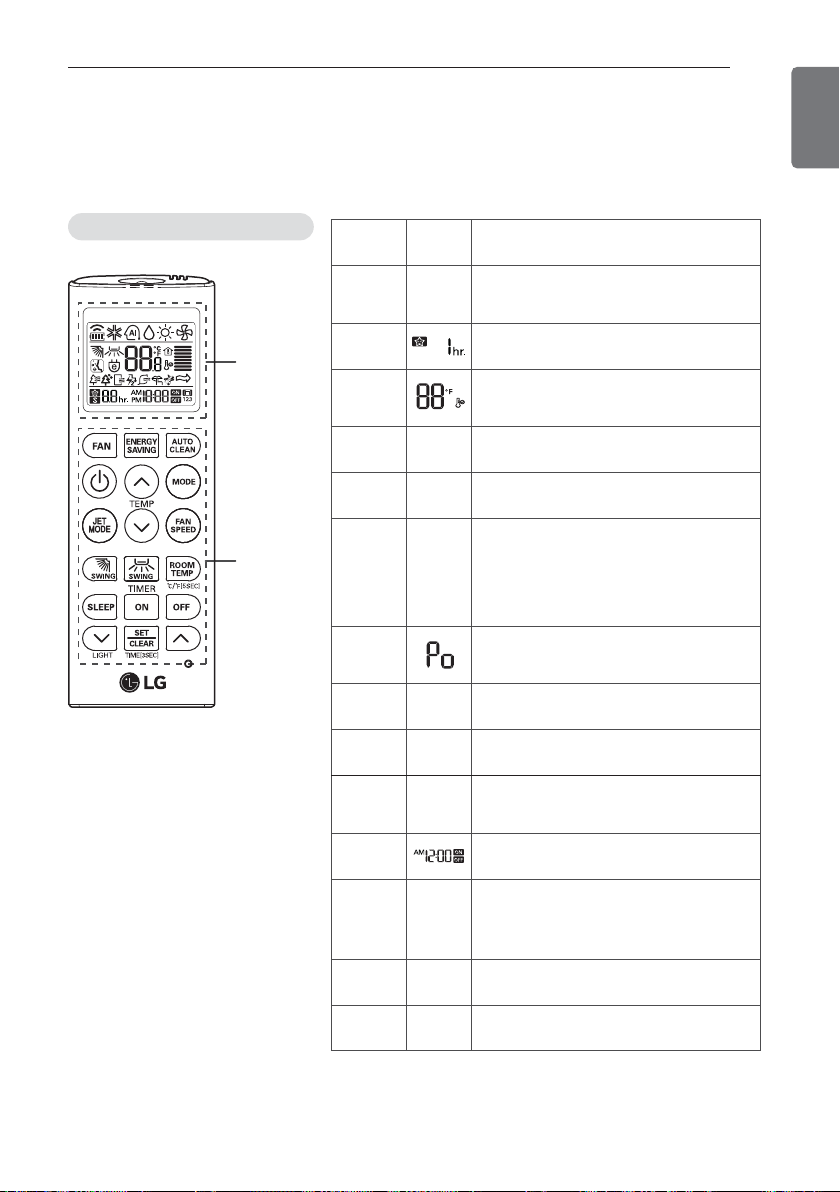
Using the remote control
You can operate the air conditioner more conveniently with the remote control. You will find the
buttons for the additional functions under the cover of the remote control.
Wireless remote control
Display
screen
Control
panel
* Some functions may not be supported, depending on the
model.
Control
panel
Display
screen
Description
/
4
Fan button : Air come out from the in-
door unit below to the room without air
temperature change.
l
Sleep mode auto button*: Sets the
sleep mode auto operation.
_
Temperature adjustment buttons:
Adjusts the room temperature when
cooling and heating.
|
- On/Off button: Turns the power on/off.
g
L
Indoor fan speed button: Adjusts the
fan speed.
f
AC
DB
Operation mode selection button*:
Selects the operation mode.
Cooling operation (A) / Auto operation
or auto changeover (C) /
Dehumidifying operation (D) / Heating
operation (B)
M
Jet cooling/heating button*: Warms up
or cools down the indoor temperature
within a short period of time.
DE
IJ
Air flow direction button: Adjusts the air
flow direction vertically or horizontally.
G
-
Adjusts the brightness of the indoor
unit display.
k
S
Temperature display button: Displays
the room temperature. Also changes unit
from °C to °F if pressed for 5 seconds.
mn
Timer button: Sets the current time
and the start / end time.
O
P
JG
Navigation and functions button*:
Sets the special functions.
J: Auto clean
G: Operates energy saving cooling
p
-
Set/clear button: Sets or cancels functions.
r
-
Reset button: Resets the air condition-
er settings.
10
BEFORE USE
ENGLISH
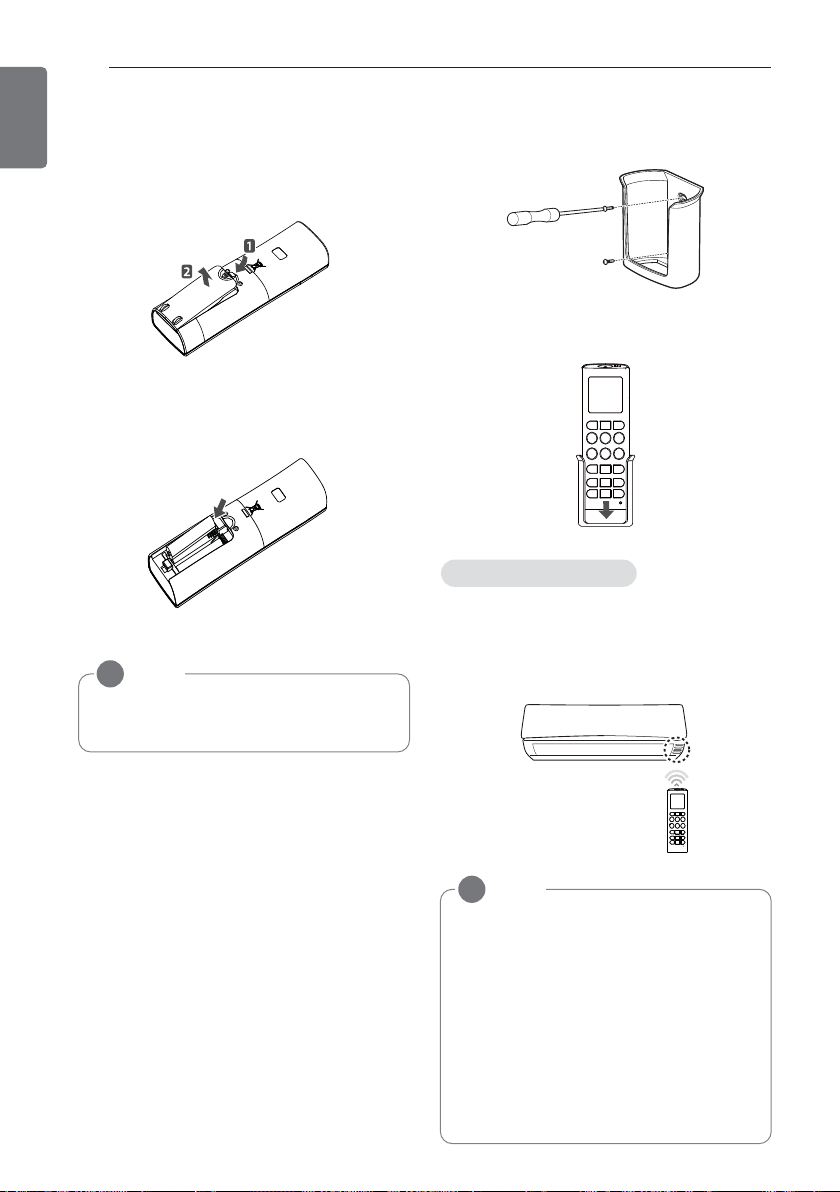
Inserting batteries
Insert batteries before using the remote
control. The battery type used is AAA (1.5 V).
1 Remove the battery cover.
2 Insert the new batteries and make sure
that the + and - terminals of the batteries
are installed correctly.
3 Reattach the battery cover.
Installing the remote control holder
Install the holder where there is no direct sun-
light to protect the remote control.
1 Choose a safe and easily-accessible place.
2 Fix the holder by fastening the 2 screws
firmly with a screwdriver.
3 Slide the remote control into the holder.
Point the remote control towards the signal
receiver at the bottom of the air conditioner to
operate it.
NOTE
!
If the display screen of the remote control
starts to fade, replace the batteries.
NOTE
!
• The remote control may operate other
electronic devices if pointed towards
them. Make sure to point the remote
control towards the signal receiver of
the air conditioner.
• For proper operation, use a soft cloth to
clean the signal transmitter and receiver.
• Jet mode in Heating doesn’t work when
equipped with a wired remote controller.
• ON/OFF reserve mode doesn’t work
when equipped with a wired remote
controller.
Operating method
BASIC FUNCTIONS
11
ENGLISH
BASIC FUNCTIONS
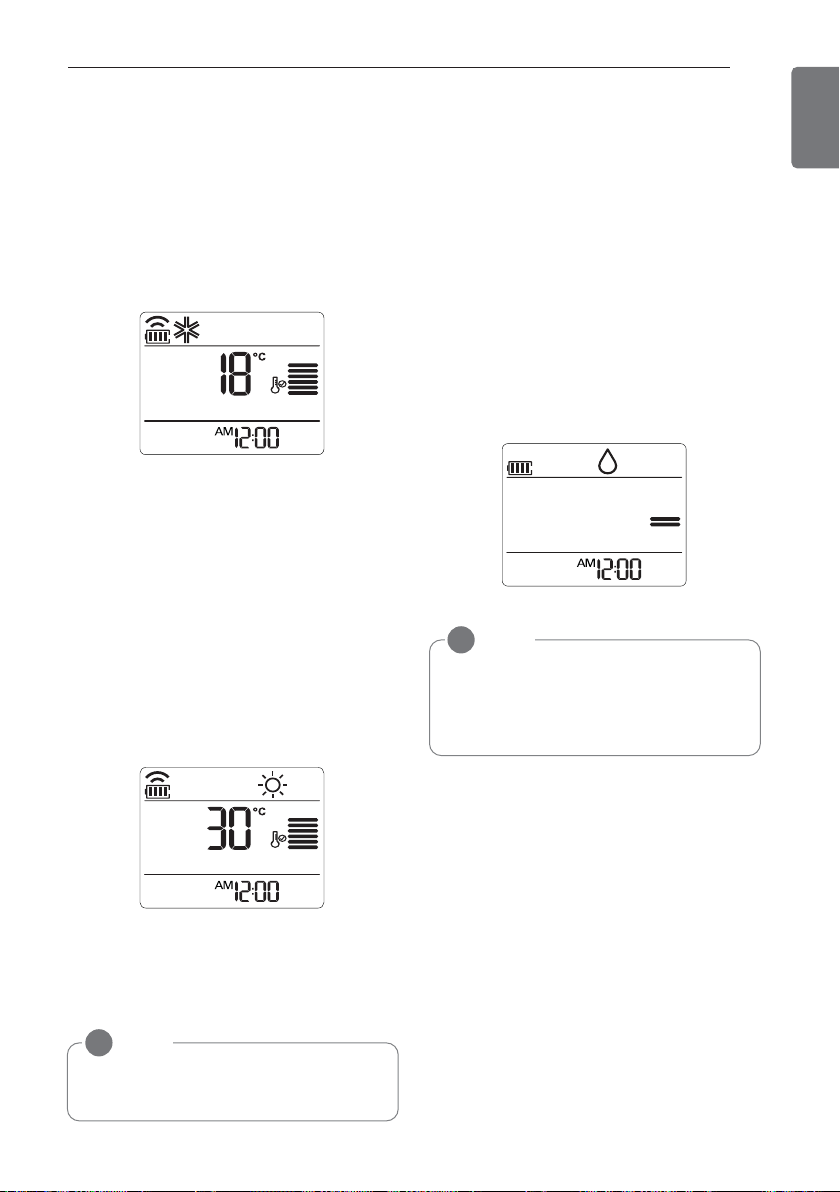
Cooling your room
(Cooling operation)
1 Press | to turn on the power.
2 Press f repeatedly to select the cooling
operation.
- A is displayed on the display screen.
3 Press
G
or
H
to set the desired tempera-
ture.
- The temperature range is 18°C (64°F)-
30°C (86°F).
Heating your room
(Heating operation)
1 Press | to turn on the power.
2 Press f repeatedly to select the heating
operation.
- B is displayed on the display screen.
3 Press
G
or
H
to set the desired temper-
ature.
- The temperature range is 16°C (60°F)-
30°C (86°F).
Removing humidity
(Dehumidifying operation)
This mode removes excess moisture from an
environment with high humidity or in the rainy
season, in order to prevent mold from setting
in. This mode adjusts the room temperature
and the fan speed automatically to maintain
the optimal level of humidity.
1 Press | to turn on the power.
2 Press f repeatedly to select the dehu-
midifying operation.
-
D is displayed on the display screen.
NOTE
!
• In this mode you cannot adjust the room
temperature, as it is adjusted automati-
cally. Also, the room temperature is not
displayed on the display screen.
NOTE
!
Cooling-only models do not support this
function.
12
BASIC FUNCTIONS
ENGLISH
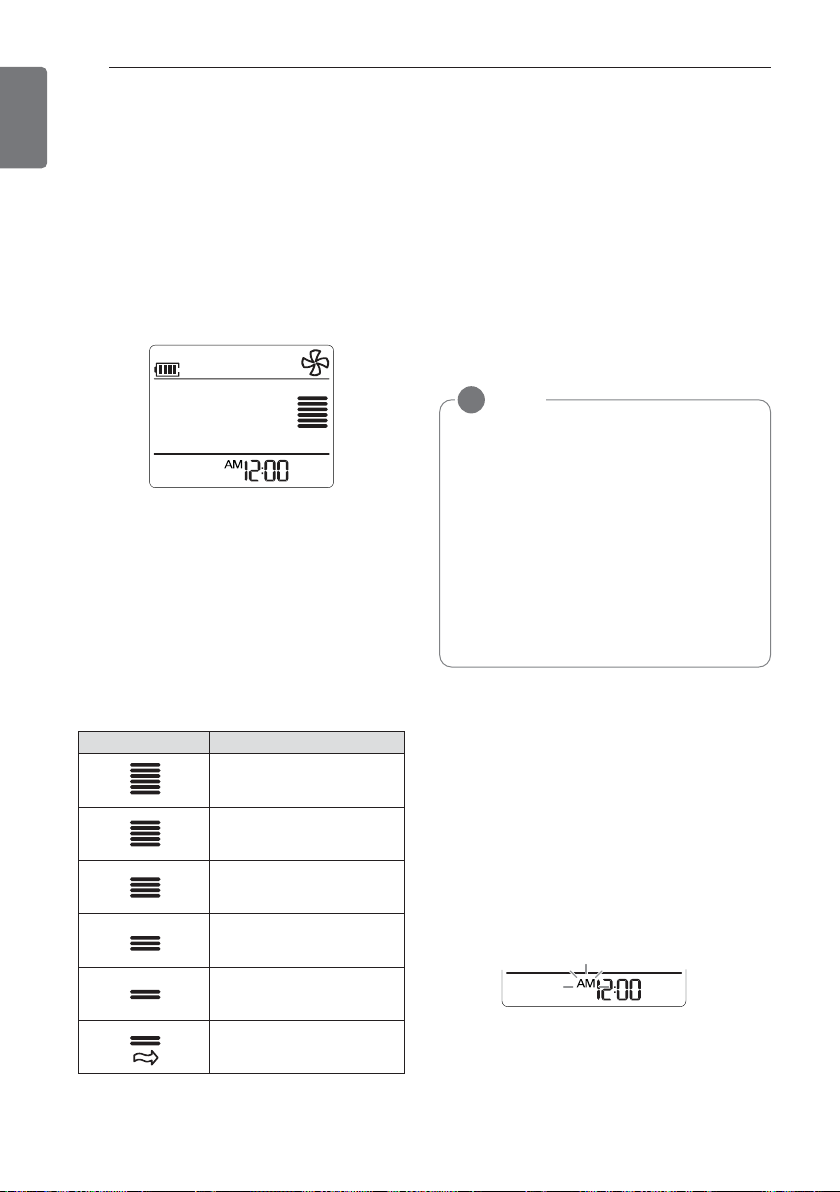
Airing your room
(Air Circulation operation)
This mode only circulates the indoor air
without changing the room temperature. The
cooling lamp lights up in air circulation mode.
1 Press | to turn on the power.
2 Press / to select the air circulation opera-
tion.
- E is displayed on the display screen.
3 Press g to adjust the fan speed.
Adjusting the fan speed
1 Press g repeatedly to adjust the fan
speed.
- Select
5
if you want natural air.
The fan speed adjusts automatically.
Adjusting the air flow direc-
tion
1 To adjust the direction of the air flow verti-
cally, press D repeatedly and select the
desired direction.
- Select
I to adjust the direction of the air
flow automatically.
2 To adjust the direction of the air flow hori-
zontally, press E repeatedly and select
the desired direction.
- Select
J to adjust the direction of the
air flow automatically.
Setting the timer
You can use the timer function to save energy
and to use the air conditioner more efficiently.
Setting the current time
1 Press p and hold it for longer than 3 sec-
onds.
- The AM/PM icon flickers at the bottom of
the display screen.
NOTE
!
• Adjusting the air flow direction horizon-
tally may not be supported, depending
on the model.
• Adjusting the air deflector arbitrarily may
cause product failure.
• If you restart the air conditioner, it starts
to operate with the previously set direc-
tion of air flow, so the air deflector may
not match the icon displayed on the re-
mote control. When this occurs, press
D or E to adjust the direction of
the air flow again.
Remark Speed
High
Medium - High
Medium
Medium - Low
Low
Natural Wind
BASIC FUNCTIONS
13
ENGLISH
2 Press
E
or
F
to select the minutes.
3 Press p to finish.
Turning on the air conditioner auto-
matically at a set time
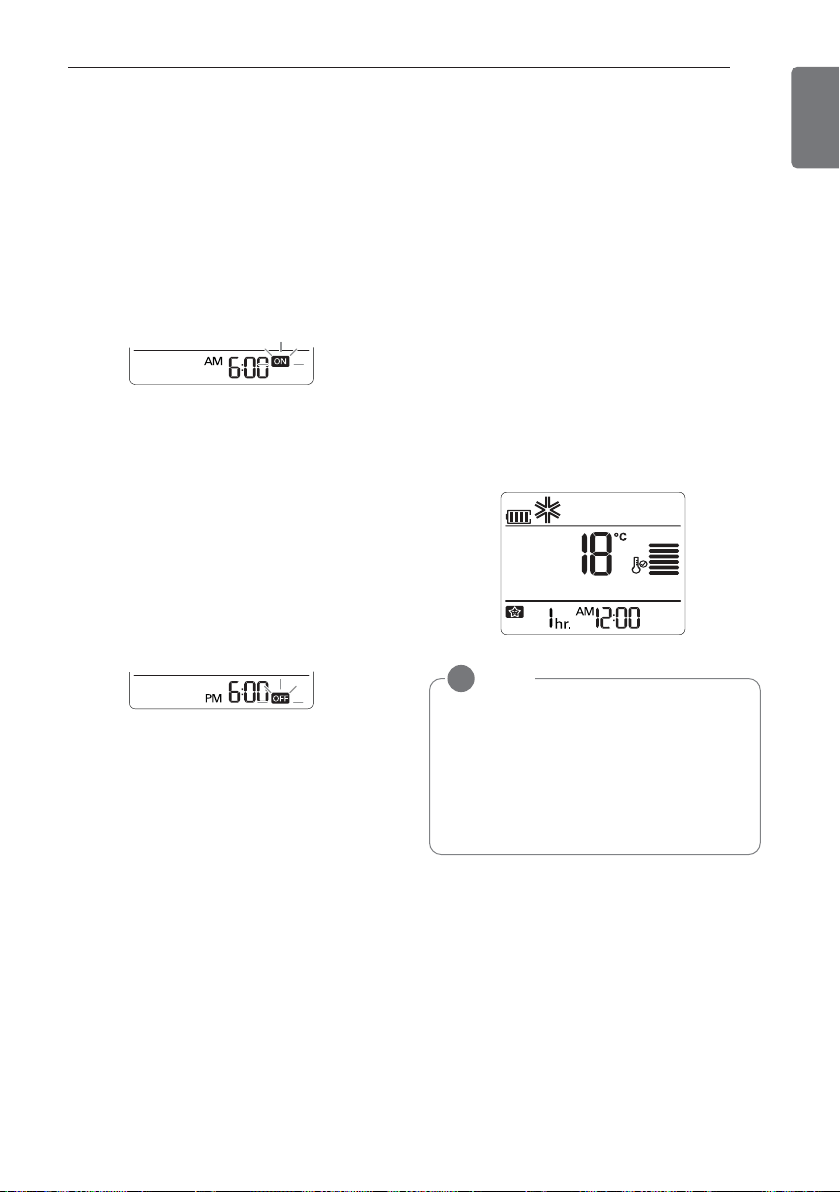
1 Press m.
- The icon below flickers at the bottom of
the display screen.
2 Press
E
or
F
to select the minutes.
3 Press p to finish.
Turning off the air conditioner auto-
matically at a set time
1 Press n.
- The icon below flickers at the bottom of
the display screen.
2 Press
E
or
F
to select the minutes.
3 Press p to finish.
Canceling the timer setting
1 Press p.
- To cancel all timer settings, press
p.
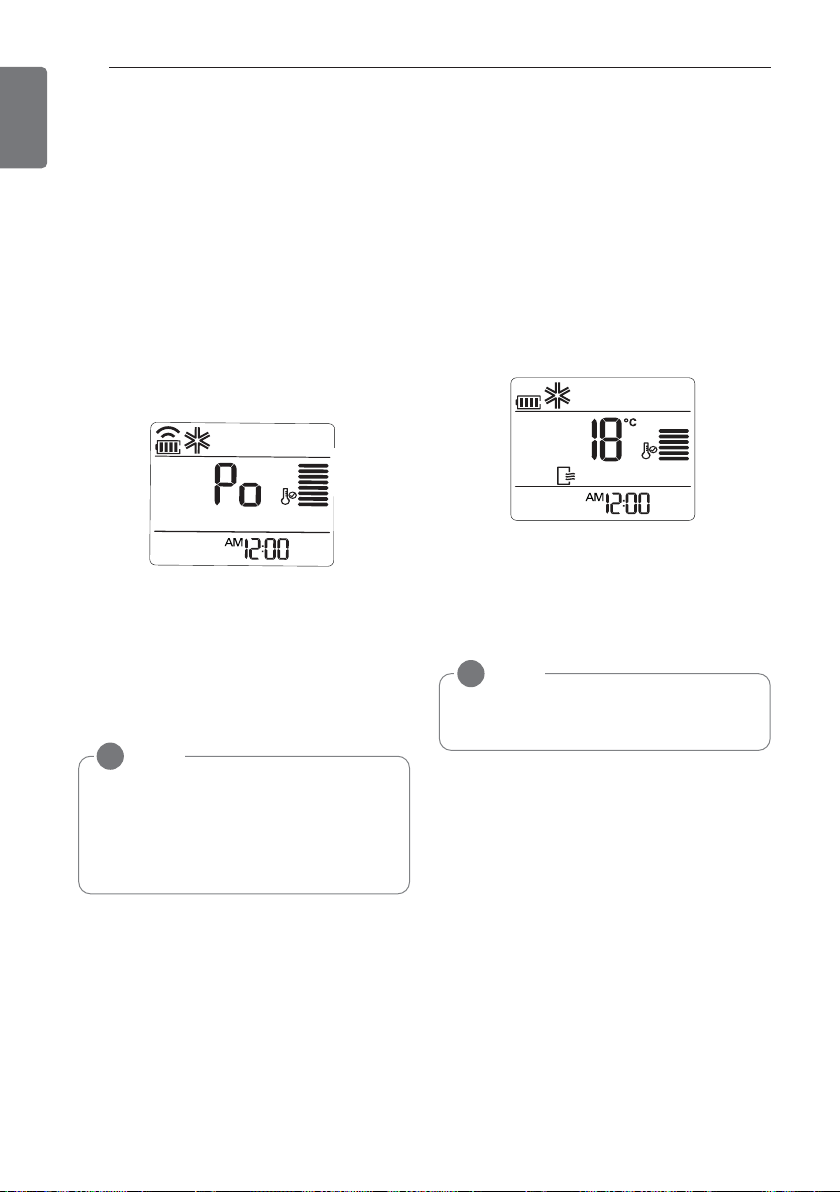
Setting sleep mode
Use the sleep mode to turn off the air condi-
tioner automatically when you go to sleep.
1 Press | to turn on the power.
2 Press l
3 Press
E
or
F
to select the hour
(up to 7 hours).
4 Press p to finish.
-
T is displayed on the display screen in
sleep mode.
NOTE
!
In the Cooling and Dehumidifying modes,
the temperature increases by 1°C (1.8°F)
after 30 minutes and by a further 1°C
(1.8°F) after another 30 minutes for a
more comfortable sleep. The temperature
increases with up to 2°C (3.6°F) from the
preset temperature.
14
ADVANCED FUNCTIONS
ENGLISH
ADVANCED FUNCTIONS
The air conditioner offers some additional ad-
vanced functions.
Changing room temperature
quickly
(Jet Cool/Heat operation)
This mode allows you to cool indoor air quickly
in summer or warm it quickly in winter.
1 Press | to turn on the power.
2 Press M.
- In jet cooling mode, strong air blows out
at a temperature of 18°C (64°F) for 30
minutes.
- In jet heating mode, strong air blows out
at a temperature of 30°C (86°F) for 30
minutes.
Indoor air purification
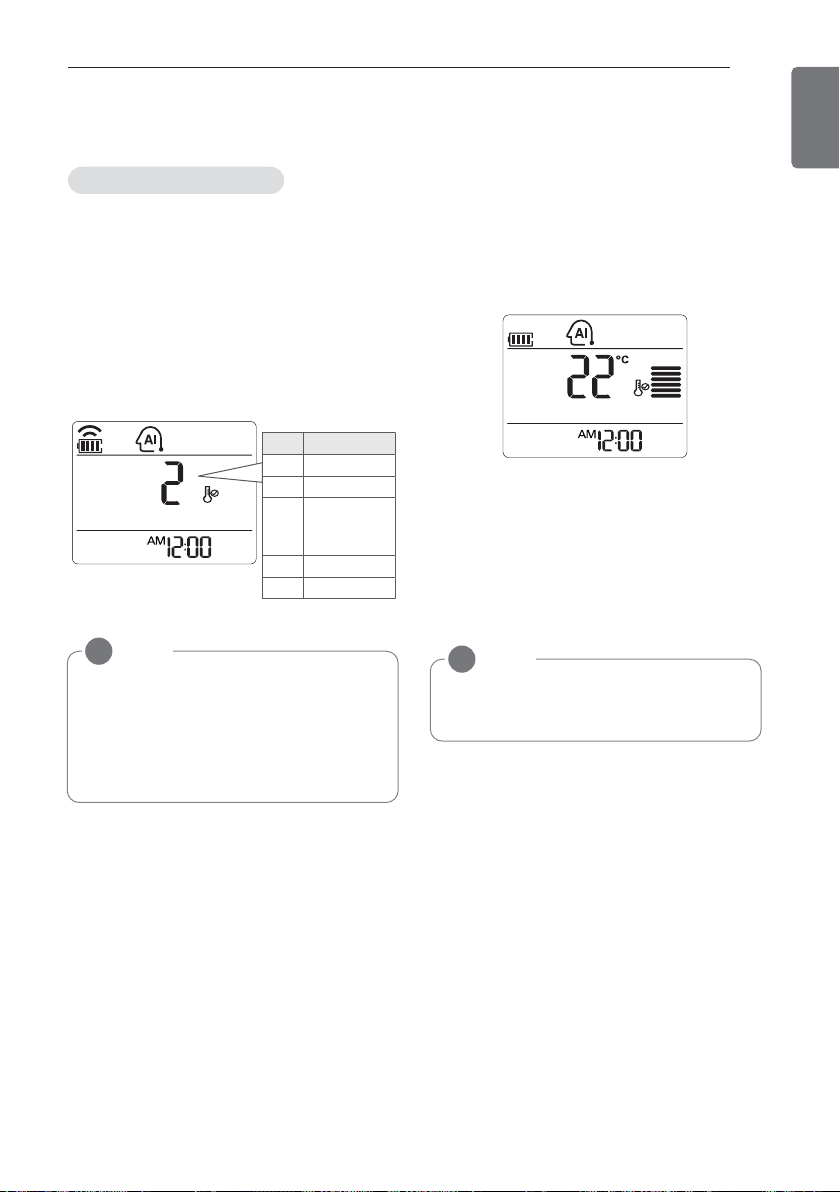
Auto Clean operation
In the cooling and dehumidifying operations,
moisture is generated inside the indoor unit.
Use the auto cleaning function to remove
such moisture.
1 Press O.
-
J is displayed on the display screen.
- If you turn off the power, the fan oper-
ates for 30 minutes and cleans the inside
of the indoor unit.
NOTE
!
• In Air Circulation, Auto, or Auto
Changeover mode, this function cannot
be used.
• This function may not be supported, de-
pending on the model.
NOTE
!
Some buttons cannot be used while the
auto cleaning function is in operation.
ADVANCED FUNCTIONS
15
ENGLISH
Auto operation
(Artificial intelligence)
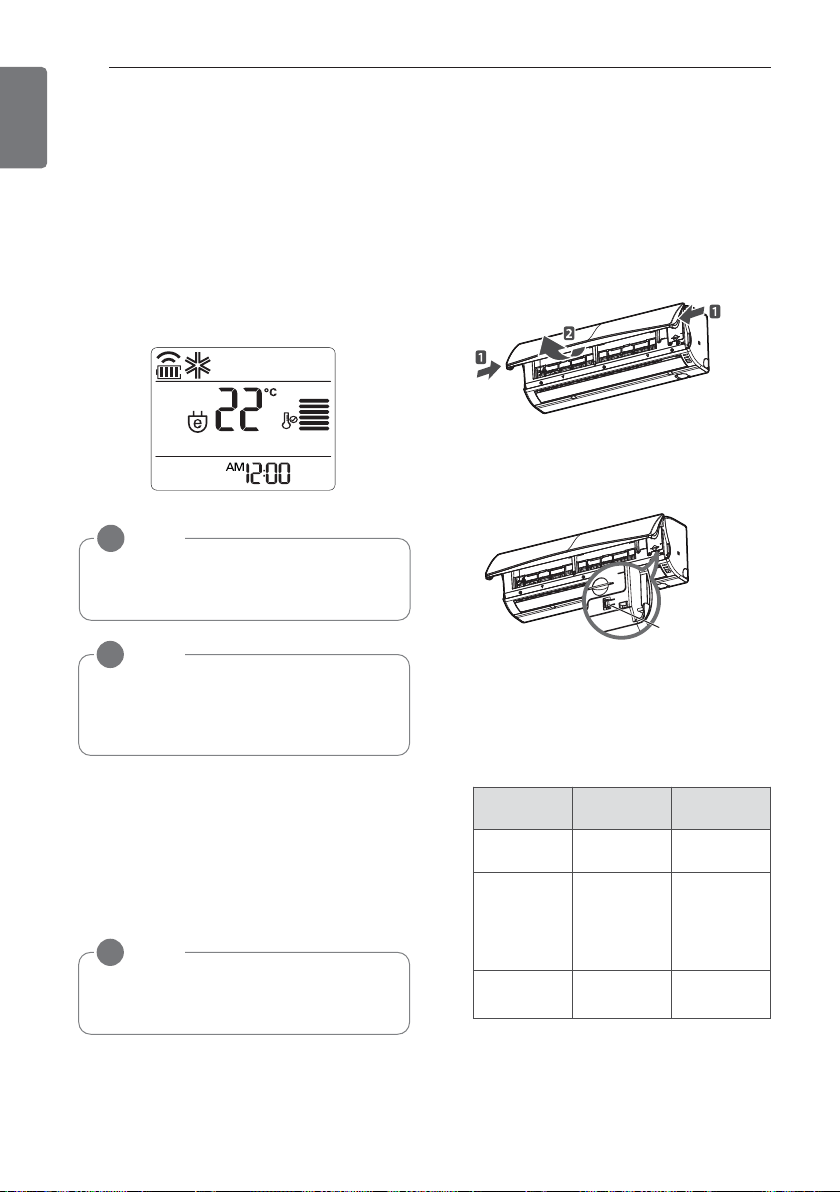
In this mode, the fan speed and the tempera-
ture adjust automatically, based on the room
temperature.
1 Press | to turn on the power.
2 Press f repeatedly to select auto opera-
tion.
3 Press
G
or
H
to select the desired op-
eration code if the temperature is higher or
lower than the desired temperature.
Auto Changeover operation
This mode changes the operation mode auto-
matically to maintain the set temperature
at ±2°C.
1 Press | to turn on the power.
2 Press f repeatedly to select the auto
changeover operation.
-
C is displayed on the display screen.
3 Press
G
or
H
to set the desired temper-
ature.
- The temperature range is 18°C (64°F)-
30°C (86°F).
4 Press g repeatedly to select the fan
speed.
°C/°F Conversion
The unit converses from °C to °F or from °F
to °C if Room Temperature KEY is pressed
for 5 seconds.
Code Description
2 Cool
1 Cool slightly
0
Maintain
room
temperature
Heat slightly -1
Heat-2
NOTE
!
• In this mode, you cannot adjust the fan
speed, but you can set the air deflector
to rotate automatically.
• This function may not be supported, de-
pending on the model.
Cooling-only models
NOTE
!
This function may not be supported,
depending on the model.
16
ADVANCED FUNCTIONS
ENGLISH
* The feature can be changed according a
type of model.
* The feature can be changed according a
type of model.
Room temp. Set temp.
Operation
mode
Below 21°C
(69.8°F)
24°C (75.2°F)
Heating
operation
Above 21°C
(69.8°F) and
below 24°C
(75.2°F)
23°C (73.4°F)
Dehumidify-
ing operation
Above 24°C
(75.2°F)
22°C (71.6°F)
Cooling
operation
Energy saving cooling mode
This mode minimizes power consumption dur-
ing cooling and increases the set temperature
to the optimal level for a more comfortable en-
vironment.
1 Press | to turn the power on.
2 Press f repeatedly to select the cooling
operation.
3 Press
P
.
-
G is displayed on the display screen.
Display screen brightness
You can adjust the brightness of the indoor
unit display screen.
1 Press
G
to turn on/off the display screen.
Operating the air conditioner
without the remote control
You can use the On/Off button of the indoor
unit to operate the air conditioner when the
remote control is unavailable. However, the
fan speed is set to high.
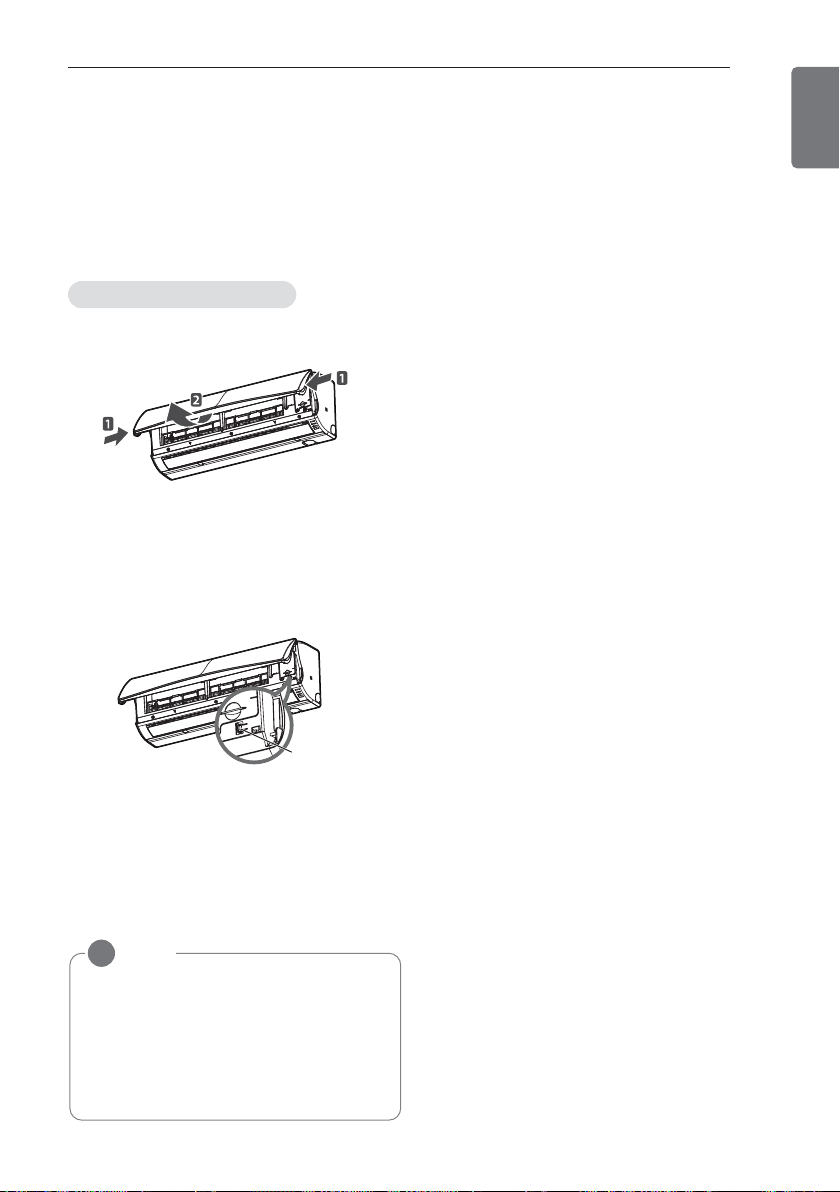
1 Open the front cover.
- Lift up both sides of the cover slightly.
2 Press the On/Off button.
- For cooling and heating models, the oper-
ation mode changes, depending on the
room temperature.
- For cooling-only models, the temperature
is set to 22°C (71.6°F).
NOTE
!
This function may not be supported,
depending on the model.
NOTE
!
This function may not be supported,
depending on the model.
NOTE
!
• Possible, Different temperature is dis-
played on between remote controller
and air conditioner during operation.
ON/OFF
button
ADVANCED FUNCTIONS
17
ENGLISH
Disabling auto restart
Restarting the air conditioner
automatically
When the air conditioner is turned on again
after a power failure, this function restores the
previous settings. This function is a factory de-
fault setting.
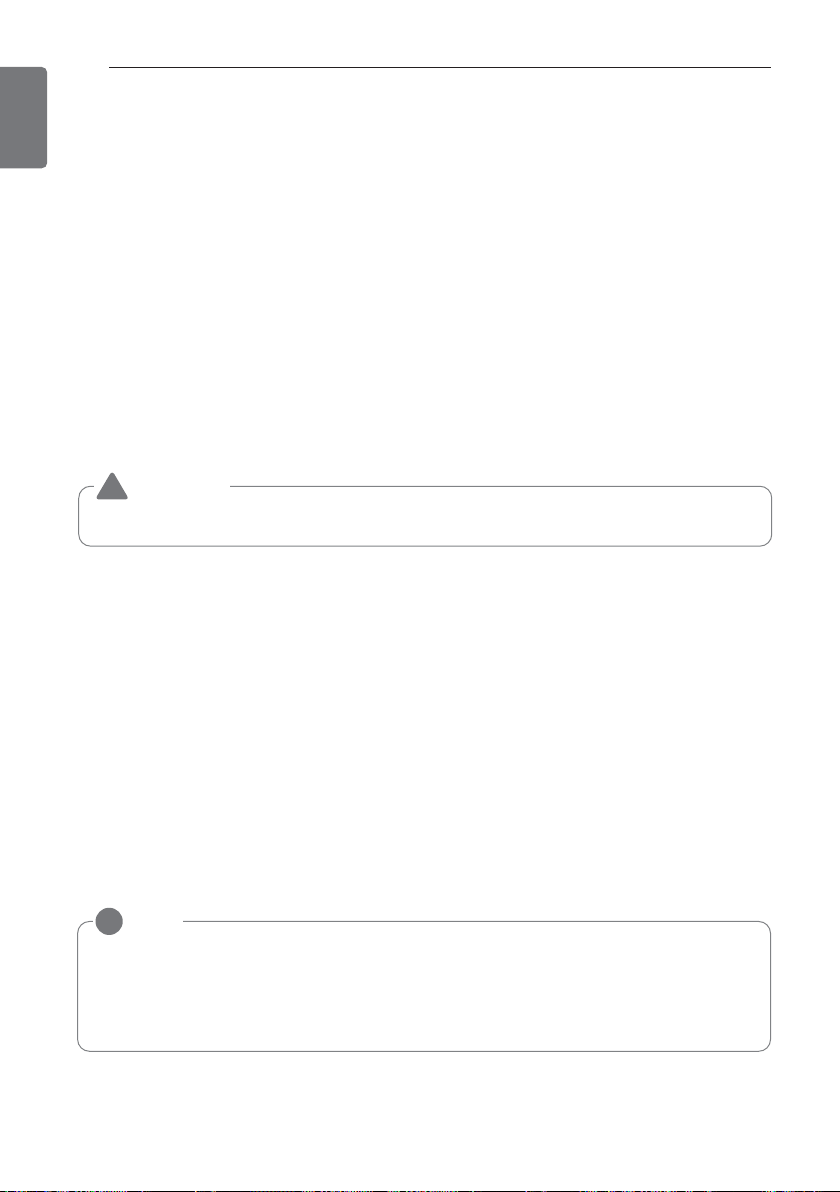
1 Open the front cover.
- Lift up both sides of the cover slightly.
2 Press the On/Off button and hold it for 6
seconds.
- The unit will beep twice and the lamp will
blink 6 times.
- To re-enable the function, press the On/
Off button and hold it for 6 seconds. The
unit will beep twice and the blue lamp will
blink 4 times.
* The feature can be changed according a
type of model.
* The feature can be changed according a
type of model.
NOTE
!
If you press and hold the On/Off button
for 3 – 5 seconds instead of 6 seconds,
the unit will switch to the test operation.
In the test operation, the unit blows out
strong air for cooling for 18 minutes and
then returns to the factory default set-
tings.
ON/OFF
button
18
ADVANCED FUNCTIONS
ENGLISH
WLAN Connecting (optional)
User Environment
<Minimal Specifications>
• OS: Android OS 4.0 or higher, iOS 6 or higher
• Resolution : android 320 x 480 or higher, iOS 960 x 640 or higher
Some functions may not operate, or a part of the screen may get fuzzy depending on the smart-
phone.
*
A normal operation is not possible in the environment that does not satisfy the minimal specifications.
User Guide
•
The mobile App can be updated for the usability/the design improvement and to reinforce the con-
tents.
• Some functions may be limited for the air conditioner model without the provided function.
• When Dry Contact Mode is operated, WLAN Function can not be used.
Setting The Environment
After downloading the mobile App, sign up for a membership and receive an account approval.
A connected air conditioner’s remote functions can be used.
Mobile App installation
The mobile App can be downloaded from the Android Market/App Store through Wi-Fi or 3G/4G.
• WLAN Sharing Device Minimal Specification
Model Type : CISCO, APPLE, ASUS, D-LINK ,TP LINK, TRENDNET, ACTIONTEC, NETGEAR,
2WIRE
* Specified model is optimized. A normal operation is not possible in the environment that does
not satisfy the minimal specifications.
WARNING
This device is not available for laptop or similar portable system.
!
NOTE
!
• The Wi-Fi Module (PCRCUDT2, PCRCUDT3), an optional accessory (sold separately), is re-
quired to enable WLAN connectivity.
• The optional Wi-Fi module will be available early 2014.
• For additional information, refer to www.lg-dfs.com/smartac.com.
ADVANCED FUNCTIONS
19
ENGLISH
Sign up for a membership
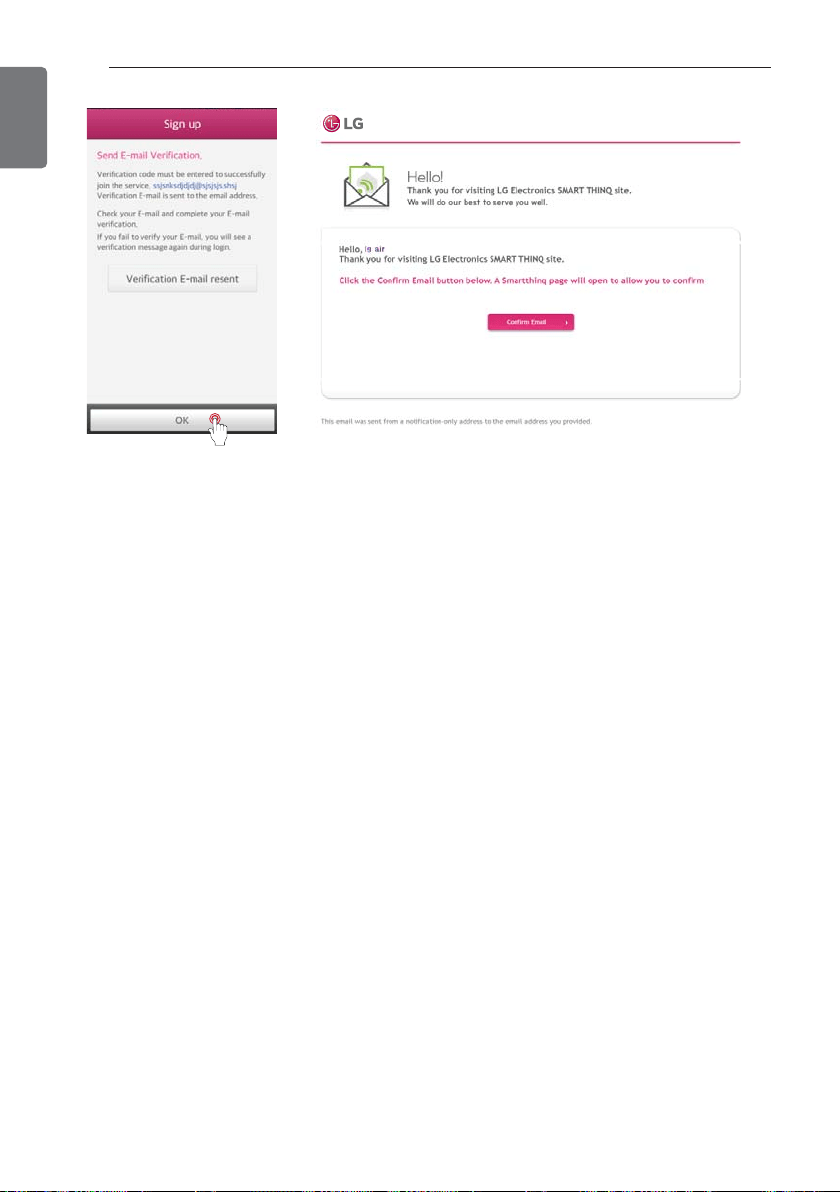
After sign up for a membership on the mobile App. or the web page (http://us.smartthinq.com), the
mobile App. can be used.
Touch the “Sign up.”
Enter the user registration
information to sign up for
the service, and touch
“Next”
After checking and agreeing to each user
agreement, touch “Apply”
Choose USA as Your
Country.
20
ADVANCED FUNCTIONS
ENGLISH
A confirmation email has been
sent to your email address that
you provided.
Please press the “OK” button.
Once you click the “Confirm Email” button on your
email, sign up will be completed.
ADVANCED FUNCTIONS
21
ENGLISH
Reference
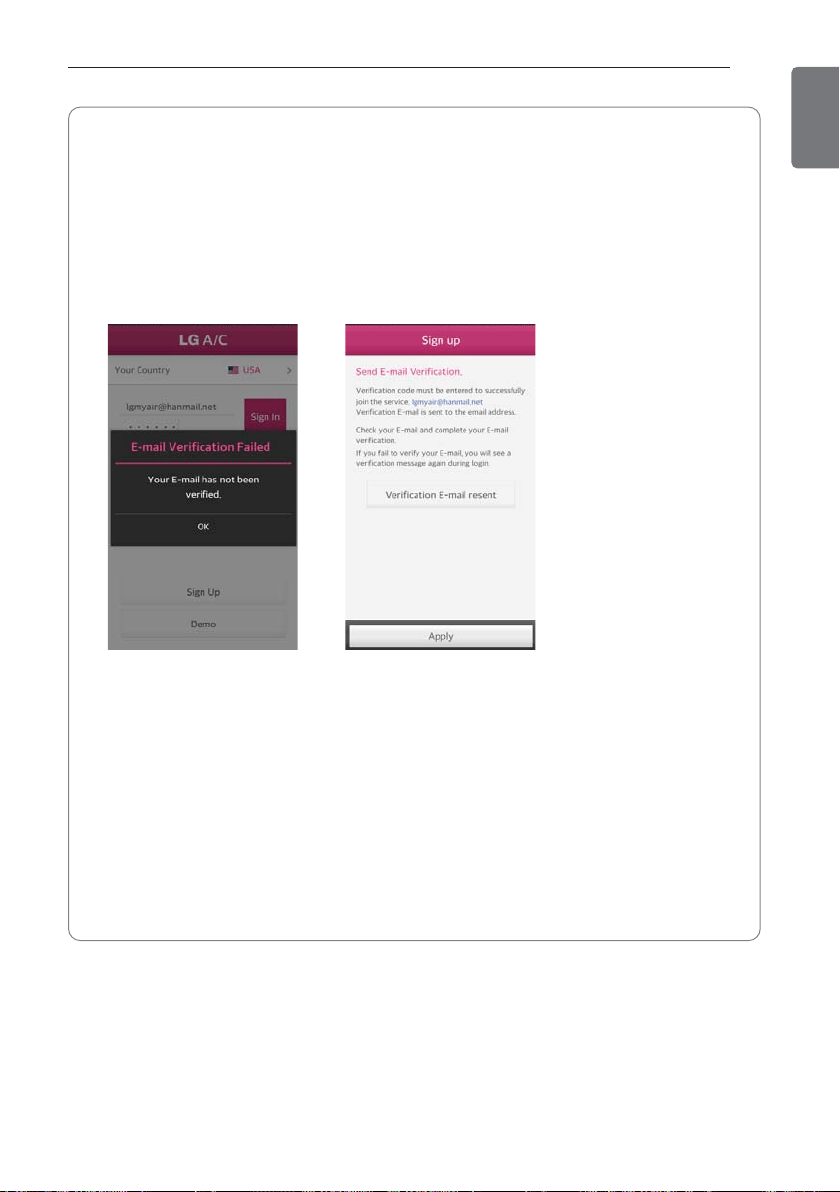
- The LG System Air Conditioning Control App can be searched with “LG Smart AC” and
downloaded from the “Google Play” and “App store”.
- The wireless module can update the firmware automatically to improve the product’s per-
formance.
- After sign up for a membership, an email authentication must be received to be able to use
the applicable account.
’ When it is not authenticated via email, the screens below will display.
When the email is not
confirmed, the mobile App
could not be used.
Once you sign in to the
mobile App again, it changes
to the confirmation screen
to enable re-confirmation.
22
ADVANCED FUNCTIONS
ENGLISH
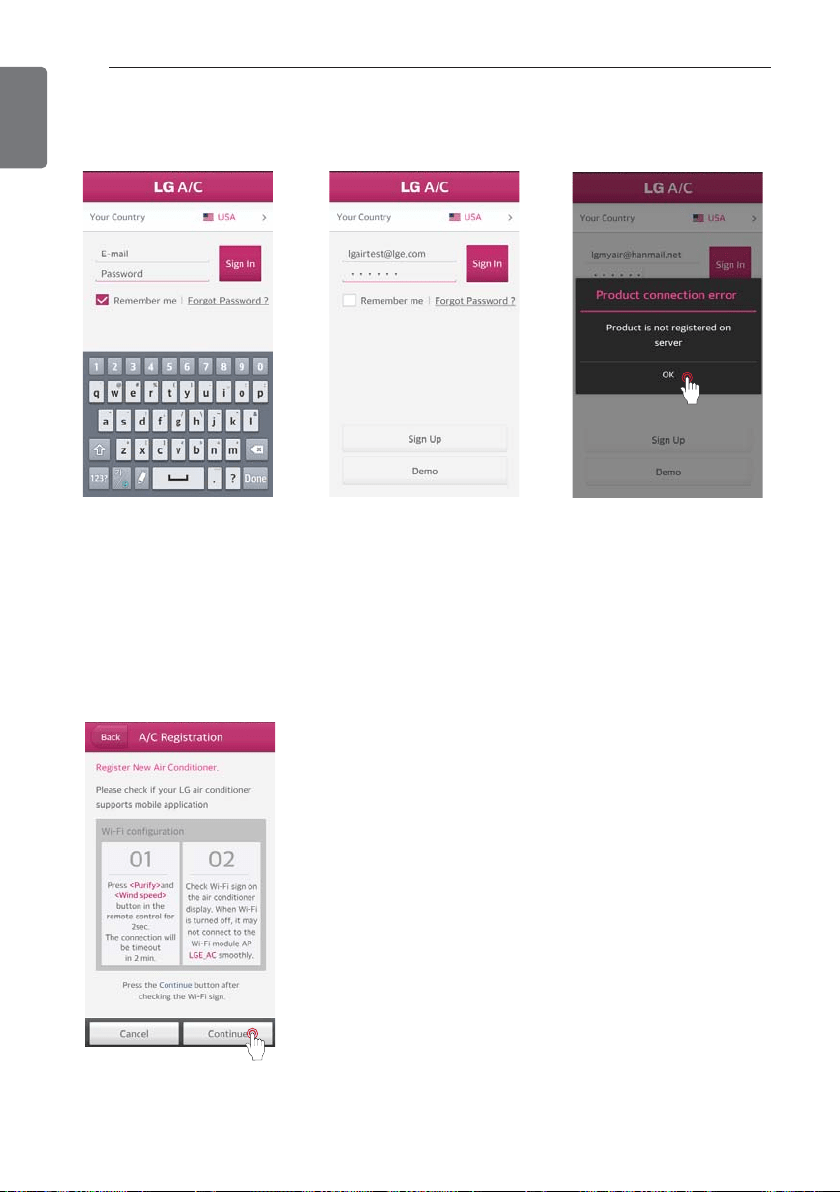
Registering the product
A function to register an air conditioner on the server before using the mobile App.
When registering the product for the first time, a pop up will be
activated.
Once the “Ok” button is pressed, it will change to the air condi-
tioner registration screen.
Turn the Wi-Fi on the smart phone and set the registration mode
on the air conditioner, then touch the “Continue” button.
’ Search for products to be registered on the server.
(Please refer to the instruction below to set the registration
mode on the air conditioner.)
Entering the E-mail and the
Password.
Touch the “Sign in” button.
When registering the prod-
uct for the first time, a pop
up will be activated. Once
the “Ok” button is pressed,
it will change to the air con-
ditioner registration screen.
ADVANCED FUNCTIONS
23
ENGLISH
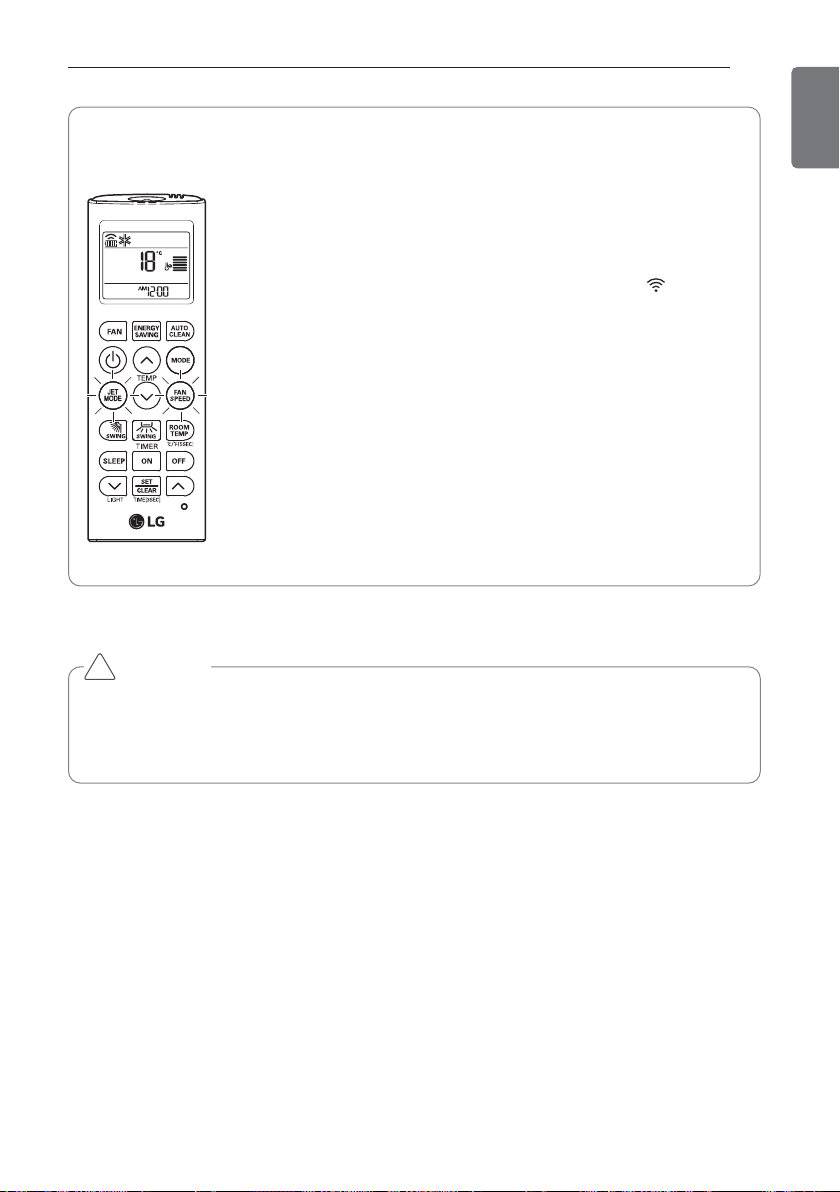
Reference
l Instruction to set registration mode
• Press
M and [ on the remote control for 3 seconds simultane-
ously to set the registration mode on the air conditioner.
• Once the registration mode is set, the Wi-Fi indicator
blinks on the display of the body.
• 5minutes after the setting, the registration mode on the air condi-
tioner gets cancelled automatically.
h If the registration mode is canceled during the product registra-
tion, re-execute the registration mode. Then, proceed with the
registration.
CAUTION
• The Wi-Fi on smartphone must be turned on to start registering the product.
• If there is a problem with a connection, the ‘prevention of connection failing’ function in
the advanced menu of the Wi-Fi setting in the smartphone needs to be cancelled for
some devices.
!
24
ADVANCED FUNCTIONS
ENGLISH
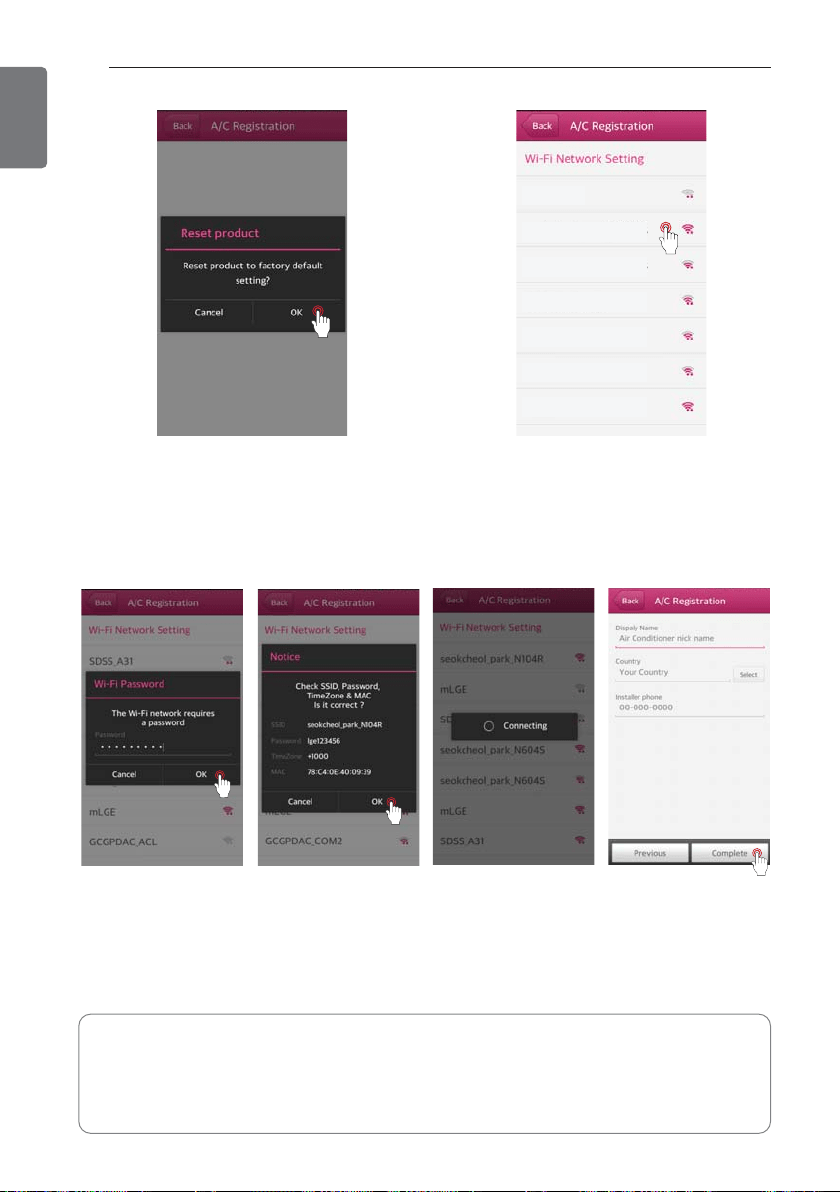
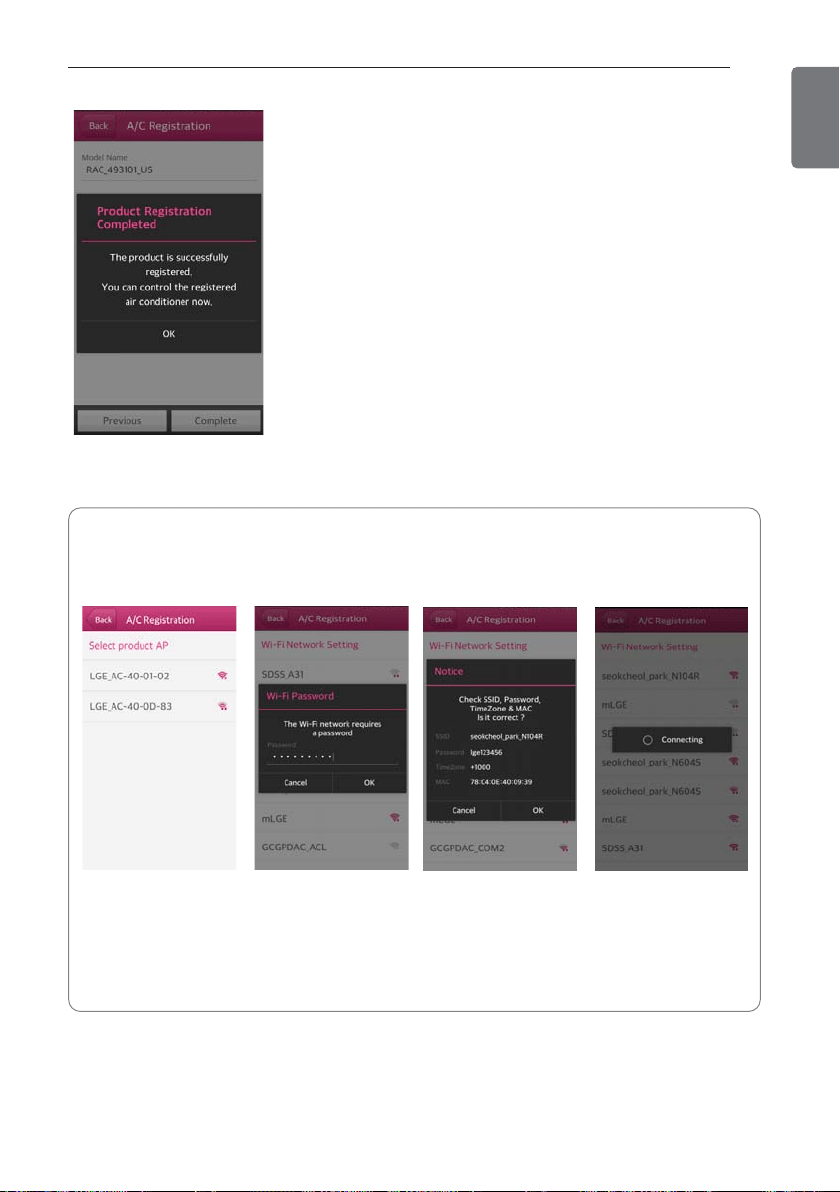
Once the product search is complete, a pop up to ask
initialization of the product appears.
- If you want to initialize the product, please touch the “Ok” button.
h
When more than 2 products are searched at the same time, a
screen to connect the products displays. (See the reference1)
iptime1
iptime2
iptime3
iptime4
iptime5
iptime6
iptime7
Please select a router that
you want to connect to.
Please check these out.
-
Once the network set up is complete, the smartphone cancels the connection to the Wi-Fi in the product.
-
After entering the air conditioner information, the smartphone must be set to enable the connec-
tion to the internet through Wi-Fi or 3G/4G network before pressing the ‘Complete’ button.
Enter a nickname for the air
conditioner, and then touch
the “Complete” button.
(Appropriate product name
must be selected correctly.)
Please check the Mac
Address and Wi-Fi
password.
Enter the password for
the router correctly,
and then touch the
“Ok” button.
The network is setting.
(When it is connected
correctly, it will make a
‘ding’ sound.)
ADVANCED FUNCTIONS
25
ENGLISH
The product registration has been completed.
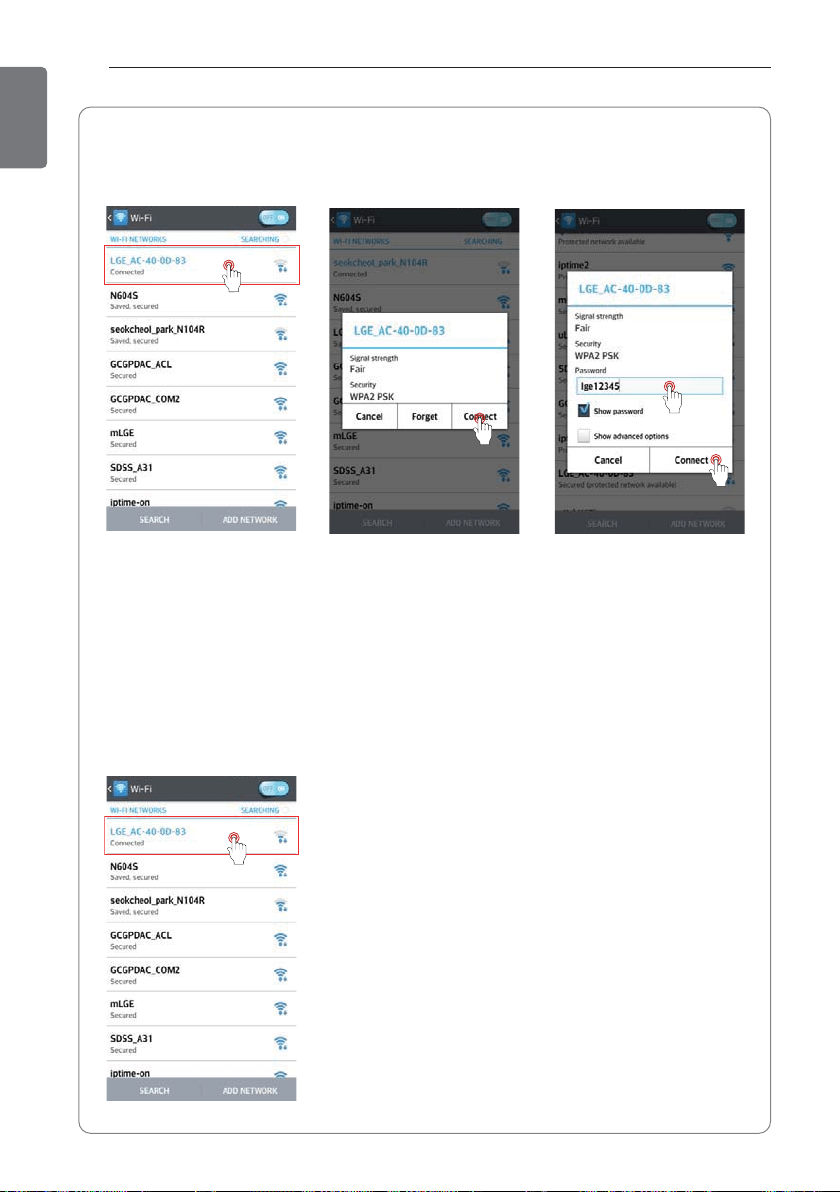
Reference 1.
• If more than two products are searched
- The screen to connect to the product displays
Select the network
with the SSID.
(Service set identifica-
tion)
Please check the Mac
Address and Wi-Fi
password.
The password must be
entered before touch-
ing the ‘OK’ button.
Password : The pass-
word of the sharing
device
Once the connection
to the product is com-
pleted, it switches to
a Wi-Fi network set-
ting screen for the
product App.
26
ADVANCED FUNCTIONS
ENGLISH
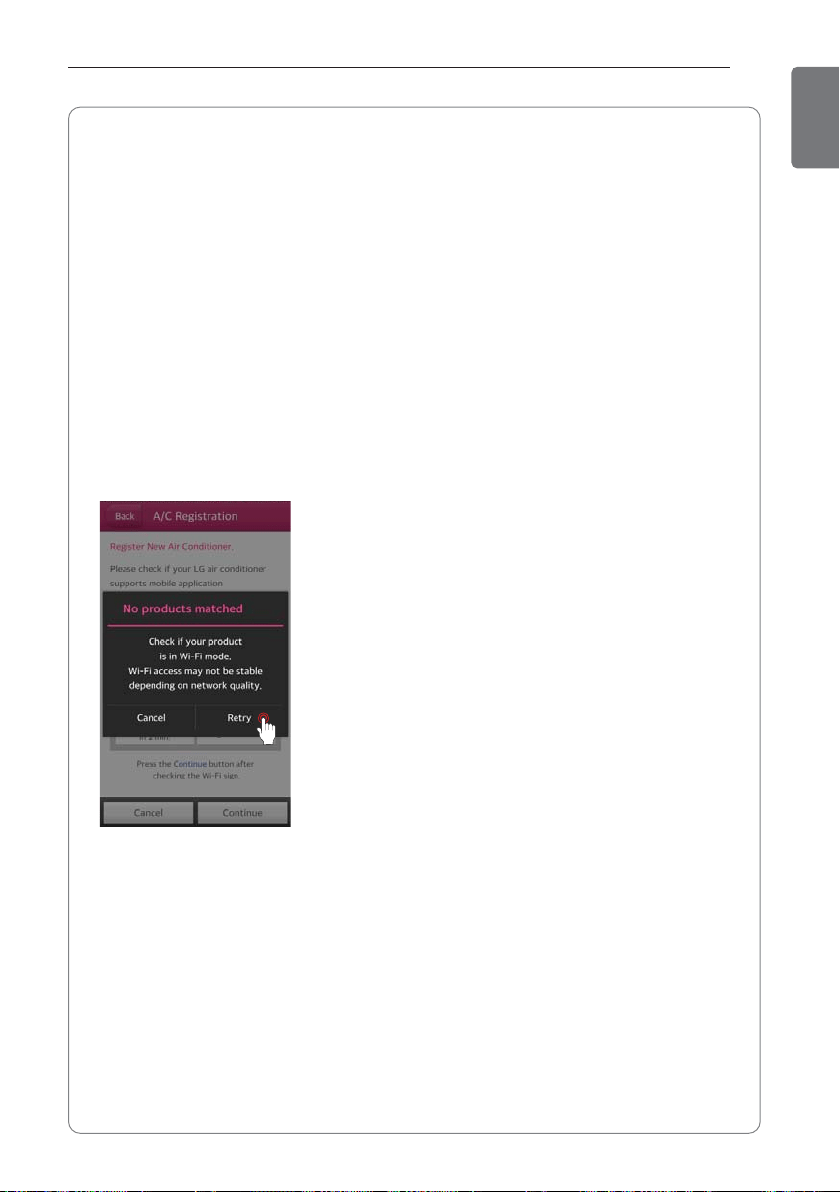
Reference 2.
• When the network is not stable or using an App for an iPhone
- The App on an iPhone does not support the automatic connection of Wi-Fi.
Go to the Wi-Fi setting
menu and select the net-
work with the SSID (service
set identification) of
LGE_AC-xx-xx-xx repre-
sents numbers, and they
may be different from the
numbers on the example
screen.
This is succeeded screen
after retrying the network
connection.
Retry the network connec-
tion by touching the
‘Connect’ button.
The password must be
entered before touching the
connect button.
Password : lge12345
ADVANCED FUNCTIONS
27
ENGLISH
Reference 3.
• Remember the SSID (service set identification) and password of the router that is used in
your home.
• The entry of the password is different according to the security method of the sharing
device that the customer installed.
• Check if the password is entered correctly.
If the password is not entered correctly, the product will not be registered properly.
• The nickname of the air conditioner can be entered between 2 and 15 characters including.
English letters, numbers, Korean letters, and special characters.
• The ID used for the product registration will be registered as the main user.
• The main user can add other users’ IDs through ‘Setting > Managing Users’.
- Maximum of 5 IDs can be registered on one air conditioner.
When the product is re-registered, the existing user information will be deleted.
Then, new user information will be registered.
• It may take some time to set the Wi-Fi depending on the status of the network.
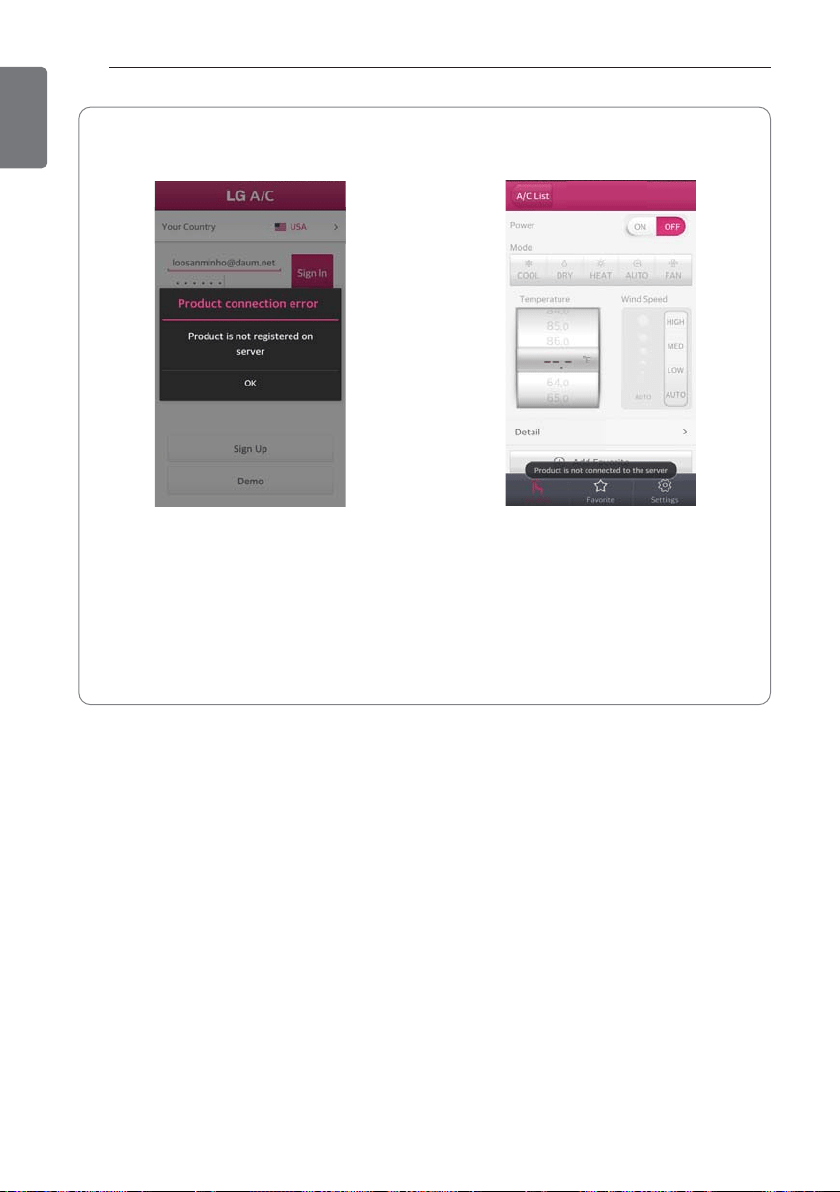
• When a pop up window for failing to search the product shows up
After turning the Wi-Fi on your smartphone, touch the
retry button. If it fails to search the product after
repeating the retry several times, refer to the check list
or the website on the back page.
28
ADVANCED FUNCTIONS
ENGLISH
• When the product is not registered • When the air conditioner is not connected
to the server
This screen displays when the product is
not registered. Please complete the product
registration.
Nickname
The air conditioner is not connected to the
server. Please check the Wi-Fi indicator light
on the product’s display.
’ If the Wi-Fi indicator light is turned off,
1 Please turn the air conditioner on/off
with the wireless remote control.
2 Check the status of the wireless router
or the router's password that is entered
during the product registration.
* Other details, please refer to the Online manual, The Online Manual is inside the LG Smart AC
App.
MAINTENANCE
29
ENGLISH
MAINTENANCE
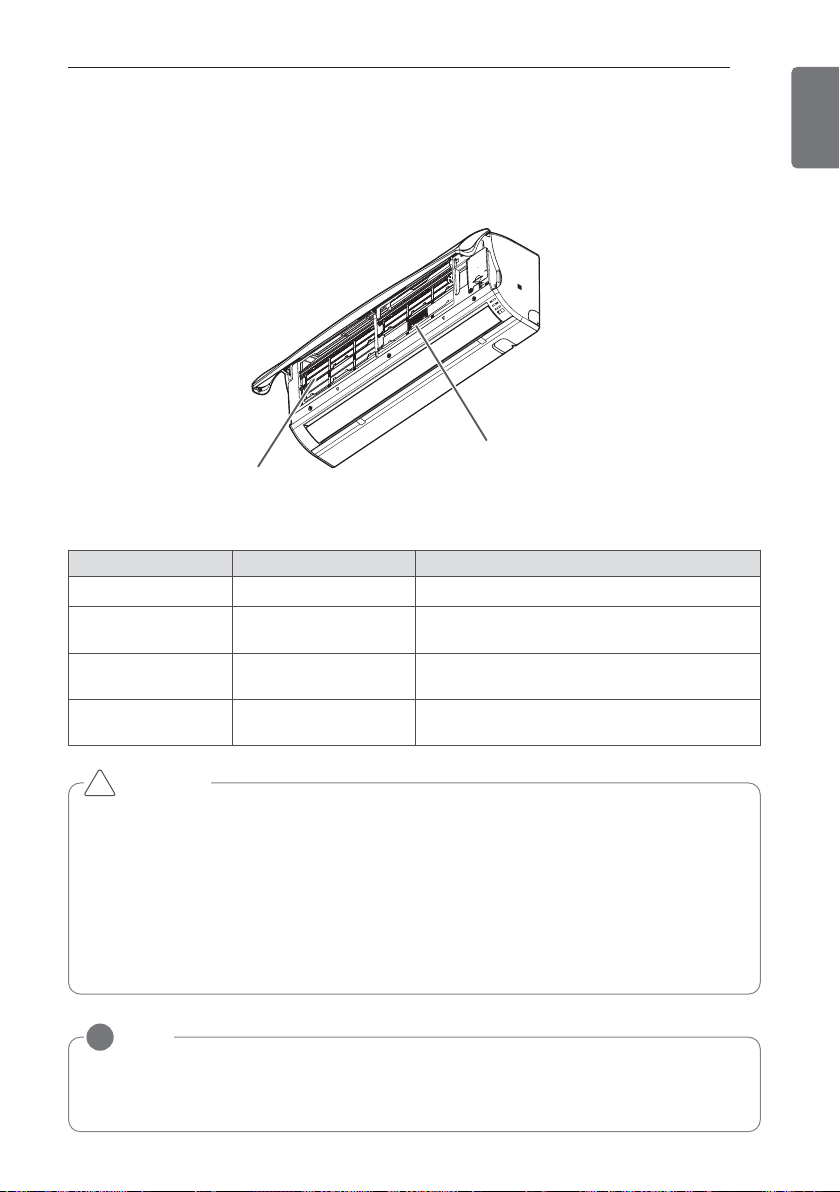
Clean the product regularly to maintain optimal performance and to prevent possible breakdown.
* This may not be provided, depending on the model.
Item Cleaning interval Cleaning method
Air filter 2 weeks See “Cleaning air filter.”
3M Micro
Protection Filter
1 month See ” Cleaning the 3M Micro Protection Filter ”
Indoor unit surface Regularly
Use a soft, dry cloth. Do not use bleach or
abrasives.
Outdoor unit Regularly
Use steam to clean the heat exchanger coils
and the panel vents (consult with technician).
3M Micro Protection Filter
Air filter
NOTE
!
• The location and shape of the filters may differ, depending on the model.
• Make sure to clean the heat exchanger coils of the outdoor unit regularly, as dirt collected
in the coils may decrease the operational efficiency or increase energy costs.
* The feature can be changed according a type of model.
CAUTION
• Turn off the power and unplug the power cord before you perform any maintenance; other-
wise it may cause electric shock.
• Never use water that is hotter than 40°C when you clean the filters. It may cause deforma-
tion or discoloration.
• Never use volatile substances when you clean the filters. They may damage the surface of
the product.
• Do not wash the 3M Micro Protection Filter with water, because the filter can be damaged.
!
30
MAINTENANCE
ENGLISH
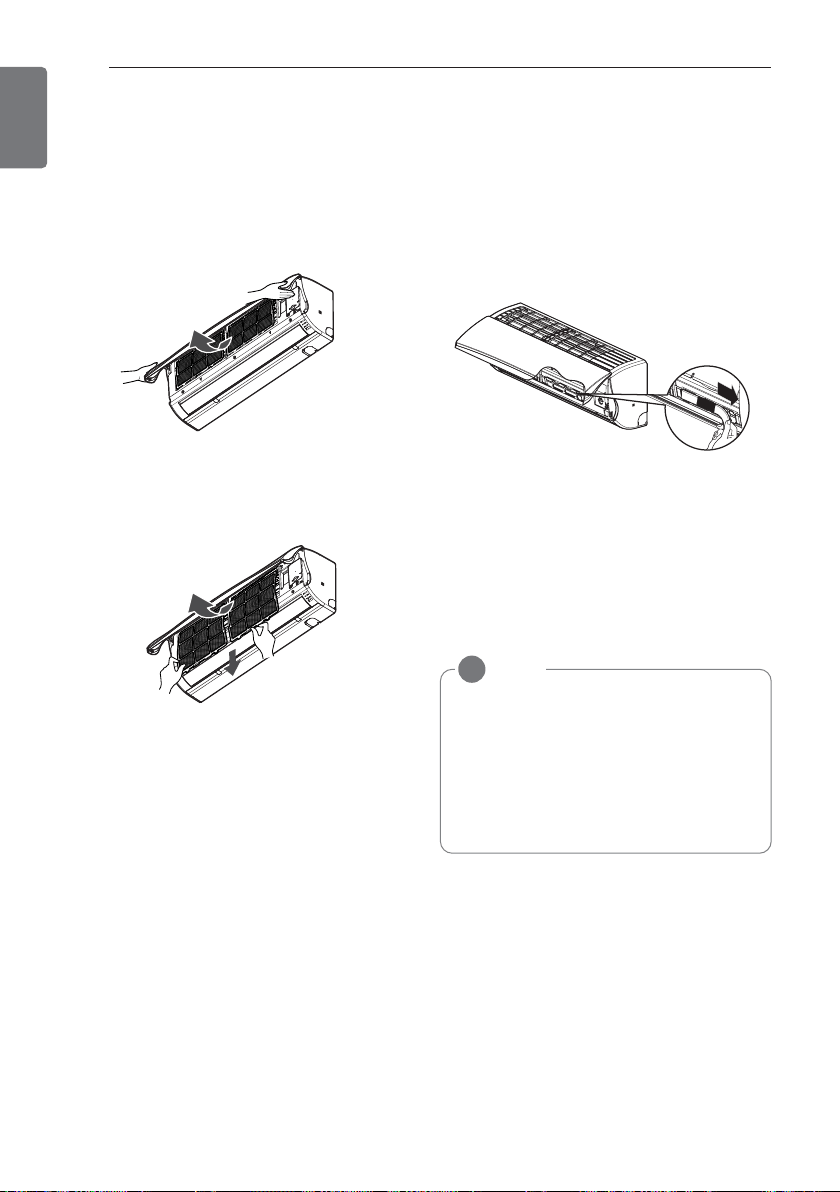
Cleaning the air filter
Clean the air filter once every 2 weeks or
more if necessary.
1 Turn off the power and unplug the power
cord.
2 Open the front cover.
- Lift up both sides of the cover slightly.
* The feature can be changed according a
type of model.
3 Hold the knob of the air filter, lift it up
slightly and remove it from the unit.
* The feature can be changed according a
type of model.
4 Clean the filter with a vacuum cleaner or
with warm water.
- If dirt is difficult to remove, wash the filter
in lukewarm water with detergent.
5 Dry the filter in the shade.
Cleaning the 3M Micro Protec-
tion Filter
1 Turn off the power and unplug the power
cord.
2 Open the front cover and remove the air
filter (see “Cleaning air filter”).
3 Remove the 3M Micro Protection Filter.
4 Use a vacuum cleaner to remove dirt,
Do not wash the 3M Micro Protection Fil-
ter with water, because the filter can be
damaged.
NOTE
!
• We suggest changing the 3M Micro
Protection Filter every 6 Months
• The location of the filters may differ,
depending on the model.
• If you need more filters, please contact
the LG service center (Refer to the
warranty card)
* The feature can be changed according a
type of model.
TROUBLESHOOTING
31
ENGLISH
TROUBLESHOOTING
Self-diagnosis function
This product has a built-in self-diagnosis function. If an error occurs, the lamp of the indoor unit
will blink in 2 second intervals. If this occurs, contact your local dealer or service center.
Before requesting service
Please check the following before you contact the service center. If the problem persists, contact
your local service center.
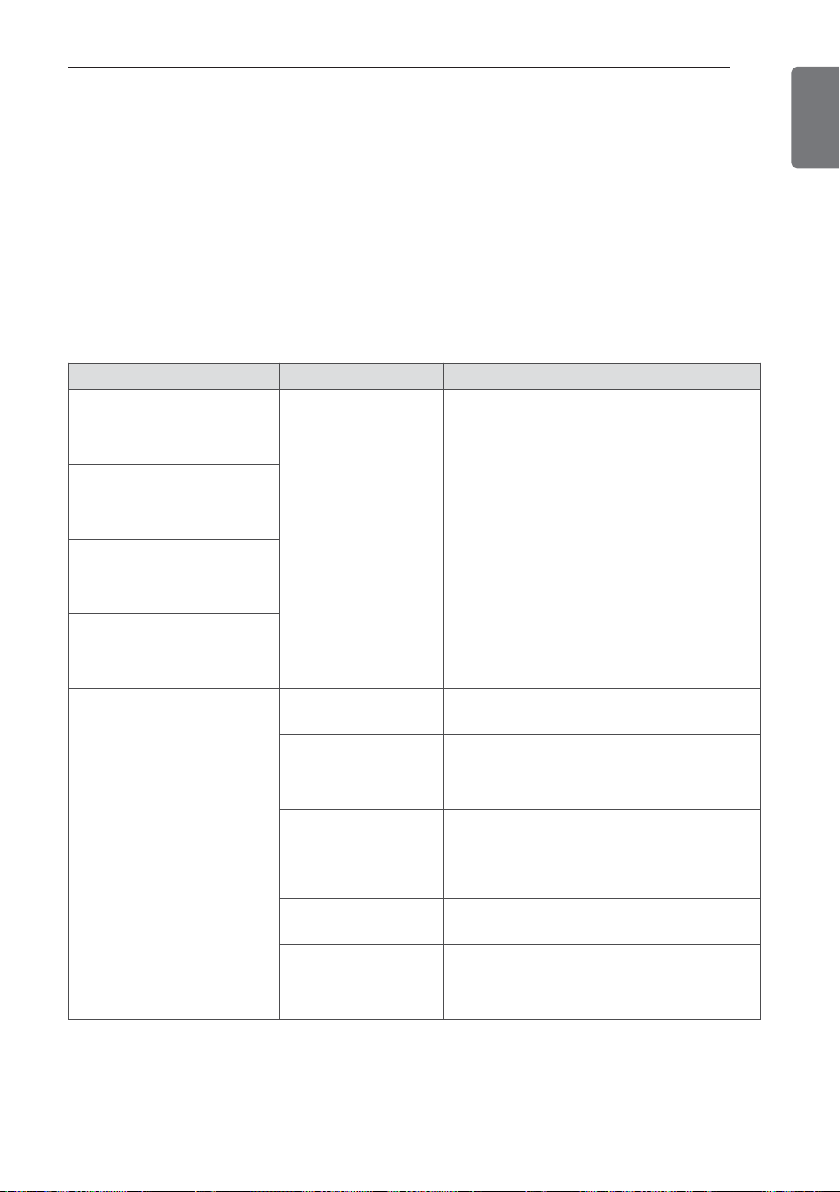
Problem Possible causes Corrective action
There is a burning smell and
a strange sound coming
from the unit.
-
Turn off the air conditioner, unplug the
power cord and contact the service center.
Water leaks from the indoor
unit even when the humidity
level is low.
The power cord is damaged
or generating excessive
heat.
A switch, a circuit breaker
(safety, ground) or a fuse is
not operated properly.
The air conditioner does not
work.
The air conditioner is
unplugged.
Check whether the power cord is plugged
into the outlet.
A fuse is blown or the
power supply is
blocked.
Replace the fuse or check if the circuit
breaker has tripped.
A power failure has
occurred.
Turn off the air conditioner when a power
failure occurs. When the power is restored,
wait 3 minutes, and then turn on the air
conditioner.
The voltage is too
high or too low.
Check if the circuit breaker has tripped.
The air conditioner
turned off automati-
cally at a preset time.
Press the power button again.
32
TROUBLESHOOTING
ENGLISH
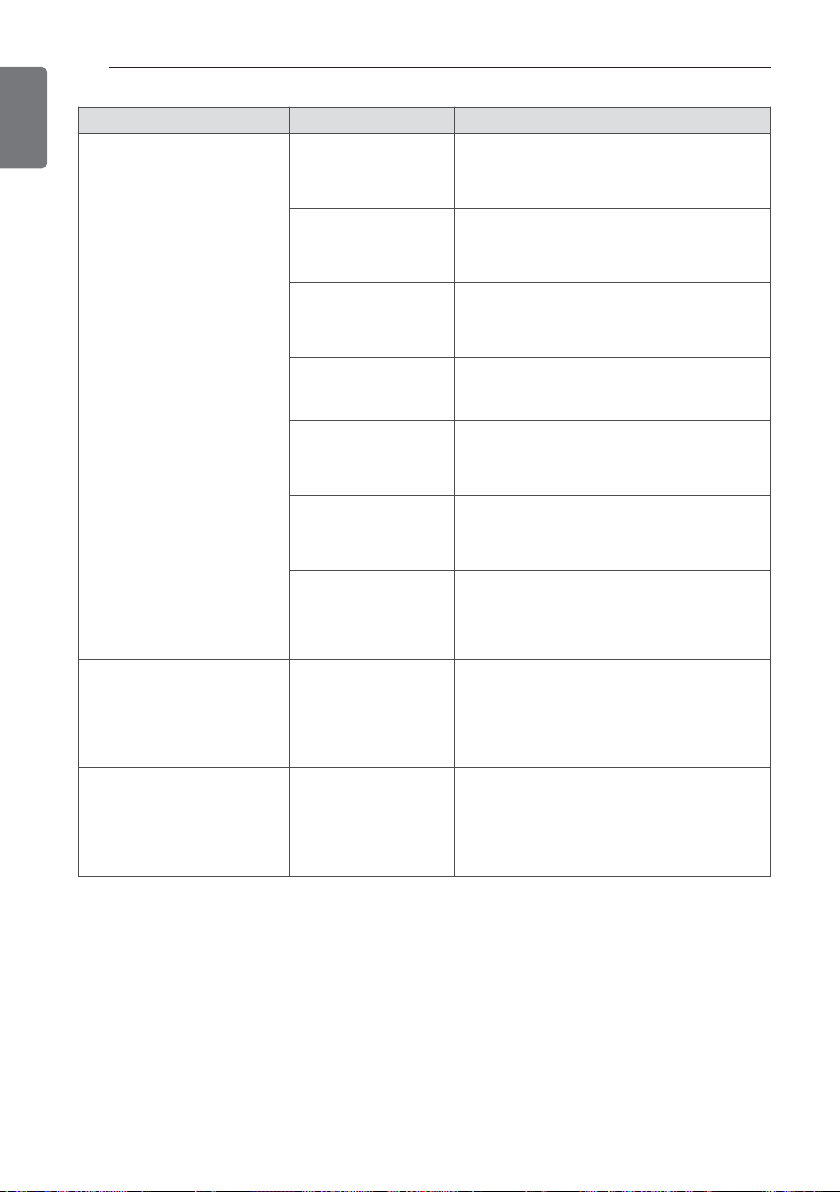
Problem Possible causes Corrective action
The air conditioner does not
generate cool air.
Air is not circulating
properly.
Make sure that there are no curtains,
blinds or furniture blocking the front of the
air conditioner.
The air filter is dirty.
Clean the air filter once every 2 weeks.
See “Cleaning Air Filter” for more infor-
mation.
The room tempera-
ture is too high.
In summer, it may take some time to cool
indoor air. In this case, select the jet cool
operation to cool indoor air quickly.
Cold air is escaping
from the room.
Make sure that no cold air is escaping
through ventilation points in the room.
The desired tempera-
ture is higher than the
set temperature.
Set the desired temperature to a level
lower than the current temperature.
There is a heating
source nearby.
Avoid using a heat generator such as an
electric oven or a gas burner while the air
conditioner is in operation.
Air circulation opera-
tion is selected.
In the air circulation operation, air blows
from the air conditioner without cooling or
heating the indoor air. Switch the opera-
tion mode to the cooling operation.
It is not possible to adjust
the fan speed.
The auto operation,
jet operation or dehu-
midifying operation is
selected.
In some operation modes, such as the jet
or dehumidifying operation modes, you
cannot adjust the fan speed. Select an op-
eration mode in which you can adjust the
fan speed.
It is not possible to adjust
the temperature.
The air circulation op-
eration or jet opera-
tion is selected.
In some operation modes, such as the air
circulation or jet operation mode, you can-
not adjust the temperature. Select an op-
eration mode in which you can adjust the
temperature.
TROUBLESHOOTING
33
ENGLISH
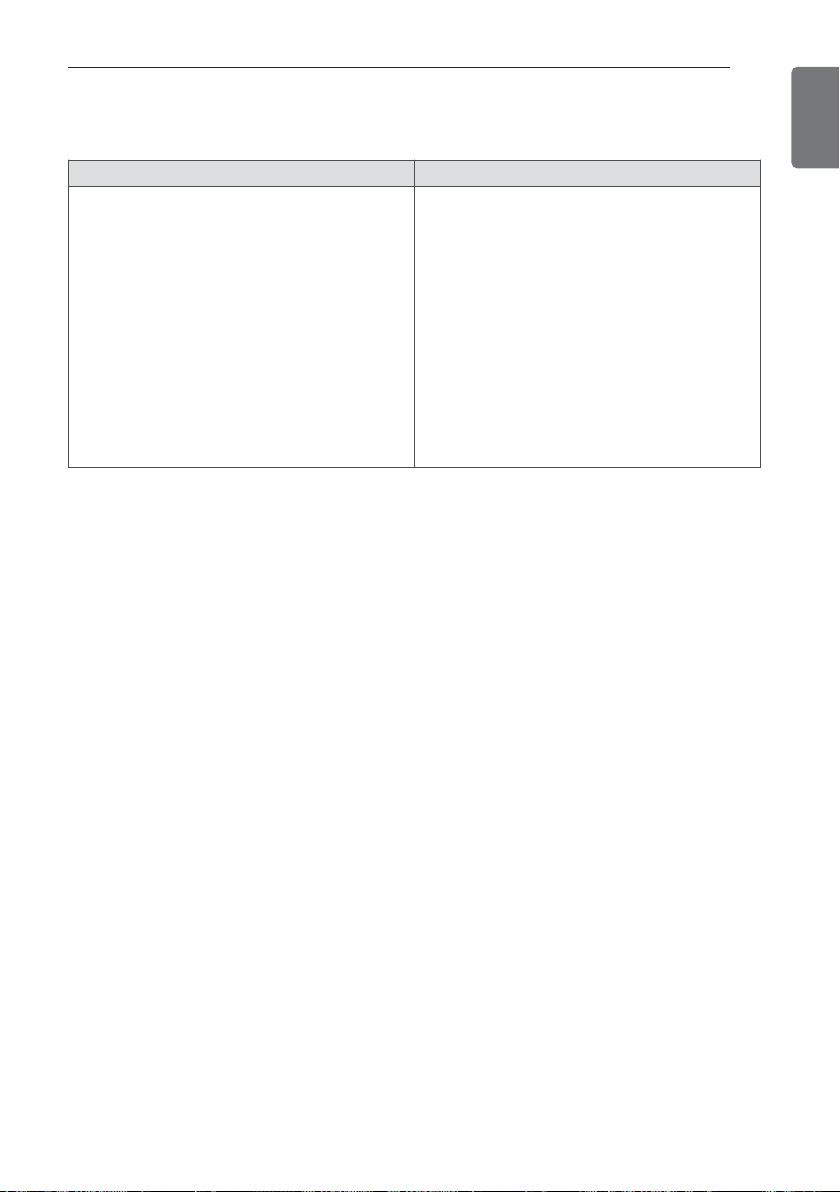
Wall-mountable(PQRCVSL0(QW)) Exclusively for North America(PREMTB10U)
• In indoor unit, when Up/Down and Left/Right
Step, Left swing/Right swing is selected, it
does not show up on the wired remote con-
trol.
• Not possible to select Up/Down and
Left/Right Step, Left swing/Right swing on
wired remote controls.
• Not possible to select power heating in in-
door unit.
• Not possible to set power heating on wired
remote controls.
• The remaining time for the automatic On/Off
timer is not shown on App.
• If permitting ACO function, the wired remote
control will change air conditioning/heating
operational mode.
• Not possible to set time for automatic on/off
with the wireless remote control or APP.
Function of wired remote control
34
ENGLISH
LGEUS
LG Electronics, Air conditioning Division
Applied Models :
LS091HSV3
LS121HSV3
1000 Sylvan Ave., Englewood Cliffs, NJ 07632
LGECI
LG Electronics Canada Inc.
20 NORELCO DRIVE. NORTH YORK, ONTARIO M9L 2X6.
www.lg.com
USA, press #2 for PTAC, TTW
USA, press #3 for DFS, Multi V
CANADA
888-865-3026
888-865-3026
1-888-LG-Canada
Register your product Online!
LG Customer Information Center
US
1. Please call the installing contractor of your product, as warranty service will be provided by them.
2. If you have service issues that have not been addressed by the contractor, please call 1-888-865-3026.
CANADA
Service call Number # : (888) LG Canada, 1-888-542-2623



