en Installation instructions and instructions
for use
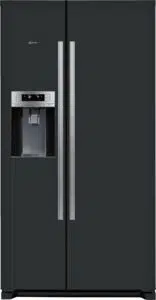
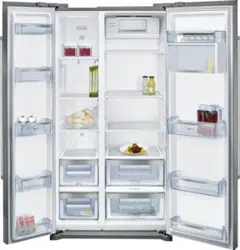
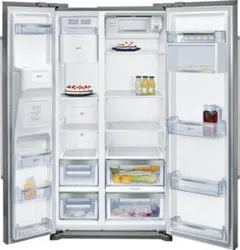
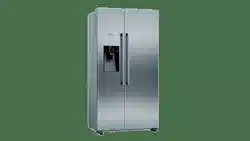
FRIDGE‐FREEZER
KA..I..

en
2
Table of contents
Safety instructions 3............................
About these instructions 3........................
Risk of explosion 3..............................
Risk of electric shock 3..........................
Risk of cold burns 3.............................
Risk of injury 3..................................
Avoiding placing children and vulnerable people
at risk 4........................................
General requirements 4..........................
Damage 4......................................
Weight 4........................................
Information concerning disposal 4...............
Disposal of packaging 4.........................
Disposal of your old appliance 4..................
Scope of delivery 5.............................
Installing the appliance 5........................
Transporting 5...................................
Removing the appliance doors 5..................
Installation location 5............................
Subsurface 5....................................
Observe ambient temperature and ventilation 6....
Installing the spacers 6..........................
Installation dimensions and door opening angle 6..
Fixing the door handle 6.........................
Aligning the appliance 7..........................
Aligning the doors 7.............................
Connecting the appliance 8......................
Water connection 8..............................
Electrical connection 9...........................
Getting to know your appliance 10................
Control and display panel 11......................
Switching on the appliance 12....................
Child lock 12....................................
Unlocking the buttons 12..........................
Locking the buttons 12............................
Setting the temperature 12........................
Freezer compartment 12..........................
Refrigerator compartment 12......................
Usable capacity 12...............................
Freezer compartment 13..........................
Purchasing frozen food 13.........................
Drawers 13......................................
Fully utilising the freezer volume 13.................
Freezing capacity 13..............................
Freezing fresh food 13...........................
Packing frozen food 13............................
Shelflifeoffrozenfood 14.........................
Freezer calendar 14..............................
Super freezing 14................................
Switching on super freezing 14.....................
Switching off super freezing 14.....................
Thawing froozen food 14.........................
Ref
rigerator compartment 15.....................
Storing food 15...................................
Note the chill zones in the refrigerator
compartment 15..................................
Fruit and vegetables crisper 15....................
Super cooling 15.................................
Switching on super cooling 15.....................
Switching off super cooling 15.....................
Ice and water dispenser 16.......................
Dispensing water 16..............................
Ice maker 16.....................................
Dispensing ice 16................................
Variable interior design 17........................
Alarm 17........................................
Door alarm 17....................................
Holiday mode 18.................................
Switching on holiday mode 18.....................
Switching off holiday mode 18.....................
Energy save mode 18............................
Switching on energy save mode 18................
Switching off energy save mode 18.................
Switching off and disconnecting the appliance 18..
Switching off the appliance 18.....................
Disconnecting the appliance 18....................
Defrosting 19....................................
Freezer compartment 19..........................
Refrigerator compartment 19......................
Cleaning the appliance 19........................
Procedure 19....................................
Dispenser 19.....................................
Interior fittings 20.................................
Handling the ice bucket 20........................
Defrosting 21.....................................
Replacing the water filter 22......................
Purchasing a new water filter 22...................
Removing the old water filter 22....................
Installing the new water filter 22....................
Light (LED) 23...................................
Tips for saving energy 23.........................
Operating noises 23..............................
Quite normal noises 23...........................
Preventing noises 23..............................
Eliminating minor faults yourself 24...............
Customer service 25.............................
Repair order and advice on faults 25...............
en
3
( Safety instructions
This appliance complies with the relevant
safety regulations for electrical appliances
and is fitted with noise suppression.
The refrigeration circuit has been checked
for leaks.
About these instructions
Ø Read and follow the Installation instructions
and instructions for use. They contain im
portant information on how to install, use
and maintain the appliance.
Ø The manufacturer is not liable if you dis
regard the instructions and warnings in the
Installation instructions and instructions for
use.
Ø Retain all documents for subsequent use
or for the next owner.
Risk of explosion
Ø Never use electric appliances inside the
appliance (e.g. heaters or electric ice
makers).
Ø Do not store products which contain
flammable propellant (e.g. spray cans) or
explosive substances in the appliance.
Ø Store high-percentage alcohol tightly
sealed and in an upright position.
Ø Do not use additional means to accelerate
the defrosting process other than those
recommended by the manufacturer.
Risk of electric shock
Improper installations and repairs may put
the user at considerable risk.
Ø When installing the appliance, ensure
that the mains cable is not trapped or
damaged.
Ø If the mains cable is damaged:
immediately disconnect the appliance
from the electricity supply.
Ø Do not use multiple sockets, extension
leads or adapters.
Ø Have the appliance repaired by the
manufacturer, Customer service or a
similarly qualified person only.
Ø Use original parts supplied by the manu
facturer only.
The manufacturer guarantees that these
parts satisfy the safety requirements.
Risk of cold burns
Ø Never put frozen food straight from the
freezer compartment into your mouth.
Ø Avoid prolonged contact of skin with
frozen food, ice and the tubes in the
freezer compartment.
Risk of injury
Containers which contain carbonated drinks
may burst. Do not store containers which
contain carbonated drinks in the freezer
compartment.
Fire hazard / Danger due to refrigerants
The tubes of the refrigeration circuit
convey a small quantity of an environmentally
friendly but flammable refrigerant (R600a).
It does not damage the ozone layer and
does not contribute to the greenhouse effect.
If refrigerant escapes, it may injure your eyes
or ignite.
Ø Do not damage the tubes.
If the tubes are damaged:
Ø Keep naked flames and ignition sources
away from the appliance.
Ø Ventilate the room.
Ø Switch off the appliance and pull out the
mains plug.
Ø Please contact Customer service.
Fire hazard
Portable multiple outlets or power
supplies may overheat, causing a f ire.
Never leave portable multiple outlets or
portable power supplies behind the appli
ance.
en
4
Avoiding placing children and vulnerable
people at risk
At risk are:
Ø Children,
Ø People who have limited physical, mental
or sensory abilities,
Ø People who have inadequate knowledge
concerning safe operation of the appliance.
Measures:
Ø Ensure that children and vulnerable people
have understood the hazards.
Ø Children or vulnerable people must be
supervised by a responsible person when
using the appliance.
Ø Only children from 8 years and above may
use the appliance.
Ø Supervise children while the appliance is
being cleaned or maintained.
Ø Never allow children to play with the
appliance.
Risk of suffocation
Ø Keep children away from the packaging
and its parts.
General requirements
Ø This appliance is intended for use in the
home and the home environment.
Ø This appliance is intended for use up to
a maximum height of 2000 metres above
sea level.
Damage
To prevent damage:
Ø Do not stand or support yourself on the
base, runners or doors.
Ø Keep plastic parts and door seals free of
oil and grease.
Ø Pull the mains plug – not the power cord.
Weight
The appliance is very heavy. The appliance
should always be transported and set up by
at least 2 persons.
Information concerning
disposal
*Disposal of packaging
The packaging protects your appliance from damage
during transit. All utilised materials are environmentally
safe and recyclable. Please help us by disposing of the
packaginginanenvironmentallyfriendlymanner.
Pleaseaskyourdealerorinquireatyourlocalauthority
about current means of disposal.
*Disposal of your old appliance
Old a ppliances are not worthless rubbish! Valuable raw
materials can be reclaimed by recycling old appliances.
This appliance is labelled in accordance with
European Directive 2012 /19/EU concerning
used electrical and electronic appliances (waste
electrical and electronic equipment – WEEE). The
guideline determines the framework for the return
and recycling of used appliances as applicable
throughout the EU.
: Warning
Redundant appliances
1. Pull out the mains plug.
2. Cut off the power cord and discard with the mains
plug.
3. Do not take out the trays and receptacles: children
are therefore prevented from climbing in!
4. Do not allow children to play with the appliance
once it has spent its useful life. Danger of suffoca
tion!
Refrigerators contain refrigerant and gases in the in
sulation. Refrigerant and gases must be disposed of
professionally. Ensure that tubing of the refrigerant
circuit is not damaged prior to proper disposal.
)
en
5
Scope of delivery
After unpacking all parts, check for any damage in
transit. If you h ave any complaints, please contact the
dealer from whom you purchased the appliance or our
Customer service.
The delivery consists of the following parts:
Ø Free-standing appliance
Ø Bag containing installation materials
Ø Water filter packag e
Ø Interior fittings (depending on model)
Ø Operating instructions
Ø Customer service booklet
Ø Warranty enclosure
Ø Information on the energy consumption and noises
Installing the appliance
Transporting
The appliance is heavy. Secure in position during
transportation and installation.
Due to the weight/dimensions of the appliance and
to minimise the risk of injury and damage to the appli
ance at least two persons are necessary to set-up the
appliance safely.
Removing the appliance doors
Iftheappliancewillnotfitthroughthehousedoor,
theappliancedoorscanbeunscrewed.
Caution!
Only Customer service may unscrew the appliance
doors.
Installation location
Install the appliance in a dry, well ventilated room. The
installation location should neither be exposed to direct
sunlight nor near a heat source, e.g. a cooker, radiator,
etc. If installation next to a heat source is unavoidable,
useasuitableinsulatingplateorobservethefollowing
minimum distances to a heat source:
Ø 3 cm to electric or gas cookers.
Ø 30 cm to an oil or coal-fired cooker.
If installing the appliance next to another refrigerator or
freezer, ensure a minimum lateral distance of 25 mm
to prevent the formation of condensation.
If a panel or cupboard is installed above the appli
ance,ensurethatagapof30mmisleftsothatthe
appliance can be pulled out of the recess if required.
The air heated on the rear side o f the appliance must
be allowed to escape unhindered.
Subsurface
Caution!
The appliance is very heavy.
The floor of the installation location must not give way;
if required, reinforce floor.
To ensure that the doors can open all the way, observe
lateral minimum distances when installing the appliance
in a corner or recess
(~ chapter “Installation dimensions”).
If the depth of the adjacent kitchen equipment is more
than 60 cm, observe lateral minimum distances in
order to utilise the full door opening angle
(~ chapter “Door opening angle”).
en
6
Observe ambient temperature and
ventilation
Ambient temperature
The climate class can be found on the rating plate. The
climate class indicates within which ambient temperat
ures the appliance can be operated. The rating plate
is located in the refrigerator compartment at the right
side.
Climate class Permitted ambient temperature
SN +10 °C to 32 °C
N +16 °C to 32 °C
ST +16°Cto38°C
T +16 °C to 43 °C
Note:
The a ppliance is fully functional within the room
temperature limits of the indicated climatic class.
If an appliance of climatic class SN is operated at
colder room temperatures, the appliance will not be
damaged up to a temperature of +5 °C.
Ventilation
In order to improve efficiency of the cooling system
and save energy, it is necessary to maintain good
ventilation around the appliance for the dissipation of
heat. For this reason, sufficient clear space should be
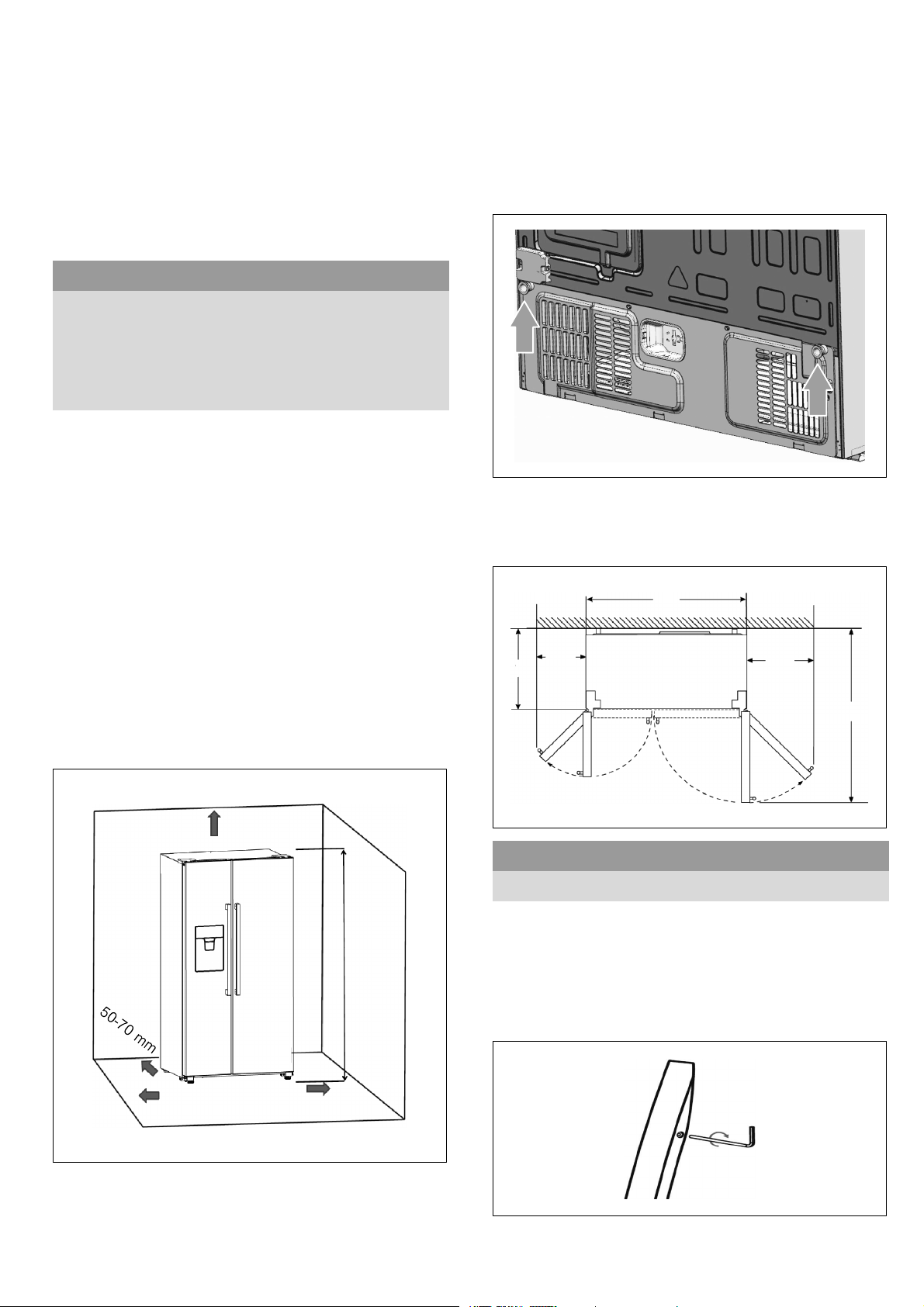
available around the refrigerator. Suggest: It is
advisable for there to be 50-70 mm of space from the
back to the wall, at least 100 mm from its top, at least
100 mm from its side to the wall and a clear space
upfront to allow the freezer door to open 130° and the
refrigerator door to open 135°.
100 mm
1787 mm
100 mm
100 mm
Installing the spacers
Remove two screws with screwdriver first, and take out
the spacers from plastic bag and fix it to the back of
theappliancethroughthescrewsthen.Thisensures
that there is a minimum distance between the appli
ance and the wall.
Installation dimensions and door opening
angle
W
W1
W2
D
D1
135°130°
W W1 W2 D D1
908 mm 418 mm 277 mm 628 mm 1171 mm
Fixing the door handle
Before you use the product, please check the handles
of the appliance. If a handle is loose, you should fix it
with the hexangular screwdriver in the clockwise
direction, then it can be used normally.
en
7
Aligning the appliance
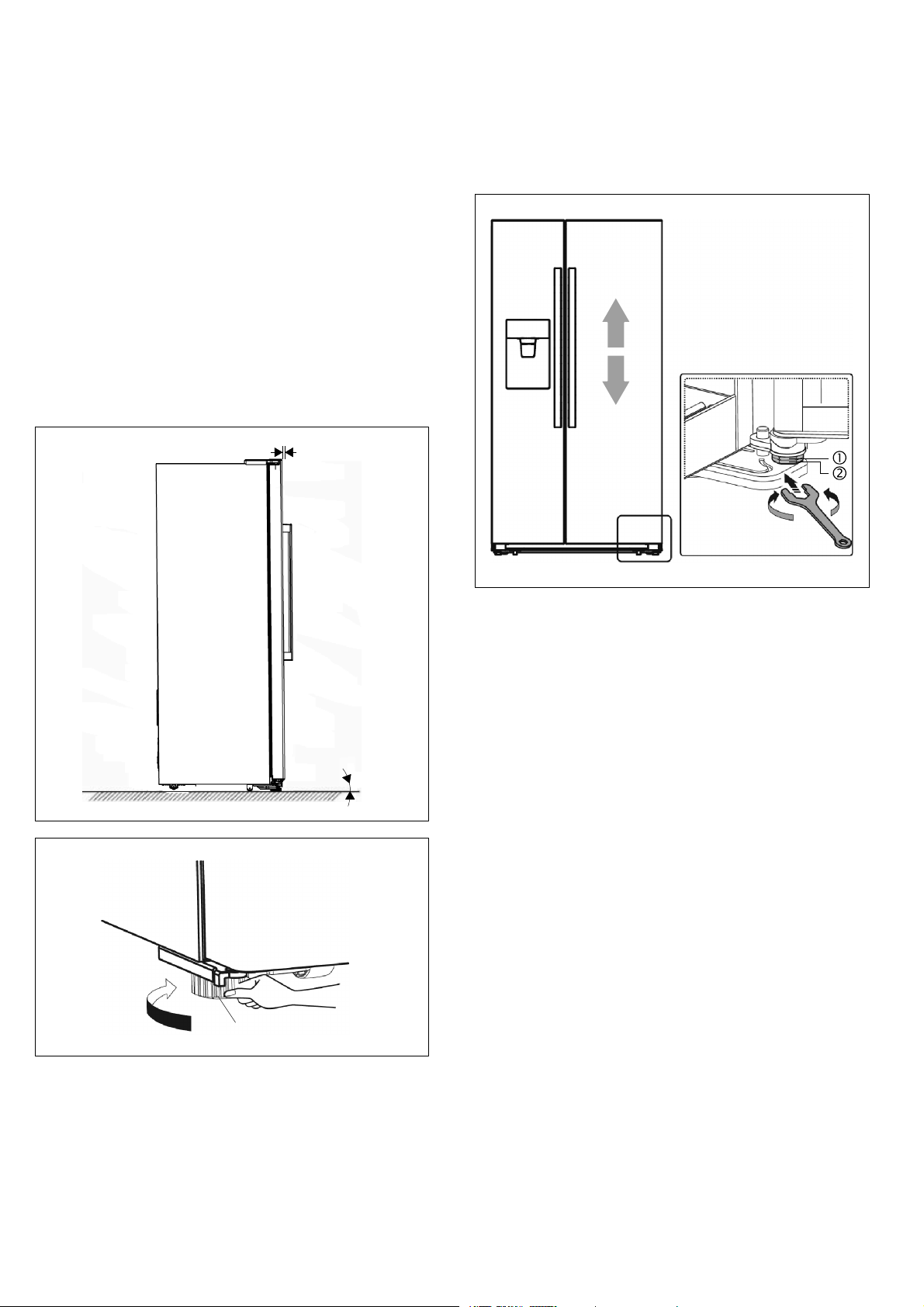
To ensure that the appliance functions correctly, it must
be set level with a spirit level.
Ø For sufficient leveling and air circulating in the lower
rear section of the appliance, the bottom feet may
need to be adjusted.
Ø To allow the doors to selfclose, tilt back the top
backwards at about 15 mm or 0.5° by turning the
adjustable feet.
Ø Whenever you want to move the appliance,
remember to turn the feet back up, so that the
appliance can roll freely.
Ø The rollers, which are not castors, should be only
used for forward or backward movement. Moving
the refrigerator sideways may damage your floor
and the rollers.
Ø Reinstall the appliance when relocating.
0.5°
15 mm
adjustable bottom feet
Aligning the doors
Whenyoufoundthedoorsarenotatthesamelevel,
you can use a spanner to adjust the fridge door.
Only the fridge door can be adjusted.
To raise the fridge door, turn the bolt (1) anticlockwise.
To lower the fridge door, turn the bolt (1) clockwise.
Once in position, lock the nut (2).
en
8
Connecting the appliance
Have a technician install and connect the appliance
according to the enclosed installation instructions.
Do not remove the transportation protection devices
from the shelves and storage compartments until the
appliance has been installed.
Always connect the water before the power.
Apart from statutory national regulations, you should
stick to the connection terms relating to the local
electricity company.
After installing the appliance, wait at least 1 hour until
the appliance starts up. During transportation the oil in
the compressor may have flowed into the refrigeration
system.
Before switching o n the appliance for the first time,
clean the interior of the appliance
(~ chapter “Cleaning the appliance”).
Water connection
Connect the appliance to a domestic water supply. The
appliance may only be connected to a cold-water line.
– Minimum pressure: 2 bar
– Maximum pressure: 8 bar
Contact a plumbing company if you are unsure how to
check the existing water pressure.
Installing the water filter
When appliance is delivered, the water filter package is
located in a door rack of the refrigerator compartment.
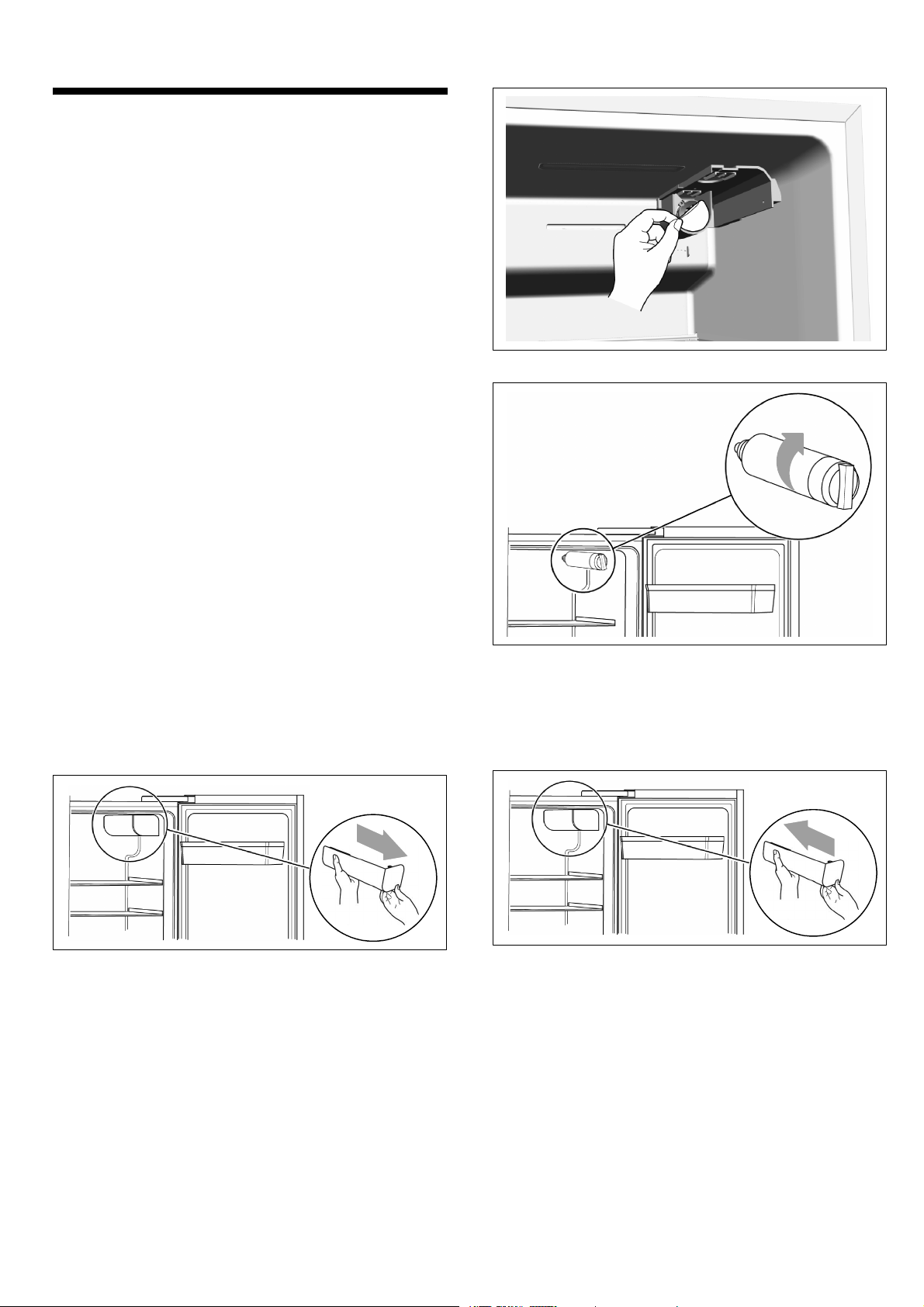
1. Take the water filter out of the packaging. The
instructions in the packaging include information for
the water filter. Please keep them for future use.
2. Open the refrigerator door to its maximum angle
and remove the water filter cap by pulling it out
slowly.
3. Remove the protector of the water filter base.
4. Screw in the water filter in clockwise direction and
make sure it is firmly fitted to the water filter base.
: Warning
If not installed correctly, this can result in the appliance
is not working properly, or result in water leakages.
5. Reattach the filter cover by gently sliding it on.
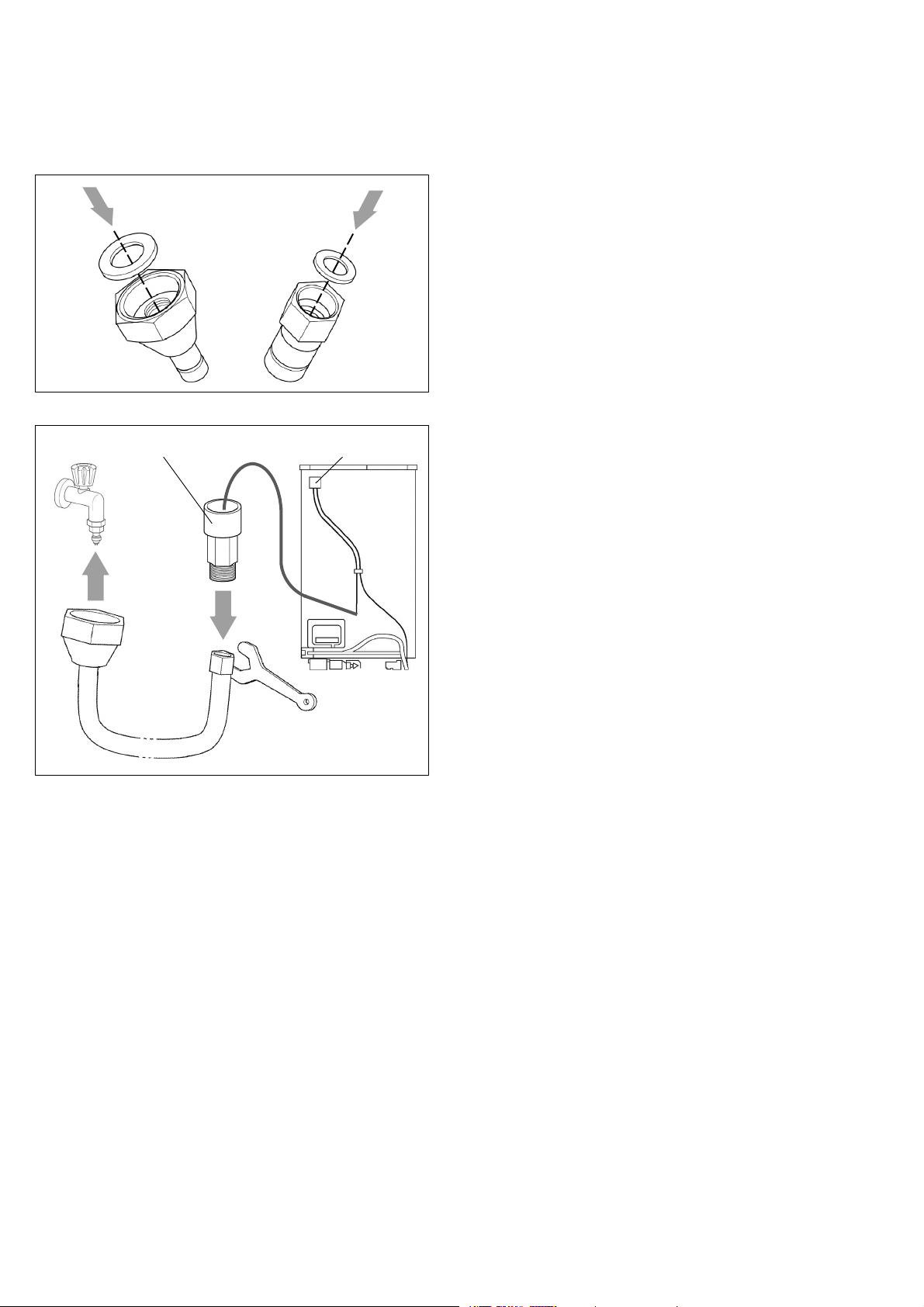
en
9
Installing the water hose
Use t he supplied connection hose for i nstallation.
1. Unpack the bag containing installation materials and
take out the two pads.
2. Installthetwopadstothehosenuts.
3.
4.
water filter nut water filter
3. Manually connect the hose nut to the tap.
4. Usethespannertoconnecttheotherhosenutto
the water filter nut.
Checking the water connection for leaks
: Warning – Risk of leaks and water damage!
Ø After turning on the water valve, make sure that
there is no leakage at all connection points of the
water lines. If there is a leakage, turn off the valve
immediately and tighten the water connector.
Ø The water lines should not be pressed by heavy
things and should not bend too much.
Ø Place the water hose in loops or coils so that the
appliance can be moved away from the wall.
Note: After connection, please flush the lines with
several cups of water before use. Dispense water
according to the instructions for use. This will last
several seconds as there is still air in the lines and
the water tank.
Electrical connection
: Warning – Risk of electric shock!
If the length of the mains cable is inadequate, never
use multiple sockets or extension leads. Instead,
please contact Customer service for alternatives.
The appliance must be connected to a permanently
installed socket.
The socket must be near the appliance and also freely
accessible following installation of the appliance.
The appliance complies with protection class I.
Connect the appliance to 220-240 V / 50 Hz alter
nating current via a correctly installed socket with
protective conductor. Thesocketmustbeprotected
by a 10 A to 16 A fuse or higher.
For appliances operated in non-European countries,
check whether the indicated voltage and current type
match the values of your electricity supply. The rating
plate is situated in the bottom right-hand side of the
appliance. The mains cable may be replaced by a
technician only.
: Warning
Never connect the appliance to electronic energy saver
plugs.
Our appliances can be used with mains and sine-
controlled inverters. Mains-controlled inverters are used
for photovoltaic systems which are connected directly
to the national grid. Sine-controlled inverters must be
used for isolated applications (e.g. on ships or in
mountain lodges) which are not connected directly
to the national grid.
en
10
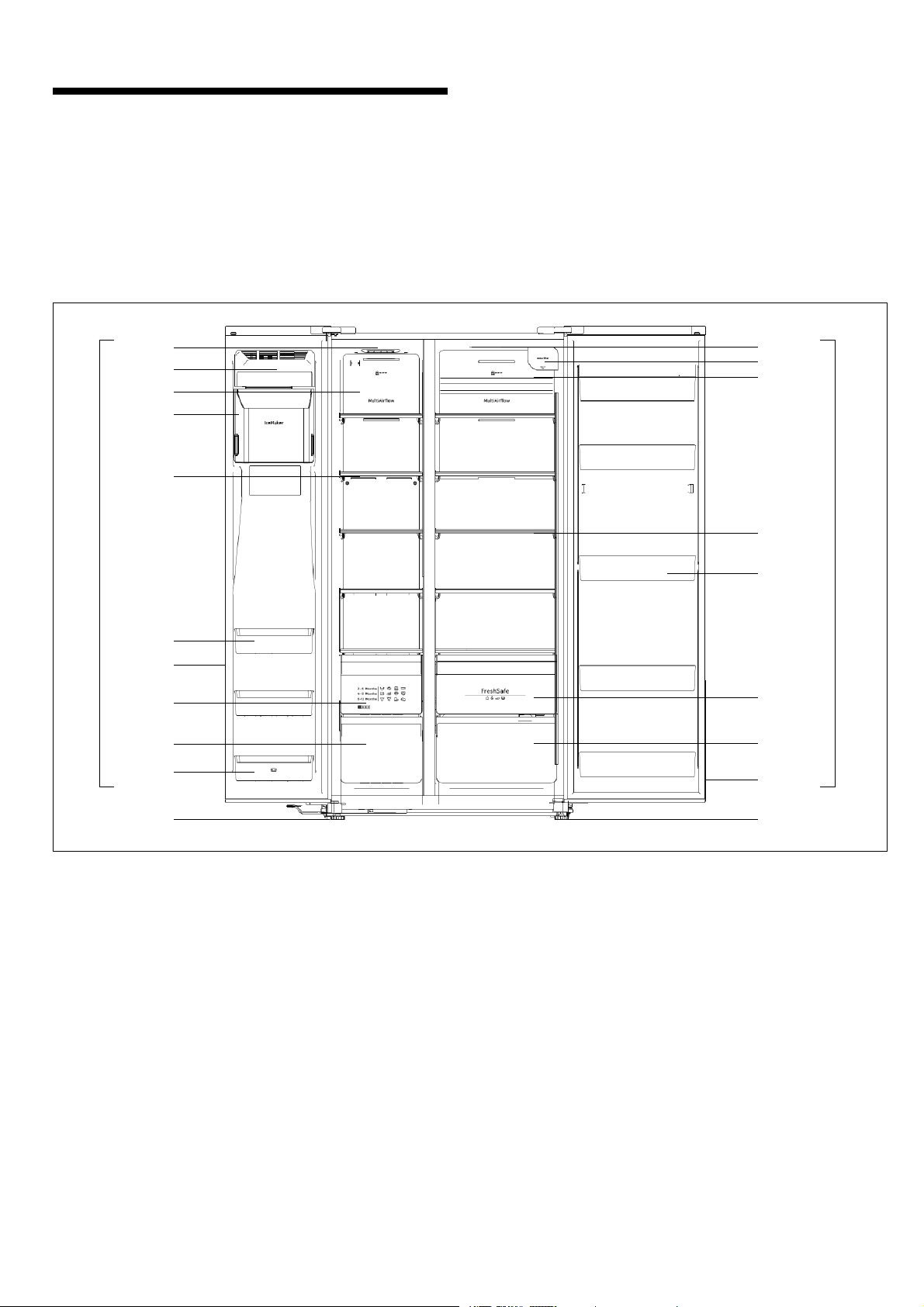
Getting to know your
appliance
Note:
Due to unceasing modification of our products your
appliance may be slightly different from this Instruction
manual but its functions and using methods remain the
same.
1
2
4
5
6
7
9
10
19
11
14
15
16
18
B
A
3
8
17
19
13
12
A Freezer compartment
1 Freezer LED Light
2Ice‐maker front cover assembly
3 Wind channel cover in freezer
4 Ice bucket assembly
5 Freezer shelf
6 Freezer door rack
7 Freezer door gasket
8 Freezer upper drawer
9 Freezer lower drawer
10 Freezerdoorrack(twostar zone)
B Refrigerator compartment
11 Fridge LED light
12 Water filter (behind cap)
13 Wind channel cover in fridge
14 Fridge shelf
15 Fridge door rack
16 Fruit and vegetables crisper
17 Fridge lower drawer
18 Fridge door gasket
19 Adjustable feet
en
11
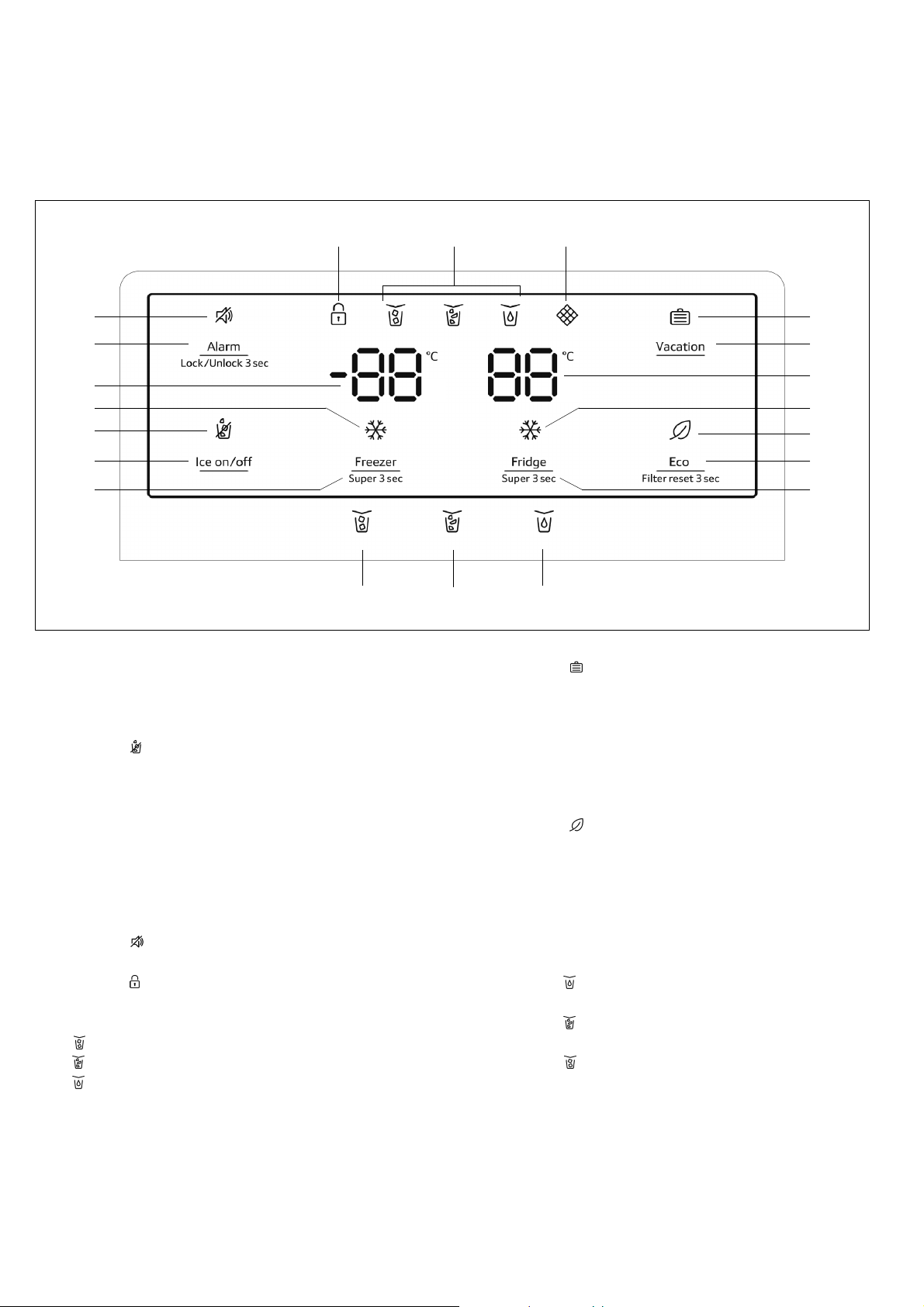
Control a nd display panel
The control and display panel on the door consists of
2 display areas showing temperatures, displays for
different modes and 9 control buttons.
4
18
9
1920
1
2
3
108
6
7
5
14
17
16
15
12
11
13
1 Button “Freezer / Super 3 sec”
To change temperature of freezer.
2Button“Iceon/off”
To turn ice maker on or off.
3 Display
(ice off)
Illuminated, when ice maker is turned off.
4 Display ] (super freeze)
Illuminated, when “super freezing” function
is active.
5 Freezer compartment temperature display
6 Button “Alarm / Lock/Unlock 3 sec”
To clear a present door alarm.
To lock or unlock the control panel and the
dispenser function (child lock).
7 Display
(alarm)
Illuminated in case of door alarm.
8 Display
(child lock)
Illuminated, when child lock is active.
9 Display of dispenser mode:
“cubed ice” mode active.
“crushed ice” mode active.
“water” mode active.
10 Display Á (water filter)
When display is blinking, you need to replace
the water filter
(~ chapter “ Replacing the water filter”).
11 Display
(vacation)
Illuminated, when “holiday” mode is active.
12 Button “Vacation”
To activate or deactivate “holiday” mode.
13 Fridge compartment temperature display
14 Display ] (super cool)
Illuminated, when “super cooling” function is
active.
15 Display
(eco)
Illuminated, when “energy save” mode is active.
16 Button “Eco / Filter reset 3 sec”
To turn energy save mode on or off.
To reset the water filter display, after having
replaced the water filter.
17 Button “Fridge / Super 3 sec”
To change temperature of refrigerator.
18 Button
To activate dispenser mode “water”.
19 Button
To activate dispenser mode “crushed ice”.
20 Button
To activate dispenser mode “cubed ice”.
en
12
Switching on the appliance
When the appliance is powered on, the backlighting
of the displays on the control panel starts working.
All displays will light up for 3 seconds and a buzzer
sounds. If no buttons have been pressed and the
doors are closed, the backlighting will turn off after
60 seconds.
The preset temperatures are reached after several
hours. Do not put any f ood in the appliance before
hand.
The factory has recommended the following temper
atures:
Ø Freezer compartment: -18 °C
Ø Refrigerator compartment: +4 °C
Note:
Childlock is off when appliance is powered on.
Child lock
If the display is illuminated, all the buttons are locked
and the dispenser function is deactivated.
Unlocking the buttons
Press the “Alarm / Lock/Unlock 3 sec” button for
3 seconds to unlock the buttons and to activate the
dispenser function. Display
goes out.
Locking the buttons
Press the “Alarm / Lock/Unlock 3 sec” button for
3 seconds to lock all the buttons and deactivate the
dispenser function. Display
will be illuminated.
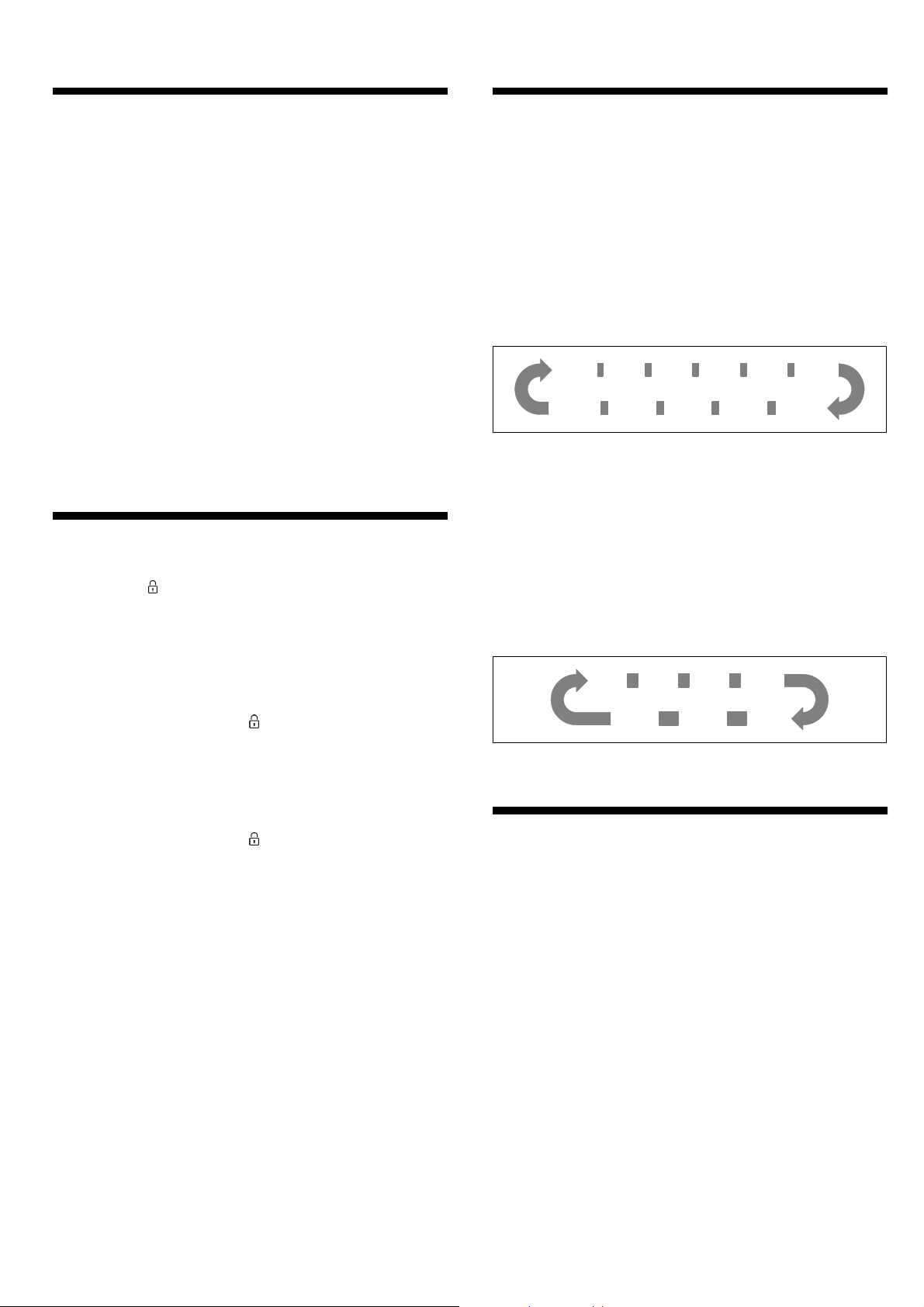
Setting the temperature
Freezer compartment
The freezer compartment can be set from -14 °C to
-24 °C. We recommend a setting of - 18 °C.
After unlocked, the freezer temperature setting is
activated. Press “Freezer / Super 3 sec” button to
set freezer temperature between -14 ° C and -24 °C
as needed.
The control panel will display the corresponding value
according to the following sequence.
-14 °C
-24 °C
-15 °C -16 °C -17 °C -18 °C
-23 °C -22 °C -21 °C -20 °C
-19 °C
Refrigerator compartment
The refrigerator compartment can be set from +2 °C
to +8 °C. We recommend a setting of +4 °C.
Perishable food should not be stored above +4 °C.
After unlocked, the fridge temperature setting is
activated. Press “Fridge / Super 3 sec” button to set
fridge temperature between 8 °C and 2 °C as needed.
The control panel will display the corresponding value
according to the following sequence.
8°C 7°C 6°C 5°C
2°C 3°C 4°C
Usable capacity
Information on the usable capacity can be found inside
your appliance on the rating plate
(~ chapter “Customer service”).
en
13
Freezer compartment
Use the freezer compartment
Ø to store deep-frozen food,
Ø to make ice cubes,
Ø to freeze food.
Caution!
Ensure that bottles are not left in the freezer for longer
than needed as freezing may cause the bottle to break.
Note:
Ensure that the freezer compartment door has been
closed properly. If the door is open, the frozen food will
thaw. The freezer compartment will become covered in
thick ice. Also: waste of energy due to high power con
sumption!
When the freezer compartment door is closed, a low
pressure occurs, causing a sucking noise. Wait two to
three minutes until t he low pressure has adjusted itself.
Purchasing frozen food
Ø Packaging must not be damaged.
Ø Use by the “use by” date.
Ø Temperature in the supermarket freezer must be
-18 °C or lower.
Ø If possible, transport deep-frozen food in an
insulated bag and place quickly in the freezer
compartment.
Drawers
The drawers, mounted on telescopic extension slides,
canbeusedtostorelargequantitiesoffrozenfood.
When you remove t he drawer pull it forwards and lift off
the sliders. Remember to remove all food first.
Onceyouhaveremovedthedrawer,ensuretheslides
are pushed back fully.
Fully utilising the freezer volume
If you don't need ice, you can switch off the ice maker
and replace the i ce bucket by the d oor rack
(~ chapter “Cleaning the appliance”).
Freezing capacity
Information about the freezing capacity can be found
on the rating plate.
Freezing fresh food
Freeze fresh and undamagedfoodonly.
To retain the best possible nutritional value, flavour and
colour, vegetables should be blanched before freezing.
Aubergines, peppers, zucchini and asparagus do not
require blanching.
Literature on freezing and blanching can be found in
bookshops.
Note:
Keep food which is to be frozen away from food which
is already frozen.
Ø The following foods are suitable for freezing:
Cakes a nd pastries, fish a nd seafood, meat, game,
poultry, vegetables, fruit, herbs, eggs without shells,
dairyproductssuchascheese,butterandquark,
ready meals and leftovers such as soups, stews,
cooked meat and fish, potato dishes, soufflé s and
desserts.
Ø The following foods are not suitable for freezing:
Types of vegetables, which are usually consumed
raw, such as lettuce or radishes, eggs in shells,
grapes, whole apples, pears and peaches, hard-
boiled eggs, yoghurt, soured milk, sour cream,
crème fraîch e and mayonnaise.
Packing frozen food
To prevent food from losing its flavour or drying out,
place in airtight containers.
1. Place food in packaging.
2. Remove air.
3. Seal the wrapping.
4. Label packaging with contents and date of freezing.
Suitable packaging:
Cling wrap, tubular film made of polyethylene,
aluminium foil, freezer containers.
These products are available from specialist outlets.
Unsuitable packaging:
Wrapping paper, greaseproof paper, cellophane,
bin liners and used shopping bags.
Items suitable f or sealing packaged food:
Rubber bands, plastic clips, string, cold-resistant
adhesive tape, etc.
Bags and tubular film made of polyethylene (PE) can
be sealed with a film heat sealer.
en
14
Shelf life of frozen food
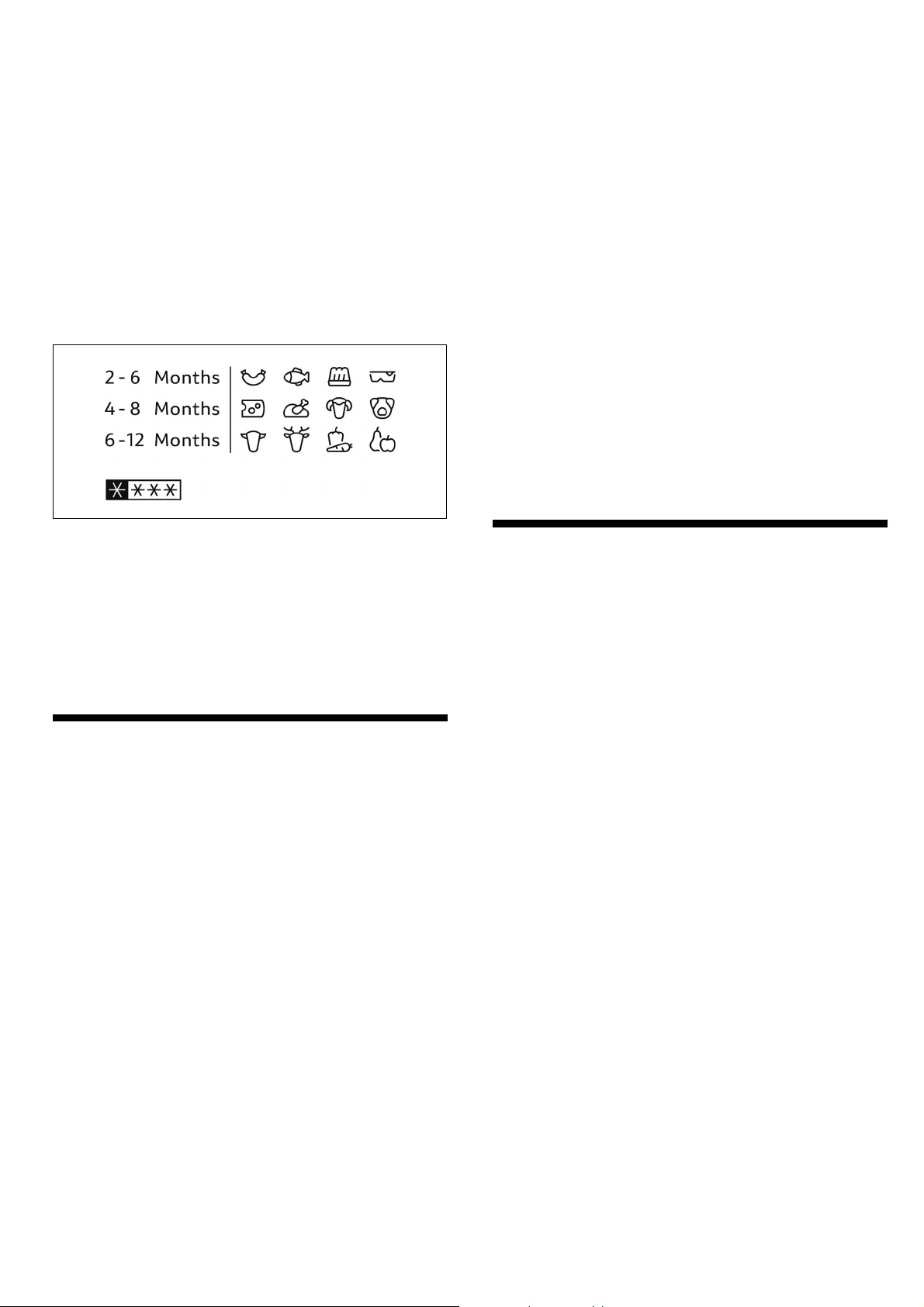
Storage duration depends on the type of food.
At a temperature of -18 °C:
Ø Fish, sausage, ready meals and cakes and pastries:
up to 6 months
Ø Cheese, poultry and meat:
up to 8 months
Ø Vegetables and fruit:
up to 12 months
Freezer calendar
To prevent the quality of the frozen food from deterior
ating, do not exceed the storage duration. The storage
period depends on the type of produce. The figures
next to the symbols indicate the permitted storage
period of the produce in months.
In case of commercialy available frozen food observe
the date of manufacture or use-by date.
Super freezing
Food should be frozen solid as quickly as possible in
order to retain vitamins, nutritional value, appearance
and flavour.
The appliance runs constantly when super freezing has
been switched on. The freezer compartment tempera
tures are much lower than in normal operation.
Several hours before placing fresh food in the freezer
compartment, switch on super freezing to prevent an
unwanted temperature rise.
If the freezing capacity according to the rating plate is
to be used, switch on super freezing 24 hours before
the fresh products are placed in the freezer compart
ment.
Smaller quantities of food (up to 2 kg) can be frozen
without super freezing.
Switching on super freezing
Press the “Freezer / Super 3 sec” button for 3 seconds
to switch on “super freezing”.
Display Ê (super freeze) goes on and the freezer
compartment temperature display shows “-24 °C”.
Switching off super freezing
To switch off “super freezing”, press the “Freezer /
Super 3 sec” button.
If super freezing is switched off, display Ê (super
freeze) goes out. The appliance automatically switches
to the temperature set prior to super freezing mode.
Notes
Ø Super freezing automatically switches off after
52 hours.
Ø Activation of “energy save” or “holiday” mode will
switch off super freezing.
Thawing froozen food
Depending on the type and application, select one of
the following options:
Ø at room temperature
Ø in the refrigerator
Ø in an electric oven, with/without fan assisted hot-air
Ø in the microwave
Caution!
Do not refreeze thawing or thawed food. Only ready
meals (boiled or fried) may be refrozen.
No longer store the frozen produce for the max.
storage period.
en
15
Refrigerator compartment
The refrigerator compartment is the ideal storage
location for meat, sausage, fish, dairy products, eggs,
ready meals and pastries.
Storing food
Ø Store fresh, undamaged food. The quality and
freshness will then be retained for longer.
Ø Inthecaseofready-madeproductsandbottled
goods, observe the best-before date or use-by date
specified by the manufacturer.
Ø To retain aroma, colour and freshness, pack or
cover food well before placing in the appliance.
This will prevent the transfer of flavours and the
discolouration of plastic parts in the refrigerator
compartment.
Ø Allow warm food and drinks to cool down before
placing in the appliance.
Note:
Avoid contact between food and rear panel. Otherwise
the air circulation will be impaired.
Food or packaging could freeze to the rear panel.
Note the chill zones in the refrigerator
compartment
The air circulation in the refrigerator compartment
creates different chill zones:
Ø Coldest zone is between the vegetable container
and the glass shelf situated above.
Note:
Store perishable food (e.g. fish, sausage, meat) in
thecoldestzoneabovethevegetablecontainer.
Ø Warmestzoneisattheverytopofthedoor.
Note:
Storee.g.hardcheeseandbutterinthewarmest
zone. Cheese can then continue to release its
flavour and the butter will still be easy to spread.
Fruit and vegetables crisper
The crisper, mounted on telescopic extension slides,
is for storing vegetables and fruit.
When you remove the crisper pull it forwards and lift off
the sliders. Remember to remove all food first.
Onceyouhaveremovedthecrisper,ensuretheslides
are pushed back fully.
Notes
Ø Fruit sensitive to cold (e.g. pineapple, banana,
papaya and citrus fruit) and vegetables sensitive
to cold (e.g. aubergines, cucumbers, zucchini,
peppers, tomatoes and potatoes) should be stored
outside the refrigerator at temperatures of approx.
+8 °C to +12 °C for optimum preservation of quality
and flavour.
Ø Condensation may form i n the vegetable container
dependingonthetypeand quantity of products
stored. Remove condensation with a dry cloth.
Super cooling
Super cooling sets the refrigerator temperature to
thecoldesttemperaturesetting.
Switch on super cooling mode, e.g.
Ø before placing large quantities of food in the
refrigerator compartment.
Ø for the fast cooling of drinks.
Switching on super cooling
Press the “Fridge / Super 3 sec” button for 3 seconds
to switch on “super cooling”.
Display Ê (super cool) goes on and the refrigerator
compartment temperature display shows “2 °C”.
Switching off super cooling
To switch off “super cooling”, press the “Fridge /
Super 3 sec” button.
If super cooling is switched off, display Ê (super cool)
goes out. The appliance automatically switches to the
temperature set prior to super cooling mode.
Notes
Ø Super cooling automatically switches off after
3hours.
Ø Activation of “energy save” or “holiday” mode will
switch off super cooling.
en
16
Ice and water dispenser
The following can be dispensed as required:
Ø cooled water
Ø cubed ice
Ø crushed ice
You can choose the type of ice or water by touching
the
(cubed ice), (crushed ice) or (water) button.
: Warning
Ø Do not use fragile receptacles for d ispensing water
or ice – risk of injury from broken glass!
Ø Keep fingers clear of the discharge opening. Risk of
injury from crusher blades!
Note:
The ice and water dispenser will not function when the
freezer door is open or child lock is active.
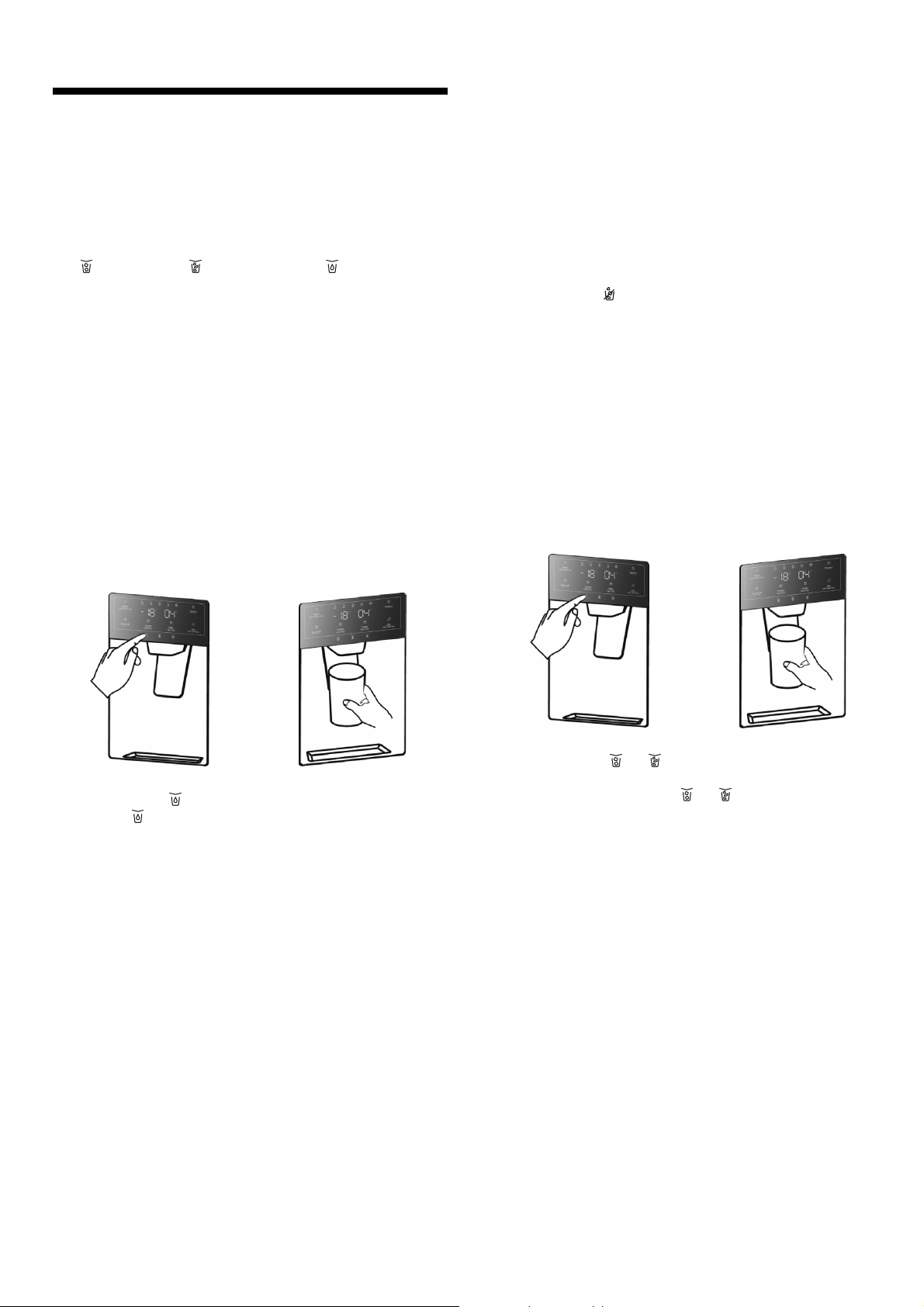
Dispensing water
The water from the dispenser is cooled to a palatable
temperature. If you would like the water colder, place
ice cubes in the glass before dispensing the water.
1. 2.
1. Press button
to activate dispenser mode “water” .
Display
will illuminate, when “water” mode is
active.
2. Press the glass against the dispenser lever.
The water stops running when the glass is removed
from the lever.
Do not immediately remove your glass from under
the dispenser after dispensing water. Wait for 2 or
3 seconds to prevent spills.
Note:
If no water is dispensed or it is dispensed slowly,
the water filter may be clogged and may need to be
replaced
(~ chapter “Replacing the water filter”).
Ice maker
When the freezer compartment has reached its freezing
temperature, water flows into the ice maker and freezes
into ice cubes. When the ice cubes are ready, they are
automatically discharged into the ice bucket.
Turning off the ice maker
The ice maker can be turned off to save water and
energy, if no ice is needed.
Press the “Ice on/off” button to turn on or off the ice
maker. Display
(ice off) is illuminated, when the
ice maker is turned off.
Note: “Ice on/off” only concerns the ice maker, not
the dispenser.
Emptying the ice bucket
If you do not dispense ice for a long period, ice may
clump in the ice bucket. If this occurs, please remove
and empty the bucket
(~ chapter “Cleaning the appliance”).
Dispensing ice
1. 2.
1. Press button
or to activate dispenser mode
“cubed ice” or “crushed ice”.
Corresponding display
or will illuminate, when
selected mode is active.
2. Press a suitable receptacle against the dispenser
lever.
Remove the receptacle from the dispenser lever
when it is approx. half full. Ice in the discharge
may cause the receptacle to overflow or block the
discharge.
Do not immediately remove your glass from under
the dispenser after dispensing ice. Wait for 2 or
3 seconds to prevent spills.
Notes
Ø After switching over from dispensing cubed ice to
crushed ice, the dispenser may still contain whole
ice cubes or pieces of ice cube. These will be
dispensed with the first portions of crushed ice.
Ø After switching over from dispensing crushed ice
to cubed ice, a small amount of crushed ice may
be dispensed with the first portions of cubed ice.
Ø Do not dispense ice continualy more than one
minute during normal use to avoid excessive
temperature on the ice crusher motor.
en
17
Variable interior design
The refrigerator compartment is provided with 5 glass
shelves and several different door racks, which are
suitable for the storage of eggs, canned liquid, bottled
drinks and packed food. They can be placed at
different heights according to your needs.
Before removing the door racks please remove all food
items to avoid spillage.
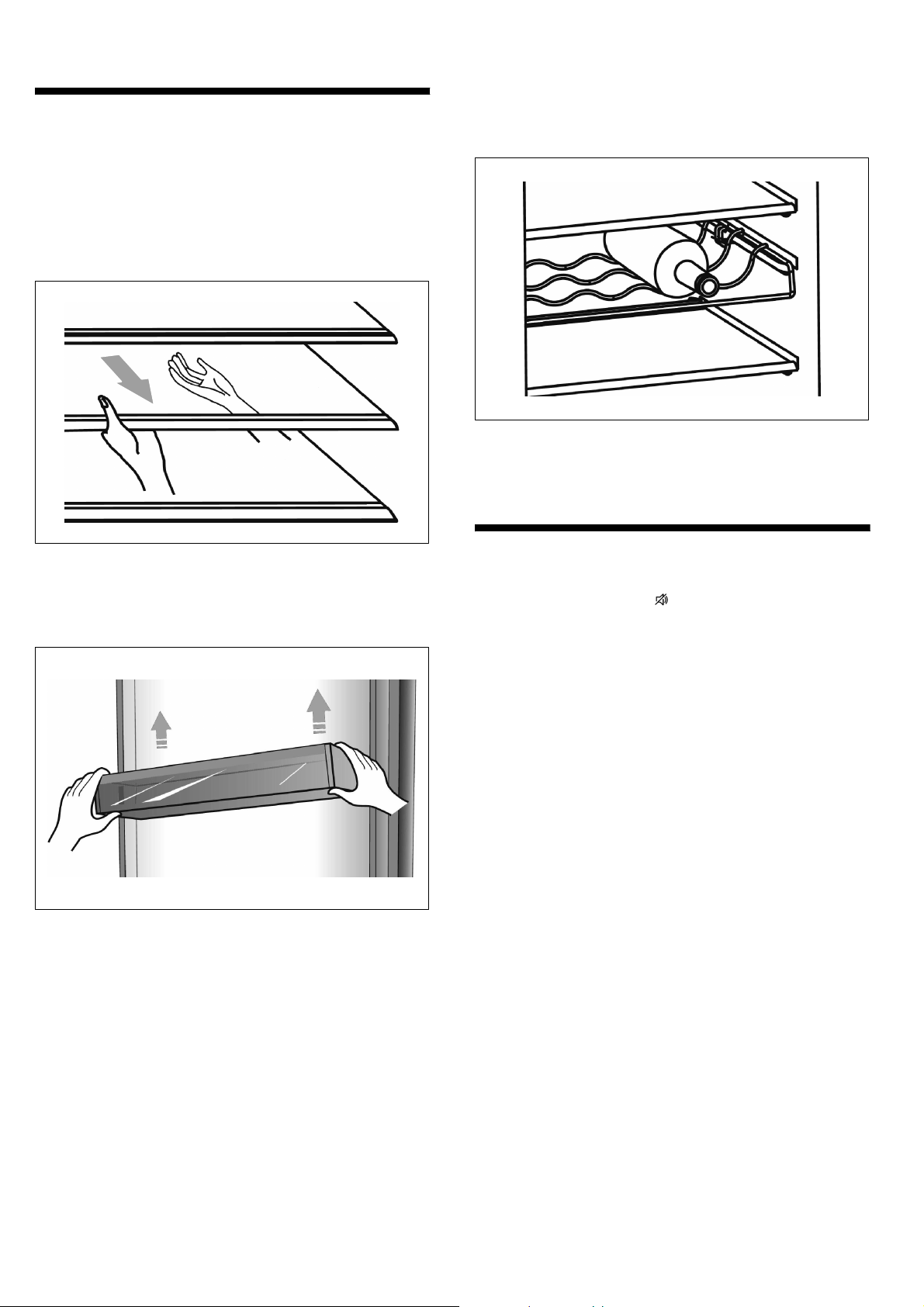
Ø When you remove the shelves, gently pull them for
ward until the shelf comes clear of the shelf guides.
Ø When you return the shelves, make sure there is no
obstacle behind and gently push the shelf back into
the position.
Ø Lift the door racks and remove.
The bottle rack (option) is for storing bottled wine and
drinks.
Note: Pleaseusegentlywhenyouremovethebottles.
Ø Theshelfcanbetakenouttobecleanedortosave
the shelf space.
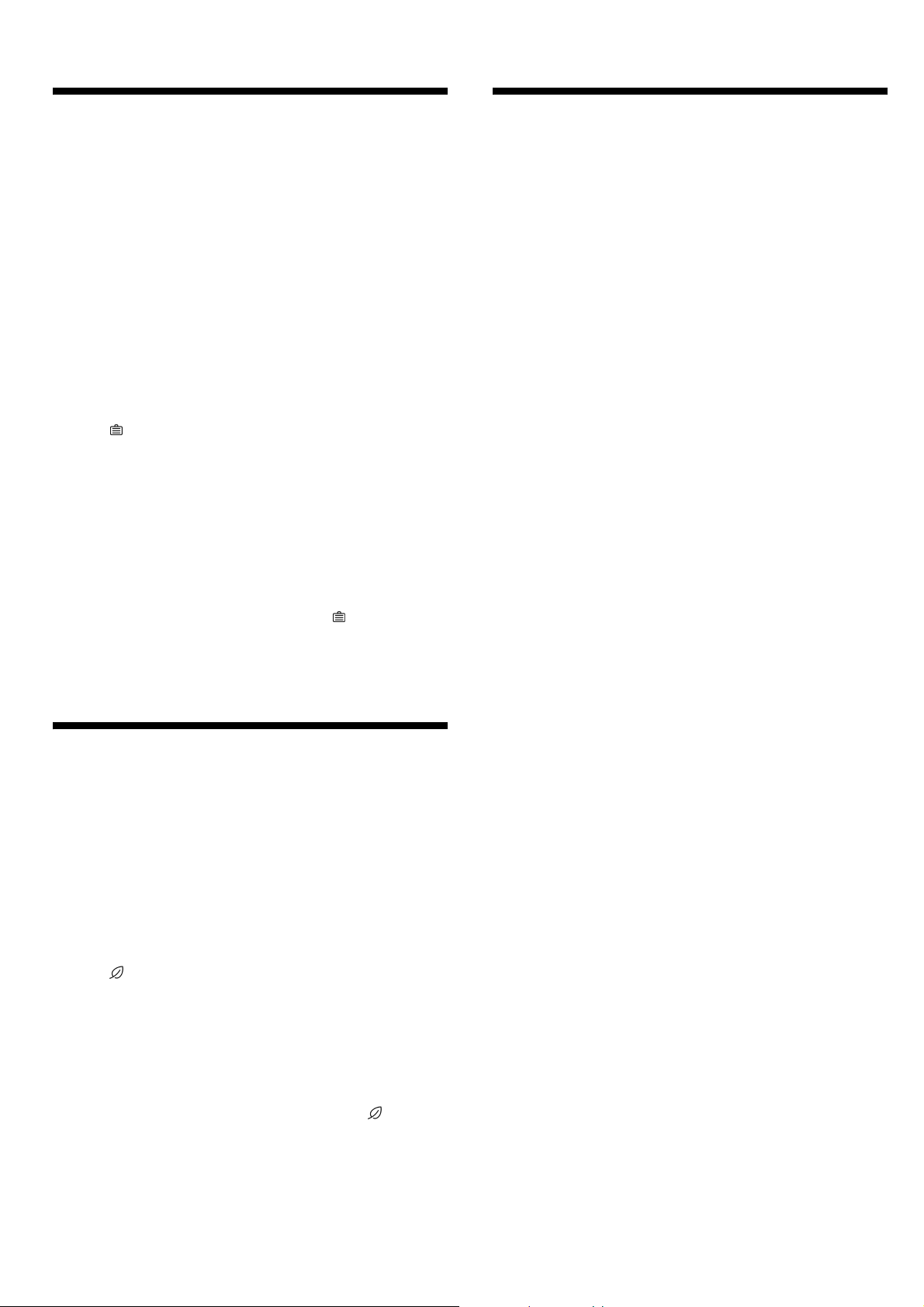
Alarm
In case of alarm, display will be on and there will be
a buzzing sound.
Note: When buzzer sounds three times and water filter
display is blinking, the water filter needs to be replaced
(~ chapter “Replacing the water filter”).
Door alarm
If the door of the fridge or freezer is open for longer
than 2 minutes, the door alarm switches on.
In case of door alarm, the buzzer will sound 3 times
every 1 minute and will automatically stop alarming
10 minutes later.
To save energy, please avoid keeping the door open
for a long time when using the appliance.
The door alarm can be cleared by closing the door.
With open door, the alarm can be cleared by pressing
the “Alarm / Lock/Unlock 3 sec” button when child
lock is not active.
en
18
Holiday mode
Ifyouaregoingawayforalongperiodoftime,
“ holiday” mode will be your best choice. It switches the
temperature of the refrigerator compartment to 15 °C
and the temperature of the freezer compartment to
-18 °C to minimize the energy consumption.
Important: Do not store any food in the fridge during
this time.
Note: It is also recommended to close the water supply
during the absence.
Switching on holiday mode
Press the “Vacation” button to switch on holiday mode.
Display
(vacation) goes on and the refrigerator
compartment temperature display shows “15 °C”.
Note: When the holiday mode is on, the ice maker will
automatically turn off.
Switching off holiday mode
To switch off “holiday mode”, press the “Vacation”
button.
If holiday mode is switched off, display
(vacation)
goes out. The temperature setting will revert back to
it's previous setting.
Energy save mode
Energy save mode may help you to reduce the energy
consumption. It sets the temperature of the refrigerator
compartment to 6 °C and the temperature of the
freezer compartment to -17 °C.
Switching on energy save mode
Press the “Eco / Filter reset 3 sec” button to s witch on
theenergysavemode.
Display
(eco) goes on, when energy save mode is
active.
Switching off energy save mode
To switch off energy save mode, press the “Eco / Filter
reset 3 sec” b utton.
If energy save mode is switched off, display
(eco)
goes out. The temperature setting will revert back to
it's previous setting.
Switching off and
disconnecting the appliance
Switching off the appliance
Pull out mains plug or switch off fuse.
Refrigerating unit switches off.
Caution!
If the appliance is powered off too long, the ice in the
bucket will melt and the water will flow out of the appli
ance to the floor. To avoid this, you should empty the
ice bucket
(~ chapter “Cleaning the appliance”).
Note: Child lock, super freeze and super cool will not
be retained, when appliance is switched off.
Disconnecting the appliance
If you do not use the appliance for a prolonged period:
1. Take all food out of the appliance.
2. Cut off the water supply.
3. Run off the remaining drinking water.
4. Pull out the mains plug.
5. Remove the water filter.
Note:
Before recommissioning the appliance, install a
new water filter.
6. Clean the appliance interior and empty the ice
bucket
(~ chapter “Cleaning the appliance”).
7. Leave the appliance doors open to prevent odours
from forming.
en
19
Defrosting
Freezer compartment
The fully automatic NoFrost system ensures that the
freezer compartment remains free of ice. Defrosting is
no longer required.
Refrigerator compartment
Defrosting is actuated automatically.
Thecondensationrunsthroughthedrainageholeinto
an evaporation pan on the rear of the appliance.
Cleaning the appliance
: Warning
Nevercleantheappliancewithasteamcleaner!
Caution!
Ø Do not use abrasive, chloride or acidic cleaning
agents or solvents.
Ø Do not use scouring or abrasive sponges. The
metallic surfaces could corrode.
Ø Don't use sharp objects to remove frost from the
refrigerator.
Ø Never clean shelves and containers in the dish
washer. The parts may become deformed!
Ø Customer Service must clean inaccessible points.
Cleaning by customer service can give rise to costs.
Procedure
1. Pull out the mains plug or switch off the fuse.
2. Take out the frozen food and store in a cool
location.
3. Wait until the layer of frost has thawed.
4. Clean the appliance with a soft cloth, lukewarm
water and a little pH-neutral washing-up liquid.
The rinsing water must not run into the light.
5. Wipe the door seal with clear water only and
then wipe dry thoroughly.
6. After cleaning reconnect the appliance.
Interior should be completely dry before connecting
the mains plug and switching on.
7. Put the frozen food back into the appliance.
Dispenser
Ø Do not pull the dispenser lever out as this could
damage or break the lever's spring.
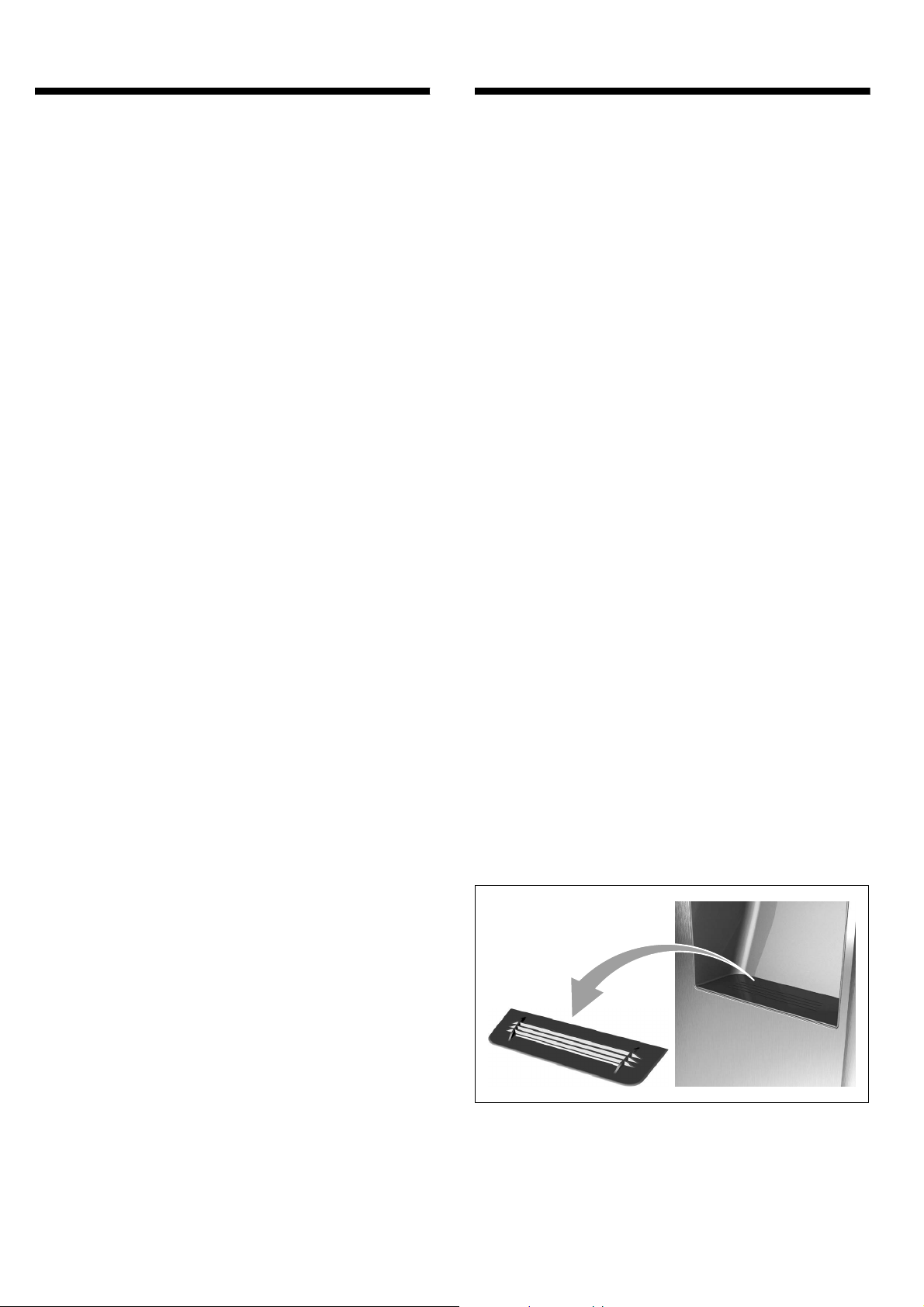
Cleaning water collecting tray and strainer
Spilled water collects in the water collecting tray.
Ø To clean the water collecting tray and the strainer,
the strainer can be taken out.
en
20
Interior fittings
To clean the equipment, all variable parts of the
appliance can be taken out
(~ chapter “ Variable interior design”).
Note:
To take out and clean the containers, open the doors
fully beyond 90°.
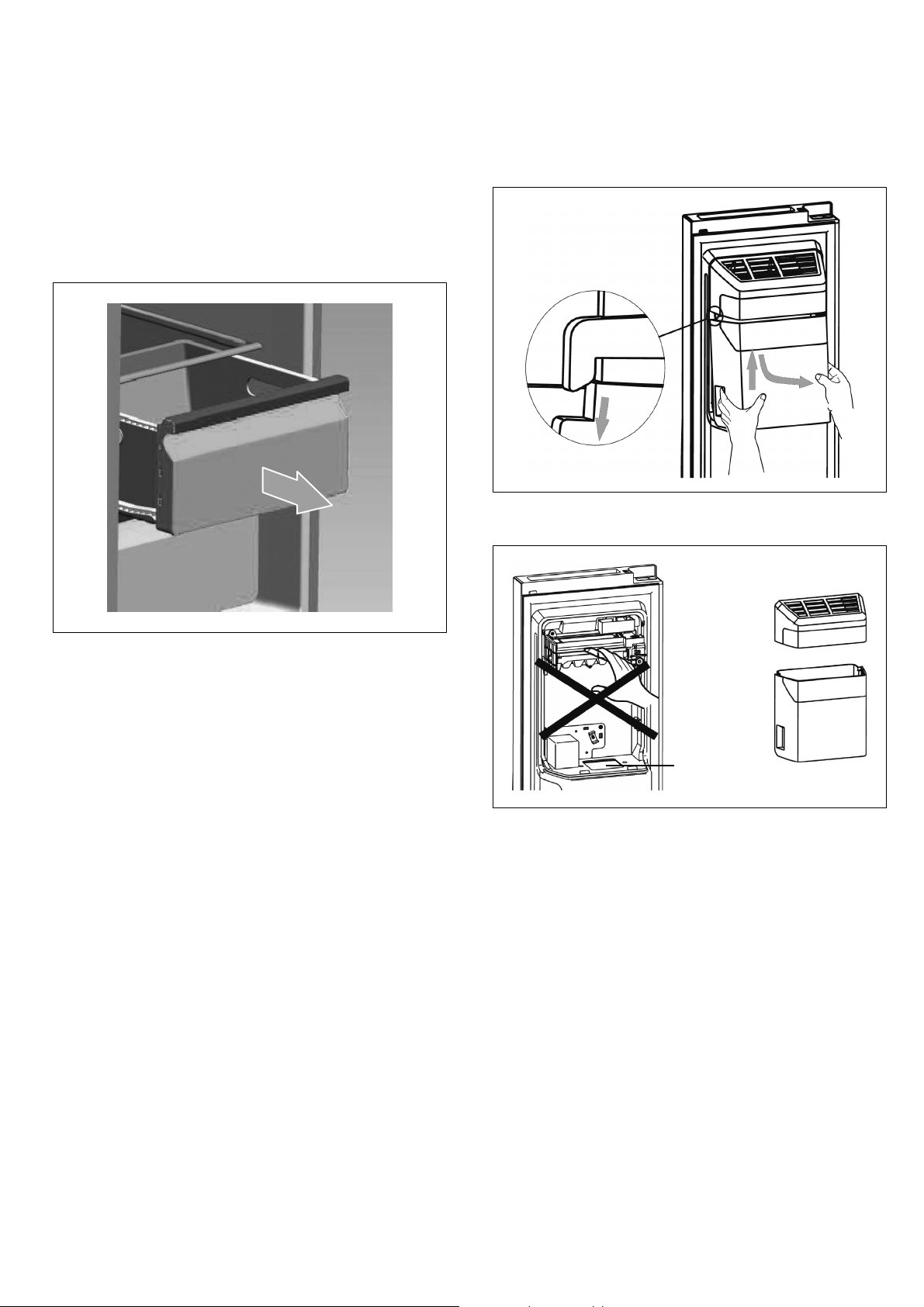
Removing container
Ø Pull out container all the way, lift to detach it from
the holder and take out.
To insert the drawer, place on the telescopic rails and
push into the appliance. Attach the drawer by pressing
it down.
Handling the ice bucket
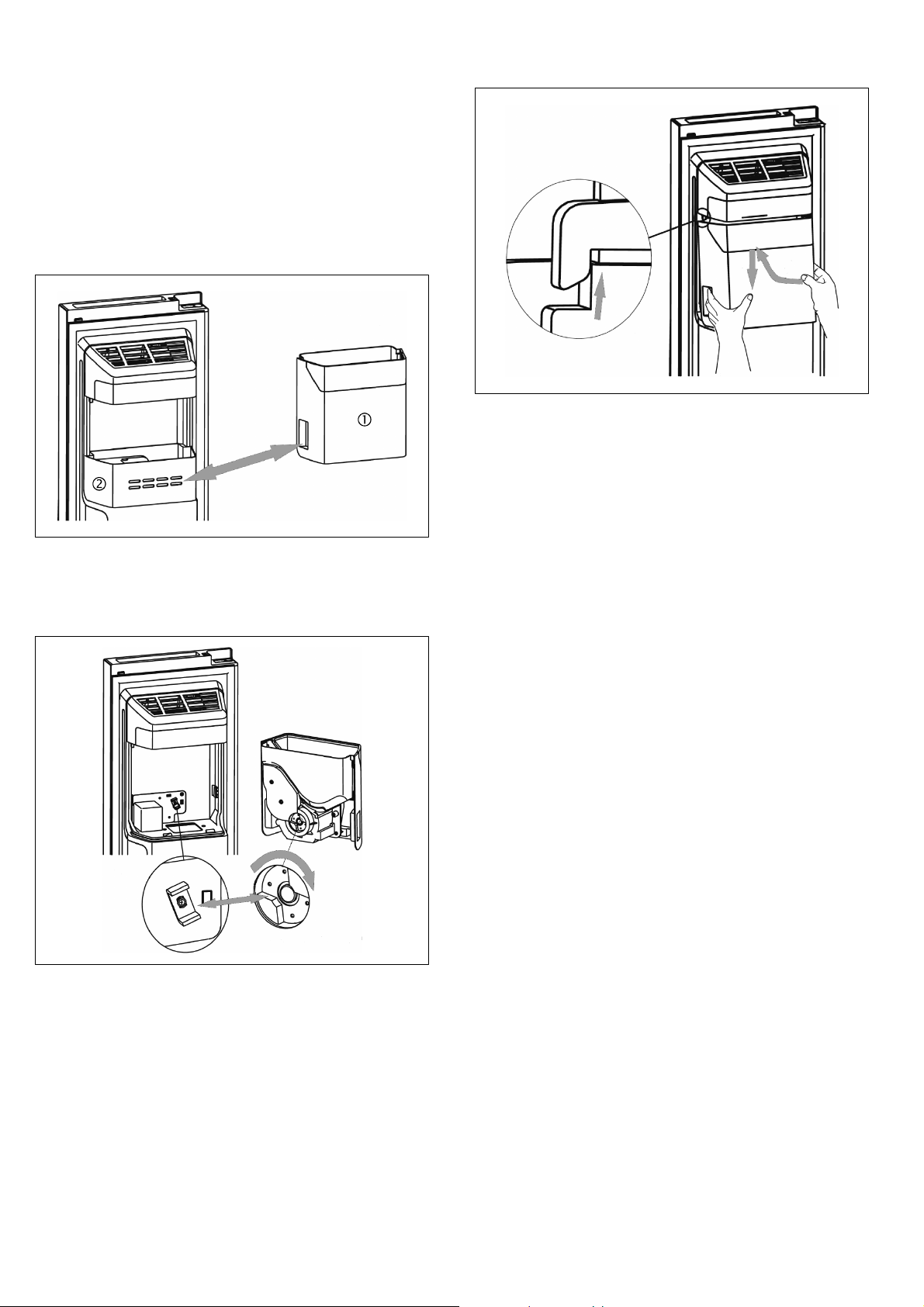
Removing the ice bucket
Forcleaningpurposesorifyoudon'tneedice,theice
bucket can be removed.
1.
2.
2.
1. Holdatthehandleandliftuptheicebucket.
2. Pullouttheicebucketslowlytopreventdamage.
Ice maker cover
Ice bucket
Ice chute
: Warning
Do not put your fingers, hands or any unsuitable
objects in the ice chute or ice maker. This can cause
personal injury or material damage.
Note: Thereisawaterlineconnectiontotheicemaker.
Do not disassemble the whole water supply system by
yourself. It is recommended to be done by qualified
persons only.
en
21
Emptying and cleanin g the ice bucket
The ice bucket may need to be emptied, if the ice
cubes stick together or if ice cubes have not been dis
pensed for a prolonged period or when the appliance
is powered off.
To clean the ice bucket, wash with a mild detergent,
rinse well and dry thoroughly. Do not use harsh or
abrasive cleaners or solvents.
Replacing the ice bucket
If you don't need ice, you can switch off the ice maker
and replace the ice bucket (1) by the door rack (2) to
increase your freezer volume.
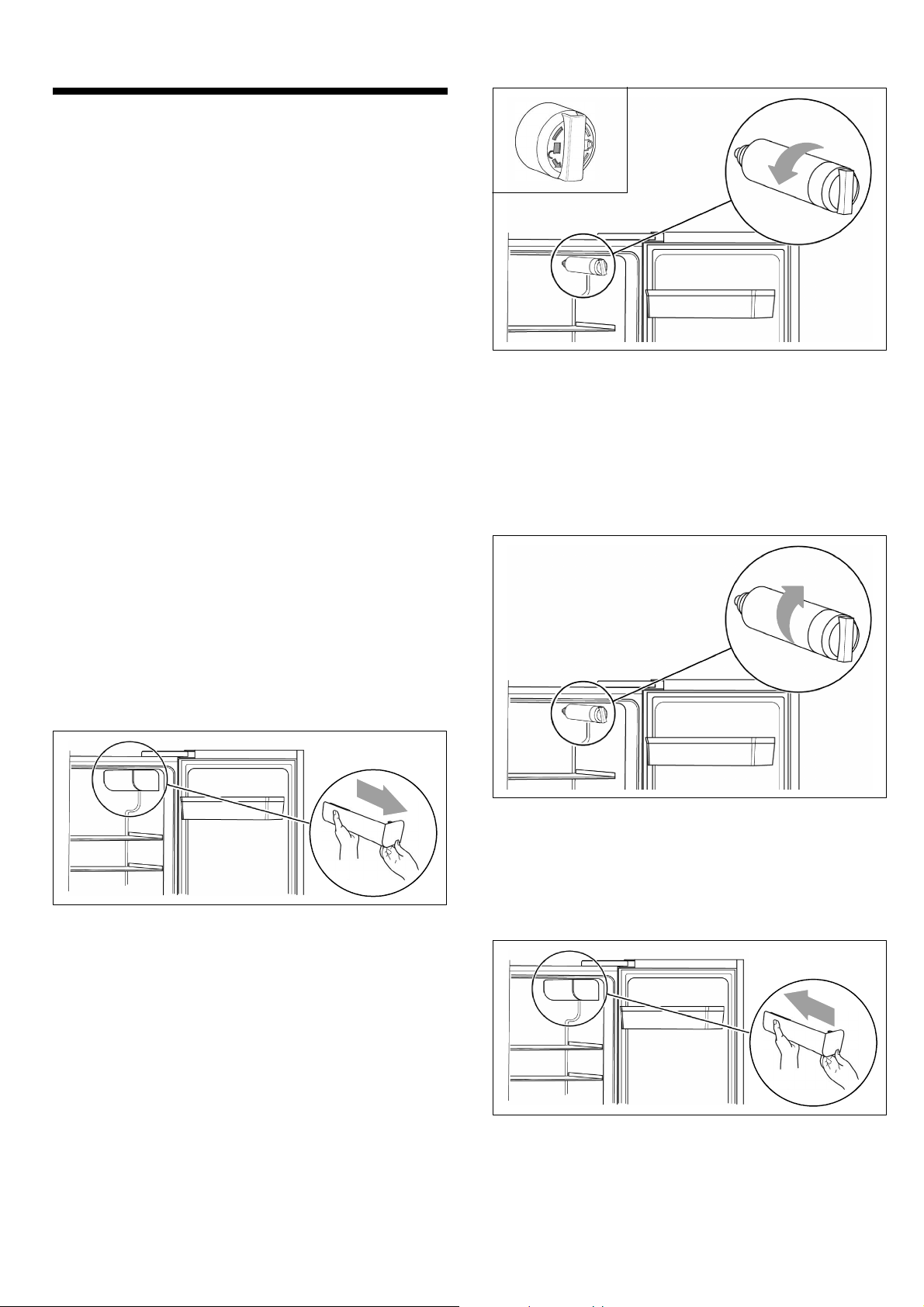
Refitting the ice bucket
1. Check that the two couplers are at a suitable angle
to connect correctly. If necessary, turn the coupler of
the ice bucket to match the motor coupler.
2.
3.
2.
A
B
2. Holdatthehandleandpushuptheicebucket.
Ensure that on both sides the ice bucket (B) is
wedged into the buckles (A) of the ice maker.
3. Pull down the ice bucket and ensure it is held firmly.
Defrosting
Although this appliance automatically defrosts, a layer
of frost may occur on the freezer compartment's interior
walls if the door is opened frequently or kept open too
long.
If the frost is too thick wait until food stocks are low
and proceed as follows:
1. Remove existing food and accessories baskets,
unplug the appliance from the mains power and
leave the doors open. Ventilate the room thoroughly
to accelerate the thawing process.
2. When defrosting is completed, clean your freezer
as described above.
en
22
Replacing the water filter
In general, you should replace the water filter every
6 months to ensure the highest possible water quality.
After the appliance has dispensed about 4000 liters of
water (usual consumption within 6 months), the water
filter display Á blinks, and the buzzer sounds 3 times,
to remind you that you need to replace the water filter.
Note:
Ø If no water is dispensed or it is dispensed slowly,
the water filter may be clogged and may need to be
replaced. Some areas have large amounts of lime in
their water, which causes the water filter to clog
more quickly.
Purchasing a new water filter
First of all, you need to purchase a new water filter.
You can purchase the new filter from the retailer where
you purchased your appliance or from the Customer
service. Please check that the new filter is o f the same
type as before, so that it can be used correctly in your
appliance.
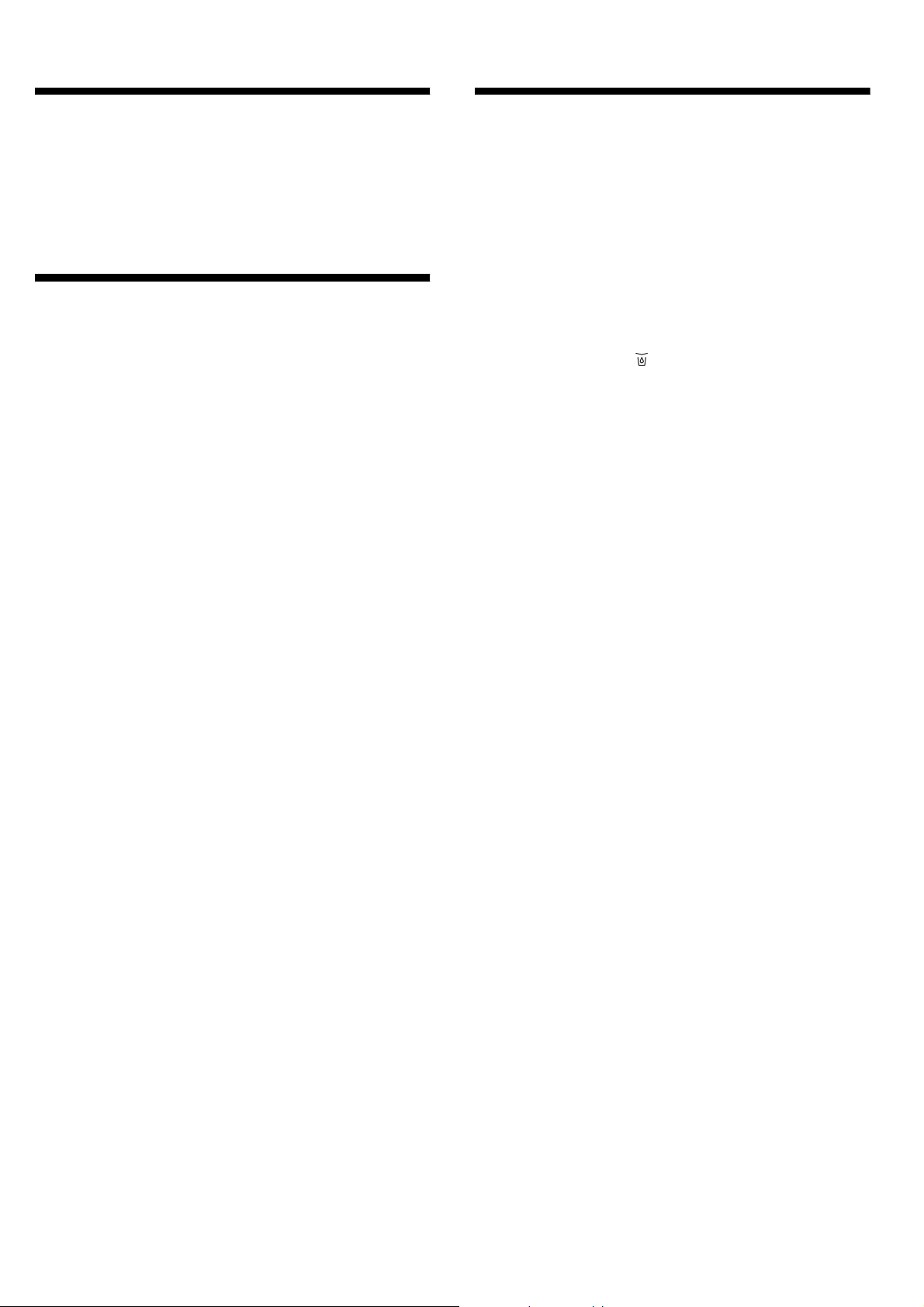
Removing the o ld water filter
Notes
Ø Close the water valve before removing the filter.
Ø When you replace the filter, some water may leak
from the filter and lines. Let the water flow into a
pan, and wipe up any leakage that may have
occurred.
1. Open the refrigerator door to its maximum angle
and remove the water filter cap by pulling it out
slowly.
2. Screw out the old water filter in anticlockwise
direction (see sign on the filter) and remove it.
: Warning
Do not pull out the water filter with force, as this can
cause material damage.
Installing the new water filter
1. Screw in the new water filter in clockwise direction
and make sure it is firmly fitted to the water filter
base.
: Warning
If not installed correctly, this can result in the appliance
is not working properly, or result in water leakages.
2. Reattach the filter cover by gently sliding it on.
3. After you have installed a new water filter, touch
andholdthe“Eco/Filterreset3sec”buttonfor
3 seconds to reset the water filter display.
en
23
Light (LED)
Your appliance features a maintenance-free LED light.
These lights may be repaired by Customer service or
authorised technicians only.
Tips for saving energy
Ø Install the appliance in a dry, well ventilated room!
The appliance should not be installed in direct sun
lightornearaheatsource(e.g.radiator,cooker).
If required, use an insulating plate.
Ø Do not block the ventilation openings in the
appliance.
Ø Allow warm food and drinks to cool down before
placing in the appliance.
Ø Thaw frozen food in the refrigerator compartment
and use the low temperature of the frozen food to
cool refrigerated food.
Ø Open the appliance as briefly as possible.
Ø Ensure that the freezer compartment door is always
closed properly.
Ø The arrangement of the fittings does not affect the
energy rating of the appliance.
Ø The ice maker can be turned off to save water and
energy, if no ice is needed.
Operating noises
Quite normal noises
Ø Compressor running noises.
Ø Air movement noise from the small fan motor in
the fridge compartment or other compartments.
Ø Gurgling sound similar to water boiling.
Ø Popping noise during automatic defrosting.
Ø Clicking noise before t he compressor starts.
Ø Noises, when the ice maker dumps ice into the
ice bucket.
Ø When touching the button, the water pump will
start and there is little noise when the pump is
working.
Preventing noises
The appliance is not level
Please align the appliance with a spirit level. Use the
height-adjustable feet or place packing underneath
them.
The appliance is not free-standing
Please move the appliance away from adjacent units or
appliances.
Containers or storage areas wobble or stick
Please check the removable parts and re-insert them
correctly if required.
Bottles or receptacles are touching each other
Move the bottles or receptacles slightly away from each
other.
en
24
Eliminating minor faults
yourself
Before you call Customer service:
Please check whether you can eliminate the fault your
self based on the following information.
Customer service will charge y ou for advice even if the
appliance is still under guarantee!
Fault Possible cause Remedial action
Appliance is not working Mains plug has not been inserted properly. Check whether the power cord is plugged into
the power outlet properly.
The fuse has been switched off or is defective. Check the fuse; replace if necessary.
Power failure. Check the circuit of your power supply.
The ambient temperature is too low. Try setting the chamber temperature to a colder
level to solve this problem.
It is normal that the refrigerator is not operating
during the automatic defrost cycle, or for a short
time after the appliance is switched on to protect
the compressor.
Odours from the compartments The interior is dirty. Clean the interior.
Some food, containers or wrapping cause odours.
The motor runs continuously It is normal to frequently hear the sound of the
motor,itwillneedtorunmorewheninfollowing
circumstances:
Ø Temperature setting is set colder than
necessary.
Ø A large quantity of warm food has recently
been stored within the appliance.
Ø Thetemperatureoutsidetheapplianceis
too high.
Ø Doors are kept open too long or too often.
Ø After your installing the appliance or it has
been switched off for a long time.
A layer of frost occurs in the
compartment
Air outle ts are blocked; insufficient ventilation;
door not fully closed.
Check that the air outlets are not blocked by
foodandensurefoodisplacedwithintheappli
ance to allow sufficient ventilation. Ensure that
door is fully closed. To remove the frost:
~ chapter “Cleaning the appliance” .
Temperature inside is too warm You may have left the doors open too long or
too frequently; or the doors are kept open by
some obstacle; or the appliance is located with
insufficient clearance at the sides, back or top.
Do not open the doors unnecessarily or longer
than necessary; check clearance of appliance.
Doors can't be closed easily Appliance is not tilted to the back about 15 mm.
Something inside i s preventing the doors from
closing.
Check tilting and correct by turning the adjust
able feet, if nece ssary. Check interior and
remove obstacle.
The light is not working LED light is automatically switched off due to the
door beeing kept open for too long.
LED light is damaged.
Closeandreopenthedoortoreactivatethelight.
Have the LED light be replaced
~ chapter “Light (LED)”.
en
25
Fault Possible cause Remedial action
Water drips on the floor Water pan at the rear bottom of the appliance not
properly levelled or draining spout not properly
positioned to the pan or spout blocked.
Water connection is not tight.
Ice in the ice bucket is melt to water, caused by
power failure.
Check water pan and draining spout at the rear.
Check water connection and tighten the nuts.
Check ice bucket and empty it, if necessary.
Dispenser ist not working Waterlinenotconnectedorwatervalveclosed.
Water line crushed or kinked.
Waterfilternotinstalledcorrectlyorclogged.
Water tank frozen due to too low temperature of
refrigerator compartment.
Child lock active or freezer door open.
Check the water line and the water valve.
Check water filter.
Select a warmer setting of the refrigerator
compartment.
Deactivate child lock.
Close freezer door.
Ice is not dispensed After installation, it will take several hours until
the freezer has reached it's temperature and ice
cubes can be produced.
Waterlinenotconnectedorwatervalveclosed.
Waterfilternotinstalledcorrectlyorclogged.
Ice cubes stick together in the ice bucket or ice
stuck in the chute.
Ice maker is turned off.
Checkifthewaterlineisconnectedandthe
water valve is open. Check water filter.
Check ice cute. Check ice bucket and empty it,
if necessary.
Turn on the ice maker.
Customer service
Your local Customer s ervice can be found in the
telephone directory or in the Customer service index.
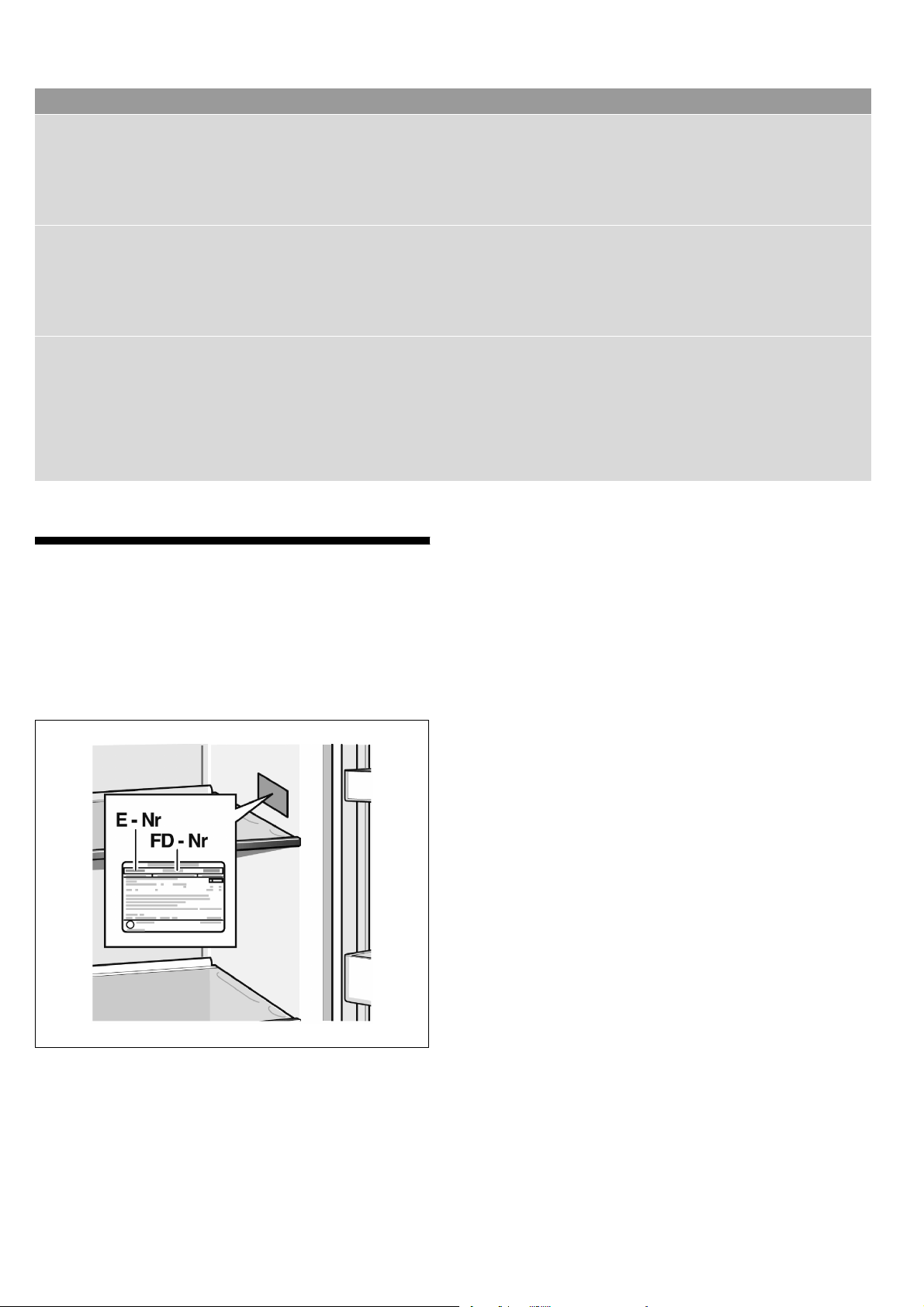
Please provide Customer service with the appliance
product number (E-Nr.) and production number
(FD-Nr.).
These specifications can be found on the rating plate.
To prevent unnecessary call-outs, please assist
Customer service by quoting the product and produc
tion numbers. This will save you additional costs.
Repair order and advice on faults
Contact information for all countries can be found on
the enclosed Customer service list.
GB 0344 892 8989 Calls charged at local or mobile
rate.
IE 01450 2655 0.03 € per minute at peak.
Off peak 0.0088 € per minute.
8001199210
(0006)
en