Operating instructions
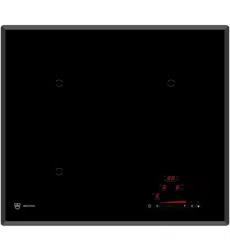
Induction MaxiFlex with 2 zones
Glass ceramic hob

Thank you for choosing to buy one of our products. Your appliance is made to
high standards and is easy to use. Nevertheless, please take the time to read
these operating instructions in order to familiarise yourself with the appliance
and get the best use out of it.
Please follow the safety precautions.
Modifications
Text, diagrams and data correspond to the technical standard of the appliance
at the time these operating instructions went to press. The right to make tech-
nical modifications for the purpose of the further development of the appliance
is reserved.
Validity
The product family (model number) corresponds to the first alphanumerics on
the identification plate. These operating instructions apply to:
Type Product family
GK26TIMS/F 84A, 31011
GK26TIMS.2F 31001
Variations depending on the model are noted in the text.
© V-ZUG Ltd, CH-6301 Zug, 2016
2

Contents
1 Safety precautions 5
1.1
Symbols used .............................................................................................5
1.2
General safety precautions ......................................................................6
1.3
Appliance-specific safety precautions....................................................7
1.4
Instructions for use ....................................................................................8
2 Disposal 10
3 Using for the first time 11
4 Your appliance 12
4.1
Appliance overview................................................................................. 12
4.2
Operating and display elements .......................................................... 13
4.3
How induction hobs function ................................................................ 14
4.4
Flexible cooking....................................................................................... 14
4.5
Pan detection ........................................................................................... 15
4.6
Cookware.................................................................................................. 16
5 Operating the appliance 17
5.1
Switching the appliance on and off ..................................................... 17
5.2
Selecting a cooking zone ...................................................................... 17
5.3
Overview of power levels....................................................................... 18
5.4
Switching a cooking zone off................................................................ 19
5.5
Residual heat indicator .......................................................................... 19
5.6
Keep warm setting .................................................................................. 19
5.7
Melting function ....................................................................................... 19
5.8
Simmer function....................................................................................... 20
5.9
PowerPlus ................................................................................................. 20
5.10
Bridging function ..................................................................................... 22
5.11
Automatic boost ...................................................................................... 23
5.12
Operating time ......................................................................................... 24
5.13
Timer.......................................................................................................... 26
5.14
Childproof lock ........................................................................................ 27
5.15
Restore function ...................................................................................... 28
5.16
Pause cooking ......................................................................................... 28
5.17
Wipe protection........................................................................................ 29
6 User settings 30
6.1
Changing user settings .......................................................................... 31
3

6.2
Cancelling user settings......................................................................... 31
7 Care and maintenance 32
8 Trouble-shooting 33
9 Technical data 36
9.1
Product fiche ............................................................................................ 36
10 Index 37
11 Service & Support 39
4
1 Safety precautions
1.1 Symbols used
Denotes important safety precautions.
Failure to observe said precautions can result in injury or in dam-
age to the appliance or fittings!
Information and precautions that should be observed.
Information on disposal
Information about the operating instructions
▸ Indicates step-by-step instructions.
– Describes how the appliance reacts to the steps taken.
▪ Indicates a list.
5

1 Safety precautions
1.2 General safety precautions
▪ Read the operating instructions before using the appliance for
the first time!
▪ This appliance can be used by children aged 8 and above
and by persons with reduced physical, sensory or mental cap-
abilities, or lack of experience and/or knowledge, provided
they are supervised or have been instructed on the safe use
of the appliance and have understood the hazards involved.
Children shall not play with the appliance. Cleaning and user
maintenance shall not be undertaken by children without su-
pervision.
▪ If an appliance is not equipped with a mains cable and a plug
or other means for disconnecting from the mains with a con-
tact opening on each pole complying with the conditions of
overvoltage category III for full isolation, an isolating device
must be incorporated into the permanently installed electrical
installation in accordance with the installation regulations.
▪ If the mains cable of this appliance is damaged, it must be re-
placed by the manufacturer or its Customer Services or a sim-
ilarly qualified person in order to avoid hazard.
6

1 Safety precautions
1.3 Appliance-specific safety precautions
▪ WARNING: If the surface is cracked or there is damage to the
material thickness, the appliance must be switched off and
disconnected from the electricity supply in order to avoid a
possible electric shock.
▪ WARNING: During use, the appliance and its exposed parts
become hot. Please be careful to avoid the exposed parts of
the heating elements.
▪ Never use a steam cleaner.
▪ Objects made of metal, e.g. knives, forks, spoons, covers or
aluminium foil, should not be put on the hob as they can be-
come hot.
▪ WARNING: Leaving fat or oil unattended on the hob can be
dangerous and can lead to fires. NEVER try to extinguish a
fire with water. Instead, switch the appliance off and then care-
fully cover the flames with an object such as a cover or a fire
blanket.
▪ WARNING: Never leave objects on the hob as they pose a fire
hazard.
▪ The appliance must not be operated with an external time
switch or a separate remote control system.
7

1 Safety precautions
1.4 Instructions for use
Before using for the first time
▪ The appliance must be installed and connected to the electricity supply in
accordance with the separate installation instructions. Have a qualified fitter/
electrician carry out the necessary work.
Correct use
▪ The appliance is designed for use in the home for preparing food. No liabil-
ity is assumed for any damage caused by improper use or incorrect hand-
ling.
▪ Any repairs, modifications or manipulations to the appliance, especially any
electrically live parts, may only be carried out by the manufacturer, its Cus-
tomer Services or a similarly qualified person. Repairs if carried out incor-
rectly may cause serious injury, damage to the appliance and fittings, as
well as affect the functioning of the appliance. If the appliance is not work-
ing properly or in case of a repair order, follow the instructions given in the
repair service section. Please contact Customer Services if necessary.
▪ Use original spare parts only.
▪ Retain these operating instructions for future reference. If you sell the appli-
ance or pass it on to a third party, include these operating instructions as
well as the installation instructions.
▪ The appliance corresponds to recognised technology standards and the rel-
evant safety regulations. Proper use of the appliance is, however, essential
to avoid damage and accidents. Please therefore follow the precautions
given in these operating instructions.
▪ The heated surface will remain hot for some time after it is switched off and
will only cool down slowly to room temperature. Leave a sufficient amount of
time before you carry out work such as cleaning the appliance.
Caution: Risk of burns!
▪ Overheated fat and oil can easily catch fire. Never attempt to extinguish
burning oil or fat with water. Danger of explosion! Smother the flames with a
fire blanket. Keep doors and windows closed.
Caution: Risk of injury!
▪ Keep pets away from the device.
8

1 Safety precautions
Caution: Risk to life!
▪ Packaging materials, e.g. plastic film and polystyrene, can be dangerous for
children. Danger of suffocation! Keep packaging material away from chil-
dren.
How to avoid damaging the appliance
▪ In the case of thermal failure, switch the solid plate off and allow to cool
down completely. Do not put any dishes on it. Do not cool with cold water
under any circumstances.
▪ Do not climb onto the appliance.
▪ To avoid damaging the silicon grouting, do not put hot cookware on the
frame.
▪ Do not cut or prepare food on the surface or drop hard objects onto it. Do
not drag cookware across the surface.
▪ Make sure than no sugary foods or juices end up on the hot cooking zones.
This can damage the surface. If sugary foods or juices do end up on the
hot cooking zones, remove these immediately with a glass ceramic hob
scraper (while the hob is still hot).
▪ Do not leave the appliance unattended during operation.
▪ Pots with pure copper or aluminium bases should not be used for cooking
as they leave behind traces that can be difficult to clean. If the traces are
not removed immediately after cooking with a suitable cleaning agent, they
can be permanently burned on and therefore permanently ruin the visual ap-
pearance of the appliance.
▪ Sliding pots and cookware across the glass ceramic causes scratches. You
can largely avoid these by lifting pots and cookware when putting them into
place.
▪ The hob is an item for daily use: signs of usage such as scratches or visible
material abrasion from pots or cookware are normal. Intensive use leads to
more distinctive signs of usage. In such cases, the appliance continues to
function perfectly and a complaint is not justified. Safety is always guaran-
teed.
▪ There is no such thing as completely scratch-proof glass; scratches can
even develop on sapphire glass, which is used in watches. The glass
ceramic used is of the best quality available on the market.
9

2 Disposal
Packaging
▪ All packaging materials (cardboard, plastic film (PE) and polystyrene (EPS))
are marked and should, if possible, be collected for recycling and disposed
of in an environmentally friendly way.
Disconnection
▪ Disconnect the appliance from the mains. With a fixed appliance, this is to
be carried out by a qualified electrician!
Safety
▪ Disable the appliance to prevent accidents caused by improper use, espe-
cially through children playing.
▪ Pull the plug out of the mains socket or have the appliance disconnected
from the mains by an electrician. Then cut the mains cable off flush with the
appliance.
Disposal
▪ The old appliance should not be discarded as worthless rubbish. If dis-
posed of correctly, the raw materials can be recovered for recycling.
▪ The symbol on the identification plate warns that the appliance may not
be disposed of in normal household waste.
▪ The appliance must be disposed of in accordance with local regulations on
waste disposal. For more information on the handling, disposal and recyc-
ling of the product, please contact the local authorities, the local recycling
facilities for household waste or the retailer from whom you purchased the
appliance.
10
3 Using for the first time
The appliance must be installed and connected to the electricity
supply in accordance with the separate installation instructions.
Have a qualified fitter/electrician carry out the necessary work.
During the first few hours of use, a cooking zone can give off an un-
pleasant smell. This is normal for brand new appliances. Ensure that
the room is well ventilated.
Where is the identification plate?
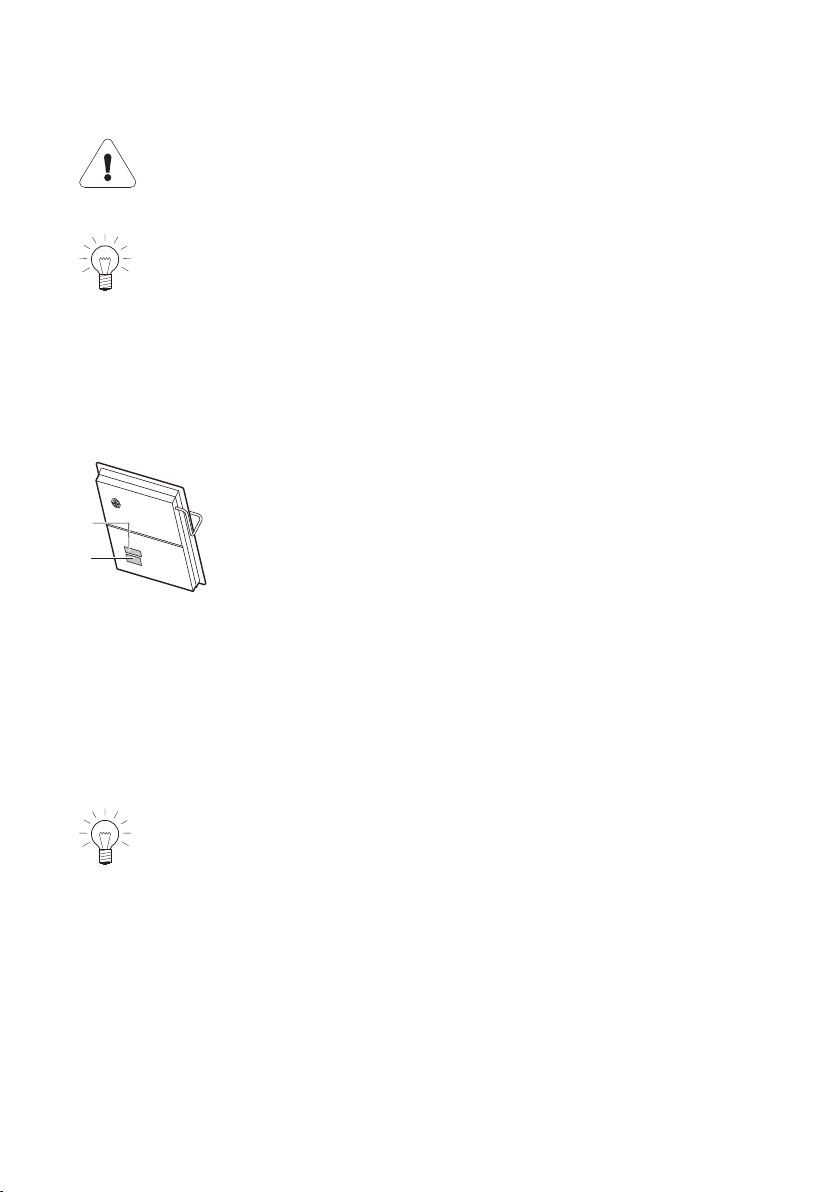
The identification plate and the connection plate are located on the underside
of the hob.
1
2
1
Identification plate with serial number (FN)
2
Connection plate
A second identification plate is supplied and should be affixed in the fitted unit
underneath the hob.
Note down the serial number (FN) of your appliance on the back page of
these operating instructions.
The serial number is required for identifying the appliance. Only then
can customer services guarantee a faultless service.
11
4 Your appliance
4.1 Appliance overview
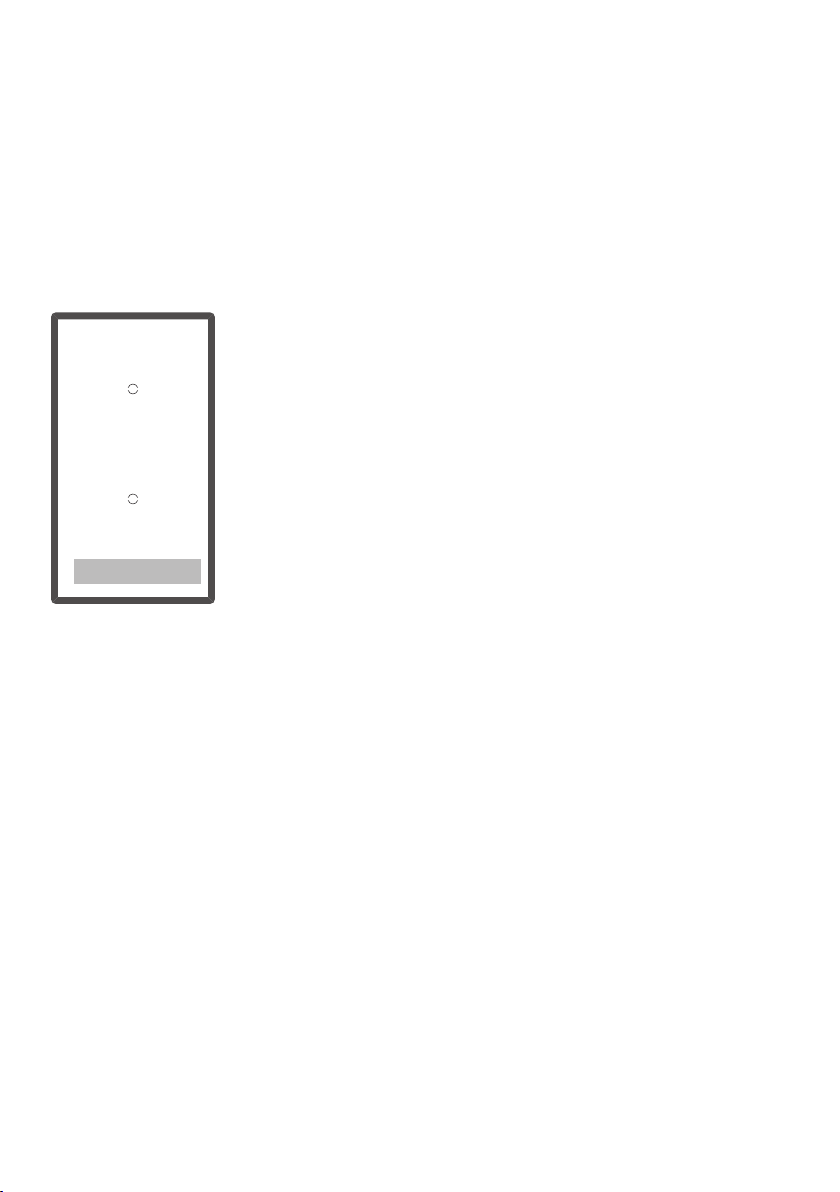
GK26TIMS, GK26TIMSF, GK26TIMS.2F
▪ 2 adjustable cooking zones
12
4 Your appliance
4.2 Operating and display elements
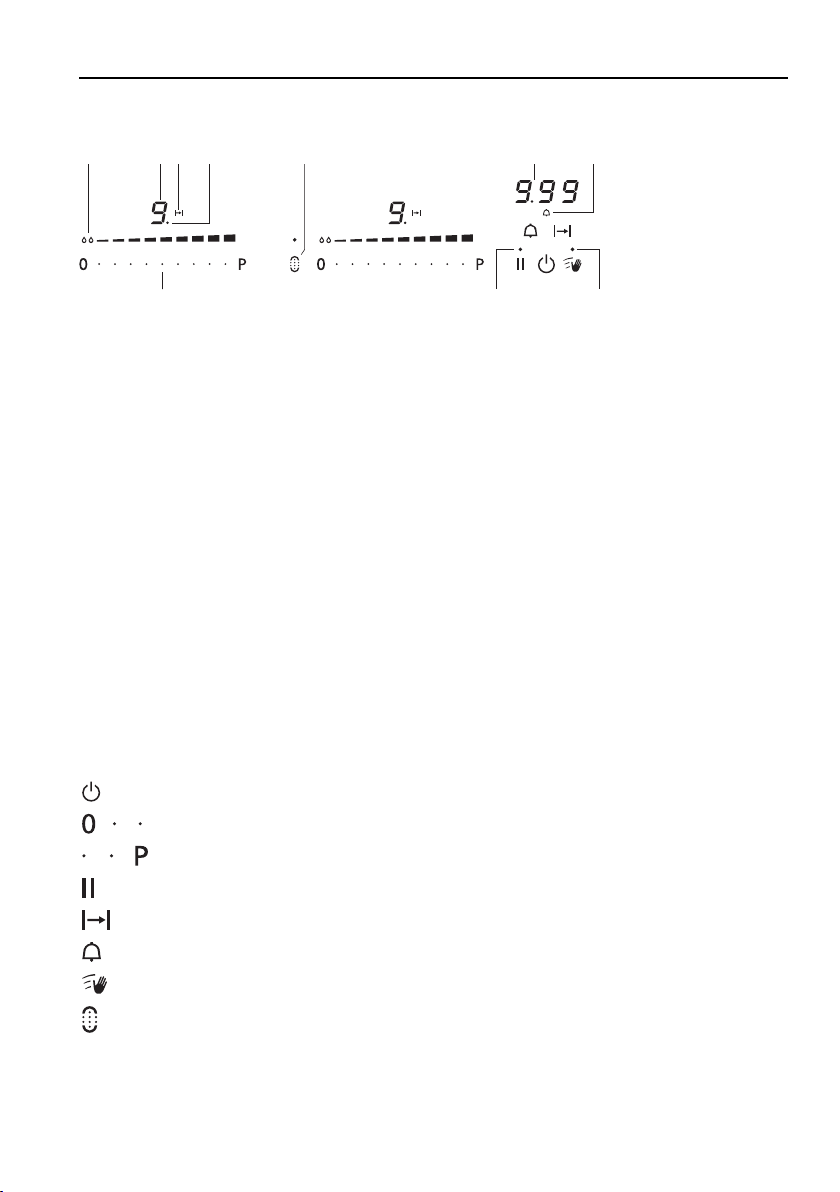
10 8
1 2 3
4
5
9
6 7
Displays
1
Melting function activated
2
Cooking zone power level
3
Operating time activated
4
Cooking zone indicator lights for the operating time
5
Bridging function activated
6
Operating time / timer
7
Timer activated
8
Wipe protection activated
9
Pause activated / possibility for restoring saved settings
10
Corresponding cooking zone for slider
Buttons
Appliance ON/OFF
Slider (for setting the power levels)
PowerPlus
Pause cooking ON/OFF and restore function
Operating time
Timer
Wipe protection ON/OFF
Bridging switch
13

4 Your appliance
4.3 How induction hobs function
Induction hobs work very differently from conventional hobs or hot plates. The
induction coils under the glass ceramic plate produce a rapidly changing mag-
netic field which directly heats up the magnetic base of the cookware.
The glass ceramic plate is only warmed by the hot cookware. Removing the
cookware from the cooking zone immediately interrupts the supply of energy.
Induction hobs are:
▪ quick reacting
▪ finely adjustable
▪ powerful
▪ energy-efficient
▪ safe.
Induction hobs can only be used with cookware with a complete/full
magnetic base.
4.4 Flexible cooking
For flexible cooking, there are no marked cooking zones.
Pots of different sizes can be placed on every zone. However, for pan detec-
tion, must be covered.
If both circles are covered by a large pot, both heating areas can be
operated together with the bridge function.
For even frying, the pan must be centred on .
14

4 Your appliance
4.5 Pan detection
Every cooking zone is equipped with pan detection. This recognises cookware
with a magnetisable base that is suitable for use with induction hobs.
▪ If the cookware is removed during operation or unsuitable cookware is
used,
– the selected power level flashes alternately with .
▪ If there is no cookware placed on the cooking zone during the pan detec-
tion time of 10minutes:
– The cooking zone switches off automatically.
– The display changes from to .
– The appliance switches off after 10seconds if no other cooking zone is
switched on.
15
4 Your appliance
4.6 Cookware
Suitable cookware
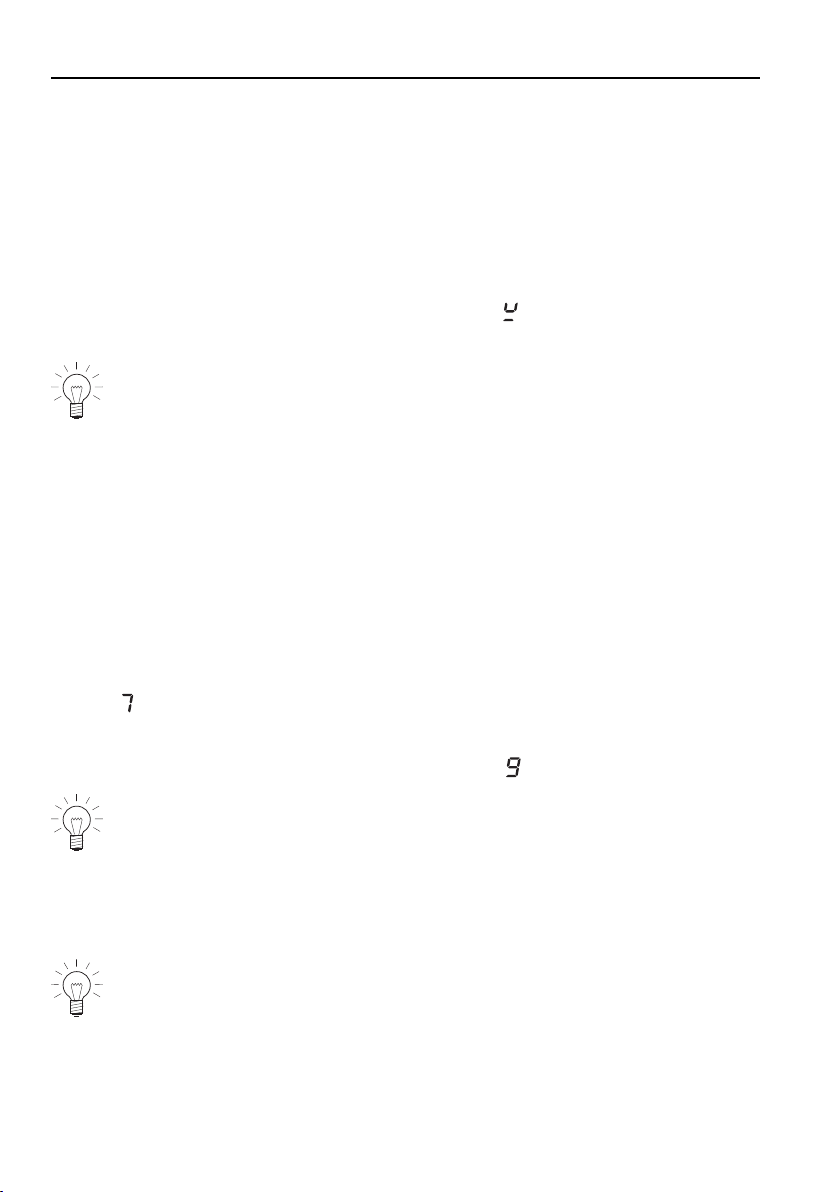
Only cookware with a full magnetic base is suitable for use with the induction
hob.
This can be checked in the follow ways:
▪ A magnet sticks anywhere on the base of the cookware.
▪ On the hob, the power level set illuminates and does not alternate with
the power level.
Do not heat any unsuitable cookware using aids such as metal rings
and the like. This can damage the hob.
Energy-efficient cooking
For maximum energy efficiency and even heat distribution note the following:
▪ The base of the cookware must be clean, dry and smooth.
▪ Centre the cookware in the middle of the cooking zone.
▪ Use a well-fitting lid.
▪ Match the diameter of the cookware to the quantity of food to be cooked.
Coated cookware
▪ Coated cookware when empty may never be heated at a higher power level
than .
– The coating may otherwise become overheated and damaged.
▪ For frying, do not use a higher power level than .
Never use PowerPlus with coated frying pans.
Noise during cooking
Cookware can make noise during cooking. This does not indicate any mal-
function, nor does it affect the functioning of the appliance in any way.
Noise depends on the cookware used. If the noise causes consider-
able disturbance, it can help to change the cookware.
16

5 Operating the appliance
The individual cooking zones are all operated in the same way. When the ap-
pliance is switched off, all the displays are dark (stand-by mode), except for
the residual heat indicator should any cooking zone still be hot.
5.1 Switching the appliance on and off
All the appliances are operated in the same way.
▸ To switch the appliance on: Depress the button for 1second.
– If no other entry is made, the appliance switches off again after about
10seconds for safety reasons.
▸ To switch the appliance off: Touch the button.
5.2 Selecting a cooking zone
▸ Touch the slider of the required cooking zone or swipe it to set the
power level.
17
5 Operating the appliance
5.3 Overview of power levels
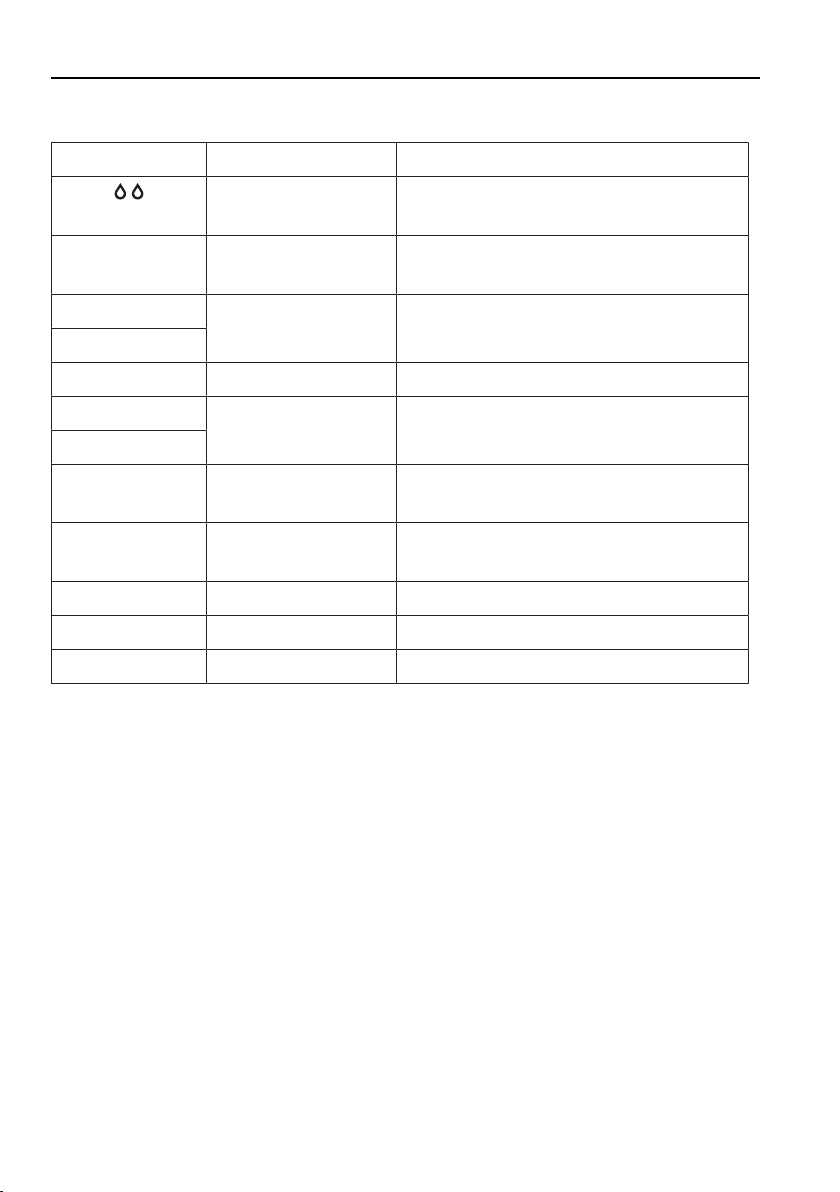
Power level Cooking method Use
Melting Melting butter, chocolate or honey at
around 40 °C
L
Keeping warm Sauces, keeps food ready for serving
at around 65 °C
1
Melting, gentle
warming
Butter, chocolate, gelatine, sauces
2
3
Swelling Rice
4
Continued cooking,
reducing, stewing
Vegetables, potatoes, sauces, fruit,
fish
5
6
Continued cooking,
braising
Pasta, soup, braised meat
7
Gentle frying Rösti (hash browns), omelettes,
breaded fried foods, sausages
8
Frying, deep frying Meat, chips
9
Flash frying Steak
P
Fast heating Boiling water
18

5 Operating the appliance
5.4 Switching a cooking zone off
▸ Touch power level «0» on the slider.
– If no other entry is made and the other cooking zones are switched off,
the appliance switches off after 10seconds.
5.5 Residual heat indicator
After a cooking zone is switched off, remains illuminated as long as there is
a risk of burns.
5.6 Keep warm setting
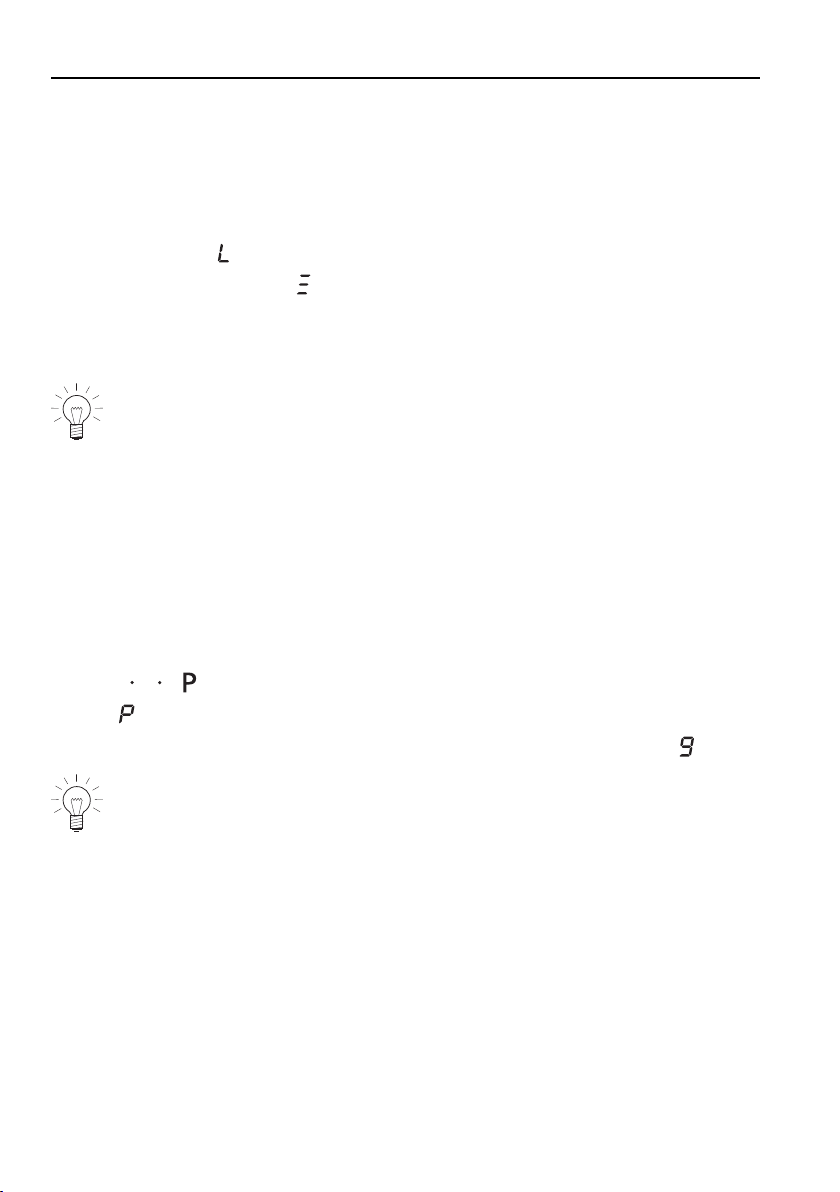
The keep warm setting keeps ready-cooked foods warm at approx. 65°C. It
can be found between power levels and .
5.7 Melting function
With the melting function, butter, chocolate or honey, for instance, can be
gently melted at 40°C.
Switching the melting function on
▸ Hold power level on the slider depressed for 2seconds.
– The symbol illuminates.
– The power level goes out.
Switching the melting function off
▸ Use the slider to set any power level.
19
5 Operating the appliance
5.8 Simmer function
With the simmer function, sausages, dumplings and stuffed pasta, for instance,
can be cooked below boiling point at about 94°C.
Switching the simmer function on
▸ Press the level on the slider for 4seconds.
– Three cross pieces are illuminated in the power level display.
Switching the simmer function off
▸ Set any power level using the slider.
In locations higher than 1500m above sea level, we recommend us-
ing the simmer function without the pan lid.
5.9 PowerPlus
All the cooking zones are equipped with the PowerPlus booster.
When PowerPlus is switched on, the cooking zone selected works at extra
high power for 10minutes. PowerPlus can be used, for instance, to heat a
large quantity of water quickly.
Switching PowerPlus on
▸ Press on the slider.
– illuminates in the display.
– After 10minutes it automatically switches back to power level .
Removing the cookware interrupts PowerPlus. PowerPlus is resumed
as soon as the cookware is returned to the cooking zone.
Ending PowerPlus off before time
▸ Press the desired power level on the slider.
20
5 Operating the appliance
Power management
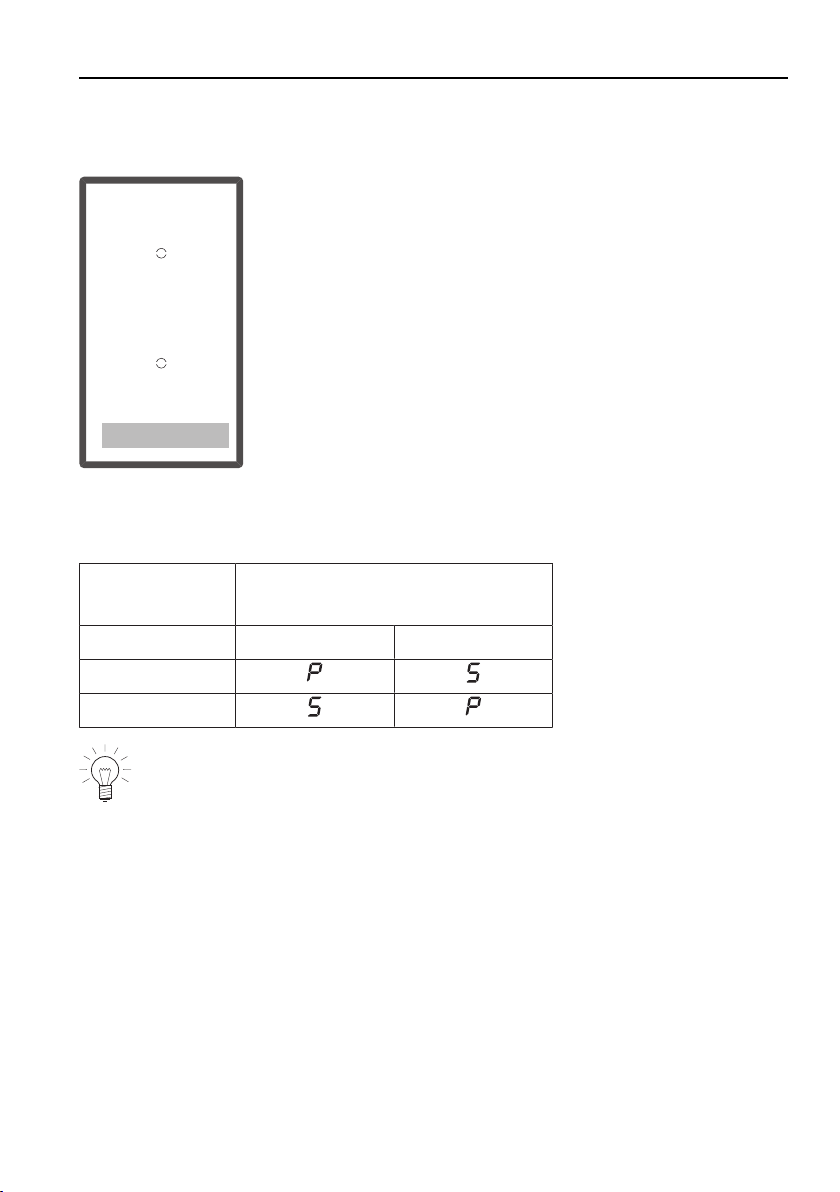
GK26TIMS, GK26TIMSF, GK26TIMS.2F
1
2
PowerPlus cannot be used with both cooking zones at the same time. If
PowerPlus is activated with both cooking zones, then the power output is re-
duced for the cooking zone that was first selected.
PowerPlus with
cooking zone
Maximum available power level
with cooking zone
1 2
1
2
If the power level is increased above these levels, PowerPlus switches
off.
21

5 Operating the appliance
5.10 Bridging function
The bridging function allows two individual cooking zones lying one behind the
other to be switched on together and to be adjusted together.
Switching the bridging function on
▸ Press the button for the required side.
– The indicator light for the button illuminates.
If, when the bridging function is switched on, a cooking zone is
already running, the power level and operating time of this cooking
zone will be taken over for both zones. If both cooking zones are
already running, the operating times are cleared and flashes in the
power level displays.
Switching the bridging function off
▸ Press the button.
– Both cooking zones revert to the previous settings.
– Each cooking zone can be adjusted individually again.
22
5 Operating the appliance
5.11 Automatic boost
Do not leave the hob unattended when using the automatic boost.
Risk of boiling over, burning on and igniting!
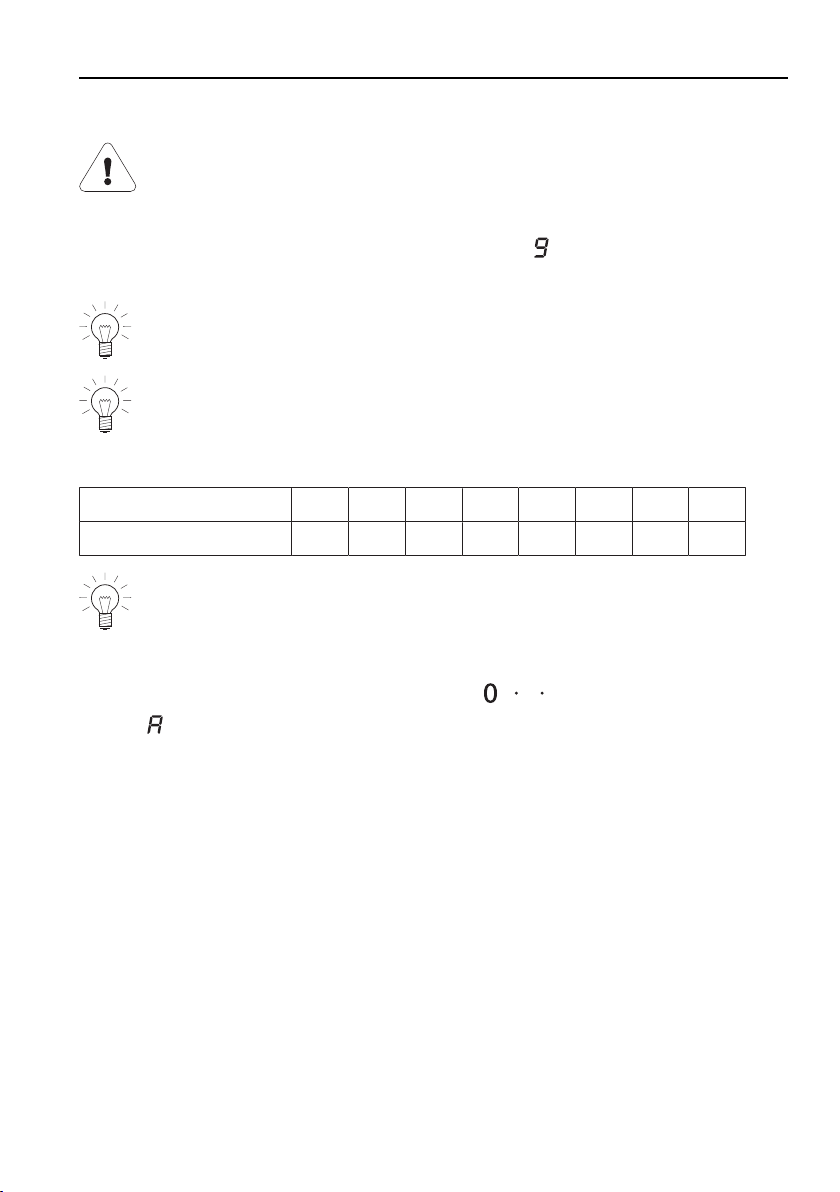
All the cooking zones are equipped with a selectable automatic boost. With
this function, a cooking zone works at power level for a certain length of
time (see table). Then it automatically switches back to the power level set.
The automatic boost function must be activated anew each time a cook-
ing zone is switched on.
Automatic boost is switched off when the appliance is delivered from
the factory. If required the user setting P3 must be changed from 0 to
1, see the «User settings» section.
Power level
1 2 3 4 5 6 7 8
Boost in mins.:secs.
0:40 1:15 2:00 3.00 4:15 7:15 2:00 3:15
If during the automatic boost a higher power level is selected, the dura-
tion will change automatically.
Switching the automatic boost on
▸ Hold the desired power level on the slider depressed for 3seconds.
– and the power level illuminate alternately in the display when the
automatic boost is activated.
– When the automatic boost is over, the heat output is reduced again to
the power level selected.
Switching the automatic boost off before time
▸ Use the slider to set a lower power level.
23
5 Operating the appliance
5.12 Operating time
Do not leave the hob unattended during use. Risk of boiling over,
burning on and igniting!
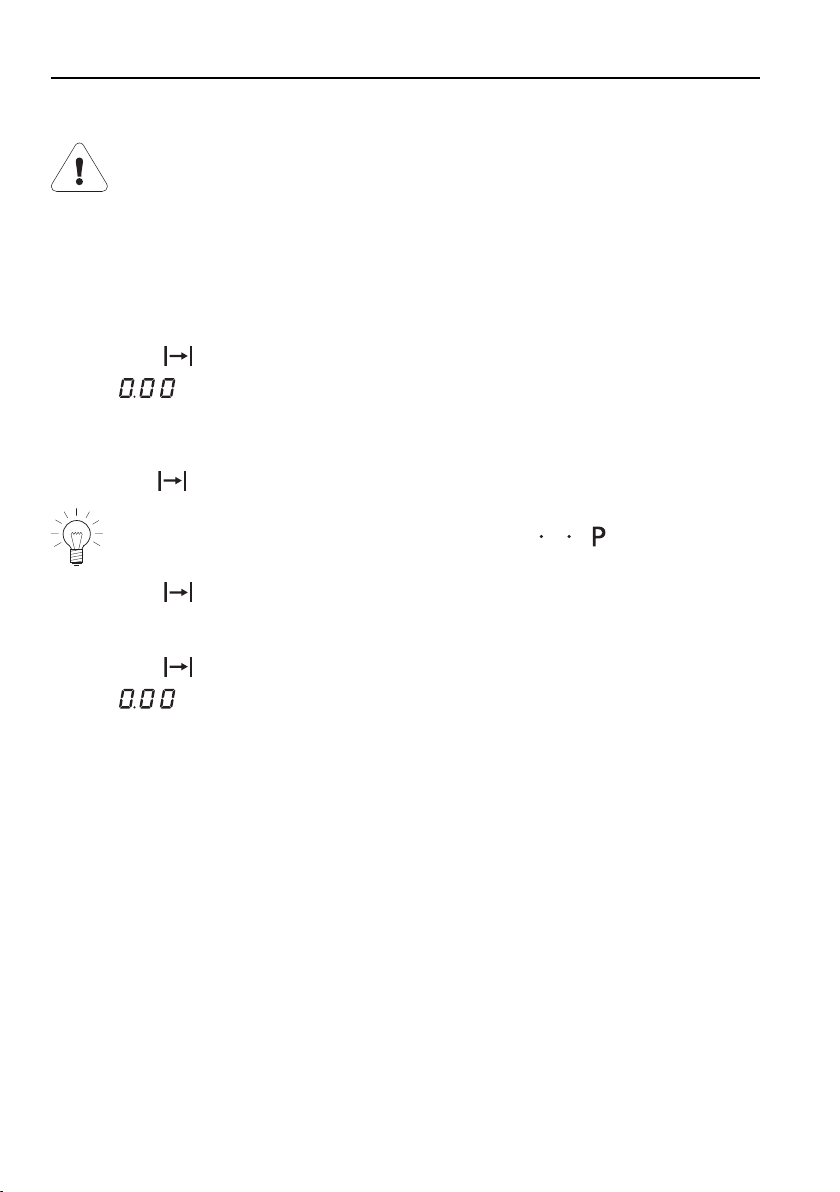
With the operating time function, a Cooking zone switches off automatically
after a set time 1 min.–9 h 59 min..
Setting the operating time
▸ Switch the required cooking zone on.
▸ Press the button.
– flashes in the display.
▸ Press the slider for the required cooking zone and slide your finger along it
to set the operating time.
– The symbol illuminates.
To change the operating time, press and hold .
▸ Press the button to start the operating time.
Changing the operating time
▸ Press the button.
– flashes in the display.
▸ Press the slider for the desired cooking zone.
– The remaining operating time for the cooking zone selected is dis-
played.
– The indicator light for the cooking zone illuminates.
▸ Use the slider to change the operating time.
24
5 Operating the appliance
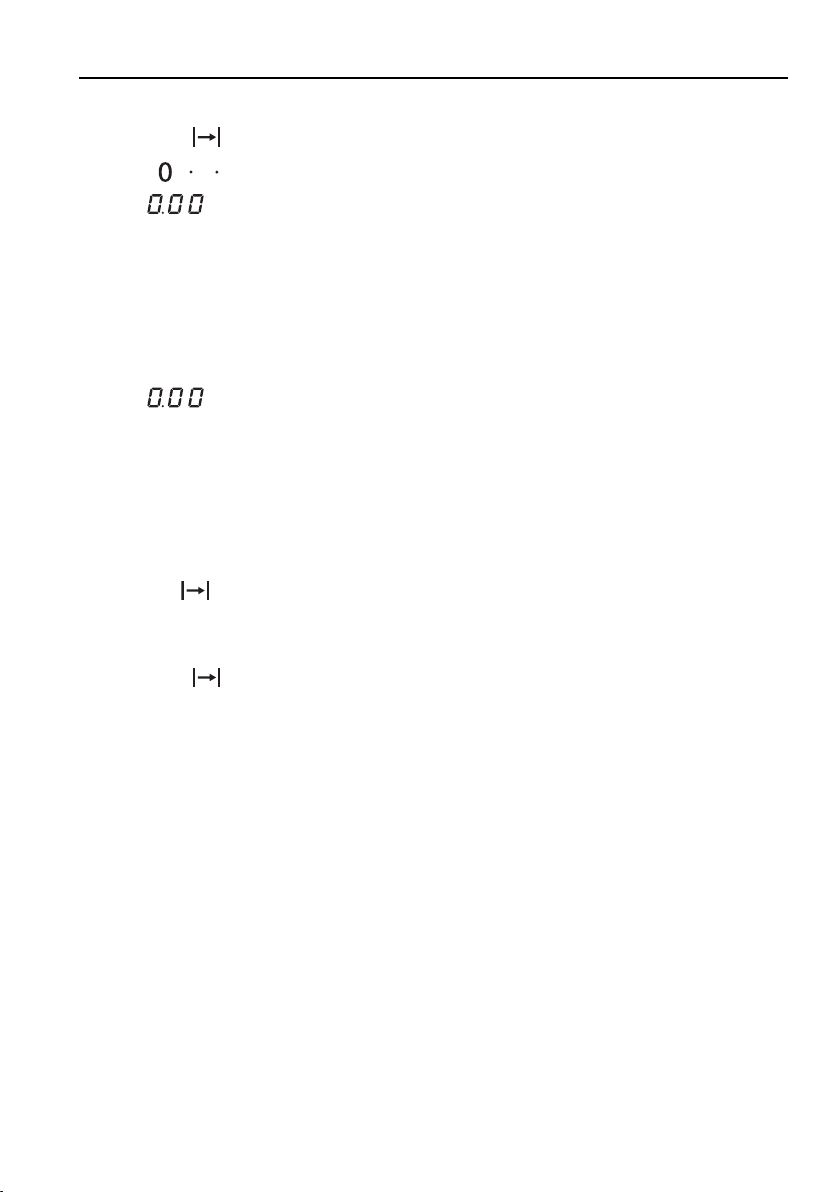
Switching the operating time function off before time
▸ Press the button.
▸ Press on the slider for the required cooking zone.
– illuminates in the display for the operating time / timer.
– The cooking zone continues to run.
End of the operating time
When the operating time is up
– the relevant cooking zone switches off
– an acoustic signal is emitted
– and the power level flash.
▸ Press any button to switch the acoustic signal and the displays off.
Several operating times
If operating times are set for several cooking zones,
– the shortest operating time illuminates in the display
– the corresponding cooking zone indicator light illuminates
– the symbol illuminates with the set operating time for each cooking
zone.
To display another operating time:
▸ Press the button.
▸ Touch the slider of the required cooking zone.
– The operating time is displayed and can be changed.
25
5 Operating the appliance
5.13 Timer
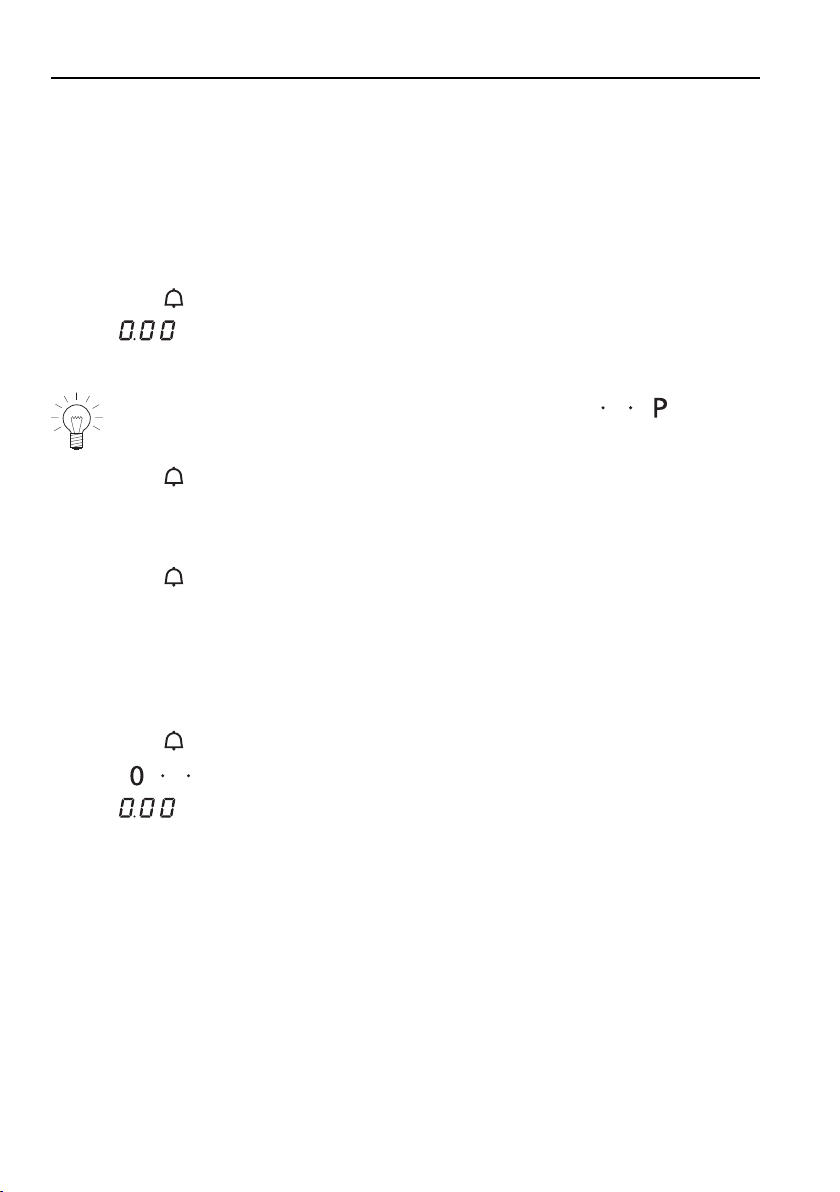
The timer functions like an egg timer (1 min.–1 h 59 min.).
It can be used at any time and independently of all other functions.
Setting the timer
▸ Switching the appliance on
▸ Press the button.
– flashes in the display.
▸ Use any slider to set the required duration of the timer.
To increase the duration of the timer, press and hold .If the
hob is switched off, a timer that has been activated continues to run.
▸ Press the button to start the timer.
Changing the timer
If no cooking zone is in use, first switch the appliance on.
▸ Press the button.
– The time left on the timer flashes.
▸ Use any slider to change the duration of the timer.
Switching the timer off before time
If no cooking zone is in use, first switch the appliance on.
▸ Press the button.
▸ Press on any slider.
– flashes in the display.
26

5 Operating the appliance
5.14 Childproof lock
The childproof lock is to prevent the appliance from being accidentally
switched on.
Switching the childproof lock on
▸ Switch the appliance on.
Ensure all cooking zones are switched off.
▸ Touch the and buttons at the same time.
– An acoustic signal is emitted.
▸ Touch the button again.
– An acoustic signal is emitted.
– The childproof lock is now switched on.
– illuminates in all the power level displays for 10seconds.
Operating the appliance with the childproof lock activated
▸ Switch the appliance on.
▸ Touch the and buttons at the same time.
– An acoustic signal is emitted.
– The childproof lock is overridden. The appliance can now be used as
normal.
The childproof lock is automatically reactivated 1minute after switching off the
hob.
27

5 Operating the appliance
Switching the childproof lock off
▸ Switch on the appliance.
No cooking zone must be in operation.
▸ Touch the and buttons at the same time.
– An acoustic signal is emitted.
▸ Press the button again.
– A double acoustic signal is emitted.
– On all power level displays, flashes for 10seconds.
– The childproof lock is now switched off.
5.15 Restore function
If the appliance was switched off accidentally with the button, the settings
can be restored within 6seconds.
▸ Switch on the appliance.
– The illuminated point for the button flashes.
▸ Press the button.
5.16 Pause cooking
With this function, the power level of all cooking zones that are switched on
can be temporarily reduced to for up to 10minutes.
Thereafter, the appliance can continue to be operated using the previous set-
tings.
▸ Press the button.
– The indicator light for the button illuminates.
– The power level of the cooking zone switched on changes to .
– The operating time is interrupted.
– The timer continues to run.
– All buttons except , and are inactive.
If the pause cooking function is not turned off within 10minutes, the
appliance switches off completely.
▸ Press the button again to resume cooking.
– The cooking zones resume operation using the previous settings.
28
5 Operating the appliance
5.17 Wipe protection
This function prevents the power level from being changed accidentally, for in-
stance when wiping the control panel with a cloth.
▸ Press the button.
– The indicator light for the button illuminates.
▸ Wipe protection is switched off by pressing the button again or automat-
ically after 30seconds.
Press the button to switch the appliance off at any time.
29

6 User settings
The following user settings can be individually set and saved:
User setting Setting value Factory set-
ting
P0
Loudness of
acoustic signal
0 Low 2
1 Medium
2 High
P1
Acoustic signal at
end of operating
time / timer
0 No acoustic signal 2
1 Automatically off after
10seconds
2 Automatically off after
1minute
P2
Operating time
PowerPlus
0 Ends after 5minutes 1
1 Ends after 10minutes
2 Ends after 15minutes
P3
Automatic boost 0 Automatic boost off 0
1 Automatic boost on
P4
Default time
operating
time / timer
0 Default time 0 minutes 3
1–9 Adjustable in steps from
10–90 minutes
P5*
Acoustic signal
when button is
pressed
0 Acoustic signal off 1
1 Acoustic signal on
P6
Restore factory
settings
0 Restoring factory settings:
Hold the button
depressed for 2seconds.
* When the operating time or timer is up or when error messages appear, an
acoustic signal is emitted at the level of loudness set in P0.
30
6 User settings
6.1 Changing user settings
▸ When the hob is switched off, hold down the and buttons at the same
time for 3seconds.
– An acoustic signal is emitted.
▸ Press both sliders at the same time.
– An acoustic signal is emitted.
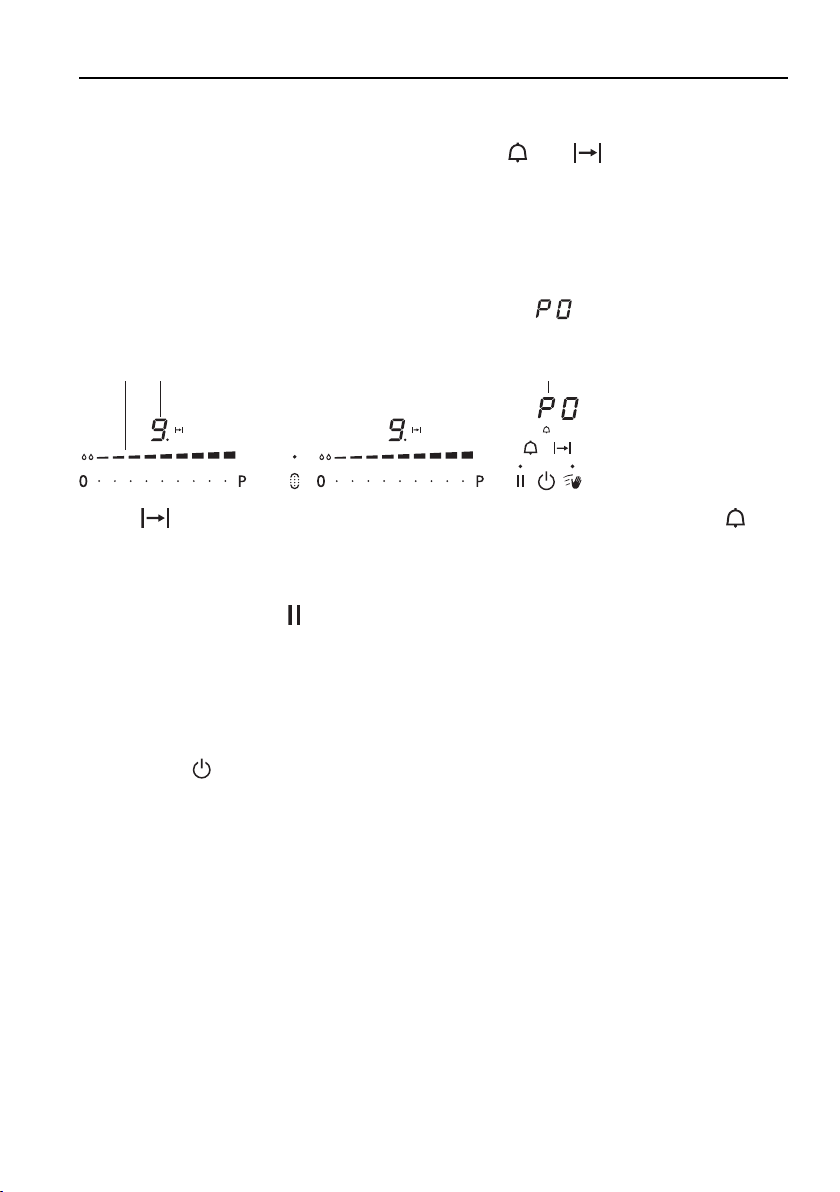
– The user setting is shown in display 3, e.g. .
– The current default value of the user setting is shown in display 2.
1 2 3
▸ The button is used to select the next highest user setting and the but-
ton to select the next lowest.
▸ Press or swipe slider 1 to select a higher or lower default value.
▸ Saving entries: Hold button down for 2 seconds.
– An acoustic signal is emitted.
– The "User settings" mode is ended.
6.2 Cancelling user settings
▸ Press the button.
– Any changes made to the default values are not saved.
– The «User settings» mode is ended.
31

7 Care and maintenance
Preferably, do not clean the appliance until it is cold.
Burns hazard!
Clean the hob after every use in order to prevent food residues from burning
on. Cleaning dried-on and burnt-on dirt requires more effort.
If the appliance is not cleaned correctly, the appearance and surface could be
damaged.
Do not clean the glass ceramic surface with scouring cleaning agents,
all purpose scouring pads, steel wool, etc. This can damage the sur-
face.
▸ For cleaning everyday dirt, just use a soft cloth or sponge with water and a
suitable cleaning agent. Please follow the manufacturer's advice with regard
to cleaning agents. We recommend using protective cleaning agents.
▸ Remove encrusted dirt, e.g. from milk that has boiled over, with a glass
ceramic hob scraper while the hob is still warm. Please follow the manufac-
turer's advice with regard to the scraper.
▸ Remove sugary foods, such as marmalade, which have boiled over with a
glass ceramic hob scraper while the hob is still warm. Otherwise, this could
damage the glass ceramic surface.
▸ Remove melted plastic with a glass ceramic hob scraper while the hob is
still warm. Otherwise, this could damage the glass ceramic surface.
▸ Remove limescale stains using a small amount of lime-dissolving solution,
e.g. vinegar or lemon juice, when the hob has cooled down. Then clean
again with a damp cloth.
32
8 Trouble-shooting
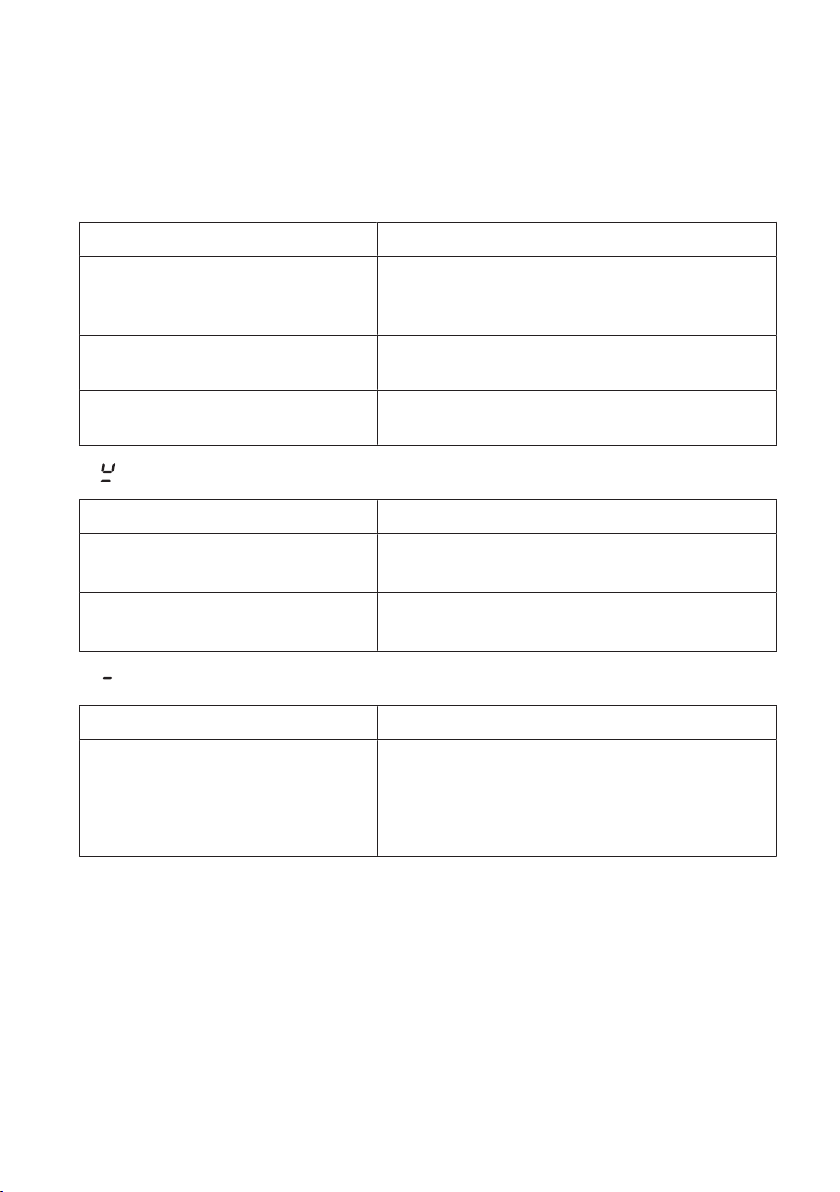
What to do if …
… the appliance is not working and the displays are not illuminated?
Possible cause Solution
▪ The fuse or circuit breaker for
electrical installations in the
home is defective.
▸ Change the fuse.
▸ Reset the circuit breaker.
▪ The fuse or circuit breaker
keeps blowing.
▸ Call Customer Services.
▪ An interruption in the power
supply.
▸ Check the power supply.
… flashes alternately with the power level in the display?
Possible cause Solution
▪ Cookware is not suitable for
use with induction hobs.
▸ Use suitable magnetic cookware. See
«Cookware» section.
▪ Cookware is too small for the
cooking zone selected.
▸ Ensure cookware corresponds to the
size of the cooking zone.
... illuminates in the displays?
Possible cause Solution
▪ The childproof lock is activ-
ated.
▸ For operating the appliance with the
childproof lock activated, see «Operating
the appliance» section.
▸ Switch the childproof lock off.
33
8 Trouble-shooting
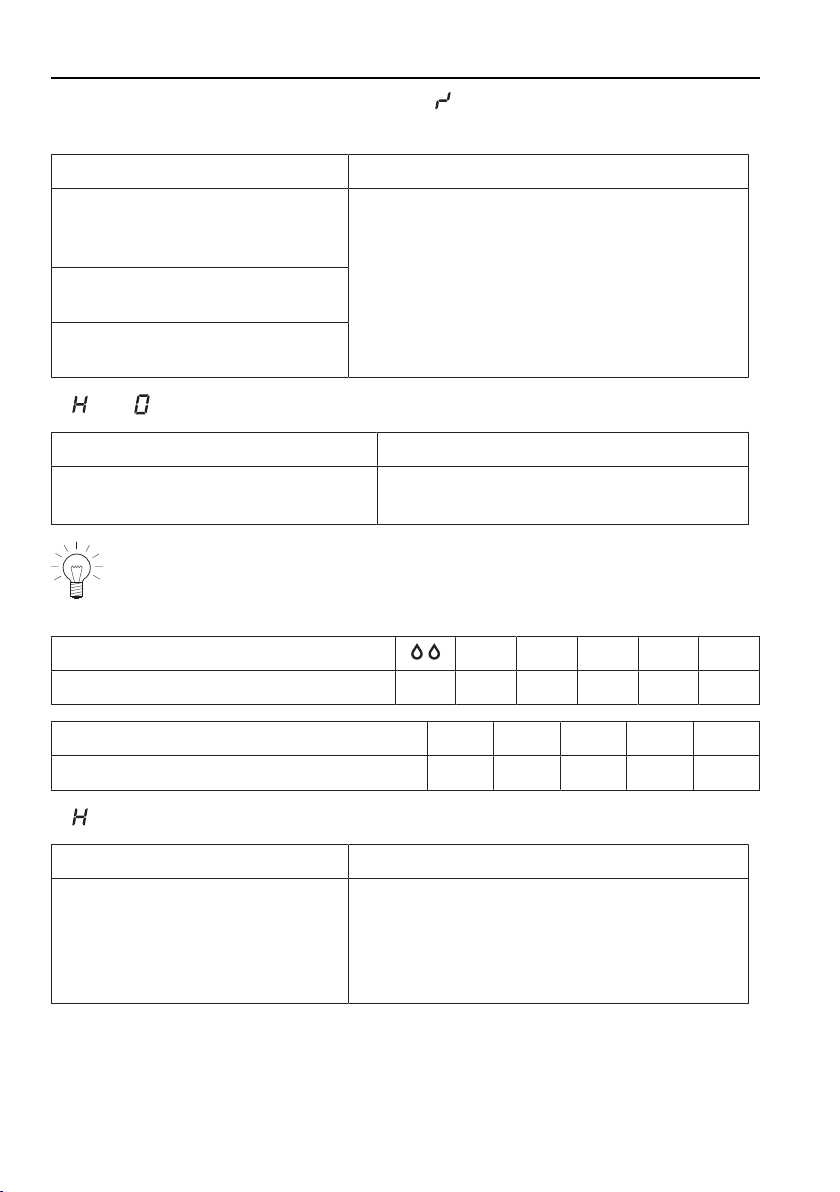
... A continuous acoustic signal is emitted, flashes in a display and the appli-
ance switches off?
Possible cause Solution
▪ A button or a slider was
touched for longer than
10seconds.
▸ Remove object or food that has boiled
over.
▸ The appliance can be used again as nor-
mal.
▪ Object (e.g. pan, dish) on the
control panel.
▪ Food boiled over onto the
control panel.
... and flash alternately in the display?
Possible cause Solution
▪ The automatic safety shut-off
was triggered.
▸ Switch the cooking zone back on
again if required.
If a cooking zone has been running for longer without any settings be-
ing changed, the appliance switches the cooking zone off automatic-
ally, after how much time depends on the power level set.
Power level
L 1 2 3 4
Safety shut-off after hrs.:mins.
2:00 2:00 8:30 6:30 5:30 4:30
Power level
5 6 7 8 9
Safety shut-off after hrs.:mins.
3:30 3:00 2:30 2:00 1:30
... flashes in the display?
Possible cause Solution
▪ The excess temperature pro-
tection of a cooking zone
was triggered.
▸ Allow the cooking zone to cool down.
▸ Continue cooking on a different cooking
zone.
▸ Check cookware.
34
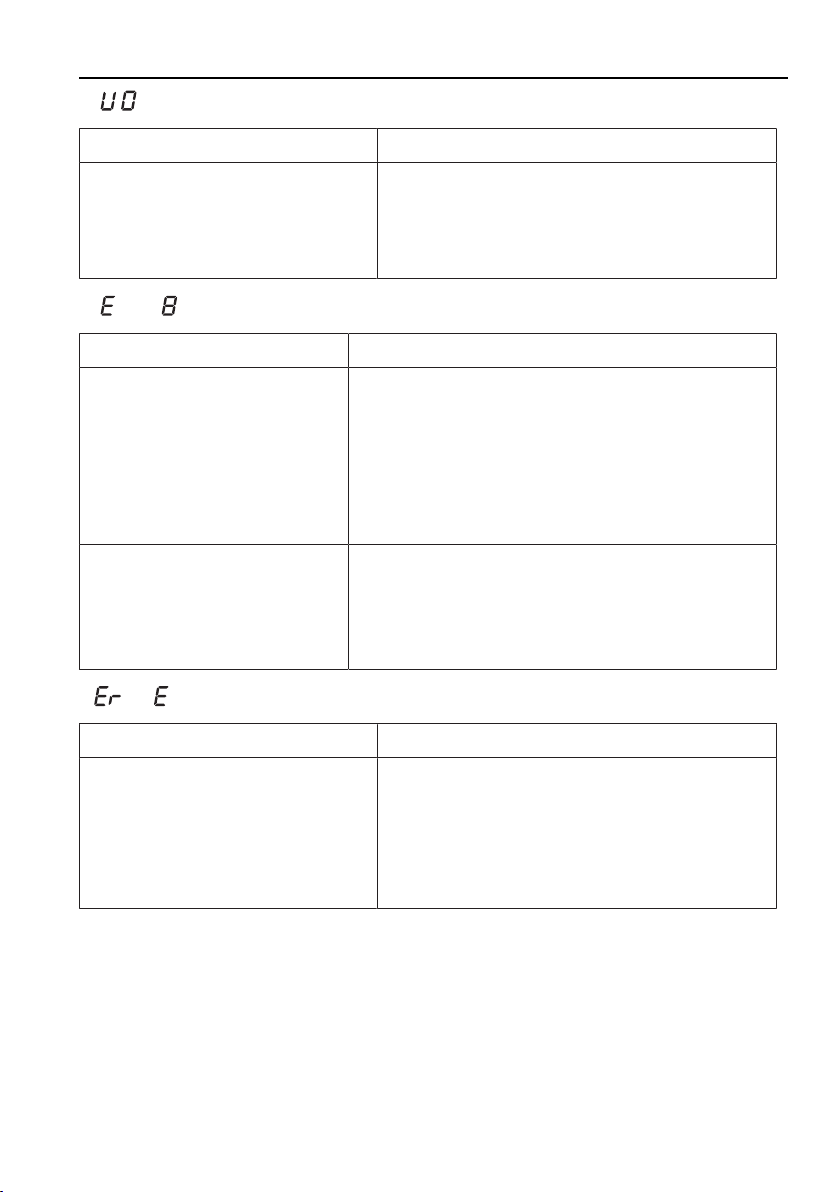
8 Trouble-shooting
... flashes in the display?
Possible cause Solution
▪ An interruption in the power
supply.
▸ Press any button to quit the error mes-
sage.
▸ The appliance can be used again as nor-
mal.
… and are illuminated in the display?
Possible cause Solution
▪ An object , e.g. paper, un-
derneath the hob is affect-
ing the air intake.
▸ Remove any objects in the drawer under-
neath the hob.
▸ Press any button to cancel the error mes-
sage.
▸ After 10 minutes the appliance can be used
again as normal.
▪ Ventilation is defective.
▸ Note down the error number.
▸ Note down the serial number (FN) of the ap-
pliance. See the identification plate for this.
▸ Call Customer Services.
… or and a number illuminate in the display?
Possible cause Solution
▪ Internal error occurred.
▸ Note down the error number.
▸ Note down the serial number (FN) of the
appliance. See the identification plate for
this.
▸ Call Customer Services.
35
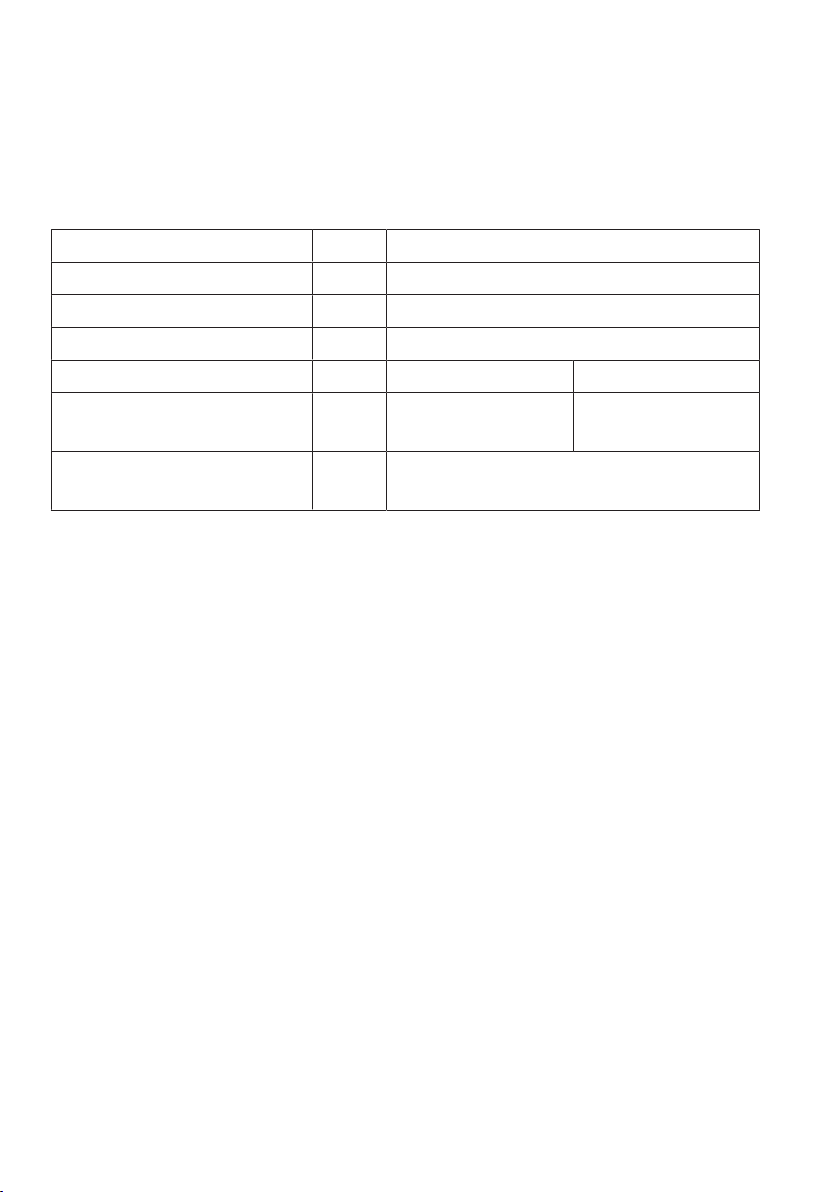
9 Technical data
9.1 Product fiche
In accordance with EU Regulation No. 66/2014
Model number GK 84A, 31011, 31001
Type designation GK GK26TIMS/F/.2F
Number of cooking zones 2
Heating technology Induction cooking zone
Cooking zone dimensions cm 18 × 20 18 × 20
Energy consumption per
cooking zone
Wh/kg 179.9 184.5
Energy consumption of
entire hob EC
Wh/kg 182.2
36

10 Index
A
Appliance
Switching on and off......................... 17
Appliance overview ................................. 12
Appliance-specific safety precautions
................................................................. 7
Automatic boost ....................................... 23
Switching off before time ................. 23
Switching on....................................... 23
B
Bridging function...................................... 22
Switching off....................................... 22
Switching on....................................... 22
C
Care and maintenance ........................... 32
Childproof lock ......................................... 27
Operating appliance with childproof
lock activated .............................. 27
Switching off....................................... 28
Switching on....................................... 27
Connection plate...................................... 11
Cooking zone ........................................... 17
Cookware .................................................. 16
Coated cookware .............................. 16
Energy-efficient cooking................... 16
Noise during cooking ....................... 16
Suitable cookware............................. 16
D
Disconnection........................................... 10
Disposal..................................................... 10
E
Extended warranty ................................... 39
I
Instructions for use ..................................... 8
M
Melting function........................................ 19
Switching off....................................... 19
Switching on....................................... 19
Model number ............................................. 2
O
Operating and display elements........... 13
Buttons ................................................ 13
Displays............................................... 13
Operating the appliance......................... 17
Operating time.......................................... 24
Changing ............................................ 24
End....................................................... 25
Setting ................................................. 24
Several operating times ................... 25
Switching off before time ................. 25
Overview of power levels ....................... 18
P
Packaging ................................................. 10
Pan detection............................................ 15
Pause cooking.......................................... 28
Power levels.............................................. 20
PowerPlus.................................................. 20
Ending before time............................ 20
Power management.......................... 21
Switching on....................................... 20
Product family.............................................. 2
Product fiche............................................. 36
Q
Quick instructions .................................... 40
R
Residual heat indicator........................... 19
Restore function ....................................... 28
S
Safety ......................................................... 10
Safety precautions
General...................................................6
Safety shut-off ........................................... 34
Serial number (FN) .................................. 11
Service & Support.................................... 39
Simmer function ....................................... 20
Switching off....................................... 20
37

Switching on....................................... 20
Symbols ........................................................ 5
T
Technical enquiries.................................. 39
Timer .......................................................... 26
Changing ............................................ 26
Setting ................................................. 26
Switching off before time ................. 26
Trouble-shooting ...................................... 33
Type............................................................... 2
U
User settings............................................. 30
Changing ............................................ 31
Switching off before time ................. 31
Using for the first time............................. 11
V
Validity........................................................... 2
W
Where is the identification plate?.......... 11
Wipe protection ........................................ 29
38

11 Service & Support
The «Troubleshooting» chapter provides valuable information for dealing with
minor operating faults. This saves you the time, effort and potential cost of having
to call out a service technician.
Information on the V-ZUG warranty can be found at www.vzug.com →Service →Warranty in-
formation. Please read this information carefully.
Please register your V-ZUG appliance online immediately at www.vzug.com→Service→War-
ranty registration. This will allow you to take advantage of the best possible support in the
event of an fault in the appliance during the warranty period. You will require the serial
number (FN) and appliance designation to complete the registration process. This informa-
tion can be found on the identification plate for your appliance.
My appliance information:
FN: ___________________ Appliance: _____________________
Always have this appliance information to hand when you contact V-ZUG. Thank you.
The identification plate and connection plate are located on the underside of the hob.
Requesting repairs
You can find the telephone number for your nearest V-ZUG service centre at
www.vzug.com→Service→Service hotline.
Technical enquiries, accessories, extended warranty
V-ZUG is happy to help with your general administrative and technical enquiries, orders for
accessories and spare parts, or information relating to advanced service agreements.
39

Quick instructions
Please first read the safety precautions in the operating instructions!
To switch appliance on
▸ Hold the button depressed for 1second.
To select cooking zone
▸ Press the slider for the desired cooking zone or slide your finger along it to set
the power level.
Alternatively
▸ Press to heat a large amount of water quickly.
To switch cooking zone off
▸ Press on the slider.
To switch appliance off
▸ Press the button.
V-ZUG Ltd
Industriestrasse 66, P.O. Box 59, CH-6301 Zug
[email protected], www.vzug.com
J84A352-R06