
SPECTRA PRO
User Manual
Multiple exposure
Camera parts
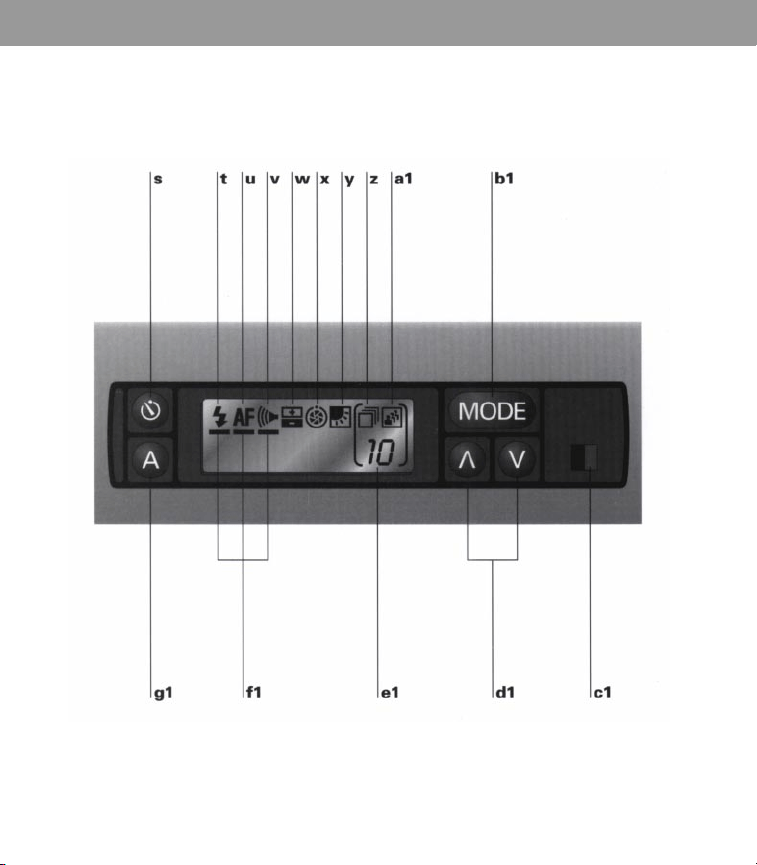
Control panel
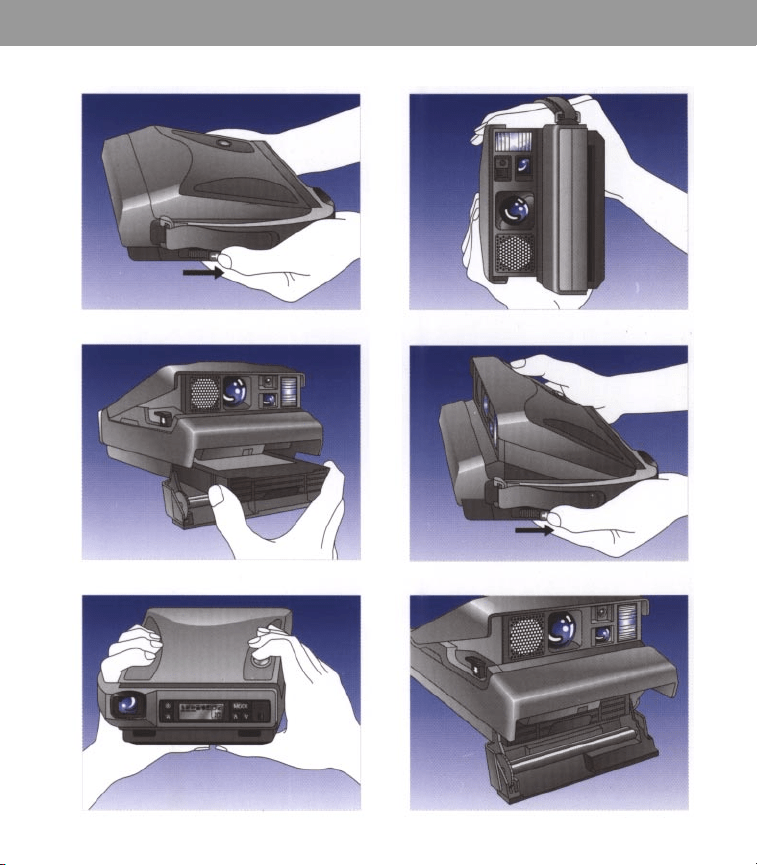
k1
l1
m1
h1
i1
j1
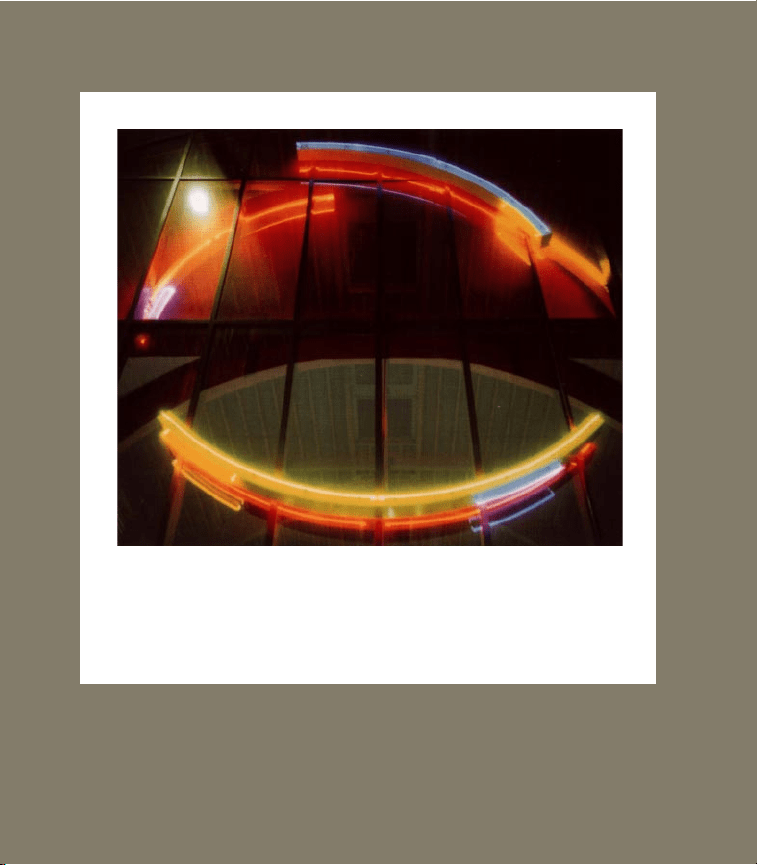
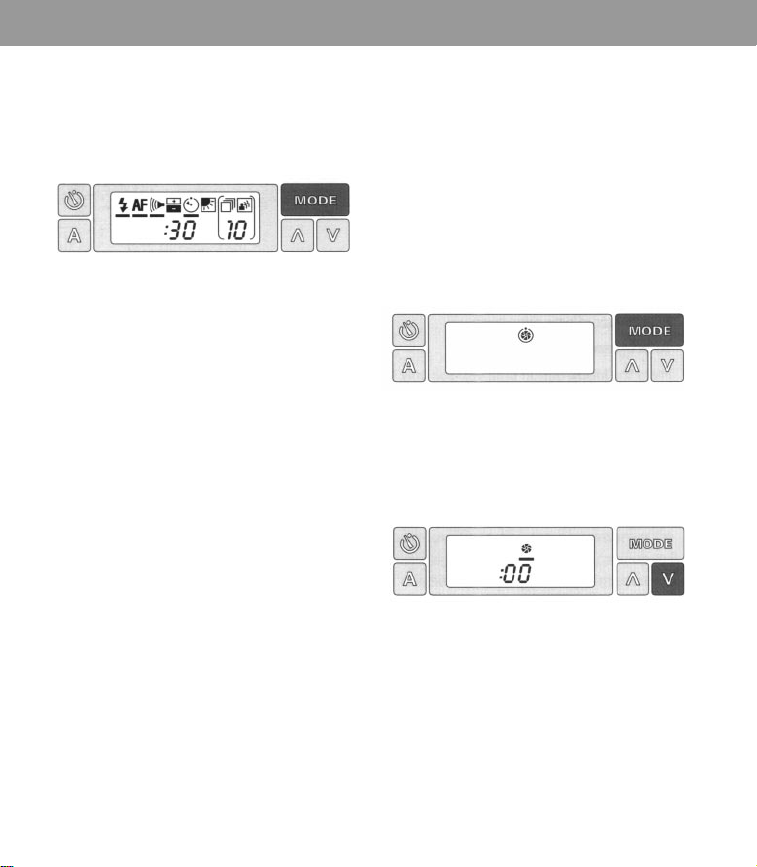
Programmed time exposure - 30 seconds
Contents
The camera
Film
Camera parts
Control panel
Operating instructions
Open camera
Load film
Position subject
Take picture
To remove an empty film pack
To close camera
Viewfinder displays
Autofocus system
Audio signals
Electronic flash
Self-timer
Exposure adjustment control
Features
2
Photographing in natural light 9
2 Manual focusing 9
2 Time exposures 10
Programmed time exposures 11
Manual time exposures 12
3
Backlighting 13
3
Sequential pictures 14
3
Self-timed sequential pictures 14
4
Variable sequential pictures 15
4
Multiple exposures 17
4
Helpful hints for using the
camera’s special features 19
5
Full lifetime warranty 20
5
For information and help 20
5
Accessories 21
6
Specifications 22
7
7

The camera
2 The camera
Throughout the text you will find
letters that refer to illustrations on
the fold-out pages.
Film
Use only P
olaroid Spectra color film.
Each film pack provides 10 color pictures
and contains a battery that powers all
camera functions.
Check the film expiration date on every
film box to be sure the film is fresh.
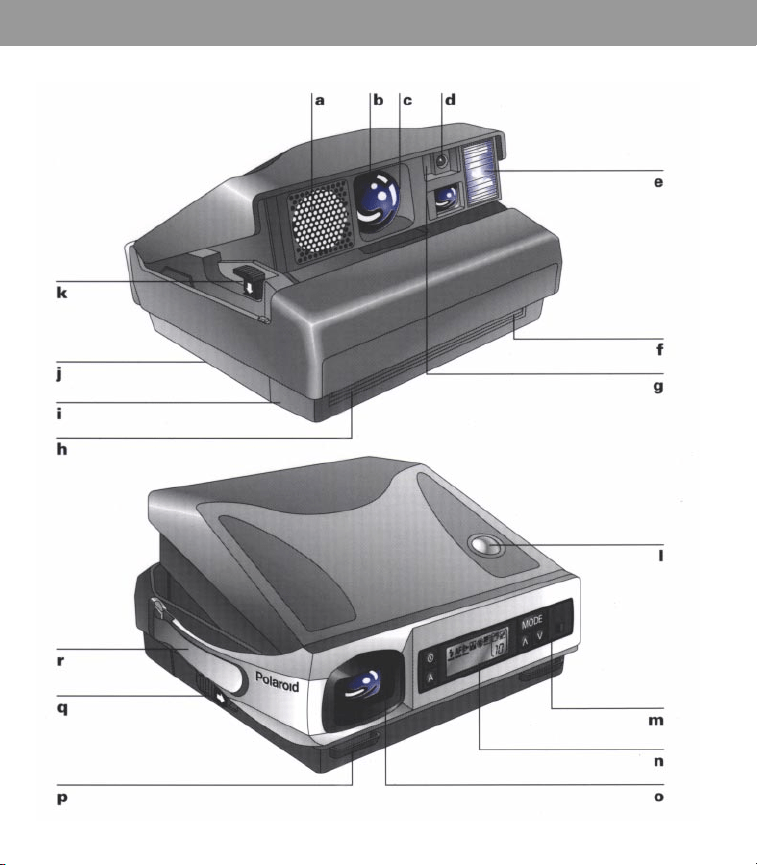
Camera parts
a
Sonar rangefinder (sends out sonar
waves to measure distance to subject)
b
Three-element, 125mm coated-glass lens
c
Automatic shutter system -variable
speed/aperture (speeds range from 1/245
of a second to 6 seconds; apertures from
f/l0 to f/45)
d
Self-timer indicator
e
Electronic flash (from 1/3000 to 1/20,000
of a second)
f
Film shade (protects picture from light as
it ejects from the camera)
g
Photocell (silicon photo-diodes measure
light from the scene and from the flash)
h
Film exit slot
i
Film door
j Tripod socket (on bottom of camera)
k
Film door release button
l
Shutter button
m
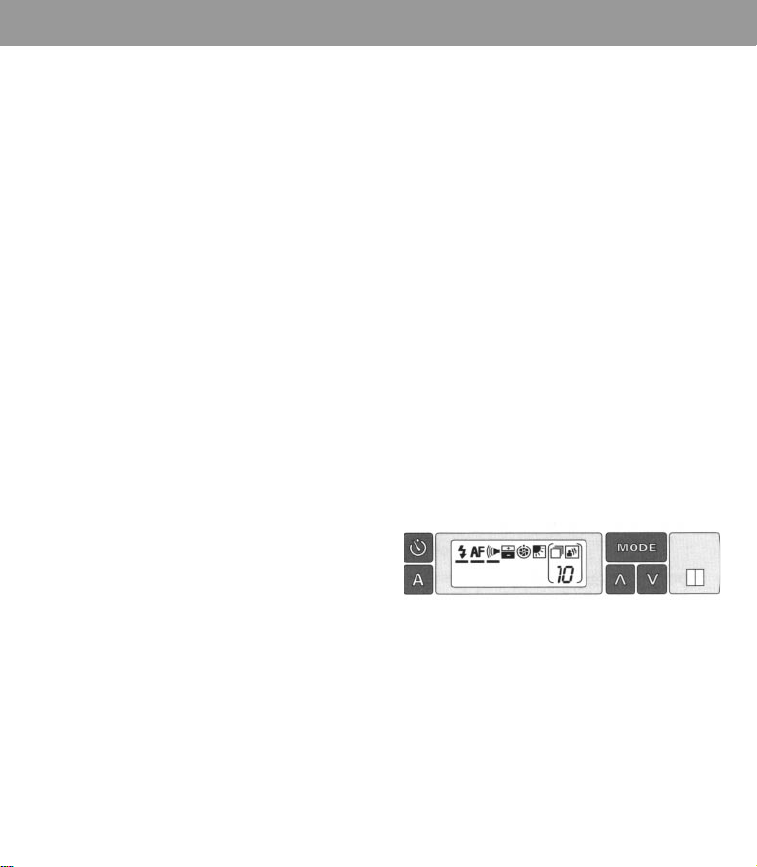
Control panel
n
Liquid crystal display (shows picture-tak-
ing information. The display comes on
when there is film in the camera. The dis-
play
disappears about every 40 seconds.
Lightly press the MODE or shutter button
to make it
reappear.)
o
Viewfinder
p
Neckstrap connector
q Release latch (to open and close camera)
r
Hand strap
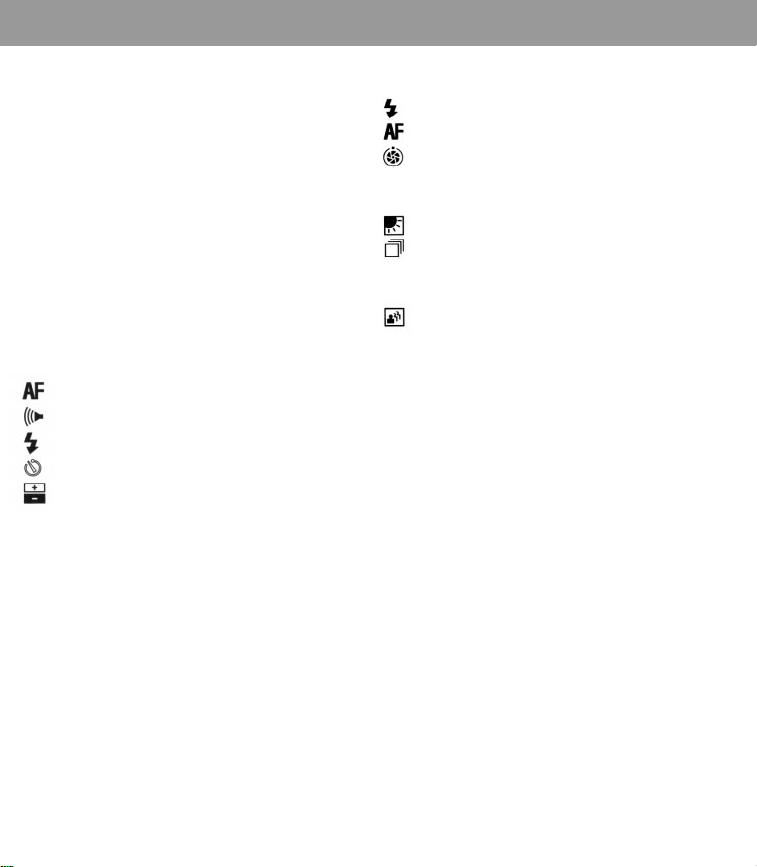
Control panel
s
Self-timer button
t
Electronic flash symbol
u
Autofocus symbol
v Audio signals symbol
w
Exposure adjustment symbol
x
Time exposure symbol
y
Backlighting symbol
z
Sequential pictures symbol
a1 Multiple exposures symbol
b1
MODE button (press to select a feature)
c1
Green light (shows flash is ready)
d1
Control buttons (press them to turn each
feature on or off, or to set the digital dis-
plays)
Operating instructions
Operating instructions 3
e1
Picture counter (counts down to show
how many pictures remain in the film
pack and is used with the sequential pic-
tures and multiple exposures features)
f1
Indicator bar (shows that the feature
above it is on)
g1
Auto reset button (always returns the
camera to fully automatic operation:
electronic flash, autofocus and audio sig-
nals)
This booklet describes the selection and
use of each special feature individually,
although most of the features may be
used in combination with each other for
creative picture-taking. You can turn the
individual features on or off between
pictures by pressing the
MODE
and
control buttons.
Note: Closing and reopening the camera
will always reset it for fully automatic
operation.
If the display fails to react as expected
when you press the control buttons,
press the Auto reset button or close and
reopen the camera to start again.
Open camera
Place both hands as shown (h1). Slide the
release latc
h back. The camera will open
automatically.
Load film
Use only P
olaroid Spectra film.
Push the film door release button down.
The film door will open.
Hold the film pack by its edges only (i1)
and slide it all the way into the camera.
As soon as you close the film door, the
battery in the film pack will provide power
to the camera and you will see:
•
the film cover eject
•
the liquid crystal display appear a green
light indicating the flash is ready to fire.
The liquid crystal display should look like
this:
If it does not, press the Auto reset button.
Note:The display disappears about every
40 seconds. Lightly press the
MODE
or
shutter button to make it reappear.
4 Operating instructions
Position subject
Indoors, your subject should be within the
2 t
o 15 foot flash range and, for best results,
near a light-colored background.
Outdoors, your subject should be at least
2 feet away.
The viewfinder and liquid crystal displays
will help you stay at the right distance.
Take picture
Slide your lef
t hand through the hand strap
and hold the camera as shown (j1) for
horizontal pictures. For vertical pictures, see
picture k1.
Frame your subject in the viewfinder and
press the shutter button halfway. You should
see:
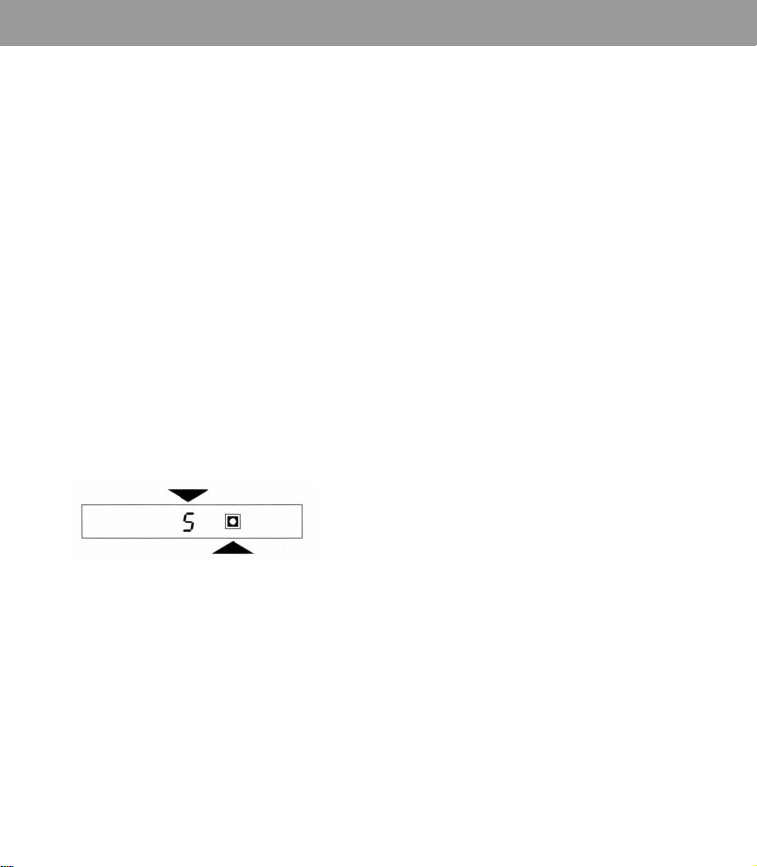
The distance to your subject; for example:
A green “good picture” symbol.
To take the picture, press the shutter button
the rest of the way.
When you release the button, the camera
ejects the picture and the flash
immediately recharges.
Note: If you have pressed the shutter
button halfway and you wish to reposition
your subject or yourself, release the
button. Make the changes and press the
shutter button halfway again.
To remove an empty film pack
Af
ter you have taken the 10th picture, you
will hear 3 chimes to remind you to
remove the empty film pack.
To remove the pack, push the film door
release button down. Pull the film pack out
by the colored tab.
When the camera contains an empty film
pack
•
you hear three chimes when you open the
camera
•
you hear three chimes and see a flashing
zero in the viewfinder when you press the
shutter button halfway and hold it.
To close camera
Hold the camera as shown (l1). Slide the
release latc
h back. Push the cover down
until both sides lock.
When you are not using to protect the
lens.

Operating instructions 5
Viewfinder displays
When you press the shut
ter button
halfway, displays indicating distance and
symbols for “good picture” or “caution”
appear in the viewfinder.
When you see the green symbol
press
the shutter button the rest of the way to
take the picture.
When you hear a warning tone and see the
flashing yellow caution symbol your
subject is either too close, too far, or the
flash is turned off. For example, the
display shows the yellow symbol and
the distance 1:
•
your subject is too close. Release the shut-
ter but
ton and stand at least 2 feet from
your subject.
If the display shows the yellow symbol and
a distance from 16 t
o 20*:
•
your subject is beyond the flash range.
Release the shutter button and position
your subject within the 2 to 15 foot flash
range.
If the display shows the yellow symbol and
a distance from 2 to 1
5:
•
your subject is within range, but the flash
is off. Press the Auto reset button to turn
the flash on.
*When your subject is beyond 20 feet, the
distance display is blank.
Autofocus system
When you press the shut
ter button, sonar
waves (at frequencies beyond our range of
hearing) are sent to the central part of the
scene. A built-in computer measures the
time it takes the sonar waves to reach the
scene and the echo to return. This
measurement is used to provide the correct
lens setting.
• Be sure the sonar waves have a clear path
to your subject. If an object near the central
part of the scene prevents the sonar waves
from reaching your subject, the lens
focuses on that object, causing your sub-
ject to be unsharp.
•
When photographing more than one per-
son, focus and illumination are improved if
everyone is at about the same distance
from the camera.
You can turn off the autofocus system to
focus manually. See
Manual focusing
.
Audio signals
Y
our camera has three audio signals: a
warning tone when the “caution” symbol
appears in the viewfinder, beeps that signal
the self-timer countdown, and chimes that
tell you the film pack is empty.
6 Operating instructions
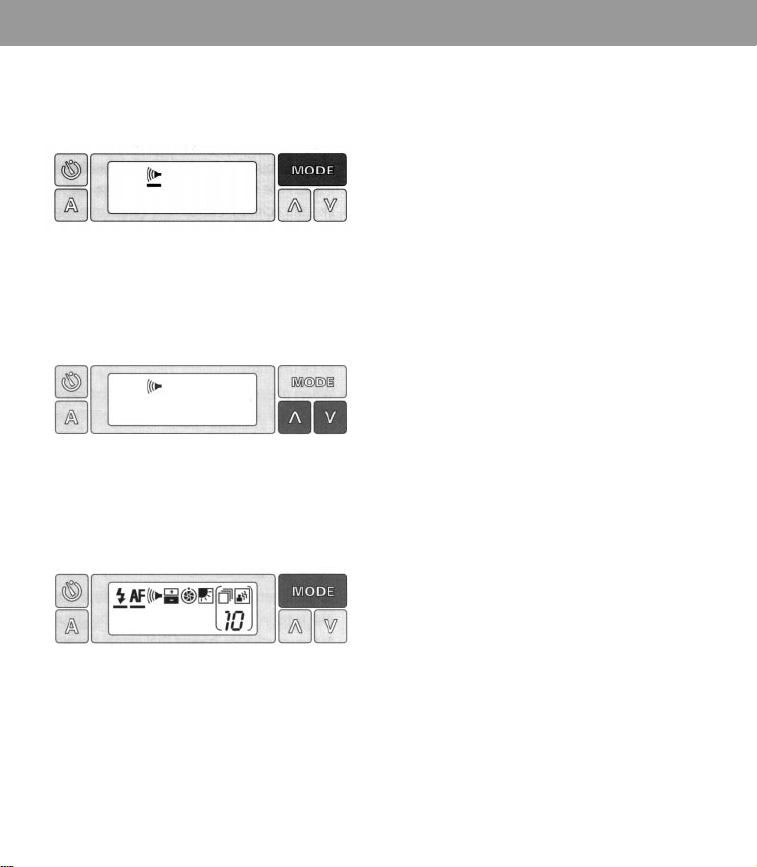
To turn off the audio signals:
1
Press the
MODE
button until you see only
the audio signals symbol:
2
Press the up (Z) or down (X) control
button once to remove the indicator bar
and turn the signals off:
3
Press the
MODE
button once to return to
the full display. You can now take a
picture:
To return the camera to fully automatic
operation, press the Auto reset button.
Electronic flash
The flash automatically begins to c
harge
every time you
•
load film into the camera, or
•
press the shutter button halfway, or
• take a picture, or
•
open the camera.
When the green light comes on, the flash
is ready to fire. The light will stay on for 20
to 30 seconds.
If you wish to take a picture and the green
light has gone off, press the shutter button
halfway or press the
MODE
button. You
can take the picture when the green light
comes on again.
The electronic flash is designed to be used
for every picture - indoors and outdoors.
Every time you take a picture, your
camera’s built-in electronic flash blends
light from the scene with just enough
flash to give you the best possible picture.
In bright sunlight, your camera blends the
sunlight with just the right amount of flash
to soften shadows and to reveal the facial
details you expect to see in the picture.
In the shade, the flash automatically sup-
plies the additional light needed to
produce a pleasing photograph.
Note:The display disappears about every 40 seconds. Lightly press
the MODE or shutter button to make it reappear.
Operating instructions 7
In low light (at dusk, in the shade, etc.), the
shutter can stay open for as long as 6
seconds after the flash has fired, and camera
movement can cause the picture to be
unsharp.
Hold the camera steady or place it on a firm
support.
Flash range
Indoors: 2 to 1
5 feet.
Outdoors:Your subject should be at least
2 feet from the camera.
Self-timer
T
o use this feature, place the camera on a
tripod or other steady support. If you attach
the camera to a table tripod, be sure the
camera is positioned over the tripod’s
longest leg for proper support.
Frame your picture in the viewfinder and
press the shutter button halfway to be sure
you get the green “good picture” symbol.
Then release the shutter button.
Press the self-timer button on the back of
control button once to turn on the lighten
the camera. You now have 12 seconds to get
into your picture.
During the first 10 seconds, the camera will
beep and you will see a flashing red light on
the front of the camera.
Two seconds before the camera takes
the picture, the red light will stay on and
the beeps will become a steady signal.
If you want to stop the 12-second
countdown, press either the Auto reset
button or the self-timer button.
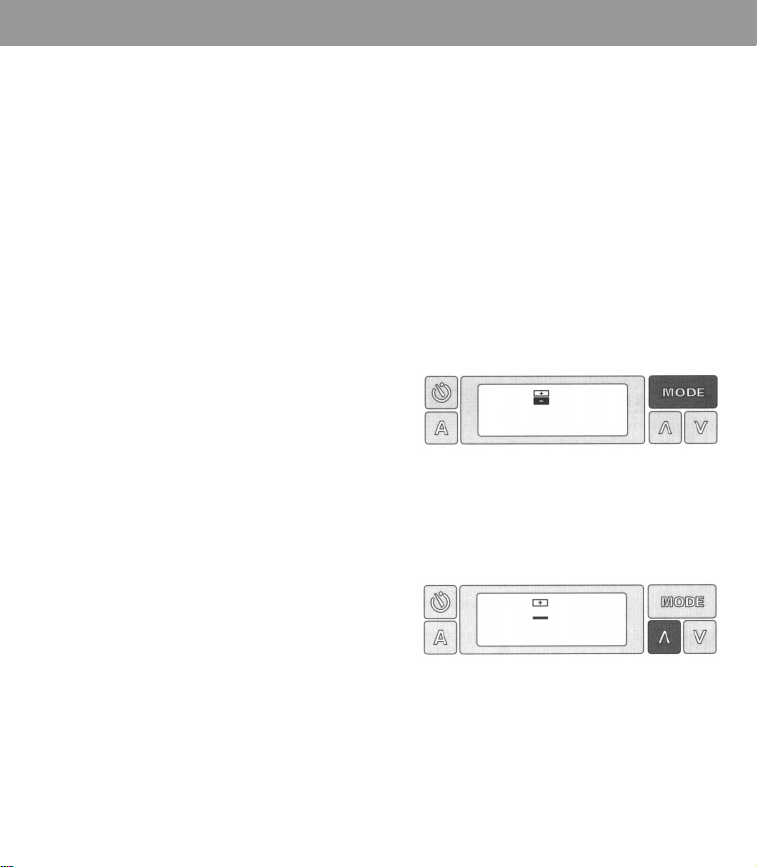
Exposure adjustment control
Use this feature when you want to retake
a picture to make it lighter or darker.
To do this:
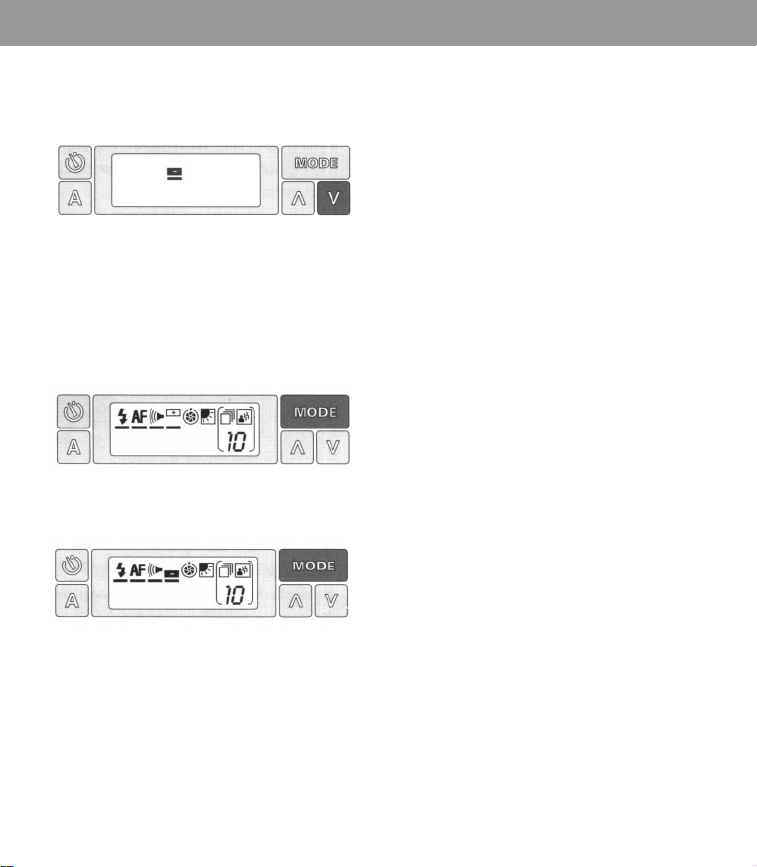
1
Press the
MODE
button until you see only
the lighten/darken symbol:
2
To lighten a picture, press the up (Z)
control button once to turn on the lighten
setting:
Note:The display disappears about every 40 seconds. Lightly press
the MODE or shutter button to make it reappear.
8 Operating instructions
3
To darken a picture, press the down (X)
control button once to turn on the darken
setting:
4
When you have selected the setting you
want, press the MODE button once to
return to the full display. You can now
retake a picture to make it lighter (A) or
darker (B):
A
B
To return the camera to fully automatic
operation, press the Auto reset button.
Important: If the background of a flash
picture is too dark but your subject is well
illuminated, the background is too far away.
To correct this problem, do not use the
lighten setting. Instead, press the Auto reset
button and retake the picture. Place your
subject near a background and remember to
keep both within the 2 to 15 foot flash range.
Note:The display disappears about every 40 seconds. Lightly press
the MODE or shutter button to make it reappear.
Features
Features 9
Photographing in natural light
T
o eliminate flash glare and to take
advantage of natural light situations, you
can turn off the flash when taking
pictures indoors or outdoors.
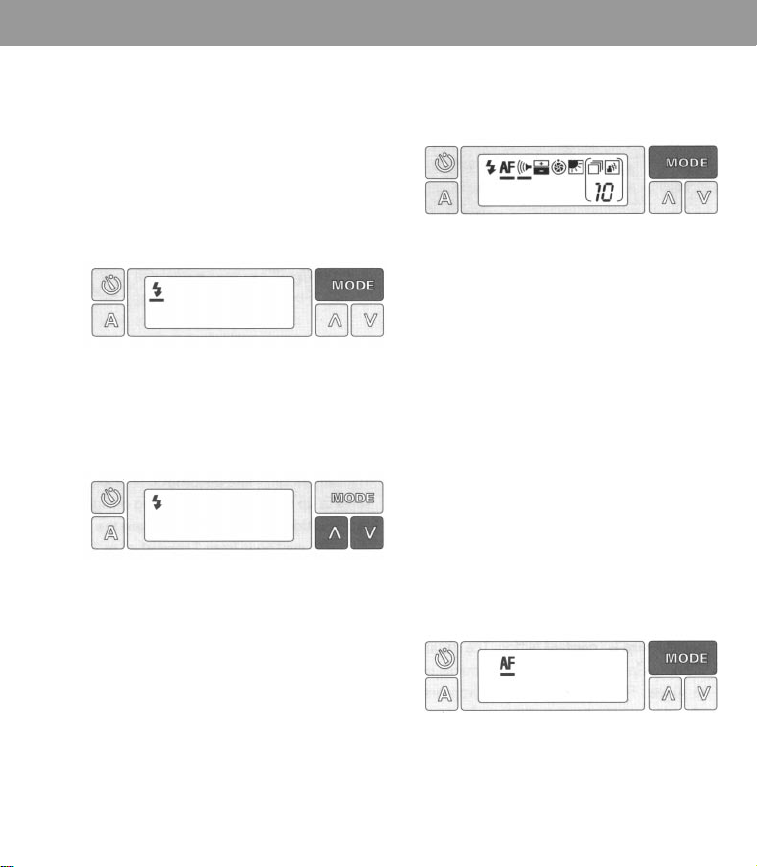
To turn the flash off:
1 Press the MODE button until you see only
the electronic flash symbol:
2
Press the up (Z) or down (X) control
button once to remove the indicator bar
and turn off the flash:
3 Press the MODE button once to return to
the full display. You can now press the
shutter button to take a non-flash picture:
To return the camera to fully automatic
operation, press the Auto reset button.
Manual focusing
Y
ou can turn off the autofocus system
and program the distance to your subject
by using the manual focusing feature.
This allows you to photograph through
glass, screens, and fences. When you
shoot through glass, you may wish to
turn off the flash to eliminate glare. See
Photographing in natural light
.
To use this feature:
1 Measure the distance to your subject.
2 Press the MODE button until you see only
the autofocus symbol:
Note:The display disappears about every 40 seconds. Lightly press
the MODE or shutter button to make it reappear.
10 Features
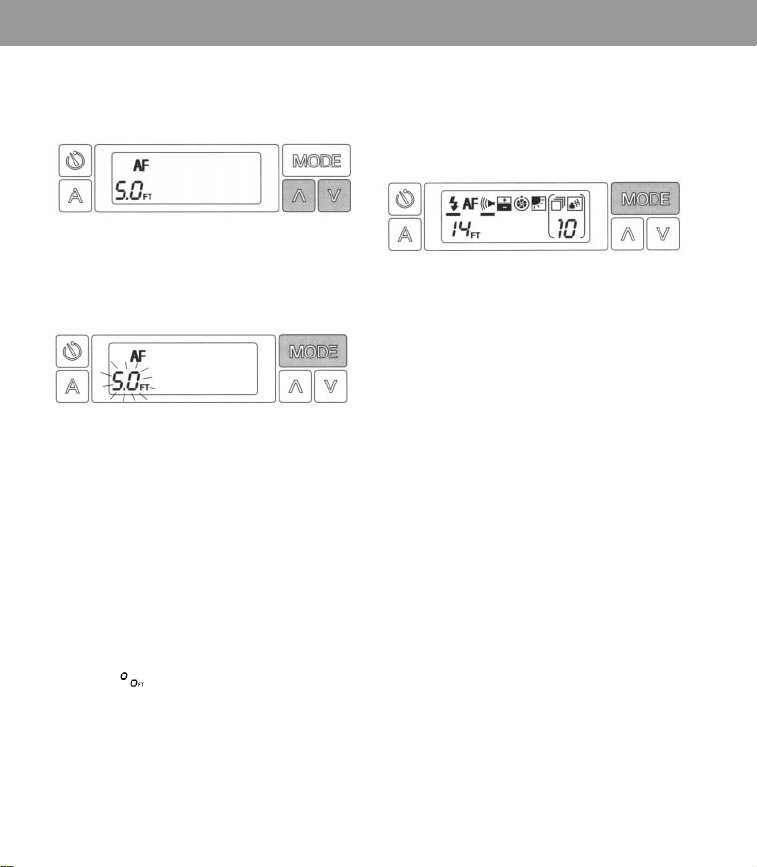
3 Press the up (Z) or down (X) control 6 When the distance you want is displayed
button once to remove the indicator bar (for example, 14 feet), press the
MODE
and turn off the autofocus system: button once to return to the full display.
You can now press the shutter button to
take the picture:
4 Press the MODE button once. The number
5 will start flashing:
You must now set the distance to your
subject.
5 If the focusing distance you want is less
than 5 feet away, press the down (X)
control button. The distance decreases in
.1 foot increments down to 2 feet.
If the distance you want is greater than 5
feet, press the up (Z) control button. The
distance increases in one-half foot (.5)
increments up to 10 feet. The infinity
symbol
, appears after the number
24. Select this symbol when the subject
or scene is more than 24 feet away.
To return the camera to fully automatic
operation, press the Auto reset button.
Time exposures
The camera can mak
e automatic time
exposures of up to 6 seconds, depending
on lighting conditions. You can also
program the shutter to stay open from 1
second up to 2 minutes. You can also
make a manual exposure up to 2
minutes long by pressing the shutter
button to control the time the shutter
stays open.
Programmed and manual time
exposures are described in the next
section. You may want to use these
features to photograph fireworks
displays, sunrises and sunsets,
lighthouse beacons at night, colorful
holiday and amusement park lights,
moonlit oceans, city skylines at night,
and more.
Note:The display disappears about every 40 seconds. Lightly press
the MODE or shutter button to make it reappear.
Features 11
For time exposures, the camera must be
placed on a steady support, such as a
tripod.
Turn the flash off for better time-exposed
photographs.
Programmed time exposures
With this feature, you can program the
shutter to stay open, from 1 second up to
2 minutes, to record time exposures.
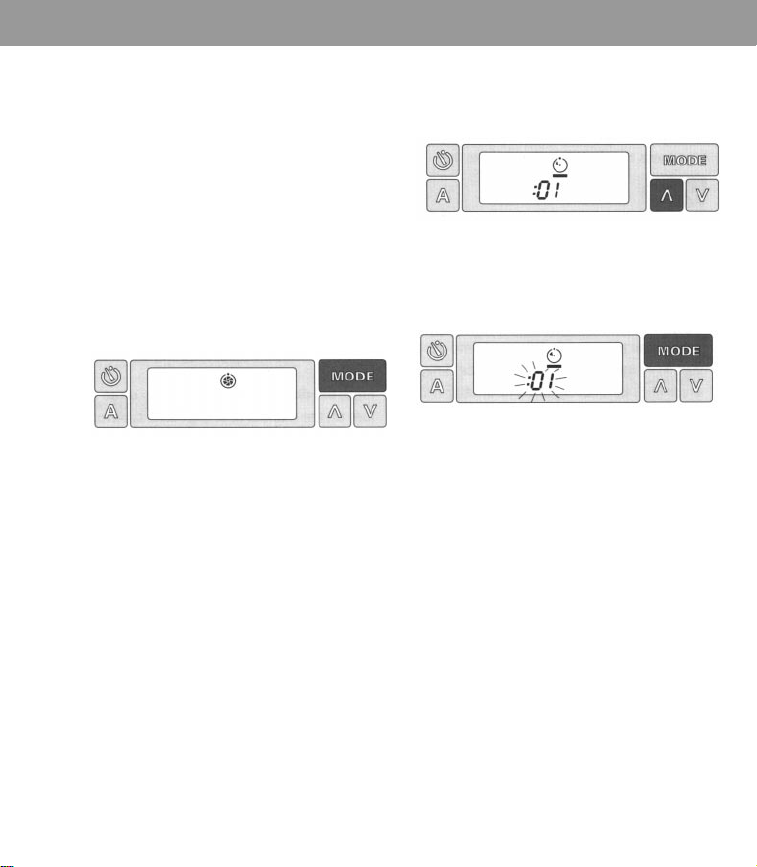
To program a exposure:
1 Press the MODE button until you see only
the time exposure symbol:
2 Press the up (Z) control button once to
turn on the programmed time exposure
system:
3 Press the MODE button once. The :01
second display will start flashing:
4 You must now decide how long you want
the exposure to be.
When you press the up (Z) control
button, the time will increase in 1 second
increments up to 2 minutes. When you
press the down (X) control button,
the time will decrease in 1 second
increments.
Note:The display disappears about every 40 seconds. Lightly press
the MODE or shutter button to make it reappear.
12 Features
5 When the time you want is displayed (for
Manual time exposures
example, 30 seconds), press the
MODE
button once to return to the full display.
You can now press the shutter button to
take the picture:
If you wish to interrupt the preset time
exposure in order to shorten the
exposure time, press the self-timer
button. The shutter will close and the
picture will automatically eject.
To return the camera to fully automatic
operation, press the Auto reset button.
You can control the time the shutter
stays open by pressing the shut
ter
button down for up to 2 minutes when
using the manual time exposure feature.
Place the camera on a very steady
support and frame your subject.
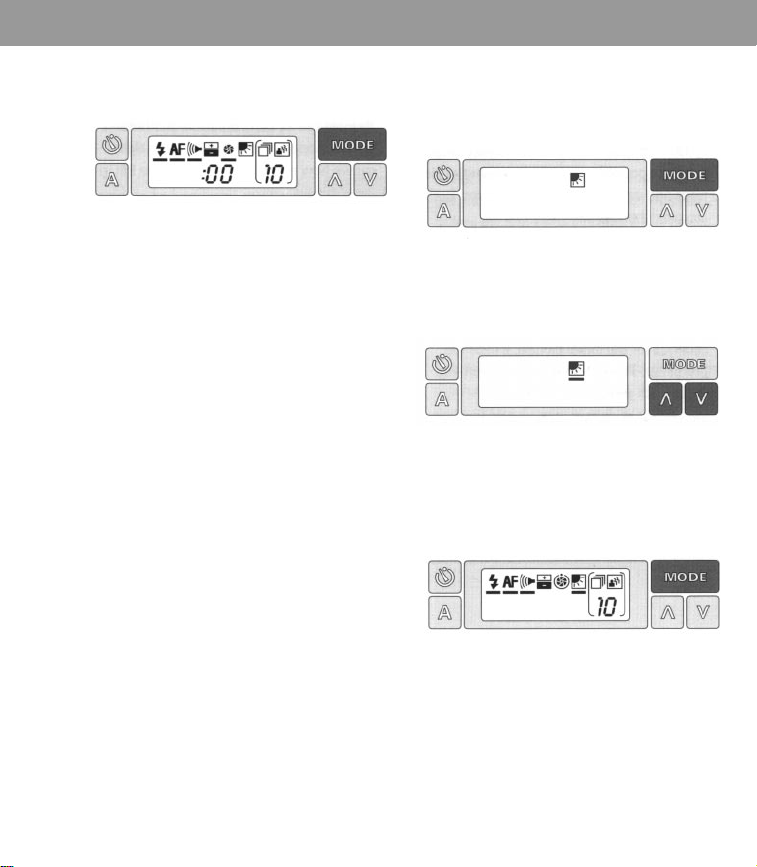
To take a manual time exposure:
1 Press the MODE button until you see only
the time exposure symbol:
2 Press the down (X) control button once
to turn on the manual time exposure
system:
Note:The display disappears about every 40 seconds. Lightly press
the MODE or shutter button to make it reappear.
Features 13
3 Press the MODE button once to return to To use this feature:
the full display:
1 Press the MODE button until you see only
the backlighting symbol:
4 Press the shutter button and keep it
down to control the time the shutter
stays open. You will know how much
time has elapsed by watching the digital
display. When the time you want has
elapsed, release the shutter button. The
camera will eject the picture.
To return the camera to fully automatic
operation, press the Auto reset button.
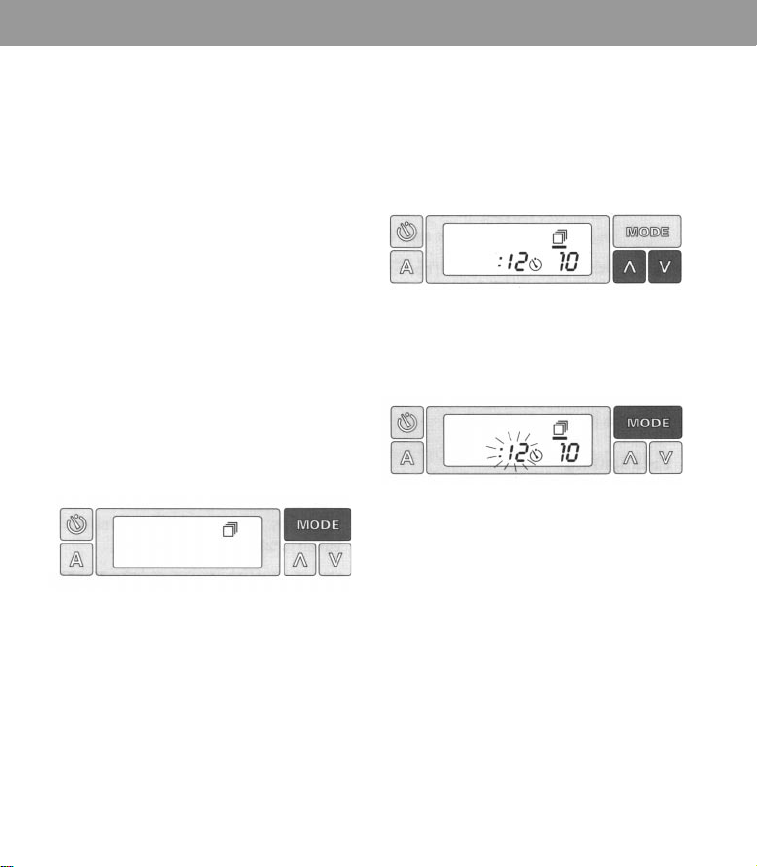
Backlighting
The flash must be on when this feature is
used.
Since a backlit subject can appear too
dark in the picture, your camera is
programmed to fire just enough flash to
illuminate the front of your subject. For
best results, your subject should not be
further than 6 feet from the camera.
2 Press the up (Z) or down (X) control
button once to turn on the feature:
3 Press the MODE button once to return to
the full display. You can now press the
shutter button to take the picture:
To return the camera to fully automatic
operation, press the Auto reset button.
Note:The display disappears about every 40 seconds. Lightly press
the MODE or shutter button to make it reappear.
14 Features
Sequential pictures
The camera allows you to tak
e a series of
pictures at various time intervals from 3
seconds to 19.9 minutes. Two types of
sequential pictures are possible: self-
timed sequential pictures and variable
sequential pictures. Both are described
below.
The number of pictures you can take is
automatically limited to the number of
pictures left in the film pack.
Self-timed sequential pictures
These pictures are programmed for 12
seconds for the initial picture, 6 seconds
thereafter. The self-timer signals alert
you when each picture will be taken.
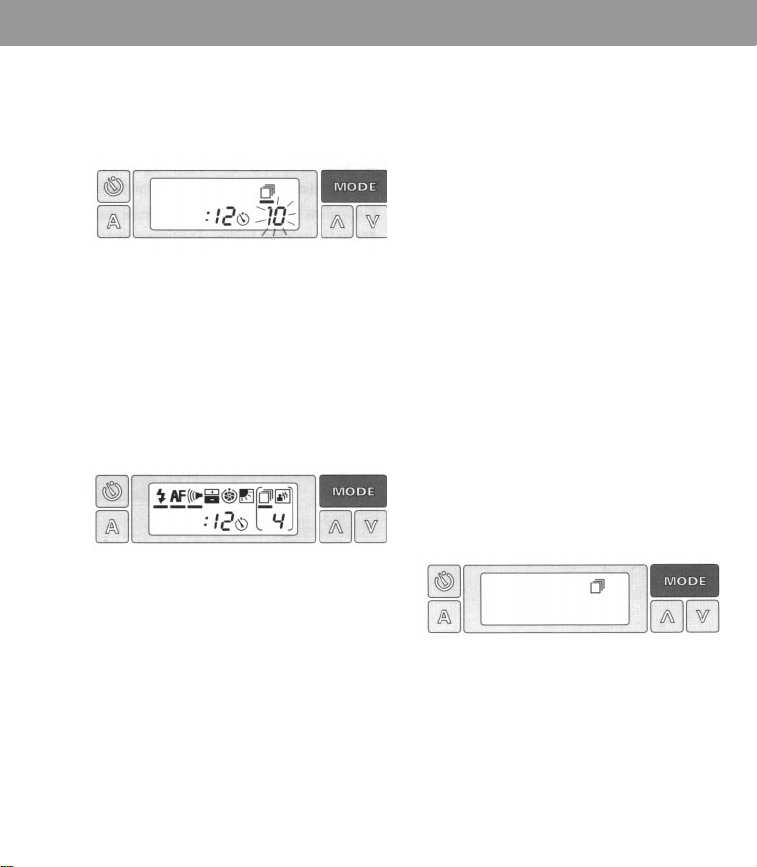
To take self-timed sequential pictures:
1 Press the MODE button until you see only
the sequential pictures symbol:
2 Press the up (Z) or down (X) control
button once to turn on the feature.
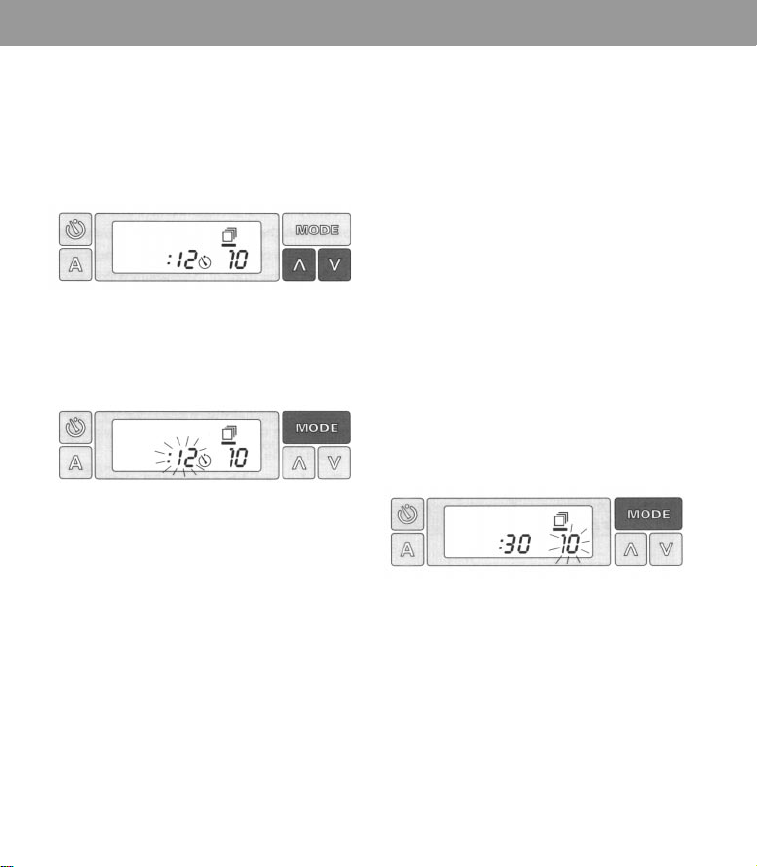
You will see 12 seconds and a self-timer
symbol appear. The number to the right
shows how many pictures you have left
in the film pack:
3 Press the MODE button once. The 12
second display will start flashing:
Note:The display disappears about every 40 seconds. Lightly press
the MODE or shutter button to make it reappear.
Features 15
4 Select the 12 second setting by pressing
the
MODE button once again. The
number of pictures left in the film pack
will start flashing:
5 If the number of pictures left in the film
pack is the number of pictures you want
to take, press the
MODE button once. If
you want to take fewer pictures, press
the down (X) control button. When the
number you want is displayed (for
example, 4) press the
MODE button once
to return to the full display:
If you wish to interrupt the series, press
the self-timer button.
To return the camera to fully automatic
operation, press the Auto reset button.
Note: When you use the 12 second
setting to get into the picture, 12 seconds
will pass before the first picture is taken.
The time between the other pictures will
be only 6 seconds. The camera will beep
and the red indicator on the front of the
camera will flash as described in the
section the Se/f-timer
Variable sequential pictures
This feature allows you to preset the
camera to whatever interval you want.
For example, you can take 4 pictures and
program the camera to take them 30
seconds apart with one press of the
shutter button.
To take variable sequential pictures:
1 Press the MODE button until you see only
the sequential pictures symbol:
6 Be sure your subject is correctly framed
in the viewfinder. Now press and release
the shutter button. The camera will
automatically begin taking the series of
pictures.
Note:The display disappears about every 40 seconds. Lightly press
the MODE or shutter button to make it reappear.
16 Features
2 Press the up (Z) or down (X) control
button once to turn on the feature.
You must now program when the
camera will take each picture.
You will see 12 seconds and a self-timer
symbol appear. The number to the right
shows how many pictures you have left
in the film pack:
To increase the time, press the up (Z)
control button. The time increases in 1
second increments up to 2 minutes. The
time increases in tenths of a minute from
2 to 19.9 minutes.
If you want less than 12 seconds, press
the down (X) control button. The time
decreases in 1 second increments down
to 3 seconds.
3 Press the MODE button once. The 12
second display will start flashing:
4
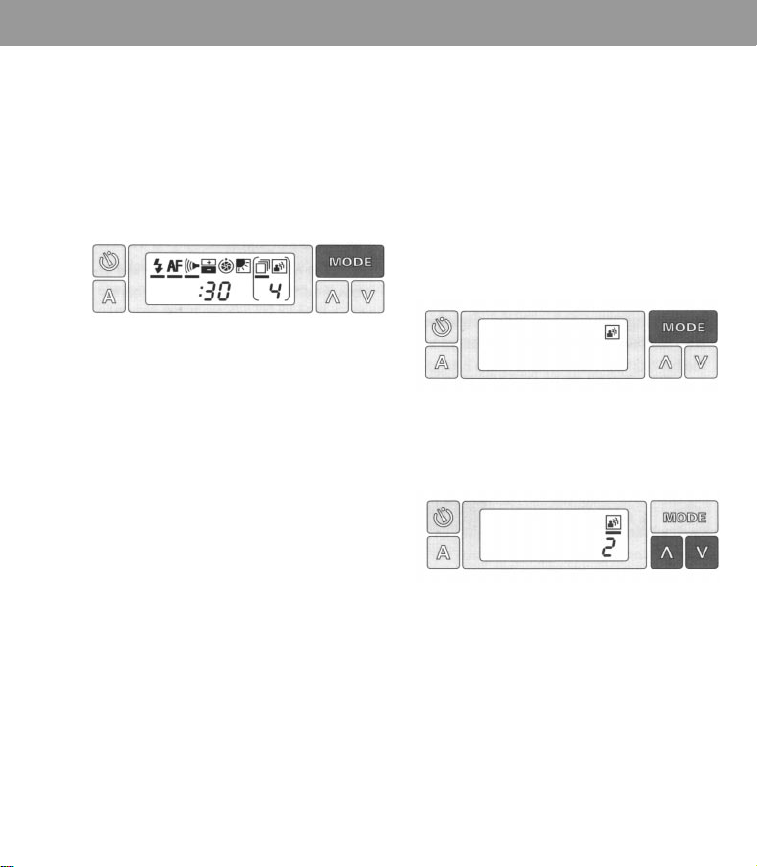
If, for example, you choose 30 seconds,
30 seconds passes before each picture is
taken, including the first picture.
When you have selected the time you
want (for example, 30 seconds), press
the
MODE button once.
The number of pictures left in the film
pack will start flashing:
Note:The display disappears about every 40 seconds. Lightly press
the MODE or shutter button to make it reappear.
Features 17
5 If the number of pictures left in the film
pack is the number of pictures you want
to take, press the
MODE button once. If
you want to take fewer pictures, press
the down (X) control button. When the
number you want is displayed (for
example, 4), press the
MODE button once
to return to the full display:
6 Be sure your subject is correctly framed
in the viewfinder. Now press and release
the shutter button. The camera will
automatically begin taking the series of
pictures.
If you wish to interrupt the series, press
the self-timer button.
To return the camera to fully automatic
operation, press the Auto reset button.
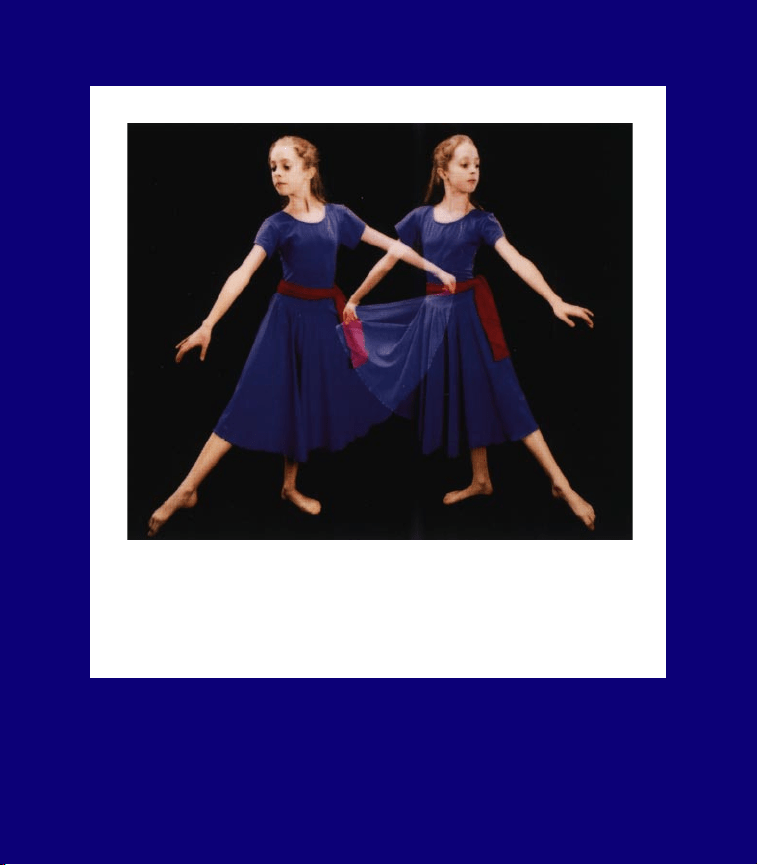
Multiple exposures
With this feature, you can tak
e up to 5
exposures on the same piece of film. For
best results, place your subject in front
of a simple, dark background.
When making a double exposure, you
may wish to place your subject first to
the left in the viewfinder, make the
exposure, then place the subject to the
right in the viewfi
nder and make the
second exposure.
Note:The battery power may not be
sufficient to take 5 flash exposures on all
10 pictures in the film pack for a total of
50 flashes.
To take multiple exposures:
1 Press the MODE button until you see only
the multiple exposure symbol:
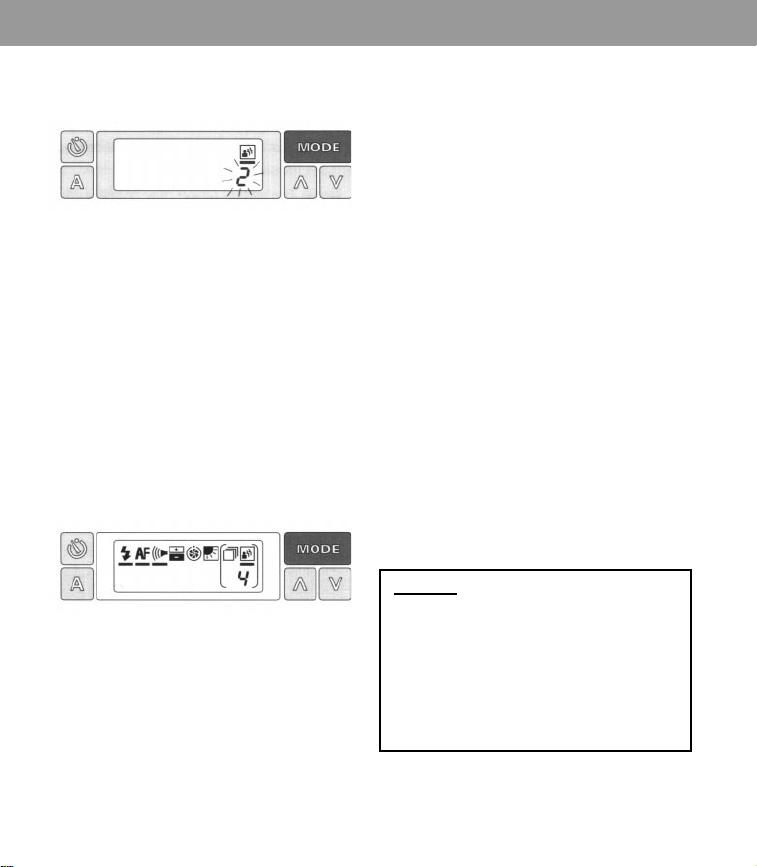
2 Press the up (Z) or down (X) control
button once to turn on the feature:
Note:The display disappears about every 40 seconds. Lightly press
the MODE or shutter button to make it reappear.
18 Features
3 Press the MODE button once. The number
2 will start flashing:
4 You must now decide how many
exposures you want to make.
If you want to make 2 exposures, press
the
MODE button once more. The number
2 will stop flashing and the camera will
return to the full display. You can now
make 2 exposures.
If you want to take more than 2
exposures, press the up (Z) control
button to increase the exposures to 3,4,
or 5. Press the
MODE button once to
return to the full display.
5 Frame your picture in the viewfinder and
press the shutter button to make the first
exposure. The film stays in the camera
and the digital display shows how many
exposures you have left to take.
Note:You can make changes (such as
exposure adjustments, flash on or off,
etc.) before each additional exposure.
Frame the next image in the viewfinder
and press the shutter button again. Do
this for each exposure. The camera will
eject the picture after you take the last
exposure.
To return the camera to fully automatic
operation, press the Auto reset button.
Caution:
This camera is battery-operated.
Closely supervise children when camera
is operated by them or used in their
presence. To prevent electrical shock,
camera should not be exposed to or
immersed in water or other fluids,
disassembled, or operated if dropped or
damaged. For repair information, contact
a Polaroid Service Center.
Note:The display disappears about every 40 seconds. Lightly press
the MODE or shutter button to make it reappear.

Guide to better pictures
Features 19
Bright light sources
If your subject is placed in front of a window
in daylight, the camera’s photocell measures
the bright light, causing your subject to be
too dark in the picture. Use the backlighting
feature to illuminate your subject without
changing the entire exposure.
When a bright source of light (lamplight,
candlelight, etc.) is in the central part of the
scene and in front of the subject, the
photocell measures the bright light, causing
the subject to be too dark. Move the source
of light to one side of your subject.
Temperature
For better colors, avoid extreme
temperatures. When the temperature is
below 55°F (13°C), keep the camera and film
warm. Above 95’°F (35°C), keep the camera
and film as cool as possible.
Avoid storing camera or film in hot places.
Keep developing pictures away from hot
surfaces. As the picture develops, its image
area is dry because the development
process takes place inside the film. It is
important not to bend the developing
picture during this process.
Developer rollers
The developer rollers inside the film door (i)
must be kept clean to avoid repeated spots
or bar patterns on the pictures. Clean the
rollers with a damp, lint-free cloth.
Lens
To remove fingerprints, breathe on the lens
and wipe it gently with a clean, soft facial
tissue. Do not use silicone-treated eyeglass
tissue.
Helpful hints for using the
camera’s special features
Programmed time exposures
To create the illusion of motion in your pictures
when photographing at night:
Place the
camera on a steady support, turn off the
flash, and program the exposure time for 2-5
seconds. The lights of moving cars will
appear as streaks of light in your picture.
To take a portrait by candlelight:
Turn off the
flash. We suggest programming the
exposure time from 5 to 10 seconds. The
resulting portrait will be warm and pleasing.
To photograph home interiors in average light:
Turn off the flash and start with a
programmed time exposure of 1 second.
To photograph floodlit buildings, fountains or
monuments:
Start with a programmed time
exposure of 2 seconds.
To photograph through glass or window
screens:
Turn off the flash to reduce
unwanted reflections in your picture. If the
subject is well beyond the glass or screen,
use the manual focusing feature as well.
To photograph a nearby subject against a
scenic background at dusk, sunrise or sunset:
Use flash to illuminate your subject properly.
A timed exposure of about 2 seconds will
give correct exposure of the background.
Manual time exposures
To photograph fireworks: Use the manual
time exposure feature. Press and hold the
shutter button from the time the fireworks
go up until they burst in the sky.

20 Features
Sequential pictures
To obtain multiple images of the same
scene: Use the self-timed sequential
pictures feature for group portraits when
you wish to obtain several photographs of
the same scene with one press of the shutter
button. This feature allows you to be
included in the portrait.
Multiple exposures
To take multiple exposures on the piece of
film: It may be helpful to set the same
exposure control towards darken, especially
if the background is not dark enough.
Note: Avoid subject movement while taking
pictures.
Full lifetime warranty
If this camera pro
ves to be defective, we
will, at your option either replace or repair it
without charge for as long as you own the
camera (original owners only). See Your
warranty options. This warranty does not
cover damage caused by accident, misuse,
or tampering with the camera, and a charge
will be made for such repairs. To obtain
warranty service, please call Polaroid toll-
free at 1-800-343-5000, or write to the
Polaroid Customer Care Center, 201
Burlington Road, Bedford, MA 01730.
This warranty gives you specific rights, and
you may also have other rights which vary
from state to state.This warranty excludes
all consequential damages. Some states do
not allow the exclusion of consequential
damages so the foregoing exclusion may
not apply to you.
Your warranty options
Replacement:Y
ou can choose to receive a
replacement camera at no charge. If the
failure occurs within 90 days of the purchase
date, you can return the camera to any
participating Polaroid dealer and you will
receive a new camera. If the failure occurs
after that period, call Polaroid at the toll-free
number listed and we will ship you a
refurbished camera of equal or better value.
Replacement will be made 3-5 business
days from the
receipt
of your camera.
Repair: Call the number listed for the
address of the nearest authorized Polaroid
repair location. Please allow 5 to 7 days
from the receipt of your camera for the
repair. The repaired camera will be returned
to you along with a reimbursement of your
postage cost. This warranty applies to new
cameras purchased in retail stores in the
U.S.A.
For information and help
If you are unable to get good pictures,
review this instruction book.
Picture problems are often due to incorrect
use of the camera. If you need further help,
and before you return your camera for
repair, please see your dealer or contact the
nearest Polaroid office.
If you write, please explain the nature of the
problem and, if possible, enclose sample
pictures. Include your return address.

Accessories
Accessories 21
Accessories
The accessories listed add to the ver
satility
of your camera and to your enjoyment of
your photographs.
For information on these and other
accessories, please contact your dealer or
the nearest Polaroid office.
Light Lock Close-Up Lens
The Polaroid Light Lock Non-Contacting
Close-Up Lens fits all Polaroid Spectra
cameras. The lens lets you take photographs
at 10 inches without making contact with the
object being photographed.
The lens attaches easily and securely to the
front of the camera and lets you take
pictures that are 50 percent the size of the
actual object (5 to 1).
Close-Up Lens F112
With the Polaroid Close-Up Lens, you can
photograph objects 10 inches from the
camera. The lens attaches easily to the front
of the camera and produces a picture that
shows an object at half its actual size,
Close-Up Stand
The Polaroid Close-Up Stand is designed for
use with all Polaroid Spectra cameras to
produce close-up photographs of small
objects and printed materials such as
stamps, coins or jewelry. The magnification
is approximately 1:1.
PhotoFile
Holds 20 Polaroid Spectra photographs.

Specifications
22 Specifications
Specifications
Aperture/shutter system:
Apertures: from f/l0 to f/45. Shutter speeds:
from 1/245 to 6 seconds in Auto mode.
Camera size:
Length: 6.34 inches
Width: 5.63 inches
Height: 2.96 inches closed;
3.81 inches opened.
Camera weight:
1 lb, 12 1/2 oz., without a film pack.
Film advance:
Automatic film advance; motorized picture
ejection.
Film size:
Outer border: 4 x 4.06 inches.
Image area: 3.60 x 2.90 inches.
Film speed:
IS0 600/29° (approx.)
Film type:
Polaroid Spectra color film.
Starts developing in seconds.
Ten pictures per pack.
Lens:
Patented Quintic, three element, 125mm
coated glass lens system. Ten zone focusing
from 2 feet to infinity.
Liquid crystal display:
Features: automatic/manual distance
focusing; automatic program for manual
time exposures; backlighting feature;
sequential series of pictures; multiple
exposures on one print; on/off flash and
audio signals; exposure adjustment feature.
Photocell:
Dual-filter, silicon photodiodes. Green
filtered cell measures visible light; black
filtered cell measures infrared light for
better indoor flash exposures.
Power source:
A fresh, 6-volt battery in each film pack
powers all camera functions.
Programmed flash:
Built-in fill flash designed to be used indoors
and outdoors.
Recharge time: from 0.1 to 2.8 sets
Flash duration: from 1/3000 to 1/20,000 of a
second.
Indoor flash range: from 2 to 15 feet.
Self-timer:
Built-in self-timer; blinking LED and signal
time the 12-second countdown.
Sonar autofocus system:
Computerized autofocus system uses sonar
waves to accurately measure the distance to
your subject and set the lens. Sonar ranging
time: from 10 to 50 thousandths of a second.
Viewfinder:
100% viewing (no parallax) at 6 feet - a
popular picture-taking distance. Six lenses,
two prisms, and four mirrors provide sharp,
clear viewing. Viewfinder magnification:
0.5x (subjects appear half life-size).
Viewfinder display:
Display includes a digital read-out in feet
and a yellow “caution” or green “good
picture” symbol.