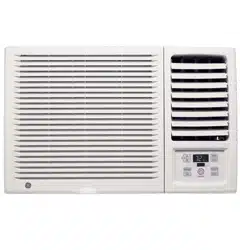

49-7459 01-03 JR
ASH18
ASW18
ASF24
ASH24
ASM24
ASW24
Air Conditioners
Owner’s Manual and
Installation Instructions
GEAppliances.com
Safety Instructions . . . . . . . . . .2, 3
Operating Instructions
Controls—Control Knobs . . . . .6, 7
Controls—Touch Pads . . . . . . .4, 5
Care and Cleaning
Air Filter . . . . . . . . . . . . . . . . . . . . .8
Batteries . . . . . . . . . . . . . . . . . . . . .8
Grille and Case . . . . . . . . . . . . . . .8
Outdoor Coils . . . . . . . . . . . . . . . .8
Installation Instructions
Through-the-Wall
Installation—Optional . . . . . . . .15
Window Installation . . . . . . . . .9–14
Troubleshooting Tips . . . . . . . .16
Normal Operating Sounds . . . . .16
Consumer Support
Consumer Support . . . . . . . . . . .20
Product Registration . . . . . . .17, 18
Warranty . . . . . . . . . . . . . . . . . . . .19
Write the model and serial numbers here:
Model # __________________________
Serial # __________________________
Find these numbers on a label on the
side of the air conditioner.
IMPORTANT SAFETY INFORMATION.
READ ALL INSTRUCTIONS BEFORE USING.
WARNING!
For your safety, the information in this manual must be followed to minimize the risk of fire, electric shock
or personal injury.
■ Use this appliance only for its intended
purpose as described in this Owner’s
Manual.
■ This air conditioner must be properly
installed in accordance with the Installation
Instructions before it is used.
■ Never unplug your air conditioner by pulling
on the power cord. Always grip plug firmly
and pull straight out from the receptacle.
■ Repair or replace immediately all electric
service cords that have become frayed or
otherwise damaged. Do not use a cord
that shows cracks or abrasion damage
along its length or at either the plug or
connector end.
■ Turn the mode control OFF and unplug
your air conditioner before making any
repairs or cleaning.
NOTE: We strongly recommend that any
servicing be performed by a qualified
individual.
■ For your safety…do not store or use
combustible materials, gasoline or other
flammable vapors or liquids in the vicinity
of this or any other appliance.
■ All air conditioners contain refrigerants,
which under federal law must be removed
prior to product disposal. If you are getting
rid of an old product with refrigerants, check
with the company handling disposal about
what to do.
SAFETY PRECAUTIONS
Do not, under any circumstances, cut or remove
the third (ground) prong from the power cord.
For personal safety, this appliance must be
properly grounded.
The power cord of this appliance is equipped
with a 3-prong (grounding) plug which mates
with a standard 3-prong (grounding) wall
outlet to minimize the possibility of electric
shock hazard from this appliance.
Have the wall outlet and circuit checked by
a qualified electrician to make sure the outlet
is properly grounded.
Where a 2-prong wall outlet is encountered,
it is your personal responsibility and obligation
to have it replaced with a properly grounded
3-prong wall outlet.
The air conditioner should always be plugged
into its own individual electrical outlet
which has a voltage rating that matches the
rating plate.
This provides the best performance and also
prevents overloading house wiring circuits
which could cause a fire hazard from
overheated wires.
See the Installation Instructions, Electrical
Requirements section for specific electrical
connection requirements.
HOW TO CONNECT ELECTRICITY
Consumer Support
Troubleshooting Tips Operating Instructions Safety InstructionsInstallation Instructions
2
3
Consumer SupportTroubleshooting TipsOperating InstructionsSafety Instructions Installation Instructions
GEAppliances.com
WARNING!
Because of potential safety hazards under certain
conditions, we strongly recommend against the
use of an extension cord.
However, if you must use an extension cord,
it is absolutely necessary that it be a UL-listed,
14 gauge, 3-wire grounding type appliance
extension cord having a grounding type plug
and outlet and that the electrical rating of the
cord be 15 amperes (minimum) and 125 volts.
CAUTION:
DO NOT use an extension cord with any of the
230/208 volt models.
USE OF EXTENSION CORDS—115-Volt models only
Because of potential safety hazards under certain
conditions, we strongly recommend against the use
of an adapter plug.
However, if you must use an adapter, where
local codes permit, a temporary connection may
be made to a properly grounded 2-prong wall
outlet by use of a UL-listed adapter available at
most local hardware stores.
The larger slot in the adapter must be
aligned with the larger slot in the wall outlet
to provide proper polarity in the connection
of the power cord.
When disconnecting the power cord from the
adapter, always hold the adapter in place with
one hand while pulling the power cord plug
with the other hand. If this is not done, the
adapter ground terminal is very likely to break
with repeated use.
If the adapter ground terminal breaks, DO NOT
USE the air conditioner until a proper ground
has been established.
Attaching the adapter ground terminal to a wall outlet
cover screw does not ground the appliance unless the
cover screw is metal, not insulated, and the wall outlet
is grounded through the house wiring. You should have
the circuit checked by a qualified electrician to make
sure the outlet is properly grounded.
USE OF ADAPTER PLUGS—115-Volt models only
READ AND FOLLOW THIS SAFETY INFORMATION CAREFULLY.
SAVE THESE INSTRUCTIONS
4
Consumer Support
Troubleshooting Tips Operating Instructions Safety InstructionsInstallation Instructions
■ To ensure proper operation, aim the
remote control at the signal receiver
on the air conditioner.
■ The remote control signal has a range of
up to 21 feet.
■ Make sure nothing is between the air conditioner
and the remote control that could block the
signal.
■ Make sure batteries are fresh and installed
correctly—see the Care and Cleaning section.
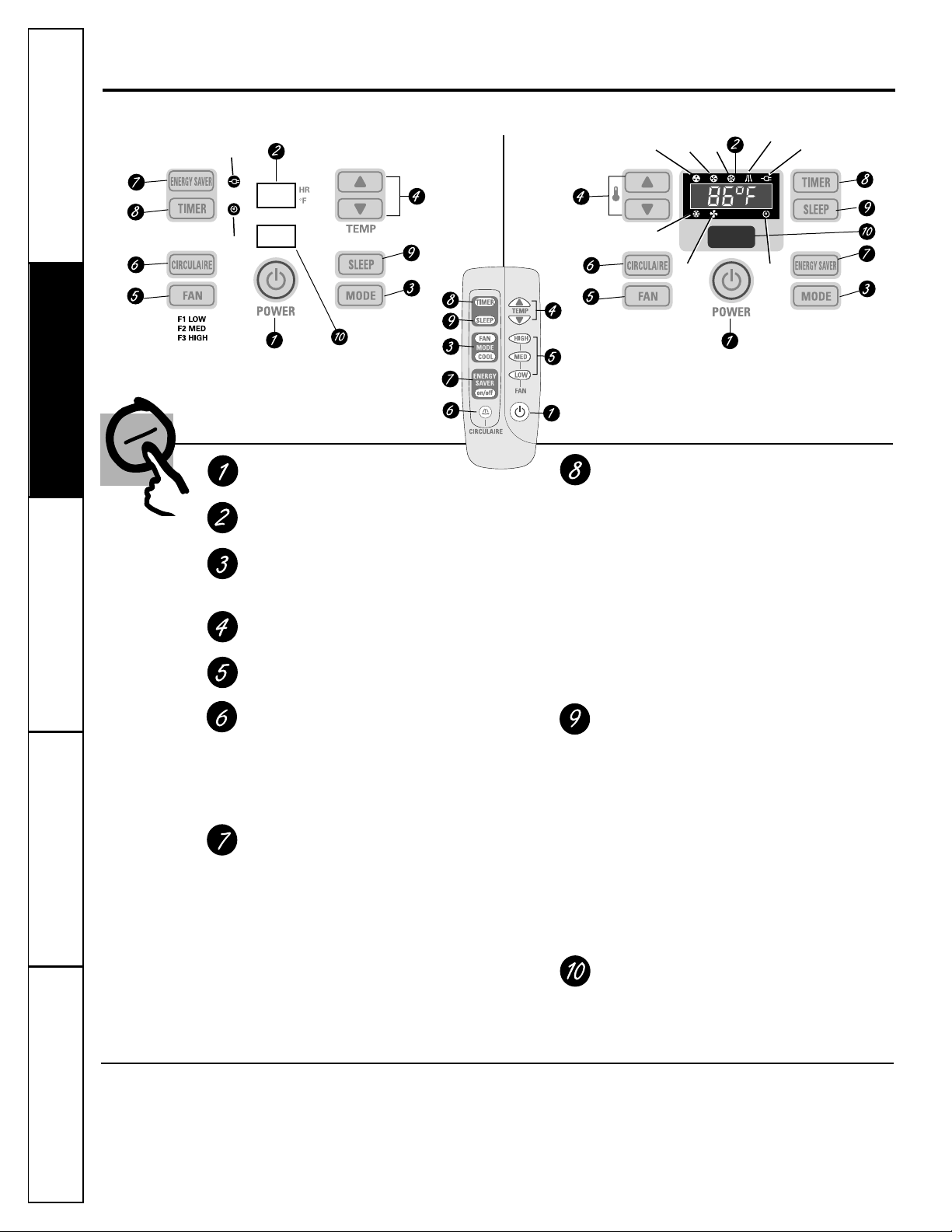
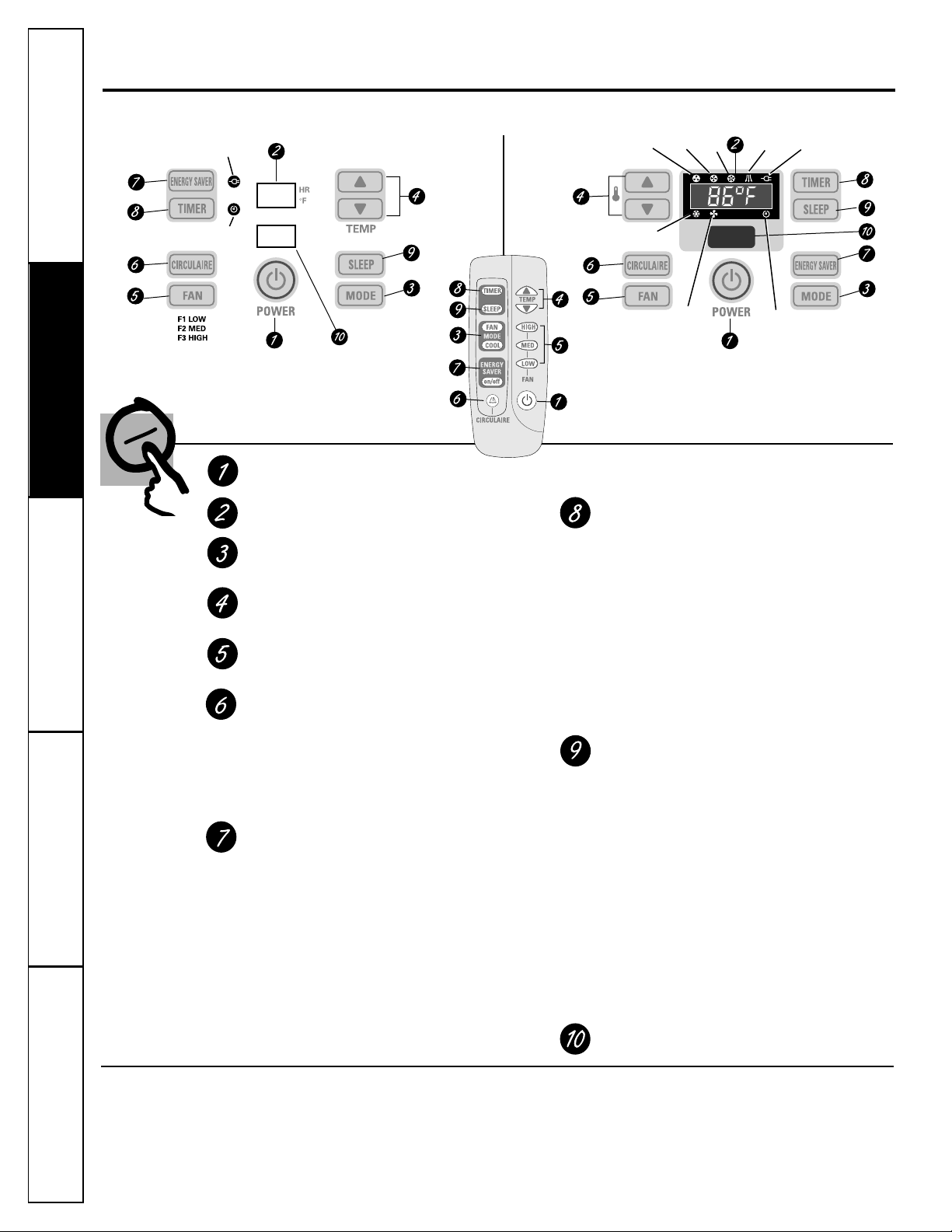
About the controls on the air conditioner—models with touch pads.
Features and appearance will vary.
Air Conditioner Controls
(on some models)
ON/OFF
Turns air conditioner on and off.
Display
MODE
Use to set the air conditioner to COOL or FAN
mode.
Increase ▲ /Decrease ▼ Pads
Use to set temperature when in COOL mode.
FAN
Use to set the fan speed at LOW, MED or HIGH.
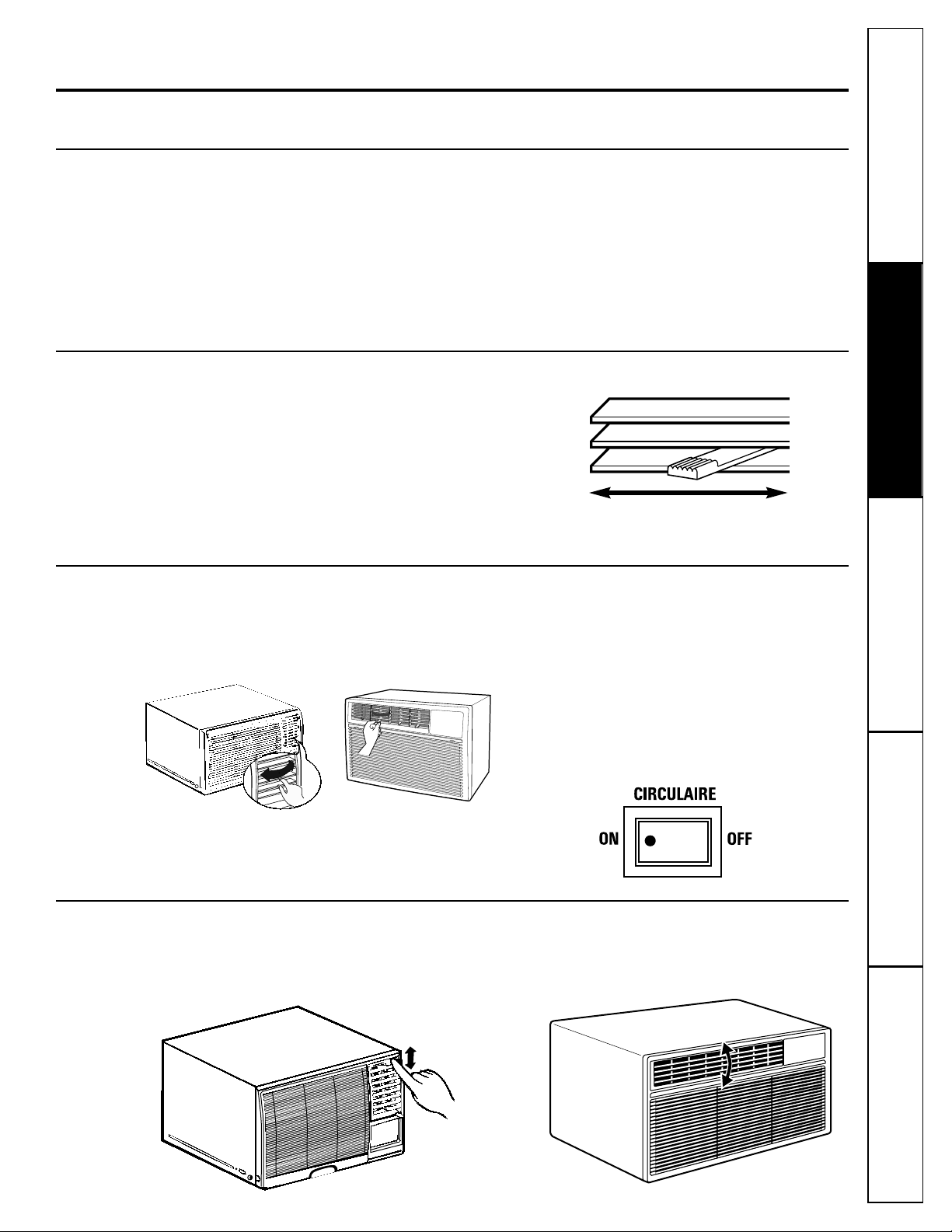
CIRCULAIRE
Turn on to provide continuous side-to-side
air circulation.
For fixed side-to-side air direction, turn ON
until the desired air direction is obtained,
then turn it OFF.
ENERGY SAVER–Controls the fan.
ON—The fan and compressor cycle on and
off. This results in wider variations of room
temperature and humidity. Normally used
when the room is unoccupied. Note: The fan
will continue to run for a short time after the
compressor cycles off.
OFF—The fan runs all the time, while the
compressor cycles on and off.
This switch must be set at OFF in order to use
the fan settings (on the mode control).
TIMER
ON—When the air conditioner is off, it can be
set to automatically turn on in 1 to 12 hours
or 1 to 24 hours (depending on model) at its
previous setting. Each touch will set the time
in hours.
OFF—When the air conditioner is on, it can
be set to automatically turn off in 1 to 12
hours or 1 to 24 hours (depending on
model). Each touch will set the time in hours.
To cancel the timer, press the TIMER pad
until the display time disappears.
SLEEP
Press to set the air conditioner to run for
8 hours before it automatically shuts off.
When the SLEEP pad is pressed, SLEEP displays
for approximately 15 seconds, then shows the
time remaining.
One hour after the sleep timer is set, the set
temperature will automatically increase 2°F.
To cancel the sleep mode, press the SLEEP pad
a second time.
Note: The sleep timer will be cancelled if the
TIMER, ENERGY SAVER or MODE pad is pressed.
Remote Control Signal Receiver
Remote Control
ENERGY
SAVER On
Timer
On
Low
Fan
On
Med
Fan
On
High
Fan
On
CIRCULAIRE
On
ENERGY
SAVER On
Cool Mode On
Fan
Only
On
Timer
On
Air Conditioner Controls
(on some models)
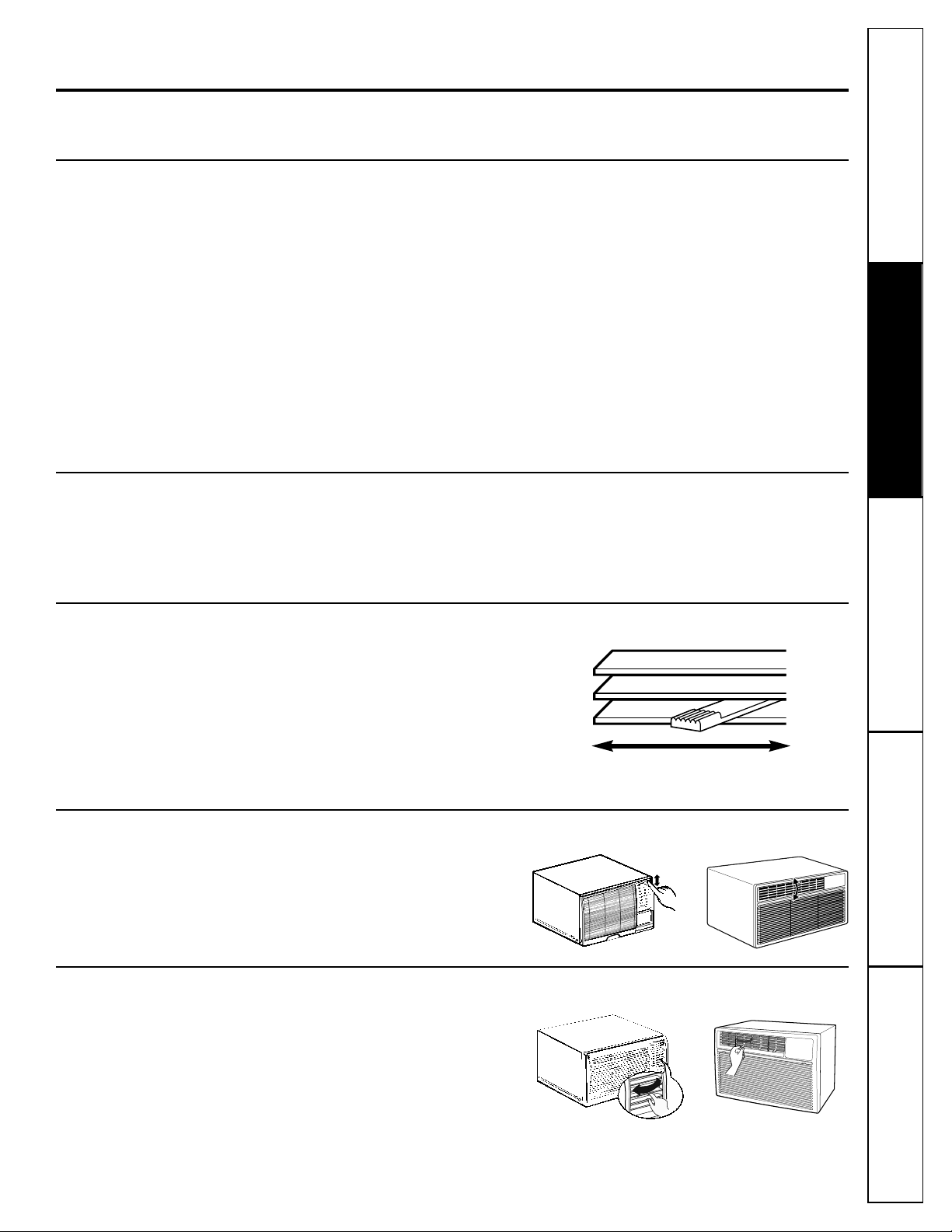
The vent control is located on the inside of the
air louvers in the lower right corner.
When set at CLOSE, only the air inside the room
will be circulated and conditioned. When set at
OPEN, some inside air is exhausted outside.
Consumer SupportTroubleshooting TipsOperating InstructionsSafety Instructions Installation Instructions
GEAppliances.com
When the air conditioner is turned on, it will
automatically start in the setting last used.
Lights beside the touch pads on the air conditioner
control panel indicate the selected settings.
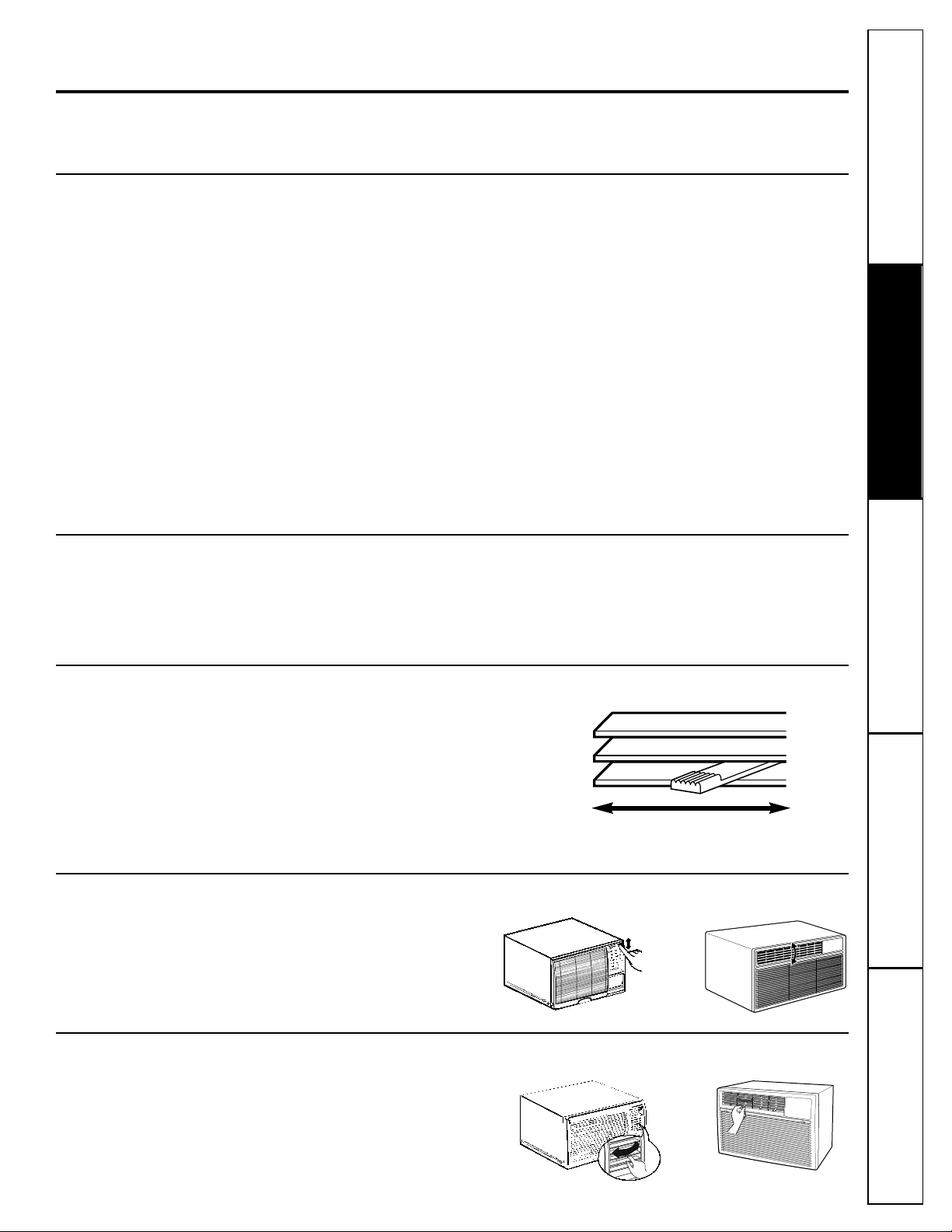
Vent Control
To open the vent, push the lever to the right.
To close it, push it to the left.
COOL Mode
Use the COOL mode with HIGH, MED or LOW fan for
cooling. Use the INCREASE ▲ / DECREASE ▼ pads to
set the desired temperature between 64°F and 86°F
in 1°F increments.
A thermostat is used to maintain the room
temperature. The compressor will cycle on and off
to keep the room at the set level of comfort. Set the
thermostat at a lower number and the indoor air
will become cooler. Set the thermostat at a higher
number and the indoor air will become warmer.
NOTE: If the air conditioner is off and is then turned on
while set to COOL, it will take approximately 3 minutes
for the compressor to start and cooling to begin.
Cooling Descriptions
For Normal Cooling—Select the COOL mode and
HIGH or MED fan with a middle set temperature.
For Maximum Cooling—Select the COOL mode
and HIGH fan with a lower set temperature.
For Quieter & Nighttime Cooling—Select the
COOL mode and LOW fan with a middle set
temperature.
NOTE: If you switch from a COOL setting to OFF or to
a fan setting, wait at least 3 minutes before switching
back to a COOL setting.
Air Direction—Up and Down (on some models)
Fingertip pressure on the horizontal louvers adjusts
the air direction up or down.
FAN Mode
Use the FAN at HIGH, MED or LOW to provide air
circulation and filtering without cooling. Since fan
only settings do not provide cooling, a temperature
setting will not be displayed.
OR
5
Air Direction—Side-to-Side (on some models)
On some models, the side-to-side air direction is
adjusted by the louver levers or by grasping and
moving the inner vertical louvers.
OR
Consumer Support
Troubleshooting Tips Operating Instructions Safety InstructionsInstallation Instructions
6
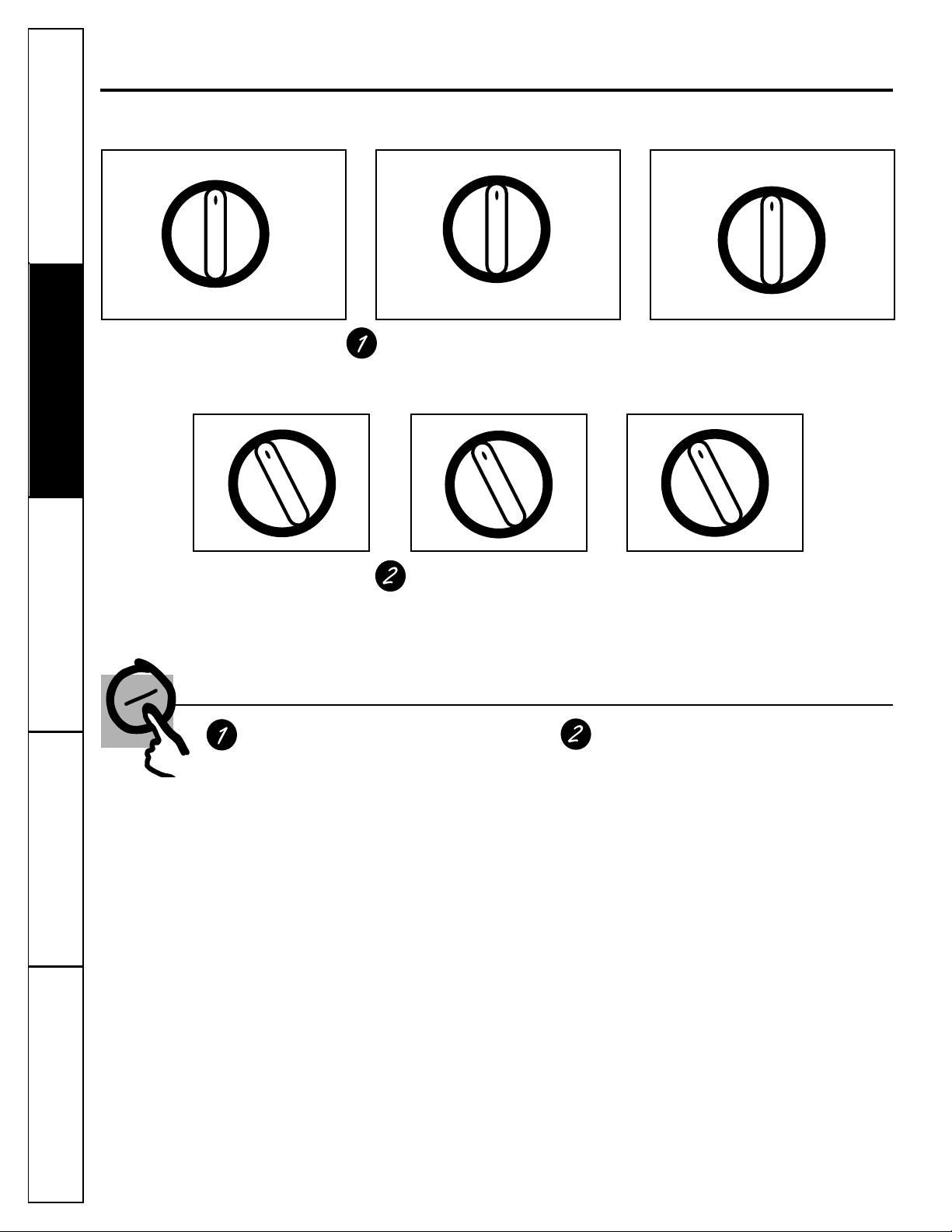
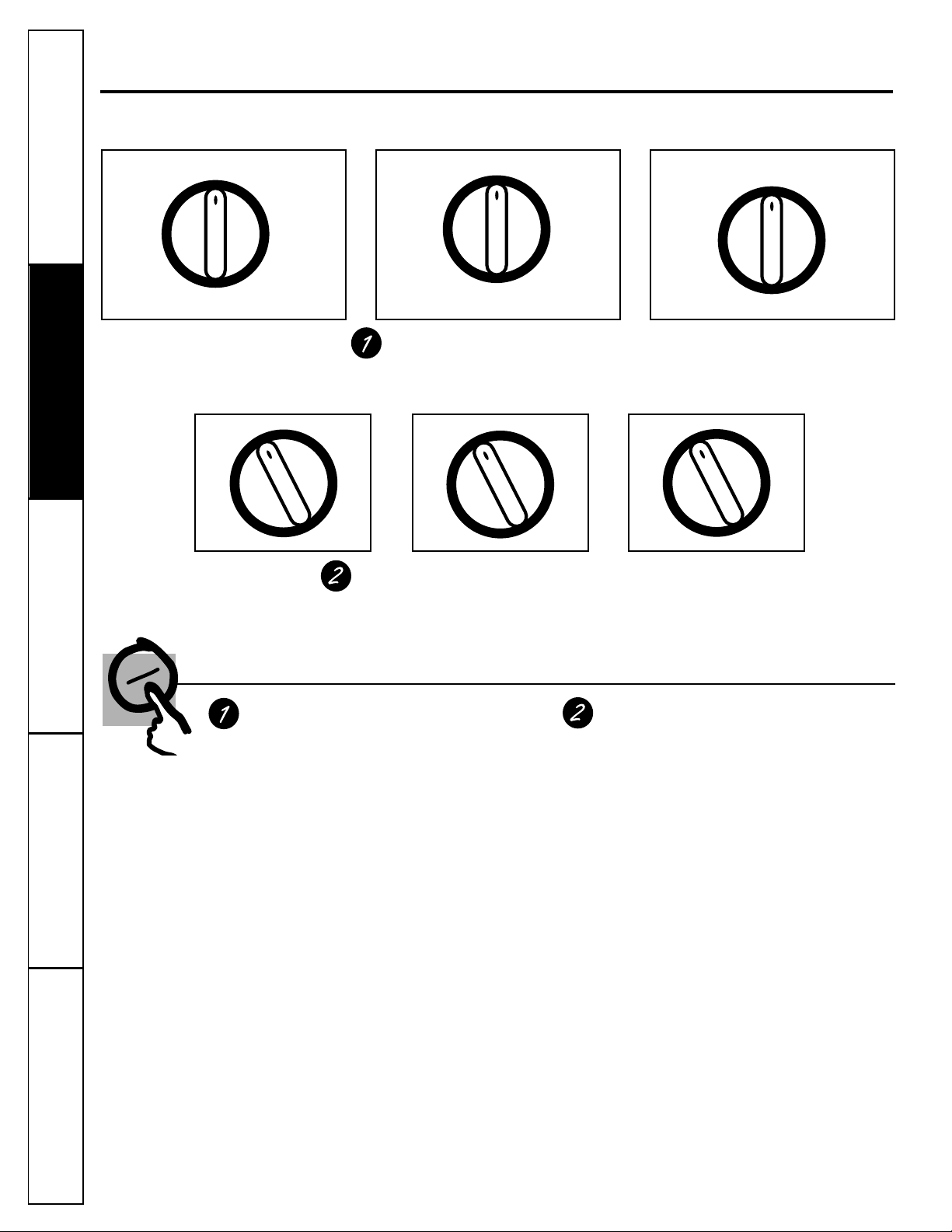
About the controls on the air conditioner—models with control knobs.
Features and appearance will vary.
Controls
Mode Controls
HIGH COOL, MED COOL and LOW COOL provide
cooling with different fan speeds.
LOW FAN or HIGH FAN provides air circulation
and filtering without cooling.
NOTE: If you move the switch from a cool setting to OFF or
to a fan setting, wait at least 3 minutes before switching back
to a cool setting.
Cooling Descriptions
For Normal Cooling—Select HIGH COOL or MED
COOL with the temp control at midpoint.
For Maximum Cooling—Select HIGH COOL with the
temp control at the highest number available on
your knob.
For Quieter and Nighttime Cooling—Select LOW
COOL with the temp control at midpoint.
Temp Controls
The temp control is used to maintain the
room temperature. The compressor will cycle
on and off to keep the room at the same
level of comfort. When you turn the knob to
a higher number the indoor air will become
cooler. Turn the knob to a lower number and
the indoor air will become warmer.
MODE CONTROLS
Your model will have one of the above type controls.
TEMP CONTROLS
Your model will have one of the above type controls.
OFF
LOW
FAN
LOW
COOL
HIGH
FAN
HIGH
COOL
MED
COOL
OFF
LOW
FAN
LOW
COOL
HI
FAN
HI
COOL
1
2
3
4
5
6
7
8
9
10
1
2
3
45
6
7
8
1
2
34
5
6
OFF
LOW
FAN
LOW
COOL
HI
FAN
HI
COOL
MED COOL
The vent control is located on the inside of the air
louvers in the lower right corner.
When set at CLOSE, only the air inside the room
will be circulated and conditioned. When set at
OPEN, some inside air is exhausted outside.
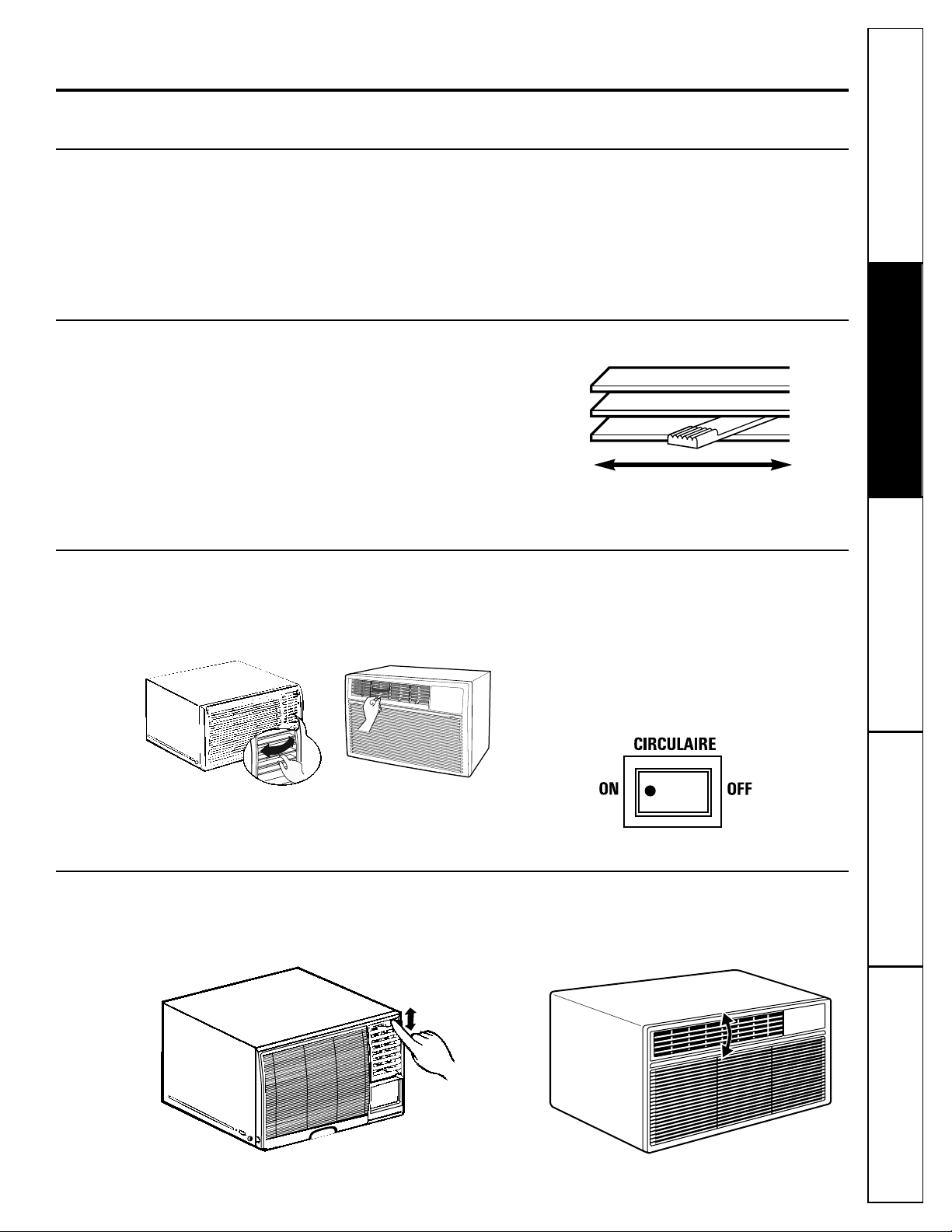
Air Direction—Up and Down (on some models)
Fingertip pressure on the horizontal louvers adjusts
the air direction up or down.
OR
Consumer SupportTroubleshooting TipsOperating InstructionsSafety Instructions Installation Instructions
7
GEAppliances.com
Additional controls and important information.
Vent Control (on some models)
To open the vent, push the lever to the right.
To close it, push it to the left.
Energy Saver (on some models)
The energy saver switch controls the fan.
ON—The fan and compressor cycle on and off
together. This results in wider variations of room
temperature and humidity. It is normally used when
the room is unoccupied.
OFF—The fan runs all the time, while the
compressor cycles on and off.
This switch must be set at OFF in order to use
the fan settings (on the mode control).
Air Direction—Side-to-Side
On some models, the side-to-side air direction is
adjusted by the louver levers or by grasping and
moving the inner vertical louvers.
CIRCULAIRE (on some models)
For fixed side-to-side air direction, set the
Circulaire switch to ON until the desired air
direction is obtained, then move it to OFF.
For continuous side-to-side air circulation, set the
Circulaire switch to ON and leave it there.
OR
Outdoor Coils
The coils on the outdoor side of the air conditioner
should be checked regularly. If they are clogged
with dirt or soot they may be professionally
steam cleaned, a service available through your
GE service outlet.
Grille and Case
Turn the air conditioner off and remove the
plug from the wall outlet before cleaning.
To clean, use water and a mild detergent.
Do not use bleach or abrasives.
Care and cleaning of the air conditioner.
8
Consumer Support
Troubleshooting Tips Operating Instructions Safety InstructionsInstallation Instructions
How to Insert the Batteries
Remove the battery cover by sliding it
according to the arrow direction.
Insert new batteries making sure that the
(+) and (–) of battery are installed correctly.
Reattach the cover by sliding it back
into position.
NOTES:
■ Use 2 AAA (1.5 volt) batteries. Do not use
rechargeable batteries.
■ Remove the batteries from the remote control if
the system is not going to be used for a long time.
3
2
1
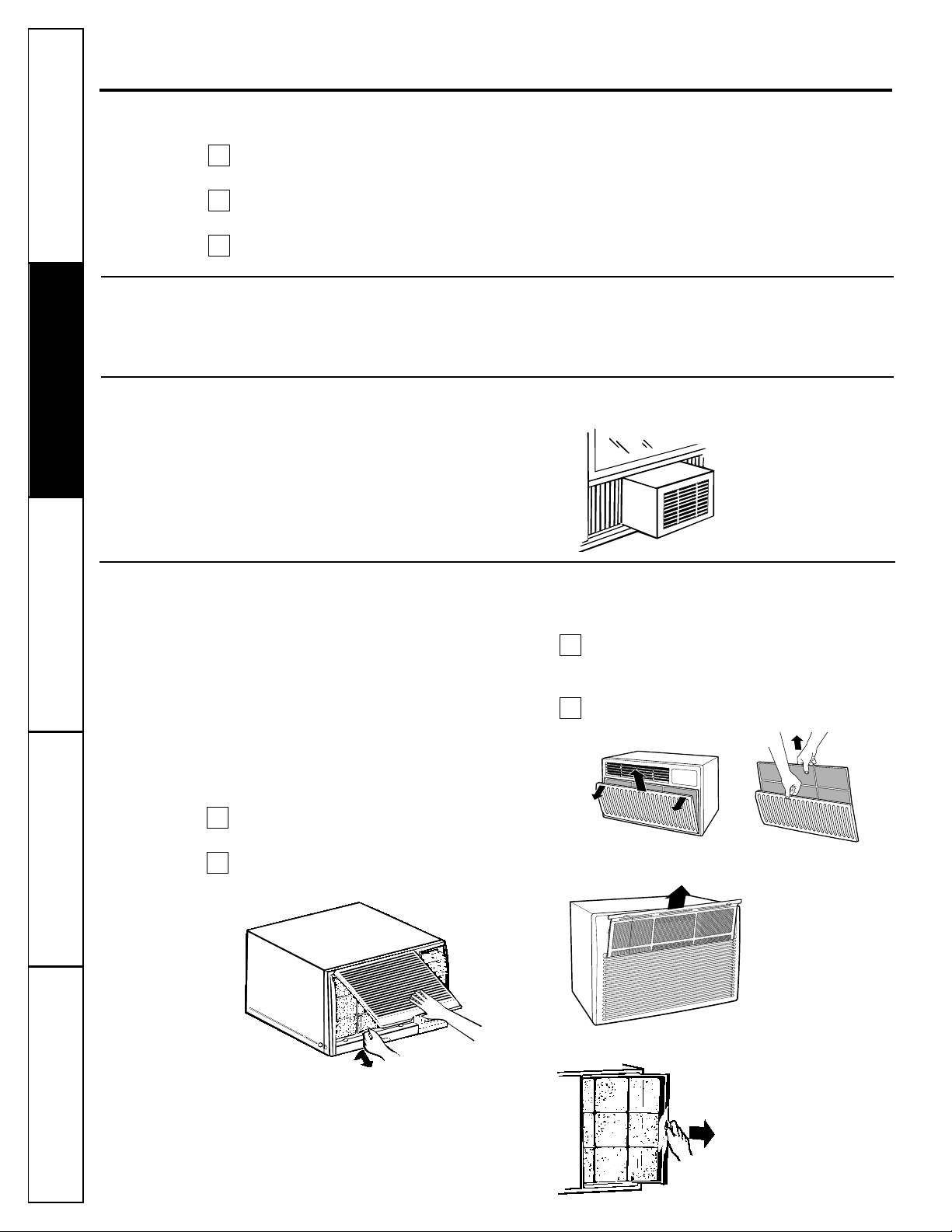
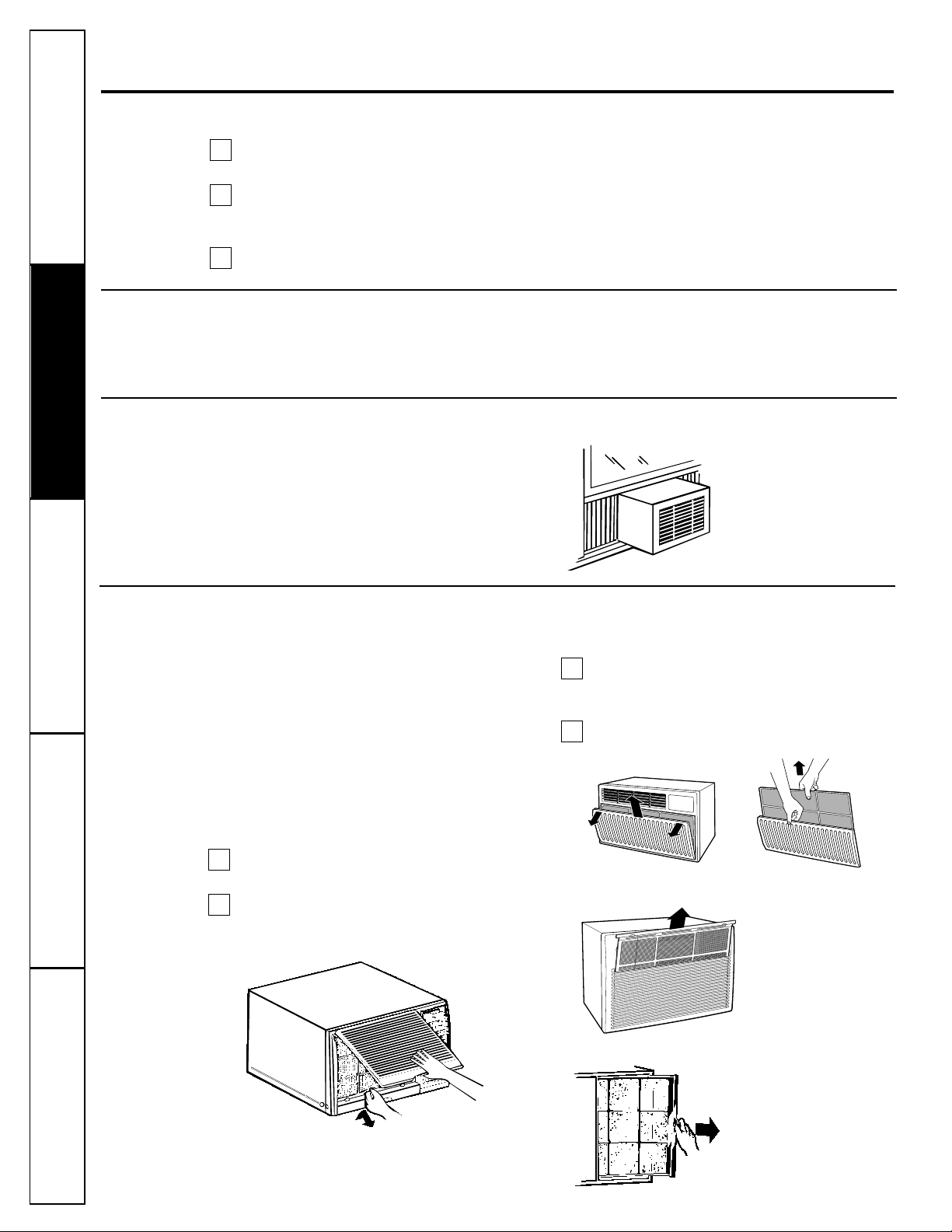
Air Filter
The air filter behind the front grille should be
checked and cleaned at least every 30 days or
more often if necessary.
Clean the filter with warm, soapy water. Rinse and
let the filter dry before replacing it.
CAUTION: DO NOT operate the air conditioner without
a filter because dirt and lint will clog it and reduce
performance.
To remove (on some models):
Open the inlet grille upward by pulling out
the bottom of the inlet grille.
Using the tab, pull up slightly on the filter
to release it and pull it down.
To remove (on some models):
Open the inlet grille downward by pulling out
the upper corners of the inlet grille. Lift it up
and off.
Grasp the filter at the top center and slide
it out.
To remove (on some models):
To remove (on some models):
2
1
2
1
Grab the tab on the filter
and pull it to the right.
Grab the tabs on
the filter and pull
it up and out.
Consumer SupportTroubleshooting TipsOperating InstructionsSafety Instructions Installation Instructions
9
Preparing to install the air conditioner.
Read these instructions completely and carefully.
NOTE TO INSTALLER: Leave these instructions with
the air conditioner after installation is completed.
NOTE TO CONSUMER: Keep this Owner’s Manual
and Installation Instructions for future use.
IMPORTANT NOTES:
For personal safety, this air conditioner must be
properly grounded.
It is important to have the wall outlet and circuit
checked by a qualified electrician if there is any
doubt as to whether a proper ground exists.
Follow National Electric Codes (NEC) and/or local
codes and ordinances.
CAUTION:
Do not, under any circumstances, cut or
remove the third (ground) prong from the
power cord.
Do not change the plug on the power cord
of this air conditioner.
Aluminum house wiring may present
special problems—consult a qualified
electrician.
Before You Begin
Some models require 115/120-volt AC,
60 Hz grounded outlet protected with
a 15-amp time delay-fuse or circuit
breaker.
The 3-prong grounding plug minimizes the
possibility of electric shock hazard. If the wall outlet
you plan to use is only a 2-prong outlet, it is your
responsibility to have it replaced with a properly
grounded 3-prong wall outlet.
Some models require 230/208-volt AC,
protected with a time-delay fuse or circuit
breaker. These models should be installed
on their own single branch circuit for best
performance and to prevent overloading
house or apartment wiring circuits, which
could cause a possible fire hazard from
overheating wires.
Electrical Requirements
■ Phillips-head screwdriver
■ Adjustable wrench
■ Ruler or tape measure
■ Scissors or knife
■ Pencil
■ Level
Tools You Will Need
10
Consumer Support
Troubleshooting Tips Operating Instructions Safety InstructionsInstallation Instructions
Read the section Preparing to Install the Air Conditioner before beginning.
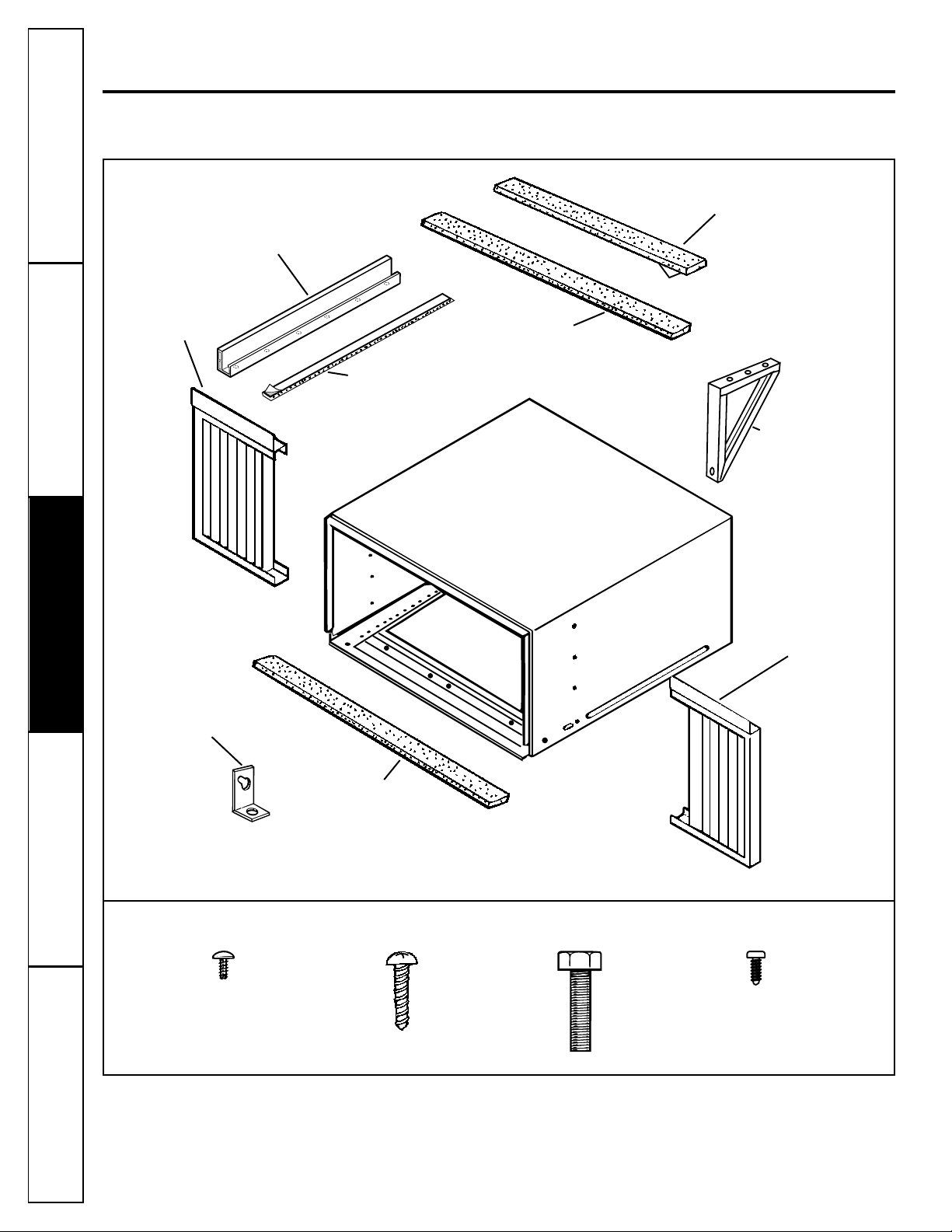
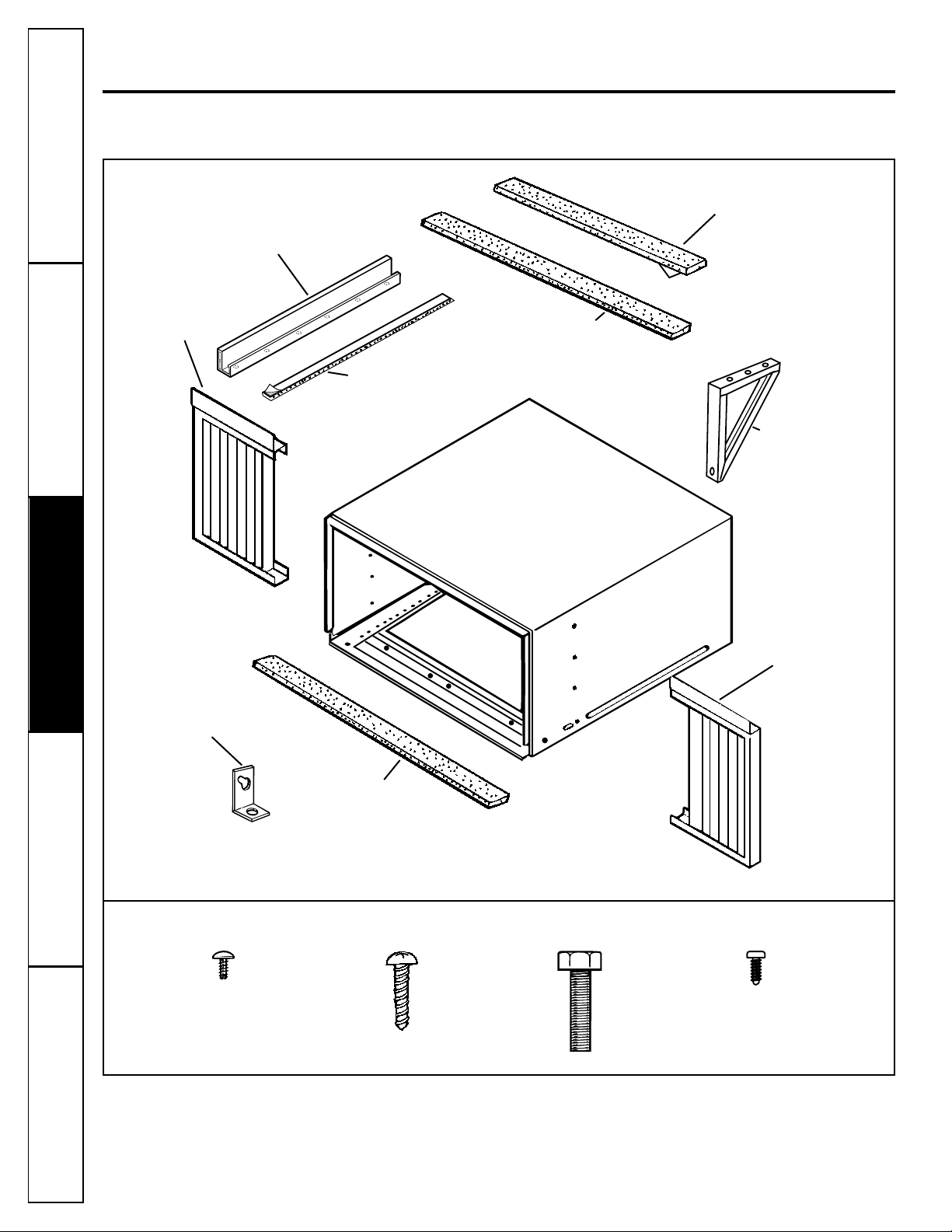
Parts Included
Window Installation Instructions.
Type A (22)
Security bracket
Top mounting rail
Right
accordion
panel
Foam top
window gasket
Window
sash seal
Left
accordion
panel
Type B (11)
Type C (2)
Bottom inner
case gasket
V-support (2)
Top mounting rail
seal strip
Type D (1 or 2)
(on some models)
Consumer SupportTroubleshooting TipsOperating InstructionsSafety Instructions Installation Instructions
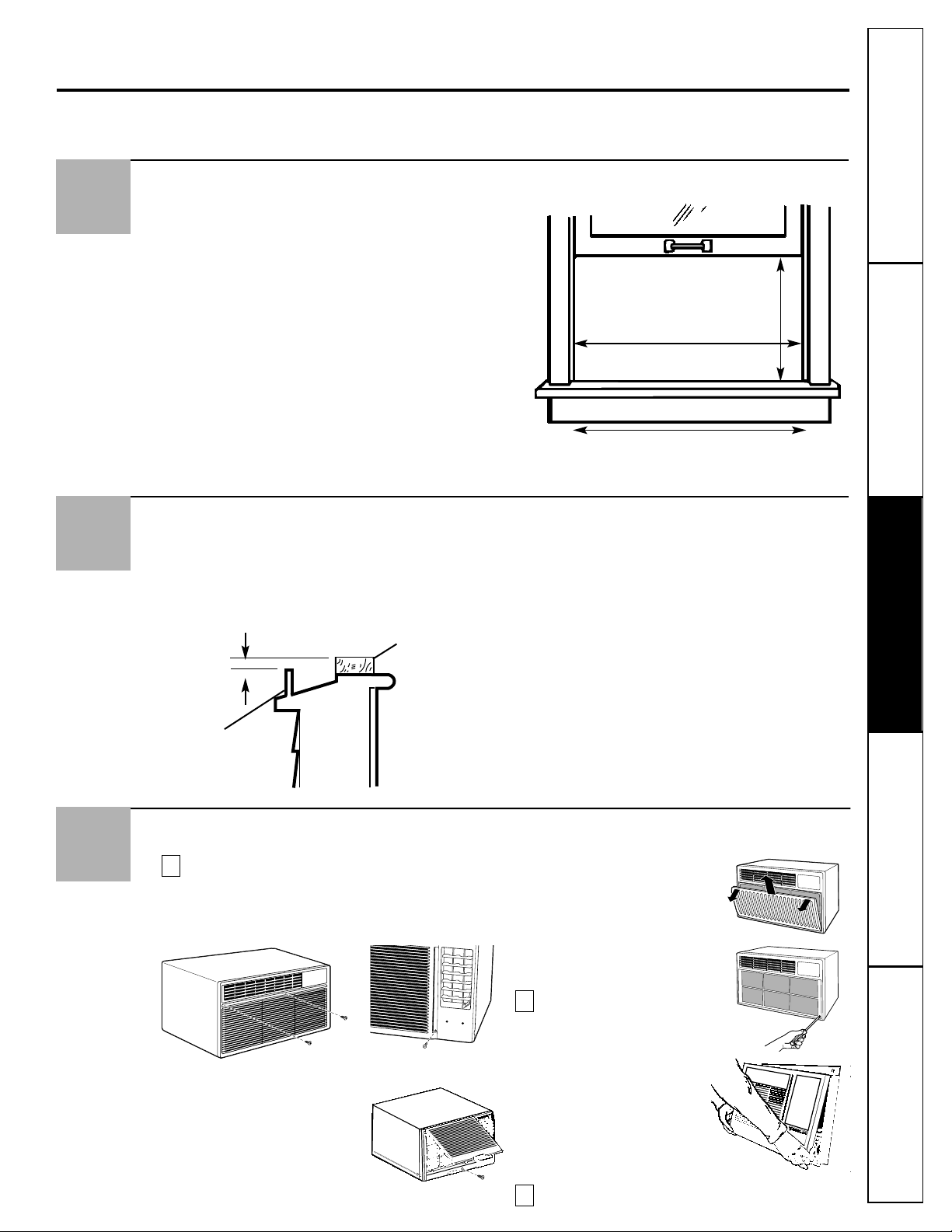
Storm Window Requirements
A storm window frame will not allow the air
conditioner to tilt towards the outside and will
keep it from draining properly. To adjust for this,
attach a piece of wood to the stool.
WOOD PIECES—
WIDTH: 2″
LENGTH: Long enough to fit inside the window
frame.
THICKNESS: To determine the thickness, place a
piece of wood on the stool to make it 1/2″ higher
than the top of the storm window frame.
Attach securely with nails or screws provided by
the installer.
2
Read completely, then follow step-by-step.
1/2″ higher
than frame
Storm window
frame
Wood
Stool
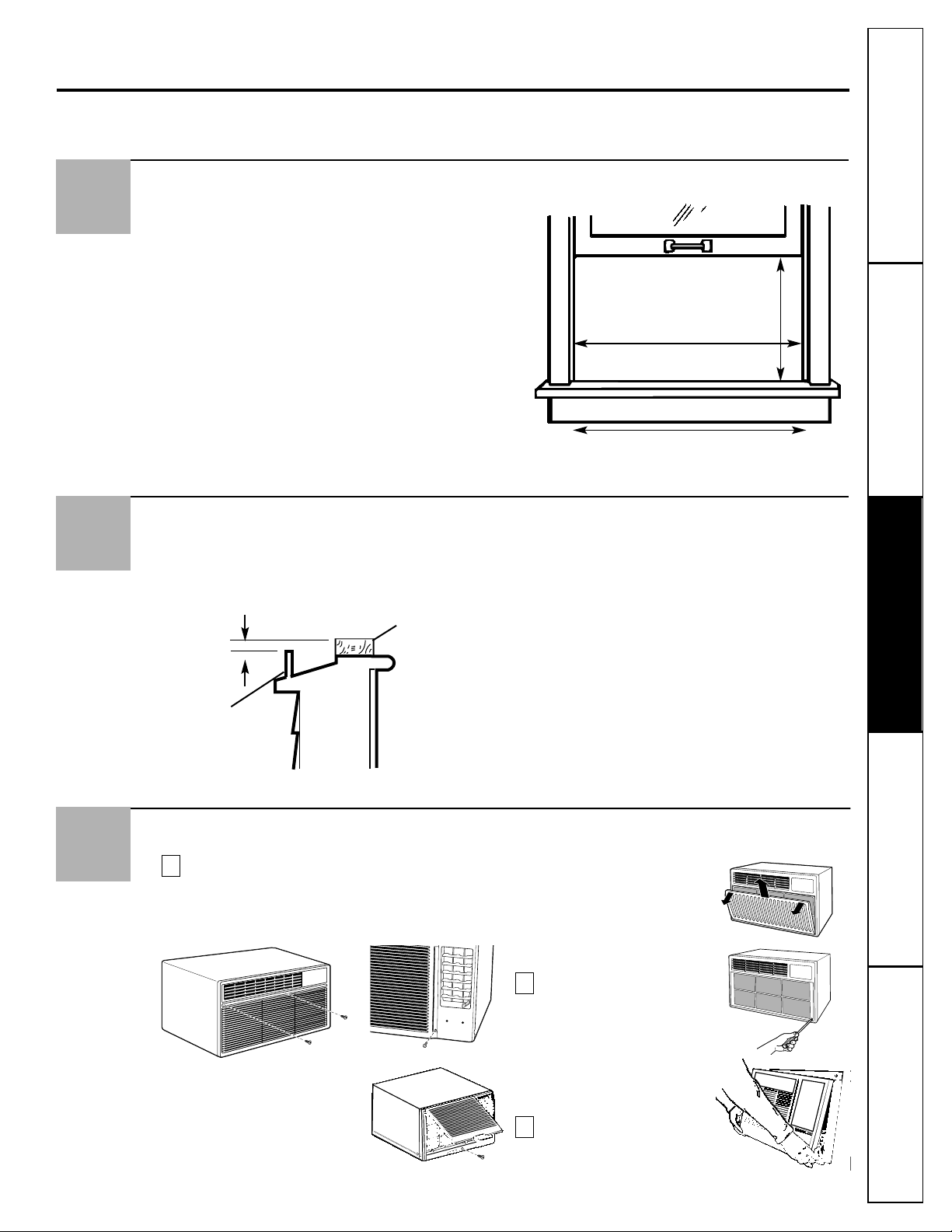
Remove the Front Grille, if attached
Remove shipping tape if present. On models
with a slide out air filter, remove it (see the
Care and Cleaning section) and the screw(s)
behind it (if present) that holds the grille
in place.
On models with a raise up
inlet grille, lift it (see the Care
and Cleaning section) and
remove the screw behind it
(if present) that holds the
grille in place.
On some models, open
the inlet grille from the
sides and remove it.
Remove the screws from
the lower right corner
if present.
Pull the bottom grille
corners out to release the
lower tabs on each side.
NOTE: Do not pull the
bottom edge toward you
more than 3″ or you may
damage the tabs of the grille.
Lift the grille up and off
the top tabs.
C
B
B
B
A
3
Window Requirements
■ These instructions are for a standard double-
hung window. You will need to modify them for
other types of windows.
■ The air conditioner can be installed without
the accordion panels if needed to fit in a narrow
window. See the window opening dimensions
at right.
■ All supporting parts must be secured to firm
wood, masonry or metal.
■ The electrical outlet must be within reach of
the power cord.
1
17
3
⁄8″ min.
30″ to 41″
(With accordion panels)
26″ min.
(Without accordion panels)
OR
11
12
Consumer Support
Troubleshooting Tips Operating Instructions Safety InstructionsInstallation Instructions
Window Installation Instructions.
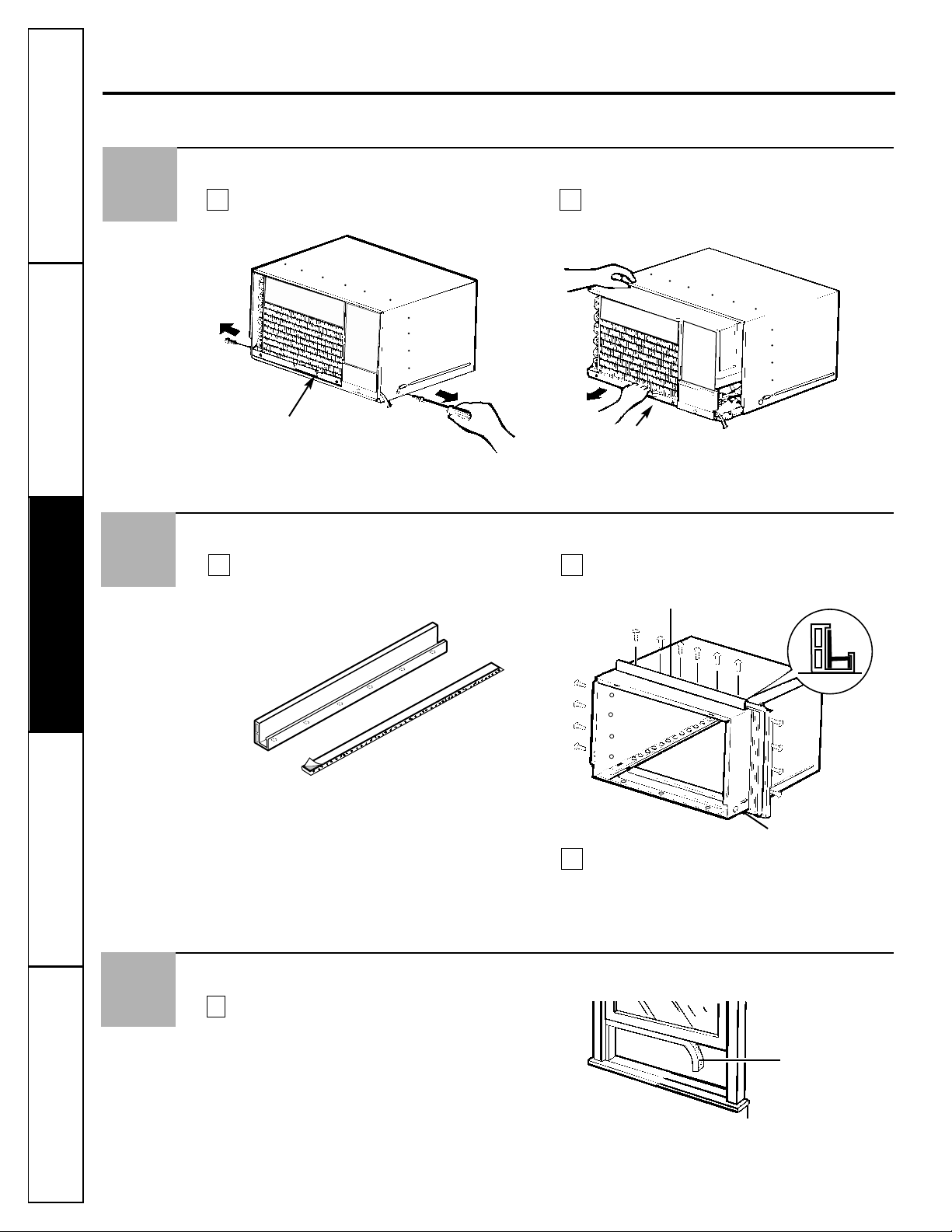
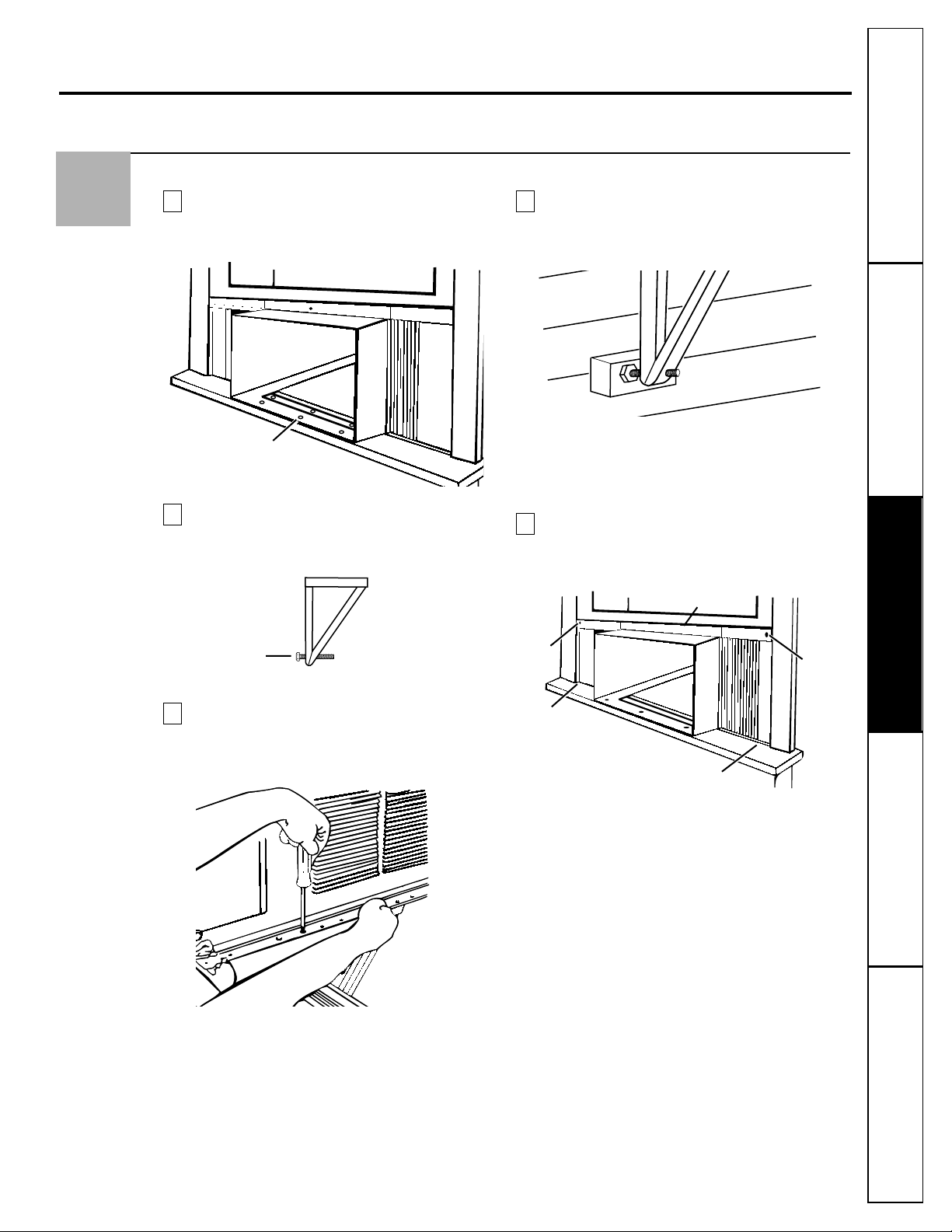
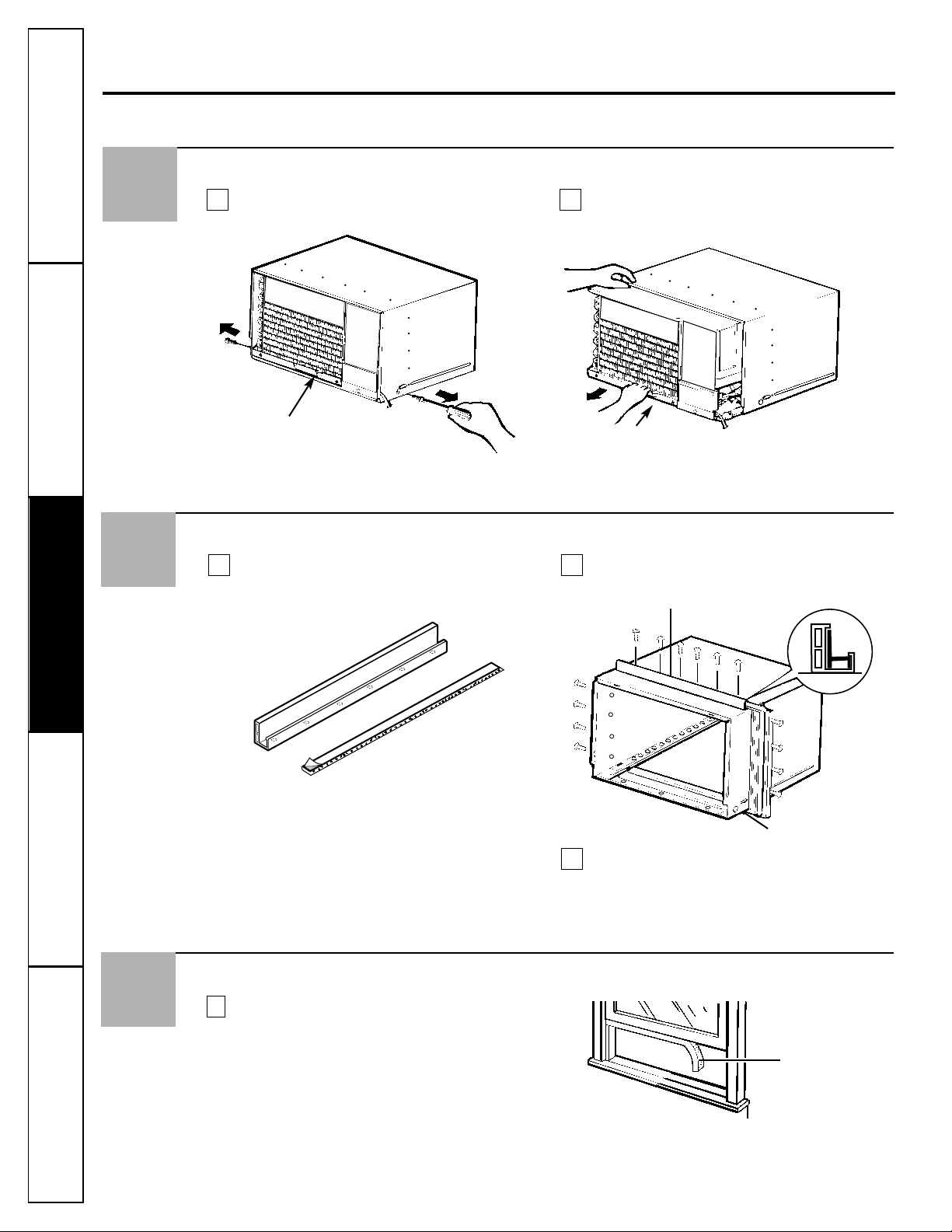
Prepare the Case
Remove the backing from the top mounting
rail seal strip and attach it to the bottom of the
top mounting rail.
Install the top mounting rail with 6 type A
screws from the outside of the case.
Insert the frames for the accordion panels into
the top and bottom mounting rails. Attach the
accordion panels to the side of the case using
8 type A screws.
BA
Remove the Air Conditioner From the Case
Remove the 2 screws on each side of the case.
Keep these for later use.
Slide the air conditioner from the case by
gripping the base pan handle and pulling
forward while bracing the case.
BA
5
4
Remove packing cardboard and tape if present.
C
Top mounting rail
Bottom mounting rail
Front of air conditioner.
Prepare the Window
Cut the window sash seal to the window width
and stick the adhesive side to the bottom of
the sash.
A
6
Window sash seal
Front of air conditioner.
Consumer SupportTroubleshooting TipsOperating InstructionsSafety Instructions Installation Instructions
13
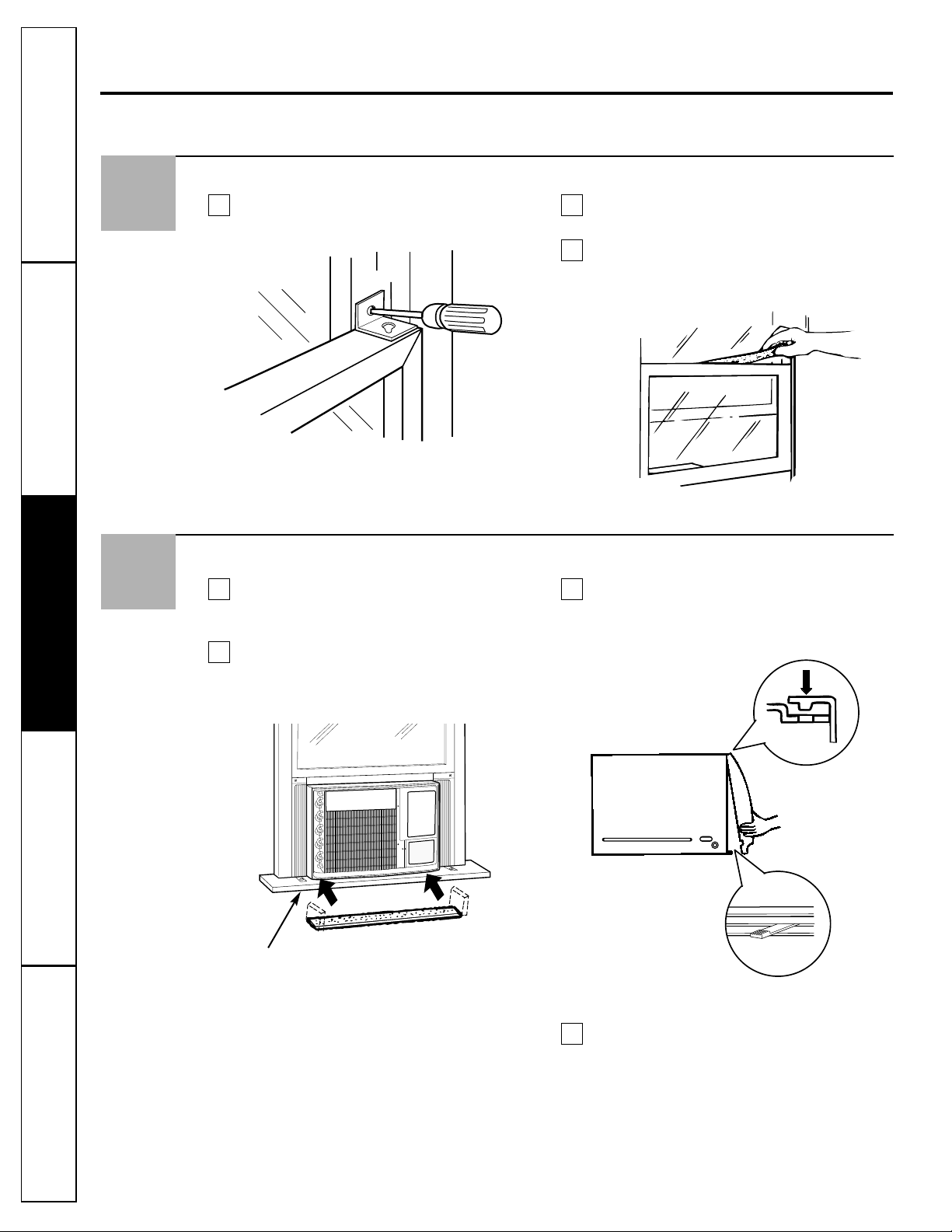
7
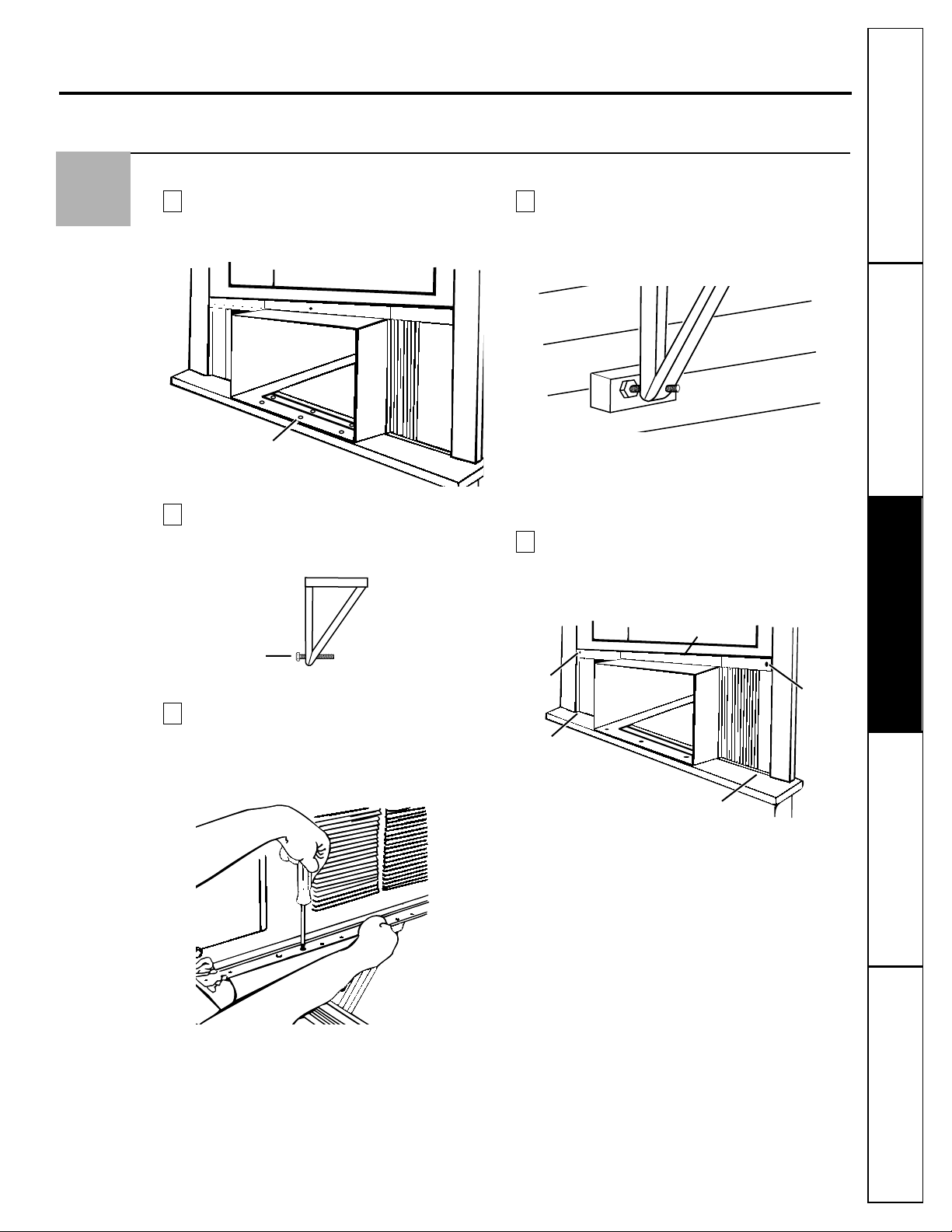
Install the Case in the Window
Carefully slide the case into the window and
center the case. Lower the window behind
the top mounting rail. Mount the case to
the window sill using 6 type B screws.
Thread a type C bolt about 1/2 of the way
into the outer face of the shortest angle of
each V-support.
Position the V-supports on the case bottom so
that they will be near the outside wall. Attach
a V-support to each side of the bottom of the
case using type A screws, 4 on each side.
Adjust the type C leveling bolts against the
outside wall so that the case has a slight tilt to
the outside. Use a level; about a 1/2 bubble
will be the correct case slant to the outside.
NOTE: Use a wood block between the leveling bolts
and the wall if the wall is weak or if the weight
of the air conditioner falls between the studs in
the wall.
Extend the left and right accordion panels to
the vertical window sashes and attach the top
and bottom corners with 4 type B screws.
E
D
C
B
A
Type B
screw
Type B
screw
Type B screw
Type B screw
Top mounting rail
6 Type B screws
Type C bolt
14
Consumer Support Troubleshooting Tips
Operating Instructions Safety InstructionsInstallation Instructions
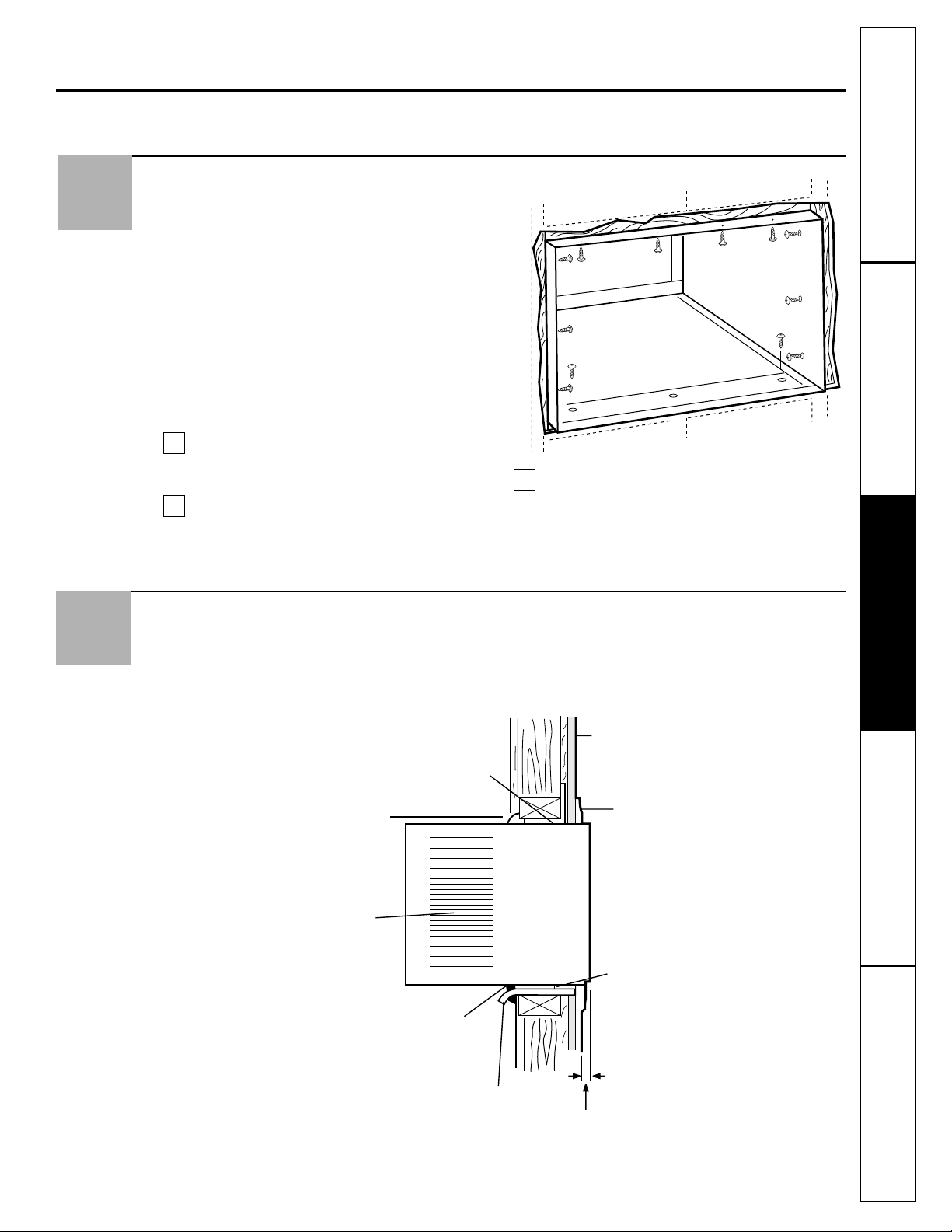
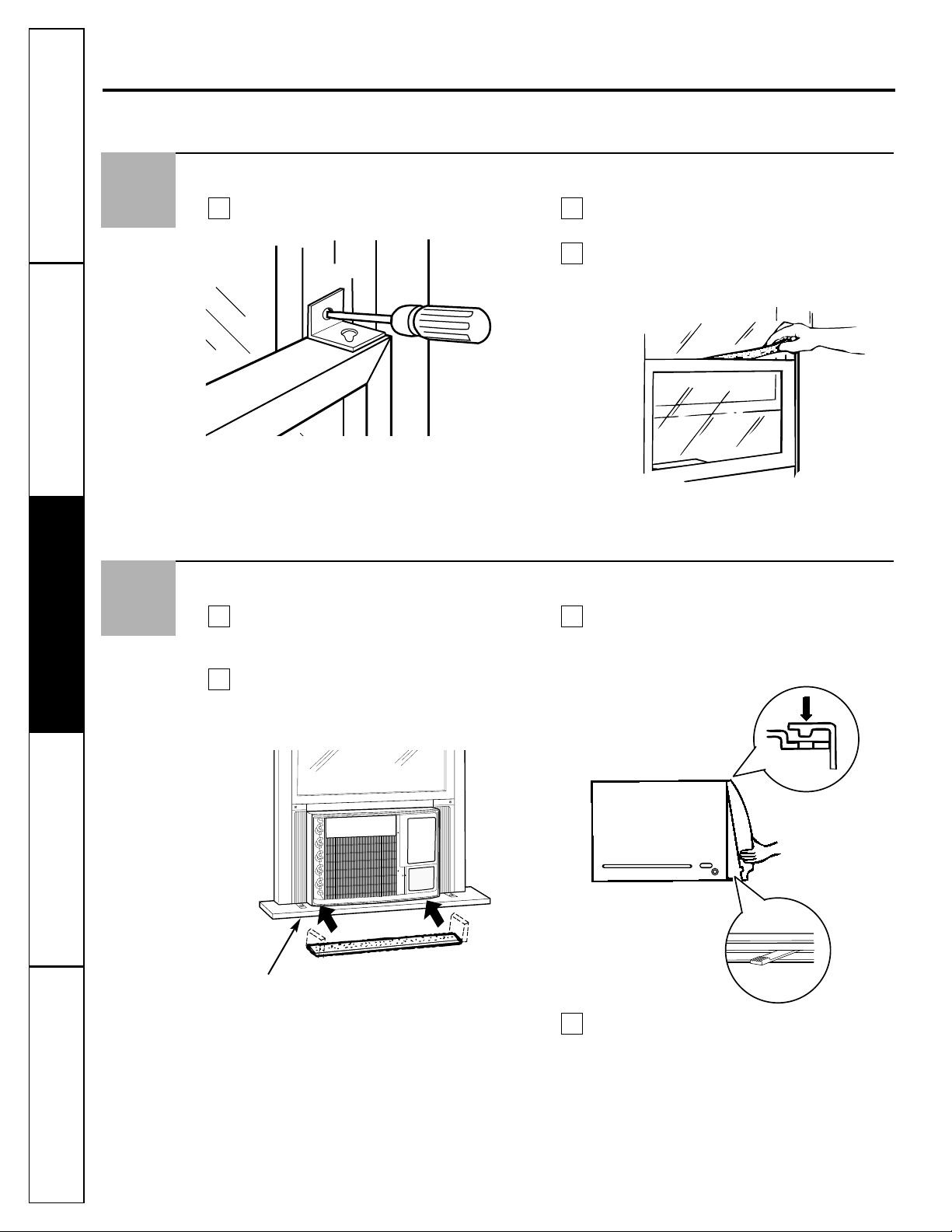
Install the Air Conditioner in the Case
Slide the air conditioner into the case.
Reinstall the 2 screws removed earlier on
each side of the case.
Place the bottom inner case gasket between
the bottom of the air conditioner and the
inside bottom of the case. Fold up the ends
on both sides and push them in.
Attach the front grille to the case by inserting
the tabs on the grille into the slots on the
front of the case. Push the grille in until it
snaps into place.
Secure the front grille to the case by replacing
the screw removed in Step 3A. If a screw was
not removed in Step 3A, secure the grille with
a Type D screw for models with a raise-up inlet
grille, or 1 or 2 Type D screw(s) for models
with a slide-out filter.
The installation is now complete.
D
C
B
A
Guide the lever carefully
through the grille as you
push it in.
Bottom inner
case gasket
Window Installation Instructions.
9
Front of air
conditioner.
Install the Security Bracket and the Foam Top Window Gasket
Attach the security bracket with a type B screw. Cut the foam top window gasket to the
window width.
Stuff the foam between the glass and the
window to prevent air and insects from
getting into the room.
C
BA
8
Consumer SupportTroubleshooting TipsOperating InstructionsSafety Instructions
Installation Instructions
15
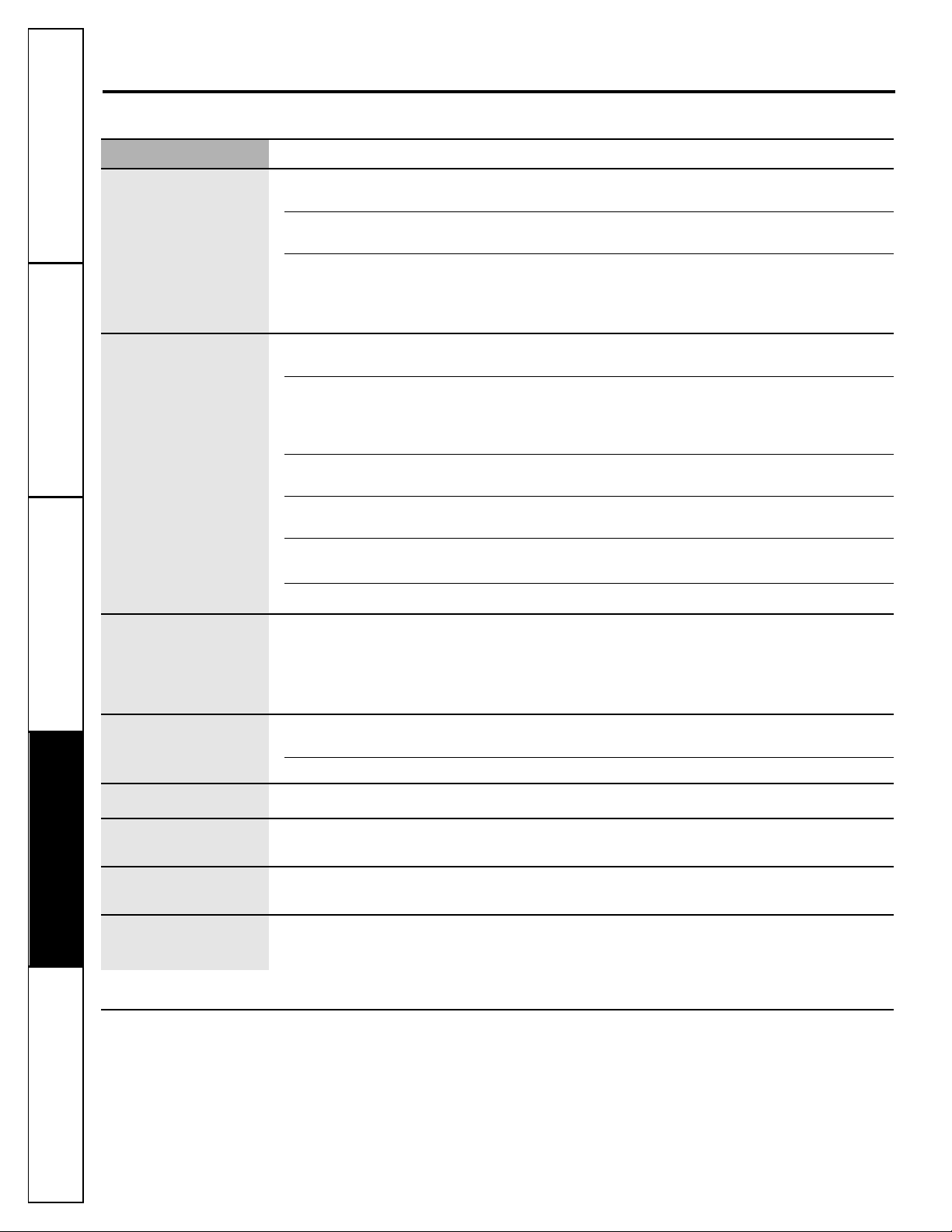
Through the Wall Installation Instructions—Optional.
IMPORTANT
Through the wall installation is not appropriate
if any of the side louvers in the case will be
obstructed by the wall.
All side louvers in the case must project on the
outdoor side of the wall.
The room side of the case must project into the
room at least 1
3
⁄4″ from the finished wall.
The case must be installed level from side-to-side
and with a slight tilt from front to rear. Use a level;
about a 1/2 bubble will be the correct case slant to
the outside.
Remove the air conditioner from the case.
For specific instruction, refer to the Window
Installation Instructions.
Make certain a wall receptacle is available
close to the hole location or make
arrangements to install a receptacle.
Place the case in the wall opening and
secure with 12 1″ long #10 wood screws.
NOTE: Drill pilot holes, if necessary, for proper
installation. If the frame is oversized, use shims
to prevent case distortion.
C
B
A
1
The case may be installed through the wall in both existing and new construction.
Read completely, then follow step-by-step.
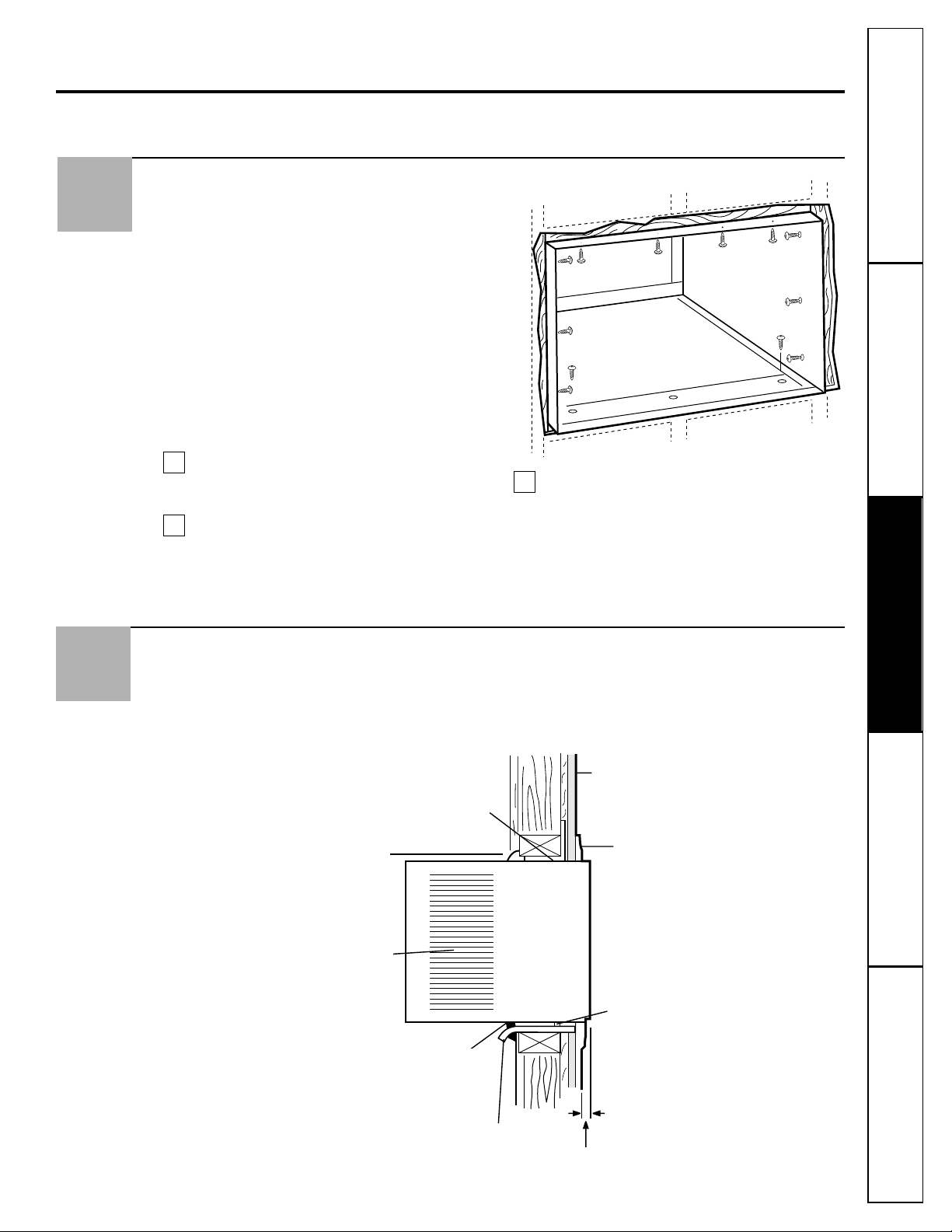
Caulk all four sides on the outdoor side of the case to prevent moisture from getting through to the
interior wall. Use of flashing (drip rail) will further prevent water from dripping inside the wall and
down the outside of the building.
2
Lintel angle (if required)
Caulking
Air louvers
(must project on
the outdoor side
of the wall)
Wood Filler and Caulking
(above and below the flashing)
Flashing (Drip rail)
4.5 cm (1
3
/4″) min.
Bottom rail
INSIDE
OUTSIDE
Trim molding (if desired)
Plaster line
Finish the Wall Opening
16
Consumer Support
Troubleshooting Tips Operating Instructions Safety InstructionsInstallation Instructions
Before you call for service…
Troubleshooting Tips: Save time and money! Review the chart below first and you may not need to call for service.
Normal Operating Sounds
■ You may hear a pinging noise caused by water
being picked up and thrown against the
condenser on rainy days or when the humidity
is high. This design feature helps remove
moisture and improve efficiency.
■ You may hear the thermostat click when the
compressor cycles on and off.
■ Water will collect in the base pan during
high humidity or on rainy days. The water
may overflow and drip from the outdoor side
of the unit.
■ The fan may run even when the compressor
does not.
Problem Possible Causes What To Do
Air conditioner The air conditioner • Make sure the air conditioner plug is pushed
does not start is unplugged. completely into the outlet.
The fuse is blown/circuit • Check the house fuse/circuit breaker box and replace
breaker is tripped. the fuse or reset the breaker.
Power failure. • If power failure occurs, turn the air conditioner OFF.
When power is restored, wait 3 minutes to restart the
air conditioner to prevent tripping of the compressor
overload.
Air conditioner does Airflow is restricted. • Make sure there are no curtains, blinds or furniture
not cool as it should blocking the front of the air conditioner.
The temp control may • On models with touch pads: In COOL mode, press the
not be set correctly. DECREASE ▼ pad.
• On models with control knobs, turn the temperature
knob to a higher number.
The air filter is dirty. • Clean the filter at least every 30 days.
See the Operating Instructions section.
The room may have been hot. • When the air conditioner is first turned on, you need
to allow time for the room to cool down.
Cold air is escaping. • Check for open furnace registers and cold air returns.
• Set the air conditioner’s vent to the closed position.
Cooling coils have iced up. • See “Air conditioner freezing up” below.
Air conditioner Ice blocks the air flow • On models with control knobs, set the mode control
freezing up and stops the air conditioner at HIGH FAN or HIGH COOL with the temp at 1 or 2.
from cooling the room.
• On models with touch pads, set the controls at
HIGH FAN or HIGH COOL and set the thermostat to
a higher temperature.
The remote control is The batteries are inserted • Check the position of the batteries. They should be
not working incorrectly. inserted in the opposite (+) and (–) direction.
The batteries may be dead. • Replace the batteries.
Water drips outside Hot, humid weather. • This is normal.
Water drips indoors The air conditioner is not • For proper water disposal, make sure the air conditioner
tilted to the outside. slants slightly from the case front to the rear.
Water collects in Moisture removed from air • This is normal for a short period in areas with little
base pan and drains into base pan. humidity; normal for a longer period in very humid areas.
“E1” appears Function error code. • Unplug the air conditioner. Wait 3 minutes and plug it
in the display back in. If the error code reappears, call for service.

17
General Electric Company
Warranty Registration Department
P.O. Box 32150
Louisville, KY 40232-2150
GE Service Protection Plus
™
GE, a name recognized worldwide for quality and dependability, offers you
Service Protection Plus
™
—comprehensive protection on all your appliances—
No Matter What Brand!
Benefits Include:
• Backed by GE
• All brands covered
• Unlimited service calls
• All parts and labor costs included
• No out-of-pocket expenses
• No hidden deductibles
• One 800 number to call
You will be completely satisfied with our service protection or you may request your money back
on the remaining value of your contract. No questions asked. It’s that simple.
Protect your refrigerator, dishwasher, washer and dryer, range, TV, VCR and much more—any brand!
Plus there’s no extra charge for emergency service and low monthly financing is available. Even icemaker
coverage and food spoilage protection is offered. You can rest easy, knowing that all your valuable
household products are protected against expensive repairs.
Place your confidence in GE and call us in the U.S. toll-free at 800.626.2224
for more information.
*All brands covered, up to 20 years old, in the continental U.S.
We’ll Cover Any Appliance.
Anywhere. Anytime.*
Please place in envelope and mail to:
✁
Cut here
18
Consumer Product Ownership Registration
I
m
p
o
r
t
a
n
t
M
a
i
l
T
o
d
a
y
!
GE Appliances
GE Consumer Products
General Electric Company
Louisville, Kentucky
www.GEAppliances.com
First
Name
Mr. ■■ Ms. ■■ Mrs. ■■ Miss ■■
Street
Address
City
State
Date Placed
In Use
Month
Day
Year
Zip
Code
Apt. #
Last
Name
Phone
Number
_
_
Consumer Product Ownership Registration
Dear Customer:
Thank you for purchasing our product and thank you for placing your confidence in us.
We are proud to have you as a customer!
Follow these three steps to protect your new appliance investment:
Important: If you did not get a registration card with your
product, detach and return the form below to
ensure that your product is registered, or register
online at www.GEAppliances.com.
1
23
Model Number Serial Number
✁
Cut here
Complete and mail
your Consumer
Product Ownership
Registration today.
Have the peace of
mind of knowing we
can contact you in
the unlikely event of
a safety modification.
After mailing the
registration below,
store this document
in a safe place. It
contains information
you will need should
you require service.
Our service number is
800.GE.CARES
(800.432.2737).
Read your Owner’s
Manual carefully.
It will help you
operate your new
appliance properly.
Model Number Serial Number
E-mail Address*
* Please provide your e-mail address to receive, via e-mail, discounts, special offers and other important
communications from GE Appliances (GEA).
■■ Check here if you do not want to receive communications from GEA’s carefully selected partners.
19
Consumer SupportTroubleshooting TipsOperating InstructionsSafety Instructions Installation Instructions
Air Conditioner Warranty.
For The Period Of: We Will Replace:
One Year Any part of the air conditioner which fails due to a defect in materials or workmanship.
From the date of the During this full one-year warranty, we will also provide, free of charge, all labor and in-home
original purchase service to replace the defective part.
Five Years Any part of the sealed refrigerating system (the compressor, condenser, evaporator and
From the date of the all connecting tubing) which fails due to a defect in materials or workmanship. During this
original purchase four-year additional warranty, we will also provide, free of charge, all labor and in-home service
to replace the defective part.
■ Service trips to your home to teach you how to
use the product.
■ Improper installation, delivery or maintenance. If you
have an installation problem, or if the air conditioner
is of improper cooling capacity for the intended use,
contact your dealer or installer. You are responsible
for providing adequate electrical connecting facilities.
■ Failure of the product resulting from modifications to
the product or due to unreasonable use including failure
to provide reasonable and necessary maintenance.
■ In commercial locations labor necessary to move
the unit to a location where it is accessible for service
by an individual technician.
■ Replacement of house fuses or resetting of circuit
breakers.
■ Failure due to corrosion on models not corrosion-
protected.
■ Damage to the product caused by improper power supply
voltage, accident, fire, floods or acts of God.
■ Incidental or consequential damage caused by possible
defects with this air conditioner.
■ Damage caused after delivery.
What Is Not Covered:
This warranty is extended to the original purchaser and any succeeding owner for products purchased for home
use within the USA. In Alaska, the warranty excludes the cost of shipping or service calls to your home.
Some states do not allow the exclusion or limitation of incidental or consequential damages. This warranty gives
you specific legal rights, and you may also have other rights which vary from state to state. To know what your
legal rights are, consult your local or state consumer affairs office or your state’s Attorney General.
Warrantor: General Electric Company. Louisville, KY 40225
All warranty service provided by our Factory Service Centers,
or an authorized Customer Care
®
technician. To schedule service,
on-line, 24 hours a day, visit us at GEAppliances.com, or call
800.GE.CARES (800.432.2737).
Staple your receipt here.
Proof of the original purchase
date is needed to obtain service
under the warranty.
Printed in China
Consumer Support.
GE Appliances Website
GEAppliances.com
Have a question or need assistance with your appliance? Try the GE Appliances Website 24 hours a day,
any day of the year! For greater convenience and faster service, you can now download Owner’s Manuals,
order parts, catalogs, or even schedule service on-line. You can also “Ask Our Team of Experts
™
”
your questions, and so much more...
Schedule Service GEAppliances.com
Expert GE repair service is only one step away from your door. Get on-line and schedule your service at
your convenience 24 hours any day of the year! Or call 800.GE.CARES (800.432.2737) during normal
business hours.
Real Life Design Studio GEAppliances.com
GE supports the Universal Design concept—products, services and environments that can be used by
people of all ages, sizes and capabilities. We recognize the need to design for a wide range of physical and
mental abilities and impairments. For details of GE’s Universal Design applications, including kitchen
design ideas for people with disabilities, check out our Website today. For the hearing impaired, please call
800.TDD.GEAC (800.833.4322).
Extended Warranties GEAppliances.com
Purchase a GE extended warranty and learn about special discounts that are available while your warranty
is still in effect. You can purchase it on-line anytime, or call 800.626.2224 during normal business hours.
GE Consumer Home Services will still be there after your warranty expires.
Parts and Accessories GEAppliances.com
Individuals qualified to service their own appliances can have parts or accessories sent directly to their
homes (VISA, MasterCard and Discover cards are accepted). Order on-line today, 24 hours every day or
by phone at 800.626.2002 during normal business hours.
Instructions contained in this manual cover procedures to be performed by any user. Other servicing generally
should be referred to qualified service personnel. Caution must be exercised, since improper servicing may cause
unsafe operation.
Contact Us GEAppliances.com
If you are not satisfied with the service you receive from GE, contact us on our Website with all the details
including your phone number, or write to: General Manager, Customer Relations
GE Appliances, Appliance Park
Louisville, KY 40225
Register Your Appliance GEAppliances.com
Register your new appliance on-line—at your convenience! Timely product registration will allow for
enhanced communication and prompt service under the terms of your warranty, should the need arise.
You may also mail in the pre-printed registration card included in the packing material.
20

49-7459 01-03 JR
ASH18
ASW18
ASF24
ASH24
ASM24
ASW24
GEAppliances.com
Instrucciones de seguridad . . . . .2, 3
Instrucciones de seguridad
Controles—botones de control . . .6, 7
Controles—teclas de toque . . . . . .4, 5
Cuidado y limpieza
Baterías . . . . . . . . . . . . . . . . . . . . . . . .8
Bobinas para exteriores . . . . . . . . . . .8
Filtro de aire . . . . . . . . . . . . . . . . . . . .8
Rejilla y caja . . . . . . . . . . . . . . . . . . . .8
Instrucciones de instalación
Instalación en ventanas . . . . . . .11–14
Instalación opcional
a través de la pared . . . . . . . . . . . . .15
Solucionar problemas . . . . . . . . . .16
Sonidos normales de operación . . .16
Servicio al consumidor
Garantía . . . . . . . . . . . . . . . . . . . . . .19
Servicio al consumidor . . . . . . . . . .20
Manual del propietario e
Instrucciones de Instalación
Escriba los números de modelo
y serie aquí:
Número de modelo ______________
Número de serie ________________
Puede encontrar estos números
en una etiqueta en el costado del
acondicionador de aire.
Acondicionadores de
Aire
2
INFORMACIÓN IMPORTANTE DE SEGURIDAD.
LEA TODAS LAS INSTRUCCIONES ANTES DE USAR.
¡ADVERTENCIA!
Por su seguridad, se debe seguir la información en este manual para minimizar el riesgo de incendios,
descargas eléctricas o lesiones personales.
■ Use este electrodoméstico solamente para
el propósito determinado según se describe
en el Manual del propietario.
■ Este acondicionador de aire debe instalarse
correctamente de acuerdo con las
Instrucciones de instalación antes de su uso.
■ Nunca desenchufe su acondicionador de
aire tirando del cable eléctrico. Siempre
agarre firmemente el enchufe y tire de
él directamente hacia afuera.
■ Repare o reemplace inmediatamente todos
los cables eléctricos que se hayan pelado o
que se hayan dañado de alguna otra manera.
No use un cable eléctrico que muestre
evidencias de deterioro, o daños de abrasión
en su superficie en alguno de sus extremos.
■ Apague el control de modo y desenchufe
su acondicionador de aire antes de hacer
cualquier reparación o limpiar.
NOTA: Recomendamos enérgicamente que
cualquier servicio llevado a cabo en este
equipo lo realice un individuo calificado.
■ Por su seguridad… no almacene ni use
materiales combustibles, gasolina u otros
vapores o líquidos inflamables en la
proximidad de éste o algún otro
electrodoméstico.
■ Todos los acondicionadores de aire
contiene refrigerantes, los que por Ley
Federan deben ser removidos antes de
desecharlos. Si usted planea deshacerse de
algún producto que contenga refrigerantes,
póngase en contacto con la compañía que
se encarga de recoger su basura para que le
indiquen qué hacer.
PRECAUCIONES DE SEGURIDAD
Bajo ninguna circunstancia, corte o remueva la
tercera púa (tierra) del cable eléctrico. En pos
de la seguridad personal, este electrodoméstico
debe siempre conectarse a tierra.
El cable eléctrico de este electrodoméstico está
equipado con un enchufe de tres púas (tierra)
que combina con un tomacorriente estándar
de tres tomas de pared para minimizar la
posibilidad de una descarga eléctrica.
Pida a un técnico que inspeccione el
tomacorriente y el circuito para cerciorarse
de que el tomacorriente está conectado a
tierra de la manera apropiada.
Donde exista un tomacorriente de dos tomas,
es su responsabilidad y obligación personal
hacer que dicho tomacorriente sea
reemplazado por uno de tres tomas con
conexión a tierra.
El acondicionador de aire debería siempre
estar conectado a un tomacorriente individual
con su circuito de voltaje correspondiente.
Esto proporciona el mayor rendimiento y
además evita que los circuitos del resto de
la casa se sobrecarguen, lo cual podría causar
incendios por el sobrecalentamiento
del cableado.
Ver las Instrucciones de instalación, en la
sección Requisitos Eléctricos para los requisitos
específicos de conexión.
CÓMO CONECTAR LA ELECTRICIDAD
Servicio al consumidor Solucionar problemas
Operación SeguridadInstalación
3
Servicio al consumidorSolucionar problemas
Operación
Seguridad Instalación
GEAppliances.com
¡ADVERTENCIA!
Debido al potencial de riesgos de seguridad bajo
ciertas condiciones, enérgicamente recomendamos
contra el uso de cables de extensión.
Sin embargo, si usted se ve en la necesidad
de usar un cable eléctrico de extensión, es
absolutamente necesario que el mismo esté
listado bajo UL, sea calibre 14, del tipo de
3 tomas con conexión a tierra para
electrodomésticos y el índice eléctrico debe
ser de 15 amperios (mínimo) y 125 voltios.
PRECAUCIÓN:
NO USE un cable de extensión con ninguno
de los modelos de 230/208 voltios
USO DE CABLES DE EXTENSIÓN—Modelos de 115 voltios solamente
Debido al potencial de riesgos de seguridad bajo
ciertas condiciones, enérgicamente recomendamos
contra el uso de enchufes adaptadores.
Sin embargo, si usted se ve en la necesidad de
usar un adaptador, donde los códigos legales
locales lo permitan, puede hacer una conexión
temporal a un interruptor de 2 tomas siempre
que se use un tomacorriente listado UL
disponible en la mayoría de las ferreterías.
La ranura mayor en el adaptador debe estar
alineada con la púa mayor en la pared para
proporcionar una polaridad apropiada en la
conexión del cable eléctrico.
Cuando se disponga a desconectar el cable
eléctrico del adaptador, siempre sostenga el
adaptador en su lugar con una mano mientras
tira del cable eléctrico con la otra mano. Si no
hace esto, la terminal de tierra del adaptador
podría romperse después de que este proceso
se repita varias veces.
Si se rompe el terminal de conexión a tierra
del adaptador, NO USE el acondicionador de
aire hasta que la conexión a tierra se haya
restablecido.
Unir el terminal de conexión a tierra del adaptador a un
tornillo de la cubierta en la pared no conecta a tierra
el electrodoméstico apropiadamente a no ser que el
tornillo de la cubierta sea metálico y no esté aislado,
y el tomacorriente de la casa esté apropiadamente
conectado a tierra a través del cableado de la casa.
Haga que un técnico calificado inspeccione el circuito
de la casa para cerciorarse que está conectado a tierra
apropiadamente.
USO DE ENCHUFES ADAPTADORES
—
Modelos de 115 voltios solamente
LEA Y SIGA ESTAS INSTRUCCIONES DE SEGURIDAD CUIDADOSAMENTE.
GUARDE ESTAS INSTRUCCIONES
4
■ Para garantizar una operación apropiada, oriente
el control remoto hacia el receptor de señal del
acondicionador de aire.
■ El receptor de señal tiene un rango máximo
de 21 pies.
■ Cerciórese de que no haya nada entre el
acondicionador de aire y el control remoto que
pueda bloquear la señal.
■ Cerciórese de que las baterías sean frescas y
se instalen correctamente—ver la Sección de
Cuidado y Limpieza.
Acerca de los controles en el acondicionador de aire—
modelos con teclas de toque.
Las funciones y el aspecto pueden variar.
Controles del acondicionador
de aire
(en algunos modelos)
ON/OFF (ENCENDIDO/APAGADO)
Apaga y prende el acondicionador de aire.
Pantalla
MODO
Usado para ajustar el acondicionador de aire
al modo COOL (FRÍO) o FAN (VENTILADOR).
Teclas de Aumentar ▲ /Reducir ▼
Usado para ajustar la temperatura cuando
se encuentre en el modo COOL (FRÍO).
FAN (VENTILADOR)
Usado para ajustar la velocidad del ventilador a
LOW (BAJO), MED o HIGH (ALTO).
CIRCULAIRE (CIRCULADOR DE AIRE)
Para proporcionar circulación de aire continua de
lado a lado, ajuste el interruptor de Circulaire en
ON (ENCENDIDO).
Para lograr circulación de aire fija de lado a lado,
coloque en ON (ENCENDIDO) hasta que la
circulación de aire deseada sea lograda, luego
coloque en OFF (APAGADO).
ENERGY SAVER (AHORRADOR DE ENERGÍA)
Controla el ventilador.
ON (ENCENDIDO)—El ventilador y el compresor
hacen ciclo en encendido y apagado. Este resulta
en variaciones mayores en la temperatura de la
habitación y en la humedad. Normalmente usado
cuando la habitación no está ocupada. Nota: El
ventilador continuará funcionando por un corto tiempo
después de que el compresor haya entrado en el ciclo
de apagado.
OFF (APAGADO)—El ventilador funciona todo el
tiempo, mientras que el compresor pasa por los
ciclos de encendido y apagado.
Este interruptor debe estar en OFF (APAGADO) para
usar los ajustes del ventilador (en el control
de modo).
TIMER (SINCRONIZADOR)
ON (ENCENDIDO)—Cuando el acondicionador de
aire está apagado, puede ajustarse para que se
encienda automáticamente dentro de 1 a 12 o
1 a 24 horas (dependiente en modelo)en el nivel
previo. Cada toque ajustará el tiempo en horas.
OFF (APAGADO)—Cuando el acondicionador de aire
está encendido, puede ajustarse para que se apague
automáticamente dentro de 1 a 12 o 1 a 24 horas
(dependiente en modelo). Cada toque ajustará el
tiempo en horas.
Para cancelar el sincronizador, presione la tecla
TIMER (SINCRONIZADOR) hasta que el tiempo en la
pantalla desaparezca.
SLEEP (DORMIR)
Presione para que el acondicionador de aire
funcione por 8 horas antes de apagarse
automáticamente.
Cuando la tecla SLEEP (DORMIR) esté presionada,
SLEEP se mostrará en la pantalla por
aproximadamente 15 segundos, luego mostrará el
tiempo restante.
Una hora después de que el sincronizador para
dormir haya sido ajustado, la temperatura
seleccionada aumentará automáticamente 2 ºF.
Para cancelar el modo de dormir, presione la tecla
SLEEP (DORMIR) una segunda vez.
Nota: El sincronizador de dormir será cancelado si
cualquiera de las teclas de TIMER (SINCRONIZADOR),
ENERGY SAVER (AHORRADOR DE ENERGÍA) o MODE
(MODO) son presionadas
Receptor de la señal del control remoto
Control remoto
AHORRADOR DE
ENERGÍA Encendido
SINCRONIZADOR
Encendido
Vent.
Bajo
Vent.
Med
Vent.
Alto
CIRCULAIRE
Encendido
AHORRADOR DE
ENERGÍA Encendido
MODO FRÍO
Encendido
VENTILADOR
SOLAMIENTE
Encendido
SINCRONIZADOR
Encendido
Controles del acondicionador
de aire
(en algunos modelos)
Servicio al consumidor Solucionar problemas
Operación SeguridadInstalación
El control de ventilación está localizado al interior
de las persianas en la esquina derecha inferior.
Cuando está ajustado en CLOSE (CERRADO),
solamente el aire en el interior de la habitación
circulará y se acondicionará. Cuando está ajustado
en OPEN (ABIERTO), un poco del aire interno es
expelido hacia afuera.
Servicio al consumidorSolucionar problemas
OperaciónSeguridad
Instalación
GEAppliances.com
Cuando el acondicionador de aire se encienda,
se encenderá automáticamente en el nivel que
se encontraba la última vez.
Las luces al lado de las teclas de toque en el panel
de control del acondicionador de aire indicarán los
ajustes seleccionados.
Control de la ventilación (en algunos modelos)
Para abrir la parrilla, empuje la palanca
hacia la derecha y para cerrarla hacia
la izquierda.
Modo COOL (FRIO)
Use el modo COOL con ventilador HIGH (ALTO), MED
(MEDIO) o LOW (BAJO) para enfriar. Use las teclas de
INCREASE ▲ (AUMENTAR)/ DECREASE ▼ (REDUCIR)
para ajustar a la temperatura deseada entre 64ºF y
86ºF en incrementos de 1ºF.
Se usa un termostato para mantener la temperatura
de la habitación. El compresor hará ciclo entre
apagado y encendido para mantener la habitación
a la temperatura deseada. Ajuste el termostato a un
número menor y el aire interno se enfriará más. Si
lo ajusta a un número mayor, la temperatura del
aire interno se calentará más.
NOTA: Si el acondicionador de aire está apagado y
luego se enciende mientras está ajustado en COOL
(FRÍO), tomará aproximadamente 3 minutos para que
el compresor comience a enfriar otra vez.
Descripciones de enfriamiento
Para enfriamiento normal—Seleccione el modo de
ventilador COOL (FRÍO) y HIGH (ALTO) o MED (MEDIO)
con una temperatura de ajuste media.
Para enfriamiento máximo—Seleccione el modo
de ventilador COOL y HIGH (ALTO) con una
temperatura de ajuste menor.
Para enfriamiento silencioso y enfriamiento nocturno—
Seleccione el modo de ventilador COOL y LOW
(BAJO) con una temperatura de ajuste media.
NOTA: Si cambia de un ajuste COOL (FRÍO) a OFF
(APAGADO) o a un ajuste de ventilador, espere
aproximadamente 3 minutos antes de cambiar
otra vez al ajuste de COOL (FRÍO).
Dirección del aire—Hacia arriba y hacia abajo (en algunos modelos)
Una presión sencilla con los dedos en las parrillas
horizontales ajustará la dirección del aire hacia
arriba o hacia abajo.
Modo de FAN (Ventilador)
Use el FAN (Ventilador) en High (ALTO), MED (MEDIO)
o LOW (BAJO) para proporcionar circulación de aire
y filtración sin enfriamiento. Debido a que los
niveles de ventilador únicamente no proporcionan
enfriamiento, el nivel de temperatura no se
muestra en la pantalla.
O BIEN
Dirección del aire—de lado a lado (en algunos modelos)
En algunos modelos, la dirección de lado a lado
del aire es ajustada por las palanquitas de las
persianitas o agarrando y moviendo las persianitas
verticalmente.
O BIEN
5
6
CONTROLES DE TEMPERATURA
Su modelo tendrá uno de los tipos de control
mostrados arriba.
CONTROLES DE MODO
Su modelo tendrá uno de los tipos de control
mostrados arriba.
Acerca de los controles en el acondicionador de aire—
modelos con botones de control.
Las funciones y el aspecto pueden variar.
Controles
Controles de modo
HIGH COOL (FRÍO ALTO), MED COOL (FRÍO
MEDIO) y LOW COOL (FRÍO BAJO)
proporcionan enfriamiento con diferentes
velocidades del ventilador.
LOW FAN (VENTILADOR BAJO) o HIGH FAN
(VENTILADOR ALTO) proporcionan la
circulación de aire sin enfriamiento.
NOTA: Si usted mueve el interruptor de un nivel frío a OFF
(APAGADO) o a un nivel de ventilador, espere por lo menos 3
minutos antes de cambiar otra vez a un nivel de enfriamiento.
Descripciones de enfriamiento
Para enfriamiento normal—Seleccione HIGH COOL
(ENFRIAMIENTO ALTO) o MED COOL (ENFRIAMIENTO
MEDIO) con el control de temperatura en
el medio.
Para enfriamiento máximo—Seleccione HIGH COOL
(ENFRIAMIENTO ALTO) con el control de
temperatura en el número mayor disponible
en su teclado.
Para enfriamiento silencioso durante la noche—
Seleccione LOW COOL (ENFRIAMIENTO BAJO) con
el control de temperatura en el nivel medio.
Controles de temperatura
El control de temperatura es usado para
mantener la temperatura de la habitación.
El compresor hará ciclo entre encendido y
apagado para mantener el mismo nivel de
temperatura en la habitación. Cuando usted
gira el botón hacia un número mayor, el aire
interno se enfriará más. Si lo ajusta a un
número menor, la temperatura del aire
interno se calentará más.
OFF
LOW
FAN
LOW
COOL
HIGH
FAN
HIGH
COOL
MED
COOL
OFF
LOW
FAN
LOW
COOL
HI
FAN
HI
COOL
1
2
3
4
5
6
7
8
9
10
1
2
3
45
6
7
8
1
2
34
5
6
OFF
LOW
FAN
LOW
COOL
HI
FAN
HI
COOL
MED COOL
Servicio al consumidor Solucionar problemas
Operación SeguridadInstalación
El control de ventilación está localizado en el
interior de las parrillas de aire en la esquina
inferior derecha.
Cuando está ajustado a CLOSE (CERRADO),
solamente el aire en el interior de la habitación
circulará y se acondicionará. Cuando está ajustado
a OPEN (ABIERTO), un poco del aire interno es
expelido hacia afuera.
Dirección del aire—Hacia arriba y hacia abajo (en algunos modelos)
Una presión sencilla con los dedos en las parrillas
horizontales ajustará la dirección del aire hacia
arriba o hacia abajo.
O BIEN
7
GEAppliances.com
Controles adicionales e información importante
Control de ventilación (en algunos modelos)
Para abrir la parrilla, empuje la palanca hacia la
derecha y para cerrarla hacia la izquierda.
Ahorro de energía (en algunos modelos)
El interruptor de ahorro de energía controla el
ventilador.
ON (ENCENDIDO)—El ventilador y el compresor
hacen ciclo entre encendido y apagado. Esto da
como resultado mayores variaciones de
temperaturas y humedad en la habitación.
Normalmente este es usado cuando la habitación
no está ocupada.
OFF (APAGADO)—El ventilador es accionado todo el
tiempo, mientras el compresor hace ciclo entre
apagado y encendido.
Este interruptor debe quedar ajustado a OFF
(APAGADO) para poder usar los ajustes del
ventilador (en el modelo de control).
Dirección del aire—de lado a lado
En algunos modelos, la dirección del aire de lado a
lado es ajustada por las palanquitas en las parrillas o
agarrando y moviendo las parrillas verticales internas.
CIRCULAIRE (en algunos modelos)
Para dirección del aire de lado a lado, ajuste el
interruptor de Circulaire (circulado del aire) en
ON (ENCENDIDO) hasta que la dirección del aire
deseada sea obtenida, luego muévalo hasta OFF
(APAGADO).
Para circulación del aire de lado a lado continua,
ajuste el Circulaire a la posición ON (ENCENDIDO)
y déjelo así.
O BIEN
Servicio al consumidorSolucionar problemasOperaciónSeguridad Instalación
ENCENDIDO
APAGADO
Bobinas para exteriores
Se deben inspeccionar con frecuencia las bobinas
en el lado exterior del acondicionador de aire. Si
las mismas están obstruidas con suciedad u hollín,
podrían limpiarse profesionalmente con vapor. En
un punto de servicios GE podemos proporcionarle
tales servicios.
Rejilla y caja
Apague el acondicionador de aire y retire el
enchufe del tomacorriente de la pared antes
de limpiar.
Para limpiar, use agua y un detergente suave.
No use cloro o materiales abrasivos.
Cuidado y limpieza del acondicionador de aire.
Cómo insertar las baterías
Retire la cubierta de la batería deslizándola
de acuerdo con la dirección de la flecha.
Inserte baterías nuevas cerciorándose de que
los polos positivos (+) y negativos (–) están
orientados correctamente.
Coloque la cubierta otra vez deslizándola
en su lugar.
NOTAS:
■ Use 2 baterías “AAA” de 1.5 voltios. No use
baterías recargables.
■ Retire las baterías del control remoto si no va
a usar el sistema por un período prolongado.
3
2
1
Servicio al consumidor Solucionar problemas
Operación SeguridadInstalación
Filtro de aire
El filtro de aire detrás de la rejilla frontal debe
inspeccionarse y limpiarse por lo menos cada
30 días o más a menudo si fuese necesario.
Limpie el filtro con agua tibia y jabón. Enjuáguelo
y permita que se seque antes de colocarlo otra vez
en su lugar.
PRECAUCIÓN: NO OPERE el acondicionador de aire sin el
filtro debido a que la suciedad y las pelusas lo obstruirán y
reducirán su rendimiento.
Para retirarlo (en algunos modelos):
Abra la parrilla de entrada hacia arriba
tirando de la misma desde el fondo.
Usando la orejilla, tire hacia arriba
ligeramente sobre el filtro para liberarlo
y extráigalo.
Para retirarlo (en algunos modelos):
Abra la parrilla de entrada hacia abajo tirando de
las esquinas superiores de la parrilla de entrada.
Levante hacia afuera.
Agarre el filtro por la parte central superior y
deslícelo hacia afuera.
Para retirarlo (en algunos modelos):
Para retirarlo (en algunos modelos):
2
1
2
1
Agarre la orejilla en
el filtro y tire hacia
la derecha.
Agarre las orejillas
en el filtro y tire
hacia afuera y
hacia arriba.
8
9
Preparándose para instalar el acondicionador de aire.
Lea estas instrucciones completa y cuidadosamente.
NOTA AL INSTALADOR: Deje estas instrucciones
con el acondicionador de aire después de
completar la instalación.
NOTA AL CONSUMIDOR: Mantenga este Manual
de Instrucciones e Instrucciones de Instalación
para uso futuro.
NOTAS IMPORTANTES:
Para su seguridad personal, este acondicionador
de aire debe estar conectado a tierra
apropiadamente.
Es importante que usted solicite a un técnico
calificado que inspeccione el tomacorriente de
la pared y el circuito para cerciorarse de que
el sistema de cables está conectado a tierra.
Siga los códigos Eléctricos Nacionales
(NEC–National Electric Codes) y / o las ordenanzas
locales.
PRECAUCIÓN:
Bajo ninguna circunstancia corte o
remueva la tercera púa (conexión a tierra)
del cable eléctrico.
No cambie el enchufe en el cable eléctrico
de este acondicionador de aire.
Los cables caseros de aluminio podrían
presentar problemas especiales. Consulte
a un técnico electricista calificado.
Antes de comenzar
Algunos modelos requieren tomacorrientes
de 115/120 voltios de corriente alterna
y 60 Hz conectados a tierra, protegidos
con un fusible de dilatación de tiempo
de 15 amperios o un cortacircuitos.
El enchufe de tres púas con conexión a tierra
minimiza la posibilidad de descargas eléctricas. Si
el tomacorriente de la pared que usted planea usar
solamente tiene 2 tomas, es su responsabilidad
hacer que un técnico lo reemplace por uno de
tres tomas con conexión a tierra.
Algunos modelos requieren 230/208
voltios, de corriente alterna, protegidos
por un fusible de dilatación de tiempo o
un cortacircuitos. Estos modelos deberían
instalarse en un ramal exclusivo del
circuito para un rendimiento más notable
y para prevenir sobrecargas en los circuitos
de cableados de su casa o apartamento,
lo cual podría representar un riesgo de
incendio por el sobrecalentamiento de
los alambres.
Requisitos eléctricos
■ Un destornillador de estrella
■ Una llave ajustable
■ Una regla o cinta métrica
■ Tijeras o cuchilla
■ Lápiz
■ Nivel
Herramientas que necesitará
Servicio al consumidorSolucionar problemasOperaciónSeguridad Instalación
10
Lea la sección Preparando la instalación del acondicionador de aire antes de comenzar.
Partes incluidas
Instrucciones para la instalación en una ventana.
Tipo A (22)
Soporte de seguridad
Riel de montaje superior
Panel de
acordeón
derecho
Parte superior de la
espuma de la junta
de la ventana
Banda de sello
de la ventana
Panel de
acordeón
izquierdo
Tipo B (11)
Tipo C (2)
Junta de la caja
inferior interna
Apoyo en V (2)
Cinta de sellado
del riel de montaje
superior
Servicio al consumidor Solucionar problemas
Operación SeguridadInstalación
Tipo D (1 o 2)
(en algunos modelos)
2
Lea completamente, luego siga paso por paso.
Retire la parrilla frontal, si está pegada
Retire la cinta de envío si todavía está pegada.
En los modelos con filtro deslizables, muévalo
(ver la sección de Cuidado y Limpieza) y el (los)
tornillo(s) detrás de él (si está presente), lo que
sostiene la parrilla en su lugar.
En los modelos con parrilla
de entrada elevadiza, levántela
(ver la sección de Cuidado y
Limpieza) y retire el tornillo
detrás de él (si está presente),
lo que sostiene la parrilla en
su lugar.
En algunos modelos,
abra la parrilla de entrada
desde los lados y
remuévela. Remueva el
tornillo de la esquina
inferior derecha si existe
alguno.
Tire de la parrilla por
las esquinas inferiores
hacia afuera para
desengancharla de
cada lado.
NOTA: No tire los extremos
de la parte inferior hacia
usted más de 3” o podría
dañar las orejillas de la
parrilla.
Levante la parrilla y libérala de las orejillas.
C
B
B
B
A
3
11
Requisitos para la ventana
■ Estas instrucciones son para una ventana
estándar de dos pliegues. Usted necesitará
modificar el proceso para otros tipos de
ventanas.
■ El acondicionador de aire puede instalarse sin
los paneles de acordeón para ajustarse a una
ventana más estrecha. Ver las dimensiones de
la abertura de la ventana más adelante.
■ Todas las partes de apoyo deben quedar
totalmente aseguradas a algún metal,
mampostería o a la madera.
■ El tomacorriente eléctrico debe estar al alcance
del cable eléctrico del acondicionador de aire.
1
17
3
⁄8″ min.
30″ a 41″
(con paneles de acordeón)
26″ min.
(sin paneles de acordeón)
O BIEN
Requisitos de una ventana de tormentas
Un marco de ventana de tormentas no permitirá
que el acondicionador de aire se incline hacia el
exterior y evitará que drene apropiadamente. Para
solucionar este problema, adhiera un pedazo de
madera a la repisa.
PIEZAS DE MADERA—
ANCHO: 2″
LONGITUD: Suficiente longitud para ajustarse
al interior del marco de la ventana.
ESPESOR: Para determinar el espesor, coloque
un pedazo de madera en la repisa para hacerlo
1/2″ más alto que la parte superior del marco
de la ventana de tormentas.
Una firmemente con puntillas o tornillos provistos
por el instalador.
1/2″ más
alto que el
marco
Marco de
ventana de
tormentas
Madera
Repisa
Servicio al consumidorSolucionar problemasOperaciónSeguridad Instalación
12
Instrucciones para la instalación en una ventana.
Prepare la caja
Remueva la parte posterior de la banda de
sellado del riel de montura superior y únala
al fondo del riel de montaje superior.
Instale el riel de montaje superior con
6 tornillos tipos A del exterior de la caja
Inserte los marcos de los paneles de acordeón
en los rieles superior e inferior. Una los
paneles de acordeón al lado de la caja
usando los 8 tornillos tipo A.
BA
Retire el acondicionador de aire de la caja
Retire los 2 tornillos en cada lado de la caja.
Guárdelos para más tarde.
Deslice el acondicionador de aíre de la caja
agarrando la empuñadura del cárter base y
tire hacia adelante mientras sostiene la caja.
BA
5
4
Retire el cartón de empaquetado si está presente.
C
Riel de montaje superior
Riel de montaje inferior
Frente del acondicionador
de aire
Prepare la ventana
Corte la banda de sello de la ventana de
acuerdo con el ancho de la ventana y péguela
del lado adhesivo al fondo de la banda.
A
6
Sello de la banda
de ventana
Frente del acondicionador de aire
Servicio al consumidor Solucionar problemas
Operación SeguridadInstalación
13
7
Instale la caja en la ventana
Cuidadosamente deslice la cana en la ventana
y céntrela baje la ventana detrás del riel de
montaje superior. Monte la caja en el marco
de la ventana usando 6 tornillos tipo B.
Atornille un tornillo tipo C hasta la mitad en
la superficie exterior del ángulo más corto de
cada apoyo en V.
Coloque los apoyos en V en la parte inferior de
la caja de forma que estén cerca de la pared
exterior. Una un apoyo en V a cada lado de la
parte inferior de la caja usando tornillos tipo A,
4 en cada lado.
Ajuste los tornillos de nivelado tipo C contra la
pared exterior para que la caja tenga una
ligera inclinación hacia afuera. Use un nivel;
aproximadamente
1
⁄2
burbuja será la
inclinación correcta hacia afuera.
NOTA: Use un bloque de madera entre los tornillos
de nivelado y la pared si la pared es débil o si el
peso del acondicionador de aire está concentrado
entre las vigas en la pared.
Extienda los paneles derecho e izquierdo a
las bandas verticales de la ventana y una las
esquinas superiores e inferiores con 4 tornillos
tipo B.
E
D
C
B
A
Tornillo
tipo B
Tornillo
tipo B
Tornillo tipo B
Tornillo tipo B
Riel de montaje superior
6 tornillos tipo B
Tornillo tipo C
Servicio al consumidorSolucionar problemasOperaciónSeguridad Instalación
14
Instale el acondicionador de aire en la caja
Deslice el acondicionador de aire en la caja.
Reinstale los 2 tornillos removidos
anteriormente en cada lado de la caja.
Coloque la junta inferior de la caja entre el
fondo del acondicionador de aire y el fondo
interno de la caja. Doble los extremos en
ambos extremos y empújelos hacia adentro.
Una la parrilla del frente a la caja insertando
las orejillas en la parrilla en las ranuras en el
frente de la caja. Empuje la parrilla hasta que
encaje en su lugar.
Asegure la parrilla frontal en la caja
reemplazando el tornillo removido en el Paso
3A. Si no se removió un tornillo en el paso 3A,
asegure la parrilla con un tornillo tipo D para
los modelos con parrilla de entrada elevadiza,
o 1 ó 2 tornillos tipo D para modelos con un
filtro deslizable.
La instalación está ahora completa.
D
C
B
A
Guíe la palanca cuidadosamente
a través de la parrilla mientras
la empuja.
Junta de la caja
inferior interna
Instrucciones para la instalación en una ventana.
9
Frente del
acondicionador
de aire
8
Instale el soporte de seguridad en la parte superior de la espuma de la junta de la ventana
Pegue el soporte de seguridad con un tornillo
tipo B.
Corte la parte superior de la espuma
de la junta al ancho de la ventana.
Rellene la espuma entre el vidrio y la ventana
para evitar que aire e insectos se introduzcan
en la habitación.
La instalación ahora está completa.
C
BA
Servicio al consumidor Solucionar problemas Operación SeguridadInstalación
15
Instrucciones de instalación a través de la pared—Opcional.
IMPORTANTE
La instalación a través de la pared no es apropiada
si alguno de los lados de las persianas fuera
obstruido por la pared.
Todas las persianas laterales en la caja deben
proyectarse hacia el lado exterior de la pared.
El lado de la habitación en la caja debe proyectarse
hacia el interior de la habitación por lo menos 1
3
⁄
4
″
a partir de la pared terminada.
La caja debe instalarse a nivel de lado a lado y con
una ligera inclinación desde el frente hacia la parte
posterior. Use un nivel; la inclinación de 1/2 de
burbuja será la correcta hacia el exterior.
Retire el acondicionador de aire de la caja.
Para instrucciones específicas, refiérase a las
Instrucciones de Instalación en una Ventana.
Cerciórese de que existe un tomacorriente
disponible cerca del orificio o haga arreglos
para que se instale uno.
Coloque la caja en la abertura de la pared
y asegúrela con 12 tornillos de madera
de 1″ #10.
NOTA: Taladre los agujeros piloto, si es necesario,
para una instalación apropiada. Si el marco es
demasiado grande, use cuñas para evitar la
distorsión de la caja.
C
B
A
1
La caja podría instalarse a través de la pared en construcciones existentes o nuevas.
Lea completamente, luego siga paso por paso.
Calafatee los cuatro lados del lado exterior de la caja para evitar que la humedad penetre a través de
la abertura en la pared. El uso de tapajuntas (riel de goteo) evitará aún más que el agua gotee hacia
el interior de la pared y hacia el exterior de la construcción.
2
Lintel angle (if required)
Caulking
Air louvers
(must project on
the outdoor side
of the wall)
Wood Filler and Caulking
(above and below the flashing)
Flashing (Drip rail)
4.5 cm (1
3
/4″) min.
Bottom rail
INSIDE
OUTSIDE
Trim molding (if desired)
Plaster line
Termine la abertura en la pared
AFUERA
Calafateo
Ángulo del lintel (si es necesario)
Línea del yeso
Moldeado del marco
(si de desea)
ADENTRO
Riel inferior
4.5 cm (1
3
⁄4″) mínimo
Tapajuntas (riel de goteo)
Relleno de madera y
calafateo (por encima y
por debajo del tapajuntas)
Persianas
de aire (debe
proyectar hacia
el lado exterior
de la pared)
Servicio al consumidorSolucionar problemasOperaciónSeguridad Instalación
16
Servicio al consumidor Solucionar problemas
Operación SeguridadInstalación
Antes de llamar para solicitar servicio…
Ideas para la identificación y solución de problemas: ¡Ahorre dinero y tiempo! Revise la siguiente tabla primero y quizás no
tenga que llamar para solicitar servicio.
Sonidos de operación normales
■ Quizás escuche un sonido metálico causado por
el agua tomada y tirada contra el condensador en
los días lluviosos o cuando la humedad es alta.
Esta característica de diseño ayuda a remover la
humedad y mejora la eficiencia.
■ Quizás escuche que el termostato hace clic cuando
el compresor hace ciclo entre encendido y apagado.
■ El agua se acumula en la bandeja durante días
lluviosos o con mucha humedad. El agua podría
derramarse y gotear desde el lado externo de
la unidad.
■ El ventilador podría funcionar aun si el
compresor no lo hace.
Problema Causas posibles Qué hacer
El acondicionador de aire El acondicionador de aire • Cerciórese de que el acondicionador de aire está
no enciende está desconectado. enchufado totalmente en el tomacorriente.
El fusible se disparó / • Inspeccione los fusibles / caja de interruptores de la casa
el cortacircuitos se disparó y reemplace cualquier fusible o reajuste el interruptor.
Interrupción en el • Si ocurre una interrupción en el suministro eléctrico,
suministro eléctrico. apague (OFF) el acondicionador de aire. Cuando la
energía se restaure, espere 3 minutos para reiniciar
el acondicionador de aire para prevenir que se dispare
el compresor por sobrecarga.
El acondicionador de aire El flujo de aire está restringido. • Cerciórese de que no existe ninguna cortina, persiana o
no enfría como debería mueble bloqueando el frente del acondicionador de aire.
El control de temperatura no • En los modelos con teclado: En el modo COOL (FRÍO),
está ajustado apropiadamente. presione la tecla DECREASE ▼.
• En los modelos con botones, gire la temperatura a un
número mayor.
El filtro de aire está sucio. • Limpie el filtro cada 30 días por lo menos. Ver la sección
de Instrucciones de Operación.
La habitación podría haber • Cuando el acondicionador de aire se enciende, usted
estado caliente. necesita darle tiempo para que enfrié la habitación.
El aire frío se está escapando. • Cerciórese de que los registros de la calefacción no están
abiertos y se encuentran retornando el aire frío.
• Coloque la ventanilla del acondicionador de aire en
la posición cerrada.
Las bobinas de enfriamiento • Ver “Acondicionador de aire congelándose” más adelante.
se congelaron.
El acondicionador de aire El hielo bloquea el flujo • En modelos con los botones de control, coloque el modo
se está congelando de aire hacia el acondicionador de control en HIGH FAN (VENTILADOR ALTO) ó HIGH COOL
de aire evitando que se enfríe (FRÍO ALTO) con la temperatura en 1 ó 2.
la habitación.
• En los modelos con teclas, coloque los controles en
HIGH FAN (VENTILADOR ALTO) ó HIGH COOL (FRÍO ALTO)
y ajuste el termostato a una temperatura más alta.
El control remoto Las baterías están insertadas • Inspeccione la posición de las baterías. Deben estar
no funciona incorrectamente. insertadas en la posición indicada, (+) y (–).
Las baterías podrían. • Reemplace las baterías.
Hay agua goteando afuera Tiempo húmedo y caliente. • Esto es normal.
Hay agua goteando en el El acondicionador de aire • Para drenar el agua apropiadamente, cercíorese de que
interior de la habitación no está inclinado hacia afuera. el acondicionador de aire está inclinado ligeramente
desde el frente hacia atrás.
Se acumula agua en La humedad removida del aire • Esto es normal por un corto período en áreas con poca
la bandeja y se drena hasta la bandeja. humedad; normal por un período de tiempo más
postergado en áreas más húmedas.
“E1” aparece Código de error de función. • Desconecte el acondicionador de aire. Espere 3 minutos y
en la pantalla enchúfelo otra vez. Si el error persiste, llámenos si necesitara
servicio.
17
Notas.
Servicio al consumidorSolucionar problemasOperaciónSeguridad Instalación
18
Servicio al consumidor Solucionar problemas
Operación SeguridadInstalación
Notas.
19
Servicio al consumidorSolucionar problemasOperación
Seguridad
Instalación
Garantía de su acondicionador de aire.
Por el período de: Nosotros reemplazaremos:
Un año Cualquier parte del acondicionador de aire que falle debido a defectos en los materiales o en
A partir de la fecha la fabricación. Durante este año completo de garantía, nosotros también proporcionaremos,
de la compra original sin costo alguno, toda la mano de obra y los servicios internos–para reemplazar partes defectuosas.
Cinco años Cualquier parte del sistema de refrigeración sellada (compresor, condensador, evaporador y tuberías
A partir de la fecha de conexión) que fallen debido a defectos en los materiales o fabricación. Durante estos cuatro
de la compra original años de garantía adicionales, también proporcionaremos, sin costo alguno, toda la mano de obra
y los servicios internos para reemplazar partes defectuosas.
■ Viajes de servicio a su casa para mostrarle cómo
funciona el equipo.
■ Instalación o entrega inapropiada, o mantenimiento
impropio. Si usted tiene un problema durante la
instalación, o si su acondicionador de aire no tiene la
capacidad de enfriamiento que usted necesita, póngase
en contacto con nuestro distribuidor o instalador.
Usted es responsable de proporcionar las facilidades
de conexión eléctrica necesarias.
■ Fallo del producto resultante de modificaciones al
producto o debido a uso irrazonable incluyendo no
proporcionar mantenimiento razonable y necesario.
■ En locales comerciales, la mano de obra necesaria para
retirar la unidad hacia un lugar para revisión por parte
de un técnico individual.
■ Reemplazo de fusibles de la casa o reajuste del sistema
de circuitos.
■ Fallos debido a la corrosión en modelos que no están
protegidos contra la corrosión.
■ Daño al producto causado por voltaje inapropiado hacia
el equipo, accidentes, incendios, inundaciones o actos
de la naturaleza de fuerza mayor.
■ Daños incidentales o consecuenciales causados por
defectos posibles con este acondicionador de aire.
■ Daños después de la entrega.
Lo que no está cubierto:
Esta garantía se extiende al comprador original y cualquier comprador posterior de productos comprados para uso
residencial dentro de Estados Unidos. En Alaska, la garantía excluye el costo de envío o las visitas de servicio a su casa.
Algunos estados no permiten la exclusión o las limitaciones de daños incidentales o consecuenciales. Esta garantía
da derechos legales específicos, y usted podría tener otros derechos que variarán de estado a estado. Para saber cuáles
son sus derechos legales, consulte a la oficina de asuntos del consumidor local o la oficina del Attorney General en
su localidad.
Garante: General Electric Company. Louisville, KY 40225
Todos los servicios de garantía los proporcionan nuestros Centros
de Reparación de Fábrica o nuestros técnicos Customer Care
®
autorizados. Para concertar una cita de reparación, en línea,
24 horas al día, visítenos al www.GEAppliances.com, o llame
al 800.GE.CARES (800.432.2737).
Grape aquí su recibo.
Se requiere facilitar prueba
de la fecha de compra original
para obtener un servicio
bajo la garantía.
Impreso en China
Ayuda al Cliente.
Página Web de GE Appliances
GEAppliances.com
¿Tiene alguna pregunta sobre su electrodoméstico? ¡Pruebe la página Web de GE Appliances 24 horas al
día, cualquier día del año! Para mayor conveniencia y servicio más rápido, ya puede descargar los Manuales
de los Propietarios, pedir piezas o incluso hacer una cita en línea para que vengan a realizar una
reparación. También puede “Ask Our Team of Experts
™
” (Preguntar a nuestro equipo de expertos) sobre
cualquier cuestión y mucho más...
Solicite una reparación GEAppliances.com
El servicio de expertos GE está a tan sólo un paso de su puerta. ¡Entre en línea y solicite su reparación
cuando le venga bien 24 horas al día cualquier día del año! O llame al 800.GE.CARES (800.432.2737)
durante horas normales de oficina.
Real Life Design Studio (Estudio de diseño para la vida real)
GEAppliances.com
GE apoya el concepto de Diseño Universal–productos, servicios y ambientes que pueden usar gente de
todas las edades, tamaños y capacidades. Reconocemos la necesidad de diseñar para una gran gama de
habilidades y dificultades físicas y mentales. Para más detalles cobre las aplicaciones de GE Diseño Universal,
incluyendo ideas de diseño para la cocina para personas con discapacidades, mire nuestra página Web hoy
mismo. Para personas con dificultades auditivas, favor de llamar al 800.TDD.GEAC (800.833.4322).
Garantías ampliadas GEAppliances.com
Compre una garantía ampliada y obtenga detalles sobre descuentos especiales disponibles mientras su
garantía está aún activa. Puede comprarla en línea en cualquier momento, o llamar al (800.626.2224)
durante horas normales de oficina. GE Consumer Home Services estará aún ahí cuando su garantía termine.
Piezas y accesorios GEAppliances.com
Aquellos individuos con la calificación necesaria para reparar sus propios electrodomésticos pueden
pedir que se les manden las piezas o accesorios directamente a sus hogares (aceptamos las tarjetas
VISA, MasterCard y Discover). Haga su pedido en línea hoy, 24 horas cada día o llamar por teléfono
al 800.626.2002 durante horas normales de oficina.
Las instrucciones descritas en este manual cubren los procedimientos a seguir por cualquier usuario. Cualquier
otra reparación debería, por regla general, referirse a personal calificado autorizado. Debe ejercerse precaución
ya que las reparaciones incorrectas pueden causar condiciones de funcionamiento inseguras.
Póngase en contacto con nosotros GEAppliances.com
Si no está satisfecho con el servicio que recibe de GE, póngase en contacto con nosotros en nuestra página
Web indicando todos los detalles así como su número de teléfono o escríbanos a:
General Manager, Customer Relations
GE Appliances, Appliance Park
Louisville, KY 40225
Registre su electrodoméstico GEAppliances.com
¡Registre su nuevo electrodoméstico en línea–cuando usted prefiera! El registrar su producto a tiempo le
proporcionará, si surgiera la necesidad, una mejor comunicación y un servicio más rápido bajo los términos
de su garantía. También puede enviar su tarjeta de registro pre-impresa que se incluye en el material
de embalaje.
20

