Part Number: 000015431 Rev 02 6/20
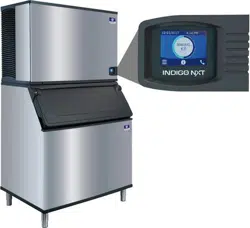
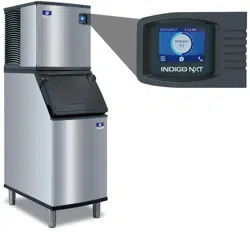
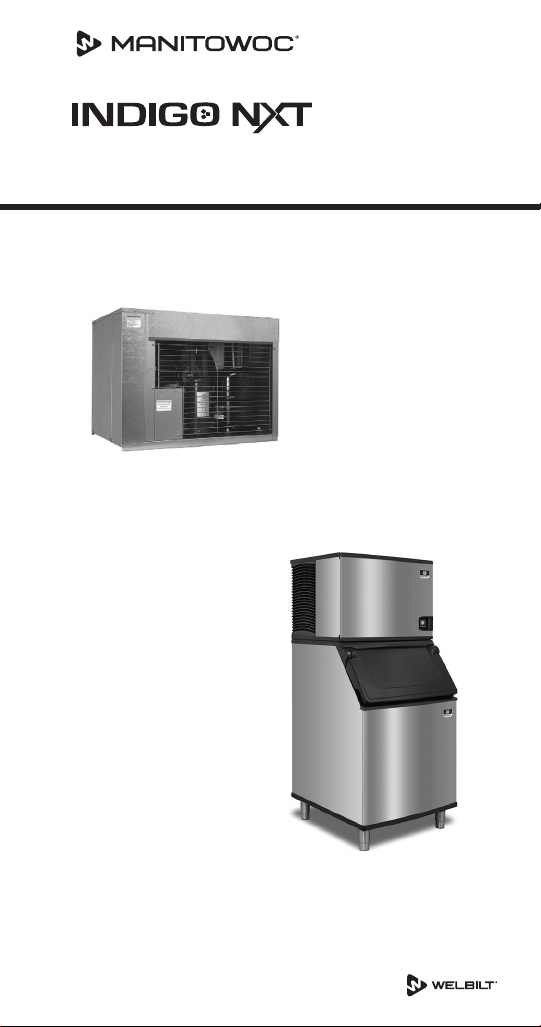
QuietQube Remote Condensing Unit
Ice Machines
Technician’s Handbook
®
Engineered for Ease


Safety Notices
Read these precautions to prevent personal injury:
• Read this manual thoroughly before operating,
installing or performing maintenance on the
equipment. Failure to follow instructions in this
manual can cause property damage, injury or death.
• Routine adjustments and maintenance procedures
outlined in this manual are not covered by the
warranty.
• Proper installation, care and maintenance are essential
for maximum performance and trouble-free operation
of your equipment.
• Visit our website www.manitowocice.com for manual
updates, translations, or contact information for
service agents in your area.
• This equipment uses high voltage electricity and
contains refrigerant charge. Installation and repairs are
to be performed by properly trained technicians aware
of the dangers of dealing with high voltage electricity
and refrigerant under pressure. The technician
must also be certified in proper refrigerant handling
and servicing procedures. All lockout and tag out
procedures must be followed when working on this
equipment.
• As you work on this equipment, be sure to pay close
attention to the safety notices in this handbook.
Disregarding the notices may lead to serious injury
and/or damage to the equipment.

DEFINITIONS
DANGER
Indicates a hazardous situation that, if not avoided,
will result in death or serious injury. This applies to the
most extreme situations.
n
Warning
Indicates a hazardous situation that, if not avoided,
could result in death or serious injury.
,
Caution
Indicates a hazardous situation that, if not avoided,
could result in minor or moderate injury.
Notice
Indicates information considered important, but not
hazard-related (e.g. messages relating to property
damage).
NOTE: Indicates useful, extra information about the
procedure you are performing.

n
Warning
Follow these electrical requirements during installation
of this equipment:
• All field wiring must conform to all applicable
codes of the authority having jurisdiction. It is
the responsibility of the end user to provide the
disconnect means to satisfy local codes. Refer to
rating plate for proper voltage.
• This appliance must be grounded.
• This equipment must be positioned so that the plug
is accessible unless other means for disconnection
from the power supply (e.g., circuit breaker or
disconnect switch) is provided.
• Check all wiring connections, including factory
terminals, before operation. Connections can
become loose during shipment and installation.

n
Warning
Follow these precautions to prevent personal injury
during installation of this equipment:
• Installation must comply with all applicable
equipment fire and health codes with the authority
having jurisdiction.
• Connect to a potable water supply only.
• To avoid instability the installation area must be
capable of supporting the combined weight of the
equipment and product. Additionally the equipment
must be level side to side and front to back.
• Remove all removable panels before lifting and
installing and use appropriate safety equipment
during installation and servicing. Two or more
people are required to lift or move this appliance to
prevent tipping and/or injury.
• Do not damage the refrigeration circuit when
installing, maintaining or servicing the unit.
• This equipment contains refrigerant charge.
Installation of the line sets must be performed by
a properly trained and EPA certified refrigeration
technician aware of the dangers of dealing with
refrigerant charged equipment.
• Ice machines require a deflector when installed on
an ice storage bin. Prior to using a non-OEM ice
storage system with this ice machine, contact the
bin manufacturer to assure their ice deflector is
compatible.
• Prior to installing a non-OEM ice storage system
with this ice machine, follow the manufacturers
installation procedures and verify the location and
installation meets the local/national mechanical
codes and stability requirements.

n
Warning
Follow these precautions to prevent personal injury
while operating or maintaining this equipment:
• Legs or casters must be installed and the legs/casters
must be screwed in completely. When casters
are installed the mass of this unit will allow it to
move uncontrolled on an inclined surface. These
units must be tethered/secured to comply with all
applicable codes. Swivel casters must be mounted
on the front and rigid casters must be mounted on
the rear. Lock the front casters after installation is
complete.
• Refer to nameplate to identify the type of refrigerant
in your equipment.
• Only trained and qualified personnel aware of the
dangers are allowed to work on the equipment.
• Read this manual thoroughly before operating,
installing or performing maintenance on the
equipment. Failure to follow instructions in this
manual can cause property damage, injury or death.
• Crush/Pinch Hazard. Keep hands clear of moving
components. Components can move without
warning unless power is disconnected and all
potential energy is removed.
• Moisture collecting on the floor will create a
slippery surface. Clean up any water on the floor
immediately to prevent a slip hazard.
n
Warning
Follow these precautions to prevent personal injury
while operating or maintaining this equipment:
• Objects placed or dropped in the bin can affect
human health and safety. Locate and remove any
objects immediately.
• Never use sharp objects or tools to remove ice or
frost.
• Do not use mechanical devices or other means to
accelerate the defrosting process.
• When using cleaning fluids or chemicals, rubber
gloves and eye protection (and/or face shield) must
be worn.
DANGER
Do not operate equipment that has been misused,
abused, neglected, damaged, or altered/modified
from that of original manufactured specifications. This
appliance is not intended for use by persons (including
children) with reduced physical, sensory or mental
capabilities, or lack of experience and knowledge,
unless they have been given supervision concerning
use of the appliance by a person responsible for their
safety. Do not allow children to play with, clean or
maintain this appliance without proper supervision.

DANGER
Follow these precautions to prevent personal injury
during use and maintenance of this equipment:
• It is the responsibility of the equipment owner to
perform a Personal Protective Equipment Hazard
Assessment to ensure adequate protection during
maintenance procedures.
• Do Not Store Or Use Gasoline Or Other Flammable
Vapors Or Liquids In The Vicinity Of This Or Any
Other Appliance. Never use flammable oil soaked
cloths or combustible cleaning solutions for
cleaning.
• All covers and access panels must be in place and
properly secured when operating this equipment.
• Risk of fire/shock. All minimum clearances must be
maintained. Do not obstruct vents or openings.
• Failure to disconnect power at the main power
supply disconnect could result in serious injury or
death. The power switch DOES NOT disconnect all
incoming power.
• All utility connections and fixtures must be
maintained in accordance with the authority having
jurisdiction.
• Turn off and lockout all utilities (gas, electric, water)
according to approved practices during maintenance
or servicing.
• Units with two power cords must be plugged
into individual branch circuits. During movement,
cleaning or repair it is necessary to unplug both
power cords.

n
Warning
Follow these precautions to prevent personal injury
while operating or maintaining this equipment.
• Refer to nameplate to identify the type of refrigerant
in your equipment.
• Only trained and qualified personnel aware of the
dangers are allowed to work on the equipment.
• Read this manual thoroughly before operating,
installing or performing maintenance on the
equipment. Failure to follow instructions in this
manual can cause property damage, injury or death.
• Crush/Pinch Hazard. Keep hands clear of moving
components. Components can move without
warning unless power is disconnected and all
potential energy is removed.
• Moisture collecting on the floor will create a
slippery surface. Clean up any water on the floor
immediately to prevent a slip hazard.
• Never use sharp objects or tools to remove ice or
frost. Do not use mechanical devices or other means
to accelerate the defrosting process.
• When using cleaning fluids or chemicals, rubber
gloves and eye protection (and/or face shield) must
be worn.

n
Warning
Follow these precautions to prevent personal injury
during use and maintenance of this equipment:
• Units with two power cords must be plugged
into individual branch circuits. During movement,
cleaning or repair it is necessary to unplug both
power cords.
• Never use a high-pressure water jet for cleaning on
the interior or exterior of this unit. Do not use power
cleaning equipment, steel wool, scrapers or wire
brushes on stainless steel or painted surfaces.
• Two or more people are required to move this
equipment to prevent tipping.
• Locking the front casters after moving is the
owner’s and operator’s responsibility. When casters
are installed, the mass of this unit will allow it to
move uncontrolled on an inclined surface. These
units must be tethered/secured to comply with all
applicable codes.
• The on-site supervisor is responsible for ensuring
that operators are made aware of the inherent
dangers of operating this equipment.
• Do not operate any appliance with a damaged cord
or plug. All repairs must be performed by a qualified
service company.

THIS PAGE INTENTIONALLY LEFT BLANK

Table of Contents
Part Number: 000015431 Rev 02 6/20 13
Safety Notices ...............................3
Definitions ..............................4
General Information
Model Numbers ............................19
QuietQube® Models .....................19
How to Read a Model Number ................20
Head Sections ..........................20
CVD Condensing Units ...................21
Ice Cube Sizes ..............................21
Model/Serial Number Location................22
Warranty ..................................23
Warranty Registration....................23
LuminIce® II ................................24
Installation
Stacking Two Ice Machines on a Single Storage
Bin....................................25
Ice Deflector ...........................25
Location of Ice Machine ......................26
Head Section ...........................26
Ice Beverage Models.....................27
Location of CVD Condensing Units .........28
Clearance Requirements .....................29
Dual Evaporator Model Installation on a Manitowoc
Bin........................................30
Ice Machine on a Dispenser Installation ........31
Water Supply and Drains .....................32
Lineset Applications .........................33
QuietQube® Remote Condensing Unit ..........34
Additional Refrigerant Charge For 51' to 100' Line
Sets .......................................35

14 Part Number: 000015431 Rev 02 6/20
Maintenance
Detailed Cleaning and Sanitizing...............37
General................................37
Detailed Descaling/Sanitizing Procedure ....38
Remedial Cleaning Procedure .............38
iAuCS® ................................38
Exterior Cleaning ........................38
Touchscreen Operation For The Clean Cycle .....39
Starting a cycle .........................39
Water curtain/damper operation during the
clean cycle .............................39
Pausing a clean cycle.....................39
Power interruption during clean cycle ......39
Aborting a clean cycle....................39
Detailed Descaling/Sanitizing Procedure........40
Sanitizing Procedure .....................43
Parts Removal for Descaling/Sanitizing ......45
Remedial Cleaning Procedure .................54
Removal from Service/Winterization ...........56
Operation
Operational Checks..........................57
General................................57
Ice Thickness Check......................58
Sequence of Operation ......................60
QuietQube® Models .....................60
Initial Start-Up or Start-Up After
Automatic Shut-Off ......................60
Freeze Sequence . . . . . . . . . . . . . . . . . . . . . . . .61
Harvest Sequence .......................63
Automatic Shut-Off ......................64
Restart After Automatic Shut-off ...........64

Part Number: 000015431 Rev 02 6/20 15
Menu Navigation
Touch Screen Features .......................69
Home screen icon descriptions ............71
Setup Wizard ...............................73
Menu Navigation Overview...................74
Settings Menu Screen Navigation ..........74
USB Flash Drive Specifications and Formatting .
......................................79
Upgrading Firmware with a Flash Drive .....79
Exporting Data to a Flash Drive ............80
Component Check Procedures
Control Board, Display And Touchscreen ...129
Operating an ice machine without a
Touchscreen...........................131
Control Board Relay Test.................132
Programming A Replacement Control Board 133
USB Flash Drive Specifications and Formatting .
.....................................134
Exporting Data to a Flash Drive ...........135
Upgrading Firmware with a Flash Drive ....136
Main Fuse ............................137
Bin Switch ............................138
Water Level Control Circuitry .............141
Ice Thickness Probe (Initiates Harvest) .....145
Bin Level Probe ........................149
Thermistors ...........................151
High Pressure Cutout (HPCO) Control ......154
Low Pressure Cutout (LPCO) Control .......155
Compressor Time Delay .................156
Fan Cycle Control.......................157
Harvest Assist Air Pump .................158
Compressor Electrical Diagnostics .........159
Diagnosing Start Components ............161
Refrigeration Components...................162
Head Pressure Control Valve .............162
Suction Accumulator Operation...........168

16 Part Number: 000015431 Rev 02 6/20
Recovery/Evacuation/Charging Procedures
QuietQube® Models ........................169
Connections...........................170
Recovery/Evacuation Procedures .........171
Charging Procedures....................172
System Contamination Clean-Up .............173
Determining Severity of Contamination ....173
Contamination Cleanup Chart ............174
Cleanup Procedure .....................175
Liquid Line Filter-Driers..................178
Suction Filter ..........................178
Replacing Pressure Controls Without Removing
Refrigerant Charge .....................179
Total System Refrigerant Charge
QuietQube® CVD Models....................180
Charts
Cycle Times/24-Hour Ice Production/Refrigerant
Pressure Charts ............................183
IF0600C/CVDF0600 .....................184
IBF0620C/CVDF0600....................185
IBF0820C/CVDF0900....................186
IF0900C/CVDF0900 ....................187
IBT1020C/CVDT1200....................188
IT1200C/CVDT1200.....................189
IF1400C/CVDF1400 .....................190
IF1800C/CVDF1800 .....................191
IF2100C/CVDF2100 .....................192

Part Number: 000015431 Rev 02 6/20 17
Diagrams
Wiring Diagrams ...........................193
Wiring Diagram Legend .................193
IF0600C/IBF0620C/IBF0820C/IF0900C 1ph .194
IT1200C/IBT1020C 1ph ..................196
IF1400C/IF1800C/IF2100C 1ph ...........198
CVD 1ph Condensing Unit ...............200
CVD 3ph Condensing Unit ...............202
Electronic Control Board ....................204
Refrigeration Tubing Schematics..............206
IF0600C/CVDF0600 IB0620C/CVDF0600
IBF0820/CVDF0900 IF0900C/CVDF0900 ....206
IBT1020C/CVDT1200 IT1200C/CVDT1200 ..208
Dual Evaporators...........................210
IF1400C/IF1800C.......................210
IF2100C ..............................212


Part Number: 000015431 Rev 02 6/20 19
Model Numbers
QUIETQUBE® MODELS
Ice Machine Head Section CVD® Condensing Unit
IYF0600C
IBF0620C
CVDF0600
IBF0820C
IYF0900C
CVDF0900
IBT1020C
IDT1200C
IYT1200C
CVDT1200
IDF1400C
IYF1400C
CVDF1400
IDF1800C
IYF1800C
CVDF1800
IDF2100C
IYF2100C
CVDF2100
n
Warning
All Manitowoc ice machines require the ice storage
system (bin, dispenser, etc.) to incorporate an ice
deflector.
Prior to using a non-Manitowoc ice storage system
with other Manitowoc ice machines, contact the
manufacturer to assure their ice deflector is compatible
with Manitowoc ice machines.
General Information

20 Part Number: 000015431 Rev 02 6/20
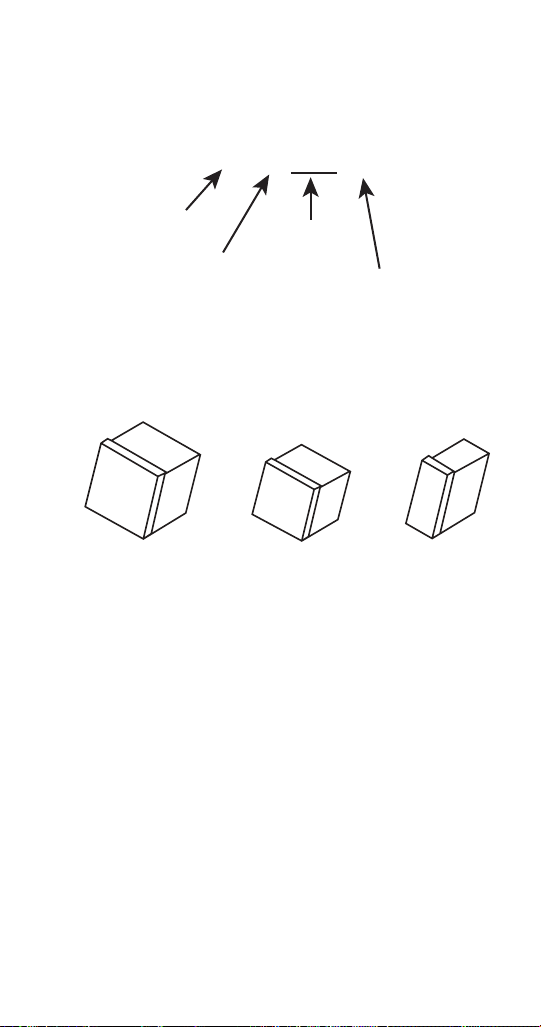
How to Read a Model Number
HEAD SECTIONS
ICE MACHINE SERIES
I Indigo
U Undercounter
KKoolaire
RFlake/Nugget
B Big shot
SS-series
IB Ice Beverage
C Countertop
REFRIGERANT TYPE
P R290 (propane)
F R404A (four)
T R410A (ten)
B R600A (butane)
E R134A (eight)
NOMINAL PRODUCTION @ 70/50
0300 produces ~300 #/day
0320 produces ~320 #/day
0350 produces ~350 #/day
etc. . .
Soo is stated in kg/day
CONDENSER TYPE
Aair cooled
Wwater cooled
N remote
(tradional)
C CVD (remote)
POWER CORD OPTION
Blank juncon box
Zcord without plug
B NEMA plug (USA)
F schuko plug (EU)
G 13A blade (GBR)
I oblique V blades
(AUS)
SPECIAL USE
Blankgeneral use
Qcoated condenser
H high pressure
Mmarine
Pcorreconal
Ttop air discharge
XLuminice/Sanitaon
L lever
V space maker
MARKET IDENTIFIER
Blank not market specific
SSaudi Arabia (GCC)
K Korea (KC)
C China (CCC)
D Germany (GS)
N Brazil (InMetro)
ICE TYPE
RRegular
DDice
Y Half-dice
F Flake
NNugget
G Gourmet
Blank for IB only
ELECTRICAL
CONFIGURATION
161 = 115/60/1
261 = 208-230/60/1
251 = 220-240/50/1 (S=230)
263 = 208-230/60/3
271 = 200/50-60/1
273 = 200/50-60/3
453 = 380-415/50/3
463 = 460/60/3
2= 22" wide cabinet
#= all other #s mean
producon value
I Y
T1 2 0 0 C –2 6 1 X
A
alternate compressor
Part Number: 000015431 Rev 02 6/20 21
CVD CONDENSING UNITS
CVDT 1200 3
CONDENSING
UNIT MODEL
3 PHASE
CONDENSING
UNIT SERIES
REFRIGERANT TYPE
F = R404A
T = R410
Ice Cube Sizes
Regular
1-1/8" x 1-1/8" x 7/8"
2.86 x 2.86 x 2.22 cm
Dice
7/8" x 7/8" x 7/8"
2.22 x 2.22 x 2.22 cm
Half Dice
3/8" x 1-1/8" x 7/8"
0.95 x 2.86 x 2.22 cm

22 Part Number: 000015431 Rev 02 6/20
Model/Serial Number Location
These numbers are required when requesting information
from your local Manitowoc Distributor, service
representative, or Manitowoc Ice, Inc.
• The model and serial number can be viewed by
pressing the information icon on the touchscreen.
• The owner warranty registration card.
• The model/serial number data plate located in the
evaporator compartment and on the back of the ice
machine.
The model and serial number displayed on the
touchscreen must match the data plate for proper
operation. For example a model number listed on the data
plate may show IDT1200C-161X but the display would only
show IDT1200C-161.
Part Number: 000015431 Rev 02 6/20 23
Warranty
For warranty information visit:
www.manitowocice.com/Service/Warranty
• Warranty Coverage Information
• Warranty Registration
• Warranty Verification
Warranty coverage begins the day the ice machine is
installed.
WARRANTY REGISTRATION
Completing the warranty registration process is a quick and
easy way to protect your investment.
Scan the QR code with your smart device or enter the link
in a web browser to complete your warranty registration.
WWW.MANITOWOCICE.COM/SERVICE/WARRANTY#WARRANTY-
REGISTRATION
Registering your product insures warranty coverage and
streamlines the process if any warranty work is required.

24 Part Number: 000015431 Rev 02 6/20
LuminIce® II
The LuminIce® growth inhibitor recirculates the air in the
ice machine foodzone over a UV bulb. This process will
inhibit the growth of common micro-organisms on all
exposed foodzone surfaces.
• LuminIce® bulbs require replacement on a yearly basis.
• The control board can be set to automatically display a
reminder after 12 months.
NOTE: LuminIce® and LuminIce® II bulbs are not
interchangeable; verify your model before ordering a
replacement bulb. LuminIce® bulbs have a white base and
LuminIce® II bulbs have a blue base.
Cleanup Procedure for Accidental Bulb Breakage
The cleanup procedure is identical to the procedure used
to clean up compact fluorescent (CFL) or fluorescent tube
lights. These lights contain a small amount of mercury
sealed within a glass tube. Breaking these types of lights
will release mercury and mercury vapor. The broken bulb
can continue to release mercury vapor until it is cleaned up
and removed.
The latest EPA procedures can be viewed on their website
at www.epa.gov/cfl/cflcleanup.html.

Part Number: 000015431 Rev 02 6/20 25
n
Warning
PERSONAL INJURY POTENTIAL
Remove all ice machine panels before lifting.
Notice
IF1400C/IF1800C/IF2100C ice machines are not
approved for use on Manitowoc D570 bins.
Notice
The ice machine head section must be protected if it
will be subjected to temperatures below 32°F (0°C).
Failure caused by exposure to freezing temperatures is
not covered by the warranty.
STACKING TWO ICE MACHINES ON A SINGLE STORAGE
BIN
Indigo Model ice machines cannot be stacked. However
an adapter is available that allows two QuietQube® ice
machines to be placed side by side on 60" bins.
ICE DEFLECTOR
An ice deflector is required for all ice machines installed on
a bin and may be required by the dispenser manufacture
when installed on a dispenser.
Installation

26 Part Number: 000015431 Rev 02 6/20
Location of Ice Machine
HEAD SECTION
The location selected for the ice machine head section
must meet the following criteria. If any of these criteria are
not met, select another location.
• The location must be free of airborne and other
contaminants.
• The air temperature must be at least 35°F (1.6°C), but
must not exceed 110°F (43°C).
• Ice Making Water Inlet - Water Pressure must be
at least 20 psi (1.4 bar), but must not exceed 80 psi
(5.5 bar).
• The location must not be near heat-generating
equipment or in direct sunlight and protected from
weather.
• The ice machine must be protected if it will be
subjected to temperatures below 32°F (0°C). Failure
caused by exposure to freezing temperatures is not
covered by the warranty.

Part Number: 000015431 Rev 02 6/20 27
ICE BEVERAGE MODELS
• Ice/Beverage Ice Machines require that a proper ice
level be maintained when installed on a dispenser. Ice
Beverage machines ship with a ice level management
sensor pre-installed.
• The ice machine head is installed with the electrical
inlet, water supply inlet, refrigeration tubing and water
drain entering from the back of the ice machine.
• The ice machine head section contains a service loop
that must remain installed between the ice machine
head section and line set. Sufficient tubing length must
be available to allow 180° rotation of the ice machine.
• Maintain a 3" space between the back of the ice
machine and the back of the dispenser to allow room
for the refrigeration line set service loop.
• The water inlet and electrical connection must contain
a service loop to allow future service and maintenance
access.
• The drain line must contain a union or other suitable
means of disconnection at the ice machine head
section.
• The location must be free of airborne and other
contaminants.
• The air temperature must be at least 35°F (1.6°C), but
must not exceed 110°F (43°C).
• The location must not be near heat-generating
equipment or in direct sunlight.
28 Part Number: 000015431 Rev 02 6/20
LOCATION OF CVD CONDENSING UNITS
The location selected for the CVD Condensing Unit must
meet the following criteria. If any of these criteria are not
met, select another location.
• The air temperature must be at least -20°F (-28.9°C)
but must not exceed 120°F (48.9°C).
• The location must not allow exhaust fan heat and/or
grease to enter the condenser.
• The location must not obstruct airflow through or
around the condensing unit. See below for clearance
requirements.
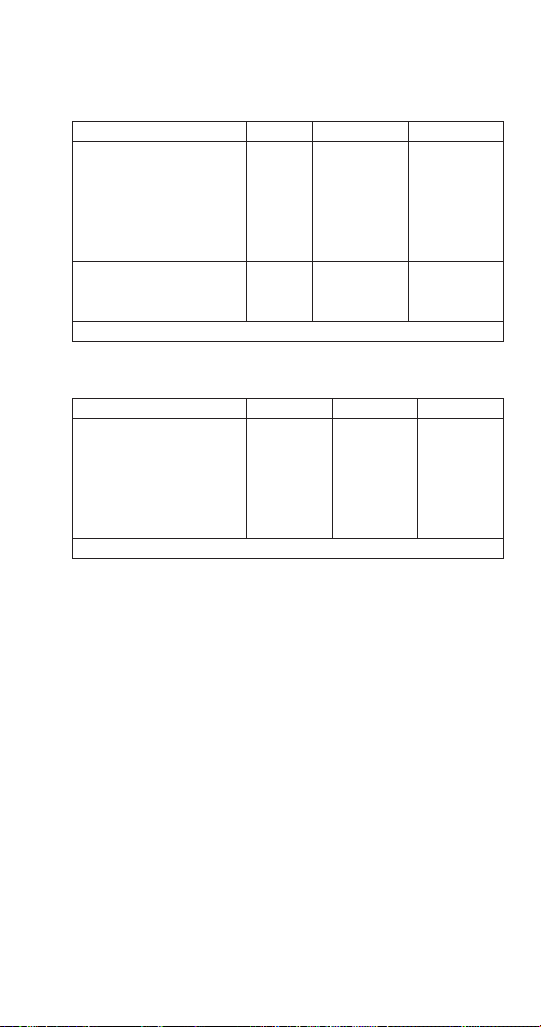
Minimum/Maximum Temperatures
Model
Minimum Air
Temperature
Maximum Air
Temperature
All Ice Machine
Head Sections
35°F
2°C
110°F
43°C
QuietQube
Condensing Units
CVDF0600
CVDF0900
CVDT1200
CVDF2100
-20°F
-29°C
120°F
49°C
CVDF1400
CVDF1800
-20°F
-29°C
130°F
54°C
Part Number: 000015431 Rev 02 6/20 29
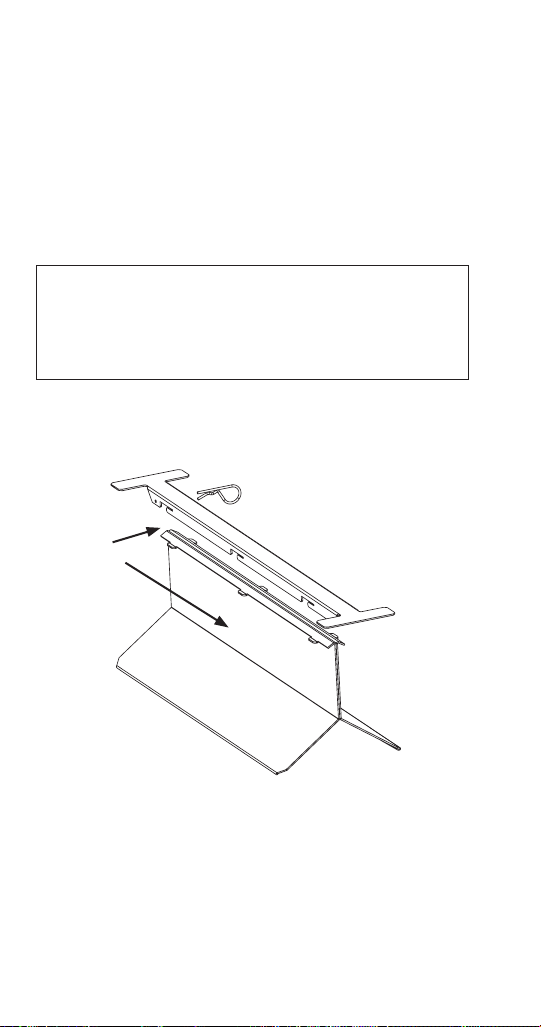
Clearance Requirements
QuietQube Model Clearance Requirements
Model Top Back Sides
IF0600C
IF0900C
IT1200C
IF1400C
IF1800C
IF2100C
5"
(13 cm)
5"
(13 cm)
5"
(13 cm)
IBF0620C
IBF0820C
IBT1020C
2"**
(5 cm)
5"
(13 cm)
8" **
(20 cm)
** 24" (61 cm) is recommended on top/sides for servicing
Condensing Unit Clearance Requirements
Model Top/Sides Back Front
CVDF0600
CVDF0900
CVDT1200
CVDF1400
CVDF1800
CVDF2100
0"
(0 cm*)
48"
(122 cm)
48"
(122 cm)
* 24" (61 cm) is recommended on top/sides for servicing
30 Part Number: 000015431 Rev 02 6/20
Dual Evaporator Model
Installation on a Manitowoc Bin
Dual evaporator models will not function correctly with
the stock bin deflector. An ice deflector kit is required for
installation and is ordered separate. Order appropriate kit
(30" or 48") for your bin.
The stock bin deflector must be removed and replaced
with the correct deflector to prevent injury.
n
Warning
PERSONAL INJURY POTENTIAL
Do not operate any ice machine with the deflector
removed.
NOTE: A deflector must be installed on all dual evaporator
models used in bin applications.
2. LOCK IN PLACE WITH PIN
1. SLIDE
FORWARD

Part Number: 000015431 Rev 02 6/20 31
Ice Machine on a Dispenser Installation
No deflector is needed for machines that match the size of
the dispenser (30" head section on a 30" dispenser) unless
required by the dispenser manufacturer.
Adapters are required when a smaller ice machine is going
on a larger dispenser (22" machine on a 30" dispenser).
Ice level management is recommended to prevent water
leakage or movement of ice machine during agitation.
A dispenser baffle is required to prevent ice from
contacting the ice machine door and prevent possible
water leakage. K00348 is used on 22" ice machines and
K00346 is used on 30" ice machines.
Important
Manitowoc Ice/Beverage Ice Machines require an
adapter for mounting. Adapters are not included with
the ice machine, dispenser or bin and must be ordered
separately. When a non-Manitowoc adapter is used,
verify the adapter is compatible with Manitowoc Ice/
Beverage Ice Machines prior to installation.
n
Warning
Ice Beverage ice machines, adapter plates and adapter
covers must be secured to the dispenser to prevent
tipping or dislodging during agitation.

32 Part Number: 000015431 Rev 02 6/20
Water Supply and Drains
Potable Water
• Water temperature must be between
40°F (4.4°C) and 90°F (32°C).
• Water pressure must be between
20 psi (140 kPa) and 80 psi (550 kPa).
• Minimum internal diameter of tubing 3/8" (10 mm).
Drain Connections
• Drain lines must have a 1.5 inch drop per 5 feet (2.5 cm
per meter) of run and must not create traps.
• The floor drain must be large enough to accommodate
drainage from all drains.
• Run separate bin and ice machine drain lines.
• Insulate drain lines to prevent condensation.
• Vent the ice machine drain to the atmosphere.
• Drain termination must have an air gap that meets
local code.
Auxiliary Base Drain Installation
An auxiliary drain is located in the ice machine base to
remove moisture in high humidity areas.
1. View the back of the ice machine base on the
compressor side and locate and remove the cap plug.
2. Route tubing to an open site drain:
• Use 1/2 inch ID CPVC tubing.
• Apply a bead of silicone around the exterior of the ice
machine tubing and insert into ice machine base. The
silicone will secure the tubing and provide a watertight
seal.
• Provide support for tubing.

Part Number: 000015431 Rev 02 6/20 33
Lineset Applications
Notice
The 60-month compressor warranty (including the
36-month labor replacement warranty) will not
apply if the Manitowoc Ice Machine, Condenser or
QuietQube® Condensing Unit were not installed
according to specifications. This warranty also will
not apply if the refrigeration system is modified with
a condenser, heat reclaim device, or other parts or
assemblies not manufactured by Manitowoc Ice. Or
refrigeration system additives such as leak detection
dyes, inhibitors or non OEM approved chemicals.
n
Warning
Recovery locations vary by model. Verify you are
making the correct connections for your model to
prevent accidental release of high pressure refrigerant.
Important
Manitowoc remote systems are only approved and
warranted as a complete new package. Warranty on
the refrigeration system will be void if new equipment
is connected to pre-existing (used) tubing, remote
condenser, remote condensing unit or ice machine
head section.

34 Part Number: 000015431 Rev 02 6/20
QuietQube® Remote Condensing Unit
QuietQube® Ice
Machine
Remote Single
Circuit Condenser
Line Set* S Trap
IF0600C
IBF0620C
CVDF0600
RC-21
RC-31
RC-51
K00172
IBF0820C
IF0900C
CVDF0900
IBT1020C CVDT1200
IT1200C CVDT1200
IF1400C CVDF1400 RC-20
RC-30
RC-50
K00166
IF1800C CVDF1800
IF2100C CVDF2100
RC-23
RC-33
RC-53
*Line Set
Suction
Line
Liquid
Line
Minimum
Insulation
Thickness
RC 21/31/51
5/8 inch
(16 mm)
3/8 inch
(10 mm)
1/2" (13 mm)
Suction Line
1/4" (7 mm)
Liquid Line
RC 20/30/50
3/4 inch
(19 mm)
1/2 inch
(13 mm)
1/2"(13 mm)
Suction Line
1/4" (7 mm)
Liquid Line
RC 23/33/53
3/4 inch
(19 mm)
5/8 inch
(16 mm)
1/2" (13 mm)
Suction Line
1/4" (7 mm)
Liquid Line

Part Number: 000015431 Rev 02 6/20 35
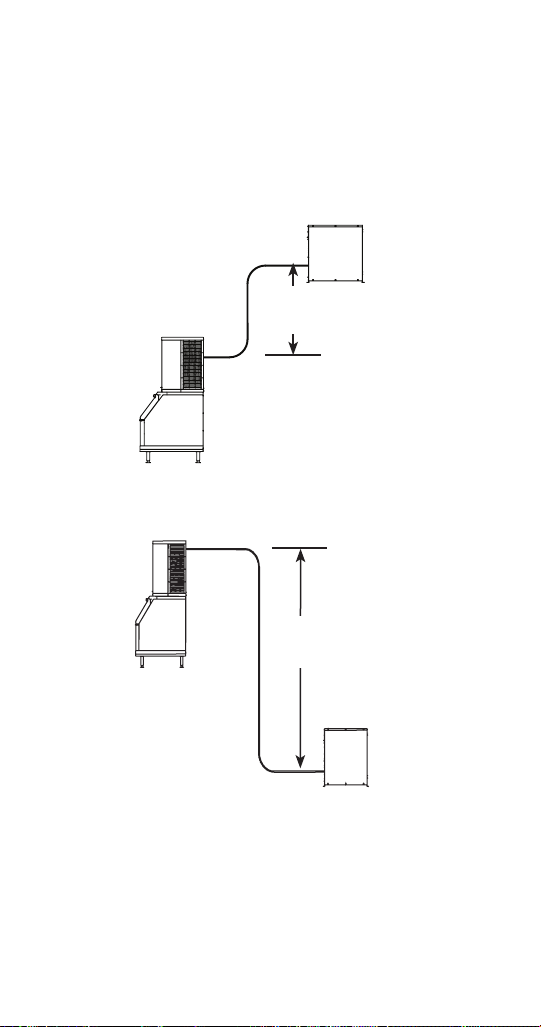
Additional Refrigerant Charge For 51' to 100'
Line Sets
Ice
Machine
Condenser
Additional Amount of
Refrigerant To Be Added
To Nameplate Charge
IF0600C
CVDF0600
1.5 lbs
680 gIBF0620C
IBF0820C
CVDF0900
4 lbs
1814 gIF0900C
IBT1020C
CVDT1200
2 lbs
907 g
IT1200C
2 lbs
907 g
IF1400C CVDF1400
2 lbs
907 g
IF1800C CVDF1800
2 lbs
907 g
IF2100C CVDF2100
4 lbs
1814 g
36 Part Number: 000015431 Rev 02 6/20
Calculating Allowable Lineset Distance
Line Set Length
The maximum length is 100' (30.5 m).
Line Set Rise/Drop
The maximum rise is 35' (10.7 m).
The maximum drop is 15' (4.5 m).
35 FT. (10.7 M)
MAXIMUM
DISTANCE
35 ft. (10.7 m) Rise: The maximum distance the Condenser
or Condensing Unit can be above the ice machine.
15 FT. (4.5 M)
MAXIMUM
DISTANCE
15 ft. (4.5 m) Drop: The maximum distance the Condenser
or Condensing Unit can be below the ice machine.
If a line set has a rise followed by a drop, another rise
cannot be made. Likewise, if a line set has a drop followed
by a rise, another drop cannot be made.
S TRAP
REQUIRED IF
RISE IS HIGHER
THAN 20'

Part Number: 000015431 Rev 02 6/20 37
Detailed Cleaning and Sanitizing
GENERAL
You are responsible for maintaining the ice machine
in accordance with the instructions in this manual.
Maintenance procedures are not covered by the warranty.
Descale and sanitize the ice machine every six months
for efficient operation. If the ice machine requires more
frequent detailing and sanitizing, consult a qualified
service company to test the water quality and recommend
appropriate water treatment. An extremely dirty ice
machine must be taken apart for descaling and sanitizing.
Manitowoc Ice Machine Cleaner/Descaler and Sanitizer
are the only products approved for use in Manitowoc ice
machines.
,
Caution
Use only Manitowoc approved Ice Machine Cleaner/
Descaler and Sanitizer for this application (Manitowoc
Cleaner/Descaler part number 9405463 and
Manitowoc Sanitizer part number 9405653). It is a
violation of Federal law to use these solutions in a
manner inconsistent with their labeling. Read and
understand all labels printed on bottles before use.
,
Caution
Do not mix Cleaner/Descaler and Sanitizer solutions
together. It is a violation of Federal law to use these
solutions in a manner inconsistent with their labeling.
n
Warning
Wear rubber gloves and safety goggles (and/or face
shield) when handling Ice Machine Cleaner/Descaler
or Sanitizer.
Maintenance

38 Part Number: 000015431 Rev 02 6/20
DETAILED DESCALING/SANITIZING PROCEDURE
This procedure must be performed a minimum of once
every six months.
• The ice machine and bin must be disassembled
descaled and sanitized.
• All ice produced during the descaling and sanitizing
procedures must be discarded.
REMEDIAL CLEANING PROCEDURE
• This procedure descales the components in the water
flow path, and is used to descale the ice machine
between the bi-yearly detailed descaling/sanitizing
procedure.
IAUCS®
iAuCS® does not operate when Clean is selected to start
a clean cycle. To prime the hose activation is required
through the Service Menu/iAuCS® icon.
EXTERIOR CLEANING
Clean the area around the ice machine as often as
necessary to maintain cleanliness and efficient operation.
Wipe surfaces with a damp cloth rinsed in water to remove
dust and dirt from the outside of the ice machine. If a
greasy residue persists, use a damp cloth rinsed in a mild
dish soap and water solution. Wipe dry with a clean, soft
cloth.
The exterior panels have a clear coating that is stain
resistant and easy to clean. Products containing abrasives
will damage the coating and scratch the panels.
• Never use steel wool or abrasive pads for cleaning.
• Never use chlorinated, citrus based or abrasive
cleaners on exterior panels and plastic trim pieces.

Part Number: 000015431 Rev 02 6/20 39
Touchscreen Operation For The Clean Cycle
STARTING A CYCLE
Pressing the clean button will display a Continue/Abort
screen, and a warning that pressing Continue will result in
a clean cycle that can last up to 35 minutes.
WATER CURTAIN/DAMPER OPERATION DURING THE
CLEAN CYCLE
The water curtain/damper must remain closed during the
clean sequence. When the curtain/damper is open for
more than 3 seconds the clean cycle stops and a message
is displayed on the touchscreen with a choice to continue
or stop the clean cycle. Stopping the clean cycle will result
in a series of rinse and dump cycles to verify cleaner or
sanitizer has been removed before ice making.
PAUSING A CLEAN CYCLE
The clean cycle can be paused and resumed at any time by
pressing the on/off button. The cycle will resume from the
beginning of either the wash or rinse cycle depending on
the point of interruption.
POWER INTERRUPTION DURING CLEAN CYCLE
If the power supply is interrupted during the clean cycle
the state is retained in the circuit board. When power is
reapplied the clean cycle will resume from the beginning
of either the wash or rinse cycle depending on the point of
interruption.
ABORTING A CLEAN CYCLE
Verify cleaner/descaler or sanitizer are not present in the
water system before aborting a clean cycle.
1. Press and hold the Clean button, then press and
release the On/Off button.
2. Release the Clean button and select abort from the
touchscreen.

40 Part Number: 000015431 Rev 02 6/20
Detailed Descaling/Sanitizing Procedure
,
Caution
Do not mix Cleaner/Descaler and Sanitizer solutions
together. It is a violation of Federal law to use these
solutions in a manner inconsistent with their labeling.
n
Warning
Wear rubber gloves and safety goggles (and/or face
shield) when handling Ice Machine Cleaner or Sanitizer.
Ice machine cleaner/descaler is used to remove lime scale
and mineral deposits. Ice machine sanitizer disinfects and
removes algae and slime.
NOTE: Although not required and dependent on your
installation, removing the ice machine top cover may allow
easier access.

Part Number: 000015431 Rev 02 6/20 41
Step 1 Open the front door to access the evaporator
compartment. Ice must not be on the evaporator during
the descaling/sanitize cycle. Follow one of the methods
below:
• Press the power switch at the end of a harvest cycle
after ice falls from the evaporator(s).
• Press the power switch and allow the ice to melt.
• Use the touchscreen to initiate a manual harvest cycle.
Notice
Never use anything to force ice from the evaporator.
Damage may result.
Step 2 Remove all ice from the bin/dispenser.
Step 3 Press the Clean button and select “Turn off
when complete”. Water will flow through the water dump
valve and down the drain. Wait approximately 1 minute
until the water trough refills and the display indicates Add
Chemical. Add the proper amount of ice machine cleaner/
descaler to the water trough by pouring between the
water curtain and evaporator, then confirm the chemical
was added.
NOTE: There is a 10 minute time limit to confirm chemical
was added.
• Confirmation is pushed within 10 minutes - The ice
machine will start a 10 minute wash cycle, followed by
6 rinse and flush cycles.
• Confirmation is not pushed within 10 minutes - The ice
machine will skip the 10 minute wash cycle and start 6
rinse and flush cycles.
Step 4
Model Amount of Cleaner/Descaler
IF0600C/IBF0620C/IBF0820C
IF0900C/IBT1020C/IT1200C
5 ounces (150 ml)
IF1400C/IF1800C/IF2100C 9 ounces (265 ml)

42 Part Number: 000015431 Rev 02 6/20
Step 5 Wait until the cycle is complete, then
disconnect power to the ice machine (and dispenser when
used).
n
Warning
Disconnect the electric power to the ice machine at
the electric service switch box.
Step 6 Remove parts for descaling.
Please refer to the proper parts removal for your ice
machine. Continue with next step when the parts have
been removed.
“Single Evaporator Ice Machines” on page 45
“Ice Beverage Ice Machines” on page 47
“Dual Evaporator Ice Machines” on page 49
Step 7 Mix a solution of cleaner/descaler and
lukewarm water. Depending upon the amount of mineral
buildup, a larger quantity of solution may be required.
Use the ratio in the table below to mix enough solution to
thoroughly clean all parts.
Solution Type Water Mixed With
Descaler 1 gal. (4 L)
16 oz (500 ml)
cleaner/descaler

Part Number: 000015431 Rev 02 6/20 43
Step 8 Use 1/2 of the descaler/water mixture to clean
all components. The solution will foam when it contacts
lime scale and mineral deposits; once the foaming stops
use a soft-bristle nylon brush, sponge or cloth (NOT a
wire brush) to carefully clean the parts. Soak parts for 5
minutes (15 - 20 minutes for heavily scaled parts). Rinse all
components with clean water.
Step 9 While components are soaking, use 1/2 of the
descaler/water solution to clean all food zone surfaces of
the ice machine and bin (or dispenser). Use a nylon brush
or cloth to thoroughly clean the following ice machine
areas:
• Side walls
• Base (area above water trough)
• Evaporator plastic parts - including top, bottom, and
sides
• Bin or dispenser
Rinse all areas thoroughly with clean water.
SANITIZING PROCEDURE
Step 10 Mix a solution of sanitizer and lukewarm water.
Solution
Type
Water Mixed With
Sanitizer 3 gal. (12 L) 2 oz (60 ml) sanitizer
Step 11 Use 1/2 of the sanitizer/water solution to
sanitize all removed components. Use a spray bottle to
liberally apply the solution to all surfaces of the removed
parts or soak the removed parts in the sanitizer/water
solution. Do not rinse parts after sanitizing.

44 Part Number: 000015431 Rev 02 6/20
Step 12 Replace all removed components.
Step 13 Wait 20 minutes.
Step 14 Reapply power to the ice machine .
Step 15 Press the Clean button and select “Make ice
when complete”. Water will flow through the water dump
valve and down the drain. Wait approximately 1 minute
until the water trough refills and the display indicates Add
Chemical. Add the proper amount of ice machine sanitizer
to the water trough by pouring between the water curtain
and evaporator, then confirm the chemical was added.
Model Amount of Sanitizer
IF0600C/IBF0620C/ IBF0820C
IF0900C/IBT1020C/IT1200C
3 ounces (90 ml)
IF1400C/IF1800C/IF2100C 12 ounces (355 ml)
Step 16 The ice machine will automatically start ice
making after the sanitize cycle is complete.

Part Number: 000015431 Rev 02 6/20 45
PARTS REMOVAL FOR DESCALING/SANITIZING
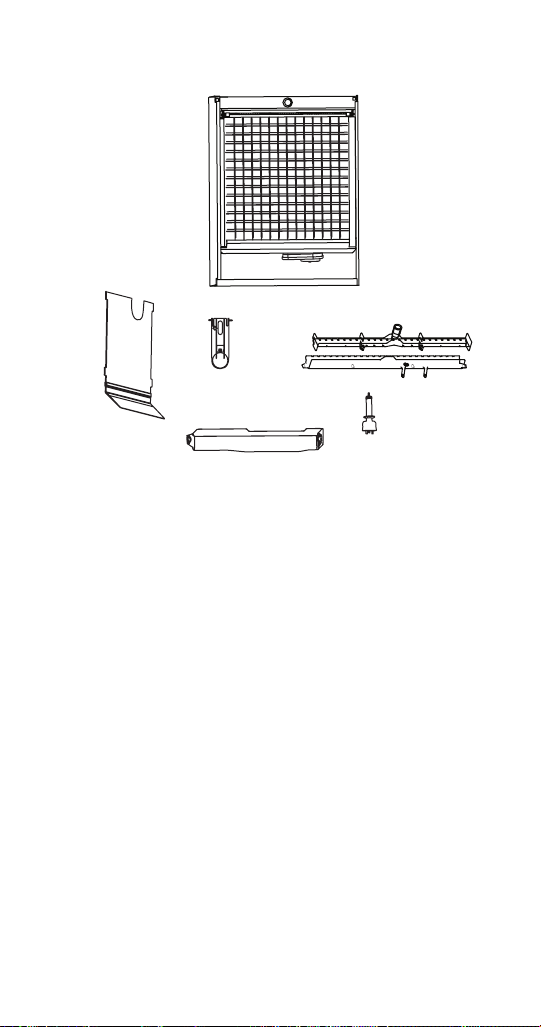
Single Evaporator Ice Machines
B
C
D
E
A
A. Remove the water curtain
• Gently flex the curtain in the center and remove it
from the right side.
• Slide the left pin out.
B. Remove the water trough
• Depress tabs on right and left side of the water trough.
• Allow front of water trough to drop as you pull forward
to disengage the rear pins.
C. Remove the water level probe
• Pull the water level probe straight down to disengage.
• Lower the water level probe until the wiring connector
is visible.
• Disconnect the wire lead from the water level probe.
• Remove the water level probe from the ice machine.

46 Part Number: 000015431 Rev 02 6/20
D. Remove the ice thickness probe
• Compress the hinge pin on the top of the ice thickness
probe.
• Pivot the ice thickness probe to disengage one pin
then the other. The ice thickness probe can be cleaned
at this point without complete removal. If complete
removal is desired, disconnect the ice thickness control
wiring from the control board.
E. Remove the water distribution tube
NOTE: Distribution tube thumbscrews are retained
to prevent loss. Loosen thumbscrews but do not pull
thumbscrews out of distribution tube.
• Loosen the two outer screws (do not remove screws
completely they are retained to prevent loss) and pull
forward on the distribution tube to release from slip
joint.
• Disassemble distribution tube by loosening the two (2)
middle thumbscrews and dividing the distribution tube
into two pieces.
NOTE: Proceed to step 7 on page 42.
Part Number: 000015431 Rev 02 6/20 47
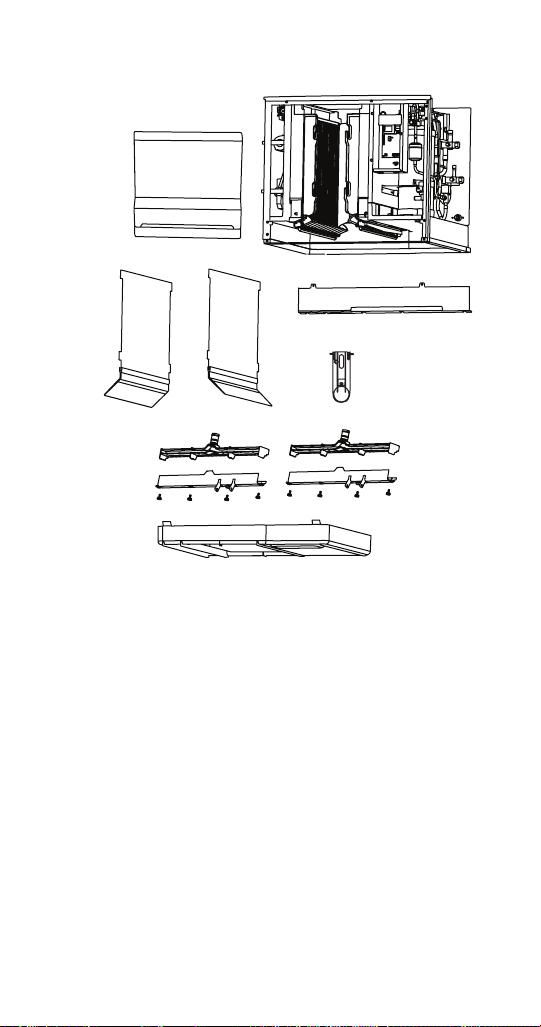
Ice Beverage Ice Machines
A
B
C
D
E
A. Remove splash shield
• Grasp the top center of splash shields.
• Lift up and then out.
B. Remove ice thickness probe
• Compress the hinge pin on the top of the ice thickness
probe.
• Pivot the ice thickness probe to disengage one pin
then the other. The ice thickness probe can be cleaned
at this point without complete removal. If complete
removal is desired, disconnect the ice thickness control
wiring from the control board.

48 Part Number: 000015431 Rev 02 6/20
C. Remove the water trough
• Depress tabs on right and left side of the water trough.
• Allow front of water trough to drop as you pull forward
to disengage the rear pins.
D. Remove the water level probe
• Pull the water level probe straight down to disengage.
• Lower the water level probe until the wiring connector
is visible.
• Disconnect the wire lead from the water level probe.
• Remove the water level probe from the ice machine.
E. Remove the water distribution tube
NOTE: Distribution tube thumbscrews are retained
to prevent loss. Loosen thumbscrews but do not pull
thumbscrews out of distribution tube.
• Loosen the two outer screws (do not remove screws
completely they are retained to prevent loss) and pull
forward on the distribution tube to release from slip
joint.
• Disassemble distribution tube by loosening the two (2)
middle thumbscrews and dividing the distribution tube
into two pieces
NOTE: Proceed to step 7 on page 42.
Part Number: 000015431 Rev 02 6/20 49
Dual Evaporator Ice Machines
A
B
C
D
E
F
A. Remove front splash shield
• Grasp the top of the splash shield.
• Lift up and then out.
B. Remove evaporator splash shields
• Grasp the top center of splash shields.
• Lift up and then out.
C. Remove the water trough shield
• Grasp the water trough shield in the center and the
left end.
• Flex the water trough shield in the center and pull the
left end forward until clear of the side wall. Repeat for
the right end.
• Pull water trough shield forward to remove.

50 Part Number: 000015431 Rev 02 6/20
D. Remove ice thickness probe
• Compress the hinge pin on the top of the ice thickness
probe.
• Pivot the ice thickness probe to disengage one pin
then the other. The ice thickness probe can be cleaned
at this point without complete removal. If complete
removal is desired, disconnect the ice thickness control
wiring from the control board.
E. Remove ice dampers
• Grasp ice damper and apply pressure toward the back
mounting bracket.
• Apply pressure to the front mounting bracket with
thumb.
• Pull ice damper download when the front ice damper
pin disengages.
F. Remove the water pump assembly
• Disconnect the vinyl distribution tube from the water
pump.
• Disconnect the water pump and water level probe
electrical connections.
• After the wires are disconnected, remove the two
thumbscrews and lift the water pump assembly out of
the ice machine.
• Depress tabs, lift and remove water pump. Do not
immerse the water pump motor in cleaner or sanitizer
solutions.
• Remove the water level probe from the assembly
housing.

Part Number: 000015431 Rev 02 6/20 51
G. Remove distribution tubes
• Distribution tubes thumbscrews are retained to
prevent loss. Loosen thumbscrews but do not pull
thumbscrews out of distribution tube.
• Loosen the two outer screws and pull forward on the
distribution tube to release from slip joint.
• Disassemble distribution tube by loosening the two (2)
middle thumbscrews and dividing the distribution tube
into two pieces.
H. Remove the water trough
• Depress the two tabs on the top of the water trough.
• Turn left and right ice dampers down to clear water
trough.
• Pull forward on the water trough to remove.
NOTE: Proceed to page 42 Step 7.

52 Part Number: 000015431 Rev 02 6/20
Ice Thickness Probe & Water Level Probe
Clean the probes using the following procedure.
NOTE: Do not soak electrical connectors in cleaner or
sanitizer solution.
1. Mix a solution of Manitowoc ice machine cleaner/
descaler and water (2 ounces of cleaner/descaler to
16 ounces of water) in a container.
2. Soak probes in container of descaler/water solution
while disassembling and cleaning water circuit
components (soak probes for 10 minutes or longer).
3. Clean all probe surfaces including all plastic parts
(do not use abrasives). Verify all surfaces are clean.
Thoroughly rinse probes with clean water.
4. Reinstall probe, then sanitize the ice machine and bin/
dispenser interior surfaces.

Part Number: 000015431 Rev 02 6/20 53
Water Inlet Valve
The water inlet valve normally does not require removal
for cleaning. Refer to ”Water System Checklist” on page
103, if you are troubleshooting water related problems.
1. When the ice machine is off, the water inlet valve
must completely stop water flow into the machine.
Watch for water flow.
When the ice machine is on, the water inlet valve must
allow the proper water flow through it. Press the Power
button to energize the ice machine. Watch for water
flow into the ice machine. If the water flow is slow or
only trickles into the ice machine, refer to water system
checklist.
Water Dump Valve
The water dump valve normally does not require removal
for cleaning. To determine if removal is necessary:
1. Locate the water dump valve.
2. While the ice machine is in the freeze mode, check
the drain to determine if the dump valve is leaking. If
there is no or little water in the water trough (during
the freeze cycle) the dump valve is leaking.
A. If the dump valve is leaking and debris is not
visible and easily removed, the dump valve must
be replaced.
B. If the dump valve is not leaking, do not remove
it. Instead, follow the “Ice Machine Cleaning
Procedure”.

54 Part Number: 000015431 Rev 02 6/20
Remedial Cleaning Procedure
This procedure will descale the components in the water
flow path, and is used to descale the ice machine between
the bi-yearly detailed cleaning and sanitizing procedure.
Ice machine cleaner/descaler is used to remove lime scale
and mineral deposits. Ice machine sanitizer disinfects and
removes algae and slime.
NOTE: Although not required and dependent on your
installation, removing the ice machine top cover may allow
easier access.
1. Ice must not be on the evaporator during the
descaling/sanitize cycle. Follow one of the methods
below:
A. Press the power button at the end of a harvest
cycle after ice falls from the evaporator(s).
B. Press the power button and allow the ice to
melt.
,
Caution
Never use anything to force ice from the evaporator.
Damage may result
2. Open the front door to access the evaporator.
3. Press the Clean button and select “Make ice when
complete”. Water will flow through the water dump
valve and down the drain. Wait approximately 1
minute until the water trough refills and the display
indicates Add Chemical. Add the proper amount of
ice machine descaler to the water trough by pouring
between the water curtain and evaporator, then
confirm the chemical was added.

Part Number: 000015431 Rev 02 6/20 55
Model Amount of Cleaner/Descaler
IF0600C/IBF0620C/IBF0820C
IF0900C/IBT1020C/IT1200C
5 ounces (150 ml)
IF1400C/IF1800C/IF2100C 9 ounces (265 ml)
4. Close and secure the front door. The ice machine will
automatically start ice making after the descale cycle
is complete (approximately 24 minutes).
NOTE: Once the cycle has started it must complete before
the ice machine can make ice again. Returning it to ice
making mode will not cancel a clean cycle

56 Part Number: 000015431 Rev 02 6/20
Removal from Service/Winterization
General
Special precautions must be taken if the ice machine is to
be removed from service for an extended period of time or
exposed to ambient temperatures of 32°F (0°C) or below.
Notice
If water is allowed to remain in the ice machine
in freezing temperatures, severe damage to some
components could result. Damage of this nature is not
covered by the warranty.
1. Turn off the ice machine by pressing the On/Off
Button.
2. Turn off the water supply.
3. Remove the water from the water trough.
4. Disconnect and drain the incoming ice-making water
line at the rear of the ice machine.
5. Start the Ice making cycle by pressing the On/Off
Button and wait one minute for the water inlet valve
to open - or - Energize all relays in the touchscreen
service menu.
6. Blow compressed air in both the incoming water and
the drain openings in the rear of the ice machine until
no more water comes out of the water inlet lines or
the drain.
7. Disconnect the electric power at the circuit breaker or
the electric service switch.
8. Make sure water is not trapped in any of the water
lines, drain lines, distribution tubes, etc.
NOTE: www.manitowocice.com has an informational video
on this and other topics.

Part Number: 000015431 Rev 02 6/20 57
Operational Checks
GENERAL
Manitowoc ice machines are factory-operated and
adjusted before shipment. Normally, new installations do
not require any adjustment.
To ensure proper operation, always follow the Operational
Checks:
• when starting the ice machine for the first time
• after a prolonged out of service period
• after cleaning and sanitizing
NOTE: Routine adjustments and maintenance procedures
are not covered by the warranty.
Important
Refrigeration compressors must be operated for a
minimum break in period of 24 hours before full ice
production will be reached.
Operation

58 Part Number: 000015431 Rev 02 6/20
ICE THICKNESS CHECK
The ice thickness probe is factory-set to maintain the ice
bridge thickness at 1/8 in. (3 mm).
NOTE: Make sure the water curtain/splash shields are in
place when performing this check. It prevents water from
splashing out of the water trough. Remove the curtain to
make an adjustment, then replace immediately after the
adjustment is made.
1. Inspect the bridge connecting the cubes. It should be
about 1/8 in. (3 mm) thick.
2. If adjustment is necessary, turn the ice thickness
probe adjustment screw clockwise to increase bridge
thickness or counterclockwise to decrease bridge
thickness. Set a 9/32" gap between the ice thickness
probe and evaporator as a starting point. Then adjust
to achieve 1/8" ice thickness.
3. Make sure the ice thickness probe wire and the
bracket do not restrict movement of the probe.
1/8" (3 mm)
ICE BRIDGE THICKNESS
PLACE 9/32" (7MM) DRILL BIT
HERE TO SET INITIAL GAP
Ice Thickness Check
NOTE: Turning the adjustment 1/3 of a turn will change the
ice thickness about 1/16" (1.5 mm). Make adjustment only
when the ice machine is off to prevent initiating a harvest.

Part Number: 000015431 Rev 02 6/20 59
Control Board Timers
The control board has the following non-adjustable timers:
• The ice machine is locked into the freeze cycle for 6
minutes before a harvest cycle can be initiated. This
can be overridden by initiating a manual harvest. Refer
to “Manual Harvest” on page 75.
• The maximum freeze time is 35 minutes at which time
the control board automatically initiates a harvest
sequence.
• The maximum harvest time is 7 minutes, the control
board will perform a remove thaw cycle and then
return the ice machine to the freeze cycle.
• Maximum water fill time in the freeze cycle:
• Single evaporator 6 minutes.
• Dual evaporator 8 minutes.

60 Part Number: 000015431 Rev 02 6/20
Sequence of Operation
QUIETQUBE® MODELS
NOTE: The power button must be depressed and the water
curtain/ice dampers must be in place on the evaporator
before the ice machine will start.
INITIAL START-UP OR START-UP AFTER
AUTOMATIC SHUT-OFF
1. Water Purge
Before the compressor starts, the water pump and water
dump solenoid are energized to purge the ice machine of
old water. This feature ensures that the ice making cycle
starts with fresh water.
2. Refrigeration System Start-Up
Ice Machine Head Section:
The harvest valve(s), air pump(s) and liquid line solenoid
valve energize to equalize high and low side refrigeration
pressure. After 10 seconds the harvest valve(s) and air
pump(s) de-energize.
CVD Condensing Unit:
The low pressure switch closes and sends voltage to
the time delay relay. The time delay relay when closed
sends voltage to the contactor coil, which energizes the
compressor.

Part Number: 000015431 Rev 02 6/20 61
FREEZE SEQUENCE
3. Prechill
The compressor lowers the temperature of the
evaporator(s) before the water pump is energized. The
water fill valve will energize and remain on until water
completes the water level probe circuit.
4. Freeze
The water pump energizes and water flows over the
evaporator. After water contacts the water level probe
the water fill valve de-energizes. The control board will
automatically cycle the water fill valve. The valve energizes
once in the pre-chill and up to twice in the freeze cycle.
The freeze cycle continues until the six minute freeze lock
expires and enough ice has formed to send a signal from
the ice thickness probe to the control board.
Water Pump
The water pump(s) energizes and water flows over the
evaporator. The water pump is energized throughout the
freeze cycle.

62 Part Number: 000015431 Rev 02 6/20
Water Inlet Valve
The water inlet valve energized in prechill. After water
contacts the low and high water probes the water fill valve
de-energizes. Ice builds on the evaporator and the water
level drops. When water loses contact with the high water
probe, the water fill valve energizes until water contacts
the high water probe again.
Maximum Fill Time = Prechill fill time + first fill + second fill.
SINGLE EVAPORATOR MAXIMUM FILL TIME
Initial startup or startup after automatic shutoff
Prechill (2 minutes) + first fill time (6 minutes) + second fill
time (6 minutes) = 14.0 minutes.
Consecutive cycles
Prechill (30 sec.) + first fill time (6 minutes) + second fill
time (6 minutes) = 12.5 minutes.
DUAL EVAPORATOR MAXIMUM FILL TIMES
Initial startup or startup after automatic shutoff
Prechill (2 minutes) + first fill time (8 minutes) + second fill
time (8 minutes) = 18.0 minutes.
Consecutive cycles
Prechill (30 sec.) + first fill time (8 minutes) + second fill
time (8 minutes) = 16.5 minutes.

Part Number: 000015431 Rev 02 6/20 63
HARVEST SEQUENCE
5. Water Purge
The air pump(s) and the harvest valve(s) open at the
beginning of the water purge to divert refrigerant gas into
the evaporator.
The water pump continues to run, and the water dump
valve energizes to purge the water in the water trough.
CVD Condensing Unit:
When the refrigerant pressure is low enough to open
the fan cycling pressure control the condenser fan motor
stops.
6. Harvest
The air pump(s) remain energized and the harvest valve(s)
remains open. The refrigerant gas warms the evaporator
causing the cubes to begin melting and slide, as a sheet,
off the evaporator and into the storage bin.
If the damper/curtain does not open within 3.5 minutes in
the harvest cycle the following occurs:
• 3.5 minutes - The water inlet valve energizes until
water touches the high water level probe.
• 4 minutes - The water pump energizes.
• 6.5 to 7 minutes - The water dump valve energizes.
• If bin switch does not open before 7 minutes the ice
machine will start a Thaw Cycle xx
Single evaporator models - The sliding sheet of cubes
opens the water curtain/ice damper and bin switch.
The momentary opening and re-closing of the bin switch
will terminate the harvest sequence and return to the
freeze sequence (Step 3 - 4).
Dual evaporator models - The sliding sheet of cubes opens
the ice damper and bin switch. The momentary opening
and re-closing of the bin switch de-energizes the harvest
valve for that evaporator. When the bin switches have
opened and closed for both evaporators the ice machine
will terminate the harvest sequence and return to the
freeze sequence (Step 3 - 4).

64 Part Number: 000015431 Rev 02 6/20
AUTOMATIC SHUT-OFF
7. Automatic Shut-Off
Ice Machine Section: Shuts off when:
• The storage bin is full at the end of a harvest sequence.
• The sheet of cubes fails to clear the water curtain and
holds it open.
• One or both ice dampers are held down.
• Bin level probe thermistor senses setpoint (when
used).
After the water curtain or ice damper are held open for
30 seconds, the ice machine shuts off. The ice machine
control board starts a 10 minute delay which must time
out before the ice machine can automatically restart.
CVD Condensing Unit: The liquid line solenoid valve closes
and the condensing unit pumps down. The LPCO opens,
starts a five minute delay period and de-energizes the
contactor coil, which de-energizes the compressor and
condenser fan motor.
RESTART AFTER AUTOMATIC SHUT-OFF
The ice machine remains off until enough ice has been
removed to allow the ice to fall clear of the water curtain
or ice damper. As the water curtain or ice damper swings
back to the operating position, the bin switch re-closes
and the ice machine restarts (steps 1 - 2), provided the
10 minute control board delay period and 5 minute
condensing unit delay periods have completed.

Part Number: 000015431 Rev 02 6/20 65
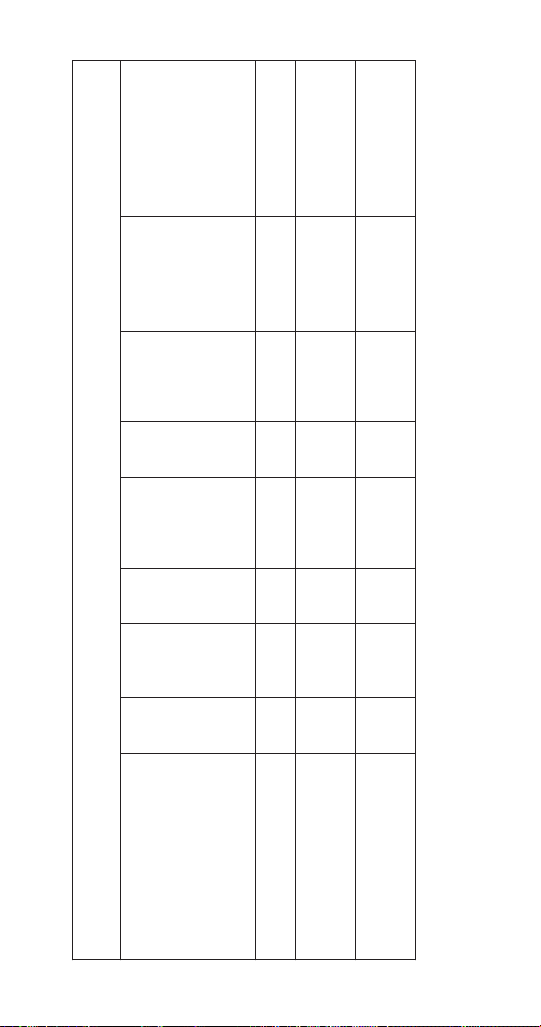
Single & Twin Evaporator QuietQube® Models
Energized Parts Chart
Ice Making
Sequence of
Operation
Water
Pump
Harvest
Valve(s)
Air
Pumps
Water Inlet
Valve
Water
Dump
Valve
Liquid Line
Solenoid
Valve
Contactor
Refrigeration
Compressor &
Condenser Fan
Motor*
Length of
Time
Start-Up - Initial or After Auto
Shut Off
On Off Off Off On Off Off 45 Seconds
1. Water Purge
2. Refrigeration System
Start-up
Pressure Equalization Off On On Off Off Off Off 5 Seconds
Compressor Start Off On On Off Off On On 5 Seconds

66 Part Number: 000015431 Rev 02 6/20
Single & Twin Evaporator QuietQube® Models
Energized Parts Chart
Ice Making
Sequence of
Operation
Water
Pump
Harvest
Valve(s)
Air
Pumps
Water Inlet
Valve
Water
Dump
Valve
Liquid Line
Solenoid
Valve
Contactor
Refrigeration
Compressor &
Condenser Fan
Motor*
Length of
Time
Freeze Sequence
Off Off Off
May cycle
On/Off
Off On On
Initial Start-Up is
120 Seconds
30 Seconds thereafter
3. Pre chill
4. Freeze
On Off Off
Cycles Off
then On/Off,
two more
times
Off On On
Until Ice contact with
ice thickness probe
Harvest Sequence
On On On Off On On On
Factory-set at
45 Seconds
5. Water Purge
Part Number: 000015431 Rev 02 6/20 67
Single & Twin Evaporator QuietQube® Models
Energized Parts Chart
Ice Making
Sequence of
Operation
Water
Pump
Harvest
Valve(s)
Air
Pumps
Water Inlet
Valve
Water
Dump
Valve
Liquid Line
Solenoid
Valve
Contactor
Refrigeration
Compressor &
Condenser Fan
Motor*
Length of
Time
6. Harvest
Off On On Off Off On On
Bin switch
activation
Water Assist
Starts 3.5 minutes in
harvest cycle
Off ** On On On Off** On On
Until curtain switch
activation
7. Automatic
Shut-Off
Off Off Off Off Off Off Off
Until 10 min. delay
expires & all bin
switches re-close
* The condenser fan motor is controlled by a fan cycle control and may cycle on/off.
* The contactor is controlled by a low pressure control and may cycle on/off whenever power is supplied to the condensing unit.
** Water Pump On after 4 minutes - Dump Valve On after 6.5 minutes.


“Part Number: 000015431 Rev 02 6/20” 69
Power Button Touchscreen Lock Clean Button
S
i
MAKING
ICE
3
3
11/18/2018 10:42 AM
Touch Screen Features
The Indigo® control panel offers a series of pressure-
sensitive buttons and an interactive touchscreen.
Buttons
Power Button: Provides On/Off functions for the ice
machine.
Lock/Unlock Button: Allows or prevents touchscreen
navigation.
Cleaning Button: Initiates a cleaning cycle. Refer to
“Detailed Cleaning and Sanitizing” on page 37 for details
on starting and bypassing a clean cycle.
Menu Navigation
70 “Part Number: 000015431 Rev 02 6/20”
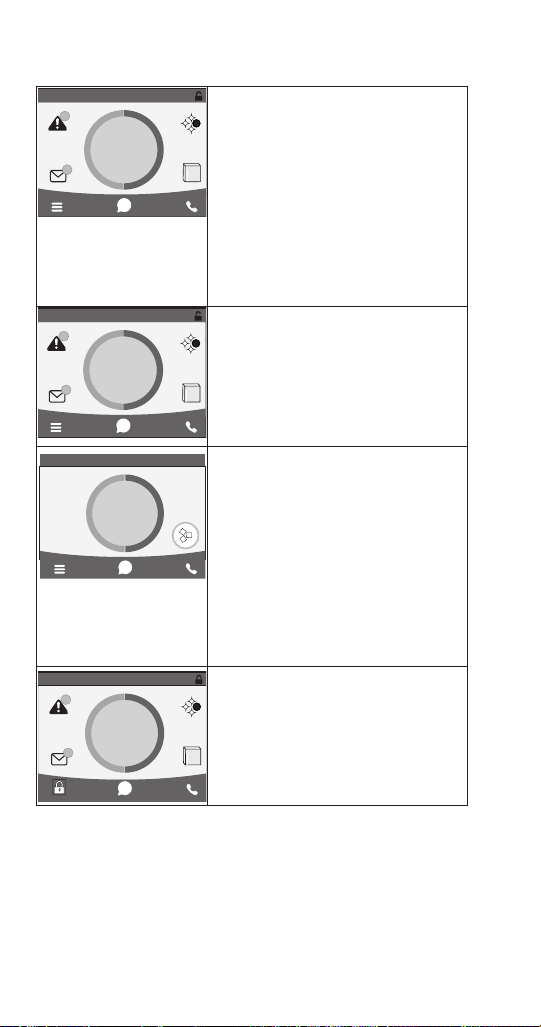
Touchscreen
Home screen allows viewing of ice
machine status, alerts and messages.
Navigation with the touchscreen
provides access to menu items,machine
information, settings and event logs.
Setup and Energy Saver settings can be
adjusted along with access to service
and troubleshooting information. The
icons provide status indication and
allow navigation by pressing the icon.
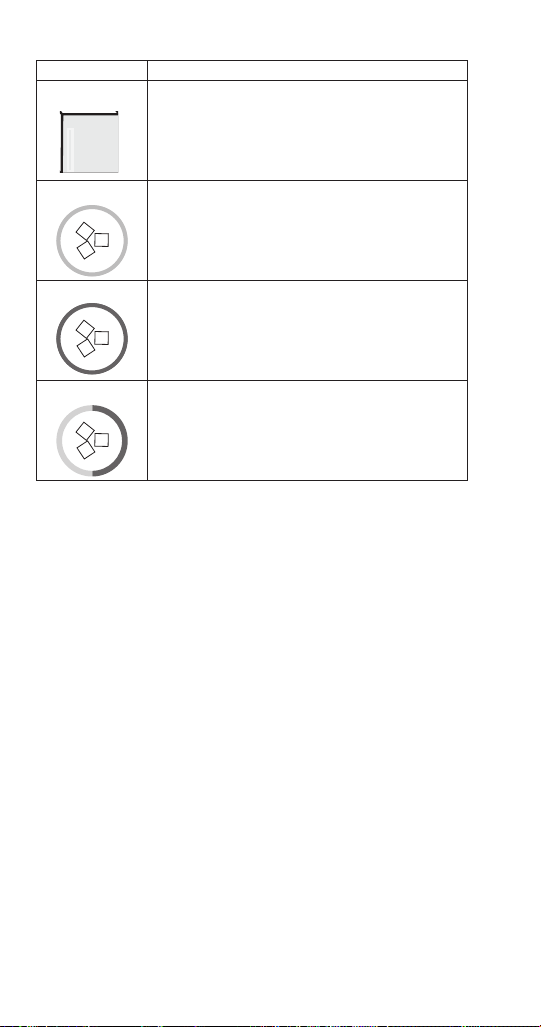
Prior to Revision 9 software: The
touchscreen will display Program
Mode On, whenever the ice machine
is off due to a bin level probe, weight
program or time program.
Revision 9 software - The touchscreen
will display a Making Ice button with a
Green outer ring during ice making;
A Machine Off button with an Orange
outer ring whenever the ice machine
has turned off on either Time, Weight
or Night Off; An Ice Now Bypass
Program button with a Light Blue/Dark
Blue outer ring, that allows immediate
ice production regardless of ice
program settings.
The touchscreen will display a lock
in place of the menu icon when the
touchscreen has been locked.
S
i
MAKING
ICE
3
3
11/18/2018 10:42 AM
S
i
3
3
Program
Mode On
11/18/2018 10:42 AM
i
MAKING
ICE
11/18/2018 10:42 AM
S
i
MAKING
ICE
3
3
11/18/2018 10:42 AM
“Part Number: 000015431 Rev 02 6/20” 71
HOME SCREEN ICON DESCRIPTIONS
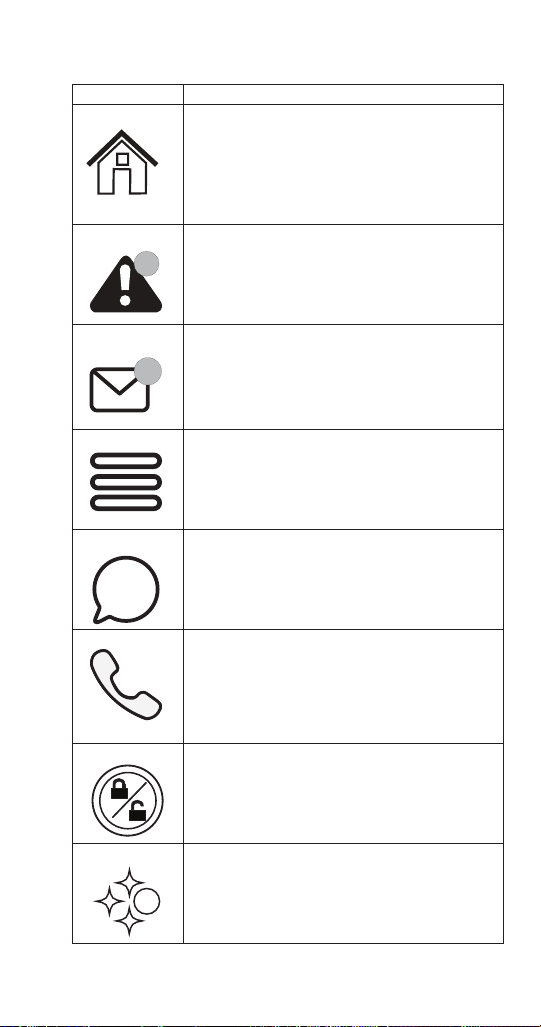
Icon Description
Home Screen Pressing this icon at any time will return the
display to the home screen.
State of ice Machine is the center portion of the
screen which displays the current condition of
the ice machine - Making ice, bin full, program
mode or machine off
Alert Alert icon with number of messages. Pressing
this icon will display the alert log which will
allow viewing and resetting of alerts
Message Message icon with umber of messages. Pressing
this icon will display the routine maintenance
reminder screen which will allow viewing and
resetting of the reminder
Menu Menu icon will take you to the main menu.
Note: This icon changes to a lock if the
touchscreen lock has been selected.
Information Information icon provides model and serial
number, installation date and other information
specific to the ice machine.
Service Locator Provides contact information for your local
service support - Default is the Manitowoc Ice
website service locator
Lock/Unlock Indicates if screen is locked or unlocked.
The icon is only visible when the screen is
locked.
LuminIce Only visible when a LuminIce II accessory is
connected.
Blue S - Normal operation
Red S - Replace bulb
Red/Blue alternating - Incorrect bulb installed
3
3
i
S
72 “Part Number: 000015431 Rev 02 6/20”
Icon Description
iAuCS This icon appears when the iAUCS activates
during a programed cleaning cycle.
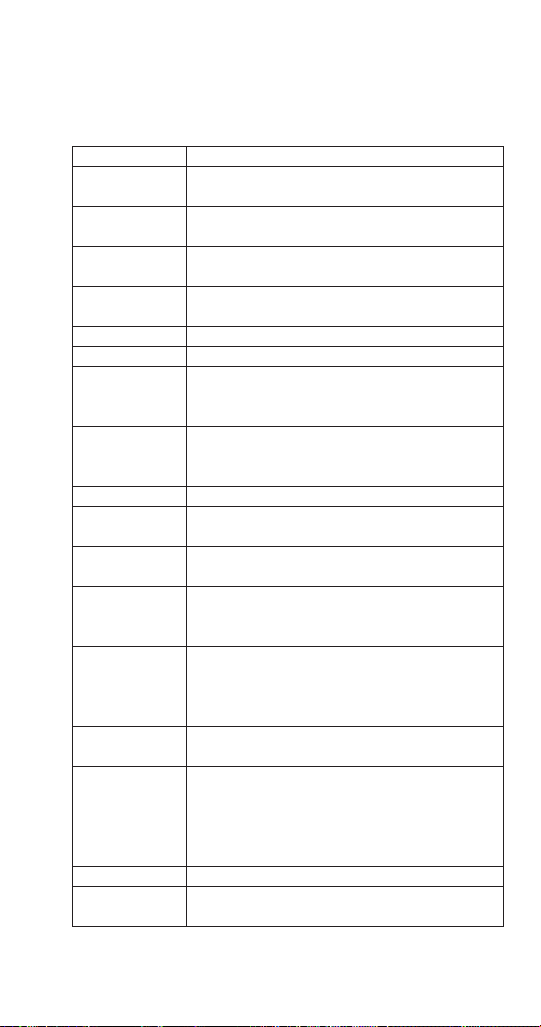
Making Ice This icon with a green ring appears after the ice
machine has been programmed to run either by
time, weight or night off.
Machine Off This icon with an orange ring appears after the
ice machine has been turned off by either time,
weight or night off program.
Ice Now This icon with a light blue/dark blue ring allows
immediate ice production regardless of ice
program settings.
“Part Number: 000015431 Rev 02 6/20” 73
Setup Wizard
Screens will automacally advance aer a selecon is made or press the
arrows to advance/go back one screen. All sengs can be accessed and
changed without the wizard by using menu screen navigaon.
Setup Description
Press ON/OFF
Button
On/Off button is used to start/stop ice making.
Select
Language
Default is English. Scroll to select a different
language.
Start Wizard
Setup wizard will guide ice machine
programming.
Date and Time
Configuration
Select Month/Day/Year or Day/Month/Year.
Select 12 hour or 24 hour time format.
Set Local Time Use arrows to set local time.
Verify Date Use arrows to set date for your location.
Accessory
Detection
Detects if Ice Level Sensor, LuminIce II or iAuCS
are connected.
Checkmark = yes - X = no
Optional
USB Settings
Download
Only used when setup features have been
transferred to a USB drive. Skip screen by
selecting right arrow.
Configure Units Select standard or metric.
Set Brightness
Configure screen brightness during normal
operation.
Optional Ice
Program
Program ice machine run times or press right
arrow to skip this setup.
Optional
Cleaning
Reminder
Set clean and sanitize reminder or press right
arrow to skip.
Optional Clean
Air Filter
Air-cooled
models only
Set to ON for self-contained air cooled models.
Optional Water
Filter Reminder
Select Yes or No.
Water Usage
Option
Factory default - or - Use less water for reverse
osmosis systems (see “Reverse Osmosis or
Deionized Water Usage” on page 142) -
or - Use more water to improve clarity for
unfiltered water
Congratulations Setup wizard is complete
Turn On Ice
Machine
Turn on ice machine by pressing the On/Off
button.

74 “Part Number: 000015431 Rev 02 6/20”
Menu Navigation Overview
SETTINGS MENU SCREEN NAVIGATION
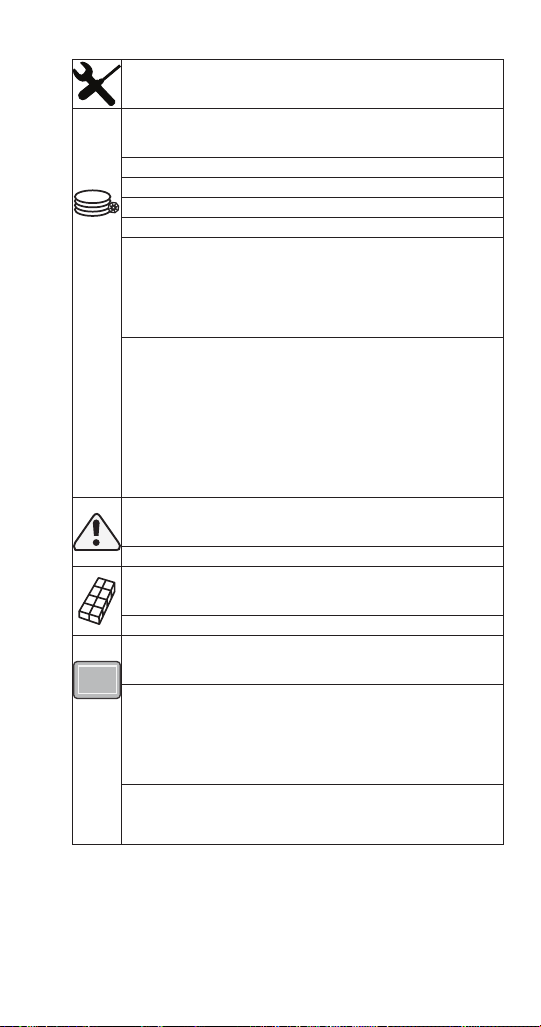
Select SETTINGS Icon from the Home Screen to access
Main Menu screen. The main menu screen contains four
main headings, which allow access to subheadings under
each main heading.
Energy
Ice Program
Continuous Mode - Default, No Program
Time Program - Select Daily On/Off times
Weight Program - Select Daily Production Weight
Night Off Program - Select Night On/Off Times
Water Usage
Use Factory Default
Use Less Water With Reverse Osmosis
Use More Water To Improve Ice Clarity
Statistics
Ice Production - Previous 7 Days
Water Usage - Previous 7 Days
Energy Usage - Previous 7 Days
NOTE: The performance statistics are calculated based
on the performance of the ice machine at 900F (320C)
ambient temperature and 700F (210C) water temperature.
The actual statistics will vary dependent on your
environmental conditions.
“Part Number: 000015431 Rev 02 6/20” 75
Service
Data
Real Time Data
Time and Temperature
Inputs
Outputs
Data History for 5 Previous Days
Minimum and Maximum Freeze (Length, Time of day,
Thermistor Temperatures)
Minimum and Maximum Harvest (Length, Time of day,
Thermistor Temperatures)
Lifetime Data History
Installation Date
Control Board Replacement Date
Control Board Manufacture Date
Runtime
Cycle Count
Potable Water
Clean Cycles
Alert Log
Lists/Clears Alerts
Manual Harvest
Off or On
Control Board Replacement
Manual Replacement
Manually enter model number
Manually enter serial number
Manually enter condenser serial number (optional)
Verification
USB Replacement
Import to ice machine
Export to USB

76 “Part Number: 000015431 Rev 02 6/20”
Service
Diagnostics
Control board
Enable All Relays
Self Check
Temperature Sensors
Lists Sensor Temperatures
Inputs
Lists Control Board Input Information
User Interface
Screen Calibration
Button Diagnostics
Screen Diagnostics
Screen Calibration
Contact information
Factory defaults to QR code and website address to
Manitowoc Ice’s Global Locator.
Edit Contact Information Button.
USB
Upgrade Firmware
Export Data
iAuCS
Manually initiate the iAuCS pump for pump/hose
priming. NOTE: The clean button does not initiate the
iAuCS pump.

“Part Number: 000015431 Rev 02 6/20” 77
Settings
Language
Select Language
Reminders
Clean Reminder
Set Month Interval
Air Filter
Set On/Off/Interval
Water Filter
Set Reminder
Configure Date & Time
Configure Date & Time
Set Time
Set Date
Units
Standard or Metric
Brightness
Adjust Touch Screen Brightness For Sleep Mode or
Inactivity.
NOTE: 100% brightness is activated by touching the
screen when the lock feature is off.
USB
Import Settings To Ice Machine
Export Settings To USB
iAuCS
When the iAuCS is detected, the icon will appear in the
settings menu to set frequency of cleanings with iAuCS


“Part Number: 000015431 Rev 02 6/20” 79
USB FLASH DRIVE SPECIFICATIONS AND FORMATTING
Updating firmware on Indigo™ model ice machines
requires a properly formatted 32 GB or smaller USB flash
drive. All USB flash drives must be formatted before use
to remove any software programs or files currently on the
flash drive.
USB Flash Drive Specifications:
• USB 2 Version
• 32 GB or less capacity
• Fat32 File System
USB Flash Drive Formatting:
Procedure to format a USB flash drive varies with operating
system software. Refer to operating system software
manufacturer’s website for formatting instructions.
UPGRADING FIRMWARE WITH A FLASH DRIVE
Important
The flash drive must be formatted before using. All
files and software on the flash drive are removed
during the formatting process.
1. Drag and drop the files from website or email onto a
flash drive.
2. Ensure that the ice machine’s power is on.
3. Navigate to USB - Menu/Service/USB.
4. Insert the flash drive into the USB port on the ice
machine control board. Do not remove flash drive
until transfer is complete.
NOTE: See “Electronic Control Board” on page 200 for
USB location.
5. Select “Upgrade firmware” and remove USB drive
when the transfer is complete.

80 “Part Number: 000015431 Rev 02 6/20”
EXPORTING DATA TO A FLASH DRIVE
Data can be copied from the control board memory to
a flash drive and used to transfer setup and/or cycle
data to a replacement control board or to transfer setup
information to multiple ice machines. Data may also be
requested by service department personnel for analysis or
as an aid to troubleshooting. The data files are small and
can be attached to an email.
Important
The flash drive must be formatted before using. All
files and software on the flash drive are removed
during the formatting process.
1. Ensure that the ice machine’s power is on.
2. Press the Menu button.
3. Navigate to USB - Menu/Service/USB.
4. Insert the flash drive into the USB port on the ice
machine control board. Do not remove flash drive
until update is complete.
5. Select Export Data and remove USB drive when the
transfer is complete.

Part Number: 000015431 Rev 02 6/20 81
Troubleshooting
Check the touchscreen for alerts - An alert icon with the
number of messages will be displayed if alerts are present.
Pressing the alert icon will display the alert log which will
allow viewing and resetting of alerts. Refer to the alert log
and event log on the following pages for a description of
the event.
NOTE: There are two sequences that allow the ice machine
to continue ice making during alert events:
Thaw Cycle
When the damper/curtain does not open during the 7
minute harvest cycle (E02 fault) a thaw cycle starts.
See ”Thaw Cycle” on page 88
Safe Operation Mode
Allows the ice machine to operate up to 72 hours if the
ice thickness probe (E19 fault) and/or water level probe
sensors fail (E20 fault).
See “Safe Operation Mode” on page 89
Troubleshooting
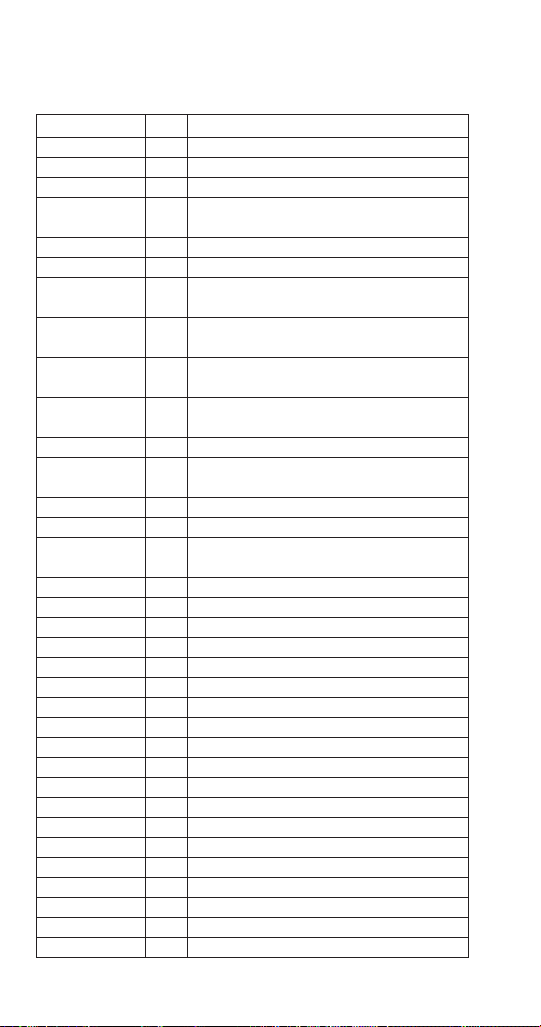
82 Part Number: 000015431 Rev 02 6/20
EVENT LOG
Refer to Event Log Detail For Code descriptions.
Displayed Text Code Description
Long Freeze E01 Long Freeze Cycle
Long Harvest E02 Long Harvest Cycle
Power Loss E03 Input Power Loss
Hi cnd Temp or
Wtr Cnd Fault
E04 High Condenser Temperature
HPC Fault E05 High Pressure Control Opened
E06 Spare
Starving TXV E07 Starving TXV Single Evaporator or Low On
Charge
TXV Fault E08 TXV Fault Single or Dual Circuit
Evaporators
Flood Evap1 E09 Flooding Evaporator Fault Single
Evaporator, Single Circuit
Flood Evap2 E10 Flooding Evaporator Fault Dual TXV, Dual
Circuit
Refrig Fault E11 Refrigeration Fault
Curtain Fault E12 Curtain Switch Fault - Open more than
24 hours
E13 Spare
E14 Spare
Low liq temp E15 Fan Cycle Control Fault - Low Liquid Line
Temperature
Rmt Cnd Fault E16 Remote Condensing Unit Fault (CVD Only)
E17 Spare
E18 Spare
ITP Fault E19 Ice Thickness Probe Fault
WTR Fault E20 Water System Fault
T1 Fault E21 T1 Temperature Sensor Issue
T2 Fault E22 T2 Temperature Sensor Issue
T3 Fault E23 T3 Temperature Sensor Issue
T4 Fault E24 T4 Temperature Sensor Issue
T5 Bin Probe E25 Bin Level Probe Sensor Fault (IB Only)
T6 Fault E26 T6 or T7 Temperature Sensor Issue
T7 Fault E27 T6 or T7 Temperature Sensor Issue
iAUCS E28 iAuCS Not Detected Event Log Only
USB Comm E29 USB Communication Fault
USB DNLD E30 USB Download Fault
Safe Mode E31 Safe Mode
RS485 COMM E32 RS485 Communication Fault
Keyboard E33 Touchscreen Fault
Display E34 Display Fault

Part Number: 000015431 Rev 02 6/20 83
Displayed Text Code Description
Checksum E36 Check Sum Error
WatchDog E37 Watch Dog Event
UI Comm E38 UI Comm Event
EVENT LOG DETAIL
E01 Long Freeze
3 consecutive 35 minute freeze cycles = Ice machine is off.
E02 Long Harvest
3 consecutive 7minute harvest cycles = Ice machine is off.
E03 Power Loss
When power is interrupted to the ice machine the control
board will log the event in the ELOG and stamp the loss of
power on power-up.
E04 High Condenser Temperature
Liquid Line Temperature too High for Self-contained Air
Cooled Ice machine = Air Cooled Condenser Fault
Or
Liquid Line Temperature too High for Self-contained Water
Cooled ice machine = Water Cooled Condenser Fault
E05 High Pressure Control Opened
The high pressure cutout switch (HPCO) opened.
E06 Spare
E07 Starving TXV Single Evaporator or Low On Charge
The difference of the average evaporator inlet (T3) and
outlet (T4) is greater than 12°F in the last 1 minute of the
freeze cycle.
E08 TXV Fault Single or Dual Circuit Evaporators
The difference of the average evaporator inlet (T3) and
outlet (T4) is greater than 12°F in the last 1 minute of the
freeze cycle.

84 Part Number: 000015431 Rev 02 6/20
E09 Flooding Evaporator Fault Single Evaporator, Single
Circuit
Average compressor discharge line temperature during
the first 6 minutes of the freeze cycle (T2) compared to the
average of the Prechill (T1) +50°F is less than 1.05°F.
E10 Flooding Evaporator Fault Dual TXV, Dual Circuit
Average compressor discharge line temperature during
the first 6 minutes of the freeze cycle (T2) compared to the
average of the Prechill (T1) +50°F is less than 1.05°F.
E11 Refrigeration Fault
The compressor discharge temperature did not increase
by at least 10° F, and the evaporator temperature did not
decreased by at least 10° F - Measured from Refrigeration
Start up or Prechill until 2 minutes into the Freeze cycle.
E12 Curtain Switch Fault Open more than 24 hours
The ice machine is set to ice making and remains in bin
full condition for more than 24 hours. The curtain switch is
open or curtain is off.
E13 Spare
E14 Spare
E15 Fan Cycle Control Fault - Low Liquid Line Temperature
The liquid line temperature dropped below 60° F for more
than one continuous minute during the freeze cycle.
E16 Remote Condensing Unit Fault (CVD Only)
The liquid line temperature dropped below 40° F, or
exceeded 140° F for more than 1 continuous minute during
the freeze cycle.
E17 Spare
E18 Spare

Part Number: 000015431 Rev 02 6/20 85
E19 Ice Thickness Probe Fault
The monitored Frequencies is out of the appropriate range
(Probe unplugged or problem with microphone).
E20 Water System Fault
Any of the following:
1. Sensing high water probe and not low water probe.
2. Evaporator outlet temperature is less than -10°F 6.5
to 7.5 minutes in freeze cycle.
3. Low water probe is satisfied at the end of harvest.
4. Low or high water probe is satisfied at end of freeze
cycle.
E21 T1 Temperature Sensor Issue
During Pre-chill the thermistor had an average value
reading outside the valid range.
E22 T2 Temperature Sensor Issue
During Pre-chill the thermistor had an average value
reading outside the valid range.
E23 T3 Temperature Sensor Issue
During Pre-chill the thermistor had an average value
reading outside the valid range.
E24 T4 Temperature Sensor Issue
During Pre-chill the thermistor had an average value
reading outside the valid range.
E25 Bin Level Probe Low Sensor Fault
The thermistor had an average value reading outside of
the valid range for 10 continuous minutes.

86 Part Number: 000015431 Rev 02 6/20
E26 T6 or T7 Temperature Issue
The thermistor had an average value reading outside of
the valid range.
E27 T6 or T7 Temperature Issue
The thermistor had an average value reading outside of
the valid range.
E28 AuCS
When the AUCS clean option is selected from the menu,
the control checks for the presence of the AUCS board.
When the AUCS is not connected it will signal an Event
which will clear as soon as the hardware is detected.
E29 USB Communication Fault
USB Communication error; No USB drive in port or
defective USB drive.
E30 USB Download Fault
USB Download error related to USB drive or a defective
USB drive.
E31 Safe Mode
Safe mode allows the ice machine to operate for a period
of time in the event of a Water level or ice thickness probe
failure. The controller allows the machine to operate based
on model data and historical cycle information.
E32 RS485 Communication Fault
The device plugged into the RS485 port is not
communicating between the control board and gateway.
E33 Touchscreen Fault
The Touchscreen is not plugged into the control board or
is faulty.
E34 Display Fault
The touchscreen is not plugged into the control board or
is faulty.


88 Part Number: 000015431 Rev 02 6/20
THAW CYCLE
When the damper/curtain does not open during the 7
minute harvest cycle the following ice thaw cycle occurs:
• The compressor, harvest solenoid valve and dump
valve de-energize.
The water pump remains energized and the water inlet
valve energizes until water touches the high water
level probe.
• Water is circulated, dumped and refilled to the high
water level probe for 3 minutes.
Model 1200 or smaller:
Circulate 165 seconds, dump 45 seconds
Model 1400 and larger:
Circulate 240 seconds, dump 120 seconds
• At the end of the thaw cycle the ice machine will start
another freeze cycle (approximately 1 - 1.75 hour).
Curtain Operation In Water Assist Harvest
• Open & close damper = Continue Thaw Cycle
• Open damper 30 seconds = Full Bin Shutoff
Use the keypad and turn the ice machine off and then on
to terminate the cycle. Disconnecting and reconnecting
power to end the cycle will result in the ice machine
restarting in a harvest cycle.

Part Number: 000015431 Rev 02 6/20 89
SAFE OPERATION MODE
Allows the ice machine to operate up to 72 hours if the
ice thickness probe (E19 fault) and/or water level probe
sensors fail (E20 fault).
• When the control board starts the safe mode an alert
is flashed on the LCD display to notify the end-user
they have a production problem.
• The control board automatically initiates and monitors
the safe mode. The control will automatically exit the
safe mode if a normal signal is received from the input.
• After 72 hours the control board will enter a standby
mode and turn off.
• The control board needs a five cycle history to operate
safe mode. If five cycles have never been successfully
completed the ice machine will shut-off.

90 Part Number: 000015431 Rev 02 6/20
E01 LONG FREEZE CYCLE
If the freeze time reaches 35 minutes, the control board
automatically initiates a harvest cycle. If 3 consecutive
35-minute freeze cycles occur, the ice machine stops.
E02 LONG HARVEST CYCLE
If the harvest time reaches 7 minutes, the control board
will start a thaw cycle and automatically return the ice
machine to the freeze cycle. After 3 consecutive long
harvest cycles the ice machine stops.
ANALYZING WHY A SERVICE FAULT (E01 & E02)
STOPPED THE ICE MACHINE
Some service Faults are designed to stop the ice machine
prior to major component failures, most often a minor
problem or something external to the ice machine. This
may be difficult to diagnose, as many external problems
occur intermittently.
Example: An ice machine stops intermittently on E01 Long
Freeze (long freeze time). The problem could be a low
ambient temperature at night, a water pressure drop, the
water is turned off one night a week, etc.
Refrigeration and electrical component failures will cause
a Service Fault. Eliminate all electrical components and
external causes first. If it appears that the refrigeration
system is causing the problem, use Manitowoc’s
procedures, charts, checklists, and other references to
determine the cause.
The following checklists are designed to assist the service
technician in analysis. However, because there are many
possible external problems, do not limit your diagnosis to
only the items listed.

Part Number: 000015431 Rev 02 6/20 91
E01 LONG FREEZE
Improper Installation
• Refer to “Installation/Visual Inspection Checklist” on
page 103
Water System
• Defective water level probe
• Low water pressure (20 psig min.)
• High water pressure (80 psig max.)
• High water temperature (90°F/32.2°C max.)
• Clogged water distribution tube
• Dirty/defective water fill valve
• Dirty/defective water dump valve
• Defective water pump
• Loss of water from sump area
Electrical System
• Low incoming voltage
• Ice thickness probe out of adjustment
• Harvest cycle not initiated electrically
• Contactor not energizing
• Compressor electrically non-operational
• Defective fan cycling control
• Defective fan motor

92 Part Number: 000015431 Rev 02 6/20
Miscellaneous
• Non-Manitowoc components
• Improper refrigerant charge
• Defective head pressure control
• Defective harvest valve
• Defective compressor
• TXV starving or flooding (check bulb mounting)
• Non-condensible in refrigeration system
• Plugged or restricted high side refrigerant lines or
component
• Restricted air flow/dirty condenser fins
• High inlet air temperature
• Condenser discharge air recirculation

Part Number: 000015431 Rev 02 6/20 93
E02 LONG HARVEST
Harvest time exceeds 7 minutes for 3 consecutive harvest
cycles.
Possible Cause Checklist
Improper Installation
• “Installation/Visual Inspection Checklist” on page 103
Water System
• Water area (evaporator) dirty
• Dirty/defective water dump valve
• Vent tube not installed on water outlet drain
• Water freezing behind evaporator
• Plastic extrusions and gaskets not securely mounted to
the evaporator
• Clogged water distribution tube
Electrical System
• Ice thickness probe out of adjustment
• Bin switch closed/defective
• Premature harvest
Refrigeration System
• Non-Manitowoc components
• Improper refrigerant charge
• Defective head pressure control valve
• Defective harvest valve
• TXV flooding (check bulb mounting)
• Defective fan cycling control

94 Part Number: 000015431 Rev 02 6/20
Troubleshooting By Symptom
The troubleshooting procedures follow flow charts.
There are four symptoms, the symptom that you are
experiencing will determine which flow chart to use. The
flow chart asks yes and no questions to determine the
problem. The flow chart will direct you to a procedure to
correct the problem. QuietQube® remote condensing units
use separate charts.
SYMPTOM #1 ICE MACHINE STOPS RUNNING
Ice machine is in Ice Making cycle
or
Has a History of Shutting Down
• Refer to Ice Machine Stops Running Flow Chart
SYMPTOM #2 ICE MACHINE HAS A LONG FREEZE CYCLE
Ice Formation is Thick
or
Thin Ice Fill on inlet or outlet of Evaporator
or
Low Production
E01 Long Freeze (possible)
• Refer to Low Production, Long Freeze Cycle
SYMPTOM #3 WILL NOT HARVEST, CUBES NORMAL
Ice Machine Will Not Harvest - Freeze Cycle is Normal and
Ice Cubes are Not Melted After Harvest
E02 Long Harvest (possible)
Refer to Harvest Problems
SYMPTOM #4 WILL NOT HARVEST CUBES MELTED
Ice Machine Will Not Harvest - Freeze Cycle is Normal and
Ice Cubes are Melted After Harvest
• Refer to Freeze Cycle Normal, Cubes Are Melted

Part Number: 000015431 Rev 02 6/20 95
RESET TO FACTORY DEFAULTS
Before starting troubleshooting procedures, reset the
control board to factory defaults to prevent
mis-diagnosis. Before resetting to factory defaults do one
of the following:
A. Copy settings to a usb device and flash settings
into the control board when diagnostics are
complete.
B. Write down any customer settings so they can be
re-entered when diagnostics are complete.
96 Part Number: 000015431 Rev 02 6/20
SYMPTOM #1 ICE MACHINE WILL NOT RUN
Micro light flashing?
Yes
No
START
Is the display interface
energized and functioning?
Yes
Refer to display & control
board diagnostics
Is thereanAlertor
Error Logged?
Refer to Alert/Error Log
Yes
No
No
No
Does theice machine start
whenthe Power buttonis pushed?
Yes
Are there any lights
on or flashing on the
control board?
No
Referto display&control
board diagnostics
CyclePower to Board,
arelightsflashing?
Display light
Flashing?
No
Unit has
adequate ground?
Install Ground
No
No
Yes
Yes
Yes
Yes
Part Number: 000015431 Rev 02 6/20 97
Binswitch light on?
(Multievap all lightson?)
Control board fuse
is good?
Yes
Yes
No
Yes
No
Install thewater curtain/damper
All water curtains or
dampersin place?
Linevoltageat wires
55 &56on9pin control
board connector?
Supply power to the
icemachine
Yes
No
Yes
Replace fuse & determine which
component causedfuseto blow
Refer to display &control
board diagnostics
No
Yes
98 Part Number: 000015431 Rev 02 6/20
E01
Press power buttonto
startice making,
Yes
Replacethe water
curtain/damper.
No
Yes
Ice machine starts?
No
No
Test runice machine
Yes
Yes
Yes
Refer to bin switch
diagnostics.
Refer to display&control
board diagnostics
E01 or E02
In Event Log?
E02
Which Event? Refer to E01 Long Freeze Cycle
Refer to E02 Long Harvst Cycle
Is
magnet on the water
curtain/damper.

Part Number: 000015431 Rev 02 6/20 99
DIAGNOSING A CONDENSING UNIT
THAT WILL NOT RUN
If the ice machine water pump is not energized, refer to
“Diagnosing an Ice Machine that Will Not Run.”
1. Verify primary voltage is supplied to the ice machine
condensing unit and the fuse/circuit breaker is closed.
2. Verify the high-pressure control is closed.
3. Verify the low-pressure control is closed.
4. Verify voltage is present at terminals 1 & 2 on the
compressor time delay relay.
5. Verify the time delay period has expired and test for
line voltage at compressor time delay relay terminals
1 & 3.
6. Verify line voltage is present at the contactor coil.
7. Verify the contactor contacts are closed and line
voltage is present across all lines.
8. Refer to compressor diagnostics.

100 Part Number: 000015431 Rev 02 6/20
SYMPTOM #2 LOW PRODUCTION, LONG FREEZE CYCLE
Ice Machine has a Long Freeze Cycle
Ice Formation is Thick or Thin ice fill at Inlet or Outlet
of Evaporator or Low Production
Information must be verified to eliminate non-refrigeration
problems which can cause good refrigeration components
to appear defective.
Before starting, see “Before Beginning Service” on page
100 for a few questions to ask when talking to the ice
machine owner.
Before Beginning Service
Ice machines may experience operational problems
only during certain times of the day or night. A machine
may function properly while it is being serviced, but
malfunctions later. Information provided by the user can
help the technician start in the right direction, and may be
a determining factor in the final diagnosis.
Ask these questions before beginning service:
• When does the ice machine malfunction? (night, day,
all the time, only during the Freeze cycle, etc.)
• When do you notice low ice production? (one day a
week, every day, on weekends, etc.)
• Can you describe exactly what the ice machine seems
to be doing?
• Has anyone been working on the ice machine?
• During “store shutdown,” is the circuit breaker, water
supply or air temperature altered?
• Is there any reason why incoming water pressure
might rise or drop substantially?

Part Number: 000015431 Rev 02 6/20 101
Ice Production Check
The amount of ice a machine produces directly relates
to the operating water and air temperatures. This means
a condensing unit with a 70°F (21°C) outdoor ambient
temperature and 50°F (10°C) water produces more ice
than the same model condensing unit with a 90°F (32°C)
outdoor ambient temperature and 70°F (21°C) water.
1. Determine the ice machine operating conditions:
Air temp entering condenser: ____°
Air temp around ice machine: ____°
Water temp entering sump trough: ____°
2. Refer to the appropriate 24-Hour Ice Production Chart
(starting on page 183). Use the operating conditions
determined in step 1 to find published 24-Hour Ice
Production:_____
• Times are in minutes.
Example: 1 min. 15 sec. converts to 1.25 min.
(15 seconds ÷ 60 seconds = .25 minutes)
• Weights are in pounds.
Example: 2 lb. 6 oz. converts to 2.375 lb.
(6 oz. ÷ 16 oz. = .375 lb.)
3. Perform an ice production check using the formula
below.
1. _________
Freeze Time
+ _________
Harvest Time
= _________
Total Cycle
Time
2. 1440
_________
Minutes in
24 Hrs.
÷ _________
Total Cycle
Time
= _________
Cycles per
Day
3. _________
Weight of
One Harvest
× _________
Cycles per
Day
= _________
Actual
24-Hour
Production

102 Part Number: 000015431 Rev 02 6/20
Weighing the ice is the only 100% accurate check.
However, if the ice pattern is normal and the 1/8 in.
thickness is maintained, the ice slab weights listed with the
24-Hour Ice Production Charts may be used.
4. Compare the results of step 3 with step 2. Ice
production checks that are within 10% of the
chart are considered normal. If they match closely,
determine if:
• Another ice machine is required.
• More storage capacity is required.
• Relocating the existing equipment to lower the
load conditions is required.
Contact the local Manitowoc Distributor for information on
available options and accessories.

Part Number: 000015431 Rev 02 6/20 103
Installation/Visual Inspection Checklist
Inadequate Clearances
• Check all clearances on sides, back and top.
See “Clearance Requirements” on page 29
Ice machine is not level
• Level the ice machine
Condenser is dirty
• Clean the condenser
Water filtration is plugged (if used)
• Install a new water filter
Water drains are not run separately and/or are not
vented
• Run and vent drains according to the Installation
Manual
• Floor drain must have an air gap
• Install condensation drain in the ice machine base
Line set is improperly installed
• Reinstall according to the Installation, Operation and
Maintenance Manual
Lineset is the incorrect size
• Refer to Installation, Operation and Maintenance
Manual
See “Water Supply and Drains” on page 32

104 Part Number: 000015431 Rev 02 6/20
Water System Checklist
A water-related problem often causes the same symptoms
as a refrigeration system component malfunction. Water
system problems must be identified and eliminated prior
to replacing refrigeration components.
Water area (evaporator) is dirty
• Clean as needed
Water inlet pressure not between 20 and 80 psig (1-5 Bar,
138-552 kPa).
• Install water regulator or increase water pressure
Incoming water temperature is not between 35°F (2°C)
and 90°F (32°C)
• If too hot, check the hot water line check valves in
other store equipment
Water filtration is plugged (if used)
• Install a new water filter
Water dump valve leaking during the Freeze cycle
• Clean or replace dump valve as needed
Vent tube is not installed on water outlet drain
• See Installation Instructions
Hoses, fittings, etc., are leaking water
• Repair or replace as needed
Water fill valve is stuck open or closed
• Clean or replace as needed
Water is leaking out of the sump trough area
• Stop the water loss
Uneven water flow across the evaporator
• Clean the ice machine
Plastic extrusions and gaskets are not secured to
the evaporator
• Remount/replace as needed

Part Number: 000015431 Rev 02 6/20 105
Ice Formation Pattern
Evaporator ice formation pattern analysis is helpful in ice
machine diagnostics.
Analyzing the ice formation pattern alone cannot diagnose
an ice machine malfunction. However, when this analysis
is used along with Manitowoc’s Freeze Cycle Refrigeration
System Operational Analysis Tables, it can help diagnose an
ice machine malfunction.
Any number of problems can cause improper ice
formation.
Important
Keep the water curtain, splash shields and ice dampers
in place while checking the ice formation pattern to
ensure no water is lost.
1. Normal Ice Formation
Ice forms across the entire evaporator surface.
At the beginning of the Freeze cycle, it may appear that
more ice is forming on the inlet of the evaporator than on
the outlet. At the end of the Freeze cycle, ice formation
at the outlet will be close to, or just a bit thinner than,
ice formation at the inlet. The dimples in the cubes at the
outlet of the evaporator may be more pronounced than
those on the inlet. This is normal.
It is normal for ice thickness to vary up to 1/16" across the
surface of the evaporator. The ice bridge thickness at the
ice thickness control probe should be at least 1/8".
The ice thickness probe must be set to maintain the ice
bridge thickness at approximately 1/8 in. If ice forms
uniformly across the evaporator surface, but does not
reach 1/8 inch in the proper amount of time, this is still
considered a normal ice fill pattern.

106 Part Number: 000015431 Rev 02 6/20
2. Extremely Thin at Evaporator Outlet
There is no ice, or a considerable lack of ice formation, at
the outlet of the evaporator.
Examples: No ice at all on the outlet half of the evaporator,
but ice forms on the inlet half of the evaporator. Or, the ice
at the outlet of the evaporator reaches 1/8 in. to initiate a
harvest, but the inlet of the evaporator already has 1/2 in.
to 1 in. of ice formation.
3. Extremely Thin at Evaporator Inlet
There is no ice, or a considerable lack of ice formation at
the inlet of the evaporator. Examples: The ice at the outlet
of the evaporator reaches 1/8 in. to initiate a harvest,
but there is no ice formation at all on the inlet of the
evaporator.
4. No Ice Formation
The ice machine operates for an extended period, but
there is no ice formation at all on the evaporator.
Evaporator Tubing Routing
Routing of the tubing on the back of the evaporator
determines the ice fill pattern failure mode. The
evaporator outlet tubing does not exit directly at the top
of the evaporator, but exits several inches below the top
of the evaporator. Extremely Thin at the Evaporator Outlet
will first be visible several inches below the top of the
evaporator. Extremely Thin at Evaporator Inlet will first be
visible at the bottom of the evaporator.
Outlet
Inlet
Thin at Inlet Thin at Outlet
ICE
ICE

Part Number: 000015431 Rev 02 6/20 107
One Evaporator, Two TXV Models
Tubing routing for one evaporator with two TXV’s is
different. The evaporator has two inlets and outlets. Fill
pattern varies depending on which circuit is affected.
Extremely Thin at the Evaporator Outlet will first be visible
either 1/4 or 3/4 of the way down the evaporator.
Extremely Thin at the Evaporator Inlet will show at
the bottom of the evaporator or 1/2 of the way down
depending on the circuit affected.
Outlet
Inlet
Thin at Inlet
Thin at Outlet
ICE
ICE
ICE
ICE
ICE
Outlet
Inlet

108 Part Number: 000015431 Rev 02 6/20
Analyzing Discharge Pressure in the Freeze Cycle
1. Determine the ice machine operating conditions:
Air temp. entering condenser ______
Air temp. around ice machine ______
Water temp. entering sump trough ______
2. Refer to “Cycle Times/24-Hour Ice Production/
Refrigerant Pressure Charts” on page 183 for ice
machine being checked.
Use the operating conditions determined in step 1 to
find the published normal discharge pressures.
Freeze Cycle ______
Harvest Cycle ______
3. Perform an actual discharge pressure check.
Freeze Cycle
psig (kPa)
1 Minute into
the Freeze Cycle
Middle of Freeze Cycle
End of Freeze Cycle
4. Compare the actual discharge pressure (step 3) with
the published discharge pressure (step 2).
The discharge pressure is normal when the actual
pressure falls within the published pressure range
for the ice machine’s operating conditions. It is
normal for the discharge pressure to be higher at the
beginning of the Freeze cycle (when load is greatest),
then drop throughout the Freeze cycle.

Part Number: 000015431 Rev 02 6/20 109
FREEZE CYCLE DISCHARGE PRESSURE HIGH CHECKLIST
Improper Installation
• Refer to “Installation/Visual Inspection Checklist” on
page 103
Air Condenser
• Dirty condenser filter
• Dirty condenser fins
• High inlet air temperature
• Condenser discharge air recirculation
• Defective “Fan Cycle Control” on page 157)
• Defective fan motor
• Defective head pressure control valve (Remote)
Other
• Overcharged
• Non-condensible (air) in system
• Wrong type of refrigerant
• Non-Manitowoc components in system
• High side refrigerant lines/component restricted

110 Part Number: 000015431 Rev 02 6/20
FREEZE CYCLE DISCHARGE PRESSURE LOW CHECKLIST
Improper Installation
• Refer to “Installation/Visual Inspection Checklist” on
page 103
Condenser
• Defective head pressure control valve, won’t bypass
page 162
• Defective fan cycle control, stuck closed (page 157)
Other
• Undercharged
• Wrong type of refrigerant
• Non-Manitowoc components in system
• Liquid line/component restricted

Part Number: 000015431 Rev 02 6/20 111
Analyzing Suction Pressure
The suction pressure gradually drops throughout the
freeze cycle. The actual suction pressure (and drop rate)
changes as the air and water temperature entering the
ice machine changes. These variables also determine the
freeze cycle times.
To analyze and identify the proper suction pressure drop
throughout the freeze cycle, compare the published
suction pressure to the published freeze cycle time.
NOTE: Analyze discharge pressure before analyzing suction
pressure. High or low discharge pressure may be causing
high or low suction pressure.
1. Determine the ice machine operating conditions:
Air temp. entering condenser ______
Air temp. around ice machine ______
Water temp. entering sump trough ______
2. Refer to Operating Pressure table (starting on page
183) for ice machine being checked.
Use the operating conditions determined in step 1 to
find the published normal discharge pressures.
Freeze Cycle ______
Harvest Cycle ______
3. Perform an actual suction pressure check.
Freeze Cycle psig (kPa)
1 Minute into the Freeze Cycle
Middle of Freeze Cycle
End of Freeze Cycle
4. Compare the actual suction pressure (step 3) with the
published suction pressure (step 2).
NOTE: The suction pressure is normal when the actual
pressure falls within the published pressure range for
the ice machine’s operating conditions. It is normal for
the suction pressure to be higher at the beginning of the
Freeze cycle (when load is greatest), then drop throughout
the Freeze cycle.

112 Part Number: 000015431 Rev 02 6/20
SUCTION PRESSURE HIGH CHECKLIST
Improper Installation
• Refer to “Installation/Visual Inspection Checklist” on
page 103
Discharge Pressure
• Discharge pressure is too high and is affecting suction
pressure – refer to ”Analyzing Discharge Pressure in the
Freeze Cycle” on page 108
Improper Refrigerant Charge
• Overcharged
• Wrong type of refrigerant
• Non condensible in system
Components
• Harvest valve leaking
• TXV flooding
• Defective compressor
Other
• Non-Manitowoc components in system

Part Number: 000015431 Rev 02 6/20 113
SUCTION PRESSURE LOW CHECKLIST
Improper Installation
• Refer to ”Installation/Visual Inspection Checklist” on
page 103
Discharge Pressure
• Discharge pressure is too low and is affecting low side
– refer to “Analyzing Discharge Pressure in the Freeze
Cycle” on page 108
Improper Refrigerant Charge
• Undercharged
• Wrong type of refrigerant
Other
• Non-Manitowoc components in system
• Improper water supply over evaporator – refer to
“Water System Checklist” on page 104
• Restricted/plugged liquid line drier
• Restricted/plugged tubing in suction side of
refrigeration system
• TXV starving
• Liquid line solenoid valve closed

114 Part Number: 000015431 Rev 02 6/20
Harvest Valve Analysis
Symptoms of a harvest valve remaining partially open
during the freeze cycle can be similar to symptoms of
either an expansion valve or compressor problem. Use
the following procedures to determine if a harvest valve is
remaining partially open during the freeze cycle.
QUIETQUBE® HARVEST VALVE ANALYSIS
The valve can fail in two positions:
• Valve will not open in the Harvest cycle.
• Valve remains open during the Freeze cycle.
Valve will not open in the Harvest cycle
Although the circuit board has initiated a Harvest cycle,
suction and discharge pressures remain unchanged from
the Freeze cycle. The ice machine will remain in the
Harvest cycle for 7 minutes, then initiate a thaw cycle.
Valve remains open in the Freeze cycle
Symptoms of a harvest valve remaining partially open
during the Freeze cycle can be similar to symptoms of an
expansion valve or compressor problem. Symptoms are
dependent on the amount of leakage in the Freeze cycle.
A small amount of leakage will cause increased freeze
times and an ice fill pattern that is normal.
As the amount of leakage increases, the length of the
Freeze cycle increases and the amount of ice on the
bottom of the evaporator decreases.
A small amount of leakage will cause an audible indication
as the vapor passes through the valve. As the size of the
leak increases, the audible indication becomes more
apparent.

Part Number: 000015431 Rev 02 6/20 115
Analyzing Freeze Cycle Suction Line Temperature
Suction line temperature alone cannot diagnose an ice
machine. However, comparing this temperature during the
freeze cycle can help diagnose an ice machine malfunction.
The actual temperature of the suction line varies by model,
and will change throughout the freeze cycle. This makes
documenting the “normal” suction line temperature
difficult. The key to the diagnosis is observing the
compressor suction line temperature during the last three
minutes of the freeze cycle.
1. Navigate to Service/Diagnostics/Temperature Sensors
and view T3 & T4 Thermistors.
2. Monitor the suction line temperature during the last
three minutes of the freeze cycle and record the low
event.
3. Verify refrigerant amount is correct by weight when
recovering refrigerant and replacing a TXV. Grossly
overcharged QuietQube® ice machine in ambient
temperatures below 70°F will have a suction line
temperature below 10°F and liquid line subcooling
will be greater than 25°F.
116 Part Number: 000015431 Rev 02 6/20
SYMPTOM #3 HARVEST PROBLEMS
Definition of a harvest problem; At the end of a 7 minute
harvest cycle the slab(s) of ice is still contacting the
evaporator. The slab of ice may or may not be removable
by hand. Harvest problems can be split into two
categorizes.
• Melted sheet of cubes at the end of the harvest cycle.
Ice can be removed rather easily by hand. The back of
the cubes are misshapen and melted. This indicates
something is on the evaporator preventing the ice slab
from releasing. Follow the appropriate troubleshooting
flow chart to determine the cause of the problem. A
manual cleaning procedure must always be performed
when this problem is encountered.
• Normal sheet of cubes at the end of the harvest cycle.
Ice is difficult to remove from the evaporator by hand.
Once removed the back of the cubes are square and
show no signs of melting. This indicates a refrigeration
problem. The source of the problem could be in
the freeze or harvest cycle. Use the appropriate
troubleshooting flow chart to determine the cause of
the problem.
Normal Ice Cube
Melted Out Ice Cube

Part Number: 000015431 Rev 02 6/20 117
Diagnosing Harvest Issues
Follow these steps in order and refer to specific procedures
referenced to troubleshoot and diagnose problems.
1. Record the model and serial number of the ice
machine and condenser and verify the head section
and condensing unit match.
2. Verify the ice formation is normal see page 105 and
the bridge thickness is 1/8” at the beginning of the
harvest cycle see “Ice Thickness Check” on page 58.
3. Verify power is present at the harvest valve(s)
throughout the entire harvest cycle.
4. Determine if it is a “melt out” see page 116.
Melted cubes indicate this is not a refrigeration
problem. Inspect the evaporator for defects; grid
separation, plating issues, cracked or loose evaporator
frame or frame gasket defects. If no defects are found,
thoroughly clean the evaporator. Exceptionally dirty
evaporators will require cleaning with a scrub brush.

118 Part Number: 000015431 Rev 02 6/20
5. If the cubes are not melted, confirm the line set
outside diameter is correct (see page 33 )the
lineset is installed correctly (see page 36) and no
kinks exist in the tubing.
6. Record and verify ambient temperature is within
guidelines:
A. Air temperature entering condenser page 28
B. Water temperature entering the ice machine
page 32

Part Number: 000015431 Rev 02 6/20 119
7. Refer to chart and record refrigeration operating data.
Freeze Data* HP¹ LP² LLT³
1 minute after water starts
flowing over the evaporator
Middle of the freeze cycle
End of the freeze cycle
Harvest Data* HP¹ LP² LLT³
30 seconds into harvest
2.5 minutes into harvest
Dual Evaporators – after first
evaporator and before the
second evaporator drops ice
*Record Total Freeze Time and Harvest time
¹ High side refrigeration system pressure at the ice machine
discharge line
²Low side refrigeration system pressure taken at the ice
machine suction line
³Liquid line temperature at the ice machine - T1 on
touchscreen (service/diagnostics/temperature sensors)

120 Part Number: 000015431 Rev 02 6/20
FAILURE TYPE AND SYMPTOMS:
Refrigerant overcharge page 162
Measured in the freeze cycle
a. Head pressure is above or on the high end of the
published numbers
b. Sub cooling will be greater than 25°F.
Head Pressure Control Valve failure in the freeze cycle
page 163
Measured in the freeze cycle
a. Head pressure is floating up and down
b. Liquid line temperature floats up and down
Fan cycle control turns condenser fan motor
on/off - This symptom will not be observed at
temperatures above 70°F.
Head Pressure Control Valve failure in harvest page 163
Measured in the harvest cycle
a. Liquid line temperature is low
b. 30 seconds into harvest there will be a
temperature difference that can be detected by
touch between the discharge port and receiver
port on the Head Pressure Control Valve.

Part Number: 000015431 Rev 02 6/20 121
Harvest valve failure
Measured in the harvest cycle
a. High pressure will be higher
b. Low pressure will be lower than published.
Fan cycling control failure page 157
Measured in the harvest cycle
a. Condenser fan motor does not cycle off when
pressure is below fan cycle control cut out
setting .
Accumulator failure page 168
Measured in the freeze cycle
• The suction line temperature between the
accumulator and compressor does not increase 20+°F
within 6 minutes of a freeze cycle . The test must be
run after a harvest cycle has been completed.

122 Part Number: 000015431 Rev 02 6/20
SYMPTOM #3 ICE MACHINE WILL NOT HARVEST - FREEZE CYCLE NORMAL, CUBES ARE NOT MELTED
e
e
s
s
t
t
START
Is the Harvest Valve(s)
Energized?
Refer to Sequence of Operation
& Wiring Diagram
Note: All pressure readings are
taken from the Liquid & Suction
Shut-off Valves or access ports
at the ice machine head section.
Are the Harvest
Pressures normal?
Is the ice machine
installed correctly?
Correct the
Installation
YES
YES
YES
NO
NO
NO
Part Number: 000015431 Rev 02 6/20 123
NO
YES
YES
YES
YES
No; Harvest PSI Normal
Feels Warm to Hot
Cold
Feel temperature of
Receiver after 30 seconds
into harvest cycle
Is Head Pressure low &
Suction Pressure low in harvest?
Replace
Harvest
Valve
Is Head Pressure high &
Suction Pressure low
in harvest?
Not a refrigeration problem,
Clean & Inspect Evaporator
124 Part Number: 000015431 Rev 02 6/20
Feel temperature of Liquid Line
at rear of Head Section
Feel temperature of Liquid Line
at Condensing Unit
Does the Condenser Fan Motor
run below cut-out
setpoint in harvest?
Backseat Liquid Line Shut
Off Valve or Replace
Look for Restriction,
Correct Line Set Size,
& Proper Insulation
Refer to Fan Cycling
Control Diagnostics
Cold
Cold
Cold
Feels Hot
Feels Hot
YES
NO

Part Number: 000015431 Rev 02 6/20 125
Change Head Pressure
Contol Valve
NO
Feel Temperature of Discharge Line
after 30 Seconds into Harvest Cycle
(refer to Head Pressure Valve Diagnostics)
Head Pressure Valve
is not
in 100% Bypass
Head Pressure Valve is
in 100% Bypass
Refrigerant Charge
is Incorrect
Evacuate System, Recharge &
Perform Production Check
Refer to Symptom #2
Refrigeration Operational
Analysis Table
Refrigerant Charge
is Correct
IMPORTANT
Weigh charge as you are recovering,
if incorrect evacuate & recharge,
if correct then proceed

126 Part Number: 000015431 Rev 02 6/20
SYMPTOM #4 ICE MACHINE WILL NOT HARVEST - FREEZE CYCLE IS NORMAL AND ICE CUBES ARE MELTED AFTER
HARVEST
START
Back of cubes are melted at
end of harvest cycle?
Ice remains frozen to the
evaporator at the end of the
harvest cycle?
Refer To Symptom
#2 Freeze Cycle
Operaon Analysis
Table
Is water flow over the evaporator in
the harvest cycle?
Is Ice Machine level?
Level Ice
Machine
Refer to Dump
Valve
Diagnoscs
YES
YES
YES
NO
NO
NO
NO
YES
Part Number: 000015431 Rev 02 6/20 127
NO
YES
YES
NO
Refer to Hard
Cleaning Procedure
Refer to Freeze
Cycle Analysis
Chart
Refer to Hard
Cleaning Procedure
NO
Discharge line temperature is
normal at the end of the
freeze cycle?
>150F/65C
Is the evaporator dirty or damaged?
(Dry evaporator first then check)
Dents, loose partitions or
plating issues
Are ice thickness, cycle times
and slab weights correct?


Part Number: 000015431 Rev 02 6/20 129
CONTROL BOARD, DISPLAY AND TOUCHSCREEN
FUNCTION
The control board, display and touch screen provide user
input and control the ice machine sequence of operation.
NOTE: Anytime power is supplied to wires #55 & #56 on
the control board, the “Display” and “Micro” lights will
flash on and off randomly. The two green lights are located
on the top corner of the control board.
Display Diagnostics
Symptom - Micro light flashes and display light is off.
1. Reboot ice machine by disconnecting power for
a minimum of 15 seconds, reapplying power and
checking micro light for normal flashing.
2. Disconnect the display module communication cable
from the control board and inspect for damaged or
corroded pins. Reconnect after inspection
3. Press the On/Off button on the display and watch the
green Display light on the control board.
A. Display light flashes- Test run ice machine.
B. Display light is off - Replace display/touchscreen
assembly.
Component Check Procedures

130 Part Number: 000015431 Rev 02 6/20
Control Board Diagnostics
1. Micro light is not flashing.
2. Disconnect line voltage power supply to the ice
machine and wait a minimum of 15 seconds, then
reapply power.
A. Micro light flashes - continue with step 3.
B. Micro light is off - Test fuse for continuity. If fuse
tests good replace control board.
3. Perform a control board self-test.
• Menu / Service / Diagnostics / Control Board / Self
Check
The control board performs a self test. As the test
progresses the display will show pass or fail as the tests are
completed.
• Status passed -The control board is functioning
normally, continue with touchscreen diagnostics on
next page.
• Status failed - Replace control board.

Part Number: 000015431 Rev 02 6/20 131
Touchscreen Diagnostics
Verify touchscreen is unlocked prior to performing
diagnostics.
1. Navigate to User Interface on the display and perform
the on-screen instructions.
• Menu / Service / Diagnostics / User Interface.
NOTE: During screen calibration it is important to touch
and hold down the cross hairs for three seconds at a time.
2. The calibration will either pass or fail. If the
touchscreen fails calibration and will not function
correctly in other menu functions replace the
touchscreen module.
NOTE: Verify you have followed all of the instructions for
screen calibration. Skipping steps will result in a failed
calibration message.
Important
The ice machine can be run without a touchscreen by
pressing the test button on the control board.
OPERATING AN ICE MACHINE WITHOUT A
TOUCHSCREEN
The “Test/Display Bypass” push button see page 200
will activate ice making without the display. Pressing the
button will be equivalent to selecting ice making with the
touchscreen. The ice machine will remain in ice making for
7 days or until a display is installed/connected. Pressing the
test button again after the initial 7 day period expires will
start a new 7 day period.

132 Part Number: 000015431 Rev 02 6/20
CONTROL BOARD RELAY TEST
The control board can be set to energize all relays for 3.5
minutes. This allows testing to verify control board relays
are closed and line voltage is available for ice machine
components - Water pump, dump valve, water inlet valve,
harvest valve(s), air compressor(s), contactor/compressor/
fan motor - The fan cycle control must close to energize
the fan motor.
1. Press On/Off button to turn off ice machine and
navigate in menu to enable all relays.
• Menu / Service / Diagnostics / Control Board / Enable
All Relays
2. The control board will energize all relays and the red
light next to the relay. The red light indicates the relay
coil is energized.
3. Test for line voltage at the individual components.
A. Line voltage is present and the component is non
functional - Replace component
B. Voltage is not present at the component -
Proceed to step 5
4. Refer to wiring diagram and determine wire location
on the 9 pin molex connector for the component you
are testing.
5. Check for line voltage at the control board 9 pin molex
connector.
A. Line voltage at 9 pin connector - Repair wiring to
component
B. No power at 9 pin connector - Replace control
board

Part Number: 000015431 Rev 02 6/20 133
PROGRAMMING A REPLACEMENT CONTROL BOARD
Indigo NXT replacement control boards require the model
number to be entered to activate the appropriate look up
tables for operation and diagnostic. This can be done two
different ways, USB Setup or Manual Setup.
USB Setup - Applicable when the control board is
operational and has a mechanical issue such as a sticking
relay. The asset data is transferred to the replacement
control board from the faulty control board. Refer to page
135 “Exporting Data To A Flash Drive” before installing
the replacement board.
Manual Setup - Applicable when the control board is non-
operational or data from the faulty board is suspect.
1. Install replacement control board and reapply power.
2. Navigate to control board replacement and follow the
on screen prompts:
Menu / Service / Control Board Replacement.

134 Part Number: 000015431 Rev 02 6/20
USB FLASH DRIVE SPECIFICATIONS AND FORMATTING
Updating firmware on Indigo NXT model ice machines
requires a properly formatted 32 GB or smaller USB flash
drive. All USB flash drives must be formatted before use
to remove any software programs or files currently on the
flash drive.
USB Flash Drive Specifications:
• USB 2 Version
• 32 GB or less capacity
• Fat32 File System
USB Flash Drive Formatting:
Procedure to format a USB flash drive varies with operating
system software. Refer to operating system software
manufacturer’s website for formatting instructions.

Part Number: 000015431 Rev 02 6/20 135
EXPORTING DATA TO A FLASH DRIVE
Data can be copied from the control board memory to
a flash drive and used to transfer setup and/or cycle
data to a replacement control board or to transfer setup
information to multiple ice machines. Data may also be
requested by service department personnel for analysis or
as an aid to troubleshooting. The data files are small and
can be attached to an email.
Important
The flash drive must be formatted before using. All
files and software on the flash drive are removed
during the formatting process.
1. Ensure that the ice machine’s power is on.
2. Press the Menu button.
3. Navigate to USB - Menu / Service / USB.
4. Insert the flash drive into the USB port on the ice
machine control board. Do not remove flash drive
until transfer is complete.
5. Select Export Data (do not remove flash drive until
update is complete) and remove USB drive when the
transfer is complete.

136 Part Number: 000015431 Rev 02 6/20
UPGRADING FIRMWARE WITH A FLASH DRIVE
Important
The flash drive must be formatted before using. All
files and software on the flash drive are removed
during the formatting process.
1. Drag and drop the files from website or email onto a
flash drive, insuring they are not in a folder.
2. Ensure that the ice machine’s power is on.
3. Navigate to USB - Menu / Service / USB.
4. Insert the flash drive into the USB port on the ice
machine control board. Do not remove flash drive
until update is complete).
NOTE: See “Electronic Control Board” on page 200 for
USB location.
5. Select Upgrade firmware and remove USB drive when
the transfer is complete.

Part Number: 000015431 Rev 02 6/20 137
MAIN FUSE
FUNCTION
The control board fuse stops ice machine operation if
electrical components fail, causing high amp draw.
SPECIFICATIONS
The main fuse is 250 Volt, 6.3 amp.
n
Warning
High (line) voltage is applied to the control board
(terminals #55 and #56) at all times. Removing the
control board fuse or pressing the On/Off button will
not remove the power supplied to the control board.
CHECK PROCEDURE
1. If control board lights are energized the fuse is good.
n
Warning
Disconnect electrical power to the entire ice machine
before proceeding.
2. Remove the fuse. Check for continuity across the fuse
with an ohmmeter.
Reading Result
Open (OL) Replace fuse
Closed (O) Fuse is good

138 Part Number: 000015431 Rev 02 6/20
BIN SWITCH
FUNCTION
Movement of the water curtain/ice dampers control bin
switch operation. The bin switch has two main functions:
1. Terminating the Harvest cycle and returning the ice
machine to the Freeze cycle. This occurs when the bin
switch is opened and closed again within 30 seconds
during the Harvest cycle.
2. Automatic ice machine shut-off. If the storage bin is
full at the end of a Harvest cycle, the sheet of cubes
fails to clear the water curtain/ice dampers and
holds it open. After the water curtain/ice dampers
are held open for 30 seconds, the ice machine shuts
off. The ice machine remains off until enough ice is
removed from the storage bin to allow the sheet of
cubes to drop clear of the water curtain/ice dampers.
As the water curtain/ice dampers swing back to the
operating position, the bin switch closes and the ice
machine restarts, provide the 10-minute delay has
expired.
Important
The water curtain/ice dampers must be ON (bin switch
closed) to start ice making.
SPECIFICATIONS
The bin switch is a magnetically operated reed switch. The
magnet is attached to the lower right corner of the water
curtain and both ends of ice dampers.
The bin switch is connected to a varying D.C. voltage
circuit. (Voltage does not remain constant.)
NOTE: Because of a wide variation in D.C. voltage, it is
not recommended that a voltmeter be used to check bin
switch operation.

Part Number: 000015431 Rev 02 6/20 139
Diagnostics
SYMPTOMS
Bin Switch Fails Open
• The ice machine will not start an ice making cycle and
the display indicates “Full Bin”.
• The ice machine displays “Full Bin Remove Ice” in the
clean cycle.
Bin Switch Fails Closed
• When running a “Long Harvest” alert is displayed and
E02 Long Harvest indicated.
• May be off on a E02 Long Harvest.
• The harvest cycle continues after ice opens and closes
the ice damper (harvest cycle is 7 minutes).
Erratic Bin Switch Operation
• Abnormally short (less than 30 second) harvest times
in the data history screen.
• Occasional large slab of ice in bin due to bin switch
terminating harvest and starting another freeze cycle
before the ice released.
Ice Damper Binding/Sticking
• Low production (may be intermittent) with no alert
events.
• Owner notices the ice machine is off at a time when
it is normally running or the ice machine starts a new
freeze cycle when bumped.
NOTE: The ice damper may be dragging on the evaporator
extrusion. Rounding the inside edge on both ends of the
ice damper with sandpaper, a nail file or an emery board
will normally resolve this issue.

140 Part Number: 000015431 Rev 02 6/20
DIAGNOSTICS
1. Verify bin switch, curtain/damper and curtain/damper
magnet are in place and navigate to inputs.
• Menu/Service/Diagnostics/Inputs
2. Open and close the ice damper(s) repeatedly while
observing the display and control board lights.
A. Curtain switch cycles open/closed - The display
indicates open/closed and the control board light
energizes/de-energizes - Bin switch is operating
normally
B. Curtain switch remains closed, the display
indicates closed and control board light remains
on - Go to step 3
C. Curtain switch remains open, display indicates
open and control board light remains off - Go to
step 3
3. Disconnect bin switch wire from control board.
4. Jumper control board bin switch wire to ground, press
the power button and observe the display and control
board lights.
A. Curtain switch closes, display indicates closed,
control board light energizes and the ice machine
starts - Replace bin switch
B. Curtain switch remains open, display indicates
open and the control board light is off - Verify
procedure was correctly followed - Replace
control board

Part Number: 000015431 Rev 02 6/20 141
WATER LEVEL CONTROL CIRCUITRY
FUNCTION
The water level probe controls the water level by sensing
whether water is or is not contacting the water level
probe. The water level probe has three sensing probes.
Two probes are equal in length and are used to measure
conductivity for diagnostics. Factory default settings
measure resistance from both long probes to the short
probe.
SPECIFICATIONS
Freeze Cycle Water Level Setting
The water level is not adjustable. If the water level is
incorrect, check the water level probe position. Reposition
or clean the probe as necessary.
Water Inlet Valve Safety Shut-Off
In the event of a water level probe failure, this feature
limits the maximum amount of time the water inlet valve
can remain.
SINGLE EVAPORATOR MODELS
Regardless of the water level probe input, the control
board automatically shuts off the water inlet valve if it
remains on for 12.5 continuous minutes (30 seconds in
prechill and two 6 minute periods in the freeze cycle).
Initial cycle is 14 minutes and 12.5 minutes thereafter.
DUAL EVAPORATOR MODELS
Regardless of the water level probe input, the control
board automatically shuts off the water inlet valve if it
remains on for 16.5 continuous minutes (30 seconds in
prechill and two 8 minute periods in the freeze cycle).
Initial cycle is 18 minutes and 16.5 minutes thereafter.

142 Part Number: 000015431 Rev 02 6/20
PRECHILL & FREEZE CYCLE OPERATION
The water inlet valve energizes and de-energizes in
conjunction with the water level probe located in the
water trough.
• The water inlet valve is ON when there is no water in
contact with the water level probes.
• The water inlet valve turns OFF after water contacts
the water level probes for 6 continuous seconds.
• The water inlet valve can cycle ON and OFF once in the
prechill and up to two times in the freeze cycle.
• Maximum fill time in the freeze cycle is:
Single evaporator 12 minutes
Dual evaporator 16 minutes
The water inlet valve energizes in the Prechill cycle and will
de-energize if water touches the high level probe (in most
instances the water trough can’t fill in the prechill cycle
and the water inlet valve will remain energized into the
freeze cycle). The water inlet valve will remain energized
until water contacts the high water probe. The water inlet
valve will cycle ON, and then OFF one more time to refill
the water trough. The water inlet valve is now OFF for the
duration of the freeze cycle.
REVERSE OSMOSIS OR DEIONIZED WATER USAGE
When using water with low total dissolved solid content
(low TDS) the water level probe sensitivity can be
increased by moving the jumper over one pin (refer to
“Electronic Control Board” on page 200) for location.
The Electronic Control Board diagrams shows the default
position of the jumper covering the left and center pins.
Moving the jumper to the center and right pins and
enabling R.O. menu “Use less water with reverse osmosis”
will increase the sensitivity of the water level probe.

Part Number: 000015431 Rev 02 6/20 143
Diagnostics
Important
The following occurs when the reverse osmosis (R.O.)
option has been enabled and then disabled (i.e. placed
back into factory default) and the jumper has not been
reset to the 45 second factory default position.
A. The higher water level probe sensitivity
will remain active see “Reverse Osmosis or
Deionized Water Usage” on page 148.
B. The control board will generate Water-Level
probe faults on every cycle.
C. The control board initiates a “Safe-Mode”
every other cycle.
Check real time data
1. Navigate to Menu/Service/Diagnostics/Inputs
2. Focus on Water LVL Low and Water LVL High display
• Not sensing displayed: indicates not touching water.
• Sensing displayed: Indicates touching water.
NOTE: If using reverse osmosis or deionized water, increase
sensitivity by moving the jumper over one pin (refer to
“Electronic Control Board” on page 200) and enabling
R.O. menu “Use less water with reverse osmosis”.
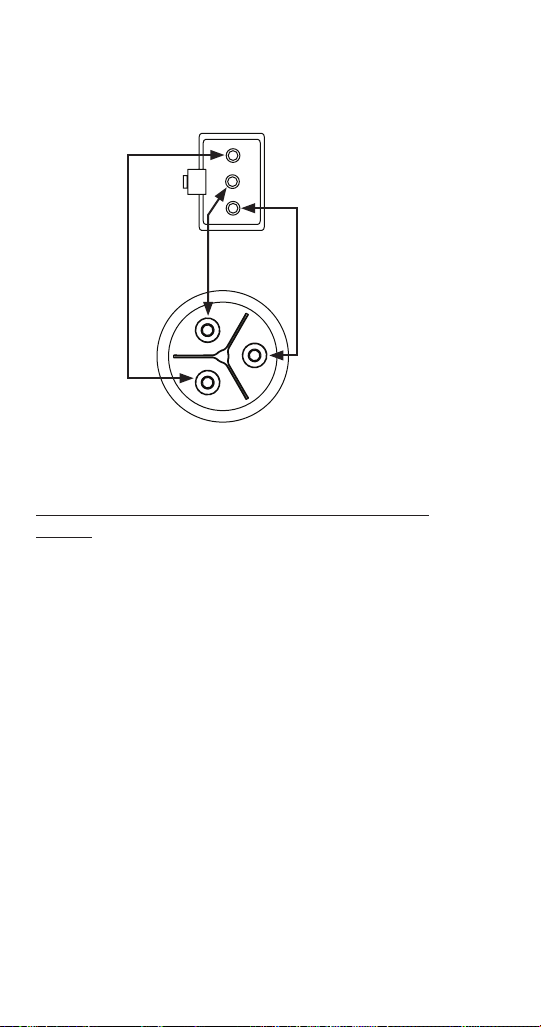
144 Part Number: 000015431 Rev 02 6/20
3. Disconnect the water level probe wiring harness from
the control board and ohm harness and water level
probe. Normal readings will show no resistance.
White
Black
Red
Short Probe
Ohm water Level Probe and Wiring Harness
WATER LEVEL PROBE CIRCUIT CHECK AT CONTROL
BOARD
Wait until prechill cycle starts, then jumper water level
probe connections (Red/Black) on the control board.
A. Sensing displays and the water stops. Repair wire
or replace water level probe.
B. Not Sensing displays and the water continues to
flow. Replace control board.

Part Number: 000015431 Rev 02 6/20 145
ICE THICKNESS PROBE (INITIATES HARVEST)
FUNCTION
The ice thickness probe senses ice on the evaporator and
signals the control board to start a harvest cycle.
SPECIFICATIONS
Freeze Time Lock-In Feature
The ice machine control system incorporates a 6 minute
freeze time lock-in feature. This prevents the ice machine
from short cycling in and out of harvest.
Maximum Freeze Time
The maximum freeze time is 35 minutes at which time the
control board automatically initiates a harvest sequence.
Maximum Temperature
Maximum temperature for the ice thickness probe is 120°F
(49°C). Do not clean probe in a dishwasher or expose to
temperatures above the maximum.
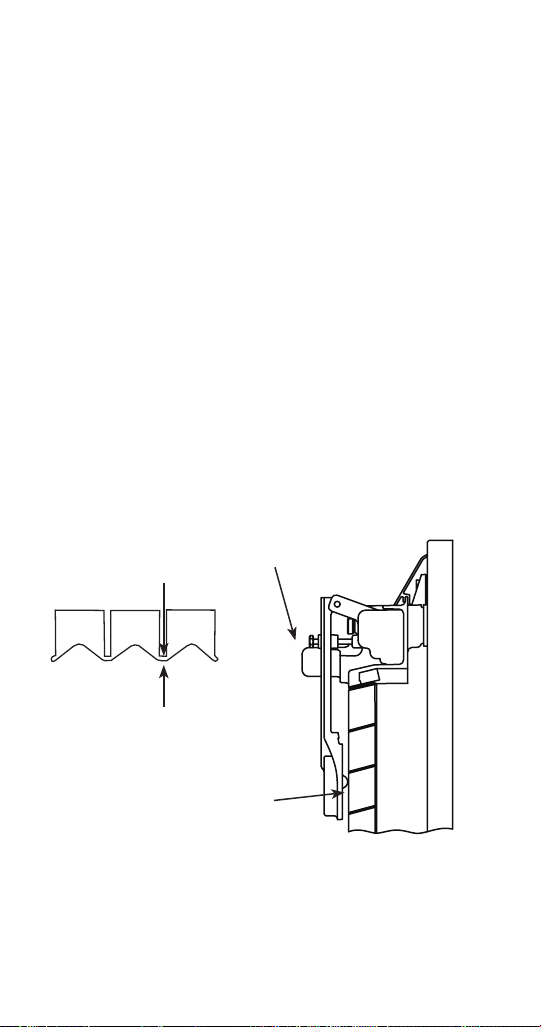
146 Part Number: 000015431 Rev 02 6/20
Ice Thickness Check
The ice thickness probe is factory-set to maintain the ice
bridge thickness at 1/8 in. (3 mm).
NOTE: Make sure the water curtain/splash shields are in
place when performing this check. It prevents water from
splashing out of the water trough. Remove the curtain to
make an adjustment, then replace immediately after the
adjustment is made. Make adjustment only when the ice
machine is off to prevent initiating a harvest
1. Inspect the bridge connecting the cubes. It should be
about 1/8 in. (3 mm) thick.
2. If adjustment is necessary, turn the ice thickness
probe adjustment screw clockwise to increase bridge
thickness or counterclockwise to decrease bridge
thickness. Set a 9/32" gap between the flat of the ice
thickness probe and evaporator as a starting point.
Then adjust to achieve 1/8" ice thickness.
3. Make sure the ice thickness probe wire and the
bracket do not restrict movement of the probe.
PLACE 9/32" (7 mm) DRILL BIT
HERE TO SET INITIAL GAP
1/8" (3 mm)
ICE BRIDGE THICKNESS
ADJUSTING
SCREW
Ice Thickness Adjustment

Part Number: 000015431 Rev 02 6/20 147
Ice Thickness Probe Diagnostics
1. Perform Control Board Self Check and insure the
internal ITP circuit passes before proceeding.
(Menu/Service/Diagnostics/Control Board/Self Check)
• Ice Thickness Circuit: Pass = Continue with step #2.
• Ice Thickness Circuit: Fail = Change control board.
2. Remove all ice from the evaporator when present, by
initiating a manual harvest in the service menu.
3. Press the power button and turn off the ice machine.
4. Disconnect power to the ice machine at the main
disconnect.
5. Inspect the ice thickness probe for physical damage.
On the face of the probe look for bulging, cracks
around the nipple and deformed pivot pins or pivot
pin arms.
6. Verify the ice thickness probe gap is approximately
9/32" (7 mm) and the ice thickness probe wire and
bracket do not restrict movement of the probe. See
“Ice Thickness Probe (Initiates Harvest)” on page
145.
7. Reapply power to the ice machine at the main
disconnect and confirm the ice machine is off.
8. Navigate to Real Time data (Menu/Service/Data/
Real Time data/Inputs) and observe ITP FFT 100 Hz &
120 Hz.
9. Observe the initial number range and perform a tap
test.
• Remove the water curtain or splash shield if present.
• Lift the ice thickness probe and carefully tap the nipple
on the face of the probe for at least 10 seconds.
NOTE: When performing tap test:
• Pass = ITP is not the problem
• Fail = Check DC Voltage on the control board

148 Part Number: 000015431 Rev 02 6/20
The initial numbers displayed are constantly changing
and are less than 3000.
With an initial reading of less than 300 and a tap test
reading of 3300 or higher indicates a good ice thickness
probe and control board.
The initial numbers displayed do not change or initial
numbers did not increase by 3000 during tap test.
• Verify the ice thickness probe connector is properly
plugged into the board and the ice thickness probe
wiring is correct. If the wiring is incorrect replace the
ice thickness probe.
J11 Connector On Control Board
Pin 1 (+) Red
Pin 2 (-) Black
Pin 3 Twisted Wire
10. Unplug the ice thickness probe and set a VOM to DC
voltage scale - Measure voltage across
Pin 1 (+) Red Wire and Pin 2 (-) Black Wire. Refer to
“Electronic Control Board” on page 200 for location.
A. Voltage measures 3.25 to 3.35 VDC = Replace ice
thickness probe.
B. Voltage does not measure 3.25 to 3.35 VDC =
Replace the control board.

Part Number: 000015431 Rev 02 6/20 149
BIN LEVEL PROBE
The bin level probe accessory will place the ice machine
in a full bin state when ice lowers the temperature to 36°
F or less. The touchscreen will display Program Mode On
during the full bin state. A lower ice level in dispensers will
prevent overfilling or dispense wheel or motor damage.
• The bin probe reads actual temperature and must be
connected to the T5 terminal on the control board.
• The control board recognizes the bin level probe
automatically when installed. If the bin level probe
has not been recognized by the control board, restore
factory defaults and run the startup wizard.
Normal Operation
The control board will initiate a full bin cycle and a 10
minute time delay when both of the following occur:
1. The control board receives a temperature input of 36°
F or less from the bin probe (T5 thermistor) at the end
of the freeze cycle.
2. The temperature reading remains at or below 36° F
throughout the entire harvest cycle.
The ice machine will restart when the delay period ends
and the bin probe reads 37° F or higher. Ice making will
resume at the Initial Start-Up or Start-Up After Automatic
Shut-Off (See “Sequence of Operation” on page 60).

150 Part Number: 000015431 Rev 02 6/20
Troubleshooting:
Refer to normal operation before troubleshooting - The T5
thermistor reading must indicate 36° F or less in the freeze
cycle and throughout the harvest cycle to shutoff on full
bin at the end of the harvest cycle.
View the T5 thermistor temperature on the touch screen
(menu/service/diagnostics/temperatures).
PROBE SHORTED - TEMPERATURE DISPLAYED IS ABOVE
400° F:
A shorted bin level probe wire/thermistor will indicate a
temperature higher than 400° F. This issues will result in
the ice machine only stopping on full bin when the bin
switch (curtain) is open at the end of a harvest cycle. The
ice machine will restart when the curtain closes.
PROBE OPEN - TEMPERATURE DISPLAYED READS -22° F
A shorted bin level probe wire/thermistor will indicate a
temperature lower than -10° F. This issue will result in the
ice machine only stopping on full bin when the bin switch
(curtain) is open at the end of a harvest cycle. The ice
machine will restart when the curtain closes.
PROBE OUT OF RANGE - TEMPERATURE READS LOWER
OR HIGHER THAN THE ACTUAL TEMPERATURE AT THE
BIN LEVEL PROBE
An out of range thermistor can indicate a temperature
higher or lower than the actual temperature at the bin
level probe location.
1. Verify actual temperature at the bin level probe
location with a thermometer.
2. Refer to “Thermistor Test” on page 158.
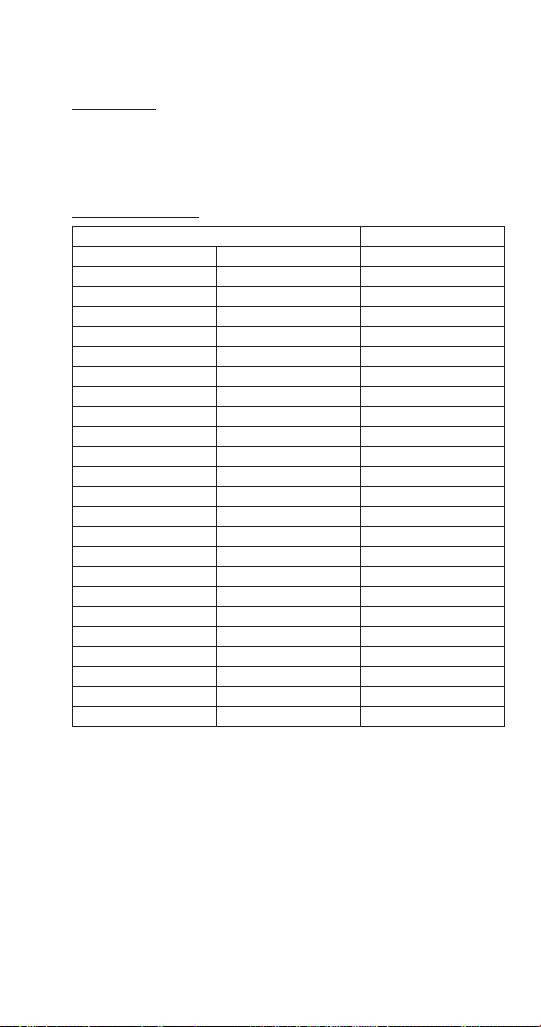
Part Number: 000015431 Rev 02 6/20 151
THERMISTORS
FUNCTION
Thermistor resistance values change with temperature.
The value supplied to the control board is used to identify
temperature at the thermistor location.
SPECIFICATIONS
Temperature of Thermistor Resistance
°C °F K Ohms (x 1000)
-30° - -20° -22° - -4° 820.85 - 466.35
-20° - -10° -4° - 14° 466.35 - 269.05
-10° - 0° 14° - 32° 269.05 - 160.70
0° - 10° 32° - 50° 160.70 - 98.930
10° - 20° 50° - 68° 98.930 - 62.015
20° - 30° 68° - 86° 62.015 - 39.695
30° - 40° 86° - 104° 39.695 - 25.070
40° - 50° 104° - 122° 25.070 - 17.481
50° - 60° 122° - 140° 17.481 - 11.860
60° - 70° 140° - 158° 11.860 - 8.1900
70° - 80° 158° - 176° 8.1900 - 5.7530
80° - 90° 176° - 194° 5.7530 - 4.1015
90° - 100° 194° - 212° 4.1015 - 2.9735
100° - 110° 212° -230° 2.9735 - 2.1885
110° - 120° 230° - 248° 2.1885 - 1.6290
120° - 130° 248° - 266° 1.6290 - 1.2245
130° - 140° 266° - 284° 1.2245 - 0.9319
140° - 150° 284° - 302° 0.9319 - 0.7183
150° - 160° 302° - 320° 0.7183 - 0.5624
160° - 170° 320° - 338° 0.5624 - 0.4448
170° - 180° 338° - 356° 0.4448 - 0.3530
180° - 190° 356° - 374° 0.3530 - 0.2831
190° - 200° 374° - 392° 0.2831 - 0.2273

152 Part Number: 000015431 Rev 02 6/20
Thermistor Matrix
Four thermistors are standard on the ice machine. They
are labeled T1, T2, T3, T4. Three additional thermistors are
available as an option and measure ice bin level, potable
water supply temperature and air temperature entering
the condenser.
TEMPERATURE SENSOR LOCATION
Models with 1 evaporator, 1 evaporator circuit
See page 202 for graphic
T1 - Receiver Inlet
T2 - Receiver Outlet
T3 - Evaporator Inlet
T4 - Evaporator Outlet
Models with 1 evaporator, 2 evaporator circuits
See page 204 for graphic
T1 - Receiver Inlet
T2 - Receiver Outlet
T3 - Evaporator Outlet for second evaporator circuit
T4 - Evaporator Outlet for first evaporator circuit
Models with 2 evaporators, 1 circuit
See page 206 for graphic
T1 - Receiver Inlet
T2 - Receiver Outlet
T3 - Evaporator Outlet for second evaporator circuit
T4 - Evaporator Outlet for first evaporator circuit
Models with 2 evaporators, 2 circuits
See page 208 for graphic
T1 - Receiver Inlet
T2 - Receiver Outlet
T3 - Evaporator Outlet for second evaporator circuit
T4 - Evaporator Outlet for first evaporator circuit

Part Number: 000015431 Rev 02 6/20 153
SYMPTOM
The alert log indicates a T1, T2, T3, or T4 Fault.
CHECK PROCEDURE
NOTE: Navigate to Menu/Service/Data/Real Time data/
Time & Temperature
NOTE: An open thermistor will display -10°F (-23°C) and a
shorted thermistor displays 400°F (204°C).
Thermistor Test
1. Disconnect the suspect thermistor from the control
board and swap with another thermistor.
A. The symptoms move with the thermistor -
Replace the thermistor.
B. The symptom does not change - Perform control
board test.
Control Board Test
1. Disconnect thermistor from control board - The
display temperature reading, dropping to -10°F
(-23°C) indicates the control board is good.
2. Short thermistor pins - The display temperature
reading, climbing to 400°F (204°C) indicates the
control board is good.
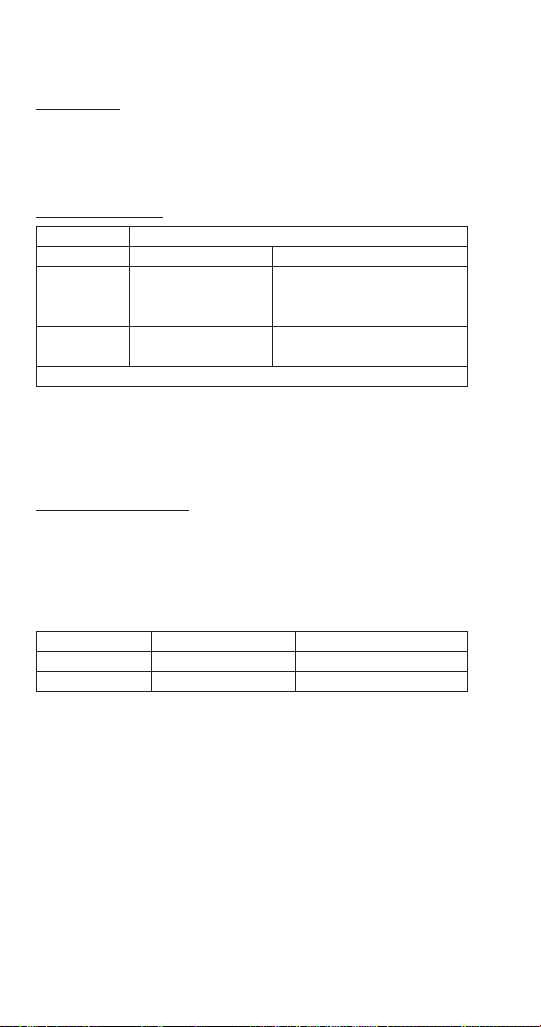
154 Part Number: 000015431 Rev 02 6/20
HIGH PRESSURE CUTOUT (HPCO) CONTROL
FUNCTION
Stops the ice machine if subjected to excessive high-side
pressure. The HPCO control is normally closed, and opens
on a rise in discharge pressure.
SPECIFICATIONS
Specifications
Cut-Out Cut-In
R404A 450 psig ±7
(3102 kPa ±48
31 bar ±0.48)
300 psig ±10
(2068 kPa ±69
20.68 bar ±0.69)
R410A 600 psig ±10
(3147 kPa ±69)
450 psig ±10
(3103 kPa ±69)
Automatic Reset
Opening the HPCO will initiate the 5 minute compressor
time delay. Repeated HPCO opening/closing or failure to
close will result in an E01 long freeze error.
CHECK PROCEDURE
1. Connect manifold gauges to ice machine.
2. Hook voltmeter in parallel across the fan cycle control,
leaving wires attached.
3. Refer to chart below.
HPCO Setpoint Reading Should Be HPCO Contact Position
Below Cut-Out 0 Volts Closed
Above Cut-In Line Voltage Open

Part Number: 000015431 Rev 02 6/20 155
LOW PRESSURE CUTOUT (LPCO) CONTROL
FUNCTION
Supplies or interrupts power to the compressor time delay
when suction pressure rises above or falls below setpoint.
The LPCO control is closed at pressures above setpoint and
opens at pressures below setpoint.
Specifications
Cut-Out Cut-In
R404A 12 psig ±3 35 psig ±5
R410A 20 psig ±3 50 psig ±5
CHECK PROCEDURE
Opening the LPCO will initiate the 5 minute compressor
time delay relay. Repeated opening/closing or failure to
close will result in an E01 long freeze error.
CHECK PROCEDURE
1. Connect manifold gauges to ice machine.
2. Hook voltmeter in parallel across the fan cycle control,
leaving wires attached.
3. Refer to chart below.
LPCO Setpoint Reading Should Be LPCO Contact Position
Above Cut-In 0 Volts Closed
Below Cut-Out Line Voltage Open
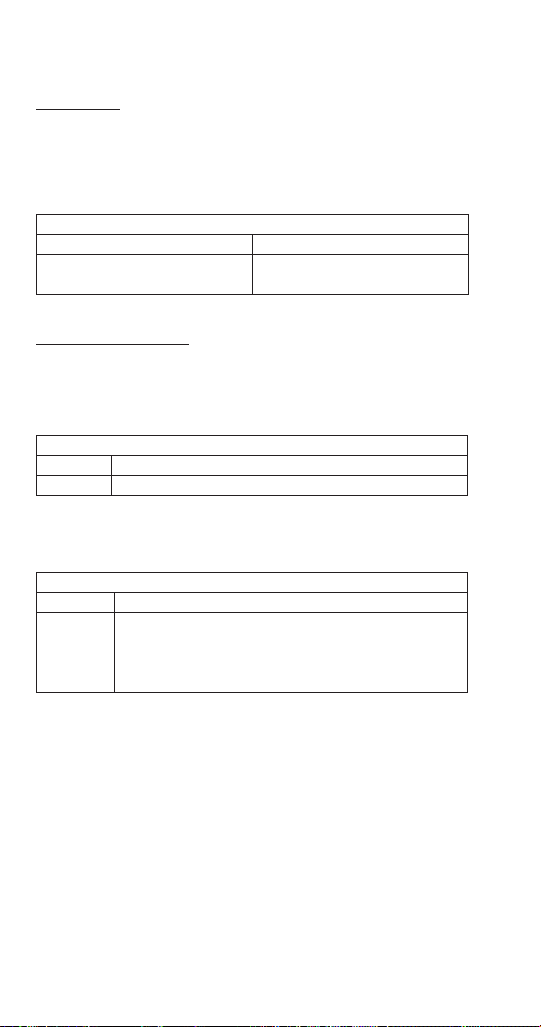
156 Part Number: 000015431 Rev 02 6/20
COMPRESSOR TIME DELAY
FUNCTION
Supplies or interrupts power to the compressor contactor
coil. The time delay starts whenever line voltage is
removed/reapplied; The contact closes when the delay
period ends.
Specifications
Contact Delay Period
SPST
Normally open
300 seconds (5 minutes)
+35%/-15%
CHECK PROCEDURE
1. Verify line voltage is supplied to the condensing unit.
2. Disconnect/reconnect power to the condensing unit
and test for line voltage at terminals 2 & 3.
Line Voltage at Terminals 2 & 3?
Yes Proceed To Next Step
No Verify HPCO & LCPO are closed
3. Wait 5 minutes for the delay period to expire then
test for line voltage at terminals 1 & 3.
Line Voltage at Terminals 1 & 3?
Yes Time Delay is operating correctly
No
Verify the delay time has expired
Verify the HPCO & LPCO are not momentarily
opening/closing during the delay period
Replace the time delay
Part Number: 000015431 Rev 02 6/20 157
FAN CYCLE CONTROL
FUNCTION
Cycles the fan motor on and off to maintain proper
operating discharge pressure.
The fan cycle control closes on an increase, and opens on a
decrease in discharge pressure.
SPECIFICATIONS
Specifications
Model Cut-In (Close) Cut-Out (Open)
CVDF0600 CVDF0900
CVDF1400 CVDF1800
CVDF2100
250 psig ±5
(1723 kPa ±34)
(17.23 bar ±.34)
200 ±5
(1517 kPa ±34)
(15.17 bar ±.34)
CVDT1200
335 psig ±5
2310 kPa ±34
(23.10 bar ±.34)
275 psig ±5
1896 kPa ±34
(18.96 bar ±.34)
CHECK PROCEDURE
1. Verify fan motor windings are not open or grounded,
and fan spins freely.
2. Connect manifold gauges to ice machine.
3. Hook voltmeter in parallel across the fan cycle control,
leaving wires attached.
4. Refer to chart below.
FCC Setpoint: Reading
Should Be:
Fan
Should Be:
Above Cut-In 0 Volts Running
Below Cut-Out Line Voltage Off

158 Part Number: 000015431 Rev 02 6/20
HARVEST ASSIST AIR PUMP
FUNCTION
The air pump helps break the vacuum between the sheet
of ice and the evaporator which results in shorter harvest
cycles.
SPECIFICATIONS
115 Volt or 230 Volt - matches the ice machine voltage.
CHECK PROCEDURE
1. The air pump is wired in parallel with the harvest
valve - Verify the ice machine is in the harvest cycle
and the harvest valve is energized.
2. If there is voltage at the air pump connector, use
a volt ohm meter to verify there is no continuity
through the motor windings then replace air pump.

Part Number: 000015431 Rev 02 6/20 159
COMPRESSOR ELECTRICAL DIAGNOSTICS
The compressor does not start or will trip repeatedly on
overload.
Check Resistance (Ohm) Values
NOTE: Compressor windings can have very low ohm
values. Use a properly calibrated meter.
Perform the resistance test after the compressor cools. The
compressor dome should be cool enough to touch (below
120°F/49°C) to assure that the overload is closed and the
resistance readings will be accurate.
SINGLE PHASE COMPRESSORS
1. Disconnect power then remove the wires from the
compressor terminals.
2. The resistance values between C and S and between
C and R, when added together, should equal the
resistance value between S and R.
3. If the overload is open, there will be a resistance
reading between S and R, and open readings between
C and S and between C and R. Allow the compressor
to cool, then check the readings again.
THREE PHASE COMPRESSORS
1. Disconnect power and remove the wires from the
compressor terminals.
2. The resistance values between L1 and L2, between L2
and L3, and between L3 and L1 should all be equal.
3. If the overload is open, there will be open readings
between L1 and L2, between L2 and L3, and between
L3 and L1. Allow the compressor to cool, then check
the readings again.

160 Part Number: 000015431 Rev 02 6/20
CHECK MOTOR WINDINGS TO GROUND
Check continuity between all three terminals and the
compressor shell or copper refrigeration line. Scrape metal
surface to get good contact. If continuity is present, the
compressor windings are grounded and the compressor
should be replaced.
COMPRESSOR DRAWING LOCKED ROTOR
To determine if the compressor is seized, check the amp
draw while the compressor is trying to start.
The two likely causes of this are a defective starting
component or a mechanically seized compressor.
To determine which you have:
1. Install high and low side gauges.
2. Try to start the compressor.
3. Watch the pressures closely.
A. If the pressures do not move, the compressor is
seized. Replace the compressor.
B. If the pressures move, the compressor is turning
slowly and is not seized. Check the capacitors
and relay.
COMPRESSOR DRAWING HIGH AMPS
The continuous amperage draw on start-up should not be
near the maximum fuse size indicated on the serial tag.

Part Number: 000015431 Rev 02 6/20 161
DIAGNOSING START COMPONENTS
If the compressor attempts to start, or hums and trips the
overload protector, check the start components before
replacing the compressor.
Capacitor
Visual evidence of capacitor failure can include a bulged
terminal end or a ruptured membrane. Do not assume a
capacitor is good if no visual evidence is present. A good
test is to install a known good substitute capacitor. Use
a capacitor tester when checking a suspect capacitor.
Clip the bleed resistor off the capacitor terminals before
testing.
Relay
The relay has a set of contacts that connect and disconnect
the start capacitor from the compressor start winding. The
contacts on the relay are normally closed (start capacitor in
series with the start winding). The relay senses the voltage
generated by the start winding and opens the contacts as
the compressor motor starts. The contacts remain open
until the compressor is de-energized.
RELAY OPERATION CHECK
1. Disconnect wires from relay terminals.
2. Verify the contacts are closed.
Measure the resistance between terminals 1 and 2.
No continuity indicates open contacts. Replace the
relay.
3. Check the relay coil.
Measure the resistance between terminals 2 and
5. No resistance indicates an open coil. Replace the
relay.

162 Part Number: 000015431 Rev 02 6/20
Refrigeration Components
HEAD PRESSURE CONTROL VALVE
Manitowoc remote systems require head pressure control
valves with special settings. Replace defective head
pressure control valves only with “original” Manitowoc
replacement parts.
Refrigerant Charge Verification
The correct amount of refrigerant (name plate charge) is
required to operate correctly at all ambient conditions.
An ice machine with an overcharge or undercharge of
refrigerant may function properly at higher ambient
temperatures and fails at lower ambient temperatures.
Symptoms of incorrect refrigerant amount are:
• Works during the day and malfunctions at night, and/
or fails whenever the outdoor temperature drops.
• A service fault is stored in control board memory.
Refrigerant loss and ambient temperature are directly
related to each other. As the ambient temperature drops,
more refrigerant is stored in the condenser.
When the refrigerant charge and ambient temperature
create an undercharge of refrigerant in the freeze cycle,
the receiver dip tube will lose its liquid seal. Without liquid
refrigerant to the TXV, the ice machine fails to make a full
sheet of ice in 35 minutes and a E01 Long Freeze results.
NOTE: When a head pressure control valve is being
replaced or refrigerant charge is suspected, verify the
refrigerant charge is correct by recovering the refrigerant,
weighing and comparing to the nameplate amount.
Refer to “Recovery/Evacuation Procedures” for recovery
procedures.

Part Number: 000015431 Rev 02 6/20 163
Freeze Cycle Operation All Models
The head pressure control valve is non adjustable.
At ambient temperatures of approximately 70°F (21°C)
or above, refrigerant flows through the valve from the
condenser to the receiver inlet. At temperatures below
this (or at higher temperatures if it is raining), the head
pressure control dome’s nitrogen charge closes the
condenser port and opens the bypass port from the
compressor discharge line.
In this modulating mode, the valve maintains minimum
head pressure by building up liquid in the condenser and
bypassing discharge gas directly to the receiver.
Harvest Cycle Operation
During the Harvest cycle, the harvest valve opens and
allows refrigerant from the top of the receiver tank to
enter the evaporator. The refrigerants change of state
(from vapor to liquid) releases the heat necessary for the
Harvest cycle.
Opening the harvest valve causes a drop in discharge
pressure.
The discharge pressure will drop below the condenser
fan cycling control setpoint and the condenser fan motor
cycles off (at ambient temperatures above 110°F (43°C) the
condenser fan motor remains energized).
The warm discharge gas adds heat to the receiver in
the harvest cycle. Without this additional heat the head
pressure would continue to drop as liquid refrigerant boils
off in the receiver.
Example: A service technician removes refrigerant vapor
from a cylinder by boiling off the liquid refrigerant. A
refrigeration effect is created as the refrigerant changes
state from a liquid to a vapor. The cylinder cools and the
refrigerant pressure drops. To maximize flow and maintain
pressure the technician places the cylinder in warm water.

164 Part Number: 000015431 Rev 02 6/20
Diagnostics
FREEZE CYCLE - QUIETQUBE® REMOTE
CONDENSING UNIT
1. Determine if the coil is clean.
2. Determine the air temperature entering the
condenser.
3. Determine if the head pressure is high or low in
relationship to the outside temperature. (Refer to
the proper “Cycle Times/24-Hour Ice Production/
Refrigerant Pressure Charts” on page 183.)
4. Determine the temperature of the liquid line entering
the receiver by feeling it. This line is normally warm;
“body temperature.”
5. Using the information gathered, refer to the chart.
NOTE: A head pressure control valve that will not bypass,
will function properly with condenser air temperatures
of approximately 70°F (21°C) or above. When the
temperature drops below 70°F (21°C), the head pressure
control valve fails to bypass and the ice machine
malfunctions. Lower ambient conditions can be simulated
by rinsing the condenser with cool water during the freeze
cycle.
Condition Probable Cause Corrective
Measure
Discharge Pressure - High
Liquid Line Temperature - Hot
Valve stuck in
bypass
Replace valve
Discharge Pressure - Low
Liquid Line Temperature -
Cold
Valve not
bypassing
Replace valve
Discharge Pressure - Low
Liquid Line Temperature - Hot
Ice Machine
Low on Charge
Refrigerant
Charge
Verification

Part Number: 000015431 Rev 02 6/20 165
Harvest Cycle
QUIETQUBE® REMOTE CONDENSING UNIT
QuietQube® ice machines may fail in the harvest cycle
when the refrigerant charge and ambient temperature
create a marginal undercharge of refrigerant. The ice
machine may be able to make a full sheet of ice, but fails
in the harvest cycle when the receiver runs out of liquid
refrigerant. A E02 Long Harvest will result when the ice
machine is unable to harvest.
Undercharge Symptoms
• E01 Long Freeze or E02 Long Harvest in control board
memory, a flashing triangle alert and Long Freeze or
Long Harvest is displayed.
• Harvest cycle suction pressure is low.
• Harvest cycle discharge pressure is low.
• Liquid line entering receiver feels warm to hot in the
freeze cycle.
Overcharge Symptoms
• E02 Long Harvest in control board memory, a flashing
triangle alert and after pressing left arrow Long
Harvest is displayed.
• Harvest cycle discharge pressure is normal.
• Freeze cycle time, suction and discharge pressure are
normal and the ice machine will not harvest. The sheet
of ice cubes show little or no sign of melting when
removed from the evaporator after the harvest cycle
has been completed. (If the cubes are melted you have
a release problem, clean the ice machine.)

166 Part Number: 000015431 Rev 02 6/20
HARVEST CYCLE DIAGNOSTICS QUIETQUBE® REMOTE
CONDENSING UNIT
The head pressure control valve diverts the compressor
discharge gas to the ice machine receiver in the harvest
cycle. All refrigerant flow through the condenser in the
harvest cycle stops. Symptoms of a head pressure control
valve that will not seat 100% closed (completely bypass the
condenser) in the harvest cycle are:
• Freeze cycle suction and discharge pressure are
normal.
• The control board indicates E02 Long Harvest, a
flashing triangle alert and after pressing left arrow
Long Harvest is displayed. The failure seems to be
temperature related. Example: The ice machine may
function correctly at temperatures above 32°F but fails
at temperatures below 32°F.
• Harvest cycle suction pressure is low.
• Harvest cycle discharge pressure is normal or slightly
low.
Procedure
1. Freeze cycle operation must be normal before
diagnosing the head pressure in the harvest cycle.
(Refer to Cycle Times/24 hr Ice Production/Refrigerant
Pressure Chart)
2. Allow the ice machine to run a normal freeze cycle
(do not initiate an early harvest cycle).
3. At the start of the harvest cycle feel the compressor
discharge line and the liquid line to the ice machine
receiver at the head pressure control valve. The
temperature of both lines will be highest at the
beginning of the harvest cycle and then decrease.
Compare the lines 30 seconds into the harvest cycle.

Part Number: 000015431 Rev 02 6/20 167
R
efrig
era
nt
Fl
ow
No Flow
Step 3 Details
Grasp Here with Hands to Compare Temperatures
LIQUID LINE
FROM CONDENSER
HARVEST CYCLE HEAD PRESSURE CONTROL VALVE
FAILURE LIST
Temperature of the compressor discharge line and liquid
line to the ice machine receiver feel the same 30 seconds
into the harvest cycle.
• The head pressure control valve is functioning
correctly.
The compressor discharge line is noticeably warmer than
the liquid line to the ice machine receiver.
• Head pressure control valve is not bypassing 100%.
Replace head pressure control valve.

168 Part Number: 000015431 Rev 02 6/20
SUCTION ACCUMULATOR OPERATION
Liquid refrigerant collects in the suction accumulator
during the harvest cycle and is removed during the freeze
cycle. The liquid refrigerant is returned to the compressor
through a screen and orifice in the suction accumulator
J tube. Passing the liquid through the orifice causes a
pressure drop; the liquid flashes to a vapor and creates
a refrigeration affect. It is normal to see frost on the
accumulator, suction line and compressor suction port
in the freeze cycle. The suction accumulator empties
within the first 5 minutes of the freeze cycle. When the
refrigeration affect ends (liquid refrigerant has been
removed), the suction line between the accumulator and
compressor will increase in temperature. The suction line
temperature increases 20 plus degrees within 2 minutes
after the liquid has been removed.
1
Minute
2
Minutes
3
Minutes
4
Minutes
5
Minutes
6
Minutes
7
Minutes
8
Minutes
Temperature Increases
20+ºF (11+ºC)
The time needed to remove the liquid refrigerant will
vary with the ambient temperature and the length of the
harvest cycle. Higher ambient temperatures = shorter
harvest cycles, faster removal of liquid refrigerant from
the accumulator and greater suction line temperature
increases.

Part Number: 000015431 Rev 02 6/20 169
Recovery/Evacuation/Charging Procedures
QuietQube® Models
Do not purge refrigerant to the atmosphere. Capture
refrigerant using recovery equipment. Follow the
manufacturer’s recommendations.
Notice
Manitowoc Ice assumes no responsibility for the
use of contaminated refrigerant. Damage resulting
from the use of contaminated refrigerant is the sole
responsibility of the servicing company.
Notice
Replace the liquid line drier after recovering the
refrigerant and before evacuating and recharging.
Use only a Manitowoc (OEM) liquid line filter-drier to
prevent voiding the warranty.
Notice
Recovery/evacuation of a QuietQube® remote
system requires connections at either 4 or 5
recovery points for complete system recovery/
evacuation. Check valves are located in the ice
machine head section and the CVD condensing unit.
Five point requires connections between the
compressor and suction filter access valve, receiver
access valve and the high and low side access
valves on the front or rear of the ice machine.
Four point is required on units that do not have a
receiver service valve.
Notice
The receiver access valve (located in the ice machine
head section) must be accessed during refrigerant
recovery to allow complete removal of the refrigerant
charge.

170 Part Number: 000015431 Rev 02 6/20
CONNECTIONS
Manifold gauge sets must utilize low loss fittings to comply
with U.S. Government rules and regulations.
CVD condensing units with reciprocating compressors
are manufactured with a check valve in the compressor
discharge line. The check valve requires an additional
connection on the condensing unit during evacuation or
recovery procedures. Connection of a manifold gauge set
(or a hose with core depressors on both ends) between the
suction filter access port and the compressor access valve
(located between the compressor and discharge line check
valve) is required.
Make these connections:
Ice Machine Head Section CVD Condensing Unit
Receiver Service Valve Compressor Discharge Access
Valve
Low Side Access Valve Suction Filter Access Valve
High Side Access Valve
Connections must
also be made at two
points on condensing
unit for complete
refrigerant recovery.

Part Number: 000015431 Rev 02 6/20 171
RECOVERY/EVACUATION PROCEDURES
1. Press the power button to stop the ice machine
and disconnect all power to the ice machine and
condensing unit.
2. Install manifold gauges, charging scale, and recovery
unit or two-stage vacuum pump.
3. Open high and low side on the manifold gauge set.
4. Perform recovery or evacuation:
A. Recovery: Operate the recovery unit as directed
by the manufacturer’s instructions.
B. Pressure test the system.
C. Evacuation prior to recharging: Evacuate to 500
microns. Then allow the pump to run for an
additional hour.
5. Refer to Charging Procedures.

172 Part Number: 000015431 Rev 02 6/20
CHARGING PROCEDURES
1. The ice machine must be off.
2. Close the vacuum pump valve and the low side
manifold gauge valve.
3. Open the refrigerant cylinder and add the proper
refrigerant charge (shown on nameplate) into the
system high side (receiver service valve and discharge
line shut-off valve).
4. If the high side does not take the entire charge, close
the high side on the manifold gauge set. Start the ice
machine and wait until the freeze cycle starts, then
add the remaining charge through valves on back of
ice making head, or through valves on suction filter.
5. Disconnect the manifold gauge set from the liquid line
shut-off valve.
6. Open the high and low side valves on the manifold
gauge set. Any refrigerant in the lines will be pulled
into the low side of the system.
7. Allow the pressures to equalize while the ice machine
is in the freeze cycle.
8. Disconnect the manifold gauge set from the suction
line shut-off valve.
9. Install and torque all valve caps
NOTE: Check for refrigerant leaks after all valve caps have
been installed.

Part Number: 000015431 Rev 02 6/20 173
System Contamination Clean-Up
General
This section describes the basic requirements for restoring
contaminated systems to reliable service.
Notice
Routine adjustments and maintenance procedures
Manitowoc Ice assumes no responsibility for the
use of contaminated refrigerant. Damage resulting
from the use of contaminated refrigerant is the sole
responsibility of the servicing company.
DETERMINING SEVERITY OF CONTAMINATION
System contamination is generally caused by either
moisture or residue from compressor burnout entering the
refrigeration system.
Inspection of the refrigerant usually provides the first
indication of system contamination. Obvious moisture or
an acrid odor in the refrigerant indicates contamination.
If either condition is found, or if contamination is
suspected, use a Total Test Kit from Totaline or a similar
diagnostic tool. These devices sample refrigerant,
eliminating the need to take an oil sample. Follow the
manufacturer’s directions.
If a refrigerant test kit indicates harmful levels of
contamination, or if a test kit is not available, inspect the
compressor oil.
1. Remove the refrigerant charge from the ice machine.
2. Remove the compressor from the system.
3. Check the odor and appearance of the oil.
4. Inspect open suction and discharge lines at the
compressor for burnout deposits.
5. If no signs of contamination are present, perform an
acid oil test.
Chart shows required cleanup.
174 Part Number: 000015431 Rev 02 6/20
CONTAMINATION CLEANUP CHART
Symptoms/Findings Required Cleanup
Procedure
No symptoms or suspicion of
contamination
Normal evacuation/
recharging procedure
Moisture/Air Contamination
symptoms
Refrigeration system open to
atmosphere for longer than
15 minutes
Refrigeration test kit and/or acid oil
test shows contamination
No burnout deposits in open
compressor lines
Mild contamination
cleanup procedure
Mild Compressor Burnout
symptoms
Oil appears clean but smells acrid
Refrigeration test kit or acid oil test
shows harmful acid content
No burnout deposits in open
compressor lines
Mild contamination
cleanup procedure
Severe Compressor Burnout
symptoms
Oil is discolored, acidic, and smells
acrid
Burnout deposits found in the
compressor, lines, and other
components
Severe contamination
cleanup procedure

Part Number: 000015431 Rev 02 6/20 175
CLEANUP PROCEDURE
Mild System Contamination
1. Replace any failed components.
2. If the compressor is good, change the oil.
3. Replace the liquid line drier.
NOTE: If the contamination is from moisture, use heat
lamps during evacuation. Position them at the compressor,
condenser and evaporator prior to evacuation. Do not
position heat lamps too close to plastic components, or
they may melt or warp.
Important
Dry nitrogen is recommended for this procedure. This
will prevent refrigerant release.
4. Follow the normal evacuation procedure, except
replace the evacuation step with the following:
A. Pull vacuum to 1000 microns. Break the vacuum
with dry nitrogen and sweep the system.
Pressurize to a minimum of 5 psig (35 kPa,
.35 bar).
B. Pull vacuum to 500 microns. Break the vacuum
with dry nitrogen and sweep the system.
Pressurize to a minimum of 5 psig (35 kPa,
.35 bar).
C. Change the vacuum pump oil.
D. Pull vacuum to 500 microns. Run the vacuum
pump for 1 hour.
NOTE: You may perform a standing vacuum test to make a
preliminary leak check. You should use an electronic leak
detector after system charging to be sure there are no
leaks.
5. Charge the system with the proper refrigerant to the
nameplate charge.
6. Operate the ice machine.

176 Part Number: 000015431 Rev 02 6/20
Severe System Contamination
1. Remove the refrigerant charge.
2. Remove the compressor and inspect the refrigeration
lines. If burnout deposits are found, install a new
harvest valve and TXV.
3. Wipe away any burnout deposits from suction and
discharge lines at compressor.
4. Sweep through the open system with dry nitrogen.
Important
Refrigerant sweeps are not recommended, as they
release refrigerant into the atmosphere.
5. Install a new compressor and new start components.
6. Install a suction line filter-drier with acid and moisture
removal capability. Place the filter drier as close to the
compressor as possible.
7. Install an access valve at the inlet of the suction line
drier.
8. Install a new liquid line drier.
Important
Dry nitrogen is recommended for this procedure. This
will prevent refrigerant release.

Part Number: 000015431 Rev 02 6/20 177
9. Follow the normal evacuation procedure, except
replace the evacuation step with the following:
A. Pull vacuum to 1000 microns. Break the vacuum
with dry nitrogen and sweep the system.
Pressurize to a minimum of 5 psig (35 kPa,
.35 bar).
B. Change the vacuum pump oil.
C. Pull vacuum to 500 microns. Break the vacuum
with dry nitrogen and sweep the system.
Pressurize to a minimum of 5 psig (35 kPa,
.35 bar).
D. Change the vacuum pump oil.
E. Pull vacuum to 500 microns. Run the vacuum
pump for 1 hour.
NOTE: You may perform a standing vacuum test to make a
preliminary leak check. You should use an electronic leak
detector after system charging to be sure there are no
leaks.
10. Charge the system with the proper refrigerant to the
nameplate charge.
11. Operate the ice machine for one hour. Then, check
the pressure drop across the suction line filter-drier.
A. If the pressure drop is less than 1 psig (7 kPa,
0.07 bar), the filter-drier should be adequate for
complete cleanup.
B. If the pressure drop exceeds 1 psig (7 kPa,
0.07 bar), change the suction line filter-drier and
the liquid line drier. Repeat until the pressure
drop is acceptable.
12. Operate the ice machine for 48-72 hours. Then
remove the suction line drier and change the liquid
line drier.
13. Follow normal evacuation procedures.

178 Part Number: 000015431 Rev 02 6/20
LIQUID LINE FILTER-DRIERS
The filter-driers used on Manitowoc ice machines are
manufactured to Manitowoc specifications. A Manitowoc
drier has dirt-retaining filtration, with fiberglass filters
on both the inlet and outlet ends. This is very important
because ice machines have a back-flushing action that
takes place during every Harvest cycle.
The size of the filter-drier is important. The refrigerant
charge is critical. Using an improperly sized filter-drier
will cause the ice machine to be improperly charged with
refrigerant.
Important
Driers are covered as a warranty part. The drier must
be replaced any time the system is opened for repairs.
SUCTION FILTER
The suction filter on QuietQube® CVD condensing units
traps particulate only, and do not contain a desiccant. The
filter needs replacement when:
1. The pressure drop across the drier exceeds 2 psig.
2. A compressor is replaced.
3. Refrigeration system contains contaminants.

Part Number: 000015431 Rev 02 6/20 179
REPLACING PRESSURE CONTROLS WITHOUT
REMOVING REFRIGERANT CHARGE
This procedure reduces repair time and cost. Use it when
any of the following components require replacement, and
the refrigeration system is operational and leak-free.
• Fan cycle control
• High pressure cut-out control
• Low Pressure cut-out control
• High side service valve
• Low side service valve
Important
This is a required in-warranty repair procedure.
1. Disconnect power to the ice machine.
2. Follow all manufacturer’s instructions supplied with
the pinch-off tool. Position the pinch-off tool around
the tubing as far from the pressure control as feasible.
(See the figure on next page.) Clamp down on the
tubing until the pinch-off is complete.
n
Warning
Do not unsolder a defective component. Cut it out of
the system. Do not remove the pinch-off tool until the
new component is securely in place.
3. Cut the tubing of the defective component with a
small tubing cutter.
4. Solder the replacement component in place. Allow
the solder joint to cool.
5. Remove the pinch-off tool.
6. Re-round the tubing. The pressure controls will
operate normally once the tubing is re-rounded.
Tubing may not re-round 100%.

180 Part Number: 000015431 Rev 02 6/20
Total System Refrigerant Charge
QuietQube® CVD Models
Ice machines listed with an F in the model number use
R404A refrigerant - Ice machines listed with a T in the
model number use R410A. This information is for reference
only. Refer to the ice machine model/serial label to verify
the system charge and refrigerant type.
Serial plate information overrides the information listed
in this chart.
Model
Condensing
Unit
Refrigerant
Charge
Line Set
Length
IF0600C CVDF0600
10.50 lbs.
4.76kg.
0-50 ft.
0-15 m
12.00 lbs.
5.54 kg.
51-100 ft.
15-30 m
IBF0620C CVDF0600
11.00 lbs
4.99 kg
0-50 ft.
0-15 m
12.50 lbs
5.67 kg
51-100 ft.
15-30 m
IBF0820C CVDF900
8.00 lbs.
3.63 kg
0-50 ft.
0-15 m
10.00 lbs.
4.54 kg
51-100 ft.
15-30 m
IF0900C CVDF0900
8.00 lbs.
3.63 kg.
0-50 ft.
0-15 m
10.00 lbs.
4.54 kg.
51-100 ft.
15-30 m
IBT1020C CVDT1200
12.25 lbs.
5.55 kg
0-50 ft.
0-15 m
14.25 lbs
6.35 kg
51-100 ft.
15-30 m
IT1200C CVDT1200
10.25 lbs
4.76 kg
0-50 ft.
0-15 m
12.25 lbs
5.55 kg
51-100 ft.
15-30 m
IF1400C CVDF1400
13.00 lbs.
5.90 kg
0-50 ft.
0-15 m
15.00 lbs
6.80 kg
51-100 ft.
15-30 m



Part Number: 000015431 Rev 02 6/20 183
Cycle Times/24-Hour Ice Production/
Refrigerant Pressure Charts
These charts are used as guidelines to verify correct ice
machine operation.
Accurate collection of data is essential to obtain the
correct diagnosis.
• Production and cycle times are for dice cube - Half dice
cube cycle times can be 2 - 3 minutes faster, depending
on model and ambient temperature.
• Regular cube production derate is 7%.
• Ice production checks that are within 10% of the chart
are considered normal. This is due to variances in
water and air temperature. Actual temperatures will
seldom match the chart exactly.
• Refer to “Troubleshooting” on page 81 for the data
that must be verified for refrigeration diagnostics.
• Zero out manifold gauge set before obtaining pressure
readings to avoid mis-diagnosis.
• Discharge and suction pressure are highest at the
beginning of the cycle. Suction pressure will drop
throughout the cycle. Verify the pressures are within
the range indicated.
• Record beginning of freeze cycle suction pressure one
minute after water pump energizes.
• 50 Hz dice and half dice production derate is 12%.
• 50 Hz regular cube total production derate is 14%.
Charts

184 Part Number: 000015431 Rev 02 6/20
IF0600C/CVDF0600
Remote Air-Cooled Condensing Unit Model
Characteristics vary depending on operating conditions.
All data on this page is preliminary and subject to change
Cycle Times
Freeze Time + Harvest Time = Total Cycle Time
Air Temp.
Entering
Condenser
°F/°C
Freeze Time
Harvest
Time
Water Temperature °F/°C
50/10 70/21 90/32
-20 to 70/
-29 to 21
8.9-10.2 9.5-11.0 10.3-11.9
.75-2.5
80/27 9.3-10.7 10.0-11.5 10.9-12.5
90/32 9.6-11.1 10.4-12.0 11.4-13.0
100/38 10.2-11.8 11.1-12.8 12.2-13.9
110/43 11.0-12.6 12.0-13.8 13.2-15.1
1
Times in minutes - Dice cube
24-Hour Ice Production
Air Temp. Entering
Condenser
°F/°C
Water Temperature °F/°C
50/10 70/21 90/32
-20 to 70/
-29 to 21
640 600 560
80/27 615 575 535
90/32 595 555 515
100/38 565 525 485
110/43 530 490 450
1
Based on average ice slab weight of 4.60 - 5.20 lb.
Operating Pressures
Air Temp.
Entering
Condenser
°F/°C
Freeze Cycle Harvest Cycle
Discharge
Pressure
psig
Suction
Pressure
psig
Discharge
Pressure
psig
Suction
Pressure
psig
-20 to 50/
-29 to 10
200-250 44-26 180-210 65-85
70/21 235-255 50-28 185-210 65-90
80/27 245-275 50-28 190-210 75-100
90/32 250-290 52-30 195-215 75-105
100/38 270-320 52-31 210-240 80-110
110/43 300-360 60-32 215-260 85-115
Part Number: 000015431 Rev 02 6/20 185
IBF0620C/CVDF0600
Remote Air-Cooled Condensing Unit Model
Characteristics vary depending on operating conditions.
All data on this page is preliminary and subject to change
Cycle Times
Freeze Time + Harvest Time = Total Cycle Time
Air Temp.
Entering
Condenser
°F/°C
Freeze Time
Harvest
Time
Water Temperature °F/°C
50/10 70/21 90/32
-20 to 70/
-29 to 21
8.9-10.2 9.5-11.0 10.3-11.9
.75-2.5
80/27 9.3-10.7 10.0-11.5 10.9-12.5
90/32 9.6-11.1 10.4-12.0 11.4-13.0
100/38 10.2-11.8 11.1-12.8 12.2-13.9
110/43 11.0-12.6 12.0-13.8 13.2-15.1
1
Times in minutes - Dice cube -
2
Preliminary Data
24-Hour Ice Production
Air Temp. Entering
Condenser
°F/°C
Water Temperature °F/°C
50/10 70/21 90/32
-20 to 70/
-29 to 21
640 600 560
80/27 615 575 535
90/32 595 555 515
100/38 565 525 485
110/43 530 490 450
1
Based on average ice slab weight of 4.60 - 5.20 lb.
Operating Pressures
Air Temp.
Entering
Condenser
°F/°C
Freeze Cycle Harvest Cycle
Discharge
Pressure
psig
Suction
Pressure
psig
Discharge
Pressure
psig
Suction
Pressure
psig
-20 to 50/
-29 to 10
215-260 46-26 140-170 70-95
70/21 220-270 51-27 150-180 70-95
80/27 225-285 56-28 155-190 80-100
90/32 235-295 59-28 165-200 85-105
100/38 260-340 60-30 180-210 85-112
110/43 300-385 65-34 195-230 90-120

186 Part Number: 000015431 Rev 02 6/20
IBF0820C/CVDF0900
Remote Air-Cooled Condensing Unit Model
Characteristics vary depending on operating conditions.
All data on this page is preliminary and subject to change
Cycle Times
Freeze Time + Harvest Time = Total Cycle Time
Air Temp.
Entering
Condenser
°F/°C
Freeze Time
Harvest
Time
Water Temperature °F/°C
50/10 70/21 90/32
-20 to 70/
-29 to 21
8.5-9.8 9.3-10.7 10.0-11.5
.75-2.590/32 9.5-11.0 10.8-12.4 11.4-13.1
100/38 11.2-12.9 12.3-14.1 13.3-15.2
110/43 13.0-14.9 14.0-16.0 14.9-17.0
1
Times in minutes - Dice cube
24-Hour Ice Production
Air Temp. Entering
Condenser
°F/°C
Water Temperature °F/°C
50/10 70/21 90/32
-20 to 70/
-29 to 21
825 770 720
90/32 750 675 640
100/38 650 600 560
110/43 570 535 505
1
Based on average ice slab weight of 5.75 - 6.50 lb.
Operating Pressures
Air Temp.
Entering
Condenser
°F/°C
Freeze Cycle Harvest Cycle
Discharge
Pressure
psig
Suction
Pressure
psig
Discharge
Pressure
psig
Suction
Pressure
psig
-20 to 50/
-29 to 10
230-260 45-25 180-205 60-80
70/21 250-275 55-30 180-205 75-105
80/27 260-290 60-31 185-215 80-110
90/32 265-300 60-32 190-220 80-110
100/38 300-370 70-34 200-250 90-115
110/43 310-385 75-35 230-260 95-115
Part Number: 000015431 Rev 02 6/20 187
IF0900C/CVDF0900
Remote Air-Cooled Condensing Unit Model
Characteristics vary depending on operating conditions.
All data on this page is preliminary and subject to change
Cycle Times
Freeze Time + Harvest Time = Total Cycle Time
Air Temp.
Entering
Condenser
°F/°C
Freeze Time
Harvest
Time
Water Temperature °F/°C
50/10 70/21 90/32
-20 to 70/
-29 to 21
8.9-10.3 9.4-14.4 10.1-11.6
.75-2.590/32 9.8-11.3 10.4-12.0 11.2-12.9
100/38 11.0-12.7 11.9-13.6 12.8-14.6
110/43 12.5-14.4 13.4-15.4 14.3-16.3
1
Times in minutes - Dice cube
24-Hour Ice Production
Air Temp. Entering
Condenser
°F/°C
Water Temperature °F/°C
50/10 70/21 90/32
-20 to 70/
-29 to 21
795 760 715
90/32 730 695 650
100/38 660 620 580
110/43 590 555 525
1
Based on average ice slab weight of 5.75 - 6.50 lb.
Operating Pressures
Air Temp.
Entering
Condenser
°F/°C
Freeze Cycle Harvest Cycle
Discharge
Pressure
psig
Suction
Pressure
psig
Discharge
Pressure
psig
Suction
Pressure
psig
-20 to 50/
-29 to 10
230-260 45-25 180-205 60-80
70/21 250-275 50-30 180-205 75-105
80/27 260-290 55-31 185-215 80-110
90/32 265-300 60-32 190-220 80-110
100/38 300-370 70-34 200-250 90-115
110/43 310-385 75-35 230-260 95-115
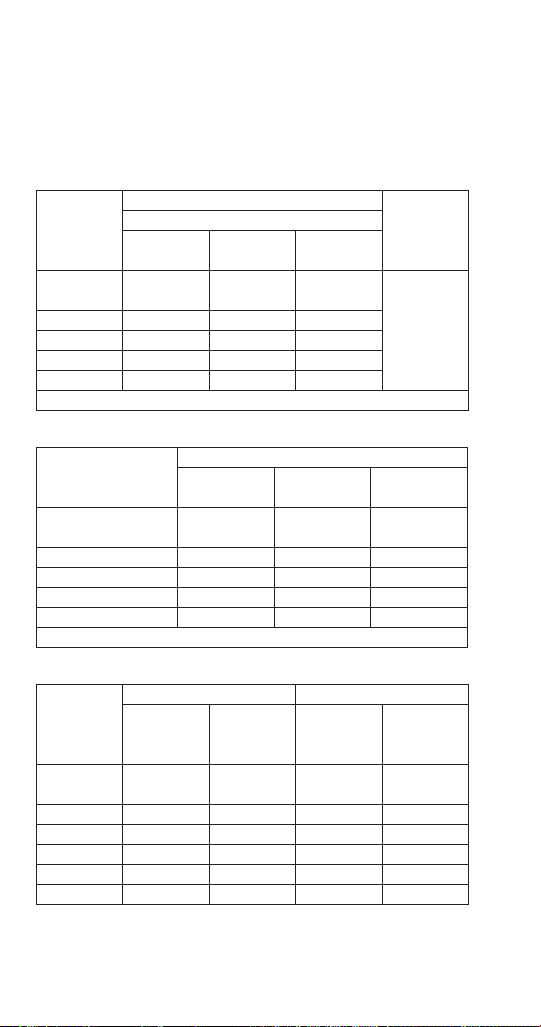
188 Part Number: 000015431 Rev 02 6/20
IBT1020C/CVDT1200
Remote Air-Cooled Condensing Unit Model
Characteristics vary depending on operating conditions.
Cycle Times
Freeze Time + Harvest Time = Total Cycle Time
Air Temp.
Entering
Condenser
°F/°C
Freeze Time
Harvest
Time
Water Temperature °F/°C
50/10 70/21 90/32
-20 to 70/
-29 to 21
6.2-7.2 6.5-7.8 7.4-8.8
.75-2.5
80/27 6.4-7.7 6.8-8.1 7.8-9.2
90/32 6.7-8.1 7.3-8.7 7.9-9.5
100/38 7.1-8.5 7.8-9.2 8.9-10.6
110/43 8.2-9.7 8.7-10.3 10.0-11.9
1
Times in minutes - Dice cube
24-Hour Ice Production
Air Temp. Entering
Condenser
°F/°C
Water Temperature °F/°C
50/10 70/21 90/32
-20 to 70/
-29 to 21
1165 1115 1005
80/27 1125 1075 965
90/32 1085 1015 945
100/38 1035 965 855
110/43 925 875 775
1
Based on average ice slab weight of 6.2 - 7.2 lb.
Operating Pressures
Air Temp.
Entering
Condenser
°F/°C
Freeze Cycle Harvest Cycle
Discharge
Pressure
psig
Suction
Pressure
psig
Discharge
Pressure
psig
Suction
Pressure
psig
-20 to 50/
-29 to 10
240-340 70-44 165-260 120-135
70/21 300-340 70-44 165-280 110-130
80/27 310-350 70-44 170-290 110-140
90/32 315-360 75-45 180-300 115-145
100/38 395-440 80-50 215-360 150-175
110/43 395-460 80-50 220-370 155-180

Part Number: 000015431 Rev 02 6/20 189
IT1200C/CVDT1200
Remote Air-Cooled Condensing Unit Model
Characteristics vary depending on operating conditions.
Cycle Times
Freeze Time + Harvest Time = Total Cycle Time
Air Temp.
Entering
Condenser
°F/°C
Freeze Time
Harvest
Time
Water Temperature °F/°C
50/10 70/21 90/32
-20 to 70/
-29 to 21
6.4-7.7 7.4-8.8 7.8-9.4
.75-2.5
80/27 7.2-8.6 7.7-9.1 8.2-9.7
90/32 7.6-9.0 8.0-9.5 8.8-10.4
100/38 8.3-9.9 8.5-10.1 9.9-11.8
110/43 8.9-10.6 9.7-11.5 10.5-12.4
1
Times in minutes - Dice cube
24-Hour Ice Production
Air Temp. Entering
Condenser
°F/°C
Water Temperature °F/°C
50/10 70/21 90/32
-20 to 70/
-29 to 21
1075 1005 955
80/27 1025 975 925
90/32 985 940 870
100/38 910 890 780
110/43 860 800 745
1
Based on average ice slab weight of 6.2 - 7.2 lb.
Operating Pressures
Air Temp.
Entering
Condenser
°F/°C
Freeze Cycle Harvest Cycle
Discharge
Pressure
psig
Suction
Pressure
psig
Discharge
Pressure
psig
Suction
Pressure
psig
-20 to 50/
-29 to 10
230-340 70-40 155-200 110-135
70/21 275-350 70-40 160-210 110-130
80/27 290-360 70-41 170-210 115-140
90/32 310-370 75-41 180-210 120-140
100/38 365-470 90-44 220-315 130-175
110/43 375-480 90-45 225-320 150-175

190 Part Number: 000015431 Rev 02 6/20
IF1400C/CVDF1400
Remote Air-Cooled Condensing Unit Model
Characteristics vary depending on operating conditions.
All data on this page is preliminary and subject to change
Cycle Times
Freeze Time + Harvest Time = Total Cycle Time
Air Temp.
Entering
Condenser
°F/°C
Freeze Time
Harvest
Time
Water Temperature °F/°C
50/10 70/21 90/32
-20 to 70/
-29 to 21
11.3-13.4 12.3-14.6 14.2-16.8
.75-2.590/32 12.8-15.2 13.7-16.3 16.0-18.9
100/38 13.8-16.3 15.8-18.7 17.1-20.2
110/43 14.7-17.4 16.9-19.9 18.2-21.5
1
Times in minutes - Dice cube
24-Hour Ice Production
Air Temp. Entering
Condenser
°F/°C
Water Temperature °F/°C
50/10 70/21 90/32
-20 to 70/
-29 to 21
1350 1255 1100
90/32 1210 1135 990
100/38 1130 1000 930
110/43 1065 940 875
1
Ice slab weight of one harvest cycle = 12.0 lb. to 14.0 lb.
6.0 to 7.0 lbs per evaporator
5.44 kg to 6.35 kg (2.72 to 3.18 kg per evaporator)
230/50/1 is approximately 12% lower than 230/60/1.
Operating Pressures
Air Temp.
Entering
Condenser
°F/°C
Freeze Cycle Harvest Cycle
Discharge
Pressure
psig
Suction
Pressure
psig
Discharge
Pressure
psig
Suction
Pressure
psig
-20 to 50/
-29 to 10
250-235 50-36 140-165 70-95
70/21 250-235 55-38 150-170 70-95
80/27 275-240 60-38 160-180 85-95
90/32 300-285 65-39 170-190 90-110
100/38 350-300 70-40 180-200 95-115
110/43 410-350 80-40 190-215 100-125
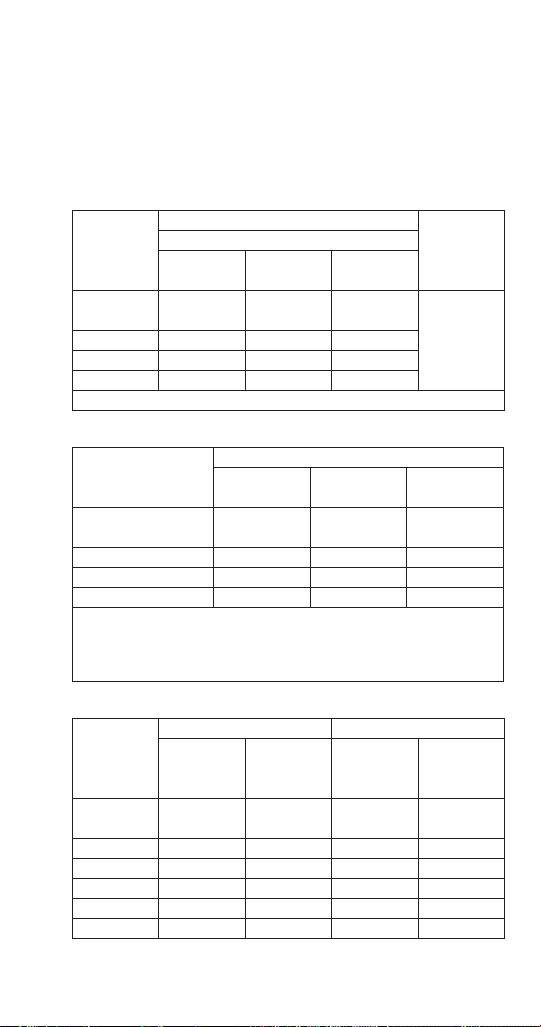
Part Number: 000015431 Rev 02 6/20 191
IF1800C/CVDF1800
Remote Air-Cooled Condensing Unit Model
Characteristics vary depending on operating conditions.
All data on this page is preliminary and subject to change
Cycle Times
Freeze Time + Harvest Time = Total Cycle Time
Air Temp.
Entering
Condenser
°F/°C
Freeze Time
Harvest
Time
Water Temperature °F/°C
50/10 70/21 90/32
-20 to 70/
-29 to 21
11.5-12.6 15.5-14.4 14.3-15.6
.75-2.590/32 14.3-15.5 16.4-17.8 17.7-19.3
100/38 15.4-16.8 17.7-19.3 19.3-20.9
110/43 11.5-12.6 15.5-14.4 14.3-15.6
1
Times in minutes - Dice cube
24-Hour Ice Production
Air Temp. Entering
Condenser
°F/°C
Water Temperature °F/°C
50/10 70/21 90/32
-20 to 70/
-29 to 21
1715 1520 1410
90/32 1520 1375 1240
100/38 1415 1250 1160
110/43 1320 1160 1075
1
Ice slab weight of one harvest cycle = 15.5 lb. to 16.75 lb.
7.75 - 8.38 lb per evaporator
7.0 kg to 7.6 kg (3.5 to 3.8 kg per evaporator)
230/50/1 is approximately 12% lower than 230/60/1
Operating Pressures
Air Temp.
Entering
Condenser
°F/°C
Freeze Cycle Harvest Cycle
Discharge
Pressure
psig
Suction
Pressure
psig
Discharge
Pressure
psig
Suction
Pressure
psig
-20 to 50/
-29 to 10
215-250 50-30 140-155 65-90
70/21 215-260 50-33 140-155 65-90
80/27 240-280 50-34 145-165 65-95
90/32 250-295 55-35 150-170 65-95
100/38 290-365 65-36 160-190 75-100
110/43 300-380 70-37 170-200 80-110

192 Part Number: 000015431 Rev 02 6/20
IF2100C/CVDF2100
Remote Air-Cooled Condensing Unit Model
Characteristics vary depending on operating conditions.
Cycle Times All data on this page is preliminary
Freeze Time + Harvest Time = Total Cycle Time
Air Temp.
Entering
Condenser
°F/°C
Freeze Time
Harvest
Time
Water Temperature °F/°C
50/10 70/21 90/32
-20 to 70/
-29 to 21
10.4-11.4 11.4-12.4 12.3-13.4
.75-2.5
80/27 11.3-12.3 12.1-13.2 13.2-14.4
90/32 11.6-12.6 12.4-13.5 14.2-15.4
100/38 12.8-13.9 13.9-15.1 15.3-16.6
110/43 13.9-15.1 14.9-16.2 16.0-17.4
1
Times in minutes - Dice cube
24-Hour Ice Production
Air Temp. Entering
Condenser
°F/°C
Water Temperature °F/°C
50/10 70/21 90/32
-20 to 70/
-29 to 21
1920 1785 1670
80/27 1800 1690 1565
90/32 1760 1655 1470
100/38 1610 1500 1375
110/43 1500 1405 1315
1
Ice slab weight of one harvest cycle = 15.5 lb. to 16.75 lb.
7.75 - 8.38 lb per evaporator
7.0 kg to 7.6 kg (3.5 to 3.8 kg per evaporator)
230/50/1 is approximately 12% lower than 230/60/1
Operating Pressures
Air Temp.
Entering
Condenser
°F/°C
Freeze Cycle Harvest Cycle
Discharge
Pressure
psig
Suction
Pressure
psig
Discharge
Pressure
psig
Suction
Pressure
psig
-20 to 50/
-29 to 10
220-250 45-28 125-140 70-80
70/21 220-260 50-28 125-160 70-80
80/27 220-275 50-28 130-180 70-90
90/32 260-315 58-30 150-190 70-100
100/38 300-360 65-30 160-200 80-110
110/43 320-400 70-30 170-210 90-120
Part Number: 000015431 Rev 02 6/20 193
Diagrams
Wiring Diagrams
The following pages contain electrical wiring diagrams. Be
sure you are referring to the correct diagram for the ice
machine you are servicing.
n
Warning
Always disconnect power before working on electrical
circuitry.
Some components are wired differently on energy
efficient machines. Please verify your model number
(“Model Numbers” on page 19) to reference the correct
diagrams.
WIRING DIAGRAM LEGEND
The following symbols are used on all of the wiring
diagrams:
Equipment Ground
( ) Wire Number Designation
(The number is marked at each end of the wire)
—>>— Multi-Pin Connection
—> (Electrical Box Side)
>— (Compressor Compartment Side)
Male/Female Disconnect
Crimp Connector
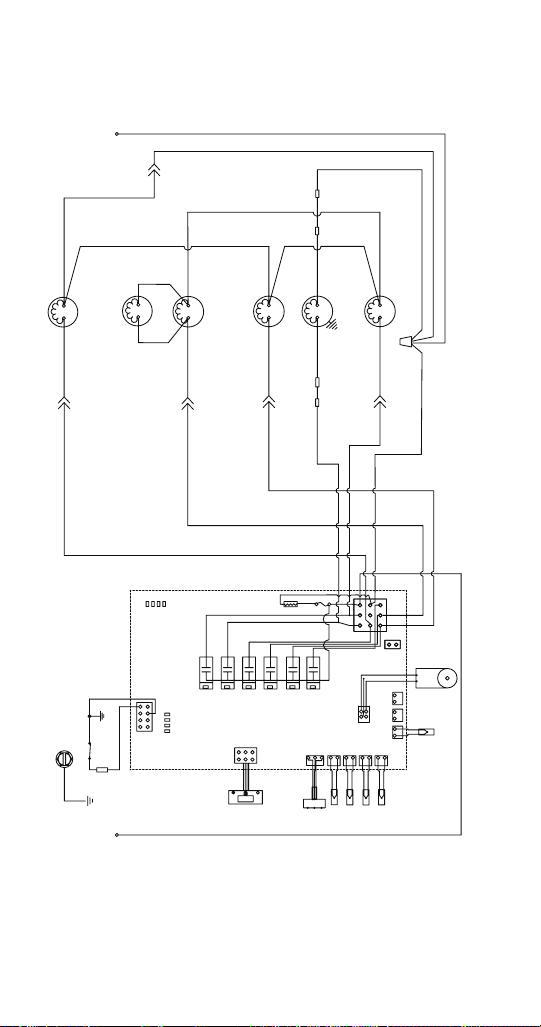
194 Part Number: 000015431 Rev 02 6/20
IF0600C/IBF0620C/IBF0820C/IF0900C 1PH
QuietQube® Ice Machine Head Section
56
1
42
55
49
3
22
41
19
28
32
45
58
34
57
34
54
L1
N
GND
(75)
WHT
(21) BLU(20) YEL
(82)WHT
(77) RED
(60) BLK
(80)
WHT
(61) RED
(57) GRY
(58) ORG
(22) WHT
(99) WHT
(76) BLK
(55) BRN
(81)
WHT
(83) ORG
(27) WHT
(97)WHT(56) WHT
(98) BLK
(28) RED
(8) WHT
(9) GRN
000014655_02

Part Number: 000015431 Rev 02 6/20 195
IF0600C/IBF0620C/IBF0820C/IF0900C/IT0900C 1Ph
Number Component
1 Air Pump Harvest Assist
3 Bin Switch
19 Control Board
22 Touchscreen
32 Ice Thickness Probe
34 LED
41 See Control Board Schematic For Detail
42 Solenoid Valve - Harvest
45 Solenoid Valve - Liquid Line
49 Thermistors
54 Transformer Control Board
55 Water Dump Valve
56 Water Inlet Valve
57 Water Level Probe
58 Water Pump
Wire Colors
BLK Black
BLU Blue
BRN Brown
GRY Grey
ORG Orange
PRPL Purple
RED Red
WHT White
YEL Yellow
Refer to control board schematic for control board detail

196 Part Number: 000015431 Rev 02 6/20
IT1200C/IBT1020C 1PH
QuietQube® Ice Machine Head Section
56
1
42
55
43
49
3
22
41
19
28
32
45
58
34
57
34
1
54
L1
N
GND
(75)
WHT
(21) BLU(20) YEL
(82)WHT
(77) RED
(60) BLK
(80)
WHT
(61) RED
(57) GRY
(58) ORG
(22) WHT
(99) WHT
(29) RED
(76) BLK
(55) BRN
(81)
WHT
(83) ORG
(27) WHT
(97)WHT(56) WHT
(98) BLK
(27) WHT
(30) WHT
(28) RED
(28) RED
(8) WHT
(9) GRN
000014655_02

Part Number: 000015431 Rev 02 6/20 197
IT1200C/IBT1020C 1PH
Number Component
1 Air Pump Harvest Assist
3 Bin Switch
19 Control Board
22 Touchscreen
32 Ice Thickness Probe
34 LED
41 See Control Board Schematic For Detail
42 Solenoid Valve - Harvest
43 Solenoid Valve - Harvest
45 Solenoid Valve - Liquid Line
49 Thermistors
54 Transformer Control Board
55 Water Dump Valve
56 Water Inlet Valve
57 Water Level Probe
58 Water Pump
Wire Colors
BLK Black
BLU Blue
BRN Brown
ORG Orange
RED Red
WHT White
YEL Yellow
Refer to control board schematic for control board detail

198 Part Number: 000015431 Rev 02 6/20
IF1400C/IF1800C/IF2100C 1PH
QuietQube® Ice Machine Head Section
000015237_00
56
1
42
55
43
49
3
22
41
19
28
32
45
58
34
57
34
1
54
L1
N
GND
(22)
WHT
(21) BLU(20) BLU
(80)WHT
(77) RED/WHT
(60) BLK
(82) WHT
(61) RED
(57) GRY
(58) ORG
N
(80) WHT
(25) RED
(76) BLK
(55) BRN
(79) WHT
(83) ORG
(92)
WHT
(82)WHT
(56) WHT
(98) GRY
(28)
WHT
(26) WHT
(91) RED
(27)
RED
(8) WHT
(9) GRN
(62) RED/WHT
(99) WHT
(75)WHT
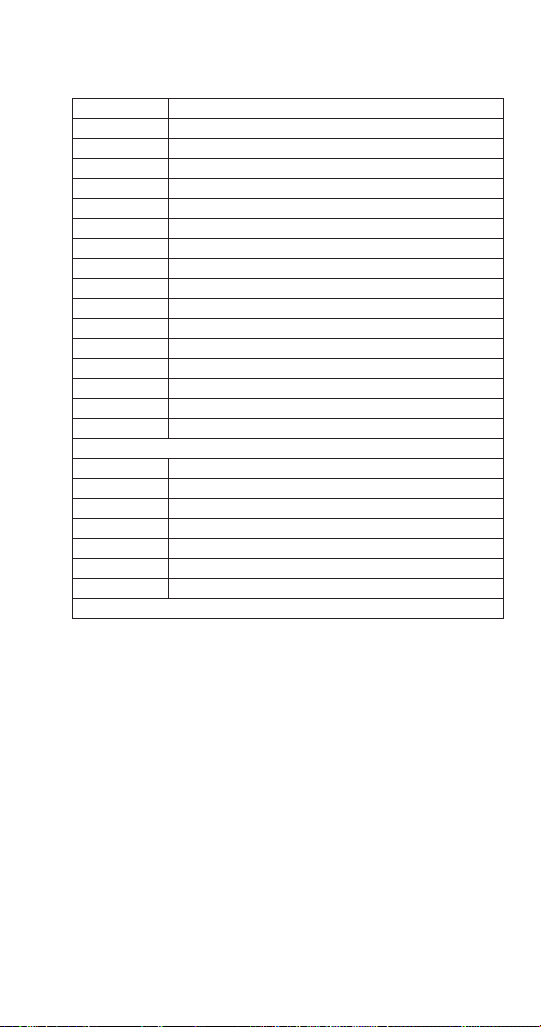
Part Number: 000015431 Rev 02 6/20 199
IF1400/IF1800C/IF2100C 1ph
Number Component
1 Air Pump Harvest Assist
3 Bin Switch
19 Control Board
22 Touchscreen
32 Ice Thickness Probe
34 LED
41 See Control Board Schematic For Detail
42 Solenoid Valve - Harvest Left Hand
43 Solenoid Valve - Harvest Right Hand
45 Solenoid Valve - Liquid Line
49 Thermistors
54 Transformer Control Board
55 Water Dump Valve
56 Water Inlet Valve
57 Water Level Probe
58 Water Pump
Wire Colors
BLK Black
BLU Blue
BRN Brown
GRY Grey
ORG Orange
RED Red
WHT White
Refer to control board schematic for control board detail


Part Number: 000015431 Rev 02 6/20 201
CVD 1PH Condensing Unit
Number Component
5 Compressor
7 Compressor Overload
8 Compressor Potential Relay
10 Compressor Time Delay Relay
11 Compressor Run Capacitor
12 Compressor Start Capacitor
14 Condenser Fan Motor
15 Condenser Fan Motor Run Capacitor
17 Contactor Contacts
18 Contactor Coil
31 High Pressure Cutout
36 Low Pressure Cutout
Wire Colors
BLK Black
BLU Blue
PRPL Purple
RED Red
YEL Yellow
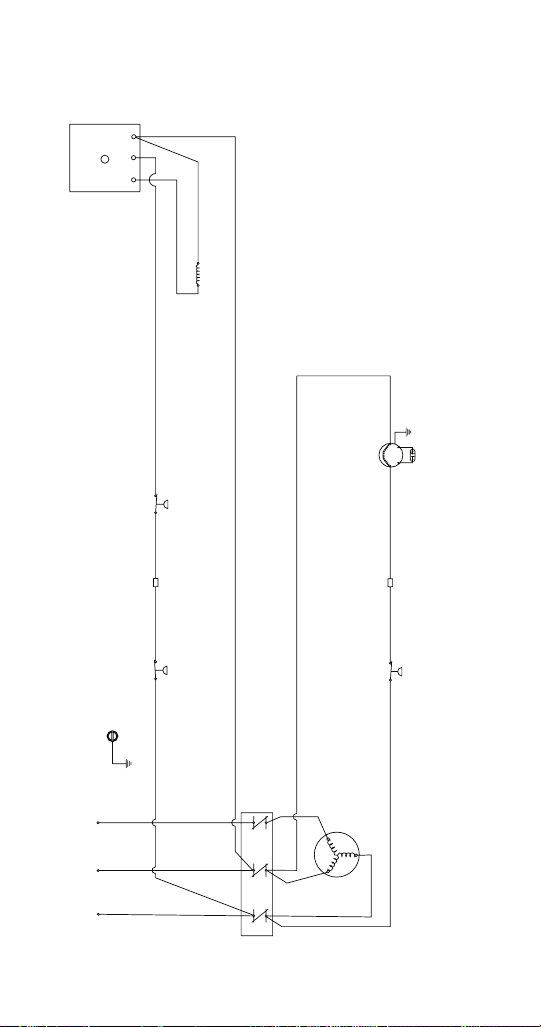

Part Number: 000015431 Rev 02 6/20 203
CVD 3PH Condensing Unit
Number Component
5 Compressor
10 Compressor Time Delay Relay
14 Condenser Fan Motor
15 Condenser Fan Motor Run Capacitor
17 Contactor Contacts
18 Contactor Coil
31 High Pressure Cutout
36 Low Pressure Cutout
Wire Colors
BLK Black
BLU Blue
PRPL Purple
RED Red
YEL Yellow
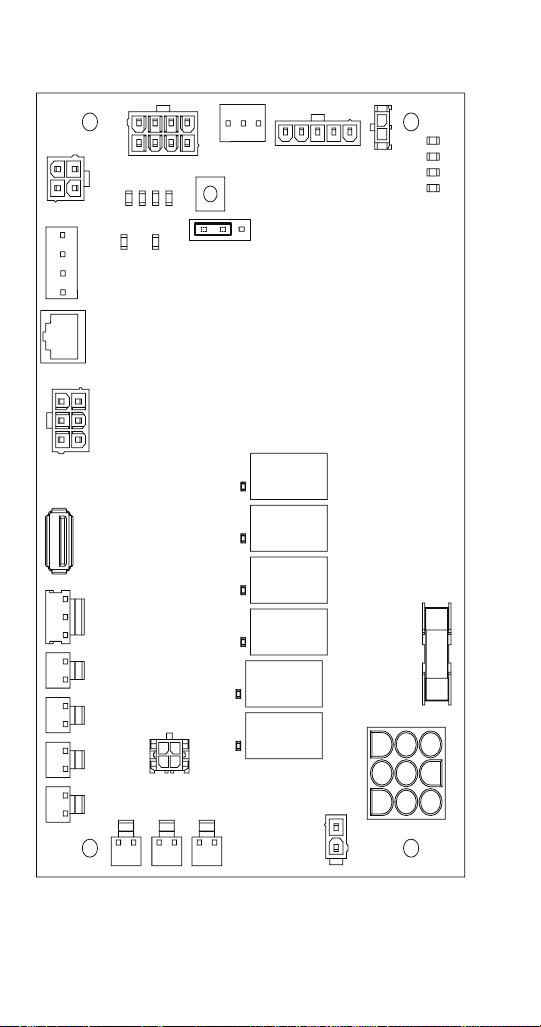
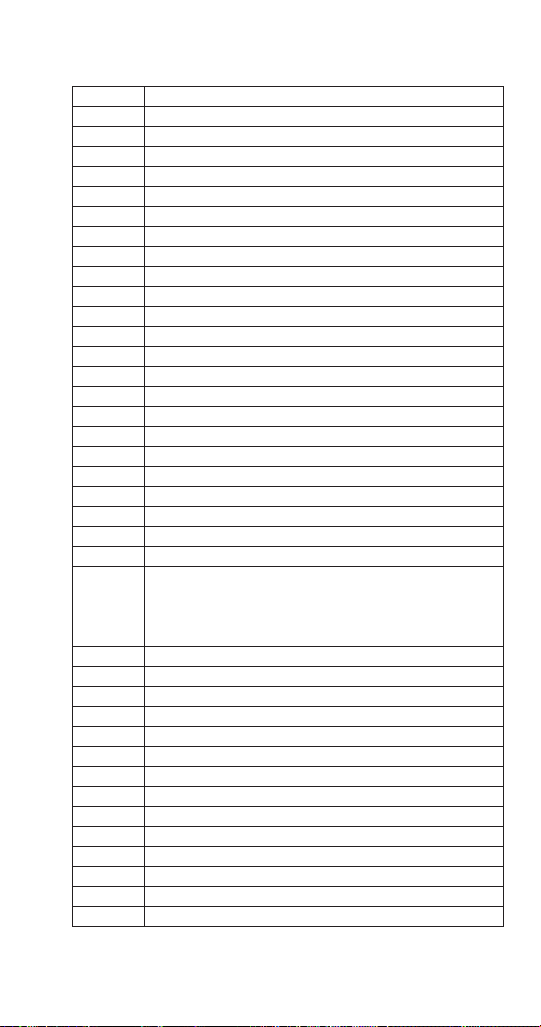
Part Number: 000015431 Rev 02 6/20 205
Electronic Control Board Schematic
Number Description
2 iAuCS
3 Bin Switch
5 Compressor Contactor Coil Relay
22 Touchscreen
28 Fuse
31 High Pressure Cutout
33 Ice Thickness Probe
34 LED - Relays
34-1 LED - Display
34-2 LED - Micro
34-3 LED - Clean
34-4 LED - Harvest
34-5 LED - Ice Thickness Probe
34-6 LED - High Water Probe
34-7 LED - Low Water Probe
34-8 LED - Display Bypass Is Active
34-9 LED - Right Bin Switch
34-10 LED - Left Bin Switch
38 LuminIce
42 Relay Solenoid Valve - Harvest Left Hand
43 Relay Solenoid Valve - Harvest Right Hand
49-1 Thermistor T1 Liquid Line Temperature
49-2 Thermistor T2 - Discharge Line Temperature
49-3 Thermistor T3 - Evaporator Inlet Temperature Single
Evaporator models
Evaporator Outlet Temperature Dual Evaporator
Models
49-4 Thermistor T4 - Evaporator Outlet Temperature
49-5 Thermistor T5 - Bin Level Probe
49-6 Thermistor T6 - Potable water Temperature
49-7 Thermistor T7 - Ambient Air Temperature
55 Relay Water Dump Valve
56 Relay Water Inlet Valve
57 Water Level Probe
58 Relay Water Pump
70 RS232 Communication Port
71 RS485 Communication Port
72 12VDC Power Supply
73 USB Connector
74 Reverse Osmosis/Deionized Water Usage Jumper
75 Test/Display Bypass button

Part Number: 000015431 Rev 02 6/20 207
IF0600C/CVDF0600 IB0620C/CVDF0600
IBF0820/CVDF0900 IF0900C/CVDF0900
Number Component
1 Compressor
2 Discharge Check Valve
3 Condenser - Remote Air-Cooled
4 Head Pressure Control Valve
5 Liquid Line Shut-off Valve
6 Liquid Line Check Valve
7 Receiver
8 Receiver Access Valve
9 Liquid Line Filter Drier
10 Liquid Line Solenoid Valve
11 Heat Exchanger
12 TXV - Thermostatic Expansion Valve
13 Evaporator
14 Harvest Solenoid Valve
15 Suction Shut-off Valve
16 S Trap - Required on 21’ or greater rise
17 Suction line Filter
18 Accumulator
T1 Thermistor - Receiver Inlet
T2 Thermistor - Receiver Outlet
T3 Thermistor - Evaporator Inlet
T4 Thermistor - Evaporator Outlet
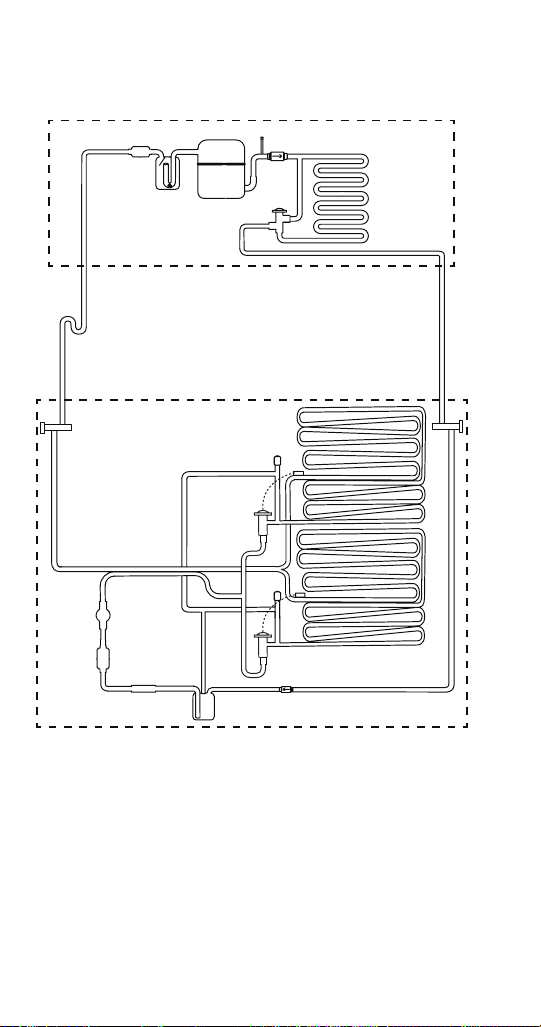

Part Number: 000015431 Rev 02 6/20 209
IBT1020C/CVDT1200 IT1200C/CVDT1200
Number Component
1 Compressor
2 Discharge Check Valve
3 Condenser - Remote Air-Cooled
4 Head Pressure Control Valve
5 Liquid Line Shut-off Valve
6 Liquid Line Check Valve
7 Receiver
8 Receiver Access Valve
9 Liquid Line Filter Drier
10 Liquid Line Solenoid Valve
11 Heat Exchanger
12 TXV - Thermostatic Expansion Valve
13 Evaporator
14 Harvest Solenoid Valve
15 Suction Shut-off Valve
16 S Trap - Required on 21’ or greater rise
17 Suction line Filter
18 Accumulator
T1 Thermistor - Receiver Inlet
T2 Thermistor - Receiver Outlet
T3 Thermistor - Evaporator Outlet
T4 Thermistor - Evaporator Outlet

Part Number: 000015431 Rev 02 6/20 211
IF1400C/IF1800
Number Component
1 Compressor
2 Discharge Check Valve
3 Condenser - Remote Air-Cooled
4 Head Pressure Control Valve
5 Liquid Line Shut-off Valve
6 Liquid Line Check Valve
7 Receiver
8 Receiver Access Valve
9 Liquid Line Filter Drier
10 Liquid Line Solenoid Valve
11 Heat Exchanger
12 TXV - Thermostatic Expansion Valve
13 Evaporator
14 Harvest Solenoid Valve
15 Suction Shut-off Valve
16 S Trap - Required on 21’ or greater rise
17 Suction line Filter
18 Accumulator
T1 Thermistor - Receiver Inlet
T2 Thermistor - Receiver Outlet
T3 Thermistor - Evaporator Outlet
T4 Thermistor - Evaporator Outlet


Part Number: 000015431 Rev 02 6/20 213
IF2100C
Number Component
1 Compressor
2 Discharge Check Valve
3 Condenser - Remote Air-Cooled
4 Head Pressure Control Valve
5 Liquid Line Shut-off Valve
6 Liquid Line Check Valve
7 Receiver
9 Liquid Line Filter Drier
10 Liquid Line Solenoid Valve
11 Heat Exchanger
12 TXV - Thermostatic Expansion Valve
13 Evaporator
14 Harvest Solenoid Valve
15 Suction Shut-off Valve
16 S Trap - Required on 21’ or greater rise
17 Suction line Filter
18 Accumulator
T1 Thermistor - Receiver Inlet
T2 Thermistor - Receiver Outlet
T3 Thermistor - Evaporator Outlet
T4 Thermistor - Evaporator Outlet