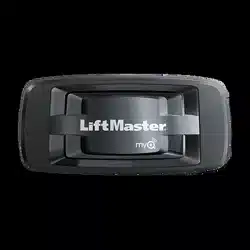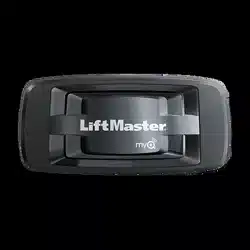
INTERNET
GATEWAY
QUICK START
MODEL 828LM

Thank you for purchasing a LiftMaster
®
Internet
Gateway enabled with myQ
®
technology. Once you have
created your account and added your myQ devices, you
will be able to monitor and control your LiftMaster
®
myQ garage door openers, commercial door operators,
and gate operators from your smartphone anytime,
anywhere. Greater freedom, control and peace of mind
than you have ever imagined possible.
With the 828LM Internet Gateway you can add
up to 16 myQ devices including LiftMaster
®
myQ
garage door openers, commercial door operators,
and gate operators.
Before starting...
YOU MUST HAVE:
• Router
• Broadband Internet Connection
• Internet Gateway Serial Number (located on the bottom of the
Internet Gateway)
To prevent possible SERIOUS INJURY or DEATH:
• When the LiftMaster
®
Internet Gateway is used with a residential
garage door opener, the opener MUST ONLY be installed with
sectional doors.
WARNING: This product can expose you to chemicals including
lead, which are known to the State of California to cause cancer or
birth defects or other reproductive harm. For more information go to
www.P65Warnings.ca.gov.
If using the Internet Gateway with residential door openers, the Internet
Gateway must be used only with door openers manufactured after 1993
that use photoelectric sensors located near the bottom of the door track
that do not change the state of those photoelectric sensors to a low power
mode.
STOP
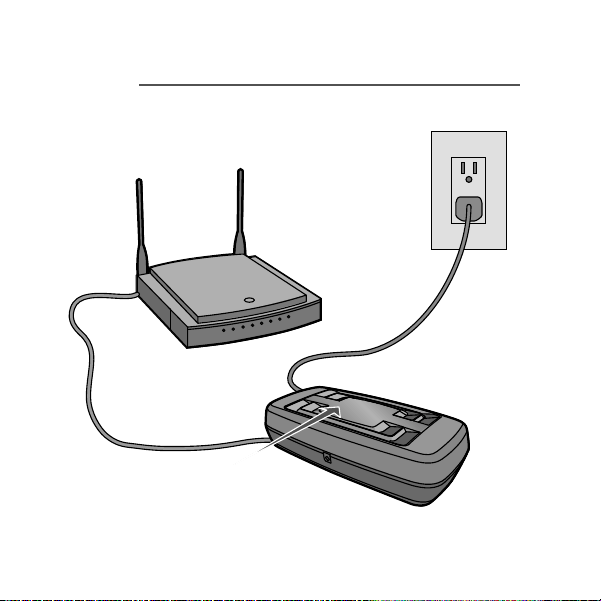
1
Connect to router and power.
STEP
When the internet gateway connects
to the internet, the green LED will stop
blinking and will light solid.
Router
Internet Gateway
Power

2
STEP
For Residential Products:
Download the myQ
®
App on your mobile
device and follow the in-app instructions
to set up the Internet Gateway.
For Commercial Products:
Log in to account.myq.com.

Need help?
Visit Support.LiftMaster.com.

ONE YEAR LIMITED WARRANTY
The Chamberlain Group, LLC. warrants to the first retail
purchaser of this product that is free from defect in
materials and/or workmanship for a period of 1 year
from the date of purchase.
NOTICE: To comply with FCC and/or Industry Canada (IC) rules.
adjustment or modifications of this transceiver are prohibited.
THERE ARE NO USER SERVICEABLE PARTS.
This device complies with Part 15 of the FCC rules and IC RSS-210.
Operation is subject to the following two conditions: (1) this device
may not cause harmful interference, and (2) this device must accept
any interference received, including interference that may cause
undesired operation.

© 2022, The Chamberlain Group, LLC
App Store is a service mark of Apple Inc.
Google Play is a trademark of Google Inc.
PASSERELLE
INTERNET
DÉMARRAGE RAPIDE
MODÉLE 828LM

Merci de votre achat d’une passerelle internet LiftMaster
®
activée par la technologie myQ
®
. Après avoir créé votre
compte et ajouté vos appareils myQ, vous serez en mesure de
surveiller et commander vos ouvre-portes de garage, ouvre-
portes à usage commercial, et actionneurs de barrière
LiftMaster
®
myQ avec votre téléphone intelligent,
de partout et en tout temps. Vous bénéficierez de plus
de liberté, de contrôle et de tranquillité d’esprit que vous
ne l’auriez jamais imaginé.
Avec la passerelle Internet 828LM vous pouvez ajouter
jusqu’à 16 appareils myQ dont les ouvre-portes de garage,
ouvre-portes à usage commercial, et actionneurs de
barrière LiftMaster
®
myQ.
Pour éviter des BLESSURES GRAVES, voire MORTELLES :
• Si vous utilisez la passerelle Internet LiftMaster
®
avec un
ouvre-porte de garage résidentiel, celui-ci DOIT être installé
UNIQUEMENT sur une porte articulée.
AVERTISSEMENT : Ce produit peut vous exposer à des produits
chimiques comme le plomb, reconnu par l’État de la Californie
comme cause de cancers, d’anomalies congénitales et d’autres
problèmes liés à la reproduction. Pour plus d’informations, visitez
www.P65Warnings.ca.gov
Avant de commencer...
VOUS DEVEZ AVOIR:
• Un routeur
• Connexion Internet à bande large
• Le numéro de série du passerelle internet (situé au bas de la
passerelle internet)
ARRÊTEZ : Si vous utilisez la passerelle Internet avec des ouvre-portes rés-
identiels, elle doit être utilisée uniquement avec des ouvre-portes fabriqués
après 1993 utilisant des capteurs photoélectriques qui sont situés près du
bas du rail de porte et ne changent pas d’état en mode de faible puissance.
ARR
ÊT
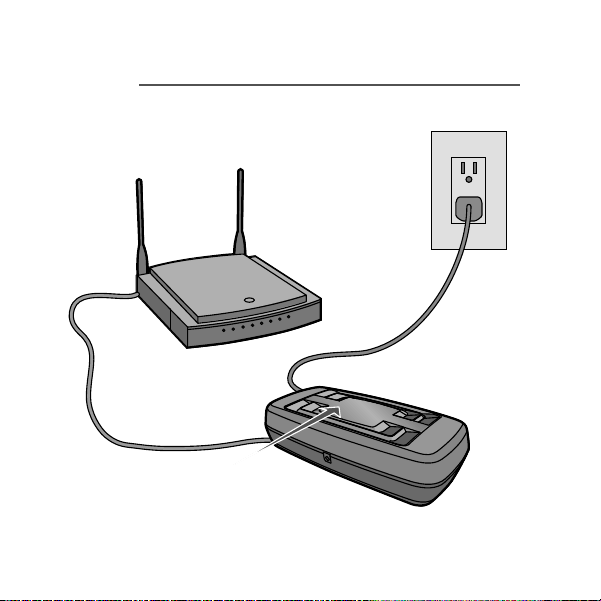
1
Brancher le routeur et
l’alimentation.
RE
Quand le passerelle internet se connecte
à l’internet, le voyant lumineux vert s’arrêtera
de clignoter et deviendra ininterrompu.
Routeur
Passerelle Internet
Adaptateur
d’alimentation

2
E
Pour les produits résidentiels :
Téléchargez l’application myQ
®
sur votre
appareil mobile et suivez les instructions de
l’application pour configurer la passerelle
Internet.
Pour les produits commerciaux :
connectez-vous à account.myq.com.

Besoin d’aide?
Visitez Support.LiftMaster.com.

GARANTIE LIMITÉE DE UN AN
La société Chamberlain Group Inc. garantit à l’acheteur au
détail initial de ce produit que le produit est exempt de tout
défaut de matière ou vice de fabrication pour une période de
un an à compter de la date d’achat.
AVIS : Les règles de la FCC et/ou d’Industrie Canada (IC) interdisent
tout ajustement ou toute modifi cation de cerécepteur. IL N’EXISTE
AUCUNE PIÈCE SUSCEPTIBLE D’ÊTRE ENTRETENUE PAR
L’UTILISATEUR.
Cet appareil est conforme aux dispositions de la partie 15 du
règlement de la FCC et de la norme IC RSS-210. Sonutilisation est
assujettie aux deux conditions suivantes : (1) ce dispositif ne peut
causer des interférences nuisibles, et (2) ce dispositif doit accepter
toute interférence reçue, y compris une interférence pouvant causer
un fonctionnement non souhaité.

©2022 The Chamberlain Group, LLC
All Rights Reserved
Tous droits réservés
114-5781-000
App Store est une marque de service d’Apple Inc.
Google Play est une marque de commerce de Google Inc.