Operating Instructions Dishwasher
Guide to the appliance
Machine overview
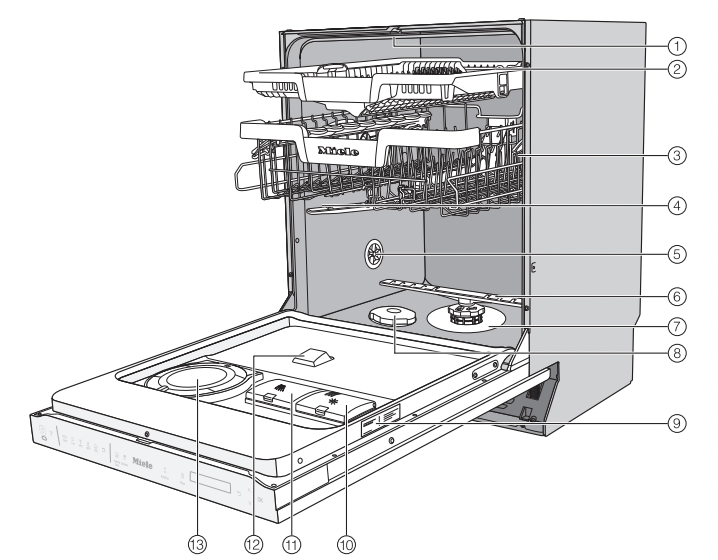
- Top spray arm
- 3D MultiFlex Tray (depending on model)
- Upper basket (depending on model)
- Middle spray arm
- Aeration valve
- Bottom spray arm
- Filter combination
- Salt reservoir
- Data plate
- Rinse aid reservoir
- Detergent compartment
- AutoDos detergent outlet
- AutoDos (automatic dispensing)
Control panel

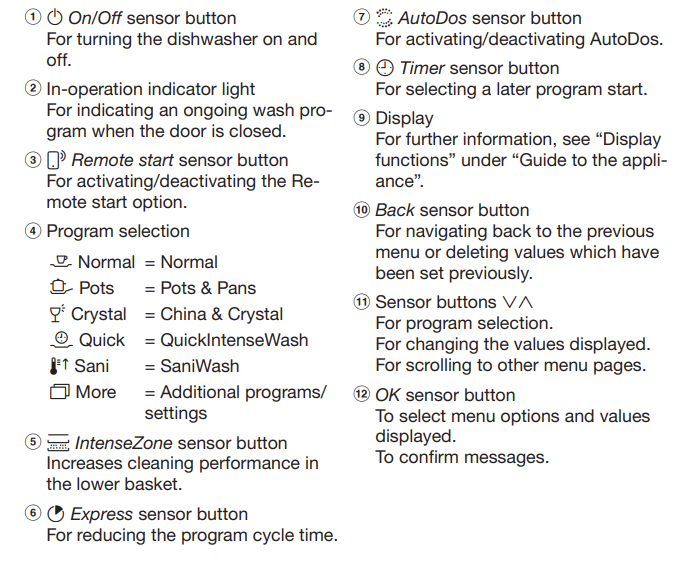
Display functions
The display is used to select or set the following:
- the program
- the Timer
- the Settings 
The display can show the following:
- the program stage
- The estimated time left for the program to run
- Any relevant fault messages and information
To save energy, the dishwasher turns off after a few minutes if you do not press any sensor buttons during this time. Touch the  sensor button to turn the dishwasher back on.
The OK sensor button is used to confirm a message or setting and also to move to the next menu or another level.
Under  More, a scroll bar
  will appear in the right of the display. This offers further options. These options can be shown using the
  sensor buttons.
You can alter the dishwasher’s controls to suit changing requirements in the "Settings” menu (see “Settings”).
The option which is selected will have a check next to it.
To exit a sub-menu again, use the Back sensor button.
If you do not press any sensor buttons for several seconds, the display will revert to the previous menu. You will then have to enter your settings again.
These operating instructions apply to several different dishwasher models of different heights.
The specific dishwasher models are referred to as follows:
Standard = 31 11/16" (80.5 cm) high dishwashers (integrated) and 33 1/4" (84.5 cm) high dishwashers (freestanding)
XXL = 33 1/4" (84.5 cm) high dishwashers (integrated).
Before using for the first time
Every dishwasher is tested at the factory. There will be residual water in the machine from this test. It is not an indication that the dishwasher has been used previously
Opening the door
In some programs the door automatically opens slightly to assist the drying process. This function can be deactivated, if preferred (see “AutoOpen” under “Settings”).
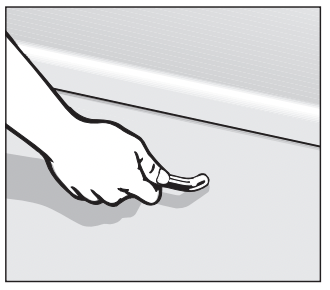
- Pull the handle to open the door.
- Open the door fully to disengage the locking mechanism.
At the end of the program, if the AutoOpen function is on, the door locking pins automatically retract.
To prevent a technical fault, do not hold the door locking pins firmly when they are retracting.
If the door is opened during operation, all functions are automatically interrupted.
 Risk of scalding due to hot water. During operation, water in the dishwasher may be very hot. During operation, only open the door with extreme caution.
Risk of injury due to door opening automatically. The door may open automatically at the end of a program. Keep the area around the door free of obstructions.
Closing the door
- Insert the baskets.
- Raise the door upwards until the catch engages.
Risk of crushing due to the door closing. When closing the door, you are at risk of shutting your fingers in it. Do not put your hand inside the door as it is closing.
Basic settings
Turning on the dishwasher
- Open the door.
- Turn the dishwasher on using the sensor button.
The welcome screen will appear when the dishwasher is turned on and the welcome melody will sound.
For further information about the display functionality, see “Display functions” under “Guide to the appliance”.
Setting the language
The display will change automatically to the screen for setting the language.
- Select the language you want as well as the country, if appropriate, using the sensor button and confirm with OK.
For further information on setting the language, see “Language” under “Settings”.
A check will appear next to the language that has been set.
Setting up Miele@home
The message Set up Miele@home will appear on the display.
- To set up Miele@home now, confirm by touching OK.
Tip: To postpone setup until later, select the option Skip and confirm with OK.
There are 2 ways of connecting your dishwasher to your WiFi network:
- Select the connection method you want and confirm your choice with OK.
- Connect using App
- Connect using WPS
You will then be guided by the display and the Miele@mobile app.
For further information on Miele@home, see “Miele@home” under “Settings”.
Setting the time
The time is updated automatically if a connection is established with the WiFi network.
The display will then change to the screen for setting the time.
The current time of day must be set before you can use the timer option.
- Use the sensor buttons to enter the hour and confirm your entry with OK.
- Then set the minutes and confirm with OK.
Keeping the relevant  or
or  sensor button pressed will increase or decrease the time automatically.
Setting the water hardness
The display changes to the screen for setting the water hardness.
- The dishwasher must be programmed to the correct water hardness for your area.
- Your local water authority will be able to advise you of the water hardness level in your area.
- Where the water hardness fluctuates, e.g., between 10-16 gpg (10–15 °dH), always program the dishwasher to the higher value (16 gpg (15 °dH) in this example).
It is useful to know your water hardness so that you can provide the service technician with this information in the event of any service calls.
Enter the water hardness below:
____________ gpg (°dH)
The dishwasher is programmed at the factory for a water hardness level 1 gpg (1 °dH).
- Set the water hardness level in your area and confirm with OK.
See “Water hardness” under “Settings” for more information.
Activating AutoDos
The display changes to the settings screen for AutoDos (see “Automatic dispensing/AutoDos” under “Detergent”).
Even if you do not wish to use AutoDos, you must remove the transport locking device from the PowerDisk compartment before running the first program (see “Activating AutoDos” under “Detergent”).
You can activate AutoDos.
If you do not wish to use AutoDos, you can manually dispense the detergent via the detergent compartment (see Manual detergent dispensing” under Detergent”).
- Select the setting you want and confirm with OK.
This setting applies to all programs and you can change it at any time using the  AutoDos sensor button.
Finally, prompts will appear in the display.
After confirming these prompts withnOK, the messages  Refill salt and
  Add rinse aid may appear.
- Add salt and rinse aid if necessary see “Reactivation salt” and “Rinse aid” under “Before using for the first time”).
- Select OK to confirm the messages.
The program selected will appear briefly in the display and the appropriate sensor button will be illuminated. The display will then show the estimated program duration for the program selected.
Reactivation salt
In order to achieve good cleaning results, the dishwasher needs to operate with soft water. Hard water results in the build-up of calcium deposits on dishes and on the inner surfaces of the machine.
Domestic water with a hardness level higher than 5 gpg (5 °dH – German scale) must be softened. This occurs automatically in the integrated water softener. The water softener is suitable for a water hardness level of up to 73 gpg (70 °dH – German scale).
In order to be reactivated, the water softener requires reactivation salt. Depending on the water hardness level (< 22 gpg, or < 21 °dH – German scale), reactivation salt may not be required if combination detergents are being used (see “Active ingredients” under “Detergents”).
If the water in your area is very soft and constantly lower than 5 gpg (5 °dH – German scale), you do not need to add reactivation salt. The salt refill indicator will automatically turn off after the water hardness has been set accordingly (see “Water hardness” under “Settings”).
Damage to the water softener from detergent. Dishwasher detergent will damage the softener assembly. Do not fill the salt reservoir with powder or liquid detergent.
Damage caused by using unsuitable salts. Some types of salt may contain insoluble components which can cause the water softener to malfunction. Use only special, coarse-grained reactivation salt.
If you only ever use combination detergent products in your dishwasher, you can turn off both refill reminders if you wish (see “Refill reminders” under “Settings”).
Please make sure that if you stop using combination detergents, you refill the reactivation salt and rinse aid. Turn the refill reminders back on if required.
Filling the salt reservoir
Before filling the salt reservoir for the first time, you must fill it with approx. 1/2 gallon (2 l) of water to enable the salt to dissolve. Once the dishwasher has been used once, there is always sufficient water in the salt reservoir.
- Remove the lower basket from the wash cabinet and unscrew the salt reservoir cap.
Danger of corrosion due to saline solution. Water or saline solution will run out of the reservoir when the cap is opened. Salt solution that runs out can cause corrosion in the wash cabinet and to the wash items. The cap should therefore only be removed in order to refill the salt reservoir.
- Fill the salt reservoir with approx. 1/2 gallon (2 l) of water (first use only).
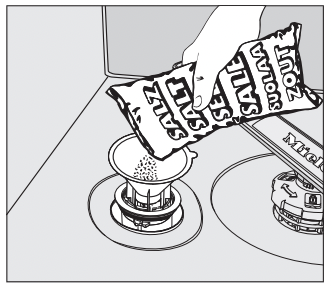
- Place the funnel provided over the salt reservoir and carefully fill with reactivation salt until the reservoir is full. The salt reservoir holds up to 4.4 lb (2 kg) of salt, depending on the type of salt used.
- Clean off salt residues from around the salt reservoir opening. Next, screw the salt reservoir cap on again firmly.
- Immediately after filling the salt reservoir and each time you remove the salt reservoir cap, run the
 QuickIntenseWash program with the
  Express program option selected without wash items in the dishwasher to dissolve and remove any traces of salt from the wash cabinet.
Refilling the salt
- Fill the salt reservoir with reactivation salt when Refill salt appears in the display.
- Confirm with OK.
The salt refill indicator will go out.
Danger of corrosion due to saline solution. Salt solution that runs out can cause corrosion in the wash cabinet and to the wash items.
Each time you remove the salt reservoir cap, you must run the QuickIntenseWash program with the Express program option selected without wash items in the dishwasher. This will dissolve and remove any traces of salt from the wash cabinet.
After the salt reservoir has been filled, the refill indicator may still appear in the display if the salt concentration has not yet reached the correct level. In this case, still confirm the message with OK. The salt refill indicator will be turned off if you have programmed the dishwasher for a water hardness below 5 gpg (5 °dH – German scale).
Rinse aid
Rinse aid is necessary to ensure that water does not cling and leave marks on dishes during the drying phase, and helps dishes dry faster after they have been washed. Rinse aid is poured into the container and the amount set is dispensed automatically.
Liquid dish soap or detergent can cause damage. Liquid dish soap and detergent can damage the rinse aid reservoir. Only fill it with rinse aid formulated for domestic dishwashers.
Risk of acid damage. The dishwasher can be damaged by high concentrations of acid. Under no circumstances should you use citric acid with a higher acid content.
If you only ever wish to use combination detergent products in your dishwasher, you do not need to add rinse aid. However, for optimum rinsing and drying results, use dishwasher detergent and add reactivation salt and rinse aid separately.
If you only ever use combination detergent products containing salt and rinse aid in your dishwasher, you can turn off both refill reminders if you wish (see “Refill reminders” under “Settings”).
Please make sure that if you stop using combination detergents, you refill the reactivation salt and rinse aid. Turn the refill reminders back on if required.
Adding rinse aid
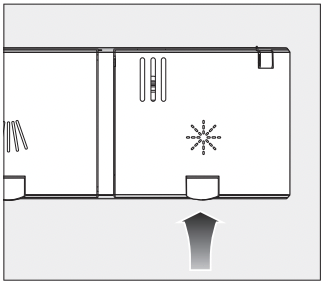
- Press the yellow button on the lid of the rinse aid reservoir.
The lid will spring open.
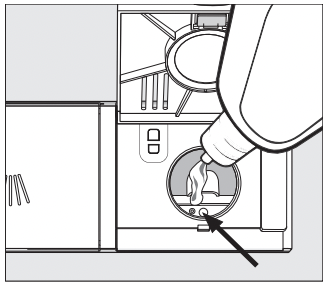
- Fill with rinse aid until the filling level indicator (arrow) changes to a dark color while the door is horizontally open.
The rinse aid reservoir holds approximately 110 ml.
- Close the lid firmly until you hear it click into place. Otherwise, water can enter the rinse aid reservoir during a program.
- Wipe up any spilled rinse aid. This prevents excess foam developing during the next program.
You can adjust the rinse aid dosage for best wash results (see “Rinse aid” under “Settings”).
Filling the rinse-aid reservoir
When Add rinse aid appears in the display, the reservoir contains sufficient rinse aid for 2–3 programs only.
- Add rinse aid in plenty of time.
- Confirm with OK.
The rinse-aid refill indicator will go out.
Energy-saving dishwashing
This dishwasher is exceptionally economical in its use of water and electricity. You can make the most of your machine by following these tips:
- Washing in a dishwasher generally uses less water and energy than washing by hand.
- There is no need to pre-rinse items under running water, and this unnecessarily increases water and energy consumption.
- Make full use of the basket capacity without overloading the dishwasher. This results in the most economical dishwashing in terms of energy and water consumption.
- Choose a program that best suits the degree of soiling and the type of dishes being washed (see “Program overview”).
- Select the Normal program for energy-saving dishwashing. This program is the most efficient in terms of its combined energy and water consumption for cleaning dishes with a normal level of soiling.
- If you have a hot water connection, choose the Energy Saver program (see “Water intake” under “Installation”). The wash water will not be heated up during this program.
- Follow the detergent manufacturer’s recommendations on detergent dosage.
- If you are manually dosing the detergent, reduce the amount of detergent by 1 /3 when using powder or liquid detergent if the baskets are only half full.
Loading the dishwasher
Loading examples
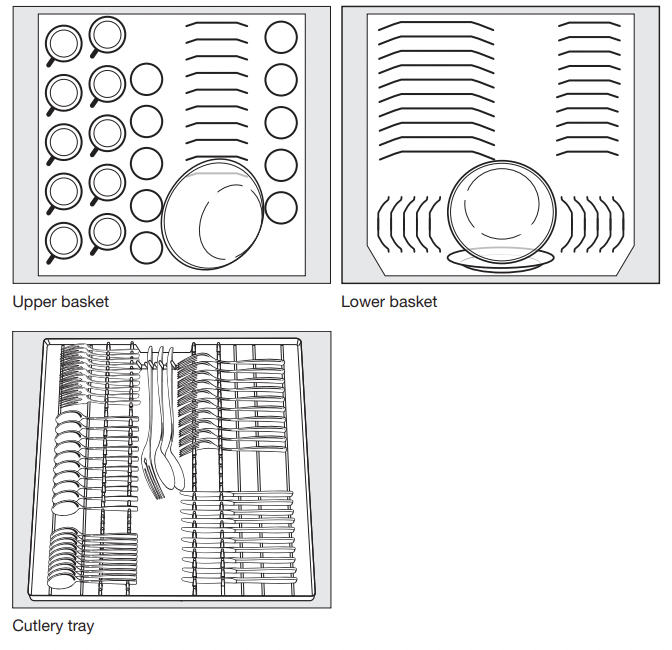
Loading for 10 standard place settings with cutlery tray
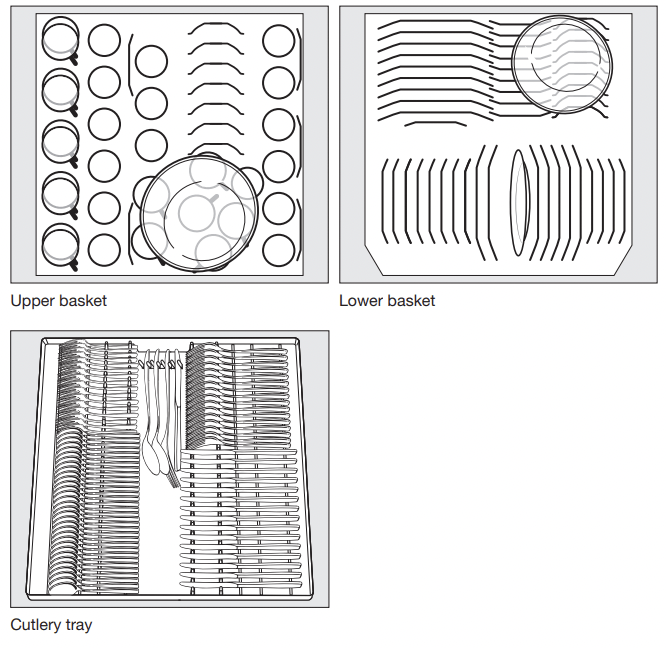
Loading for 16 standard place settings with cutlery tray
Upper basket
Loading the upper basket
Risk of damage due to water leakage. If you run the dishwasher without the upper basket, water can leak out of the dishwasher. Only run the dishwasher with the upper basket in place (except during the Tall Items program, if available).
- Use the upper basket for small, lightweight, and delicate items such as cups, saucers, glasses, dessert bowls, etc. Shallow pans or casserole dishes can also be placed in the upper basket.
- Long items such as soup ladles and mixing spoons should be placed lying down across the front of the upper basket.
Loading the FlexCare cup rack
You can put cups, small bowls, and flat dishes on the FlexCare cup rack. Glasses can be arranged along the cup rack so they sit securely during the program.
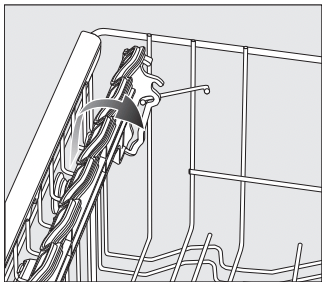
- Lower the cup rack to do so.
- Raise the cup rack upwards to make room for tall items.
Adjusting the FlexCare cup rack
You can set the height and depth of the cup rack at 2 different levels so that it can accommodate larger cups and so that taller items can be placed underneath it.
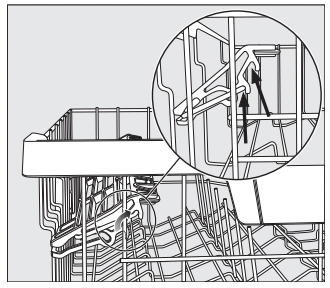
- Pull the cup rack upwards and click it into the desired position (see arrow).
Loading the silicone elements of the FlexCare cup rack
The silicone elements in the cup rack are specially designed to hold tall glasses with long stems securely
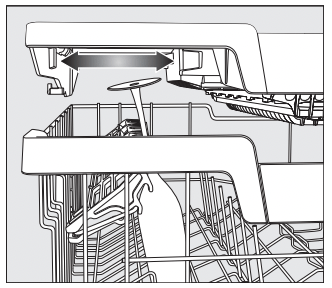
- Lower the cup rack and lean the glasses against the openings.
- If you wish you can adjust the left insert of the 3D MultiFlex Tray to make space for taller glasses (see “3D MultiFlex Tray” under “Cutlery”).
Lowering the spikes
On both right-hand rows of spikes, you can lower every other spike to make it easier to arrange larger dishes, like cereal bowls
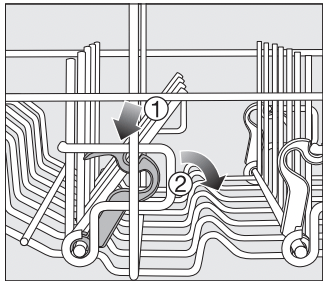
- Press the yellow lever downward 1, and then lower the dark gray spikes 2.
- Place the bowls vertically in the row of spikes
Adjusting the upper basket
In order to gain more space for taller items, the upper basket can be adjusted on 3 levels with 3/4" (2 cm) between each level.
The upper basket can also be set at an angle so that water can run off freely from recesses. Make sure, however, that the basket can slide smoothly in and out of the wash cabinet.
- Pull out the upper basket.
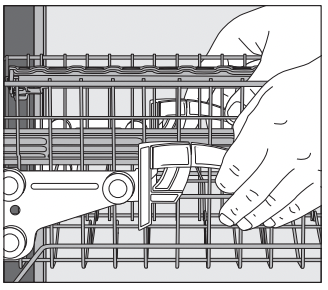
To raise the upper basket:
- Lift the basket until it clicks into place.
To lower the upper basket:
- Pull upwards on the levers at either side of the upper basket.
- Adjust the basket to the desired height and then push the levers securely back down into position.
When adjusting the upper basket, make sure it does not block the middle spray arm.
Lower basket
Loading the lower basket
Place larger and heavier items such as plates, serving platters, saucepans, bowls, etc., in the lower basket.
Glasses, cups, and small plates and saucers can also be placed in the lower basket.
Loading the MultiComfort area
The rear section of the lower basket is used for washing cups, glasses, plates, and pots.
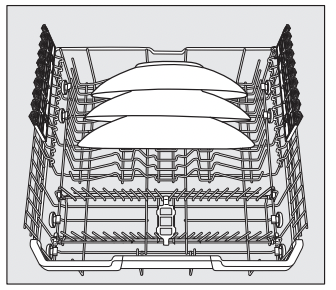
- Place very large plates in the center of the lower basket.
Tip: When tilted, plates up to 13 3/4" (35 cm) in diameter can be accommodated.
Lowering the spikes
The rows of spikes at the front are used for loading plates, soup bowls, platters, dessert bowls, and saucers.
Both right-hand rows of spikes can be lowered to make more room for large items such as pots, pans, and serving dishes.
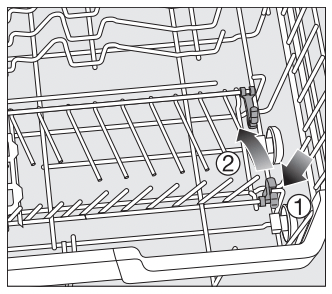
- Press the yellow lever downward 1, and then lower the spikes 2.
Loading the FlexCare glass holder
The silicone elements in the glass holder provide a stable and secure hold for delicate stemware.
- Stemware such as wine glasses, champagne flutes, and beer glasses can be leaned against the glass holder or suspended from it.
- The glass holder can be raised to make more room for tall items.
You can set the glass holder at two different heights.
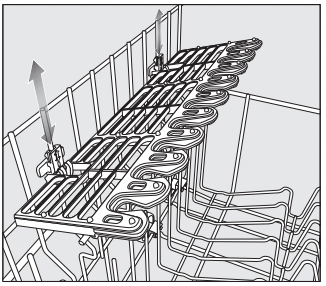
- Slide the glass holder to the desired height until the catches click into place at the top or the bottom.
Filters
You can also wash Miele VentilationHood Filters.
Select the Filters program for optimum dishwashing results.
Damage caused by protruding parts. Protruding parts can damage the dishwasher. Load the filters in such a way that no corners protrude over the side of the basket.
Damage caused by wash items with sharp edges. Heavy and sharp wash items can damage the coating of the basket struts. Load the filters carefully.
Risk of scalding due to hot water. At the end of the program, the filters may still contain hot water. Be careful when unloading the filters.
Loading the filters
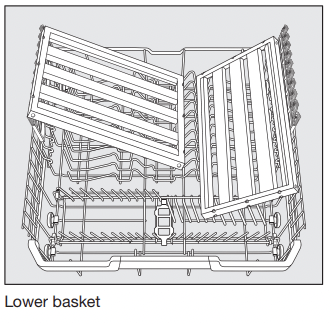
You can wash 2 ventilation hood filters in the upper basket and 2 filters in the lower basket at once.
- If you only want to wash 2 filters, put them in the upper basket.
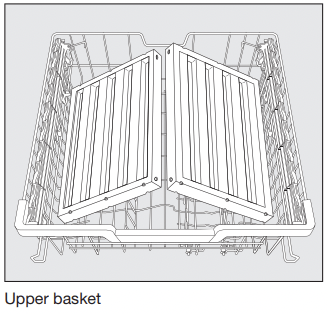
- Set the upper basket into the top or middle position if you load filters in the lower basket.
Detergents
Inserting a PowerDisk
Turn on the dishwasher before you replace the PowerDisk so that the dishwasher recognizes it.
When the message PowerDisk almost empty appears, the reservoir contains sufficient detergent for 2–3 programs only.
Only replace the PowerDisk when the message PowerDisk empty. Deactivate AutoDos with OK. appears.
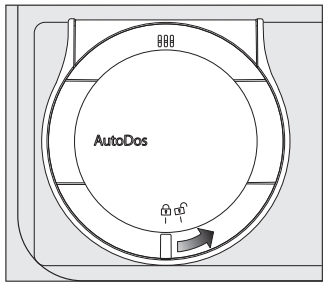
- Turn the AutoDos lid to
 and open it.
The message AutoDos lid open will appear on the display.
- Remove the empty PowerDisk.
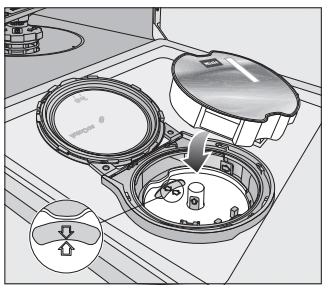
- If the arrows in the PowerDisk holder and in the viewing window are not pointing towards each other, remove the PowerDisk holder (see “Cleaning the AutoDos” under “Cleaning and care”).
- Put the holder back into place so that the arrows point towards each other and the holder lies flat. When doing this, only touch the PowerDisk holder by the yellow tab in the middle. Do not touch the side tab.
- Insert the new PowerDisk and press it evenly downwards until it sits flush.
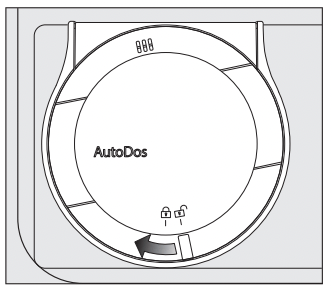
- Close the AutoDos lid and turn it until the lid handle is directly below the
 symbol.
If the PowerDisk is not in the correct starting position, it will be rotated automatically and the AutoDos function will be activated. Wait until this procedure ends before you start a program.
The AutoDos lid must be closed to prevent damage to the AutoDos. Always close the AutoDos lid before you close the dishwasher door. Otherwise, the AutoDos may become damaged.
Programs cannot start when the AutoDos lid is open.
The detergent powder must be dry so that it does not clump together. Do not fill the AutoDos with any type of fluid.
In order to ensure that the AutoDos works at its best, check it each time you replace the PowerDisk and clean it if needed (see “Cleaning the AutoDos” under “Cleaning and care”).
Manual detergent dispensing
Detergent must be manually dispensed if you have deactivated automatic dispensing using the AutoDos sensor button.
Detergent dispensing
The detergent compartment holds a maximum of 3 1/2" tablespoons..
There are marks in the detergent compartment to aid with dispensing: 1 1/4, 2 tablespoons (20, 30 ml). When the door is opened to a horizontal position, they show the approximate fill level in ml and the maximum fill height.
- Follow the detergent dosage recommended by the manufacturer on the packaging.
- Unless directed otherwise, use one detergent tab or add 1 1/4 to 2 tablespoons (20 to 30 ml) of detergent to the detergent compartment, depending on the level of soiling of the dishware.
If you use less than the recommended amount of detergent, the dishware may not get properly clean.
Some tabs may not dissolve completely when the program QuickIntenseWash is used.
Adding detergent
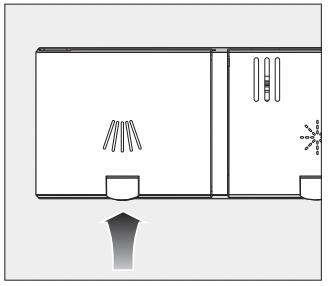
Press the yellow button  on the lid of the detergent compartment.
The lid will spring open. The lid will also open at the end of a program.
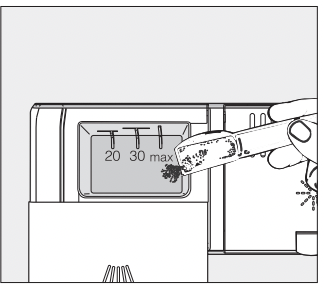
- Add the detergent to the detergent compartment.
- Push the lid shut until you hear it click into place.
The detergent must not cause the detergent-compartment lid to get stuck. This can prevent the lid from opening during the program. Do not overfill the detergent compartment.
- If you wish, deactivate automatic dispensing/AutoDos.
- Ensure that the detergent packaging is properly closed after use. This prevents the detergent from getting damp and clumping together.
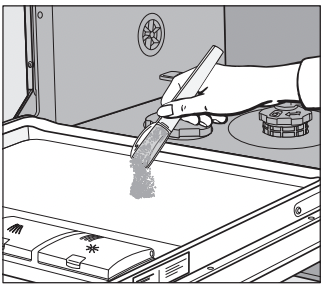
- You can also apply a small amount of detergent to the inner panel of the door in programs that have a prewash stage (see “Program overview”).
Operation
Turning on the dishwasher
- Turn on the water supply if it is turned off.
- Open the door.
- Make sure the spray arms can rotate freely.
- Touch the sensor button. If the dishwasher has been turned off for longer than 1 minute, you will need to hold the sensor button for a bit longer (wipe protection).
The program selected will appear in the display briefly and the indicator light for the program selected will come on. Then the display will show the estimated duration for the selected program.
Selecting a program
Choose your program according to the type of load and the degree of soiling.
The different programs and their uses are described under Program overview.
- Touch the sensor button for the required program.
The sensor button for the selected program will light up.
Additional programs can be selected under More.
- To do so, touch the More sensor button.
The first of the additional programs will appear in the display.
- Use the sensor buttons in the display to select the program you want.
You can now select program options (see “Options”).
If any program options are selected, the appropriate sensor buttons will also light up.
If you want to control the dishwasher remotely using the Miele@mobile app, you will first need to activate the Remote start option (see “Activate Remote start” under “Options”).
- Close the door within 4 seconds.
Display of program duration
The estimated duration of the selected program appears on the display before the program begins. If the door is opened during the program, the time left until the end of the program is displayed.
Each program phase is indicated by a symbol:
 Pre-rinse/Soak
 Main wash
 Interim rinse
 Final rinse
 Drying
 Finish
The displayed duration may vary for the same program. It is influenced by, for example, the temperature of the incoming water, the reactivation cycle of the water softener, the detergent type, and the amount of dishes and how soiled they are.
When a program is selected for the first time, the display will show the average program duration for a cold water connection.
The program durations shown under "Program overview” refer to standard test loads and temperatures.
Each time a program is run, the control module calculates the program duration required depending on the temperature of the water taken into the dishwasher and the amount of dishes.
Starting a program
- Start the program by closing the door within 4 seconds of the last press of a button. If necessary, confirm the previously displayed message with OK.
The in-operation indicator comes on to show that a program has been started.
If you do not close the door within 4 seconds, the message Continue with OK will appear in the display. The program cannot be started until you confirm the message by pressing the OK button and close the door within 4 seconds.
During a program sequence, you can use OK to display the name of the program that is currently running when the door is open.
Risk of scalding due to hot water. During operation, water in the dishwasher may be very hot. During operation, only open the door with extreme caution.
End of program
At the end of a program, the in-operation indicator light will be flashing slowly with the door shut. The audible signal may also be sounding.
The in-operation indicator light will go out 10 minutes after the end of the program if the door is closed.
The program has ended when the display shows the message Ready.
In some programs, if the AutoOpen function is activated, the door will automatically open slightly (see “AutoOpen” under “Settings”). This improves the drying process.
The drying fan may continue to run for a few minutes at the end of the program.
Risk of damage due to steam. Steam from the dishwasher could damage the edges of delicate countertops when you open the door at the end of the program if the fan is no longer running. If you have deactivated the automatic door opening function (see AutoOpen” under “Settings”), but would still like to open the door at the end of the program, then make sure that you open the door fully
Energy management
To save energy, the dishwasher will turn off automatically 10 minutes after the last time a sensor button is pressed or after the end of a program.
You can turn the dishwasher back on again with the sensor button.
If the dishwasher has been turned off for longer than 1 minute, you will need to hold the sensor button for a bit longer (wipe protection).
The dishwasher will not turn itself off while a program is running or if there is a fault.
Turning off the dishwasher
- Open the door.
- The dishwasher can be turned off at any time using the sensor button.
- Confirm the query Turn appliance off with OK.
Turning the dishwasher off during a program stops the program.
You can also do this to stop an ongoing timer.
- If you have pressed the sensor button, but in fact do not wish to cancel the program, use the button to select the Do not turn off option on the display and confirm with OK.
Risk of damage from leaking water. Leaking water can cause damage. If the dishwasher is not going to be used for a longer period of time, e.g., during vacations, the water supply should be turned off.
Unloading the dishwasher
Dishes tend to break and chip more easily when they are hot. Allow the dishes to cool until they are comfortable enough to handle before unloading them.
The dishes will cool much faster if you open the door when the program has ended.
- First unload the lower basket, then the upper basket, and finally the 3D MultiFlex Tray (if present). This will prevent water drops from the upper basket and 3D MultiFlex Tray from falling onto the dishes in the lower basket.
Interrupting a program
A program will be interrupted as soon as the door is opened. After 4 seconds, the indicator light of the selected program will flash and the message Continue with OK will appear in the display.
- Confirm with OK and close the door within 4 seconds.
The program will continue from the point at which it was interrupted.
Risk of scalding due to hot water. During operation, water in the dishwasher may be very hot. During operation, only open the door with extreme caution.
Canceling or changing a program
If a program is canceled, important program stages may be missed. A program should only be canceled in the first few minutes.
If a program has already started and you wish to cancel it, proceed as follows:
- Open the door.
- Turn the dishwasher off using the sensor button.
- Confirm the query Turn appliance off with OK.
If you would like to select another program:
- Turn the dishwasher back on using the sensor button.
- If you have dispensed detergent manually, check whether the detergent compartment is still closed. If the lid is already open, fill it with detergent again and close the lid.
- Select the program you want, and then start it by shutting the door.
The in-operation indicator light comes on to show that a program has been started.
Options
 Timer
Timer
The timer gives you several options for starting a program at a later time. The start or finish time of a program can be delayed. You can also use the EcoStart or SmartStart functions to benefit from cheaper energy rates at night.
During manual detergent dispensing the detergent will clump together if the detergent compartment is not dry, and this may mean it is not fully rinsed out.
When using the timer function, make sure that the detergent compartment is dry before adding detergent. Wipe dry with a cloth first, if necessary. Do not use any liquid detergents. These can leak out.
Danger to health due to detergent. To prevent children coming into contact with dishwasher detergent: Do not fill the detergent dispenser until just before starting the program, i.e., before you activate the timer.
Activating the timer
- Open the door.
- Turn the dishwasher on using the sensor button.
- Select the desired program.
- Tap the sensor button.
The sensor button lights up.
You can use the sensor buttons to choose between the Start at, Finish at, or EcoStart functions, or SmartStart if applicable.
- Confirm selection of the function you want with OK.
The last time set for the timer will be displayed and the hour number block will be highlighted.
- Enter the time you want for the timer using the sensor buttons and confirm with OK.
If, while you are setting the time, you do not apply any settings for several seconds, the display will revert to the previous menu. You will then have to enter your settings again.
After you have activated the timer, all the displays will turn off after a few minutes to save energy.
You can also activate a timer via the Miele@mobile app.
Setting “Start at”
With the Start at function, you set the exact time at which you want the program to start.
- Use the sensor buttons to enter the hour and confirm your entry with OK.
The hour will be saved and the minute number block will be highlighted.
- Use the sensor buttons to enter the minutes and confirm your entry with OK.
The saved start time for the selected program will appear in the display for several minutes.
- Close the door.
When the set time is reached, the program selected will begin automatically
Setting “Finish at”
Use the Finish at function to set the latest time by which the program selected has to be finished.
- Use the sensor buttons to enter the hour and confirm your entry with OK.
The hour will be saved and the minute number block will be highlighted.
- Use the sensor buttons to enter the minutes and confirm your entry with OK.
The estimated start time for the selected program will appear in the display for several minutes.
A message will appear in the display if the program cannot be completed by the set finish time because it has too long a running time.
- If it appears, confirm the message with OK.
- Close the door.
The program will start automatically when the estimated start time is reached.
Setting EcoStart
The EcoStart function enables you to benefit from cheaper electricity rates at night. Before you can use this option, you need to set up to 3 electricity rate time zones (see “EcoStart” under “Settings”).
Then set the time by which the selected program has to be finished.
The dishwasher will then start automatically in the most economical rate zone within the time set.
- Use the sensor buttons to enter the hour and confirm your entry with OK.
The hour will be saved and the minute number block will be highlighted.
- Use the sensor buttons to enter the minutes and confirm your entry with OK.
The estimated start time for the selected program will appear in the display for several minutes.
The program will start automatically when the estimated start time is reached.
Setting SmartStart
The SmartStart function is used for starting your dishwasher automatically at a time when your energy costs are most economical.
To use this function you may need further technical accessories.
If you have activated the SmartStart function in the Settings menu, the Timer menu will no longer show the EcoStart function but will instead show SmartStart (see “Miele@home” under Settings”).
If your energy provider offers this service, they will send a signal to your dishwasher when energy costs are at their most economical. This signal will start the dishwasher.
You can set the time by which the program selected has to be finished. The dishwasher will then calculate the latest possible start time for the program selected and will wait until this start time for the signal from the energy provider.
Set the time by which the selected program has to be finished.
- Use the sensor buttons to enter the hour and confirm your entry with OK.
The hour will be saved and the minute number block will be highlighted.
- Use the sensor buttons to enter the minutes and confirm your entry with OK.
Waiting for SmartStart will appear in the display.
The selected program will start automatically as soon as the energy provider has sent the signal or the latest possible calculated start time has been reached.
Changing or deleting set times
You can change the time set for the timer or delete it.
- Open the door.
- Touch the sensor button.
- Use the sensor buttons in the display to select the previously activated timer function and confirm your entry with OK.
- Use the sensor buttons to select the Change or Delete function and confirm with OK.
After confirming the Change function with OK, you can change the time set for the timer.
After confirming the Delete function with OK, the cycle time of the selected program will appear in the display. The sensor button goes out and the sensor button for the selected program will light up.
You can now start a program or turn the dishwasher off.
Turning the dishwasher off while a timer is running stops the timer.
You can also change the time set for the timer or delete it using the Miele@mobile app.
Activating Remote start
You can start your dishwasher remotely using the Miele@mobile app. To do this, you first need to install the app on your mobile device, connect the dishwasher to your WiFi network (see “Miele@home” under “Settings”), and, if applicable, activate the Remote control option (see “Remote control” under “Settings”).
- Open the door.
- Touch the
 Remote sensor button. The Remote sensor button lights up.
- Turn the dishwasher off with the button, if it is turned on.
- Close the door within 4 seconds.
If the dishwasher is turned off and you do not close the door within 4 seconds, the message Continue with OK will appear in the display and the Remote start option will be automatically deactivated. The Remote start option cannot be reactivated until you confirm the message by pressing the OK button.
The remote control function for the dishwasher using the Miele@mobile app must be reactivated each time the door is opened before a program is started if you do not close the door within 4 seconds. The dishwasher can now be operated remotely using the Miele@mobile app.
The Remote start option will also remain active if you turn the dishwasher off and back on again in the meantime.
Even if the Remote start option is not active, you can check the status of your dishwasher and apply settings using the Miele@mobile app.
If you start a program by closing the dishwasher door, the Remote start option will automatically be activated for the duration of the program.
Program overview
 1) This program is used for energy labeling purposes
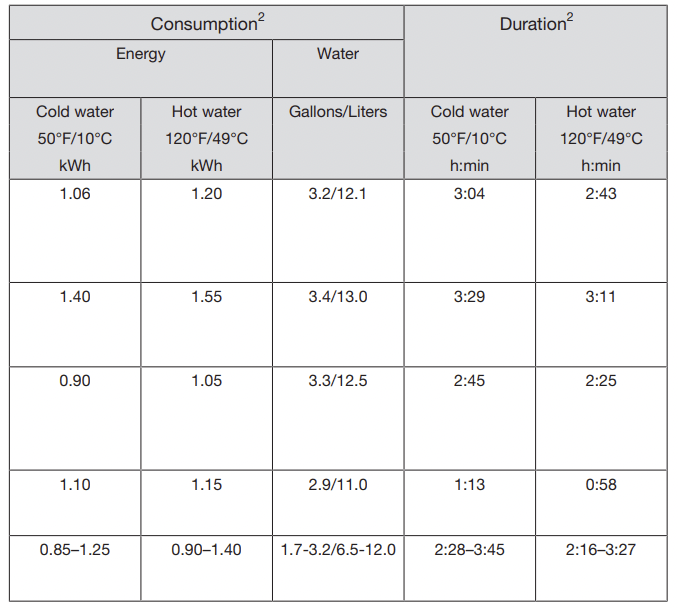
2 Values were calculated under standardized testing conditions. In practice there may be variations to these figures due to variable conditions and data recorded by the sensors. Durations shown will reflect your household conditions. Selecting program options will also affect consumption levels and program durations (see “program options”).
The energy consumption with a hot water supply includes the energy used to heat the water (exception: EnergySaver, if available).
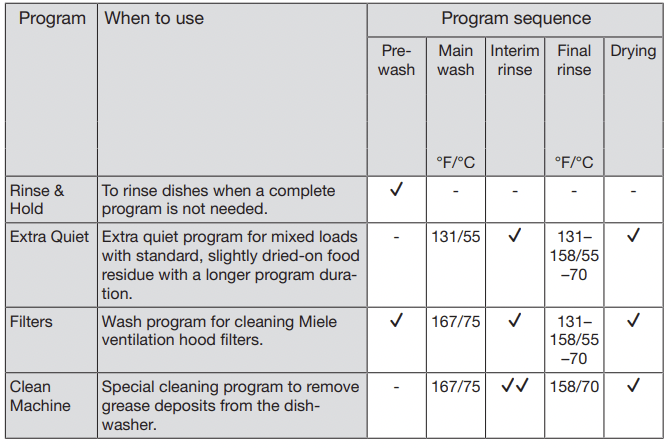
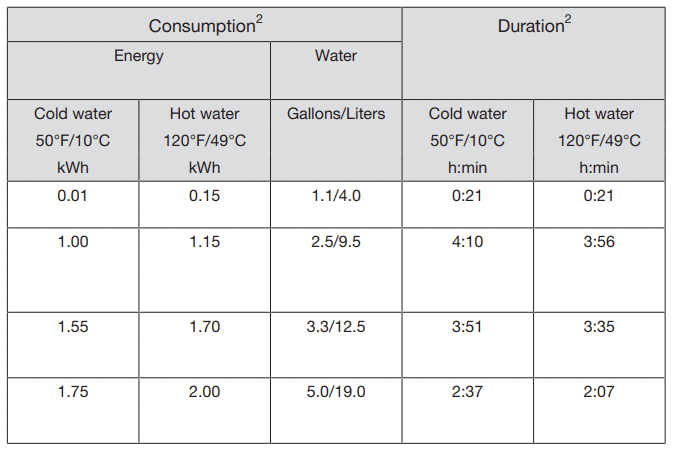
2 Values were calculated under standardized testing conditions. In practice there may be variations to these figures due to variable conditions and data recorded by the sensors. Durations shown will reflect your household conditions. Selecting program options will also affect consumption levels and program durations (see “program options”). The energy consumption with a hot water supply includes the energy used to heat the water (exception: EnergySaver, if available).
Cleaning and care
Check the condition of your dishwasher regularly (approx. every 4– 6 months). This helps to avoid faults and problems.
Damage due to unsuitable cleaning agents. All surfaces are susceptible to scratching. Contact with unsuitable cleaning agents can alter or discolor all surfaces. Only use cleaning agents formulated for use on the relevant surfaces.
Cleaning the wash cabinet
The wash cabinet is largely self-cleaning, provided that the correct amount of detergent is always used.
The frequent use of low-temperature wash programs increases the risk of contamination and odors inside the wash cabinet. Run the Pots & Pans program once per month to clean the wash cabinet and prevent odors from developing.
However, if residues such as limescale or grease have been deposited, use the Clean Machine program to clean the dishwasher (see “Additional programs ” under “Program overview”) with dishwasher cleaner (see “Clean Machine” under “Optional accessories”). Follow the dosage recommended by the manufacturer on the packaging.
Miele cleaning and care products are available to order from Miele Customer Service or from Miele’s online store.
- Clean the filters in the wash cabinet regularly
Cleaning the door and the door seal
The door seal and the sides of the dishwasher door are not accessed and cleaned by the spray arm jets. As a result, mold can develop here.
- Wipe the door seals regularly with a damp cloth to remove food deposits.
- Wipe off any food or drink residues which may have dripped onto the sides of the dishwasher door before closing it.
Cleaning the control panel
- The control panel should only be wiped with a damp cloth.
Cleaning the reflector panel
The reflector panel for the in-operation indicator light is situated on the cover sheeting underneath the countertop.
- The reflector panel should only be cleaned with a damp cloth if necessary.
Cleaning the front of the machine
Damage due to soiling. Soiling that is left too long might become impossible to remove and could cause the external surfaces to alter or discolor. It is therefore best to remove any soiling immediately.
- Clean the appliance front with a clean soft sponge and a solution of warm water and liquid dish soap. After cleaning, wipe the surfaces dry using a soft cloth.
A clean, damp microfiber cloth without detergent can also be used.
To avoid damaging the external surfaces, do not use the following:
- cleaning agents containing soda, ammonia, acids, or chloride
- cleaning agents containing lime scale remover
- abrasive cleaning agents, such as scouring powder, scouring liquid, or pumice stones
- cleaning agents containing solvents
- stainless-steel cleaning agents
- dishwasher cleaner
- oven cleaner
- glass cleaner
- hard, abrasive brushes or sponges, e.g., pot scourers, brushes, or sponges which have been previously used with abrasive cleaning agents
- eraser sponges
- sharp metal scrapers
- steel wool
- steam cleaners
Cleaning the AutoDos
You should regularly check (about every 2–3 months when the PowerDisk is empty) that the pouring channel is clean, and clean it if necessary. This helps keep the AutoDos working properly.
In order to ensure that the AutoDos works at its best, check it each time you replace the PowerDisk and clean it if needed.
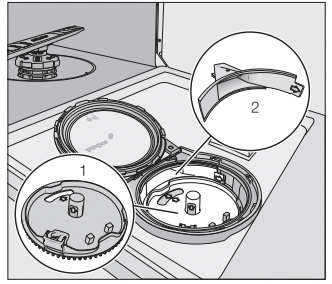
- PowerDisk holder
- Pouring channel for dispensing the detergent from the PowerDisk into the wash cabinet
- Turn the AutoDos lid to and open it.
- Remove the PowerDisk if appropriate.
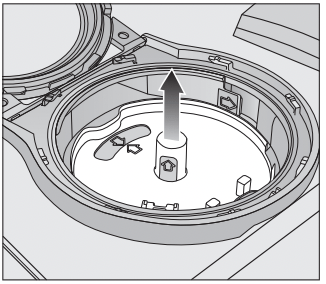
- Pull the PowerDisk holder upwards by the yellow tabs and remove it. When doing so, do not pull on the side tab.
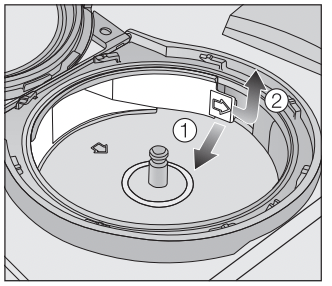
- Use the tab (see arrow) 1 to release the fill channel and pull it out 2.
- Clean the pouring channel using water and a soft brush if necessary.
It is very important that no moisture is able to access the inside of the AutoDos system during cleaning.
- Dry the fill channel well so that the detergent powder does not clump together.
- Insert the fill channel again until the tab clicks into place.
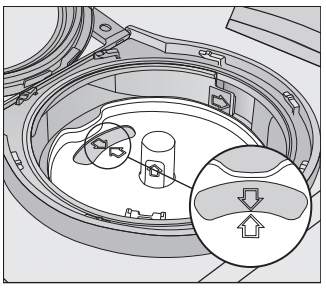
- Put the holder back into place so that the arrows in the PowerDisk holder and in the viewing window point towards each other. The holder must lie flat.
The AutoDos lid must close tightly so that the detergent powder does not get wet and clump together. Make sure that all seals are clean.
- Insert a PowerDisk.
- Close the AutoDos lid and turn it until the lid handle is directly below the symbol (see “Inserting a PowerDisk” under “Detergent”).
Regularly check the lower spray arm for any blockages to ensure that the detergent outlet of the AutoDos can be fully flushed out (see “Cleaning the spray arms” under “Cleaning and care”).
Cleaning the spray arms
Particles of food can get stuck in the spray arm jets and bearings. The spray arms should therefore be inspected regularly (approx. every 2–4 months).
Damage due to soiling entering the circulation system. Without filters, soiling can enter the circulation system and cause a blockage. Do not run a wash program without the lower spray arm or without the filters. When cleaning the filters and spray arms, make sure that coarse soiling cannot get into the circulation system.
Removing the upper and middle spray arms
- Take out the 3D MultiFlex Tray (if your dishwasher is fitted with one).
- Push the upper spray arm upwards to engage the inner ratchet. Then unscrew the spray arm by rotating the screw thread counterclockwise.
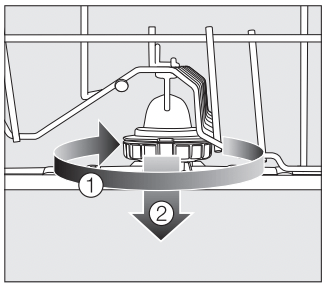
- Rotate the screw thread of the middle spray arm clockwise 1 (see diagram) and remove the spray arm 2.
Removing the lower spray arm
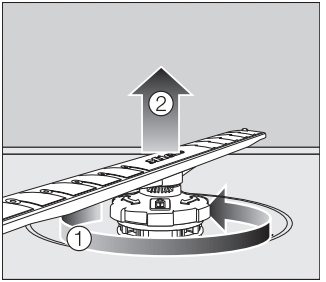
- Rotate the screw thread of the lower spray arm counterclockwise 1 and pull the spray arm upwards to remove 2.
Cleaning the filters
- Turn off the dishwasher.
- Remove the lower spray arm (see "Cleaning the spray arms” under "Cleaning and care”).
- Before removing the filter combination, remove any coarse soiling to prevent it from entering the circulation system.
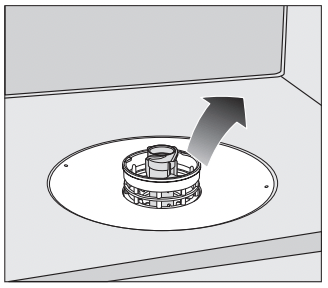
- Remove the filter combination.
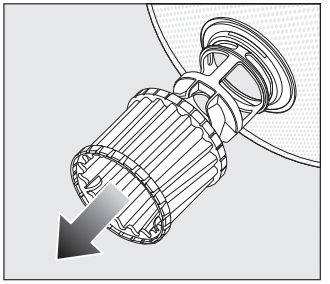
- In order to clean the inside of the filter, pull the microfilter on the plastic ring downwards and away from the filter combination.
- Rinse all of the filters under running water. If necessary, use a soft cleaning brush to remove soiling.
- Insert the microfilter back into the filter combination.
- Reinstall the filter combination so that it lies flat in the base of the wash cabinet.
- Refit the lower spray arm to the filter combination using the screw thread.
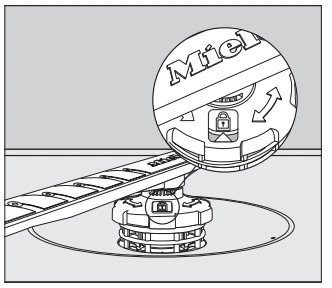
- Rotate the screw thread clockwise until the arrow in the viewing window points to the lock symbol.
Damage due to soiling entering the circulation system. The lower spray arm is used to secure the filter combination. Without filters, coarse soiling can enter the circulation system and cause a blockage. Do not run a wash program without the lower spray arm or without the filters.
Cleaning the drain pump
If water remains in the wash cabinet after the end of a program, the water has not been pumped away. The drain pump may be blocked by foreign objects. These foreign objects are easy to remove.
- Disconnect the dishwasher from the power supply. To do this, turn off at the electrical socket and withdraw the plug.
- Take the filter combination out of the wash cabinet (see “Cleaning the filters” under “Cleaning and care”).
- Scoop the water out of the wash cabinet using a suitable small container or utensil.
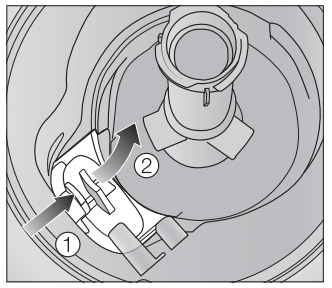
- Press the catch of the drain pump cover inwards 1.
- Tip the cover inwards until it is released 2.
- Rinse the cover thoroughly under running water and remove all foreign objects.
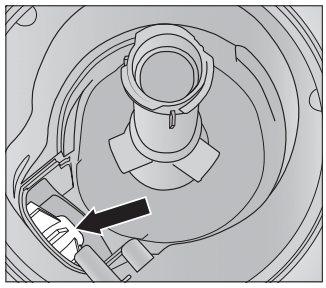
The drain pump (see arrow) is underneath the cover.
Risk of injury from glass splinters. It is especially difficult to see glass splinters in the drain pump. Take care when cleaning the drain pump.
- Carefully remove all foreign objects from the drain pump. Check the drain pump impeller by manually turning it. You will feel a little resistance when you turn the impeller.
- Refit the cover by placing it down vertically from above.
Ensure that the catch engages correctly.
Damage due to incorrect cleaning. The components are delicate and can be damaged during cleaning. Take care when cleaning the drain pump.
Frequently Asked Questions
With the help of the following guide minor faults in the performance of the machine, some of which may result from incorrect operation, can be remedied without contacting the Service Department. This guide may help you to find the reason for the fault, and how to correct it.
This section only lists faults that you can remedy yourself. All other faults are shown in Fault FXX.
Technical faults
| Problem |
Possible cause and solution |
| The dishwasher does not start. |
The door is not properly closed.
- Raise the door upward until the catch engages.
|
|
The dishwasher is not plugged in.
|
|
The circuit breaker has tripped.
- Reset the breaker (see data tag for the correct fuse rating).
- If the breaker trips again, contact Miele Customer Service.
|
|
The dishwasher is not turned on.
- Turn the dishwasher on using the sensor button.
|
| The dishwasher stops during a program. |
The circuit breaker has tripped.
- Reset the circuit breaker (see data plate for the correct fuse rating).
- If the circuit breaker trips again, contact Miele Customer Service.
|
| After the program has started, the in-operation indicator light is not visible. |
The reflector panel was not correctly fitted.
- Re-fit the reflector panel correctly (see installation sheet).
|
Fault messages
| Problem |
Possible cause and solution |
| The in-operation indicator light is flashing quickly. The alarm tone is sounding. One of the following faults appears in the display: |
Before remedying the fault:
|
 Fault FXX Fault FXX |
There may be a technical fault.
- Turn the dishwasher back on after a few seconds.
- Select the desired program.
- Close the door.
If the fault message appears again, there is a technical fault.
- Turn off the dishwasher.
- Turn off the water supply.
- Contact Miele Customer Service.
|
 Waterproof Waterproof |
The Waterproof system has reacted.
- Turn off the dishwasher.
- Turn off the water supply.
- Contact Miele Customer Service.
|
| Fault F78 |
Circulation pump fault.
- Turn off the dishwasher.
- Turn the dishwasher back on.
- Select the desired program.
- Close the door.
If the fault message appears again, there is a technical fault.
- Turn off the dishwasher.
- Turn off the water supply.
- Contact Miele Customer Service.
|
Door release
| Problem |
Possible cause and solution |
| The in-operation indicator light is flashing quickly. The alarm tone is sounding. The following fault is indicated via the display: |
Before remedying the fault:
|
| Fault F33 |
The door does not open automatically.
There may be a technical fault.
- Open the door manually (see “Opening the door” under “Before using for the first time”) and turn the dishwasher back on again.
- If the same fault message appears again, contact Miele Customer Service.
|
|
The door locking pins do not retract after the door is opened.
There may be a technical fault.
- Turn the dishwasher back on.
- If the same fault message appears again, contact Miele Customer Service.
|
Water intake fault
| Problem |
Possible cause and solution |
|
The in-operation indicator light is flashing quickly.
The alarm tone is sounding.
One of the following messages appears in the display:
|
|
 Open water supply Open water supply |
The water supply is turned off.
- Open the water supply valve all the way.
|
| Intake |
Before remedying the fault:
|
|
There is a problem with the water intake.
- Turn on the water supply fully and start the program again.
- Clean the filter in the water intake (see “Cleaning the filter in the water intake” under “Cleaning and care”).
- The water-connection pressure is lower than 7.25 psi (50 kPa). Seek professional advice
- The on-site connection for the water drainage may be too low and you will need to vent the water drainage (see “Water drainage” under “Installation”).
|
| Fault F18 |
A technical fault has occurred.
- Turn off the dishwasher.
- Turn off the water supply.
- Contact Miele Customer Service.
|
| The following fault message appears during the EnergySaver program: Intake temperture low |
The intake water has not reached the required temperature of 115 °F (45 °C) (see “Water intake” under “Installation”).
- Start the program again.
- If the fault message appears again, select a different program.
|
Water drainage fault
| Problem |
Possible cause and solution |
The in-operation indicator light is flashing quickly. The alarm tone is sounding. The following message appears on the display:  Drain Drain |
Before remedying the fault:
|
|
Water drainage fault.
There might be water in the wash cabinet.
- Clean the filter combination (see “Cleaning the filters” under “Cleaning and care”).
- Clean the drain pump (see “Cleaning the drain pump” under “Cleaning and care”).
- Remove any kink or loop in the drain hose
|
Fault in the AutoDos (automatic dispensing)
| Problem |
Possible cause and solution |
| The following message appears on the display: Insert PowerDisk or deactivate AutoDos with OK |
The AutoDos function is active but no PowerDisk has been inserted.
- Insert a PowerDisk (see “Automatic dispensing/AutoDos” under “Detergent”).
- If you do not wish to use AutoDos, deactivate the function using OK or the AutoDos sensor button.
|
|
The in-operation indicator light is flashing quickly.
The alarm tone is sounding.
The program does not start or a program that has already started stops.
The following message appears on the display: AutoDos lid open
|
The AutoDos lid has not been closed properly.
- Close the AutoDos lid and lock it fully (see “Automatic dispensing/AutoDos” under “Detergent”).
- If the lid cannot be fully closed, check whether the PowerDisk holder is lying flat (see “Inserting a PowerDisk” under “Detergent”).
- If the same fault message appears again, contact Miele Technical Service.
|
| The following message appears on the display: PowerDisk empty. Deactivate AutoDos with OK. |
The AutoDos function is active and the PowerDisk is empty.
- Replace the PowerDisk (see “Automatic dispensing/AutoDos” under “Detergent”). If you do not wish to use AutoDos, deactivate the function using OK or the AutoDos sensor button.
|
| The message PowerDisk empty. Deactivate AutoDos with OK. appears in the display even though you have inserted a new PowerDisk. |
The dishwasher was turned off when the PowerDisk was replaced and it has therefore not recognized the new PowerDisk.
- Turn the dishwasher on before replacing the PowerDisk (see “Automatic dispensing/AutoDos” and “Inserting a PowerDisk” under “Detergent”).
|
|
The in-operation indicator light is flashing quickly. At the end of the program, the alarm tone sounds and the display shows the following message:
Fault F601
|
There is a fault in the AutoDos.
- Turn the dishwasher off and back on again.
- Check whether the PowerDisk holder and the PowerDisk have been fitted correctly (see “Automatic dispensing/AutoDos” under “Detergent”).
- Activate the AutoDos function and start the program again.
If the fault message appears again, there is a technical fault. You can continue to use your dishwasher by deactivating automatic dispensing using the AutoDos sensor button and manually dispensing the detergent via the detergent compartment.
- If you wish to use automatic dispensing again, contact Miele Customer Service.
|
|
The in-operation indicator light is flashing quickly.
At the end of the program, the alarm tone sounds and the display shows the following message:
AutoDos maintenance required
The dishwasher does not turn off at the end of the program.
The dishes may not be clean because an insufficient amount of detergent was dispensed.
The AutoDos function is automatically deactivated during the program sequence.
|
An empty PowerDisk has been inserted or the AutoDos is blocked by residual detergent. Detergent dosage is insufficient.
The AutoDos function was automatically deactivated.
- Turn the dishwasher off and back on again.
Multiple messages appear in the display.
- Clean the pouring channel of the AutoDos (see "Cleaning the AutoDos” under “Detergent”).
- Clean the lower spray arm (see “Cleaning the spray arms” under “Cleaning and care”).
- Select OK to confirm each message.
- Activate the AutoDos function by confirming the message AutoDos available with OK.
- Start the program again.
The program duration will be extended by up to 2.5 hours to flush out the AutoDos detergent outlet.
|
Spray arm fault
| Problem |
Possible cause and solution |
|
During the program and at the end of the program, the display shows the following message:
Check spray arms
The dishwasher does not turn off at the end of the program.
The dishes may not be clean because no detergent was dispensed.
The AutoDos function is automatically deactivated during the program sequence.
|
The lower spray arm is blocked or the nozzles of the lower spray arm are clogged. The AutoDos function is automatically deactivated during the program because the AutoDos detergent outlet cannot be completely flushed out.
- Turn the dishwasher off and back on again.
Messages appear in the display.
- Perform a rotation check of the lower spray arm and rearrange the wash items if they are blocking the spray arm.
- Clean the lower spray arm (see “Cleaning the spray arms” under “Cleaning and care”).
- Select OK to confirm each message.
- Start the program again.
|
General dishwasher problems
| Problem |
Possible cause and solution |
|
The in-operation indicator light is flashing quickly.
The alarm tone is sounding.
The indicator light of the selected program is flashing and the message Continue with OK appears in the display.
The dishwasher does not start or the FlexiTimer stops running.
|
The safe mode of the dishwasher was activated. This takes place in the following instances:
– If you do not close the door within 4 seconds of the last press of a sensor button at program start.
– If the door is open for longer than 4 seconds during a program or before the FlexiTimer start time is reached.
- Press the OK sensor button and close the door within 4 seconds.
|
| The indicator lights and the display are dark. |
The dishwasher has turned off automatically to save energy.
- Turn the dishwasher back on using the sensor button.
|
| Detergent residue is left in the detergent compartment at the end of a program. |
The detergent compartment was still damp when detergent was added.
- Only add the detergent when the detergent compartment is dry.
|
| The detergent compartment lid cannot be closed. |
Residual detergent is blocking the catch.
- Remove the residual detergent.
|
| At the end of a program there is a film of moisture on the inside of the door and possibly on the interior cabinet walls. |
This is part of the normal function of the drying system. The moisture will dissipate after a short time. |
| Water remains in the wash cabinet at the end of a program. |
Before remedying the fault:
|
|
The filter combination in the wash cabinet is clogged.
- Clean the filter combination (see “Cleaning the filters” under “Cleaning and care”).
|
|
The drain pump is blocked.
- Clean the drain pump (see “Cleaning the drain pump” under “Cleaning and care”).
|
|
The drain hose is kinked.
- Remove any kinks from the drain hose.
|
Noises
| Problem |
Possible cause and solution |
| There is a knocking noise in the wash cabinet. |
A spray arm is knocking against a wash item.
- Carefully open the door and rearrange the wash items that are obstructing the spray arm.
|
| There is a rattling noise in the wash cabinet. |
Wash items are not secure in the wash cabinet.
- Carefully open the door and rearrange the wash items so that they sit securely.
|
|
There is a foreign object (e.g., glass shard) in the drain pump.
- Remove the foreign object from the drain pump (see “Cleaning the drain pump” under “Cleaning and care”).
|
| Knocking noise in the water pipes |
This may be caused by the on-site installation or the cross-section of the piping.
- However, this will not affect the functioning of the dishwasher in any way. If in doubt, contact a suitably qualified plumber.
|
Poor cleaning results
| Problem |
Possible cause and solution |
The dishes are not clean.
|
The dishes were not loaded correctly.
- See notes under “Loading the dishwasher”.
|
|
The program was not powerful enough.
- Select a more powerful program (see “Program overview”).
|
|
Not enough detergent was dispensed during manual detergent dispensing.
- Use more detergent, or change the brand you are using.
|
|
Items are blocking the path of the spray arms.
- Carry out a rotation check and if needed rearrange the items so that the spray arms can rotate freely.
|
|
The filter combination in the wash cabinet is not clean or was incorrectly fitted.
This may have caused the spray arm jets to become blocked.
- Clean and/or fit the filter combination correctly.
- Clean the spray arm jets if necessary (see “Cleaning the spray arms” under “Cleaning and care”).
|
| There are smears on glassware and cutlery. There is a bluish sheen on the surface of glassware. The film can be wiped off. |
The rinse aid dosage is set too high.
- Reduce the dosage (see “Rinse aid” under “Settings”).
|
Dishes are not dry or cutlery and glasses are spotty
|
The rinse aid dosage is set too low or the rinse aid reservoir is empty.
- Replenish the reservoir, increase the dosage, or change the brand of rinse aid (see “Rinse aid” under “Before using for the first time”).
|
|
Dishes were taken out of the wash cabinet too soon.
- Leave dishes in longer (see “Operation” under “Unloading the dishwasher”).
|
|
The duration of the drying phase for the selected program is not sufficient for the dishes.
- Select the Extra dry function (see “Extra dry” under “Settings”).
|
|
You have used combination products that have insufficient drying performance.
- Switch to another detergent, or replenish the rinse aid (see “Rinse aid” under “Before using for the first time”).
|
| Glassware has a brown or blue tinge. The film cannot be wiped off. |
Ingredients from the detergent have formed a deposit.
- Switch to another detergent straight away.
|
| Glassware is dull and discolored. The film cannot be wiped off. |
The glassware is not dishwasher-safe. The surface has altered.
- No remedy. Purchase glassware which is dishwasher-safe.
|
| Tea or lipstick stains have not been completely removed. |
The wash temperature of the selected program was too low.
- Select a program with a higher wash temperature.
|
|
The bleaching effect of the detergent is too low.
- Switch to another detergent.
|
| Plastic parts are discolored. |
Natural dyes, e.g., from carrots, tomatoes, or ketchup may be the cause. The amount of detergent used or its bleaching effect was not sufficient to deal with natural dyes.
- Use more detergent (see “Detergent”). Parts that are already discolored will not revert to their original color.
|
White residue is visible on the dishes. Clouding has occurred on glassware and cutlery. The film can be wiped off.
|
The rinse aid dosage is set too low.
- Increase the dosage (see “Rinse aid” under “Settings”).
|
|
The salt reservoir is empty.
- Fill the salt reservoir (see “Reactivation salt” under “Before using for the first time”).
|
|
The salt reservoir cap has not been screwed on correctly.
- Replace it, making sure that it screws back on correctly.
|
|
Unsuitable combination detergents were used.
- Switch to another detergent. If using tabs or powder detergent, do not choose combination products and ensure you refill the reactivation salt and rinse aid.
|
|
The water softener is programmed to too low a water hardness level.
- Program the water softener to a higher water hardness level (see “Water hardness” under “Settings”).
|
There are rust stains on the cutlery
|
The affected items are not corrosion resistant.
- No remedy. Purchase cutlery which is dishwasher-proof.
|
|
A program was not run after reactivation salt was added. Traces of salt have got into the normal wash cycle.
- Always run the QuickIntenseWash program with the Express program option selected and without any dishes in the dishwasher after adding reactivation salt.
|
|
The salt reservoir cap has not been screwed on correctly.
- Replace it, making sure that it screws back on correctly.
|