
3-047-938-11 (1)
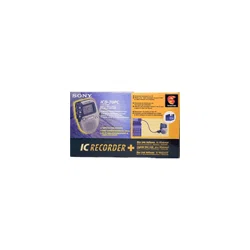
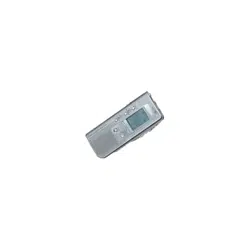
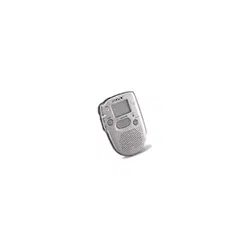
IC Recorder
Operating Instructions
2000 Sony Corporation
ICD-37/57/67

2
For the customers in the United States
Owner’s Record
The model number is located at the rear and the serial number is located
inside the battery compartment. Record these numbers in the spaces
provided below. Refer to these numbers whenever you call upon your
Sony dealer regarding this product.
Model No. Serial No.
INFORMATION
This equipment has been tested and found to comply with the limits for a
Class B digital device, pursuant to Part 15 of the FCC Rules. These limits
are designed to provide reasonable protection against harmful interference
in a residential installation. This equipment generates, uses, and can
radiate radio frequency energy and, if not installed and used in accordance
with the instructions, may cause harmful interference to radio
communications.
However, there is no guarantee that interference will not occur in a
particular installation. If this equipment does cause harmful interference
to radio or television reception, which can be determined by turning the
equipment off and on, the user is encouraged to try to correct the
interference by one or more of the following measures:
– Reorient or relocate the receiving antenna.
– Increase the separation between the equipment and receiver.
– Connect the equipment into an outlet on a circuit different from that to
which the receiver is connected.
– Consult the dealer or an experienced radio/TV technician for help.
This device complies with Part 15 of the FCC Rules. Operation is subject to
the following two conditions: (1) This device may not cause harmful
interference, and (2) this device must accept any interference received,
including interference that may cause undesired operation.
You are cautioned that any changes or modifications not expressly
approved in this manual could void your authority to operate this
equipment.

3
Table of Contents
What is an IC recorder? ................................................................................ 4
Features .......................................................................................................... 5
Getting Started
Step 1: Installing the Battery........................................................................ 6
Step 2: Setting the Clock............................................................................... 8
Basic Operations
Recording Messages ................................................................................... 10
Playing Back Messages............................................................................... 13
Erasing Messages ........................................................................................ 16
Advanced Operations
Moving Messages to a Different File — Move Function ....................... 18
Adjusting the Playback Speed .................................................................. 19
Adding a Recording to a Previously Recorded Message ...................... 20
Playing Back a Message at a Desired Time with an Alarm ................... 21
Preventing Accidental Operation — HOLD function ........................... 25
Menu Settings
Turning off the Beep Sound ....................................................................... 26
Selecting the Microphone Sensitivity ....................................................... 27
Playing Back All Messages in a File Continuously ................................ 28
Additional Information
Precautions ................................................................................................... 29
Troubleshooting........................................................................................... 30
Specifications ............................................................................................... 31
Index to Parts and Controls ....................................................................... 32
Menu map .................................................................................................... 34
Index .............................................................................................. Back cover
Notes
•The illustrations in this manual are those of ICD-57.
•The display in the display window may be different from the illustrations in
the manual depending on the models or operating conditions.
4
What is an IC recorder?
This IC recorder enables you to record and play back oral messages in the
built-in IC memory.
z Recording
When a new message is recorded, it is automatically added after the last
recorded messages.
Unlike with tape recorders, you do not need to worry about recording over
previously recorded messages by mistake.
Since you do not need to search for the end of the last recording, you can
start recording quickly whenever you wish.
z Playback
With this IC recorder, you can quickly locate the message you want to play
back.
Reviewing the current recording is also very easy.
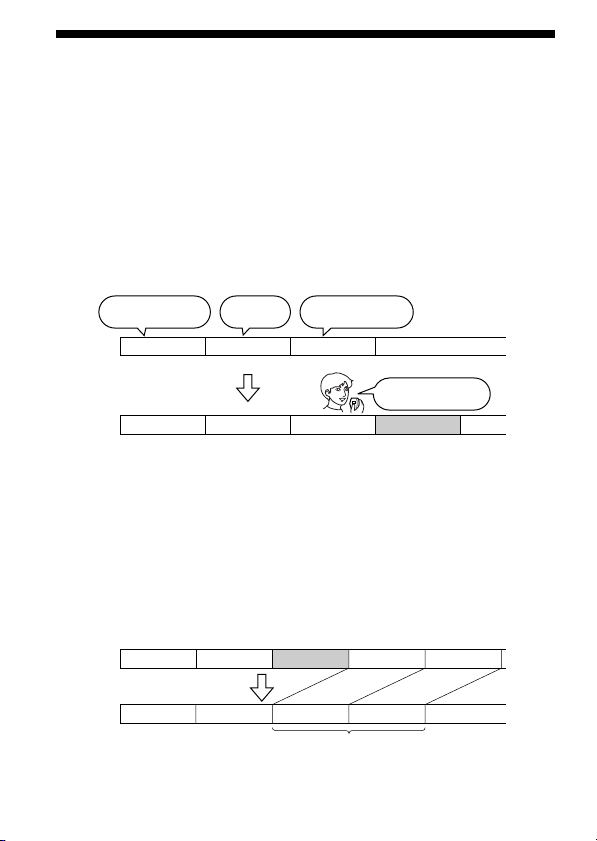
z Erasing
You can quickly erase unwanted messages with an easy operation. When a
message is erased, the next message automatically advances, leaving no
blank space.
Meet Mr. Brown at
2 p.m. tomorrow.
11:30, November 1
12:00, November 1 10:00, November 2
Don’t forget
to call Mary
Make remittance
at ABC bank
9:00, November 4
Send a card to
Miss Smith
Message 1 Message 2 Message 3
Message 1 Message 2 Message 3
Message 4
Remaining messages
are renumbered.
Message 1 Message 2 Message 5
Message 4Message 1 Message 2 Message 3
Message 3
Message 4
After
Before
Erase Message 3

5
Features
•45 minutes (ICD-37)/90 minutes (ICD-57)/180 minutes (ICD-67)
recording time
This unit is useful for recording messages or appointments.
•Organizing message files
You can choose among 3 different files to record and store your
messages.
You can easily move messages from one file to another (see page 18).
Up to 99 messages can be recorded in each file.
•Alarm function
You can start playing back a desired message with an alarm on a desired
date and time (see page 21). You can use this function to remind you of
the time of the meeting, etc.
•Playback speed control
You can play back messages rapidly (+50%) or slowly (–25%) (see page
19). This is useful when playing back a long recording. The sound pitch
will be automatically adjusted when you change the playback speed.
•Adding a recording to previously recorded message
You can add a recording to the message being played back to count as
one message (see page 20).
6
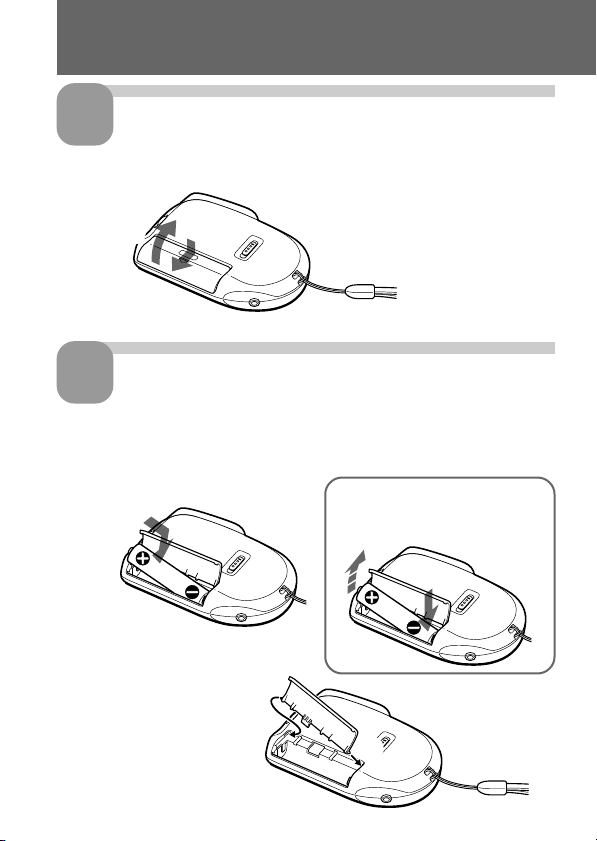
1
2
Slide and lift the battery
compartment lid.
Insert a LR03 (size AAA)
alkaline battery with correct
polarity, and close the lid.
If the battery compartment
lid is accidentally detached,
attach it as illustrated.
Step 1: Installing the Battery
1
2
1
2
To take out the battery
Take out the battery by pushing
the # side of it as illustrated.

7
Getting Started
Clock setting display appears when you insert battery for the first time, or
when you insert battery after the unit has been without battery for a
certain period of time. Please refer to Steps 2 to 4 in “Step 2: Setting the
Clock” on pages 8 and 9 to set the date and time.
Replacing the battery
“E“ appears on the display when the battery becomes weak and it flashes
when the battery is exhausted. Replace the battery with a new one.
Battery life*
With continuous use, approx. 5 hours recording/4.5 hours playback
* Using Sony alkaline battery LR03 (SG), playing back through the internal
speaker with VOL control at around 3
The battery life may shorten depending on the operation of the unit.
Notes
•Do not use manganese batteries for this unit.
•When you replace the battery, insert the new one within 3 minutes after you
removed the exhausted one. Otherwise, the display may show the clock
setting display or incorrect date and time when you reinsert the battery. In this
case, set the date and time again.
The recorded messages, however, will remain.
•Do not charge a dry battery.
•When you are not going to use the unit for a long time, remove the battery to
prevent damage from battery leakage and corrosion.
8
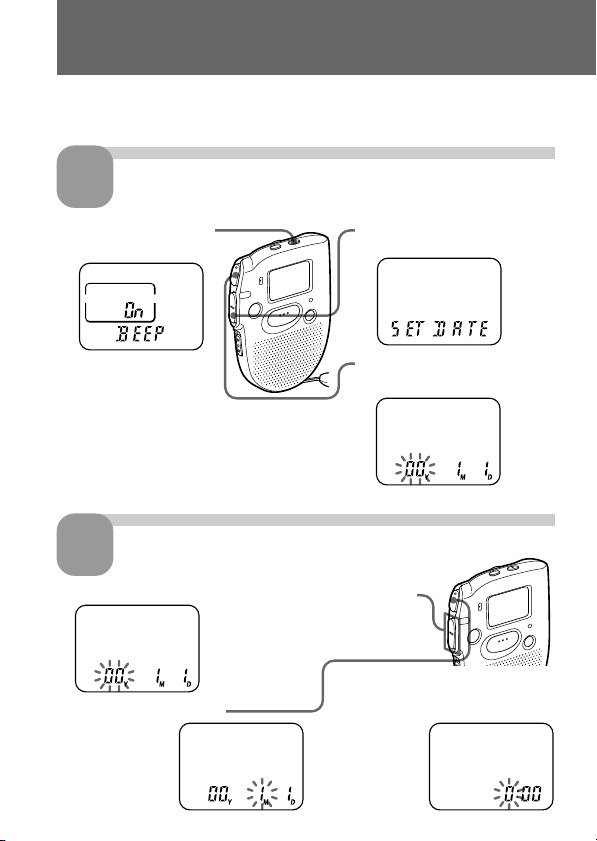
Clock setting display appears when you insert battery for the first time, or
when you insert battery after the unit has been without battery for a
certain period of time. In this case, proceed from Step 2.
Display the clock setting display.
Set the date.
Step 2: Setting the Clock
1 Press MENU to enter
the menu mode.*
2 Press –. once to display
“SET DATE”.
3 Press NxPLAY/STOP.
The year digits will flash.
2 Press NxPLAY/STOP.
The month
digits will flash.
3 Set the month and day in
sequence, then press
NxPLAY/STOP.
The hour
digits will
flash.
1 Press –. or >+ to select the digits of the year.
1
2
* The “ALARM” display may
appear instead of the “BEEP”
display (see page 34).
9
Getting Started
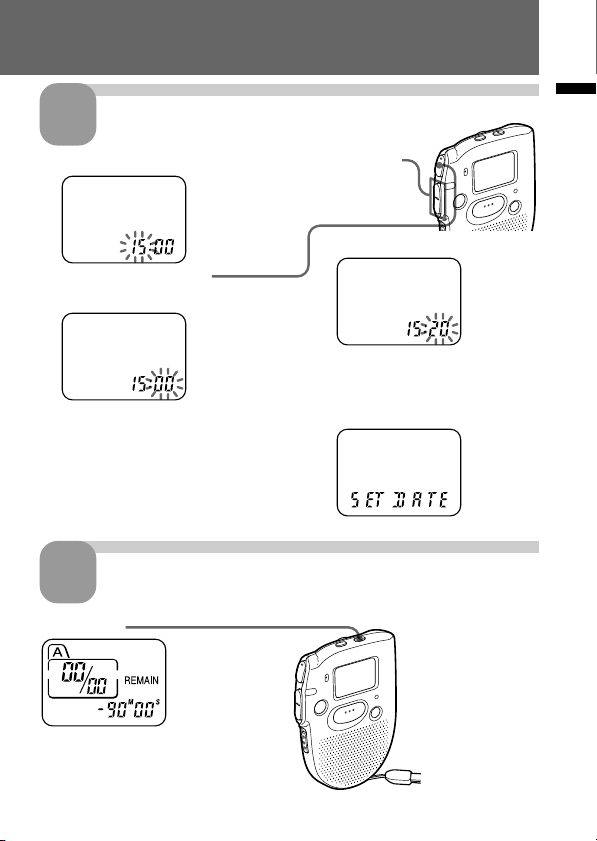
Set the time.
Exit from the menu mode.
Press MENU.
3
2 Press NxPLAY/STOP.
The minute digits will flash.
3 Set the minute.
4 Press NxPLAY/STOP at the
time signal.
The display will return to
“SET DATE”.
4
1 Press –. or >+ to select the digits of the hour.
10
Recording Messages
You can record up to 99 messages in each file (A, B and C).
Since a newly recorded message is automatically added behind the last
recorded message, you can start recording quickly without searching for
the end of the last recording.
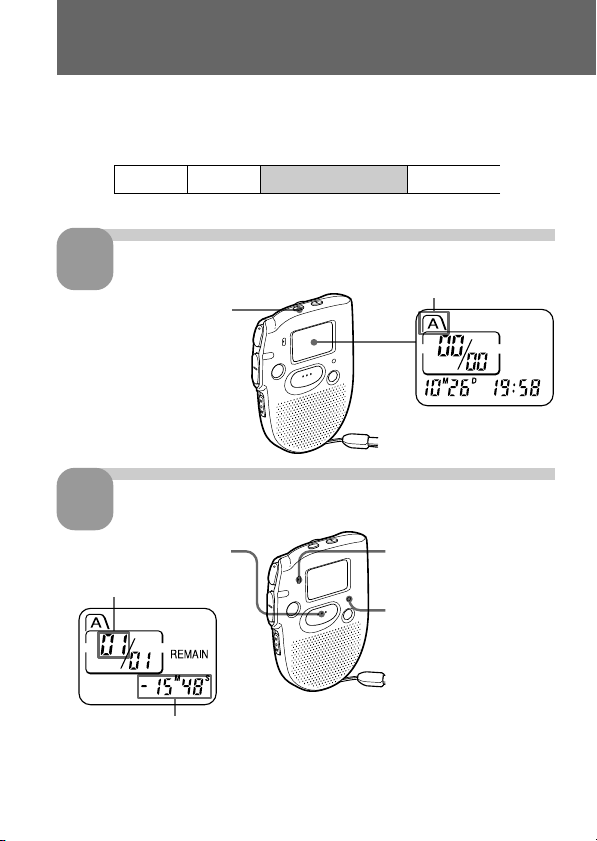
Select the file.
Start recording.
During recording, the OPR indicator lights up in red.
You do not need to keep pressing REC START/STOP while recording.
1
Press FILE repeatedly until
the desired file is
displayed.
Current file
1 Press REC START/STOP.
Current message
number
Remaining recording time
2 Speak to the built-in
microphone.
2
OPR indicator
Message 1 Message 2 Blank space
Newly recorded message
Basic Operations
e.g.
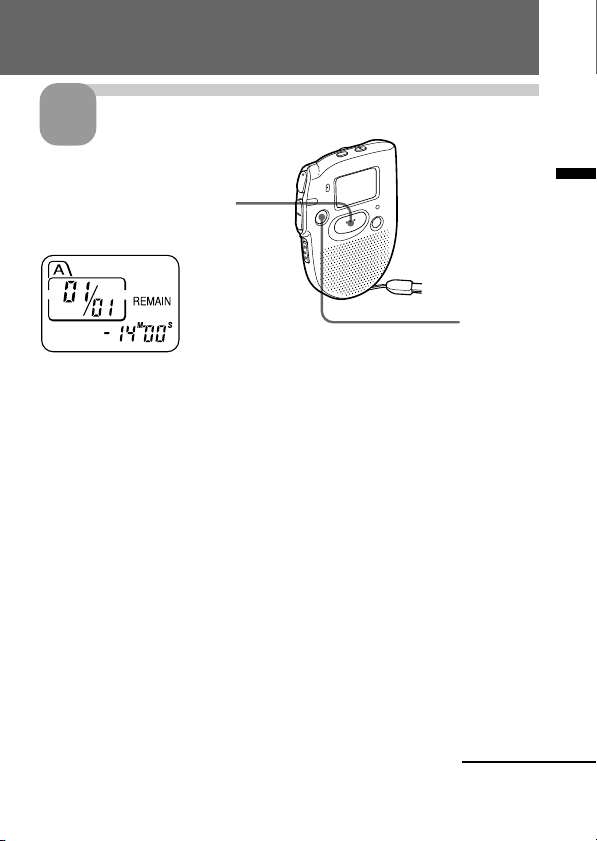
11
Basic Operations
Stop recording.
If you do not change the file after you stop recording, the next time you record
you will record in the same file.
To listen to the current recording
Press REC START/STOP to stop recording, then press NxPLAY/STOP.
To review the current recording instantly
Press NxPLAY/STOP during recording.
To stop recording
You can also stop recording by pressing STOP instead of REC START/
STOP.
To display the remaining recording time
During recording, the remaining recording time is displayed under
REMAIN.
To display it during stop, press STOP for more than one second.
3
STOP
Press REC START/STOP again.
The unit stops at the beginning
of the current recording.
Continued

12
Recording Messages (continued)
1 Tips
• You can record for up to 45 minutes (ICD-37)/90 minutes (ICD-57)/
180 minutes (ICD-67).
• You can select the microphone sensitivity. See page 27.
Notes
• When the remaining time of recording reaches 1 minute, the remaining time
and “END” will flash one after the other in the display window. When the
memory is full, recording automatically stops and “FULL” will flash in the
display window with an alarm sound. To continue recording, first erase some
of the messages (see page 16).
• If you press REC START/STOP when the memory is full, “FULL” will flash
with an alarm sound. Erase some of the messages before you start recording
again (see page 16).
• If you press REC START/STOP after you have recorded 99 messages, “FULL”
will flash with an alarm sound. Select another file or erase some of the
messages (see page 16).
Note on recording
Noise may be recorded if an object, such as your finger, etc., accidentally rubs
or scratches the unit during recording.
13
Basic Operations
Playing Back Messages
When playing back a previously recorded message, start from Step 1.
When playing back a message you have just finished recording, start from
Step 3.
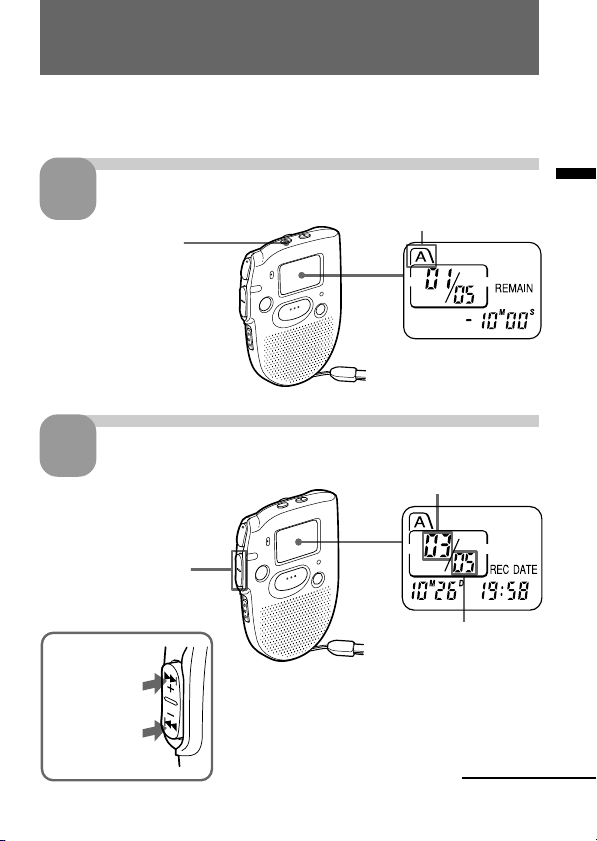
Select the file.
Select the message number.
1
Press FILE repeatedly
until the desired file is
displayed.
2
Press –. or >+ to
display the desired
message number.
for smaller
message
number
for larger
message
number
Selected message number
Total number of
messages in the
current file
Current file
Continued
14
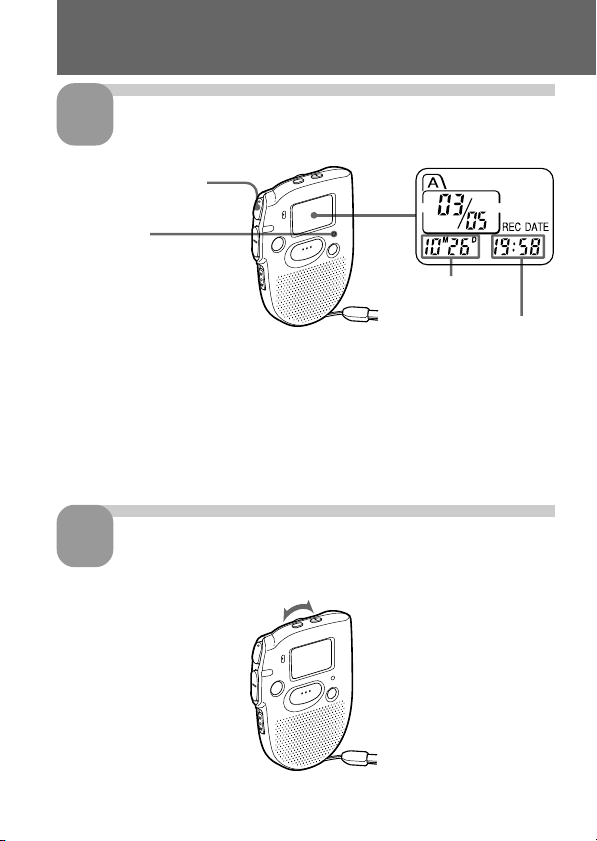
Start playback.
During playback, the OPR indicator lights up in green.
After playing back one message, the unit stops at the beginning of the next
message.
When the last message on a file has been played back, the unit stops at the
beginning of the last message.
Adjust the volume.
Playing Back Messages (continued)
3
4
OPR indicator
Time of recording
Date of recording
Turn VOL.
Press NxPLAY/STOP.
15
Basic Operations
Playing back a message repeatedly — Repeat
Play
During playback, press NxPLAY/STOP for more than one second.
“
“ will be displayed and the selected message will be played back
repeatedly until you stop playback by pressing STOP.
Playing the beginning of each message —
Scanning Play
During stop mode, press NxPLAY/STOP for more than one second.
“SCAN” will be displayed in the display window and the first 5 seconds of
each message in the selected file will be played back.
When you find the desired message, press NxPLAY/STOP. The message
will be played back until the end.
For private listening
Connect an earphone (not supplied) to the EAR jack.
The built-in speaker will be automatically disconnected.
To stop playback
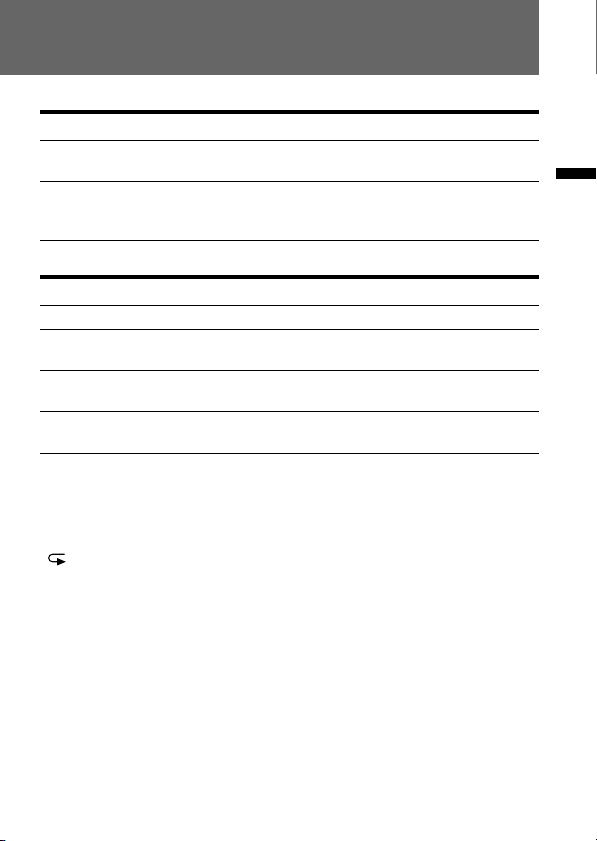
To Do this
stop at the beginning of Press STOP.
the current message
stop at the current position Press NxPLAY/STOP.
(Playback Pause function) To resume playback from that point,
press NxPLAY/STOP again.
Other operations
To Do this
skip to the next message Press >+.
skip to the previous Press –..
message
search forward during Keep >+ pressed.
playback
search backward during Keep –. pressed.
playback
16
Erasing Messages
You can erase the recorded messages one by one or all messages in a file at
a time.
Note that once a recording has been erased, you cannot retrieve it.
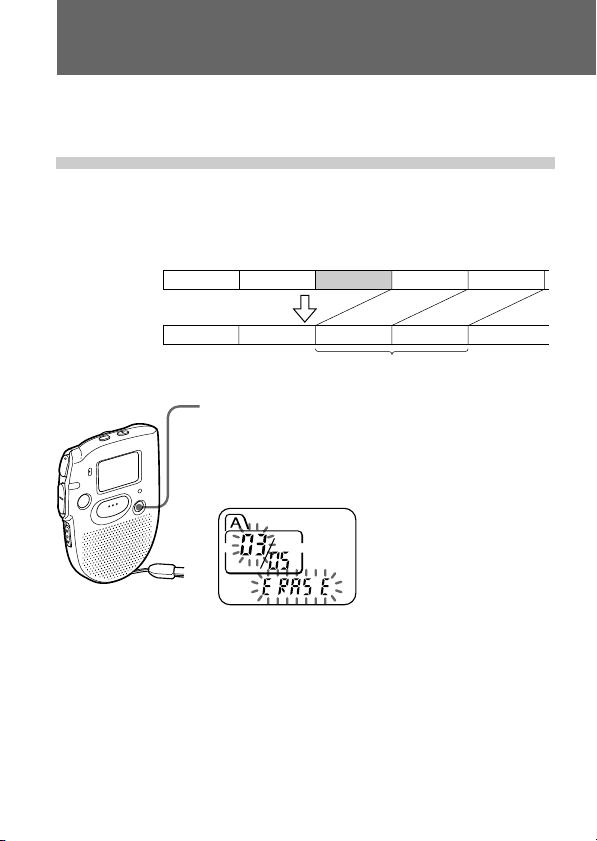
Erasing messages one by one
When a message is erased, the remaining messages will advance and
renumbered so that there will be no space between messages.
To cancel erasing
Press STOP before step 2.
To erase other messages
Repeat steps 1 and 2.
1 Press ERASE while playing back the message you
want to erase or press ERASE for more than 1
second during stop mode.
A beep will sound and the message number and
“ERASE” will flash while the first and last 5 seconds
of the message is played back 10 times.
2 Press ERASE while the message is being played
back.
The message is erased and the remaining messages
will be renumbered.
Erase Message 3
Message 1 Message 2 Message 3 Message 4
Before erasing
After erasing
Remaining messages are renumbered.
Message 1 Message 3 Message 4 Message 5Message 2
17
Basic Operations
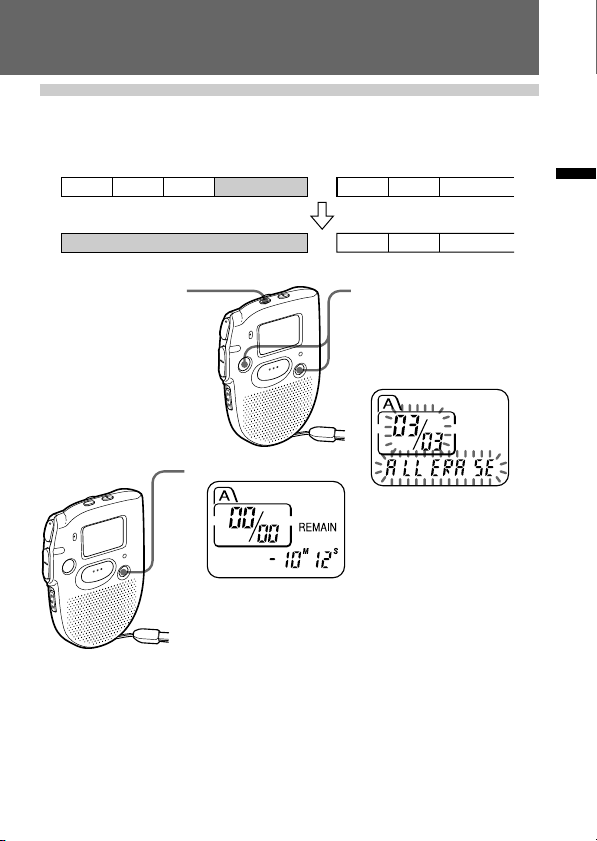
Erasing all messages in a file
e.g.
File A
File B
1 Press FILE to select
the file you want to
erase.
To cancel erasing
Press STOP before step 3.
3 Press ERASE.
Message 1 Message 2 Message 3
Blank space
Blank space
Message 1 Message 2 Message 3
Message 1 Message 2 Message 3
2 Press ERASE and STOP
at the same time for
more than 1 second.
The file, the message
number and “ALL
ERASE” will flash.
18
BAdvanced Operations
Moving Messages to a Different File —
Move Function
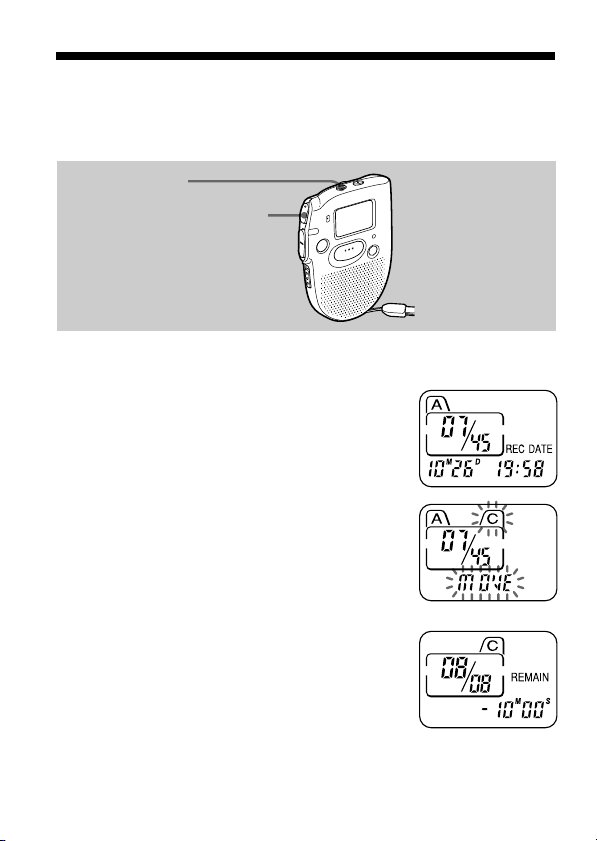
You can move recorded messages to a different file.
e.g. To move the seventh message in the file A to the file C
1 Play back the message you want to
move.
2 Press FILE during playback to select the
file you want to move the message to.
The file and “MOVE” will flash and the first
and last 5 seconds of the message will be
played back 10 times.
3 Press NxPLAY/STOP.
To cancel moving the message(s)
Press STOP before Step 3.
FILE
NxPLAY/STOP
19
Advanced Operations
Notes
•The move function does not duplicate a message in another file. When you
move a message to another file, the one in the previous file will be deleted.
•If you do not press NxPLAY/STOP while the first and last 5 seconds of the
message are played back, the display will return to the REMAIN display. In
this case, start the procedure from the beginning.
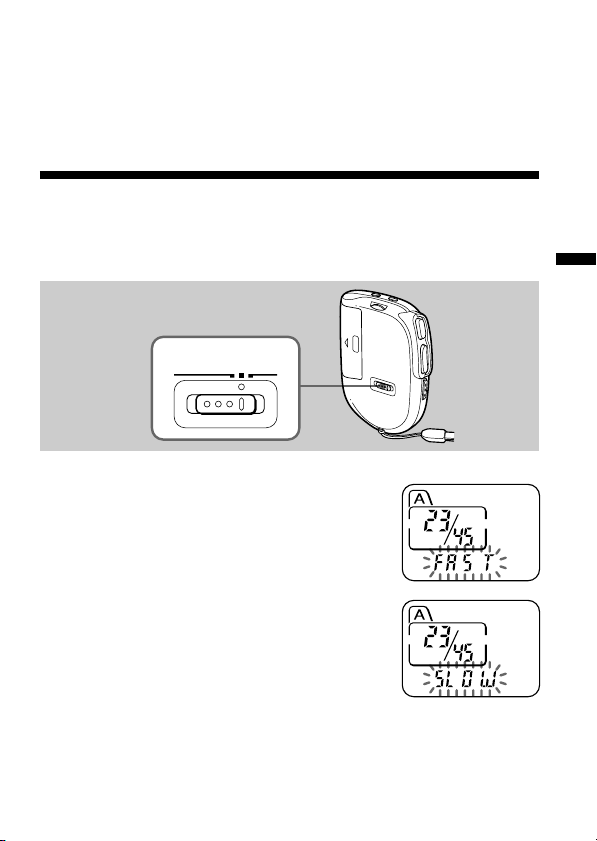
Adjusting the Playback Speed
You can adjust the speed of the playback with the use of the PLAY SPEED
selector on the bottom.
To play back rapidly
Set PLAY SPEED to FAST.
“FAST” will flash three times in the display
window and the playback speed will
increase about 50%.
To play back slowly
Set PLAY SPEED to SLOW.
“SLOW” will flash three times in the display
window and the playback speed will
decrease about 25%.
To play messages with normal speed
Set PLAY SPEED to NORMAL.
NORMAL FASTSLOW
PLAY SPEED
PLAY SPEED selector
20
Adding a Recording to a Previously
Recorded Message
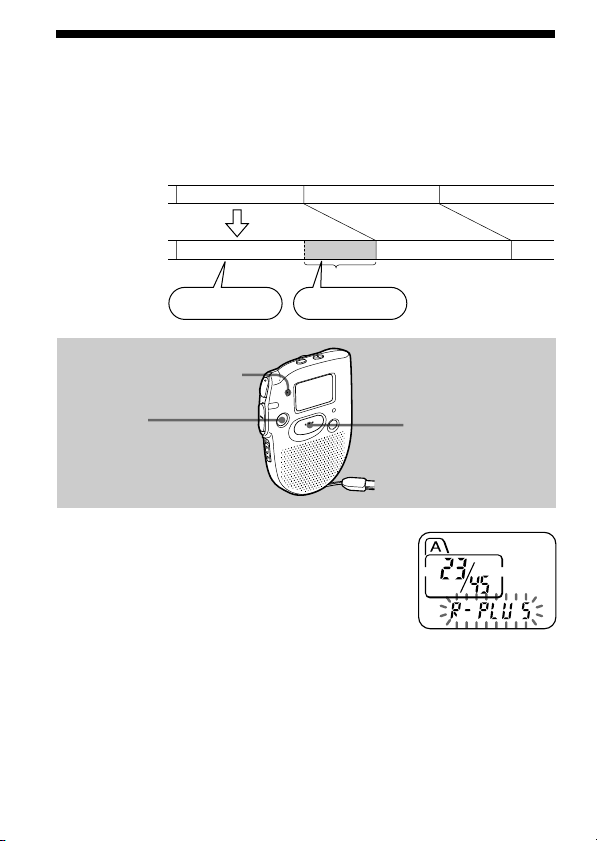
You can add a recording to the message being played back.
The added recording will be placed after the current message and counted
as a part of the message.
1 During playback, press REC
START/STOP for more than 1 second.
The OPR indicator lights in red and
“R-PLUS” flashes three times.
Speak into the built-in microphone.
The display will then change to the
remaining recording time.
2 Press REC START/STOP again to stop
the recording.
To stop recording
You can also stop recording by pressing STOP instead of REC START/
STOP.
STOP
REC
START/STOP
Built-in microphone
During playback
of Message 3
After adding
a recording
Message 3 Message 4
Message 3 Message 4
Meeting at 2 o’clock
on December 1.
at Conference
room A
Added recording
21
Advanced Operations
Playing Back a Message at a Desired
Time with an Alarm
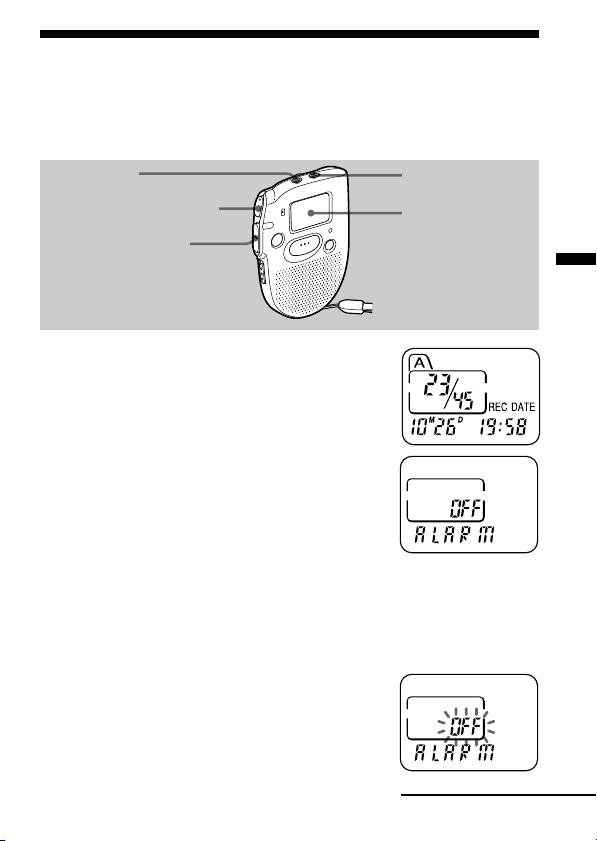
You can sound an alarm and start playback of a selected message at a
desired time.
1 Use FILE and –./>+ to select the
file and the message you want to play
back.
2 Enter the alarm setting mode.
1 Press MENU.
The unit enters the menu mode and
“ALARM OFF” will be displayed.
(If “ALARM On” is displayed, the alarm has
been set. If you do not wish to change the
setting, press MENU and exit the menu
mode.)
Note
“ALARM OFF (or On)” will not appear and the alarm cannot be set if
the clock has not been set or no message has been recorded in the
selected file.
2 Press NxPLAY/STOP.
“OFF” starts to flash.
MENU
FILE
Display window
NxPLAY/STOP
–./>+
Continued
22
Playing Back a Message at a Desired Time with an
Alarm (continued)
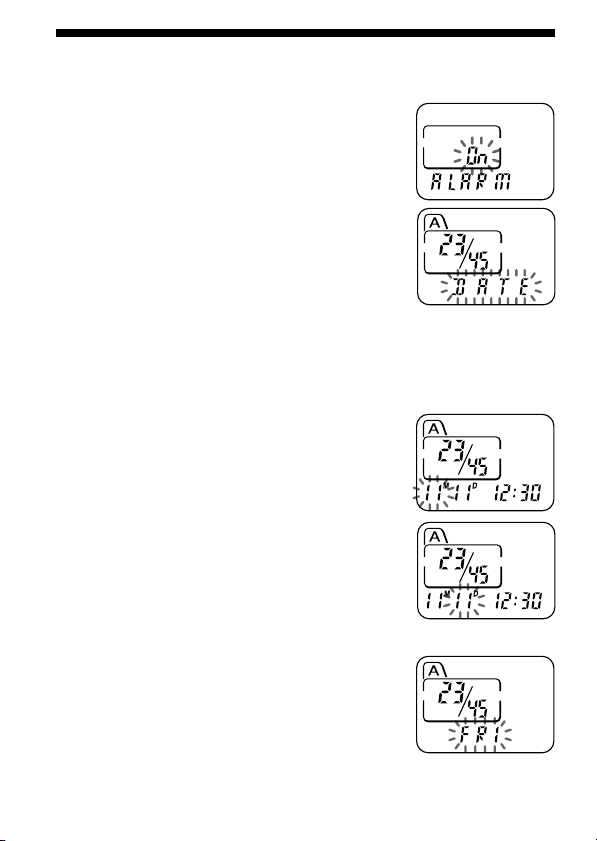
3 Press –. or >+ to flash “On”.
4 Press NxPLAY/STOP.
“DATE” will flash in the display window.
3 Set the alarm date.
• to play back on a desired date
(the message will be played back at the
same time on the same date every year
until you erase the message)
1 Press NxPLAY/STOP when “DATE”
flashes.
The month digits will flash.
2 Press –. or >+ to select the month
digits and press NxPLAY/STOP.
The day digits will flash.
3 Press –. or >+ to select the day digits.
• to play back once a week
Press –. or >+ to select the day of the
week.
23
Advanced Operations
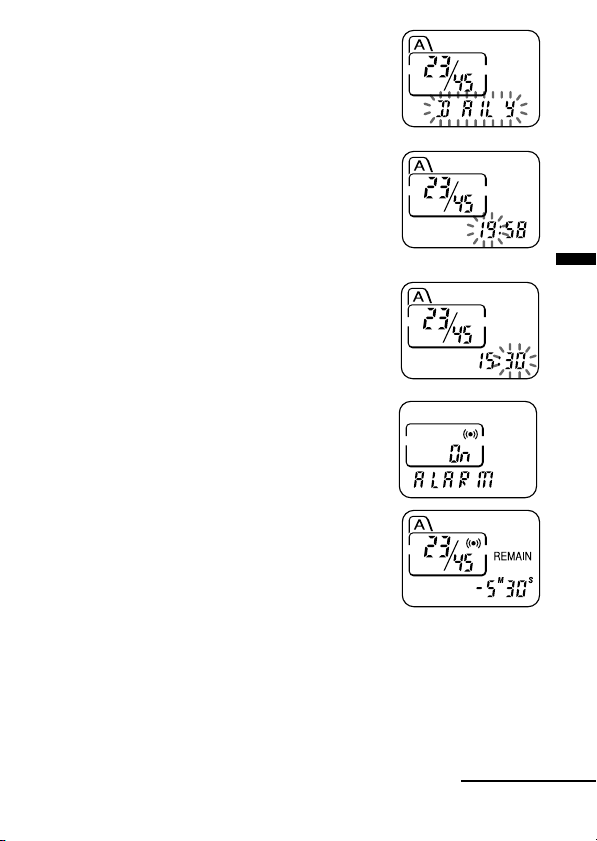
• to play back at the same time every day
Press –. or >+ to select “DAILY”.
4 Press NxPLAY/STOP.
The hour digits will flash.
5 Set the alarm time.
1 Press –. or >+ to select the hour
digits and press NxPLAY/STOP.
The minute digits will flash.
2 Press –. or >+ to select the minute
digits and press NxPLAY/STOP.
“ALARM On” and “,” will be displayed to
indicate that the setting has been completed.
6 Press MENU to exit the menu mode.
“,” is displayed when the number of the message with alarm setting is
selected.
At the set time, the alarm will sound for about 10 seconds and the selected
message will be played back.
During playback, “ALARM” will flash in the display window.
Playback will stop at the end of the message.
Continued

24
To cancel the alarm setting before the playback starts
Press STOP while the alarm sound is heard. You can stop even when the
HOLD function is activated.
Notes
• You cannot set the alarm if you have not set the clock or there is no message in
the selected file (the unit will not enter the alarm setting mode when you press
MENU in Step 2 on page 21).
• If you try to set the alarm to play back a message at a previously set time on
another message, “PRE SET” will be displayed, preventing new settings.
• If the alarm time comes while another message is being played back with an
alarm, the playback stops and the new message will be played back.
• If the alarm time comes during recording, alarm will sound for 10 seconds
after the recording is finished and playback begins. “,” will flash when the
alarm time comes.
• If more than one alarm time comes during recording, only the first message
will be played back.
• If the alarm time comes when the unit is in the menu mode, alarm will sound
and the menu mode will be cancelled.
• If you erase the message you set the alarm to play back, the alarm setting will
be cancelled.
• You can adjust the playback volume with the VOL control.
• If the alarm time comes during erasing, alarm will sound for 10 seconds after
the erasing is finished and playback begins.
• Alarm setting will not be cancelled when the alarm playback finishes. To
cancel alarm setting, see page 25.
Playing Back a Message at a Desired Time with an
Alarm (continued)
25
Advanced Operations
Preventing Accidental Operation —
HOLD function
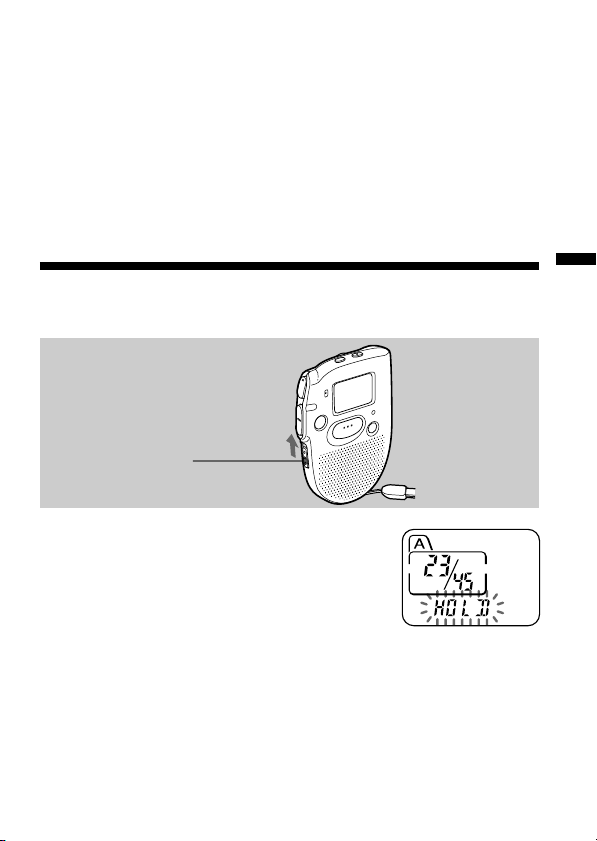
Slide the HOLD switch in the direction of the
arrow. “HOLD” will flash three times, indicating
that all the functions of the buttons are locked,
except for STOP to stop an alarm.
To cancel the HOLD function, simply slide the
HOLD switch in the opposite direction.
Note
When the HOLD function is activated during recording, cancel the HOLD
function first to stop recording.
HOLD switch
To cancel the alarm setting or change the alarm time
1 Select the message you set the alarm to play back, and press MENU.
“ALARM On” will be displayed.
2 Press NxPLAY/STOP to flash “On”.
3 To cancel the alarm setting: Press –. or >+ to flash “OFF” and
press NxPLAY/STOP.
To change the alarm date and time: Press NxPLAY/STOP. When
the alarm date is displayed, follow the steps 3 to 5 on pages 22 and 23
to change the alarm date and time.
4 Press MENU to exit the menu mode.
26
BMenu Settings
Turning off the Beep Sound
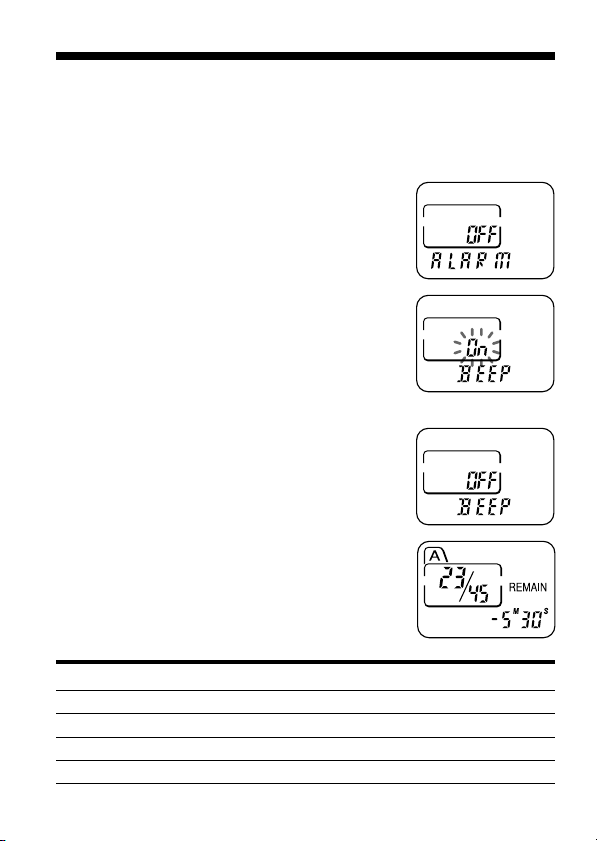
BEEP On: A beep will sound to indicate that operation has been
accepted.
BEEP OFF: No beep sound will be heard except for the alarm and timer.
1 Press MENU to enter the menu mode.
2 Press –. or >+ to display “BEEP
On (or OFF)” and press NxPLAY/STOP.
“On (or OFF)” will flash.
3 Press –. or >+ to select “On” or
“OFF” and press NxPLAY/STOP.
The setting is completed.
4 Press MENU to exit the menu mode.
Beep patterns Meaning
- (single tone) Usual mode
-- (double tone) Enter/exit special mode
--- (triple tone) Notice*
---- ---- (continuous beep) Alarm set time has come.
27
Menu Settings
* This pattern lets you know the procedure is wrong or informs you of some
messages, such as:
- you are trying to record a message when you have already recorded up to the
maximum recordable time or the maximum number of messages.
- the unit has stopped functioning due to lack of battery power.
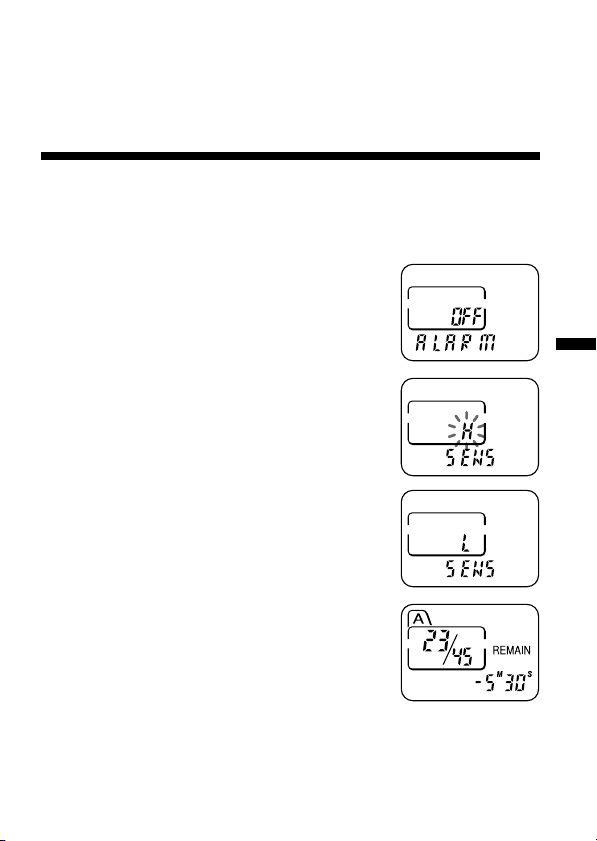
Selecting the Microphone Sensitivity
SENS H (high):To record at meetings or in a quiet and/or spacious place.
SENS L (low): To record for dictation or in a noisy place.
1 Press MENU to enter the menu mode.
2 Press –. or >+ to display “SENS”
and press NxPLAY/STOP.
“H (or L)” will flash.
3 Press –. or >+ to select “H” or “L”
and press NxPLAY/STOP.
Now the setting is completed.
4 Press MENU to exit the menu mode.
28
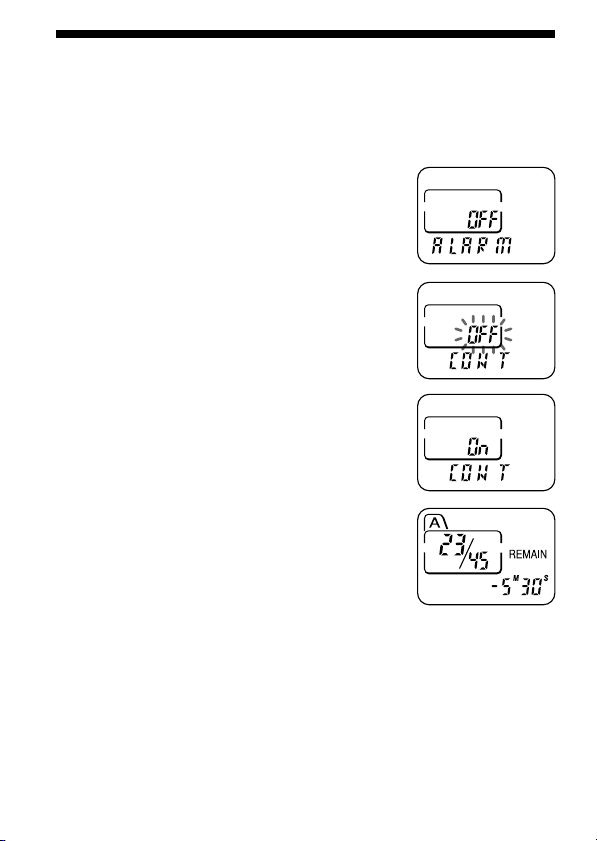
Playing Back All Messages in a File
Continuously
CONT On: You can play back all messages in a file continuously.
CONT OFF: Playback stops at the end of each message.
1 Press MENU to enter the menu mode.
2 Press –. or >+ to display “CONT”
and press NxPLAY/STOP.
“OFF (or On)” will flash.
3 Press –. or >+ to select “On” or
“OFF” and press NxPLAY/STOP.
Now the setting is completed.
4 Press MENU to exit the menu mode.

29
Additional Information
BAdditional Information
Precautions
On power
•Operate the unit only on 1.5 V DC. Use one LR03 (size AAA) alkaline
battery.
On safety
•Do not operate the unit while driving, cycling or operating any
motorized vehicle.
On handling
•Do not leave the unit in a location near heat sources, or in a place subject
to direct sunlight, excessive dust or mechanical shock.
•Should any solid object or liquid fall into the unit, remove the batteries
and have the unit checked by qualified personnel before operating it any
further.
On noise
•Noise may be heard when the unit is placed near an AC power source, a
fluorescent lamp or a mobile phone during recording or playback.
•Noise may be recorded when an object, such as your finger, etc., rubs or
scratches the unit during recording.
On maintenance
•To clean the exterior, use a soft cloth slightly moistened in water. Do not
use alcohol, benzine or thinner.
Keep personal credit cards using magnetic coding or spring-wound
watches, etc., away from the unit to prevent possible damage from the
magnet used in the speaker.
If you have any questions or problems concerning your unit, please
consult your nearest Sony dealer.
Backup recommendations
To avoid potential risk of data loss caused by accidental operation or
malfunction of the IC recorder, we recommend that you save a backup
copy of your recorded messages on a tape recorder, etc.

30
Troubleshooting
Should any problem persist after you have made these checks, consult
your nearest Sony dealer.
Symptom
The unit does not
operate.
No sound comes
from the speaker.
“FULL” is displayed
and you cannot start
recording.
Noise is heard.
Recording level is
low.
Playback speed is too
fast or too slow.
“--M--D --:--” is
displayed.
“--M--D” is displayed
on the REC DATE
display.
The unit does not
operate correctly.
Remedy
•The battery has been inserted with incorrect
polarity.
•The battery is weak.
•The buttons are locked with the HOLD
switch. (If you press any button, “HOLD”
will flash three times.)
•The earphone is plugged in.
•The volume is turned down completely.
•The memory is full. Erase some of the
messages. See page 16.
•99 messages have been recorded in the
selected file. Select another file or erase some
of the messages. See page 16.
•An object, such as your finger, etc.,
accidentally rubbed or scratched the unit
during recording so that noise was recorded.
•The unit was placed near an AC power
source, a fluorescent lamp or a mobile phone
during recording or playback.
•Earphone plug is dirty. Clean the plug.
•Microphone sensitivity is set to “SENS L”.
Set it to “SENS H”. See page 27.
•Set the PLAY SPEED switch to “NORMAL”.
See page 19.
•You have not set the clock. See page 8.
•The date of recording will not be displayed if
you recorded the message when the clock
was not set.
•Take out the battery and insert it again.

31
Additional Information
Specifications
Recording media Built-in flash memory, Monaural recording
Recording time ICD-37: 45 minutes
ICD-57: 90 minutes
ICD-67: 180 minutes
Frequency response 280 Hz - 2 800 Hz
Speaker approx. 3.6 cm (1
7
⁄16 in.) dia.
Power output 80 mW
Output Earphone jack (mini jack) for 8 - 300 Ω earphone
Playback speed control FAST: +50%
SLOW: –25%
Power requirements One LR03 (size AAA) alkaline battery: 1.5 V DC
Dimensions (w/h/d) (not incl. projecting parts and controls)
58.0 × 83.5 × 14.2 mm (2
3
⁄8 × 3
3
⁄8 ×
9
⁄16 in.)
Mass (incl. battery) ICD-37: 56 g (1.98 oz)
ICD-57/67: 57 g (2.01 oz)
Supplied accessories LR03 (size AAA) alkaline battery × 1
(tourist model and ICD-57/67 for U.S.A. only)
Handstrap (attached to the unit) × 1
(ICD-57/67 only)
Optional accessories Active speakers SRS-T1
Your dealer may not handle some of the above listed optional accessories.
Please ask the dealer for detailed information.
Design and specifications are subject to change without notice.
32
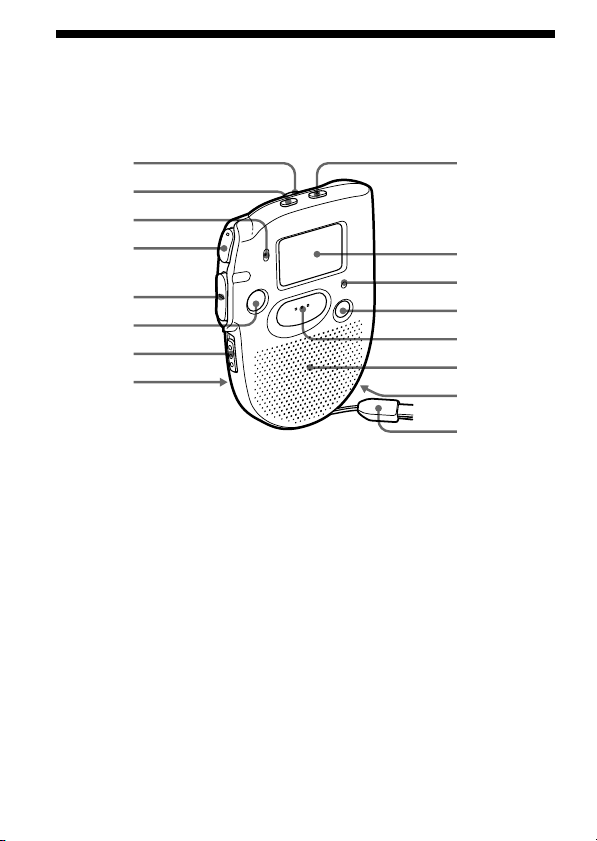
Index to Parts and Controls
Refer to the pages indicated in parentheses for details.
Main unit
9
q;
qa
qs
qd
qf
qg
qh
1
2
3
4
5
6
7
8
1 VOL (volume) control (14)
2 FILE button (10, 13, 18)
3 MIC (built-in microphone)
(10)
4 NxPLAY/STOP (play/
stop•enter) button (8, 14, 15)
5 –./>+ (fast forward/
fast backward•selection of
menu mode) button (13, 15)
6 STOP button (11)
7 HOLD switch (25)
8 PLAY SPEED selector (19)
9 MENU button (8, 21, 34)
0 Display window (33)
qa OPR (operation) indicator
(10, 14)
qs ERASE button (16)
qd REC (record) START/STOP
button (10)
qf Speaker
qg EAR (earphone) jack (15)
qh Hand strap (supplied to
ICD-57/67 only)
33
Additional Information
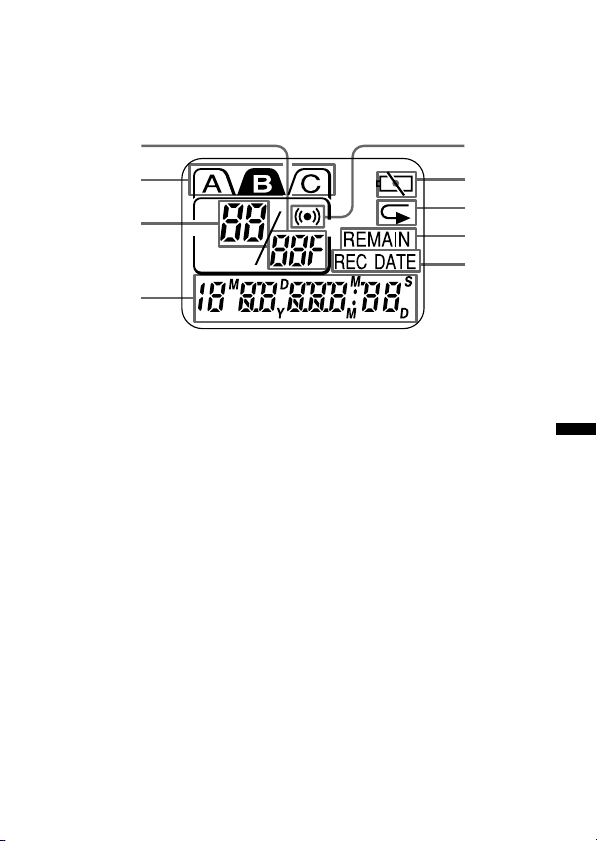
Display window
51
2
3
4
6
7
8
9
1 Total number of messages in
a file (13)
Mode indication of the
menu(21, 26 - 28) (On, OFF,
etc.)
2 File indication (10, 13)
3 Current message number (10,
13)
4 Remaining recording time
indication (10)
Recording date indication
(14)
Current time/day indication
(8)
Menu indication (8, 21, 26 -
28, 34) (ALARM, etc.)
Messages (ERASE, SCAN,
etc.)
5 Alarm indicator (23)
6 Battery exhausted indicator
(7)
7 Repeat play indicator (15)
8 REMAIN indication (10)
9 REC DATE indication (14)
34
OFF
On
OFF
H
L
On
OFF
ALARM*
BEEP
SENS
CONT
SET DATE
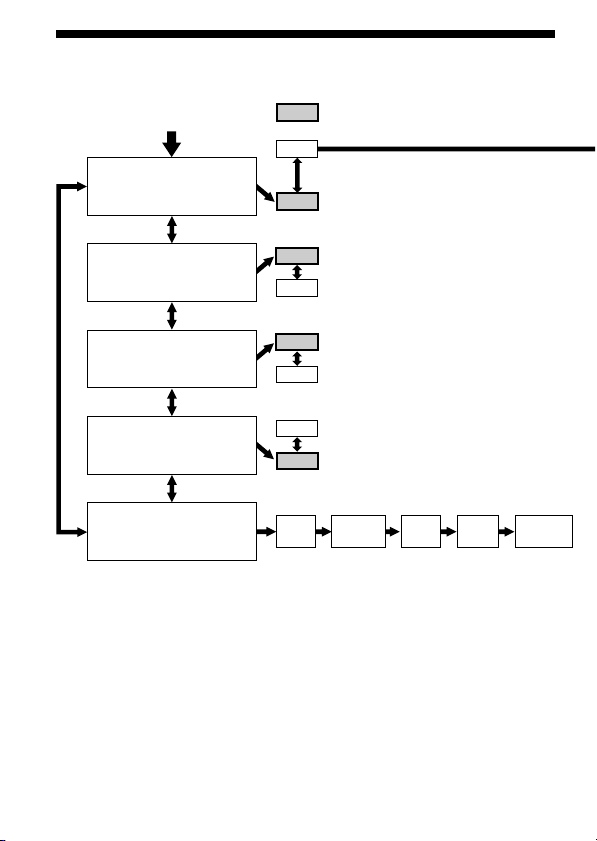
On
Menu map
Press MENU to enter
the menu mode.
: Initial seItting
(See page 21.)
(See page 26.)
(See page 27.)
(See page 28.)
(See page 8.)
* The “ALARM” display will not appear if you have not set the date and time or if there is no
recorded message.
Year Month Day
Hour
Minute
35
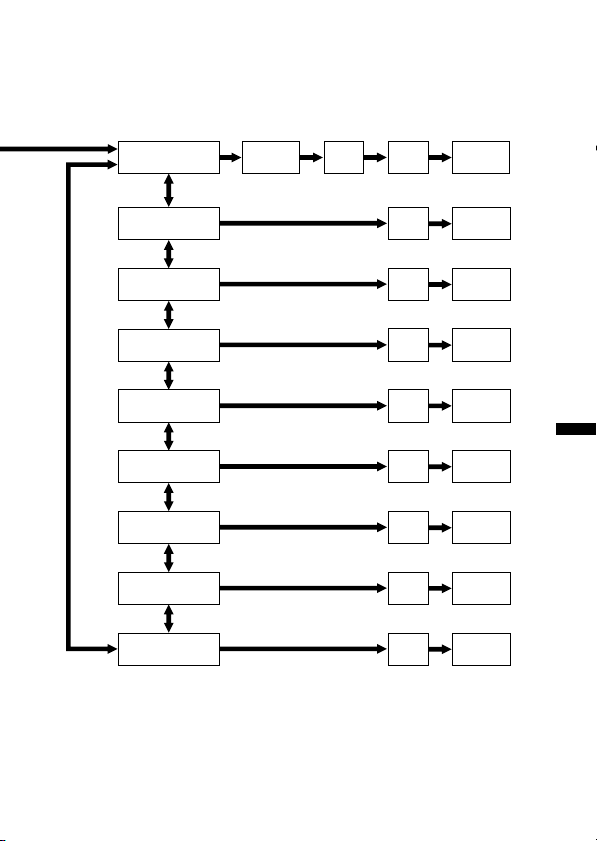
Additional Information
SAT
DATE
SUN
TUE
WED
THU
FRI
DAILY
MON
Hour
Hour
Hour
Minute
Hour
Minute
Hour
Minute
Hour
Minute
Hour
Minute
Hour
Minute
Hour
Minute
Month Day
Minute
Minute

36
Index
A
Accidental operation .................... 25
Alarm.............................................. 21
B
Battery ..............................................6
Beep ................................................ 26
Built-in microphone ..................... 10
C
Clock setting .................................... 8
D
Display window ........................... 33
E
Earphone ........................................ 15
Erase ............................................... 16
F, G
Fast backward ...............................15
Fast forward .................................. 15
File ................................ 10, 13, 17, 18
H
Hold ................................................ 25
I
IC memory .......................................4
J, K, L, M, N, O
Menu..................................... 8, 21, 34
Message, erasing ...........................16
Message, playing back .................13
Message, recording.......................10
Message number........................... 10
Microphone, built-in .................... 10
Microphone sensitivity ................ 27
Move ...............................................18
P, Q
Playback .........................................13
Playback Pause function.............. 15
Playback speed..............................19
R
Recording....................................... 10
Remaining time .............................10
Repeat play .................................... 15
S, T, U
Scanning play ................................ 15
Stop ........................................... 11, 15
V, W, X, Y, Z
Volume control .............................14
Sony Corporation Printed in Japan