1998 by Sony Corporation
EN
FM/AM
Compact Disc
Player
ES
C
Operating Instructions
Manual de instrucciones
®œ•Œª°©˙Æ—
CDX-C90
For installation and connections, see the supplied installation/connections
manual.
Con respecto a la instalación y las conexiónes, consulte el manual de Instalación/
conexiones suministrado.
ˆ©Û•ªæ˜™ ¶w À§Œ u Ù§ß s±µ°A – —¨›°u¶w À°˛ u Ù§ß s±µ°vª°©˙Æ—°C
EN
2
Resetting the unit
Before operating the unit for the first time or
after replacing the car battery, you must reset
the unit.
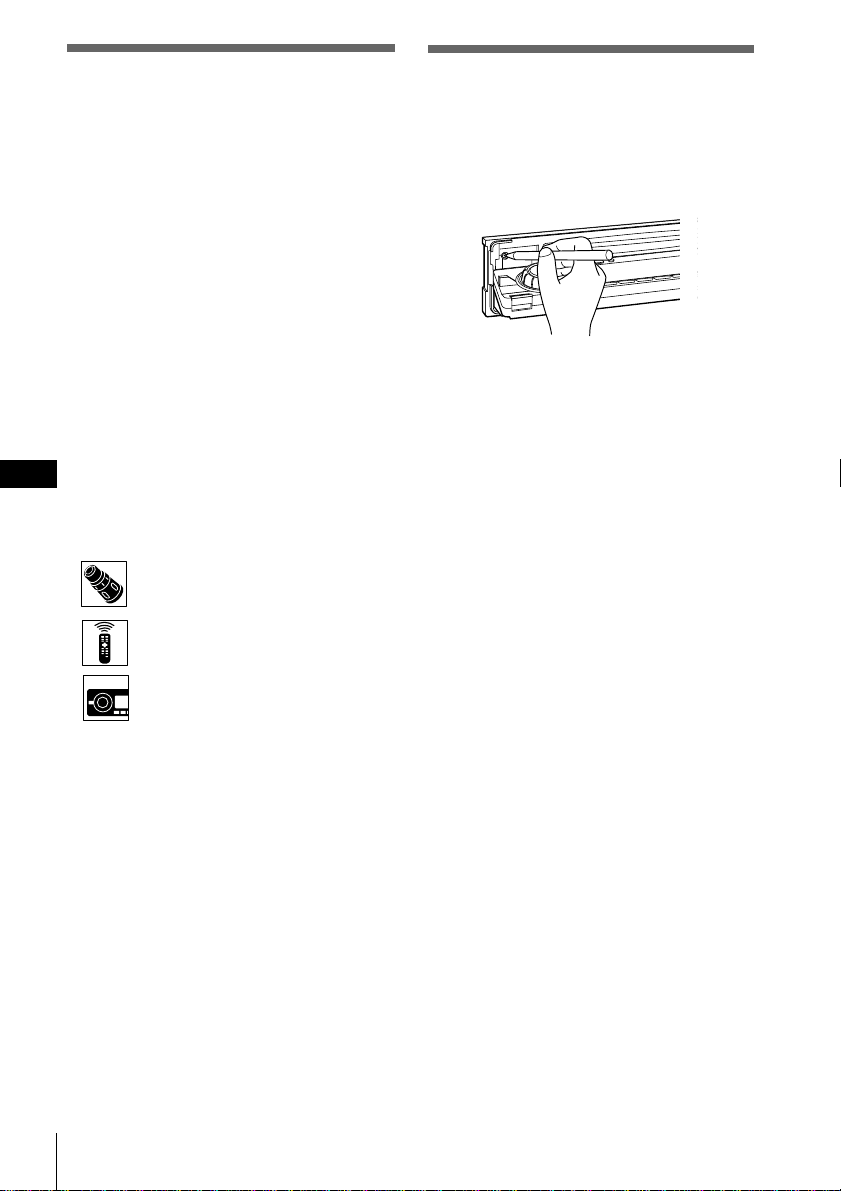
Press the reset button with a pointed object,
such as a ball-point pen.
Main unit
Notes
• Pressing the reset button will erase the clock data
and some memorized functions.
• When you connect the power supply cord to the
unit or reset the unit, wait for about 10 seconds
before you insert a disc. If you insert a disc within
these 10 seconds, the unit will not be reset, and
you will have to press the reset button again.
Welcome !
Thank you for purchasing this Sony Compact
Disc Player. This unit lets you enjoy a variety
of features using either a rotary remote or a
wireless remote.
In addition to the CD playback and radio
operations, you can expand your system by
connecting an optional CD/MD unit*.
If you operate this unit or connect an optional
CD unit with the CD TEXT function, the
CD TEXT information will appear in the
display when you play back a CD TEXT disc.
* You can connect to a CD changer and an MD
changer.
About this manual
Conventions
•Instructions in this manual describe the
controls on the rotary remote, the wireless
remote, and the front panel, depending on
the function. If the controls on these devices
have the same or similar names, the
operation described can be performed on
either device.
•The following icons are used in this manual:
Indicates that you can do the task
using the rotary remote.
Indicates that you can do the task
using the wireless remote.
Indicates that you can do the task
using the front panel control.
EN
3
Table of Contents
Getting Started
Initial settings ....................................................... 4
Setting the clock ................................................... 6
Using the main panel controls ........ 8
Basic operations ............................. 10
Using the rotary remote ................ 12
Using the wireless remote............. 14
Menu display/Lists ........................................... 16
CD/MD
Listening to a CD/MD ...................................... 17
Playing tracks repeatedly (Repeat play) ........ 19
Playing tracks in random order
(Shuffle Play) ................................................... 20
Creating a program (CD/MD Program
Memory) .......................................................... 21
Labeling a CD – Disc Memo (CD unit with the
custom file function) ...................................... 25
Selecting specific tracks for playback
(Bank) ............................................................... 27
Locating a disc by name ................................... 29
Viewing CD TEXT information ....................... 30
Customizing the CD sound (Digital filter
function) ........................................................... 32
Radio
Listening to radio............................................... 33
Presetting radio stations ................................... 34
Specifying monaural/Stereo mode ................. 37
Receiving only the strongest signals
(Local on/off) .................................................. 38
Labeling radio stations (Station Memo) ......... 40
Selecting a station by name .............................. 42
Other functions
Adjusting the sound characteristics ................ 43
Setting the set up menu .................................... 44
Setting the display menu .................................. 46
Setting the function menu ................................ 48
DSP
Selecting a surround menu .............................. 49
Storing a surround effect for CDs
(DSP custom file) ............................................ 51
Selecting the listening position ........................ 53
Adjusting the cut-off frequency of the
subwoofer(s) .................................................... 55
Adjusting the turn-over frequency of the
bass and treble ................................................ 57
Additional information
Detaching the front panel ................................. 59
Detaching the rotary remote ............................ 59
Precautions ......................................................... 60
Dismounting the unit ........................................ 62
Specifications ...................................................... 63
Troubleshooting guide ..................................... 64
4 Getting started
EN
Getting started
Note
You can specify the
ACC position settings
only in the initial
setting procedure. To
change these settings
afterwards, press the
reset button and repeat
the procedure.
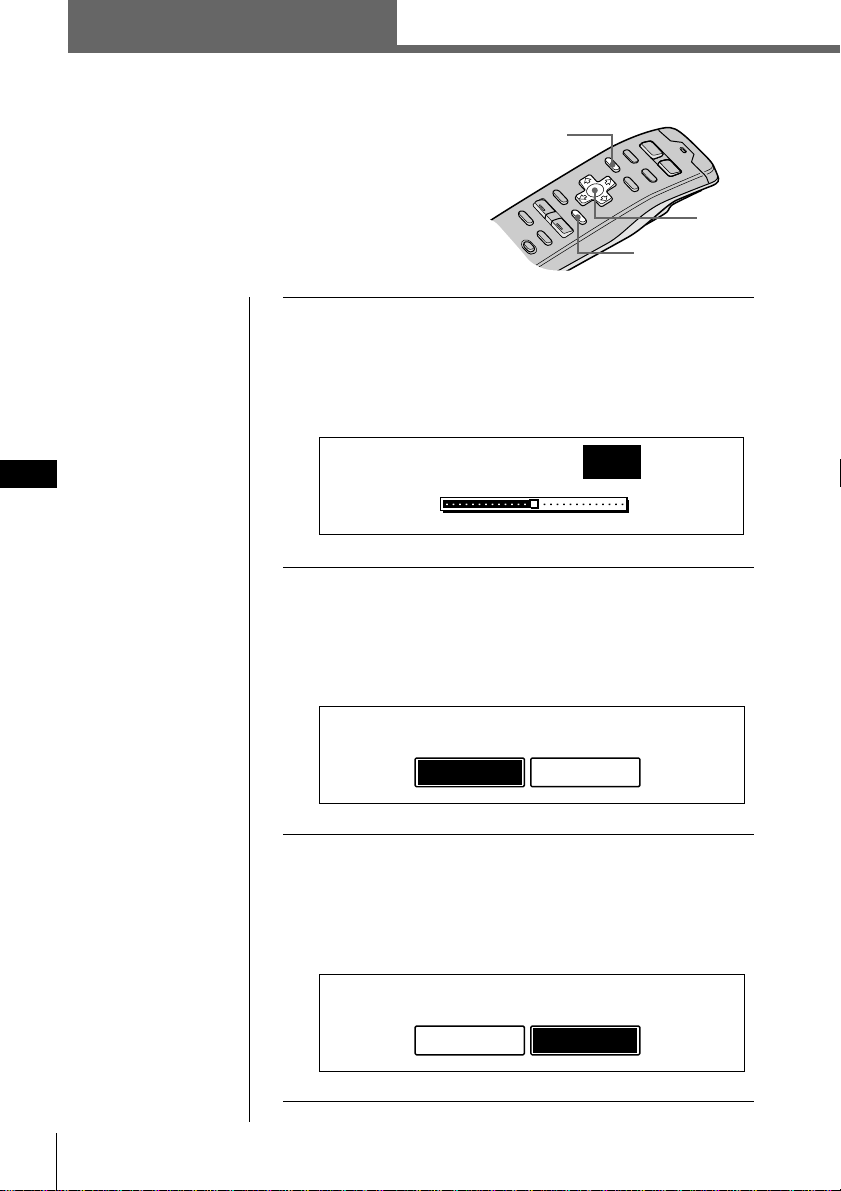
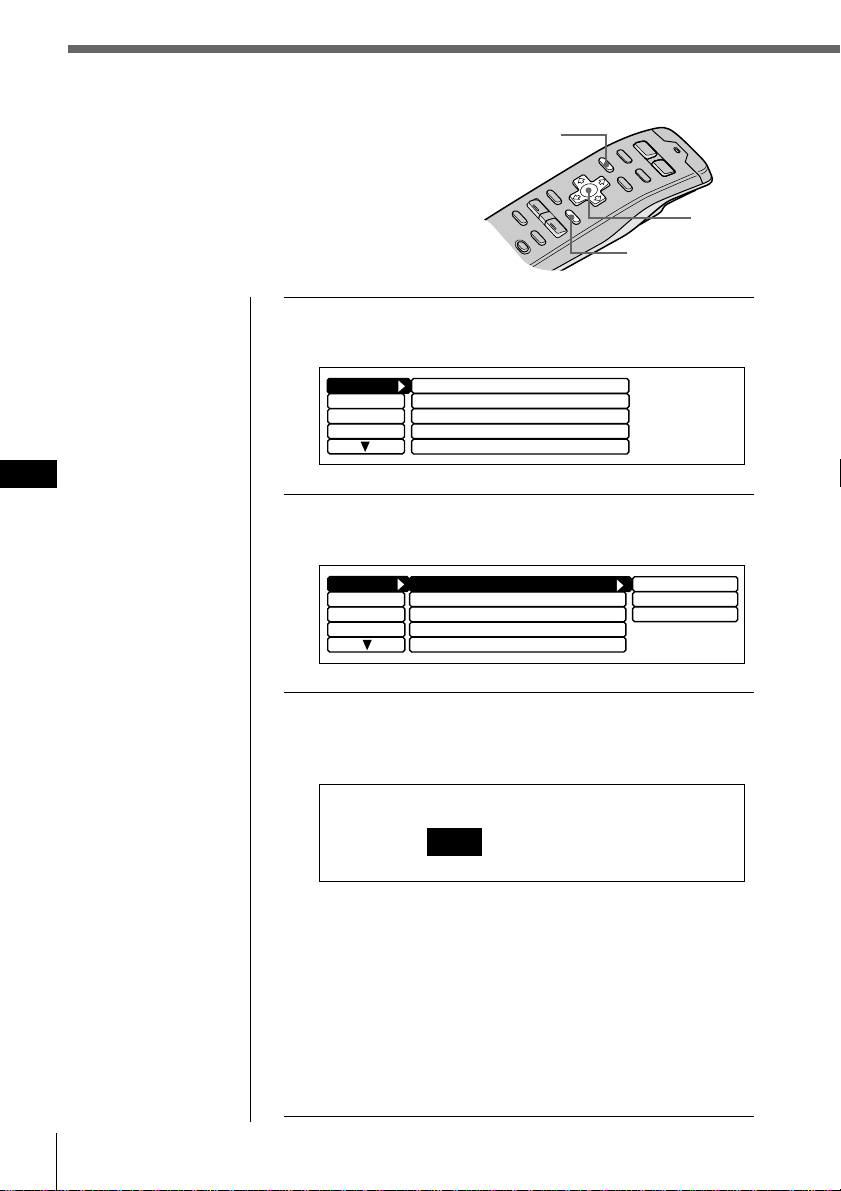
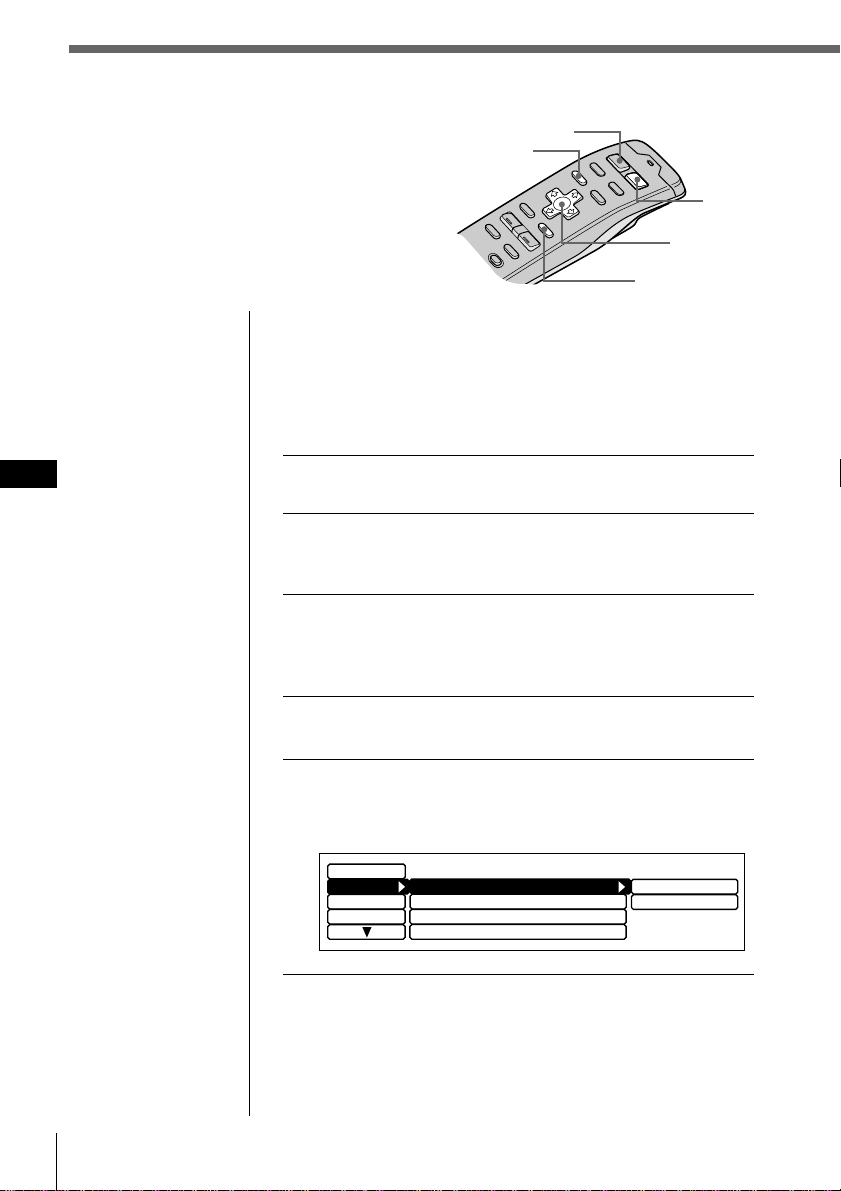
1 Press the reset button behind the front panel
(see page 2).
The Contrast indication appears.
Press ? or / to adjust the contrast. The contrast is
adjustable to 15 levels.
2 Press ENTER.
The ACC Position indication appears.
Press ? or / to select “yes” or “no.” Select “yes” if
your car’s ignition switch has an ACC position; select
“no” if your car’s ignition switch has no ACC position.
3 Press ENTER.
The Digital out indication appears.
Press ? or / to select “on” or “off” depending on
your car audio system. Select “on” when an optional
equipment with digital input is connected to the unit.
Cursor
Tip
You can reset all of
these initial settings
(except the ACC
position setting) using
the set up menu.
Initial settings
Do the following initial settings before you
operate the unit for the first time, after replacing
the car battery, or after resetting the unit.
Be sure to make these settings, otherwise the front
panel is disabled and you will be unable to insert
a CD.
MENU
ENTER
ACC Position
no
y
es
Digital out
on
o
ff
Contrast
8
Getting started
5
EN
Getting started
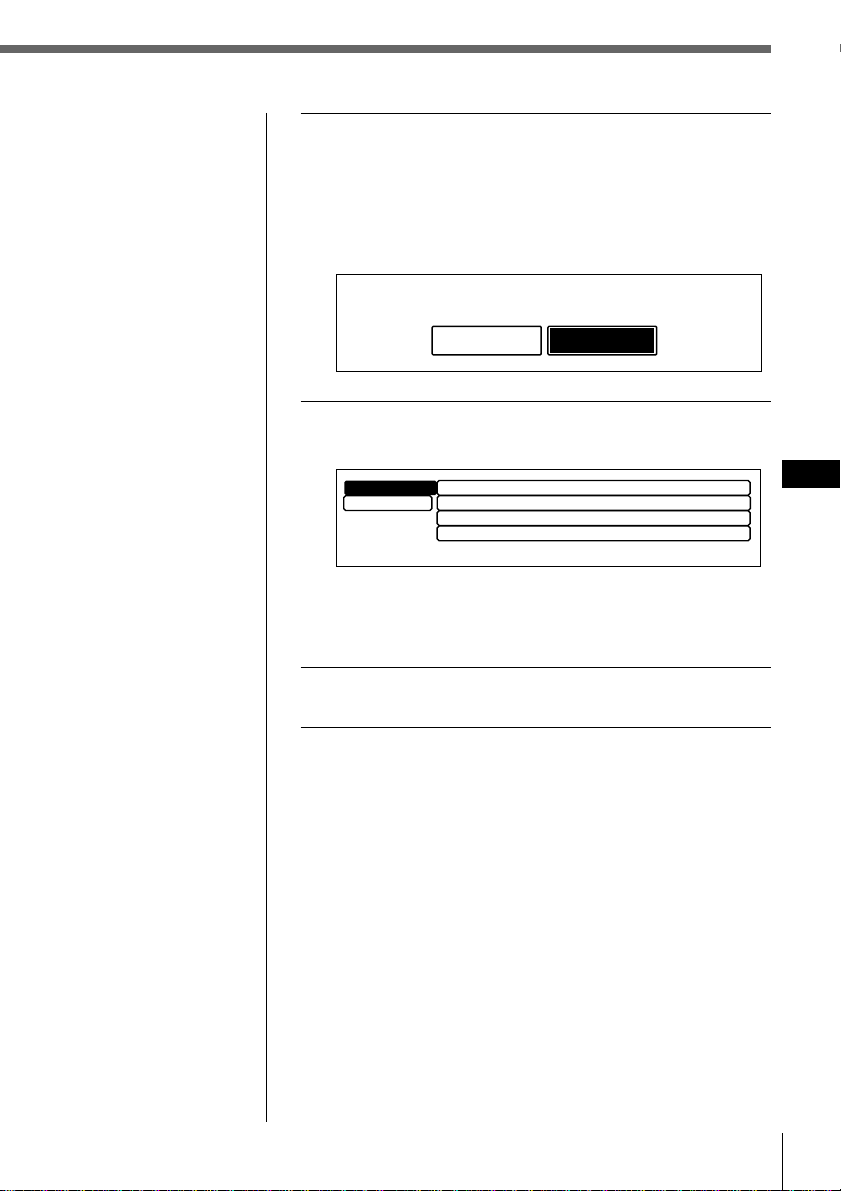
4 Press ENTER.
The AM step indication appears.
Press ? or / to select “10k” or “9k.”
Select “10k” if you’re using your system in North or
South America, the Hawaiian Islands, or Guam;
select “9k” for all other countries.
5 Press ENTER.
The Initial setting menu appears.
To change any of the initial settings at this time, press
the cursor buttons to select the item you want to
change and press ENTER.
6 To complete the initial settings, press MENU.
AM step
9k
10k
Tip
You can also complete
the initial settings by
pressing > or . to
select “Exit,” then press
ENTER.
Contrast
Initial
”
Exit
8
ACC Position
yes
Digital out
off
AM step
10k
Getting started6
EN
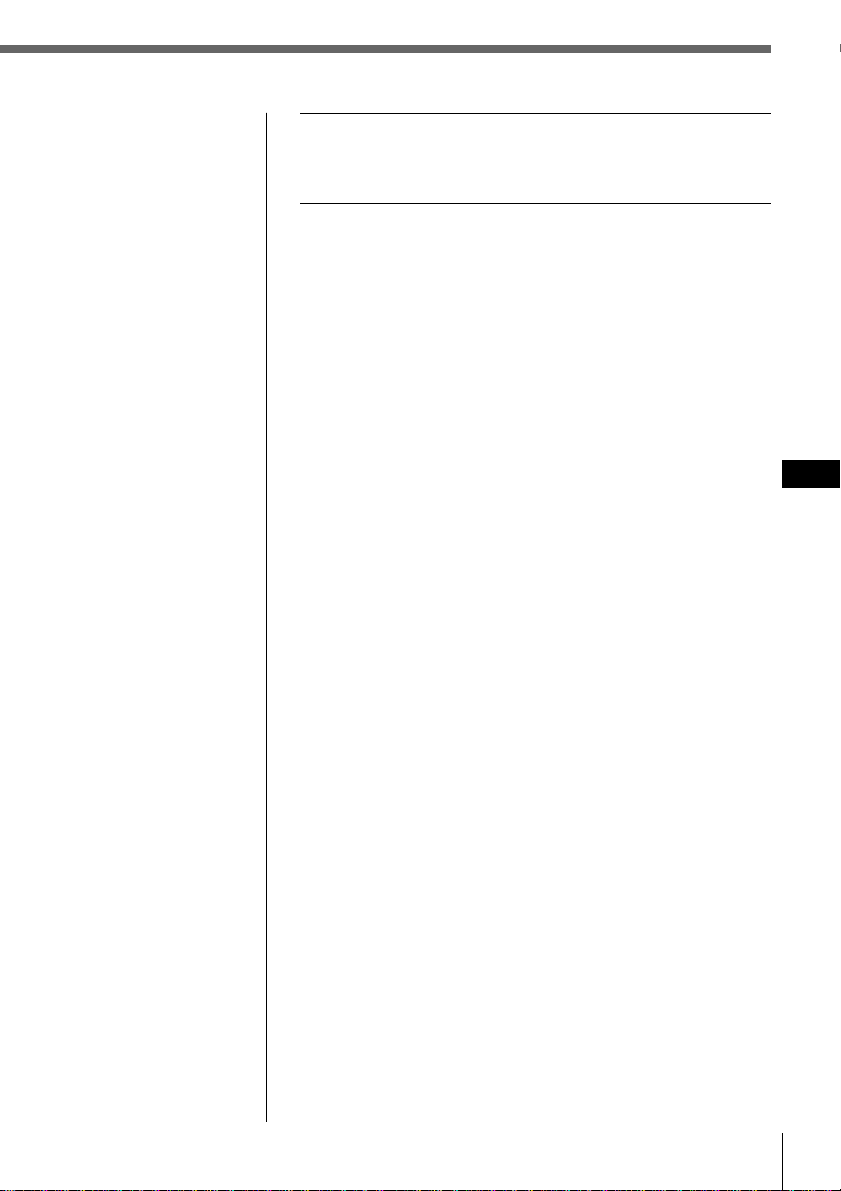
1 Press MENU.
The menu display appears.
2
Select “Set up” and press / to move to the
sub menu, then select “Clock” pressing > or ..
3 Press / then > or . to select “Time Set,”
then press ENTER.
The Time Set indication appears.
1 Press > or . to set the hour.
2 Press / to move to minutes and press > or . to
set the minutes.
Pressing . lowers the number and > raises the
number.
The “AM” and “PM” indicators are automatically
switched depending on the set hour.
Setting the clock
Set the clock with the wireless remote.
Turn the unit on before setting the clock.
The clock uses a 12-hour digital indication.
Note
If the ACC position is
set to “no”, turn the
power on first, then set
the clock.
Cursor
MENU
ENTER
Clock
off
Beep
on
Rotary Remote norm
Display
Name
SEEK/AMS
P.Mode
SEEK/AMS
Set up
Direct Volume
off
Display
Name
SEEK/AMS
SEEK/AMS
off
Beep on
Rotary Remote
norm
Time Set
on
Set up
P.Mode
Clock on
Direct Volume
off
Time Set
1
:05AM
Getting started
7
EN
Getting started
Tip
You can press ENTER
or BACK instead of
MENU to set a value.
4 After setting the time, press MENU.
The time is stored and the menu display reappears.
To display the current time during operation
The current time can be set to appear in the upper-left
corner of the display (except when a menu is displayed).
For details, see “Setting the set up menu” on page 44.
Getting started8
EN
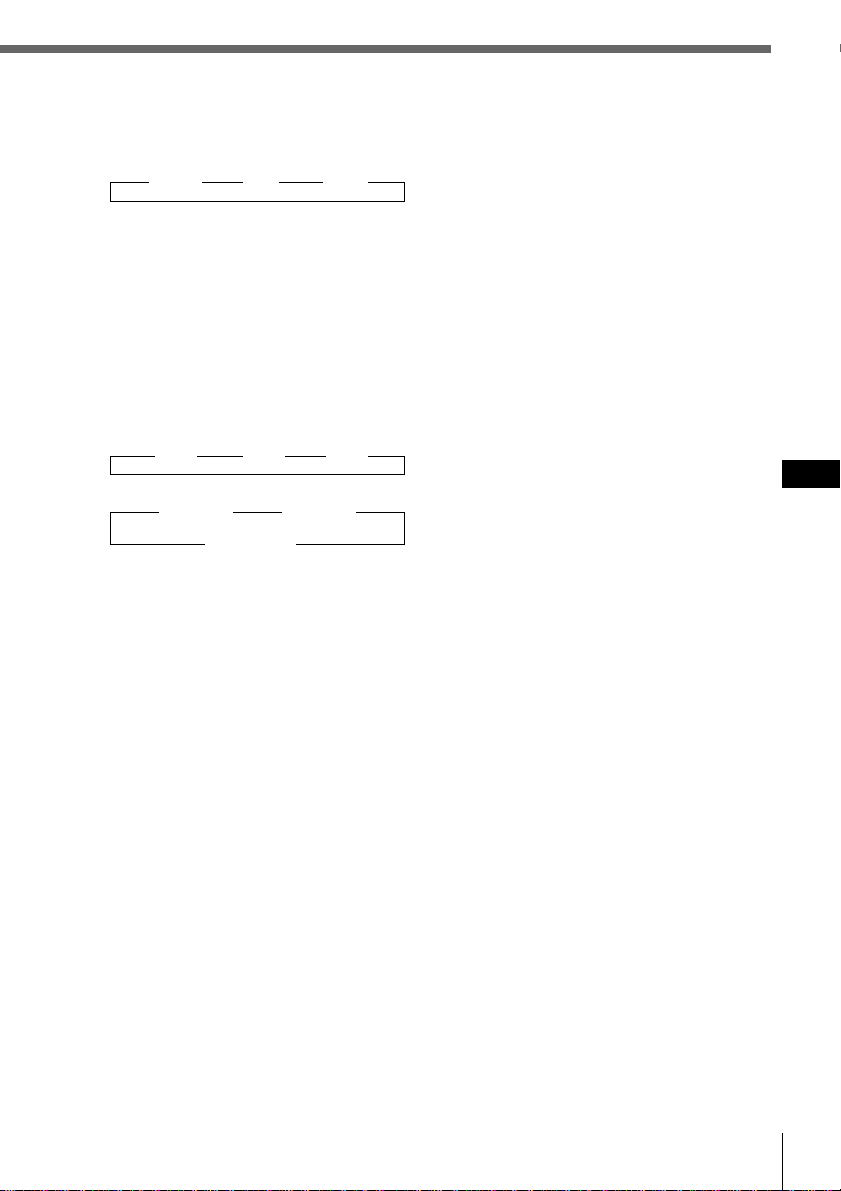
Using the main panel controls
You can use the main panel controls for all operations
except menu operations.
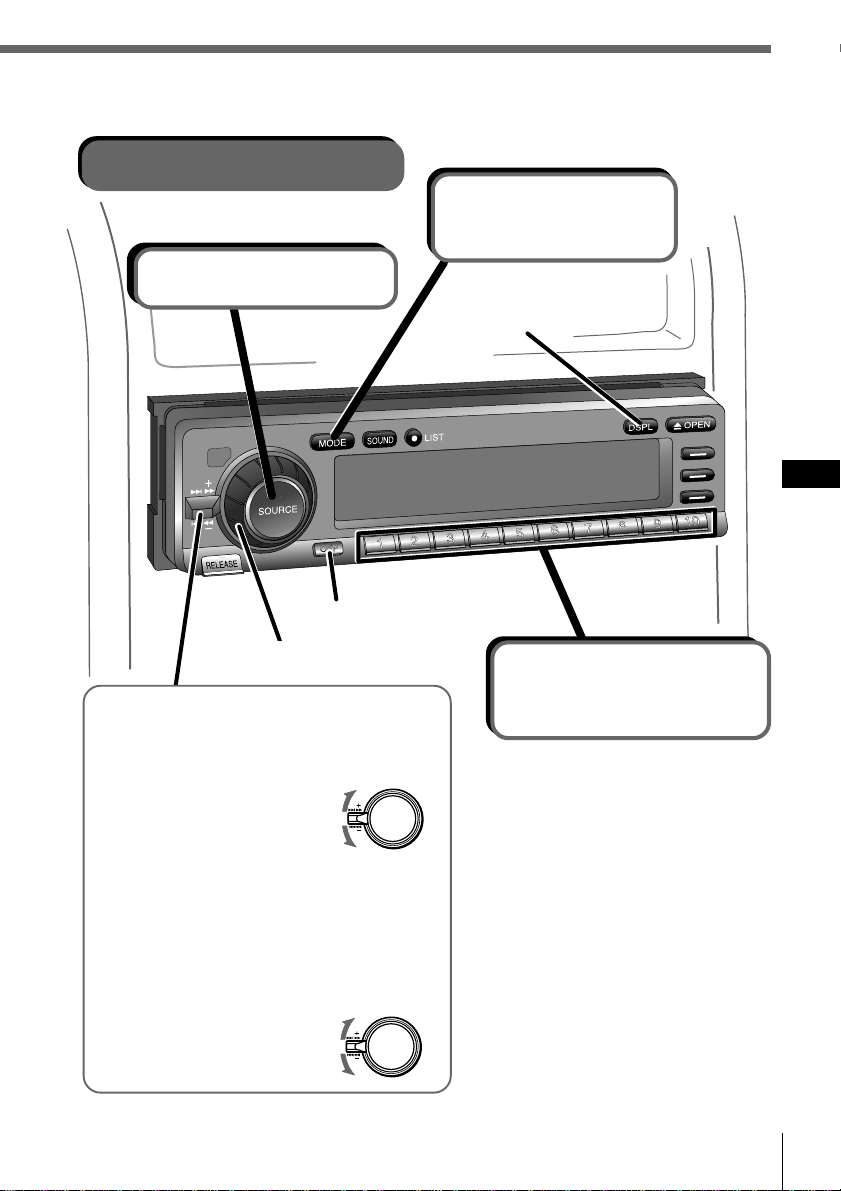
Display window
OPEN button
Reset button (see page 2)
OFF buttonRELEASE button
(see page 59)
CD slot
When the front panel is open
MODE LIST
SOUND
SOURCE
OPENDSPL
OFF
RELEASE
12345678910
Sensor for the
wireless remote
Getting started
9
EN
Getting started
6 DSPL (display mode change) button
When playing a CD or MD, press to
display the disc title or track title.
When the current disc or track has no
title, “NO Disc Name (NO Track
Name)” appears in the display.
Press and hold for two seconds to
switch to the function menu which
appears, depending on the current
source or setting mode (see
“9 Function buttons”).
To return to the previous function
menu, press and hold the button again.
7 SEEK/AMS (seek/Automatic Music
Sensor/manual search) control
Push the control up or down to locate a
track or receive a station.
Push the control up or down and hold
until the desired station or track is
located.
8 Number buttons
Press to search for the preset stations,
or to switch to the desired disc in the
CD/MD unit which corresponds to the
number button.
9 Function buttons
Press to switch the mode setting
manually. The function menu which
appears depends on the current source.
Each time you press DSPL for two
seconds, the function menu switches as
follows:
When the tuner is selected
BTM
MONO ˜ DVOL
LCL EL
When CD/MD is selected
REP VC*
SHUF ˜ DVOL
PGM EL
When labeling a CD or station
/ VC*
ENT ˜ DVOL
? EL
When Edit mode is selected
UP VC*
ENT ˜ DVOL
DOWN EL
* Only when the CD player of the unit (CD1) is
selected.
1 SOURCE (source select) button
Each time you press the button, the
source switches as follows:
”Tuner ” CD ” MD*
*Only when an optional unit is connected
2 Dial (volume/subwoofer volume/
bass/treble/left-right/rear-front
control)
Rotate to adjust the volume or sound
characteristics.
3 MODE (band/unit select) button
Each time you press the button, the
band or unit switches as follows:
When the tuner is selected
” FM1 ” FM2 ” AM
When CD/MD is selected
” CD/MD1 ” CD/MD2
CD/MD3… “
4 SOUND button
Press to switch to the sound
characteristics adjustment mode (see
page 43).
When an optional DSP (digital signal
processor) is connected, press and hold
for two seconds to switch to the DSP
Sound Tuning Mode (see page 49).
To return to the previous mode, press
and hold the button again.
5 LIST button
When CD or MD is selected, press to
display the disc name list. While the
list appears in the display, press again
to display the track name list of the
current disc (see page 29).
When FM1, FM2, or AM is selected,
press to display the preset name list
(see page 42).
To change the current selection, use the
cursor buttons to select another disc,
track, or station, then press ENTER.
Getting started10
EN
Basic operations
Listening to a CD
Switches the display
indication.
To locate a specific point in a
track (Manual searching)
Push the SEEK/AMS control up or
down and hold.
Release the control when you have
found the desired point.
To locate a specific track
(Automatic music sensor (AMS))
Push the SEEK/AMS control up or
down momentarily.
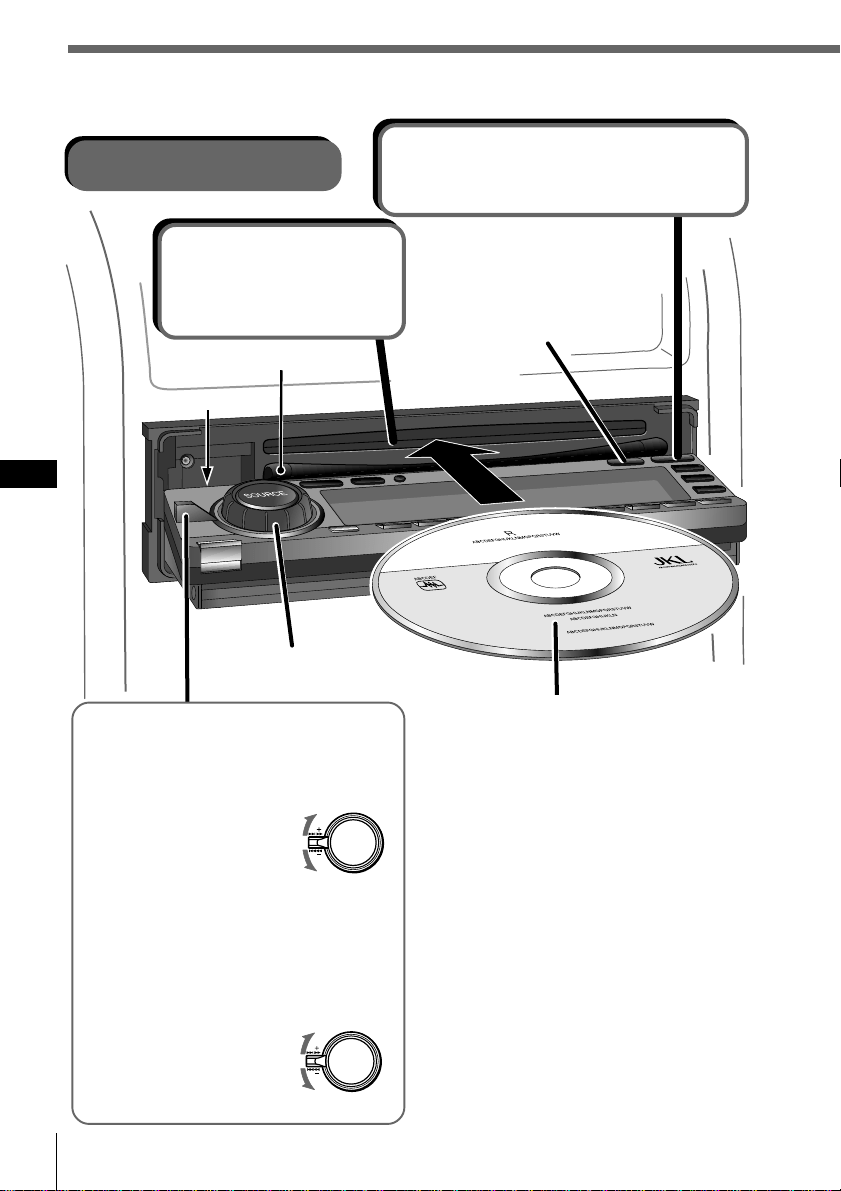
When a CD is already inserted
Press SOURCE repeatedly until “CD”
appears, playback starts automatically.
To stop playback
Press OFF.
To eject the CD
Press OPEN, the CD is automatically
ejected.
Note
To play back an 8 cm CD, use the optional
Sony compact disc single adapter (CSA-8).
* Do not put any foreign objects between
the front panel and the unit. The front
panel cannot close and possible damage
may occur to the unit.
2 Insert a CD.
The panel closes and
playback starts
automatically.
Adjusts the volume
level.
1Opens the front panel.
After 15 seconds, the panel closes
automatically.
To search forward
To search backward
To locate a preceding track
or the beginning point of
the current track
To locate a succeeding track
Labeled side up
CD insert guide
*
Getting started
11
EN
Getting started
Adjusts the volume level.
Listening to the radio
2 Selects FM1,
FM2, or AM.
Turns the power off.
3 Selects the
desired station.
You can select the buttons only
when a memorized station is
assigned to the number button (see
page 34).
To switch the band
Press MODE repeatedly to select the
desired band.
To stop listening to the radio
Press OFF.
To receive a station
automatically (Automatic tuning)
Push the SEEK/AMS control up or
down momentarily.
Scanning stops when the unit receives a
station.
To receive the desired
frequency (Manual tuning)
Push the SEEK/AMS control up or
down and hold until the desired
frequency is received.
1 Selects tuner.
Switches the display
indication.
To search for succeeding stations
To search for preceding stations
To search for a higher frequency
To search for a lower frequency
Getting started12
EN
Using the rotary remote
You can use the rotary remote for all operations
except menu operations.
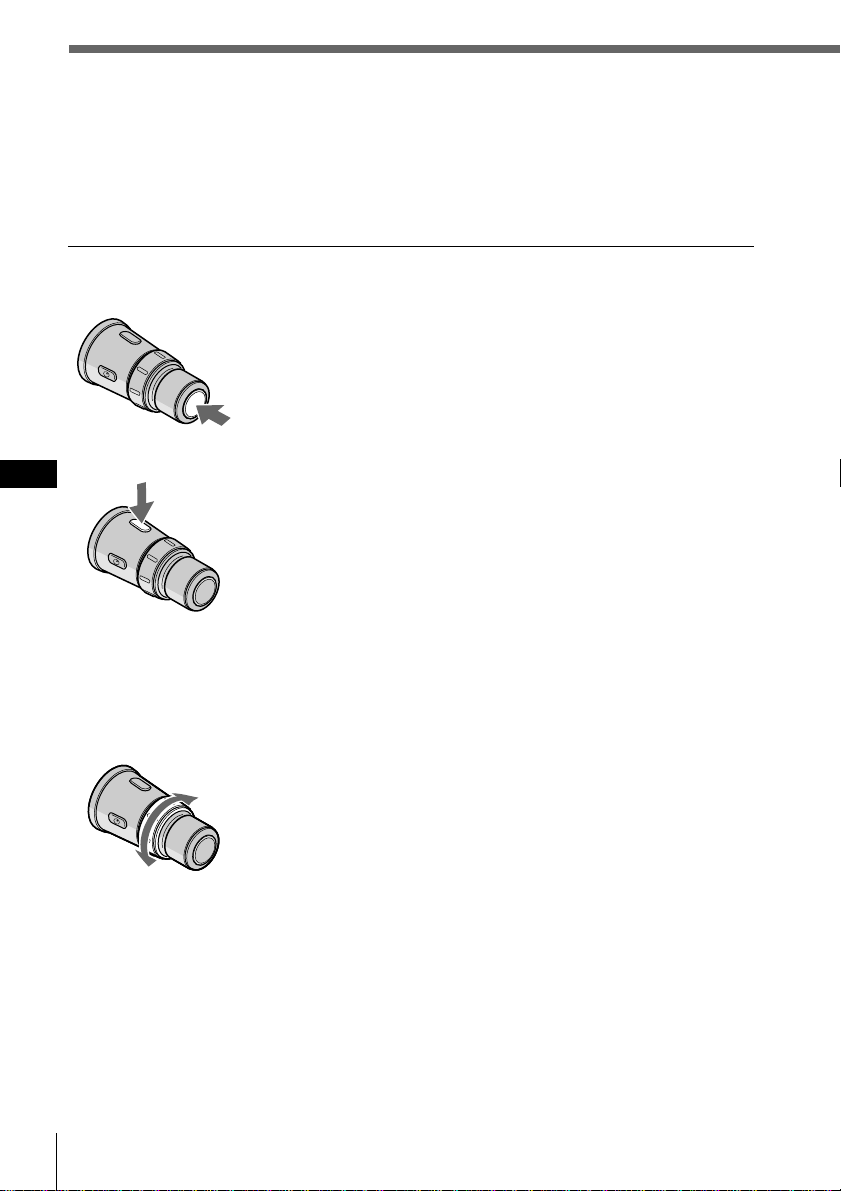
Basic operations
By pressing buttons
Each time you press SOURCE, the source changes as
follows:
TUNER n CD n MD*
* When an MD unit is connected.
Pressing MODE changes the operation as follows:
• Tuner: FM1 n FM2 n AM
• CD unit: CD1 n CD2 n …
• MD unit: MD1 n MD2 n …
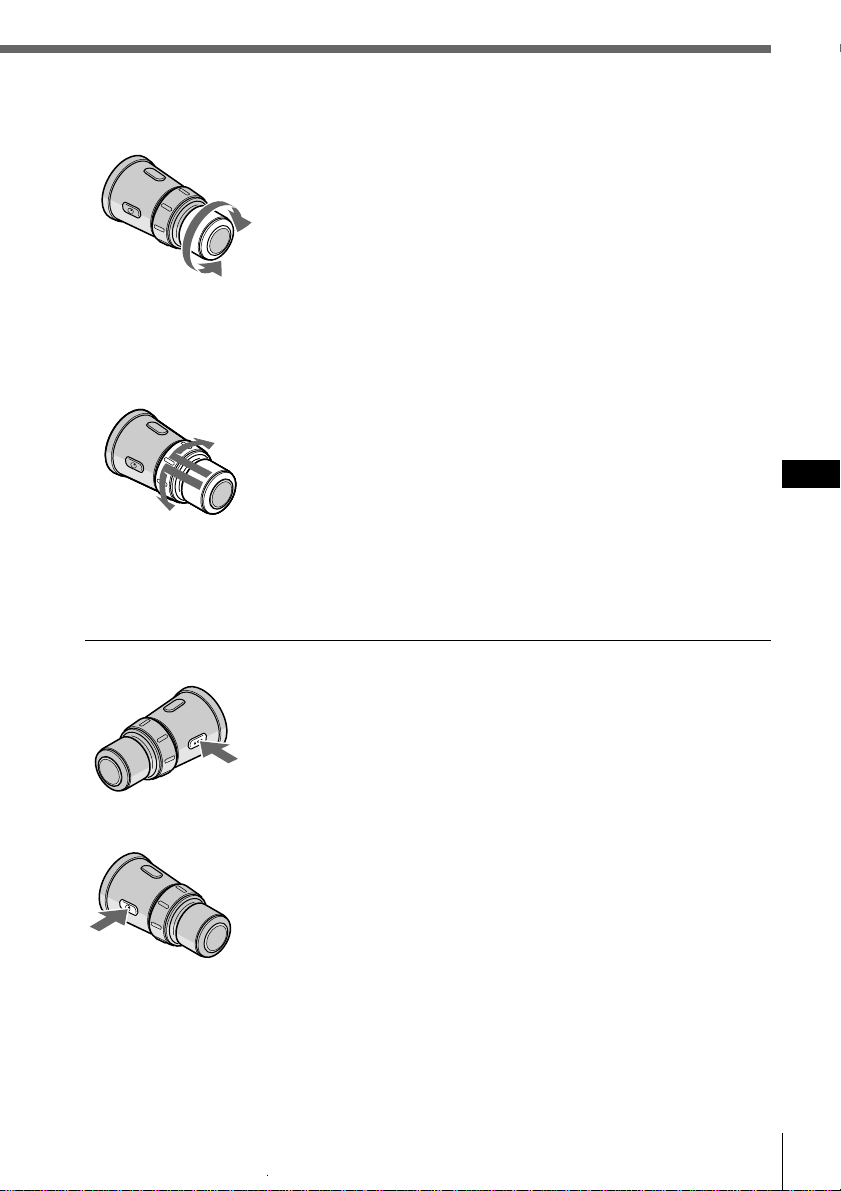
By rotating the control
Rotate the control momentarily and release it to:
•Locate the beginning of tracks when CD or MD is
selected.
•Automatically tune in a station when FM1, FM2, or AM
is selected. When a station is detected, the unit stops
searching.
Keep the control rotated to:
•Locate a specific point on a track when CD or MD is
selected. Playback at normal speed resumes when you
release the control.
•Manually tune in a station when FM1, FM2, or AM is
selected. Release the control when the desired station is
located.
Tip
If the SEEK/AMS mode is set to “Item sel,” you can select the
desired station or disc with SEEK/AMS when the list appears in
the display (see page 45).
SOURCE button
MODE button
SEEK/AMS control
Getting started
13
EN
Getting started
By pushing in and rotating the control
Push in and rotate the control to:
• Receive the stations memorized on the number buttons
when FM1, FM2 or AM is selected.
• Change the disc when CD or MD is selected.
Push in and release the control to:
Display the list of discs (when CD or MD is selected) or
preset stations (when FM1, FM2, or AM is selected) for a
few seconds. The previous display will reappear after a
moment.
Other operations
OFF button
Press this button to turn off the unit.
To turn on the unit again, press SOURCE.
ATT button
Press this button to attenuate the sound.
To cancel the attenuation (ATT), press the button again.
Changing the operative direction
If you need to mount the rotary remote on the left side of the steering column, you
can reverse the operative direction. See “Setting the set up menu” on page 44.
DISC/PRESET control
VOL control
Rotate the control to:
Adjust the volume level.
Getting started14
EN
VOL
MODE
SOURCE
MENU
LIST
BACK
ENTER
SOUND
–+
OFF
AT T
SCRL DSPL
Using the wireless remote
Use the wireless remote to make the various menu settings. For your safety, unit
operations with the wireless remote should be done by a passenger. If you (the
driver) want to use the wireless remote, park your car in a safe location first before
performing any operations.
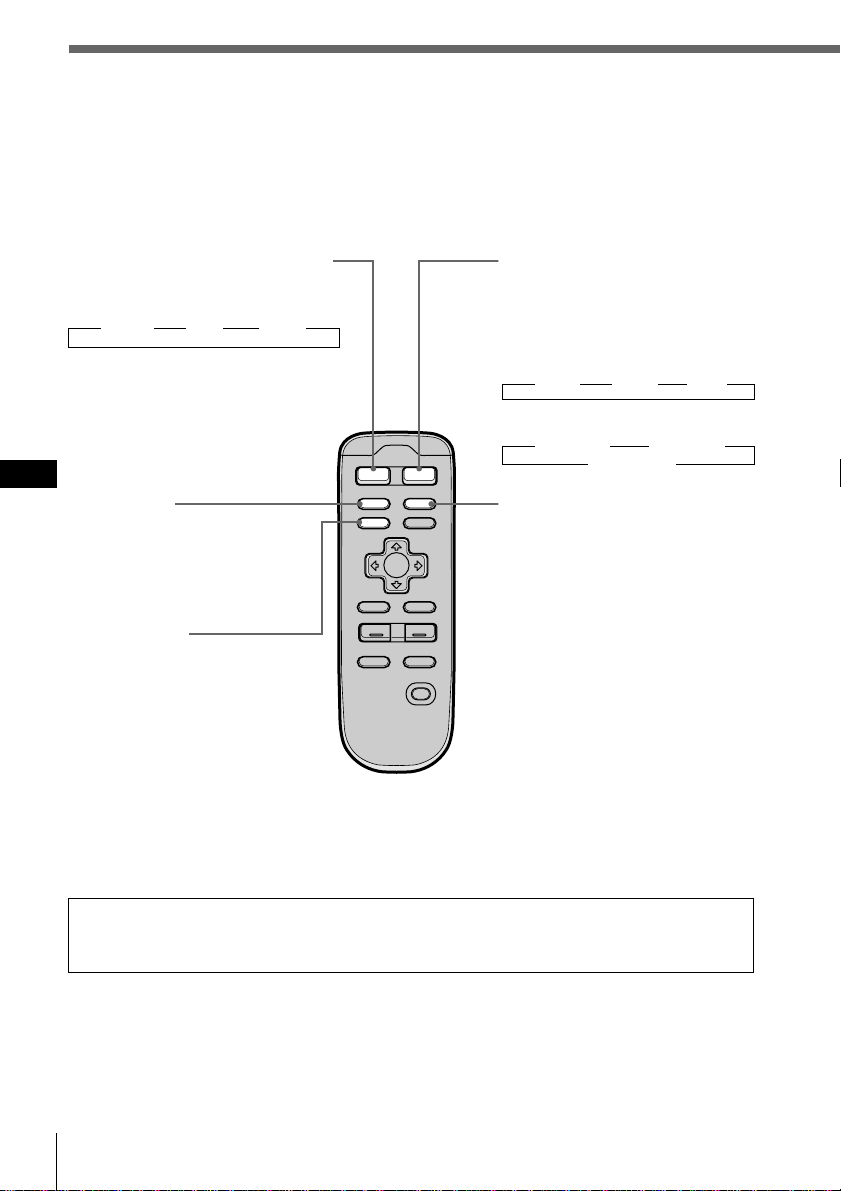
MODE (band/unit select)
button
Each time you press the button,
the band or unit switches as
follows:
When the tuner is selected
” FM1 ” FM2 ” AM
When CD/MD is selected
” CD/MD1 ” CD/MD2
CD/MD3… “
DSPL (display mode change)
button
When playing a CD or MD,
press to display the disc title or
track title.
When the current disc or track
has no title, “NO Disc Name
(NO Track Name) ” appears in
the display.
Press and hold for two seconds
to switch to the function menu
which appears, depending on
the current source or setting
mode (see “9 Function
buttons” page 9).
To return to the previous
function menu, press and hold
the button again.
SOURCE (Source select) button
Each time you press the button, the
source switches as follows:
”Tuner ” CD ” MD*
* Only when an optional unit is
connected
SCRL button
Press to scroll the track or
disc title when playing a CD
TEXT disc or an MD.
MENU button
Press to switch to a menu
display. The menu which
appears depends on the
current program source.
To return to the previous
display, press the button
again.
When the ACC position is set to “no,” the unit cannot be operated with the
wireless remote unless SOURCE on the rotary remote or front panel is pressed, or a
CD is inserted to activate the unit first.
Getting started
15
EN
Getting started
VOL
MODE
SOURCE
MENU
LIST
BACK
ENTER
AT T
SOUND
–+
OFF
SCRL DSPL
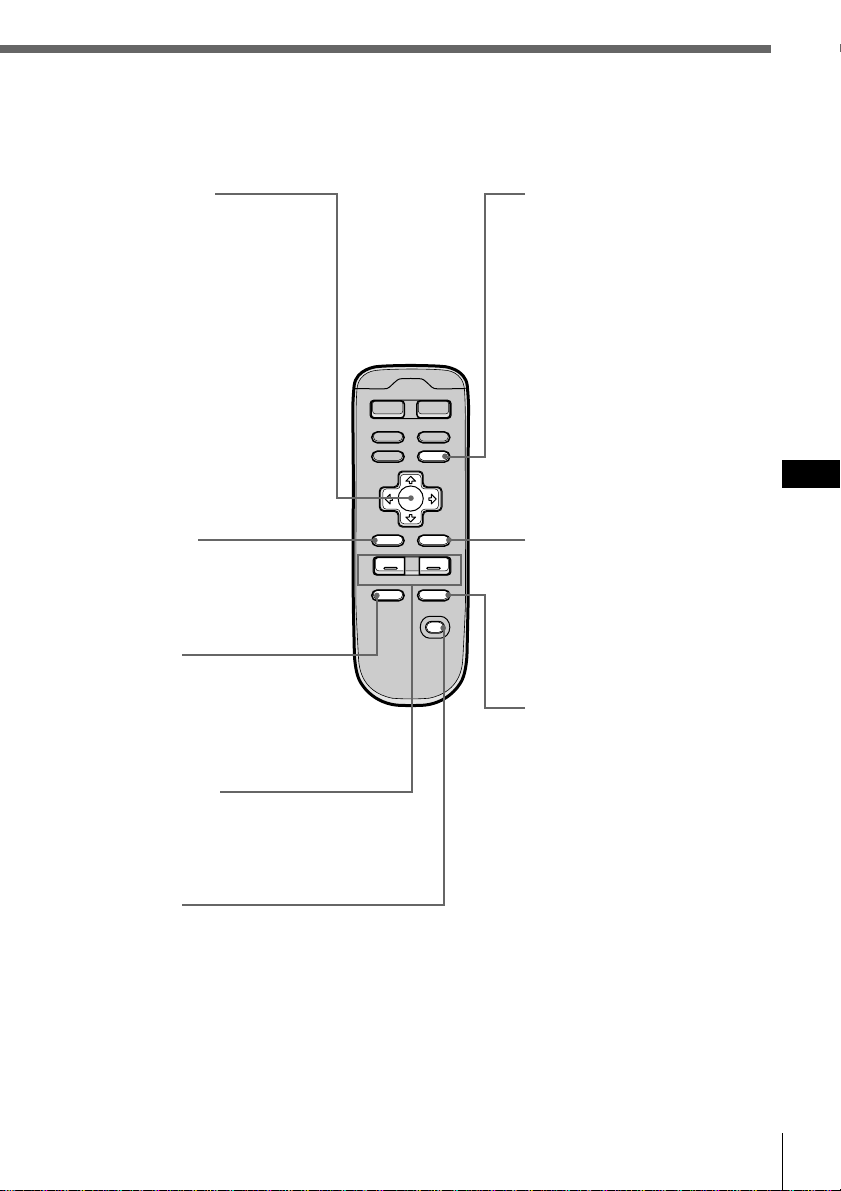
LIST button
When CD or MD is selected,
press to display the disc name
list. While the list appears in
the display, press again to
display the track name list of
the current disc (see page 29).
When FM1, FM2, or AM is
selected, press to display the
preset name list (see page 42).
To change the current
selection, use the cursor
buttons to select another disc,
track, or station, then press
ENTER.
ENTER button
Press to carry out the selected
function.
SOUND button
Press to adjust the sound
characteristics (see page 43).
When an optional DSP
(digital signal processor) is
connected, press and hold for
more than two seconds to
switch to the DSP Sound
Tuning Mode (see page 49).
To return to the previous
mode, press and hold the
button again.
Cursor buttons
While the menu display
appears, press to move the
cursor within a menu display.
When CD or MD is selected,
press > or . to change the
disc and ? and / to locate
a track.
When FM1, FM2, or AM is
selected, press > or . to
select a preset station, or ?
and / to perform automatic
tuning.
BACK button
Press to return to the normal
display during a menu
operation.
ATT button
Press to attenuate the volume.
To return to the previous
volume level, press the
button again.
VOL +/– buttons
Press + or – to adjust the
volume or sound
characteristics.
OFF button
Press to turn off the unit.
Getting started16
EN
Menu display/Lists
The following menu and lists appear in the display
when you press MENU or LIST.
Menu display (appears when you press MENU )
Display
Name
SEEK/AMS
SEEK/AMS
off
Beep on
Rotary Remote
norm
Time Set
on
Set up
P.Mode
Clock on
Direct Volume
off
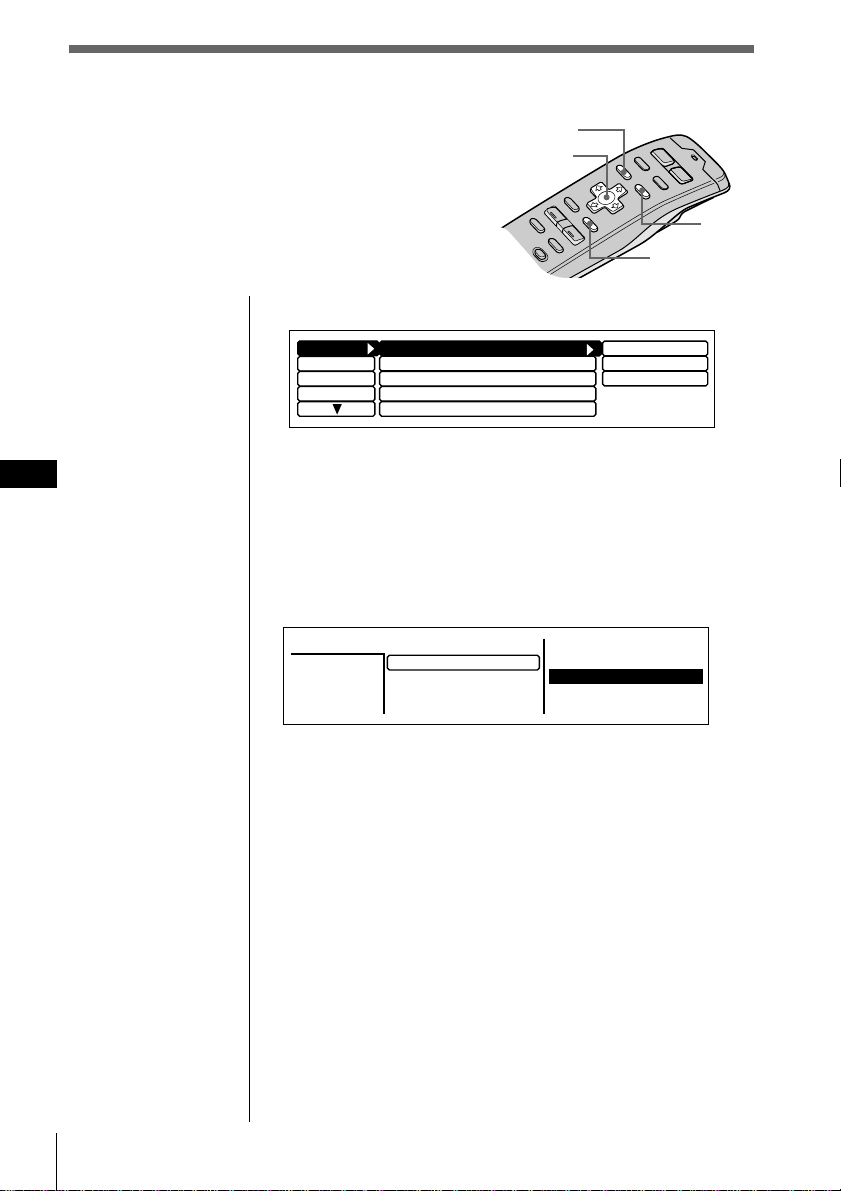
1 Press MENU to make various settings and adjustments.
2 Press the cursor buttons to select the item and its
setting, then press ENTER.
3 Press MENU to cancel the menu mode and return to
normal display.
Lists (appears when you press LIST)
Press LIST to display the disc name list or track name list
when CD or MD is selected.
The preset name list will appear when FM1, FM2, or AM is
selected.
To select the disc or station by name
When the disc name list or preset name list appears in the
display, press the cursor buttons to select the disc or radio
station you want to listen to, then press ENTER.
To return to the previous display without changing the
setting, press LIST again.
Tip
If the SEEK/AMS mode is set to “Item sel,” you can select the
desired station or disc with SEEK/AMS when the list appears in
the display (see page 45).
LIST
ENTER
MENU
Cursor
2.POPS HIT
3.FUSION
4.JAZZ
5.GREAT HIT
*
CD2
SONYPOPS
8
1.28
6.EURO BEAT
7.DRIVING
9.SUNSET.M
10.HIGHWAY
Disc
3
1.MY BEST
8.SONYPOPS
CD/MD
17
EN
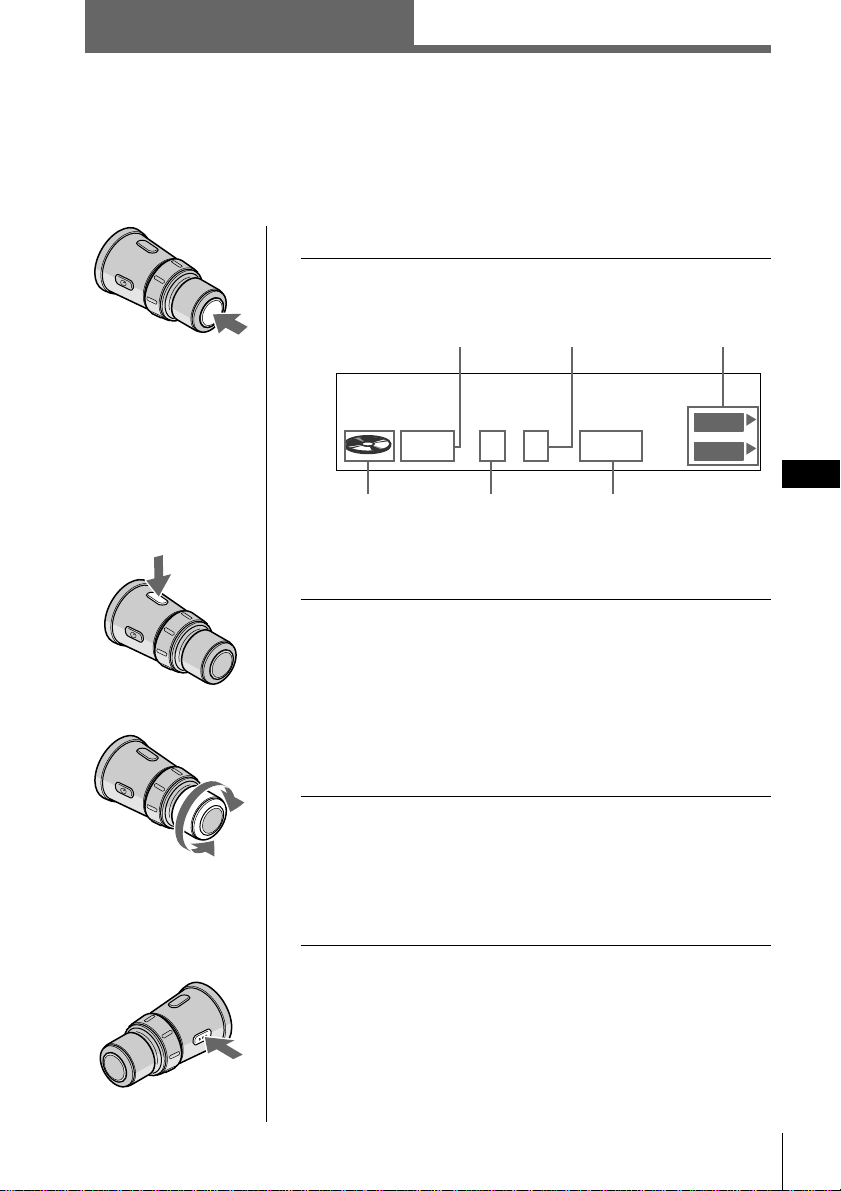
To select the desired CD or MD unit
1 Press SOURCE repeatedly to select “CD” or
“MD.”
* The disc number appears when the CD/MD unit is
connected.
2 Press MODE repeatedly to select the desired
CD or MD unit.
When optional CD units are connected
CD1(CDX-C90) n CD2(optional CD unit 1) n
CD3(optional CD unit 2)
When optional MD units are connected
MD1(optional MD unit 1) n MD2(optional MD unit 2)
3 Rotate VOL to adjust the volume level.
The volume is adjustable between 0 dB to – ∞ dB.
Caution
For your safety, set the volume low enough so that you can
hear the sound in the street around you.
To stop play back
Press OFF.
continue to next page n
Listening to a CD/MD
If an optional CD or MD unit is connected to this unit, you can locate and listen to
discs in the optional CD or MD unit in the same way as you can with those in this
unit.
Source
indication
Disc
number*
Track number
Playing time of
the current track
To decrease
To increase
CD/MD unit number
CD/MD
Function menu
SCHUBERT
25CD2 0.06
Disc Name
DVOL
EL
Getting Started/CD/MD
18 CD/MD
EN
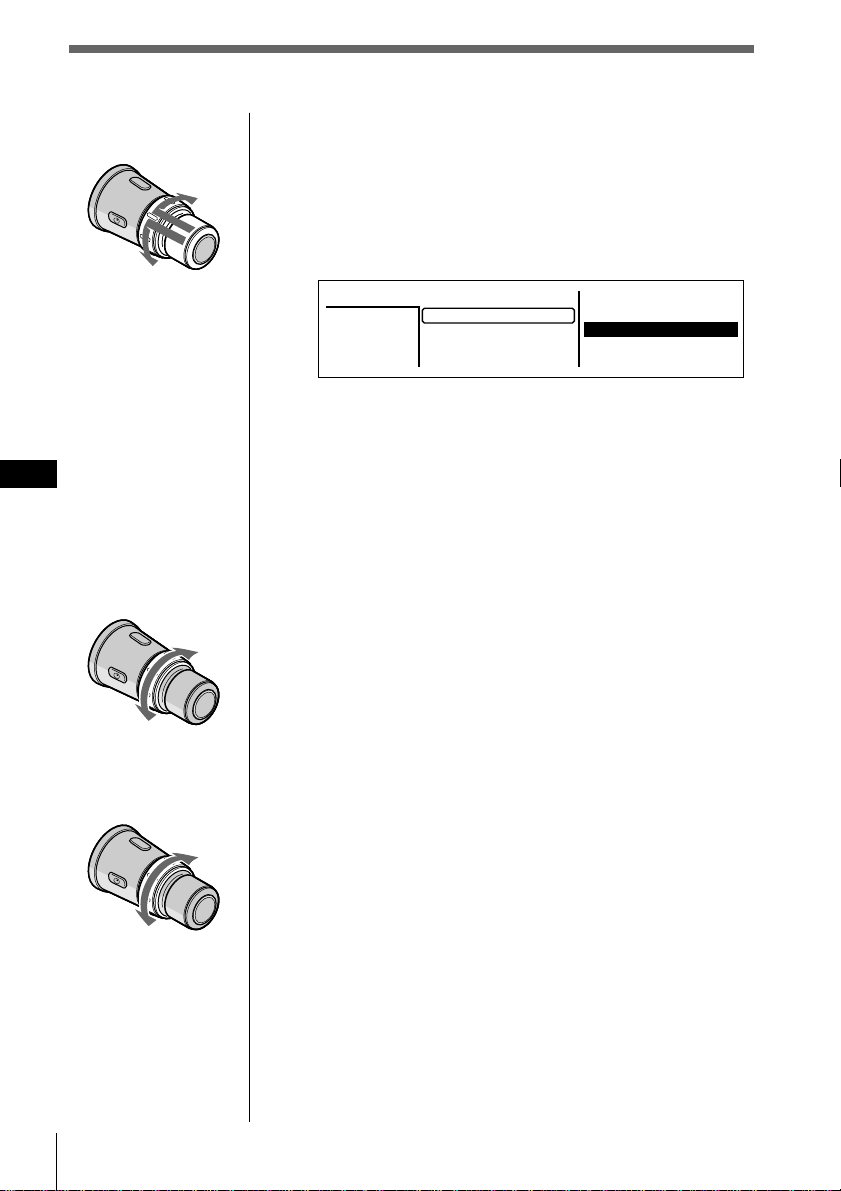
To select the disc to be played
Push in and rotate DISC/PRESET.
The unit changes to the next or previous disc. If you
keep the control rotated, the discs will continue to
change.
Push in and release the control to display the disc
name list.
For details on naming a disc, see “Labeling a CD” on
page 25.
Tips
•You can also use the number buttons on the front panel that
correspond to the desired disc number.
•If the SEEK/AMS mode is set to “Item sel,” you can select
the desired disc with SEEK/AMS when the list appears in
the display (see page 45).
To locate a track
Rotate, then release SEEK/AMS.
The unit locates the beginning of the current track or
the next or previous track.
To locate a specific point on a track
Rotate and hold SEEK/AMS.
The unit plays the track at high speed. When you
reach the point you want, release the control.
To the previous track
or beginning point of
the current track
To the
next track
To the next
disc
To the previous
disc
To search
backward
To search
forward
2.POPS HIT
3.FUSION
4.JAZZ
5.GREAT HIT
*
CD2
SONYPOPS
8
1.28
6.EURO BEAT
7.DRIVING
9.SUNSET.M
10.HIGHWAY
Disc
3
1.MY BEST
8.SONYPOPS
CD/MD
19
EN
1 While playing a CD or an MD, press and hold
DSPL for two seconds.
Tip
If the Select mode in the Func. menu is set to “Source,” the
function menu automatically appears on the right side of the
display, depending on the source you select. (see page 48)
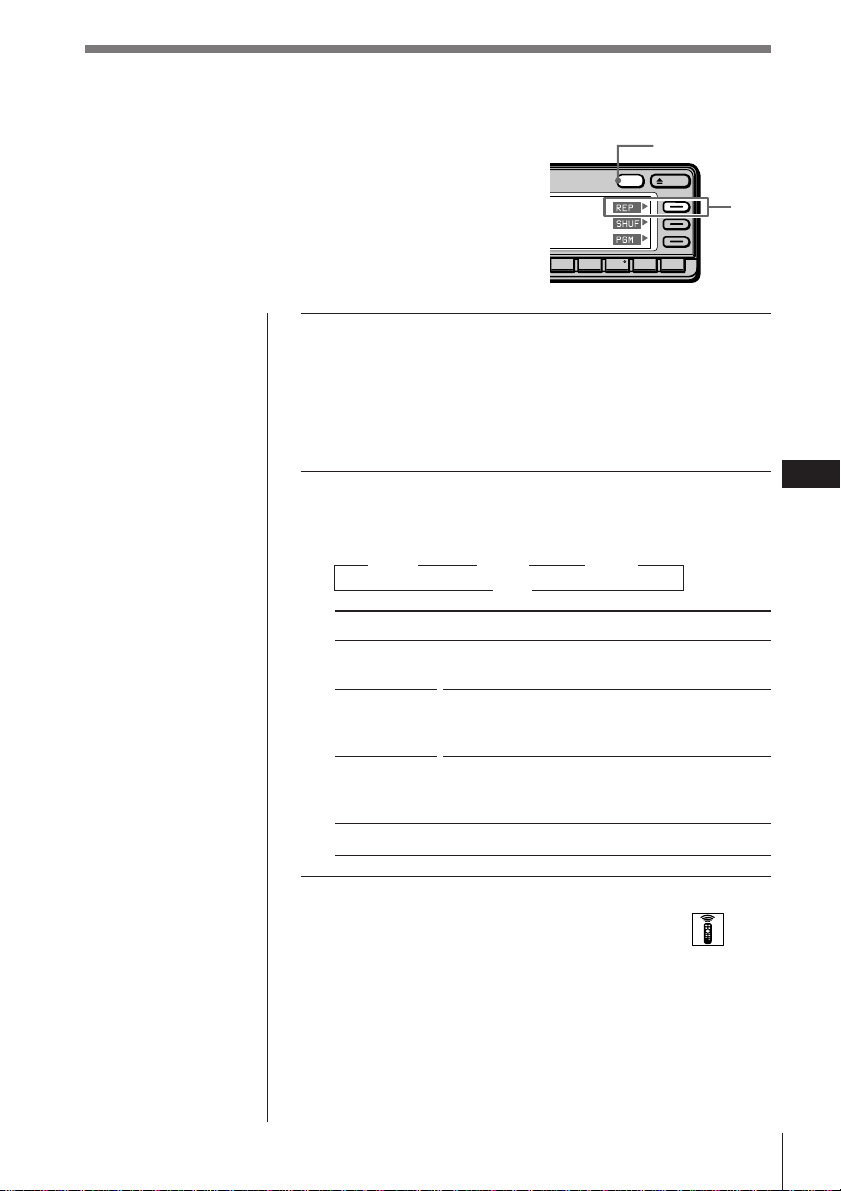
2 Press REP repeatedly to select the mode.
Each time you press REP, the mode changes as
follows:
” REP 1 ” REP 2 ” REP 3
off “
Indication
REP 1
(1:track)
REP 2
(2:disc)
REP 3
(3:changer)
off
Selecting the mode with the wireless remote
While playing a CD or an MD, press MENU and set the
Repeat mode to “1:track,”“2:disc,” or “3:changer.”
Playing tracks repeatedly
(Repeat play)
The repeat play function allows you to play back a
track, a disc, or all the discs in this unit or any
connected CD/MD unit repeatedly.
Operation
Repeats the current track only.
Repeats all tracks on the current disc (in case
one or more optional CD/MD units are
connected).
Repeats all the discs in the current CD/MD
unit (in case one or more optional CD/MD
units are connected).
Normal playback.
OPENDSPL
891076
DSPL
REP
CD/MD
20 CD/MD
EN
1 While playing a CD or an MD, press and hold
DSPL for two seconds.
Tip
If the Select mode in the Func. menu is set to “Source,” the
function menu automatically appears on the right side of the
display, depending on the source you select. (see page 48)
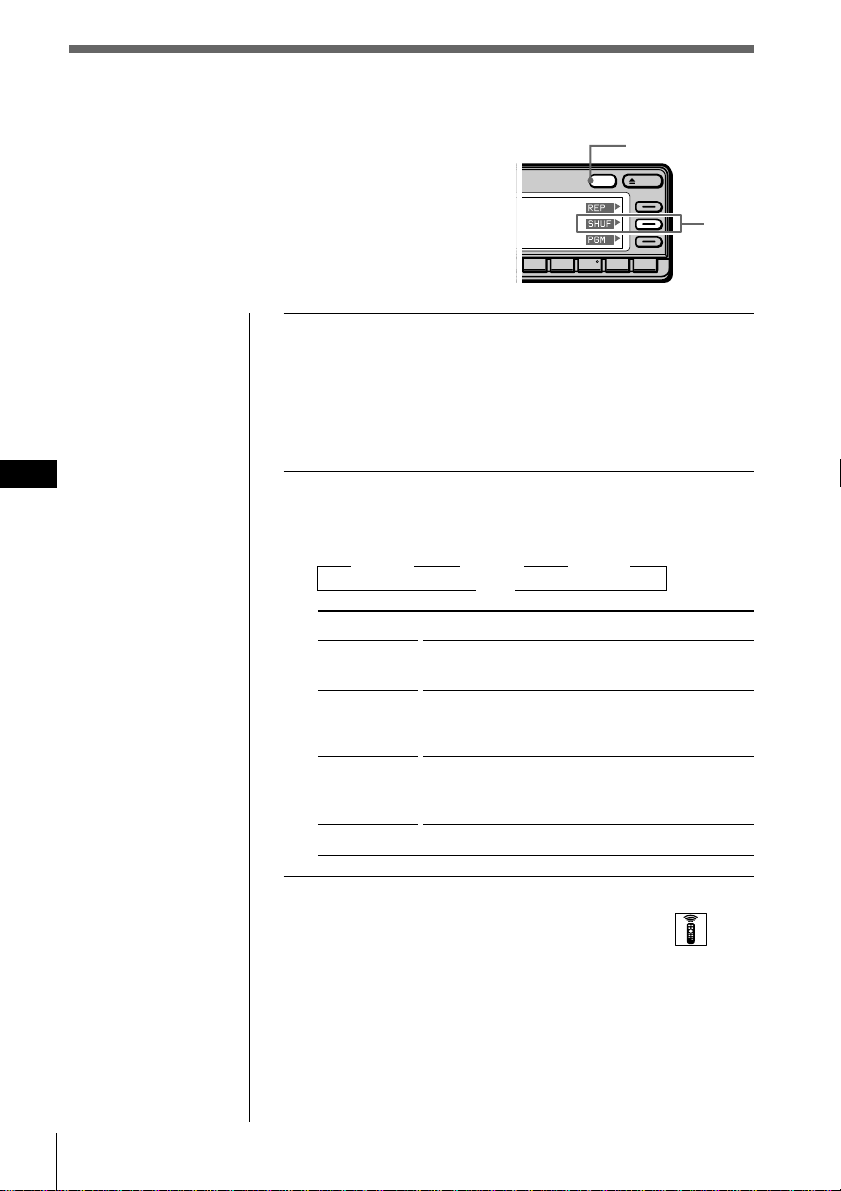
2 Press SHUF repeatedly to select the mode.
Each time you press SHUF, the mode changes as
follows:
” SHUF 1 ” SHUF 2 ” SHUF 3
off “
Indication
SHUF 1
(1:disc)
SHUF 2
(2:changer)
SHUF 3
(3:all)
off
Selecting the mode with the wireless remote
While playing a CD or an MD, press MENU and set the
Shuffle mode to “1:disc,”“2:changer,” or “3:all.”
Playing tracks in random order
(Shuffle Play)
Shuffle Play plays back all tracks on the current
disc or all discs in this unit or any connected
CD/MD unit in random order.
Operation
Plays all the tracks on the current disc in
random order.
Plays all the discs in the current CD/MD unit
in random order (in case one or more
optional CD/MD units are connected).
Plays all the discs in all the CD/MD units in
random order (in case one or more optional
CD/MD units are connected).
Normal playback
OPENDSPL
891076
DSPL
SHUF
CD/MD
21
EN
Cursor
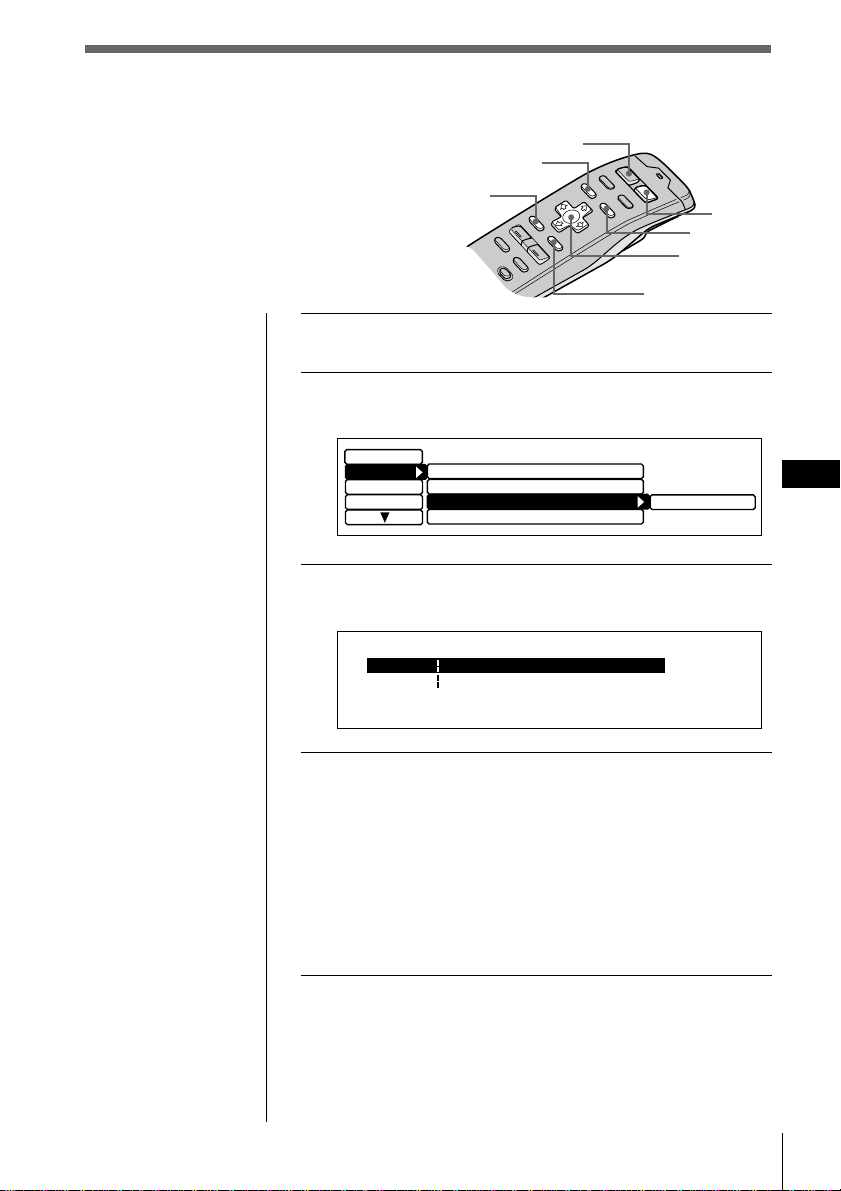
1 While playing a CD or an MD, press MENU.
2
Select “P. Mode” and press / to move to the
sub menu, then select “PGM” by pressing > or ..
3 Press / to select “edit,” then press ENTER.
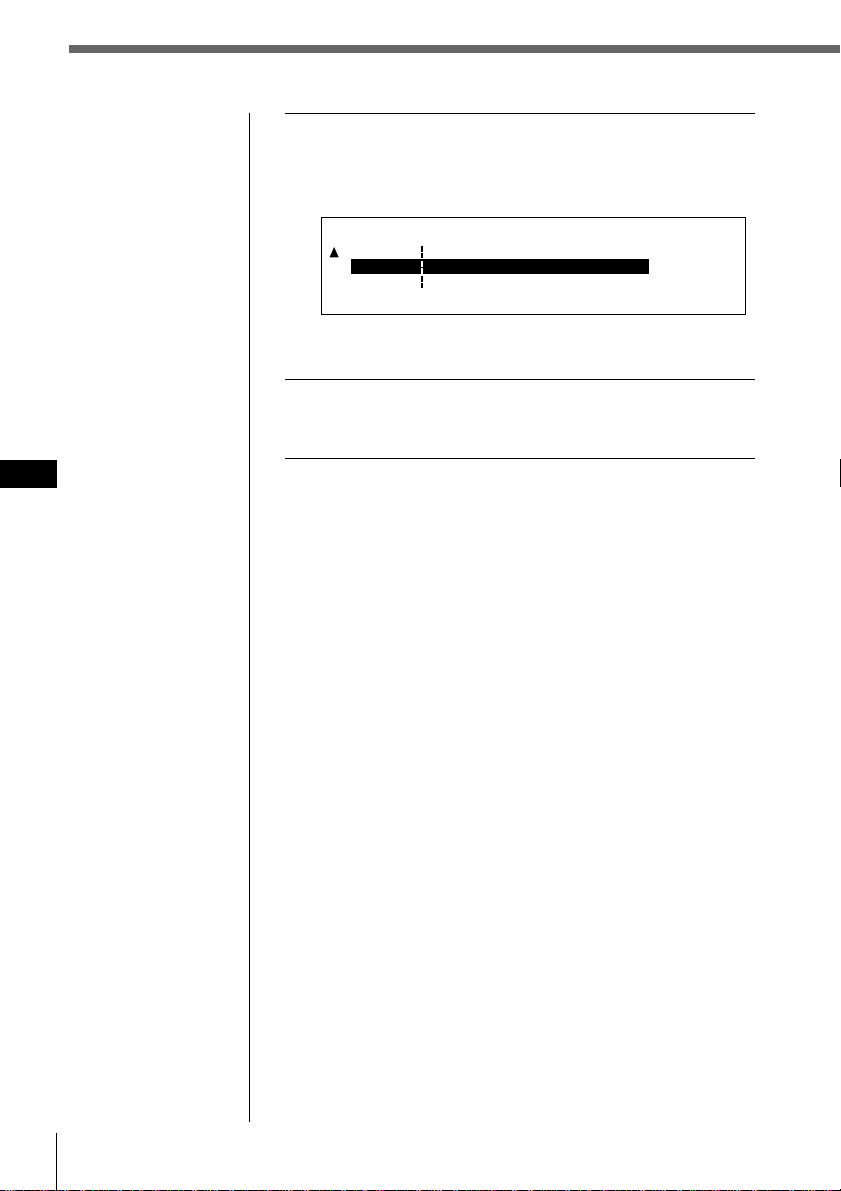
The PGM Edit Mode appears.
4 Select the track you want to program.
1 Press SOURCE repeatedly to select CD or
MD.
2 Press MODE repeatedly to select the desired
CD or MD unit.
3 Press LIST and select the desired disc by pressing
cursor, then press ENTER.
4 Press ? or / to select the track you want to
program.
continue to next page n
Creating a program
(CD/MD program memory)
You can play tracks from this unit or any
optional CD/MD unit in any order you
want by creating and storing programs in
the unit’s memory. Two programs with up
to 12 tracks each can be stored.
MY BEST CD1PGM Edit Mode 2 0.27
P2- 1
--- -- -- --------
--- -- --P1- 1
:
:
--------
SOURCE
MENU
BACK
ENTER
MODE
LIST
Tips
• In step 2, to move the
cursor back to the
previous column (one
at a time), press ?.
• To cancel the current
display and return to
the previous display,
press BACK.
Set up
Display
Name
edit
P.Mode
off
Repeat
off
Shuffle
off
Bank
PGM
off
CD/MD
22 CD/MD
EN
Note
Once all 12 slots have
been filled, “MEMORY
FULL” appears, and
you cannot insert more
tracks.
CD1
PGM Edit Mode 8 0.43
P2- 1
P1- 1
--- -- -- --------
SONYPOPS
SONYPOPS
CD1 1
:
:
P1- 2 --------
--- -- --
:
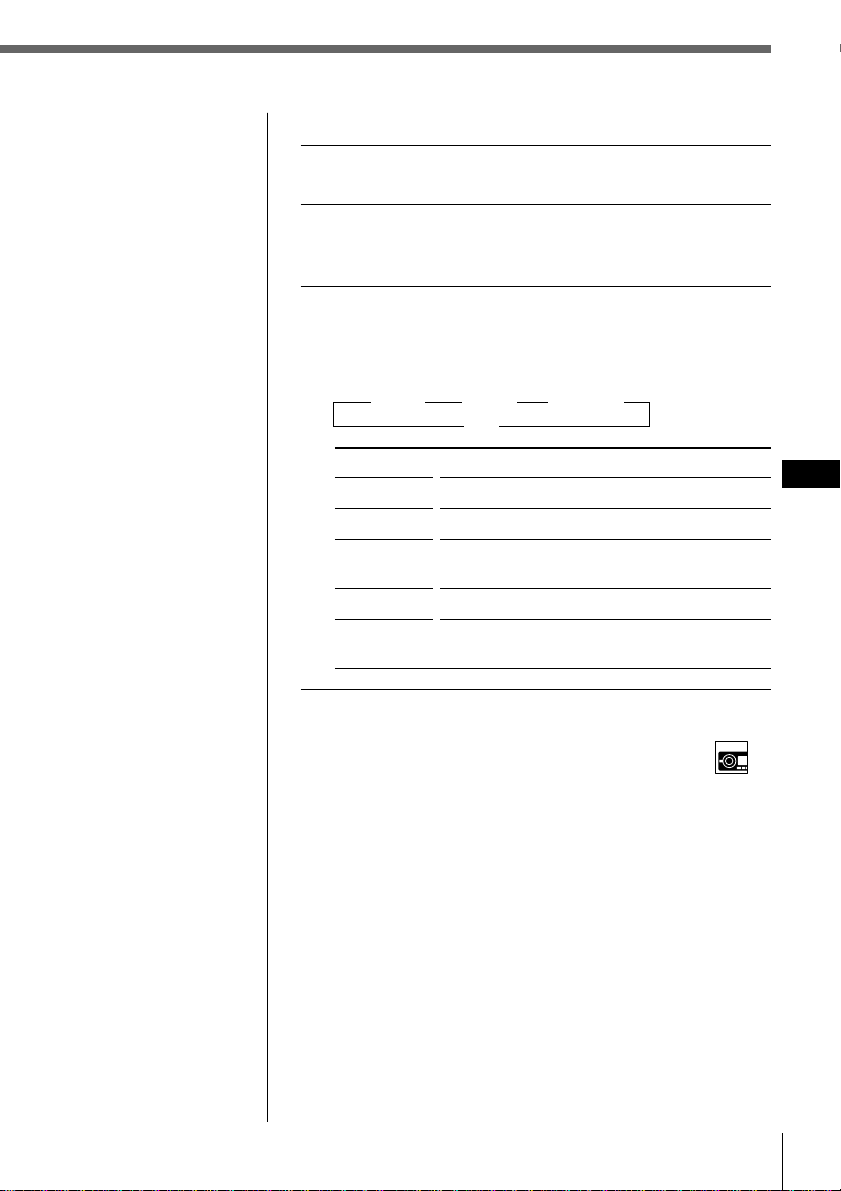
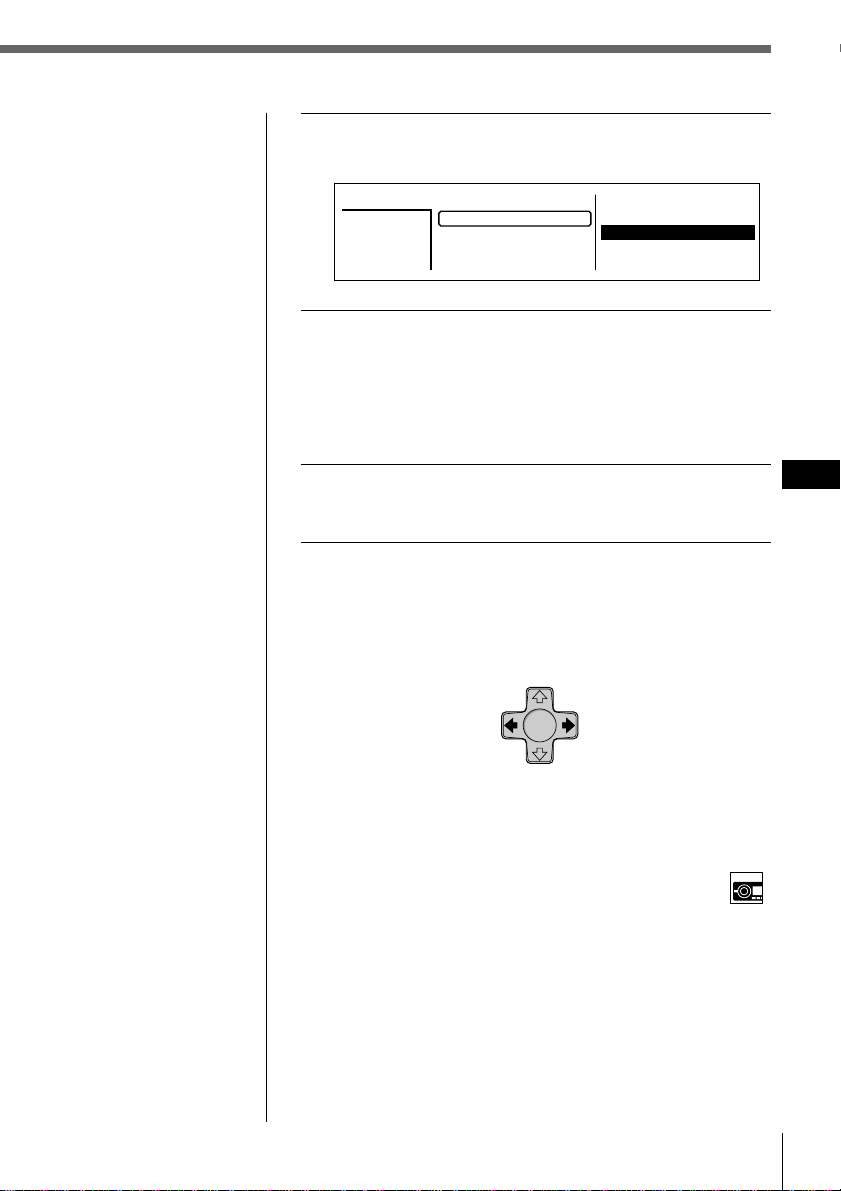
5 Press > or . to select the program number,
“P1” or “P2,” then press ENTER.
The current track in that slot number and all
succeeding tracks shift down.
To continue inserting tracks, repeat steps 4 to 5.
6 To complete the mode setting, press BACK.
The normal display appears.
CD/MD
23
EN
Notes
•“*Wait*” appears in
the display while the
unit is reading the
data.
•“*Mem Full*”
appears in the
display when you try
to enter more than 12
tracks into a
program.
•“**NO data**”
appears in the
display when no
program is stored.
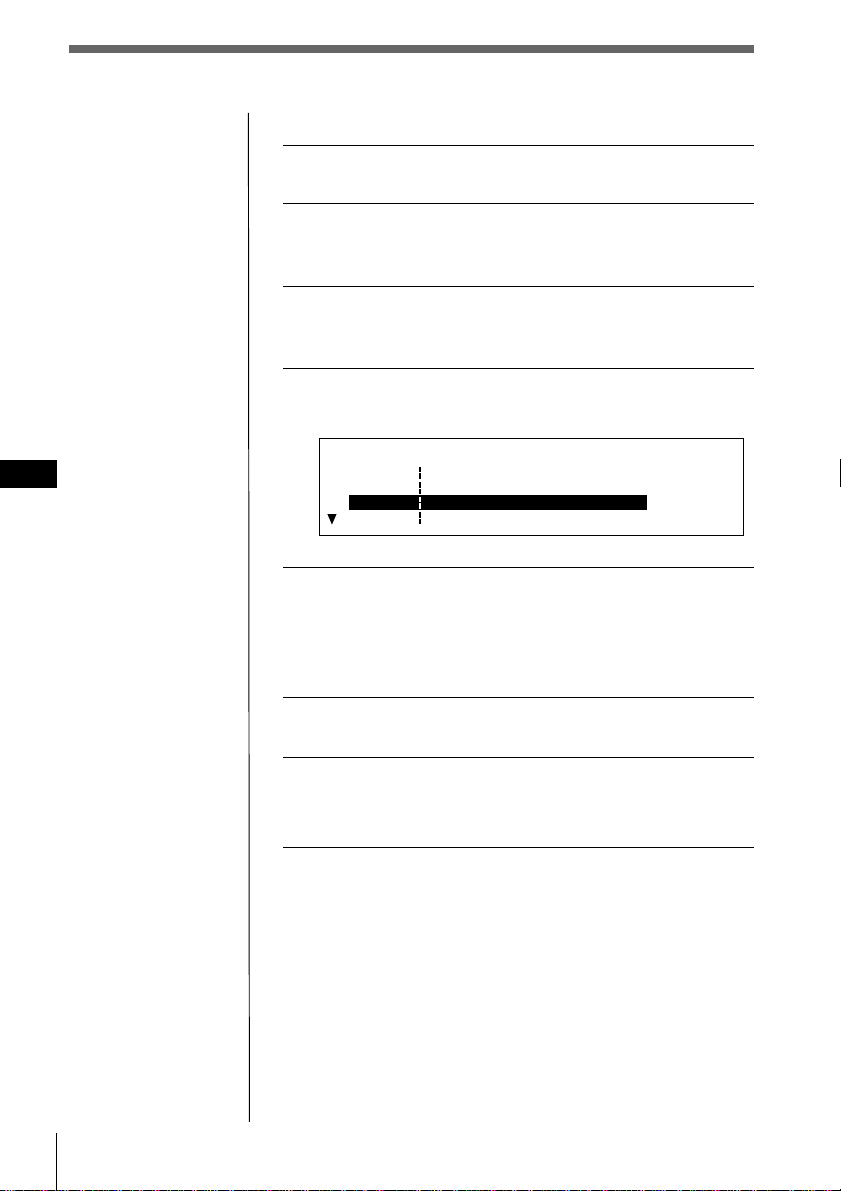
Playing the stored program
1 While playing a CD or an MD, press MENU.
2
Select “P.Mode” and press / to move to the sub
menu, then select “PGM” by pressing > or ..
3 Press / then > or . to select the mode, then
press ENTER.
The selected mode appears to the right of “PGM” in
the display.
” PGM 1 ” PGM 2 ” PGM 1+2
off “
Indication
PGM 1
PGM 2
PGM 1 + 2
off
edit
Selecting the mode with the front panel control
While playing a CD or an MD, press PGM repeatedly to
select “PGM 1,”“PGM 2,” or “PGM 1+2.”
Operation
Plays the track sequence of Program 1.
Plays the track sequence of Program 2.
Plays the track sequences of Program 1 and
then Program 2.
Normal playback
Sets the order of tracks and stores the
program in memory.
CD/MD
24 CD/MD
EN
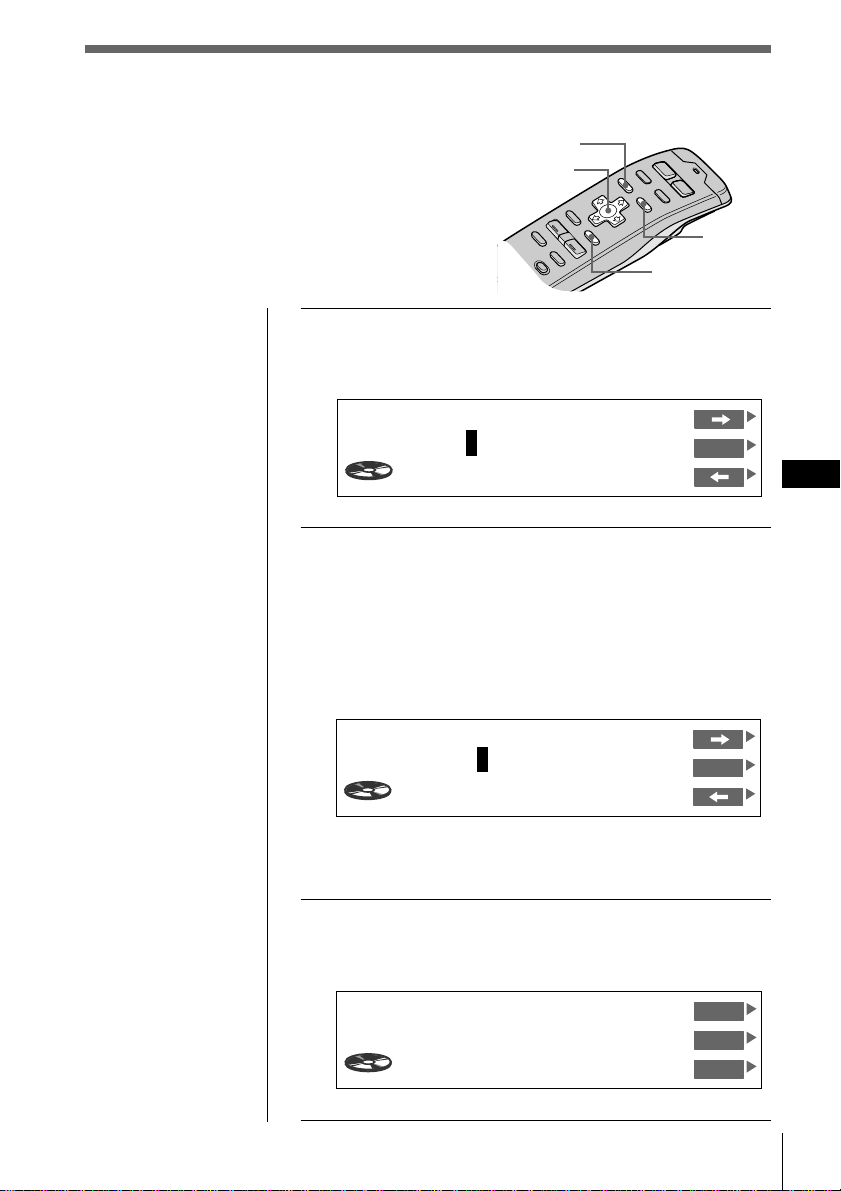
Erasing an entire program
Select “P1 : Group Erase” or “P2 : Group
Erase” in step 4 above.
The entire program is erased and “NO data” appears.
Erasing tracks in a program
1 While playing a CD or an MD, press MENU.
2
Select “P. Mode” and press / to move to the
sub menu, then select “PGM” by pressing > or ..
3 Press / then > or . to select “edit,” then
press ENTER.
4 Press > or . to select the track you want to
erase.
5 Press and hold ENTER for two seconds.
When you erase a track from a slot number, the
succeeding tracks shift up to fill the gap.
To continue erasing tracks, repeat steps 4 and 5.
6 To complete the mode setting, press BACK.
7 Press MENU.
The previous display appears.
CD1
PGM Edit Mode 1 2 3.09
P1- 1
DRIVING
Group EraseP1
P1- 2 CD2 8 3 LIVE HIT
P1- 3
POPS HIT
SONYPOPS
CD2 3 4
CD2 7 2
:
:
:
CD/MD
25
EN
CD/MD
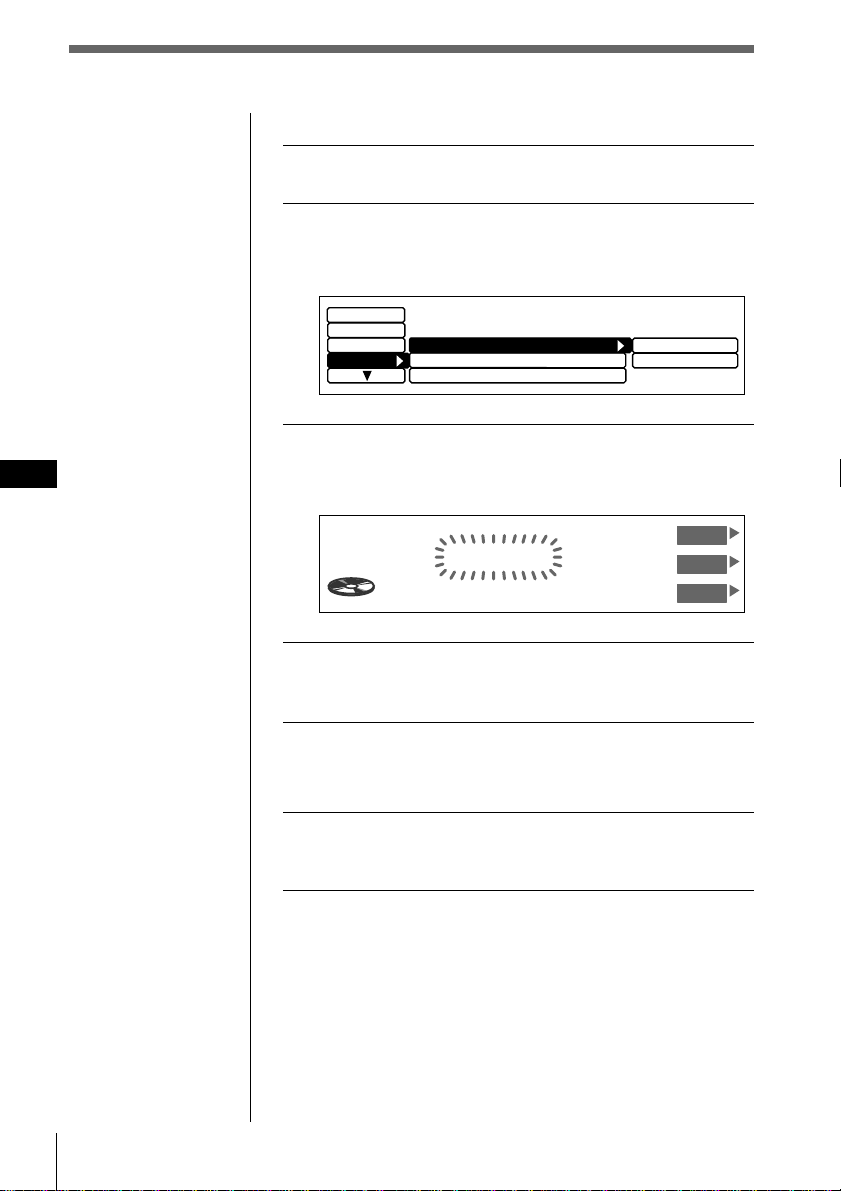
1 While playing a CD, press LIST for two
seconds.
The Disc Memo Write indication appears.
2 Press > or . until the character you want to
enter appears, then press /.
Each time you press >, the character changes as
follows:
A n B n C n ...Z n 0 n 1 n 2 n ...9 n + n – n
* n / n \ n > n < n . n _ (under-bar) n A...
Press . to move backwards.
If you want to put a blank space between characters,
select “_”(under-bar).
3 Repeat step 2 until you have entered the
entire title, then press ENTER.
The normal display appears.
Tip
To cancel the current
display and return to
the previous display,
press BACK.
Labeling a CD – Disc Memo
(CD unit with the custom file function)
You can record a title of up to 8 characters for
each disc. The disc title appears in the display
whenever you insert the disc and play it. Up to
110 disc titles can be stored in memory.
Cursor
LIST
ENTER
MENU
Disc Name
SONYPOPS
CD1
VC
DVOL
EL
17.04
Tip
To erase/correct a
name, enter “_” (under-
bar) for each character.
Disc Memo Write
1CD1 4.15
S
_______
ENT
Disc Memo Write
1CD1 3.45
ENT
________
26 CD/MD
EN
Erasing a disc title
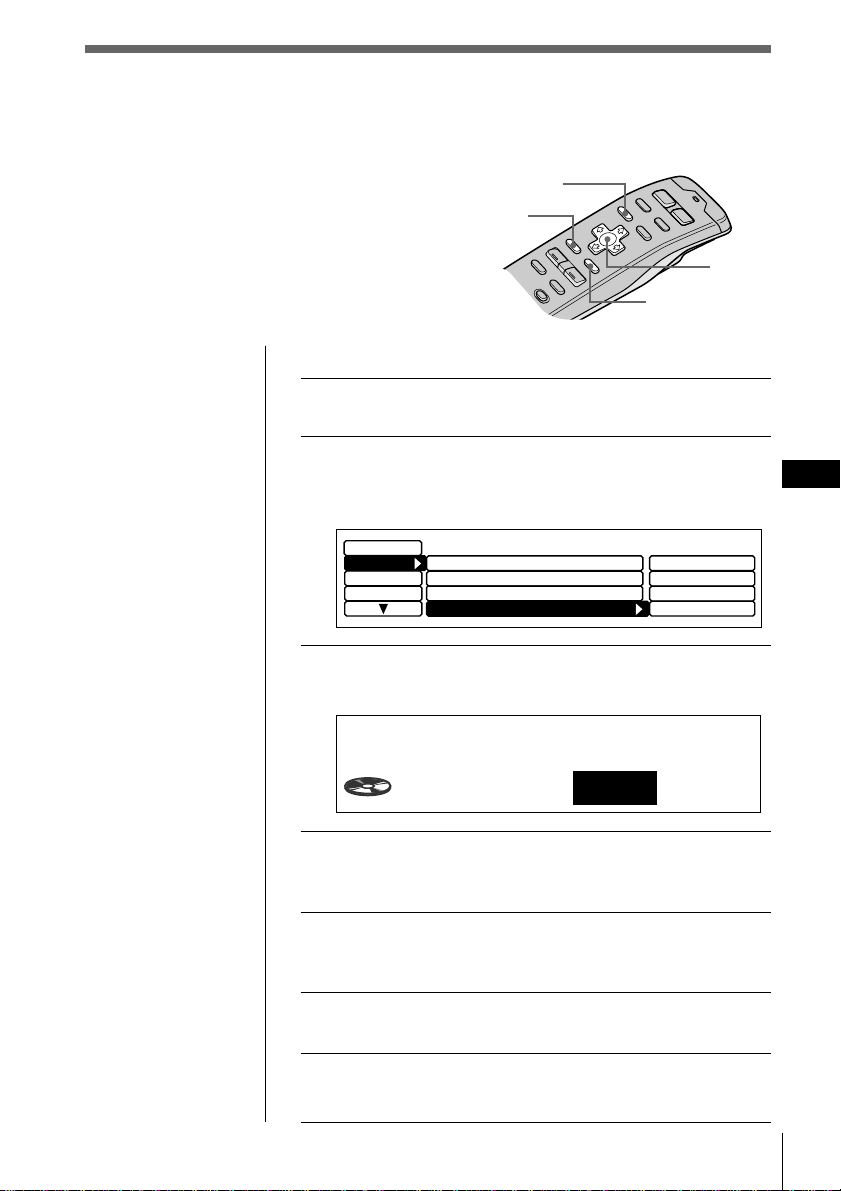
1 While playing a CD or an MD, press MENU.
2 Select “Name” and press / to move to the
sub menu, then select “Disc Memo” by
pressing > or ..
3 Press /, then > or . to select “delete,” then
press ENTER.
The Disc Memo Delete indication appears.
4 Press > or . to select the disc title you want
to erase.
5 Press and hold ENTER for two seconds.
The selected disc title is erased.
6 Press MENU.
The normal display appears.
Note
In step 4, all the disc
names stored in the CD
unit’s memory appear
in the order they were
entered. The last name
entered will therefore
appear at the end.
Display
Disc Name D.Memo
Auto Scroll
on
write
delete
Name
Disc Memo
Set up
P.Mode
Disc Memo Delete
2CD1 2.50
SONYPOPS
UP
ENT
DOWN
CD/MD
27
EN
CD/MD
Selecting specific tracks for
playback
(Bank)
If you have labeled the disc (see page 25), the
Bank function allows you to skip certain tracks
and play only the tracks you want.
Cursor
To set tracks to “Play” or “Skip”
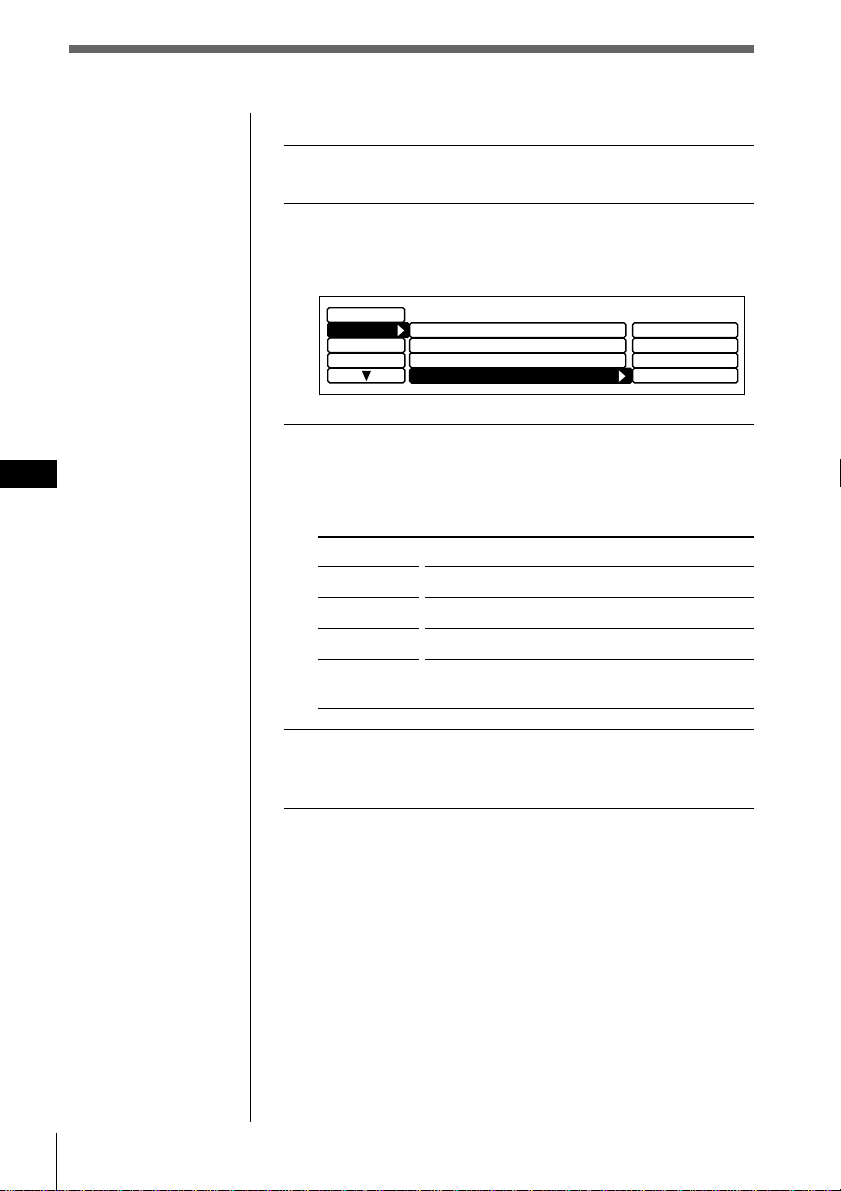
1 While playing a CD or an MD, press MENU.
2 Select “P.Mode” and press / to move to the
sub menu, then select “Bank” by pressing >
or ..
3 Press / then press > or . to select “edit,”
then press ENTER.
4 Press > or . to select “Play” or “Skip,” then
press / to move to the next track.
5 Repeat step 4 to select “Play” or “Skip” for all
succeeding tracks.
6 To complete the mode setting, press BACK.
7 Press MENU.
The normal display appears.
Tips
• In step 2, to move the
cursor back to the
previous column
(one at a time), press
?.
• To cancel the current
display and return to
the previous display,
press BACK.
Note
If you have not labeled
the disc, “edit” does not
appear in the menu.
Note
Press ? to move to the
previous track.
MENU
BACK
ENTER
off
Display
Name
Repeat
Set up
PGM
off
on
inverse
off
edit
off
P.Mode
Shuffle
PGM
off
Bank
Bank Edit
3CD1
SCHUBERT
Play
28 CD/MD
EN
Playing specific tracks only
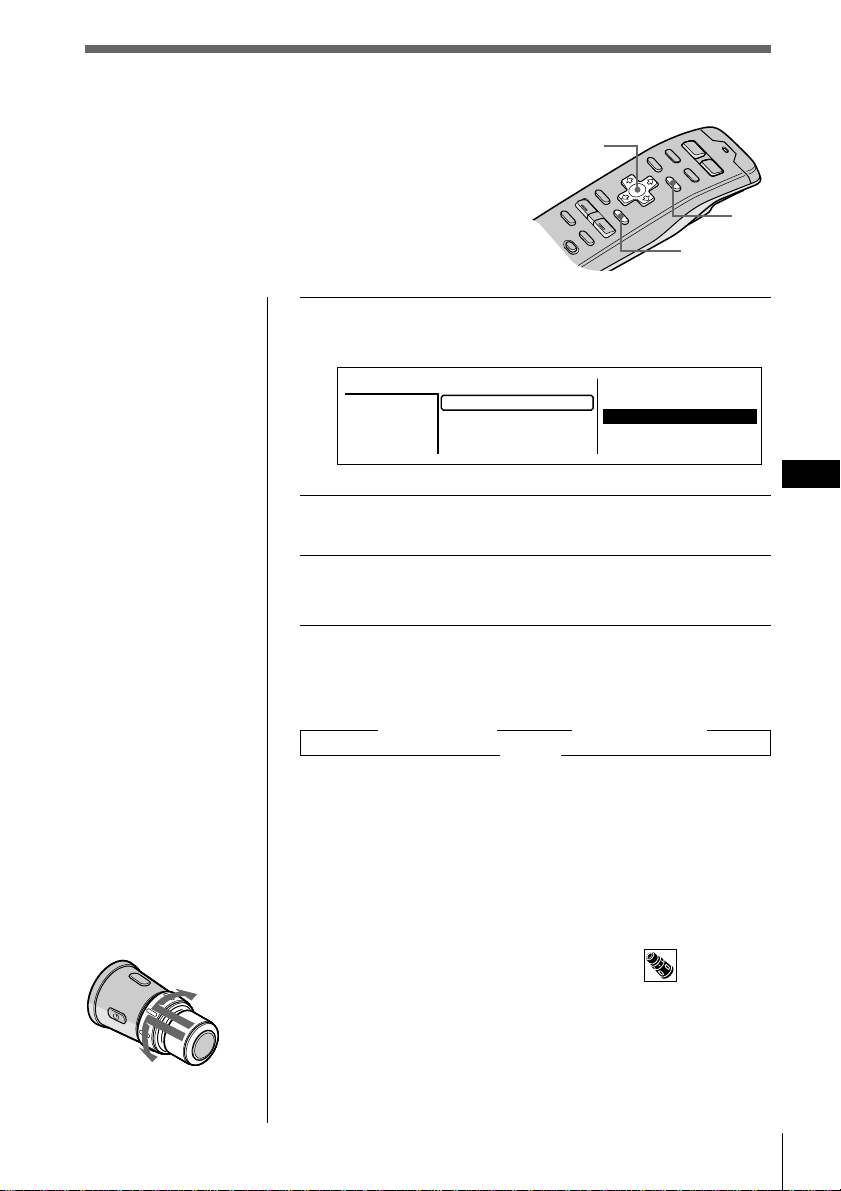
1 While playing a CD or an MD, press MENU.
2 Select “P.Mode” and press / to move to the
sub menu, then select “Bank” by pressing >
or ..
3 Press / then > or . to select the mode, then
press ENTER.
The selected mode appears to the right of “Bank” in
the display.
Indication
on
inverse
off
edit
4 Press MENU.
The normal display appears.
Note
You cannot use the
Bank function for discs
that have not been
labeled using the Disc
Memo function. Be
sure to label the disc in
advance.
Operation
Plays all tracks set to “Play.”
Plays all tracks set to “Skip.”
Normal playback
Sets tracks on the current disc to “Play” or
“Skip.”
off
Display
Name
Repeat
Set up
PGM
off
on
inverse
off
edit
off
P.Mode
Shuffle
PGM
off
Bank
CD/MD
29
EN
CD/MD
Tips
• To cancel the
selection, press LIST
twice or BACK once.
• If the SEEK/AMS
mode is set to “Item
sel,” you can select
the desired disc with
SEEK/AMS when
the list appears in the
display (see page 45).
Note
The following
indications may appear
in the disc name list.
• “NO DISC”: There is
no disc in the given
disc slot.
•“********”: The disc
is not labeled.
• “?”: The unit has not
verified the disc
information.
Locating a disc by name
Use this function to locate a disc by its name.
(To add titles to discs, see page 25).
Cursor
LIST
ENTER
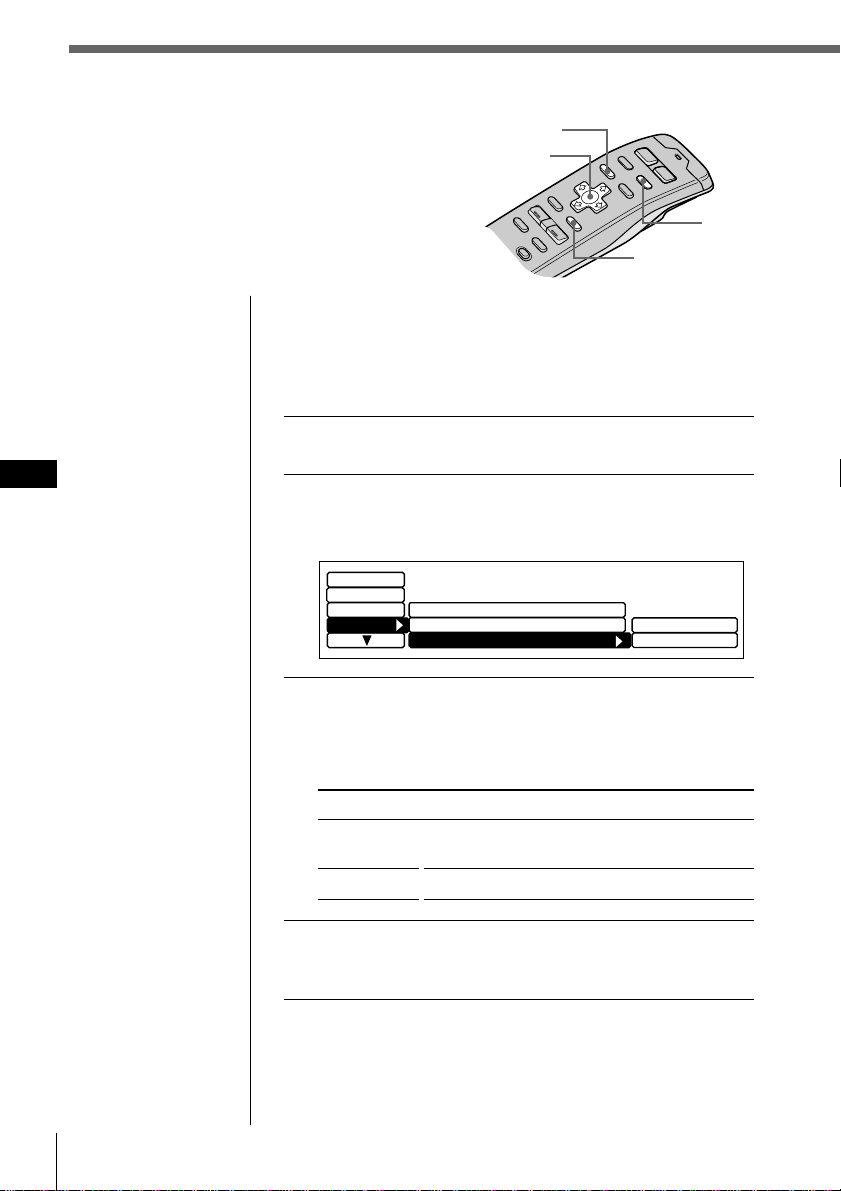
1 While playing a CD or an MD, press LIST.
The Disc name list appears.
2 Press >, ., /, or ? to select the disc.
3 Press ENTER.
Playback starts from the first track of the disc.
On track name list
Each time you press LIST, the display changes as follows:
” Disc name list* ” Track name list**
Cancel “
* Only when CD/MD unit is connected.
** When CD unit with CD TEXT function is selected.
This list displays track names contained on CD TEXT discs
and MDs with labeled tracks. Since this unit does not
support track labeling, when playing non-CD TEXT discs
or MDs with unlabeled tracks, “********” appears instead
of the track name in the track name list.
To select a disc using the rotary remote
Push in and release DISC/PRESET to display the disc
name list or track name list.
Push and rotate the control to select the disc or track from
the list. After about 5 seconds, the normal display
reappears.
To the next disc
To the previous disc
2.POPS HIT
3.FUSION
4.JAZZ
5.GREAT HIT
*
CD2
SONYPOPS
8
1.28
6.EURO BEAT
7.DRIVING
9.SUNSET.M
10.HIGHWAY
Disc
3
1.MY BEST
8.SONYPOPS
30 CD/MD
EN
Viewing CD TEXT information
You can view text information contained on a CD
TEXT disc during playback.
Selecting the disc name display
When playing CD TEXT discs that have been labeled using
the Disc Memo function (see page 25), you can specify that
disc names be displayed whenever you press DSPL or
LIST.
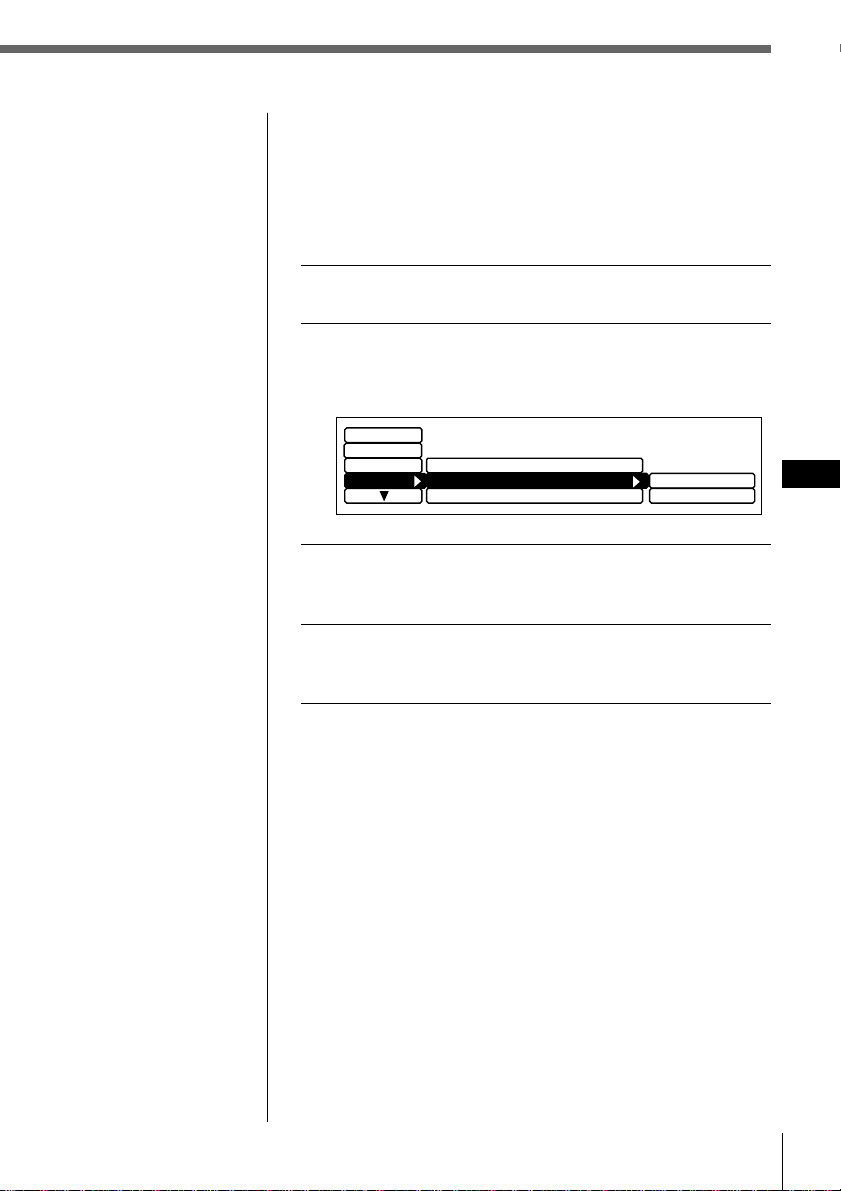
1 While playing a CD, press MENU.
2 Select “Name,” press / to move to the sub
menu, then select “Disc Name” by pressing >
or ..
3 Press / then > or . to select “D.Memo” or
“TEXT,” then ENTER.
The selected mode appears to the right of “Disc
Name” in the display.
Indication
D.Memo
TEXT
4 Press MENU.
The normal display appears.
What is a CD TEXT disc?
A CD TEXT disc is a music CD that also contains text data
such as the disc name, artist name, and track name. This
text data is recorded in areas normally unused on
conventional music CDs.
Cursor
Operation
Displays disc titles entered by the Disc Memo
function.
Displays original CD TEXT information.
ENTER
MENU
DSPL
Display
P.Mode
Auto Scroll
on
D.Memo
TEXT
Disc Memo
Name
Disc Name D.Memo
Set up
Tips
• In step 2, to move the
cursor back to the
previous column
(one at a time), press
?.
• To cancel the current
display and return to
the previous display,
press BACK.
CD/MD
31
EN
CD/MD
Scrolling titles automatically
When playing CD TEXT discs or MDs (using an optional
MD unit,) the track or disc/artist name appears
automatically whenever a new disc or track is played.
Follow the procedure below to specify the automatic
scrolling of titles of more than 10 characters.
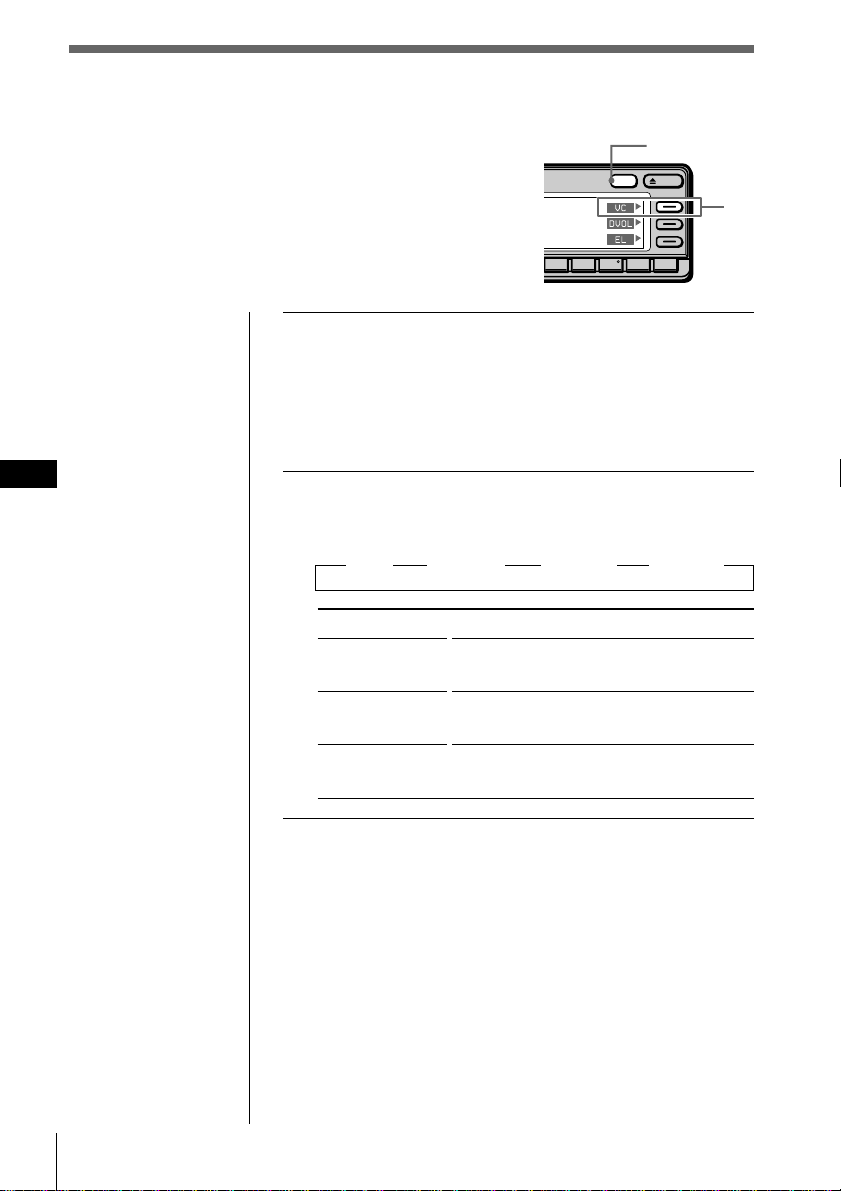
1 While playing a CD or an MD, press MENU.
2 Select “Name,” press / to move to the sub
menu, then select “Auto Scroll” by pressing >
or ..
3 Press / then > or . to select “on,” then
ENTER.
4 Press MENU.
The normal display appears.
To cancel the scrolling of titles
Select “off” in step 3 and press ENTER.
When playing a CD TEXT disc
Each time you press DSPL, the displayed information
changes as follows:
Disc Name/Artist Name* ˜ Track Name
* The artist name appears automatically after the disc name.
Display
on
off
Disc Memo
Name
Disc Name D.Memo
Auto Scroll
off
Set up
P.Mode
32 CD/MD
EN
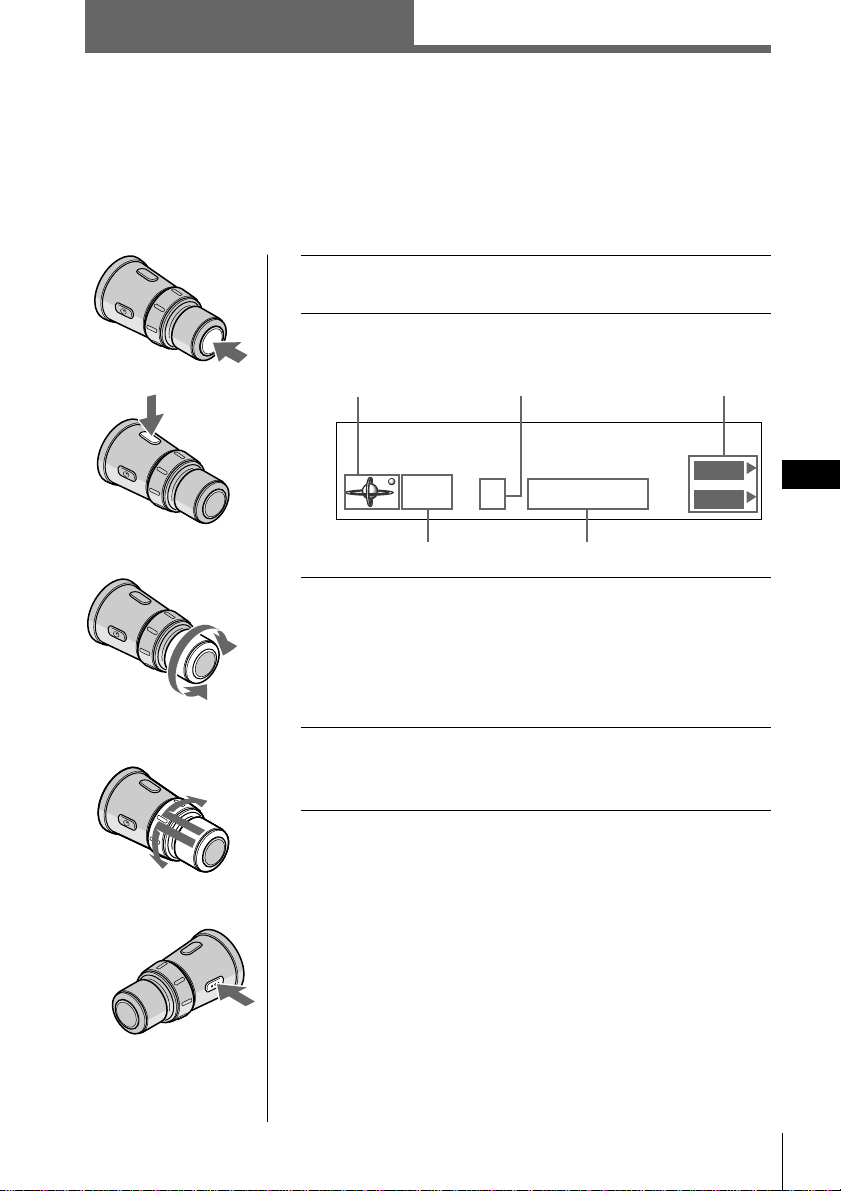
1 While playing a CD, press and hold DSPL for
two seconds.
Tip
If the Select mode in the Func. menu is set to “Source,” the
function menu automatically appears on the right side of the
display, depending on the source you select. (see page 48)
2 Press VC repeatedly to select the mode.
Each time you press VC, the filter type changes as
follows:
” Plain ” Analog A ” Analog B ” Standard
Type
Plain
Analog A
Analog B
Standard
What is a variable coefficient (VC) digital filter?
CD players use digital filters to eliminate the noise
generated during sampling. You can change the tone of
your music by changing the cutoff characteristics of the
digital filter. This unit has four types of filters with
different coefficient characteristics: “Plain,” “Analog A,”
“Analog B,” and “Standard.”
Notes
• This function is
available only for
this unit and has no
affect when an
optional CD/MD
unit or radio, etc. is
selected.
• If you are playing a
disc when you press
VC, the sound will
be interrupted
momentarily.
Customizing the CD sound
(Digital filter function)
This unit has a variable coefficient (VC) digital
filter. By selecting the type of filter you want, you
can adjust the sound characteristics which best
compliment your speaker, source, unit, etc.
Sound image
• high clarity
• strong
• warm
• deep
• wide ranging
• ample spatial representation
OPENDSPL
891076
DSPL
VC
Radio
33
EN
Radio
1 Press SOURCE repeatedly to select tuner.
2 Press MODE repeatedly to select FM1, FM2, or
AM.
3 Rotate VOL to adjust the volume level.
The volume is adjustable between 0 dB to – ∞ dB.
Caution
For your safety, set the volume low enough so that you can
hear the sounds in the street around you.
4 To change the preset station, push in and
rotate DISC/PRESET.
To stop listening to the radio
Press OFF.
Function menu
Listening to radio
You can store your favorite radio stations in the unit’s memory for instant tuning at a
later time (see “Presetting radio stations” on page 34).
Radio
To decrease
To increase
To previous
preset
station
To next
preset station
STEREO
KYCS
4FM1 102.5MHz
Station
DVOL
EL
Source indication
Band indication
Preset station number
Frequency
CD/MD/Radio
34 Radio
EN
Specifying the station frequency
(Manual Preset Memory)
Caution
When tuning in stations while driving, use the Best Tuning
Memory to prevent an accident (see page 36).
1 Press SOURCE repeatedly to select tuner.
2 Press MODE repeatedly to select FM1, FM2, or
AM.
3 Press and hold ? or / until the frequency
you want appears in the display, then release
the button.
4 Press MENU.
5 Select “R.Mode” and press / to move to the
sub menu, then select “Preset” by pressing >
or ..
Presetting radio stations
There are two ways to preset radio stations:
• Selecting the station frequency (Manual
preset memory)
• Selecting stations with the strongest
signals (BTM*)
* Best Tuning Memory
Cursor
Local off
Mono/Stereo
Display
Name
IF
Preset
stereo
main+sub
manual
BTM
Set up
R.Mode
Tip
Rotate and hold SEEK/
AMS on the rotary
remote to continue
searching, then release
the control when the
frequency you want
appears.
Note
If you selected AM in
step 2, the “Mono/
Stereo” and “Antenna”
sub menus will not
appear in the display.
SOURCE
MENU
ENTER
MODE
Tips
• In step 2, to move the
cursor back to the
previous column
(one at a time), press
?.
• To cancel the current
display and return to
the previous display,
press BACK.
Radio
35
EN
Radio
Tip
If the SEEK/AMS
mode is set to “Item
sel,” you can select the
desired station with
SEEK/AMS when the
list appears in the
display (see page 45).
Note
If you assign a new
frequency to a preset
station number that has
already been assigned a
frequency, the new
frequency replaces the
old frequency.
6 Press /, then > or . to select “manual,” then
ENTER.
7 Press >, ., /, or ? to select the preset
station number to which the frequency will
be stored then press ENTER.
You can preset up to 20 FM stations (10 stations each
in FM1 and FM2) and up to 10 AM stations.
8 Press MENU.
The normal display appears.
To receive a station automatically (Automatic Tuning)
Press and release ? or /.
“Seek Up” or “Seek Down” appears until the unit
detects a station.
Tip
You can start Automatic Tuning by momentarily rotating
SEEK/AMS on the rotary remote, then releasing it.
Presetting the station with the front panel controls
After tuning in the station, press and hold the desired number
button for two seconds.
For a lower frequency For a higher frequency
2. 101.9
3. 96.0
4. 102.5
5. 105.4
*
FM1
2
101.9MHz
6. 96.6
7. 99.9
9. 98.3
10. 98.3
Station
1. 106.3
8. 98.9
36 Radio
EN
Note
If the radio can only
tune in a few stations or
receives only weak
frequencies, the BTM
function may not assign
frequencies to all the
preset station numbers.
Selecting stations with the strongest
signals (BTM)
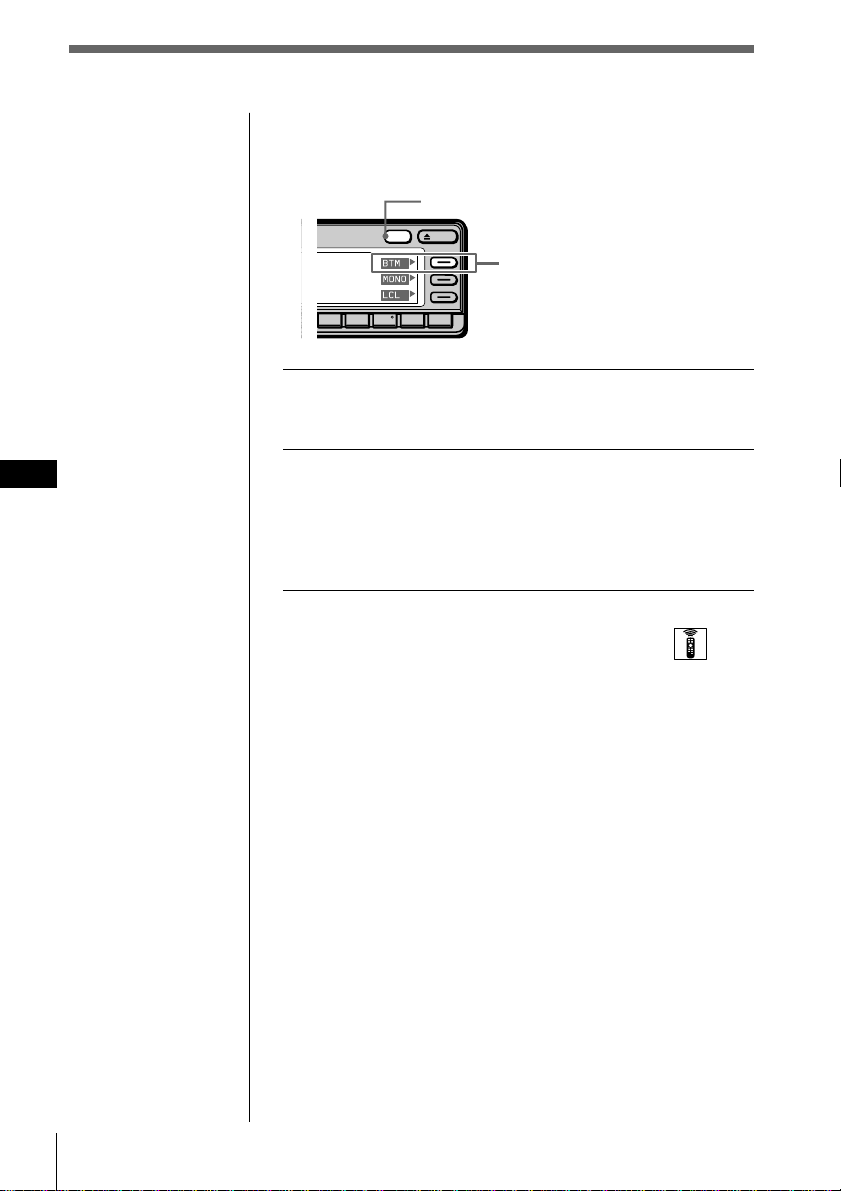
1 While listening to an FM or AM broadcast,
press and hold DSPL for two seconds.
2 Press BTM.
The unit selects the station with the strongest signals
and memorizes them in the order of their frequencies.
A beep sounds after storing the stations and the unit
returns to the normal display.
Selecting the mode with the wireless remote
While listening to an FM or AM, press MENU and set the
Preset mode to “BTM.”
What is the BTM (Best Tuning Memory) function?
BTM is a function that selects the radio stations with the
strongest signals and automatically sets them to preset
station numbers. The BTM function starts tuning in
stations from the lowest frequency on the band (FM or
AM). When a station is found, the unit assigns the
frequency to the currently selected preset station number.
When preset numbers are not displayed, the unit assigns
frequencies starting with preset station 1.
Even after the unit has assigned frequencies to all the
preset station numbers, the unit continues tuning. If
stronger signals are found, the unit replaces the current
preset stations with the stronger frequencies. Finally, the
unit sorts the stations in ascending order by frequency.
OPENDSPL
891076
5
DSPL
BTM
MONO
LCL
BTM
Tip
If the Select mode the in
Func. menu is set to
“Source,” the function
menu is automatically
appears on the right
side of the display,
depending on the
source you select. (see
page 48)
Radio
37
EN
Radio
Specifying monaural/
Stereo mode
If the FM stereo reception is poor, you can select
“Mono” to improve the sound.
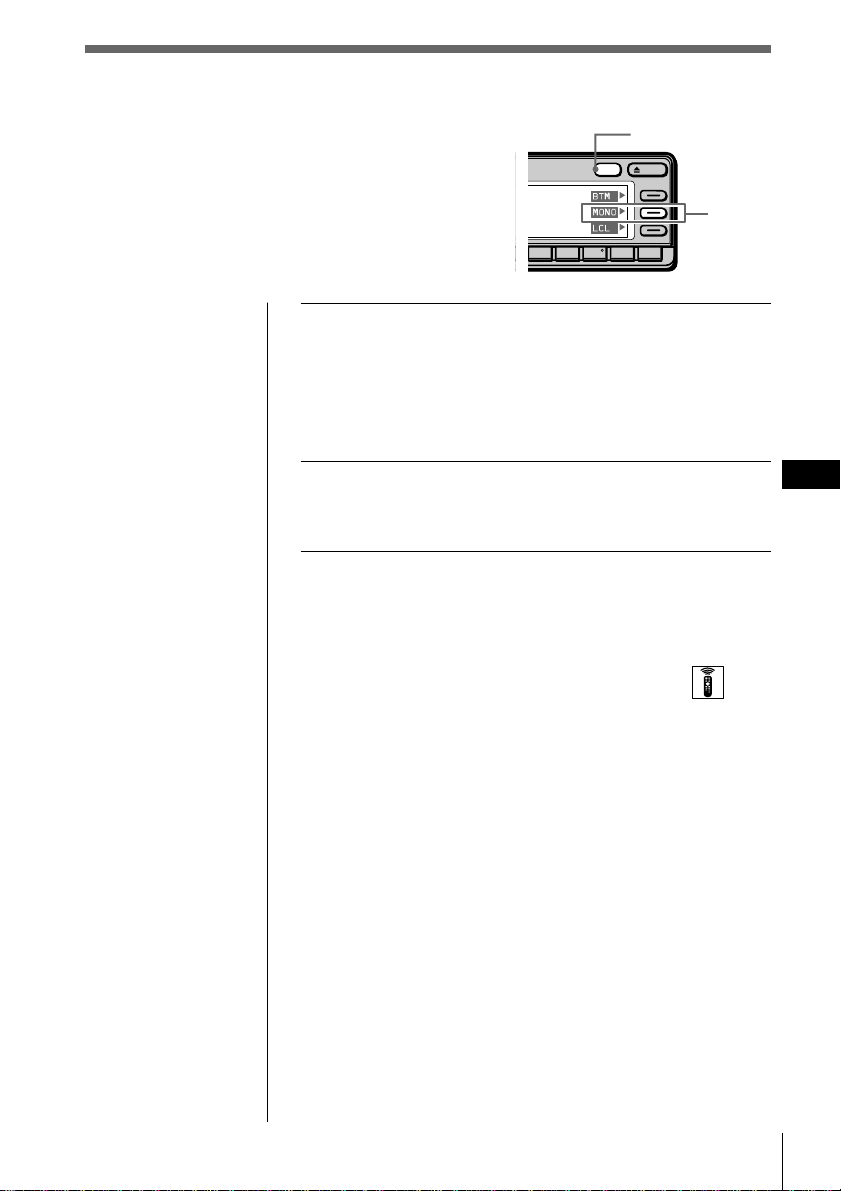
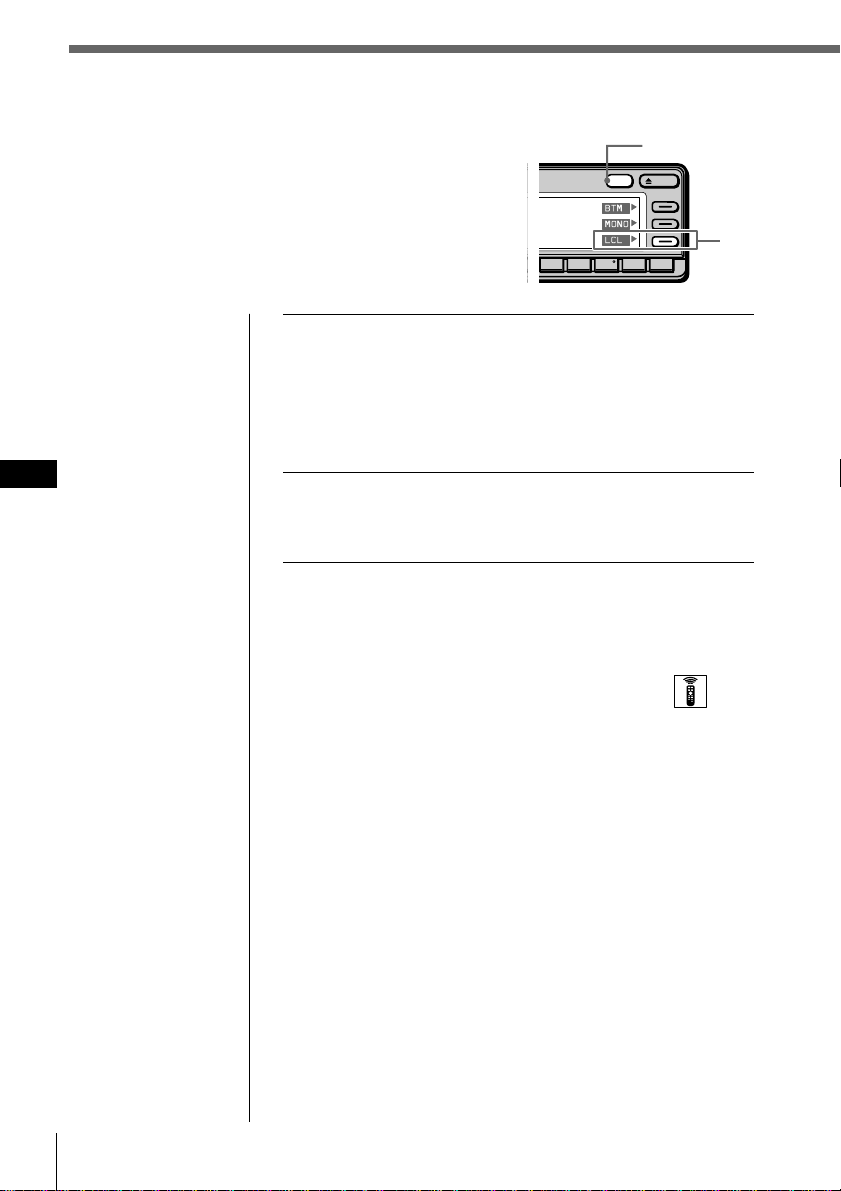
1 While listening to an FM broadcast, press and
hold DSPL for two seconds.
Tip
If the Select mode in the Func. menu is set to “Source,” the
function menu automatically appears on the right side of the
display, depending on the source you select. (see page 48)
2 Press MONO repeatedly to select “on.”
The sound will improve, but will not be in stereo.
To cancel the monaural mode
Select “off” in step 2 above.
Selecting the mode with the wireless remote
While listening to FM, press MENU and set the Mono/
Stereo mode to “mono,” or “stereo.”
OPENDSPL
891076
DSPL
MONO
BTM
MONO
LCL
38 Radio
EN
Receiving only the strongest
signals
(Local on/off)
The Automatic Tuning function may stop
frequently when there are many radio stations in
the area. If this happens, you can reduce the
sensitivity of the tuner so that only the strongest
signals are tuned in.
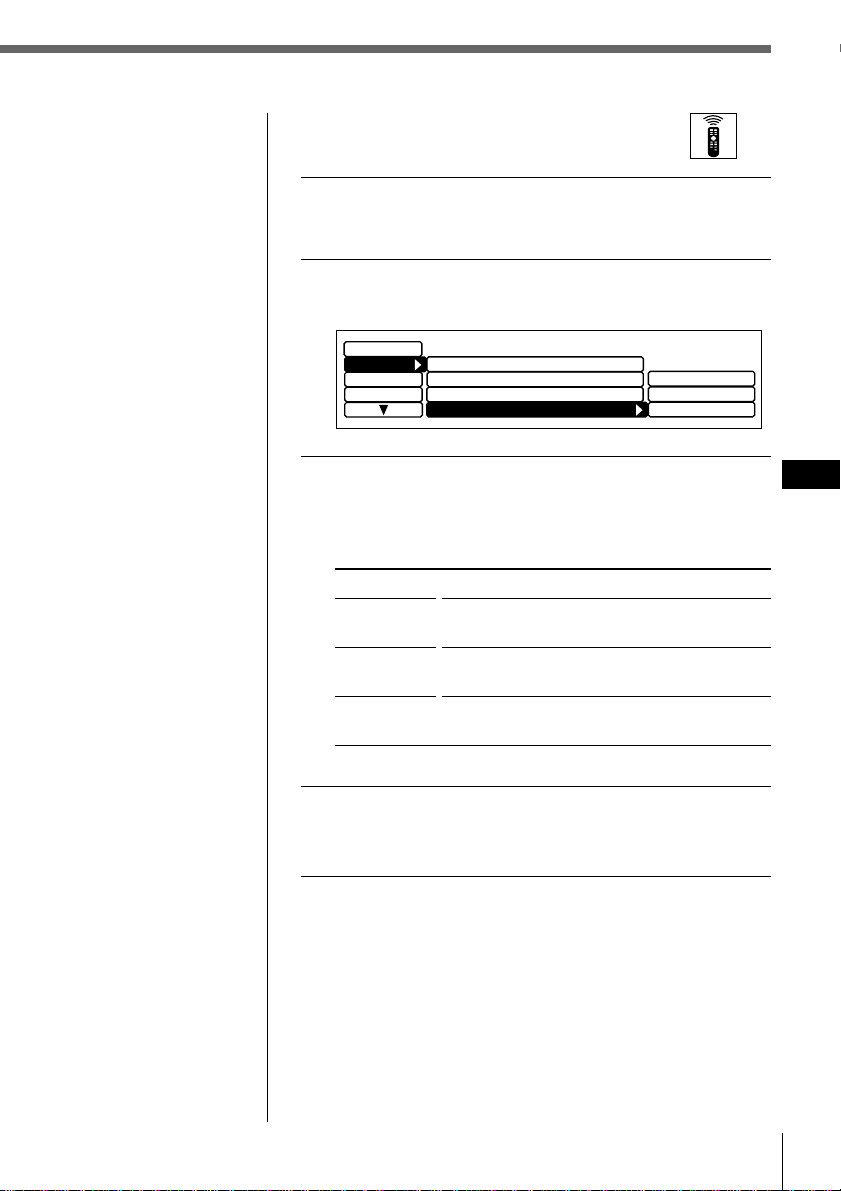
1 While listening to an FM or AM broadcast,
press and hold DSPL for two seconds.
Tip
If the Select mode in the Func. menu is set to “Source,” the
function menu automatically appears on the right side of the
display, depending on the source you select. (see page 48)
2 Press LCL repeatedly to select “on.”
Only the stations with relatively strong signals will be
tuned in.
To cancel the local mode
Select “off” in step 2 above.
Selecting the mode with the wireless remote
While listening to FM or AM, press MENU and set the
Local mode to “on,” or “off.”
OPENDSPL
891076
DSPL
LCL
BTM
MONO
LCL
Radio
39
EN
Radio
If interference occurs during FM
reception
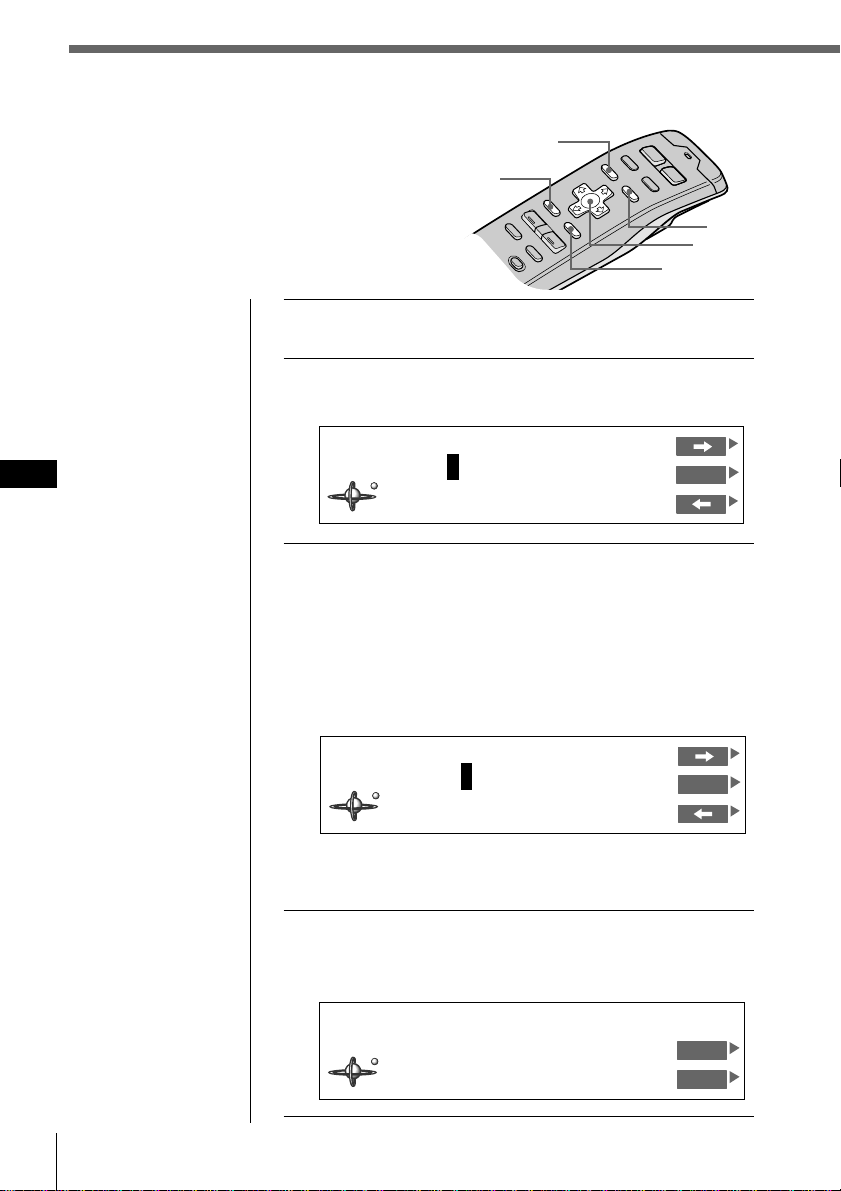
1 While listening to an FM broadcast, press
MENU.
2 Select “R.Mode” and press / to move to the
sub menu, then select “IF” by pressing > or ..
3 Press / then > or . to select the mode, then
press ENTER.
The selected item appears to the right of “IF” in the
display.
Type
Wide
Narrow
Auto
4 Press MENU.
The normal display appears.
Function
Maximizes signal reception and improves
sound quality.
Prevents interference from neighboring
stations.
Switches the mode between “Narrow” and
“Wide” automatically.
Local off
Mono/Stereo
Display
Name
Preset
Set up
stereo
Narrow
Auto
R.Mode
IF Auto
Wide
40 Radio
EN
Tip
To cancel the current
display and return to
the previous display,
press BACK.
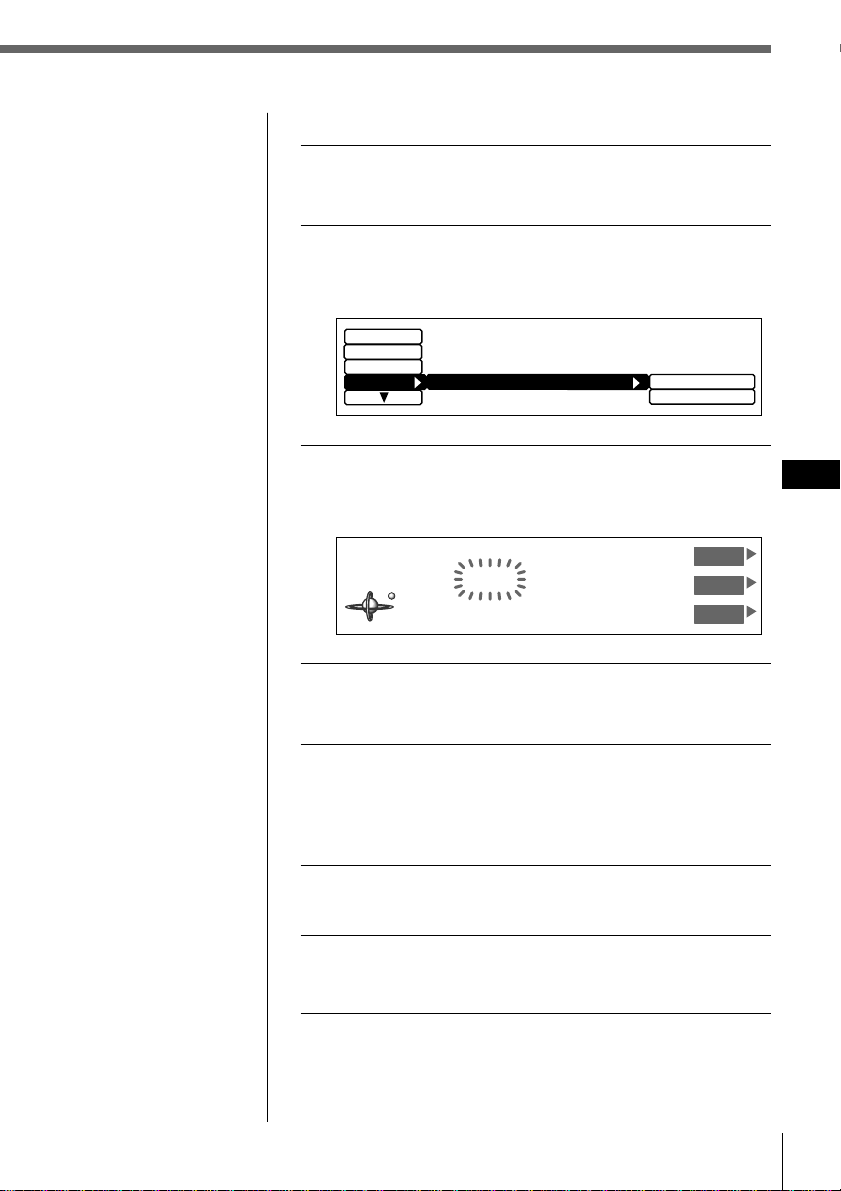
1 Tune in the station you want to label.
2 Press LIST for two seconds.
The Station Memo Write indication appears.
3 Press > or . until the character you want to
input appears and press /.
Each time you press >, the character changes as
follows:
A n B n C n ...Z n 0 n 1 n 2 n ...9 n + n - n
* n / n \ n > n < n . n _ (under-bar) n A...
Press . button to move backwards.
If you want to put a blank space between characters,
select “_”(under-bar).
4 Repeat step 3 until you have entered the
entire name, then press ENTER.
The normal display appears.
Labeling radio stations (Station Memo)
You can add a title of up to 8 characters to
each station. The station name appears in
the display whenever the station is
selected. Up to 44 station names can be
stored in memory.
Cursor
ENTER
MENU
BACK
LIST
STEREO
KYCS
FM1 102.5MHz
Station
DVOL
EL
Tip
To erase/correct a
name, enter “_” (under-
bar) for each character.
Station Memo Write
FM1 102.5MHz
ENT
________
Station Memo Write
FM1 102.5MHz
ENT
K
_______
Radio
41
EN
Radio
Note
In step 4, all the station
names stored in
memory appear in the
order they were
entered. The last station
name entered will
therefore appear at the
end.
Erasing a station name
1 While listening to an FM or AM broadcast,
press MENU.
2 Select “Name,” press / to move to the sub
menu, then select “Station Memo” by
pressing > or ..
3 Press /, then > or . to select “delete,” then
ENTER.
The Station Memo Delete indication appears.
4 Press > or . to select the station name you
want to erase.
5 Press and hold ENTER for two seconds.
The selected station name is erased.
Repeat steps 4 and 5 if you want to erase other station
names.
6 To complete the mode setting, press BACK.
7 Press MENU.
The normal display appears.
R.Mode
Display
Set up
write
delete
Name
Station Memo
Station Memo Delete
KYCS
FM1 102.5MHz
UP
ENT
DOWN
42 Radio
EN
LIST
ENTER
Tips
• To cancel the
selection, press LIST.
• If the SEEK/AMS
mode is set to “Item
sel,” you can select
the desired station
with SEEK/AMS
when the list appears
in the display (see
page 45).
1 While listening to an FM or AM broadcast,
press LIST.
The preset name List appears.
2 Press >, ., /, or ? to select the station.
3 Press ENTER.
The unit selects the station, and the normal display
appears.
To select a station using the rotary remote
Push in and release DISC/PRESET to display the present
name list.
Push and rotate the control to select the station from the
list. After about 5 seconds, the normal display reappears.
Selecting a station by name
You can use this function to select a station by the
name that has been stored in memory for it.
Cursor
2. 101.9
3. 96.0
4. 102.5
5. 105.4
*
FM1
2
101.9MHz
6. 96.6
7. 99.9
9. 98.3
10. 98.3
Station
1. 106.3
8. 98.9
To the next
station
To the previous
station
Other functions
43
EN
Other functions
Adjusting the sound
characteristics
You can adjust the bass, treble, balance, and fader.
The bass and treble levels can be stored
respectively for each source.
1 Press SOUND repeatedly to select the item
you want to adjust.
Each time you press SOUND, the item changes as
follows:
* Only when the DVOL (Direct Volume) function is turned
off.
2 Adjust the selected item by pressing VOL +
or –.
Adjust within three seconds after selecting the item.
(After three seconds, VOL + and – function as the
volume button.)
Attenuating the sound
Press ATT.
The unit automatically decreases the volume to a low
level.
To restore the previous volume level, press ATT again.
Tip
When the interface
cable of a car telephone
is connected to the ATT
lead, the unit decreases
the volume
automatically when a
telephone call comes in
(Telephone ATT
function).
Other functions
” Volume ” Sub W (subwoofer volume) ” Bass*
Fader (rear-front) “ Balance (left-right) “ Treble* “
ATT
SOUND
VOL
+
/
-
Radio/Other functions
44 Other functions
EN
Setting the set up menu
Use the Set up menu to perform additional settings,
including Clock, Beep, Rotary remote, SEEK/AMS,
Digital out, VC (Variable Coefficient) filter, and
Direct Volume.
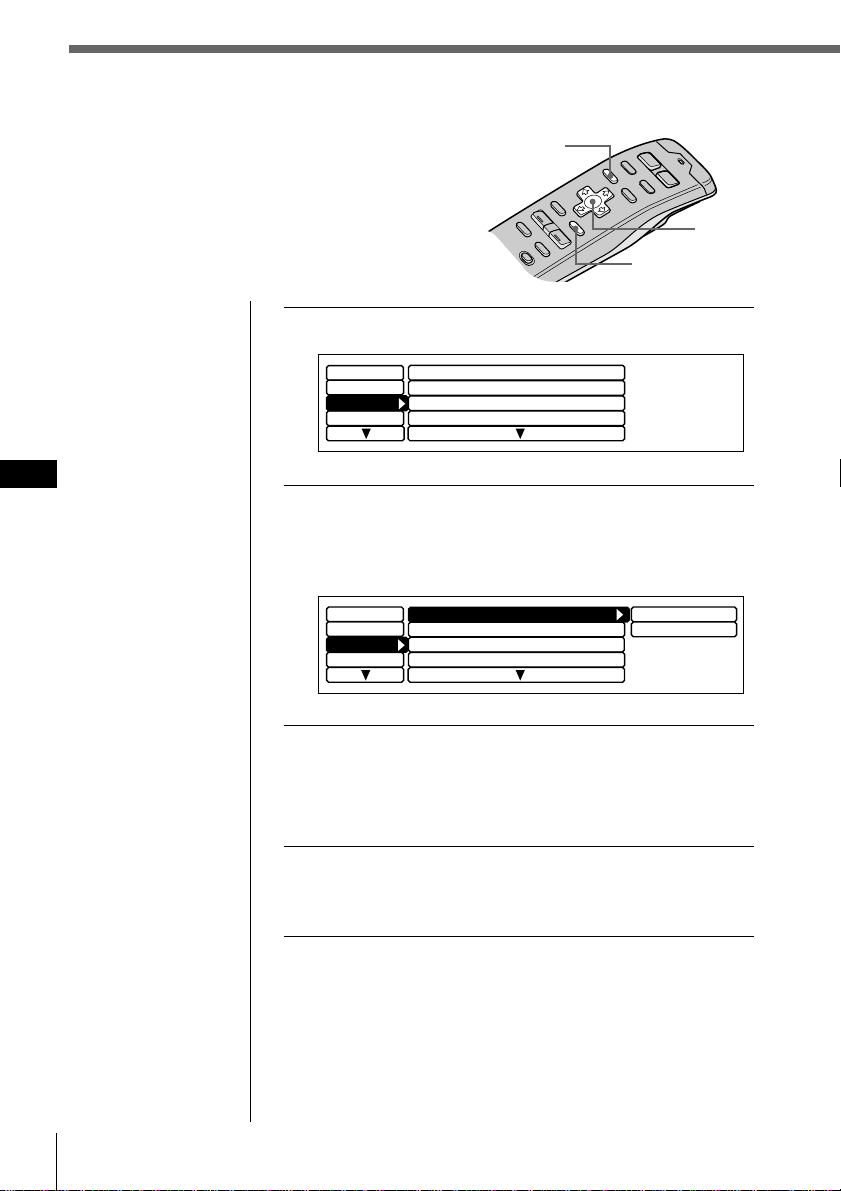
Tips
• In step 2, to move the
cursor back to the
previous column
(one at a time), press
?.
• To cancel the current
display and return to
the previous display,
press BACK.
Cursor
MENU
ENTER
Clock
off
Beep
on
Rotary Remote norm
Display
Name
SEEK/AMS
P.Mode
SEEK/AMS
Set up
Direct Volume
off
1 Press MENU and select “Set up.”
2 Press / to move to the sub menu, then select
the setting by pressing > or ..
The current setting appears to the right of the sub
menu.
3 Change the setting and press ENTER.
The new setting appears to the right of the sub menu.
Sub menus and the method for changing their settings
are explained in the table on the next page.
4 Press MENU.
The normal display appears.
Display
Name
SEEK/AMS
SEEK/AMS
off
Beep on
Rotary Remote
norm
Time Set
on
Set up
P.Mode
Clock on
Direct Volume
off
Other functions
45
EN
Other functions
Sub Menu
Clock
Beep
Rotary remote
SEEK/AMS
Digital out
VC filter
Direct Volume
Explanation and settings
Select “on” to display the current time in
the upper-left corner of the display at all
times. If you select “off,” the time is
displayed only when the system is turned
off. Select “Time Set” to set the clock (see
page 6).
Specifies whether a beep sounds when an
operation button is pressed.
Reverses the rotational direction of the
rotary remote for controlling operations.
Select “normal” for increasing volume,
frequency, track numbers, etc. by rotating
the remote clockwise. Select “reverse” for
increasing the same parameters by rotating
the remote counterclockwise.
The SEEK/AMS function has two modes:
Normal mode — Select “SEEK/AMS” to
quickly locate tracks or stations.
Item select mode — When the name list is
displayed, select “Item sel” to locate discs
or stations using the rotary remote or the
front panel control.
Select “ON” to output the digital signals
through DIGITAL OUT if optional
equipment with digital input is connected.
Select “OFF” to cancel the output of digital
signals.
Select one of four filter types for adjusting
the sound to match your desired sound
image, the music source, etc.
Select “on” to output the signal without
processing through the volume control
circuit for pure high quality sound. In this
case, the bass and treble adjustment do not
work.
Select “off” to output the signal through the
tone control circuit. You can control the
bass and treble levels, but the pureness of
the original sound will be degraded.
46 Other functions
EN
Cursor
Setting the display menu
Use the Display menu to perform additional settings
including Illumination, Dimmer, Panel angle, Font
Style, Contrast, EL (Electric Luminosity), and Display.
Tips
• In step 2, to move the
cursor back to the
previous column
(one at a time), press
?.
• To cancel the current
display and return to
the previous display,
press BACK.
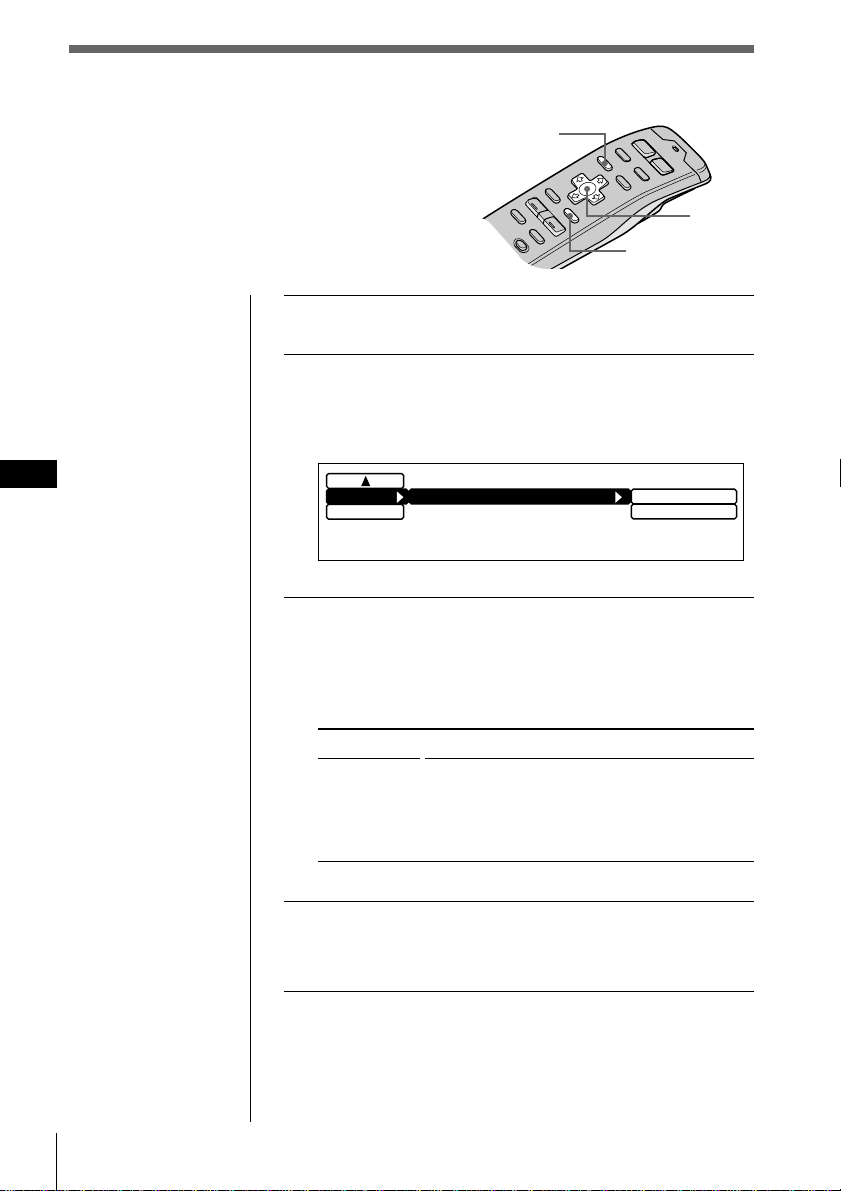
1 Press MENU and select “Display.”
2 Press / to move to the sub menu, then select
the item you want to set by pressing > or ..
The current sub menu setting appears to the right of
the item.
3 Change the setting and press ENTER.
The new setting appears to the right of the item.
For an explanation of the sub menus, see the table on
the next page.
4 Press MENU.
The normal display appears.
MENU
ENTER
Name
Contrast
Set up
Dimmer
Panel angle
P.Mode
ILL
Display
Green
Auto
TOP
8
Name
Contrast
Set up
Dimmer
Panel angle
P.Mode
ILL
Greem
Display
Green
Auto
TOP
8
Amber
Other functions
47
EN
Other functions
Sub menu
ILL (Illumination)
Dimmer
Panel angle
Contrast
Font Style
EL
Display
Explanation and setting
Select “Amber” or “Green” for the button
colors of the front panel.
Select “Auto” to dim the brightness of the
display whenever you turn the lights on.
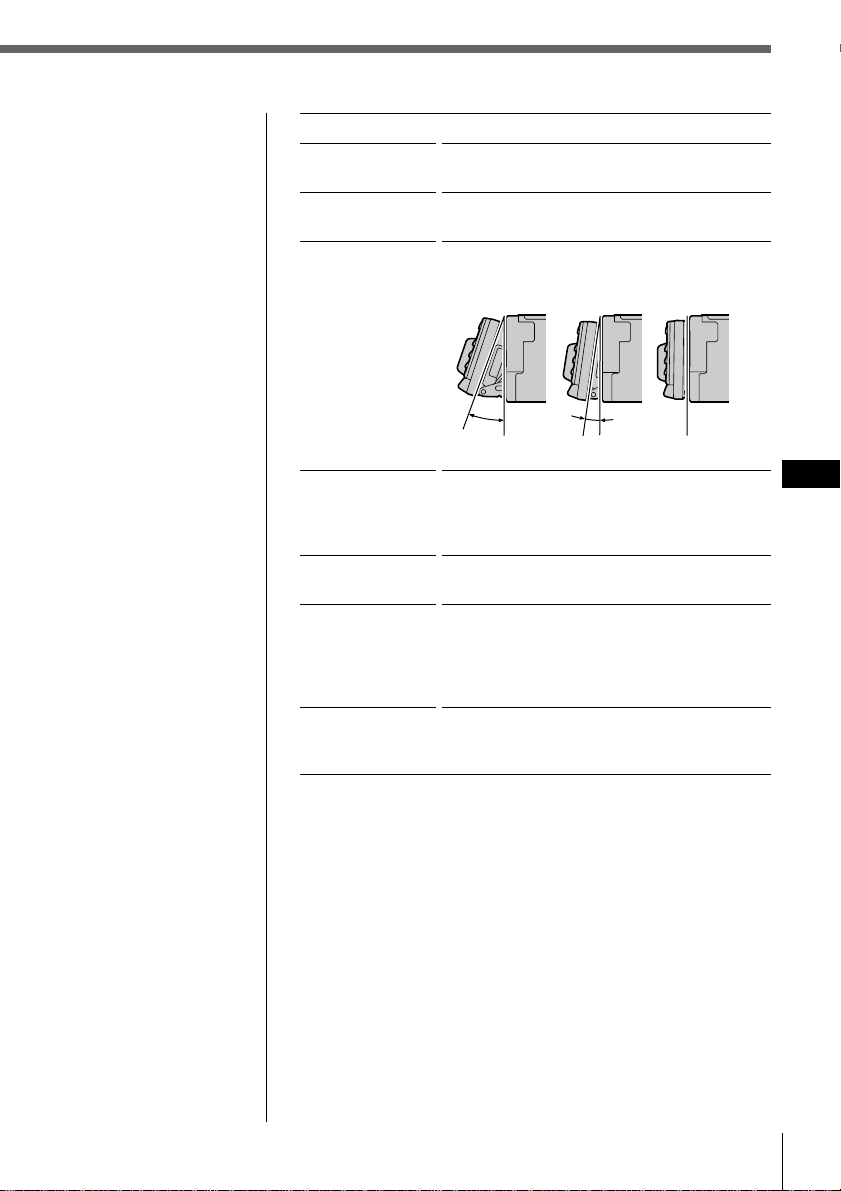
Select either “10,” or “20” degrees to
automatically set the front panel angle. Select
“Top” for normal angle.
Select 1 of 15 contrast levels for the display.
Select “Contrast,” then press ENTER. You can
change the current setting by pressing ? or
/. Press ENTER again to change the setting.
Select “Regular” or “Bold” to set the style of
the display characters.
Select “off” to have the display window
automatically turn off after a few seconds
whenever you operate any of the controls.
Select “on” to have the display window
appear constantly.
Select “Negative” to reverse the display
window contrast. Select “Positive” to display
the original contrast.
TOP10°20°
48 Other functions
EN
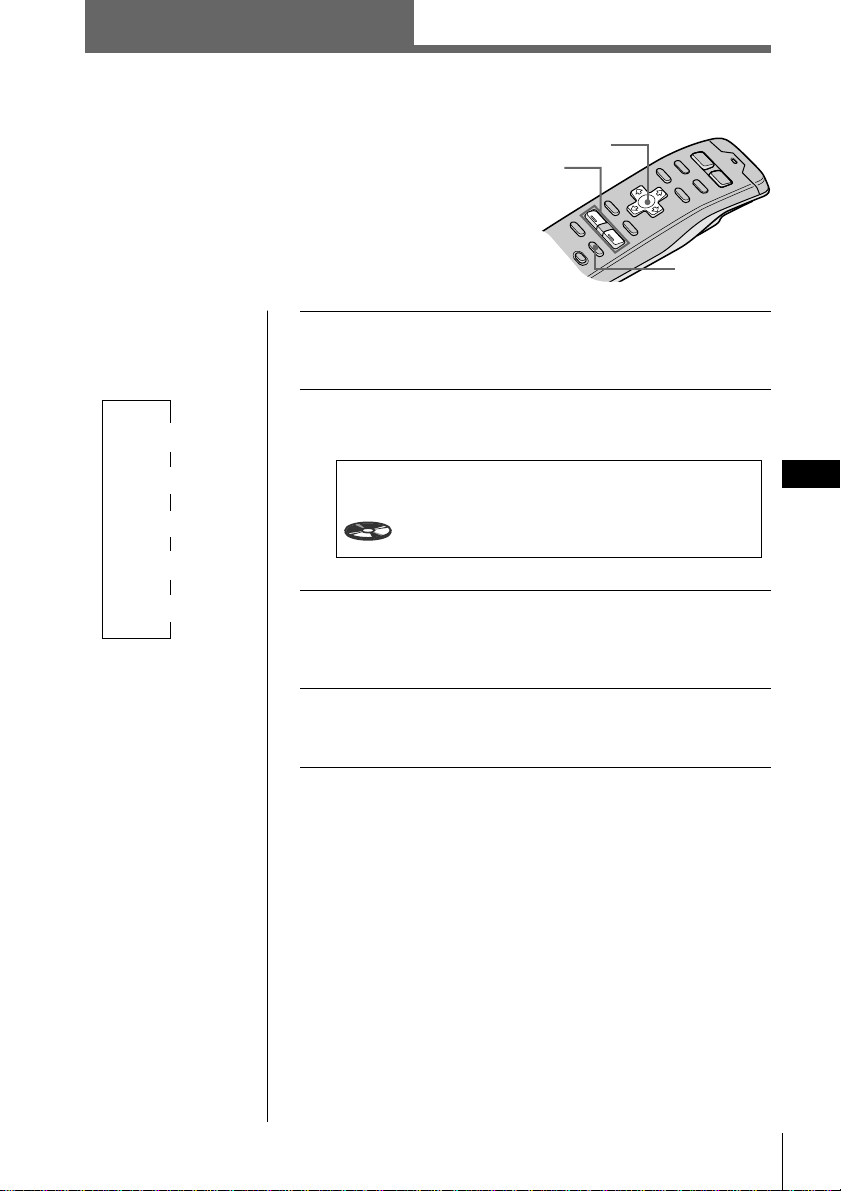
1 Press MENU and select “Func.”
2 Press / to move to the sub menu, then select
“Select.”
The current sub menu setting appears to the right of
the item.
3 Change the setting and press ENTER.
The new setting appears to the right of the item.
For an explanation of the sub menus, see the table
below.
4 Press MENU.
The normal display appears.
Cursor
Tips
• In step 2, to move the
cursor back to the
previous column
(one at a time), press
?.
• To cancel the current
display and return to
the previous display,
press BACK.
Setting the function menu
Use the function menu to assign the specific
function mode to each function button.
Indication
Select
Explanation and settings
Select “Source” to display the function menu
depending on each source or setting mode.
Select “VC/DVOL/EL” to display VC, DVOL,
and EL independently of the selected source
or setting mode.
MENU
ENTER
Source
VC
/
DVOL
/
EL
Exit
Func.
Select
VC/DVOL/EL
DSP
49
EN
DSP
Tips
• Each time you press
SOUND, the tuning
item changes as
follows:
$
SUR (Surround)
$
POS (Position)
$
SUB (Subwoofer)
$
BAS (Bass)
$
TRE (Treble)
• In step 3, press / to
switch to the effect
level adjustment.
Selecting a surround menu
The optional XDP-U50D lets you add some effects
to the sound field of the currently selected source.
The followings are the operating instructions for
the XDP-U50D.
When the XDP-210EQ is connected to the unit,
refer to the instructions manual supplied to the
XDP-210EQ.
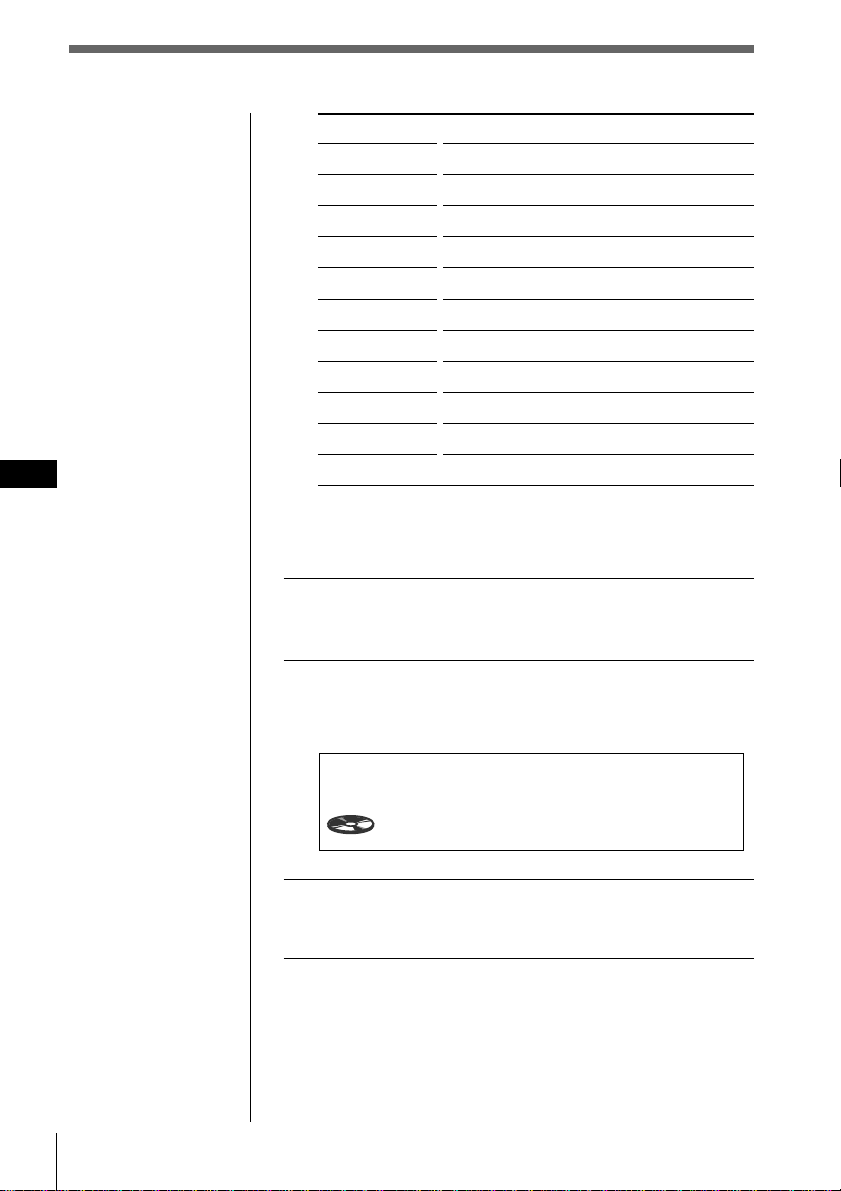
1 Press and hold SOUND for two seconds.
The DSP Sound Tuning Mode appears.
2 Press SOUND repeatedly to select “SUR
Tuning.”
3 Press VOL + or – to select the surround menu.
The surround menu appears in the order shown on
the next page.
4 Press and hold SOUND for two seconds.
The normal display appears.
continue to next page n
DSP
DSP Sound Tuning Mode CD1
SUR Tuning
-DEFEAT-
1 2
6.51
Other functions/DSP
Cursor
SOUND
VOL
+
/
-
50 DSP
EN
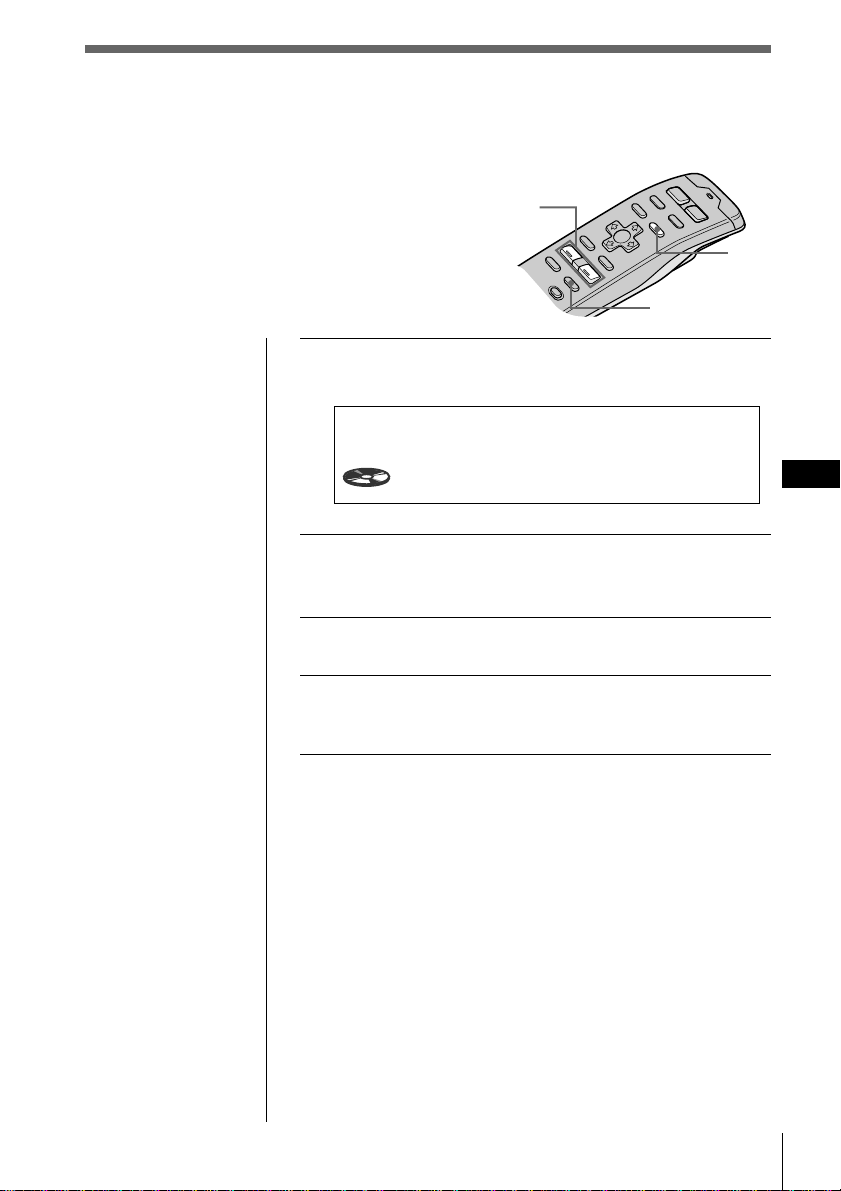
Surround menu
HALL
JAZZ
DISCO
THEATER
PARK
LIVE
OPERA
CHURCH
STADIUM
CELLAR
-DEFEAT-
Adjusting the effect level
1 Follow the steps 1 through 3 of “Selecting a
surround menu” (see page 49).
2 Press /, then VOL + or – to adjust the level.
The effect level is adjustable from 0 to 100%. Increase
the level to enhance the effect.
3 Press and hold SOUND for two seconds.
The normal display mode appears.
Note
You cannot adjust the
effect level of
“-DEFEAT-.”
Tip
In step 2, press /
again to switch to the
sound menu selection.
Effect of sound field
Concert hall
Jazz club
Disco with thick walls
Movie theater
Big open space
Live concert
Opera house
Church/chapel with a lot of reverberation
Open-air concert in a stadium
Cellar with a lot of reverberation
Normal sound without any DSP effects
SUR HALL
Effect 90%
DSP Sound Tuning Mode CD1
2
4.50
DSP
51
EN
DSP
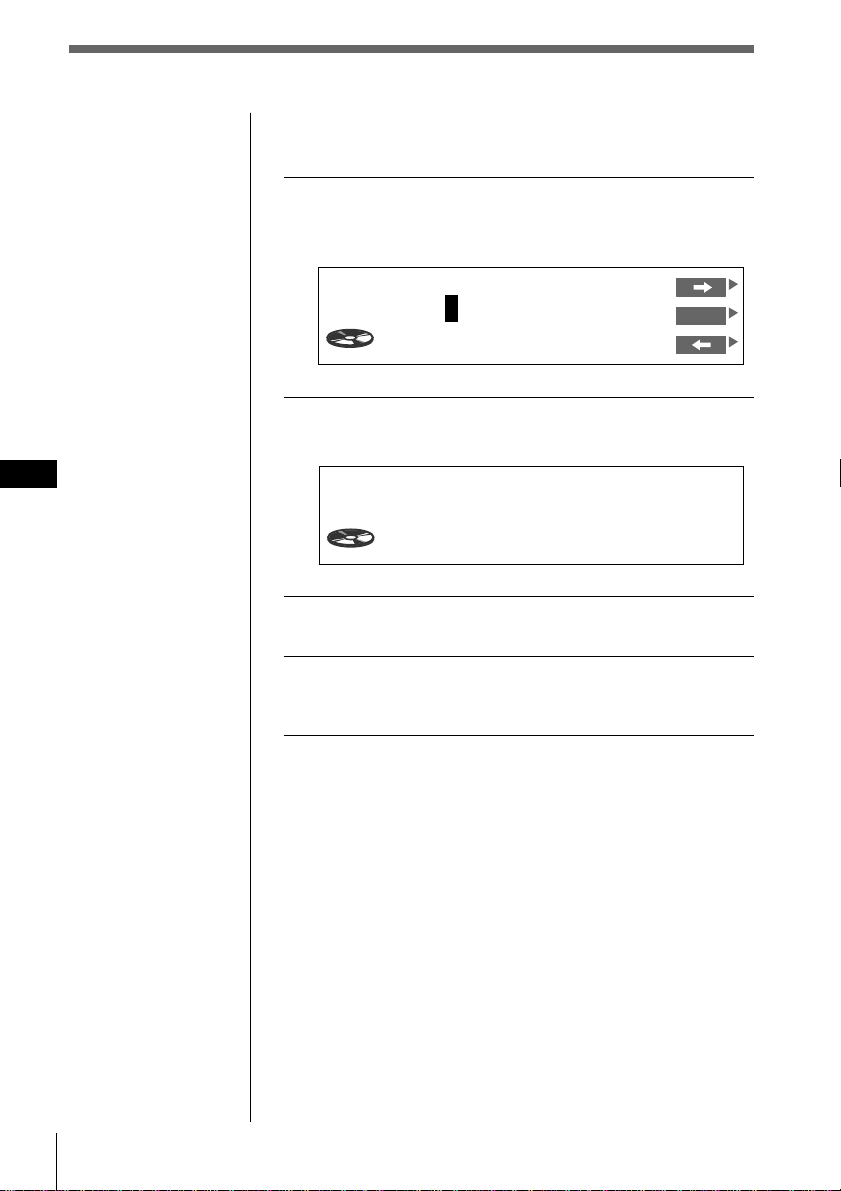
1 Press and hold SOUND for two seconds.
The DSP Sound Tuning Mode appears.
2 Press VOL + or – to adjust to the desired
sound effect.
3 Press and hold LIST for two seconds.
4 Press and hold SOUND for two seconds.
The normal display mode appears.
Storing a surround effect
for CDs
(DSP custom file)
Once you have registered the desired surround
menu for the discs, you can enjoy the same
surround menu every time you play that disc.
(Only when you have labeled the disc using the
Custom file function. )
SUR HALL
Effect 90%
DSP Sound Tuning Mode CD1
2
4.50
SOUND
VOL
+
/
-
LIST
52 DSP
EN
Playing a disc with a stored surround
effect
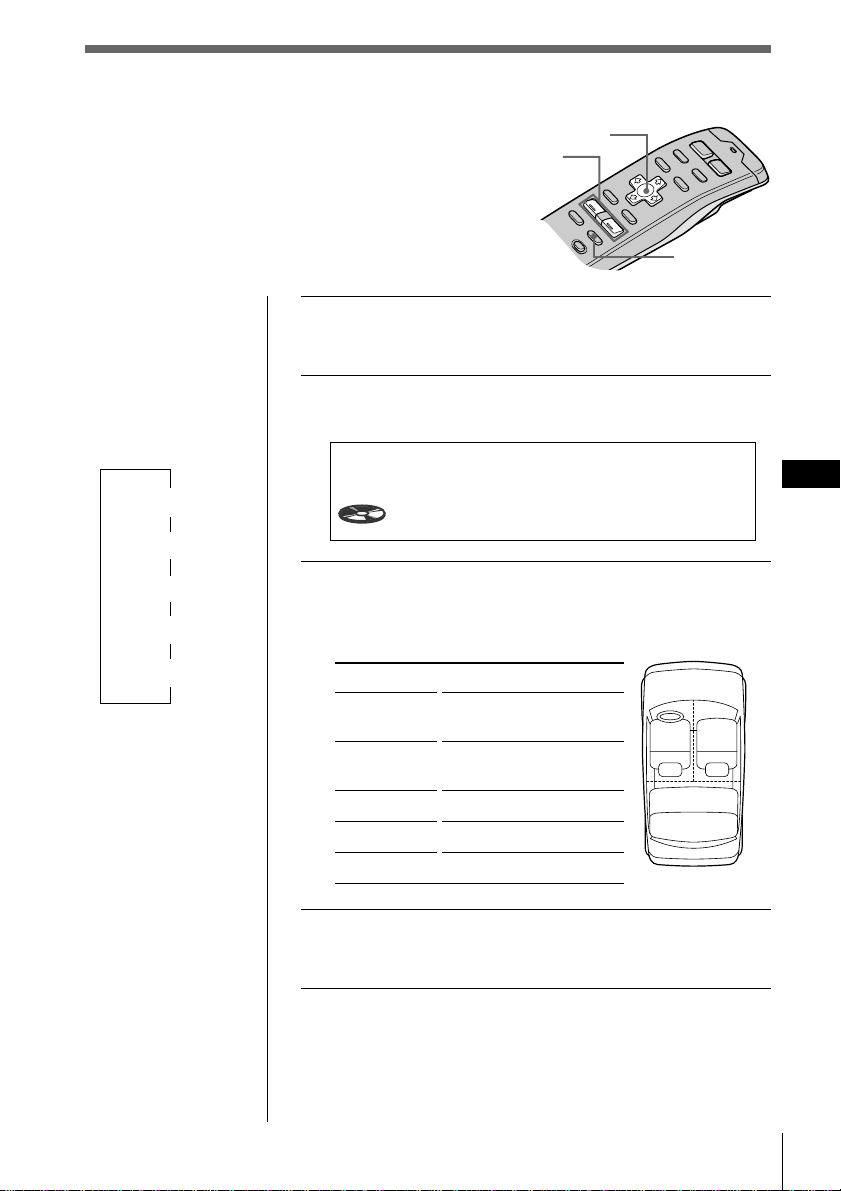
1 While playing a CD, press and hold LIST for
two seconds.
The Disc Memo Write indication appears.
2 Press LIST.
The DSP Tuning Mode appears.
3 Press VOL + or – to select the surround menu.
4 Press and hold LIST for two seconds.
The normal display appears.
Changing the stored surround effect
Play the disc whose surround effects you want to change,
then follow the steps of “Storing the surround effect for
CDs”(see page 51).
Erasing the stored surround effect
Select “-DEFEAT-” in step 3 of “Selecting a surround
menu” (see page 49 ).
CD1 16.15
-
DEFEAT
-
SUR
Note
You can use this
function for discs that
have been assigned a
custom name.
Disc Memo Write
1CD1 4.15
SONYPOPS
ENT
DSP
53
EN
DSP
1 Press and hold SOUND for two seconds.
The DSP tuning mode appears.
2 Press SOUND repeatedly to select “POS
Tuning.”
3 Press VOL + or – repeatedly to select the
listening position.
The position appears in the order shown below.
Indication
All
Front
Front R
Front L
Rear
4 Press and hold SOUND for two seconds.
The normal display appears.
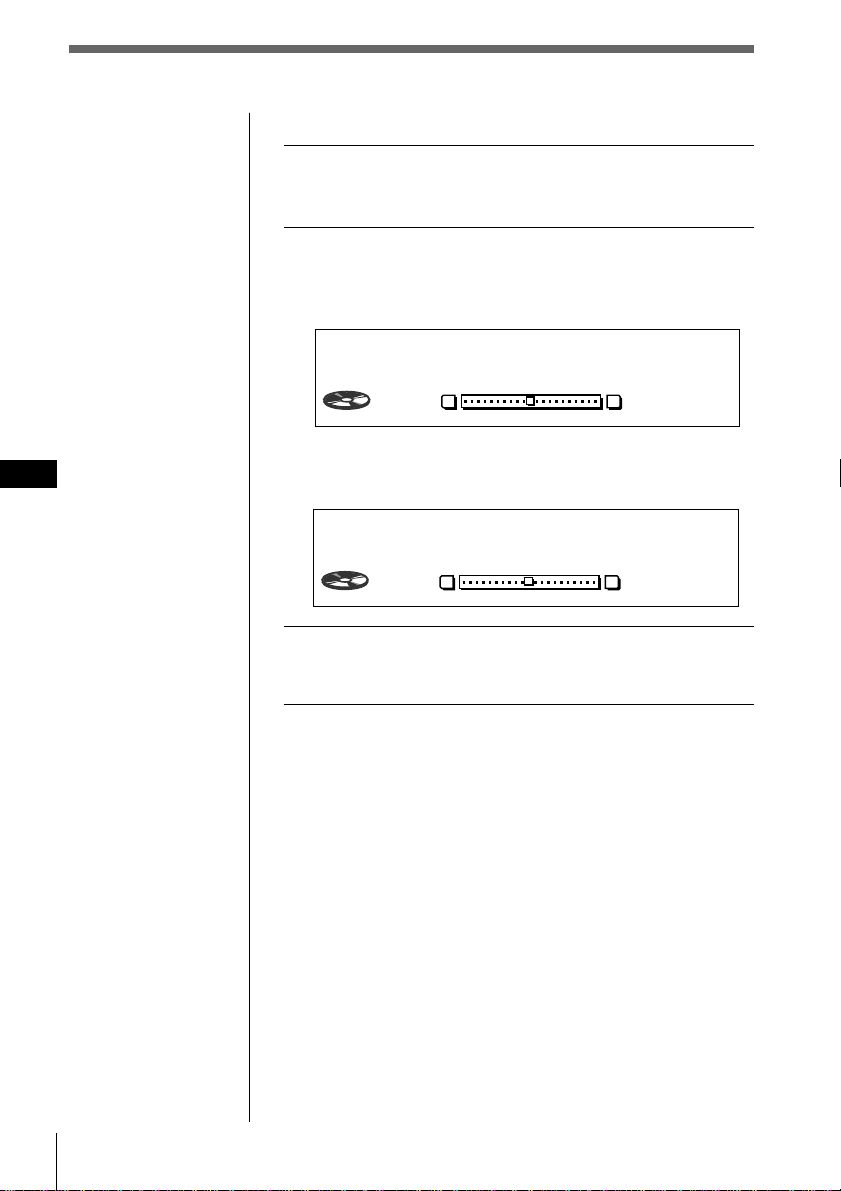
21
3
Selecting the listening position
You can set a delayed time for the sound to reach
the listeners from the speakers. In this way, the
unit can simulate a natural sound field so that you
feel as if you are in the center of the sound field
wherever you sit in the car.
Center of sound field
Normal setting
(1 + 2 + 3)
Front part
(1 + 2)
Right front (2)
Left front (1)
Rear part (3)
POS Tuning
ALL
DSP Sound Tuning Mode CD1
4
0.54
Tips
• Each time you press
SOUND, the tuning
item changes as
follows:
$
SUR (Surround)
$
POS (Position)
$
SUB (Subwoofer)
$
BAS (Bass)
$
TRE (Treble)
• In step 3, press / to
switch to the
listening position
adjustment. (see next
page)
Cursor
SOUND
VOL
+
/
-
54 DSP
EN
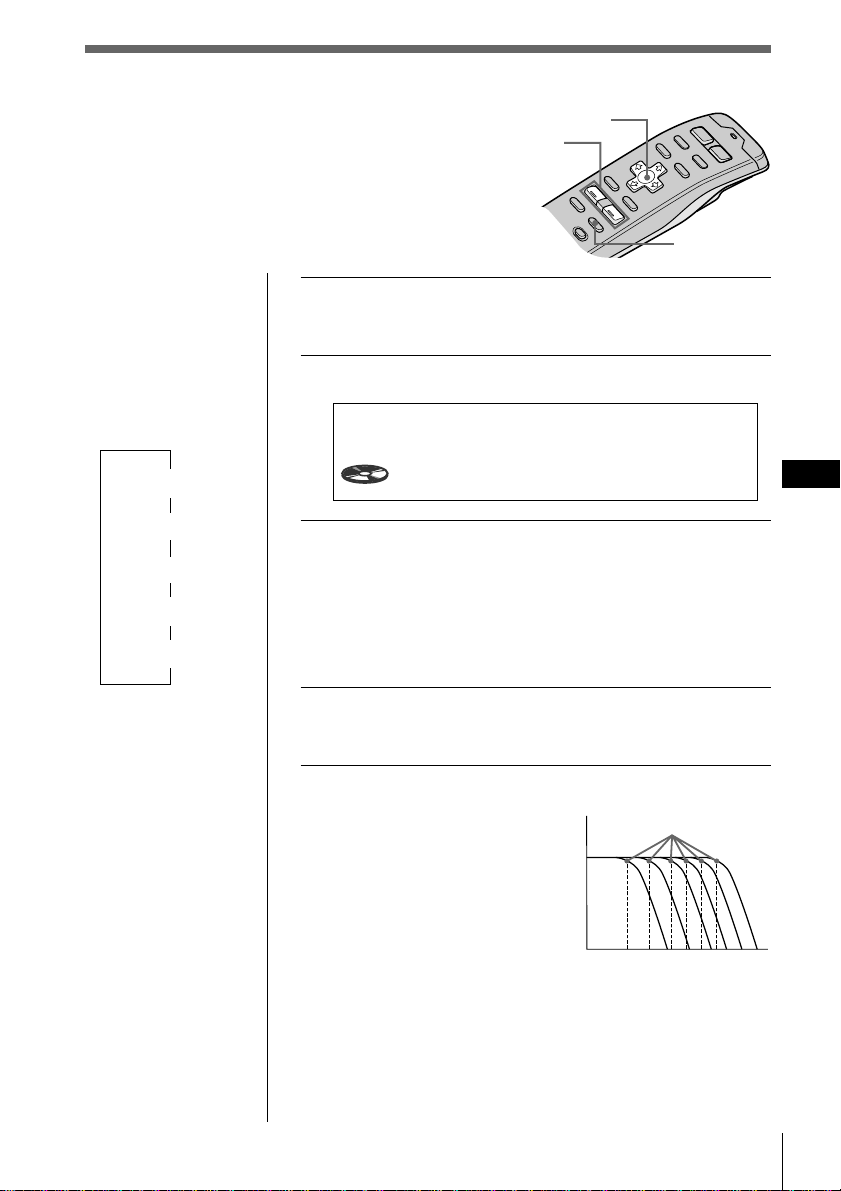
Adjusting the listening position
1 Follow steps 1 through 3 of “Selecting the
listening position” (see page 53).
2 Adjust the center of the sound field.
1 Press /.
2 Press VOL + or – to adjust the center to the left or
right.
3 Press /.
4 Press VOL + or – to adjust the center to the rear or
front.
3 Press and hold SOUND for two seconds.
The normal display appears.
Tip
You cannot adjust the
effect level of
“-DEFEAT-.”
POS
ALL
DSP Sound Tuning Mode CD1
4
1.30
LR
0
POS
ALL
DSP Sound Tuning Mode CD1
4
1.53
RF
0
DSP
55
EN
DSP
Adjusting the cut-off
frequency of the
subwoofer(s)
1 Press and hold SOUND for two seconds.
The DSP Sound Tuning Mode appears.
2 Press SOUND repeatedly to select “SUB.”
3 Press VOL + or – repeatedly to select the
cut-off frequency.
The frequency appears in the order as follows.
62Hz ˜ 78Hz ˜ 99Hz ˜ 125Hz* ˜ 157Hz ˜ 198Hz
* Factory-set frequency
4 Press and hold SOUND for two seconds.
The normal display appears.
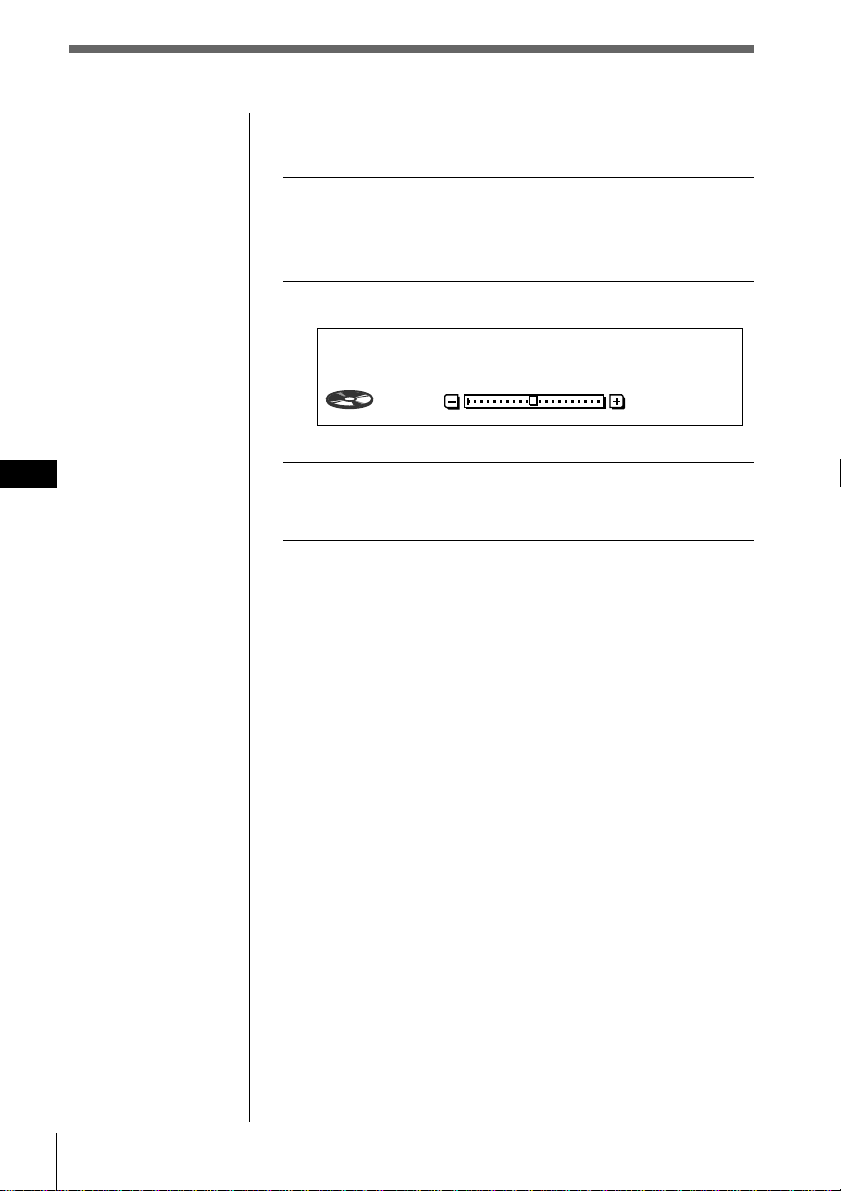
What is the cut-off frequency?
To match the characteristics of
the connected subwoofer(s),
you can cut out the unwanted
high and middle frequency
signals entering the
subwoofer(s). By setting the
cut-off frequency, the
subwoofer(s) will output only
low frequency signals so you
can get a clearer sound image.
Frequency
Level
Cut-off frequency
62
78
99 125
157
198
SUB Tuning
C.off125Hz
DSP Sound Tuning Mode CD1
4
2.16
Tips
• Each time you press
SOUND, the tuning
item changes as
follows:
$
SUR (Surround)
$
POS (Position)
$
SUB (Subwoofer)
$
BAS (Bass)
$
TRE (Treble)
• In step 3, press / to
switch to the
subwoofer’s volume
adjustment. (see next
page)
Cursor
SOUND
VOL
+
/
-
56 DSP
EN
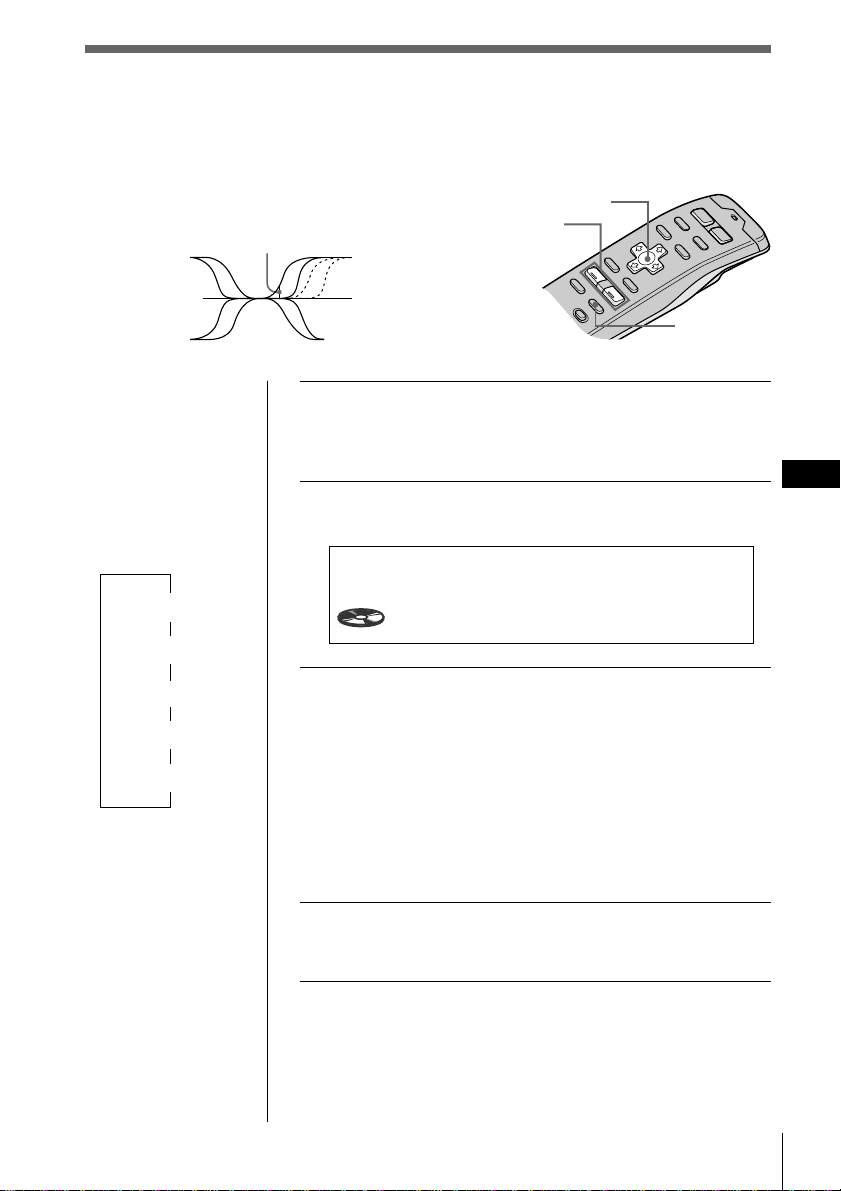
Adjusting the volume of the
subwoofer(s)
1 Follow the steps 1 and 2 of “Adjusting the
cut-off frequency of the subwoofer(s)” (see
page 55).
2 Press /, then VOL + or – to adjust the level.
3 Press and hold SOUND for two seconds.
The normal display appears.
Note
When you adjust the
volume all the way
down, “SUB W ATT”
appears and the cut-off
frequency of the
subwoofer is disabled.
SUB
C.off125Hz
DSP Sound Tuning Mode CD1
4
2.16
0
DSP
57
EN
DSP
Adjusting the turn-over frequency
of the bass and treble
You can adjust the bass and treble turn-over
frequencies to best fit the acoustic characteristics
inside your car.
Tips
• Each time you press
SOUND, the tuning
item changes as
follows:
$
SUR (Surround)
$
POS (Position)
$
SUB (Subwoofer)
$
BAS (Bass)
$
TRE (Treble)
• In step 3, press / to
switch to the volume
adjustment of bass
and treble. (see next
page)
1 Press and hold SOUND and hold for two
seconds.
The DSP Sound Tuning Mode appears,
2 Press SOUND repeatedly to select “BAS” or
“TRE.”
3 Press VOL + or – repeatedly to select the
turn-over frequency.
The turn-over frequency appears in the order as
follows:
BAS:
198Hz ˜ 250Hz ˜ 314Hz* ˜ 396Hz
TRE:
2.00kHz ˜ 3.17kHz* ˜ 4.00kHz ˜ 5.03kHz*
* Factory-set frequency
4 Press and hold SOUND for two seconds.
The normal display mode appears.
BAS
Tuning
250Hz
DSP Sound Tuning Mode CD1
5
3.31
Turn-over frequency
Frequency (Hz)
Cursor
SOUND
VOL
+
/
-
58 DSP
EN
Listening to each program source in its
registered surround effect
(Last Sound Memory (LSM))
Each time you restore the same source, you can hear the
same surround effect registered for that source, even after
changing the program source or turning the unit off and
then on again.
Adjusting the volume of
the bass and treble
1 Press and hold SOUND for two seconds.
The DSP Sound Tuning Mode appears.
2 Press SOUND repeatedly to select “BAS” or
“TRE.”
3 Press /, then VOL + or – to adjust the level.
4 Press and hold SOUND for two seconds.
The normal display appears.
BAS
250Hz
0
DSP Sound Tuning Mode CD1
6
0.09
Additional information
59
EN
Additional information
Caution alarm
If you turn the ignition key switch to the OFF
position without removing the front panel,
the caution alarm will beep for a few seconds
(only when the ACC Position is set to “yes”)
(see page 4).
Notes
• Be sure not to attach the front panel upside down.
• Do not press the front panel hard against the unit
when attaching it. Press it lightly against the unit.
• Do not press hard or put excessive pressure on the
display windows of the front panel.
• Do not expose the front panel to direct sunlight or
heat sources such as hot air ducts, and do not
leave it in a humid place. Never leave it on the
dashboard of a car parked in direct sunlight where
there may be a considerable rise in temperature.
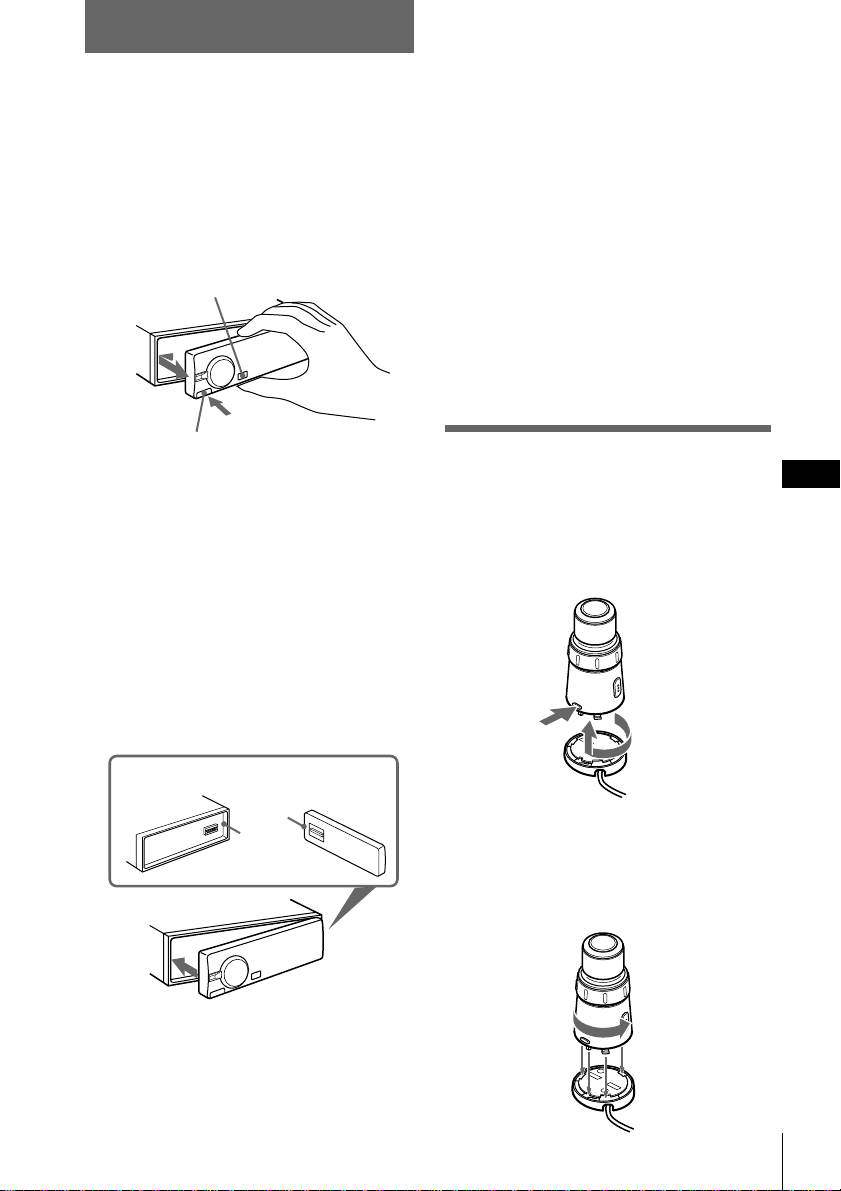
Detaching the rotary
remote
You can detach the rotary remote as a safety
measure against theft.
Turn the remote clockwise while pressing
down RELEASE.
Attaching the rotary remote
Align the four holes on the bottom of the
rotary remote to the four catches on the
holder and slide the rotary remote until it
locks into place as illustrated.
Detaching the front panel
You can detach the front panel of this unit to
protect the unit from being stolen.
1 Press OFF.
2 Press RELEASE to open the front panel,
then slide the front panel to the left
side, and pull out from the right side of
the front panel.
Notes
• Do not put anything on the inner surface of the
front panel.
• Be sure not to drop the panel when detaching it
from the unit.
• If you detach the panel while the unit is still on,
the power will turn off automatically to prevent
the speakers from being damaged.
• When you carry the front panel with you, put it in
the supplied front panel case.
Attaching the front panel
Place the hole a on the front panel onto the
spindle b on the unit as illustrated, then
push the left side in.
a
1
2
1
2
OFF
RELEASE
b
Additional information
DSP/Additional information
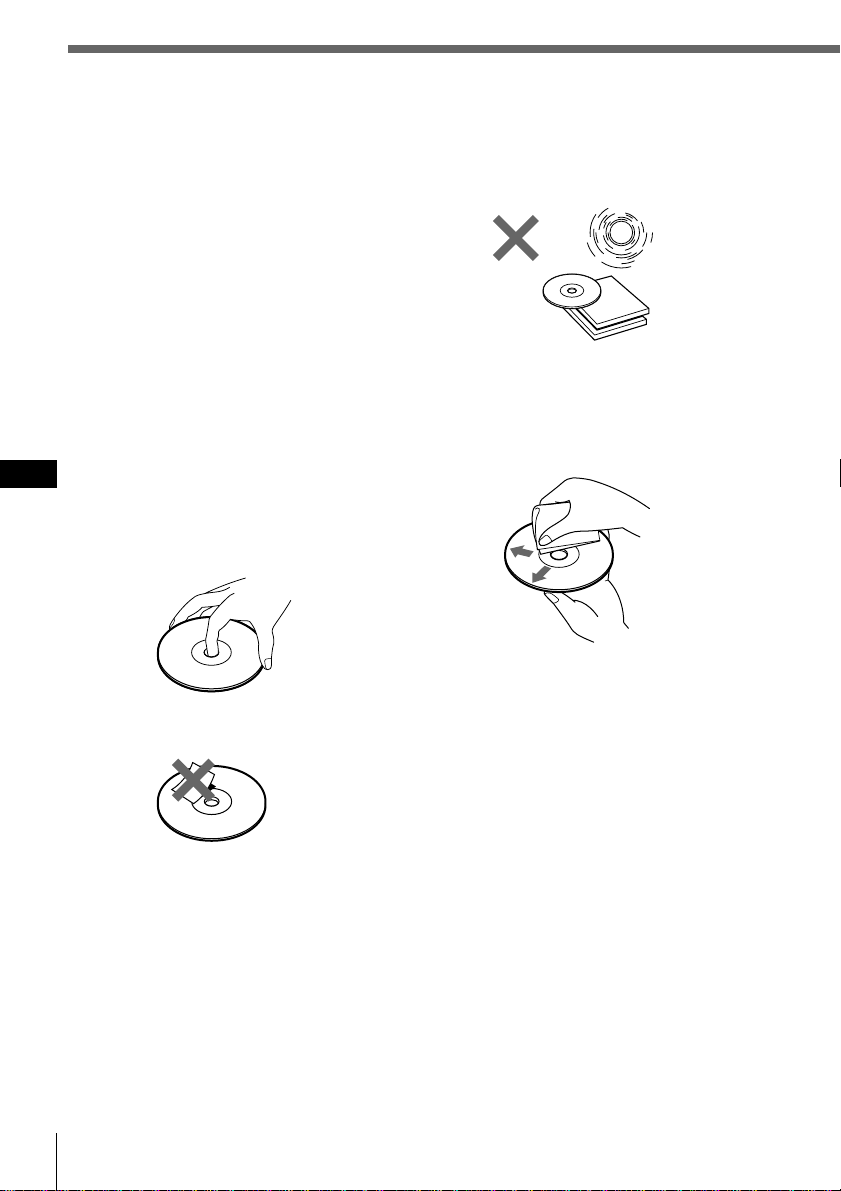
60 Additional information
EN
Precautions
• If your car was parked in direct sunlight
resulting in a considerable rise in
temperature inside the car, allow the unit to
cool off before operating it.
• If no power is being supplied to the unit,
check the connections first. If everything is
in order, check the fuse.
• If no sound comes from the speakers of
two-speaker systems, set the fader control to
the center position.
•If your car is equipped with a power
antenna, it will extend automatically while
the unit is operating.
If you have any questions or problems
concerning your unit that are not covered in
this manual, please consult your nearest Sony
dealer.
Notes on handling CDs
A dirty or defective disc may cause sound
dropouts while playing. To enjoy optimum
sound, handle the disc as follows.
Handle the disc by its edge. To keep the disc
clean, do not touch the surface.
Do not stick paper or tape on the labelled
surface.
Do not expose the discs to direct sunlight or
heat sources such as hot air-ducts, or leave
them in a car parked in direct sunlight where
there can be a considerable rise in the
temperature inside the car.
Before playing, clean the discs with an
optional cleaning cloth. Wipe each disc from
the center out.
Do not use solvents such as benzine, thinner,
commercially available cleaners or antistatic
spray intended for analog discs.
Note on moisture condensation
On a rainy day or in a very damp area,
moisture may condense on the lenses inside
the CD player. Should this occur, the unit will
not operate properly. In this case, remove the
disc and wait for about an hour until the
moisture evaporates.
When you play 8 cm CDs
Use the optional Sony compact disc single
adapter (CSA-8) to protect the CD player
from being damaged.
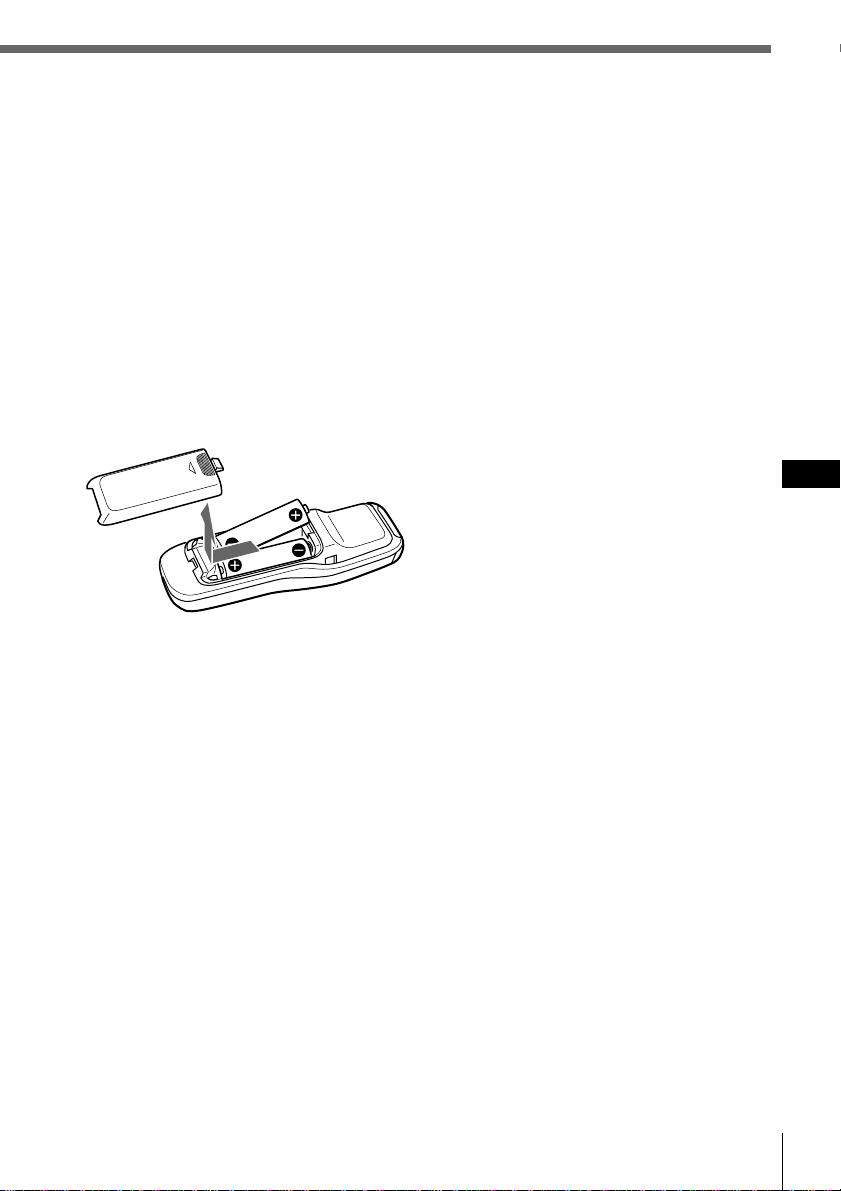
Additional information
61
EN
Additional information
Notes on battery use
To avoid damage from battery leakage and
corrosion:
— Make sure the polarity of the batteries
match the + and – markings in the
battery compartment.
— Do not use an old battery with a new
one, or different types of batteries
together.
— Remove the batteries when the system
will not be used for a long period of
time.
— Do not charge the batteries.
If any battery leakage occurs, replace both
batteries after cleaning the battery
compartment.
Notes on the wireless remote
•To prevent deformation due to heat, do not
leave the remote in a place subject to direct
sunlight.
•Direct sunlight may affect the system’s
ability to receive infrared signals from the
remote. If this happens, move the remote
closer to the remote control sensor of the
system.
•When parking your car, put the remote
somewhere, such as the glove compartment,
that is away from direct sunlight to prevent
deformation due to heat.
About the LCD display on the
display section
When the temperature is extremely high or
low, the display may become dim and hard to
see. This is due to the characteristics of the
LCD and is not a malfunction. The display
will return to normal when the temperature
becomes normal.
Wireless Remote
Installing batteries in the wireless
remote
Insert two size-AA (R6) batteries with the
correct polarity.
Battery life
When the batteries become weak, you will
not be able to operate the unit with the
wireless remote. Battery life is about six
months (or shorter, depending on the way the
remote is used). If the remote becomes
inoperative, replace the batteries, then verify
that it can operate the system.
O
PEN
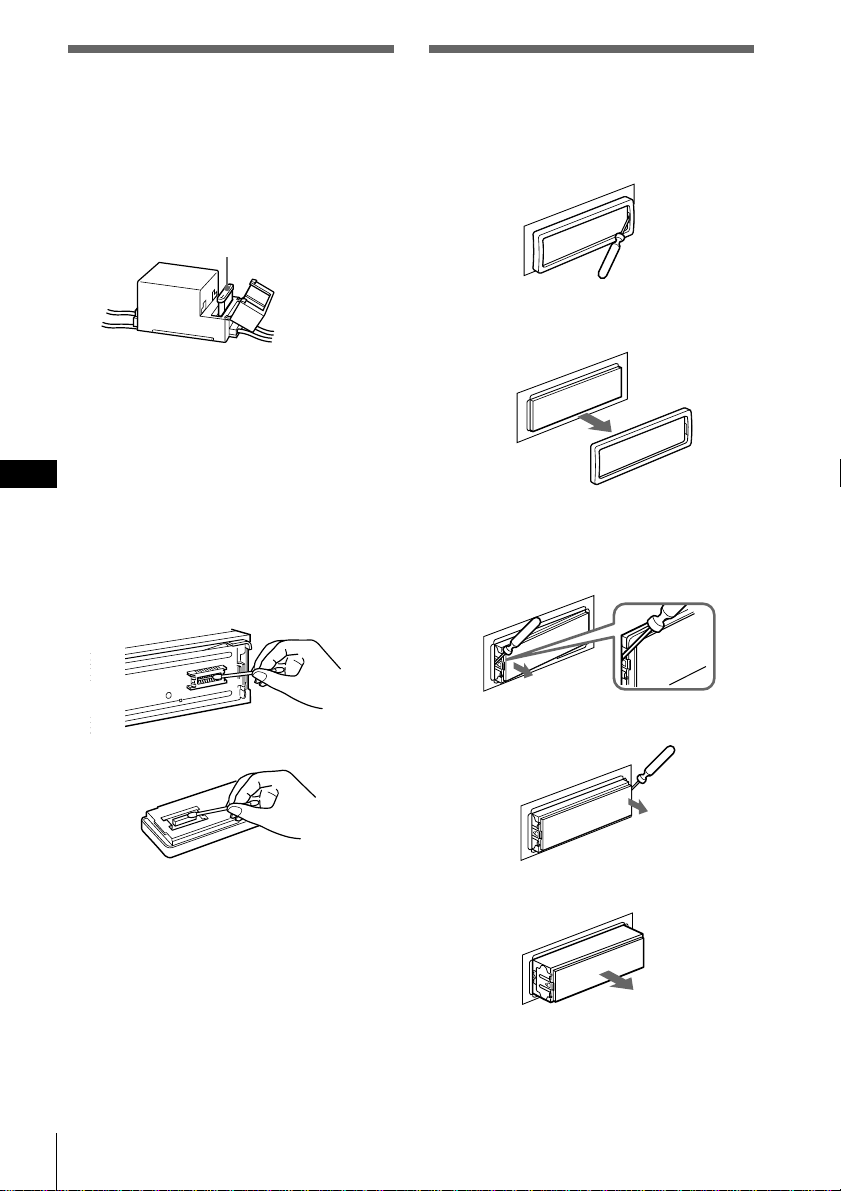
62 Additional information
EN
Fuse replacement
When replacing the fuse, be sure to use one
that matches the amperage described on the
fuse. If the fuse blows, check the power
connection and replace the fuse. If the fuse
blows again after replacement, there may be
an internal malfunction. In such a case,
consult your nearest Sony dealer.
Warning
Never use a fuse with an amperage rating
exceeding the one supplied with the unit as
this could damage the unit.
Cleaning the connectors
The unit may not function properly if the
connectors between the unit and the front
panel are not clean. To prevent this, open the
front panel by pressing RELEASE, then
detach it and clean the connectors with a
cotton swab dipped in alcohol. Do not apply
too much force. Otherwise, the connectors
may be damaged.
Main unit
Back of the front panel
Notes
• For safety, before cleaning the connectors, turn off
the engine and remove the key from the ignition
switch.
• Never touch the connectors directly with your
fingers or any metal device.
Fuse (10 A)
Dismounting the unit
1 Press the clip inside the front cover with
a thin screwdriver, and gently pry the
front cover free.
2 Repeat step 1 on the left side.
The front cover is removed.
3 Use a thin screwdriver to push in the
clip on the left side of the unit, then
pull out the left side of the unit until
the catch clears the mounting.
4 Repeat step 3 on the right side.
5 Slide the unit out of the mounting.
Additional information
63
EN
Additional information
CD player section
System Compact disc digital
audio system
Signal-to-noise ratio 109 dB
Frequency response 5 – 20,000 Hz (±1 dB)
Wow and flutter Below measurable limit
Tuner section
FM
Tuning range FM tuning interval:
50 kHz/200 kHz
switchable
87.5 – 108.0 MHz
(at 50 kHz step)
87.5 – 107.9 MHz
(at 200 kHz step)
Antenna terminal External antenna
connector
Intermediate frequency 10.7 MHz
Usable sensitivity 8 dBf
Selectivity 75 dB at 400 kHz
50 dB at 200 kHz
Signal-to-noise ratio 65 dB (stereo),
68 dB (mono)
Harmonic distortion at 1 kHz
0.3 % (stereo),
0.3 % (mono)
Separation 35 dB at 1 kHz
Frequency response 20 – 15,000 Hz
AM
Tuning range AM tuning interval:
9 kHz/10 kHz switchable
531 – 1,602 kHz
(at 9 kHz step)
530 – 1,710 kHz
(at 10 kHz step)
Antenna terminal External antenna
connector
Intermediate frequency 10.71 MHz/450 kHz
Sensitivity 30 dB µV
General
Outputs Digital output
Line outputs (3)
Power antenna relay
control lead
Power amplifier control
lead
Telephone ATT control
lead
Illumination control lead
Power requirements 12 V DC car battery
(negative ground)
Dimensions Approx.
178 × 50 × 184 mm
(w/h/d)
Mounting dimensions Approx.
182 × 53 × 163 mm
(w/h/d)
Mass Approx. 1.6 kg
Supplied accessories Parts for installation and
connections (1 set)
Rotary remote
RM-X90
Wireless remote RM-X9
Front panel case (1)
Optional accessories Optical adapter XA-D210
Optical cable
RC-97 (2m), RC-98 (5m)
BUS cable (supplied with
an RCA pin cord)
RC-61 (1 m), RC-62 (2 m)
Compact disc single
adapter CSA-8
Optional equipment CD changer
CDX-805 (10 discs),
CDX-715 (10 discs),
CDX-T65 (6 discs),
CDX-T62 (6 discs)
MD changer
MDX-62
Digital preamplifier
XDP-U50D
Digital equalizer
preamplifier XDP-210EQ
Source selector
XA-C30
Design and specifications are subject to change
without notice.
Specifications
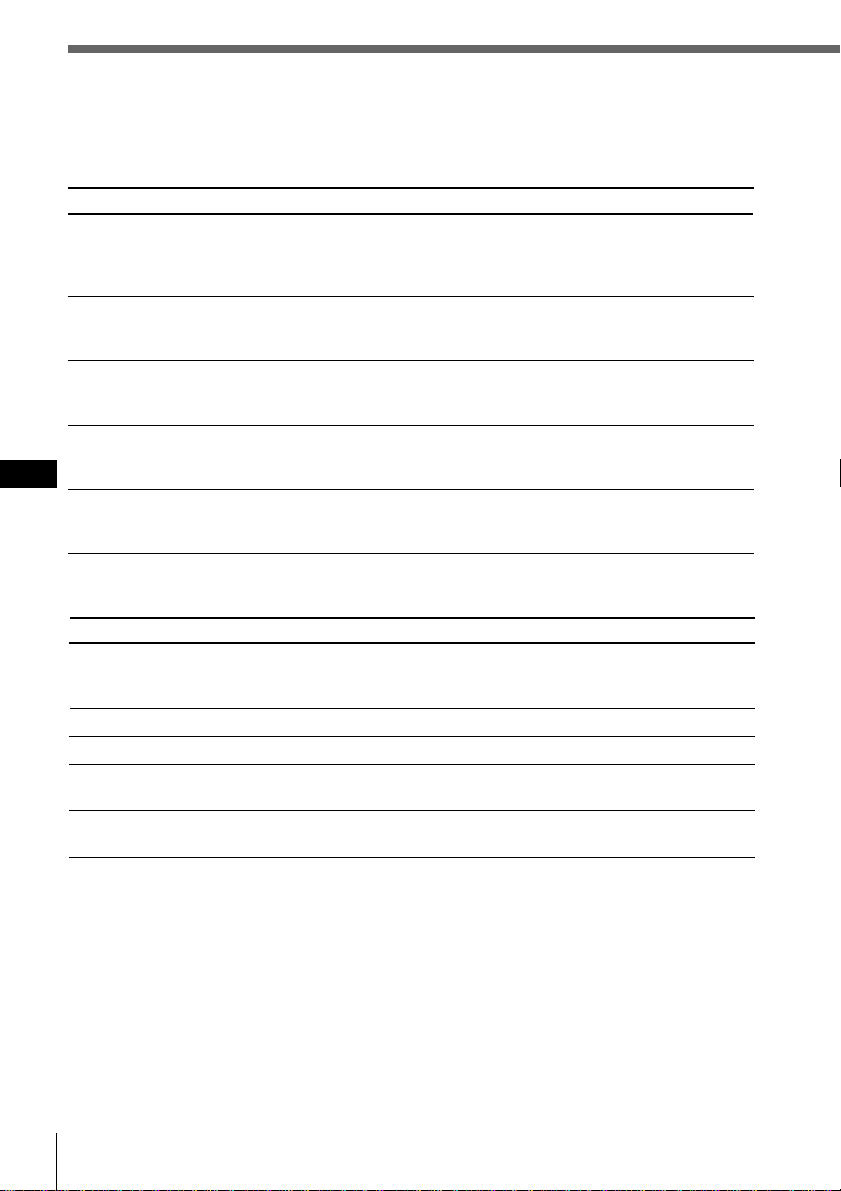
64 Additional information
EN
Troubleshooting guide
The following checklist will help you remedy the problems you may encounter with your unit.
Before going through the checklist below, check the connection and operating procedures.
General
Problem
No sound
The contents of the memory
have been erased.
Indications do not appear in the
display.
The unit does not respond.
The wireless remote does not
function.
Cause/Solution
•Cancel the ATT function.
•Set the fader control to the center position for two-speaker
systems.
•Adjust the volume.
•The power cord or battery has been disconnected.
•The reset button has been pressed.
n Store again into the memory.
•EL function is “off” (see page 65).
•Remove the front panel and clean the connectors. See
“Cleaning the connectors” on page 62 for details.
Follow the initial setting procedures with the wireless
remote after resetting the unit. The unit dose not work
unless these settings are completed (see page 4).
•Remove any obstacles blocking the signal path from
wireless remote to the unit.
•Point the wireless remote at the remote sensor on the unit.
CD/MD playback
Cause/Solution
•Another CD is already loaded.
•The CD is forcibly inserted upside down or in the wrong
way (MD).
Defective MD or dusty CD.
The ambient temperature exceeds 50°C.
Press the reset button.
•The unit is installed at an angle of more than 60°.
•The unit is not installed in a sturdy part of the car.
Problem
A disc cannot be loaded.
Playback does not begin.
A disc is automatically ejected.
The operation buttons do not
function.
The sound skips due to
vibration.
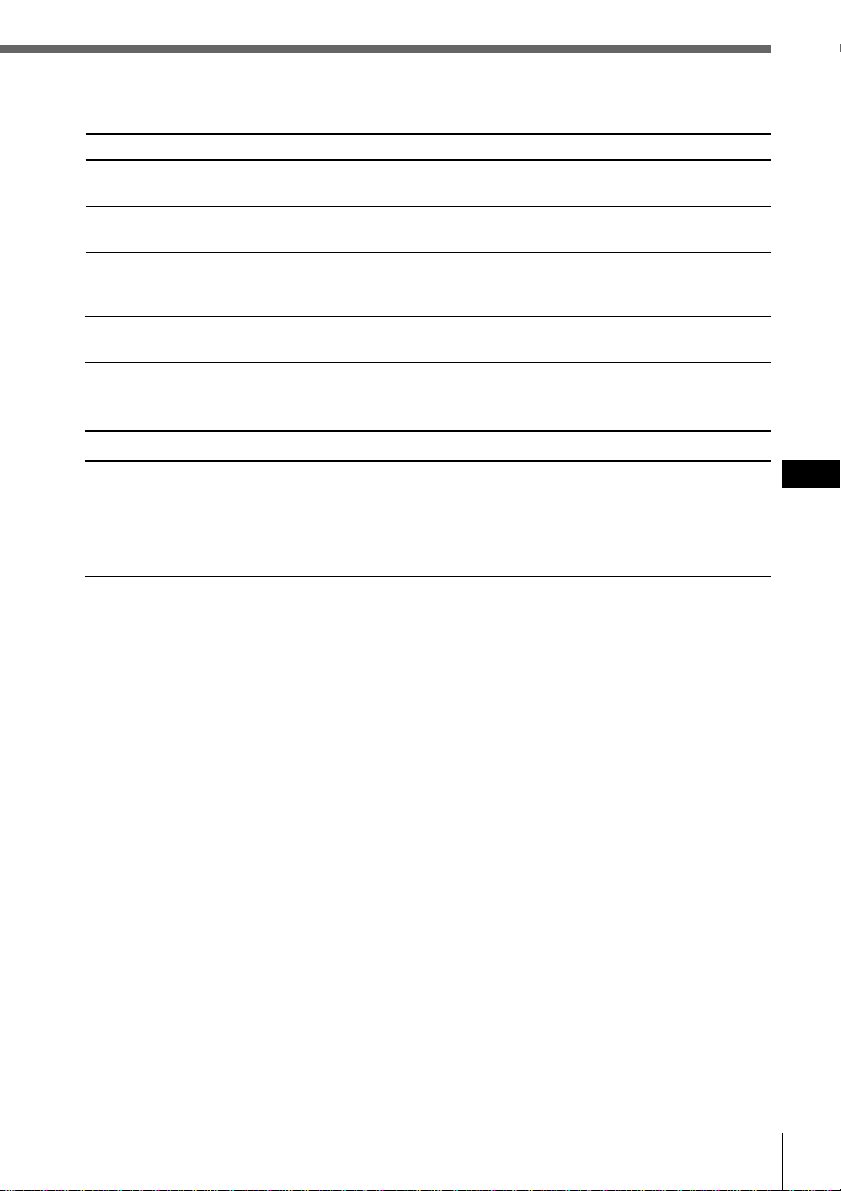
Additional information
65
EN
Additional information
Cause/Solution
The volume of the rear speakers may have been
automatically lowered in order to maximize the effect of the
listening position adjustment.
n Adjust the balance.
The speaker balance can be set separately for the DSP
Sound Tuning mode (see page 53).
Problem
No sound, or sound is too low.
DSP functions
Radio reception
Problem
Preset tuning is not possible.
Automatic tuning is not
possible.
The “ST” indication flashes.
Interference occurs during FM
reception.
Cause/Solution
•Memorize the correct frequency.
•The broadcast signal is too weak.
The broadcast signal is too weak.
n Use manual tuning.
•Tune in the frequency accurately.
•The broadcast signal is too weak.
n Set to the monaural mode (see page 37).
The Wide mode is selected.
n Set to Narrow or Auto mode (see page 39).

66 Additional information
EN
Solution
Insert the disc magazine in the
CD/MD unit.
Insert discs in the CD/MD unit.
Insert another CD/MD.
Clean or insert the CD correctly.
Insert another MD.
Play an MD with tracks recorded
on it.
Press the reset button of the unit.
Close the lid or insert the MDs
properly.
Wait until the temperature goes
down below 50°C.
Display
NO Magazine
NO Disc
NG Discs
Disc Error
Blank
PushReset
Not Ready
HighTemp
Cause
The disc magazine is not inserted in
the CD/MD unit.
No disc is inserted in the
CD/MD unit.
A CD/MD cannot play because of
some problem.
A CD is dirty or inserted upside
down.*
2
An MD does not play because of some
problem.*
2
No tracks have been recorded on an
MD*
2
The CD/MD unit cannot be operated
because of some problem.
The lid of the MD unit is open or MDs
are not inserted properly.
The ambient temperature is more than
50°C .
*
1
*
1
Error displays
The following indications will flash for about five seconds, and an alarm sound will be heard.
*
1
When an error occurs during playback of an MD or CD, the disc number of the MD or CD does not appear
in the display.
*
2
The disc number of the disc causing the error appears in the display.
If the above-mentioned solutions do not help improve the situation, consult your nearest Sony
dealer.

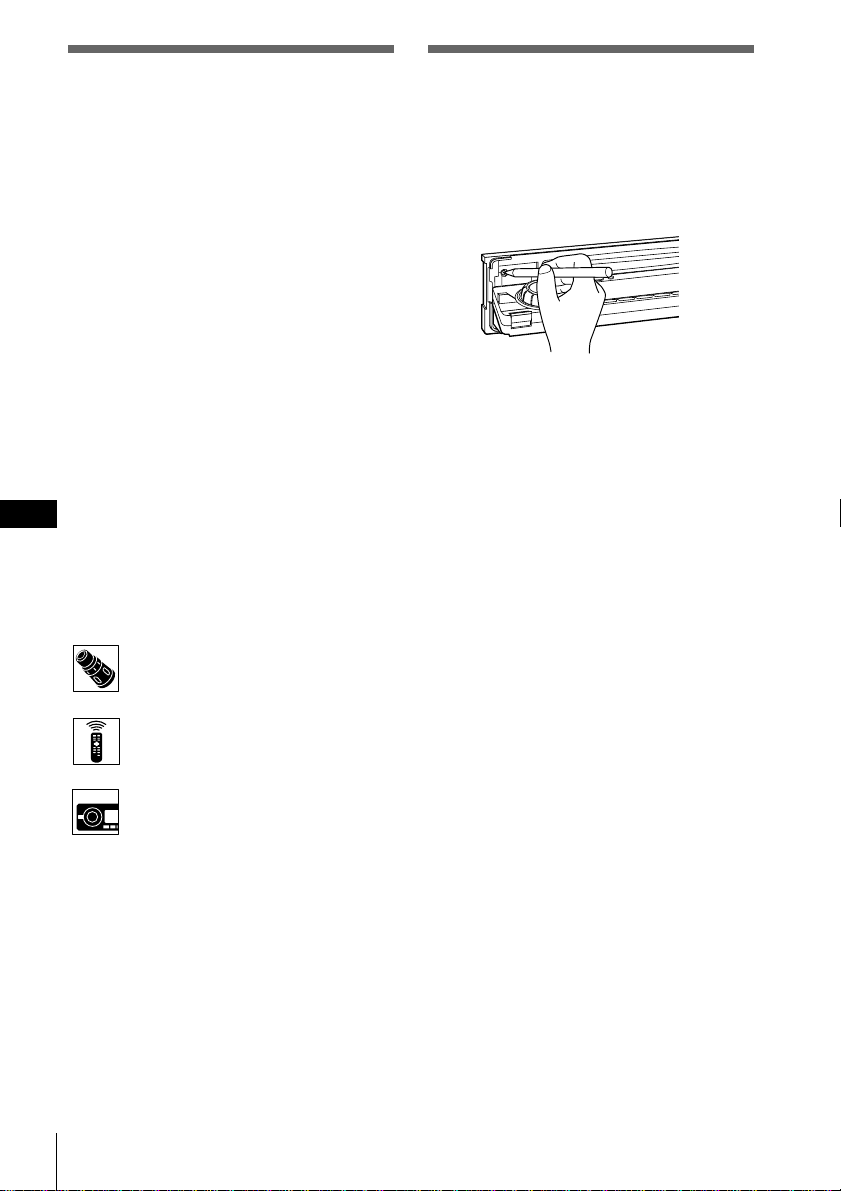
ES
2
¡Bienvenido!
Gracias por su adquisición del reproductor de
discos compactos Sony. Esta unidad permite
disfrutar de una gran variedad de funciones
mediante el uso de un mando giratorio o bien
de un mando a distancia inalámbrico.
Además de las operaciones de reproducción
de CD y radio, es posible ampliar el sistema
conectando una unidad de CD/MD
opcional*.
Si utiliza esta unidad o conecta una unidad
opcional de CD con la función CD TEXT, la
información CD TEXT aparecerá en el visor al
reproducir un disco CD TEXT.
* Es posible conectar la a un cambiador de CD y un
cambiador de MD.
Acerca de este manual
Convenciones
•Las instrucciones de este manual describen
los controles de los mandos a distancia
giratorio e inalámbrico y del panel frontal,
dependiendo de la función. Si los controles
de dichos dispositivos tienen los mismos
nombres o similares, la operación descrita
podrá realizarse en cualquier dispositivo.
•En este manual, se utilizan los siguientes
iconos:
Indica que es posible realizar la
tarea con el mando a distancia
giratorio.
Indica que es posible realizar la
tarea mediante el mando a
distancia inalámbrico.
Indica que es posible realizar la
tarea mediante el control del
panel frontal.
Restauración de la unidad
Antes de utilizar la unidad por primera vez o
después de sustituir la batería del automóvil,
es necesario restaurar la unidad.
Pulse el botón de restauración con un objeto
puntiagudo, por ejemplo un bolígrafo.
Unidad principal
Notas
• Si pulsa el botón de restauración, se borrarán los
datos del reloj y algunas funciones memorizadas.
• Al conectar el cable de la fuente de alimentación a
la unidad o restaurar ésta, espere unos 10
segundos antes de insertar un disco. Si introduce
un disco antes de la cuenta, la unidad no se
restaurará y tendrá que volver a pulsar el botón de
restauración.
ES
3
Índice
Procedimientos iniciales
Ajustes iniciales ................................................... 4
Ajuste del reloj ..................................................... 6
Uso de los controles del panel
principal .......................................... 8
Operaciones básicas ....................... 10
Uso del mando a distancia
giratorio ........................................ 12
Uso del mando a distancia
inalámbrico ................................... 14
Visualización del menú/Listas........................ 16
CD/MD
Reproducción de un CD/MD .......................... 17
Reproducción repetida de temas
(Reproducción repetida) ................................ 19
Reproducción de temas en orden aleatorio
(Reproducción aleatoria) ............................... 20
Creación de programas (Memoria de programa
de CD/MD) ..................................................... 21
Etiquetado de CD – Memorando de discos
(para unidades de CD con la función
de archivo personalizado) ............................. 25
Selección de temas específicos para su
reproducción (Función de banco) ................ 27
Localización de discos
mediante el título ............................................ 29
Visualización de información
CD TEXT .......................................................... 30
Personalización del sonido de la CD
(Función de filtro digital) .............................. 32
Radio
Recepción de la radio ........................................ 33
Memorización de emisoras de radio .............. 34
Especificación del modo monofónico
/estéreo ............................................................ 37
Recepción sólo de las señales más intensas
(Activación/desactivación local) ................. 38
Etiquetado de emisoras de radio
(Memorando de emisoras) ............................ 40
Selección de emisoras por nombre.................. 42
Otras funciones
Ajuste de las características del sonido .......... 43
Ajuste del menú de configuración .................. 44
Ajuste del menú del visor ................................ 46
Ajuste del menú de función ............................. 48
DSP
Selección de menús de sonido envolvente .... 49
Almacenamiento de efectos de sonido
envolvente en los discos compactos
(Archivo personalizado DSP) ....................... 51
Selección de la posición de escucha ................ 53
Ajuste de la frecuencia de corte de los altavoces
potenciadores de graves ................................ 55
Ajuste del giro de frecuencia de los graves y
los agudos ........................................................ 57
Información complementaria
Retirada del panel frontal ................................. 59
Liberación del mando a distancia giratorio ... 59
Precauciones ....................................................... 60
Desmontaje de la unidad .................................. 62
Especificaciones ................................................. 63
Guía de solución de problemas ....................... 64
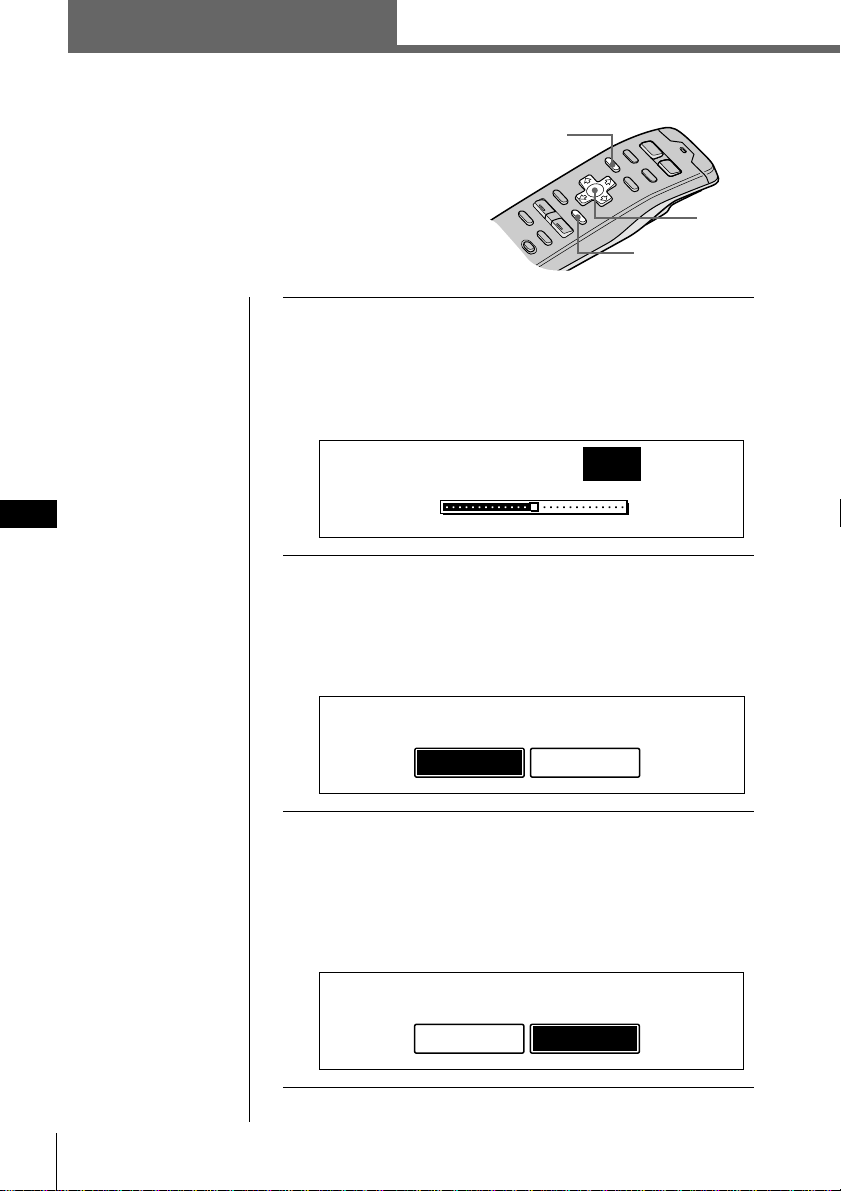
4 Procedimientos iniciales
ES
Nota
Sólo es posible
especificar los ajustes
de posición ACC
durante el
procedimiento de ajuste
inicial. Para cambiar
estos ajustes
posteriormente, pulse
el botón de
restauración y repita el
procedimiento.
Ajustes iniciales
Realice los siguientes ajustes iniciales antes de
utilizar la unidad por primera vez, después de
sustituir la batería del automóvil o después de
restaurar la unidad.
Asegúrese de realizar estos ajustes, ya que en caso
contrario el panel frontal quedará desactivado y
no será posible insertar discos compactos.
1 Pulse el botón de restauración situado detrás
del panel frontal (consulte la página 2).
Aparece la indicación Contrast.
Pulse ? o / para ajustar el contraste. Existen 15
niveles de ajuste.
2 Pulse ENTER.
Aparece la indicación ACC Position.
Pulse ? o / para seleccionar “yes” o “no”.
Seleccione “yes” si el encendido de su vehículo
dispone de posición ACC, y “no” en caso contrario.
3 Pulse ENTER.
Aparece la indicación Digital out.
Pulse ? o / para seleccionar “on” u “off”, según el
sistema de audio del vehículo. Seleccione “on” si hay
un equipo opcional con entrada digital conectado a la
unidad.
Procedimientos iniciales
Consejo
Es posible restaurar
todos estos ajustes
iniciales (excepto el de
posición ACC)
mediante el menú de
configuración.
Cursor
MENU
ENTER
ACC Position
no
y
es
Digital out
on
o
ff
Contrast
8
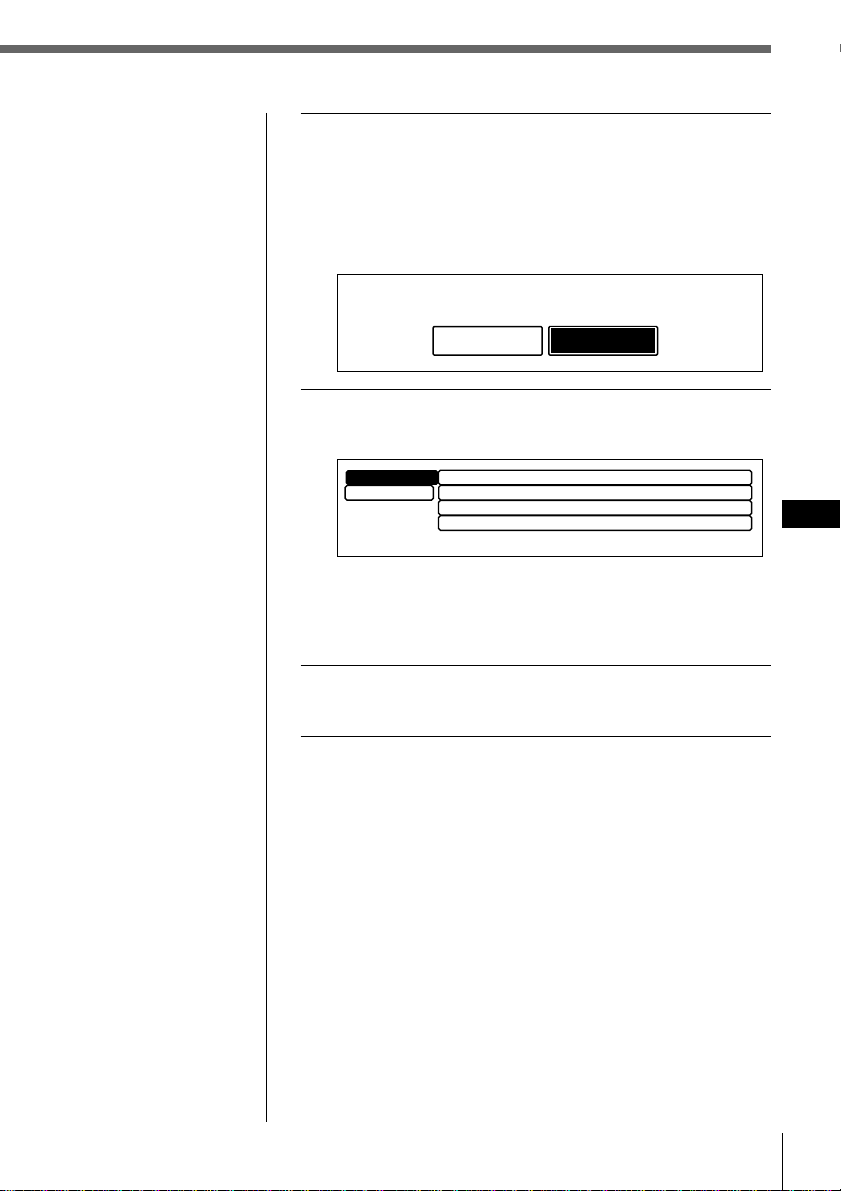
Procedimientos iniciales
5
Procedimientos iniciales
ES
4 Pulse ENTER.
Aparece la indicación de paso de AM.
Pulse ? o / para seleccionar “10k” o “9k”.
Seleccione “10k” si utiliza el sistema en Norteamérica
o Sudamérica, las islas hawaianas o Guam, y “9k”
para todos los demás países.
5 Pulse ENTER.
Aparece el menú de ajustes Initial.
Para cambiar cualquiera de los ajustes iniciales en este
momento, pulse los botones del cursor para
seleccionar la opción que desee cambiar y, a
continuación, pulse ENTER.
6 Para completar los ajustes iniciales, pulse
MENU.
AM step
9k
10k
Contrast
Initial
”
Exit
8
ACC Position
yes
Digital out
off
AM step
10k
Consejo
También es posible
completar los ajustes
iniciales pulsando
> o . para seleccionar
“Exit” y, a continuación,
pulsando ENTER.
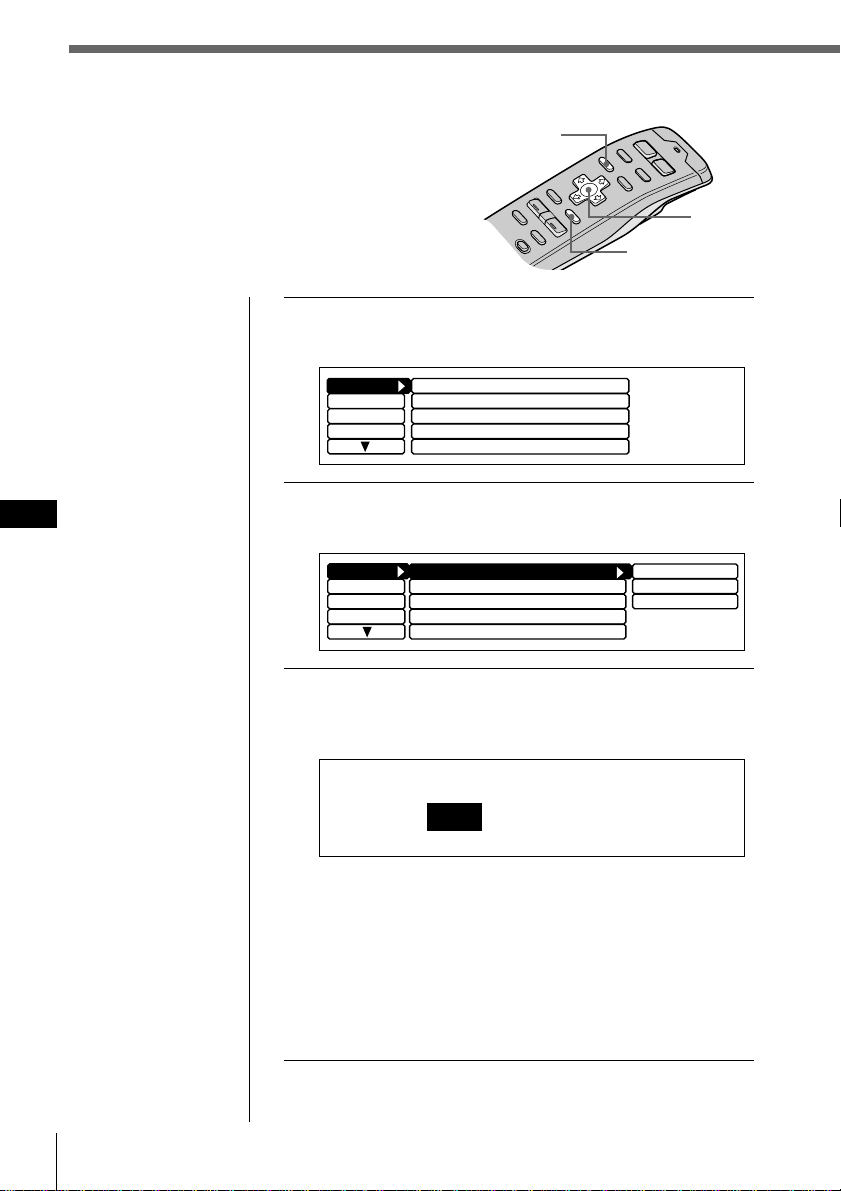
ES
6 Procedimientos iniciales
1 Pulse MENU.
Aparece el menú.
2 Seleccione “Set up”, pulse
/
para acceder al
submenú y seleccione “Clock” pulsando
>
o
.
.
3 Pulse
/
y luego
>
o
.
para seleccionar
“Time Set” y pulse ENTER.
Aparece la indicación Time Set.
1 Pulse
>
o
.
para ajustar la hora.
2 Pulse
/
para cambiar a los minutos y
>
o
.
para
ajustarlos.
Pulse
.
para retroceder y
>
para avanzar por los
números.
Los indicadores “AM” y “PM” cambian
automáticamente de acuerdo con la hora ajustada.
Ajuste del reloj
Ajuste el reloj con el mando a distancia
inalámbrico.
Encienda la unidad antes de ajustar el reloj.
El reloj utiliza la indicación digital de 12 horas.
Nota
Si la posición ACC se
ajusta en “no”, active
primero la alimentación
y, a continuación, ajuste
el reloj.
Cursor
MENU
ENTER
Clock
off
Beep
on
Rotary Remote norm
Display
Name
SEEK/AMS
P.Mode
SEEK/AMS
Set up
Direct Volume
off
Display
Name
SEEK/AMS
SEEK/AMS
off
Beep on
Rotary Remote
norm
Time Set
on
Set up
P.Mode
Clock on
Direct Volume
off
Time Set
1
:05AM
Procedimientos iniciales
ES
Procedimientos iniciales
7
Consejo
Es posible pulsar
ENTER o BACK en
lugar de MENU para
ajustar un valor.
4 Después de ajustar la hora, pulse MENU.
La hora se almacena y aparece de nuevo el menú.
Para ver la hora actual durante el uso
Es posible ajustar la hora actual para que aparezca en el
ángulo superior izquierdo del visor (excepto al visualizar
un menú).
Para obtener más información, consulte “Ajuste del menú
de configuración” en la página 44.
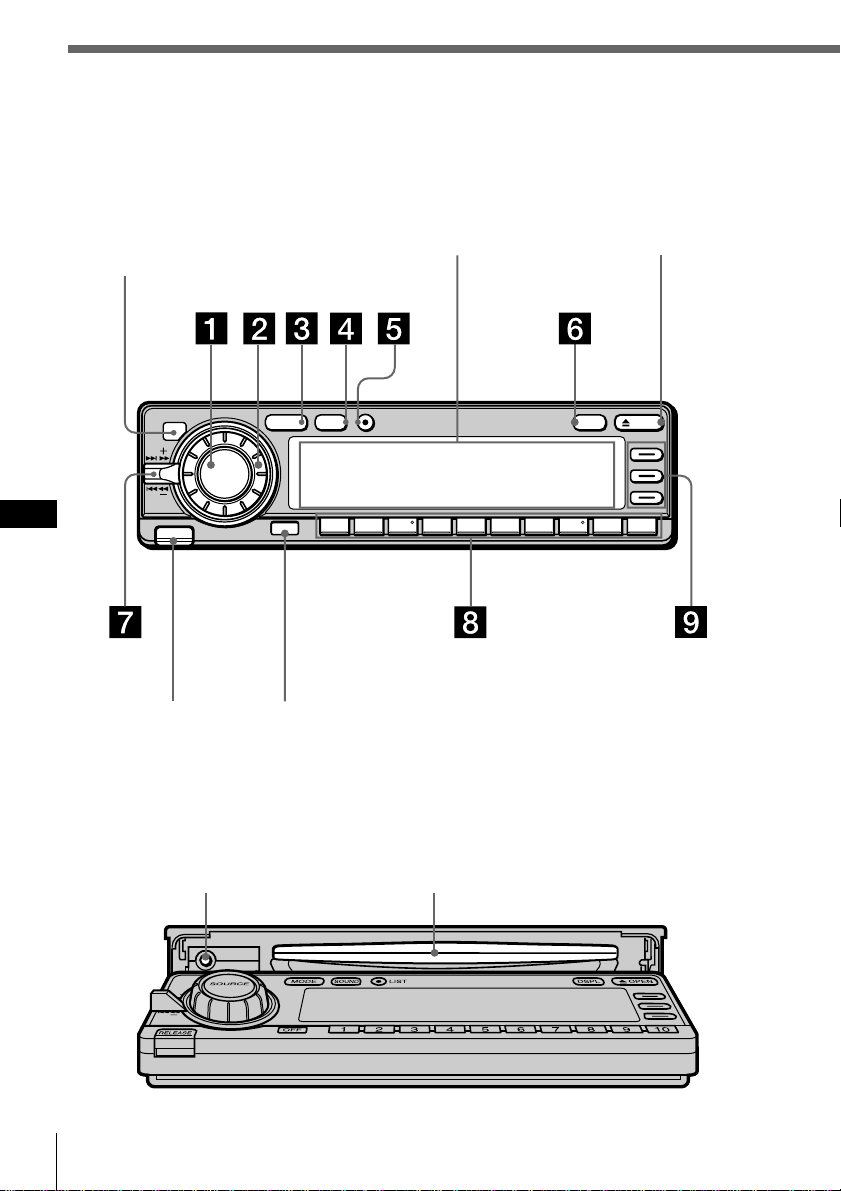
ES
Procedimientos iniciales8
Uso de los controles del panel
principal
Es posible utilizar los controles del panel principal para todas las operaciones, excepto las
de menú.
Panel frontal abierto
Botón de restauración
(consulte la página 2)
Ranura de CD
Visor Botón OPEN
Botón OFFBotón RELEASE
(consulte la página 59)
MODE LIST
SOUND
SOURCE
OPENDSPL
OFF
RELEASE
12345678910
Sensor para el mando a
distancia inalámbrico
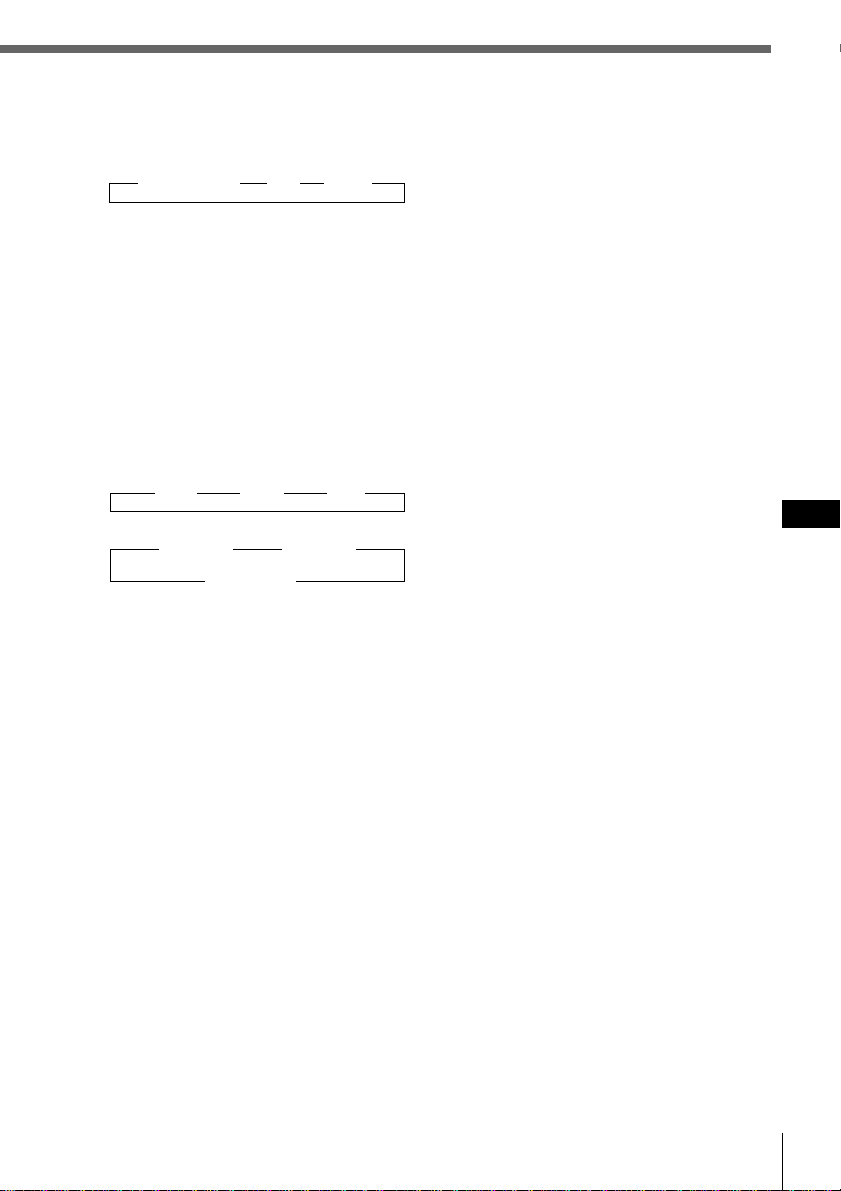
Procedimientos iniciales
Procedimientos iniciales
ES
9
6 Botón DSPL (cambio de modo de
indicación)
Cuando reproduzca un CD o un MD,
púlselo para mostrar el título del disco
o del tema.
Si el disco o tema actual no tiene título,
el visor mostrará “NO Disc Name (NO
Track Name)”.
Púlselo y manténgalo pulsado durante
dos segundos para cambiar al menú de
función que aparece, dependiendo de
la fuente actual o del modo de ajuste
(consulte “9 Botones de función”).
Para volver al menú de función
anterior, pulse y mantenga pulsado el
botón de nuevo.
7 Control SEEK/AMS (búsqueda/
Sensor de música automático/
búsqueda manual)
Presione el control hacia arriba o abajo
para localizar un tema o recibir una
emisora.
Presione el control hacia arriba o abajo
y manténgalo en esa posición hasta
localizar la emisora o el tema que
desee.
8 Botones numéricos
Púlselos para buscar emisoras
memorizadas, o para cambiar al disco
deseado de la unidad de CD/MD que
se corresponda con el botón numérico.
9 Botones de función
Púlselos para cambiar el ajuste de
modo manualmente. El menú de
función que aparece depende de la
fuente actual.
Cada vez que pulse DSPL durante dos
segundos, el menú de función cambia
de la siguiente forma:
Si selecciona el sintonizador
BTM
MONO ˜ DVOL
LCL EL
Si selecciona CD/MD
REP VC*
SHUF ˜ DVOL
PGM EL
Al etiquetar un CD o una emisora
/ VC*
ENT ˜ DVOL
? EL
Si selecciona el modo de edición
UP VC*
ENT ˜ DVOL
DOWN EL
* Sólo si selecciona el reproductor de CD de la
unidad (CD1).
1 Botón SOURCE (selección de fuente)
Cada vez que pulse el botón, la fuente
cambia de la siguiente forma:
” Sintonizador ” CD ” MD*
* Sólo si conecta una unidad opcional
2 Dial (control de volumen/volumen
de potenciación de graves/graves/
agudos/izquierdo-derecho/trasero-
delantero)
Gírelo para ajustar el volumen o las
características del sonido.
3 Botón MODE (selección de banda/
unidad)
Cada vez que pulse el botón, la banda o
la unidad cambia de la siguiente forma:
Si ha seleccionado el sintonizador
” FM1 ” FM2 ” AM
Si ha seleccionado CD/MD
” CD/MD1 ” CD/MD2
CD/MD3… “
4 Botón SOUND
Púlselo para acceder al modo de ajuste
de las características de sonido
(consulte la página 43).
Si conecta un procesador de señal
digital (DSP) opcional, púlselo y
manténgalo pulsado durante dos
segundos para acceder al modo de
sintonización de sonido DSP (consulte
la página 49).
Para recuperar el modo anterior, pulse
y mantenga pulsado el botón de nuevo.
5 Botón LIST
Si ha seleccionado CD o MD, púlselo
para mostrar la lista de títulos de
discos. Mientras visualiza la lista en el
visor, vuelva a pulsarlo para mostrar la
lista de títulos de temas del disco
actual (consulte la página 29).
Si ha seleccionado FM1, FM2 o AM,
púlselo para mostrar la lista de títulos
predefinidos (consulte la página 42).
Para cambiar la selección actual, utilice
los botones de cursor para seleccionar
otro disco, tema, o emisora y, a
continuación, pulse ENTER.
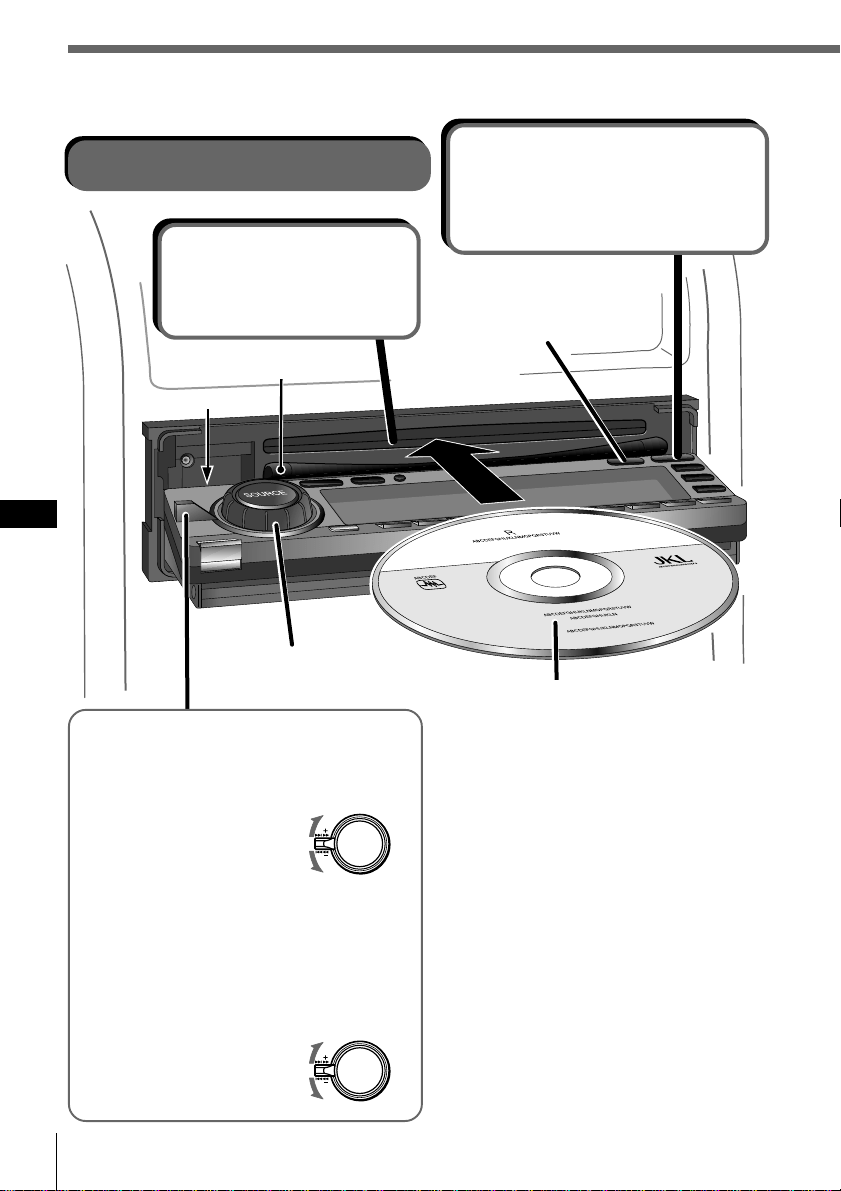
Procedimientos iniciales
ES
10
Operaciones básicas
Reproducción de un CD
Cambia la indicación
del visor.
Si ya hay un CD insertado
Pulse SOURCE varias veces hasta que
aparezca “CD”. La reproducción se
iniciará automáticamente.
Para detener la reproducción
Pulse OFF.
Para expulsar el CD
Pulse OPEN. El CD se expulsará
automáticamente.
Nota
Para reproducir un CD de 8 cm, utilice el
adaptador opcional de discos compactos
sencillos de Sony (CSA-8).
* No coloque objetos extraños entre el panel
frontal y la unidad. El panel frontal no
podrá cerrarse y es posible que la unidad
se dañe.
Ajusta el nivel de
volumen.
2 Inserte un CD.
El panel se cierra y se
inicia la reproducción
automáticamente.
1 Abre el panel
frontal.
Transcurridos 15 segundos, el panel
se cierra automáticamente.
Para buscar hacia delante
Para buscar hacia atrás
Para localizar un punto específico
de un tema (Búsqueda manual)
Presione el control SEEK/AMS hacia arriba
o abajo y manténgalo en esa posición.
Suelte el control cuando encuentre el punto
que desee.
Para localizar un tema específico
(Sensor de música automático (AMS))
Presione el control SEEK/AMS hacia arriba
o abajo momentáneamente.
Para localizar temas
posteriores
Para localizar temas anteriores
o el principio del tema actual
Lado de la etiqueta hacia arriba
*
Guía de
inserción de CD
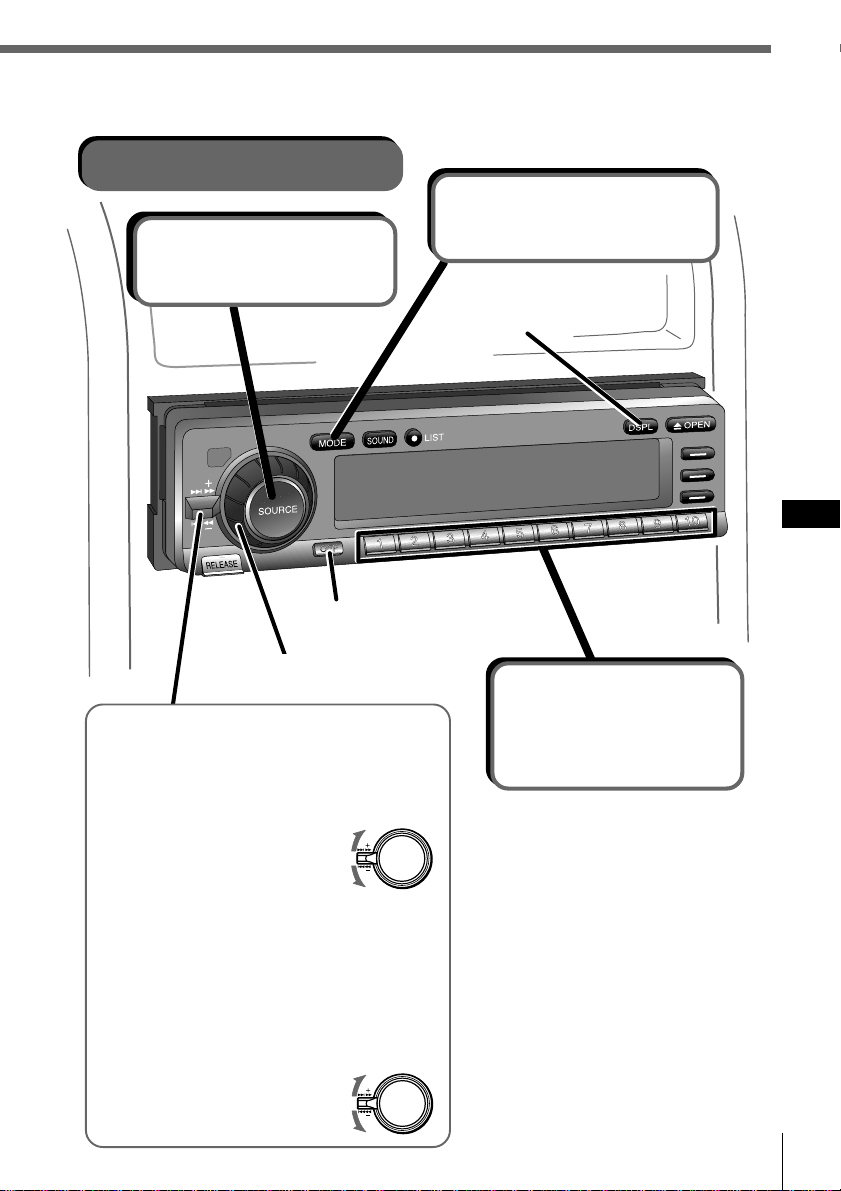
Procedimientos iniciales
Procedimientos iniciales
ES
11
Recepción de la radio
2 Selecciona FM1,
FM2 o AM.
Desactiva la alimentación.
3 Selecciona la
emisora que
desee.
Es posible seleccionar botones
solamente cuando haya asignado
emisoras memorizadas a los
botones numéricos (consulte la
página 34).
Para cambiar la banda
Pulse MODE varias veces para
seleccionar la banda que desee.
Para dejar de oír la radio
Pulse OFF.
Para recibir emisoras
automáticamente
(Sintonización automática)
Presione el control SEEK/AMS hacia arriba
o abajo momentáneamente.
La exploración se detiene cuando la unidad
recibe una emisora.
Para recibir la frecuencia que
desee (Sintonización manual)
Presione el control SEEK/AMS hacia arriba
o abajo y manténgalo en esa posición hasta
recibir la frecuencia que desee.
1 Selecciona el
sintonizador.
Cambia la indicación
del visor.
Para buscar emisoras posteriores
Para buscar emisoras anteriores
Ajusta el nivel de volumen.
Para buscar frecuencias superiores
Para buscar frecuencias inferiores
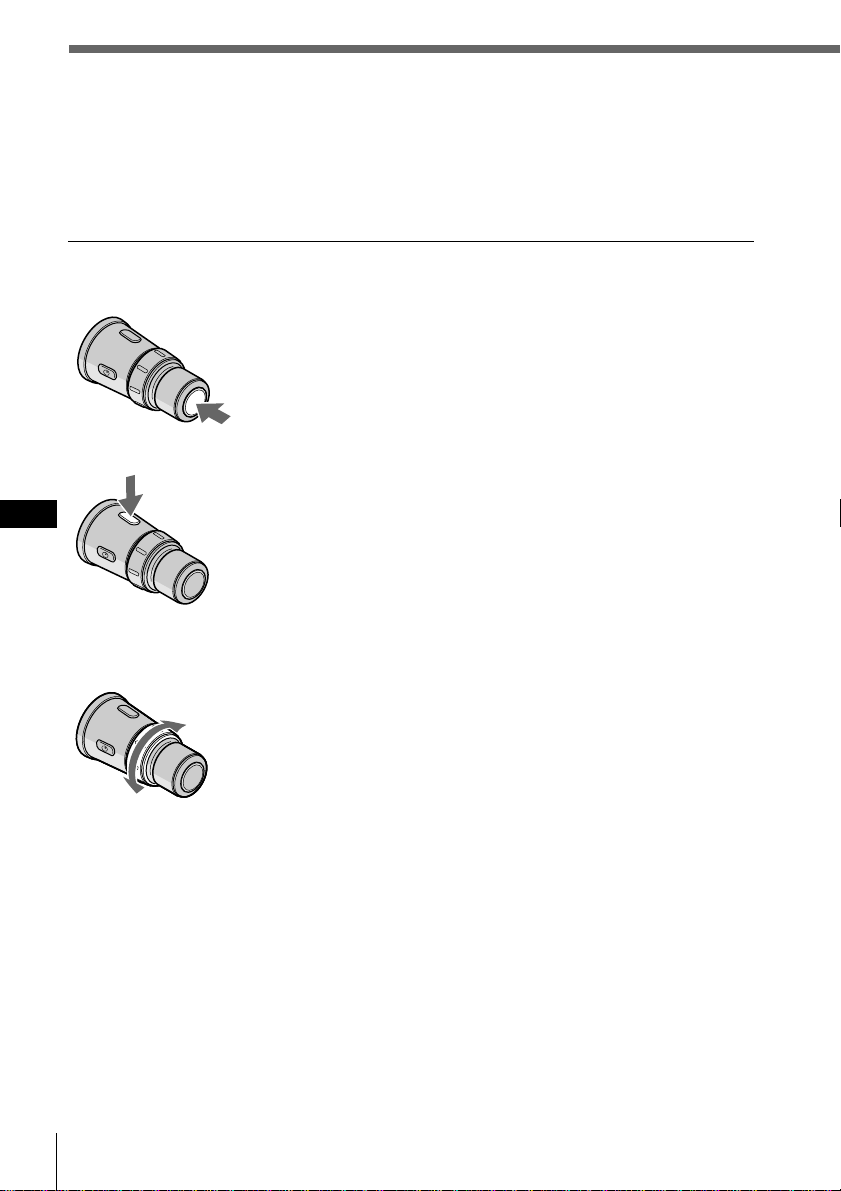
Procedimientos iniciales
ES
12
Uso del mando a distancia giratorio
Es posible utilizar el mando a distancia giratorio para todas las operaciones salvo las
de menú.
Operaciones básicas
Mediante la pulsación de botones
Cada vez que se pulsa SOURCE, la fuente cambia de la
siguiente manera:
TUNER n CD n MD*
* Cuando hay una unidad de MD conectada.
Al pulsar MODE, el funcionamiento cambia de la
siguiente forma:
• Sintonizador: FM1 n FM2 n AM
• Unidad de CD: CD1 n CD2 n …
• Unidad de MD: MD1 n MD2 n …
Mediante el giro del control
Gire el control momentáneamente y suéltelo para:
•Localizar el principio de los temas estando seleccionado
CD o MD.
•Sintonizar una emisora automáticamente estando
seleccionado FM1, FM2 o AM. Al detectar una emisora,
la unidad deja de buscar.
Mantenga girado el control para:
•Localizar un punto específico de un tema estando
seleccionado CD o MD. Se reanuda la reproducción a la
velocidad normal al soltar el control.
•Sintonizar una emisora de forma manual estando
seleccionado FM1, FM2 o AM. Suelte el control al
localizar la emisora apropiada.
Consejo
Si el modo SEEK/AMS se ajusta en “Item sel”, podrá seleccionar
la emisora o disco que desee con SEEK/AMS cuando la lista
aparezca en el visor (consulte la página 45).
Botón SOURCE
Botón MODE
Control SEEK/AMS
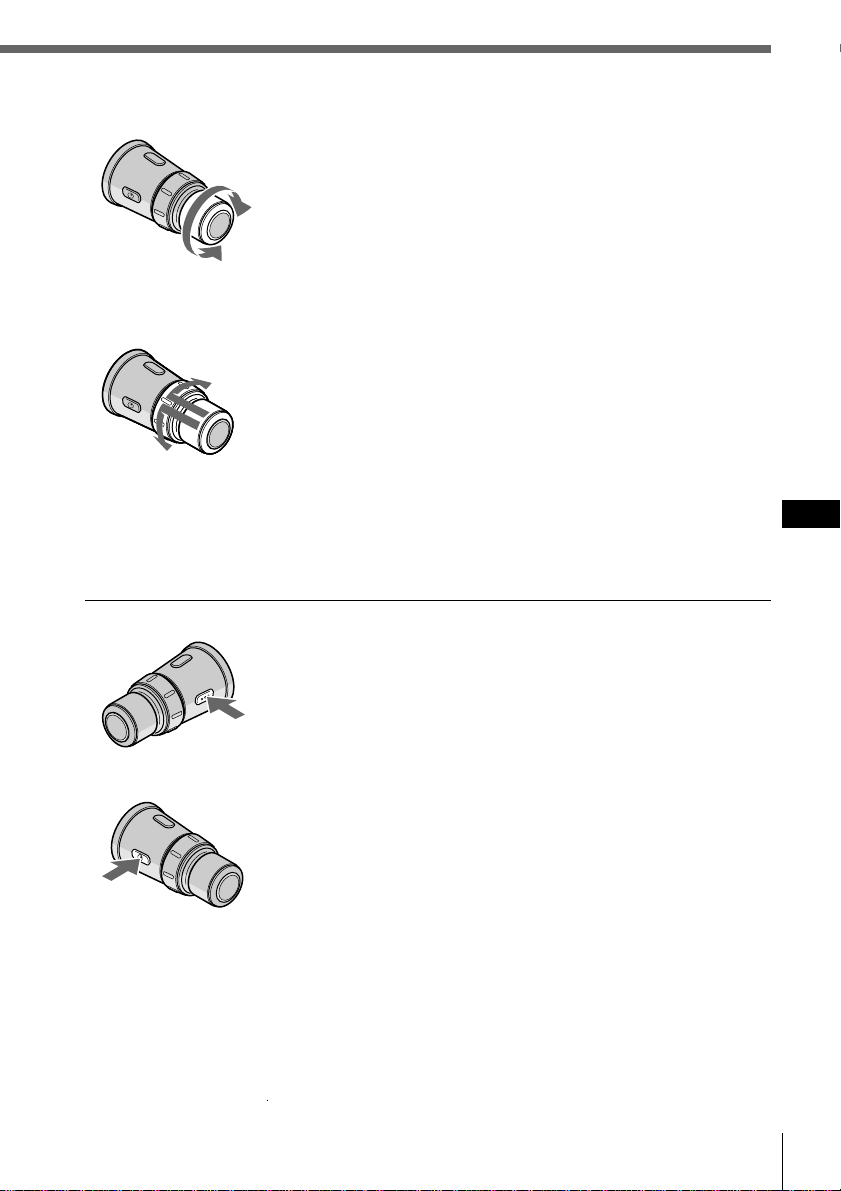
Procedimientos iniciales
Procedimientos iniciales
ES
13
Gire el control para:
Ajustar el nivel de volumen.
Mediante la presión y giro del control
Presione y gire el control para:
•Recibir las emisoras memorizadas en los botones
numéricos estando seleccionado FM1, FM2 o AM.
•Cambiar el disco estando seleccionado CD o MD.
Presione y suelte el control para:
Mostrar durante unos segundos la lista de discos (si está
seleccionado CD o MD) o de emisoras predefinidas (si se
encuentra seleccionado FM1, FM2 o AM). El visor volverá
a su estado anterior pasado un momento.
Otras operaciones
Pulse este botón para apagar la unidad.
Para volver a encender la unidad, pulse SOURCE.
Pulse este botón para atenuar el sonido.
Para cancelar la atenuación (ATT), vuelva a pulsar el
botón.
Cambio de la dirección de funcionamiento
Si necesita montar el mando a distancia giratorio en el lado izquierdo de la columna
de dirección, puede invertir la dirección de funcionamiento. Consulte “Ajuste del
menú de configuración” en la página 44.
DISC/PRESET control
Control VOL
Botón OFF
Botón ATT
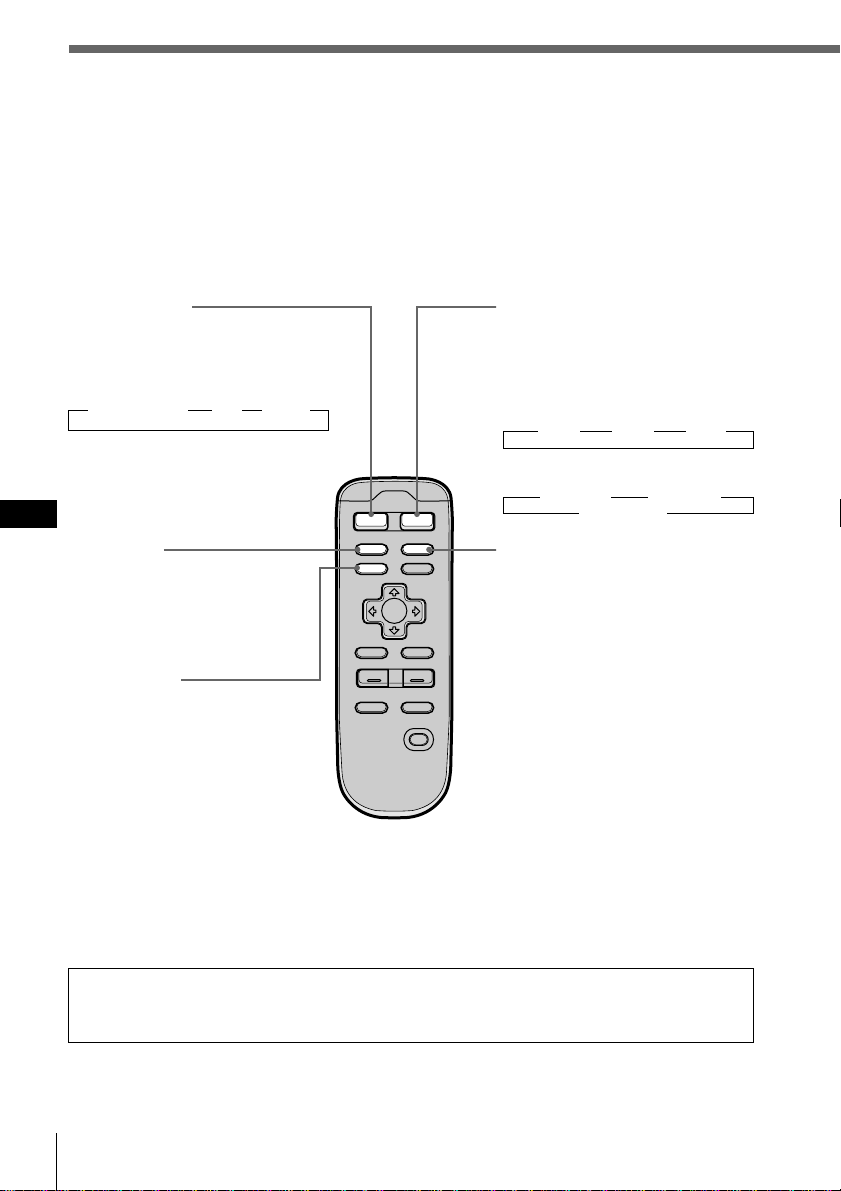
Procedimientos iniciales
ES
14
VOL
MODE
SOURCE
MENU
LIST
BACK
ENTER
SOUND
–+
OFF
AT T
SCRL DSPL
Uso del mando a distancia
inalámbrico
Utilice el mando a distancia inalámbrico para realizar los distintos ajustes de menú.
Para su seguridad, un pasajero debe realizar las operaciones con el mando a distancia
inalámbrico. Si usted (el conductor) desea utilizar este mando, estacione el vehículo
en un lugar seguro antes de efectuar alguna operación.
Botón SOURCE
(selección de fuente)
Cada vez que pulse el botón, la
fuente cambia de la siguiente
forma:
” Sintonizador ” CD ” MD*
*Sólo si conecta una unidad
opcional
Botón SCRL
Púlselo para desplazar el título
del tema o disco al reproducir
un disco CD TEXT o un MD.
Botón MENU
Púlselo para acceder a un
menú. El menú que aparece
depende de la fuente de
programa actual.
Para recuperar el contenido
anterior del visor, pulse el
botón de nuevo.
Botón MODE (selección de
banda/unidad)
Cada vez que pulse el botón, la
banda o la unidad cambia de la
siguiente forma:
Si ha seleccionado el sintonizador
” FM1 ” FM2 ” AM
Si ha seleccionado CD/MD
” CD/MD1 ” CD/MD2
CD/MD3… “
Botón DSPL (cambio del modo
de indicación)
Al reproducir un CD o MD,
púlselo para mostrar el título
del disco o tema.
Si el disco o tema actual no
tiene título, aparece en el visor
el mensaje “NO Disc Name
(NO Track Name)”.
Púlselo y manténgalo pulsado
durante dos segundos para
cambiar al menú de función
que aparece, dependiendo de
la fuente actual o del modo de
ajuste (consulte “9 Botones de
función” en la página 9).
Para volver al menú de función
anterior, pulse y mantenga
pulsado el botón de nuevo.
Si la posición ACC se ajusta en “no”, no será posible emplear la unidad con el
mando a distancia inalámbrico a menos que pulse SOURCE en el mando giratorio
o en el panel frontal, o que inserte un CD para activar la unidad primero.
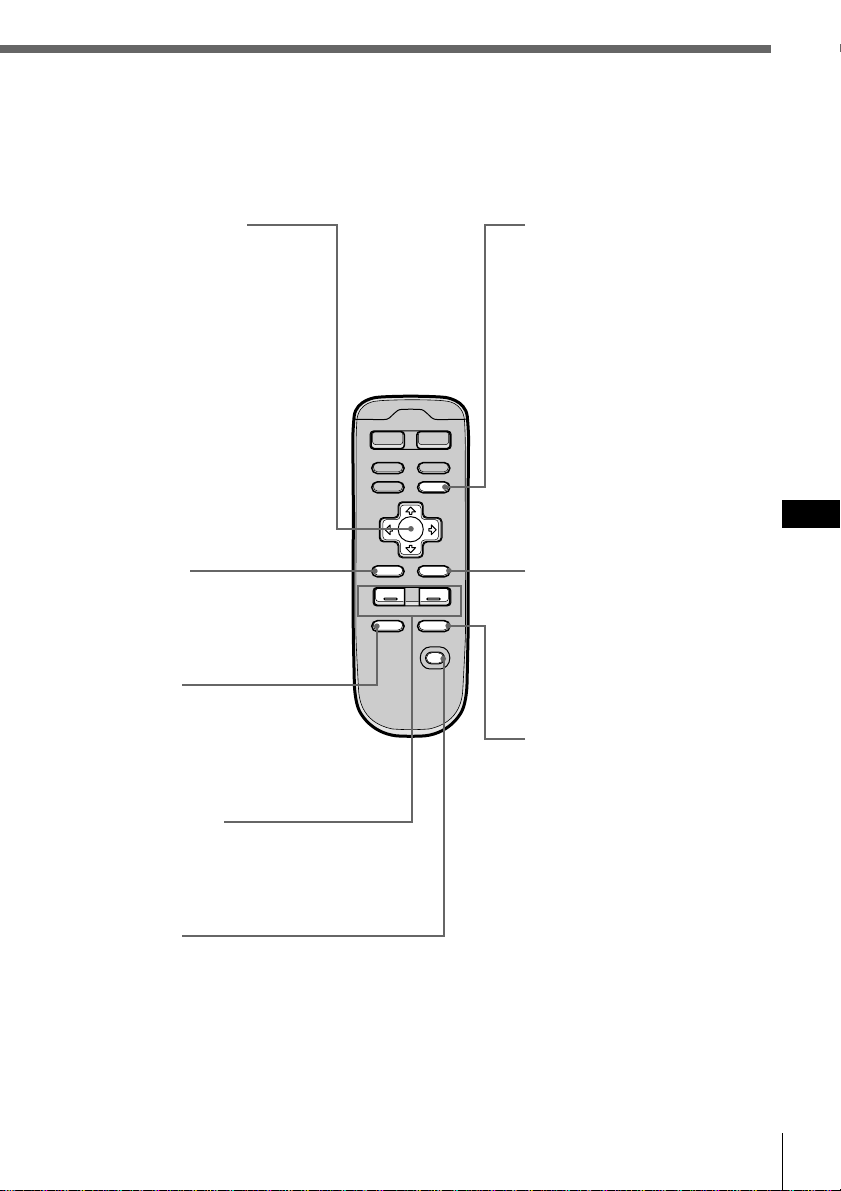
Procedimientos iniciales
Procedimientos iniciales
ES
15
VOL
MODE
SOURCE
MENU
LIST
BACK
ENTER
AT T
SOUND
–+
OFF
SCRL DSPL
Botón LIST
Estando seleccionado CD o
MD, púlselo para mostrar la
lista de títulos de disco. Con la
lista visible en el visor, púlselo
de nuevo para mostrar la lista
de títulos de temas del disco
actual (consulte la página 29).
Estando seleccionado FM1,
FM2 o AM, púlselo para
mostrar la lista de títulos
predefinidos (consulte la
página 42).
Para cambiar la selección
actual, utilice los botones del
cursor para seleccionar otro
disco, tema, o emisora y, a
continuación, pulse ENTER.
Botón ENTER
Púlselo para realizar la
función seleccionada.
Botón SOUND
Púlselo para ajustar las
características (consulte la
página 43).
Con un DSP (procesador de
señales digitales) opcional
conectado, pulse este botón y
manténgalo pulsado durante
más de dos segundos para
cambiar al modo de
sintonización de sonido DSP
(consulte la página 49).
Para volver al modo anterior,
pulse y mantenga pulsado
nuevamente el botón.
Botones del cursor
Con el menú visible,
púlselos para desplazar el
cursor dentro de un menú.
Estando seleccionado CD
o MD, pulse > o . para
cambiar el disco y ? y /
para localizar un tema.
Estando seleccionado FM1,
FM2 o AM, pulse > o .
para seleccionar una
emisora predefinida, o
bien ? y / para realizar
la sintonización
automática.
Botón BACK
Púlselo para volver al
visor normal durante una
operación de menú.
Botón ATT
Púlselo para atenuar el
volumen.
Para recuperar el nivel de
volumen anterior, vuelva a
pulsar el botón.
Botones VOL +/–
Pulse + o – para ajustar el
volumen o las
características del sonido.
Botón OFF
Púlselo para apagar la
unidad.
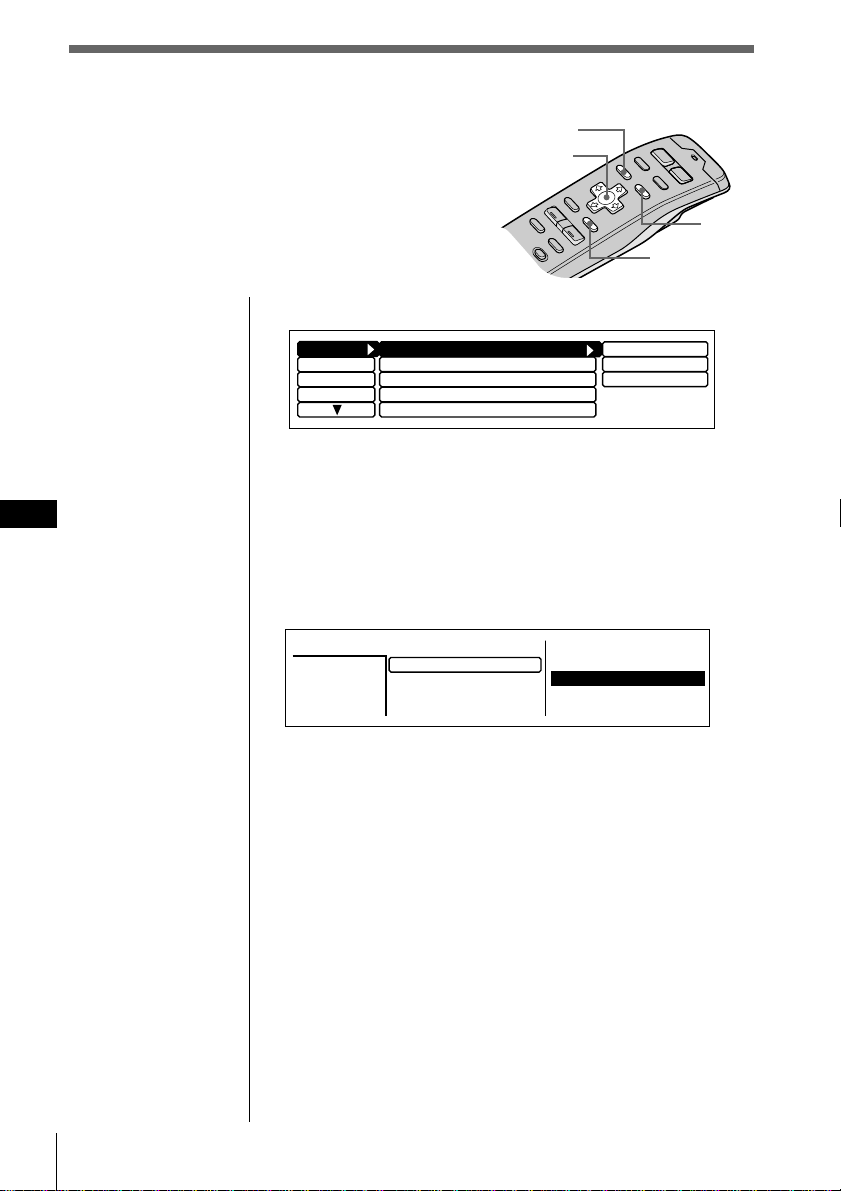
Procedimientos iniciales
ES
16
Visualización del menú (aparece al pulsar MENU)
Display
Name
SEEK/AMS
SEEK/AMS
off
Beep on
Rotary Remote
norm
Time Set
on
Set up
P.Mode
Clock on
Direct Volume
off
1 Pulse MENU para realizar varios ajustes.
2 Pulse los botones del cursor para seleccionar la opción y
su ajuste y, a continuación, pulse ENTER.
3 Pulse MENU para cancelar el modo de menú y volver al
normal de visualización.
Listas (aparece al pulsar LIST)
Con CD o MD seleccionado, pulse LIST para visualizar la
lista de títulos de disco o de tema.
La lista de nombres predefinidos aparece al seleccionar
FM1, FM2 o AM.
Para seleccionar el disco o emisora por su nombre
Cuando aparezca en el visor la lista de títulos de disco o la
lista de nombres predefinidos, pulse los botones del cursor
para seleccionar el disco o emisora de radio que desee
escuchar y pulse ENTER.
Para volver al visor anterior sin cambiar el ajuste, vuelva a
pulsar LIST.
Consejo
Si el modo SEEK/AMS se ajusta en “Item sel”, podrá seleccionar
la emisora o disco que desee con SEEK/AMS cuando la lista
aparezca en el visor (consulte la página 45).
Visualización del menú/Listas
Aparecen el menú y las listas siguientes en el visor
al pulsar MENU o LIST.
LIST
ENTER
MENU
Cursor
2.POPS HIT
3.FUSION
4.JAZZ
5.GREAT HIT
*
CD2
SONYPOPS
8
1.28
6.EURO BEAT
7.DRIVING
9.SUNSET.M
10.HIGHWAY
Disc
3
1.MY BEST
8.SONYPOPS
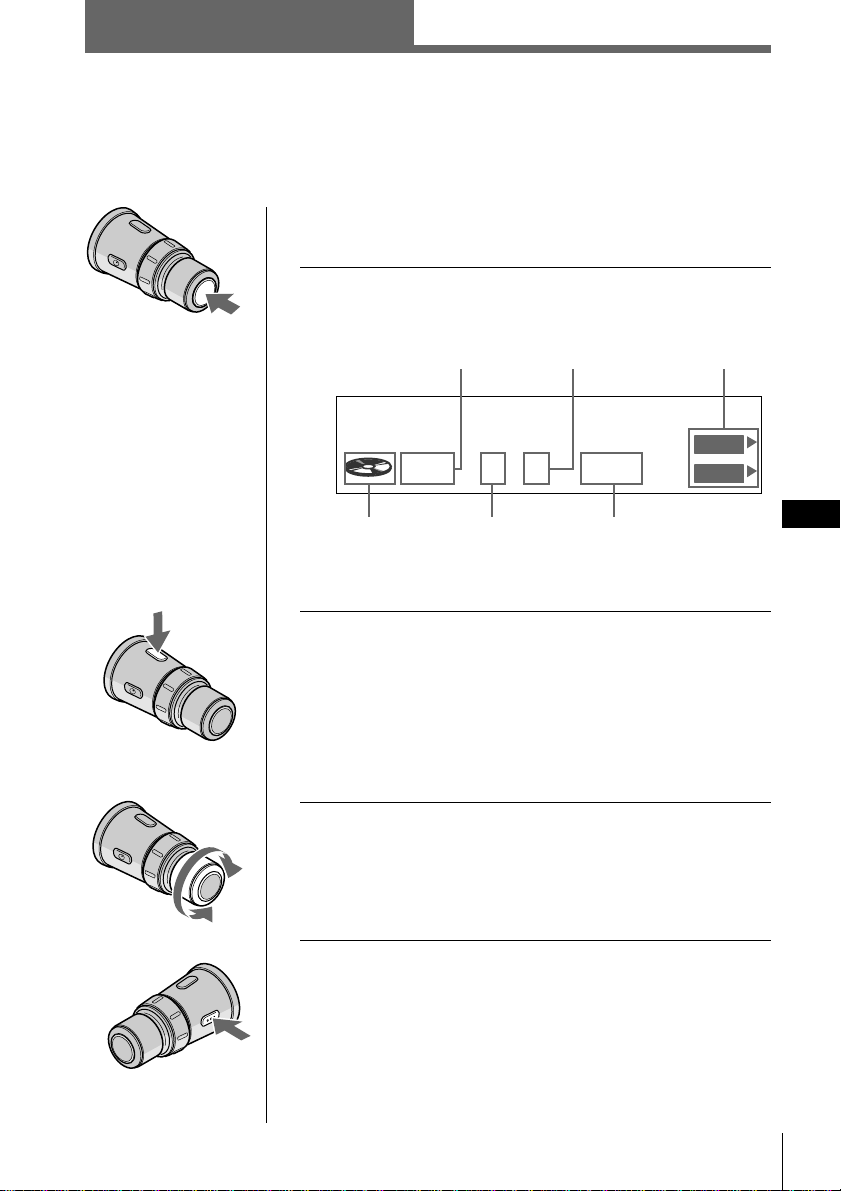
CD/MD
CD/MD
ES
17
Pala seleccionar la unidad de CD o MD
que desee
1 Pulse SOURCE varias veces para seleccionar
“CD” o “MD”.
* El número de disco aparece cuando la unidad de CD/MD
se encuentra conectada.
2 Pulse MODE varias veces para seleccionar la
unidad de CD o MD que desee.
Si conecta unidades opcionales de CD
CD1 (CDX-C90) n CD2 (unidad opcional de CD 1) n
CD3 (unidad opcional de CD 2)
Si conecta unidades opcionales de MD
MD1 (unidad opcional de MD 1) n MD2 (unidad opcional de
MD 2)
3 Gire VOL para ajustar el nivel de volumen.
El volumen es ajustable entre 0 dB y – ∞ dB.
Precaución
Por su seguridad, ajuste el volumen lo suficientemente bajo
de forma que pueda oír el sonido del lugar en el que esté.
Para detener la reproducción
Pulse OFF.
Reproducción de un CD/MD
Si conecta una unidad opcional de CD o de MD a esta unidad, podrá localizar y
escuchar los discos de dicha unidad opcional de la misma forma que con los de esta
unidad.
Indicación
de fuente
Número de
disco*
Número de tema
Tiempo de reproducción
del tema actual
SCHUBERT
25CD2 0.06
Disc Name
DVOL
EL
Número de unidad
de CD/MD
Menú de función
CD/MD
Para
disminuir
Para
aumentar
continúa en la página siguiente n
Procedimientos iniciales/CD/MD
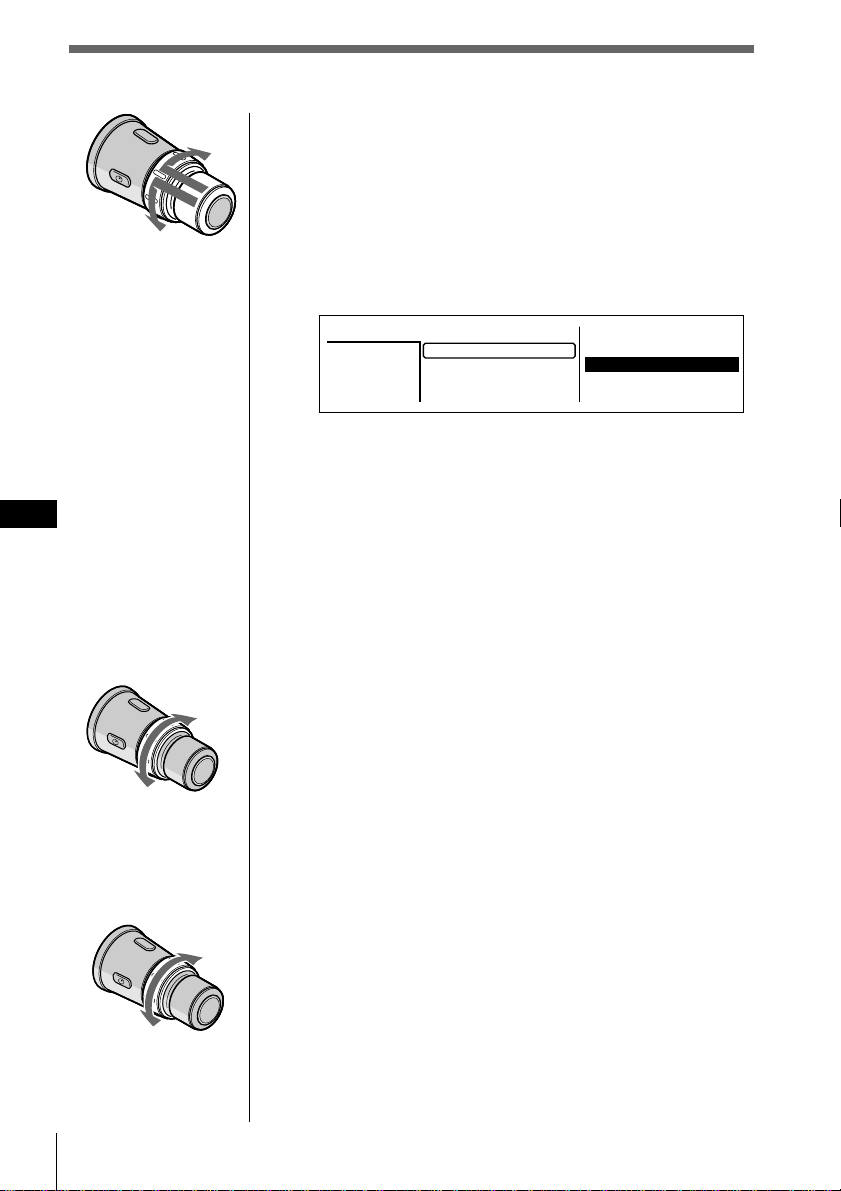
CD/MD
ES
18
Para seleccionar el disco que desee
reproducir
Presione y gire DISC/PRESET.
La unidad cambia al disco siguiente o anterior. Si
mantiene girado el control, los discos seguirán
cambiando.
Presione y suelte el control para mostrar la lista de
nombres de disco.
Para obtener más información sobre cómo asignar
nombre a un disco, consulte “Etiquetado de CD” en la
página 25.
Consejos
• También es posible utilizar los botones numéricos del
panel frontal correspondientes al número del disco que
desee.
• Si el modo SEEK/AMS se ajusta en “Item sel”, podrá
seleccionar el disco que desee con SEEK/AMS cuando la
lista aparezca en el visor (consulte la página 45).
Para localizar un tema
Gire y suelte SEEK/AMS.
La unidad localiza el principio del tema actual,
siguiente o anterior.
Para localizar un punto específico de un
tema
Gire y mantenga girado SEEK/AMS.
La unidad reproduce el tema a alta velocidad. Cuando
llegue al punto que desee, suelte el control.
Para buscar
hacia atrás
Para buscar
hacia
adelante
Al tema anterior o al
punto inicial del tema
actual
Al tema
siguiente
2.POPS HIT
3.FUSION
4.JAZZ
5.GREAT HIT
*
CD2
SONYPOPS
8
1.28
6.EURO BEAT
7.DRIVING
9.SUNSET.M
10.HIGHWAY
Disc
3
1.MY BEST
8.SONYPOPS
Al disco
anterior
Al disco
siguiente
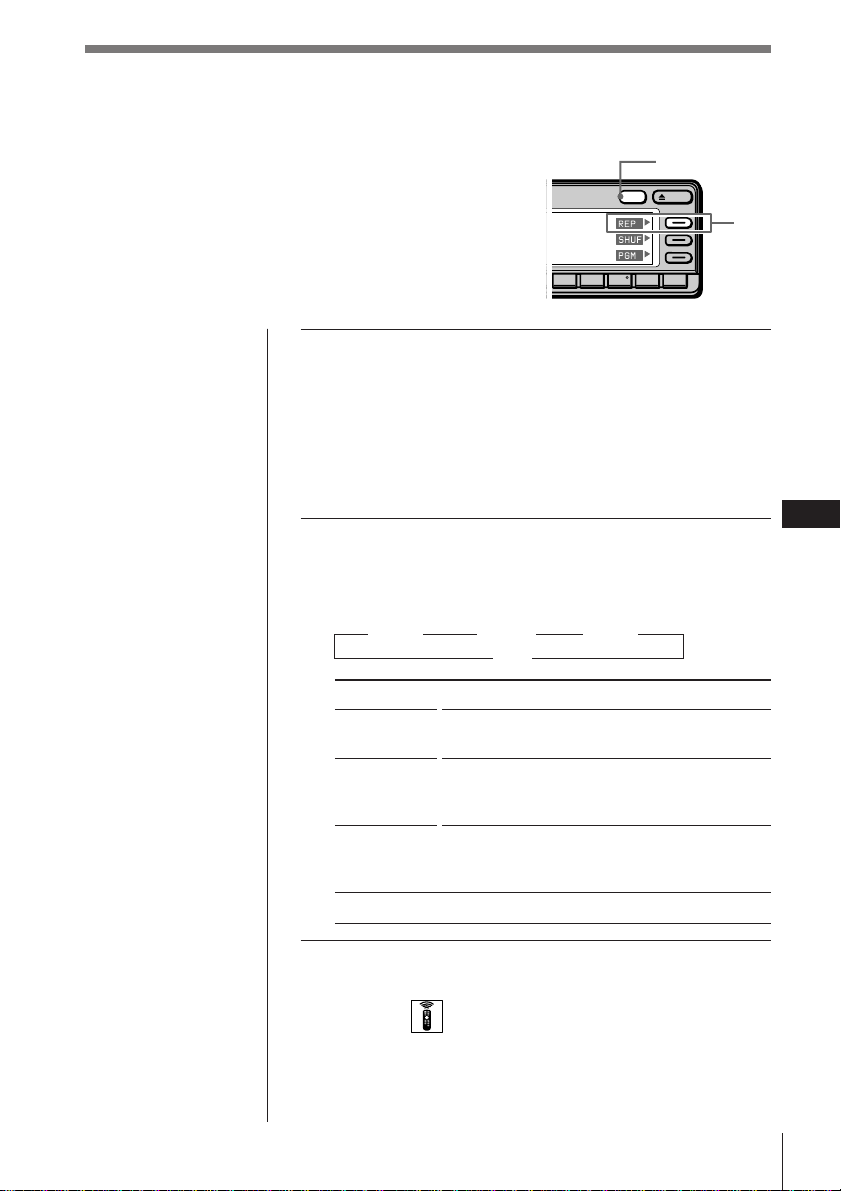
CD/MD
CD/MD
ES
19
Reproducción repetida de temas
(Reproducción repetida)
La función de reproducción repetida permite
reproducir de forma repetida un tema, un disco o
todos los discos de esta unidad o de cualquier
unidad de CD/MD conectada.
1 Mientras se reproduce un CD o un MD, pulse
y mantenga pulsado DSPL durante dos
segundos.
Consejo
Si el modo Select (Selección) del menú Func. (Funciones) está
ajustado en “Source”, el menú de función aparecerá
automáticamente en la parte derecha del visor dependiendo
de la fuente que seleccione (consulte la página 48).
2 Pulse REP varias veces para seleccionar el
modo.
Cada vez que pulse REP, el modo cambiará de la
siguiente forma:
” REP 1 ” REP 2 ” REP 3
off “
Indicación
REP 1
(1:track)
REP 2
(2:disc)
REP 3
(3:changer)
off
Selección del modo con el mando a distancia
inalámbrico
Mientras se reproduce un CD o un MD, pulse MENU y
ajuste el modo de repetición en “1:track”, “2:disc” o
“3:changer”.
Operación
Repite sólo el tema actual.
Repite todos los temas del disco actual (en
caso de conectar una o más unidades de CD/
MD opcionales).
Repite todos los discos de la unidad de
CD/MD actual (en caso de conectar una o
más unidades de CD/MD opcionales).
Reproducción normal
OPENDSPL
891076
DSPL
REP
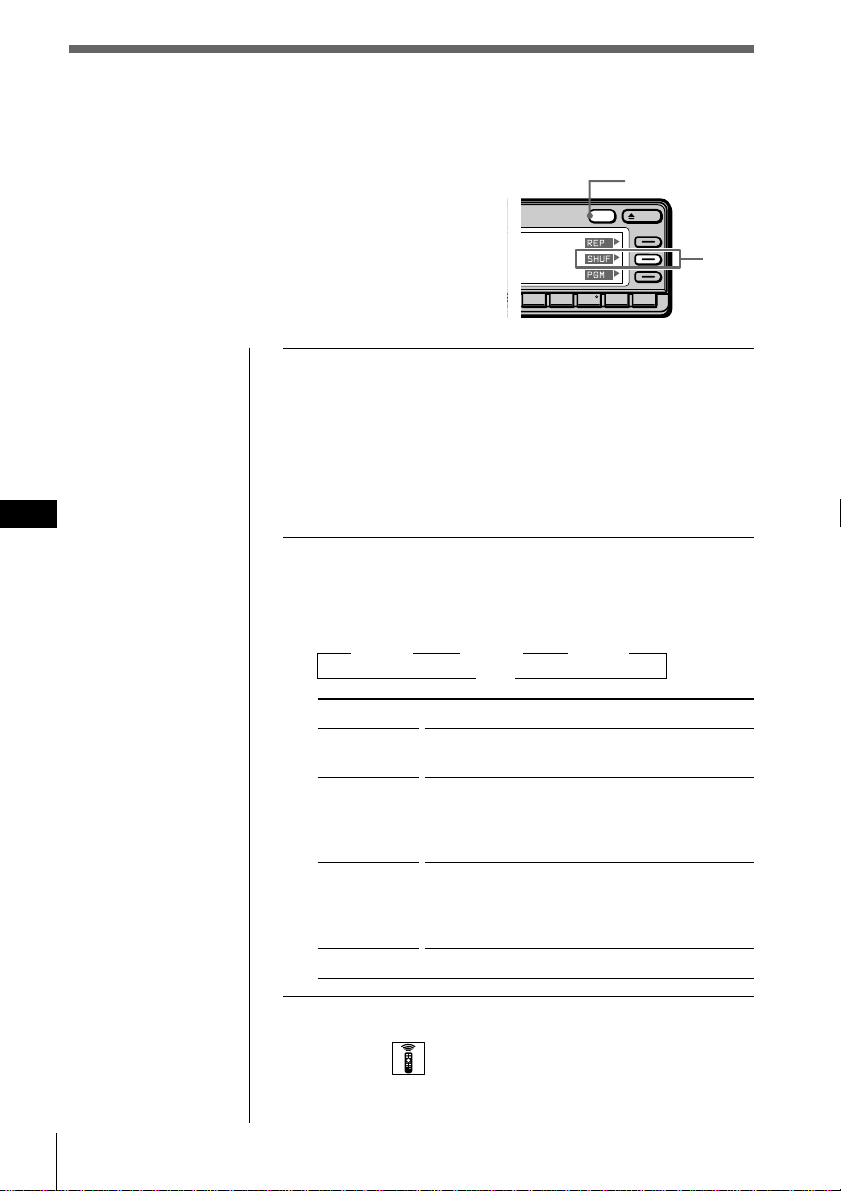
CD/MD
ES
20
Reproducción de temas en orden
aleatorio
(Reproducción aleatoria)
La reproducción aleatoria reproduce en orden
aleatorio todos los temas del disco actual o de
todos los discos de esta unidad o de cualquier
unidad de CD/MD conectada.
Reproducción de temas en orden
aleatorio
(Reproducción aleatoria)
La reproducción aleatoria reproduce en orden
aleatorio todos los temas del disco actual o de
todos los discos de esta unidad o de cualquier
unidad de CD/MD conectada.
1 Mientras se reproduce un CD o un MD, pulse y
mantenga pulsado DSPL durante de dos
segundos.
Consejo
Si el modo Select (Selección) del menú Func. (Funciones) está
ajustado en “Source”, el menú de función aparecerá
automáticamente en la parte derecha del visor dependiendo
de la fuente que seleccione (consulte la página 48).
2 Pulse SHUF varias veces para seleccionar el
modo.
Cada vez que pulse SHUF, el modo cambiará de la
siguiente forma:
” SHUF 1 ” SHUF 2 ” SHUF 3
off “
Indicación
SHUF 1
(1:disc)
SHUF 2
(2:changer)
SHUF 3
(3:all)
off
Operación
Reproduce todos los temas del disco actual en
orden aleatorio.
Reproduce todos los discos de la unidad de
CD/MD actual en orden aleatorio (en caso de
conectar una o más unidades de CD/MD
opcionales).
Reproduce todos los discos de todas las
unidades de CD/MD en orden aleatorio (en
caso de conectar una o más unidades de CD/
MD opcionales).
Reproducción normal
OPENDSPL
891076
5
DSPL
SHUF
Selección del modo con el mando a distancia
inalámbrico
Mientras se reproduce un CD o un MD, pulse MENU y
ajuste el modo aleatorio en “1:disc”, “2:changer” o “3:all”.
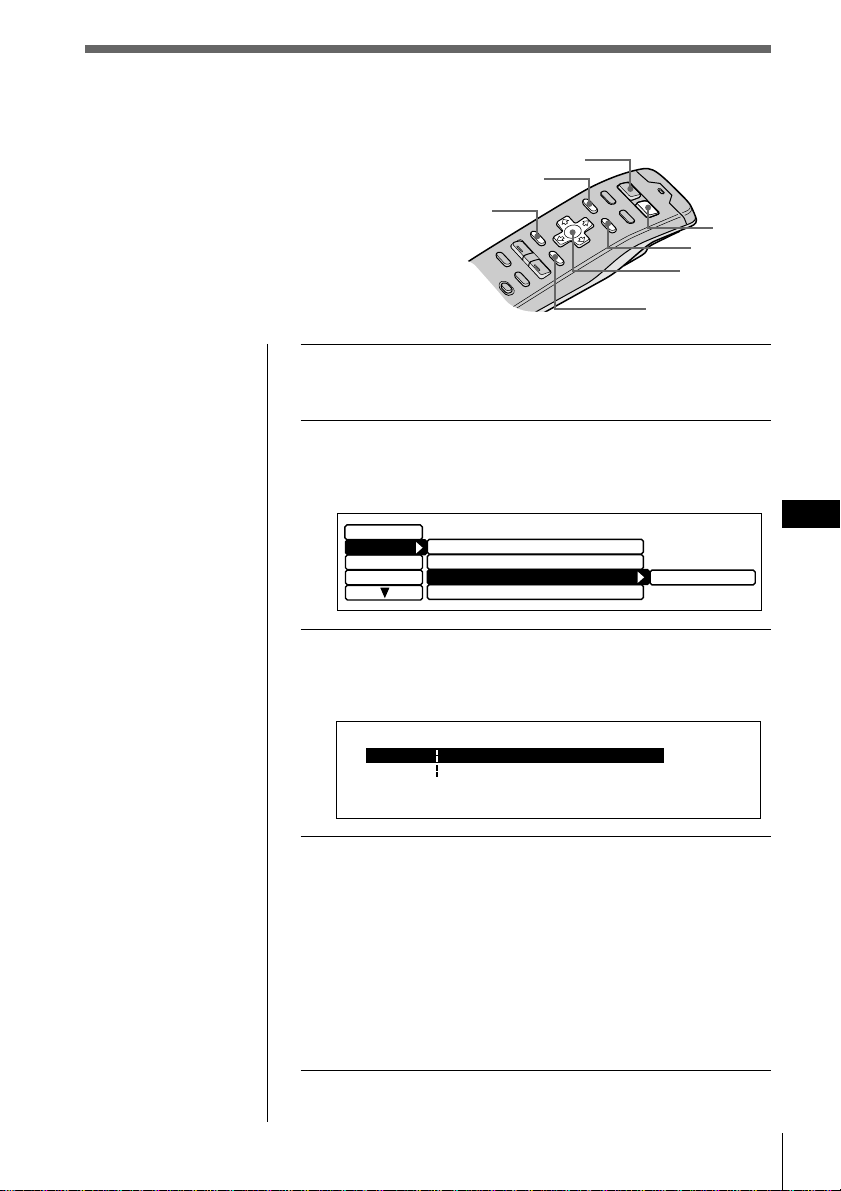
CD/MD
CD/MD
ES
21
SOURCE
MENU
BACK
ENTER
MODE
LIST
1 Mientras reproduce un CD o un MD, pulse
MENU.
2 Seleccione “P. Mode” y pulse / para
desplazarse hasta el submenú. A continuación,
seleccione “PGM” pulsando > o ..
3 Pulse / para seleccionar “edit” y pulse
ENTER.
Aparece el modo de edición PGM.
4 Seleccione el tema que desee programar.
1 Pulse SOURCE varias veces para seleccionar CD o
MD.
2 Pulse MODE varias veces para seleccionar la
unidad de CD o MD que desee.
3 Pulse LIST y seleccione el disco que desee
pulsando el cursor y, a continuación, pulse
ENTER.
4 Pulse ? o / para seleccionar el tema que desee
programar.
continúa en la página siguiente n
Creación de programas
(Memoria de programa de CD/MD)
Es posible reproducir temas de esta unidad
o de cualquiera opcional de CD/MD en el
orden que desee mediante la creación y
almacenamiento de programas en la
memoria de la unidad. Es posible
almacenar dos programas con un máximo
de 12 temas cada uno.
MY BEST CD1PGM Edit Mode 2 0.27
P2- 1
--- -- -- --------
--- -- --P1- 1
:
:
--------
Consejos
• En el paso 2, para
desplazar el cursor
hasta la columna
anterior (de una en
una), pulse ?.
• Para cancelar la
indicación actual y
recuperar la anterior,
pulse BACK.
Cursor
Set up
Display
Name
edit
P.Mode
off
Repeat
off
Shuffle
off
Bank
PGM
off
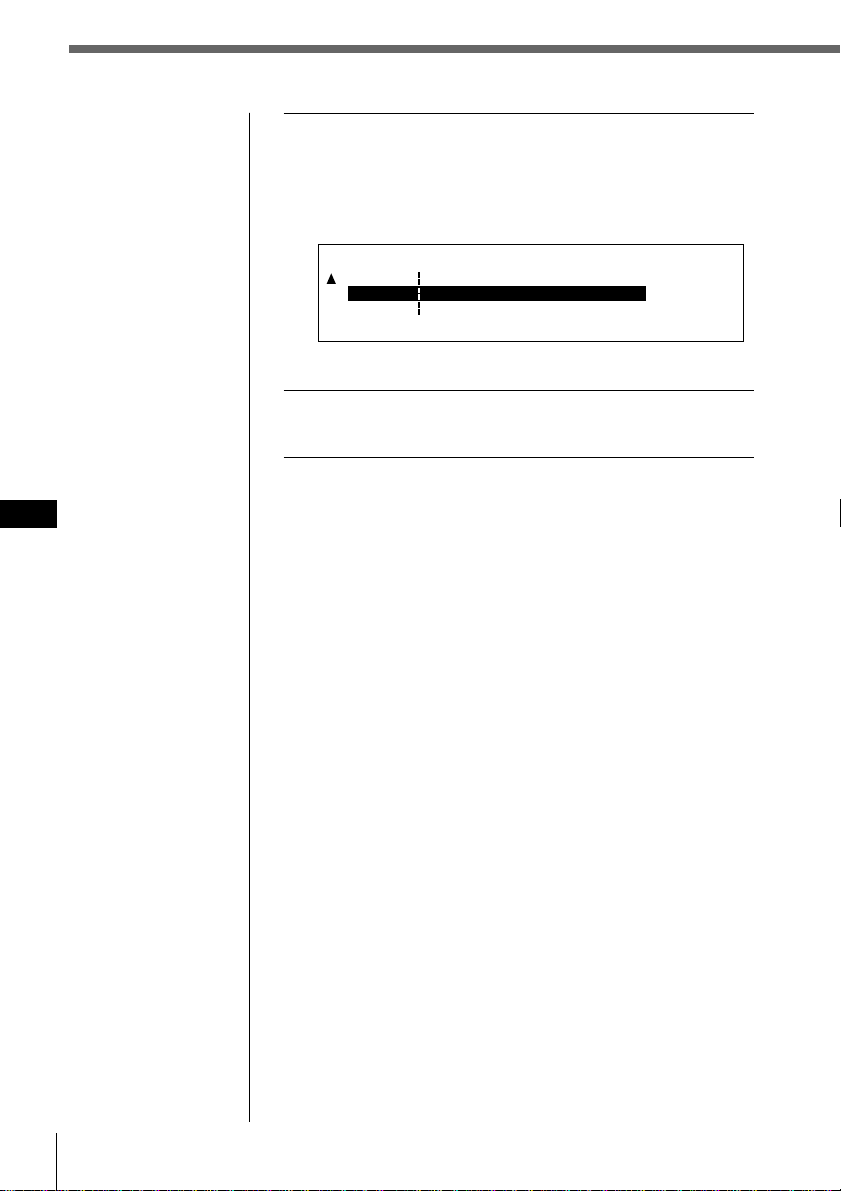
CD/MD
ES
22
Nota
Una vez completas las
12 ranuras, aparecerá
“MEMORY FULL” y no
será posible insertar
más temas.
5 Pulse > o . para seleccionar el número de
programa de “P1” o “P2” y, a continuación,
pulse ENTER.
El tema que ocupa ese puesto actualmente y todos los
temas sucesivos se desplazan hacia abajo.
Para seguir insertando temas, repita los pasos 4 a 5.
6 Para finalizar el ajuste de modo, pulse BACK.
Aparece el visor normal.
CD1
PGM Edit Mode 8 0.43
P2- 1
P1- 1
--- -- -- --------
SONYPOPS
SONYPOPS
CD1 1
:
:
P1- 2 --------
--- -- --
:
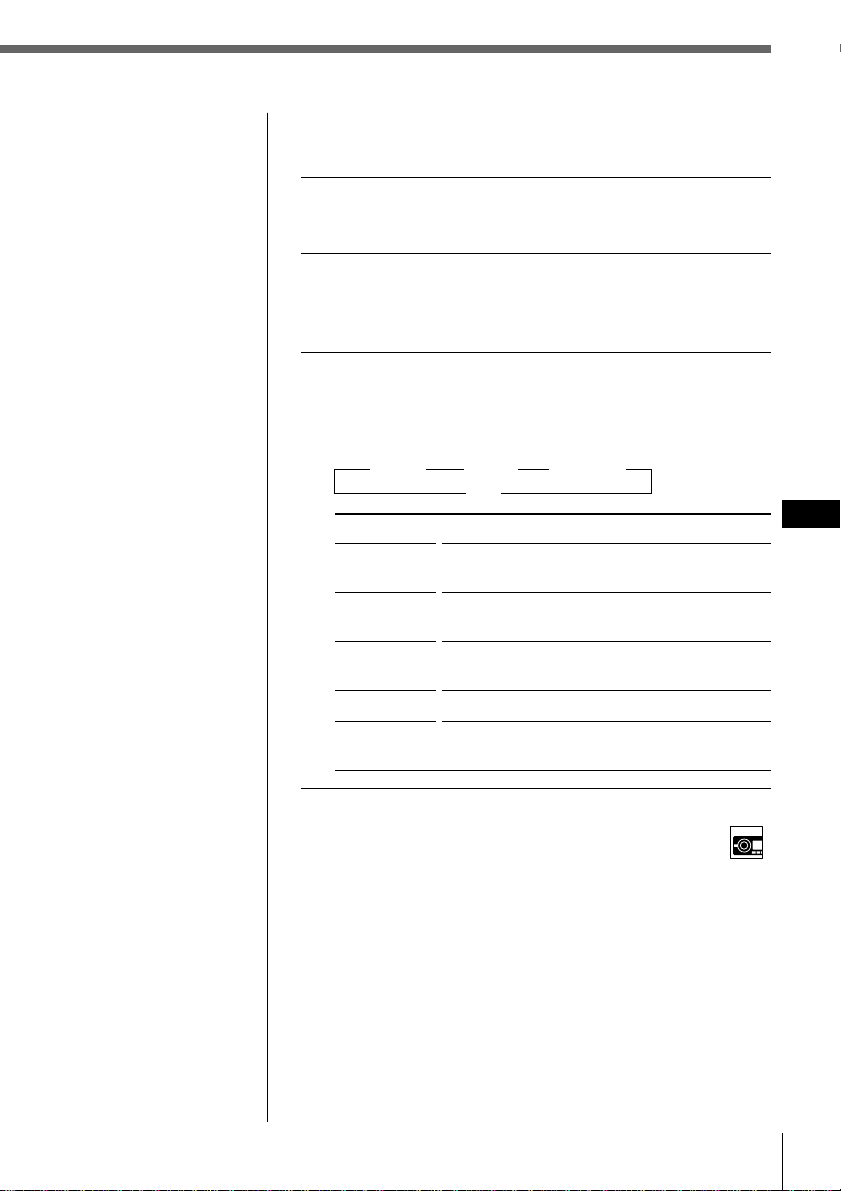
CD/MD
CD/MD
ES
23
Notas
•“*Wait*” aparece en
el visor mientras la
unidad lee los datos.
•“*Mem Full*”
aparece en el visor si
intenta introducir
más de 12 temas en
un programa.
•“**NO data**”
aparece en el visor si
no hay ningún
programa
almacenado.
Reproducción del programa
almacenado
1 Mientras se reproduce un CD o un MD, pulse
MENU.
2 Seleccione “P.Mode” y pulse / para
desplazarse hasta el submenú, y después
seleccione “PGM” pulsando > o ..
3 Pulse / y, a continuación, > o . para
seleccionar el modo. Después pulse ENTER.
El modo seleccionado aparece a la derecha de “PGM”
en el visor.
” PGM 1 ” PGM 2 ” PGM 1+2
off “
Indicación
PGM 1
PGM 2
PGM 1 + 2
off
edit
Selección del modo con el control del panel frontal
Mientras se reproduce un CD o un MD, pulse PGM varias
veces para seleccionar “PGM 1”, “PGM 2” o “PGM 1+2”.
Operación
Reproduce la secuencia de temas del
programa 1.
Reproduce la secuencia de temas del
programa 2.
Reproduce las secuencias de temas del
programa 1 y, a continuación, del programa 2.
Reproducción normal
Establece el orden de los temas y almacena el
programa en la memoria.
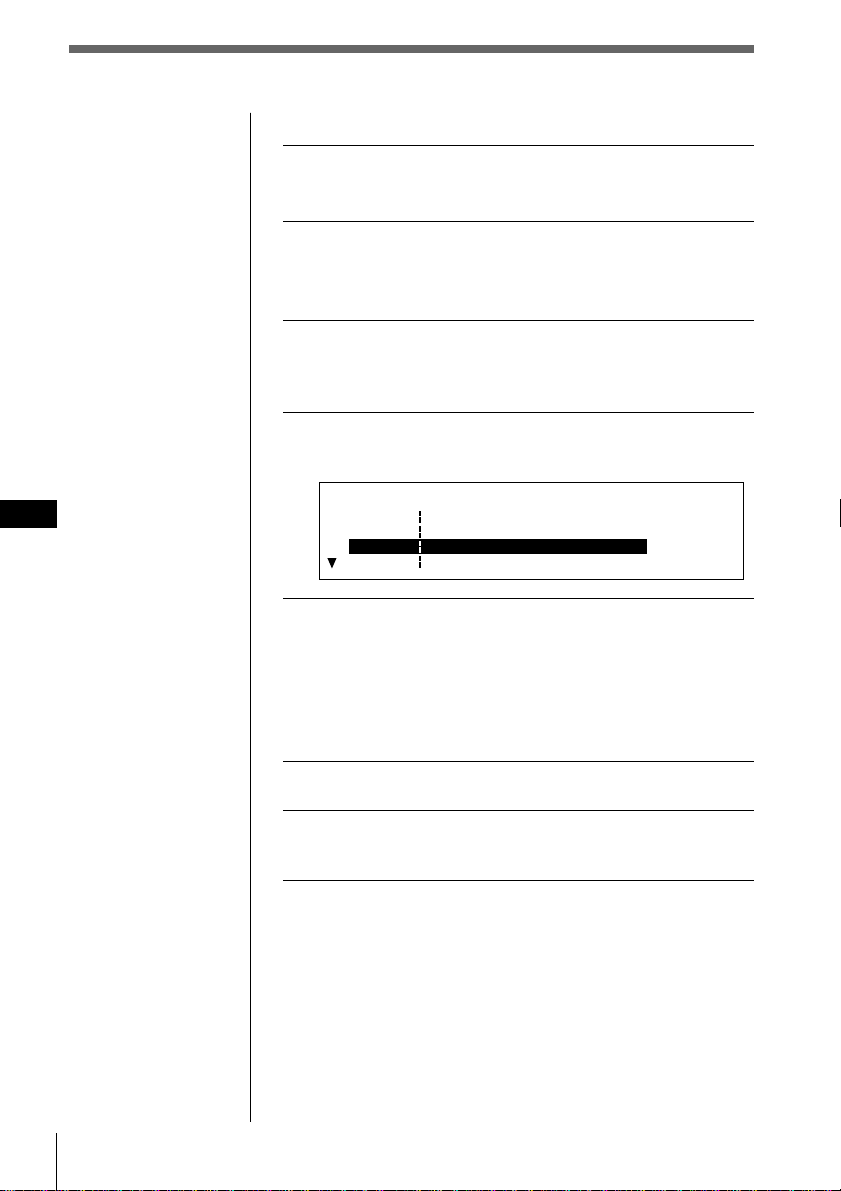
CD/MD
ES
24
Borrado de temas de un programa
1 Mientras reproduce un CD o un MD, pulse
MENU.
2 Seleccione “P. Mode” y pulse / para
desplazarse hasta el submenú. A continuación,
seleccione “PGM” pulsando > o ..
3 Pulse / y luego > o . para seleccionar “edit”
y pulse ENTER.
Aparece el modo de edición PGM.
4 Pulse > o . para seleccionar el tema que
desee borrar.
5 Pulse y mantenga pulsado ENTER durante dos
segundos.
Al borrar un tema de un número de ranura, los temas
posteriores se desplazan hacia arriba para llenar el
espacio.
Para seguir borrando temas, repita los pasos 4 y 5.
6 Para finalizar el ajuste de modo, pulse BACK.
7 Pulse MENU.
Aparecerá la indicación anterior.
Borrado de un programa completo
Seleccione “P1 : Group Erase” o “P2 : Group
Erase” en el anterior paso 4.
Se borrará el programa completo y aparecerá
“NO data”.
CD1
PGM Edit Mode 1 2 3.09
P1- 1
DRIVING
Group EraseP1
P1- 2 CD2 8 3 LIVE HIT
P1- 3
POPS HIT
SONYPOPS
CD2 3 4
CD2 7 2
:
:
:
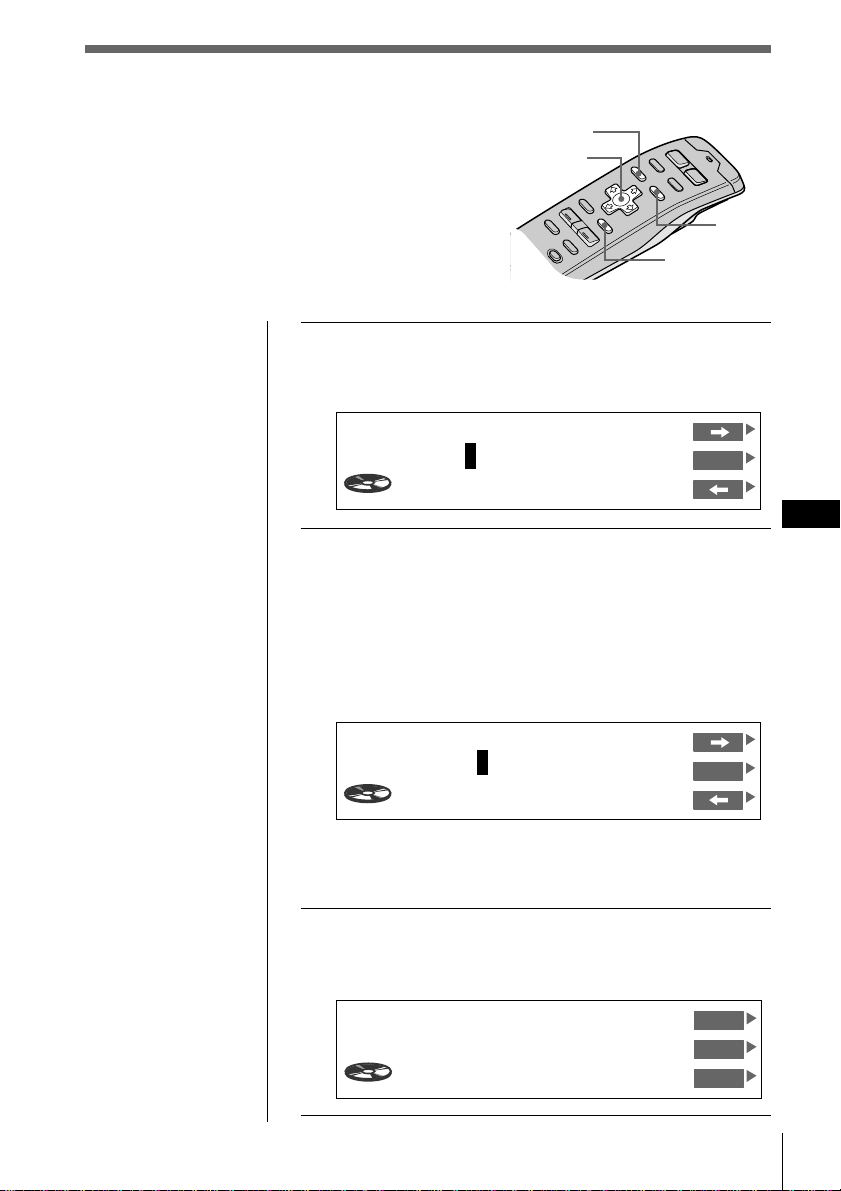
CD/MD
CD/MD
ES
25
1 Mientras se reproduce un CD, pulse LIST
durante dos segundos.
Aparece la indicación Disc Memo Write.
2 Pulse > o . hasta que aparezca el carácter
que desee introducir y pulse /.
Cada vez que pulse >, el carácter cambia de la
siguiente forma:
A n B n C n ...Z n 0 n 1 n 2 n ...9 n + n – n
* n / n \ n > n < n . n _ (barra inferior) n A...
Pulse el botón . para desplazarse hacia atrás.
Si desea introducir un espacio en blanco entre
caracteres, seleccione “_” (barra inferior).
3 Repita el paso 2 hasta que haya introducido el
título entero y pulse ENTER.
Aparece el visor normal.
Consejo
Para cancelar la
indicación actual y
recuperar la anterior,
pulse BACK.
Etiquetado de CD – Memorando de discos
(para unidades de CD con la función
de archivo personalizado)
Es posible grabar un título con hasta 8 caracteres
para cada disco. El título del disco aparecerá en el
visor siempre que inserte y reproduzca el disco.
Puede almacenar un máximo de 110 títulos de
disco en la memoria.
Cursor
LIST
ENTER
MENU
Consejo
Para borrar/corregir
algún nombre,
introduzca “_” (barra
inferior) por cada
carácter.
Disc Name
SONYPOPS
CD1
VC
DVOL
EL
17.04
Disc Memo Write
1CD1 3.45
ENT
________
Disc Memo Write
1CD1 4.15
S
_______
ENT
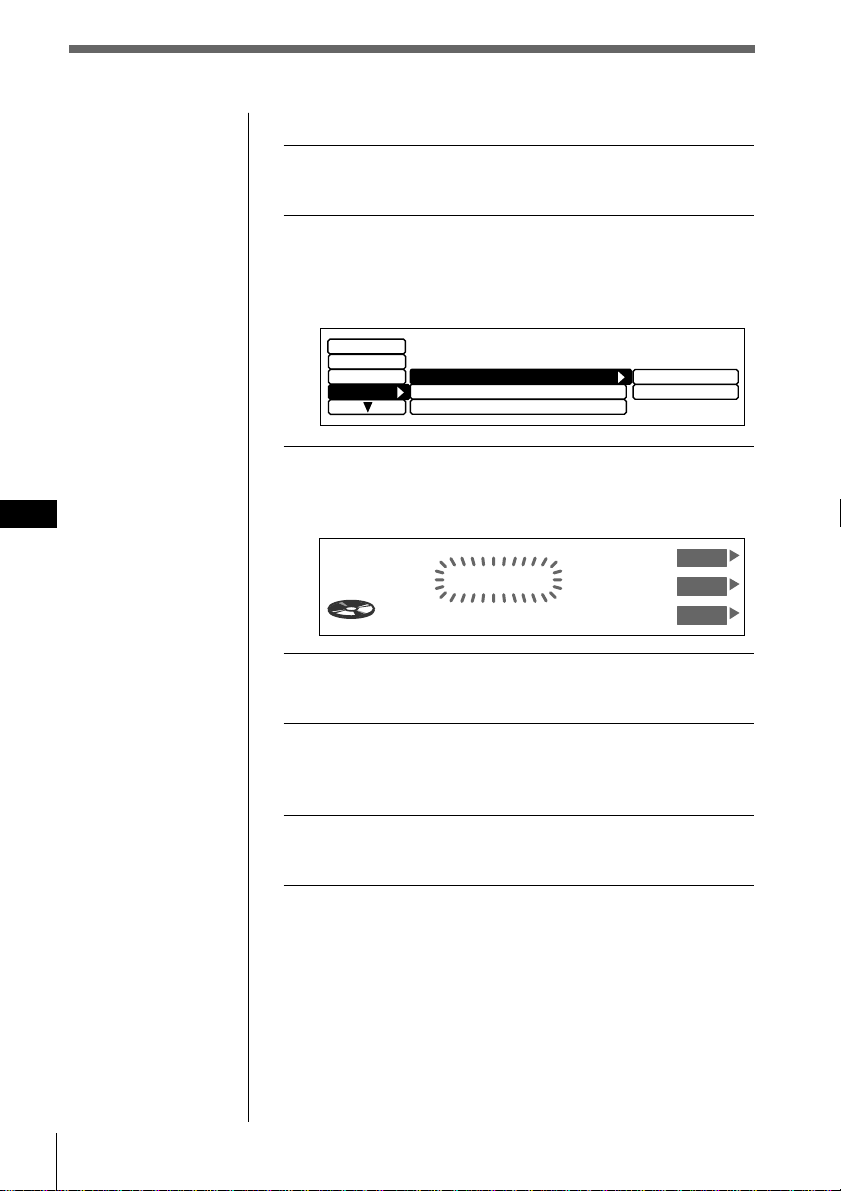
CD/MD
ES
26
Borrado de un título de disco
1 Mientras reproduce un CD o un MD, pulse
MENU.
2 Seleccione “Name” y pulse / para
desplazarse hasta el submenú. A
continuación, seleccione “Disc Memo”
pulsando > o ..
3 Pulse / y luego > o . para seleccionar
“delete” y pulse ENTER.
Aparece la indicación Disc Memo Delete.
4 Pulse > o . para seleccionar el título de disco
que desee borrar.
5 Pulse y mantenga pulsado ENTER durante dos
segundos.
Se borra el título de disco seleccionado.
6 Pulse MENU.
Aparece el visor normal.
Nota
En el paso 4, todos los
nombres de disco
almacenados en la
memoria de la unidad
de CD aparecen en el
orden en que se han
introducido. Por tanto,
el último nombre
introducido aparecerá
al final.
Disc Memo Delete
2CD1 2.50
SONYPOPS
UP
ENT
DOWN
Display
Disc Name D.Memo
Auto Scroll
on
write
delete
Name
Disc Memo
Set up
P.Mode
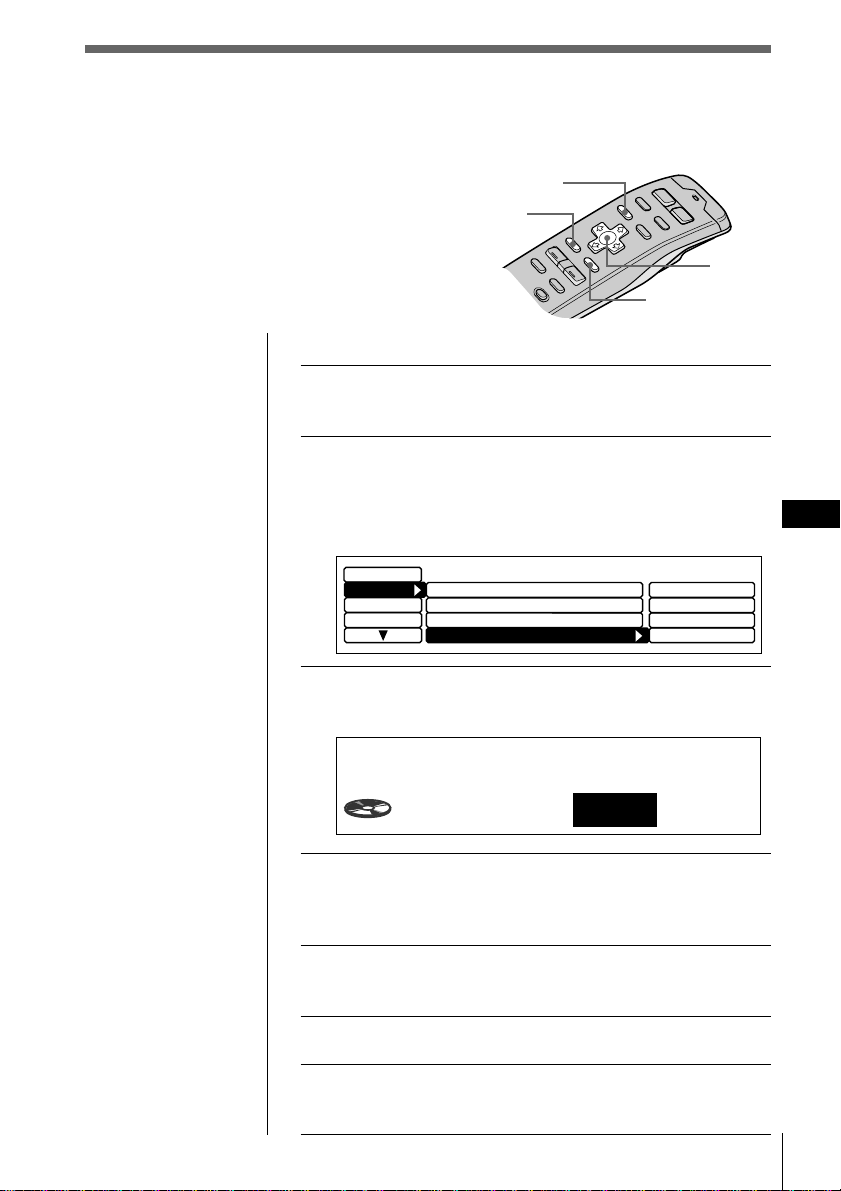
CD/MD
CD/MD
ES
27
Para ajustar temas en “Play” o “Skip”
1 Mientras reproduce un CD o un MD, pulse
MENU.
2 Seleccione “P. Mode” y pulse / para
desplazarse hasta el submenú. A
continuación, seleccione “Bank” pulsando
> o ..
3 Pulse / y luego > o . para seleccionar
“edit”, y pulse ENTER.
4 Pulse > o . para seleccionar “Play” o “Skip”.
Después pulse / para desplazarse hasta el
siguiente tema.
5 Repita el paso 4 para seleccionar “Play” o
“Skip” para todos los temas posteriores.
6 Para finalizar el ajuste de modo, pulse BACK.
7 Pulse MENU.
Aparecerá la indicación normal.
Selección de temas específicos
para su reproducción
(Función de banco)
Si ha asignado etiqueta al disco (consulte la
página 25), la función de banco permite omitir
determinados temas y reproducir sólo los que
desee.
MENU
BACK
ENTER
Cursor
off
Display
Name
Repeat
Set up
PGM
off
on
inverse
off
edit
off
P.Mode
Shuffle
PGM
off
Bank
Consejos
• En el paso 2, para
desplazar el cursor
hasta la columna
anterior (de una en
una), pulse ?.
• Para cancelar la
indicación actual y
recuperar la anterior,
pulse BACK.
Nota
Si no ha etiquetado el
disco, “edit” no
aparecerá en el menú.
Bank Edit
3CD1
SCHUBERT
Play
Nota
Pulse ? para
desplazarse hasta el
tema anterior.
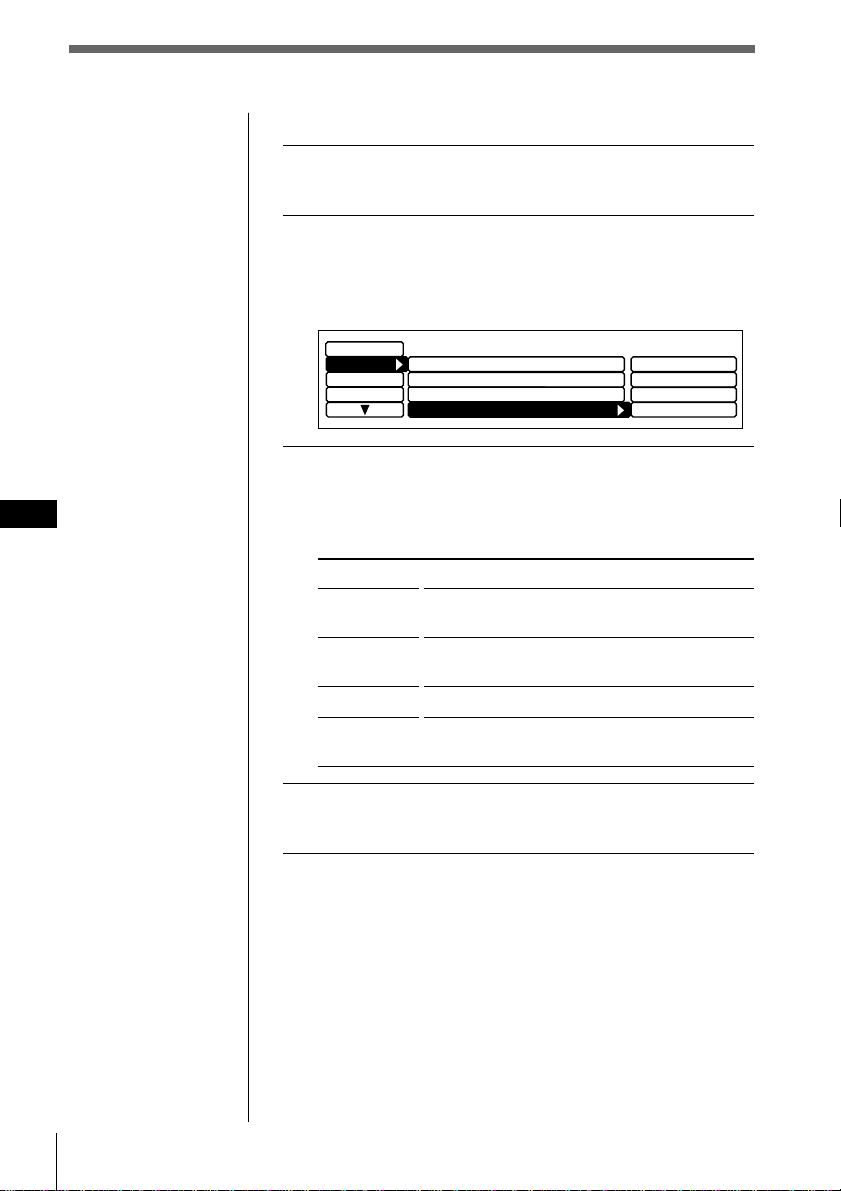
CD/MD
ES
28
Reproducción sólo de temas específicos
1 Mientras reproduce un CD o un MD, pulse
MENU.
2 Seleccione “P. Mode” y pulse / para
desplazarse hasta el submenú. A
continuación, seleccione “Bank” pulsando
> o ..
3 Pulse / y luego > o . para seleccionar el
modo y pulse ENTER.
El modo seleccionado aparece a la derecha de “Bank”
en el visor.
Indicación
on
inverse
off
edit
4 Pulse MENU.
Aparece el visor normal.
Nota
No es posible utilizar la
función de banco con
discos a los que no
haya asignado etiqueta
mediante la función de
memorando de discos.
Asegúrese de asignar
etiqueta a los discos
anteriormente.
off
Display
Name
Repeat
Set up
PGM
off
on
inverse
off
edit
off
P.Mode
Shuffle
PGM
off
Bank
Operación
Reproduce todos los temas ajustados en
“Play”.
Reproduce todos los temas ajustados en
“Skip”.
Reproducción normal
Ajuste los temas del disco actual en “Play” o
“Skip”.
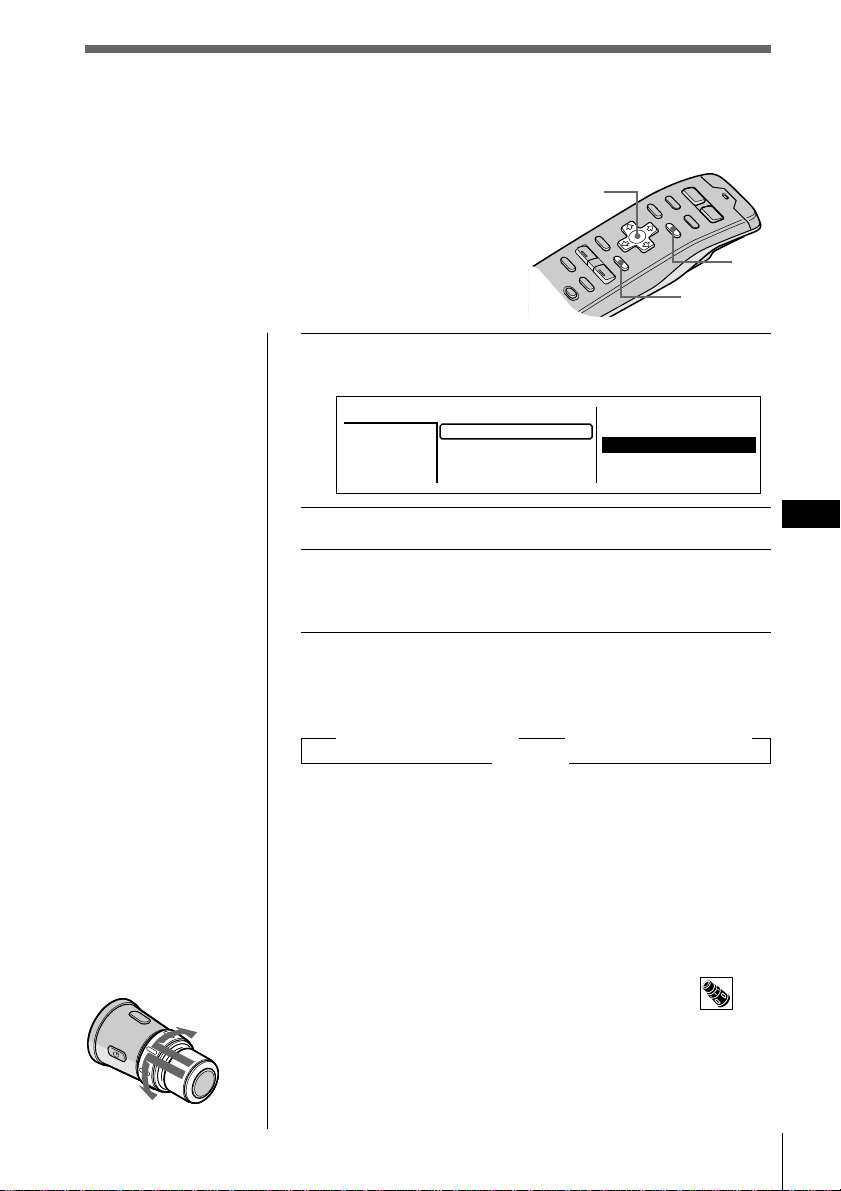
CD/MD
CD/MD
ES
29
Consejos
• Para cancelar la
selección, pulse LIST
dos veces o BACK
una vez.
• Si el modo SEEK/
AMS se ajusta en
“Item sel”, podr
áseleccionar el disco
que desee con SEEK/
AMS cuando la lista
aparezca en el visor
(consulte la página
45).
Nota
Pueden aparecer las
siguientes indicaciones
en la lista de títulos de
disco.
• “NO DISC”: No hay
ningún disco en la
ranura de disco en
cuestión.
•“********”: El disco
no está etiquetado.
• “?”: La unidad no ha
verificado la
información sobre el
disco.
Localización de discos mediante el
título
Utilice esta función para localizar un disco por
título. (Para añadir títulos a los discos, consulte la
página 25).
LIST
ENTER
Cursor
1 Mientras reproduce un CD o un MD, pulse LIST.
Aparece la lista de títulos de disco.
2 Pulse >, ., / o ? para seleccionar el disco.
3 Pulse ENTER.
La reproducción se inicia desde el primer tema del
disco.
Acerca de la lista de títulos de tema
Cada vez que pulse LIST, la indicación cambiará de la
siguiente forma:
” Lista de títulos de disco* ” Lista de títulos de tema**
Cancelar “
* Sólo si ha conectado una unidad de CD/MD.
** Si selecciona una unidad de CD con función CD TEXT.
Esta lista muestra los títulos de los temas contenidos en los
discos CD TEXT y MD que incluyen etiquetas de temas.
Puesto que esta unidad no permite etiquetar los temas, al
reproducir discos que no sean CD TEXT o MD sin
etiquetas de temas, aparece “********” en lugar del título
del tema en la lista de títulos de tema.
Para seleccionar discos con el mando giratorio
Presione y suelte DISC/PRESET para mostrar la lista de
títulos de disco o la de tema.
Presione y gire el control para seleccionar el disco o tema
de la lista.
Transcurridos unos 5 segundos, volverá a aparecer la
indicación normal.
Al disco
siguiente
Al disco anterior
2.POPS HIT
3.FUSION
4.JAZZ
5.GREAT HIT
*
CD2
SONYPOPS
8
1.28
6.EURO BEAT
7.DRIVING
9.SUNSET.M
10.HIGHWAY
Disc
3
1.MY BEST
8.SONYPOPS
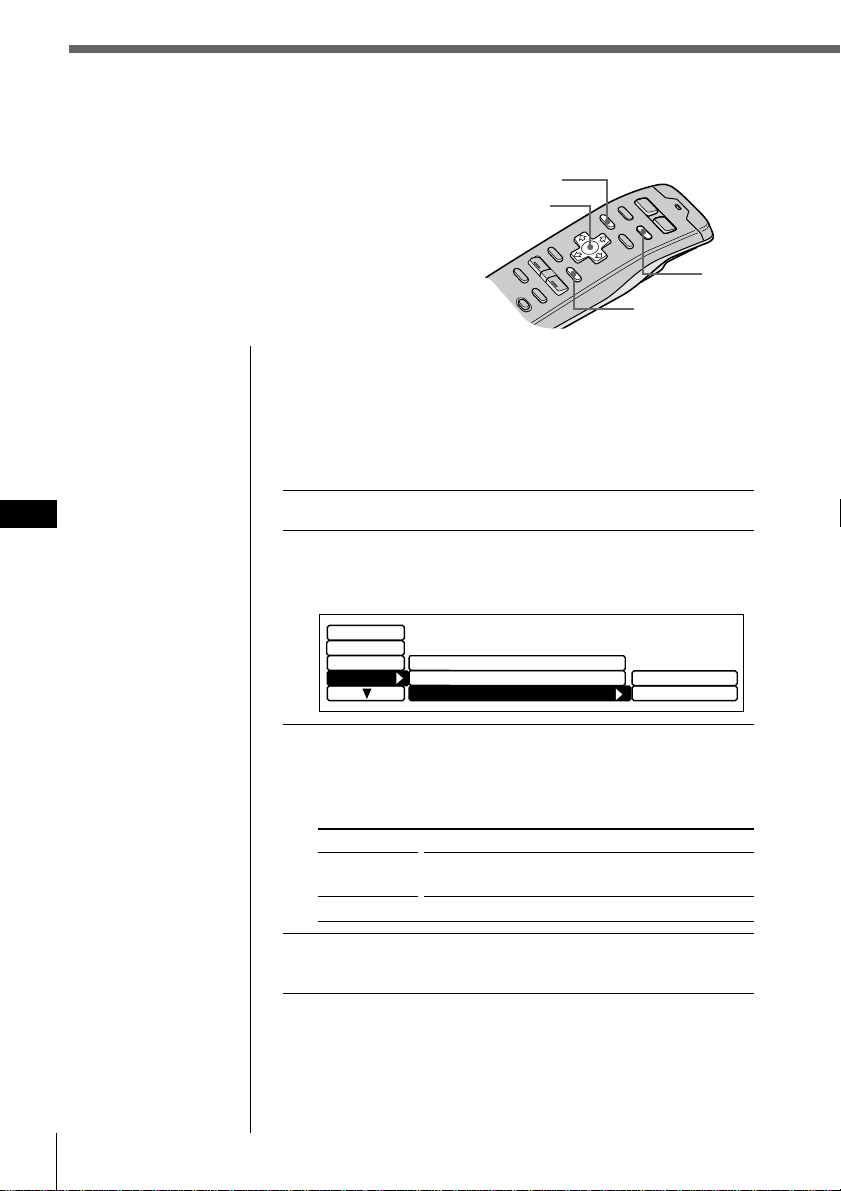
CD/MD
ES
30
Cursor
ENTER
MENU
DSPL
Consejos
• En el paso 2, para
desplazar el cursor
hasta la columna
anterior (de una en
una), pulse ?.
• Para cancelar la
indicación actual y
recuperar la anterior,
pulse BACK.
Selección de la indicación de títulos de
disco
Al reproducir discos CD TEXT etiquetados con la función
de memorando de disco (consulte la página 25), es posible
especificar que los títulos de disco aparezcan al pulsar
DSPL o LIST.
1 Mientras reproduce un CD, pulse MENU.
2 Seleccione “Name” y pulse / para desplazarse
hasta el submenú. A continuación, seleccione
“Disc Name” pulsando > o ..
3 Pulse / y luego > o . para seleccionar
“D.Memo” o “TEXT” y pulse ENTER.
El modo seleccionado aparece a la derecha de
“Disc Name” en el visor.
Indicación
D.Memo
TEXT
4 Pulse MENU.
Aparece el visor normal.
Display
P.Mode
Auto Scroll
on
D.Memo
TEXT
Disc Memo
Name
Disc Name D.Memo
Set up
Visualización de información
CD TEXT
Es posible visualizar la información de texto
contenida en los discos CD TEXT durante la
reproducción.
Operación
Muestra los títulos de disco introducidos
mediante la función Memorando de discos.
Muestra información CD TEXT original.
¿Qué es un disco CD TEXT?
Un disco CD TEXT es un CD de música que también
contiene datos de texto, tales como el nombre del disco, del
artista y del tema. Estos datos de texto se graban en áreas
que no suelen utilizarse en los CD de música
convencionales.
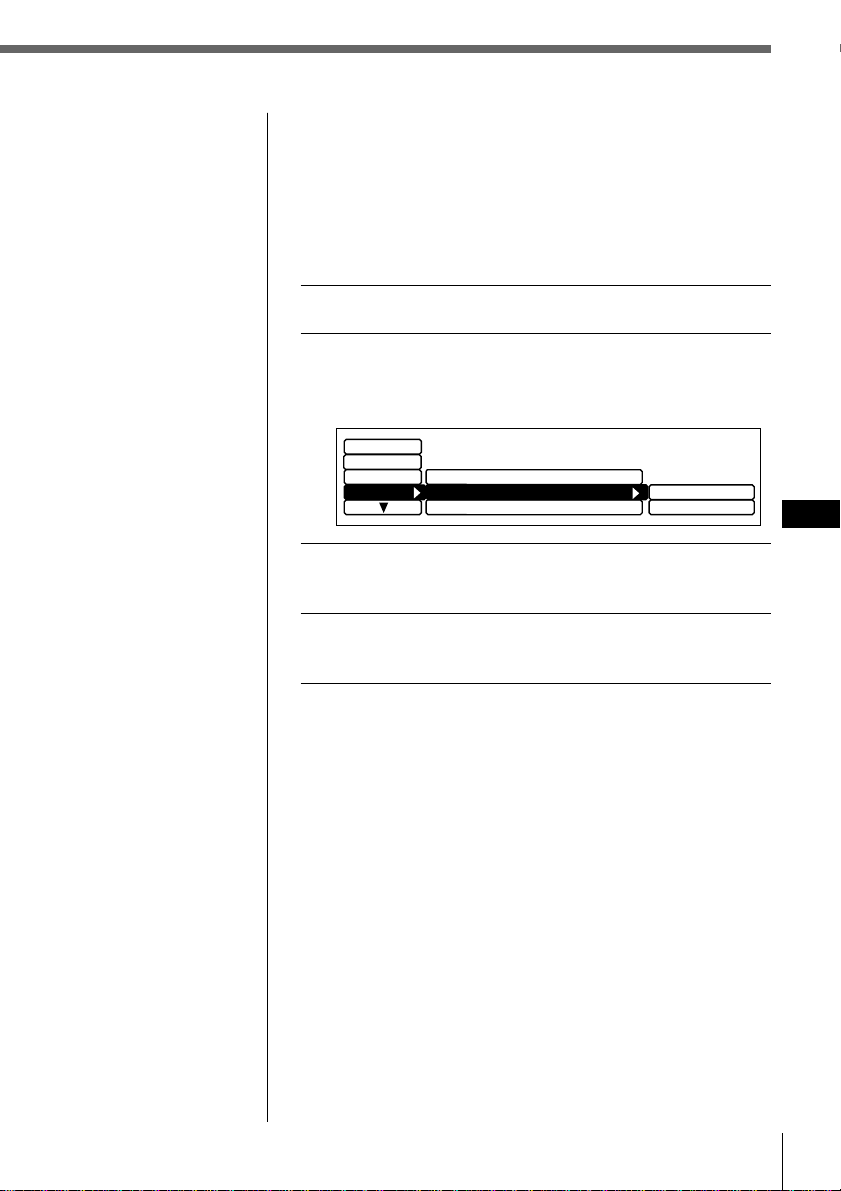
CD/MD
CD/MD
ES
31
Desplazamiento automático de títulos
Al reproducir discos CD TEXT o MD (con una unidad de
MD opcional) el nombre del tema o disco y el del artista
aparecen automáticamente siempre que se reproduce un
nuevo disco o tema. Siga el procedimiento que se describe
a continuación para especificar el desplazamiento
automático de títulos con más de 10 caracteres.
1 Al reproducir un CD o un MD, pulse MENU.
2 Seleccione “Name”, pulse / para acceder al
submenú y seleccione “Auto Scroll” con
> o ..
3 Pulse / y luego > o . para seleccionar “on”
y pulse ENTER.
4 Pulse MENU.
Aparece el visor normal.
Para cancelar el desplazamiento de títulos
Seleccione “off” en el paso 3 y pulse ENTER.
Al reproducir un disco CD TEXT
Cada vez que pulse DSPL, la información mostrada
aparecerá de la siguiente manera:
Nombre del disco/Nombre del artista* ˜ Título del nombre
* El nombre del artista aparece automáticamente después del
título del disco.
Display
on
off
Disc Memo
Name
Disc Name D.Memo
Auto Scroll
off
Set up
P.Mode
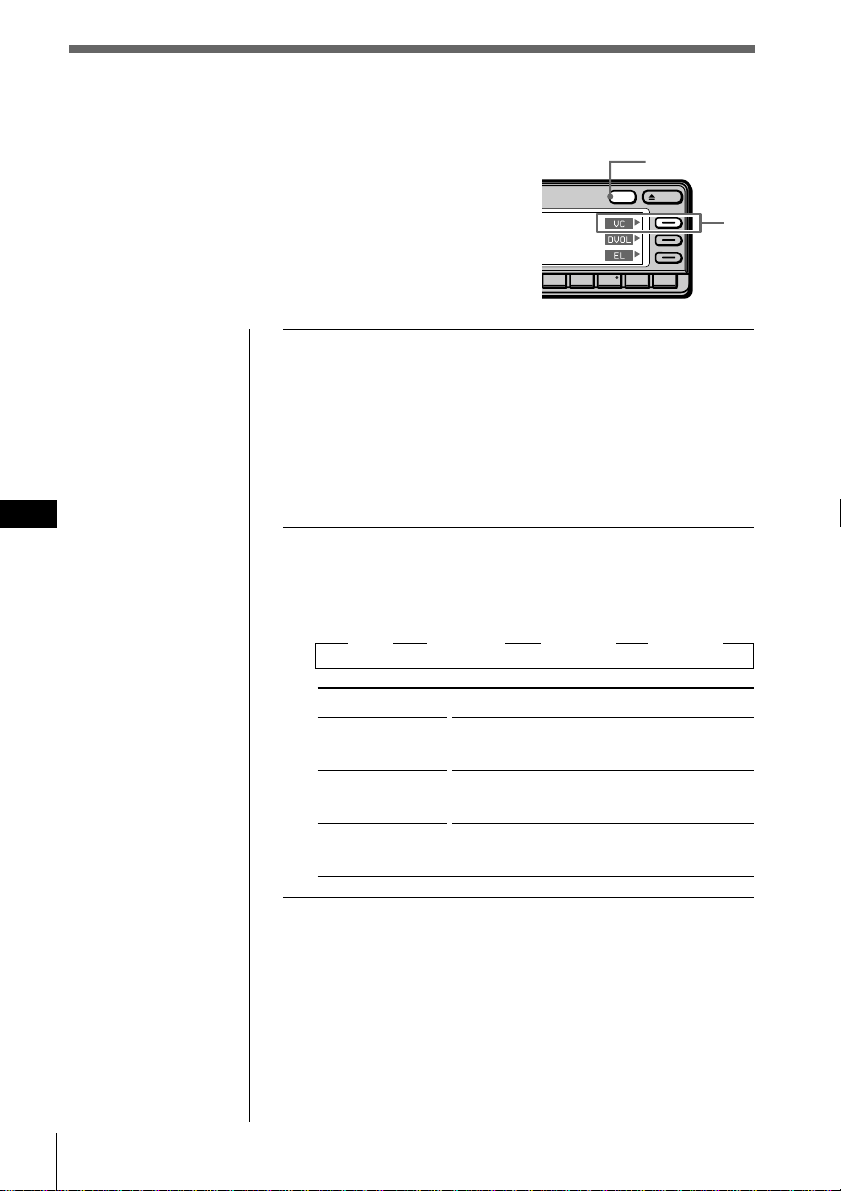
CD/MD
ES
32
Personalización del sonido de CD
(Función de filtro digital)
Esta unidad cuenta con un filtro digital de
coeficiente variable (VC). Mediante la selección
del tipo de filtro, es posible ajustar las caracterís
ticas de sonido que mejor se adapten al altavoz,
fuente, unidad, etc.
Notas
• Esta función sólo se
encuentra disponible
para esta unidad y
no tiene efecto
cuando se selecciona
una unidad de CD/
MD o radio opcional,
etc..
• Si pulsa VC mientras
reproduce un disco,
el sonido se
interrumpirá
momentáneamente.
OPENDSPL
891076543
DSPL
VC
1 Mientras se reproduce un CD, pulse y
mantenga pulsado DSPL durante dos
segundos.
Consejo
Si el modo Select del menú Func. se ajusta en “Source”, el
menú de función aparecerá automáticamente en el lado
derecho del visor, dependiendo de la fuente que seleccione
(consulte la página 48).
2 Pulse VC varias veces para seleccionar el
modo.
Cada vez que pulse VC, el tipo de filtro cambiará de la
siguiente forma:
” Plain ” Analog A ” Analog B ” Standard
Type
Plain
Analog A
Analog B
Standard
Descripción de filtro digital de coeficiente variable (VC)
Los reproductores de CD utilizan filtros digitales para
eliminar el ruido generado durante el muestreo. Es posible
cambiar el tono de la música modificando las características
de corte del filtro digital. Esta unidad dispone de cuatro
tipos de filtros con características de coeficiente distintas:
“Plano”, “Analógico A”, “Analógico B” y “Estándar”.
Imagen de sonido
• gran nitidez
• intenso
• cálido
• profundo
• gama amplia
• representación espacial amplia
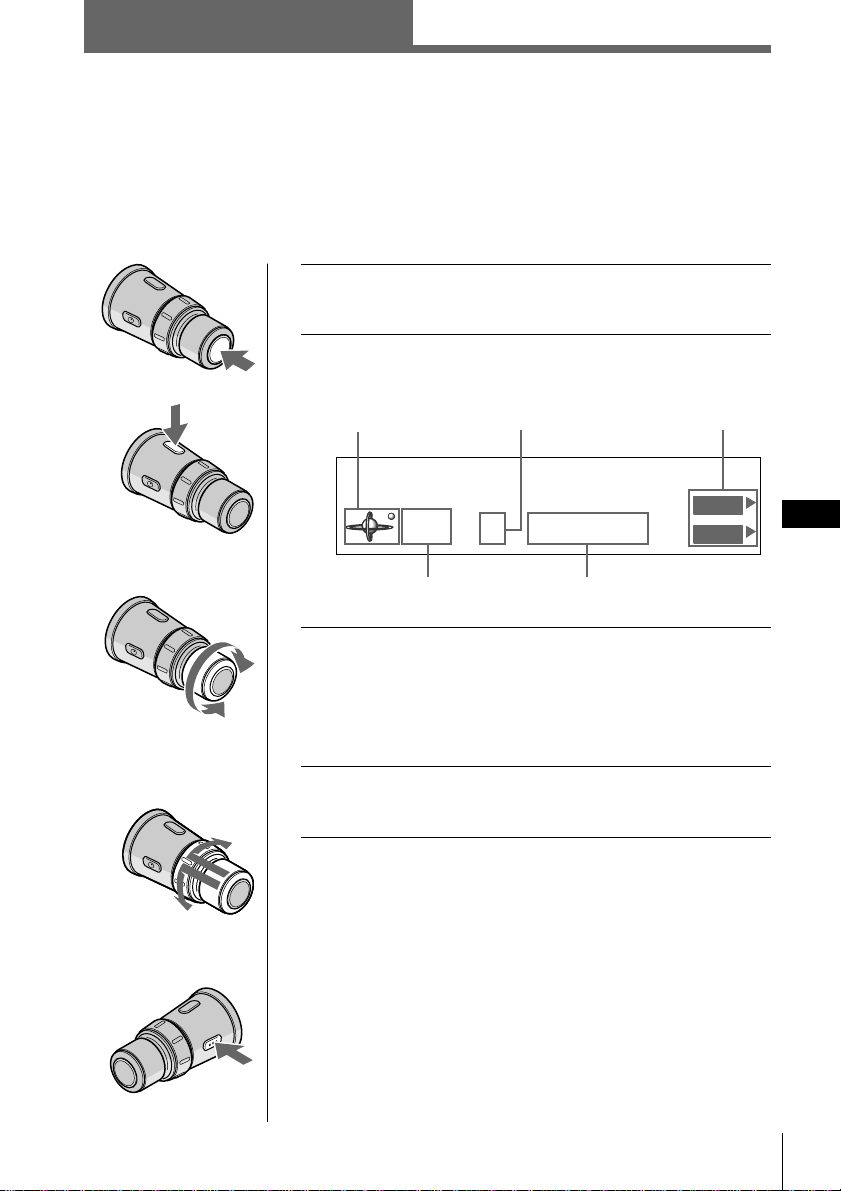
Radio
33
Radio
ES
1 Pulse SOURCE varias veces para seleccionar el
sintonizador.
2 Pulse MODE varias veces para seleccionar
FM1, FM2 o AM.
3 Gire VOL para ajustar el nivel de volumen.
El volumen puede ajustarse entre 0 dB y – ∞ dB.
Precaución
Por su seguridad, ajuste el volumen lo suficientemente bajo
como para poder oír los sonidos del exterior.
4 Para cambiar de emisora memorizada,
presione y gire DISC/PRESET.
Para detener la recepción de la radio
Pulse OFF.
Recepción de la radio
Puede almacenar sus emisoras de radio preferidas en la memoria de la unidad para
sintonizarlas de forma inmediata posteriormente (consulte “Memorización de
emisoras de radio” en la página 34).
A la anterior
emisora
memorizada
A la siguiente
emisora
memorizada
Para disminuir
Para aumentar
Indicación de
fuente
Frecuencia
Número de emisora
memorizada
Menú de
función
Indicación
de banda
Radio
STEREO
KYCS
4FM1 102.5MHz
Station
DVOL
EL
CD/MD/Radio
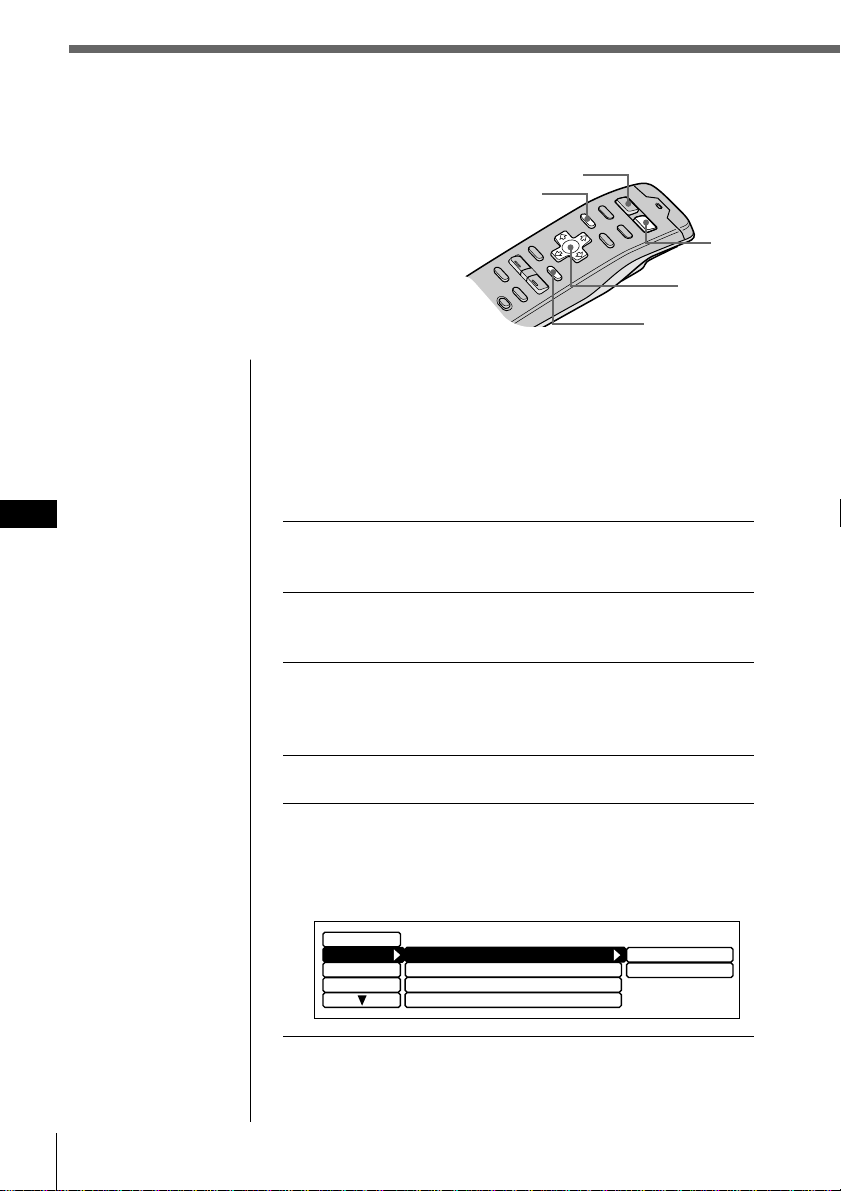
34 Radio
ES
SOURCE
MENU
ENTER
MODE
Memorización de emisoras de
radio
Existen dos formas para memorizar emisoras:
• Selección de la frecuencia de la emisora
(Memorización manual)
• Selección de emisoras de señal más
intensa (BTM*)
* Memorización de la mejor sintonía
Consejos
• En el paso 2, para
desplazar el cursor
hasta la columna
anterior (de una en
una), pulse ?.
• Para cancelar la
indicación actual y
recuperar la anterior,
pulse BACK.
Consejo
Gire y mantenga
girado SEEK/AMS en
el distancia giratorio
para seguir buscando,
y después suelte el
control cuando
aparezca la frecuencia
que desee.
Nota
Si selecciona AM en el
paso 2, los submenús
“Mono/Stereo” y
“Antenna” no
aparecerán en el visor.
Especificación de la frecuencia de la
emisora (Memorización manual)
Precaución
Para sintonizar emisoras mientras conduce, utilice la función de
memorización de la mejor sintonía para evitar accidentes
(consulte la página 36).
1 Pulse SOURCE varias veces para seleccionar el
sintonizador.
2 Pulse MODE varias veces para seleccionar
FM1, FM2 o AM.
3 Pulse y mantenga pulsado ? o / hasta que
el visor muestre la frecuencia que desee y, a
continuación, suelte el botón.
4 Pulse MENU.
5 Seleccione “R.Mode” y pulse / para
desplazarse hasta el submenú y, a
continuación, seleccione “Preset” pulsando
> o ..
Cursor
Local off
Mono/Stereo
Display
Name
IF
Preset
stereo
main+sub
manual
BTM
Set up
R.Mode
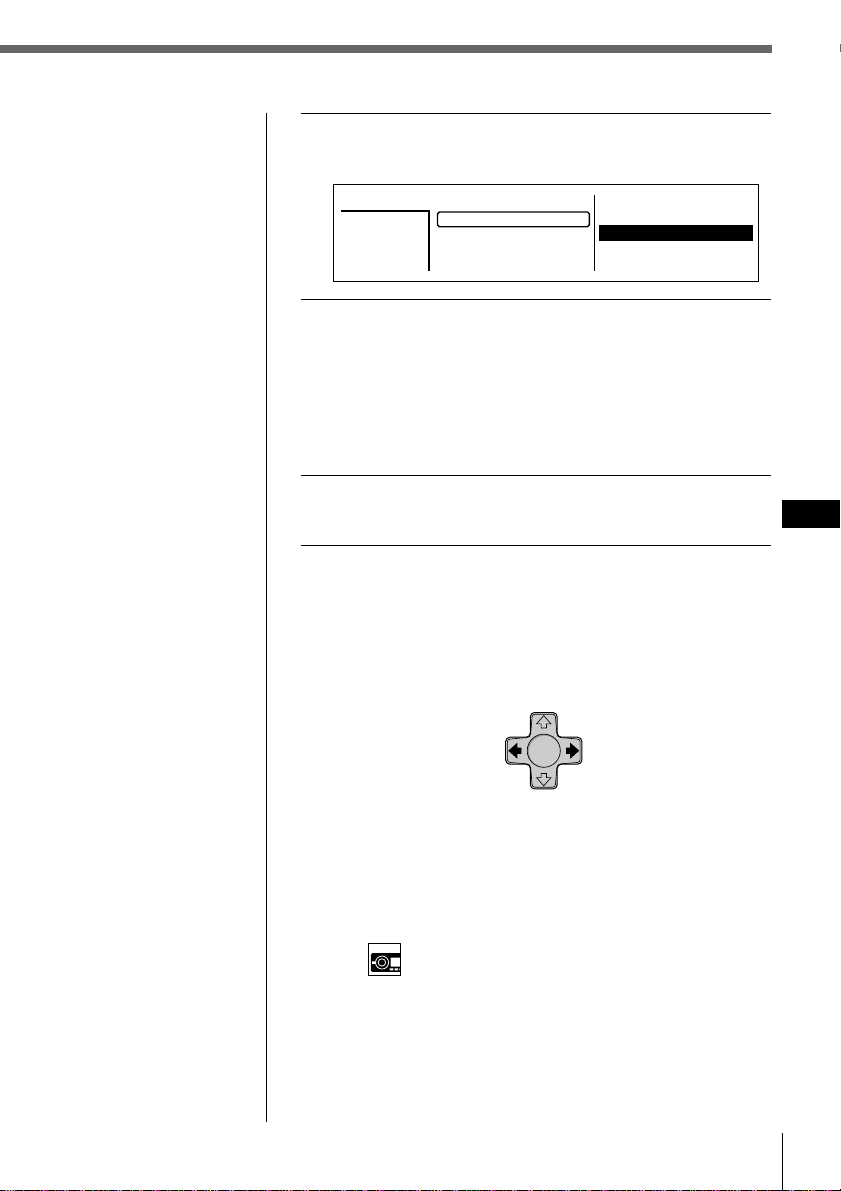
Radio
35
Radio
ES
6 Pulse /, después > o . para seleccionar
“manual” y, a continuación, ENTER.
7 Pulse >, ., /, o ? para seleccionar el
número de memorización de emisora en el
que desee almacenar la frecuencia.
A continuación, pulse ENTER.
Es posible memorizar un máximo de 20 emisoras de
FM (10 emisoras en FM1 y otras 10 en FM2) y hasta 10
de AM.
8 Pulse MENU.
Aparece la indicación normal.
Para recibir emisoras automáticamente (Sintonización
automática)
Pulse y suelte ? o /.
Aparecerá “Seek Up” o “Seek Down” hasta que la
unidad detecta una emisora.
Consejo
Es posible iniciar la sintonización automática girando
momentáneamente SEEK/AMS del mando a distancia
giratorio y, a continuación, soltándolo.
Memorización de la emisora con los controles del panel
frontal
Una vez sintonizada la emisora, pulse y mantenga pulsado el
botón numérico que desee durante dos segundos.
Consejo
Si el modo SEEK/AMS
se ajusta en “Item sel”,
podrá seleccionar la
emisora que desee con
SEEK/AMS cuando la
lista aparezca en el
visor (consulte la
página 45).
Nota
Si asigna una
frecuencia nueva a un
número de
memorización de
emisora ya asignado a
otra frecuencia, la
nueva frecuencia
sustituirá a la anterior.
Para frecuencias inferiores Para frecuencias superiores
2. 101.9
3. 96.0
4. 102.5
5. 105.4
*
FM1
2
101.9MHz
6. 96.6
7. 99.9
9. 98.3
10. 98.3
Station
1. 106.3
8. 98.9
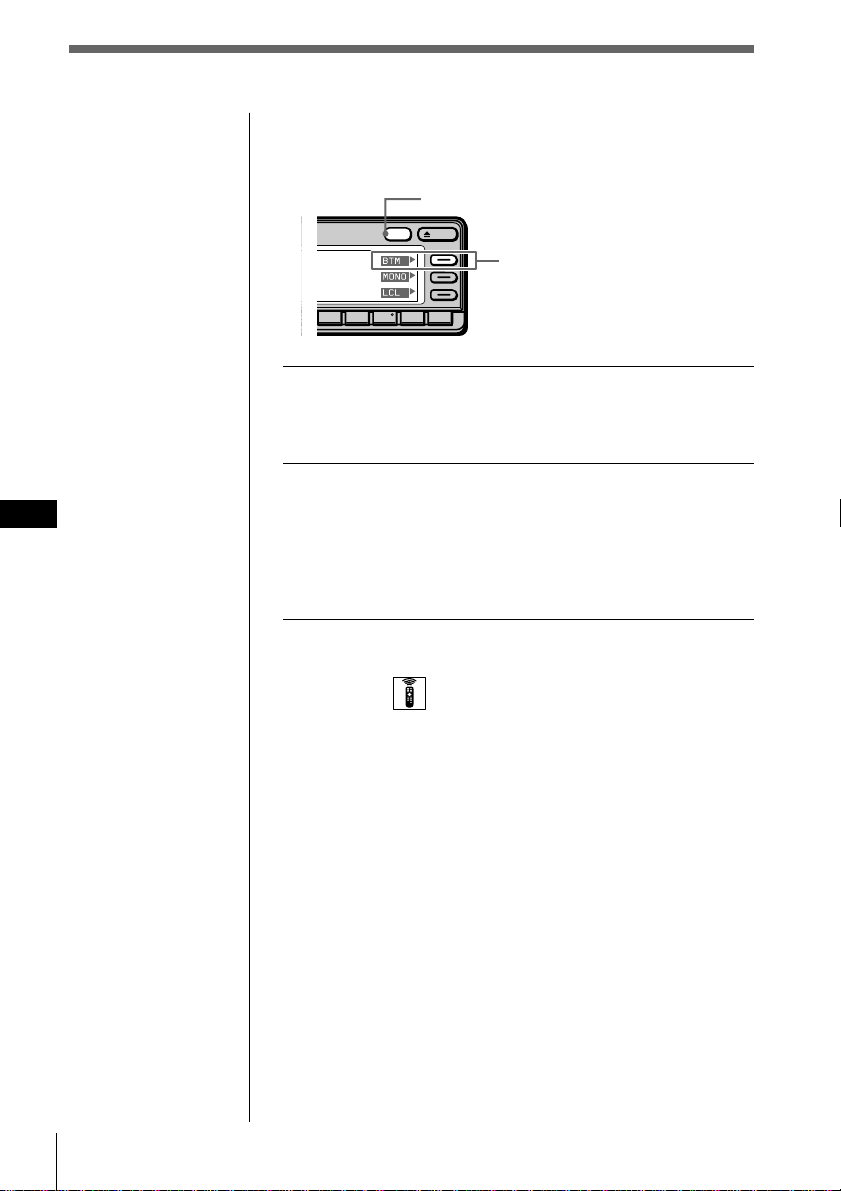
36 Radio
ES
Selección de emisoras de señal más
intensa (BTM)
1 Mientras escucha una emisión en FM o AM,
pulse y mantenga pulsado DSPL durante dos
segundos.
2 Pulse BTM.
La unidad selecciona las emisoras de señal más
intensa y las memoriza según el orden de sus
frecuencias.
La unidad emite un pitido una vez almacenadas las
emisoras, y recupera la indicación normal.
Selección del modo con el mando a distancia
inalámbrico
Mientras escucha una emisora de FM o de AM, pulse
MENU y ajuste el modo de memorización (Preset) en
“BTM”.
Descripción de la función de memorización de la mejor
sintonía (BTM)
BTM es una función que selecciona las emisoras de radio
de señal más intensa y las ajusta automáticamente en los
números de memorización de emisora. Esta función
comienza a sintonizar las emisoras a partir de la frecuencia
inferior de la banda (FM o AM). Al encontrar una emisora,
la unidad asigna la frecuencia al número de memorización
actualmente seleccionado. Si los números de
memorización no se muestran, la unidad asignará las
frecuencias a partir de la emisora 1 memorizada.
Incluso después de asignar frecuencias a todos los
números de memorización, la unidad continúa
sintonizando. Si se encuentran señales más intensas, la
unidad sustituirá las emisoras memorizadas actuales por
las frecuencias más intensas. Finalmente, clasificará las
emisoras en orden ascendente por frecuencia.
Nota
Si la radio sintoniza
pocas emisoras o si
recibe sólo frecuencias
débiles, la función BTM
puede no asignar
frecuencias a todos los
números de
memorización.
Consejo
Si el modo Select
(Selección) del menú
Func. (Funciones) está
ajustado en “Source”, el
menú de función
aparecerá
automáticamente en la
parte derecha del visor
dependiendo de la
fuente que seleccione
(consulte la página 48).
OPENDSPL
891076
5
DSPL
BTM
MONO
LCL
BTM
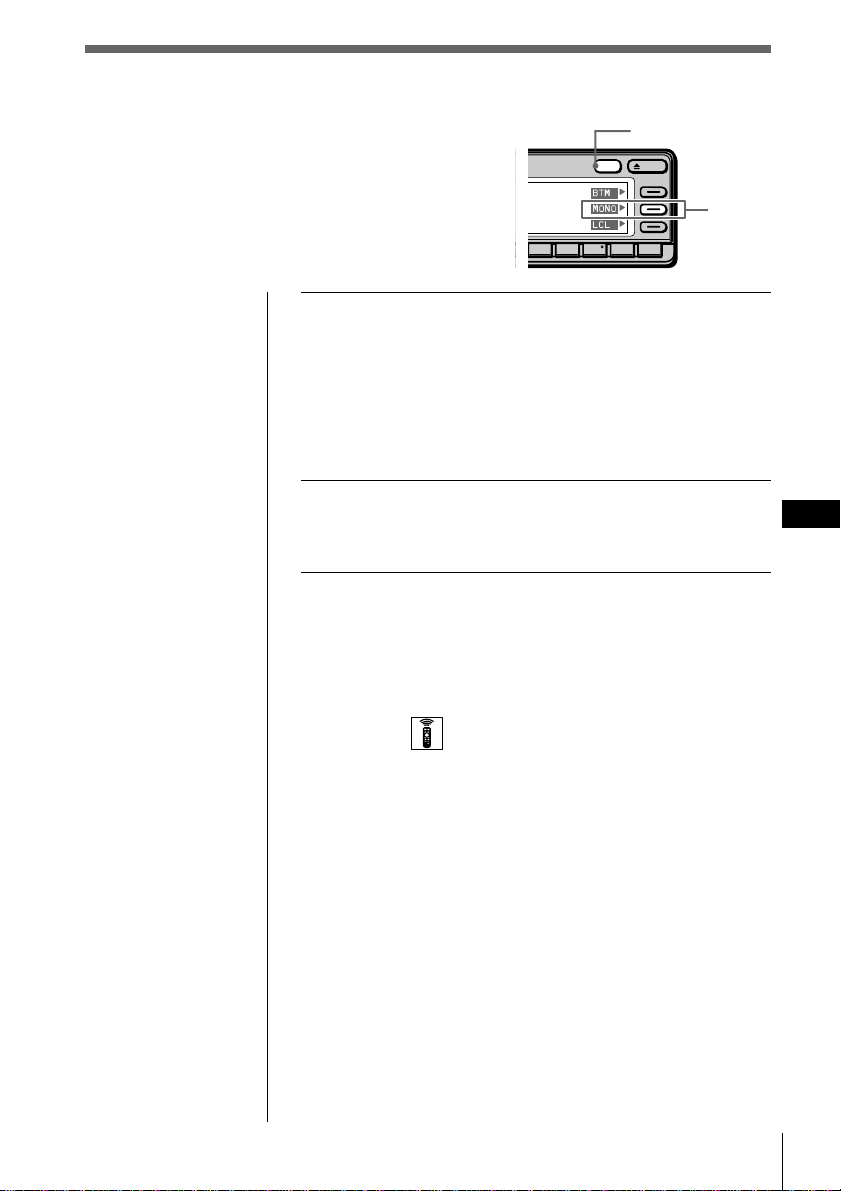
Radio
37
Radio
ES
1 Mientras escucha una emisión en FM, pulse y
mantenga pulsado DSPL durante dos
segundos.
Consejo
Si el modo Select (Selección) del menú Func. (Funciones) está
ajustado en “Source”, el menú de función aparecerá
automáticamente en la parte derecha del visor dependiendo
de la fuente que seleccione (consulte la página 48).
2 Pulse MONO varias veces para seleccionar
“on”.
El sonido mejorará, aunque no será estéreo.
Para cancelar el modo monofónico
Seleccione “off” en el anterior paso 2.
Selección del modo con el mando a distancia
inalámbrico
Mientras escucha una emisora de FM, pulse MENU y
ajuste el modo Mono/Stereo en “mono” o en “stereo”.
Especificación del modo
monofónico/estéreo
Si la recepción de FM en estéreo es de mala
calidad, puede seleccionar “Mono” para mejorar
el sonido.
OPENDSPL
891076
DSPL
MONO
BTM
MONO
LCL
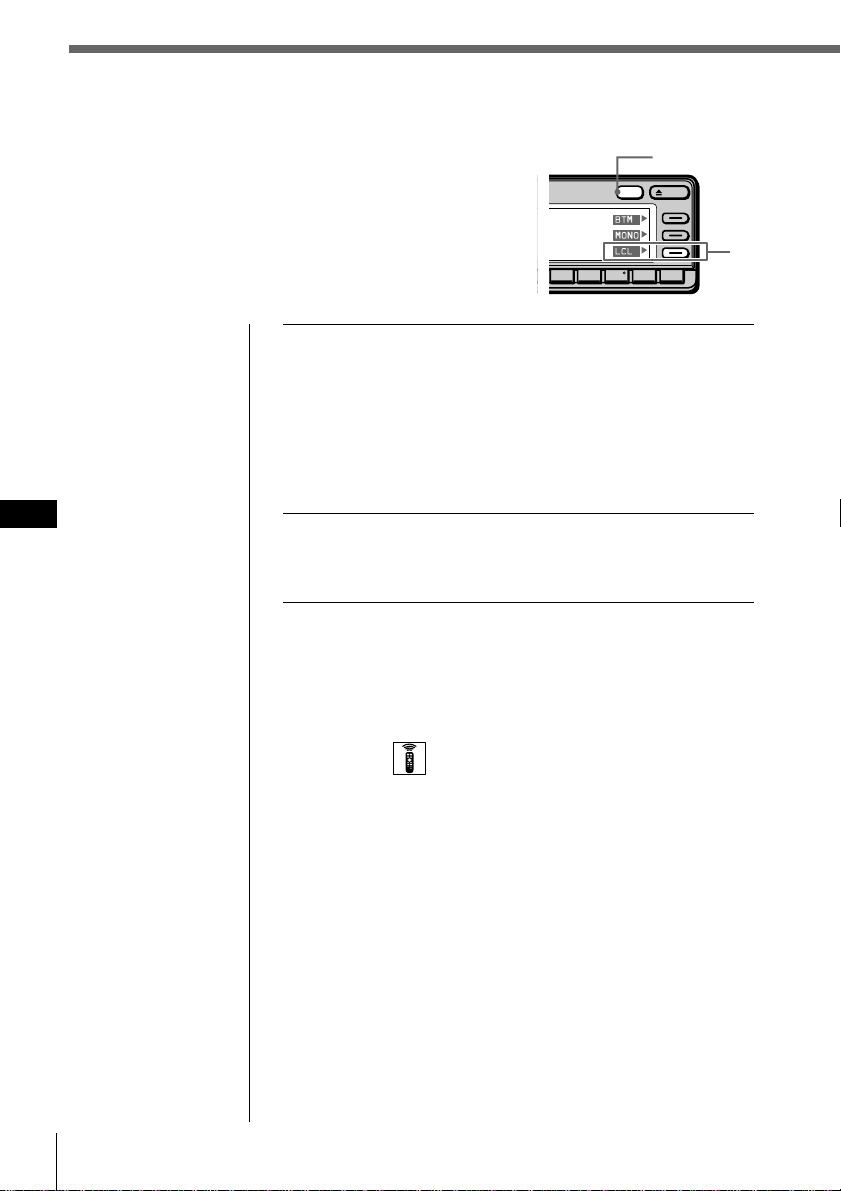
38 Radio
ES
Recepción sólo de las señales más
intensas
(Activación/desactivación local)
Es posible que la función de sintonización
automática se detenga con frecuencia si hay
muchas emisoras en la zona. Si esto ocurre, es
posible reducir la sensibilidad del sintonizador de
forma que sintonice sólo las señales más intensas.
1 Mientras escucha una emisión en FM o AM,
pulse y mantenga pulsado DSPL durante dos
segundos.
Consejo
Si el modo Select (Selección) del menú Func. (Funciones) está
ajustado en “Source”, el menú de función aparecerá
automáticamente en la parte derecha del visor dependiendo
de la fuente que seleccione (consulte la página 48).
2 Pulse LCL varias veces para seleccionar “on”.
Sólo se sintonizarán las emisoras de señal
relativamente intensa.
Para cancelar el modo local
Seleccione “off” en el anterior paso 2.
Selección del modo con el mando a distancia
inalámbrico
Mientras escucha una emisora de FM o de AM, pulse
MENU y ajuste el modo Local en “on” o en “off”.
OPENDSPL
891076
DSPL
LCL
BTM
MONO
LCL
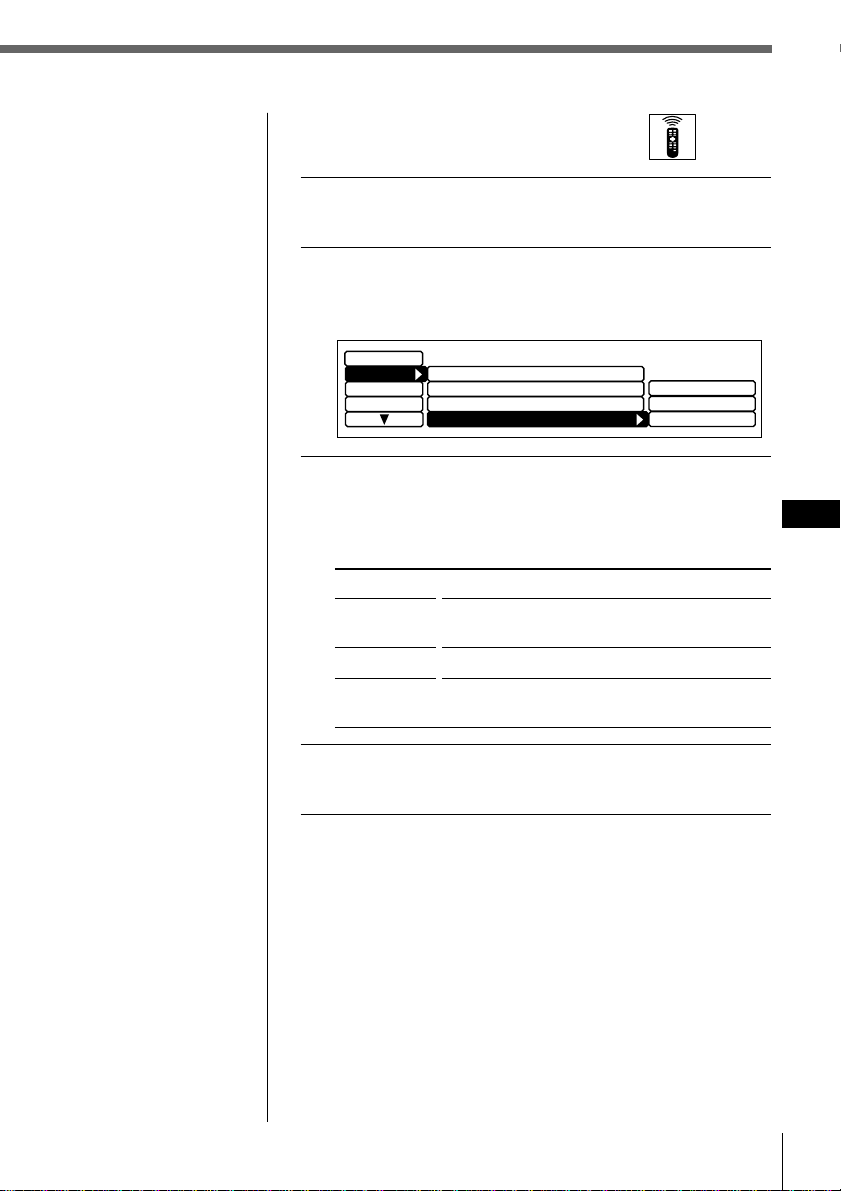
Radio
39
Radio
ES
Si se producen interferencias
durante la recepción de FM
1 Mientras escucha la emisión de FM, pulse
MENU.
2 Seleccione “R.Mode” y pulse / para
desplazarse hasta el submenú. A
continuación, seleccione “IF” pulsando > o ..
3 Pulse / y, a continuación, > o . para
seleccionar el modo. Después pulse ENTER.
La opción seleccionada aparece a la derecha de “IF” en
el visor.
Tipo
Wide
Narrow
Auto
4 Pulse MENU.
Aparece la indicación normal.
Función
Amplía la recepción de señales y mejora la
calidad de sonido.
Evita interferencias de emisoras contiguas.
Cambia el modo entre “Narrow” y “Wide”
automáticamente.
Local off
Mono/Stereo
Display
Name
Preset
Set up
stereo
Narrow
Auto
R.Mode
IF Auto
Wide
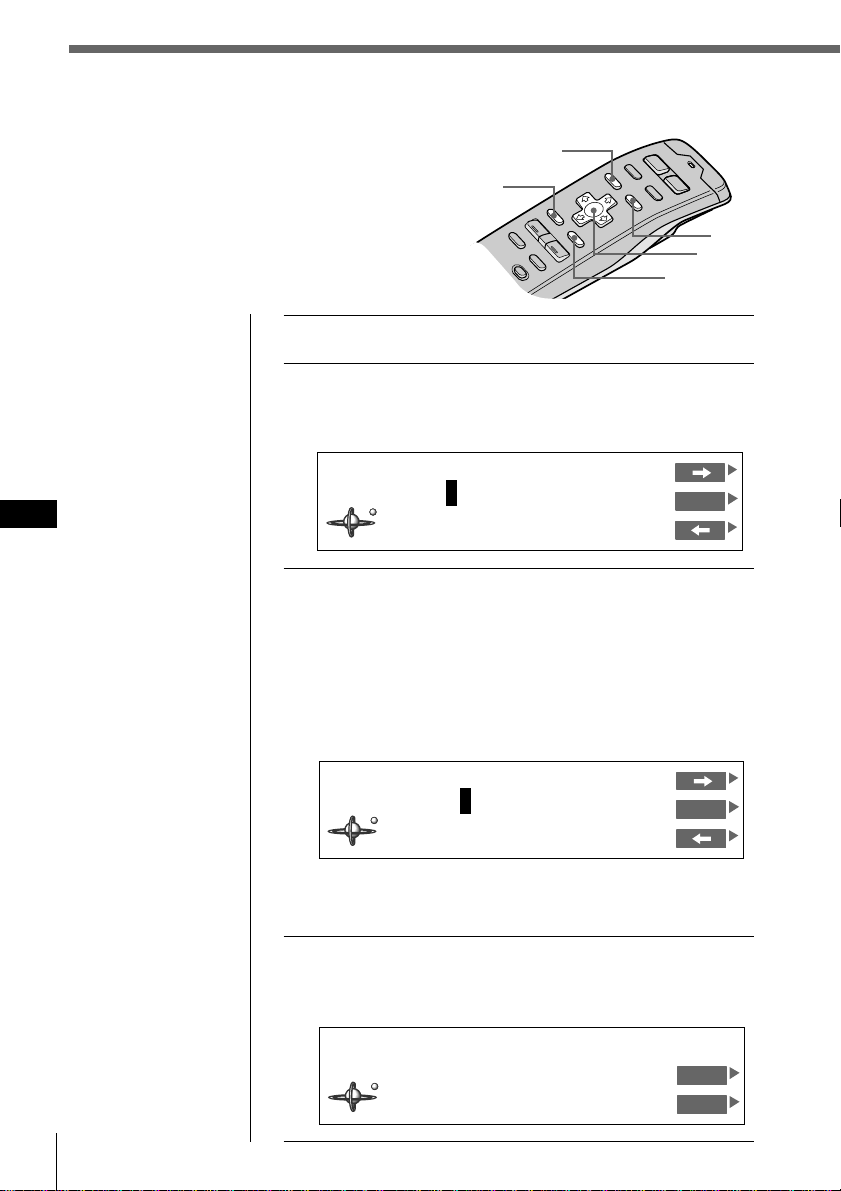
40 Radio
ES
Etiquetado de emisoras de radio
(Memorando de emisoras)
Es posible añadir un nombre compuesto por
un máximo de 8 caracteres a cada emisora.
El nombre de la emisora aparece en el visor al
seleccionarse ésta. Es posible almacenar en la
memoria un máximo de 44 nombres de emisoras.
Consejo
Para cancelar la
indicación actual y
recuperar la anterior,
pulse BACK.
Consejo
Para borrar/corregir
algún nombre,
introduzca “_” (barra
inferior) por cada
carácter.
1 Sintonice la emisora que desee etiquetar.
2 Pulse LIST durante dos segundos.
Aparece la indicación de registro de memorandos de
emisoras.
3 Pulse > o . hasta que aparezca el carácter
que desee introducir, y pulse /.
Cada vez que pulse >, el carácter cambia de la
siguiente forma:
A n B n C n ...Z n 0 n 1 n 2 n ...9 n + n - n
* n / n \ n > n < n . n _ (barra inferior) n A...
Pulse el botón . para desplazarse hacia atrás.
Si desea introducir un espacio en blanco entre
caracteres, seleccione “_” (barra inferior).
4 Repita el paso 3 hasta introducir el nombre
completo y, a continuación, pulse ENTER.
Aparece la indicación normal.
ENTER
MENU
BACK
LIST
STEREO
KYCS
FM1 102.5MHz
Station
DVOL
EL
Cursor
Station Memo Write
FM1 102.5MHz
ENT
________
Station Memo Write
FM1 102.5MHz
ENT
K
_______
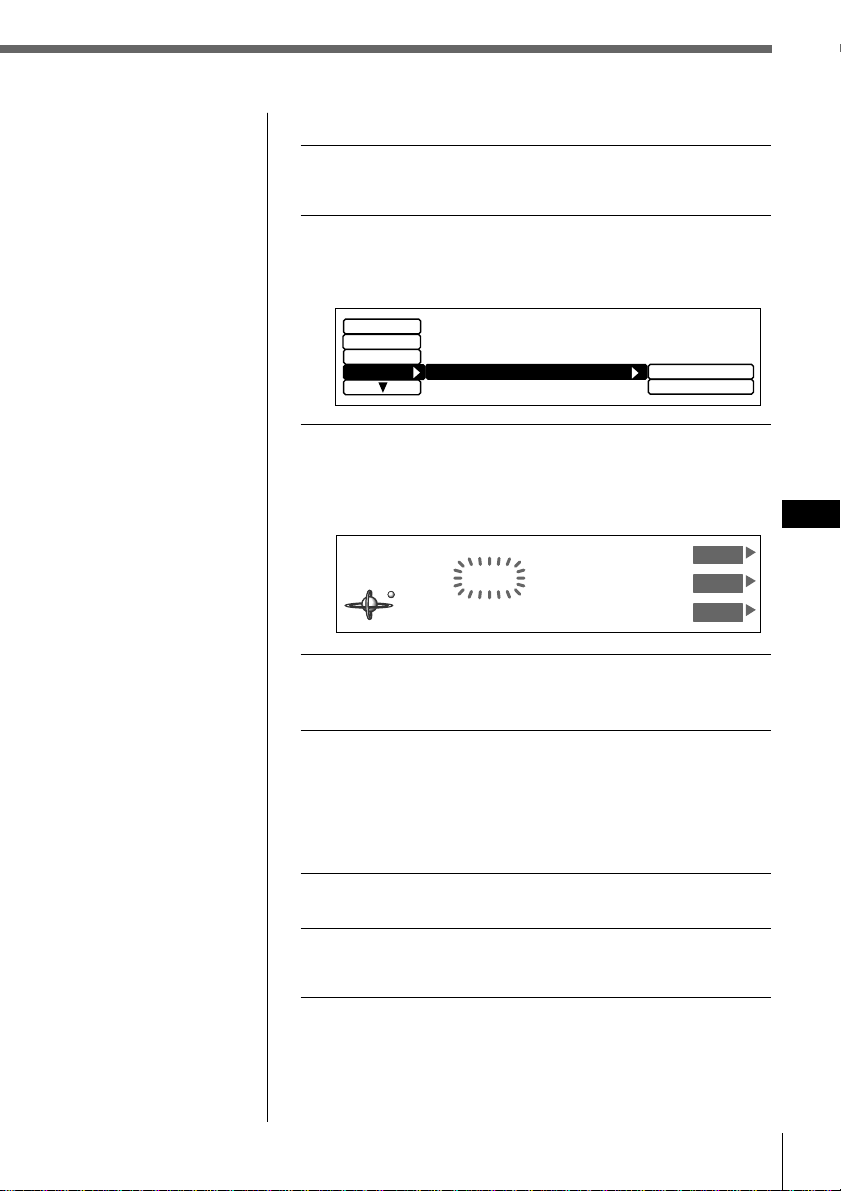
Radio
41
Radio
ES
Eliminación de nombres de emisoras
1 Mientras escucha una emisión de FM o de
AM, pulse MENU.
2 Seleccione “Name”, pulse / para desplazarse
hasta el submenú y, a continuación,
seleccione “Station Memo” pulsando > o ..
3 Pulse /, después > o . para seleccionar
“delete” y, a continuación, ENTER.
Aparece la indicación de eliminación de memorandos
de emisoras.
4 Pulse > o . para seleccionar el nombre de
emisora que desee borrar.
5 Pulse y mantenga pulsado ENTER durante dos
segundos.
El nombre de emisora seleccionado se borra.
Repita los pasos 4 y 5 si desea borrar otros nombres de
emisora.
6 Para finalizar el ajuste de modo, pulse BACK.
7 Pulse MENU.
Aparece la indicación normal.
Nota
En el paso 4, todos los
nombres de emisora
almacenados en
memoria aparecen en el
orden en que se
introdujeron. El último
nombre introducido
aparecerá por tanto al
final.
R.Mode
Display
Set up
write
delete
Name
Station Memo
Station Memo Delete
KYCS
FM1 102.5MHz
UP
ENT
DOWN
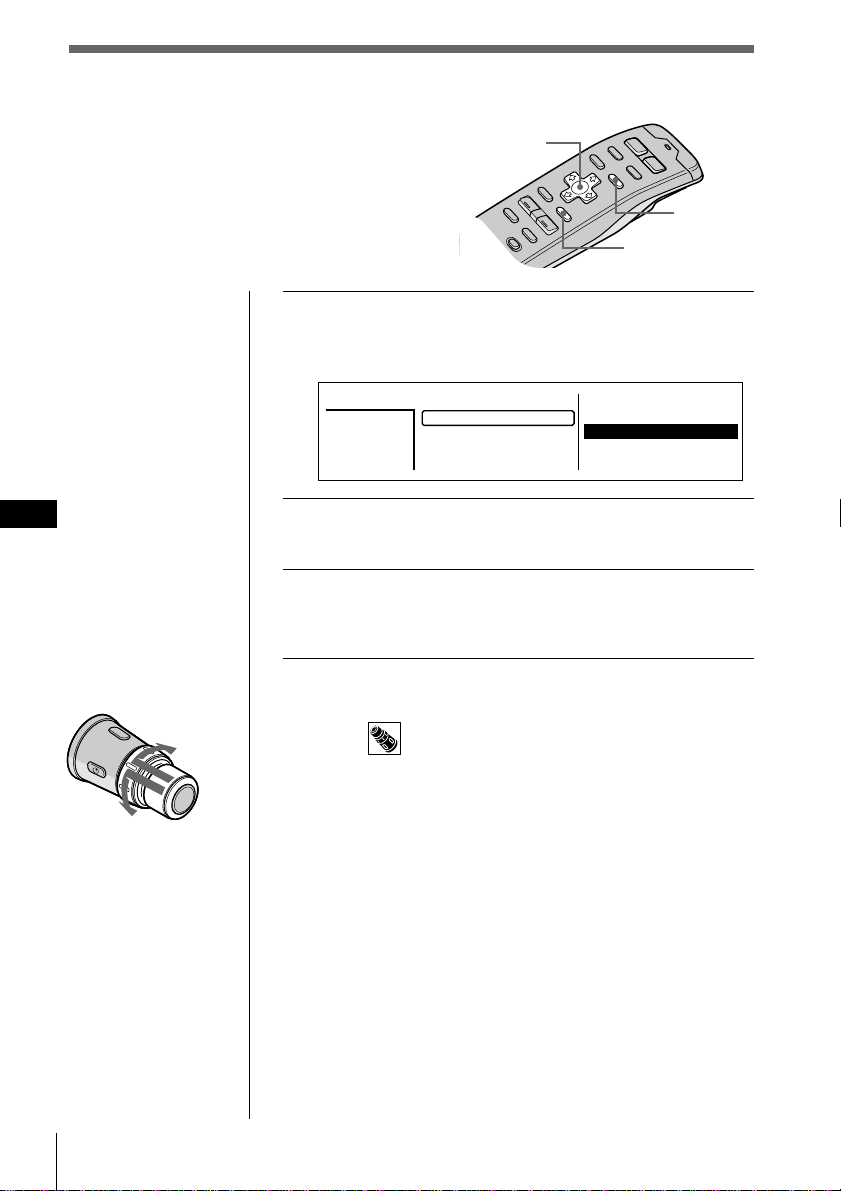
42 Radio
ES
Consejos
• Para cancelar la
selección, pulse LIST.
• Si el modo SEEK/
AMS se ajusta en
“Item sel”, podrá
seleccionar la
emisora que desee
con SEEK/AMS
cuando la lista
aparezca en el visor
(consulte la página
45).
Selección de emisoras por nombre
Es posible emplear esta función para seleccionar
una emisora mediante el nombre almacenado en
memoria para la misma.
1 Mientras escucha una emisión en FM o AM,
pulse LIST.
Aparece la lista de nombres predefinidos.
2 Pulse >, ., /, o ? para seleccionar la
emisora.
3 Pulse ENTER.
La unidad selecciona la emisora, y aparece la
indicación normal.
Para seleccionar emisoras mediante el distancio
giratorio
Presione y suelte DISC/PRESET para mostrar la lista de
nombres predefinidos.
Presione y gire el control para seleccionar la emisora en la
lista. Transcurridos aproximadamente 5 segundos, vuelve
a aparecer la indicación normal.
Cursor
LIST
ENTER
2. 101.9
3. 96.0
4. 102.5
5. 105.4
*
FM1
2
101.9MHz
6. 96.6
7. 99.9
9. 98.3
10. 98.3
Station
1. 106.3
8. 98.9
A la emisora
siguiente
A la emisora anterior
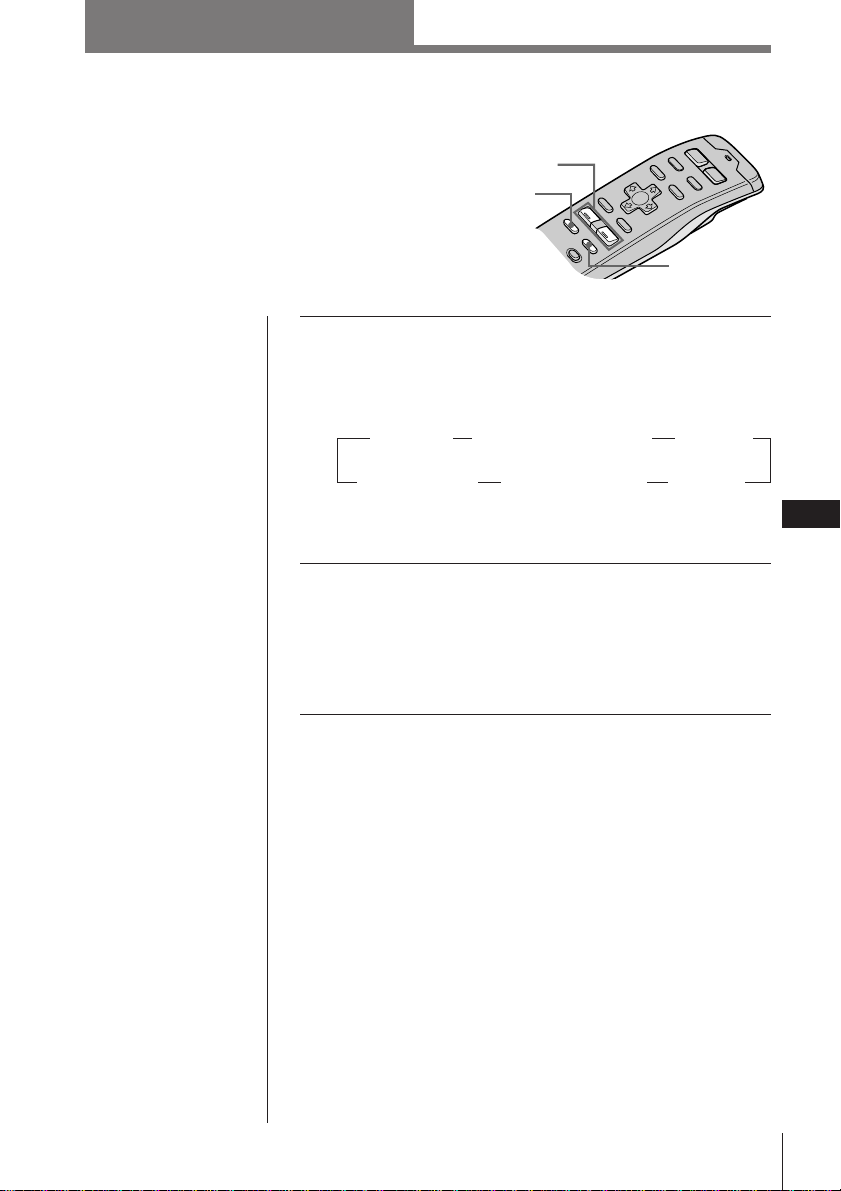
Otras funciones
43
Otras funciones
ES
1 Pulse SOUND varias veces para seleccionar la
opción que desee ajustar.
Cada vez que pulse SOUND, la opción cambia de la
siguiente forma:
* Sólo si la función DVOL (Volumen directo) está
desactivada.
2 Ajuste la opción seleccionada pulsando
VOL + o –.
Realice el ajuste antes de que transcurran tres
segundos una vez seleccionada la opción.
(Transcurridos tres segundos, VOL + y – funcionarán
como botón de volumen.)
Atenuación del sonido
Pulse ATT.
La unidad disminuye automáticamente el volumen a
un nivel bajo.
Para recuperar el nivel de volumen anterior, vuelva a
pulsar ATT.
Ajuste de las características
del sonido
Es posible ajustar los graves, los agudos, el
balance y el balance entre los
altavoces.
Los niveles de graves y agudos pueden
almacenarse respectivamente para cada
fuente.
Consejo
Si el cable de interfaz
de un teléfono para
automóvil se conecta al
cable de atenuación, la
unidad reducirá el
volumen de forma
automática cuando
entre una llamada
telefónica (función de
atenuación para
teléfono).
Otras funciones
ATT
SOUND
VOL
+
/
-
Radio/Otras funciones
Fader (trasero-
delantero)
Balance (izquierdo
y derecho)
Treble
(agudos)*
Volume
(volumen)
Sub W (volumen de
potenciación de graves)
Bass
(graves)*
“
“
“
”” ”
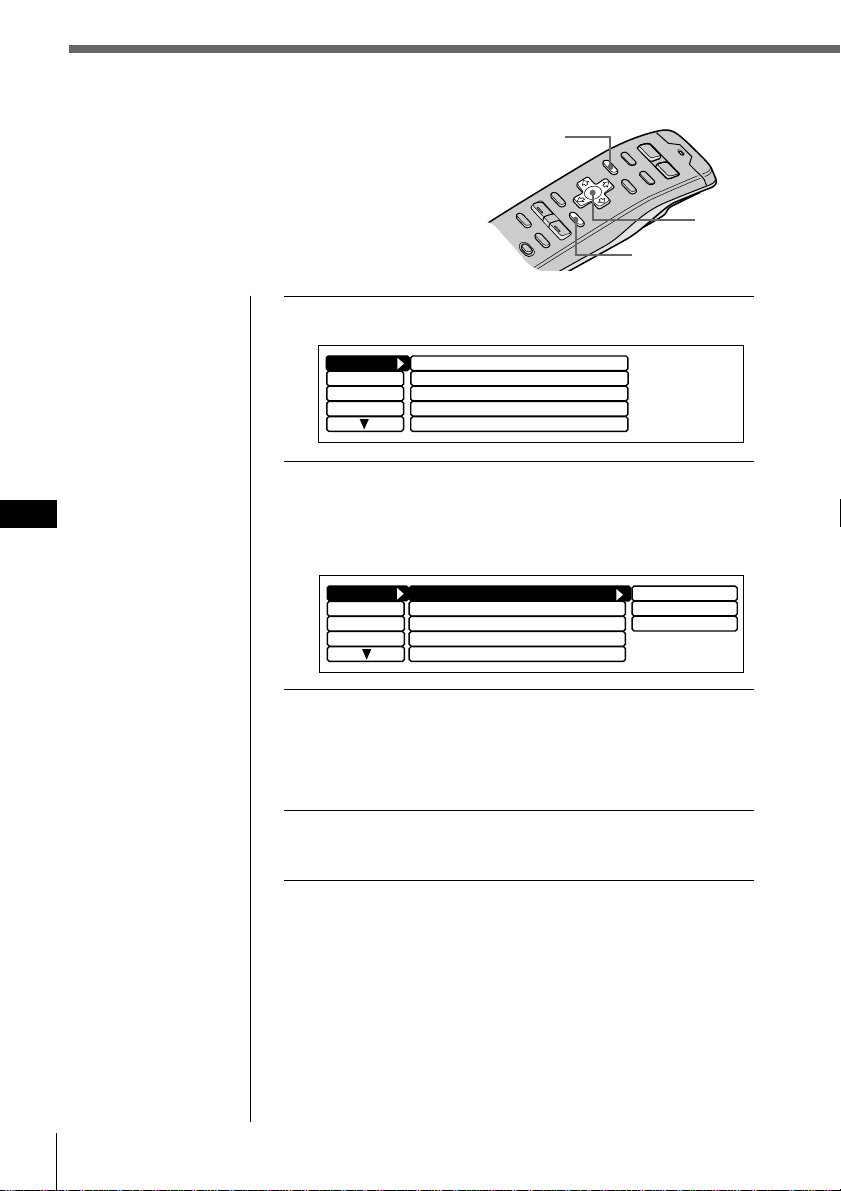
44 Otras funciones
ES
Consejos
• En el paso 2, para
desplazar el cursor
hasta la columna
anterior (de una en
una), pulse ?.
• Para cancelar la
indicación actual y
recuperar la anterior,
pulse BACK.
Cursor
MENU
ENTER
Ajuste del menú de configuración
Utilice el menú de configuración para realizar
ajustes adicionales, incluidos los del reloj (Clock),
pitidos (Beep), mando giratorio (Rotary remote),
SEEK/AMS, salida digital (Digital out), filtro VC
(Coeficiente variable) (VC filter) y volumen
directo (Direct Volume).
Clock
off
Beep
on
Rotary Remote norm
Display
Name
SEEK/AMS
P.Mode
SEEK/AMS
Set up
Direct Volume
off
Display
Name
SEEK/AMS
SEEK/AMS
off
Beep on
Rotary Remote
norm
Time Set
on
Set up
P.Mode
Clock on
Direct Volume
off
1 Pulse MENU y seleccione “Set up”.
2 Pulse / para desplazarse hasta el submenú
y, a continuación, seleccione el ajuste
pulsando > o ..
El ajuste actual aparece a la derecha del submenú.
3 Cambie el ajuste y pulse ENTER.
El nuevo ajuste aparece a la derecha del submenú.
Los submenú y el método para cambiar sus ajustes se
describen en la tabla de la página siguiente.
4 Pulse MENU.
Aparece la indicación normal.
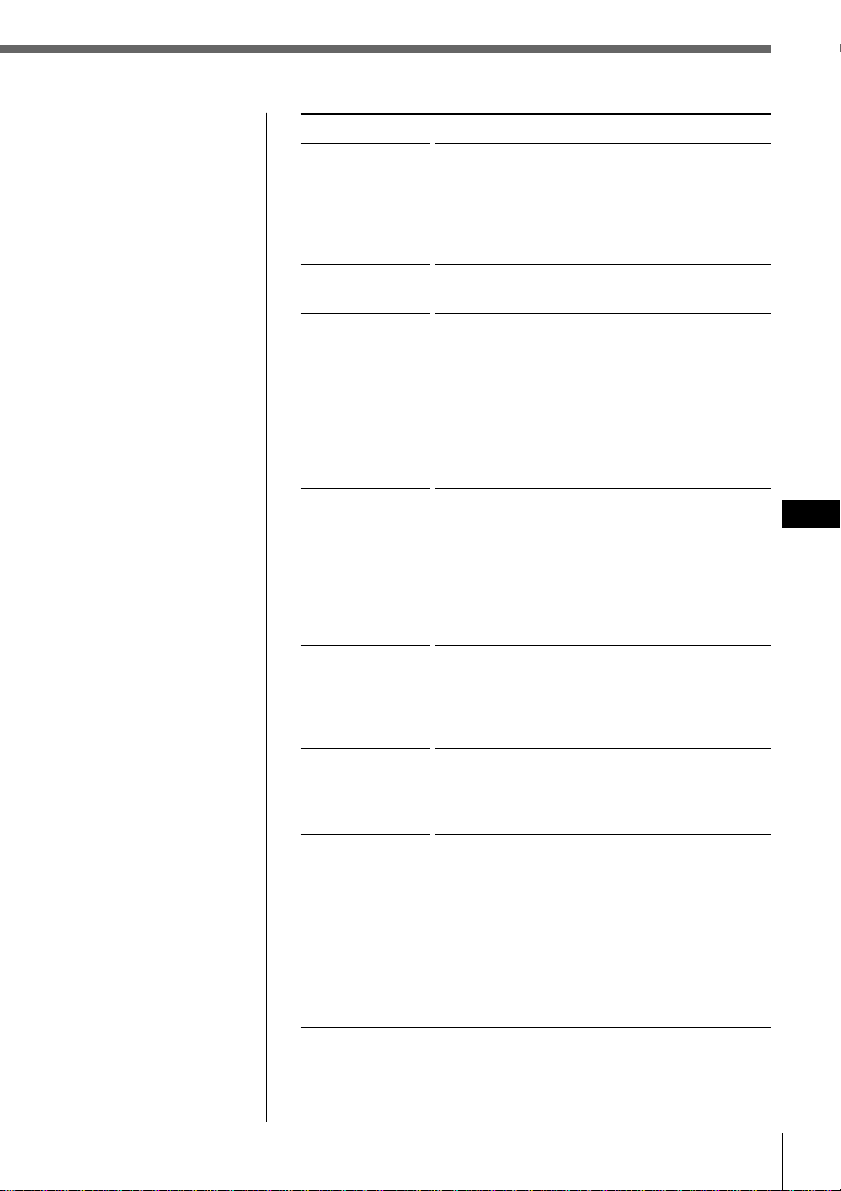
Otras funciones
45
Otras funciones
ES
Submenú
Clock
Beep
Rotary remote
SEEK/AMS
Digital out
VC filter
Direct Volume
Descripción y ajustes
Seleccione “on” para mostrar la hora actual en
el ángulo superior izquierdo del visor
permanentemente. Si selecciona “off”, la hora
aparecerá sólo cuando el sistema esté
apagado. Seleccione “Time Set” para ajustar el
reloj (consulte la página 6).
Especifica si la unidad debe emitir un pitido al
pulsar los botones de funcionamiento.
Invierte la dirección de giro del mando a
distancia giratorio para controlar operaciones.
Seleccione “normal” para aumentar el
volumen, la frecuencia, los números de tema,
etc., mediante el giro del mando en el sentido
de las agujas del reloj. Seleccione “reverse”
para aumentar los mismos parámetros
mediante el giro del mando en el sentido
contrario a las agujas del reloj.
La función SEEK/AMS dispone de dos
modos: Modo normal — Seleccione
“SEEK/AMS” para localizar temas o emisoras
rápidamente.
Modo de selección de opción — Al aparecer la
lista de títulos, seleccione “Item sel” para
localizar discos o emisoras mediante el mando
giratorio o el control del panel frontal.
Seleccione “ON” para emitir las señales
digitales mediante DIGITAL OUT si se
conecta un equipo opcional con entrada
digital. Seleccione “OFF” para cancelar la
emisión de las señales digitales.
Selecciona uno de los cuatro tipos de filtro
para ajustar el sonido que se adapte a la
imagen de sonido que desee, la fuente de
música, etc.
Seleccione “on” para enviar la señal sin
procesar mediante el circuito de control de
volumen para obtener un sonido puro de alta
calidad. En este caso, el ajuste de graves y
agudos no funciona.
Seleccione “off” para enviar la señal mediante
el circuito de control de tono. Es posible
controlar los niveles de graves y agudos,
aunque la pureza del sonido original
disminuirá.
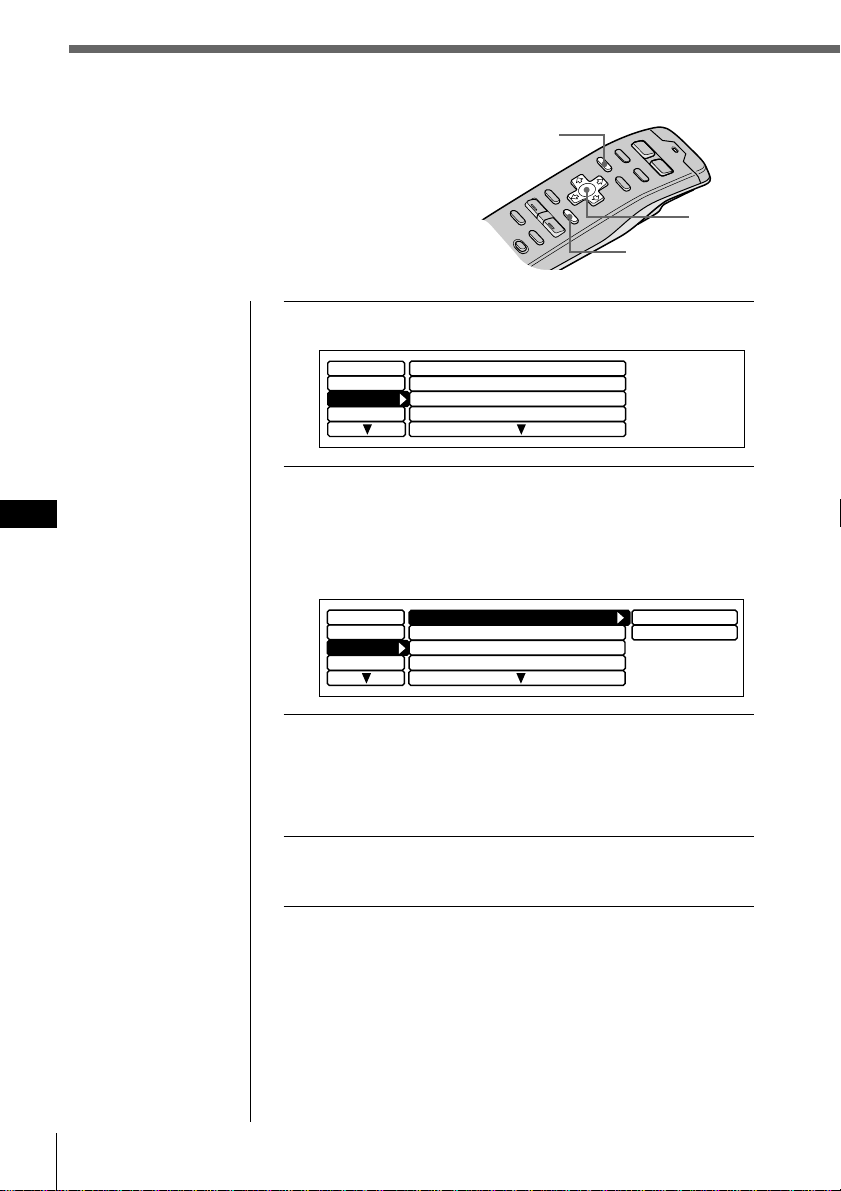
46 Otras funciones
ES
1 Pulse MENU y seleccione “Display”.
2 Pulse / para desplazarse hasta el submenú
y, a continuación, seleccione la opción que
desee ajustar pulsando > o ..
El ajuste del submenú actual aparece a la derecha de la
opción.
3 Cambie el ajuste y pulse ENTER.
El nuevo ajuste aparece a la derecha de la opción.
Para obtener una descripción de los submenú,
consulte la tabla de la página siguiente.
4 Pulse MENU.
Aparece la indicación normal.
Consejos
• En el paso 2, para
desplazar el cursor
hasta la columna
anterior (de una en
una), pulse ?.
• Para cancelar la
indicación actual y
recuperar la anterior,
pulse BACK.
Cursor
MENU
ENTER
Name
Contrast
Set up
Dimmer
Panel angle
P.Mode
ILL
Display
Green
Auto
TOP
8
Name
Contrast
Set up
Dimmer
Panel angle
P.Mode
ILL
Greem
Display
Green
Auto
TOP
8
Amber
Ajuste del menú del visor
Utilice el menú Display para realizar ajustes
adicionales, incluida la iluminación (Illumination),
atenuación (Dimmer), ángulo del panel (Panel
angle), estilo de caracteres (Font style), contraste,
EL (Luminosidad eléctrica) e indicación (Display).
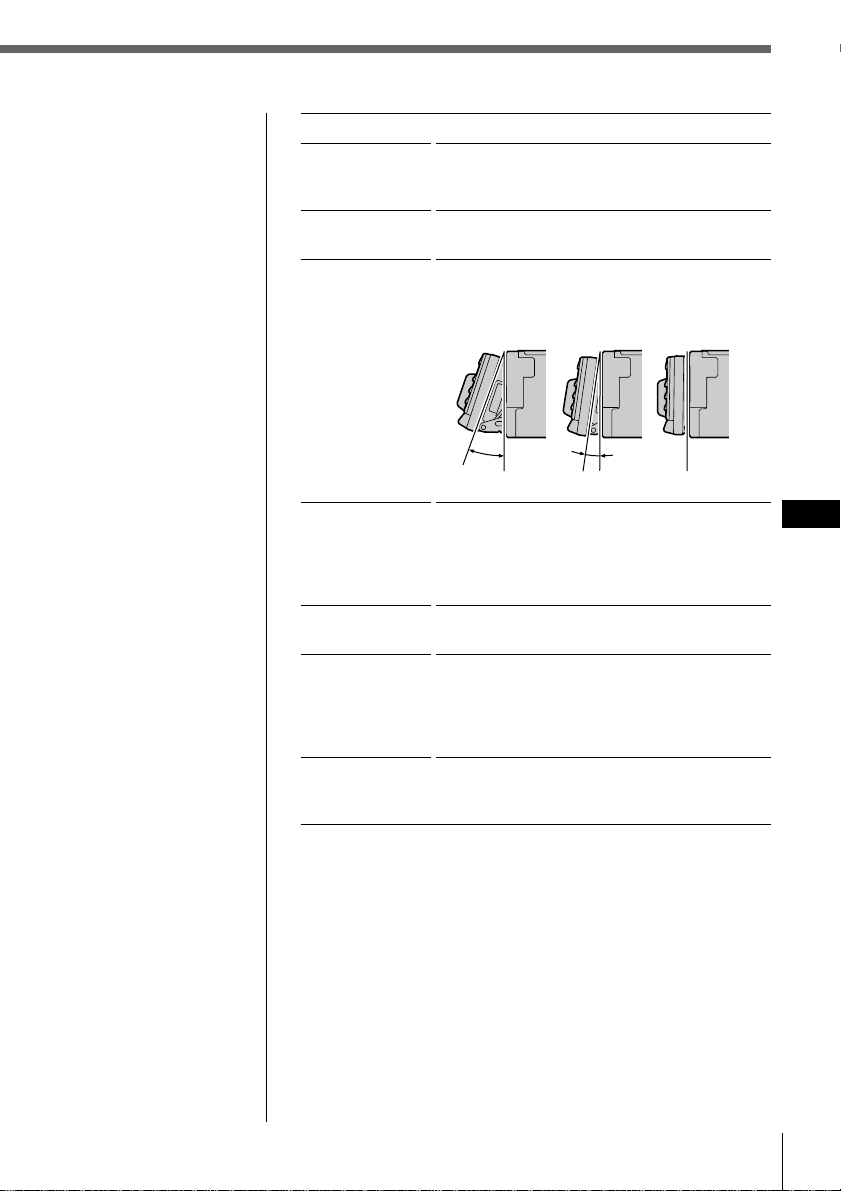
Otras funciones
47
Otras funciones
ES
Submenú
ILL
Dimmer
Panel angle
Contrast
Font Style
EL
Display
(Illumination)
TOP10°20°
Descripción y ajuste
Seleccion “Amber (ámbar)” o “Green (verde)”
para el color de los botones del panel frontal.
Seleccion “Auto” para atenuar el brillo del
visor cuando encienda las luces.
Seleccion “10” o “20” grados para ajustar
automáticamente el ángulo del panel frontal.
Seleccione “Top” para obtener un ángulo
normal.
Seleccione 1 de 15 niveles de contraste para el
visor. Seleccione “Contrast” y pulse ENTER.
Es posible cambiar el ajuste actual pulsando
? o /. Vuelva a pulsar ENTER para
cambiar el ajuste.
Seleccione “Regular” o “Bold” para ajustar el
estilo de los caracteres mostrados.
Seleccione “off” para que el visor se apague
automáticamente transcurridos unos
segundos después de haber empleado
cualquier control. Seleccione “on” para que el
visor se muestre constantemente.
Seleccione “Negative” para invertir el
contraste del visor, y “Positive” para obtener
el contraste original.
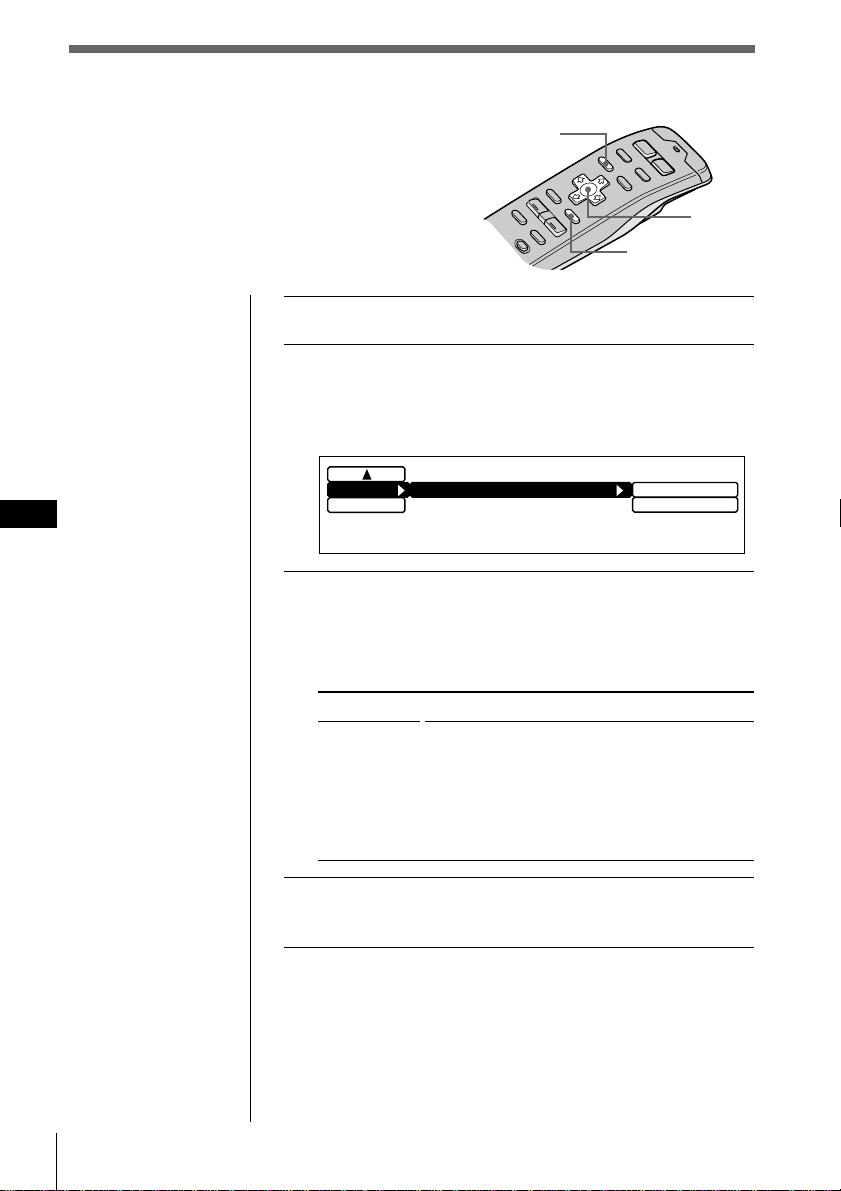
48 Otras funciones
ES
1 Pulse MENU y seleccione “Func”.
2 Pulse / para desplazarse hasta el submenú,
y seleccione “Select”.
El ajuste de submenú actual aparece a la derecha de la
opción.
3 Cambie el ajuste y pulse ENTER.
El nuevo ajuste aparece a la derecha de la opción.
Para obtener una descripción de los submenú,
consulte la siguiente tabla.
4 Pulse MENU.
Aparece la indicación normal.
Consejos
• En el paso 2, para
desplazar el cursor
hasta la columna
anterior (de una en
una), pulse ?.
• Para cancelar la
indicación actual y
recuperar la anterior,
pulse BACK.
Cursor
Indicación
Select
Descripción y ajustes
Seleccion “Source” para que aparezca el menú
de función dependiendo de cada fuente o
modo de ajuste.
Seleccione “VC/DVOL/EL” para que
aparezcan VC, DVOL y EL
independientemente de la fuente o modo de
ajuste seleccionado.
Ajuste del menú de función
Utilice el menú de función para asignar el modo
de función específico a cada botón de función.
MENU
ENTER
Source
VC
/
DVOL
/
EL
Exit
Func.
Select
VC/DVOL/EL
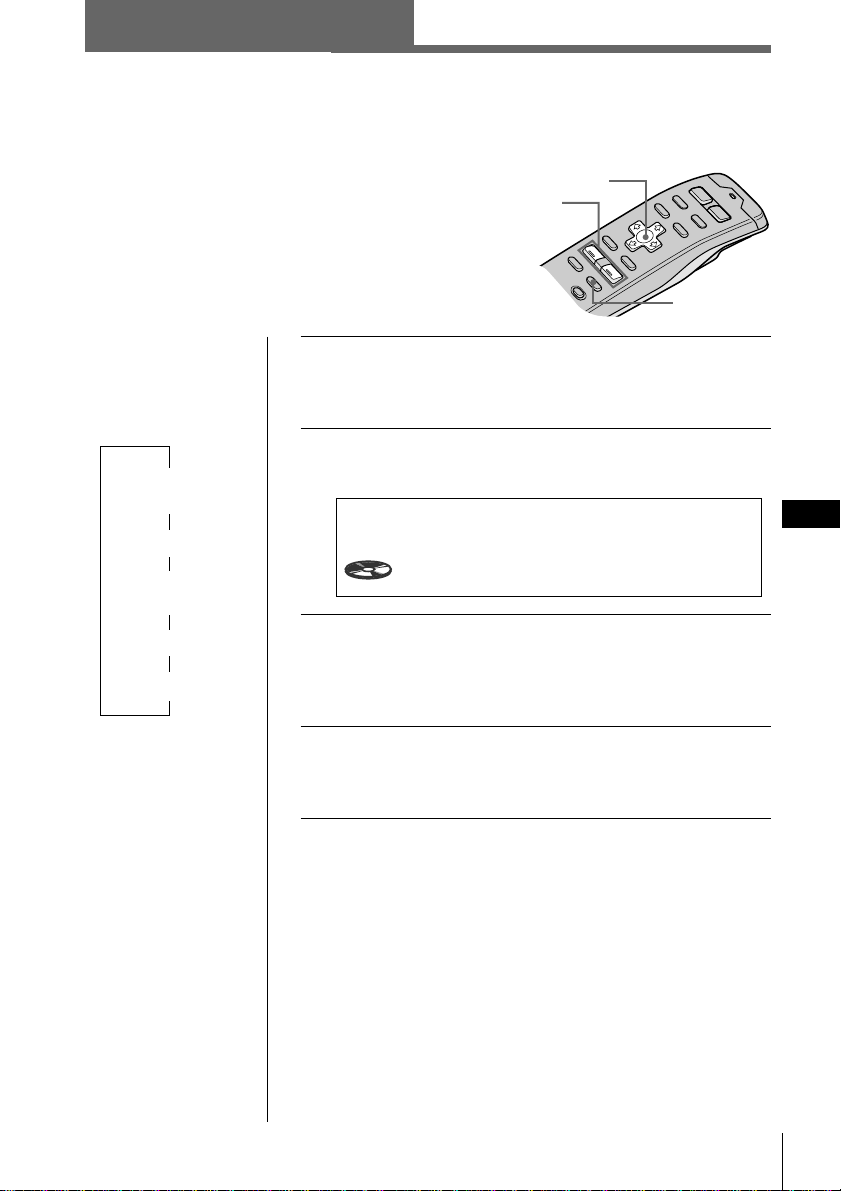
DSP
DSP
ES
49
SOUND
VOL
+
/
-
Selección de menús de sonido
envolvente
La unidad opcional XDP-U50D permite añadir
ciertos efectos al campo de sonido de la fuente
seleccionada.
Lo siguiente son las instrucciones de empleo de la
unidad XDP-U50D.
Si conecta la XDP-210EQ a la unidad, consulte el manual
de instrucciones suministrado con la XDP-210EQ.
1 Pulse y mantenga pulsado SOUND durante
dos segundos.
Aparece el modo de sintonización de sonido DSP.
2 Pulse SOUND varias veces para seleccionar
“SUR Tuning”.
3 Pulse VOL + o – para seleccionar el menú de
sonido envolvente.
El menú de sonido envolvente aparece en el orden
mostrado en la página siguiente.
4 Pulse y mantenga pulsado SOUND durante
dos segundos.
Aparece la indicación normal.
DSP
DSP Sound Tuning Mode CD1
SUR Tuning
-DEFEAT-
1 2
6.51
continúa en la página siguiente n
Otras funciones/DSP
Cursor
Consejos
• Cada vez que pulse
SOUND, la opción
de sintonización
cambia de la
siguiente forma:
$
SUR
(Sonido envolvente)
$
POS (Posición)
$
SUB (Altavoz
potenciador de graves)
$
BAS (Graves)
$
TRE (Agudos)
• En el paso 3, pulse
/ para cambiar al
ajuste de nivel de
efecto.
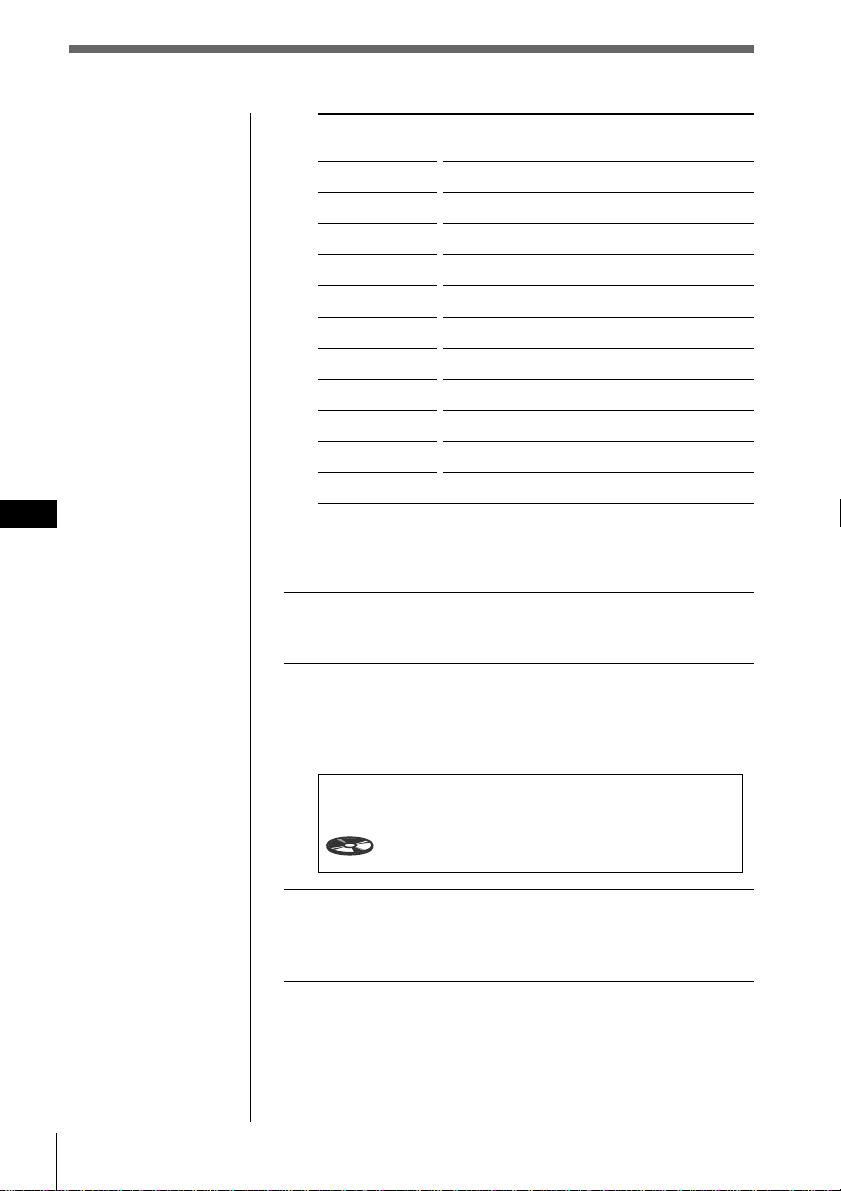
DSP
ES
50
Menú de sonido
envolvente
HALL
JAZZ
DISCO
THEATER
PARK
LIVE
OPERA
CHURCH
STADIUM
CELLAR
-DEFEAT-
Ajuste del nivel de efecto
1 Realice los pasos 1 a 3 de “Selección de menús
de sonido envolvente” (consulte la página 49).
2 Pulse / y, a continuación, VOL + o – para
ajustar el nivel.
El nivel de efecto puede ajustarse entre 0 y 100%.
Aumente el nivel para potenciar el efecto.
3 Pulse y mantenga pulsado SOUND durante
dos segundos.
Aparece la indicación normal.
Nota
No es posible ajustar el
nivel de efecto de
“-DEFEAT-”.
Consejo
En el paso 2, pulse /
para cambiar a la
selección de menú de
sonido.
Efecto de campo de sonido
Sala de conciertos
Club de jazz
Discoteca con paredes gruesas
Cine
Gran espacio al aire libre
Concierto en vivo
Ópera
Iglesia/capilla con mucha reverberación
Concierto al aire libre en un estadio
Bodega con mucha reverberación
Sonido normal sin efectos DSP
SUR HALL
Effect 90%
DSP Sound Tuning Mode CD1
2
4.50
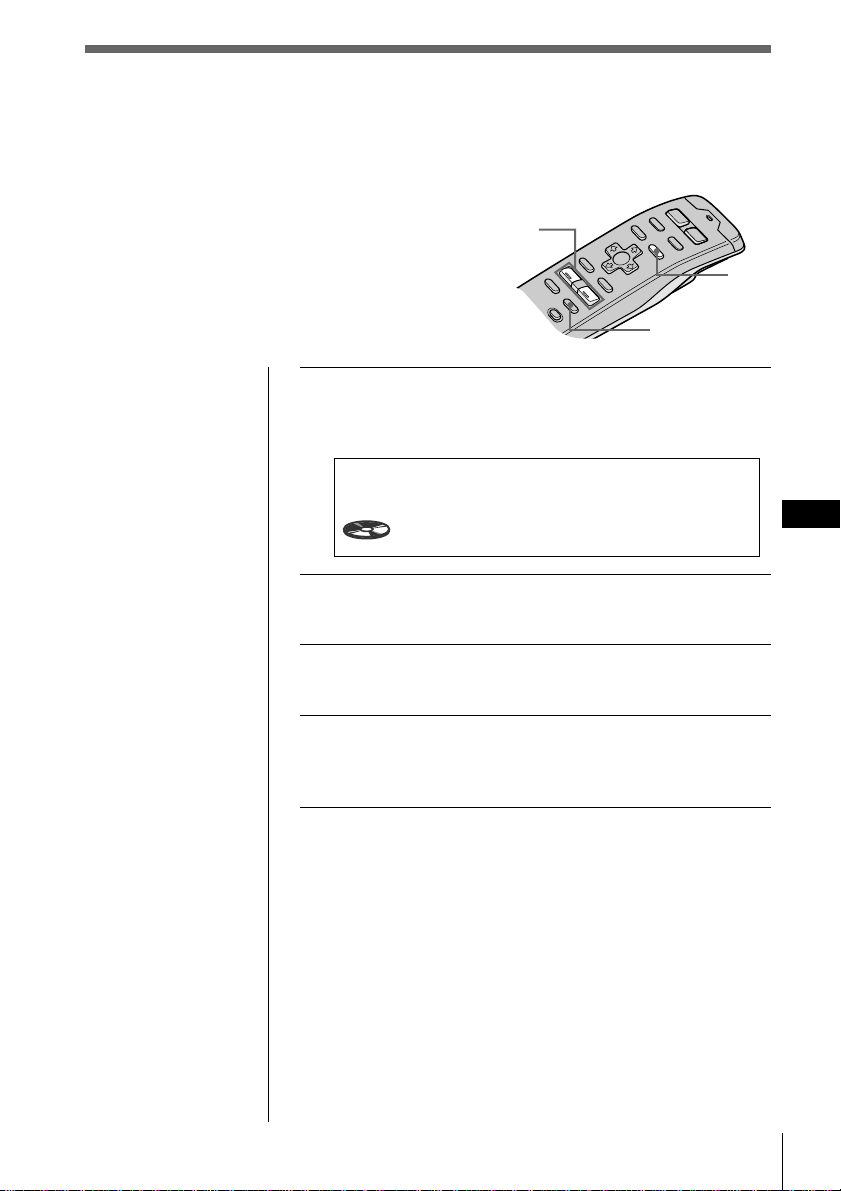
DSP
DSP
ES
51
SOUND
VOL
+
/
-
LIST
Almacenamiento de efectos de sonido
envolvente en los discos compactos
(Archivo personalizado DSP)
Una vez registrado el menú de sonido
envolvente deseado en los discos, es posible
disfrutar del mismo menú cada vez que
reproduzca dichos discos. (Sólo si ha etiquetado
éstos mediante la función de archivo personalizado)
1 Pulse y mantenga pulsado SOUND durante
dos segundos.
Aparece el modo de sintonización de sonido DSP.
2 Pulse VOL + o – para ajustar el efecto de
sonido que desee.
3 Pulse y mantenga pulsado LIST durante dos
segundos.
4 Pulse y mantenga pulsado SOUND durante
dos segundos.
Aparece la indicación normal.
SUR HALL
Effect 90%
DSP Sound Tuning Mode CD1
2
4.50
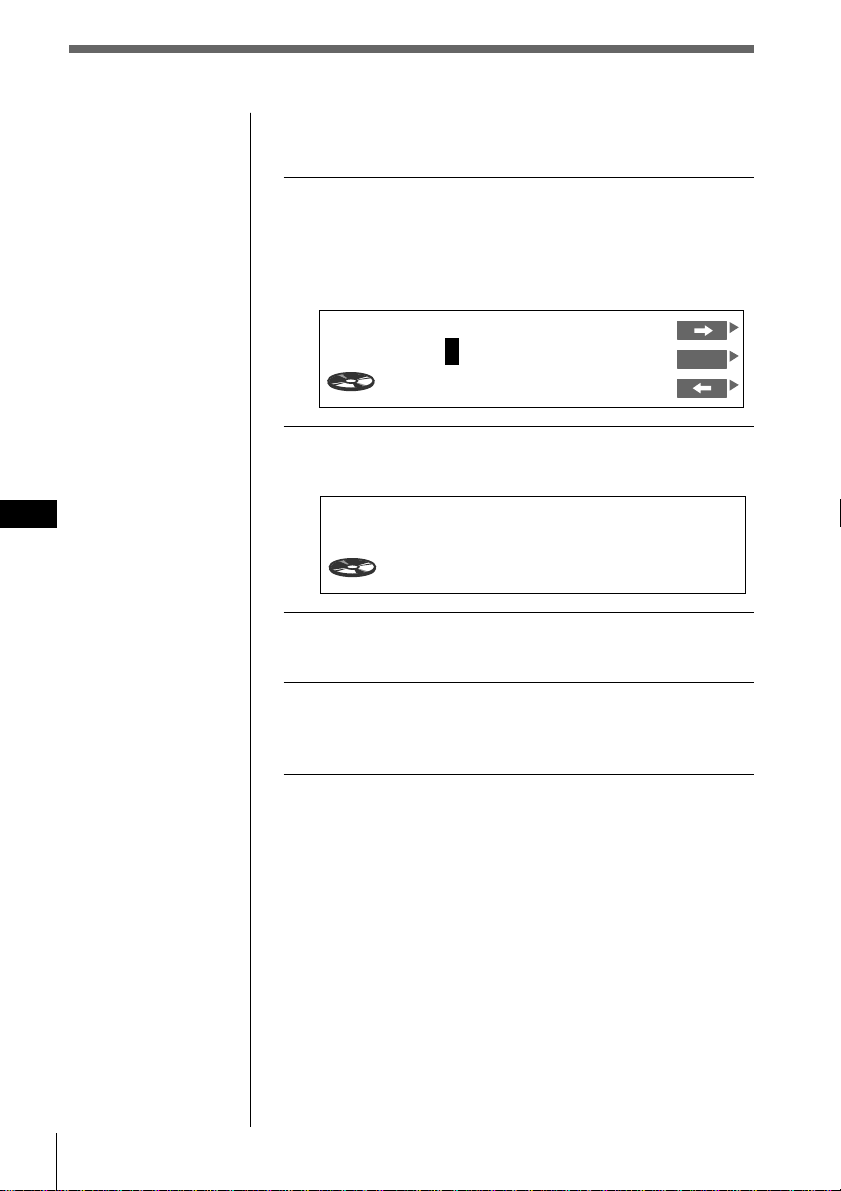
DSP
ES
52
Reproducción de discos con el efecto de
sonido envolvente almacenado
1 Mientras se reproduce un CD, pulse y
mantenga pulsado LIST durante dos
segundos.
Aparece la indicación de registro de memorando de
discos.
2 Pulse LIST.
Aparece el modo de sintonización DSP.
3 Pulse VOL + o – para seleccionar el menú de
sonido envolvente.
4 Pulse y mantenga pulsado LIST durante dos
segundos.
Aparece la indicación normal.
Cambio del efecto de sonido
envolvente almacenado
Reproduzca el disco cuyos efectos de sonido envolvente
desee cambiar y después realice los pasos de
“Almacenamiento de efectos de sonido envolvente en los
discos compactos” (consulte la página 51).
Eliminación del efecto de sonido
envolvente almacenado
Seleccione “-DEFEAT-” en el paso 3 de “Selección de
menús de sonido envolvente”(consulte la página 49).
Nota
Es posible utilizar esta
función para los discos
a los que se ha
asignado un nombre
personalizado.
CD1 16.15
-
DEFEAT
-
SUR
Disc Memo Write
1CD1 4.15
SONYPOPS
ENT
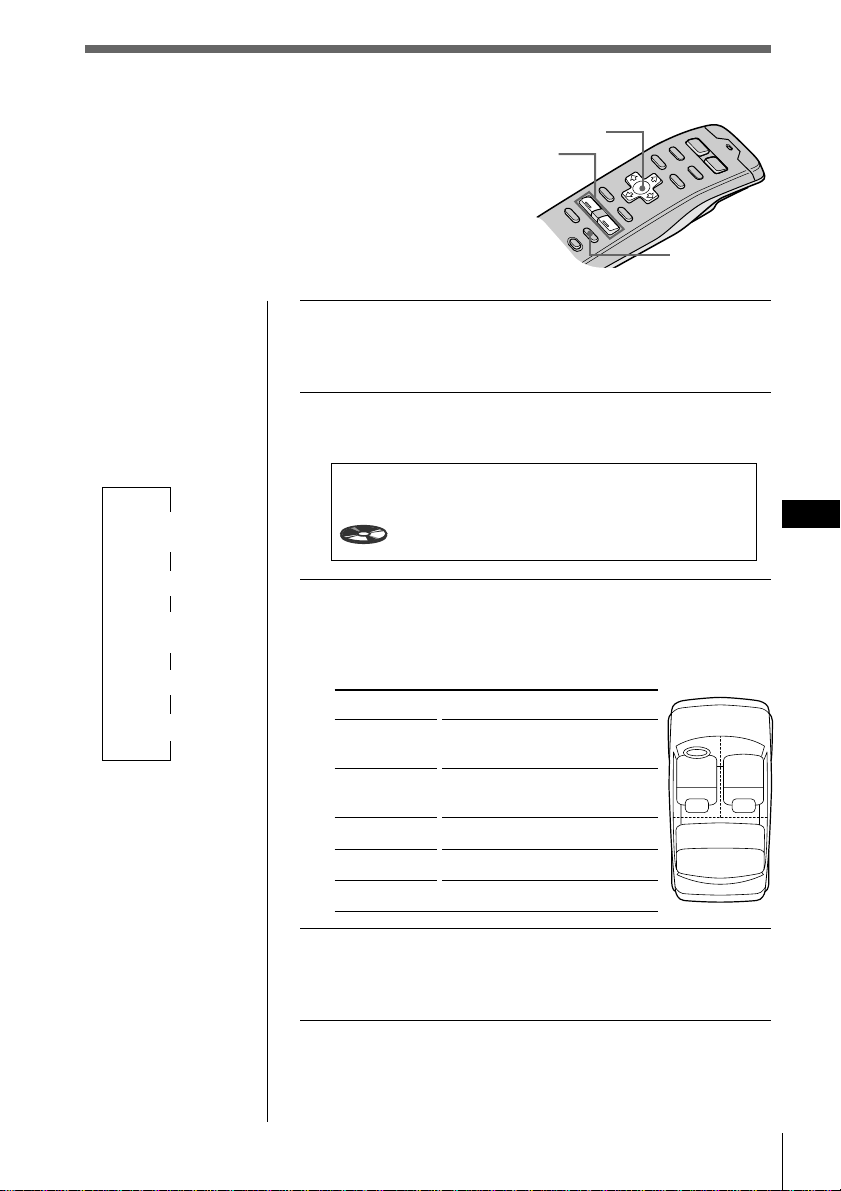
DSP
DSP
ES
53
SOUND
VOL
+
/
-
Selección de la posición de escucha
Es posible ajustar un espacio de tiempo de retardo
para que el sonido llegue a los oyentes desde los
altavoces. De esta forma, la unidad puede simular
un campo de sonido natural de forma que se
obtenga la sensación de encontrarse en el centro
del campo de sonido en el lugar donde se siente
en el automóvil.
1 Pulse y mantenga pulsado SOUND durante
dos segundos.
Aparece el modo de sintonización DSP.
2 Pulse SOUND varias veces para seleccionar
“POS Tuning”.
3 Pulse VOL + o – varias veces para seleccionar
la posición de escucha.
La posición aparece en el orden mostrado a
continuación.
Indicación
All
Front
Front R
Front L
Rear
4 Pulse y mantenga pulsado SOUND durante
dos segundos.
Aparece la indicación normal.
Consejos
• Cada vez que pulse
SOUND, la opción
de sintonización
cambia de la
siguiente forma:
$
SUR
(Sonido envolvente)
$
POS (Posición)
$
SUB (Altavoz
potenciador de graves)
$
BAS (Graves)
$
TRE (Agudos)
• En el paso 3, pulse
/ para pasar al
ajuste de posición de
escucha. (consulte la
página siguiente)
21
3
Centro del campo de sonido
Ajuste normal
(1 + 2 + 3)
Parte delantera
(1 + 2)
Parte delantera derecha (2)
Parte delantera izquierda (1)
Parte trasera (3)
POS Tuning
ALL
DSP Sound Tuning Mode CD1
4
0.54
Cursor
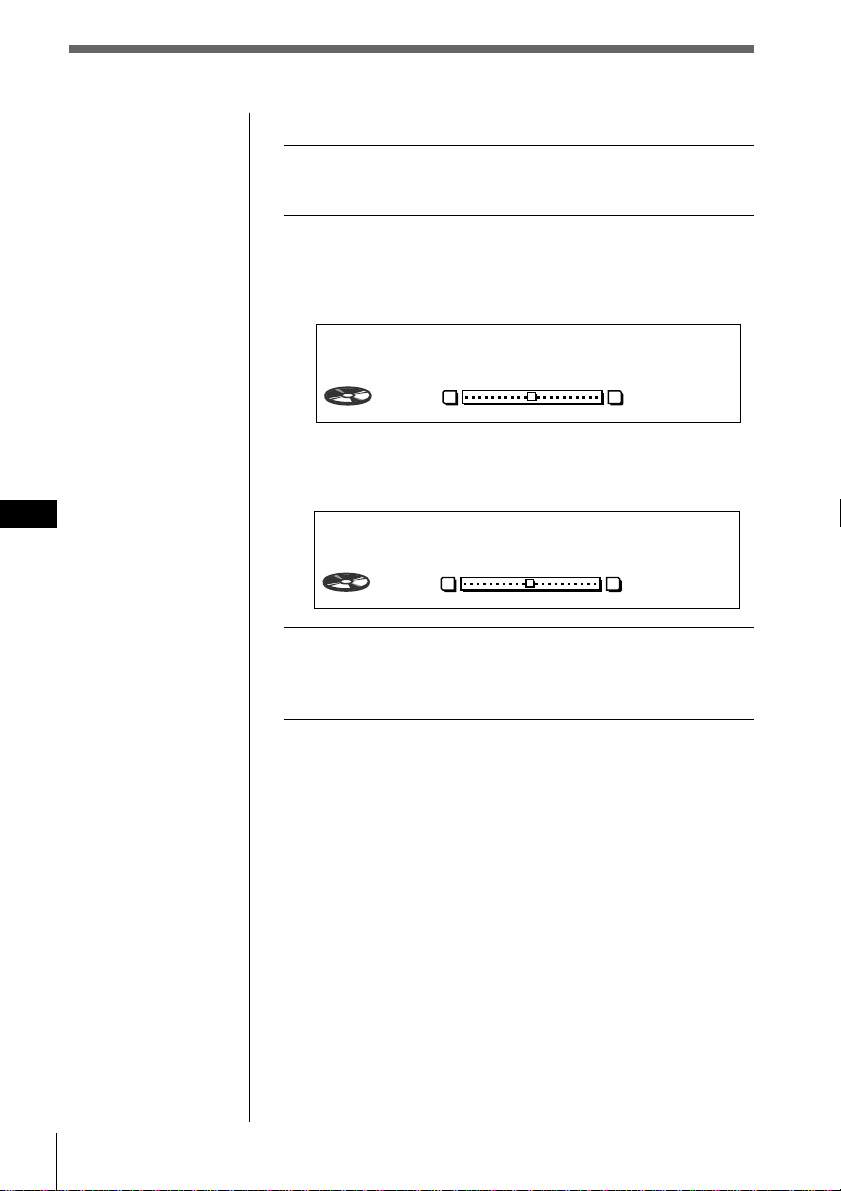
DSP
ES
54
Ajuste de la posición de escucha
1 Realice los pasos 1 a 3 de “Selección de la
posición de escucha” (consulte la página 53).
2 Ajuste el centro del campo de sonido.
1 Pulse /.
2 Pulse VOL + o – para ajustar el centro en la
izquierda o en la derecha.
3 Pulse /.
4 Pulse VOL + o – para ajustar el centro en la parte
trasera o en la delantera.
3 Pulse y mantenga pulsado SOUND durante
dos segundos.
Aparece la indicación normal.
Consejo
No es posible ajustar el
nivel de efecto de
“-DEFEAT-”.
POS
ALL
DSP Sound Tuning Mode CD1
4
1.30
LR
0
POS
ALL
DSP Sound Tuning Mode CD1
4
1.53
RF
0
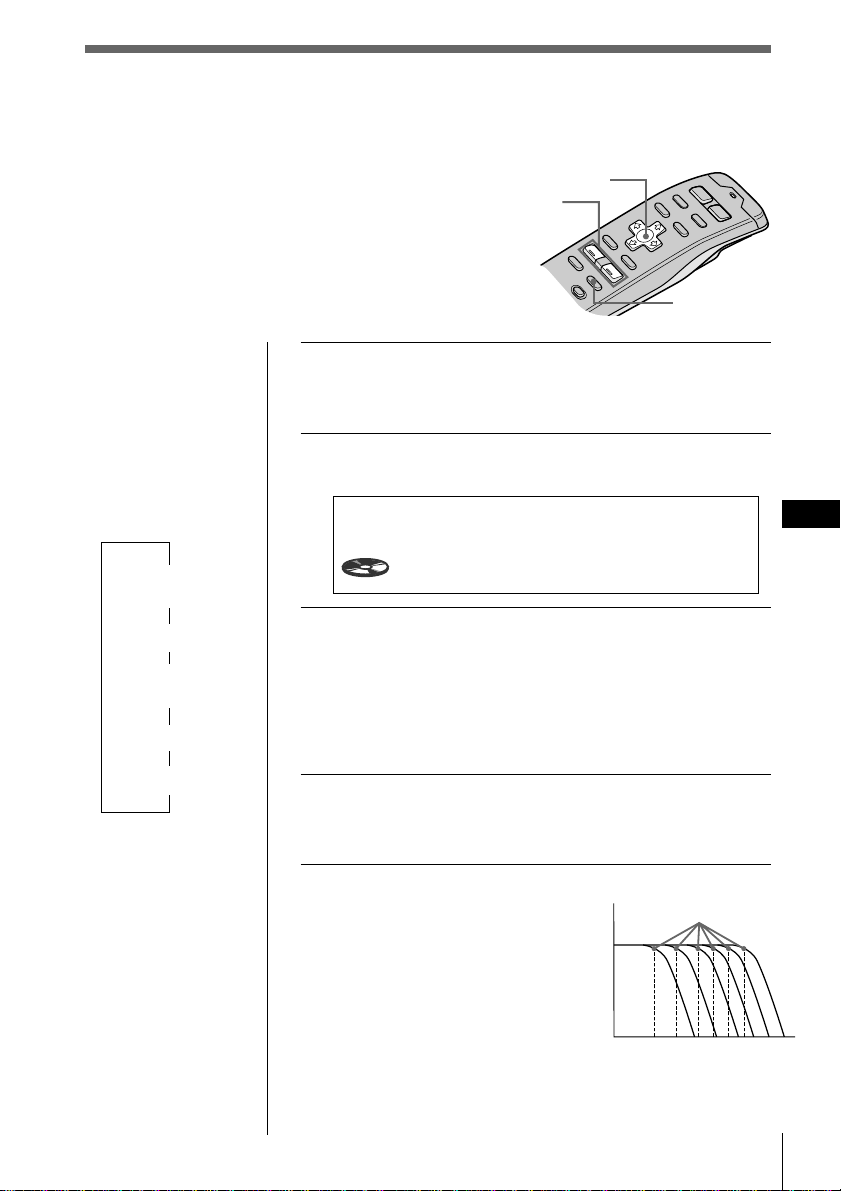
DSP
DSP
ES
55
SOUND
VOL
+
/
-
Ajuste de la frecuencia de corte de
los altavoces potenciadores
de graves
Consejos
• Cada vez que pulse
SOUND, la opción
de sintonización
cambia de la
siguiente forma:
$
SUR
(Sonido envolvente)
$
POS (Posición)
$
SUB (Altavoz
potenciador de graves)
$
BAS (Graves)
$
TRE (Agudos)
• En el paso 3, pulse
/ para pasar al
ajuste de volumen de
potenciación de
graves. (consulte la
página siguiente)
1 Pulse y mantenga pulsado SOUND durante
dos segundos.
Aparece el modo de sintonización de sonido DSP.
2 Pulse SOUND varias veces para seleccionar
“SUB”.
3 Pulse VOL + o – varias veces para seleccionar
la frecuencia de corte.
La frecuencia aparece en el orden mostrado a
continuación.
62Hz ˜ 78Hz ˜ 99Hz ˜ 125Hz* ˜ 157Hz ˜ 198Hz
* Frecuencia ajustada de fábrica
4 Pulse y mantenga pulsado SOUND durante
dos segundos.
Aparece la indicación normal.
Descripción de frecuencia de corte
Con el fin de adaptarse a las
características de los altavoces
potenciadores de graves conectados,
es posible interrumpir las señales de
frecuencia alta y media no deseadas
que se introducen en dichos
altavoces. Mediante el ajuste de la
frecuencia de corte, los altavoces
potenciadores de graves emitirán
sólo las señales de baja frecuencia
para obtenerse una imagen de sonido
más nítido.
SUB Tuning
C.off125Hz
DSP Sound Tuning Mode CD1
4
2.16
Frecuencia
Nivel
Frecuencia de corte
62
78
99 125
157
198
Cursor
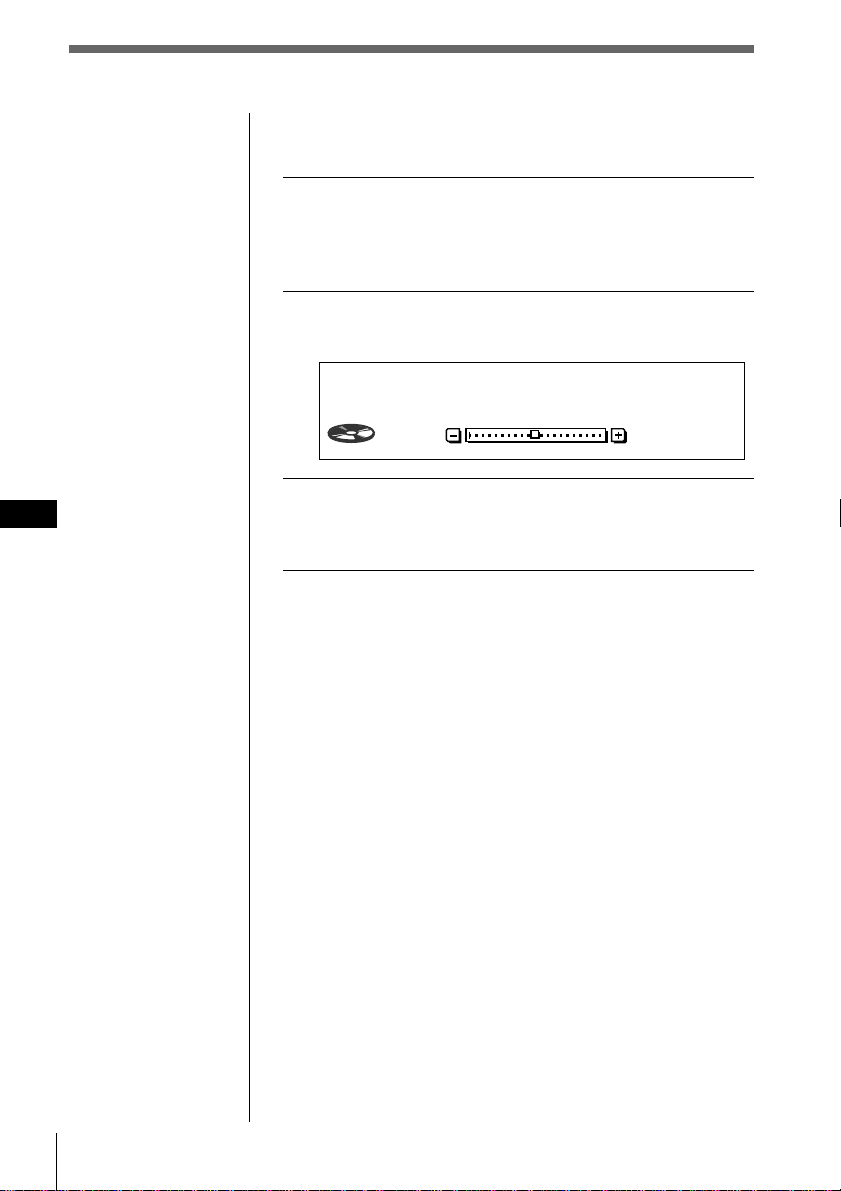
DSP
ES
56
Ajuste del volumen de los altavoces
potenciadores de graves
1 Realice los pasos 1 y 2 de “Ajuste de la
frecuencia de corte de los altavoces
potenciadores de graves” (consulte la página
55).
2 Pulse /, y después VOL + o – para ajustar el
nivel.
3 Pulse y mantenga pulsado SOUND durante
dos segundos.
Aparece la indicación normal.
Nota
Si reduce el volumen
por completo, aparecerá
“SUB W ATT” y la
frecuencia de corte del
altavoz potenciador de
graves se desactivará.
SUB
C.off125Hz
DSP Sound Tuning Mode CD1
4
2.16
0
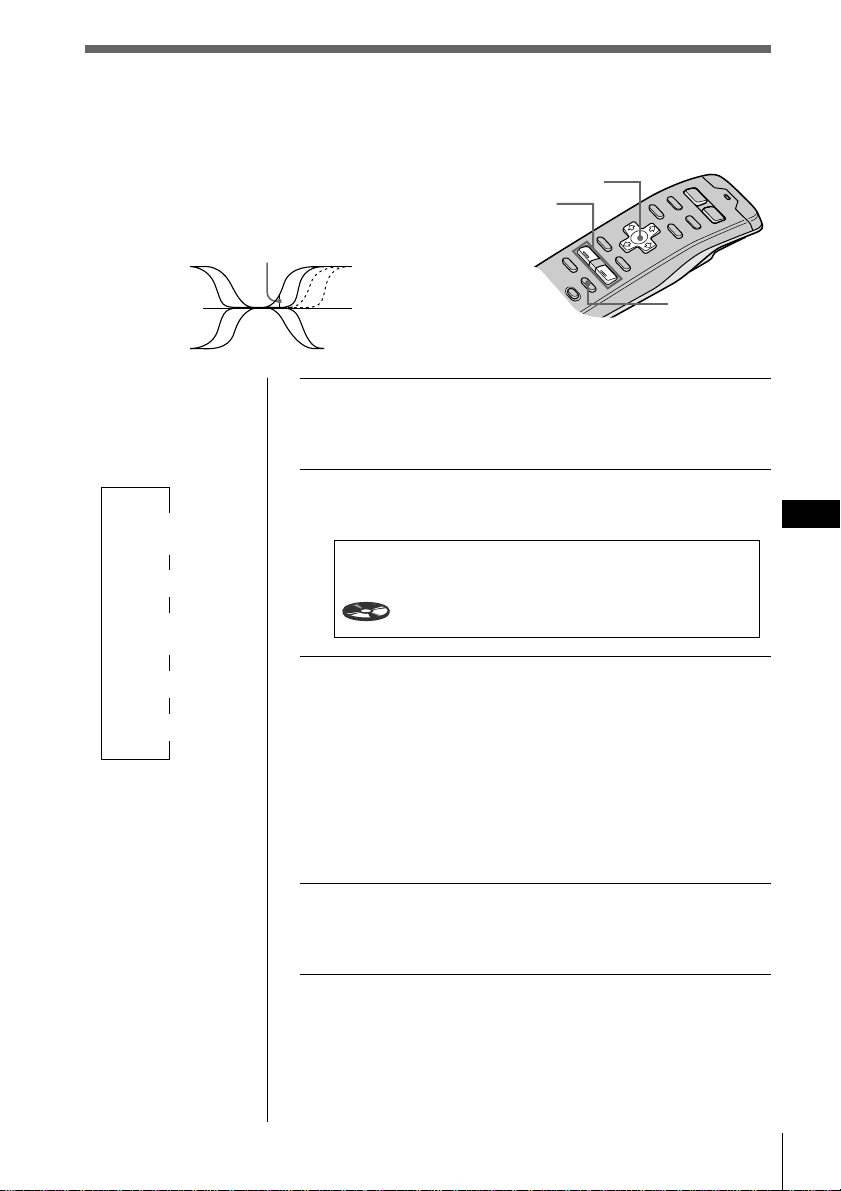
DSP
DSP
ES
57
SOUND
VOL
+
/
-
Consejos
• Cada vez que pulse
SOUND, la opción
de sintonización
cambia de la
siguiente forma:
$
SUR
(Sonido envolvente)
$
POS (Posición)
$
SUB (Altavoz
potenciador de graves)
$
BAS (Graves)
$
TRE (Agudos)
• En el paso 3, pulse
/ para pasar al
ajuste de volumen de
graves y agudos.
(consulte la página
siguiente)
1 Pulse y mantenga pulsado SOUND durante
dos segundos.
Aparece el modo de sintonización de sonido DSP.
2 Pulse SOUND varias veces para seleccionar
“BAS” o “TRE”.
3 Pulse VOL + o – varias veces para seleccionar
el giro de frecuencia.
El giro de frecuencia aparece en el orden mostrado a
continuación:
BAS:
198Hz ˜ 250Hz ˜ 314Hz* ˜ 396Hz
TRE:
2.00kHz ˜ 3.17kHz* ˜ 4.00kHz ˜ 5.03kHz*
* Frecuencia ajustada de fábrica
4 Pulse y mantenga pulsado SOUND durante
dos segundos.
Aparece la indicación normal.
Giro de frecuencia
Frecuencia (Hz)
Ajuste del giro de frecuencia de
los graves y los agudos
Es posible ajustar los giros de frecuencia de los
graves y los agudos para adaptarse a las
características acústicas del interior del automóvil.
BAS
Tuning
250Hz
DSP Sound Tuning Mode CD1
5
3.31
Cursor
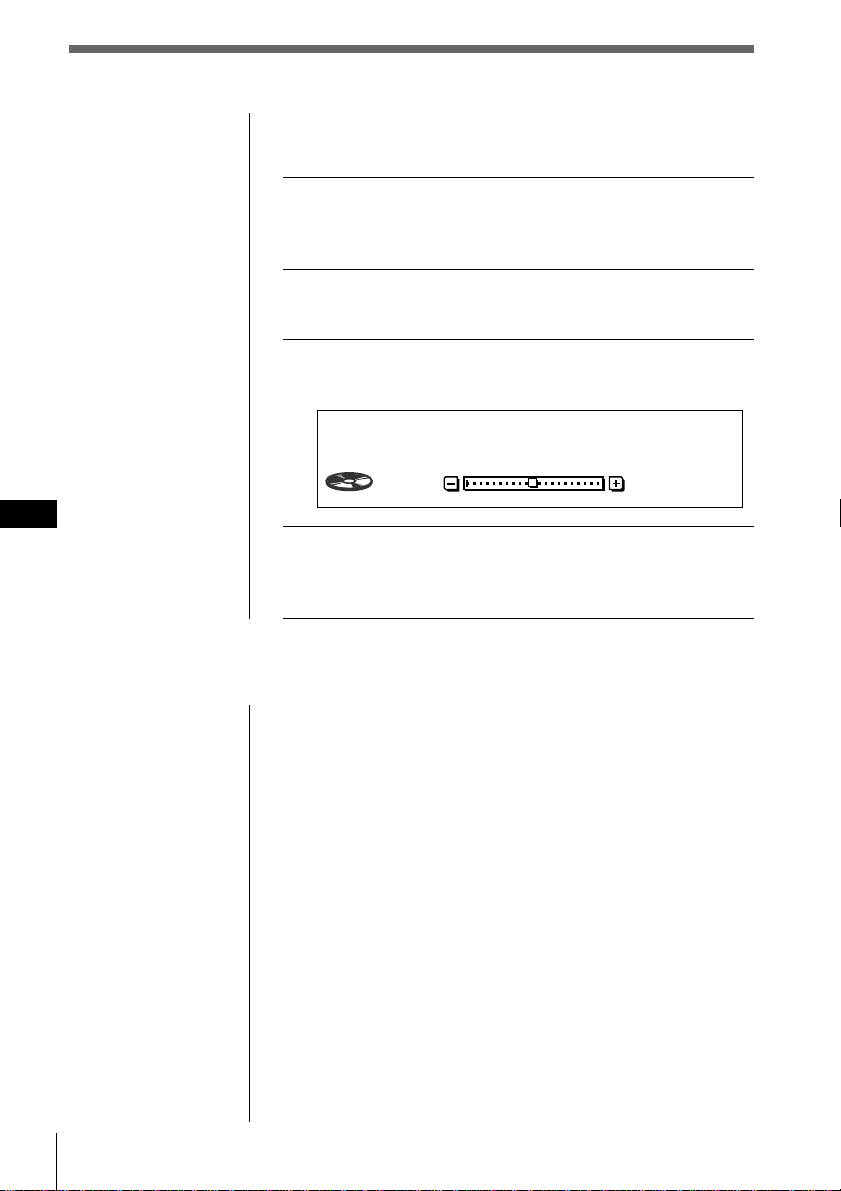
DSP
ES
58
Ajuste del volumen de los graves y los
agudos
1 Pulse y mantenga pulsado SOUND durante
dos segundos.
Aparece el modo de sintonización de sonido DSP.
2 Pulse SOUND varias veces para seleccionar
“BAS” o “TRE”.
3 Pulse /, y después VOL + o – para ajustar el
nivel.
4 Pulse y mantenga pulsado SOUND durante
dos segundos.
Aparece la indicación normal.
BAS
250Hz
0
DSP Sound Tuning Mode CD1
6
0.09
Escucha de cada fuente de programa en
su menú de sonido envolvente
registrado
(Memoria de último sonido (LSM))
Cada vez que recupere la misma fuente, podrá escuchar el
mismo efecto de sonido envolvente registrado para esa
fuente, incluso después de cambiar la fuente de programa
o de apagar y volver a encender la unidad.
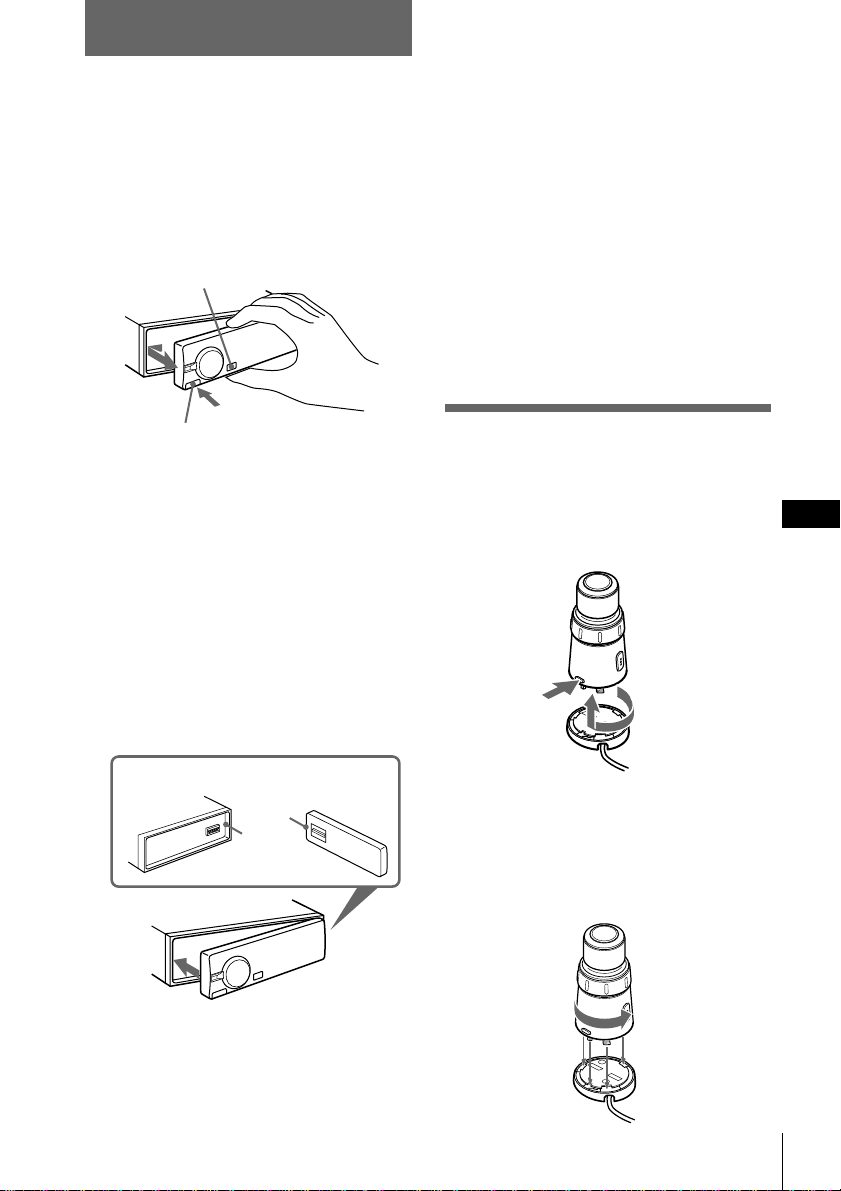
Información complementaria
59
Información complementaria
ES
a
b
1
2
1
2
Retirada del panel frontal
Es posible quitar el panel frontal de esta
unidad para evitar su robo.
1 Pulse OFF.
2 Pulse RELEASE para abrir el panel
frontal, deslice éste hacia la izquierda y
tire del lado derecho del panel.
Notas
• No fije nada a la superficie interior del panel
frontal.
• Procure que no se caiga el panel frontal al retirarlo
de la unidad.
• Si quita el panel frontal mientras la unidad se
encuentra encendida, se desactivará
automáticamente la alimentación para evitar
daños a los altavoces.
• Para transportar el panel frontal, introdúzcalo en
la funda suministrada para este fin.
Colocación del panel frontal
Sitúe el orificio a del panel frontal sobre el
eje b de la unidad tal como se muestra en la
ilustración y, a continuación, presione sobre
el lado izquierdo.
Alarma de precaución
Si gira la llave de encendido hasta la posición
OFF sin quitar el panel frontal, la alarma de
precaución emitirá pitidos durante unos
segundos (sólo si la posición ACC está
ajustada en “yes”) (consulte la página 4).
Notas
• Asegúrese de no colocar el panel frontal al revés.
• No presione con fuerza sobre el panel frontal al
fijarlo a la unidad. Presione sobre él ligeramente.
• No aplique una presión excesiva sobre los visores
del panel frontal.
• No exponga el panel frontal a la luz solar directa
ni a fuentes de calor como las salidas de aire
caliente, ni lo deje en un lugar húmedo. Nunca lo
deje en el salpicadero de un automóvil
estacionado al sol, ya que puede producirse un
aumento considerable de la temperatura.
Liberación del mando a
distancia giratorio
Puede quitar el mando a distancia giratorio
como medida de seguridad para evitar su robo.
Gire el mando en el sentido de las agujas del
reloj mientras mantiene pulsado RELEASE.
Colocación del mando a distancia
giratorio
Alinee los cuatro orificios de la parte inferior
del mando a distancia giratorio en los cuatro
enganches del soporte y deslice el mando
hasta que encaje en su sitio, tal como se
muestra en la ilustración.
Información complementaria
DSP/Información complementaria
OFF
RELEASE
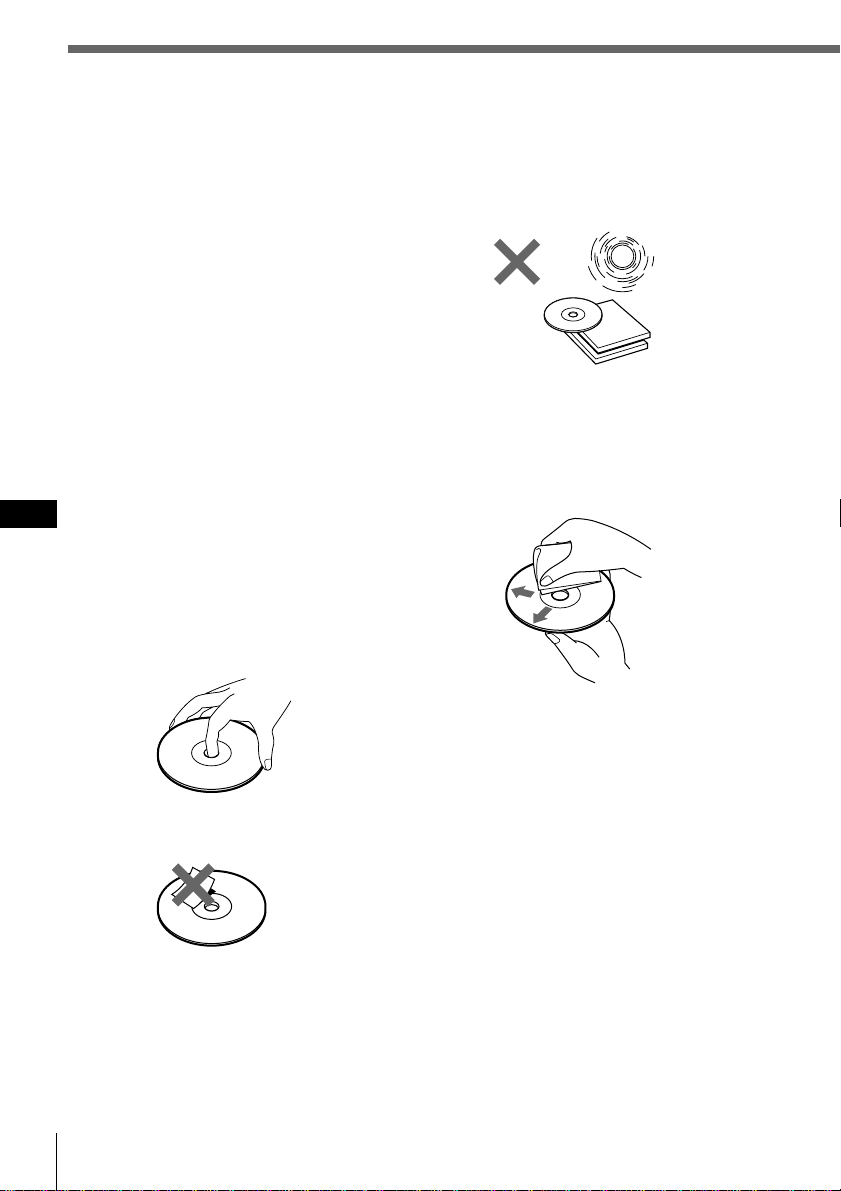
60 Información complementaria
ES
Precauciones
• Si aparca el automóvil bajo la luz solar
directa y se produce un considerable
aumento de temperatura en el interior del
mismo, deje que se enfríe la unidad antes de
utilizarla.
• Si la unidad no recibe alimentación,
compruebe primero las conexiones. Si todo
está en orden, examine el fusible.
• Si los altavoces no emiten sonido con un
sistema de dos altavoces, ajuste el control de
equilibrio entre éstos en la posición central.
•Si el automóvil dispone de antena
motorizada, se extenderá automáticamente
mientras la unidad se encuentre en
funcionamiento.
Si desea realizar alguna consulta o solucionar
algún problema en relación con la unidad que
no cubra este manual, póngase en contacto
con el proveedor Sony más próximo.
Notas sobre el manejo de discos
compactos
Los discos sucios o defectuosos pueden
producir pérdidas de sonido durante la
reproducción. Para obtener un sonido
óptimo, maneje los discos de la siguiente
forma.
Coja el disco por los bordes. Para mantenerlo
limpio, no toque su superficie.
No pegue papel ni cinta adhesiva sobre la
superficie de la etiqueta.
No exponga los discos a la luz solar directa ni
a fuentes de calor, como conductos de aire
caliente, ni los deje en un automóvil aparcado
bajo la luz solar directa donde pueda
producirse un considerable aumento de
temperatura en el interior del mismo.
Antes de la reproducción, limpie los discos
con un paño de limpieza opcional desde el
centro hacia los bordes.
No utilice disolventes como bencina,
diluyente, ni limpiadores disponibles en el
mercado o rociadores antiestáticos destinados
a discos analógicos.
Nota sobre la condensación de
humedad
En días lluviosos o en zonas muy húmedas,
puede condensarse humedad en las lentes del
interior del reproductor de CD. Si esto ocurre,
la unidad no funcionará correctamente. En
este caso, extraiga el disco y espere durante
una hora aproximadamente hasta que la
humedad se evapore.
Si reproduce discos compactos de
8 cm
Utilice el adaptador opcional de Sony para
discos compactos “single” (CSA-8) con el fin
de evitar que el reproductor de CD se dañe.
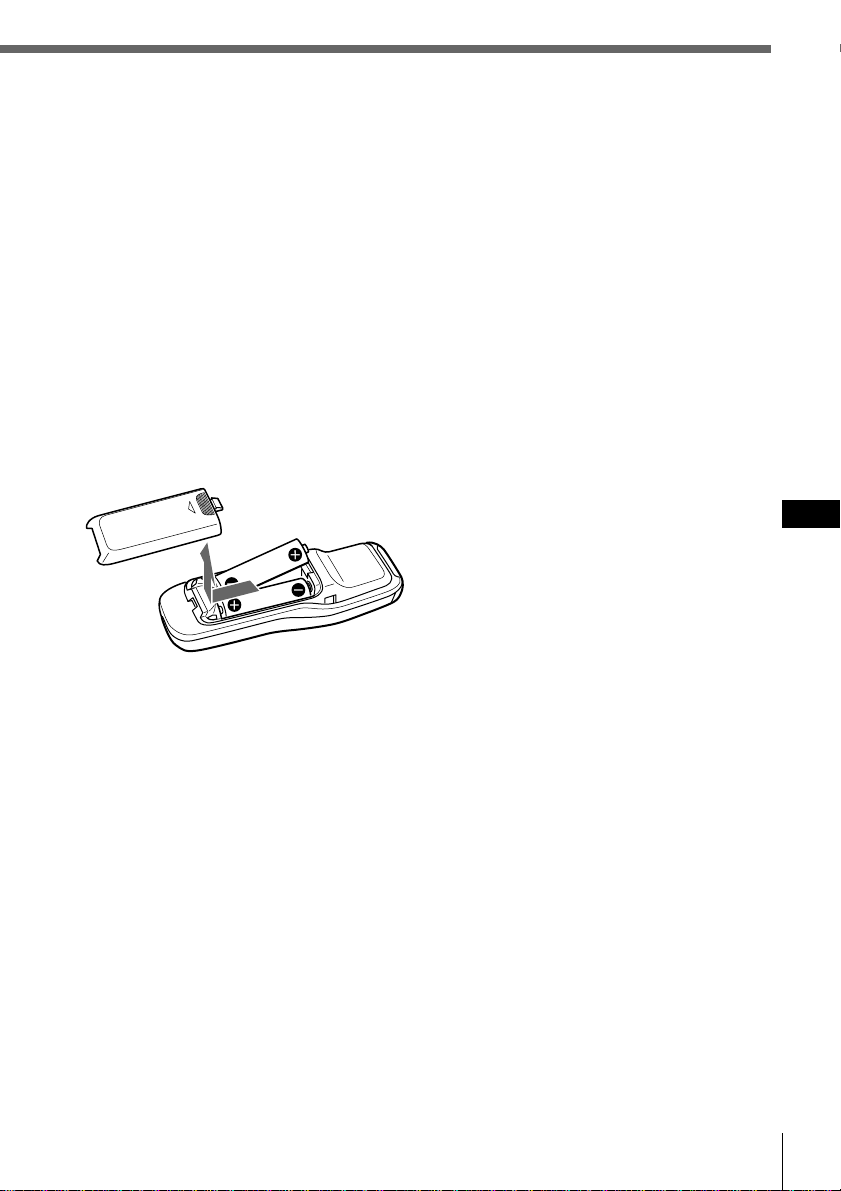
Información complementaria
61
Información complementaria
ES
Notas sobre el uso de las pilas
Para evitar daños por fuga de pilas y
corrosión:
— Compruebe que la polaridad de las
pilas coincide con las marcas + y – del
compartimiento de las mismas.
— No utilice pilas usadas junto con
nuevas, ni de tipo diferente.
— Extraiga las pilas cuando no vaya a
utilizar el sistema durante mucho
tiempo.
— No cargue las pilas.
Si se produce fuga de las pilas, sustituya las
dos después de limpiar el compartimiento de
las mismas.
Notas sobre el mando a distancia
inalámbrico
•Para evitar deformaciones debido al calor,
no deje el mando en un lugar expuesto a la
luz solar directa.
•La luz solar directa puede afectar a la
capacidad del sistema para recibir señales
infrarrojas del mando. Si esto ocurre,
acerque dicho mando al sensor de control
remoto del sistema.
•Cuando aparque el automóvil, guarde el
mando en algún sitio, como en la guantera,
alejado de la luz solar directa para evitar
deformaciones debido al calor.
Acerca del visor LCD de la sección
de visualización
Si la temperatura es extremadamente alta o
baja, el visor puede atenuarse y resultar difícil
de ver. Esto se debe a las características de la
pantalla LCD y no es ningún fallo de
funcionamiento. El visor volverá a su estado
normal cuando la temperatura sea normal.
Mando a distancia
inalámbrico
Instalación de las pilas en el
mando a distancia inalámbrico
Inserte dos pilas tamaño AA (R6) con la
polaridad correcta.
Duración de las pilas
Si las pilas disponen de poca energía, no será
posible emplear la unidad con el mando a
distancia inalámbrico. Las pilas suelen durar
unos seis meses (o menos, en función de la
forma de uso del mando). Si dicho mando no
funciona, sustituya las pilas y compruebe que
puede controlar el sistema con él.
OPEN
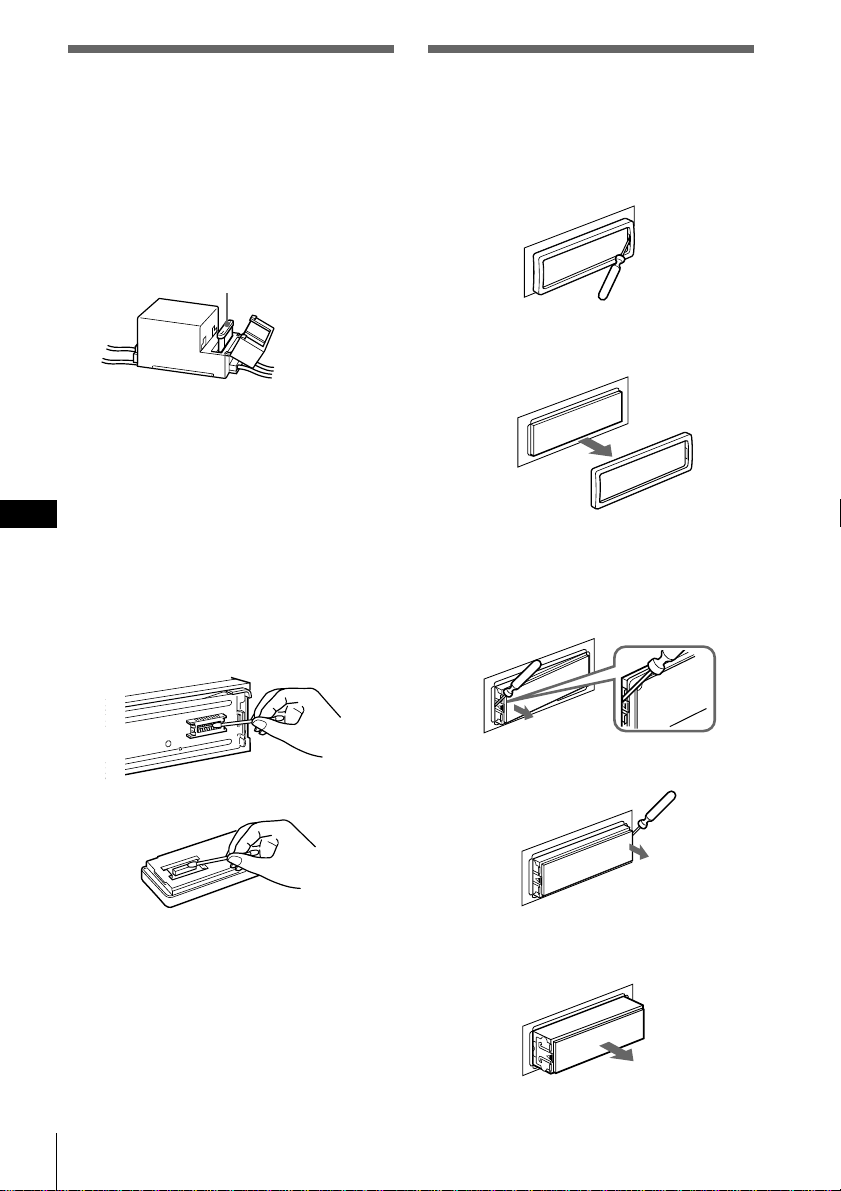
62 Información complementaria
ES
Sustitución del fusible
Cuando sustituya el fusible, asegúrese de
utilizar uno cuyo amperaje coincida con el
indicado en el fusible. Si éste se funde,
compruebe la conexión de alimentación y
sustitúyalo. Si vuelve a fundirse después de
sustituirlo, es posible que exista algún fallo de
funcionamiento interno. En tal caso, póngase
en contacto con el proveedor Sony más
próximo.
Aviso
No utilice nunca fusibles cuyo amperaje
nominal sea superior al del suministrado con
la unidad, ya que ésta podría dañarse.
Limpieza de los conectores
La unidad puede no funcionar correctamente
si los conectores de la misma y del panel
frontal están sucios. Para evitarlo, abra el
panel frontal pulsando RELEASE, extráigalo
y limpie los conectores con un bastoncillo de
algodón humedecido en alcohol. No aplique
demasiada fuerza. En caso contrario, los
conectores podrían dañarse.
Notas
• Por su seguridad, antes de limpiar los conectores,
apague el motor y extraiga la llave del interruptor
de encendido.
• No toque nunca los conectores directamente con
los dedos ni con dispositivos metálicos.
Desmontaje de la unidad
1 Presione el clip del interior de la
cubierta frontal con un destornillador
fino, y libere con suavidad dicha
cubierta.
2 Repita el paso 1 en el lado izquierdo.
La cubierta frontal se extraerá.
3 Utilice un destornillador fino para
ejercer presión sobre el clip del lado
izquierdo de la unidad y, a
continuación, tire de dicho lado hasta
que el retén no roce el alojamiento.
4 Repita el paso 3 en el lado derecho.
5 Deslice la unidad para sacarla del
alojamiento.
Unidad principal
Parte trasera del panel frontal
Fusible (10 A)
Información complementaria
63
Información complementaria
ES
Generales
Salidas Salida digital
Salidas de línea (3)
Cable de control de relé
de antena motorizada
Cable de control de
amplificador de potencia
Cable de control de
atenuación para teléfono
Cable de control de
iluminación
Requisitos de alimentación
Batería de automóvil de
12 V CC
(negativo a masa)
Dimensiones Aprox.
178 × 50 × 184 mm
(an/al/prf)
Dimensiones de montaje Aprox.
182 × 53 × 163 mm
(an/al/prf)
Peso Aprox. 1,6 kg
Accesorios suministrados Componentes de
instalación y conexiones
(1 juego)
Mando giratorio
RM-X90
Mando a distancia
inalámbrico RM-X9
Estuche para el panel
frontal (1)
Accesorios opcionales Adaptador óptico
XA-D210
Cable óptico
RC-97 (2 m), RC-98 (5 m)
Cable BUS (suministrado
con un cable con clavijas
RCA)
RC-61 (1 m), RC-62 (2 m)
Adaptador para discos
compactos sencillos
CSA-8
Equipo opcional Cambiador de CD
CDX-805 (10 discos),
CDX-715 (10 discos),
CDX-T65 (6 discos),
CDX-T62 (6 discos)
Cambiador de MD
MDX-62
Preamplificador digital
XDP-U50D
Preamplificador
ecualizador digital
XDP-210EQ
Selector de fuente
XA-C30
Diseño y especificaciones sujetos a cambios sin
previo aviso.
Especificaciones
Sección del reproductor de CD
Sistema Audio digital de discos
compactos
Relación señal-ruido 109 dB
Respuesta de frecuencia 5 – 20.000 Hz (±1 dB)
Fluctuación y trémolo Inferior al límite medible
Sección del sintonizador
FM
Margen de sintonización Intervalo de sintonización
de FM:
50 kHz/200 kHz
conmutable
87,5 – 108,0 MHz
(a intervalo de 50 kHz)
87,5 – 107,9 MHz
(a intervalo de 200 kHz)
Terminal de antena Conector de antena
externa
Frecuencia intermedia 10,7 MHz
Sensibilidad útil 8 dBf
Selectividad 75 dB a 400 kHz
50 dB a 200 kHz
Relación señal-ruido 65 dB (estéreo),
68 dB (mono)
Distorsión armónica a 1 kHz
0,3 % (estéreo),
0,3 % (mono)
Separación 35 dB a 1 kHz
Respuesta de frecuencia 20 – 15.000 Hz
AM
Margen de sintonización Intervalo de sintonización
de AM:
9 kHz/10 kHz conmutable
531 – 1.602 kHz
(a intervalo de 9 kHz)
530 – 1.710 kHz
(a intervalo de 10 kHz)
Terminal de antena Conector de antena
externa
Frecuencia intermedia 10,71 MHz/450 kHz
Sensibilidad 30 dB µV
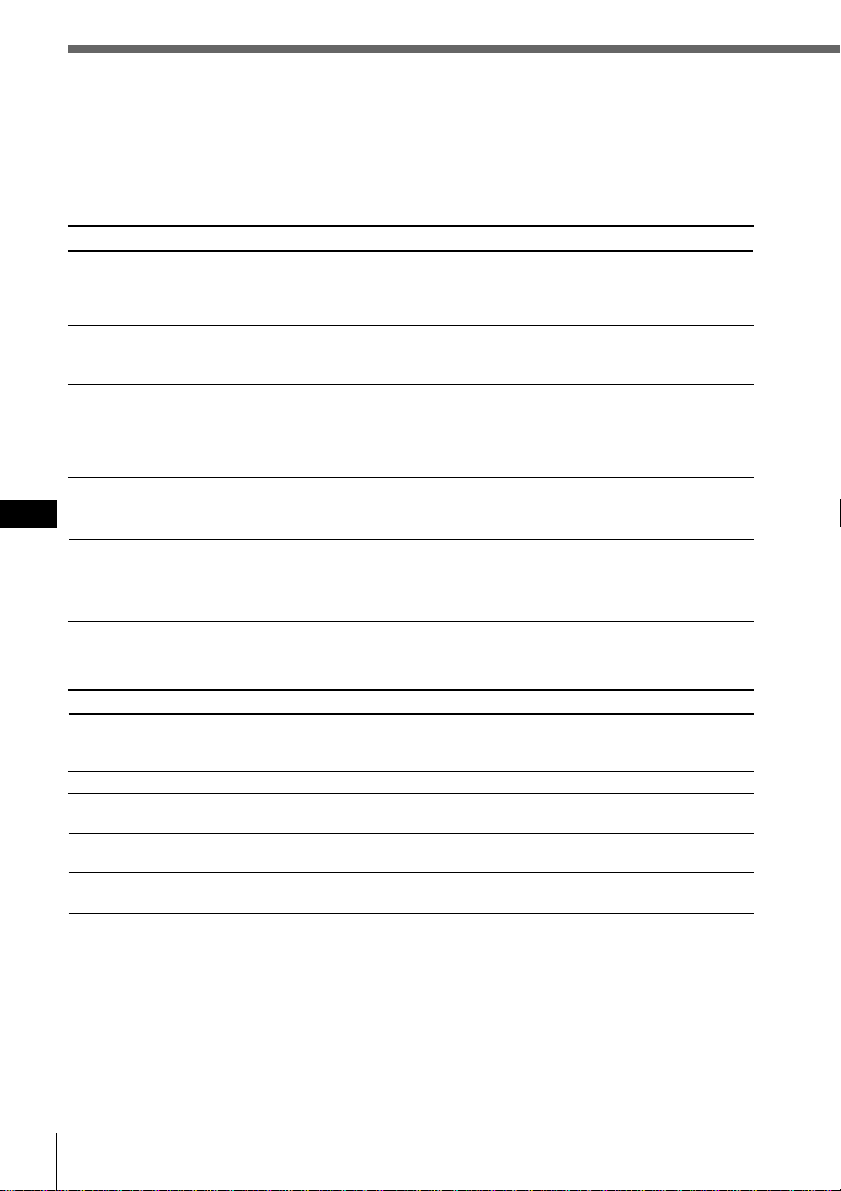
64 Información complementaria
ES
Guía de solución de problemas
La siguiente lista de comprobaciones le ayudará a solucionar los problemas que puedan surgir
con la unidad.
Antes de consultar la siguiente lista, compruebe los procedimientos de funcionamiento y
conexión.
Generales
Problema
Ausencia de sonido
El contenido de la memoria se
ha borrado.
No aparecen indicaciones en el
visor.
La unidad no responde.
El mando a distancia
inalámbrico no funciona.
Causa/Solución
•Ya hay un CD insertado.
•Ha insertado el CD al revés a la fuerza o de la forma
incorrecta (MD).
MD defectuoso o CD sucio.
La temperatura ambiente es superior a 50°C.
Pulse el botón de restauración.
•Ha instalado la unidad en un ángulo superior a 60°.
•No ha instalado la unidad en un lugar firme del automóvil.
Problema
No es posible insertar discos.
La reproducción no se inicia.
El disco se expulsa
automáticamente.
Los botones de funcionamiento
no se activan.
El sonido salta debido a
vibraciones.
Causa/Solución
•Cancele la función ATT.
•Ajuste el control de equilibrio entre los altavoces en la
posición central para sistemas de dos altavoces.
•Ajuste el volumen.
• Se ha desconectado el cable de alimentación o la batería.
• Ha pulsado el botón de restauración.
n Vuelva a realizar el almacenamiento en la memoria.
•La función EL está desactivada (“off”) (consulte la página
65).
•Extraiga el panel frontal y limpie los conectores. Consulte
“Limpieza de los conectores” consulte la página 62 para
más información.
Siga los procedimientos de ajuste inicial con el mando a distancia
inalámbrico una vez restaurada la unidad. Ésta no funcionará a
menos que realice estos ajustes (consulte la página 4).
•Retire los obstáculos que bloqueen el recorrido de la señal
entre el mando y la unidad.
•Oriente el mando hacia el sensor de control remoto de la
unidad.
Reproducción de CD/MD
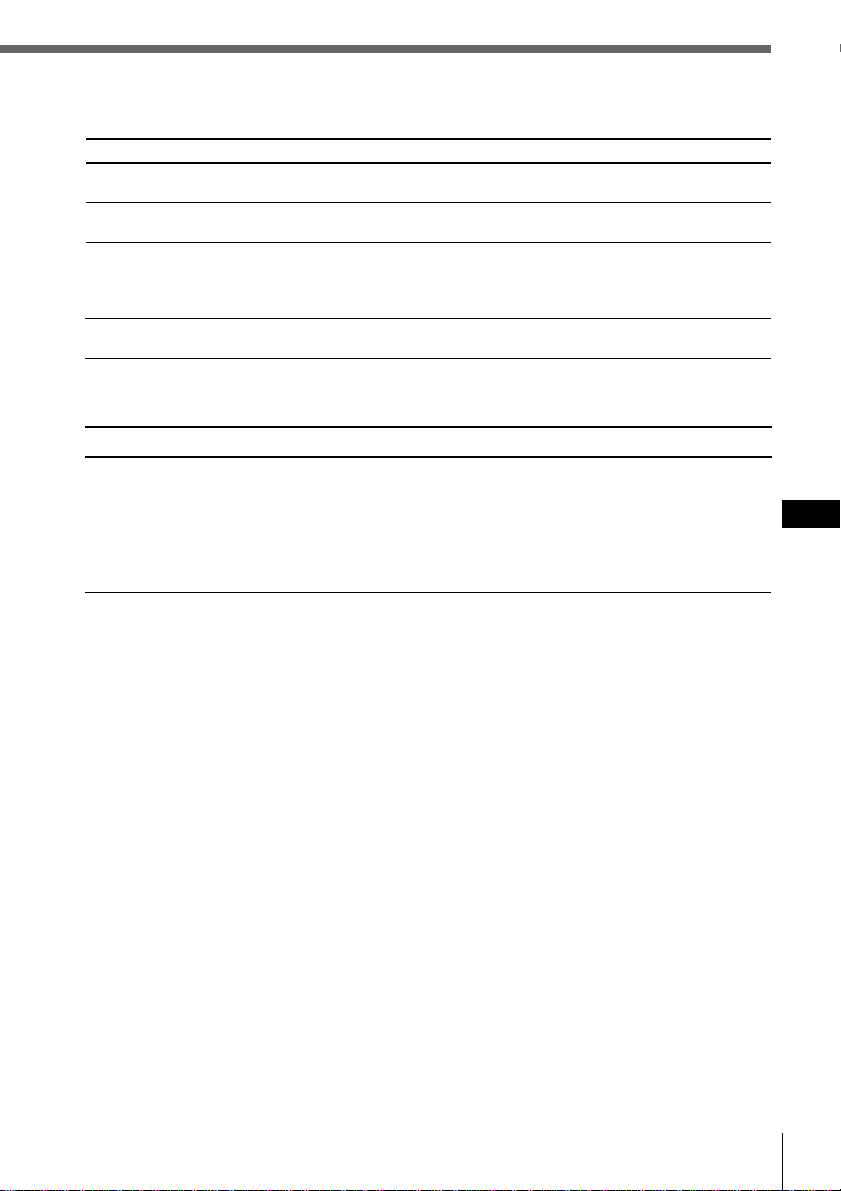
Información complementaria
65
Información complementaria
ES
Causa/Solución
El volumen de los altavoces traseros puede haberse reducido
automáticamente con el fin de potenciar el efecto del ajuste
de la posición de escucha.
n Ajuste el balance.
El balance de los altavoces puede ajustarse por separado
para el modo de sintonización de sonido DSP (consulte la
página 53).
Problema
Ausencia de sonido, o sonido
demasiado bajo.
Funciones DSP
Recepción de la radio
Problema
No es posible sintonizar
emisoras memorizadas.
No es posible realizar la
sintonización automática.
La indicación “ST” parpadea.
Se producen interferencias
durante la recepción de FM.
Causa/Solución
• Memorice la frecuencia correcta.
• La señal de radiodifusión es demasiado débil.
La señal de radiodifusión es demasiado débil.
n Utilice la sintonización manual.
•Sintonice la frecuencia con precisión.
•La señal de radiodifusión es demasiado débil.
n Realice el ajuste en el modo monofónico (consulte la
página 37).
Ha seleccionado el modo Wide.
n Ajústelo en el modo Narrow o Auto (consulte la página 39).

66 Información complementaria
ES
Solución
Inserte el cargador en la unidad
de CD/MD.
Inserte discos en la unidad de
CD/MD.
Inserte otro CD/MD.
Límpielo o insértelo
correctamente.
Inserte otro MD.
Reproduzca un MD con temas
grabados.
Pulse el botón de restauración de
la unidad.
Cierre la tapa o inserte los
minidiscos correctamente.
Espere hasta que la temperatura
sea inferior a 50°C.
Indicación
NO Magazine
NO Disc
NG Discs
Disc Error
Blank
PushReset
Not Ready
HighTemp
Causa
El cargador de discos no está insertado
en la unidad de CD/MD.
No hay ningún disco en la unidad de
CD/MD.
El CD/MD no puede reproducirse
debido a algún problema.
El CD está sucio o insertado al revés.*
2
El MD no se reproduce debido a algún
problema.*
2
No hay temas grabados en el MD.*
2
La unidad de CD/MD no puede
utilizarse debido a algún problema.
La tapa de la unidad de MD está
abierta o los minidiscos no están
correctamente insertados.
La temperatura ambiente es superior a
50°C.
*
1
Indicaciones de error
Las siguientes indicaciones parpadearán durante unos cinco segundos, y se oirá una alarma.
*
1
Si se produce algún error durante la reproducción de un MD o CD, el número de disco del MD o del CD no
aparecerá en el visor.
*
2
El número del disco que causa el error aparece en el visor.
Si las soluciones anteriormente descritas no ayudan a mejorar la situación, consulte con el
proveedor Sony más próximo.
*
1

Información complementaria
67
Información complementaria
ES

*I-3-862-328-24*(1)
Sony corporation Printed in Japan