www.HunterFan.com
1.888.830.1326
PAGE
5
30 inches
7 feet
PAGE
2
What to Expect with
Your Installation
Ceiling Bracket
Ladder
PAGE
3
Tools Needed
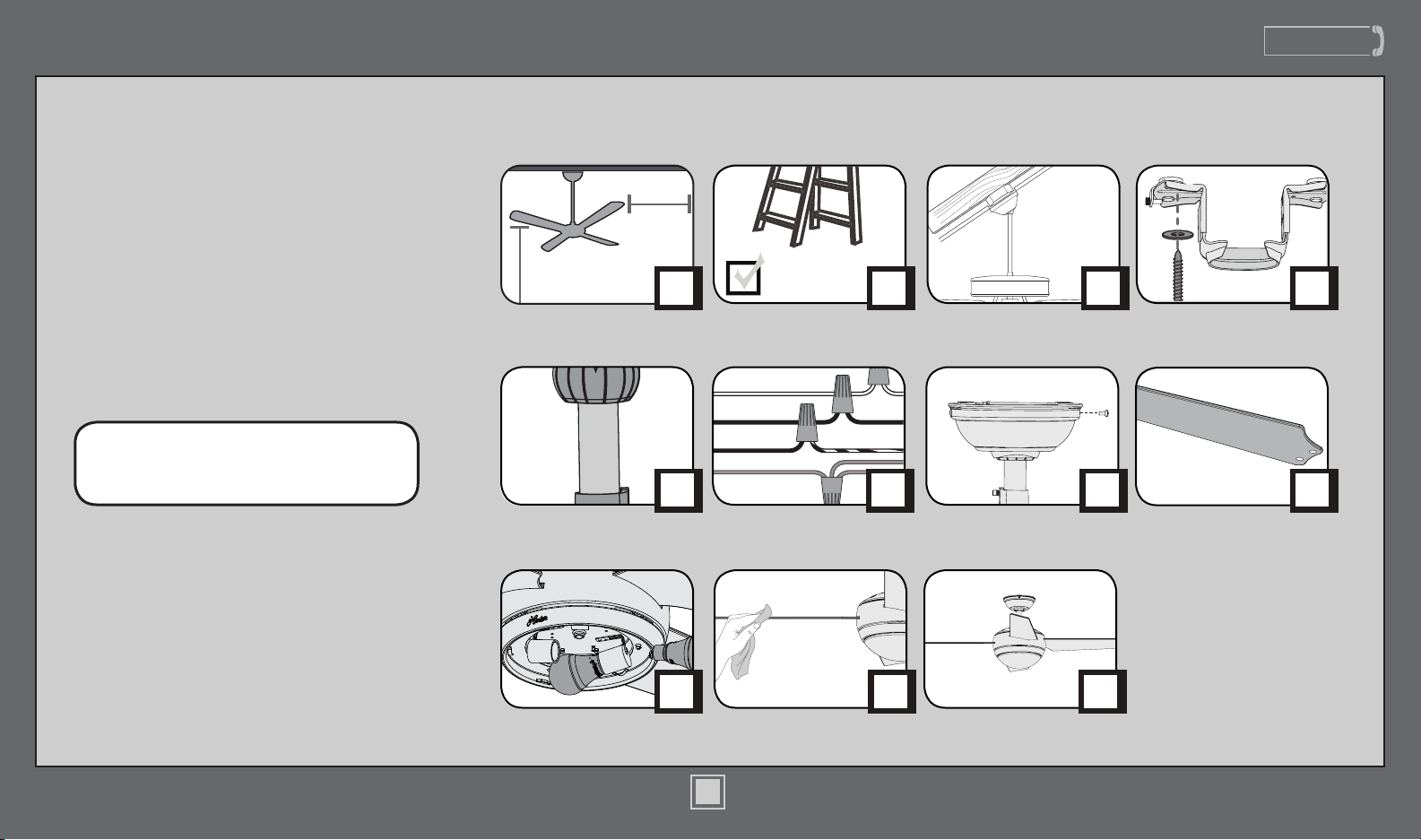
Table of Contents
PAGE
4
Mounting Options
Congratulations on purchasing
your new Hunter® ceiling fan! It will
provide comfort and performance
in your home or ofce for many
years. This installation and operation
manual contains complete
instructions for installing and
operating your fan.
We are proud of our work and
appreciate the opportunity to
supply you with the best ceiling fan
available anywhere in the world.
To register your fan, please visit:
www.HunterFan.com/register
Save your receipt for proof of purchase.
Operation,
Maintenance & Cleaning
PAGE
13
Troubleshooting
?
?
?
PAGE
15
Light Kit
PAGE
11
PAGE
10
Blades
Canopy
PAGE
9
PAGE
6
Downrod
PAGE
7
Wiring
1
M3648-01 • 03/27/17 • © Hunter Fan Company
www.HunterFan.com
1.888.830.1326
2
M3648-01 • 03/27/17 • © Hunter Fan Company
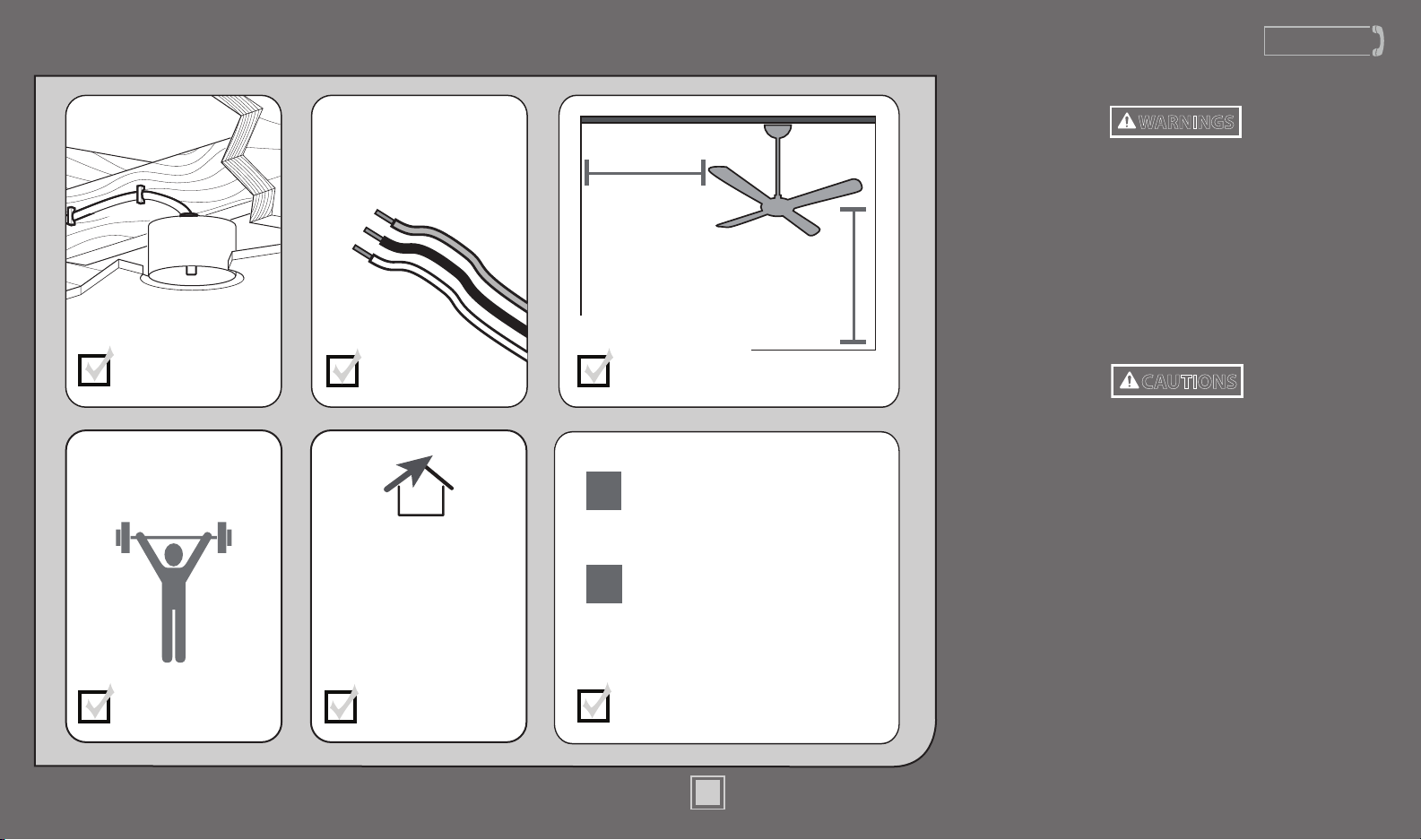
What to Expect with Your Installation
Know your wiring
If you are unfamiliar
with wiring, use a
qualied electrician.
You may need a
friend to help you.
Check box to see
fan weight
Assess location
30 inches
from blade tip
to nearest wall
or obstruction
7 feet
from bottom
edge of blade
to the oor
Select a downrod length
Assess ceiling angle
Must be able to
secure the fan to
building structure or
fan-rated outlet box
1
2
Standard Downrod
for ceilings 8-10 feet high
Longer Downrod
for ceilings 10 feet or higher
Ceiling angles greater
than 34° will require an
Angled Mounting Kit.
See page 4 for details.
w.1 - To reduce the risk of re, electrical shock, or personal injury,
mount fan directly from building structure and/or an outlet box marked
acceptable for fan support of 70 lbs (31.8 kg) and use the mounting
screws provided with the outlet box.
w.2 - To avoid possible electrical shock, before installing or servicing your
fan, disconnect the power by turning off the circuit breakers to the outlet
box and associated wall switch location. If you cannot lock the circuit
breakers in the off position, securely fasten a prominent warning device,
such as a tag, to the service panel.
w.3 - To reduce the risk of re, electrical shock, or motor damage, use only
Hunter Solid State Speed Controls.
w.4 - To reduce the risk of personal injury, do not bend the blade brackets when
installing the blade brackets, balancing the blades, or cleaning the fan. Do not
insert foreign objects in between rotating fan blades.
c.1 - All wiring must be in accordance with national and local electrical codes
ANSI/NFPA 70. If you are unfamiliar with wiring, use a qualied electrician.
c.2 - Use only Hunter replacement parts.
This equipment has been tested and found to comply with the limits for a
Class B digital device, pursuant to part 15 of the FCC Rules. These limits are
designed to provide reasonable protection against harmful interference in
a residential installation. This equipment generates, uses and can radiate
radio frequency energy and if not installed and used in accordance with the
instructions may cause harmful interference to radio communications.
However, there is no guarantee that interference will not occur in a particular
installation. If this equipment does cause harmful interference to radio or
television reception, which can be determined by turning the equipment off
and on, the user is encouraged to try to correct the interference by one or
more of the following measures:
• Reorient or relocate the receiving antenna.
• Increase the separation between the equipment and receiver.
• Connect the equipment into an outlet on a circuit different from that to
which the receiver is connected.
• Consult the dealer or an experienced radio/TV technician for help.
Caution: modications not approved by the party responsible for compliance
could void user’s authority to operate the equipment.
This device complies with Part 15 of the FCC Rules. Operation is subject to the
following two conditions: (1) This device may not cause harmful interference,
and (2) this device must accept any interference received, including
interference that may cause undesired operation.
Read and Save These Instructions
This product conforms to UL Standard 507.
WARNINGS
CAUTIONS
www.HunterFan.com
1.888.830.1326
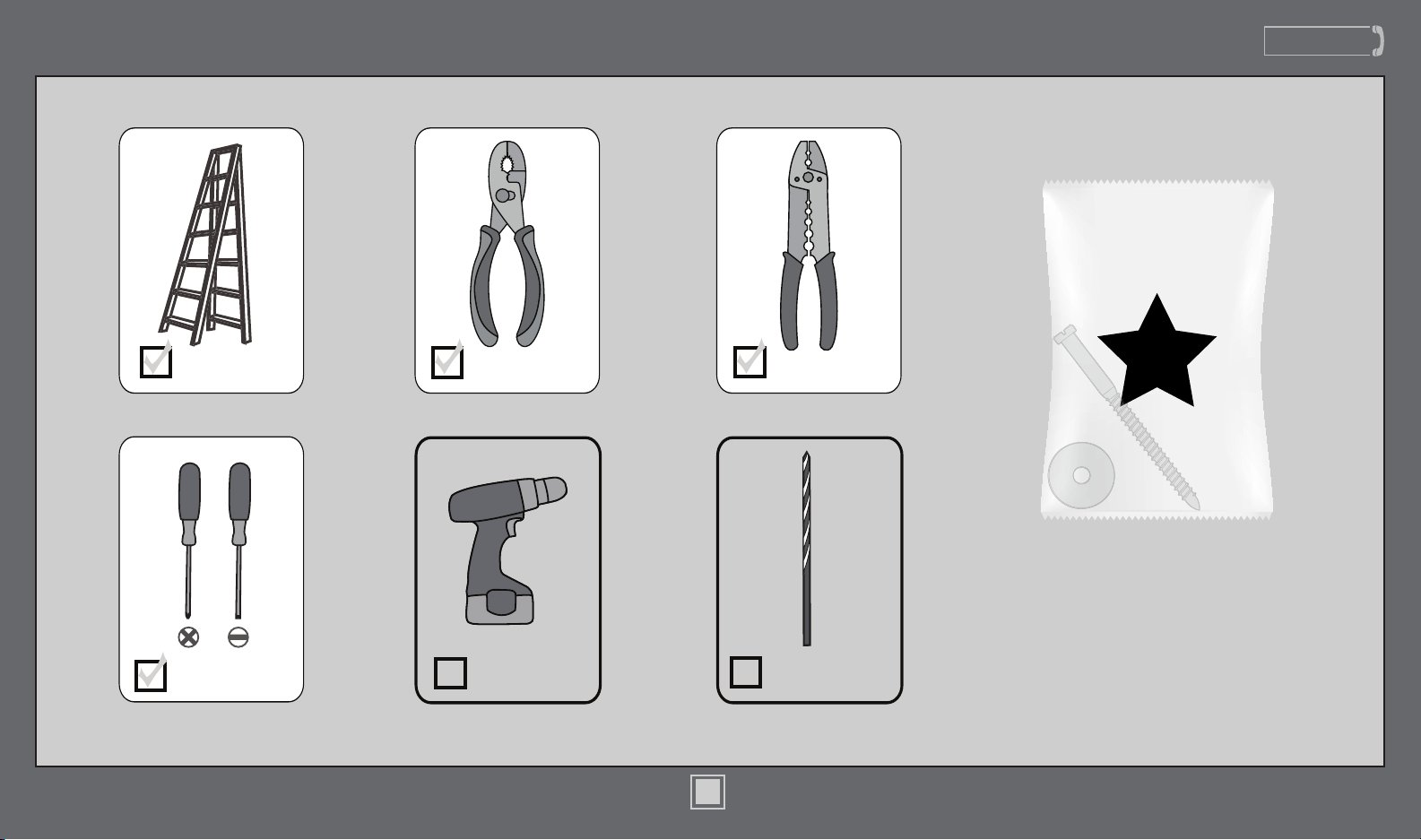
Tools Needed
Ladder
Power Drill
(optional)
9/64” Drill Bit
(optional)
Screwdrivers
Pliers Wire Strippers
If mounting to a support structure, you will also need these tools.
Do not discard the hardware bags or mix
parts from different bags. Make note of
the symbol printed on each hardware
bag. The symbols can be used to identify
the appropriate hardware for each step.
3
M3648-01 • 03/27/17 • © Hunter Fan Company
www.HunterFan.com
1.888.830.1326
4
M3648-01 • 03/27/17 • © Hunter Fan Company
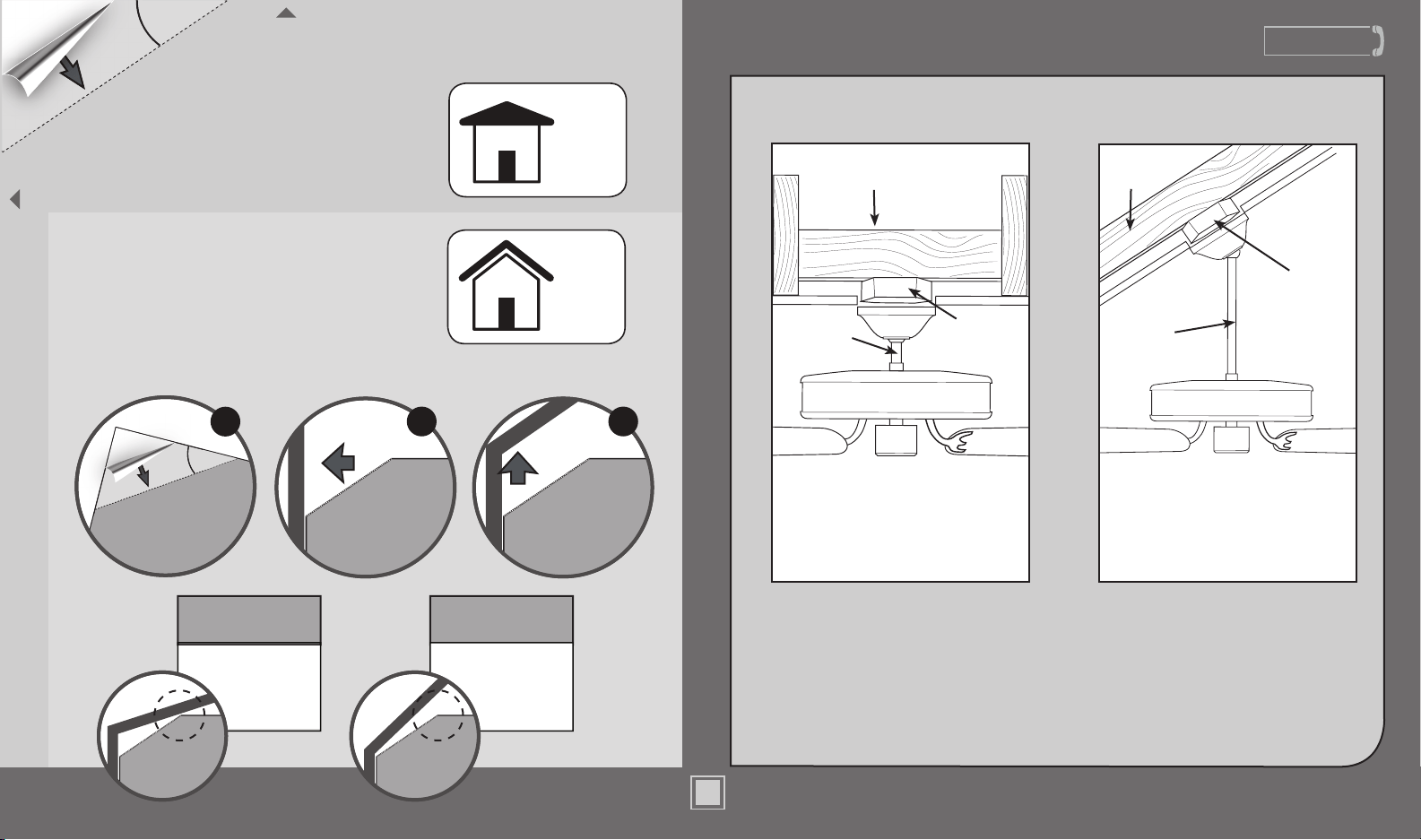
If you have an angled ceiling:
1. You will need a longer downrod (sold separately).
2. If your ceiling angle is greater than 34°, you will
also need an Angled Mounting Kit (sold separately).
Guide Touches
BOTH Ceiling & Wall
S
I
T
U
A
T
I
O
N
1
Guide Touches
Wall
but
NOT Ceiling
S
I
T
U
A
T
I
O
N
2
You need BOTH
a Longer
Downrod &
an Angled
Mounting Kit
You need ONLY
a Longer
Downrod
*most common
If you have a at ceiling:
Hang your fan by a standard downrod (included).
Mounting Options
Use Standard Mounting
to hang the fan from a at ceiling.
Use Angled Mounting
to hang the fan from a
vaulted or angled ceiling.
34
O
CEILING
WALL
OPTION
1
Standard
Mounting
OPTION
2
Angled
Mounting
2 3
SLIDE
toward ceiling
PLACE
against wall
1
FOLD
on dotted line
34°
Use the three steps below to determine if your ceiling angle is greater than 34°
Support
Structure
Ceiling
Outlet Box
(required)
Angled
Mounting
Style
Standard
Mounting
Style
Support
Structure
Ceiling
Outlet Box
(required)
www.HunterFan.com
1.888.830.1326
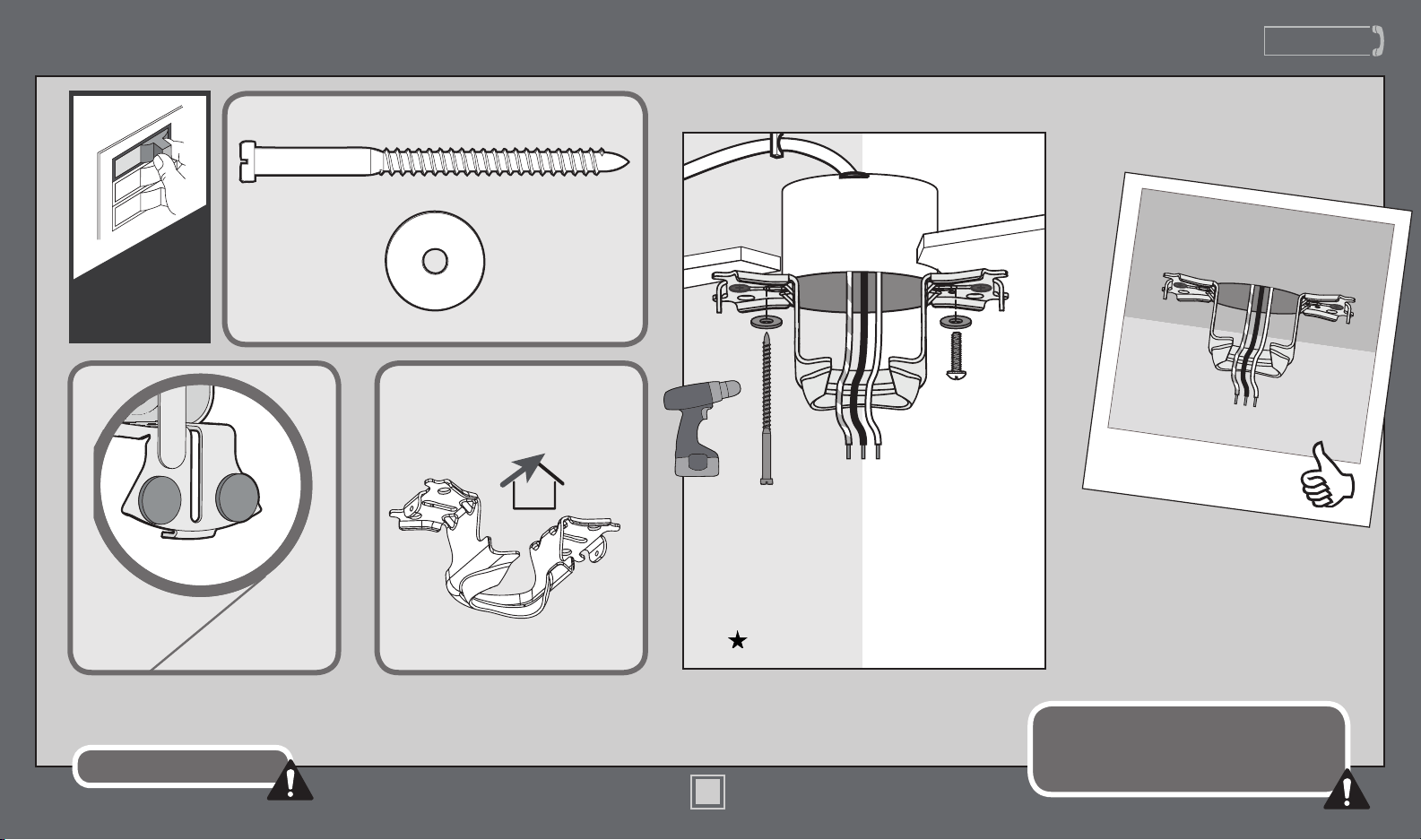
Ceiling Bracket
Refer to warning w.1 on pg. 2
To avoid possible electrical shock, before
installing your fan, disconnect the power by
turning off the circuit breakers to the outlet
box associated with the wall switch location.
For angled ceilings, point
opening toward peak.
If you are unable to do this,
call Technical Support at
1-888-830-1326.
Make sure all four bumpers are
still attached.
Use wood screws
(included) when securing
to support structure with
approved electrical outlet
box. Drill 9/64” pilot holes
in support structure to aid
in securing ceiling bracket
with hardware found in
the hardware bag.
Use machine screws
(provided with outlet
box) when securing to
existing ceiling fan-rated
outlet box. Make sure
it is securely installed
and is acceptable for fan
support of 31.8 kg (70 lbs)
or less.
OFF
Turn Power
5
M3648-01 • 03/27/17 • © Hunter Fan Company
www.HunterFan.com
1.888.830.1326
Downrod
8”
3/8”
8”
3/8”
C
U
T
&
S
T
R
I
P
(not to scale)
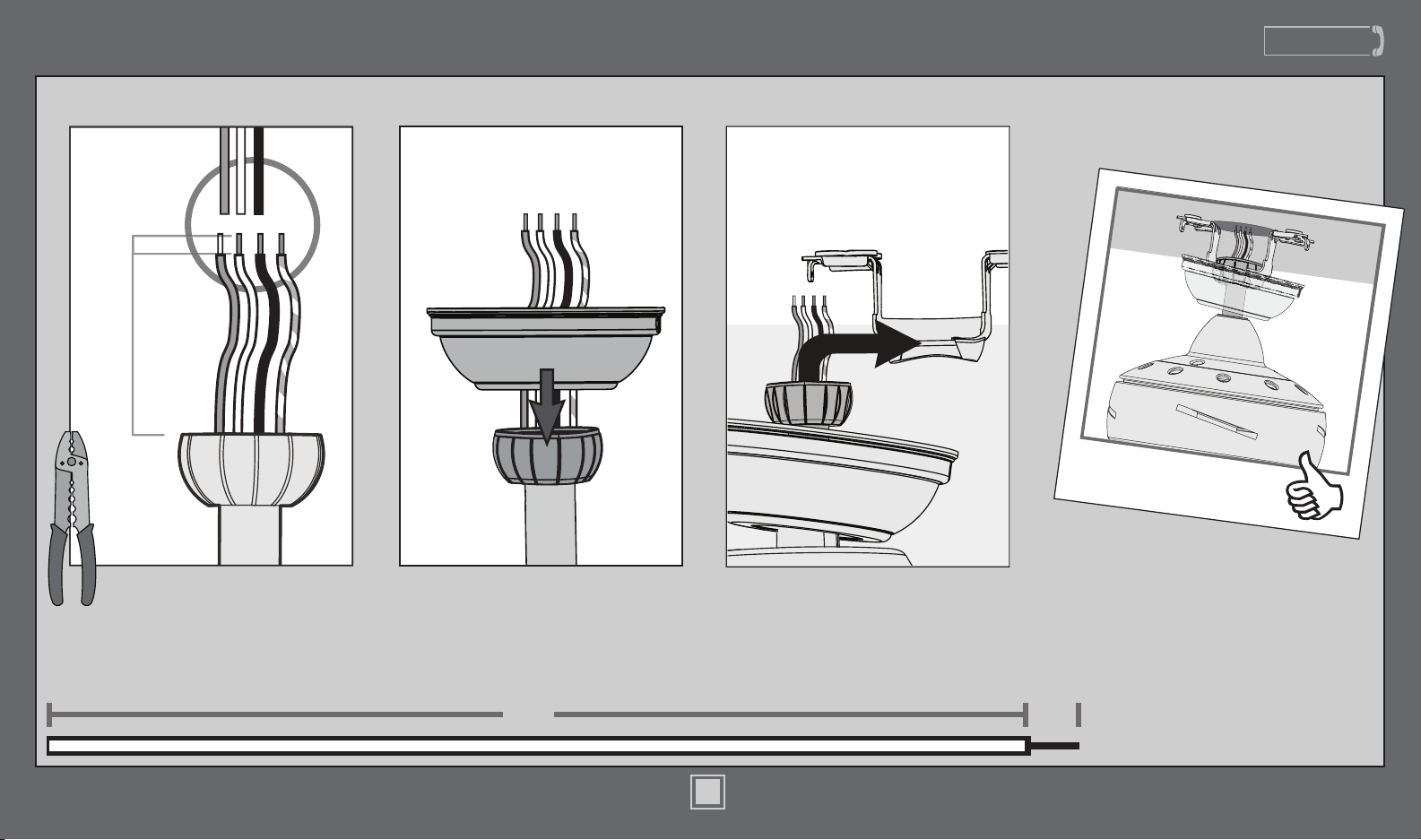
The wires can be cut, but
leave at least 8” extending
from the top of the downrod.
Put the wires and downrod through
the canopy. Let the canopy sit
loosely on top of the fan.
DO NOT PICK THE FAN UP BY
THE CANOPY OR WIRES. Place the
downrod ball into the slot in the
ceiling bracket.
6
M3648-01 • 03/27/17 • © Hunter Fan Company
www.HunterFan.com
1.888.830.1326
Wiring
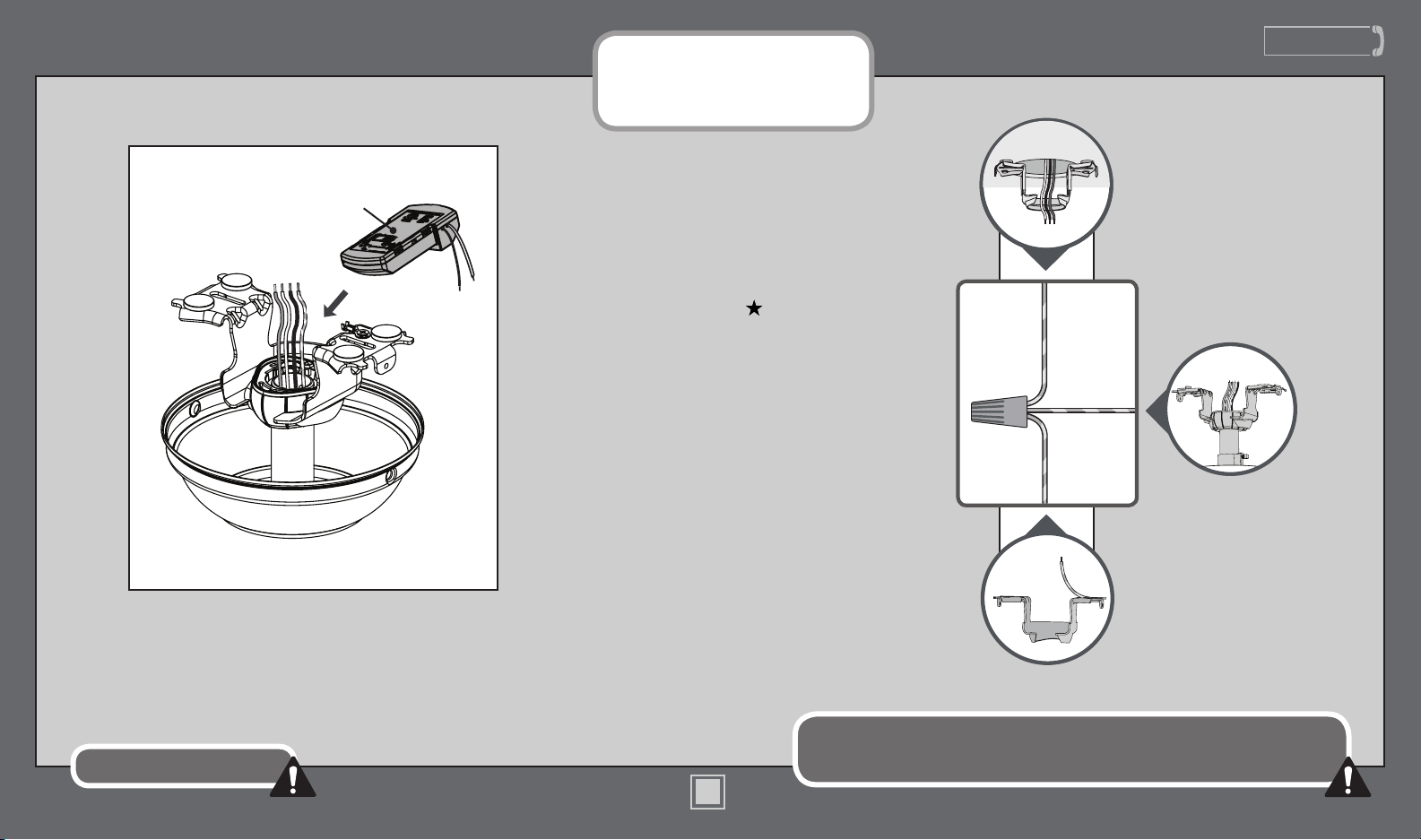
Turn the splices upward and push them carefully back through the hanger bracket
into the outlet box. Spread the wires apart, with the grounded wires on one side of
the outlet box and the ungrounded wires on the other side of the outlet box.
Refer to CAUTION c.1 on pg. 2
7
M3648-01 • 03/27/17 • © Hunter Fan Company
F
R
O
M
C
E
I
L
I
N
G
F
R
O
M
C
E
I
L
I
N
G
B
R
A
C
K
E
T
green/yellow
stripe (grounding)
green/yellow
stripe
green/yellow stripe
Note: To connect the wires, hold
the bare metal leads together and
place a wire connector over them,
then twist clockwise until tight.
Using an orange wire connector
from the hardware bag:
Connect the 3 grounding wires
(green, green/yellow stripe, or bare
copper) coming from the ceiling,
downrod, and ceiling bracket.
F
R
O
M
F
A
N
Place the receiver on top of the downrod
assembly as shown.
Receiver
www.HunterFan.com
1.888.830.1326
Wiring (continued)
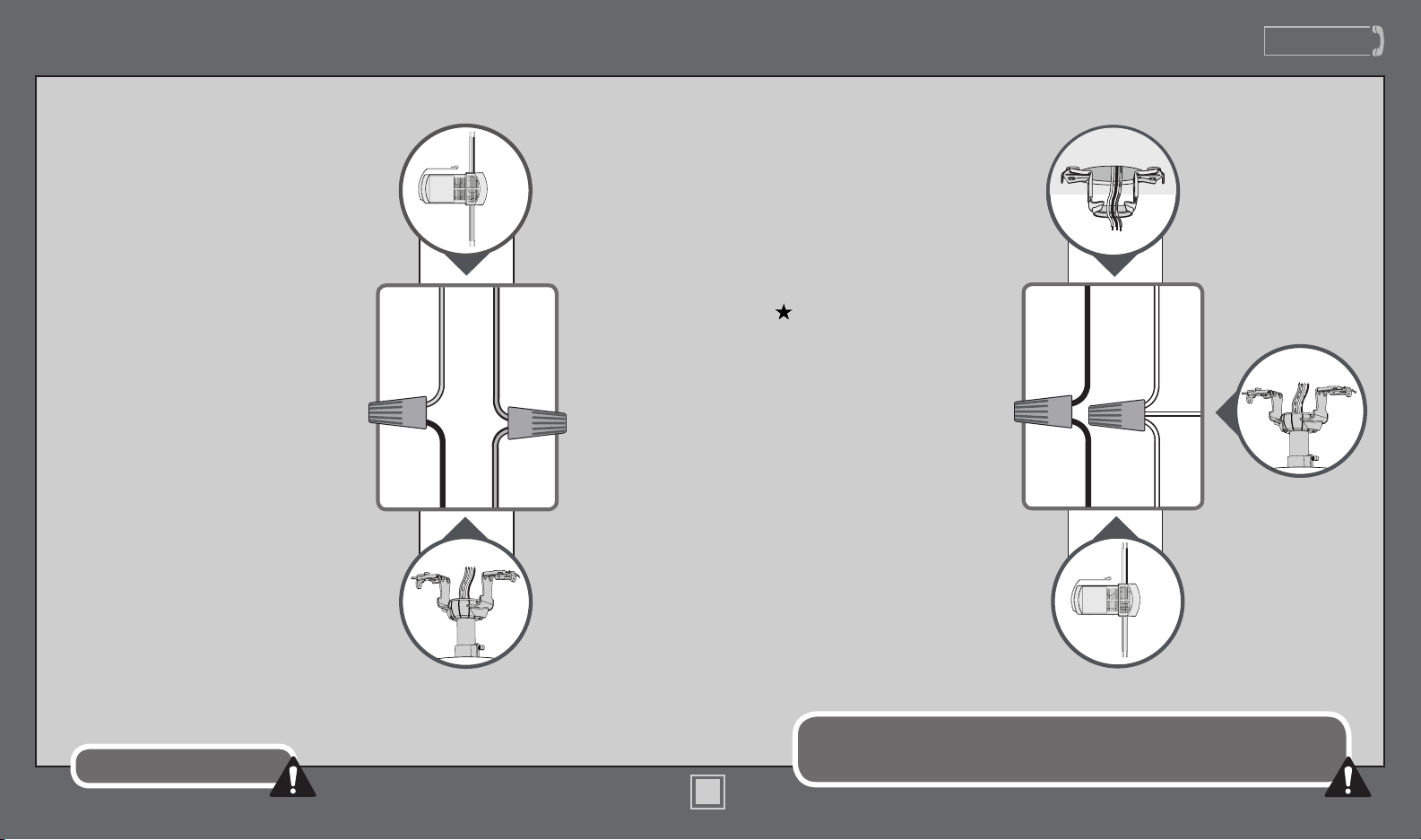
Turn the splices upward and push them carefully back through the hanger bracket
into the outlet box. Spread the wires apart, with the grounded wires on one side of
the outlet box and the ungrounded wires on the other side of the outlet box.
Refer to CAUTION c.1 on pg. 2
8
M3648-01 • 03/27/17 • © Hunter Fan Company
Using the orange wire connectors
from the hardware bag:
• Connect the black (ungrounded)
wire from the ceiling to the black
wire from the receiver.
• Connect the white (grounded)
wire from the ceiling to both the
white wire from the receiver and
the white wire from the fan.
F
R
O
M
R
E
C
E
I
V
E
R
black
blue
yellow
blue
Using the orange wire connectors
from the remote control hardware bag:
• Connect the yellow wire from
the receiver to the black wire
from the fan.
• Connect the blue wire from the
receiver to the blue wire (or
possibly black with white stripe
wire) from the fan.
F
R
O
M
F
A
N
F
R
O
M
R
E
C
E
I
V
E
R
F
R
O
M
C
E
I
L
I
N
G
black
(ungrounded)
white (grounded)
black
white
F
R
O
M
F
A
N
white
www.HunterFan.com
1.888.830.1326
Canopy
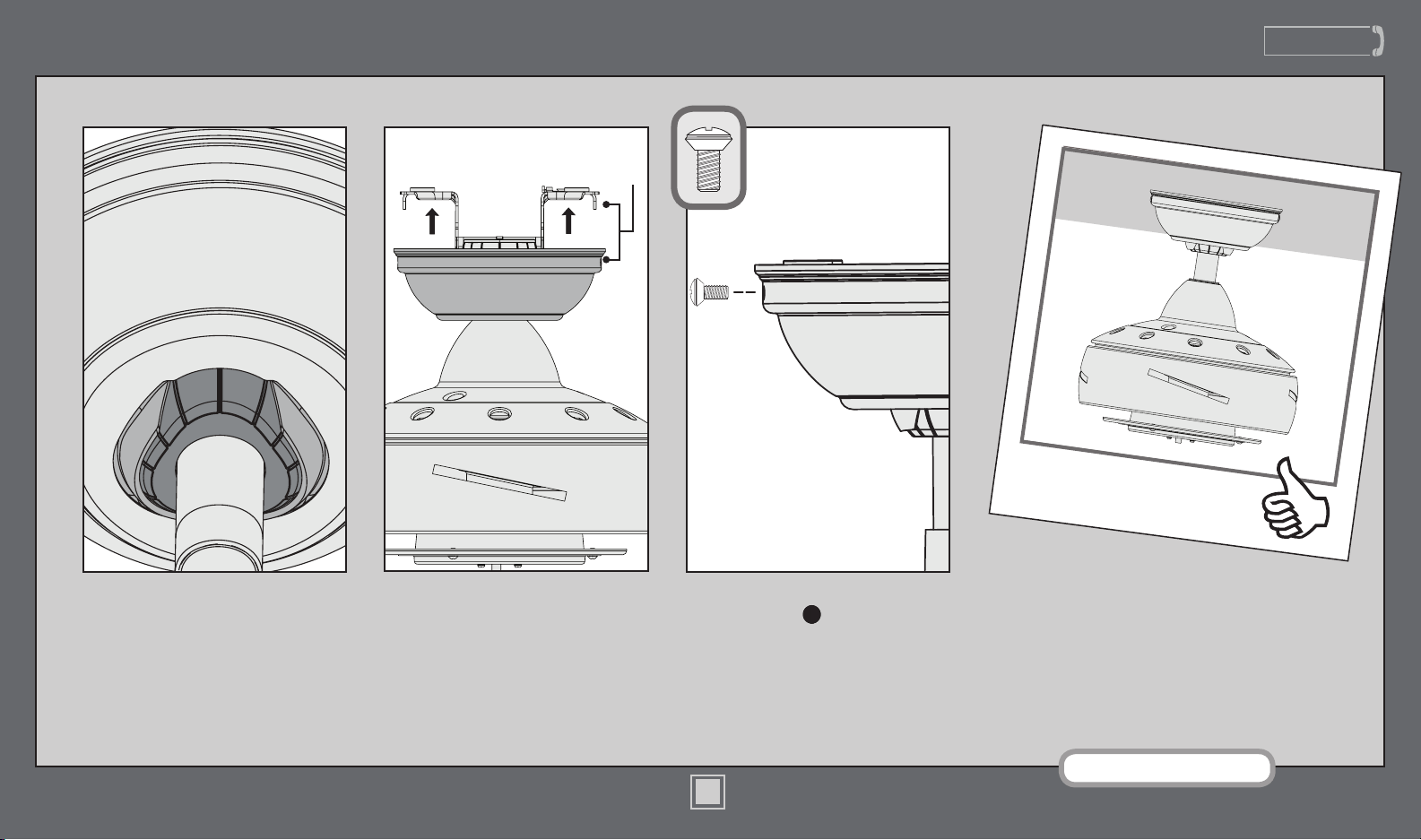
Lift the canopy into place so that
the screw holes are aligned.
Position the canopy so that, when
lifted into place, the canopy ts into
the hanging bracket as shown.
Insert the two canopy screws
found in the hardware bag.
Note: Fan style may vary.
Screw
Holes
9
M3648-01 • 03/27/17 • © Hunter Fan Company
www.HunterFan.com
1.888.830.1326
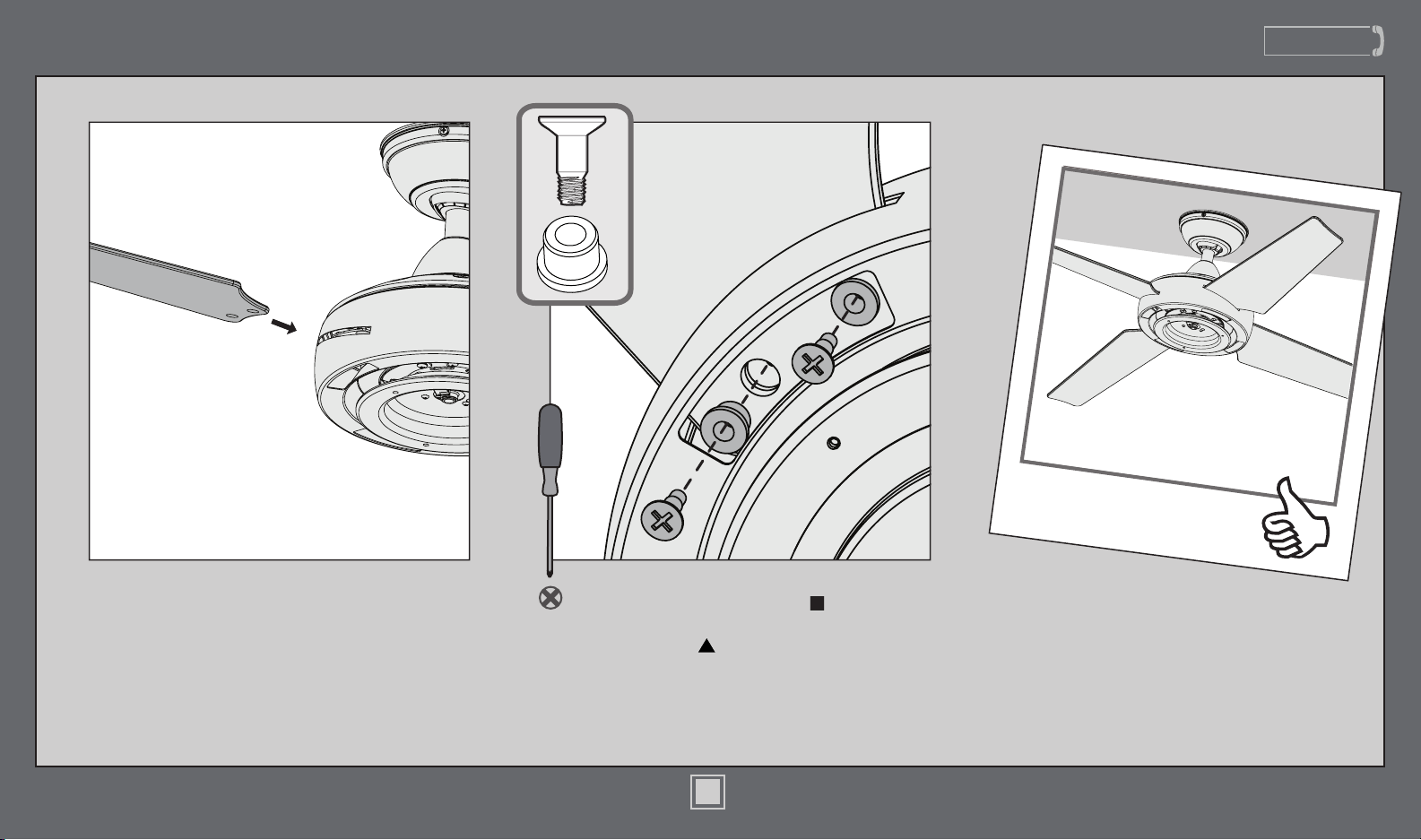
Attach each blade to the fan using two
blade grommets, found in the hardware
bag, and two blade assembly screws, found
in the hardware bag.
Blades
Insert a blade into the motor housing.
10
M3648-01 • 03/27/17 • © Hunter Fan Company
www.HunterFan.com
1.888.830.1326
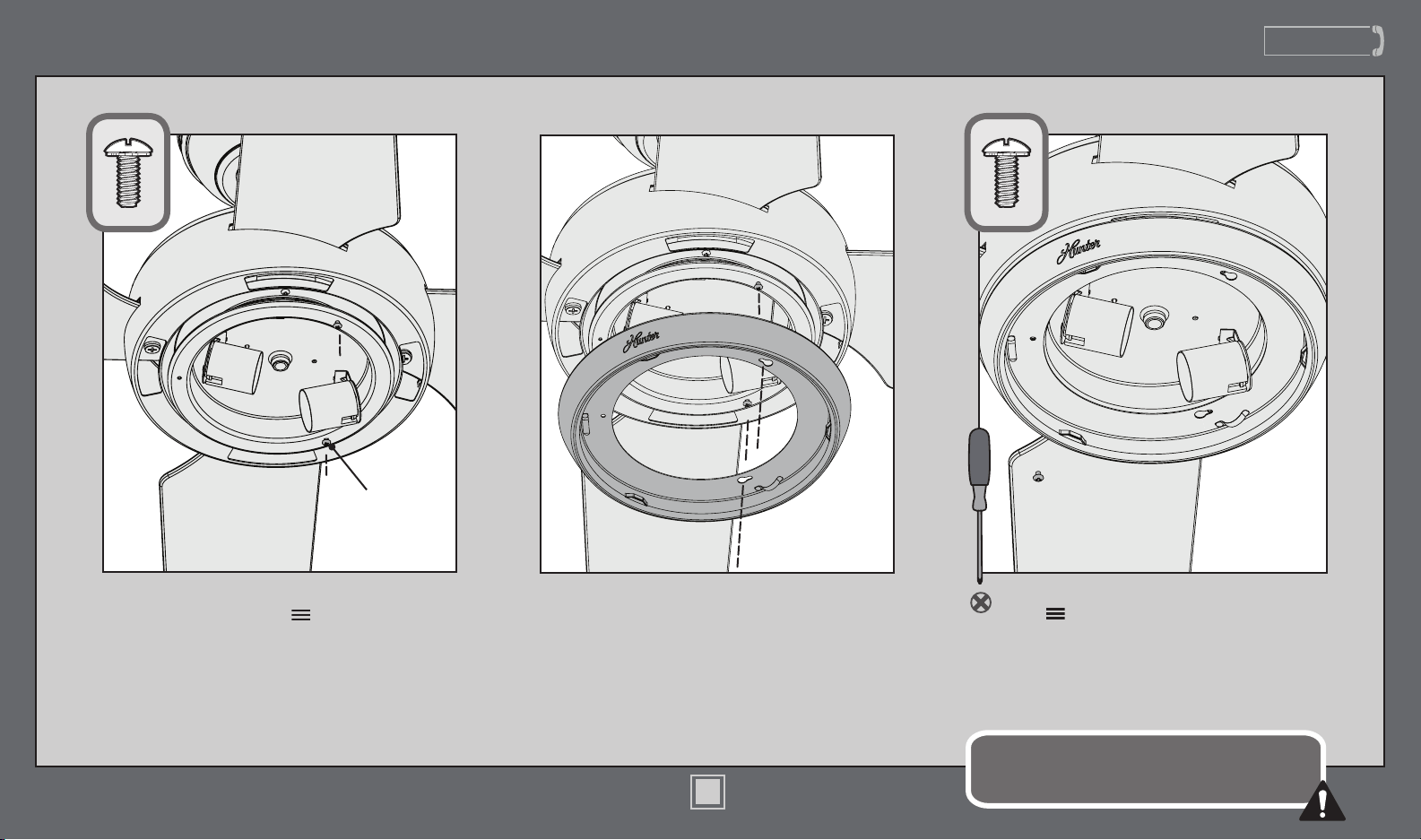
Light Kit
Make sure the light kit ring is securely attached.
Failure to properly secure all three assembly screws
could result in the light xture falling.
Partially install two of the light kit assembly
screws, found in the hardware bag.
Align the keyholes in the light kit ring with the
partially installed screws. Lift the light kit ring
in place and rotate counterclockwise to situate
the screws in the narrow ends of the keyholes.
Light Kit
Assembly
Screw
Insert the third screw, found in
the hardware bag, into place and
then tighten all three screws.
11
M3648-01 • 03/27/17 • © Hunter Fan Company
www.HunterFan.com
1.888.830.1326
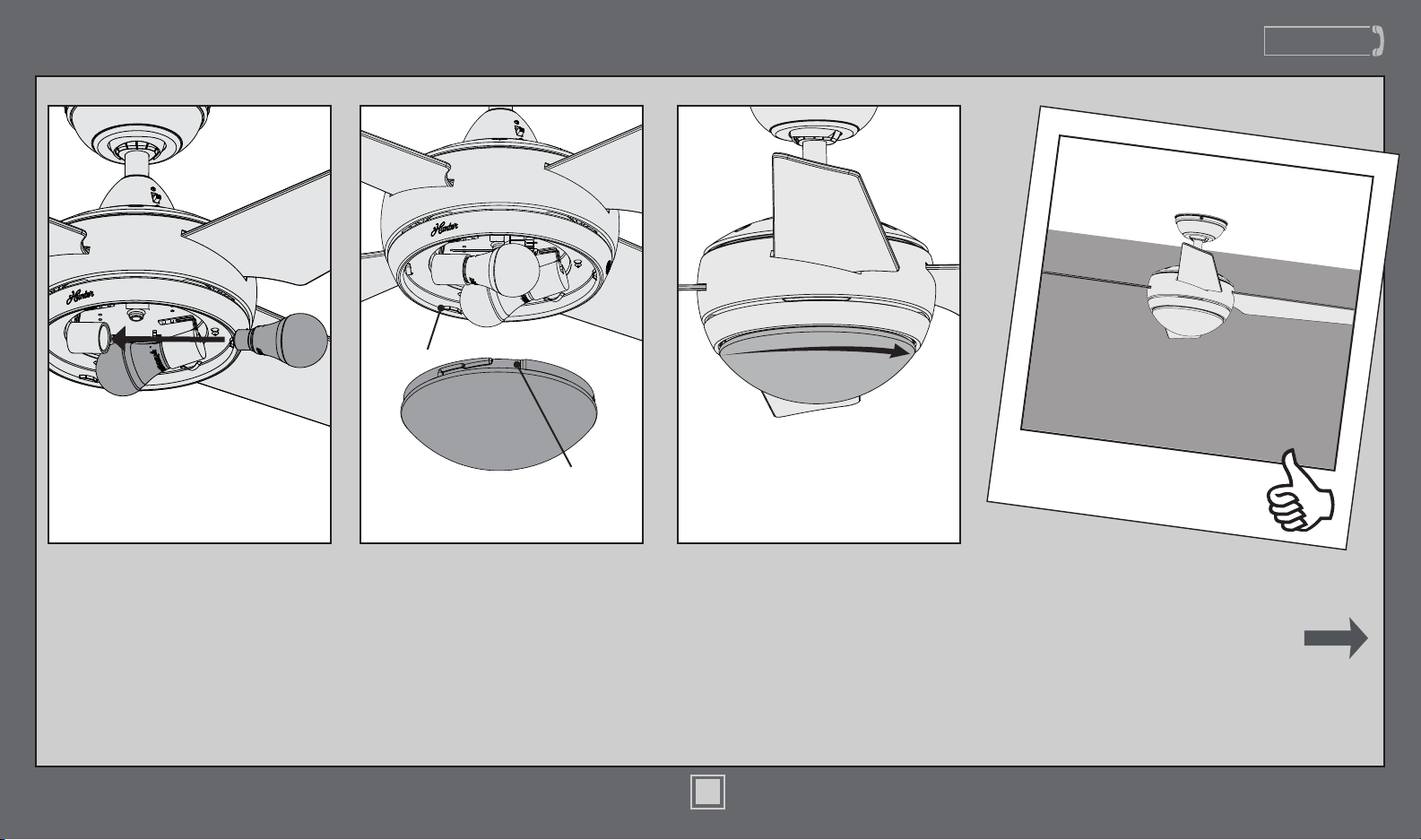
Light Kit (continued)
Carefully lift the globe up inside
the light xture as far as it will go.
Rotate the globe in a clockwise
direction until it is held tightly in
place by the three tabs.
Position the notches in the outer
rim of the globe so they line up
with the tabs on the light kit ring.
CONGRATULATIONS!
YOU’RE DONE!
See next page for fan
operation instructions.
Notch
Tab
Install the included LED bulbs.
When necessary, replace with
bulbs of same wattage.
12
M3648-01 • 03/27/17 • © Hunter Fan Company
www.HunterFan.com
1.888.830.1326
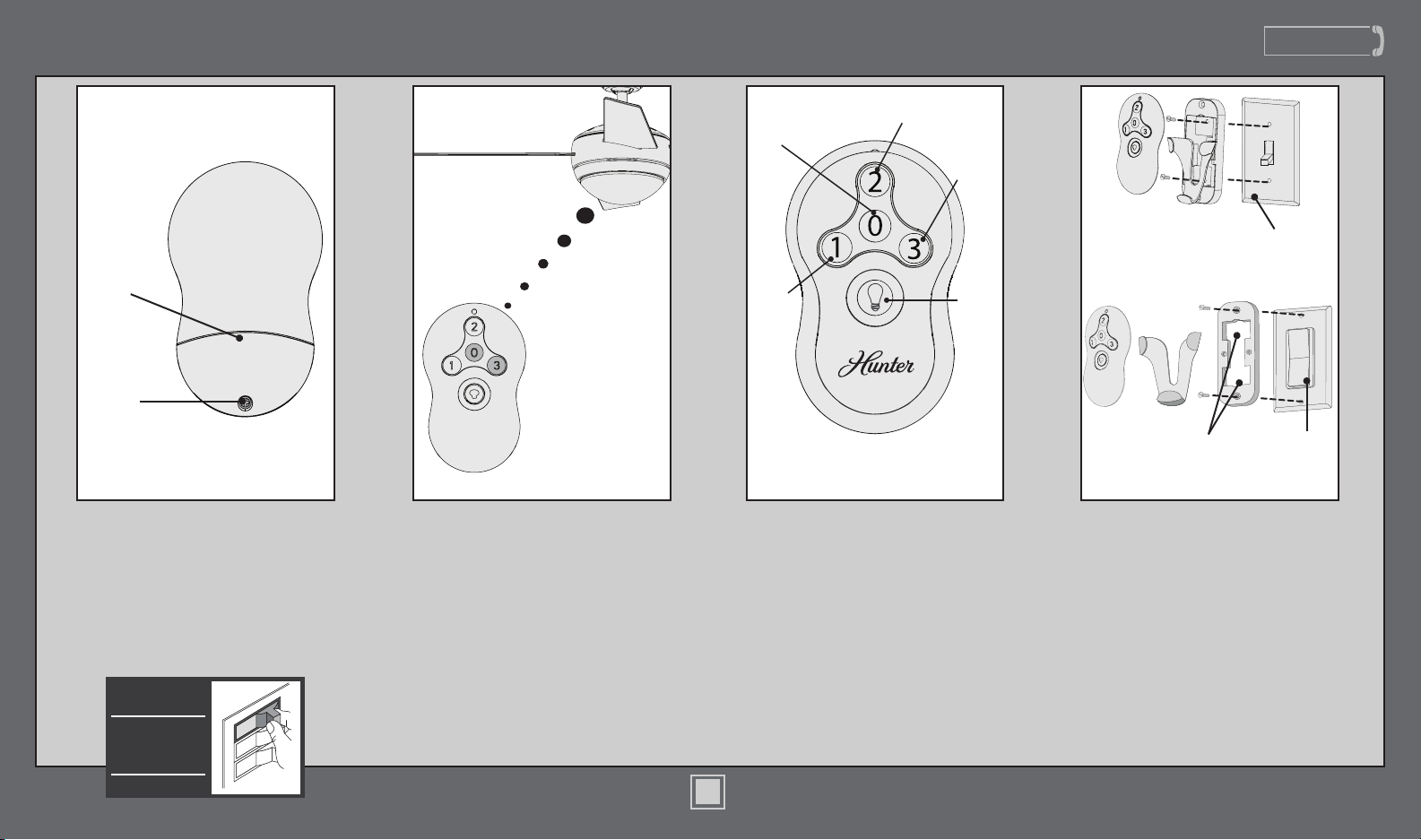
Rocker-
Style Plate
Switch
Cover Plate
Removed
Tabs
To install the transmitter cradle, remove
the two screws holding the switch
cover plate. Do not remove the cover
plate. Orient the cradle by lining up
the two mounting holes with those on
the cover plate. Insert and tighten the
screws. Do not over tighten.
Note: For rocker-style cover plates,
break off the tabs by pushing outward.
To turn on fan, press a fan speed
button. Speeds range from off (0)
to high (3). Quickly press the Light
button to turn the lights off and on.
Medium
Speed
Light
High
Speed
Fan
Off
Low
Speed
Operation, Maintenance, & Cleaning
ON
Turn Power
To access the battery compartment,
remove the small Phillips head screw
that secures the battery door to the
transmitter assembly. The battery
should be installed with the positive
(+) side up. Replace with a CR2032
battery when necessary.
Phillips
Head
Screw
Battery
Door
The remote transmitter should already be
paired to the receiver and ready to use.
Note: If your need to pair your remote,
turn fan power off and back on at the
wall switch. Within 3 minutes, press and
hold both the Fan Off button and the
High button for 4 seconds to pair the
remote. To prevent faulty operation,
please ensure all other ceiling fans
within range are turned off at the wall
switch while pairing.
13
M3648-01 • 03/27/17 • © Hunter Fan Company
www.HunterFan.com
1.888.830.1326
Operation, Maintenance, & Cleaning (continued)
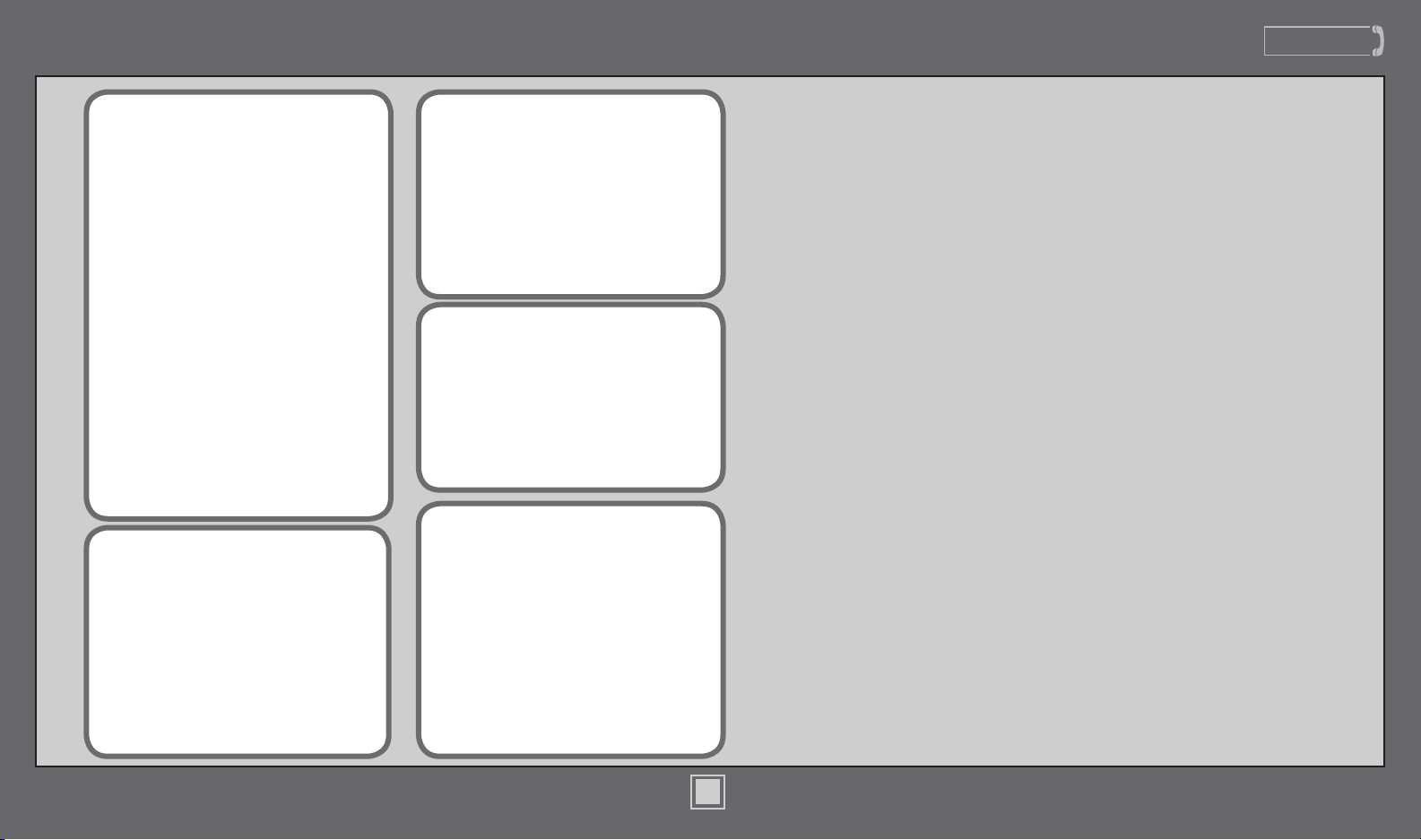
For cleaning the fan, use soft brushes or
cloths to prevent scratching. Cleaning
products may damage the nishes.
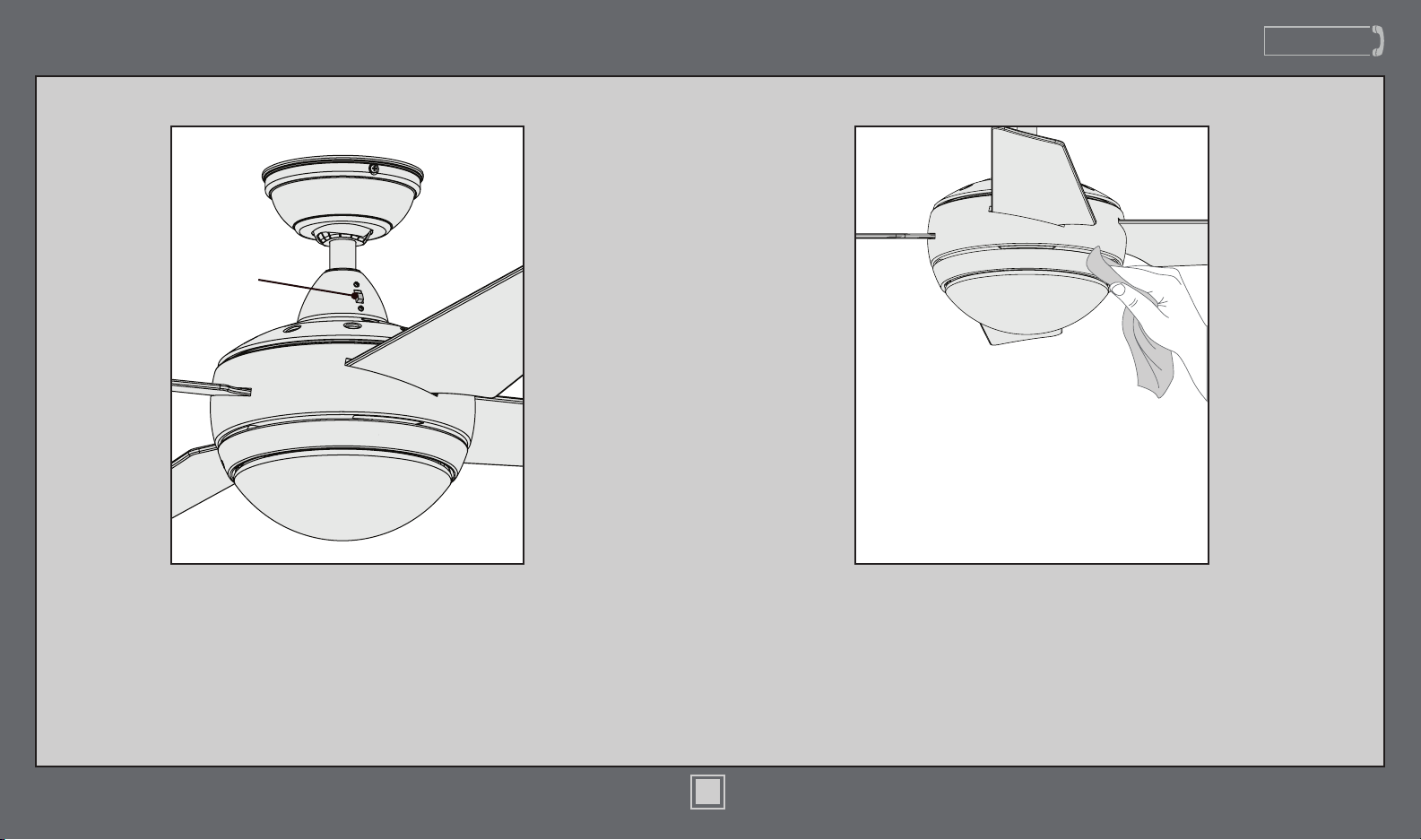
Reverse
Switch
To switch the direction of air ow, move
the reverse switch to the opposite
position.
14
M3648-01 • 03/27/17 • © Hunter Fan Company
www.HunterFan.com
1.888.830.1326
Troubleshooting
Excessive wobbling
• Tighten all of the blade and
blade iron screws until they
are snug.
• Use the provided balancing
kit and instructions to balance
the fan.
Noisy Operation
• Tighten the blade and blade
iron screws until they are snug.
• Check to see if any of the
blades are cracked. If so, replace
all of the blades.
Fan doesn’t work
• Make sure power switch is on.
• Push the motor reversing switch
rmly left or right to ensure that
it is engaged.
• Check the circuit breaker to
ensure the power is turned on.
• Make sure the blades spin freely.
• Turn off power from the circuit
breaker, then loosen the canopy
and check all the connections
according to the wiring diagram
on pages 7-8.
• Check the plug connection in
the switch housing.
Remote control of fan is erratic
• Make sure the battery is
installed correctly.
• Install a fresh battery.
Transmitter only works when
held at close range
• Install a fresh battery.
If you have multiple remotes or
multiple remote-controlled fans
installed on the same circuit
breaker and you are experiencing
interference or faulty operation of
your remote controls, please go to
www.HunterFan.com/FAQs
and click “How do I properly install
multiple remote-controlled fans?”
for information on how to correct
this issue.
15
M3648-01 • 03/27/17 • © Hunter Fan Company