
IMPORTANTE
Por favor lea detalladamente este manual de instrucciones antes de conectar y operar este equipo. Recuerde
que un mal uso de su aparato podria anular la garantia.
2
Instale
la batería
1
Deslice el interruptor LOCK de la batería
hacia adentro.
2
Deslice la batería diagonalmente dentro
del compartimiento de la batería y
empuje hacia abajo.
3
Deslice el interruptor LOCK de la batería
hacia afuera.
1
Verifique los artículos
suministrados
3
Conecte el
adaptador de CA
Enchufe el cable de alimentación al
adaptador de CA y luego a una toma de CA.
A continuación, enchufe el cable del
adaptador de CA a su computadora.
Conecte el adaptador de CA a la computadora las
primeras veces que la use para asegurarse de que la
batería se cargue completamente.
4
Encienda
1
Levante la tapa de la pantalla LCD.
2
Pulse el botón de encendido hasta que el
indicador de encendido se ilumine.
Atención
La computadora tarda unos minutos en
iniciarse por primera vez. No debe realizar
ninguna acción hasta que aparezca la
ventana de configuración.
5
Ubique la Guía
del usuario
1
Haga clic en Inicio
>
Ayuda y soporte técnico.
2
Haga clic en Usar mi VAIO.
3
Haga clic en Guía de Usuario de VAIO.
Ayuda y soporte técnico es de fácil acceso y
ofrece documentos importantes y recursos de
soporte útiles, como herramientas de
configuración, tutoriales y preguntas más
frecuentes.
Qué hacer
a continuación
Comencemos
Actualice la
computadora
Cree discos de
recuperación
Inicie SmartWi™
Connection Utility
Manipulación de la pantalla LCD
Evite colocar objetos pesados sobre la computadora
o ejercer presión sobre la tapa cuando está cerrada.
Cuidado del disco duro
Evite mover la computadora mientras está encendida
o durante el proceso de encendido o apagado.
Daños por líquidos
Evite que cualquier líquido entre en contacto con la
computadora.
Ventilación
Coloque la computadora sobre superficies duras, como
un escritorio o mesa. La circulación adecuada de aire es
importante para reducir la temperatura.
Adaptador de CA
No ejerza tensión sobre el cable del adaptador de CA
que está conectado a la computadora.
Consejos de cuidado y manipulación
Para proteger su inversión y maximizar la vida útil,
recomendamos seguir estas pautas.
Mantenga la computadora actualizada
descargando actualizaciones de
Windows Update y VAIO Update para que
la computadora funcione en forma más
eficaz y segura.
Haga clic en Inicio
, Todos los programas,
Windows Update o VAIO Update.
La computadora debe estar conectada a Internet para
poder descargar las actualizaciones.
Cree sus discos de recuperación únicos de
inmediato para poder restaurar la computadora
a las configuraciones instaladas de fábrica en
caso de una falla del sistema.
Para obtener más detalles, consulte en pantalla la
VAIO Recovery Center Guía del usuario debajo de
Usar mi VAIO en Ayuda y soporte técnico.
Los discos de recuperación no se suministran con la
computadora.
Utilice SmartWi™ Connection Utility* para
administrar las conexiones inalámbricas.
* Disponible solamente en modelos seleccionados.
Haga clic en Inicio
, Todos los programas
y SmartWi Connection Utility.
Consulte el archivo de ayuda que incluye
SmartWi Connection Utility para obtener más
información.
Adaptador de CA
Cable
de alimentación
Batería
Es posible que las ilustraciones de este documento no
sean iguales a su modelo.
Página de inicio de asistencia de VAIO
http://esupport.sony.com/EN/VAIO/ (Estados Unidos)
http://www.sony.ca/support/ (Canadá)
http://esupport.sony.com/LA/ (América Latina)
http://esupport.sony.com/BR/ (Brasil)
Las funciones y especificaciones pueden variar y están sujetas a cambios sin previo aviso.
Serie VGN-NW
4-146-500-21 (1) © 2009 Sony Corporation Printed in China
Active la función de
acceso rápido a la web
Con la función de acceso rápido a la web
puede acceder a Internet sin iniciar el
sistema operativo Windows.
1
Presione el botón WEB mientras la
computadora está apagada.
2
Siga las instrucciones que aparecen en el
asistente para la configuración inicial.
Para obtener más información, haga clic en el icono
ubicado
en la esquina inferior derecha de la pantalla que aparece
cuando se utiliza la función de acceso rápido a la web.
2
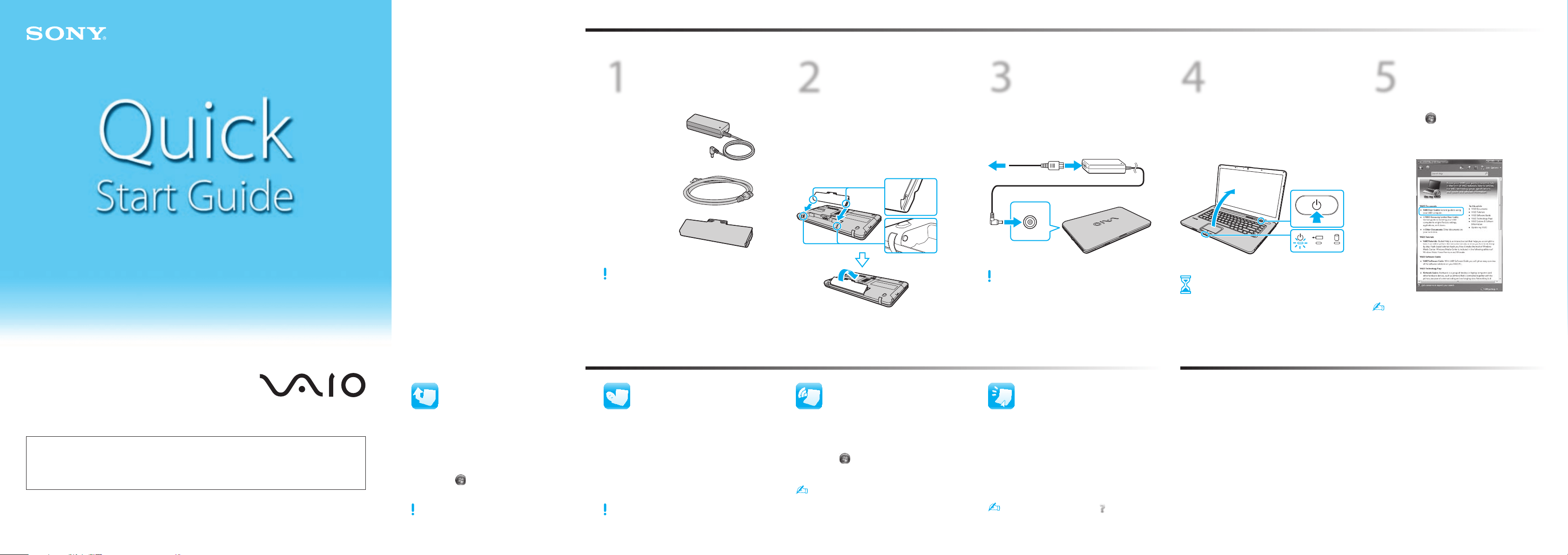
Install
battery pack
1
Slide the battery LOCK switch inward.
2
Slide the battery pack diagonally into the
battery compartment and push down.
3
Slide the battery LOCK switch outward.
1
Check
supplied items
3
Connect
AC adapter
Plug the power cord into the AC adapter and
then into an AC outlet. Then plug the AC
adapter cable into your computer.
Be sure to connect the AC adapter to your computer
when using it for the first few times to ensure the
battery becomes fully charged.
4
Power on
1
Lift the LCD screen lid.
2
Press the power button until the power
indicator light turns on.
Attention
Your computer takes a few minutes for the
first startup. No action is required until the
setup window appears.
5
Locate
User Guide
1
Click Start
> Help and Support.
2
Click Use my VAIO.
3
Click VAIO User Guide.
Help and Support is easy to access, and provides
important documents and helpful support
resources such as setup tools, tutorials, and FAQs.
What to do next
Let’s get started
Update your computer
Create your recovery
discs
Start the SmartWi™
Connection Utility
LCD Handling
Avoid placing heavy objects on top of your computer or
exerting pressure on its lid when closed.
HDD Care
Avoid moving your computer while it is turned on or in
the process of powering on or shutting down.
Liquid Damage
Prevent liquids from coming into contact with your
computer.
Ventilation
Place your computer on hard surfaces, such as a desk or
table. Proper air circulation around vents is important to
reduce heat.
AC Adapter
Do not put stress on the AC adapter cable connected to
your computer.
Care & Handling Tips
To protect your investment and maximize its lifespan,
we encourage you to follow these guidelines.
Keep your computer updated by
downloading updates from
Windows Update and VAIO Update, so that
your computer can run more efficiently and
securely.
Click Start
, All Programs,
Windows Update or VAIO Update.
Your computer must be connected to the Internet to
download the updates.
Create your own recovery discs immediately,
so that you can restore your computer to
factory-installed settings in case of a system
failure.
For details, refer to the on-screen
VAIO Recovery Center User Guide under
Use my VAIO in Help and Support.
Recovery discs are not provided with your computer.
Use the SmartWi™ Connection Utility* to
manage wireless connections.
* Available on selected models only.
Click Start
, All Programs, and
SmartWi Connection Utility.
See the help file included with the
SmartWi Connection Utility for more information.
AC adapter
Power cord
Battery pack
The illustrations in this document may appear
different from your model.
VAIO Support Homepage
http://esupport.sony.com/EN/VAIO/ (USA)
http://www.sony.ca/support/ (Canada)
http://esupport.sony.com/LA/ (Latin American area)
http://esupport.sony.com/BR/ (Brazil)
Features and specifications may vary and are subject to change without notice.
VGN-NW Series
Activate the Quick
Web Access function
With the Quick Web Access function, you can
access the Internet without launching the
Windows operating system.
1
Press the WEB button while your
computer is off.
2
Follow the instructions in the initial setup
wizard.
For more information, click the
icon located at
the lower right corner of the screen displayed
when using the Quick Web Access function.