
3-810-716-11(1)
Stereo
Cassette Deck
Operating Instructions
1996 by Sony Corporation
TC-WA8ESA
TC-WA7ESA
TC-WE805S
TC-WE705S
TC-WE605S
TC-WR550Z
TC-WE505
3-810-716-11(1)
2
3-810-716-11(1)
NOTICE FOR THE
CUSTOMERS IN THE UNITED
KINGDOM
A moulded plug complying with BS 1363
is fitted to this equipment for your safety
and convenience.
Should the fuse in the plug supplied
need to be replaced, a 5 AMP fuse
approved by ASTA or BSI to BS 1362, (i.e.
marked with 2 or @ mark) must be
used.
If the plug supplied with this equipment
has a detachable fuse cover, be sure to
attach the fuse cover after you change the
fuse. Never use the plug without the fuse
cover. If you should lose the fuse cover,
please contact your nearest Sony service
station.
IMPORTANT
If the plug supplied is not suitable for
the socket outlets in your home, it
should be cut off and an appropriate
plug fitted in accordance with the
following instructions.
The wires in this mains lead are
coloured in accordance with the
following code:
Blue: Neutral
Brown: Live
As the colours of the wires in the mains
lead of this apparatus may not
correspond with the coloured markings
identifying the terminals in your plug,
proceed as follows:
The wire which is coloured blue must be
connected to the terminal which is
marked with the letter N or coloured
black. The wire which is coloured brown
must be connected to the terminal which
is marked with the letter L or coloured
red. Do not connect either wire to the
earth terminal in the plug which is
marked by the letter E or by the safety
earth symbol Y or coloured green or
green-and-yellow.
WARNING
To prevent shock hazard, do not insert
the plug cut off from the mains lead into
a socket outlet. This plug cannot be used
and should be destroyed.
WARNING
To prevent fire or shock
hazard, do not expose
the unit to rain or
moisture.
For the customers in the
United States
INFORMATION
This equipment has been tested and
found to comply with the limits for a
Class B digital device, pursuant to Part
15 of the FCC Rules.
These limits are designed to provide
reasonable protection against harmful
interference in a residential installation.
This equipment generates, uses, and can
radiate radio frequency energy and, if
not installed and used in accordance
with the instructions, may cause
harmful interference to radio
communications. However, there is no
guarantee that interference will not
occur in a particular installation. If this
equipment does cause harmful
interference to radio or television
reception, which can be determined by
turning the equipment off and on, the
user is encouraged to try to correct the
interference by one or more of the
following measures:
- Reorient or relocate the receiving
antenna.
- Increase the separation between the
equipment and receiver.
- Connect the equipment into an outlet
on a circuit different from that to
which the receiver is connected.
- Consult the dealer or an experienced
radio/TV technician for help.
CAUTION
You are cautioned that any changes or
modifications not expressly approved in
this manual could void your authority
to operate this equipment.
For the customers in Canada
CAUTION
TO PREVENT ELECTRIC SHOCK, DO
NOT USE THIS POLARIZED AC PLUG
WITH AN EXTENSION CORD,
RECEPTACLE OR OTHER OUTLET
UNLESS THE BLADES CAN BE FULLY
INSERTED TO PREVENT BLADE
EXPOSURE.
This symbol is intended to alert the user
to the presence of uninsulated
“dangerous voltage” within the
product’s enclosure that may be of
sufficient magnitude to constitute a risk
of electric shock to persons.
This symbol is intended to alert the user
to the presence of important operating
and maintenance (servicing)
instructions in the literature
accompanying the appliance.
Owner’s Record
The model and serial numbers are
located on the rear of the unit.
Record these numbers in the spaces
provided below. Refer to them
whenever you call upon your Sony
dealer regarding this product.
Model No.
Serial No.

3
3-810-716-11(1)
Pitch control
High-speed
fast-forwarding
and rewinding
Dolby S
CD synchro-
recording
Welcome!
Thank you for purchasing the Sony
Stereo Cassette Deck. Before operating
the unit, please read this manual
thoroughly and retain it for future
reference.
About This Manual
The instructions in this manual are for
models TC-WA8ESA, WA7ESA,
WE805S, WE705S, WE605S, WR550Z
and WE505. Check your model number
by looking at the rear panel of your tape
deck. In this manual, the TC-WE805S is
the model used for illustration
purposes. Any difference in operation is
clearly indicated in the text, for
example, “TC-WA8ESA/WE805S only.”
Differences among the models
The seven models covered by this
manual are distinguished by their
features, as listed in the tables below.
Check the tables to verify the features
available on your tape deck before you
start operating it.
TABLE OF CONTENTS
Getting Started
Unpacking 4
Hooking Up the System 4
Playing a Tape 5
Recording on a Tape 6
Advanced Playback Operations
Locating a Track (Multi-AMS/Auto Play/Memory Play) 8
Creating Your Own Program (RMS Play) 9
Advanced Recording Operations
Adjusting Bias and Recording Level Calibration Automatically 11
Adjusting the Recording Level Automatically (Auto Rec Level) 12
Fading In and Out (Fader) 13
Dubbing a Tape 13
Recording on Both Decks in Succession (Relay Recording) (TC-
WA8ESA/WE805S only) 14
Recoding the Same Source on Both Decks (Simultaneous Recording)
(TC-WA8ESA/WE805S only) 15
Recording Your Own Program (RMS Dubbing) 15
Inserting a Blank Space During Recording (Record Muting) 16
Synchro-Recording With a CD Player Through a Control A1 Cable
(TC-WE805S/WE705S/WE605S only) 16
Additional Information
Precautions 18
Notes on Cassette Tapes 18
Cleaning 19
Troubleshooting 20
Specifications 21
Glossary 22
Index 22
Pitch control
High-speed
fast-forwarding
and rewinding
Dolby S
CD synchro-
recording
Feature
Model WA8ESA
WA7ESA
•
•
WE805S
WE705S
•
•
•
•
Feature
Model WE605S
•
•
Of the seven models, only the TC-
WA8ESA and WE805S are capable of
recording on both decks. Relay
recording and simultaneous recording
are therefore featured on these two
models only.
Convention
The following icon is used in this
manual:
z
Indicates hints and tips for
making the task easier.
WE505
•
WR550Z
•
4
Getting Started
3-810-716-11(1)
Unpacking
Check that you received the following items:
• Audio connecting cords (2)
Hooking Up the System
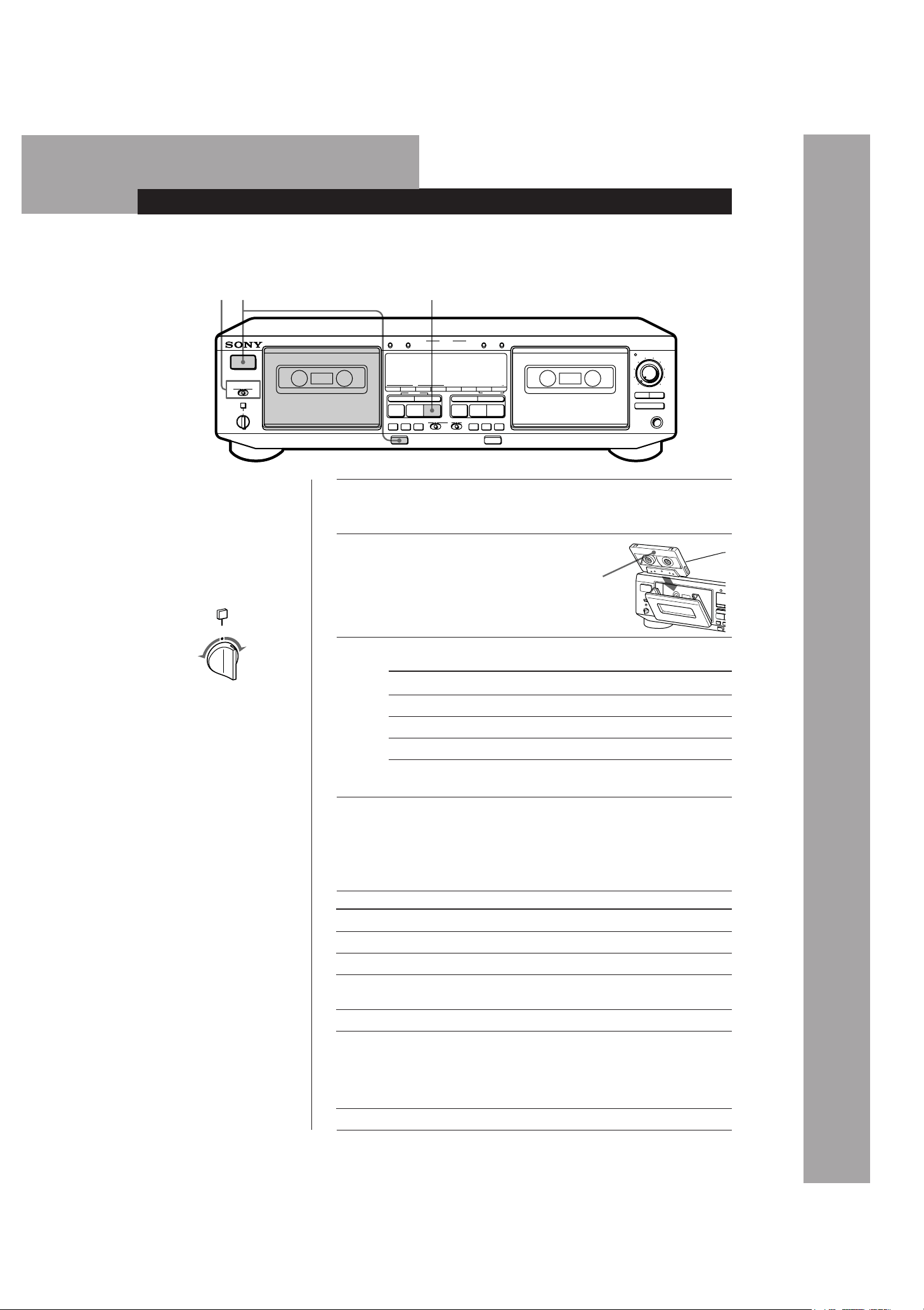
This section describes how to hook up the tape deck to
an amplifier or a CD player equipped with CONTROL
A1 connectors (TC-WE805S/WE705S/WE605S only).
Be sure to turn off the power of each component before
making the connections.
• Connecting the tape deck to a CD player eqipped with
a CONTROL A1 connector (TC-WE805S/WE705S/WE605S
only)
For information on connections through the CONTROL
A1 connectors, refer to the pamphlet included with this
manual.
Setting the voltage selector (only on
models supplied with a voltage selector)
Check that the voltage selector on the rear panel of the
tape deck is set to the local power line voltage. If not,
set the selector to the correct position using a
screwdriver before connecting the AC power cord to
an AC outlet.
Tape deck
ç: Signal flow
Hookups
• Connecting the tape deck to an amplifier
Connect the amplifier to the LINE IN/OUT connectors
using the supplied audio connecting cords.
When connecting an audio connecting cord, be sure to
match the color-coded cord to the appropriate jacks on the
components: Red (right) to Red and White (left) to White.
Be sure to make connections firmly to avoid hum and
noise.
to a
wall outlet
Amplifier
CD player
to an AC
outlet
CONTROL
A1
REC
OUT
TAPE
IN
Ç
ç
Ç
ç
REC OUT IN
LINE
OUTIN
L
R
TAPE
L
R
L
R
Tape deck
Amplifier
ç: Signal flow
220V
240V
120V
VOLTAGE
Connecting the AC power cord
Connect the AC power cord to an AC outlet.
Where do I go next?
Now you’re ready to use your tape deck.
For basic operations, go to pages 5 to 7; for advanced
operations, go to the sections starting from page 8.
Basic Operations
Basic Operations
5
3-810-716-11(1)
Playing a Tape
Basic Operations
POWER
PRr
§
PRr
p
ª·
0
g
)
PAUSE
CLEAR BACK FRONT
REC MUTE
REC
PAUSE
REC MUTE
REC
ON FILTERONOFF
(AMS) (AMS)
0
)
(AMS) (AMS)
p
ª·
– RMS +
RMS/START
RESET
MEMORY
RESET
MEMORYAB
COUNTER
SET CHECK DISPLAY DECK A DECK B A+B REC HIGH/NORMAL
DOLBY NR
B
C
S
RMS
AUTO CAL(STARTP)
DUBBING A B
START(DECK BP)
PITCH CONTROL
+–
ØON øOFF
Aa
RELAY
DIRECTION MODE
AUTO REC LEVEL
FADER ARL
π SYNCHRO
PHONES
§
0
1
2
3
4
5
6
7
8
9
10
32 4
1
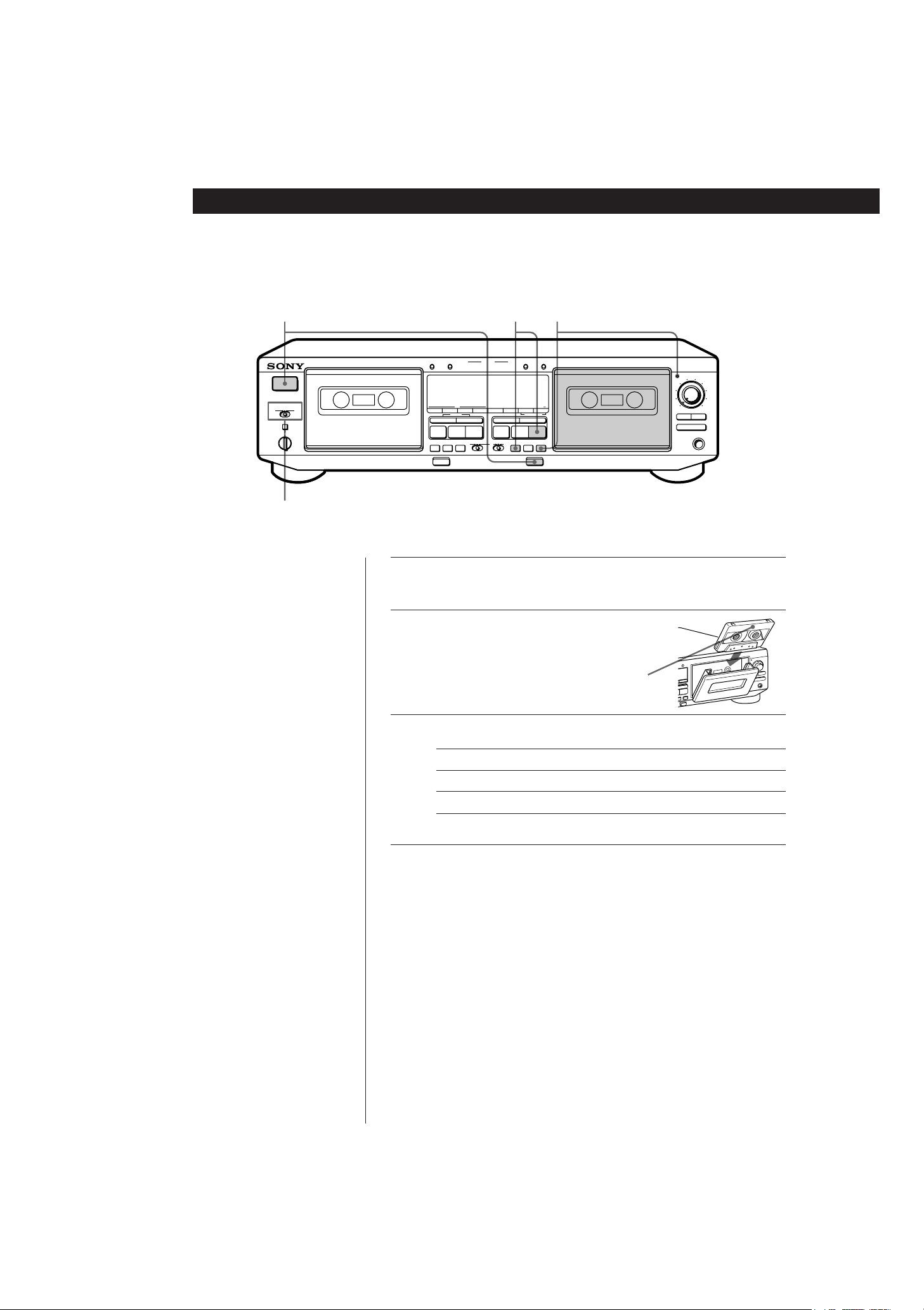
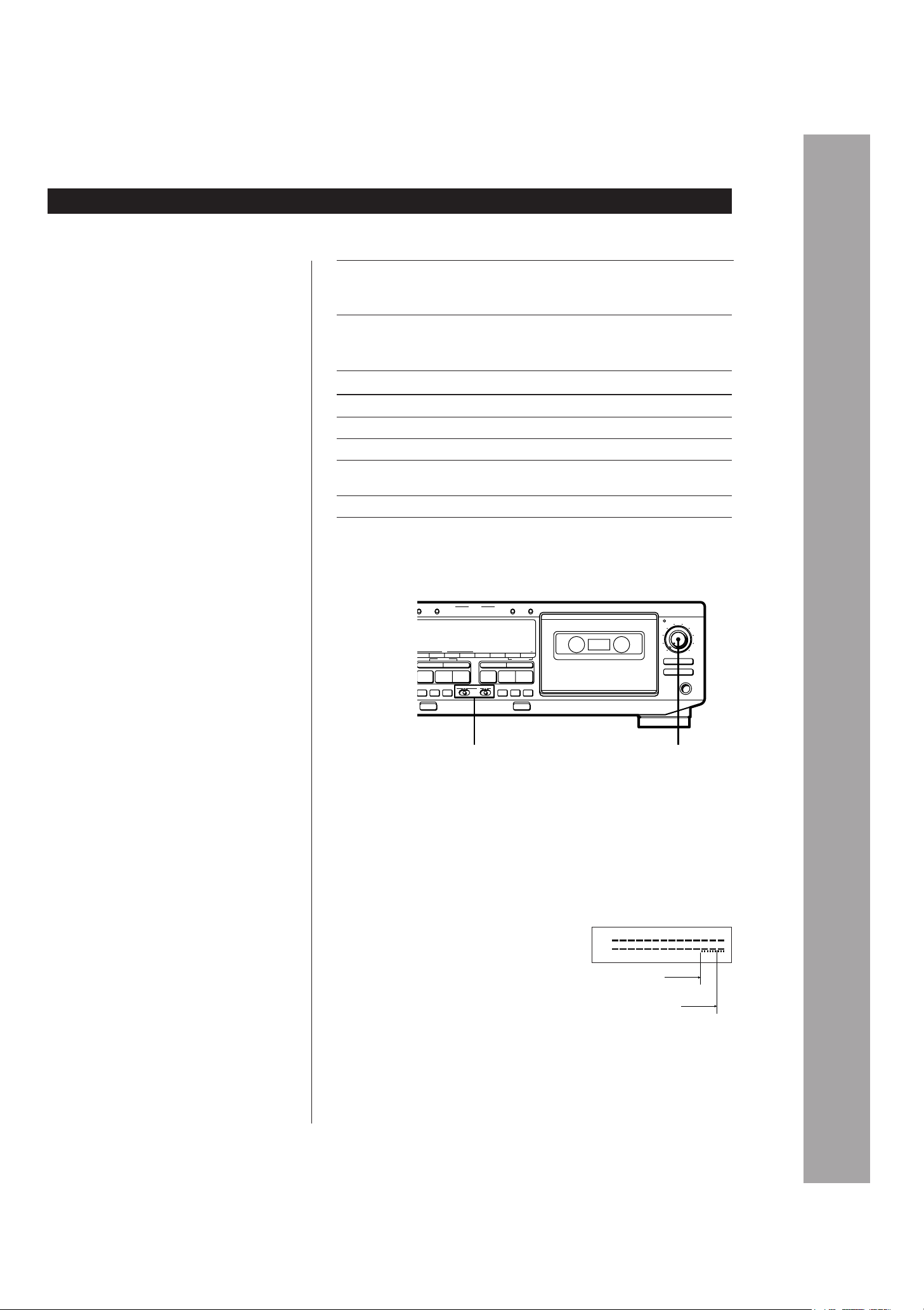
Turn on the amplifier and select the tape deck position.
2
Press POWER, and then press §
and insert a cassette.
3
Set DIRECTION MODE.
PITCH CONTROL
+
–
ØON øOFF
• See page 4 for hookup
information.
• You can use either deck for
playback.
z To adjust the pitch (Pitch
Control function) (TC-
WE805S/WE705S/WE505
only)
Push in the PITCH
CONTROL button to activate
Pitch Control function and
turn the control clockwise to
raise the pitch or counter-
clockwise to lower it.
You can adjust the pitch
during playback on deck A or
normal-speed dubbing (but
not during RMS play or RMS
dubbing).
z To play a tape recorded
with the Dolby NR*
system
Set DOLBY NR to ON and
select the same position that
the tape was recorded in—B,
C, or S (unavailable on the
TC-WE505).
z You can connect the
headphones to PHONES
* Dolby noise reduction
manufactured under license
from Dolby Laboratories
Licensing Corporation.
“DOLBY“ and the double-D
symbol a are trademarks of
Dolby Laboratories Licensing
Corporation.
With the side you want to play
facing you
To play back
Set to
One side only A
Both sides continuously* a
Both decks in succession* RELAY
* The deck automatically stops after playing back five times.
4
Press ·.
The deck starts playing. Adjust the volume on the amplifier.
Do not press POWER or § while the tape deck is operating.
If you do so, the tape may be damaged.
To
Press
Stop playing p
Start playback from the reverse side ª
PAUSE P. Press the button again to
resume play.
) or 0 when the deck is stopped
) or 0 again during fast-forwarding
or rewinding
Pause
Increase the tape fast-forward or
rewind speed (High-Speed Fast-
Forwarding and Rewinding
functions) (TC-WA8ESA/WA7ESA/
WE805S/WE705S only)
§ after stopping playingTake out the cassette
Fast-forward or rewind
Basic Operations
6
3-810-716-11(1)
1
Turn on the amplifier and play the program source you want
to record.
2
Press POWER, and then press § and
insert a cassette.
3
Set DIRECTION MODE.
• See page 4 for hookup
information.
• Recording is possible on
both decks A and B on the
TC-WA8ESA and WE805S,
but only on deck B on all
other models.
• See "Dubbing a Tape" (page
13) to make a copy of the
tape.
Recording on a Tape
Basic Operations
With the side you want to record
facing you
4
Press REC r.
· lights up for recording on the side facing you. If it doesn’t,
press · once.
The tape deck automatically adjusts the recording level (see
page 12). After the AUTO indicator lights up continuously,
stop playing the program source. If you wish to adjust the
recording level manually, see “To adjust the recording level
manually” on page 7.
Do not press POWER or § while the tape deck is operating.
If you do so, the tape may be damaged.
To record on
Set to
Only one side A
Both sides* a
* Recording stops when the tape reaches the end of reverse side.
0
1
2
3
4
5
6
7
8
9
10
3
245
POWER
PRr
§
PRr
p
ª·
0
g
)
PAUSE
CLEAR BACK FRONT
REC MUTE
REC
PAUSE
REC MUTE
REC
ON FILTERONOFF
(AMS) (AMS)
0
)
(AMS) (AMS)
p
ª·
– RMS +
RMS/START
RESET
MEMORY
RESET
MEMORYAB
COUNTER
SET CHECK DISPLAY DECK A DECK B A+B REC HIGH/NORMAL
DOLBY NR
B
C
S
RMS
AUTO CAL(STARTP)
DUBBING A B
START(DECK BP)
PITCH CONTROL
+–
ØON øOFF
Aa
RELAY
DIRECTION MODE
AUTO REC LEVEL
FADER ARL
π SYNCHRO
PHONES
§
Basic Operations
Basic Operations
7
3-810-716-11(1)
Use these switches (controls) to perform additional
operations
5
Press PAUSE P or ·.
Recording starts.
6
Start playing the program source.
To
Press
Stop recording
Start recording from the reverse side ª twice in Step 5
Pause PAUSE P. Press the button again to
resume recording.
Take out the cassette § after stopping recording
p
z To protect recordings
against accidental erasure
Break out the record-protect
tab(s) (see page 18).
To record with the Dolby NR system
Set DOLBY NR to ON, and select B, C, or S (unavailble on the TC-WE505)
before you start recording.
To record FM broadcasts with the Dolby NR system
If the FM reception is unsatisfactory, set DOLBY NR to ON FILTER (multiplex
filter) (see page 22).
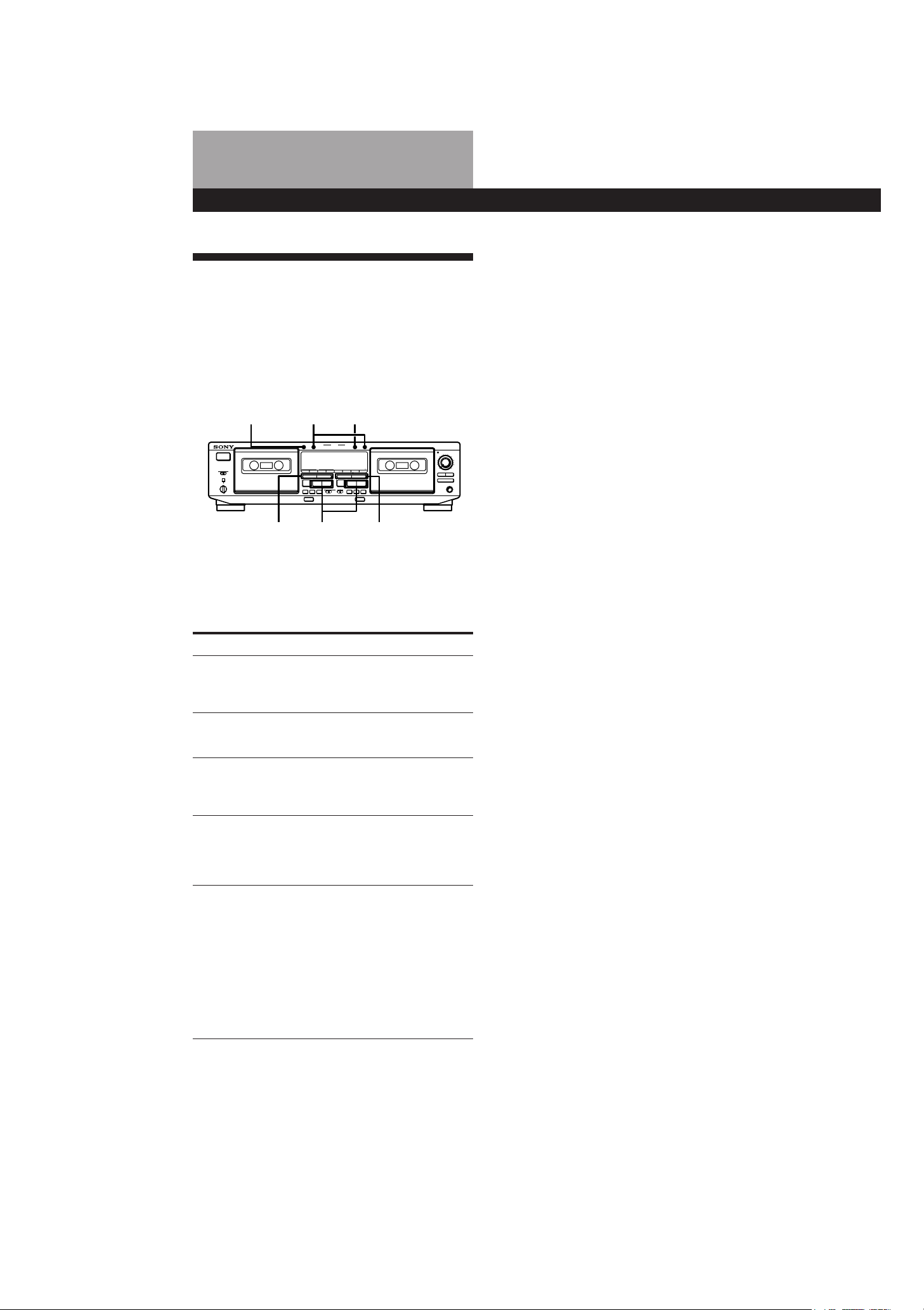
To adjust the recording level manually
After pressing REC r in Step 4 on page 6, turn
REC LEVEL so that the peak level meters reach
the recommended level for the corresponding
tape type. After completing the adjustments,
stop playing the program source, then continue
the procedure from Step 5.
§
PRr
§
PRr
p
ª·
0
g
)
PAUSE
CLEAR BACK FRONT
REC MUTE
REC
PAUSE
REC MUTE
REC
ON FILTERONOFF
(AMS) (AMS)
0
)
(AMS) (AMS)
p
ª·
– RMS +
R
MS/START
E
SET
MEMORY
RESET
MEMORYAB
COUNTER
SET CHECK DISPLAY DECK A DECK B A+B REC HIGH/NORMAL
DOLBY NR
B
C
S
RMS
AUTO CAL(STARTP)
DUBBING A B
START(DECK BP)
AUTO REC LEVEL
FADER ARL
π SYNCHRO
PHONES
0
1
2
3
4
5
6
7
8
9
10
REC LEVELDOLBY NR
z The Dolby HX PRO*
system automatically
works during recording
Distortion and noise in the
high-frequency response are
reduced to produce high-
quality sound that can be
enjoyed even during
playback on other tape decks.
For type I or
type II tape
For type IV tape
–
4
L
R
–
∞
a
+
8
dB
+
4
0
–
10
–
20
–
30
* HX Pro headroom extension
originated by Bang & Olufsen
and manufactured under license
from Dolby Laboratories
Licensing Corporation.
“DOLBY“, the double-D symbol
a and “HX PRO” are
trademarks of Dolby
Laboratories Licensing
Corporation.
Advanced Playback Operations
8
3-810-716-11(1)
Note
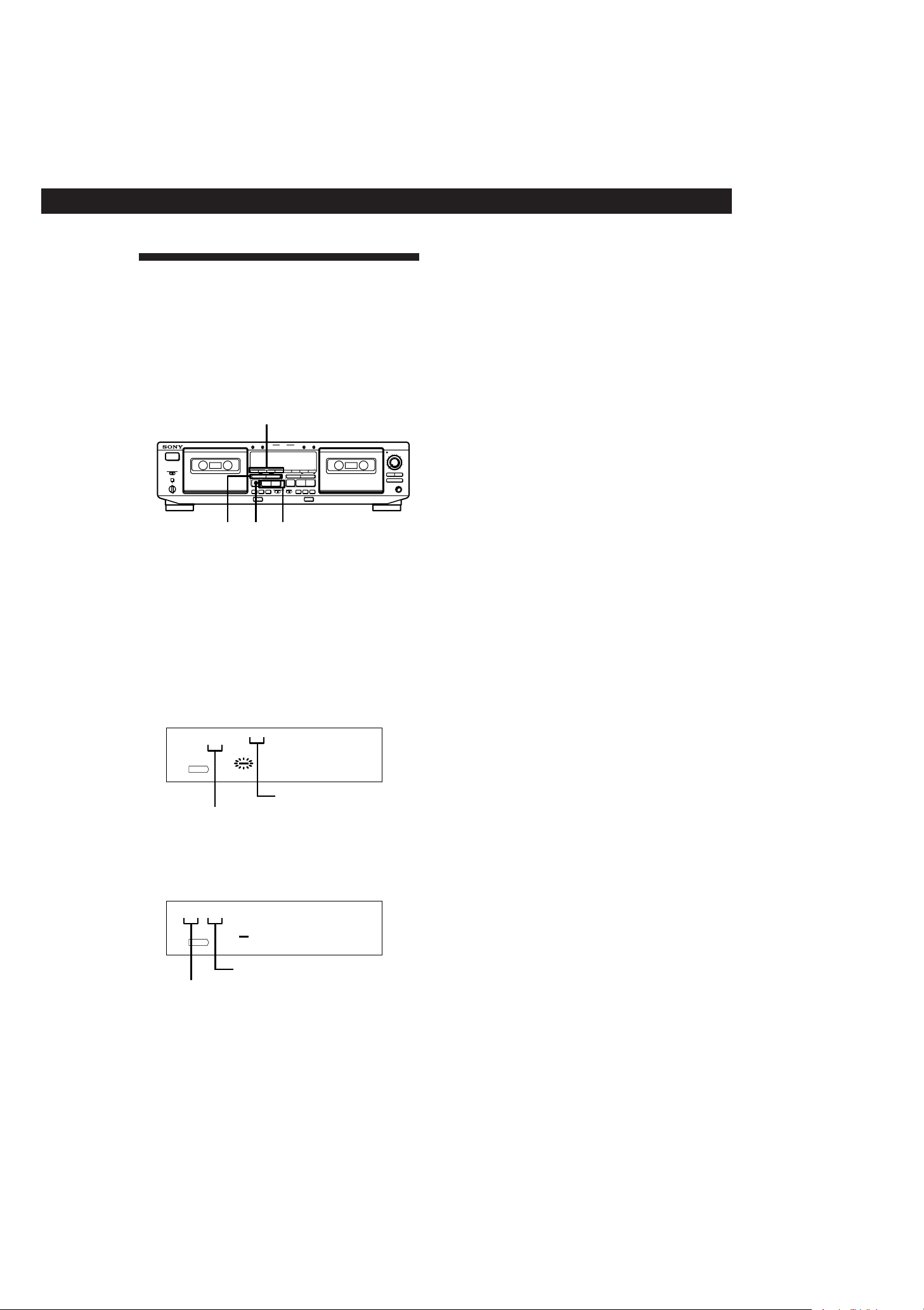
Check the direction indicator of the deck you use. When you
locate a track on the reverse side (when ª lights up), press
the button(s) in the parentheses.
Locating a Track (Multi-AMS/
Auto Play/Memory Play)
You can locate the following/previous tracks within a
range of 30 tracks (Multi-AMS: Automatic Music
Sensor) or the beginning of a tape quickly (Auto Play).
You can even locate a specific point anywhere on a
tape (Memory Play).
Notes
• The Multi-AMS function may not work correctly if:
— the blank space between tracks is less than 4 seconds
long.
— there is a passage of low frequencies or very low
volume within a track.
— the signal strength of the left and right channels are
very different.
• The Multi-AMS function is inoperative on a deck
whenever the other deck is playing, recording (except
during dubbing), or in pause.
• Even if DIRECTION MODE is set to a, the deck stops
when the current side reaches the end during Multi-AMS
operation.
• The tape counters are reset to “0.00” (TC-WA8ESA/
WA7ESA/WE805S/WE705S only) or to “0000” (TC-
WE605S/WR550Z/WE505 only) when you turn off the
tape deck.
To locate
The beginning of the
current track
(Multi-AMS)
Press
The beginning of the
next or succeeding
tracks
(Multi-AMS)
) (or 0) as many times as you
want during playback.
For example, to locate 2 tracks
ahead, press twice.
0 (or )) once during playback
0 (or )) as many times as you
want during playback.
For example, to locate 2 tracks
behind, press three times.
The beginning of the
preceding tracks
(Multi-AMS)
The beginning of a
tape (Auto Play)
MEMORY on the deck being used
repeatedly until “M” disappears in
the display . Then press 0 (or
)) while holding down · (or
ª).
MEMORY on the deck being used
repeatedly until “M” appears in the
display. Find the point you want,
then press RESET to reset the tape
counter and to memorize the point.
To locate the memorized point and
start playback, press 0 (or ))
while holding down · (or ª).
(Press 0 or ) to stop at “0.00”
(TC-WA8ESA/WA7ESA/WE805S/
WE705S only) or at “0000” (TC-
WE605S/WR550Z/WE505 only). )
A particular point on a
tape (Memory Play)
§
PRr
§
PRr
p
ª·
0
g
)
PAUSE
CLEAR BACK FRONT
REC MUTE
REC
PAUSE
REC MUTE
REC
ON FILTERONOFF
(AMS) (AMS)
0
)
(AMS) (AMS)
p ª·
– RMS +
RMS/START
RESET
MEMORY
RESET
MEMORYAB
COUNTER
SET CHECK DISPLAY DECK A DECK B A+B REC HIGH/NORMAL
DOLBY NR
B
C
S
RMS
AUTO CAL(STARTP)
DUBBING A B
START(DECK BP)
PITCH CONTROL
+–
ØON øOFF
Aa
RELAY
DIRECTION MODE
POWER
AUTO REC LEVEL
FADER ARL
π SYNCHRO
PHONES
0
1
2
3
4
5
6
7
8
9
10
RESET MEMORY RESET
0 / )0 / )ª / ·
Advanced Playback Operations
9
3-810-716-11(1)
Creating Your Own Program
(RMS Play)
By creating a program, you can play back tracks on
deck A in any order that you want. The Random
Music Sensor (RMS) function lets you create a program
of up to 28 tracks, from the 1st to the 14th tracks on
each side of the tape.
To stop RMS Play
Press p (CLEAR) once. The RMS program still remains.
To cancel RMS Play
Press p (CLEAR) repeatedly until the peak level meters
appear in the display or eject the tape in deck A. When RMS
Play is canceled, the RMS program is automatically erased.
To alternate between the RMS and peak level meter
displays
Press DISPLAY.
z You can play the program again after RMS Play ends
Press RMS/START.
Notes
• During RMS play, you can only use CHECK, DISPLAY, p
on deck A, and p, 0, ) on deck B.
• The RMS function may not work properly if a blank space
between tracks is short.
• If there is a long blank space between tracks, the deck may
fast-forward a portion of the blank space.
• If your program includes a number for a track that does
not exist, the deck will skip that number during RMS Play.
Checking the order of tracks in the
program
Press CHECK.
Each time you press this button, the display shows the
track numbers in the order they were programmed.
After the last track in the program, “End” appears in
the display.
RMS buttons (RMS/START, SET, CHECK, DISPLAY)
1 Press RMS/START.
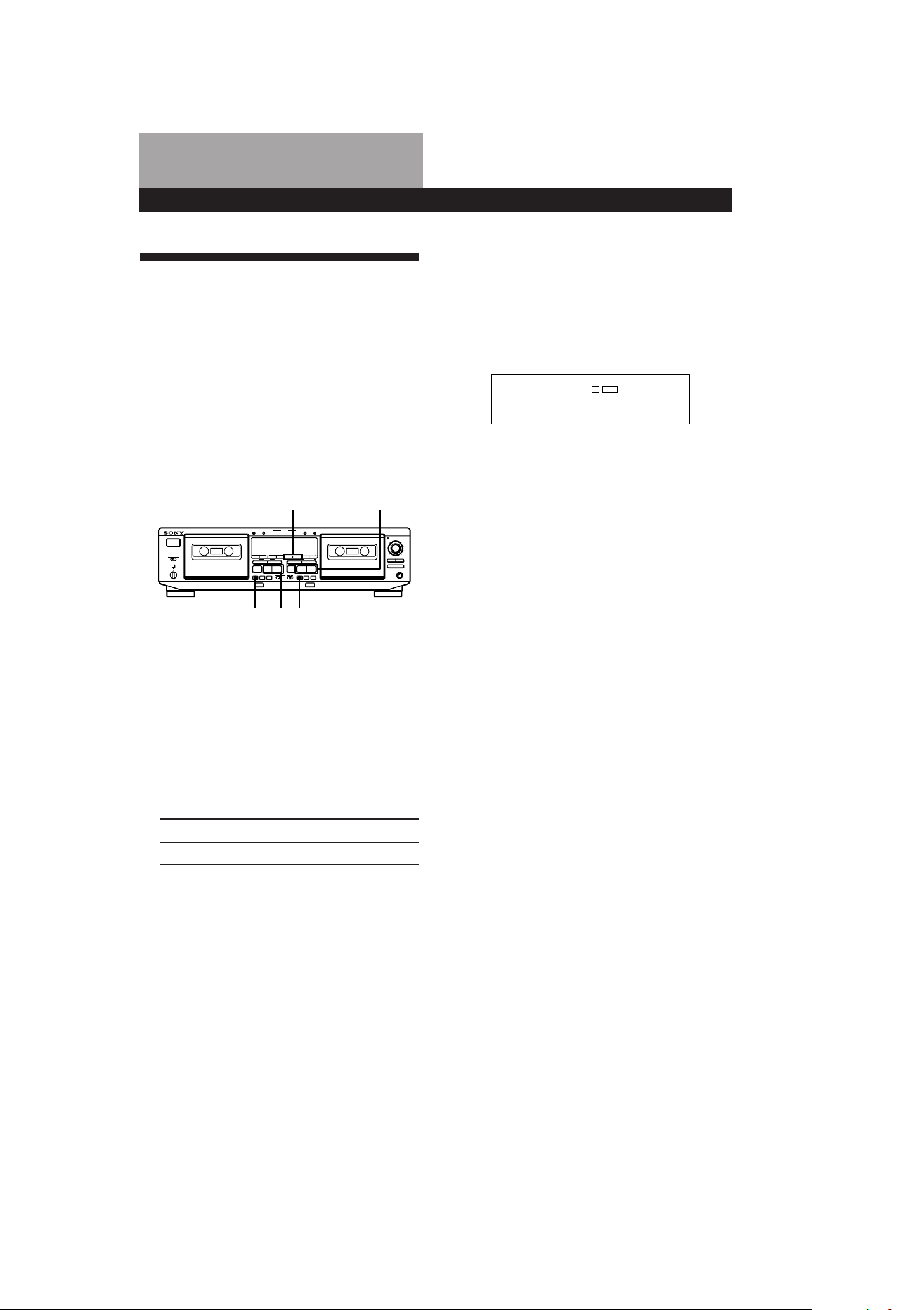
“RMS” and a flashing cursor appear in the
display.
2 Press ª (BACK) or · (FRONT) to select the
side of the tape.
ª or · appears in the display.
3 Press 0 or ) repeatedly until the track
number you want appears in the display.
0 3
·
1234567891011121314
FRONT
RMS
BACK
Side of the cassette
Track number
4 Press SET to store your selection.
To program the same track again, press SET once
more.
1 3
·
1234567891011121314
FRONT
RMS
BACK
Track number
Order on the program
5 Repeat Steps 2 to 4 to program more tracks.
If “FULL” appears in the display
This means that you’ve already programmed 28 tracks
and can’t program any more.
6 Press RMS/START to start RMS Play.
The peak level meters appear in the display.
0
1
2
3
4
5
6
7
8
9
10
0 / )ª / ·p
§
PRr
§
PRr
p
ª·
0
g
)
PAUSE
CLEAR BACK FRONT
REC MUTE
REC
PAUSE
REC MUTE
REC
ON FILTERONOFF
(AMS) (AMS)
0
)
(AMS) (AMS)
p
ª·
– RMS +
RMS/START
RESET
MEMORY
RESET
MEMORYAB
COUNTER
SET CHECK DISPLAY DECK A DECK B A+B REC HIGH/NORMAL
DOLBY NR
B
C
S
RMS
AUTO CAL(STARTP)
DUBBING A B
START(DECK BP)
PITCH CONTROL
+–
Ø
ON
ø
OFF
Aa
RELAY
DIRECTION MODE
POWER
AUTO REC LEVEL
PHONES
FADER ARL
π SYNCHRO

Advanced Playback Operations
10
3-810-716-11(1)
Adding tracks to the end of a program
Press p (CLEAR) once, and follow Steps 2 to 5 in
“Creating Your Own Program (RMS Play)” on page 9.
z To create another program
Press p (CLEAR) until the order on the program
returns to 0 and the cursor flashes above track number 1
in the display, then follow Steps 2 to 5 on page 9.
z You can use your Sony remote to perform RMS
programming
If your Sony stereo receiver’s remote has RMS buttons,
do the following steps.
1 Turn on the receiver and press TAPE.
2 Press RMS/START.
3 Press ( or 9 to select the front or reverse side of
the tape, and the number keys and the >10 key to
specify the tracks.
4 Press RMS/START again to start RMS Play.
Note
For more information on the availability of Sony stereo
receiver remotes with RMS capability, contact your
nearest Sony dealer.
3-810-716-11(1)
Advanced Recording Operations
11
CA. L9
CAL B REC
Adjusting Bias and Recording
Level Calibration
Automatically
Since there are many different types of cassettes on the
market, your tape deck automatically sets the
appropriate equalization characteristics and bias
current for each tape type (ATS: Automatic Tape
Selection). However, you can get better recording
results by doing the automatic bias current and the
recording level calibration. You can do automatic
calibration on either deck (TC-WA8ESA/WE805S only)
or only on deck B (on all other models).
4 Press PAUSE P to start the automatic calibration
procedure.
The automatic calibration procedure starts (i.e.,
recording test tones, rewinding, and playing
back).
During the calibration, the counter changes from
9 to 0.
Advanced Recording Operations
1 Insert the cassette you want to record on into
deck B or into either deck (TC-WA8ESA/WE805S
only).
Make sure the record-protect tabs on the cassette
have not been removed.
2 Press DECK A or DECK B on the TC-WA8ESA
and WE805S, or AUTO CAL on all other models
until “CAL” appears in the display.
3 Press · or ª to select the side of the tape to be
recorded.
To select
The front side ·
The reverse side ª
Press
When the automatic calibration procedure ends,
the tape rewinds to the original position, the
counter returns to normal and the tape deck
stops.
5 Start the actual recording (see page 6).
To cancel the automatic calibration function
Press p on the deck you’re using.
If “A” or “B” on the TC-WA8ESA and WE805S or
“CAL” on all other models flashes continuously
The automatic calibration procedure has been interrupted
by:
— The end of the tape. Reverse the tape direction or rewind
the tape to a new position that allows recording of the
test tone.
— Damaged tape or dirty heads. Change the cassette or
clean and demagnetize the heads (see page 19).
Updating the calibration setting
If you insert a cassette and “[A] CAL” or “CAL [B]” on
the TC-WA8ESA and WE805S or “CAL” on all other
models appears in the display, it means that automatic
calibration data in that deck for that tape type (I, II or
IV) exists. However, we recommend that you repeat
the automatic calibraion procedure each time you
insert a new cassette since cassettes of the same type
also vary in their characteristics.
Before recalibrating, be sure to turn off “[A] CAL” or
“CAL [B]” on the TC-WA8ESA and WE805S or “CAL”
on all other models by pressing DECK A or DECK B on
the TC-WA8ESA and WE805S or AUTO CAL on all
other models. Then start from Step 2 of the automatic
calibration procedure.
PAUSE P
DECK A / DECK B ª / ·
ª / · PAUSE P
0
1
2
3
4
5
6
7
8
9
10
§
PRr
§
PRr
p
ª·
0
g
)
PAUSE
CLEAR BACK FRONT
REC MUTE
REC
PAUSE
REC MUTE
REC
ON FILTERONOFF
(AMS) (AMS)
0
)
(AMS) (AMS)
p ª·
– RMS +
RMS/START
RESET
MEMORY
RESET
MEMORYAB
COUNTER
SET CHECK DISPLAY DECK A DECK B A+B REC HIGH/NORMAL
DOLBY NR
B
C
S
RMS
AUTO CAL(STARTP)
DUBBING A B
START(DECK BP)
PITCH CONTROL
+–
ØON øOFF
Aa
RELAY
DIRECTION MODE
POWER
AUTO REC LEVEL
PHONES
FADER ARL
π SYNCHRO

Advanced Recording Operations
12
3-810-716-11(1)
z You should adjust the recording level manually with
REC LEVEL in the following cases:
—The recording level cannot be adjusted properly due
to excessive noise in the program source.
—The program source level is too low and the recording
level does not increase.
During a quiet passage in a program source such as
classical music, the recording level may not increase
for some time. If a high sound level is expected later
on in the track, play that portion first so that the right
adjustment can be obtained.
—The recording level does not decrease for a long time.
The Auto Rec Level function may not work properly
when you try to record sound produced by a graphic
equalizer that has extremely high-level signals.
z To record with the optimum recording level
• To prevent changes in the recording level after
recording starts, press REC r while playing the
highest sound level portion of the program source to
be recorded. The result is a more natural-sounding
recording.
• If you play the entire program source after the AUTO
indicator has stopped flashing and is lit continuously,
the deck will set the recording level for the portion of
the program source with the highest signal level.
z Recording level setting remains even after the
recording has ended
After you have finished recording with the Auto Rec
Level Function, the AUTO indicator remains on and the
recording level setting remains the same. To cancel the
setting, do one of the following:
• Press ARL to turn off the AUTO indicator
• Turn REC LEVEL
• Turn the deck off.
Adjusting the Recording Level
Automatically (Auto Rec Level)
The Auto Rec Level function automatically measures
the peak signal level and adjusts the recording level
accordingly. Please note that the Auto Rec Level
function is provided for deck B only on the TC-
WE7ESA, WE705S, WE605S, WR550Z and WE505. On
the TC-WA8ESA and WE805S, the Auto Rec Level
function operates during normal recording, Relay
Recording or Simultaneous Recording on either deck.
1 Follow Steps 1 to 3 of “Recording on a Tape” on
page 6.
Make sure that record-protect tabs on the cassette
have not been removed.
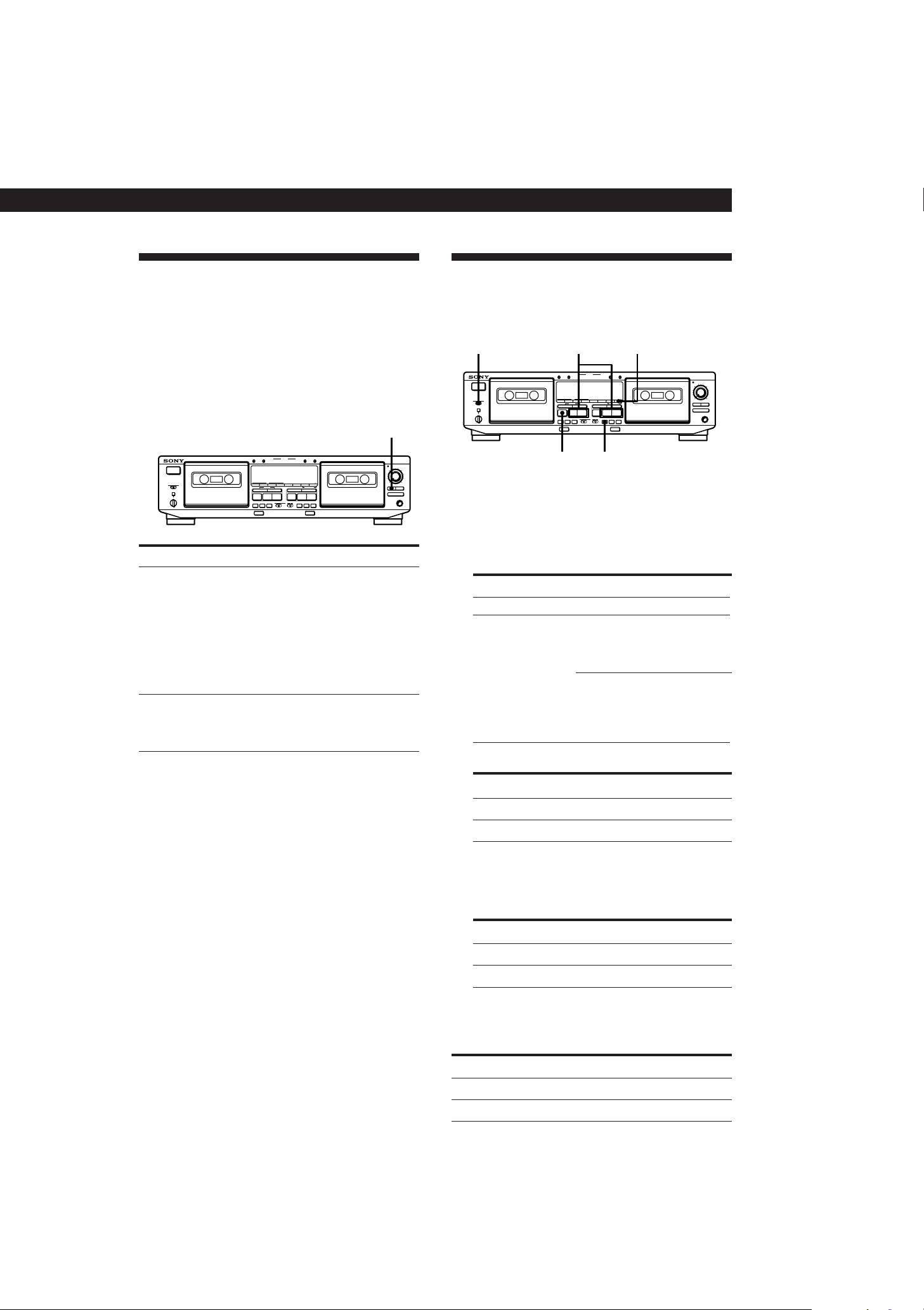
2 Press REC r.
The AUTO indicator flashes and the deck
automatically adjusts the recording level. The
AUTO indicator lights up continuously after the
recording level has been adjusted.
3 Press PAUSE P or ·.
Recording starts.
To cancel the Auto Rec Level function
Press ARL or turn REC LEVEL so that the AUTO indicator
goes off. If you do either of these during recording,
recording will continue but with the Auto Rec Level function
turned off.
To stop recording
Press p.
z How the Auto Rec Level function adjusts the
recording level
While the AUTO indicator is flashing, the deck sets the
recording level as high as possible without causing
distortion. If the signal level rises excessively after the
start of recording, the deck gradually decreases the
recording level.
§
PRr
§
PRr
p
ª·
0
g
)
PAUSE
CLEAR BACK FRONT
REC MUTE
REC
PAUSE
REC MUTE
REC
ON FILTERONOFF
(AMS) (AMS)
0
)
(AMS) (AMS)
p
ª·
– RMS +
RMS/START
RESET
MEMORY
RESET
MEMORYAB
COUNTER
SET CHECK DISPLAY DECK A DECK B A+B REC HIGH/NORMAL
DOLBY NR
B
C
S
RMS
AUTO CAL(STARTP)
DUBBING A B
START(DECK BP)
PITCH CONTROL
+–
Ø
ON
ø
OFF
Aa
RELAY
DIRECTION MODE
POWER
AUTO REC LEVEL
FADER ARL
π SYNCHRO
PHONES
0
1
2
3
4
5
6
7
8
9
10
ARL·PAUSE P REC r
3-810-716-11(1)
Advanced Recording Operations
13
Dubbing a Tape
You can copy a tape in deck A to a tape in deck B at
normal or high speed.
Fading In and Out (Fader)
You can gradually increase the recording level at the
beginning of a recording (fade in) or gradually
decrease the recording level at the end of a recording
(fade out).
It is convenient to use this function, for example, when
the tape reaches to its end and you don’t want the track
to be cut off abruptly.
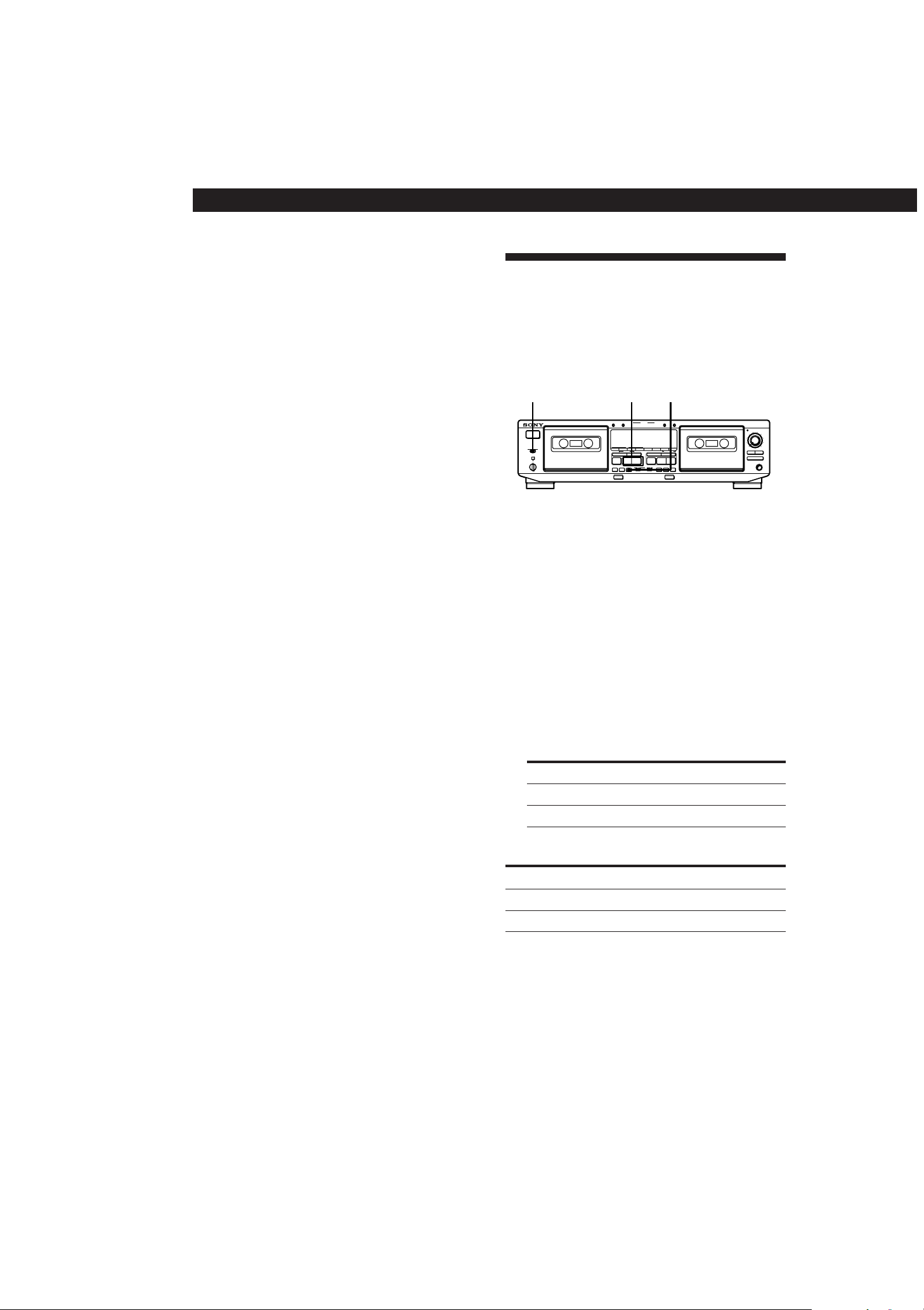
Fade in 1 Follow Steps 1 to 4 of “Recording on a
Tape” on page 6.
2 Press FADER. During fade-in, the
AUTO indicator flashes. When the
fade-in has completed, the AUTO
indicator lights up if the Auto Rec
Level function is working, or goes off if
the Auto Rec Level function is not
working.
To Do the following:
Fade out Press FADER when you want to start
fading out while recording. When the
fade-out has completed, “REC” flashes
in the display and the deck pauses.
Note
Fade-in or fade-out is not possible when you have used REC
LEVEL to manually set the recording level to 0 (minimum)
(see page 7).
1 Insert the recorded cassette into deck A and a
blank cassette into deck B.
Make sure the record-protect tabs on the cassette
in deck B have not been removed.
2 Select the side(s) to be recorded on.
To record on
One side A
Both sides a.
Recording on the reverse side on
deck B starts independently of
playback on deck A.
RELAY.
Recording on the reverse side on
deck B starts simultaneously with
playback of the reverse side on
deck A.
Set DIRECTION MODE to
3 Select the dubbing speed.
To select
Press HIGH/NORMAL
Normal speed Once
High speed Twice
“HIGH” or “NORM” appears in the display.
The tape deck changes to dubbing standby.
4 Select the side from which to start dubbing.
The front side ·
The reverse side ª
To record from Press
5 Press PAUSE P on deck B to start dubbing.
To stop dubbing
Normal-speed dubbing
High-speed dubbing
p on deck B
p on either deck
During Press
0
1
2
3
4
5
6
7
8
9
10
p
DIRECTION MODE HIGH / NORMALª / ·
PAUSE P
§
PRr
§
PRr
p
ª·
0
g
)
PAUSE
CLEAR BACK FRONT
REC MUTE
REC
PAUSE
REC MUTE
REC
ON FILTERONOFF
(AMS) (AMS)
0
)
(AMS) (AMS)
p ª·
– RMS +
RMS/START
RESET
MEMORY
RESET
MEMORYAB
COUNTER
SET CHECK DISPLAY DECK A DECK B A+B REC HIGH/NORMAL
DOLBY NR
B
C
S
RMS
AUTO CAL(STARTP)
DUBBING A B
START(DECK BP)
PITCH CONTROL
+–
ØON øOFF
Aa
RELAY
DIRECTION MODE
POWER
AUTO REC LEVEL
PHONES
FADER ARL
π SYNCHRO
§
PRr
§
PRr
p
ª·
0
g
)
PAUSE
CLEAR BACK FRONT
REC MUTE
REC
PAUSE
REC MUTE
REC
ON FILTERONOFF
(AMS) (AMS)
0
)
(AMS) (AMS)
p ª·
– RMS +
RMS/START
RESET
MEMORY
RESET
MEMORYAB
COUNTER
SET CHECK DISPLAY DECK A DECK B A+B REC HIGH/NORMAL
DOLBY NR
B
C
S
RMS
AUTO CAL(STARTP)
DUBBING A B
START(DECK BP)
PITCH CONTROL
+–
ØON øOFF
Aa
RELAY
DIRECTION MODE
POWER
AUTO REC LEVEL
FADER ARL
π SYNCHRO
PHONES
0
1
2
3
4
5
6
7
8
9
10
FADER
Advanced Recording Operations
14
3-810-716-11(1)
z During high-speed dubbing
Only p is operative.
z You don‘t have to adjust the recording level or
select the Dolby NR system during dubbing
Dubbing is automatically performed with the same
recording level and Dolby NR system as the original in
deck A. If, however, you want to monitor the sound
during normal-speed dubbing, set DOLBY NR to match
the tape in deck A (see page 5).
z You can adjust the pitch of the playback on deck A
(TC-WE805S/WE705S/WE505 only)
See page 5.
Note
If a TV set is placed near the tape deck, noise may occur
during high-speed dubbing. In that case, turn the television
set off or move it away from the tape deck.
Dubbing only specific portions
You can do this only during the normal-speed
dubbing.
1 Press p on deck A at the portion you want to
skip.
Deck B changes to recording pause.
2 Locate the point you want to resume recording on
deck A, then stop the tape.
3 Press PAUSE P on deck B to resume dubbing.
Recording on Both Decks in
Succession (Relay Recording)
(TC-WA8ESA/WE805S only)
You can make a continuous recording that starts on a
cassette in deck A and ends on a cassette in deck B.
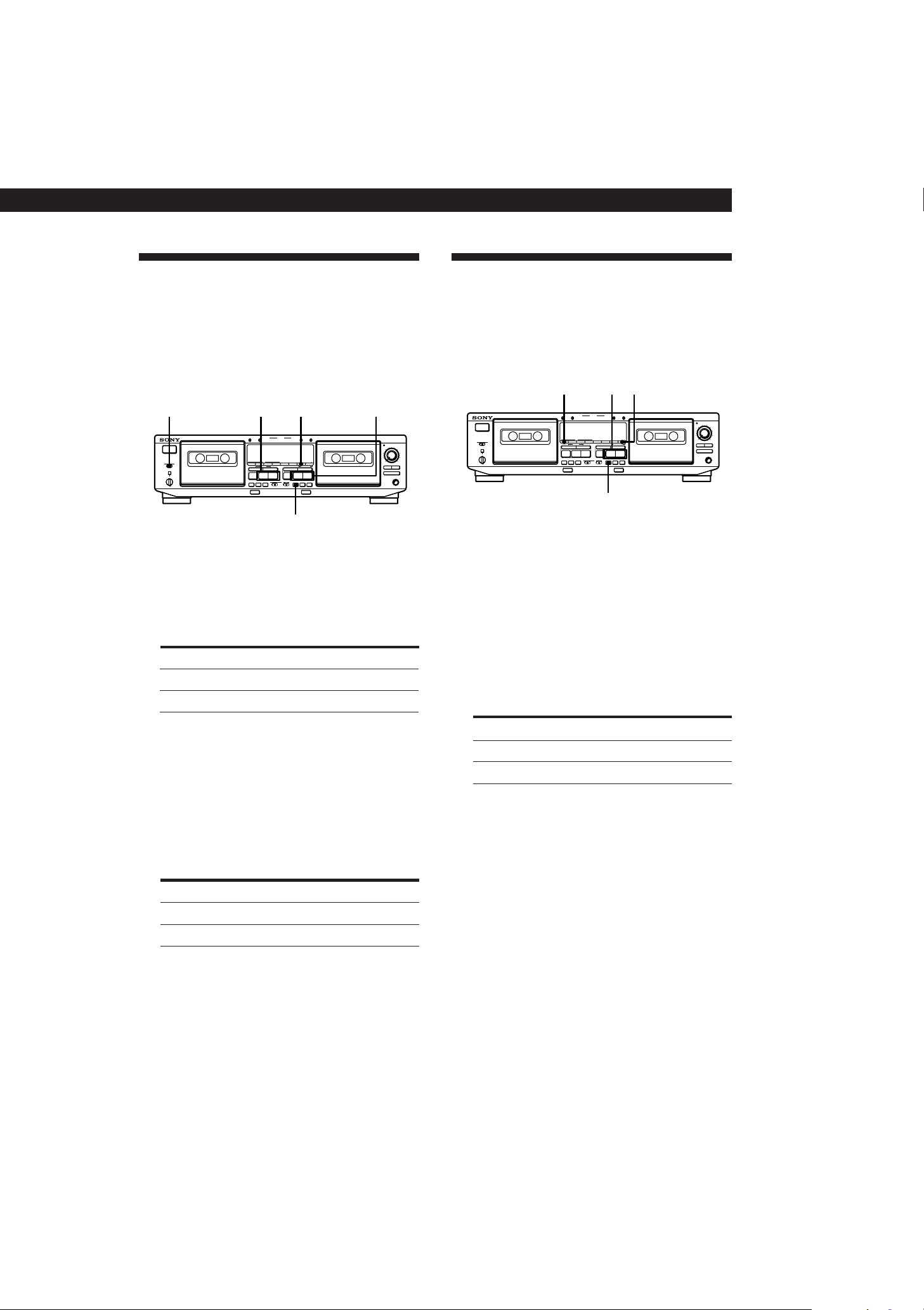
1 Insert blank cassettes into both decks.
Make sure that record-protect tabs on the
cassettes have not been removed.
2 Select the Dolby NR system (see page 7).
3 Set DIRECTION MODE to RELAY.
4 Press REC r on deck A.
Deck A changes to recording pause.
5 Start playing the program source.
6 Adjust the recording level manually, if necessary
(see page 7).
7 Start recording.
To record from Press
The front side · on deck A
The reverse side ª on deck A
To stop Relay Recording
Press
Recording on deck A p on deck A
During
Recording on deck B p on deck B
Note
Make sure that · on deck B appears in the display. If it
doesn’t, press · on deck B once; otherwise, Relay
Recording stops when the reverse side of the cassette in deck
B finishes.
0
1
2
3
4
5
6
7
8
9
10
DIRECTION MODE ª / · REC r
§
PRr
§
PRr
p
ª·
0
g
)
PAUSE
CLEAR BACK FRONT
REC MUTE
REC
PAUSE
REC MUTE
REC
ON FILTERONOFF
(AMS) (AMS)
0
)
(AMS) (AMS)
p ª·
– RMS +
RMS/START
RESET
MEMORY
RESET
MEMORYAB
COUNTER
SET CHECK DISPLAY DECK A DECK B A+B REC HIGH/NORMAL
DOLBY NR
B
C
S
RMS
AUTO CAL(STARTP)
DUBBING A B
START(DECK BP)
PITCH CONTROL
+–
ØON øOFF
Aa
RELAY
DIRECTION MODE
POWER
AUTO REC LEVEL
PHONES
FADER ARL
π SYNCHRO
3-810-716-11(1)
Advanced Recording Operations
15
0
1
2
3
4
5
6
7
8
9
10
RMS / START HIGH / NORMALª / ·
PAUSE P
§
PRr
§
PRr
p
ª·
0
g
)
PAUSE
CLEAR BACK FRONT
REC MUTE
REC
PAUSE
REC MUTE
REC
ON FILTERONOFF
(AMS) (AMS)
0
)
(AMS) (AMS)
p ª·
– RMS +
RMS/START
RESET
MEMORY
RESET
MEMORYAB
COUNTER
SET CHECK DISPLAY DECK A DECK B A+B REC HIGH/NORMAL
DOLBY NR
B
C
S
RMS
AUTO CAL(STARTP)
DUBBING A B
START(DECK BP)
PITCH CONTROL
+–
ØON øOFF
Aa
RELAY
DIRECTION MODE
POWER
AUTO REC LEVEL
PHONES
FADER ARL
π SYNCHRO
0
1
2
3
4
5
6
7
8
9
10
DIRECTION MODE A+B RECª / ·ª / ·
PAUSE P
§
PRr
§
PRr
p
ª·
0
g
)
PAUSE
CLEAR BACK FRONT
REC MUTE
REC
PAUSE
REC MUTE
REC
ON FILTERONOFF
(AMS) (AMS)
0
)
(AMS) (AMS)
p ª·
– RMS +
RMS/START
RESET
MEMORY
RESET
MEMORYAB
COUNTER
SET CHECK DISPLAY DECK A DECK B A+B REC HIGH/NORMAL
DOLBY NR
B
C
S
RMS
AUTO CAL(STARTP)
DUBBING A B
START(DECK BP)
PITCH CONTROL
+–
ØON øOFF
Aa
RELAY
DIRECTION MODE
POWER
AUTO REC LEVEL
PHONES
FADER ARL
π SYNCHRO
Recording the Same Source on
Both Decks (Simultaneous
Recording)
(TC-WA8ESA/WE805S only)
You can record the same source on cassettes in deck A
and B at the same time.
Recording Your Own Program
(RMS Dubbing)
You can record an RMS program that you’ve created
(see “Creating Your Own Program (RMS Play)” on
page 9). This function works only at normal speed.
1 Insert the recorded cassette into deck A and a
blank cassette into deck B.
Make sure the record-protect tabs on the cassette
in deck B have not been removed.
2 Program tracks on deck A (see Steps 1 to 5 on
page 9).
3 Press HIGH/NORMAL once to change the tape
deck to dubbing standby.
4 Select the side of the tape in deck B you want to
record on.
To record from Press
The front side ·
The reverse side ª
8 Press PAUSE P on deck B.
Simultaneous Recording starts.
To stop Simultaneous Recording
Press p on both decks.
z PAUSE P and REC MUTE R (see page 16) on deck B
can control both decks at the same time
During Simultaneous Recording, PAUSE P and REC
MUTE R on deck B control both decks, but not PAUSE
P and REC MUTE R on deck A.
4 Press A+B REC.
Both decks change to recording pause.
5 Start playing the program source.
6 Adjust the recording level manually, if necessary
(see page 7).
7 Select the side you want to start recording from
on both decks.
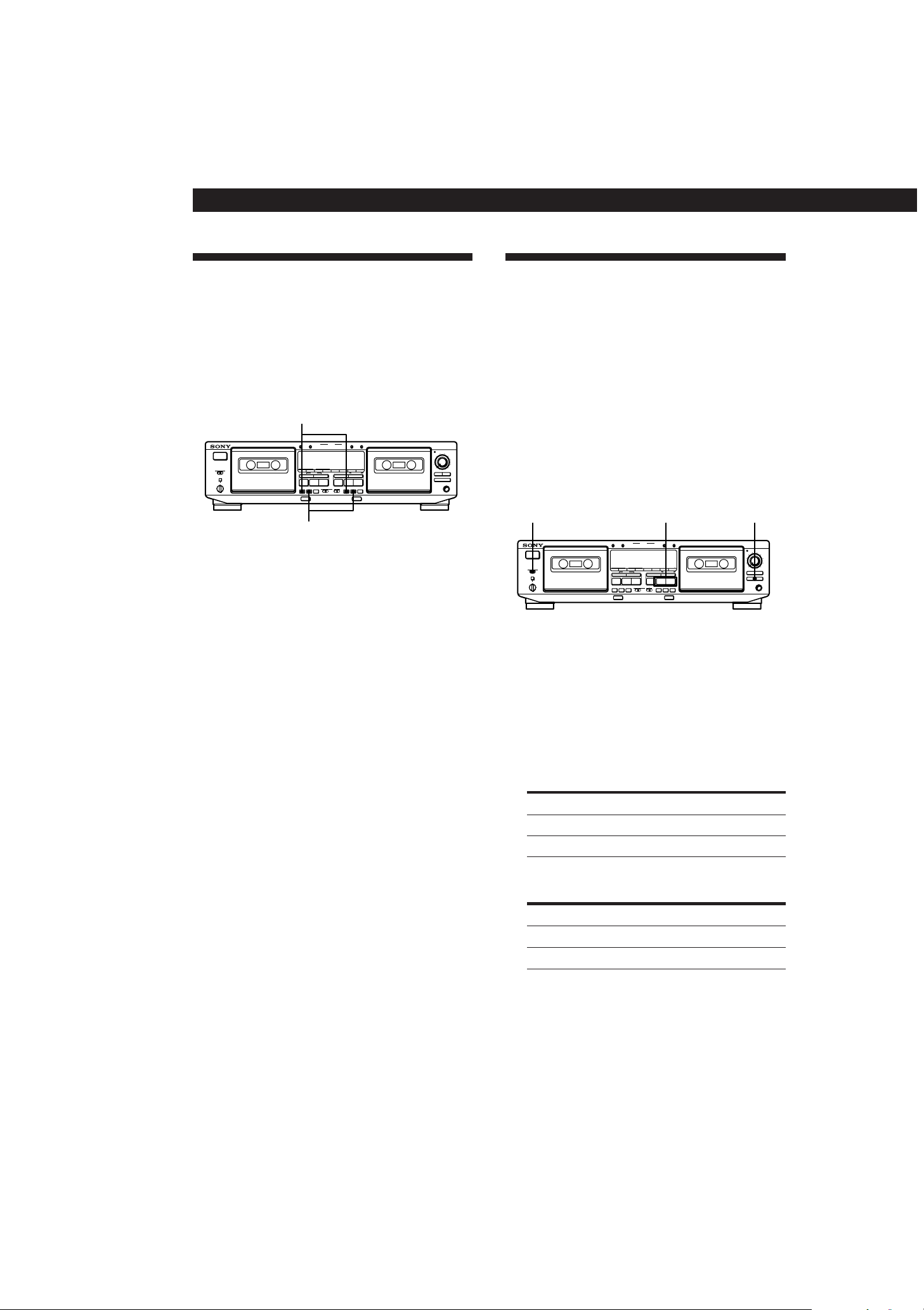
1 Insert blank cassettes into both decks.
Make sure that record-protect tabs on the
cassettes have not been removed.
2 Select the Dolby NR system (see page 7).
3 Select the side(s) to be recorded on.
To record on
Only one side
Both sides
Set DIRECTION MODE to
A
a
To start recording
Press
On the front side
On the reverse side ª
·
5 Press RMS/START or PAUSE P on deck B to
start RMS Dubbing.
To stop RMS Dubbing
Press p on deck B. The RMS program remains even after
RMS Dubbing stops.
z To insert a blank space on the tape before you start
RMS Dubbing
You can insert a blank space of 4 seconds or more on
the tape in deck B by pressing REC MUTE R after Step
4.
For details, see “Inserting a Blank Space During
Recording (Record Muting)” on page 16.
z A blank of 10 seconds is automatically inserted on
the tape when you start RMS Dubbing if:
— you insert a new cassette into deck B.
— the tape in deck B is completely rewound to its
beginning and automatically stopped.
Advanced Recording Operations
16
3-810-716-11(1)
0
1
2
3
4
5
6
7
8
9
10
DIRECTION MODE SYNCHROª / ·
§
PRr
§
PRr
p
ª·
0
g
)
PAUSE
CLEAR BACK FRONT
REC MUTE
REC
PAUSE
REC MUTE
REC
ON FILTERONOFF
(AMS) (AMS)
0
)
(AMS) (AMS)
p ª·
– RMS +
RMS/START
RESET
MEMORY
RESET
MEMORYAB
COUNTER
SET CHECK DISPLAY DECK A DECK B A+B REC HIGH/NORMAL
DOLBY NR
B
C
S
RMS
AUTO CAL(STARTP)
DUBBING A B
START(DECK BP)
PITCH CONTROL
+–
ØON øOFF
Aa
RELAY
DIRECTION MODE
POWER
AUTO REC LEVEL
PHONES
FADER ARL
π SYNCHRO
0
1
2
3
4
5
6
7
8
9
10
REC MUTE R
PAUSE P
§
PRr
§
PRr
p
ª·
0
g
)
PAUSE
CLEAR BACK FRONT
REC MUTE
REC
PAUSE
REC MUTE
REC
ON FILTERONOFF
(AMS) (AMS)
0
)
(AMS) (AMS)
p ª·
– RMS +
RMS/START
RESET
MEMORY
RESET
MEMORYAB
COUNTER
SET CHECK DISPLAY DECK A DECK B A+B REC HIGH/NORMAL
DOLBY NR
B
C
S
RMS
AUTO CAL(STARTP)
DUBBING A B
START(DECK BP)
PITCH CONTROL
+–
ØON øOFF
Aa
RELAY
DIRECTION MODE
POWER
AUTO REC LEVEL
PHONES
FADER ARL
π SYNCHRO
Synchro-Recording With a CD
Player Through a Control A1
Cable
(TC-WE805S/WE705S/WE605S only)
By pressing SYNCHRO, you can perform synchro-
recording on your tape deck with a Sony CD player
connected to the CONTROL A1 connector through a
control A1 cable (see page 4). The control A1 cable
supports advanced functions not possible with the
commander-based CD synchro-recording function on
previous models. Further information on the various
operations made possible by a control A1 cable is
provided in the pamphlet attached to this manual.
Inserting a Blank Space During
Recording (Record Muting)
You can insert a blank space of 4 seconds between each
track. The blank spaces allow you to locate the start of
specific tracks afterwards using the Multi-AMS
function (see page 8). You can also use this function to
erase unwanted portions on a tape.
1 Start recording.
2 Press REC MUTE R where you want to insert a
blank space.
“REC” flashes in the display and a blank is
recorded on the tape.
After 4 seconds, P lights up and the tape deck
changes to recording pause.
3 Press PAUSE P to resume recording.
z If you want to insert a blank space longer than 4
seconds
Hold down REC MUTE R as long as you want. After 4
seconds, “REC” flashes faster.
When you release REC MUTE R, P lights up and the
tape deck changes to recording pause.
Press PAUSE P to resume recording.
1 Set the source selector on the amplifier to CD
player.
2 Insert a CD into the CD player.
3 Select the play mode (CONTINUE, SHUFFLE, or
PROGRAM) of the CD player.
4 Insert a cassette into deck B.
5 Select the side(s) to be recorded on.
AOnly one side
Both sides
To record on Set DIRECTION MODE to
a or RELAY
6 Select the side you want to start recording from
on deck B.
To record from Press
The front side ·
The reverse side ª

3-810-716-11(1)
Advanced Recording Operations
17
7 Press SYNCHRO.
If your CD player has the Peak Search function:
The SYNCHRO button indicator lights up and the CD
player locates the highest signal level among the tracks
to be recorded as the tape deck adjusts the recording
level. When the recording level adjustment is
completed, CD Synchro-Recording starts.
If your CD player does not have the Peak Search
function:
The CD player changes to play pause and deck B to
recording pause. Press PAUSE P on deck B to start
Synchro-Recording.
To stop CD Synchro-Recording
Press p on deck B or the CD player.
z You can use an optional remote to operate the CD
player
To start CD play, press P twice; to pause CD play, press
P once; to locate a CD track, press = or +.
z If the SYNCHRO button indicator goes off after
flashing three times
The tape cannot be recorded on because the record-
protect tab(s) on the cassette has (have) been removed.
z Length of tape used for recording
Tracks on a CD differ in length. Classical music CDs
and others often have tracks that exceed the recording
time of a single cassette side. In this case, record the
tape manually.
z When recording from the middle of the tape
A tape that is inserted and has not been played or
recorded on is assumed by the deck to be a new tape,
even if the present location is in the middle of the tape.
The deck will transport the tape for 10 seconds before
starting CD Synchro-Recording to bypass the portion
corresponding with the leader. To begin CD Synchro-
Recording without the ten-seconds delay, play or record
on the tape for a few seconds before starting the CD
Synchro-Recording procedure.
z If the tape ends during CD Synchro-Recording on the
front side of the tape (· lights up) and DIRECTION
MODE is set to a or RELAY
Recording of the track ends immediately, the tape
direction is reversed, and recording starts again from
the beginning of the track. If the tape ends on the
reverse side of the tape (ª lights up), CD Synchro-
Recording stops and the CD player stops playing.
Notes
• To prevent interruption of the recording process, do not
press any operation buttons on the CD player during CD
Synchro-Recording.
• Certain operation buttons on the tape deck are disabled
during CD Synchro-Recording.
3-810-716-11(1)
Additional Information
18
Notes on Cassette Tapes
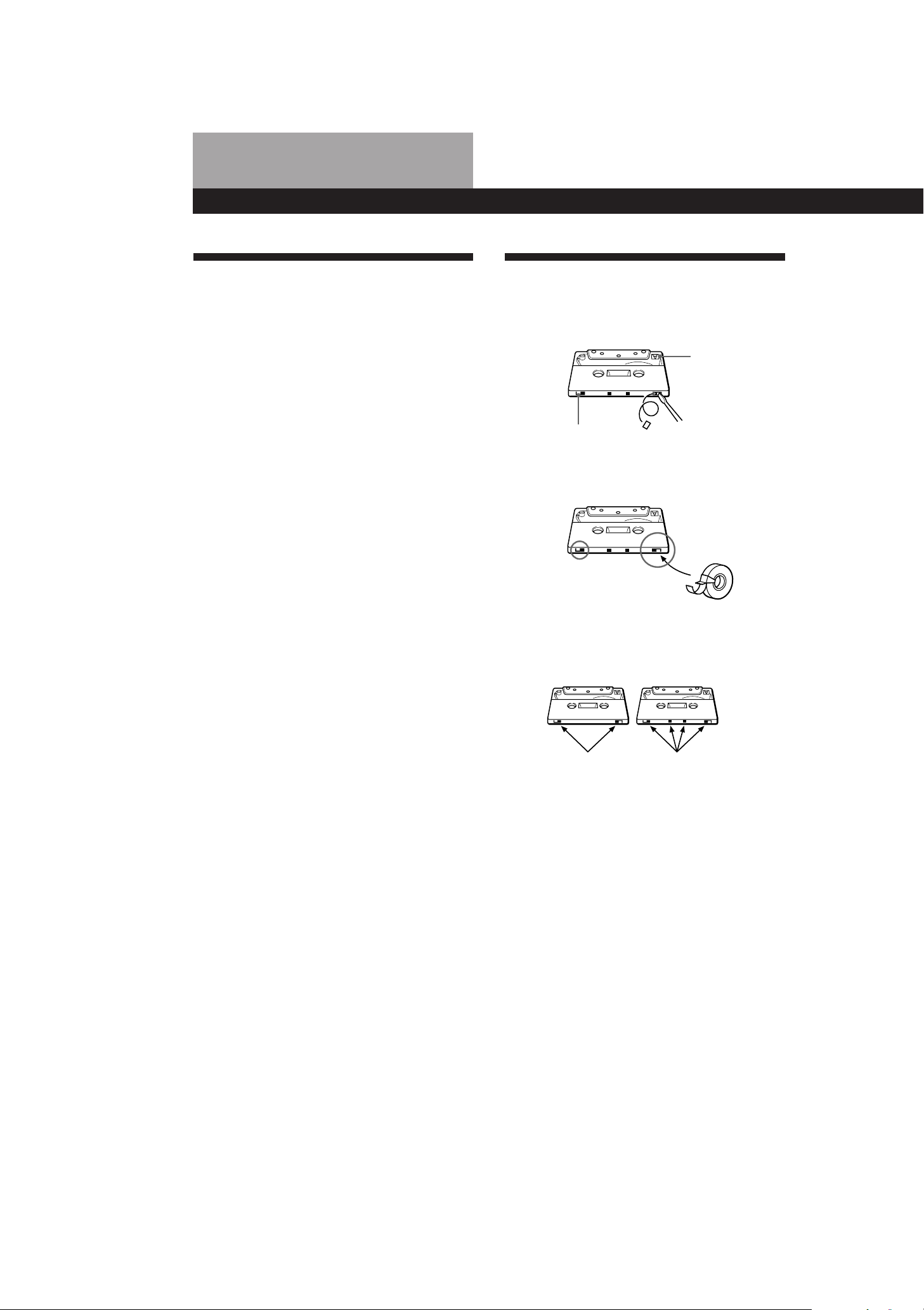
To protect a recording on side A or B
Break out the respective tab.
Precautions
On safety
• Do not disassemble the cabinet — this may result in an
electrical shock. Refer servicing to qualified personnel
only.
• Should any solid object or liquid fall into the cabinet,
unplug the tape deck and have it checked by qualified
personnel before operating it any further.
On power sources
• Before operating the tape deck, check that the operating
voltage of the tape deck is identical with your local power
supply. The operating voltage is indicated on the
nameplate at the rear of the tape deck.
• If you are not going to use the tape deck for a long time,
be sure to disconnect the tape deck from the wall outlet.
To disconnect the AC power cord, grasp the plug itself;
never pull the cord.
• AC power cord must be changed only at the qualified
service shop.
On operation
• Because of a safety mechanism, the function buttons will
not operate if the cassette holder is not completely closed,
if there is no cassette in the cassette holder, or if a cassette
has been incorrectly inserted into the cassette holder.
• Be sure to stop the tape before turning off the tape deck.
Otherwise, the tape may be damaged.
On placement
• Place the tape deck in a location with adequate ventilation
to prevent heat build-up in the tape deck.
• Do not place the tape deck:
— on a soft surface such as a rug that might block the
ventilation holes on the bottom.
— in a location near heat sources.
— in a place subject to direct sunlight.
— in an inclined position.
— in a place subject to excessive dust or mechanical shock.
On cleaning the tape deck
Clean the cabinet, panel and controls with a soft cloth
slightly moistened with a mild detergent solution. Do not
use any type of abrasive pad, scouring powder or solvent
such as alcohol or benzine.
For the customers in the United States
For detailed safety precautions, see the leaflet
“IMPORTANT SAFEGUARDS”.
If you have any questions or problems concerning your
tape deck, please consult your nearest Sony dealer.
To record on a tape with a missing record-protect tab
Cover the respective tab hole with adhesive tape.
When you are using a type II or type IV tape, be careful not
to cover the detector slots that the deck uses to determine
the tape type.
Type II
Type IV
Detector slots
Detector slots
On tapes longer than 90 minutes
We do not recommend the use of tapes longer than 90
minutes except for a long continuous recording or playback.
They are very thin and tend to stretch easily.
On handling cassettes
• To prevent the heads and tape path from getting dirty,
avoid touching the tape surface of a cassette.
• Place cassettes away from equipment with magnets, such
as speakers and amplifiers, which may cause tape
distortion or erase the recordings.
• Do not expose cassettes to direct sunlight, extremely cold
temperature, or moisture.
Tab for side B
Side A
Tab for side A
Additional Information
3-810-716-11(1)
Additional Information
19
Cleaning
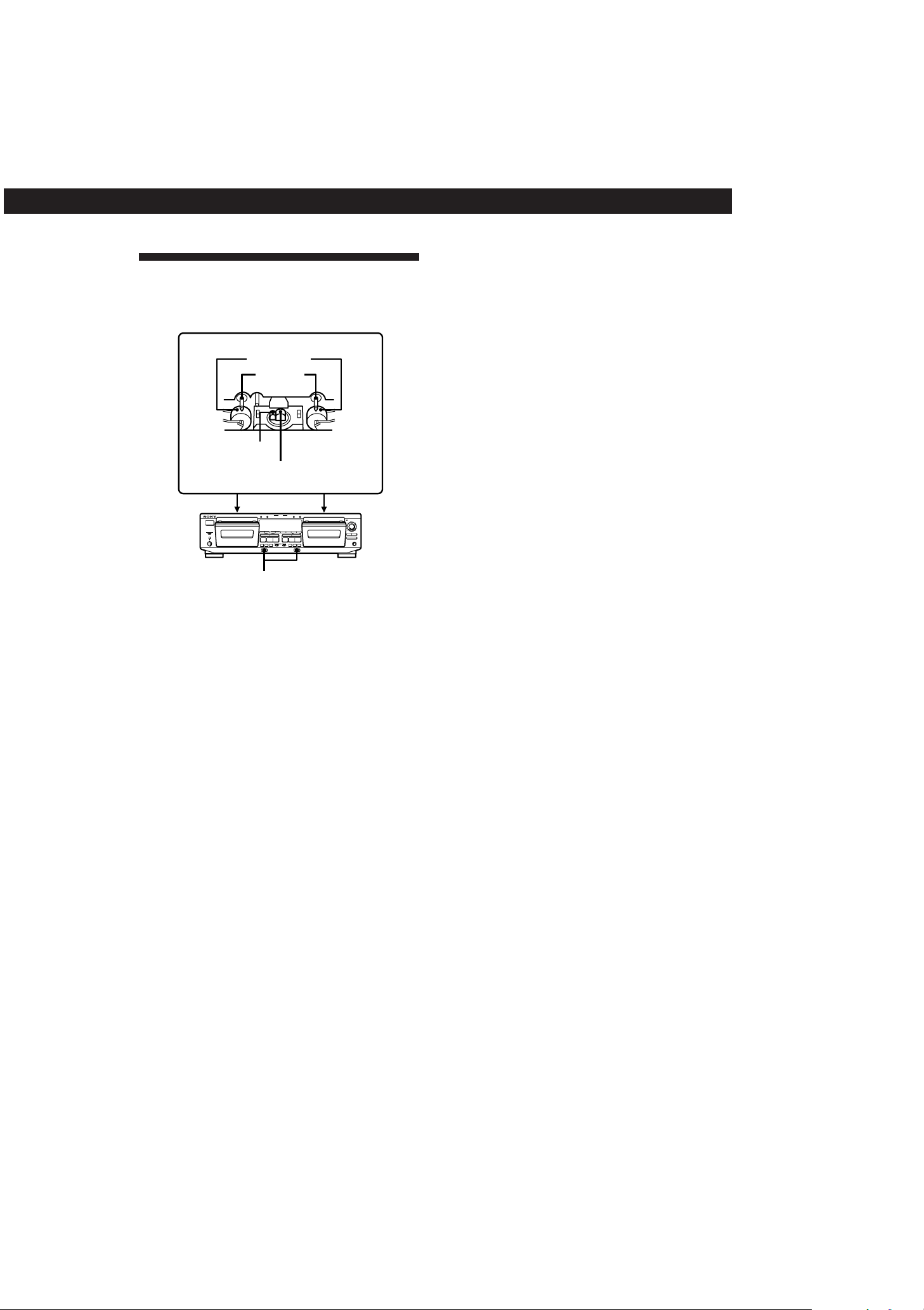
Head assembly of the TC-WE805S
Erasing head
Recording/playback head
Demagnetizing the heads
After 20 to 30 hours of use, or when you notice a
hissing sound or loss of high frequencies, demagnetize
the heads with a commercially available demagnetizer
for tape decks. Please refer to the instructions of the
demagnetizer.
Cleaning the heads and tape path
Clean the heads and tape path of the tape deck after
every 10 hours of operation to guard against:
• low-quality sound
• a decrease in sound level
• excessive wow or flutter
• sound dropout
• incomplete erasure
• impairment of recording function
To ensure better recording, we recommend that you
clean the heads and tape path before every recording.
1 Press § to open the cassette holder. Grasp the
front cover on both sides and gently lift to remove
it.
2 With the tape deck turned off, wipe the heads, the
pinch rollers and the capstans with a cotton swab
slightly moistened with alcohol or a commercially
available cleaning fluid for tape decks.
3 Replace the front cover.
§
PRr
§
PRr
p
ª·
0
g
)
PAUSE
CLEAR BACK FRONT
REC MUTE
REC
PAUSE
REC MUTE
REC
ON FILTERONOFF
(AMS) (AMS)
0
)
(AMS) (AMS)
p
ª·
– RMS +
RMS/START
RESET
MEMORY
RESET
MEMORYAB
COUNTER
SET CHECK DISPLAY DECK A DECK B A+B REC HIGH/NORMAL
DOLBY NR
B
C
S
RMS
AUTO CAL(STARTP)
DUBBING A B
START(DECK BP)
PITCH CONTROL
+–
ØON øOFF
Aa
RELAY
DIRECTION MODE
POWER
AUTO REC LEVEL
FADER ARL
π SYNCHRO
PHONES
0
1
2
3
4
5
6
7
8
9
10
§
Capstans
Pinch rollers

3-810-716-11(1)
Additional Information
20
Troubleshooting
If you’ve experienced any of the following difficulties
while using the tape deck, use this troubleshooting
guide to help you remedy the problem. Should the
problem persist, consult your nearest Sony dealer.
The function buttons do not work.
/ The tape deck has been just turned on and does
not operate for about 3 seconds. Wait until P
stops flashing.
/ Check that the cassette is inserted correctly and
the cassette holder is closed completely.
The tape deck does not play or record.
/ There is no cassette in the cassette holder.
/ The tape has come to the end.
/ The tape is slack. Take up the tape slack.
/ The record-protect tab has been removed from
the cassette (see page 18).
/ Make sure the amplifier setting is correct.
/ Check that the tape deck connections are
secure.
/ The heads and tape path are dirty. Clean them
(see page 19).
/ The recording/playback head is magnetized.
Demagnetize it (see page 19).
There is excessive wow, flutter or sound drop-out.
/ The capstans and pinch rollers are dirty. Clean
them (see page 19).
There is a decrease in sound level, sound drop-out, or
poor reproduction of high frequencies./The tape does not
erase completely./Noise increases.
/ The recording/playback or erasing head and
tape path are dirty. Clean them (see page 19).
/ The recording/playback or erasing head is
magnetized. Demagnetize it (see page 19).
There is hum or noise.
/ The tape deck is placed near a TV or VCR.
Move the tape deck away from the TV or VCR.
/ The tape deck is placed on or under the
amplifier. Move the tape deck away from the
amplifier.
There is an unbalanced tone.
/ Check that DOLBY NR position is the same as
when the tape was recorded. An unbalanced
tone may result when a tape recorded in the S
Dolby NR system is played back in B or C
system, or when a tape recorded in the B or C
Dolby NR system is played back in the S
system (unavailable on the TC-WE505).
/ The tape deck is placed near a TV or VCR.
Move the tape deck away from the TV or VCR.
The tape stops before the tape has been fully rewound.
/ The tape is slack. Take up the tape slack.
/ If “M” is shown in the display, press MEMORY
repeatedly until “M” disappears.
/ The cassette shell is bent. Use another cassette.
The Multi-AMS function does not work properly.
/ One of the tracks contains a long pause, a
passage of low frequencies or very low volume,
or a gradual increase or decreace in volume.
/ The space before a track is less than 4 seconds
long. Insert a blank space of 4 seconds using
REC MUTE R.
/ The signal strength of the left and right
channels are very different.
/ There is noise in the space before a track.
/ You pressed ) (or 0) immediately before
the beginning of the next track or immediately
after the beginning of the current track.
The DOLBY NR function does not work properly during
playback.
/ The Pitch Control function is on and the
frequency characteristics of the sound is
altered. Push the PITCH CONTROL button
again to turn off the function.
The High-Speed Fast-Forwarding and Rewinding
functions do not work (TC-WA8ESA/WA7ESA/WE805S/
WE705S only).
/ You pressed ) (or 0) when there is little
tape remaining in that direction. This is to
protect the tape.
There is excessively loud tape transport noise during
fast-forwarding or rewinding.
/ This noise is caused by the cassette and is not a
mechanical problem.
§ does not work.
/ The tape deck is playing back or recording.
Press p or PAUSE P to stop playback or
recording before pressing §.
/ A power failure has occurred, the tape deck has
been turned off or the power cord has been
disconnected during tape operation. Reconnect
the power or turn off the tape deck, then on
again.

3-810-716-11(1)
Additional Information
21
Specifications
System
Recording system
4-track 2-channel stereo
Fast-winding time (approx.)
90 sec. (with Sony C-60 cassette)
High-speed fast-winding time (approx.) (TC-WA8ESA, TC-WA7ESA, TC-
WE805S and TC-WE705S only)
45 sec. (with Sony C-60 cassette)
Bias
AC bias
Signal-to-noise ratio (at peak level and weighted with Dolby NR off)
Type I tape, Sony Type I (NORMAL): 55 dB
Type II tape, Sony Type II (HIGH): 57 dB
Type IV tape, Sony Type IV (METAL): 58 dB
S/N ratio improvement (approximate values)
With Dolby B NR on: 5 dB at 1 kHz, 10 dB at 5 kHz
With Dolby C NR on: 15 dB at 500 Hz, 20 dB at 1 kHz
With Dolby S NR on (unavailable on the TC-WE505):
10 dB at 100 Hz, 24 dB at 1 kHz
Harmonic distortion
0.4% (with Type I tape, Sony Type I (NORMAL):
160 nWb/m 315 Hz, 3rd H.D.)
1.8% (with Type IV tape, Sony Type IV (METAL):
250 nWb/m 315 Hz, 3rd H.D.)
Frequency response (Dolby NR off)
Inputs
Line inputs (phono jacks)
Sensitivity : 0.16 V
Input impedance : 47 kilohms
Outputs
Line outputs (phono jacks)
Rated output level : 0.5 V at a load impedance of
47 kilohms
Load impedance : Over 10 kilohms
Headphones (stereo phone jack)
Output level : 0.25 mW at a load impedance of
32 ohms
General
Power requirements
Tape type
Type I tape, Sony Type I
(NORMAL)
30 - 16,000 Hz (±3 dB, IEC),
20 - 17,000 Hz (±6 dB)
U.S.A. and Canada 120 V AC, 60 Hz
220 - 230 V AC, 50/60 Hz
Power requirementsWhere purchased
U.K., Continental Europe,
China and certain countries
in Asia
240 V AC, 50/60 Hz
120/220/240 V AC,
50/60 Hz
Australia
Other countries
Power consumption
26W (TC-WA7ESA, TC-WE705S, TC-WE605S, TC-
WR550Z and TC-WE505)
28W (TC-WA8ESA and TC-WE805S)
Dimensions (approx) (w/h/d)
Model for U.K. and Australia:
430 × 120 × 303 mm (w/h/d)
(17 × 4
3
/
4 × 12 inches)
Model for other countries:
430 × 120 × 290 mm (w/h/d)
(17 × 4
3
/
4 × 11
1
/
2 inches)
including projecting parts and controls
Mass (approx.)
4.2 kg (9 lbs 5 oz)
Supplied accessories
Audio connecting cords (2 phono plugs - 2 phono
plugs) (2)
Optional accessory
Remote commander RM-J910
Design and specifications are subject to change without
notice.
Type II tape, Sony Type II (HIGH) 30 - 17,000 Hz (±3 dB, IEC),
20 - 18,000 Hz (±6 dB)
30 - 19,000 Hz (±3 dB, IEC),
20 - 20,000 Hz (±6 dB),
30 - 13,000 Hz (±3 dB, –4 dB
recording)
Type IV tape, Sony Type IV
(METAL)
Wow and flutter
TC-WA8ESA/WA7ESA/WE805S/
WE705S/WE605S/WR550Z
±0.13% W. Peak (IEC)
0.07% W. RMS (NAB)
±0.18% W. Peak (DIN)
TC-WE505
±0.14% W. Peak (IEC)
0.08% W. RMS (NAB)
±0.19% W. Peak (DIN)
Variable pitch range (approx.) (TC-WE805S, TC-WE705S and TC-WE505
only)
–30 to +30%

3-810-716-11(1)
Additional Information
22
Glossary
ATS
Automatic Tape Selection. The tape deck automatically sets
the appropriate equalization characteristics and bias current
according to the type of tape inserted in the deck.
Automatic calibration
The automatic adjustment of the bias current and recording
level for the inserted tape.
This adjustment works together with the deck’s ATS
(Automatic Tape Selection, see above) to get the best
possible recording results on any tape.
Auto rec level function
A function that automatically sets the recording level
according to the peak signal level of the program source
prior to recording.
When active, this function gradually decreases the recording
level when the signal level rises excessively during
recording.
Dolby HX PRO system
A system that reduces distortion and noise in high-frequency
response during recording. A tape recorded with this
system produces the same high-quality sound even when
played on other tape decks.
Dolby NR (noise reduction) system
A system that eliminates tape hiss noise by boosting low-
level signals in the high-frequency range during recording,
then lowering them during playback.
There are four types of systems: A, B, C and S (unavailable
on the TC-WE505). Type A is for professional use (and is not
available on your tape deck), and types B, C and S are for
consumer use. Type S has the maximum noise reduction
capability, followed by types C and B.
Multi-AMS
Multi-Automatic Music Sensor is a function that locates the
beginning of up to 30 tracks before or after the current track
by detecting the blank space (of over 4 seconds) between
tracks.
Multiplex filter
A filter for eliminating the 19-kHz stereo carrier and the 38-
kHz sub-carrier signals that may impair the Dolby NR
system. Though tuners are usually equipped with this filter,
if you got poor results when recording FM broadcasts with
the Dolby NR system, your tuner may not have a filter or the
filter may not be working. In this case, set the DOLBY NR
switch on the tape deck to ON FILTER.
Test tones
Signals (10-kHz and 400-Hz) generated by the tape deck for
bias current and recording level calibration.
Index
Index
A, B
Adjusting
recording level automatically. See Auto rec
level
recording level manually 7
volume 5
Accessories
optional 21
supplied 4, 21
ATS 11, 22
Audio connecting cord 4, 21
Auto play 8
Automatic Music Sensor. See Multi-AMS
Automatic calibration 11, 22
Automatic Tape Selection. See ATS
Auto rec level 12, 22
C
Cassette. See Tape
CD synchro-recording 16
Cleaning
cabinet 18
heads and tape path 19
Connecting. See Hooking up
Control A1 cable 16
D, E, F, G
Difference among the models 3
Dolby HX PRO system 7, 22
Dolby NR system 5, 7, 22
Dubbing
high-speed dubbing 13
normal-speed dubbing 13
only specific portions 14
RMS dubbing 15
Fader 13
Fading
in. See Fader
out. See Fader
FILTER. See Multiplex filter
H, I, J, K
Heads
cleaning 19
demagnetizing 19
High-speed
fast-forwarding function 5
rewinding function 5
Hooking up
hookups 4
overview 4
Insert
blank space 16
cassette 5, 6
L
Locating
beginning of the tape 8
particular point 8
tracks 8

3-810-716-11(1)
Additional Information
23
Index
M, N, O
Memory play 8
Multi-AMS 8, 22
Multiplex filter 7, 22
P, Q
Pitch control function 5
Playing
auto play 8
basic play 5
memory play 8
RMS play 9
R
Random Music Sensor. See RMS play or dubbing
Recording
basic recording 6
CD synchro-recording 16
FM broadcasts 7
on both decks in succession. See Relay
recording
the same source on both decks. See
Simultaneous recording
Record muting 16
Relay recording 14
Remote commander 21
RMS dubbing 15
RMS play
adding tracks 10
checking the order of tracks 9
S
Searching. See Locating
Simultaneous recording 15
Specifications 21
T
Tape
ejecting 5, 7
notes 18
path cleaning 19
protect the recording 18
type 18
Test tones 11, 22
Troubleshooting 20
U, V, W, X, Y, Z
Unpacking 4
Names of Controls
Buttons
A+B REC (simultaneous recording) 15
ARL (automatic recording level adjustment) 12
AUTO CAL 11
CHECK 9
DECK A/DECK B 11
DISPLAY 9
§ (eject) 5 - 7, 19
FADER 13
HIGH/NORMAL 13, 15
MEMORY 8
PAUSE P 5, 6, 11 - 13, 15, 16
PITCH CONTROL 5
REC (recording) r 6, 12, 14
REC MUTE (record muting) R 16
RESET 8
RMS/START 9, 15
SET 9
SYNCHRO 16
p (stop/RMS CLEAR) 9, 13
· (forward play/RMS FRONT) 5, 6, 8, 9, 11 - 16
ª (reverse play/RMS BACK) 8, 9, 11, 13 - 16
), 0 (fast-forwarding and rewinding/AMS/
RMS +/–) 8, 9
Switches
DIRECTION MODE 5, 6, 13 - 16
DOLBY NR 7
POWER 5, 6
Controls
PITCH CONTROL 5
REC (recording) LEVEL 6
Jacks
CONTROL A1 4
LINE IN 4
LINE OUT 4
PHONES 5
Others
AUTO indicator 6
Cassette holder 5, 6, 19
Peak level meters 7

3-810-716-11(1)
Sony Corporation Printed in Malaysia