
USER GUIDE
US CA
FREESTANDING RANGE
OR0SCG6, OR0SDG6, OR6SCG6 &
OR6SDG6 models
Do not store or use gasoline or other flammable
vapors and liquids in the vicinity of this or any
other appliance.
NEVER use this appliance as a space heater to
heat or warm the room. Doing so may result in
carbon monoxide poisoning and overheating of
the appliance.
WHAT TO DO IF YOU SMELL GAS
y Do not try to light any appliance.
y Do not touch any electrical switch.
y Do not use any phone in your building.
y Immediately call your gas supplier from a
neighbor’s phone. Follow the gas supplier’s
instructions.
y If you cannot reach your gas supplier, call the
fire department.
Installation and service must be performed by
a qualified installer, service agency or the gas
supplier.
WARNING!
If the information in this manual is not
followed exactly, a fire or explosion may
result causing property damage, personal
injury or death.
!

1
CONTENTS
IMPORTANT!
SAVE THESE INSTRUCTIONS
The models shown in this user guide may not be available in all markets and are subject to
change at any time. For current details about model and specification availability in your country,
visit our website listed on the back cover or contact your Fisher & Paykel dealer.
Safety and warnings 2
Introduction 6
First use
Control panel and clock display 8
Setting the clock 9
Positioning the shelves 10
Conditioning the oven and warming drawer 12
Oven use
Cooking guide 14
Oven functions 16
Cooking charts 20
Setting the timer 26
Auto Cook 28
Locking the oven controls 32
User preference settings 34
Sabbath mode 36
Cooktop use
Using your gas cooktop 38
Cooking guidelines and cookware 41
Using the warming drawer 43
Care and cleaning
Manual cleaning chart 44
Removing and replacing the oven door 48
Removing and replacing the side racks 50
Removing and replacing the warming drawer 51
Replacing the burner parts 52
Replacing an oven light bulb 54
Using the Self Clean function 55
Troubleshooting 58
Alert codes 63
Warranty and service 65

2
SAFETY AND WARNINGS
To reduce the risk of fire, electrical shock, injury to persons, or damage when using the
appliance, follow the important safety instructions listed below:
WARNING!
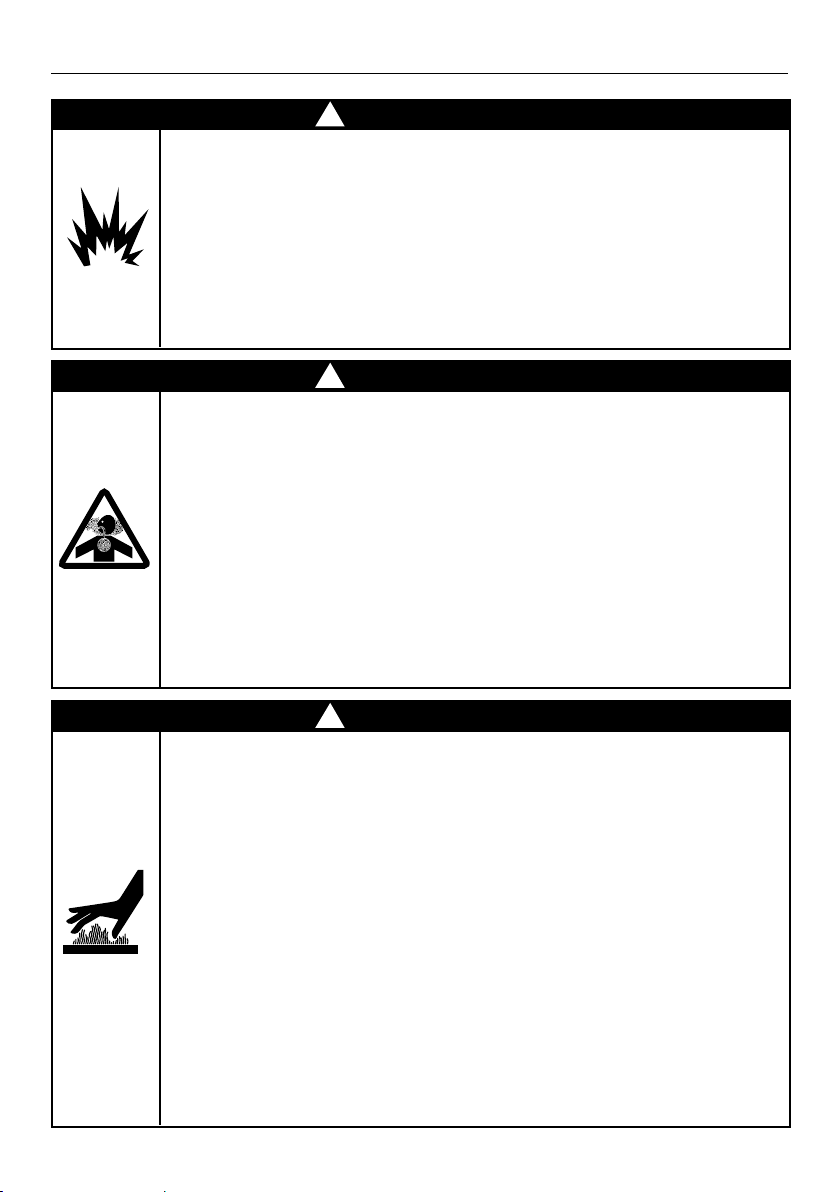
Electrical Shock Hazard
Before removing a faulty oven light bulb, make sure you turn the power
to the range off at the main fuse or circuit breaker panel. If you don’t
know how to do this, contact an electrician.
This appliance is equipped with a three-prong or four-prong grounding
plug for your protection against shock hazard and should be plugged
directly into a properly grounded power outlet. Do not under any
circumstances cut or remove the grounding prong from this plug.
Failure to follow this advice may result in death or electrical shock.
!
WARNING!
FIre Hazard
Never use your appliance for warming or heating the room.
Persons could be injured or a fire could start.
Keep the area around the appliance free from combustible materials
(eg wall coverings, curtains, drapes), gasoline and other flammable vapors
and liquids.
Do not let cooking grease or other flammable materials accumulate in, or,
or near the appliance.
Do not hang any articles (eg dish towels) off the oven handle.
Some fabrics may ignite or melt from the heat.
Never leave the cooktop burners unattended when in use – boilover
causes smoking and greasy spillovers that may ignite.
Be sure all the controls are turned off and the appliance is cool before
using any type of aerosol cleaner on or around the appliance.
Chemicals in such cleaners could, in the presence of heat, ignite or cause
metal parts to corrode.
Failure to follow this advice may result in death or serious injury.
!
WARNING!
Tipping Hazard
A child or adult can tip the range and be killed. Check installation
of anti-tip device per installation instructions. Check engagement
of anti-tip device if range is moved per installation instructions.
Failure to follow these instructions can result in death or serious burns
to children and adults
!
1411596
Montagner M.
29/11/2017
.
1:1
.
CODICE
N° DISEGNO
DATA
SCALA
DISEGNATO
CONTROLLATO
IN DATA
SOSTITUISCE IL
DESCRIZIONE:
ETICHETTA STAFFA ANTI-RIBALTAMENTO PER USA/CAN, NOTA
FRONTALE (RANGE STABILITY MARKING FOR USA/CAN, FRONT WARNING)
TRATTAMENTO :
MATERIALE :
VEDI NOTE / SEE NOTES
RAGGI NON QUOTATI (mm)
SPESSORI NON QUOTATI (mm)
TOLLERANZE GENERALI
XXX = QUOTE DA CONTROLLARE DURANTE LA PRODUZIONE
E PRIVE DI OGNI DIFETTO
SUPERFICI IN VISTA
N°
MODIFICHE
DATA
FIRMA
1 . .
.
TELEFAX 0423/912360
TEL. 0423/9121
31030 - BORSO del GRAPPA (Italy)
Fisher & Paykel appliances si riserva,
a termini di legge, la proprietá del
presente disegno con divieto di, senza
autorizzazione, riprodurlo o comunicarlo.
NOTE (NOTES):
- MATERIALE E FINITURA (FACESTOCK): POLIESTERE - ARGENTO MATTATO (MATTE SILVER POLYESTER)
- COLORE DI STAMPA (PRINTING COLOUR): NERO/GRIGIO (BLACK/GREY)
- ETICHETTA TIPO “CLASS IIIA-1”, ETICHETTA PERMANENTE (”CLASS IIIA-1” PERMANENT LABEL)
- IL PRODOTTO DEVE RESISTERE AD AGGRESSIVI CHIMICI E SOLVENTI (THE PRODUCT MUST BE RESIST
TO CHEMICALS AND SOLVENTS)
- L’ETICHETTA DEVE ESSERE ATTACCATA NELLA SUPERFICIE INTERNA DEL FIANCO SINISTRO, VISIBILE A
PORTA FORNO APERTA (THE LABEL SHALL BE ATTACHED ON THE INSIDE SURFACE OF THE LH SIDE
PANEL, VISIBLE WHEN THE OVEN DOOR IS OPEN)
125 mm
40 mm
WARNING - AVERTISSEMENT
A child or adult can tip the range and be killed (Une personne, enfant
ou adulte, peut faire basculer la cuisinière et subir des blessures mortelles).
Check installation of anti-tip device per installation instructions
si le dispositif antibasculement a été installé conformément aux directives
d’installation).
Failure to follow these instructions can result in death or serious burns
to children and adults (Le non-respect de ces directives expose enfants et
adultes à un risque de décès ou de brûlures graves).
Check engagement of anti-tip device if range is moved per installation
instructions
antibasculement, conformément aux directives d’installation).
See installation
instructions for details
(Voir les instructions
d'installation
pour plus de détails).
Tip-Over Hazard - Risque de basculement
Adjustable bracket assembly to
l'arrière de la cuisinière)
Anti-tip bracket
(Bride antibasculement)
Componenti conformi a Direttiva Europea 2011/65/UE (RoHS II) e successivi emendamenti.
Components in compliance with European Directive 2011/65/EU (RoHS II) and further amendments.
3
SAFETY AND WARNINGS
WARNING!
Explosion Hazard
If you smell gas, do not use the appliance. Open a window or door to let
the gas escape, then follow the instructions on the inside front cover of
this manual.
Do not use water on grease fires. A violent steam explosion may result.
Turn all burners off, then smother fire or flame or use dry chemical or
foam-type extinguisher.
Do not heat unopened food containters such as cans – build-up of
pressure may cause container to burst and result in injury.
Failure to follow this advice may result in injury or death.
!
WARNING!
Poisoning Hazard
Never cover any slots, holes or passages in the oven bottom or cover an
entire rack or the oven floor with materials such as aluminum foil.
Doing so blocks airflow through the oven and may cause carbon
monoxide poisoning. Aluminum foil linings may also trap heat, causing
a fire hazard.
Clean the appliance with caution. If a wet sponge or cloth is used
to wipe spills on a hot cooking area, be careful to avoid steam burn.
Some cleaners can produce noxious fumes if applied to a hot surface.
Follow the directions of the cleaner manufacturer.
Never use this appliance as a space heater to heat or warm the room.
Doing so may result in carbon monoxide poisoning and overheating of
the appliance.
Failure to follow this advice may result in poisoning or death.
!
WARNING!
Hot Surface Hazard
Accessible parts may become hot during use.
Do not touch burners, areas near burners, heating elements or interior
surfaces of oven – these may be hot enough to cause burns even though
they are dark in color. During and after use, do not touch, or let clothing
or other flammable materials contact these parts and surfaces until they
have had sufficient time to cool. Other parts and surfaces of the appliance
may become hot enough to cause burns among these areas are the
grates, back trim and oven vents at the back of the cooktop, front edge,
surfaces adjacent to the cooktop, and the oven door.
Use only dry potholders – moist or damp potholders on hot surfaces may
result in burns from steam. Do not let potholder touch hot heating
elements. Do not use a towel or other bulky cloth.
Let hot grease cool before attempting to handle it.
During self-cleaning, the oven reaches higher
temperatures than it does for cooking. Under such conditions, the surfaces
may get hotter than usual. Children should be kept away.
Failure to follow this advice may result in serious injury.
!

4
SAFETY AND WARNINGS
IMPORTANT SAFETY INSTRUCTIONS!
y Read all the instructions before using the appliance. Use the appliance only for its
intended purpose as described in these instructions.
y Proper installation – be sure your appliance is properly installed and grounded by a
qualified technician. A risk of tip-over exists when the appliance is not installed in
accordance with the installation instructions.
y Do not operate the appliance if it is damaged or not working properly. If you received
a damaged product, contact your dealer or installer immediately.
y Be sure to have the installer show you where and how to turn off the power supply to
the range (ie location of the main fuse or circuit breaker panel) and where and how to
turn off the gas supply to the range in an emergency.
y Do not leave children alone – children should not be left alone or unattended in the
area where the appliance is in use. They should never be allowed to play with the
appliance or to sit or stand on any part of the appliance.
y Caution – for safety reasons, do not store items of interest to children in cabinets
above a range or at the back of the range – children climbing on the range to reach
items could be seriously injured.
y Wear proper apparel – loose-fitting or hanging garments should never be worn while
using the appliance.
y User servicing – do not repair or replace any part of the appliance unless specifically
recommended in the manual. All other servicing should be referred to a qualified
technician. Technicians must disconnect the appliance from the power supply before
any servicing.
y Storage in or on appliance – flammable materials should not be stored in an oven or
near the cooktop.
y Use care when opening the oven door – let hot air or steam escape before removing
or replacing food.
y Keep oven vent ducts unobstructed.
y Keep rugs and mats well clear of the base of the range.
y Placement of oven shelves – always position shelves in the desired location while the
oven is cool (before preheating). If a shelf must be removed while the oven is hot, do
not let oven mitts or potholder contact the base of the oven or hot heating elements
in the oven.
y Do not clean the oven gasket or use any oven-cleaning products on it. It is essential
for a good seal, which ensures that the oven operates efficiently. Care should be taken
not to rub, damage or move it.
y Do not use oven cleaners, harsh/abrasive cleaning agents, waxes, or polishes in a
self-cleaning oven. No commercial oven cleaner, oven liner, or protective coating of
any kind should be used in or around any part of a self-cleaning oven.
y Do not use harsh/abrasive cleaners, scourers or sharp metal scrapers to clean the oven
door glass since they scratch the surface, which may result in the glass shattering.
y Do not sit or stand on the oven door or place any heavy objects on it – doing so may
result in personal injury.
y Be careful when reaching for items stored in cabinets above the appliance.

5
SAFETY AND WARNINGS
IMPORTANT SAFETY INSTRUCTIONS!
y Safe food handling: leave food in the oven for as short a time as possible before and
after cooking. This is to avoid contamination by organisms which may cause food
poisoning. Take particular care during warmer weather.
y Clean only the parts listed in this manual.
y Do not use a steam cleaner to clean any part of the appliance.
y Do not obstruct the flow of combustion and ventilation air to the appliance.
y The oven of your range cannot be used in the event of a power failure. Do not attempt
to operate these during power failure.
y Do not use aluminum foil to line any part of the oven, warming drawer or cooktop.
This will cause heat to be trapped underneath it. This trapped heat can upset the
cooking performance and damage the finish of the oven or cooktop parts.
y Do not place any dishes, trays, water or ice directly on the oven floor during cooking,
as doing so will irreversibly damage the porcelain enamel finish.
y For safety reasons, the cooktop burner flame size should be adjusted so it does not
extend beyond the edge of the cookware.
y Use cookware of the appropriate size and construction for the type of cooking.
This appliance is equipped with burners of different sizes. Cookware must be matched
to the size of the burner. Select utensils with flat bottoms large enough to cover the
burner flames. The use of undersize utensils will expose a portion of the burner flames
to direct contact and may result in ignition of clothing. Proper relationships of utensil
to burner will also improve efficiency.
y Protective liners – do not use aluminum foil to line grease drip-pans or oven bottoms.
y Glazed cooking utensils – only certain types of glass, glass/ceramic, ceramic,
earthenware, or other glazed utensils are suitable for cooktop service without
breaking due to the sudden change in temperature.
y Utensil handles should be turned inward and not extend over adjacent cooktop
burners – to reduce the risk of burns, ignition of flammable materials, and spillage due
to unintentional contact with the utensil, the handle of a utensil should be positioned
so that it is turned inward, and does not extend over adjacent cooktop burners.
y WARNING: This product contains a chemical known to the State of California to
cause cancer, birth defects or other reproductive harm. To reduce the risk from such
chemicals, make sure this appliance is installed, operated, and maintained according
to the manufacturer’s instructions.
6
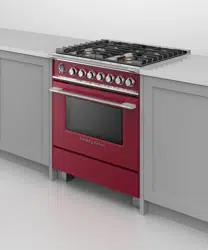
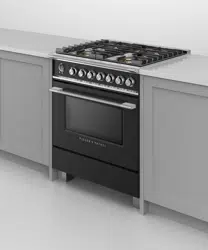
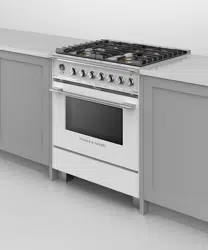
Features may vary
INTRODUCTION
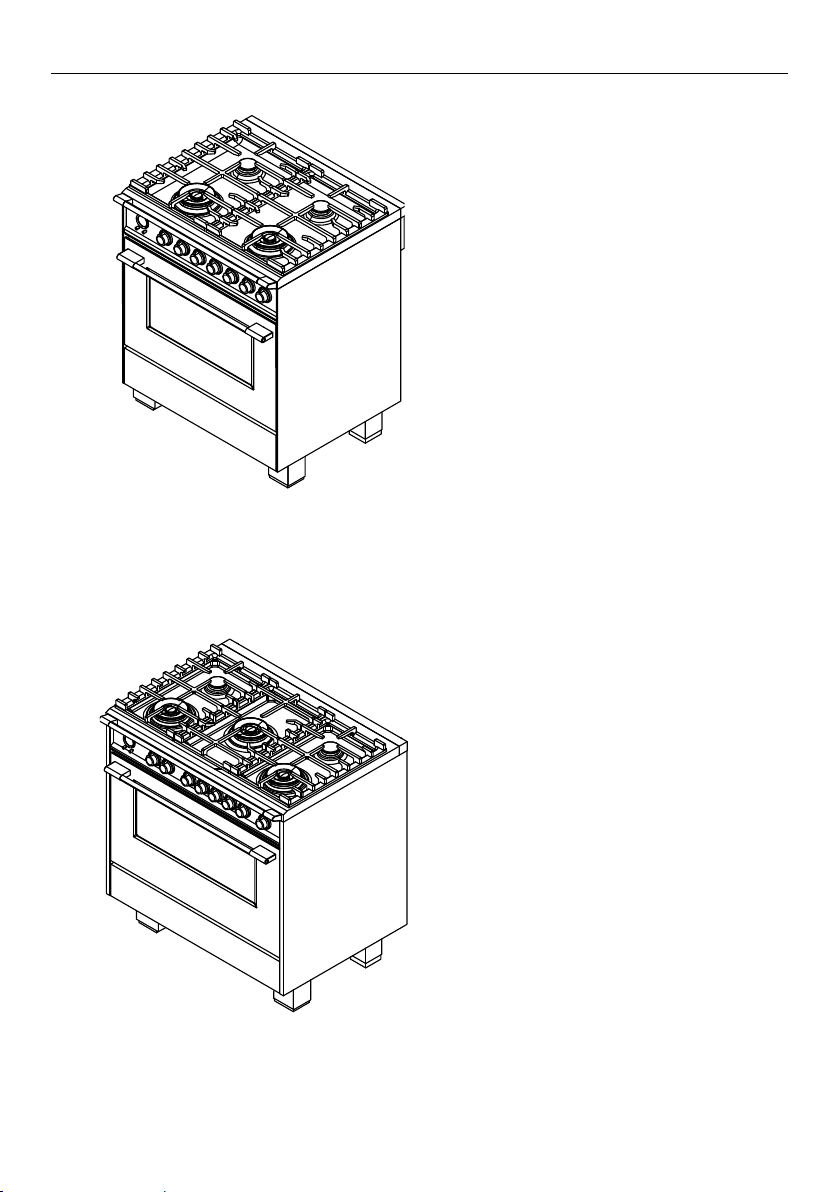
OR30SCG6
OR30SDG6
OR36SCG6
OR36SDG6
30” MODELS
36” MODELS
7
Features may vary
INTRODUCTION
Features may vary.
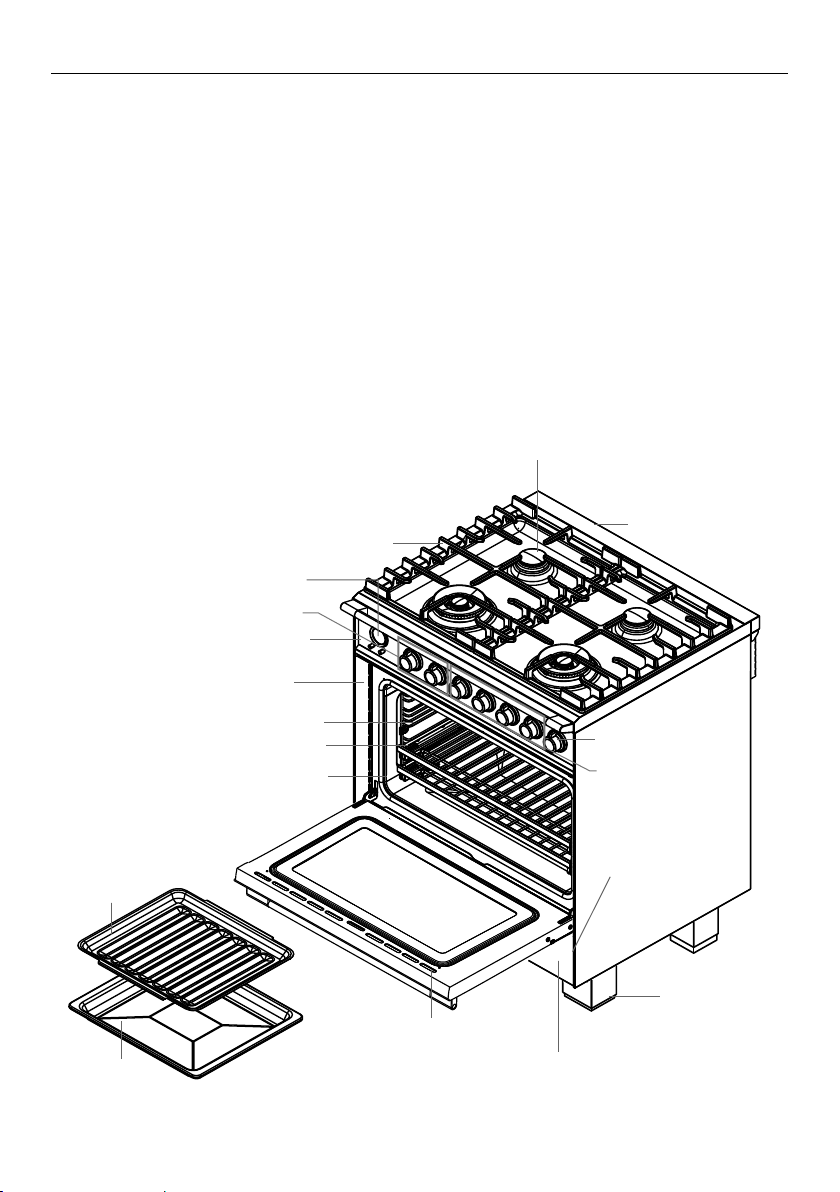
Overview
Control panel
Oven frame
Oven door gasket
Oven function and
temperature dials
Foot (cover)
Oven door vents
Warming drawer
Broil rack
Broil pan
Full extension sliding shelves
Label with model
and serial numbers
Side racks
Back trim
Burner
Burner grates
Clock display and controls
Cooktop burner dials
Warming drawer control
Before you start
1 Make sure that the anti-tip bracket at the right rear of the range has been properly
installed.
2 Make sure that the installer has completed the ‘Final checklist’ in the Installation
instructions.
3 Read this guide, taking special note of the ‘Safety and warnings’ section.
4 Remove all accessories and packaging from the oven and cooktop. Recycle items that
you can. If any adhesive residue is left on surfaces, remove this using dishwashing liquid
on a soft cloth. Do not use any harsh or abrasive cleaners.
5 Make sure you follow the instructions under ‘First use’ before using your range
forcooking.
8
FIRST USE
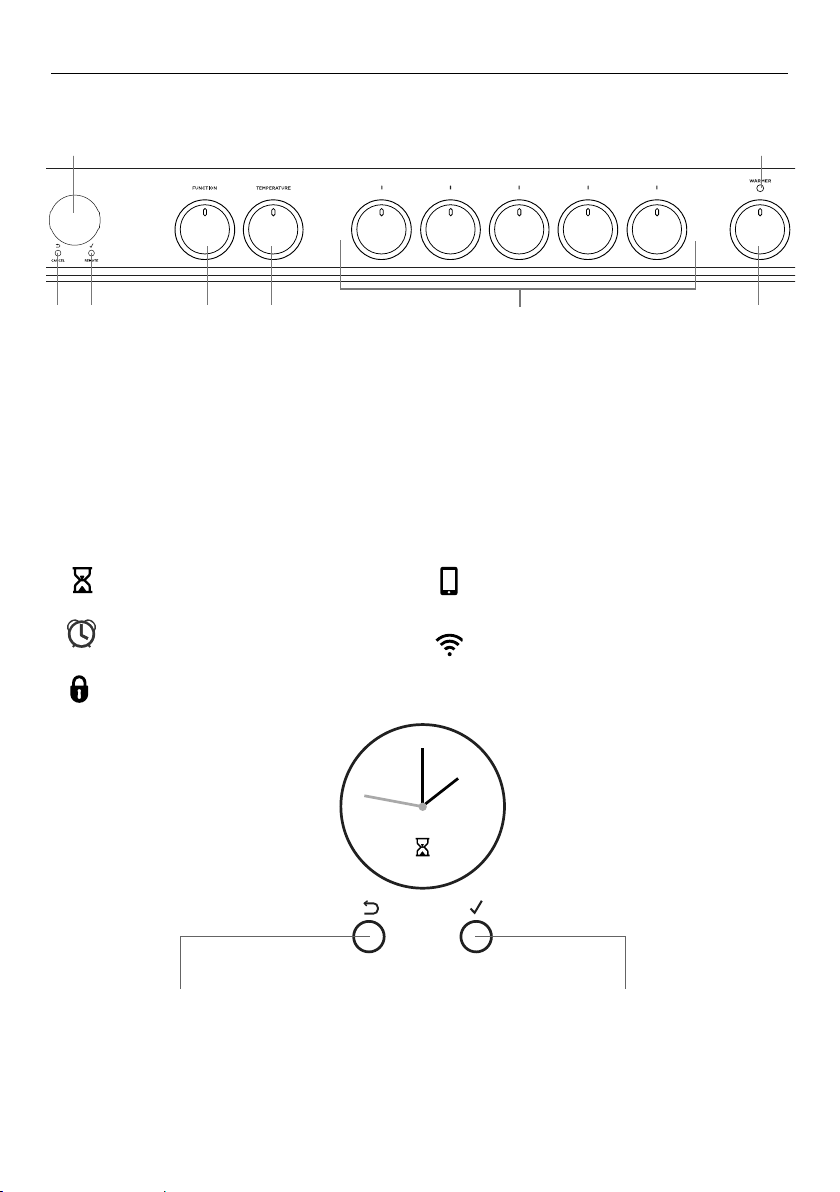
Cancel/back button
y Press to go back
y Press and hold to cancel
Select
y Press to accept or to enter a menu
(Remote mode not available on
thisproduct)
Scroll control
y Turn clockwise or counterclockwise to
scroll through menu options
1 Oven display
2 Cancel/back button
3 Select/Scroll control
4 Function dial
5 Temperature dial
6 Cooktop control dials
7 Warming drawer dial
8 Warming drawer indicator
1 8
2 3 4 5 6 7
Control panel layout
Clock display and controls
Dials may vary
CANCEL REMOTE
CANCEL REMOTE CANCEL REMOTE
Timer (see ‘Setting the timer’)
Auto cook
(see ‘Auto cook’)
Lock
(see ‘Locking the oven controls’)
Remote Mode
(Not available on this product)
NOV 25
CANCEL REMOTE
CANCEL REMOTE
NOV 25
CANCEL REMOTE
NOV 25
NOV 25
CANCEL REMOTE
CANCEL REMOTE
NOV 25
CANCEL REMOTE
NOV 25
NOV 25
CANCEL REMOTE
CANCEL REMOTE
NOV 25
CANCEL REMOTE
NOV 25
NOV 25
CANCEL REMOTE
CANCEL REMOTE
NOV 25
CANCEL REMOTE
NOV 25
Wireless connection
(Not available on this product)
NOV 25
CANCEL REMOTE
CANCEL REMOTE CANCEL REMOTE
9
FIRST USE
NOV 25
CANCEL REMOTE
CANCEL REMOTE
NOV 25
CANCEL REMOTE
NOV 25
NOV 25
CANCEL REMOTE
CANCEL REMOTE
NOV 25
CANCEL REMOTE
NOV 25
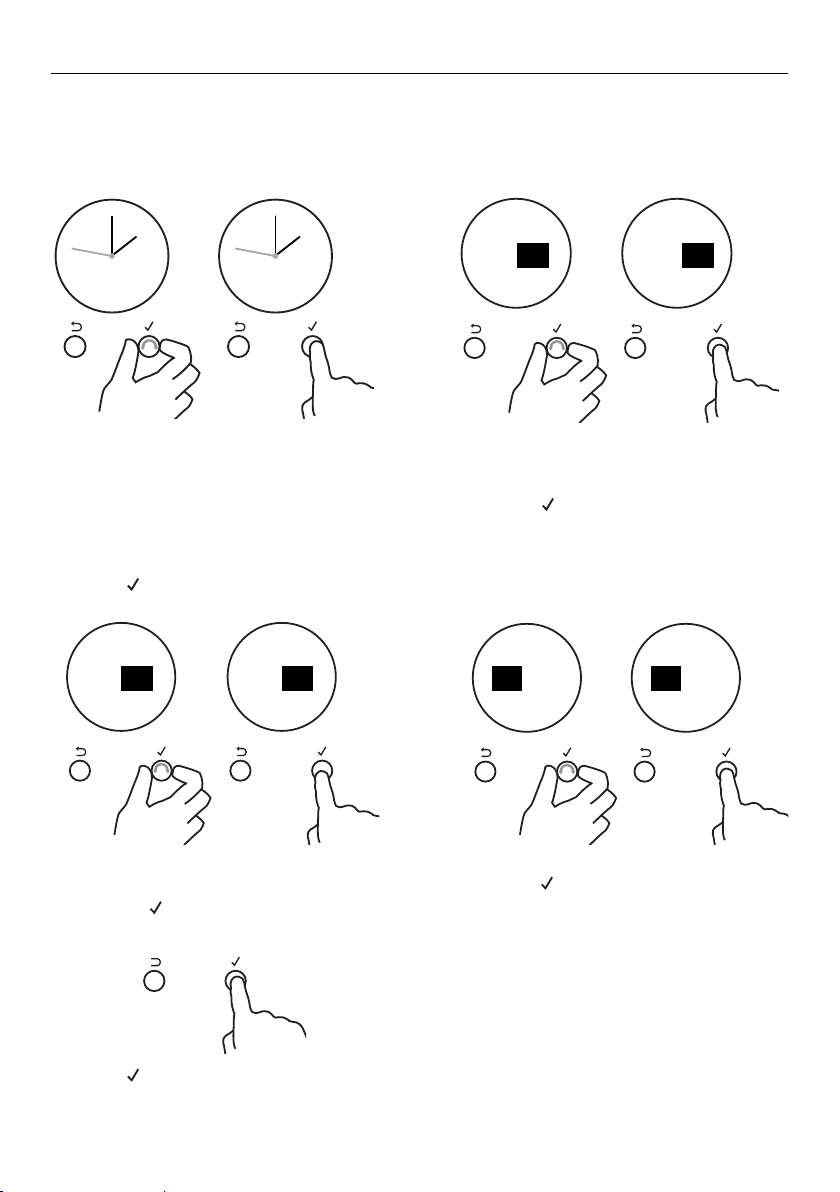
Setting the clock
When your oven is first turned on, or after a power cut, the display will flash.
You will need to set the clock in order to use the oven.
REMOTE
REMOTEREMOTE
REMOTE REMOTE REMOTEREMOTECANCEL CANCEL
Set
Time of day
am pm
Set
Time of day
12:00
pm
minutes
CANCEL REMOTE
OK
CANCEL
Set
Time of day
12:00
pm
hours
Set
Time of day
12:00
pm
hours
CANCEL
OK
CANCEL
Set
Time of day
am pm
CANCEL
Set
Time of day
12:00
pm
minutes
CANCEL
CANCEL REMOTE
Remote
Enabled
NOV 25
CANCEL REMOTE
NOV 25
CANCEL REMOTE
NOV 25
CANCEL REMOTECANCEL REMOTE
Timer
24.59m
CANCEL REMOTE
Timer
24.59m
CANCEL REMOTE
Timer
00 25
mh
alarm sounds
CANCEL REMOTE
Timer
00 25
m
25
m
h
alarm sounds
CANCEL REMOTE CANCEL REMOTE
Timer
24.59m
CANCEL REMOTE
CANCEL REMOTE
Timer
00 25
mh
alarm sounds
CANCEL REMOTE
Timer
00 25
mh
alarm sounds
NOV 25
CANCEL REMOTE CANCEL REMOTE
CANCEL REMOTECANCEL REMOTE
CANCEL REMOTE CANCEL REMOTE
Lock
ON
CANCEL REMOTE
Lock
OFF
Lock
OFF
CANCEL REMOTE
Auto Cook
Set
CANCEL REMOTE
Lock
OFF
NOV 25
00
m
00
m
Oven
Locked
CANCEL REMOTECANCEL REMOTE
CANCEL REMOTE
Cook for
00 20
mh
then stop
Cook for
00 20
mh
then stop
Start
NOW
CANCEL REMOTE
Start Now
Cook 20m
End 5:20
CANCEL REMOTE
Delayed
Cook
CANCEL REMOTE
CANCEL REMOTE
Auto Cook
Set
End time
12:00
pm
minutes
1 Scroll to choose your preferred
clock display.
Select between:
y Analog
y 24-hr digital
y 12-hr digital
y Display off**
2 Press
REMOTE
REMOTEREMOTE
REMOTE REMOTE REMOTEREMOTECANCEL CANCEL
Set
Time of day
am pm
Set
Time of day
12:00
pm
minutes
CANCEL REMOTE
OK
CANCEL
Set
Time of day
12:00
pm
hours
Set
Time of day
12:00
pm
hours
CANCEL
OK
CANCEL
Set
Time of day
am pm
CANCEL
Set
Time of day
12:00
pm
minutes
CANCEL
CANCEL REMOTE
Remote
Enabled
NOV 25
CANCEL REMOTE
NOV 25
CANCEL REMOTE
NOV 25
CANCEL REMOTECANCEL REMOTE
Timer
24.59m
CANCEL REMOTE
Timer
24.59m
CANCEL REMOTE
Timer
00 25
mh
alarm sounds
CANCEL REMOTE
Timer
00 25
m
25
m
h
alarm sounds
CANCEL REMOTE CANCEL REMOTE
Timer
24.59m
CANCEL REMOTE
CANCEL REMOTE
Timer
00 25
mh
alarm sounds
CANCEL REMOTE
Timer
00 25
mh
alarm sounds
NOV 25
CANCEL REMOTE CANCEL REMOTE
CANCEL REMOTECANCEL REMOTE
CANCEL REMOTE CANCEL REMOTE
Lock
ON
CANCEL REMOTE
Lock
OFF
Lock
OFF
CANCEL REMOTE
Auto Cook
Set
CANCEL REMOTE
Lock
OFF
NOV 25
00
m
00
m
Oven
Locked
CANCEL REMOTECANCEL REMOTE
CANCEL REMOTE
Cook for
00 20
mh
then stop
Cook for
00 20
mh
then stop
Start
NOW
CANCEL REMOTE
Start Now
Cook 20m
End 5:20
CANCEL REMOTE
Delayed
Cook
CANCEL REMOTE
CANCEL REMOTE
Auto Cook
Set
End time
12:00
pm
minutes
to confirm.
** With this option saved, you can still
use the oven and timer, however the
display will remain unlit.
You cannot use any automatic cooking
functions when this option is selected.
To quit this option and enable the
display, press and hold CANCEL.
2AIf you have set analog or 12-hr digital
display:
y Scroll to select am or pm.
y Press
REMOTE
REMOTEREMOTE
REMOTE REMOTE REMOTEREMOTECANCEL CANCEL
Set
Time of day
am pm
Set
Time of day
12:00
pm
minutes
CANCEL REMOTE
OK
CANCEL
Set
Time of day
12:00
pm
hours
Set
Time of day
12:00
pm
hours
CANCEL
OK
CANCEL
Set
Time of day
am pm
CANCEL
Set
Time of day
12:00
pm
minutes
CANCEL
CANCEL REMOTE
Remote
Enabled
NOV 25
CANCEL REMOTE
NOV 25
CANCEL REMOTE
NOV 25
CANCEL REMOTECANCEL REMOTE
Timer
24.59m
CANCEL REMOTE
Timer
24.59m
CANCEL REMOTE
Timer
00 25
mh
alarm sounds
CANCEL REMOTE
Timer
00 25
m
25
m
h
alarm sounds
CANCEL REMOTE CANCEL REMOTE
Timer
24.59m
CANCEL REMOTE
CANCEL REMOTE
Timer
00 25
mh
alarm sounds
CANCEL REMOTE
Timer
00 25
mh
alarm sounds
NOV 25
CANCEL REMOTE CANCEL REMOTE
CANCEL REMOTECANCEL REMOTE
CANCEL REMOTE CANCEL REMOTE
Lock
ON
CANCEL REMOTE
Lock
OFF
Lock
OFF
CANCEL REMOTE
Auto Cook
Set
CANCEL REMOTE
Lock
OFF
NOV 25
00
m
00
m
Oven
Locked
CANCEL REMOTECANCEL REMOTE
CANCEL REMOTE
Cook for
00 20
mh
then stop
Cook for
00 20
mh
then stop
Start
NOW
CANCEL REMOTE
Start Now
Cook 20m
End 5:20
CANCEL REMOTE
Delayed
Cook
CANCEL REMOTE
CANCEL REMOTE
Auto Cook
Set
End time
12:00
pm
minutes
to confirm.
3 Scroll to set the minutes.
y Scroll to select am or pm.
y Press
REMOTE
REMOTEREMOTE
REMOTE REMOTE REMOTEREMOTECANCEL CANCEL
Set
Time of day
am pm
Set
Time of day
12:00
pm
minutes
CANCEL REMOTE
OK
CANCEL
Set
Time of day
12:00
pm
hours
Set
Time of day
12:00
pm
hours
CANCEL
OK
CANCEL
Set
Time of day
am pm
CANCEL
Set
Time of day
12:00
pm
minutes
CANCEL
CANCEL REMOTE
Remote
Enabled
NOV 25
CANCEL REMOTE
NOV 25
CANCEL REMOTE
NOV 25
CANCEL REMOTECANCEL REMOTE
Timer
24.59m
CANCEL REMOTE
Timer
24.59m
CANCEL REMOTE
Timer
00 25
mh
alarm sounds
CANCEL REMOTE
Timer
00 25
m
25
m
h
alarm sounds
CANCEL REMOTE CANCEL REMOTE
Timer
24.59m
CANCEL REMOTE
CANCEL REMOTE
Timer
00 25
mh
alarm sounds
CANCEL REMOTE
Timer
00 25
mh
alarm sounds
NOV 25
CANCEL REMOTE CANCEL REMOTE
CANCEL REMOTECANCEL REMOTE
CANCEL REMOTE CANCEL REMOTE
Lock
ON
CANCEL REMOTE
Lock
OFF
Lock
OFF
CANCEL REMOTE
Auto Cook
Set
CANCEL REMOTE
Lock
OFF
NOV 25
00
m
00
m
Oven
Locked
CANCEL REMOTECANCEL REMOTE
CANCEL REMOTE
Cook for
00 20
mh
then stop
Cook for
00 20
mh
then stop
Start
NOW
CANCEL REMOTE
Start Now
Cook 20m
End 5:20
CANCEL REMOTE
Delayed
Cook
CANCEL REMOTE
CANCEL REMOTE
Auto Cook
Set
End time
12:00
pm
minutes
to confirm.
4 Scroll to set the hours.
y Press
REMOTE
REMOTEREMOTE
REMOTE REMOTE REMOTEREMOTECANCEL CANCEL
Set
Time of day
am pm
Set
Time of day
12:00
pm
minutes
CANCEL REMOTE
OK
CANCEL
Set
Time of day
12:00
pm
hours
Set
Time of day
12:00
pm
hours
CANCEL
OK
CANCEL
Set
Time of day
am pm
CANCEL
Set
Time of day
12:00
pm
minutes
CANCEL
CANCEL REMOTE
Remote
Enabled
NOV 25
CANCEL REMOTE
NOV 25
CANCEL REMOTE
NOV 25
CANCEL REMOTECANCEL REMOTE
Timer
24.59m
CANCEL REMOTE
Timer
24.59m
CANCEL REMOTE
Timer
00 25
mh
alarm sounds
CANCEL REMOTE
Timer
00 25
m
25
m
h
alarm sounds
CANCEL REMOTE CANCEL REMOTE
Timer
24.59m
CANCEL REMOTE
CANCEL REMOTE
Timer
00 25
mh
alarm sounds
CANCEL REMOTE
Timer
00 25
mh
alarm sounds
NOV 25
CANCEL REMOTE CANCEL REMOTE
CANCEL REMOTECANCEL REMOTE
CANCEL REMOTE CANCEL REMOTE
Lock
ON
CANCEL REMOTE
Lock
OFF
Lock
OFF
CANCEL REMOTE
Auto Cook
Set
CANCEL REMOTE
Lock
OFF
NOV 25
00
m
00
m
Oven
Locked
CANCEL REMOTECANCEL REMOTE
CANCEL REMOTE
Cook for
00 20
mh
then stop
Cook for
00 20
mh
then stop
Start
NOW
CANCEL REMOTE
Start Now
Cook 20m
End 5:20
CANCEL REMOTE
Delayed
Cook
CANCEL REMOTE
CANCEL REMOTE
Auto Cook
Set
End time
12:00
pm
minutes
to confirm.
5 Press
REMOTE
REMOTEREMOTE
REMOTE REMOTE REMOTEREMOTECANCEL CANCEL
Set
Time of day
am pm
Set
Time of day
12:00
pm
minutes
CANCEL REMOTE
OK
CANCEL
Set
Time of day
12:00
pm
hours
Set
Time of day
12:00
pm
hours
CANCEL
OK
CANCEL
Set
Time of day
am pm
CANCEL
Set
Time of day
12:00
pm
minutes
CANCEL
CANCEL REMOTE
Remote
Enabled
NOV 25
CANCEL REMOTE
NOV 25
CANCEL REMOTE
NOV 25
CANCEL REMOTECANCEL REMOTE
Timer
24.59m
CANCEL REMOTE
Timer
24.59m
CANCEL REMOTE
Timer
00 25
mh
alarm sounds
CANCEL REMOTE
Timer
00 25
m
25
m
h
alarm sounds
CANCEL REMOTE CANCEL REMOTE
Timer
24.59m
CANCEL REMOTE
CANCEL REMOTE
Timer
00 25
mh
alarm sounds
CANCEL REMOTE
Timer
00 25
mh
alarm sounds
NOV 25
CANCEL REMOTE CANCEL REMOTE
CANCEL REMOTECANCEL REMOTE
CANCEL REMOTE CANCEL REMOTE
Lock
ON
CANCEL REMOTE
Lock
OFF
Lock
OFF
CANCEL REMOTE
Auto Cook
Set
CANCEL REMOTE
Lock
OFF
NOV 25
00
m
00
m
Oven
Locked
CANCEL REMOTECANCEL REMOTE
CANCEL REMOTE
Cook for
00 20
mh
then stop
Cook for
00 20
mh
then stop
Start
NOW
CANCEL REMOTE
Start Now
Cook 20m
End 5:20
CANCEL REMOTE
Delayed
Cook
CANCEL REMOTE
CANCEL REMOTE
Auto Cook
Set
End time
12:00
pm
minutes
to confirm the time is
correctlyset.
y The clock is now set and you can
begin using your oven.
Dials may vary
REMOTE
REMOTEREMOTE
REMOTE REMOTE REMOTEREMOTECANCEL CANCEL
Set
Time of day
am
pm
Set
Time of day
12:00
pm
12:00
pm
12:00
pm
minutes
CANCEL REMOTE
OK
CANCEL
Set
Time of day
12:00
pm
hours
Set
Time of day
12:00
pm
hours
CANCEL
OK
CANCEL
Set
Time of day
pm
am
pm
pm
CANCEL
Set
Time of day
minutes
CANCEL
CANCEL REMOTE
Remote
Enabled
NOV 25
CANCEL REMOTE
NOV 25
CANCEL REMOTE
NOV 25
CANCEL REMOTECANCEL REMOTE
Timer
24.59m
CANCEL REMOTE
Timer
24.59m
CANCEL REMOTE
Timer
00 25
mh
00 25
mh
alarm sounds
CANCEL REMOTE
Timer
25
m
alarm sounds
CANCEL REMOTE CANCEL REMOTE
Timer
24.59m
CANCEL REMOTE
CANCEL REMOTE
Timer
00 25
mh
00 25
mh
alarm sounds
CANCEL REMOTE
Timer
alarm sounds
NOV 25
CANCEL REMOTE CANCEL REMOTE
CANCEL REMOTECANCEL REMOTE
CANCEL REMOTE CANCEL REMOTE
Lock
ON
CANCEL REMOTE
Lock
OFF
Lock
OFF
CANCEL REMOTE
Auto Cook
Set
CANCEL REMOTE
Lock
OFF
NOV 25
00
m
00
m
Oven
Locked
CANCEL REMOTECANCEL REMOTE
CANCEL REMOTE
Cook for
00 20
mh
00 20
mh
then stop
Cook for
then stop
Start
NOW
CANCEL REMOTE
Start Now
Cook 20m
End 5:20
CANCEL REMOTE
Delayed
Cook
CANCEL REMOTE
CANCEL REMOTE
Auto Cook
Set
End time
minutes
REMOTE
REMOTEREMOTE
REMOTE REMOTE REMOTEREMOTECANCEL CANCEL
Set
Time of day
am
pm
Set
Time of day
12:00
pm
12:00
pm
12:00
pm
minutes
CANCEL REMOTE
OK
CANCEL
Set
Time of day
12:00
pm
hours
Set
Time of day
12:00
pm
hours
CANCEL
OK
CANCEL
Set
Time of day
pm
am
pm
pm
CANCEL
Set
Time of day
minutes
CANCEL
CANCEL REMOTE
Remote
Enabled
NOV 25
CANCEL REMOTE
NOV 25
CANCEL REMOTE
NOV 25
CANCEL REMOTECANCEL REMOTE
Timer
24.59m
CANCEL REMOTE
Timer
24.59m
CANCEL REMOTE
Timer
00 25
mh
00 25
mh
alarm sounds
CANCEL REMOTE
Timer
25
m
alarm sounds
CANCEL REMOTE CANCEL REMOTE
Timer
24.59m
CANCEL REMOTE
CANCEL REMOTE
Timer
00 25
mh
00 25
mh
alarm sounds
CANCEL REMOTE
Timer
alarm sounds
NOV 25
CANCEL REMOTE CANCEL REMOTE
CANCEL REMOTECANCEL REMOTE
CANCEL REMOTE CANCEL REMOTE
Lock
ON
CANCEL REMOTE
Lock
OFF
Lock
OFF
CANCEL REMOTE
Auto Cook
Set
CANCEL REMOTE
Lock
OFF
NOV 25
00
m
00
m
Oven
Locked
CANCEL REMOTECANCEL REMOTE
CANCEL REMOTE
Cook for
00 20
mh
00 20
mh
then stop
Cook for
then stop
Start
NOW
CANCEL REMOTE
Start Now
Cook 20m
End 5:20
CANCEL REMOTE
Delayed
Cook
CANCEL REMOTE
CANCEL REMOTE
Auto Cook
Set
End time
minutes
REMOTE
REMOTEREMOTE
REMOTE REMOTE REMOTEREMOTECANCEL CANCEL
Set
Time of day
am
pm
Set
Time of day
12:00
pm
12:00
pm
12:00
pm
minutes
CANCEL REMOTE
OK
CANCEL
Set
Time of day
12:00
pm
hours
Set
Time of day
12:00
pm
hours
CANCEL
OK
CANCEL
Set
Time of day
pm
am
pm
pm
CANCEL
Set
Time of day
minutes
CANCEL
CANCEL REMOTE
Remote
Enabled
NOV 25
CANCEL REMOTE
NOV 25
CANCEL REMOTE
NOV 25
CANCEL REMOTECANCEL REMOTE
Timer
24.59m
CANCEL REMOTE
Timer
24.59m
CANCEL REMOTE
Timer
00 25
mh
00 25
mh
alarm sounds
CANCEL REMOTE
Timer
25
m
alarm sounds
CANCEL REMOTE CANCEL REMOTE
Timer
24.59m
CANCEL REMOTE
CANCEL REMOTE
Timer
00 25
mh
00 25
mh
alarm sounds
CANCEL REMOTE
Timer
alarm sounds
NOV 25
CANCEL REMOTE CANCEL REMOTE
CANCEL REMOTECANCEL REMOTE
CANCEL REMOTE CANCEL REMOTE
Lock
ON
CANCEL REMOTE
Lock
OFF
Lock
OFF
CANCEL REMOTE
Auto Cook
Set
CANCEL REMOTE
Lock
OFF
NOV 25
00
m
00
m
Oven
Locked
CANCEL REMOTECANCEL REMOTE
CANCEL REMOTE
Cook for
00 20
mh
00 20
mh
then stop
Cook for
then stop
Start
NOW
CANCEL REMOTE
Start Now
Cook 20m
End 5:20
CANCEL REMOTE
Delayed
Cook
CANCEL REMOTE
CANCEL REMOTE
Auto Cook
Set
End time
minutes
10
FIRST USE
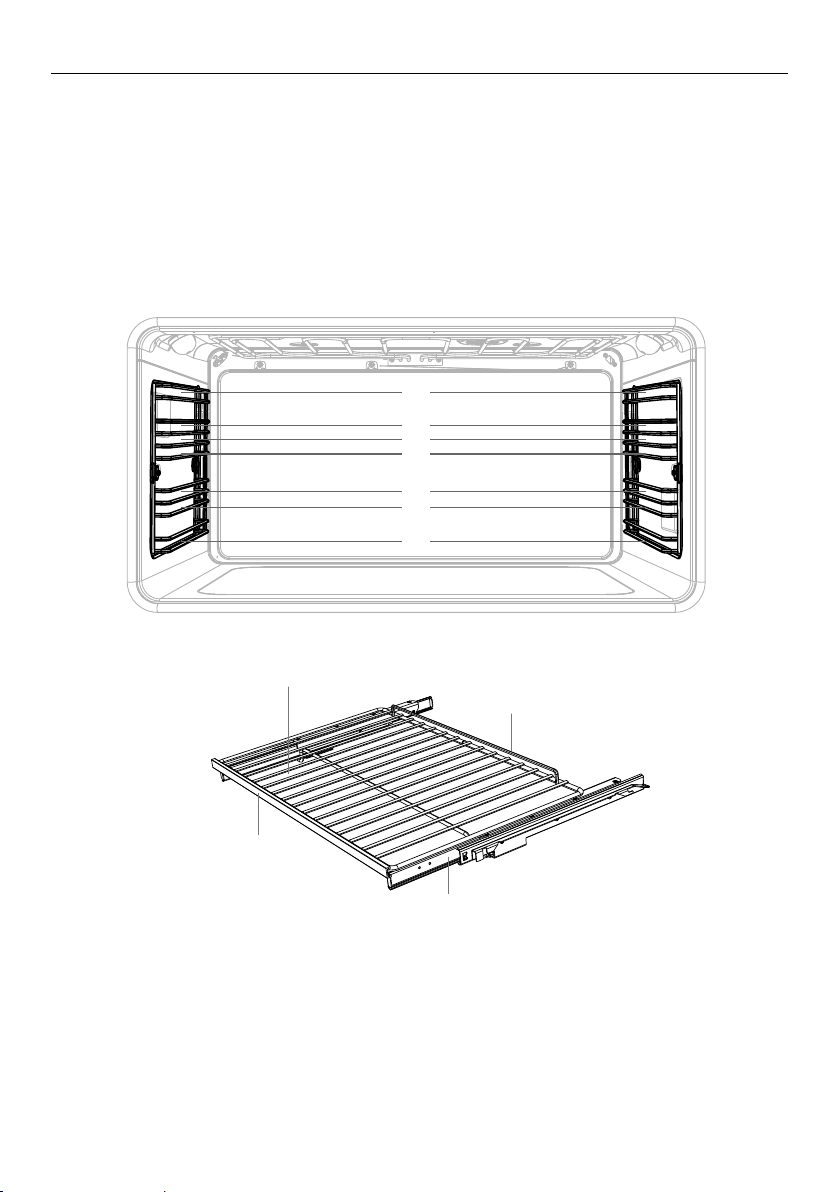
Positioning the shelves
y Shelf positions are numbered from the bottom.
y Position the shelves you will need before turning the oven on.
y For advice on which shelf position to use, see sections ‘Oven functions’, ‘Oven cooking
guidelines’, and ‘Cooking charts’.
IMPORTANT!
Always position the oven shelves before turning the oven on. Remove any unused
shelves and baking utensils from the oven.
Full extension sliding shelves
y The wire shelves and slides are built together as one unit.
y When positioned correctly, the slides will prevent the wire shelves from tilting when
pulled forward.
y Beware: these shelves are heavy.
1
2
3
4
5
6
7
1
2
3
4
5
6
7
Slide
Wire shelf
Front stop
Safety stop
11
FIRST USE
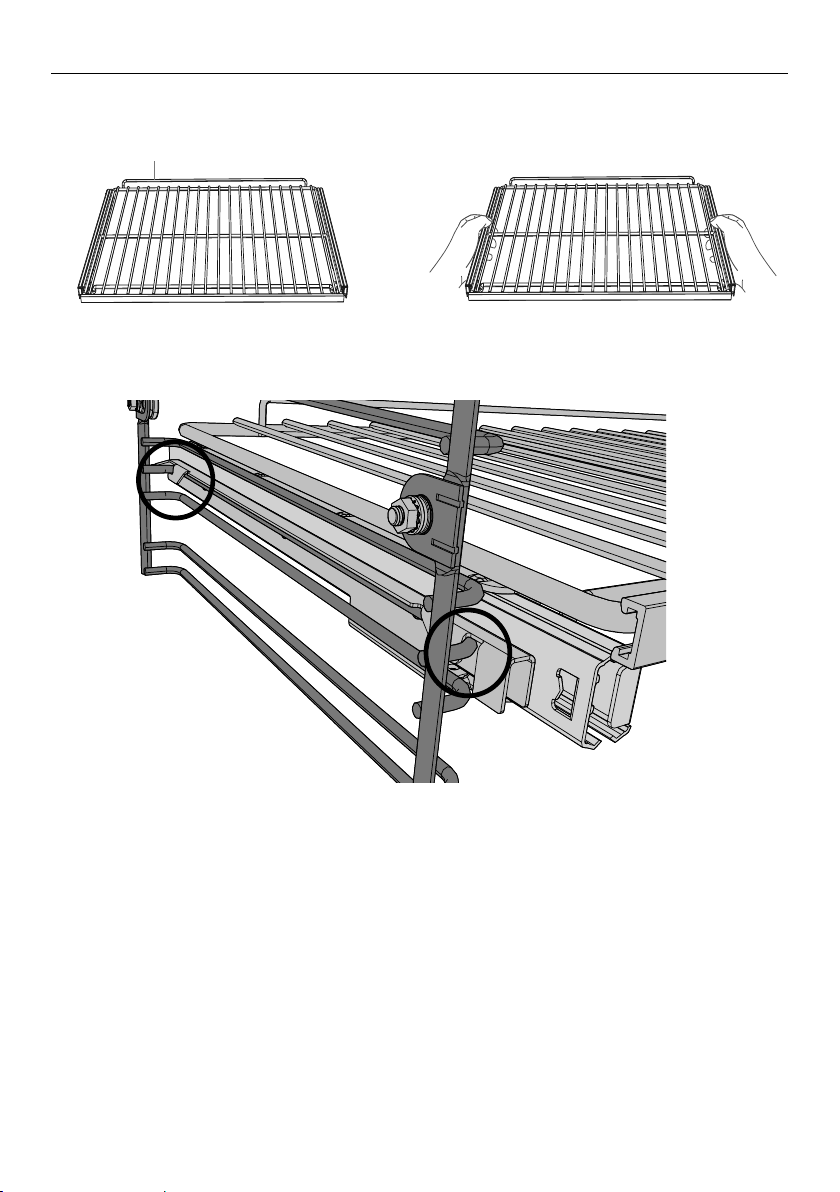
To insert the shelves
1 Make sure the guard rail is at the
back, facing up and the slides are not
extended.
3 Hook the rear tags over the wires of the
desired shelf position on both side racks.
To remove the shelves
1 Wait for the oven to cool down completely.
2 Hold the shelf firmly with both hands, making sure you grip the wire shelf too to stop it
sliding forward.
3 Pull the shelf forward about ¾ of the way.
4 Lift the rear of the shelf slightly so that the tags clear the side rack wires, then remove.
2 Hold the shelf firmly with both hands,
making sure you grip the wire shelf too
to stop it sliding forward.
4 Push the shelf all the way into the oven,
ensuring the front and rear tags either
side are securely locked behind the side
rack wires.
3
4
Guard rail
1
2
3
4
5
6
7
12
FIRST USE
Conditioning the oven
It is important to condition your oven before using it for cooking and baking.
Conditioning will burn off any manufacturing residues and ensure that you get the best
results right from the start.
Before you start:
y Make sure you have removed all packaging and any cable ties used to secure the
shelving during transit.
y Make sure all shelves are fitted in the oven.
y Make sure all oven control dials are turned to O (OFF).
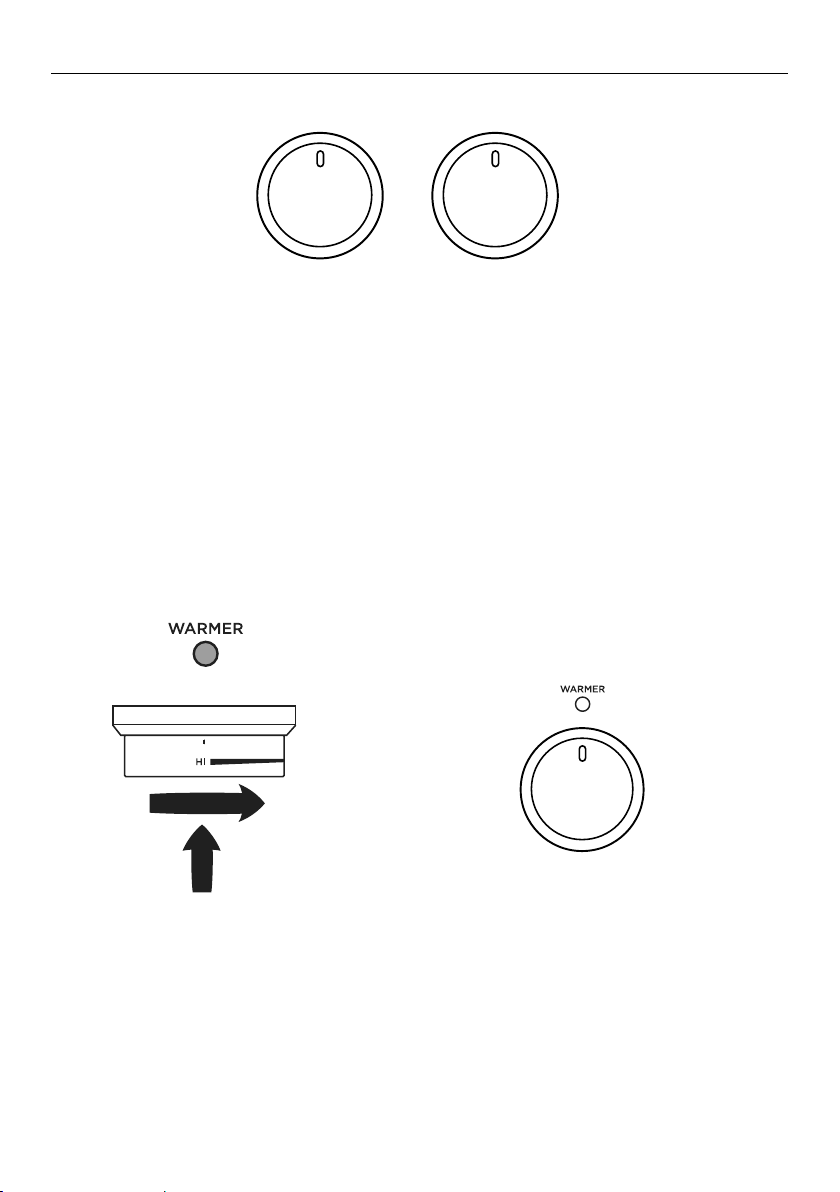
1 Select the Bake function.
y The halo will glow white.
3 After 30 minutes, select the
Aero Broil function.
y Heat at 400°F for 10 minutes.
4 After 10 minutes, select the
True Aero function.
y Heat at 400°F for 20 minutes.
2 Set the temperature to 400°F for 30
minutes.
y The halo will glow red while the oven
is heating up.
y The actual temp will show on the
screen.
y When the oven has heated a tone will
sound and the halo will turn white.
NOV 25
CANCEL REMOTE
CANCEL
200C
--->
REMOTE
NOV 25
CANCEL REMOTE
NOV 25
Fan
Grill
Fan
Forced
NOV 25
CANCEL REMOTE
CANCEL
400F
--->
REMOTE
NOV 25
CANCEL REMOTE
NOV 25
True
Aero
NOV 25
CANCEL REMOTE
CANCEL
400F
--->
REMOTE
NOV 25
CANCEL REMOTE
NOV 25
True
Aero
NOV 25
CANCEL REMOTE
CANCEL
400F
--->
REMOTE
NOV 25
CANCEL REMOTE
NOV 25
True
Aero
13
FIRST USE
Conditioning the warming drawer
IMPORTANT!
Make sure the drawer is empty and all packaging has been removed.
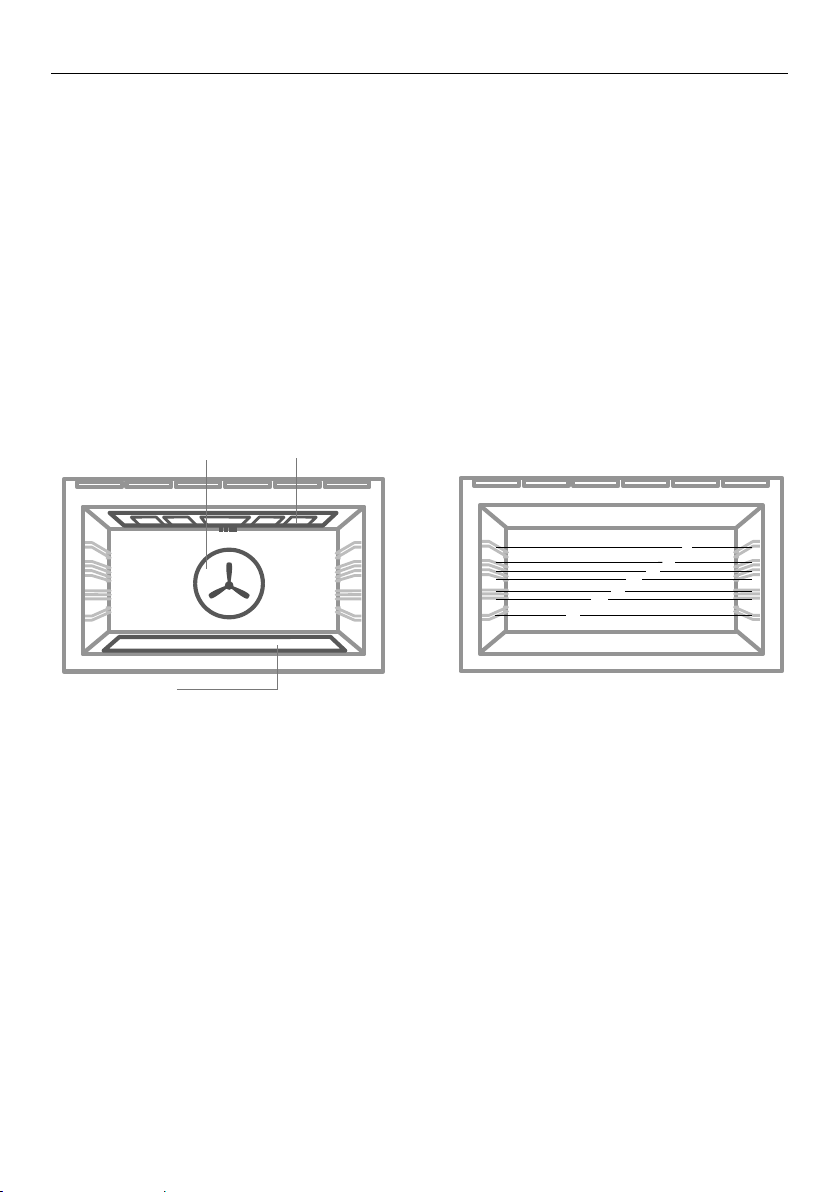
5 After 20 minutes turn both the function and temperature dials to 0 (OFF).
The halos will go out.
1 Push in the warmer dial and turn
clockwise to HI.
y The indicator will glow red.
y Heat on HI for 2 hours.
2 After 2 hours turn warmer dial to
0 (OFF).
y The indicator will go out.
y There will be a distinctive smell and a small amount of smoke during the conditioning
process as manufacturing residue is burnt off. This is normal, but make sure the kitchen
is well ventilated during the conditioning.
y Once cooled, wipe out the oven and warmer drawer with a damp cloth and mild
detergent, and dry thoroughly.
y There will be a distinctive smell and a small amount of smoke during the conditioning
process as manufacturing residue is burnt off. This is normal, but make sure the kitchen
is well ventilated during the conditioning.
y Once cooled, wipe out the drawer with a damp cloth and mild detergent, and dry
thoroughly.
NOV 25
CANCEL REMOTE
CANCEL
200C
--->
REMOTE
NOV 25
CANCEL REMOTE
NOV 25
Fan
Grill
Fan
Forced
NOV 25
CANCEL REMOTE
CANCEL
200C
--->
REMOTE
NOV 25
CANCEL REMOTE
NOV 25
Fan
Grill
Fan
Forced
FUNCTION TEMPERATURE
14
COOKING GUIDE
Oven cooking guidelines
IMPORTANT!
y Use all the oven modes with the oven door closed.
y Never use aluminum foil to cover the oven shelves or to line the floor of the oven.
The trapped heat can irreversibly damage the enamel and may even cause fire.
y Do not place water, ice, or any dish or tray directly on the oven floor, as this will
irreversibly damage the enamel.
y Do not cover the broil pan with aluminum foil. This will catch the grease and could
cause fire.
y Do not use plastic wrap or wax paper in the oven.
y For food safety reasons, do not leave food in the oven for longer than two hours
before and after cooking or defrosting. This is to avoid contamination by organisms
which may cause food poisoning. Take particular care during warmer weather.
BAKING
y For best results when baking, always pre heat your oven. The temperature halo will
change from red to white when the set temperature is reached.
y While the oven is heating the broil element will be on.
y We advise you do not open the door until at least ¾ of the way through cooking.
y Make sure cake pans do not touch each other or the sides of the oven.
y When baking double the recipe (especially cookies) cook time may need to increase.
y Your cookware will influence baking times. Dark pans absorb the heat more quickly than
reflective pans; glass cookware may require a lower temperature.
y Multi-shelf baking may also require a slight increase in cooking time.
Shelf Position Guide
y Single shelf: place your baking on a shelf that will have the top of your pan near the
center of the oven cavity.
y Multi shelf: always leave a space between shelves to allow the air to circulate.
BAKE
VENT BAKE
FAN BAKE
GRILL
FAN GRILL
FAN FORCED
ROAST
CLASSIC BAKE
PASTRY BAKE
BAKE
VENT BAKE
FAN BAKE
GRILL
FAN GRILL
FAN FORCED
ROAST
CLASSIC BAKE
PASTRY BAKE
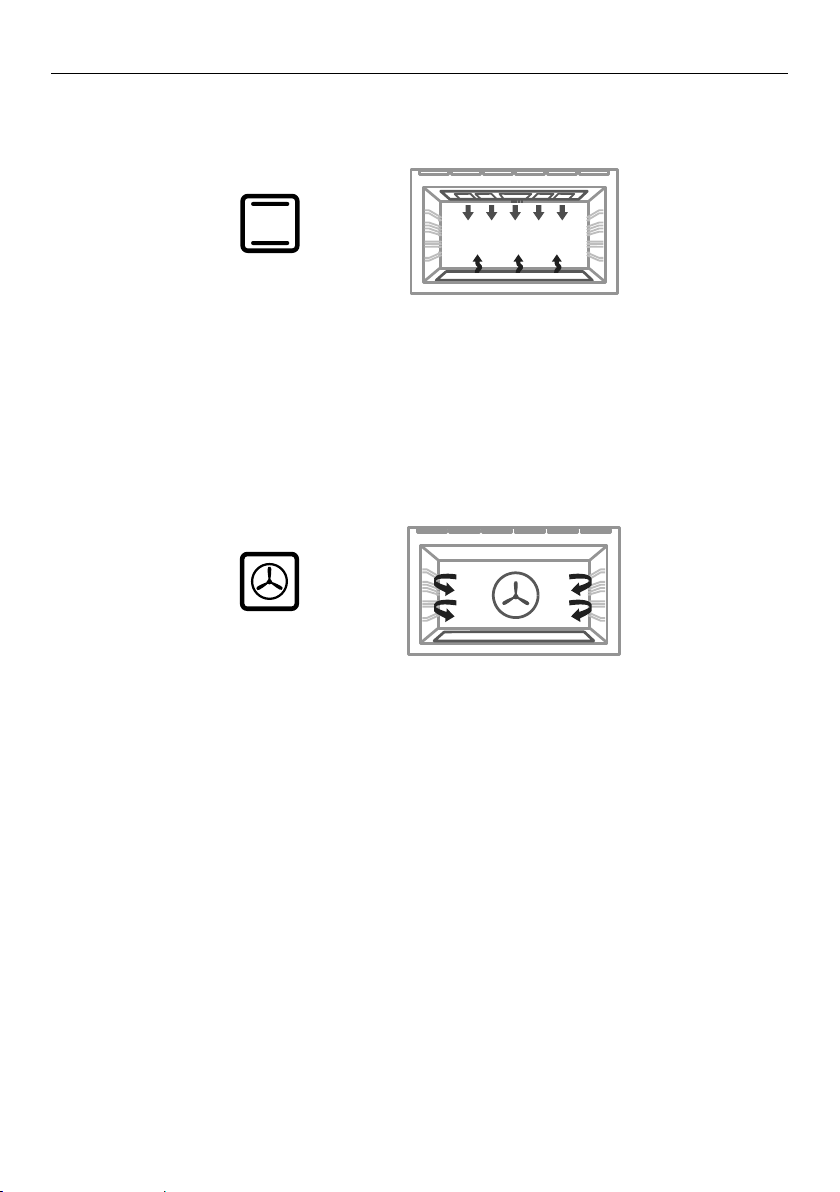
Lower
element
(concealed)
Shelf positions
Fan
Upper elements
1
4
7
6
5
2
3

15
COOKING GUIDE
Oven cooking guidelines
ROASTING
y The Roast function is designed to brown the outside of the meat but still keep the inside
moist and juicy.
y Boneless, rolled or stuffed roasts take longer than roasts containing bones.
y Poultry should be well cooked with the juices running clear and an internal temperature
of 165°F / 74°C.
y If using a roasting bag, do not use the Roast function. The initial searing stage is too
hot for roasting bags. Use Aero Bake or True Aero and follow the manufacturer’s
instructions.
y When using the Roast function, do not cover your roast, as this will stop the searing
process browning the outside of the meat. If you prefer to roast in a covered pan, use
the Aero Bake function instead and increase the temperature by 70°F / 20°C.
y Cook larger cuts of meat at a lower temperature for a longer time. The meat will cook
more evenly.
y Always roast meat fat side up. That way, basting may not be required.
y Always rest the meat for at least 10 minutes after roasting to allow the juices to settle.
y Remember the meat will continue to cook for a few minutes after removing it from
theoven.
Shelf Position Guide
Place the meat on a shelf so that is is in the center of the oven or lower.
BROILING
y This is a healthier alternative to frying.
y Always broil with the oven door completely shut.
y For best results allow 5 minutes of preheat before placing food in the oven.
y If you use glass or ceramic pans, be sure they can withstand the high temperatures of
the broil.
y To avoid piercing the meat and letting juices escape, use tongs or a spatula to turn the
meat halfway through cooking.
y Brush meat with a little oil to help keep the meat moist during cooking. Alternatively
marinade the meat before broiling (but be aware that some marinades may burn easily).
y Where possible broil cuts of meat of a similar thickness at the same time. This will
ensure even cooking.
y Always keep a close watch on your food while broiling to avoid charring or burning.
Shelf Position Guide
y For thinner cuts of meat, toasting or browning foods, use a higher shelf position.
y Thicker cuts of meats should be broiled on lower shelves or at a lower broil setting to
ensure even cooking.
REHEATING
y Use Bake or Aero Bake to reheat food.
y Bake and Aero Bake are particularly good for reheating pastry based items, as the base
heat will help re-crisp the pastry case.
y Always reheat food to piping hot. This reduces the risk of contamination by
harmfulbacteria.
y Once hot, set the oven temperature to WARM in or use the warming drawer to keep
food hot.
Never reheat food more than once.
16
OVEN FUNCTIONS
IMPORTANT!
y Use all the functions with the oven door closed.
upper outer and lower elements
y Heat comes from both the upper and lower elements. The fan is not used in this
function.
y Ideal for cakes and foods that require baking for a long time or at low temperatures.
y This function is not suitable for multi-shelf cooking.
Ideal for moist foods that take a longer time to cook eg rich fruit cake, or bread.
BAKE
BAKE
VENT BAKE
FAN BAKE
GRILL
FAN GRILL
FAN FORCED
ROAST
CLASSIC BAKE
PASTRY BAKE
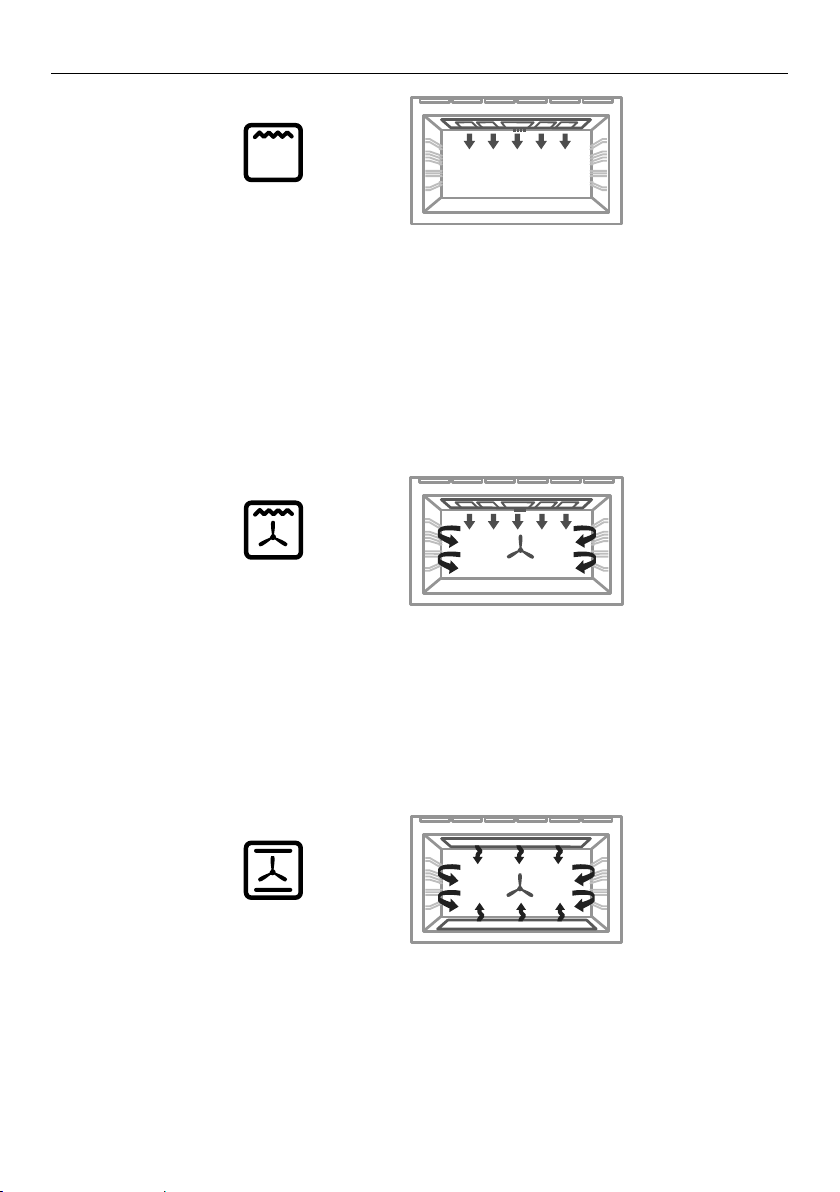
TRUE AERO
fan and rear element
y By using the central rear heating element and fan, hot air is blown into the cavity,
providing a consistent temperature at all levels, making it perfect for multi-shelf cooking.
y Trays of cookies cooked on different shelves are crisp on the outside and chewy in the
middle.
y Meat and poultry are deliciously browned and sizzling while remaining juicy and tender.
y Casseroles are cooked to perfection and reheating is quick and efficient.
y When multi-shelf cooking it is important to leave a gap between trays (eg use shelves
3 & 5) to allow the air to move freely. This enables the browning of foods on the lower
tray.
y If converting a recipe from Bake to True Aero, we recommend that you decrease the
bake time or decrease the temperature by approximately 70°F / 20°C.
y For items with longer bake times (eg over an hour) it may be necessary to decrease
both time and temperature.
Ideal for multi-shelf cooking biscuits, cookies, scones, muffins and cupcakes.
TRUE AERO
BAKE
VENT BAKE
FAN BAKE
GRILL
FAN GRILL
FAN FORCED
ROAST
CLASSIC BAKE
PASTRY BAKE
TRUE AERO
GFX DIAL OR CON OVEN PYRO UL
1 KDM
19/06/17
Released for prototype only
LEP
1576636 1:1 1/1
1. REFER F&P DRAWING No. 578509 FOR PART FILE
2. ALL ARTWORK MUST BE APPROVED PRIOR TO MANUFACTURE
Graphics location:
3mm
5mm
Graphics to be PRINTED:
(PANTONE 440)
GFX DIAL OR CON OVEN PYRO UL
1 KDM
19/06/17
Released for prototype only
LEP
1576636 1:1 1/1
1. REFER F&P DRAWING No. 578509 FOR PART FILE
2. ALL ARTWORK MUST BE APPROVED PRIOR TO MANUFACTURE
Graphics location:
3mm
5mm
Graphics to be PRINTED:
(PANTONE 440)
17
OVEN FUNCTIONS
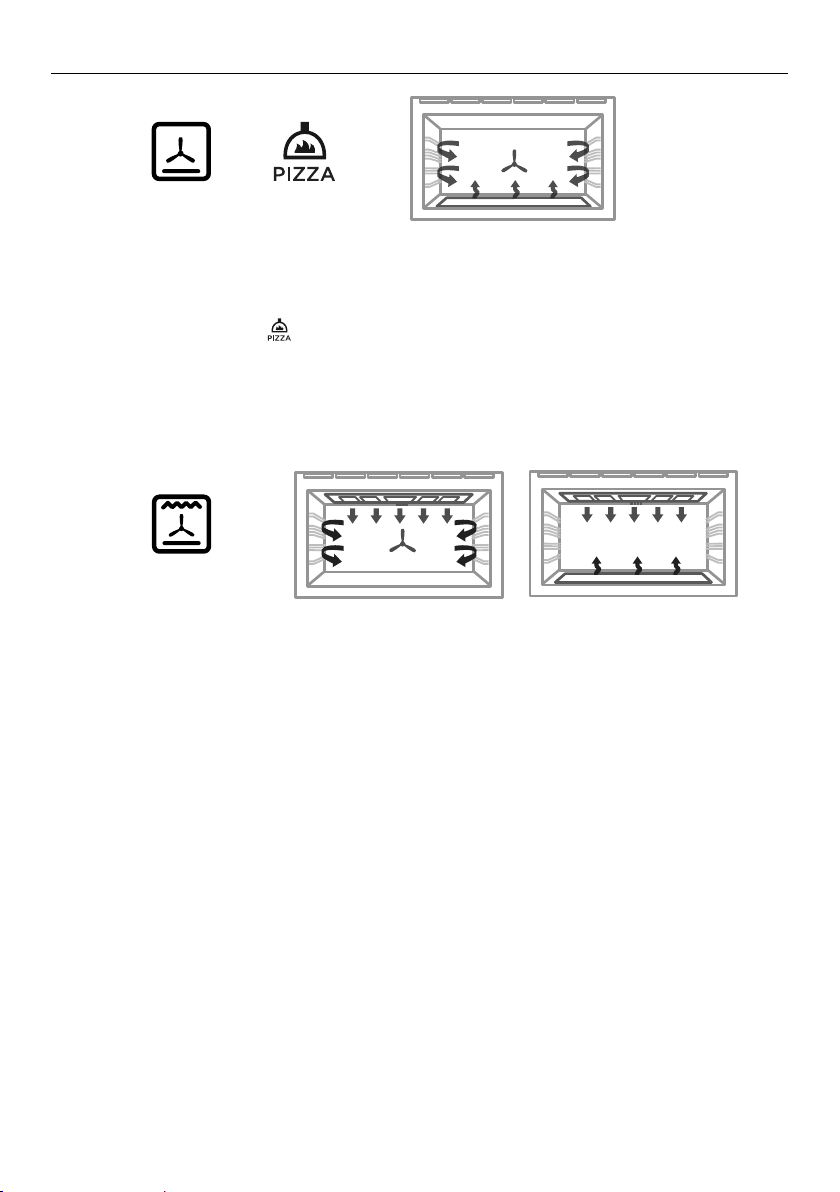
fan plus upper inner and outer elements
y This function uses the intense heat from the elements for top browning and the fan to
ensure even cooking of foods.
y Meat, poultry and vegetables cook beautifully; food is crisp and brown on the outside
while the inside remains moist and tender.
Ideal for whole chicken, tenderloin of beef or broiling your favourite chicken, fish or steak.
upper inner and outer elements
y Intense radiant heat is delivered from both top elements. You can use Maxi Broil on Low
OR High (100% power).
y For best results allow 5 minutes of preheat before placing food in the oven.
y The temperature halo will remain white while using the broil function.
y The most suitable function for ‘finishing off’ many meals, for example browning the top
of potato gratin and frittata.
Ideal for toasting bread or for top browning to ‘finish off dishes’.
fan plus upper outer and lower elements
y The oven fan circulates hot air from the top outer and the lower elements and
distributes it around the oven cavity.
y Food cooked tends to brown more quickly than foods cooked on the traditional Bake
function.
y You may need to decrease the time from that recommended in traditional recipes.
Ideal for single shelf baking that takes less than an hour to cook – foods such as muffins,
biscuits and cupcakes or things like enchiladas.
AERO BAKE
MAXI BROIL
AERO BROIL
BAKE
VENT BAKE
FAN BAKE
GRILL
FAN GRILL
FAN FORCED
ROAST
CLASSIC BAKE
PASTRY BAKE
TRUE AERO
BAKE
VENT BAKE
FAN BAKE
GRILL
FAN GRILL
FAN FORCED
ROAST
CLASSIC BAKE
PASTRY BAKE
TRUE AERO
BAKE
VENT BAKE
FAN BAKE
GRILL
FAN GRILL
FAN FORCED
ROAST
CLASSIC BAKE
PASTRY BAKE
TRUE AERO
GFX DIAL OR CON OVEN PYRO UL
1 KDM
19/06/17
Released for prototype only
LEP
1576636 1:1 1/1
1. REFER F&P DRAWING No. 578509 FOR PART FILE
2. ALL ARTWORK MUST BE APPROVED PRIOR TO MANUFACTURE
Graphics location:
3mm
5mm
Graphics to be PRINTED:
(PANTONE 440)
GFX DIAL OR CON OVEN PYRO UL
1 KDM
19/06/17
Released for prototype only
LEP
1576636 1:1 1/1
1. REFER F&P DRAWING No. 578509 FOR PART FILE
2. ALL ARTWORK MUST BE APPROVED PRIOR TO MANUFACTURE
Graphics location:
3mm
5mm
Graphics to be PRINTED:
(PANTONE 440)
GFX DIAL OR CON OVEN PYRO UL
1 KDM
19/06/17
Released for prototype only
LEP
1576636 1:1 1/1
1. REFER F&P DRAWING No. 578509 FOR PART FILE
2. ALL ARTWORK MUST BE APPROVED PRIOR TO MANUFACTURE
Graphics location:
3mm
5mm
Graphics to be PRINTED:
(PANTONE 440)
18
OVEN FUNCTIONS
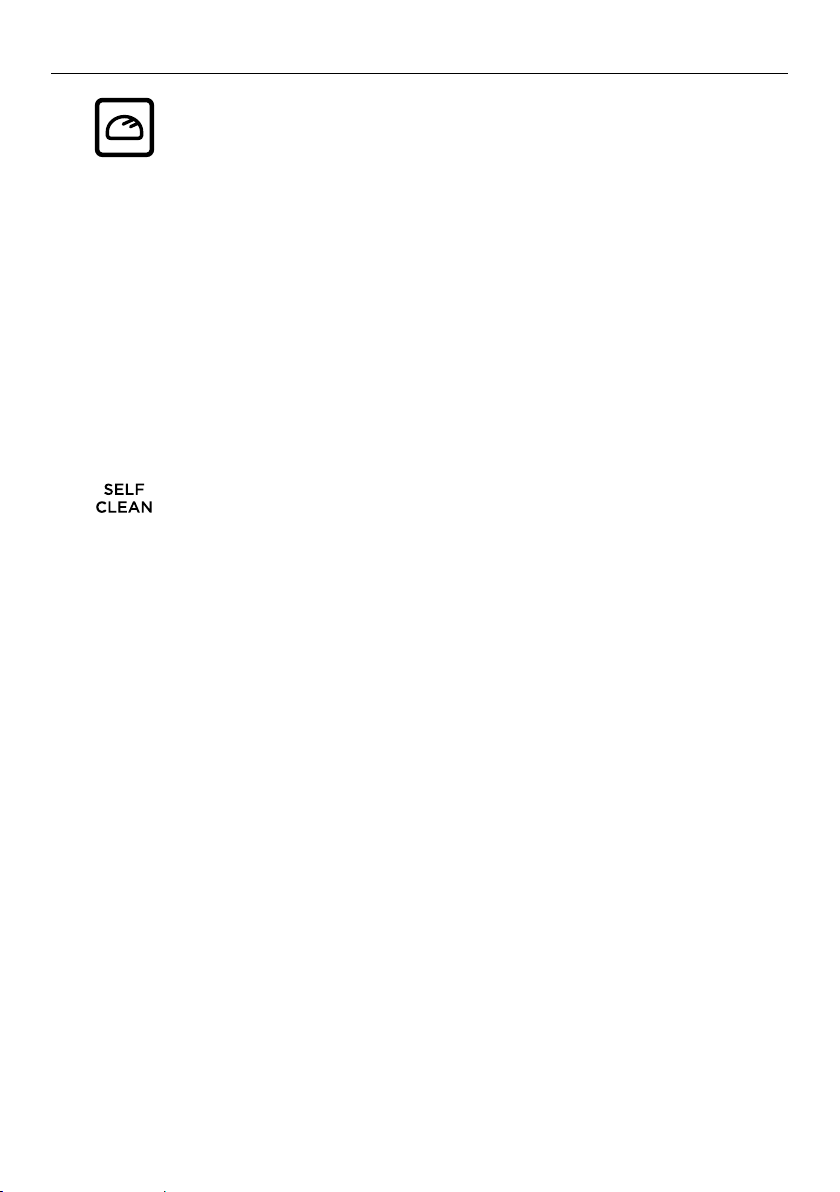
fan plus upper and lower elements
y A two-step program. An initial 20 minute searing stage crisps and browns the roast and
caramelises the outside of the meat, then the temperature drops to the level you have
preset for the remainder of the cooking period, producing a tender and juicy roast that
is full of flavor.
y Oven does not require preheating.
y If desired, use the broil rack or grid, or place vegetables under the roast to allow the
juices to drain away from your meat. This will allow the hot air to circulate under the
meat as well.
Ideal for Roasting meat, chicken and vegetables.
ROAST
BAKE
VENT BAKE
FAN BAKE
GRILL
FAN GRILL
FAN FORCED
ROAST
CLASSIC BAKE
PASTRY BAKE
TRUE AERO
BAKE
VENT BAKE
FAN BAKE
GRILL
FAN GRILL
FAN FORCED
ROAST
CLASSIC BAKE
PASTRY BAKE
TRUE AERO
fan plus lower element
y The fan circulates heat from the lower element throughout the oven.
y Excellent for cooking pizza and flatbreads as it crisps the base beautifully without
overcooking the top.
y Set the temperature to
GFX DIAL OR CON OVEN PYRO UL
1 KDM
19/06/17
Released for prototype only
LEP
1576636 1:1 1/1
1. REFER F&P DRAWING No. 578509 FOR PART FILE
2. ALL ARTWORK MUST BE APPROVED PRIOR TO MANUFACTURE
Graphics location:
3mm
5mm
Graphics to be PRINTED:
(PANTONE 440)
for optimum pizza cooking temperature.
Ideal for foods such as sweet and savoury pastry foods and delicate foods that require
some top browning eg frittata, quiche.
AERO PASTRY + PIZZA
BAKE
VENT BAKE
FAN BAKE
GRILL
FAN GRILL
FAN FORCED
ROAST
CLASSIC BAKE
PASTRY BAKE
TRUE AERO
GFX DIAL OR CON OVEN PYRO UL
1 KDM
19/06/17
Released for prototype only
LEP
1576636 1:1 1/1
1. REFER F&P DRAWING No. 578509 FOR PART FILE
2. ALL ARTWORK MUST BE APPROVED PRIOR TO MANUFACTURE
Graphics location:
3mm
5mm
Graphics to be PRINTED:
(PANTONE 440)
GFX DIAL OR CON OVEN PYRO UL
1 KDM
19/06/17
Released for prototype only
LEP
1576636 1:1 1/1
1. REFER F&P DRAWING No. 578509 FOR PART FILE
2. ALL ARTWORK MUST BE APPROVED PRIOR TO MANUFACTURE
Graphics location:
3mm
5mm
Graphics to be PRINTED:
(PANTONE 440)
GFX DIAL OR CON OVEN PYRO UL
1 KDM
19/06/17
Released for prototype only
LEP
1576636 1:1 1/1
1. REFER F&P DRAWING No. 578509 FOR PART FILE
2. ALL ARTWORK MUST BE APPROVED PRIOR TO MANUFACTURE
Graphics location:
3mm
5mm
Graphics to be PRINTED:
(PANTONE 440)
19
OVEN FUNCTIONS
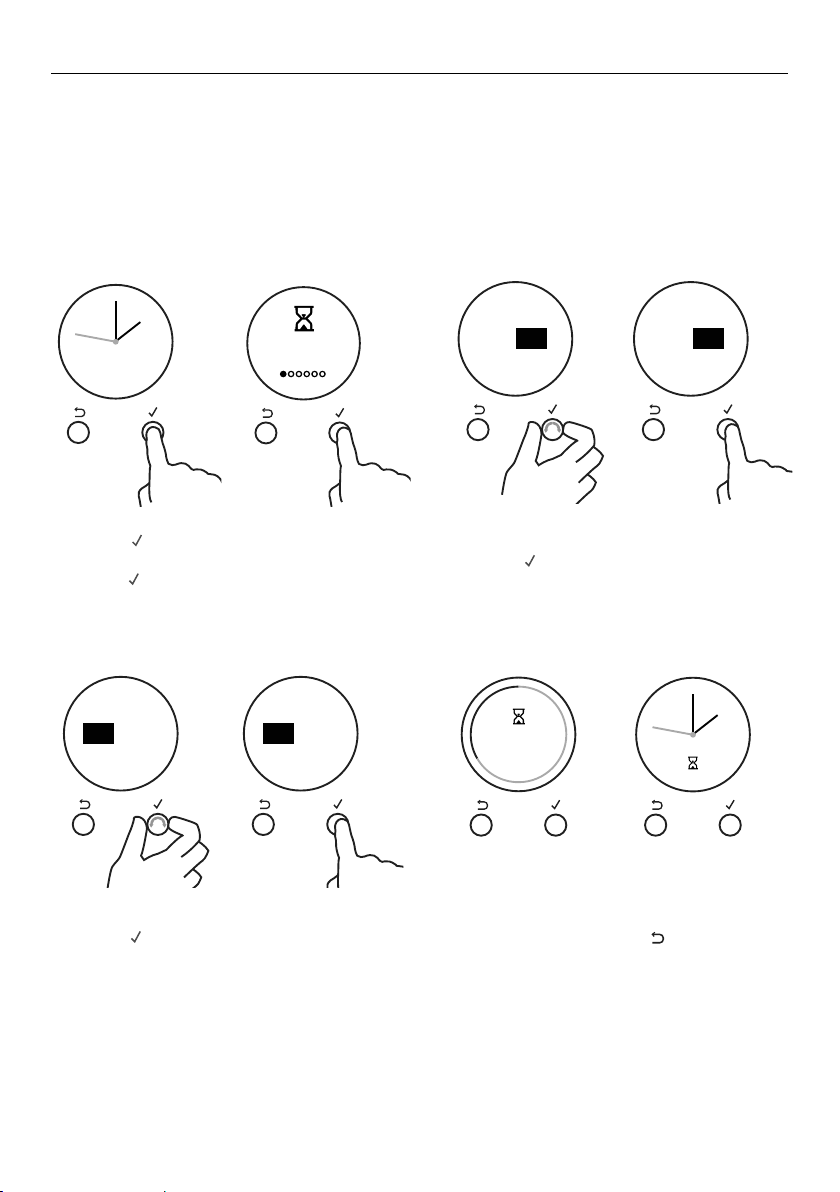
this is not a cooking function
y Gentle heat is generated from the upper and lower elements.
y Provides the optimum warm and draft-free environment for proving
yeast dough.
y This method provides a faster proof time than at room temperature.
y To prevent overproofing we recommend you check the dough every
30mins.
Proving dough
1 Place dough in a lightly oiled bowl and cover with plastic wrap
and/or a clean damp cloth.
2 Position the bowl in the center of the oven.
3 Select Rapid Proof function.
this is not a cooking function
y Self Clean takes care of the mess and grime that is traditionally
associated with oven cleaning.
y There are two Self-Clean cycles available:
y Standard clean (which takes a minimum of 4 hours) for normal to
heavy cleaning
y Light clean (which takes a minimum of 3 hours) for lightly soiled
ovens
y Always clean the inner door glass pane first.
y See ‘Using the Self Clean function’ for details.
RAPID PROOF
SELF CLEAN
GFX DIAL OR CON OVEN PYRO UL
1 KDM
19/06/17
Released for prototype only
LEP
1576636 1:1 1/1
1. REFER F&P DRAWING No. 578509 FOR PART FILE
2. ALL ARTWORK MUST BE APPROVED PRIOR TO MANUFACTURE
Graphics location:
3mm
5mm
Graphics to be PRINTED:
(PANTONE 440)
GFX DIAL OR CON OVEN PYRO UL
1 KDM
19/06/17
Released for prototype only
LEP
1576636 1:1 1/1
1. REFER F&P DRAWING No. 578509 FOR PART FILE
2. ALL ARTWORK MUST BE APPROVED PRIOR TO MANUFACTURE
Graphics location:
3mm
5mm
Graphics to be PRINTED:
(PANTONE 440)

20
COOKING CHARTS
BAKING
y Shelf positions are counted from the base up (1 is the lowest, 7 is the highest).
Position shelves before you turn the oven on.
y For best results preheat the oven.
y Multi-shelf cooking may need the shelves rotating midway through cooking.
y Oven accessories may temporarily deform slightly when they become hot.
This is normal and does not affect their function.
FOOD SHELVES
RECOMMENDED
MODE
SHELF
POSITIONS
TEMP (°F) TEMP (°C) TIME (MINS)
Biscuits Plain Single Aero Bake 3 400–425 210–220 8–10
Multi True Areo 2 & 5 425–450 215–230 10–12
Chewy Choc Chip Single Aero Bake 3 355–375 180–190 10–15
Multi True Areo 2 & 5 325–340 160–170 10–15
Sugar Cookies Single Aero Bake 3 350–375 175–190 7–15
Multi True Aero 2 & 5 325–350 160–175 7–15
Cakes Pound Cake Single Bake 3 325 160 70–80
Chocolate Brownie
(8"x8"/20x20cm pan)
Single Bake 3 350 175 20–25
Angel Food Cake
(10"x4"/25x10cm tube pan)
Single
Bake 3 325–350 160–175 50–60
Rich Fruit Cake Single Bake 3 275–300 135–150 3–6 hrs
Sponge (single large) Single Bake 3 350 175 30–40
Sponge (2x20cm) Single Bake 3 350 175 15–25
Muffins / Cupcakes Cupcakes Single Aero Bake 3 365 185 13–18
Multi True Aero 2 & 5 345 170 13–18
Muffins Single Aero Bake 3 345 170 23–30
Multi True Aero 2 & 5 345 170 23–30
Scones English Scones Single Bake 3 425–450 215–230 10–12
Meringues Meringues Single Bake 3 250–270 120–130 60–70
Bread/Bread rolls Sandwich Loaf
(
9"x5"/23x13cm Loaf Pan)
Single Bake 3 350 175 40–50
Wholewheat Loaf
(
9"x5"/23x13cm Loaf Pan)
Single Bake 3 375 190 35–45
Soft Dinner Rolls Single Bake 3 375 190 15–18
Dough proof Single Rapid Proof 3 – – 30
Pastry Pastry Shell (baked blind) Single Aero Pastry 2 350 175 15
Phyllo Single Aero Bake 3 390 200 15–25
Flaky / Puff Single Aero Bake 3 390 200 20–30
Choux Single Aero Bake 3 390–400 200–210 30–35
Multi True Aero 2 & 5 390–400 200–20 30–35
Croissants Single Aero Bake 3 375–390 190–200 15–25
Multi True Aero 2 & 5 375–390 190–200 15–25
Pies Fruit Pie (2 crust) Single Aero Bake 3 400–350 200–175 20–25
Baked Cheesecake (in water bath) Single Aero Pastry 3 325 160 50–60
Pumpkin Pie (blind bake, add filling) Single Aero Pastry 3 350–375 175–190 15–30
English Custard Tart
(blind bake, then add filling)
Single Aero Pastry 3 300–350 175–150 15–30
Dessert Crème Brulee (in water bath) Single Aero Pastry 3 275 135 35–45
Crème Caramel (in water bath) Single Aero Pastry 3 350 175 35–45

21
COOKING CHARTS
The information in these charts are guidelines only. Refer to your recipe or the
packaging and be prepared to adjust the cooking times and settings accordingly.
FOOD SHELVES
RECOMMENDED
MODE
SHELF
POSITIONS
TEMP (°F) TEMP (°C) TIME (MINS)
Biscuits Plain Single Aero Bake 3 400–425 210–220 8–10
Multi True Areo 2 & 5 425–450 215–230 10–12
Chewy Choc Chip Single Aero Bake 3 355–375 180–190 10–15
Multi True Areo 2 & 5 325–340 160–170 10–15
Sugar Cookies Single Aero Bake 3 350–375 175–190 7–15
Multi True Aero 2 & 5 325–350 160–175 7–15
Cakes Pound Cake Single Bake 3 325 160 70–80
Chocolate Brownie
(8"x8"/20x20cm pan)
Single Bake 3 350 175 20–25
Angel Food Cake
(10"x4"/25x10cm tube pan)
Single
Bake 3 325–350 160–175 50–60
Rich Fruit Cake Single Bake 3 275–300 135–150 3–6 hrs
Sponge (single large) Single Bake 3 350 175 30–40
Sponge (2x20cm) Single Bake 3 350 175 15–25
Muffins / Cupcakes Cupcakes Single Aero Bake 3 365 185 13–18
Multi True Aero 2 & 5 345 170 13–18
Muffins Single Aero Bake 3 345 170 23–30
Multi True Aero 2 & 5 345 170 23–30
Scones English Scones Single Bake 3 425–450 215–230 10–12
Meringues Meringues Single Bake 3 250–270 120–130 60–70
Bread/Bread rolls Sandwich Loaf
(
9"x5"/23x13cm Loaf Pan)
Single Bake 3 350 175 40–50
Wholewheat Loaf
(
9"x5"/23x13cm Loaf Pan)
Single Bake 3 375 190 35–45
Soft Dinner Rolls Single Bake 3 375 190 15–18
Dough proof Single Rapid Proof 3 – – 30
Pastry Pastry Shell (baked blind) Single Aero Pastry 2 350 175 15
Phyllo Single Aero Bake 3 390 200 15–25
Flaky / Puff Single Aero Bake 3 390 200 20–30
Choux Single Aero Bake 3 390–400 200–210 30–35
Multi True Aero 2 & 5 390–400 200–20 30–35
Croissants Single Aero Bake 3 375–390 190–200 15–25
Multi True Aero 2 & 5 375–390 190–200 15–25
Pies Fruit Pie (2 crust) Single Aero Bake 3 400–350 200–175 20–25
Baked Cheesecake (in water bath) Single Aero Pastry 3 325 160 50–60
Pumpkin Pie (blind bake, add filling) Single Aero Pastry 3 350–375 175–190 15–30
English Custard Tart
(blind bake, then add filling)
Single Aero Pastry 3 300–350 175–150 15–30
Dessert Crème Brulee (in water bath) Single Aero Pastry 3 275 135 35–45
Crème Caramel (in water bath) Single Aero Pastry 3 350 175 35–45

22
COOKING CHARTS
SAVOURY
ROASTING
FOOD SHELVES
RECOMMENDED
MODE
SHELF
POSITIONS
TEMP (°F) TEMP (°C)
TIME
(MINS)
Cornbread Single Aero Bake 3 400–425 210–215 20–25
Vegetables Single Aero Bake 3 350–375 175–190 30–50
Lasagne Single Aero Bake 3 350–375 175–190 35–40
Casserole Single Bake 2 or 3 250–350 120–175 2–4 hours
Pizza Single Pizza 2 550 (pizza) 220 10–15
Quiche
(blind bake, then add filling)
Single Aero pastry 3 350 175 15–30
Potatoes (whole, baked) Single Bake 3 390 200 50–60
Frittata (shallow) Single Aero Pastry 3 340–360 170–180 15–20
Oven Meals Single True Aero 3 340–375 170–190 30–40
FOOD SHELVES *
RECOMMENDED
MODE
SHELF
POSITIONS
TEMP
(°F)
TEMP
(°C)
TIME (MINS)
MEAT PROBE
(°F) **
MEAT PROBE
(°C) **
Beef (Boneless) Rare Single Roast 3 320–340 160–170 18–32 /450g 130–138 54–59
Medium Roast 3 320–340 160–170 25–40 /450g 140–165 60–74
Well Done Roast 3 320–340 160–170 30–55 /450g 165–174 74–79
Prime Rib Roast Rare Single Roast 3 320–340 160–170 15–30 /450g 130–138 54–59
Medium Roast 3 320–340 160–170 20–35 /450g 140–165 60–74
Well Done Roast 3 320–340 160–170 25–40 /450g 165–174 74–79
Lamb Rack Medium Rare Single Roast 3 390 200 20 122 50
Lamb leg (Bone in) Medium Single Roast 3 320–340 160–170 18–28 /450g 149–158 65–70
Well Done Roast 3 320–340 160–170 20–33 /450g 165–174 74–79
Lamb leg (Boneless) Medium Single Roast 3 320–340 160–170 20–35 /450g 149–158 65–70
Well Done Roast 3 320–340 160–170 25–45 /450g 170–174 77–79
Veal Medium Single Roast 3 320–340 160–170 20–40 /450g 160 71
Well Done Roast 3 320–340 160–170 25–45 /450g 170 76
Chicken Whole Unstuffed Single Aero Broil 3 350 175 15–20 /450g 165 75
Whole Stuffed Bake 3 350 175 17–22 /450g 165 75
Whole Butterflied Aero Broil 4 350 175 40–50 165 75
Turkey (Whole) Stuffed Single Bake 2 or 3 320–340 160–170 17–22 /450g 165 75
Unstuffed Bake 2 or 3 300–330 150–165 15–20 /450g 165 75
Pork (Boneless) Medium Single Roast 3 340–350 170–175 25–40 /450g 145–154 63–68
Well Done Roast 3 340–350 170–175 30–45 /450g 165–174 74–79
Pork Crackling Crisp (watch closely) Single Aero Broil 4 430 220 5 to 10 – –
Venison Brown in a pan
first.
Rare Single Aero Broil 3 or 4 435 225 7 /2.5cm meat
thickness
120–129 49–54
Medium
Rare
Aero Broil 3 or 4 435 225 9 /2.5cm meat
thickness
131–140 55–60

23
COOKING CHARTS
FOOD SHELVES
RECOMMENDED
MODE
SHELF
POSITIONS
TEMP (°F) TEMP (°C)
TIME
(MINS)
Cornbread Single Aero Bake 3 400–425 210–215 20–25
Vegetables Single Aero Bake 3 350–375 175–190 30–50
Lasagne Single Aero Bake 3 350–375 175–190 35–40
Casserole Single Bake 2 or 3 250–350 120–175 2–4 hours
Pizza Single Pizza 2 550 (pizza) 220 10–15
Quiche
(blind bake, then add filling)
Single Aero pastry 3 350 175 15–30
Potatoes (whole, baked) Single Bake 3 390 200 50–60
Frittata (shallow) Single Aero Pastry 3 340–360 170–180 15–20
Oven Meals Single True Aero 3 340–375 170–190 30–40
FOOD SHELVES *
RECOMMENDED
MODE
SHELF
POSITIONS
TEMP
(°F)
TEMP
(°C)
TIME (MINS)
MEAT PROBE
(°F) **
MEAT PROBE
(°C) **
Beef (Boneless) Rare Single Roast 3 320–340 160–170 18–32 /450g 130–138 54–59
Medium Roast 3 320–340 160–170 25–40 /450g 140–165 60–74
Well Done Roast 3 320–340 160–170 30–55 /450g 165–174 74–79
Prime Rib Roast Rare Single Roast 3 320–340 160–170 15–30 /450g 130–138 54–59
Medium Roast 3 320–340 160–170 20–35 /450g 140–165 60–74
Well Done Roast 3 320–340 160–170 25–40 /450g 165–174 74–79
Lamb Rack Medium Rare Single Roast 3 390 200 20 122 50
Lamb leg (Bone in) Medium Single Roast 3 320–340 160–170 18–28 /450g 149–158 65–70
Well Done Roast 3 320–340 160–170 20–33 /450g 165–174 74–79
Lamb leg (Boneless) Medium Single Roast 3 320–340 160–170 20–35 /450g 149–158 65–70
Well Done Roast 3 320–340 160–170 25–45 /450g 170–174 77–79
Veal Medium Single Roast 3 320–340 160–170 20–40 /450g 160 71
Well Done Roast 3 320–340 160–170 25–45 /450g 170 76
Chicken Whole Unstuffed Single Aero Broil 3 350 175 15–20 /450g 165 75
Whole Stuffed Bake 3 350 175 17–22 /450g 165 75
Whole Butterflied Aero Broil 4 350 175 40–50 165 75
Turkey (Whole) Stuffed Single Bake 2 or 3 320–340 160–170 17–22 /450g 165 75
Unstuffed Bake 2 or 3 300–330 150–165 15–20 /450g 165 75
Pork (Boneless) Medium Single Roast 3 340–350 170–175 25–40 /450g 145–154 63–68
Well Done Roast 3 340–350 170–175 30–45 /450g 165–174 74–79
Pork Crackling Crisp (watch closely) Single Aero Broil 4 430 220 5 to 10 – –
Venison Brown in a pan
first.
Rare Single Aero Broil 3 or 4 435 225 7 /2.5cm meat
thickness
120–129 49–54
Medium
Rare
Aero Broil 3 or 4 435 225 9 /2.5cm meat
thickness
131–140 55–60

24
COOKING CHARTS
BROILING
FOOD SHELVES
RECOMMENDED
MODE
SHELF
POSITIONS
TEMP (°F) TEMP (°C) TIME (MINS)
Beef Steak Rare Single Maxi Broil 6 or 7 HI HI 8–10
Medium Single Maxi Broil 6 or 7 HI HI 10–15
Hamburger
(ground–patties)
Single Maxi Broil 6 or 7 HI HI 12–15
Meatballs
(ground)
Single Maxi Broil 6 or 7 HI HI 12–15
Lamb Chops Medium Single Maxi Broil 6 or 7 HI HI 15–20
Well done Single Maxi Broil 6 or 7 HI HI 20–25
Pork Chops (well done) Single Maxi Broil 6 or 7 HI HI 15–20
Ham steak Single Maxi Broil 6 or 7 HI HI 15–20
Bacon Single Maxi Broil 6 or 7 HI HI 4–7
Sausages Maxi Broil 6 or 7 HI HI 10–15
Chicken Boneless pieces Single Aero Broil 4 or 5 350 175 30–40
Bone In Pieces Single Aero Broil 4 or 5 350 175 40–50
Fish Fillets Single Aero Broil 5 or 6 390–430 200–220 8–12
Whole Single Aero Broil 5 or 6 390–430 200–220 15–20
Vegetables Sliced Single Maxi Broil 5 or 6 HI HI 8–12

25
COOKING CHARTS
FOOD SHELVES
RECOMMENDED
MODE
SHELF
POSITIONS
TEMP (°F) TEMP (°C) TIME (MINS)
Beef Steak Rare Single Maxi Broil 6 or 7 HI HI 8–10
Medium Single Maxi Broil 6 or 7 HI HI 10–15
Hamburger
(ground–patties)
Single Maxi Broil 6 or 7 HI HI 12–15
Meatballs
(ground)
Single Maxi Broil 6 or 7 HI HI 12–15
Lamb Chops Medium Single Maxi Broil 6 or 7 HI HI 15–20
Well done Single Maxi Broil 6 or 7 HI HI 20–25
Pork Chops (well done) Single Maxi Broil 6 or 7 HI HI 15–20
Ham steak Single Maxi Broil 6 or 7 HI HI 15–20
Bacon Single Maxi Broil 6 or 7 HI HI 4–7
Sausages Maxi Broil 6 or 7 HI HI 10–15
Chicken Boneless pieces Single Aero Broil 4 or 5 350 175 30–40
Bone In Pieces Single Aero Broil 4 or 5 350 175 40–50
Fish Fillets Single Aero Broil 5 or 6 390–430 200–220 8–12
Whole Single Aero Broil 5 or 6 390–430 200–220 15–20
Vegetables Sliced Single Maxi Broil 5 or 6 HI HI 8–12
26
Sabbath
Mode
REMOTE
REMOTEREMOTE
REMOTE REMOTE REMOTEREMOTECANCEL CANCEL
Set
Time of day
am pm
Set
Time of day
12:00
pm
minutes
CANCEL REMOTE
OK
CANCEL
Set
Time of day
12:00
pm
hours
Set
Time of day
12:00
pm
hours
CANCEL
OK
CANCEL
Set
Time of day
am pm
CANCEL
Set
Time of day
12:00
pm
minutes
CANCEL
CANCEL REMOTE
Remote
Enabled
Set Bake and
Temperature
CANCEL REMOTE
CANCEL REMOTE
CANCEL REMOTECANCEL REMOTE
Timer
24.59m
CANCEL REMOTE
Timer
24.59m
CANCEL REMOTE
Timer
00 25
mh
alarm sounds
CANCEL REMOTE
Timer
00 25
m
25
m
h
alarm sounds
CANCEL REMOTE CANCEL REMOTE
Timer
24.59m
CANCEL REMOTE
CANCEL REMOTE
Timer
00 25
mh
alarm sounds
CANCEL REMOTE
Timer
00 25
mh
alarm sounds
CANCEL REMOTE CANCEL REMOTECANCEL REMOTE CANCEL REMOTE
CANCEL REMOTECANCEL REMOTE
CANCEL REMOTE CANCEL REMOTE
Lock
ON
CANCEL REMOTE
Lock
O
CANCEL REMOTE
Auto Cook
Set
CANCEL REMOTE
Lock
O
Oven
Locked
CANCEL REMOTECANCEL REMOTE
CANCEL REMOTE
Cook for
00 20
mh
then stop
Cook for
00 20
mh
then stop
Start
NOW
CANCEL REMOTE
Start Now
Cook 20m
End 5:20
CANCEL REMOTE
Delayed
Cook
CANCEL REMOTE
CANCEL REMOTE
Auto Cook
Set
End time
12:00
pm
minutes
CANCEL REMOTE CANCEL REMOTE
Auto Cook
Complete
Auto Cook
Complete
CANCEL
REMOTE
Sabbath
Mode OFF
Start Now
Run 22h
End 5:20
CONFIRM
CANCEL REMOTE
CANCEL REMOTE
CANCEL REMOTE
Remote
ON
CANCEL REMOTE
CANCEL
CANCEL REMOTE
Timer
00 25
mh
alarm sounds
CANCEL REMOTE
Timer
00 25
mh
alarm sounds
CANCEL REMOTE
CANCEL REMOTE
Timer
03 25
mh
alarm sounds
CANCEL REMOTE
Timer
Timer
NOW SET
03 25
mh
alarm sounds
CANCEL REMOTECANCEL REMOTE
CANCEL REMOTE CANCEL REMOTE
CANCEL REMOTE
CANCEL REMOTE CANCEL REMOTE
CANCEL REMOTE CANCEL REMOTE
CANCEL REMOTE
Auto Cook
CANCEL REMOTE
Cook time
Start Now
Cook
Ends 7:00pm
20
6:30
End
CONFIRM
00 00
mh
CANCEL REMOTE
Cook time
02 20
4
m
m
59
s
min
pm
h
CANCEL REMOTE
End time
Set
Function
and
Temp
CANCEL REMOTE
CANCEL REMOTE
06:00
pm
CANCEL REMOTE CANCEL REMOTE
to go
4
m
59
s
to go
4
m
59
s
REMOTE
Timer
Complete
Timer
Complete
Ends 7:00pm
4
m
59
s
CANCEL REMOTE
CANCEL REMOTE
CANCEL REMOTE
Remote
ON
CANCEL REMOTE
CANCEL
CANCEL REMOTE
Timer
00 25
mh
alarm sounds
CANCEL REMOTE
Timer
00 25
mh
alarm sounds
CANCEL REMOTE
CANCEL REMOTE
Timer
03 25
mh
alarm sounds
CANCEL REMOTE
Timer
Timer
NOW SET
03 25
mh
alarm sounds
CANCEL REMOTE
CANCEL REMOTE
CANCEL REMOTE CANCEL REMOTE
CANCEL REMOTE
CANCEL REMOTE CANCEL REMOTE
CANCEL REMOTE CANCEL REMOTE
CANCEL REMOTE
Auto Cook
CANCEL REMOTE
Cook time
Start Now
Cook
Ends 7:00pm
20
6:30
End
CONFIRM
00 00
mh
CANCEL REMOTE
Cook time
02 20
4
m
m
59
s
min
pm
h
CANCEL REMOTE
End time
Set
Function
and
Temp
CANCEL REMOTE
CANCEL REMOTE
06:00
pm
CANCEL REMOTE CANCEL REMOTE
to go
4
m
59
s
to go
4
m
59
s
REMOTE
Timer
Complete
Timer
Complete
Ends 7:00pm
4
m
59
s
CANCEL REMOTE
CANCEL REMOTE
CANCEL REMOTE
Remote
ON
CANCEL REMOTE
CANCEL
CANCEL REMOTE
Timer
00 25
mh
alarm sounds
CANCEL REMOTE
Timer
00 25
mh
alarm sounds
CANCEL REMOTE
CANCEL REMOTE
Timer
03 25
mh
alarm sounds
CANCEL REMOTE
Timer
Timer
NOW SET
03 25
mh
alarm sounds
CANCEL REMOTE
CANCEL REMOTE
CANCEL REMOTE CANCEL REMOTE
CANCEL REMOTE
CANCEL REMOTE CANCEL REMOTE
CANCEL REMOTE CANCEL REMOTE
CANCEL REMOTE
Auto Cook
CANCEL REMOTE
Cook time
Start Now
Cook
Ends 7:00pm
20
6:30
End
CONFIRM
00 00
mh
CANCEL REMOTE
Cook time
02 20
4
m
m
59
s
min
pm
h
CANCEL REMOTE
End time
Set
Function
and
Temp
CANCEL REMOTE
CANCEL REMOTE
06:00
pm
CANCEL REMOTE CANCEL REMOTE
to go
4
m
59
s
to go
4
m
59
s
REMOTE
Timer
Complete
Timer
Complete
Ends 7:00pm
4
m
59
s
CANCEL REMOTE
SETTING THE TIMER
y You can use the timer at any time, even if you are not using the oven.
y If the time is more than an hour, the display will count down in minutes (h:m).
If it is less than an hour, it will count down in seconds (m:s).
y You can set the timer for up to 23 hours 59 minutes.
IMPORTANT!
The timer does NOT turn the oven off.
To set the timer
1 Press
-
+
-
+
-
+
to to enter the main menu.
y The timer will be the first option.
y Press
-
+
-
+
-
+
to enter the timer.
2 Scroll to set the minutes.
y Press
-
+
-
+
-
+
to confirm.
3 Scroll to set hours.
y Press
-
+
-
+
-
+
to confirm.
CANCEL REMOTE
CANCEL REMOTE
Remote
ON
CANCEL REMOTE
Timer
24.59m
CANCEL REMOTE
CANCEL REMOTE
Timer
00 25
mh
00 25
mh
CANCEL REMOTE
Timer
CANCEL REMOTE
CANCEL REMOTE
Timer
03 25
mh
CANCEL REMOTE
Timer
03 25
mh
CANCEL REMOTECANCEL REMOTE
25
m
Timer
24.59m
CANCEL REMOTE CANCEL REMOTE
CANCEL REMOTE
Timer
24.59m
CANCEL REMOTE CANCEL REMOTE
CANCEL REMOTE CANCEL REMOTE
00
m
00
m
CANCEL REMOTE
Auto Cook
CANCEL REMOTE
Cook time
Start Now
Cook
Cook time
20
6:30
End
00 20
mh
CANCEL REMOTE
Cook time
02 20
4
m
m
59
s
min
pm
h
CANCEL REMOTE
End time
Set
Function
and
Temp
CANCEL REMOTE
Start
Now
Delayed
Cook
CANCEL REMOTE
06:00
pm
CANCEL REMOTE CANCEL REMOTE
CANCEL REMOTE
CANCEL REMOTE
Remote
ON
CANCEL REMOTE
Timer
24.59m
CANCEL REMOTE
CANCEL REMOTE
Timer
00 25
mh
00 25
mh
CANCEL REMOTE
Timer
CANCEL REMOTE
CANCEL REMOTE
Timer
03 25
mh
CANCEL REMOTE
Timer
03 25
mh
CANCEL REMOTECANCEL REMOTE
25
m
Timer
24.59m
CANCEL REMOTE CANCEL REMOTE
CANCEL REMOTE
Timer
24.59m
CANCEL REMOTE CANCEL REMOTE
CANCEL REMOTE CANCEL REMOTE
00
m
00
m
CANCEL REMOTE
Auto Cook
CANCEL REMOTE
Cook time
Start Now
Cook
Cook time
20
6:30
End
00 20
mh
CANCEL REMOTE
Cook time
02 20
4
m
m
59
s
min
pm
h
CANCEL REMOTE
End time
Set
Function
and
Temp
CANCEL REMOTE
Start
Now
Delayed
Cook
CANCEL REMOTE
06:00
pm
CANCEL REMOTE CANCEL REMOTE
CANCEL REMOTE
CANCEL REMOTE
Remote
ON
CANCEL REMOTE
Timer
24.59m
CANCEL REMOTE
CANCEL REMOTE
Timer
00 25
mh
00 25
mh
CANCEL REMOTE
Timer
CANCEL REMOTE
CANCEL REMOTE
Timer
03 25
mh
CANCEL REMOTE
Timer
03 25
mh
CANCEL REMOTECANCEL REMOTE
25
m
Timer
24.59m
CANCEL REMOTE CANCEL REMOTE
CANCEL REMOTE
Timer
24.59m
CANCEL REMOTE CANCEL REMOTE
CANCEL REMOTE CANCEL REMOTE
00
m
00
m
CANCEL REMOTE
Auto Cook
CANCEL REMOTE
Cook time
Start Now
Cook
Cook time
20
6:30
End
00 20
mh
CANCEL REMOTE
Cook time
02 20
4
m
m
59
s
min
pm
h
CANCEL REMOTE
End time
Set
Function
and
Temp
CANCEL REMOTE
Start
Now
Delayed
Cook
CANCEL REMOTE
06:00
pm
CANCEL REMOTE CANCEL REMOTE
CANCEL REMOTE
CANCEL REMOTE
Remote
ON
CANCEL REMOTE
Timer
24.59m
CANCEL REMOTE
CANCEL REMOTE
Timer
00 25
mh
00 25
mh
CANCEL REMOTE
Timer
CANCEL REMOTE
CANCEL REMOTE
Timer
03 25
mh
CANCEL REMOTE
Timer
03 25
mh
CANCEL REMOTECANCEL REMOTE
25
m
Timer
24.59m
CANCEL REMOTE CANCEL REMOTE
CANCEL REMOTE
Timer
24.59m
CANCEL REMOTE CANCEL REMOTE
CANCEL REMOTE CANCEL REMOTE
00
m
00
m
CANCEL REMOTE
Auto Cook
CANCEL REMOTE
Cook time
Start Now
Cook
Cook time
20
6:30
End
00 20
mh
CANCEL REMOTE
Cook time
02 20
4
m
m
59
s
min
pm
h
CANCEL REMOTE
End time
Set
Function
and
Temp
CANCEL REMOTE
Start
Now
Delayed
Cook
CANCEL REMOTE
06:00
pm
CANCEL REMOTE CANCEL REMOTE
The timer is now set and will begin
counting down. Press
CANCEL REMOTE
CANCEL REMOTE
Remote
ON
CANCEL REMOTE
Timer
24.59m
CANCEL REMOTE
CANCEL REMOTE
Timer
00 25
mh
alarm sounds
CANCEL REMOTE
Timer
00 25
mh
alarm sounds
CANCEL REMOTE
CANCEL REMOTE
Timer
03 25
mh
alarm sounds
CANCEL REMOTE
Timer
03 25
mh
alarm sounds
CANCEL REMOTECANCEL REMOTE
25
m
Timer
24.59m
CANCEL REMOTE CANCEL REMOTE
CANCEL REMOTE
Timer
24.59m
CANCEL REMOTE CANCEL REMOTE
CANCEL REMOTE CANCEL REMOTE
00
m
00
m
CANCEL REMOTE
Auto Cook
CANCEL REMOTE
Cook time
Start Now
Cook
Cook time
20
6:30
End
00 20
mh
CANCEL REMOTE
Cook time
02 20
4
m
m
59
s
min
pm
h
CANCEL REMOTE
End time
Set
Function
and
Temp
CANCEL REMOTE
Start
Now
Delayed
Cook
CANCEL REMOTE
06:00
pm
CANCEL REMOTE CANCEL REMOTE
or scroll to
return to the time of day.
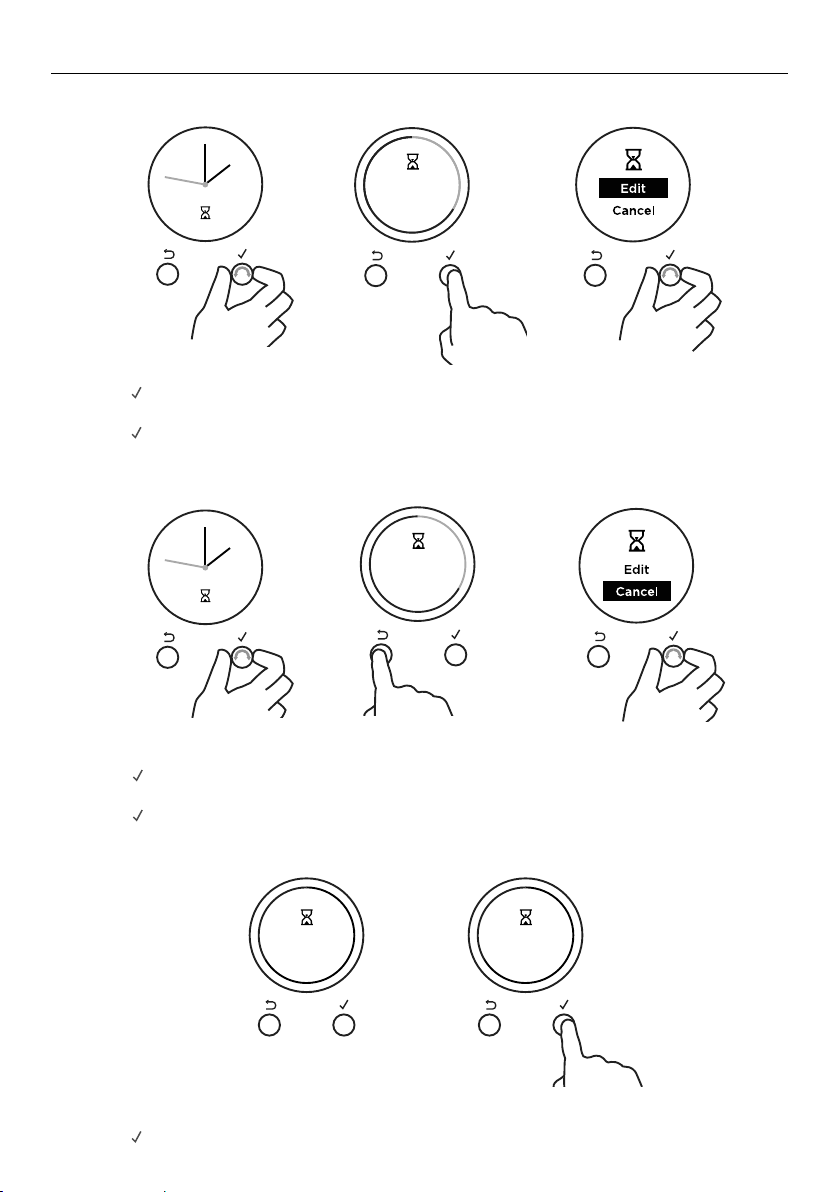
27
SETTING THE TIMER
To edit the timer
When the set time is up
CANCEL REMOTE
CANCEL REMOTE
Remote
ON
CANCEL REMOTE
CANCEL
CANCEL REMOTE
Timer
00 25
mh
alarm sounds
CANCEL REMOTE
Timer
00 25
mh
alarm sounds
CANCEL REMOTE
CANCEL REMOTE
Timer
03 25
mh
alarm sounds
CANCEL REMOTE
Timer
Timer
NOW SET
03 25
mh
alarm sounds
CANCEL REMOTECANCEL REMOTE
CANCEL REMOTE
CANCEL REMOTE
CANCEL REMOTE
CANCEL REMOTE CANCEL REMOTE
CANCEL REMOTE CANCEL REMOTE
CANCEL REMOTE
Auto Cook
CANCEL REMOTE
Cook time
Start Now
Cook
Ends 7:00pm
20
6:30
End
CONFIRM
00 00
mh
CANCEL REMOTE
Cook time
02 20
4
m
m
59
s
min
pm
h
CANCEL REMOTE
End time
Set
Function
and
Temp
CANCEL REMOTE
CANCEL REMOTE
06:00
pm
CANCEL REMOTE CANCEL REMOTE
to go
4
m
59
s
to go
4
m
59
s
REMOTE
Timer
Complete
Timer
Complete
Ends 7:00pm
4
m
59
s
CANCEL REMOTE
CANCEL REMOTE
CANCEL REMOTE
Remote
ON
CANCEL REMOTE
CANCEL
CANCEL REMOTE
Timer
00 25
mh
alarm sounds
CANCEL REMOTE
Timer
00 25
mh
alarm sounds
CANCEL REMOTE
CANCEL REMOTE
Timer
03 25
mh
alarm sounds
CANCEL REMOTE
Timer
Timer
NOW SET
03 25
mh
alarm sounds
CANCEL REMOTECANCEL REMOTE
CANCEL REMOTE
CANCEL REMOTE
CANCEL REMOTE
CANCEL REMOTE CANCEL REMOTE
CANCEL REMOTE CANCEL REMOTE
CANCEL REMOTE
Auto Cook
CANCEL REMOTE
Cook time
Start Now
Cook
Ends 7:00pm
20
6:30
End
CONFIRM
00 00
mh
CANCEL REMOTE
Cook time
02 20
4
m
m
59
s
min
pm
h
CANCEL REMOTE
End time
Set
Function
and
Temp
CANCEL REMOTE
CANCEL REMOTE
06:00
pm
CANCEL REMOTE CANCEL REMOTE
to go
4
m
59
s
to go
4
m
59
s
REMOTE
Timer
Complete
Timer
Complete
Ends 7:00pm
4
m
59
s
CANCEL REMOTE
CANCEL REMOTE
CANCEL REMOTE
Remote
ON
CANCEL REMOTE
CANCEL
CANCEL REMOTE
Timer
00 25
mh
alarm sounds
CANCEL REMOTE
Timer
00 25
mh
alarm sounds
CANCEL REMOTE
CANCEL REMOTE
Timer
03 25
mh
alarm sounds
CANCEL REMOTE
Timer
Timer
NOW SET
03 25
mh
alarm sounds
CANCEL REMOTECANCEL REMOTE
CANCEL REMOTE CANCEL REMOTE
CANCEL REMOTE
CANCEL REMOTE CANCEL REMOTE
CANCEL REMOTE
CANCEL REMOTE
CANCEL REMOTE
Auto Cook
CANCEL REMOTE
Cook time
Start Now
Cook
Ends 7:00pm
20
6:30
End
CONFIRM
00 00
mh
CANCEL REMOTE
Cook time
02 20
4
m
m
59
s
min
pm
h
CANCEL REMOTE
End time
Set
Function
and
Temp
CANCEL REMOTE
CANCEL REMOTE
06:00
pm
CANCEL REMOTE CANCEL REMOTE
to go
4
m
59
s
to go
4
m
59
s
REMOTE
Timer
Complete
Timer
Complete
Ends 7:00pm
4
m
59
s
CANCEL REMOTE
CANCEL REMOTE
CANCEL REMOTE
Remote
ON
CANCEL REMOTE
CANCEL
CANCEL REMOTE
Timer
00 25
mh
alarm sounds
CANCEL REMOTE
Timer
00 25
mh
alarm sounds
CANCEL REMOTE
CANCEL REMOTE
Timer
03 25
mh
alarm sounds
CANCEL REMOTE
Timer
Timer
NOW SET
03 25
mh
alarm sounds
CANCEL REMOTECANCEL REMOTE
CANCEL REMOTE CANCEL REMOTE
CANCEL REMOTE
CANCEL REMOTE CANCEL REMOTE
CANCEL REMOTE
CANCEL REMOTE
CANCEL REMOTE
Auto Cook
CANCEL REMOTE
Cook time
Start Now
Cook
Ends 7:00pm
20
6:30
End
CONFIRM
00 00
mh
CANCEL REMOTE
Cook time
02 20
4
m
m
59
s
min
pm
h
CANCEL REMOTE
End time
Set
Function
and
Temp
CANCEL REMOTE
CANCEL REMOTE
06:00
pm
CANCEL REMOTE CANCEL REMOTE
to go
4
m
59
s
to go
4
m
59
s
REMOTE
Timer
Complete
Timer
Complete
Ends 7:00pm
4
m
59
s
CANCEL REMOTE
CANCEL REMOTE
CANCEL REMOTE
Remote
ON
CANCEL REMOTE
CANCEL
CANCEL REMOTE
Timer
00 25
mh
alarm sounds
CANCEL REMOTE
Timer
00 25
mh
alarm sounds
CANCEL REMOTE
CANCEL REMOTE
Timer
03 25
mh
alarm sounds
CANCEL REMOTE
Timer
Timer
NOW SET
03 25
mh
alarm sounds
CANCEL REMOTECANCEL REMOTE
CANCEL REMOTE CANCEL REMOTE
CANCEL REMOTE
CANCEL REMOTE CANCEL REMOTE
CANCEL REMOTE CANCEL REMOTE
CANCEL REMOTE
Auto Cook
CANCEL REMOTE
Cook time
Start Now
Cook
Ends 7:00pm
20
6:30
End
CONFIRM
00 00
mh
CANCEL REMOTE
Cook time
02 20
4
m
m
59
s
min
pm
h
CANCEL REMOTE
End time
Set
Function
and
Temp
CANCEL REMOTE
CANCEL REMOTE
06:00
pm
CANCEL REMOTE CANCEL REMOTE
to go
4
m
59
s
to go
4
m
59
s
REMOTE
Timer
Complete
Timer
Complete
Ends 7:00pm
4
m
59
s
CANCEL REMOTE
CANCEL REMOTE
CANCEL REMOTE
Remote
ON
CANCEL REMOTE
CANCEL
CANCEL REMOTE
Timer
00 25
mh
alarm sounds
CANCEL REMOTE
Timer
00 25
mh
alarm sounds
CANCEL REMOTE
CANCEL REMOTE
Timer
03 25
mh
alarm sounds
CANCEL REMOTE
Timer
Timer
NOW SET
03 25
mh
alarm sounds
CANCEL REMOTECANCEL REMOTE
CANCEL REMOTE CANCEL REMOTE
CANCEL REMOTE
CANCEL REMOTE CANCEL REMOTE
CANCEL REMOTE CANCEL REMOTE
CANCEL REMOTE
Auto Cook
CANCEL REMOTE
Cook time
Start Now
Cook
Ends 7:00pm
20
6:30
End
CONFIRM
00 00
mh
CANCEL REMOTE
Cook time
02 20
4
m
m
59
s
min
pm
h
CANCEL REMOTE
End time
Set
Function
and
Temp
CANCEL REMOTE
CANCEL REMOTE
06:00
pm
CANCEL REMOTE CANCEL REMOTE
to go
4
m
59
s
to go
4
m
59
s
REMOTE
Timer
Complete
Timer
Complete
Ends 7:00pm
4
m
59
s
CANCEL REMOTE
CANCEL
REMOTE
CANCEL REMOTE
CANCEL REMOTE
Remote
ON
CANCEL REMOTE
CANCEL
CANCEL REMOTE
Timer
00 25
mh
alarm sounds
CANCEL REMOTE
Timer
00 25
mh
alarm sounds
CANCEL REMOTE
CANCEL REMOTE
Timer
03 25
mh
alarm sounds
CANCEL REMOTE
Timer
Timer
NOW SET
03 25
mh
alarm sounds
CANCEL REMOTECANCEL REMOTE
CANCEL REMOTE CANCEL REMOTE
CANCEL REMOTE
CANCEL REMOTE
CANCEL REMOTE
CANCEL REMOTE CANCEL REMOTE
CANCEL REMOTE
Auto Cook
CANCEL REMOTE
Cook time
Start Now
Cook
Ends 7:00pm
20
6:30
End
CONFIRM
00 00
mh
CANCEL REMOTE
Cook time
02 20
4
m
m
59
s
min
pm
h
CANCEL REMOTE
End time
Set
Function
and
Temp
CANCEL REMOTE
CANCEL REMOTE
06:00
pm
CANCEL REMOTE CANCEL REMOTE
to go
4
m
59
s
to go
4
m
59
s
REMOTE
Timer
Complete
Timer
Complete
Ends 7:00pm
4
m
59
s
CANCEL REMOTE
CANCEL REMOTE
CANCEL REMOTE
Remote
ON
CANCEL REMOTE
CANCEL
CANCEL REMOTE
Timer
00 25
mh
alarm sounds
CANCEL REMOTE
Timer
00 25
mh
alarm sounds
CANCEL REMOTE
CANCEL REMOTE
Timer
03 25
mh
alarm sounds
CANCEL REMOTE
Timer
Timer
NOW SET
03 25
mh
alarm sounds
CANCEL REMOTECANCEL REMOTE
CANCEL REMOTE
CANCEL REMOTE
CANCEL REMOTE
CANCEL REMOTE CANCEL REMOTE
CANCEL REMOTE CANCEL REMOTE
CANCEL REMOTE
Auto Cook
CANCEL REMOTE
Cook time
Start Now
Cook
Ends 7:00pm
20
6:30
End
CONFIRM
00 00
mh
CANCEL REMOTE
Cook time
02 20
4
m
m
59
s
min
pm
h
CANCEL REMOTE
End time
Set
Function
and
Temp
CANCEL REMOTE
CANCEL REMOTE
06:00
pm
CANCEL REMOTE CANCEL REMOTE
to go
4
m
59
s
to go
4
m
59
s
REMOTE
Timer
Complete
Timer
Complete
Ends 7:00pm
4
m
59
s
CANCEL REMOTE
1 From the home screen, scroll to view the active timer.
2 Press
-
+
-
+
-
+
to enter the timer.
3 Scroll to select Edit.
4 Press
-
+
-
+
-
+
to confirm.
5 Follow the steps previous to adjust the timer.
1 Timer Complete will appear and the display will flash.
A tone will sound every few seconds.
2 Press
-
+
-
+
-
+
or CANCEL to stop the tone sounding.
1 From the home screen, scroll to view the active timer.
y Press and hold CANCEL to cancel the timer, or follow the steps below:
2 Press
-
+
-
+
-
+
to enter the timer.
3 Scroll to select Cancel.
4 Press
-
+
-
+
-
+
to confirm and exit the menu.
To cancel the timer
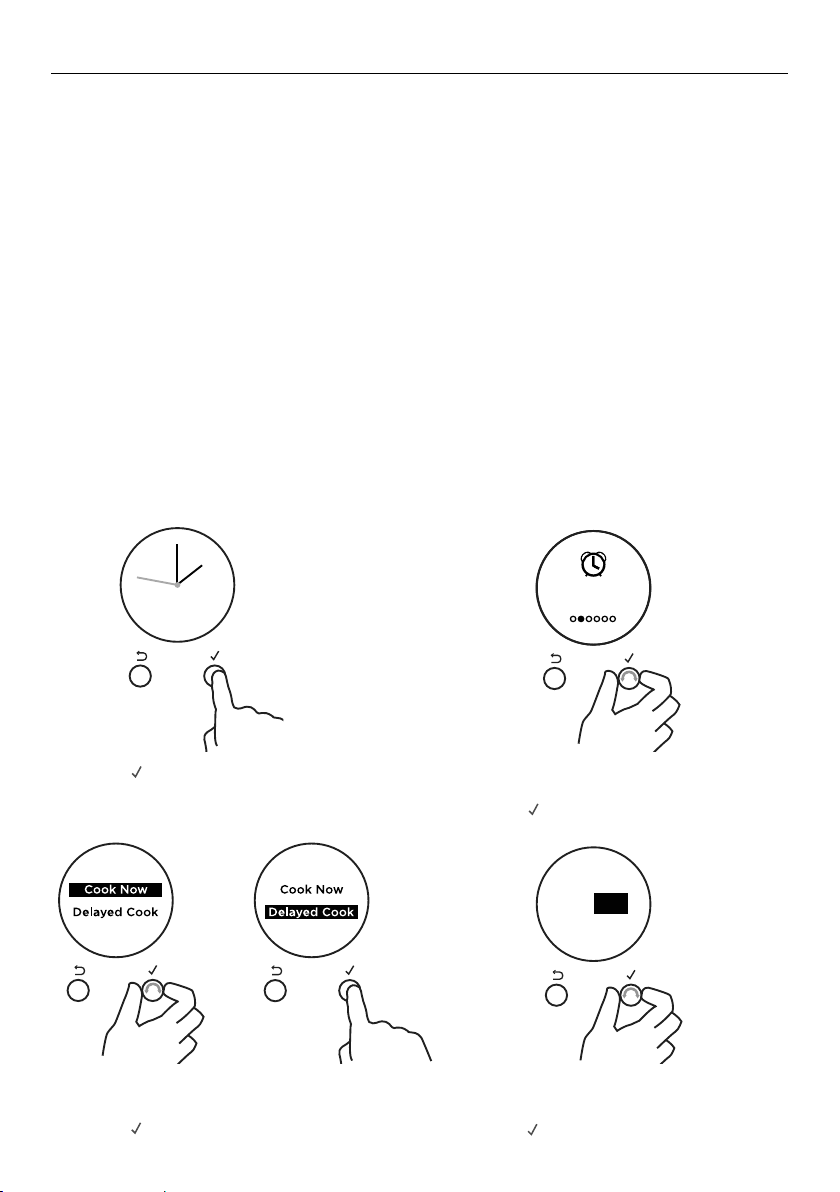
28
AUTO COOK
CANCEL REMOTE
CANCEL REMOTE
Remote
ON
CANCEL REMOTE
CANCEL
CANCEL REMOTE
Timer
00 25
mh
alarm sounds
CANCEL REMOTE
Timer
00 25
mh
alarm sounds
CANCEL REMOTE
CANCEL REMOTE
Timer
03 25
mh
alarm sounds
CANCEL REMOTE
Timer
Timer
NOW SET
03 25
mh
alarm sounds
CANCEL REMOTECANCEL REMOTE
CANCEL REMOTE CANCEL REMOTE
CANCEL REMOTE
CANCEL REMOTE CANCEL REMOTE
CANCEL REMOTE CANCEL REMOTE
CANCEL REMOTE
Auto Cook
CANCEL REMOTE
Cook time
Start Now
Cook
Ends 7:00pm
20
6:30
End
CONFIRM
00 00
mh
CANCEL REMOTE
Cook time
02 20
4
m
m
59
s
min
pm
h
CANCEL REMOTE
End time
Set
Function
and
Temp
CANCEL REMOTE
CANCEL REMOTE
06:00
pm
CANCEL REMOTE CANCEL REMOTE
to go
4
m
59
s
to go
4
m
59
s
REMOTE
Timer
Complete
Timer
Complete
Ends 7:00pm
4
m
59
s
CANCEL REMOTE
CANCEL REMOTE
CANCEL REMOTE
Remote
ON
CANCEL REMOTE
CANCEL
CANCEL REMOTE
Timer
00 25
mh
alarm sounds
CANCEL REMOTE
Timer
00 25
mh
alarm sounds
CANCEL REMOTE
CANCEL REMOTE
Timer
03 25
mh
alarm sounds
CANCEL REMOTE
Timer
Timer
NOW SET
03 25
mh
alarm sounds
CANCEL REMOTECANCEL REMOTE
CANCEL REMOTE CANCEL REMOTE
CANCEL REMOTE
CANCEL REMOTE CANCEL REMOTE
CANCEL REMOTE CANCEL REMOTE
CANCEL REMOTE
Auto Cook
CANCEL REMOTE
Cook time
Start Now
Cook
Ends 7:00pm
20
6:30
End
CONFIRM
00 00
mh
CANCEL REMOTE
Cook time
02 20
4
m
m
59
s
min
pm
h
CANCEL REMOTE
End time
Set
Function
and
Temp
CANCEL REMOTE
CANCEL REMOTE
06:00
pm
CANCEL REMOTE CANCEL REMOTE
to go
4
m
59
s
to go
4
m
59
s
REMOTE
Timer
Complete
Timer
Complete
Ends 7:00pm
4
m
59
s
CANCEL REMOTE
CANCEL REMOTE
CANCEL REMOTE
Remote
ON
CANCEL REMOTE
CANCEL
CANCEL REMOTE
Timer
00 25
mh
alarm sounds
CANCEL REMOTE
Timer
00 25
mh
alarm sounds
CANCEL REMOTE
CANCEL REMOTE
Timer
03 25
mh
alarm sounds
CANCEL REMOTE
Timer
Timer
NOW SET
03 25
mh
alarm sounds
CANCEL REMOTECANCEL REMOTE
CANCEL REMOTE CANCEL REMOTE
CANCEL REMOTE
CANCEL REMOTE CANCEL REMOTE
CANCEL REMOTE CANCEL REMOTE
CANCEL REMOTE
Auto Cook
CANCEL REMOTE
Cook time
Start Now
Cook
Ends 7:00pm
20
6:30
End
CONFIRM
00 00
mh
CANCEL REMOTE
Cook time
02 20
4
m
m
59
s
min
pm
h
CANCEL REMOTE
End time
Set
Function
and
Temp
CANCEL REMOTE
CANCEL REMOTE
06:00
pm
CANCEL REMOTE CANCEL REMOTE
to go
4
m
59
s
to go
4
m
59
s
REMOTE
Timer
Complete
Timer
Complete
Ends 7:00pm
4
m
59
s
CANCEL REMOTE
1 Press
-
+
-
+
-
+
to enter the main menu.
4 Set the Cook time.
y Scroll to set the minutes.
y Press
-
+
-
+
-
+
to accept.
2 Scroll through the menu options
to Auto Cook.
y Press
-
+
-
+
-
+
to enter Auto Cook.
Use Auto Cook to
y Turn off the oven automatically after a set period of time.
y Set the oven for food to be ready at a specific time.
Before you start
y Make sure that your oven is displaying the correct time of day and food is in the oven.
IMPORTANT!
Safe food handling: leave food in the oven for as short as time as possible before and
after cooking or defrosting. This is to avoid contamination by organisms which may
cause food poisoning. Take particular care during warmer weather.
You can choose to either start cooking now or set a delayed cook.
y Choose Start Now if you have started cooking and want to set the oven to turn off
automatically after a set period of time.
y Choose Delayed Cook to set the oven to automatically turn on later and be ready at a
set time.
To set Auto Cook
CANCEL REMOTE
CANCEL REMOTE
Remote
ON
CANCEL REMOTE
CANCEL
CANCEL REMOTE
Timer
00 25
mh
alarm sounds
CANCEL REMOTE
Timer
00 25
mh
alarm sounds
CANCEL REMOTE
CANCEL REMOTE
Timer
03 25
mh
alarm sounds
CANCEL REMOTE
Timer
Timer
NOW SET
03 25
mh
alarm sounds
CANCEL REMOTECANCEL REMOTE
CANCEL REMOTE CANCEL REMOTE
CANCEL REMOTE
CANCEL REMOTE CANCEL REMOTE
CANCEL REMOTE CANCEL REMOTE
CANCEL REMOTE
Auto Cook
CANCEL REMOTE
Cook time
Start Now
Cook
Ends 7:00pm
20
6:30
End
CONFIRM
00 00
mh
CANCEL REMOTE
Cook time
02 20
4
m
m
59
s
min
pm
h
CANCEL REMOTE
End time
Set
Function
and
Temp
CANCEL REMOTE
CANCEL REMOTE
06:00
pm
CANCEL REMOTE CANCEL REMOTE
to go
4
m
59
s
to go
4
m
59
s
REMOTE
Timer
Complete
Timer
Complete
Ends 7:00pm
4
m
59
s
CANCEL REMOTE
CANCEL REMOTE
CANCEL REMOTE
Remote
ON
CANCEL REMOTE
CANCEL
CANCEL REMOTE
Timer
00 25
mh
alarm sounds
CANCEL REMOTE
Timer
00 25
mh
alarm sounds
CANCEL REMOTE
CANCEL REMOTE
Timer
03 25
mh
alarm sounds
CANCEL REMOTE
Timer
Timer
NOW SET
03 25
mh
alarm sounds
CANCEL REMOTECANCEL REMOTE
CANCEL REMOTE CANCEL REMOTE
CANCEL REMOTE
CANCEL REMOTE CANCEL REMOTE
CANCEL REMOTE CANCEL REMOTE
CANCEL REMOTE
Auto Cook
CANCEL REMOTE
Cook time
Start Now
Cook
Ends 7:00pm
20
6:30
End
CONFIRM
00 00
mh
CANCEL REMOTE
Cook time
02 20
4
m
m
59
s
min
pm
h
CANCEL REMOTE
End time
Set
Function
and
Temp
CANCEL REMOTE
CANCEL REMOTE
06:00
pm
CANCEL REMOTE CANCEL REMOTE
to go
4
m
59
s
to go
4
m
59
s
REMOTE
Timer
Complete
Timer
Complete
Ends 7:00pm
4
m
59
s
CANCEL REMOTE
3 Scroll to choose between Cook Now
and Delayed Cook.
y Press
-
+
-
+
-
+
to accept.
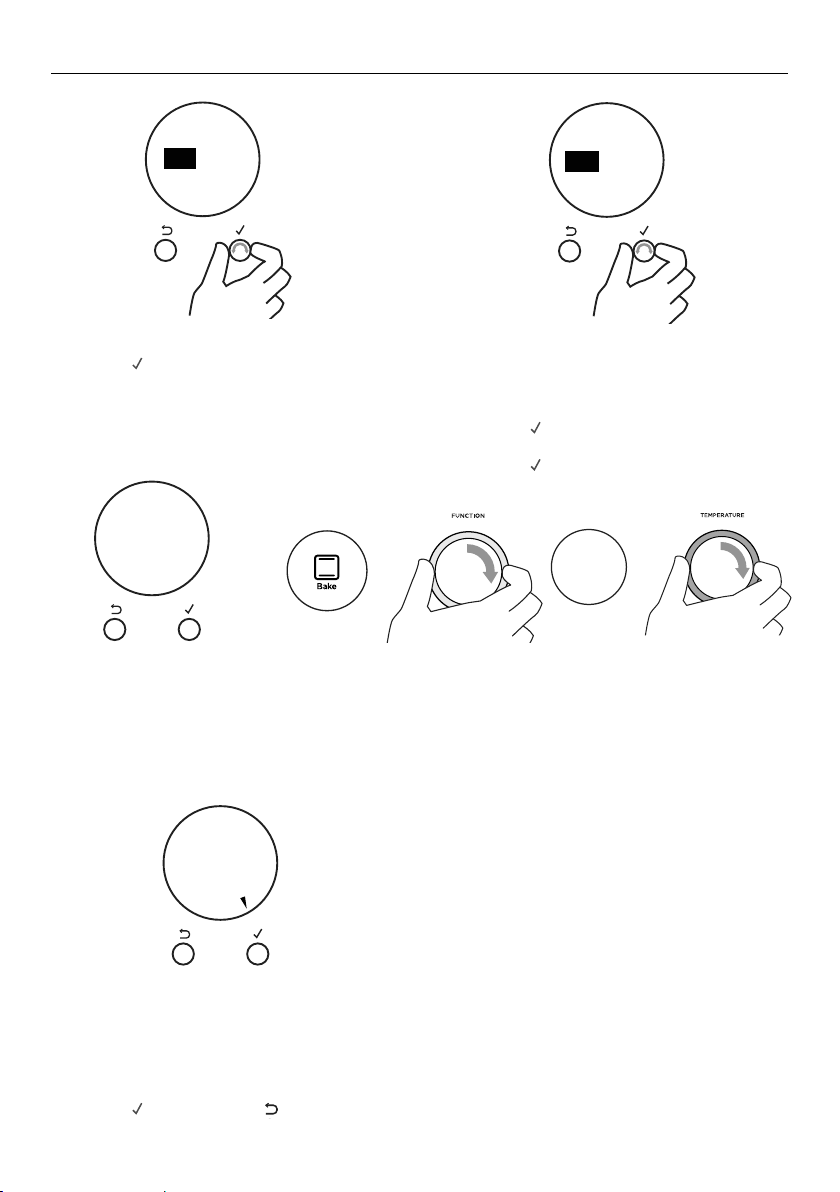
29
AUTO COOK
Delayed Cook
To set Delayed Cook you will also
need to set an End Time.
6 Scroll to set the minutes.
y Press
-
+
-
+
-
+
to accept.
7 Scroll to set the hours.
y Press
-
+
-
+
-
+
to accept.
CANCEL REMOTE
CANCEL REMOTE
Remote
ON
CANCEL REMOTE
CANCEL
CANCEL REMOTE
Timer
00 25
mh
alarm sounds
CANCEL REMOTE
Timer
00 25
mh
alarm sounds
CANCEL REMOTE
CANCEL REMOTE
Timer
03 25
mh
alarm sounds
CANCEL REMOTE
Timer
Timer
NOW SET
03 25
mh
alarm sounds
CANCEL REMOTECANCEL REMOTE
CANCEL REMOTE CANCEL REMOTE
CANCEL REMOTE
CANCEL REMOTE CANCEL REMOTE
CANCEL REMOTE CANCEL REMOTE
CANCEL REMOTE
Auto Cook
CANCEL REMOTE
Cook time
Start Now
Cook
Ends 7:00pm
20
6:30
End
CONFIRM
00 00
mh
CANCEL REMOTE
Cook time
02 20
4
m
m
59
s
min
pm
h
CANCEL REMOTE
End time
Set
Function
and
Temp
CANCEL REMOTE
CANCEL REMOTE
06:00
pm
CANCEL REMOTE CANCEL REMOTE
to go
4
m
59
s
to go
4
m
59
s
REMOTE
Timer
Complete
Timer
Complete
Ends 7:00pm
4
m
59
s
CANCEL REMOTE
5 Scroll to set the hours.
y Press
-
+
-
+
-
+
to accept.
CANCEL REMOTE
CANCEL REMOTE
Remote
ON
CANCEL REMOTE
Timer
24.59m
CANCEL REMOTE
CANCEL REMOTE
Timer
00 25
mh
alarm sounds
CANCEL REMOTE
Timer
00 25
mh
alarm sounds
CANCEL REMOTE
CANCEL REMOTE
Timer
03 25
mh
alarm sounds
CANCEL REMOTE
Timer
03 25
mh
alarm sounds
CANCEL REMOTECANCEL REMOTE
25
m
Timer
24.59m
CANCEL REMOTE CANCEL REMOTE
CANCEL REMOTE
Timer
24.59m
CANCEL REMOTE CANCEL REMOTE
CANCEL REMOTE CANCEL REMOTE
00
m
00
m
CANCEL REMOTE
Auto Cook
CANCEL REMOTE
Cook time
Start Now
Cook
Cook time
20
6:30
End
00 20
mh
CANCEL REMOTE
Cook time
02 20
4
m
m
59
s
min
pm
h
CANCEL REMOTE
End time
Set
Function
and
Temp
CANCEL REMOTE
Start
Now
Delayed
Cook
CANCEL REMOTE
06:00
pm
CANCEL REMOTE
CANCEL REMOTE
The display will show a summary of
your settings, showing:
y Start time
y Cook time
y End time
9 Press
-
+
-
+
-
+
to confirm or
CANCEL REMOTE
CANCEL REMOTE
Remote
ON
CANCEL REMOTE
Timer
24.59m
CANCEL REMOTE
CANCEL REMOTE
Timer
00 25
mh
alarm sounds
CANCEL REMOTE
Timer
00 25
mh
alarm sounds
CANCEL REMOTE
CANCEL REMOTE
Timer
03 25
mh
alarm sounds
CANCEL REMOTE
Timer
03 25
mh
alarm sounds
CANCEL REMOTECANCEL REMOTE
25
m
Timer
24.59m
CANCEL REMOTE CANCEL REMOTE
CANCEL REMOTE
Timer
24.59m
CANCEL REMOTE CANCEL REMOTE
CANCEL REMOTE CANCEL REMOTE
00
m
00
m
CANCEL REMOTE
Auto Cook
CANCEL REMOTE
Cook time
Start Now
Cook
Cook time
20
6:30
End
00 20
mh
CANCEL REMOTE
Cook time
02 20
4
m
m
59
s
min
pm
h
CANCEL REMOTE
End time
Set
Function
and
Temp
CANCEL REMOTE
Start
Now
Delayed
Cook
CANCEL REMOTE
06:00
pm
CANCEL REMOTE CANCEL REMOTE
to go back
and adjust the settings.
Your oven is now set for automatic
cooking.
If you have not already set a function and temperature:
y Set Function and Temp will appear in the display.
y The halos on the oven dials will flash.
8 Set a function and temperature using the oven dials.
NOV 25
CANCEL REMOTE
CANCEL
400F
--->
REMOTE
NOV 25
CANCEL REMOTE
NOV 25
True
Aero
NOV 25
CANCEL REMOTE
CANCEL
400F
--->
REMOTE
NOV 25
CANCEL REMOTE
NOV 25
True
Aero
CANCEL REMOTE
CANCEL REMOTE
Remote
ON
CANCEL REMOTE
CANCEL
CANCEL REMOTE
Timer
00 25
mh
alarm sounds
CANCEL REMOTE
Timer
00 25
mh
alarm sounds
CANCEL REMOTE
CANCEL REMOTE
Timer
03 25
mh
alarm sounds
CANCEL REMOTE
Timer
Timer
NOW SET
03 25
mh
alarm sounds
CANCEL REMOTECANCEL REMOTE
CANCEL REMOTE CANCEL REMOTE
CANCEL REMOTE
CANCEL REMOTE CANCEL REMOTE
CANCEL REMOTE CANCEL REMOTE
CANCEL REMOTE
Auto Cook
CANCEL REMOTE
Cook time
Start Now
Cook
Ends 7:00pm
20
6:30
End
CONFIRM
00 00
mh
CANCEL REMOTE
Cook time
02 20
4
m
m
59
s
min
pm
h
CANCEL REMOTE
End time
Set
Function
and
Temp
CANCEL REMOTE
CANCEL REMOTE
06:00
pm
CANCEL REMOTE
CANCEL REMOTE
to go
4
m
59
s
to go
4
m
59
s
REMOTE
Timer
Complete
Timer
Complete
Ends 7:00pm
4
m
59
s
CANCEL REMOTE
CANCEL REMOTE
CANCEL REMOTE
Remote
ON
CANCEL REMOTE
CANCEL
CANCEL REMOTE
Timer
00 25
mh
alarm sounds
CANCEL REMOTE
Timer
00 25
mh
alarm sounds
CANCEL REMOTE
CANCEL REMOTE
Timer
03 25
mh
alarm sounds
CANCEL REMOTE
Timer
Timer
NOW SET
03 25
mh
alarm sounds
CANCEL REMOTECANCEL REMOTE
CANCEL REMOTE CANCEL REMOTE
CANCEL REMOTE
CANCEL REMOTE CANCEL REMOTE
CANCEL REMOTE CANCEL REMOTE
CANCEL REMOTE
Auto Cook
CANCEL REMOTE
Cook time
Start Now
Cook
Ends 7:00pm
20
6:30
End
CONFIRM
00 00
mh
CANCEL REMOTE
Cook time
02 20
4
m
m
59
s
min
pm
h
CANCEL REMOTE
End time
Set
Function
and
Temp
CANCEL REMOTE
CANCEL REMOTE
06:00
pm
CANCEL REMOTE CANCEL REMOTE
to go
4
m
59
s
to go
4
m
59
s
REMOTE
Timer
Complete
Timer
Complete
Ends 7:00pm
4
m
59
s
CANCEL REMOTE
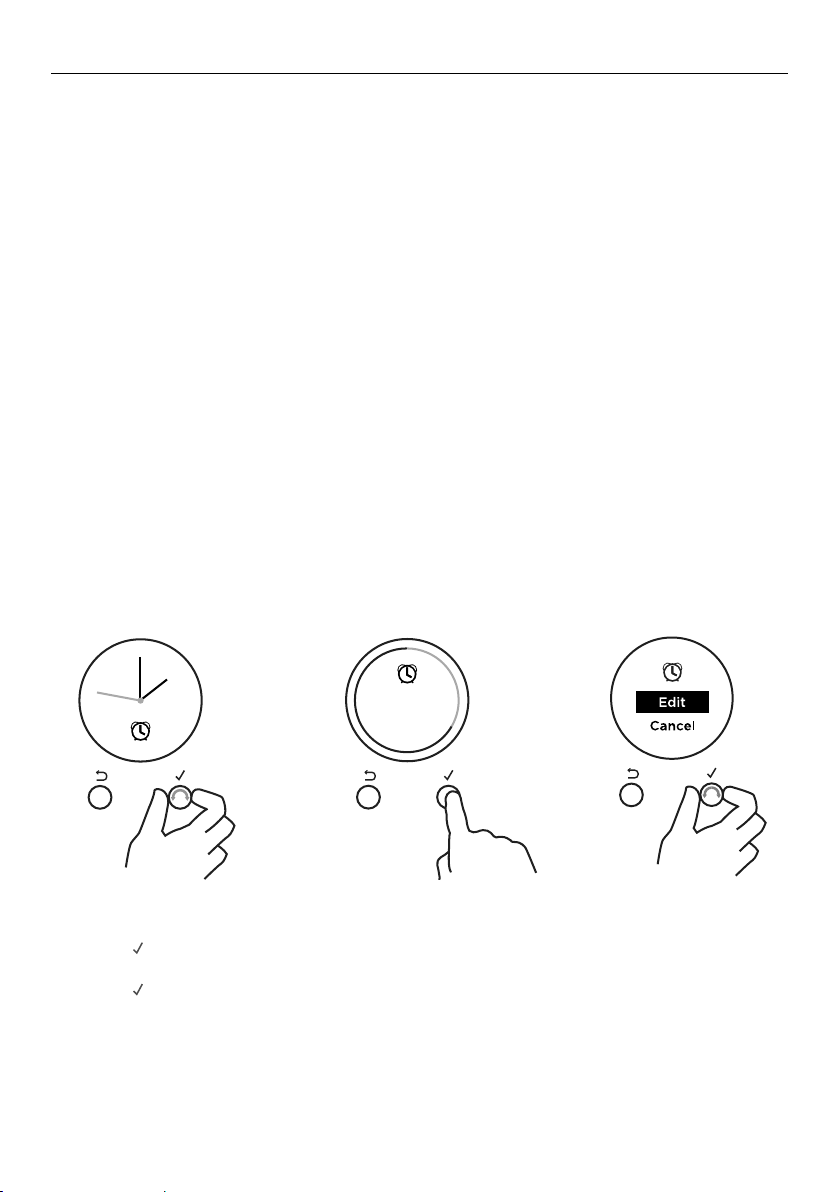
30
AUTO COOK
When Auto Cook is set
y The oven and the lights will stay off, the halos will be unlit, but your oven is now set
forautomatic cooking. It will automatically turn on at the required time.
y You can modify the function and temperature while the oven is waiting to start cooking.
y If setting Delayed Cook you will need to put the food in the oven before starting.
y For safety reasons opening the door while the oven is waiting to start will cancel
Delayed Cook.
While the oven is heating up
IMPORTANT!
y During Auto Cook the grill element will come on while the oven is heating up.
Food placed into a cold oven could be prone to burning as the oven heats up.
y Large items and foods with a high fat or sugar content are especially prone to
burning. Take particular care with foods such as macaroni cheese, large poultry,
and enchiladas.
y Ideal foods for automatic cooking include stews, casseroles, braised meat and
potato top pie.
y Position food on a lower shelf to prevent burning.
y Where possible cook food in a pan with a lid, or cover food with foil.
CANCEL REMOTE
CANCEL REMOTE
Remote
ON
CANCEL REMOTE
CANCEL
CANCEL REMOTE
CANCEL REMOTE
Timer
mh
alarm sounds
CANCEL REMOTE
Timer
Timer
NOW SET
alarm sounds
CANCEL REMOTECANCEL REMOTE
CANCEL REMOTE CANCEL REMOTE
CANCEL REMOTE
CANCEL REMOTE CANCEL REMOTE
CANCEL REMOTE CANCEL REMOTE
CANCEL REMOTE
Auto Cook
CANCEL REMOTE
Cook time
Start Now
Cook
Ends 7:00pm
20
6:30
End
CONFIRM
00 00
mh
CANCEL REMOTE
Cook time
02 20
4
m
m
59
s
min
pm
h
CANCEL REMOTE
End time
Set
Function
and
Temp
CANCEL REMOTE
CANCEL REMOTE
06:00
pm
CANCEL REMOTE CANCEL REMOTE
to go
4
m
59
s
to go
4
m
59
s
REMOTE
Timer
Complete
Timer
Complete
Ends 7:00pm
4
m
59
s
CANCEL REMOTE
CANCEL REMOTE
Timer
00 25
mh
00 25
mh
alarm sounds
CANCEL REMOTE
Timer
alarm sounds
03 25
mh
03 25
1 From the home screen, scroll to view Auto Cook.
2 Press
-
+
-
+
-
+
to enter Auto Cook.
3 Scroll to select Edit.
4 Press
-
+
-
+
-
+
to confirm.
5 Follow the steps previous to adjust the Cook or End time.
Sabbath
Mode
REMOTE
REMOTEREMOTE
REMOTE REMOTE REMOTEREMOTECANCEL CANCEL
Set
Time of day
am pm
Set
Time of day
12:00
pm
minutes
CANCEL REMOTE
OK
CANCEL
Set
Time of day
12:00
pm
hours
Set
Time of day
12:00
pm
hours
CANCEL
OK
CANCEL
Set
Time of day
am pm
CANCEL
Set
Time of day
12:00
pm
minutes
CANCEL
CANCEL REMOTE
Remote
Enabled
Set Bake and
Temperature
CANCEL REMOTE
CANCEL REMOTE
CANCEL REMOTECANCEL REMOTE
Timer
24.59m
CANCEL REMOTE
Timer
24.59m
CANCEL REMOTE
Timer
00 25
mh
alarm sounds
CANCEL REMOTE
Timer
00 25
m
25
m
h
alarm sounds
CANCEL REMOTE CANCEL REMOTE
Timer
24.59m
CANCEL REMOTE
CANCEL REMOTE
Timer
00 25
mh
alarm sounds
CANCEL REMOTE
Timer
00 25
mh
alarm sounds
CANCEL REMOTE CANCEL REMOTECANCEL REMOTE CANCEL REMOTE
CANCEL REMOTECANCEL REMOTE
CANCEL REMOTE CANCEL REMOTE
Lock
ON
CANCEL REMOTE
Lock
O
CANCEL REMOTE
Auto Cook
Set
CANCEL REMOTE
Lock
O
Oven
Locked
CANCEL REMOTECANCEL REMOTE
CANCEL REMOTE
Cook for
00 20
mh
then stop
Cook for
00 20
mh
then stop
Start
NOW
CANCEL REMOTE
Start Now
Cook 20m
End 5:20
CANCEL REMOTE
Delayed
Cook
CANCEL REMOTE
CANCEL REMOTE
Auto Cook
Set
End time
12:00
pm
minutes
CANCEL REMOTE CANCEL REMOTE
Auto Cook
Complete
Auto Cook
Complete
CANCEL
REMOTE
Sabbath
Mode O
Start Now
Run 22h
End 5:20
CONFIRM
CANCEL REMOTE
To edit Auto Cook
CANCEL REMOTE
CANCEL REMOTE
Remote
ON
CANCEL REMOTE
CANCEL
CANCEL REMOTE
CANCEL REMOTE
Timer
mh
alarm sounds
CANCEL REMOTE
Timer
Timer
NOW SET
alarm sounds
CANCEL REMOTECANCEL REMOTE
CANCEL REMOTE CANCEL REMOTE
CANCEL REMOTE
CANCEL REMOTE CANCEL REMOTE
CANCEL REMOTE CANCEL REMOTE
CANCEL REMOTE
Auto Cook
CANCEL REMOTE
Cook time
Start Now
Cook
Ends 7:00pm
20
6:30
End
CONFIRM
00 00
mh
CANCEL REMOTE
Cook time
02 20
4
m
m
59
s
min
pm
h
CANCEL REMOTE
End time
Set
Function
and
Temp
CANCEL REMOTE
CANCEL REMOTE
06:00
pm
CANCEL REMOTE CANCEL REMOTE
to go
4
m
59
s
to go
4
m
59
s
REMOTE
Timer
Complete
Timer
Complete
Ends 7:00pm
4
m
59
s
CANCEL REMOTE
CANCEL REMOTE
Timer
00 25
mh
00 25
mh
alarm sounds
CANCEL REMOTE
Timer
alarm sounds
03 25
mh
03 25
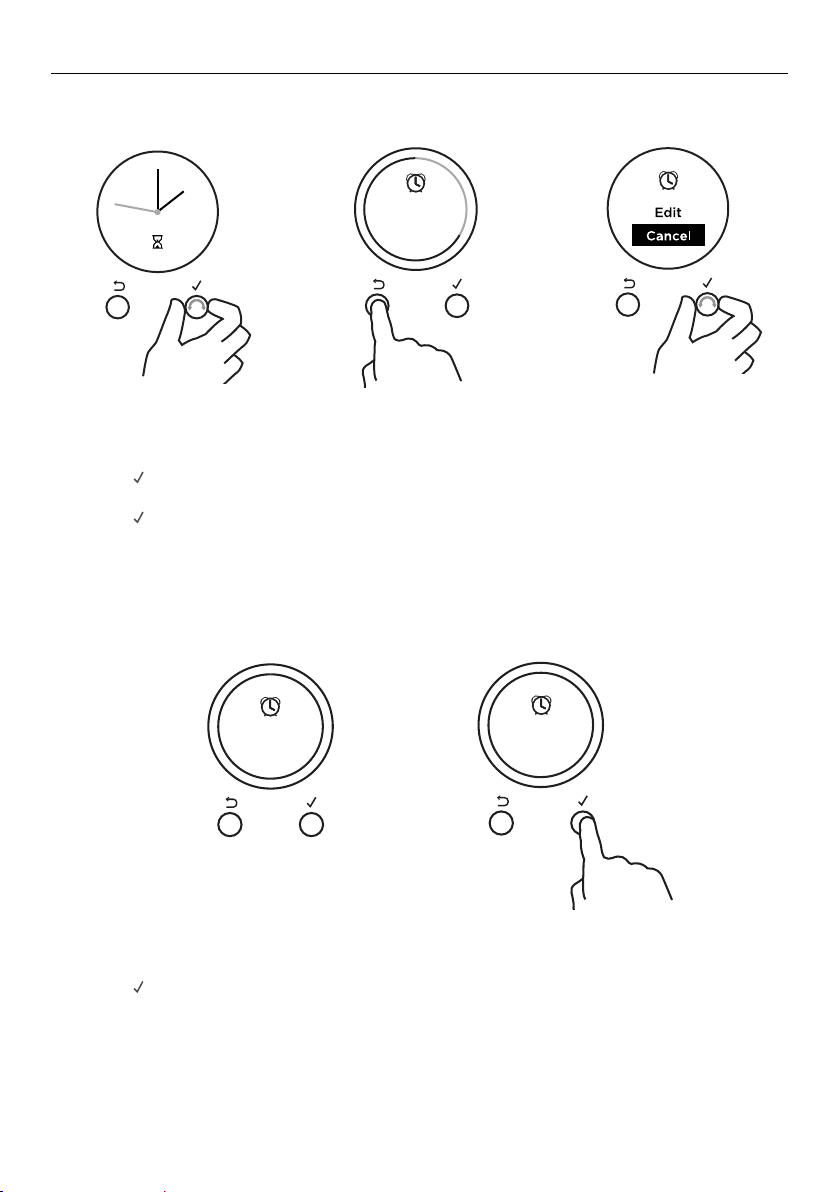
31
AUTO COOK
CANCEL REMOTE
CANCEL REMOTE
Remote
ON
CANCEL REMOTE
CANCEL
CANCEL REMOTE
CANCEL REMOTE
Timer
mh
alarm sounds
CANCEL REMOTE
Timer
Timer
NOW SET
alarm sounds
CANCEL REMOTECANCEL REMOTE
CANCEL REMOTE CANCEL REMOTE
CANCEL REMOTE
CANCEL REMOTE CANCEL REMOTE
CANCEL REMOTE CANCEL REMOTE
CANCEL REMOTE
Auto Cook
CANCEL REMOTE
Cook time
Start Now
Cook
Ends 7:00pm
20
6:30
End
CONFIRM
00 00
mh
CANCEL REMOTE
Cook time
02 20
4
m
m
59
s
min
pm
h
CANCEL REMOTE
End time
Set
Function
and
Temp
CANCEL REMOTE
CANCEL REMOTE
06:00
pm
CANCEL REMOTE CANCEL REMOTE
to go
4
m
59
s
to go
4
m
59
s
REMOTE
Timer
Complete
Timer
Complete
Ends 7:00pm
4
m
59
s
CANCEL REMOTE
CANCEL REMOTE
Timer
00 25
mh
00 25
mh
alarm sounds
CANCEL REMOTE
Timer
alarm sounds
03 25
mh
03 25
1 Auto Cook Complete will appear and the display will flash.
A tone will sound every few seconds.
2 Press
-
+
-
+
-
+
or CANCEL to stop the tone sounding.
3 Turn both the oven dials back to 0 (OFF).
1 From the home screen, scroll to view the active timer.
Press and hold CANCEL to cancel Auto Cook, or follow the steps below.
Turning both dials to 0 (OFF) will also cancel Auto Cook.
2 Press
-
+
-
+
-
+
to enter Auto Cook.
3 Scroll to select Cancel.
4 Press
-
+
-
+
-
+
to confirm.
Sabbath
Mode
REMOTE
REMOTEREMOTE
REMOTE REMOTE REMOTEREMOTECANCEL CANCEL
Set
Time of day
am pm
Set
Time of day
12:00
pm
minutes
CANCEL REMOTE
OK
CANCEL
Set
Time of day
12:00
pm
hours
Set
Time of day
12:00
pm
hours
CANCEL
OK
CANCEL
Set
Time of day
am pm
CANCEL
Set
Time of day
12:00
pm
minutes
CANCEL
CANCEL REMOTE
Remote
Enabled
Set Bake and
Temperature
CANCEL REMOTE
CANCEL REMOTE
CANCEL REMOTECANCEL REMOTE
Timer
24.59m
CANCEL REMOTE
Timer
24.59m
CANCEL REMOTE
Timer
00 25
mh
alarm sounds
CANCEL REMOTE
Timer
00 25
m
25
m
h
alarm sounds
CANCEL REMOTE CANCEL REMOTE
Timer
24.59m
CANCEL REMOTE
CANCEL REMOTE
Timer
00 25
mh
alarm sounds
CANCEL REMOTE
Timer
00 25
mh
alarm sounds
CANCEL REMOTE CANCEL REMOTECANCEL REMOTE CANCEL REMOTE
CANCEL REMOTECANCEL REMOTE
CANCEL REMOTE CANCEL REMOTE
Lock
ON
CANCEL REMOTE
Lock
O
CANCEL REMOTE
Auto Cook
Set
CANCEL REMOTE
Lock
O
Oven
Locked
CANCEL REMOTECANCEL REMOTE
CANCEL REMOTE
Cook for
00 20
mh
then stop
Cook for
00 20
mh
then stop
Start
NOW
CANCEL REMOTE
Start Now
Cook 20m
End 5:20
CANCEL REMOTE
Delayed
Cook
CANCEL REMOTE
CANCEL REMOTE
Auto Cook
Set
End time
12:00
pm
minutes
CANCEL REMOTE CANCEL REMOTE
Auto Cook
Complete
Auto Cook
Complete
CANCEL
REMOTE
Sabbath
Mode O
Start Now
Run 22h
End 5:20
CONFIRM
CANCEL REMOTE
Sabbath
Mode
REMOTE
REMOTEREMOTE
REMOTE REMOTE REMOTEREMOTECANCEL CANCEL
Set
Time of day
am pm
Set
Time of day
12:00
pm
minutes
CANCEL REMOTE
OK
CANCEL
Set
Time of day
12:00
pm
hours
Set
Time of day
12:00
pm
hours
CANCEL
OK
CANCEL
Set
Time of day
am pm
CANCEL
Set
Time of day
12:00
pm
minutes
CANCEL
CANCEL REMOTE
Remote
Enabled
Set Bake and
Temperature
CANCEL REMOTE
CANCEL REMOTE
CANCEL REMOTECANCEL REMOTE
Timer
24.59m
CANCEL REMOTE
Timer
24.59m
CANCEL REMOTE
Timer
00 25
mh
alarm sounds
CANCEL REMOTE
Timer
00 25
m
25
m
h
alarm sounds
CANCEL REMOTE CANCEL REMOTE
Timer
24.59m
CANCEL REMOTE
CANCEL REMOTE
Timer
00 25
mh
alarm sounds
CANCEL REMOTE
Timer
00 25
mh
alarm sounds
CANCEL REMOTE CANCEL REMOTECANCEL REMOTE CANCEL REMOTE
CANCEL REMOTECANCEL REMOTE
CANCEL REMOTE CANCEL REMOTE
Lock
ON
CANCEL REMOTE
Lock
O
CANCEL REMOTE
Auto Cook
Set
CANCEL REMOTE
Lock
O
Oven
Locked
CANCEL REMOTECANCEL REMOTE
CANCEL REMOTE
Cook for
00 20
mh
then stop
Cook for
00 20
mh
then stop
Start
NOW
CANCEL REMOTE
Start Now
Cook 20m
End 5:20
CANCEL REMOTE
Delayed
Cook
CANCEL REMOTE
CANCEL REMOTE
Auto Cook
Set
End time
12:00
pm
minutes
CANCEL REMOTE CANCEL REMOTE
Auto Cook
Complete
Auto Cook
Complete
CANCEL
REMOTE
Sabbath
Mode O
Start Now
Run 22h
End 5:20
CONFIRM
CANCEL REMOTE
When the set time is up
To cancel Auto Cook
CANCEL REMOTE
CANCEL REMOTE
Remote
ON
CANCEL REMOTE
CANCEL
CANCEL REMOTE
CANCEL REMOTE
Timer
mh
alarm sounds
CANCEL REMOTE
Timer
Timer
NOW SET
alarm sounds
CANCEL REMOTECANCEL REMOTE
CANCEL REMOTE
CANCEL REMOTE
CANCEL REMOTE
CANCEL REMOTE CANCEL REMOTE
CANCEL REMOTE CANCEL REMOTE
CANCEL REMOTE
Auto Cook
CANCEL REMOTE
Cook time
Start Now
Cook
Ends 7:00pm
20
6:30
End
CONFIRM
00 00
mh
CANCEL REMOTE
Cook time
02 20
4
m
m
59
s
min
pm
h
CANCEL REMOTE
End time
Set
Function
and
Temp
CANCEL REMOTE
CANCEL REMOTE
06:00
pm
CANCEL REMOTE CANCEL REMOTE
to go
4
m
59
s
to go
4
m
59
s
REMOTE
Timer
Complete
Timer
Complete
Ends 7:00pm
4
m
59
s
CANCEL REMOTE
CANCEL REMOTE
Timer
00 25
mh
00 25
mh
alarm sounds
CANCEL REMOTE
Timer
alarm sounds
03 25
mh
03 25
CANCEL REMOTE
CANCEL REMOTE
Remote
ON
CANCEL REMOTE
CANCEL
CANCEL REMOTE
Timer
00 25
mh
alarm sounds
CANCEL REMOTE
Timer
00 25
mh
alarm sounds
CANCEL REMOTE
CANCEL REMOTE
Timer
03 25
mh
alarm sounds
CANCEL REMOTE
Timer
Timer
NOW SET
03 25
mh
alarm sounds
CANCEL REMOTECANCEL REMOTE
CANCEL REMOTE CANCEL REMOTE
CANCEL REMOTE
CANCEL REMOTE CANCEL REMOTE
CANCEL REMOTE CANCEL REMOTE
CANCEL REMOTE
Auto Cook
CANCEL REMOTE
Cook time
Start Now
Cook
Ends 7:00pm
20
6:30
End
CONFIRM
00 00
mh
CANCEL REMOTE
Cook time
02 20
4
m
m
59
s
min
pm
h
CANCEL REMOTE
End time
Set
Function
and
Temp
CANCEL REMOTE
CANCEL REMOTE
06:00
pm
CANCEL REMOTE CANCEL REMOTE
to go
4
m
59
s
to go
4
m
59
s
REMOTE
Timer
Complete
Timer
Complete
Ends 7:00pm
4
m
59
s
CANCEL REMOTE
CANCEL
REMOTE
Sabbath
Mode
REMOTE
REMOTEREMOTE
REMOTE REMOTE REMOTEREMOTECANCEL CANCEL
Set
Time of day
am pm
Set
Time of day
12:00
pm
minutes
CANCEL REMOTE
OK
CANCEL
Set
Time of day
12:00
pm
hours
Set
Time of day
12:00
pm
hours
CANCEL
OK
CANCEL
Set
Time of day
am pm
CANCEL
Set
Time of day
12:00
pm
minutes
CANCEL
CANCEL REMOTE
Remote
Enabled
Set Bake and
Temperature
CANCEL REMOTE
CANCEL REMOTE
CANCEL REMOTECANCEL REMOTE
Timer
24.59m
CANCEL REMOTE
Timer
24.59m
CANCEL REMOTE
Timer
00 25
mh
alarm sounds
CANCEL REMOTE
Timer
00 25
m
25
m
h
alarm sounds
CANCEL REMOTE CANCEL REMOTE
Timer
24.59m
CANCEL REMOTE
CANCEL REMOTE
Timer
00 25
mh
alarm sounds
CANCEL REMOTE
Timer
00 25
mh
alarm sounds
CANCEL REMOTE CANCEL REMOTECANCEL REMOTE CANCEL REMOTE
CANCEL REMOTECANCEL REMOTE
CANCEL REMOTE CANCEL REMOTE
Lock
ON
CANCEL REMOTE
Lock
O
CANCEL REMOTE
Auto Cook
Set
CANCEL REMOTE
Lock
O
Oven
Locked
CANCEL REMOTECANCEL REMOTE
CANCEL REMOTE
Cook for
00 20
mh
then stop
Cook for
00 20
mh
then stop
Start
NOW
CANCEL REMOTE
Start Now
Cook 20m
End 5:20
CANCEL REMOTE
Delayed
Cook
CANCEL REMOTE
CANCEL REMOTE
Auto Cook
Set
End time
12:00
pm
minutes
CANCEL REMOTE CANCEL REMOTE
Auto Cook
Complete
Auto Cook
Complete
CANCEL
REMOTE
Sabbath
Mode O
Start Now
Run 22h
End 5:20
CONFIRM
CANCEL REMOTE
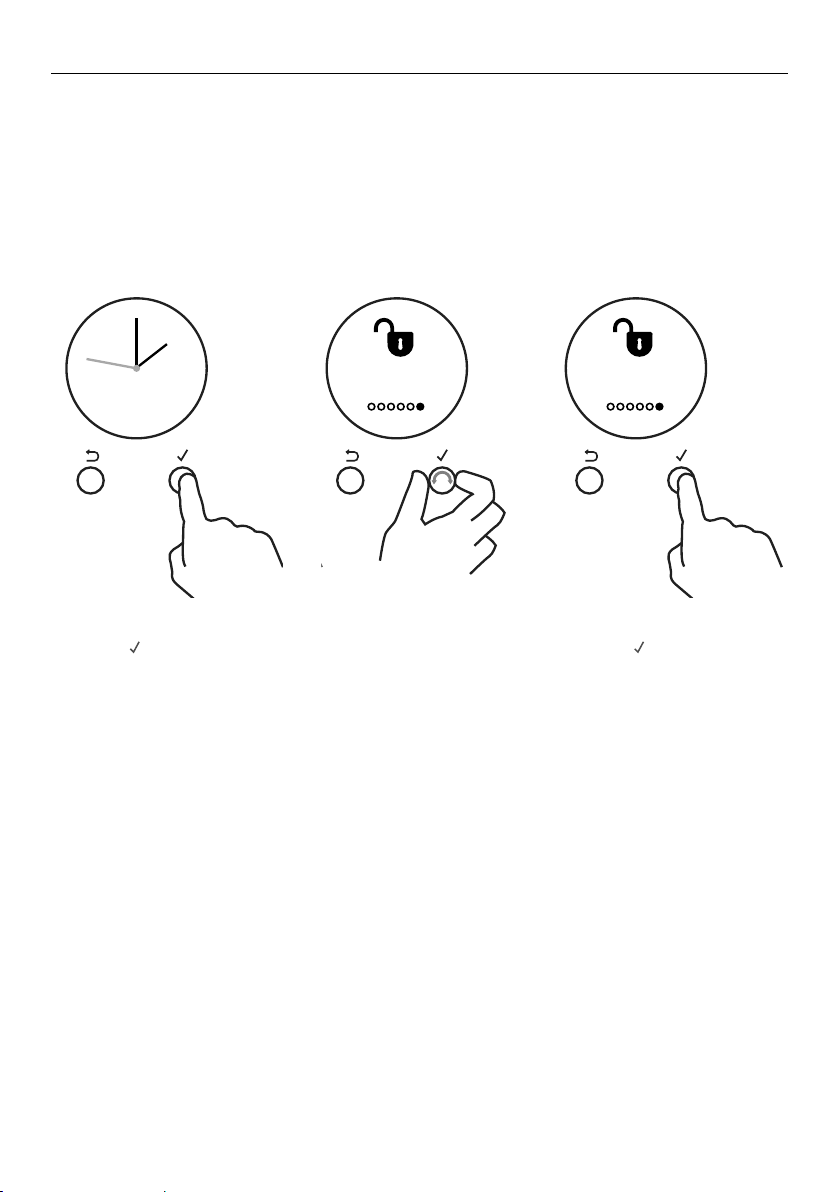
32
LOCKING THE OVEN CONTROLS
This function is to prevent accidental use of the oven (eg by children).
When locked, the controls are unresponsive and the oven will not turn on.
IMPORTANT!
y This does not lock the cooktop controls.
y For safety reasons it is not possible to lock the oven controls while the oven
is in use or if Auto Cook has been set.
To lock:
1 Press
-
+
-
+
-
+
to enter the
main menu.
3 Press
-
+
-
+
-
+
to enter the
Lock menu.
2 Scroll through the menu
options to get to Lock.
Sabbath
Mode
REMOTE
REMOTEREMOTE
REMOTE REMOTE REMOTEREMOTECANCEL CANCEL
Set
Time of day
am pm
Set
Time of day
12:00
pm
minutes
CANCEL REMOTE
OK
CANCEL
Set
Time of day
12:00
pm
hours
Set
Time of day
12:00
pm
hours
CANCEL
OK
CANCEL
Set
Time of day
am pm
CANCEL
Set
Time of day
12:00
pm
minutes
CANCEL
CANCEL REMOTE
Remote
Enabled
Set Bake and
Temperature
CANCEL REMOTE
CANCEL REMOTE
CANCEL REMOTECANCEL REMOTE
Timer
24.59m
CANCEL REMOTE
Timer
24.59m
CANCEL REMOTE
Timer
00 25
mh
alarm sounds
CANCEL REMOTE
Timer
00 25
m
25
m
h
alarm sounds
CANCEL REMOTE CANCEL REMOTE
Timer
24.59m
CANCEL REMOTE
CANCEL REMOTE
Timer
00 25
mh
alarm sounds
CANCEL REMOTE
Timer
00 25
mh
alarm sounds
CANCEL REMOTE CANCEL REMOTECANCEL REMOTE CANCEL REMOTE
CANCEL REMOTECANCEL REMOTE
CANCEL REMOTE CANCEL REMOTE
Lock
ON
CANCEL REMOTE
Lock
O
CANCEL REMOTE
Auto Cook
Set
CANCEL REMOTE
Lock
O
Oven
Locked
CANCEL REMOTECANCEL REMOTE
CANCEL REMOTE
Cook for
00 20
mh
then stop
Cook for
00 20
mh
then stop
Start
NOW
CANCEL REMOTE
Start Now
Cook 20m
End 5:20
CANCEL REMOTE
Delayed
Cook
CANCEL REMOTE
CANCEL REMOTE
Auto Cook
Set
End time
12:00
pm
minutes
CANCEL REMOTE CANCEL REMOTE
Auto Cook
Complete
Auto Cook
Complete
CANCEL
REMOTE
Sabbath
Mode OFF
Start Now
Run 22h
End 5:20
CONFIRM
CANCEL REMOTE
Sabbath
Mode
REMOTE
REMOTEREMOTE
REMOTE REMOTE REMOTEREMOTECANCEL CANCEL
Set
Time of day
am pm
Set
Time of day
12:00
pm
minutes
CANCEL REMOTE
OK
CANCEL
Set
Time of day
12:00
pm
hours
Set
Time of day
12:00
pm
hours
CANCEL
OK
CANCEL
Set
Time of day
am pm
CANCEL
Set
Time of day
12:00
pm
minutes
CANCEL
CANCEL REMOTE
Remote
Enabled
Set Bake and
Temperature
CANCEL REMOTE
CANCEL REMOTE
CANCEL REMOTECANCEL REMOTE
Timer
24.59m
CANCEL REMOTE
Timer
24.59m
CANCEL REMOTE
Timer
00 25
mh
alarm sounds
CANCEL REMOTE
Timer
00 25
m
25
m
h
alarm sounds
CANCEL REMOTE CANCEL REMOTE
Timer
24.59m
CANCEL REMOTE
CANCEL REMOTE
Timer
00 25
mh
alarm sounds
CANCEL REMOTE
Timer
00 25
mh
alarm sounds
CANCEL REMOTE CANCEL REMOTECANCEL REMOTE CANCEL REMOTE
CANCEL REMOTECANCEL REMOTE
CANCEL REMOTE CANCEL REMOTE
Lock
ON
CANCEL REMOTE
Lock
O
CANCEL REMOTE
Auto Cook
Set
CANCEL REMOTE
Lock
O
Oven
Locked
CANCEL REMOTECANCEL REMOTE
CANCEL REMOTE
Cook for
00 20
mh
then stop
Cook for
00 20
mh
then stop
Start
NOW
CANCEL REMOTE
Start Now
Cook 20m
End 5:20
CANCEL REMOTE
Delayed
Cook
CANCEL REMOTE
CANCEL REMOTE
Auto Cook
Set
End time
12:00
pm
minutes
CANCEL REMOTE CANCEL REMOTE
Auto Cook
Complete
Auto Cook
Complete
CANCEL
REMOTE
Sabbath
Mode OFF
Start Now
Run 22h
End 5:20
CONFIRM
CANCEL REMOTE
Sabbath
Mode
REMOTE
REMOTEREMOTE
REMOTE REMOTE REMOTEREMOTECANCEL CANCEL
Set
Time of day
am pm
Set
Time of day
12:00
pm
minutes
CANCEL REMOTE
OK
CANCEL
Set
Time of day
12:00
pm
hours
Set
Time of day
12:00
pm
hours
CANCEL
OK
CANCEL
Set
Time of day
am pm
CANCEL
Set
Time of day
12:00
pm
minutes
CANCEL
CANCEL REMOTE
Remote
Enabled
Set Bake and
Temperature
CANCEL REMOTE
CANCEL REMOTE
CANCEL REMOTECANCEL REMOTE
Timer
24.59m
CANCEL REMOTE
Timer
24.59m
CANCEL REMOTE
Timer
00 25
mh
alarm sounds
CANCEL REMOTE
Timer
00 25
m
25
m
h
alarm sounds
CANCEL REMOTE CANCEL REMOTE
Timer
24.59m
CANCEL REMOTE
CANCEL REMOTE
Timer
00 25
mh
alarm sounds
CANCEL REMOTE
Timer
00 25
mh
alarm sounds
CANCEL REMOTE CANCEL REMOTECANCEL REMOTE CANCEL REMOTE
CANCEL REMOTECANCEL REMOTE
CANCEL REMOTE CANCEL REMOTE
Lock
ON
CANCEL REMOTE
Lock
O
CANCEL REMOTE
Auto Cook
Set
CANCEL REMOTE
Lock
O
Oven
Locked
CANCEL REMOTECANCEL REMOTE
CANCEL REMOTE
Cook for
00 20
mh
then stop
Cook for
00 20
mh
then stop
Start
NOW
CANCEL REMOTE
Start Now
Cook 20m
End 5:20
CANCEL REMOTE
Delayed
Cook
CANCEL REMOTE
CANCEL REMOTE
Auto Cook
Set
End time
12:00
pm
minutes
CANCEL REMOTE CANCEL REMOTE
Auto Cook
Complete
Auto Cook
Complete
CANCEL
REMOTE
Sabbath
Mode OFF
Start Now
Run 22h
End 5:20
CONFIRM
CANCEL REMOTE
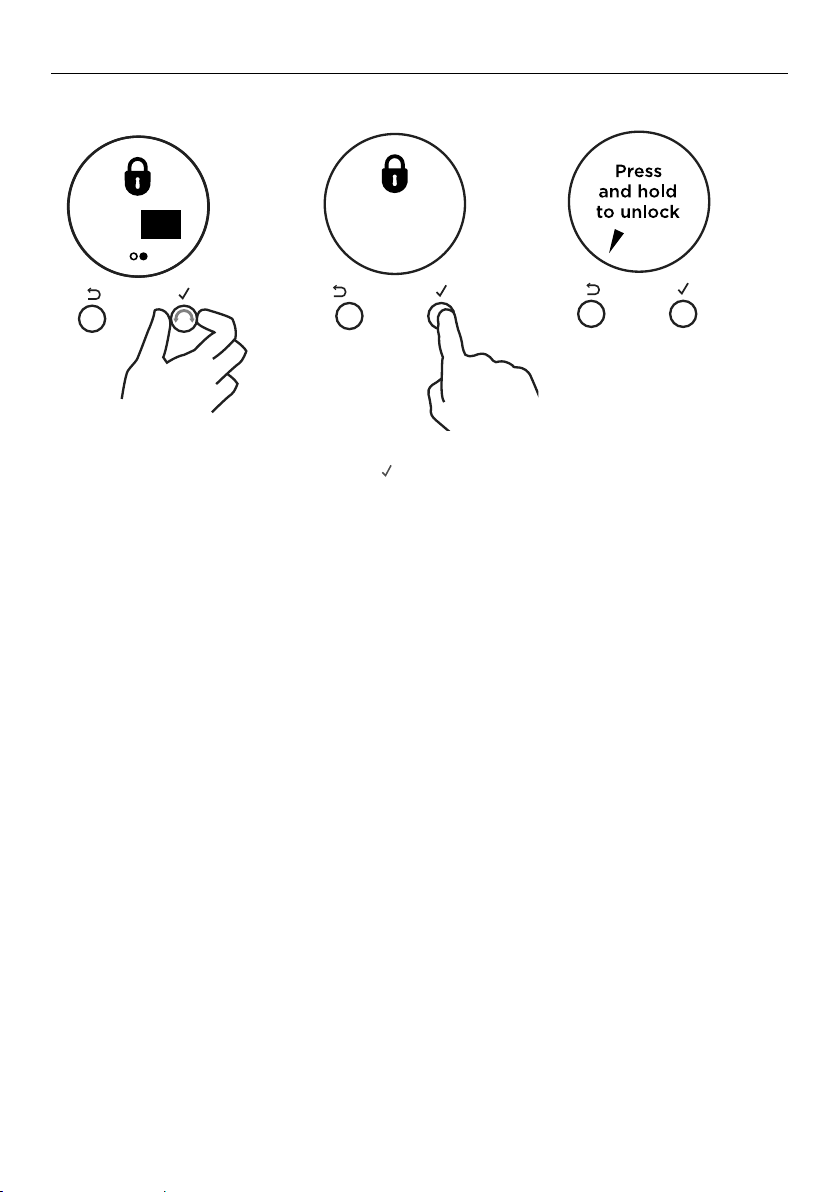
33
LOCKING THE OVEN CONTROLS
4 Scroll through the Lock
options to ON.
5 Press
-
+
-
+
-
+
to confirm.
y The control panel is now
locked.
To unlock:
y Press and hold
CANCEL to unlock
the oven controls.
Sabbath
Mode
REMOTE
REMOTEREMOTE
REMOTE REMOTE REMOTEREMOTECANCEL CANCEL
Set
Time of day
am pm
Set
Time of day
12:00
pm
minutes
CANCEL REMOTE
OK
CANCEL
Set
Time of day
12:00
pm
hours
Set
Time of day
12:00
pm
hours
CANCEL
OK
CANCEL
Set
Time of day
am pm
CANCEL
Set
Time of day
12:00
pm
minutes
CANCEL
CANCEL REMOTE
Remote
Enabled
Set Bake and
Temperature
CANCEL REMOTE
CANCEL REMOTE
CANCEL REMOTECANCEL REMOTE
Timer
24.59m
CANCEL REMOTE
Timer
24.59m
CANCEL REMOTE
Timer
00 25
mh
alarm sounds
CANCEL REMOTE
Timer
00 25
m
25
m
h
alarm sounds
CANCEL REMOTE CANCEL REMOTE
Timer
24.59m
CANCEL REMOTE
CANCEL REMOTE
Timer
00 25
mh
alarm sounds
CANCEL REMOTE
Timer
00 25
mh
alarm sounds
CANCEL REMOTE CANCEL REMOTECANCEL REMOTE CANCEL REMOTE
CANCEL REMOTECANCEL REMOTE
CANCEL REMOTE CANCEL REMOTE
Lock
ON
CANCEL REMOTE
Lock
O
CANCEL REMOTE
Auto Cook
Set
CANCEL REMOTE
Lock
O
Oven
Locked
CANCEL REMOTECANCEL REMOTE
CANCEL REMOTE
Cook for
00 20
mh
then stop
Cook for
00 20
mh
then stop
Start
NOW
CANCEL REMOTE
Start Now
Cook 20m
End 5:20
CANCEL REMOTE
Delayed
Cook
CANCEL REMOTE
CANCEL REMOTE
Auto Cook
Set
End time
12:00
pm
minutes
CANCEL REMOTE CANCEL REMOTE
Auto Cook
Complete
Auto Cook
Complete
CANCEL
REMOTE
Sabbath
Mode OFF
Start Now
Run 22h
End 5:20
CONFIRM
CANCEL REMOTE
Sabbath
Mode
REMOTE
REMOTEREMOTE
REMOTE REMOTE REMOTEREMOTECANCEL CANCEL
Set
Time of day
am pm
Set
Time of day
12:00
pm
minutes
CANCEL REMOTE
OK
CANCEL
Set
Time of day
12:00
pm
hours
Set
Time of day
12:00
pm
hours
CANCEL
OK
CANCEL
Set
Time of day
am pm
CANCEL
Set
Time of day
12:00
pm
minutes
CANCEL
CANCEL REMOTE
Remote
Enabled
Set Bake and
Temperature
CANCEL REMOTE
CANCEL REMOTE
CANCEL REMOTECANCEL REMOTE
Timer
24.59m
CANCEL REMOTE
Timer
24.59m
CANCEL REMOTE
Timer
00 25
mh
alarm sounds
CANCEL REMOTE
Timer
00 25
m
25
m
h
alarm sounds
CANCEL REMOTE CANCEL REMOTE
Timer
24.59m
CANCEL REMOTE
CANCEL REMOTE
Timer
00 25
mh
alarm sounds
CANCEL REMOTE
Timer
00 25
mh
alarm sounds
CANCEL REMOTE CANCEL REMOTECANCEL REMOTE CANCEL REMOTE
CANCEL REMOTECANCEL REMOTE
CANCEL REMOTE CANCEL REMOTE
Lock
ON
CANCEL REMOTE
Lock
O
CANCEL REMOTE
Auto Cook
Set
CANCEL REMOTE
Lock
O
Oven
Locked
CANCEL REMOTECANCEL REMOTE
CANCEL REMOTE
Cook for
00 20
mh
then stop
Cook for
00 20
mh
then stop
Start
NOW
CANCEL REMOTE
Start Now
Cook 20m
End 5:20
CANCEL REMOTE
Delayed
Cook
CANCEL REMOTE
CANCEL REMOTE
Auto Cook
Set
End time
12:00
pm
minutes
CANCEL REMOTE CANCEL REMOTE
Auto Cook
Complete
Auto Cook
Complete
CANCEL
REMOTE
Sabbath
Mode OFF
Start Now
Run 22h
End 5:20
CONFIRM
CANCEL REMOTE
Sabbath
Mode
REMOTE
REMOTEREMOTE
REMOTE REMOTE REMOTEREMOTECANCEL CANCEL
Set
Time of day
am pm
Set
Time of day
12:00
pm
minutes
CANCEL REMOTE
OK
CANCEL
Set
Time of day
12:00
pm
hours
Set
Time of day
12:00
pm
hours
CANCEL
OK
CANCEL
Set
Time of day
am pm
CANCEL
Set
Time of day
12:00
pm
minutes
CANCEL
CANCEL REMOTE
Remote
Enabled
Set Bake and
Temperature
CANCEL REMOTE
CANCEL REMOTE
CANCEL REMOTECANCEL REMOTE
Timer
24.59m
CANCEL REMOTE
Timer
24.59m
CANCEL REMOTE
Timer
00 25
mh
alarm sounds
CANCEL REMOTE
Timer
00 25
m
25
m
h
alarm sounds
CANCEL REMOTE CANCEL REMOTE
Timer
24.59m
CANCEL REMOTE
CANCEL REMOTE
Timer
00 25
mh
alarm sounds
CANCEL REMOTE
Timer
00 25
mh
alarm sounds
CANCEL REMOTE CANCEL REMOTECANCEL REMOTE CANCEL REMOTE
CANCEL REMOTECANCEL REMOTE
CANCEL REMOTE CANCEL REMOTE
OnO
CANCEL REMOTE
Lock
OFF
CANCEL REMOTE
Auto Cook
Set
CANCEL REMOTE
Lock
OFF
Oven
Locked
CANCEL REMOTECANCEL REMOTE
CANCEL REMOTE
Cook for
00 20
mh
then stop
Cook for
00 20
mh
then stop
Start
NOW
CANCEL REMOTE
Start Now
Cook 20m
End 5:20
CANCEL REMOTE
Delayed
Cook
CANCEL REMOTE
CANCEL REMOTE
Auto Cook
Set
End time
12:00
pm
minutes
CANCEL REMOTE CANCEL REMOTE
Auto Cook
Complete
Auto Cook
Complete
CANCEL
REMOTE
Sabbath
Mode O
Start Now
Run 22h
End 5:20
CONFIRM
CANCEL REMOTE
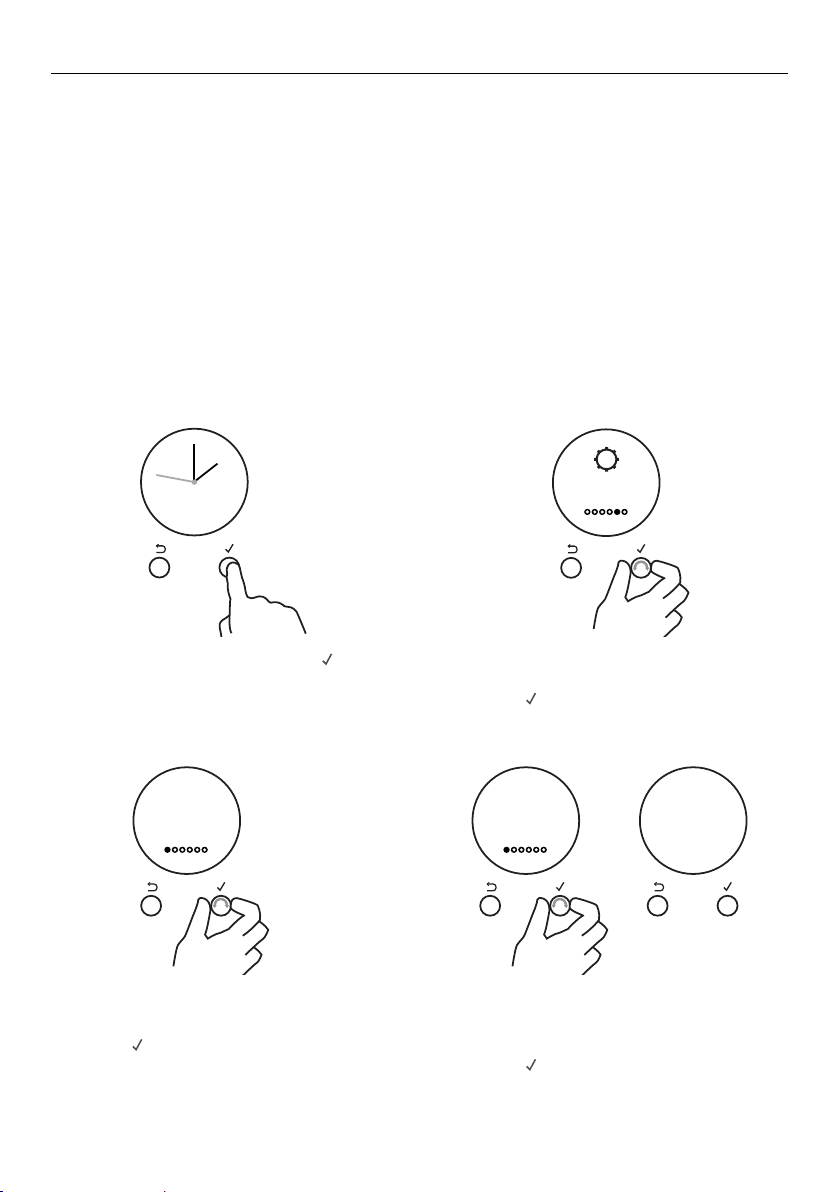
34
USER PREFERENCE SETTINGS
You can set your oven to:
y display the temperature in degrees Celsius or Fahrenheit
y give audio feedback (tones and beeps) or operate quietly
y display time as 12-hr or 24-hr
y operate with the display off
y have its lights on or off during cooking
y operate in Sabbath setting (see ‘Sabbath setting’ following)
Note: you cannot change the user preference settings when you oven is operating or
set for automatic cooking.
How to change preference settings
1 From the home screen, press
-
+
-
+
-
+
to
enter the main menu.
3 Scroll to the setting you want to
change.
y Press
-
+
-
+
-
+
to edit the setting.
4 Scroll between the options for each
setting. See refer to the table following
for which options are available.
y Press
-
+
-
+
-
+
to confirm.
5 The display will confirm that you have
changed the setting.
2 Scroll through the menu options to
settings.
y Press
-
+
-
+
-
+
to enter the settings menu.
Adjust the user settings to suit your personal setup preferences.
CANCEL REMOTE
CANCEL REMOTE
CANCEL REMOTE
Settings
Sounds
ON
CANCEL REMOTE
Sounds
OFF
CANCEL REMOTE
Setting
changed
CANCEL REMOTE
CANCEL REMOTE
CANCEL REMOTE
Settings
Sounds
ON
CANCEL REMOTE
Sounds
OFF
CANCEL REMOTE
Setting
changed
CANCEL REMOTE
CANCEL REMOTE
CANCEL REMOTE
Settings
Sounds
On
CANCEL REMOTE
Sounds
O
CANCEL REMOTE
Setting
changed
CANCEL REMOTE
CANCEL REMOTE
CANCEL REMOTE
Settings
Sounds
On
CANCEL REMOTE
Sounds
O
CANCEL REMOTE
Setting
changed

35
USER PREFERENCE SETTINGS
SETTING DEFAULT OPTION ALTERNATIVE OPTION(S)
CLOCK DISPLAY
Select between:
y Analog and digital
display
y 12-hr and 24-hr display
y Display off**
Turn the display off
ifyou only want to use
the basic functionalities
of your oven.
ANALOG
24 HR
24:00
12 HR
12:00
DISPLAY OFF**
Clock display
Off
TEMPERATURE SCALE
Select between degrees
Celsius or Fahrenheit.
FAHRENHEIT
Degrees
Fahrenheit
CELSIUS
Degrees
Celsius
AUDIO FEEDBACK
Turn the oven beeps
andtones on or off.*
SOUNDS ON
Sounds
On
SOUNDS OFF
Sounds
Off
OVEN LIGHTS
Have the light off during
cooking if you want to
save power or want the
food you cook to be a
surprise for others.
LIGHTS ON
DURING
COOKING
Lights
On
LIGHTS OFF
DURING
COOKING
Lights
Off
SABBATH MODE SABBATH OFF
Sabbath
Off
See ‘Sabbath Mode’ for instructions
LANGUAGE
Choose the language
youwould like the oven
todisplay in.
US ENGLISH
US English
US ENGLISH
US English
SPANISH
Espanol
FRENCH
Francaise
WIRELESS
CONNECTION
Not available on
thisproduct.
OFF
WiFi
Off
USER SETTINGS RESET
Use this to clear all
changes to settings
and reset to the
factorysettings.
RESET
Reset Select this option and accept to reset
alluser settings
* The timer tone and alert beeps will sound even if you save the SOUNDS OFF option.
** With this option saved, you can still use the oven, and timer, however the display will remain unlit.
Any automatic functions will be cancelled when this option is selected.
To quit this option and enable the display, press and hold CANCEL.
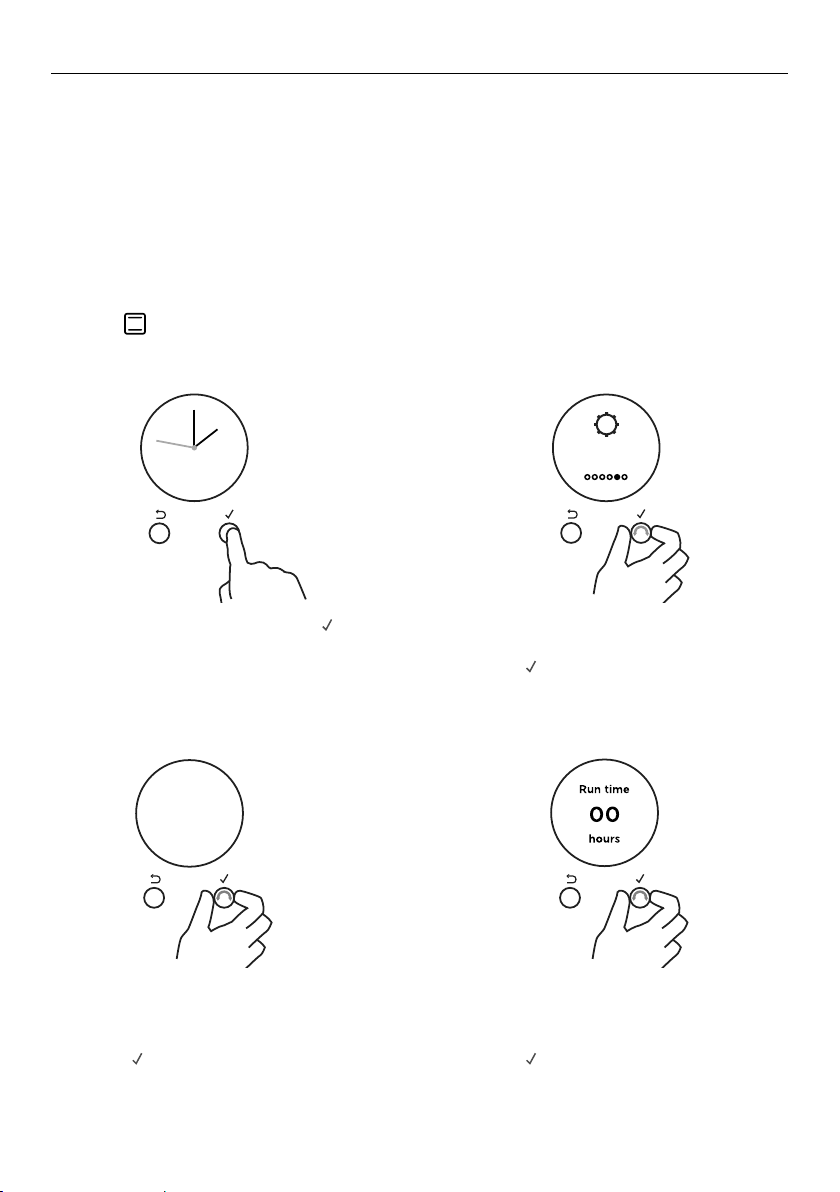
36
SABBATH MODE
This setting is designed for religious faiths that observe a ‘no work’ requirement on the
Sabbath.
While your oven is in Sabbath Mode
y The display, dial halos and indicators will be unlit, the controls will be unresponsive.
y No tones or beeps will sound.
y No alert codes or temperature changes will be displayed.
y The oven lights will stay on. If you want the oven lights to be off during Sabbath Mode,
first select the ‘Lights off’ option as described in ‘User preference settings’, and then set
Sabbath Mode afterwards.
y Bake is the only function available in Sabbath Mode.
How to set Sabbath Mode
3 Scroll through the menu options to
Sabbath Mode.
y Press
-
+
-
+
-
+
to enter the Sabbath Mode
setting.
4 Scroll to set the time. You may set the
time up to 48 hours.
y Press
-
+
-
+
-
+
to confirm.
1 From the home screen, press
-
+
-
+
-
+
to
enter the main menu.
CANCEL REMOTE
CANCEL REMOTE
CANCEL REMOTE
Settings
Sounds
ON
CANCEL REMOTE
Sounds
OFF
CANCEL REMOTE
Setting
changed
2 Scroll through the menu options to
settings.
y Press
-
+
-
+
-
+
to enter the settings menu.
CANCEL REMOTE
CANCEL REMOTE
CANCEL REMOTE
Settings
Sounds
ON
CANCEL REMOTE
Sounds
OFF
CANCEL REMOTE
Setting
changed
Sabbath
Mode
REMOTE
REMOTEREMOTE
REMOTE REMOTE REMOTEREMOTECANCEL CANCEL
Set
Time of day
am pm
Set
Time of day
12:00
pm
minutes
CANCEL REMOTE
OK
CANCEL
Set
Time of day
12:00
pm
hours
Set
Time of day
12:00
pm
hours
CANCEL
OK
CANCEL
Set
Time of day
am pm
CANCEL
Set
Time of day
12:00
pm
minutes
CANCEL
CANCEL REMOTE
Remote
Enabled
Set Bake and
Temperature
CANCEL REMOTE
CANCEL REMOTE
CANCEL REMOTECANCEL REMOTE
Timer
24.59m
CANCEL REMOTE
Timer
24.59m
CANCEL REMOTE
Timer
00 25
mh
alarm sounds
CANCEL REMOTE
Timer
00 25
m
25
m
h
alarm sounds
CANCEL REMOTE CANCEL REMOTE
Timer
24.59m
CANCEL REMOTE
CANCEL REMOTE
Timer
00 25
mh
alarm sounds
CANCEL REMOTE
Timer
00 25
mh
alarm sounds
CANCEL REMOTE CANCEL REMOTECANCEL REMOTE CANCEL REMOTE
CANCEL REMOTECANCEL REMOTE
CANCEL REMOTE CANCEL REMOTE
Lock
ON
CANCEL REMOTE
Lock
O
CANCEL REMOTE
Auto Cook
Set
CANCEL REMOTE
Lock
O
Oven
Locked
CANCEL REMOTECANCEL REMOTE
CANCEL REMOTE
Cook for
00 20
mh
then stop
Cook for
00 20
mh
then stop
Start
NOW
CANCEL REMOTE
Start Now
Cook 20m
End 5:20
CANCEL REMOTE
Delayed
Cook
CANCEL REMOTE
CANCEL REMOTE
Auto Cook
Set
End time
12:00
pm
minutes
CANCEL REMOTE CANCEL REMOTE
Auto Cook
Complete
Auto Cook
Complete
CANCEL
REMOTE
Sabbath
Mode OFF
Start Now
Run 22h
End 5:20
CONFIRM
CANCEL REMOTE
Sabbath
Mode
REMOTE
REMOTEREMOTE
REMOTE REMOTE REMOTEREMOTECANCEL CANCEL
Set
Time of day
am pm
Set
Time of day
12:00
pm
minutes
CANCEL REMOTE
OK
CANCEL
Set
Time of day
12:00
pm
hours
Set
Time of day
12:00
pm
hours
CANCEL
OK
CANCEL
Set
Time of day
am pm
CANCEL
Set
Time of day
12:00
pm
minutes
CANCEL
CANCEL REMOTE
Remote
Enabled
Set Bake and
Temperature
CANCEL REMOTE
CANCEL REMOTE
CANCEL REMOTECANCEL REMOTE
Timer
24.59m
CANCEL REMOTE
Timer
24.59m
CANCEL REMOTE
Timer
00 25
mh
alarm sounds
CANCEL REMOTE
Timer
00 25
m
25
m
h
alarm sounds
CANCEL REMOTE CANCEL REMOTE
Timer
24.59m
CANCEL REMOTE
CANCEL REMOTE
Timer
00 25
mh
alarm sounds
CANCEL REMOTE
Timer
00 25
mh
alarm sounds
CANCEL REMOTE CANCEL REMOTECANCEL REMOTE CANCEL REMOTE
CANCEL REMOTECANCEL REMOTE
CANCEL REMOTE CANCEL REMOTE
On O
CANCEL REMOTE
Lock
OFF
CANCEL REMOTE
Auto Cook
Set
CANCEL REMOTE
Lock
OFF
Oven
Locked
CANCEL REMOTECANCEL REMOTE
CANCEL REMOTE
Cook for
00 20
mh
then stop
Cook for
00 20
mh
then stop
Start
NOW
CANCEL REMOTE
Start Now
Cook 20m
End 5:20
CANCEL REMOTE
Delayed
Cook
CANCEL REMOTE
CANCEL REMOTE
Auto Cook
Set
End time
12:00
pm
minutes
CANCEL REMOTE CANCEL REMOTE
Auto Cook
Complete
Auto Cook
Complete
CANCEL
REMOTE
Sabbath
Mode O
Start Now
Run 22h
End 5:20
CONFIRM
CANCEL REMOTE
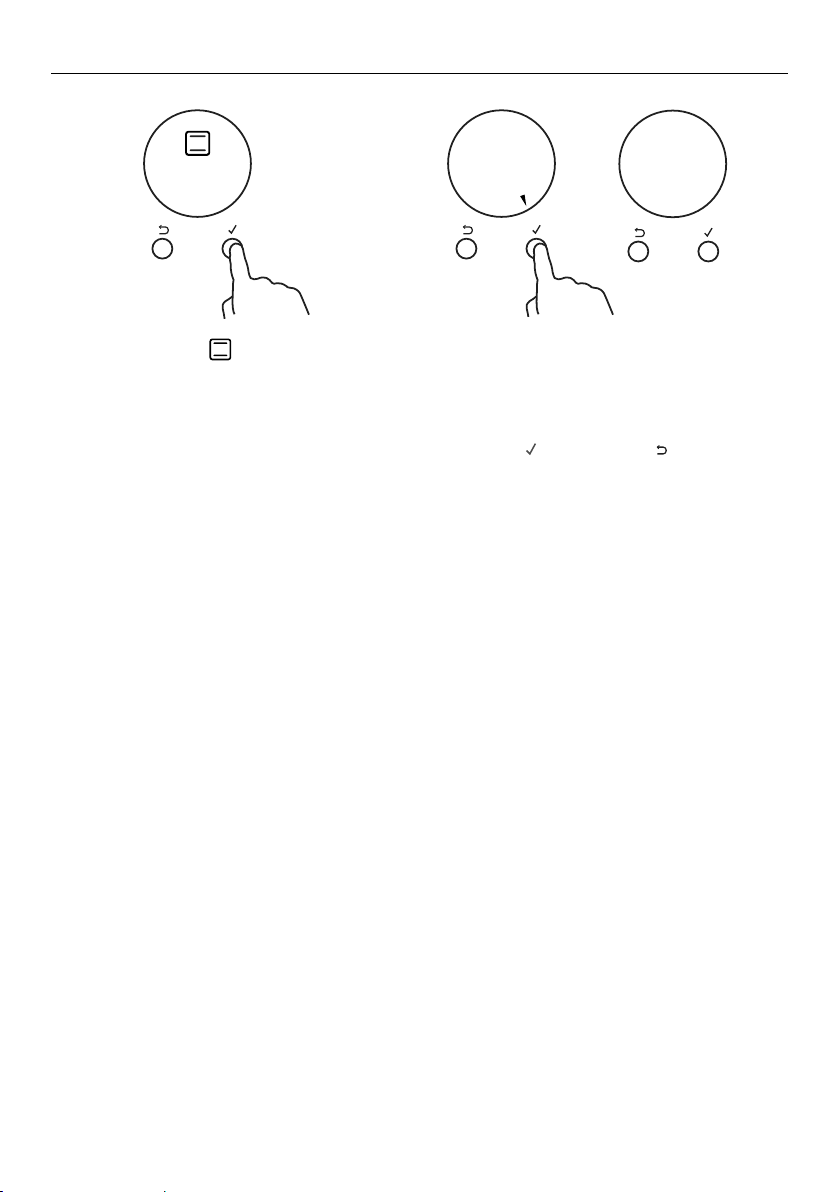
37
SABBATH MODE
The display, indicators and dial halos will be unlit and unresponsive, but the oven will
bake until you quit Sabbath Mode.
To quit Sabbath Mode
Press and hold CANCEL until the time of day appears in the display, or turn either oven
dial back to 0 (OFF).
5 Select the Bake
function.
6 Set the desired temperature.
The display will show a summmary of
your settings, showing:
y Start time
y Run time
y End time
7 Press
-
+
-
+
-
+
to confirm or
Sabbath
Mode
REMOTE
REMOTEREMOTE
REMOTE REMOTE REMOTEREMOTECANCEL CANCEL
Set
Time of day
am pm
Set
Time of day
12:00
pm
minutes
CANCEL REMOTE
OK
CANCEL
Set
Time of day
12:00
pm
hours
Set
Time of day
12:00
pm
hours
CANCEL
OK
CANCEL
Set
Time of day
am pm
CANCEL
Set
Time of day
12:00
pm
minutes
CANCEL
CANCEL REMOTE
Remote
Enabled
Set Bake and
Temperature
CANCEL REMOTE
CANCEL REMOTE
CANCEL REMOTECANCEL REMOTE
Timer
24.59m
CANCEL REMOTE
Timer
24.59m
CANCEL REMOTE
Timer
00 25
mh
alarm sounds
CANCEL REMOTE
Timer
00 25
m
25
m
h
alarm sounds
CANCEL REMOTE CANCEL REMOTE
Timer
24.59m
CANCEL REMOTE
CANCEL REMOTE
Timer
00 25
mh
alarm sounds
CANCEL REMOTE
Timer
00 25
mh
alarm sounds
CANCEL REMOTE CANCEL REMOTECANCEL REMOTE CANCEL REMOTE
CANCEL REMOTECANCEL REMOTE
CANCEL REMOTE CANCEL REMOTE
Lock
ON
CANCEL REMOTE
Lock
O
CANCEL REMOTE
Auto Cook
Set
CANCEL REMOTE
Lock
O
Oven
Locked
CANCEL REMOTECANCEL REMOTE
CANCEL REMOTE
Cook for
00 20
mh
then stop
Cook for
00 20
mh
then stop
Start
NOW
CANCEL REMOTE
Start Now
Cook 20m
End 5:20
CANCEL REMOTE
Delayed
Cook
CANCEL REMOTE
CANCEL REMOTE
Auto Cook
Set
End time
12:00
pm
minutes
CANCEL REMOTE CANCEL REMOTE
Auto Cook
Complete
Auto Cook
Complete
CANCEL
REMOTE
Sabbath
Mode OFF
Start Now
Run 22h
End 5:20
CONFIRM
CANCEL REMOTE
to go back
and adjust the settings.
Sabbath
Mode
REMOTE
REMOTEREMOTE
REMOTE REMOTE REMOTEREMOTECANCEL CANCEL
Set
Time of day
am pm
Set
Time of day
12:00
pm
minutes
CANCEL REMOTE
OK
CANCEL
Set
Time of day
12:00
pm
hours
Set
Time of day
12:00
pm
hours
CANCEL
OK
CANCEL
Set
Time of day
am pm
CANCEL
Set
Time of day
12:00
pm
minutes
CANCEL
CANCEL REMOTE
Remote
Enabled
Set Bake and
Temperature
CANCEL REMOTE
CANCEL REMOTE
CANCEL REMOTECANCEL REMOTE
Timer
24.59m
CANCEL REMOTE
Timer
24.59m
CANCEL REMOTE
Timer
00 25
mh
alarm sounds
CANCEL REMOTE
Timer
00 25
m
25
m
h
alarm sounds
CANCEL REMOTE CANCEL REMOTE
Timer
24.59m
CANCEL REMOTE
CANCEL REMOTE
Timer
00 25
mh
alarm sounds
CANCEL REMOTE
Timer
00 25
mh
alarm sounds
CANCEL REMOTE CANCEL REMOTECANCEL REMOTE CANCEL REMOTE
CANCEL REMOTECANCEL REMOTE
CANCEL REMOTE CANCEL REMOTE
Lock
ON
CANCEL REMOTE
Lock
O
CANCEL REMOTE
Auto Cook
Set
CANCEL REMOTE
Lock
O
Oven
Locked
CANCEL REMOTECANCEL REMOTE
CANCEL REMOTE
Cook for
00 20
mh
then stop
Cook for
00 20
mh
then stop
Start
NOW
CANCEL REMOTE
Start Now
Cook 20m
End 5:20
CANCEL REMOTE
Delayed
Cook
CANCEL REMOTE
CANCEL REMOTE
Auto Cook
Set
End time
12:00
pm
minutes
CANCEL REMOTE CANCEL REMOTE
Auto Cook
Complete
Auto Cook
Complete
CANCEL
REMOTE
Sabbath
Mode OFF
Start Now
Run 22h
End 5:20
CONFIRM
CANCEL REMOTE
Sabbath
Mode
REMOTE
REMOTEREMOTE
REMOTE REMOTE REMOTEREMOTECANCEL CANCEL
Set
Time of day
am pm
Set
Time of day
12:00
pm
minutes
CANCEL REMOTE
OK
CANCEL
Set
Time of day
12:00
pm
hours
Set
Time of day
12:00
pm
hours
CANCEL
OK
CANCEL
Set
Time of day
am pm
CANCEL
Set
Time of day
12:00
pm
minutes
CANCEL
CANCEL REMOTE
Remote
Enabled
Set Bake and
Temperature
CANCEL REMOTE
CANCEL REMOTE
CANCEL REMOTECANCEL REMOTE
Timer
24.59m
CANCEL REMOTE
Timer
24.59m
CANCEL REMOTE
Timer
00 25
mh
alarm sounds
CANCEL REMOTE
Timer
00 25
m
25
m
h
alarm sounds
CANCEL REMOTE CANCEL REMOTE
Timer
24.59m
CANCEL REMOTE
CANCEL REMOTE
Timer
00 25
mh
alarm sounds
CANCEL REMOTE
Timer
00 25
mh
alarm sounds
CANCEL REMOTE CANCEL REMOTECANCEL REMOTE CANCEL REMOTE
CANCEL REMOTECANCEL REMOTE
CANCEL REMOTE CANCEL REMOTE
Lock
ON
CANCEL REMOTE
Lock
O
CANCEL REMOTE
Auto Cook
Set
CANCEL REMOTE
Lock
O
Oven
Locked
CANCEL REMOTECANCEL REMOTE
CANCEL REMOTE
Cook for
00 20
mh
then stop
Cook for
00 20
mh
then stop
Start
NOW
CANCEL REMOTE
Start Now
Cook 20m
End 5:20
CANCEL REMOTE
Delayed
Cook
CANCEL REMOTE
CANCEL REMOTE
Auto Cook
Set
End time
12:00
pm
minutes
CANCEL REMOTE CANCEL REMOTE
Auto Cook
Complete
Auto Cook
Complete
CANCEL
REMOTE
Sabbath
Mode OFF
Start Now
Run 22h
End 5:20
CONFIRM
CANCEL REMOTE
Sabbath
Mode
REMOTE
REMOTEREMOTE
REMOTE REMOTE REMOTEREMOTECANCEL CANCEL
Set
Time of day
am pm
Set
Time of day
12:00
pm
minutes
CANCEL REMOTE
OK
CANCEL
Set
Time of day
12:00
pm
hours
Set
Time of day
12:00
pm
hours
CANCEL
OK
CANCEL
Set
Time of day
am pm
CANCEL
Set
Time of day
12:00
pm
minutes
CANCEL
CANCEL REMOTE
Remote
Enabled
Set Bake and
Temperature
CANCEL REMOTE
CANCEL REMOTE
CANCEL REMOTECANCEL REMOTE
Timer
24.59m
CANCEL REMOTE
Timer
24.59m
CANCEL REMOTE
Timer
00 25
mh
alarm sounds
CANCEL REMOTE
Timer
00 25
m
25
m
h
alarm sounds
CANCEL REMOTE CANCEL REMOTE
Timer
24.59m
CANCEL REMOTE
CANCEL REMOTE
Timer
00 25
mh
alarm sounds
CANCEL REMOTE
Timer
00 25
mh
alarm sounds
CANCEL REMOTE CANCEL REMOTECANCEL REMOTE CANCEL REMOTE
CANCEL REMOTECANCEL REMOTE
CANCEL REMOTE CANCEL REMOTE
Lock
ON
CANCEL REMOTE
Lock
O
CANCEL REMOTE
Auto Cook
Set
CANCEL REMOTE
Lock
O
Oven
Locked
CANCEL REMOTECANCEL REMOTE
CANCEL REMOTE
Cook for
00 20
mh
then stop
Cook for
00 20
mh
then stop
Start
NOW
CANCEL REMOTE
Start Now
Cook 20m
End 5:20
CANCEL REMOTE
Delayed
Cook
CANCEL REMOTE
CANCEL REMOTE
Auto Cook
Set
End time
12:00
pm
minutes
CANCEL REMOTE CANCEL REMOTE
Auto Cook
Complete
Auto Cook
Complete
CANCEL
REMOTE
Sabbath
Mode OFF
Start Now
Run 22h
End 5:20
CONFIRM
CANCEL REMOTE
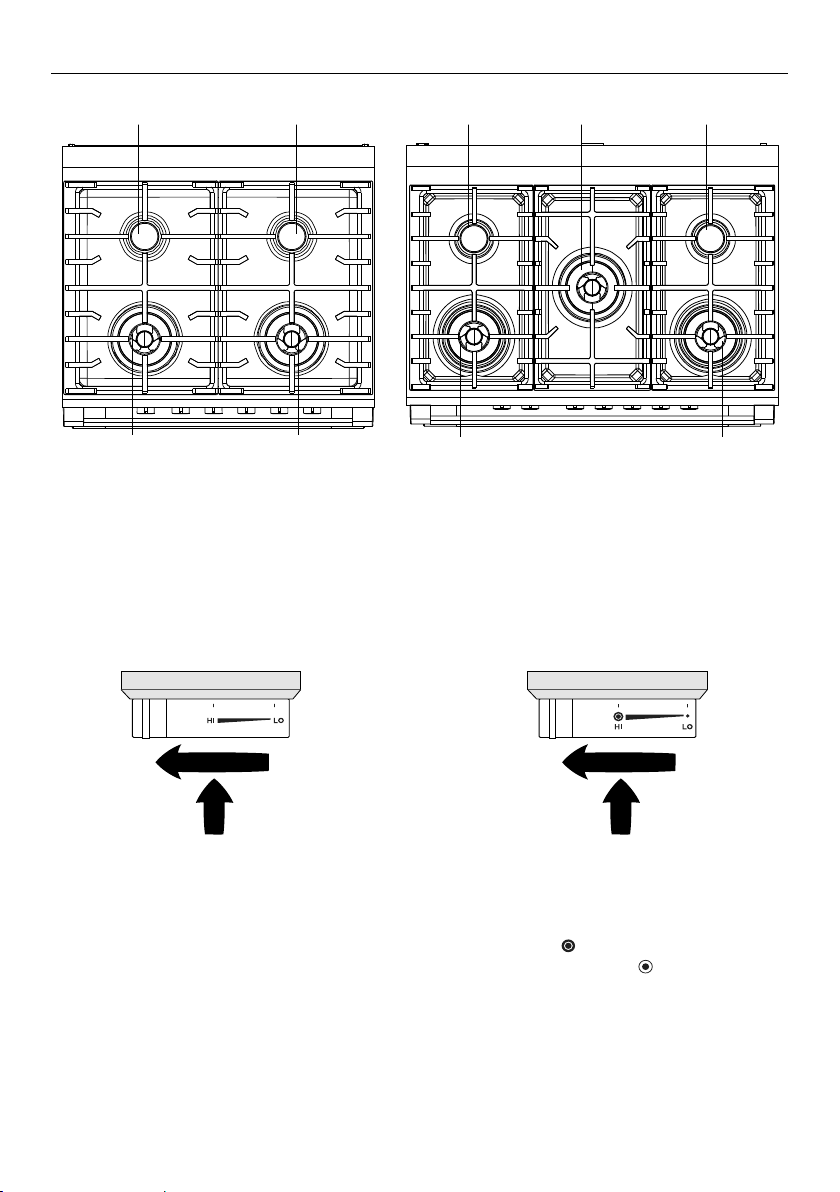
38
1 Semi-rapid burner
2 Dual wok burner
3 Triple-ring wok burner
USING YOUR GAS COOKTOP
22 3 3
1 1
1 12
Burner Controls
The dials control the flow of gas through the valve.
OR30 models – cooktop OR36 models – cooktop
GRAPHICS LOCATION
GRAPHICS LOCATION
Using the single burners
1 Identify the knob of the burner you
want to use.
2 Starting from the O (OFF) position, push
the knob in and turn it counterclockwise
to HI.
y Keep holding the knob in until the broil
burner lights and continue to hold for a
couple of seconds after.
Using the dual burner
1 Starting from the O (OFF) position, push
the knob in and turn it counterclockwise
to either HI
GRAPHICS LOCATION
to light both the inner
and outer rings or HI
GRAPHICS LOCATION
to light the
inner ring only.
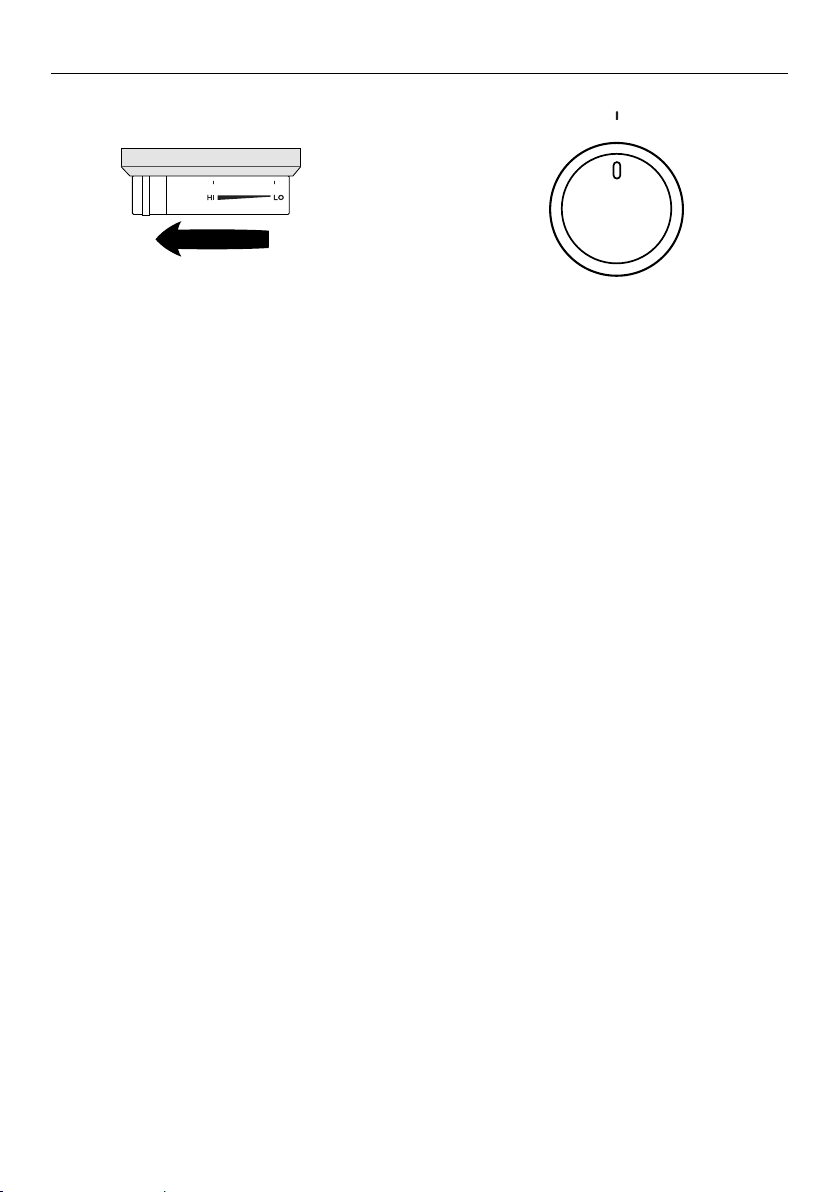
39
USING YOUR GAS COOKTOP
GRAPHICS LOCATION
3 When the burner has lit, adjust the
flame anywhere between HI and LO.
y Do not adjust the knob between HI and
O (OFF).
3 When you have finished cooking, turn
the knob clockwise back to O (OFF).
y If you are using LP gas, there may be
a slight ‘extinction pop’ or flash at the
flame spreader a few seconds after
the burner has been turned off. This is
normal for LP gas.
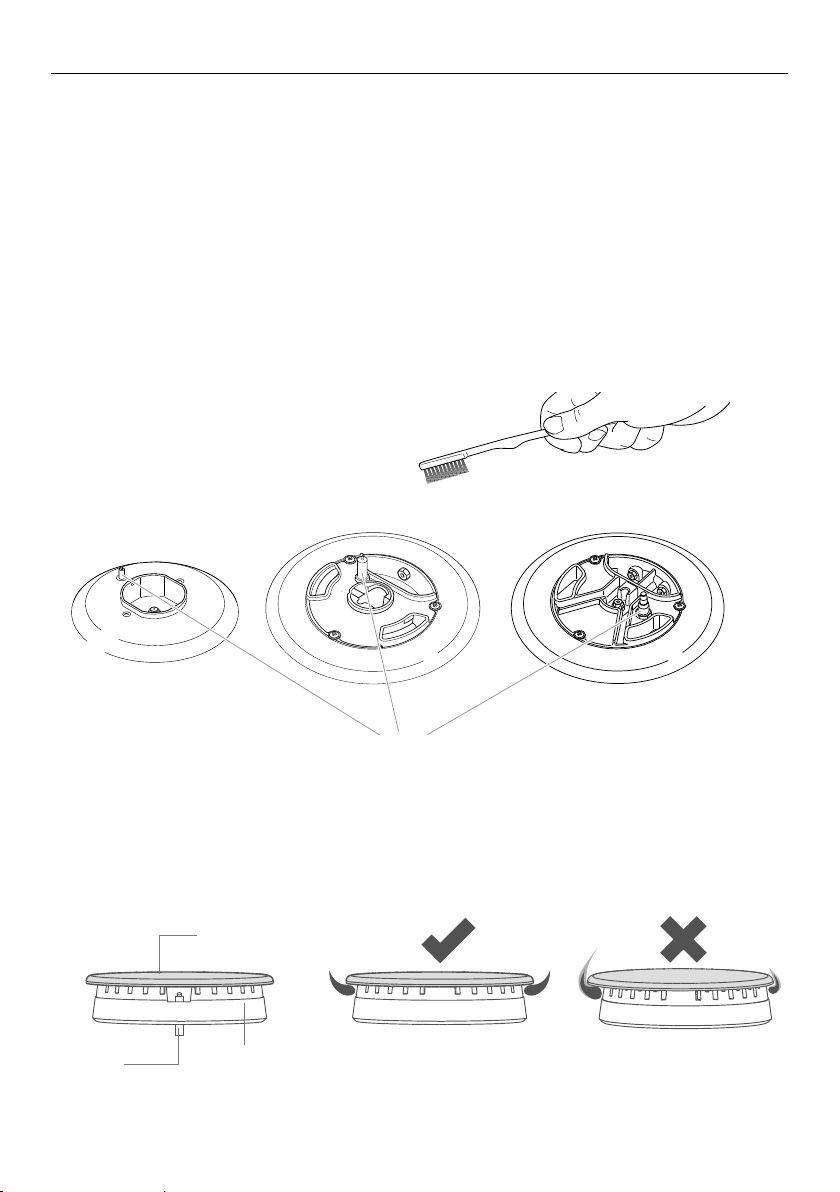
40
If a burner does not light
Turn the control dial to O (OFF) and wait at least one minute before trying again,
to all the gas to disperse.
If the burner still does not light, check that:
y the range is plugged in and the power supply is switched on
y there is no power failure in your home or neighborhood
y the gas is turned on
y the gas bottle is not empty (if you use bottled gas)
y the flame spreaders are clean and the holes are not clogged
y the ignitors are sparking. If they are not sparking, they may be dirty or wet.
Clean them with a toothbrush and methylated spirits, as shown below.
See ‘Care and cleaning’ for instructions on removing and replacing the burner parts.
Ignitor
If the flame is irregular
Check that the burner parts (flame spreader and burner cap) are:
y clean and dry
y positioned correctly, as shown below
y For further advice, see sections ‘Care and cleaning’ and ‘Troubleshooting’.
Ignitor
Flame spreader
Burner cap
Burner parts Correct assembly
of burner parts
Incorrect assembly of
burner parts, resulting in
irregular flames
USING YOUR GAS COOKTOP
Cleaning the ignitor
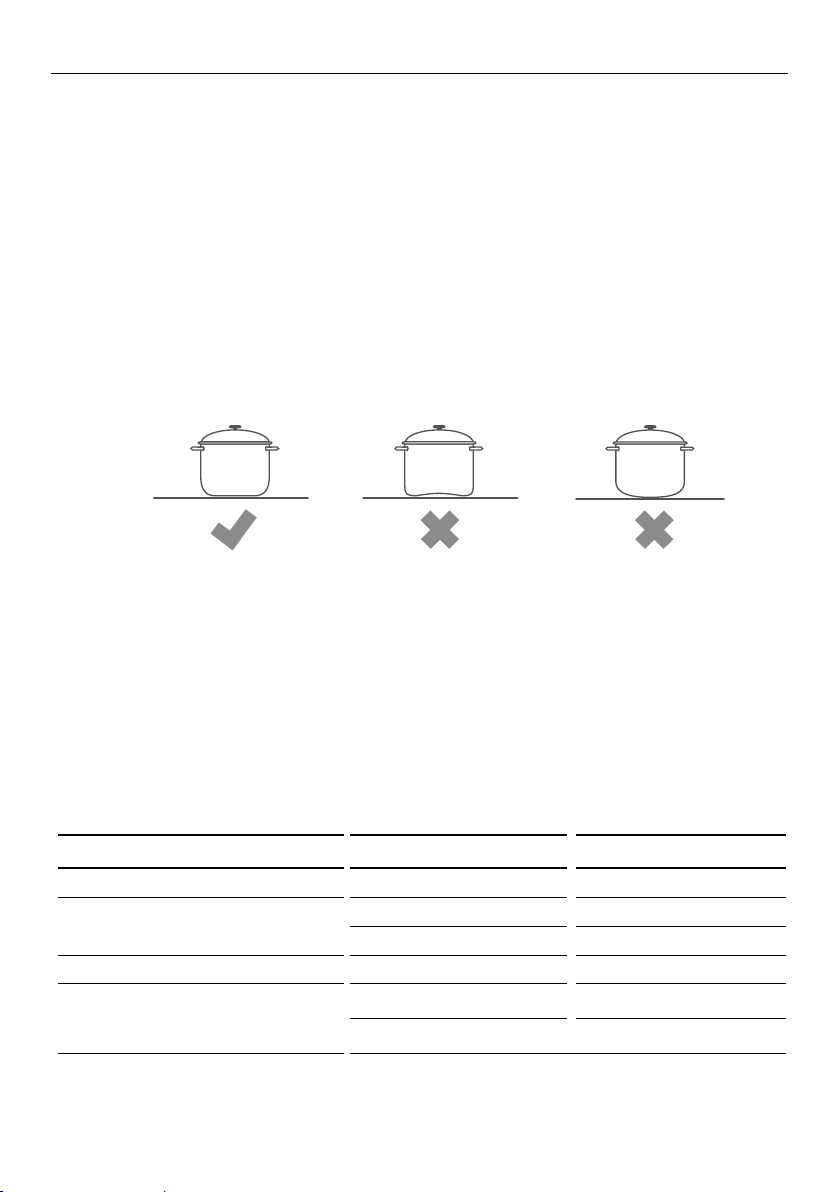
41
Cleaning the ignitor
COOKING GUIDELINES AND COOKWARE
Cooking guidelines
IMPORTANT!
y Never leave the cooktop unattended when in use. Boilover causes smoking and
greasy spills that may ignite.
y Take care when deep-frying: oil or fat can overheat very quickly, particularly on a
high setting.
y Start cooking on a high setting. When food comes to the boil, reduce the setting
andmaintain a steady heat to cook your food thoroughly. Doing this will reduce the
cooking time.
y Using a lid will reduce cooking times through retaining the heat.
y Minimise the amount of liquid or fat to reduce cooking times.
Cookware
y Use saucepans with thick flat bases. Food in a saucepan with an uneven base will take
longer to cook.
y Do not let large saucepans or frying pans overlap the bench, as this can deflect heat
onto your benchtop and damage its surface.
y Always make sure saucepans are stable. Using very heavy saucepans may bend the pan
supports or deflect the flame.
y Make sure the size of the pan matches the size of the burner. A small pot on a large
burner is not efficient.
The following table shows the minimum and maximum saucepan base diameters that
may be used on each burner:
BURNER MINIMUM DIAMETER MAXIMUM DIAMETER
Semi-rapid 6.5” (16cm) 10” (24cm)
Triple-ring wok 10.5” (26cm) 11” (28cm)
Maximum diameter for woks 14” (36cm)
Dual (inner crown only) 4.8” (12cm) 5.5” (14cm)
Dual (inner and outer crowns) 10.5” (26cm) 11” (28cm)
Maximum diameter for woks 14” (36cm)
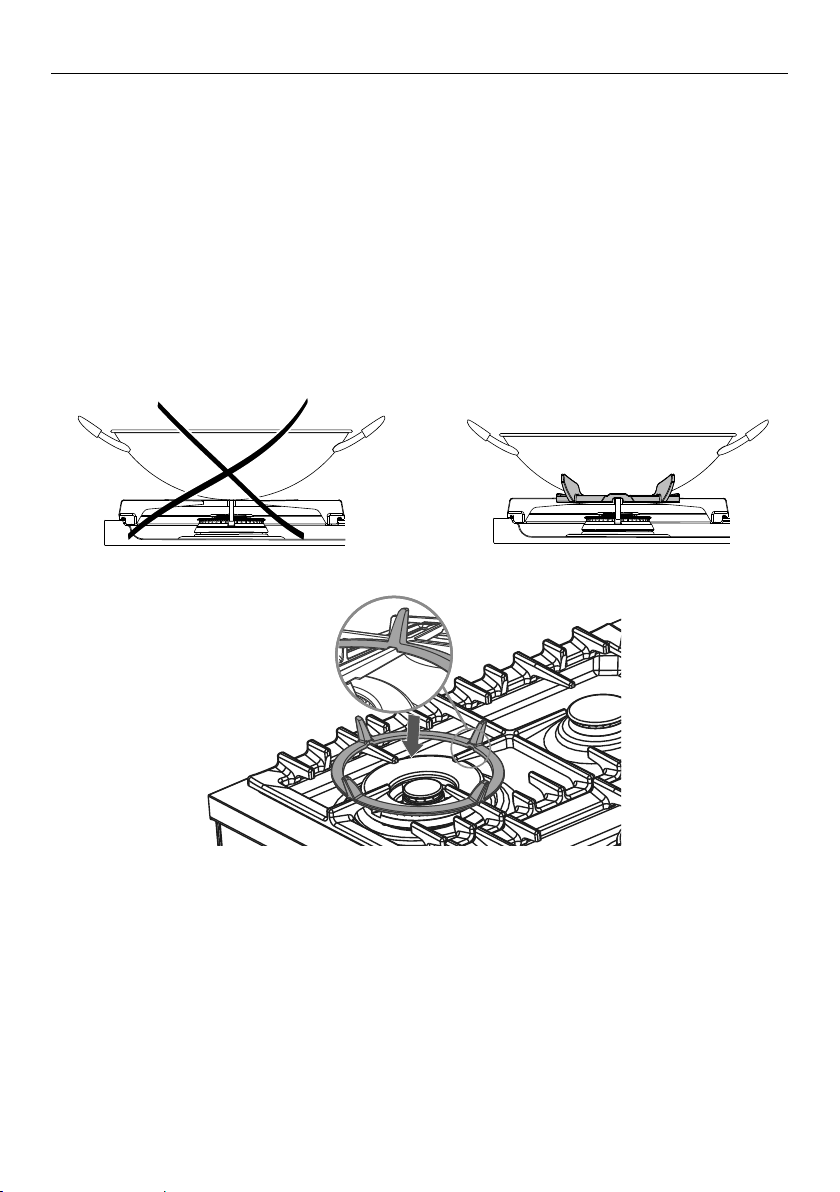
42
COOKING GUIDELINES AND COOKWARE
Wok stand
The wok stand fits over the triple-ring wok or dual burner trivet.
IMPORTANT!
y Using a wok without the stand may cause the wok to tip or the wok or dual burner to
operate incorrectly.
y Do not use the stand for ordinary, flat-bottomed saucepans.
y The wok stand MUST BE PLACED ONLY over the trivet for the triple-ring wok or dual
burner.
y The cooktop becomes very hot during operation. Keep children well out of reach.
WRONG
Correct placement of wok stand
CORRECT
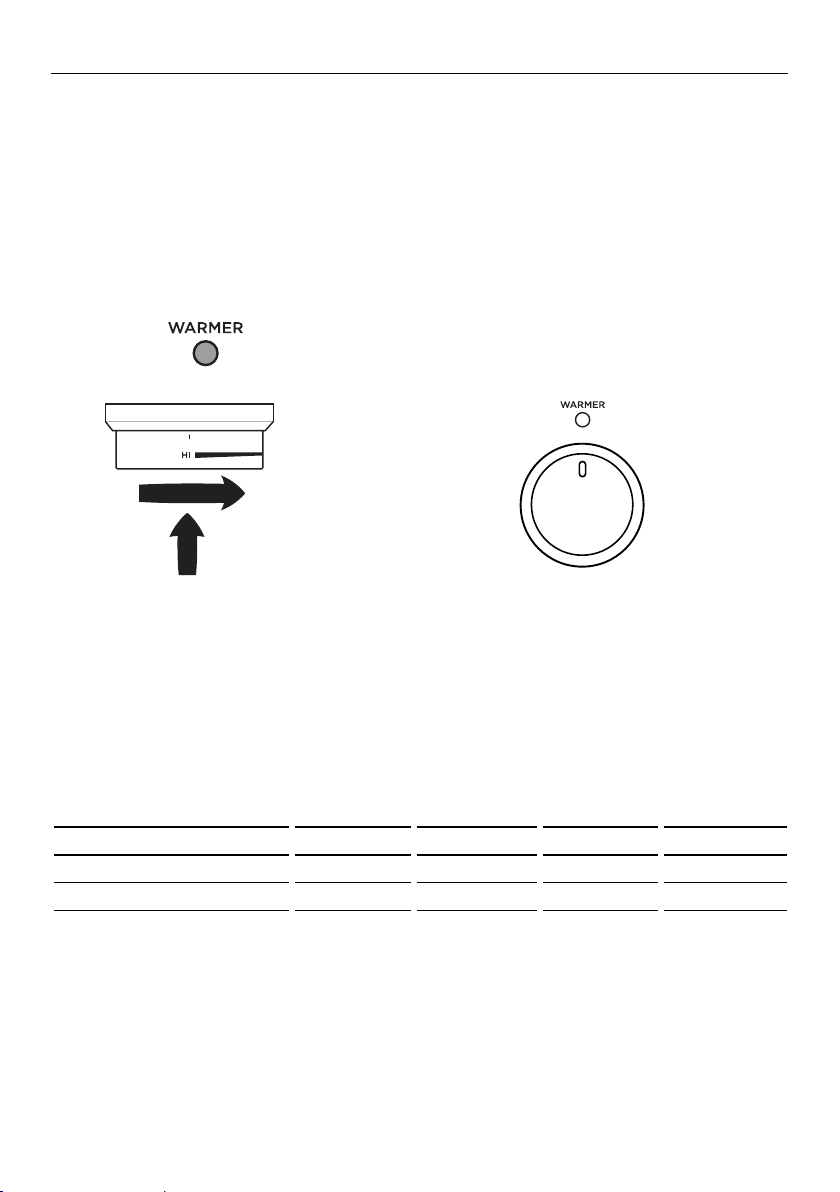
43
CORRECT
USING THE WARMING DRAWER
Use the warming drawer to keep food warm after you have finished cooking and to
warm plates before serving. The warming drawer will keep hot cooked foods at serving
temperature.
y Allow time for the drawer to preheat
y Place hot food in a heatproof pan or serving dish.
y Take care when opening the drawer. Position your hand at the bottom of the drawer and
open slowly to allow hot air and steam to escape.
y Take care not to touch the inside surfaces of the drawer while it is hot.
y When using the drawer to warm plates ensure the temperature is only set to LO. Ensure
plates are evenly spread out.
y Do not stack dishes or plates as this may result in uneven heating.
y
To use the warming drawer
Warmer dial
y The temperature can be set anywhere between LO (minimum) and HI (maximum).
y The warming drawer is fitted with an heating element in the top.
y The maximum heat will differ depending on your electrical connection
(220W at 240V, 165W at 208V).
y See the below table for the temperature settings.
IMPORTANT!
y Do not use the drawer to re-heat food.
y Do not place food in the drawer in unopened containers. Built up pressure could cause
the container to burst.
y Do not use plastic containers.
y Use dry potholders to transfer dishes to and from the drawer. Take care not to let
potholders touch the hot upper element.
y Do not store flammable items in the drawer.
y Do not use the warmer drawer as a storage drawer.
y Do not use aluminum foil to line the drawer.
y Make sure the dial is always set to O (OFF) when running a self clean cycle and any
time when the drawer is not in use.
1 Push in the warmer dial and turn
clockwise to HI.
y While the drawer is on the indicator
will glow red.
2 When you have finished using the
drawer turn the dial back to 0 (OFF).
y The indicator will go out.
NOV 25
CANCEL REMOTE
CANCEL
200C
--->
REMOTE
NOV 25
CANCEL REMOTE
NOV 25
Fan
Grill
Fan
Forced
NOV 25
CANCEL REMOTE
CANCEL
200C
--->
REMOTE
NOV 25
CANCEL REMOTE
NOV 25
Fan
Grill
Fan
Forced
NOV 25
CANCEL REMOTE
CANCEL
200C
--->
REMOTE
NOV 25
CANCEL REMOTE
NOV 25
Fan
Grill
Fan
Forced
DIAL POSITION °F (240V) °C (240V) °F (208V) °C (208V)
LO 86 30 86 30
HI 167 75 149 65

44
CARE AND CLEANING
DOS DON’TS
y Read these cleaning instructions and the
‘Safety and warnings’ section before you
start cleaning your range.
y Before cleaning or removing any part,
make sure that everything on the range
has been turned off.
y Unless suggested otherwise in the chart
following, allow any part to cool to a safe
temperature before cleaning. If you do
need to handle a warm or hot part, take
extreme care. Wear long protective mitts
to avoid burns from steam or hot surfaces.
y Try using any cleaner on a small area first,
to ensure it doesn’t stain.
y See the pages following this chart for
instructions on removing and replacing
different parts of the range for cleaning or
maintenance.
y To help you identify any parts, see
illustrations in section ‘Introduction’ and
after this cleaning chart.
y Ensure the anti-tip device is re-engaged
if you move the range for cleaning.
Failure to do this may result in the oven
tipping, and adults and children may
bekilled.
y To prevent soiling from becoming ‘baked
on’ and stubborn, we recommend
removing any easy-to-reach spills, food or
grease stains from the oven cavity enamel
after each use.
y Always clean the inner glass pane before
starting a Self Clean cycle. Failure to do
this will mean that residue will bake on
and be impossible to remove.
y Always remove oven shelves before
starting a Self Clean cycle.
y Do not use aerosol cleaners until
the range has completely cooled.
The propellant substance in these
cleaners could catch fire in the
presence of heat.
y Do not let soiling or grease
accumulate anywhere in or on
the range. This will make future
cleaning more difficult and may
present a fire hazard.
y Do not use any abrasive or harsh
cleaners, cloths, scouring pads or
steel wool. These will scratch your
range and damage its appearance.
y Do not use a steam cleaner to clean
any part of the range.
y Do not perform any cleaning
or maintenance on parts not
specifically named in the chart
below. If in doubt, contact
Customer Care.
y Only an service technician can take
apart the door.
y Do not attempt to take the door
apart for cleaning. If the inner
panes of glass in the door become
dirty, please contact your Repairer
or Customer Care.
45
CARE AND CLEANING
Manual cleaning chart
WHAT?
HOW OFTEN?
HOW? IMPORTANT!
RANGE EXTERIOR
Door frame
exterior,
Control panel,
Cooktop base
Back trim
Warming drawer
exterior
After every use
1 Soften any stubborn stains
under a hot soapy cloth.
2 Clean with a solution of
mild detergent and hot
water, then wipe dry with
a microfiber cloth.
Stainless steel models:
For extra shine, use a
suitable stainless steel
cleaner and polish,
following manufacturer’s
instructions. Always rub
the stainless steel in the
direction of the polish lines.
y Always read the label to make
sure your stainless steel cleaner
does not contain chlorine
compounds as these are
corrosive and may damage the
appearance of your cooktop.
y Do not use and take care not to
spill any stainless steel cleaner
on the dials, oven handles, or
the kickstrip grate. These are
not stainless steel parts and
their surface may be damaged
by stainless steel cleaner.
Dials
Oven handles
1 Wipe with a damp cloth
using a solution of mild
detergent and hot water.
2 Dry thoroughly with
microfiber cloth.
y Do not use stainless steel
cleaner on these parts, as doing
so may damage their coating.
Clock display
and controls
Take particular care when
cleaning the clock and
surrounding area. Only use a
damp cloth with detergent.
y Do not use any oven cleaners,
harsh or abrasive cleaners,
scouring pads, steel wool or
sharp metal scrapers on the
glass. These may scratch and
damage the surface.
Oven door glass
(exterior)
Clean using a soft cloth and
a mixture of warm water and
dishwashing liquid or glass
cleaner.
OVEN PARTS
Enamel
oven interior –
light soiling
1 Wipe with a damp cloth
and a solution of hot water
and mild detergent.
2 Wipe dry with a soft cloth.
Note: the oven door may
be removed to make
reaching into the oven
easier.
y To prevent soiling from
becoming ‘baked on’ and
stubborn, we recommend
removing any easy-to-reach
spills, food or greasy stains
from the enamel after each
use. Doing so will reduce the
need for using the Self Clean
function frequently.
Enamel
oven interior –
stubborn,
‘baked-on’ soiling
Run the Self Clean cycle.
See “Using the Self Clean
function” for instructions.
46
WHAT?
HOW OFTEN?
HOW? IMPORTANT!
OVEN PARTS
Side racks For light soiling:
y Clean with a solution of mild detergent and hot water.
For heavy soiling:
y Run a Self Clean cycle.
Oven shelves Wipe with a damp cloth and mild
detergent. Do not wipe off or wash
away the white lubricating grease
(visible when the shelf is extended).
y Never leave in the oven during
a Self Clean cycle.
y Do not wash the shelf in the
dishwasher, immerse in soapy
water, or use oven cleaner on it.
Doing so will prevent the slides
from running smoothly.
Broil pan and
rack
Rotisserie parts
1 Pre-soak any stubborn soiling in
a solution of mild detergent and
hot water.
2 Wash by hand or in a dishwasher.
y Never leave any of these
parts in the oven during a Self
Clean cycle. They will become
discoloured or damaged.
Upper and
lower oven
elements
Do not clean these parts. They self-clean during normal use.
Oven door
glass
(interior)
After every use
y Use a soft cloth and a mixture
of warm water and dishwashing
liquid to remove light soiling after
every use.
y For stubborn stains, try using
a mixture of baking soda and
warm water with a non-abrasive
scrubbing pad, then wipe dry
with a soft, lint-free cloth.
y Do not use oven cleaners
or any other harsh/abrasive
cleaners, cloths, scouring pads,
steel wool or sharp metal
scrapers to clean the oven door
glass. These scratch the glass,
which in turn could result in the
glass cracking and shattering.
y Do not allow grease to build up
on the glass or become baked
on as this reduces visibility into
the oven.
Oven door
gasket
Avoid cleaning this part. If you need
to remove large food particles off it,
proceed as follows:
1 Dampen a sponge with clean hot
water.
2 Gently wipe off the soiling, but
do not rub.
3 Press a dry towel gently on the
gasket to dry.
y Do not use any cleaning agent
on the gasket.
y The gasket is essential for a
good seal. Take care not to rub,
displace, or damage it.
Warming
drawer
(interior)
1 Wipe with a damp cloth and a
solution of hot water and mild
detergent.
1 Wipe dry with a soft cloth. Note:
the drawer may be removed to
make cleaning easier.
y To prevent soiling from
becoming ‘baked on’ and
stubborn, we recommend
removing any easy-to-reach
spills, food or greasy stains
from the enamel after each use.
Drip tray under
door (OR36
models only)
1 Remove oven door.
2 Wipe with a damp cloth and a solution of hot water and mild detergent.
CARE AND CLEANING

47
CARE AND CLEANING
WHAT?
HOW OFTEN?
HOW? IMPORTANT!
COOKTOP PARTS
Aluminum and
enamelled
Burner caps
and flame
spreaders
1 Check that the burner is turned
OFF and allow it to cool.
2 Lift off the burner cap and brass
flame spreader.
3 Wash them in hot soapy water,
rinse, and dry.
y Use a stiff nylon brush or straight-
ended paper clip to clear the
notches of the flame spreader.
4 Replace the flame spreader
and burner cap correctly. See
‘Replacing the burner parts’.
Brass burner parts only:
For extra shine and to remove
tarnish use a suitable brass
cleaner and polish, following
manufacturer’s instructions.
y Keep the notches of the
flame spreaders clear. Soiling
may clog these and cause
ignition problems.
y Before replacing the burner
parts, check that they are
dry. Wet burner parts may
result in an irregular flame.
y Before lighting a burner you
have reassembled, check that
all of its parts are positioned
correctly. Incorrect assembly
can cause dangerous
irregular flames and ignition
problems.
y Do not put any burner parts
in the dishwasher as they will
become discolored.
Ignitors
1 Check that the burner is turned
OFF.
2 Clean the ignitor with a small
brush (eg old toothbrush) or
cotton swab that has been dipped
into rubbing alcohol.
y The ignitors must be kept
clean and dry to work
correctly. Dirty or wet
ignitors could cause constant
clicking and sparking, even if
a flame is present.
Burner grates
1 Wait until the grates have cooled
completely.
2 Carefully lift the grates off the
cooktop and place them on a
protected surface.
3 To remove stubborn stains, soak
the grates in a mixture of clothes
washing detergent and water.
4 Wash in a mixture of hot water and
dishwashing liquid, then rinse and
allow to dry.
y The grates are also dishwasher
safe.
y Take care, the grates are
heavy.
y Make sure you place a dish
towel or other soft cover on
the surface before putting a
grate on it.
Wok ring
1 To remove stubborn stains, soak
the grates in a mixture of clothes
washing detergent and water.
2 Wash in a mixture of hot water and
dishwashing liquid, then rinse and
allow to dry.
y The wok ring is also
dishwasher-safe.
48
CARE AND CLEANING
Removing and replacing the oven door
IMPORTANT!
y Do not lift the oven door by its handle. Doing so may damage the door.
y Make sure the oven and the door are cool before you begin to remove the door.
y Before removing the door, make sure there is a large enough clear, protected surface
in the kitchen to rest the door on.
y Take care, the oven door is heavy!
To remove the oven door
1 Open the door fully.
3 Holding the door firmly on both sides,
gently close it about halfway.
4 Disengage the hinges and remove the
door. Place on a protected surface.
2 Open the levers fully on both sides.
Lever
49
CARE AND CLEANING
To replace the oven door
1 Hold the door firmly in an approximately
halfway open position.
3 Open the door fully. 4 Fully close the levers on the left and
right hinges, as shown, then close
thedoor.
2 Insert the hinge tongues into the slots,
making sure that the notches on both
sides drop into place as shown.
Notch
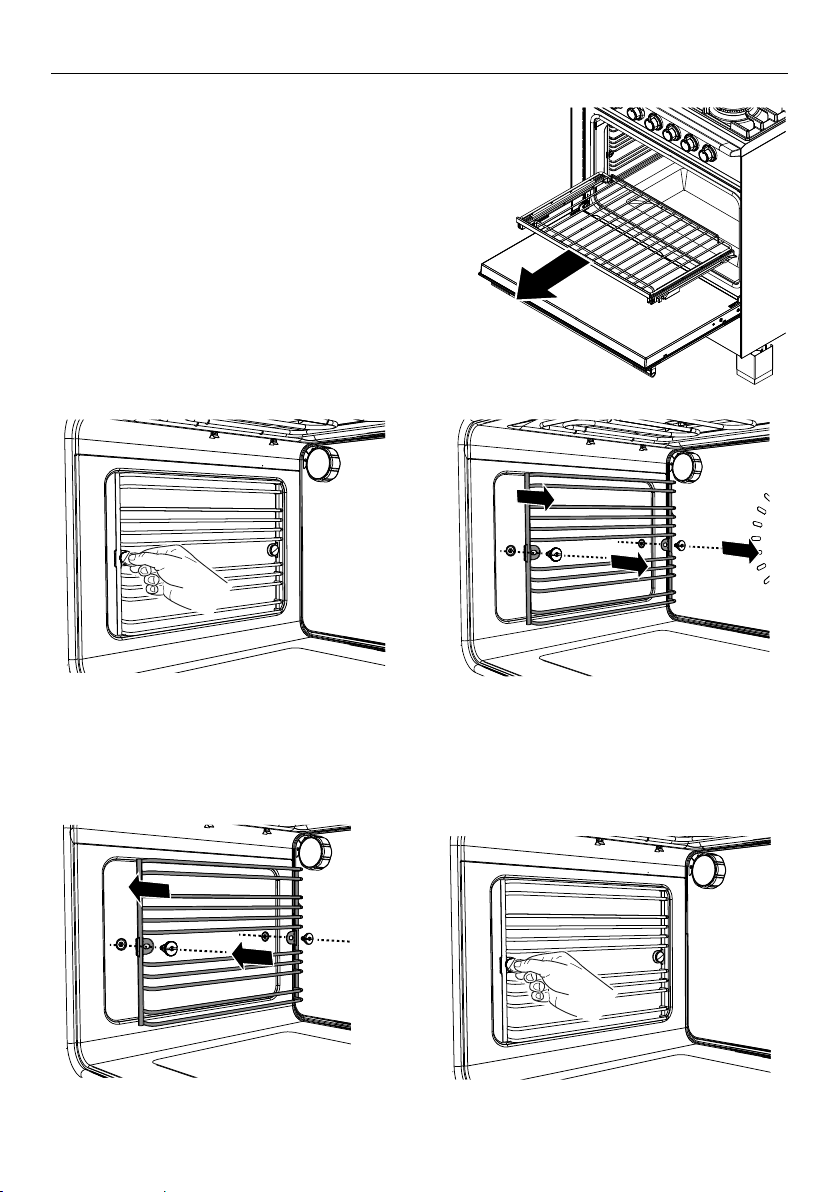
50
CARE AND CLEANING
Removing and replacing the oven side racks
IMPORTANT!
Always turn off the range at the wall first.
Ensure the oven has cooled down
completely before starting.
Remove all shelves
1 Slide out all shelves and remove.
For easier access we recommend removing
the oven door. See ‘Removing and refitting
the oven door’.
To remove the side racks
To replace the side racks
1 Make sure the side racks are the
right way up, as shown.
2 Refit the fixing screws and tighten.
Remove all
shelves
2 Use a small coin or a flat-head
screwdriver to loosen and remove the
fixing screws.
3 Remove the side racks.
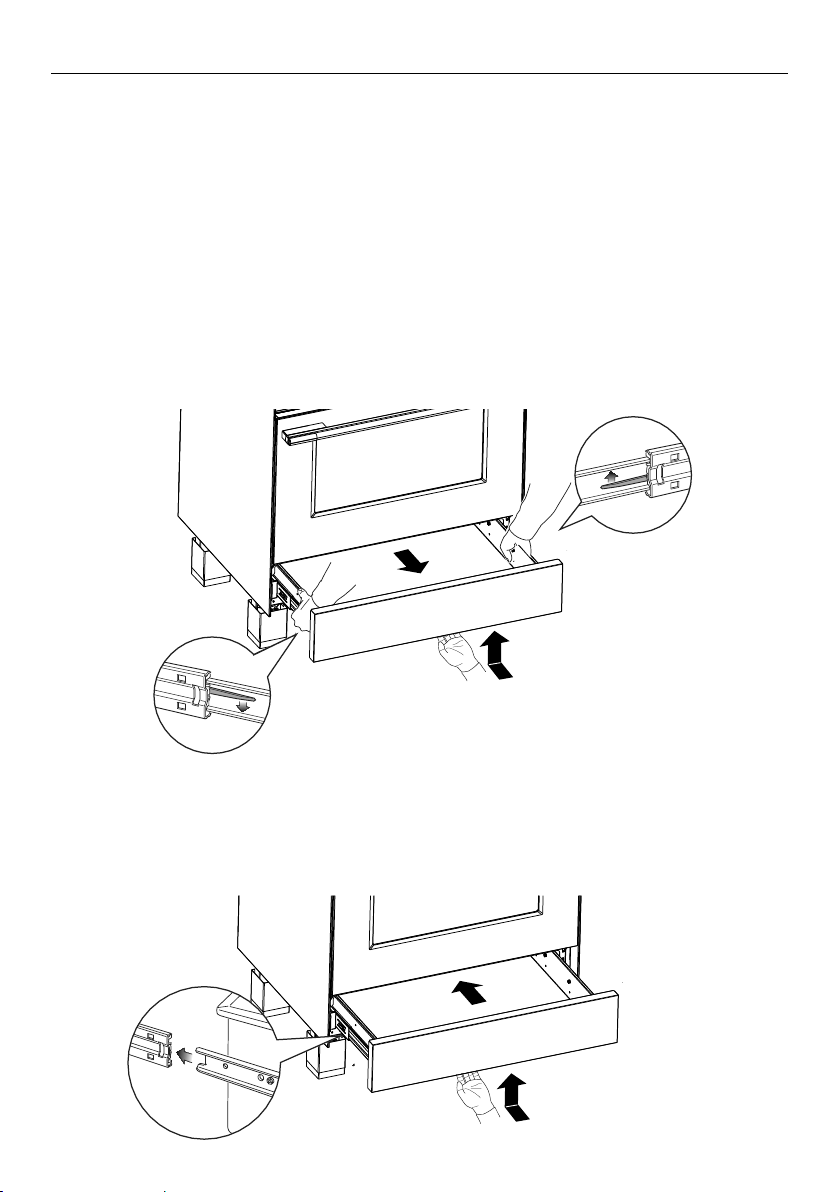
51
CARE AND CLEANING
Removing and replacing the warming drawer
IMPORTANT!
y Always turn off the range at the wall first.
y Ensure the oven and warming drawer have cooled down completely before starting.
y Ensure the drawer is completely empty before removing it.
y Always position your hand at the bottom of the drawer to open and close it.
To remove the warming drawer
1 Open the drawer completely.
2 Open the levers fully on both sides and hold in place:
y On the left side push the lever down
y On the right side push the lever up
3 Remove the drawer while holding the levers in position.
Fitting the warming drawer
1 Insert the drawer guides onto the sliding runners on either side of the range interior.
y Make sure they are correctly lined up on both sides of the drawer.
2 Gently close the drawer completely. The safety catches will automatically hook into
place.
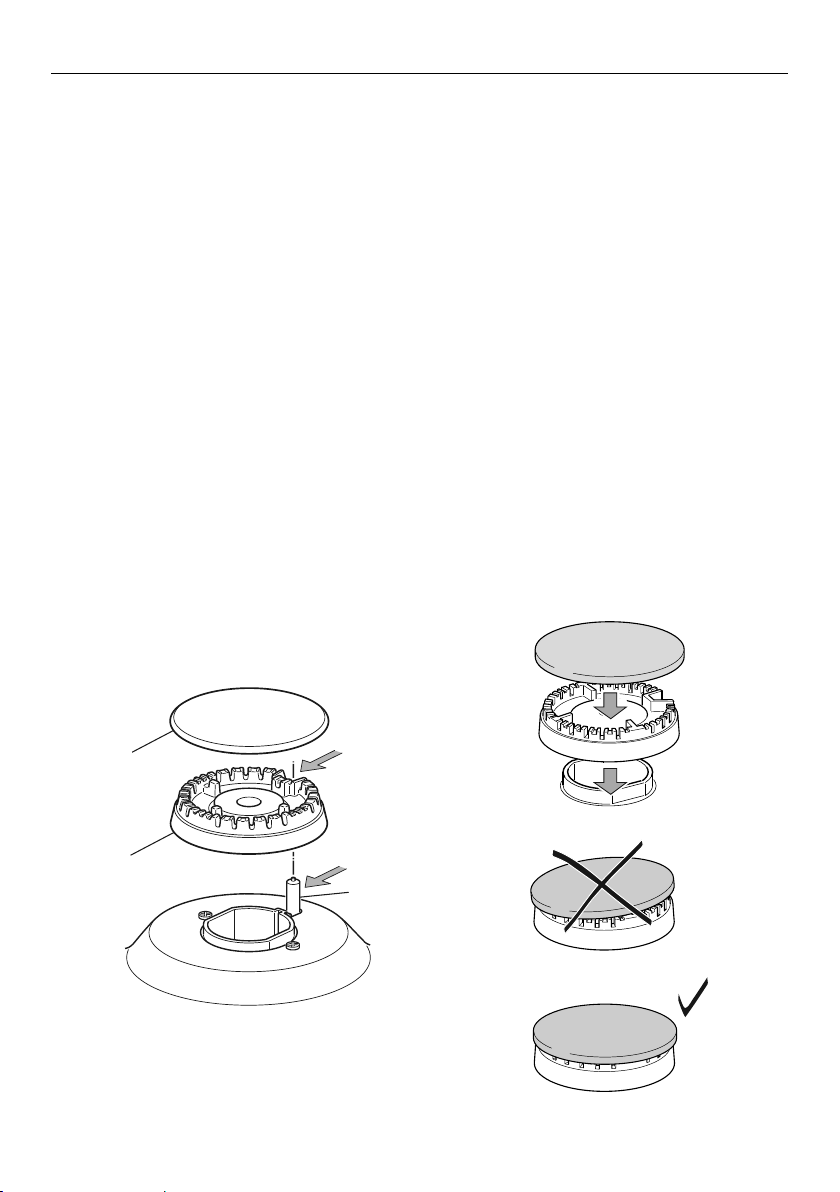
52
CARE AND CLEANING
S
F
C
Cap
Ignitor
Flame
spreader
Replacing the semi-rapid burner caps
Correct positioning of semi-rapid burner parts
Burner parts
y You can remove and clean these parts with hot soapy water or non-abrasive
detergents. Clean spills regularly before they become burnt on. Do not wash these
parts in a dishwasher.
y After cleaning, check that the burners and their flame spreaders are dry before
replacing correctly.
y It is very important to check that the burner flame spreader and the cap have been
correctly positioned. Failure to do so can cause serious problems.
y Check that the ignitor is always clean to ensure trouble free sparking. It must be
cleaned very carefully using a toothbrush and methylated spirits.
y Note: to avoid damage to the electronic ignition, do not try to light a burner without
all burner parts in place.
Replacing the burner parts
y Carefully replace the burner parts as per the following illustrations.
y Fit the flame spreader to the housing as shown below. Make sure the burner is not able
to rotate.
Check that:
y the ignitor is always clean to ensure trouble-free sparking
y the probe is always clean to ensure correct operation of the safety valves
y the flame spreaders are clean and the holes are not clogged
Note: both the ignitor and probe must be very carefully cleaned using a toothbrush
and methylated spirits.
Replacing the semi-rapid burners
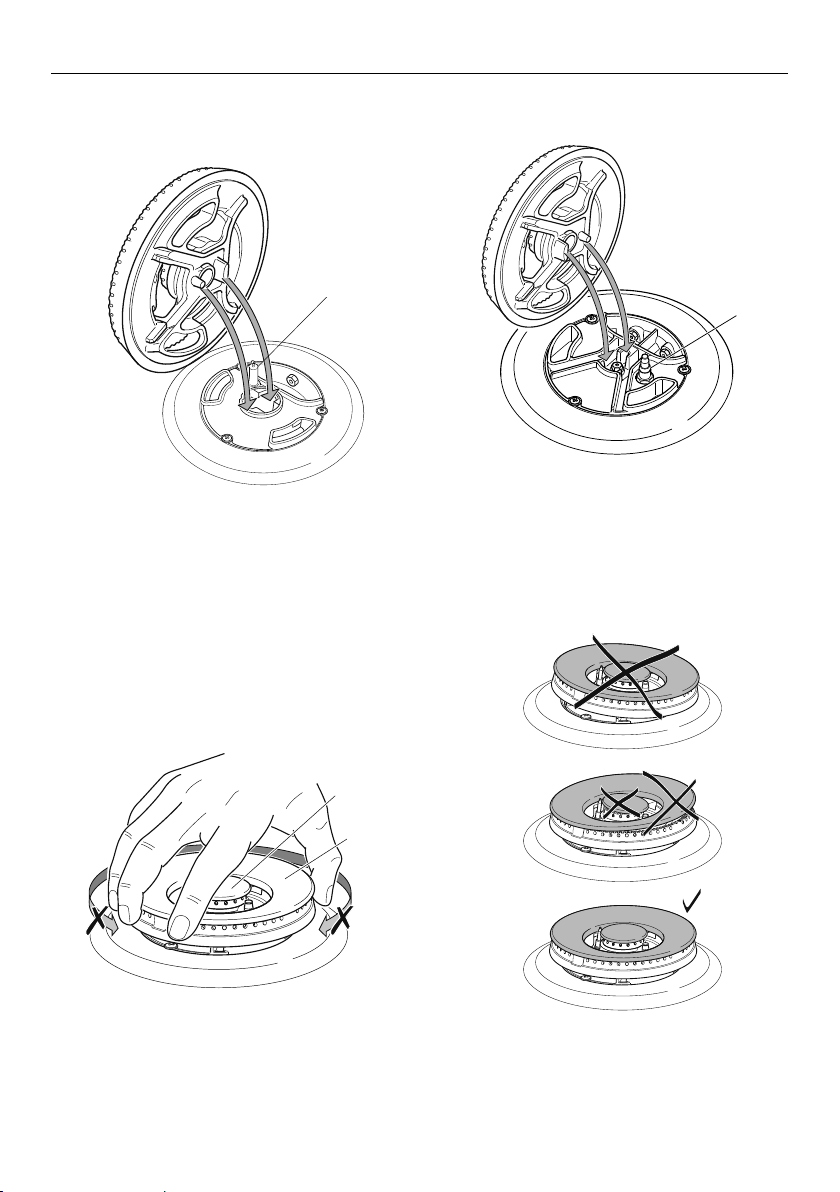
53
CARE AND CLEANING
A
B
S
Replacing the triple-ring wok and dual burners
Correct positioning of
flame spreader – triple-ring wok burner
Correct positioning of
flame spreader – dual burner
Correct positioning of
cap and ring – triple-ring wok and dual burner
Ignitor
Ignitor
Incorrect and correct positioning
of cap and ring – triple-ring wok and dual burner
Ring
Cap
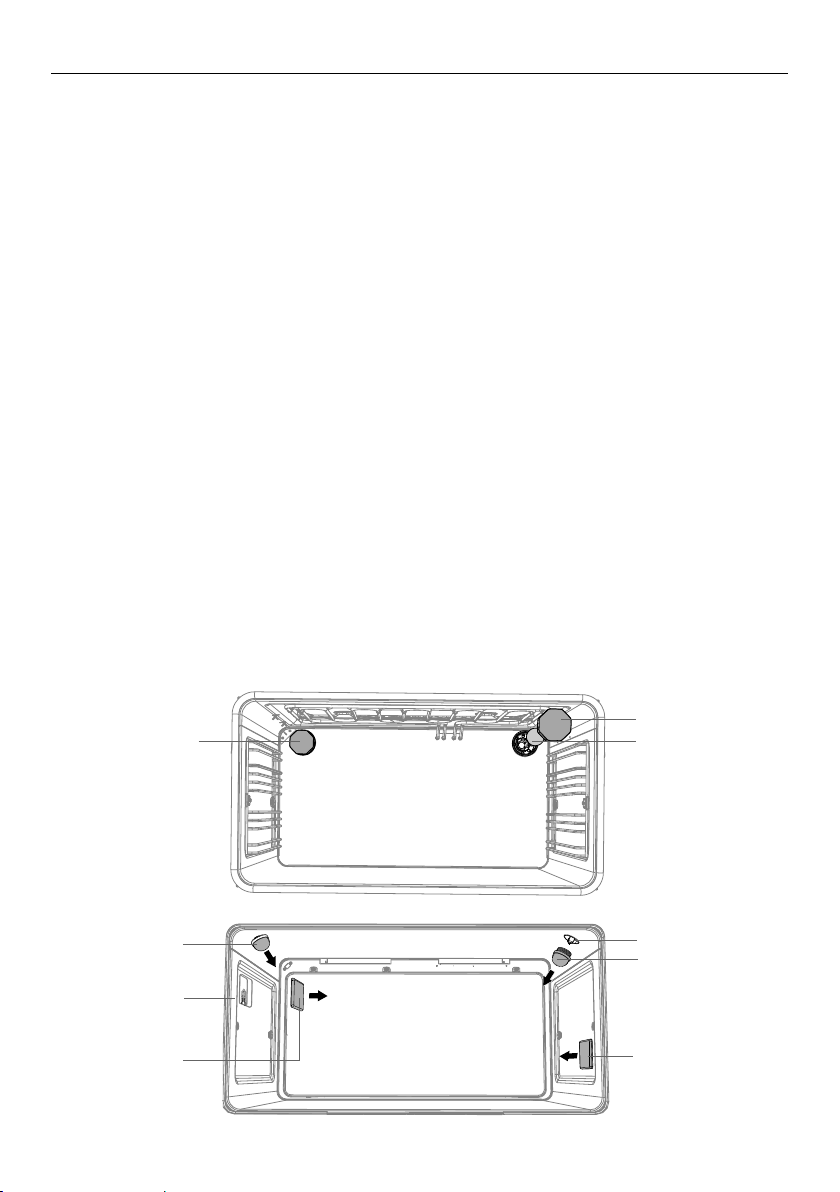
54
Replacing an oven light bulb
IMPORTANT!
Use a 25W, 120V 60HZ G9 halogen bulb for replacement.
Do not use a standard light bulb in any oven, the heat will break it.
1 Allow the oven (including the lamp cover and the bulb) to cool completely.
2 Remove any shelves that may get in the way.
3 Remove the door if the lamp will be hard to reach.
4 Turn the power supply to the range off at the main fuse or circuit breaker panel.
If you don’t know how to do this, contact an electrician.
IMPORTANT!
Failure to disconnect the range from the power supply may result in death or
electrical shock.
5 Remove the lamp cover.
y Upper lights: wearing a rubber glove to improve grip turn the cover counter-clockwise
to unscrew.
y Side lights: wearing a rubber glove to improve grip, hold the cover and prise out
using finger nails on other hand. If this does not work place a thin plastic spatula
between the cover and cavity wall and gently twist to prise the cover off.
Take care not to chip the glass covers or to damage the enamel finish inside the oven.
6 Remove the faulty bulb.
7 Holding the replacement bulb in a soft cloth or tissue insert it into the socket.
Do not touch the bulb with your fingers.
8 Replace the lamp cover.
y Upper lights: turn the cover clockwise to tighten and then back a quarter turn.
9 Turn the power supply to the range back on at the main fuse or circuit breaker panel.
Light bulb
Light bulb
Light bulb
Upper
lamp cover
Upper
lamp cover
Upper
lamp cover
Upper
lamp cover
Side
lamp cover
Side
lamp cover
CARE AND CLEANING
OR30 Models
OR36 Models
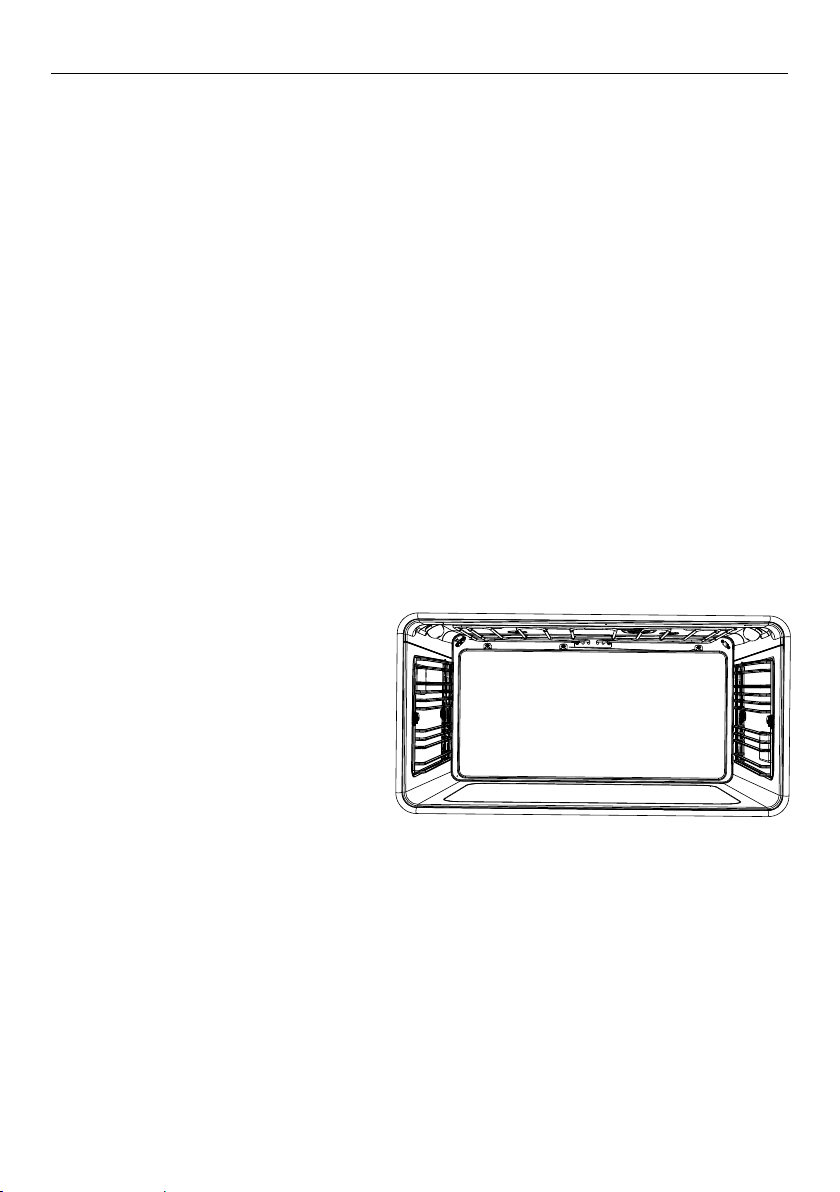
55
Using Self Clean
Self Clean uses extremely high temperatures to break down and burn off grease and
grime. All that is left is a small amount of grey ash that you can easily wipe up.
There are two self clean cycles:
y Standard Clean 4 hours, for normal or heavy soiling
y Light Clean 3 hours, for light or localized soiling
IMPORTANT!
y You must clean the inside glass door panel BEFORE starting a self-clean cycle.
Failure to do this may result in permanent staining or marking of the door glass.
See ‘Care and cleaning’ for our recommendations on how to do this.
y Do not use oven cleaners, any degreasing cleaners, or oven liners.
y Remove all oven shelves, trays, bakeware and utensils from the oven before starting
a self clean cycle (except side racks). If left in the oven they will be permanently
damaged; items made from combustible material (eg wood, fabric, plastic) may even
catch fire.
y Do not use your oven to clean miscellaneous parts.
y Make sure the room is well ventilated.
y Before starting a Self Clean cycle, make sure you move any pet birds to another,
closed and well-ventilated room. Some pet birds are extremely sensitive to the fumes
given off during a Self Clean cycle, and may die if left in the same room as the oven
during such a cycle.
y During a Self Clean cycle, the oven reaches higher temperatures than it does for
cooking. Under such conditions, the surfaces may get hotter than usual and children
should be kept away.
y The oven door will be locked
during the Self Clean cycle.
y If there are cracks or flaws on
any of the oven door glass
panes, if the oven seal is
damaged or worn, or if the
door does not close properly,
do not start a Self Clean cycle.
Call your Fisher & Paykel trained
and supported service technician.
Before you start
1 Remove all oven shelves and any other accessories, bakeware, and utensils.
Note: you do not need to remove the side racks.
2 Wipe up any spills, and along the inner edge of the oven surface around the seal.
Failure to do so may discolour the oven surface.
IMPORTANT!
Avoid cleaning the seal itself as this may cause damage.
3 Check the inner glass pane of the oven door. If it has soiling on it (eg stains from greasy
splatter), you will need to clean it manually before starting a Self Clean cycle.
For instructions, see ‘Care and cleaning’.
IMPORTANT!
y If soiling is left on the glass, it will become burnt on during the Self Clean cycle,
making it very difficult to remove.
4 Close the oven door firmly.
USING THE SELF CLEAN FUNCTION
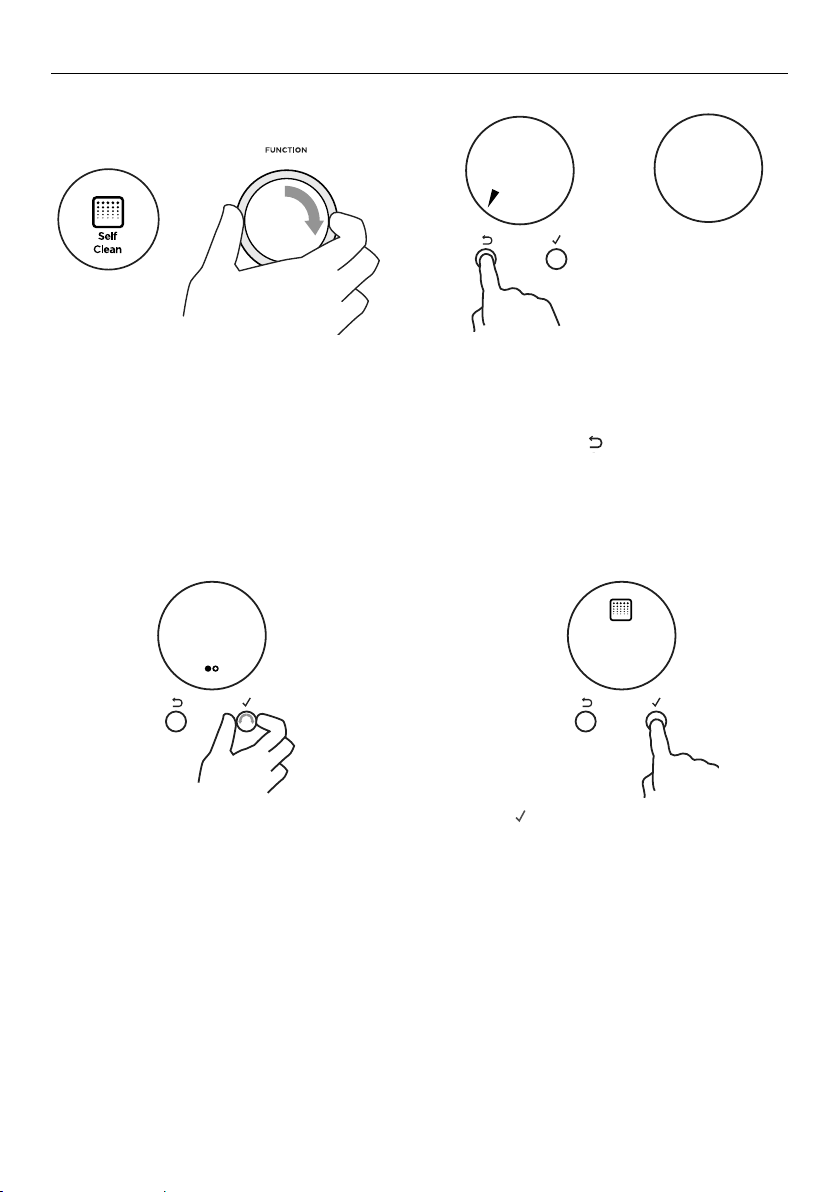
56
USING THE SELF CLEAN FUNCTION
To set Self Clean
Self Clean is now set.
y The door will automatically lock and remain locked during the cycle.
y The display will start counting down the time remaining.
1 Turn the function dial to Self Clean.
3 Scroll to choose between Standard
Clean and Light Clean.
CANCEL REMOTE
4 00
mh
CANCEL REMOTE
Standard
Clean
to go
3 59
mh
CANCEL REMOTE
Remove
Shelves
Self Clean
Complete
CANCEL REMOTE
Self Clean
Cancelled
CANCEL REMOTE
CANCEL REMOTE
4 00
mh
CANCEL REMOTE
Standard
Clean
to go
3 59
mh
CANCEL REMOTE
Remove
Shelves
Self Clean
Complete
CANCEL REMOTE
Self Clean
Cancelled
CANCEL REMOTE
CANCEL REMOTE
4 00
mh
CANCEL REMOTE
Standard
Clean
to go
3 59
mh
CANCEL REMOTE
Remove
Shelves
Self Clean
Complete
CANCEL REMOTE
Self Clean
Cancelled
CANCEL REMOTE
CANCEL REMOTE
4 00
mh
CANCEL REMOTE
Standard
Clean
to go
3 59
mh
CANCEL REMOTE
Close
Door
Self Clean
Complete
CANCEL REMOTE
Self Clean
Cancelled
CANCEL REMOTE
CANCEL REMOTE
4 00
mh
CANCEL REMOTE
Standard
Clean
to go
3 59
mh
CANCEL REMOTE
Close
Door
Self Clean
Complete
CANCEL REMOTE
Self Clean
Cancelled
CANCEL REMOTE
CANCEL REMOTE
4 00
mh
CANCEL REMOTE
Standard
Clean
to go
3 59
mh
CANCEL REMOTE
Remove
Shelves
Self Clean
Complete
CANCEL REMOTE
Self Clean
Cancelled
CANCEL REMOTE
4 Press
-
+
-
+
-
+
to confirm.
2 The display will prompt you to remove
the oven shelves.
y Remove the oven shelves and any other
bakeware or accessories still in the oven.
y Press and hold
CANCEL REMOTE
CANCEL REMOTE
CANCEL REMOTE
Settings
Sounds
On
CANCEL REMOTE
Sounds
O
CANCEL REMOTE
Setting
changed
to confirm.
y If the oven door is not closed properly,
the display will also prompt you to close
the door.
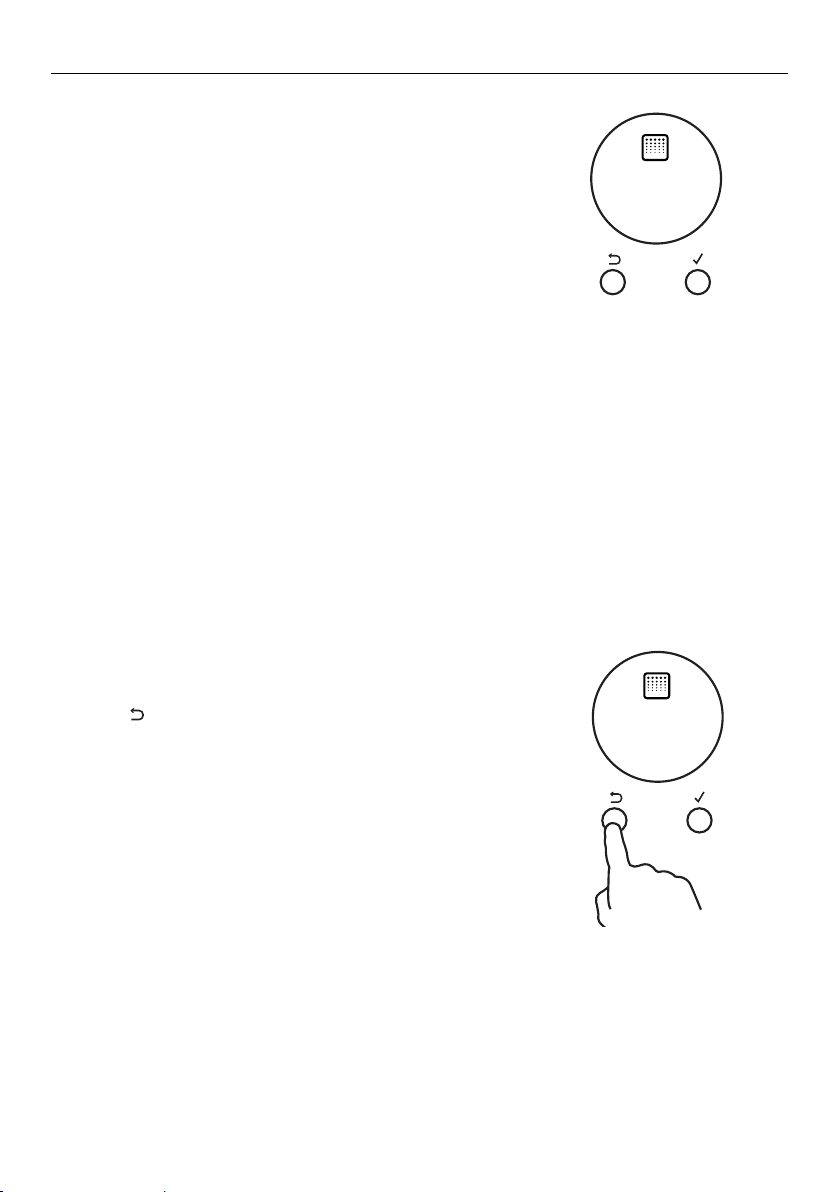
57
USING THE SELF CLEAN FUNCTION
When Self Clean is finished
y A tone will sound.
y Self Clean Complete will show in the display.
y The display will flash.
y The door will unlock.
1 Press any button to stop the display flashing.
2 Wait for the oven to cool completely.
3 Wipe up the ash in the oven with a small brush or
a damp cloth.
4 Dry with a lint-free cloth.
5 Replace the oven shelves.
To cancel Self Clean
IMPORTANT!
y A Self Clean cycle can be cancelled at any time.
y The door will not unlock until the oven has
cooled to a safe temperature.
y Do NOT turn off the mains power supply to the
oven (wall switch). Turning off the power while
the oven is too hot may damage the oven and
its surrounding cabinetry.
CANCEL REMOTE
4 00
mh
CANCEL REMOTE
Standard
Clean
to go
3 59
mh
CANCEL REMOTE
Remove
Shelves
Self Clean
Complete
CANCEL REMOTE
Self Clean
Cancelled
CANCEL REMOTE
CANCEL REMOTE
4 00
mh
CANCEL REMOTE
Standard
Clean
to go
3 59
mh
CANCEL REMOTE
Remove
Shelves
Self Clean
Complete
CANCEL REMOTE
Self Clean
Cancelled
CANCEL REMOTE
1 Press
CANCEL REMOTE
CANCEL REMOTE
CANCEL REMOTE
Settings
Sounds
On
CANCEL REMOTE
Sounds
O
CANCEL REMOTE
Setting
changed
to cancel Self Clean.
y Self Clean Cancelled will show in the display.
y The door will remain locked and the display will
remain lit until the oven has cooled down to a
safe temperature.
58
TROUBLESHOOTING
Troubleshooting chart
If there is a problem, check the chart below to see if you can fix it. If the problem cannot
be fixed or persists, call your Fisher & Paykel trained and supported service technician
or Customer Care.
PROBLEM POSSIBLE CAUSES WHAT TO DO
General
The oven does not
work.
No power.
The clock has not been set.
Check that the mains power
supply (wall switch) is turned
on, the fuse has not tripped
and there is no power outage
in your area.
The oven will not work unless
the clock is set. See ‘Setting
the clock’.
The oven does not
work but the display
is lit.
The oven is set for automatic
cooking.
The oven is in Demo Mode.
See ‘Automatic cooking’ for
instructions.
Contact Customer Care.
One or all of the lights
do not come on, but
the oven works.
The oven light bulb(s) have
blown.
The door is not correctly
fitted.
The oven is in Sabbath
setting and the ‘Light off’
option has been saved.
Replace the light bulb(s).
See ‘Care and cleaning’ for
instructions.
See ‘Care and cleaning’ for
instructions on fitting the
door correctly.
To quit Sabbath setting, press
and hold CANCEL. See‘User
preference settings’ for
instructions on changing the
‘Light off’ option.
The temperature
indicator is blank and
the oven control dials
are unresponsive.
The control panel is locked. See ‘Locking the oven
controls’ for instructions.
The oven is not heating. The door is not properly
closed or it is opened too
frequently during cooking.
The heating elements are
disabled while the door is
open. Make sure the door is
properly closed and avoid
opening it frequently during
cooking.
A glass pane in the
oven door has cracked,
chipped, or shattered.
Incorrect cleaning or the
edge of the glass hitting
against something.
You must NOT use the oven.
Call your Fisher & Paykel
trained and supported service
technician or Customer Care.

59
TROUBLESHOOTINGTROUBLESHOOTING
PROBLEM POSSIBLE CAUSES WHAT TO DO
General
I can feel hot air blowing
out of the vents after I
have turned the oven off.
This is normal. For safety reasons the
cooling fans will continue
to run even when you have
turned the function dial to
‘OFF’. The fans will switch
off automatically when the
oven has cooled.
The oven fan comes on
when I select a function
that does not use a fan
(eg bake or classic bake).
This is normal.
The fan comes on while the
oven is preheating. It may
turn off when the oven has
reached the set temperature.
Wait until a long tone
sounds and the temperature
dial halo turns white: the
oven will then be ready
touse.
The oven has reached the
set temperature but the
temperature dial halo is
still red (indicating that
the oven is not ready to
use).
This is normal: when heating
up from cold, your oven is
designed to initially heat to a
temperature somewhat
higher than what you have
set. This is to provide optimal
baking conditions right from
the start.
Wait until a long
tone sounds and the
temperature dial halo turns
white: the oven will then be
ready to use.
The oven is heating but
the display is dark.
The oven is set to ‘Display off’
option.
The oven is in Sabbath setting.
To quit the ‘Display off’
option, press and hold
CANCEL until the display
shows the time of day.
To quit Sabbath setting,
press and hold CANCEL
until the display shows the
time of day.
The oven cancels
automatic cooking when
I try to adjust the clock
setting.
The oven was set for
automatic cooking when you
were trying to adjust the clock
setting.
You can only adjust
the clock setting while
the oven is not set for
automatic cooking.
The temperature dial
halo never turns white
when I use Maxi Broil.
This is normal: the halo stays red to indicate that the broil
element provides instant radiant heat.
The displays work,
and the function and
temperature dials halos
come on but the oven
does not heat up.
The oven is in ‘Demo’ mode. Call Customer Care.
60
TROUBLESHOOTING
PROBLEM POSSIBLE CAUSES WHAT TO DO
Self Clean function
During a Self Clean
cycle, the oven is louder
than usual.
This is normal: the oven’s cooling fans operate at their
highestspeed.
The Self Clean cycle has
finished, but the oven
door will not open.
The oven door is locked
because the oven is
still too hot to be used
forcooking.
Wait until the Self Clean cycle
hasfinished. If you cancelled
a Self Clean cycle which was
already underway, the oven still
needs to cool down before it
can be used. The oven door will
automatically unlock.
I have cancelled a
SelfClean cycle but
cannot use the oven:
y the oven door will
not open
y the display is still
counting down
minutes or showing
Self Clean Canceled
y the dials and controls
are unresponsive.
This is normal: if the
function dial halo is unlit,
you have successfully
cancelled the Self Clean
cycle. However, the
oven is still too hot to be
used for cooking and
needs to cool down.
Wait until the cool-down phase
has finished. A long tone will
sound and the oven door will
automatically unlock when the
oven is ready to use.
Note: depending on when the
SelfClean cycle was cancelled,
the cool-down phase may take up
to 45 minutes.
The oven is beeping and
the display shows a2
or a3.
See section ‘Alert codes’ for instructions.
There is a power cut
during a Self Clean
cycle.
Power cut. The door will remain locked.
Oncethe power is turned back
on, the door will remain locked
until the oven has cooled to a
safe temperature.
61
TROUBLESHOOTING
PROBLEM POSSIBLE CAUSES WHAT TO DO
OVEN
Condensation around
oven (eg on control
panel or top of oven
door.)
Food has high moisture
content or local climate
(temperature, humidity)
is contributing to
condensation.
Condensation is normal.
Youcan wipe the drops off
the control panel. If there is
frequent or excessive
condensation, make sure that
cabinetry around the range is
moisture-proofed.
Condensation building
up in the oven while
cooking on Maxi Broil.
Food in your oven releasing
moisture as it cooks.
Allow the broil element to
preheat for 5 minutes before
placing food in the oven or
try cooking on Aero Broil
instead.
Steam coming from
oven vents at the back
of the range.
Moisture from food
evaporating during cooking.
This is normal, especially
if you are cooking large
quantities of food in the oven
using the Aero Bake function.
Uneven baking. Oven not properly
preheated.
Unsuitable or incorrectly
arranged bakeware.
Wait until the halo around
the temperature knob has
changed from white to red
before putting food in.
See ‘Oven cooking guidelines’
for advice.
COOKTOP BURNERS
None of the burners,
grill, or griddle will
light.
No power supply.
No gas.
Check that there is no power
outage in your area and that
the power supply to the
range is switched on at the
circuit breaker panel.
Check that the gas supply
to the house is working.
Youshould hear the gas
when you turn a burner on.
If you are using bottled gas,
check that it is not empty.
The ignitor keeps
clicking (continuous
spark) even when a
burner has lit.
Dirty or wet ignitor(s). Clean the ignitor(s).
See‘Care and cleaning’ for
instructions.
62
TROUBLESHOOTING
PROBLEM POSSIBLE CAUSES WHAT TO DO
COOKTOP BURNERS
Some burners will
notlight.
Flames do not burn all
around the burner cap.
Burner parts or ignitors may
be wet, dirty, or misaligned.
Check that the burner parts
are clean, dry, and correctly
assembled. Check that the
ignitors are clean and dry.
See ‘Care and cleaning’ for
instructions.
There is no clicking
when I try to light a
burner.
The ignitor is dirty or there
is a power outage.
Clean the ignitor(s). See ‘Care
and cleaning’ for instructions.
There is a power
failure – can I still use
the cooktop burners?
Power outage in your area. The cooktop burners can still be
used. To light them:
1 Holding a lighted match to
the flame spreader, push in
on the control knob and turn
counterclockwise to LITE.
2 When the flame is burning
all the way around the
burner, you may adjust
theheat.
IMPORTANT!
If the flame is blown out during
a power failure, turn the knob
immediately to O (OFF), as the
burner will not automatically
relight and gas may escape.
The flames have
suddenly gone out.
A draft or a spill has
extinguished the flame.
No action required.
Theburner will detect this and
automatically relight. However,if
there has been a large spill, we
recommend turning the burners
off and cleaning the burners
and sump area. See ‘Care and
cleaning’ for instrucions.
There is a slight
‘extinction pop’ or
flash after I’ve turned
a cooktop burner off.
This is normal for LP gas and
requires no action.
The burner flames are
uneven, very large,
yellow or yellow-
tipped or sooty.
Technical fault: the gas is
the wrong type or hasn’t
been adjusted properly.
Do not use your cooktop
burners. Contact your
Fisher&Paykel trained and
supported service technician or
Customer Care.

63
ALERT CODES
If there is a problem with the oven, the range will:
y automatically suspend all oven functions
y beep five times
y display an alert code.
IMPORTANT!
Do not turn off the mains power supply to the range (wall switch) if you get an
alert code, unless the instructions in the chart following specifically instruct you
to. There are cooling fans within the range which are needed to cool the range
components. Turning off the power while the range is too hot may damage the range
and its surrounding cabinetry.
What to do if an alert code is displayed
1 If the beeping hasn’t stopped already, touch any control to stop it.
2 Make a note of the alert code displayed. You may need this information.
3 Check the chart following to see if you can fix the problem yourself and follow
theinstructions.
4 If you can fix the problem and the alert code does not reappear, you can keep using
your oven.
OR
If you can’t fix the problem yourself or the alert code reappears and the problem
persists: wait until the cooling fans have stopped and the oven has completely cooled
down, then turn the power to the range off at the wall and call your Fisher&Paykel
trained and supported service technican or Customer Care with the alert code information.
64
ALERT CODES
ALERT CODE POSSIBLE CAUSES WHAT TO DO
The oven has overheated.
1 Allow the oven to cool down.
2 Once the oven has cooled down
andthe door has unlocked, the alert
code will disappear. You can now use
the oven again.
Door lock error:
the door cannot be locked
after you have started a
Self Clean cycle.
1 Turn the power to the oven off at the
wall and on again.
2 Wait approximately 10 seconds.
This is to allow the door lock to return
to its initial position.
3 Set the clock. See ‘Setting the clock
and first use’ for instructions.
4 Try starting a Self Clean cycle again,
making sure that you close the door
firmly. See ‘Using the Self Clean
function’.
Door lock error:
the door cannot be
unlocked after a Self Clean
cycle has finished.
1 Turn the power to the oven off at the
wall and on again.
2 Try touching on the oven door to help
the door lock disengage.
3 If this doesn’t help and the alert code
reappears, call your Fisher&Paykel
trained and supported service
technician or Customer Care.
F + number
Technical fault.
1 Note down the alert code.
2 Wait until the cooling fans have
stopped and the oven has completely
cooled down.
3 Turn the power to the oven off at
thewall.
4 Call your Fisher & Paykel trained
and supported service technician or
Customer Care with the alert code
information.
A1
A2
A3
F2

65
WARRANTY AND SERVICE
Before you call for service or assistance
Check the things you can do yourself. Refer to the installation instructions and your user
guide and check that:
1 Your product is correctly installed.
2 You are familiar with its normal operation.
If after checking these points you still need assistance or parts, please refer to the
Service & Warranty book for warranty details, contact your nearest Fisher & Paykel
service center, Customer Care, or get in touch via our website www.fisherpaykel.com.
Complete and keep for safe reference:
Model
Serial No.
Purchase Date
Purchaser
Dealer
Suburb
Town
Country

US CA
591500C / 1105524 – ß 2 01.19
FISHERPAYKEL.COM
© Fisher & Paykel Appliances 2019. All rights reserved.
The product specifications in this booklet apply to the specific products
and models described at the date of issue. Under our policy of continuous
product improvement, these specifications may change at any time. You
should therefore check with your Dealer to ensure this booklet correctly
describes the product currently available.