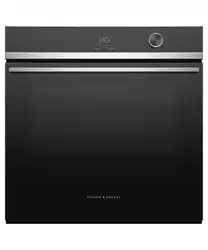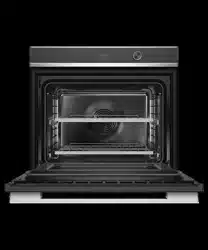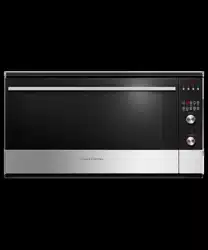

USER GUIDE
NZ AU
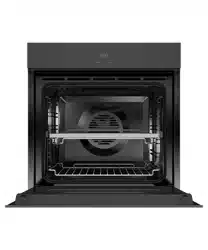
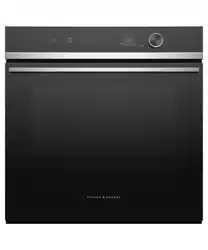
BUILT-IN OVEN
OB90S9LEX1 model


1
CONTENTS
IMPORTANT!
SAVE THESE INSTRUCTIONS
The models shown in this user guide may not be available in all markets and are subject to
change at any time. For current details about model and specification availability in your
country, go to our website fisherpaykel.com or contact your local Fisher&Paykel dealer.
Safety and warnings 2
Introduction 6
Control panel 7
First use 8
Using your oven 9
Oven functions 10
Using the rotisserie 12
Using the timer 14
Automatic cooking 15
Cooking chart 17
User preference settings 18
Sabbath setting 20
Care and cleaning 22
Troubleshooting 29
Alert codes 31
Warranty and service 32
2
Your oven has been carefully designed to operate safely during normal cooking procedures.
Please keep the following safety instructions in mind when you are using it:
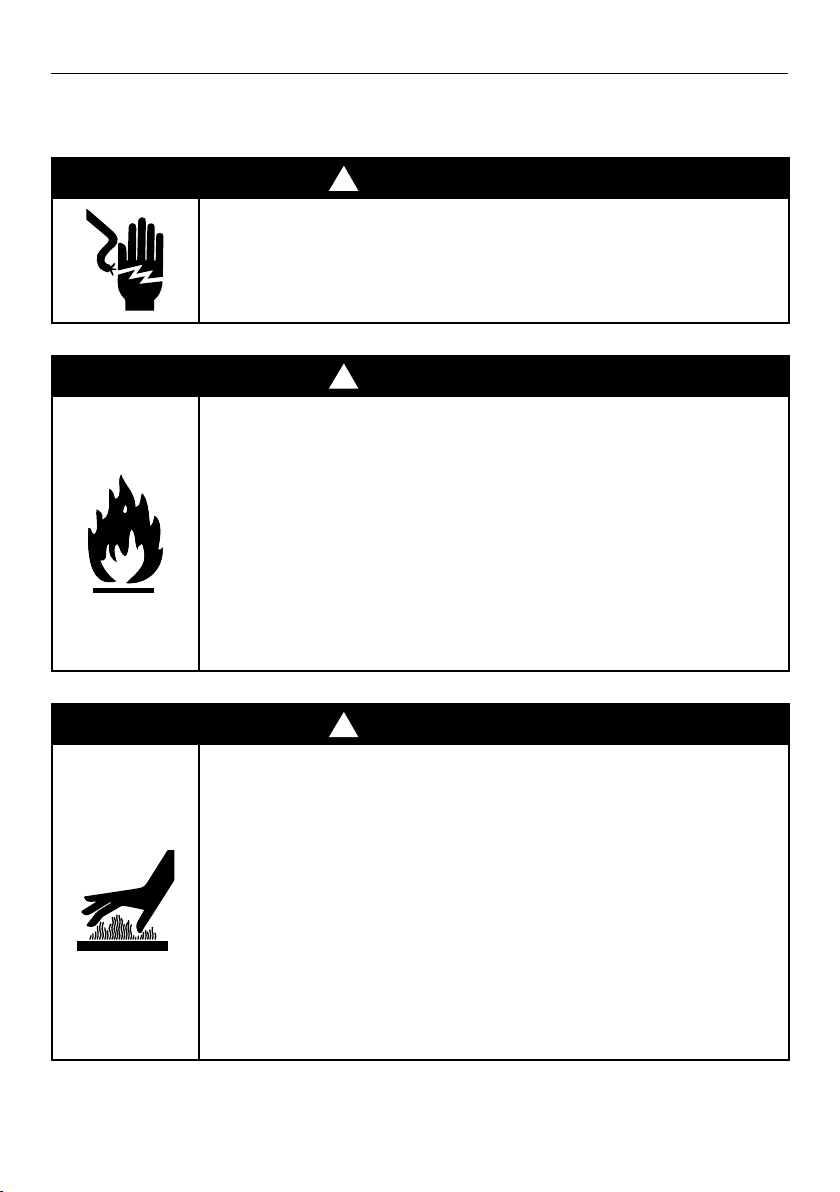
!
WARNING!
ELECTRIC SHOCK HAZARD
Turn the oven off at the wall before replacing the oven lamp.
Failure to follow this advice may result in electric shock or death.
!
WARNING!
FIRE HAZARD
Carefully follow the instructions for starting a Self Clean cycle.
Do not place combustible materials (eg wood, fabric, plastic) in the
oven during a Self Clean cycle.
Do not place aluminium foil, dishes, trays, water or ice on the oven
floor during cooking, this will irreversibly damage the enamel.
Lining the oven with aluminium foil may cause fire.
Never use your appliance for warming or heating the room.
Persons could be burned or injured or a fire could start.
Flammable materials should not be stored in an oven or near
its surface.
Failure to follow this advice may result in overheating, burning,
and injury.
!
WARNING!
HOT SURFACE HAZARD
To avoid burns and scalds, keep children away from this appliance.
Surfaces of the appliance may become hot enough to cause burns.
Examples include the oven vent, the surface near the oven vent, and
the oven door.
Do not touch heating elements or interior surfaces of the oven.
Heating elements may be hot even though they are dark in colour.
Use protection when handling hot surfaces such as oven shelves
or dishes.
Use care when opening the oven door. Let hot air or steam escape
before removing or replacing food.
During and after use, do not touch, or let clothing or other
flammable materials contact heating elements or interior surfaces of
the oven until they have had sufficient time to cool.
Failure to follow this advice could result in burns and scalds.
SAFETY AND WARNINGS

3
SAFETY AND WARNINGS
!
WARNING!
CUT HAZARD
Take care — some edges are sharp.
Failure to use caution could result in injury or cuts.
IMPORTANT SAFETY INSTRUCTIONS
Read this user guide carefully and keep for future reference.
WARNING!
Do not attempt to operate this oven with the door open. Keep the door closed to
prevent harmful exposure to microwave energy.
Do not place any object between the oven front face and the door, or allow food or
cleaner residue to accumulate on sealing surfaces.
Do not operate the oven if it is damaged. Ensure the oven door is closed properly
and there is no damage to the:
– Door (bent)
– Hinges and latches (broken or loosened)
– Door seals and sealing surfaces.
Ensure the oven is adjusted or repaired only by a Fisher & Paykel trained and
supported service technician.
if the door or door seals are damaged, do not operate the oven until it has been
repaired by a Fisher & Paykel trained and supported service technician.
Follow the basic precautions to reduce the risk of fire, electric shock, injury to persons
or exposure to excessive microwave oven energy when using your appliance.
Installation
This appliance is intended to be used for normal personal, family or household use.
This is a built-in oven intended to be installed in a cavity only.
Ensure that all the packing materials are removed from the inside of the door.
DO NOT use the oven outdoors.
Check the oven for any damage, such as misaligned or bent door, damaged door seals
and sealing surface, broken or loose door hinges and latches and dents inside the
cavity or on the door. If there is any damage, do not operate the oven and contact a
Fisher & Paykel trained and supported service technician.
This microwave oven must be placed on a flat, stable surface to hold its weight and
the heaviest food likely to be cooked in the oven.
Do not place the oven where heat, moisture or high humidity are generated or near
combustible materials.

4
SAFETY AND WARNINGS
Electrical
Never unplug your appliance by pulling on the power cord. Always grip the plug
firmly and pull straight out from the outlet.
Do not plug in any other appliance at the same power point as your appliance or
use extension cords or double adapters or ungrounded (two prong) adapters.
If the power supply cord is damaged, it must only be replaced by a
Fisher & Paykel trained and supported service technician.
All electrical repairs must be carried out by a Fisher & Paykel trained and
supported service technician or qualified electrician in order to avoid a hazard.
Ensure that the appliance is switched off before replacing the lamp to avoid the
possibility of electric shock.
It is hazardous for anyone other than a Fisher & Paykel trained and supported
service technician or qualified electrician to carry out any service or repair
operation that involves the removal of a cover which gives protection against
exposure to microwave energy.
Disposal/Recycling
The packaging materials for this appliance are recyclable.
Operation
Do not use the cavity for storage purposes. Do not leave paper products,
cooking utensils or food in the cavity when not in use.
Watch cooking time. Cook for the shortest amount of time indicated and add
more as needed.
Do not operate your appliance by means of an external timer or separate remote
control system.
Always position the shelves in the desired location while the oven is cool
(before preheating). If a shelf must be removed while the oven is hot, do not let
the oven mitts or potholder contact hot heating elements in the oven or the base
of the oven.
Food Safety
Use only utensils that are suitable for use in ovens.
Be fire wise. Switch off or unplug the appliance and keep the door closed if
smoke is observed in order to stop any flames.
Do not heat unopened food containers. They can build up pressure that may
cause the container to burst and result in injury.
Food severely overcooked can smoke or ignite.
Cover food items while cooking. Covers prevent spattering and help food items
to cook evenly.
Child Safety
Keep the appliance and its cord out of reach of children aged less than 8 years.
Ensure that children (aged 8 years and above) and persons with reduced
physical, sensory or mental capabilities or lack of experience and knowledge can
only use the appliance if they are supervised or have been given instruction on
how to use the appliance safely and understand the hazards involved.
Never allow children to play with the appliance.

5
IMPORTANT!
Ensure that your oven is regularly cleaned to avoid damage to its surface that can
result in hazards or potential injury.
Cleaning
Clean the oven regularly and remove any food deposits. Failure to maintain the oven
in a clean condition could lead to deterioration of the surface that could adversely
affect the life of the appliance and possibly result in a hazardous situation.
Do not clean the appliance with a steam cleaner.
Always unplug the appliance from the power supply before cleaning.
Clean the cavity of the oven after using with a slightly damp cloth.
Clean the accessories with soapy water.
The door frame, seal and neighbouring parts must be regularly cleaned with a
damp
cloth.
Do not use harsh abrasive cleaners or sharp metal scrapers to clean the oven door
glass, this may scratch the surface which may result in shattering of the glass.
SAFETY AND WARNINGS
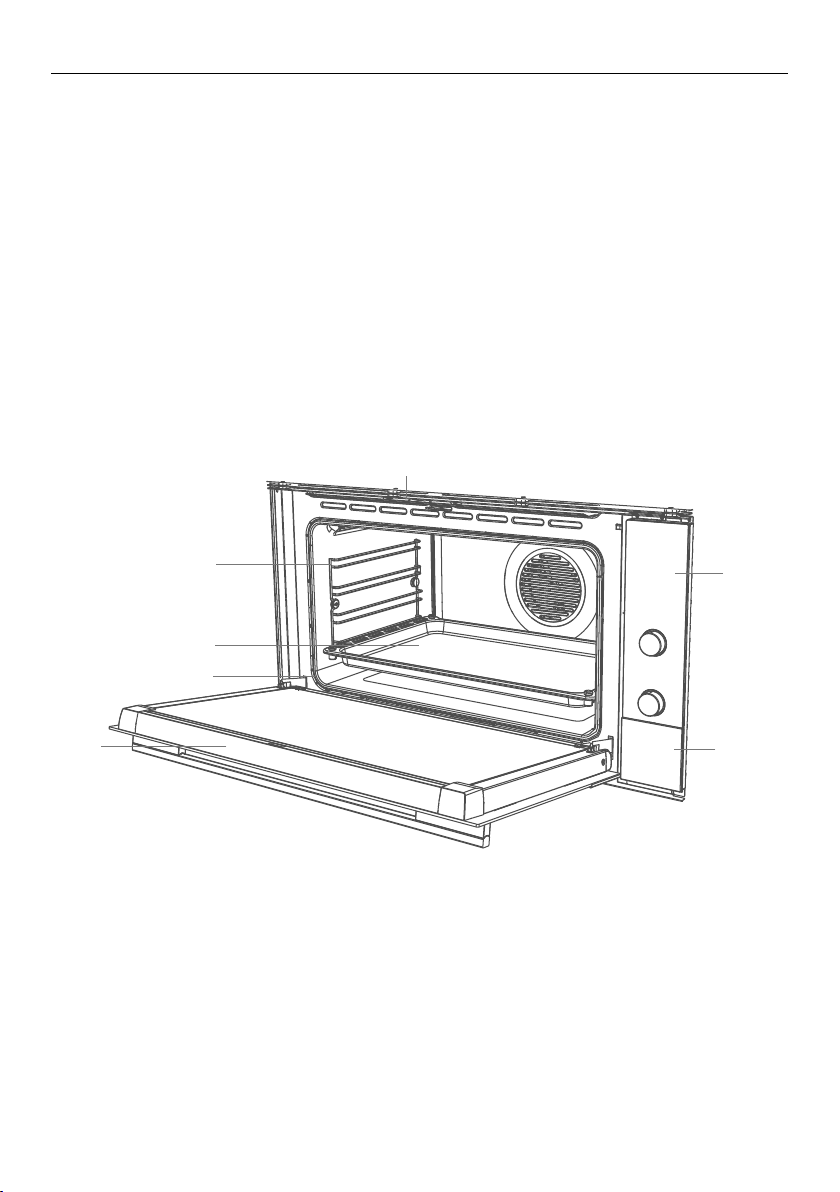
6
1 Oven vent louvres
2 Control panel
3 Stainless steel strip
4 Side racks
5 Grill tray and rotisserie
6 Oven door and handle
7 Oven seal
2
4
3
5
6
7
1
Congratulations on your new purchase. Your oven has a number of features to make
cooking a great experience for you:
a choice of nine oven functions, including Rotisserie (optional and can be purchased
separately as a kit)
intuitive electronic controls and displays
illuminated halos around the dials for visual feedback
preference settings — see ‘User preference settings’ and ‘Sabbath setting’.
Before you start
Make sure the installer has completed the ‘Final checklist’ in the Installation instructions.
Read this guide, taking special note of the ‘Safety and warnings’ section.
Remove all the packaging and check that you have all the accessories listed below.
Make sure you follow the instructions under ‘Setting the clock and first use’ before
using your oven for cooking or baking.
Not illustrated:
Baking tray
Step-down oven shelf
Oven shelf
Grill rack
INTRODUCTION
7
-
+
CONTROL PANEL
Locking the control panel
You can lock the control panel to prevent unintended use (eg children playing with
theoven). Doing so will disable the dials and all the buttons.
To lock the control panel
1 Make sure the oven is not in use (the function dial is turned to Off) and neither
automatic cooking nor the timer is set (no indicator is lit in the display).
2 Press and hold the select
-
+
-
+
-
+
button until the lock indicator
-
+
comes on.
To unlock the control panel
Press and hold the cancel
-
+
-
+
-
+
button until the lock indicator
-
+
flashes and then goes out.
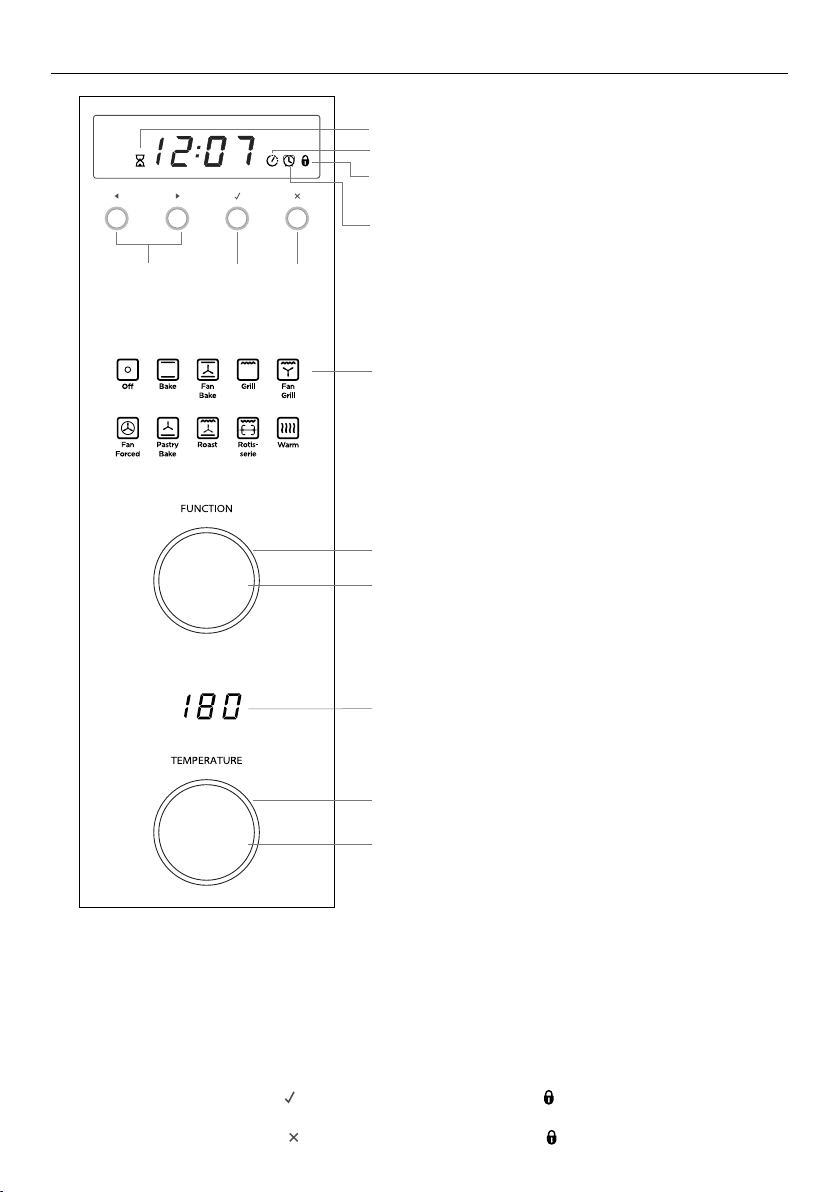
Cooking time indicator (see ‘Automatic cooking’)
Stop time indicator (see ‘Automatic cooking’)
Control lock indicator (see ‘Locking the control panel’).
Function indicators (see ‘Oven functions’)
Function dial (see ‘Using your oven’)
Function dial halo
Temperature dial halo
Temperature dial (see ‘Using your oven’)
Temperature indicator
Scroll Select Cancel
Timer indicator (see ‘Using the timer’)
8
FIRST USE
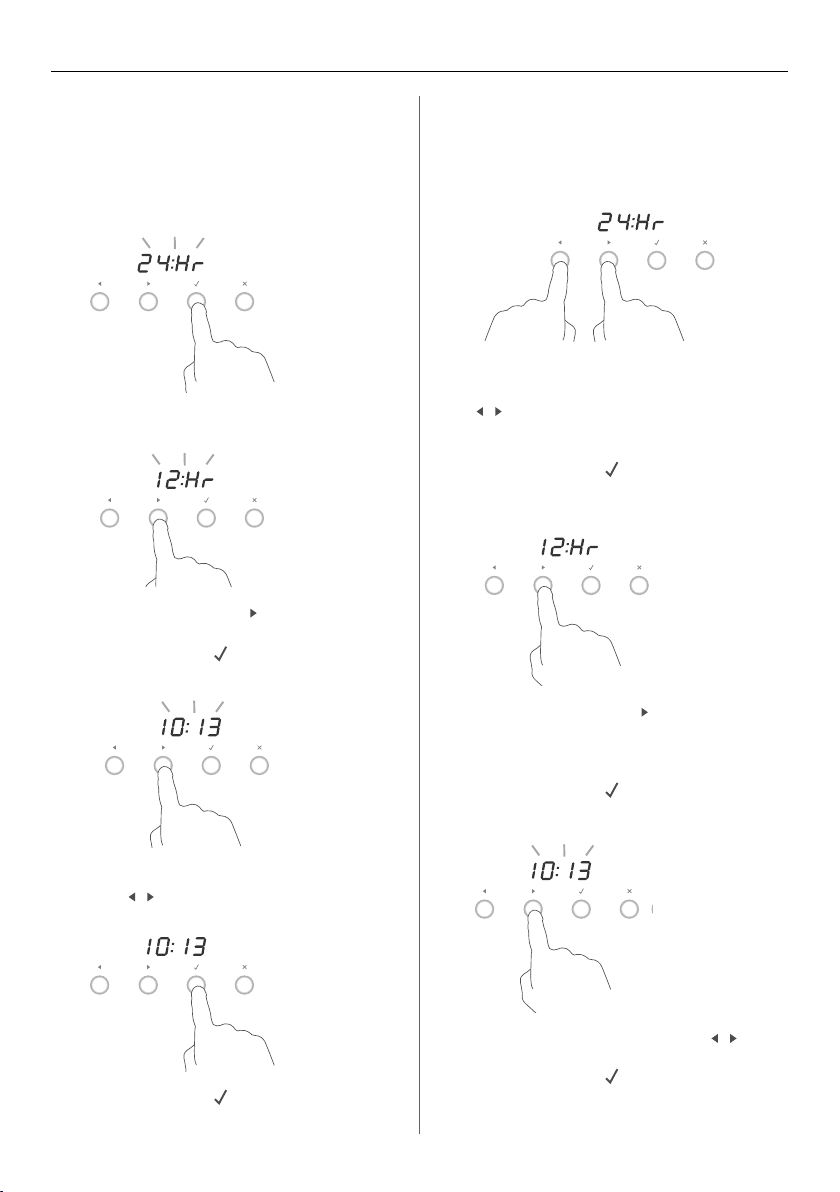
Setting the clock
When your oven is first turned on, or
after a power cut, the display will flash.
You will need to set the clock in order
to use the oven.
1 The display will flash 24 Hr.
4 Press the left and right
scroll
-
+
-
+
-
+
-
+
-
+
-
+
buttons to set the time.
2 Press the right scroll
-
+
-
+
-
+
button to scroll
between 24 Hr and 12 Hr
3 Press the select
ERUTAREPMETNOITCNUF
button to confirm.
5 Press the select
ERUTAREPMETNOITCNUF
button to confirm.
The time set will now be steadily lit.
Changing the time
Set the clock within the user
preference menu.
5 Press the left and right scroll
-
+
-
+
-
+
-
+
-
+
-
+
buttons to set the time.
6 Press the select
ERUTAREPMETNOITCNUF
button to confirm.
3 Press the right scroll
-
+
-
+
-
+
button to scroll
between 24 Hr, 12 Hr or OFF to
turn the display off (see ‘Setting User
preferences’ for more information).
4 Press the select
ERUTAREPMETNOITCNUF
button to confirm.
1 To enter the user preference menu,
press and hold the left and right scroll
-
+
-
+
-
+
-
+
-
+
-
+
buttons together for 3 seconds.
The display will either flash 12 Hr
or 24 Hr
2 Press the select
ERUTAREPMETNOITCNUF
button to confirm.
The display will flash.
9
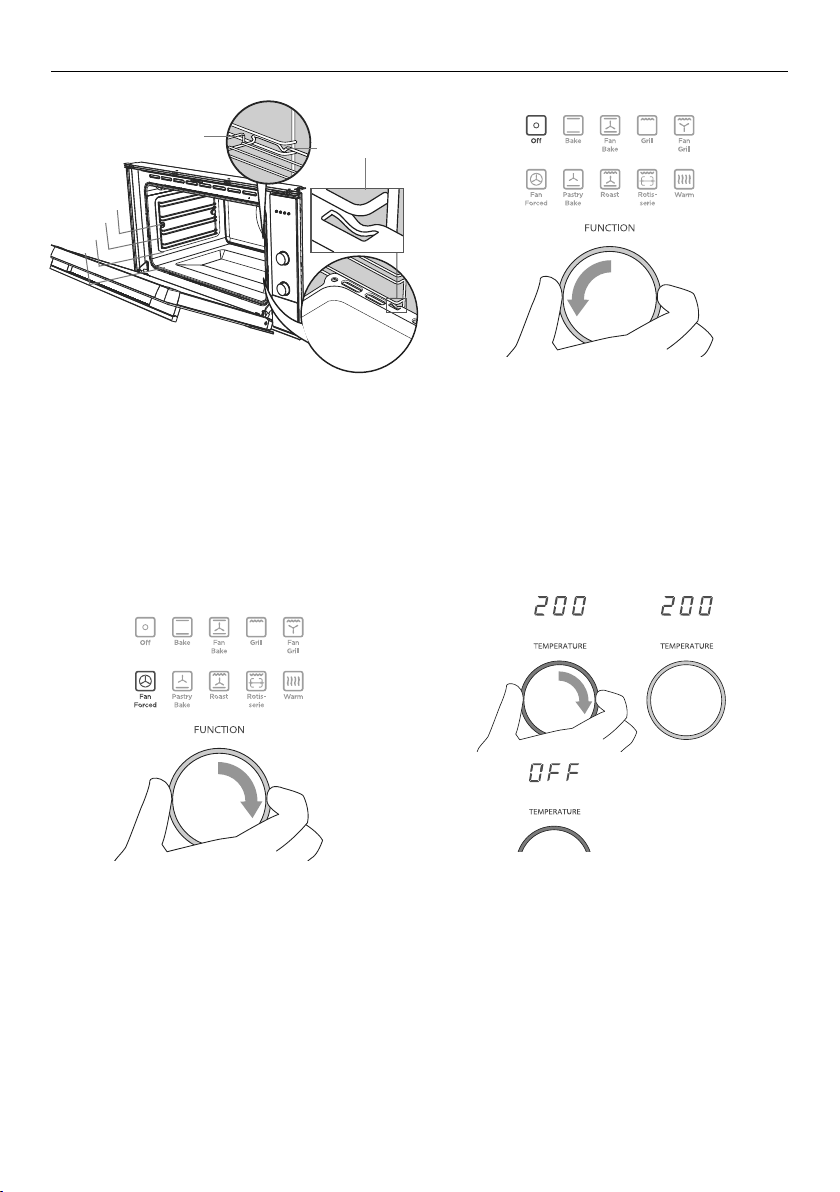
3 Set the temperature.
While the oven is heating up, the halo
will glow red and the temperature
indicator will alternately show the
actual and settemperatures.
When the oven has reached set
temperature, a long tone will sound
and the halo will turn white.
Note: Grill provides instant radiant heat,
so the halo will stay red and there will be
no tone.
-
+
-
+
-
+
2 Select a function.
The halo will glow white.
-
+
-
+
-
+
4 When you have finished
cooking, turn the function
dial to Off.
-
+
-
+
-
+
- - - - - -
-
+
-
+
-
+
1 Insert the shelves that you need.
Ensurethat,
they are between two wires of a
shelfposition
the stop notches point down
the guard rail is at the back.
Note: The grill tray should be positioned
between the two wires of a shelf
position and orientated as shown.
Shelf
positions
Guard rail
Stop notch
1
2
3
4
USING YOUR OVEN
10
OVEN FUNCTIONS
-
+
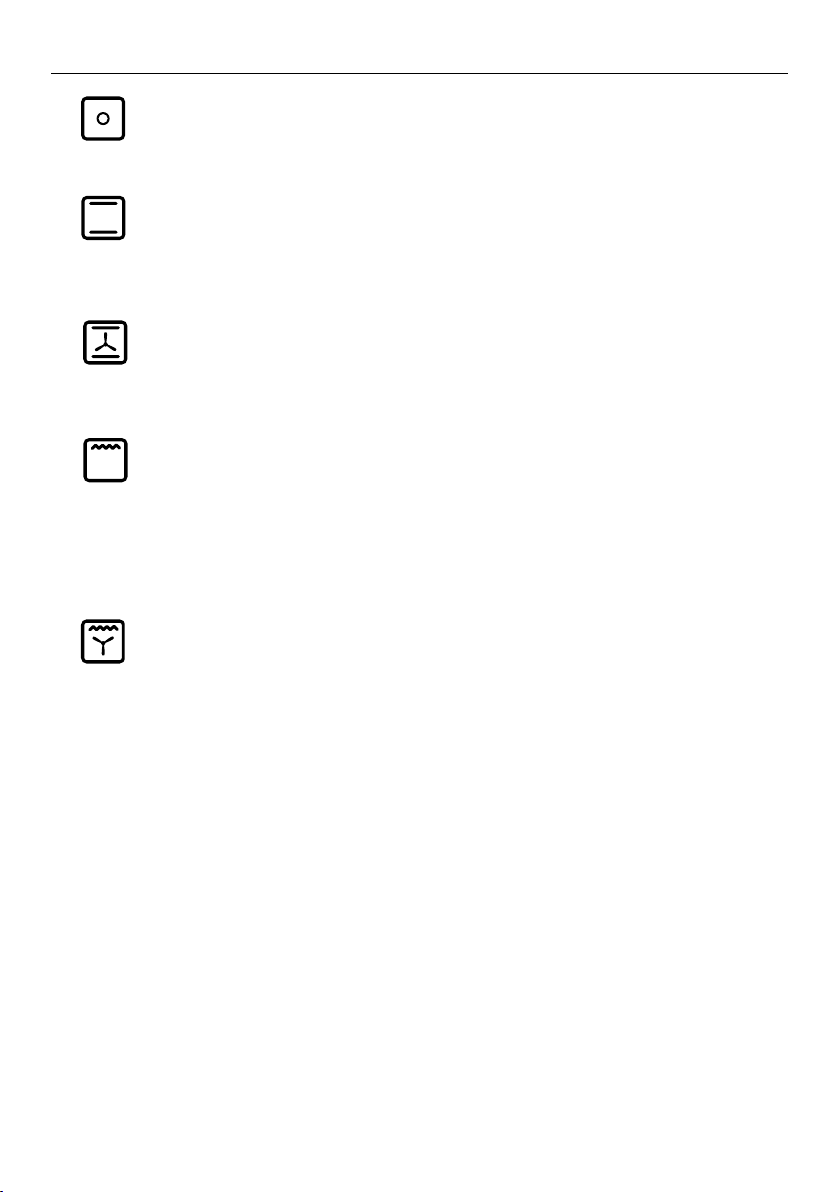
Off
Selecting this will turn the oven off.
-
+
Bake
This is the traditional method of baking. It is best to bake on only one shelf at a time in
this function. Ideal for large cakes and dishes that bake for several hours.
-
+
Fan Bake
Ideal for dishes like lasagne that need to brown on top and also single trays of small
cakes or biscuits that bake in less than an hour.
-
+
Grill
Grill is the most suitable function for ‘finishing off’ many meals, for example browning
the top of potato gratin and frittata. Use Grill to toast bread or to grill your favourite
chicken, fish and steak. Note: heat levels are from LO (50% power) to HI (100%power),
with settings from 1 to 9 in between. Grill provides instant radiant heat, so the
temperature dial halo will stay red.
-
+
Fan Grill
Ideal for roasting tender cuts of meat and poultry. Use the lower shelf positions for
larger items eg a whole chicken.
11
OVEN FUNCTIONS
-
+
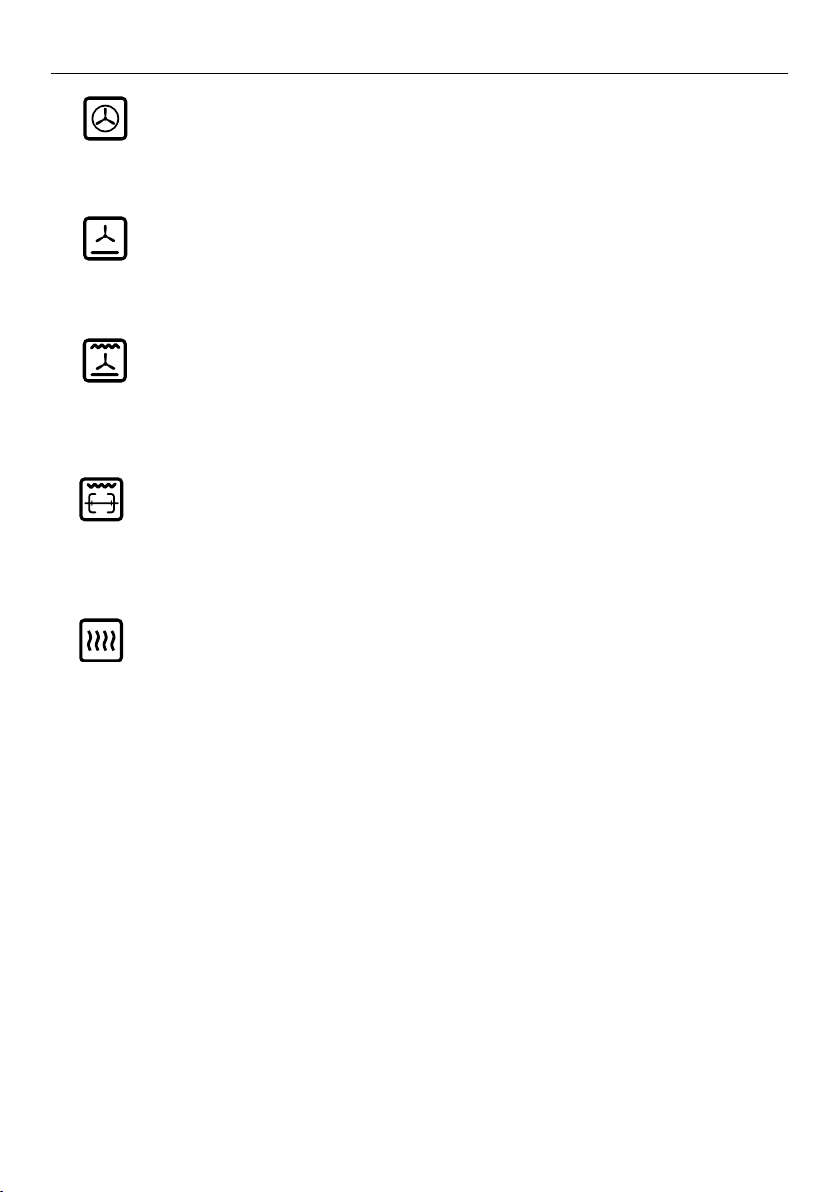
Fan Forced
Great for multi-shelf cooking. The consistent temperature ensures baking is well risen.
Cookies baked on Fan Forced are crisp on the outside and chewy in the middle.
-
+
Pastry Bake
Excellent for sweet and savoury pastry foods, for moist breads and brownies and
cookies that you want extra chewy.
-
+
Roast
No pre-heating of the oven required. The meat is seared during an initial 20-minute
grilling stage, then baked at the set temperature for the rest of the time, producing a
tender, juicy, and flavourful roast. Great for roasting vegetables too.
-
+
Rotisserie (optional)
Rotisserie is a delicious way to cook meat and poultry. The slowly rotating food is
basted continuously in its own juices, making it tender on the inside and well browned
and full of flavour on the outside. See ‘Using the rotisserie’.
-
+
Warm
Use this function to keep cooked food hot and to warm plates and serving dishes.
To reheat food from cold, use a cooking function at 150°C, then switch to Warm set
between 70-90°C only when the food is piping hot. Note: this function is not for
cooking food and the temperature cannot be set higher than 90°C.
This function is also ideal for proving bread dough. Set the temperature to 40 °C.
12
USING THE ROTISSERIE
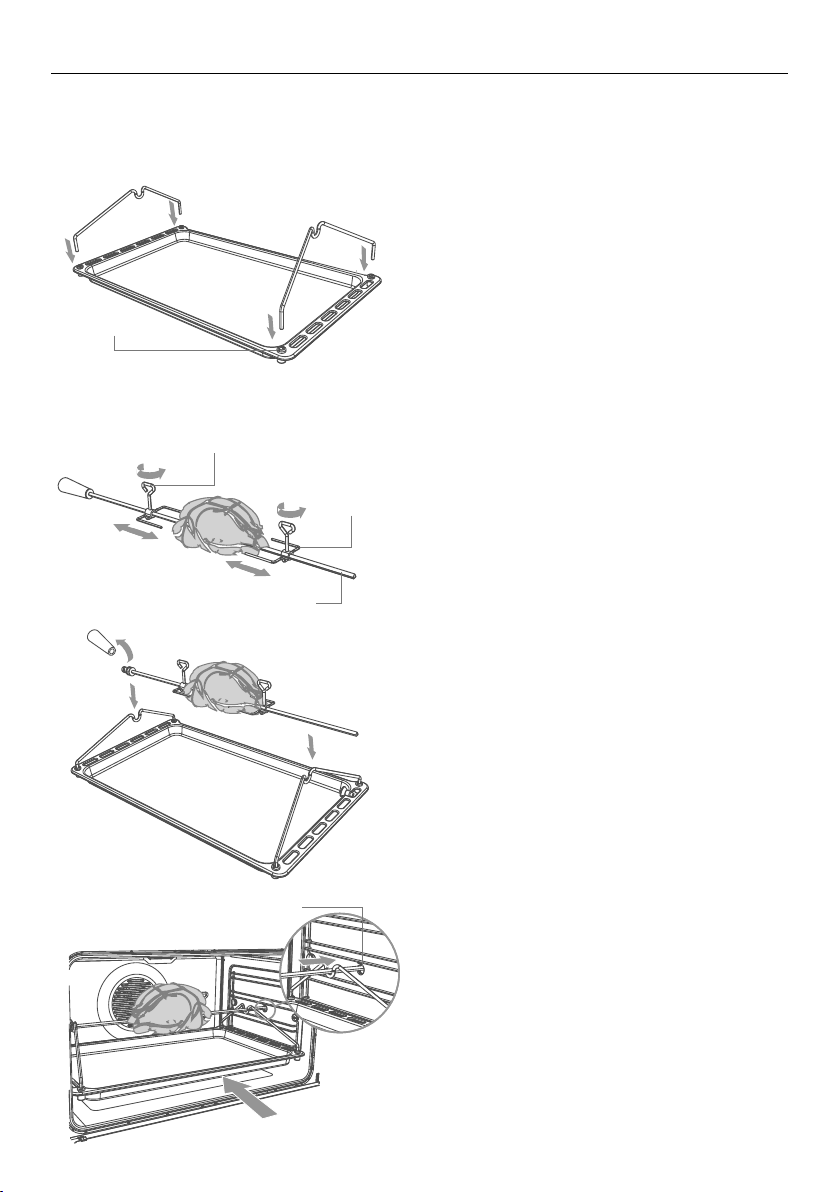
Lock stud
Rotate the fork screws to
loosen and tighten
Fork
Skewer
Rotisserie drive hole
IMPORTANT!
If you want to use the rotisserie, a rotisserie kit is available separately for purchase.
Contact your dealer for availability.
1 Prepare the rotisserie supports.
Place the grill tray on the benchtop.
Insert the supports into the lock
studs making sure the supports
faceinwards.
Push the supports all the way down
to lock them in firmly.
2 Secure the meat. Slide one fork onto
the skewer first, followed by the meat
and the the second fork.
IMPORTANT!
Take care, the forks are sharp!
When securing the meat, ensure that:
the skewer goes through the centre
of the meat
the forks hold the meat firmly in
place
the fork screws are tightened
there are no loose or projecting
parts. Poultry should be trussed.
Note: the rotisserie can rotate up to
6kg of meat.
3 Position the skewer on the supports.
Place the skewer on the supports,
and check that the meat does not
touch the grill tray.
Twist the handle off. It must not be
left in the oven.
4 Place the rotisserie in the oven.
Slide the grill tray all the way to the
back on shelf position 1.
Push the skewer through the hole
cover on the right-hand wall of the
oven, then insert it fully into the
rotisserie drivehole.
13
USING THE ROTISSERIE
When you have finished using the rotisserie
1 Turn the oven off.
2 Using oven mitts, carefully disengage the right end of the skewer from the
rotisseriedrive hole.
3 Slide out the grill tray and place it on a heat-resistant surface.
4 Twist the handle onto the left end of the skewer.
5 Lift the skewer off the supports by the handle.
6 Loosen the fork screws and slide the meat off the skewer.
Tips for using the rotisserie
For food safety reasons, we do not recommend using the rotisserie with stuffed meat.
If your meat is too big or heavy (over 6 kg) for the skewer, place it on top of the grill
rack in the grill tray, and use Fan Forced. This function will give a result similar to
arotisserie.
Use a meat thermometer to ensure that meat is cooked through to a safe temperature.
See ‘Care and cleaning’ for advice on cleaning the rotisserie parts.
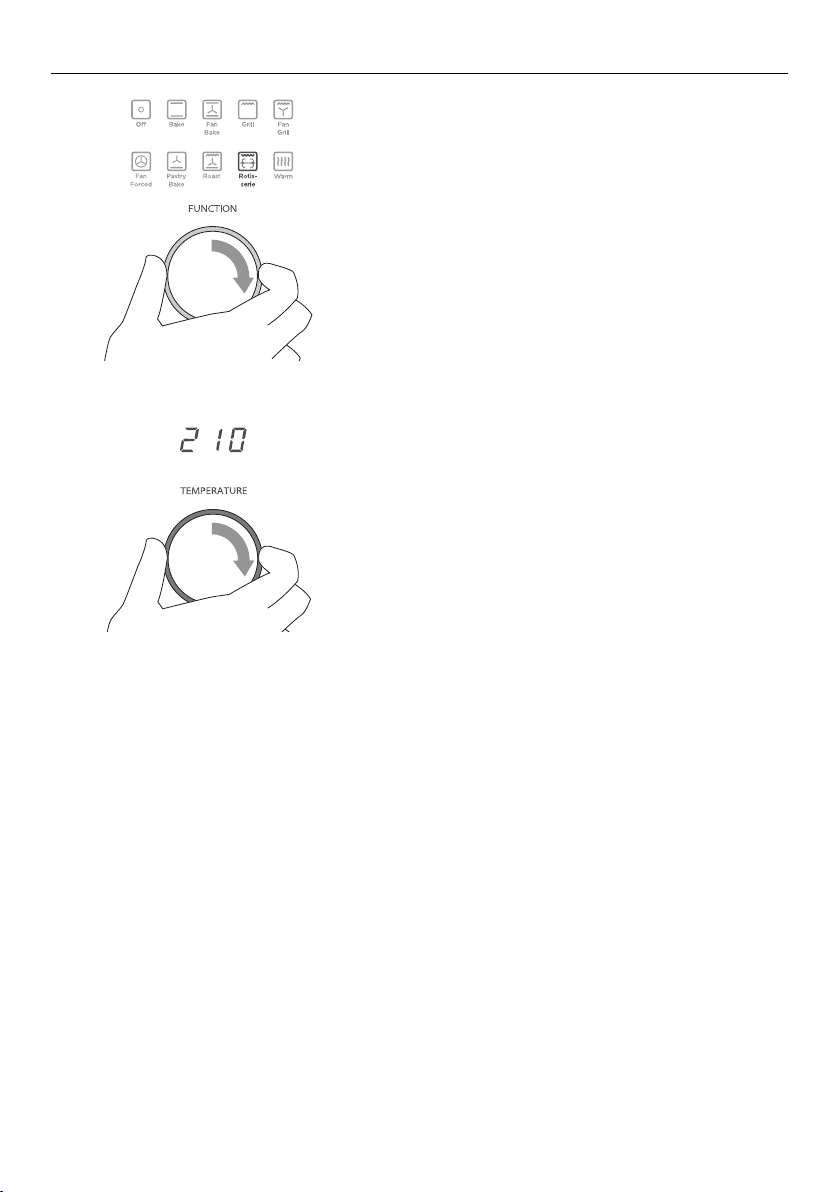
5 Select the Rotisserie function.
The skewer will start rotating.
Check that the meat does not touch
the grill tray or the grill element at
the top of the oven.
6 Set the temperature.
We recommend around 210 °C.
Note: The rotisserie will not rotate
when the oven door is open.
-
+
-
+
-
+
-
+
-
+
-
+
14
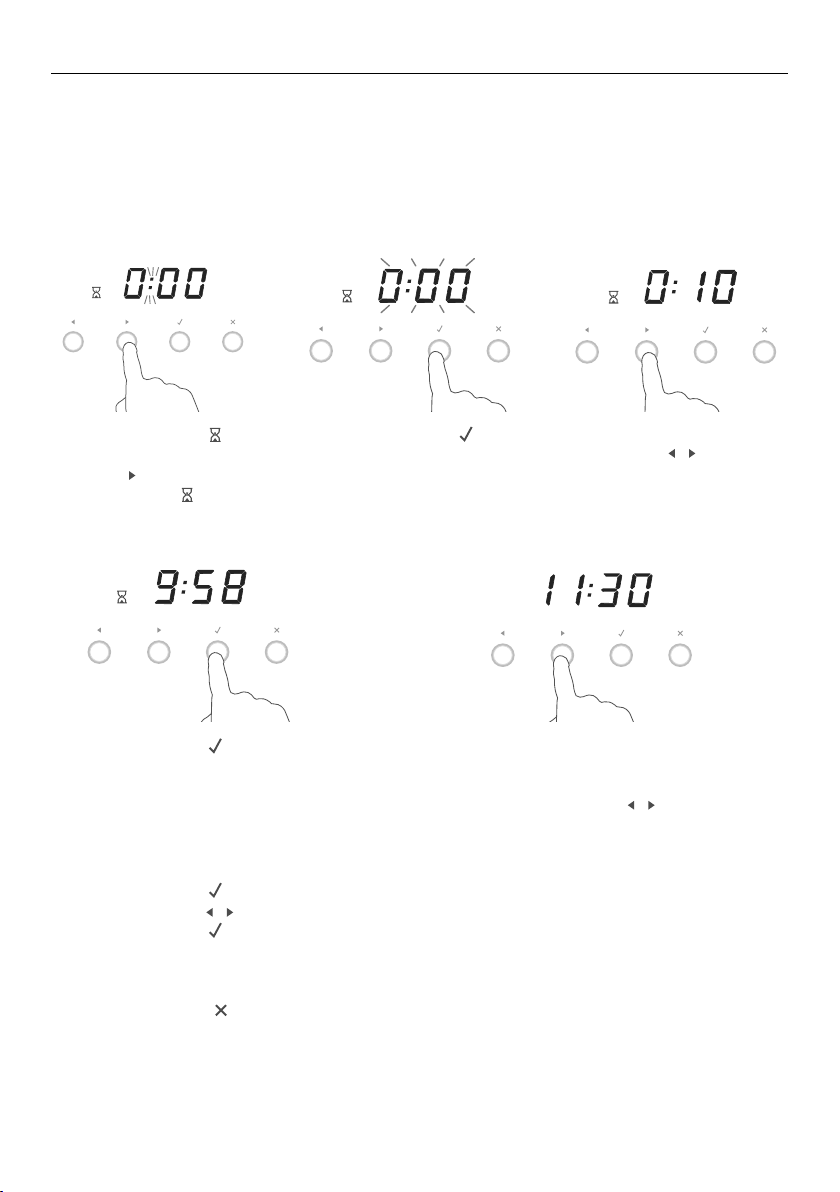
USING THE TIMER
You can use the timer at any time even if you are not using the oven.
If the time is more than an hour, the display will count down in minutes (hr:min).
If it is less than an hour, it will count down in seconds (min:sec).
You can set the timer for up to 23 hours 59 minutes.
IMPORTANT!
The timer does NOT turn the oven off.
1 Select the timer
-
+
-
+
-
+
bypressing the right
scroll
-
+
-
+
-
+
button once.
The timer
-
+
-
+
-
+
indicator
will appear and the
colon will flash.
3 Set the time by pressing
the scroll
-
+
-
+
-
+
-
+
-
+
-
+
buttons.
Holding the buttons
down will speed up
thescrolling.
-
+
-
+
-
+
5 If you want to check the time
of day, you can toggle between
this and the timer countdown by
pressing the scroll
-
+
-
+
-
+
-
+
-
+
-
+
buttons.
-
+
-
+
-
+
4 Press the select
ERUTAREPMETNOITCNUF
button to confirm.
The timer will then begin to
countdown.
2 Press the select
ERUTAREPMETNOITCNUF
button
to confirm.
The display will flash
to indicate the timer
is ready to be set.
-
+
-
+
-
+
-
+
-
+
-
+
-
+
-
+
-
+
To modify the timer setting
1 Ensure the display shows the remaining time counting down.
2 Press the select
ERUTAREPMETNOITCNUF
button.
3 Press the scroll
-
+
-
+
-
+
-
+
-
+
-
+
buttons to set a new time.
4 Press the select
ERUTAREPMETNOITCNUF
button to confirm.
To cancel the timer setting
1 Ensure the display shows the remaining time counting down.
2 Press the cancel
ERUTAREPMETNOITCNUF
button until the display shows the time of day and the timer
-
+
-
+
-
+
indicator disappears.
When the set time is up
The display will show 0:00 and a tone will sound every 15 seconds.
Press any button to stop the tone sound. The display will revert to showing time of day.
15
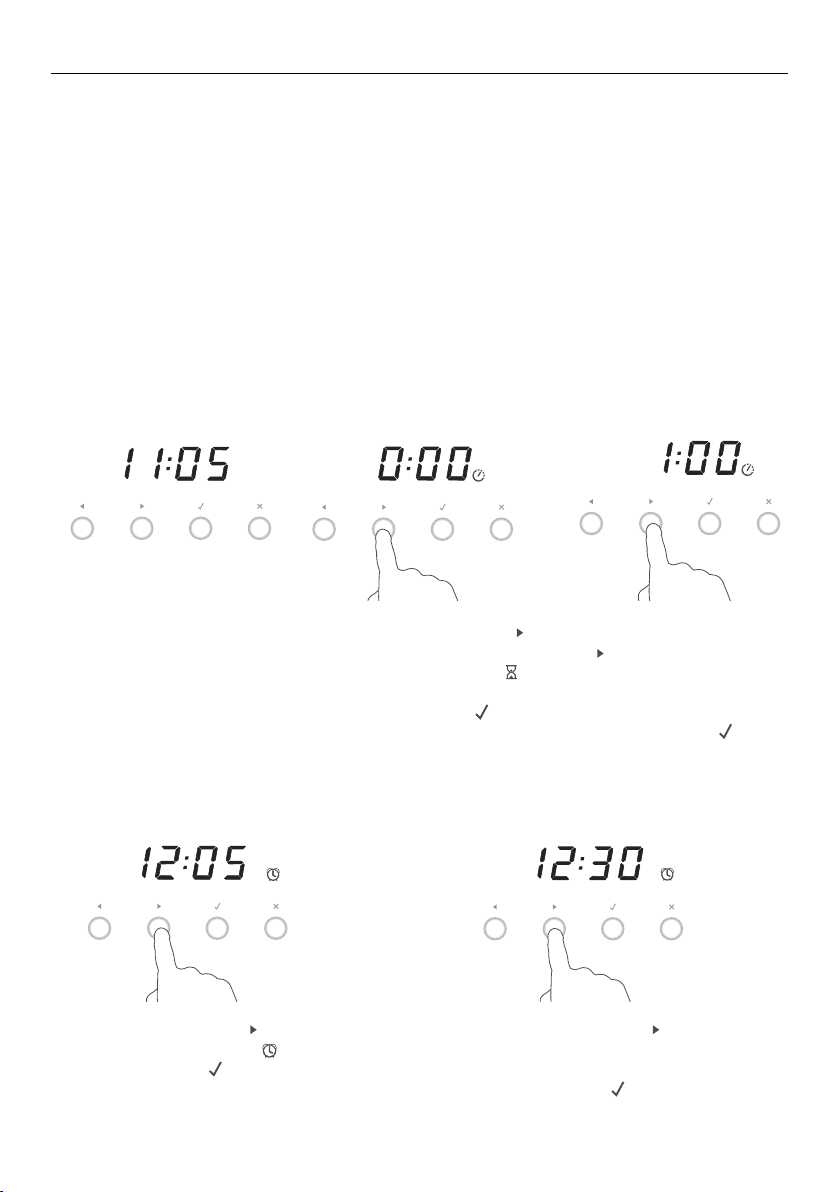
AUTOMATIC COOKING
You can set the oven to automatically turn on later, cook for a preset time
(cookingtime), then automatically turn off at a preset stop time. See the example
and instructions below (steps 1 to 7).
If you start cooking manually and only want the oven to turn off automatically
aftera set cooking time, simply set the cooking time following steps 1 to 3 below.
The oven will automatically turn off when the cooking time is over.
IMPORTANT!
Remove your food from the oven as soon as possible after cooking or defrosting.
This is to avoid contamination by organisms which may cause food poisoning.
Take particular care during warmer weather.
Example: It is 11:05 am. You want your food to cook for 1 hour, and you would like
itto be ready by lunchtime (12:30 pm).
Set the cooking time
Set the stop time
-
+
-
+
-
+
-
+
-
+
-
+
-
+
-
+
-
+
-
+
-
+
-
+
-
+
-
+
-
+
1 Check the clock shows
the correct time of day.
6 Press the right scroll
-
+
-
+
-
+
button once to
scroll to the stop time
-
+
-
+
-
+
indicator.
7 Press the select
ERUTAREPMETNOITCNUF
button to confirm.
4 Press the right scroll
-
+
-
+
-
+
button to set the
cooking time. Ensureyou
allow for preheat time in
yourcalculation.
5 Press the select
ERUTAREPMETNOITCNUF
button
to confirm.
2 Press the right scroll
-
+
-
+
-
+
button twice to scroll
to the cooking time
-
+
-
+
-
+
indicator.
3 Press the select
ERUTAREPMETNOITCNUF
button to confirm.
8 Press the right scroll
-
+
-
+
-
+
button to set
the time you would like your food to
be ready by (ie the stop time).
9 Press the select
ERUTAREPMETNOITCNUF
button to confirm.
16
AUTOMATIC COOKING
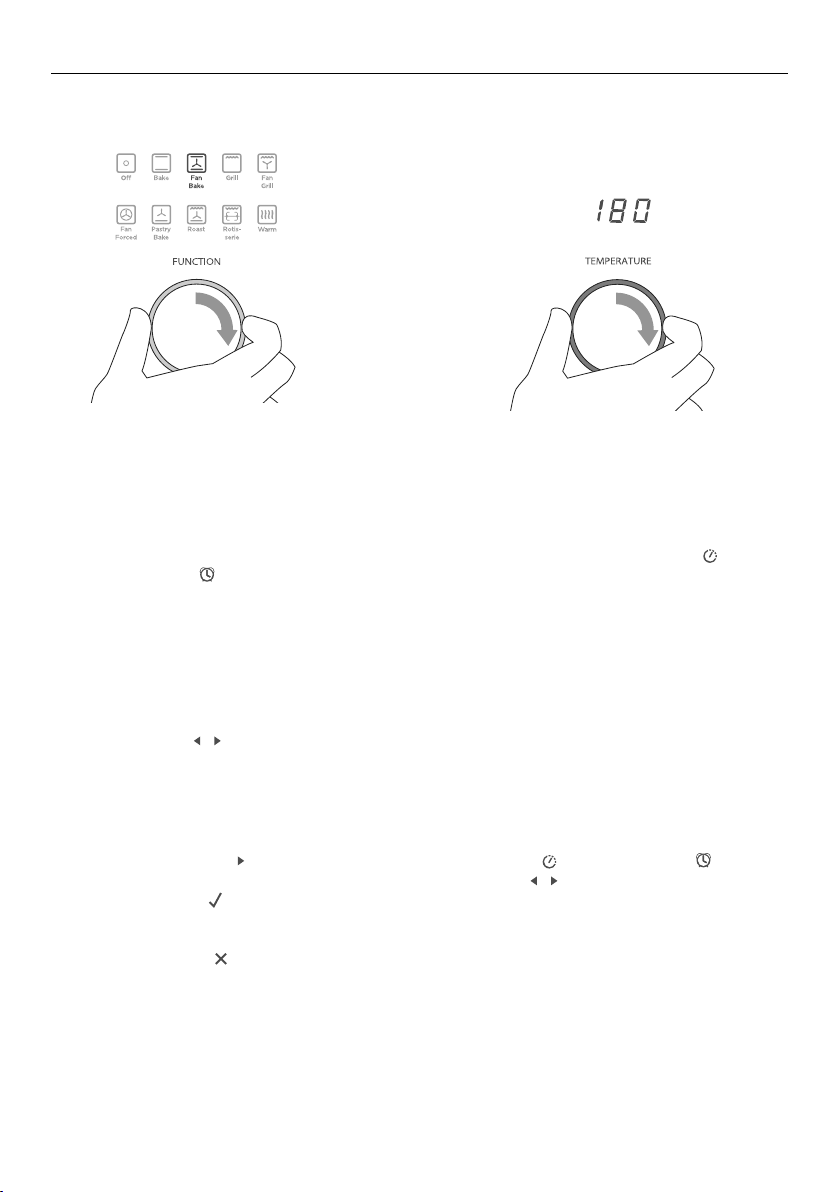
!1 Set the temperature.
When automatic cooking is set
The oven and the lights will stay off, the halos will be unlit, but your oven is now set
forautomatic cooking. It will automatically turn on at the required time.
In a few seconds, the display will show the time of day with the cooking time
-
+
-
+
-
+
andstop time
-
+
-
+
-
+
indicators lit.
Note: you can modify the function and temperature while the oven is waiting to
startcooking.
When the stop time is reached
The oven will automatically turn off and a long tone will sound.
To check the set cooking time and stop time
Use the scroll
-
+
-
+
-
+
-
+
-
+
-
+
buttons.
To cancel automatic cooking
Turn the function dial to Off.
To change the cooking or stop time
Use the right scroll
-
+
-
+
-
+
button to scroll to the cooking time
-
+
-
+
-
+
or the stop time
-
+
-
+
-
+
, press
to select the one you want to change and use the scroll
-
+
-
+
-
+
-
+
-
+
-
+
buttons to change the time.
Press the select
ERUTAREPMETNOITCNUF
button to confirm.
To see the current time of day
Press the cancel
ERUTAREPMETNOITCNUF
button.
!0 Select a function.
Select function and temperature
-
+
-
+
-
+
-
+
-
+
-
+

17
COOKING CHART
Note:
The settings in the following chart are guidelines only. Follow the instructions in your
recipe or on food packaging and be prepared to adjust the oven settings and baking
times to achieve the best possible results for you.
Shelf positions are counted from the base up (1 is the lowest, 4 the highest).
Arrange oven shelves before you turn the oven on, then preheat the oven to the
required temperature. Place items in the oven only when the long tone has sounded
andthe temperature dial halo has turned from red to white.*
Single shelf positions below use the flat oven shelf; where a multi shelf arrangement
isrecommended, the higher position uses the step-down shelf.
Due to the width of the oven, a single shelf can usually accommodate double the
standard recipe.
FOOD ARRANGEMENT
SHELF
POSITION(S)
BEST
FUNCTION
TEMP
(
O
C)
TIME
Small cakes single shelf 2 Bake 180-190 13-17 mins
multi shelf 1 and 3 Fan Forced 160-170 16-23 mins
Scones single shelf 2 Fan Forced 210-230 8-12 mins
multi shelf 1 and 3 Fan Forced 210-230 8-16 mins
Sponge 2 small pans (20 cm),
on single shelf
2 Bake 170-190 25-35 mins
1 large pan (26 cm) 2 Bake 175 30-40 mins
Light fruit cake 2 pans (21 cm),
onsingle shelf
2 Bake 155-165 1 hr 30 mins
Rich fruit cake exact baking time
will depend on size
2 Bake 130-150 3-6 hrs
Apple pie single shelf 1 Bake 185 35-45 mins
Quiche single shelf 1 Bake 180-200 30-40 mins
Meringues single shelf 1 Bake 100-120 1 hr
Bread rolls single shelf 1 Bake 210-230 15-20 mins
Muffins 2 x 12 muffin trays
on single shelf
3 Fan Forced
or Fan Bake
190-200 10-15 mins
Pastry case
(baked ‘blind’)
1 flan tin (21 cm) 1 or 2 Pastry Bake 200 10 mins with beans,
then 10mins without
Roast Chicken Rotisserie 1 Rotisserie 210 20-30 mins/
450gms
Roast beef
(boneless)
single shelf 1 or 2 Roast 160-170 35-40 mins/
450gms
Lasagna single shelf 2 Fan Bake 175-180 40-50 mins
* Note: the colour change and tone may occur some time after the set temperature has been reached.
Thisis because—when heating up from cold—your oven is designed to initially heat to a temperature
somewhat higher than what you have set. This is to provide optimal baking conditions right from the start.
18
USER PREFERENCE SETTINGS
You can set your oven to:
display the temperature in degrees Celsius or Fahrenheit
give audio feedback (tones and beeps) or operate quietly
display time as 12-hr or 24-hr
operate with the display off
have its lights on or off during cooking
operate in Sabbath setting (see ‘Sabbath setting’ following).
Note: you cannot change user preference settings when the oven is set for
automaticcooking.
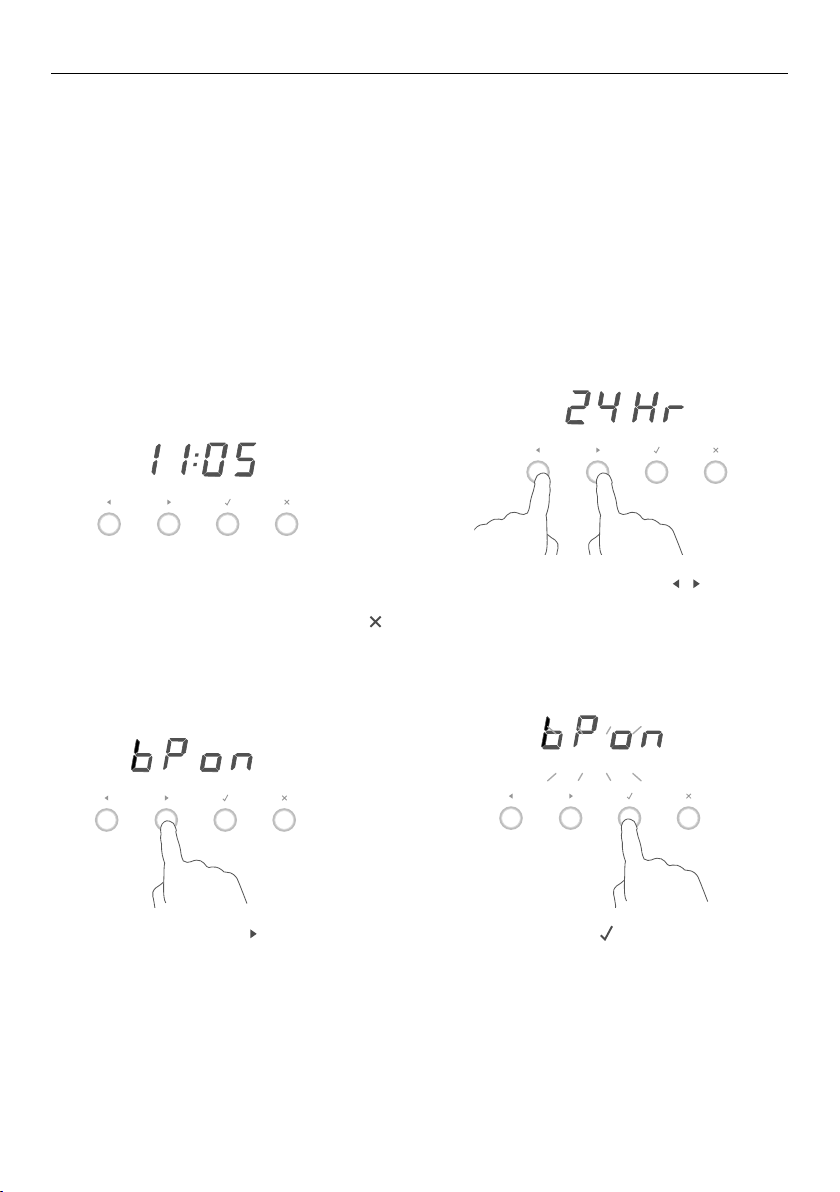
How to change preference settings
1 Check the display shows the time of
day and the function dial is set to OFF.
If you’re unsure, press the cancel
ERUTAREPMETNOITCNUF
button twice.
3 Press the right scroll
-
+
-
+
-
+
button to scroll
to the setting you want to change.
Refer to the table following.
4 Press the select
ERUTAREPMETNOITCNUF
button to select
the particular setting.
The display will flash.
2 Press and hold the scroll
-
+
-
+
-
+
-
+
-
+
-
+
buttons
together for 3 seconds to enter the
user preference menu.
-
+
-
+
-
+
-
+
-
+
-
+
-
+
-
+
-
+
-
+
-
+
-
+
-
+
-
+
-
+
19
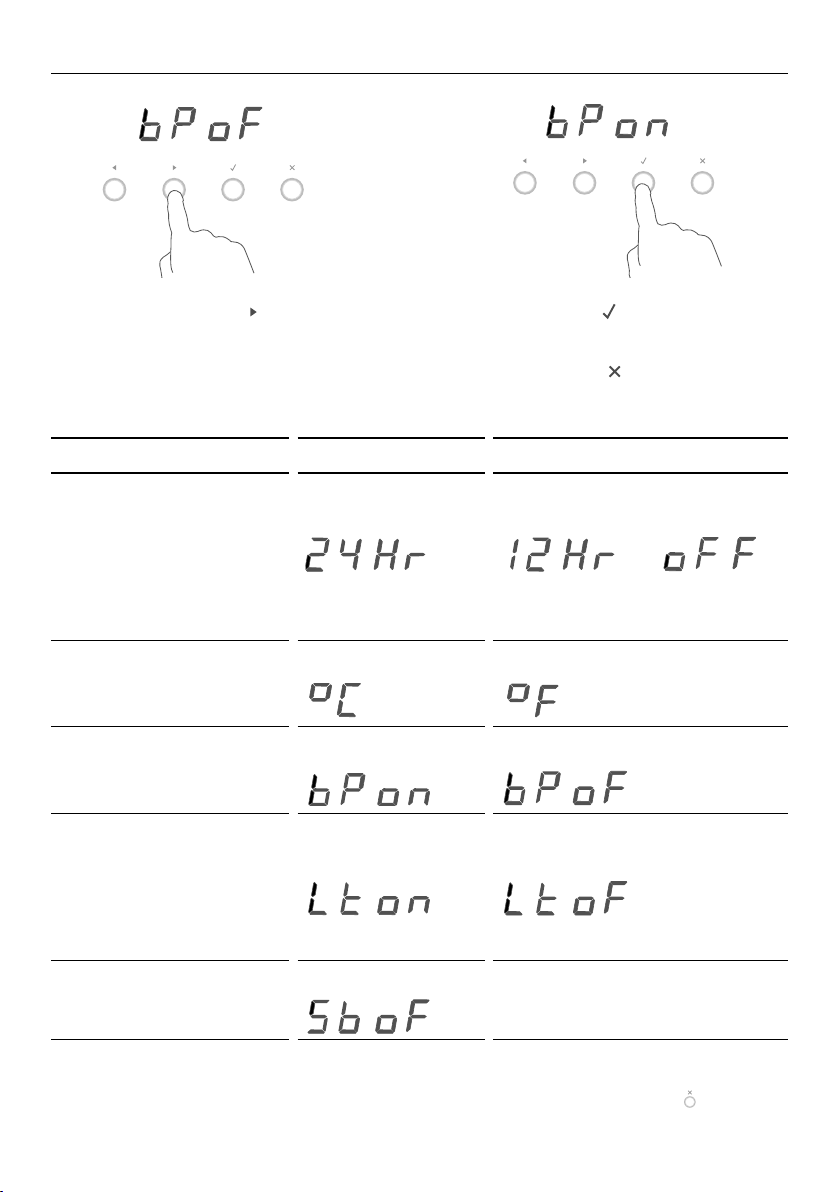
SETTING DEFAULT OPTION ALTERNATIVE OPTION(S)
TIME SCALE AND
‘DISPLAY OFF’ OPTION
Select between 24-hr or
12-hr clock display or
set ‘Display off’ option if
you only need the basic
functionalities of your oven
24 HR
-
+
-
+
-
+
12 HR
-
+
-
+
-
+
DISPLAY OFF **
-
+
-
+
-
+
TEMPERATURE SCALE
Select between degrees
Celsius or Fahrenheit
CELSIUS
-
+
-
+
-
+
FAHRENHEIT
-
+
-
+
-
+
AUDIO FEEDBACK
Turn the beeps and tones
on or off*
BEEPS/TONES ON
-
+
-
+
-
+
BEEPS/TONES OFF
-
+
-
+
-
+
OVEN LIGHTS
Have the light off during
cooking if you want to
save power or want the
food you cook to be a
surprise for others!
LIGHTS ON
DURING COOKING
-
+
-
+
-
+
LIGHTS OFF
DURING COOKING
-
+
-
+
-
+
SABBATH SETTING SABBATH OFF
-
+
-
+
-
+
See ‘Sabbath setting’ forinstructions.
* The timer tone and alert beeps will sound even if you save the BEEPS/TONES OFF option.
** With this option saved, you can still use the oven and timer but the display will be unlit and the buttons
willbe unresponsive. To quit this option and enable the display, press and hold the ‘Cancel’
button.
USER PREFERENCE SETTINGS
-
+
-
+
-
+
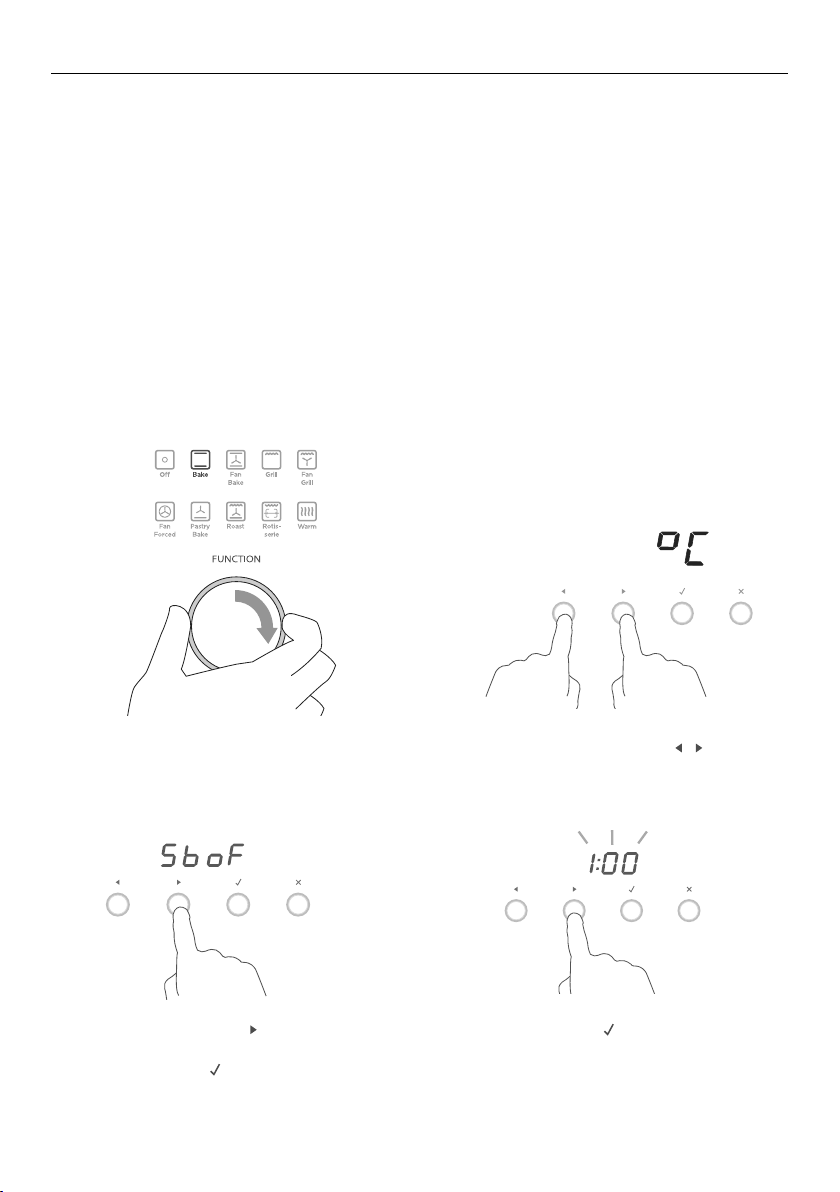
5 Press the right scroll
-
+
-
+
-
+
button to scroll
through the options for that particular
setting. Refer to the table below.
6 Press the select
ERUTAREPMETNOITCNUF
button to save
the new option.
7 For all options except ‘Display off’ :
press the cancel
ERUTAREPMETNOITCNUF
button to quit
the user preference menu.
-
+
-
+
-
+
-
+
-
+
-
+
20
SABBATH SETTING
This setting is designed for religious faiths that observe a ‘no work’ requirement on
theSabbath.
While your oven is in Sabbath setting
The display, dial halos and indicators will be unlit, the buttons will be unresponsive.
No tones or beeps will sound.
No alert codes or temperature changes will be displayed.
The oven lights will stay on. If you want the oven lights to be off during Sabbath setting,
first select the ‘Lights off’ option as described in ‘User preference settings’, and only
then set Sabbath setting.
Bake is the only function available in Sabbath setting.
How to set Sabbath setting
1 Select the Bake function.
Set the desired temperature.
Wait until the oven starts up.
2 Press and hold the scroll
-
+
-
+
-
+
-
+
-
+
-
+
buttons
together for 3 seconds to enter the
user preference menu.
-
+
-
+
-
+
-
+
-
+
-
+
3 Press the right scroll
-
+
-
+
-
+
button to
scroll to the Sabbath setting.
4 Press the select
-
+
-
+
-
+
button to select
the Sabbath setting. The default
option is ‘Sabbath off’.
5 Press the select
-
+
-
+
-
+
button to
activate the option.
The display will flash1:00.
NOITCNUF
ERUTAREPMET
NOITCNUF
NOITCNUF
ERUTAREPMET
NOITCNUF

21
SABBATH SETTING
The display, indicators and dial halos will be unlit and unresponsive, but the oven
will bake until you quit Sabbath setting.
To quit Sabbath setting
Press and hold the cancel
-
+
-
+
-
+
button until the time of day appears in the display
and the oven turns off.
6 Press the scroll
-
+
-
+
-
+
-
+
-
+
-
+
buttons to set
the time (hrs). You may set the time
up to 99 hours.
7 Press the select
-
+
-
+
-
+
button to
activate the option.

22
DOS DON’TS
Before any manual cleaning or maintenance,
first wait for the oven to cool down to a safe
temperature to touch, then disconnect it
from the power supply.
Read these cleaning instructions and the
‘Safety and warnings’ section before you
start cleaning your oven.
See the following pages for instructions on
removing and refitting different parts of the
oven for cleaning.
To prevent soiling from becoming ‘baked on’
and stubborn, we recommend removing any
spills, foodor grease stains from the oven
cavity enamel after each use.
Don’t use a steam cleaner.
Don’t keep flammable substances
in theoven.
Don’t use or any abrasive or harsh
cleaners, cloths, scouring pads or
steel wool. Some nylon scourers
may also scratch. Check the label.
Don’t leave alkaline (salty spills)
or acidic substances (such as
lemon juice or vinegar) on the
oven surfaces.
Don’t use cleaning products with
a chlorine or acidic base.
WHAT? HOW? IMPORTANT!
Glass surfaces
(oven door
panes, control
panel)
1 Clean these using a soft
cloth with a solution of mild
detergent or baking soda
and hot water, then wipe dry.
2 Wipe with a glass cleaner
and dry with a soft, lint-free
cloth.
Don’t use oven cleaners or any other
harsh/abrasive cleaners, cloths,
scouring pads, steel wool or sharp
metal scrapers to clean the glass
surfaces. These scratch the glass
and may damage its special coating,
which in turn could result in the glass
cracking or shattering.
Dials Clean with a solution of mild
detergent and hot water, then
wipe dry.
Do not use stainless steel or oven
cleaner, scouring pads, steel wool or
abrasive items on the dials as doing
so may damage their coating.
Stainless steel
strip on the
front of the
oven door
Clean with a solution of
mild detergent and hot
water, then wipe dry with a
microfibre cloth.
If necessary, use a suitable
stainless steel cleaner and
polish.
Always read the label to make
sure that your stainless steel
cleaner does not contain chlorine
compounds as these are corrosive
and may damage the appearance
of your oven.
Always rub the stainless steel in
the direction of the grain.
CARE AND CLEANING

23
Manual cleaning
WHAT? HOW? IMPORTANT!
Oven cavity To clean light soiling off the
enamelled surfaces:
1 Wipe with a damp cloth and
a solution of hot water and
milddetergent.
2 Wipe dry with a soft cloth.
To clean stubborn, ‘baked on’ soiling:
1 Remove everything from the
oven: shelves, trays, the side
racks. See the pages following
for instructions.
2 Use an ammonia-based
cleaneror an oven cleaner.
Followthe cleaner
manufacturer’sinstructions.
To prevent soiling from
becoming ‘baked on’ and
stubborn, we recommend
removing any spills, food
or grease stains from the
enamelled surfaces after
each use.
To clean the cavity ceiling,
you will need to lower the
grill element first.
See Fig. 7.
To make cleaning the oven
cavity easier, you can
remove the oven door too.
See pages following for
instructions.
Grill tray
Grill rack
Side racks
Oven shelves
Rotisserie parts
Baking tray
Clean with a solution of mild
detergent and hot water.
Pre-soak stubborn burnt-on stains.
Except for the baking tray, these
parts are also dishwasher safe.
You don’t need to remove the
four lock studs from the grill
tray. They can be soaked and
cleaned while fixed to the tray.
Oven seal Do not clean this part.
Oven vent
louvres
Wipe with a damp cloth. Take care not to let any liquid
run down the louvres of the
oven vent.
CARE AND CLEANING
24
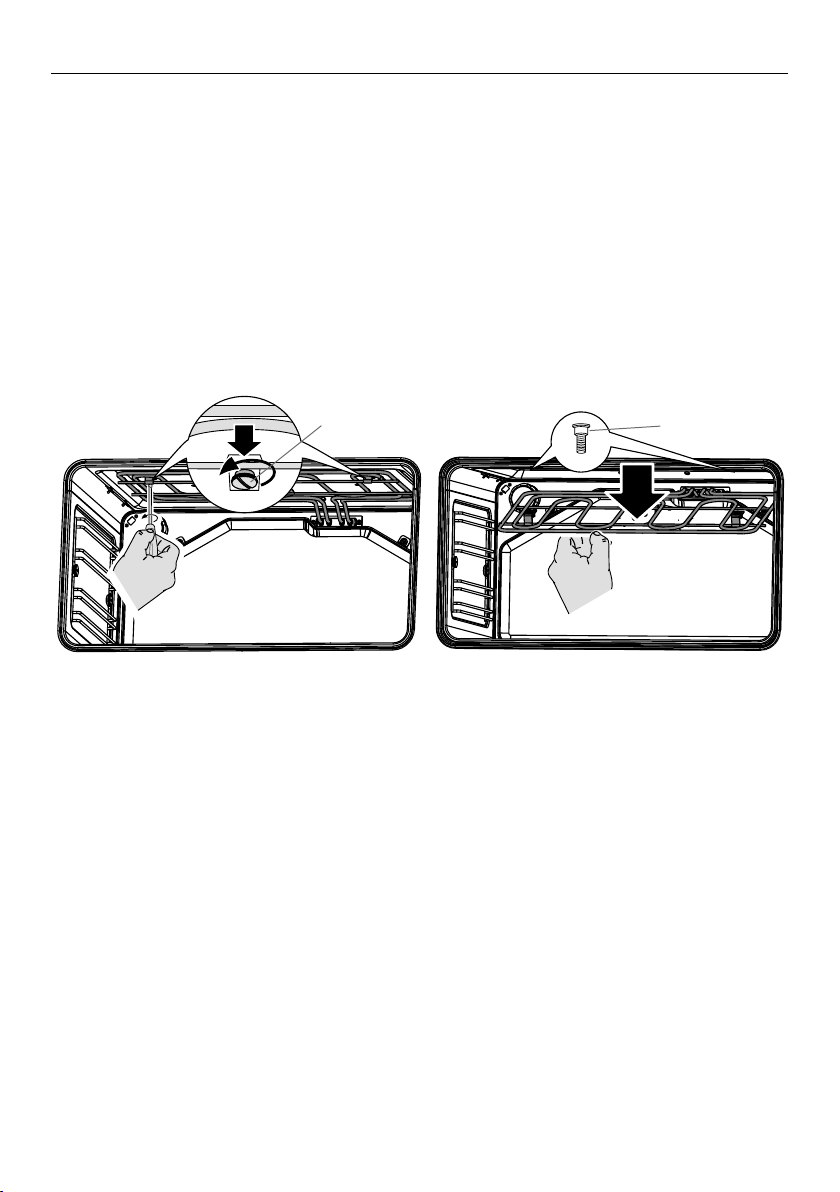
Drop-down grill element
IMPORTANT!
Turn off the oven at the wall and wait until the element has cooled completely
before starting.
To lower the grill element: use a flat-head screwdriver or a small coin to loosen the
element fixing screws.
When you have finished cleaning the oven ceiling, raise the grill element and screw
the element fixing screws back onto the studs. Make sure that the fixing screws are
tightened and the element is held securely in place.
The grill element itself is self-cleaning.
Fixing screw
Stud
CARE AND CLEANING
25
CARE AND CLEANING
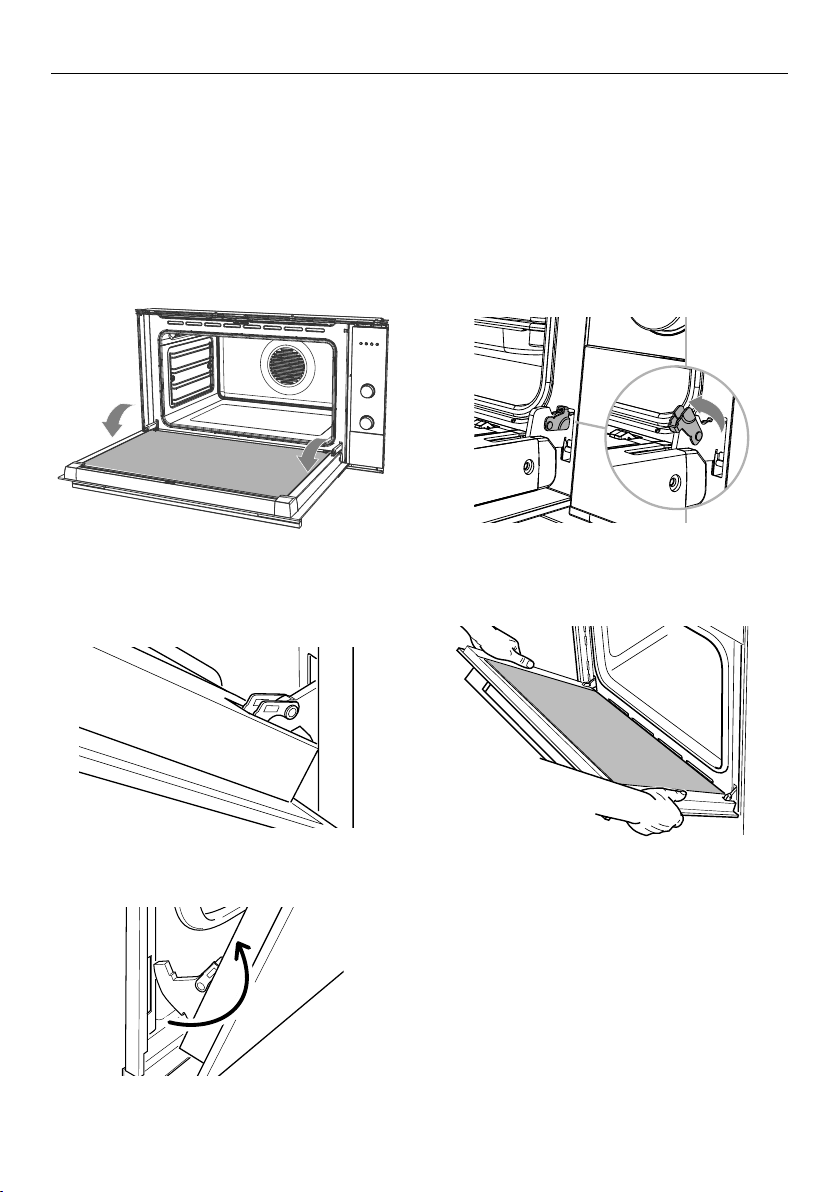
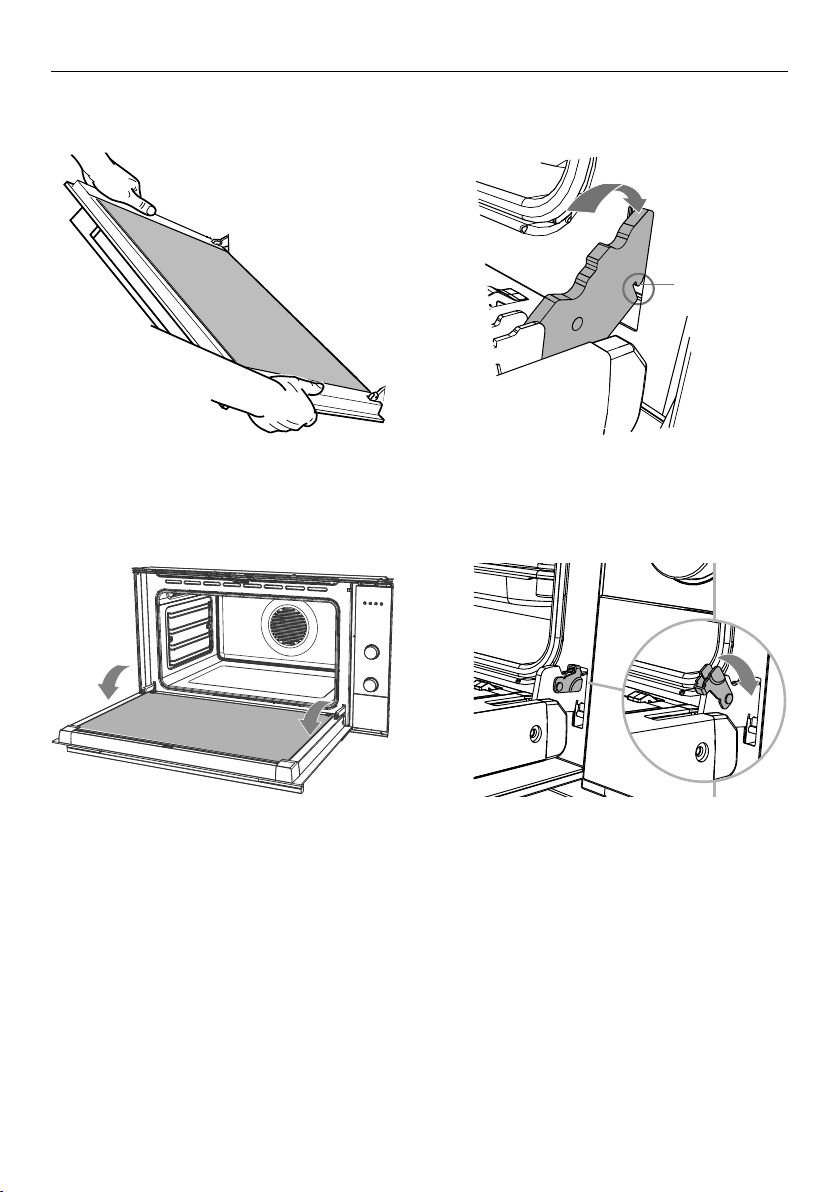
1 Ensure you have prepared enough
space for resting the door and its
glass panes on a clean, flat surface.
2 Open the door to its full extent.
3 Open the levers on the left and right
hinges to their full extent, as shown.
Removing the oven door
We recommend to remove the door to easily clean the interior parts of the oven
or replace the light bulb(s).
IMPORTANT!
Be careful when removing the door. If you are not sure, do not attempt to remove
the door.
Ensure the oven and all its parts have cooled down. Do not attempt to handle the
parts of a hot oven.
4 Gently close the door until the left and
right hinge levers are hooked to the door.
5 Hold the door firmly, as shown.
C
6 Lift the door and disengage the hinges.
Rest the door on a soft surface.
Ensure you lay it with the handle side down.
26
Notch
CARE AND CLEANING
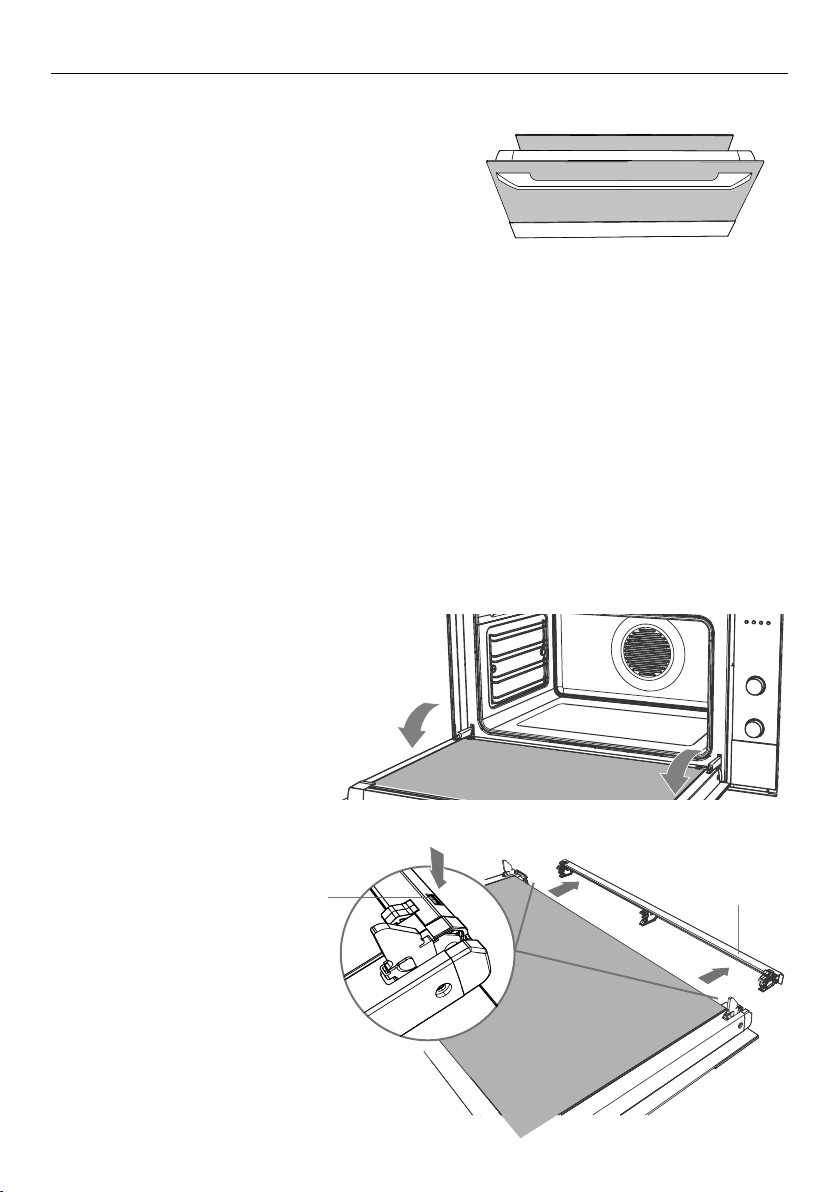
3 Open the door to its full extent. 4 Fully close the levers on the left and
right hinges, as shown.
5 Close the door and check that it is
properly in place: it should sit square
to the oven vent louvres and the
control panel.
2 Insert the hinge tongues into the slots,
making sure that the notches on both
sides drop into place as shown.
Refitting the door
1 Hold the door firmly.
27
Removing and replacing the inner glass pane
The oven door has two panes of glass.
The inner pane can be removed to make
cleaning the glasseasier.
IMPORTANT!
Take extreme care when handling the glass pane. Avoid the edges of the glass
bumping against any surface. This may result in the glass shattering.
Don’t use oven cleaners or any other harsh/abrasive cleaners, cloths, scouring pads,
steel wool or sharp metal scrapers to clean the glass surfaces. These scratch the
glass which in turn could result in the glass cracking or shattering.
If you notice any sign of damage on any of the glass panes (such as chipping or
cracks), do not use the oven. Call your Authorised Repairer or Customer Care.
Ensure you replace the inner glass pane correctly. Do not use the oven without the
inner glass pane correctly in place.
If the inner glass pane feels difficult to remove or replace, do not force it.
Call your Authorised Repairer or Customer Care for help.
Note: service visits providing assistance with using or maintaining the oven are not
covered by your warranty.
CARE AND CLEANING
To remove the inner glass pane
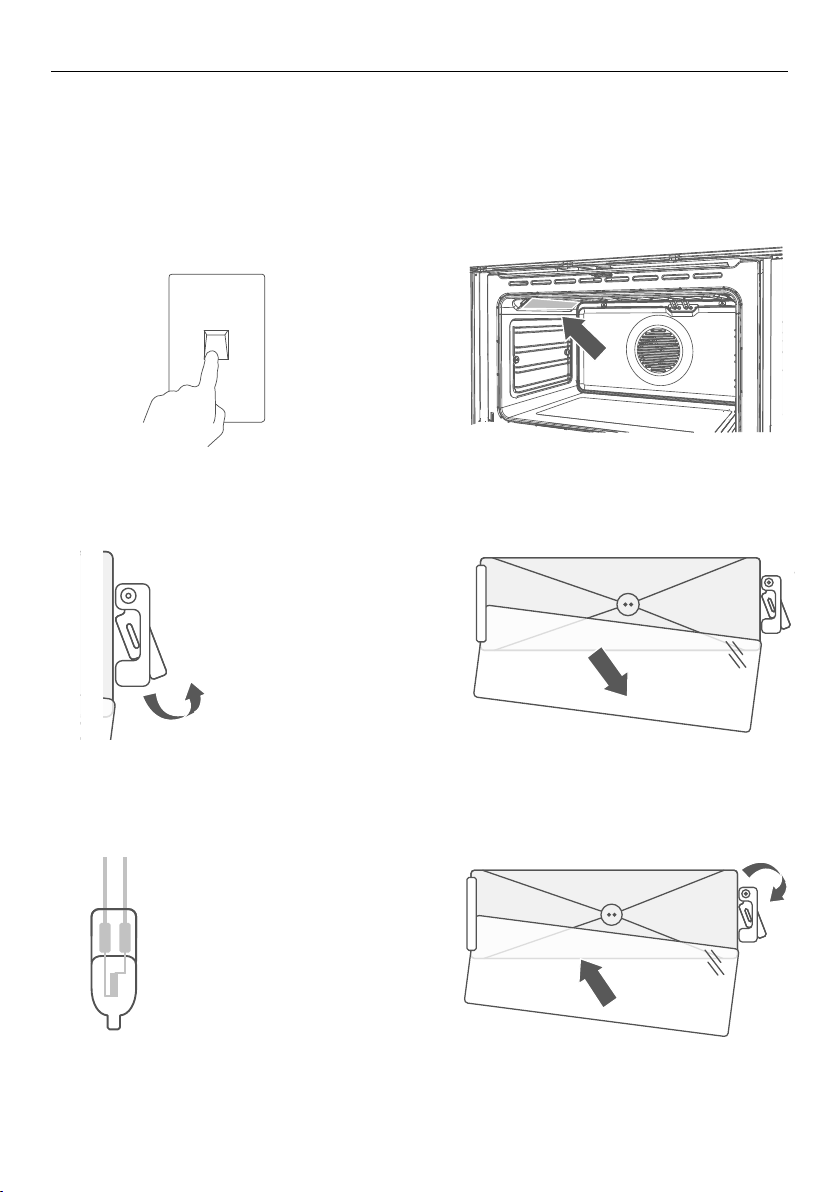
1 Remove the oven door
followingthe instructions in
‘Removing and refitting the oven
door’. Lay it on a protected
surface with the handledown.
2 Press down on
both tabs (A) to release
the glass retainer (B).
1
2
Glass retainer
Ta b
A
B
inner
outer
28
CARE AND CLEANING
Replacing the oven light bulbs
The oven light bulbs (12V/20 W halogen) have a very long life, but if you should need to
replace one, use only a replacement bulb purchased from your nearest Fisher&Paykel
dealer and follow these steps.
Note: oven bulb replacement is not covered by your warranty.
1 Allow the oven to cool down, then
turn it off at the mains power supply
(wall switch).
OFF
ON
3 Using a flat-head screwdriver, twist
and lift the retainer clip upwards
to release the glass cover. Hold the
glass cover to prevent it falling.
OFF
ON
5 Hold the replacement bulb in a soft
cloth or tissue (touching the bulb will
reduce its life span) and insert it into
the socket.
OFF
ON
4 Carefully lift the glass cover out of
the retaining bracket in the back
and pull out the faulty bulb.
OFF
ON
6 Reposition the glass cover and twist
the retainer clip back in place.
Turn the oven back on at the mains
power supply (wall switch).
2 Remove any oven shelves that
may get in the way.
OFF
ON
OFF
ON

29
Troubleshooting chart
If there is a problem, check the chart below to see if you can fix it. If the problem cannot
be fixed or persists, call your Authorised Repairer or Customer Care.
PROBLEM POSSIBLE CAUSES WHAT TO DO
General
The oven does
notwork
No power. Check that the mains power supply
(wall switch) is turned on, the fuse
has not tripped and there is no
power outage in your area.
The lights do not
come on when I
openthe oven door
The oven light bulb(s)
have blown.
The door is not correctly
fitted.
The oven is in Sabbath
setting and the ‘Light off’
option has been saved.
Replace the light bulb(s). See ‘Care
and cleaning’ for instructions.
See ‘Care and cleaning’ for instructions
on fitting the door correctly.
To quit Sabbath setting, press and
hold the cancel
-
+
-
+
-
+
button. See ‘User
preference settings’ for instructions
on changing the ‘Light off’ option.
The temperature
indicator shows —
and the dials
and buttons are
unresponsive
The control panel is
locked.
Press and hold the select
-
+
-
+
-
+
or cancel
-
+
-
+
-
+
button to unlock the control panel.
The oven is not
heating
The door is not properly
closed or it is opened too
frequently during cooking.
The heating elements are disabled
while the door is open. Ensurethe
door is properly closed and avoid
opening it frequently during cooking.
A glass pane in
the oven door has
cracked, chipped, or
shattered
Incorrect cleaning or the
edge of the glass hitting
against something.
You must NOT use the oven.
Call your Authorised Repairer or
Customer Care.
TROUBLESHOOTING

30
TROUBLESHOOTING
PROBLEM POSSIBLE CAUSES WHAT TO DO
General
The oven has reached
the set temperature
but the temperature
dial halo is still red
(indicating that the
oven is not ready
touse)
This is normal: when heating
up from cold, your oven is
designed to initially heat to a
temperature somewhat higher
than what you have set. Thisis
to provide optimal baking
conditions right from the start.
Wait until a long tone sounds
and the temperature dial halo
turns white: the oven will then
be ready to use.
The oven is heating
but the display
isdark
The oven is set to ‘Display off’
option.
The oven is in Sabbath setting.
To quit the ‘Display off’
option, press and hold the
cancel
-
+
-
+
-
+
button until the
display shows the time of day.
To quit Sabbath setting, press
and hold the cancel
-
+
-
+
-
+
button
until the display shows the
time of day.
The oven cancels
automatic cooking
when I try to adjust
the clock setting
The oven was set for automatic
cooking when you were trying
to adjust the clocksetting.
You can only adjust the clock
setting while the oven is not
set for automatic cooking.
See section ‘Setting the clock
and first use’ for instructions.
The oven beeps
when I try to turn the
temperature dial OFF
or below a certain
temperature
This is normal: for food safety
reasons, the oven functions
have factory-set minimum
temperature settings.
The temperature dial itself
cannot be ‘turned off’.
Selecting Off with the
function dial will turn the
oven off.
The temperature dial
halo never turns
white when I useGrill
This is normal: the halo stays red to indicate that
the grill element provides instant radiant heat.
The rotisserie skewer
will not rotate
The skewer did not fully engage
in the rotisserie drive.
The meat is too heavy.
Ensure the skewer is pushed
fully into the rotisserie
drivehole.
To get a finish similiar to a
rotisserie for pieces of meat
or poultry heavier than 6 kg,
use the grill tray and rack and
the Roast function.
The rotisserie skewer
stops rotating when I
open the door
This is normal: the rotisserie drive is disabled
while the door is open.

31
If there is a problem, the oven will:
automatically suspend all oven functions
beep five times
display an alert code.
IMPORTANT!
Do not turn off the mains power supply to the oven (wall switch) if you get an
alert code, unless the instructions in the chart following specifically instruct you
to. There are cooling fans within the oven which are needed to cool the oven’s
components. Turning off the power while the oven is too hot may damage the oven
and its surrounding cabinetry.
What to do if an alert code is displayed
1 If the beeping hasn’t stopped already, press any button to stop it.
2 Make a note of the alert code displayed. You may need this information.
3 Check the chart following to see if you can fix the problem yourself and follow
theinstructions.
4 If you can fix the problem and the alert code does not reappear, you can keep using
your oven.
OR
If you can’t fix the problem yourself or the alert code reappears and the problem
persists: wait until the cooling fans have stopped and the oven has completely cooled
down, then turn the power to the oven off at the wall and call your Authorised Repairer
or Customer Care with the alert code information.
ALERT CODE POSSIBLE CAUSES WHAT TO DO
a
The oven has overheated.
1
Allow the oven to cool down.
2
Once the oven has cooled down and the
door has unlocked, the alert code will
disappear. You can now use the oven again.
F + number
Technical fault.
1
Note down the alert code.
2
Wait until the cooling fans have stopped
and the oven has completely cooled down.
3
Turn the power to the oven off at the wall.
4
Call your Authorised Repairer or Customer
Care with the alert code information.
ALERT CODES

32
Before you call for service or assistance ...
Check the things you can do yourself. Refer to the installation instructions and your
user guide and check that:
1 Your product is correctly installed.
2 You are familiar with its normal operation.
If after checking these points you still need assistance or parts, please refer to the
Service & Warranty book for warranty details and your nearest Authorised Service
Centre, Customer Care, or contact us through our website fisherpaykel.com.
This oven has been designed and constructed in accordance with the following
codes and specifications:
In New Zealand and Australia
AS/NZS 60335-1 General Requirements for Domestic electrical appliances
AS/NZS 60335-2-6 Particular Requirements for Domestic electrical cooking appliances
AS/NZS CISPR 14.1 2010 Electromagnetic Compatibility Requirements.
Complete and keep for safe reference:
Model
_________________________________________________________________________
Serial No. _________________________________________________________________________
Purchase Date _________________________________________________________________________
Purchaser _________________________________________________________________________
Dealer _________________________________________________________________________
Suburb _________________________________________________________________________
Town _________________________________________________________________________
Country _________________________________________________________________________
WARRANTY AND SERVICE


NZ AU
591929A 03.19
FISHERPAYKEL.COM
© Fisher&Paykel Appliances 2019. All rights reserved.
The product specifications in this booklet apply to the specific products
and models described at the date of issue. Under our policy of continuous
product improvement, these specifications may change at any time. You
should therefore check with your Dealer to ensure this booklet correctly
describes the product currently available.