MFL07529605
OWNER’S MANUAL
MICROWAVE OVEN
Read this owner’s manual thoroughly before operating the appliance
and keep it handy for reference at all times.
www.thesignaturekitchen.com
UPRM3010**

2
TABLE OF CONTENTS
TABLE OF CONTENTS
3
IMPORTANT SAFETY
INSTRUCTIONS
6
PRODUCT OVERVIEW
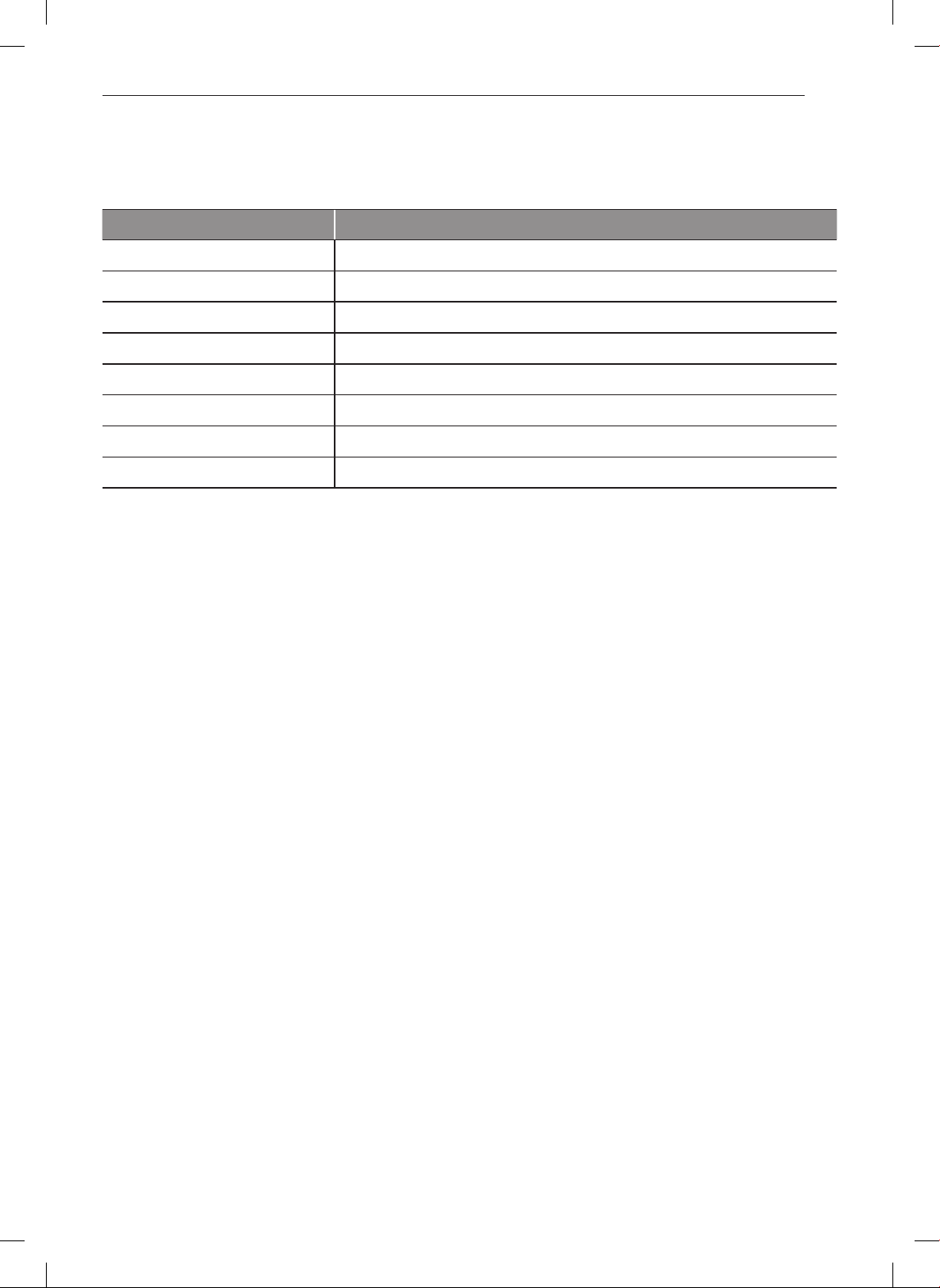
6 Parts
6 Accessories
7
INSTALLATION
7 Product Specifications
8 Installation Requirements
9
OPERATION
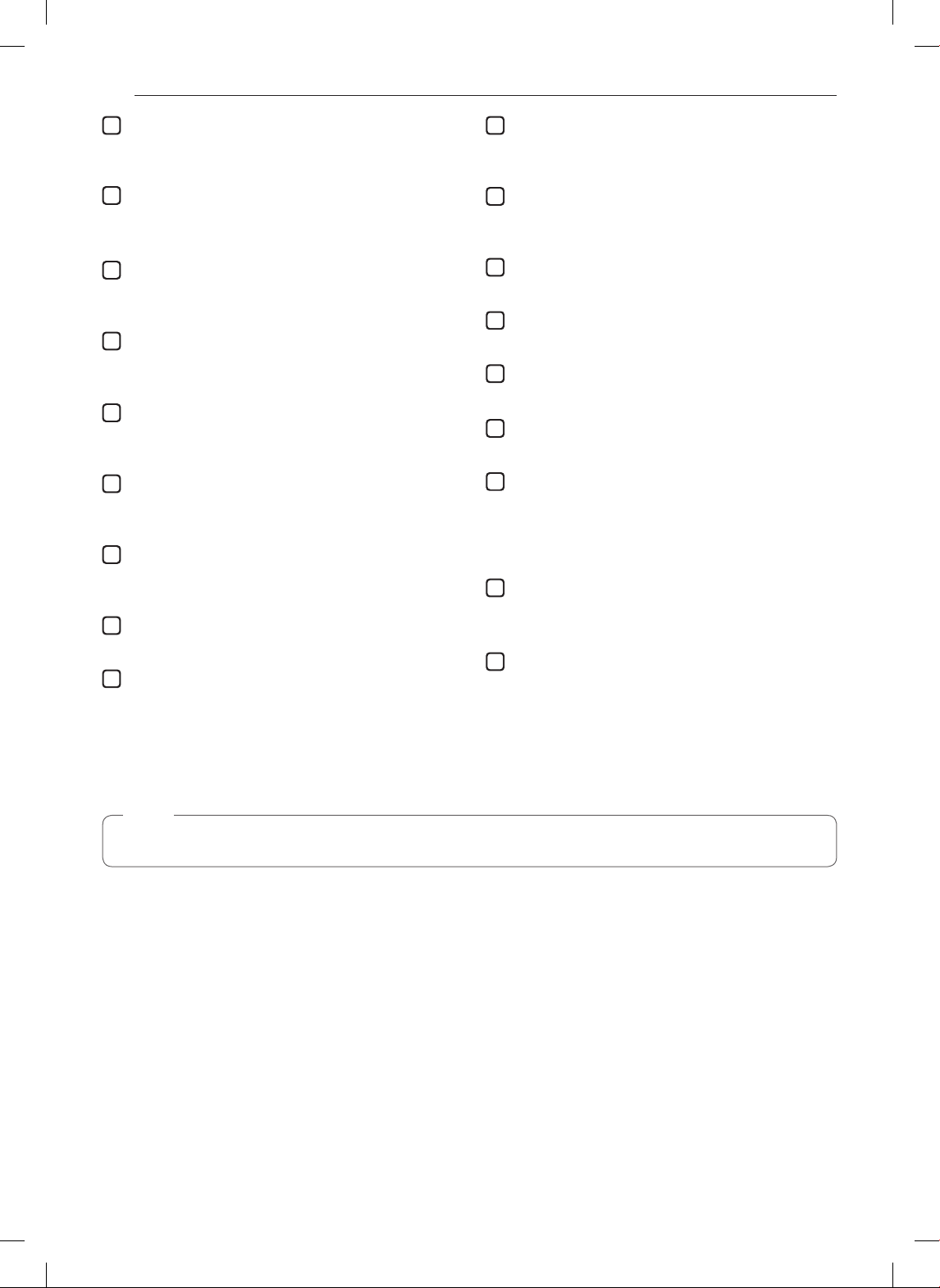
9 Control Panel Overview
11 Cookware Guide
12 Microwave Cooking Tips
13 Cleaning
13 Clock
13 Kitchen Timer
14 Child Lock
14 Add 30sec.
14 Using Sensor Touch
14 Sensor Cooking
15 Sensor Touch Table
15 Sensor Touch Reheat
16 Sensor Touch Popcorn
16 Custom Set
17 Auto Cook
18 More / Less
18 Auto Defrost
19 Express Defrost
19 Multi-Stage Cooking
20 Soften
20 Melt
21 Time Cook
21 Microwave Power Levels
22 Cooking Tips
22 Meat
-
Meat Cooking Table
22 Poultry
-
Poultry Cooking Table
23 Fish
-
Fresh Fish Cooking Table
24
TROUBLESHOOTING
24 Questions and Answers
26 Before Calling for Service
27
WARRANTY
3
IMPORTANT SAFETY INSTRUCTIONS
IMPORTANT SAFETY INSTRUCTIONS
Read and follow all instructions when using the range to prevent the risk of fire, electric
shock, personal injury, or damage. This guide does not cover all possible conditions that
may occur. Always contact your service agent or manufacturer about problems that you do
not understand.
Download this owner's manual at: www.thesignaturekitchen.com
This is the safety alert symbol. This symbol alerts you to potential hazards that
can result in property damage and/or serious bodily harm or death.
All safety messages will follow the safety alert symbol and either the word
WARNING or CAUTION. These words mean:
WARNING
- Indicates a hazardous situation which, if not avoided, could result
in death or serious injury.
CAUTION
- Indicates a hazardous situation which, if not avoided, could result
in minor or moderate injury.
PRECAUTIONS TO AVOID POSSIBLE EXPOSURE TO EXCESSIVE
MICROWAVE ENERGY
•
Do not attempt to operate this oven with
the door open, since open-door operation
can
result in harmful exposure to microwave energy. It is important not to defeat or tamper
with the safety interlocks.
•
Do not place any object between the oven
front face and the door,
or allow soil or
cleaner residue to accumulate on sealing surfaces.
•
Do not operate the oven if it is damaged.
It is particularly important that the oven door
close properly and that there is no damage to
the:
- door (bent),
- hinges and latches (broken or loosened),
- door seals and sealing surfaces.
•
The oven should not be adjusted or repaired by anyone except properly qualified
service personnel.
GROUNDING INSTRUCTIONS
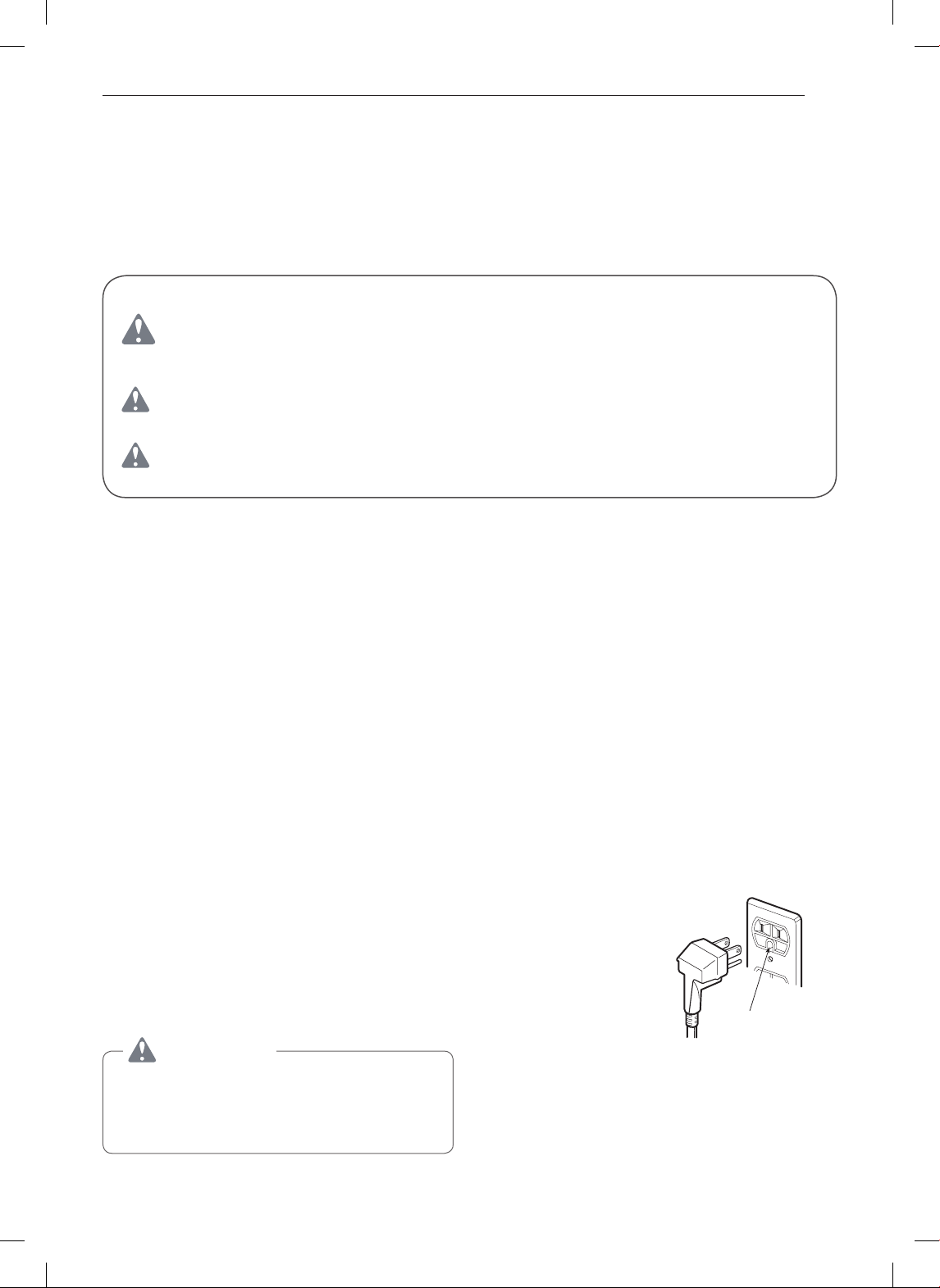
•
This appliance must be grounded. In the event of an electrical
short circuit, grounding reduces the risk of electric shock by
providing an escape wire for the electric current. This appliance
is equipped with a cord having a grounding wire and a grounding
plug. The plug must be plugged into an outlet that is properly
installed and grounded.
Ensure proper ground
exists before use
WARNING
•
This product contains chemicals known to the
State of California to cause cancer and birth
defects or other reproductive harm. Wash
hands after handling.

4
IMPORTANT SAFETY INSTRUCTIONS
WARNING
Improper grounding can result in a risk of electric shock. Consult a qualified electrician
if the grounding instructions are not completely understood, or if doubt exists as to
whether the appliance is properly grounded, and either:
•
If it is necessary to use an extension cord,use only a 3-wire extension cord that has
a 3-blade grounding plug, and a 3-slot receptacle that will accept the plug on the
appliance. The marked rating of the extension cord shall be equal to or greater than the
electrical rating of the appliance, or...
•
Do not use an extension cord. If the power supply cord is too short, have a qualified
electrician install an outlet near the appliance.
•
A short power-supply cord is provided to reduce the risks resulting from becoming
entangled in or tripping over a longer cord.
•
Longer cord sets or extension cords are available and may be used if care is exercised in
their use.
•
If a long cord or extension cord is used, (1) the marked electrical rating of the cord set or
extension cord should be at least as great as the electrical rating of the appliance, (2) the
extension cord must be a grounding-type 3-wire cord, and (3) the longer cord should be
arranged so that it will not drape over the countertop or tabletop where it can be pulled on
by children or tripped over accidentally.
WARNING
•
Read all instructions before using the appliance.
•
Read and follow the specific PRECAUTIONS TO AVOID POSSIBLE EXPOSURE TO
EXCESSIVE MICROWAVE ENERGY found on page 3 of this manual.
•
This appliance must be grounded. Connect only to properly grounded outlet. See
GROUNDING INSTRUCTIONS found on page 3 of this manual .
•
Install or locate this appliance only in accordance with the provided installation
instructions.
•
Some products, such as whole eggs and sealed containers – for example, closed glass
jars are able to explode and should not be heated in this oven.
•
Use this appliance only for its intended use as described in the manual. Do not use
corrosive chemicals or vapors in this appliance. This type of oven is specifically
designed to heat, cook, or dry food. It is not designed for industrial or laboratory use.
•
As with any appliance, close supervision is necessary when used by children.
•
Do not operate this appliance if it has a damaged cord or plug, if it is not working
properly, or if it has been damaged or dropped.
•
This appliance should be serviced only by qualified service personnel. Contact the
nearest authorized service facility for examination, repair, or adjustment.
•
Do not cover or block any openings on the appliance.
•
Do not store this appliance outdoors. Do not use this product near water – for example,
near a kitchen sink, in a wet basement, near a swimming pool, or similar location.
•
Do not immerse cord or plug in water.
•
Keep cord away from heated surfaces.
•
Do not let cord hang over the edge of a table or counter.
•
When cleaning surfaces of door and oven that come together on closing the door, use
only mild, nonabrasive soaps or detergents applied with a sponge or soft cloth.
5
IMPORTANT SAFETY INSTRUCTIONS
WARNING
•
To reduce the risk of fire in the oven cavity:
– Do not overcook food. Carefully attend appliance when paper, plastic, or other
combustible materials are placed inside the oven to facilitate cooking.
– Remove wire twist-ties from paper or plastic bags before placing bag in oven.
– If materials inside the oven ignite, KEEP OVEN DOOR CLOSED, turn oven off, and
disconnect the power cord or shut off power at the fuse or circuit breaker panel.
– Do not use the cavity for storage purposes. Do not leave paper products, cooking
utensils, or food in the cavity when not in use.
•
Liquids such as water, coffee, or tea are able to be overheated beyond the boiling
point without appearing to be boiling. Visible bubbling or boiling when the container
is removed from the microwave oven is not always present. THIS COULD RESULT
IN VERY HOT LIQUIDS SUDDENLY BOILING OVER WHEN THE CONTAINER IS
DISTURBED OR A SPOON OR OTHER UTENSIL IS INSERTED INTO THE LIQUID.
To reduce the risk of injury to persons; 1) Do not overheat the liquid. 2) Stir the liquid
both before and halfway through heating it. 3) Do not use straight-sided containers with
narrow necks. 4) After heating, allow the container to stand in the microwave oven for a
short time before removing the container. 5) Use extreme care when inserting a spoon
or other utensil into the container.
•
Avoid heating small-necked containers such as syrup bottles.
•
Avoid using corrosive and vapors, such as sulfide and chloride.
•
Liquids heated in certain shaped containers (especially cylindrical-shaped containers)
may become overheated. The liquid may splash out with a loud noise during or after
heating or when adding ingredients (instant coffee, etc.), resulting in harm to the oven
and possible injury. In all containers, for best results, stir the liquid several times before
heating. Always stir liquid several times between reheatings.
SAVE THESE INSTRUCTIONS
Thank you for purchasing a
SIGNATURE KITCHEN SUITE microwave oven.
Please record the model number and serial Model No:
number of this unit for future reference. We also
Serial No:
suggest you record the details of your contact with
SIGNATURE KITCHEN SUITE concerning this
Dealer:
unit.
Dealer Phone No:
Staple your receipt here to prove your retail
Customer Relations
purchase.
SIGNATURE KITCHEN SUITE U.S.A., Inc.
Service Division Bldg. #3
201 James Record Rd.
Huntsville, AL 35824-0126
6
PRODUCT OVERVIEW
PRODUCT OVERVIEW
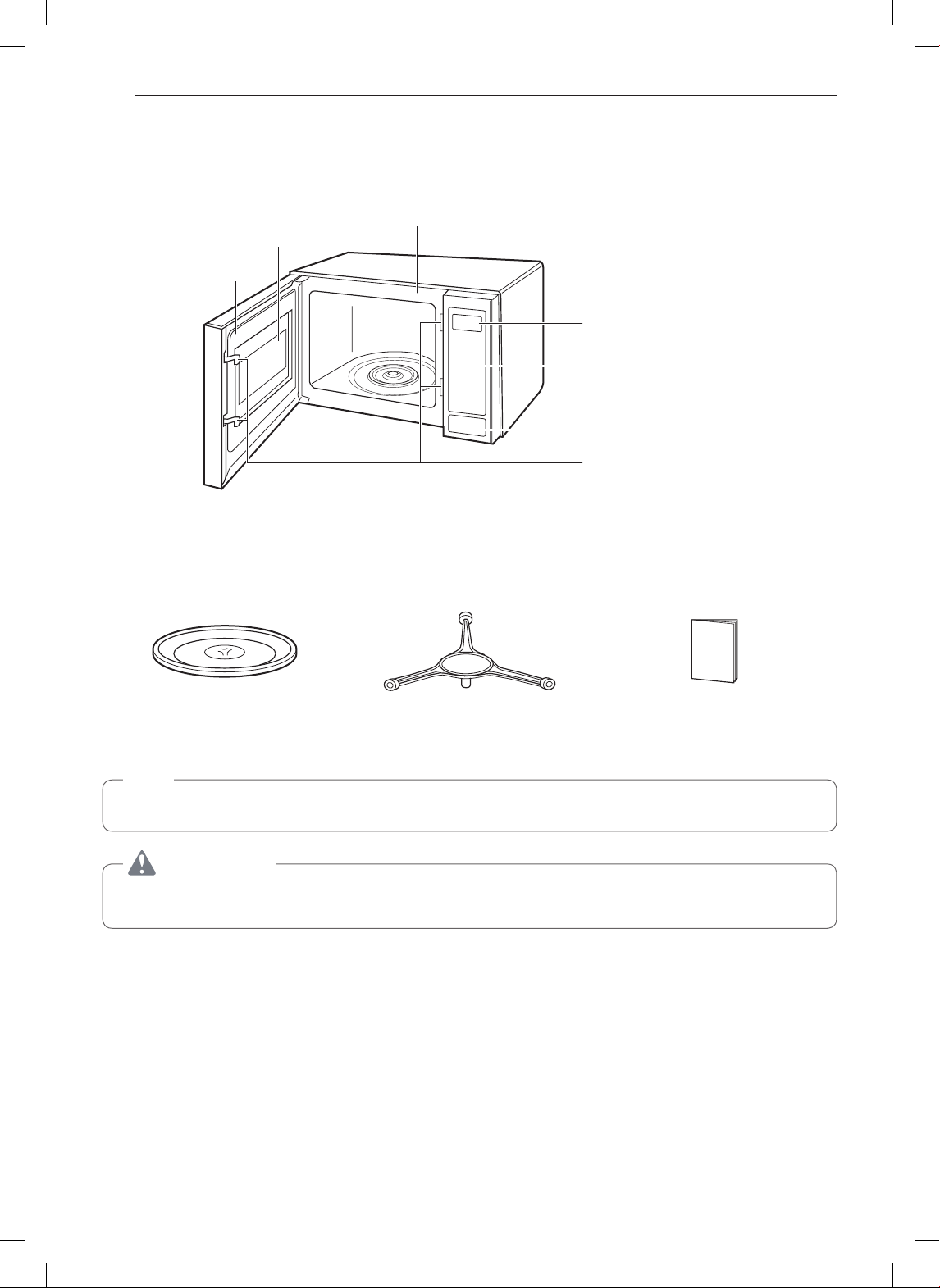
Parts
Door Seal
Window
Safety Door Lock System
Door Open Button
Control Panel
Display Window
Oven Front Plate
Accessories
Turntable Rotating ring Owner's Manual
NOTE
•
This microwave oven is designed for household use only. It is not recommended for commercial use.
WARNING
•
Do not operate the oven when empty or without the glass tray. It is best to leave a glass water in the oven
when not in use. The water will safely absorb all microwave energy, if the oven is accidentally started.
7
INSTALLATION
INSTALLATION
Product Specifications
Model UPRM3010**
Power Supply 120 V AC, 60 Hz
Rated Power Consumption 1650 W
Microwave Output *1200 W
Frequency 2450 MHz
Rated Current 14.0 A
Overall Dimensions 23
7
/
8
"
(W) x 13
9
/
16
"
(H) x 19
13
/
16
"
(D) (60.6 cm x 34.4 cm x 50.3 cm)
Oven Cavity Dimensions 16
11
/
16
"
(W) x 11
1
/
4
"
(H) x 18
1
/
16
"
(D) (42.4 cm x 28.6 cm x 45.9 cm)
Capacity of Oven Cavity 2.0 Cu.ft. (0.057 m³)
*IEC 60705 RATING STANDARD
Specifications subject to change without prior notice.

8
INSTALLATION
Installation Requirements
Circuits
For safety purposes this oven must be plugged into
a 15 or 20 Amp circuit. No other electrical appliances
or lighting circuits should be on this line. If in doubt,
consult a licensed electrician.
Voltage Warning
The voltage used at the wall receptacle must be the
same as specified on the oven name plate located
on the back or on the side of the control panel of the
oven. Use of a higher voltage is dangerous and may
result in a fire or damage to the oven. Low voltage will
Placement of the Oven
Place the oven on a flat surface such as a kitchen
countertop or a specially designed microwave oven
cart. Do not place oven above a gas or electric range.
Free air flow around the oven is important. Allow at
least 4 inches of space at the top, sides, and back of
the oven for proper ventilation.
Air Vents
Radio Interference
•
Microwave oven operation may interfere with TV or
radio reception.
•
When there is interference, it may be reduced or
eliminated by taking the following measures:
– Clean the door and the sealing surfaces of the
oven.
– Reorient the receiving antenna of radio or
television.
– Relocate the microwave oven in relation to the
TV or radio.
– Move the microwave oven away from the
receiver.
– Plug the microwave oven into a different outlet so
that microwave oven and receiver are on different
branch circuits.
cause slow cooking.If the oven is cooking slowly despite
use of proper voltage, unplug it and check the plug and
cord for damage.
Do not block air vents while the oven is operating.
Blocked air vents could cause the oven to overheat,
tripping a safety device which automatically turns the
oven off. You will not be able to use the oven until it
has cooled sufficiently.
9
OPERATION
OPERATION
Control Panel Overview
1
2
3
7
12
17
14
15
6
10
13
18
16
4
8
5
9
11
30sec.
10
OPERATION
NOTE
•
The display turns off after being idle for about 5 minutes. (Exact time may vary by model.)
1
Display
2
Sensor Touch
3
Custom Set
Change settings for sound (on/off), clock (on/off),
scroll speed (slow/normal/fast), and units (lb./kg).
4
Auto Cook
Select preprogrammed cook settings for common
food items.
5
Less
6
More
7
Auto Defrost
Preprogrammed defrosting for meat, poultry and
fish up to 6.0 lbs or 4.0 kg.
8
Express Defrost
Quickly defrost 1 lb. of food.
9
Soften
10
Melt
Melt butter, margarine, chocolate, cheese, or
marshmallows.
11
Number Pads
Enter the cooking time, power level, quantities, or
weights.
12
Time Cook
Set the desired cooking time.
13
Power Level
Set the desired cooking power.
14
Kitchen Timer
Use the microwave oven as a kitchen timer.
15
Clock
Set the time of day.
16
Add 30sec.
17
Start / Enter
18
Stop / Clear
Touch to stop cooking or clear settings.
The display indicates the time of day, set cooking
time, and selected cooking functions.
Cook some of your favorite foods without having
to select cooking times and power levels.
Subtract ten seconds from the cooking time with
each touch of this button.
Add ten seconds of cooking time with each touch
of this button.
Soften butter, ice cream, cream cheese, or frozen
juice.
Cook at 100% cook power for 30 seconds.
Each touch adds 30 seconds up to 3 minutes
30 seconds, after which each touch adds 1
minute up to 99 minutes 59 seconds.
Touch to start cooking or enter settings.
Press and hold to turn Child Lock on/off.

11
OPERATION
Cookware Guide
Most heat-resistant, non-metallic cookware is safe
for use in your the microwave oven. However, to test
cookware before using, follow these steps:
1
Place the empty cookware in the microwave
oven.
2
Measure 1 cup of water in a glass measuring cup
and place it in the oven beside the cookware.
3
Microwave on 100% power for 1 minute. If
the dish is warm, it should not be used for
microwave cooking.
Use
Ovenproof Glass
•
Glass treated for use in high-intensity heat includes
utility dishes, bread dishes, pie plates, cake plates,
liquid measuring cups, casseroles, and bowls
without metallic trim.
China
•
Bowls, cups, serving plates, and platters without
metallic trim can be used in your the oven.
Plastic
•
When using plastic wrap as a cover, make sure that
the dish is deep enough so the plastic wrap does
not touch the food. As the food heats, it may melt
the plastic wrap wherever the wrap touches the
food.
•
Place plastic wrap loosely over the top of the dish
and secure it by pressing the wrap to the sides of
the dish.
•
Vent by turning back one corner of the plastic wrap.
This will allow excess steam to escape.
•
Use plastic dishes, cups, semi-rigid freezer
containers, and plastic bags only for short cooking
times. Use these with care because the plastic
may soften from the heat of the food.
Paper
•
Microwave-safe paper towels, waxed paper, parch-
ment paper, paper napkins, and paper plates with
no metallic trim or design can be used in your oven.
•
Refer to the manufacturer’s label for use of any
paper product in the microwave oven.
Do Not Use
Metal Cookware or Utensils
•
Metal shields food from microwave energy and
produces uneven cooking. Avoid metal skewers,
thermometers, or foil trays.
•
Metal cookware or utensils can cause arcing, which
is a discharge of electric current. Arcing can damage
the microwave oven.
Metal Decoration
•
Do not use metal-trimmed or metal-banded
dinnerware, casserole dishes, etc.
Centura™ Tableware
•
The Corning Company recommends that you do
not use Centura tableware and some Corelle™
closed-handle cups for microwave cooking.
Aluminum Foil
•
Avoid large sheets of aluminum foil because they
hinder cooking and may cause arcing.
•
Use small pieces of foil to shield poultry legs and
wings.
•
Keep all aluminum foil at least 1 inch from the walls
and door of the oven.
Wood
•
Wooden bowls, boards, and baskets will dry out
and may split or crack when used in the microwave
oven.
Tightly Closed Containers
•
Tightly closed cookware can explode. Be sure to
leave an opening for steam to escape from covered
cookware.
Brown Paper
•
Avoid using brown paper bags. They absorb heat
and could burn.
Metal Twist Ties
•
Always remove metal twist ties as they can become
hot and cause a fire.

12
OPERATION
Microwave Cooking Tips
Browning
Meat and poultry with high fat content that are cooked
for 10 or 15 minutes or longer will brown lightly.
Foods cooked a shorter time can be brushed with a
browning agent, such as Worcestershire sauce, soy
sauce, or barbecue sauce.
Covering
A cover traps heat and steam and causes the food
to cook more quickly. Use a lid or microwave-safe
plastic wrap with one corner folded back to vent the
excess steam. Lids on glass casseroles can become
hot during cooking. Handle carefully. Parchment paper
or waxed paper will prevent the food from splattering in
the oven and help retain heat. When warming bread
items, use waxed paper, parchment paper, napkins,
or paper towels. To absorb extra moisture, wrap
sandwiches and fatty foods in paper towels.
Spacing
Arrange individual foods, such as baked potatoes,
cupcakes, and hors d’oeuvres in a circle and at least
1 inch apart. This will help the food cook more evenly.
Stirring
Stirring blends flavors and redistributes the heat in
foods. Always stir from the outside toward the center
of the dish. Food at the outside of the dish heats first.
Turning
Large foods, such as roasts and whole poultry, should
be turned so that the top and bottom cook evenly.
Also turn over chicken pieces and chops.
Arrangement
Do not stack food. Arrange in a single layer in the dish
for more even cooking. Because dense foods cook
more slowly, place thicker portions of meat, poultry,
fish, and vegetables toward the outside of the dish.
Testing for Doneness
Because foods cook quickly in a microwave oven,
test frequently for doneness.
Standing Time
Depending on density, food often needs to stand from
2 to 15 minutes either in or outside of the oven to finish
cooking after cooking power shuts off.
Shielding
Releasing Pressure in Foods
Pierce the shell, skin, or membrane of foods before
cooking to prevent them from bursting. Foods that
require piercing include yolks and whites of eggs, hot
dogs, clams, oysters, and whole vegetables, such as
potatoes and squash.
Cover food during standing time to retain heat. Remove
most foods when they are slightly undercooked and they
will finish cooking during standing time. The internal
temperature of food will rise about 10 °F during standing
time.
To prevent some portions of rectangular or square
dishes from overcooking, shield them with small strips of
aluminum foil to block the microwaves. You may also
cover poultry legs and wing tips with foil to keep them
from overcooking. Always keep foil at least 1 inch from
oven walls to prevent arcing.

13
OPERATION
Cleaning
Wipe the oven inside and outside with a soft cloth and
a mild detergent solution. Then rinse and wipe dry.
This should be done weekly or more often, if needed.
Never use abrasive cleaning powders or rough pads.
Excessive oil splatters on the inside top will be difficult
to remove if left for many days. Wipe splatters with a
wet paper towel, especially after cooking chicken or
bacon.
Removable Parts
The turntable and turntable roller rest are removable.
They should be hand-washed in warm (not hot) water
with a mild detergent and a soft cloth. Once they are
clean, rinse well and dry with a soft cloth. Never use
abrasive cleaning powders, steel wool, or rough pads.
•
The glass turntable may be cleaned at the sink. Be
careful not to chip or scratch the edges as this may
cause the turntable to break during use.
•
The turntable roller rest should be cleaned
regularly.
Special Care
For best performance and safety, the inner door
panel and the oven front frame should be kept free of
food or grease buildup. Wipe often with a mild detergent;
then rinse and wipe dry. Never use abrasive cleaning
powders or rough pads.
After cleaning the control panel, touch STOP/CLEAR
to clear any entries that might have been entered
accidentally while cleaning the panel.
Clock
Setting the Clock for 10:30 A.M.
1
Touch STOP/CLEAR.
2
Touch CLOCK.
3
Enter the time using the number keys. (1030)
4
Touch START/ENTER.
( Touch 1 for AM, 2 for PM)
5
Touch 1.
6
Touch START/ENTER.
NOTE
This is a 12-hour clock. Switch between A.M. and
P.M. by touching 1 or 2 in step 5.
Kitchen Timer
Use the microwave as a kitchen timer for up to 99 minutes
99 seconds.
Setting the Timer for 3 Minutes
1
Touch Kitchen Timer.
2
Enter the time using the number keys. (300)
3
Touch
The display shows the time counting down.
START/ENTER.
Display shows:

14
OPERATION
Child Lock
Setting Child Lock
1
Touch STOP/CLEAR.
2
Touch and hold START/ENTER until LOCKED
appears in the display (approximately 4 seconds).
Cancelling Child Lock
1
Touch and hold START/ENTER until LOCKED
disappears (approximately 4 seconds).
Add 30sec.
Quickly set and start microwave cooking without the
need to touch START.
Cooking for 2 Minutes
1
Touch STOP/CLEAR.
2
Touch Add 30sec. four times
NOTE
Using Sensor Touch
Categories :
1. Sensor Touch Reheat
2. Sensor Touch Potato
3. Sensor Touch Rice
4. Sensor Touch Popcorn
5. Sensor Touch Fresh Vegetable
6. Sensor Touch Frozen Vegetable
7. Sensor Touch Frozen Entree
1
The Sensor Touch system works by detecting
the level of humidity in the oven.
2
Make sure the oven door remains closed.
3
Opening the door or touching the STOP/CLEAR
pad before the humidity is detected will stop
the sensor cooking process and the oven.
4
Before using Sensor Touch, make sure the
exterior of the reheating container and the
interior of the oven are dry, to assure the best
results.
Sensor Cooking
Cooking a Potato
1
Touch STOP/CLEAR.
2
Touch Potato.
•
The oven will start automatically.
Lock the control panel during cleaning or to prevent
children from using the oven.
Add 30 seconds with each touch, up to 3 minutes
and 30 seconds. After that, each touch adds 1
minute, up to 99 minutes 59 seconds.
Use Sensor Touch to heat common microwave-
prepared foods without needing to program times
and power levels. The oven automatically determines
required cooking times for each food item. When the
internal sensor detects a certain amount of humidity
coming from the food, it tells the oven how much
longer to heat.
Sensor Touch has preset programs for 7 food
categories.
Sensor Touch cooks favorite foods without selecting
cooking times and power levels. The oven automatically
determines the required cooking time for each food item.
15
OPERATION
Sensor Touch Table
Category Direction Amount
Potato
Pierce each potato with
a fork and place around
the edge of the oven tray,
at least one inch
apart.
1-4 medium
approx. 10
oz. each
Rice
Place rice and twice as
much liquid (water or
chicken or vegetable
stock) in a 2-quart
microwavable dish.
Cover with plastic
wrap. When cooking
is complete, allow 10
minutes standing time.
Stir for fluffier rice.
1-2 cups
Use medium
or long grain
rice. Cook
instant rice
according to
directions on
package.
Popcorn
Place only bag
of prepackaged
microwave popcorn on
the center of turntable.
Regular size
Use one
fresh bag of
popcorn
Fresh
Vegetable
Prepare as desired,
wash, and leave
residual water on the
vegetables. Place
in an appropriately-
sized microwave
container,cover with
plastic wrap and vent.
1-4 cups
Frozen
Vegetable
Remove from package,
rinse off frost under
running water. Place in
an appropriately-sized
microwave container,
cover with plastic wrap
and vent.
1-4 cups
Frozen
Entree
Remove from outer
package.
Slit cover. If not in
microwave-safe
container, place on
plate, cover with plastic
wrap, and vent.
10-21 oz.
NOTE
•
If you open the door or press STOP during
sensing, the process will be canceled.
Sensor Touch Reheat
1. DINNER PLATE
2. SOUP/SAUCE
3. CASSEROLE
4. PIZZA
Reheating a Casserole.
1
Touch STOP/CLEAR.
2
Touch Reheat. (Select menu 1 to 4)
3
Touch 3. (CASSEROLE)
•
The oven will start automatically
Sensor Touch Reheat Table
Dinner
plate
Place foods to be
heated on a dinner plate
or similar dish. Cover
with plastic wrap.
Approx.
10.3 - 15.5
oz.
Soup /
Sauce
Place foods to
be heated in an
appropriately sized
microwave container.
Cover with plastic wrap.
1-4 cups
Casserole
Cover dish containing
the casserole with
plastic wrap.
1-4 cups
Pizza
Place slices on a dish.
1-3 slices
Use Sensor Touch Reheat to warm up previously
cooked foods without setting cooking times and
power levels. The preprogrammed menu includes
four common categories.
Directions
16
OPERATION
Sensor
Cooking Popcorn
Touch Popcorn
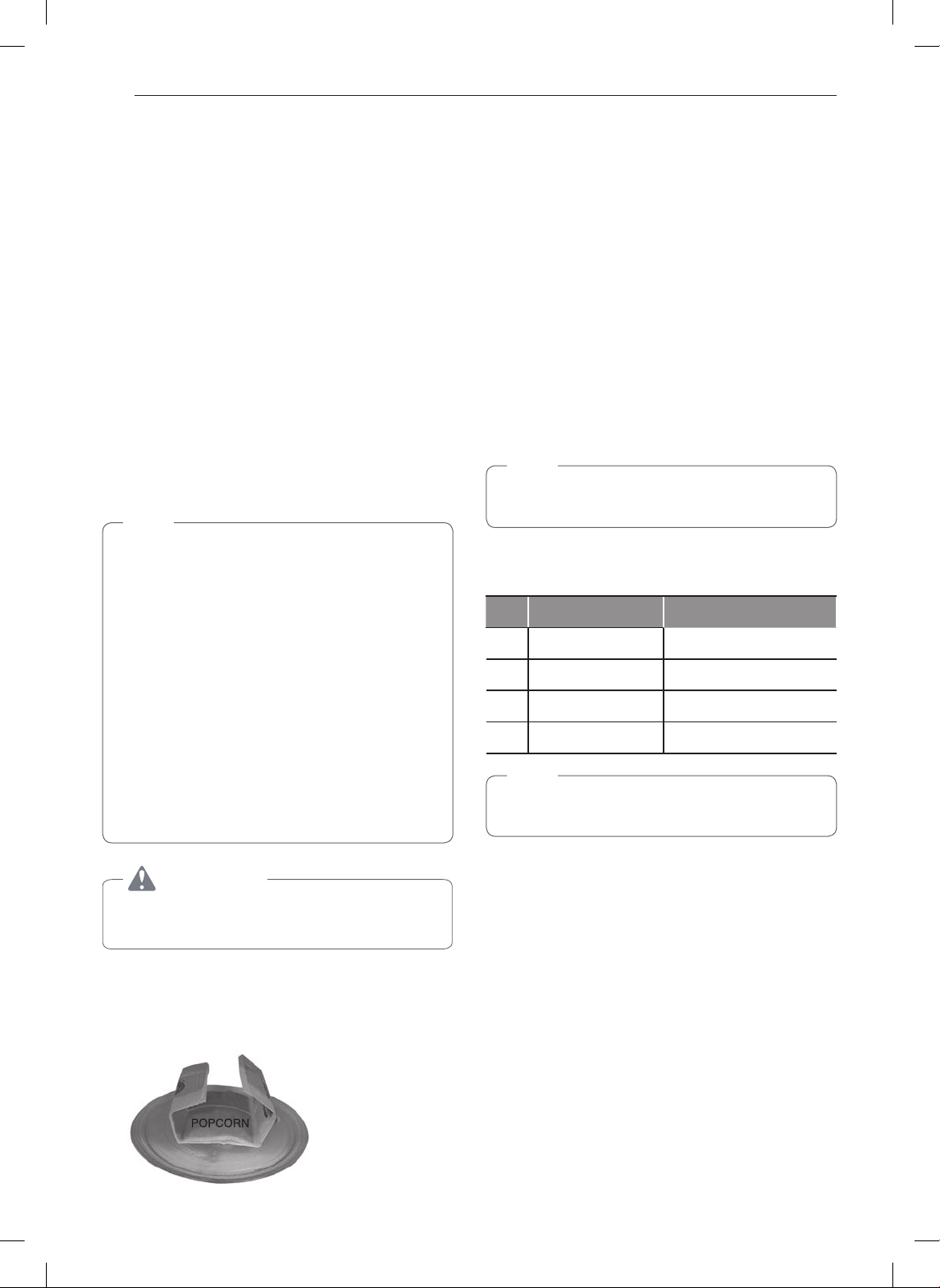
This feature makes preparation of microwave popcorn
simple and quick... one bag at a time.
Sensor Touch Popcorn uses HI power only.
The popping time counts down in the display.
When the popping time is over, two short and one
long tones sound and End appears in the display. The
oven shuts off automatically.
Place one bag only (1.8-3.5 oz or 50-100 g) of prepackaged
microwave popcorn on a microwave-safe / oven-safe
dish on the turntable. The package should be at room
temperature.
1
Touch STOP/CLEAR.
2
Touch Popcorn.
•
The oven will start automatically.
NOTE
•
If popcorn bag size is not known, follow
manufacturers' instructions and do not use this
feature.
•
Do not use POPCORN feature in combination
with any other feature.
•
Do not attempt to reheat or cook any unpopped
kernels.
•
Do not reuse bag. Overcooking can result in an
oven fire.
•
Only prepare one bag at a time.
•
Do not use popcorn popping devices in
microwave oven with this feature.
•
Do not leave microwave unattended while
cooking popcorn.
CAUTION
•
Never use a brown paper bag for popping corn .
•
Custom Set
Turning off the Beeper Sound
1
Touch STOP/CLEAR.
2
Touch Custom Set. (Four modes show in the
display)
3
4
Touch 2. (The display shows: Sound off.)
NOTE
•
To turn beeper sound back on, repeat the steps,
selecting 1 in step 4.
Custom Set Function chart
Function
Number
Choice
1 SOUND ON/OFF Sound On or Sound Off
2 CLOCK ON/OFF Clock On or Clock Off
3 SCROLL SPEED Slow, Normal, or Fast
4 UNIT CHOICE Lb. or Kg
NOTE
•
The factory defaults are sound on, clock on,
normal scroll speed, and pounds.
When popping prepackaged popcorn, place the
bag in the center of the turntable and fold each end
of the bag up toward the center of the bag. Be sure
the bag does not touch the walls of the oven.
Use this button to customize the oven's settings.
Turn the beeper sound and the clock on/off, and set
the scroll speed and units (lb./kg).
Touch 1. (The display shows: Sound on touch 1,
off touch 2)
17
OPERATION
Auto Cook
1. Bacon
2. Frozen Roll/Muffin
3. Fresh Roll/Muffin
4. Beverage
5. Chicken Pieces
6. Hot Cereal
Cooking 4 Slices of Bacon
1
Touch Auto Cook. (Display shows: Select menu
1 to 6)
2
Touch 1. (Display shows: Bacon, touch 1 to 5.)
3
Touch 3. (Display shows: 4 Slices, touch Start.)
•
The display shows Bacon and the time counting
down.
Auto Cook Table
Code
Category Direction Amount
1 Bacon
Place bacon strips on
microwave bacon rack
for best results. (Use
dinner plate lined with
paper towels if rack is
not available.)
2 to 6
slices
2
Frozen
Roll/Muffin
Remove from display
package and place on
plate. (If muffins are
over 3 oz. each, count
as two when entering
quantity.)
1 to 6
pieces
(2-3 oz.
each)
3
Fresh
Roll/Muffin
Remove from package
and place on plate.
(If muffins are over 3
oz. each, count as two
when entering
quantity.)
1 to 6
pieces
(2-3 oz.
each)
4 Beverage
1 to 2
cups
5
Chicken
Pieces
Place the chicken
pieces in an
appropriately sized
microwaveable
container, cover with
plastic wrap, and vent.
0.5 to 2
lbs.
6 Hot Cereal
Prepare as directed
on package and cook.
Stir and allow standing
time before eating.
Use only instant hot
cereal.
1 to 6
servings
Use Auto Cook to cook common foods using preset
cooking times and power levels. Simply choose from
the menu items and enter an amount. The prepro-
grammed menu includes six categories.
Use a wide-mouth
mug. Do not cover.
WARNING: Liquids
heated in cylindrical
containers may not
appear hot, but then
suddenly boil over
when moved.

18
OPERATION
More / Less
Adjusting the Cooking Time
1
Touch STOP/CLEAR.
2
Enter the cook time.(1:00)
3
Touch START/ENTER.
4
Touch More/Less. (The remaining time will
increase or decrease by 10 seconds)
Auto Defrost
1 MEAT
2 POULTRY
3 FISH
*Available weight is 0.1 to 6 pounds.
Defrosting 1.2 Lb. of Ground Beef
1
Touch Auto Defrost.
2
Touch 1.
3
Touch 1 and 2 to enter the weight.
4
Touch START/ENTER.
•
Time counting down and DEFROST will
appear on display.
NOTE
•
When you touch START, the display
changes to show the defrost time countdown.
When the oven beeps during the DEFROST
cycle, open the door and turn, separate, or
rearrange the food.
•
Remove any portions that have thawed. Return
frozen portions to the oven and touch START to
resume the defrost cycle.
Operating Tips:
•
For best results, remove fish, shellfish, meat, and
poultry from its original closed paper or plastic
package. Otherwise, the wrap will hold steam and
juice close to the foods, which can cause the outer
surface of the foods to cook.
•
For best results, form ground meat into a donut shape
before freezing.
•
Place foods in a shallow container or on a
microwave roasting rack to catch drippings.
•
Food should still be somewhat icy in the center
when removed from the oven.
Add ten seconds to the cooking time each time
you touch More. Subtract ten seconds each time
you touch Less.
This feature provides the best defrosting method
for frozen foods. The oven has three different
preset defrost sequences. For added convenience,
each sequence includes a built-in signal which
beeps to remind you to check, turn over, separate,
or rearrange food for best results. See the Auto
Defrost table for details.
When defrosting, scrape off thawed meat when the
beep sounds and continue defrosting.
19
OPERATION
Auto Defrost Table
Category Food to be Defrosted
1
MEAT
Beef
Lamb
Chops (1 inch thick), rolled roast.
Pork
Veal
Cutlets (1 lb., 1/2 inch thick)
2
POULTRY
Poultry
Whole (under 4 lbs.), cut up, breasts
(boneless)
Cornish Hens
Whole
Turkey
Breast
3
FISH
Fish
Fillets, steaks, whole.
Shellfish
Crab meat, lobster tails, shrimp,
scallops.
Express Defrost
Defrosting 1 Lb. of Ground Beef
1
Touch STOP/CLEAR.
2
Touch Express Defrost.
•
Time counting down and DEFROST will
appear on display
NOTE
TURN FOOD OVER will appear on display in
middle of cycle.
Multi-Stage Cooking
For best results, some recipes call for different cook
powers during different stages of a cook cycle. You
can program the oven to switch from one power
level to another for up to 2 stages.
Setting a 2-Stage Cook Cycle
1
Touch Time Cook.
2
Enter the first cook time.(3:00)
3
Touch Power Level.
4
Enter the first power level. (8)
5
Touch Time Cook.
6
Enter the second cook time.(7:00)
7
Touch Power Level.
8
Enter the second power level. (5)
9
Touch START/ENTER.
•
Time counting down and POWER 80 will
appear on display
10
When the first stage is over, you will hear two
short tones as the oven begins the second
cook stage.
Ground beef, roundsteak, cubes for
stewing, tenderloin steak, pot roast,
rib roast, rump roast, chuck roast,
hamburger patties
Chops (1/2 inch thick), hotdogs,
spareribs, country style ribs, rolled
roast, sausage
This feature is designed for defrosting 1 lb.
(0.5 kg) of frozen ground beef.
20
OPERATION
Soften
Softening a Quart of Ice Cream
1
Touch STOP/CLEAR.
2
Touch Soften.
3
Choose food category. Touch 2 for ice cream.
4
Choose food amount. Touch 2 for quart.
5
Touch START/ENTER.
•
Time counting down and ICE CREAM will
appear on display.
Soften Table
Code
Category Direction Amount
1 Butter
Unwrap and place
in microwavable
container. No need
to cover butter.
Butter will be at room
temperature and ready
for use in recipe.
1, 2 or 3
sticks
2 Ice Cream
Place container in
oven. Ice cream will be
soft enough to make
scooping easier.
Pint,
Quart,
Half
gallon
3
Cream
Cheese
Unwrap and place
in microwavable
container. Cream
cheese will be at room
temperature and ready
for use in recipe.
3 or 8
oz.
4
Frozen
Juice
Remove top.
Place in oven.
Frozen juice will be
soft enough to easily
mix with water.
6, 12 or
16 oz.
Melt
Melting 8 Oz. of Chocolate
1
Touch STOP/CLEAR.
2
Touch Melt.
3
Choose food category. Touch 2 for Chocolate.
4
Choose food amount. Touch 2 for 8 oz.
5
Touch START/ENTER.
•
Time counting down and CHOCOLATE will
appear on display.
Melt Table
Code
Category Direction Amount
1
Butter/
Margarine
Unwrap and place in
microwavable container
No need to cover butter.
Stir at the end of cooking
to complete melting.
1, 2 or 3
sticks
2 Chocolate
Choose the 4 or 8
oz.(actual weight)
selection to melt squares
of baking chocolate.
Unwrap squares and place
them in a microwavable
container. Stir at the end
of cycle to complete
melting.
4 or 8
oz.
3 Cheese
Use with processed cheese
food only. Cut into cubes.
Place in a single layer in
microwavable container.
Stir at the end of cooking
to complete melting.
8 or 16
oz.
4
Marsh-
mallows
5 or 10
oz.
Soften common foods from a preset menu
including butter, ice cream, cream cheese, and
frozen juice. See the Soften Table for details.
Melt common foods from a preset menu including
butter, margarine, chocolate, processed cheese, and
marshmallows. See the Melt Table for details.
If melting
chocolate morsels, to
avoid burning always
use the 4 oz. setting
and add time as
needed for amounts
over 4 oz. Stir at end of
cycle to complete
melting.
Use with large or
miniature marshmallows.
Place in microwavable
container. Stir at end of
cycle to complete melting.
21
OPERATION
Time Cook
This feature lets you program a specific cook time
and power. For best results, there are 10 power
level settings in addition to HIGH power (100%).
Refer to the Microwave Power Level Table for more
information.
NOTE
If you do not select a power level, the oven will
automatically cook at HIGH (100%) power.
Cooking for 5 Minutes and 30 Seconds at 80% Power
1
Touch Time Cook.
2
Enter the cook time. (5:30)
3
Touch Power Level.
4
Enter the power level. (8)
5
Touch START/ENTER.
•
Time counting down and POWER 80 will
appear on display.
Microwave Power Levels
The microwave oven has 10 power levels to let
you cook or heat a wide variety of foods. Refer to the
table below for suggestions:
Power
Level
Use
10
(High)
•
Boiling water
•
Making candy
•
Cooking poultry pieces, fish, and
vegetables
•
Cooking tender cuts of meat
•
Whole poultry
9
•
Reheating rice, pasta, and vegetables
8
•
Reheating prepared foods quickly
•
Reheating sandwiches
7
•
Cooking egg, milk, and cheese dishes
•
Cooking cakes, breads
•
Melting chocolate
6
•
Cooking veal
•
Cooking whole fish
•
Cooking puddings and custard
5
•
Cooking ham, whole poultry, and lamb
•
Cooking rib roast, sirloin tip
4
•
Thawing meat, poultry, and seafood
3
•
Cooking less tender cuts of meat
•
Cooking pork chops, roast
2
•
Taking chill out of fruit
•
Softening butter
1
•
Keeping casseroles and main dishes
warm
•
Softening butter and cream cheese
0
•
Standing time
22
OPERATION
Cooking Tips
WARNING
•
Do not use aluminum foil during cooking
cycle.
Meat
1
No special techniques are required. Meat should
be prepared as with conventional cooking.
Season if desired. Always thoroughly defrost
meat before cooking.
2
Place the meat on a microwave roasting rack
or microwave-proof plate and place on the
turntable.
3
Cook according to the Meat Cooking Table
below. Use the longer time for large cuts of
meat and the shorter time for small cuts of
meat. For thicker chops, use the longer time.
4
Turn the meat once halfway through the cooking
time.
5
Let stand for 5-10 minutes in oven after cooking.
The standing time is very important as it
completes the cooking process.
6
Make sure meat, especially pork, is thoroughly
cooked before eating.
Meat Cooking Table
Meat
Microwave
Power
Cooking Time
Per Pound
BEEF
Standing/Rolled Rib
– Medium
– Well-done
Ground Beef (to
brown for casserole)
Hamburgers, fresh or
defrosted (4 oz. each)
– 2 patties
– 4 patties
8
8
HIGH(100%)
HIGH(100%)
HIGH(100%)
9
1
/
2
to 11
1
/
2
minutes
11
1
/
2
to 14 minutes
6
1
/
2
to 9
1
/
2
minutes
2
1
/
2
to 4
1
/
2
minutes
3
1
/
2
to 5
1
/
2
minutes
PORK
Loin, Leg
Bacon
– 4 slices
– 6 slices
8
HIGH(100%)
HIGH(100%)
12
1
/
2
to 16
1
/
2
minutes
2
1
/
2
to 3
1
/
2
minutes
3
1
/
2
to 4
1
/
2
minutes
NOTE
The times listed above are only a guide. Alter to
suit individual tastes and preferences.
The times may also vary due to the shape, cut,
and composition of the food.
Poultry
1
No special techniques are required. Poultry
should be prepared as with conventional
cooking. Season if desired.
2
Poultry should be thoroughly defrosted. Remove
giblets and any metal clamps.
3
Prick the skin and brush lightly with vegetable oil
unless the poultry is self-basting.
4
All poultry should be placed on a microwave
roasting rack or a microwave-proof plate and
placed on the turntable.
5
Cook according to the instructions in the Poultry
Cooking Table below. Turn over halfway through
the cooking time. Because of its shape, poultry
has a tendency to cook unevenly, especially in
very bony parts. Turning during roasting helps to
cook these areas evenly.
6
Let stand for 5-10 minutes in oven after cooking
before carving. The standing time is very
important, as it completes the cooking process.
7
Make sure poultry is thoroughly cooked before
eating. Whole poultry is completely cooked when
the juices run clear from the inside thigh when
it is pierced with a sharp knife. Poultry pieces
should be pierced with a sharp knife through the
thickest part to ensure that the juices are clear
and the flesh is firm.
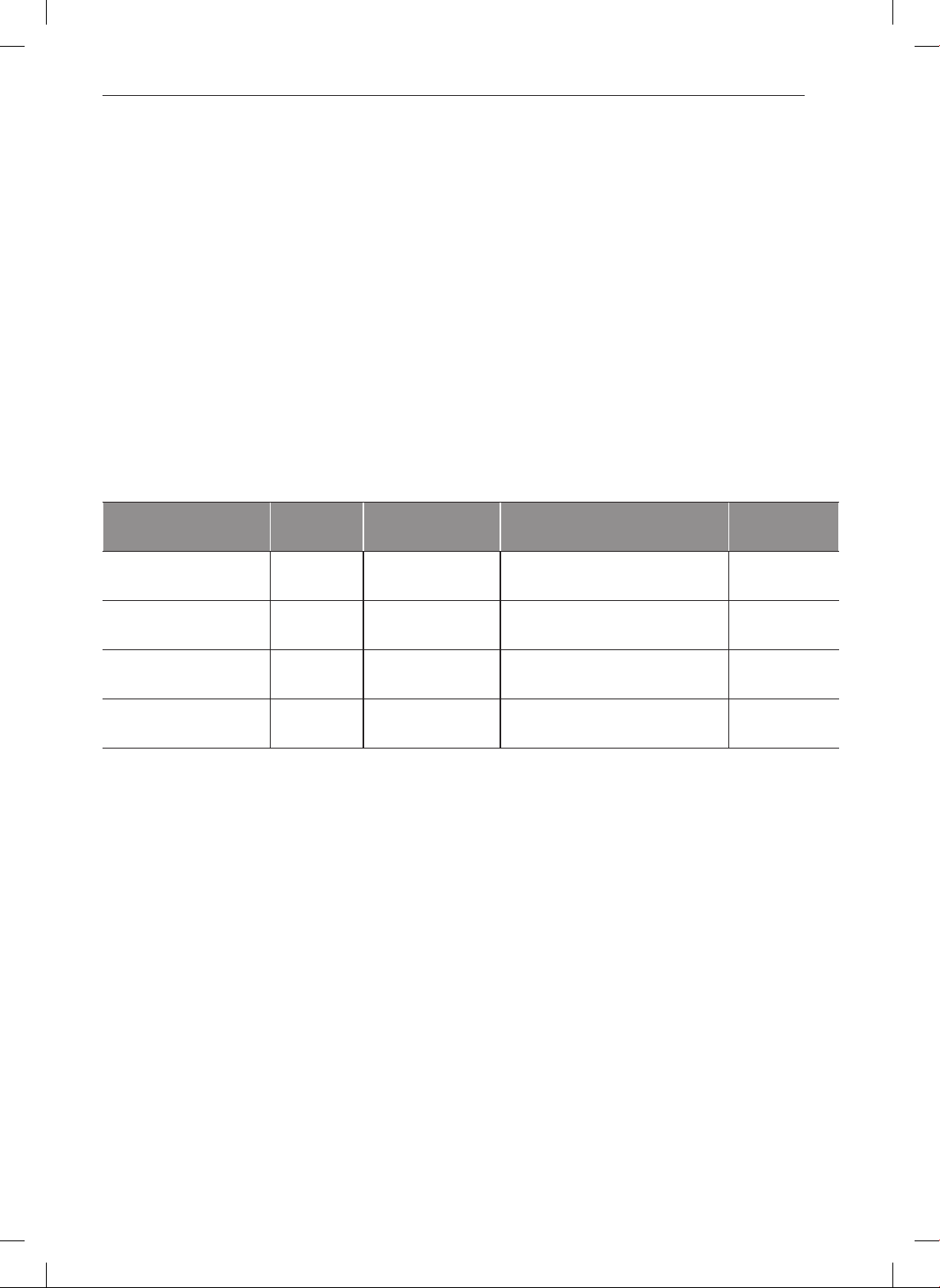
Poultry Cooking Table
Poultry
Microwave
Power
Cooking Time
Per Pound
CHICKEN
Whole
Breast (boned)
Portions
8
8
8
11 to 15 minutes
10 to 14 minutes
11 to 17 minutes
TURKEY
Whole 8 11 to 15 minutes
NOTE
•
The times listed above are only a guide.
Alter to suit individual tastes and preferences.
The times may also vary due to the shape,
cut, and composition of the food.
•
If whole poultry is stuffed, the weight of the
stuffed bird should be used when calculating
the cooking time.
23
OPERATION
Fish
1
Arrange fish in a large shallow non-metallic dish
or casserole.
2
Cover with pierced microwave plastic wrap or
casserole lid.
3
Place the dish on the turntable.
4
Cook according to the instructions in the Fresh
Fish Cooking Table below. Flakes of butter can
be added to the fish if desired.
5
Let stand as directed in the Cooking Table
before serving.
6
After standing time, check to see that the fish is
thoroughly cooked. The fish should be opaque
and flake easily.
Fresh Fish Cooking Table
Fish
Microwave
Power
Cooking Time Per
Pound
Comments
Standing
Time
Fish Fillets HIGH 4
1
/
2
to 8 minutes Add 1-2 tbsp
(15 to 30 ml) lemon juice
Add 1-2 tbsp
(15 to 30 ml) lemon juice
2 to 3 minutes
Whole Mackerel,
cleaned and prepared
HIGH 4
1
/
2
to 8 minutes – 3 to 4 minutes
Whole Trout,
cleaned and prepared
HIGH 5
1
/
2
to 9 minutes – 3 to 4 minutes
Salmon Steaks HIGH 5
1
/
2
to 8 minutes 3 to 4 minutes

24
TROUBLESHOOTING
TROUBLESHOOTING
Questions and Answers
Operation
Why is the oven light not on ?
There may be several reasons why the oven light is
not on. Have you:
•
Set a cooking time?
•
Touched START?
Why does steam come out of the air exhaust
vent?
Steam is normally produced during cooking. The
microwave oven has been designed to vent this
steam.
Will the microwave oven be damaged if it is
operated while empty?
Yes. Never operate the oven while it is empty or
without the glass turntable.
Does microwave energy pass through the viewing
screen in the door?
No. The metal screen bounces the energy back to
the oven cavity. The holes (or ports) allow only light to
pass through. They do not let microwave energy pass
through.
Why does a tone sound when a pad on the control
panel is touched?
The tone tells you that the setting has been entered.
Can my microwave oven be damaged if food is
cooked for too long?
Like any other cooking appliance, it is possible to
overcook food to the point that the food creates
smoke and even possibly fire, and damage to the
inside of the oven. It is always best to be near the
oven while you are cooking.
The microcomputer controlling the oven may
temporarily become scrambled and fail to function
as programmed when you plug it in for the first time
or when power resumes after a power interruption.
Unplug the oven from the 120 volt household outlet
and then plug it back in to reset the microcomputer.
Why do I see light reflection around the outer
case?
This light is from the oven light which is located
between the oven cavity and the outer wall of the
oven.
What are the various sounds I hear when the
microwave oven is operating?
The clicking sound is caused by a mechanical switch
turning the microwave oven’s magnetron ON and
OFF.
The heavy hum and clunk is from the change in
power the magnetron draws as it is turned ON and
OFF by a mechanical switch.The change in blower
speed is from the change in line voltage caused by
the magnetron being turned ON and OFF.
I have just plugged the oven into the wall
outlet for the first time and it does not work
properly. What is wrong?
25
TROUBLESHOOTING
Food
What is wrong when baked foods have hard,
dry, brown spots?
Hard, dry, brown spots indicate overcooking.
Shorten the cooking or reheating time.
Why do eggs sometimes pop?
When baking, frying, or poaching eggs, the yolk may
pop due to steam build-up inside the yolk membrane.
To prevent this, simply pierce the yolk with a wooden
toothpick before cooking.
CAUTION
Never microwave eggs in the shell.
Why are scrambled eggs sometimes a little dry
after cooking?
Eggs will dry out when they are overcooked, even if
the same recipe is used each time. The cooking time
may need to be varied for one of these reasons:
•
Eggs vary in size.
•
Eggs are at room temperature one time and at
refrigerator temperature another time.
•
Eggs continue cooking during standing time.
Is it possible to pop popcorn in a microwave
oven?
Yes, if using one of the two methods described below:
(1) microwave-popping devices designed specifically
for microwave cooking
(2) prepackaged commercial microwave popcorn that
is compatible with the power output of the oven
CAUTION
Never use a brown paper bag for popping
corn. Do not attempt to pop leftover kernels.
Why do baked apples sometimes burst during
cooking?
The peel has not been removed from the top half of
each apple to allow for expansion of the interior of
the apple during cooking. As in conventional cooking
methods, the interior of the apple expands during the
cooking process.
Why do baked potatoes sometimes burn during
cooking?
If the cooking time is too long, fire could result. At
the end of the recommended cooking time, potatoes
should be slightly firm.
CAUTION
Do not overcook.
Why is a standing time recommended after
microwave cooking time is over?
Standing time allows foods to continue cooking
evenly for a few minutes after the actual microwave
oven cooking cycle. The amount of standing time
depends upon the density of the foods.
Why is additional time required for cooking food
stored in the refrigerator?
As in conventional cooking, the initial temperature of
food affects total cooking time. You need more time to
cook food taken out of a refrigerator than for food at
room temperature.
Carefully follow manufacturer's directions and do not
leave the oven unattended while popping corn. If
corn fails to pop within the manufacturer's suggested
time, discontinue cooking.
26
TROUBLESHOOTING
Before Calling for Service
You can often correct operating problems yourself. If the microwave oven fails to work properly, locate the
problem in the list below and try the solutions listed for each problem. If the microwave oven still does not
work properly, contact the nearest SIGNATURE KITCHEN SUITE Authorized Service Center. SIGNATURE
KITCHEN SUITE Authorized Service Centers are fully equipped to handle your service requirements.
Symptoms Possible Causes / Solutions
Oven does not start
•
Is the power cord plugged in?
•
Is the door closed?
•
Is the cooking time set?
Arcing or sparking
•
Are you using approved cookware?
•
Is the oven empty?
Incorrect time of day
•
Did you experience a power outage?
Unevenly cooked
foods
•
Are you using approved cookware?
•
Is the glass turntable in the oven?
•
Did you turn or stir the food while it was cooking?
•
Were the foods completely defrosted?
•
Was the time/cooking power level correct?
Overcooked foods
•
Was the time/cooking power level correct?
Undercooked foods
•
Are you using approved cookware?
•
Were the foods completely defrosted?
•
Was the time/cooking power level correct?
•
Are the ventilation ports clear?
Uneven or imcomplete
defrosting
•
Are you using approved cookware?
•
Was the time/cooking power level correct?
•
Did you turn or stir the food during the defrosting cycle?
FEDERAL COMMUNICATIONS COMMISSION RADIO FREQUENCY INTERFERENCE STATEMENT
WARNING
This equipment generates and uses ISM frequency energy and if not installed and used properly, that is
in strict accordance with the manufacturer’s instructions, may cause interference to radio and television
reception. It has been type tested and found to comply with limits for ISM Equipment pursuant to part 18 of
FCC Rules, which are designed to provide reasonable protection against such interference in a residential
installation.
However, there is no guarantee that interference will not occur in a particular installation. If this equipment
does cause interference to radio or television reception, which can be determined by turning the equipment
off and on, the user is encouraged to try to correct the interference by one or more of the following:
•
Reorient the receiving antenna of the radio or television.
•
Relocate the microwave oven with respect to the receiver.
•
Move the microwave oven away from the receiver.
•
Plug the microwave oven into a different outlet so that the microwave oven and the receiver are on
different branch circuits.
The manufacturer is not responsible for any radio or TV interference caused by unauthorized modification
to this microwave oven. It is the responsibility of the user to correct such interference.
27
WARRANTY
WARRANTY (USA)
SIGNATURE KITCHEN SUITE will repair or replace your product, at SIGNATURE KITCHEN SUITE'S option, if it
proves to be defective in material or workmanship under normal use, during the warranty period set forth below,
effective from the date of original consumer purchase of the product. This warranty is good only to the original
purchaser of the product and effective only when used in the United States, including U.S Territories.
Warranty Period HOW SERVICE IS HANDLED
LABOR: Three years from the Date of Purchase*.
PARTS(except as listed below): Three years from the
Date of Purchase*.
MAGNETRON: Ten Years from the Date of
Purchase*.
Replacement units and repair parts are warranted
for the remaining portion of the original unit's
warranty period.
* Retain your sales receipt to prove the date of
purchase. A copy of your sales receipt must be
submitted at the time warranty service is provided.
Please call 1-855-790-6655 and choose the
appropriate option. (Phones are answered 24 hours
a day, 365 days per year.) Please have the product
type (Microwave) and your ZIP code ready.
Or visit our website at: www.thesignaturekitchen.com
THIS WARRANTY IS IN LIEU OF ANY OTHER WARRANTY, EXPRESS OR IMPLIED, INCLUDING WITHOUT
LIMITATION, ANY WARRANTY OF MERCHANTABILIYT OR FITNESS FOR A PARTICULAR PURPOSE.
TO THE EXTENT ANY IMPLIED WARRANTY IS REQUIRED BY LAW, IT IS LIMITED IN DURATION TO
THE EXPRESS WARRANTY PERIOD ABOVE. SIGNATURE KITCHEN SUITE WILL NOT BE LIABLE FOR
ANY INCIDENTAL, CONSEQUENTIAL, INDIRECT, SPECIAL, OR PUNITIVE DAMAGES OF ANY NATURE,
INCLUDING WITHOUT LIMITATION, LOST REVENUES OR PROFITS, OR ANY OTHER DAMAGE WHETHER
BASED IN CONTRACT, TORT, OR OTHERWISE.
Some states do not allow the exclusion or limitation of incidental or consequential damages or limitations on how
long an implied warranty lasts, so the above exclusion or limitation may nto apply to yor. This warranty gives you
specific legal rights and yor may also have other rights that vary from state to state.
THIS LIMITED WARRANTY DOES NOT APPLY TO:
•
Service trips to your home to deliver, pick up, and/or install the product, instruct, or replace house fuses or
correct wiring, or correction of unauthorized repairs.
•
Damages or operating problems that result from misuse, abuse, operation outside environmental specifications
or contrary to the requirements of precautions in the Operating Guide, accident, vermin, fire, flood, improper
installation, acts of God, unauthorized modification or alteration, incorrect electrical current or voltage, or
commercial use, or use for other than intended purpose.
The cost of repair or replacement under these excluded circumstances shall be borne by the consumer.
Customer Information Center
For inquires or comments, call;
1-855-790-6655 USA



