Operating and installation instructions
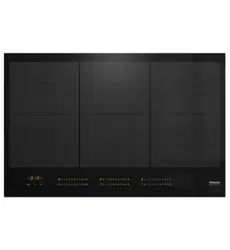
Ceramic hobs with induction
To avoid the risk of accidents or damage to the appliance it is essential
to read these instructions before it is installed and used for the first time.
en-GB M.-Nr. 10 378 320

Contents
2
Warning and Safety instructions.......................................................................... 5
Caring for the environment ................................................................................ 14
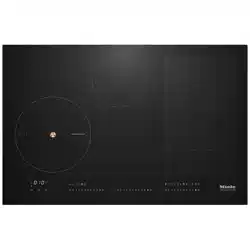
Guide to the appliance........................................................................................ 15
Hob........................................................................................................................ 15
KM 6629 / KM 6639 / KM 6839........................................................................ 15
KM 6669 / KM 6679 / KM 6879........................................................................ 16
KM 6699 ...........................................................................................................17
Controls / Indicators.............................................................................................. 18
Cooking zones....................................................................................................... 20
Using for the first time ........................................................................................ 23
Cleaning the hob for the first time......................................................................... 23
Switching on the hob for the first time .................................................................. 23
Induction .............................................................................................................. 24
The induction principle.......................................................................................... 24
Noises.................................................................................................................... 25
Pans....................................................................................................................... 26
Tips on saving energy ........................................................................................ 27
Setting range........................................................................................................ 28
Operation.............................................................................................................. 29
How the hob is operated ....................................................................................... 29
Switching on the hob ............................................................................................ 30
Setting the power level.......................................................................................... 30
Switching off.......................................................................................................... 30
Residual heat indicator.......................................................................................... 30
TempControl.......................................................................................................... 31
Setting the power level - extended setting range ................................................. 33
PowerFlex cooking area ........................................................................................ 33
Auto heat-up ......................................................................................................... 34
Booster.................................................................................................................. 35
Keeping warm / warming up ................................................................................. 37
Timer..................................................................................................................... 38
Minute minder ....................................................................................................... 38
Switching a cooking zone off automatically.......................................................... 39
Additional functions ............................................................................................ 40
Stop&Go................................................................................................................ 40
Recall..................................................................................................................... 40

Contents
3
Wipe protection ..................................................................................................... 41
Displaying the hob data ........................................................................................ 41
Model numbers ................................................................................................ 41
Software version............................................................................................... 41
Safety features..................................................................................................... 42
System lock / Safety lock...................................................................................... 42
Safety switch-off ................................................................................................... 43
Overheating protection.......................................................................................... 45
Programming ....................................................................................................... 46
Cleaning and care ............................................................................................... 51
Problem solving guide ........................................................................................ 53
Optional accessories .......................................................................................... 56
Miele@home / Con@ctivity ................................................................................ 57
To access programming mode.............................................................................. 57
Safety instructions for installation..................................................................... 58
Safety distances .................................................................................................. 59
Hob with frame or bevelled edge....................................................................... 63
Installation notes ................................................................................................... 63
Building-in dimensions ......................................................................................... 64
KM 6629 ...........................................................................................................64
KM 6669 ...........................................................................................................65
KM 6699 ...........................................................................................................66
Installation ............................................................................................................. 67
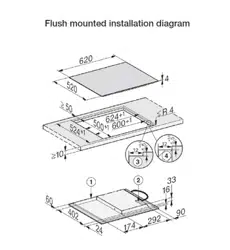
Flush-fitted hobs ................................................................................................. 68
Installation notes ................................................................................................... 68
Building-in dimensions ......................................................................................... 69
KM 6639 / KM 6839 .........................................................................................69
KM 6679 / KM 6879 .........................................................................................70
Installation ............................................................................................................. 71
KM 6679 / KM 6879 .........................................................................................71
Electrical connection .......................................................................................... 73
Wiring diagram ..................................................................................................... 75
After sales service, data plate, guarantee ........................................................ 76


Warning and Safety instructions
5
This hob complies with all relevant safety requirements. Inappro-
priate use can, however, lead to personal injury and damage to
property.
To avoid the risk of accidents and damage to the appliance,
please read these instructions carefully before installation and be-
fore using it for the first time. They contain important notes on in-
stallation, safety, use and maintenance.
Miele cannot be held liable for damage caused by non-compliance
with these instructions.
Keep these instructions in a safe place and ensure that new users
are familiar with the content. Pass them on to any future owner.

Warning and Safety instructions
6
Correct application
This hob is intended for domestic use and use in other similar en-
vironments.
This hob is not intended for outdoor use.
It is intended for domestic use only to cook food and keep it
warm. Any other use is not supported by the manufacturer and could
be dangerous.
People with reduced physical, sensory or mental capabilities, or
lack of experience and knowledge who are not able to use the hob
safely on their own must be supervised whilst using it. They may
only use it unsupervised if they have been shown how to use it safely
and recognise and understand the consequences of incorrect opera-
tion.

Warning and Safety instructions
7
Safety with children
Children under 8 years of age must be kept away from the hob
unless they are constantly supervised.
Children 8 years and older may only use the hob unsupervised if
they have been shown how to use it in a safe way and can recognise
and understand the consequences of incorrect operation.
Children must not be allowed to clean the hob unsupervised.
Please supervise children in the vicinity of the hob and do not let
them play with it.
The hob gets hot when in use and remains hot for a while after be-
ing switched off. Keep children well away from the hob until it has
cooled down and there is no danger of burning.
Danger of burning.
Do not store anything which might arouse a child's interest in stor-
age areas above or next to the hob. Otherwise they could be temp-
ted into climbing onto the appliance.
Danger of burning or scalding.
Place pots and pans on the cooking zone in such a way that children
cannot pull them down and burn themselves.
Danger of suffocation. Packaging, e.g. plastic wrappings, must be
kept out of the reach of babies and children. Whilst playing, children
could become entangled in packaging or pull it over their head and
suffocate.
Activate the system lock to ensure that children cannot switch on
the hob inadvertently. Use the safety lock when the hob is in use to
prevent children from altering the settings selected.

Warning and Safety instructions
8
Technical safety
Unauthorised installation, maintenance and repairs can cause
considerable danger for the user. Installation, maintenance and re-
pairs must only be carried out by a Miele authorised technician.
Do not use a damaged appliance. It could be dangerous. Check
the hob for visible signs of damage.
Reliable and safe operation of this hob can only be assured if it
has been connected to the mains electricity supply.
The electrical safety of this hob can only be guaranteed when cor-
rectly earthed. It is essential that this standard safety requirement is
met. If in any doubt please have the electrical installation tested by a
qualified electrician.
To avoid the risk of damage to the hob, make sure that the con-
nection data on the data plate (voltage and frequency) match the
mains electricity supply before connecting it to the mains.
Consult a qualified electrician if in doubt.
Do not connect the hob to the mains electrical supply by a multi-
socket adapter or extension lead. These are a fire hazard and do not
guarantee the required safety of the appliance.
For safety reasons, this hob may only be used after it has been
built in.
This hob must not be used in a non-stationary location (e.g. on a
ship).
Never open the casing of the hob.
Touching or tampering with electrical connections or components
and mechanical parts is highly dangerous to the user and can cause
operational faults.
While the hob is under guarantee, repairs should only be under-
taken by a Miele authorised service technician. Otherwise the guar-
antee is invalidated.

Warning and Safety instructions
9
Miele can only guarantee the safety of the appliance when genu-
ine original Miele replacement parts are used. Faulty components
must only be replaced by Miele spare parts.
The hob is not intended for use with an external timer switch or a
remote control system.
The hob must be connected to the electricity supply by a qualified
electrician (see "Electrical connection").
If the connection cable is damaged, it must be replaced by a suit-
ably qualified electrician with a special connection cable of type H
05 VV-F (pvc insulated). See "Electrical connection".
The hob must be disconnected from the mains electricity supply
during installation, maintenance and repair work. Ensure that power
is not supplied to the appliance until after it has been installed or un-
til any maintenance or repair work has been carried out.
Danger of electric shock.
Do not use the hob if it is faulty, or if the ceramic surface is cracked,
chipped or damaged in any way. Switch it off immediately, discon-
nect it from the mains electricity supply and contact Miele.
If the hob is installed behind a furniture panel (e.g. a door), ensure
that the door is never closed whilst the hob is in use. Heat and mois-
ture can build up behind a closed furniture panel and cause sub-
sequent damage to the hob, the housing unit and the floor. Do not
close the door until the residual heat indicators have gone out.

Warning and Safety instructions
10
Correct use
The hob gets hot when in use and remains hot for a while after be-
ing switched off. There is a danger of burning until the residual heat
indicators go out.
Oil and fat can overheat and catch fire. Do not leave the hob unat-
tended when cooking with oil and fat. If it does ignite do not attempt
to put the flames out with water.
Disconnect the hob from the mains and use a suitable fire blanket,
saucepan lid, damp towel or similar to smother the flames.
Flames could set the grease filters of a cooker hood on fire. Do
not flambé under a cooker hood.
Spray canisters, aerosols and other inflammable substances can
ignite when heated. Therefore do not store such items or substances
in a drawer under the hob. Cutlery inserts must be heat-resistant.
Do not heat an empty pan.
Do not heat up food in closed containers e.g. tins or sealed jars
on the hob, as pressure can build up in the container, causing it to
explode.
Do not cover the hob, e.g. with a hob cover, a cloth or protective
foil. The material could catch fire, shatter or melt if the hob is
switched on by mistake or if residual heat is still present.
When the appliance is switched on either deliberately or by mis-
take, or when there is residual heat present, there is the risk of any
metal items left on the hob heating up, with the danger of burning.
Depending on the material, other items left on the hob could also
melt or catch fire. Damp pan lids might adhere to the ceramic sur-
face and be difficult to dislodge. Do not use the appliance as a rest-
ing place. Switch the cooking zones off after use.

Warning and Safety instructions
11
You could burn yourself on the hot hob. Protect your hands with
heat-resistant pot holders or gloves when handling hot pots and
pans. Do not let them get wet or damp, as this causes heat to trans-
fer through the material more quickly with the risk of scalding or
burning yourself.
When using an electrical appliance, e.g. a hand-held food blender,
near the hob, ensure that the cable of the electrical appliance cannot
come into contact with the hot hob. The insulation on the cable
could become damaged.
Grains of salt, sugar and sand (e.g. from cleaning vegetables) can
cause scratches if they get under pan bases. Make sure that the
ceramic surface is clean before placing pans on it.
Even a light object can cause damage in certain circumstances.
Do not drop anything on the ceramic surface.
Placing hot pans on the sensors and indicators could damage the
electronics underneath. Do not place hot pans on the sensors or in-
dicators.
Do not allow solid or liquid sugar, or pieces of plastic or aluminium
foil to get onto the cooking zones when they are hot, as they can
damage the ceramic surface when it cools down. If this should oc-
cur, switch off the appliance and scrape off all the sugar, plastic or
aluminium residues whilst still hot, using a shielded scraper blade.
Wear oven gloves. Allow the cooking zones to cool down and clean
them with a suitable ceramic hob cleaning agent.
Pans which boil dry can cause damage to the ceramic glass. Do
not leave the hob unattended whilst it is being used.
Only use pots and pans with smooth bases. Rough bases will
scratch the ceramic glass.
Lift pans into position on the hob. Sliding them into place can
cause scuffs and scratches.

Warning and Safety instructions
12
Induction heating works extremely quickly and so the base of the
pan could heat up to the temperature at which oil or fat self-ignites
within a very short time. Do not leave the hob unattended whilst it is
being used.
Heat oil or fat for a maximum of one minute. Do not use the
Booster function to heat oil or fat.
For people fitted with a heart pacemaker: Please note that the
area immediately surrounding the hob is electromagnetically
charged. It is very unlikely to affect a pacemaker. However, if in any
doubt, consult the manufacturer of the pacemaker or your doctor.
To prevent damage to items which are susceptible to electromag-
netic fields, e.g. credit cards, digital storage devices, pocket calcu-
lators, etc, do not leave them in the immediate vicinity of the hob.
Metal utensils stored in a drawer under the hob can become hot if
the appliance is used intensively for a long time. Do not store any
metal items or utensils in a drawer under the hob.
This hob is fitted with a cooling fan. If a drawer is fitted directly
underneath the hob, ensure that there is sufficient space between
the drawer and its contents and the underside of the appliance in or-
der to ensure sufficient ventilation of the hob. Do not store pointed or
small items or paper in the drawer. They could get in through the
ventilation slots or be sucked into the housing by the fan and dam-
age the fan or impair cooling.
Do not use two pans on a cooking zone, extended zone or Power-
Flex zone at the same time.
If the pan only partially covers the cooking zone, the handle could
become very hot.
Ensure that you always place the pan in the middle of the cooking
zone.

Warning and Safety instructions
13
Cleaning and care
Do not use a steam cleaning appliance to clean this hob.
The steam could reach electrical components and cause a short cir-
cuit.
If the hob is built in over a pyrolitic oven, the hob should not be
used whilst the pyrolitic process is being carried out, as this could
trigger the overheating protection mechanism on the hob (see relev-
ant section).
Caring for the environment
14
Disposal of the packing mater-
ial
The packaging is designed to protect
the appliance from damage during
transportation. The packaging materials
used are selected from materials which
are environmentally friendly for disposal
and should be recycled.
Recycling the packaging reduces the
use of raw materials in the manufactur-
ing process and also reduces the
amount of waste in landfill sites.
Disposal of your old appliance
Electrical and electronic appliances of-
ten contain valuable materials. They
also contain materials which, if handled
or disposed of incorrectly, could be po-
tentially hazardous to human health and
to the environment. They are, however,
essential for the correct functioning of
your appliance. Please do not therefore
dispose of it with your household
waste.
Please dispose of it at your local com-
munity waste collection / recycling
centre or contact your Dealer for ad-
vice.
Ensure that it presents no danger to
children while being stored for disposal.
Guide to the appliance
15
Hob
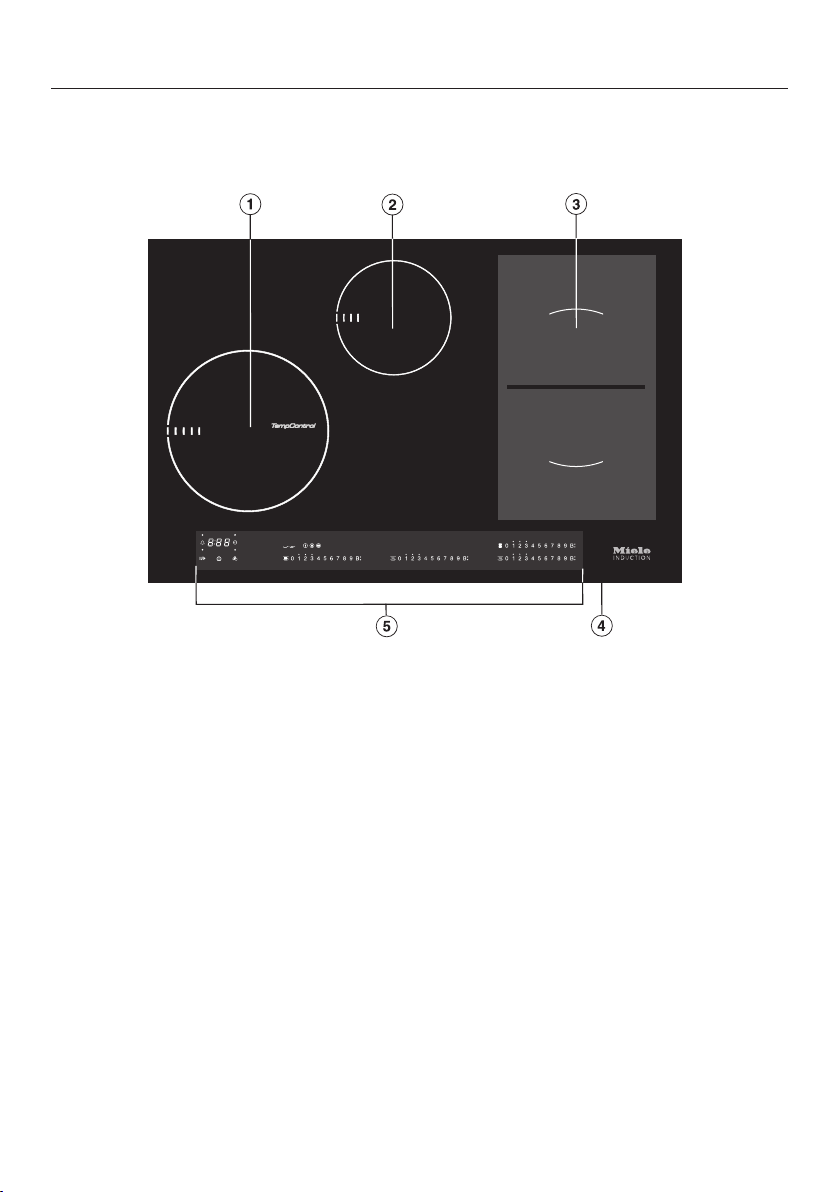
KM 6629 / KM 6639 / KM 6839
a
Cooking zone with TempControl* and TwinBooster
b
Cooking zone with TwinBooster
c
PowerFlex cooking zone with TwinBooster
d
PowerFlex cooking zone with TwinBooster
cd
can be combined to form a PowerFlex cooking area
e
Controls / Indicators
*On some hobs the ceramic surface in the middle of the cooking zone with Temp-
Control is transparent and the temperature sensor is visible.
Guide to the appliance
16
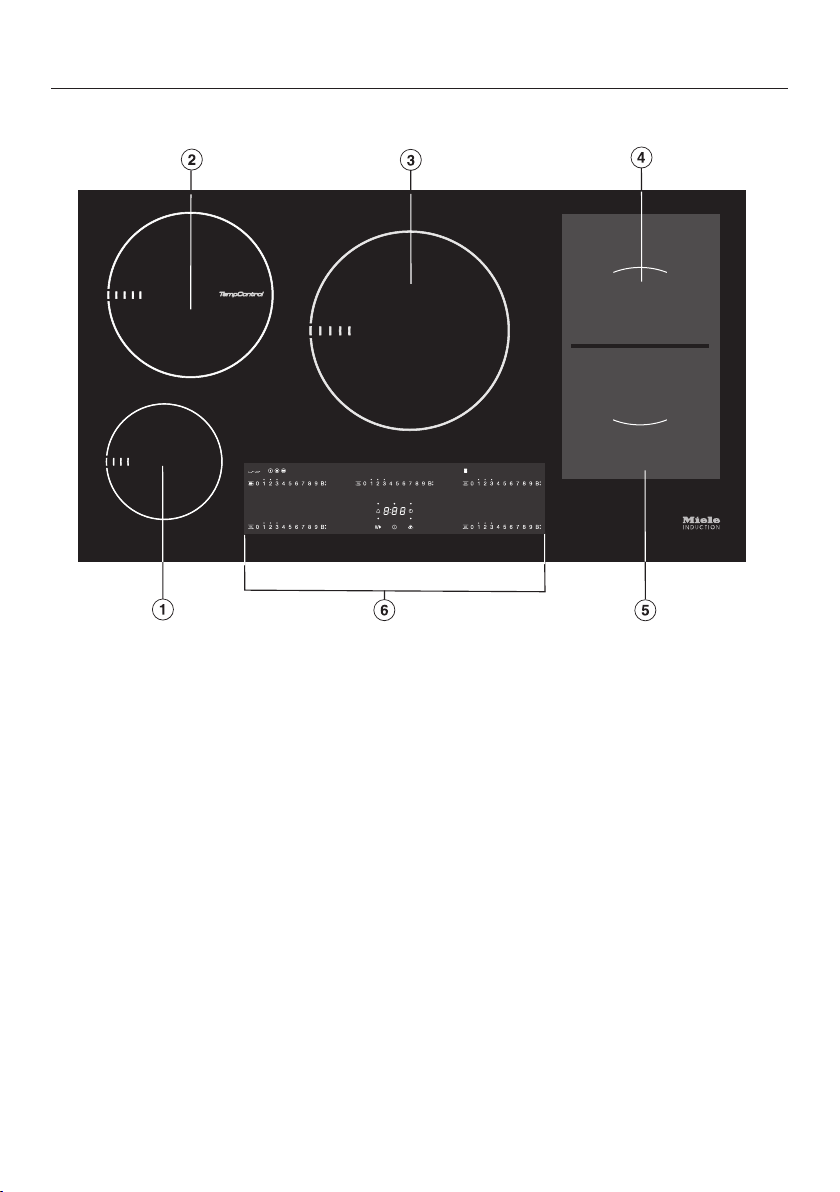
KM 6669 / KM 6679 / KM 6879
a
Cooking zone with TwinBooster
b
Cooking zone with TempControl* and TwinBooster
c
Cooking zone with TwinBooster
d
PowerFlex cooking zone with TwinBooster
e
PowerFlex cooking zone with TwinBooster
de
can be combined to form a PowerFlex cooking area
f
Controls / Indicators
*On some hobs the ceramic surface in the middle of the cooking zone with Temp-
Control is transparent and the temperature sensor is visible.
Guide to the appliance
17
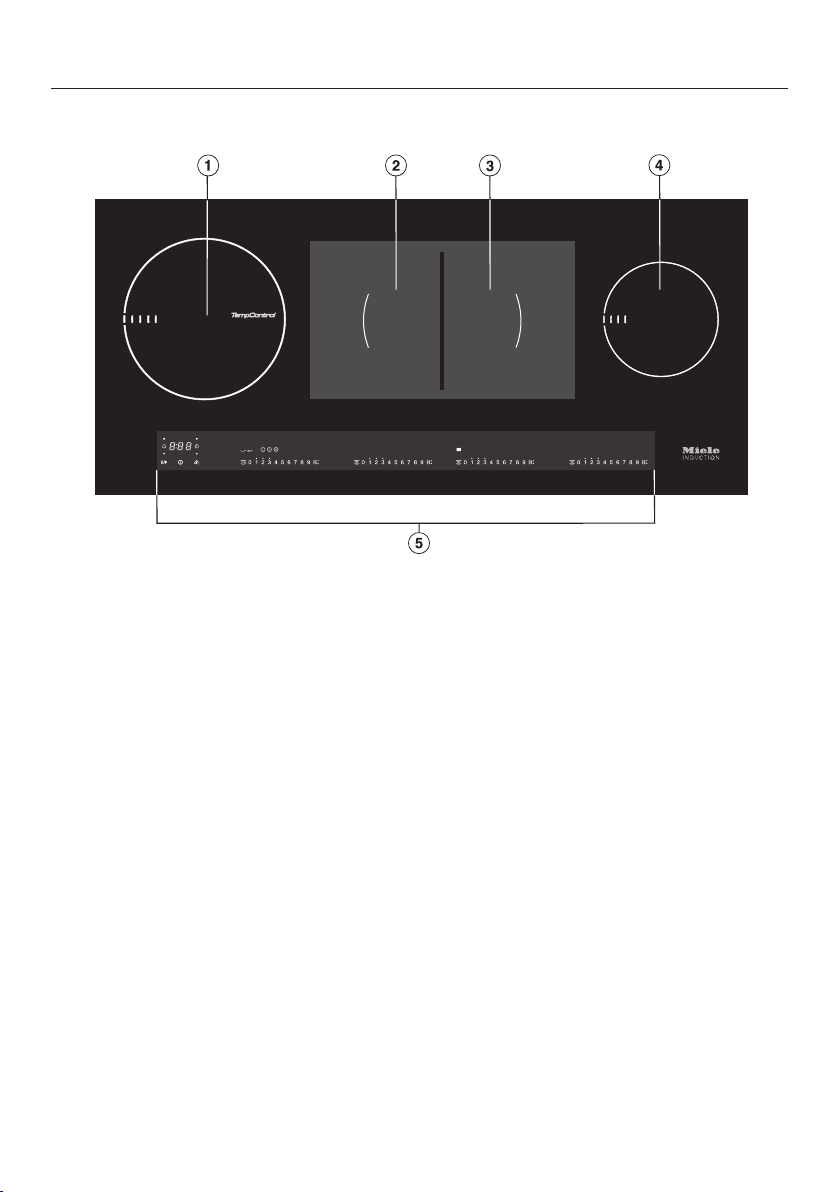
KM 6699
a
Cooking zone with TempControl* and TwinBooster
b
PowerFlex cooking zone with TwinBooster
c
PowerFlex cooking zone with TwinBooster
bc
can be combined to form a PowerFlex cooking area
d
Cooking zone with TwinBooster
e
Controls / Indicators
*On some hobs the ceramic surface in the middle of the cooking zone with Temp-
Control is transparent and the temperature sensor is visible.

Guide to the appliance
18
Controls / Indicators
Sensors
For switching the hob on and off
1, 2 , 3 .... 9, B Numerical keybank
- For setting the power level:
1–9=Power level
B=Booster
- For setting a minute minder
- For setting a switch-off time
Wipe protection
Stop&Go
TempControl frying level 1
TempControl frying level II
TempControl frying level III
TempControl simmer setting
/ For switching the PowerFlex cooking area on and
off
For switching the Keeping warm setting on and off
For switching the Keeping warm plus setting on and
off
Indicator lights
Cooking zone with TempControl
B TwinBooster level 1
B TwinBooster level 2
Residual heat indicators

Guide to the appliance
19
Timer
a
Minute minder sensor
b
Cooking zone indicator
c
Timer display
: to
:
Duration
System lock/safety lock activated
altern-
ating
with
Demonstration mode activated
d
Sensor for selecting the cooking zone automatic switch-off
Guide to the appliance
20
Cooking zones
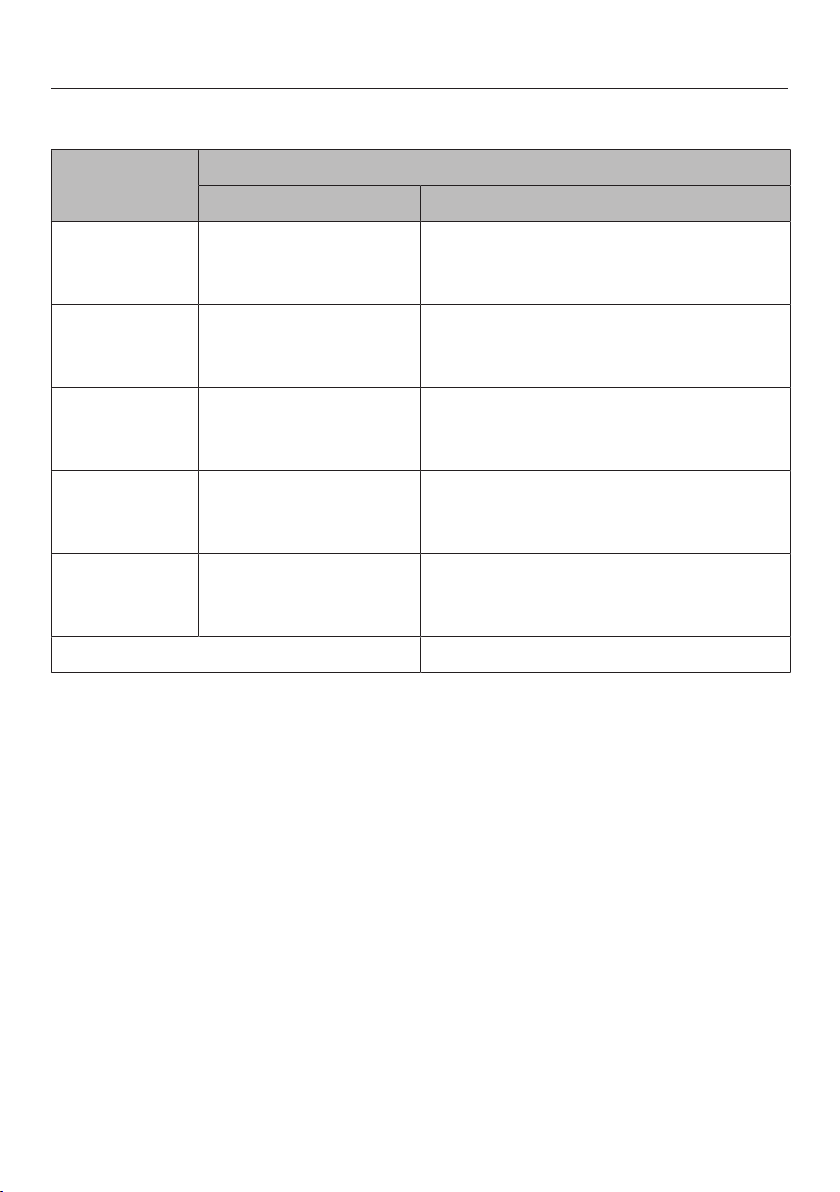
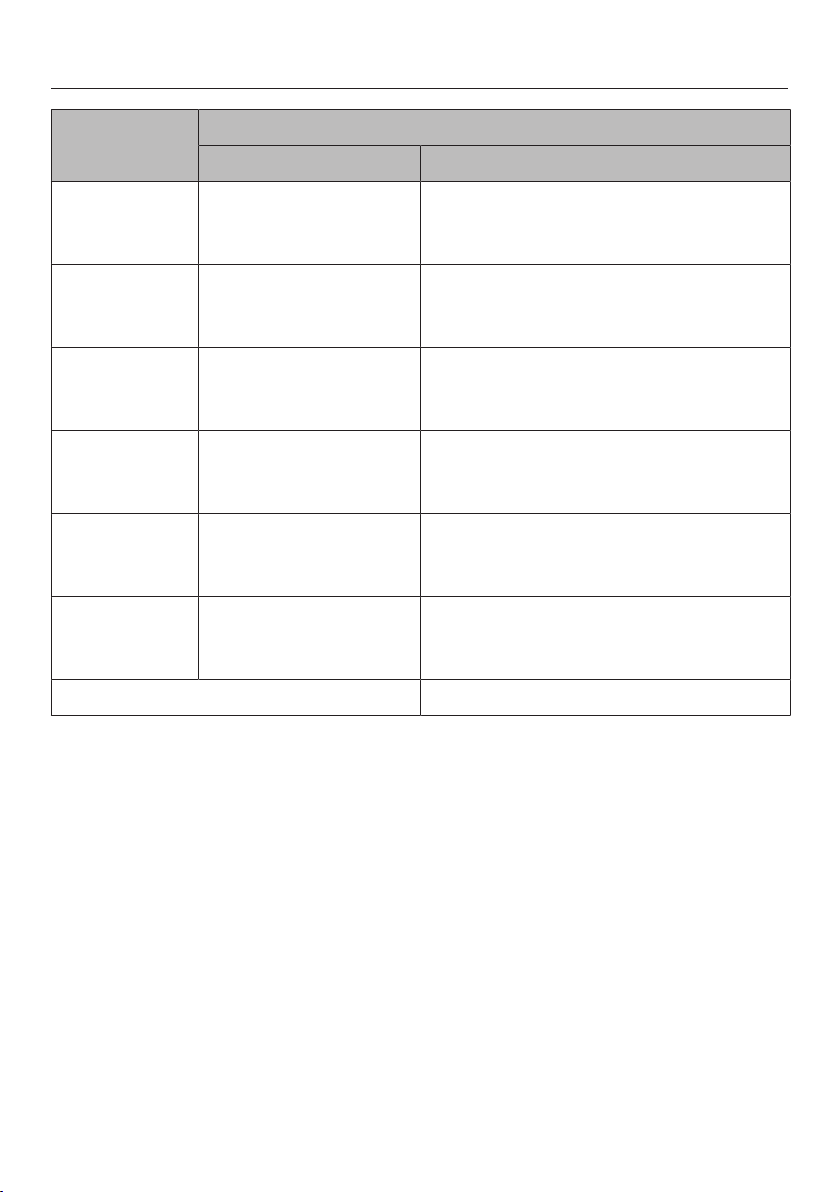
Cooking zone KM 6629 / KM 6639 / KM 6839
Øin cm* Rating in watts for 230 V**
16–23 Normal
TwinBooster, level 1
TwinBooster, level 2
2300
3000
3650
10–16 Normal
TwinBooster, level 1
TwinBooster, level 2
1400
1750
2200
15–23 Normal
TwinBooster, level 1
TwinBooster, level 2
2100
3000
3650
15–23 Normal
TwinBooster, level 1
TwinBooster, level 2
2100
3000
3650
+ 22–23 /
15x23–23x39
Normal
TwinBooster, level 1
TwinBooster, level 2
3400
4800
7300
Total 7300
* Pans with a base diameter within the given range may be used.
** The wattage quoted may vary depending on the size and material of the pans used.
Guide to the appliance
21
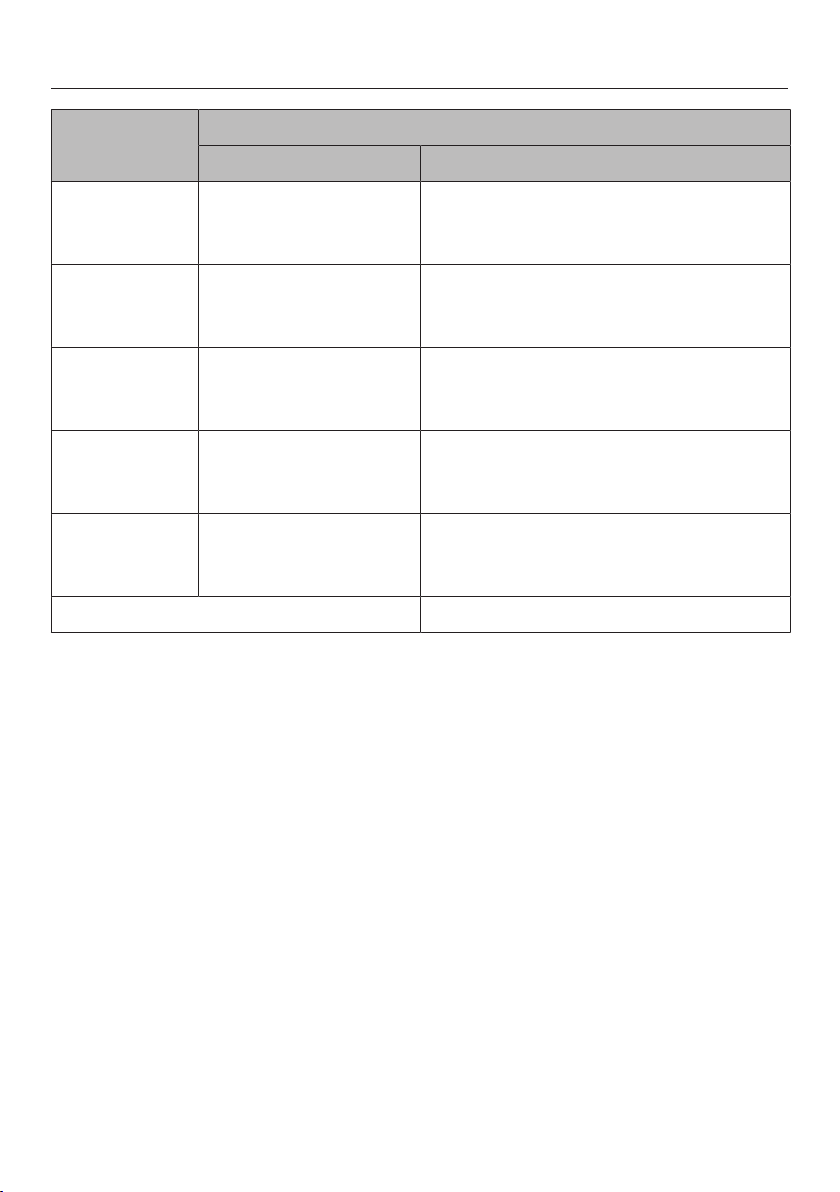
Cooking zone KM 6669 / KM 6679 / KM 6879
Øin cm* Rating in watts for 230 V**
10–16 Normal
TwinBooster, level 1
TwinBooster, level 2
1400
1750
2200
16–23 Normal
TwinBooster, level 1
TwinBooster, level 2
2300
3000
3650
18–28 Normal
TwinBooster, level 1
TwinBooster, level 2
2600
3000
3650
15–23 Normal
TwinBooster, level 1
TwinBooster, level 2
2100
3000
3650
15–23 Normal
TwinBooster, level 1
TwinBooster, level 2
2100
3000
3650
+ 22–23 /
15x23–23x39
Normal
TwinBooster, level 1
TwinBooster, level 2
3400
4800
7300
Total 11000
* Pans with a base diameter within the given range may be used.
** The wattage quoted may vary depending on the size and material of the pans used.
Guide to the appliance
22
Cooking zone KM 6699
Øin cm* Rating in watts for 230 V**
16–23 Normal
TwinBooster, level 1
TwinBooster, level 2
2300
3000
3650
15–23 Normal
TwinBooster, level 1
TwinBooster, level 2
2100
3000
3650
15–23 Normal
TwinBooster, level 1
TwinBooster, level 2
2100
3000
3650
10–16 Normal
TwinBooster, level 1
TwinBooster, level 2
1400
1750
2200
+ 22–23 /
15x23–23x39
Normal
TwinBooster, level 1
TwinBooster, level 2
3400
4800
7300
Total 7300
* Pans with a base diameter within the given range may be used.
** The wattage quoted may vary depending on the size and material of the pans used.

Using for the first time
23
Please stick the extra data plate for
the appliance supplied with this doc-
umentation in the space provided in
the "After sales service, data plate,
guarantee" section of this booklet.
Remove any protective wrapping and
stickers.
Cleaning the hob for the first
time
Before using for the first time, clean
the hob with a damp cloth only and
then wipe dry.
Switching on the hob for the
first time
The metal components have a protect-
ive coating which may give off a slight
smell when heated up for the first time.
The induction coils may also give off a
slight smell for the first few hours of op-
eration. This smell will be less notice-
able with each subsequent use before
dissipating completely.
The smell and any vapours given off do
not indicate a faulty connection or ap-
pliance and they are not hazardous to
health.
Please note that the heating up time
on induction hobs is very much
shorter than on conventional hobs.

Induction
24
The induction principle
An induction coil is located under each
cooking zone. When a cooking zone is
switched on, this coil creates a mag-
netic field which impacts directly on the
base of the pan and heats it up. The
cooking zone itself is heated up indir-
ectly by the heat given off by the pan.
An induction cooking zone only works
when a ferromagnetic pan is placed on
it (see "Pans"). The induction cooking
zone automatically recognises the size
of the pan.
The set power level flashes in the nu-
merical keybank for the cooking zone
– if the zone has been switched on
without a pan in place, or if the pan is
unsuitable (non-magnetic base),
– if the diameter of the base of the pan
is too small,
– if the pan is taken off the cooking
zone when it is switched on.
If a suitable pan is placed on the cook-
ing zone within 3 minutes, the flashing
power level will go out and you can
continue as normal.
If no pan or an unsuitable pan is placed
on the cooking zone, the cooking zone
will switch off automatically after 3
minutes.
When the appliance is switched
on either deliberately or by mistake,
or when there is residual heat
present, there is the risk of any metal
items placed on the hob (e.g. cutlery)
heating up.
Danger of burning.
Do not use the hob as a resting
place for items. Switch the cooking
zones off after use with the appropri-
ate sensor.

Induction
25
Noises
When using an induction cooking zone,
the following noises can occur in the
pan, depending on what it is made of
and how it has been constructed.
On the higher power settings, it might
buzz. This will decrease or cease alto-
gether when the power setting is re-
duced.
If the pan base is made of layers of dif-
ferent materials (e.g. in a sandwiched
base), it might emit a cracking sound.
Whistling might occur if linked zones
(see "Booster") are being used at the
same time, and the pans also have
bases made of layers of different mater-
ials.
You might hear a clicking sound from
the electronic switches, especially on
lower power settings.
You might hear a whirring sound when
the cooling fan switches on. It switches
on to protect the electronics when the
hob is being used intensively. The fan
may continue to run after the appliance
has been switched off.

Induction
26
Pans
The following pan types are suitable:
– stainless steel with a magnetic base,
– enamelled steel,
– cast iron.
The following pan types are not suit-
able:
– stainless steel pans without a mag-
netic base,
– aluminium and copper pans,
– glass, ceramic or earthenware pots
and pans.
To test whether a pot or pan is suitable
for use on an induction hob, hold a
magnet to the base of the pan. If the
magnet sticks, the pan is suitable.
If an unsuitable pan is used, the set
power level will flash in the numerical
keybank for the cooking zone.
The composition of the pan base can
affect the evenness of the cooking res-
ults (e.g. when making pancakes).
– To make optimum use of the cooking
zones, choose pans with a suitable
base diameter (see "Cooking zones").
If the pan is too small it will not be re-
cognised and the set power level will
flash in the numerical keybank for the
cooking zone.
– Only use pots and pans with smooth
bases. Rough bases will scratch the
ceramic glass.
– Lift pans into position on the hob.
Sliding them into place can cause
scuffs and scratches.
– Often the maximum diameter quoted
by manufacturers refers to the dia-
meter of the top rim of the pot or
pan. The diameter of the base (gener-
ally smaller) is the more important
one.

Tips on saving energy
27
– Use a lid whenever possible to min-
imise heat loss.
– Select a smaller pan when cooking
small quantities. A smaller pan uses
less energy than a larger pan with
very little in it.
– Cook with as little water as possible.
– Once food has come to the boil or
the oil in the pan is hot enough for
frying, reduce the heat to a lower set-
ting.
– Use a pressure cooker to reduce
cooking times.
Setting range
28
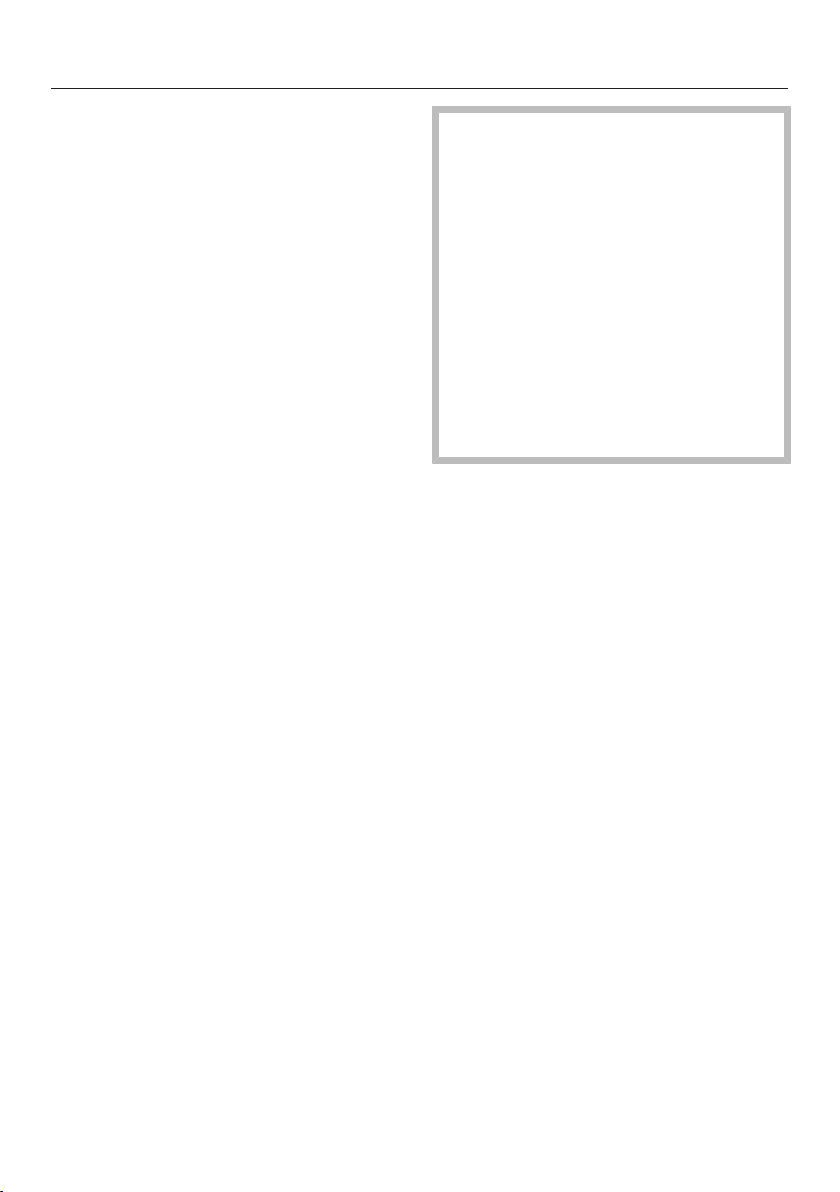
The hob is programmed with 9 power levels at the factory. If you wish to fine-tune
a setting, you can extend the power setting range to 17 power levels (see "Pro-
gramming").
Setting range
Default set-
ting
(9 power
levels)
Extended set-
tings
(17 power
levels)
Melting butter
Dissolving gelatine
Melting chocolate
1–2 1–2.
Making milk puddings 2 2–2.
Warming small quantities of liquid
Cooking rice
3 3–3.
Defrosting frozen vegetables 3 2.–3
Making porridge 3 2.–3.
Warming liquid and semi-solid foods
Making omelettes or lightly frying eggs
Steaming fruit
4 4–4.
Cooking dumplings 4 4–5.
Steaming vegetables and fish 5 5
Defrosting and reheating frozen food 5 5–5.
Gently frying eggs (without overheating the fat) 6 5.–6.
Bringing large quantities of food to the boil, e.g. casseroles.
Thickening custard and sauces, e.g. hollandaise
6–7 6.–7
Gently frying meat, fish and sausages (without overheating
the fat)
6–7 6.–7.
Frying pancakes, potato fritters etc. 7 6.–7
Braising meat 8 8–8.
Boiling large quantities of water
Bringing to the boil
9 9
These settings should only be taken as a guide. The power of the induction coils will vary
depending on the size and material of the pan. For this reason, it is possible that the set-
tings will need to be adjusted slightly to suit your pans. As you use the hob, you will get to
know which settings suit your pans best. When using new pans that you are not familiar
with, set the power level below the one specified. Please refer to "TempControl" for the set-
tings for frying using TempControl.
Operation
29
How the hob is operated
This glass ceramic hob is equipped with
electronic sensor controls which react
to finger contact. For safety reasons, in
order to switch the hob on, the On/
Off sensor needs to be touched for a
little longer than the other sensors.
A tone sounds each time a sensor is
touched.
Only the printed On/Off sensor is
visible when the hob is switched off.
More sensors light up when the hob is
switched on.
Malfunction due to dirty and/or
covered sensors
If the sensors are dirty or covered
this could cause them to fail to react,
to activate a function or even to
switch the hob off automatically (see
"Safety switch-off"). Placing hot
pans on the sensors/indicators can
damage the electronic unit under-
neath.
Keep the sensors and indicators
clean and do not place anything on
top of them. Do not place hot pans
on them.
Operation
30
Fire hazard.
Do not leave the hob unattended
whilst it is being used.
Please note that the heating up time
on induction hobs is very much
shorter than on conventional hobs.
Switching on the hob
Touch the sensor.
More sensors will light up. If no further
entry is made, the hob will switch itself
off after a few seconds for safety reas-
ons.
Setting the power level
Permanent pan recognition is activ-
ated as standard (see "Programming").
When the hob is switched on and you
place a pan on one of the cooking
zones, all the sensors in the numerical
keybank light up.
Place a pan on the cooking zone you
want to use.
Touch the appropriate number sensor
for the power level you want.
Switching off
To switch a cooking zone off, touch
the sensor on the appropriate key-
bank.
To switch off the hob and all the
cooking zones, touch the sensor.
Residual heat indicator
If the cooking zone is still hot, the resid-
ual heat indicator will light up after the
zone has been switched off. Depending
on the temperature, a dot will appear
above power levels 1, 2 and 3.
The dots of the residual heat indicator
will go out one after another as the
cooking zone cools down. The last dot
only goes out when the cooking zone is
safe to touch.
Danger of burning. Do not touch
the cooking zones whilst the residual
heat indicators are lit up.

Operation
31
TempControl
TempControl monitors and controls the
temperature during frying:
– the fat cannot overheat,
– power levels do not need to be ad-
justed manually,
– it is not necessary to turn the food
being fried frequently.
Depending on the model of hob, the
sensor is visible in the middle of the
cooking zone.
There are three frying levels and a sim-
mer setting.
When the pre-set temperature for the
frying level is reached, the simmer set-
ting sensor will appear. This function
is for reducing sauces. It is activated by
touching the sensor.
TempControl is not suitable for deep-
frying or boiling.
Use this function for frying only.
Notes on use
– Make sure that the ceramic surface is
kept clean, particularly in the area of
the sensor in the middle of the cook-
ing zone.
– Use pans which distribute heat
evenly, e.g. pans with a sandwich
base.
– For frying with butter, use frying
level only.
– Do not place the food in the pan until
the pre-set temperature has been
reached.
– You can switch from one frying level
to another.
– TempControl will deactivate if you
switch from a frying level to a power
level.
– You can carry out several frying pro-
cesses one after the other. The cook-
ing zone does not need to cool
down.
– So that simmering takes place reli-
ably, at least 250ml of liquid which is
not too thick needs to be added.
– You can switch from the simmer set-
ting back to a frying level.
Operation
32
Activating TempControl
Place a pan on the cooking zone and
add frying fat/oil if necessary.
Touch the sensor for the frying level
you want to use( ,, ).
The sensor for the frying level selected
will start to pulsate.
Once the pre-set temperature for the
frying level selected has been
reached, a tone will sound and the
sensor will light up constantly.
The simmer setting sensor will ap-
pear.
Place the food in the frying pan.
Simmer setting
Touch the sensor and add at least
250 ml of liquid.
Frying assistant cooking chart
Frying level
Fried eggs, scrambled eggs
Chicken breast
Frozen spring rolls
Frozen fish fingers
Fish fillet / whole fish
Kebabs
Vegetables in butter (mushrooms, garlic)
Schupfnudeln in butter
Burgers
Bacon
Frying level
Potato pancakes
Fried potatoes made from raw potatoes
Meat loaf
Steaks
Escalopes
Tortilla
Langos (Hungarian flatbread)
Popcorn
Frozen stir fries
Dry roasting seeds
Prawns
Bratwurst
Caramel
Sliced meat
Frying level
Wok cooking
Pancakes
Potato pancakes made with cooked pota-
toes
Searing meat for stews (e.g. goulash)
Searing large quantities of meat

Operation
33
Setting the power level - exten-
ded setting range
Touch the area between the sensors.
The sensors in front of and after the in-
terim level will light up brighter than the
other sensors.
Example:
if you have set power level 7. the num-
bers 7 and 8 will be brighter than the
other numbers.
PowerFlex cooking area
The PowerFlex cooking zones combine
automatically to form a PowerFlex
cooking area when you place a suffi-
ciently large pot or pan on them (see
"Guide to the appliance - Hob"). Set-
tings for the linked cooking area are
controlled by the front or left PowerFlex
zone (depending on model). The Power-
Flex cooking area can also be switched
on and off manually.
Switch the PowerFlex cooking area off
manually if you want to use the cook-
ing zones individually.
To switch the PowerFlex cooking
area off manually
Touch the or sensor.
Operation
34
Auto heat-up
When Auto heat-up has been activated,
the cooking zone switches on automat-
ically at the highest power setting and
then switches to the continued cooking
setting. The heat-up time depends on
which continued cooking setting has
been chosen (see chart).
Activating
Touch the sensor for the continued
cooking setting you want until a tone
sounds and the sensor starts to
pulsate.
During the heat-up time (see chart), the
continued cooking level set will pulsate.
With extended power levels (see "Pro-
gramming"), the sensors for the power
levels in front of and after the interim
power level will pulsate if an extended
power level setting has been selected.
Altering the continued cooking setting
while the cooking zone is heating up
deactivates Auto heat-up.
Deactivating
Touch the sensor for the continued
cooking setting.
or
Select a different power level.
Continued cook-
ing setting
Heat-up time
[min : sec]
1 approx. 0:15
1. approx. 0:15
2 approx. 0:15
2. approx. 0:15
3 approx. 0:25
3. approx. 0:25
4 approx. 0:50
4. approx. 0:50
5 approx. 2:00
5. approx. 5:50
6 approx. 5:50
6. approx. 2:50
7 approx. 2:50
7. approx. 2:50
8 approx. 2:50
8. approx. 2:50
9 –
The continued cooking settings with a dot
after the number are only available if the
power level range has been extended (see
"Programming").

Operation
35
Booster
The cooking zones are equipped with a
TwinBooster. You can use the booster
function for a maximum of two cooking
zones at the same time.
When activated, the power is boosted
for a maximum of 15 minutes so that
large quantities can be heated quickly,
e.g. when boiling water for cooking
pasta.
The booster function can only be used
on two cooking zones at the same time.
If the booster function is switched on
when
– no power level has been selected,
the cooking zone will revert automat-
ically to level 9 at the end of the
booster time or if the booster func-
tion is switched off before this.
– a power level has been selected, the
cooking zone will revert automatically
to the power level selected at the end
of the booster time or if the booster
function is switched off before this.
Cooking zones are networked in pairs
to supply the power for the booster
function. When the booster function is
selected, a proportion of energy is
taken away from the linked cooking
zone and the following happens within
the pairs:
– Auto heat-up is deactivated
– the power level is reduced
– the linked cooking zone is switched
off.

Operation
36
To switch on the TwinBooster, level 1
Place a pan on the cooking zone you
want to use.
Select a power level if necessary.
Touch theB sensor.
The indicator light for TwinBooster
level 1 comes on.
To switch on the TwinBooster, level 2
Place a pan on the cooking zone you
want to use.
Select a power level if necessary.
Touch theB sensor twice.
The indicator light for TwinBooster
level 2 comes on.
To switch off the TwinBooster
Touch theB sensor.
– once (Booster)
– repeatedly until the indicator lights go
out (TwinBooster).
or
Select a different power level.

Operation
37
Keeping warm / warming up
The Keeping warm setting is for
keeping food that has just been cooked
warm, i.e. food that is still hot. It is not
for reheating food that has gone cold.
The Keeping warm plus setting is for
keeping food warm and for warming up
food. It is also suitable for melting
chocolate.
If the Keeping warm setting has been
selected, the cooking zone will remain
switched on for a maximum of 2 hours.
– Keep food warm in the pan it was
cooked in and cover with a lid.
– You do not have to stir food while it is
being kept warm.
– Nutrients are lost when food is
cooked, and continue to diminish
when food is kept warm. The longer
food is kept warm for, the greater the
loss of nutrients. Try to ensure that
food is kept warm for as short a time
as possible.
To switch the Keeping warm setting
on/off
Touch the or sensor.
Timer
38
The hob has to be switched on if you
wish to use the timer.
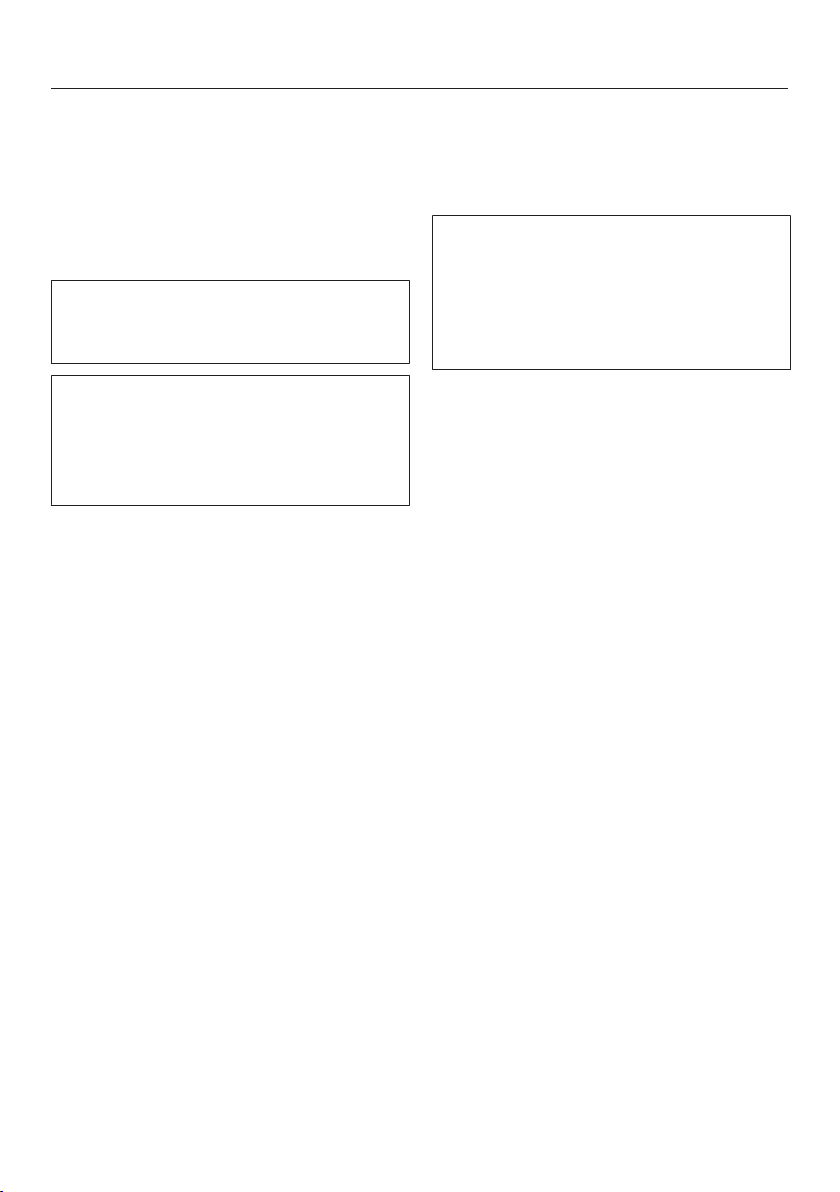
You can set a duration between
1minute (:) and 9hours 59 minutes
(:).
Durations of up to 59 minutes are
shown in minutes (0:59), durations of
more than 60 minutes are shown in
hours and minutes. The duration is
shown in the order of hours, followed
by minutes in the tens and units posi-
tions.
Example:
59 minutes = 0:59, Enter as: 5-9
80 minutes = 1:20, Enter as: 1-2-0
After the first number has been entered
the timer display will light up constantly.
After the second number has been
entered, the first number will move to
the left. After the third number has been
entered, the first and second numbers
will move to the left.
The timer can be used for two different
functions:
– to set the minute minder
– to set a cooking zone to switch off
automatically.
The functions can be used at the same
time. The shortest time is always dis-
played and the sensor (minute
minder) or the indicator light for the
cooking zone (automatic switch-off)
pulsates.
If you want to show times remaining
which are counting down in the back-
ground, touch the or sensor. If a
switch-off time has been programmed
for several cooking zones, touch the
sensor repeatedly until the indicator
light for the cooking zone you want
pulsates.
Minute minder
The minute minder is set using the nu-
merical keybank for the (front) left
cooking zone.
To set the minute minder
Touch the sensor.
The timer display will start to flash.
Set the time you require.
To change the duration set for the
minute minder
Touch the sensor.
Set the duration you require.
To cancel the duration set for the
minute minder
Touch the sensor until 0:00 ap-
pears in the timer display.
Timer
39
Switching a cooking zone off
automatically
You can set a time at the end of which a
cooking zone will switch off automatic-
ally. This function can be used for all
the cooking zones at the same time.
The switch-off time is set using the
numerical keypad of the cooking zone
you want to switch off automatically.
If the time programmed is longer than
the maximum operational time al-
lowed, the cooking zone will switch off
after the maximum time allowed (see
relevant section).
Select a power level for the cooking
zone you require.
Touch the sensor.
The indicator light will start to flash.
Set the time you require.
If you want to set another cooking
zone to switch off automatically, fol-
low the same steps as described
above.
If more than one switch-off time is
programmed, the shortest time re-
maining will be displayed, and the cor-
responding indicator light will flash.
The other indicator lights will light up
constantly.
To change the switch-off time
Touch the sensor repeatedly until
the indicator light for the zone you re-
quire flashes.
Set the time you require.
To delete the switch-off time
Touch the sensor repeatedly until
the indicator light for the zone you re-
quire flashes.
Touch "0" on the numerical keybank.

Additional functions
40
Stop&Go
When Stop&Go is activated, the power
of all cooking zones in use is reduced to
power level 1.
The cooking zone power levels and the
timer settings cannot be altered and the
hob can only be switched off. A set
minute minder duration, set automatic
switch-off and Auto heat-up times will
continue to count down.
When Stop&Go is deactivated, the
cooking zones will operate at the power
or frying levels previously selected.
If the function is not deactivated within
1 hour, the hob will switch off.
Activating / Deactivating
Touch the sensor.
Recall
If the hob is accidentally switched off
during use, you can use this function to
restore all the settings. The hob must
be switched on again within
10seconds.
Switch the hob on again.
The power or frying levels previously set
will flash.
Touch the flashing power or frying
levels immediately.
All the cooking zones and the timer will
continue to operate using the settings
selected previously.

Additional functions
41
Wipe protection
You can lock the hob sensors for 20
seconds in order to remove soiling, for
example. The is not locked.
Activating
Touch the sensor.
The cooking zones will be switched off
and the time will count down in the
timer display.
Deactivating
Touch the sensor.
Displaying the hob data
You can display the model number and
software version of your hob. To do this
there must not be any pots or pans on
the cooking zones.
Model numbers
Switch on the hob.
Touch the sensor on one of the nu-
merical keybanks.
Touch the and sensors at the
same time.
2 numbers will flash alternately in the
timer display:
Example: flashing alternately with
= KM6639
Software version
Switch on the hob.
Touch the sensor on one of the nu-
merical keybanks.
Touch the and sensors at the
same time.
Numbers will appear in the timer dis-
play:
Example: :

Safety features
42
System lock / Safety lock
The system lock and safety lock are
deactivated if there is an interruption
to the power supply.
Your hob is equipped with a system
lock and a safety lock to prevent the
hob and the cooking zones being
switched on or any settings being
altered by mistake.
The system lock is set when the hob is
switched off. When the system lock ac-
tivated, the hob cannot be switched on
and the timer cannot be used. A set
minute minder will continue to count
down.
The safety lock is set when the hob is
switched on. When the safety lock is
activated,
– The cooking zones and the hob can
only be switched off.
– A set minute minder can be changed.
If an unavailable sensor is touched
whilst the system lock or safety lock is
activated will appear in the timer
display for a few seconds and a tone
will sound.
Activating the system lock
Touch the sensor for 6seconds.
The time will count down in the timer
display. will appear once the time
has elapsed. The system lock is activ-
ated.
Deactivating the system lock
Touch the sensor for 6seconds.
will appear in the time display
briefly and then the time will count
down. The system lock is deactivated
once the time has elapsed.
Activating the safety lock
Touch and hold the and
sensors at the same time for
6seconds.
The time will count down in the timer
display. will appear once the time
has elapsed. The safety lock is activ-
ated.
Deactivating the safety lock
Touch and hold the and
sensors at the same time for
6seconds.
will appear briefly in the timer dis-
play and then the time will count down.
The safety lock is deactivated once the
time has elapsed.
Safety features
43
Safety switch-off
Safety switch-off with an overlong
cooking time
The safety switch-off mechanism is
triggered automatically if one of the
cooking zones is heated for an unusu-
ally long period of time. This period of
time depends on the power level selec-
ted. Once exceeded, the cooking zone
switches off and the residual heat indic-
ators appear. The cooking zone can be
operated again after it has been
switched off and back on.
The hob is programmed to safety set-
ting 0 at the factory. If required you
can set a higher safety setting with a
shorter maximum operating time (see
chart).
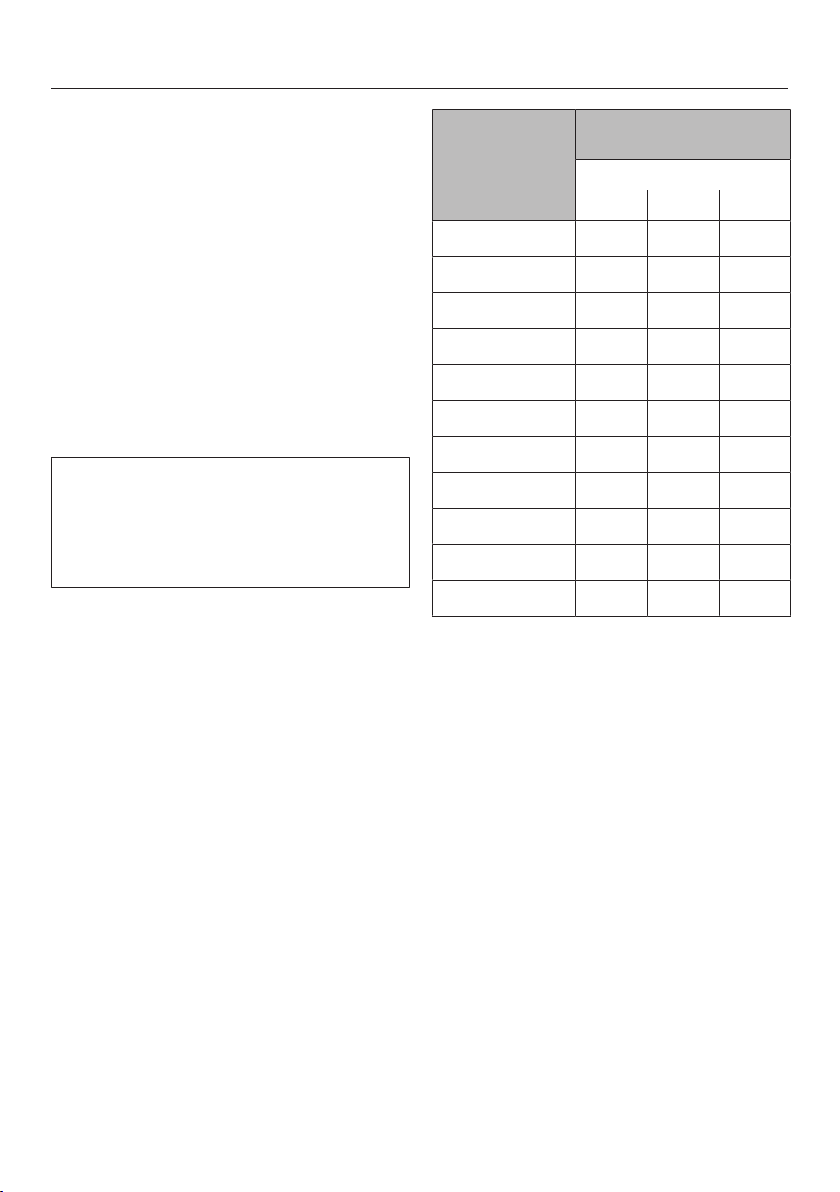
Power level* Maximum operating time
[h:min]
Safety setting
0** 1 2
1 10:00 8:00 5:00
1. 10:00 7:00 4:00
2/2. 5:00 4:00 3:00
3/3. 5:00 3:30 2:00
4/4. 4:00 2:00 1:30
5/5. 3:00 1:30 1:00
6/6. 2:00 1:00 12:30
7/7. 2:00 12:42 12:24
8 2:00 12:30 12:20
8. 2:00 12:30 12:18
9 1:00 12:24 12:10
* The power levels with a dot after the num-
ber are only available if the power level
range has been extended (see "Setting
range").
** Factory default setting

Safety features
44
Safety switch-off if the sensors are
covered
Your hob will switch off automatically if
one or several sensors remain covered
for more than about 10seconds, for ex-
ample by finger contact, food boiling
over or an object. will flash briefly
above the sensor and a tone will
sound.
will go out once you have removed
the object or cleaned the hob and the
hob will be ready to use again.

Safety features
45
Overheating protection
All the induction coils and cooling ele-
ments for the electronics are fitted with
an overheating protection mechanism.
Before the induction coils or cooling
elements get too hot, the overheating
protection mechanism cuts in in one of
the following ways:
Induction coils
– Any Booster function in operation will
be switched off.
– The set power level will be reduced.
– The cooking zone switches off auto-
matically. flashes in the timer dis-
play alternating with .
You can use the cooking zones again as
usual when the fault code has gone out.
Cooling elements
– Any booster function in operation will
be switched off.
– The set power level will be reduced.
– The cooking zones switch off auto-
matically.
The affected cooking zones can only be
used again as usual once the cooling
element has cooled down to a safe
level.
The overheating protection mechanism
can be triggered by:
– Heating up an empty pan.
– Fat or oil being heated on a high
power level.
– Insufficient ventilation to the under-
side of the hob.
– A hot cooking zone being switched
on after an interruption to the power
supply.
If, despite removing the cause, the
overheating protection mechanism trig-
gers again, contact Miele.

Programming
46
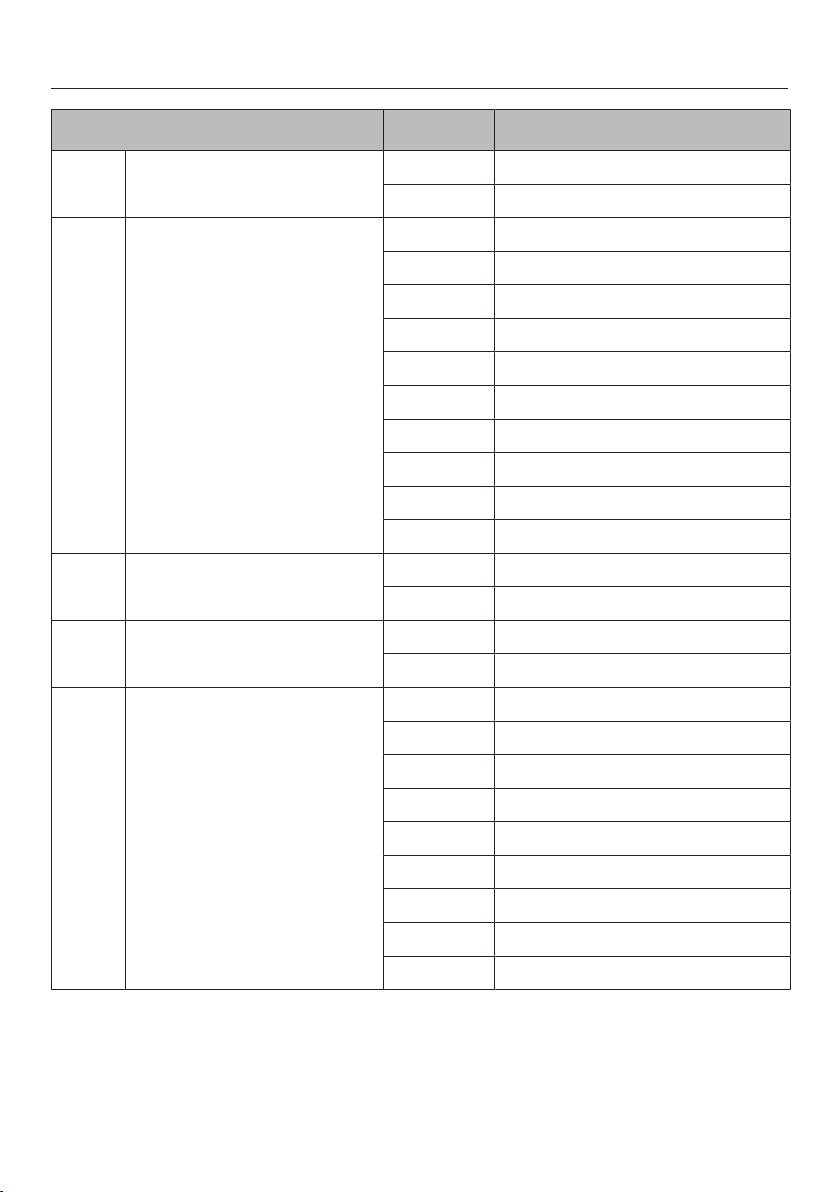
You can programme certain settings on
the hob to suit your personal needs.
Several settings can be changed in suc-
cession.
After accessing programming mode,
the symbol and will appear in the
timer display. After a few seconds, :
(Programme 01) will flash alternately
with : (Code) in the timer display.
To access programming mode
With the hob switched off, touch
the and sensors at the same
time until the symbol and ap-
pear in the timer display.
To set the programme
Touch the sensor repeatedly until
the programme number you want ap-
pears in the appropriate number on
the numerical keybank.
For a two digit programme number
you need to first set the tens position
using the numerical keybank.
To set the code
Touch the sensor repeatedly until
the Code you want appears in the
display or touch the appropriate num-
ber on the numerical keybank.
To save the settings
While the programme is showing in
the display (e.g. :) touch the
sensor until the indicators go out.
To avoid saving the settings
Touch the sensor until the indicat-
ors go out.

Programming
47
Programme
1)
Code
2)
Settings
P:01 Demonstration mode C:00 Demonstration mode off
C:01
Demonstration mode on
3)
P:03 Factory default setting C:00 Factory default settings not re-
stored
C:01 Factory default settings restored
P:04 Number of power levels C:00 9 power levels
C:01
17 power levels
4)
P:06 Keypad tone when a sensor is
touched
C:00
Off
5)
C:01 Quiet
C:02 Medium
C:03 Loud
P:07 Audible tone for the timer C:00
Off
5)
C:01 Quiet
C:02 Medium
C:03 Loud
P:08 System lock C:00 System lock can only be activated
manually
C:01 System lock activated automatic-
ally
P:09 Maximum operating time C:00 Safety setting 0
C:01 Safety setting 1
C:02 Safety setting 2
P:10 Miele@home/Con@ctivity C:00 Not available
C:01 Signed off
C:02 Signed on
P:12 Sensor reaction speed C:00 Slow
C:01 Standard
C:02 Rapid
Programming
48
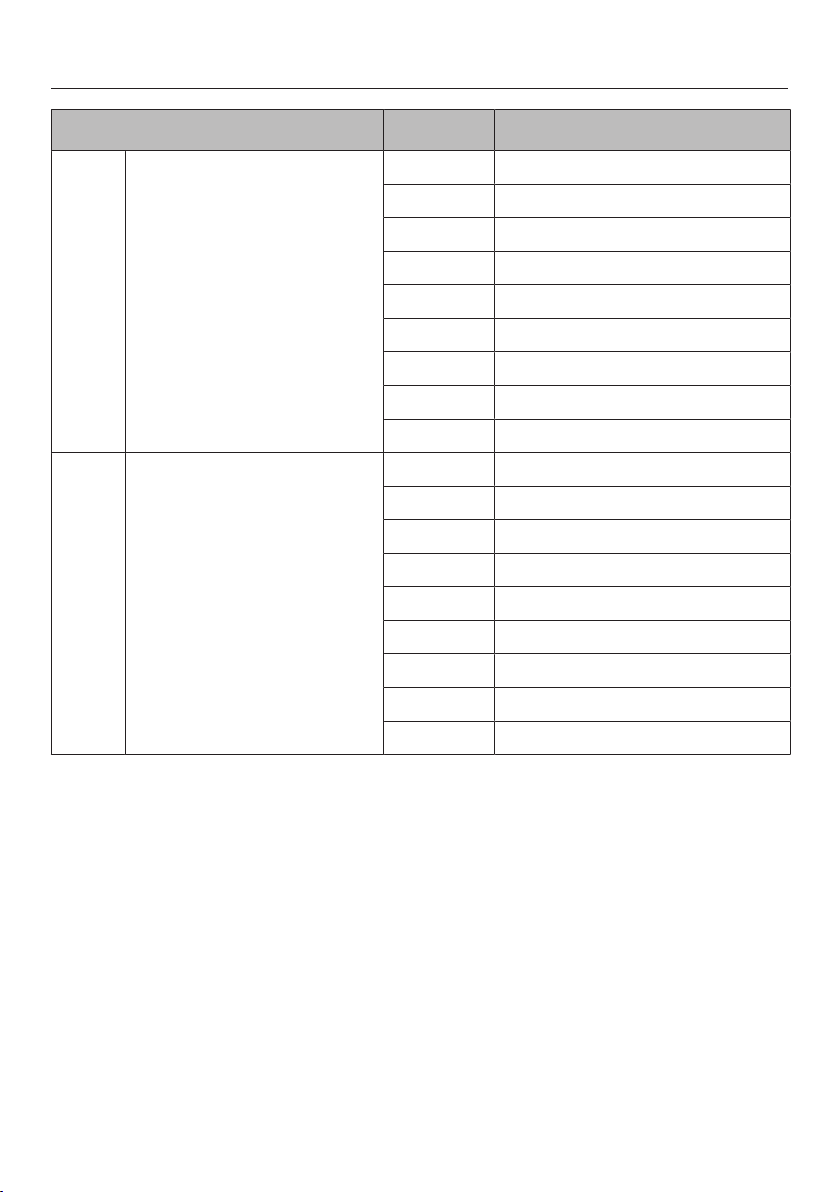
Programme
1)
Code
2)
Settings
P:15 Permanent pan recognition C:00 Not active
C:01 Active
P:16 Maximum pan temperature
with manual frying and cook-
ing
C:00 160°C
C:01 170°C
C:02 180°C
C:03 190°C
C:04 200°C
C:05 210°C
C:06 220°C
C:07 230°C
C:08 240°C
C:09 250°C
P:17 Temperature monitoring of
maximum pan temperature
C:00 Off
C:01 On
P:18 Empty pan protection with
manual cooking and frying
C:00 Off
C:01 On
P:19 Frying level temperature C:00 140°C
C:01 145°C
C:02 150°C
C:03 155°C
C:04 160°C
C:05 165°C
C:06 170°C
C:07 175°C
C:08 180°C
Programming
49
Programme
1)
Code
2)
Settings
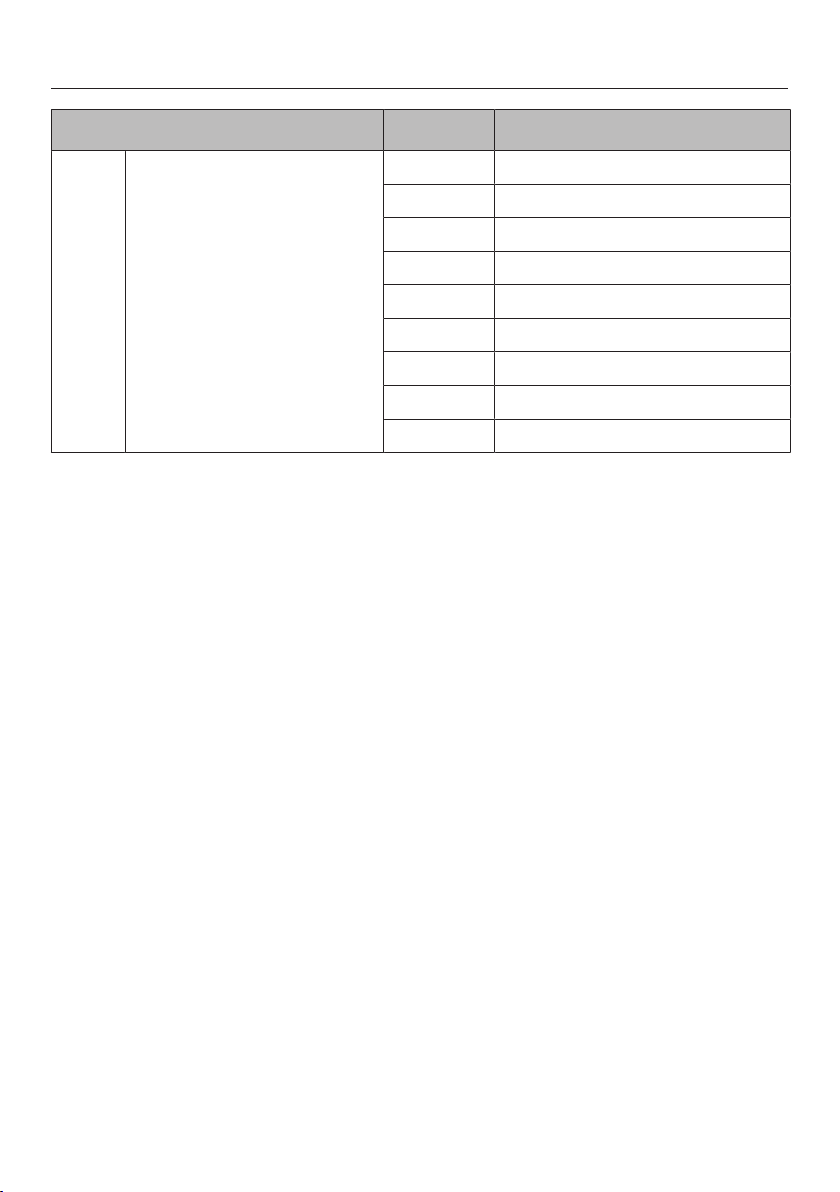
P:20 Frying level temperature C:00 180°C
C:01 185°C
C:02 190°C
C:03 195°C
C:04 200°C
C:05 205°C
C:06 210°C
C:07 215°C
C:08 220°
P:21 Frying level temperature C:00 200°C
C:01 205°C
C:02 210°C
C:03 215°C
C:04 220°C
C:05 225°C
C:06 230°C
C:07 235°C
C:08 240°C
Programming
50
Programme
1)
Code
2)
Settings
P:25 Keeping warm plus tem-
perature
C:00 50°C
C:01 55°C
C:02 60°C
C:03 65°C
C:04 70°C
C:05 75°C
C:06 80°C
C:07 85°C
C:08 90°C
1)
Unlisted programmes are not assigned.
2)
The factory setting is shown in bold.
3)
After the hob has been switched on appears in the timer display for a few seconds.
4)
In the text and charts, the extended power levels are shown with a dot after the number
for better understanding.
5)
The tone which sounds when the On/Off sensor is touched cannot be switched off.
Cleaning and care
51
Danger of burning.
The cooking zones must be switched
off. The hob must have cooled down.
Danger of injury.
The steam from a steam cleaning ap-
pliance could reach electrical com-
ponents and cause a short circuit.
Do not use a steam cleaner to clean
the hob.
The use of unsuitable cleaning
agents can cause the surfaces to
discolour or alter.
All surfaces are susceptible to
scratching.
Remove any cleaning agent residues
immediately.
Clean the entire hob after each use. Al-
low it to cool down before cleaning. Dry
the hob after using water to clean it.
This helps prevents limescale deposits.
Unsuitable cleaning agents
To avoid damaging the surfaces of your
appliance, do not use:
– washing-up liquid,
– cleaning agents containing soda, al-
kalines, ammonia, acids or chlorides,
– cleaning agents containing descaling
agents,
– stain or rust removers,
– abrasive cleaning agents, e.g.
powder cleaners and cream cleaners,
– solvent-based cleaning agents,
– dishwasher cleaner,
– grill and oven cleaners,
– glass cleaning agents,
– hard, abrasive brushes or sponges,
e.g. pot scourers, or sponges which
have been previously used with ab-
rasive cleaning agents,
– melamine eraser blocks.
Cleaning and care
52
Do not clean the area between the
glass-ceramic surface and the frame
or the frame and the worktop with
sharp, pointed objects.
This could damage to the seals.
Do not use washing-up liquid to
clean the appliance as washing-up li-
quid will not remove all soiling and
deposits.
It will form an invisible coating which
will cause permanent discolouration
of the ceramic surface.
Clean the hob regularly with a suit-
able ceramic hob cleaning agent.
Wipe all coarse soiling off using a damp
cloth. Stubborn soiling may need to be
removed with a shielded scraper blade.
Then clean the hob with Miele ceramic
and stainless steel hob cleaner (see
"Optional accessories") or a suitable
proprietary ceramic hob cleaning agent
applied with kitchen paper or a clean
cloth. Do not apply cleaner whilst the
hob is still hot, as this could result in
marking. Please follow the manufac-
turer's instructions.
Finally wipe the hob with a damp cloth,
then dry with a soft, dry cloth. Residues
can burn onto the appliance the next
time it is used and cause damage to the
ceramic surface. Ensure that all clean-
ing agent residues are removed.
Spots caused by limescale, water and
aluminium residues (spots with a metal-
lic appearance) can be removed using
Miele's ceramic and stainless steel hob
cleaner.
Danger of burning.
Protect your hands with oven gloves
before using a shielded scraper
blade to remove sugar, plastic or alu-
minium residues from the hot hob.
Should any sugar, plastic or alu-
minium foil spill or fall onto a hot cook-
ing zone while it is in use, first switch off
the appliance. Then carefully scrape off
all the sugar, plastic or aluminium
residues from the hob immediately
whilst they are still hot, using a shielded
scraper blade. Allow the appliance to
cool down, and then clean as described
above.
Problem solving guide
53
With the aid of the following guide, minor problems can be easily corrected
without contacting Miele.
If having followed the suggestions below, you still cannot resolve the problem,
please contact Miele (see end of this booklet for contact details).
Danger of injury. Installation, maintenance and repairs to electrical appli-
ances must only be carried out by a suitably qualified and competent person in
strict accordance with current local and national safety regulations.
Do not open the casing of the appliance.
Repairs and other work by unqualified persons could be dangerous and Miele
cannot be held liable for unauthorised work.
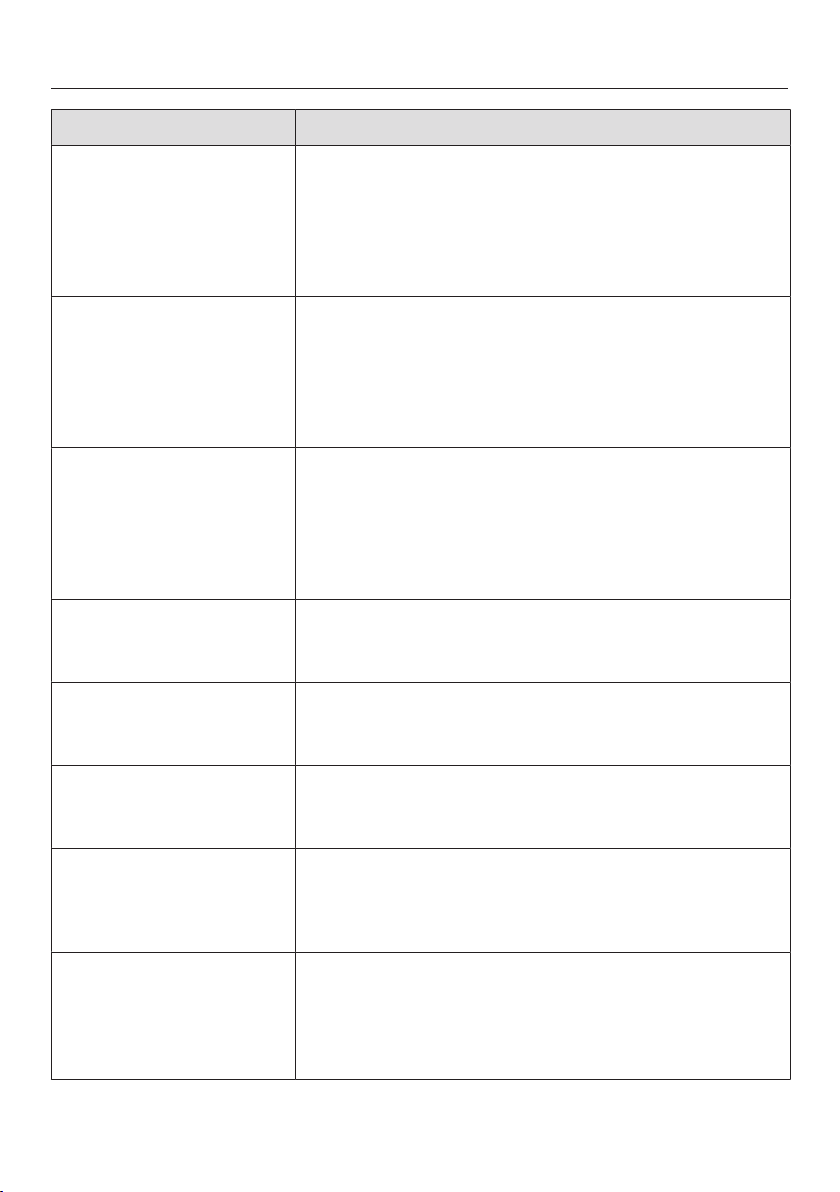
Problem Cause and remedy
The hob or cooking
zones cannot be
switched on.
There is no power to the hob.
Check if the mains fuse has tripped. If it has, con-
tact a qualified electrician or Miele (minimum fuse
rating - see data plate).
There may be a technical fault.
Disconnect the appliance from the electricity sup-
ply for approx. 1 minute. To do this:
– switch off at the isolator, or
– disconnect the mains fuse.
If, after resetting the trip switch in the mains fuse
box and switching the appliance back on, the ap-
pliance will still not heat up, contact a qualified
electrician or Miele.
A smell and vapours are
given off when the new
appliance is being used.
The metal components have a protective coating.
When the appliance is used for the first time, this
causes a smell and possibly also vapour. The material
from which the induction coils are made also gives off
a smell in the first few hours of operation. This smell
will be less noticeable with each subsequent use be-
fore dissipating completely. The smell and any vapour
given off do not indicate a faulty connection or appli-
ance and they are not hazardous to health.
The power level selec-
ted is flashing.
There is no pan on the cooking zone, or the pan is un-
suitable.
Use a suitable pan (see "Pans").
Problem solving guide
54
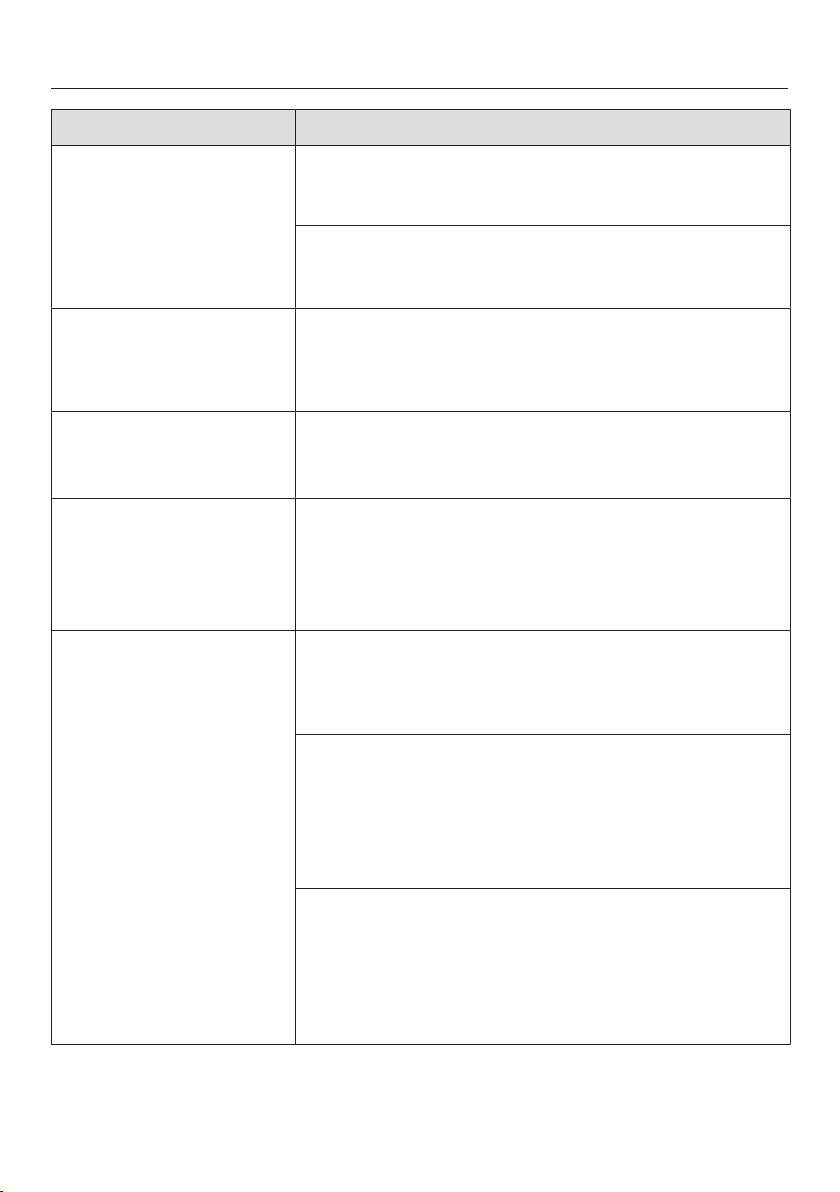
Problem Cause and remedy
After the hob has been
switched on or a sensor
has been touched
appears in the timer
display for a few
seconds.
The system lock or safety lock is activated.
Deactivate the system lock or safety lock (see
"System lock / Safety lock").
The hob has switched
off automatically. When
the hob is switched
back on, an appears
above the On/Off
sensor.
One or more of the sensors are covered, e.g. by finger
contact, food boiling over or an object.
Clean off any dirt or remove the object (see
"Safety switch-off").
After the hob has been
switched on, flashes
alternately with in
the timer display. The
cooking zones do not
heat up.
The hob is in demonstration mode.
Deactivate demonstration mode (see "Program-
ming").
A cooking zone
switches off automatic-
ally.
It has been operated for too long.
You can use the cooking zone again by switching
it back on (see "Safety switch-off").
A cooking zone or the
whole hob switches off
automatically.
The overheating protection mechanism has been ac-
tivated.
See "Overheating protection".
The Booster has deac-
tivated early automatic-
ally.
The overheating protection mechanism has been ac-
tivated.
See "Overheating protection".
The cooking zone is not
working in the usual
way on the power set-
ting selected.
The overheating protection mechanism has been ac-
tivated.
See "Overheating protection".
Power level 9 is auto-
matically reduced if you
select power level 9 on
two linked cooking
zones at the same time.
Operating both zones at power level 9 would exceed
the permitted maximum power for the two zones.
Use a different cooking zone.
Problem solving guide
55
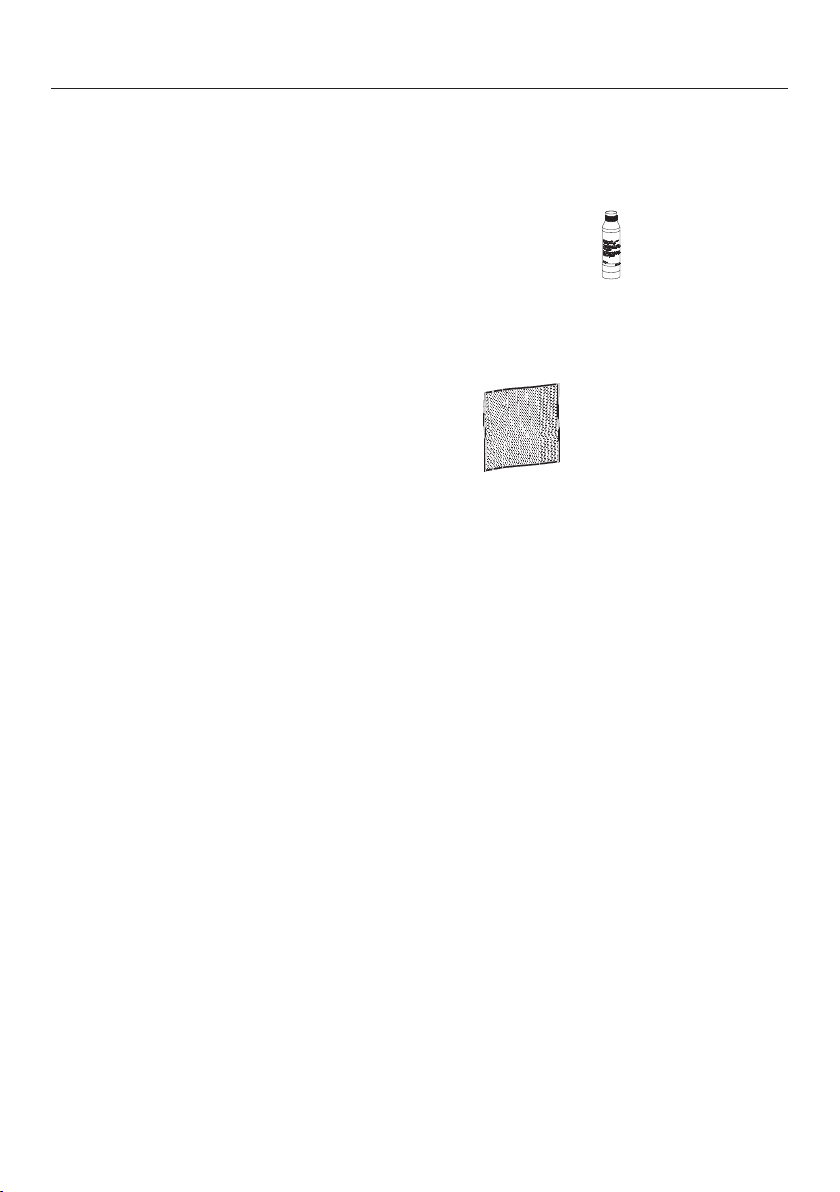
Problem Cause and remedy
The food in the pan
does not heat up when
the Auto heat-up func-
tion is switched on.
A large amount of food is being heated up.
Start cooking at the highest power level and then
turn down to a lower one manually later on.
The pan is not conducting heat properly.
Use a different pot or pan which conducts heat
properly.
An operating noise can
be heard after the appli-
ance has been switched
off.
The fan will continue running until the appliance has
cooled down. It will then switch itself off automatic-
ally.
alternating with
flashes in the
timer display.
The hob is incorrectly connected.
Contact Miele. The hob must be connected to the
mains according to the wiring diagram.
1 and a number, e.g. 1-0
flashes alternately with
a 3 digit number in the
timer display.
Cooking zone fault
Interrupt the power supply to the hob for approx. 1
minute.
If the problem persists after power has been re-
stored, please contact Miele.
alternating with a
number flashes
in the timer dis-
play.
The overheating protection mechanism has been ac-
tivated.
See "Overheating protection".
, or
The fan is blocked or defective.
Make sure it has not been blocked by something
like a fork. Remove the cause of the blockage.
If this fault code continues to appear in the dis-
play, contact Miele Service.
and other numbers
There is a fault in the electronic module.
Interrupt the power supply to the hob for approx. 1
minute.
If the problem persists after power has been re-
stored, please contact Miele.
Optional accessories
56
Miele offer a comprehensive range of
useful accessories as well as cleaning
and conditioning products for your
Miele appliances.
These can be ordered online or from
Miele (see end of this booklet for con-
tact details).
Pans
Miele offer a wide range of pans which
are perfect for Miele hobs. Please refer
to the Miele website for more details on
individual products.
– Pans in various sizes
– Frying pan with lid
– Anti-stick pans
– Wok
– Gourmet oven dishes
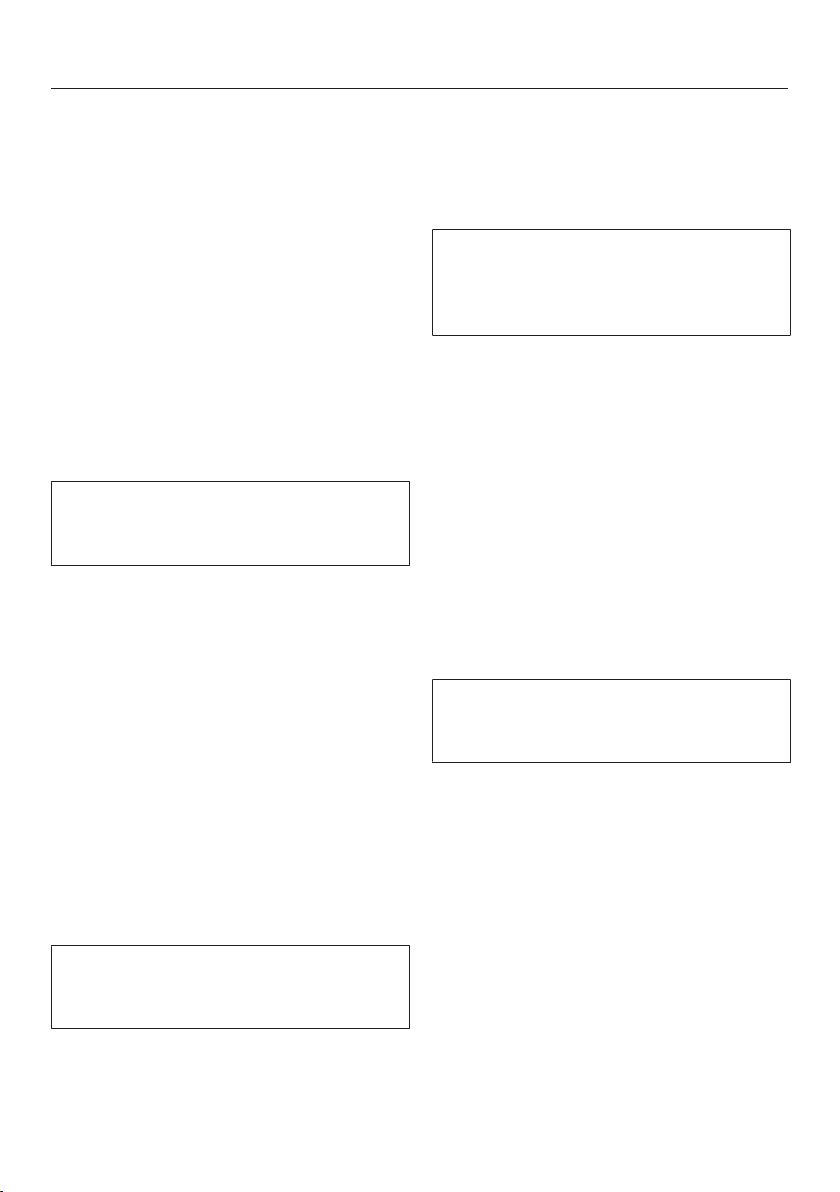
Cleaning and care products
Ceramic and stainless steel hob
cleaner 250 ml
Removes heavy soiling, limescale de-
posits and aluminium residues
Microfibre cloth
Removes finger marks and light soiling
Miele@home / Con@ctivity
57
If you want
– To sign the hob on to the
Miele@home system, first prepare
the signing on procedure on the mas-
ter appliance.
– To sign the hob on to Con@ctivity,
you must first sign the cooker hood
on.
To access programming mode
With the hob switched off, touch
the and sensors at the same
time until the symbol and ap-
pear in the timer display.
After a few seconds : (Programme
01) will flash alternately with :
(Code) in the timer display.
Signing on the hob
While : is visible in the display,
touch the sensor repeatedly un-
til: (Programme P:10) appears.
: appears in the display.
Touch the sensor repeatedly un-
til: appears in the display.
The signing on process will begin and a
scrolling bar will appear in the display.
The signing on process takes a few
minutes. As soon as it is completed
successfully,: will light up in the
display.
If the signing on process is not com-
pleted successfully, repeat the pro-
cess.
While : is visible in the display,
touch the sensor until the indicat-
ors go out to save the setting.
Finish signing on the cooker hood/
master appliance (see the relevant in-
structions).
Signing off the hob
If you want to sign the hob off from
Miele@home, first carry out the sign-
ing off procedure on the master appli-
ance.
While : is visible in the display,
touch the sensor repeatedly un-
til: (Programme P:10) appears.
: appears in the display.
Touch the sensor repeatedly un-
til: appears in the display.
The signing off process will begin and a
scrolling bar will appear in the display.
The signing off process takes a few
minutes. As soon as it is completed
successfully,: will appear in the dis-
play.
If the signing off process is not com-
pleted successfully, repeat the pro-
cess.
While : is visible in the display,
touch the sensor until the indicat-
ors go out to save the setting.
Safety instructions for installation
58
The appliance must only be installed and connected to the electricity supply
by a suitably qualified and competent person in strict accordance with current
national and local safety regulations.
Fit the wall units and cooker hood before fitting the hob to avoid damaging the
hob.
The veneer or laminate coatings of worktops (or adjacent kitchen
units) must be treated with 100°C heat-resistant adhesive which will
not dissolve or distort. Any backmoulds must be of heat-resistant
material.
The hob must not be installed over a fridge, fridge-freezer, freezer,
dishwasher, washing machine, washer-dryer or tumble dryer.
This hob must not be installed above ovens or cookers unless
these have a built-in cooling down fan.
After installation, ensure that nothing can come into contact with
the connection cable and that it is without hindrance.
The electrical cable may not come into contact with any moving
kitchen component (e.g. a drawer) or be subject to mechanical ob-
struction which could damage it.
Observe carefully the safety clearances listed on the following
pages.
All dimensions are given in mm.
Safety distances
59
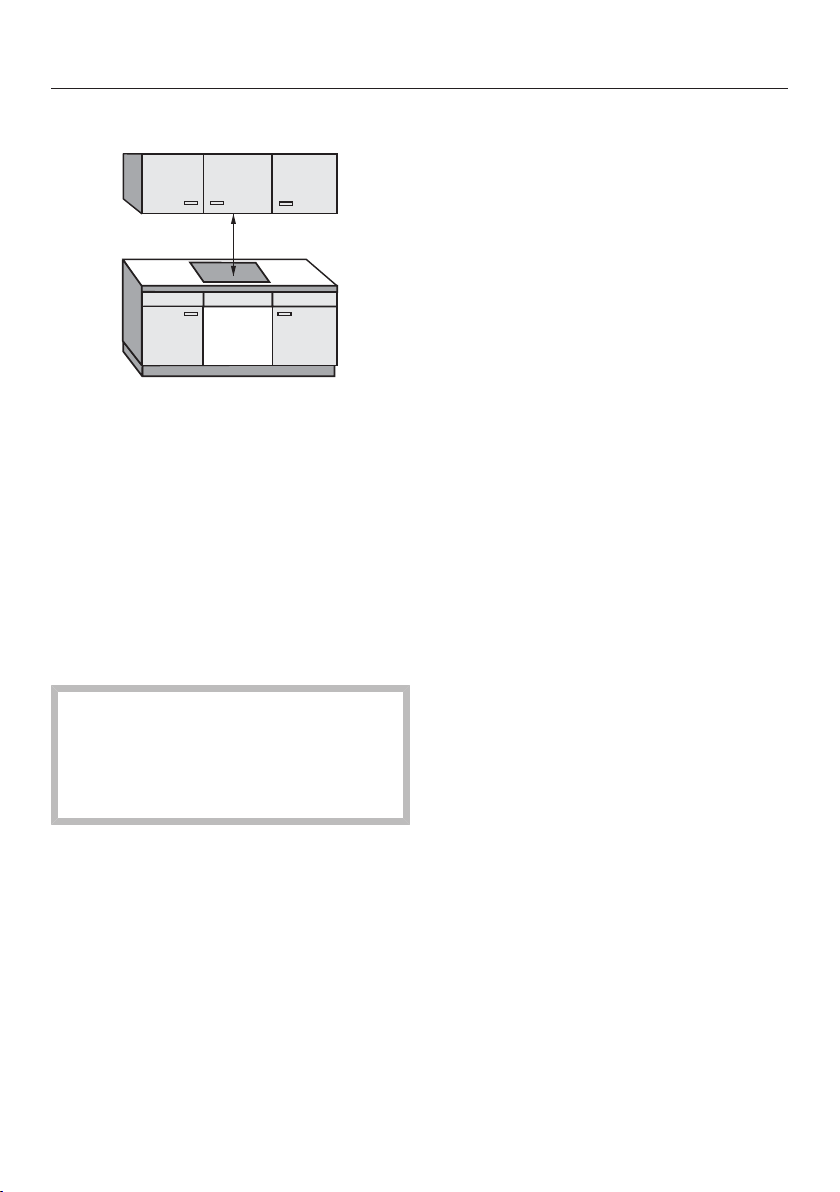
Safety distance above the hob
A minimum safety distance must be
maintained between the appliance and
the cooker hood above it. See the
cooker hood manufacturer's operating
and installation instructions for details.
If the manufacturer's instructions are
not available for the cooker hood or if
any flammable objects (e.g. utensil rails,
wall units etc) are installed above the
hob a minimum safety distance of at
least 760mm must be maintained
between them and the appliance below.
When two or more appliances which
have different safety distances are
installed together below a cooker
hood, you should observe the
greatest safety distance.
Safety distances
60
Safety distances to the sides
and back of the hob
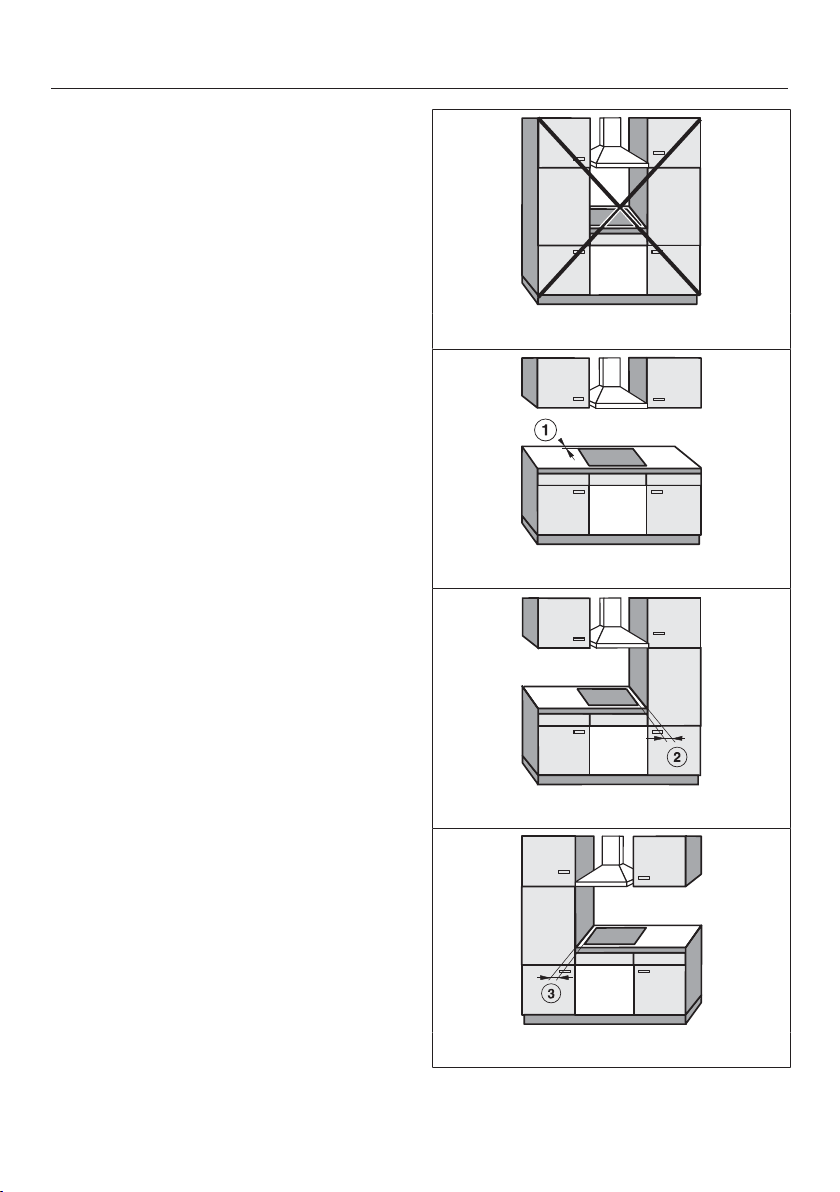
Ideally the hob should be installed with
plenty of space on either side. There
may be a wall at the rear or a tall unit or
wall on one side (right or left) (see illus-
trations).
Minimum distance between the back
of the worktop cut-out and the rear
edge of the worktop:
50mm
Minimum distance between the
worktop cut-out and a wall or tall unit to
the right of it:
50mm.
Minimum distance between the
worktop cut-out and a wall or tall unit to
the left of it:
50mm.
Not allowed
Recommended
Not recommended
Not recommended

Safety distances
61
Minimum safety distances un-
derneath the hob
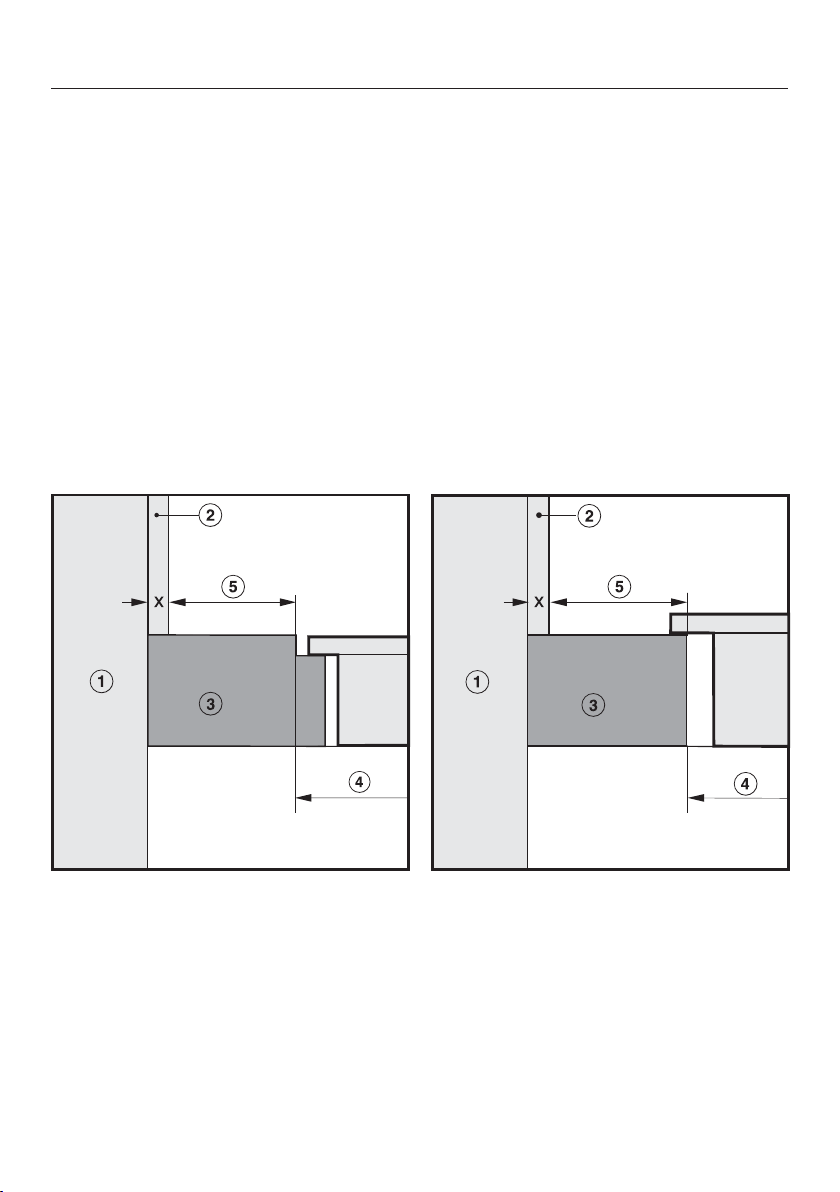
To ensure sufficient ventilation to the
hob, a certain gap must be left between
the underside of the hob and any oven,
interim shelf or drawer.
The minimum gap between the under-
side of the hob and
– the top of an oven is 15mm.
– the top of an interim shelf is 15mm.
– the base of a drawer is 75mm.
Interim shelf
It is not necessary to fit an interim shelf
underneath the hob but one may be fit-
ted if you wish.
Leave a gap of 10mm at the back of
the shelf to accommodate the cable.
We recommend a gap at the front of the
shelf of 20mm to ensure good ventila-
tion.
Safety distances
62
Safety distance when installing the appliance near a wall with
additional niche cladding
A minimum safety distance must be maintained between the worktop cut-out and
any niche cladding to protect it from heat damage.
If the niche cladding is made from a combustible material (e.g. wood) a minimum
safety distance of 50 mm must be maintained between the cut-out and the
cladding.
If the niche cladding is made from a non-combustible material (e.g. metal, natural
stone, ceramic tiles) the minimum safety distance between the cut-out and the
cladding will be 50 mm less the thickness of the cladding.
Example: 15 mm niche cladding
50mm - 15mm = minimum safety distance of 35mm
Flush-fitted hobs Hob with frame or bevelled edge
a
Masonry
b
Niche cladding dimension x = thickness of the niche cladding material
c
Worktop
d
Worktop cut-out
e
Minimum distance to
combustible materials 50mm
non-combustible materials 50mm - dimension x
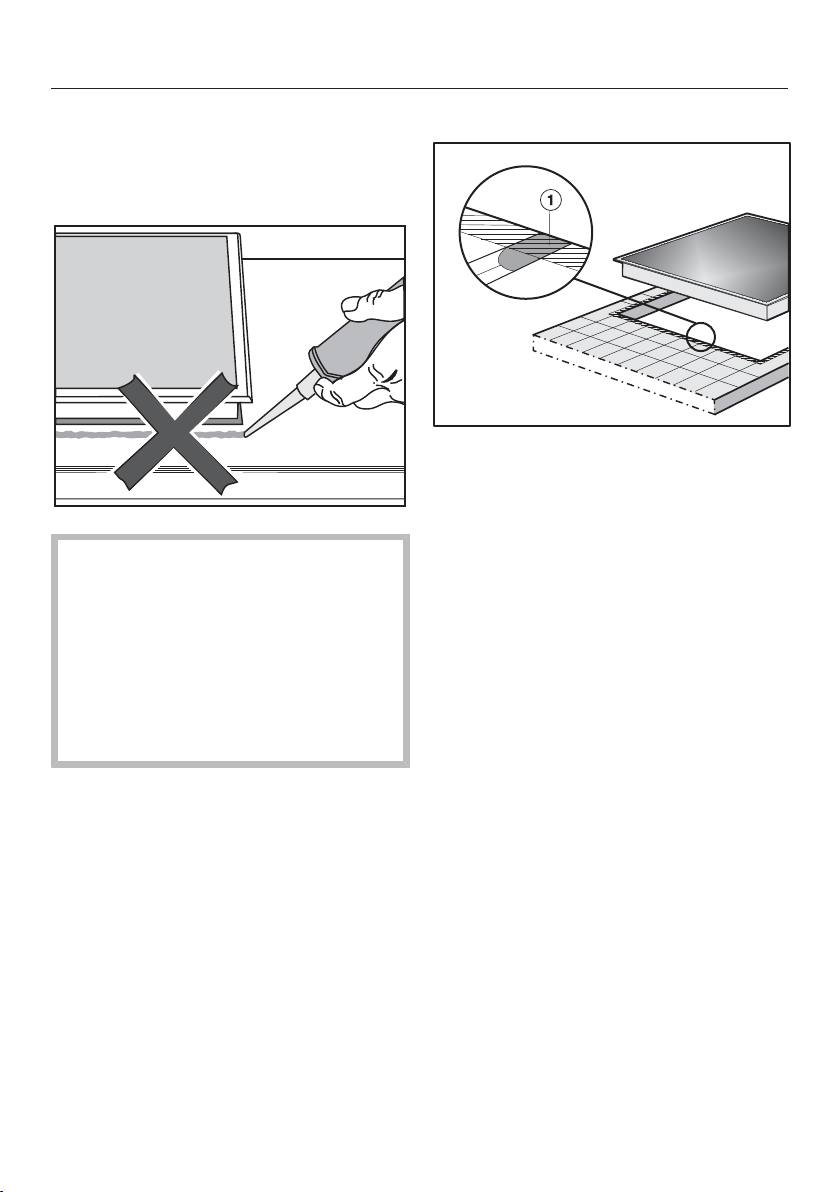
Hob with frame or bevelled edge
63
Installation notes
Seal between the hob and the work-
top
Do not use sealant between the hob
and the worktop. This could result in
damage to the hob or the worktop if
the hob ever needs to be removed
for servicing.
The sealing strip under the edge of
the top part of the appliance
provides a sufficient seal for the
worktop.
Tiled worktop
Grout lines and the hatched area un-
derneath the hob frame must be
smooth and even. If they are not the
hob will not sit flush with the worktop
and the sealing strip underneath the
hob will not provide a good seal
between the hob and the worktop.
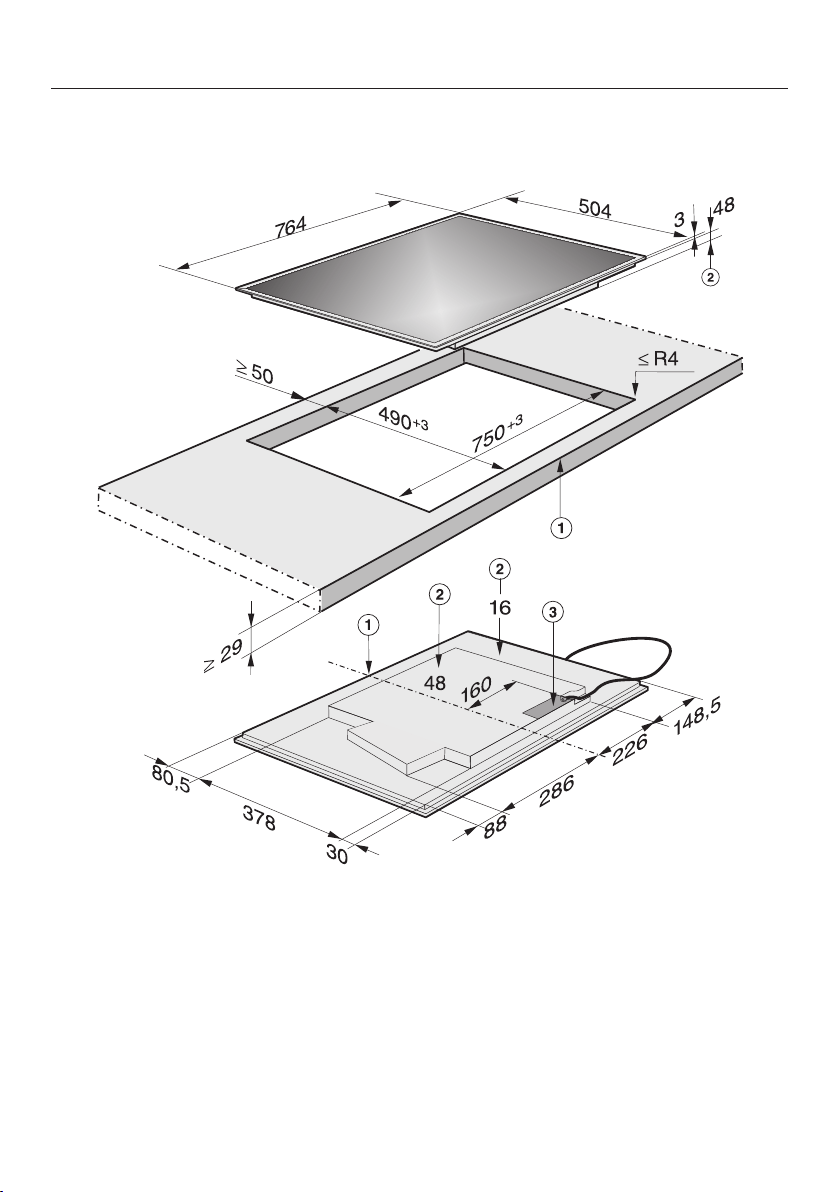
Hob with frame or bevelled edge
64
Building-in dimensions
KM 6629
a
Front
b
Casing depth
c
Mains connection box
The mains connection cable (1440 mm long) is supplied separately with the hob.
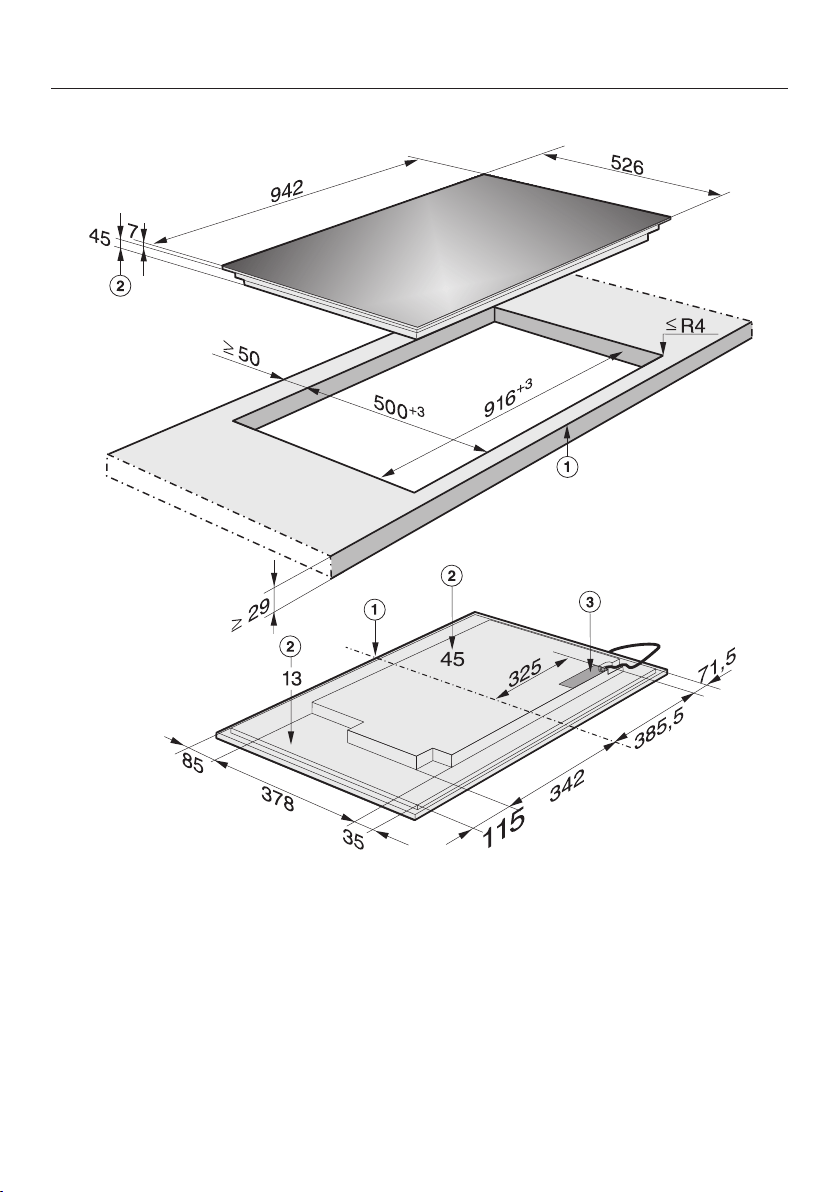
Hob with frame or bevelled edge
65
KM 6669
a
Front
b
Casing depth
c
Mains connection box
The mains connection cable (1440 mm long) is supplied separately with the hob.
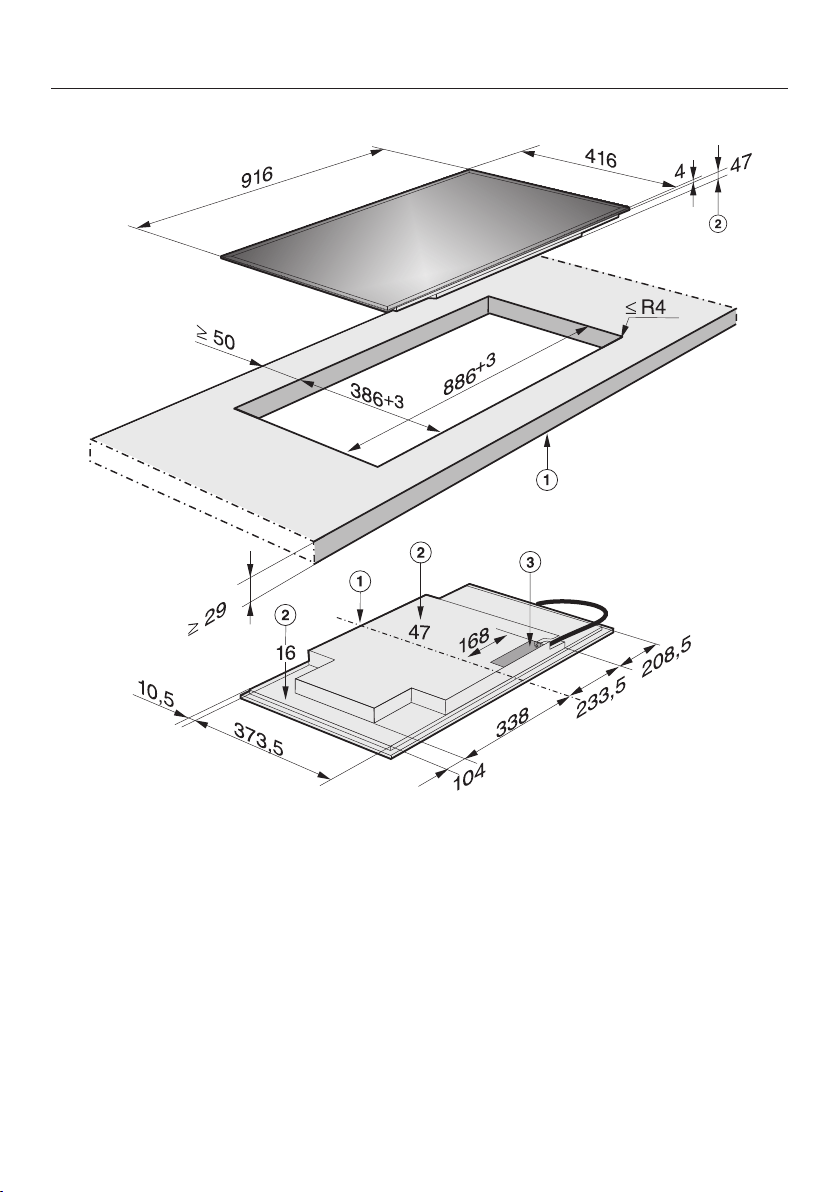
Hob with frame or bevelled edge
66
KM 6699
a
Front
b
Casing depth
c
Mains connection box
The mains connection cable (1440 mm long) is supplied separately with the hob.
Hob with frame or bevelled edge
67
Installation
Preparing the worktop
Make the worktop cut-out as shown
in the building-in diagram. Observe
the safety distances (see "Safety dis-
tances").
Seal the cut surfaces with a suitable
sealant to avoid swelling caused by
moisture. The sealant must be heat-
resistant.
Make sure that the sealant does not
come into contact with the top of the
worktop.
The seal underneath the hob will hold
it securely in the cut-out. Any gap
between the frame and worktop will
reduce with time.
Connecting the mains connection
cable to the appliance
The mains connection cable must
only be connected by a suitably
qualified and competent person.
Follow the instructions in the wiring
diagram (see "Electrical connection -
Wiring diagram").
Installing the hob
Feed the mains connection cable
down through the cut-out.
Place the hob centrally in the cut-out.
When doing this, make sure that the
seal under the hob sits flush with the
worktop on all sides. This is import-
ant to ensure an effective seal all
round.
Do not use sealant (e.g. silicone).
If the seal does not meet the worktop
correctly on the corners, the corner ra-
dius (≤R4) can be carefully scribed to
suit.
Connect the hob to the mains.
Check that the hob works.

Flush-fitted hobs
68
Installation notes
Flush fit hobs are only suitable for in-
stallation in natural stone (granite,
marble), tiled or solid wood worktops.
Certain models are suitable for build-
ing into glass worktops - please see
advice under "Building-in dimen-
sions". When using a worktop made
from any other material, please check
first with the worktop manufacturer
that it is suitable for installing a flush
fit hob.
The internal width of the base unit
must be at least as wide as the in-
ternal cut-out width for the hob (see
"Building-in dimensions"). This is to
ensure that the casing can be easily
removed for maintenance. If the un-
derside of the hob is not freely ac-
cessible after installation, any sealant
used to plug the gaps around the ap-
pliance must be removed to enable
the hob to be lifted out of the cut-out
should this be necessary.
The hob can be installed
– in a suitable cut-out in a natural stone
worktop.
– in a suitable cut-out in a tiled or solid
wood worktop or a glass worktop
with a wooden support frame. The
frame must be provided on site, and
is not supplied with the appliance.
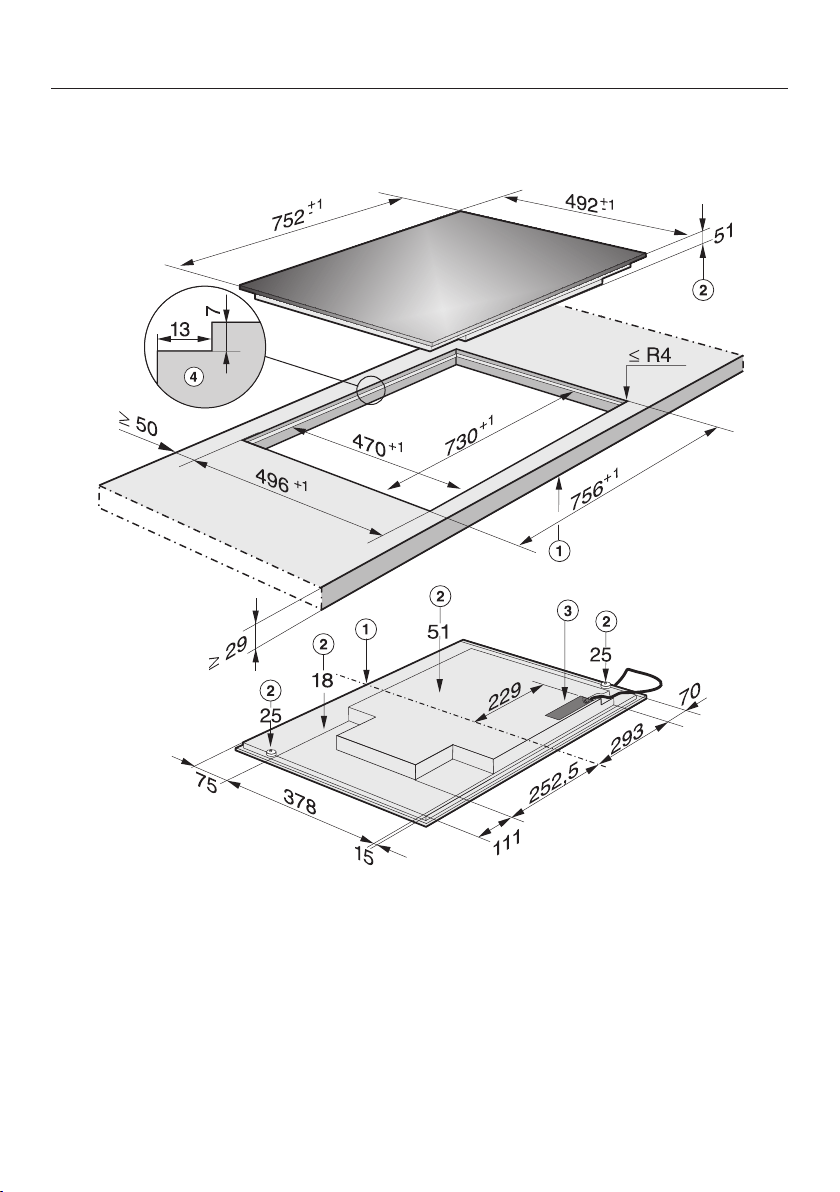
Flush-fitted hobs
69
Building-in dimensions
KM 6639 / KM 6839
a
Front
b
Appliance height
c
Mains connection box
d
Stepped cut-out
The mains connection cable (1440 mm long) is supplied separately with the hob.
Please observe the detailed diagrams for cut-out dimensions in natural stone
worktops.
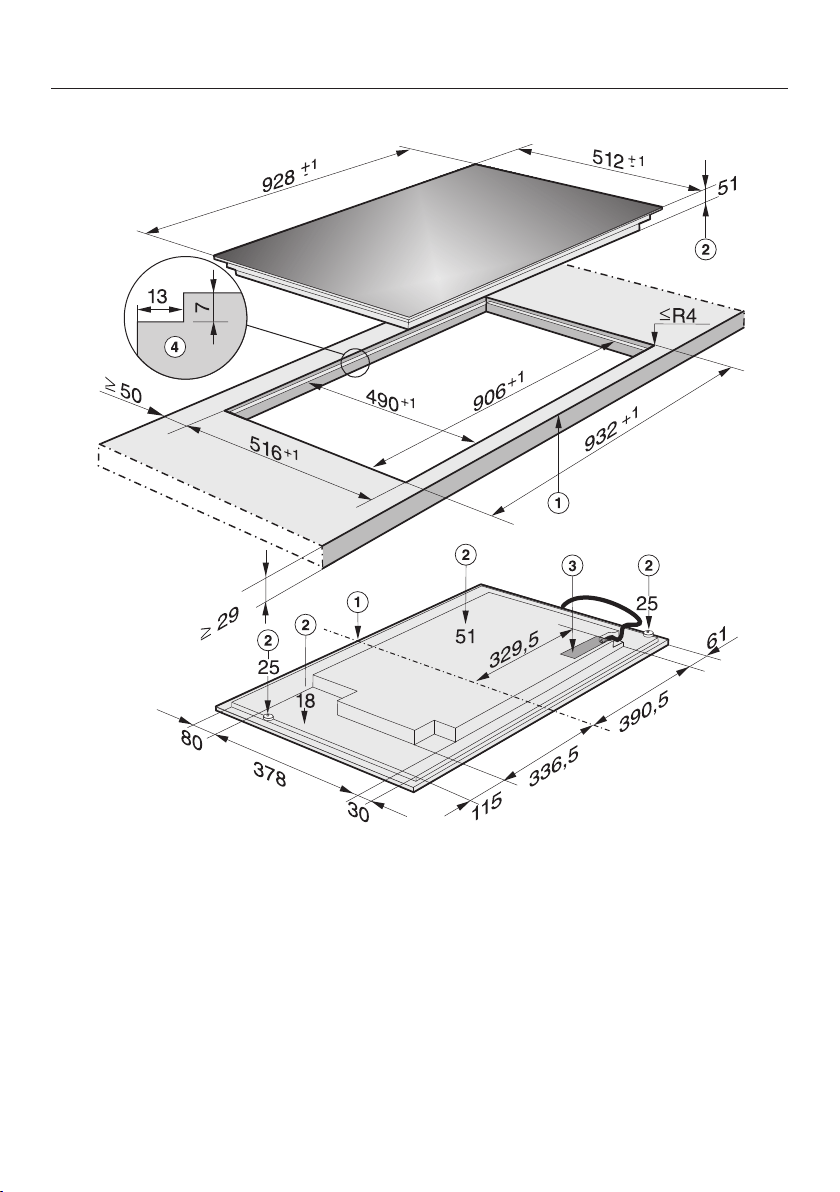
Flush-fitted hobs
70
KM 6679 / KM 6879
a
Front
b
Appliance height
c
Mains connection box
d
Stepped cut-out
The mains connection cable (1440 mm long) is supplied separately with the hob.
Please observe the detailed diagrams for cut-out dimensions in natural stone
worktops.
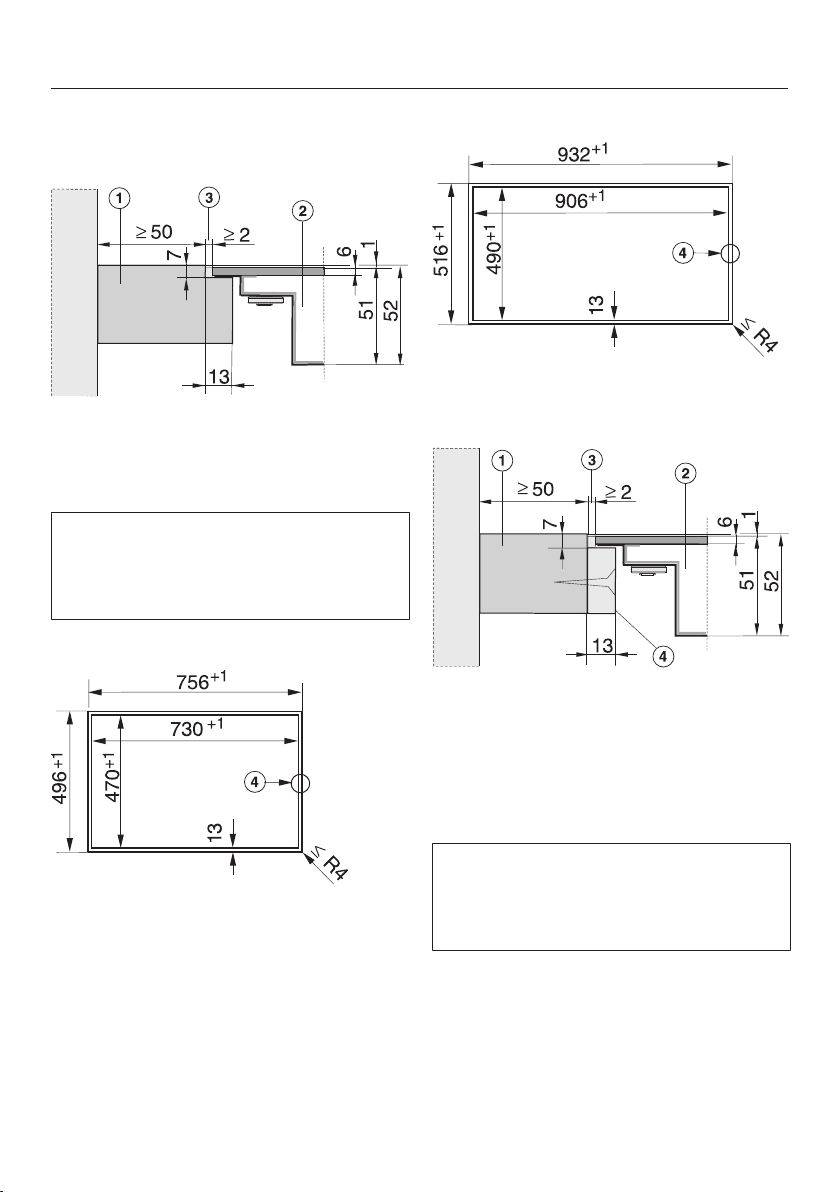
Flush-fitted hobs
71
Installation
Natural stone worktops
a
Worktop
b
Hob
c
Gap
As the ceramic glass and the worktop
cut-out have a certain dimensional tol-
erance, the size of the gap can vary
(min. 2mm).
KM 6639 / KM 6839
d
Stepped cut-out
KM 6679 / KM 6879
d
Stepped cut-out
Solid wood, tiled and glass worktops
a
Worktop
b
Hob
c
Gap
d
Wooden frame (13mm) (to be
provided on site)
As the ceramic glass and the worktop
cut-out have a certain dimensional tol-
erance, the size of the gap can vary
(min.2mm).
Flush-fitted hobs
72
Preparing the worktop
Make the worktop cut-out as shown
in "Building-in dimensions". Observe
the safety distances (see "Safety dis-
tances").
Solid wood, tiled and glass worktops:
Fix the wooden frame 7mm below
the top edge of the worktop (see dia-
gram).
Connecting the mains connection
cable to the appliance
The mains connection cable must
only be connected by a suitably
qualified and competent person.
Follow the instructions in the wiring
diagram (see "Electrical connection -
Wiring diagram").
Installing the hob
Feed the mains connection cable
down through the cut-out.
Centre the hob in the cut-out.
Connect the hob to the mains.
Check that the hob works.
Seal the remaining gap with a silic-
one sealant that is heat-resistant to at
least 160°C.
For natural stone worktops and nat-
ural stone tiles, only use silicone
sealant that is specially formulated
for natural stone, and observe the
sealant manufacturer's instructions.

Electrical connection
73
Danger of injury.
Miele cannot be held liable for unau-
thorised installation, maintenance
and repair work as this can be dan-
gerous to users.
Miele cannot be held liable for dam-
age or injury caused by incorrect in-
stallation, maintenance or repair
work, or by an inadequate or faulty
earthing system (e.g. electric shock).
This hob must be connected to the
mains electrical supply by a suitably
qualified and competent person, in
accordance with current local and
national safety regulations (BS 7671
in the UK).
After installation ensure that all elec-
trical components are shielded and
cannot be accessed by users.
Connection
AC 230 V, 50 Hz
The connection data is quoted on the
dataplate. It must match the household
supply.
Please see wiring diagram for connec-
tion. (N.B. This appliance is supplied
single phase only in the UK / AUS / NZ).
Residual current device
For extra safety, it is advisable to pro-
tect the appliance with a suitable resid-
ual current device (RCD) with a trip
range of 30mA.
Separators
The appliance must be able to be dis-
connected from the mains on all poles
by disconnecting devices. When
switched off there must be an all-pole
contact gap of at least 3 mm in the isol-
ator switch. Disconnecting devices in-
clude overcurrent protection and circuit
breakers.

Electrical connection
74
Disconnecting from the mains
Danger of electric shock.
After disconnection, ensure the ap-
pliance cannot be switched back on
by mistake.
To disconnect the appliance from the
mains power supply, do one of the fol-
lowing depending on installation:
Safety fuses
Completely remove fuses
Automatic circuit breakers
Press the (red) button until the middle
(black) button springs out.
Built-in circuit breakers
Circuit breakers, type B or C: switch
the on-off switch from 1 (on) to 0 (off).
Residual current device (RCD)
Switch the main switch from 1 (on) to
0 (off) or press the test button.
Mains connection cable
The hob must be connected to the elec-
trical supply with a special connection
cable, type H 05 VV-F (PVC insulated)
with a suitable diameter.
Please see wiring diagram for connec-
tion. (N.B. This appliance is supplied
single phase only in the UK / AUS / NZ).
See the data plate on the hob for the
correct voltage and frequency.
Connecting the mains cable
Danger of electrical shock.
The mains connection cable must be
fitted by a suitably qualified and
competent person in accordance
with current local and national safety
regulations.
The wires in the mains cable are col-
oured in accordance with the follow-
ing code:
Green/yellow = earth
Blue = neutral
Brown = live
The earth lead must be connected to
the point marked .
If the mains cable needs to be replaced
it must be replaced with a special con-
nection cable, type H05VV-F (PVC-in-
sulated), available from Miele.
The connection data is quoted on the
data plate.
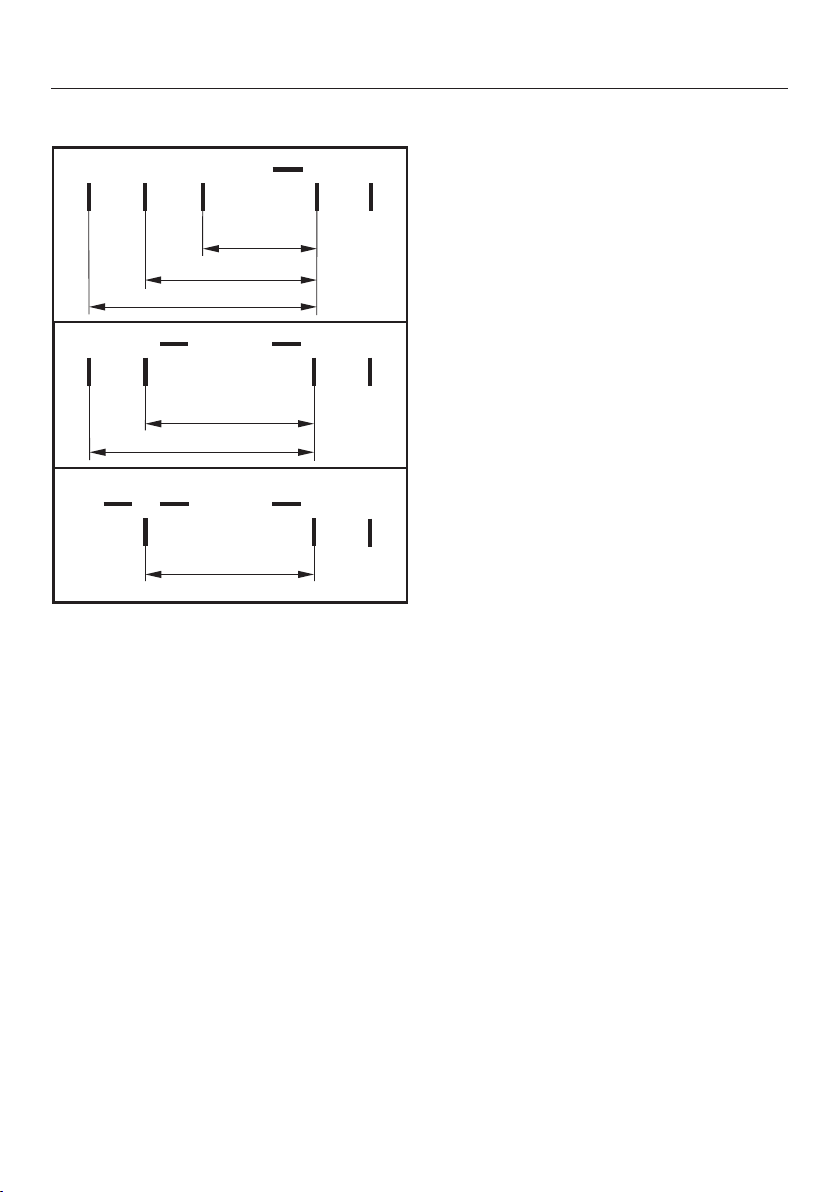
Electrical connection
75
Wiring diagram
L1
200-240 V~
200-240 V~
200-240 V~
ab
cde
-
L2 L3 N
-
L2
b
L1
a cd
N
e
(L3)
200-240 V~
200-240 V~
a
L1
bcd
N
e
-
(L2)
200-240 V~

After sales service, data plate, guarantee
76
After sales service
In the event of any faults which you cannot easily remedy, please contact
– your Miele Dealer, or
– Miele Service.
See end of this booklet for contact details.
Please note that telephone calls may be monitored and recorded for training pur-
poses.
N.B. A call-out charge will be applied to service visits where the problem could
have been resolved as described in these instructions.
When contacting your Dealer or Miele, please quote the model and serial number
of your appliance.
Data plate
Space in which to stick the extra data plate supplied with the appliance. Ensure
that the model number is the same as the one on the back page of these instruc-
tions.
Guarantee: UK
The appliance is guaranteed for 2 years from the date of purchase.
In the UK, you must activate your cover by calling 0330 160 6640 or registering
online at www.miele.co.uk.
Guarantee: Other countries
For information on the appliance guarantee specific to your country please contact
Miele. See end of this booklet for contact details.
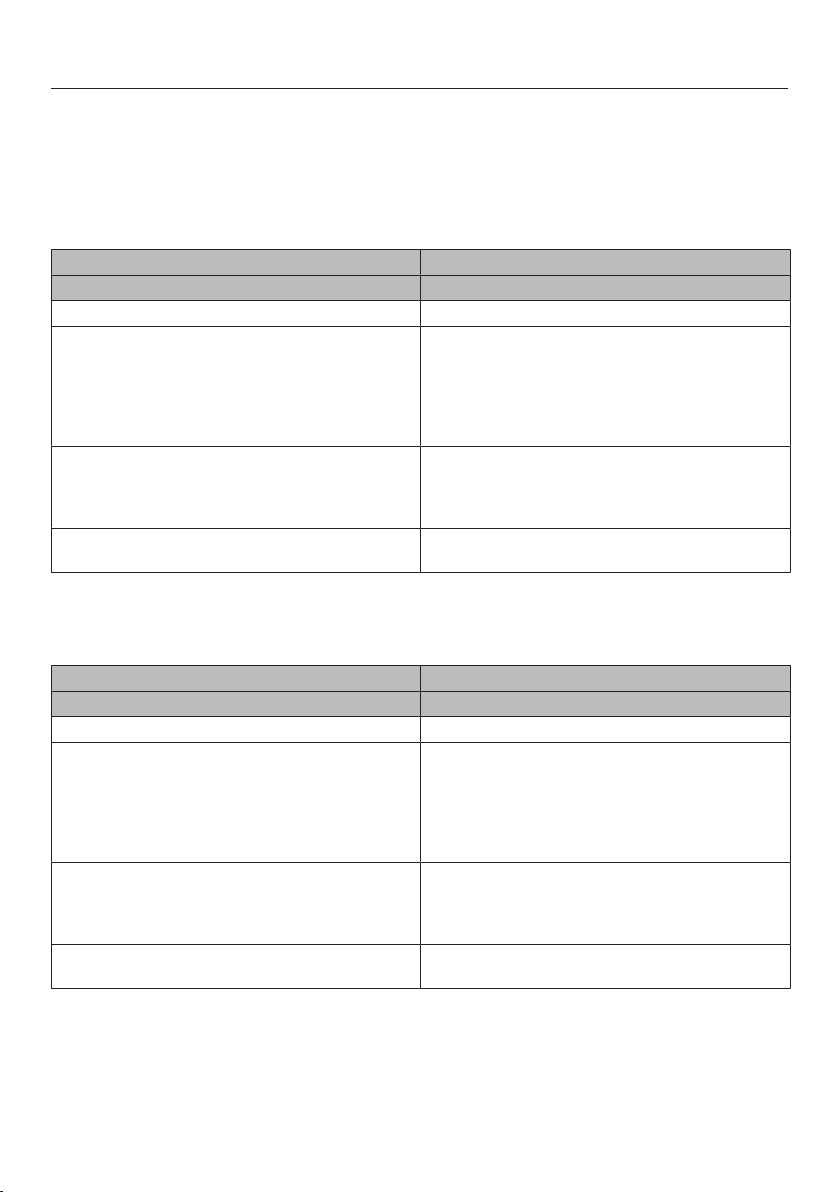
Product data sheets
77
The following data sheets apply to the models described in this operating instruc-
tion manual.
Information for domestic electric hobs
In acc. with regulation (EU) No. 66/2014
MIELE
Model name / identifier KM 6629
Number of cooking zones and/or areas 4
For circular cooking zones: diameter of useful sur-
face area/cooking zone
For non-circular cooking zones or areas: length
and width of useful surface area per electric cook-
ing zone or area
1. = Ø 160-230 mm
2. = Ø 100-160 mm
3. = 230x390 mm
4. =
5. =
6. =
Energy consumption per cooking zone or area cal-
culated per kg (EC
electric cooking
)
1. = 171,8 Wh/kg
2. = 169,8 Wh/kg
3. = 182,8 Wh/kg
Energy consumption for the hob calculated per kg
(EC
electric hob
)
174,8 Wh/kg
Information for domestic electric hobs
In acc. with regulation (EU) No. 66/2014
MIELE
Model name / identifier KM 6639
Number of cooking zones and/or areas 4
For circular cooking zones: diameter of useful sur-
face area/cooking zone
For non-circular cooking zones or areas: length
and width of useful surface area per electric cook-
ing zone or area
1. = Ø 160-230 mm
2. = Ø 100-160 mm
3. = 230x390 mm
4. =
5. =
6. =
Energy consumption per cooking zone or area cal-
culated per kg (EC
electric cooking
)
1. = 171,8 Wh/kg
2. = 169,8 Wh/kg
3. = 182,8 Wh/kg
Energy consumption for the hob calculated per kg
(EC
electric hob
)
174,8 Wh/kg
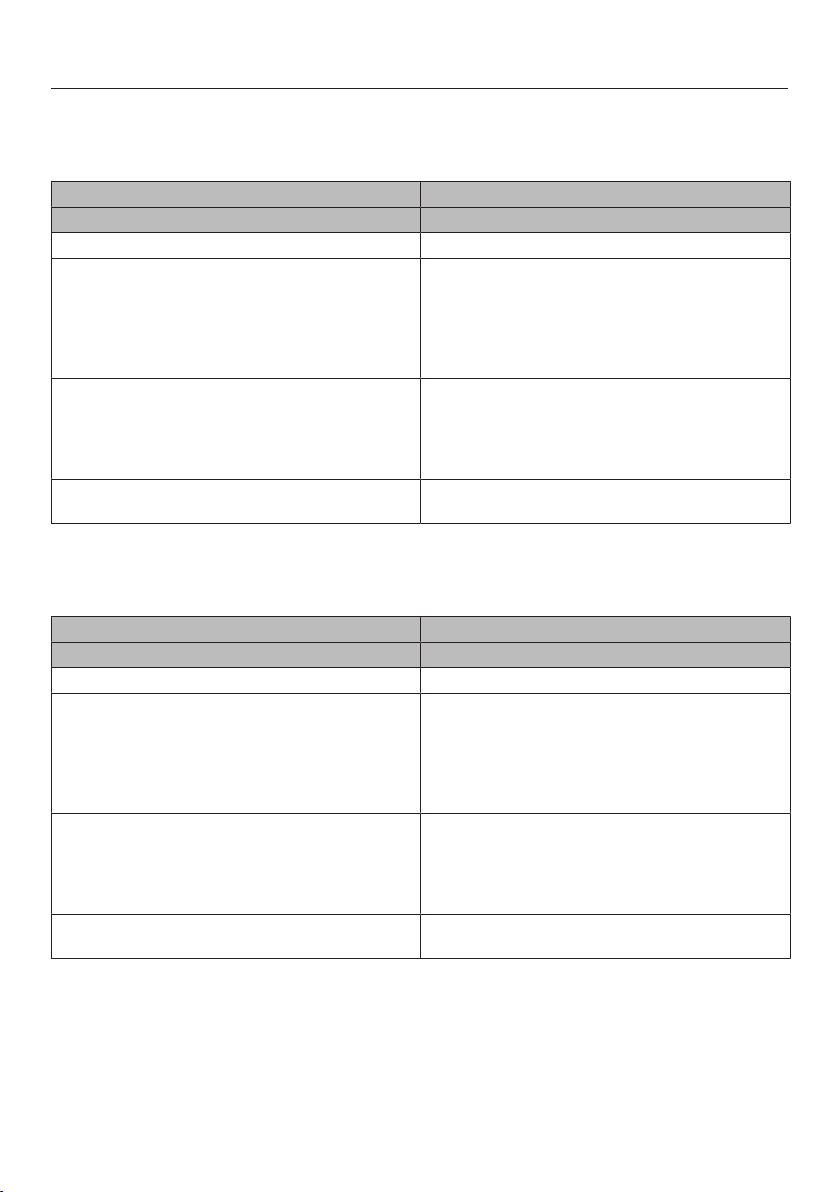
Product data sheets
78
Information for domestic electric hobs
In acc. with regulation (EU) No. 66/2014
MIELE
Model name / identifier KM 6669
Number of cooking zones and/or areas 5
For circular cooking zones: diameter of useful sur-
face area/cooking zone
For non-circular cooking zones or areas: length
and width of useful surface area per electric cook-
ing zone or area
1. = Ø 100-160 mm
2. = Ø 160-230 mm
3. = Ø 180-280 mm
4. = 230x390 mm
5. =
6. =
Energy consumption per cooking zone or area cal-
culated per kg (EC
electric cooking
)
1. = 171,8 Wh/kg
2. = 169,9 Wh/kg
3. = 166,2 Wh/kg
4. = 181,3 Wh/kg
Energy consumption for the hob calculated per kg
(EC
electric hob
)
172,3 Wh/kg
Information for domestic electric hobs
In acc. with regulation (EU) No. 66/2014
MIELE
Model name / identifier KM 6679
Number of cooking zones and/or areas 5
For circular cooking zones: diameter of useful sur-
face area/cooking zone
For non-circular cooking zones or areas: length
and width of useful surface area per electric cook-
ing zone or area
1. = Ø 100-160 mm
2. = Ø 160-230 mm
3. = Ø 180-280 mm
4. = 230x390 mm
5. =
6. =
Energy consumption per cooking zone or area cal-
culated per kg (EC
electric cooking
)
1. = 171,8 Wh/kg
2. = 169,9 Wh/kg
3. = 166,2 Wh/kg
4. = 181,3 Wh/kg
Energy consumption for the hob calculated per kg
(EC
electric hob
)
172,3 Wh/kg
Product data sheets
79
Information for domestic electric hobs
In acc. with regulation (EU) No. 66/2014
MIELE
Model name / identifier KM 6699
Number of cooking zones and/or areas 4
For circular cooking zones: diameter of useful sur-
face area/cooking zone
For non-circular cooking zones or areas: length
and width of useful surface area per electric cook-
ing zone or area
1. = Ø 160-230 mm
2. = 230x390 mm
3. = Ø 100-160 mm
4. =
5. =
6. =
Energy consumption per cooking zone or area cal-
culated per kg (EC
electric cooking
)
1. = 172,5 Wh/kg
2. = 178,6 Wh/kg
3. = 170,7 Wh/kg
Energy consumption for the hob calculated per kg
(EC
electric hob
)
173,9 Wh/kg
Information for domestic electric hobs
In acc. with regulation (EU) No. 66/2014
MIELE
Model name / identifier KM 6879
Number of cooking zones and/or areas 5
For circular cooking zones: diameter of useful sur-
face area/cooking zone
For non-circular cooking zones or areas: length
and width of useful surface area per electric cook-
ing zone or area
1. = Ø 100-160 mm
2. = Ø 160-230 mm
3. = Ø 180-280 mm
4. = 230x390 mm
5. =
6. =
Energy consumption per cooking zone or area cal-
culated per kg (EC
electric cooking
)
1. = 171,8 Wh/kg
2. = 169,9 Wh/kg
3. = 166,2 Wh/kg
4. = 181,3 Wh/kg
Energy consumption for the hob calculated per kg
(EC
electric hob
)
172,3 Wh/kg
Product data sheets
80
Information for domestic electric hobs
In acc. with regulation (EU) No. 66/2014
MIELE
Model name / identifier KM 6839
Number of cooking zones and/or areas 4
For circular cooking zones: diameter of useful sur-
face area/cooking zone
For non-circular cooking zones or areas: length
and width of useful surface area per electric cook-
ing zone or area
1. = Ø 160-230 mm
2. = Ø 100-160 mm
3. = 230x390 mm
4. =
5. =
6. =
Energy consumption per cooking zone or area cal-
culated per kg (EC
electric cooking
)
1. = 171,8 Wh/kg
2. = 169,8 Wh/kg
3. = 182,8 Wh/kg
Energy consumption for the hob calculated per kg
(EC
electric hob
)
174,8 Wh/kg

Conformity declaration
81
Miele hereby declares that the hobs lis-
ted at the end of this booklet comply
with the basic requirements and other
relevant regulations of
Guideline1999/5/EC.
A copy of the full Declaration of Con-
formity can be obtained from the ad-
dress on the back page.


United Kingdom
Miele Co. Ltd.
Fairacres, Marcham Road
Abingdon, Oxon, OX14 1TW
Customer Contact Centre Tel: 0330 160 6600
E-mail: [email protected]
Internet: www.miele.co.uk
Australia
Miele Australia Pty. Ltd.
ACN 005 635 398
ABN 96 005 635 398
1 Gilbert Park Drive, Knoxfield, VIC 3180
Tel: 1300 464 353
Internet: www.miele.com.au
Miele (Shanghai) Trading Ltd.
1-3 Floor, No. 82 Shi Men Yi Road
Jing' an District
200040 Shanghai, PRC
Tel: +86 21 6157 3500, Fax: +86 21 6157 3511
E-mail: [email protected], Internet: www.miele.cn
China
41/F - 4101, Manhattan Place
23 Wang Tai Road
Kowloon Bay, Hong Kong
Tel: (852) 2610 1331, Fax: (852)2610 1013
Email: [email protected]
Miele (Hong Kong) Limited
Miele India Pvt. Ltd.
Ground Floor, Copia Corporate Suites
Plot No. 9, Jasola
New Delhi - 110025
Tel: 011-46 900 000, Fax: 011-46 900 001
E-mail: [email protected], Internet: www.miele.in
India
Miele Ireland Ltd.
2024 Bianconi Avenue
Citywest Business Campus, Dublin 24
Tel: (01) 461 07 10, Fax: (01) 461 07 97
E-Mail: [email protected], Internet: www.miele.ie
Ireland
Malaysia
Miele Sdn Bhd
Suite 12-2, Level 12
Menara Sapura Kencana Petroleum
Solaris Dutamas No. 1, Jalan Dutamas 1
50480 Kuala Lumpur, Malaysia
Phone: +603-6209-0288
Fax: +603-6205-3768
Miele New Zealand Limited
IRD 98 463 631
Level 2, 10 College Hill
Freemans Bay, Auckland 1011, NZ
Tel: 0800 464 353
Internet: www.miele.co.nz
New Zealand
Miele Pte. Ltd.
163 Penang Road
# 04 - 03 Winsland House II
Singapore 238463
Tel: +65 6735 1191, Fax: +65 6735 1161
E-Mail: [email protected]
Internet: www.miele.sg
Singapore
Miele (Pty) Ltd
63 Peter Place, Bryanston 2194
P.O. Box 69434, Bryanston 2021
Tel: (011) 875 9000, Fax: (011) 875 9035
E-mail: [email protected]
Internet: www.miele.co.za
South Africa
Miele Appliances Ltd.
P.O. Box 11 47 82
Gold & Diamond Park, Sheikh Zayed Road
Building 6 / Offices Nos. 6-214 to 6-220
Dubai
Tel: +971-4-341 84 44
Fax: +971-4-341 88 52
E-Mail: [email protected]
Internet: www.miele.ae
United Arab Emirates
Carl-Miele-Straße 29, 33332 Gütersloh, Germany
Manufacturer:
Miele & Cie. KG

M.-Nr. 10 378 320 / 00en-GB
KM6629 / KM6639 / KM6669 / KM6679 / KM6699 / KM6839 /
KM6879