Help Guide
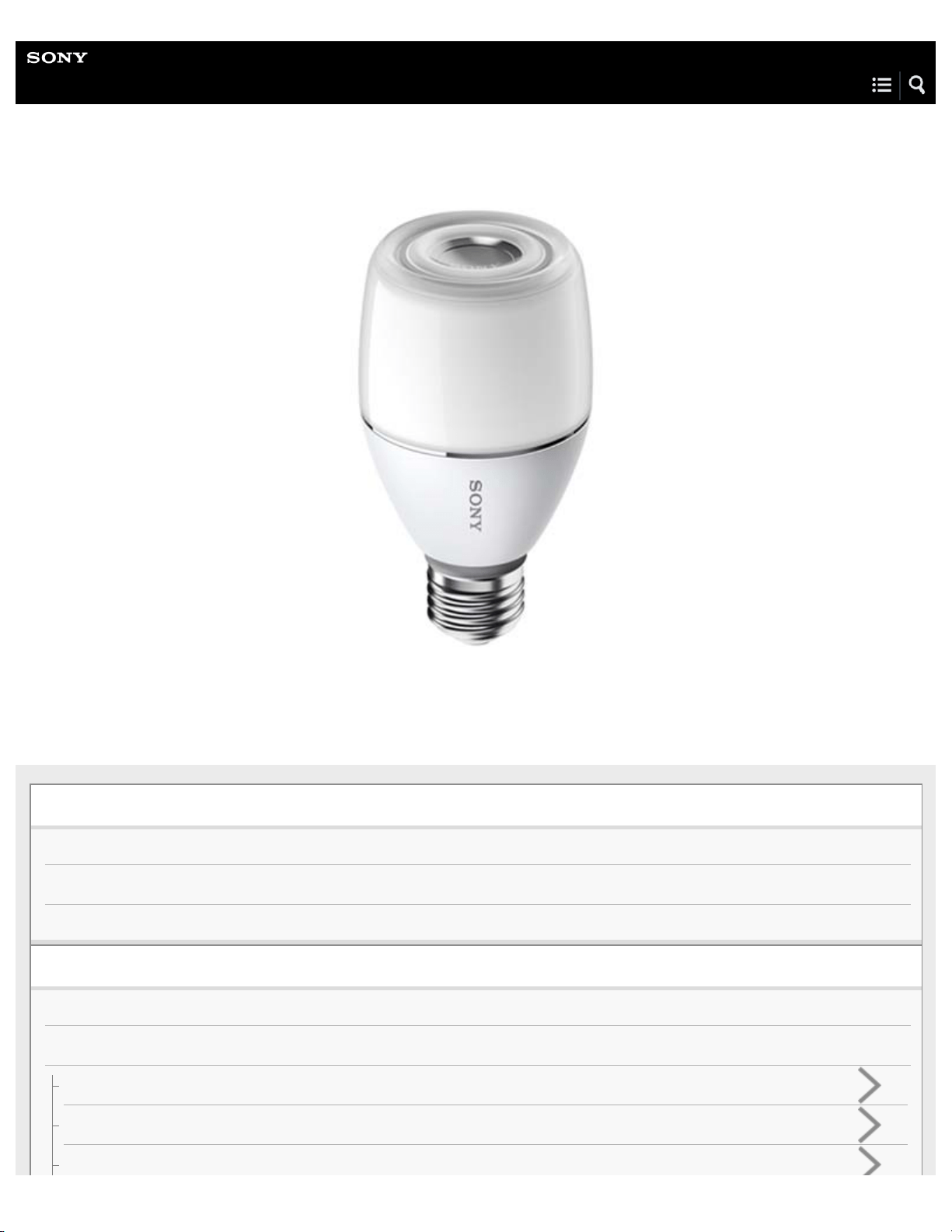
LED Bulb Speaker
LSPX-102E26
The following explains how to use the bulb speaker. Select a topic from the navigation pane.
Getting Started
Checking the included items
Parts and controls
Preparing the remote
Making connections
About light fixtures
BLUETOOTH
How to make a wireless connection with BLUETOOTH devices
Pairing and connecting with a BLUETOOTH device
Connecting with a paired BLUETOOTH device
Listening to music
BLUETOOTH device
Listening to music of a device via BLUETOOTH connection
Switching the playback quality for BLUETOOTH audio streaming
Terminating the BLUETOOTH connection (after use)
Speaker Add function
About Speaker Add function (playback with two bulb speakers)
Setting up the Speaker Add function
Switching between stereo mode and double mode (Speaker Add function)
Confirming which is the master unit (left channel)/satellite unit (right channel) (Speaker Add function)
Canceling the Speaker Add function
Canceling the master unit setting (Speaker Add function)
Adjusting the light
Brightness
Adjusting the brightness
Switching the mode (off/color)
Color
Adjusting the color
Switching the mode (off/color)
Sleep Timer
Using the Sleep Timer
Using the apps
App operating environment
Information
Specifications
Replacing the battery in the remote control
Notes on use
Precautions
4-579-896-11(1) Copyright 2016 Sony Corporation
What is BLUETOOTH wireless technology?
Trademarks
Customer support websites
Troubleshooting
What can I do to solve a problem?
Sound
No sound/Low sound level
Distorted sound/Humming or noise in the bulb speaker output
Illumination LED
The light is flashing in red at regular intervals
The light does not turn on
Remote control
Remote control operations not being received
Pairing
Unable to pair or make a BLUETOOTH connection with the bulb speaker
Speaker Add function
Unable to set the Speaker Add function
Do not know which bulb speaker was set as the master unit when using the Speaker Add function
Sound breaks up, and volume is low when using the Speaker Add function for playback
Resetting the bulb speaker
1
Help Guide
LED Bulb Speaker
LSPX-102E26
Checking the included items
After opening the package, check that all items in the list below are included in the package.
If any items are missing, contact your dealer.
Bulb speaker
Remote control
Lithium battery for remote control (CR2032, pre-installed, for testing)
Startup Guide
Provides you with instructions on how to connect the bulb speaker with BLUETOOTH devices and basic operations.
Reference Guide
Provides you with precautions and product specifications.
4-579-896-11(1) Copyright 2016 Sony Corporation
1
4-579-896-11(1) Copyright 2016 Sony Corporation
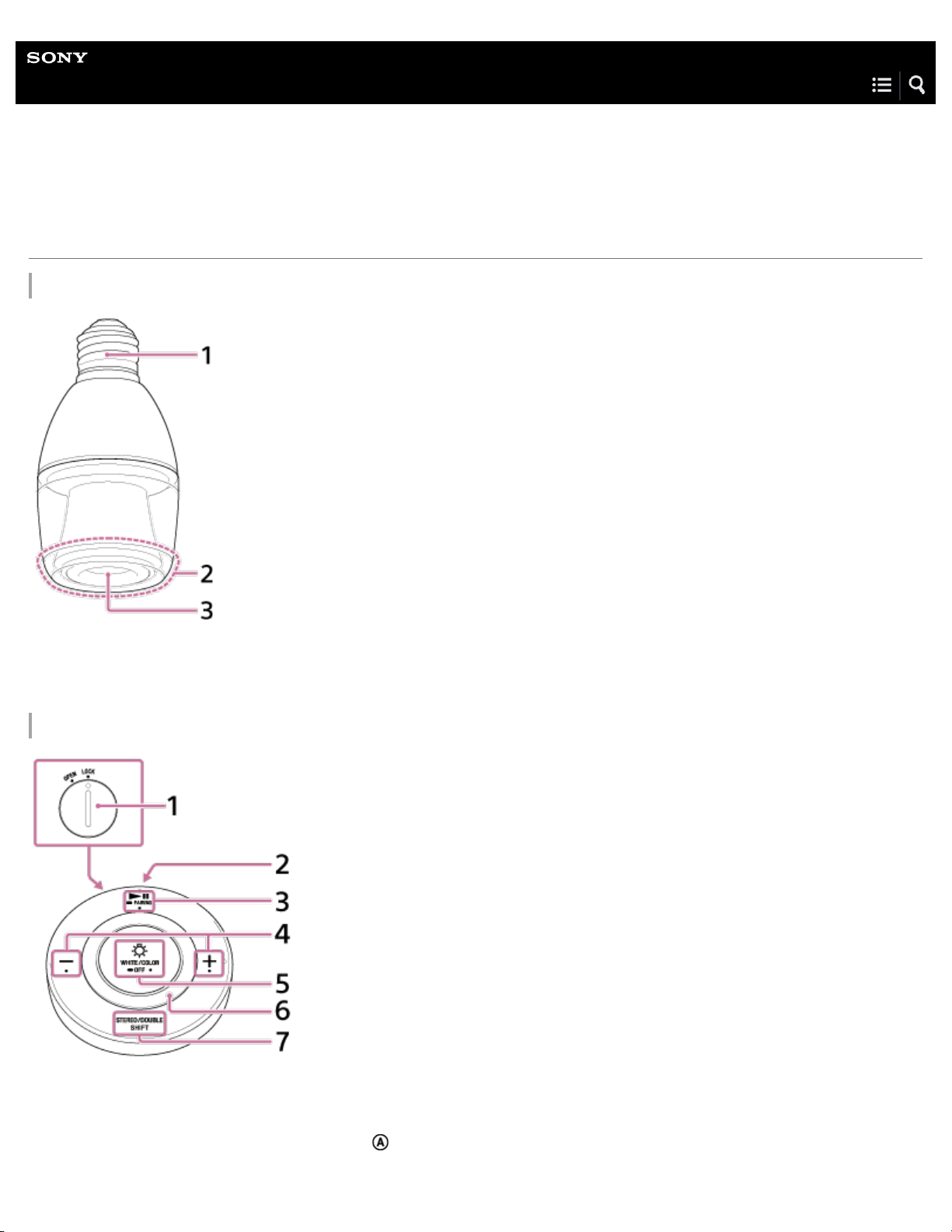
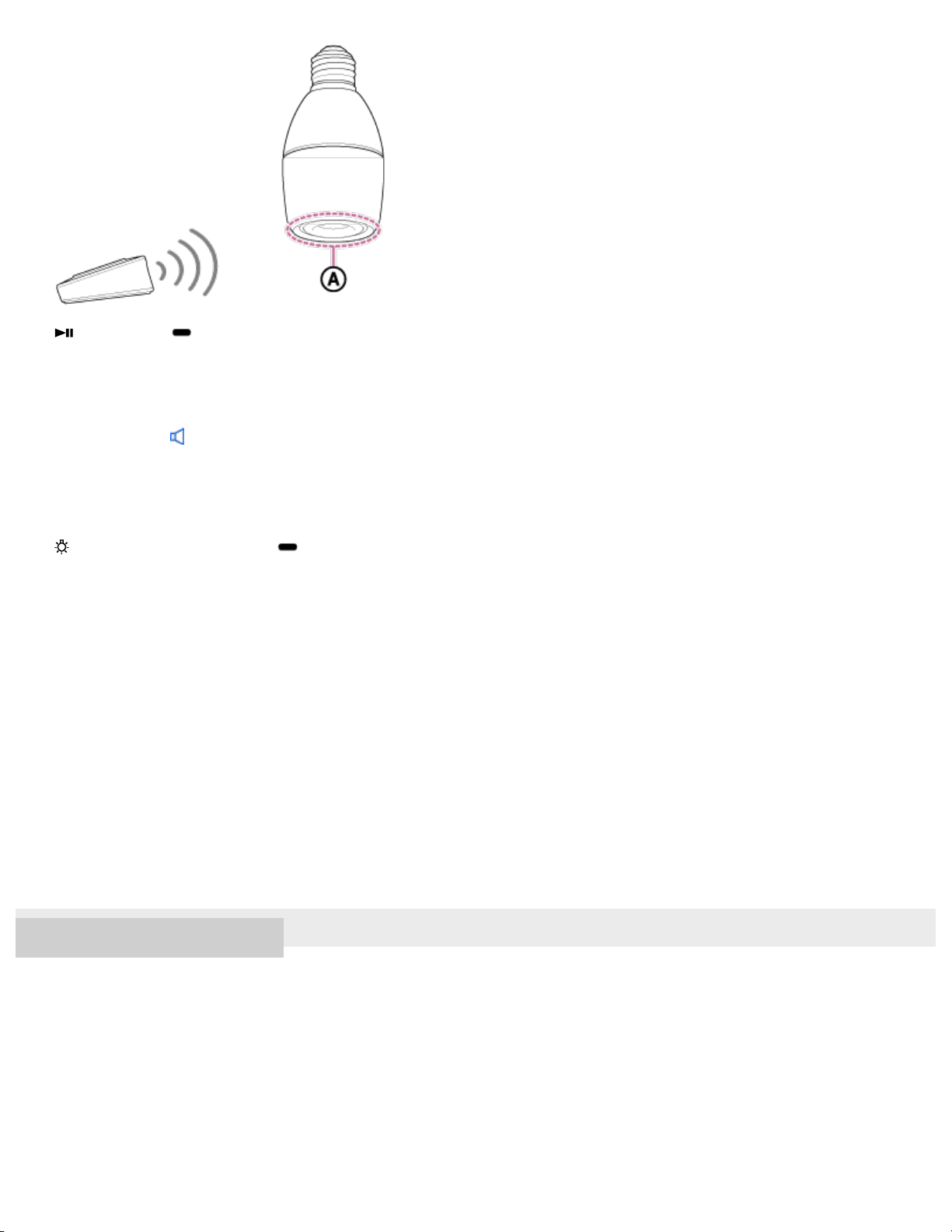
(play/pause)/ PAIRING button
Play music or pause playback. Press and hold to switch to pairing mode. When this happens, the bulb speaker will make a
sound
*
to indicate that pairing mode has been entered.
*
Sound example (Playback may require the latest browser.)
3.
Volume –/+ buttons
Adjust the volume.
4.
WHITE/COLOR (white/color)/ OFF (light off) button
Switch the illumination of the bulb speaker between white light, color mode, and off. Press and hold to turn off the light and
disconnect BLUETOOTH. (If you press and hold to turn off the light, when you turn the light back on, it takes time for the bulb
speaker to receive the command.)
Press while pressing the STEREO/DOUBLE (switch mode)/SHIFT (shift) button to set the Sleep Timer.
5.
Dimmer/color ring
Adjust the brightness. Spin to the right for brighter, and to the left for darker. When in color mode, adjust the color.
6.
STEREO/DOUBLE (switch mode)/SHIFT (shift) button
Switch the playback mode between stereo and double when using the Speaker Add function.
Press and hold to shift the function of the other buttons. Shift functions are listed on the back of the remote.
7.
If the remote control is operated continuously for a long period, a special trait of the battery may cause the remote control to become temporarily
ineffective. In this case, set aside the remote control for several minutes before operating again.
3
Help Guide
LED Bulb Speaker
LSPX-102E26
Preparing the remote
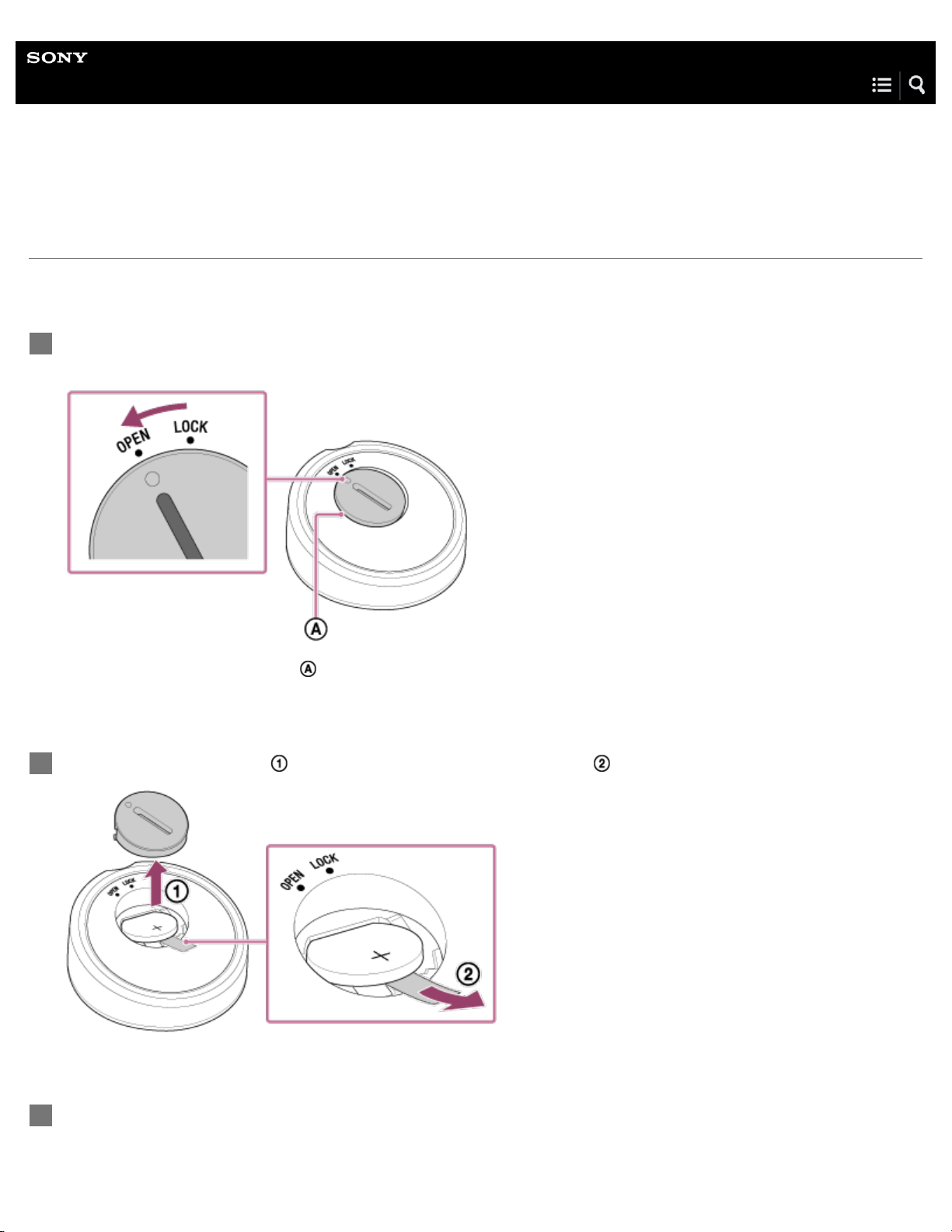
There is a battery inside the remote control at the time of purchase. Before using the remote control for the first time, make sure
to remove the protective sheet by following the steps below.
On the rear of the remote control, insert a coin or other object into the groove on the battery cover,
and twist it to the left, until the marking is aligned with OPEN.
The left side of the battery cover ( ) is slightly lifted.
1
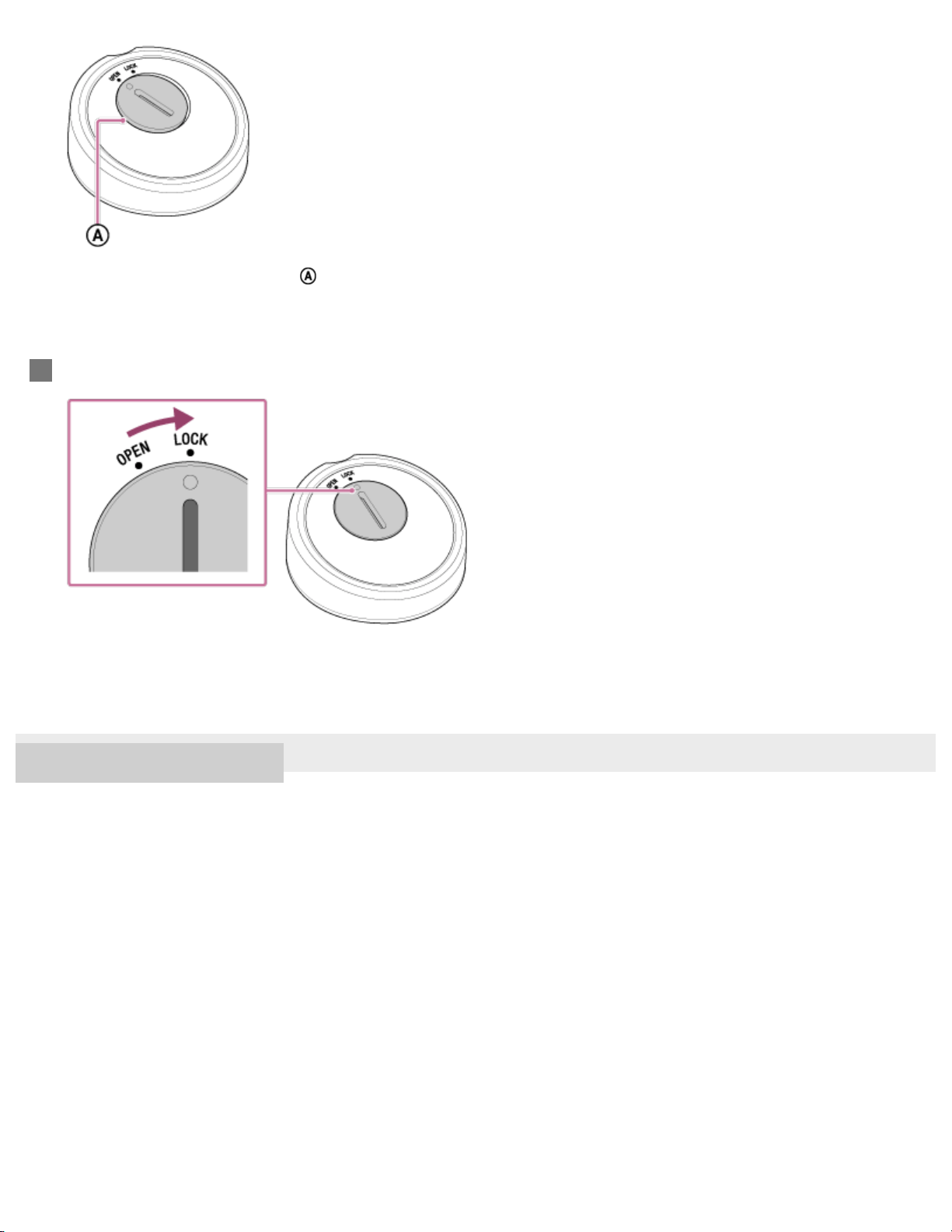
Open the battery cover (
), and remove the protective sheet ( ) from underneath the battery.
2
Return the battery to its former position, and align the marking on the battery cover with OPEN.
3
4
4-579-896-11(1) Copyright 2016 Sony Corporation
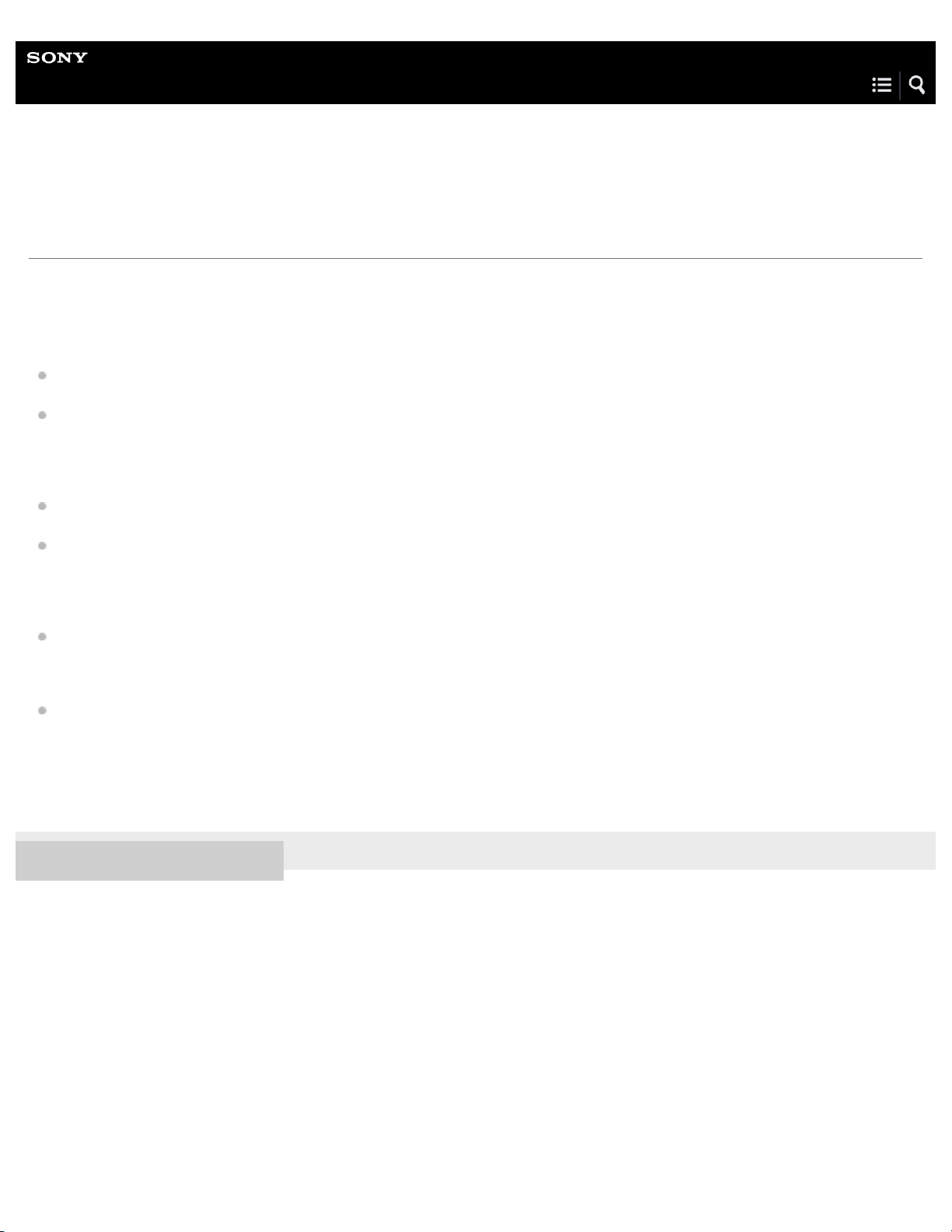
The left side of the battery cover ( ) is slightly lifted.
Twist the battery cover to the right, until the marking is aligned with LOCK.
4
5
Help Guide
LED Bulb Speaker
LSPX-102E26
About light fixtures
The bulb speaker does not have the same weight, brightness, distribution of light, etc. as normal incandescent light bulbs. When
choosing a light fixture, be aware of the following points.
Lighting
When installing the bulb speaker to a multi-light fixture or an adjustable lamp, select a fixture that is strong enough to support
the weight of the bulb speaker without tipping.
If installing the bulb speaker to a multi-light fixture with normal light bulbs, be aware that the brightness and the light color will
differ from that of the other bulbs.
Acoustics
If the light fixture containing the bulb speaker has a shade that covers the speaker area or has a narrow opening, the sound
may be muffled. For better sound quality, select a fixture with a wide opening in the shade.
If installing the bulb speaker to an adjustable lamp, sound vibrations may cause the fixture to shake, thus affecting the sound
quality. Select a lamp that is sufficiently sturdy.
Incompatible light fixtures
Luminaires with a dimming feature, emergency lights, exit lights, or HID lamp fixtures (mercury lamps, etc.)
This can cause damage to the light, smoke emission, or short circuiting.
Luminaires that are enclosed, where the area in or around the fixture heats up, etc.
The service life of the bulb speaker will shorten, and the brightness may automatically lower to reduce power.
Some other types of light fixtures may not be usable, depending on the size, heat conditions, and other circumstances.
4-579-896-11(1) Copyright 2016 Sony Corporation
6
Help Guide
LED Bulb Speaker
LSPX-102E26
How to make a wireless connection with BLUETOOTH devices
You can enjoy music with the bulb speaker wirelessly by using your device’s BLUETOOTH function.
Before operating the bulb speaker, be sure to do the following:
Make sure that the battery in the remote control has power remaining and that the light fixture containing the bulb speaker is
turned on.
Stop playback on a BLUETOOTH device to avoid sudden loud sound output from the bulb speaker.
Prepare the operating instructions supplied with the BLUETOOTH device for reference.
Pairing the bulb speaker with a BLUETOOTH device
Pairing is the process required to mutually register the information on BLUETOOTH devices to be connected wirelessly.
It is necessary to pair a device with the bulb speaker to be able to make a BLUETOOTH connection for the first time.
Pairing and connecting with a BLUETOOTH device
Connecting the bulb speaker with the paired device
Once the BLUETOOTH devices are paired, there is no need to pair them again. To connect a device already paired, refer to the
following topic.
Connecting with a paired BLUETOOTH device
Note
Once the BLUETOOTH devices are paired, there is no need to pair them again, except in the following cases:
Pairing information has been deleted after repair, etc.
The bulb speaker is already paired with seven devices and another device is to be paired.
The bulb speaker can be paired with up to seven devices. If a new device is paired after seven devices have already been paired, the paired
device with the oldest connection time is replaced by the new one.
When the pairing information of the bulb speaker has been deleted from the BLUETOOTH device.
When the bulb speaker is initialized, all pairing information is deleted.
4-579-896-11(1) Copyright 2016 Sony Corporation
7
Help Guide
LED Bulb Speaker
LSPX-102E26
Pairing and connecting with a BLUETOOTH device
The bulb speaker can be paired with up to seven BLUETOOTH devices.
When pairing with two or more BLUETOOTH devices, perform the following pairing procedure for each device.
Before operating the bulb speaker, be sure to do the following:
Make sure that the battery in the remote control has power remaining.
Stop playback on a BLUETOOTH device to avoid sudden loud sound output from the bulb speaker.
Prepare the operating instructions supplied with the BLUETOOTH device for reference.
Turn on the light fixture to which the bulb speaker is installed.
The bulb speaker turns on.
1
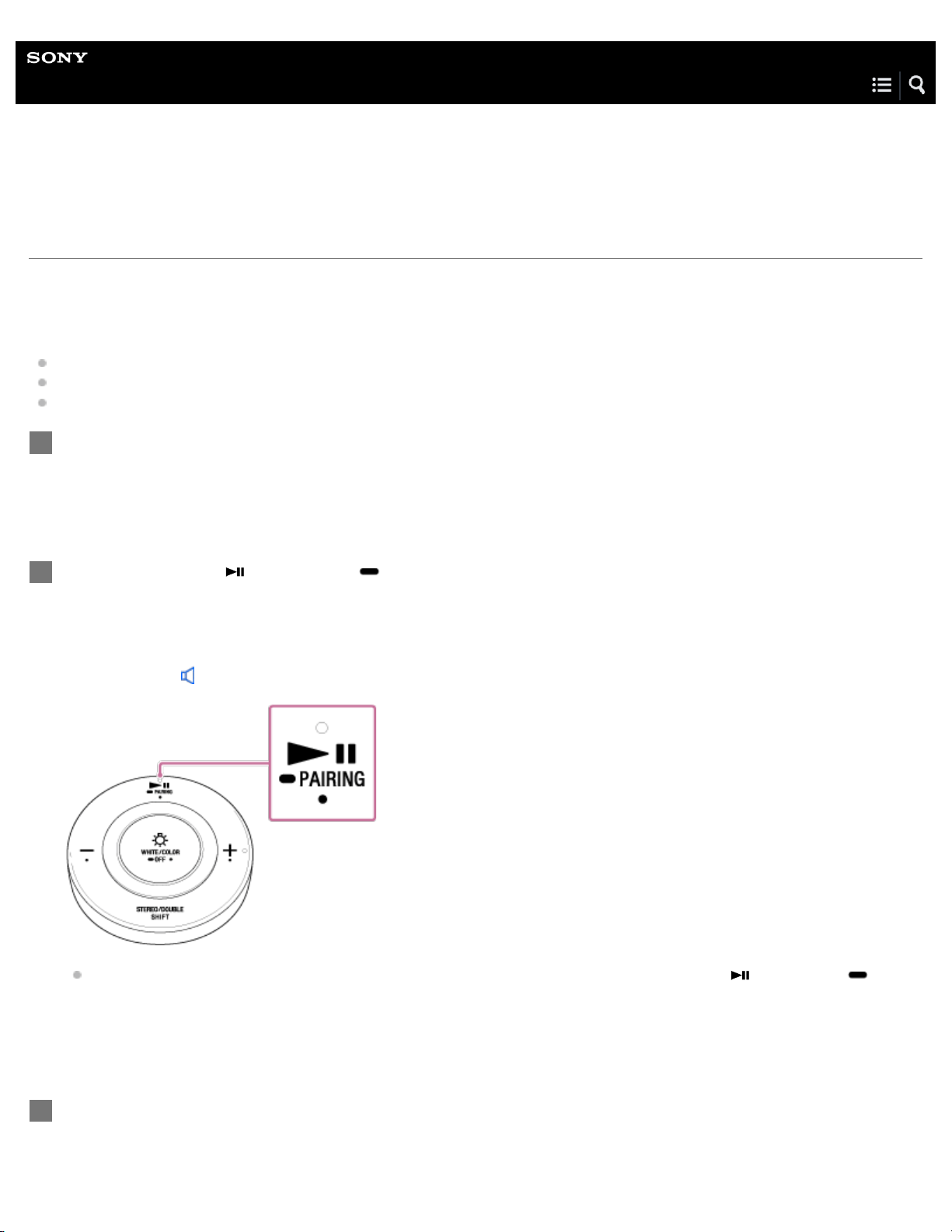
Press and hold the (play/pause)/ PAIRING button.
The bulb speaker will make a sound
*
to indicate that pairing mode has been entered. Release the button when the sound is
made.
*
Sound example (Playback may require the latest browser.)
When the BLUETOOTH device that was most recently connected is nearby, simply press the (play/pause)/
PAIRING button, and the bulb speaker will automatically connect with the device that was previously connected. If you
want to connect with a different device, end the current connection by operating the connected BLUETOOTH device.
2
Perform the pairing procedure on the BLUETOOTH device to detect the bulb speaker.
When a list of detected devices appears on the display of the BLUETOOTH device, select “LSPX-102E26.”
If a passkey* is required on the display of the BLUETOOTH device, enter “0000.”
3
8
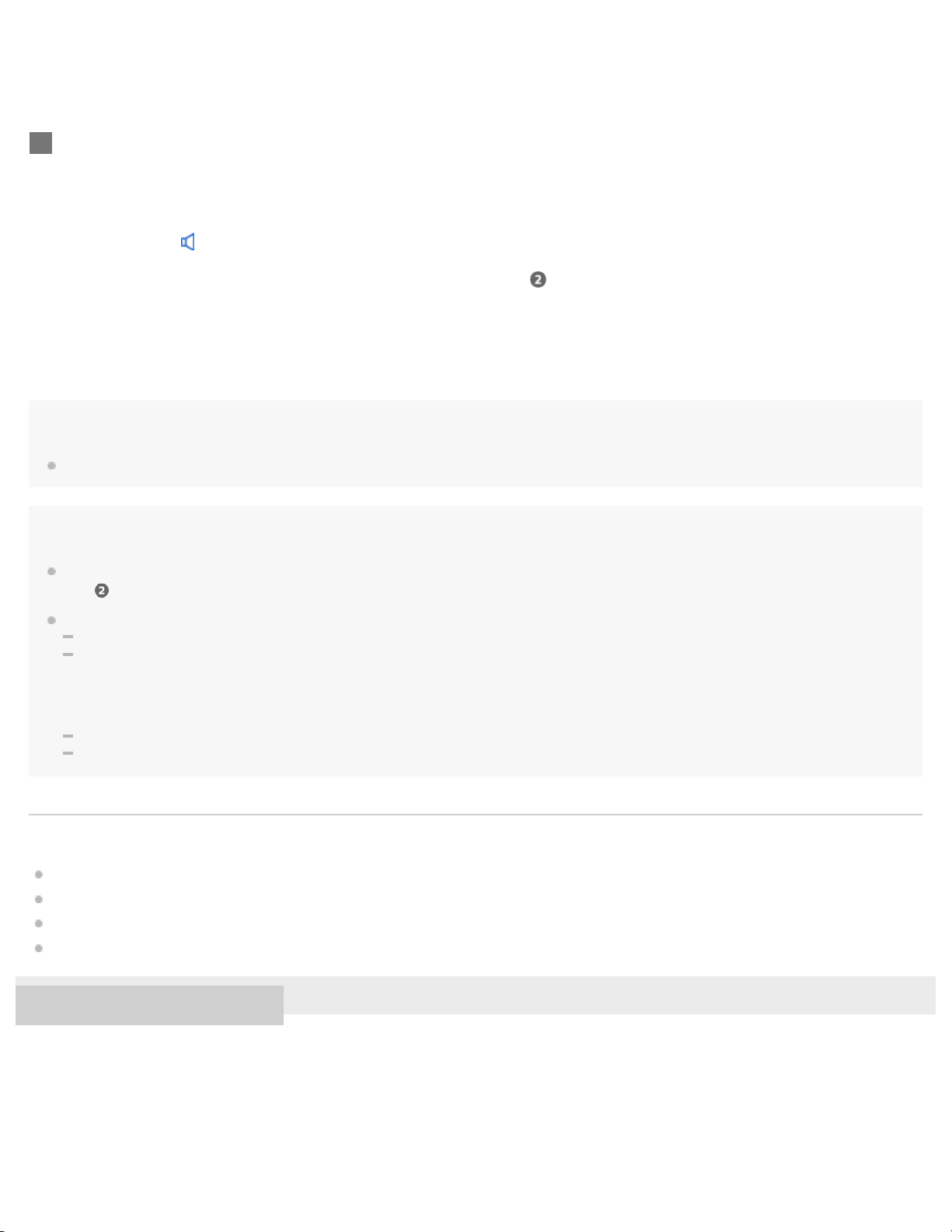
Hint
For details on operating a BLUETOOTH device, refer to the operating instructions supplied with the BLUETOOTH device.
Note
The pairing mode of the bulb speaker is released after about five minutes. If the pairing mode is released before finishing the process, repeat from
step
.
Once the BLUETOOTH devices are paired, there is no need to pair them again, except in the following cases:
Pairing information has been deleted after repair, etc.
The bulb speaker is already paired with seven devices and another device is to be paired.
The bulb speaker can be paired with up to seven devices. If a new device is paired after seven devices have already been paired, the paired
device with the oldest connection time is replaced by the new one.
When the pairing information of the bulb speaker has been deleted from the BLUETOOTH device.
When the bulb speaker is initialized, all the pairing information is deleted.
Related Topic
How to make a wireless connection with BLUETOOTH devices
Connecting with a paired BLUETOOTH device
Listening to music of a device via BLUETOOTH connection
Terminating the BLUETOOTH connection (after use)
4-579-896-11(1) Copyright 2016 Sony Corporation
A passkey may be called “Passcode,” “PIN code,” “PIN number” or “Password.”
*
Make the BLUETOOTH connection from the BLUETOOTH device.
When pairing is complete, the bulb speaker will make a sound* to indicate that a BLUETOOTH connection has been
established.
*
Sound example (Playback may require the latest browser.)
If the BLUETOOTH connection is not established, repeat from step
.
4
9
Help Guide
LED Bulb Speaker
LSPX-102E26
Connecting with a paired BLUETOOTH device
If a connection cannot be made
Perform steps to of “Pairing and connecting with a BLUETOOTH device.”
If you want to connect with a different paired device
Operate the BLUETOOTH settings of the device that you want to connect, and select “LSPX-102E26” to make a BLUETOOTH
connection with the bulb speaker. For details, refer to the operating instructions supplied with the BLUETOOTH device.
Hint
If the bulb speaker is already connected to a BLUETOOTH device and you form a connection from a different device that was previously paired
Turn on the light fixture to which the bulb speaker is installed.
The bulb speaker turns on.
1
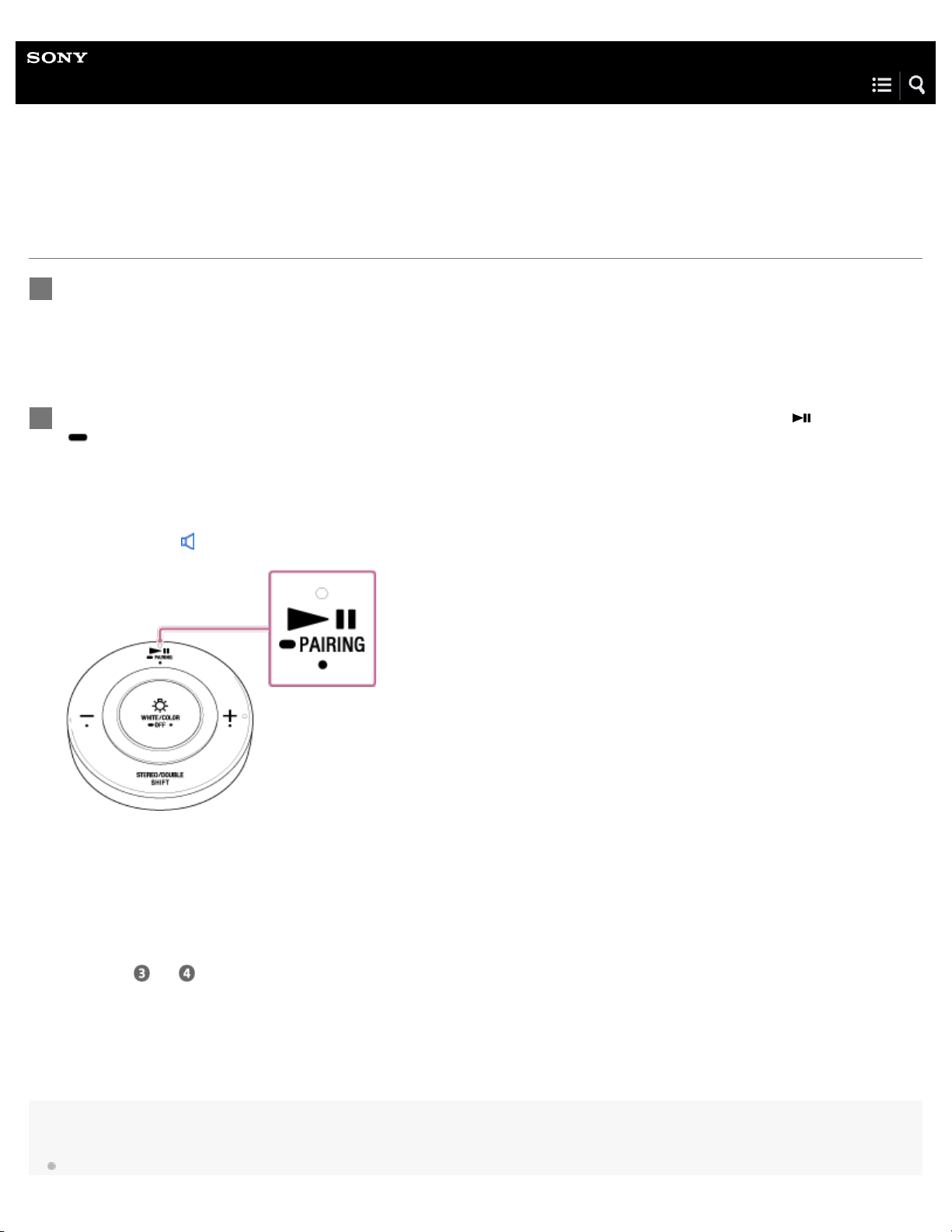
If the bulb speaker does not have a BLUETOOTH connection with any device press the
(play/pause)/
PAIRING button.
The bulb speaker automatically connects with the device that was last connected. When pairing is complete, the bulb
speaker will make a sound
*
to indicate that a BLUETOOTH connection has been established.
*
Sound example (Playback may require the latest browser.)
2
10

with the bulb speaker, the connection switches to the latter device.
Related Topic
How to make a wireless connection with BLUETOOTH devices
Pairing and connecting with a BLUETOOTH device
Listening to music of a device via BLUETOOTH connection
Terminating the BLUETOOTH connection (after use)
4-579-896-11(1) Copyright 2016 Sony Corporation
11
Help Guide
LED Bulb Speaker
LSPX-102E26
Listening to music of a device via BLUETOOTH connection
You can enjoy listening to music of a BLUETOOTH device from the bulb speaker and operate it by the remote control via
BLUETOOTH connection if it supports the following BLUETOOTH profiles.
A2DP (Advanced Audio Distribution Profile)
Enables you to enjoy high-quality audio contents wirelessly.
AVRCP (Audio Video Remote Control Profile)
Enables you to adjust the volume of a BLUETOOTH device and operate the music with play/pause, etc.
Operations may vary depending on the BLUETOOTH device. Refer also to the operating instructions supplied with your
BLUETOOTH device.
Connect the bulb speaker with the BLUETOOTH device.
When the connection is complete, the bulb speaker will make a sound
*
to indicate that a BLUETOOTH connection has been
established.
*
Sound example (Playback may require the latest browser.)
1
Start playback on the BLUETOOTH device, and adjust the volume to a moderate level.
2
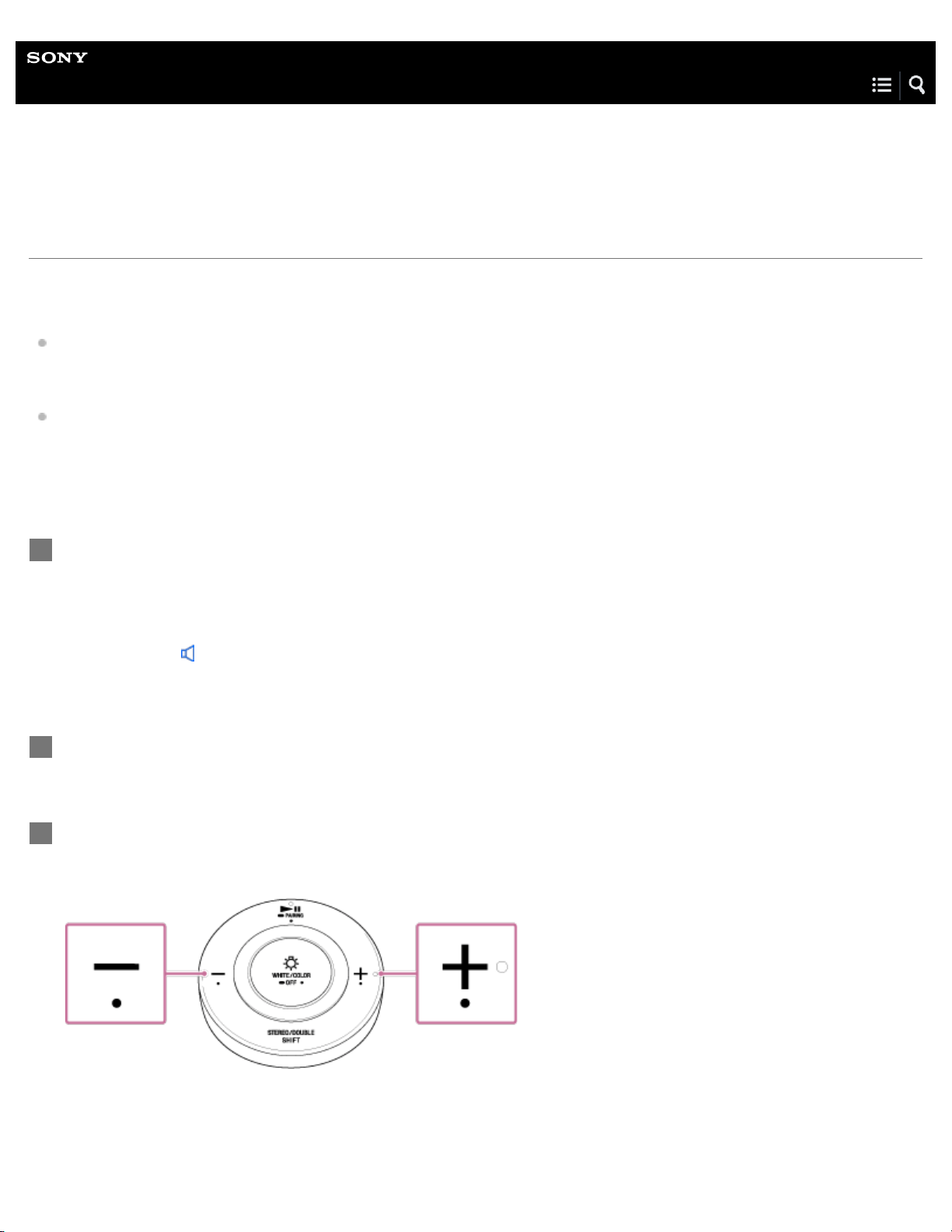
Adjust the volume using the Volume –/+ buttons on the remote control.
When the volume reaches the lowest level (mute) or the highest level, the bulb speaker emits two short beeps.
3
12
Hint
You can also use the (play/pause)/ PAIRING (pairing) button on the remote control to play or pause the music.
The BLUETOOTH codec setting of the bulb speaker is set to [SBC (Low)] at the time of purchase. Change the BLUETOOTH codec setting to
enjoy high quality playback. For more details about the BLUETOOTH codec setting, see "Switching the playback quality for BLUETOOTH audio
streaming."
Depending on the BLUETOOTH device, it may be necessary to adjust the volume or set the audio output setting on the connected device.
Note
If the communication condition is poor, the BLUETOOTH device may react incorrectly to operations on the bulb speaker.
Related Topic
How to make a wireless connection with BLUETOOTH devices
Terminating the BLUETOOTH connection (after use)
Switching the playback quality for BLUETOOTH audio streaming
4-579-896-11(1) Copyright 2016 Sony Corporation
13
Help Guide
LED Bulb Speaker
LSPX-102E26
Switching the playback quality for BLUETOOTH audio streaming
You can switch the playback quality (BLUETOOTH codec) for BLUETOOTH audio streaming.
BLUETOOTH codecs
Auto: AAC or SBC are automatically selected.
SBC: The SBC setting is fixed.
SBC (Low): The SBC setting is fixed, and priority is given to the connection. (default setting)
To switch the BLUETOOTH codec, follow the steps below.
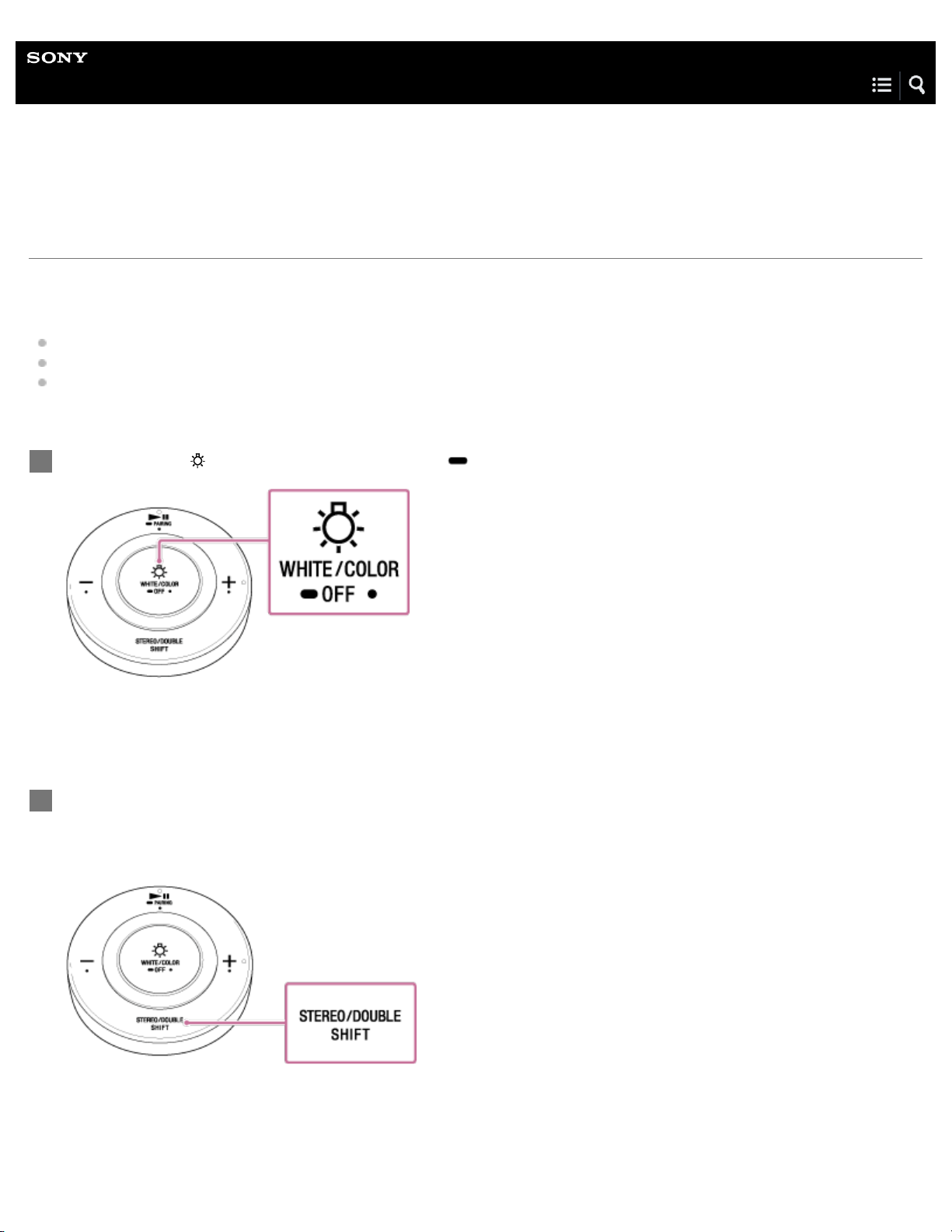
Hold down the WHITE/COLOR (white/color)/ OFF (light off) button.
The light turns off, and BLUETOOTH is disconnected. The bulb speaker makes a sound to indicated that it is in standby.
1
When the light turns off, release the button on the the remote control, and wait for approximately 15
seconds before you hold down the STEREO/DOUBLE (switch mode)/SHIFT (shift) button.
After about 10 seconds, the bulb speaker lights up. After another moment, the bulb speaker makes one of the following
sounds, depending on which BLUETOOTH codec is selected. After pressing the button, it takes a few seconds for the sound
to be emitted.
If you want to switch to a different BLUETOOTH codec, repeat the steps above.
2
14

Note
Depending on the settings of your BLUETOOTH device and the usage environment, setting the codec to [Auto] may cause signal reception by the
bulb speaker to become unstable. In such cases, set the codec to [SBC]. If signal reception does not improve, set the codec to [SBC (Low)].
4-579-896-11(1) Copyright 2016 Sony Corporation
Auto: Two short beeps
SBC: Three short beeps
SBC (Low): Four short beeps
15
Help Guide
LED Bulb Speaker
LSPX-102E26
Terminating the BLUETOOTH connection (after use)
When you finish playing music with the BLUETOOTH device, perform any of the following operations to terminate the
BLUETOOTH connection. When termination is complete, the bulb speaker will make a sound
*
to indicate that BLUETOOTH has
been disconnected.
*
Sound example (Playback may require the latest browser.)
Turn off the BLUETOOTH function on the BLUETOOTH device. For details, refer to the operating instructions supplied with
the device.
Turn off the BLUETOOTH device.
Hint
You can also terminate the BLUETOOTH connection by turning off the light fixture that contains the bulb speaker.
When you finish playing music, the BLUETOOTH connection may terminate automatically depending on the BLUETOOTH device.
4-579-896-11(1) Copyright 2016 Sony Corporation
16
Help Guide
LED Bulb Speaker
LSPX-102E26
About Speaker Add function (playback with two bulb speakers)
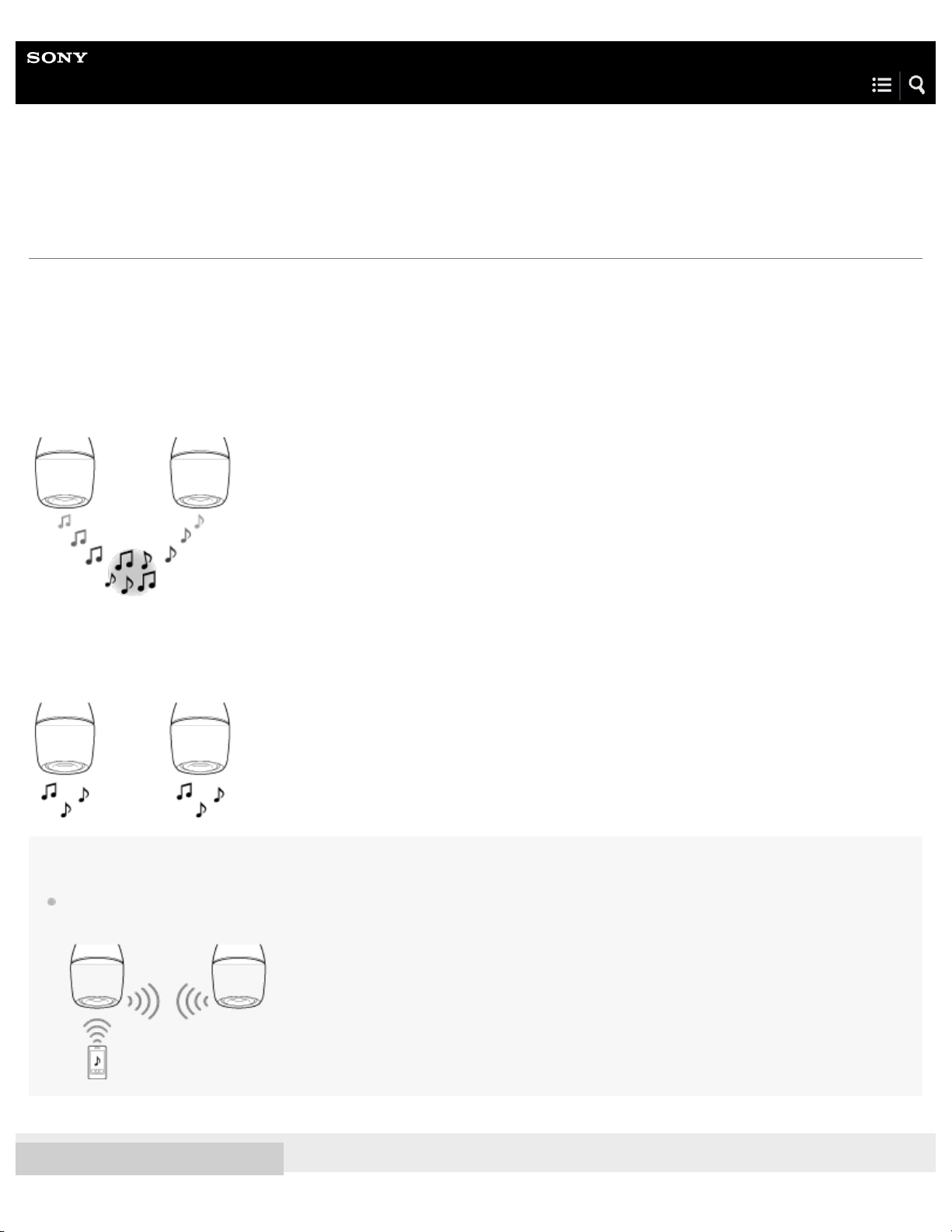
By using the Speaker Add function, you can connect a single BLUETOOTH device to two bulb speakers simultaneously. Select
from the following two playback methods.
Stereo mode
One bulb speaker plays the sound on the left channel (left side), while the other bulb speaker plays the sound on the right
channel (right side) for stereo playback between the two bulb speakers.
Double mode
Both bulb speakers play the same sound (monaural audio).
Hint
When using the Speaker Add function, one bulb speaker acts as the “master unit” (left channel), while the other acts as the “satellite unit” (right
channel). Be sure to connect the BLUETOOTH device only to the master unit. The master unit will then connect to the satellite unit.
4-579-896-11(1) Copyright 2016 Sony Corporation
17
Help Guide
LED Bulb Speaker
LSPX-102E26
Setting up the Speaker Add function
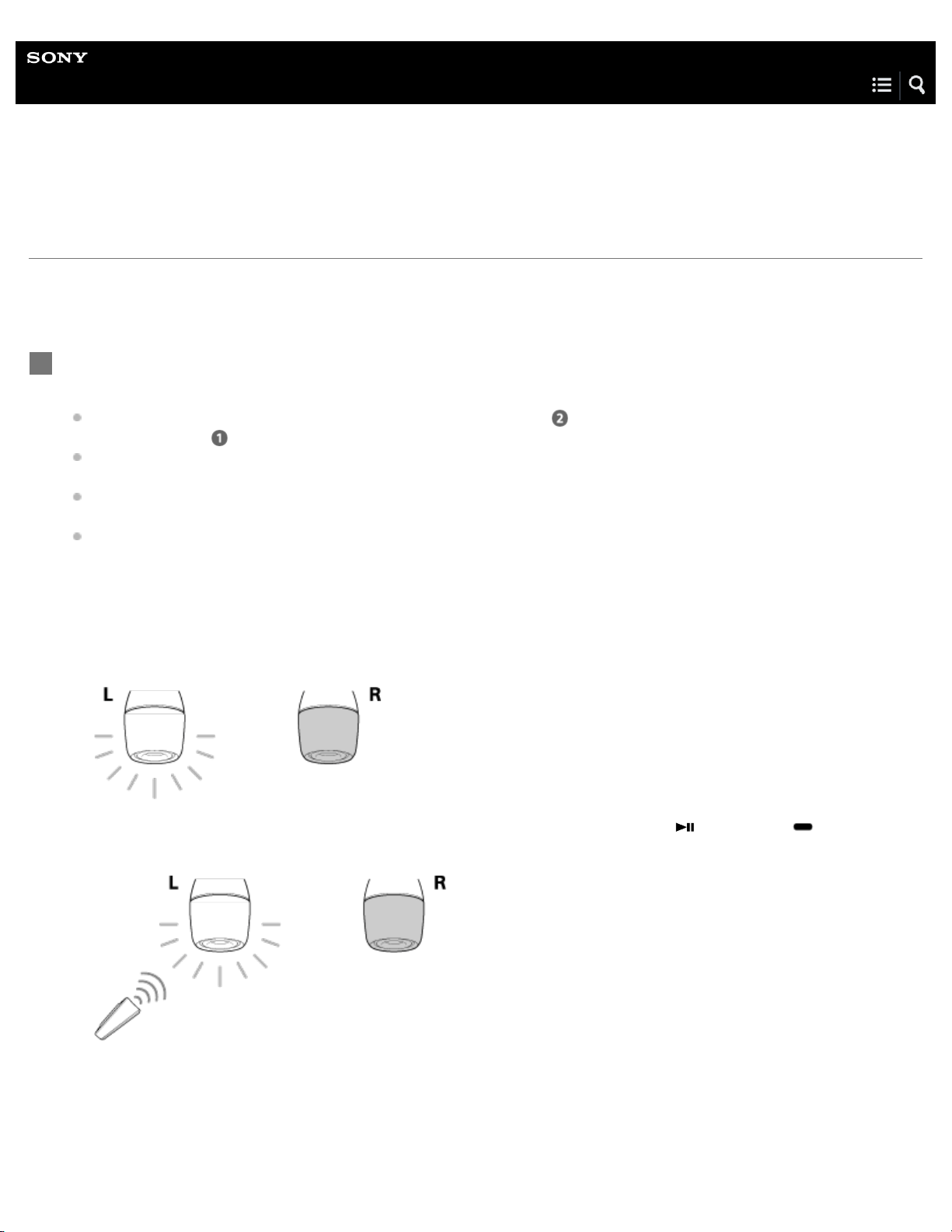
To set up the Speaker Add function, you first need to set up the bulb speaker that you want for the left channel (left side) as the
master unit, and then connect the two bulb speakers to each other. Lastly, pair and connect the master unit with a BLUETOOTH
device.
Set up the master unit.
Confirm the following points before performing this operation.
If you have already set up the master unit, proceed directly to step
"Connect the two bulb speakers." Be aware that if
you perform step
when the master unit is already set, the master unit setting will be canceled.
The bulb speaker that is set up as the master unit plays the sound on the left channel (left side) when in stereo mode.
Therefore, decide which bulb speaker you want to set up as the left side, and make that the bulb speaker.
Only set up one bulb speaker as the master unit. If you set up two or more bulb speakers as the master unit, the
Speaker Add function will not work.
Make sure that the light fixture containing the bulb speaker that you want to set as the right channel (right side) remains
turned off. If two bulb speakers turn on when a light fixture is in use, remove the bulb speaker that you want to set as the
right side.
1
Turn on the light fixture to which the bulb speaker that you want to set as the left side is installed.
The bulb speaker lights up.
1.
Aim the remote control toward the bulb speaker on the left side, then hold down the (play/pause)/ PAIRING
button for about one second after pressing and holding the STEREO/DOUBLE (switch mode)/SHIFT (shift) button.
2.
18
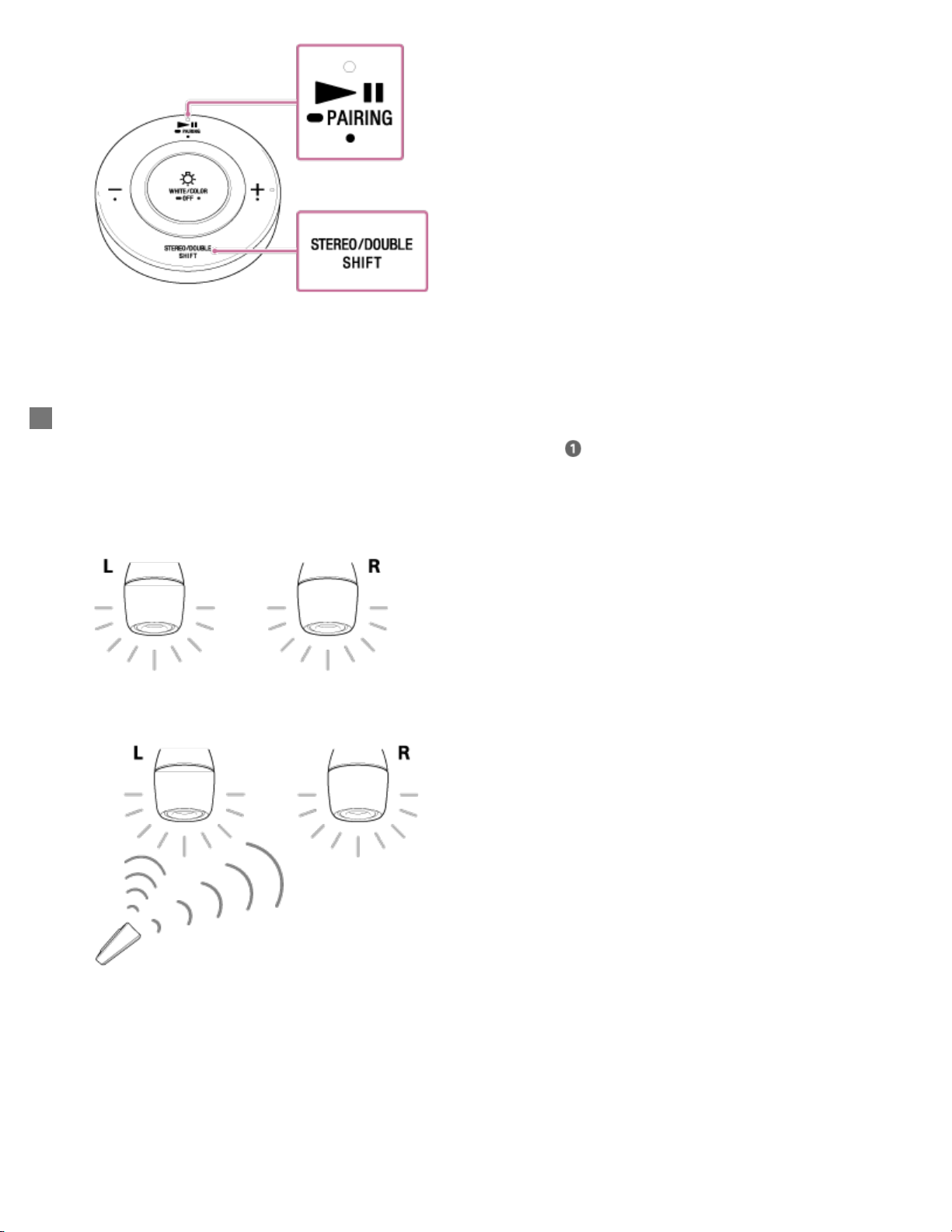
The master unit setting is complete.
Connect the two bulb speakers.
If you removed the bulb speaker on the right side when performing step
, reinstall the bulb speaker.
2
With the bulb speaker on the left side (master unit) already lit, turn on the light fixture to which the bulb speaker on the
right side is installed.
The bulb speaker lights up.
1.
Aim the remote control toward the bulb speakers, then hold down the Volume + button for about one second after
pressing and holding the STEREO/DOUBLE (switch mode)/SHIFT (shift) button.
2.
19
Note
The remote control for the bulb speaker on the right side cannot be used to adjust the volume, brightness, or color. Use the remote control for the
bulb speaker on the left side to operate. The two bulb speakers will synchronize. If you want to use the bulb speaker on the right side
independently, cancel the Speaker Add function.
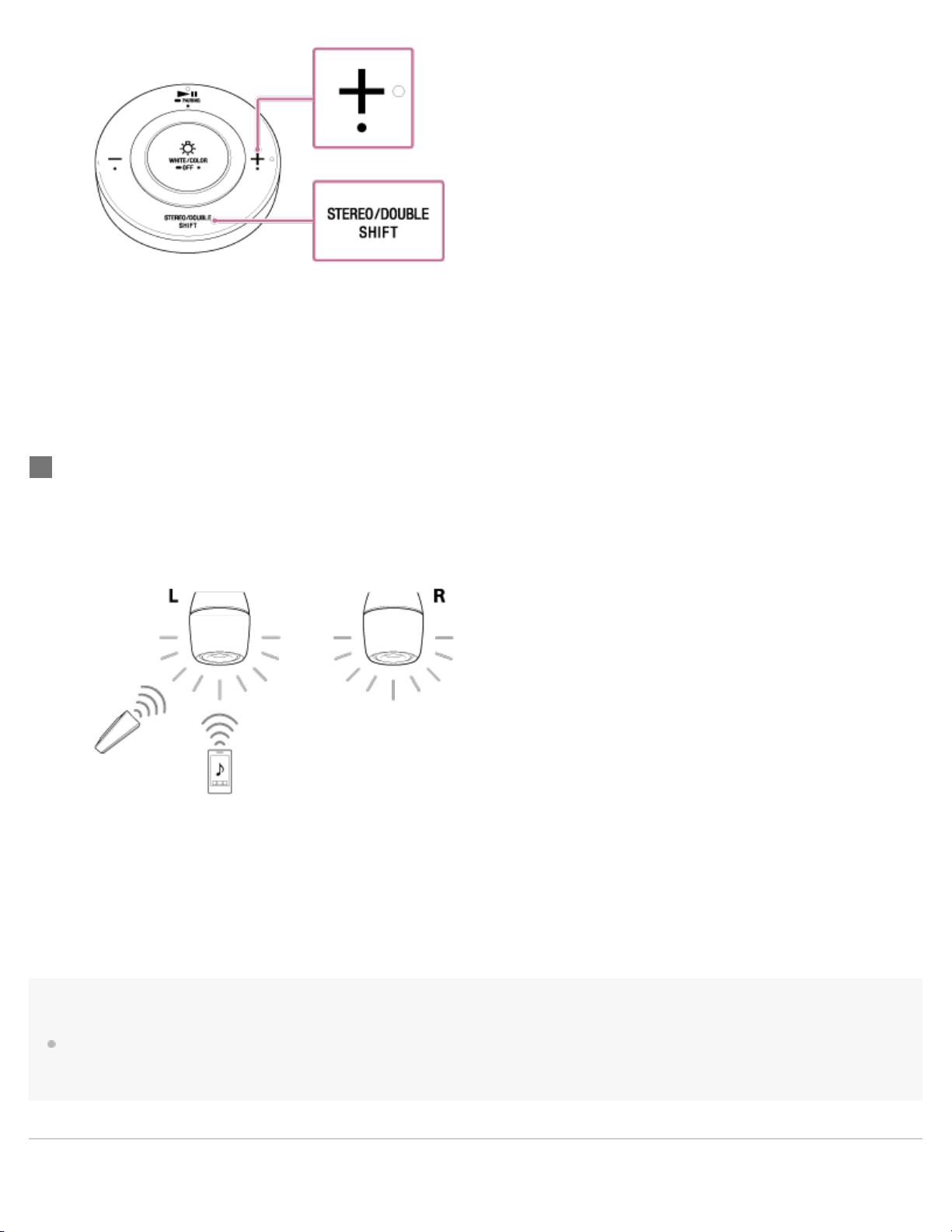
The bulb speaker on the left side will emit a series of short beeps, while the speaker on the right will emit a series of
long beeps.
If there is distance between the bulb speakers, you can perform step 2 for one speaker at a time.
The Speaker Add function cannot be set for several seconds after the light fixture is turned on. Please wait a moment
before performing step 2.
Connect the speaker on the left side (master unit) with a BLUETOOTH device, and start playback in
stereo mode/double mode.
3
With both bulb speakers lit up, pair your BLUETOOTH device with the bulb speaker on the left side (master unit).
If the BLUETOOTH device has already been paired with the bulb speaker, just make a connection.
1.
Play music.
The first time you use the Speaker Add function after purchase, playback will be in stereo mode.
2.
20

Help Guide
LED Bulb Speaker
LSPX-102E26
Switching between stereo mode and double mode (Speaker Add function)
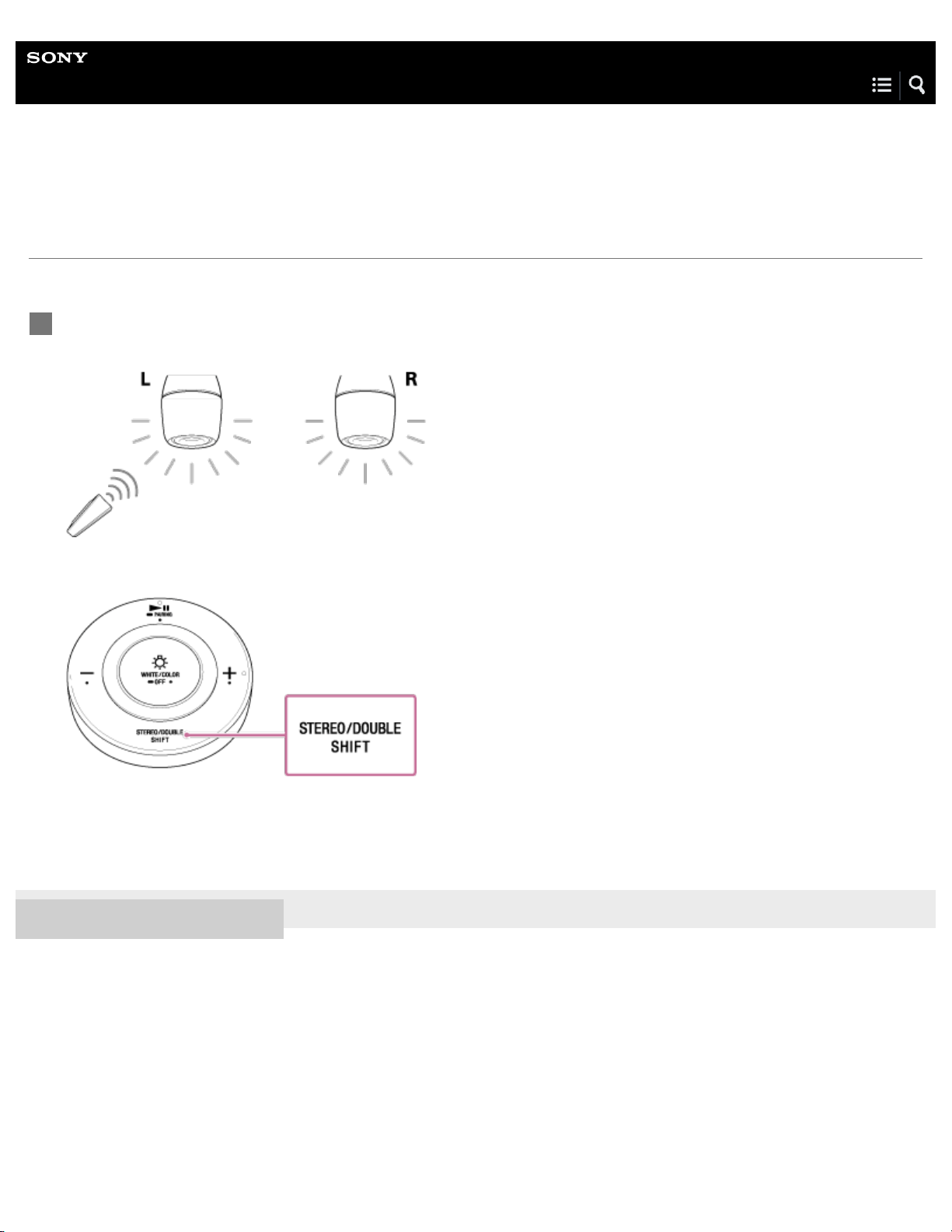
Using two bulb speakers, you can switch between stereo playback (stereo mode) and monaural playback (double mode).
4-579-896-11(1) Copyright 2016 Sony Corporation
Aim the remote control toward the bulb speaker on the left side (master unit), and press the
STEREO/DOUBLE (switch mode)/SHIFT (shift) button.
1
22
Help Guide
LED Bulb Speaker
LSPX-102E26
Confirming which is the master unit (left channel)/satellite unit (right channel)
(Speaker Add function)
Follow the steps below to confirm which of two bulb speakers is the master unit (left channel (L side)) and which is the satellite
unit (right channel (R side)).
4-579-896-11(1) Copyright 2016 Sony Corporation
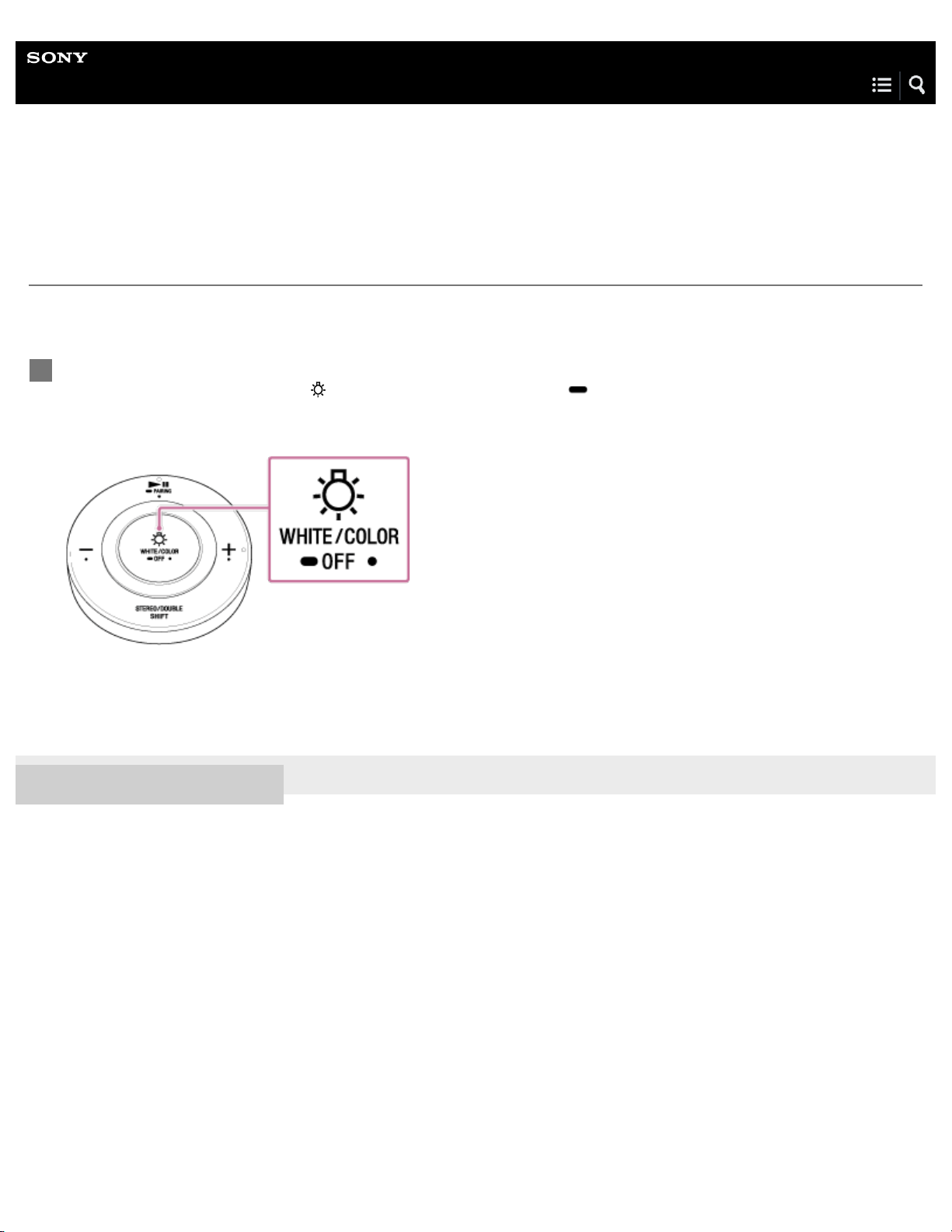
When the bulb speaker is connected to a BLUETOOTH device, aim the remote control toward the two
bulb speakers, and press the
WHITE/COLOR (white/color)/ OFF (light off) button.
The master unit (left channel) will react slightly sooner than the other bulb speaker.
1
23
Help Guide
LED Bulb Speaker
LSPX-102E26
Canceling the Speaker Add function
Follow the steps below to cancel the Speaker Add function.
Hint
When the Speaker Add function has been canceled, music is played back normally from the bulb speaker on the left side, and is not played from
the right side.
If there is distance between the bulb speakers, do this operation for the bulb speaker on the left side (master unit) first.
Note
The remote control for the bulb speaker on the right side cannot be used to adjust the volume, brightness, or color. Use the remote control for the
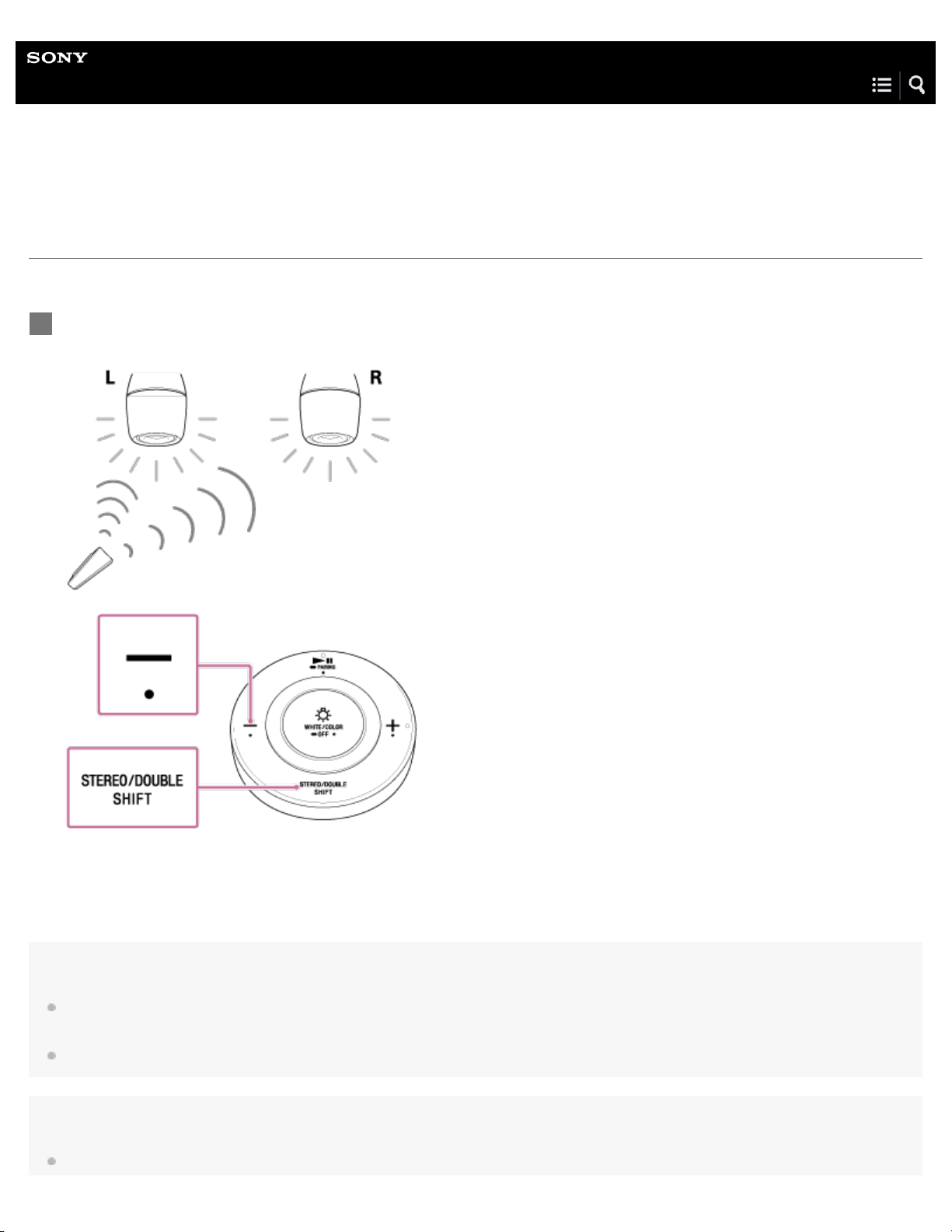
Aim the remote control toward the bulb speakers, then hold down the Volume – button for about one
second after pressing and holding the STEREO/DOUBLE (switch mode)/SHIFT (shift) button.
1
24

bulb speaker on the left side to operate. The two bulb speakers will synchronize. If you want to use the bulb speaker on the right side
independently, cancel the Speaker Add function.
If you want to set the Speaker Add function again after canceling it, do not perform the master unit setting. Be aware that if you perform the
operation when the master unit is already set, the master unit setting will be canceled.
Related Topic
Setting up the Speaker Add function
4-579-896-11(1) Copyright 2016 Sony Corporation
25

Help Guide
LED Bulb Speaker
LSPX-102E26
Canceling the master unit setting (Speaker Add function)
Follow the steps below to cancel the master unit setting.
Note
When canceling the master unit setting, perform the operation on only the master unit. If another bulb speaker (satellite unit, etc.) reacts, it may
accidentally be set as a master unit. If another bulb speaker is nearby, turn off the light fixture to which it is installed. If multiple bulb speakers turn on
when a light fixture is in use, remove the additional bulb speakers.
Aim the remote control toward the bulb speaker on the left side, then hold down the (play/pause)/
PAIRING button for about one second after pressing and holding the STEREO/DOUBLE (switch
mode)/SHIFT (shift) button.
The master unit setting is canceled.
1
26
Help Guide
LED Bulb Speaker
LSPX-102E26
Adjusting the brightness
Adjust the brightness of the bulb speaker.
4-579-896-11(1) Copyright 2016 Sony Corporation
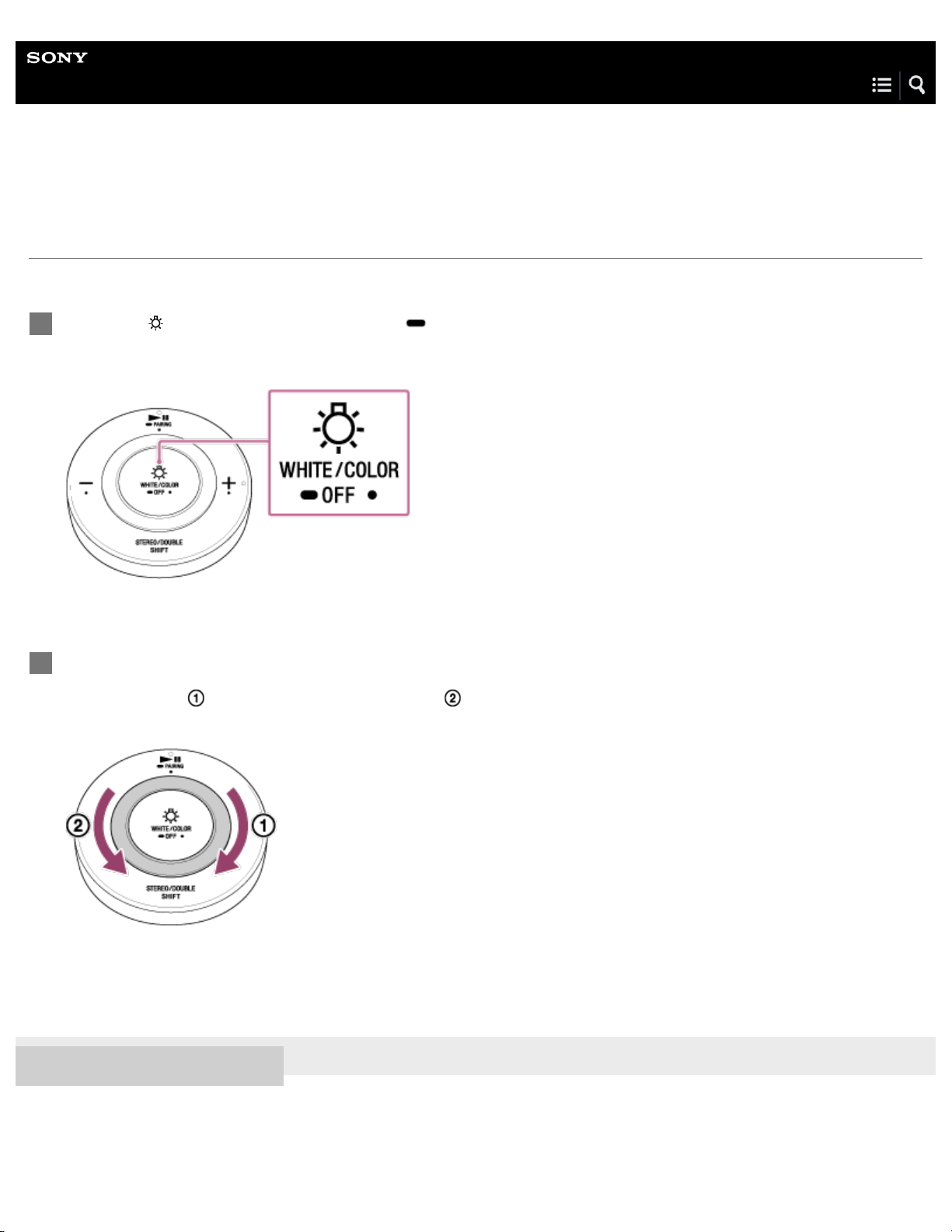
Press the WHITE/COLOR (white/color)/ OFF (light off) button to turn on the light.
Each time you press the button the light switches between white light, color mode, and off.
1
Spin the dimmer/color ring to adjust the brightness.
Spin to the right (
) for brighter, and spin to the left ( ) for darker.
When the light reaches its brightest setting, the bulb speaker emits two short beeps.
2
27
Help Guide
LED Bulb Speaker
LSPX-102E26
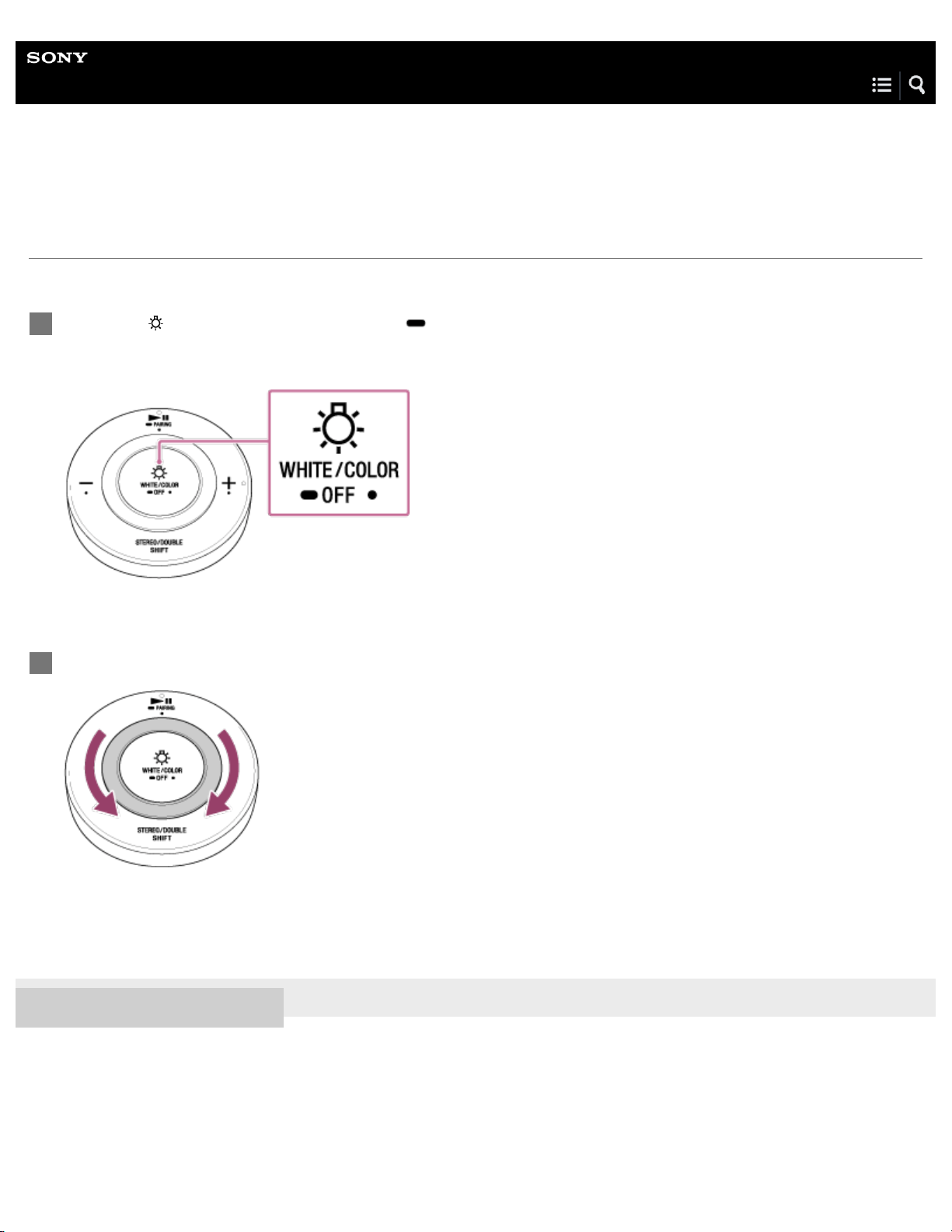
Switching the mode (off/color)
Switch the mode (off/color) of the bulb speaker.
Note
If you hold down the WHITE/COLOR (white/color)/ OFF (light off) button to turn off the light, BLUETOOTH will disconnect. When this happens,
music cannot be played. To reconnect, press the
WHITE/COLOR (white/color)/ OFF (light off) button again and turn on the light. If you press
and hold to turn off the light, when you turn the light back on, it takes time for the bulb speaker to receive the command.
4-579-896-11(1) Copyright 2016 Sony Corporation
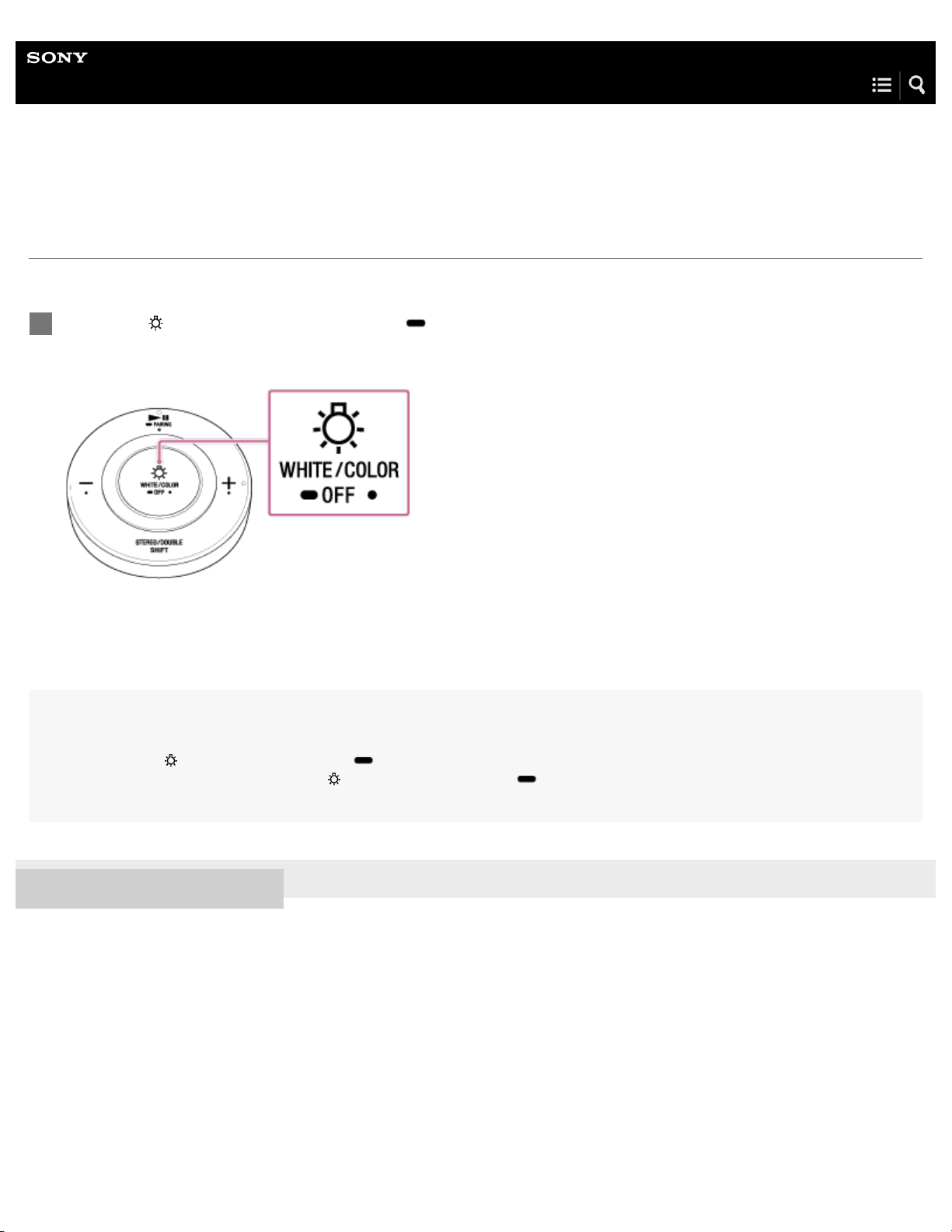
Press the WHITE/COLOR (white/color)/ OFF (light off) button repeatedly to switch the mode.
Each time you press the button the light switches between white light, color mode, and off.
1
28
Help Guide
LED Bulb Speaker
LSPX-102E26
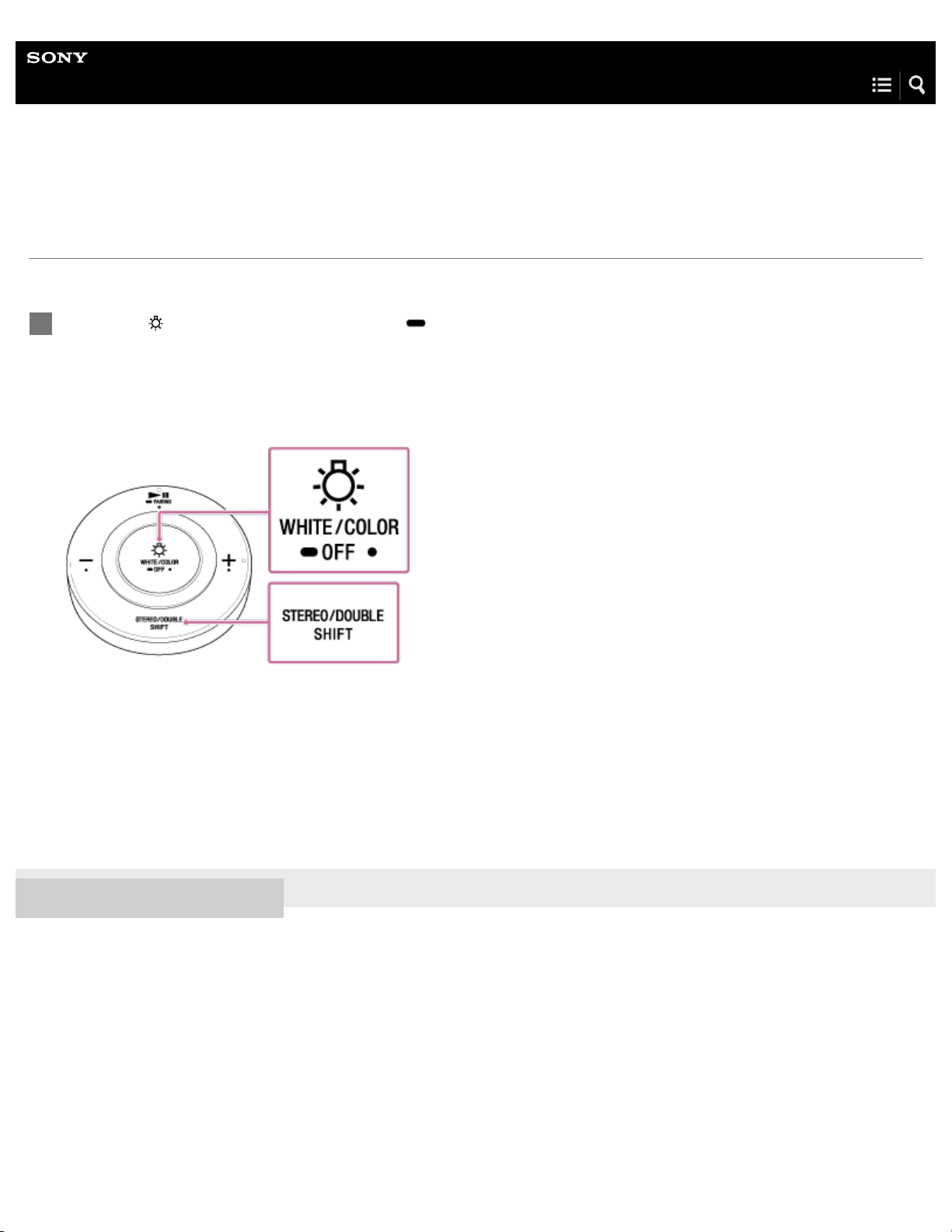
Adjusting the color
Adjust the color of the bulb speaker.
4-579-896-11(1) Copyright 2016 Sony Corporation
Press the WHITE/COLOR (white/color)/ OFF (light off) button to switch to color mode.
Each time you press the button the light switches between white light, color mode, and off.
1
Spin the dimmer/color ring to adjust the color.
2
29
Help Guide
LED Bulb Speaker
LSPX-102E26
Using the Sleep Timer
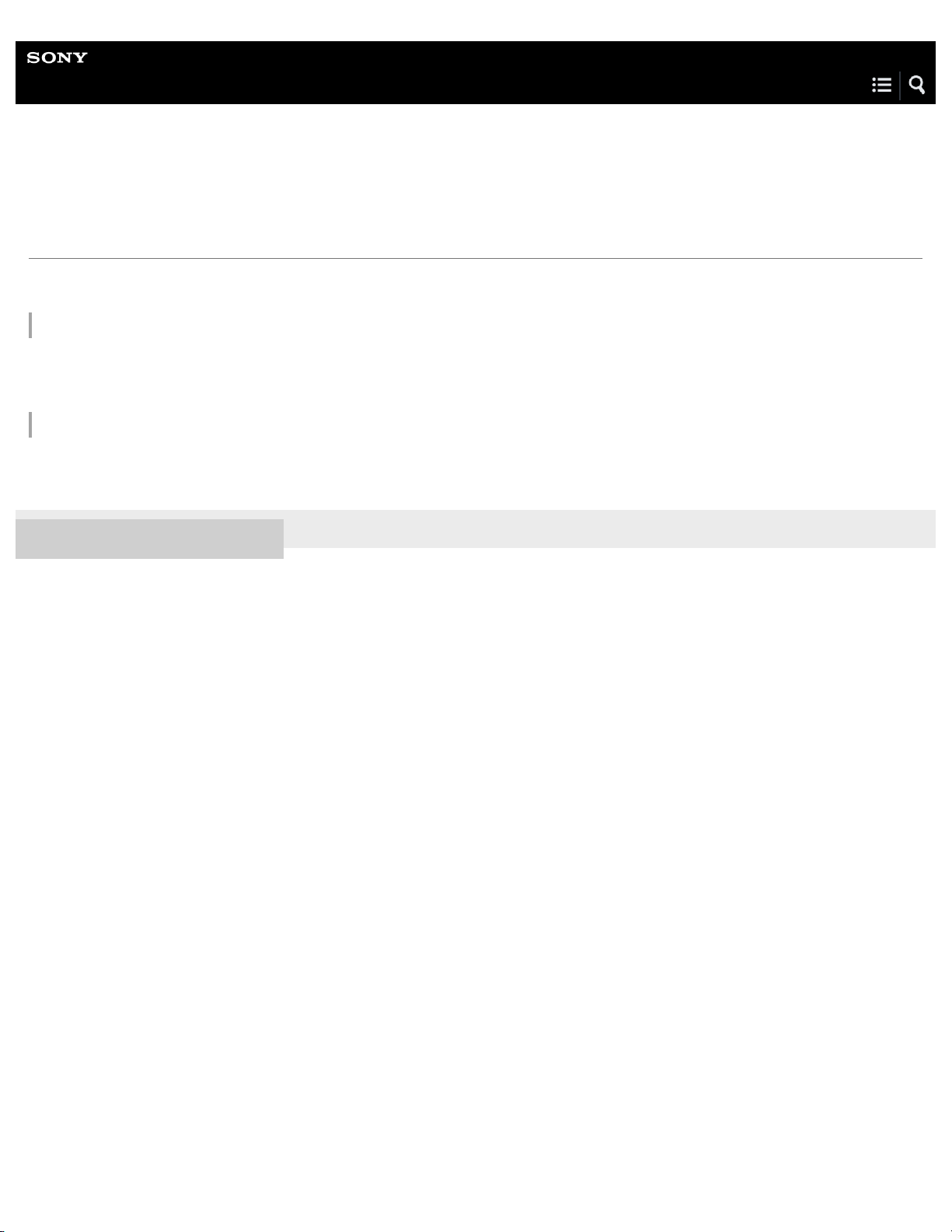
When you set the Sleep Timer, the bulb speaker turns off after the designated time.
Canceling the Sleep Timer
If you perform the step listed above once more, the Sleep Timer setting will be canceled. The bulb speaker will emit a long beep.
4-579-896-11(1) Copyright 2016 Sony Corporation
Press the WHITE/COLOR (white/color)/ OFF (light off) button while pressing the STEREO/DOUBLE
(switch mode)/SHIFT (shift) button.
The bulb speaker emits a short beep. The Sleep Timer is set, and the light will automatically turn off after 60 minutes
(duration setting at time of purchase).
If music is playing, it will pause.
1
30
Help Guide
LED Bulb Speaker
LSPX-102E26
App operating environment
The availability of the LED Bulb Speaker Application depends on your version of SongPal.
LED Bulb Speaker Application operating environment
SongPal: version 4.0 or later (planned release date: late May, 2016)
Search for SongPal in Google Play™ (Play Store) or the App Store, and download.
About Help Guide for LED Bulb Speaker Application
After the release of the app, this Help Guide with be updated with instructions on use.
4-579-896-11(1) Copyright 2016 Sony Corporation
31

Help Guide
LED Bulb Speaker
LSPX-102E26
Specifications
LED section
Total flux
500 lumens
Power consumption
8.6 W
Light color
Warm white (2700K)
Screw base
E26 type screw base
Distribution of luminous intensity
Semi-omni distribution
Speaker section
Speaker system
Approx. 40 mm (1.6 in) dia.
BLUETOOTH
Communication System
BLUETOOTH Specification version 4.1
Output
BLUETOOTH Specification Power Class 1
Frequency band
2.4 GHz band (2.4000 GHz - 2.4835 GHz)
Modulation method
FHSS
Compatible BLUETOOTH Profiles
*1
A2DP (Advanced Audio Distribution Profile)
AVRCP (Audio Video Remote Control Profile)
Supported Codecs
*2
SBC
*3
, AAC
Content protection
SCMS-T method
Transmission range (A2DP)
32

20 Hz - 20,000 Hz (Sampling frequency 44.1 kHz)
General
Power
AC 120 V 60 Hz
Operating environment and temperature
Indoor at 5 °C to 40 °C (41 °F to 104 °F)
Dimensions (including projecting parts)
Approx. 61 mm dia. × 116 mm (2.4 in dia. × 4.6 in)
Mass
Approx. 198 g (7 oz)
Related Topic
App operating environment
4-579-896-11(1) Copyright 2016 Sony Corporation
BLUETOOTH standard profiles indicate the purpose of BLUETOOTH communication between devices.
*1
Codec: Audio signal compression and conversion format
*2
Subband Codec
*3
33
Help Guide
LED Bulb Speaker
LSPX-102E26
Replacing the battery in the remote control
When replacing the battery in the remote control, make sure to use a CR2032 lithium battery from Sony.
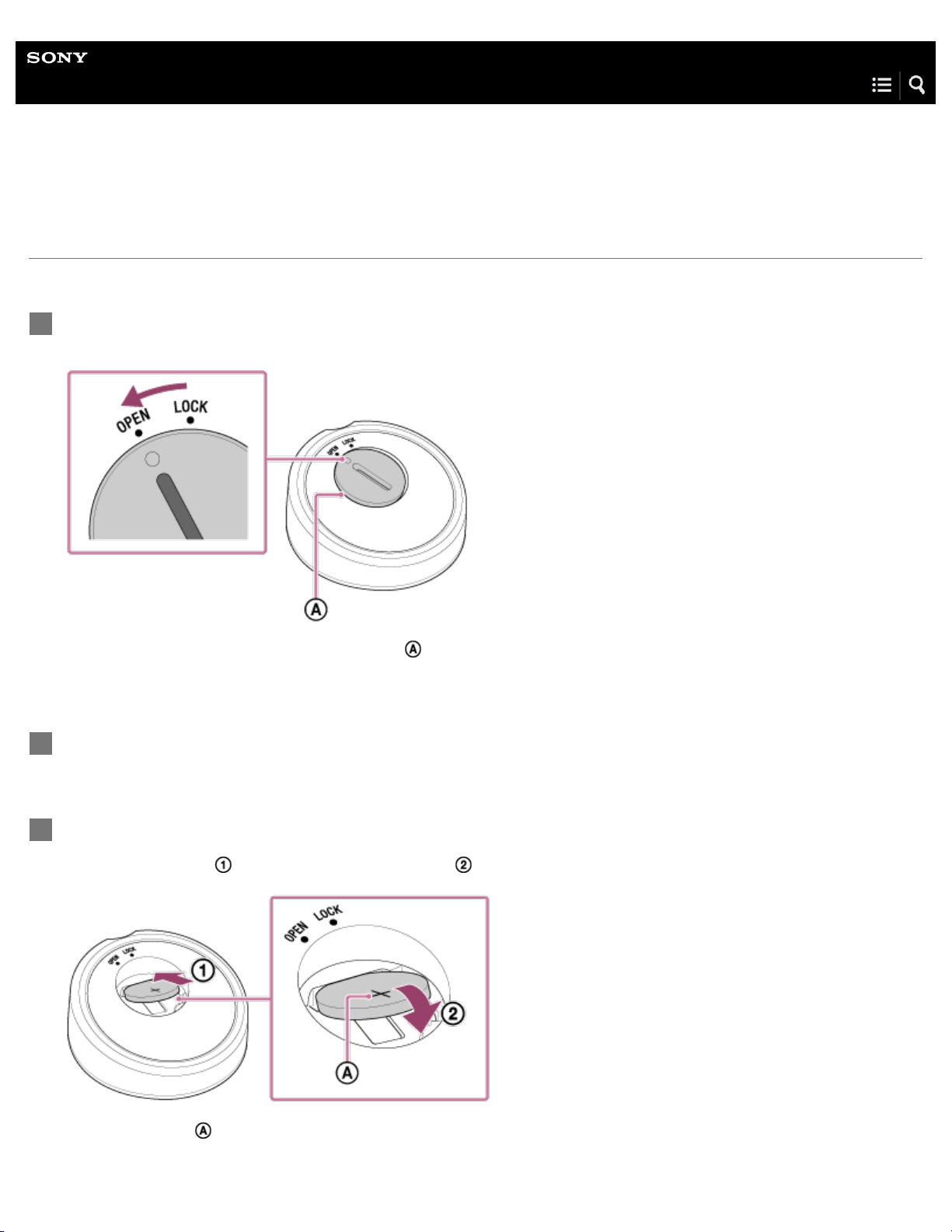
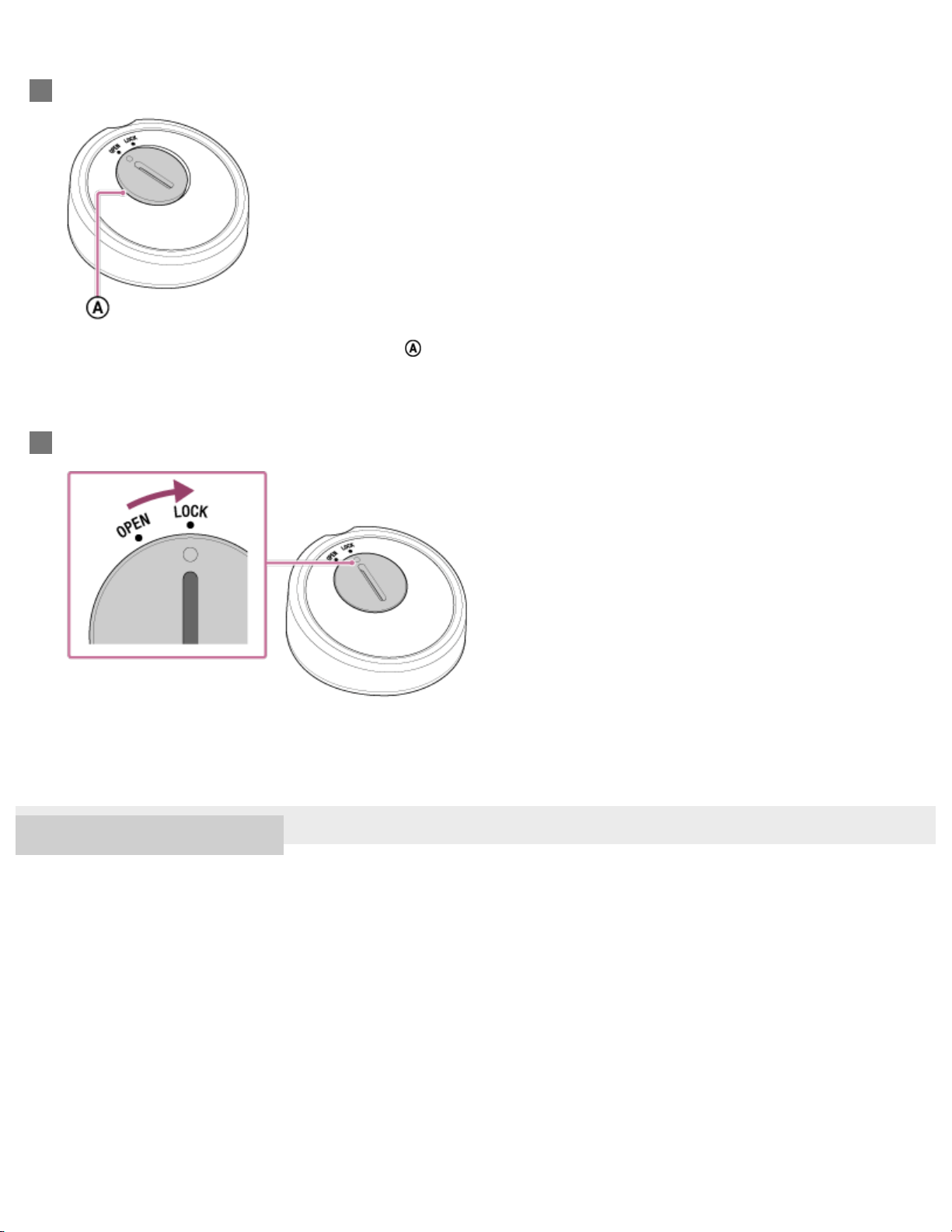
On the rear of the remote control, insert a coin or other object into the groove on the battery cover,
and twist it to the left until the marking is aligned with OPEN.
The left side of the battery cover is slightly lifted ( ).
1
Open the battery cover, and remove the old battery.
2
Insert the new battery.
First insert the edge (
), then fit the battery in snugly ( ).
Insert with + side ( ) up.
3
34
4-579-896-11(1) Copyright 2016 Sony Corporation
Align the marking with OPEN and close the battery cover.
The left side of the battery cover is slightly lifted ( ).
4
Twist the battery cover to the right, until the marking is aligned with LOCK.
5
35

Help Guide
LED Bulb Speaker
LSPX-102E26
Precautions
Note when using with a mobile phone
For details on operation of your mobile phone when receiving a telephone call while transmitting the sound using the
BLUETOOTH connection, refer to the operating instructions supplied with the mobile phone.
On temperature rise
If the bulb speaker is used for an extended period of time, the temperature of the speaker will rise. This is not a malfunction.
On placement
Do not set the bulb speaker in an inclined position.
Do not leave the bulb speaker in a location near heat sources, in a place subject to direct sunlight, excessive dust, moisture,
rain, mechanical shock or in a car with its windows closed.
Do not leave any objects susceptible to magnetism (cash cards, floppy disks with magnetic coding, etc.) near the bulb
speaker.
Do not splash water onto the bulb speaker. It is not waterproof.
Take special care in the following situations:
In the washroom, bathroom, or any other place where the product is at risk of getting wet
In areas subject to rain, snow, or high humidity
If turned on near a radio, TV, or other audio or visual device, there may be noise. (When there is noise, separate the light
fixture from the other device by at least 1 meter.)
If turned on near a device (TV, air conditioner, etc.) that uses an infrared remote control, the remote control may not work
properly.
Avoid using the bulb speaker in places where sulfur is prevalent (such as a hot spring). Doing so can cause the optical
qualities to malfunction.
On handling
Dampen a soft cloth with mild detergent, and wipe it over the bulb speaker to clean it. Do not use alcohol, benzine, or thinner
to clean the bulb speaker.
Do not rinse, dismantle, or modify the bulb speaker. The LED component cannot be replaced.
Use in a location with an ambient temperature of 5 °C to 40 °C (41 °F to 104 °F).
If the bulb speaker is installed in a fixture that is enclosed or if the area in or around the fixture heats up, the service life of
the bulb speaker will shorten, and the brightness may automatically lower to reduce power.
Before operating the system, be sure that the operating voltage of the system is identical with that of your local power supply.
Do not stare into the light for extended periods of time. Doing so may negatively affect your eyes.
Because the brightness and light color of the LED component may vary, the brightness and light color of two bulb speakers
may be different, even if they are the same type.
The brightness, light color, central light intensity, and distribution of light (distribution of luminous intensity) are not the same as
for an incandescent light bulb.
The bulb speaker may turn on and off more slowly than a standard light bulb.
The bulb speaker may not work in conjunction with motion sensor switches and other automatic light switches and off timers.
Before installation and use of the bulb speaker, confirm that the light fixture has not deteriorated.
36

The sound quality of the speaker depends on the type, shape, and location of the light fixture.
Do not press against or cause impact to the speaker section of the bulb speaker.
4-579-896-11(1) Copyright 2016 Sony Corporation
37

Help Guide
LED Bulb Speaker
LSPX-102E26
What is BLUETOOTH wireless technology?
BLUETOOTH wireless technology is a short-range wireless technology that enables wireless data communication between digital
devices, such as a computer and digital camera. BLUETOOTH wireless technology operates within a range of about 10 m (about
30 ft).
You do not need to use a cable for connection, nor is it necessary for the devices to face one another (such is the case with
infrared technology). For example, you can use the device in a bag or pocket.
BLUETOOTH standard is an international standard supported by thousands of companies all over the world and employed by
various companies worldwide.
Maximum communication range
Maximum communication range may shorten under the following conditions.
There is an obstacle such as a person, metal, or wall between the bulb speaker and BLUETOOTH device.
A wireless LAN device is in use near the bulb speaker.
A microwave oven is in use near the bulb speaker.
A device that generates electromagnetic radiation is in use near the bulb speaker.
The transmitter is connected to other BLUETOOTH devices.
Interference from other devices
Because BLUETOOTH devices and wireless LAN (IEEE802.11b/g/n) use the same frequency, microwave interference may occur
and result in communication speed deterioration, noise, or invalid connection if the bulb speaker is used near a wireless LAN
device. In such a case, perform the following.
Use the bulb speaker at least 10 m (about 30 ft) away from the wireless LAN device.
If the bulb speaker is used within 10 m (about 30 ft) of a wireless LAN device, turn off the wireless LAN device.
Interference to other devices
Microwaves emitted from a BLUETOOTH device may affect the operation of electronic medical devices. Turn off the bulb speaker
and other BLUETOOTH devices in the following locations, as it may cause an accident.
where inflammable gas is present, in a hospital, train, airplane, or a gas station
near automatic doors or a fire alarm
Note
To be able to use the BLUETOOTH function, the BLUETOOTH device to be connected requires the same profile as the bulb speaker’s. Note also
that even if the same profile exists, devices may vary in function depending on their specifications.
Due to the characteristic of BLUETOOTH wireless technology, the sound played on the bulb speaker is slightly delayed from the sound played on
the BLUETOOTH device during music playback. Particularly when receiving sound for a video, the sound may be later than the visual.
This bulb speaker supports security capabilities that comply with the BLUETOOTH standard to provide a secure connection when the
BLUETOOTH wireless technology is used, but security may not be enough depending on the setting. Be careful when communicating using
BLUETOOTH wireless technology.
38

We do not take any responsibility for the leakage of information during BLUETOOTH communication.
A device featuring the BLUETOOTH function is required to conform to the BLUETOOTH standard specified by Bluetooth SIG and be
authenticated. Even if the connected device conforms to the above mentioned BLUETOOTH standard, some devices may not be connected or
work correctly, depending on the features or specifications of the device.
Noise or sound skips may occur depending on the BLUETOOTH device connected with the bulb speaker, the communication environment or the
usage environment.
4-579-896-11(1) Copyright 2016 Sony Corporation
39
Help Guide
LED Bulb Speaker
LSPX-102E26
Trademarks
iPhone, iPod, iPod classic, iPod nano, and iPod touch are trademarks of Apple Inc., registered in the U.S. and other countries.
“Made for iPod” and“Made for iPhone” mean that an electronic accessory has been designed to connect specifically to iPod or
iPhone, respectively, and has been certified by the developer to meet Apple performance standards. Apple is not responsible
for the operation of this device or its compliance with safety and regulatory standards. Please note that the use of this
accessory with iPod or iPhone may affect wireless performance.
The BLUETOOTH® word mark and logos are registered trademarks owned by Bluetooth SIG, Inc. and any use of such marks
by Sony Corporation is under license.
Android™ and Google Play™ are trademarks of Google Inc.
All other product names mentioned in this Help Guide may be the trademarks or registered trademarks of their respective
companies. Furthermore, ® and ™ are not mentioned in each case in this Help Guide.
4-579-896-11(1) Copyright 2016 Sony Corporation
40
Help Guide
LED Bulb Speaker
LSPX-102E26
Customer support websites
Please access the following support home pages to get support information about your bulb speaker:
For customers in the USA:
http://esupport.sony.com/
For customers in Canada:
http://esupport.sony.com/CA/
4-579-896-11(1) Copyright 2016 Sony Corporation
41
Help Guide
LED Bulb Speaker
LSPX-102E26
What can I do to solve a problem?
If the bulb speaker does not function as expected, try the following steps to resolve the issue.
Find the symptoms of the issue in this Help Guide and try any corrective actions listed.
Make sure that the battery in the remote control has power remaining and that the light fixture containing the bulb speaker is
turned on.
Reset the bulb speaker.
This operation resets the volume, brightness, and color settings and deletes all pairing information, BLUETOOTH codec, and
equalizer settings. The Speaker Add function and master unit settings are canceled.
Look up information on the issue on the customer support website.
If the operations above do not work, consult your nearest Sony dealer.
Related Topic
Customer support websites
4-579-896-11(1) Copyright 2016 Sony Corporation
42
Help Guide
LED Bulb Speaker
LSPX-102E26
No sound/Low sound level
Check that both the light fixture containing the bulb speaker and the connected device are turned on.
Turn up the volume of the bulb speaker and the connected device.
Check that the connected device is playing.
If you are connecting a personal computer to the bulb speaker, make sure the audio output setting of the computer is set for a
BLUETOOTH device.
Check that the bulb speaker has established a BLUETOOTH connection with the BLUETOOTH device.
Pair the bulb speaker and the BLUETOOTH device again.
Related Topic
How to make a wireless connection with BLUETOOTH devices
Listening to music of a device via BLUETOOTH connection
4-579-896-11(1) Copyright 2016 Sony Corporation
43
Help Guide
LED Bulb Speaker
LSPX-102E26
Distorted sound/Humming or noise in the bulb speaker output
Turn down the volume of the connected device.
If the connected device has an equalizer function, set it to off.
Keep the bulb speaker away from a microwave oven, Wi-Fi, etc.
Bring the bulb speaker and the BLUETOOTH device closer together. Remove any obstacles between the bulb speaker and
the BLUETOOTH device.
The device with a built-in radio or tuner cannot be connected to the bulb speaker via BLUETOOTH since noise may occur in
broadcasts.
Locate the bulb speaker farther away from a TV, radio or tuner, etc. since noise may occur in broadcasts.
Related Topic
Listening to music of a device via BLUETOOTH connection
4-579-896-11(1) Copyright 2016 Sony Corporation
44
Help Guide
LED Bulb Speaker
LSPX-102E26
The light is flashing in red at regular intervals
The bulb speaker has entered protection mode. When in protection mode, the remote control cannot be used to operate the
bulb speaker. Turn off the light fixture to which the bulb speaker is installed, and then turn it back on.
4-579-896-11(1) Copyright 2016 Sony Corporation
45
Help Guide
LED Bulb Speaker
LSPX-102E26
The light does not turn on
If you press and hold the WHITE/COLOR (white/color)/ OFF (light off) button to turn off the light, when you turn the
light back on, it takes time for the bulb speaker to receive the command.
4-579-896-11(1) Copyright 2016 Sony Corporation
46
Help Guide
LED Bulb Speaker
LSPX-102E26
Remote control operations not being received
Make sure that the lithium battery has power remaining.
Aim the remote control towards the remote receiver on the bulb speaker when operating it.
The bulb speaker may be in protection mode. When in protection mode, the remote control cannot be used to operate the
unit. Turn on the light fixture to which the bulb speaker is installed, and then turn it back on.
To adjust the volume or brightness of the bulb speaker on the right side, operate the remote control for the bulb speaker on
the the left channel (L side).
4-579-896-11(1) Copyright 2016 Sony Corporation
47
Help Guide
LED Bulb Speaker
LSPX-102E26
Unable to pair or make a BLUETOOTH connection with the bulb speaker
Make sure that the battery in the remote control has power remaining and that the light fixture containing the bulb speaker is
turned on.
Once the bulb speaker is reset, an iPhone/iPod may not be able to connect to the bulb speaker. In this case, delete pairing
information on the iPhone/iPod then pair them again.
When using the Speaker Add function, the bulb speaker that is set as the satellite unit cannot make BLUETOOTH
connections. Canceling the Speaker Add function may resolve this issue.
Related Topic
How to make a wireless connection with BLUETOOTH devices
4-579-896-11(1) Copyright 2016 Sony Corporation
48

Help Guide
LED Bulb Speaker
LSPX-102E26
Unable to set the Speaker Add function
Only one BLUETOOTH device can be connected to the bulb speaker. By using the Speaker Add function, a second bulb
speaker can be added for audio playback. Use of over two bulb speakers is not supported. When using only one bulb speaker,
be sure to cancel the Speaker Add function.
4-579-896-11(1) Copyright 2016 Sony Corporation
49
Help Guide
LED Bulb Speaker
LSPX-102E26
Do not know which bulb speaker was set as the master unit when using the
Speaker Add function
When the bulb speaker is connected to a BLUETOOTH device, turn the light on or off using the remote control. If the Speaker
Add function is being used, the bulb speaker that is set as the master unit will react first. If both bulb speakers react at the
same time, then the Speaker Add function is not set.
Each time that you perform the master unit setting, the bulb speaker that receives the command switches from master unit to
satellite unit (master unit setting is canceled) and vice versa. You will hear a sound that indicates which setting has been
switched to.
4-579-896-11(1) Copyright 2016 Sony Corporation
50
Help Guide
LED Bulb Speaker
LSPX-102E26
Sound breaks up, and volume is low when using the Speaker Add function for
playback
Changing the playback quality (BLUETOOTH codec) setting for BLUETOOTH audio streaming on the bulb speaker to [SBC
(Low)] may resolve this issue.
This issue may be caused by updates to your smartphone's operating system (OS). Please update your smartphone's OS to
the latest version.
Related Topic
Switching the playback quality for BLUETOOTH audio streaming
4-579-896-11(1) Copyright 2016 Sony Corporation
51
Help Guide
LED Bulb Speaker
LSPX-102E26
Resetting the bulb speaker
When the bulb speaker is not working properly, resetting it may resolve some issues.
Note
Be aware that when you reset the bulb speaker, the following information will all be erased.
Pairing information
Brightness and color settings
Volume setting
Speaker Add function and master unit settings
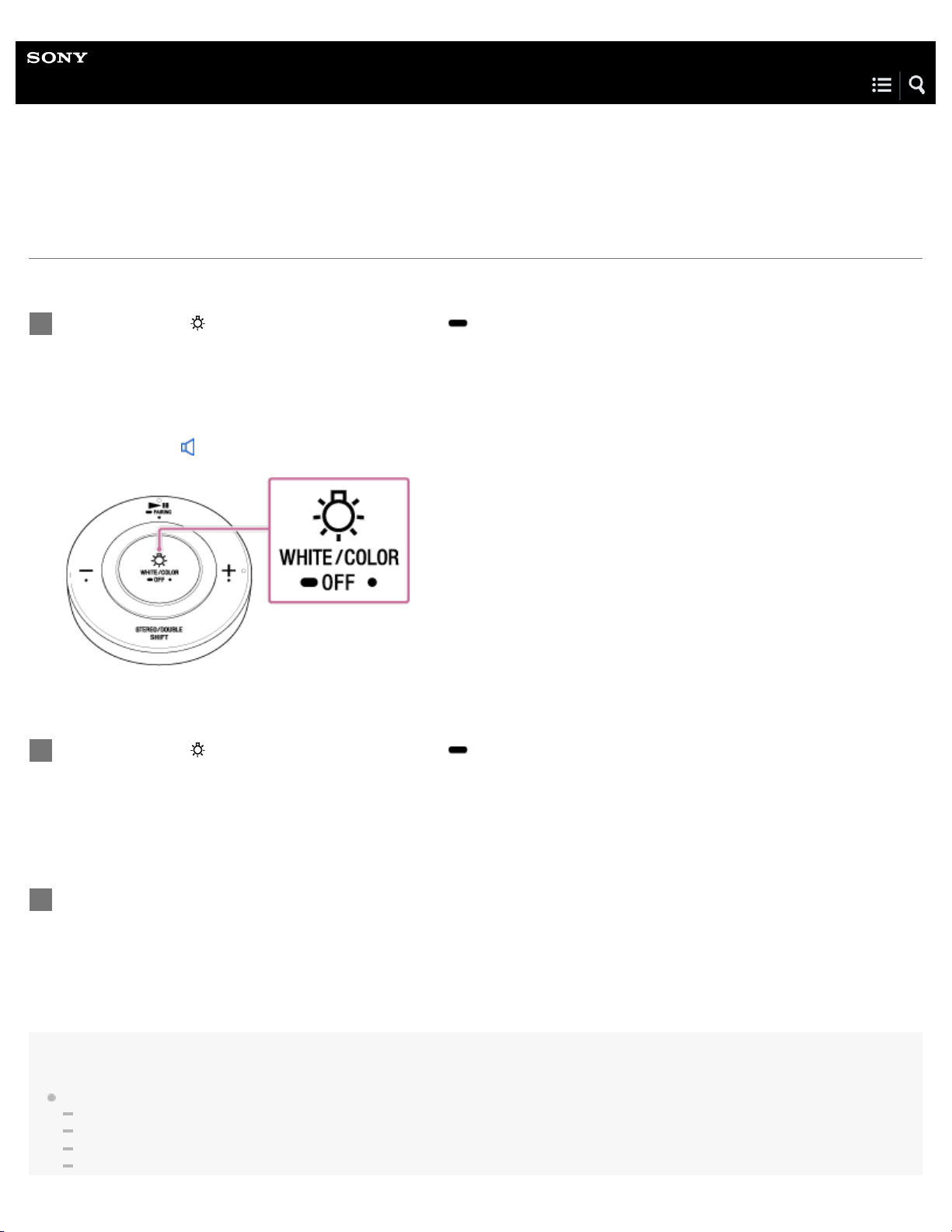
Hold down the WHITE/COLOR (white/color)/ OFF (light off) button for five seconds to turn off the
light.
The unit will make a sound
*
to indicate that BLUETOOTH has been disconnected. Release the button when you hear the
sound.
*
Sound example (Playback may require the latest browser.)
1
Hold down the
WHITE/COLOR (white/color)/ OFF (light off) button on the remote control for five
seconds.
The bulb speaker will blink several times in red, and then remain on at maximum brightness.
2
To reconnect to a BLUETOOTH device after performing a reset, delete the pairing information for the
bulb speaker from your BLUETOOTH device, and perform pairing again.
3
52

BLUETOOTH codec setting
Equalizer function
4-579-896-11(1) Copyright 2016 Sony Corporation
53