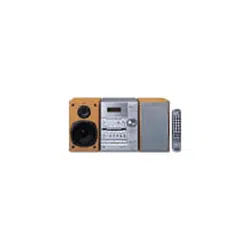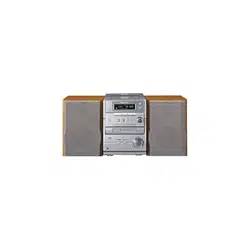
Micro Hi-Fi
Component
System
Operating Instructions
Owner’s Record
The model and serial numbers are located on the bottom of the unit. Record the serial
number in the space provided below. Refer to them whenever you call upon your Sony
dealer regarding this product.
Model No. _______________ Serial No. _______________
4-239-805-12 (2)
CMT-EP707
© 2002 Sony Corporation
2
GB
WARNING
To prevent fire or shock hazard, do not
expose the unit to rain or moisture.
To avoid electrical shock, do not open the cabinet.
Refer servicing to qualified personnel only.
Do not install the appliance in a confined space,
such as a bookcase or built-in cabinet.
This appliance is
classified as a CLASS 1
LASER product.
This label is located on
the bottom.
To prevent fire, do not cover the ventilation of the
apparatus with newspapers, table-cloths, curtains, etc.
And don’t place lighted candles on the apparatus.
To prevent fire or shock hazard, do not place objects
filled with liquids, such as vases, on the apparatus.
Don’t throw away the battery with
general house waste, dispose of it
correctly as chemical waste.
WARNING
This equipment has been tested and found to comply
with the limits for a Class B digital device, pursuant
to Part 15 of the FCC Rules. These limits are
designed to provide reasonable protection against
harmful interference in a residential installation. This
equipment generates, uses, and can radiate radio
frequency energy and, if not installed and used in
accordance with the instructions, may cause harmful
interference to radio communications. However, there
is no guarantee that interference will not occur in a
particular installation. If this equipment does cause
harmful interference to radio or television reception,
which can be determined by turning the equipment
off and on, the user is encouraged to try to correct the
interference by one or more of the following
measures:
– Reorient or relocate the receiving antenna.
– Increase the separation between the equipment and
receiver.
– Connect the equipment into an outlet on a circuit
different from that to which the receiver is
connected.
– Consult the dealer or an experienced radio/TV
technician for help.
CAUTION
You are cautioned that any changes or modifications
not expressly approved in this manual could void
your authority to operate this equipment.
Note to CATV system installer:
This reminder is provided to call the CATV system
installer's attention to Article 820-40 of the NEC that
provides guidelines for proper grounding and, in
particular, specifies that the cable ground shall be
connected to the grounding system of the building, as
close to the point of cable entry as practical.
Except for European model:
ENERGY STAR
is a U.S.
registered mark.
As an ENERGY STAR
partner,
Sony Corporation has determined
that this product meets the ENERGY
STAR
guidelines for energy
efficiency.
NOTICE FOR THE CUSTOMERS IN
CANADA
CAUTION
TO PREVENT ELECTRIC SHOCK, DO NOT USE
THIS POLARIZED AC PLUG WITH AN
EXTENSION CORD, RECEPTACLE OR OTHER
OUTLET UNLESS THE BLADES CAN BE FULLY
INSERTED TO PREVENT BLADE EXPOSURE.
This symbol is intended to alert the
user to the presence of uninsulated
“dangerous voltage” within the
product’s enclosure that may be of
sufficient magnitude to constitute a
risk of electric shock to persons.
This symbol is intended to alert the
user to the presence of important
operating and maintenance (servicing)
instructions in the literature
accompanying the appliance.
CAUTION
The use of optical instruments with this product will
increase eye hazard.
NOTICE FOR THE CUSTOMERS IN THE
U.S.A.
3
GB
* For European model only
Table of Contents
List of Button Locations and
Reference Pages
Main unit ............................................... 4
Remote control ......................................5
Getting Started
Hooking up the system .......................... 6
Inserting two size AA (R6) batteries into
the remote........................................ 7
Setting the clock .................................... 7
CD
Loading the CD ..................................... 8
Playing the CD
— Normal Play/Shuffle Play/Repeat
Play.................................................. 8
Programing the CD tracks
— Program Play .............................. 9
Tuner
Presetting radio stations.......................10
Listening to the radio
— Preset Tuning ........................... 11
— Manual Tuning ......................... 11
Using the Radio Data
System (RDS)* ............................. 11
Tape
Loading a tape ..................................... 13
Playing a tape ...................................... 13
Recording to a tape
— CD Synchro Recording/Recording
Manually ....................................... 14
— Program Edit ............................ 15
Timer-recording radio programs ......... 15
Sound Adjustment
Adjusting the sound
— MEGA BASS ...........................16
Turning off the sound
— Muting ...................................... 16
Timer
Falling asleep to music
— Sleep Timer .............................. 16
Waking up to music
— Daily Timer .............................. 16
Display
Turning off the display
— Power Saving Mode ................. 17
Using the CD display .......................... 17
Optional Components
Hooking up optional components........ 18
Listening to audio from a connected
component ..................................... 18
Recording a CD on a connected digital
component ..................................... 18
Recording audio from a connected
component ..................................... 18
Troubleshooting
Problems and remedies........................ 19
Additional information
Precautions .......................................... 21
Specifications ...................................... 22
4
GB
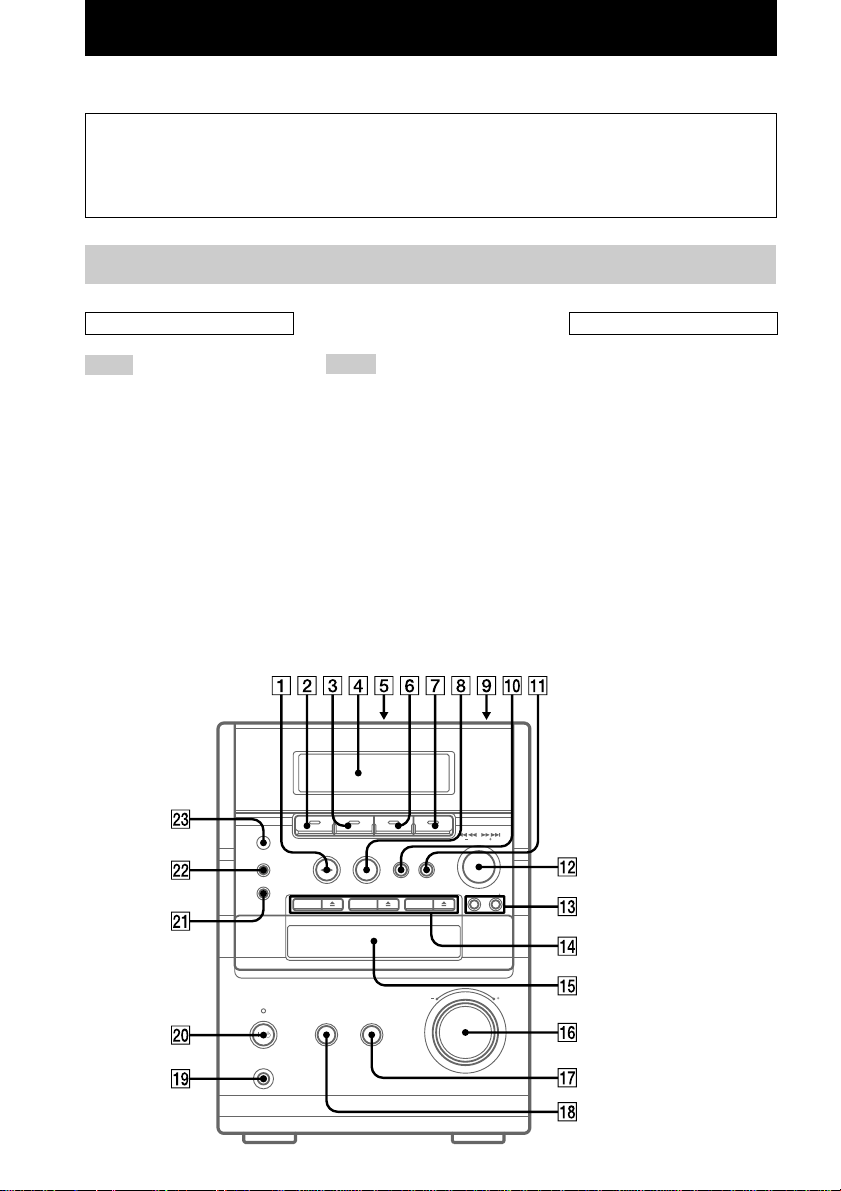
List of Button Locations and Reference Pages
Main unit
P – Z
PGM CLEAR 8 (9)
PHONES jack ql
PLAY MODE wa (8, 9)
PRESET +/– qd (10, 11)
Remote sensor wd
TAPE 2 (13)
TUNER 6 (10, 11, 14)
TUNER MEM q; (10)
TUNING +/– qs (10, 11)
VOLUME control qh
How to use this page
Use this page to find the location of buttons and other
parts of the system that are mentioned in the text.
Illustration number
r
PLAY MODE wz (8, 9)
R R
Name of button/part Reference page
ALPHABETICAL ORDER
A – M
Cassette compartment 5 (13)
CD 3 (8, 9)
DISC 1/DISC 2/DISC 3 qf (8, 9,
14)
Disc tray qg (8)
DISC SKIP 3 (8)
DISPLAY ws (12, 17)
Display Window 4 (8, 9, 10)
ENTER 1 (7, 9, 10, 15, 16, 17)
FM MODE/DIR wa (11, 13, 14,
15, 20)
MD 7 (14, 18)
MEGA BASS qk (16)
MUSIC MENU qj (16)
BUTTON DESCRIPTIONS
@/1 (power) w; (7, 15, 17)
CD
. m (go back) qs (8, 9)
M > (go forward) qs (8, 9)
nN (play) 1 (8, 9)
X (pause) q; (8)
Z (eject) qf (8)
x (stop) 8 (8)
TAPE
M > (fast forward) qs (13)
X (pause) 0 (13)
nN (play) 1 (13, 14)
z REC PAUSE/START qa (14,
15)
. m (rewind) qs (13)
Z PUSH OPEN/CLOSE 9 (13)
x (stop) 8 (13, 14)
List of Button Locations and Reference Pages
5
GB
ALPHABETICAL ORDER
A – M
CD qa (8, 9)
CLOCK/TIMER ON/OFF 2
(15, 17)
CLOCK/TIMER SET 3 (7, 15,
16)
DISC SKIP 7 (8)
DISPLAY 6 (12, 17, 19)
ENTER qg (7, 9, 10, 15, 16, 17)
FM MODE 8 (11, 20)
MD 9 (14, 18)
MEGA BASS qf (16)
MUSIC MENU +/– qj (16)
MUTING qh (16)
P – Z
PGM CLEAR qs (9)
PLAY MODE w; (8, 9)
PRESET/CLOCK/TIMER +/–
wd (10, 11, 15, 17)
REPEAT/DIR wa (8, 13, 14, 15)
SLEEP 1 (16)
TAPE ql (13)
TUNER/BAND q; (10, 11, 14)
TUNER MEMORY qk (10)
TUNING +/– ws (10, 11)
VOL (volume) +/– qd
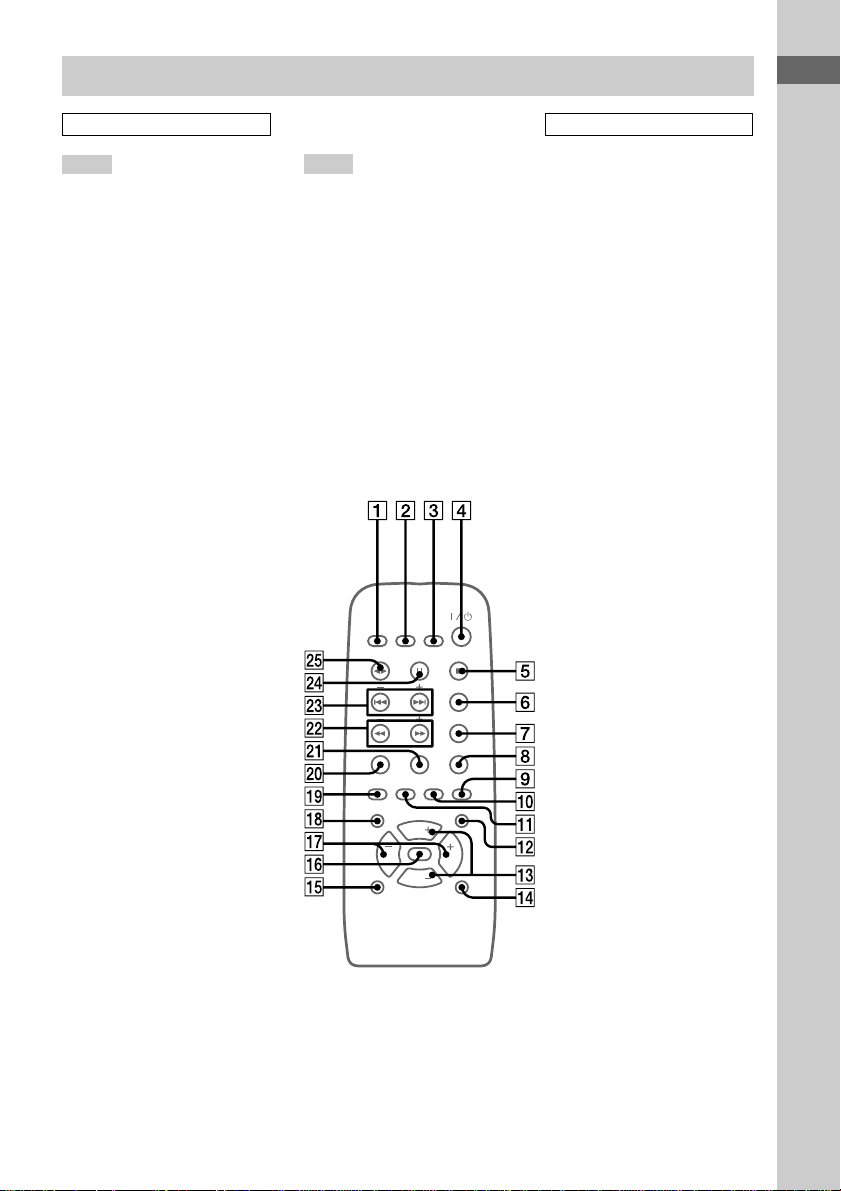
Remote control
BUTTON DESCRIPTIONS
@/1 (power) 4 (7, 15, 17)
m (rewind) M (fast forward)
ws (8, 13)
. (go back) > (go forward)
wd (7, 8, 9, 13)
X (pause) wf (8, 13)
nN (play) wg (8, 9, 13, 14)
x (stop) 5 (8, 13, 14)
6
GB
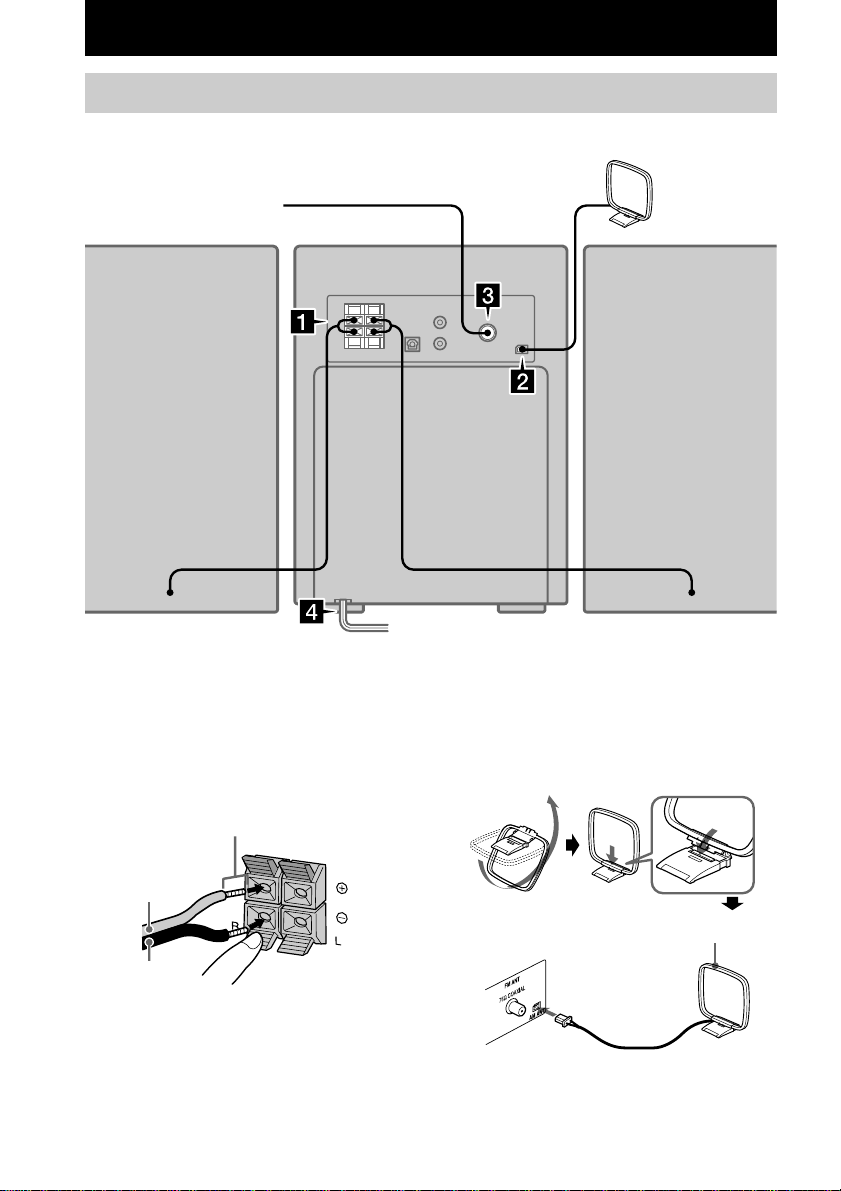
2 Connect the AM antenna.
Set up the AM loop antenna, then connect
it.
1 Connect the speakers.
Connect the speaker cords to the SPEAKER
terminals as shown below.
Getting Started
Hooking up the system
Do the following procedure 1 to 4 to hook up your system using the supplied cords and
accessories.
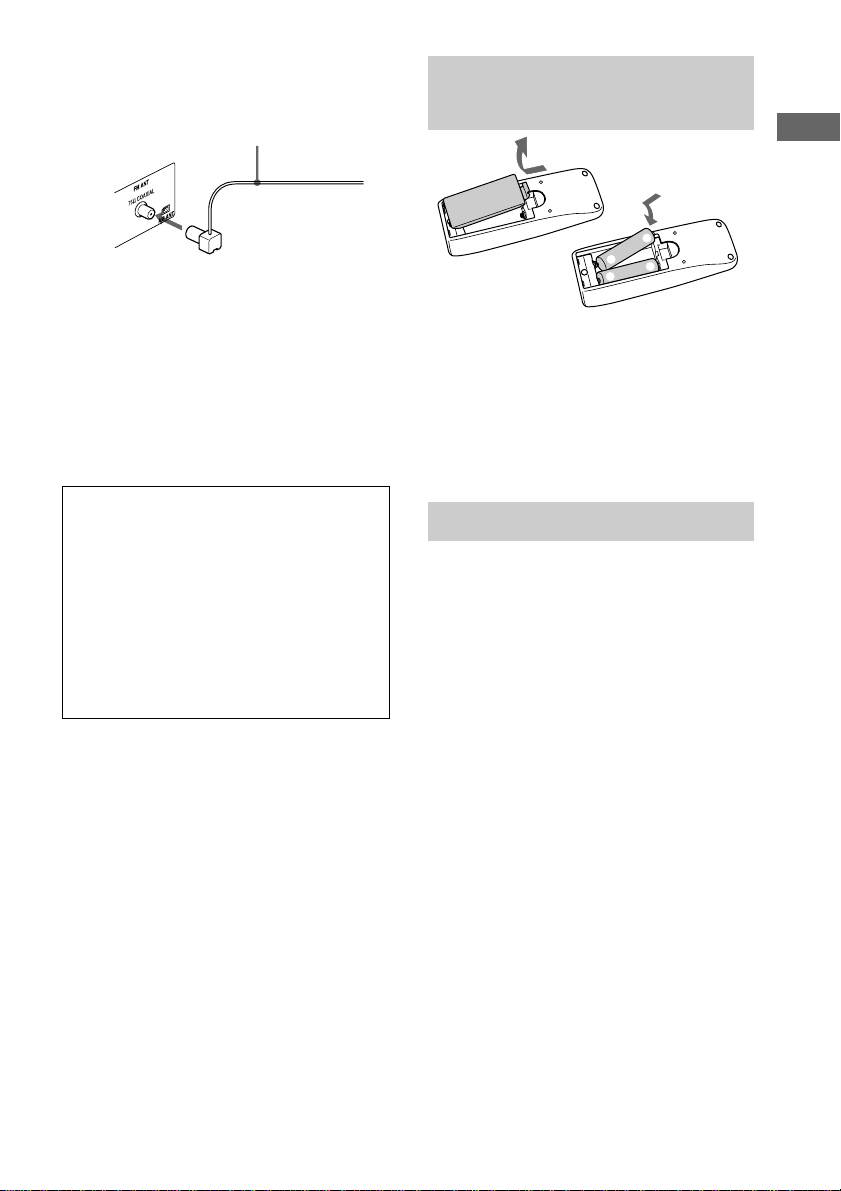
FM antenna*
Red (3)
Insert only the
stripped portion.
Black (#)
AM loop
antenna
AM loop antenna
Left speakerRight speaker
* Except for European model
Getting Started
7
GB
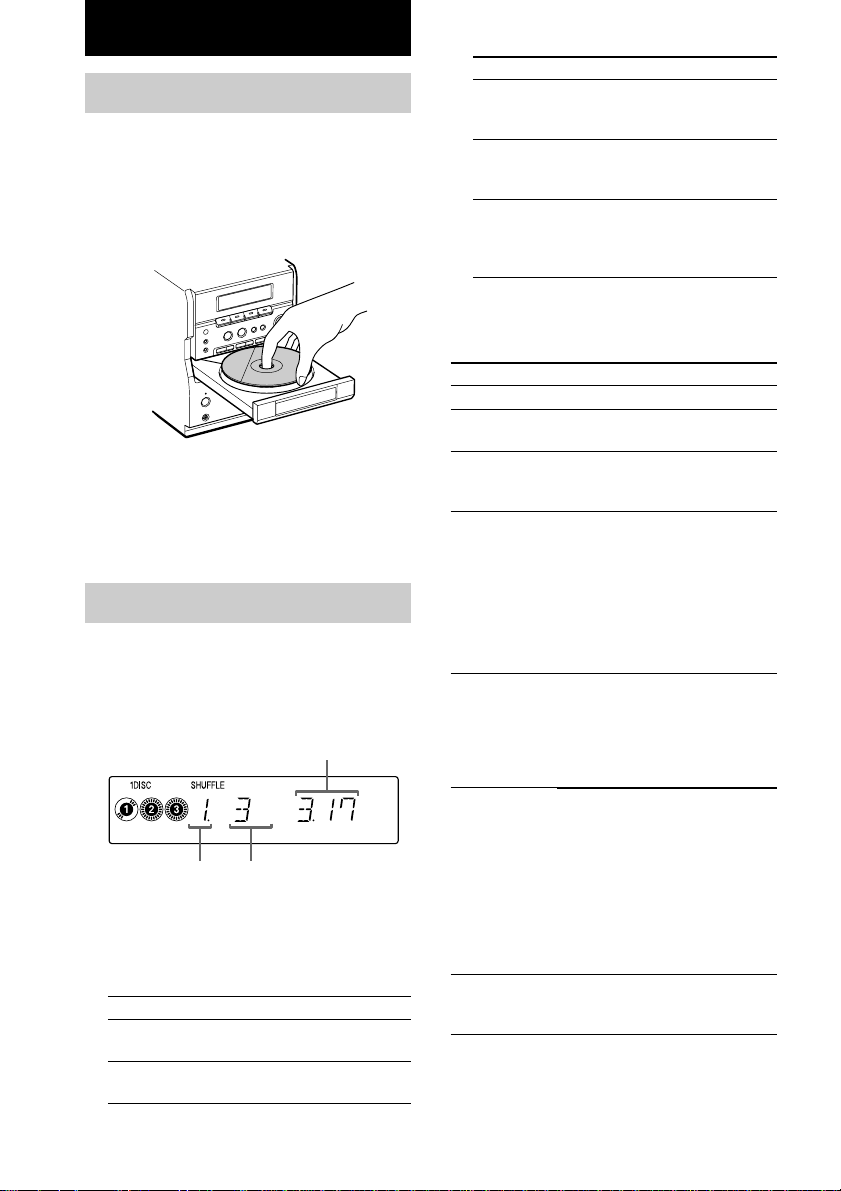
Inserting two size AA (R6)
batteries into the remote
Tip
When the remote no longer operates the system,
replace both batteries with new ones.
Note
If you do not use the remote for a long period of time,
remove the batteries to avoid possible damage from
battery leakage.
Setting the clock
1 Turn on the system.
2 Press CLOCK/TIMER SET on the
remote.
3 Press CLOCK/TIMER SET on the
remote to select “SET CLK”, then press
ENTER.
4 Press . or > on the remote
repeatedly to set the hour.
5 Press ENTER.
6 Press . or > on the remote
repeatedly to set the minute.
7 Press ENTER.
The clock starts working.
If you make a mistake
Perform from step 1.
Note
The clock settings are canceled when you disconnect
the power cord or if a power failure occurs.
E
e
e
E
3 Connect the FM antenna (except for
European model).
4 Connect the power cord to a wall outlet.
If the supplied adaptor on the plug does not
fit your wall outlet, detach it from the plug
(only for models equipped with the
adaptor).
To turn on the system, press [/ 1 (power).
Note
When carrying this system, make sure that all discs
are removed from the system.
When carrying this system
Perform the following procedure to protect
the CD mechanism.
1 Make sure that the disc is removed from
the system.
2 Re-tie the strip that was attached to the
CD tray when you purchased the system.
3 Press [/ 1 to turn off the system.
4 Unplug the power cord.
Extend the FM lead
antenna horizontally.
8
GB
CD
Loading the CD
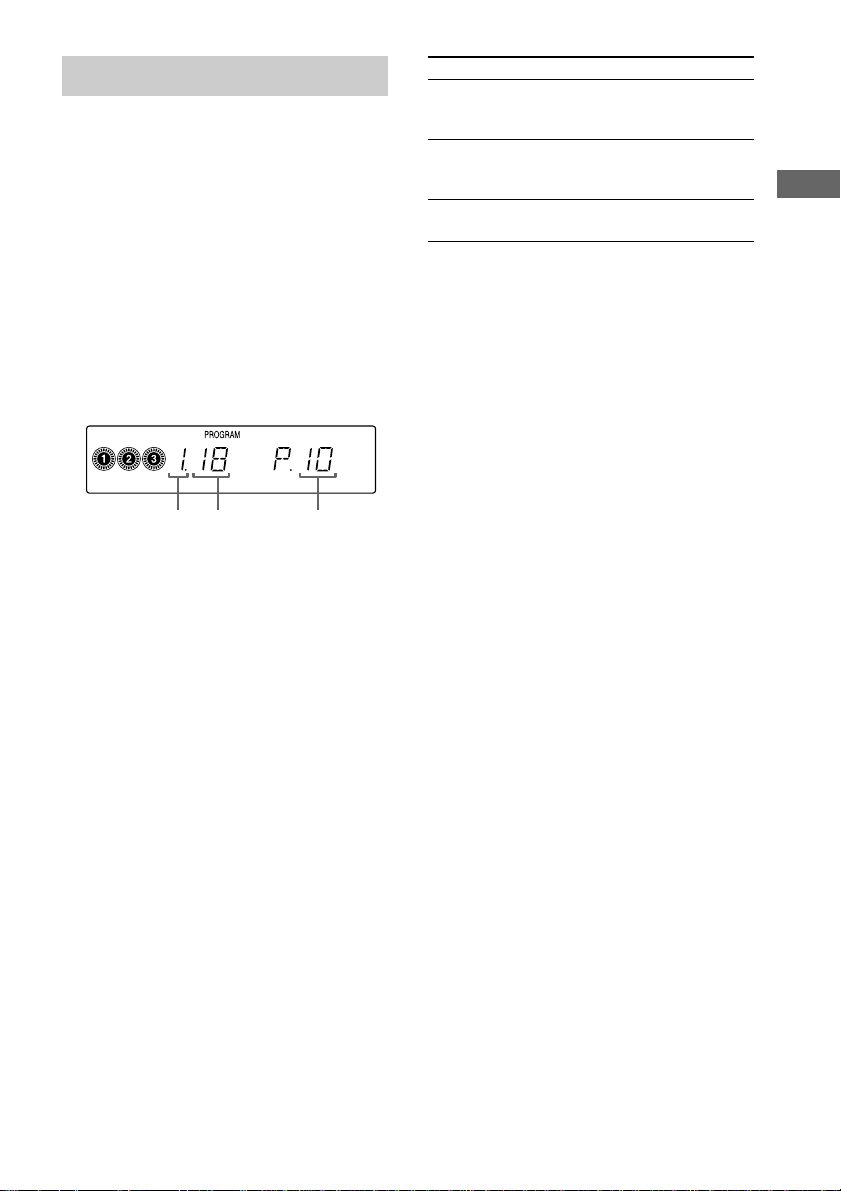
1 Press DISC 1 – 3 Z.
The disc tray opens.
2 Place a CD with the label side up on the
tray.
To load other CDs, press a different Z and
place the CD in the disc tray.
3 Press the same Z again to close the
disc tray.
Playing the CD
— Normal Play/Shuffle Play/Repeat
Play
This system lets you play the CD in different
play modes.
1 Press CD.
2 Press PLAY MODE repeatedly in stop
mode until the mode you want appears
in the display.
Select
ALL DISCS
(Normal Play)
1 DISC
(Normal Play)
Select
ALL DISCS
SHUFFLE
(Shuffle Play)
1 DISC
SHUFFLE
(Shuffle Play)
PROGRAM
(Program Play)
3 Press nN.
Other Operations
To
Stop playback
Pause
Select a track
Select a CD
Find a point
in a track
Play repeatedly
(Repeat Play)
Remove the CD
* You cannot select “REPEAT” and “ALL DISCS
SHUFFLE” at the same time.
Do this
Press x.
Press X.
Press again to resume play.
Turn ./> clockwise or
counterclockwise (or press . or
> on the remote).
• Press DISC1–3 and play starts
automatically.
• Press DISC SKIP repeatedly so
that DISC1–3 appears. Press
nN to play the selected CD.
If you press DISC 1 – 3 during play,
the selected CD changes and the
new CD starts playing.
During play, turn and hold m/M
clockwise or counterclockwise (or
keep pressing m or M on the
remote).
Release it when you find the desired
point.
Press REPEAT/DIR on the remote
during play until “REPEAT” or
“REPEAT 1” appears.
REPEAT*: For all the tracks on the
CD up to five times.
REPEAT 1: For a single track only.
To cancel playing repeatedly, press
REPEAT/DIR on the remote until
“REPEAT” or “REPEAT 1”
disappears.
Press one of DISC 1 – 3 Z to open
the tray that contains the CD you
want to remove.
Track number
Playing time
To play
All CDs in the disc tray
continuously.
The tracks on the CD you have
selected in original order.
To play
The tracks on all CDs in random
order.
The tracks on the CD you have
selected in random order.
The tracks on the CDs in the
order you want them to be
played (see “Programing the CD
tracks” on page 9).
Disc tray
number
CD
9
GB
Programing the CD tracks
— Program Play
You can make a program of up to 25 tracks in
the order you want them to be played.
1 Press CD, then place a CD.
2 Press PLAY MODE repeatedly in stop
mode until “PROGRAM” appears in the
display.
3 Press DISC 1 – 3 to select a CD.
4 Turn ./ > clockwise or
counterclockwise (or press . or >
on the remote) until the desired track
appears in the display.
5 Press ENTER.
The track is programed.
6 To program additional tracks, repeat
steps 3 to 5.
7 Press nN.
Program Play starts.
To
Cancel Program
Play
Add a track to
the end of the
program
Erase the entire
program
Tip
The program you made remains in the system’s
memory even after it has been played back. Press CD,
then press nN to play the same program again.
Note
If you open the disc tray, the program you made will
be erased.
Do this
Press PLAY MODE until
“PROGRAM” or “SHUFFLE”
disappears from the display.
Do steps 3 to 5 with Program Play
stopped.
Press PGM CLEAR, when Program
Play is in stop mode.
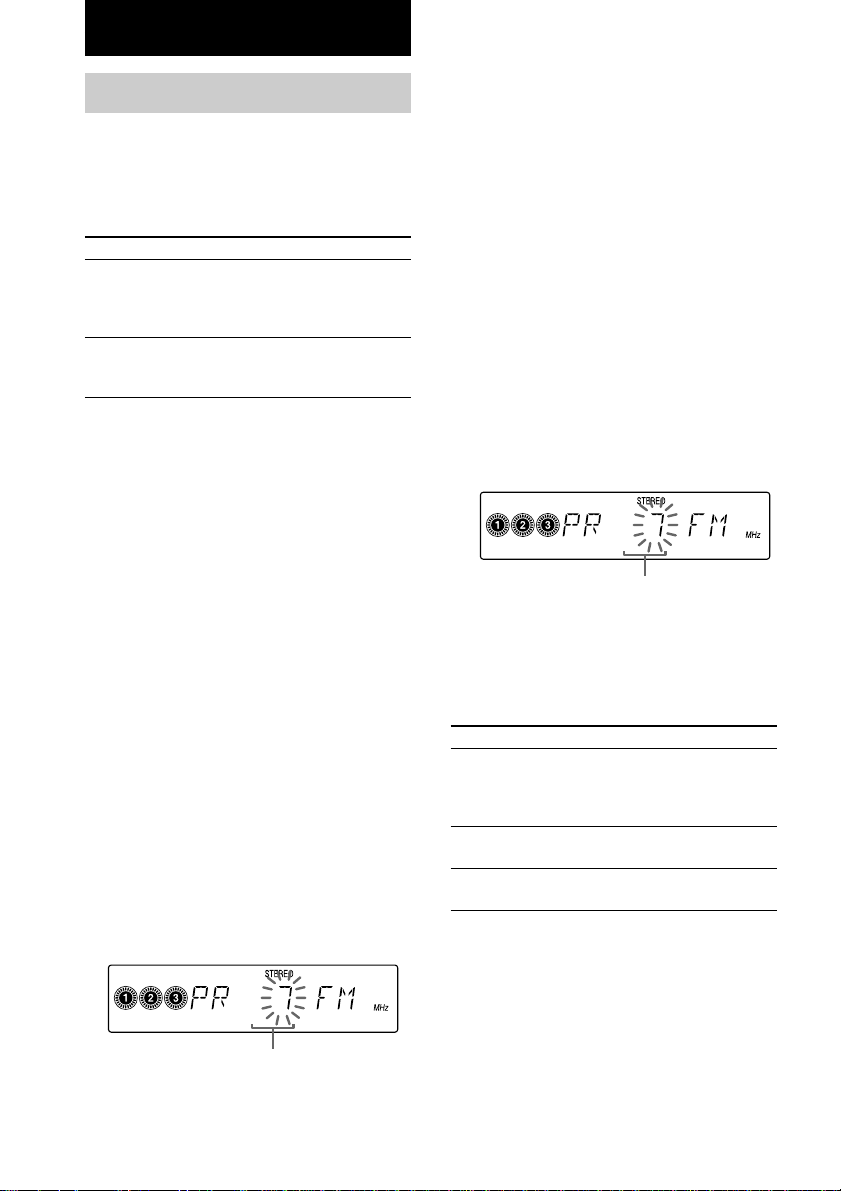
Disc tray
number
Track
number
Programed
step number
10
GB
Setting presets through
automatic tuning
1 Press TUNER (TUNER/BAND on the
remote) repeatedly to select “FM” or
“AM”.
2 Turn and hold TUNING +/– (or press
and hold TUNING + or TUNING – on the
remote) until the frequency indication
starts to change, then release it.
Scanning stops automatically when the
system tunes in a station. “STEREO” (for a
stereo program) appears.
If the scanning doesn’t stop
Set the frequency of the desired radio
station as described in steps 2 through 5 of
“Setting presets through manual tuning”.
3 Press TUNER MEM (TUNER MEMORY
on the remote).
The preset number starts flashing.
4 Press PRESET (PRESET/CLOCK/TIMER
on the remote) + or – repeatedly to
select the desired preset number.
Preset number
Preset number
Tuner
Presetting radio stations
You can preset up to 30 stations for FM and
AM. You can then tune in any of those stations
simply by selecting the corresponding preset
number.
There are two ways to store the station presets.
To
Automatically tune in all of
the stations that can be
received in your area and then
store them manually
Manually tune in and store the
radio frequency of your
favourite stations
Method
Automatic Tuning
Preset
Manual Tuning
Preset
5 Press ENTER.
The station is stored.
6 Repeat steps 1 to 5 to store other
stations.
Setting presets through
manual tuning
1 Press TUNER (TUNER/BAND on the
remote) repeatedly to select “FM” or
“AM”.
2 Turn TUNING +/– (or press TUNING + or
TUNING – on the remote) repeatedly to
tune in the desired station.
3 Press TUNER MEM (TUNER MEMORY
on the remote).
4 Press PRESET (PRESET/CLOCK/TIMER
on the remote) + or – repeatedly to
select the desired preset number.
-
5 Press ENTER.
The station is stored.
6 Repeat steps 1 to 5 to store other
stations.
Other Operations
To
Tune in a station with a
weak signal
Change the preset
number
Change the preset
station
Do this
Follow the procedure
described in “Setting
presets through manual
tuning”.
Start over from step 1.
Start over from step 1.

Tuner
11
GB
To change the AM tuning interval
(except for the European model)
The AM tuning interval is factory-set to 9 kHz
(10 kHz in some areas). To change the AM
tuning interval, press and hold TUNER MEM
on the unit for 4 seconds or more while the
system is turned off. The AM tuning interval is
toggled between 9 kHz and 10 kHz and the
system is automatically turned on. When you
change the interval, all the preset stations are
erased. To reset the interval, repeat the same
procedure.
Tip
The preset stations are retained for half a day even if
you unplug the power cord or if a power failure
occurs.
Listening to the radio
You can listen to a radio station either by
selecting a preset station, or by manually tuning
in the station.
Listening to a preset station
— Preset Tuning
Preset radio stations in the tuner’s memory first
(see “Presetting radio stations” on page 10).
1 Press TUNER (TUNER/BAND on the
remote).
2 Press PRESET (PRESET/CLOCK/TIMER
on the remote) + or – repeatedly to tune
in the desired preset station.
The preset number appears in the display
for a few seconds.
Listening to non-preset radio
station
— Manual Tuning
1 Press TUNER (TUNER/BAND on the
remote) repeatedly to select “FM” or
“AM”.
2 Turn and hold TUNING +/– (or press
and hold TUNING + or TUNING – on the
remote) repeatedly to tune in the
desired station.
Tips
• To improve AM/FM broadcast reception, adjust the
antennas.
• When an FM stereo program has static noise, press
FM MODE/DIR (FM MODE on the remote)
repeatedly until “MONO MODE” appears. There
will be no stereo effect, but the reception will
improve.
• You can tune in the radio program directly from
other source by pressing TUNER (TUNER/BAND
on the remote) (Automatic Source Selection).
Using the Radio Data
System (RDS)
(European model only)
What is the Radio Data System?
Radio Data System (RDS) is a broadcasting
service that allows radio stations to send
additional information along with the regular
program signal. This tuner offers convenient
RDS features like station name and program
type display. RDS is available only on FM
stations.*
Note
RDS may not work properly if the station you are
tuned in is not transmitting the RDS signal properly
or if the signal strength is weak.
* Not all FM stations provide RDS service, nor do
they provide the same types of services. If you are
not familiar with the RDS system, check with your
local radio stations for details on RDS services in
your area.
continued

12
GB
Using the Radio Data System (RDS)
(continued)
Receiving RDS broadcasts
Simply select a station from the FM band.
When you tune in a station that provides RDS
services, “RDS” appears in the display.
To check the RDS information
Each time you press DISPLAY, the display
changes as follows:
Station name t Frequency t RDS TEXT t
Program type* (for five seconds) t Clock
display (for five seconds) t Station name t
...
* The types of programs include NEWS, AFFAIRS
(current news), INFO, SPORT, EDUCATE
(education programs), DRAMA, CULTURE,
SCIENCE, VARIED (interviews, games and
comedy), POP M, ROCK M, EASY M, LIGHT M,
CLASSICS, OTHER M, WEATHER, FINANCE,
CHILDREN, SOCIAL, RELIGION, PHONE IN,
TRAVEL, LEISURE, JAZZ, COUNTRY,
NATION M, OLDIES, FOLK M , DOCUMENT,
TEST ALARM and NONE (any programs not
defined above).
Tape
13
GB
Tape
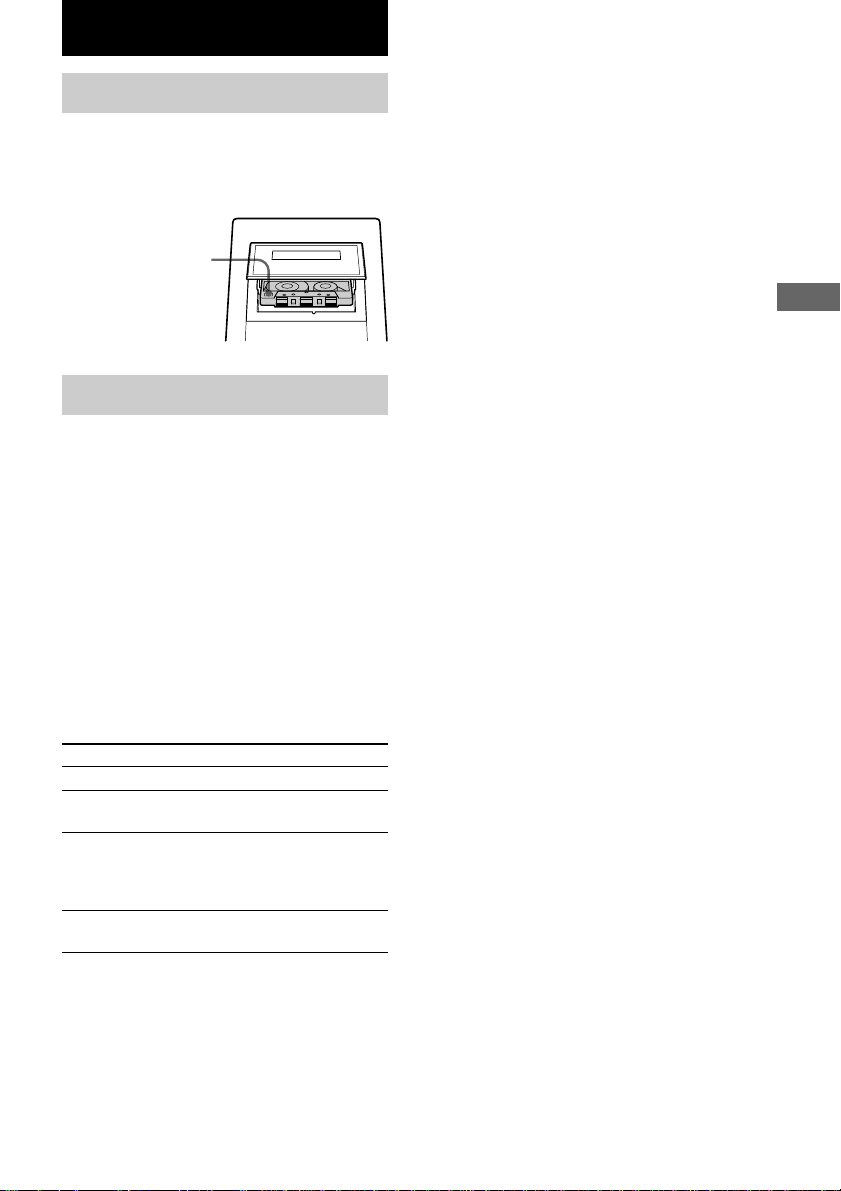
Loading a tape
1 Press Z PUSH OPEN/CLOSE.
2 Insert a tape in deck with the side you
want to play/record facing up.
Playing a tape
You can use TYPE I (normal), TYPE II (CrO2)
or TYPE IV (metal) tape.
1 Load a recorded tape.
2 Press TAPE.
3 Press FM MODE/DIR (REPEAT/DIR on
the remote) repeatedly to select g to
play one side, h to play both sides, or
j* to play both sides repeatedly.
* The tape automatically stops after playing
back five times.
4 Press nN.
Press nN again to play the reverse side.
To
Stop play
Pause
Fast-forward or rewind
Remove the cassette
Insert with the side
you want to play/
record facing up.
Do this
Press x.
Press X.
Press again to resume play.
With the tape stopped, turn
m/M clockwise or
counterclockwise (or press
m or M on the remote).
Press Z PUSH OPEN/
CLOSE.
Finding the beginning of a
track (AMS*)
During playback, turn ./> clockwise or
counterclockwise (or press . or > on
the remote).
The tape is wound or rewound to the beginning
of the next or current track, and play will start
automatically. The search direction, “>> + 1”
(forward) or “<< – 1” (back) appears in the
display.
* AMS (Automatic Music Sensor)
Note
The AMS function may not operate correctly under
the following circumstances:
– When the unrecorded space between tracks is less
than 4 seconds long.
– When the system is placed near a television.
Tape
14
GB
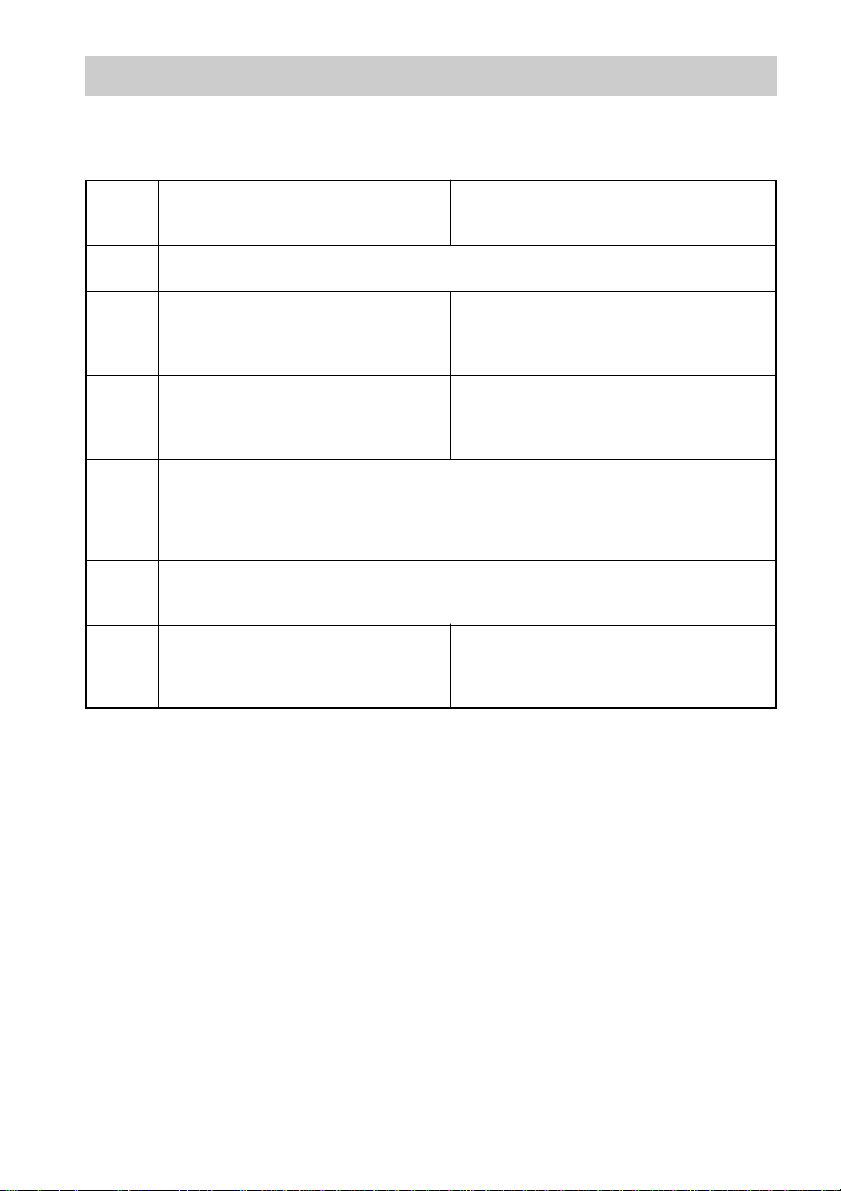
Steps Recording from a CD
(CD Synchro Recording)
Recording from the radio
(or a connected component) manually
1 Load a blank tape.
2 Press DISC 1 – 3 Z.
3 Load the CD you want to record.
4 Press z REC PAUSE/START.
The deck stands by for recording.
When you want to record on the reverse side, press nN.
5 Press FM MODE/DIR (REPEAT/DIR on the remote) repeatedly to select g to
record on one side, h to record on both sides.
6 Press z REC PAUSE/START again.
Recording starts.
Recording to a tape
— CD Synchro Recording/Recording Manually
You can record from a CD or radio (or connected components). You can use TYPE I (normal) tape.
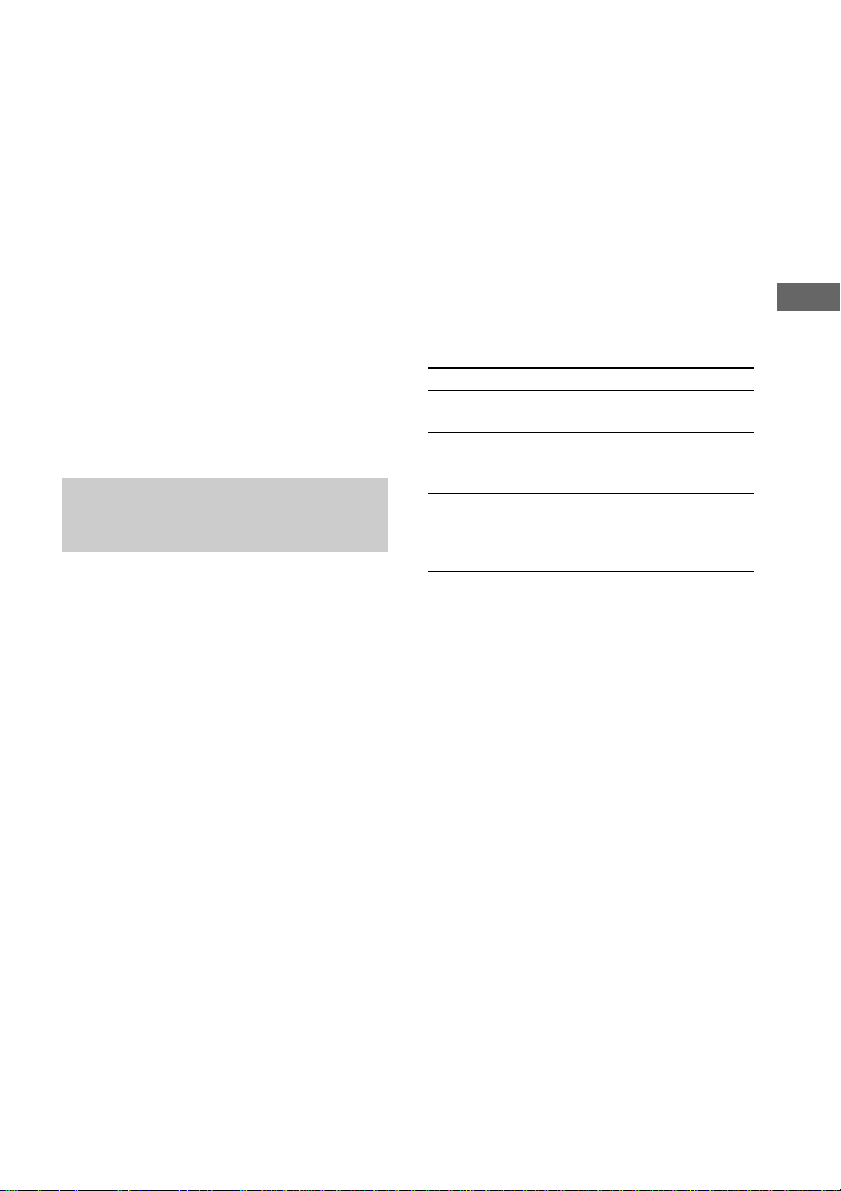
To stop recording
Press x.
Tips
• When you record on both sides, be sure to start
from the top side. If you start from the bottom side,
recording stops at the end of the bottom side.
• For recording from the radio:
If noise is heard while recording from the radio,
move the respective antenna to reduce the noise.
Note
To erase a recording, remove all the CDs, press CD,
and then press z REC PAUSE/START twice.
Press TUNER (TUNER/BAND on the
remote) or MD to select the desired
source to record.
Tune in the radio station (or load
another audio source) you want to
record.
Press z REC PAUSE/START again, and
then start playing the desired source.
Tape
15
GB
Recording a CD by specifying
track order
— Program Edit
1 Load a recordable tape.
2 Program CD tracks following steps 1 to
6 in “Programing the CD tracks” on
page 9.
3 Press z REC PAUSE/START.
The tape deck stands by to record. The CD
player stands by for playback.
4 Press FM MODE/DIR (REPEAT/DIR on
the remote) repeatedly to select g to
record on one side. Select h to record
on both sides.
5 Press z REC PAUSE/START again.
Recording starts.
Timer-recording radio
programs
To timer-record, you must preset the radio
station (see “Presetting radio stations” on page
10) and set the clock (see “Setting the clock”
on page 7) beforehand.
1 Press CLOCK/TIMER SET on the
remote.
2 Press CLOCK/TIMER SET on the
remote repeatedly until “SET TMR”
appears, then press ENTER.
“ON” appears, and the hour indication
flashes.
3 Set the starting time.
Press PRESET/CLOCK/TIMER + or – on
the remote repeatedly to set the hour,
then press ENTER.
The minute indication begins flashing next.
Press PRESET/CLOCK/TIMER + or – on
the remote repeatedly to set the minute,
then press ENTER.
4 Set the time to stop the recording
following the procedure in step 3.
5 Press PRESET/CLOCK/TIMER + or – on
the remote repeatedly until “RECORD”
appears, then press ENTER.
6 Insert a recordable tape with the side
you want to record on facing up.
7 Press PRESET/CLOCK/TIMER + or – on
the remote repeatedly to tune in the
desired preset station, then press
ENTER.
8 Press ?/1 to turn off the system.
To
Check or change the
setting
Activate the timer
operation
Cancel the timer
operation
Notes
• When you use the recording timer at the same time
as the Sleep Timer, the Sleep Timer setting has
priority.
• You cannot activate the Daily Timer and the
recording timer at the same time.
• If the system is on at the preset time, the timer-
recording will not be activated.
• The volume is reduced to minimum during
recording.
• If the system is in the recording or recording-pause
mode at the preset time, the timer recording will not
be made.
Do this
Turn on the system and then
start over from step 1.
Press CLOCK/TIMER ON/
OFF on the remote until
“REC” appears.
Press CLOCK/TIMER ON/
OFF on the remote until
“REC” and “DAILY”
disappear.
16
GB
Waking up to music
— Daily Timer
You can wake up to music at a preset time.
Make sure you have set the clock (see “Setting
the clock” page 7).
1 Prepare the sound source you want to
play.
• CD: Place a CD.
• Tape: Insert a tape with the side you
want to play on facing up.
• Radio: Tune in the station you want (see
“Listening to the radio” on page 11).
2 Adjust the volume.
3 Press CLOCK/TIMER SET on the
remote.
4 Press CLOCK/TIMER SET on the
remote repeatedly until “SET TMR”
appears, then press ENTER.
“ON” appears, and the hour indication
flashes.
Sound Adjustment
Adjusting the sound
Reinforcing the bass sound
— MEGA BASS
You can listen to music with stronger bass
tones.
Press MEGA BASS.
“MEGA BASS” appears in the display and the
bass is reinforced.
Press again to cancel MEGA BASS.
Selecting the preset effect
from the music menu
Press MUSIC MENU (or MUSIC MENU +/–
on the remote) repeatedly to select the
preset effect you desire.
Each time you press the button, the display
changes cyclically as follows:
ROCK t POP t JAZZ t FLAT* t
ROCK t ...
* “FLAT” is displayed for a few seconds.
To cancel the effect
Press MUSIC MENU (or MUSIC MENU +/–
on the remote) repeatedly until “FLAT”
appears.
Turning off the sound
— Muting
You can turn off the sound temporarily.
Press MUTING on the remote.
Press again to cancel muting.
Tip
You can also turn up the volume by turning
VOLUME clockwise or turning off the power and
turning it on again.
Timer
Falling asleep to music
— Sleep Timer
You can set the system to turn off after certain
amount of time, so that you can fall asleep to
music.
Press SLEEP on the remote.
Every time you press the button, the minute
display (the turn-off time) changes as follows:
90 t 80 t 70 t … t 10 t OFF t …
To
Check the
remaining time
Change the
time to turn off
Cancel the Sleep
Timer function
Press
SLEEP on the remote once.
SLEEP on the remote repeatedly
to select the time you want.
SLEEP on the remote repeatedly
until “SLEEP OFF” appears.
Display
17
GB
5 Set the starting time.
Press PRESET/CLOCK/TIMER + or – on
the remote repeatedly to set the hour,
then press ENTER.
The minute indication begins flashing next.
Press PRESET/CLOCK/TIMER + or – on
the remote repeatedly to set the minute,
then press ENTER.
6 Set the time to stop the playback
following the procedure in step 5.
7 Press PRESET/CLOCK/TIMER + or – on
the remote to select the desired sound
source.
The indication changes as follows:
TUNER t CD t TAPE t RECORD
t TUNER t …
8 Press ENTER.
9 Press ?/1 to turn off the system.
To
Check or change
the setting
Activate the timer
operation
Cancel the timer
Tip
The system automatically turns on 1 minute before
the preset time.
Note
The radio station selected for the Daily Timer is the
one that you tuned in before you turned off the
system.
Do this
Turn on the system and then
start over from step 1.
Press CLOCK/TIMER ON/OFF
on the remote until “DAILY”
appears.
Press CLOCK/TIMER ON/OFF
on the remote until “DAILY”
and “REC” disappear.
Display
Turning off the display
— Power Saving Mode
Even if the system is off, the system consumes
power to display the clock and to stay
responsive to commands from the remote.
Power Saving mode reduces the amount of
power consumed during standby.
In this mode, the clock is not displayed.
Press DISPLAY while the system is off
until the clock display disappears.
To cancel the Power Saving mode
Press DISPLAY while the system is off.
The display changes as follows:
Clock display* y No display (Power Saving
mode)
* “--:--” is displayed if you do not set the clock.
Tip
The timer continues to operate in Power Saving
mode.
Using the CD display
Press DISPLAY repeatedly.
The display changes as follows:
During normal play
Elapsed playing time on the current track t
Remaining time on the current track t
Remaining time on the current CD t Clock
display (for five seconds) t Elapsed playing
time on the current track t ...
In the stop mode
Total number of tracks and total playing time
t Clock display (for five seconds) t Total
number of tracks and total playing time t ...
18
GB
Optional Components
Hooking up optional components
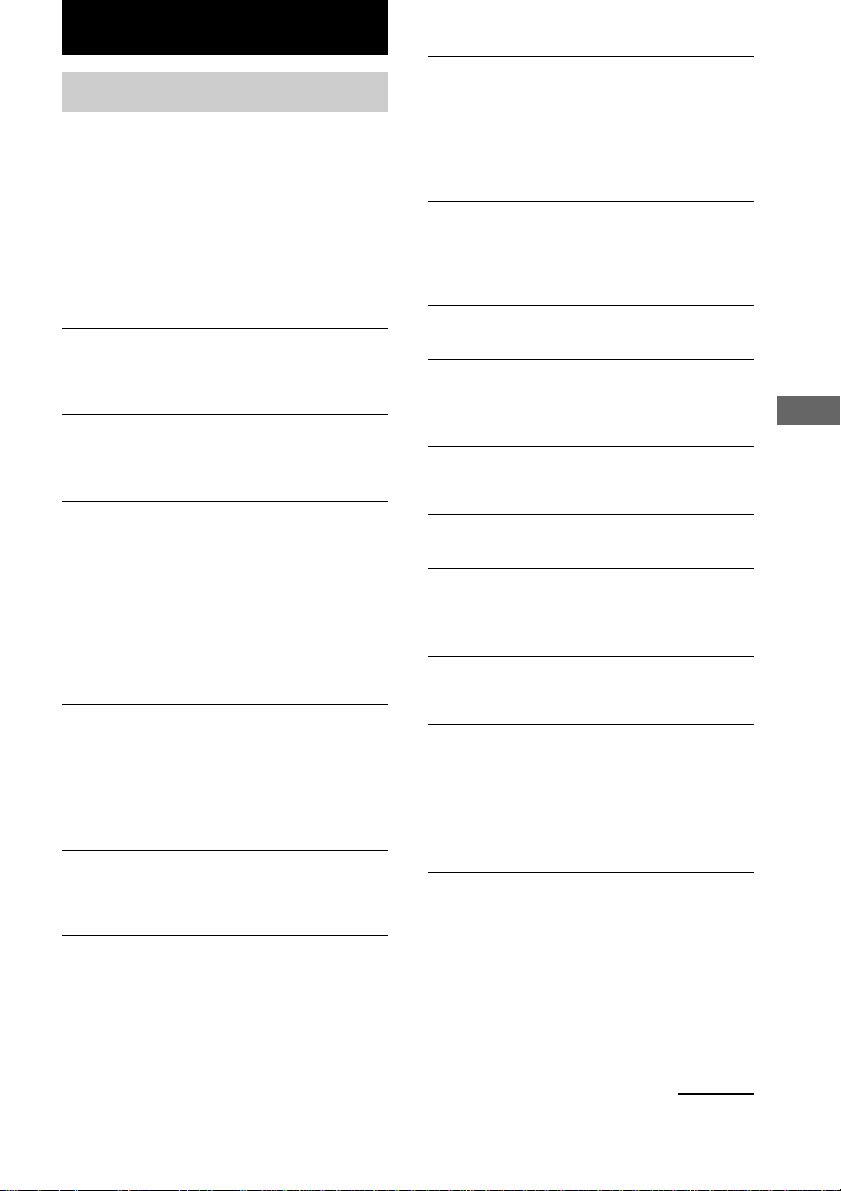
You can connect a digital or an analogue component to this system.
Optional analogue
component
A MD IN jacks
Use audio cords (not supplied) to connect an
optional component (such as an MD player) to
these jacks. You can then record or listen to
analogue audio from that component through
this system.
B OPTICAL DIGITAL OUT jack
Use a digital cable (square, not supplied) to
connect an optional digital component (such as
an MD recorder) to this jack. You can then
make a digital recording from this system to
that digital component.
Listening to audio from a
connected component
1 Connect the audio cords.
See “Hooking up optional components”
above.
2 Press MD to switch the function to MD.
Start playing the connected component.
From the audio output
jacks of an analogue
component
Optional digital
component
To the digital input jack of a
digital component
Recording a CD on a
connected digital
component
1 Connect the digital cable.
See “Hooking up optional components”
above.
2 Start recording.
Refer to the operating instructions provided
with the connected component.
Recording audio from a
connected component
1 Connect the audio cords.
See “Hooking up optional components”
above.
2 Start recording manually.
See “Recording to a tape” on page 14.
Troubleshooting
19
GB
The remote does not function.
• There is an obstacle between the remote and the
system.
• The remote is not pointing in the direction of the
system’s sensor.
• The batteries have run down. Replace the
batteries.
The color irregularity on a TV screen persists.
• Turn off the TV set once, then turn it on after 15
to 30 minutes. If the color irregularity still
persists, place the speakers farther away from the
TV set.
Speakers
Sound comes from one channel or unbalanced
left and right volume.
• Check the speaker connection and speaker
placement.
Sound lacks bass.
• Check that the speaker’s + and – terminals are
connected correctly.
CD Player
The CD tray does not open/close.
• The CD is not placed properly.
• The system is not placed horizontally on a flat
and solid stand.
The CD does not change.
• The system is not placed horizontally on a flat
and solid stand.
The CD will not play.
• The CD is not lying flat on the CD tray.
• The CD is dirty.
• The CD is inserted label side down.
• Moisture condensation has built up. Remove the
CD and leave the system turned on for about an
hour until the moisture evaporates.
The disc tray does not open and “LOCKED”
appears.
• Contact your Sony dealer or local authorized
Sony service facility.
Troubleshooting
Problems and remedies
If you have any problem using this system, use
the following check list.
First, check that the power cord is connected
firmly and the speakers are connected correctly
and firmly.
Should any problem persist, consult your
nearest Sony dealer.
General
The display or button remains lighted or flashes
even after the system was turned off.
• Press DISPLAY on the remote repeatedly until
the clock display appears.
The clock indication does not show the correct
time.
• A power interruption occurred. Set the clock and
timer settings again.
The clock setting/radio presetting/timer is
canceled.
• The power cord is disconnected or a power
failure occurs longer than half a day.
Redo the following:
—“Setting the clock” on page 7
—“Presetting radio stations” on page 10
If you have set the timer, also redo “Timer-
recoding radio programs” on page 15 and
“Waking up to music” on page 16.
There is no sound.
• Turn VOLUME clockwise and hold.
• The headphones are connected.
• Insert only the stripped portion of the speaker
cord into the SPEAKER terminal. Inserting the
vinyl portion of the speaker cord will obstruct the
speaker connections.
There is severe hum or noise.
• A TV or VCR is placed too close to the stereo
system. Move the stereo system away from the
TV or VCR.
The timer does not function.
• Set the clock correctly.
• You cannot activate the Timer-recording and
Daily Timer at the same time.
• When you used the Sleep Timer, Daily Timer
and Timer-recording will not turn on the system
until the Sleep Timer turns it off.
continued
20
GB
The disc tray does not open and “CD ERR 1” or
“CD ERR 2” appears.
• A foreign object is caught in the drive. Remove
it, turn the system off, and turn the system on
again.
Tape Deck
The tape does not record.
• No tape in the cassette compartment.
• The tab has been removed from the cassette.
• The tape has reeled to the end.
The tape does not record nor play or there is a
decrease in sound level.
• The heads are dirty. Clean them (see “Cleaning
the tape heads” on page 22).
• The record/playback heads are magnetized.
Demagnetize them (see “Demagnetizing the tape
heads” on page 22).
The tape does not erase completely.
• The record/playback heads are magnetized.
Demagnetize them (see “Demagnetizing the tape
heads” on page 22).
There is excessive wow or flutter, or the sound
drops out.
• The capstans or pinch rollers are dirty. Clean
them (see “Cleaning the tape heads” on page 22).
Noise increases or the high frequencies are
erased.
• The record/playback heads are magnetized.
Demagnetize them (see “Demagnetizing the tape
heads” on page 22).
Tuner
Noise is heard.
• Adjust the antennas.
A stereo FM program cannot be received in
stereo.
• Press FM MODE/DIR (FM MODE on the
remote) until “STEREO MODE” appears in the
display.
Problems and remedies (continued)
If the system still does not operate properly after
performing the measures explained on pages 19
and 20, reset the system as follows:
1Remove the power cord from the wall outlet,
wait for 30 seconds or more, then connect the
power cord to the wall outlet again.
2Turn off the system and press MEGA BASS, x
(stop) and TAPE simultaneously.
All system parameters are reset to their factory
settings.
Messages
The following message may appear in the
display during operations.
NO DISC
• There is no disc on the disc tray.
TRAY/PROTECT
• The system is not placed horizontally on a flat
and solid surface.
Additional Information
21
GB
On operation
• If the system is brought directly from a cold to a
warm location, or is placed in a very damp room,
moisture may condense on the lens inside the CD
player. Should this occur, the system will not
operate properly. Remove the CD and leave the
system turned on for about an hour until the
moisture evaporates.
• When you move the system, take out any discs.
If you have any questions or problems concerning
your stereo system, please consult your nearest Sony
dealer.
Notes on CDs
• Before playing, clean the CD with a cleaning cloth.
Wipe the CD from the center out.
• Do not use solvents.
• Do not expose the CD to direct sunlight or heat
sources.
• Discs with non-standard shapes (e.g., heart, square,
star) cannot be played on this system. Attempting to
do so may damage the system. Do not use such
discs.
Note on CD-R/CD-RW playback
Discs recorded on CD-R/CD-RW drives may not be
played back because of scratches, dirt., recording
condition or the drive’s characteristics. Besides, the
discs, which are not yet finalized at the end of
recording cannot be played back.
Cleaning the cabinet
Use a soft cloth slightly moistened with mild
detergent solution.
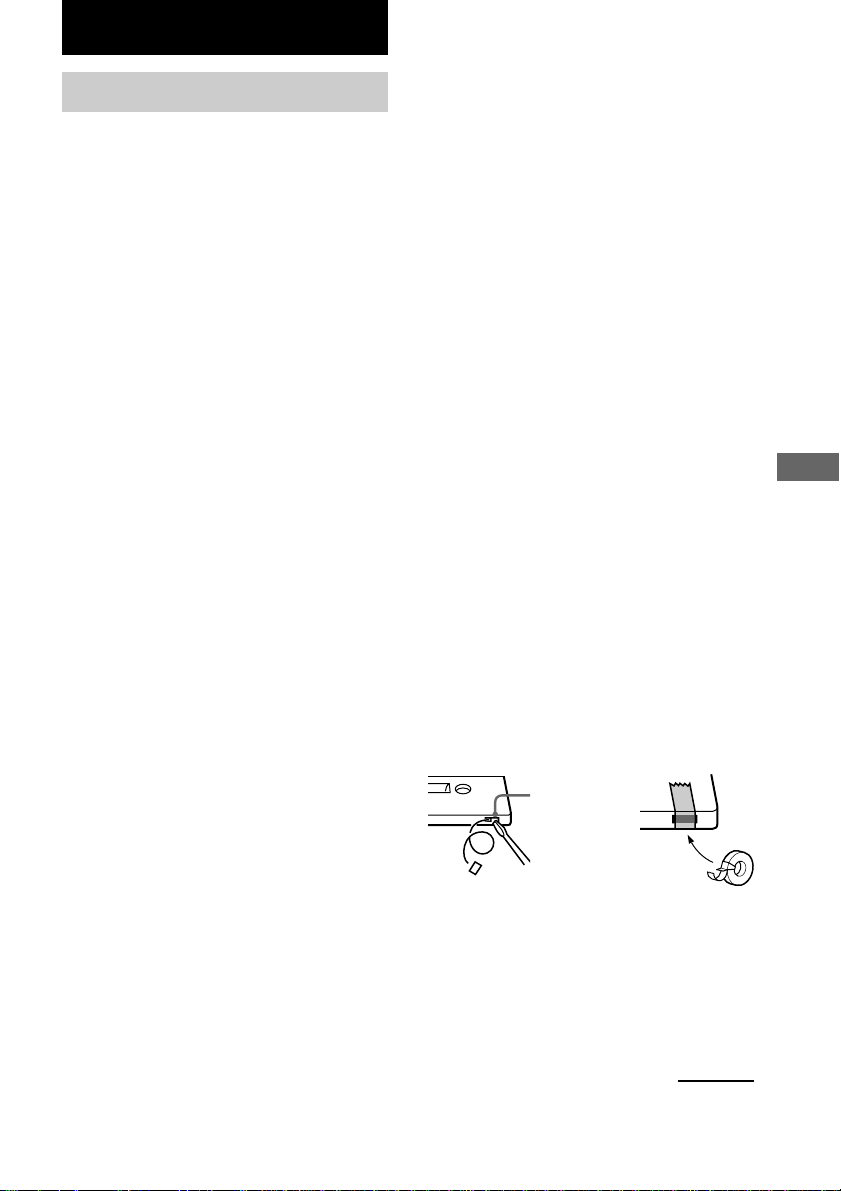
To save a tape permanently
To prevent a tape from being accidentally recorded
over, break off the cassette tab from side A or B as
illustrated.
If you later want to reuse the tape for recording, cover
the broken tab with adhesive tape.
Break off the
cassette tab of
side A
Additional information
Precautions
On operating voltage
Before operating the system, check that the operating
voltage of your system is identical with the voltage of
your local power supply.
On safety
• The system is not disconnected from the AC power
source (mains) as long as it is connected to the wall
outlet, even if the system itself has been turned off.
• Unplug the system from the wall outlet (mains) if it
is not to be used for an extended period of time. To
disconnect the cord (mains lead), pull it out by the
plug. Never pull the cord itself.
• Should any solid object or liquid fall into the
component, unplug the stereo system and have the
component checked by qualified personnel before
operating it any further.
• The AC power cord must be changed only at a
qualified service shop.
• The nameplate is located on the bottom exteror.
On placement
• Place the system in a location with adequate
ventilation to prevent heat build-up the system.
• Do not place the system in an inclined position.
• Do not place the system in locations where it is;
– Extremely hot or cold
– Dusty or dirty
– Very humid
– Vibrating
– Subject to direct sunlight.
• Use caution when placing the unit or speakers on
surfaces that have been specially treated (with wax,
oil, polish, etc.) as staining or discoloration of the
surface may result.
On heat buildup
• Although the system heats up during operation, this
is not malfunction.
• Place the system in a location with adequate
ventilation to prevent heat build-up in the system.
If you continuously use this system at a large volume,
the cabinet temperature of the top, side and bottom
rises considerably. To avoid burning yourself, do not
touch the cabinet.
To prevent a malfunction, do not cover the ventilation
hole.
continued

22
GB
Specifications
AUDIO POWER SPECIFICATIONS:
(U.S.A. model only)
POWER OUTPUT AND TOTAL
HARMONIC DISTORTION:
with 4 Ω loads both channels driven, from 120
- 10,000 Hz; rates 15 W per channel minimum
RMS power, with no more than 10% total
harmonic distortion from 250 mW to rated
output.
Amplifier section
Canadian model:
Continuous RMS power output (reference)
15 + 15 W
(4 Ω at 1 kHz, 10% THD)
European model:
DIN power output (rated) 12 + 12 W
(4 Ω at 1 kHz, DIN)
Continuous RMS power output (reference)
15 + 15 W
(4 Ω at 1 kHz, 10% THD)
Music power output (reference)
38 + 38 W
Other model:
The following measured at AC 230 V or AC 120 V,
50/60 Hz
DIN power output (rated) 12 + 12 W
(4 Ω at 1 kHz, DIN)
Continuous RMS power output (reference)
15 + 15 W
(4 Ω at 1 kHz, 10% THD)
Inputs
MD IN (phono jacks): voltage 450 mV,
impedance 47 kilohms
Outputs
PHONES: Accepts headphones of
(stereo mini jack) 8 Ω or more
SPEAKER: Accepts impedance of 8 to
16 Ω
Before placing a cassette in the tape
deck
Take up any slack in the tape. Otherwise the tape may
get entangled in the parts of the tape deck and become
damaged.
When using a tape longer than 90
minutes
The tape is very elastic. Do not change the tape
operations such as play, stop, and fast-winding (etc.)
frequently. The tape may get entangled in the tape
deck.
Cleaning the tape heads
Clean the tape heads after every 10 hours of use.
Make sure to clean the tape heads before you start an
important recording or after playing an old tape. Use
separately sold dry-type or wet-type cleaning cassette.
For details, refer to the instructions of the cleaning
cassette.
Demagnetizing the tape heads
Demagnetize the tape heads and the metal parts that
have contact with the tape every 20 to 30 hours of use
with a separately sold demagnetizing cassette. For
details, refer to the instructions of the demagnetizing
cassette.
Precautions (continued)

Additional Information
23
GB
Speaker
Speaker system Bass-reflex type
Speaker units
Woofer: 10 cm, cone type
Tweeter: 5 cm, cone type
Nominal impedance 4 Ω
Dimensions (w/h/d)
Approx. 170 × 246 × 185 mm
Mass Approx. 2.2 kg
General
Power requirements
North American model : 120 V AC, 60 Hz
European model: 230 V AC, 50/60 Hz
Other models: 230 V AC, 50/60 Hz
Power consumption
U.S.A. model: 38 W
Canadian model: 38 W
European model: 38 W
0.5 W (in the standby
mode)
Other models: 38 W
Dimensions (w/h/d):
Approx. 180 × 246 × 335 mm
Mass: Approx. 5.0 kg
Supplied accessories: AM loop antenna (1)
Remote Commander (1)
Batteries (2)
FM lead antenna (1)
(Except for European
model)
Design and specifications are subject to change
without notice.
CD player section
System Compact disc and digital
audio system
Laser Semiconductor laser
(λ=780 nm)
Emission duration:
continuous
Frequency response 20 Hz - 20 kHz (±0.5 dB)
OPTICAL DIGITAL OUT
(Square optical connector jack, rear panel)
Wavelength 660 nm
Tape player section
Recording system 4-track 2-channel stereo
Frequency response 50 - 13 000 Hz (±3 dB),
using Sony TYPE I
cassette
Wow and flutter ±0.15% W.Peak (IEC)
0.1% W.RMS (NAB)
±0.2% W.Peak (DIN)
Tuner section
FM stereo, FM/AM superheterodyne tuner
FM tuner section
Tuning range 87.5 - 108.0 MHz
Antenna FM lead antenna
Antenna terminal (Except for European model)
75 Ω coaxial
Intermediate frequency 10.7 MHz
AM tuner section
Tuning range
Pan-American model: 530 - 1 710 kHz
(with the interval set at
10 kHz)
531 - 1 710 kHz
(with the interval set at
9 kHz)
European model: 531 -1 602 kHz
(with the interval set at
9 kHz)
Other models: 531 - 1 602 kHz
(with the interval set at
9 kHz)
530 - 1 710 kHz
(with the interval set at
10 kHz)
Antenna AM loop antenna
Intermediate frequency 450 kHz

24
GB
Sony Corporation Printed in China