©2005 Sunbeam Products, Inc. All rights reserved.
Mr. Coffee® is a registered trademark of Sunbeam Products, Inc.
Distributed by Sunbeam Products, Inc., Boca Raton, Florida 33431.
U.S. 1-800-MR COFFEE (1-800-672-6333)
Canada 1-800-667-8623
Visit us at www.mrcoffee.com
You will find exciting and entertaining tips and ideas,
including great recipes!
©2005 Sunbeam Products, Inc. Todos los derechos reservados.
Mr. Coffee® es una marca registrada es una marca de Sunbeam Products, Inc.
Distribuido por Sunbeam Products, Inc., Boca Rató n, Florida 33431.
Visítenos en www.mrcoffee.com
Ahí encontrará consejos e ideas excitantes y entretenidos,
¡incluyendo excelentes recetas!
Printed in China/Impreso en China P.N. 114193
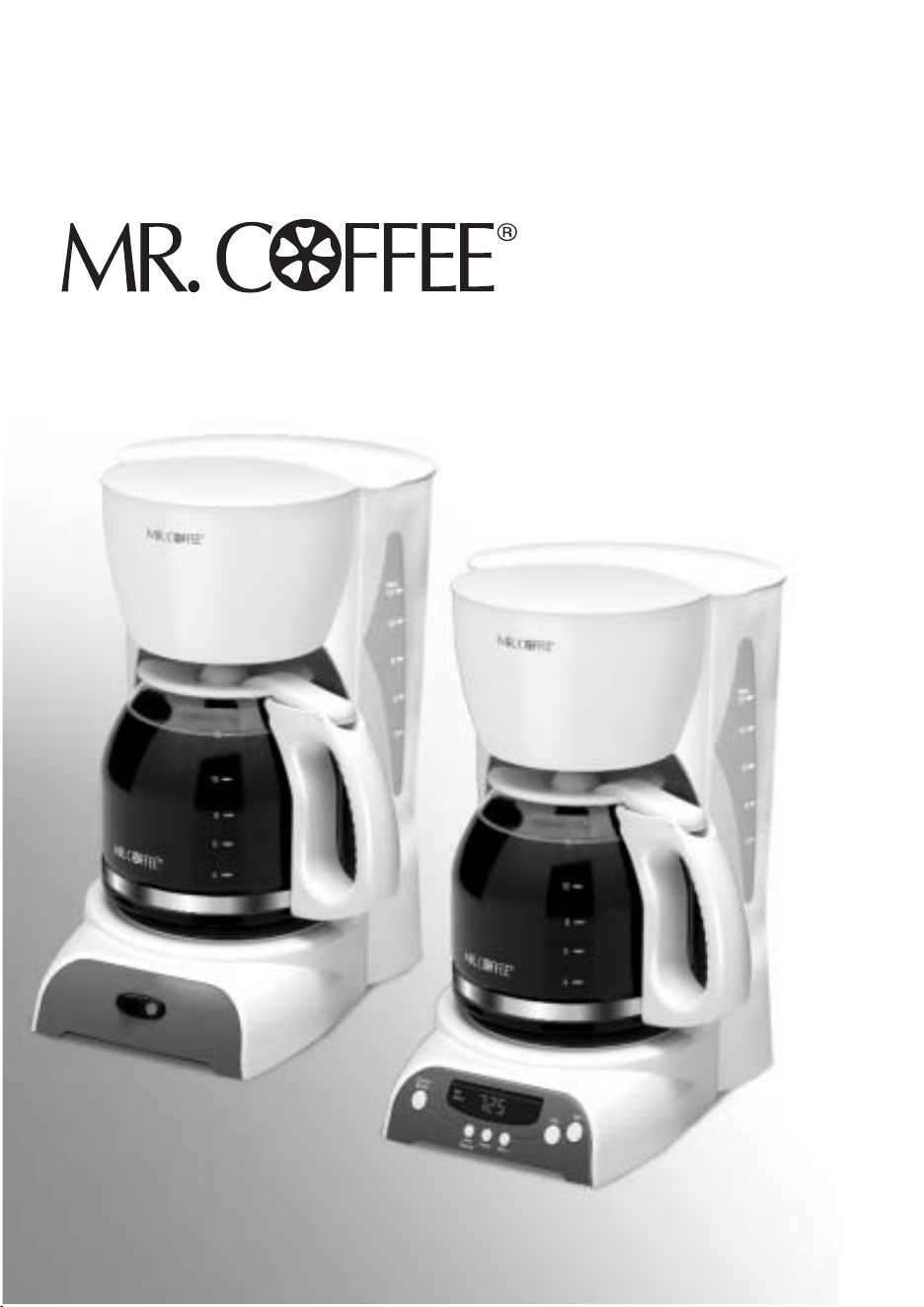
Coffeemaker / Cafetera
DR Series / Serie DR
User Manual /
Manual del Usuario
www.mrcoffee.com

IMPORTANT SAFEGUARDS
To reduce the risk of fire, electric shock and/or injury to persons, basic
safety precautions should always be followed when using electrical
appliances, including the following:
1. READ ALL INSTRUCTIONS BEFORE USING THE COFFEEMAKER.
2. Do not touch the coffeemaker’s hot surfaces. Use handles or knobs
and do not open the lid or cover while brewing. Scalding may occur
if the lid is removed during brewing cycles.
3. To protect against electric shock, do not immerse the power cord,
power plug or coffeemaker in water or in any other liquid.
4. Close adult supervision is necessary when this appliance is used by
or near children.
5. Turn the coffeemaker OFF and unplug the power cord from the power
source when the coffeemaker and clock are not in use and before
cleaning. Allow the coffeemaker parts to cool before putting on or
taking off parts and before cleaning the appliance.
6. Do not operate any appliance with a damaged power cord or power
plug, or operate it after the appliance malfunctions, or has been
damaged in any manner. Return this appliance only to the nearest
Authorized Service Center for examination, repair or adjustment.
7. The use of accessory attachments other than MR. COFFEE
®
brand
products may cause hazards or injuries.
8. Do not use the coffeemaker outdoors.
9. Do not let the power cord hang over edge of table or counter, or
allow it to come into contact with hot surfaces.
10. Do not place this coffeemaker on or near a hot gas stove or electric
burner or in a heated oven.
11. To disconnect the coffeemaker, turn it OFF, then remove the power
plug from the power supply.
12. Place the appliance on a hard, flat level surface to avoid interruption
of airflow underneath the coffeemaker.
13. Avoid contact with any moving parts.
14. This coffeemaker is designed for household use only.
15. Do not use appliance for other than intended use.
WARNING! To reduce the risk of fire or electric shock, do not remove
any service covers. There are no user serviceable parts
inside the coffeemaker. Only authorized personnel
should repair the coffeemaker.
!
Please read ALL of the instructions in this manual carefully before you
begin to use this appliance. Proper care and maintenance will ensure a
long life and a trouble-free operation for this appliance. Please save
these instructions and refer to them for cleaning and care tips.
INTRODUCTION
Welcome and congratulations on the purchase of your new MR. COFFEE
®
Coffeemaker.
Your new DR Series coffeemaker will wake up with you in the morning and provide you
breaks and treats during your hectic daily activities. How you enjoy your MR. COFFEE
®
Coffeemaker is up to you!
DECANTER USE AND CARE
Follow the instructions below to reduce or eliminate the chance of breaking the glass
decanter:
• This decanter is designed for use with your MR. COFFEE
®
coffeemaker and therefore
must never be used on a range top or in any oven, including a microwave oven.
• Do not set a hot decanter on a wet or cold surface.
• Do not use a cracked decanter or a decanter having a loose or weakened handle.
• Do not clean the decanter with abrasive cleaners, steel wool pads or other abrasive
materials.
• Discard the decanter immediately if it is ever boiled dry.
• Protect the decanter from sharp blows, scratches or rough handling.
• Do not disassemble the thermal carafe.
• Do not place the thermal carafe in the dishwasher.
SPECIAL CORD SET INSTRUCTIONS
1. For your convenience the plug is stored inside the cord storage.
2. A short power supply cord is provided to reduce the hazards resulting from a person
or pet becoming entangled in, or tripping over, a longer cord.
3. An extension cord may be purchased and used if care is exercised in its use.
4. If an extension cord is used, the marked electrical rating of the extension cord must
be at least 10 amps and 120 volts. The resulting extended cord must be arranged so
that it will not drape over a countertop or tabletop where it can be pulled on by
children or tripped over accidentally.
5. This appliance has a polarized plug (one blade is wider than the other). To reduce
the risk of electric shock, this plug will fit in a polarized outlet only one way. If the
plug does not fit fully in the outlet, reverse the plug. If it still does not fit, contact a
qualified electrician. Do not modify the plug in any way.
You can customize the length of the power cord so that it is the exact length you
desire. To increase the length of the power cord: grasp the power cord (not the
power plug) and gently lift it out of the slot, then pull it away from the coffeemaker.
To decrease the length of the power cord: Grasp the power cord (not the power
plug), lift it out of the slot and gently feed it into the coffeemaker. Lock the cord in the
slot when finished.
2 3
SAVE THESE INSTRUCTIONS

IMPORTANT SAFEGUARDS
To reduce the risk of fire, electric shock and/or injury to persons, basic
safety precautions should always be followed when using electrical
appliances, including the following:
1. READ ALL INSTRUCTIONS BEFORE USING THE COFFEEMAKER.
2. Do not touch the coffeemaker’s hot surfaces. Use handles or knobs
and do not open the lid or cover while brewing. Scalding may occur
if the lid is removed during brewing cycles.
3. To protect against electric shock, do not immerse the power cord,
power plug or coffeemaker in water or in any other liquid.
4. Close adult supervision is necessary when this appliance is used by
or near children.
5. Turn the coffeemaker OFF and unplug the power cord from the power
source when the coffeemaker and clock are not in use and before
cleaning. Allow the coffeemaker parts to cool before putting on or
taking off parts and before cleaning the appliance.
6. Do not operate any appliance with a damaged power cord or power
plug, or operate it after the appliance malfunctions, or has been
damaged in any manner. Return this appliance only to the nearest
Authorized Service Center for examination, repair or adjustment.
7. The use of accessory attachments other than MR. COFFEE
®
brand
products may cause hazards or injuries.
8. Do not use the coffeemaker outdoors.
9. Do not let the power cord hang over edge of table or counter, or
allow it to come into contact with hot surfaces.
10. Do not place this coffeemaker on or near a hot gas stove or electric
burner or in a heated oven.
11. To disconnect the coffeemaker, turn it OFF, then remove the power
plug from the power supply.
12. Place the appliance on a hard, flat level surface to avoid interruption
of airflow underneath the coffeemaker.
13. Avoid contact with any moving parts.
14. This coffeemaker is designed for household use only.
15. Do not use appliance for other than intended use.
WARNING! To reduce the risk of fire or electric shock, do not remove
any service covers. There are no user serviceable parts
inside the coffeemaker. Only authorized personnel
should repair the coffeemaker.
!
Please read ALL of the instructions in this manual carefully before you
begin to use this appliance. Proper care and maintenance will ensure a
long life and a trouble-free operation for this appliance. Please save
these instructions and refer to them for cleaning and care tips.
INTRODUCTION
Welcome and congratulations on the purchase of your new MR. COFFEE
®
Coffeemaker.
Your new DR Series coffeemaker will wake up with you in the morning and provide you
breaks and treats during your hectic daily activities. How you enjoy your MR. COFFEE
®
Coffeemaker is up to you!
DECANTER USE AND CARE
Follow the instructions below to reduce or eliminate the chance of breaking the glass
decanter:
• This decanter is designed for use with your MR. COFFEE
®
coffeemaker and therefore
must never be used on a range top or in any oven, including a microwave oven.
• Do not set a hot decanter on a wet or cold surface.
• Do not use a cracked decanter or a decanter having a loose or weakened handle.
• Do not clean the decanter with abrasive cleaners, steel wool pads or other abrasive
materials.
• Discard the decanter immediately if it is ever boiled dry.
• Protect the decanter from sharp blows, scratches or rough handling.
• Do not disassemble the thermal carafe.
• Do not place the thermal carafe in the dishwasher.
SPECIAL CORD SET INSTRUCTIONS
1. For your convenience the plug is stored inside the cord storage.
2. A short power supply cord is provided to reduce the hazards resulting from a person
or pet becoming entangled in, or tripping over, a longer cord.
3. An extension cord may be purchased and used if care is exercised in its use.
4. If an extension cord is used, the marked electrical rating of the extension cord must
be at least 10 amps and 120 volts. The resulting extended cord must be arranged so
that it will not drape over a countertop or tabletop where it can be pulled on by
children or tripped over accidentally.
5. This appliance has a polarized plug (one blade is wider than the other). To reduce
the risk of electric shock, this plug will fit in a polarized outlet only one way. If the
plug does not fit fully in the outlet, reverse the plug. If it still does not fit, contact a
qualified electrician. Do not modify the plug in any way.
You can customize the length of the power cord so that it is the exact length you
desire. To increase the length of the power cord: grasp the power cord (not the
power plug) and gently lift it out of the slot, then pull it away from the coffeemaker.
To decrease the length of the power cord: Grasp the power cord (not the power
plug), lift it out of the slot and gently feed it into the coffeemaker. Lock the cord in the
slot when finished.
2 3
SAVE THESE INSTRUCTIONS

4
C O F F E E M A K E R F E A T U R E S A N D B E N E F I T S
Your new MR. COFFEE® coffeemaker has the following features:
• Brewing Capacity – 12 cups – Glass decanter series
– 8 cups – Thermal carafe series
• Brew Basket with Removable Filter Basket – The filter basket lifts out for fast and easy
cleaning and filling.
• Pause ‘n Serve – Can’t wait for the coffee to finish brewing? The Pause ‘n Serve feature
allows you up to 30 seconds to pour a cup of coffee while the coffeemaker is still brewing.
Carefully remove the decanter and the Pause ’n Serve feature will be automatically activated,
temporarily stopping the flow of coffee into the decanter.
• Dual Water Windows – Shows amount of water in the reservoir for accurate filling.
• Non-Stick Warming Plate (not on DRTX84/DRTX85) – This feature allows you to keep
your coffee hot after brewing. The non-stick attribute prevents the decanter from sticking to the
surface of the warming plate.
• Cord Storage – Safely stores excess cord to keep your countertop neat.
• On/Off Indicator Light – Lets you know when your coffeemaker is “on”.
• Auto Shut-Off – This safety feature automatically shuts the coffeemaker off 2 hours after
brewing. (DRS12/DRS13)
• Pack-in Starter Kit – 25 paper filters and a coffee scoop are included for your convenience
(not on DRTX84/DRTX84).
• Additional Programmable Control Features (DRX20/DRX23 &
DRTX84/DRTX85):
– Clock – The LED clock serves as a handy kitchen clock and allows you to set the
Delay Brew feature.
– Delay Brew – Would you like to wake up to a fresh pot of coffee? The timer allows
you to preset when you would like the coffeemaker to automatically brew your coffee,
up to 24 hours in advance.
– Two-Hour Auto Shut-Off – This safety feature keeps your coffee warm for 2 hours
after you brew, then automatically turns off (on DRX20/DRX23). Thermal coffeemakers
(DRTX84/DRTX85) shut off immediately after brewing cycle is complete.
NOTE: If you have selected any of the operating functions, the coffeemaker will act upon the last
operation selected if the power is restored within 10 seconds after a power outage.
C L E A N Y O U R C O F F E E M A K E R B E F O R E
U S I N G T H E F I R S T T I M E
Make sure your first cup of coffee is as good as can be by cleaning your MR. COFFEE®
Coffeemaker before its first use. Just follow these simple steps:
1. Wash the decanter, decanter lid and the filter basket in a mixture of mild detergent and water.
Rinse each thoroughly (please refer to the parts diagram listed above).
2. Replace all the parts and close the lid. Then, run a brew cycle with water only, without adding
coffee and coffee filter.
3. When brewing is complete, turn your coffeemaker off, discard the water in the decanter and
rinse the decanter, decanter lid, and filter basket.
Your coffeemaker is now ready to use. Enjoy it!
5
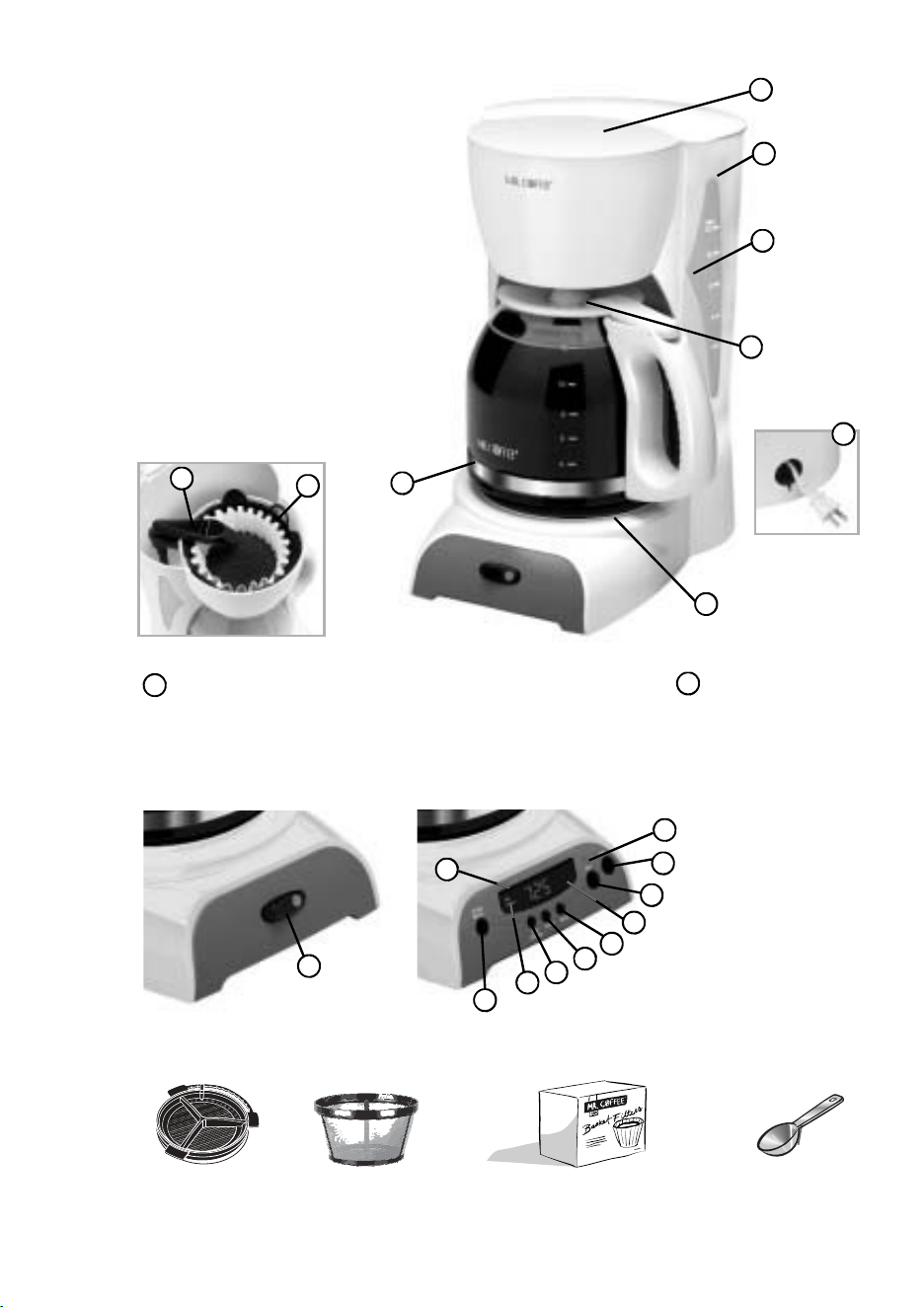
D I A G R A M O F
P A R T S
1 Filter Basket Lid
2 Water Reservoir
3 Dual Water Windows
4 Pause ’n Serve
5 Cord Storage
6 Warming Plate (not on
DRTX84/DRTX85)
7 Control Panel (see detail below)
8 Glass Decanter or Thermal Carafe
9 Removable Filter Basket
10 Shower Head
Coffeemaker Extras (not included with all models)
Water Filtration
System
Mr. Coffee® Brand
Permanent Filter
Mr. Coffee® Brand 10-12 Cup
Basket-Style Paper Filters
Coffee Scoop
1
2
3
4
9
8
6
5
10
7 Control Panel,
Switch Models
(DR12/DR13 & DRS12/DRS13)
a On/Off Button with
On Indicator Light
a
a
i
j
h
g
f
e
d
c
b
7 Control Panel,
Programmable
Models
(DRX20/DRX23 &
DRTX84/DRTX85)
a On Indicator Light
b Off Button
c On Button
d Clock Display
e Minute Button
f Hour Button
g Set Delay Button
h Delay Indicator
i Delay Brew Button
j PM Indicator

4
C O F F E E M A K E R F E A T U R E S A N D B E N E F I T S
Your new MR. COFFEE® coffeemaker has the following features:
• Brewing Capacity – 12 cups – Glass decanter series
– 8 cups – Thermal carafe series
• Brew Basket with Removable Filter Basket – The filter basket lifts out for fast and easy
cleaning and filling.
• Pause ‘n Serve – Can’t wait for the coffee to finish brewing? The Pause ‘n Serve feature
allows you up to 30 seconds to pour a cup of coffee while the coffeemaker is still brewing.
Carefully remove the decanter and the Pause ’n Serve feature will be automatically activated,
temporarily stopping the flow of coffee into the decanter.
• Dual Water Windows – Shows amount of water in the reservoir for accurate filling.
• Non-Stick Warming Plate (not on DRTX84/DRTX85) – This feature allows you to keep
your coffee hot after brewing. The non-stick attribute prevents the decanter from sticking to the
surface of the warming plate.
• Cord Storage – Safely stores excess cord to keep your countertop neat.
• On/Off Indicator Light – Lets you know when your coffeemaker is “on”.
• Auto Shut-Off – This safety feature automatically shuts the coffeemaker off 2 hours after
brewing. (DRS12/DRS13)
• Pack-in Starter Kit – 25 paper filters and a coffee scoop are included for your convenience
(not on DRTX84/DRTX84).
• Additional Programmable Control Features (DRX20/DRX23 &
DRTX84/DRTX85):
– Clock – The LED clock serves as a handy kitchen clock and allows you to set the
Delay Brew feature.
– Delay Brew – Would you like to wake up to a fresh pot of coffee? The timer allows
you to preset when you would like the coffeemaker to automatically brew your coffee,
up to 24 hours in advance.
– Two-Hour Auto Shut-Off – This safety feature keeps your coffee warm for 2 hours
after you brew, then automatically turns off (on DRX20/DRX23). Thermal coffeemakers
(DRTX84/DRTX85) shut off immediately after brewing cycle is complete.
NOTE: If you have selected any of the operating functions, the coffeemaker will act upon the last
operation selected if the power is restored within 10 seconds after a power outage.
C L E A N Y O U R C O F F E E M A K E R B E F O R E
U S I N G T H E F I R S T T I M E
Make sure your first cup of coffee is as good as can be by cleaning your MR. COFFEE®
Coffeemaker before its first use. Just follow these simple steps:
1. Wash the decanter, decanter lid and the filter basket in a mixture of mild detergent and water.
Rinse each thoroughly (please refer to the parts diagram listed above).
2. Replace all the parts and close the lid. Then, run a brew cycle with water only, without adding
coffee and coffee filter.
3. When brewing is complete, turn your coffeemaker off, discard the water in the decanter and
rinse the decanter, decanter lid, and filter basket.
Your coffeemaker is now ready to use. Enjoy it!
5
D I A G R A M O F
P A R T S
1 Filter Basket Lid
2 Water Reservoir
3 Dual Water Windows
4 Pause ’n Serve
5 Cord Storage
6 Warming Plate (not on
DRTX84/DRTX85)
7 Control Panel (see detail below)
8 Glass Decanter or Thermal Carafe
9 Removable Filter Basket
10 Shower Head
Coffeemaker Extras (not included with all models)
Water Filtration
System
Mr. Coffee® Brand
Permanent Filter
Mr. Coffee® Brand 10-12 Cup
Basket-Style Paper Filters
Coffee Scoop
1
2
3
4
9
8
6
5
10
7 Control Panel,
Switch Models
(DR12/DR13 & DRS12/DRS13)
a On/Off Button with
On Indicator Light
a
a
i
j
h
g
f
e
d
c
b
7 Control Panel,
Programmable
Models
(DRX20/DRX23 &
DRTX84/DRTX85)
a On Indicator Light
b Off Button
c On Button
d Clock Display
e Minute Button
f Hour Button
g Set Delay Button
h Delay Indicator
i Delay Brew Button
j PM Indicator
76
S E T T I N G T H E C L O C K A N D D E L A Y B R E W T I M E
On programmable models DRX20/DRX23 & DRTX84/DRTX85 only
To Set the Clock:
1. Plug the power cord into a standard electrical outlet. The clock will flash on the control panel to
indicate that the time has not been set yet.
2. Press and hold the HOUR and MINUTE buttons until you
reach the current time. The PM indicator will light on the left
of the display.
The clock is now set!
NOTE: Pressing any button before setting the clock will cause
the clock to start keeping time from 12:00 a.m. You must set
the clock if you want to use the Delay Brew feature.
To Set the Delay Brew Time:
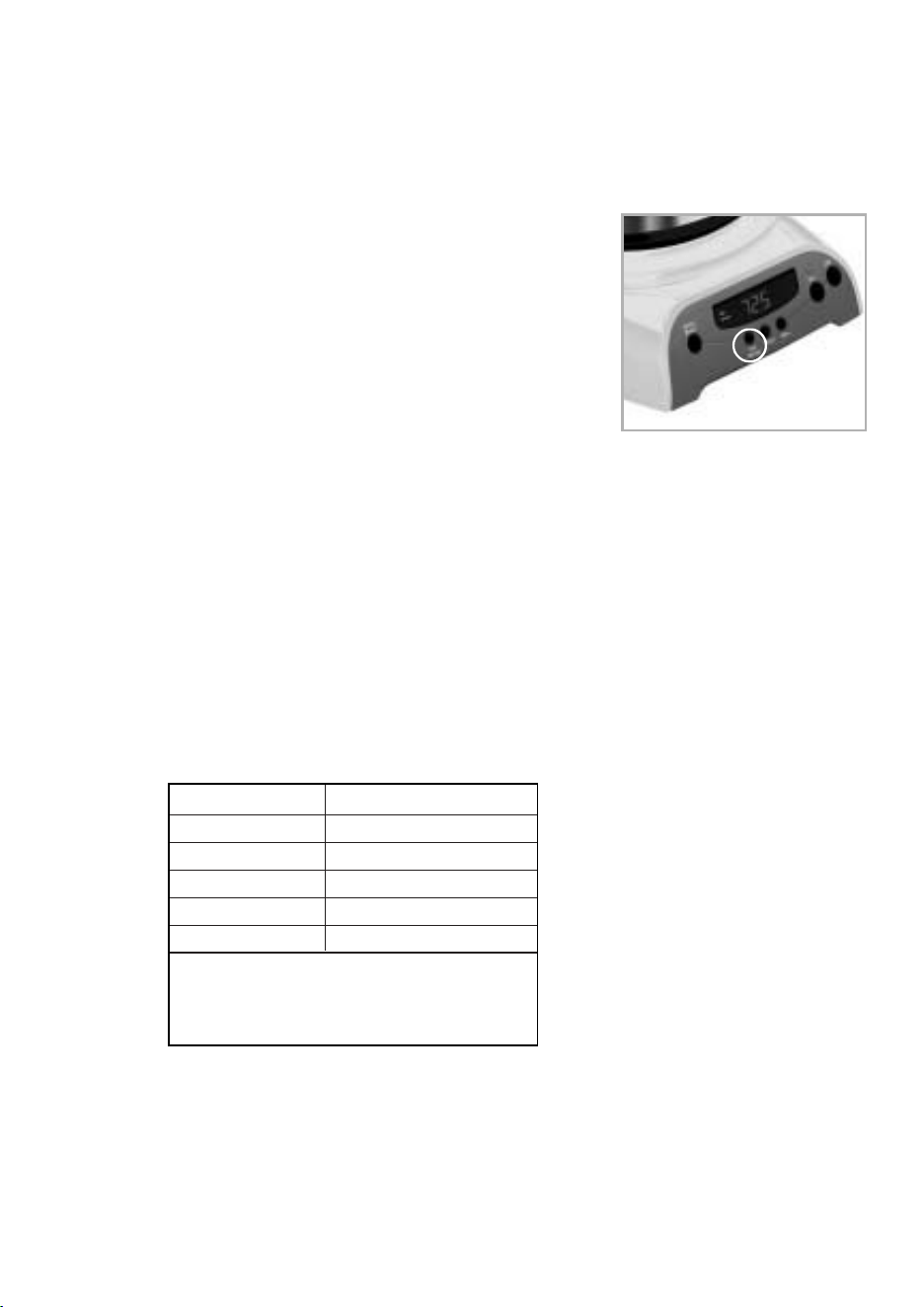
After setting the clock, simply press and hold the SET DELAY
button (Figure 1), and set the brew time by pressing the HOUR
and MINUTE buttons. The PM indicator will light up on the
clock display.
The Delay Brew Time is now set!
NOTE: To activate the DELAY BREW cycle, see the “Brewing Coffee Later” section.
To check the programmed time, push the SET DELAY button. The display will show the time you have
programmed the coffee to brew.
P R E P A R I N G F O R U S E
Selecting and Measuring Ground Coffee
For best results, use a level tablespoon for ground coffee measurement. Make sure you use medium
grind coffee for a perfect brew.
Suggested Coffee Measurement Chart
To Brew Ground Coffee
12 Cups 9 tbsp.
10 Cups 7.5 tbsp.
8 Cups 6.5 tbsp.
6 Cups 4.5 tbsp.
4 Cups 3 tbsp.
1 level tablespoon (tbps) = 5 gr./0.17 oz.
1 cup = 5 fl. oz. of brewed coffee
Use more or less coffee to suit your taste.
Water Filtration System (Not included. Available at your favorite retailer or
on mrcoffee.com)
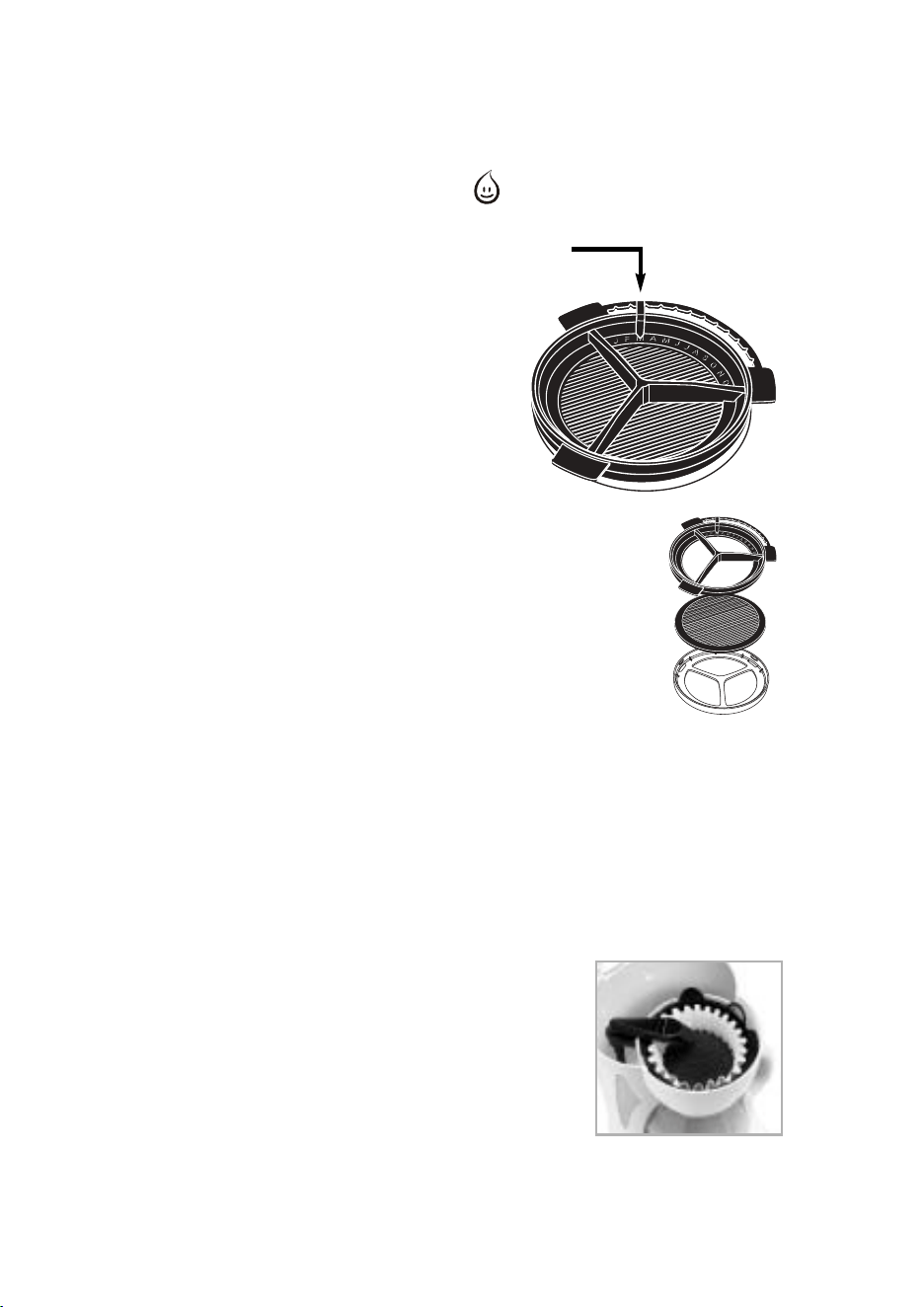
Your coffeemaker has been designed to use the MR. COFFEE® water filtration system. This carbon-
based water filter improves the taste of your coffee by removing up to 97% of the chlorine from the
water you may use to brew your coffee.
First look for the MR. COFFEE® Filtration Friendly symbol on the bottom of your filter basket. If
you do not see this symbol, please call 1-800-672-6333.
To use the water filtration system in your MR. COFFEE®
Coffeemaker, please follow these steps:
1. Using the red indicator on the frame water filter, align
the indicator to the letter on the frame that corresponds
with the month that you are using the disk for the first
time. This serves to remind you to change the disk
every month (approx. 30 brewing cycles).
2. Place the MR.COFFEE® paper or permanent filter in
the filter basket. Place coffee grounds in the paper or
permanent filter.
NOTE: For optimum results, use the water filtration
system with a permanent filter.
3. Place the MR. COFFEE® water filter in the filter basket,
making sure that the side marked “this side up” faces
you and that the water filter is level.
4. Close the filter basket lid. You are now ready to brew great
tasting coffee.
5. When you are done brewing your coffee, rinse the water
filter with fresh water. Do not put your water filter in the
dishwasher.
To replace the water filter disks: twist the gray disk cover
from your water filtration system. Remove the used disk. Insert the
new disk into the frame and twist the cover back into place.
Adding Water and Ground Coffee
1. Lift and open the filter basket lid. For your convenience, you can lift out the removable filter
basket.
2. Place a MR. COFFEE® brand 10-12 cup paper basket-style filter or a MR. COFFEE® permanent
filter into the removable filter basket. (Figure 2)
NOTE: If using paper filters, it is important that the sides of the filter fit flush against the side of
the filter basket. If filter collapse occurs, dampen the filter before
placing in the filter basket and adding ground coffee and water.
3. Add the desired amount of coffee and gently shake to level the
coffee. See the Suggested Coffee Measurement Chart.
4. If using the Mr. Coffee® Water Filtration System: after following
instructions in the Water Filtration System section, place the Mr.
Coffee® water filter in the filter basket, making sure that the side
marked “this side up” faces you and that the water filter is level.
5. Be sure the filter basket is properly centered and all the way down
in the filter basket.
Red
Indicator
Frame
Filter Disk
Disk Cover
(Figure 2 – Adding water
and ground coffee)
(Figure 1 – Set Delay)
76
S E T T I N G T H E C L O C K A N D D E L A Y B R E W T I M E
On programmable models DRX20/DRX23 & DRTX84/DRTX85 only
To Set the Clock:
1. Plug the power cord into a standard electrical outlet. The clock will flash on the control panel to
indicate that the time has not been set yet.
2. Press and hold the HOUR and MINUTE buttons until you
reach the current time. The PM indicator will light on the left
of the display.
The clock is now set!
NOTE: Pressing any button before setting the clock will cause
the clock to start keeping time from 12:00 a.m. You must set
the clock if you want to use the Delay Brew feature.
To Set the Delay Brew Time:
After setting the clock, simply press and hold the SET DELAY
button (Figure 1), and set the brew time by pressing the HOUR
and MINUTE buttons. The PM indicator will light up on the
clock display.
The Delay Brew Time is now set!
NOTE: To activate the DELAY BREW cycle, see the “Brewing Coffee Later” section.
To check the programmed time, push the SET DELAY button. The display will show the time you have
programmed the coffee to brew.
P R E P A R I N G F O R U S E
Selecting and Measuring Ground Coffee
For best results, use a level tablespoon for ground coffee measurement. Make sure you use medium
grind coffee for a perfect brew.
Suggested Coffee Measurement Chart
To Brew Ground Coffee
12 Cups 9 tbsp.
10 Cups 7.5 tbsp.
8 Cups 6.5 tbsp.
6 Cups 4.5 tbsp.
4 Cups 3 tbsp.
1 level tablespoon (tbps) = 5 gr./0.17 oz.
1 cup = 5 fl. oz. of brewed coffee
Use more or less coffee to suit your taste.
Water Filtration System (Not included. Available at your favorite retailer or
on mrcoffee.com)
Your coffeemaker has been designed to use the MR. COFFEE® water filtration system. This carbon-
based water filter improves the taste of your coffee by removing up to 97% of the chlorine from the
water you may use to brew your coffee.
First look for the MR. COFFEE® Filtration Friendly symbol on the bottom of your filter basket. If
you do not see this symbol, please call 1-800-672-6333.
To use the water filtration system in your MR. COFFEE®
Coffeemaker, please follow these steps:
1. Using the red indicator on the frame water filter, align
the indicator to the letter on the frame that corresponds
with the month that you are using the disk for the first
time. This serves to remind you to change the disk
every month (approx. 30 brewing cycles).
2. Place the MR.COFFEE® paper or permanent filter in
the filter basket. Place coffee grounds in the paper or
permanent filter.
NOTE: For optimum results, use the water filtration
system with a permanent filter.
3. Place the MR. COFFEE® water filter in the filter basket,
making sure that the side marked “this side up” faces
you and that the water filter is level.
4. Close the filter basket lid. You are now ready to brew great
tasting coffee.
5. When you are done brewing your coffee, rinse the water
filter with fresh water. Do not put your water filter in the
dishwasher.
To replace the water filter disks: twist the gray disk cover
from your water filtration system. Remove the used disk. Insert the
new disk into the frame and twist the cover back into place.
Adding Water and Ground Coffee
1. Lift and open the filter basket lid. For your convenience, you can lift out the removable filter
basket.
2. Place a MR. COFFEE® brand 10-12 cup paper basket-style filter or a MR. COFFEE® permanent
filter into the removable filter basket. (Figure 2)
NOTE: If using paper filters, it is important that the sides of the filter fit flush against the side of
the filter basket. If filter collapse occurs, dampen the filter before
placing in the filter basket and adding ground coffee and water.
3. Add the desired amount of coffee and gently shake to level the
coffee. See the Suggested Coffee Measurement Chart.
4. If using the Mr. Coffee® Water Filtration System: after following
instructions in the Water Filtration System section, place the Mr.
Coffee® water filter in the filter basket, making sure that the side
marked “this side up” faces you and that the water filter is level.
5. Be sure the filter basket is properly centered and all the way down
in the filter basket.
Red
Indicator
Frame
Filter Disk
Disk Cover
(Figure 2 – Adding water
and ground coffee)
(Figure 1 – Set Delay)
6. Fill the decanter with cold, fresh water to the desired capacity (1 cup equals 5 ounces). For easy
and accurate filling, the water markings on the glass decanter and on the dual water windows
show the amount of water needed to make the corresponding desired number of cups. Do not fill
past the “MAX line” or water will flow out of the overfill hole in the back of the water reservoir.
The amount of coffee brewed will always be slightly less than the amount of water poured in the
water reservoir. This is due to the minimum absorption of water by the coffee grounds.
7. Pour the water into the water reservoir. Close the lid and place the empty decanter onto the
warming plate.
NOTE: Make sure the decanter is fully placed on the warming plate or the water and the
grounds will overflow from the filter basket. An overflow may cause personal injury or damage
to property.
CAUTION! To reduce the risk of damaging the decanter and/or the risk of personal
injury, do not add cold water to the decanter if the decanter is already hot. Allow the
decanter to cool before using.
B R E W I N G C O F F E E N O W
1. After completing the steps in the “Adding Water and Coffee” section and with the decanter
and the filter basket securely in place, turn the coffeemaker on.
For Programmable models (DRX20/DRX23 & DRTX84/DRTX85): Press the ON
Button to begin the brewing cycle. The green indicator light will turn on to signal that the
coffeemaker is brewing. When the brewing cycle is complete the coffeemaker switches over to
the warming mode.
Your coffeemaker will keep your coffee hot for 2 hours, then automatically shut off. Thermal units
will shut off immediately after the brewing cycle is complete.
While the coffee is brewing, the Pause ’n Serve feature allows you to sneak a cup of coffee from
the decanter. REPLACE THE DECANTER ON THE WARMING PLATE WITHIN 30 SECONDS TO
PREVENT OVERFLOW AND POSSIBLE INJURY.
To turn the coffeemaker off, push the OFF button.
For Switch models (DR12/DR13/DRS12/DRS13): press the ON/OFF Switch on the
control panel so the green indicator light illuminates. The light indicates that the coffeemaker is
on an that the brew cycle will begin.
While the coffee is brewing, the Pause ’n Serve feature allows you to sneak a cup of coffee from
the decanter. REPLACE THE DECANTER ON THE WARMING PLATE WITHIN 30 SECONDS TO
PREVENT OVERFLOW AND POSSIBLE INJURY.
To turn off the coffeemaker, push the switch so the light is no longer illuminated.
Your coffeemaker will keep your coffee hot for 2 hours and then automatically shut off.
(DRS12/DRS13 only)
If the brew basket overflows or fails to empty into the decanter, do
not open the brew basket. Turn off the coffeemaker. Unplug the
coffeemaker and wait for the contents to cool before handling.
2. After the used coffee grounds have cooled, carefully open the filter basket and discard them.
3. Make sure the decanter is empty before starting to brew coffee.
4. Be sure to turn your coffeemaker off when no longer using it.
!
B R E W I N G C O F F E E L A T E R
(DELAY BREW on DRX20/DRX23 & DRTX84/DRTX85 only)
1. You must first set the time for when you would like the coffeemaker to begin brewing your coffee
as described in “Setting the Clock and the Delay Brew Timer” section.
2. Prepare your coffeemaker as described in “Adding Water and Ground Coffee” section.
3. To activate DELAY BREW and program your coffeemaker to brew coffee at a later time, press the
Delay Brew button. The DELAY indicator light will illuminate. The coffeemaker is now set to
automatically brew coffee at the pre-set later time.
4. At the pre-set time the Green On indicator light will go on and the DELAY light will go off,
indicating the brewing has started.
5. The coffeemaker warming plate will keep your coffee hot for 2 hours and then will automatically
turn off. Thermal units will shut off immediately after the brewing cycle is complete.
As a safety feature, your coffeemaker will NOT start again automatically the next
day. If you want your coffee to brew at the same time the following day, simply
add a new filter, coffee and water and set DELAY BREW, by repeating Steps 2 and 3
above.
To cancel DELAY BREW: Press the OFF button. The DELAY BREW green indicator light will
go off.
C L E A N I N G A N D M A I N T A I N I N G
Y O U R C O F F E E M A K E R
Daily Cleaning
Always unplug the coffeemaker and allow to cool before cleaning.
Remove the filter basket, permanent filter (not included on all models), decanter and decanter lid and
wash them in a solution of hot water and mild liquid soap.
Never use abrasive cleansers, steel wool pads or other abrasive materials. Dishwasher top rack safe
parts: glass decanter and lid, filter basket and permanent filter. The water filter disk and
Thermal decaner are not dishwasher safe.
CAUTION! Never immerse the coffeemaker itself in water,
in any other liquid or place in the dishwasher.
Regular Cleaning and Maintenance
Decalcifying your MR. COFFEE® Coffeemaker
Minerals (calcium) found in water will leave deposits in your coffeemaker and will affect it. It’s
recommended that you regularly remove these deposits by using MR. COFFEE® Cleaner or vinegar.
MR. COFFEE® Cleaner is available at many retail stores or by calling the MR. COFFEE® Consumer
Service Department at 1-800-MR COFFEE (1-800-672-6333).
1. Follow package instructions to prepare one batch of MR. COFFEE® Coffeemaker Cleaner. Pour
the mixture into the water reservoir. If using water filtration, remove the water filtration disk from
the machine vefore decalcifing.
NOTE: 4 cups or 20 fl. oz. of undiluted, white household vinegar may be used as a substitute for
the cleaner.
2. Place an empty MR. COFFEE® 10-12 cup basket-style paper filter or MR. COFFEE® permanent
filter into the filter basket and close reservoir lid.
8 9
!
!

6. Fill the decanter with cold, fresh water to the desired capacity (1 cup equals 5 ounces). For easy
and accurate filling, the water markings on the glass decanter and on the dual water windows
show the amount of water needed to make the corresponding desired number of cups. Do not fill
past the “MAX line” or water will flow out of the overfill hole in the back of the water reservoir.
The amount of coffee brewed will always be slightly less than the amount of water poured in the
water reservoir. This is due to the minimum absorption of water by the coffee grounds.
7. Pour the water into the water reservoir. Close the lid and place the empty decanter onto the
warming plate.
NOTE: Make sure the decanter is fully placed on the warming plate or the water and the
grounds will overflow from the filter basket. An overflow may cause personal injury or damage
to property.
CAUTION! To reduce the risk of damaging the decanter and/or the risk of personal
injury, do not add cold water to the decanter if the decanter is already hot. Allow the
decanter to cool before using.
B R E W I N G C O F F E E N O W
1. After completing the steps in the “Adding Water and Coffee” section and with the decanter
and the filter basket securely in place, turn the coffeemaker on.
For Programmable models (DRX20/DRX23 & DRTX84/DRTX85): Press the ON
Button to begin the brewing cycle. The green indicator light will turn on to signal that the
coffeemaker is brewing. When the brewing cycle is complete the coffeemaker switches over to
the warming mode.
Your coffeemaker will keep your coffee hot for 2 hours, then automatically shut off. Thermal units
will shut off immediately after the brewing cycle is complete.
While the coffee is brewing, the Pause ’n Serve feature allows you to sneak a cup of coffee from
the decanter. REPLACE THE DECANTER ON THE WARMING PLATE WITHIN 30 SECONDS TO
PREVENT OVERFLOW AND POSSIBLE INJURY.
To turn the coffeemaker off, push the OFF button.
For Switch models (DR12/DR13/DRS12/DRS13): press the ON/OFF Switch on the
control panel so the green indicator light illuminates. The light indicates that the coffeemaker is
on an that the brew cycle will begin.
While the coffee is brewing, the Pause ’n Serve feature allows you to sneak a cup of coffee from
the decanter. REPLACE THE DECANTER ON THE WARMING PLATE WITHIN 30 SECONDS TO
PREVENT OVERFLOW AND POSSIBLE INJURY.
To turn off the coffeemaker, push the switch so the light is no longer illuminated.
Your coffeemaker will keep your coffee hot for 2 hours and then automatically shut off.
(DRS12/DRS13 only)
If the brew basket overflows or fails to empty into the decanter, do
not open the brew basket. Turn off the coffeemaker. Unplug the
coffeemaker and wait for the contents to cool before handling.
2. After the used coffee grounds have cooled, carefully open the filter basket and discard them.
3. Make sure the decanter is empty before starting to brew coffee.
4. Be sure to turn your coffeemaker off when no longer using it.
!
B R E W I N G C O F F E E L A T E R
(DELAY BREW on DRX20/DRX23 & DRTX84/DRTX85 only)
1. You must first set the time for when you would like the coffeemaker to begin brewing your coffee
as described in “Setting the Clock and the Delay Brew Timer” section.
2. Prepare your coffeemaker as described in “Adding Water and Ground Coffee” section.
3. To activate DELAY BREW and program your coffeemaker to brew coffee at a later time, press the
Delay Brew button. The DELAY indicator light will illuminate. The coffeemaker is now set to
automatically brew coffee at the pre-set later time.
4. At the pre-set time the Green On indicator light will go on and the DELAY light will go off,
indicating the brewing has started.
5. The coffeemaker warming plate will keep your coffee hot for 2 hours and then will automatically
turn off. Thermal units will shut off immediately after the brewing cycle is complete.
As a safety feature, your coffeemaker will NOT start again automatically the next
day. If you want your coffee to brew at the same time the following day, simply
add a new filter, coffee and water and set DELAY BREW, by repeating Steps 2 and 3
above.
To cancel DELAY BREW: Press the OFF button. The DELAY BREW green indicator light will
go off.
C L E A N I N G A N D M A I N T A I N I N G
Y O U R C O F F E E M A K E R
Daily Cleaning
Always unplug the coffeemaker and allow to cool before cleaning.
Remove the filter basket, permanent filter (not included on all models), decanter and decanter lid and
wash them in a solution of hot water and mild liquid soap.
Never use abrasive cleansers, steel wool pads or other abrasive materials. Dishwasher top rack safe
parts: glass decanter and lid, filter basket and permanent filter. The water filter disk and
Thermal decaner are not dishwasher safe.
CAUTION! Never immerse the coffeemaker itself in water,
in any other liquid or place in the dishwasher.
Regular Cleaning and Maintenance
Decalcifying your MR. COFFEE® Coffeemaker
Minerals (calcium) found in water will leave deposits in your coffeemaker and will affect it. It’s
recommended that you regularly remove these deposits by using MR. COFFEE® Cleaner or vinegar.
MR. COFFEE® Cleaner is available at many retail stores or by calling the MR. COFFEE® Consumer
Service Department at 1-800-MR COFFEE (1-800-672-6333).
1. Follow package instructions to prepare one batch of MR. COFFEE® Coffeemaker Cleaner. Pour
the mixture into the water reservoir. If using water filtration, remove the water filtration disk from
the machine vefore decalcifing.
NOTE: 4 cups or 20 fl. oz. of undiluted, white household vinegar may be used as a substitute for
the cleaner.
2. Place an empty MR. COFFEE® 10-12 cup basket-style paper filter or MR. COFFEE® permanent
filter into the filter basket and close reservoir lid.
8 9
!
!

3. Place the empty decanter back in the unit, centered on the warming plate.
4. Brew three cups of cleaning solution through the coffeemaker.
5. Turn the coffeemaker off and let stand for 30 minutes.
6. Run the remainder of the cleaning solution through the coffeemaker.
7. Discard the cleaning solution and rinse the decanter thoroughly with clean water.
8. Fill the water reservoir with clean, fresh water.
9. Place the empty decanter back on the coffeemaker, centered on the warming plate.
10. Remove and discard the paper filter used during the cleaning cycle. If a MR. COFFEE®
permanent filter was used during cleaning, remove it and rinse it thoroughly before replacing it
in the filter basket.
11. Begin brewing and allow the full brew cycle to complete.
12. Repeat Steps 8 through 11 one more time.
Your coffeemaker is now clean and ready to brew the next pot of delicious, hot coffee!
Suggested Decalcifying Interval
Type of Water Cleaning Frequency
Soft Water Every 80 Brew Cycles
Hard Water Every 40 Brew Cycles
Water Filtration Disk Replacement
Your water filtration disk will need to be replaced once a month (approx. 30 brew cycles). If the
machine will not be in use for an extended period of time, rinse the water filter with running water
and clean the coffeemaker before use.
Cleaning the Decanter
Hard water can leave a whitish stain on the decanter, and coffee may then turn this stain brown.
To remove decanter stains:
1. Fill the decanter with a solution of equal parts water and vinegar and let the solution stand in
the decanter for approximately 20 minutes.
2. Discard the solution, then wash and rinse the decanter.
Do not use harsh abrasive cleaners that may scratch the decanter, scratches may cause the decanter
to break.
NOTE: Do not place Thermal carafe in the dishwasher.
10 11
T R O U B L E S H O O T I N G Y O U R C O F F E E M A K E R
Your MR. COFFEE® Coffeemaker has been carefully designed to give you many years of trouble-
free service. In the unlikely event that your new coffeemaker does not operate satisfactorily, please
review the following potential problems and try the steps recommended BEFORE you call an
Authorized Sunbeam Service Center.
PROBLEM POSSIBLE CAUSE SOLUTION
THE ON LIGHT The appliance is unplugged. PLUG UNIT IN.
DOES NOT LIGHT UP
There’s a power outage. WAIT FOR POWER TO BE RESTORED.
THE COFFEE IS The appliance is unplugged. PLUG UNIT IN.
NOT BREWING
There’s a power outage. WAIT FOR POWER TO BE RESTORED.
The water reservoir is empty. CHECK THE WATER WINDOWS.
The filter basket is not INSERT FILTER BASKET CORRECTLY.
properly inserted.
The decanter is not placed all the PLACE DECANTER CORRECTLY ON
way in on the warming plate. WARMER PLATE.
THE COFFEEMAKER There are no coffee grounds in ADD THE DESIRED AMOUNT
ONLY BREWS WATER the filter basket. OF COFFEE.
THE COFFEEMAKER The coffeemaker needs cleaning. CLEAN COFFEEMAKER SLOWLY
BREWS SLOWLY AS DESCRIBED IN “CLEANING
AND MAINTAINING” SECTION.
THE FILTER BASKET The filter basket is not INSERT FILTER BASKET CORRECTLY.
OVERFLOWS properly inserted.
The decanter is not placed PLACE DECANTER CORRECTLY
all the way in on the warming plate. ON WARMING PLATE.
The decanter lid is not on decanter. PLACE LID ON THE DECANTER.
Too many coffee grounds were REMOVE FILTER, DISCARD GROUNDS.
placed in the filter. IF PAPER FILTER, REPLACE.
IF PERMANENT FILTER, RINSE.
BEGIN BREWING PROCESS AGAIN.
The decanter was removed from TURN OFF AND UNPLUG THE UNIT.
the warming plate for more than ALLOW TO COOL. WIPE UP THE
30 seconds. SPILL. DO NOT SET HOT DECANTER
BACK ON ON THE WET WARMING
PLATE OR IT MIGHT CRACK.
THE COFFEE IS There’s a power outage. WAIT FOR POWER TO BE RESTORED.
NOT HOT
Auto SHUT-OFF has been activated. FOR BEST RESULTS, BREW A FRESH
POT OF COFFEE.
THE COFFEE Coffee grounds other than for an USE COFFEE GRIND RECOMMENDED
TASTES BAD automatic drip coffeemaker were FOR AUTOMATIC DRIP
used. COFFEEMAKERS.
The ground coffee-to-water ratio USE CORRECT GROUND
was unbalanced. COFFEE-TO-WATER RATIO.
The coffeemaker needs cleaning. CLEAN COFFEEMAKER AS DESCRIBED
IN “CLEANING AND MAINTAINING
YOUR COFFEEMAKER” SECTION.
THE GROUNDS ARE The filter is not properly seated SEAT FILTER PROPERLY WITHIN
IN THE COFFEE in the basket. THE FILTER BASKET.
The filter collapsed. REMOVE FILTER AND REPLACE.
Do you still have questions? You can call us toll-free at the MR. COFFEE® Consumer Service Department,
1-800-MR COFFEE (1-800-672-6333) or you can visit us at www.mrcoffee.com.

3. Place the empty decanter back in the unit, centered on the warming plate.
4. Brew three cups of cleaning solution through the coffeemaker.
5. Turn the coffeemaker off and let stand for 30 minutes.
6. Run the remainder of the cleaning solution through the coffeemaker.
7. Discard the cleaning solution and rinse the decanter thoroughly with clean water.
8. Fill the water reservoir with clean, fresh water.
9. Place the empty decanter back on the coffeemaker, centered on the warming plate.
10. Remove and discard the paper filter used during the cleaning cycle. If a MR. COFFEE®
permanent filter was used during cleaning, remove it and rinse it thoroughly before replacing it
in the filter basket.
11. Begin brewing and allow the full brew cycle to complete.
12. Repeat Steps 8 through 11 one more time.
Your coffeemaker is now clean and ready to brew the next pot of delicious, hot coffee!
Suggested Decalcifying Interval
Type of Water Cleaning Frequency
Soft Water Every 80 Brew Cycles
Hard Water Every 40 Brew Cycles
Water Filtration Disk Replacement
Your water filtration disk will need to be replaced once a month (approx. 30 brew cycles). If the
machine will not be in use for an extended period of time, rinse the water filter with running water
and clean the coffeemaker before use.
Cleaning the Decanter
Hard water can leave a whitish stain on the decanter, and coffee may then turn this stain brown.
To remove decanter stains:
1. Fill the decanter with a solution of equal parts water and vinegar and let the solution stand in
the decanter for approximately 20 minutes.
2. Discard the solution, then wash and rinse the decanter.
Do not use harsh abrasive cleaners that may scratch the decanter, scratches may cause the decanter
to break.
NOTE: Do not place Thermal carafe in the dishwasher.
10 11
T R O U B L E S H O O T I N G Y O U R C O F F E E M A K E R
Your MR. COFFEE® Coffeemaker has been carefully designed to give you many years of trouble-
free service. In the unlikely event that your new coffeemaker does not operate satisfactorily, please
review the following potential problems and try the steps recommended BEFORE you call an
Authorized Sunbeam Service Center.
PROBLEM POSSIBLE CAUSE SOLUTION
THE ON LIGHT The appliance is unplugged. PLUG UNIT IN.
DOES NOT LIGHT UP
There’s a power outage. WAIT FOR POWER TO BE RESTORED.
THE COFFEE IS The appliance is unplugged. PLUG UNIT IN.
NOT BREWING
There’s a power outage. WAIT FOR POWER TO BE RESTORED.
The water reservoir is empty. CHECK THE WATER WINDOWS.
The filter basket is not INSERT FILTER BASKET CORRECTLY.
properly inserted.
The decanter is not placed all the PLACE DECANTER CORRECTLY ON
way in on the warming plate. WARMER PLATE.
THE COFFEEMAKER There are no coffee grounds in ADD THE DESIRED AMOUNT
ONLY BREWS WATER the filter basket. OF COFFEE.
THE COFFEEMAKER The coffeemaker needs cleaning. CLEAN COFFEEMAKER SLOWLY
BREWS SLOWLY AS DESCRIBED IN “CLEANING
AND MAINTAINING” SECTION.
THE FILTER BASKET The filter basket is not INSERT FILTER BASKET CORRECTLY.
OVERFLOWS properly inserted.
The decanter is not placed PLACE DECANTER CORRECTLY
all the way in on the warming plate. ON WARMING PLATE.
The decanter lid is not on decanter. PLACE LID ON THE DECANTER.
Too many coffee grounds were REMOVE FILTER, DISCARD GROUNDS.
placed in the filter. IF PAPER FILTER, REPLACE.
IF PERMANENT FILTER, RINSE.
BEGIN BREWING PROCESS AGAIN.
The decanter was removed from TURN OFF AND UNPLUG THE UNIT.
the warming plate for more than ALLOW TO COOL. WIPE UP THE
30 seconds. SPILL. DO NOT SET HOT DECANTER
BACK ON ON THE WET WARMING
PLATE OR IT MIGHT CRACK.
THE COFFEE IS There’s a power outage. WAIT FOR POWER TO BE RESTORED.
NOT HOT
Auto SHUT-OFF has been activated. FOR BEST RESULTS, BREW A FRESH
POT OF COFFEE.
THE COFFEE Coffee grounds other than for an USE COFFEE GRIND RECOMMENDED
TASTES BAD automatic drip coffeemaker were FOR AUTOMATIC DRIP
used. COFFEEMAKERS.
The ground coffee-to-water ratio USE CORRECT GROUND
was unbalanced. COFFEE-TO-WATER RATIO.
The coffeemaker needs cleaning. CLEAN COFFEEMAKER AS DESCRIBED
IN “CLEANING AND MAINTAINING
YOUR COFFEEMAKER” SECTION.
THE GROUNDS ARE The filter is not properly seated SEAT FILTER PROPERLY WITHIN
IN THE COFFEE in the basket. THE FILTER BASKET.
The filter collapsed. REMOVE FILTER AND REPLACE.
Do you still have questions? You can call us toll-free at the MR. COFFEE® Consumer Service Department,
1-800-MR COFFEE (1-800-672-6333) or you can visit us at www.mrcoffee.com.

13
W A R R A N T Y I N F O R M A T I O N
1-YEAR LIMITED WARRANTY
Sunbeam Products, Inc, or if in Canada, Sunbeam Corporation (Canada) Limited (collectively
“Sunbeam”) warrants that for a period of one year from the date of purchase, this product will be
free from defects in material and workmanship.Sunbeam, at its option, will repair or replace this
product or any component of the product found to be defective during the warranty period.
Replacement will be made with a new or remanufactured product or component. If the product is no
longer available, replacement may be made with a similar product of equal or greater value. This is
your exclusive warranty from Sunbeam.
This warranty is valid for the original retail purchaser from the date of initial retail purchase and is
not transferable. Keep the original sales receipt. Proof of purchase is required to obtain warranty
performance. Sunbeam dealers, service centers, or retail stores selling Sunbeam products do not
have the right to alter, modify or any way change the terms and conditions of this warranty.
This warranty does not cover normal wear of parts or damage resulting from any of the following:
negligent use or misuse of the product, use on improper voltage or current, use contrary to the
operating instructions, disassembly, repair or alteration by anyone other than Sunbeam or an
authorized Sunbeam service center. Further, the warranty does not cover: Acts of God, such as fire,
flood, hurricanes and tornadoes.
What are the Limits on Sunbeam’s Liability?
Sunbeam shall not be liable for any incidental or consequential damages caused by the breach of
any express, implied or statutory warranty or condition.
Except to the extent prohibited by applicable law, any implied warranty or condition of
merchantability or fitness for a particular purpose is limited in duration to the duration of the above
warranty.
Sunbeam disclaims all other warranties, or conditions or representations, express, implied, statutory
or otherwise.
Sunbeam shall not be liable for any damages of any kind resulting from the purchase, use or misuse
of, or inability to use the product including incidental, special, consequential or similar damages or
loss of profits, or for damages arising from any tort, including negligence or gross negligence, or
fault committed by Sunbeam, its agents or employees or for any breach of contract, fundamental or
otherwise, or for any claim brought against purchaser by any other party.
Some provinces, states or jurisdictions do not allow the exclusion or limitation of incidental or
consequential damages or limitations on how long an implied warranty lasts, so the above
limitations or exclusions may not apply to you.
This warranty gives you specific legal rights, and you may also have other rights that vary from
province to province, state to state or jurisdiction to jurisdiction.
How to Obtain Warranty Service
In the U.S.A.
If you have any question regarding this warranty or would like to obtain warranty service, please
call 1-800-672-6333 and a convenient service center address will be provided to you.
In Canada
If you have any question regarding this warranty or would like to obtain warranty service, please
call 1-800-667-8632 and a convenient service center address will be provided to you.
In the U.S.A., this warranty is offered by Sunbeam Products, Inc., located in Boca Raton, Florida
33431. In Canada, this warranty is offered by Sunbeam Corporation (Canada) Limited, located at
5975 Falbourne Street, Mississagua, Ontario L5R 3V8.
PLEASE DO NOT RETURN THIS PRODUCT TO ANY OF THESE ADDRESSES
OR TO THE PLACE OF PURCHASE
S E R V I C E A N D M A I N T E N A N C E
Replacement Parts
• Coffee Filters – For better tasting coffee, we recommend that you use a MR. COFFEE® brand
10-12 cup basket paper filter or a MR. COFFEE® brand permanent filter. These filters are
available at most grocery stores.
• Water Filtration - Replacement water filtration disks can be purchased through your local retailer
or by calling 1-800-MR-COFFEE (1-800-672-6333) in the U.S. or 1-800-667-8623 in Canada.
• Decanters – You can usually purchase a replacement decanter from the store where you
purchased your coffeemaker. If you are unable to find a replacement, please call 1-800-MR-
COFFEE (1-800-672-6333) in the U.S. or 1-800-667-8623 in Canada for information on where
you can find a store that carries replacement decanters.
Repairs
If your coffeemaker requires service, do not return it to the store where you purchased it. All repairs
and replacements must be made by Sunbeam or by an authorized MR. COFFEE® Service Center. If
you live in the U.S. or Canada, please call us at the following toll-free telephone numbers to find the
location of the nearest authorized service center:
U.S. 1-800-MR COFFEE (1-800-672-6333)
Canada 1-800-667-8623
You may also visit our website at www.mrcoffee.com for a list of service centers.
To assist us in serving you, please have the coffeemaker model number and date of purchase
available when you call. The model number is on the bottom of the coffeemaker.
We welcome your questions, comments or suggestions. In all your communications, please include
your complete name, address and telephone number and a description of the problem.
Visit our website at www.mrcoffee.com and discover the secret to brewing the perfect cup of coffee.
You will also find a rich blend of gourmet recipes, entertaining tips and the latest information on
MR. COFFEE® products.
12

13
W A R R A N T Y I N F O R M A T I O N
1-YEAR LIMITED WARRANTY
Sunbeam Products, Inc, or if in Canada, Sunbeam Corporation (Canada) Limited (collectively
“Sunbeam”) warrants that for a period of one year from the date of purchase, this product will be
free from defects in material and workmanship.Sunbeam, at its option, will repair or replace this
product or any component of the product found to be defective during the warranty period.
Replacement will be made with a new or remanufactured product or component. If the product is no
longer available, replacement may be made with a similar product of equal or greater value. This is
your exclusive warranty from Sunbeam.
This warranty is valid for the original retail purchaser from the date of initial retail purchase and is
not transferable. Keep the original sales receipt. Proof of purchase is required to obtain warranty
performance. Sunbeam dealers, service centers, or retail stores selling Sunbeam products do not
have the right to alter, modify or any way change the terms and conditions of this warranty.
This warranty does not cover normal wear of parts or damage resulting from any of the following:
negligent use or misuse of the product, use on improper voltage or current, use contrary to the
operating instructions, disassembly, repair or alteration by anyone other than Sunbeam or an
authorized Sunbeam service center. Further, the warranty does not cover: Acts of God, such as fire,
flood, hurricanes and tornadoes.
What are the Limits on Sunbeam’s Liability?
Sunbeam shall not be liable for any incidental or consequential damages caused by the breach of
any express, implied or statutory warranty or condition.
Except to the extent prohibited by applicable law, any implied warranty or condition of
merchantability or fitness for a particular purpose is limited in duration to the duration of the above
warranty.
Sunbeam disclaims all other warranties, or conditions or representations, express, implied, statutory
or otherwise.
Sunbeam shall not be liable for any damages of any kind resulting from the purchase, use or misuse
of, or inability to use the product including incidental, special, consequential or similar damages or
loss of profits, or for damages arising from any tort, including negligence or gross negligence, or
fault committed by Sunbeam, its agents or employees or for any breach of contract, fundamental or
otherwise, or for any claim brought against purchaser by any other party.
Some provinces, states or jurisdictions do not allow the exclusion or limitation of incidental or
consequential damages or limitations on how long an implied warranty lasts, so the above
limitations or exclusions may not apply to you.
This warranty gives you specific legal rights, and you may also have other rights that vary from
province to province, state to state or jurisdiction to jurisdiction.
How to Obtain Warranty Service
In the U.S.A.
If you have any question regarding this warranty or would like to obtain warranty service, please
call 1-800-672-6333 and a convenient service center address will be provided to you.
In Canada
If you have any question regarding this warranty or would like to obtain warranty service, please
call 1-800-667-8632 and a convenient service center address will be provided to you.
In the U.S.A., this warranty is offered by Sunbeam Products, Inc., located in Boca Raton, Florida
33431. In Canada, this warranty is offered by Sunbeam Corporation (Canada) Limited, located at
5975 Falbourne Street, Mississagua, Ontario L5R 3V8.
PLEASE DO NOT RETURN THIS PRODUCT TO ANY OF THESE ADDRESSES
OR TO THE PLACE OF PURCHASE
S E R V I C E A N D M A I N T E N A N C E
Replacement Parts
• Coffee Filters – For better tasting coffee, we recommend that you use a MR. COFFEE® brand
10-12 cup basket paper filter or a MR. COFFEE® brand permanent filter. These filters are
available at most grocery stores.
• Water Filtration - Replacement water filtration disks can be purchased through your local retailer
or by calling 1-800-MR-COFFEE (1-800-672-6333) in the U.S. or 1-800-667-8623 in Canada.
• Decanters – You can usually purchase a replacement decanter from the store where you
purchased your coffeemaker. If you are unable to find a replacement, please call 1-800-MR-
COFFEE (1-800-672-6333) in the U.S. or 1-800-667-8623 in Canada for information on where
you can find a store that carries replacement decanters.
Repairs
If your coffeemaker requires service, do not return it to the store where you purchased it. All repairs
and replacements must be made by Sunbeam or by an authorized MR. COFFEE® Service Center. If
you live in the U.S. or Canada, please call us at the following toll-free telephone numbers to find the
location of the nearest authorized service center:
U.S. 1-800-MR COFFEE (1-800-672-6333)
Canada 1-800-667-8623
You may also visit our website at www.mrcoffee.com for a list of service centers.
To assist us in serving you, please have the coffeemaker model number and date of purchase
available when you call. The model number is on the bottom of the coffeemaker.
We welcome your questions, comments or suggestions. In all your communications, please include
your complete name, address and telephone number and a description of the problem.
Visit our website at www.mrcoffee.com and discover the secret to brewing the perfect cup of coffee.
You will also find a rich blend of gourmet recipes, entertaining tips and the latest information on
MR. COFFEE® products.
12

MEDIDAS DE SEGURIDAD
IMPORTANTES
Al utilizar artefactos eléctricos, a fin de reducir los riesgos de incendio,
choques eléctricos y/o lesiones a personas se deben respetar siempre las
precauciones de seguridad bá sicas, incluidas las siguientes:
1. LEA TODAS LAS INSTRUCCIONES ANTES DE UTILIZAR LA CAFETERA.
2. No toque las superficies calientes de la cafetera. Utilice las manijas y
perillas y no abra la tapa o cubierta durante la preparació n. Si la tapa
es retirada durante los ciclos de preparació n, pueden ocurrir
quemaduras.
3. Para evitar choques eléctricos, no sumerja el cable de alimentació n
eléctrica, el enchufe o la cafetera en agua ni en ningún otro líquido.
4. En caso de que el artefacto sea utilizado por niños o cerca de ellos, se
recomienda la supervisió n de un adulto.
5. Apague la cafetera y desenchufe el cable de la fuente de alimentació n
eléctrica cuando la cafetera y el reloj no estén en uso y antes de limpiar
el artefacto. Deje enfriar las piezas de la cafetera antes de colocar o
retirar piezas y antes de limpiar el artefacto.
6. No utilice ningún artefacto eléctrico con el cable de alimentació n
eléctrica o el enchufe dañados, que funcione defectuosamente o que
haya resultado dañado de cualquier otra manera. Devuelva este
artefacto únicamente al Centro de Servicio Autorizado má s cercano para
su inspecció n, reparació n o ajuste.
7. El uso de accesorios que no sean productos de la marca MR. COFFEE®
podría ser peligroso o causar lesiones.
8. No utilice la cafetera en exteriores.
9. No permita que el cable de alimentació n eléctrica cuelgue del borde de
la mesa o mostrador, o que entre en contacto con superficies calientes.
10. No coloque la cafetera sobre una estufa caliente, calentador eléctrico u
horno caliente, ni tampoco cerca de ellos.
11. Para desconectar la cafetera, apá guela y luego desenchufe el cable de
la fuente de alimentació n eléctrica.
12. Coloque el artefacto sobre una superficie firme, plana y nivelada para
evitar la interrupció n del flujo de aire debajo de la cafetera.
13. Evite el contacto con cualquier pieza mó vil.
14. Esta cafetera está diseñada ú nicamente para uso doméstico.
15. No utilice el artefacto para otros fines que no sean los especificados.
¡ADVERTENCIA! Para reducir el riesgo de incendio o choque eléctrico, no
retire ninguna de las tapas de servicio. El artefacto no tiene piezas
que puedan ser mantenidas por el usuario. Las reparaciones deben
ser realizadas ú nicamente por personal autorizado.
!
Lea atentamente TODAS las instrucciones de este manual antes de
comenzar a utilizar este artefacto. El cuidado y el mantenimiento
apropiados de este artefacto aseguran una larga vida útil y un
funcionamiento sin problemas. Conserve estas instrucciones y consú ltelas
para obtener consejos sobre la limpieza y el cuidado de la cafetera.
INTRODUCCIÓ N
Bienvenido y felicitaciones por haber comprado la nueva cafetera MR. COFFEE®. Su
nueva cafetera de la Serie DR lo despertará por la mañana y le brindará deliciosas
infusiones durante sus atareadas actividades diarias. ¡La manera de disfrutar la cafetera
MR. COFFEE® depende de usted!
USO Y CUIDADO DE LA JARRA
Siga las siguientes instrucciones para reducir o eliminar la posibilidad de que la jarra de
vidrio se rompa:
• Esta jarra está diseñada para ser utilizada con la cafetera MR. COFFEE®. Por lo
tanto, no debe usarse nunca sobre el fuego o en cualquier tipo de horno, incluidos los
hornos de microondas.
• No apoye la jarra caliente sobre superficies mojadas o frías.
• No utilice una jarra con fisuras o que tenga una manija o asa floja o suelta.
• No limpie la jarra con limpiadores abrasivos, lana de acero u otros materiales
abrasivos.
• Deseche inmediatamente la jarra si la misma hirvió hasta quedarse sin líquido.
• Proteja la jarra de golpes fuertes, rasguños o manipulació n brusca.
• No desarme la garrafa térmica.
• No lave la garrafa té rmica en el lavavajillas.
INSTRUCCIONES ESPECIALES PARA EL CABLE DE ALIMENTACIÓ N ELÉ CTRICA
1. Para su conveniencia, el enchufe se guarda dentro del espacio para almacenamiento
del cable.
2. Se provee un cable de alimentació n eléctrica corto para reducir el riesgo de que
alguna persona o mascota se tropiecen o enreden con un cable má s largo.
3. Si se lo utiliza con cuidado, es posible adquirir un cable de extensió n.
4. Si se utiliza un cable de extensió n, éste debe ser apto para 120 voltios y no menos de
10 amperios. El cable de extensió n debe colocarse de manera que no caiga sobre el
borde de un mostrador o mesa, ya que podría ser jalado por niños o alguien podría
tropezarse con él.
5. Este artefacto cuenta con un enchufe polarizado (una pata es má s ancha que la otra).
Para reducir el riesgo de choques eléctricos, este enchufe só lo puede introducirse en
un tomacorriente polarizado de una sola manera. Si el enchufe no encaja
completamente dentro del tomacorriente, introdú zcalo del otro lado. Si aun así no
encaja, consulte a un electricista calificado. No intente modificar el enchufe de
ninguna manera.
Es posible adaptar la longitud del cable de alimentación eléctrica a la medida exacta
deseada. Para aumentar la longitud del cable de alimentació n eléctrica, tome el cable
de alimentació n eléctrica (no el enchufe) y levá ntenlo suavemente para retirarlo de la
ranura. Luego, tire del mismo para alejarlo de la cafetera. Para reducir la longitud
del cable de alimentació n eléctrica: levá ntelo suavemente para retirarlo de la ranura y
há galo entrar suavemente dentro de la cafetera. Para finalizar, trabe el cable
nuevamente en la ranura.
14 15
CONSERVE ESTAS INSTRUCCIONES

MEDIDAS DE SEGURIDAD
IMPORTANTES
Al utilizar artefactos eléctricos, a fin de reducir los riesgos de incendio,
choques eléctricos y/o lesiones a personas se deben respetar siempre las
precauciones de seguridad bá sicas, incluidas las siguientes:
1. LEA TODAS LAS INSTRUCCIONES ANTES DE UTILIZAR LA CAFETERA.
2. No toque las superficies calientes de la cafetera. Utilice las manijas y
perillas y no abra la tapa o cubierta durante la preparació n. Si la tapa
es retirada durante los ciclos de preparació n, pueden ocurrir
quemaduras.
3. Para evitar choques eléctricos, no sumerja el cable de alimentació n
eléctrica, el enchufe o la cafetera en agua ni en ningún otro líquido.
4. En caso de que el artefacto sea utilizado por niños o cerca de ellos, se
recomienda la supervisió n de un adulto.
5. Apague la cafetera y desenchufe el cable de la fuente de alimentació n
eléctrica cuando la cafetera y el reloj no estén en uso y antes de limpiar
el artefacto. Deje enfriar las piezas de la cafetera antes de colocar o
retirar piezas y antes de limpiar el artefacto.
6. No utilice ningún artefacto eléctrico con el cable de alimentació n
eléctrica o el enchufe dañados, que funcione defectuosamente o que
haya resultado dañado de cualquier otra manera. Devuelva este
artefacto únicamente al Centro de Servicio Autorizado má s cercano para
su inspecció n, reparació n o ajuste.
7. El uso de accesorios que no sean productos de la marca MR. COFFEE®
podría ser peligroso o causar lesiones.
8. No utilice la cafetera en exteriores.
9. No permita que el cable de alimentació n eléctrica cuelgue del borde de
la mesa o mostrador, o que entre en contacto con superficies calientes.
10. No coloque la cafetera sobre una estufa caliente, calentador eléctrico u
horno caliente, ni tampoco cerca de ellos.
11. Para desconectar la cafetera, apá guela y luego desenchufe el cable de
la fuente de alimentació n eléctrica.
12. Coloque el artefacto sobre una superficie firme, plana y nivelada para
evitar la interrupció n del flujo de aire debajo de la cafetera.
13. Evite el contacto con cualquier pieza mó vil.
14. Esta cafetera está diseñada ú nicamente para uso doméstico.
15. No utilice el artefacto para otros fines que no sean los especificados.
¡ADVERTENCIA! Para reducir el riesgo de incendio o choque eléctrico, no
retire ninguna de las tapas de servicio. El artefacto no tiene piezas
que puedan ser mantenidas por el usuario. Las reparaciones deben
ser realizadas ú nicamente por personal autorizado.
!
Lea atentamente TODAS las instrucciones de este manual antes de
comenzar a utilizar este artefacto. El cuidado y el mantenimiento
apropiados de este artefacto aseguran una larga vida útil y un
funcionamiento sin problemas. Conserve estas instrucciones y consú ltelas
para obtener consejos sobre la limpieza y el cuidado de la cafetera.
INTRODUCCIÓ N
Bienvenido y felicitaciones por haber comprado la nueva cafetera MR. COFFEE®. Su
nueva cafetera de la Serie DR lo despertará por la mañana y le brindará deliciosas
infusiones durante sus atareadas actividades diarias. ¡La manera de disfrutar la cafetera
MR. COFFEE® depende de usted!
USO Y CUIDADO DE LA JARRA
Siga las siguientes instrucciones para reducir o eliminar la posibilidad de que la jarra de
vidrio se rompa:
• Esta jarra está diseñada para ser utilizada con la cafetera MR. COFFEE®. Por lo
tanto, no debe usarse nunca sobre el fuego o en cualquier tipo de horno, incluidos los
hornos de microondas.
• No apoye la jarra caliente sobre superficies mojadas o frías.
• No utilice una jarra con fisuras o que tenga una manija o asa floja o suelta.
• No limpie la jarra con limpiadores abrasivos, lana de acero u otros materiales
abrasivos.
• Deseche inmediatamente la jarra si la misma hirvió hasta quedarse sin líquido.
• Proteja la jarra de golpes fuertes, rasguños o manipulació n brusca.
• No desarme la garrafa térmica.
• No lave la garrafa té rmica en el lavavajillas.
INSTRUCCIONES ESPECIALES PARA EL CABLE DE ALIMENTACIÓ N ELÉ CTRICA
1. Para su conveniencia, el enchufe se guarda dentro del espacio para almacenamiento
del cable.
2. Se provee un cable de alimentació n eléctrica corto para reducir el riesgo de que
alguna persona o mascota se tropiecen o enreden con un cable má s largo.
3. Si se lo utiliza con cuidado, es posible adquirir un cable de extensió n.
4. Si se utiliza un cable de extensió n, éste debe ser apto para 120 voltios y no menos de
10 amperios. El cable de extensió n debe colocarse de manera que no caiga sobre el
borde de un mostrador o mesa, ya que podría ser jalado por niños o alguien podría
tropezarse con él.
5. Este artefacto cuenta con un enchufe polarizado (una pata es má s ancha que la otra).
Para reducir el riesgo de choques eléctricos, este enchufe só lo puede introducirse en
un tomacorriente polarizado de una sola manera. Si el enchufe no encaja
completamente dentro del tomacorriente, introdú zcalo del otro lado. Si aun así no
encaja, consulte a un electricista calificado. No intente modificar el enchufe de
ninguna manera.
Es posible adaptar la longitud del cable de alimentación eléctrica a la medida exacta
deseada. Para aumentar la longitud del cable de alimentació n eléctrica, tome el cable
de alimentació n eléctrica (no el enchufe) y levá ntenlo suavemente para retirarlo de la
ranura. Luego, tire del mismo para alejarlo de la cafetera. Para reducir la longitud
del cable de alimentació n eléctrica: levá ntelo suavemente para retirarlo de la ranura y
há galo entrar suavemente dentro de la cafetera. Para finalizar, trabe el cable
nuevamente en la ranura.
14 15
CONSERVE ESTAS INSTRUCCIONES
16
F U N C I O N E S Y B E N E F I C I O S D E L A C A F E T E R A
Su nueva cafetera MR. COFFEE® ofrece las siguientes funciones:
• Capacidad de preparació n – 12 tazas – Modelos con jarra de vidrio
– 8 tazas – Modelos con garrafa térmica
• Recipiente de preparació n con portafiltro extraíble – El portafiltro se levanta y se
retira para realizar la limpieza y permitir un llenado fá cil y rá pido.
• Control de pausa y servir – ¿No puede esperar hasta que el café termine de filtrarse? La
funció n de pausa y servir le permite servirse una taza de café en 30 segundos mientras la
cafetera continú a prepará ndolo. Retire la jarra con cuidado y la función de pausa y servir se
activará automá ticamente, deteniendo por un instante el flujo de café a la jarra.
• Ventadas dobles de agua – Muestran la cantidad de agua en el depó sito, para lograr un
llenado preciso.
• Placa calentadora antiadherente (no incluida en los modelos
DRTX84/DRTX85) – Esta funció n permite conservar el café caliente luego de prepararlo. La
característica antiadherente evita que la jarra se pegue a la superficie de la placa calentadora.
• Almacenamiento de cable – Permite guardar el exceso de cable de manera segura,
brindado un aspecto prolijo en la mesa o el mostrador
• Luz indicadora de encendido/apagado – Permite saber si la cafetera está encendida.
• Apagado automá tico – Esta funció n apaga automá ticamente la cafetera 2 horas después
de la preparació n. (DRS12/DRS13)
• Kit inicial – Para su conveniencia se incluyen 25 filtros de papel y una cuchara para café (no
incluidos en los modelos DRTX84/DRTX85).
• Funciones de control programables adicionales (DRX20/DRX23 y
DRTX84/DRTX85):
– Reloj – El reloj con indicador LED funciona como un prá ctico reloj de cocina y permite
configurar la funció n de demora de preparació n.
– Demora de preparació n – ¿Le gustaría despertarse y encontrar una jarra de café
recién hecho? El temporizador permite programar, hasta 24 horas antes, la hora en
que usted desea que la cafetera prepare automá ticamente el café.
– Apagado automá tico al cabo de 2 horas – Esta funció n de seguridad
mantiene el café caliente durante 2 horas después de la preparació n, y luego apaga la
unidad automá ticamente (disponible en los modelos DRX20/DRX23). Las cafeteras
térmicas (DRTX84/DRTX85) se apagan inmediatamente después de que finaliza el ciclo
de preparació n.
NOTA: En caso de una interrupció n de la alimentació n eléctrica, la cafetera realizará la última
funció n operativa que usted haya seleccionado si la alimentació n eléctrica es restaurada al cabo de
10 segundos.
L I M P I E S U C A F E T E R A A N T E S D E U T I L I Z A R L A
P O R P R I M E R A V E Z
Para asegurarse de que la primera taza de café sea lo má s deliciosa posible, limpie su cafetera
MR. COFFEE® antes de utilizarla por primera vez. Simplemente, siga estos sencillos pasos:
1. Lave la jarra, la tapa de la jarra y el portafiltro con agua y detergente suave. Enjuá guelos bien
(consulte el diagrama de piezas má s arriba).
2. Coloque todas las piezas y cierre la tapa. Luego, realice un ciclo de preparació n solamente con
agua, sin agregar café o filtro de café.
3. Cuando la preparació n haya finalizado, apague la cafetera, deseche el agua de la jarra y lave
la jarra, su tapa y el portafiltro.
La cafetera ahora ya está lista para ser usada. ¡Disfrú tela!
17
D I A G R A M A D E
P I E Z A S
1 Tapa del portafiltro
2 Depó sito de agua
3 Ventanas dobles de agua
4 Control de pausa y servir
5 Almacenamiento del cable
6 Placa calentadora (no disponible en
los modelos DRXT84/DRXT85)
7 Panel de control (ver detalle
a continuació n)
8 Jarra de vidrio o garrafa térmica
9 Portafiltro extraíble
10 Cabezal rociador
Adicionales de la cafetera (no incluidos en todos los modelos)
Sistema de filtrado
de agua
Filtro permanente
marca Mr. Coffee®
Filtros de papel para 10 a 12
tazas marca Mr. Coffee®
Cuchara para café
7 Panel de control de los modelos
con interruptor de encendido
(DR12/DR13 & DRS12/DRS13)
a Botó n de encendido/apagado con luz
indicadora de encendido
7 Panel de control de
los modelos
programables
(DRX20/DRX23 &
DRTX84/DRTX85)
a Luz indicadora de
encendido
b Botó n de apagado
c Botó n de encendido
d Pantalla con reloj
e Botó n de minutos
f Botó n de hora
g Botó n de configuració n
de demora
h Indicador de demora
i Botó n de demora de
preparació n
j Indicador “PM”
1
2
3
4
9
8
6
5
10
a
a
i
j
h
g
f
e
d
c
b

16
F U N C I O N E S Y B E N E F I C I O S D E L A C A F E T E R A
Su nueva cafetera MR. COFFEE® ofrece las siguientes funciones:
• Capacidad de preparació n – 12 tazas – Modelos con jarra de vidrio
– 8 tazas – Modelos con garrafa térmica
• Recipiente de preparació n con portafiltro extraíble – El portafiltro se levanta y se
retira para realizar la limpieza y permitir un llenado fá cil y rá pido.
• Control de pausa y servir – ¿No puede esperar hasta que el café termine de filtrarse? La
funció n de pausa y servir le permite servirse una taza de café en 30 segundos mientras la
cafetera continú a prepará ndolo. Retire la jarra con cuidado y la función de pausa y servir se
activará automá ticamente, deteniendo por un instante el flujo de café a la jarra.
• Ventadas dobles de agua – Muestran la cantidad de agua en el depó sito, para lograr un
llenado preciso.
• Placa calentadora antiadherente (no incluida en los modelos
DRTX84/DRTX85) – Esta funció n permite conservar el café caliente luego de prepararlo. La
característica antiadherente evita que la jarra se pegue a la superficie de la placa calentadora.
• Almacenamiento de cable – Permite guardar el exceso de cable de manera segura,
brindado un aspecto prolijo en la mesa o el mostrador
• Luz indicadora de encendido/apagado – Permite saber si la cafetera está encendida.
• Apagado automá tico – Esta funció n apaga automá ticamente la cafetera 2 horas después
de la preparació n. (DRS12/DRS13)
• Kit inicial – Para su conveniencia se incluyen 25 filtros de papel y una cuchara para café (no
incluidos en los modelos DRTX84/DRTX85).
• Funciones de control programables adicionales (DRX20/DRX23 y
DRTX84/DRTX85):
– Reloj – El reloj con indicador LED funciona como un prá ctico reloj de cocina y permite
configurar la funció n de demora de preparació n.
– Demora de preparació n – ¿Le gustaría despertarse y encontrar una jarra de café
recién hecho? El temporizador permite programar, hasta 24 horas antes, la hora en
que usted desea que la cafetera prepare automá ticamente el café.
– Apagado automá tico al cabo de 2 horas – Esta funció n de seguridad
mantiene el café caliente durante 2 horas después de la preparació n, y luego apaga la
unidad automá ticamente (disponible en los modelos DRX20/DRX23). Las cafeteras
térmicas (DRTX84/DRTX85) se apagan inmediatamente después de que finaliza el ciclo
de preparació n.
NOTA: En caso de una interrupció n de la alimentació n eléctrica, la cafetera realizará la última
funció n operativa que usted haya seleccionado si la alimentació n eléctrica es restaurada al cabo de
10 segundos.
L I M P I E S U C A F E T E R A A N T E S D E U T I L I Z A R L A
P O R P R I M E R A V E Z
Para asegurarse de que la primera taza de café sea lo má s deliciosa posible, limpie su cafetera
MR. COFFEE® antes de utilizarla por primera vez. Simplemente, siga estos sencillos pasos:
1. Lave la jarra, la tapa de la jarra y el portafiltro con agua y detergente suave. Enjuá guelos bien
(consulte el diagrama de piezas má s arriba).
2. Coloque todas las piezas y cierre la tapa. Luego, realice un ciclo de preparació n solamente con
agua, sin agregar café o filtro de café.
3. Cuando la preparació n haya finalizado, apague la cafetera, deseche el agua de la jarra y lave
la jarra, su tapa y el portafiltro.
La cafetera ahora ya está lista para ser usada. ¡Disfrú tela!
17
D I A G R A M A D E
P I E Z A S
1 Tapa del portafiltro
2 Depó sito de agua
3 Ventanas dobles de agua
4 Control de pausa y servir
5 Almacenamiento del cable
6 Placa calentadora (no disponible en
los modelos DRXT84/DRXT85)
7 Panel de control (ver detalle
a continuació n)
8 Jarra de vidrio o garrafa térmica
9 Portafiltro extraíble
10 Cabezal rociador
Adicionales de la cafetera (no incluidos en todos los modelos)
Sistema de filtrado
de agua
Filtro permanente
marca Mr. Coffee®
Filtros de papel para 10 a 12
tazas marca Mr. Coffee®
Cuchara para café
7 Panel de control de los modelos
con interruptor de encendido
(DR12/DR13 & DRS12/DRS13)
a Botó n de encendido/apagado con luz
indicadora de encendido
7 Panel de control de
los modelos
programables
(DRX20/DRX23 &
DRTX84/DRTX85)
a Luz indicadora de
encendido
b Botó n de apagado
c Botó n de encendido
d Pantalla con reloj
e Botó n de minutos
f Botó n de hora
g Botó n de configuració n
de demora
h Indicador de demora
i Botó n de demora de
preparació n
j Indicador “PM”
1
2
3
4
9
8
6
5
10
a
a
i
j
h
g
f
e
d
c
b
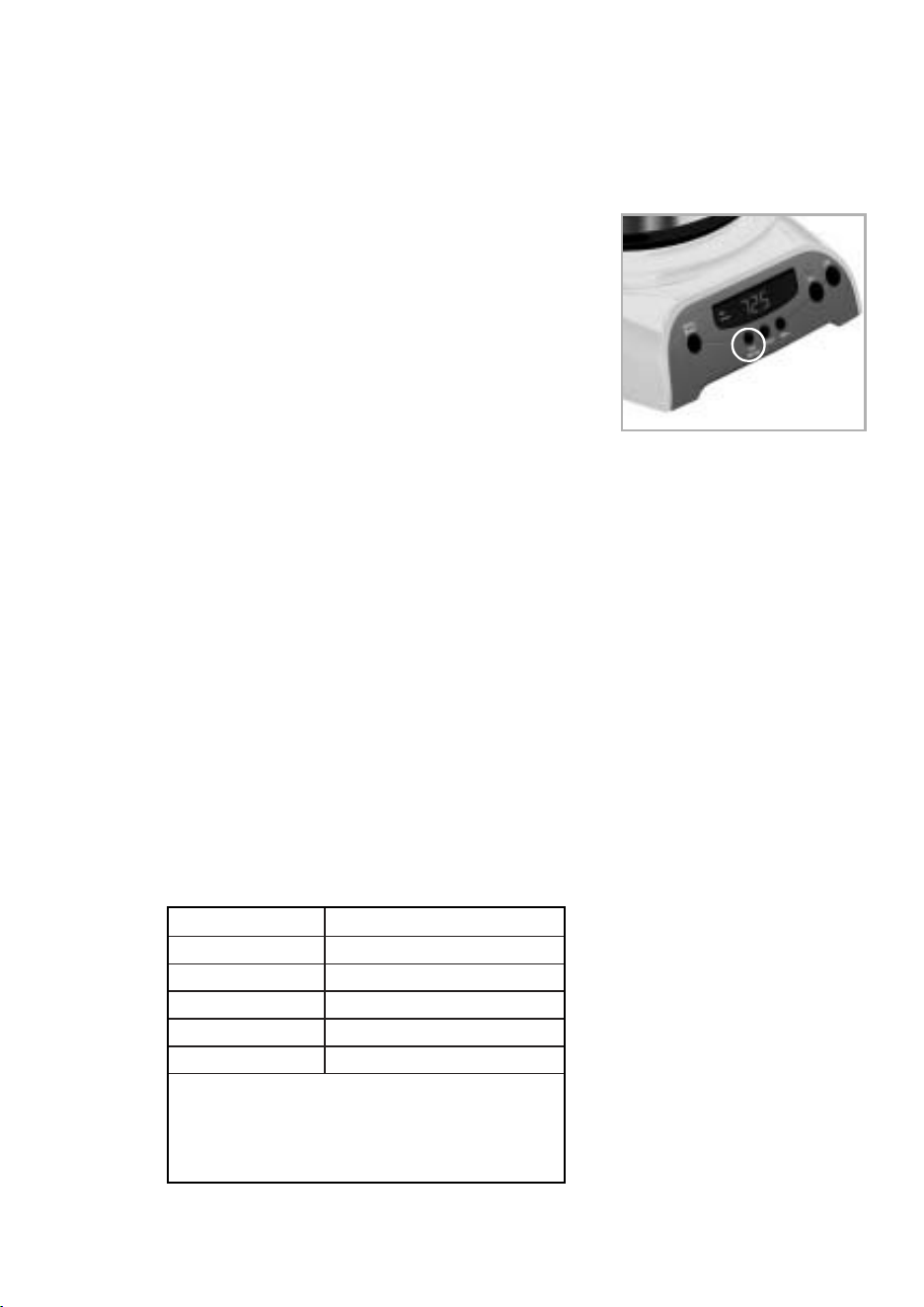
1918
C O N F I G U R A C I Ó N D E L R E L O J Y H O R A D E
P R E P A R A C I Ó N D E M O R A D A
Modelos programables (DRX20/DRX23 y DRTX84/DRTX85) ú nicamente
Para configurar el reloj:
1. Enchufe el cable de alimentació n eléctrica en un tomacorriente eléctrico está ndar. El reloj
destellará en el panel de control para indicar que la hora
aún no ha sido configurada.
2. Mantenga presionados los botones de HORA y MINUTOS
hasta poner el reloj en hora. El indicador “PM”, ubicado a
la izquierda de la pantalla, se encenderá .
¡El reloj ya está configurado!
NOTA: Si presiona cualquier botó n antes de poner en hora el
reloj, éste comenzará a funcionar desde las 12:00 am. Si
desea utilizar la funció n de preparació n demorada, debe
poner en hora el reloj.
Para seleccionar la hora de preparació n demorada:
Después de poner el reloj en hora, simplemente mantenga presionado el botó n de
CONFIGURACIÓ N DE DEMORA (Figura 1) y seleccione la hora de preparació n demorada
presionando los botones de HORA y MINUTOS.
El indicador “PM”, ubicado a la izquierda de la pantalla, se encenderá .
¡La hora de preparació n demorada ya está configurada!
NOTA: Para activar el ciclo de PREPARACIÓ N DEMORADA, vea la secció n “Preparació n
demorada de café ”.
Para verificar la hora programada, presione el botó n CONFIGURACIÓ N DE DEMORA. La pantalla
mostrará la hora en que usted ha programado la preparació n de café.
P R E P A R A C I Ó N D E L A C A F E T E R A
Có mo seleccionar y medir el café molido
Para obtener mejores resultados, utilice cucharadas a ras para medir el café molido. Para obtener
una preparació n perfecta, asegú rese de utilizar café molido de grano mediano.
Tabla de medidas de café recomendadas
Para preparar Cantidad de café molido
12 tazas 9 cucharadas
10 tazas 7.5 cucharadas
8 tazas 6.5 cucharadas
6 tazas 4.5 cucharadas
4 tazas 3 cucharadas
1 cucharada a ras = 5 g/0.17 oz.
1 taza = 5 fl. oz. de café preparado
Utilice má s o menos cantidad de café segú n
su preferencia.
Sistema de filtrado de agua (No incluido. Disponible en su tienda preferida o en
el sitio mrcoffee.com)
Su cafetera fue diseñada para utilizar el sistema de filtrado de agua de MR. COFFEE®. Este filtro
de agua a base de carbono mejora el gusto del café, ya que elimina hasta el 97% del cloro
contenido en el agua utilizada para preparar café.
Busque el símbolo que indica compatibilidad con los productos MR. COFFEE® en la parte
inferior del portafiltro. Si no encuentra el símbolo, llame al
1-800-672-6333.
Siga estos pasos para utilizar el sistema de filtrado de agua
en su cafetera MR. COFFEE®:
1. Guiá ndose por el indicador rojo en el armazó n del filtro
de agua, alinee el indicador con la letra del armazó n
que corresponda con el mes en que esté utilizando el
disco por primera vez. Esto le ayudará a recordar que
debe cambiar el disco todos los meses
(aproximadamente 30 ciclos de preparació n).
2. Coloque el filtro de papel MR. COFFEE® o el filtro
permanente dentro del portafiltro. Ponga café molido
dentro del filtro de papel o filtro permanente.
NOTA: Para lograr los mejores resultados, utilice el
sistema de filtrado de agua con un filtro permanente.
3. Coloque el filtro de agua MR. COFFEE® en el portafiltro,
asegurá ndose de que el lado indicado “this side up”
quede orientado hacia arriba y que el filtro de agua esté
nivelado.
4. Cierre la tapa del portafiltro. Ya puede preparar un
delicioso café.
5. Cuando termine de preparar el café, lave el filtro de
agua con agua potable. No lave el filtro de agua en el
lavavajillas.
Para reemplazar los discos de filtrado de agua:Gire la tapa gris del disco en el sistema
de filtrado de agua. Retire el disco usado. Inserte el disco nuevo dentro del armazó n y gire la tapa
a su posició n inicial.
Có mo agregar agua y café molido
1. Levante y abra la tapa del portafiltro. Para su comodidad, usted puede levantar y quitar el
portafiltro retirable.
2. Coloque un filtro de papel para 10 ó 12 tazas marca MR. COFFEE® o un filtro permanente
marca MR. COFFEE® dentro del portafiltro retirable. (Figura 2)
NOTA: Si utiliza filtros de papel, es importante que los lados del
filtro encajen perfectamente dentro del portafiltro. Si el filtro se
dobla, humedé zcalo antes de colocarlo dentro del portafiltro y
agregar café molido y agua.
3. Agregue la cantidad de café deseada y sacuda suavemente para
nivelar el café. Vea la Tabla de medidas de café
recomendadas.
4. Si utiliza el sistema de filtrado de agua de Mr. Coffee®: Luego de
seguir las instrucciones en la secció n de sistema de filtrado de agua,
coloque el filtro de agua de Mr. Coffee® en el portafiltro,
asegurá ndose de que el lado indicado “this side up” quede hacia
arriba y que el filtro de agua esté a ras.
5. Asegúrese de que el filtro esté centrado correctamente y bien insertado dentro del portafiltro.
Indicador
rojo
Armazó n
Disco de filtrado
Tapa del disco
(Figura 1 – Configurar demora)
(Figura 2 - Có mo agregar
agua y café molido)

1918
C O N F I G U R A C I Ó N D E L R E L O J Y H O R A D E
P R E P A R A C I Ó N D E M O R A D A
Modelos programables (DRX20/DRX23 y DRTX84/DRTX85) ú nicamente
Para configurar el reloj:
1. Enchufe el cable de alimentació n eléctrica en un tomacorriente eléctrico está ndar. El reloj
destellará en el panel de control para indicar que la hora
aún no ha sido configurada.
2. Mantenga presionados los botones de HORA y MINUTOS
hasta poner el reloj en hora. El indicador “PM”, ubicado a
la izquierda de la pantalla, se encenderá .
¡El reloj ya está configurado!
NOTA: Si presiona cualquier botó n antes de poner en hora el
reloj, éste comenzará a funcionar desde las 12:00 am. Si
desea utilizar la funció n de preparació n demorada, debe
poner en hora el reloj.
Para seleccionar la hora de preparació n demorada:
Después de poner el reloj en hora, simplemente mantenga presionado el botó n de
CONFIGURACIÓ N DE DEMORA (Figura 1) y seleccione la hora de preparació n demorada
presionando los botones de HORA y MINUTOS.
El indicador “PM”, ubicado a la izquierda de la pantalla, se encenderá .
¡La hora de preparació n demorada ya está configurada!
NOTA: Para activar el ciclo de PREPARACIÓ N DEMORADA, vea la secció n “Preparació n
demorada de café ”.
Para verificar la hora programada, presione el botó n CONFIGURACIÓ N DE DEMORA. La pantalla
mostrará la hora en que usted ha programado la preparació n de café.
P R E P A R A C I Ó N D E L A C A F E T E R A
Có mo seleccionar y medir el café molido
Para obtener mejores resultados, utilice cucharadas a ras para medir el café molido. Para obtener
una preparació n perfecta, asegú rese de utilizar café molido de grano mediano.
Tabla de medidas de café recomendadas
Para preparar Cantidad de café molido
12 tazas 9 cucharadas
10 tazas 7.5 cucharadas
8 tazas 6.5 cucharadas
6 tazas 4.5 cucharadas
4 tazas 3 cucharadas
1 cucharada a ras = 5 g/0.17 oz.
1 taza = 5 fl. oz. de café preparado
Utilice má s o menos cantidad de café segú n
su preferencia.
Sistema de filtrado de agua (No incluido. Disponible en su tienda preferida o en
el sitio mrcoffee.com)
Su cafetera fue diseñada para utilizar el sistema de filtrado de agua de MR. COFFEE®. Este filtro
de agua a base de carbono mejora el gusto del café, ya que elimina hasta el 97% del cloro
contenido en el agua utilizada para preparar café.
Busque el símbolo que indica compatibilidad con los productos MR. COFFEE® en la parte
inferior del portafiltro. Si no encuentra el símbolo, llame al
1-800-672-6333.
Siga estos pasos para utilizar el sistema de filtrado de agua
en su cafetera MR. COFFEE®:
1. Guiá ndose por el indicador rojo en el armazó n del filtro
de agua, alinee el indicador con la letra del armazó n
que corresponda con el mes en que esté utilizando el
disco por primera vez. Esto le ayudará a recordar que
debe cambiar el disco todos los meses
(aproximadamente 30 ciclos de preparació n).
2. Coloque el filtro de papel MR. COFFEE® o el filtro
permanente dentro del portafiltro. Ponga café molido
dentro del filtro de papel o filtro permanente.
NOTA: Para lograr los mejores resultados, utilice el
sistema de filtrado de agua con un filtro permanente.
3. Coloque el filtro de agua MR. COFFEE® en el portafiltro,
asegurá ndose de que el lado indicado “this side up”
quede orientado hacia arriba y que el filtro de agua esté
nivelado.
4. Cierre la tapa del portafiltro. Ya puede preparar un
delicioso café.
5. Cuando termine de preparar el café, lave el filtro de
agua con agua potable. No lave el filtro de agua en el
lavavajillas.
Para reemplazar los discos de filtrado de agua:Gire la tapa gris del disco en el sistema
de filtrado de agua. Retire el disco usado. Inserte el disco nuevo dentro del armazó n y gire la tapa
a su posició n inicial.
Có mo agregar agua y café molido
1. Levante y abra la tapa del portafiltro. Para su comodidad, usted puede levantar y quitar el
portafiltro retirable.
2. Coloque un filtro de papel para 10 ó 12 tazas marca MR. COFFEE® o un filtro permanente
marca MR. COFFEE® dentro del portafiltro retirable. (Figura 2)
NOTA: Si utiliza filtros de papel, es importante que los lados del
filtro encajen perfectamente dentro del portafiltro. Si el filtro se
dobla, humedé zcalo antes de colocarlo dentro del portafiltro y
agregar café molido y agua.
3. Agregue la cantidad de café deseada y sacuda suavemente para
nivelar el café. Vea la Tabla de medidas de café
recomendadas.
4. Si utiliza el sistema de filtrado de agua de Mr. Coffee®: Luego de
seguir las instrucciones en la secció n de sistema de filtrado de agua,
coloque el filtro de agua de Mr. Coffee® en el portafiltro,
asegurá ndose de que el lado indicado “this side up” quede hacia
arriba y que el filtro de agua esté a ras.
5. Asegúrese de que el filtro esté centrado correctamente y bien insertado dentro del portafiltro.
Indicador
rojo
Armazó n
Disco de filtrado
Tapa del disco
(Figura 1 – Configurar demora)
(Figura 2 - Có mo agregar
agua y café molido)
6. Llene la jarra con agua fría y potable hasta la cantidad deseada (1 taza equivale a 5 onzas).
Para lograr un llenado fá cil y preciso, observe las marcas de agua en la jarra de vidrio y en las
ventanas dobles de agua, ya que las mismas indican la cantidad de agua necesaria para
preparar el nú mero de tazas que usted desea. No supere la línea de nivel “MÁ X.”, ya que se
derramará agua fuera del orificio de llenado en la parte posterior del depósito de agua.
La cantidad de café preparado siempre será levemente menor a la cantidad de agua
introducida en el depó sito de agua. Esto se debe a que el café molido absorbe una cantidad
mínima de agua.
7. Vierta el agua dentro del depó sito de agua. Cierre la tapa y coloque la jarra vacía sobre la
placa calentadora.
NOTA: Asegúrese de que la jarra esté correctamente colocada sobre la placa calentadora, ya
que de lo contrario el agua y el café molido se derramará n del portafiltro. Un derrame puede
provocar lesiones físicas o daños a la unidad.
¡PRECAUCIÓ N! Para reducir el riesgo de dañar la jarra y/o de sufrir lesiones físicas,
no agregue agua fría a la jarra si la misma está caliente. Deje enfriar la jarra antes
de utilizarla.
P R E P A R A C I Ó N I N M E D I A T A D E C A F É
1. Luego de completar los pasos en la secció n “Có mo agregar agua y café ” y con la jarra y
el portafiltro correctamente colocados, encienda la cafetera.
Para modelos programables (DRX20/DRX23 y DRTX84/DRTX85): Presione el
botó n de encendido para comenzar el ciclo de preparació n. La luz indicadora de color verde se
encenderá para señalar que la cafetera está filtrando café. Cuando el ciclo de preparació n haya
finalizado, la cafetera cambiará al modo de calentamiento de café.
La cafetera conservará el café caliente durante 2 horas, y luego se apagará automá ticamente.
Las cafeteras térmicas se apagan inmediatamente después de que finaliza el ciclo de
preparació n.
Mientras el café se esté filtrando, la funció n de pausa y servir le permitirá servirse una taza de
café de la jarra. VUELVA A COLOCAR LA JARRA SOBRE LA PLACA CALENTADORA ANTES DE
30 SEGUNDOS PARA EVITAR DERRAMES Y POSIBLES LESIONES.
Para apagar la cafetera, presione el botó n de apagado.
Para modelos con interruptor de encendido (DR12/DR13/DRS12/DRS13):
Presione el interruptor de encendido/apagado en el panel de control de modo que se encienda
la luz indicadora de color verde. La luz indica que la cafetera está encendida y que el ciclo de
preparació n está por comenzar.
Mientras el café se esté filtrando, la funció n de pausa y servir le permite servirse una taza de
café de la jarra. VUELVA A COLOCAR LA JARRA SOBRE LA PLACA CALENTADORA ANTES DE
30 SEGUNDOS PARA EVITAR DERRAMES Y POSIBLES LESIONES.
Para apagar la cafetera, presione el interruptor para que la luz indicadora se apague.
La cafetera conservará el café caliente durante 2 horas y luego se apagará automá ticamente.
(Modelos DRS12/DRS13 únicamente)
Si el portafiltros se derrama o no vierte café dentro de la jarra, no lo
abra. Apague la cafetera. Desenchufe la cafetera y espere hasta que se
enfríe antes de manipularla.
2. Después de que el café molido se haya enfriado, abra con cuidado el portafiltro y deseche
el café.
3. Asegúrese de que la jarra esté vacía antes de comenzar a preparar café.
4. Asegúrese de apagar la cafetera cuando no la use.
!
P R E P A R A C I Ó N D E M O R A D A D E C A F É
(La preparació n demorada só lo se ofrece en los modelos DRX20/DRX23 y DRTX84/DRTX85)
1. Antes de que la cafetera pueda comenzar a preparar el café como se describe en la secció n
“Configuració n del reloj y hora de preparació n demorada”, es necesario
seleccionar la hora en el reloj.
2. Prepare la cafetera como se describe en la secció n “Có mo agregar agua y café molido”.
3. Para activar la PREPARACIÓ N DEMORADA y programar la cafetera para que haga café má s
tarde, presione el botó n de preparació n demorada. Se iluminará el indicador de DEMORA.
La cafetera está ahora lista para preparar café automá ticamente má s tarde, a una hora
establecida.
4. A la hora establecida, el indicador de encendido de color verde se iluminará . Al mismo tiempo,
se apagará la luz de DEMORA, para indicar que ha comenzado la preparació n.
5. La placa de calentamiento de la cafetera conservará el café caliente durante 2 horas y luego se
apagará automá ticamente. Las cafeteras térmicas se apagan inmediatamente después de que
finaliza el ciclo de preparació n.
Como función de seguridad, su cafetera NO se pondrá en marcha automá ticamente
al día siguiente. Si desea que su café sea preparado a la misma hora todos los
días, simplemente coloque un filtro nuevo, café y agua y seleccione
PREPARACIÓ N DEMORADA repitiendo los pasos 2 y 3 anteriores.
Para cancelar la PREPARACIÓ N DEMORADA: Presione el botó n de APAGADO. También se
apagará la luz verde indicadora de PREPARACIÓ N DEMORADA.
L I M P I E Z A Y M A N T E N I M I E N T O D E L A C A F E T E R A
Limpieza diaria
Antes de limpiar la cafetera, desenchúfela y deje que se enfríe.
Retire el portafiltro, el filtro permanente (no se incluye en todos los modelos), la jarra y su tapa, y
lá velos en una solució n de agua caliente y jabó n líquido suave.
No utilice nunca limpiadores abrasivos, lana de acero u otros materiales á speros. Las piezas que
pueden lavarse con seguridad en el estante superior del lavavajillas son las siguientes: jarra de
vidrio y tapa, portafiltros y filtro permanente. El disco de filtrado de agua y la jarra
té rmica no deben lavarse en un lavavajillas.
¡PRECAUCIÓ N! No sumerja nunca la cafetera en agua u otros líquidos y no la lave en
el lavavajillas.
Servicio y mantenimiento regulares
Descalcificació n de la cafetera MR. COFFEE®
Los minerales (calcio) contenidos en el agua dejan depó sitos en la cafetera que afectan su
rendimiento. Se recomienda eliminar regularmente estos depó sitos utilizando el limpiador
MR. COFFEE® o bien vinagre. El limpiador MR. COFFEE® puede adquirirse en numerosas tiendas
o llamando al Departamento de Servicio al Consumidor de MR. COFFEE®, 1-800-MR COFFEE (1-
800-672-6333).
1. Para preparar la cantidad de solució n de limpieza necesaria para limpiar la cafetera, siga las
instrucciones en el envase del limpiador de cafeteras MR. COFFEE®. Vierta la mezcla en el
depó sito de agua. Si utiliza filtrado de agua, antes de descalcificar la cafetera retire de la
misma el disco de filtrado.
NOTA: En lugar del limpiador, pueden utilizarse 4 tazas (20 fl. oz.) de vinagre domé stico blanco
no diluido.
20 21
!
!

6. Llene la jarra con agua fría y potable hasta la cantidad deseada (1 taza equivale a 5 onzas).
Para lograr un llenado fá cil y preciso, observe las marcas de agua en la jarra de vidrio y en las
ventanas dobles de agua, ya que las mismas indican la cantidad de agua necesaria para
preparar el nú mero de tazas que usted desea. No supere la línea de nivel “MÁ X.”, ya que se
derramará agua fuera del orificio de llenado en la parte posterior del depósito de agua.
La cantidad de café preparado siempre será levemente menor a la cantidad de agua
introducida en el depó sito de agua. Esto se debe a que el café molido absorbe una cantidad
mínima de agua.
7. Vierta el agua dentro del depó sito de agua. Cierre la tapa y coloque la jarra vacía sobre la
placa calentadora.
NOTA: Asegúrese de que la jarra esté correctamente colocada sobre la placa calentadora, ya
que de lo contrario el agua y el café molido se derramará n del portafiltro. Un derrame puede
provocar lesiones físicas o daños a la unidad.
¡PRECAUCIÓ N! Para reducir el riesgo de dañar la jarra y/o de sufrir lesiones físicas,
no agregue agua fría a la jarra si la misma está caliente. Deje enfriar la jarra antes
de utilizarla.
P R E P A R A C I Ó N I N M E D I A T A D E C A F É
1. Luego de completar los pasos en la secció n “Có mo agregar agua y café ” y con la jarra y
el portafiltro correctamente colocados, encienda la cafetera.
Para modelos programables (DRX20/DRX23 y DRTX84/DRTX85): Presione el
botó n de encendido para comenzar el ciclo de preparació n. La luz indicadora de color verde se
encenderá para señalar que la cafetera está filtrando café. Cuando el ciclo de preparació n haya
finalizado, la cafetera cambiará al modo de calentamiento de café.
La cafetera conservará el café caliente durante 2 horas, y luego se apagará automá ticamente.
Las cafeteras térmicas se apagan inmediatamente después de que finaliza el ciclo de
preparació n.
Mientras el café se esté filtrando, la funció n de pausa y servir le permitirá servirse una taza de
café de la jarra. VUELVA A COLOCAR LA JARRA SOBRE LA PLACA CALENTADORA ANTES DE
30 SEGUNDOS PARA EVITAR DERRAMES Y POSIBLES LESIONES.
Para apagar la cafetera, presione el botó n de apagado.
Para modelos con interruptor de encendido (DR12/DR13/DRS12/DRS13):
Presione el interruptor de encendido/apagado en el panel de control de modo que se encienda
la luz indicadora de color verde. La luz indica que la cafetera está encendida y que el ciclo de
preparació n está por comenzar.
Mientras el café se esté filtrando, la funció n de pausa y servir le permite servirse una taza de
café de la jarra. VUELVA A COLOCAR LA JARRA SOBRE LA PLACA CALENTADORA ANTES DE
30 SEGUNDOS PARA EVITAR DERRAMES Y POSIBLES LESIONES.
Para apagar la cafetera, presione el interruptor para que la luz indicadora se apague.
La cafetera conservará el café caliente durante 2 horas y luego se apagará automá ticamente.
(Modelos DRS12/DRS13 únicamente)
Si el portafiltros se derrama o no vierte café dentro de la jarra, no lo
abra. Apague la cafetera. Desenchufe la cafetera y espere hasta que se
enfríe antes de manipularla.
2. Después de que el café molido se haya enfriado, abra con cuidado el portafiltro y deseche
el café.
3. Asegúrese de que la jarra esté vacía antes de comenzar a preparar café.
4. Asegúrese de apagar la cafetera cuando no la use.
!
P R E P A R A C I Ó N D E M O R A D A D E C A F É
(La preparació n demorada só lo se ofrece en los modelos DRX20/DRX23 y DRTX84/DRTX85)
1. Antes de que la cafetera pueda comenzar a preparar el café como se describe en la secció n
“Configuració n del reloj y hora de preparació n demorada”, es necesario
seleccionar la hora en el reloj.
2. Prepare la cafetera como se describe en la secció n “Có mo agregar agua y café molido”.
3. Para activar la PREPARACIÓ N DEMORADA y programar la cafetera para que haga café má s
tarde, presione el botó n de preparació n demorada. Se iluminará el indicador de DEMORA.
La cafetera está ahora lista para preparar café automá ticamente má s tarde, a una hora
establecida.
4. A la hora establecida, el indicador de encendido de color verde se iluminará . Al mismo tiempo,
se apagará la luz de DEMORA, para indicar que ha comenzado la preparació n.
5. La placa de calentamiento de la cafetera conservará el café caliente durante 2 horas y luego se
apagará automá ticamente. Las cafeteras térmicas se apagan inmediatamente después de que
finaliza el ciclo de preparació n.
Como función de seguridad, su cafetera NO se pondrá en marcha automá ticamente
al día siguiente. Si desea que su café sea preparado a la misma hora todos los
días, simplemente coloque un filtro nuevo, café y agua y seleccione
PREPARACIÓ N DEMORADA repitiendo los pasos 2 y 3 anteriores.
Para cancelar la PREPARACIÓ N DEMORADA: Presione el botó n de APAGADO. También se
apagará la luz verde indicadora de PREPARACIÓ N DEMORADA.
L I M P I E Z A Y M A N T E N I M I E N T O D E L A C A F E T E R A
Limpieza diaria
Antes de limpiar la cafetera, desenchúfela y deje que se enfríe.
Retire el portafiltro, el filtro permanente (no se incluye en todos los modelos), la jarra y su tapa, y
lá velos en una solució n de agua caliente y jabó n líquido suave.
No utilice nunca limpiadores abrasivos, lana de acero u otros materiales á speros. Las piezas que
pueden lavarse con seguridad en el estante superior del lavavajillas son las siguientes: jarra de
vidrio y tapa, portafiltros y filtro permanente. El disco de filtrado de agua y la jarra
té rmica no deben lavarse en un lavavajillas.
¡PRECAUCIÓ N! No sumerja nunca la cafetera en agua u otros líquidos y no la lave en
el lavavajillas.
Servicio y mantenimiento regulares
Descalcificació n de la cafetera MR. COFFEE®
Los minerales (calcio) contenidos en el agua dejan depó sitos en la cafetera que afectan su
rendimiento. Se recomienda eliminar regularmente estos depó sitos utilizando el limpiador
MR. COFFEE® o bien vinagre. El limpiador MR. COFFEE® puede adquirirse en numerosas tiendas
o llamando al Departamento de Servicio al Consumidor de MR. COFFEE®, 1-800-MR COFFEE (1-
800-672-6333).
1. Para preparar la cantidad de solució n de limpieza necesaria para limpiar la cafetera, siga las
instrucciones en el envase del limpiador de cafeteras MR. COFFEE®. Vierta la mezcla en el
depó sito de agua. Si utiliza filtrado de agua, antes de descalcificar la cafetera retire de la
misma el disco de filtrado.
NOTA: En lugar del limpiador, pueden utilizarse 4 tazas (20 fl. oz.) de vinagre domé stico blanco
no diluido.
20 21
!
!

2. Coloque en el portafiltro de la cafetera un filtro de papel vacío para 10 a 12 tazas MR.
COFFEE® o un filtro permanente MR. COFFEE® y cierre la tapa del depó sito.
3. Ponga la jarra vacía nuevamente en la unidad, centrada sobre la placa de calentamiento.
4. Haga funcionar la cafetera y llene tres tazas con solució n de limpieza.
5. Apague la cafetera y déjela reposar por 30 minutos.
6. Haga funcionar la cafetera con el resto de la solució n de limpieza.
7. Deseche la solució n de limpieza y limpie la jarra completamente con agua limpia.
8. Llene el depó sito de agua con agua limpia y fresca.
9. Ponga la jarra vacía nuevamente en la cafetera, centrada sobre la placa de calentamiento.
10. Retire y deseche el filtro de papel utilizado durante el ciclo de limpieza. Si durante la operació n
de limpieza se utilizó un filtro permanente MR. COFFEE®, retírelo y enjuá guelo completamente
antes de ponerlo en el portafiltro.
11. Ponga la unidad en marcha y deje que se realice un ciclo de preparació n completo.
12. Repita una vez má s los pasos 8 a 11.
Ahora, su cafetera está limpia y en condiciones de preparar el má s delicioso café caliente.
Intervalos de descalcificació n sugeridos
Tipo de agua Frecuencia de limpieza
Agua blanda Cada 80 ciclos de preparació n
Agua dura Cada 40 ciclos de preparació n
Reemplazo de discos de filtrado de agua
El disco de filtrado de agua debe ser reemplazado una vez al mes (aproximadamente cada
30 ciclos de preparació n de café). Si la má quina no se ha de utilizar por un plazo prolongado,
enjuague el filtro de agua con agua corriente y limpie la cafetera antes de volver a usarla.
Limpieza de la jarra
El agua dura puede dejar manchas blancuzcas en la jarra y el café puede teñirlas de color marró n.
Para eliminar las manchas en la jarra:
1. Llene la jarra con una solució n de partes iguales de agua y vinagre y deje la solució n dentro de
la jarra por unos 20 minutos.
2. Deseche la solució n y luego lave y enjuague la jarra.
No utilice limpiadores altamente abrasivos, pues podrían rayar la jarra y éste podría entonces
romperse.
NOTA: No lave la garrafa térmica en el lavavajillas.
22 23
G U Í A D E R E S O L U C I Ó N D E P R O B L E M A S D E S U
C A F E T E R A
Su cafetera MR. COFFEE® ha sido cuidadosamente diseñada para brindarle muchos años de servicio sin
problemas. En el caso poco probable de que su nueva cafetera no funcione satisfactoriamente, lea los posibles
problemas que se enumeran a continuació n y siga los pasos recomendados ANTES de llamar a un Centro de
Servicio Sunbeam autorizado.
PROBLEMA POSIBLE CAUSA SOLUCIÓ N
LA LUZ DE ENCENDIDO El aparato está desenchufado. ENCHÚ FELO
NO SE ILUMINA
Hay un corte de electricidad. ESPERE HASTA QUE SE REANUDE
SUMINISTRO DE ELECTRICIDAD.
LA CAFETERA El aparato está desenchufado. ENCHÚ FELO
NO FILTRA
Hay un corte de electricidad. ESPERE HASTA QUE SE REANUDE
EL SUMINISTRO DE ELECTRICIDAD.
El depó sito de agua está vacío. COMPRUEBE LAS VENTANAS DE AGUA
El portafiltro no está COLOQUE EL PORTAFILTRO
correctamente colocado. CORRECTAMENTE.
La jarra no está bien colocada COLOQUE LA JARRA CORRECTAMENTE
en la placa calentadora. EN LA PLACA CALENTADORA.
LA CAFETERA SÓ LO No hay café molido dentro AGREGUE LA CANTIDAD DE
PRODUCE AGUA del portafiltro. CAFÉ DESEADA.
LA CAFETERA FILTRA La cafetera debe ser limpiada. LIMPIE LA CAFETERA TAL COMO SE
LENTAMENTE DESCRIBE EN LA SECCIÓ N “LIMPIEZA
Y MANTENIMIENTO DE LA CAFETERA”.
EL PORTAFILTRO El portafiltro no está COLOQUE EL PORTAFILTRO
DESBORDA. correctamente colocado. CORRECTAMENTE.
La jarra no está correctamente COLOQUE LA JARRA CORRECTAMENTE
colocada en la placa calentadora. EN LA PLACA CALENTADORA.
La jarra no tiene la tapa colocada. COLOQUE LA TAPA EN LA JARRA.
El filtro tiene demasiado RETIRE EL FILTRO Y DESECHE EL CAFÉ
café molido. MOLIDO. SI EL FILTRO ES DE PAPEL,
REEMPLÁ CELO. SI ES UN FILTRO
PERMANENTE, ENJUÁ GUELO.
COMIENCE NUEVAMENTE EL PROCESO
DE PREPARACIÓ N.
La jarra fue retirada de la APAGUE Y DESENCHUFE LA UNIDAD.
placa calentadora por má s de DEJE QUE SE ENFRÍE. LIMPIE EL
30 segundos. DERRAME. NO COLOQUE LA JARRA
CALIENTE SOBRE LA PLACA DE
CALENTAMIENTO HÚ MEDA PORQUE
PODRÍA QUEBRARSE.
LA CAFETERA NO Hay un corte de electricidad. ESPERE HASTA QUE SE REANUDE
ESTÁ CALIENTE EL SUMINISTRO DE ELECTRICIDAD.
Se ha activado el APAGADO PARA OBTENER LOS MEJORES
AUTOMÁ TICO. RESULTADOS, FILTRE UNA NUEVA
JARRA DE CAFÉ.
EL CAFÉ NO TIENE Se utilizó café molido con un grano UTILICE EL GRANO RECOMENDADO
BUEN SABOR no adecuado para una cafetera PARA LAS CAFETERAS DE GOTEO
de goteo. AUTOMÁ TICAS.
Las cantidades de café y de UTILICE LAS CANTIDADES
agua no son adecuadas. ADECUADAS DE CAFÉ Y DE AGUA.
La cafetera debe ser limpiada. LIMPIE LA CAFETERA TAL COMO SE
DESCRIBE EN LA SECCIÓ N “LIMPIEZA
Y MANTENIMIENTO DE LA CAFETERA”.
HAY CAFÉ MOLIDO El filtro no está correctamente COLOQUE EL FILTRO CORRECTAMENTE
DENTRO DEL CAFÉ colocado en el portafiltro. DENTRO DEL PORTAFILTRO.
LÍQUIDO
El filtro se aplastó . RETIRE EL FILTRO Y REEMPLÁ CELO.
¿Aún tiene preguntas? Llame sin cargo al Departamento de Servicio al Consumidor de MR. COFFEE®,
1-800-MR COFFEE (1-800-672-6333) o visítenos en www.mrcoffee.com.
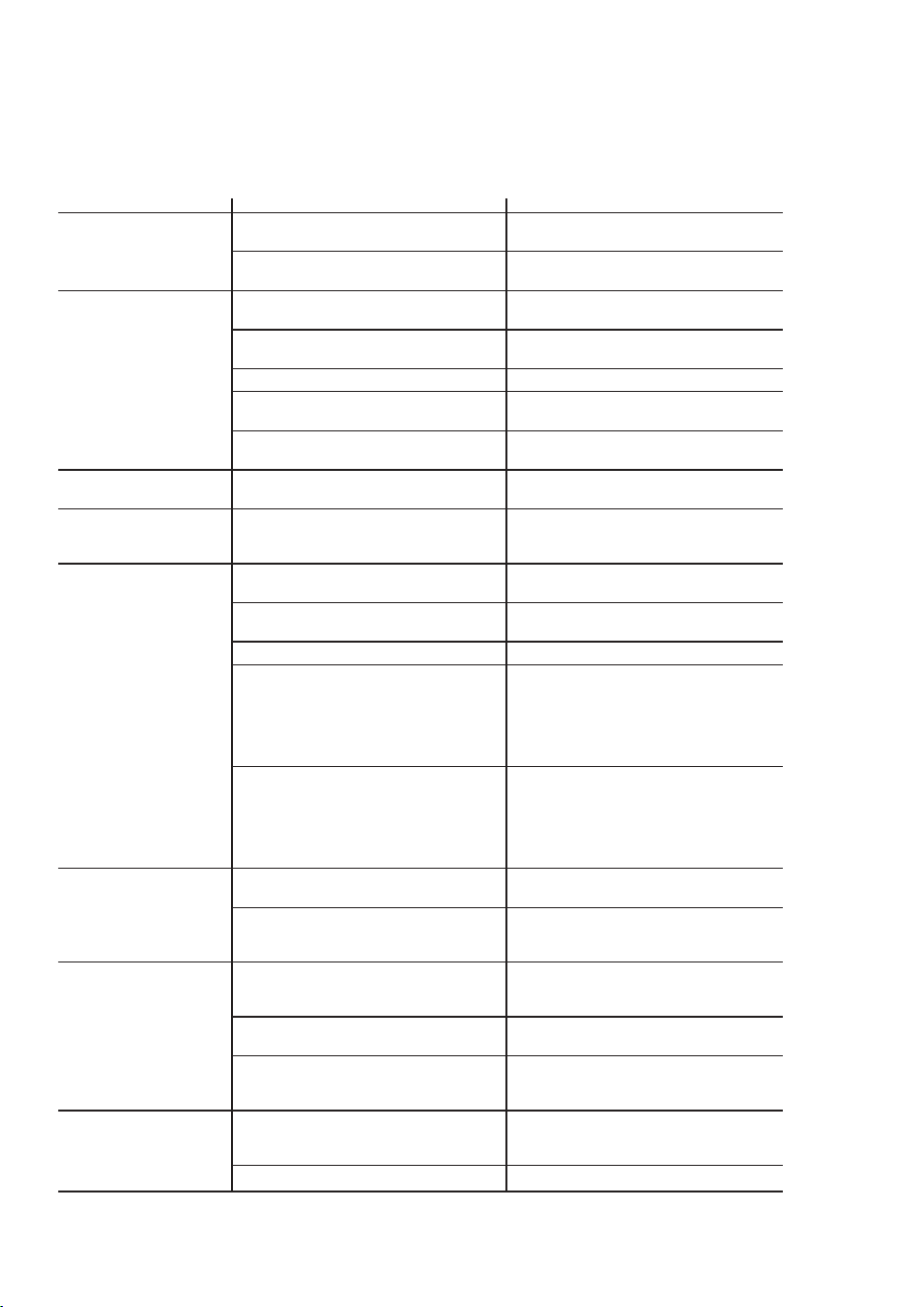
2. Coloque en el portafiltro de la cafetera un filtro de papel vacío para 10 a 12 tazas MR.
COFFEE® o un filtro permanente MR. COFFEE® y cierre la tapa del depó sito.
3. Ponga la jarra vacía nuevamente en la unidad, centrada sobre la placa de calentamiento.
4. Haga funcionar la cafetera y llene tres tazas con solució n de limpieza.
5. Apague la cafetera y déjela reposar por 30 minutos.
6. Haga funcionar la cafetera con el resto de la solució n de limpieza.
7. Deseche la solució n de limpieza y limpie la jarra completamente con agua limpia.
8. Llene el depó sito de agua con agua limpia y fresca.
9. Ponga la jarra vacía nuevamente en la cafetera, centrada sobre la placa de calentamiento.
10. Retire y deseche el filtro de papel utilizado durante el ciclo de limpieza. Si durante la operació n
de limpieza se utilizó un filtro permanente MR. COFFEE®, retírelo y enjuá guelo completamente
antes de ponerlo en el portafiltro.
11. Ponga la unidad en marcha y deje que se realice un ciclo de preparació n completo.
12. Repita una vez má s los pasos 8 a 11.
Ahora, su cafetera está limpia y en condiciones de preparar el má s delicioso café caliente.
Intervalos de descalcificació n sugeridos
Tipo de agua Frecuencia de limpieza
Agua blanda Cada 80 ciclos de preparació n
Agua dura Cada 40 ciclos de preparació n
Reemplazo de discos de filtrado de agua
El disco de filtrado de agua debe ser reemplazado una vez al mes (aproximadamente cada
30 ciclos de preparació n de café). Si la má quina no se ha de utilizar por un plazo prolongado,
enjuague el filtro de agua con agua corriente y limpie la cafetera antes de volver a usarla.
Limpieza de la jarra
El agua dura puede dejar manchas blancuzcas en la jarra y el café puede teñirlas de color marró n.
Para eliminar las manchas en la jarra:
1. Llene la jarra con una solució n de partes iguales de agua y vinagre y deje la solució n dentro de
la jarra por unos 20 minutos.
2. Deseche la solució n y luego lave y enjuague la jarra.
No utilice limpiadores altamente abrasivos, pues podrían rayar la jarra y éste podría entonces
romperse.
NOTA: No lave la garrafa térmica en el lavavajillas.
22 23
G U Í A D E R E S O L U C I Ó N D E P R O B L E M A S D E S U
C A F E T E R A
Su cafetera MR. COFFEE® ha sido cuidadosamente diseñada para brindarle muchos años de servicio sin
problemas. En el caso poco probable de que su nueva cafetera no funcione satisfactoriamente, lea los posibles
problemas que se enumeran a continuació n y siga los pasos recomendados ANTES de llamar a un Centro de
Servicio Sunbeam autorizado.
PROBLEMA POSIBLE CAUSA SOLUCIÓ N
LA LUZ DE ENCENDIDO El aparato está desenchufado. ENCHÚ FELO
NO SE ILUMINA
Hay un corte de electricidad. ESPERE HASTA QUE SE REANUDE
SUMINISTRO DE ELECTRICIDAD.
LA CAFETERA El aparato está desenchufado. ENCHÚ FELO
NO FILTRA
Hay un corte de electricidad. ESPERE HASTA QUE SE REANUDE
EL SUMINISTRO DE ELECTRICIDAD.
El depó sito de agua está vacío. COMPRUEBE LAS VENTANAS DE AGUA
El portafiltro no está COLOQUE EL PORTAFILTRO
correctamente colocado. CORRECTAMENTE.
La jarra no está bien colocada COLOQUE LA JARRA CORRECTAMENTE
en la placa calentadora. EN LA PLACA CALENTADORA.
LA CAFETERA SÓ LO No hay café molido dentro AGREGUE LA CANTIDAD DE
PRODUCE AGUA del portafiltro. CAFÉ DESEADA.
LA CAFETERA FILTRA La cafetera debe ser limpiada. LIMPIE LA CAFETERA TAL COMO SE
LENTAMENTE DESCRIBE EN LA SECCIÓ N “LIMPIEZA
Y MANTENIMIENTO DE LA CAFETERA”.
EL PORTAFILTRO El portafiltro no está COLOQUE EL PORTAFILTRO
DESBORDA. correctamente colocado. CORRECTAMENTE.
La jarra no está correctamente COLOQUE LA JARRA CORRECTAMENTE
colocada en la placa calentadora. EN LA PLACA CALENTADORA.
La jarra no tiene la tapa colocada. COLOQUE LA TAPA EN LA JARRA.
El filtro tiene demasiado RETIRE EL FILTRO Y DESECHE EL CAFÉ
café molido. MOLIDO. SI EL FILTRO ES DE PAPEL,
REEMPLÁ CELO. SI ES UN FILTRO
PERMANENTE, ENJUÁ GUELO.
COMIENCE NUEVAMENTE EL PROCESO
DE PREPARACIÓ N.
La jarra fue retirada de la APAGUE Y DESENCHUFE LA UNIDAD.
placa calentadora por má s de DEJE QUE SE ENFRÍE. LIMPIE EL
30 segundos. DERRAME. NO COLOQUE LA JARRA
CALIENTE SOBRE LA PLACA DE
CALENTAMIENTO HÚ MEDA PORQUE
PODRÍA QUEBRARSE.
LA CAFETERA NO Hay un corte de electricidad. ESPERE HASTA QUE SE REANUDE
ESTÁ CALIENTE EL SUMINISTRO DE ELECTRICIDAD.
Se ha activado el APAGADO PARA OBTENER LOS MEJORES
AUTOMÁ TICO. RESULTADOS, FILTRE UNA NUEVA
JARRA DE CAFÉ.
EL CAFÉ NO TIENE Se utilizó café molido con un grano UTILICE EL GRANO RECOMENDADO
BUEN SABOR no adecuado para una cafetera PARA LAS CAFETERAS DE GOTEO
de goteo. AUTOMÁ TICAS.
Las cantidades de café y de UTILICE LAS CANTIDADES
agua no son adecuadas. ADECUADAS DE CAFÉ Y DE AGUA.
La cafetera debe ser limpiada. LIMPIE LA CAFETERA TAL COMO SE
DESCRIBE EN LA SECCIÓ N “LIMPIEZA
Y MANTENIMIENTO DE LA CAFETERA”.
HAY CAFÉ MOLIDO El filtro no está correctamente COLOQUE EL FILTRO CORRECTAMENTE
DENTRO DEL CAFÉ colocado en el portafiltro. DENTRO DEL PORTAFILTRO.
LÍQUIDO
El filtro se aplastó . RETIRE EL FILTRO Y REEMPLÁ CELO.
¿Aún tiene preguntas? Llame sin cargo al Departamento de Servicio al Consumidor de MR. COFFEE®,
1-800-MR COFFEE (1-800-672-6333) o visítenos en www.mrcoffee.com.

24
I N F O R M A C I Ó N D E G A R A N T Í A
GARANTÍA LIMITADA POR UN AÑ O
Sunbeam Products, Inc. o, si se encuentra en Canadá , Sunbeam Corporation (Canada) Limited (en
forma conjunta, “Sunbeam”) garantiza que por un período de un año a partir de la fecha de
compra, este producto no tendrá defectos de materiales ni de mano de obra. Sunbeam, a su
elecció n, reparará o reemplazará este producto o cualquier componente del mismo que tenga
defectos durante el período de garantía. El reemplazo se realizará por un producto o componente
nuevo o reparado. Si el producto ya no estuviera disponible, se lo reemplazará por un producto
similar de valor igual o superior. Ésta es su garantía exclusiva de Sunbeam.
La garantía es vá lida para el comprador minorista original a partir de la fecha de la compra inicial
y no es transferible. Conserve el recibo de compra original. Para solicitar servicio en garantía se
requiere presentar un recibo de compra. Los agentes y centros de servicio de Sunbeam o las tiendas
minoristas que venden productos Sunbeam no tienen derecho a alterar, modificar ni cambiar de
ningún otro modo los términos y las condiciones de esta garantía.
Esta garantía no cubre el desgaste normal de las piezas ni los daños que se produzcan como
resultado de: uso negligente o mal uso del producto, uso de tensió n o corriente inapropiada, uso
contrario a las instrucciones operativas, desarmado, reparació n o alteració n por un tercero que no
sea Sunbeam o un Centro de Servicio Sunbeam autorizado. Asimismo, la garantía no cubre: actos
de fuerza mayor tales como incendios, inundaciones, huracanes y tornados.
¿Cuá l es el límite de responsabilidad de Sunbeam?
Sunbeam no será responsable de daños incidentales o emergentes causados por el incumplimiento
de alguna garantía o condició n expresa, implícita o legal.
Excepto en la medida en que lo prohíba la ley aplicable, cualquier garantía o condició n implícita
de comerciabilidad o aptitud para un fin determinado se limita, en cuanto a su duració n, a la
duració n de la garantía antes mencionada.
Sunbeam queda exenta de toda otra garantía, condició n o manifestació n, expresa, implícita, legal
o de cualquier otra naturaleza.
Sunbeam no será responsable de ningún tipo de daño emergente de la compra, uso o mal uso del
producto, o imposibilidad de usar el producto, incluidos los daños incidentales, especiales,
emergentes o similares, o la pérdida de ganancias, ni de los daños emergentes de un hecho ilícito
civil, incluidos negligencia, culpa grave o culpa por parte de Sunbeam, sus representantes o
empleados, ni de ningú n incumplimiento contractual, sea de una obligació n esencial o de otra
naturaleza, ni de ningú n reclamo iniciado contra el comprador por un tercero.
Algunas provincias, estados o jurisdicciones no permiten la exclusió n o limitació n de los daños
incidentales o emergentes ni las limitaciones a la duració n de las garantías implícitas, de modo que
es posible que la exclusió n o las limitaciones antes mencionadas no se apliquen en su caso.
Esta garantía le otorga derechos legales específicos y es posible que tenga otros derechos que
varíen de un estado, provincia o jurisdicció n a otro.
Có mo solicitar servicio en garantía
En los Estados Unidos
Si tiene alguna pregunta sobre esta garantía o desea obtener el servicio en garantía, llame al
1-800-672-6333 y podrá obtener la direcció n del centro de servicio que le resulte má s conveniente.
En Canadá
Si tiene alguna pregunta sobre esta garantía o desea obtener el servicio en garantía, llame al
1-800-667-8632 y podrá obtener la direcció n del centro de servicio que le resulte má s conveniente.
En los Estados Unidos, esta garantía es ofrecida por Sunbeam Products, Inc., ubicada en Boca
Rató n, Florida 33431. En Canadá , esta garantía es ofrecida por Sunbeam Corporation (Canada)
Limited, ubicada en 5975 Falbourne Street, Mississauga, Ontario L5R 3V8.
POR FAVOR NO DEVUELVA ESTE PRODUCTO A NINGUNA DE ESTAS DIRECCIONES
O AL LUGAR DE COMPRA
S E R V I C I O Y M A N T E N I M I E N T O
Piezas de repuesto
• Filtros de café - Para preparar un café má s sabroso, recomendamos el uso de filtros de papel
marca MR. COFFEE® para 10 a 12 tazas, o filtros permanentes marca MR. COFFEE®. Estos
filtros pueden comprarse en la mayoría de las tiendas de alimentos.
• Filtrado de agua - Los discos de filtrado de repuesto pueden comprarse en su tienda local, o
llamando al 1-800-MR-COFFEE (1-800-672-6333) en los Estados Unidos o al 1-800-667-8623
en Canadá .
• Jarras - Usualmente es posible adquirir jarras de repuesto en la tienda donde compró su
cafetera. Si no puede conseguir un reemplazo, llame al 1-800-MR-COFFEE (1-800-672-6333)
en los Estados Unidos o al 1-800-667-8623 en Canadá y solicite informació n sobre una tienda
que ofrezca jarras de reemplazo.
Reparaciones
Si su cafetera requiere servicio, no la devuelva a la tienda donde la compró . Todas las reparaciones
y reemplazos deben ser realizados por Sunbeam o por un Centro de Servicio MR. COFFEE®
autorizado. Si usted vive en los Estados Unidos o en Canadá , llá menos sin cargo a los siguientes
números de teléfono para averiguar la ubicació n del Centro de Servicio Autorizado má s pró ximo:
Estados Unidos: 1-800-MR COFFEE (1-800-672-6333)
Canadá : 1-800-667-8623
También puede visitar nuestro sitio web, www.mrcoffee.com, donde podrá obtener una lista de
nuestros centros de servicio.
Para que podamos atenderlo mejor, cuando llame tenga a mano el número de modelo de la
cafetera y la fecha de compra. El número de modelo se encuentra en la parte inferior de
la cafetera.
Sus preguntas, comentarios o sugerencias será n bienvenidos. Le solicitamos que en todas sus
comunicaciones con nosotros incluya su nombre completo, direcció n y número de teléfono, así
como una descripción del problema.
Visite nuestro sitio web www.mrcoffee.com y descubra el secreto de preparar una taza de café
perfecta. También encontrará una exquisita selecció n de recetas de cocina, consejos para recibir
invitados y la ú ltima informació n sobre los productos MR. COFFEE®.
24

24
I N F O R M A C I Ó N D E G A R A N T Í A
GARANTÍA LIMITADA POR UN AÑ O
Sunbeam Products, Inc. o, si se encuentra en Canadá , Sunbeam Corporation (Canada) Limited (en
forma conjunta, “Sunbeam”) garantiza que por un período de un año a partir de la fecha de
compra, este producto no tendrá defectos de materiales ni de mano de obra. Sunbeam, a su
elecció n, reparará o reemplazará este producto o cualquier componente del mismo que tenga
defectos durante el período de garantía. El reemplazo se realizará por un producto o componente
nuevo o reparado. Si el producto ya no estuviera disponible, se lo reemplazará por un producto
similar de valor igual o superior. Ésta es su garantía exclusiva de Sunbeam.
La garantía es vá lida para el comprador minorista original a partir de la fecha de la compra inicial
y no es transferible. Conserve el recibo de compra original. Para solicitar servicio en garantía se
requiere presentar un recibo de compra. Los agentes y centros de servicio de Sunbeam o las tiendas
minoristas que venden productos Sunbeam no tienen derecho a alterar, modificar ni cambiar de
ningún otro modo los términos y las condiciones de esta garantía.
Esta garantía no cubre el desgaste normal de las piezas ni los daños que se produzcan como
resultado de: uso negligente o mal uso del producto, uso de tensió n o corriente inapropiada, uso
contrario a las instrucciones operativas, desarmado, reparació n o alteració n por un tercero que no
sea Sunbeam o un Centro de Servicio Sunbeam autorizado. Asimismo, la garantía no cubre: actos
de fuerza mayor tales como incendios, inundaciones, huracanes y tornados.
¿Cuá l es el límite de responsabilidad de Sunbeam?
Sunbeam no será responsable de daños incidentales o emergentes causados por el incumplimiento
de alguna garantía o condició n expresa, implícita o legal.
Excepto en la medida en que lo prohíba la ley aplicable, cualquier garantía o condició n implícita
de comerciabilidad o aptitud para un fin determinado se limita, en cuanto a su duració n, a la
duració n de la garantía antes mencionada.
Sunbeam queda exenta de toda otra garantía, condició n o manifestació n, expresa, implícita, legal
o de cualquier otra naturaleza.
Sunbeam no será responsable de ningún tipo de daño emergente de la compra, uso o mal uso del
producto, o imposibilidad de usar el producto, incluidos los daños incidentales, especiales,
emergentes o similares, o la pérdida de ganancias, ni de los daños emergentes de un hecho ilícito
civil, incluidos negligencia, culpa grave o culpa por parte de Sunbeam, sus representantes o
empleados, ni de ningú n incumplimiento contractual, sea de una obligació n esencial o de otra
naturaleza, ni de ningú n reclamo iniciado contra el comprador por un tercero.
Algunas provincias, estados o jurisdicciones no permiten la exclusió n o limitació n de los daños
incidentales o emergentes ni las limitaciones a la duració n de las garantías implícitas, de modo que
es posible que la exclusió n o las limitaciones antes mencionadas no se apliquen en su caso.
Esta garantía le otorga derechos legales específicos y es posible que tenga otros derechos que
varíen de un estado, provincia o jurisdicció n a otro.
Có mo solicitar servicio en garantía
En los Estados Unidos
Si tiene alguna pregunta sobre esta garantía o desea obtener el servicio en garantía, llame al
1-800-672-6333 y podrá obtener la direcció n del centro de servicio que le resulte má s conveniente.
En Canadá
Si tiene alguna pregunta sobre esta garantía o desea obtener el servicio en garantía, llame al
1-800-667-8632 y podrá obtener la direcció n del centro de servicio que le resulte má s conveniente.
En los Estados Unidos, esta garantía es ofrecida por Sunbeam Products, Inc., ubicada en Boca
Rató n, Florida 33431. En Canadá , esta garantía es ofrecida por Sunbeam Corporation (Canada)
Limited, ubicada en 5975 Falbourne Street, Mississauga, Ontario L5R 3V8.
POR FAVOR NO DEVUELVA ESTE PRODUCTO A NINGUNA DE ESTAS DIRECCIONES
O AL LUGAR DE COMPRA
S E R V I C I O Y M A N T E N I M I E N T O
Piezas de repuesto
• Filtros de café - Para preparar un café má s sabroso, recomendamos el uso de filtros de papel
marca MR. COFFEE® para 10 a 12 tazas, o filtros permanentes marca MR. COFFEE®. Estos
filtros pueden comprarse en la mayoría de las tiendas de alimentos.
• Filtrado de agua - Los discos de filtrado de repuesto pueden comprarse en su tienda local, o
llamando al 1-800-MR-COFFEE (1-800-672-6333) en los Estados Unidos o al 1-800-667-8623
en Canadá .
• Jarras - Usualmente es posible adquirir jarras de repuesto en la tienda donde compró su
cafetera. Si no puede conseguir un reemplazo, llame al 1-800-MR-COFFEE (1-800-672-6333)
en los Estados Unidos o al 1-800-667-8623 en Canadá y solicite informació n sobre una tienda
que ofrezca jarras de reemplazo.
Reparaciones
Si su cafetera requiere servicio, no la devuelva a la tienda donde la compró . Todas las reparaciones
y reemplazos deben ser realizados por Sunbeam o por un Centro de Servicio MR. COFFEE®
autorizado. Si usted vive en los Estados Unidos o en Canadá , llá menos sin cargo a los siguientes
números de teléfono para averiguar la ubicació n del Centro de Servicio Autorizado má s pró ximo:
Estados Unidos: 1-800-MR COFFEE (1-800-672-6333)
Canadá : 1-800-667-8623
También puede visitar nuestro sitio web, www.mrcoffee.com, donde podrá obtener una lista de
nuestros centros de servicio.
Para que podamos atenderlo mejor, cuando llame tenga a mano el número de modelo de la
cafetera y la fecha de compra. El número de modelo se encuentra en la parte inferior de
la cafetera.
Sus preguntas, comentarios o sugerencias será n bienvenidos. Le solicitamos que en todas sus
comunicaciones con nosotros incluya su nombre completo, direcció n y número de teléfono, así
como una descripción del problema.
Visite nuestro sitio web www.mrcoffee.com y descubra el secreto de preparar una taza de café
perfecta. También encontrará una exquisita selecció n de recetas de cocina, consejos para recibir
invitados y la ú ltima informació n sobre los productos MR. COFFEE®.
24

Notes Notes
Notes Notes

©2005 Sunbeam Products, Inc. All rights reserved.
Mr. Coffee® is a registered trademark of Sunbeam Products, Inc.
Distributed by Sunbeam Products, Inc., Boca Raton, Florida 33431.
U.S. 1-800-MR COFFEE (1-800-672-6333)
Canada 1-800-667-8623
Visit us at www.mrcoffee.com
You will find exciting and entertaining tips and ideas,
including great recipes!
©2005 Sunbeam Products, Inc. Todos los derechos reservados.
Mr. Coffee® es una marca registrada es una marca de Sunbeam Products, Inc.
Distribuido por Sunbeam Products, Inc., Boca Rató n, Florida 33431.
Visítenos en www.mrcoffee.com
Ahí encontrará consejos e ideas excitantes y entretenidos,
¡incluyendo excelentes recetas!
Printed in China/Impreso en China P.N. 114193
Coffeemaker / Cafetera
DR Series / Serie DR
User Manual /
Manual del Usuario
www.mrcoffee.com