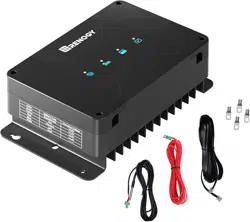
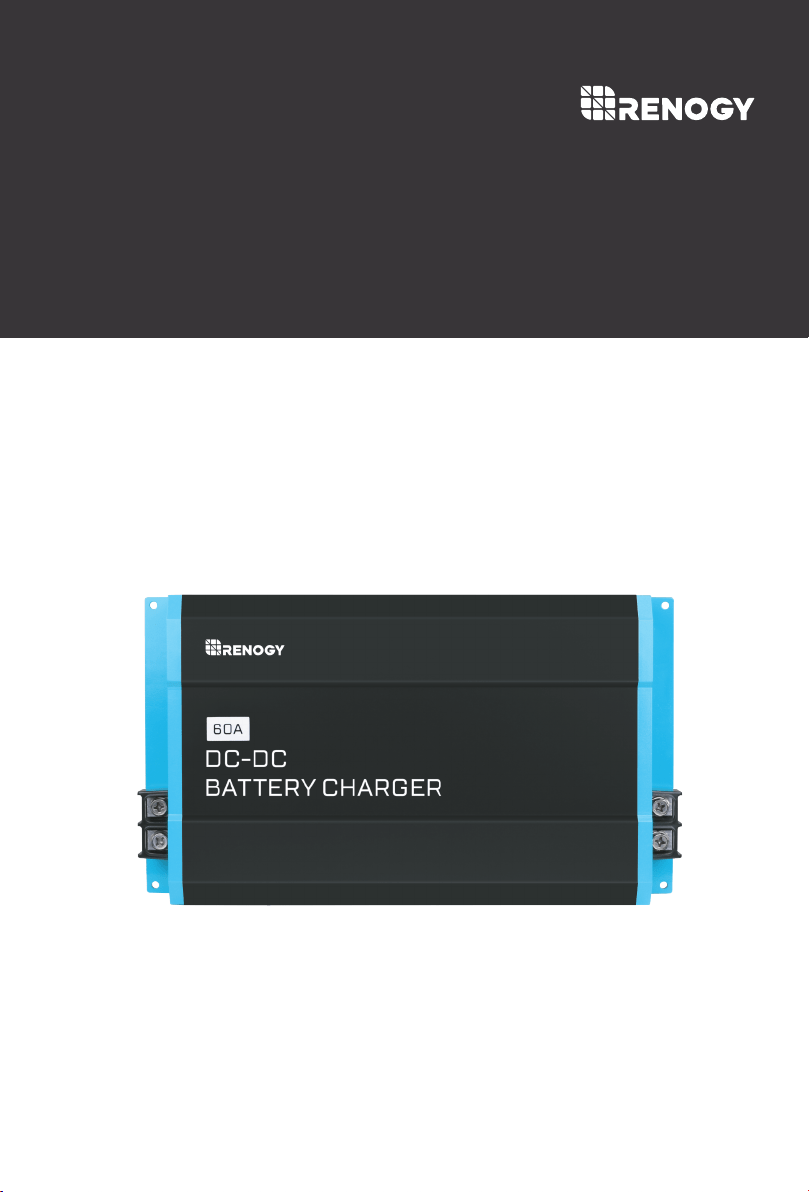
DCC1212-20 | 40 | 60
Version 1.4
DC-DC
01
Important Safety Instructions
Please save these instructions.
This manual contains important safety, installation, and operating instructions for the
charger. The following symbols are used throughout the manual to indicate potentially
dangerous conditions or important notes.
Faulty assembly or connection
Damage resulting from mechanical influences or excess voltage
The manufacturer accepts no liability for damage by:
Risk of electric shock, fire hazard, or injury. To minimize risk:
Modification or tampering with the unit without expressed permission from the manufacturer
Used for purposes other than described in this manual
General safety
Ensure the positive and negative terminals for the charger do not come into contact
Firmly secure cables and connections.
Do not attempt to repair the charger. Inadequate repairs may cause serious injury.
Electrical devices are not toys—keep away from children.
Disconnect the product from the battery each time before cleaning or before making
changes to the circuit.
This charger is for 12V battery banks only. Make sure your voltage specification is within
the input voltage range expressed.
Install and store the product in a dry and cool place. Keep away from liquids! Do not
expose the product to heat sources such as direct sunlight or other heating elements.
Never mount in areas with increased levels of dust or gas–explosion risk!
Do not use the product if physically damaged or with visibly cracked cables. Contact the
manufacturer, customer service to prevent safety hazards
Installation Safety
Indicates a potentially dangerous condition. Use extreme caution when
performing this task.
Indicates a critical procedure for the safe and proper installation and opera-
tion of the controller.
Indicates a procedure or function that is important to the safe and proper
operation of the controller.
NOTE
CAUTION
WARNING
WARNING

02
Ensure secure location where it cannot tip or fall
For installation on boats: if the electrical devices are incorrectly connected, this can lead to
corrosion damage on the boat. Verify installation with a qualified electrician or installer.
Use ductwork or cable ducts if necessary, to lay cables through metal plates or other panels
Do not lay AC and DC cable in the same conduit and do not pull on the cables.
Lay cables so they cannot be damaged by doors or be a tripping hazard. Damaged cables
can lead to serious injury
Warning—Explosion Risk! Batteries can give off explosive hydrogen gas that can be
ignited by sparks or electrical connections. Make sure the area is well-ventilated.
Do not operate in salty, wet, or damp environments; in the vicinity of corrosive fumes; in the
vicinity of combustible material; in areas with risks of explosions
Please be aware that parts of this product may still produce voltage even after disconnect-
ed or activation of fuse.
Warning—Explosion Risk! Batteries may contain corrosive acids or fumes. Avoid contact
with battery acid. If your skin comes into contact, thoroughly wash the affected area with
water. Any other injuries should seek medical care.
Avoid wearing metal objects such as watches or rings when working with batteries. Short
circuit risk!
Use only rechargeable deep cycle batteries. NEVER attempt to charge a frozen or
defective battery.
Wear goggles, gloves, or other or protective clothing when working with batteries. Do not
touch your eyes.
Ensure proper cable sizing for batteries! Over-current protection devices should be on the
positive line.
When removing a battery, power off all loads first, then disconnect it from the circuit
before removing.
Refer to your battery manufacturer for battery maintenance and care
Do not disconnect cables while the product is operating
Operation Safety
Battery Safety

Table of Contents
General Information
Product Overview
Identification of Parts
Dimensions
Installation
Location Considerations
Wiring and Fusing
Grounding
DC Output Wiring (House)
Setting Battery Type
Lithium Activation
Temperature Compensation
LED Indicators
04
05
Safety Information
01
05
07
06
07
07
Troubleshooting
19
22
Maintenance
21
Technical Specifications
22
09
09
10
11
DC Input Wiring (Starter)
15
14
D+ Ignition Wiring 12
LC Current Limit Wiring
15
15
16
17
Setting Lead Acid
18
Setting Lithium
18
Optional Components
Operation
Battery Charging Logic
03

04
General Information
The DC-DC Series battery chargers are the most effective way to charge your auxiliary or
house batteries from the alternator/starter battery. Compatible with smart or traditional alterna-
tor types, the DC-DC offers correct charging for AGM, Flooded, Gel, and even Lithium deep
cycle batteries! Featuring a 3-stage battery charger and multiple electronic protections, owners
can feel confident that their batteries are being charged optimally and automatically. Easily
install the compact yet sturdy DC-DC on RV’s, commercial vehicles, boats, yachts and many
more applications.
Check the charging requirements from the battery manufacturer before charging your battery
with this unit.
Compatible with multiple 12V batteries: AGM, Flooded, Gel, Sealed, Lithium-iron
Phosphate and Lithium-ion
Key Features
Smart protections features including Over-voltage, Over-Temperature, and reverse polarity!
Battery Isolation and Battery Charger in one
Compact yet built tough for all conditions
3-Stage Battery Charger get your batteries to 100%
05
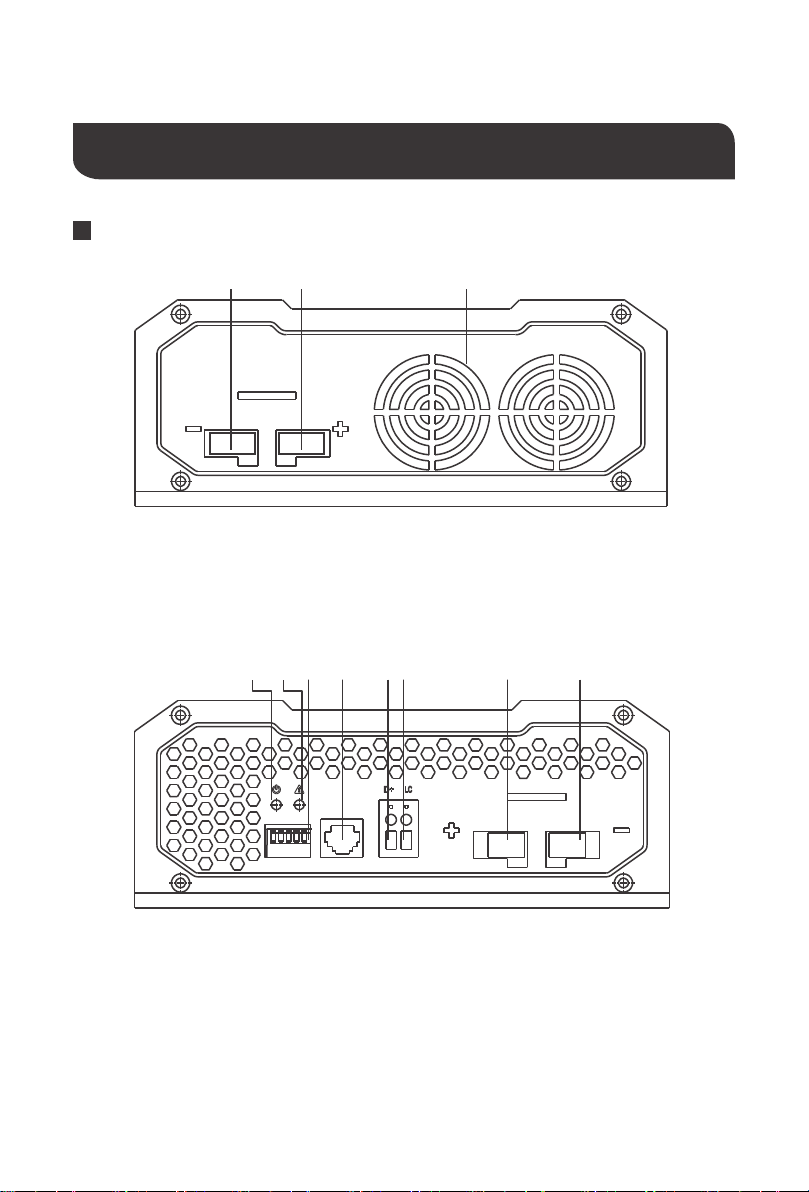
DC Output Side
DC Input Side
S1S2 S3 S4 S5
sensor
OUTPUT
INPUT INPUT
OUTPUT
1 2
1 2 3
3 4 85
7
6
Product Overview
Identification of Parts
1. Negative DC Input Terminal
2. Positive DC Input Terminal
3. Ventilation Fans
Key Features
1.Power LED
2.Fault LED
3.Dip Switches
4.RJ11 Temperature Sensor Port (Model:
RTSDCC, requires separate purchase)
5.D+ Ignition Terminal
6.LC Terminal – Current Limiting Terminal
7.Positive DC Output Terminal
8.Negative DC Output Terminal
Key Features
06
Dimensions
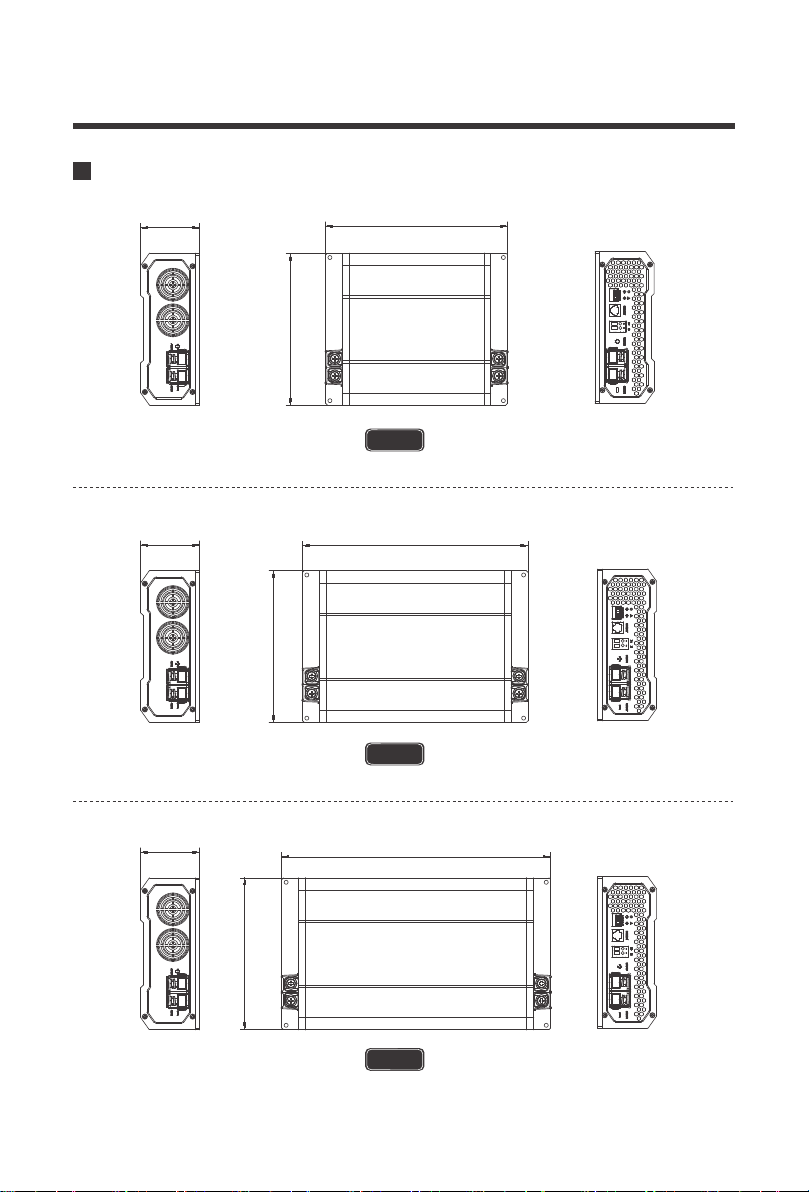
311.0mm
12.20in
175.0mm
6.90in
68.0mm
2.7in
261.0mm
10.30in
175.0mm
6.90in
211.0mm
8.30in
175.0mm
6.90in
68.0mm
2.70in
68.0mm
2.70in
DCC1212-20
DCC1212-40
DCC1212-60
The dimensions have a ±0.5mm tolerance
The dimensions have a ±0.5mm tolerance
The dimensions have a ±0.5mm tolerance
NOTE
NOTE
NOTE
07
Optional Components
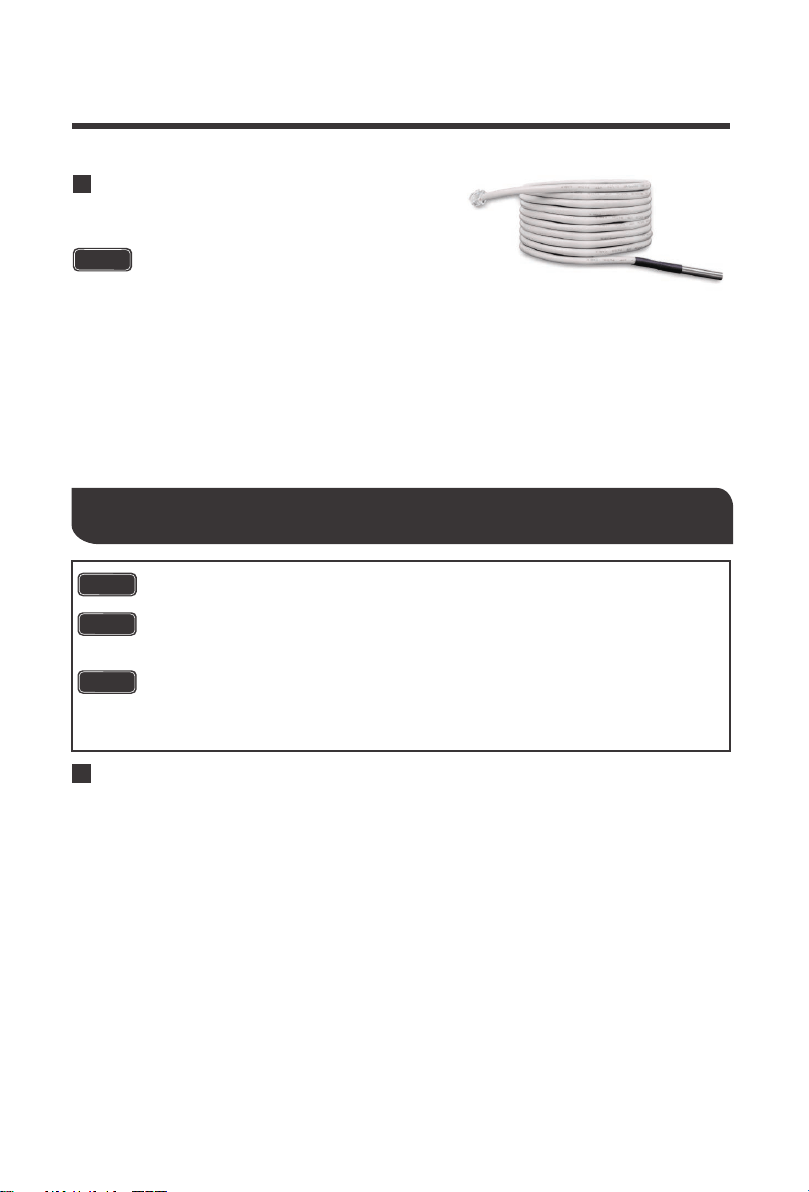
The RTSDCC comes in handy for reading incoming temperature values from the house
battery bank while adjusting the charging voltage of your DC to DC On-Board Battery
Charger. Featuring a temperature operation range from -4°F ~ 176°F / -20°C ~ +80°C, the
sensor will be important in the overall lifespan and performance of your house battery bank
by applying higher charging voltage to counter the increased resistance due to low
temperature. Simply connect the RTSDCC to the charger and place the sensor on top or
on the side of the house battery bank and the charger will take care of the rest with
temperature compensation.
CAUTION
Installation
DC-DC Temperature Sensor (Model: RTSDCC)
Do not use with Lithium batteries.
CAUTION
Location Considerations
● The battery charger can be installed horizontally as well as vertically.
● The battery charger must be installed in a place that is protected from moisture.
● The battery charger may not be installed in the presence of flammable materials.
● The battery charger may not be installed in a dusty environment.
● The place of installation must be well ventilated. A ventilation system must be available
for installations in small, enclosed spaces. The minimum clearance around the
batterycharger must be at least 5cm.
● The device must be installed on a level and sufficiently sturdy surface.
When selecting a location for the DC-DC, make sure that the unit is as close as possible
to the battery you will be charging (auxiliary battery). The charger may be mounted on the
cabin of the vehicle, along a chassis rail, the inner guard of a vehicle, behind the grille or
headlight or even on the side of the radiator. However, you want to make sure that the
area is not susceptible to moisture or other substances as well as potentially high
temperatures.
The DC-DC would operate best if there is some air flow.
● Never mount the product in areas where there is a risk of gas or dust explosion.
● Ensure a secure stand! The product must be set up and fastened in such a way that it
cannot tip over or fall down.
● Do not expose the product to any heat source (such as direct sunlight or heating).
Avoid additional heating of the product.
DANGER
CAUTION
NOTICE
● Set up the product in a dry location protected from splashing water.
08
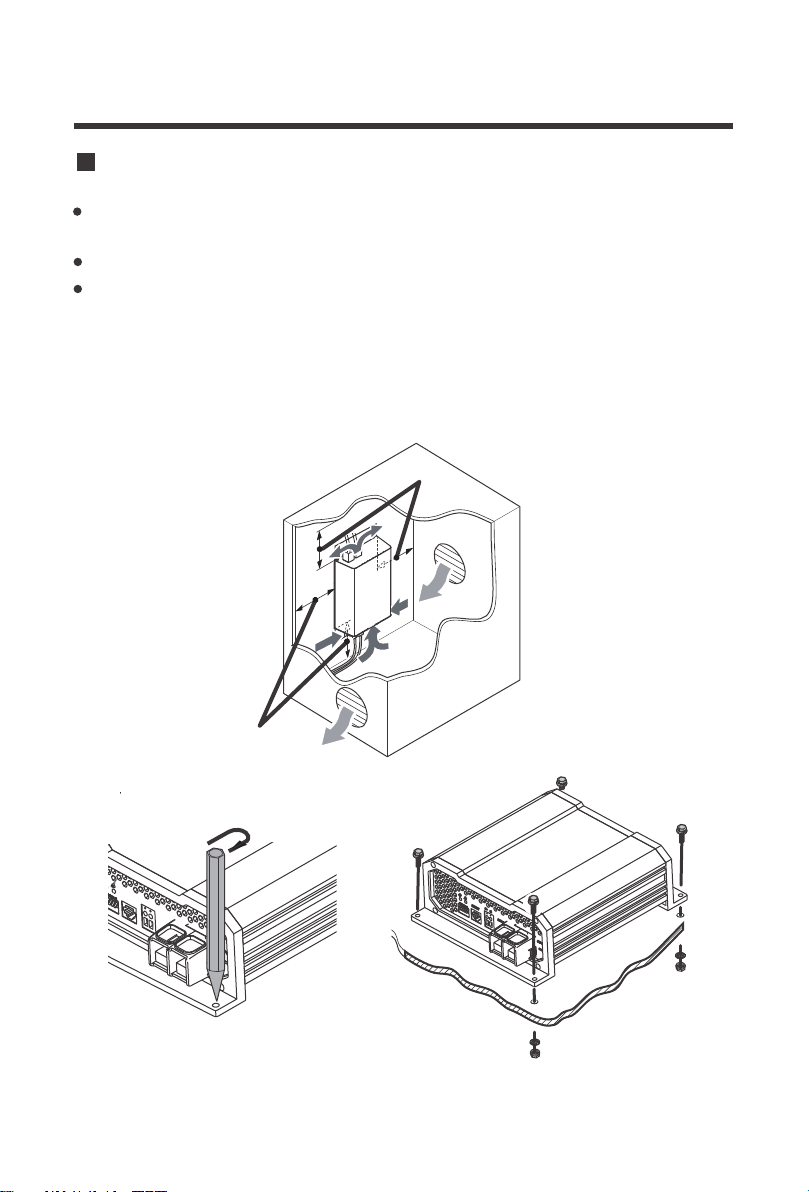
5 cm
5 cm
BA
Have at least 5cm of clearance from all areas and ensure some ventilation for best perfor-
mance
Trace the mounting holes with a pencil/pen when placing the DC-DC against the desired area
Use 4 x screws to secure the dc-dc onto a surface
Mounting

Grounding
09
Battery Ring terminals are recommended for 12V input and output connections. The following
is a reference incorporating a critical 0-3% max voltage drop and may not cover all unique
applications that may exist. When the battery charger is sending the rated amps, the input side
may experience a draw higher current draw by a factor of up to 50%. Larger wire sizes general-
ly improve performance, whereas smaller wire sizes may reduce performance, especially if
undersized. When considering wiring, fusing, and connection options, think big and short as
possible as heavier components and shorter wire length offer less resistance and voltage drop.
Terminal Size Limitations may apply. The installer is responsible for ensuring that the correct
cable and fuse sizes are used when installing the DC-DC battery charger.
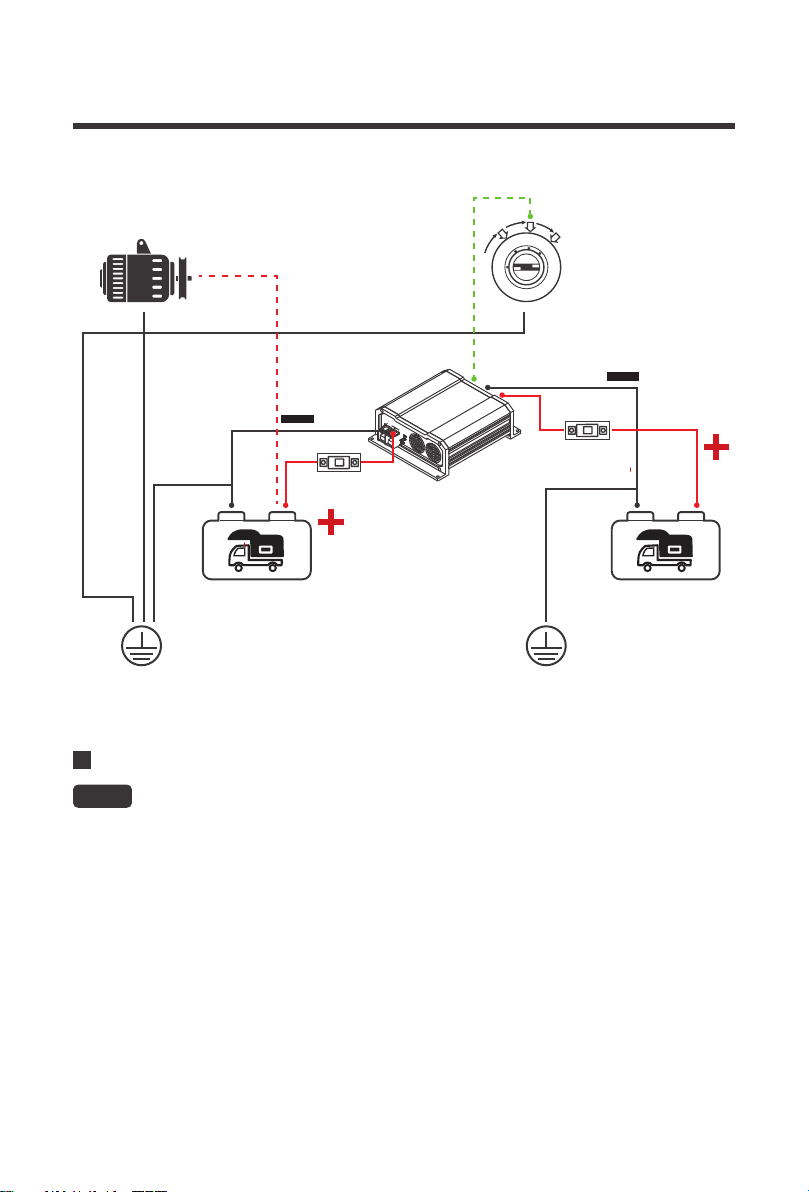
The DC-DC share a common negative ground meaning that there should be only one common
ground point between all batteries and electronics typically seen in either chassis/body ground,
a canopy, a trailer, or even the vehicle battery negative connection. In most cases, connecting
the starter and house battery directly to the DC-DC is enough for a grounding application. You
will not ground the body of the DC-DC. In the illustration below, the two batteries are connected
to the same chassis ground point.
NOTE
Wiring and Fusing
Depending on the application, the grounding point may differ.
Cable Length/ Min AWG
CableModel
Recommended
Fuse
To DC Input
(Starter)
DCC-1212-20
DCC-1212-40
30A or close10AWG 8-6AWG 6-4AWG
50A or close8AWG 8-6AWG 4AWG
12AWG 10-8AWG 6AWG
DCC-1212-60
To DC Output
(House)
To DC Input
(Starter)
To DC Output
(House)
To DC Input
(Starter)
To DC Output
(House)
25A or close
6AWG 4AWG 4AWG* 60A or close
4AWG 4AWG* 4AWG* 90A or close
6AWG 4AWG 4AWG* 75A or close
0 ~ 10ft /
0 ~ 3m
11 ~ 20ft /
3 ~ 6m
21 ~ 30ft /
6 ~ 9m
*3-10% Non-Critical Voltage Drop
DC Output Wiring (House)
10
The DC-DC output will connect to the 12V auxiliary or house battery that you are intending to
charge. These batteries may be a different chemistry from the starter battery. The DC-DC input
and output terminals are isolated, meaning that the output voltage can be kept stable without
interference from the input circuit. This ensures stable and correct charging of auxiliary batter-
ies. It is best to place the DC-DC closer to the battery you will be charging primarily.
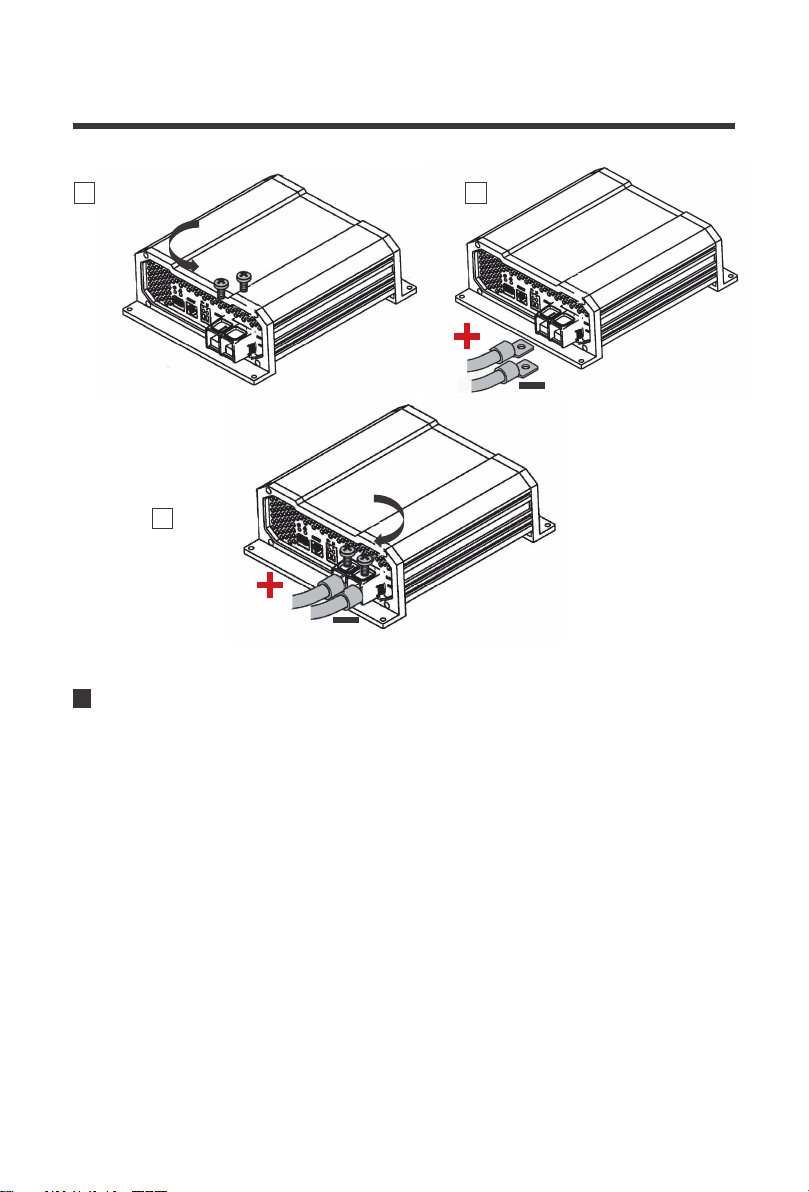
1.Use a screwdriver to loosen the DC output terminals by rotating counterclockwise (CCW)
2.Connect a ring terminal cable from House Battery Positive to the Positive DC Output Termi-
nal
3.Use a screwdriver to tighten the DC output terminal by rotating clockwise (CW)
4.Repeat for the House Battery Negative to the Negative DC Output Terminal
Only use 12V batteries. Damages due to connecting higher voltage batteries will not
be covered in warranty.
WARNING
ALTERNATOR
D+IGN Wiring to Ignition Circuit
ANL FUSE
ANL FUSE
L
O
C
K
A
C
C
O
N
S
T
A
R
T
DC INPUT (STARTER) DC OUTPUT (HOUSE)
CHASSIS GROUND
CHASSIS GROUND
11
NOTE
DC Input Wiring (Starter)
The DC-DC input will connect to the 12V starter battery that will be used to charge your auxilia-
ry or house battery. The starter battery may be a different chemistry from the house battery.
The DC-DC input and output terminals are isolated, meaning that the output voltage can be
kept stable without interference from the input circuit. This ensures stable and correct charging
of auxiliary batteries.
1.Use a screwdriver to loosen the DC input terminals by rotating counterclockwise (CCW)
2.Connect a ring terminal cable from Starter Battery Positive to the Positive DC Input Terminal
3.Use a screwdriver to tighten the DC Input terminal by rotating clockwise (CW)
4.Repeat for the Starter Battery Negative to the Negative DC Input Terminal
The DC-DC will not power on or operate until the D+ ignition cable is connected.
When connecting the DC input, note that the DC-DC will still be off until the D+
ignition cable voltage senses.
1
counterclockwise
clockwise
2
3

12
D+ Ignition Wiring
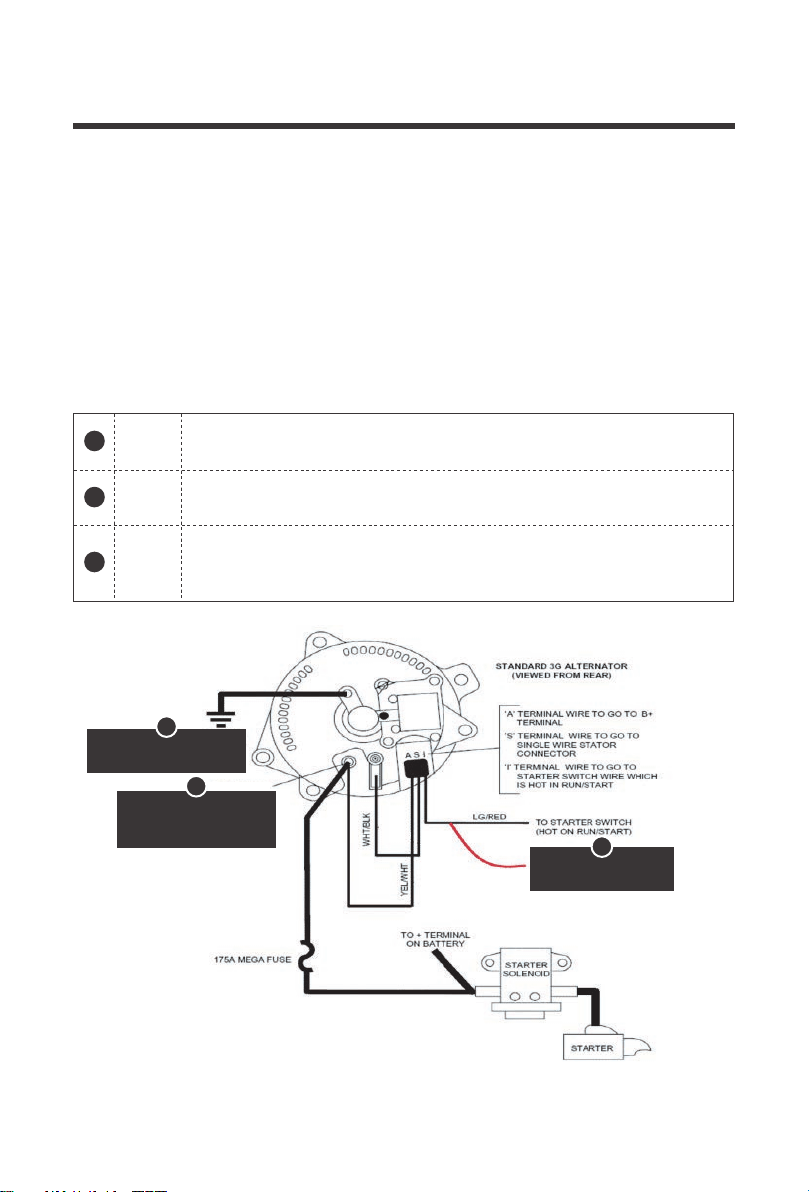
The D+ terminal will be located on the output side but connects to the DC ignition
circuit of the input starter battery. This may be in the engine bay fuse block for some
vehicles. Refer to your own vehicle’s electrical diagram for D+ wiring placement.
May require splicing or cable adjustments to connect correctly to your ignition circuit.
S1S2S3 S4 S5
sensor
OUTPUT OUTPUT
D+
18-16AWG,
copper cable recommended
clockwise
counterclockwise
2
3
1
13
BATT+
The DC-DC will not power on or operate until the D+ ignition cable is connected to the ignition
circuit where it will detect a 12V source to operate ON. The purpose is to toggle the DC-DC
switch on when the vehicle is running with the alternator to prevent the DC-DC from operating
incorrectly with just the starter battery leaving you with a drained starter battery. Use
18-16AWG copper cable. You may need a multi-meter to test your connections to verify
placement of the D+ wire.
Could be labeled as “B”, “Bat”, or “Pos”. This will connect directly to the
battery and typically be heavy gauge for high current applications.
BATT-
Could be labeled as “Neg”, “Field” or “F”. This will connect to ground. Some
alternators may not have this as they will be directly grounded to the engine.
IGN
Could be labeled “IGN” or “L” and will likely be the smaller terminal. This
connects to the ignition circuit or dashboard warnings signs. This is where
you will want to splice the D+ ignition cable.
Check your alternator and identify the number of terminals. Most alternators will have 3 wires
connected (BATT+, BATT-, IGN). The following is an example and may not match your applica-
tion. Refer to your vehicle’s documentation and part for actual wiring
Alternator Recommendation
D+SPLICE HERE
3
1
CHASSIS GROUND
B+TERMINAL
(RED GROMMET)
2
3
1
2
14
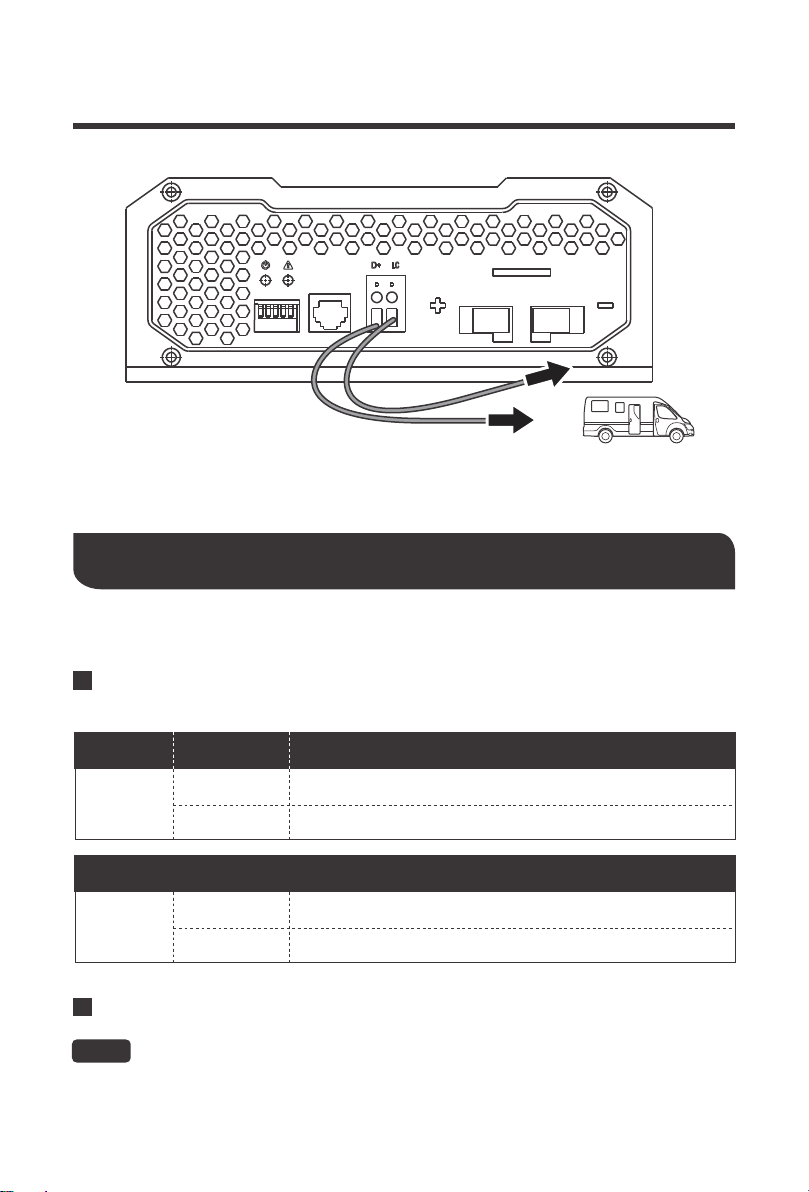
LC Current Limit Wiring
LOCK
Off position where no accessories will work, and steering is also likely
locked
Cranks the engine on and reverts to ON position.
ACCESSORY
Accessories are given power such as radio and some other small
electronics.
ON
START
Turns on all your electronics. The key will default into this position after
cranking in START. Splicing of fuse block will need to be live when the
key is in reverting back to this position
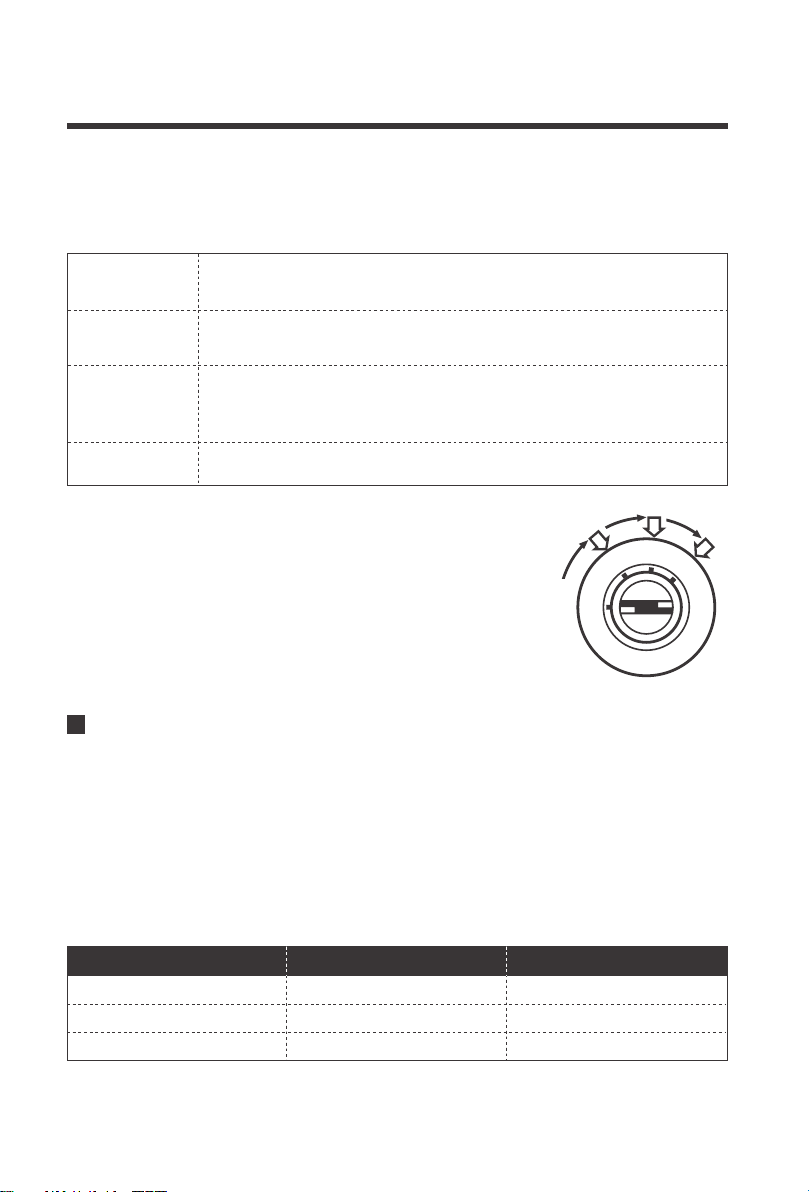
Review your vehicle’s fuse layout diagram to identify a fuse location that is live when the
vehicle is running with the alternator. Key positions in the ignition are typically lock, accessory,
on, and start.
The DC-DC battery chargers feature 50% current limiting from the rated specification when
connecting the LC Terminal to a 12V source. Current Limiting is instant and recommended to
be connected to the same location as the D+ ignition cable. Alternatively, you can toggle
current limiting to your liking by connecting the LC terminal to starter battery positive terminal.
In this fashion, current limiting will always take until removing the LC wire from the battery
terminal to revert to the normal amp rating. Use 18-16AWG copper cable for the LC terminal
and you may need to splice your own connections for the other cable end depending on your
connection point.
You may need to test the fuse location by checking the voltage
with a multi-meter and making sure it’s live only when the vehicle
is in the Start/Run position. This will help in identifying where to
connect if the fuse layout does not have an IGN position. The
easiest connections when splicing can be made when using a
fuse holder splice connector.
Engine Bay Fuse Block Recommendation
DCC1212-20 20A 10A
DCC1212-40 40A 20A
DCC1212-60 60A 30A
Amp RatingModel Current Limit
L
O
C
K
A
C
C
O
N
S
T
A
R
T
15
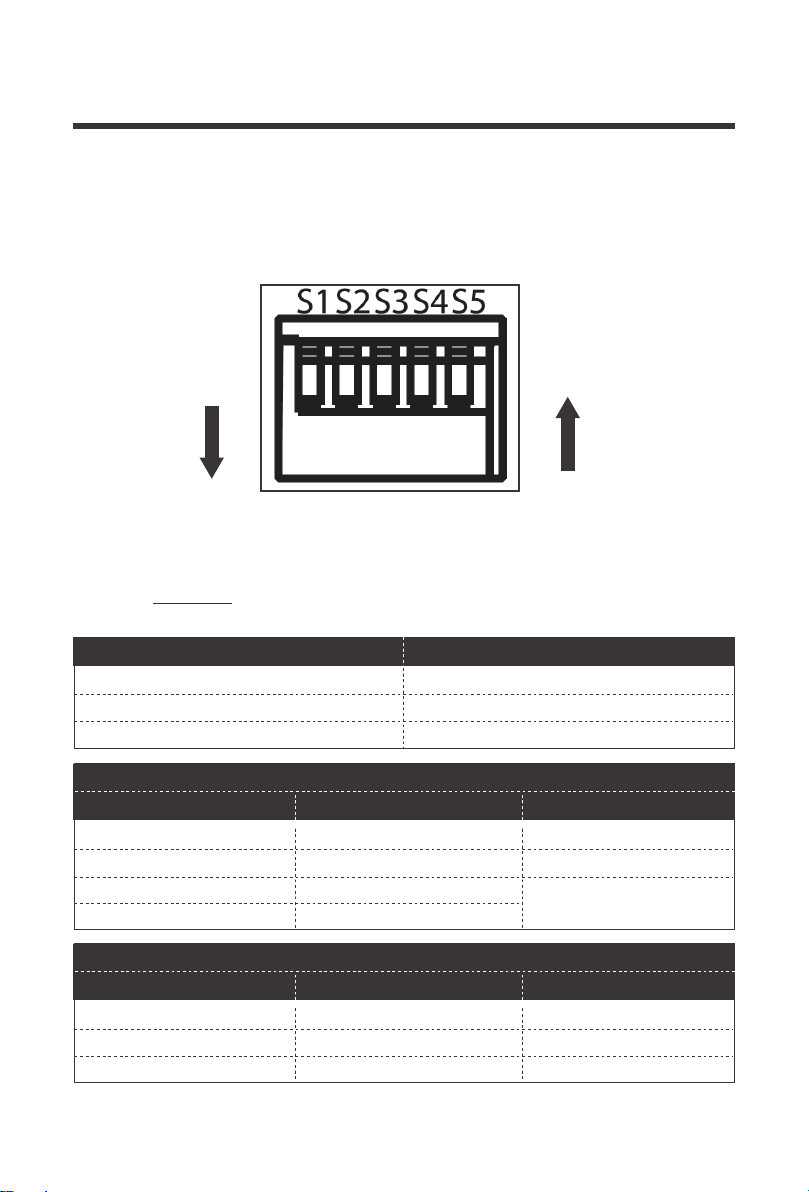
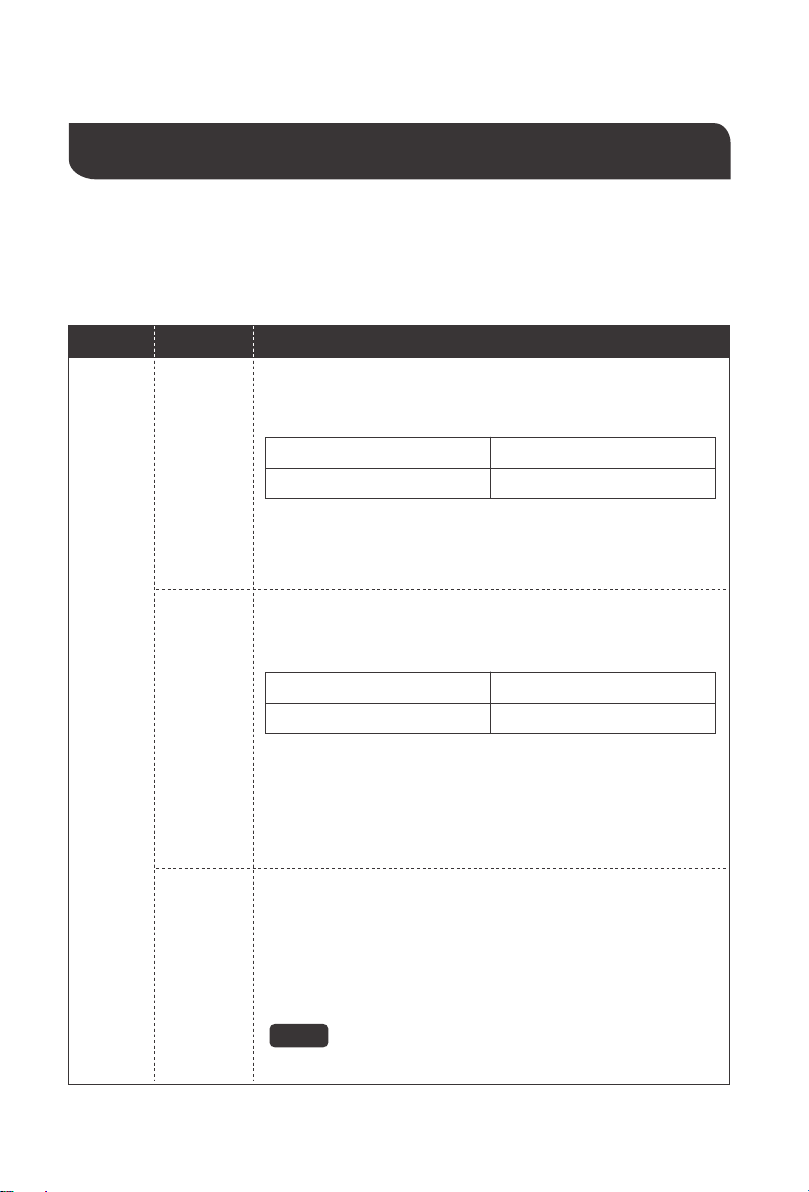
Refer to your battery manufacturer specifications when selecting a battery type via Dip
switches. Damage due to incorrect battery settings will not be covered in warranty.
WARNING
LED Indicator
Setting Battery Type
Operation
Assuming correct 12V battery connections and D+ ignition cable wiring, then the POWER LED
will illuminate green.
Off
StatusColor Meaning
Powered Off; if abnormal refer to troubleshooting
Solid ON Normal
Green
Off
StatusColor Meaning
Solid ON Fault detected; refer to troubleshooting
No faults
Red
Power LED
S1S2S3 S4 S5
sensor
OUTPUT OUTPUT
D+
LC+
18-16AWG,
copper cable recommended
16
14.4 V
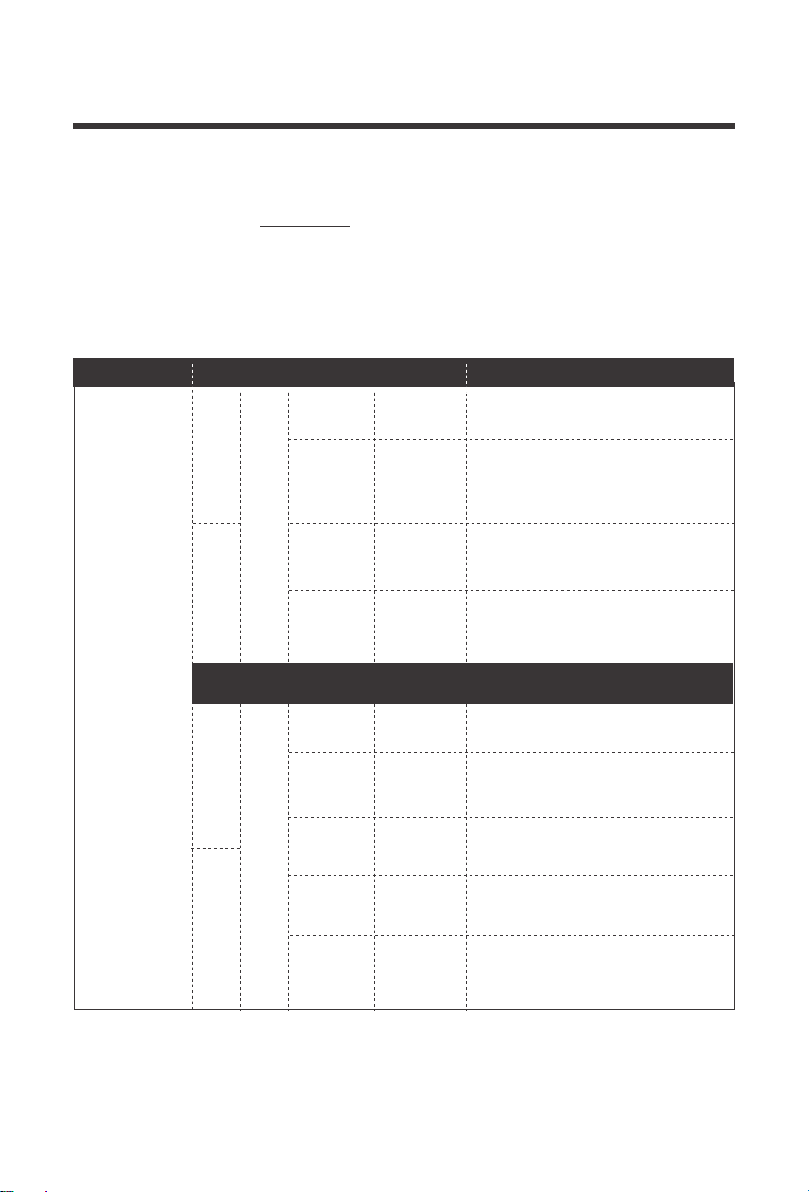
The 5 x dip switches can be configured to charge lead acid or lithium batteries. Note that ON is
position down and OFF is position up if facing the dip switches directly. Lead acid profiles have
an absorption charge and a float charge whereas lithium batteries will only have an absorption
charge and no float charge.
Lead acid assumes deep cycle AGM, Gel, Flooded, and Sealed Lead Acid. To get started,
make sure SW5 = ON to gear the charger for lead acid batteries. Next select your absorption
charge and float charge below by configuring the dip switches to your desired specifications.
ON
ON
OFF
SW1, SW2
DIP Switch Meaning
Set Absorption Charge Voltage
SW3, SW4
Set Float Charge Voltage
SW5
ON—Lead Acid
ON
OFF
ON
ON OFF
OFF
14.1 V
14.7V
OFF ON
DIP Switches
Setting Lead Acid
SW1 SW2
Set Absorption Charge
Voltage
13.8 VON ON
ON OFF
13.5 V
13.2V
OFF ON
SW3 SW4
Set Float Charge
Voltage
17
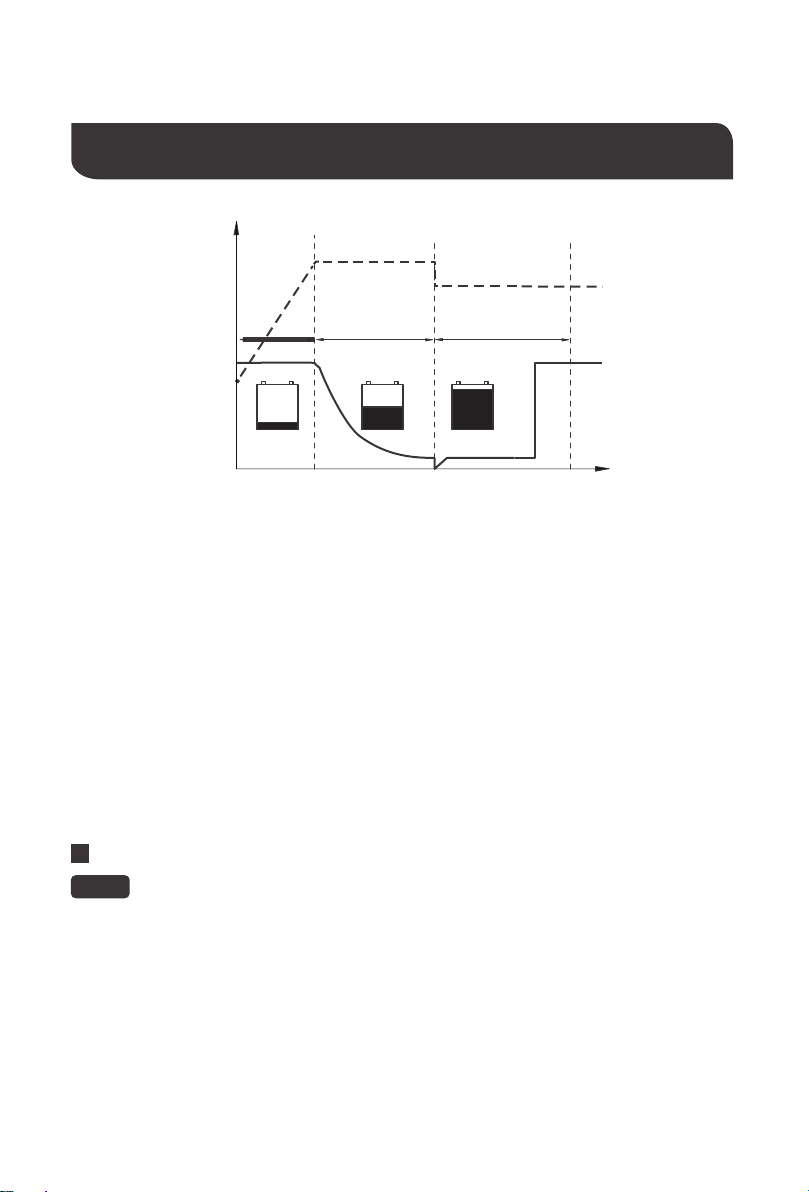
To get started, make sure SW5 = OFF to gear the charger for lithium batteries. There will not
be a float voltage and instead users will select between Type 1 lithium voltages or switch into
Type 2 lithium voltages depending on your lithium battery specifications. You must select a
lithium Type to when selecting your charge voltage. Type 1 voltages range from 12.6V ~ 13.0V
and Type 2 voltages range from 14.0V~14.6V.
Setting Lithium
14.6 V
SW2
DIP Switch
Lithium VoltageDIP Switch
Voltage
13.0V
SW5=OFF
14.4 V
14.2V
12.8 V
12.6V
14.0V
SW1
OFF
SW3 SW4
OFF
ON
ON OFF
OFF OFF
SW3
SW4
ON
SW1 SW2 Voltage
ON ON
OFF ON
ON OFF
OFF OFF
DIP Switch Lithium Voltage
18
Lithium Activation
U0 U
U
I
I
Bulk
100 %
10 %
Absorption Float
t
U/V
I/A
This is an automatic process for Lithium batteries. Ensure correct lithium polarity
when connecting to the DC Output.
NOTE
Battery Charging Logic
In the beginning, a discharged battery will be charged with maximum current and voltage will
be climbing steadily until reaching the absorption voltage setpoint.
Bulk (Phase I) (Lead Acid + Lithium)
The battery reaches the absorption voltage setpoint and holds the voltage constant while the
current gradually decreases until the battery is becoming full (within 10-20%). By default,
absorption will not exceed 3 hours to prevent overcharging.
Absorption (Phase U0) (Lead Acid + Lithium)
After the absorption stage, the voltage of the battery will reduce to the float voltage setpoint
and current will also reduce to a low maintenance mode to prevent the battery from
discharging and offsetting any self-discharge. Heavier battery discharge may set controller
back to Bulk/Absorption to replenish energy lost while energy is available.
The DC-DC have reactivation feature to awaken a sleeping lithium battery. The protection
circuit of Lithium batteries will typically turn the battery off and make it unusable if over-dis-
charged. This can happen when storing a Lithium pack in a discharged state for any length
of time as self-discharge would gradually deplete the remaining charge. Without the
wake-up feature to reactivate and recharge batteries, these batteries would become unser-
viceable and the packs would be discarded. A small charge current will be applied to the
house battery to activate the protection circuit and if a correct cell voltage can be reached,
it starts a normal charge.
Float (Phase U) (Only Lead Acid)
19
WARNING
Troubleshooting
Behavior Protection
Troubleshoot Steps
Red
Fault
LED ON
Battery
Overvoltage
Reverse
Polarity
Battery
Undervoltage
1.Use a multi-meter to measure the DC input and DC output
batteries as well as the respective DC-DC input/output terminals.
Battery over-voltage is 15.5-16V:
2.Disconnect any other chargers in the circuit and let the battery
rest to lower the voltage. Disconnect any sensitive loads.
3.Double check correct DIP switches
Electronic Protection
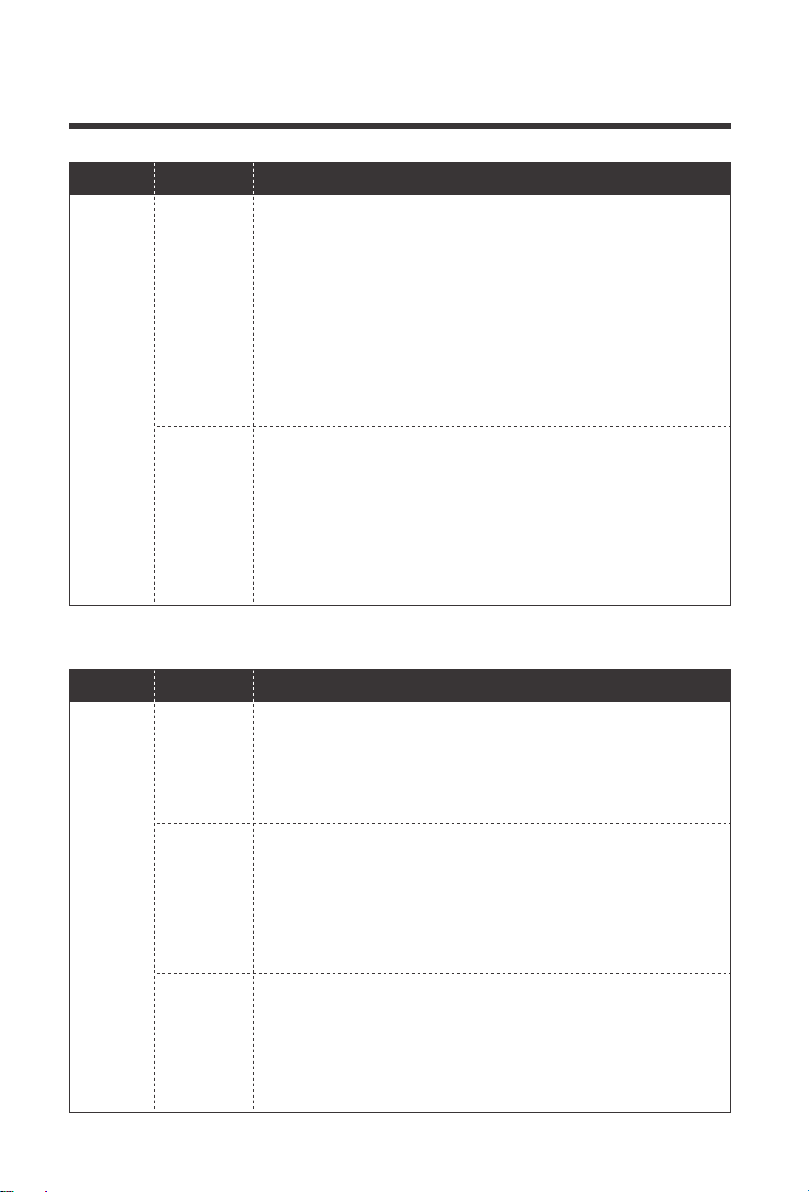
If the DC-DC is not functioning correctly, it may be undergoing an internal electronic protection
and stop normal operation. This is not indicative of a defective unit but may require some
troubleshooting to resume normal operation.
High Voltage Shutdown 16V
High Voltage Restart 15.5V
1.Use a multi-meter to measure the DC input and DC output
batteries as well as the respective DC-DC input/output terminals.
They should be similar. Battery undervoltage is below 8-10V.
2.Disconnect any other loads in the circuit and let the battery
charge.
1.Use a multi-meter in DC Volts and probe the positive line onto
the positive battery terminal and probe the negative line to the
negative battery terminal. You should see a reading within
10V~14V and be a positive number.
2.If the DC reading is negative, your poles are reversed. Fix the
wiring to return to normal operation.
Lithium batteries in reverse polarity may cause
irreversible damage to the dc-dc.
3.Lead acid batteries below 8V may need an external charger to
reach minimum DC-DC voltages; Lithium batteries will be able to
recover due to Lithium Activation.
Low Voltage Cut-out 8V (Lead Acid)
Low Voltage Restart 10V
20
More Troubleshooting
Behavior Protection
Troubleshoot Steps
Red
Fault
LED ON
High
Temperature
Short Circuit
1.Double check that your wiring is correct with a multi-meter and
that the battery levels are suitable within the operating voltage
range
2. Observe the ambient temperature. Avoid installations in direct
sun. Ambient temperatures above 122°F/50°C will cause the
unit to stop functioning until conditions get cooler.
Move the unit to a cooler location or introduce ventilation into the
install location. The protection is automatic, and the dc-dc will
resume normal function upon cooling down.
1.The DC-DC is experiencing an internal short circuit due to an
imbalance between its input and output circuits. Restart the
DC-DC by disconnecting the input/output and then reconnecting
it again.
The error will clear automatically upon a successful restart. If
issues continue with a permanent red led, then contact support
to address the previous troubleshooting steps.
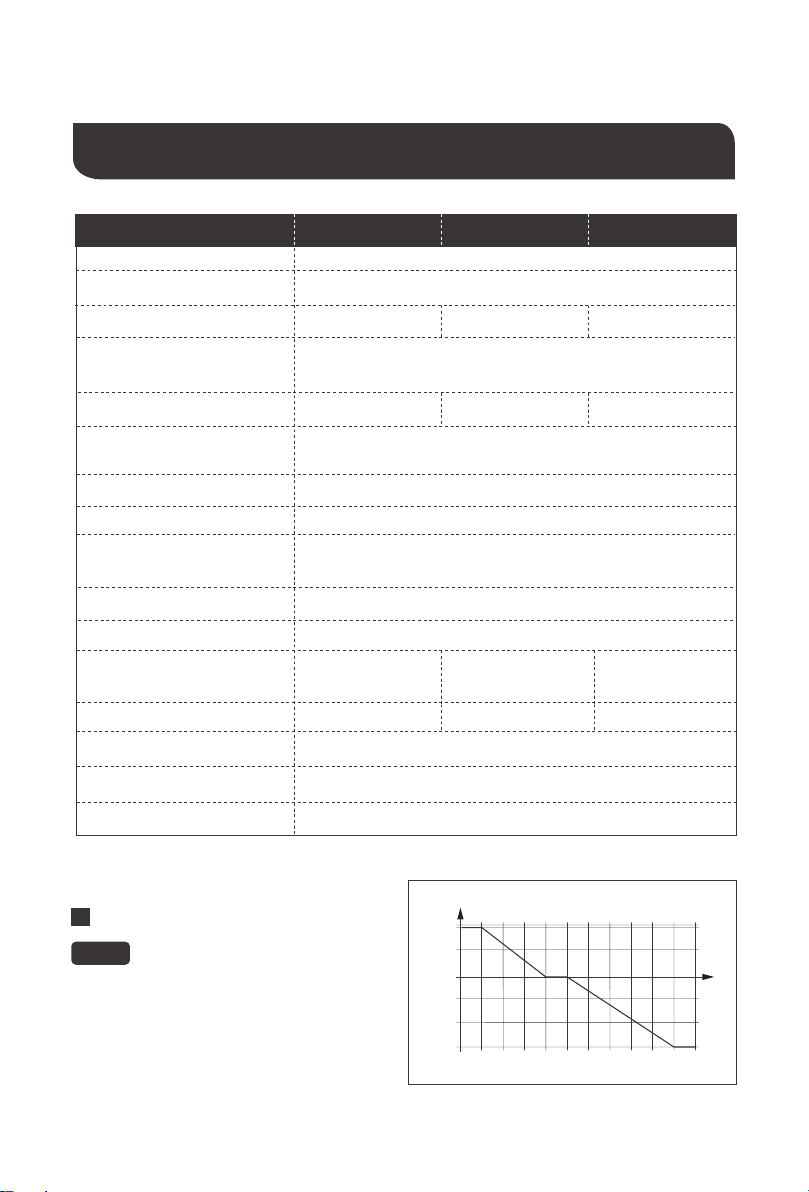
Behavior Cause
Fix
Green
Power
LED OFF,
batteries
correctly
connect-
Incorrect D+
Connection
Wrong
battery at
input/
output
Battery
voltage too
low or high
1.Check to make sure there is a cable connected between the
D+ Terminal (DC Output Side) and the ignition circuit. The D+
needs a 12V signal to start/stop the DC-DC. Splicing required.
Refer to your vehicles fuse box layout to identify the ignition line
or similar location that is live when the alternator is running.
1.Verify correct battery placement with tight and secure
corrections, eliminate any breaks.
2.DC Input terminals should be the starting battery and should
also have a charging source (alternator in this case).
3.DC output terminals should be the auxiliary or house battery
you’re charging.
1.The DC-DC requires 12V batteries more than 10V (Lead Acid)
and can not exceed 15.5V so no 24V batteries.
Use a multi-meter to measure the battery terminals and verify
that the dc-dc terminals match the respective values (or similar).
Continued problems with batteries may need to be taken to a
nearby battery tester at your nearby automotive shop.

21
Maintenance
For best DC-DC performance, periodically check the unit and related wiring monthly as well as
the installation location:
1.Inspect the wiring and note any wiring cracks, wear, tear, corrosion, or loose wiring and
replace immediately. Inspect wiring terminals and ensure they’re tight as they may become
loose during vehicle vibrations.
2.Check that the battery charger is free of dust, liquids, or heat sources and ensure the DC-DC
is receiving some ventilation. Improved ventilation improves performance.
Behavior Cause
Fix
Connection
break
1.Inspect your connections for tight, secure, and undamaged
wiring to and from the DC-DC
2.Check fuses for any breaks and replace them to continue
normal operation.
3.Use your multi-meter’s (check with manufacturer) continuity
test to individually check each line (positive and negative) at the
input and output to verify consistent connection. Audible
multi-meter Beeps indicate continuity. No sound indicates
connection break.
22
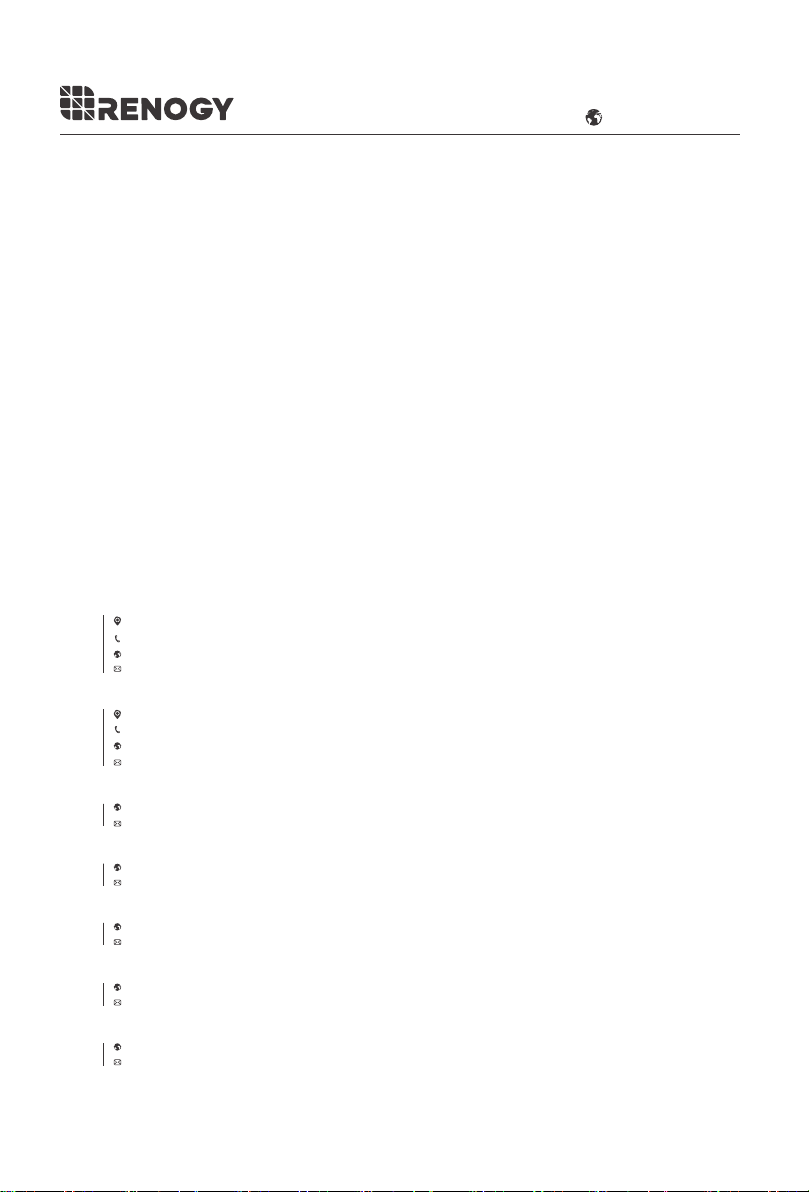
Rated Charging Current
Transformation
Input Battery Voltage Range
Idle power consumption
Residual ripple of output
voltage at rated current
Efficiency
Charging Voltage Range
Rated Max Power
8V ~ 16VDC
Lead Acid: 13.2V ~ 14.7V
Lithium: 12.6V ~ 14.6V
< 50 mV
90 %
0.4 A
-4 °F ~ 122 °F/
–20 °C to +50 °C
-3mV/C° /2V
M6 x 10mm
2.2 - 2.6 lbf - in /24.5 - 29.4 N - cm
20 A
40 A
60 A
250W
500W
750W
8.3 x 6.9 x 2.7 in /
211 x 175 x 68 mm
10.3 x 6.9 x 2.7 in /
261 x 175 x 68 mm
12.2 x 6.9 x 2.7 in /
311 x 175 x 68 mm
3 lbs. / 1.3 kg 4 lbs. / 1.9 kg 5.3 lbs. / 2.4 kg
Certification
Terminal Torque
Dimensions
Weight
Operational temperature
(Ambient)
≤95 % Non-condensing
Humidity
Temperature Compensation
Terminal Size
DCC1212-20Model DCC1212-40 DCC1212-60
12 V 12 V
→
Technical Specifications
The temperature compensation is not to be
used with lithium batteries.
NOTE
Temperature Compensation
V
0,4
–0,2
0,2
0
–0,4
–0,6
0 54510155– 3525 4030 0502
°C
12 V
CE
US
2775 E Philadelphia St, Ontario, CA 91761, USA
909-287-7111
www.renogy.com
support@renogy.com
https://www.renogy.cn
support@renogy.cn
CN
400-6636-695
苏州高新区科技城培源路1号5号楼-4
CA
https://ca.renogy.com
supportca@renogy.com
https://au.renogy.com
supportau@renogy.com
AU
JP
https://www.renogy.jp
supportjp@renogy.com
https://uk.renogy.com
supportuk@renogy.com
UK
https://de.renogy.com
supportde@renogy.com
DE
RENOGY.COM
Renogy reserves the right to change
the contents of this manual without notice.