
INSTALLATION GUIDE
NOTICE D’INSTALLATION
EN
FR
REF30PIXL
REF30PIXR
REF30PRL
REF30PRR
REF36PIXL
REF36PIXR
REF36PRL
REF36PRR

IMPORTANT
Dimensions in parentheses are in inches: mm(in).
Weights in parentheses are in pounds: kg (lb).
Temperatures in parentheses are in Fahrenheit degrees: °C(°F)

1
3
4
5
6
7
8
10
11
13
14
15
16
18
19
21
22
23
24
25
Installation Guide
EnglishFrançais
Index
Page
Important Instructions
Important safety instructions
Children safety
Technical Requirements
Appliance features and installation requirements
Installation niche features: Integrated Series (BI)
Installation niche requirements: Stainless Integrated Series (BKI)
Preparing To Install
Transport to installation site and unpacking
Electrical and Water connection
Levelling
Panels Mounting
Door and Bottom-Drawer overlay panels layout
Overlay panels mounting brackets layout
Panels Dimensions
Mounting the handles on Integrated units
Mounting panels to the door and the drawer of Integrated units
Installation
Built-in installation of single appliance
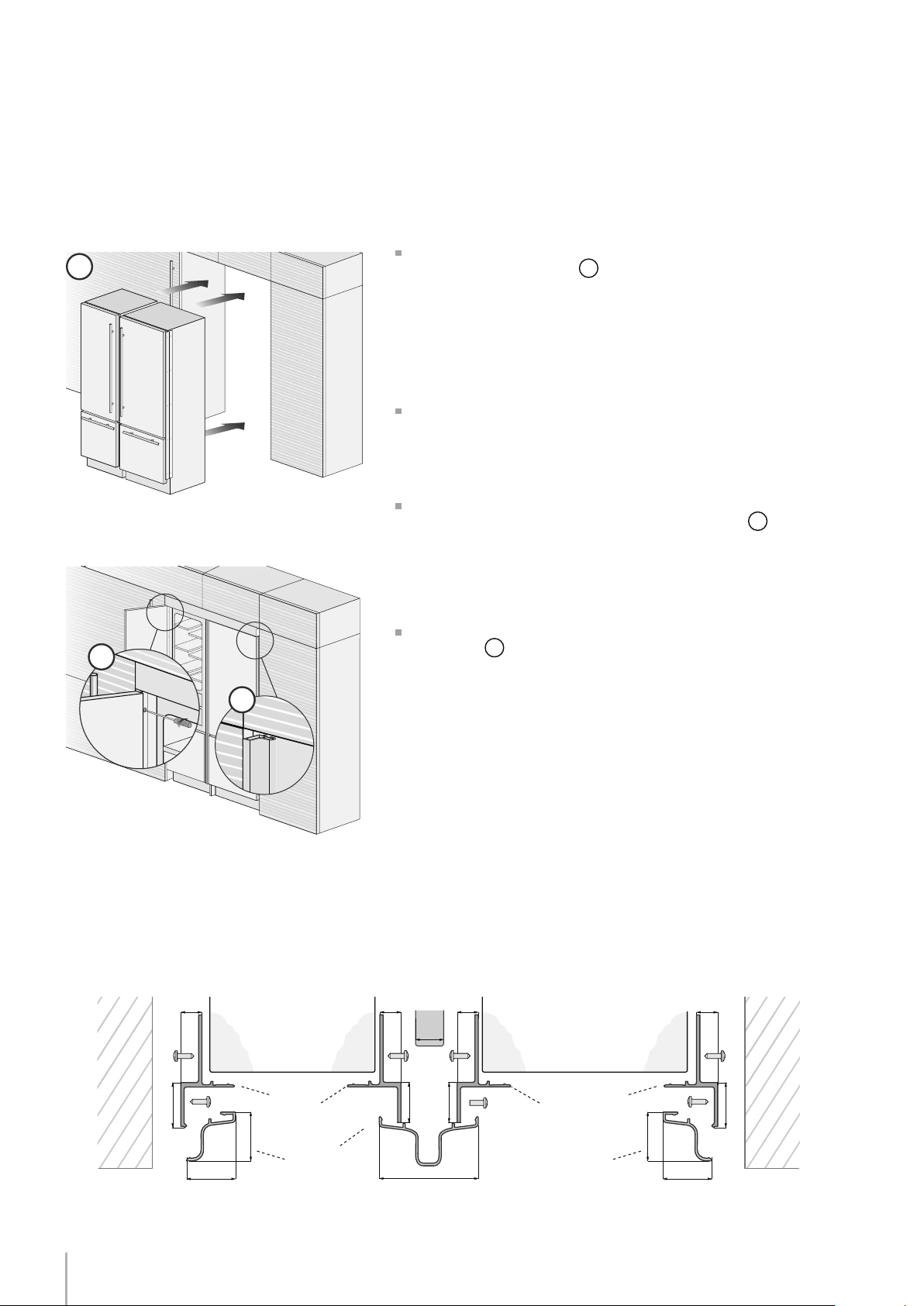
Built-in installation of two or more appliances
Completing The Installation
Anti-tipping safety assembly
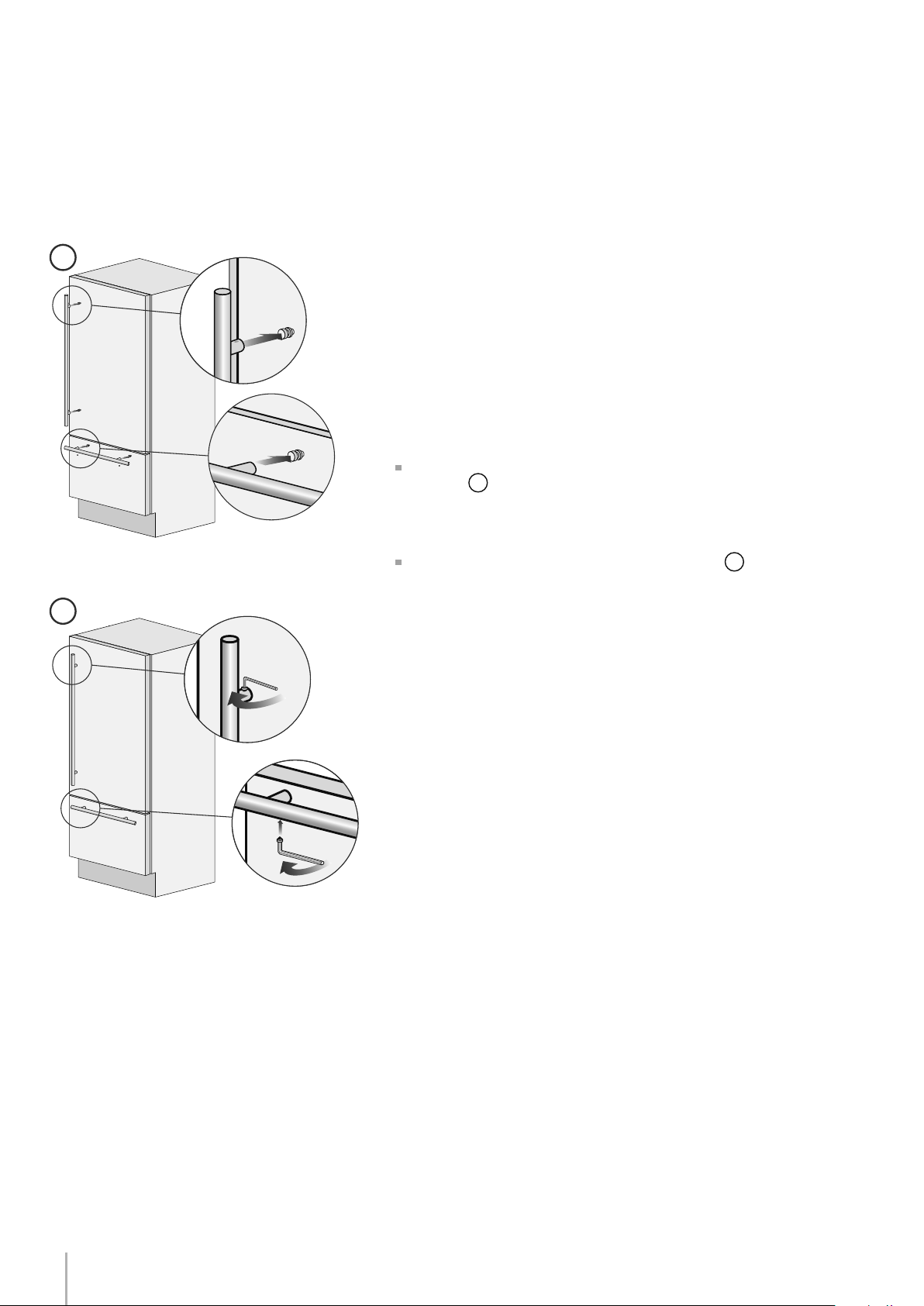
Mounting handles on stainless front
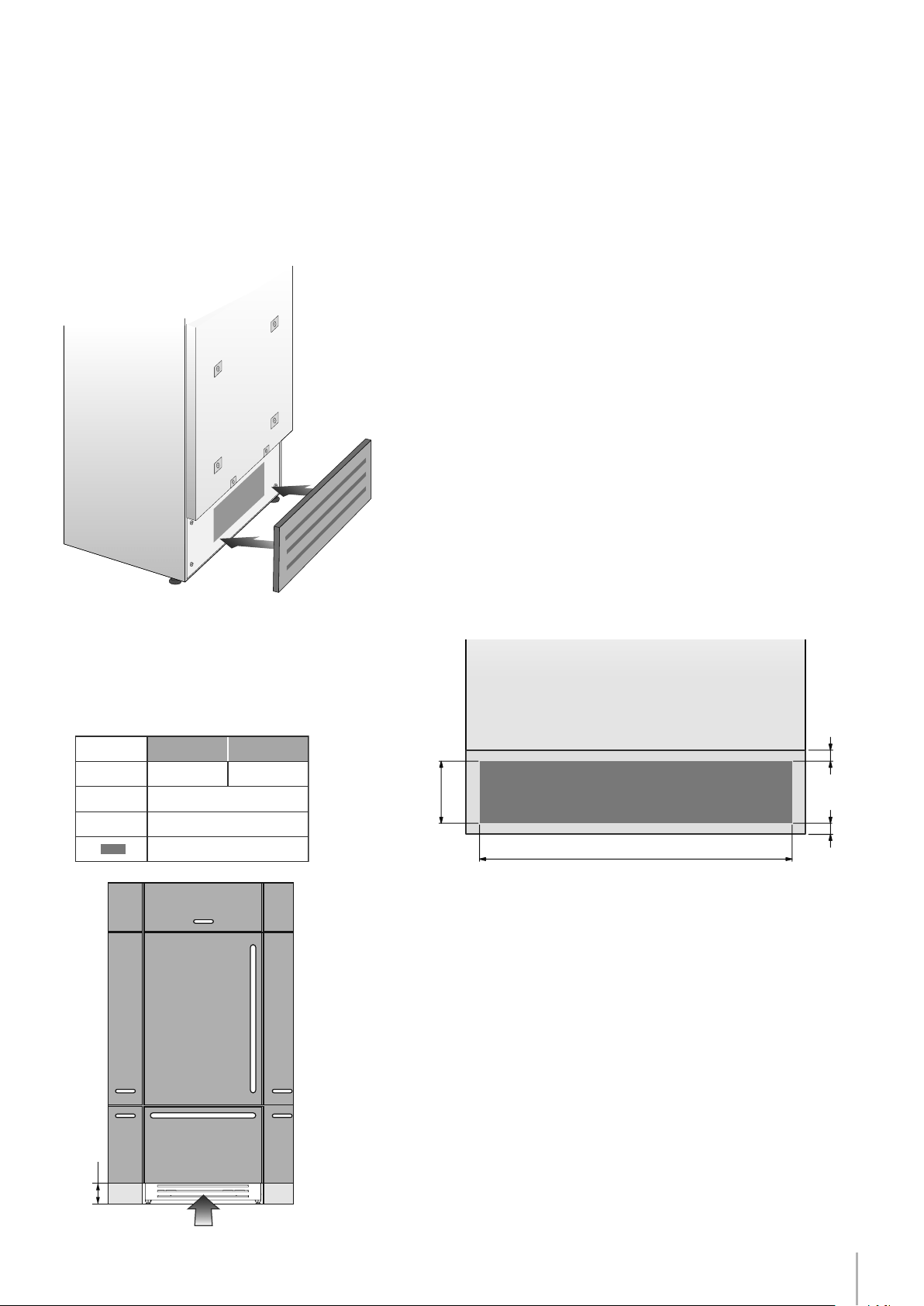
Air circulation
Post installation checklist
Start Up

2
3
Installation Guide
Series: All
EnglishFrançais
Symbols used in the Guide
Note
Tips for the correct use of the appliance
Warning
Directions to prevent injury
Important
Directions to avoid appliance damage
Important safely instruction
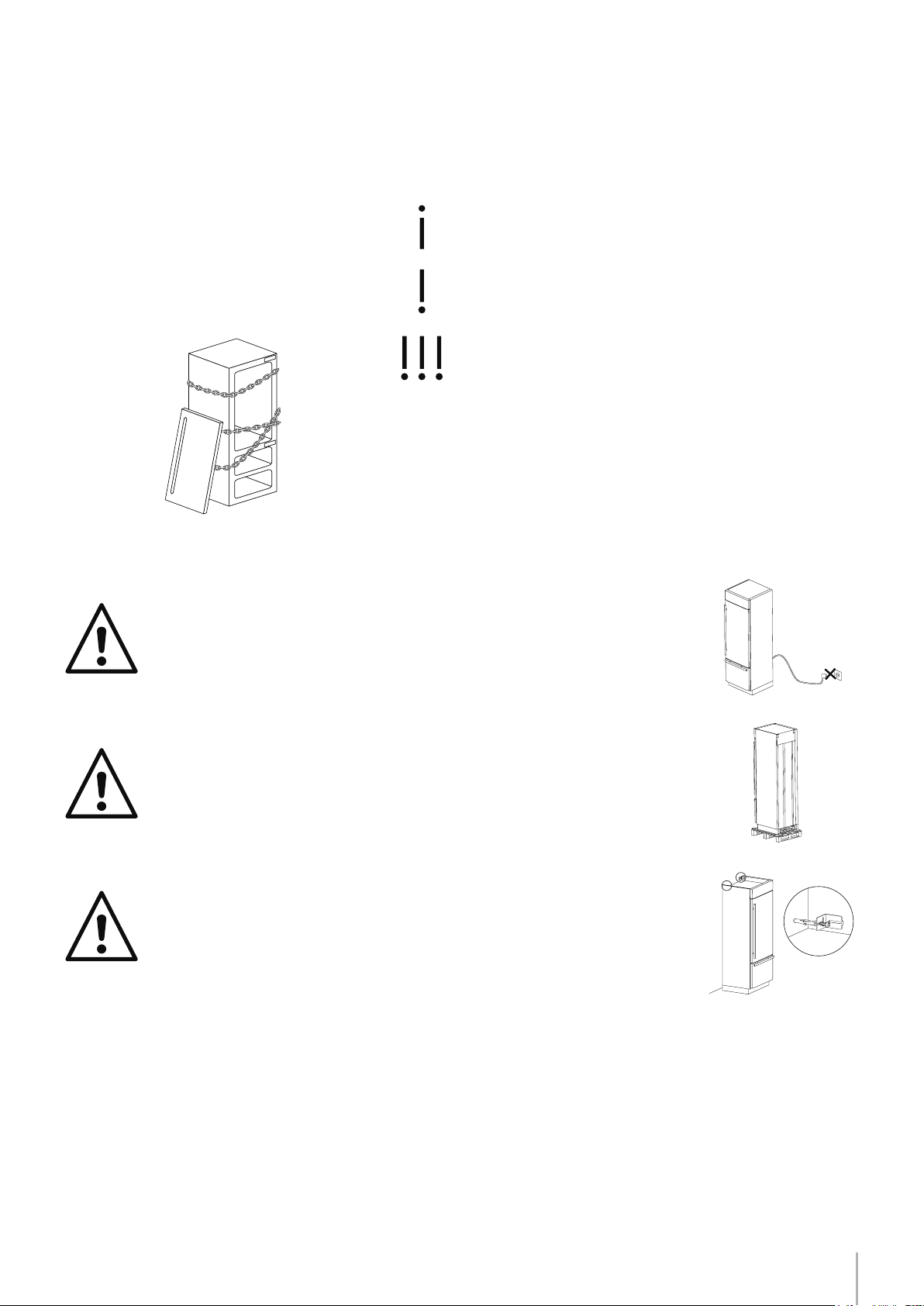
Children safety
DANGER: Risk of child entrapment. Before you throw away your old
refrigerator or freezer:
• Take off the doors
• Leave the shelves in place so that children may not easily climb
inside.
ATTENTION
This appliance must be transported in an upright position. If this was
not the case you should leave it upright for 24 hours prior to switch it
on.
Take maximum care during handling to avoid harm to persons and
property.
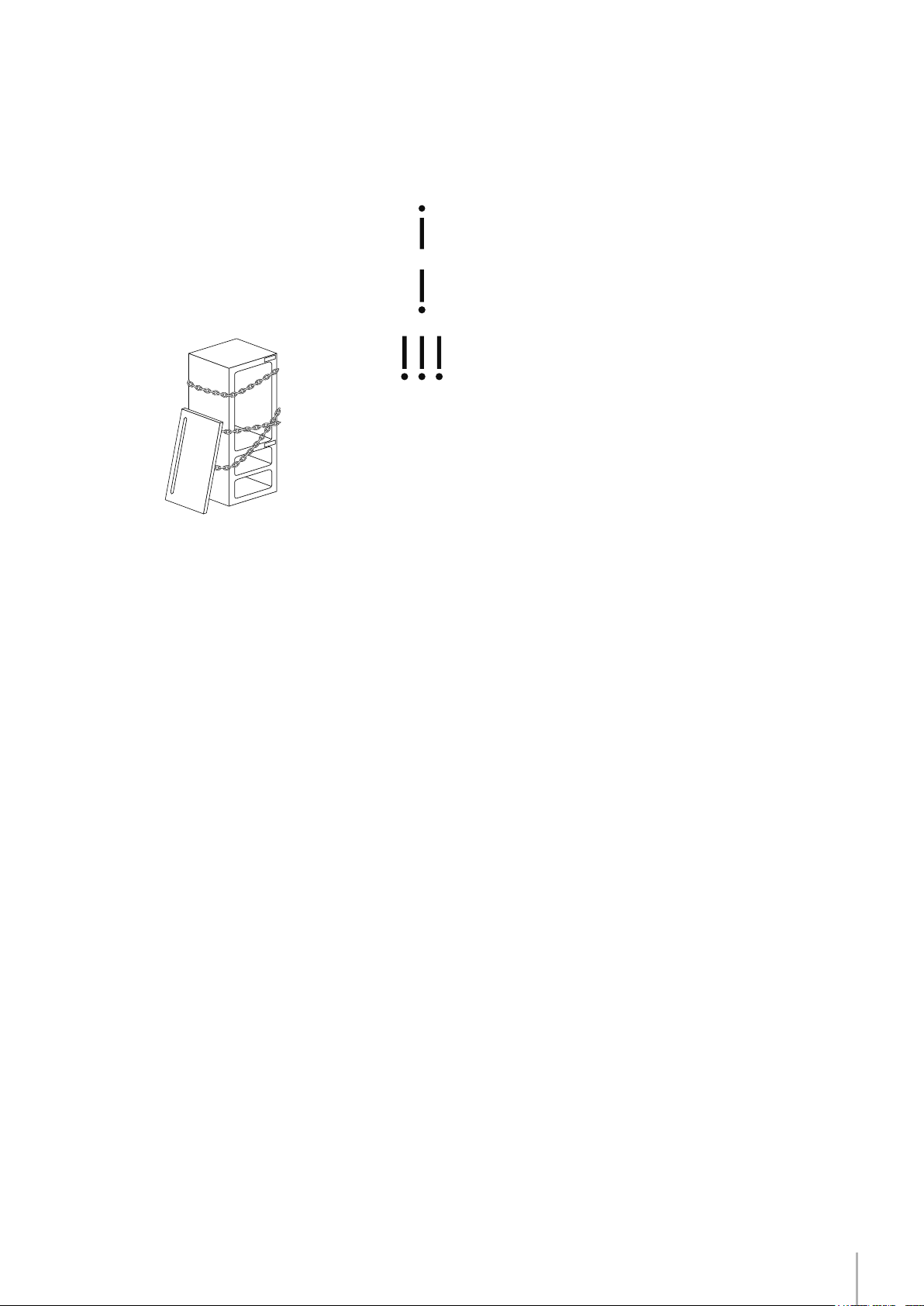
Secure the top of the appliance to the wall with the two brackets
provided with the appliance.
24 h
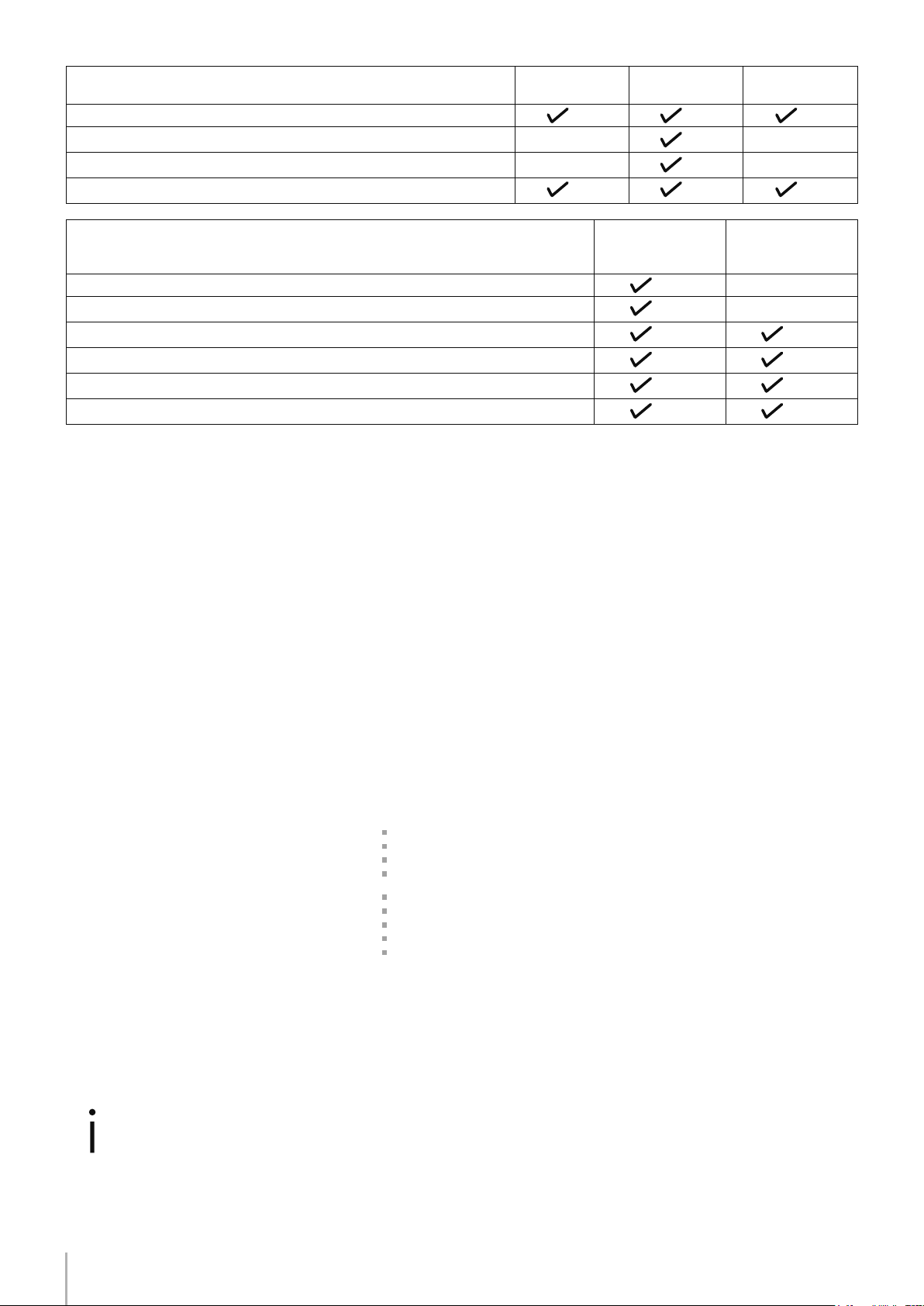
!! ATTENZIONE !! - !! ATTENTION !!
CONTENUTO IMBALLO - PACKING CONTENTS
CONTENUTO KIT ACCESSORI - OWNER KIT CONTENTS
Descrizione - Description
StandPlus/
X-pro
Integrated Classic
Apparecchiatura
Appliance
Staffe, squadrette, viti, chiave per ssare pannelli esterni
Fasteners, brackets, screws, wrench for mounting outer panels
Prolati in alluminio per chiusura spazi tra apparecchiature e mobili
Alluminium trims to ll gap between appliance and cabinets
Kit accessori (all’interno dell’apparecchiatura)
Owner’s Kit (inside the appliance)
Descrizione - Description
Modelli con Ice
Maker - Models
with Ice Maker
Modelli senza Ice
Maker - Models
without Ice Maker
Tubo di collegamento alla rete idraulica (solo modelli con Ice Maker)
Water ll hose (only models with Ice Maker)
Filtro acqua (solo modelli con Ice Maker)
Water lter (only models with Ice Maker)
Piedini livellatori
Leveling feet
Squadrette antiribaltamento, tasselli e viti per il ssaggio delle squadrette antiribaltamento
Anti-tipping brackets, xing plugs and screws
Kit per la pulizia dell’apparecchiatura
Appliance cleaning kit
Manuale d’uso, guida di installazione, certicato di garanzia
User Manual, Installation Guide, Guarantee Certicate
Leggete con attenzione e conservate con cura la Guida Installazione e il Manuale d’uso forniti con l’apparecchiatura.
Read the User Manual and the Guide attentively and keep it in a safe place.
13-04-12 / B09010102 ML
24 h
!! ATTENZIONE !! - !! ATTENTION !!
CONTENUTO IMBALLO - PACKING CONTENTS
CONTENUTO KIT ACCESSORI - OWNER KIT CONTENTS
Descrizione - Description
StandPlus/
X-pro
Integrated Classic
Apparecchiatura
Appliance
Staffe, squadrette, viti, chiave per ssare pannelli esterni
Fasteners, brackets, screws, wrench for mounting outer panels
Prolati in alluminio per chiusura spazi tra apparecchiature e mobili
Alluminium trims to ll gap between appliance and cabinets
Kit accessori (all’interno dell’apparecchiatura)
Owner’s Kit (inside the appliance)
Descrizione - Description
Modelli con Ice
Maker - Models
with Ice Maker
Modelli senza Ice
Maker - Models
without Ice Maker
Tubo di collegamento alla rete idraulica (solo modelli con Ice Maker)
Water ll hose (only models with Ice Maker)
Filtro acqua (solo modelli con Ice Maker)
Water lter (only models with Ice Maker)
Piedini livellatori
Leveling feet
Squadrette antiribaltamento, tasselli e viti per il ssaggio delle squadrette antiribaltamento
Anti-tipping brackets, xing plugs and screws
Kit per la pulizia dell’apparecchiatura
Appliance cleaning kit
Manuale d’uso, guida di installazione, certicato di garanzia
User Manual, Installation Guide, Guarantee Certicate
Leggete con attenzione e conservate con cura la Guida Installazione e il Manuale d’uso forniti con l’apparecchiatura.
Read the User Manual and the Guide attentively and keep it in a safe place.
13-04-12 / B09010102 ML
24 h
!! ATTENZIONE !! - !! ATTENTION !!
CONTENUTO IMBALLO - PACKING CONTENTS
CONTENUTO KIT ACCESSORI - OWNER KIT CONTENTS
Descrizione - Description
StandPlus/
X-pro
Integrated Classic
Apparecchiatura
Appliance
Staffe, squadrette, viti, chiave per ssare pannelli esterni
Fasteners, brackets, screws, wrench for mounting outer panels
Prolati in alluminio per chiusura spazi tra apparecchiature e mobili
Alluminium trims to ll gap between appliance and cabinets
Kit accessori (all’interno dell’apparecchiatura)
Owner’s Kit (inside the appliance)
Descrizione - Description
Modelli con Ice
Maker - Models
with Ice Maker
Modelli senza Ice
Maker - Models
without Ice Maker
Tubo di collegamento alla rete idraulica (solo modelli con Ice Maker)
Water ll hose (only models with Ice Maker)
Filtro acqua (solo modelli con Ice Maker)
Water lter (only models with Ice Maker)
Piedini livellatori
Leveling feet
Squadrette antiribaltamento, tasselli e viti per il ssaggio delle squadrette antiribaltamento
Anti-tipping brackets, xing plugs and screws
Kit per la pulizia dell’apparecchiatura
Appliance cleaning kit
Manuale d’uso, guida di installazione, certicato di garanzia
User Manual, Installation Guide, Guarantee Certicate
Leggete con attenzione e conservate con cura la Guida Installazione e il Manuale d’uso forniti con l’apparecchiatura.
Read the User Manual and the Guide attentively and keep it in a safe place.
13-04-12 / B09010102 ML
24 h
!! ATTENZIONE !! - !! ATTENTION !!
CONTENUTO IMBALLO - PACKING CONTENTS
CONTENUTO KIT ACCESSORI - OWNER KIT CONTENTS
Descrizione - Description
StandPlus/
X-pro
Integrated Classic
Apparecchiatura
Appliance
Staffe, squadrette, viti, chiave per ssare pannelli esterni
Fasteners, brackets, screws, wrench for mounting outer panels
Prolati in alluminio per chiusura spazi tra apparecchiature e mobili
Alluminium trims to ll gap between appliance and cabinets
Kit accessori (all’interno dell’apparecchiatura)
Owner’s Kit (inside the appliance)
Descrizione - Description
Modelli con Ice
Maker - Models
with Ice Maker
Modelli senza Ice
Maker - Models
without Ice Maker
Tubo di collegamento alla rete idraulica (solo modelli con Ice Maker)
Water ll hose (only models with Ice Maker)
Filtro acqua (solo modelli con Ice Maker)
Water lter (only models with Ice Maker)
Piedini livellatori
Leveling feet
Squadrette antiribaltamento, tasselli e viti per il ssaggio delle squadrette antiribaltamento
Anti-tipping brackets, xing plugs and screws
Kit per la pulizia dell’apparecchiatura
Appliance cleaning kit
Manuale d’uso, guida di installazione, certicato di garanzia
User Manual, Installation Guide, Guarantee Certicate
Leggete con attenzione e conservate con cura la Guida Installazione e il Manuale d’uso forniti con l’apparecchiatura.
Read the User Manual and the Guide attentively and keep it in a safe place.
13-04-12 / B09010102 ML
4
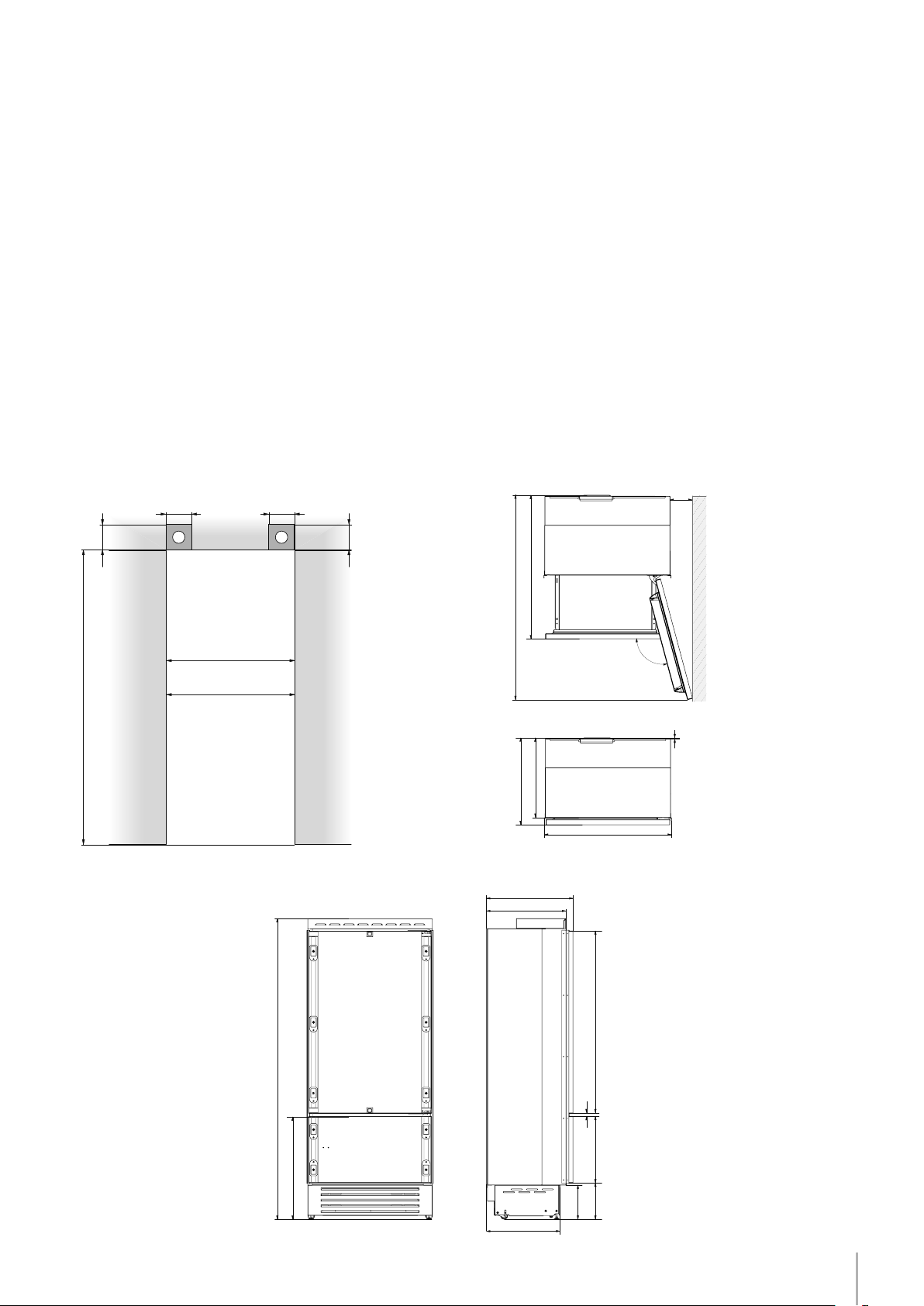
BI30 w: 749 mm (29 1/2”)/ h: 2120 mm (83 1/2”)/ d: 610 mm (24”)
BI36 w: 899 mm (35 3/8”)/ h: 2120 mm (83 1/2”)/ d: 610 mm (24”)
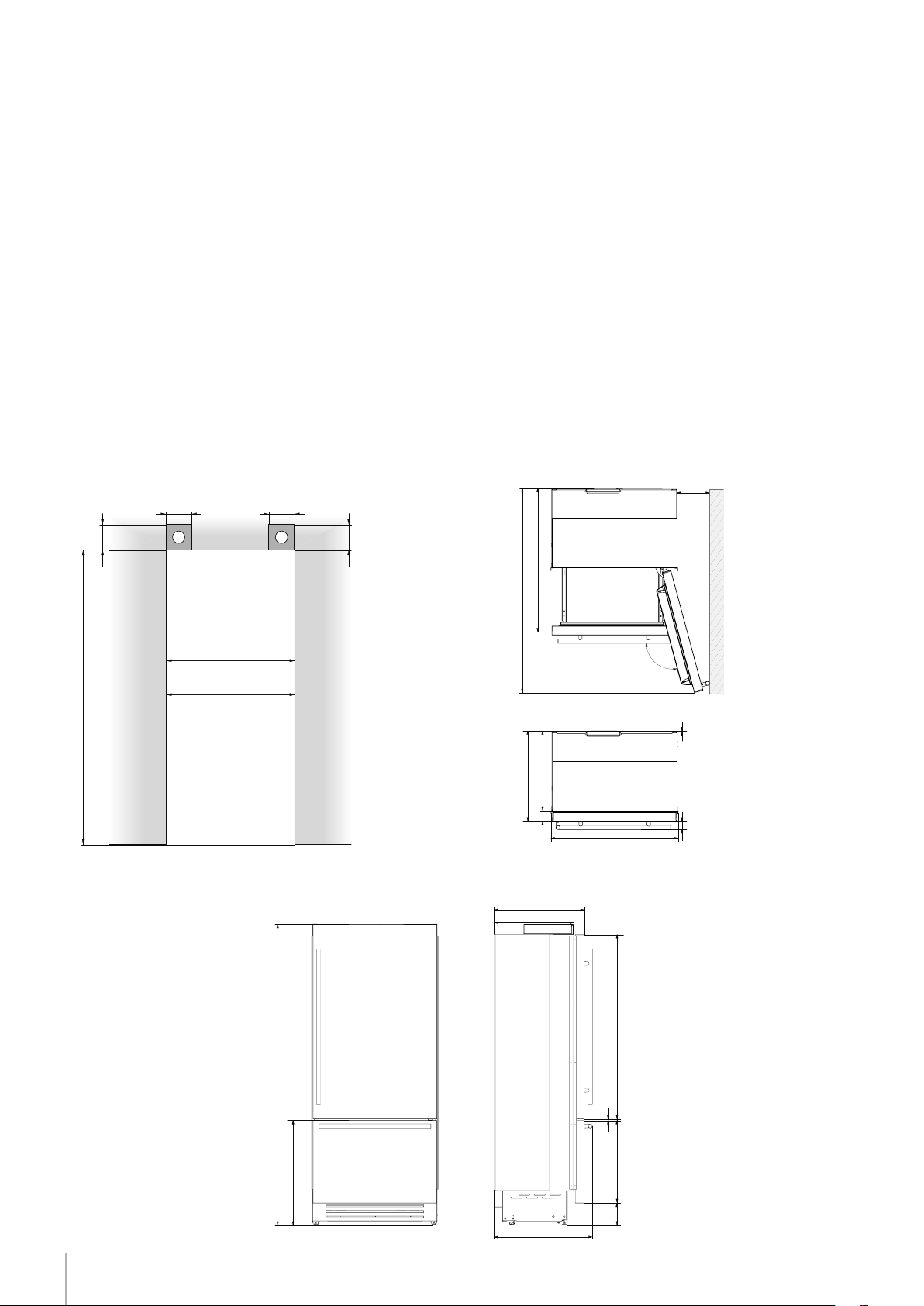
BKI30 w: 749 mm (29 1/2”)/ h: 2120 mm (83 1/2”)/ d: 635 mm (25”)
BKI36 w: 899 mm (35 3/8”)/ h: 2120 mm (83 1/2”)/ d: 635 mm (25”)
30” Series w: 800 mm (31 1/2”) / h: 2260 mm (89”) / d: 800 mm (31 1/2”)
36” Series w: 950 mm (37 3/8”) / h: 2260 mm (89”) / d: 800 mm (31 1/2”)
30” Series up to 275 kg (606 lb)
36” Series up to 295 kg (650 lb)
North America Version: 115V 60Hz
North America Version: 15 A
from 0.05 MPa to 0.5 MPa (0.5 Bar - 5 Bar)
3/4” female attachment
Customized panels mounting Kit
Anti-tipping Kit (B04000200)
Lateral connecting kit (KCLIT/KCLIH)
4 mm (1/8”) allen wrench
Phillips head screwdriver
wood and percussion drill
2.5 mm (1/8”) bit for wood
8 mm (3/8”) bit for walls
17 mm (3/4”) wrench
13 mm (1/2”) socket
Appliance dimensions
Integrated
Appliance dimensions
Stainless Integrated
Appliance dimensions
with packaging
Weight with packaging
Voltage
Power supply cable
Potable water supply pressure
Water connection
Provided installation accessories
Additional equipment necessary
Adjusting height of the rear rollers
Appliance features and installation requirements
Note
Not all models come with an automatic
ice maker. Verify if your model is equipped
with an ice maker to determine if you
require water supply.
Description
Maker - Models
with Ice Maker
Maker - Models
without Ice
Maker
Water fill hose (only models with Ice Maker)
Water filter (only models with Ice Maker)
Leveling feet
Anti-tipping brackets, fixing plugs and screws
Appliance cleaning kit
User Manual, Installation Guide, Guarantee Certificate
Description
StandPlus/
X-pro
Integrated Classic
Appliance
Fasteners, brackets, screws, wrench for mounting outer panels
Alluminium trims to fill gap between appliance and cabinets
Owner’s Kit (inside the appliance)
Read the User Manual and the Guide attentively and keep it in a safe place.
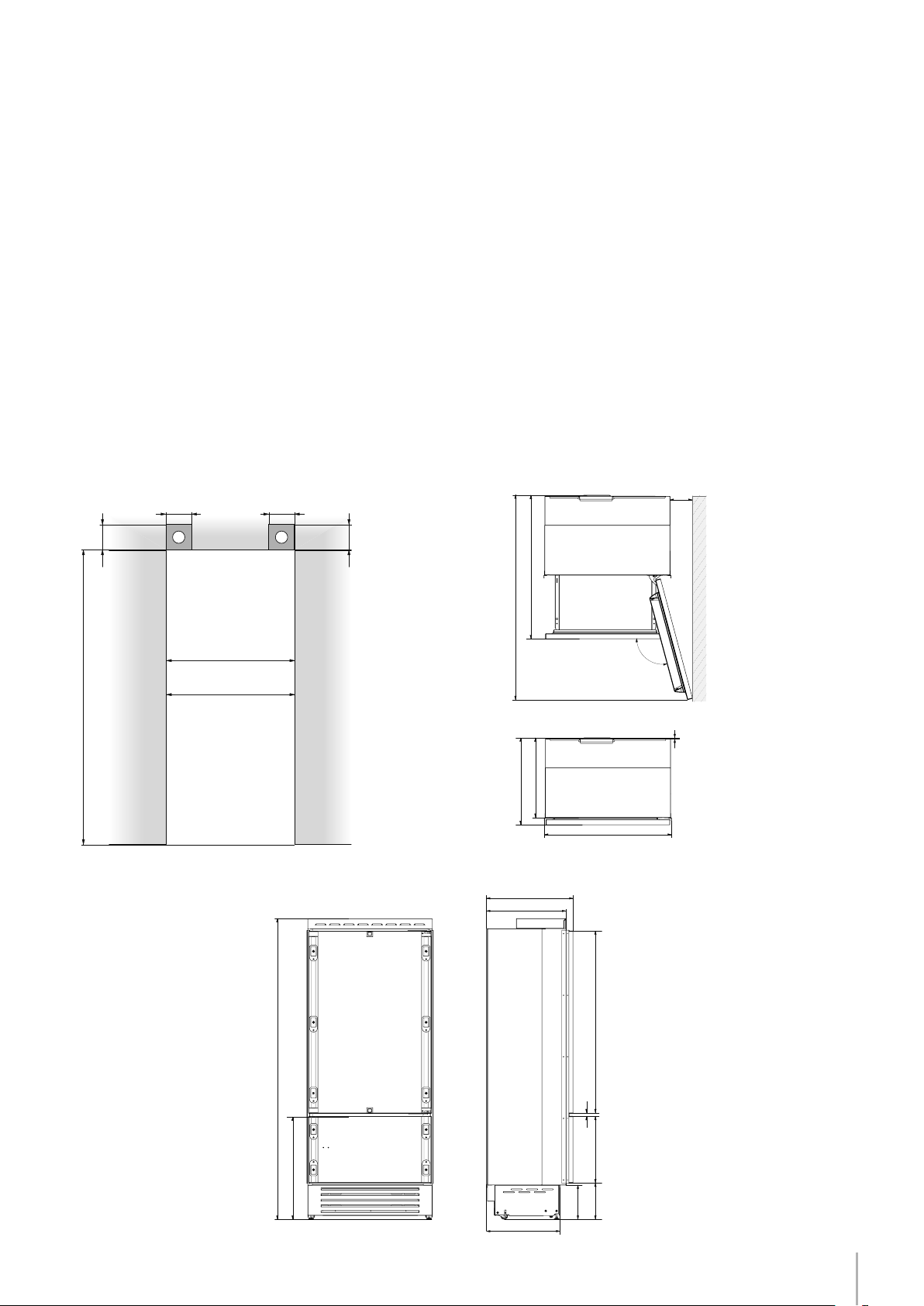
5
140 (5 ½”) 140 (5 ½”)
100 (4”)
100 (4”)
A A
min 2134 (84”)
BI36: 900 (35 ½”)
BI30: 750 (29 5⁄8”)
A
2134 mm (84”)
BI36: 900 mm (35 1/2”)
BI30: 750 mm (29 5/8”)
BI36: 1470 mm (57 7/8”)
BI30: 1320 mm (52”)
105°
BI36: 899 mm (35 3/8”)
BI30: 749 mm (29 1/2”)
2120 mm (83 1/2”) + 25 mm (1”)
610 mm (
24”)
610 (24”)
560 (22”)
1293 (50 7⁄8” )
474 (18 5⁄8”)
231 (9
1⁄8”
) +
25 (1”)
500 (19 ¾”)
248 (9
¾”
)
+ 25 (1”)
20 (¾”)
721 (28 3⁄8”) +25 (1”)
2120 (83 ½”) +25 (1”)
992 (39”)
BI36: 1470 (57
7⁄8”
)
BI30: 1320 (52”)
BI36: 160 (6 3⁄8”)
BI30: 125 (5”)
560 (22”)
610 (24”)
BI36: 899 (35 3⁄8”)
BI30: 749 (29 ½”)
10 (3⁄8”)
105°
Installation Guide
EnglishFrançais
Installation niche features: Integrated Series (BI)
BI30 w: 749 mm (29 1/2”)/ h: 2120 mm (83 1/2”)/ d: 610 mm (24”)
BI36 w: 899 mm (35 3/8”)/ h: 2120 mm (83 1/2”)/ d: 610 mm (24”)
BKI30 w: 749 mm (29 1/2”)/ h: 2120 mm (83 1/2”)/ d: 635 mm (25”)
BKI36 w: 899 mm (35 3/8”)/ h: 2120 mm (83 1/2”)/ d: 635 mm (25”)
30” Series w: 800 mm (31 1/2”) / h: 2260 mm (89”) / d: 800 mm (31 1/2”)
36” Series w: 950 mm (37 3/8”) / h: 2260 mm (89”) / d: 800 mm (31 1/2”)
30” Series up to 275 kg (606 lb)
36” Series up to 295 kg (650 lb)
North America Version: 115V 60Hz
North America Version: 15 A
from 0.05 MPa to 0.5 MPa (0.5 Bar - 5 Bar)
3/4” female attachment
Customized panels mounting Kit
Anti-tipping Kit (B04000200)
Lateral connecting kit (KCLIT/KCLIH)
4 mm
(1/8”) allen wrench
Phillips head screwdriver
wood and percussion drill
2.5 mm (1/8”) bit for wood
8 mm (3/8”) bit for walls
17 mm (3/4”) wrench
13 mm (1/2”) socket
area to be left clear for the anti-tipping brackets
Niche Height
Niche Width
Door Swing Clearance
Door Opening Angle
Width
Height
Depth with door (without panel)
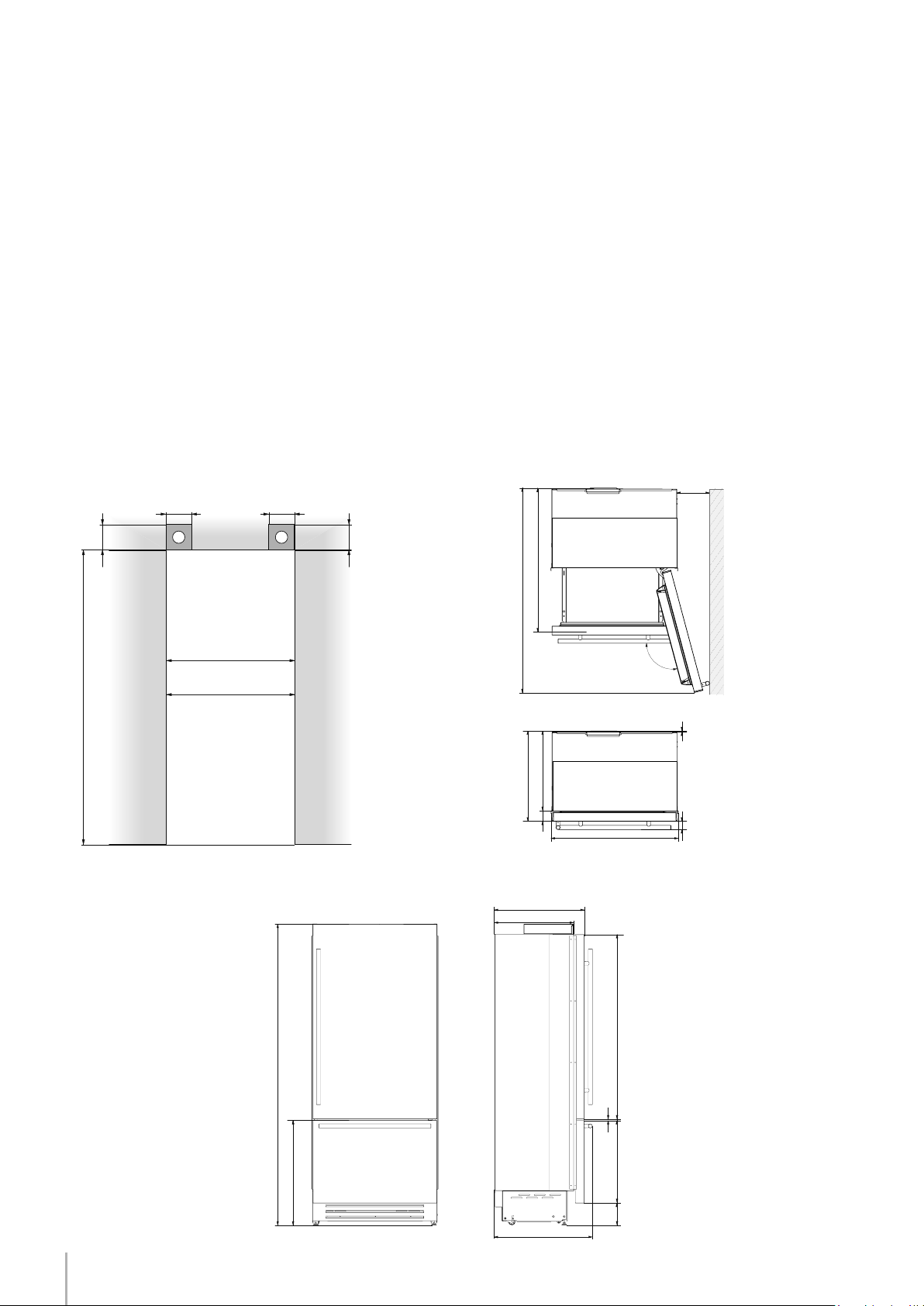
6
1
4
1
2
3
140 (5 ½”) 140 (5 ½”)
100 (4”)
100 (4”)
A A
min 2134 (84”)
BI36: 900 (35 ½”)
BI30: 750 (29 5⁄8”)
A
2134 mm (84”)
BKI36: 900 mm (35 1/2”)
BKI30: 750 mm (29 5/8”)
BKI36: 1470 mm (57 7/8”)
BKI30: 1320 mm (52”)
105°
BKI36: 899 mm (35 3/8”)
BKI30: 749 mm (29 1/2”)
2120 mm (83 1/2”) + 25 mm (1”)
635 mm (25”)
2120 (83 ½”) +25 (1”)
635 (25”)
560 (22”)
693 (27 ¼”)
1308 (51 ½”)587 (23 1⁄8”)
146 (5 ¾”)
+ 25(1”)
9 ( 3⁄8”)
732 (28 7⁄8”)+25 (1”)
BKI36: 1470 (57 7⁄8”)
BKI30: 1320 (52”)
560 (22”)
635 (25”)
BKI36: 899 (35 3⁄8”)
BKI30: 749 (29 ½”)
10 (3⁄8”)
105°
75 (3”)
58 (2 ¼”)
BKI36: 230 (9”)
BKI30: 195 (7 ¾”)
Series: All
Installation niche requirements: Stainless Integrated Series (BKI)
area to be left clear for the anti-tipping brackets
Niche Height
Niche Width
Door Swing Clearance
Door Opening Angle
Width
Height
Depth with door (without panel)
7
1
4
1
2
3
105°
BKI36: 899 mm (35 3/8”)
BKI30: 749 mm (29 1/2”)
2120 mm (83 1/2”) + 25 mm (1”)
635 mm (25”)
Installation Guide
Series: All
EnglishFrançais
The appliance is very heavy.
Take maximum care during handling to
avoid injury.
The appliance should always be transport-
ed in an erect position.
Avoid at all costs leaning it on its front side.
Preparing the installation
Transport to installation site
and unpacking
Since this is a large and heavy appliance, before transporting the ap-
pliance, check the access to the location where it will be installed
(door size, manoeuvring space in stairwells, etc.).
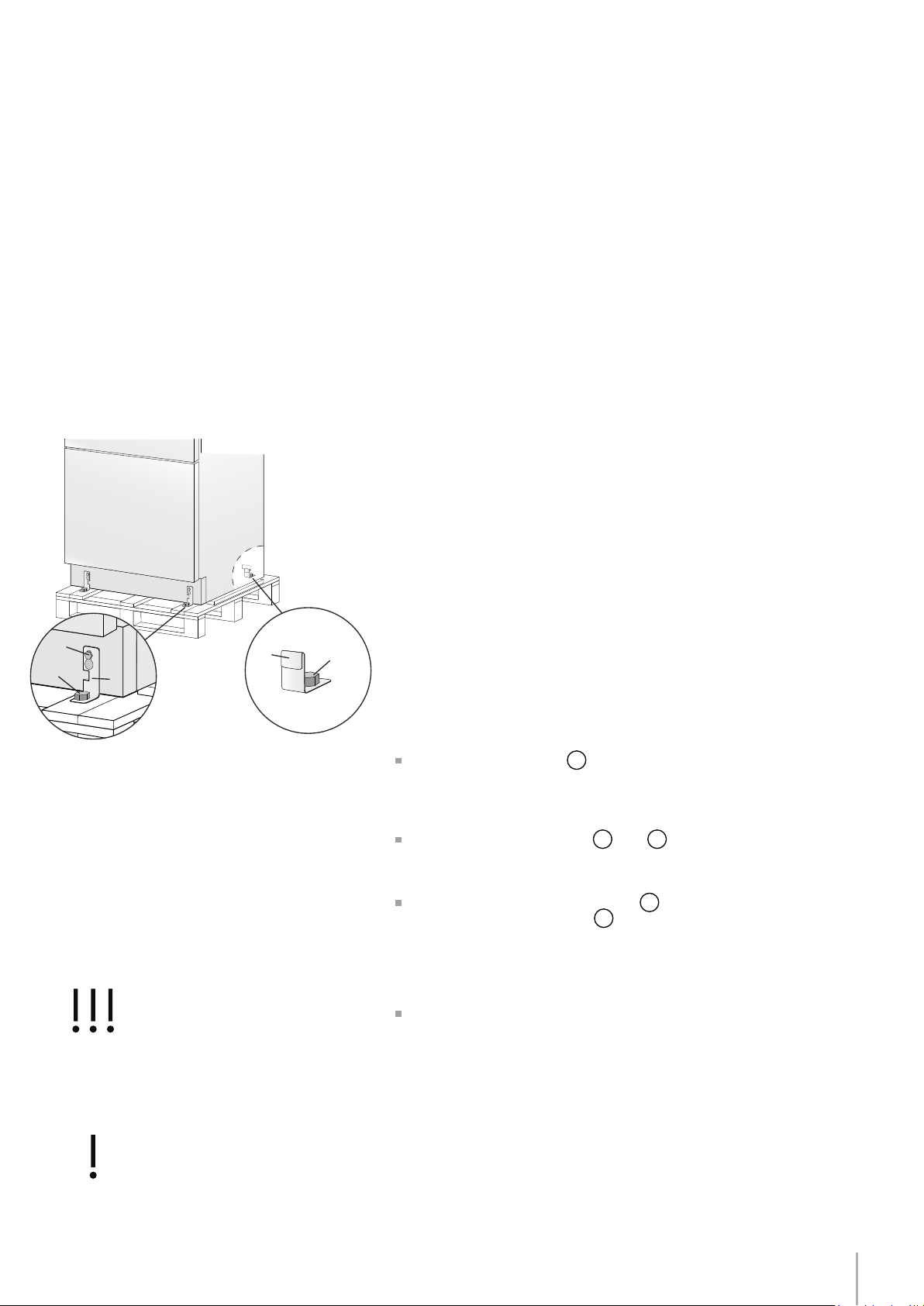
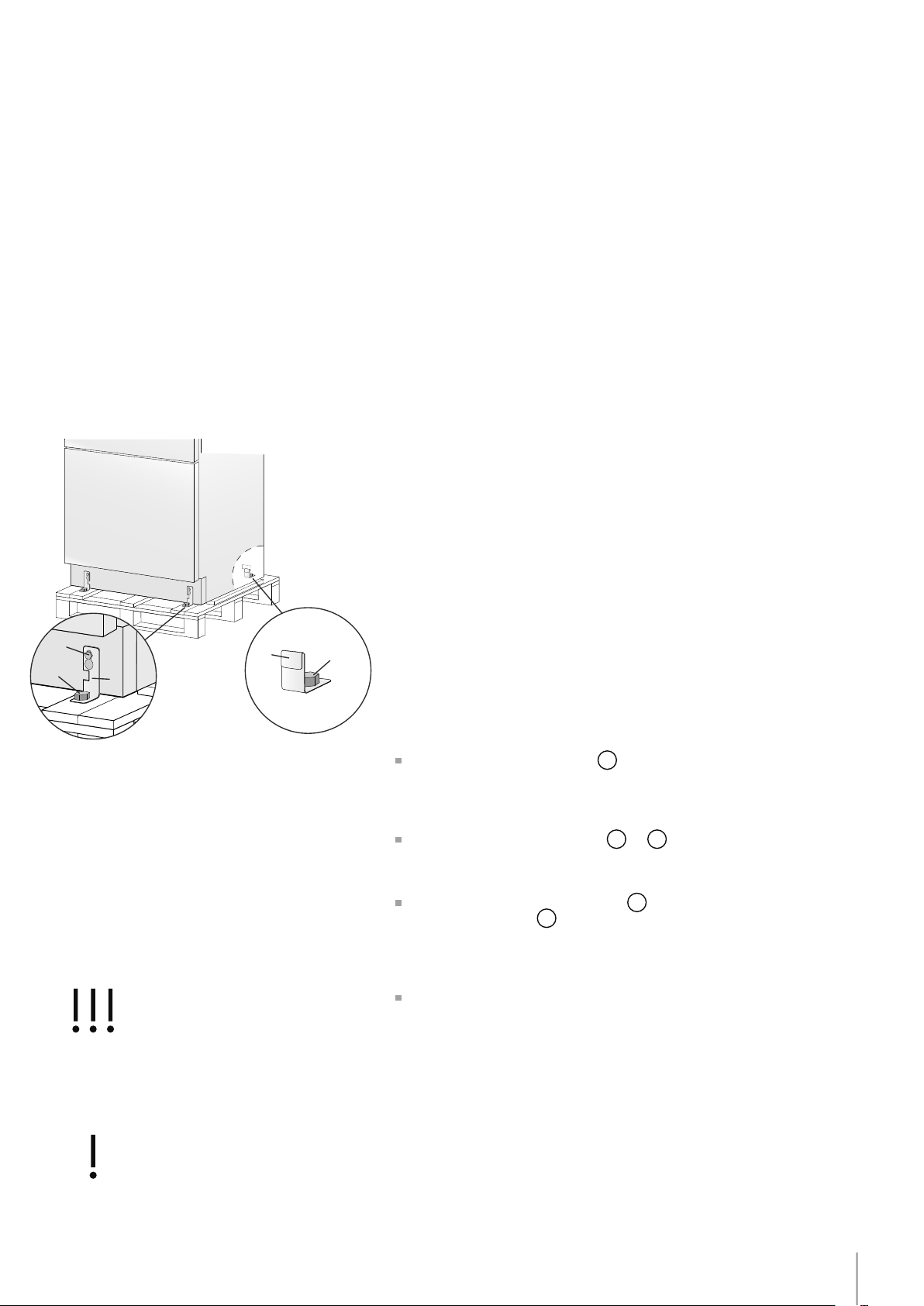
The appliance is attached to the base of the packaging (pallet)
through four bolts which can be removed using a 17 mm (3/4”) wrench.
It is recommended to use a manual transporting device to move the
appliance to the installation site, and only at this point to remove the
base of the packaging.
The appliance should always be transported in an erect position.
If this is not possible, transport the appliance laying on its rear side.
Once at the installation site, the appliance, which is equipped with four
wheels, can be taken off the pallet and positioned in the installation
area.
Operate as follows:
Take off the four bolts
1
securing the appliance to the pallet by
means of a 17 mm (3/4”) wrench or socket.
Remove the xing brackets
3
and
4
.
To remove the front xing bracket
3
, unscrew for one or two turns
the rear wheel adjusting bolt
2
by means of a 13 mm (1/2”) socket,
do not overtighten the nut as it could damage the leveling feet adjust-
ing system.
From the back of the unit and by means of a suitable, high duty hand
trolley, take off the appliance and place it on the oor. Be mindful of
any debris on the oor which could get caught under the rollers and
potentially damage the ooring when moving the appliance.
Be very careful to avoid any damage to oors. Delicate oors should be
protected with plywood, hard cardboard or similar material panels.
Door Opening Angle
Width
Height
Depth with door (without panel)
EW
E W
EW
E W
8
E
W
E
W
Series: All
The appliance should be connected only to
a drinkable water supply system.
The Built-in lter cannot make it safe to
drink any water which is not suitable for hu-
man consumption.
Electrical and Water connection
Do not use extension cords or adapters.
Once the appliance is fully installed, connected
to the water supply (if applicable) and opera-
tional, in the event that the water supply must be
turned off,(touch the button
on control panel
to switch it off) before the main water is shut off to
prevent the appliance from entering a ‘NO WATER
IN’ alarm state.
Water connection
Electrical connection
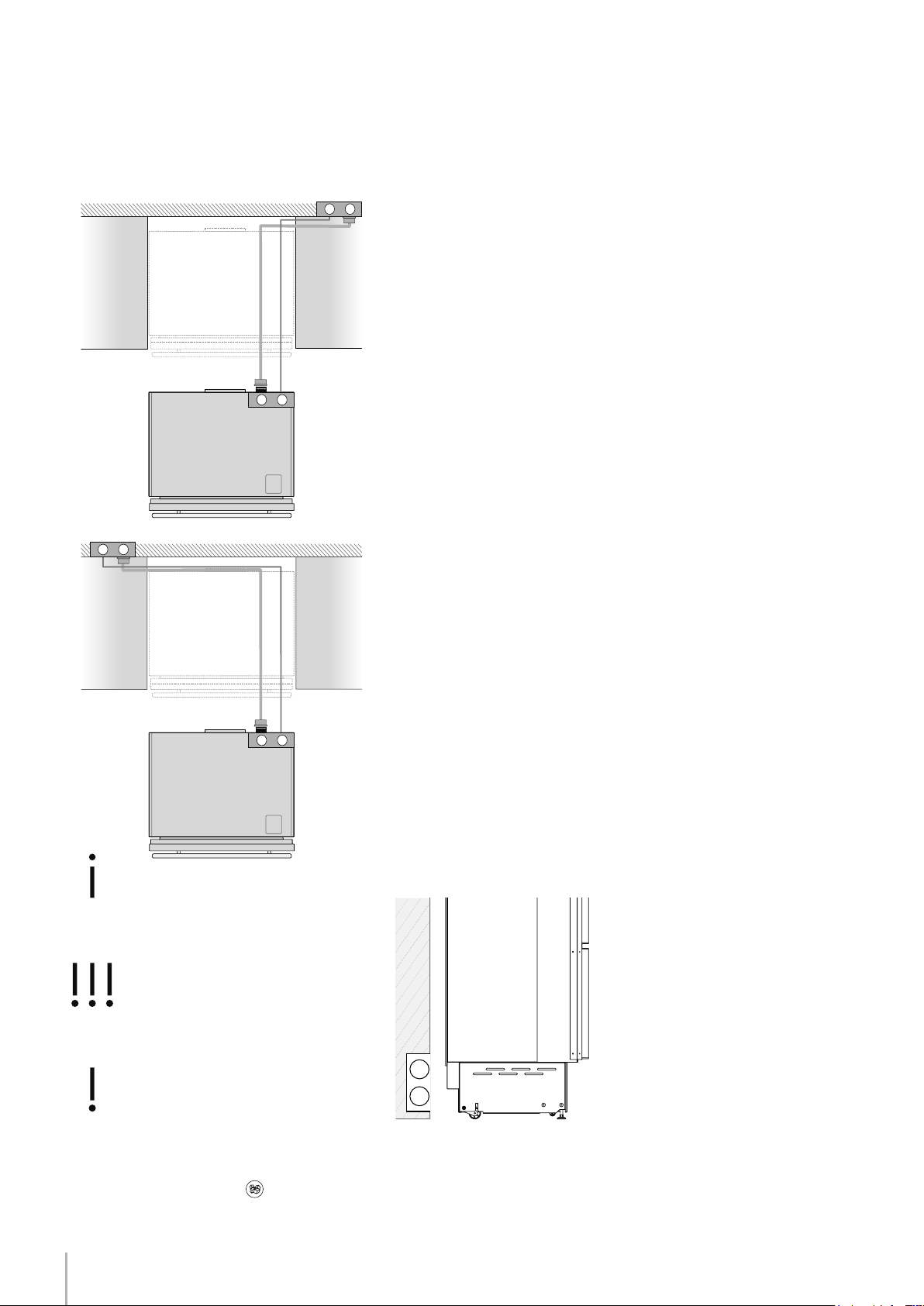
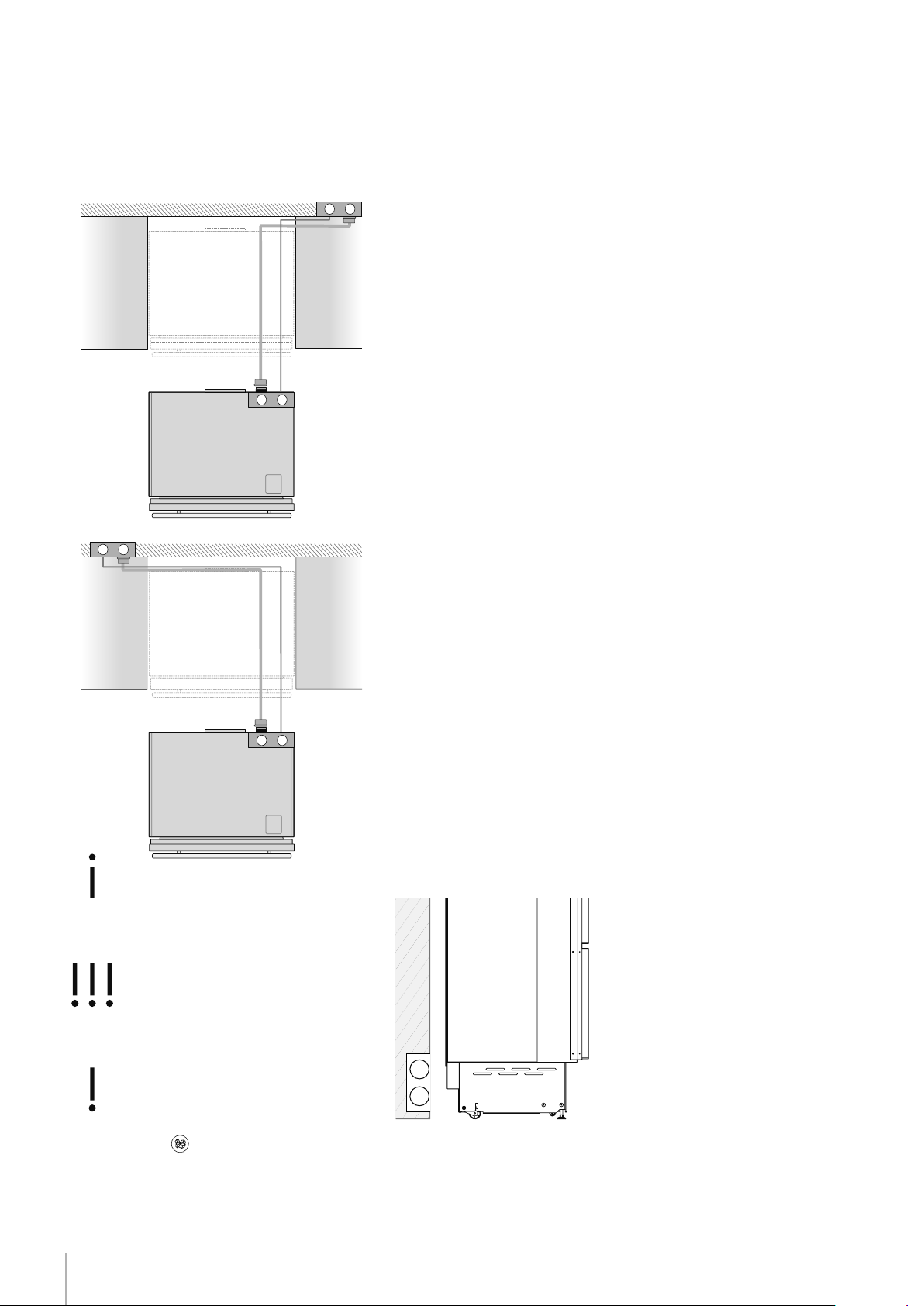
Electrical and water supply behind the unit
Integrated Series
The appliances are delivered from the factory for operation at 110V-
120V AC - 60Hz (US and Canada).
Do not connect the refrigerator to any GFCI receptacle.
They are provided with a suitable supply cable and plug to be con-
nected to an appropriate 15A socket (US and Canada) provided
with an effective grounding.
A circuit breaker should also be installed and should be easily ac-
cessible so that it can be easily switched off before performing any
installation or maintenance.
To connect to the water supply system (for appliances equipped with
ice makers) a 1/4” waterline with accessible shut-off valve must be
supplied.
The appliance is provided with a water adapter elbow which is suit-
able for high water pressure and complies the Food Regulations.
The water lter cartridge, which is provided with the appliance,
should be installed according to the accompanying instructions. Use
only the new adapter which is supplied with the appliance. The so-
lenoid connection on the appliance is 3/4” diameter but is metric
threaded. A standard garden hose threaded connector such as a
braided stainless hose found at typical hardware stores will strip or
damage the solenoid threads. Use only the supplied 1/4” quick con-
nect elbow adapter for connecting a 1/4” copper or polyethylene
source water line to the appliance.
Electrical cord length: 2500 mm (98 3/8”)
Water connection line length: 2500 mm (98 3/8”)
Do not use extension cords and/or multiple adapters for the power
supply connection.
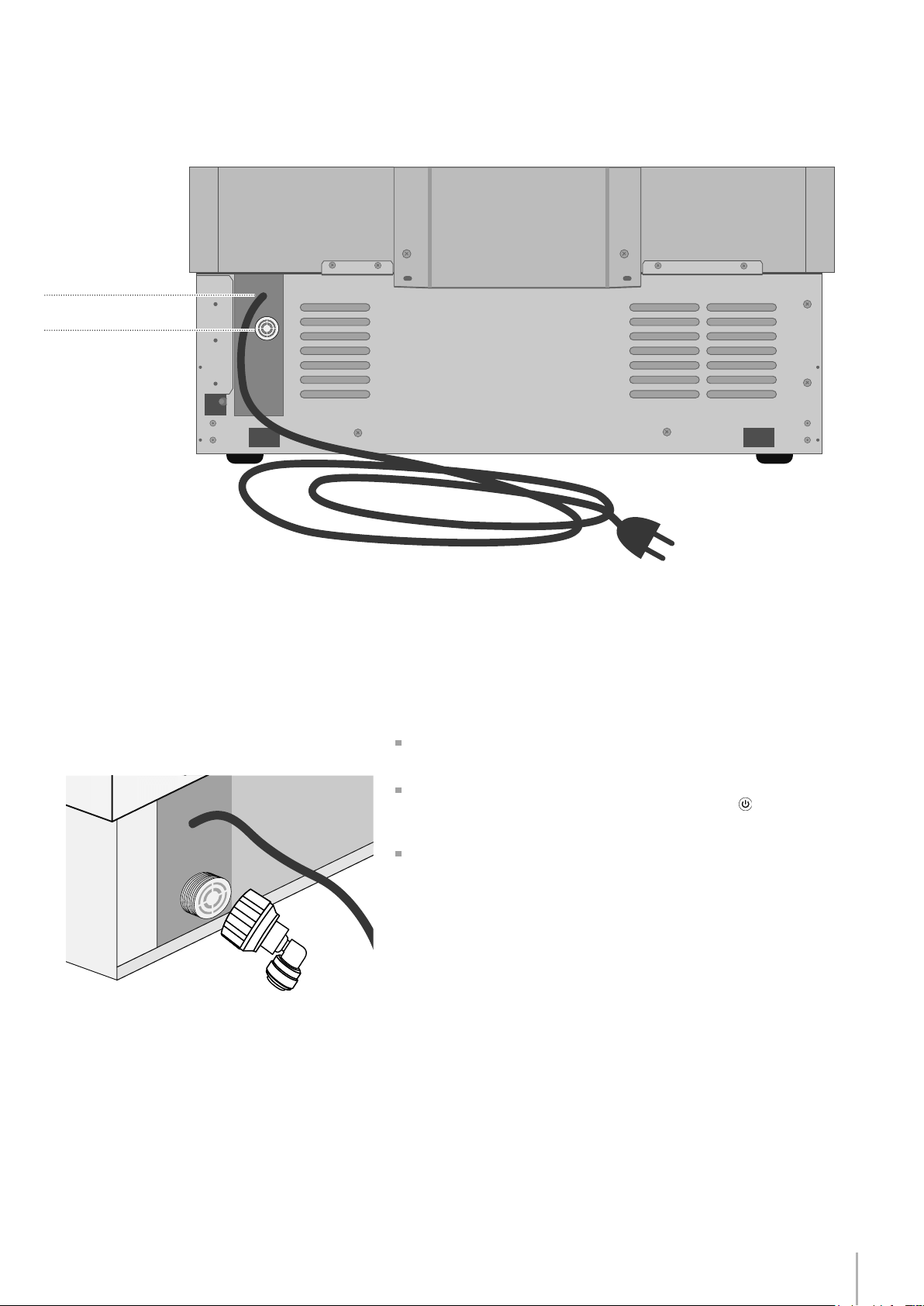
9
Installation Guide
EnglishFrançais
Series: All
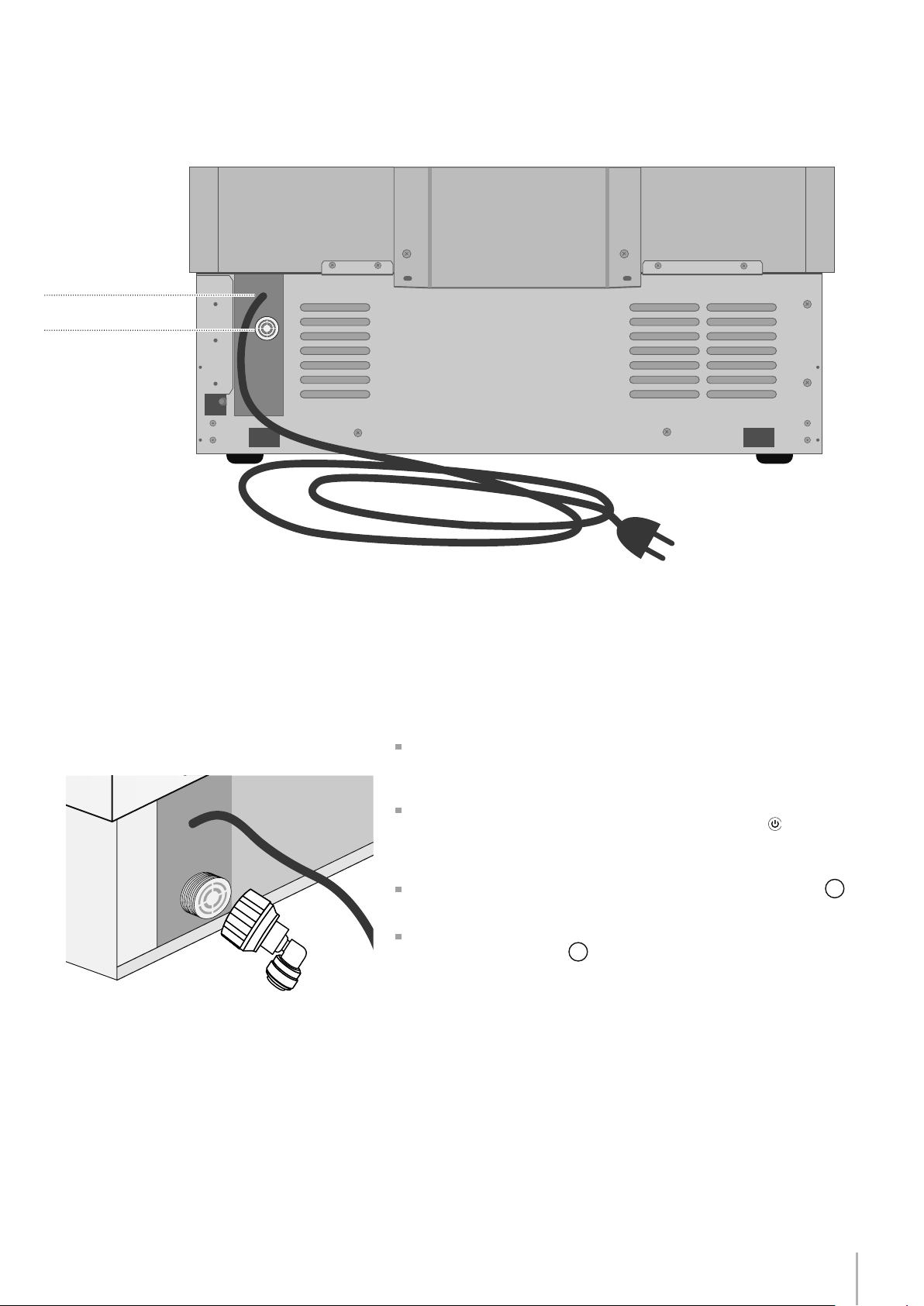
Back of appliance
Water connection
Electrical connection
Operate as follows:
Unwind the electric cable and connect it directly to the wall socket.
Make sure the appliance is in the Stand-by condition and that all
lights are off; should it be not so press the Unit button to switch it off.
Push the 1/4” source waterline fully into the elbow connector then
thread the elbow adapter to the solenoid at the back of the appli-
ance.
Firmly tighten with ngers - a tool / wrench should not be needed to
make a proper seal. Turn on the water and ensure all connections
are not leaking prior to pushing the unit into the niche.
10
1
2
1
2
Series: All
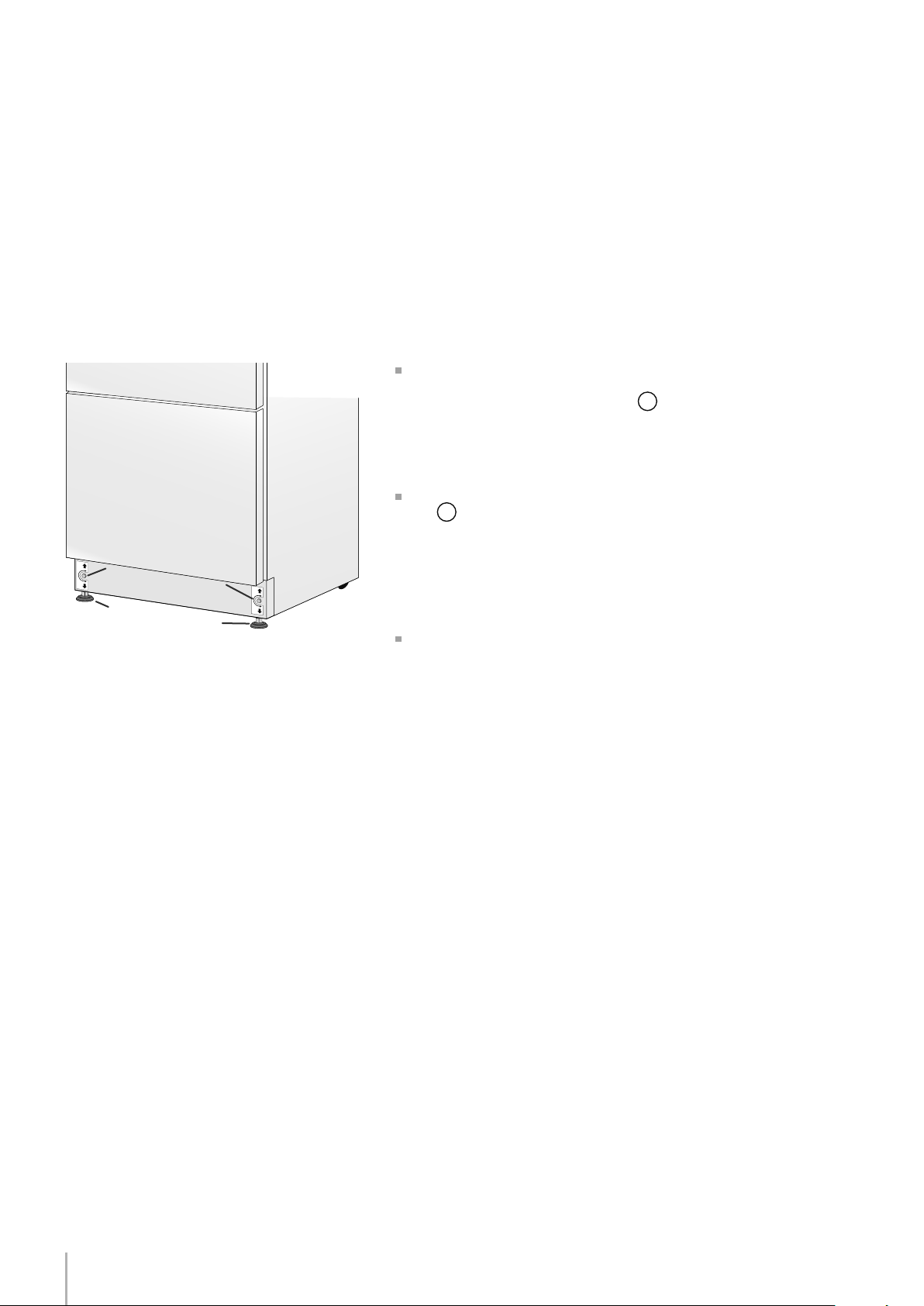
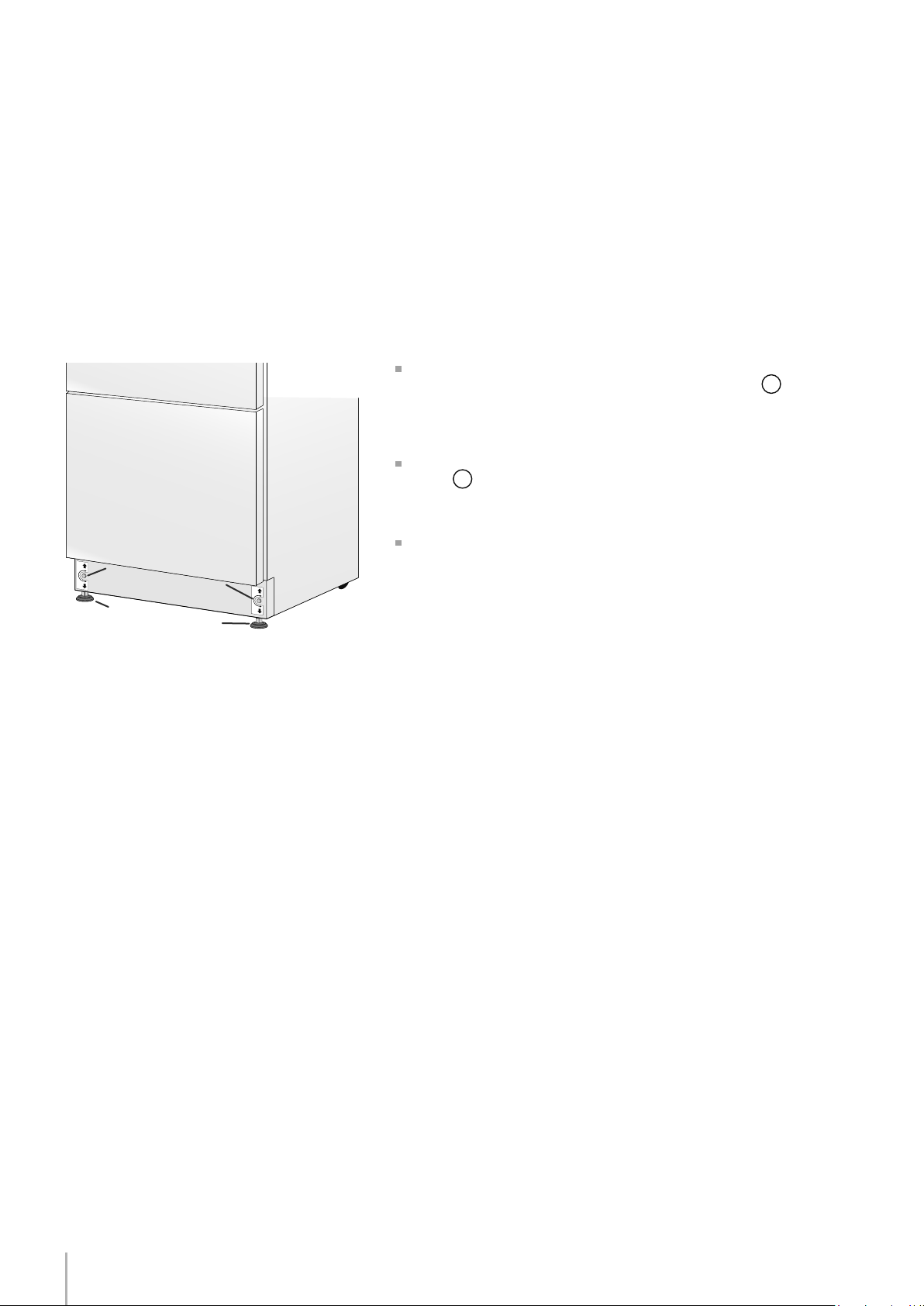
Adjust the appliance level by means of the front levelling feet
and the rear adjustable wheels.
Operate as follows:
The grille should ship taped to the back of the appliance. If by chance
it is already in place, remove the grille (it is kept in position by magnets),
adjust the height of the levelling feet
1
by means of a 17
mm (3/4”) wrench.
Then adjust the height of the rear wheels by turning the front adjusting
bolts
2
clockwise or counter-clockwise as it may be required. (Do
not use power drivers with high torque settings for this step as it could
damage the levelling mechanism)
Mount the lower ventilation grille only after the unit is nally levelled
in the niche.
Levelling
11
1
2
3
Installation Guide
EnglishFrançais
Series: Integrated (BI)
Door and Bottom-Drawer overlay panels layout
The dimensions of the panels are indicated in the table and draw-
ings on pages 13.
Nevertheless, according to the requirements for aligning with other
kitchen structures, the door panel can be higher than the upper
edge of the refrigerator door, and the drawer panel can be lower
than the edge of the drawer.
The panels must be mounted using special braces which attach
to adjustable devices provided on the door and drawer and with
brackets that anchor and adjust the panel’s vertical direction.
Braces, brackets and fixing screws are provided with the appliance
and must be applied to the panel as indicated.
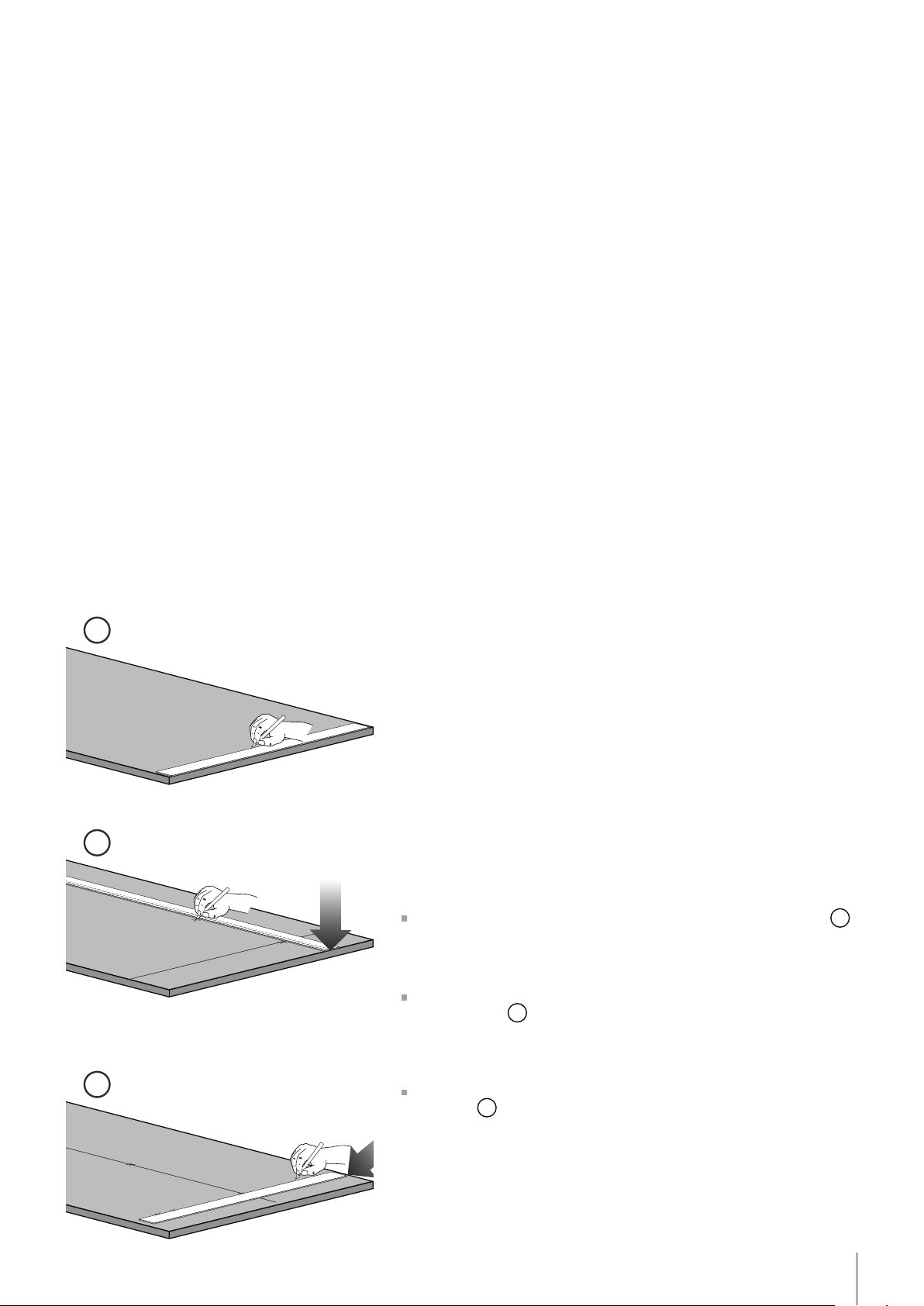
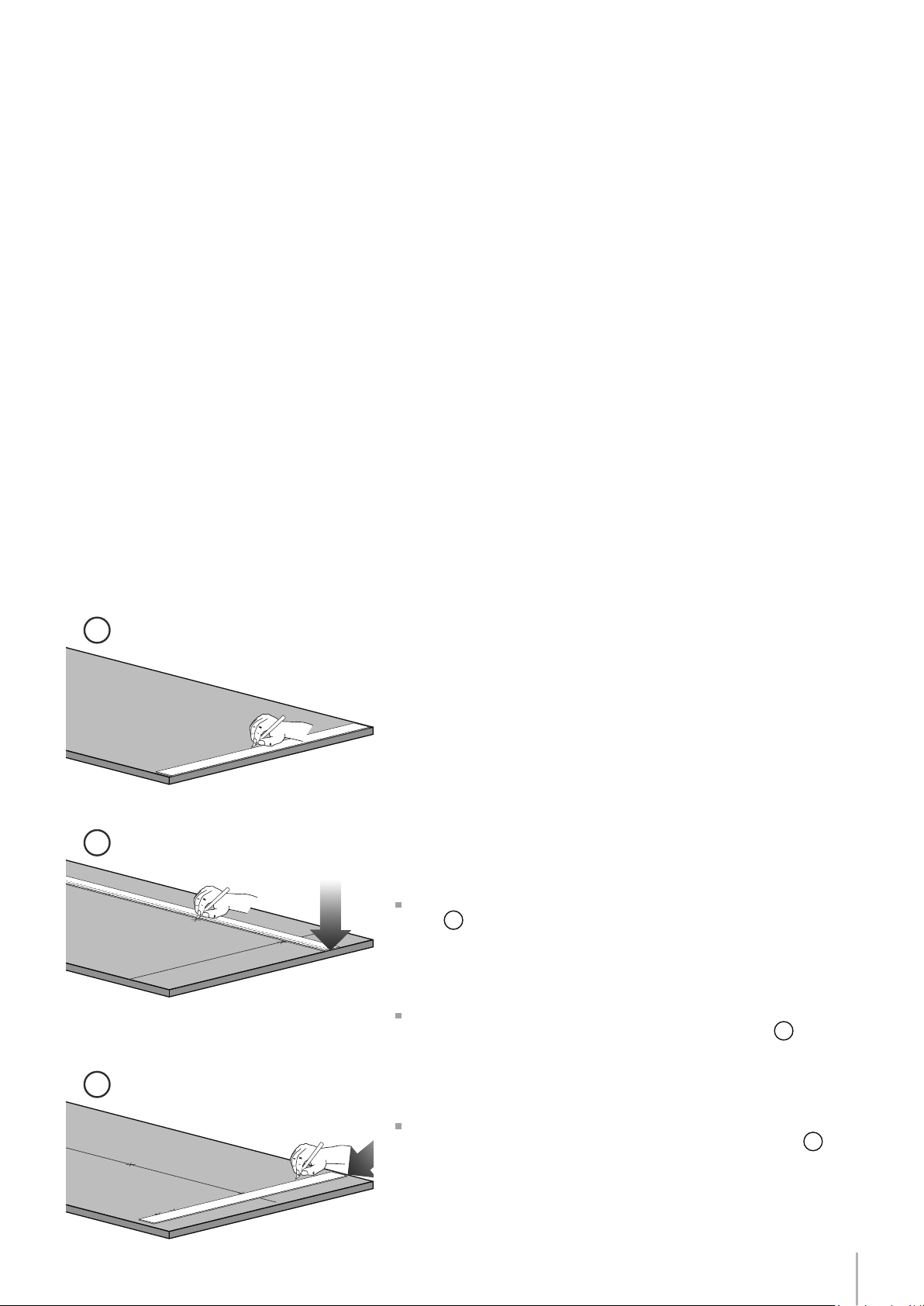
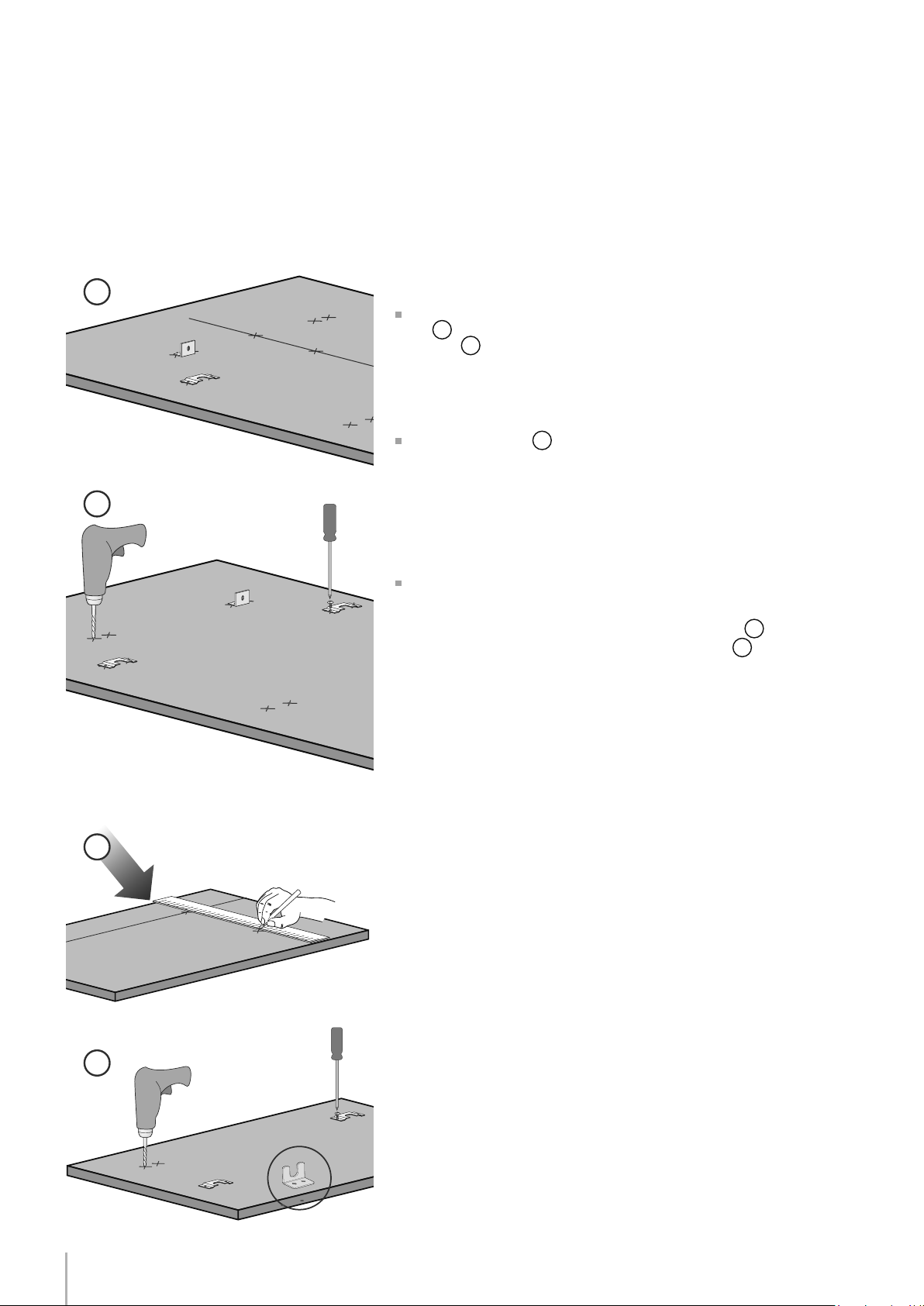
Operate as follows:
To prepare the panels to be mounted on the appliance, follow
these steps, working on the back of the panel.
Door Panel
Draw a reference center line, dividing the panel width in half
1
.
Starting from the bottom edge of the panel, mark the positioning
of the brackets
2
.
Following the corresponding table, mark the outside and then the
inside hole
3
.
12
7
8
4
5
Series: Integrated (BI)
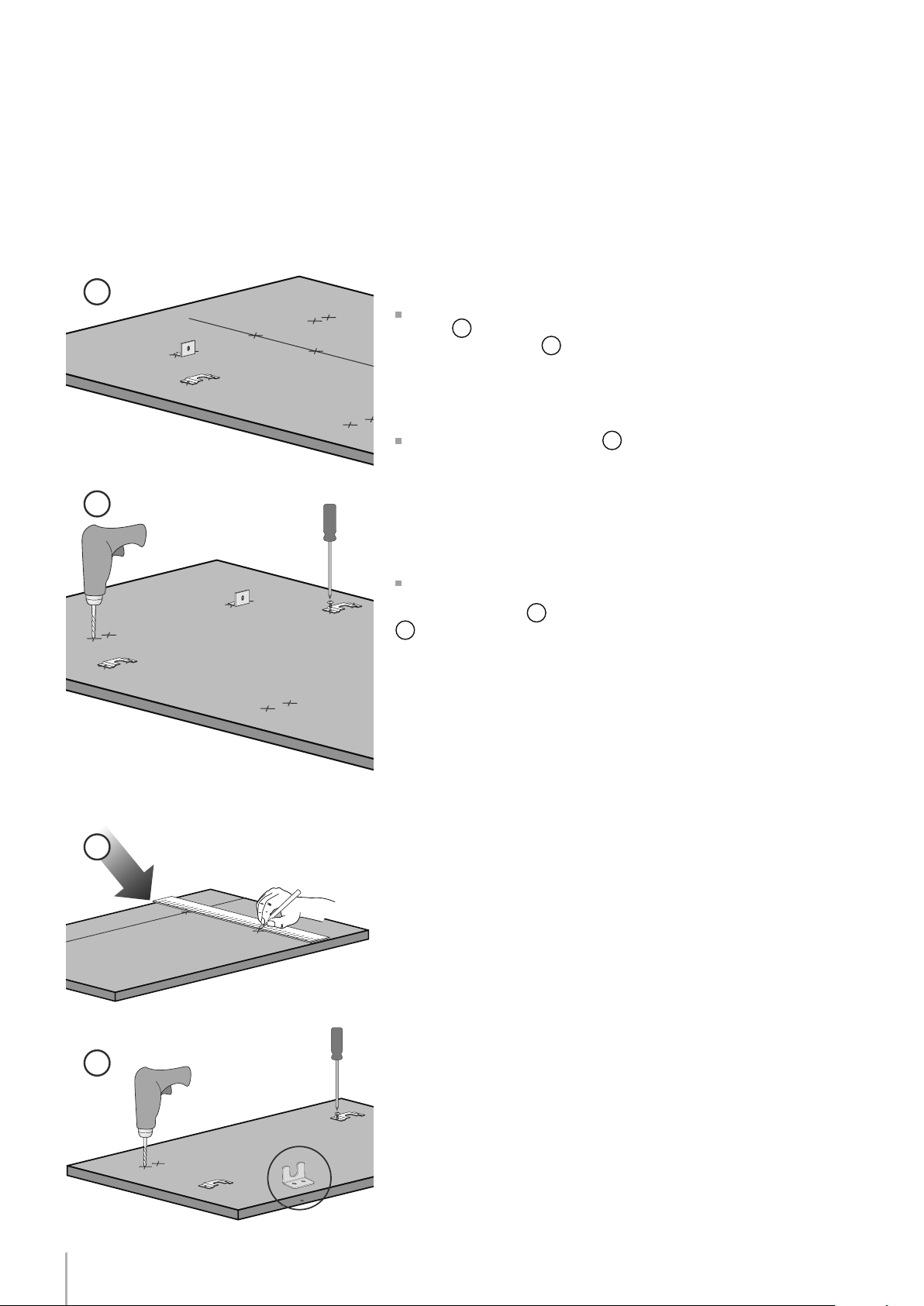
Position the brackets on each set of marks to make sure they are
aligned
4
, you may wish to drill pilot holes (pay close attention to
the panel’s thickness)
5
.
Screw the brackets in place
6
.
Drawer Panel
When preparing the Drawer Panel, follow the same instructions as
per the door panel, but make sure measurements are taken starting
from the top edge
7
. The support bracket faces the opposite way
8
(note imgs 4 and 8).
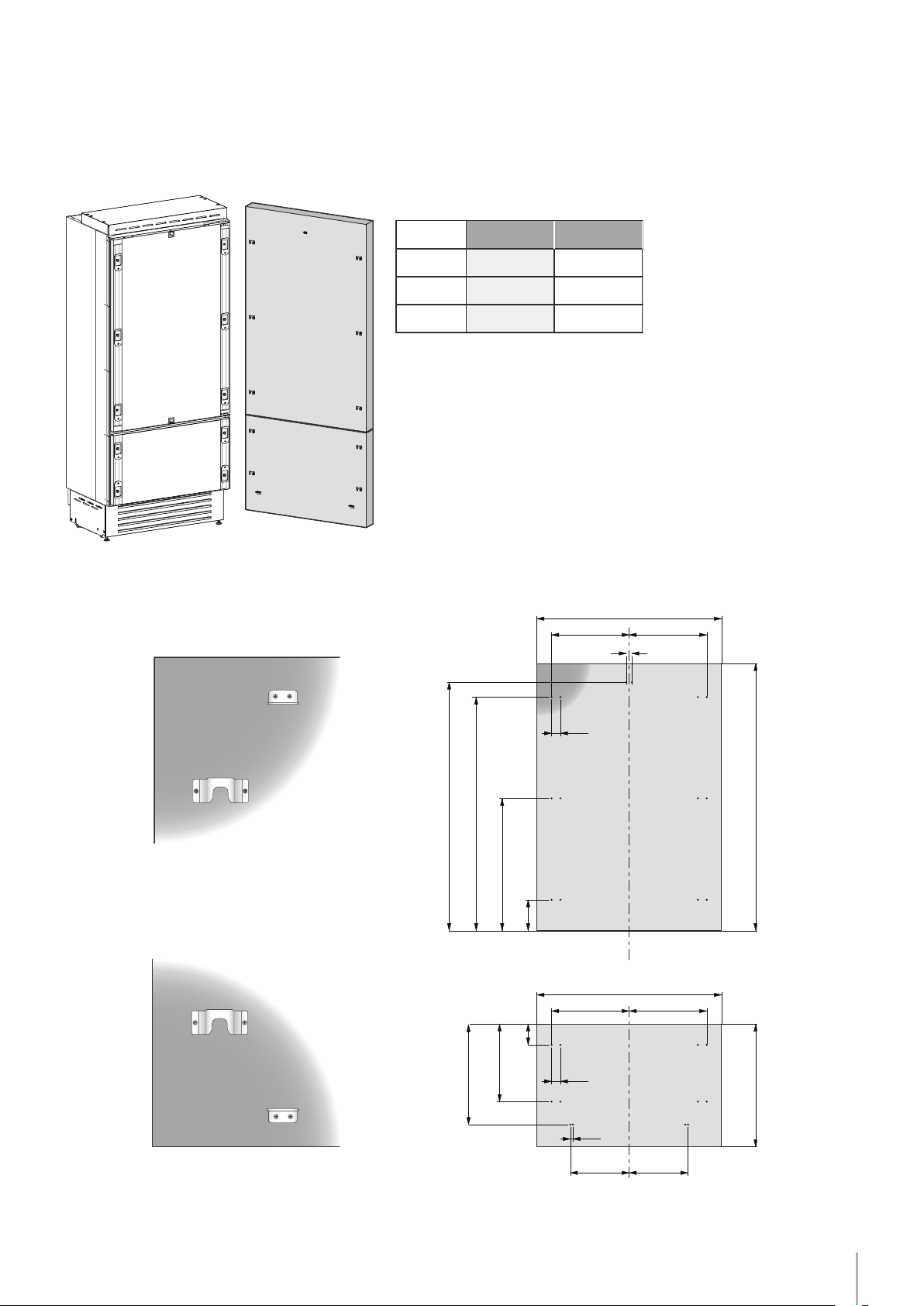
13
A
BB
A
BB
C C
13 (½”)
34 (1
3⁄8”)
6,5 (
¼”)6,5 (¼”)
34 (1
3⁄8”)
1273 (50 1⁄8”)
1163 (45 ¾”)
660 (26”)
157 (6
¼”)
min 1390 (54
¾”)max 635 (25”)
507.5 (20”)
382 (15
1⁄8”)
100 (4”)
A
897 (35
¼”) 747 (29 3⁄8”)
417 (16
3⁄8”) 342 (13 ½”)
597 (23 ½”)
B
C
354.5 (14”) 279.5 (11”)
203.5(8”)
Installation Guide
EnglishFrançais
Series: Integrated
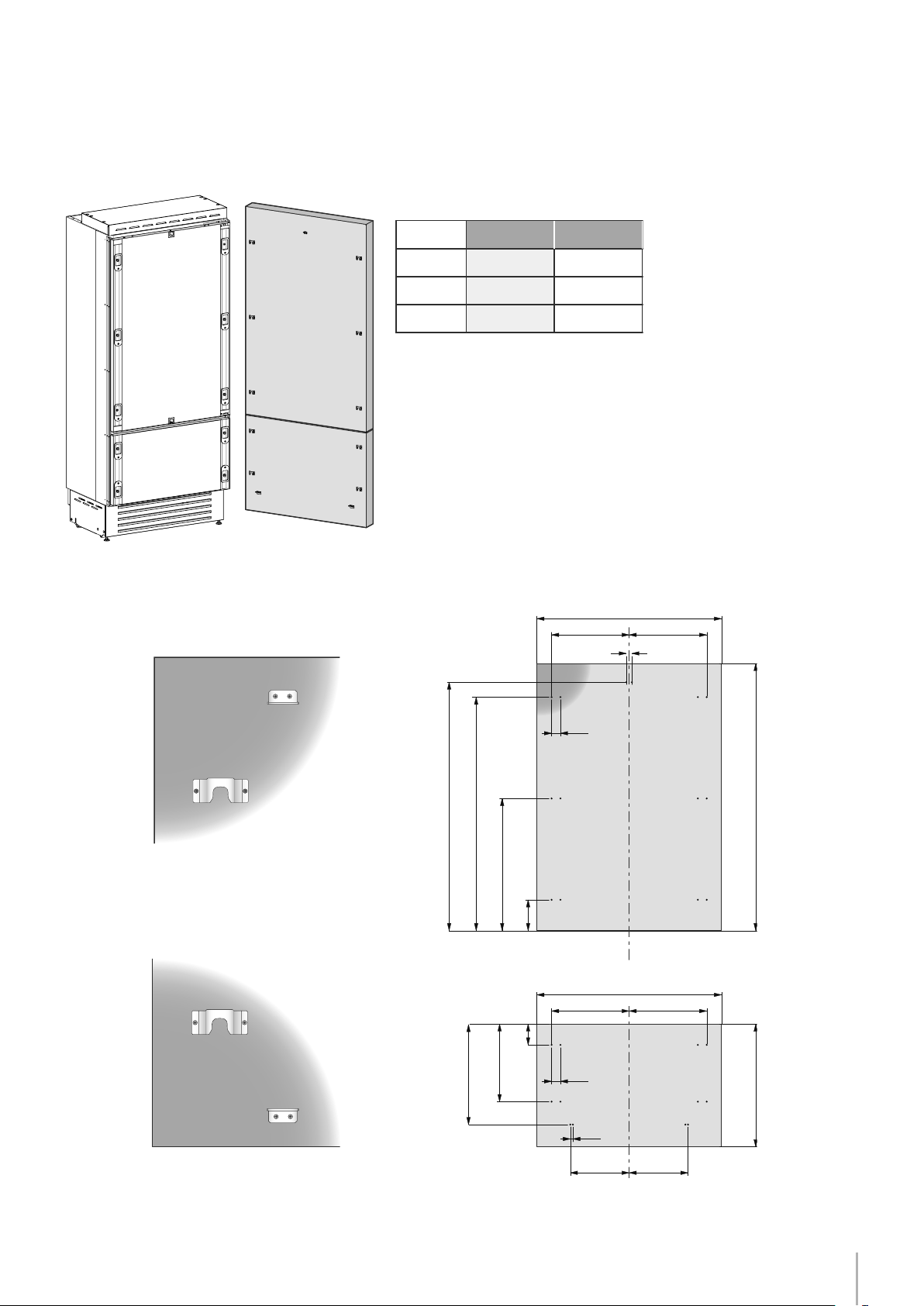
Overlay panels mounting brackets layout
Series 36
Series 30
Holes positions
Door panel
Back of the panel
Vertical adjustment bracket for
upper door. Note orientation.
Note: All lateral bracket placement
measurements go from the center line
to the outside bracket hole
Vertical adjustment bracket for
lower drawer. Note orientation.
Back of the panel
Drawer panel
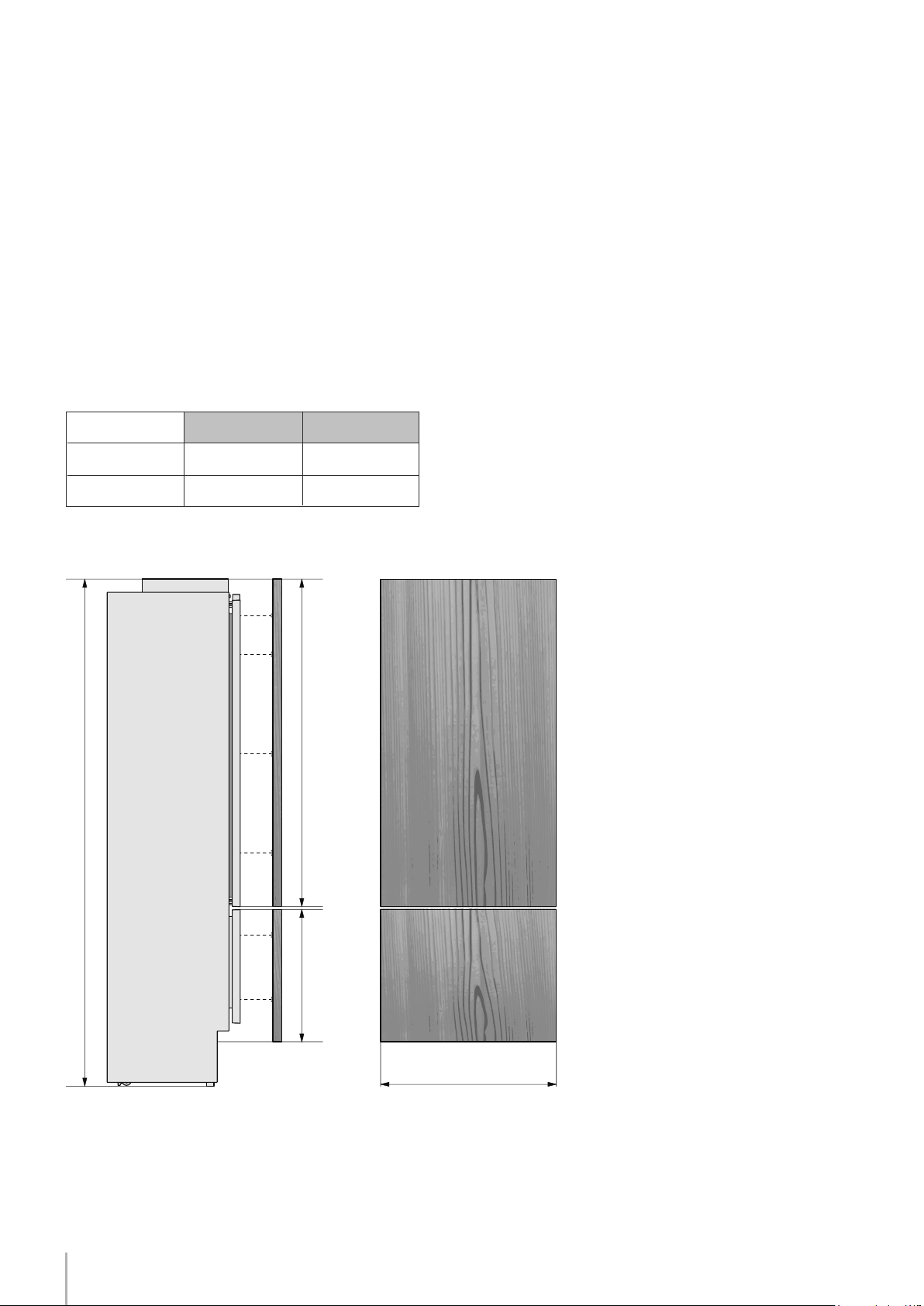
14
2121 (83
½
") + 25 (1")
min 540 (21 ¼”)
max 635 (25”)
A
B
3 (1⁄8”)
1390 (54 ¾”)
115 (4 ½”)
min 200 (7 7⁄8”)
135
(5 3⁄8”)
135
(5 3⁄8”)
1075 (42 3⁄8”)
900 (35 1/2”)
750 (29 5/8”)
BI36
BI30
897 (35 1/4”)
747 (29 3/8”)
Series: Integrated (BI)
Door/Drawer Width Niche Width
Series
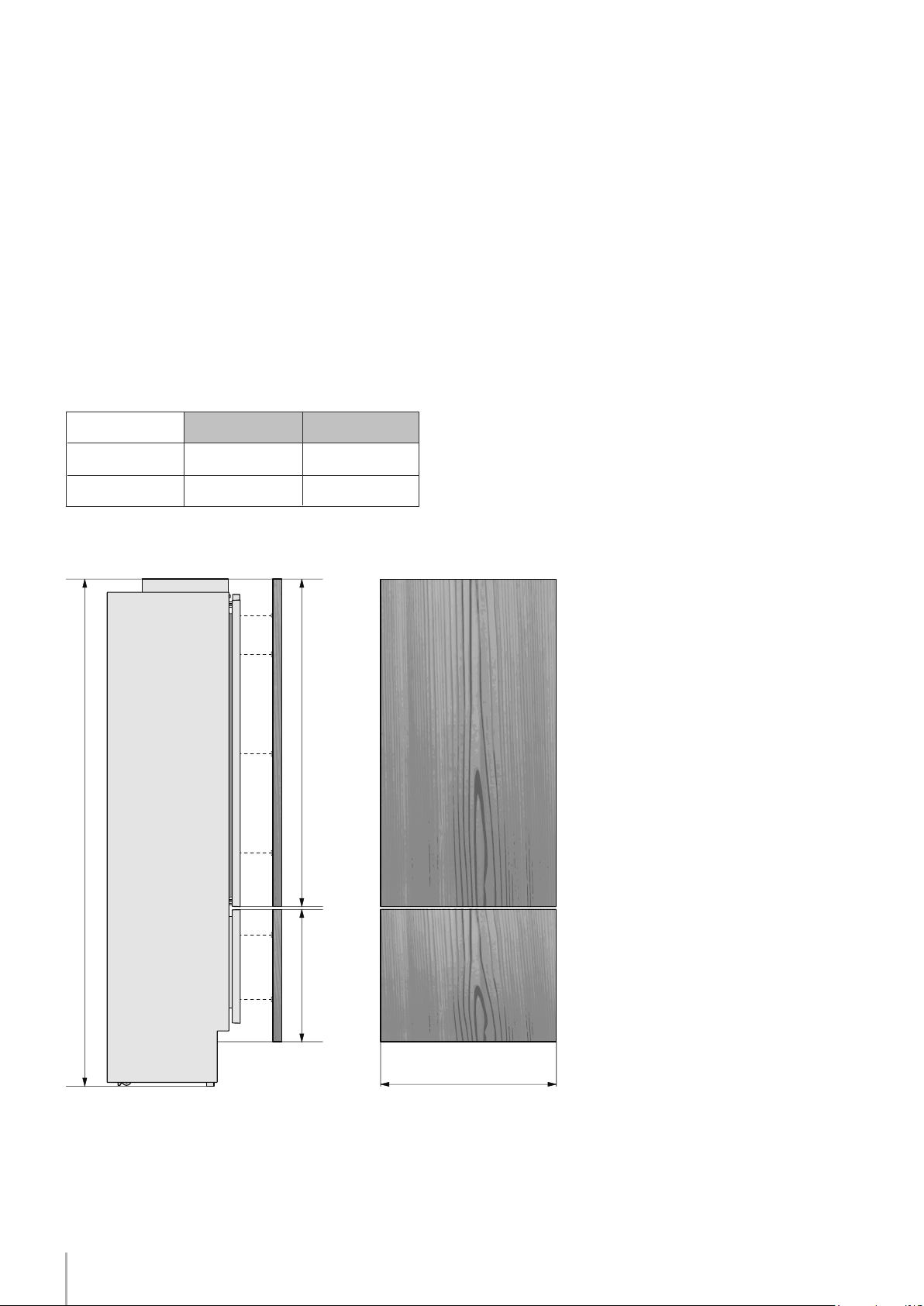
Panels Dimensions
Panels can have thickness ranging between 18 mm (3/4”) and 28 mm (1-1/8“).
Door panels can have a maximum weight 23 kg (51 lbs) and drawer panels may be a maximum weight of 11kg (25 lbs)
Exceeding these weights could void your warranty for any service issues which can be attributed to overweight panels.
The hinging mechanism on appliances is considered to be `Zero-clearance`. The door and drawer widths specified below
assume the minimum niche width is being used and a 3.5mm (1/8”) reveal is desired around the panels. Adjust your panel
dimensions accordingly to your own design criteria considering your niche width and your reveal. Minimum reveal / gap
should not be less than 1.5mm (1/16”).
Example:
84” niche height
36” niche width
4” toe kick height
1/8” gap desired all around
Door panel:
Width: 35-3/4”
Height: 54-3/4”
Drawer panel:
Width: 35-3/4”
Height: 84”-1/8”-54-3/4”-1/8”-4”=25”
If you want a 6” toe kick height then your
bottom drawer panel height would be 23”
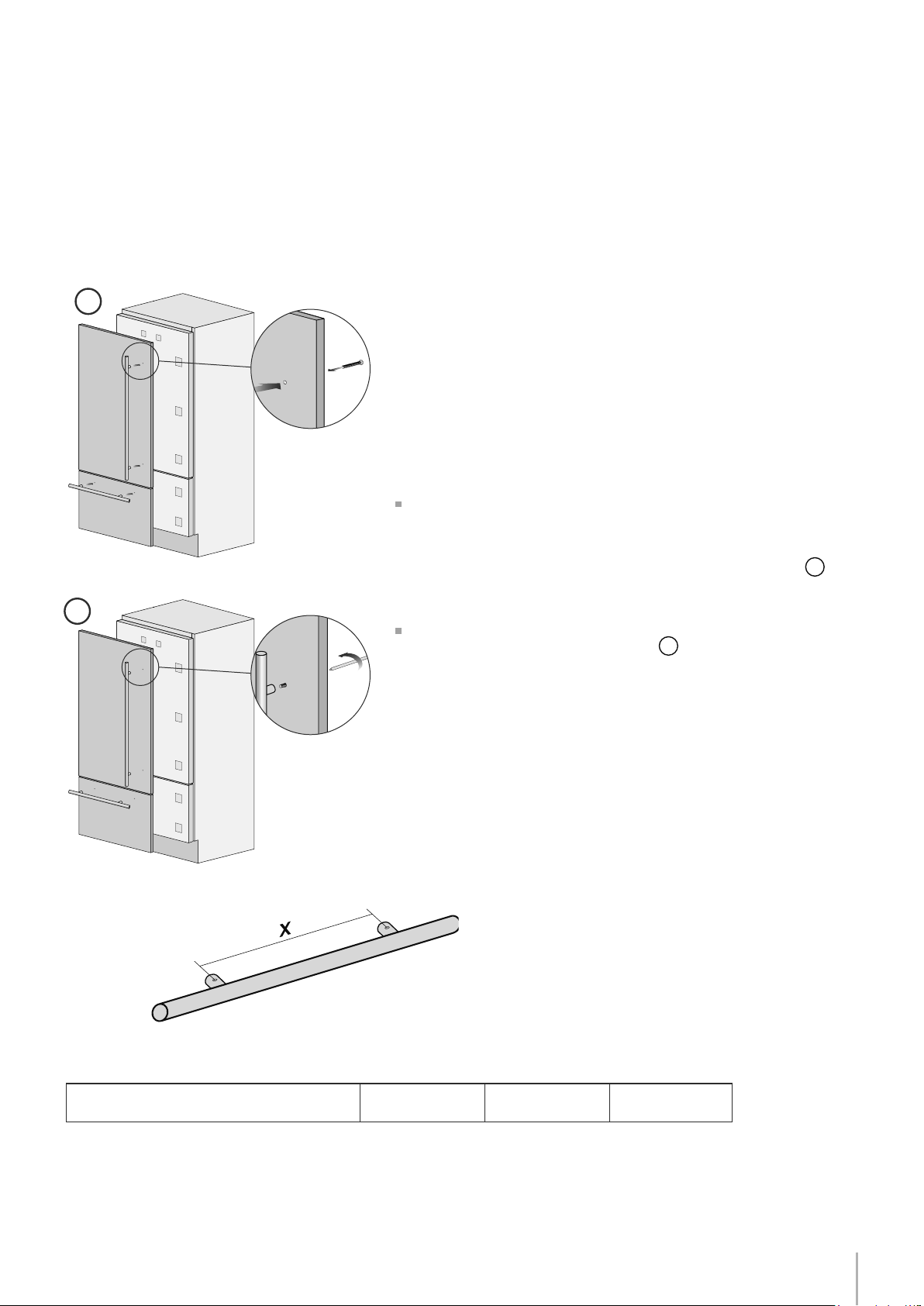
15
1
2
480 mm
(18 7/8”)
900 mm
(35 1/2”)
490 mm
(19 1/4”)
Installation Guide
EnglishFrançais
Panels can have thickness ranging between 18 mm (3/4”) and 28 mm (1-1/8“).
Door panels can have a maximum weight 23 kg (51 lbs) and drawer panels may be a maximum weight of 11kg (25 lbs)
Exceeding these weights could void your warranty for any service issues which can be attributed to overweight panels.
The hinging mechanism on appliances is considered to be `Zero-clearance`. The door and drawer widths specified below
assume the minimum niche width is being used and a 3.5mm (1/8”) reveal is desired around the panels. Adjust your panel
dimensions accordingly to your own design criteria considering your niche width and your reveal. Minimum reveal / gap
should not be less than 1.5mm (1/16”).
Series: Integrated (BI)
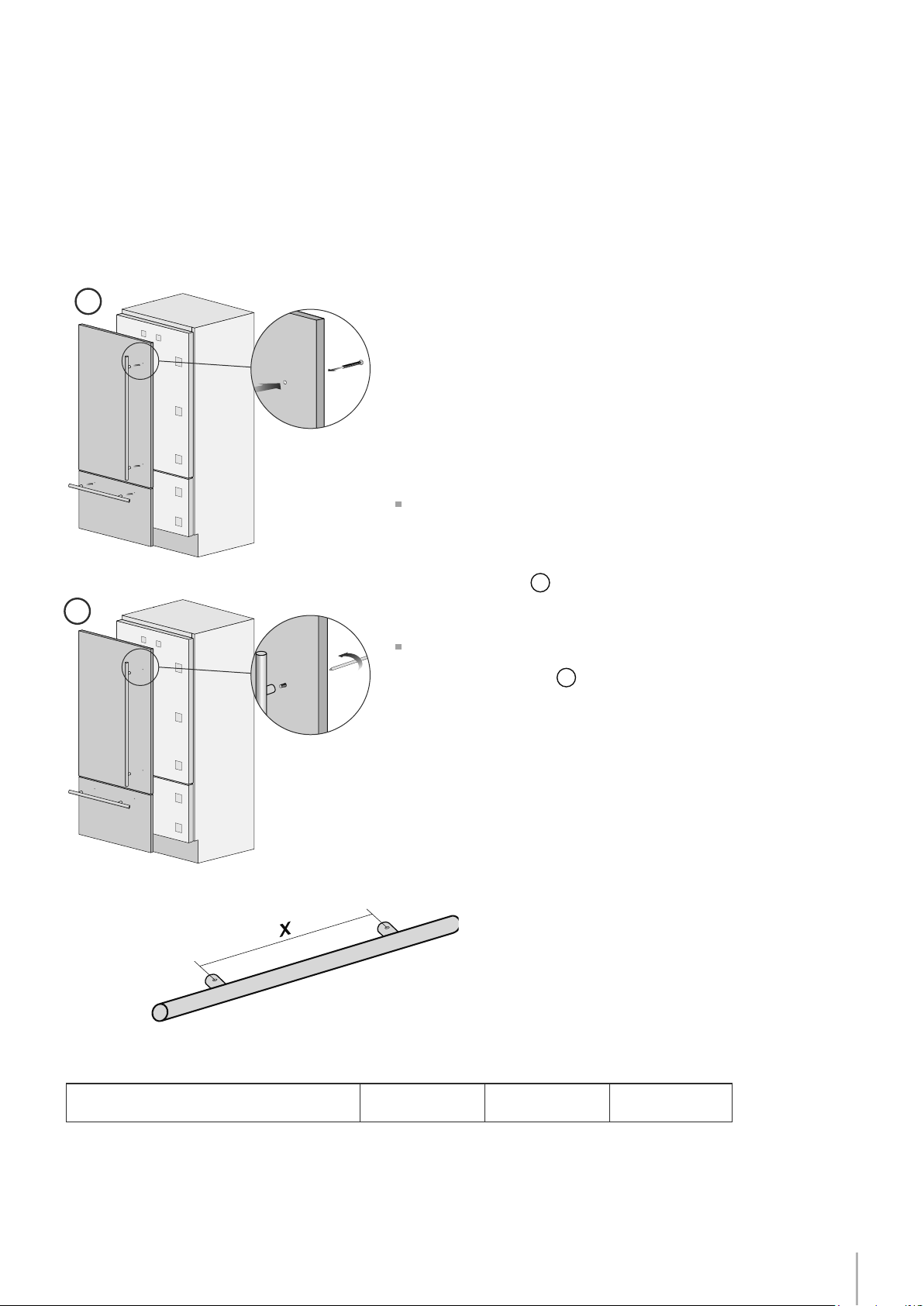
Mounting the handles on Integrated units
Distance between stand-offs X
Handles will have to be mounted on the panels before they are ap-
plied to the fridge. For overlay panel mounting, remove the screw
connecting the stand-offs to the handle bar. The overlay screw will
pass through the overlay panel, the stand-off and into the handle
bar.
Operate as follows:
Drill two holes of 5 mm (1/4 “) on the rear side panels, in-
sert the supplied screws to the distance indicated in the
the table below. To center the vertical handle (code HV) to
the center of the door, split into two the height of the panel and make
a hole at -450 mm (-17 3/4”) and one at +450 mm (+17 3/4”)
1
.
Place the handle on top of the holes and insert the screws through
the panel and into the handle support
2
.
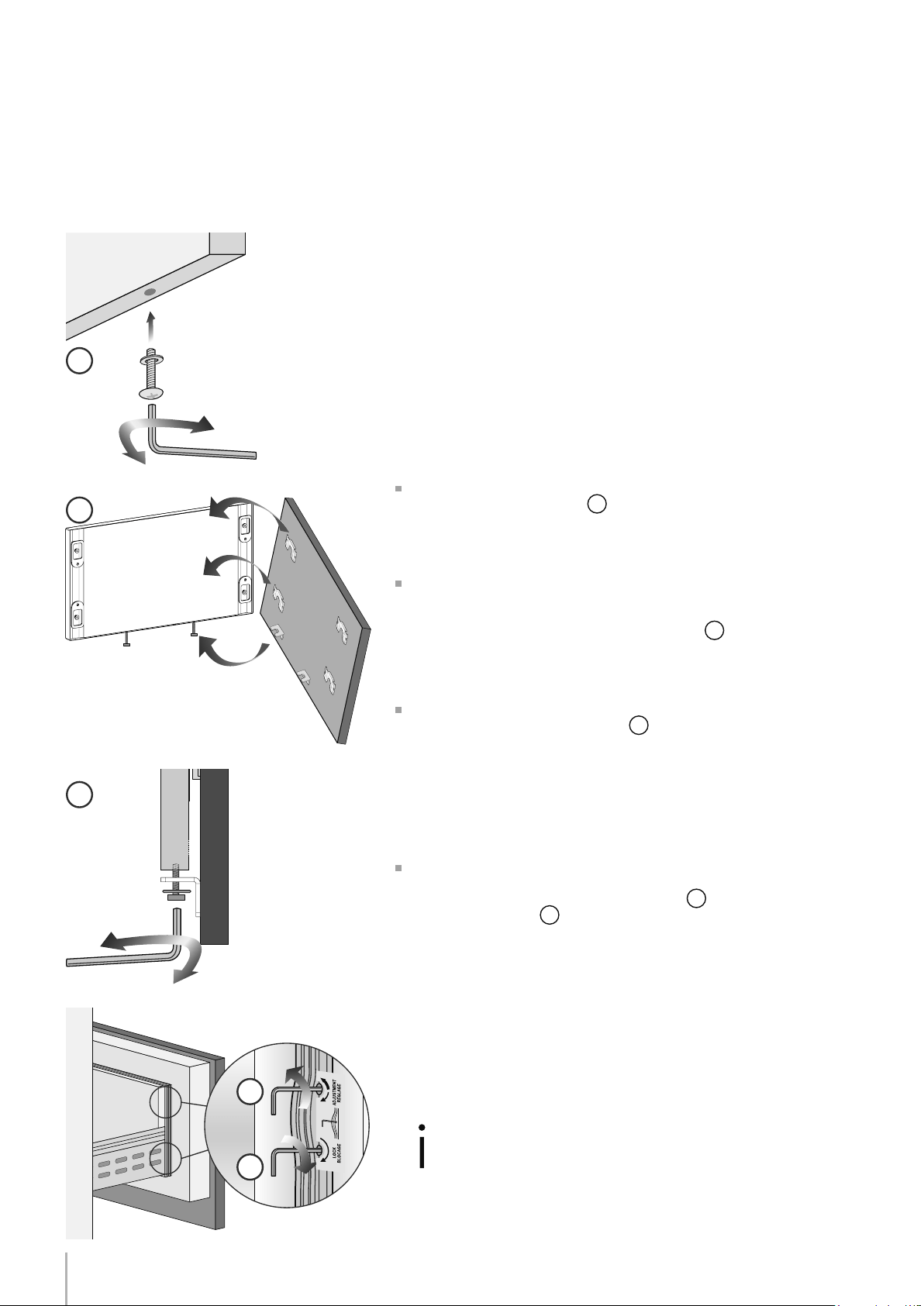
16
1
2
3
4
5
Mounting panels to the door and the drawer of Integrated units
Install 1 hanger bolt about 3 threads deep and 1 depth set screw
ush to foam gasket in each mounting cavity.
Once all brackets and small brackets have been applied to the pan-
els, you can begin installing the bottom drawer.
Operate as follows:
Partially install the adjustment bolt with washer into the two holes
in the bottom of the drawer
1
.
Ensure the L-brackets align with the adjustment bolts on the bot-
tom, place panel against the drawer face with the hanger brackets
above the hanger bolts and allow the panel to drop down. Ensure all
the hanger brackets engage the hanger bolts
2
.
It is now possible to align panels to adjacent cabinets in height us-
ing the lower alignment brackets,
3
tightening or untighteningthe
bolts into position as needed. With the hanger bolts slighty tightened,
move the panel sideways to align it to the other panels on the unit
or other adjacent structures. Tapping the panel with a rubber mallet
is a good way to make small adjustments to the X-alignment of the
panel.
Depth alignment: working from the inside of the drawer, after lift-
ing up the magnetic seal, adjust the panel position so it is closer to or
further away from the door using the holes
4
and then secure the
panel using the holes
5
.
Turning in the direction of the thick arrow pulls the panel closer to the
door / drawer face, turning in the direction of the thin arrow pushes
the panel away from the face of the door / drawer.
Series: Integrated (BI)
Once the front panel has been ad-
justed, check that the gasket has
been repositioned correctly to as-
sure the door/drawer are closing
correctly and avoid operational er-
rors of the unit.
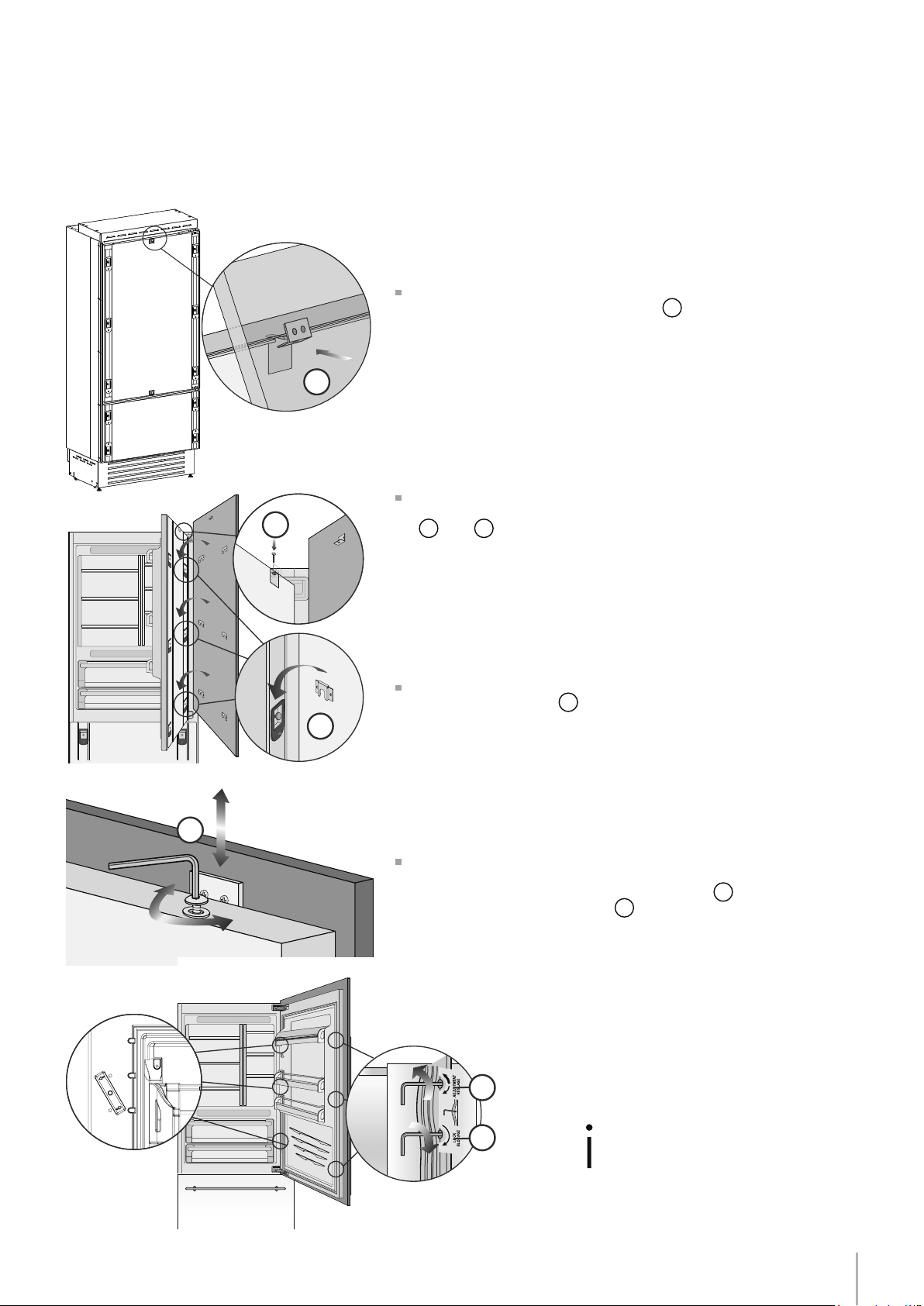
17
6
8
9
7
10
11
Installation Guide
EnglishFrançais
Series: Integrated (BI)
Ensure the top adjustment L-brackets are aligned and inserted
into the cavities at the top of the door
6
.
Make sure all the hanger brackets begin above the hanger bolts
and then lower the panel down checking that each hanger brack-
et has engaged its corresponding hanger bolt.
At this point, alignment between the panel and adjacent cabi-
nets can be adjusted using the alignment brackets and small brack-
ets
7
and
8
.
Vertical alignment: tighten or loosen the screw in the brackets to
raise or lower the panel
9
.
Depth alignment: working from the inside of the door, after lift-
ing up the magnetic seal, adjust the panel position so it is closer to
or further away from the door using the holes
10
and then fix the
panel in position using the holes
11
.
Once the front panel has been ad-
justed, check that the gasket has
been repositioned correctly to as-
sure the door/drawer are closing
correctly and avoid operational er-
rors of the unit.
18
2
3
1
B
A
6,5 (¼”) 6,5 (¼”)
20 (¾”)
20 (¾”)
22 (7⁄8”)
22 (7⁄8”)
22 (7⁄8”) 22 (7⁄8”)
Series: All
Installation
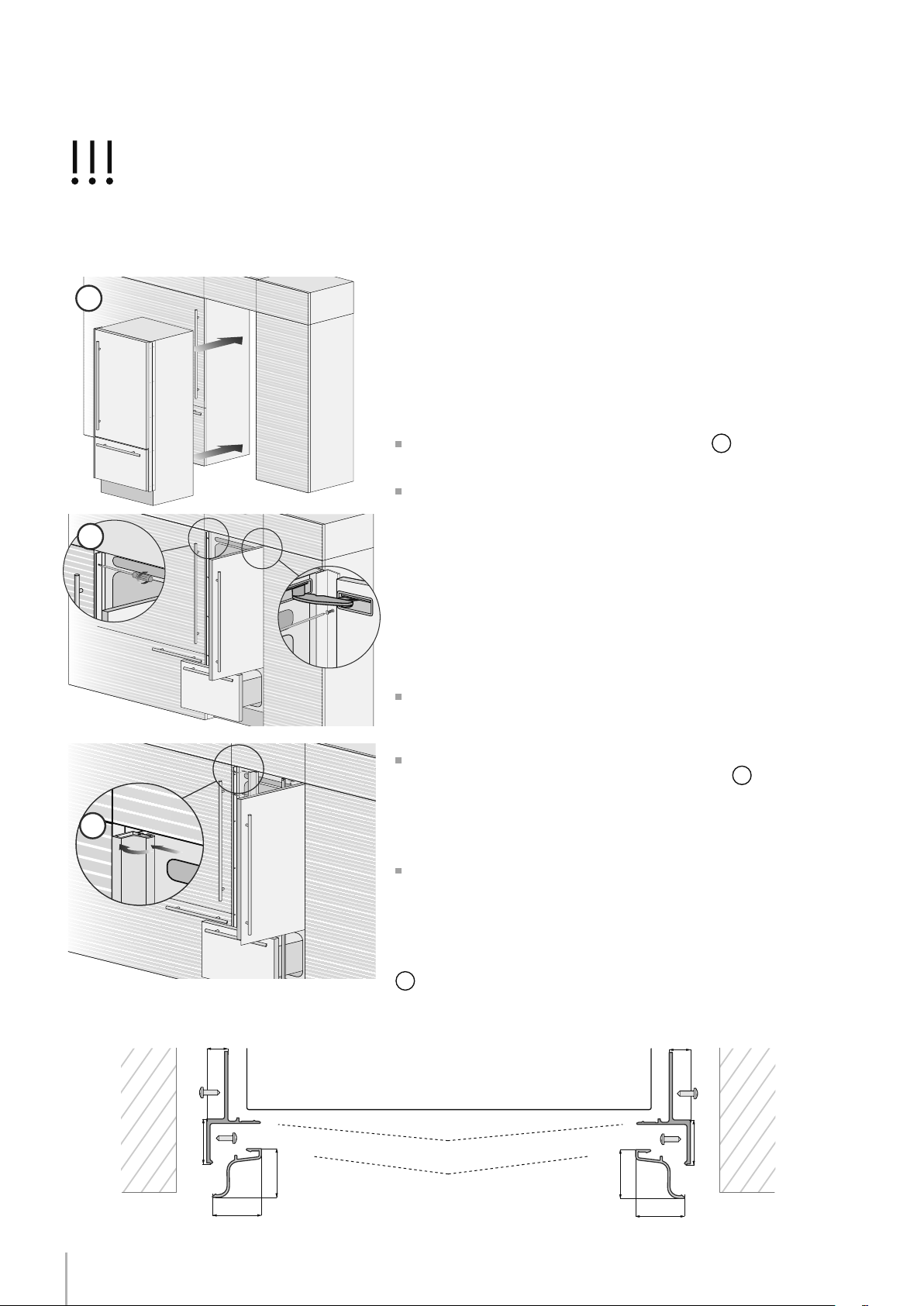
For a built-in installation, to close gaps between the appliance and
the adjacent cabinets, special side proles (installed) and aluminum
trim covers (taped to back of appliance) are provided. Side proles
are used for xing the appliance to the niche cabinet and can be
shimmed from the side of the appliance in order to match the niche
width. (Remove screws holding trim to side of appliance and place
washers between prole and appliance and replace screws for exam-
ple)
Operate as follows:
Push the appliance into the installation niche
1
.
If the unit is to be installed inside a niche or within an enclosed
structure, it is not necessary to design a ventilation shaft at the back of
the niche as North American models come with a top ventilation cap
which accommodates sufcient ventilation even though it is behind
the overlay panel.
Ensure panels are mounted (BI Series) prior to pushing the appliance
all the way into the niche as the panel mounting procedure requires
additional height clearance than the niche provides.
If for some reason the top ventilation cap has been removed - a mini-
mum 5mm gap must be provided at the top / back of the cabinetry to
allow warm air to escape.
Check the levelling of the appliance, adjusting its feet and wheels
to correct it.
Using the screws provided, secure the appliance to the adjacent
cabinets through the holes on the prole side trims
2
.
To make this operation easier keep the door and the drawer open.
It may be necessary to hold the door at an approximate 70 degree an-
gle to get the easiest access on the hinge side prole with a screwdri-
ver.
Install the prole trim covers: mate with the face of the appliance
and the top of the niche then slide laterally over the prole trims. It will
be necessary to press rmly or use a block and mallet to completely
lock the trims into place until a ‘click’ is heard.
Take care not to damage the soft aluminum trims. Ensure that the full
installation is satisfactory prior to installing the prole trim covers as it is
very difcult to remove them without damaging them after installation
3
.
Built-in installation single appliance
Built-in installation of two or more appliances
Note: top ventilation caps not shown in illustrations
Appliance Wall
or
furniture
Wall
or
furniture
A Connecting element B Alluminium frame
Side proles mounting
Installation in cabinet of this height requires that the back of the cabinet de ventilated through the top. Otherwise,
an additional 2 inches of cabinet height is required for adequate ventilation. Height of custom side panel can be
higher as necessary.
19
1
4
3
2
Installation Guide
Series: All
EnglishFrançais
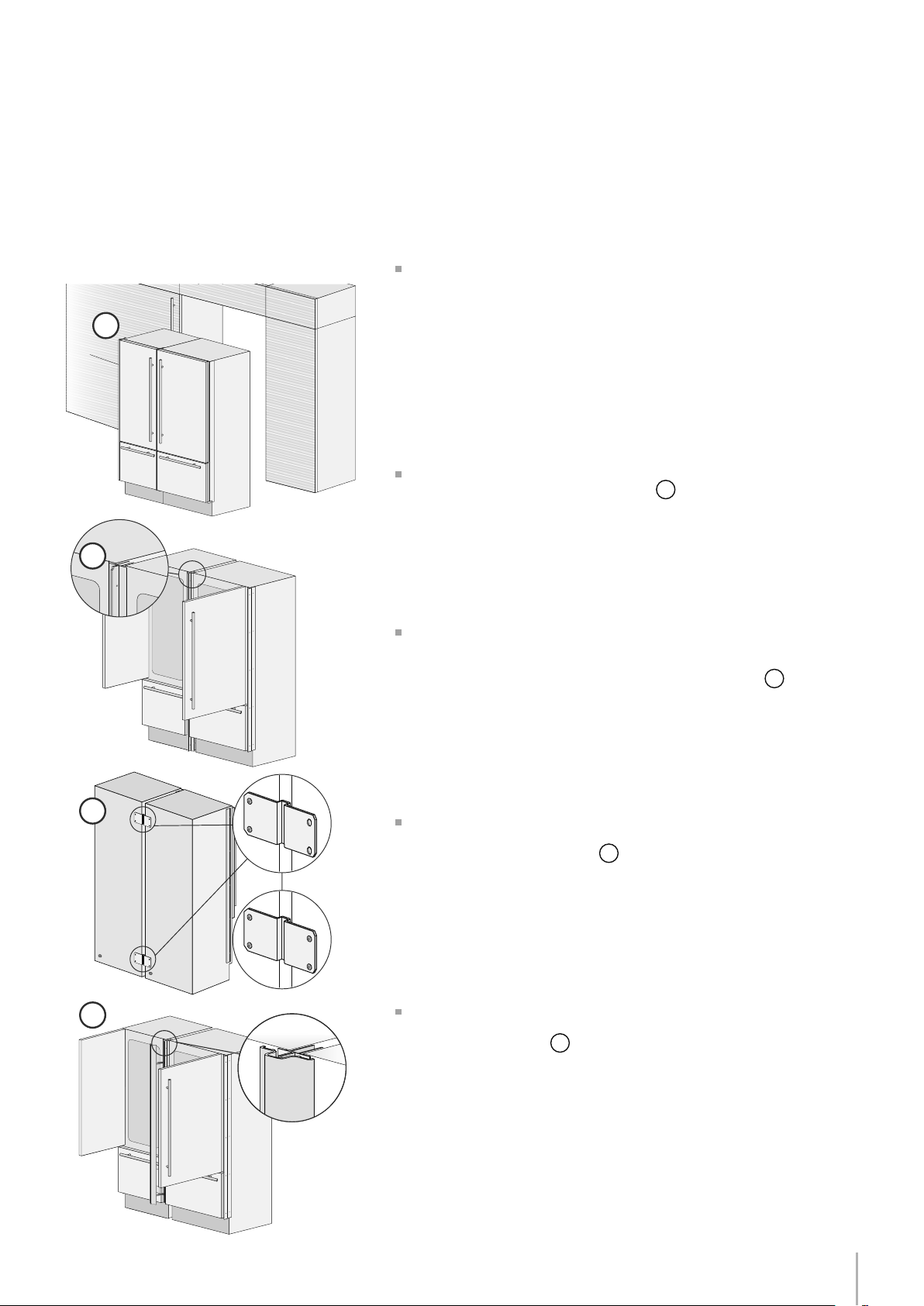
Required accessories to be ordered separately:
Central connection Kit (KCCITU)
Each appliance comes with its own set of side prole trim covers for
where the appliance connects to the niche side walls. In side-by-side
congurations only 1 side prole trim cover will be needed from each
set. Where the two appliances connect together will be covered
with a central connection trim cover provided in the connection kit
accessory.
Operate as follows:
Position the appliances in front of the installation area, leaving
enugh space to operate at their back
1
.
Place the two units side by side, level them with respect to each
other by aligning the screw holes in the side prole trims and then join
them at the front either using pop rivets (supplied with central con-
nection kit) or with 1/4” length #6 screws (not supplied)
2
.
At the back of the appliances mount the connection brackets:
x one side of the top and lower brackets to one of the appliances
and subsequently to the other
3
.
Once units are fully installed snap the central cover frame onto the
central connection pro les by rmly pressing toward the front of the
appliance until it clicks
4
.
Built-in installation of two or more appliances
Note: top ventilation caps not shown in illustrations
20
5
7
6
E
D
A
B
A
B
D
6,5 (¼”) 6,5 (¼”)
20 (¾”)
20 (¾”)
22 (7⁄8”)
22 (7⁄8”)
22 (7⁄8”) 22 (7⁄8”)
6,5 (¼”)6,5 (¼”)
18 (¾”)
44,4 (1 ¾”)
18 (¾”)
C
13 (½”)
Series: All
Electrical and Water connection
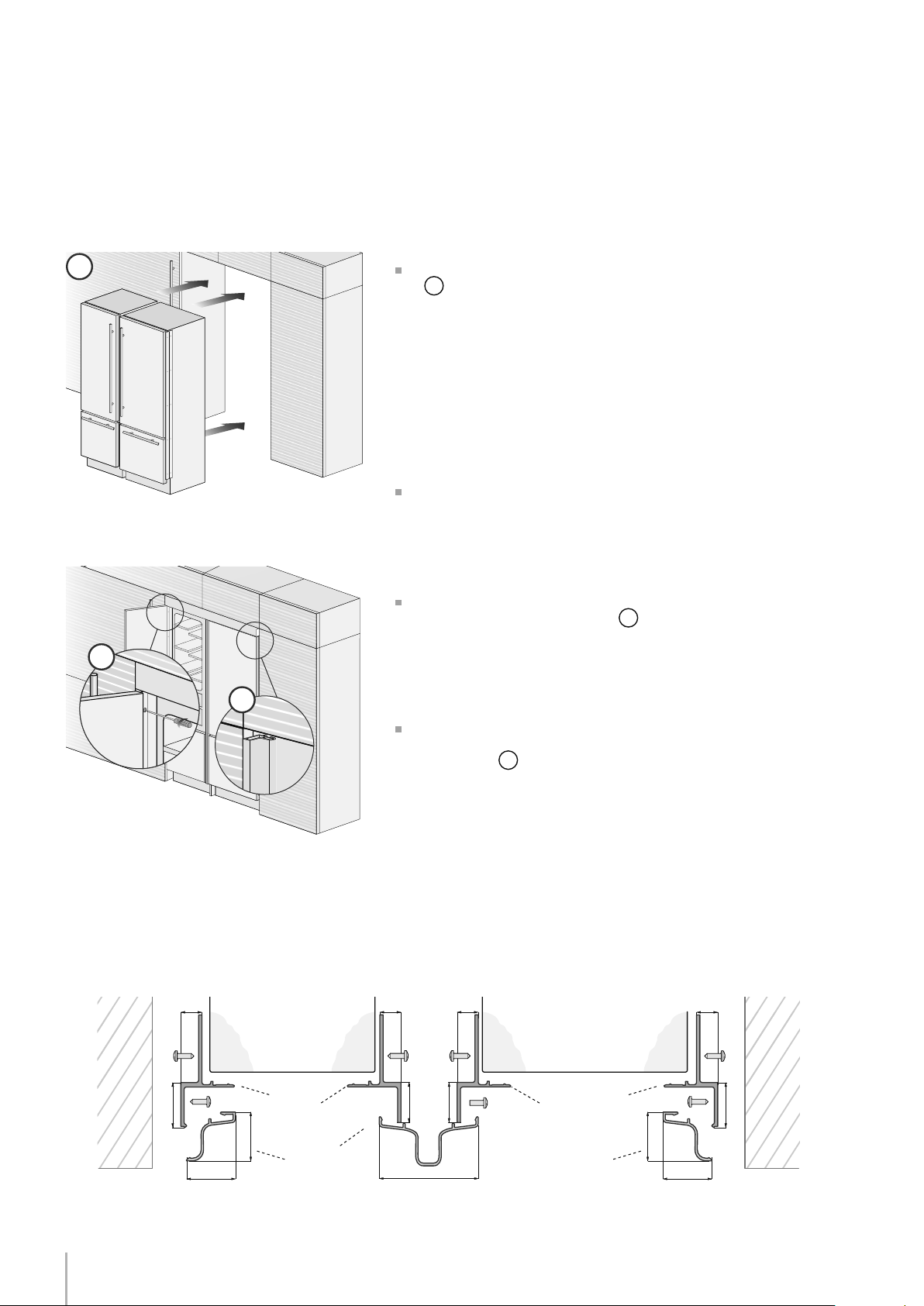
Once completed the previous steps, push the units in their nal posi-
tion
5
.
If the units are to be installed inside a niche or within an enclosed
structure, it is not necessary to have additional ventilation at the back
of the niche as North American units come with a factory installed
ventilation cap on top to prevent overheating. Always mount front
panels on door and drawer before pushing the unit into their nal posi-
tion in the niche as the panels require additional clearance at the top
when being mounted.
Check the levelling of the appliance, adjusting its feet and wheels
to correct it.
Using the provided screws secure the appliance to the adjacent
cabinets through the side proles
6
.
To make this operation easier keep the door and the drawer open.
Mount the aluminum trim covers onto the side prole trims by mating
with appliance face and niche ceiling and then sliding towards the
niche sidewalls
7
.
Press rmly until a click is heard. A wood block and mallet may be
needed to snap into place. Make sure not to damage the trims.
Appliance Appliance
Wall
or
furniture
Wall
or
furniture
A Connecting element
B Alluminium frame
D Connecting element
E Aluminium frame
Side and central proles mounting
21
2 x
6 x
1
2 x
6 x
1
2 x
6 x
2
2 x
6 x
2
2 x
6 x
3
2 x
6 x
3
2 x
6 x
4
2 x
6 x
4
Installation Guide
EnglishFrançais
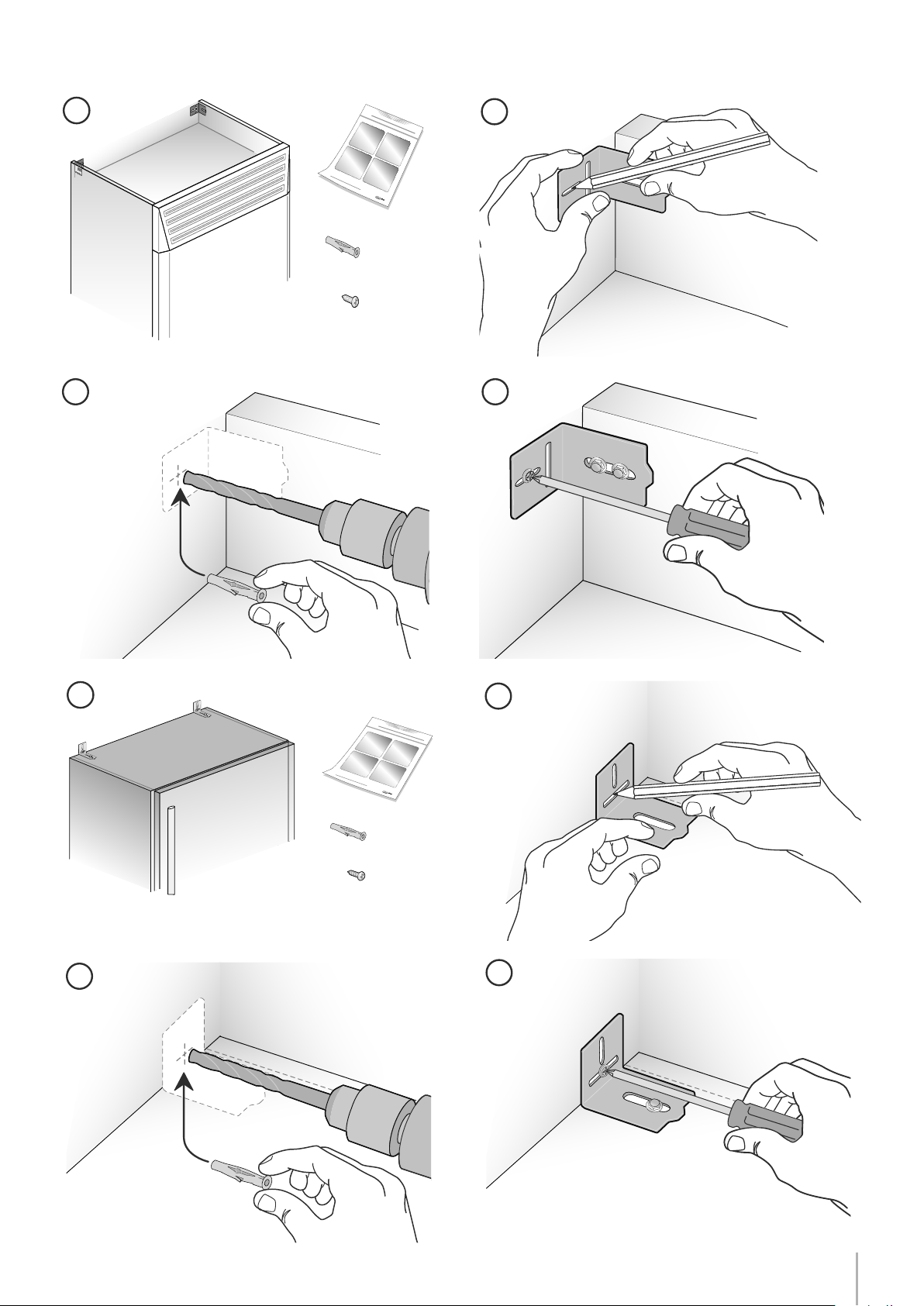
Anti tipping kit installation
1
2
22
Series: Stainless (BKI)
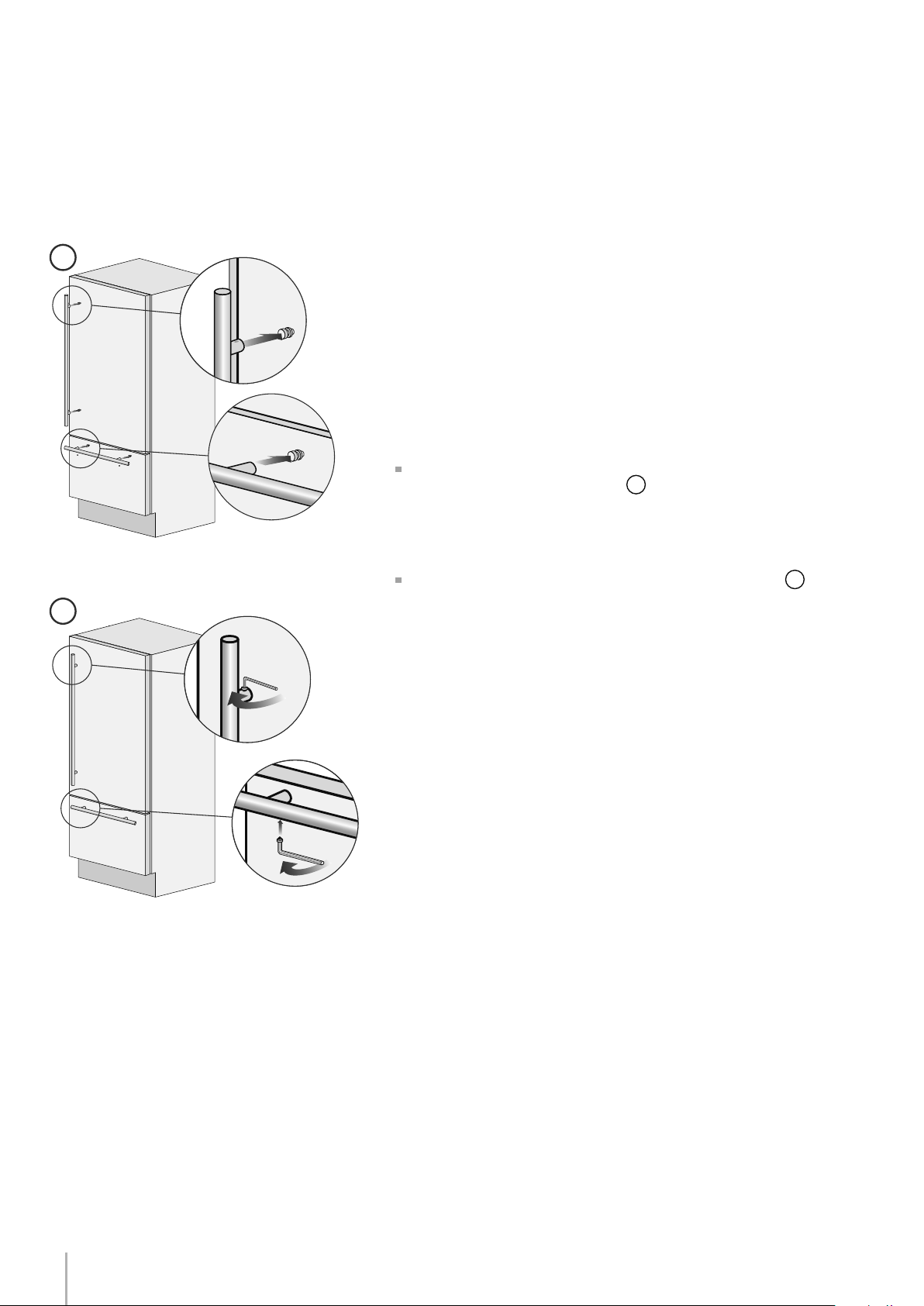
Mounting handles on stainless front
To mount the handles onto the door and the drawer operate as follows:
Operate as follows:
Insert the two handle spacers onto the mounting studs already avail-
able on the door and the drawer
1
. Ensure the mounting studs are
not loose.
Screw in the Allen set-screws pre-installed on the handle
2
.
The screws must be tightened in by means of a 2.5 mm (1/8”) hex
wrench / Allen key. Take care not to damage or scratch the stainless
panel with the tool.
23
A
B
C
C
A 860 (33 7⁄8”) 740 (29 1⁄8”)
> 100 (4”)
10 (3⁄8”)
50%
B
C
100 (4”)
Installation Guide
EnglishFrançais
Series: All
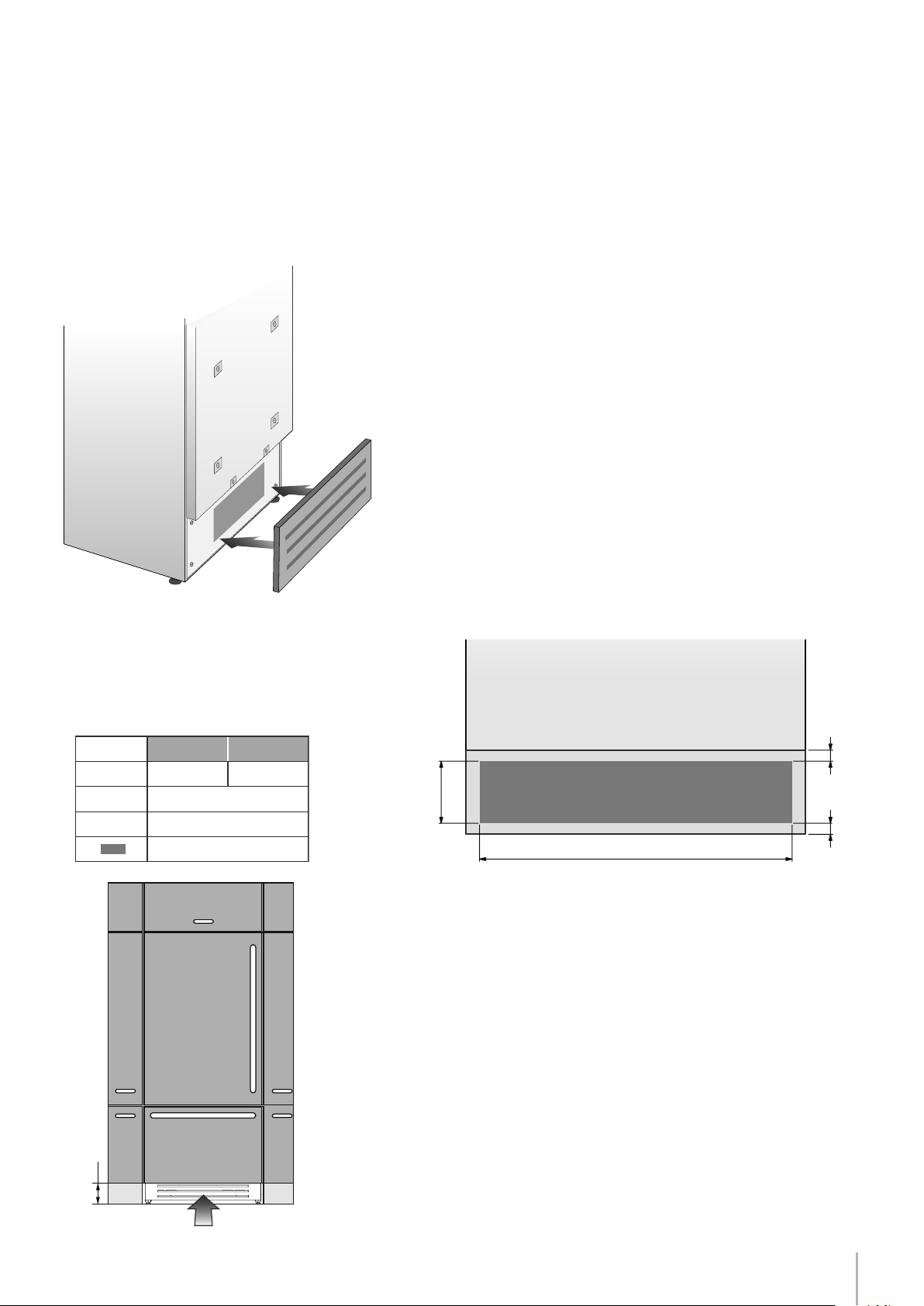
Air circulation
36 Series 30 Series
A forced air system assures ventilation through a grille positioned
in the lower front part of the unit. If the kitchen design includes a
kickplate, the latter has to be punched in order to maintain a sati-
sfactory air ow, as described in the drawing. Holes can be in any
shape and size, as long as the total area of the punched part equals
50% of the kickplate are.
In this case, to guarantee a better air ow, it is advisable to remove
the front grille included with the unit. The grille is secured to the unit
with magnetic plates and can be easily removed even by the end
user, to provide for regular cleaning procedures and remove dust.
If the grille is partially covered by the kitchen kickplate, it is advisable
to remove the grille in order to provide for a better airow.
The air intake and outlet must not be blocked or covered in any way.
They also need to be dusted/cleaned on a regular basis.

24
Series: All
Post installation checklist
Check that the front levelling feet have been properly installed.
Check that the connection to the water system does not have any
leaks and that the closing tap is easily accessible.
Check that the electrical connection is correctly installed and that
the multipole switch and socket are easily accessible.
Check the perfect alignment of the appliance with adjacent
structures.
Check that all adhesive tape and external or internal temporary
protective devices have been removed.
Check the perfect closing of the doors and the smooth sliding of
the drawers and shelves.
25
FRIDGE
UNIT
9
CR
ISP
E
R
10 11 12
11 Display
13 Crisper
12 Up/Down
English
Shows the temperature of the Crisper-Fresco compartment.
Allows switching on and off of only the Crisper-Fresco compartment
(press
for three seconds).
Using the Up and Down buttons, it is possible to change the
temperature set for the Crisper-Fresco compartment.
8
1 Unit
2 Fridge
3 Menu
4
Up/down
Fridge
5 Display
6
Up/Down
Freezer
(TriMode)
7 Enter
8 Ice maker
9 Alarm
Switches the appliance (all compartments) between ON and STAND BY
(press for three seconds).
Allows switching on and off of only the refrigerator compartment
(press for three seconds).
Allows access to the appliance function menu
It shows the temperature of the refrigerator and freezer compartments,
the date and time, Menu functions and visual messages.
By selecting Up/Down the preset temperature can be changed accord-
ing to the selected function mode (freezer, refrigerator, Crisper-Fresco).
Confirms activation or deactivation of the selections made in the
Menu.
Allows activating or deactivating the automatic ice production.
Blinks to signal user alerts such as door left open, also in combination with
a sound signal which can be deactivated by pressing the button.
Using the Up and Down buttons, it is possible to change the set tempera-
ture of the refrigerator and navigate through the interactive menu.
1234 56798
I
CE
MA
K
E
R
E
N
T
E
R
FR
ID
GE
U
NI
T
Installation Guide
Series: All
EnglishFrançais
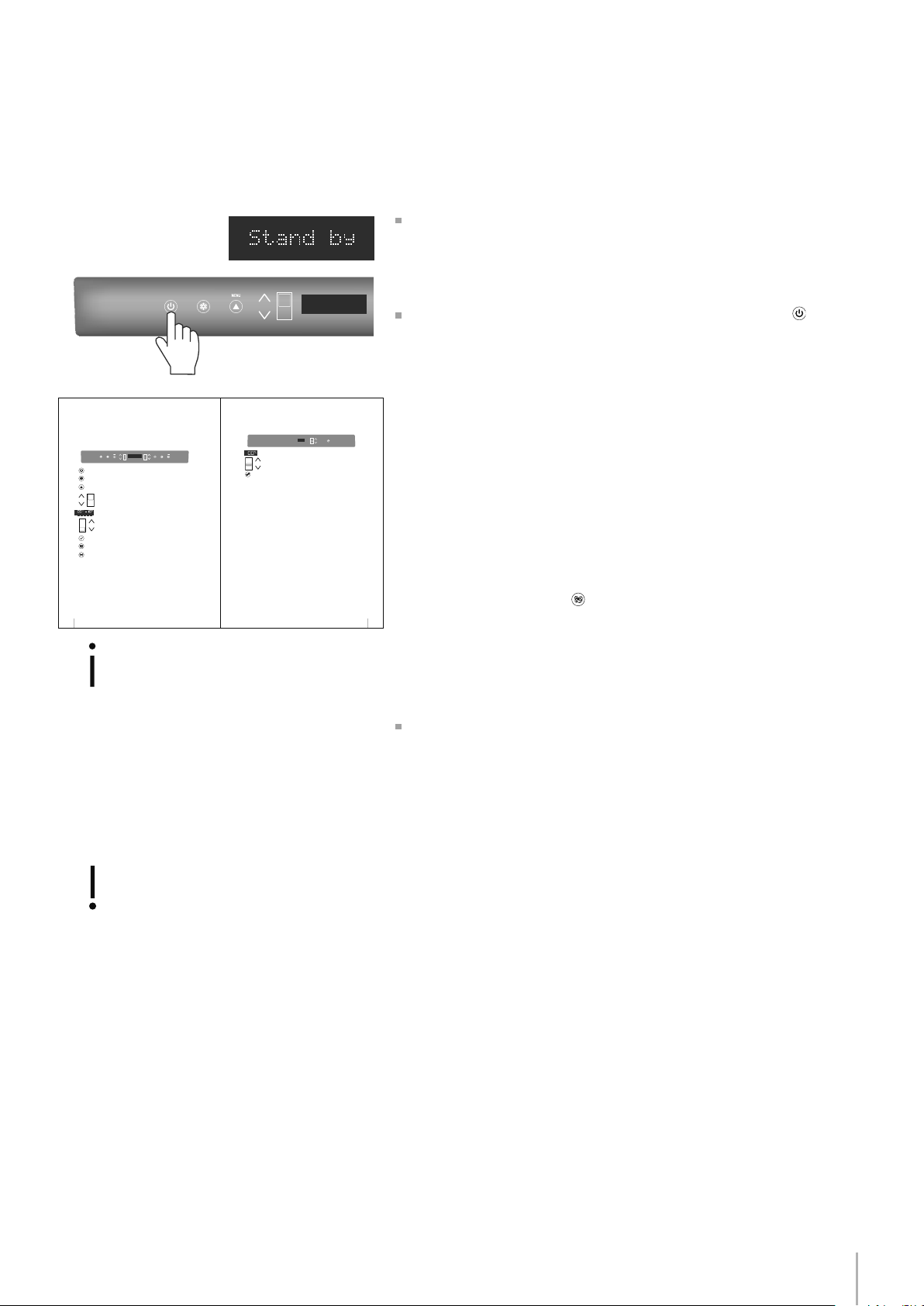
Start up
If at the rst start - up the message Stand by
does not appear, but other messages appear,
such as Fridge too warm, Fresco too warm,
Freezer too warm, or sound signals are activat-
ed, it means, it means that the appliance has
already started the cooling process.
If this is the case, deactivate any possible acous-
tic signals by pressing the Alarm button, close
the door and wait until the set temperature is
reached.
To start the appliance, connect the plug to the electrical mains: at
this point, when opening the door, the control panel will usually visual-
ize the message “Stand by”, and all the panel keys be off
To turn on all the appliance compartments, press the Unit button
for three seconds. The display will show the message “Initial test” for
approx. 2 minutes. After this phase the compressors will start up and re-
main on until the default temperature set up in the factory is reached.
Do bear in mind that this condition could last several hours during
which time the display will continue to ash the ‘Start Up Phase’ mes-
sage.
If the appliance is provided with an Ice Maker, prior to switching it on
make sure that the water lter cartridge is installed (unless water sup-
ply source is already ltered by other means such as reverse osmosis).
Purge air from the water lines by enacting the ‘Manual Clean’ func-
tion from the Menu->Functions->Water Filter options. You may need to
complete this sequence several times until you stop hearing air sput-
tering from the ice maker ll tube.
Once you are satised that the system is purged of air switch the Ice
Maker on by touching the button which will illuminate.
Note: If the TriMode drawer is congured as a Fridge or a Fresco com-
partment the ice maker will be disabled. Default mode for the TriMode
drawer is Freezer.
For further information about the appliance operation, refer to the
User Manual.
It is necessary to let the unit reach the correct
temperature before foods are stored inside.


IMPORTANT
Les dimensions entre parentheses sont en pouces: mm(in).
Les poids entre parenthèses sont en livres: kg(lb).
Les temperatures entre parentheses sont en °F: °C (°F).

1
3
4
5
6
7
8
10
11
13
14
15
16
18
19
21
22
23
24
25
Notice d’Installation
EnglishFrançais
Indications importantes
Indications importantes concernant la sécurité
Pour la sécurité des enfants
Caractéristiques techniques
Caractéristiques de l’appareil et conditions requises pour l’installation
Caractéristiques de la niche d’installation: Série Integrated (BI)
Caractéristiques de la niche d’installation: Série Inox Integrated (BKI)
Préparation à l’installation
Transport sur le lieu d’installation et déballage
Raccordements électrique et hydraulique
Mise à niveau
Montage des panneaux
Préparation des panneaux décoratifs pour la porte et Grands bacs
Préparation des panneaux décoratifs pour Réfrigérateur avec un Grand bac
Dimensions des panneaux
Montage des poignées: Série Integrated
Fixation des panneaux à la porte et au Grand bac: Série Integrated
Installation dans la niche
Encastrement appareil unique
Encastrement combinaison
Achèvement de l’installation
Montage de la sécurité anti-renversement
Montage des poignées sur le devant inoxydable
Circulation de l’air
Contrôle de n d’installation
Mise en marche
Sommaire
Page

2
3
Notice d’Installation
EnglishFrançais
Important
Indications an d’éviter tout
endommagement de l’appareil
Symboles utilisés dans le manuel
Attention
indications an d’éviter toute
lésion aux personnes
Indications importantes concernant la sécurité
Pour la sécurité des enfants
Note
conseils pour une correcte utilisation
de l’appareil
DANGER : Risque d’enfermement pour les enfants. Avant de jeter un
vieux réfrigérateur ou congélateur :
• Retirer les portes
• Laisser les étagères en place an d’empêcher que des enfants grim-
pent dedans.

4
Caractéristiques de l’appareil et conditions requises pour l’installation
BI30 l: 749 mm (29 1/2”)/ h: 2120 mm (83 1/2”)/ p: 610 mm (24”)
BI36 l: 899 mm (35 3/8”)/ h: 2120 mm (83 1/2”)/ p: 610 mm (24”)
BKI30 l: 749 mm (29 1/2”)/ h: 2120 mm (83 1/2”)/ p: 635 mm (25”)
BKI36 l: 899 mm (35 3/8”)/ h: 2120 mm (83 1/2”)/ p: 635 mm (25”)
Série 30” l: 800 mm (31 1/2”) / h: 2260 mm (89”) / p: 800 mm (31 1/2”)
Série 36” l: 950 mm (37 3/8”) / h: 2260 mm (89”) / p: 800 mm (31 1/2”)
Série 30” max 275 kg (606 lb)
Série 36” max 295 kg (650 lb)
Modèle américain: 115V 60Hz
Modèle américain: 15A
de 0.05 MPa à 0.5 MPa (0.5 Bar - 5 Bar)
fourni, raccord femelle 3/4”, indiqué pour aliments
kit xage des panneaux sur demande
Kit Anti-renversement (B04000200)
kit de raccordement latérale (KCLIT/KCLIH)
clé à six pans de 4 mm (1/8”)
tournevis cruciforme
perceuse à bois et à percussion
pointe pour bois de 2.5 mm (1/8”)
pointe pour mur de 8 mm (3/8”)
clé ouverte de 17 mm (3/4”)
13 mm (1/2”) socket
Dimensions de l’appareil
Integrated
Dimensions de l’appareil
Inox Integrated
Dimension de enballé
Poids avec emballage
Tension d’alimentation
Câble d’alimentation
Pression d’alimentation de l’eau potable
Tuyau d’alimentation de l’eau
Accessoires pour l’installation fournis
Équipement nécessaire
Réglage de la hauteur des rouleaux arrière
Note
Modèles ne sont pas tous équipés avec
distributeur de glaçons. Vériez si votre
modèle est équipé d’une machine à
glaçons pour déterminer si vous avez
besoin de le tuyau d’alimentation de l’eau.
5
140 (5 ½”) 140 (5 ½”)
100 (4”)
100 (4”)
A A
min 2134 (84”)
BI36: 900 (35 ½”)
BI30: 750 (29 5⁄8”)
A
2134 mm (84”)
BI36: 900 mm (35 1/2”)
BI30: 750 mm (29 5/8”)
BI36: 1470 mm (57 7/8”)
BI30: 1320 mm (52”)
105°
BI36: 899 mm (35 3/8”)
BI30: 749 mm (29 1/2”)
2120 mm (83 1/2”) + 25 mm (1”)
610 mm (
24”)
610 (24”)
560 (22”)
1293 (50 7⁄8” )
474 (18 5⁄8”)
231 (9
1⁄8”
) +
25 (1”)
500 (19 ¾”)
248 (9
¾”
)
+ 25 (1”)
20 (¾”)
721 (28 3⁄8”) +25 (1”)
2120 (83 ½”) +25 (1”)
992 (39”)
BI36: 1470 (57
7⁄8”
)
BI30: 1320 (52”)
BI36: 160 (6 3⁄8”)
BI30: 125 (5”)
560 (22”)
610 (24”)
BI36: 899 (35 3⁄8”)
BI30: 749 (29 ½”)
10 (3⁄8”)
105°
Notice d’Installation
EnglishFrançais
Caractéristiques de la niche d’installation: Série Integrated (BI)
espace à réserver aux équerres anti-renversement
Hauteur de l’encastrement
Largeur de l’encastrement
Encombrement avec porte ouverte
Angle d’ouverture de la porte
Largeur
Hauteur
Profondeur (sans panneau)
6
1
4
1
2
3
140 (5 ½”) 140 (5 ½”)
100 (4”)
100 (4”)
A A
min 2134 (84”)
BI36: 900 (35 ½”)
BI30: 750 (29 5⁄8”)
A
2134 mm (84”)
BKI36: 900 mm (35 1/2”)
BKI30: 750 mm (29 5/8”)
BKI36: 1470 mm (57 7/8”)
BKI30: 1320 mm (52”)
105°
BKI36: 899 mm (35 3/8”)
BKI30: 749 mm (29 1/2”)
2120 mm (83 1/2”) + 25 mm (1”)
635 mm (25”)
2120 (83 ½”) +25 (1”)
635 (25”)
560 (22”)
693 (27 ¼”)
1308 (51 ½”)587 (23 1⁄8”)
146 (5 ¾”)
+ 25(1”)
9 ( 3⁄8”)
732 (28 7⁄8”)+25 (1”)
BKI36: 1470 (57 7⁄8”)
BKI30: 1320 (52”)
560 (22”)
635 (25”)
BKI36: 899 (35 3⁄8”)
BKI30: 749 (29 ½”)
10 (3⁄8”)
105°
75 (3”)
58 (2 ¼”)
BKI36: 230 (9”)
BKI30: 195 (7 ¾”)
Caractéristiques de la niche d’installation: Série Inox Integrated (BKI)
espace à réserver aux équerres anti-renversement
Hauteur de l’encastrement
Largeur de l’encastrement
Encombrement avec porte ouverte
Angle d’ouverture de la porte
Largeur
Hauteur
Profondeur (sans panneau)
7
1
4
1
2
3
105°
BKI36: 899 mm (35 3/8”)
BKI30: 749 mm (29 1/2”)
2120 mm (83 1/2”) + 25 mm (1”)
635 mm (25”)
Notice d’Installation
EnglishFrançais
L’appareil est très lourd.
Faire très attention durant la manipulation
an d’éviter tout dommage aux personnes
et aux choses.
Transporter l’appareil en position verticale.
Éviter de manière absolue le transport sur la
partie frontale.
Préparation à l’installation
S’agissant d’un appareil lourd et de grandes dimensions, avant de
transporter l’appareil, s’informer sur les modalités d’accès au lieu où il
sera installé (dimensions des portes, espaces de mouvement dans les
escaliers, etc.).
L’appareil est xé à la base de l’emballage (palette) moyennant
quatre boulons amovibles avec une clé de 17 mm (3/4”).
Il est conseillé d’utiliser un transporteur manuel pour manutentionner
l’appareil jusqu’à la zone où celui-ci sera installé et seulement alors
retirer la base de l’emballage.
L’appareil devrait toujours être transporté en position verticale.
Si cela n’est pas possible, transporter l’appareil couché sur le dos.
Une fois que l’on a atteint la zone prévue pour l’installation, enlever
les emballages, faire descendre l’appareil de la palette emballages
et faire descendre l’appareil de la palette.
Intervenir de la manière suivante:
Enlever les quatre boulons
1
qui xent l’appareil à la palette en
utilisant une clé ouverte de 17 mm (3/4”).
Retirer les crochets de xation
3
et
4
.
Pour retirer le crochet de xation
3
, dévisser pour un ou deux tours
le boulon de réglage
2
de la roue arrière en utilisant une clé à douille
de 13 mm (1/2» in) .
De l’arrière de l’unité et au moyen d’un chariot diable de caractéris-
tiques appropriées, retirer l’appareil et le poser sur le sol.
Faire très attention an d’éviter tout dommage au sol.
Les sols particulièrement délicats doivent être protégés avec des pan-
neaux de faésite, compensé ou autre matériau adéquat.
Transport sur le lieu d’installation
et déballage
Série: tous
Angle d’ouverture de la porte
Largeur
Hauteur
Profondeur (sans panneau)
EW
E W
EW
E W
8
E
W
E
W
Série: tous
Ne pas utiliser de réductions ou de rallonges.
Le ltre ne peut pas rendre potable de l’eau
qui n’est pas destinée à la consommation ali-
mentaire.
Raccordements électrique et hydraulique
S’il faut fermer le robinet général, désactiver d’a-
bord l’Ice Maker
à l’aide du Menu Access (fai-
re référence au Manuel d’utilisation).
Raccordement Hydraulique
Branchement Électrique
Raccordements électrique et hydraulique derrière l’unité
Série Integrated
Les appareils sont livrés de l’usine pour le fonctionnement à 230V AC
- 50Hz (Europe, Royaume Uni et autres Pays) ou 115V AC - 60Hz (Etats-
Unis et Canada).
N’utiliser ni rallonges ni adapteurs multiples pour le branchement.
Un câble d’alimentation avec che équipé d’un contact de
terre sont fournis pour la connexion à une prise de 16A (Europe,
Royaume Uni et autres Pays) ou de 15A (Etats-Unis et Canada) .
Un disjoncteur doit également être installé et doit être facilement ac-
cessible an de mettre hors tension l’appareil avant d’effectuer toute
installation ou maintenance.
Pour le raccordement hydraulique (pour les appareils équipés de fa-
bricateur de glace) il faut prévoir un robinet avec raccord mâle de
¾”, facilement accessible même lorsque l’appareil est installé.
Pour le raccordement au robinet, utiliser exclusivement le tuyau com-
pris dans le Kit Utilisateur fourni avec l’appareil.
L’appareil doit être raccordé au réseau d’eau potable, en tenant
compte des dispositions en vigueur dans le pays où l’appareil est ins-
tallé et en ayant soin d’installer la cartouche du ltre à eau, fournie
avec l’appareil, en suivant les instructions jointes.
N’utiliser ni rallonges ni adaptateurs multiples pour le branchement.
9
Notice d’Installation
EnglishFrançais
Série: tous
Arrière de l’appareil
Raccordement Hydraulique
Branchement Électrique
Intervenir de la manière suivante:
Dérouler le câble électrique et le brancher directement à la prise
murale.
Contrôler que l’appareil soit en stand-by et que les voyants soient
éteints; dans le cas contraire, appuyer sur la touche Unit
pour étein-
dre l’appareil.
Raccorder le tuyau de l’eau au réfrigérateur dans la zone arrière
1
.
Raccorder le tuyau au robinet en utilisant les garnitures comprises à
l’intérieur du Kit Utilisateur
2
.
10
1
2
1
2
Série: tous
Mettre à niveau l’appareil en réglant les pieds et les roues arrière à la
base de l’appareil.
Mise à niveau
Intervenir de la manière suivante:
Après avoir enlevé le socle (ou grille) inférieur (il est fixé par des
aimants), régler l’hauteur des pieds de mise à niveau
1
en utilisant
une clé ouverte de 17 mm (3/4”).
Ensuite régler l’hauteur des roues arrière en tournant les boulons de
réglage
2
dans le sens horaire ou anti-horaire comme nécessaire.
Remonter le socle (ou grille) inférieur ou la grille.
11
1
2
3
Notice d’Installation
EnglishFrançais
Série: Integrated (BI)
Préparation des panneaux décoratifs pour la porte et Grands bacs
Les dimensions des panneaux sont indiquées dans le tableau et sur les
dessins reportés ci-dessous.
Selon les exigences d’alignement avec d’autres meubles de la cui-
sine, le panneau de la porte du réfrigérateur peut être plus haut par
rapport à la ligne supérieure de la porte et le panneau inférieur peut
être plus bas par rapport à la ligne inférieure du grand bac.
Les panneaux sont montés moyennant des brides spéciales qui s’ac-
crochent aux dispositifs de xation réglables déjà prévus sur porte et
grand bac et moyennant des équerres qui bloquent et règlent verti-
calement le panneau.
Brides, équerres et vis de xation correspondantes sont fournies avec
l’appareil et sont appliquées au panneau en suivant le schéma de
perçage reporté ci-dessous ou en utilisant le gabarit de perçage
prévu à cet effet et fourni.
Intervenir de la manière suivante:
Pour appliquer les brides aux panneaux, procéder de la manière sui-
vante. Il est recommandé de monter les équerres avant de monter la
poignée.
Panneau de la porte
Tracer une ligne qui divise verticalement le panneau en deux parties
égales
1
.
Partant du bas du panneau, marquer la hauteur à laquelle pratiquer
les trous (pour la distance des trous, voir les pages 14-17)
2
.
Suivre les données du tableau correspondant au modèle choisi,
marquer d’abord le trou le plus externe et puis le plus interne
3
.
12
7
8
4
5
Série: Integrated (BI)
Vérier la position des trous en appuyant les équerres sur les mar-
ques
4
puis pratiquer les trous en faisant attention à l’épaisseur du
panneau
5
.
Visser les équerres
6
.
Panneau du grand bac
Pour le montage du panneau du grand bac, faire référence au
montage du panneau de la porte, avec la différence que les mesures
doivent être prises en partant du côté supérieur du panneau et non
pas du côté inférieur comme dans le cas de la porte
7
et la bride est
tournée de manière spéculaire à celle de la porte
8
.
Préparation des panneaux décoratifs pour Réfrigérateur avec un Grand bac
13
A
BB
A
BB
C C
13 (½”)
34 (1
3⁄8”)
6,5 (
¼”)6,5 (¼”)
34 (1
3⁄8”)
1273 (50 1⁄8”)
1163 (45 ¾”)
660 (26”)
157 (6
¼”)
min 1390 (54
¾”)max 635 (25”)
507.5 (20”)
382 (15
1⁄8”)
100 (4”)
A
897 (35
¼”) 747 (29 3⁄8”)
417 (16
3⁄8”) 342 (13 ½”)
597 (23 ½”)
B
C
354.5 (14”) 279.5 (11”)
203.5(8”)
Notice d’Installation
EnglishFrançais
Série: Integrated
Préparation des panneaux décoratifs pour Réfrigérateur avec un Grand bac
Série 36 Série 30
Positionnement des trous
Panneau
de porte
Retour du panneau
Support de réglage vertical de la
porte supérieure. Noter l’orientation.
Note: Toutes les mesures de place-
ment du support latéraux vont à la
ligne de centre du trou de support
extérieur
Support de réglage vertical pour le
tiroir inférieur. Noter l’orientation.
Retour du panneau
Panneau
de tiroir
14
2121 (83
½
") + 25 (1")
min 540 (21 ¼”)
max 635 (25”)
A
B
3 (1⁄8”)
1390 (54 ¾”)
115 (4 ½”)
min 200 (7 7⁄8”)
135
(5 3⁄8”)
135
(5 3⁄8”)
1075 (42 3⁄8”)
900 (35 1/2”)
750 (29 5/8”)
BI36
BI30
897 (35 1/4”)
747 (29 3/8”)
Série: Integrated (BI)
Largeur de la porte
et de tiroir
Largeur
de l’encastrement
Séries
Dimensions des panneaux
Il est possible d’utiliser des panneaux avec des épaisseurs allant entre 18 mm (3/4 in) et 28 mm (1 1/8 in).
Les panneaux de porte avec un poids max de 23 kg (51 lb) et panneaux de grand bac avec poids max de 11 kg (25 lb)
Excéder ces poids pourrait annuler la garantie de tous les problèmes de services qui peuvent être attribués à des pan-
neaux en surpoids.
Le mécanisme de charnière sur les appareils est considéré comme `zéro dégagement`. Les largeurs de portes et de
tiroirs spécifiées ci-dessous supposent la largeur de niche minimum est utilisé et une de 3,5 mm (1/8 “) révèlent l’on
souhaite autour des panneaux. Ajuster les dimensions de votre écran en fonction de vos propres critères de conception
compte tenu de la largeur de votre créneau et votre révèlent. Jeu minimum / écart ne doit pas être inférieure à 1,5 mm
(1/16 “).
Exemples:
84” hauteur de l’encastrement
36” largeur de l’encastrement
4” hauteur de plinthe
1/8” distance désirée autour
Door panel:
Largeur: 35-3/4”
Hauteur: 54-3/4”
Drawer panel:
Largeur: 35-3/4”
Hauteur: 84”-1/8”-54-3/4”-1/8”-4”=25”
If you want a 6” toe kick height then your
bottom drawer panel height would be 23”
15
1
2
480 mm
(18 7/8”)
900 mm
(35 1/2”)
490 mm
(19 1/4”)
Notice d’Installation
EnglishFrançais
Série: Integrated (BI)
Longueur A
Montage des poignées: Sèrie Integrated (BI)
Les poignées doivent être montées sur le panneau décoratif de la
porte et du grand bac avant que les panneaux ne soient xés au
réfrigérateur.
Intervenir de la manière suivante:
Après avoir pratiqué deux trous de 5 mm (1/4”) sur le côté arrière
des panneaux, insérer les vis fournies à la distance indiquée sur le ta-
bleau, reportée ci-dessous, l’une de l’autre. Pour centrer la poignée
horizontale (code HV) au centre de la porte, diviser en deux la hau-
teur du panneau et pratiquer un trou à -45 cm (-17 3/4”) et un autre
à +45 cm (+17 3/4”)
1
.
Positionner la poignée au niveau du trou sur le côté avant du pan-
neau; insérer par l’arrière du panneau la vis fournie, à travers le trou,
et la visser à la poignée
2
.
Utiliser la même procédure pour le montage des poignées horizon-
tales sur les grands bacs. Pour la mesure de l’entraxe, faire référence
au tableau joint.
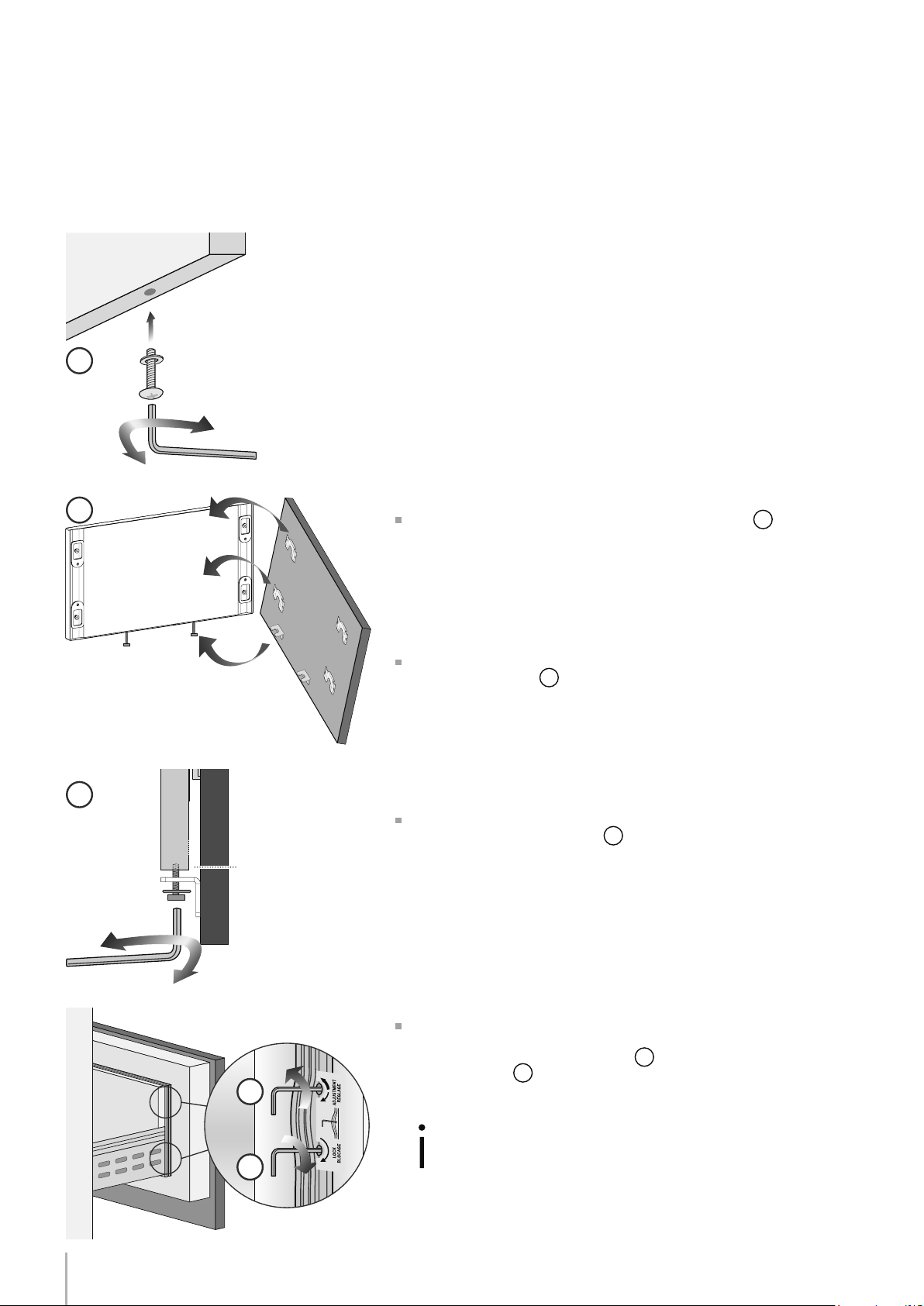
16
1
2
3
4
5
Série: Integrated (BI)
Fixation des panneaux à la porte et au Grand bac: Sèrie Integrated
Aprés avoir appliqué les pattes de xation et les équerres aux panne-
aux, commencer l’installation par le tiroir du bas.
Intervenir de la manière suivante:
Serrer les vis que partiellement aux xations inférieures
1
.
Fixer le panneau aux support du tiroir à partir des crans de la partie
inférieure de réglage
2
À ce point il est possible de régler la hauteur du panneau avec les
crans interieurs pour s’aligner,
3
en serrant ou déssérant la vis. En
tenant la vis un peu desserée, déplacer à droite ou à gauche le pan-
neau pour le centrer au panneau de la porte ou au reste des meubles
de la cuisine.
Alignement en profondeur en travaillant de l’intérieur du tiroir et
après avoir soulevé le joint magnétique, rapprocher ou éloigner le
panneau du tiroir à travers les trous
4
puis xer le panneau toujours
à travers les trous
5
.
Une fois le panneau avant a été ré-
glé, vériez que le joint a été repo-
sitionné correctement pour assurer
la porte / tiroir ferment correcte-
ment et éviter les erreurs de fonc-
tionnement de l’unité.
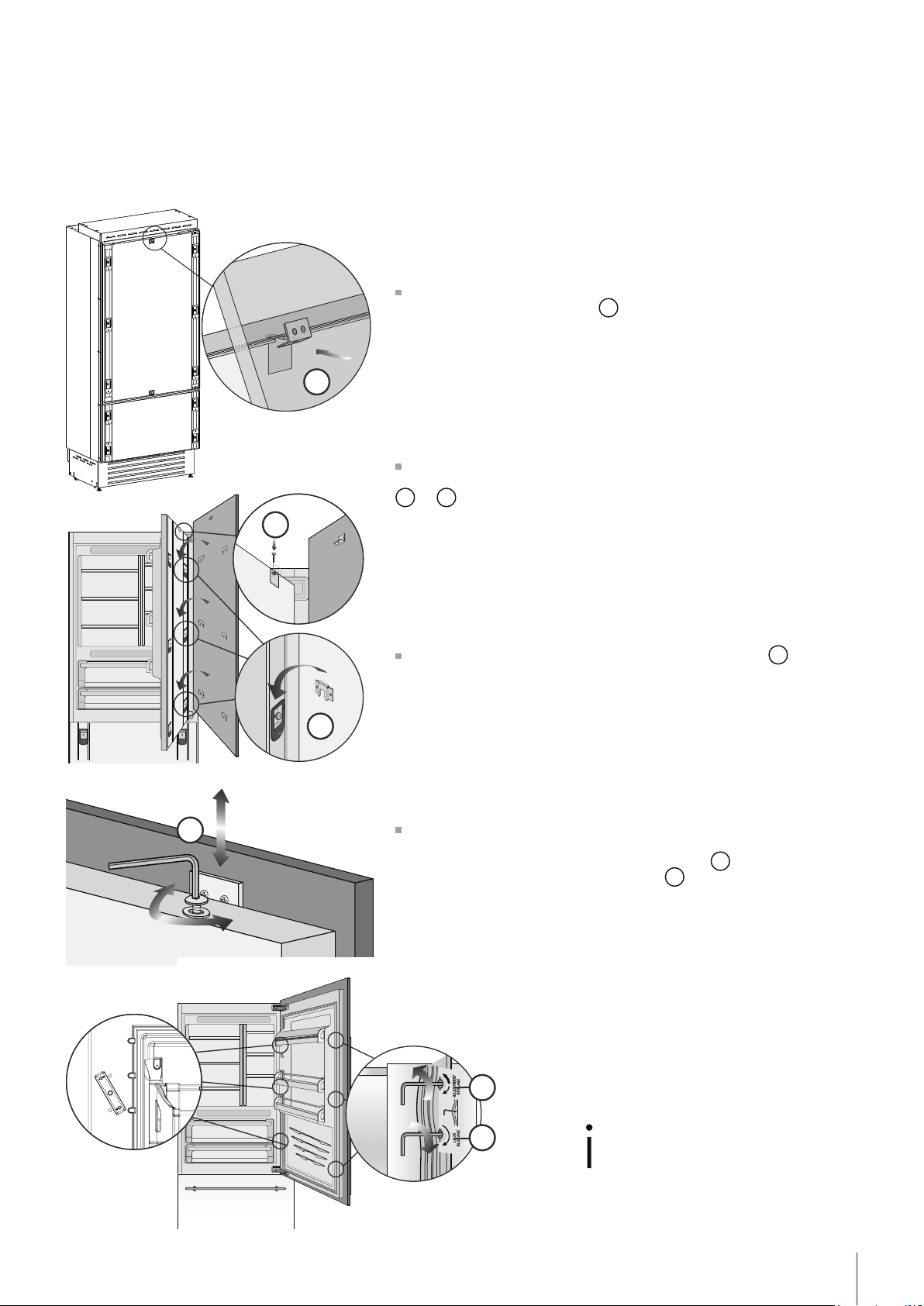
17
6
8
9
7
10
11
Notice d’Installation
EnglishFrançais
Série: Integrated (BI)
Une fois le panneau avant a été ré-
glé, vériez que le joint a été repo-
sitionné correctement pour assurer
la porte / tiroir ferment correcte-
ment et éviter les erreurs de fonc-
tionnement de l’unité.
Accrocher le panneau aux dispositifs de xation en insérant dans les
crans d’alignement supérieurs
6
.
Il est possible d’ajuster l’alignement du panneau par rapport aux
meubles adjacents à l’aide des pattes et des équerres d’alignement
7
et
8
.
Alignement vertical: soulever ou abaisser le panneau
9
en vissant
ou en dévissant la vis à l’équerre.
Alignement en profondeur en travaillant de l’intérieur de la porte
à après avoir soulevé le joint magnétique, rapprocher ou éloigner le
panneau à sa place toutjours à travers les trous
10
puis xer le panne-
au à sa place toujours à travers les trous
11
.
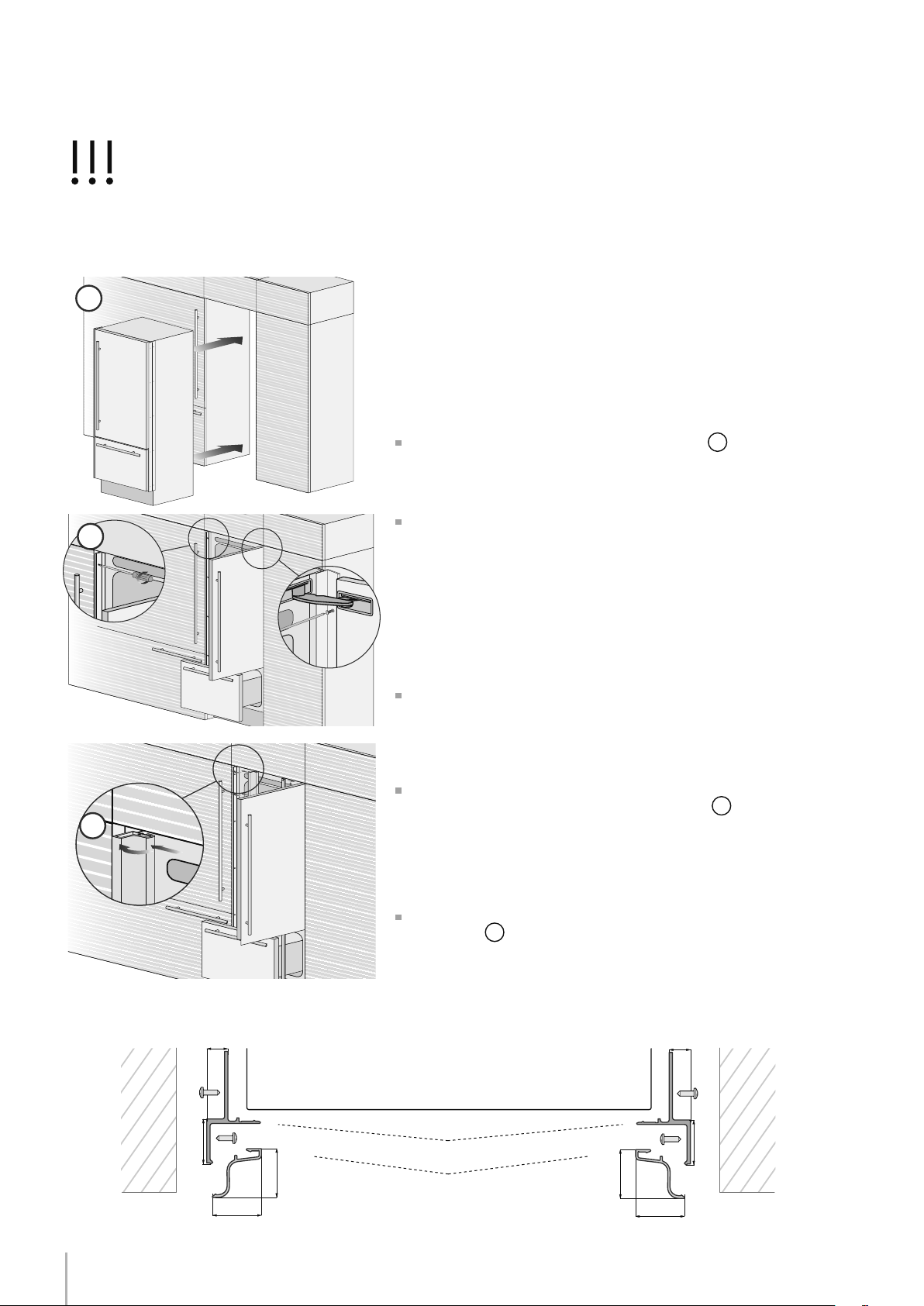
18
2
3
1
B
A
6,5 (¼”) 6,5 (¼”)
20 (¾”)
20 (¾”)
22 (7⁄8”)
22 (7⁄8”)
22 (7⁄8”) 22 (7⁄8”)
Série: tous
Installation dans la niche
Des prols en aluminium peuvent être utilisés pour fermer les espaces
entre l’appareil et les meubles adjacents ou un autre appareil juxta-
posé à celui-ci.
Intervenir de la manière suivante:
Pousser l’appareil dans la niche d’installation
1
.
Si l’appareil doit être installé dans une niche ou à l’intérieur d’une
structure fermée, il sera nécessaire de prévoir une cheminée de ven-
tilation à l’arrière de la niche pour garantir une ventilation adèqua-
te. Un écart de 5 mm (1/4”) est sufsant pour éviter tout surchauffe-
ment. Assemblez toujours les panneaux frontaux à la porte et aux tiroirs
avant de placer l’appareil dans sa position dénitive dans la niche ou
la structure.
Vérier que les pieds et les roues arrière soient à niveau avant d’en-
castrer l’appareil.
Fixer l’appareil aux meubles adjacents en vissant à ces derniers les
deux prols latéraux, déjà montés sur l’appareil
2
.
Pour effectuer facilement l’opération, garder la porte et le grand bac
ouverts.
Monter sur les prols les corniches de couverture, en les insérant
latéralement
3
et puis en poussant avec force jusqu’au “clic”.
Encastrement appareil unique
Appareil
Paroi
ou
meuble
Paroi
ou
meuble
A Profil de raccordement B Corniche de couverture en aluminium
Schéma de montage prols latéraux
Montage dans une armoire de cette hauteur exige que l’arrière de l’armoire de ventilation par le haut. Sinon, un
2” supplémentaires de hauteur de l’armoire est requis pour une ventilation adéquate. Hauteur du panneau latéral
personnalisé peut être plus élevé que nécessaire.
19
1
4
3
2
Notice d’Installation
EnglishFrançais
Série: tous
Accessoires nécessaires à commander séparément:
Kit raccordement central (KCCIT/KCCIH)
Des prols en aluminium peuvent être utilisés pour fermer les espaces
entre l’appareil et les meubles adjacents ou un autre appareil juxta-
posé à celui-ci.
Intervenir de la manière suivante:
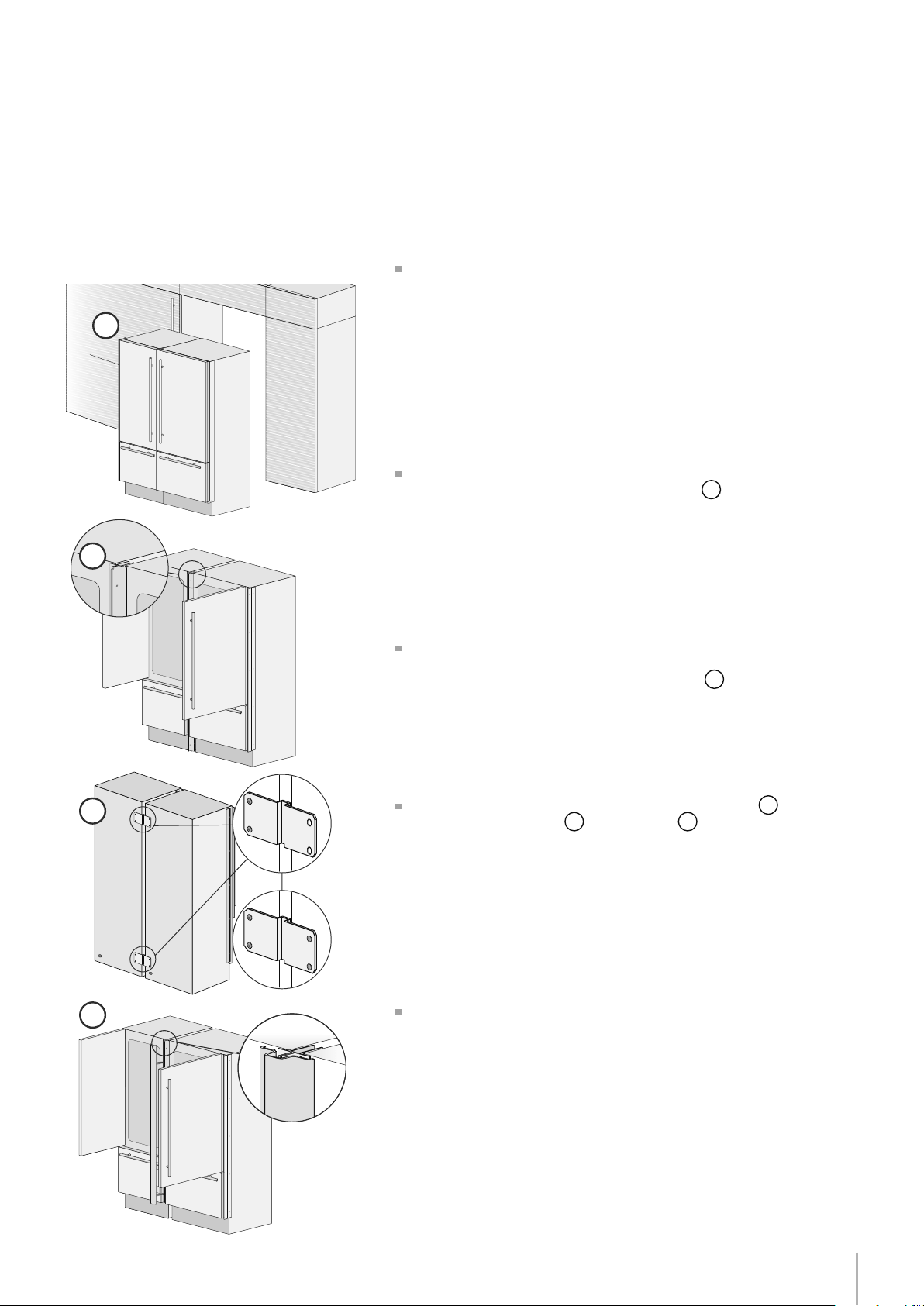
Positionner les appareils devant la niche en laissant un espace suf-
sant pour intervenir sur l’arrière des appareils
1
.
Passer à l’arrière des appareils pour le montage des équerres de
connexion. Fixer un côté de l’équerre supérieure et inférieure, d’abord
sur un des deux appareils et ensuite sur l’autre
2
.
Visser entre eux les deux prols avec les rivets fournis
3
.
Fixer l’équerre supérieure
4
et l’inférieure
5
d’abord sur un appareil
et puis sur l’autre.
Pour effectuer facilement l’opération, garder la porte et le grand bac
ouverts.
Compléter en montant la corniche de couverture centrale en pous-
sant avec force jusqu’au “clic”.
Encastrement combinaison
20
5
7
6
E
D
A
B
A
B
D
6,5 (¼”) 6,5 (¼”)
20 (¾”)
20 (¾”)
22 (7⁄8”)
22 (7⁄8”)
22 (7⁄8”) 22 (7⁄8”)
6,5 (¼”)6,5 (¼”)
18 (¾”)
44,4 (1 ¾”)
18 (¾”)
C
13 (½”)
Série: tous
Une fois complétés les passages ci-dessus, poussez les appareils
dans leur position dénitive
6
.
Il sera nécessaire de prévoir une cheminée de ventilation à l’arrière
de la niche pour garantir une ventilation adèquate. Un écart de 5 mm
est sufsant pour éviter tout surchauffement. Assemblez toujours les
panneaux frontaux à la porte et aux tiroirs avant de placer l’appareil
dans sa position dénitive dans la niche ou la structure.
Vérier que les pieds et les roues arrière soient à niveau avant d’en-
castrer l’appareil.
Fixer chaque appareil aux meubles adjacents en vissant à ces der-
niers les prols latéraux, déjà montés sur les appareils
7
.
Pour effectuer facilement l’opération, garder la porte et le grand bac
ouverts.
Monter sur les prols les corniches de couverture, en les insérant
latéralement
8
et puis en poussant avec force jusqu’au “clic” (com-
me pour l’encastrement de l’appareil unique).
Appareil AppareilParoi
ou
meuble
Paroi
ou
meuble
A Profil de raccordement
B Corniche de couverture en aluminium
D Prol de raccordement centrale
E Corniche centrale en aluminium de couverture
Schéma montage prols centraux et latéraux

21
2 x
6 x
1
2 x
6 x
1
2 x
6 x
2
2 x
6 x
2
2 x
6 x
3
2 x
6 x
3
2 x
6 x
4
2 x
6 x
4
Notice d’Installation
EnglishFrançais
Anti tipping kit installation
1
2
22
Série: Inox Integrated (BKI)
Montage des poignées sur le devant inoxydable
Pour xer les poignées à la porte et au grand bac, intervenir comme
indiqué.
Intervenir de la manière suivante:
Insérer les écarteurs sur les deux goujons présents sur la porte et sur le
grand bac
1
.
Visser les vis à six pans présentes dans la poignée
2
.
Les vis de xation seront serrées à fond, en utilisant une clé à six pans
de 2,5 mm (1/8”).
23
A
B
C
C
A 860 (33 7⁄8”) 740 (29 1⁄8”)
> 100 (4”)
10 (3⁄8”)
50%
B
C
100 (4”)
Notice d’Installation
EnglishFrançais
Série: tous
Série 36 Série 30
Un système à air forcé assure la ventilation à travers la grille positionnée
dans la dans la partie inférieure de l’appareil. Si l’aménagement de la
cuisine prévoit une plinthe, cette dernière doit être trouée an de gar-
der un niveau d’aréation satisfaisant, comme expliqué dans le dessin.
Les trous peuvent être de toute sorte de forme et dimension, à condi-
tion que la surface totale de la partie trouée est égale au 50% de la
surface de la plinthe.
Dans ce cas, pour permettre une meilleure aération, il est préferable
de retirer la grille frontale de l’ensemble. La grille est accrochée à
l’ensemble avec des plaques magnetiques et peut être facilement
retirée par l’utilisateur nal, an d’être nettoyée régulièrement de la
poussière.
Circulation de l’air
La grille de ventilation ne doit pas être bloqué ou couvert d’aucune
manière. Il doit aussi être dépoussiéré / nettoyés régulièrement.

24
Série: tous
Contrôle de n d’installation mise en marche
Contrôler que les pieds sont correctement installés.
Contrôler que le raccordement à l’installation hydrique ne présente
pas de fuites d’eau et que le robinet de fermeture est facilement ac-
cessible.
Contrôler que le branchement électrique soit correctement réalisé
et que la che et l’interrupteur omnipolaire dédié soient facilement
accessibles.
Contrôler le parfait alignement de l’appareil avec les meubles ad-
jacents.
Contrôler que chaque ruban adhésif ou protection temporaire in-
terne ou externe soit éliminé.
Contrôler la parfaite étanchéité des portes et le coulissement des
bacs et des clayettes.
25
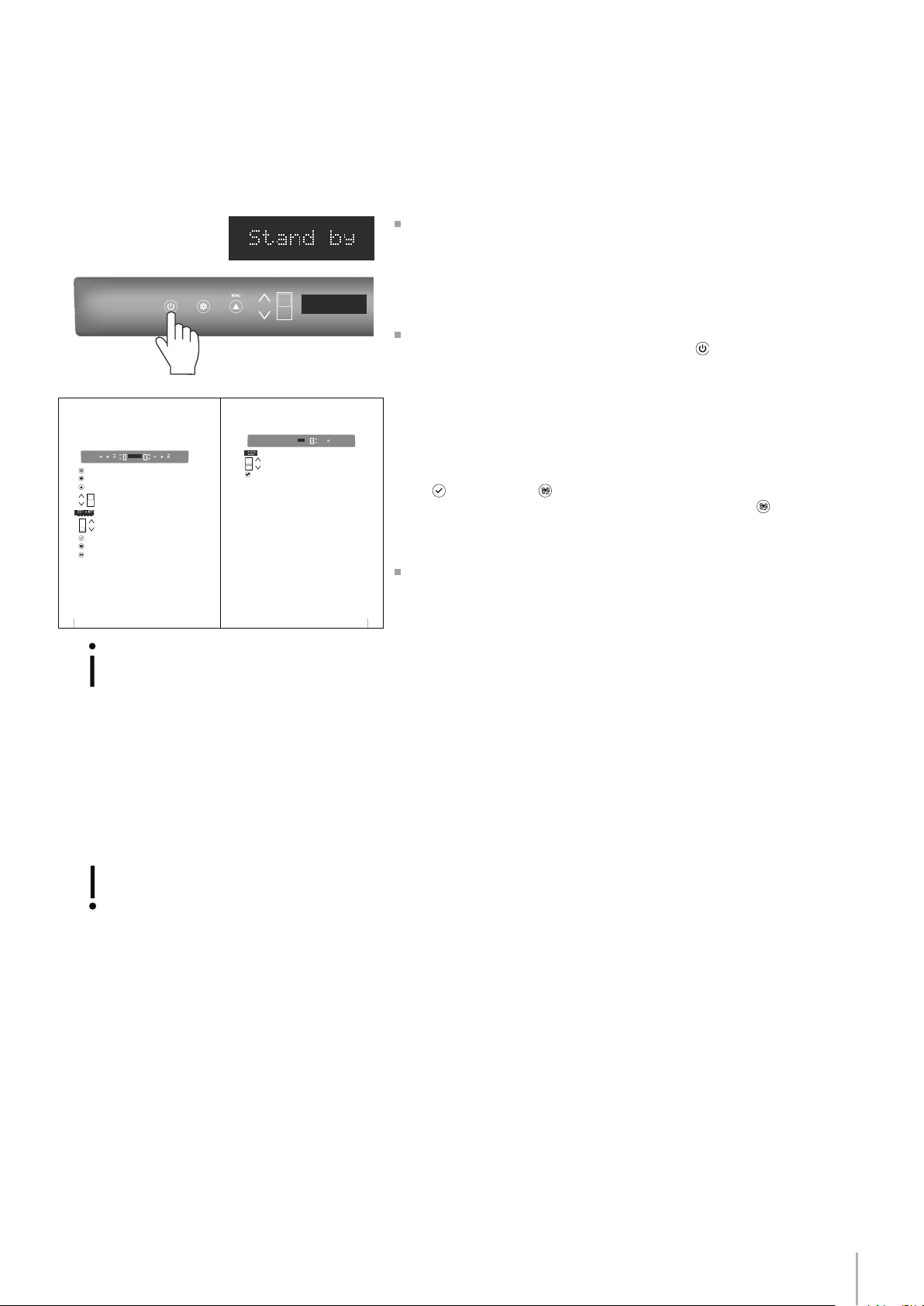
FRIDGE
UNIT
9
CR
ISP
E
R
10 11 12
11 Display
13 Crisper
12 Up/Down
English
Shows the temperature of the Crisper-Fresco compartment.
Allows switching on and off of only the Crisper-Fresco compartment
(press
for three seconds).
Using the Up and Down buttons, it is possible to change the
temperature set for the Crisper-Fresco compartment.
8
1 Unit
2 Fridge
3 Menu
4
Up/down
Fridge
5 Display
6
Up/Down
Freezer
(TriMode)
7 Enter
8 Ice maker
9 Alarm
Switches the appliance (all compartments) between ON and STAND BY
(press for three seconds).
Allows switching on and off of only the refrigerator compartment
(press for three seconds).
Allows access to the appliance function menu
It shows the temperature of the refrigerator and freezer compartments,
the date and time, Menu functions and visual messages.
By selecting Up/Down the preset temperature can be changed accord-
ing to the selected function mode (freezer, refrigerator, Crisper-Fresco).
Confirms activation or deactivation of the selections made in the
Menu.
Allows activating or deactivating the automatic ice production.
Blinks to signal user alerts such as door left open, also in combination with
a sound signal which can be deactivated by pressing the button.
Using the Up and Down buttons, it is possible to change the set tempera-
ture of the refrigerator and navigate through the interactive menu.
1234 56798
I
CE
MA
K
E
R
E
N
T
E
R
FR
ID
GE
U
NI
T
Notice d’Installation
EnglishFrançais
Série: tous
Mise en marche
Si lors de la première mise en marche, n’appa-
raît pas le message Stand-by, mais apparaissent
Fridge too warm, Fresco too warm, Freezer too
warm ou signaux sonores, cela signie que l’ap-
pareil a déjà commencé la procédure de refroi-
dissement.
Dans ce cas désactiver les éventuels messages
sonores en efeurant la touche Alarm, refermer la
porte et attendre que les températures program-
mées soient atteintes.
Pour mettre en marche l’appareil, brancher la che au réseau
électrique: lorsque la porte est ouverte, apparaît sur le panneau de
commande le message “Stand-by”, alors que toutes les touches du
panneau sont éteintes.
Pour mettre en marche tous les compartiments de l’appareil, ap-
puyer pendant 3 secondes sur la touche Unit .
Le message “initial test” apparaîtra pendant environ 2 minutes, ensuite
les compresseurs seront actifs jusqu’à attendre la température prévue
en usine par défaut. Veuillez noter que cette opération pourrait durer
plusieurs heures.
Si l’appareil est fourni avec un appareil à glaçons avant de le mettre
en marche pour la première fois, veuillez vous assurer que la cartouche
du ltre pour l’eau a bien été installée et effectuez un remplissage du
circuit hydraulique. Appuyez donc en même temps sur les touches
Enter et Ice Maker . Après quelques minutes l’appareil à glaçons
peut être activé en appuyant sur la touche Ice Maker
.
Pour toute autre information concernant le fonctionnement de
l’appareil, se référer au Mode d’emploi.
Il faut laisser l’unité atteindre la température de
fonctionnement vide et avec la porte et un tiroir fer-
mé avant que les aliments sont stockés à l’intérieur.