Owner’s Manual
INTERCHANGEABLE LENS FOR DIGITAL CAMERA
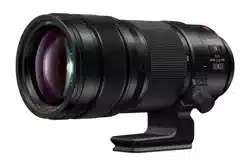
Model No. H-ES200
PP
until
2018/01/17
Please read these instructions carefully before using this product, and save this manual for future use.
If you have any questions, visit:
USA : http://shop.panasonic.com/support
Canada : www.panasonic.ca/english/support
DVQX1303ZA
F1017KD0
Register online at http://shop.panasonic.com/support
(U.S. customers only)
DVQX1303_ENG_SPA.book 1 ページ 2017年10月20日 金曜日 午後4時0分

2
DVQX1303 (ENG)
Contents
Information for Your Safety................................ 2
Precautions...................................................... 3
Supplied Accessories ........................................ 4
Names and Functions of Components .............. 5
Attaching/Detaching the Lens............................ 6
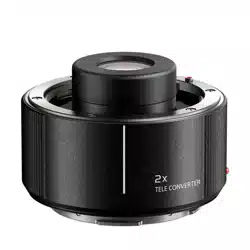
Attaching/Removing the 1.4
k
Teleconverter
........ 7
Focus Preset Function....................................... 8
Using the Tripod Mount ..................................... 9
Cautions for Use.............................................. 10
Troubleshooting............................................. 10
Specifications ..................................................11
Limited Warranty ............................................. 12
THE FOLLOWING APPLIES ONLY IN CANADA.
Information for Your Safety
Keep the unit as far away as possible from electromagnetic
equipment (such as microwave ovens, TVs, video games,
radio transmitters, high-voltage lines etc.).
• Do not use the camera near cell phones because doing so may
result in noise adversely affecting the pictures and sound.
• If the camera is adversely affected by electromagnetic
equipment and stops functioning properly, turn the camera
off and remove the battery and/or the connected AC
adaptor. Then reinsert the battery and/or reconnect the AC
adaptor and turn the camera on.
The lens can be used with a digital camera compatible with the
lens mount standard for the “Micro Four Thirds
TM
System”.
• It cannot be mounted on the Four Thirds
TM
mount
specification camera.
• The digital camera illustrations in this owner’s manual
show DC-G9 as an example.
• The appearance and specifications of products described
in this manual may differ from the actual products you
have purchased due to later enhancements.
• Micro Four Thirds
TM
and Micro Four Thirds Logo marks
are trademarks or registered trademarks of Olympus
Corporation, in Japan, the United States, the European
Union and other countries.
• Four Thirds
TM
and Four Thirds Logo marks are trademarks or
registered trademarks of Olympus Corporation, in Japan, the
United States, the European Union and other countries.
• G MICRO SYSTEM is an interchangeable lens type digital
camera system of LUMIX based on a Micro Four Thirds
System standard.
• LEICA is a registered trademark of Leica Microsystems IR
GmbH. ELMARIT is a registered trademark of Leica
Camera AG. The LEICA DG lenses are manufactured
using measurement instruments and quality assurance
systems that have been certified by Leica Camera AG
based on the company’s quality standards.
• Other names of systems and products mentioned in these
instructions are usually the registered trademarks or
trademarks of the manufacturers who developed the
system or product concerned.
CAN ICES-3(B)/NMB-3(B)
DVQX1303_ENG_SPA.book 2 ページ 2017年10月20日 金曜日 午後4時0分

3
(ENG) DVQX1303
THE FOLLOWING APPLIES ONLY IN THE U.S.A.
∫ Lens Care
• This lens has a dust-proof and splash-proof construction.
When using it, please be careful of the following.
If the lens is not working properly, consult the dealer or
your nearest Service Center.
– Please attach the lens to a dust-proof and splash-proof
digital camera. The lens is not designed to be dust-proof
and splash-proof when attached to a digital camera
without dust-proofing and splash-proofing.
– When attaching or removing the lens, be careful so that
foreign materials such as sand, dust, and water droplets
do not adhere to or enter the lens mount rubber, contact
points, digital camera and lens.
– This lens is not waterproof and cannot be used to record
underwater. For splash-proofing, the lens is constructed
to resist the entry of water. If splashes of water etc. do
adhere to the lens, wipe after use with a soft dry cloth.
• To improve the dust-proofing and splash-proofing of this
lens, a lens mount rubber is used in the mounting portion.
After changing the lens a number of times, you may find
that the lens mount rubber has marked the mount portion
of the digital camera body, which does not affect its
performance. For information on changing the lens mount
rubber, contact your nearest Service Center.
• Do not press the lens with excessive force.
• When there is dirt (water, oil, and fingerprints, etc.) on the
surface of the lens, the picture may be affected. Lightly
wipe the surface of the lens with a soft, dry cloth before
and after taking pictures.
FCC Note:
This equipment has been tested and found to comply with the
limits for a Class B digital device, pursuant to Part 15 of the FCC
Rules.
These limits are designed to provide reasonable protection against
harmful interference in a residential installation. This equipment
generates, uses, and can radiate radio frequency energy and, if
not installed and used in accordance with the instructions, may
cause harmful interference to radio communications. However,
there is no guarantee that interference will not occur in a particular
installation. If this equipment does cause harmful interference to
radio or television reception, which can be determined by turning
the equipment off and on, the user is encouraged to try to correct
the interference by one or more of the following measures:
• Reorient or relocate the receiving antenna.
• Increase the separation between the equipment and receiver.
• Connect the equipment into an outlet on a circuit different from
that to which the receiver is connected.
• Consult the dealer or an experienced radio/TV technician for
help.
Any unauthorized changes or modifications to this equipment
would void the user’s authority to operate this device.
This device complies with Part 15 of the FCC Rules. Operation is
subject to the following two conditions: (1) This device may not
cause harmful interference, and (2) this device must accept any
interference received, including interference that may cause
undesired operation.
Responsible Party:
Panasonic Corporation of North America
Two Riverfront Plaza, Newark, NJ 07102-5490
Support Contact:
http://shop.panasonic.com/support
Precautions
ENGLISH
DVQX1303_ENG_SPA.book 3 ページ 2017年10月20日 金曜日 午後4時0分
4
DVQX1303 (ENG)
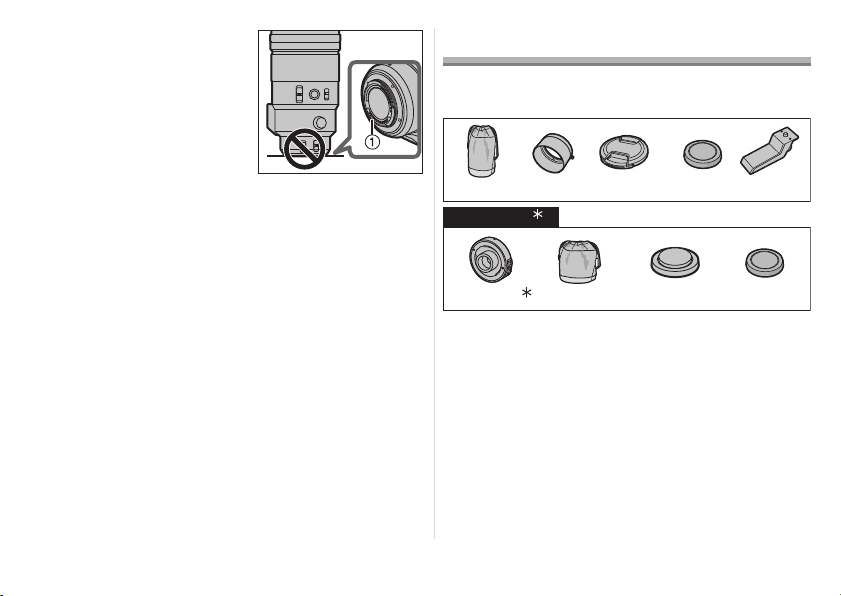
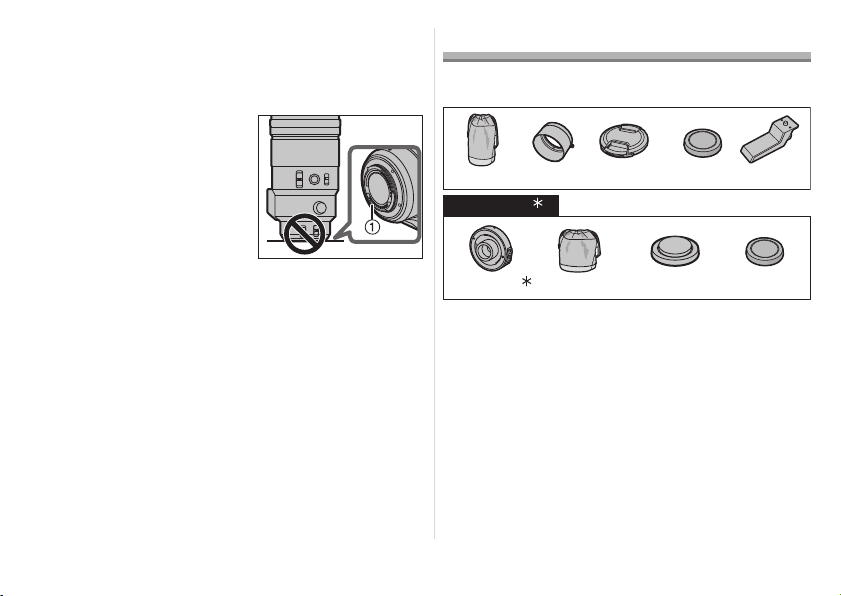
• To prevent dust and other
particles from accumulating
on or entering the lens,
attach the lens rear cap
when the lens is not in use.
• To protect the lens contact
points 1, do not place the
lens with its mount surface
facing down. In addition, do
not allow the lens contact
points to become dirty.
∫ About Condensation (Fogging of the Lens)
• Condensation occurs when the ambient temperature or
humidity changes. Please be careful, as it may cause the
lens to become dirty and lead to mould and
malfunctioning.
• If condensation occurs, turn the power off and leave it for
about two hours. Once the camera acclimatizes to the
surrounding temperature the condensation will go away
naturally.
Supplied Accessories
Product numbers correct as of November 2017. These may
be subject to change.
¢1 The 1.4k Teleconverter (DMW-TC14) is scheduled to
be sold as an optional accessory.
¢2 It is available for purchase as a package that includes a
lens cap and a lens rear cap.
• The lens rear cap and lens cap are attached to the
interchangeable lens and 1.4k Teleconverter at the time
of purchase.
1 Lens Pouch
2 Lens Hood
3 Lens Cap
4 Lens Rear Cap
5 External tripod mount
6 1.4k Teleconverter
7 Lens Pouch
8 Lens Cap
9 Lens Rear Cap
SFC0360
DVZE1018Z
2134
1GE1Z253Z VFC4605
5
SYQ0680
DVXE1027Z
VFC4460
7689
DVGX1115Z VFC4605
DMW-TC14
1
2
DVQX1303_ENG_SPA.book 4 ページ 2017年10月20日 金曜日 午後4時0分
5
(ENG) DVQX1303
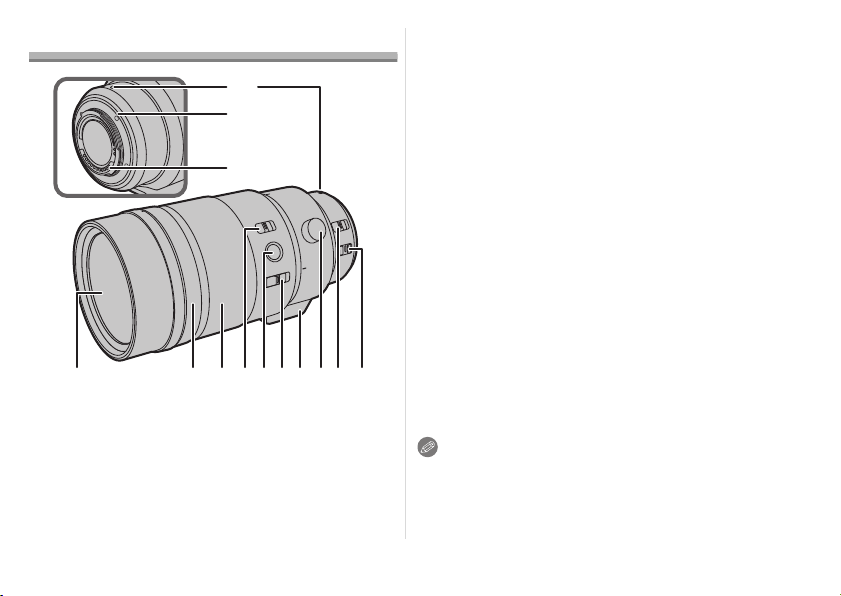
Names and Functions of Components
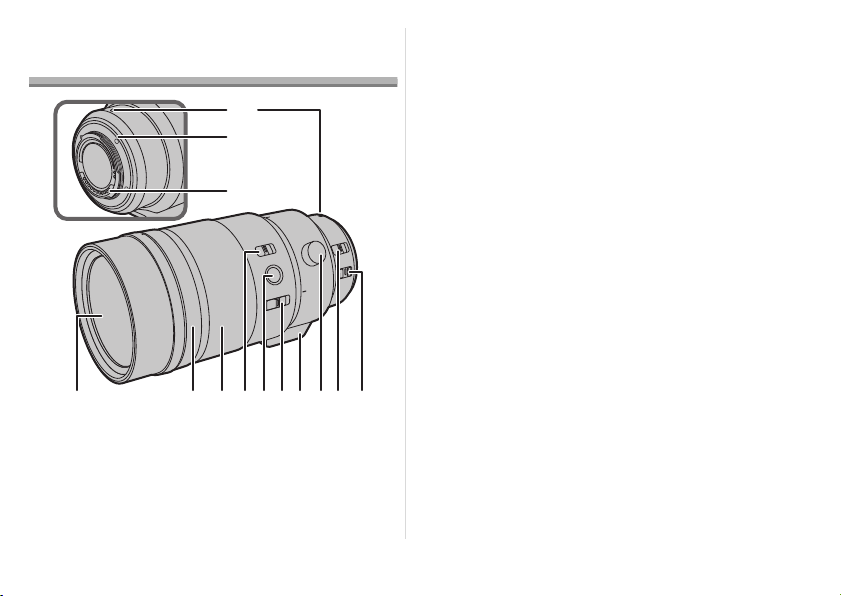
1 Lens surface
2 Aperture ring
Rotate this to adjust the aperture value.
• If you set the camera to Aperture-Priority AE Mode or Manual
Exposure Mode, the aperture value of the ring will be enabled.
• If you set the position of the aperture ring to [A], the
aperture value of the camera will be enabled.
3 Focus ring
Rotate to focus when taking pictures with manual focus (MF).
4 Focusing distance range selector switch
[FULL]: It can focus between the ranges of 1.15 m
(3.8 feet) to ¶.
[3m-¶]: It can focus between the ranges of 3.0 m
(9.8 feet) to ¶. The speed of focusing with
auto focus will be faster.
5 Focus button
(P8)
6 Focus selector switch (P8)
7 Tripod mount (P9)
8 Orientation locking knob (P9)
9 [AF/MF] switch
This allows you to switch between Auto Focus (AF) and
Manual Focus (MF).
• When either the [AF/MF] switch of the lens or the setting of
the camera is set to [MF], Manual Focus (MF) is enabled.
10 O.I.S. switch
When the lens is attached to the camera the stabilizer
function is set to activate if the O.I.S. switch is set to [ON].
• We recommend setting the O.I.S. switch to [OFF] when
using a tripod.
11 Lens fitting mark
12 Lens mount rubber
13 Contact points
Note
• Operational sound may be recorded when Auto Focus is
operated while recording a motion picture. If the sound
bothers you, we recommend performing recording with a
function such as Manual Focus (MF) to lock the focus.
1 4 5 102 3 76 8 9
11
12
13
DVQX1303_ENG_SPA.book 5 ページ 2017年10月20日 金曜日 午後4時0分
6
DVQX1303 (ENG)
• If you set the O.I.S. to [ON] when recording a motion
picture, operating sounds may be recorded. If they
become bothersome, we recommend setting the O.I.S.
switch to [OFF] and mounting the camera on a tripod.
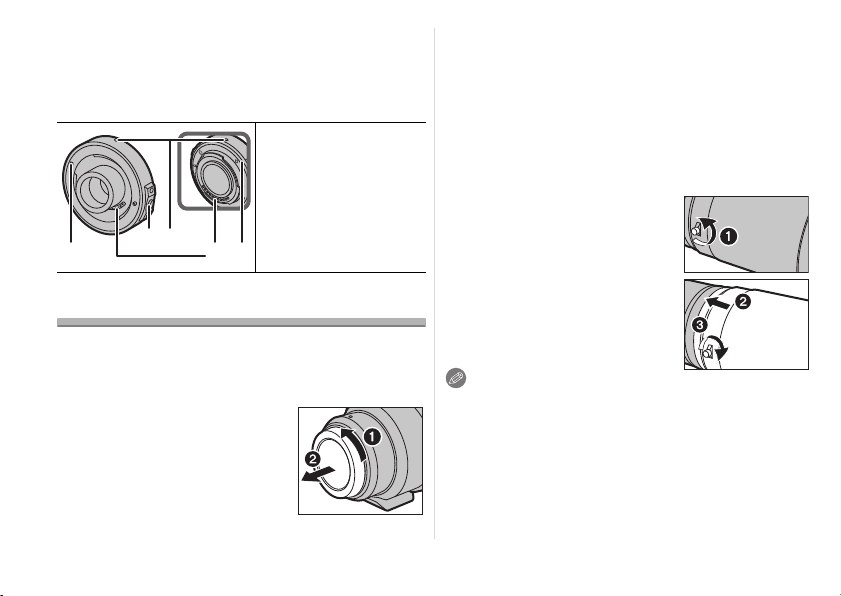
∫ 1.4k Teleconverter
Attaching/Detaching the Lens
For information on how to attach and remove the lens,
refer to the owner’s manual for your digital camera.
• Before attaching or detaching the lens, check that the
digital camera is turned off.
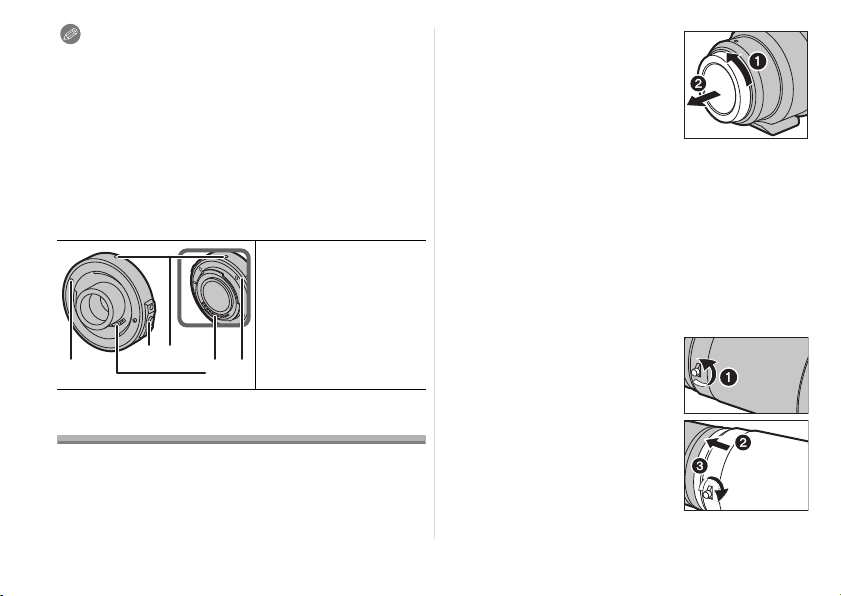
• Before attaching the lens to the
digital camera, remove the lens
rear cap. (
1
,
2
)
• To prevent dust and other particles
from accumulating on or entering the
lens, be sure to attach the lens cap/
lens rear cap after detaching the lens
from the digital camera.
∫ Attaching Filters
• If you use two or more filters at the same time, part of a
recorded image may darken.
• It is possible to attach the lens cap or the lens hood with
the filter already attached.
• It is not possible to attach a conversion lens or adaptor to
the lens surface and use it in combination with this lens.
Do not attach any items other than filters. Doing so may
result in lens damage.
∫ Attaching the Lens Hood
1 Rotate the lens hood screw
in the direction of the arrow
to loosen it (
1
).
2 Insert the lens hood until
it stops (2).
3 Rotate the lens hood
screw in the direction of
the arrow to fasten the
lens hood securely (3).
Note
• When using the lens with the lens hood, check if the lens
hood screw has become loose.
• When taking pictures with the flash with the lens hood
attached, the lower portion of the screen may turn dark
and the control of the flash may be disabled because the
photo flash may be obscured by the lens hood. We
recommend detaching the lens hood.
1 Fitting mark
2 Lens release
button
3 Lens fitting mark
4 Contact points
5
Lens mount rubber
1
32
4 5
DVQX1303_ENG_SPA.book 6 ページ 2017年10月20日 金曜日 午後4時0分
7
(ENG) DVQX1303
• When carrying, the lens hood can
be temporarily attached in the
reverse direction.
• Do not carry the lens by holding
only the lens hood.
Attaching/Removing the
1.4k Teleconverter
• The teleconverter can be used in combination with
this lens (H-ES200). (As of November 2017)
• For the most up-to-date information on compatible lenses
other than this lens, check the Panasonic website.
• Do not attach any parts other than a compatible lens.
Doing so may damage the lens or teleconverter or
adversely affect its performance.
• Before attaching or removing the teleconverter, verify
that the digital camera is turned off.
• Remove the lens cap and the lens rear cap.
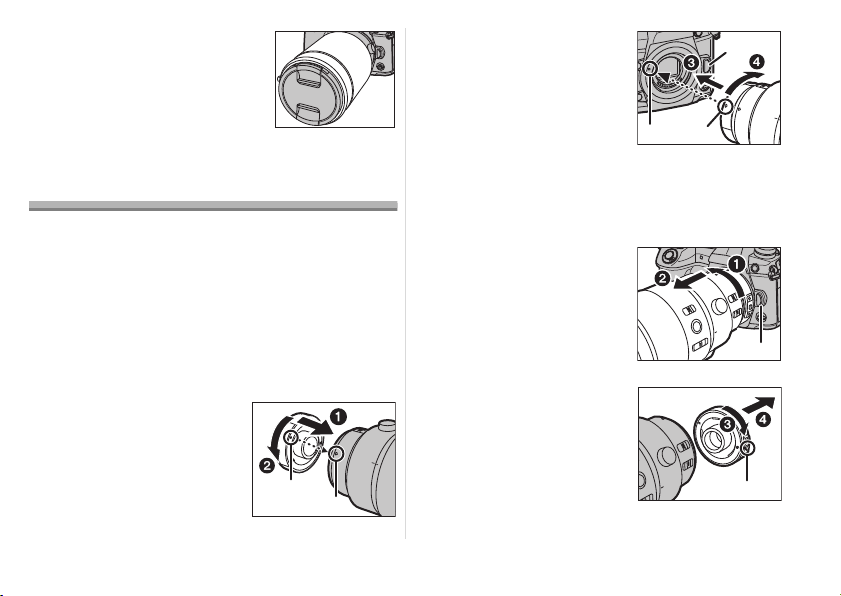
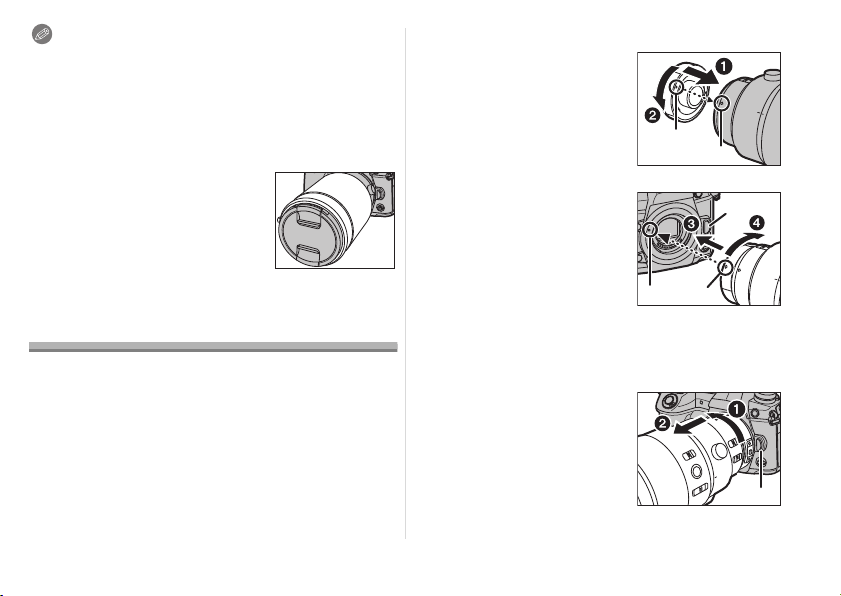
∫ To attach the teleconverter
1
Align the fitting mark
A
on the teleconverter with
the lens fitting mark
B
on
the lens (
1
), and rotate the
teleconverter in the arrow
direction until a clicking
sound is heard. (
2
)
2
Align the lens fitting mark
C
on the teleconverter with
the lens fitting mark
D
on
the digital camera (
3
),
and
rotate the lens in the arrow
direction until a clicking
sound is heard. (
4
)
• When attaching the lens to the digital camera, do not
press the lens release button
E and the lens release
button on the teleconverter.
∫ To remove the teleconverter
1
While pressing and
holding the lens release
button
E
on the digital
camera, rotate the lens
fitted with the
teleconverter in the arrow
direction until it stops and
remove it (
1
,
2
).
2
While pressing and
holding the lens release
button
F
on the
teleconverter, rotate the
teleconverter in the arrow
direction until it stops and
remove it (
3
,
4
).
DVQX1303_ENG_SPA.book 7 ページ 2017年10月20日 金曜日 午後4時0分
8
DVQX1303 (ENG)
Note
• When the teleconverter is mounted, the aperture will be
set to a value one step greater than the index value on the
aperture ring.
• When updating the lens firmware to the latest version,
remove the teleconverter before performing the update.
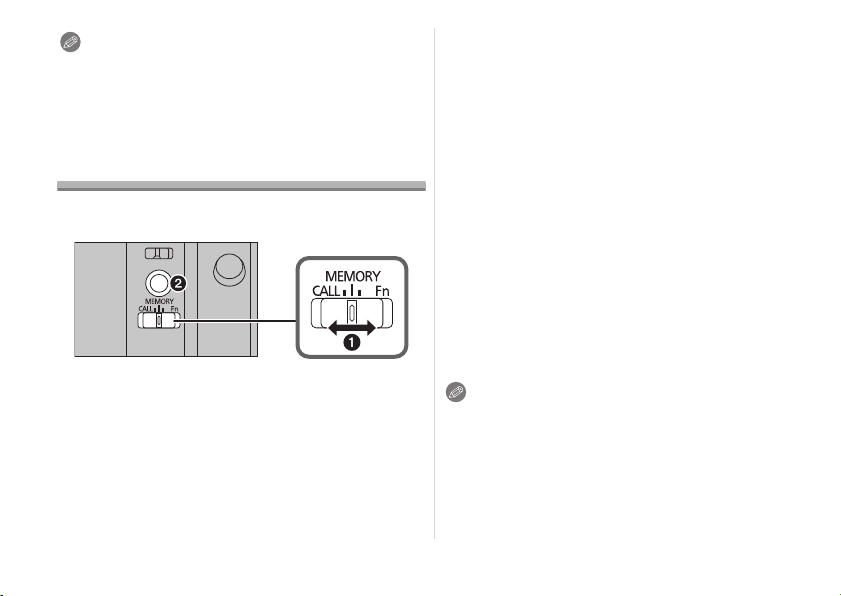
Focus Preset Function
You can call up a focus position stored in the memory of the
lens. In addition, the focus can be locked.
(To store a focus position in the lens memory)
1 Set the focus selector switch to [MEMORY]
(1).
2 Adjust the focus to the position you want to
store in the memory.
3 Press the focus button (2) to store the focus
position in the memory.
• The focus position stored in the memory will remain in
effect until you store a new position in the memory.
(To call up the focus position stored in the memory)
4 Set the focus selector switch to [CALL] (1).
5 Press the focus button (2) to call up the focus
position stored in the memory.
• [MF] is temporarily enabled while the focus button is
pressed and held.
• Even when the focusing distance range selector switch is
set to [3m–¶ ], a focus position within the 3.0 m range can
be called up. If you release the focus button, however, the
focus position will move to the limit position (3.0 m).
• We recommend setting the focusing distance range
selector switch to [FULL] when using the focus preset
function.
∫ Locking the focus
1 Set the focus selector switch to [Fn] (1).
2 Press the focus button (2).
• The focus is locked while the focus button is pressed and
held.
• You can also call up a function set on a digital camera that
supports the [Fn] function.
Note
• Before removing the lens, verify that the digital camera is
turned off. If the lens is removed while the digital camera is
turned on, the focus position will not be stored in the
memory.
DVQX1303_ENG_SPA.book 8 ページ 2017年10月20日 金曜日 午後4時0分
9
(ENG) DVQX1303
Using the Tripod Mount
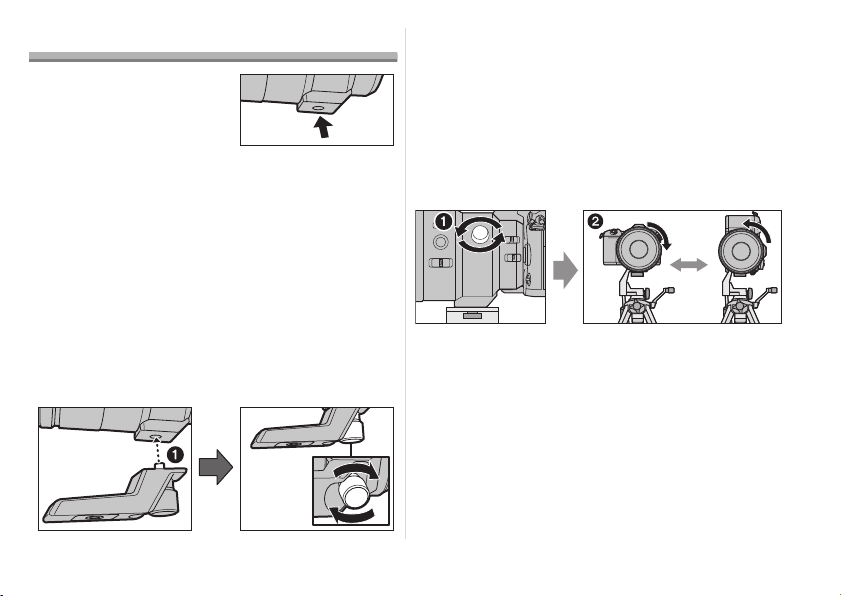
When using a tripod, attach it to
the tripod mount of the lens.
• We recommend that you
avoid attaching the tripod to
the tripod mount of the digital
camera to prevent lens
damage that may occur when carrying the lens.
• In the following cases, before attaching a tripod, attach the
supplied external tripod mount to the lens:
– When the lens or digital camera comes in contact with
the tripod
– When a battery grip that comes in contact with the tripod
is used
∫ Attaching the external tripod mount (supplied)
1 Insert the external tripod mount attachment
screw into the tripod mount of the lens. (
1
)
2
Rotate the external tripod mount attachment screw
in the direction of the arrows to fasten it firmly.
• Check that the external tripod mount attachment screw is
not loose before use.
• Do not strike or apply strong pressure to the external
tripod mount.
∫ Changing the vertical/horizontal orientation
You can loosen the orientation locking knob (
1
) to rotate
the lens together with the digital camera (
2
).
This way, you can quickly switch between the vertical and
horizontal orientation while the tripod is in use.
• After changing the orientation, tighten the orientation
locking knob firmly and check that it is not loose.
DVQX1303_ENG_SPA.book 9 ページ 2017年10月20日 金曜日 午後4時0分

10
DVQX1303 (ENG)
Cautions for Use
Take care not to drop or knock the lens. Also take care
not to put a lot of pressure on the lens.
• Take care not to drop the bag that you inserted the lens in
as it may strongly shock the lens. The camera may stop
operating normally and pictures may no longer be
recorded. Also, the lens may be damaged.
• When carrying the digital camera with the lens attached,
hold both the digital camera and the lens.
When using pesticides and other volatile substances
around the camera make sure that they do not get onto
the lens.
• If such substances get onto the lens they can damage the
exterior case or cause the paint to peel.
Do not point the lens at the sun or other strong light
sources.
• This could cause the lens to collect an excessive amount
of light, resulting in fire and malfunction.
• Avoid using or storing the lens in any of the following
locations as this may cause problems in operation or
malfunctioning:
– In direct sunlight or on a beach in summer
– In locations with high temperatures and humidity levels or
where the changes in temperature and humidity are acute
– In locations with high concentrations of sand, dust or dirt
– Where there is fire
– Near heaters, air conditioners or humidifiers
– Where water may make the unit wet
– Where there is vibration
– Inside a vehicle
• Refer also to the owner’s manual of the digital camera.
• When the unit is not going to be used for a prolonged
period, we recommend storing with a desiccant (silica gel).
Failure to do so may result in performance failure caused
by mold, etc. It is recommended that you check the unit’s
operation prior to use.
• Do not leave the lens in contact with rubber or plastic
products for extended periods of time.
• Do not touch the lens contact point. Doing so can cause
failure of the unit.
• Do not disassemble or alter the unit.
Do not use benzine, thinner, alcohol or other similar
cleaning agents to clean the lens glass or exterior
cabinet.
• Using solvents can damage the lens or cause the paint to
peel.
• Wipe off any dust or fingerprints with a soft, dry cloth.
• Use a dry, dust cloth to remove dirt and dust on the lens
mount rubber, focus ring, or aperture ring.
• Do not use a household detergent or a chemically treated
cloth.
When I turn on or off the camera or when I shake the
lens, I hear a sound, for example a rattling sound.
When I take pictures of a bright subject, such as a
subject outside, or when I take pictures with a large
aperture value, the lens makes a sound.
• This is the sound of lens or aperture movement and is not
a malfunction.
Troubleshooting
DVQX1303_ENG_SPA.book 10 ページ 2017年10月20日 金曜日 午後4時0分

11
(ENG) DVQX1303
Specifications
Specifications are subject to change without notice.
INTERCHANGEABLE LENS FOR DIGITAL CAMERA
“LEICA DG ELMARIT 200 mm/F2.8/POWER O.I.S.”
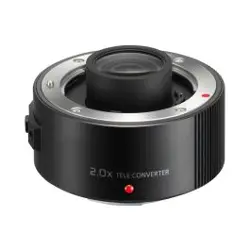
1.4k Teleconverter
Focal length f=200 mm (35 mm film camera equivalent: 400 mm) 1.4k that of the attached lens.
Aperture type 9 diaphragm blades/circular aperture diaphragm j
Maximum aperture F2.8 (When the 1.4k Teleconverter is attached: F4.0) j
Minimum aperture value F22 (When the 1.4k Teleconverter is attached: F22) j
Lens construction 15 elements in 13 groups (2 ED lenses) 6 elements in 4 groups
Nano surface coating Yes j
In focus distance
[FULL]: 1.15 m (3.8 feet) to

/ [3 m-

]: 3.0 m (9.8 feet) to

(from the
focus distance reference line)
j
Maximum image magnification 0.2k (35 mm film camera equivalent: 0.4k) j
Optical image stabilizer Available j
O.I.S. switch Available (Switching ON/OFF) j
[AF/MF] switch Available (Switching AF/MF) j
Mount “Micro Four Thirds Mount” j
Angle of view 6.2x (When the 1.4k Teleconverter is attached: 4.4x) j
Filter diameter 77 mm j
Max. diameter Ø87.5 mm (3.4 inch) Ø58 mm (2.3 inch)
Overall length Approx. 174 mm (6.9 inch) (from the tip of the lens to the base side
of the lens mount)
Approx. 22 mm (0.87 inch) (from
the tip of the lens to the base side
of the lens mount)
Mass (Weight) Approx. 1245 g (2.74 lb) (excluding the external tripod mount) Approx. 120 g (0.26 lb)
Operating temperature j10 oC to 40 oC (14 oF to 104 oF) j10 oC to 40 oC (14 oF to 104 oF)
Dust-proof and splash-proof Available Available
DVQX1303_ENG_SPA.book 11 ページ 2017年10月20日 金曜日 午後4時0分
12
DVQX1303 (ENG)
Limited Warranty
Panasonic Products Limited Warranty
Limited Warranty Coverage (For USA Only)
If your product does not work properly because of a defect in materials or workmanship, Panasonic Corporation of North
America (referred to as “the warrantor”) will, for the length of the period indicated on the chart below, which starts with the
date of original purchase (“warranty period”), at its option either (a) repair your product with new or refurbished parts, (b)
replace it with a new or a refurbished equivalent value product, or (c) refund your purchase price. The decision to repair,
replace or refund will be made by the warrantor.
During the “Labor” warranty period there will be no charge for labor. During the “Parts” warranty period, there will be no
charge for parts. This Limited Warranty excludes both parts and labor for non-rechargeable batteries, antennas, and
cosmetic parts (cabinet). This warranty only applies to products purchased and serviced in the United States. This warranty
is extended only to the original purchaser of a new product which was not sold “as is”.
Mail-In Service
--Online Repair Request
Online Repair Request
To submit a new repair request and for quick repair status visit our Web Site at http://shop.panasonic.com/support
.
ONLY FOR U.S.A.
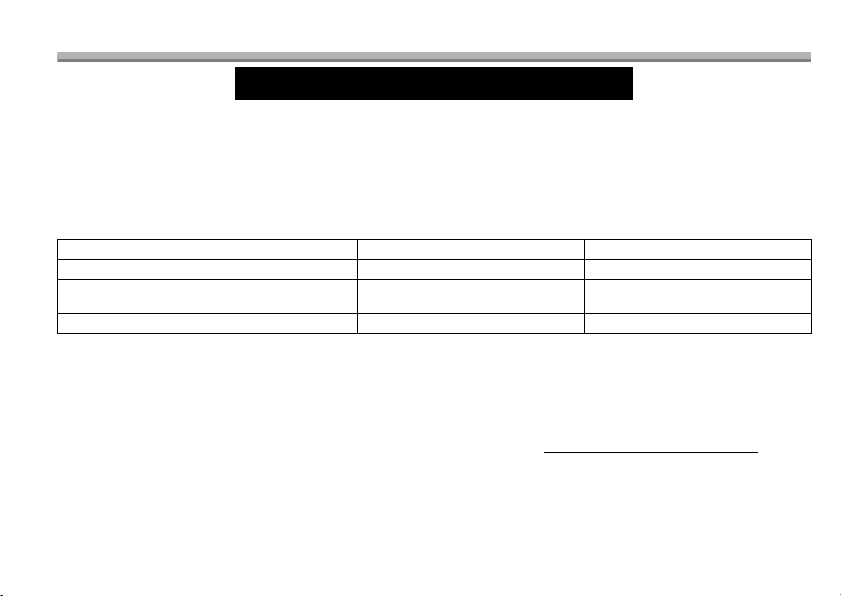
Product or part name Parts Labor
Interchangeable Lens for Digital Camera
1 Year 1 Year
All included Accessories (Except Non-
Rechargeable Batteries)
90 Days Not Applicable
Only Non-Rechargeable Batteries
10 Days Not Applicable
DVQX1303_ENG_SPA.book 12 ページ 2017年10月20日 金曜日 午後4時0分

13
(ENG) DVQX1303
When shipping the unit, carefully pack, include all supplied accessories listed in the Owner’s Manual, and send it prepaid,
adequately insured and packed well in a carton box. When shipping Lithium Ion batteries please visit our Web Site at
http://shop.panasonic.com/support
as Panasonic is committed to providing the most up to date information. Include a letter
detailing the complaint, a return address and provide a daytime phone number where you can be reached. A valid
registered receipt is required under the Limited Warranty.
IF REPAIR IS NEEDED DURING THE WARRANTY PERIOD, THE PURCHASER WILL BE REQUIRED TO FURNISH A
SALES RECEIPT/PROOF OF PURCHASE INDICATING DATE OF PURCHASE, AMOUNT PAID AND PLACE OF
PURCHASE. CUSTOMER WILL BE CHARGED FOR THE REPAIR OF ANY UNIT RECEIVED WITHOUT SUCH PROOF
OF PURCHASE.
Limited Warranty Limits and Exclusions
This warranty ONLY COVERS failures due to defects in materials or workmanship, and DOES NOT COVER normal wear
and tear or cosmetic damage. The warranty ALSO DOES NOT COVER damages which occurred in shipment, or failures
which are caused by products not supplied by the warrantor, or failures which result from accidents, misuse, abuse,
neglect, mishandling, misapplication, alteration, faulty installation, set-up adjustments, misadjustment of consumer
controls, improper maintenance, power line surge, lightning damage, modification, introduction of sand, humidity or liquids,
commercial use such as hotel, office, restaurant, or other business or rental use of the product, or service by anyone other
than a Factory Service Center or other Authorized Servicer, or damage that is attributable to acts of God.
THERE ARE NO EXPRESS WARRANTIES EXCEPT AS LISTED UNDER “LIMITED WARRANTY COVERAGE”.
THE WARRANTOR IS NOT LIABLE FOR INCIDENTAL OR CONSEQUENTIAL DAMAGES RESULTING FROM THE
USE OF THIS PRODUCT, OR ARISING OUT OF ANY BREACH OF THIS WARRANTY.
(As examples, this excludes damages for lost time, travel to and from the servicer, loss of or damage to media or images,
data or other memory or recorded content. The items listed are not exclusive, but for illustration only.)
ALL EXPRESS AND IMPLIED WARRANTIES, INCLUDING THE WARRANTY OF MERCHANTABILITY, ARE LIMITED
TO THE PERIOD OF THE LIMITED WARRANTY.
Some states do not allow the exclusion or limitation of incidental or consequential damages, or limitations on how long an
implied warranty lasts, so the exclusions may not apply to you.
This warranty gives you specific legal rights and you may also have other rights which vary from state to state. If a problem
with this product develops during or after the warranty period, you may contact your dealer or Service Center. If the
problem is not handled to your satisfaction, then write to:
DVQX1303_ENG_SPA.book 13 ページ 2017年10月20日 金曜日 午後4時0分

14
DVQX1303 (ENG)
Consumer Affairs Department
Panasonic Corporation of North America
661 Independence Pkwy
Chesapeake, VA 23320
PARTS AND SERVICE, WHICH ARE NOT COVERED BY THIS LIMITED WARRANTY, ARE YOUR RESPONSIBILITY.
As of July 2015
DVQX1303_ENG_SPA.book 14 ページ 2017年10月20日 金曜日 午後4時0分
15
(ENG) DVQX1303
Panasonic Canada Inc.
5770 Ambler Drive, Mississauga, Ontario L4W 2T3
PANASONIC PRODUCT – LIMITED WARRANTY
Panasonic Canada Inc. warrants this product to be free from defects
in material and workmanship under normal use and for a period as
stated below from the date of original purchase agrees to, at its
option either (a) repair your product with new or refurbished parts,
(b) replace it with a new or a refurbished equivalent value product,
or (c) refund your purchase price. The decision to repair, replace or
refund will be made by Panasonic Canada Inc.
This warranty is given only to the original purchaser, or the person
for whom it was purchased as a gift, of a Panasonic brand product
mentioned above sold by an authorized Panasonic dealer in
Canada and purchased and used in Canada, which product was
not sold “as is”, and which product was delivered to you in new
condition in the original packaging.
IN ORDER TO BE ELIGIBLE TO RECEIVE WARRANTY
SERVICE HEREUNDER, A PURCHASE RECEIPT OR OTHER
PROOF OF DATE OF ORIGINAL PURCHASE, SHOWING
AMOUNT PAID AND PLACE OF PURCHASE
IS REQUIRED
LIMITATIONS AND EXCLUSIONS
This warranty ONLY COVERS failures due to defects in
materials or workmanship, and DOES NOT COVER normal
wear and tear or cosmetic damage. The warranty ALSO DOES
NOT COVER damages which occurred in shipment, or failures
which are caused by products not supplied by Panasonic
Canada Inc., or failures which result from accidents, misuse,
abuse, neglect, mishandling, misapplication, alteration, faulty
installation, set-up adjustments, misadjustment of consumer
controls, improper maintenance, improper batteries, power line
surge, lightning damage, modification, introduction of sand,
humidity or liquids, commercial use such as hotel, office,
restaurant, or other business or rental use of the product, or
service by anyone other than a Authorized Servicer, or damage
that is attributable to acts of God
.
Dry cell batteries, printer ink cartridge and paper are also
excluded from coverage under this warranty.
Rechargeable batteries are warranted for ninety (90) days
from date of original purchase.
THIS EXPRESS, LIMITED WARRANTY IS IN LIEU OF ALL
OTHER WARRANTIES, EXPRESS OR IMPLIED, INCLUDING
ANY IMPLIED WARRANTIES OF MERCHANTABILITY AND
FITNESS FOR A PARTICULAR PURPOSE. IN NO EVENT WILL
PANASONIC CANADA INC. BE LIABLE FOR ANY SPECIAL,
INDIRECT OR CONSEQUENTIAL DAMAGES RESULTING
FROM THE USE OF THIS PRODUCT OR ARISING OUT OF ANY
BREACH OF ANY EXPRESS OR IMPLIED WARRANTY.
(As examples, this warranty excludes damages for lost time, travel
to and from the Authorized Servicer, loss of or damage to media or
images, data or other memory or recorded content. This list of
items is not exhaustive, but for illustration only.)
In certain instances, some jurisdictions do not allow the exclusion
or limitation of incidental or consequential damages, or the
exclusion of implied warranties, so the above limitations and
exclusions may not be applicable. This warranty gives you specific
legal rights and you may have other rights which vary depending
on your province or territory.
WARRANTY SERVICE
For product operation, repairs and information
assistance, please visit our Support page:
www.panasonic.ca/english/support
ONLY FOR CANADA
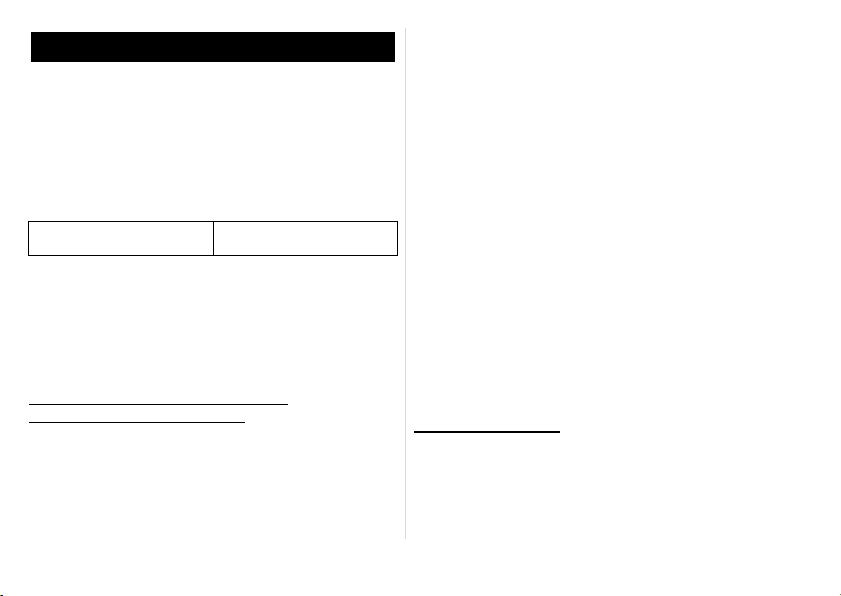
Interchangeable Lens for
Digital Camera
One (1) year, parts and
labour
DVQX1303_ENG_SPA.book 15 ページ 2017年10月20日 金曜日 午後4時0分
16
DVQX1303 (SPA)
Índice
Información para su seguridad........................ 16
Prevención contra las averías ....................... 17
Accesorios suministrados................................ 18
Nombres y funciones de los componentes...... 19
Unir y quitar el objetivo.................................... 20
Colocar/quitar el tele convertidor 1.4k............ 21
Función de preajuste de enfoque.................... 22
Cómo usar el montaje del trípode ................... 23
Precauciones para el uso................................ 24
Búsqueda de averías..................................... 24
Especificaciones.............................................. 25
LO SIGUIENTE SÓLO INTERESA A CANADÁ.
Información para su seguridad
Mantenga la unidad lo más lejos que sea posible de
equipos electromagnéticos (como hornos de
microondas, televisores, vídeo juegos, trasmisores
radio, líneas de alto voltaje, etc.).
• No utilice la cámara cerca de teléfonos móviles, ya que lo
de hacerlo puede producir ruido que afectará
negativamente a las imágenes y el sonido.
• Si la cámara queda afectada negativamente por un equipo
electromagnético y deja de funcionar correctamente, apague
la cámara y quite la batería y/o el adaptador de CA
conectado. Luego vuelva a insertar la batería y/o vuelva a
conectar el adaptador de CA y encienda la cámara.
El objetivo puede usarse con una cámara digital compatible
con el estándar de montaje de objetivos del “Micro Four
Thirds
TM
System”.
• No se puede montar en una cámara con estándar de
soporte Four Thirds
TM
.
• Las figuras de la cámara digital en estas instrucciones de
funcionamiento muestran la DC-G9 en concepto de ejemplo.
• E aspecto y las especificaciones de los productos descritos
en este manual pueden diferir de los productos reales que
usted ha comprado debido a aumentos sucesivos.
• El logotipo Micro Four Thirds™ y Micro Four Thirds son
marcas comerciales o marcas comerciales registradas de
Olympus Corporation, en Japón, Estados Unidos, la Unión
Europea y otros países.
• El logotipo Four Thirds™ y Four Thirds son marcas
comerciales o marcas comerciales registradas de
Olympus Corporation, en Japón, Estados Unidos, la Unión
Europea y otros países.
• G MICRO SYSTEM es un sistema de cámara digital con
objetivo intercambiable de LUMIX basado en el estándar
Micro Four Thirds System.
• LEICA es una marca registrada de Leica Microsystems IR
GmbH. ELMARIT es una marca registrada de Leica
Camera AG. Los objetivos LEICA DG se fabrican usando
instrumentos de medida y sistemas de garantía de calidad
certificados por Leica Camera AG en base a los
estándares de calidad de la compañía.
• Los nombres de los sistemas y productos que se mencionan en
estas instrucciones generalmente son marcas comerciales
registradas o marcas comerciales de los fabricantes que
desarrollaron el sistema o producto en cuestión.
CAN ICES-3(B)/NMB-3(B)
DVQX1303_ENG_SPA.book 16 ページ 2017年10月20日 金曜日 午後4時0分

17
(SPA) DVQX1303
LO SIGUIENTE SÓLO SE APLICA EN LOS EE. UU.
∫ Atención del objetivo
• Esta lente tiene una construcción con resistencia al polvo
y las salpicaduras. Al usarla, tenga cuidado con lo
siguiente.
Si la lente no está funcionando correctamente, consulte a
su distribuidor o a su centro de servicio más cercano.
– Coloque la lente en una cámara digital con resistencia al polvo
y las salpicaduras. La lente no está diseñada para ser
resistente al polvo ni las salpicaduras cuando se coloca en una
cámara digital no resistente al polvo ni las salpicaduras.
– Al colocar o quitar la lente, tenga cuidado de que
materiales extraños como arena, polvo o gotas de agua no
se adhieran a la lente o entren en la goma de montaje, los
puntos de contacto, la cámara digital y la lente.
– Esta lente no es impermeable y no se puede usar para
grabar abajo del agua. Para la resistencia a
salpicaduras, la lente está construida para resistir la
entrada de agua. Si las salpicaduras de agua, etc. no se
adhieren a la lente, límpiela después de usarla con un
paño suave y seco.
• Para mejorar la función de resistencia al polvo y la
salpicadura de esta lente, se usa una goma de montaje de
la lente en la parte de montaje. Luego de cambiar la lente
varias veces, puede encontrar que la goma de montaje de
la lente haya marcado la parte de montaje del cuerpo de la
cámara digital, lo que no afecta su rendimiento.
Para obtener información sobre cómo cambiar la goma de
montaje de la lente, comuníquese con el centro de
servicio más cercano.
Notas FCC:
Se ensayó este equipo y se comprobó que está de conformidad
con los límites de un dispositivo digital de la clase B, de acuerdo
con la Parte 15 de las Reglas FCC.
Estos límites se han ideado para proporcionar una razonable
protección contra las interferencias dañinas en una instalación
residencial. Este equipo genera, utiliza y puede radiar energía de
frecuencia radio y, por si no se instala y se utiliza de acuerdo con
las instrucciones, puede ocasionar interferencia dañina a las
comunicaciones radio. Aunque no hay garantía de que no pueda
tener lugar interferencia en especiales instalaciones. Si este
equipo causa interferencia a la recepción de radio o televisión que
pueden determinarse apagando y encendiendo el equipo, se
anima al usuario intentar corregir la interferencia tomando una de
las medidas a continuación:
• Vuelva a orientar o a colocar la antena receptora.
• Aumente la separación entre el equipo y el receptor.
• Conecte el equipo a una toma de un circuito diferente del que
está conectado el receptor.
• Llame al concesionario o un técnico experto de radio y televisión
para ayuda.
Todo cambio o modificación a este equipo sin autorizar invalidará
el título del usuario para hacer funcionar este dispositivo.
Este dispositivo cumple con la Parte 15 de las Reglas FCC. El
funcionamiento está sujeto a las dos condiciones a continuación:
(1) Este dispositivo podría no causar interferencia dañina y (2)
este dispositivo tiene que aceptar toda la interferencia recibida,
incluyendo la que puede causar un funcionamiento no deseado.
Parte responsable:
Panasonic Corporation of North America
Two Riverfront Plaza, Newark, NJ 07102-5490
Contacto para atención:
http://shop.panasonic.com/support
Prevención contra las averías
ESPAÑOL
DVQX1303_ENG_SPA.book 17 ページ 2017年10月20日 金曜日 午後4時0分
18
DVQX1303 (SPA)
• No ejerce demasiada presión en el objetivo.
• Cuando hay suciedad (agua, aceite, huellas dactilares,
etc.) en la superficie del objetivo, la imagen puede salir
afectada. Limpie ligeramente con un paño blando y seco
antes y después de tomar las imágenes.
• Para evitar que se
introduzcan o acumulen
polvo y otras partículas en la
lente, instale la tapa trasera
de esta cuando no la utilice.
• Para proteger los puntos de
contacto de la lente 1, no la
coloque con la superficie de
montaje orientada hacia
abajo. Evite además que los
puntos de contacto de la lente se ensucien.
∫ Acerca de la condensación (Empañamiento
del objetivo)
• La condensación ocurre cuando la temperatura ambiente
o la humedad cambia. Tenga cuidado con la
condensación, ya que puede hacer que la lente se
ensucie, aparezcan hongos y se produzca un mal
funcionamiento.
• Si ocurre condensación, apague la alimentación y la deje
así durante dos horas. Una vez de que la cámara se haya
aclimatado a la temperatura ambiente en empañamiento
desaparece naturalmente.
Accesorios suministrados
Números de productos correctos a partir de noviembre de
2017. Pueden estar sujetos a cambio.
¢1 El tele convertidor 1.4k (DMW-TC14) está previsto que
se venda como accesorio opcional.
¢2
Está disponible para su compra como un paquete que incluye
una tapa de la lente y una tapa trasera de la lente.
• La tapa trasera de la lente y la tapa de la lente están
colocadas en la lente intercambiable y el tele
convertidor 1.4k en el momento de la compra.
1 Estuche de la lente
2 Visera del objetivo
3 Tapa del objetivo
4
Tapa trasera del objetivo
5 Montaje del trípode
externo
6 Tele convertidor 1.4k
7 Estuche de la lente
8 Tapa del objetivo
9 Tapa trasera del
objetivo
SFC0360
DVZE1018Z
2134
1GE1Z253Z VFC4605
5
SYQ0680
DVXE1027Z
VFC4460
7689
DVGX1115Z VFC4605
DMW-TC14
1
2
DVQX1303_ENG_SPA.book 18 ページ 2017年10月20日 金曜日 午後4時0分
19
(SPA) DVQX1303
Nombres y funciones de los
componentes
1 Superficie del objetivo
2 Anillo de apertura
Gire el anillo para ajustar el valor de apertura.
• Si ajusta la cámara al modo AE con prioridad a la abertura
o al modo de exposición manual, se habilitará el valor de
apertura del anillo.
• Si ajusta la posición del anillo de apertura a [A], se
habilitará el valor de apertura de la cámara.
3 Anillo del enfoque
Gire para enfocar cuando tome fotografías con el enfoque
manual (MF).
4
Interruptor selector del rango de distancia de enfoque
[FULL]: Puede enfocar entre los rangos de 1,15 m (3,8 pies)
a

.
[3m-¶]:Puede enfocar entre los rangos de 3,0 m (9,8 pies)
a ¶. Con el enfoque automático, la velocidad de
enfoque aumentará.
5 Botón de enfoque (P22)
6 Selector de enfoque (P22)
7 Montaje del trípode (P23)
8 Perilla de bloqueo de la orientación (P23)
9 Interruptor [AF/MF]
Esto le permite cambiar entre el enfoque automático (AF) y
el enfoque manual (MF).
• Cuando el interruptor [AF/MF] del objetivo o de la
configuración de la cámara se establece a [MF], se
habilita el enfoque manual (MF).
10 Interruptor O.I.S.
Cuando a la cámara está unido el objetivo, está ajustada la
función estabilizadora para ver si el interruptor O.I.S. está
ajustado en [ON].
• Le recomendamos que ajuste el interruptor O.I.S. a [OFF]
cuando usa un trípode.
11 Marca para ajustar el objetivo
12 Goma de montaje de la lente
13 Punto de contacto
1 4 5 102 3 76 8 9
11
12
13
DVQX1303_ENG_SPA.book 19 ページ 2017年10月20日 金曜日 午後4時0分
20
DVQX1303 (SPA)
Nota
• Cuando se opera el Enfoque Automático mientras se
graba una imagen en movimiento, puede que se grabe el
sonido de operación. Si el sonido le molesta,
recomendamos realizar la grabación con una función
como el Enfoque Manual (MF) para bloquear el enfoque.
• Si establece O.I.S. a [ON] cuando graba una película, es
posible que se grabe el ruido de funcionamiento. Si le
molesta, le recomendamos que establezca el interruptor
O.I.S. a [OFF] e instale la cámara en un trípode.
∫ Tele convertidor 1.4k
Unir y quitar el objetivo
Para obtener información sobre cómo colocar y retirar
la lente, consulte las instrucciones de funcionamiento
de su cámara digital.
• Antes de colocar o quitar la lente, compruebe que la
cámara digital está apagada.
• Antes de colocar la lente en la
cámara digital, quite la tapa trasera
de la lente. (
1
,
2
)
• Para evitar que se introduzcan o
acumulen polvo y otras partículas en la
lente, no olvide instalar la tapa trasera
de la lente una vez que la haya retirado
de la cámara digital.
∫ Unión de los filtros
• Si utiliza dos o más filtros a la vez, puede oscurecerse
parte de una imagen grabada.
• Se puede colocar la tapa de la lente o la visera de la lente
con el filtro ya puesto.
• No es posible colocar una lente de conversión o un
adaptador en la superficie de la lente y usarlo en
combinación con la lente. No coloque ningún otro elemento
que no sea un filtro. Hacerlo podría dañar la lente.
∫ Unión de la visera del objetivo
1
Gire el tornillo de la visera de
la lente en la dirección de la
flecha para aflojarla (
1
).
2 Inserte la tapa del objetivo
hasta que pare (2).
3 Gire el tornillo de la tapa del
objetivo en la dirección de
la flecha para asegurar la
tapa del objetivo
correctamente (3).
1 Marca de ajuste
2
Botón de liberación
de la lente
3 Marca para ajustar
el objetivo
4 Punto de contacto
5 Goma de montaje
de la lente
1
32
4 5
DVQX1303_ENG_SPA.book 20 ページ 2017年10月20日 金曜日 午後4時0分
21
(SPA) DVQX1303
Nota
• Cuando utilice la lente
con la visera de la lente
, compruebe si
el tornillo de la visera de la lente se ha aflojado.
• Cuando toma imágenes con el flash con la visera de la
lente colocada, la parte inferior de la pantalla puede
oscurecerse y el control del flash se puede deshabilitar
porque la visera de la lente puede oscurecer el flash de
fotografía. Recomendamos retirar la visera de la lente.
• Cuando transporte la cámara, puede
colocar la
visera de la lente
temporalmente en la dirección inversa.
• No lleve la lente sosteniéndola
solamente de la visera de la lente.
Colocar/quitar el tele
convertidor 1.4k
• El tele convertidor se puede usar en combinación con
esta lente (H-ES200). (A partir de noviembre de 2017)
• Para acceder a la información más actualizada sobre
lentes compatibles aparte de esta lente, consulte el
sitio web de Panasonic.
• No coloque ninguna pieza que no sea una lente
compatible. Hacerlo podría dañar la lente o el tele
convertidor o afectar negativamente a su desempeño.
• Antes de colocar o quitar el tele convertidor, verifique
que la cámara digital está apagada.
• Quite la tapa de la lente y la tapa trasera de la lente.
∫ Para colocar el tele convertidor
1 Alinee la marca de ajuste
A en el tele convertidor
con la marca de ajuste de
lente
B en la lente (1) y
gire el tele convertidor en
la dirección de la flecha
hasta que se oiga un
sonido de clic. (2)
2 Alinee la marca de ajuste
de lente
C en el tele
convertidor con la marca
de ajuste de lente
D en
la cámara digital (3),
y
gire la lente en la
dirección de la flecha
hasta que se oiga un sonido de clic. (4)
• Cuando coloque la lente en la cámara digital, no presione el botón
de liberación
E
ni el botón de liberación en el tele convertidor.
∫ Para quitar el tele convertidor
1 Mientras mantiene
pulsado el botón de
liberación de lente
E en
la cámara digital, gire la
lente colocada en el tele
convertidor en la
dirección de la flecha
hasta que se detenga y
quítela (1, 2).
DVQX1303_ENG_SPA.book 21 ページ 2017年10月20日 金曜日 午後4時0分
22
DVQX1303 (SPA)
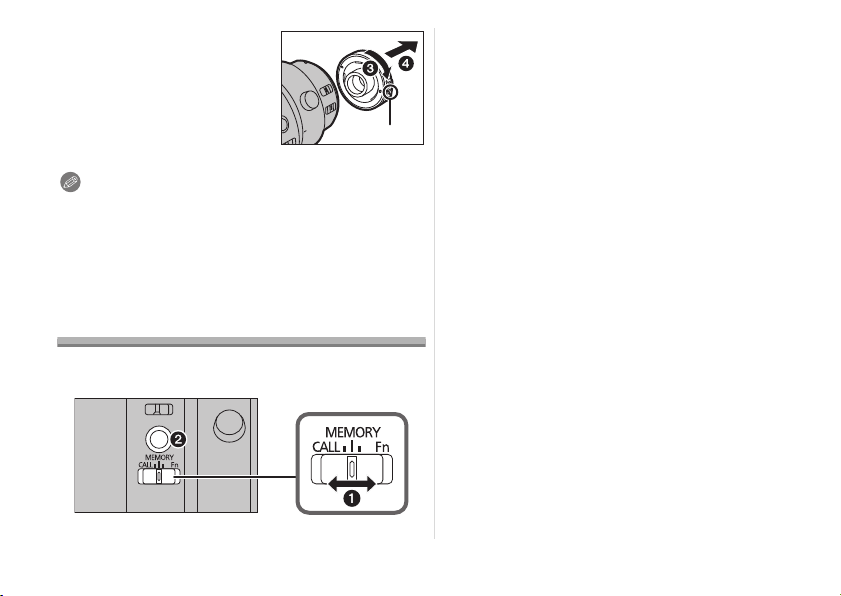
2 Mientras mantiene
pulsado el botón de
liberación
F en el tele
convertidor, gire el tele
convertidor en la
dirección de la flecha
hasta que se detenga y
quítelo (3, 4).
Nota
• Cuando el tele convertidor está montado, la apertura se
establecerá en un valor un paso mayor que el valor índice
en el anillo de apertura.
• Cuando actualice el firmware de la lente a la última
versión, quite el tele convertidor antes de realizar la
actualización.
Función de preajuste de enfoque
Puede activar una posición de enfoque guardada en la
memoria de la lente. También puede bloquearse el enfoque.
(Para guardar una posición de enfoque en la memoria
de la lente)
1
Ajuste el selector de enfoque a [MEMORY] (
1
).
2 Ajuste el enfoque en la posición que quiera
guardar en la memoria.
3 Pulse el botón de enfoque (2) para guardar la
posición de enfoque en la memoria.
• La posición de enfoque guardada en la memoria seguirá en
efecto hasta que guarde una nueva posición en la memoria.
(Para activar la posición de enfoque guardada en la memoria)
4 Ajuste el selector de enfoque a [CALL] (1).
5 Pulse el botón de enfoque (2) para activar la
posición de enfoque guardada en la memoria.
• [MF] se activa temporalmente mientras el botón de
enfoque se mantiene pulsado.
• Puede activarse una posición de enfoque dentro del rango
de 3,0 m incluso cuando el interruptor selector del rango
de distancia de enfoque está ajustado en [3m–¶]. Sin
embargo, si suelta el botón de enfoque, la posición de
enfoque se moverá a la posición límite (3,0 m).
• Se recomienda ajustar el interruptor selector del rango de
distancia de enfoque en [FULL] cuando se usa la función
de preajuste de enfoque.
∫ Bloqueo del enfoque.
1 Ajuste el selector de enfoque a [Fn] (1).
2 Pulse el botón de enfoque (2).
• El enfoque se bloquea mientras se mantiene pulsado el
botón de enfoque.
• También puede activar una función establecida en una
cámara digital compatible con la función [Fn].
DVQX1303_ENG_SPA.book 22 ページ 2017年10月20日 金曜日 午後4時0分
23
(SPA) DVQX1303
Nota
• Antes de quitar la lente, compruebe que la cámara digital esté
apagada. Si se quita la lente mientras la cámara digital está
encendida, la posición de enfoque no se guardará en la memoria.
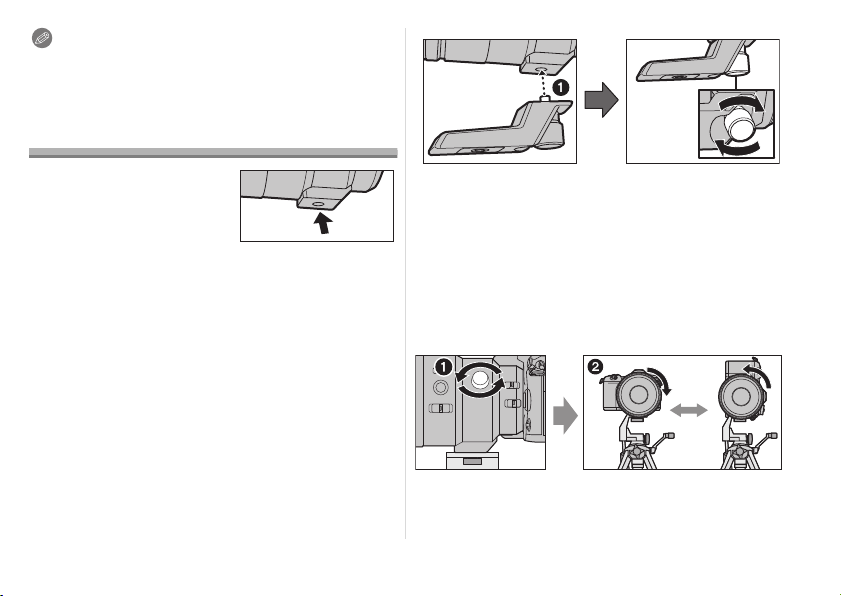
Cómo usar el montaje del trípode
Cuando utilice un trípode, fíjelo al
montaje del trípode de la lente.
• Se recomienda evitar fijar el
trípode al montaje del trípode
de la cámara digital para
evitar daños en la lente que
podrían producirse cuando se transporta la misma.
• En los siguiente casos, antes de fijar un trípode, fije el
montaje del trípode externo suministrado a la lente:
– Cuando la lente o cámara digital entra en contacto con
el trípode
– Cuando se utiliza una empuñadura con batería que
entra en contacto con el trípode
∫ Cómo fijar el montaje del trípode externo
(suministrado)
1 Inserte el tornillo de fijación del montaje del
trípode externo en el montaje del trípode de la
lente. (
1
)
2 Gire el tornillo de fijación del montaje del
trípode externo en la dirección de las flechas
para fijarlo firmemente.
• Antes del uso, compruebe que el tornillo de fijación del
montaje del trípode externo no está flojo.
• No golpee o aplique una fuerte presión al montaje del
trípode externo.
∫ Cómo cambiar la orientación vertical/
horizontal
Puede aflojar la perilla de bloqueo de la orientación (
1
)
para girar la lente junto con la cámara digital (
2
).
De este modo, puede cambiar rápidamente entre una
orientación vertical y horizontal mientras usa el trípode.
• Después de cambiar la orientación, apriete la perilla de
bloqueo de la orientación con firmeza y compruebe que no
está floja.
DVQX1303_ENG_SPA.book 23 ページ 2017年10月20日 金曜日 午後4時0分

24
DVQX1303 (SPA)
Precauciones para el uso
Tenga cuidado de no hacer caer el objetivo ni le choque contra.
Asimismo tenga cuidado de no presionarlo demasiado.
• Tenga cuidado de no hacer caer la bolsa en la que cabe el
objetivo. Éste podría dañarse, la cámara podría dejar de
funcionar normalmente y las imágenes ya podrían no grabarse.
• Cuando lleve la cámara digital con el objetivo montado,
sostenga la cámara digital y la lente a la vez.
Cuando usa pesticidas y otras substancias volátiles alrededor
de la cámara tenga cuidado de que no entre en el objetivo.
• Si dichas substancias caen en el objetivo, éstas pueden dañarlo
o hacer desconchar su barniz.
No apunte con el objetivo al sol u otras fuentes de luz intensa.
• Esto podría hacer que el objetivo recogiera demasiada luz, lo
que podría provocar un incendio y una avería.
• Evite usar o guardar la lente en cualquiera de las
siguientes ubicaciones, ya que esto podría causar
problemas en el funcionamiento o fallas:
– Bajo la luz directa del sol o bien a lo largo de la costa
durante el verano
– En lugares donde haya altas temperaturas o altos
niveles de humedad o bien donde sean repentinos los
cambios de temperatura y humedad
– En lugares donde haya altas concentraciones de arena,
polvo o suciedad
–
Donde haya llamas
– Cerca de calefactores, acondicionadores de aire o
humedecedores
– Donde el agua puede hacer mojar la unidad
– Donde haya vibraciones
– Dentro de un vehículo
• Se refiera también a las instrucciones de funcionamiento de la
cámara digital.
• Cuando no ha de ser usada la unidad por un período
prolongado, le recomendamos guardar
con un desecante
(silicagel). El hecho de no
hacerlo podría ocasionar una avería
causada por el moho etc. Se recomienda que compruebe el
funcionamiento de la unidad antes de usarla.
• No deje el objetivo en contacto con productos de plástico
durante largos períodos de tiempo.
•
No
toque los contactos eléctricos de la unidad. Lo de hacerlo
puede causar avería en la unidad.
• No desmonte ni modifique la unidad.
No utilice gasolina, diluyente, alcohol u otros agentes
de limpieza parecidos para limpiar la unidad.
• El hecho de usar disolventes puede dañar el objetivo y hacer
desconchar su barniz.
•
Quite cualquier indicio de polvo o huellas dactilares con un paño
blando y seco.
• Utilice un paño seco para eliminar la suciedad y el polvo de la goma
de montaje de la lente, el anillo de enfoque o el anillo de apertura.
•
No
use detergentes para cocina o un paño tratado
químicamente.
Cuando enciendo o apago la cámara o cuando muevo el
objetivo, escucho un ruido, por ejemplo, un sonido vibratorio.
Cuando tomo fotografías de un objeto brillante, como
un objeto en el exterior, o cuando tomo fotografías con
un valor de apertura grande, el objetivo hace ruido.
•
Éste
es el sonido del objetivo o el movimiento de abertura y no
es un funcionamiento defectuoso.
Búsqueda de averías
DVQX1303_ENG_SPA.book 24 ページ 2017年10月20日 金曜日 午後4時0分

25
(SPA) DVQX1303
Especificaciones
Las especificaciones están sujetas a cambio sin previo aviso.
ÓPTICA INTERCAMBIABLE PARA CÁMARA DIGITAL
“LEICA DG ELMARIT 200 mm/F2.8/POWER O.I.S.”
Tele convertidor 1.4k
Longitud focal
f=200 mm (Igual a una cámara de película de 35 mm: 400 mm)
1,4k de la lente colocada.
Tipo de abertura 9 aspas de diafragma/Diafragma de apertura circular j
Apertura máxima F2.8 (Cuando se coloca el tele convertidor 1.4k : F4.0) j
Valor de abertura mínimo F22 (Cuando se coloca el tele convertidor 1.4k : F22) j
Estructura del objetivo 15 elementos en 13 grupos (2 lentes ED) 6 elementos en 4 grupos
Revestimiento de superficie
Nano
Sí
j
En la distancia del enfoque
[FULL]: 1,15 m (3,8 pies) a

/ [3 m-

]: 3,0 m (9,8 pies) a

(desde
la línea de referencia de la distancia del enfoque)
j
Máxima ampliación de la imagen 0,2k (Igual a una cámara de película de 35 mm: 0,4k) j
Estabilizador óptico de la imagen
Disponible j
Interruptor O.I.S. Disponible (ENCENDER/APAGAR) j
Interruptor [AF/MF] Disponible (Cambie AF/MF) j
Soporte “Micro Four Thirds Mount” j
Ángulo visual
6,2x (Cuando se coloca el tele convertidor 1.4k : 4,4x) j
Diámetro del filtro
77 mm j
Diámetro máx. Ø87,5 mm (3,4 pulgadas) Ø58 mm (2,3 pulgadas)
Longitud total Aprox. 174 mm (6,9 pulgadas) (desde la punta del objetivo hasta
la base lateral de la montura del objetivo)
Aprox. 22 mm (0,87 pulgadas)
(desde la punta del objetivo hasta la
base lateral de la montura del
objetivo)
Peso
Aprox. 1245
g
(2,74 lb) (excluyendo el montaje del trípode externo)
Aprox. 120 g (0,26 lb)
Temperatura de funcionamiento
j10 oC a 40 oC (14 oF a 104 oF) j
10
o
C a 40
o
C (14
o
F a 104
o
F)
Resistencia al polvo y a las
salpicaduras
Sí Sí
DVQX1303_ENG_SPA.book 25 ページ 2017年10月20日 金曜日 午後4時0分

Printed in Japan
Panasonic Canada Inc.
5770 Ambler Drive, Mississauga, Ontario, L4W 2T3
www.panasonic.com
Panasonic Corporation 2017
Two Riverfront Plaza, Newark, NJ 07102-5490
http://shop.panasonic.com
Panasonic Corporation of North America
DVQX1303_ENG_SPA.book 26 ページ 2017年10月20日 金曜日 午後4時0分